#world-development
39 messages · Page 81 of 1
 desert python
 bold ibex
withing the models to give the immersion of sitting but I dunno If that's worth it
bold ibex
desert python
or... you could be stupid like me and create a massive bone tracking system that...
hmmm hahaha
I'll have to find some way to make it a collder '
collider
lets see if box colider 2d works
 severe pier
the more I've built in unity, the more I kind of admire the way multiple people can build at once in Halo forge, I wish there was a way you could do that in unity
severe pier
like a mesh collider?
 median bluff
The world was uploaded with a 40 people cap. Thanks you for your help!
 errant beacon
cool! and yw c:
 thin hollow
 errant beacon
Tick the Convex checkbox on the mesh collider
do the same on your floor if you're using a mesh collider there o:
errant beacon
yw!
 random owl
Convex collider on floor would be really dependable on the floors shape and if it would work box collider would be better
 stiff imp
Quick Question:
So I just received a few emails about that I have been welcomed to upload custom content, but I'm still visitor rank in VRChat.
Sooo, can I upload worlds?
 light carbon
stiff imp
Quick Question:
So I just received a few emails about that I have been welcomed ...
light carbon
stiff imp
Quick Question:
So I just received a few emails about that I have been welcomed ...
Can you check what it says on the VRChat website? Your rank will be the color around your entire profile (not the yellow one that appears around your profile picture or green in the case that you're in-game)
 small canopy
@thin hollow You could also change the collision detection from discrete to continuous so it's less subject to pass through geometry
stiff imp
light carbon
Can you check what it says on the VRChat website? Your rank will be the color ar...
I got this blue
 light carbon
Yeah that's New User as such you can upload content to VRChat
stiff imp
light carbon
Yeah that's New User as such you can upload content to VRChat
Thank you Ohm! May your resistance be high?
light carbon
👍
 jade crown
I have got a question how do I make it so I can toggle on the ui?
 jade crown
because I am so clueless what I am doing wrong
 mild spade
Right now you are using a button to toggle a mirror on and off, You could have another button that turns the UI on and off just the same way. Either by making another canvas, or using an OnInteract button you can press.
jade crown
I am trying to make it so the mirror goes on or off then I press the button twice thats what I ment my makeing the ui toggleable
I tried to make it toggle the mirror but that seemed to not work sadly
mild spade
Ah ok, sorry for misunderstanding, It seems what you are doing is right, but you could also use a "Toggle" instead of a "Button" to make it more simple. Did you tested it in the Unity Play mode and/or in the game? Maybe the problem is not that it doesnt work, but that is not set up properly (you need UI Shape on the canvas for example)
 jade crown
ok I just changed it to toggle and I think I already had the ui shape on it but I could have been wrong and I tested it in unity & in the game
jade crown
mild spade
Ah ok, sorry for misunderstanding, It seems what you are doing is right, but you...
thank you its some how magically working
mild spade
oh That is strange xD things magically fixing themselves on unity, happens often
jade crown
mild spade
oh That is strange xD things magically fixing themselves on unity, happens ofte...
well I kinda fixed it some how but its like walking on the ceiling I don't know how I did it but at the same time I did
Another question this one should be way more easy
How do I make this guy not fling players all over the place when holding it?

I once tried making them triggers but that just makes them not interact with the environment and I want them to
mild spade
If it is on the PickUp layer it should not interact with the player, do you have another collider as a child maybe? If you do, try setting that to PickUp as well
 jade crown

ill try
they both have pick up I think
yeah
but different problem now

I got the pick up off of the child
mild spade
You dont need 2 pickup scripts, I was just telling you to change the layer to "Pickup" , sorry for not explaining correctly. Leave the pickup script on the parent, and remove it on the child, but make sure both have the layer as "pickup"
 jade crown
ok all good thanks!
random owl
Might want to also make sure to remove the box collider from the child cube
 pure kraken
@near escarp not sure if you would have an answer to this, but I seem to be having trouble with my avpro audio sources. I'm having trouble hearing the audio that comes out, even though the world is at 100% and the volume is at 1 in the audio script. Any ideas?
 near escarp
No clue, sorry
pure kraken
damn. its kk

 tired granite
@south drum Create a material in the color/texture you want and drag and drop it on
 south drum
thx
tired granite
Anyone have any ideas why sprites would fail to animate in vrc world? They work fine in the unity editor playing automatically during runtime, no triggers or anything however once uploaded the sprites are just stationary
mild spade
How are you animating them? Particle system with sprite sheet? Sprite renderer with animator components? I have worlds with sprite (as 2D sprite texture type) and they work with both particle and sprite renderers
tired granite
It's a sprite renderer with a animation script
 mild spade
Custom scripts dont work on VRChat. You have to either use vrchat´s trigger system or create your own scripts using Udon (sdk3)
(or animate your own using animators)
tired granite
Ahhh so that's why, ok thank you!
bold ibex
hey guys I'm having a weird issue with pickupables in game
I have assigned these three components and they were working but not on a few objects they just pick up the shadow of the item you can see it fully
random owl
You most likely have the item marked as static
bold ibex
1)vrc object sync
2)vrc pickup
3)mesh collider/convex
bold ibex
random owl
You most likely have the item marked as static
ah let me check
correcto
!
lmao
how didnt I see that
ty m8
 slate spire
I have a question about Depth Masks in the system. The shader I made shows up perfectly in scene view, but seems to be multiplying upon itself in game view and in VRC.

this is a shot of it in viewport, going to send one in game

    SubShader{
        // Render the mask after regular geometry, but before masked geometry and
        // transparent things.

        Tags {"Queue" = "Geometry-10" }

        // Don't draw in the RGBA channels; just the depth buffer

        ColorMask 0
        ZWrite On

        // Do nothing specific in the pass:

        Pass {}
    }
}```this is the depth mask Im using, am I doing something wrong?
Im trying to hide things below the plane and just show the skybox with a little mist effect to let people know where they are walking
bold ibex
If anyone is looking for the qv pens or udon keyboard

J.T. Controller for USharpVideo Player [SDK3](¥ 0), J.T. Playlist for USharpVideo Player [SDK3](¥ 0), Avatars3.0用Assetカスタムアイコン(¥ 0), VRChatワールド用Udonキーボード [SDK3](¥ 500), Qv Pen [VRChat][SDK2][SDK3](¥ 0), VRChatThumbnailer 2020 (サムネイル設定補助ツール)(¥ 0), 試作Udon鍋 [VRChat](¥ 0), ワールド用 ジグソーパズル [VRChat][SDK2](¥
What kind of control do we have over our worlds when they go live? Can we kick or ban people from them?
random owl
Permanently no, but temporarily yes from any instance you are in
bold ibex
does anyone have the 8 ball prefab by chance?
bold ibex
found it nvm for anyone who needs it
GitHub
VRCBilliards: Community Edition. Contribute to FairlySadPanda/vrcbce development by creating an account on GitHub.
 half drum
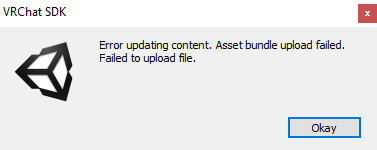
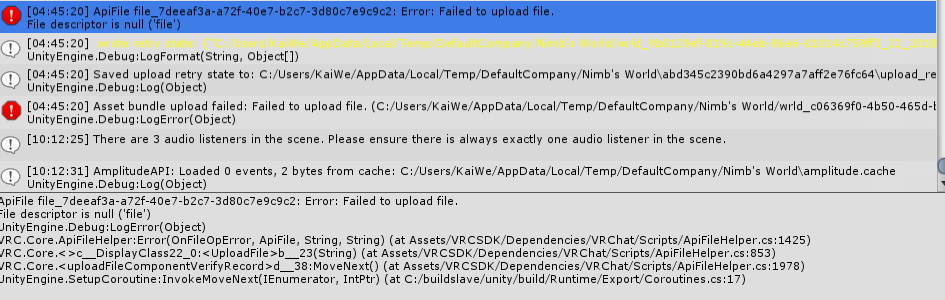
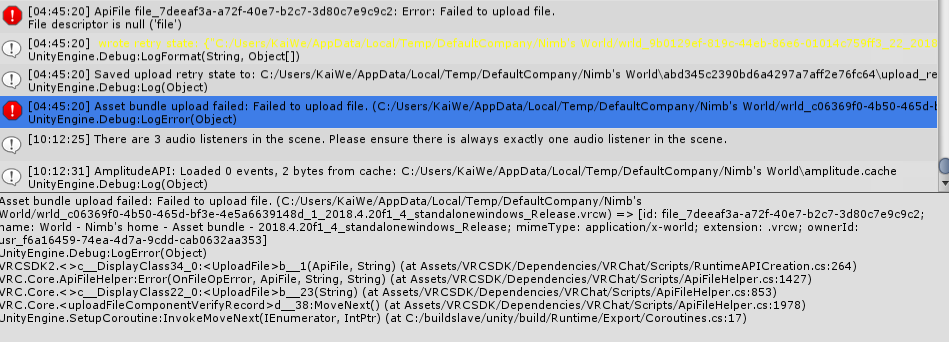
Im having trouble updating the world I uploaded a few months ago. the world works fine with offline testing.
https://i.gyazo.com/f8e32da4a1e668a6f1670c55ffeca5d0.png
https://i.gyazo.com/781856a2d794bdcd19d5969d2440e62c.png
https://i.gyazo.com/1d792708dc2fd3b6f6aef6cb396b0a4b.png
I tried updating the VRC SDK to 2021.06.03, and detatching the blueprint ID and upload as new, no dice in both cases
 supple urchin
Can anyone help me with light mapping? 2 of my objects have overlapping light mapping can't they both aren't letting me enable the setting to get rid of that error. (Just DM me I'll get back to you in the morning)
 worn elk
I'm trying to use Norix's media player, but it says it NEEDS UdonSharp to make it work. The problem is, any time I install the Unity package for either UdonSharp or the media player, I get 90 critical errors and can no longer build my world.
As far as I know, I'm not doing anything wrong. These errors appear the instant I import UdonSharp. All I want is a media player that allows other people to enter URLs. The basic one that the SDK comes with kind of sucks. It only lets the world master use it, and I cannot find any way to allow it to transfer usage to other people in my world.
I really dont want anything complicated. I just want to be able to let other people post videos. Norix's media player looks like it should be working just fine, but its exploding my error log
 devout plume
Object not showing up after add "VRC pickup"
anyone knows what caused it?


after I remove the script, it will show up
worn elk
@stoic fractal @harsh geode@fringe viper Not sure who to tag. Seems like this is a bot scam
Someone may have a compromised account
@gloomy fog
Sorry if I pinged the wrong people. Still learning my way around the server
 fringe viper
Usually you'd want to ping Active Chat Mod for Discord chat-related issues. :p
worn elk
Lol yes, I realized this a smidge too late
 sour axle
quick question:
i have seen worlds that make your avatar lose control of your kinemetic and fall to the ground like a puppet (simulating death).
does someone know how it works or point me to an article on how to do that? (SDK3)
 bitter idol
worn elk
I'm trying to use Norix's media player, but it says it NEEDS UdonSharp to make i...
bitter idol
worn elk
I'm trying to use Norix's media player, but it says it NEEDS UdonSharp to make i...
Use a different video prefab. There are many available
bitter idol
devout plume
Object not showing up after add "VRC pickup"
anyone knows what caused it?
Firs of all you're missing object sync so the objects movement won't be seen by others, second of all you have gravity checked and the collider off so it's probably falling through the world....
You need the collider enabled to even pick it up btw
Disabling gravity will make it float, and kinematic will make it so it stays still in the Air
bitter idol
sour axle
quick question:
i have seen worlds that make your avatar lose control of your ki...
I've done that in sdk2 it is the vrc damage script and you need the vrc player health mod in world player mods I think?
I think that's everything. Might be forgetting. Haven't touched it in a year
Wouldn't recommend doing that currently though. My world is bugged now thanks to the update so any one who dies is stuck in t pose till they rejoin
That might happen to you
sour axle
bitter idol
I've done that in sdk2 it is the vrc damage script and you need the vrc player h...
thanks, i will take a look into it 👍
worn elk
bitter idol
Use a different video prefab. There are many available
Do you have a recommendation? The Norix one which requires UdonSharp is the only one I can seem to find.
Not to mention there's a ton of other useful things I'd like to use that requires UdonSharp
 tepid tangle
hi! can you still upload sdk 2.0 worlds? i go to upload my sdk 2.0 world and it just doesnt go to the upload screen??? theres a scene descriptor and everything should work but it doesnt open the upload thing in the game window anymore
wait nvm i fixed it but i know this is gonna happen when i upload the world, but how do i add gravity and such again??? i remember all my other worlds wouldnt have gravity for some weird reason until i added something (you couldnt jump) but i dont remember what it is that i add
 tawdry egret
Alr Quick question for anyone, its easy asf im prolly just dumb
Wheres the package manager for unity? its not in the Window Tab anymore atleast to my knowledge
 surreal nebula
tawdry egret
Wheres the package manager for unity? its not in the Window Tab anymore atleast ...
surreal nebula
tawdry egret
Wheres the package manager for unity? its not in the Window Tab anymore atleast ...
 worn elk
Can anyone tell me how to use the VRC Spacial Audio? I THOUGHT I had a good idea of how it works, but for some reason, no matter what I do, the sound I want to play keeps coming out whisper quiet. NOTHING makes it louder. I have messed with the gain, which I read caps out at 10 despite being able to enter in higher values, I've messed with the distance, I've messed with virtually everything I can think of. No matter whether I use Logarithmic audio curve, or whatever the VRC Spacial Audio script uses, NOTHING gets this sound above a whisper.
I've been banging my head against this for HOURS now and nothing seems to make a difference. Its taking almost 5 minutes just to build and test each time and if anyone just knows the answer, I think I might be able to die happy.
 unreal eagle
worn elk
Can anyone tell me how to use the VRC Spacial Audio? I THOUGHT I had a good idea...
unreal eagle
worn elk
Can anyone tell me how to use the VRC Spacial Audio? I THOUGHT I had a good idea...
Have you tried removing the VRC Spatial Audio component and playing the sound? Does it still sound quiet?
worn elk
When I try to build the world, it tells me I NEED the VRC Spatial Audio component or it wont work
even though I've already configured the audio curve in the Audio Component
I think I found part of the issue
but its so hard to tell since I need to change ONE THING and then build to see if it makes a difference
unreal eagle
Ignore the warning, you don’t need the VRC Spatial Audio component to build. It’s useful for having accurate directional audio but not having it will allow you to use other audio source types
worn elk
I'm in the middle of a build so I cant expand these menus at the moment, but these are the settings I am using right now. Under Advanced Options, it is checked to use the curve in the audio settings, and not whatever whackadoodle settings are in the VRC Spatial Audio Source.

A moment ago, I had the spatial blend accidentally defaulted to 2D and the sound was deafening and could be heard anywhere in the world
unreal eagle
Do you have CyanEmu installed? It will let you preview changes in the editor instead of needing to build every time
worn elk
Turned the blend all the way to 3D and now it actually responds to where I am in relation to the sound, but is WAY too loud
I set the gain to 3
rather than 10
It seems like either deafening or whisper is the only two volumes I can pull out of this
I dont know what CyanEmu is, but if it requires UdonSharp I have not been able to get that to work without it creating 90 critical errors
I have no idea what causes that either
unreal eagle
Nah, you can use it without UdonSharp
I can’t see any problems with your audio source component. What about the audio clip itself? When you preview the audio file outside of Unity, is it loud or quiet?
worn elk
Its average
its not as quiet as VR chat is playing
Trying this instead now

A gain of 3 made absolutely no difference. I set it back to 10, and lowered the sound VOLUME above to 0.5
unreal eagle

GitHub
CyanEmu is a VRChat client emulator in Unity. Includes a player controller with interact system. Works with SDK2 and SDK3. - CyanLaser/CyanEmu
Install this package so you won’t have to build every time to preview changes
Just as another idea, check your VRChat world audio volume in the settings window just in case it is set at a low level
worn elk
volume is at 100
Gain 10, Volume 0.5 = no change. Extremely loud
Trying again with a Gain of 1, Volume 0.5
Gain 1, Volume 0.5 still comes out blastingly loud
Trying with these settings

Now the curve HAS to start at 0.5
unreal eagle
Did you install CyanEmu? You’ll be able to adjust the audio levels in real-time when you play in the editor. Just make sure to copy the component values before exiting play
worn elk
Going to do that on the next try
But
When I last tried to upload my world, it activated the Play option, and EVERY SINGLE SOUND in the world played simultaneously at full volume
they do not behave that way when you're actually in world
but if I click that play button, they all go at the same time
full blast
unreal eagle
By Play, you mean Play on Awake?
worn elk
 unreal eagle
Right
worn elk
The sounds are set to play on awake, because most of them are ambient noise or music for certain areas of the world
they are meant to loop indefinitely
when I actually try to publish the world, that play button gets activated, and all the sounds go at the same time, full blast, and wont stop until finish uploading the world or cancel the upload.
unreal eagle
Oh
worn elk
my guess is that because there is no 3D space to alter the volume, they all just play at max volume
once I am IN world, their volumes are obviously adjusted based on my camera position
unreal eagle
You can mute the sounds coming from the editor by clicking the speaker icon at the top of the window and should work when you enter play mode
 unreal eagle
Are you using the latest VRC World SDK?
worn elk
Can I upgrade that easily? I think I am two updates behind
idk
I dont know
I am really losing my mind
I manually set my curve to 0.5 volume and THAT seems to be the one and only thing that lowers the volume to a reasonable level
but then what is the purpose of the gain an volume sliders if they dont DO anything?
unreal eagle
It should be easy to update. Here are the steps from the VRChat Documentation
https://docs.vrchat.com/docs/updating-the-sdk
VRChat
If you need to update your SDK, it is important that you follow these steps to ensure the update proceeds properly and you don't have any old/conflicting files. Version Control If you know how to use it, you may find it beneficial to use version control software like Git to manage your project. You ...
worn elk
oh yeah it just goes over the old SDK
unreal eagle
How's everything looking now?
worn elk
I dont know yet. I'm still trying to figure out how cyanemu works
current volume settings are Volume 1, Gain 0, and the audio curve starts at 1 and rolls off to 0 after 10 meters

at this point I just want it to be quieter
Before, even when the volume was at 0.5, it was still explosively loud
but when I set the CURVE to start at 0.5, it was as expected
and I dont know why
like, shouldnt the volume slider be the default starting volume of the sound? I know I can control that with the curve, but I shouldnt have to
lowering the volume slider should lower the OVERALL volume of the entire curve
unreal eagle
So when you click Play now and start the game, select the game object that has the audio source component on it and you should be able to adjust the volume values in real-time
unreal eagle
Just make sure to left click the gear icon at the top right of the audio source component and select 'Copy Component' before exiting Play mode. You can then click the gear icon again on that audio source component and select 'Paste Component Values' to make sure your changes are saved. If you exit Play mode, your changes during Play mode won't be applied
worn elk
I got it working. I dont know what I did differently, but through some combination of settings, its FINALLY at the appropriate volume
also Cyan makes this much easier and faster
unreal eagle
Great to hear
worn elk
Thank you for all of your help. This was driving me insane
unreal eagle
No worries, glad to help
unreal eagle
The best place to start is downloading the latest version and going from there
worn elk
I do have the latest version
When I install the unity package, it throws the errors immediately
unreal eagle
Ok yeah my knowledge stops at anything outside audio
worn elk
I dont know if there's an example scene or something causing the issue or what
I appreciate you getting me this far.
unreal eagle
Not sure if this will help, but there are steps on how to set up UdonSharp at the bottom of the Github page
https://github.com/MerlinVR/UdonSharp

GitHub
An experimental compiler for compiling C# to Udon assembly - MerlinVR/UdonSharp
Try making a new scene to see if you can get it working there
worn elk
yeah gonna have to
unreal eagle
All right, good luck
worn elk
thank you
 verbal hare
has anyone tried uploading a minecraft schematic into VRChat before?
 glacial pond
Is it possible to get a directional audio source that works similar to a directional light? Sounds as if it's coming from the same global direction, everywhere. example: wind
desert python
make audio source, set 3d, and make bubble rediculously large, put audio source in the distence in the direction you want
glacial pond
Won't that be... insanely loud? But thank you!
desert python
text logo can go further on the physics and how to make the audio more realistic
have you seen "betteraudio" yet? theres an audio source set up they been developing
glacial pond
I haven't, very new to world creation
desert python
lemme find link, assuming your sdk3?
desert python

GitHub
'Better' audio for UDON (VRChat) based worlds. Inc. speed of sound, sonic booms, doppler, occlusion, reverb, ... - Guribo/BetterAudio
check out the branches and check out "feat-add-everything" and add that and that should have a bit on audio source stuff
unreal eagle
desert python
have you seen "betteraudio" yet? theres an audio source set up they been develop...
Just to clarify, Guribo is the one who created BetterAudio. I haven't touched or contributed to it at all
jade crown
I have got my own question I am trying to make this coffee have its own mesh so I can pick it up
 desert python
jade crown
I have got my own question I am trying to make this coffee have its own mesh so ...
desert python
jade crown
I have got my own question I am trying to make this coffee have its own mesh so ...
is that not working in game? try a box collider instead. they are usually more reliable imo
unreal eagle
glacial pond
Is it possible to get a directional audio source that works similar to a directi...
You might want to take a look at Ambisonics. It's a surround sound audio format where the Oculus Spatializer audio SDK renders the 'soundfield' binaurally. These link explains Ambisonics more in-depth:
Start Mixing VR / 360° Sound in Ambisonics B-Format (Ignore their plugin and just follow the principles)
https://www.youtube.com/watch?v=mcUwiYwgBHw
Ambisonic Audio Fundamentals (2020) | Simon Hutchinson
https://www.youtube.com/watch?v=9m4VxFSYSEA

Ambisonics is a format used to mix audio for VR projects, 360 videos on Facebook or YouTube, and 3D installations. Watch this quick intro to get started, and learn more at https://www.waves.com/360

A brief introduction to ambisonics for immersive audio, explaining the technology and the important points to get started using this 360 audio technology in VR and other new media.
This video is part of a collaboration with Spectral Evolver working in immersive audio, including ambisonics and binaural playback.
Check out the rest of the playl...
jade crown
alright
question how would I put it on a triangle?
I think I would need a custom mesh for that one
desert python
ye
jade crown
uh.... this one aint working so well cheif how does one fix this?
 desert python
that looks like it should work
jade crown
ok
some how I can't pick it up
no
I was wrong
some of it is selectable I will do with what I have
desert python
i still highly suggest the box collider, it should be much easier, and set pick up radius to 100%
 fallen wave
box colliders are far more consistent than mesh colliders
 proven glade
Okay someone wants me to work on a hotel map and I need to know. For optimization should I build this in blender first or like is it fine to just kinda build it entirely in unity
With combine meshes
near escarp
Blender
surreal nebula
just want some thoughts.

I also have a question for unity. Is there a shader that can make sbs/over-under images appear 3d? I'd seen this in janusvr and hope I could do it here
I know I've seen 3d panorama's in worlds
random owl

GitHub
Contribute to TCL987/UnityShaders development by creating an account on GitHub.
proven glade
near escarp
Blender
Alrighty
surreal nebula
random owl
https://github.com/TCL987/UnityShaders
ty, I assume desktop will see it how it is in unity, right?
random owl
Should be yeah
Don't remember exactly how it works as I haven't really used it myself
 half mirage
hey guys, working a world and trying to get quest compatibility/performance up. currently i'm using qvpen, have imported the quest materials (which it says will be automatically used), and set the trailrenderer width to 0.005 as suggested in the readme. however on quest devices the trail does not render properly, instead appearing as many dots, and performance tanks when looking towards it, almost crashing the user. it functions properly on windows. any ideas would be massively appreciated!

the rest of the map is optimized enough that it hasn't been a problem as of yet thankfully
i saw some previous messages about having to modify the unlit/color shader, however it only seems to be used by the eraser, which i am not including in the world at this time
half mirage
hmm,,,, i may be stupid!! i might have to just actually set it to the quest material manually, which i did not set the trailrenderer width properly last time i tried that, so it didn't show up and assumed i broke it; will report back in the morning whether it works
 indigo storm
What are the limits of cross plat worlds in vrchat?
 wet flax
I was wondering how I might go about creating a joystick in VRChat? I know roughly how to make one in regular unity VR, but I don't know if that would apply to VRChat
glacial pond
"Gain" on VRC Spatial Audio Source does not seem to be increasing the volume at all, am I missing something? Trying to make a very quiet clip louder.
bold ibex
so im making a world and have a small question, im testing out lod and i seem to have it setup with low poly models but when it says to cull the undecimated mesh is still there?

how do i add the normal mesh as lod 0
so it switches between it and the decimated
glacial pond
LOD groups are not recommended for VRChat as the quality settings will not work how you expect, VRLow and Desktop Low will cull them way too soon
proven glade
Oh
glacial pond
Maybe someone figured out how to make them work well on all quality settings simultaneously, I’m operating on fairly old information
proven glade
(Btw this Rinner person sent me some stranfe dms)
near escarp
glacial pond
"Gain" on VRC Spatial Audio Source does not seem to be increasing the volume at ...
I'd suggest increasing the gain in an audio editing software instead, it's more reliable
 jagged glen
I am new to VR Chat and am in love with building worlds. My background in 3D is in 3DS Max mostly for just animations/videos. I've been working on building a world and can test OK when I test locally, but when I try to upload so I can have a friend also test, I get stuck on the "Creating file version record" load screen. I have successfully loaded a version about 2 weeks ago, but now, I cannot. I cannot seem to find any online references to this issue, so popped in here.

It does the same thing when trying to load a windows or android version, i updated the SDK, baked the lighting, cleared cache.....everything I can think of.....but nothing changes the behavior
near escarp
Can you cancel and check the console ?
jagged glen
I apologize, still new, i can cancel but what does "check the console" mean?
near escarp
Unity console, it's the tab next to Assets
 bold ibex
how do you fix twitching shadows
nvm fixed that

now im just trying to correct this
parts darken when i look in certain directions
near escarp
jagged glen
It says the file is too big, what's in your world currently ?
jagged glen
Maps tend to be 4096x4096, i have about 25 assets or so
jagged glen
would it better to talk directly so i can show?
near escarp
am working currently, but some screenshots would help a lot
jagged glen
understood @near escarp same here, but working from home so have some flexibility. Can i send them directly?
near escarp
You can post stuff here
jagged glen
it may be an issue with my colliders, I was using mesh colliders early on with no issues, but that may be causing a problem now
near escarp
I doubt that is what would cause the world file size to be too big
jagged glen

for size reference, when inside the first room (at the top) it looks like this

some of the models have more polys than necessary, so I can try to tone those down, but none of them are massive poly counts (i don't think)
there's also 6 particle flows, but not doing anything crazy with those, just a subtle color and size change over the life of the particle, and not an inane amount generated
bold ibex
So playing with setting up door animations in a SDK3 world. I have them working, but when tested they are only local. How does one set these global?
near escarp
jagged glen
some of the models have more polys than necessary, so I can try to tone those do...
Is there anything in your world that the filesize could be very large without you being aware of it ?
jagged glen
near escarp
Is there anything in your world that the filesize could be very large without yo...
I dont believe so, but I will check.
near escarp
I'd suggest checking your whole project folder with a software like glary utilities or something, so that you can see if there's anything extravagant
near escarp
bold ibex
So playing with setting up door animations in a SDK3 world. I have them working,...
jagged glen
near escarp
I'd suggest checking your whole project folder with a software like glary utilit...
Ok i will google that. Thank you.
tepid tangle
hi so i have this model from the asset store and in the unity preview the door is open, but in game its closed and the player just kinda goes through it in vrchat.
how do i make it so that when the player gets near the door it plays the open animation? (im using sdk 2.0)
near escarp
OnEnterTrigger > Animation Trigger on your parameter in your animator animation transition
tepid tangle
it still wont open T_T
near escarp
Is your layer correct on your trigger object ?
 near escarp
Layers is set to default
So it'll collide with other default layers
You, as a player, are on the Player layer
tepid tangle
should i set it to local player?
actually player would make more sense lol
should i change it to that?
near escarp
Yeah, you're PlayerLocal
tepid tangle
ok lemme try this
near escarp
If you want it to trigger just for you, keep that
if you want it both for you and others, you want PlayerLocal and Player
tepid tangle
ahhhh i tried it and it still wont open T_T
i think this may be a problem with this though, but does this look right??
 mild spade
tepid tangle
this is what the thing looks like if that helps
mild spade
tepid tangle
this is what the thing looks like if that helps
You seem to be calling an empty trigger name on your animator, so nothing will change on your animator.
 tepid tangle
mild spade
You seem to be calling an empty trigger name on your animator, so nothing will c...
tepid tangle
mild spade
You seem to be calling an empty trigger name on your animator, so nothing will c...
what do i put in the trigger then?
near escarp
the name of your parameter
mild spade
You put the same trigger name you use on the animator parameter used to transition from the closed state to the open state. In this image for example, triggers have circular shape button. (they are case sensitive)
 near escarp
What's in your animator ?
tepid tangle
ohhh ok lemme look
tepid tangle
near escarp
What's in your animator ?
 near escarp
Ah yeah that's probably too much, you just need the door open and close, and transition back when someone leaves the trigger
proven glade
world im working on in blender
 half mirage
hmm,,,, i may be stupid!! i might have to just actually set it to the quest mate...
half mirage
half mirage
hmm,,,, i may be stupid!! i might have to just actually set it to the quest mate...
update: I was stupid
pure kraken


I seem to be having issues
even though all I did was drag and drop into my scene lol
anyone know how to fix?
near escarp
Do you have his prefab in your assets ?
pure kraken
yes
near escarp
In the correct spot ? Does he have documentation to read ?
pure kraken
yes and yes, though the documentation is standard, nothing specific. "drag and drop into your scene and then you are done"
near escarp
What about the files themselves though, can you take a screenshot of your asset hierarchy ?
 pure kraken
mb
 tropic warren
I am currently using "Text Mesh" for a banner of sorts in my world, but it seems to bleed through everything. Is there a way to stop that? Cause I can see it through anyone standing in front of it. If there is another option, I am all for it.
 near escarp
Even after going in play mode ?
near escarp
tropic warren
I am currently using "Text Mesh" for a banner of sorts in my world, but it seems...
?
tropic warren
near escarp
?
What more do you want to know?
near escarp
Did you try to enter and exit play mode ?
tropic warren
near escarp
Did you try to enter and exit play mode ?
Are you talking to me? Cause if so, the issue isn't just in Unity. As I mentioned, people in avatars that stand in front of it IN VRCHAT it shows through them, and they are in front of it. I can go even in the other room and I can see the writing through the wall.
near escarp
Which shader are you using ?
tepid tangle
near escarp
Ah yeah that's probably too much, you just need the door open and close, and tra...
ok so i got it to open the door so im assuming the proximity goes super far out, so if thats the case how do i change the distance the player needs to be for the animation to play?
near escarp
proximity is your collider
tropic warren
near escarp
Which shader are you using ?
I don't think you can help me if you don't know how Text Mesh works... but thanks anyways
tepid tangle
tepid tangle
ok so i got it to open the door so im assuming the proximity goes super far out,...
wait im bad at explaining sorry lol ok better detail
the door just stays open when i playtest the world
near escarp
What does your scene setup look like ?
GitHub
CyanEmu is a VRChat client emulator in Unity. Includes a player controller with interact system. Works with SDK2 and SDK3. - CyanLaser/CyanEmu
And add this to your project to avoid wasting your time
 near escarp
Ok so first, you shouldn't be using this to trigger anything
Make an actual child gameobject with a box collider set to trigger, and move your trigger component over there
tepid tangle
ok ignore me being dumb i barely know how to use unity but do i drag the vrc trigger script into the box collider-
or do i do it in whatever this is

SJNAJHSDHBFNVA sorry im dumb lol
near escarp
No, that's just your mesh with the animator, it doesn't matter
You just want another empty game object below that has both the vrc trigger, same one as you have now, and a box collider that people will walk in and out of
near escarp
yes
tepid tangle
ok did more testing
box collider makes the player stop and all the doors are still stuck open T_T
near escarp
Did you set it to IsTrigger and changed the layer ?
tepid tangle
heres ny scene too
 tepid tangle
near escarp
Did you set it to IsTrigger and changed the layer ?
tepid tangle
near escarp
Did you set it to IsTrigger and changed the layer ?
where do i check for istrigger
ohhh
wait i found ti
it*
i can go through the door now but it still is stuck open (ignore background noise im in vc)
oh yeah idk if i sent this but heres this if that helps
 near escarp
Yeah, you don't have an OnExitTrigger
You should have two parameters
doorOpen and doorClose
And you trigger each independently
With the same trigger box
door_1_closed > door_1_open > door_1_closed
tepid tangle
ok so this is happening now LMAo
near escarp
That means your transitions don't have a parameter
tepid tangle
lemme add a condition and set it to false on it hopefully that will work ajsdnjhfdsg
ok nvm that didnt fix it
tepid tangle
near escarp
That means your transitions don't have a parameter
what do i do for that lol
tepid tangle
oh, i did that but the doors are just stuck looping over and over ajsndfgjnsdafg
its stuck either opening or closing
near escarp
Can you screenshot your animator and trigger setup again ?
tepid tangle
transition from closed to open > character nearby is set to true > open to close > character nearby is set to false (same for close to closed)
\


 near escarp
you can't have both
Animations triggers don't work that way
Your current parameter is a bool
You need a trigger
Sorry for not noticing in your previous screenshots
Once you fix that you'll be good
tepid tangle
haha ur fine
where do i put the trigger?
like a component?
or in the animator tab
tepid tangle
wait im so lost hang on
tepid tangle
near escarp
It's your parameter
ok am i supposed to look in the animator or scene window ahHHH sorry im stupid when it comes to this
near escarp
Nonono, you've already done everything except making two new animator parameters
Once you have two new parameters called doorOpen and doorClosed, you can use them for your animation transitions
But those animator parameters need to be triggers, not bools
tepid tangle
ok
do i delete everything and make a new slate??
or
whatever these things are called i think thats what ur talking about
 bitter idol
ok so question, theres a website that lets me look at the statistics of worlds on vrchat, and looking at my own worlds it says i get 96 or so visitors a day, but every day in vrchat i maybe see like 2 people in there? where are these 94 other people? is the website wrong or does vrchat only show people in there that are in the same region/ping zone (for lack of better word) as you? is it possible japanese users are in my world and i dont know?
ive been told my avatars are more popular with japanese users due to them being a niche thing
proven glade
should I combine meshes that I plan to have the same texture or like is it okay to combine meshes with different textures or could I combine textures? ive never done map making with blender before
 near escarp
tepid tangle
whatever these things are called i think thats what ur talking about
near escarp
tepid tangle
whatever these things are called i think thats what ur talking about
Nope, that's your animation state
The parameters are the list on the left, where character_nearby is
Earlier you created that parameter, and chose bool instead of trigger
 cerulean echo
also he should look that he not have the animation loopet on the animation him self also he should change the trigger he got mixet layers no idea what he have enable ther also should be only playerlocal
ofc a bool would be better
tepid tangle
near escarp
Nope, that's your animation state
WAITTT im literally blind ok
near escarp
cerulean echo
also he should look that he not have the animation loopet on the animation him s...
Well, if the animation doesn't loop then it's the same 
tepid tangle
playtesting it rn, i changed it to trigger and it still did this, im gonna try bool again rq tho
yeah they both still do this either way
near escarp
Can you show me your animator and your transitions ?
tepid tangle
currently its set to trigger but i can change it back to bool if you want (either way it does this lol)


(when i did it i deleted the trigger and added the bool)
and used the same name as the trigger)
 tepid tangle
or sorry i meant it was a bool rn lol
i did the trigger earlier tho and it still did this aasdjngnj
near escarp
Yeah try again with two triggers
near escarp
parameter triggers, yes
tepid tangle
ok hang on lol
near escarp
and delete the one you have right now, the player_nearby
tepid tangle
do i keep them both on like this
 near escarp
No
 near escarp
You just want two, one for door close and one for door open
and you use those two for your transition back and forth
tepid tangle
ok so one of them will be door open and the other will be door close?
like this?

(and then on transition this)
 tepid tangle
update, got it to kind of work. it detects when the player is near it now and the door opens, but its looping the animation once it opejns
opens*
near escarp
Make sure the other condition is set to door close
and that the animation isn't set to loop
tepid tangle
is that what the loop time thing is?
near escarp
yep
tepid tangle
ohhh ok lemme disable em
alr so its finally not looping, but the door stays open lol
bitter idol
bitter idol
ok so question, theres a website that lets me look at the statistics of worlds o...
so...... nobody knows?
near escarp
tepid tangle
alr so its finally not looping, but the door stays open lol
Now you need an OnExitTrigger 
tepid tangle
bitter idol
so...... nobody knows?
i doubt it but there might be one
tepid tangle
bitter idol
so...... nobody knows?
ill let u know if i find one :)
tepid tangle
near escarp
Now you need an OnExitTrigger <:lulw:538055164679159858>
do i transition over to the exit thing?
near escarp
bitter idol
so...... nobody knows?
Not really, it also has private instances that you can't see which may have people in
bitter idol
I thought that would show numbers in the private counter?
near escarp
tepid tangle
do i transition over to the exit thing?
and use your doorClose parameter trigger as a condition yeah !
near escarp
bitter idol
I thought that would show numbers in the private counter?
It does, but if it's 100 in a day, then it could be a lot during JP times and then very few outside of that timezone
bitter idol
hmm who knows, thanks for the reply though
tepid tangle
near escarp
and use your doorClose parameter trigger as a condition yeah !
how do i know if the condition is being used? i have the transition set to use doorClose when going from door opened to door close, and door close to the fully closed state
and then opening it is the other way around
should i somehow add an extra trigger to the vrc trigger thing?
tepid tangle
ok i kinda got it but aaAAA the door doesnt close once you enter the room, despite leaving the box colliders hitbox on entering it.
 gloomy heart
i feel like making cinematic's for warhammer 40k
this is only an update to my map lol
near escarp
tepid tangle
ok i kinda got it but aaAAA the door doesnt close once you enter the room, despi...
feel free to post more screenshots of what you currently have setup and we can fix it
 silent night
near escarp
silent night
near escarp
yep
 raven sable
any tutorial i can follow this for world shader attemps

GitHub
Audio reactive prefabs for VRChat. Contribute to llealloo/vrc-udon-audio-link development by creating an account on GitHub.
i see all mainly on avatars
 gaunt minnow
where do i go to change and tweak general settings for audio like Set Voice Lowpass
or is this something i have to do on every player through udon?
 loud saffron
anyone know why all my scripts have disappeared? I have only just realised they have been transforming, over a few saves and publishings (and one reinstall of the SDK and Udon#) into nothing. Going back over backups, first, only serialised versions are shown and no "open Udon Graph" option, but now nothing. I can't go from the last backup, as it is far too long ago, as this has crept up on me slowly.
now:


older project - only see serialised version:

furthest back/original:


 unique reef
 jagged glen
@near escarp thank you for your help yesterday, I was able to get it uploaded by getting rid of a few high poly models and making my texture maps smaller when I could
 buoyant ledge
loud saffron
anyone know why all my scripts have disappeared? I have only just realised they ...
buoyant ledge
loud saffron
anyone know why all my scripts have disappeared? I have only just realised they ...
I'd be keen to know this as well, in my case, only some of the udon behavior components reverted to their default state, some were fine. I'm like....
 solid atlas
question
how does one do water
that if your head is below the water level its murky
 unkempt turtle
post processing volume
 tired herald
Hello in my wold when I join I can only see out of 1 eye and the other nothing loads any tips?
unkempt turtle
tired herald
Hello in my wold when I join I can only see out of 1 eye and the other nothing l...
do you have post processing in your world?
tired herald
Hi im not sure this is my first time doing this can you please elaborate
unkempt turtle
did you import Post Processing Stack and have set up a Post Processing Volume and Post Processing Layer?
tired herald
unkempt turtle
did you import Post Processing Stack and have set up a Post Processing Volume an...
I have not imported a post processing stack is there a package I get off the vrc website or somewhere else
unkempt turtle
tired herald
I have not imported a post processing stack is there a package I get off the vrc...
no, its not on the vrchat website and you dont need it. it was just a possibility if you used it that it could mess with your view
tepid tangle
hey hi ok so.
i want to make a video player.
how do i make those things that load links into a video player? is that even possible in sdk 2.0?
i cant find any tutorials on them unless its in udon and they are like over an hour long and ahHHhh i dont want to scrap my world and completely redo it in 3.0 T_T
tepid tangle
pure kraken
there are plenty of video players available
errr can you link me with one that works with 2.0? all the things im seeing are using udon and using 3.0
pure kraken
@tepid tangle there is a tab at the top for 3.0 and 2.0 assets
tepid tangle
on the site?
pure kraken
on the database
 pure kraken
lol you are all good
 worthy relic
hey, so what would you guys recommend someone use who is more used to the older vrchat world building sdk to use. i wana be able to have "triggers" bounding boxes that do diffrent things but im not familure with udon at all
desert python
worthy relic
hey, so what would you guys recommend someone use who is more used to the older ...
could import udonsharp and this : https://github.com/hoke946/Trigger2to3 and see what happens
GitHub
An alternative to VRC_Trigger that can be used with VRChat SDK3 - hoke946/Trigger2to3
desert python
i guess alot? this is supposed to help mimic sdk2 but itll still be set up as if it was udon
worthy relic
ok, that kinda helps? thanks :>
desert python
sorry lol. udon is going to feel super different no matter what because it involves scripting and not triggers anymore
worthy relic
yeah, i figured that. :T i just need to stop being stuck in what ive been used to for the past few years in vrchat and get used to the new stuff
thanks though
 shell meadow
What shader/post processing effect is this in this world? Silvers Eden by Sarahdoge. I've noticed a similar shader in a Japanese world.

It emulates volumetric fog god-rays in realtime. I really want to play with this.
tepid tangle
uhhhh i reloaded my world files and this happened T_T
 near escarp
shell meadow
What shader/post processing effect is this in this world? Silvers Eden by Sarahd...
near escarp
shell meadow
What shader/post processing effect is this in this world? Silvers Eden by Sarahd...

Unity/VRchat用のレンズフレアとゴッドレイを表示するシェーダ。 A shader that renders a lens flare and crepuscular rays (sun rays) from the sun over the scene for Unity/VRchat. To install, place the Shader/ folder with the shader into your Assets/ directory. Licensed under the MIT license.
shell meadow
near escarp
https://s-ilent.booth.pm/items/2658287
thank you so much!
near escarp
tepid tangle
uhhhh i reloaded my world files and this happened T_T
Check your console for errors
tepid tangle
near escarp
Check your console for errors
aaa


ajsndfkjdasng what do i do bc ive been working on this world for ages and ahHHhhh
near escarp
tepid tangle
aaa
VRChat
If you need to update your SDK, it is important that you follow these steps to ensure the update proceeds properly and you don't have any old/conflicting files. Version Control If you know how to use it, you may find it beneficial to use version control software like Git to manage your project. You ...
Did you reimport all your files for a specific reason ?
tepid tangle
near escarp
Did you reimport all your files for a specific reason ?
uhh i dont remember doing that? it may have been a file from a pack i threw onto here from this prefabs website
i removed all things relating to the sdk and reimported it though, im gonna see if that fixes anything
near escarp
You followed the steps above ?
near escarp

pure kraken
is there some sort of tutorial or guide on global synced toggles?
near escarp
in udon ?
pure kraken
aye
near escarp
 worthy relic
umm when i press build and test nothing happens? is something wrong in sdk2?
i dotn get any errors like i need to add a spawn or anything
bold ibex
any1 can help me with water shader? or can i use unity 2020 version? i cant find a good (and free) water shader in asset store
worthy relic
nvm i got it working
errant beacon
bold ibex
any1 can help me with water shader? or can i use unity 2020 version? i cant find...
You need to use Unity 2018.4.20f1 - otherwise, might want to look at Silent's water shader? o:
https://gitlab.com/s-ilent/clear-water
bold ibex
errant beacon
You need to use Unity 2018.4.20f1 - otherwise, might want to look at Silent's wa...
thanks is there a tutorial i can follow? i have never played with it before
errant beacon
likely somewhere online! Generally, import the shader and apply it to a material, fill out the texture slots with the provided/custom textures, apply that material to a quad/plane and make sure that your depth buffer is activated (i.e have a directional light or some other depth buffer activator in your scene) o:
bold ibex
thanks ill try
sorry to ask again, but is the shader called silent for u? and witch one are u using?
errant beacon
sorry, clarify? o:
Download the repository, unzip it, and place the Shader folder into your Assets folder - from there, make a material and set it's shader to the water shader, fill out the texture slots, and make sure the depth buffer is activated
 bold ibex
the only shader i can find in unity after i placed the folder in unity, is called silent
errant beacon
try that?

 errant beacon
yup, that
Opaque isn't transparent, there's some other options
bold ibex
witch one is the best?
errant beacon
vv much depends on your project/build platform, run through them o:
bold ibex
most of them are see through
errant beacon
as in, completely transparent/invisible? If so, enable your depth buffer/add a directional light
bold ibex
im really sorry again, but i have really not tried this before

cant find the buffer thingy
worthy relic
oof yeah i have no clue im out of the convo sorry
errant beacon
The depth buffer isn't an option in the shader, it's an option in your project - add a directional light to your scene, or some other depth buffer activator
and you're fine! o:
bold ibex
thanks
worthy relic
random question, im lazy right. you think i could get away with just useing a door model twice without animating it from room to room so i dont have to make a entire model just walls on each room?
and just make "player" click the door to go to next room?
 short gulch
Yeah that's easy to do. Make the initial one, then drag it from your hierarchy to your assets and it'll turn it into a prefab that you can just drag anywhere.
bold ibex
btw is there a way that i can make the water move?
short gulch
That'd be dependant on the shader.
worthy relic
move the wave scroll x and y
bold ibex
u cant get a shader that already moves?
worthy relic
i think your does, you just need to move the sliders for scroll x scroll y in the materiel. i could be wrong though
curently in the photo you posted its set to 0 on all
bold ibex
what should i set it on?
worthy relic
whatever you think looks best i guess?
bold ibex
huh?
worthy relic
ignore previus post srry also working on a project and looked at my shaders mb
worthy relic
what does your console say when you hit play?
 fiery creek
im trying to add music to my world but it will only play with "play on awake on, but all of them play at once im trying to make them play with a push of a button but they dont play when i push the button, what am i doing wrong?
bold ibex
 bold ibex
hmm weird
worthy relic
fiery creek
im trying to add music to my world but it will only play with "play on awake on,...
let me make sure im understand this right, you want to play one song when a player hits a button?
but its playing them all on start?
fiery creek
worthy relic
but its playing them all on start?
yes
worthy relic
ok are you on sdk3 or 2?
fiery creek
sdk2
worthy relic
ok the way ive done that in the past was make each button "turn on and off" each song
let me make a quick photo
fiery creek
worthy relic
ok the way ive done that in the past was make each button "turn on and off" each...
the button triggers a individual song
 worthy relic
yeah, just make sure to turn off the other ones when you enable the song you want
you can do this on the same press
fiery creek
but they wont play unless i have play on awake on, but when i load in they all play at once
 pallid crescent
I know sometimes people link stuff from github, but how do you take that and put it into your unity project?
worthy relic
you have to turn off all the songs in the hierarchy
fiery creek
worthy relic
you have to turn off all the songs in the hierarchy
how i do that
worthy relic
make sure all songs have the box unchecked
 fiery creek
okok imma test
worthy relic
what your trying to do is enable the song object when you press the button atached to that song. a good tip i use is when you enable one song also have that toggle off all the other songs
errant beacon
bold ibex
btw is there a way that i can make the water move?
bit of a late reply, but set the Scroll X/Scroll Y and the Scroll Multiplier values in the wave settings to be different
worthy relic
fiery creek
okok imma test
let me know how it works
fiery creek
worthy relic
let me know how it works
yea it worked thank you alot
worthy relic
np :>
bold ibex
so i have a model in my scene that refuses to move no matter what i do or where i import it

all the props can move except the environment


even when put into gameobjects it refuses to move with them
is this behaviour normal in unity?
near escarp
bold ibex
so i have a model in my scene that refuses to move no matter what i do or where ...
Does the model settings have read/write enabled in your assets
bold ibex
?
somehow they all use combined mesh

any object from the scene has the mesh attached to it on export
near escarp
Did you check the model settings ?

 gray sleet
I have text in my world and the text shows through walls. why? please help
gray sleet
near escarp
Did you check the model settings ?
sorry for ping, but do you know how to fix that? ^
near escarp
Check your model settings, in your assets
gray sleet
near escarp
Check your model settings, in your assets
model settings?
its the basic 3d Text unity gives.
near escarp
?
 near escarp
Getting in and out of play mode should fix it, if it doesn't i'm not sure
gray sleet
it doesnt. text still shows through walls
near escarp
I guess you'll need to find a different shader than the unity one
random owl
http://wiki.unity3d.com/index.php?title=3DText
If you use 3d text you need to use this shader
gray sleet
random owl
http://wiki.unity3d.com/index.php?title=3DText
If you use 3d text you need to us...
iv been trying to follow that but it still downt work for me
gray sleet
random owl
http://wiki.unity3d.com/index.php?title=3DText
If you use 3d text you need to us...
this is what i get
 random owl
If you follow the instructions it should work, in any case you might be better to learn how to use Text Mesh Pro
gray sleet
random owl
If you follow the instructions it should work, in any case you might be better t...
iv followed the instructions exact, but they seam to have objects or files i dont
is there a prefab i can just import and have it work?
gray sleet
too complicated XD. I found a package that works wonders. BetterFont.
XD not gunna go through a mess
 plush walrus
does anyone know where i can get a free world model?

 gloomy salmon
how do i make quest compatible windows/glass? how is it done normally
or is there a cutout shader i can use for quest worlds?
 subtle hinge
i am bgm creator anyone want me to make one for their world dm
 silent plinth
anyone familiar with reflection probes because mine arent awakening on play but are functioning if turned off and on
 tardy ridge
gloomy salmon
how do i make quest compatible windows/glass? how is it done normally
tardy ridge
gloomy salmon
how do i make quest compatible windows/glass? how is it done normally
You can custom make a very basic glass material for quest build. The SDK will still suggest not using any transparent objects in quest build for performance optimization. But It's okay to have some, won't be a big deal. 
 lament zephyr
proven glade
lament zephyr
proven glade
I love this picture
unkempt turtle
silent plinth
anyone familiar with reflection probes because mine arent awakening on play but ...
please tell me you have a very good reason to use Real time reflection probes, cuz they take a ton of performance if not done correctly
tardy ridge
silent plinth
anyone familiar with reflection probes because mine arent awakening on play but ...
That question seems a little bit confusing. But most of the time we will use the bake reflection probes instead of real-time/mixed reflection probes to save performance for both PC and Quest users, like Izu mentioned, they are quite expensive to run in real-time. So based on your question I guess it's just you didn't bake them that's why they were not working?
A very good place to use a bake reflection probe is mirror placeholder. Clearly shows there's a mirror without costing much performance.
 near escarp
Just change the curve to 2D at the distance you want
bold ibex
it stays 3d if i do sadly
fiery creek
hey how do you make an item pickupable?
\
near escarp
You add the pickup component on the object
fiery creek
near escarp
You add the pickup component on the object
wheres that? asset store? or built in unity
near escarp
The vrchat sdk
 near escarp
That depends on your curve i believe
bold ibex
im just trying to make 2d spacial audio
so when you turn it doesnt change
ut every time i try it makes the 2d audio universal to the whole world
why??
near escarp
You should check this world out to understand https://vrchat.com/home/world/wrld_40ba745f-3360-4e50-8e88-aba1b56ffaa3

A world to demonstrate audio sources and Udon audio tools․
bold ibex
why
this should be super simplistic
to have spacial audio but flat 2d
not 3d for tracks that werent meant to be
so when i turn, one ear does not go quiet
.>
 velvet pebble
Anyone know where to get that fish tank asset?
random owl

■UnityやVRChat等で使えるアクアリウムのセットです。 主にVRChat等のワールドに配置することを前提にしています。 VRChatのPC・Questの両方に対応しています。Quest用は魚のヒレの動きが若干簡略化されています。 エサのギミックはVRChat(SDK3)上でのみ動作します。 水草と岩で構成された美しい水景の中をネオンテトラが自由に泳ぎます。 水槽の大きさはW90cm x H45cm x D45cmの90cm規格水槽サイズです。 魚はシェーダーとパーティクルで構成されていて、尾ひれを動かしながら自動で動きます。数や動き方もパラーメータで変更可能です。
velvet pebble
❤️
 sacred warren
Is it possible to sync multiple video players to each other so that they run at exactly the same timestamp?
desert python
@sacred warrencan you elab?
sacred warren
So say you wanted to have two video players run at the same time, at the exact same timestamps. So when one is at 1:32:53 the other one would be at that exact timestamp. An example would be to have the video and audio as separate videos, but they'd still be synced as the times are synced.
desert python
sacred warren
So say you wanted to have two video players run at the same time, at the exact s...
well... ye, you can send a custem event name to change the timestamp
use server time to sync it up better
@sacred warrentheres a cool VP that does this out of the box you can probs just rework to do whatever you were going for with udon
sacred warren
Sounds good, thanks.
 iron verge
hey, i just finished a world in Unity, how can i get clear to put it on VRChat?
proven glade
more progress but should I combine all of this into a few meshes as possible or will that create issues?
 errant beacon
iron verge
hey, i just finished a world in Unity, how can i get clear to put it on VRChat?
errant beacon
iron verge
hey, i just finished a world in Unity, how can i get clear to put it on VRChat?
Import the VRChat SDK from https://vrchat.com/home/download and make sure that you're at least User rank ingame, if you want to upload your world publicly o:
 restive thorn
Does anyone have a good size ref model for world making? I keep having to constantly resize the model when I build and test in unity
errant beacon
The player collider is always 2 meters tall and 1 meter wide regardless of avatar height, and your doorways should have a bit more than 2 meters of clearance, the default Unity cube is 1 meter in all directions and 1.75 cubes would be the average US height
fiery creek
anyone know why this isnt pickupable?

 heady otter
So I'm creating a world and whenever I build and test I can't move and its very glitchy anyone know why that could be happening
errant beacon
fiery creek
anyone know why this isnt pickupable?
Add a collider component
fiery creek
errant beacon
Add a collider component
is it in the sdk
errant beacon
heady otter
So I'm creating a world and whenever I build and test I can't move and its very ...
Import https://github.com/oneVR/VRWorldToolkit/releases and see what it's world debugger says? o:
errant beacon
fiery creek
is it in the sdk
That's a part of Unity itself lol
add a 3D collider component of some type (cube/cylinder or preferably not mesh collider) and see if that works
heady otter
where do I add this? Same place I put the vrcsdk?
errant beacon
heady otter
where do I add this? Same place I put the vrcsdk?
Import the .unitypackage, it'll just go into the base Assets directory
heady otter
ok
fiery creek
errant beacon
That's a part of Unity itself lol
okay i got it, thank you :)
heady otter
@errant beacon how do I use it though
errant beacon
At the top of Unity, click the VRWorld Toolkit tab and open the world debugger from there
heady otter
oh ok
 analog parcel
Does anyone know why charecter rigs in worlds end up increasing the download size? and is there any way to compress that?
random owl
Most likely bad import settings on the model, import this and check VRWorld Toolkit > World Debugger from the top bar for better overview
http://toolkit.onevr.dev/

GitHub
Unity Editor extension for making VRChat worlds. Contribute to oneVR/VRWorldToolkit development by creating an account on GitHub.
analog parcel
I do remember this prevented e from uploading the world before, but ye will see if this works.
random owl
Prevented you from uploading?
analog parcel
Ya I used a vr world toolkit and it caused compiler errors
it may not now if it has been updated
random owl
Either your SDK was outdated or something was wrong in the project I always test against the latest SDK versions and update if something is going wrong
analog parcel
ah oki ya last time I used it was an older version, I will look into it for a future project to see if it helps
 neat zodiac
Trying to update a project from SDK2 to SDK3 and getting a lot of errors.
I delete the SDK folder, as well as the meta file. Closed and reopened the Unity project. No errors, and all the old SDK Triggers are just listed as empty scripts.
When I add in the SDK3 I get all the above errors sadly, anyone else have this happen? (This is the latest world SDK as well)
 errant beacon
Go to Edit > Project Settings > Player > Other Settings and change the Scripting Define Symbols field to VRC_SDK_VRCSDK3? o:
neat zodiac
@errant beacon Oh my goodness, thank you so much! They are all cleared and working!!
 errant beacon
yw!
heady otter
anytime I try to make my spawnpoint the debugger keeps saying there isn't a colider under whatever I put there even though I've made it into an actual object and put it on a floor
errant beacon
Is there a collider component on the object under your spawnpoint? o:
errant beacon
Click the gameobject and see if there's a collider component - if not, click Add Component, type collider into the searchbar and add a 3D collider (box, cylinder, or mesh)
neat zodiac
Here is an image related to ^ this help.
 heady otter
@errant beacon can you hop onto a vc with me and walk me through it?
errant beacon
would prefer not to, sorry - click the floor object, look in the inspector for the Add Component button and click on it. That'll open up a menu with a search bar, type collider into that search bar, and add a box collider component
def refer to Rackshaw's image above on what the box collider component looks like o:
heady otter
ohhhh I thought you meant the actul empty box thing where you would spawn
errant beacon
oop, sorry lol
heady otter
IT WORKED
errant beacon
cool! c:
heady otter
Thank you so much
errant beacon
yw!
heady otter
I need help with lighting all my walls are completely black even though I’ve put teal textures on them I’m assuming it has something to do with lighting if anyone can hop into a vc and help me It’d be greatly appreciated
 left mountain
Where can I find that prefab where you can tweak the placement of a video screen?
 harsh gulch
So im having an issue. I'm trying to upload a world, that i intend on uploading, testing, then taking it down (for reasons of keeping it secretive to the group im making it for. But for some reason, it will upload, and will say "It has been uploaded as a private world, and can be found under the "mine" section" and despite the message, it will not show up, (note: the world im trying to uploaded had a black thumbnail, and was titled test)
(if someone can help out, please ping me.)
 random owl
Main reason that would usually happen with how you described it would be that you are not using the correct version of Unity
harsh gulch
That could be possible, to double check, I am using "Unity 2018.4.20f1", am I out of date?
random owl
If it's that exact one it would be right
harsh gulch
Yes that is the version im using.
random owl
If you DM me the world id I can check if there's any other reasons why it wouldn't show up
harsh gulch
Sure, give me just a moment.
random owl
The whole console
velvet pebble
How to you make a collider that only collides with pickup objects but not players
 velvet pebble
Thank you!
bold ibex
Anyone can explain to me how to create UI that can copy the link, without being deleted on vrchat?

how does this world
 frosty goblet
oh shit that's rad, I've never seen that before
gloomy salmon
ok but how do i make a synced toggle with sdk3 (so like, a synced mirror toggle) and also the toggle object is synced itself because it's a pickup
desert python
bold ibex
Anyone can explain to me how to create UI that can copy the link, without being ...
if i recall. they use a text box you can normally edit, but i think they remove navigation so you acc cant edit it, so you can only copy it
 weary hornet
Hey, curious, how would you upload a world to vrchat?
desert python
weary hornet
Hey, curious, how would you upload a world to vrchat?
get unity 2018.4.20f1, get the latest sdk 3, import the sdk into new unity project, add a plane, add "vrcworld", open sdk panel, and then upload
weary hornet
And where is it hosted?
Does VRChat host it?
desert python
ye
weary hornet
Oh, that's nice
Wait, how would setup a private room?
desert python
theres a tick mark for "community labs", just dont tick mark it and it will upload privately
 spark portal
Hiya, I was looking to create a waterfall similar to that of the black cat. Do they just use the water from the unity asset pack? Or is it something more special going on?
If I can get by without making my own that'd be great lol. It's a vrchat world not something for my own game.
frosty goblet
Does anybody know how well optimized in terms of size terrain objects are in Unity?
I had a friend give me a terrain he made in Blender to use temporarily, but it's like 10 MB and not that big 🤔 are unity's terrain objects more opitmized?
bold ibex
i doubt anything in unity is optimized, with the amount of compressing and decompressing the hold on machine does, it makes me wonder how the vrc devs didnt give up while making vrchat
my world is just 24.53mb and still takes 10min to update both quest and pc assuming unity doesnt stall or have a wierd error during the upload
ive seen it all at this point, it fails to upload because some file magically becomes null in the console, it reaches upload screen but you cant click the checkbox, it uplaods with no progress bar, the file signature fails, etc.
its a wonder anyone can get anything uploaded with how error prone it really is
am i the only one who gets this stuff?
 cold cove
bold ibex
Anyone can explain to me how to create UI that can copy the link, without being ...
cold cove
bold ibex
Anyone can explain to me how to create UI that can copy the link, without being ...
lol thats my world, you can set an input field to read-only, there's a checkbox for it
frosty goblet
"it isn't optimized" doesn't answer my question lol, I meant more is it it better compressed than using an external model
cold cove
bold ibex
am i the only one who gets this stuff?
my upload has like 1/3rd chance of crashing yea
it helps a lot to keep the unity window in focus while uploading and not doing anything else on your PC
for some reason, updating your world icon significantly increases the chance that the upload will crash
 jolly gazelle
I'm trying to create a new version of an existing world, but I'm having some trouble. I created a package from the original world. I then imported that package into a new project in Unity. Then I made the changes I wanted. I expected that when I decided to "Build and Publish" it would give me the upload screen that you get for a new world, but it definitely implied that I was uploading this world again. It wasn't the screen you get when you upload a world for the first time. I don't want to overwrite the existing version of my world. I want this to be a new instance.
Where do I make the appropriate changes to tell VRChat SDK to treat this as a new project?
frosty goblet
jolly gazelle
I'm trying to create a new version of an existing world, but I'm having some tro...
If you go to your VRCWorld object, you need to go to the "blueprint" section and click "detach"
As long as the blueprint ID is the same, it'll upload to that ID
Detaching and attempting to upload without an ID will automatically generate a new one and that will be a new project/world
 jovial charm
so im having an issue with the qv pen ui in one specific world scene, the ui is just showing like this, this is without baked lights, with baked lights it just shows completely black, idk what could have caused this, im just updating the world to udon, and i properly setup baked lights with bakery but i dont think its a lighting issue since i cleared all baked lights and it looks like that

ohhh maybe its the shader on it? it looks like its using vrchat/sprite/diffuse?
 left kestrel
does anyone know how to enable jumping in SDK3, all i can find on google just refers me to the VRC_Player Mods component which isnt there
random owl
Use the VRCWorld prefab included in the SDK that has everything setup for you already
left kestrel
i have it in my scene but i still cant jump
random owl
What values do you have set on the udon behaviour it has?
bold ibex
cold cove
lol thats my world, you can set an input field to read-only, there's a checkbox ...
Thanks to you now I have the nice UI for my Venice map!
 left kestrel
@random owl thanks for the help man it worked when i just replaced it with a new one but i found a new problem lol. the world works fine in the test build but when i publish it and try to load in i just get booted back to my home world both in vr and desktop.
random owl
Import this and check VRWorld Toolkit > World Debugger and see if there's any red errors
http://toolkit.onevr.dev/
GitHub
Unity Editor extension for making VRChat worlds. Contribute to oneVR/VRWorldToolkit development by creating an account on GitHub.
bold ibex
so i have two issues in my world atm, the spacial audio and chairshttps://cdn.discordapp.com/attachments/849766453434515456/854101128879144960/unknown.png
 left kestrel
random owl
Import this and check VRWorld Toolkit > World Debugger and see if there's any re...
left kestrel
random owl
Import this and check VRWorld Toolkit > World Debugger and see if there's any re...
You're an actual saint mate, thank you so much.
bold ibex
how do i setup chairs
the sdk3 example seems to be broken
even the provided chair doesnt work
spark portal
bold ibex
the sdk3 example seems to be broken
Apparently there are 6 provided and only VRCchair3 works
@torn flare Is working on our world atm so I got the answer from him :p

 torn flare
spark portal
We're working on our own bar/pub <a:vrcAevSlap:608452275656196176>
torn flare
spark portal
We're working on our own bar/pub <a:vrcAevSlap:608452275656196176>
cafe
as well
bold ibex
can you unmerge after you merged items with probuilder? If not, guess I'll have to remember on the next world not to merge things until the end haha.
no my map comes from megaman battle network 3
its not tem tem whatever that is lol
spark portal
pokemon for pc
 spark portal
ah
bold ibex
how do i fix this https://gyazo.com/9540066e1630a7badb6f37ef3905427d
 random owl
Might want to try deleting the SDK and reimporting after
cold cove
bold ibex
Thanks to you now I have the nice UI for my Venice map!
yay thats great to hear c:
if you want your text to look extra clean I recommend using text mesh pro instead of unity's own text component 😄
also gives better performance but difference is negligible for small UIs
 quiet iris
cold cove
also gives better performance but difference is negligible for small UIs
quiet iris
cold cove
also gives better performance but difference is negligible for small UIs
thanks for info 🙂
 prisma sundial
proven glade
prisma sundial
proven glade
for some reason when I search unary nothing comes up
 mild spade
proven glade
for some reason when I search unary nothing comes up
mild spade
proven glade
for some reason when I search unary nothing comes up
You need to drag it from the bool output then type "unary"
random owl
prisma sundial
Import this and check VRWorld Toolkit > World Debugger and see if there's any red errors
http://toolkit.onevr.dev/
GitHub
Unity Editor extension for making VRChat worlds. Contribute to oneVR/VRWorldToolkit development by creating an account on GitHub.
proven glade
mild spade
You need to drag it from the bool output then type "unary"
thanks
random owl
proven glade
thanks
For any future Udon questions use #udon-general instead 🙂
proven glade
Apologies
prisma sundial
random owl
Import this and check VRWorld Toolkit > World Debugger and see if there's any re...
tysm! 👍
proven glade
What do I do about unity not liking a certain ammount of lights on one surface?
random owl
You learn how to do baked lighting
https://www.youtube.com/watch?v=dKgUJccjWRU

You can support me on my pateron
https://www.patreon.com/mcphersonsound
This is a longer tutorial than normal and there is a lot to cover so here are time stamps for your convivence.
00:00 what is baked lighting
00:35 setting up lights
1:23 preparing meshes to bake
2:30 generate lightmap UV
3:28 light probes
5:10 reflection probes
6:00 emissive ...
jolly gazelle
frosty goblet
Detaching and attempting to upload without an ID will automatically generate a n...
You're awesome. Thank you!
frosty goblet
o/
bold ibex
I gotta watch that, my baked lights end up being like 5% intensity vs before baking them. Although I'm thinking something else is up because I have some weird purple light in room and a purple line outside in the skybox ever since I added the pool table. But it kinda adds a nice ambience so meh
bold ibex
cold cove
if you want your text to look extra clean I recommend using text mesh pro instea...
lol i just use a quad and forget unitys altogether, since i can freely edit my image in gimp
since you can make canvas size same as your image there is no distortion
frosty goblet
but that's more work 👀
 open thicket
anyone else familiar with quad remesher or any other retopo programs?
I've tried to retopo a sculpt from quad remesher but I just now read it doesn't preserve UVs 😦
near escarp
Simplygon does i think ?
open thicket
free or paid?
near escarp
most likely paid, i'm not aware of any other solution that may keep UVs
 kind gust
hey uh im making a sdk 3 world and it wont let me add a scene descriptor
i cant find it
tardy ridge
Hello, is there any function that I can use to detect if the localplayer is using a quest device?
kind gust


so idk how to fix this
it wont let me get to my splash screen
it dosent show up
and i cant play the scene
;-;
and i cant restart my workd cuzz i dont have a back up
and i put lots of work into it
light carbon
kind gust
This usually occurs when you have console errors. Fixing those errors should resolve the issue with the SDK doing that.
kind gust
how do i fix it tho
i deleted the sdk and put it back in but its that same error
@light carbon
light carbon
Yeah you most likely have compiler errors, those would need to be resolved.
random owl
You would need to show what the errors are from your console
bold ibex
part of my world is invisible only when i hit play or upload
what did i do wrong

had to redo material
.>
gloomy salmon
so, do most of you map in 2018.4.20 or do u map in later versions and then just import that into the older one?
stuff like the gpu lightmapper and other features don't work too well with this version and i was wondering if you can just do those in later versions and then import everything back
near escarp
gloomy salmon
so, do most of you map in 2018.4.20 or do u map in later versions and then just ...
I would highly recommend using the version indicated in the documentation, because some assets and processes are not compatible with 2018 if you make the project in 2020 or 2021.
If lightmapping is your concern, if you have an Nvidia GPU i would recommend getting Bakery, as it will drastically increase the speed of it, as well as the quality
gloomy salmon
near escarp
If lightmapping is your concern, if you have an Nvidia GPU i would recommend get...
Well, its a 960 😅
what is this "bakery" thing you speak of tho
Nvm i found it, pog
 harsh wagon
Does anyone have a good fake rock texture?
I want to try making a water park map, so I need a texture that looks like those fake fibreglass rocks
alternatively, how could I edit a rock texture to make it look like the fake fibreglass rocks?
for context:
 fallen wave
prolly by using a textured brush, and just splattering pale orange and off-white all over it
harsh wagon
I was thinking of using a cloud texture on top of a normal rock texture
but I'm not sure how well that would work
fallen wave
might work, it’s worth a shot
 fossil vale
Any1 that knows why a world crashes? Or atleast know common mistakes that cause this to happen?
tardy ridge
fossil vale
Any1 that knows why a world crashes? Or atleast know common mistakes that cause ...
For me it's either infinity loop or null-exceptional errors, sometimes performance lag spike will also cause that.
frosty goblet
@lethal sapphire you want IsKinematic to be on
Kinematic doesn’t make sense to me because afaik scientifically that means “it can move” but for unity that means it doesn’t move at all
 remote vigil
any tutorials on how to toggle mesh colliders for 2.0 worlds? The way im thinking is to disable mesh colliders on the objects in question, make an invisible duplicate, then link the duplicate to the button
if theres a more efficient way, i'd love to hear it
near escarp
SetComponentActive > Collider component
remote vigil
Thanks!
velvet pebble
Hey for the AritechTV does anyone know the correct way to have a video already playing automatically in the world?
 burnt pilot
I have a question. not sure if this is a water issue or a issue with the map but when i go close to the water it shows it partly but when I go away from it, its just blank. any solutions? using silents water shader.

 velvet pebble
Udon audio link surfaces would not work for me so does anyone know where I can find a working vrc dance floor?
 wary surge
does anyone know how to make an object that you can picked up in game snap to a set position untill removed?
 velvet basin
i have like 9 pickup objects in my world and 3 of them is dont want network sync position and rotation at all what ever i do i literally have same setup like the rest and this 3 is keeps being local im at the point where i have no clue left how to solve this issue. I have no error message or warning they have same components like other pickup objects and still not syncing. Any idea?

 bold ibex
hi im having a problem to upload my world
this is what comes up when i try to upload it
 kind gust
idk how to fix but your world looks nice
 velvet basin
Lightprobegroupcontrol is a 3rd party script from asset store as i know and you need to remove it when you finished since vrchat not whitelisted that script in order to make it work
aka Simple Light Probe Placer
@bold ibex ^
 random owl
Import this and check VRWorld Toolkit > World Debugger and see if there's any red errors
http://toolkit.onevr.dev/

GitHub
Unity Editor extension for making VRChat worlds. Contribute to oneVR/VRWorldToolkit development by creating an account on GitHub.
random owl
velvet basin
Lightprobegroupcontrol is a 3rd party script from asset store as i know and you ...
Simple light probe placer only runs in editor there's nothing on VRChat's side stopping it from running, it's just that it's completely deprecated and doesn't fully work with newer Unity versions throwing errors on building
velvet pebble
anyone know any working lazer light prefabs for clubs?
burnt pilot
I have a problem. Bakery isnt working for me. this pops up then unity crashes https://gyazo.com/59679907ae5c725cd53839c2f63ec9e4
 near escarp
burnt pilot
I have a problem. Bakery isnt working for me. this pops up then unity crashes ht...
near escarp
burnt pilot
I have a problem. Bakery isnt working for me. this pops up then unity crashes ht...
 neon vapor
So this just now started happening to me today. Whenever I try to upload a world (even just a scaled cube for the floor and the vrc world prefab), I get the "Last built VRCScene could not be found" error. My project contains just the sdk and it seems to happen on my other machine as well. The test build works fine but I can't upload because of this.
random owl
Check the latest pin on this channel first
neon vapor
I have, the UnityEngine one i've never seen before

 rocky vapor
I'm trying trying to figure out how to make world game objects follow a player but I can't find a single tutorial on it and I don't even know where to begin. I thought it had something to do with Cameras but
 tardy owl
So I have to ask, do people do World Commissions? Trying to make a world but it requires udon and I'm very bad at udon aa
random owl
neon vapor
I have, the UnityEngine one i've never seen before
A layouting error wouldn't stop a build from happening, can you check if build & test works?
random owl
rocky vapor
I'm trying trying to figure out how to make world game objects follow a player b...
SDK2 or SDK3?
neon vapor
it does
 random owl
tardy owl
So I have to ask, do people do World Commissions? Trying to make a world but it ...
random owl
tardy owl
So I have to ask, do people do World Commissions? Trying to make a world but it ...
You can check here for once https://ask.vrchat.com/c/commissions/world-commissions/34

VRChat Ask Forum
Post about commissions for worlds in this category. Requests are not permitted, we only permit posts from those providing services.
bold ibex
hi so im working on a world and it works amaizingly on pc but when i try to upload it to quest and i have removed everything that is not quest compatible i get this error
 random owl
neon vapor
it does
random owl
neon vapor
it does
If that works it sounds like you have some character in the build name that the SDK doesn't handle properly. Change the company name and product name here to not contain any special characters and just letters.
 rocky vapor
random owl
SDK2 or SDK3?
rocky vapor
random owl
SDK2 or SDK3?
3
random owl
rocky vapor
3
random owl
bold ibex
hi so im working on a world and it works amaizingly on pc but when i try to uplo...
SDK2 or SDK3? And what is the event handler on?
neon vapor
random owl
If that works it sounds like you have some character in the build name that the ...
Looks like it was the "+" I never would've guessed. Thanks.
 random owl
Yeah that shouldn't be a problem 🤔
bold ibex
and when i do fix all it brings me to the vrc_event Handler
on my pens my toggles and my chairs
and my music

and it works on pc
the world so idk what to do cuz im still new to making worlds
random owl
Yeah that's normal with SDK2 but that happening on Android building isn't
Might want to try just fully reimporting the SDK first
https://docs.vrchat.com/docs/updating-the-sdk#sdk2
VRChat
If you need to update your SDK, it is important that you follow these steps to ensure the update proceeds properly and you don't have any old/conflicting files. Version Control If you know how to use it, you may find it beneficial to use version control software like Git to manage your project. You ...
bold ibex
am i going to need to restart everything? @random owl
random owl
No you just follow the instructions I linked
If it keeps happening would need to look into it further but I gotta hop out for a while so that's all instructions I can give right now
bold ibex
it worked thanks a lot
 sinful shell
I have some chairs in my world that can be picked up (and doing the grab chair while sitting thing) but they do not respawn when it gets glitched out the walls and are not synced with everyone in the instance
How do i fix these things?
bold ibex
so i published my world but when i get in the portal it brings me back to the vrchat home world
how do i fix this

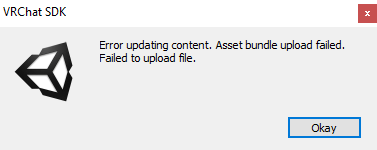
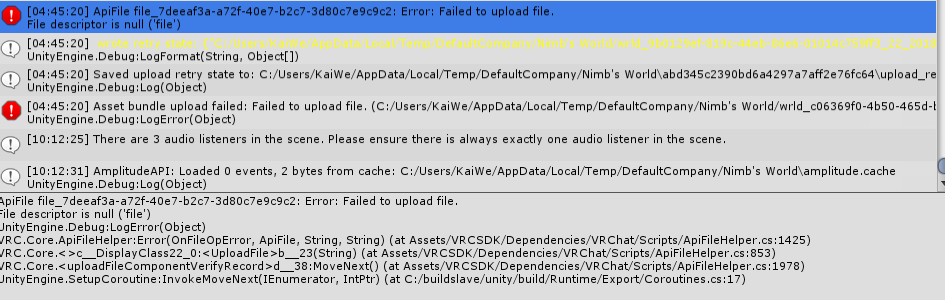
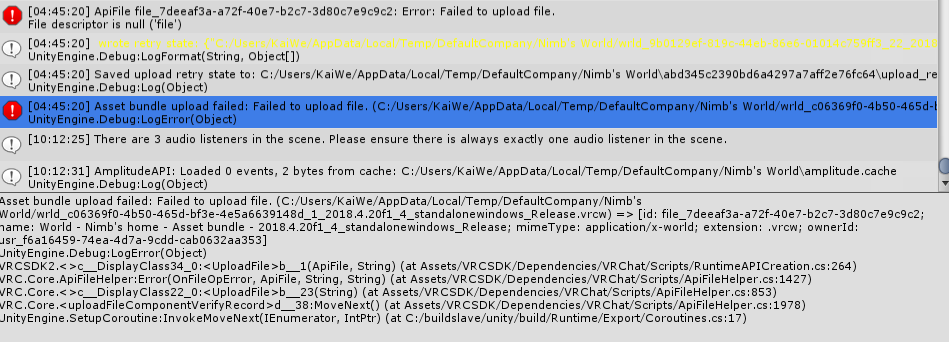


 indigo fossil
I keep getting this "Resource file has already been unloaded." error when trying to upload my world.
I was able to upload my world fine before, the only notable changes I made were importing .fbx meshes.
 near escarp
Did google bring you any answer about it ? Never seen that issue before
 white gulch
Anyone have a fix to "failed to upload, File to big" - fyi when i run build and test runs fine at 78mb
random owl
Disable Future Proof Publish in the VRCSDK Settings tab