#world-development
39 messages · Page 70 of 1
 robust hill
 desert python
on android build. no (unless you use the emulator), you can build and test in PC build
robust hill
Ok. Yea I have done that on my PC with the desktop client. So, I would need to publish the world to test on the headset?
desert python
yes
 cerulean charm
does ping still apply on 2 local clients?
either way i still need advice on how to mitigate it because leading your shots by 15 feet and hoping for the best isn't fun.
 near escarp
Ah if it's local then i'm not sure, but that's still replicating live behavior, so testing that way makes sense still ?
 civic ibex
Anyone ever came across an object that has a VRC Pickup script and the moment you pick it up, it literally stretches like cheese on a pizza?
Edit: When you do orient it back up vertically it'll return to its defined scale, but when it lays flat, it will result in what you see in the second shot.
 desert python
ive seen it before, i think if an object has an armature or something weird, itll start "stretchifying" itself
civic ibex
I'll have to check and see if there is anything related to that. I rebuilt the object itself. It's just a simple Cube mesh /w Renderer that has a RigidBody, Box Collider, and VRC Pickup components. I am hunting down through documentation too.
 bold ibex
I just spend a long time building a world just to find out I cant upload it because I havn't played for long enough
WHat do I do
civic ibex
My best recommendation is to get out to make friends and spend time. Hop some worlds.
civic ibex
I don't know their algorithm to promote, but I was able to progress quickly after doing those few things.
If you want me to upload it for you, I can do so. Just specify what you want as the title, description and your name will be associated with it if that will work with you.
bold ibex
Is there a way to play it without publishing?
civic ibex
Yes. DM me and I can do a screenshare to demonstrate.
bold ibex
aight
civic ibex
Also can run it in the editor with Cyanemu.
Edit: Finished the call, goodluck Rav! So if you have SDK2, you can't really test offline within VRChat to use VRC's scripts and networking. But if you use CyanEmu, you can utilize VRC scripts by emulating VRChat's Client in the editor. If none of that is needed, just hit play on the editor and have fun with your map.
 pure kraken
@stray sand hey, quick question. what does your screen overlay shader do?
 stray sand
pure kraken
<@!177222201567608832> hey, quick question. what does your screen overlay shader...
stray sand
pure kraken
<@!177222201567608832> hey, quick question. what does your screen overlay shader...
its meant for desktop to record a cameras rendertexture.
pure kraken
stray sand
its meant for desktop to record a cameras rendertexture.
only desktop?
stray sand
it was not built with vr in mind.
 lyric acorn
Anyone ever came across an object that has a VRC Pickup script and the moment you pick it up, it literally stretches like cheese on a pizza?
Edit: When you do orient it back up vertically it'll return to its defined scale, but when it lays flat, it will result in what you see in the second shot.
@civic ibex make sure the parents to the object have 1,1,1 scaling or it will distort like that
civic ibex
lyric acorn
> Anyone ever came across an object that has a VRC Pickup script and the moment ...
That did the trick, thank you!
 mystic leaf
I have some movingheads with a lightbeam model and a spotlight, is there any way i can make those two object change color from an AVPRO videoscreen?
 grand remnant
simple question : is there a layer for colliders to block players but not pickups ? am I allowed to add a layer to the project physics ?
bold ibex
bold ibex
Yeah thats not gonna work
Are you sure you cant just showcase the world in the unity editor?
I Previewed it using the vrchat sdk thingy
It will work until I have enough rep to upload
mystic leaf
mystic leaf
I have some movingheads with a lightbeam model and a spotlight, is there any way...
So anyone who knows how I put the av video color on another texture but only have it play on the white of the texture and not on the transparant parts?
 languid igloo
Hi all, question about approval. How long did it take to get approved to post a world?
civic ibex
languid igloo
Hi all, question about approval. How long did it take to get approved to post a ...
If you're pretty active on VRChat and periodically make new friends without getting muted/blocked/reported by other users, should be about two weeks.(My experience, assume it'll be different for each person).
languid igloo
Thank you for the response. We're a small studio doing an exhibition in LA soon and wanted to see about putting our Unity VR scene online, and VRChat has a great community. Hopefully soon we'll be able to share what we're doing! (This is a render of the scene we're adapting :))
 mystic leaf
My animation is showing when I test in unity but when I test and build it vrc it doesnt play, why does this happen?
 past raptor
grand remnant
simple question : is there a layer for colliders to block players but not pickup...
past raptor
grand remnant
simple question : is there a layer for colliders to block players but not pickup...
You can add layers to the physics - several are reserved for VRChat, however.
grand remnant
past raptor
You can add layers to the physics - several are reserved for VRChat, however.
thank you
mystic leaf
how do I make it so I can have a black and white overlay on a material and the material will only show on the white parts of that overlay? Like as a color/texture overlay
grand remnant
like an alpha channel ?
mystic leaf
uhhhh
mystic leaf
grand remnant
like an alpha channel ?
So I have this RealtimeEmissionGamma wich displays a video, but I only want the video to be displayed on the white parts of the texture and be transparant on the black parts
 grand remnant
sounds like you need a specific shader, add a new texture source and do some sort of cutout with that. Sorry I dont know much about shaders, but I suppose it shouldnt be too hard to make or to get help for that
mystic leaf
grand remnant
sounds like you need a specific shader, add a new texture source and do some sor...
I'm a real noob when it comes to shaders and materials in unity so I have no idea how to achieve this
mystic leaf
grand remnant
sounds like you need a specific shader, add a new texture source and do some sor...
so how do I add a source to the shader?
 pallid dove
how fix bight it not even the bight

 long token
does anyone know why the vrcsdk3 control panel wont show up in my project? I've deleted the folder and installed a fresh new version of it and it still is bugged
 long token
 near escarp

Do you have latest versions of the vrc sdk and udon sharp ?
with SDK3 you shouldn't have to delete anything
long token
should i try to delete udon sharp and reimport it?
near escarp
if it's the latest version yes
 woeful tide
How do you make an particle system that collide with players that can do damage. For example a Gun firing a particle system that can kill an player
long token
i tried deleting everything and re-importing it again and nothin changed

it keeps giving me these udon errors and idk why
near escarp
You're sure you have the latest U# version right ?
You can ask directly in merlin's server as well
 random owl
near escarp
You're sure you have the latest U# version right ?
random owl
near escarp
You're sure you have the latest U# version right ?
They don't have u# though 😅
Oh wait they do nvm
But those errors don't seem to be from u#
Might want to press clear and see if any dissappear
near escarp
Oh, then i missread three times
random owl
Or is that all of the errors?
near escarp
they have clear on play so i assume those stay
random owl
Would most likely need to know if those are all the errors they have to be able to say anything

 desert python
@red urchin if its a private world, you could try changing the blueprint ID (sorry if im repeating anyone)
 red urchin
yeah i've been told this before, i dont wish to change the id since its a public and quite a few people use it already
otherwise i wouldnt mind just switching it
 dusk sapphire
you need to send in a ticket to support to have it addressed
near escarp
One second, i'll try to fix that manually
dusk sapphire
or that ^
red urchin
Give me just a moment
 red urchin
wait is it safe to paste the world id in a public place like this rubick?
pallid dove
and just uv don't work
red urchin
id go poof
near escarp
ty
red urchin
yisyis
pallid dove
so what do i ot fix
near escarp
try uploading again
red urchin
alright
near escarp
pallid dove
so what do i ot fix
what's your issue ?
red urchin
it looks lke their terrain isnt baking or something
near escarp
80% of the window is cut out so i can't make any good guesses
red urchin
my world is compiling now, uploading in just a sec
 near escarp
Which shader are you using, what are your light settings
red urchin
@near escarp thank you so much, i'm not sure what you did differently that the other two in emails didnt but it works now XD
pallid dove
 red urchin
bigge thanks
pallid dove
i don't what making it white
near escarp
Can you show the light you're using and the materials on your objects ?
pallid dove
the uv adjustmets don't work i get errors
near escarp
Make sure they have generate lightmaps enabled
 near escarp
which ones are emissive ? And what other lights do you have aside from the skybox ?
 near escarp
yeah but the lights settings are important because something is clearly a bit too bright
Can you check the bakery lightmaps folder
 flint silo
basic question. I've got a reference image setup, how do i prevent that plane from being interacted with ? I know there's a way to lock it, but i don't know how to do it
pallid dove
where in bakey do i go like in folder
dusk sapphire
flint silo
basic question. I've got a reference image setup, how do i prevent that plane fr...
do you mean image for the world preview? you can set it as editor only so it only shows up in editor and not on upload
flint silo
dusk sapphire
do you mean image for the world preview? you can set it as editor only so it onl...
i mean so it can't be interacted with since i'm just using it for a reference image
flint silo
dusk sapphire
do you mean image for the world preview? you can set it as editor only so it onl...
no, no, a reference image i'm using as a floor plan
dusk sapphire
I'm not sure what you mean by locking it, as if its just a regular plane you put into the world, users wont be able to interact with it unless you do something like make it a pick up
if you dont want users to collide with it, make sure it doesnt have a collider component
flint silo
dusk sapphire
I'm not sure what you mean by locking it, as if its just a regular plane you put...
I don't want to accidentally interact with it while I'm building the building
dusk sapphire
you could set the object to a layer, and in the layers drop down on the top right disable its visibility in the scene view
wait nvm you cant see it then
flint silo
i don't want to not see it, i don't want it be be interacted with, i saw someone lock it in a video but they didn't say what they were actually doing
flint silo
and where is this drop down at ?
dusk sapphire
top right corner of your editor
pallid dove
@near escarp where i go in the the bakey folder fix the whits
flint silo
dusk sapphire
top right corner of your editor
i tried that, i can still interact with the plane in question
pallid dove
 near escarp
bakery lightmaps
dusk sapphire
flint silo
i tried that, i can still interact with the plane in question
you sure? seems to have worked for me. make sure the plane is on the same layer you locked
yea, you can still select it in hierarchy, but you cant from the scene view
flint silo
dusk sapphire
you sure? seems to have worked for me. make sure the plane is on the same layer ...
i don't know how to make it a layer to start with
dusk sapphire
you can change the layers objects are on on the top right of the inspector window when you have them selected
dusk sapphire
pallid dove
<@!97980768323633152> where i go in the the bakey folder fix the whits
we still need to see a screenshot of the settings on your actual lights
red urchin
@near escarp uhh so sorry but bad news xD even though the whole upload process in unity went well, the world in game is still as it was before
 dusk sapphire
check if your last build was actually successful? it might have uploaded an older build
pallid dove
 dusk sapphire
pallid dove
dusk sapphire
pallid dove
the settings on your lights, as in those point lights you have above your scene
pallid dove
ok
dusk sapphire
0.86GB worth of lightmaps?
also if you're using Bakery give silents guide a read through https://gitlab.com/s-ilent/SCSS/-/wikis/Other/Light-Baking

GitLab
A surface shader for Unity providing cel-shading. (Forward rendering only)
pallid dove
 red urchin
heck
dusk sapphire
it would be helpful if you selected just one so we could see what intensity its at but
the range looks too short to even hit the ground?
also are you using bakery or unity's progressive?
you mentioned bakery earlier but i dont see any bakery lights
 waxen cove
https://cdn.discordapp.com/attachments/338699450619002880/821438104559681576/unknown.png some more progress
 pallid dove
ok
 dusk sapphire
are you using unity's progressive lightmapper or bakery?
pallid dove
dusk sapphire
also are you using bakery or unity's progressive?
bakery
dusk sapphire
you should probably start over reading silent's guide I linked above, as well as bakery's official documentation at https://geom.io/bakery/wiki/index.php?title=Manual
You do not have any bakery light components which is needed to bake lights with bakery
Also check to make sure you have generate lightmap uv's checked for your imported meshes
make sure they are marked as lightmap static in the editor
I can't see why it would have made your meshes all white, so i'd also check your meshes to see if they have the correct materials assigned.
 upbeat flax
hi. i am trying to figer out how to fix the fisheye lense thing , looking on one eye everthing worps
red urchin
@upbeat flax what objects is it happening on and what shader are they using?
that sounds like its not a VR ready shader
i remember i had something similar on a brick wall i picked up from the asset store long ago, i believe the issue was it was using a depreciated shader or something for height maps
upbeat flax
red urchin
<@!355808531930284034> what objects is it happening on and what shader are they ...
it hapens to everthing around me, the world in the left eye is all warped, say for the protles
i tried changing the lighting like i seen some sugest and the sky box but i dont know, i had this problem befor and cant remmber how i fixed it
also sorry for bad grammer/spelling it is late and i am tired
dusk sapphire
is this a PC or quest world?
upbeat flax
my world
red urchin
you should send some screenshots of the world in unity with some shader settings and lighting settings so someone who knows what they're talking about that isnt me can help XD
upbeat flax
ok hold on one moment
dusk sapphire
did you switch to android platform using the sdk?
upbeat flax
what shader do i need to screnshot? sorry kinda unsure of things this is a screnshot
 dusk sapphire
switch back to pc and then back to android using the build settings in unity
its a common sdk bug
upbeat flax
Oooh thanks i will try that
upbeat flax
'That fixed it!
 candid plover
what is the difference between vrchat SDK2 and SDK3 for worlds
should I just use the sdk2
 hexed halo
Hi
I've a problem with an asset that is visible in Unity but not in my world. Those blades of grass have nothing special just cutout shader it's just an albedo with an alpha-png.


 pallid drift
sorry
 burnt pilot
says I have errors in scripts
Error building Player because scripts have compile errors in the editor
dusk sapphire
refer to the page I just linked on how to solve them
mystic leaf
how do I make it so I can have a black and white overlay on a material and the material will only show on the white parts of that overlay? Like as a color/texture overlay
 tropic crater
Hey, what's the simplest way to reset my room? I have bunch of pickupables that users can i.e throw out of the window or well.. just make a mess. How can I bring everything back to its original place?
dusk sapphire
tropic crater
Hey, what's the simplest way to reset my room? I have bunch of pickupables that ...
sdk2 or 3?
dusk sapphire
mystic leaf
how do I make it so I can have a black and white overlay on a material and the m...
a shader with an alpha cutout mask?
mystic leaf
uhhhhh I dont really know much about shaders so how would I do this?
mystic leaf
dusk sapphire
a shader with an alpha cutout mask?
So I have this realtimeEmissionGamma for displaying a videotexture, how do I make it so the video only displays on the white of the texture?
 dusk sapphire
you should probably uv map your screen so the part that displays the video is its own material
tropic crater
dusk sapphire
sdk2 or 3?
sdk3
dusk sapphire
on udon you're going to have to make your own udon behaviors to have them respawn
on each object, on start you want to save its position, then a custom event that teleports them back to the saved position, and call that custom even from a button/panel etc
if you're not clear on the specifics you can probably get better help in #udon-general
mystic leaf
dusk sapphire
you should probably uv map your screen so the part that displays the video is it...
Thats a good one! Can I make a transparant UV map tho? I want to use the videoscreen footage as a lightbeam
dusk sapphire
transparency has nothing to do with uv maps, and is a shader setting
but video screen footage as a light beam?
mystic leaf
dusk sapphire
but video screen footage as a light beam?
yes, sorry for the late response I had to do something
so basically I have this massive videoscreen and I have some lamps with animations and I want the cone shaped beam mesh the display the color of the screen
 thick gale
Im so lost..no VRC spatial audio component ..need output audio mixer group?
N it wont autofix
desert python
@thick gale if its the weird warning the sdk gives, you can ignore it
 void bison
thick gale
Im so lost..no VRC spatial audio component ..need output audio mixer group?
void bison
thick gale
Im so lost..no VRC spatial audio component ..need output audio mixer group?
You can simply add the script and deactivate it, so you won't have any more errors.
 solemn nymph
my blender world doesn't let itself export into .fbx. it just says error unknown location -- fixed
thick gale
Thanks
How do I make my doors so u can teleport to other side?? Like I see in many worlds
 slow rampart
VRC_Trigger, OnInteract, Teleport Player
And make a game object to be the teleport target
 jolly hatch
So, Hi guys. I have a severe error I've not come across before, and don;t seem to be able to fix it. Anyone have any ideas of steps I could take, or point me in the right direction? ```ArgumentException: The Assembly UnityEditor is referenced by VRCCore-Editor ('Assets/VRCSDK/Plugins/VRCCore-Editor.dll'). But the dll is not allowed to be included or could not be found.
UnityEditor.AssemblyHelper.AddReferencedAssembliesRecurse (System.String assemblyPath, System.Collections.Generic.List1[T] alreadyFoundAssemblies, System.String[] allAssemblyPaths, System.String[] foldersToSearch, System.Collections.Generic.Dictionary2[TKey,TValue] cache, UnityEditor.BuildTarget target) (at C:/buildslave/unity/build/Editor/Mono/AssemblyHelper.cs:150)
UnityEditor.AssemblyHelper.AddReferencedAssembliesRecurse (System.String assemblyPath, System.Collections.Generic.List1[T] alreadyFoundAssemblies, System.String[] allAssemblyPaths, System.String[] foldersToSearch, System.Collections.Generic.Dictionary2[TKey,TValue] cache, UnityEditor.BuildTarget target) (at C:/buildslave/unity/build/Editor/Mono/AssemblyHelper.cs:156)
UnityEditor.AssemblyHelper.AddReferencedAssembliesRecurse (System.String assemblyPath, System.Collections.Generic.List1[T] alreadyFoundAssemblies, System.String[] allAssemblyPaths, System.String[] foldersToSearch, System.Collections.Generic.Dictionary2[TKey,TValue] cache, UnityEditor.BuildTarget target) (at C:/buildslave/unity/build/Editor/Mono/AssemblyHelper.cs:156)
UnityEditor.AssemblyHelper.FindAssembliesReferencedBy (System.String[] paths, System.String[] foldersToSearch, UnityEditor.BuildTarget target) (at C:/buildslave/unity/build/Editor/Mono/AssemblyHelper.cs:190)
UnityEngine.GUIUtility:ProcessEvent(Int32, IntPtr) (at C:/buildslave/unity/build/Modules/IMGUI/GUIUtility.cs:179)
Sorry for the wall of text
Also, to add info, correct version of unity, latest world SDK3, latest udonsharp.
desert python
did you update it recently?
jolly hatch
Yes, but only after the issue started
civic ibex
jolly hatch
So, Hi guys. I have a severe error I've not come across before, and don;t seem t...
Could you see if the dll "Assets/VRCSDK/Plugins/VRCCore-Editor.dll" exists and that it is not blocked?(Right click and view properties) to see if it is blocked?
jolly hatch
I know it's there, but gonna make sure it's not blocked. One moment, thanks
thick gale
slow rampart
And make a game object to be the teleport target
So I have have one on both sides of wall I mean door
desert python
sometimes that error occurs when you try to update the sdk
jolly hatch
civic ibex
Could you see if the dll "Assets/VRCSDK/Plugins/VRCCore-Editor.dll" exists and t...
Right click where? In unity, or explorer?
 jolly hatch
Aye, I see nothing wrong with security settings, or anywhere else.
Within properties
civic ibex
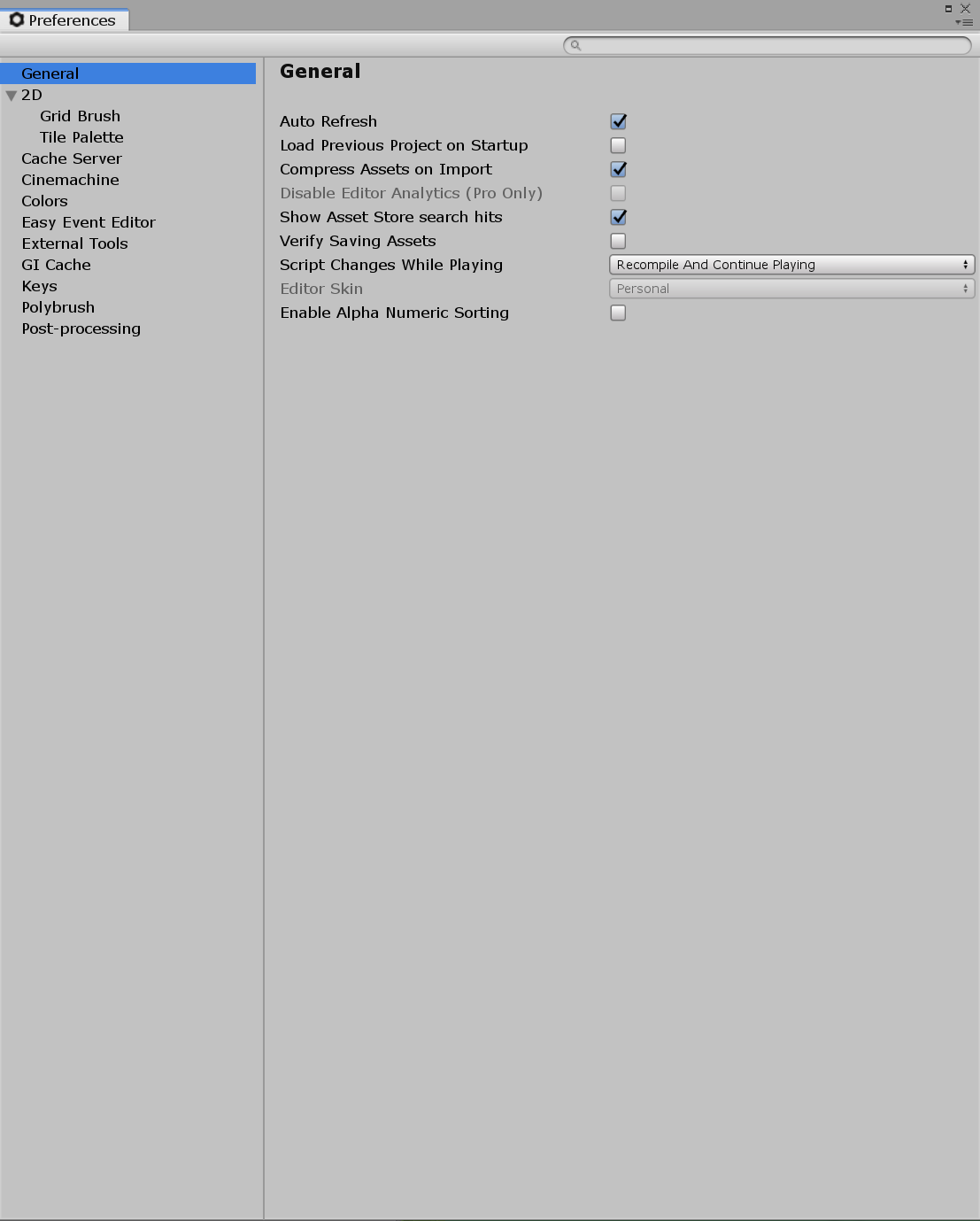
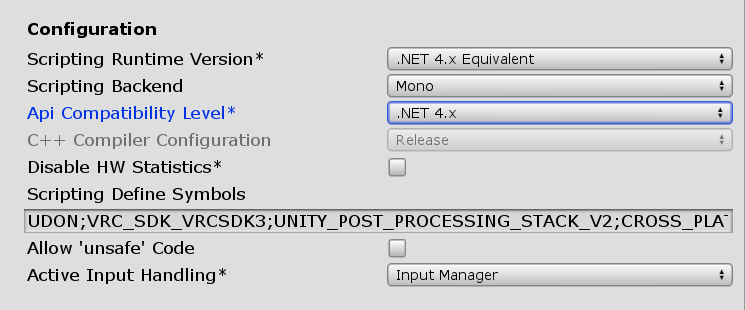
Ok then follow this, also make sure you have .Net Framework 4 installed.
jolly hatch
I do.
civic ibex
Ok, then click "Edit" tab on the top, then follow this picture to see if your API compability is .Net 4.x.
 slow rampart
thick gale
So I have have one on both sides of wall I mean door
slow rampart
thick gale
So I have have one on both sides of wall I mean door
Yep
civic ibex
jolly hatch
I do.
I gotta do an errand but if you're still stuck, can do a quick screenshare when I get back.
 thick gale
K I got reload or sumthin all my options dissapeared it only says to clear cashe
 thick gale
Okayyyy um how u turn jump on?
civic ibex
thick gale
Okayyyy um how u turn jump on?
Use VRC_PlayerMods component
 echo rapids
Hi all, been a while. So I decided I wanted to update my worlds, but since VRChat has updated, I keep getting errors with their SDK2 error says"sets/VRCSDK/Dependencies/VRChat/Scripts/Validation/WorldValidation.cs(552,55): error CS1644: Feature `null propagating operator' cannot be used because it is not part of the C# 4.0 language specification" What the hell does this mean?
 proven glade
Is this right? because people were saying when they walk away from the speaker it gets louder in my world
 near escarp
What does your curve look like ?
proven glade
curve?
near escarp
audio source
 near escarp
"3D Sounds settings" is hidden on your audio source
thick gale
SDK wont load only keeps say in clear .reimporting everything.like 2 test world but it wont show
near escarp
Add this to your project and open the world toolkit window at the top https://github.com/oneVR/VRWorldToolkit/releases
 thick gale
near escarp
Add this to your project and open the world toolkit window at the top https://gi...
thick gale
near escarp
Add this to your project and open the world toolkit window at the top https://gi...
shows in assets but no window on top
near escarp
What are the errors ?
 thick gale
and top is this? reinstall unity u think?
near escarp
That asset pack is causing most of those
thick gale
 near escarp
delete the post processing folder of that asset pack
 near escarp
i'm not sure how you built your project so it's hard to say
if you import assets and the udon sdk, it shouldn't cause errors
thick gale
yes sdk 3 world it only shows that message
 solemn nymph
just uploaded my world. i get sent back to default home when i join it.
and yes. Right version of unity used. Cache cleared. still the problem..
near escarp
solemn nymph
thank you again for helping with a single link! it seems to me that this problem is common
 upper gate
I just imported the March 9th SDK version on top of an existing project and now my build control panel doesn't exist
No option for it in the VRChat SDK menu
Have restarted Unity
and imported an older SDK version
upper gate
I fixed this, it was because CyanEmu was out of date
thick gale
I feel like a pain but i got my world working everything fine makin door trivgers n um now I cant get close to any object.lol like a clydascope effect
bold ibex
Hi, I am looking for maps similar to Zixha's Apartment to conduct such parties that seem like a house party, it is important to have a player, some additional rooms, pens and a few games such as billiards, cups, etc.
 storm scarab
only just got to this due to work but thanks a bunch for this, that debugger is super useful
 trim charm
is there a place to submit for consideration to become a featured world? I've got one coming out that I'm pretty proud of!
thick gale
I need a script rip n i cant make it cas my vision studio quit workin
bold ibex
i love being a messenger
a friend needs me to ask here for them
they are adding new ambient sounds to their Infinite Ikea map, and want to know what sounds should be added to add some atmosphere
current additions are for quiet wind, due to the infinite size, it makes sence the ikea has some kind of weather patterns of its own
please give some more suggestions and ill pass them on
 arctic gale
how would i go about making pickupables public and not local
 civic estuary
@arctic gale there is a checkmark you can put to sync position on the udon behavior component.
arctic gale
oh im on 2.0 atm
dusk sapphire
put vrc_object sync on the pick ups
 dusk flax
hey, is there a max filesize for worlds?
If not, is it allowed to upload a "high quality" version and a compressed version of the same map?
ended up with a 1GB world for audiophiles, or 200MB with audio compressed to 256kbps^^
dusk sapphire
I believe you're highly discouraged from making maps that exceed 200-300mb
but map file size issues aside
if a lot of it is audio assets, this article may be of interest to you

Learn how correctly set up Audio Clip Import Settings to make your Unity game consume less memory and CPU.
dusk flax
this is really interesting, thanks
civic estuary
Cool blog. Never knew that. Ill have to check my maps once i get home.
I think Quest only has a hard limit on file size?
dusk flax
yeah quest is 20mb
dusk sapphire
quest is 50mb
dusk flax
oh?
dusk sapphire
10mb for avatars, 50mb for worlds
dusk flax
ah ok, uploadvr said 20, but vrchat docs say 50, guess the 50 is right then^^
 dusk sapphire
PC doesn't really have a limit but I believe the API will reject upload attempts exceeding 2gb? but you really should avoid going more than 500mb
civic estuary
Unless a world look really good i usually avoid 3 digits worlds and i know others also have their own limits.
So its a good thing keeping it low.
I wonder what kind of compression is used on that beatsaber world last i check wasnt too bad considering the amount of music it had.
dusk sapphire
personally I wouldnt visit maps that exceed 500mb myself, and generally, I would only go to maps thats 200-300mb+ if its specifically some sort of exhibition world like virtual market or avatar museum
or some sort of game/adventure experience
civic estuary
The last big vket want too bad in size from what i remember. The one before the music vket.
dusk flax
my goal was to explore the upper limit of a max quality MIDI sampler, using a complete 11 scale, quadra layered layout with multiple velocity samples, 512kbps everything, and working pedals and common knobs, more of a "this is the maximum possible sampler" world than an actual "commonly playable" one^^
civic estuary
Yea. I can see how this would boost your file size considerably.
dusk flax
the world itself is actually teeny tiny in file size, just a tiny world made from triangle shards and the piano in the same style, sounds are 99.99% of this map^^
 civic estuary
At least theres that. High quality textures can make that file size go up quick.
dusk flax
maybe i can limit myself to 2 sound layers and blend between them instead of switching, that's bring it down to 500 MB, but I'd have to set up... 256 audio sources........
or I'll just clamp it to common grand piano size and only do 6/7 octaves :/
dusk sapphire
uuh, can you even have 256 audio sources?
there is a hard limit to how many active audio sources you can have at any one time
its probably better to have a few audio sources, and play different audio tracks through them
dusk flax
well...... yes, but no. For quest, you shouldn't go above 3 audio sources total.
For PC however, there's no total limit. But you can only have like 15-20 active without audio glitching. I'll treat the sources as my sampler voices, and only activate the playing ones. playing multiple notes on one audio source would cause a lot of problems in this case, especially since I'm trying to set it up spacially if that's the correct word.
 short gulch
Not gonna lie, that looks pretty sick
dusk sapphire
by default unity caps max active audio sources at 32
dusk flax
Though I think I'll go for a lower quality world first, only 7 octaves, 10 voices, 2 velocity layers and only one pedal. This is my first VRChat world after all, can still improve it later I suppose
dusk flax
again, active audio sources
dusk sapphire
I believe its possible to play multiple audio clips through a single audio source simultaneously, but you'll have to check if PlayOneShot() is exposed in Udon
 dusk flax
it is
but then you can't edit the mix without affecting already playing sounds, breaking the pedal functionality
dusk sapphire
ah, fair
slow rampart
I don't remember putting water here?

I don't see anything that could be causing it here either, so I'm super confused


The purple water doesn't appear in Unity's Play mode, what gives?
random owl
https://github.com/CyanLaser/CyanEmu
You could try in CyanEmu

GitHub
CyanEmu is a VRChat client emulator in Unity. Includes a player controller with interact system. Works with SDK2 and SDK3. - CyanLaser/CyanEmu
slow rampart
Wait I just updated my client let me see if that fixes it
 frigid estuary
i am looking for a canvas + painting kind of prefab. is there one like that?
slow rampart
Nope still giving me water
desert python
@frigid estuary which sdk?
frigid estuary
for this one i wouldnt mind if 2 or 3, but SDK 2 would be great if it exists for sdk 2
desert python
i did make an sdk2 version of my blackboards i could package up, but they are very simple and
new
frigid estuary
thats interesting. do you have a screenshot? can the blackboard be changed to white background if it is black?

desert python
ye, i just made them black cus whynot
frigid estuary
if you want, feel free to send it :D
i would credit ofc, but can't tell how long it would take me to complete my world
 slow rampart
Udon? This is the SDK2 chat, isn't it?
bold ibex
slow rampart
Udon? This is the SDK2 chat, isn't it?
In all fairness the chat title is a little misleading
bold ibex
 dim marsh
idk im just trying to upload my world
dim marsh
idk im just trying to upload my world
Have you tried uninstalling Unity and the SDK, updating your operating system, and then reinstalling Unity and the SDK?
I have no idea why, but I had an installation that wasn't behaving, and even support couldn't help me out. Uninstalling everything, updating Windows, and then reinstalling everything somehow worked.
*also don't forget that you need to have a certain trust level on VRC in order to upload your world, too.
thick gale
current no errors yet

wanted mountains but guess trees
its a gamers lounge for multi cross platform i have hopes maybe a roof top for movies since ive gathered quite a colection
 wraith field
Do you guys think that there's a particular art style that looks best in VRChat worlds? A friend and I were talking about how 'realistic' worlds often don't look as good as worlds using stylized assets. 🌞 = Realistic is better / 🌛 = Stylized is better / 🌓 Both are equally attractive
desert python
@wraith field beige
wraith field
haha what?
 west blade
wraith field
Do you guys think that there's a particular art style that looks best in VRChat ...
west blade
wraith field
Do you guys think that there's a particular art style that looks best in VRChat ...
I would say it depends on what you want to go for and what kind of setting you are aiming for.
More serious settings often do better with realistic, while stylized often works best for playful setting. (But keep in mind there can also be exceptions to this where the opposite is true).
More important is that you stick with the art style you chose otherwise the will "fight" each other.
(Here again there can be exceptions in intentional breaks in your art style. But this is usually pretty difficult to pull off so best used with a lot of thought and planning)
So overall they can both be used to great effect and can both look really good.
But in the context of VRC i would say it usually is easier to do stylized than realistic, since you can get away with a lower detail density.
wraith field
west blade
I would say it depends on what you want to go for and what kind of setting you a...
That's intersting that you relate it back to being fitting to the 'tone' of the world, I was actually expecting you (since I already know you) to say stylized because avatars are stylized, so having stylized avatars + stylized world makes for a cohesive 'scene'
west blade
It is true that most avatars would fit better in some stylized worlds, but generally avatars look out of place in most worlds anyways since they still have a different art styles than the world or other avatars (even if both is stylized). So i would not use that as an reason to use a specific art style.
wraith field
west blade
It is true that most avatars would fit better in some stylized worlds, but gener...
interesting.....also the poll is split pretty evenly rn
 burnt sphinx
Guess I'm injecting my own esthetic here but, I prefer the worlds that don't spend too much time trying to be something else (or e.g. represent something real). I guess if you're trying to make a VR car look and act like a real car, for example, I suppose that a stylized look could be lower poly and thus have better performance. In that respect, because of performance, stylized looks can be made to perform better for more people.
But in the end, I tend to gravitate toward the art that exists for its own sake and not its ability to emulate life, and those types of worlds, though not really "stylized" can be made to to show unique beauty in a performant way.
 pastel sparrow
why cant i load into my new world? it just keeps sending me back to my home
dusk flax
Didn't publish anything yet, so just guessing, but did you develop with an unreleased branch, or did an update on live break stuff in your map? Did it load before?
dusk sapphire
grab 1's vrworldtoolkit to check for common issues that can cause that https://github.com/oneVR/VRWorldToolkit
 normal lintel
anyone know of a world that's using the new working midi system for a real midi keyboard input to a piano in game?
 heady rover
Trying to update my world but for some reason the VRChat sdk defaults to previous version. Even removing the SDK en reinstalling it doesn't fix the problem
 grave pagoda
I'm trying to upload a world with qv pens in it (sdk2), but the pens don't work in world. They drag trails if I move them around in unity, but the prefabs seem to be missing scripts, and I can't seem to figure out what.
dusk sapphire
you need to import standard assets as well
grave pagoda
Sorry, not too familiar with standard asset packages, I thought I already had that in the project :/
dusk sapphire

Get the Standard Assets (for Unity 2018.4) package from Unity Technologies and speed up your game development process. Find this & other Asset Packs options on the Unity Asset Store.
grave pagoda
ahhh, okay. Thanks soo much for your help there! Never had to do that with the most of my stuff until now. Thanks for your help!
dusk sapphire
qv pens uses it, and its listed as a requirement in their download page, always make sure to look for requirements when grabbing packages
grave pagoda
It was my bad assuming "standard assets" meant just base unity, like cameras and really basic asset for stuff like that. Now I know for future projects not to assume that -w-
 mossy fog
Hello everyone, I need some help with constraints. The big cube has a Loot At Constraint component on it and is supposed to look at the small cube. The small cube has a VRC_Pickup component on it. When I test it in Unity it works, but in VRChat the big cube doesnt move at all anymore, never looking a the small cube in my hand.

 left marlin
Constraints are not whitelisted in sdk2 worlds...
mossy fog
left marlin
Constraints are not whitelisted in sdk2 worlds...
Damn, any idea, how I could accomplish a similar effect?
left marlin
I can think of two ideas.
- import standard assets and use the LookatTarget script.
- learn the ways of Ui button magic and call transform.lookat every frame.
mossy fog
To go into more detail, if I had a gun and want to create a front grip.. then I assume importing standard assets is the way to go, right?
left marlin
As in two handed pickup?
mossy fog
indeed
left marlin
Either option would work. Standard assets is written for you and would be less learning. Ui buttons are more work, but provide you with more power once you learn them.
So easy option is standard assets.
mossy fog
You got me interested in Ui buttons, but I dont even know where to start there, are there any documents/tutorials?
 sinful hinge
my audio is extremely quite in vrc when i use the spatial audio source. any way i can fix that?
 gritty dagger
Hey, anyone know why my "Build & Test" button doesn't work (I Know, very detailed description.)
It's not spitting out any errors so... any gotchas i missed?
https://awoo.download/bb-REWibB.gif
 sinful hinge
idk it doesnt work for me either. i always build it onto vrc
gritty dagger
Ah
random owl
gritty dagger
Hey, anyone know why my "Build & Test" button doesn't work (I Know, very detaile...
Make sure the client path in the sdk settings is set to point directly to the vrchat.exe
sinful hinge
sinful hinge
my audio is extremely quite in vrc when i use the spatial audio source. any way ...
but how can i fix
gritty dagger
random owl
Make sure the client path in the sdk settings is set to point directly to the vr...
it is, and it's working for avatars
random owl
Build & test for avatars work completely differently
https://github.com/oneVR/VRWorldToolkit/releases
Maybe check the World Debugger included in this
GitHub
Unity Editor extension for making VRChat worlds. Contribute to oneVR/VRWorldToolkit development by creating an account on GitHub.
gritty dagger
random owl
https://github.com/oneVR/VRWorldToolkit/releases
Maybe check the World Debugger ...
I Have that, Doesn't give any issue other than the Future proofing disable (Tried that too, didn't work)
random owl
Yeah then that's a bit weird haven't really seen the button not working in the way you show in your gif
mossy fog
gritty dagger
I Have that, Doesn't give any issue other than the Future proofing disable (Trie...
Do you have any scripts inside you unity project that could potentially cause this behavior?
Some assets also have some scripts for previewing that can cause these issues.
gritty dagger
Unless probuilder screws it up, i dont think so
mossy fog
You can always try to remove these packages and try again after unity compiled all changes.
random owl
gritty dagger
Unless probuilder screws it up, i dont think so
Are you on sdk3 or sdk2?
gritty dagger
random owl
Are you on sdk3 or sdk2?
3
left marlin
mossy fog
You got me interested in Ui buttons, but I dont even know where to start there, ...
I'm not sure if there are any good tutorials or resources now. I learned by dissecting Hardlight's toybox prefabs. I did make an old tutorial on teleporting objects in sdk2, but I'm not sure it has all the information needed.
https://youtu.be/cib843oqmSo?t=189

Tutorial goes over how to setup easy object teleportation not using the Object Teleport sendRPC call. This method allows for changing an object's position, rotation, size, and even lets you re-parent the object to another object so that it will follow this other object.
I'm curious to know how people use this. I've done it for some behind the s...
mossy fog
left marlin
I'm not sure if there are any good tutorials or resources now. I learned by diss...
Dissecting Hardlights toybox prefabs and your tutorial. This should be more than enough to start, thanks!
random owl
gritty dagger
3
Can't really see any reason why the behaviour you are seeing would happen looking around
Unless something just didn't get loaded properly
You could try right clicking the vrcsdk folder and pressing reimport see if anything changes
 quick seal
ik this is a fairly old message but just thought i would let you know that i've been getting this message for months (after uploading anything worlds and avatars )and i've been in contact with support and they have not been unable to help fix the problem
 gilded quail
quick seal
ik this is a fairly old message but just thought i would let you know that i've ...
gilded quail
quick seal
ik this is a fairly old message but just thought i would let you know that i've ...
I fixed my problem by uninstalling and then re-installing VRChat.
I think my issue was that I was pointing Unity at the wrong VRChat installation somehow, since I had multiple on a few of my drives
quick seal
gilded quail
I fixed my problem by uninstalling and then re-installing VRChat.
oh damn wish that had worked for me ;-; i have done everything to try and fix it even tried it on a whole new pc and still had the problem
gilded quail
Wait, how did you get it with avatars?
I only get that issue after Testing a World.
Do you experience the same error while just playing the game normally?
quick seal
yeah i get it after uploading world and avatars so im unable to do either anymore
if i delete the avatar or world and clear my cache the problem goes away
quick seal
yeah i've pretty much come to terms that its done broken for good XD
 deep roost
I waited this long for it to upload and it didn’t, very sad

I’m more guessing it’s because internet, I don’t have have great internet and it’s been hours when I started it
 harsh wagon
disable futureproofing
deep roost
How do I do that?
 twilit venture
hey just wondering is anyone here good at making maps because im looking for someone to try and recreate a map from a game
near escarp

VRChat Ask Forum
Post about commissions for worlds in this category. Requests are not permitted, we only permit posts from those providing services.
deep roost
I’m guessing I’m gonna have to look up the future proof myself then
near escarp
grand remnant
done
 wraith mural
Just curious about how many worlds can someone have uploaded at once?
gritty dagger
Quick question regarding resetting objects thrown off the map, Since it doesn't seem to work for me.
Do you need to add an other script other than VRC Pickup and setting the Object behavior to Respawn in the VRC Scene Descriptor?
I'm on SDK:3
https://awoo.download/TZaTdqEz7.png https://awoo.download/D0KvxRUWc.png

 left marlin
gritty dagger
Quick question regarding resetting objects thrown off the map, Since it doesn't ...
left marlin
gritty dagger
Quick question regarding resetting objects thrown off the map, Since it doesn't ...
Resetting objects only works with objects that have the ObjectSync or UdonBehaviour components with position sync checked.
gritty dagger
left marlin
Resetting objects only works with objects that have the ObjectSync or UdonBehavi...
ahhh
that makes sense, thx.
 tribal stump
I'm trying to paint a texture on to a terrain, and no matter what texture I use, I get this error code. My google-fu isn't helping either.

 cold hound
There is something very funny, why my world is not updating?
it saying world updated and everything
 topaz basin
Using an 3d Object as an Audio button on/off. Works if plays on awake. is activated. When i turn off play on awake, the audio isnt playing when pushing the button. Any solution?
cerulean charm
Use audiobanks
topaz basin
cerulean charm
Use audiobanks
Found an easier solution
 opaque plinth


I converted a world initially made for the Windows version to the Quest version and once finished uploading for the Vrchat servers I get this error. Anyone know what the problem is?
@deep roost ouh, i have the same problem as you, have you solved it?
 shut lichen
anyone how get ball on bar but keep fell off
thick gale
Question should I stop building cas I cant make scripts or idn
desert python
nah youll get there
thick gale
Ya but then I have to aftrr I can scrip go atound n set everything...nightmare? Cant script cas I got a buy a program n ima poor grl
Virtual studio says I gota buy it every time im expired
I got 1 floor left n maybe rooftop for my movie nights
Idn need help if u go to disboard n look up .the gaminglounge im there
No links I can say all that right?
 errant beacon
you don't need to use Visual Studio to make maps o:
I guess there's UdonSharp, but I don't know if that requires the use of VS specifically
even then, that's just an optional add-on to turn C# into Udon, which is a thing directly in SDK3
 grizzled urchin
is there a way to see why someone reported a world? i got reported when theres literally nothing wrong with it ;/
random owl
"how long" really depends fully on all the million variables it comes to making a world from how experienced the team is to everything that's wanted from the project there's no way for someone else to estimate that properly, and plenty people use github for unity projects.
random owl
grizzled urchin
is there a way to see why someone reported a world? i got reported when theres l...
All worlds always show 1 report it's nothing to worry about
grizzled urchin
random owl
All worlds always show 1 report it's nothing to worry about
i know but it says 2
random owl
Well still even in that case if there's nothing wrong there's no reason to worry
grizzled urchin
just worrying bc my last world says 3 and i ended up getting banned
desert python
were they malicious reports or bug reports?
near escarp
No one gets banned for three reports on their world, you must have been banned for something else, which was mentioned in the moderation reason
desert python
i actually dk how reports even work anymore on worlds. i get reports randomly but all it says is "environment broken" and im always like: "did i remove the floor by accident?"
@bold ibex ive had worlds get 22 reports tops, nothing really happens
i also just had siri read your name out omg why lol
 unique field
what are the criteria for determining if a world is approved?
desert python
in my expierirence, you need 60 favs and 3000+ visits
unique field
thats not the case
desert python
and that has been the smallest value counts for my worlds, my latest world too like 478 favs and 4000 visits to get out today
desert python
it probably is
random owl
The raw numbers are far from the main driving factor for the algorithm it's more about positive interactions from people
unique field
i just want to know why theyre so closed about it
desert python
reasons
random owl
They don't want people gaming the system
unique field
like why did this world get approved? https://vrchat.com/home/launch?worldId=wrld_828d921d-58b3-4b13-9a1f-64ab7f31ff68

You will not regret going here
if you go to it, it's just a blank room with pinecones on the walls
world quality definitely isn't a factor in the process
desert python
correct
 drifting patrol
anyone have tutorial to make video player that support online youtube streaming for sdk2?
 solid rivet
would this shader work in a vr chat world? https://github.com/AlexStrook/UnlitClouds

GitHub
A unity cloud shader, using vertex colors and tessellation for a simple stylized look. - AlexStrook/UnlitClouds
waxen cove
is there any examples of refraction in vrchat ?
i have it on water but in VR on my oculus both eyes display different refraction angles
which is a problem
cerulean charm
Ive seen it on an avatar once but idk what shader it was
 gentle inlet
so im in the middle of updating my world and want to add day / night toggles. "That work but the skybox doesnt show when i test the world.. (Just a black skybox) how would i fix this ?" btw using udon.
dw problem seemed to have fixed itself.
near escarp
solid rivet
would this shader work in a vr chat world? https://github.com/AlexStrook/UnlitCl...
I think it could, as long as it works in editor in 2018 ?
errant beacon
I think that's an Amplify shader though?
don't remember if Amplify works with VRChat or not o:
near escarp
It does afaik
waxen cove
Amplify does work with Vrchat, i mean why would it not, it's just a node setup for creating shaders
errant beacon
ah kk, might have been confusing it with another node graph thing
 idle jolt
I’m making a world in blender, but I’m having a slight issue
You see the spaces in between the squares? I want to have the ceiling slope down and fuse with the wall. Only issue is I don’t know how. Could someone give me a tip on how to do it?

 whole plover
hello guys I have a question regarding the SDK. is it possible to upload different worlds from the same unity Project? example: Scene_01 is world 1 and Scene_02 is going to be world 2 I have just overridden my first world with my new world by accident xD
near escarp
Sure, just detatch the world ID in the descriptor
whole plover
@near escarp this is what my descriptor looks like where is the world ID? thanks for helping

is it the blueprint ID from the Pipeline manager?
near escarp
yep
 simple arrow
How can i make something spin infinitely using SDK2?
cerulean charm
looping animation
cerulean charm
have one frame where it isn't rotated and another frame where it is rotated 359 degrees
 bold ibex
alright
i only have one issue
i cant get the build and test function to work
does anyone know why this is?
thick gale
ive had that happen only happens when u use wrong sdk on project
whole plover
near escarp
yep
thanks everything worked out great :3
 chrome lynx
near escarp
chrome lynx
near escarp
Which other world ?
dusk sapphire
that can happen because of issues with the world
you can grab one's vrworldtoolkit which will check for common issues that can cause this
https://github.com/oneVR/VRWorldToolkit
 fluid river
@dusk sapphire I installed it how do I check
dusk sapphire
on your toolbar select vrworldtoolkit > open world debugger
fluid river
such a great tool thank you so much
dusk sapphire
@bold ibex https://nyanpa.su/i/Wk971hH9.png

on the ui canvas, you can add your own box collider component to define the area for raycast detection for your ui
setting it as isTrigger also means the ui doesnt collide with players, where as the default behavior if you didnt override with your own collider does
bold ibex
Alright?
dusk sapphire
depending on how you set it up, the automatically generated collider from vrc_ui shape might not match your ui, which can also cause the issues you have
though that's less common that just the ui being inside another collider
so if you find that theres no colliders blocking your panel, this is another thing you can try
bold ibex
thx, giving it a shot
drifting patrol

u guys know why i cant rotate that blue arrow to the opposite side?
i have change the rotation value but it didnt change the position of the arrow
dusk sapphire
change your pivot to local https://nyanpa.su/i/BWyZ1hI3.png
 drifting patrol
thank youu
i also have an issue. how to make the avatar brighter in the mirror? i put another the point light like right in front of the mirror but still no difference
 cerulean charm
drifting patrol
i also have an issue. how to make the avatar brighter in the mirror? i put anoth...
cerulean charm
drifting patrol
i also have an issue. how to make the avatar brighter in the mirror? i put anoth...
does your world have light probes?
drifting patrol
yeah
cerulean charm
maybe make the light probes dense in front of the mirror, it might be blending with probes outside the room where it's dark
drifting patrol
to update my world i just need to click build and publish again?
cerulean charm
yup
dusk sapphire
Light probes are only for baked lights, if you're using them you need to actually bake your lights. Also whenever you add/remove/change a light with baked lighting, it needs to be rebaked.
if those are real time lights, then you need to uncheck disable pixel lights on the mirror settings to have real time lights show up in the mirror
of course, baked lights is always preferred
If you're not sure how to bake lights, refer to the guide in the pins in #world-lighting
drifting patrol
thank youu
 strong jungle
if i launch this world and start vrchat im in the home how can i fix that

i cant see the map under mine in vrchat menu
random owl
You most likely used the wrong version of unity and or something else is wrong in the world
https://github.com/oneVR/VRWorldToolkit/releases
Import this and check VRWorld Toolkit > World Debugger from the top bar
strong jungle
ahh
 desert python
hate when that happens
bold ibex
anyone else got the problem where ur wold wont uploade or it uploades but i cant join the world? i was first thinking something was wrong with the world, so i made a new project and placed a kube with a spawn point, and i cant even get that one to work?!
ive ben uploading allot of worlds and never experienced that happening
random owl
https://github.com/oneVR/VRWorldToolkit/releases
Import this and check VRWorld Toolkit > World Debugger from the top bar
bold ibex
i havent added anything else then a platform and the sdk so it shouldent be wrong?
random owl
Plenty things can go wrong
 mortal tulip
is there anyway to make keypad and password in world ?
bold ibex
mortal tulip
is there anyway to make keypad and password in world ?
on sdk 2, 3 or udon charp?
mortal tulip
sdk2
bold ibex
yeh u can
mortal tulip
may i ask is there any document how to make that ?
bold ibex
yeh and a video

This tutorial shows you how to make 3 different password systems or keypads for your world.
Sorry for another long tutorial...
I'll put this as a note that no one will read, but I ignored the broadcast settings for this system. Everything is broadcast one and will desync for later players except for when something is unlocked. I'll do better ...
mortal tulip
ty i will try it
bold ibex
mortal tulip
ty i will try it
np❄️
strong jungle
how long does it take that the map is visible at vrchat
bold ibex
strong jungle
how long does it take that the map is visible at vrchat
should be up prety fast.
 bold ibex
try and see if its there in game or re open the website
 cold trench
hello im having some issues with the sdk import to unity, every time I import the sdk to a new unity workspace in freezes and i dont know how to procede. It stays as shown in the image and it doesn't even crash or give a report.
 bold ibex
maybe try redownloading the sdk or restart unity?
cold trench
I tried both of them none gave results
 desert python
remember to back up projecs
bold ibex
alreadyt did 😋
drifting patrol
what the meaning of these errors?
 near escarp
These don't matter
errant beacon
Those are normal SDK2 errors afaik, yeah
drifting patrol
but why when i upload my world, like its been 2 times, but i can find it on the world manager?
near escarp
Which unity version are you using
drifting patrol
2018.4.20f1
i already upload one, but the 2nd world im trying to upload its just not there, it says successfully uploaded tho. different file project btw
near escarp
If it shows up in the world manager it should hopefully show up in the client
drifting patrol
it says successful but it not shows up in the world manager.
im gonna try upload it again
hope this time will do
 dapper swan
wich platforms I choose for unity?
 desert python
android, universal windows platform, and standalone windows
waxen cove
So how do reflection probes work with Vrchat, i always get them reflecting differently on each eye in VR
how do i fix this
 dapper swan
desert python
android, universal windows platform, and standalone windows
dapper swan
desert python
android, universal windows platform, and standalone windows
ah okey thank you
wait android?
really?
dapper swan
desert python
android, universal windows platform, and standalone windows
I dont have all those
 random owl
dapper swan
really?
random owl
dapper swan
really?
Well if you want to build quest content, but you don't need to worry about the others
Universal windows platform especially has nothing to do with vrchat
dapper swan
its for all platforms
random owl
What is?
dapper swan
well
will be a world for bte (build the earth, is like a fundation of minecraft that is building all the cities of the world) and I want to put the the best buildings and I want the world for all the platforms of vr chat
desert python
@dapper swan "windows build support" if you are on a mac
dapper swan
im on windows but okey
desert python
and yes, universal is the equivalent usually on older macs so i just kind of assumed sorry if you are pc-ing
then it should come with standalone, you dont need universal
desert python
on mac, it does standalone. idk why
random owl
🤨
desert python
it is so confusing, and thats why quest only avatars exist because of this confusion and its stupid
dapper swan
okey so only this?
 desert python
it seems fine to me
 random owl
You don't need UWP as I already said if you are just doing vrchat content
dapper swan
a ok
random owl
All you need to check from the defaults is android if you want to build quest content
desert python
android and windows if you on PC
random owl
You don't need il2cpp build support
dapper swan
ok alr
 hoary aspen
How do you add a button to worlds? As in mirrors and stuff
 cerulean echo
in sdk 2 or sdk 3 and what buttons ui or normal ones?
hoary aspen
SDK2 and Im not sure?
desert python
UI is 2d and normal ones are like cubes or spheres/mesh
hoary aspen
Normal then
 tidal jackal
Hey does anyone know how to get a reverb zone to work on player voices? I've gone to worlds where they do indeed work (just not for your own voice, locally), but on my world they seem to work on everything except player voices, neither from the local player or others.
 faint sail
Anyone know how to fix these errors I am getting when trying to build and publish my vrchat world
 hoary aspen
Anyone know why when I import pictures as textures to put in the world they show up as pink??
dusk sapphire
hoary aspen
Anyone know why when I import pictures as textures to put in the world they show...
pink usually means a missing shader or shader has errors, check your material slots
 glad ferry
Could someone please explain how I go about doing rain for a world?
 pearl kettle
Should I be worried?

 ornate turret
often people will report a world trying to report someones avatar
so don't worry about those tags
I've had worlds without an avatar get flagged for malicious avatar XD
people will see report and stop reading past that and just spam report ¯_(ツ)_/¯
but in terms of consequences for you, devs will probably check the world if there's a lot of reports and if there's nothing wrong with your world you got nothing to worry about
 jaunty scroll
Hello I have a question about a world I made in Unity 5.6, when I try to bring it over to 2018 I get tons of missing scripts/script errors, is there anyway to upload still from 5.6? The world recently started crashing when going to it on vrc and I would like to upload it again but I think it’s a lost cause bringing it over to the new version of Unity
cerulean charm
jaunty scroll
Hello I have a question about a world I made in Unity 5.6, when I try to bring i...
no, you can't upload from 5.6, support for that was dropped years ago at this point.
jaunty scroll
:c alright thank you
cerulean charm
5.6 though, that's pretty ancient
dusk sapphire
yeah 5.6.3p1 is over 2 years old at this point
and will have issues with certain areas in the current version, such as incompatible crunch compression etc
jaunty scroll
Yea I made it two years ago and the world has been fine since but recently it started crashing
dusk sapphire
its going to take some effort but its not impossible to port your project over
VRChat
This category of guides will contain information on how to upgrade your Unity projects properly, and may contain additional guides on specific subjects where required.
jaunty scroll
Thanks I will poke around and see if I can get it to work again
dusk sapphire
it might be easier if you set up a fresh 2018.4.20f1 project
then export the world from the 5.6.3p1 project as a unitypackage
and import it into the new project
but when exporting, exclude things like the old vrcsdk
cerulean charm
yup
the actual world mesh and stuff should be fine, parent it all to a gameobject, bring it into your assets folder as a prefab, export as a unity asset.
gentle inlet
can someone tell me why whenever i put pickup on an object e.g bottle and add gravity to it they fall through the world? im using sdk3.0 and would love to fix this to implement board games to my world =3
cerulean charm
gentle inlet
can someone tell me why whenever i put pickup on an object e.g bottle and add gr...
if you use a mesh collider on the object check "is convex" or replace it with a box collider
mesh colliders can't collide with eachother unless one or the other is convex
gentle inlet
you legend!
drifting patrol
how to allow my friend to join my world even the world is private?
gentle inlet
@drifting patrol if you created the instance simply invite them. if someone else did find the instance owner and ask them to invite your friend =3
drifting patrol
can i let them join my world even im offline?
gentle inlet
not that i know of sorry v.v
jaunty scroll
@dusk sapphire @cerulean charm thanks I will try this out and see if it works 😄
drifting patrol
if i generate an instance invite link and i update the world will the link still work?
cold hound
There is any way to change a Worlds that's on 2.0 to 3.0 by just adding 3.0 SDK on it? and removing 2.0?
plis if you answer me use @
desert python
@cold hound youd have to do a lot more than that depending on how complex the world is
cold hound
not a lot, i'm just using some buttons that are very easy to create o 3.0, but i just don't want to do all the textures... Animations...
@desert python
desert python
all textures and animations should work
random owl
cold hound
There is any way to change a Worlds that's on 2.0 to 3.0 by just adding 3.0 SDK ...
Main thing you need to do is remove the scripting define symbol for sdk2 in project settings
Project Settings > Player > Other Settings > Scripting Define Symbols
echo rapids
Trying to test "build and run" in VRC interface, but brings up a box to choose App (which are blank). how do I get it to build and run properly?
random owl
Set the client path in vrcsdk settings tab to point directly to the vrchat executable
 eternal lintel
hi i got his bug when i try to open up the control panel can anyone help...
 random owl
What version of unity are you using?
eternal lintel
random owl
What version of unity are you using?
2018.4.20f1
random owl
And not 2019.4.20f1? Just making sure since it's rarer to see people using dark theme on 2018.
eternal lintel
 eternal lintel
random owl
And not 2019.4.20f1? Just making sure since it's rarer to see people using dark ...
eternal lintel
random owl
And not 2019.4.20f1? Just making sure since it's rarer to see people using dark ...
i dont use light mode cuz it hurt my eye during the night.
random owl
Can you copy the full trace of that error? And is it always getting thrown when you press the control panel button?
Looking around that error is most likely related to some dll in your project or the android assembly in the topmost error
eternal lintel
random owl
Looking around that error is most likely related to some dll in your project or ...
sorry that the wrong one. that for the avaters
this is for the world
Caught ReflectionTypeLoadException in UpdateDelegator Job: Exception of type 'System.Reflection.ReflectionTypeLoadException' was thrown.
at (wrapper managed-to-native) System.Reflection.Assembly.GetTypes(System.Reflection.Assembly,bool)
at System.Reflection.Assembly.GetTypes () [0x00000] in <e1319b7195c343e79b385cd3aa43f5dc>:0
at VRC.Tools.HasType (System.String typeStr) [0x0000f] in <2db95d1be65741d7902ee249d212416f>:0
at VRC.Tools.get_isClient () [0x0000c] in <2db95d1be65741d7902ee249d212416f>:0
at VRC.Core.API+<>c__DisplayClass35_1.<SendRequestInternal>g__FinishSendingRequest|0 () [0x00461] in <2db95d1be65741d7902ee249d212416f>:0
at VRC.Core.API.SendRequestInternal (System.String endpoint, BestHTTP.HTTPMethods method, VRC.Core.ApiContainer responseContainer, System.Collections.Generic.Dictionary`2[TKey,TValue] requestParams, System.Boolean authenticationRequired, System.Boolean disableCache, System.Single cacheLifetime, System.Int32 retryCount, VRC.Core.API+CredentialsBundle credentials, BestHTTP.Forms.HTTPFormBase formData) [0x000f1] in <2db95d1be65741d7902ee249d212416f>:0
at VRC.Core.API+<>c__DisplayClass34_0.<SendRequest>b__0 () [0x00000] in <2db95d1be65741d7902ee249d212416f>:0
at VRC.Core.UpdateDelegator.Update () [0x0003a] in <2db95d1be65741d7902ee249d212416f>:0
UnityEngine.Debug:LogErrorFormat(String, Object[])
VRC.Core.UpdateDelegator:Update()
VRC.Core.UpdateDelegator:EditorUpdate()
UnityEditor.EditorApplication:Internal_CallUpdateFunctions() (at C:/buildslave/unity/build/Editor/Mono/EditorApplication.cs:200)
random owl
Still the same cause
eternal lintel
well yes i try to find out if it was my world causing it or it just the sdk
so i move to an empty one..
random owl
Was the unloading broken assembly error in the other project as well?
eternal lintel
well yes..
random owl
Are you using unity hub?
eternal lintel
i do have unity hub.
random owl
Did you install this unity version with android support trough unity hub?
eternal lintel
random owl
Did you install this unity version with android support trough unity hub?
no i just download off their site.
random owl
I would most likely try to uninstall and reinstall trough unity hub
unityhub://2018.4.20f1/008688490035
Copy this to your browser to get the right version from hub
eternal lintel
wait i remember something i guess that i install a 2019 of android on the 2018 unity version. let me try to uninstall the android build
random owl
Yeah that should possibly fix things as well
near escarp
upload it again
strong jungle
ok
eternal lintel
random owl
Yeah that should possibly fix things as well
ya it worked i reinstall the whole unity 2018 with it proper android build. thx....
eternal lintel
eternal lintel
ya it worked i reinstall the whole unity 2018 with it proper android build. thx....
now my eye hurt with the light mode...
 granite forge
please, where can i ask for help in an error that is happening in sending the world i made.
eternal lintel
granite forge
please, where can i ask for help in an error that is happening in sending the wo...
i guess in here seen there no help channel
granite forge
ok
I made my whole world, but I wanted to put it in the game before finalizing to see if everything is right, but this error appears when clicking to publish
-> "las build vrchat scene could not be found please test/compile full scene ( slow )" I can't find the solution to this error anywhere
😦 please, help me
random owl
Check the latest pin in this channel
 crimson valley
Got an issue where the VRCSDK breaks when I import Bakery into Unity, doesn’t happen until I do the update API however.
bold ibex
got any water shader that i can use for realistic waves?
grand remnant
Is there a way to make pickup easier to grab without changing their actual collision size ?
desert python
you could make the grab distence farther
grand remnant
the distance is not a problem, its the size. since those are small object, you have to aim precisely to grab them
and the "hand ray" isnt really intuitive to me
desert python
i think you could parent it to a bigger sphere or box collider that is trigger only possibly?
 desert python
try build again
 hushed mural
Hey, so I've seen quite a few Half-Life: Alyx maps having been ported into VR Chat. I find it easier to build in Source 2 Hammer than something like Maya or Blender, does anyone know how they managed to export the worlds with all of their materials properly? Exporting as FBX is possible, but the materials aren't picked up.
errant beacon
As for porting existing HL:A maps, that'd be rule 9 - maps you made should be fine though, as long as you aren't exporting props/materials/etc not made or owned by you
You should just be able to take the image files for the materials and bring those directly into Unity, and make a new material out of 'em there o:
grand remnant
desert python
try build again
ill try that, thanks
hushed mural
errant beacon
As for porting existing HL:A maps, that'd be rule 9 - maps *you* made should be ...
Yeah they include my own materials. Will I have to manually re-apply all the materials in Unity? 🤔
errant beacon
Probably, unless there's a way to export applied materials in HL:A's hammer (which I don't think there is in my experience, but could def be wrong on that?)
I know more about Source 1 than 2 lmao, S2's dark magic
hushed mural
Mm, maybe I should hunt down the people who ported those maps over and ask them how they did it. Unless they also had to go through surface-by-surface re-applying all the materials.
And Source 2 ain't too hard to learn! I moved over from Source, and a lot of it is the same, just with added improvements and having to adjust to a mesh-based engine mindset.
errant beacon
ik! Not having everything being sealed really screws with me lmao, I have no idea how they're doing optimization
The new navmesh system and actually being able to import custom models sensibly is nice though lmao, among other things
hushed mural
Yep, it's soooo much better. But I could gush about Source 2 all day, sadly this isn't the channel for it 😛
errant beacon
lmao I could gush about Source 1 all day too, def need to get into S2 though
and yus, best of luck on your project though! o:
hushed mural
Thanks!
 karmic spade
So I'm having a problem
I'm trying to make a tree, made one in blender.
Trying to import it into unity
The leaves were made in blender using the image to plane add-on
sooo this is my problem


it also doesn't seem to be applying my uv wrapped texture onto the trunk
near escarp
Which shader are you using ?
karmic spade

I can drag the texture onto the tree which seems to work to add it to it and change the shader
I guess that worked good enough for the trunk
still no clue about the leaves

Put the model in there just incase
pretty terrible pine tree design but it's my first blender model lol
yeah it's definitely stretching the texture across the tree instead of wrapping it like it did in blender
for the bark
how it's supposed to look


ah
the rendering mode isn't transparent on the shaders for all the leaves
fixed. now it's just a problem of the planes themselves being visible
Fixed
turned off specular highlights
problems solved
 ruby roost
ok here we go again. theres a new SDK, i followed the instructions for both the SDK and Udon# and all my Udon# scripts have been detached again. assume i'm an idiot: how do I update the SDK & U# without screwing everything up. fortunately i made a backup this time so I can start from a good state
desert python
ok, so whenever i need to update (which i dont do to often unless there is a reason to) is i make a new project. import vrcsdk3-udon and then udon sharp, then udonpy if you have it. and then on the old project, save the scene as a nw scene and put it in the assets folder. then drag and drop everything except vrcsdk:vrcsdk examples:udon:udonsharp:gizmos. and then pray
ruby roost
desert python
ok, so whenever i need to update (which i dont do to often unless there is a rea...
i was asking in another discord too. despite what everyone has ever told me, and all the documentation on deleting files and other nonsense. i literally just imported the SDK, and then imported U# and it worked fine
the instructions & documentation produced errors & were wrong. thats what i get for following official documentation 😐
desert python
you actually followed documentation?
void bison
Hello, some people have told me about "Bakery - GPU Lightmapper", do you think it is really necessary?
desert python
if you have a nvidia gpu, it makes baking lighting 20x-300x faster
void bison
Hmm I see, but we agree that the end result is the same?
desert python
uh, depends how picky you are with lighting
if youre not, then bakery is def the way to go, if you have perfered methods like shadow determination. unity light mapper would probs be the best
void bison
Hmmm i see, Thx!
 fervent elk
Why aren't my worlds getting the recently updated tag anymore so it gets listed under worlds as "Recently updated"? I did push an update multiple times already and the world doesn't appear there nor gets the tag
desert python
it stops after a while per day
fervent elk
It's already multiple days that way
desert python
blame server issues
fervent elk
On the website it also says i updated the world last thursday
But i pushed one recently
desert python
did it change a lot of structures and stuff?
fervent elk
Just did one a few minutes ago and in the last days also a few.

Yeah i reduced download size yesterday
desert python
hmm, usually it should trigger. id still blame the recent server complications
idle jolt
Is there anyway to make a working dance floor with a certain pattern? Such as using a GIF, or something else?
 daring patrol
relatively simple question -- how do i make a panel that users interact with by pointing the UI laser at it? i have worlds with fairly complex trigger systems but have never done this before. lol
(please @ me when replying -- i don't check this channel often otherwise)
 modern kayak
@daring patrol make a canvas, set it to default layer, add vrcuishape to it, and then you can add whatever buttons you want
bold ibex
Hey a few of the people i invited to my new public server has reported that they cannot join the world, it loads but then kicks them back to their home world, i tried fixing the spawn point thinking it didnt have a proper spawn but it still didnt work.

Update˸ fixed audio sources‚lighting‚ skybox and optimization of the mirror to reduce lagǃ (finally)
dusk sapphire
did you by any chance have 2 unity editors open at the same time for pc and quest, and uploaded both the pc and quest version at the same time
bold ibex
No just one
dusk sapphire
looking at the error in the logs i got, it seems like you somehow uploaded the quest version to pc
that can happen if you did the above, or if your PC build failed, and it uploaded the last successful thing built, your quest version
dusk sapphire
make sure theres no errors in your console
 terse terrace
Does anyone know how this sky/skybox is created as seen in this world: https://youtu.be/rUC7LZ8Wp0Y , included a link to the world in the description.
I explored out to the edge and it feels like a skybox, I don't think I got any closer to it.
Edit: not sure if this is the best section to ask based on the description but if there is a better one I can move my message there.
idle jolt
Does anybody know how to make a working dance floor? Like the one in Club Cobalt
I spoke to the creator, and they said they use a program with animated texture shaders and uses black and red to determine brightness.
Does anyone know what this is?
daring patrol
modern kayak
<@!119214706782109698> make a canvas, set it to default layer, add vrcuishape to...
Thanks, I'll give it a shot! 🙂
void bison
Hello, what do you think is the best option?

This is the reference camera for my VRCworld
desert python
forward. but either vrchat is going to choose for you iirc
void bison
Okay thx!
dapper swan
why I dont have the option for log in?
 crimson valley
dapper swan
why I dont have the option for log in?
crimson valley
dapper swan
why I dont have the option for log in?
Imported something that broke SDK, pretty common tbh. Check logs if it tells you. But most common is to delete VRCSDK folder then re-open and re import. Then delete what you imported recently until it comes back on a re-launches
dapper swan
oke
 lethal moss
idle jolt
Does anybody know how to make a working dance floor? Like the one in Club Cobalt...
lethal moss
idle jolt
Does anybody know how to make a working dance floor? Like the one in Club Cobalt...
why couldnt the creator you spoke to just say what the program was? Why were they so vaugue? 🤔
dapper swan
@crimson valley I'd resinstalled it and I still having the same problem
idle jolt
lethal moss
why couldnt the creator you spoke to just say what the program was? Why were the...
They said that they got it from a friend, and they don’t know if they can give it out or not
dapper swan
ok so now is done, how I actiivate this block if I already made the floor and that

oo nvm I got it
but why it automatically spawn my self in the originally world?
 dapper swan
is there anyone?
topaz basin
Guys, i need your help ASAP. I recently saw that in my world portals are not allowed. How can i change it?
near escarp
Uncheck "disallow portal" option you've checked in the world descriptor
bold ibex
dusk sapphire
make sure theres no errors in your console
im still having the same results, i tried reuploading it, and it still doesnt want to work, the only errors i got was avatar pedistals not activating in time.
ruby roost
dapper swan
is there anyone?
what is your home world set to?
 ruby roost
dapper swan
to that
ruby roost
dapper swan
to that
does it immediately go to that home world? or does it try to load yours first, fail, then default to this one?
ruby roost
dapper swan
it inmediately go to that world
have you tried closing everything, re-opeining, and rebuilding the world? Are you sure you have an appropriate VRC world descriptor & spawn location?
random owl
https://github.com/oneVR/VRWorldToolkit/releases
Import this and check VRWorld Toolkit > World Debugger from the top bar
dapper swan
ruby roost
have you tried closing everything, re-opeining, and rebuilding the world? Are yo...
how I do the vrc world descriptor?
ruby roost
dapper swan
how I do the vrc world descriptor?
sorry meant scene descriptor*
https://docs.vrchat.com/docs/creating-your-first-world
https://docs.vrchat.com/docs/vrc_scenedescriptor
VRChat
Before getting started, ensure you have a Unity project with the SDK set up. If you want a great intro to creating your first world with pre-created assets, a tutorial video, and detailed steps, check out the VRChat Home Kit! Step 1 - Setting up a scene The first thing you need is a scene. This can ...
dapper swan
ruby roost
sorry meant scene descriptor*
https://docs.vrchat.com/docs/creating-your-first-w...
ah yes I did
ruby roost
did you do what 1 said?
ruby roost
do this #world-development message and post a screenshot of it
 random owl
What do you have in your console after pressing clear once?
dapper swan
do you mean this?
 random owl
The unity console press Ctrl + Shift + C or Window > General > Console
dapper swan
i dont have nothing but i reload unity
random owl
Did you have things enabled to be shown in the top right of it?
idle jolt
https://docs.google.com/spreadsheets/d/e/2PACX-1vTP-eIkYLZh7pDhpO-untxy1zbuoiqdzVP2z5-vg_9ijBW7k8ZC9VP6cVL-ct5yKrySPBPJ6V2ymlWS/pubhtml
Is there a file in here for mirror shaders? I keep looking, but I can’t find anything...
dapper swan
random owl
Did you have things enabled to be shown in the top right of it?
wdym?
random owl
dapper swan
wdym?
The top right has buttons to disable things from showing
 dapper swan
ah yes
idle jolt
random owl
What mirror shader are you looking for?
The creator of Club Echo said that the dissolve shader he uses for mirrors should be in there, but I can’t find it
random owl
"dissolve"?
https://github.com/acertainbluecat/VRCPlayersOnlyMirror
There's this one at least that has been popular lately

GitHub
A simple mirror prefab for mirrors that show players only without any background - acertainbluecat/VRCPlayersOnlyMirror
But it's not really dissolve
idle jolt
Let me hop on and see if it’s the same
idle jolt
random owl
https://github.com/acertainbluecat/VRCPlayersOnlyMirror
There's this one at leas...
Nope, not the same
Go to Club Echo in one of the private rooms and activate the mirror
random owl
Don't really got time to go check currently, only other one I can think of is this but I don't think it was ever in the database since it's paid and all
https://www.patreon.com/posts/37481376
idle jolt
https://github.com/QianMo/Unity-Mobile-Shader
This might be it, but the screenshot doesn’t help decide...

GitHub
Ready for Use Unity Mobile Shaders. Contribute to QianMo/Unity-Mobile-Shader development by creating an account on GitHub.
Okay, talked to the creator
They said the shader was free
They can’t check what it’s called because they’re on a business trip
Even though their discord says they’re playing VRChat...
Okay they said that it was from something called advance mirror or something like that
Does that ring any bells?
I would message them on Twitter, but my account got banned
 hazy plover
IS there a issue with the SDK2 atm im trying to build my world but it keeps sending me to the home world
random owl
https://github.com/oneVR/VRWorldToolkit/releases
Import this and check VRWorld Toolkit > World Debugger from the top bar
Check this first
gentle inlet
i dont know where to ask about this but im unable to see only half of my prefabs.. e.g here is their a button i accidentally pressed? https://gyazo.com/c25856e989750a2cf5b5a4ad8c73b11a
 near escarp
What's your camera clip distance ?
gentle inlet
how do i find that out ? XD
near escarp
by clicking on your camera
gentle inlet
near is 0.1 far is 10000
but its not the camera thats doing it just unity in general randomly started doing it.
gentle inlet
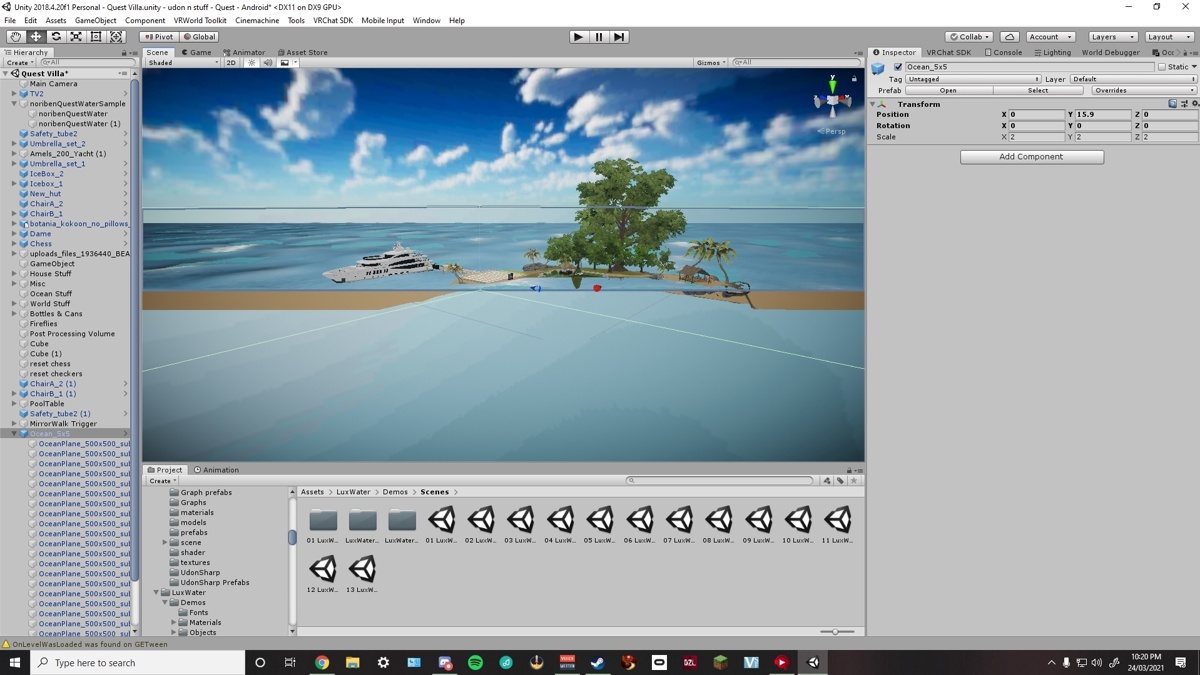


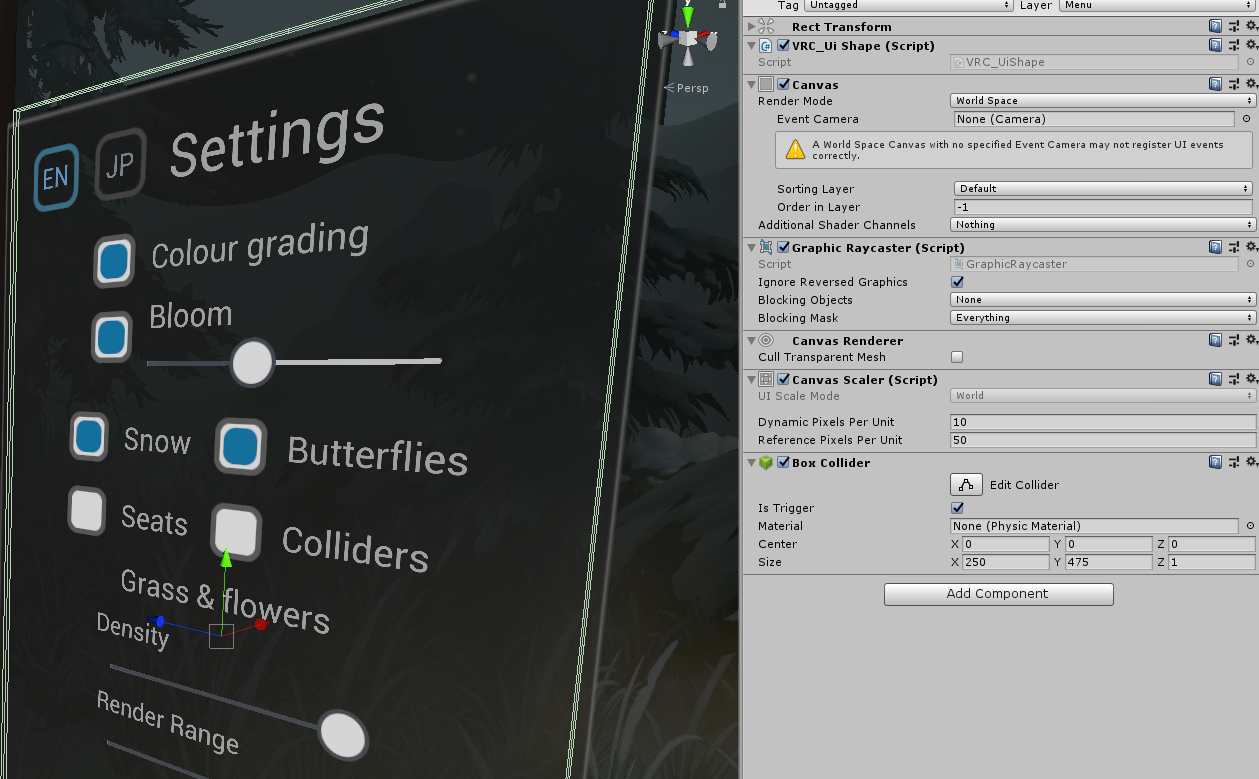

ive tried double clicking an item on the left side to try and fix it but it seems not to fix.
also tried clicking an item and pressing f that does fix it for a split second
random owl
Select some small item and press f
gentle inlet
okay progress i can see the world normally but not the water. bah
gentle inlet
figured it.. i was on android platform and not windows.
bold ibex
aah my world is still not wanting to load properly
 urban jewel
hey im pretty new to world building and stuff. I've already uploaded a world, but I've made changes to it since then and was wondering how to update it. can anyone help?
desert python
in the sdk control panel. click "build and publish" and hat should allow you to update
urban jewel
alright
thanks
didnt know if it was the same button to publish a world and update it lol
 tall parcel
So I got an idea for a map, but I need to figure out first how to accomplish something. How would I go about making morphing blobs floating in the air, like lava from a lava lamp?
near escarp
Metaballs
tall parcel
Oh, that's perfect
Would probably have to set up a code that they gain and lose gravity depending on where they are on the Y axis
I also know little to nothing about making a map, but I'll learn as I go with this little project of mine
bold ibex
whenever I try to reupload my world it doesnt seem to stick or it just simply doesnt want to upload, so it doesnt upload or update anything, rendering my world still broken to load in
also for quest users they can join but its still in the older version of the world
tall parcel
Welp, gotta find me some metaball code that works with 2018 Unity. The one I found is way too old
dusk sapphire
bold ibex
whenever I try to reupload my world it doesnt seem to stick or it just simply do...
that certainly sounds like you have compile errors in your project, resulting in the last successful build being uploaded
dusk sapphire
tall parcel
Welp, gotta find me some metaball code that works with 2018 Unity. The one I fou...
you should note you cannot use native c# code for content in vrchat, the closest is UdonSharp, a c# transpiler for vrchat's udon scripting system, on sdk3.
tall parcel
Would UdonSharp happen to work with Raymarcher?
bold ibex
dusk sapphire
that certainly sounds like you have compile errors in your project, resulting in...
though whats strange about that is that all the compiler errors i was getting were avatar pedestals not initiating on time but usually before it was ok if that was happening and it still was working just fine. it could be the mirror button trigger but thats basically the only thing i could think of it possibly being..
dusk sapphire
are you sure there are no other errors? are you able to go into play mode?
bold ibex
yea im able to go into playmode just fine
dusk sapphire
are you able to build and test?
bold ibex
my laptop cannot allow that for some reason
it never has
if you want im more than willing to let you see the project file if you wish
 pure hornet
I want to make a thumbnail of the world, but I don't know what size it should be, so let me know!
desert python
id go 600x500
 atomic terrace
Heyo, so got a bit of an issue, just updated my SDK to the most recent one (3 days ago) from the December build as i'm doing map updates. However it's not working, I've followed both the package replace on top of the current one and using a fresh package. Using Unity 2018.4.20f1 and here's the errors i'm getting. Any ideas?
 dusk sapphire
check if cinemachine is installed in package manager, and if not install it
if you're using udonsharp, cyanemu, vrworldtoolkit, make sure those are also updated
atomic terrace
None of the third three, cinemachine is installed, tried updating it, kept resetting to 2.6.1, so uninstalled and reinstalled same business at the moment. Left it uninstalled it reinstalled itself. So poking around there.
random owl
atomic terrace
None of the third three, cinemachine is installed, tried updating it, kept reset...
The SDK needs the specific cinemachine version so it will keep installing it as long as it is in your project, restart your project couple times and those errors should go away if there isn't any other more specific ones in the console
atomic terrace
random owl
The SDK needs the specific cinemachine version so it will keep installing it as ...
Alright, i've got it now. Cheers both you and Temporal for that. ^^ At least it wasn't losing all my assigned behaviours this time like I normally get. :p
 last granite
Does VRC support 3D video and can it support animated depth maps?
i saw a 3D video shader.. but it never got made public.. hence I am wondering! Maybe there is something out there.. (also would it support 3 videos playing at the same time?)
desert python
oh yea totally, problem is there is not that many videos or just over content for that field
last granite
willing to make it! But is there any documentation on how it functions rather then just a video display where you see a bit of stereo seperation/depth
desert python
and for more than 1 videoplayer.... thats still a struggle but that is technically possible
last granite
lower res video with it being included in the world itself not hosted.
desert python
as far as I know 🤥, the only good documentarion would be the unity docs and the shader matter group
last granite
shader matter group! yes please!
desert python
but vrchat has an issue where “rate limited” occurs if you try to start multiple videos at once
last granite
ohh not limited refreshes?
errant beacon
This might help? o: https://thegreatpug.com/vrchat-making-a-theater/
desert python
mainly for data reasons, but theres a way to decouple a videoplayer into multiple videoplayers
last granite
i was looking at this: https://www.youtube.com/watch?v=b71mY3NMJ58 as well but the guy said its not public as it wasnt complete but we are now 3 years further almost and nothing so..

Play Kinect color / depth image on VRChat.
Left : 3D Movie model. Right : 3D Scan avatar (Photogrammetry)
Using Youtube movie source with VRC_SyncVideoStream component.
https://www.youtube.com/watch?v=Ax7baJn3bYI
and I made original 3D mesh shader, and Recording software for Kinect 3D movies.
dusk sapphire
you only need 1 video player to play 3d videos
last granite
mhm! half and half I heard
dusk sapphire
the video would be encoded with side by side or top/down whichever
last granite
but yeah I wanna create animated lighting using this method! :>
errant beacon
The Pug thing I linked is a theater that supports over/under and side-by-side 3D, though idk how updated it is
desert python
playing 1 video is probably the best idea - you should probs do that lol
dusk sapphire
ahzkids video player also support anaglyph 3d videos
my public map has had a function for 3d videos for 2 years
last granite
but its essentially you just looking through a window idea right?
dusk sapphire
you're just looking at a video screen that displays a different image in each eye, and you have to be positioned well for the effect to work
the shader turns the side by side image into 1 image for each eye
last granite
yeah thats not what im looking for more a depth map kind of 3d video
as like the kinect thing show above which sadly is a non public shader.
desert python
essentually how 3ds cameras work
dusk sapphire
that looks like probably a custom shader to convert the video format into one that can be displayed in vrchat
i'm assuming the positional information is encoded in the video somewhere
desert python
so. i mean in theory you could do like a “cut out” and then bump the image forward depending on color? but I don’t know - thats probs not going to look good
last granite
well a video of grayscale lines
all the depths would be the same
colored lines moving around to get something like this Ive seen in neos
(sorry for mentioning that) just wanting to know about the possibilities to do this
it uses video apparently
with a fake depthmap
but it would mean someone can use industry software to make a proper light show. hence looking into this.
dusk sapphire
hm, could be a side by side video, except one side is a depth texture, and then the shader reads the depth texture to project the video as a 3d visual
last granite
yessss! i can make it (side by side video).. but further then that i'm stuck