#world-development
39 messages · Page 64 of 1
 dusk sapphire
this is probably more #udon-general related as you'd change it using that
 pure kraken
okay, thank you ❤️
dusk sapphire
at least i think so? in sdk2 its just adjusting place voice fall off in scene descriptor player mods
VRChat
Players have two sources of audio: the voice coming through their microphone, and sounds attached to their Avatar. With Udon, you can change how a Player hears other players' voices and avatar sounds. For example, this graph makes it easier to hear another specific Player, boosting their audio by 5 ...
 random owl
Yeah in sdk3 you adjust it with udon
pure kraken
kk ty
 green crypt
I'm trying to atlas the textures for the house I'm trying to import, but for some reason when I atlas it with Cats, the texture ends up having a massive area of completely empty space. Is there any fix for this?
 near escarp
Add more textures in your atlas or scale up some of the textures
it only uses the resolution of the images that exist, so if it doesn't fill up the result atlas, then it'll be transparency leftover
 silent plinth
not sure i can ask at this time of night but ive ran into a very weird problem, i have doors that teleport you when you walk into them but they arent rendering the mesh but still function
invisible doors more or less
 bold ibex
Were they Visible before you added the VRC Trigger?
silent plinth
yes
and they were visible earlier but something has changed their mind
but i havent touched them since i placed them
bold ibex
Is Mesh Renderer Checked?
bold ibex
Does the trigger still work?
silent plinth
lemme try quick, its been a long night when a simple fix could've helped >_<
tried 2 different things and nothing
dusk sapphire
does it still show up in your editor in play mode?
dusk sapphire
can you show a screenshot of the components on the door
silent plinth
wait hold on...i think i cracked the code
it changed the door from default layer to...mirror
right
thats exactly what i wanted
silent plinth
well there you go
thank you for the help both of you
unity is an absolute nightmare sometimes
dusk sapphire
you generally do want on enter trigger colliders on mirror reflection layer so they don't interfere with interacts, pick ups and raycast
so they should be on their own object, and not on the actual meshes
silent plinth
ill keep that in mind, im very new to world modeling
so anything is appreciated
thank you
 lunar gale
so having a very odd and frustrating bug for uploading worlds console has not errors dosn,t say if its conflicting with anything but when i join the world it immediately blacks the screen and sends you home and now its ses its 200mb map when i know its 30mb with all the lighting baked even.
iv tried sdk2 and sdk 3 udon same results i prefer using sdk2 for the world.
dusk sapphire
import https://github.com/oneVR/VRWorldToolkit it automatically detects and helps fix common issues
also I hope you didn't install both sdk2 and 3 into the same project
dusk sapphire
does it say the build was successful?
lunar gale
yes
i try to join the world it crashes you and sends you home theres literally nothing in this world
dusk sapphire
is your world public?
lunar gale
no i wont public it till i can get it to work for my self
dusk sapphire
put your vrchat logs into https://nyanpa.su/vrchatlog/ and see if it says any errors when trying to load your map
A simple VRChat output log parser that shows you user activity in maps you have visited, as well as basic trigger, warning, error and exception summaries
lunar gale
uh remind me how to get logs again havnt had to do that in a year or 2
dusk sapphire
also if you can, a screenshot of the vrworldtoolkit debugger
instructions are on the site
lunar gale
models are way more simple and never had issue with those but updating a avatar maps been a living hell right now

still dont know whats causing it to be over 200mb when the file of the map its self is 10 to 20 mb
but yes no visalbe errors in it
dusk sapphire
that build window doesn't look correct at all
i suspect you do have errors in your console
is that the latest version of the debugger?
and sdk?
dusk sapphire
can you show a screenshot on the console in unity
 dusk sapphire
hit play
lunar gale
sure
moment hit build so now i have to wait till i can cancel it now
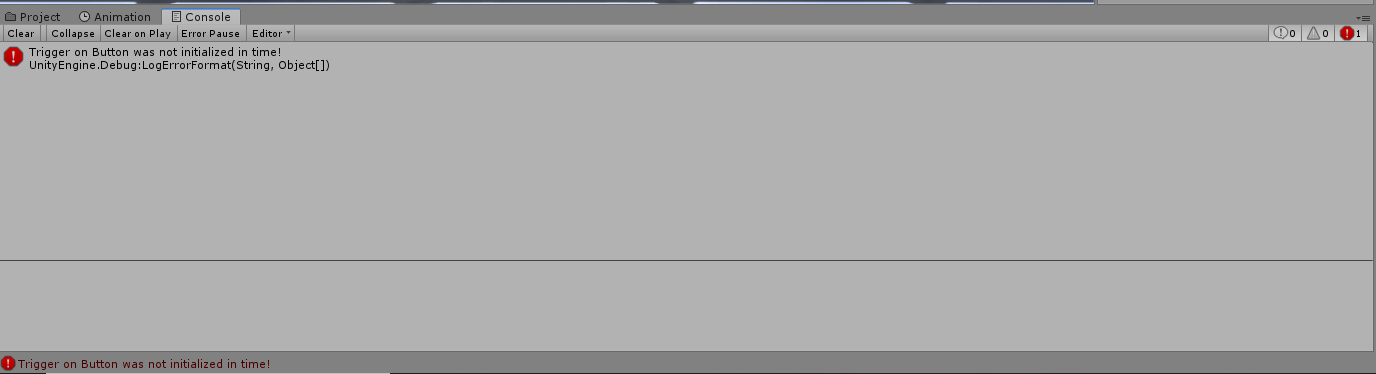
just one error on a simple button in scene
dusk sapphire
yeah that doesnt look right, restart the unity editor and hit play again
sometimes the console doesn't work right
also do you have any unity store assets in that project?
things known to cause issues are light probe placer, all sky
 compact garden
Hey, dose anyone don't mind if I created and develop a studio Backlot in vrchat
lunar gale
 dusk sapphire
is there more?
compact garden
For the purpose of film and for my favorite YouTubers too who would like to film in the Backlot of vr Hollywood
lunar gale
thats literally all thats there
dusk sapphire
have you gotten your vrchat logs yet
lunar gale
no i have not ill have to figure out how to get em then
dusk sapphire
the page i linked you tells you exactly where they are
compact garden
Aw crap, dose anyone know what version of unity works for vrchat?
dusk sapphire
it might just be faster if you dm me that world's id so i can quickly look
dusk sapphire
compact garden
Aw crap, dose anyone know what version of unity works for vrchat?
2018.4.20f1
compact garden
Thx
lunar gale
how would you even check a none public world
k ill loading into world see if i get a new log
okay got it put it in the log thing you suggested
what am i looking for
lunar gale
 dusk sapphire
yeah thought so
your build failed, and it uploaded the last thing that was built successfully
lunar gale
i see an old id there which i dont use
dusk sapphire
i see you have a 200mb public avatar world and thats what got uploaded instead
lunar gale
well im not using same id or same unity prodject all clean unity file
so i dont under stand y its showing my old id ?
dusk sapphire
builds are stored in a temp folder
it uploaded the last successful built thing there
if the toolkit didnt pick this up it means there are some scripts causing errors in your project
what other 3rd party assets do you have?
lunar gale
maybe just poiyomis but i'm not even using it in there just standard shaders and bake lighting i haven't even put pedestals yet sinc enothing sbeen working
lunar gale
yeh i keep up to date with that one
i can remove it i guess i dont need it
but thats it i have tool kit sdk2 and a model
dusk sapphire
and just to check, unity 2018.4.20f1?
lunar gale
yes its current version
dusk sapphire
try hitting build and upload and see if any more errors show up
dont upload, just get to the upload screen
lunar gale
just get the trigger warning
compact garden
Wait so that version doesn't work??
lunar gale
i dont have issues uploading avatars so maybe i can some how wipe world temp files
dusk sapphire
no that is the correct version
you can try clearing them, they're in %TEMP%/DefaultCompany i believe
but you're likely just going to get a different error instead when trying to upload
are you sure you don't have anything else installed?
maybe try reimporting the sdk
 dusk sapphire
does the toolkit say anything different now?
compact garden
Have you guys ever heard of 3d warehouse sketchup? Cause I wanna Barrow there 3d model for buildings and props
Not to mention unload it to unity
lunar gale
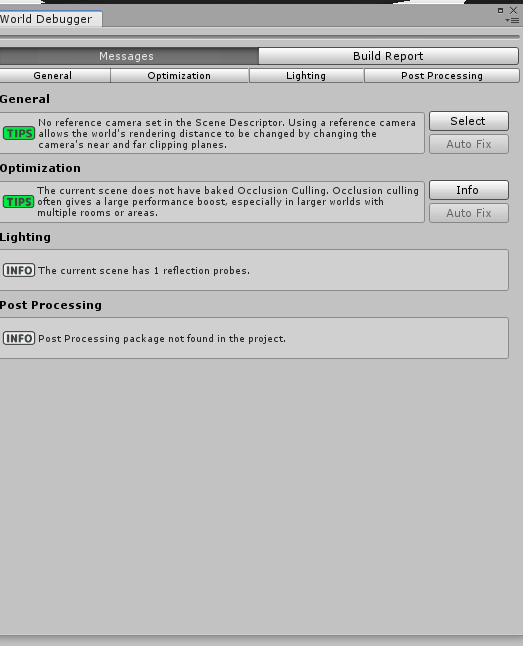
well re imported tool kit
now its saying this
wont let me bak occlusions either now
dusk sapphire
reimport the sdk if you havent
lunar gale

have i rebooted unit y now theres only this warning
since i removed all my triggers and shaders
dusk sapphire
you didnt need to remove triggers
lunar gale
well im stumped its way late at night now been trying to upload a box basically for 3 hrs
dusk sapphire
at this point just reimport the sdk and try uploading again
i dont see anything that should be wrong either
lunar gale
i need rest for work now but thanks for trying to help im tired and frustrated need to sleep on it for now
re-imported sdk still same thing still so ill sleep on it will update if i ever get it to work ill stick with models for now
 autumn crypt
Ayo! Does anyone know how to make a mirror local instead of global? ^^
autumn crypt
Yes please sorry I just got it lol Thank you though!
 knotty plaza
@random owl upgrading to VRChat+ granted the access to Community Labs. ^^
 crude nacelle
is the VRChat Home Kit good ?
 verbal hare
blender question...i have missing faces on this model, but they are there in Maya (the program it was built in). the import method was FBX. the faces are also fine in Unity
 glad ridge
hi guys i have a quick question, im new to VR Chat and cant upload content yet, but am i able to upload and view it from myself to see it alone or not at all?
verbal hare
you need to be at least New User, i think @glad ridge
glad ridge
is there a way you can download a world a view it in unity?
 spiral temple
glad ridge
is there a way you can download a world a view it in unity?
spiral temple
glad ridge
is there a way you can download a world a view it in unity?
yeah
like this
 errant beacon
glad ridge
is there a way you can download a world a view it in unity?
errant beacon
glad ridge
is there a way you can download a world a view it in unity?
Not without breaking the TOS (and thus getting your account banned)
 green pawn
@verbal hare It's a longshot, but try going Edit Mode > A (Select all) > Alt + H, just to check it's not hiding those individual faces for some reason.
verbal hare
green pawn
<@!152116384292274176> It's a longshot, but try going Edit Mode > A (Select all)...
that wasnt the case
bold ibex
I asked this in #user-support-old but I'm a newbie to world development. In short, when I test build my world, VRChat does open but immediately crashes when trying to load the world.
random owl
https://github.com/oneVR/VRWorldToolkit/releases
Import this and check VRWorld Toolkit > World Debugger from the top bar
If it doesn't find anything might be just something you are doing in the world that's crashing the client
bold ibex
what the hell? it says im a new user
i've been using this account for a long time
so thats where my problem is
random owl
Well fix the issues and see if things work
After it usually goes into things like if you have million polygon mesh colliders or a lot and or long audio with bad import settings
bold ibex
Turns out it was the mirror
random owl
Yeah that can happen
 median lily
i hope there would be a genshin impact udon world
bold ibex
Does anyone know of a list made by vrchat explicitly stating what isn't allowed in worlds you publish to community labs? I cant find it
random owl
I mean anything that breaks community guidelines and or terms of service as with other areas of the game
bold ibex
alr ill take off the community guidelines then thanks
random owl
🤔
 lyric acorn
One simple trick lol
 obsidian lake
Someone can help me, I've no idea why i cant type for put the name of the world and the other things, if someone can help me pls, I've restart 2 times Unity
random owl
https://github.com/oneVR/VRWorldToolkit/releases
Import this and check VRWorld Toolkit > World Debugger from the top bar
obsidian lake
Ok, i will try, thank you very much for the help
bold ibex
This may be a stretch, but I'm attempting to make Wheel of Fortune with a wheel you can grab/drag. However, my hinge doesn't stay flush with the floor and fixates above. I've tried moving the connected body under the floor but it always stays in that position.
obsidian lake
random owl
https://github.com/oneVR/VRWorldToolkit/releases
Import this and check VRWorld T...
Yeah it worked, thank you very much sir
 upper orchid
Unity crashed while uploading an update to my world, it seems to have gone through however the "Last Update" still says a month ago. Does that just take a while to update or did something bug out and should I try reuploading again?
verbal hare
what would be the easiest way to make stairs and windows - blender, or Unity?
 ancient torrent
bold ibex
ancient torrent
bold ibex
You'll need to use Unity to build worlds
 dusk saffron
Hey in unity I saw on some of the worlds they have those flying vehicles that you can sit in one of them had the nimbus with one controller and another had regular spaceship with two ball controller things I was wondering how I would be able to make that and if there's a video tutorial out there I have not found one yet but if you guys have one could you please link it to me, sorry I'm still very new to making maps so if it's something simple I'm very sorry.
silent plinth
can i use the sdk 2.0 for videos and pens or will i have to make a udon or 3.0?
errant beacon
silent plinth
can i use the sdk 2.0 for videos and pens or will i have to make a udon or 3.0?
Pens and video players are def possible in SDK2 c:
silent plinth
ive looked apon google and it has been an absolute waste of time
how do i add them do you know?
 mild spade
@silent plinth Do you want to make them from scratch? Or just having problem making them work on your world? Or are you just trying to find them? https://tinyurl.com/vrcprefabs This link has a lot of prefabs you can add to your world (including video players) (link is in the pined messages on here)
silent plinth
that link is an absolute gold mine
i wasnt sure about how to get my hands on pens that i see in alot of worlds but maybe there is one here
thank you very much squall
 misty timber
what about externally through a browser?
dusk sapphire
with the exception of vket who were allowed the function to open a link in game, we do not have that
bold ibex
project:full blown computer in vrc
 cold hound
Where can i search for Skybox's?
 waxen veldt
how do u make pick ups and other things not local only
 desert python
trying looking up "night city skybox" into google or bing and see if any for unity pop up
same thing goes for the asset store
cold hound
i will check
waxen veldt
desert python
<@!169154916571414528> add component vrc_pickup
i meant how to make them not only move for you, i have them with the pick up script but for some reason everyone only sees them locally
desert python
you sdk2 or 3?
waxen veldt
3
desert python
ah, add component : udon behaviour > do not add any scripts, but click sync position and it should move for everyone
waxen veldt
thank you
 ancient goblet
Helloo, I'm curious about something. I'd like to make my floor wooden and I was wondering if there is any way of making it look more..'wood-ish/realistic' like you can do in blender, having small creaks instead of just a flat texture, is that even possible in vrc/unity?  Example below, thanks in advance!
bold ibex
yeah height maps but dont ask me how they work or how to make em I just know what they do
ancient goblet
Ooh! I think I know what you mean ! Thank you so much, I'll do some research on it
 dry vale
Height maps, normal maps, roughness maps, etc
 modest patio
Hopefully quick question, I recall in the past seeing chairs that didn't override your IK and still allowed you to move a limited amount (at least when using FBT, never tried it without) Was there a certain trick needed to get that to work?
errant beacon
modest patio
Hopefully quick question, I recall in the past seeing chairs that didn't overrid...
might wanna check out the documentation page on stations, SDK3 station might be what you're looking for o: https://docs.vrchat.com/docs/vrc_station
 odd rock
I have questions. Is it possible with sdk3 to generate units you can ride on. Say a horse stable.
errant beacon
odd rock
I have questions. Is it possible with sdk3 to generate units you can ride on. Sa...
Yes, it's vv possible to make vehicles in SDK3 (and sdk2 for that matter, though likely with some more difficulty) c:
odd rock
Sweet, thanks @errant beacon, I will research vehicles
modest patio
errant beacon
might wanna check out the documentation page on stations, SDK3 station might be ...
I looked at those docs before, but I don't think it was SDK3 stations, because I recall seeing the same behavior on some chairs on avatars back in June. Although it is always possible that the behavior was a bug, as I don't recall seeing it recently
errant beacon
ah
SDK2 station with the Seated property unchecked might be it then? o:
errant beacon
odd rock
Sweet, thanks <@!410315851871551488>, I will research vehicles
yw! c:
modest patio
I swear I tried that, but will test again
odd rock
I have another question regarding what might be possible with the engine. I would like to pilot a ship with multiple people on board. My past experience has lead me to believe that it's difficult. Avatars tend to rubber band and unless you are seated, it becomes a somewhat vomit inducing voyage. However, what if the only object you could technically be on is the ship and you were able to move the world beneath you. Would this be possible?
graphic for reference
errant beacon
That would be possible yes, but keep floating point stuff in mind
you might want to look into 3D skyboxes for that? (basically have a tiny version of your map that's blown up in the skybox that you move to "fly" the ship around, rather than moving a massive full-scale world model instead) o:
odd rock
How are normal maps in VRChat these days?
 grand remnant
heyo, im trying to use common tools & toys for my map, VRCSDK3 + Udon, but so far any package I try to use has "missing script" on every prefab. I suppose Im missing some required library/package but I do have udonsharp imported so im not too sure what im doing wrong. Any help welcome.
errant beacon
odd rock
How are normal maps in VRChat these days?
define normal map? o:
errant beacon
grand remnant
heyo, im trying to use common tools & toys for my map, VRCSDK3 + Udon, but so fa...
Are you using Unity 2018.4.20f1 and the most recent version of SDK3? o:
grand remnant
errant beacon
Are you using Unity 2018.4.20f1 and the most recent version of SDK3? o:
2018.4.20f1 yes, SDK3 yes but not sure how to check the version
(world build/test/publish works fine btw, i just cant get community assets to work)
errant beacon
The .unitypackage for the most recent version should be called "VRCSDK3-WORLD-2021.01.28.19.07_Public"
also, is it all community assets or just one? might wanna make sure that the asset is compatible with SDK3 and is the most recent version of said asset o:
grand remnant
errant beacon
The .unitypackage for the most recent version should be called "VRCSDK3-WORLD-20...
according to the version file in /VRCSDK I have the right one, and yes so far it seems any prefabs I import that dont rely on udonbehavior visual script will have the script missing
Maybe I messed up with UdonSharp import ? Not sure how to check what is wrong
errant beacon
odd o:
Did you import UdonSharp as a .unitypackage, or did you import the source code as a .zip? o:
also, having a screenshot of any console errors could be helpful
odd rock
errant beacon
define normal map? o:
Height maps, maps that allow for the illusion of depth. If I can make a sphere and apply a normal to that sphere, and then just apply a color ramp to the depth. I can make a fairly low poly solution.
errant beacon
odd rock
Height maps, maps that allow for the illusion of depth. If I can make a sphere a...
Ah - in that case yeah, normal/height/AO/etc maps are def allowed in VRChat lol
would recommend keeping your textures below 256 pixels for pretty much everything except normal maps, which shouldn't go past 512 imo
odd rock
Oh god
errant beacon
128 and 256 for albedo/color and normal maps respectively might be a better target actually
Sounds low, but you'd be surprised at how much detail fits in 256 pixels lol
texture sizes bloat map files v quick
also, keep the Crunch Compression option in mind in the texture's settings too! c:
won't reduce memory overhead, but it can reduce filesize drastically
grand remnant
errant beacon
odd o:
Did you import UdonSharp as a .unitypackage, or did you import the source...
I deleted UdonSharp and reimported the package, looks like its better - ill test that, thank you
odd rock
hmmm I have used crunch compression before.. I am using 16x16 maps atm...
each pixel is a color, then i just put the quad in the proper pixel
errant beacon
oh in that case you're fine lol
odd rock
thanks Zuvali, I will consider 512 for the normal when I go to build the world I'm thinking about.
errant beacon
yw! would probably recommend 256 with 512 as a cap for normal maps specifically
random owl
That's still honestly horrible general recommendation
errant beacon
I mean, with albedo maps at 128 or lower, leaving the normal maps at a higher res seems like a decent idea to me o:
absolutely wouldn't recommend going past 512 though, as 256 would def be good for pretty much anything
random owl
Any kind of recommendation that you give to someone without having any idea of their world style is horrible
512 is way too low for any properly atlased pbr textures
errant beacon
should clarify then lol - for tiling, repeated PBR textures with seperate (non-atlassed) maps, 128/256 then imo
odd rock
hmm
errant beacon
for atlassed stuff though yus, def more pixels to actually fit the detail in
random owl
That still depends on how their textures are made
If someone is using asset store stuff or making their textures in substance painter that recommendation does not work
errant beacon
sorry, just recommending what works for me - def lots of ways to optimize textures lol
odd rock
Well I use substance painter, but not for this application
random owl
Yeah but the point is that you should not recommend something that depends on 100 of different factors
Like let's take this vhs cassette for example at 1k texture size and crunch compression the textures are 150 kb
odd rock
Ok. I will work on some ideas i have on this end. I think there are valid points made regarding compression and load.
random owl
Now let's put it down to 256 sure it's 125 kb less but it's also unreadable
random owl
odd rock
Ok. I will work on some ideas i have on this end. I think there are valid points...
Always set the import settings based on the individual texture as low as it goes depending on how much you are willing to compromise or how low it goes without losing any quality
odd rock
Aim for the smallest file size I can get without sacrificing quality.
errant beacon
^ the jist of what I was trying to say yes, sorry lol
 idle harness
hey, i got a problem when i try to upload my world, the upload menu doesnt appear. when i click build and publish it it goes throught the process and then just takes me to the main camera with no menu to input the name or upload the image. and it not giving me any errors in the console either
random owl
https://github.com/oneVR/VRWorldToolkit/releases
Import this and check VRWorld Toolkit > World Debugger from the top bar
idle harness
already did
this is what it says
maybe its the lights?
but when i bake them, they just stop emitting light
random owl
Can you show the settings on the camera that's view you see in the game window?
idle harness
this?
random owl
Hmm yeah -1 shouldn't overrender the upload camera
Try to upload again and then check if the upload screen is spawned in properly at the bottom of your hierarchy
idle harness
nothing appears at the top of the hierarchy when i try to upload
idle harness
nope nothing at the bottom either
random owl
That's a mysterious one then since there's no errors and nothing get's spawned 🤔
Anything interesting in the warnings?
idle harness
oh well i just tried to delete the sdk and re import it, and now when i try to upload it i am getting some errors
maybe it just didnt show them before
random owl
Unity do be like that sometimes
idle harness
random owl
Did you move your VRCSDK folder?
idle harness
In my file explorer?
random owl
Well in general inside your assets
Like is it in the place it originally imported into
idle harness
yeah i havent moved it
random owl
Show me that Assets/VRCSDK/Dependencies/VRChat folders contents
random owl
Now the good question is why does it think that the folder doesn't exist
idle harness
is that why its not working? hmm idk
is there a way to manually input the path it needs?
random owl
It wouldn't really solve the actual problem here
Can you clear the console and try to build again and see if that error comes up again?
random owl
That one is just a normal one the sdk throws by default
idle harness
oh so we got nothing to go off?
idle harness
probably let me go check if they've updated since i last dowloaded it
random owl
You can try making a empty scene adding just the vrcworld prefab and trying to upload that to see if it's just something in your current scene stopping it
Then if that also doesn't work you can try making a new empty project and seeing if you can upload there
If you have some external assets that aren't namespaced correctly or such they can create weird issues like this
idle harness
ok so i added the uppdated sdk and for some reason it had compiling errors with ur toolkit, so after i deleted that it still doesnt work but im not getting any errors either
random owl
I had to release a patch for the latest sdk so I guess you were on a older version of my tools and sdk
idle harness
and idk if this is any help but the list that shows the name and stuff doesnt appear
random owl
That's alright I think it just got lost from the cache or something while you updated
You can try making a empty scene adding just the vrcworld prefab and trying to upload that to see if it's just something in your current scene stopping it
Then if that also doesn't work you can try making a new empty project and seeing if you can upload there
Try these steps next ^^
I'm going towards it being some random script with some assets you imported breaking things
idle harness
yeah it does work on the empty scene
 cerulean echo
this why i never import scripts wen i use assets from store i all ways test stuff in a test world
random owl
Okay if it works in a empty scene 🤔
idle harness
ill try and delete the external assets to see if that works
random owl
Then it's something in the scene itself
I would love to know what it is so I can add a check for it
idle harness
yeah ok ill tell u if i find out
cerulean echo
i hope you find the problem
idle harness
so i've deleted all the external assets but it still doesnt work
random owl
Duplicate your scene, try to upload the duplicated scene, then start cutting out game objects and trying to upload again
idle harness
how would i duplicate my scene?
random owl
Select it in your assets and ctrl + d
You can just do the half and half to find it quick
Start by deleting the top half of gameobjects see if it uploads
If it doesn't do the same again
That helps you narrow down slowly where in the hierarchy the problem is residing
idle harness
well just to see if it was an object i first just deleted everything except for the game object that had the vrcprefab and the spawn point and it still doesnt upload
so it seems its not a object
random owl
Can you check the meta file for the scene?
idle harness
where is that?
random owl
You need to go trough file explorer to the assets folder
And there will be a file named the same as the scene with .meta at the end
idle harness
theres no file with the name of my world but there is a _lastbuild.meta
grand remnant
two little questions :
1- is there any good "all in one" pack for things like drawing pens, flashlights, toys & tools for players ?
2- im using NorixWolfeVideoPlayer out of the box (just moved some interface elements arround) and videos works fine but I have no sound. Speaker from the prefab is there, active and seems to be set up properly. Any suggestion on what I could check ?
idle harness
oh and how would i open it?
random owl
Looking at your screenshots there should be sound.unity.meta file there
idle harness
oh yeah i see it
random owl
You would just open it in notepad
idle harness
this is what comes up
fileFormatVersion: 2
guid: 99d1806238ae5384992b58c0169170c9
DefaultImporter:
externalObjects: {}
userData:
assetBundleName:
assetBundleVariant:
random owl
grand remnant
two little questions :
1- is there any good "all in one" pack for things like dr...
Usually since people focus on making a single asset there really isn't any all in one packs
I'm not really that familiar with video players in general nor that asset so I'm not so sure could possibly get in contact with the person who made it
random owl
idle harness
fileFormatVersion: 2
guid: 99d1806238ae5384992b58c0169170c9
DefaultImporter:
e...
That looks normal
It's a bit annoying trying to find the issue in cases like these
random owl
In this case might be honestly 🤷
idle harness
yeah well thanks for trying anyway, this is the second time youve helped me
random owl
Hopefully it wont happen again after you remake 🤞
idle harness
yeah hopefully
waxen veldt
does anyone know if the vrcbilliards asset would break if u try to have more than one table
near escarp
It would
ancient goblet
Hey guys, I'm pretty new to world building, but how high do you make your walls/ceilings? I know about some cube technique, but how many cubes would one average avatar be? 
errant beacon
ancient goblet
Hey guys, I'm pretty new to world building, but how high do you make your walls/...
I'm fairly certain one default Unity cube is a meter in all dimensions, so roughly 1.79 meters/cubes would be the average US height for scale c:
don't strictly know the average avatar height since they vary wildly, but that might be a good start to experiment with o:
random owl
Player collider will always be 2 m tall
 halcyon snow
I am trying to upload a map but sdk is trying to upload a non active/not opened scene with my current scene.
random owl
You need to go trough the file explorer and edit the meta file of that scene to empty the asset bundle name
ancient goblet
Oh boy..I made my world way too small then Thanks a lot!
halcyon snow
Meta for both or one?
errant beacon
yw! and yus player collider itself is 2m like 1 said c:
random owl
Mainly just remove it from the wrong scene
Because that's what is causing it to get included in the build
random owl
Yeah it's a rare thing
There's at least one unity asset store asset that has a broken scene included with it
And it can happen if unity crashes while you are going trough the build & publish
halcyon snow
oh.
random owl
Inb4 you got the palm trees
halcyon snow
that explains it
my unity crashed while build & publish and i had to reimport my assets yesterday
and its trying to upload thats maps assets
so makes sense
random owl
Yep that would do it
 random owl
Whew
Usually you should be able to fix stuff like that without complete reimport but that depends on what exactly happened
bold ibex
is there a light shader for object that I could download that anyone has or a tutorial or some kind to make a moving object luminous?
errant beacon
bold ibex
is there a light shader for object that I could download that anyone has or a tu...
An emissive or unlit shader might be what you're looking for - Unity should have some built in, and Poiyomi's toon shader def has emission channels o:
bold ibex
which unity built in shader is it tho?
errant beacon
can't personally remember, but keywords to look for would be "Emissive" "Illuminated" or "Illum" for emissive ones, and just "Unlit" for unlit shaders o:
random owl
If you want the things to actually glow you will need post processing

GitLab
A surface shader for Unity providing cel-shading. (Forward rendering only)
 red umbra
Uploaded a world fresh but keep falling through the ground. I searched and tried what I could, but I can't figure out how to resolve the issue. If I put Respawn Height Y at -100, I endlessly fall. If I put Respawn Height Y at 110 (above ground), I float in a nauseating state and can't do anything. Installed latest VRC SDK from the website (2021.01.28.19.08)
Looks like this in Unity:
random owl
Show me the collider you have under the spawn point?
bold ibex
in theory if your temp banned from worlds, is there a way to build and test worlds without it sending you to the deserted island
 undone sierra
 elder harbor
Ok so guys, I had a really great idea for a VR world, tell me what y'all think, positive feedback only please
bold ibex
interesting for sure
elder harbor
I feel it should be a paid world for sure. $70 a month would cover the experience of the raw emotional energy
bold ibex
anyone happen to have a hammock asset thats free by chance
bold ibex
well heres a hammock if anyone ever needs one https://opengameart.org/content/hammock download and open it into blender change the color and export to obj
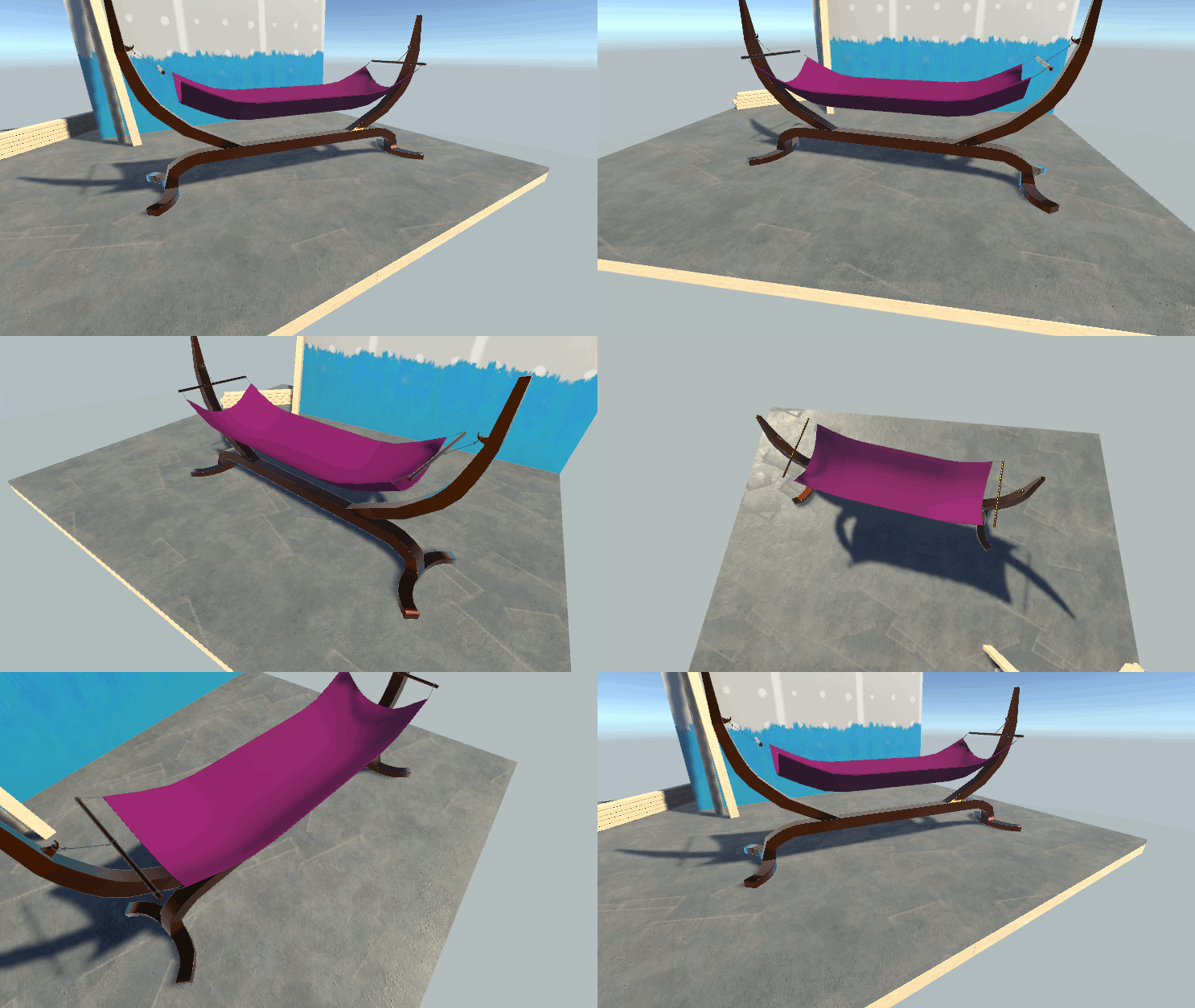
OpenGameArt.org
A hammock fit for royalty... but this asset can used royalty-free. Includes the FBX, a basic URP shader, material, and prefab.
 vast idol
Will a low pass filter on a video stream speaker work?
I'm having trouble with it.
pure kraken
is there any way to lock a gameobjects proportions when scaling?
pure kraken
so basically, don't have the parent selected, but the children instead
is that what you mean? @near escarp
near escarp
ah if it's not the main object yes
pure kraken
ok ty
knotty plaza
Question:
Is it possible to make a button in vrchat, call a particular discord chat/room for the user? Anyone can point me to a guide about it? (i haven't had much luck searching for that)
near escarp
That isn't possible
knotty plaza
Daaaamn
So probably pasting a (discord) link to a user clipboard won't work either, right?
elder harbor
Aren't there browser objects?
Like that open websites?
I haven't done any room development but I thought I saw those
knotty plaza
That was pulled off because had security issues.
I understand, but I wish so much they could bring it back soon.
bold ibex
are new sdk2 worlds no longer supported? i cant upload anything, i keep getting "failed to optimize file for upload"
near escarp
what are you trying to upload ?
bold ibex
at this point just a quad with a standard material
bold ibex
2018.4.20f1 and i just downloaded the sdk from the website. so yeah
could it be because im working of a NAS?
near escarp
What's that ?
bold ibex
a storage device on the network
near escarp
ah sure, anything out of the ordinary is often the cause
bold ibex
yeah was going to say I just recently uploaded a sdk2 world
 pure hornet
Hi, I want to create a comfortable world in VR, how much fps should I get?
odd rock
pure hornet
Hi, I want to create a comfortable world in VR, how much fps should I get?
I think that depends on how many polygons are on the screen at any given time coupled with the resolution of the textures you decide to use.
errant beacon
For VR, aim for the highest you can get - your FPS is locked to your headset's refresh rate in VRChat, too
random owl
Yeah, if your world can't get 90 fps on a good computer alone in the world don't make it public
 buoyant ledge
Hiya! Is there a channel I can request a quest user to check out if my world's particle system works for them?
 green lagoon

I recently updated my comprehensive post-processing guide!
I added some notes on how bloom affects eye adaptation (it doesn't) and generally revised some of the wording. I also added a comparison example between tone mappers.
Check it!
#vrchat #unity

 Twitter
·
Twitter
·
 bold ibex
hello all, i'm running a minimalistic copy of windows 10 that breaks the 'Build & Test' option and i'm wondering if anyone can tell me/screenshot what the command line flashes up to launch vrchat in the local world so i can manually do it :)
 lapis walrus
Hai-, I'm having an issue with finding a good sdk2 streaming video player that doesn't stutter for late joiners of an instance. Any help would be great! ^-^ thanks
errant beacon
@cold hound Check the top pinned message in this Discord channel o:
errant beacon
SDK2 should work fine with video players o:
Check this message #world-development message and see if it helps any c:
cold hound
Then why i'm having that problem i mean i'm using one that's working on my other world
i just copy and pase
i guess i will need to use SDK3 T____T
errant beacon
Check the message and see if it helps lol, there's a guide linked for this exact kind of issue c:
 scenic raptor
Is it possible to see the source of world reports to better understand and remedy them? (Eg. platform they were reported on)
What happens to world reports after any outstanding issues are corrected?
errant beacon
not sure if the world reports go away, though I'm fairly certain that they're only visible to the world creator
 glacial pond
random owl
glacial pond
random owl
Oh I guess the text being wrong way around
random owl
https://github.com/oneVR/VRWorldToolkit/releases
Use my world tools and it'll draw you the helpful indicator showing where the pedestal image will be in game 😉
glacial pond
i edited the prefab and rotated the model so the "VRChat" logo faces forward & Udon logo on top is readable
your tool is even better lmao
 twilit kindle
bold ibex
twilit kindle
bold ibex
is there a good video for how to use and navigate sdk3 worlds, as ive been using sdk2 and updating to that version is a drastic change
bold ibex
is there a way to get UI to layer behind VRChat's Interact glow?
it gets hidden by the yellow image
also
the screen is on the layer Default
and the camera is set to show Default
so why is it a black void in the camera?
 visual knot
do objects have to be static for them to not move?
bold ibex
Anyone know how to make an annimation sync with everyone else?
Everytime someone joins they dont see the animation, I have to press the button again for them to see the animation SDK2
near escarp
Does the object with the animator have an object sync component ?
 proven glade
How do I make a mirror start off?
near escarp
Don't enable it ?
proven glade
how does one do that because im new to all of this
errant beacon
Disable the gameobject at the top of the inspector o:
pure kraken
where do people find the pool table I've been seeing everywhere? I want to put one in my world ._.
random owl
GitHub
VRChat Billiards - Updated and maintained. Contribute to Xiexe/VRCBilliards development by creating an account on GitHub.
 short stirrup
Does anyone have a spin the bottle preset that I could snag?
 crystal pebble
How would I make a dance floor? In unity
 cold mango
vrc dev who made this eye killing place should get a big bonk. Dumdum who has never had an HMD on their face.
 scenic hare
proven glade
scenic hare
proven glade
Hey my low mirror keeps doing this thing where it won't show players
near escarp
Which layers are selected ?
proven glade
Player and playerlocal
near escarp

proven glade
Maybe it will be fixed once I upload it?
 left marlin
PlayerLocal should be changed to Mirror Reflection
near escarp
Are you sure no one showed or only you didnt ?
proven glade
Only I didn't, again still testing
The skybox did show
Ah ha the mirror reflection helped
 wet furnace
help plz
i did big oopsie
first time screwing with terain and i set grass texture as grass texture
 wild mirage
help pls
bold ibex
Do u guys know how to play multiplayer in local testing ?
wild mirage
just spend time
 kind rock
bold ibex
it says i need to spend more hours enjoying the app
kind rock
bold ibex
it says i need to spend more hours enjoying the app
to be able to publish anything to vrchat, you have to be above the “visitor” rank
wild mirage
its like 12h or something
just send random friend requests
you will have it in no time
bold ibex
there is no way to play with 2 personns locally ?
because we can launch multiple clients
wild mirage
trust me its not worth it
bold ibex
can I invite my friend in a local testing world ?
dusk sapphire
you can't. it says it right there.
 bitter idol
how long is the cool down for the recently updated tag (how long before it goes back in that tab again)
bold ibex
anyone know how to increase the draw distance?
my world gets cut off after a specific point which i really do not like
dusk sapphire
make a camera, set the clipping plane as far as you like and add it as your reference camera in the scene descriptor
bold ibex
ohh ty
knotty plaza
I'm unable to trigger a sound from, say, a cube (OnInteract). Does anyone have a linkt to a guide about that, or can share how do they do it?
I just can't make it work for the life of me (and I made a light switch on my own, so it's not like triggers won't work)
glacial pond
Get the audio source component of the game object and run the command Play (a method of Audio Source)
Wait this isn’t the udon channel
 woeful tide
Which triggers do I use to make it where if a player walk into a certain location it triggers an event (SDK2)
mild spade
That would be OnEnterTrigger with the layer "PlayerLocal" on it. You will then need to add a collider with "Is Trigger" checked to the same game object. The broadcast type is up to you.
near escarp
Then yeah it won't sync
 misty wave
Anyone have a recommended prefab for a video screen? I'm trying to use tsuna's but it's giving a script error
I just tried Merlin and it worked great, for the record
bold ibex
how in sdk3 do you make it to where one button turns off other objects?
mild spade
bold ibex
how in sdk3 do you make it to where one button turns off other objects?
#udon-general for sdk3
bold ibex
yeah your gonna have to do udon node stuff its so much fun
 haughty pewter
i have a question yall
so if i update my world on Unity and save it, do i need to reupload it to the VR chat servers for it to be in sync?
dusk sapphire
yes
 lime gale
how do i make a mirror
haughty pewter
thanks @dusk sapphire
dusk sapphire
search for the vrc mirror prefab from the sdk and drag it into your scene
haughty pewter
but since i've uploaded it on community labs, does it replace that world with the newer version? @dusk sapphire
dusk sapphire
yeah, it just updates it
as long as you keep the same world id in pipeline manager
haughty pewter
ok cool. one more thing if you dont mind me asking
gotcha
i added a song for my audio source, is there a way to add multiple song files?
so after one song ends, it plays the next one?
dusk sapphire
sdk2 or 3?
haughty pewter
sdk2
dusk sapphire
you can use the VRC_Audio Bank component for it
lime gale
the mirror prefab is invisable
haughty pewter
rotate it
lime gale
ok
dusk sapphire
it only reflects on one side, make sure you're looking at the right side ^
dusk sapphire
VRChat
Can used to play sounds easily in a sceneRPC's are available via the SendRPC action Quickstart Guide First, create an audio source in your Unity project and turn off the "Play on Awake" feature in the inspector. Create an empty object (position is not important) and add VRC_AudioBank component to...
lime gale
lol thank you
lime gale
how do i make a spawn with the scene descriptor
dusk sapphire
the vrcworld prefab already has the scene descriptor set up for you with itself as the spawn
lime gale
im not using the vrc world prefab
dusk sapphire
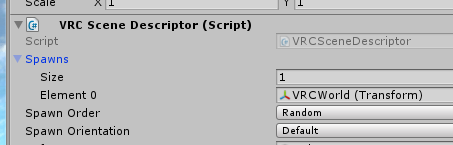
you just need a transform in the spawns slot, you can use the object your scene descriptor is on as one
then place it wherever you want the spawn to be
dusk sapphire
 lime gale
ok
it doesnt say that
it doesnt have element zero
@dusk sapphire it doesnt have element 0
mild spade
lime gale
<@!57330469510840320> it doesnt have element 0
Where it says SIZE put "1" it will add one element
dusk sapphire
^
pure kraken
I'm getting this weird light and line down the middle of my floor
I have no idea how to fix it
haughty pewter
hey @dusk sapphire
sorry to bother you but i feel like you might know the answer to this question
how do i add an image on a VR chat world like if i wanted an image on the wall for people to see?
ive tried the image components but i feel like im doing something wrong.
lime gale
temporal knows all
haughty pewter
mhmm
dusk sapphire
Just make a quad and put the texture on it
errant beacon
^
There's also the VRC_Panorama component, but I have no idea how that works lol
pure kraken
@dusk sapphire could you help me out too, if you don't mind?
haughty pewter
that sounds interesting @errant beacon
dusk sapphire
Is that baked lighting? Increasing padding can help
errant beacon
haughty pewter
that sounds interesting <@!410315851871551488>
https://docs.vrchat.com/docs/vrc_panorama Seems to load images from either a texture or a URL, though I personally haven't used it - is def interesting though! o:
pure kraken
It looks like there is a source of light there but there isnt..there is emissive light on the far right as you can see but thats far away from where that random patch of light is in the middle
dusk sapphire
vrc panorama is mainly used as a means to load images remotely, or as its original intended use, for panoramas. not a need if it's part of the map.
errant beacon
ah
like Temporal said though, a quad with the image on it is probably sufficient
haughty pewter
temporal when you mean by making a quad, are you talking about creating a new single object then applying the texture?
dusk sapphire
If you have baked lighting sometimes the generated light map uvs have areas too close to each other which can cause a bleeding effect.
dusk sapphire
haughty pewter
temporal when you mean by making a quad, are you talking about creating a new si...
Yes
If you really want to optimize you'd make your map in blender and add your images accordingly with your own uvmaps but this is a bit out of scope and a much longer discussion.
haughty pewter
okay, ive done that but then i duplicated the object, then im wanting to put a different picture on the duplicated object, but.. when i apply the different image, it also copies onto the original object for some odd reason
dusk sapphire
You need to make a separate material for each quad
 void bison
Hello, I noticed something when creating a loop with a timer on the SDK, once in game and that we trigger this loop, at certain times it is not possible to stop it, obviously the speed of the loop is 0.03, but it should still be possible to stop it.
pure kraken
dusk sapphire
If you have baked lighting sometimes the generated light map uvs have areas too ...
I increased the padding to 4 which solved the random patch of light there, but there is still that hard line that seems to be dividing, since they were originally 2 separate objects then I merged them via probuilder
dusk sapphire
I am not familiar enough with probuilder to give an adequate answer
misty wave
So I'm trying to make an item pickupabble that has an emitter attached to it. Is this just not possible? I've been messing with this for like an hour now and now I've gotten it so the collider is all good but when I grab it, it just moves the emitter and not the item. I feel like I'm going crazy lol
mild spade
By emitter, do you mean a particle ?
misty wave
Yeah
I even disabled the emitter and it's not letting me pick it up, I'm not even sure what's going on with this item, how weird
misty wave
No, and I've not done anything different than what I've done for all of the other items I have that are able to be picked up fine. Dropped in the prefab, added the PickUp and Udon component... This one is just being very weird
dusk sapphire
so the emitter which is a child of the object moves, but not the object itself?
can you show a screenshot of the components on the object?
misty wave
Now with the emitter disabled it just grabs nothing... the collider/click here to pick up box is working fine but it's just grabbing nothing and leaving the actual model there
Yeah holdon one sec
after grabbing the "mug"
A bit on the top got cut off as well
misty wave
?? Where
dusk sapphire
top right
misty wave
...thank you so much
for the record I didn't enable that lol
Whoever made this prefab of a.. mug
decided it would best be static
that literally wasted me an hour :^) the wonders of a fresh set of eyes, lol thank you sm
Works great with cute smoke now and all, thank you so much ;--;
 neat shale
I recently built a world and found out that the camera position is slightly infront of the avatar
is there a way to manually adjust this easily?
Someone told me that I would have to move the whole scene to 0 0 0
to rectify it
but thats not possible without having to do a lot of work, rearrange a ton of stuff
I looked at stuff like https://i.imgur.com/oCfhtLi.png in the scenedescriptor
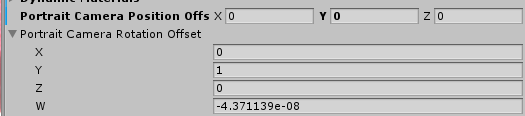
but wasn't able to come up with any changes
neat shale
UPDATE: it is not my issue, it is very likely a vrchat issue
how do i report this to vrchat
cold hound

Das someone know how to fix this: TV works with normal videos but when i change to Steaming mode only one will work
desert python
@neat shale what exactly is wrong?
 random owl
https://github.com/oneVR/VRWorldToolkit/releases
Import this and check VRWorld Toolkit > World Debugger from the top bar
 proven aspen
I says that the spawn doesn't have a collider under it even tho it does
neat shale
take a screenshot of the inspector of the object that has a collider
neat shale
desert python
<@!125577857542914048> what exactly is wrong?
turns out what i thought was a bug was probably just a change in the default rendering distance from the camera, which i solved by lowering the clipping plane in the main camera and having the main camera be the reference object of vrcworld
proven aspen
desert python
make spawn slightly higher
random owl
And can you show the exact position of the "Spawn"? I trust the world debuggers assessment on there not being anything under it since I just checked the logic a bit ago.
random owl
Like where it's actually located in the scene
proven aspen
do you mean this?
random owl
In the scene view
proven aspen
random owl
Does the message disappear if you raise it higher?
random owl
Hmm 
Can you upload a version of it and give me the world id so I can try loading in it myself?
proven aspen
Can't upload because of a new account i had to make because i play with steam account
What if i upload the unity project folder to some place
can you use it with your unity
random owl
I mean sure if you zip up the project folder
cerulean echo
you should zoom to the spawn why like the foto now you cant see it for sure it look maybe ok but if you zoom to it it may be more down then you think be sure that you see the right locasion
random owl
It was just colliders overlapping the spawn point figured it out in dms
cerulean echo
o ok sorry i miss that then
i got also i question if i use 2 coliders same position and change one on and one off with animation same time is that a problem? in unity i test it i not fall down
 left turret
I'm not sure where to ask. but if anyone knows and could help me... I imported what I created in Blender to Unity and the hole (circular window) in my wall became grey. Is that normal? any way of getting rid of that?
 vestal rover
left turret
I'm not sure where to ask. but if anyone knows and could help me... I imported w...
vestal rover
left turret
I'm not sure where to ask. but if anyone knows and could help me... I imported w...
you should be able to create a new material in unity thats transparent to be like glass and then it should work properly
left turret
thank you.
 wraith mural
How difficult is it to make just some floating text in world space that DOESN'T align to a camera
Like I just want some Text near a door, but there are no clear examples anywhere, just loads of tutorials doing crazy stuff
mild spade
wraith mural
How difficult is it to make just some floating text in world space that DOESN'T ...
It is very simple, with UI text. This video (first minutes) teaches you how to do it https://www.youtube.com/watch?v=us-yO_E31gU

This tutorial shows you how to make Unity UI Text and Buttons. With the buttons you can activate different functions but these functions will be local to you only. I also show how to link these buttons with triggers to do global actions.
Official VRChat discord:
https://discord.gg/VRChat
Have questions or want to see a specific tutorial? Ask ...
wraith mural
UI is visible through meshes though
random owl
That's just a editor bug to see them properly enter and exit playmode
wraith mural
Anger
wraith mural
random owl
That's just a editor bug to see them properly enter and exit playmode
Thank you, I was fairly annoyed by this xD
random owl
Def is quite a annoying bug
wraith mural
Aye xD
 quiet plinth
Does this method still work to make objects pickupable? I can’t find those scripts anymore. Is there a new method now?
random owl
That's some pretty old instructions
Gonna depend on if you use sdk2 or sdk3
Pickup script is the same at least
Object sync on sdk2
And for sdk3 you use a udon behaviour
Shouldn't use special layer anymore
Since post processing gets applied post rendering things and we can't have custom scripts no
 violet tiger
is there way to un-Labs a world lol
my friend wants to make the world I created to his homeworld but it doesnt let him
bitter idol
violet tiger
is there way to un-Labs a world lol
wait and pray to the vrchat devs it makes it public. ive had worlds get out of labs in 2 days, and worlds stuck in there forever hhahaaa
🙃
violet tiger
ouch
 mellow drum
So I builded my world, all good working fine but, my avatar continue respawing non stop
near escarp
Make sure your world isn't built below the respawn height that is in the world descriptor
mellow drum
near escarp
Make sure your world isn't built below the respawn height that is in the world d...
Fixed it, thank you for fast reply 🙂
 light hedge
If someone's world gets taken down, can it be reuploaded using the same blueprint id?
near escarp
Yes, if it's been privated you can republish it from the website
light hedge
The world was taken down because my friend got banned for "nsfw content", even though he was told no other info could be provided. He went ahead made edits and changed textures to try not to leave any room for anyone to call his avatars nsfw.
I asked because he wants to make his world public again now that the ban is over. He can do that through the website?
near escarp
He should be able to yeah, right side of the world page should have a publish button
 vapid badge
there any prefabs or anything out there to replace the old default vrc jukebox? updating an old world that uses it, and I remember it not being very reliable
light hedge
thank you~ ^^
 orchid laurel
Would there be a reason when i upload my world from unity that says its been uploaded, but does not show up in my browser list or on vrchat itself?
random owl
Main reason would be if you aren't using the correct unity version
orchid laurel
Iv been using the correct unity version. Iv been uploading maps for a while. Just some reason it says its uploaded but nothing shows up on vrchat.
random owl
Can you tell me the world id from the pipeline manager?
orchid laurel
wrld_a9f58172-9652-474e-9999-edc7b658a7ed
So it has this. Do i need to just delete the vrchat world and make a new one?
random owl
Since the api doesn't return anything for that id something went wrong at least try this first:
https://github.com/oneVR/VRWorldToolkit/releases
Import this and check VRWorld Toolkit > World Debugger from the top bar
orchid laurel
Will do. Thank you for the help.
light hedge
After the world got republished, neither of us can load into it. Instead we get reloaded to our homeworlds. How do we fix that?
random owl
You uploaded the world again to republish it or?
light hedge
He used the website to republish
The world was taken down after a ban
would he also have to reupload?
random owl
Possibly not sure without seeing any logs what happens when you try to load there can also check this on the scene if there's any problems:
https://github.com/oneVR/VRWorldToolkit/releases
Import this and check VRWorld Toolkit > World Debugger from the top bar
 tidal ridge
Hey, does anyone know where to find the chair prefab that allows you to adjust your height? It's extremely useful for quest (no place space mover). I'd love to add it to my world. Not sure where to post this, but since I'm developing a world, and there's no thread for prefab requests, this seems like as good a place as any...
light hedge
So, he's not able to reupload his unity project. so even though he republished his world through the site, its not letting him actually upload
tidal ridge
That's really strange. I've never heard of that happening before...
near escarp
light hedge
So, he's not able to reupload his unity project. so even though he republished h...
What's preventing them ?
dusk sapphire
tidal ridge
Hey, does anyone know where to find the chair prefab that allows you to adjust y...
 tidal ridge
You're a legend, you just saved me like 3 hours.
light hedge
It says "Failed to get file record"
light hedge
is there anything he can do to fix?
lime gale
in my world i put a blender creation but it doesnt have colliders how do i fix that
 civic dagger
uh I'm planning some ideas for my first world but have no vr, it might be an underground club or a slum alley? Idk what I'm doing but I'm having fun drawing things out? I guess I'd just want someone to check it out in vr?
near escarp
light hedge
is there anything he can do to fix?
What's the world ID ?
light hedge
wrld_d5d83c18-2b9d-41e1-9b36-3749e69619ea
 fresh mural
I started to work on vrchat world building but when I build the offline version it forces my headset. How can I keep desktop for the offline test?
random owl
Set the client path in the sdk settings to point directly to your vrchat.exe
near escarp
light hedge
wrld_d5d83c18-2b9d-41e1-9b36-3749e69619ea
Made the world public, let me know if that worked, thumbnail does seem to be missing however
fresh mural
@random owl How do I do that?
random owl
Go to the sdk settings tab, edit the client path and set it to point directly to the vrchat.exe on your computer
fresh mural
@random owl Thank it worked!! Is there a point system on this server? Or a Good help thingy?
If there isn't then thanks 1!!
random owl
https://github.com/oneVR/VRWorldToolkit/releases
Use my world tools that's enough thanks
fresh mural
Will do!
light hedge
near escarp
Made the world public, let me know if that worked, thumbnail does seem to be mis...
It's still giving the same upload error
and we can't join the world in vrc
near escarp
Seems i can't republish it either, if the world contained anything NSFW then the mod team most likely took it down completely, you'll have to republish to a new ID
haughty pewter
alright who wants to help me with something? lol
desert python
@haughty pewter what b
haughty pewter
how do i add a volume bar for music playing in my world @desert python
desert python
depends if sdk 2 or 3. im sure theres tutorials for either one that should be able to help and explain better
haughty pewter
yeah, ill keep looking. im on sdk2 right now
dusk sapphire
haughty pewter
how do i add a volume bar for music playing in my world <@!657567702608642078>
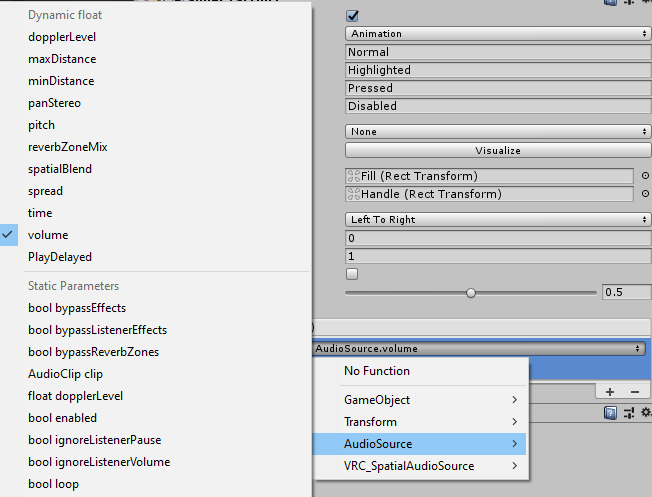
just make a ui slider and set on changed value to the audio source's volume
dusk sapphire
AudioSource.volume is also an allowed ui event on sdk3 so its the same way there
haughty pewter
i dont need to do anything on "No Function" right? @dusk sapphire
i added my audio source to the on value changed
 haughty pewter
yeah i just did that @dusk sapphire
tested my world and my UI slider isn't appearing in the world
dusk sapphire
oh, is this your first time using ui?
haughty pewter
i believe so
dusk sapphire
make sure the ui slider has a parent "panel" object with these components
haughty pewter
ahh okay
dusk sapphire
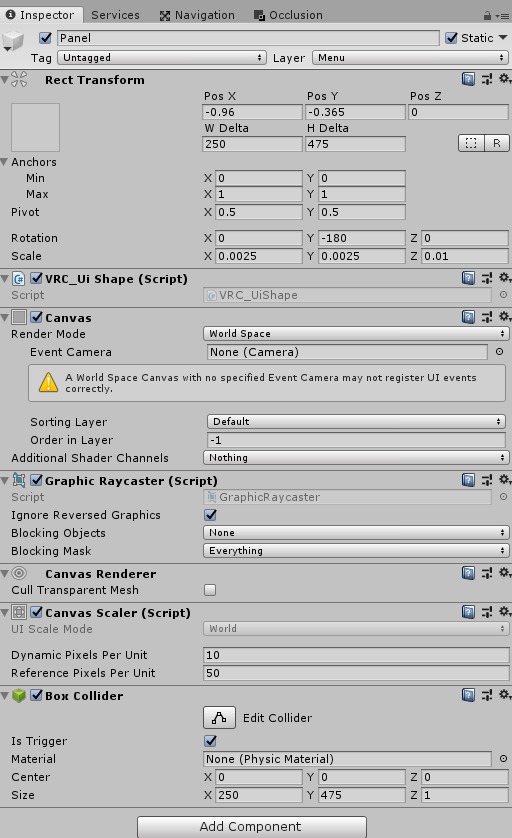
right click in hierachy and create new ui > canvas
then add what you dont have
i think maybe the sdk has some example ui panels, cant remember
haughty pewter
okay ill try that now
dusk sapphire
jetdogs prefabs has a bunch of example ui elements you can take a look at https://github.com/jetdog8808/JetDogs-Prefabs among other things

GitHub
Prefabs for vrchat to help creators ranging from beginners to more experienced users. - jetdog8808/JetDogs-Prefabs
pure kraken
I've got an issue with an image I'm trying to import. It's got some serious artifacting. Anyone have any ideas?
near escarp
Well it's extremely tiny
pure kraken
Should that matter though? It's meant to have a transparent background
near escarp
Did you enable alpha is transparency in the image settings ?
pure kraken
That fixed it. Thank you!



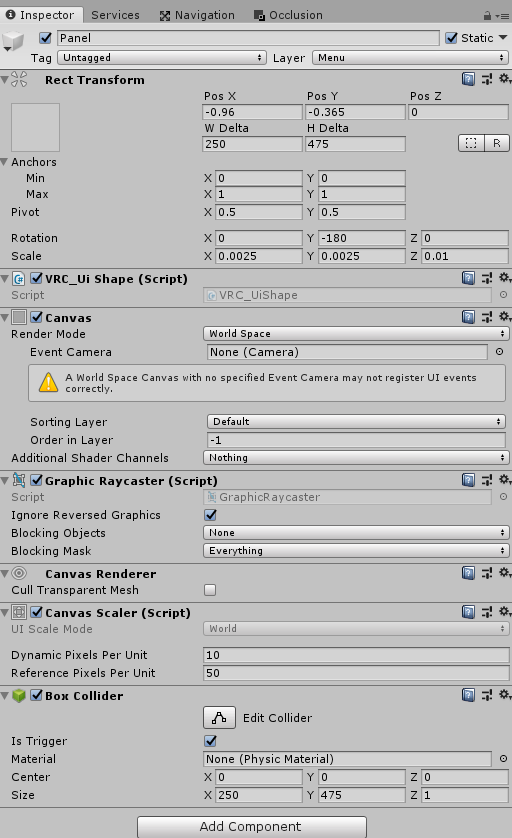 dusk sapphire
um
you make the panel with the components i showed, then put the slider as a child of that panel
it might just be easier if you took an example slider prefab from jetdogs prefabs that i linked earlier
haughty pewter
when you mean child of that panel, having it being created under the panel section on the heirarchy
yeah i have that downloaded, let me check to see if its in there
would it be under the UI section in prefabs because im looking around everywhere for this slider in Jetdogs files
@dusk sapphire
dusk sapphire
he doesn't have a standalone one, you can just look at one of the video players
they also have volume controls
haughty pewter
ah okay
bold ibex
I've added colliders to the floor in my map and raised the spawn point so you dont clip through the ground when you spawn, but i keep falling through my map
i spawn in, collide on the floor for a second and then fall through
lime gale
when i change the size of something in unity then re upload it, it doesnt change the size in vrc
bitter idol
lime gale
when i change the size of something in unity then re upload it, it doesnt change...
is it being animated? that might be why. does it revert size in play mode?
lime gale
ill check
dusk sapphire
bold ibex
I've added colliders to the floor in my map and raised the spawn point so you do...
if you havent fixed it yet it, it sounds like maybe the roof collider is too low pushing the player down? the player collider is 2m
proven aspen
Where right texture?
 rigid swallow
Looking for the person who ripped the Sword and Shield: Isle of Armor. I'm wanting the model so I can potentially make a Dojo interior world.
Additionally I'm looking for some headway of the locations of World of Warcraft world models (specifically taverns).
 upper gate
I'm struggling to get the Interact text/Highlight UI on an object to render on top of some sprites that I have. I added all the sprites to sorting layers and put them earlier in the list than the Default sorting layer, but it doesn't work. Anyone help?
 faint wren
proven aspen
Where right texture?
faint wren
proven aspen
Where right texture?
Just change all the pink material to standard
desert python
like when you press the button it changes color? or when you highlight - the whole button changes colors as if highlighted?
upper gate
desert python
like when you press the button it changes color? or when you highlight - the who...
Me? I'm taking about the VRC light blue highlight when you hover over an interactable trigger, and also the interaction text. Those won't render on top of sprites I have behind the object
desert python
i believe you need the vrc ui shape component. or a box collider on the canvas that “is trigger”
ive done both and never did one with just collider or with the ui shape so im not sure which one does it
left turret
um... I don't see VRC_Trigger in my list of scripts for some reason. I suppose it should still be there?
upper gate
Oh I have the trigger, and it triggers just fine on Interact, and the UI does appear when parts of the world that aren't sprites are behind it.
upper gate
left turret
um... I don't see VRC_Trigger in my list of scripts for some reason. I suppose i...
I don't know much about VRC_Triggers, but I know they only existed in SDK2. Are you using SDK3?
left turret
SDK2
I tried to delete and reimport but that kinda screwed everything up. 😕 (It seems I loaded sdk3 by accident. silly me.)
 brisk veldt
I'm new to vr chat, where do I find out how to build world, things that you can pick up, etc in vrchat? What would be the first steps? Can anyone help with that plz!! 😊
dusk sapphire
upper gate
Me? I'm taking about the VRC light blue highlight when you hover over an interac...
could try lowering the render queue on the sprites shader
upper gate
brisk veldt
I'm new to vr chat, where do I find out how to build world, things that you can ...
VRChat
In VRChat you can create custom worlds! Check out the articles below to learn more. Creating Your First World Whitelisted World Components Supported Scripted Assets World Submission and Optimization Guidelines
upper gate
dusk sapphire
could try lowering the render queue on the sprites shader
Probably a good thing to try. Looks like it's 3000 right now. So lower means lower, like, I should make it 2000 or 1000?
dusk sapphire
going that low would cause other issues, i'd just try -1 (2999)
it was just a shot, its likely its just that sprite shader doesnt work well with the interact highlight
upper gate
Oh it looks like the dropdown gives me some sensible options. I'm gonna try setting it to Geometry, which is 2000
left turret
could someone point me to equivalent of objectpickup and toggles in sdk3?
desert python
vrc_pickup and for toggle, youll do a udon behaviour with a toggle script added
left turret
thanks.
bold ibex
i am animating an object that will play through a flying away animation when the world loads (to make it seem like its just dropped you off) but i encountered a small bug on the animation and i am new to the animations tab so have no idea why its doing it, but in short, the engine should rotate upwards slightly, but instead, the engine spins a entire circle then goes to that point
vapid badge
is the audio bank script broken?
I can't seem to get it to work at all
upper gate
dusk sapphire
going that low would cause other issues, i'd just try -1 (2999)
Tried 2001, 2450, 2451, 2800, 2900, 2999, a couple others. Some of those values appear to make the sprites render earlier than the skybox. At least, they don't appear at all, in which case I can see the highlight I'm looking for. But when they do render, they cover the highlight
bold ibex
so im trying to create a simple world and when i try to join it it shows a loading screen then cuts to black and puts me at my home any help?
vapid badge
do you have the vrcworld component?
added in the scene?
and enabled?
I have my audio bank set up like this, on the same gameobject that has the audio source. what am i missing here? it refuses to play
errant beacon
bold ibex
so im trying to create a simple world and when i try to join it it shows a loadi...
Import https://github.com/oneVR/VRWorldToolkit/releases and see if it's debugger brings up anything? o:
upper gate
If I modify VRChat's physics collision matrix for my World.... how much trouble am I in?
random owl
Well you can't modify the stuff that vrchat has set themselves since it will just get replaced by the actual one ingame and the sdk will complain unless you edit the scriptable object that stores the correct values
But if you edit the collisions on your stuff that works ofc not sure which one you mean
 verbal patrol
hi i was wondering if anybody knew how to import some sort of audio system that i can link my dj board to irl and have it input inside my world
verbal hare
does anyone know how to export a texture from Blender? im trying to get windows done for Unity, but when i import the entire building i have into Unity, the windows just come in as the default material
this is how it is in Blender, and how i want it in Unity
however, this is how it comes in as, in Unity
desert python
@verbal hare you have to tell the material to be transparent
verbal hare
thats what i did in Blender
desert python
no
near escarp
in unity
verbal hare
then is there something im missing? cause i dont see a transparency option, and everything under the actual material is greyed out
 upbeat flax
verbal hare
then is there something im missing? cause i dont see a transparency option, and ...
upbeat flax
verbal hare
then is there something im missing? cause i dont see a transparency option, and ...
you have to extract the material
verbal hare
upbeat flax
you have to extract the material
how would i do so? is it in here?
upbeat flax
verbal hare
how would i do so? is it in here?
click the prefab
upbeat flax
hold on one moment
verbal hare
alright...this is my first time doing windows, so step by step would by handy, lol
upbeat flax
you know the bottum windo with the files? the "project" window? you need to navagat to the file where your house is
upbeat flax
yeah now in the "inspector " window you should see info on your model
verbal hare
upbeat flax
click materials and you will see something that says "extract" do that and put it in the same folder as your house
verbal hare
i dont see Materials in the inspector
verbal hare
gotcha...im clicking on the material, but "Extract" is not popping up
like, nothing happens when i click on it
upbeat flax
can you show me ?
verbal hare
unless if you mean the small circle icon, that brings up the Select Material option, nothing else happens
verbal hare
that just created a new house, and windows are still bugged...the material/texture for the windows were made inside Blender
its not something like an image texture, like the rest of my house
upbeat flax
Wow well i am sorry i have no clue what is going on with that
mild spade
verbal hare
that just created a new house, and windows are still bugged...the material/textu...
Do you have the texture on your PC? You can just drag it and create a new material (right click, create material) and just drag the material to the window on the house and the texture to the material "albedo" slot
verbal hare
mild spade
Do you have the texture on your PC? You can just drag it and create a new materi...
its definitely still in blender...i followed this tutorial -https://www.youtube.com/watch?v=CtfNtpJa3hU

Today, I create a simple realistic glass material - and shed some light on how to get an actual transparent glass shader in Blender 2.8 Eevee !
If you'd like to help support my channel, please consider making a donation! It helps more than you know ✔ https://www.paypal.me/2kai
▶️ DOWNLOAD MY FREE "asTro" GFX PACK: (coming soon)
▶️ FOLLOW ME:
...
mild spade
I believe that is a shader specifically for blender. There are some "glass" shaders for unity that will give you a similar effect, but you will need to look for them. If you want a simple transparent-like-glass shader, you can use the default "transparent" included in the Standar shared with high smoothness
dusk sapphire
vapid badge
I have my audio bank set up like this, on the same gameobject that has the audio...
you probably want on network ready to be local rather than alwaysbufferone since its fires for everyone locally when they load in, and would cause the play rpc to fire every time someone joins for everyone. this repeatedly playing might also trigger a stop and play, and your empty on stop callback is probably throwing an error in the audiobank causing it to break.
vapid badge
in the end I used the jukebox.
seems to work for now
upper gate
random owl
But if you edit the collisions on your stuff that works ofc not sure which one y...
Thanks 1. Damn. I've got an issue where a collider is attached to my hand and is not on the MirrorReflection layer, and is thus blocking the UI laser raycast. The collider is on the PickupNoEnvironment layer, because it kinda has to be. I already tried adding my own custom collision layer earlier, but that didn't work at all. I might be out of options with this.
Is there no way to modify a layer to allow the UI laser raycast through it?
dusk sapphire
what are you trying to do?
upper gate
It's a hand collider. I want to use it to push around objects on the Pickup layer, but not collide with the environment. So the walkthru layer won't work.
But because I'm attaching it directly to hand tracking location, the UI laser's raycast origin immediately collides with iti
dusk sapphire
ah
upper gate
I need something that
- Doesn't collide with Walkthrough
- Doesn't collide with the player
- Doesn't block UI raycast
I don't think any such thing exists outside of a custom collision layer, and those seem bugged. I made a layer that collided with nothing at all, and it still intermittently pushed my player around. Made a note to repro it and report it when I get some time.
dusk sapphire
to my knowledge mirror reflection is the only thing that doesn't block raycasts
and you cant modify collision matrix of layers used by vrchat
and I think that extends to any layer that interacts with the player layer
it might always be set to collide? could be wrong
I suppose the convoluted workaround to this would be to offset the colliders on your hands and the objects, and have them connected with position constraints to the real hands/objects
or you could sculpt a mesh collider for the hand precisely so that it leaves a hole just for the raycast to go through
would that work?
upper gate
I could make a mesh collider that just has a tiny hole where the UI laser can raycast through 🙃
dusk sapphire
yeah
upper gate
hahah
dusk sapphire
unless you have tiny objects that could go through the hole its not a problem
upper gate
Yeah....but I'd know what I did
dusk sapphire
the question is
upper gate
and I can't live with that shame 😂
dusk sapphire
is the positioning of the raycast relative to the bone position fixed? or does it scale with player size
upper gate
I don't think bone position is a factor. I'm tracking the controller tracking data, and I assume that's where the UI raycast starts.
dusk sapphire
hm
i've noticed its a bit different depending on your controller
hopefully its consistent
the controller to hands, not raycast
 gleaming terrace
Im making a pool and I want to make it so when they dip there head under the water that it will get a screen effect, how do I get screen effects?
dusk sapphire
you put a post process volume encompassing the water
gleaming terrace
Oh? may I get a little more detail if its not to much to ask?
dusk sapphire
post processing is used to get full screen effects for worlds typically for things like colour grading, bloom, etc
you make post process volumes to tell unity where you want the effects to be at
typically people just check "global" to make it map wide
but you can make a volume where the effect will only turn on if you're in it
so you can make a volume that encompasses the body of water
and have effects that try to mimic underwater
like a bit of dof for blurriness, blue tinting, etc
GitLab
A surface shader for Unity providing cel-shading. (Forward rendering only)
gleaming terrace
Nice! Thank you so very much!
dusk sapphire
theres also a prefab you can use in the vrcprefabs database https://vrcprefabs.com/browse called immersive water if you're on sdk2
uses player tracking to more accurately turn on the effect, as well as some splash sounds iirc
gleaming terrace
Will check it out, again thanks a lot!
bold ibex
@dusk sapphire I removed it entirely to see and im still being dropped through
dusk sapphire
what does your floor collider look like?
wraith mural
What's with unity making cameras cast light onto objects
casting this on metallic objects when theres no lights nearby
desert python
does the cam have a light source script for some reason?
desert python
thats odd, double check
make sure its not attached to anything with light sources as well
wraith mural
not seeing any lights attached to any cameras
One camera in scene and nothing, then doubling check the Vrcworld spawner and nothing
desert python
i mean, thats super weird, is it attached or has a mesh renderer? might just be reflecting that. if not. id just move that cam somewhere hidden
because i cant really think of anything else thatd cause that
random owl
Sounds like whatever environment reflections, skybox or reflection probes have something bright in them on one sight properly baked reflection probes should help
wraith mural
I thought it might have had something to with do with the reflection probes, so everything is currently disabled
huh
Its the directional lights
and changing their intensity doesnt do anything
ue and unity have a very way of lighting things im learning
Like how am I meant to light character models ambiently? Unity doesn't have a skylight object, so if I don't use directional lights character models end up dimly lit, and I can't have my point and spotlights running in real time or else it ruins performance
wraith mural
Do area lights even work in Unity? As I understand it, they are meant to project light straight forward, but they seemingly do nothing?
dusk sapphire
area lights are baked only
dusk sapphire
they wont show up unless you actually bake the lights
wraith mural
I have
dusk sapphire
are the objects set as lightmap static?
and if you want baked lights to affect dynamic objects and players, you need to have light probes
haughty pewter
anyone having problems updating their world when uploading it?
 snow crater
Nope, everything fine on my end
 paper forge
Looking for something to place on the blank island and am planning on redoing the houses
 thick flint
has anyone ever had the issue of build and test not doing anything? It seems to build it for me but it doesn't open VRC
I did uninstall VRC on steam which may have caused it (I usually play on Oculus), but I've since reinstalled it and it still doesn't launch
bold ibex
@thick flint If the builder is blank you may have two vrchat Sdk in and you may have to delete from folder system open file location and re insert the up to date sdk
The second sdk maybe hidden in another folder
Or re set world ID and re new the instance
random owl
thick flint
I did uninstall VRC on steam which may have caused it (I usually play on Oculus)...
Since you reinstalled the sdk might be looking for the executable in the wrong location change the client path in the sdk settings tab to point directly to the oculus VRChat.exe
verbal hare
does anyone know how to do collisions for things?
upper gate
verbal hare
does anyone know how to do collisions for things?
That's a pretty broad question 😛 can you get more specific?
verbal hare
collisions for walls and windows, for example. i can clip through my building currently
upper gate
Is your building a mesh that you imported, or did you build it by spawning 3D shapes in Unity?
verbal hare
imported
upper gate
You've got some options, then. You could add a component to the mesh called a "Mesh Collider" that will shape a collider exactly the shape as the mesh. Any polygon that's a part of the geometry will be a collision surface.
I don't know much about Mesh Colliders. They might be expensive physics-wise, and you don't have much room to change them
Your other option is to add a bunch of box colliders and change their dimensions to fit what you need. The easy way to do that is to add a bunch of 3D cubes, scale them how you want, and then just delete their mesh renderers so they're invisible
verbal hare
upper gate
You've got some options, then. You could add a component to the mesh called a "M...
this may be my best bet...is it possible for it it to ignore doors?