#world-development
39 messages · Page 59 of 1
 peak shell
if its under discords 50MB limit sure
 random owl
You can duplicate the project folder and remove the library folder from the duplicate to make it package into a smaller zip
peak shell
im just going to create another new project
and see what that does
thinking maybe one of my .mesh files are corrupted as they were updated frm 2017 unity
never got a searlization error though so maybe it is or maybe its not
random owl
Alright, would have been nice to find out for sure what the problem was
peak shell
Found the issue @random owl
random owl
What was it?
peak shell
the files i imported from the other project had meta files with asset bundle name customscene.vrcw
used FNR to mass replace the .metas now it builds
no idea what could cause that
but builds now
peak shell
aye thx
oddly
build and test doesnt work
doesnt start vrchat but the upload works fine
random owl
If you go to the sdk's settings page is the client path set directly to the vrchat.exe?
If it doesn't show the full path then you should set it manually
 void bison
pls ? > #world-development message
random owl
Your question is pretty vague on what banning means
 dusk sapphire
you want an object that only one person can use?
void bison
@dusk sapphire Yes
dusk sapphire
a button that enables the object for everyone, and only enables the collider locally for whoever hits the button
is how you'd do something like that
void bison
hooooo okayy ! Thx ! 😄
peak shell
anyone know how to lock all IK on an avtar while using a seat to play an animation?
like how MMD worlds do it
peak shell
https://github.com/splinks/Vrchat-Dance-Pad this worked

GitHub
An InStation pad that relys on Final IK to disable Fullbody tracking for dance animations - splinks/Vrchat-Dance-Pad
 bold ibex
audio reverb zone how do i activate it for player voices as well?
at the moment you only hear it on the menu and from the avatar effects
bold ibex
So I made a world and uploaded it but upon loading, everything is black, any ideas?
 neat badger
I'm trying to make a beach with sounds of the ocean, but so far I haven't had much luck making it sound good. I just ran a test with the following settings, but it seems like the custom falloff I set doesn't work at all. The sound is equally loud everywhere. And there's weird phasing when I turn my head because I have three of the sound sources around the island off the coast.
For that matter, can anyone explain how all these parameters relate to one another? What I mean is, the audio source itself has a curve, right? If I have a VRC Spatial Audio source on there though, assuming I haven't checked the box to use that curve, does it even use the Audio Source's falloff setting, or its min and max distance? Or does it just use the script's settings? Or does it use the script for VR users, but the Audio Source settings for desktop users?
Cause if I don't have to set Min and Max distance every time to make them the same as the VRC script settings I add, that would be nice.
 lethal moss
If you use 2D spatial blend, you will hear your sound everywhere, it won't fall off. As for those other questions, I'm also curious what the answers are.
 short forum
@neat badger It could be a difference between udon and sdk2, but for me, when I check the "Use volumetric curve" in the vrc spacial audio, it actually grays out a bunch of stuff since the near and far are being used in the custom rolloff. I have gotten it to work in udon worlds, but I have not used that until I upgraded to udon so I am unsure if its outdated or only works in sdk3
 cold hound
Hi, i'm uploading my world but is not uploading. the img is updating but not the world. das someone know how to fix that?
 desert python
what about reload
bold ibex
Yep, its still black @desert python
desert python
make it slightly higher and test build it
bold ibex
though its not like im falling through the map its literally just black but alrighty one sec
desert python
ohhhh, is there anyreflection probes by chance?
i had this same issue because vrc had a limit on how reflection probes can work
but if you dont, then it might be some other issue
desert python
how big is it?
desert python
id turn it off and test it out
desert python
any post processing?
desert python
try turnin that of
 placid panther
desert python
placid panther
desert python
@placid panther more mirrors bro
bold ibex
it loaded faster for some reason but its still black
could it be the camera isnt set properly or something?
desert python
lemme open image
so like you can walk in the darkness right?
id get rid of the ref camera this time, but when i had this occur where everything got dark, i determined it was the reflection probe, as removing made it work
dusk sapphire
when you say black, are surfaces/textures black or everything is literal black? can you see your own avatar?
 tender crow
Was just curious, is it preferable to build a world in Blender and import it to unity or just to build it in unity? Sorry for the noob question, I ask because I currently only have a Linux computer and last I checked the Unity version I need isn't compatible with linux so in my free time I've been practicing 3D modeling in Blender with plans to later import my work when I get a Windows computer
dusk sapphire
there are pros and cons to either method, with the availability of certain tools on unity that also lets you directly model in unity, it also boils down to personal preference
tender crow
Thanks for the info!
void bison
Hello, if I put all my lights in hard shadow but they are in baked, will this have an impact on the performance in game?
lethal moss
void bison
Hello, if I put all my lights in hard shadow but they are in baked, will this ha...
the shadows are baked as well and will not change the performance.
void bison
Okay Thx!
bold ibex
Sorry I fell asleep
@dusk sapphire everything’s black nothing is there not at all, no menu, no avatar, nothing
 sharp bloom
Am I setting up the music in a world wrong
Everytime I have it set up, it works until you mute the music (Set gameobject tied to music off)
It works fine, until another player joins the instance, in which the music for some reason starts up again
I tried to set up this, so when theirself only joins, it starts music, but it still triggers for other players still
 pseudo carbon
Would anyone know how to fix a problem with the world not updating when publishing and upon trying build and test it doesn't update either.
 near escarp
check the unity console
 scenic acorn
hey, i'm sorry but i really need help rn
i've made a world for a secret santa, it was working and it doesn't anymore
i can't build it
please someone help me
10$ for the one who help me fix it
idk anymore
random owl
You can't build? Gonna need some more details than that.
Like exactly what is happening and what are your steps for it to happen
scenic acorn
i got lighting problem apparently
and the "generate lighting" button dosn't apear anymore
i can share you my screen if you want
when i click build it does an error and doesn't build it
maybe a problem with this apparently
@random owl
random owl
That's a normal thing
scenic acorn
random owl
Like exactly what is happening and what are your steps for it to happen
i had to remove the vrchat sdk and put it back in and i can get it to boot up again
random owl
And you don't have generate lighting button anymore? 🤔
random owl
There is not supposed to be a generate lighting button on that page
scenic acorn
where it is then ?
random owl
What are the errors? That one is just telling you that there's others somewhere above it.
random owl
Delete the imageffects folder it contains scripts not compatible with unity 2018
scenic acorn
random owl
Delete the imageffects folder it contains scripts not compatible with unity 2018
okay, it has work, it's compiling things
random owl
Gonna depend on if there's more underlying problems or not
scenic acorn
random owl
Gonna depend on if there's more underlying problems or not
i think there is
random owl
Search for t:pipelinemanager in your hierarchy and remove any not with the scene descriptor after exiting play mode
scenic acorn
ohoh
random owl
Not sure how you managed that many but there you go
 misty aspen
Is there a way you can see a breakdown of the assets and their file size in your VRChat world in Unity?
random owl
https://github.com/oneVR/VRWorldToolkit/releases
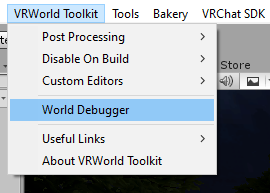
You can try the world debugger included with my world tools
But because unity doesn't want to give the information you can't really see how much space they take inside the assetbundle itself
But my world tools gets you as far as you normally need to
misty aspen
Ahh gotcha, thanks 🙂
random owl
The learn button doesn't work? Do the others though?
random owl
What's the seven errors in your console atm?
random owl
Seemingly just the old ones
You could clear your console and try to upload again
https://github.com/oneVR/VRWorldToolkit/releases
Or the world debugger in my world tools and see what it finds
scenic acorn
random owl
You just import the unity package you download from the page I linked
i auto fixed a lot of things...
but still can't click on it
random owl
Hmm, starting to be out of reasons why you couldn't click
random owl
So if you try to write in the name field it just doesn't let you?
random owl
Could be some editor script in the project messing with it
random owl
Seems normal
random owl
Yeah that's normal
https://docs.vrchat.com/docs/updating-the-sdk#sdk2
Could always reimport the sdk following the full steps
VRChat
If you need to update your SDK, it is important that you follow these steps to ensure the update proceeds properly and you don't have any old/conflicting files. Version Control If you know how to use it, you may find it beneficial to use version control software like Git to manage your project. You ...
scenic acorn
didn't do anything
random owl
Hmm that's a hard one
I could most likely figure it out if I had the project myself but not much else there to try that I can easily suggest
scenic acorn
you wanna get on parsec ?
and see if you can fix it ? if you have the time obvously, i took so much of your time already
random owl
Well I would otherwise but I've been up for around 27 hours currently and I'm not on a computer
If you are still having the problem tomorrow whenever I wake up I can take a look though
scenic acorn
that would be awsome
 golden storm
I don't know how I broke this, my avatar stands through my floor. I tried to add a collider but in inspector, I'm unable to clear the overrides.
scenic acorn
bold ibex
Everything is still black on my end... should I try and put it in a new project?
The current issue is whenever I load the world, everything is entirely black. Myself, the world and my menu doesn’t even pop up. I’ve tried hiding the post processing and reflection probes, I’ve tried moving the spawn but nothing is working.
 vestal star
any reason this happens when i try uploading my wrld ? i dont understand why every script disappears
i need to constantly reimport the sdk but it messes up either way
 rain shadow
@vestal star Check that the cameras in your scene aren't at a depth over 0
Or is that just going into play mode and not build and publish?
vestal star
its only going into play mode
and all of my scripts disappear
like the sdk just vanished
rain shadow
nothing in the unity console?
rain shadow
Do you have clear on play enabled?
vestal star
no
 bleak cedar
I don’t see a Channel for world SDK 3 so I’m just going to put this here. XD
moved to #udon-general
near escarp
bleak cedar
👍
dusk sapphire
@bold ibex if your screen is pitch black and you cant even open the menu, then its not a graphical issue causing things to go black, but rather the map is not even loading properly. I'd advise you to install 1's worldtoolkit https://github.com/oneVR/VRWorldToolkit/releases and check if it spots any issues etc.
 random sage
is there a way to paint a transparent texture onto a terrain to cut holes in it?
near escarp
if the shader supports it, sure
bold ibex
Alrighty, will do @dusk sapphire !
dusk sapphire
unfortunately for default unity, terrain holes are a feature in unity 2019.
I would imagine VRChat will update to 2019 eventually but I think that's still a while aways.
There are some shader based solutions on the unity asset store to paint holes into terrain
but you'll still need another solution for the mesh collider if you want people to be able to go through
such as exporting the terrain as mesh and editing it to use as the terrain collider
I think some tools may do that for you too
bold ibex
so what would I do to check if it has issues @dusk sapphire ? o:
dusk sapphire
run the debugger and see if it has any warnings/errors?
bold ibex
okay one sec ❤️
uhh im not sure where the debugger is actually coz its a unity package right?
i typed in debugger and didnt find anything i could run
dusk sapphire
it should have added a new item in your menu bar https://nyanpa.su/i/wOCD1XoU.png
 void bison
Hello, do you know how I can fix the fact that people do not sink into chairs? because when I sit in the chair I find myself in the middle
 dawn field
Hello, i have a strange problem, i made a world,
when i test it locally, works fine, then i upload it
with no errors, but the world is not there
its pretty hard to find something is wrong,
when it dont say anything is wrong
random owl
What unity version are you on
dawn field
2018, with SDK3, i know this is sdk2 channel, but there is no sdk3 one
random owl
What version of 2018?
dawn field
the world works fine on local testing
random owl
Question still stands
dawn field
2018.4.20f1
random owl
Does the world show up in the content manager?
random owl
I mean in the sdk
dawn field
hmm .. what you mean? ofc its in, i can upload it
random owl
The content manager in the sdk
dawn field
it says "upload complete, click to manage on website"
wait, i will check
no its not there
just 2 avatars
random owl
If you check the pipeline manager on your scene descriptor is there any id connected to the world yet?
dawn field
umm .. where is that? i am new at this
random owl
If you just used the VRCWorld prefab that's where it would be
dawn field
random owl
Press the detach button and try to upload again
dawn field
ok
random owl
Also #udon-general is for sdk3 worlds
void bison
Hello, is it possible to make a static object interactive? because when I pass it in statis the interaction no longer works in game.
And my problem above is still relevant if ever #world-development message
For the first problem mentioned on the message just above I found it, but for the chair bug that I have not yet found
random owl
Chairs are a bit hard because how different avatars skeletons can be
If you check the prefab database pinned in this channel there's one by splinks that does a pretty good job
void bison
How okay Thx!
void bison
So I tried everything, it still doesn't work
bold ibex
@dusk sapphire I did the debugger but nothing's wrong with it as far as I see, I can send a screenshot?
random owl
Show me a screenshot?
bold ibex
i could understand the baked lights but for some reason i cant bake entirely properly but i was gonna keep them the way they were "maybe"
and sometimes vrchat will play like the loading screen sound?
random owl
What's the world id?
bold ibex
its private atm so but i can dm you ittt
bold ibex
void bison
For the first problem mentioned on the message just above I found it, but for th...
for chair bug, you have to check the chair prefab (probably needs to be unpacked for change) and move the seat Y position
and afaik, I don't think you can move static objects
I was baking lights on my world and I accidentally put all my physics object on static then I realize doing that will just make the mesh frozen
void bison
Yes I know why and I have found a way to fix it, to light non static objects you have to use light probs, if not I will try what you tell me and I see if it works, in any case thank you!
 sonic pebble
I keep looking, but I can't find a minecraft dark oak door 3D model >.< anyone has a link for all the minecraft ressources ?
 terse garden
I need some help uploading a world
bleak cedar
What seems to be the problem.
terse garden
when I click build and test it doesn't take me to what the tutorial shows. and I'm really confused
like the screen to configure the world
terse garden
it just loads up normal vr chat. like as if I launched it from steam
bleak cedar
Correct
terse garden
this is the video I watched. but it looks like it's a different version

Home Kit is a Unity Package with the assets you’ll need to customize and upload your own home. The tutorial is aimed at beginners, so it’s a perfect starting point for building your first VRChat world.
We’ll create a Unity Project, import the VRChat SDK and Home Kit packages, and customize your home with furniture, materials, and lighting. Afte...
bleak cedar
Ah
What version of unity. And what SDK are you using?
And do any errors show in the console?
terse garden
no errors show up. unity is 2018.4.20
bleak cedar
Ok. I’m guessing SDK2?
bleak cedar
Ok. And it just loads up VRC and puts you in your home world?
terse garden
the default home world, yes
bleak cedar
Ah. True.
near escarp
random owl
https://github.com/oneVR/VRWorldToolkit/releases
You can try the world debugger ...
bleak cedar
Run the world debugger.
terse garden
sorry to sound so dumb. but how?
near escarp
same as the vrcsdk at the top of unity
terse garden
ah
tender crow
Do shaders and textures applied to objects in Blender transfer properly when moving your world into unity? Sorry for the noob question
terse garden
ok. now it's saying there's no errors or warnings but the build failed
near escarp
tender crow
Do shaders and textures applied to objects in Blender transfer properly when mov...
You need to check this
tender crow
near escarp
You need to check this
Dope, thanks
terse garden
so what do I do now that the debugger is done. there's no errors or warnings
terse garden
default world
terse garden
I just installed unity through unity hub so I guess it's the latest version on unity hub. I don't know if they are technically compatible. but that's what the website said to do. install through unity hub
bleak cedar
was that the sdk2 or 3 manual?
terse garden
I can't find the page again. but I did find where it says the compatible unity version with sdk2 and I'm on the right version. 2018.4.20f1
bleak cedar
Hmm.
I had that happen with SDK3 once I restarted my computer and it hasn’t done it yet.
terse garden
I guess I'll try that. I'll be back unless it works. lol
bleak cedar
👍🏼
bleak cedar
Nice
terse garden
how do you add a place to sit in sdk2. Like for instance on the couch I'm using
bleak cedar
terse garden
how do you add a place to sit in sdk2. Like for instance on the couch I'm using
There is a script you need to add to it.
I just grab the chair prefab and disable the mesh rendering then put it inside of where I want it to be.
terse garden
alright
terse garden
Hey again. I have a question about how to change the hands on a clock model. I put in the time I want but it doesn't change in unity or in game.
random owl
You "put in the time" where?
There's hundreds of ways you can make a clock so you need to be a bit more specific
terse garden
the model had places to fill in the hours minutes and seconds
random owl
A place where?
random owl
Well I can't really say from that what numbers you are putting where
Custom scripts won't work in vrchat
You can convert that script to udon though to have the functionality
But that would need to be done on sdk3
terse garden
gotcha. oh well. any easy way to manually move the hands?
random owl
You could select the object and rotate it
terse garden
yeah. figured it would be as easy as that. sorry for stupidity. this is my first time using unity
I had another question about the vrc video sync. I have a button scripted to SendRPC set to the next command. but nothing happens in game when I click the button
random owl
Do you have a video in the videoplayer to be played next?
terse garden
so I have 6 videos in the player
and they play in sequence. the next command just doesn't skip the current video. I could be going about it wrong though and please tell me if I am
my thought process was that if it got the next command it would stop the current video and play the next one
random owl
Can't say much without seeing your setup
terse garden
what exactly do you want to see? I can provide pics
random owl
Pics of the trigger
terse garden
random owl
Change the target to owner
terse garden
is there any way to do basically the same thing but with audio only. I'm wanting to add a radio to my house the can shuffle music when you hit a button
void bison
Hello, I have a friend who would like to know if we can import a sketchup project to unity
random owl
Sketchup makes for pretty horrible models but why couldn't you
void bison
If we can, we should export it to what format? and it's not me who uses this software xD
random owl
Any format that unity takes I haven't used sketchup in 10 years so I have no idea which it exports at this point
void bison
How okay, Thx!
 unique bane
Guys, I just want to set the VRChat SDK up, but the document says that it supports 2018.4.20f1, but the oldest version I can download with Unity Hub is 2018.4.30f1
So... what to do?
hmm maybe its a mistype or sth i guess
 amber flint
so im learning how to make mirrors right now, the in the tutorial im following the dude adds "VRC_Trigger" to the toggle button
i dont have this, is is called something else now
bold ibex
you're probably using sdk3?
amber flint
ah yea, sorry i should hop to the other chat then
is there one? lol i dont see an SDK3 chat, is it just the Udon chats?
dusk sapphire
unique bane
hmm maybe its a mistype or sth i guess
its not a typo, you need 2018.4.20f1
https://unity3d.com/unity/qa/lts-releases?version=2018.4&page=2
you can get it here

Unity
Unity is the ultimate game development platform. Use Unity to build high-quality 3D and 2D games, deploy them across mobile, desktop, VR/AR, consoles or the Web, and connect with loyal and enthusiastic players and customers.
unique bane
dusk sapphire
its not a typo, you need 2018.4.20f1
https://unity3d.com/unity/qa/lts-releases?v...
I see, thanks 👌
void bison
When will the SDK be updated to the latest version of Unity? :]
near escarp
That question is incorrect in a few ways, but to make it simple, never.
void bison
😦
terse garden
I had a question about publishing my new world. when I click the "build & publish for windows" button it switched over the the "game" tab and plays the music I have set up. Is that supposed to happen. in the SDK tab it also says "Unity Application is running ... Stop it to access the Control Panel"
 autumn umbra
yes that's normal for the music to play
terse garden
how long does the process usually take. because I let it run and it looped the music 3 times before I stopped it
autumn umbra
when you click build & publish, it runs the scene, so the music will only stop once it's finished uploading. the time it takes really depends on the size of your world. for a small one it can just be a couple of minutes. for a very large one, 30-40 mins
there's a button somewhere in unity to mute the music if you find it annoying
terse garden
oh no the music is amazing. lol. "deep stone lullaby" from destiny 2.
so when it's done the configure world page will come up?
autumn umbra
yes, so you click build & publish, then when it's done building you get the page to set the world name, description, etc
and then it uploads
 modern wyvern
c.can someone goodie tell me why this happens to my png text
desert python
using alpha cutoff maam? @modern wyvern
modern wyvern
well they are always set to (sprite 2D and UI) and i don't know why they are doing it
terse garden
with having sat here almost an hour I just think I'm doing something wrong
@autumn umbra any more advice?
terse garden
ok. I figured out one of my issues. I have a new problem now
bold ibex
@dusk sonnet
terse garden
ok. I finally got it uploaded. I don't know how though
random sage
Is there any way to make these particles not "dodge" the player like this?
terse garden
and a new issue arises. When I load into the uploaded world it is nothing but a black screen
rain shadow
@random sage In the particle render settings set the render alignment to facing and max particle size to 100
 frigid estuary
what resolution is vrchat using for videostreams from youtube and can I increase it somehow?
random owl
Limited to 720p max because over that youtube splits the audio and video
If you want to go over you need to use somewhere else to host
frigid estuary
i see thank you
frigid estuary
Realtime GI in my world is working technically with light sources. How do I use realtime GI with dynamic objects (video screen emission)?
dusk sapphire
put the VRC_CustomRendererBehaviour component onto the video screen
VRChat
This script is used to apply custom renderer behaviours to an object. Currently, the only supported custom renderer behaviour is "Update GI Materials". This enables the object's GI attribution to be updated in real time. This is useful if you have objects that change their emission attribution and y...
do note, its very expensive and is a big performance hit
frigid estuary
so am I using the correct settings on all of these (last one is a picture of a material that should receive emission)
dusk sapphire
the component should be on the mesh that has the actual emission
frigid estuary
so i'm using baked lighting and realtime lighting. i'm using the component on the emissive mesh (which is not set to static), tested it on another one as well but it doesnt seem to have any effect on surroundings
do i have to use a certain lighting mode in the mixed lighting part of the lighting tab?
dusk sapphire
do you have anything under realtime lightmaps?
frigid estuary
so i have this scene here, and the only thing with realtime lightmap seems to be the floor
but it doesnt react with any dynamic object with emission on it, no matter the component
dusk sapphire
i'm not entirely sure if the lighting mode matters, its been a while since I set mine up, but i have it with baked indirect
 keen hazel
Do you have some starter tipps for me i wanna start creating worlds in blender
And i have a view questions like is der a limmited ammount of the planes or cubes?
modern wyvern
Help plz
I really need to know how to fix this
 faint orchid
Hi, new player here. At what point do you get world creator status? and is that necessary if i want to publish a world and meet my firends on it?
 short gulch
I think its New User that enables uploading worlds. Once you're able to upload your friends should be able to join you there.
faint orchid
short gulch
I think its New User that enables uploading worlds. Once you're able to upload ...
Is This 'New User' is a moderator or something?
random owl
It's a trust rank
faint orchid
oh thanks
short gulch
Yeah its when your name plate turns blue
Wait nevermind
Forgot they switched to the new nameplates
modern wyvern
any help pretty plz
rain shadow
@modern wyvern What is the setup for that?
modern wyvern
it is for a text, and it's a png file too, i never had any prolems, until now.. now it's doing this alot hard to see text
rain shadow
If its just normal unity UI text make sure you have a font selected
How is it a png file?
modern wyvern
i use gimp alot for writing things or put pictures for worlds, but again that never happen to me with text being that
rain shadow
And what component are you trying to display it with?
modern wyvern
what do you mean by that?
rain shadow
Like what game object do you have it on and on that game object what component are you using to display it
modern wyvern
oh i am not trying to put on a object i am just want to put it on the deck, something like that as you can see
rain shadow
So the text isn't an object in your scene?
modern wyvern
nope i put it as sprite (2D and UI) it normal works, but ever since i change the VRC SDK to new one it does this
 compact dove
Once again. The Last Update (Web)/Recently Updated (Ingame), features are not changing when I upload updates and changes to my world.
I thought this issue was originally fixed. Any clue why this is happening again?
I made an update yesterday...
autumn umbra
@compact dove The same happens to me. Sometimes it works, other times it doesn't. Very strange as there doesn't seem to be any particular pattern with it
rain shadow
It isn't uncommon for uploads to fail to go through even though it says it worked
@modern wyvern Can you take a picture of the setup of the text
compact dove
Admittedly it's been happening for a lot longer than I posted. I'm just fed up of it at this point and wanted to bring it up once more
autumn umbra
No, not the uploads, it's the updated date and whether or not it appears in recently updated
modern wyvern
i did @rain shadow
rain shadow
That is your image import settings
modern wyvern
oki so how do you mean the setup of the text
rain shadow
Yes
modern wyvern
how?
rain shadow
That isn't what I meant
modern wyvern
c.can i maybe get a voice chat and stream it
rain shadow
I need you to click on the text and post what shows in the inspector
modern wyvern
so you can see
rain shadow
rain shadow
@modern wyvern What version of unity do you have?
modern wyvern
2017.4.28, cause i could not understand the new version it was hard to get know everything so i stick with the old one
bleak cedar
Use 2018
rain shadow
You need to be on 2018.4.20f1
It is almost identical so upgrading should not be an issue
modern wyvern
it was still doing the same thing with 2018.4.20 version
rain shadow
Likely because it kept the settings that unity 2017 set for it
bleak cedar
^^^
modern wyvern
give me 1 min so it can load up
oki it's soon done it's getting the old files to the new version
modern wyvern
and goodie great i got few error with animation missing and goshie assets destory
frigid estuary
I'm still mystified: My Global Illumination still doesn't work with my video screen. My worlds lighting doesn't react to the video screens emission. Any ideas?
Those are the settings I'm using for the Screen and the Lighting.
This is an example of the floor which should receive Global Illumination.
random sage
are there any better (free) tools for editing terrain? I'm just trying to smooth out some dents and stuff and its an absolute headache
the smooth height tool in particular doesn't seem to do anything
or I guess what I'm looking for is a version of the smooth height tool that does what it does to tiny bumps and stuff but to larger areas
desert python
never heard of such a thing, this unity?
random sage
yeah
dusk sapphire
frigid estuary
I'm still mystified: My Global Illumination still doesn't work with my video scr...
not sure why, it looks pretty much the same with my setup right now.
jetdogg has a prefab sample map with dynamic emissions, you want the Dynamic Theater https://github.com/jetdog8808/JetDogs-Prefabs/releases
maybe you could take a look and see if theres any differences between your setups

GitHub
Prefabs for vrchat to help creators ranging from beginners to more experienced users. - jetdog8808/JetDogs-Prefabs
dusk sapphire
random sage
the smooth height tool in particular doesn't seem to do anything
have you tried increasing the opacity? the smooth height tool in particular i've noticed only makes significant differences at rather high opacities
random sage
yeah it's at 100%
doesn't seem to do anything at all below 85-90%
are the editor scripts published anywhere? might try just editing the tool myself, I've already got a fixed version of the set height tool
dusk sapphire
not that i'm aware of. theres a nice terrain tools package from unity, but its for 2019... rip
theres a depreciated version https://github.com/Unity-Technologies/TerrainToolSamples that should work for 2018

GitHub
Unity has archived the TerrainToolSamples repository. For future development, please use the Terrain Tools package. - Unity-Technologies/TerrainToolSamples
frigid estuary
dusk sapphire
not sure why, it looks pretty much the same with my setup right now.
jetdogg ha...
thank you for all the help
random sage
dusk sapphire
not that i'm aware of. theres a nice terrain tools package from unity, but its f...
oooh thanks I'll have a poke around that
 covert hornet
Working with Ui, I'm trying to figure out what stops a UI button from being used when its in a different object.
The toggle works by itself.
If i have my toggle button in the UI under this gameobject, it doesn't work. However if i use
this one, it works. I'm really quite confused.
dusk sapphire
whats the hierarchy of your ui? the order matters a bit for ui, and if overhead is below post processing that might be why
i assume these are both under the same canvas?
covert hornet
Mhm, I'm trying to keep it organised.
Overhead-> Postprocessing -> Plannels -> Panel 1 -> Toggles
Did a little bit of working with it, it works its under overhead however not under postprocessing (gameobject) which im wonder why and yes it's under the same canvas
dusk sapphire
oh, disregard previous statement then, thats for mainly when theres overlapping elements
covert hornet
Mhm. That's the point, while trying to keep it organised theres alot of gameobjects. Just trying to work my way through understanding different limitations
 fast elm
Could someone point me in the right direction in figuring out why I have no build tab?
random sage
you logged in?
fast elm
Yes.
random sage
no idea then haha try restarting unity or reinstalling the sdk maybe
random owl
Select your vrcworld gameobject once and try the control panel again
fast elm
I've restarted and reinstalled about 3 times so far. Second project attempt.
No luck, appreciate it though.
It has the dialogue for needing a scene/avatar descriptor when there's nothing there, but when I open the world scene, it just goes blank.
random owl
https://github.com/oneVR/VRWorldToolkit/releases
Import this and check VRWorld Toolkit > World Debugger
fast elm
Did you want this?
random owl
Hmm okay it is what I suspected then
But usually it would be fixed by selecting the vrcworld gameobject once
That's the same reason why the control panel is going blank
fast elm
Yeah, I've tried different ways to see if it'd refresh it. I've redownloaded the SDK twice to make sure nothing was lost and I've deleted and reinstalled and then this is a new project I'm attempting to use the SDK on.
The first project was fresh too, but tried anyway.
random owl
Are you able to send me this project?
fast elm
Uh
So it has a booth world in it right now, but it was still doing it before I imported the world stuff.
So I could try another project and see if it does it before importing the world asset stuff and see if it's still doing it.
And could export that to you.
random owl
I would need the whole project folder zipped as long as the problem happens that's enough
fast elm
Okay, gimme a few to make a new project and import everything/set the C# settings and such.
Hold on, the third project may be working.
random owl

fast elm
Kinda oof, but lemme bring in the world asset and see if it breaks then.
Then I can just contact the world creator.
random owl
I've been wanting to find why that bug happens for months now but I have no way to repro it
random owl
The error comes from the collision layer matrix
fast elm
Lemme get the world assets real quick.
Yeah, I know, but at least it's not blank, so I can actually progress.
random owl
So if you haven't setup it yet the control panel wont be empty
fast elm
I appreciate your time, by the way. Fingers crossed.
Worst case, if you still would like the project for testing, I could DM you the old broken project. Just might see if it persists after deleting the booth assets. Not that I don't trust you, I just wanna respect the creator.
random owl
Yeah the assets aren't necessary at all
I would appreciate just getting the broken project
The scene itself most likely is needed though
As in just mostly empty with a scene descriptor
fast elm
Okay, it's letting me get to Building and I'm pretty happy about that.
Just wanted to ask about these console errors real quick.
These are something I can just fix in the scene right?
random owl
Those are normal with sdk2
fast elm
So will the world still function as intended or should I try to resolve these?
random owl
The world will work as normal it's just that the triggers don't exist in editor
 arctic drift
could someone help me please? i haven't made anything for vrchat in a hot minute, but I was trying to edit a world that was a work in progress from months back.
the sdk doesn't work, nor does it show up at the top in unity.
i updated the unity version from the old one i was using, i tried re-importing the sdk, it still doesnt work or show up
desert python
@arctic drift no
arctic drift
does anyone know how to fix this? i just want to upload this map for good
desert python
@arctic drift is your unity acc updated? if so, make sure you put it back to 2018.4.20f1
arctic drift
i never used a unity account in the first place
so maybe that could be the issue but idk
desert python
you need that version, and the correct imported sdkl
arctic drift
i will try that
i have the correct unity version and everything, and the right sdk, yet whenever i import it
it just doesnt show up at the top
i dont know what im doing wrong
desert python
try a new project
arctic drift
how would i import all of the stuff thats in the map?
desert python
normally, (make new project, import the sdk2 first, then drag and drop your assets into the new project)
arctic drift
yeah i just dont kno how i will get all my assets into the world with all of my scenes n stuff. i understand the concept of copying the assets into the new project, but what about the other stuff?
sorry if i sound dumb
desert python
grab everything from unity (including the scene) except the vrcsdk and vrcsdk example folders
and drag and drop
into the new project
i need less enter buttons lol
arctic drift
alright
desert python
that should work, as long as you drag all the assets and the scene all at the same time (except the vrcsdk stuff from the riginal)
random owl
arctic drift
alright
You most likely just missed changing this setting when you updated stuff, older projects will always have it on the wrong setting
desert python
ifg that was a problem
arctic drift
@desert python thank you your method worked
@random owl i didnt know anything about that, ill try this on the old project and see if it works
thank you!
random sage
Does anybody have a properly UV mapped cube model they could toss me? The built in unity one repeats the same texture on all 6 sides
(Bonus points if it's got the proportions of a game disc case but I can stretch one if not haha)
 terse terrace
How can I have an sprite/image face the direction of the player? The few answers I found online seem to be custom scripts which I don't think custom scripts are supposed in VRChat?
desert python
@random sage you tried the blender cube exported into unity yet? dk if thats any better but i do see that the unity cube acc does suck with its uvs for some reason
terse terrace
random sage
Easiest way is probably by using a particle
thanks ill look in to that
random sage
terse terrace
thanks ill look in to that
Np! You'll want to set these two settings so it doesn't go all weird when your camera gets too close to it.
 visual knot
im having an issue with adjusting player jump height, whenever i set it to any number then go to build my world it reverts to 2
silly me i didnt unpack the vrchat world
terse terrace
random sage
Np! You'll want to set these two settings so it doesn't go all weird when your c...
Thank you for your answer., I just tried it out and got it working, that seems to do what I want. Any other settings i might want to switch from default to prevent any performance issues or anything else? I can't imagine I'll ever use many of them in a world but it is something I wanted to do for teleport that had a text label in them for what they are.
random sage
well ive got like a 20 thousand particle weather effect and still solid 90fps (in desktop granted) so I reckon particles aren't much of a thing to worry about
though if you're worried about it you could crank up the lifetime and lower the emission rate way down
since you're really only after a single particle
terse terrace
Ah okay cool, I'm pretty new to unity and vrchat world building, I've been messing with stuff on and off for a little while now, particle systems I just started learning a few days ago actually.
random sage
yee whole lot of stuff to learn, Ive been in the same boat this year
just wait til you start trying out udon >:D
terse terrace
Yeah Udon had just come out a few months when I started exploring it so I started learning SDK2 as more materiel for learning it was available, Now that i feel like I have a grasp on a lot of it I started tinkering with udon a bit and really see the potential.
random sage
mhm unless you're looking at trigger/action stuff basically any info for sdk2 still applies to sdk3 worlds
terse terrace
Again thank you a bunch for that, it's exactly what I was looking for, just tested it in VR and it works nicely.
covert hornet
Postprocessing is working in unity, it's not however working in game. In one scene it works, in the other it doesnt. Any ideas? I simply compied the assets from one to another
near escarp
Make sure the camera is set as reference camera in vrcworld
covert hornet
Same settings between one scene to another, I'ma have a look into the different layers to if theres anything that different.
I'm wondering, could it be possible since the world was uploaded with a quest version? * as in being a issue with post-processing on the windows version
random owl
I don't see your scene descriptor in those pictures?
covert hornet
Oh!
I'm facepalming right now.. Didn't properply read what Ruuubick said, Thanks you two. Completely forgot about the reference camera on vrcworld component
keen hazel
can someone say me the diffece between SDK2 and SDK3 Worlds?
random owl
With SDK2 you use triggers to make pseudo logic to run your world functions
With SDK3 you use Udon which is basically a programming language to make your world functions
bold ibex
hey how do i make my model animate in my world
bold ibex
For some reason I can't upload this world even though i have before, the vrc upload screen doesnt show up for some reason
random owl
That's after you did build & publish right?
bold ibex
Mhmm
random owl
If you scroll down in your hierarchy is the upload dialogue there?
random owl
Show me the settings on your main camera
bold ibex
oohhh the depth was at 100 LOL 💔 that fixed it
random owl
Yep 😄
bold ibex
Hah thank youu ❤️ uvu
random owl
No worries
bold ibex
hey so i have this grove street file but i dont know how to use it could anyone help me pls
random owl
Doesn't really look like a file that unity can read you would need to convert it to some other format that's supported
https://docs.unity3d.com/2018.4/Documentation/Manual/3D-formats.html
 random owl
You aren't really showing in your picture what file type it is so I can't really tell you much
Usually you would google "how do I open a x file" with the x being the file extension
And to get it working in unity you would google "convert x file to fbx" for example
 elfin aspen
Does anyone know how to make worlds? If so can you help me? Idk where to really put this msg so sorry if anyone gets triggered
I’d like to recreate my irl apartment for my long distance boyfriend so we can hang out in it. I just don’t know where to start
desert python
@elfin aspen i suggest finding tutorials on how to do a scan, or learn how to extrude in blender to make the apartment first, then import whatever option you want into unity and go from there
or you could commision someone to recreate your apartment
elfin aspen
That would probably be pricey
desert python
i suggest doing one of the options i suggested before
elfin aspen
It would be easier to commission it honestly
desert python
most likely
 wise cobalt
Trying a world update, but it's stuck on 'cleaning up previous version' any advice?
 sacred warren
Been trying to upload a world all night, keeps failing on "Couldn't verify upload status: Timed out wait for server processing"
Which is infuriating as it partially broke the first time and the world image is a mess, so given how you basically have one shot at a world getting noticed, means it'll be buried (as a world in labs never shows up anywhere again after the initial upload).
desert python
@sacred warren did you log out mid upload?
arctic drift
does anyone know how long a community labs world takes to update? i joined my world, and my new changes havent seem to update yet
random owl
arctic drift
does anyone know how long a community labs world takes to update? i joined my wo...
Instantly as long as the new build completed successfully and upload went trough
But right now that also includes the big variable of servers being on fire becaus of holidays so unexpected things can happen
arctic drift
yeah it took a few mins but it finally updated. thank you !
random owl
sacred warren
Which is infuriating as it partially broke the first time and the world image is...
Also what I said above aka servers on fire some regions might be affected worse than others
 median egret
Did anyone know if a window rain shader that works well?
sacred warren
@desert python No, lol. @random owl Could be.
 cobalt steppe
@bold ibex Did you ever figure out your black world issues? I'm having the same exact issues atm and I'm at a loss.
random owl
cobalt steppe
<@456226577798135808> Did you ever figure out your black world issues? I'm havin...
First try clearing your local caches and joining the world again, if that does not work and the world is private you can just try uploading to a new world id.
https://github.com/oneVR/VRWorldToolkit/releases
You can also import this and check VRWorld Toolkit > World Debugger for any other possibly issues
cobalt steppe
@random owl Its a world that I made and its uber simple, nothing fancy or complex. But I cleared cache, new world ID and its still happening. Toolkit debugger doesn't tell me anything good, nothing that stands out. The one world is jetblack and and I can't see anything ,nto even the menu.
random owl
!outputlog
 tawny lilyBOT
You can find your output log at C:\Users\%Username%\AppData\LocalLow\VRChat\vrchat named output_log.txt
random owl
You can check your output log to see if anything weird is happening there
In the case you replied to trying to join their world myself it didn't black screen and the issue got cleared by them just uploading to a different id
And there's always the general server issues going on right now because of the holidays happening
If you aren't sure about things you can dm me the world id and I can go have a look myself in couple hours when I have time
peak shell
anyone know how to run chair animators on av3 avatars?
 final pine
Hey guys, just wondering if anyone has or knows where i can get a deck of cards prefab for worlds? would it be for the sdk 3?
 glacial lotus
anyone know for a generic avatar to slap into unity to judge the building sizes from? 😛
dusk sapphire
in vrchat examples/examples2 theres a tutorial avatar thing you could probably use as a rough estimate
its about 1.8-1.9 ish m i believe?
 sinful moss
Anybody have a speed answer for me on what the difference between player and playerlocal are for collision layer settings?
glacial lotus
dusk sapphire
its about 1.8-1.9 ish m i believe?
thanks , couldn't find it after though ;-;
downloaded this lol
sinful moss
The 1,1,1 scaled cube is about 1 meter. (when scaled to global)
assuming you haven't messed with settings
glacial lotus
ahh i know its just nice to have a visual representation
easier to tell if it looks right
cobalt steppe
@random owl New world ID completely fixed it. So F'ing weird. Thanks!
 twilit bronze
Hi. I did try to Google first. Is it possible to make draggable object also resizeable with two hands? Or any other natural way for resizing?
 opal mica
Hey Im looking for a shader that will make everything invisible other than the skybox. anyone help?
 remote vigil
Anyone have a video player that doesn't have this bug? https://streamable.com/zqno8e

The volume slider reacts to my movement, even while not selected
random owl
https://github.com/oneVR/VRWorldToolkit/releases
The world debugger in my world tools has a autofix to fix that in all UI elements in your scene
remote vigil
interesting, i'll check it out
 plain eagle
ah sdk2 for worlds still work?
random owl
It works but it won't get any new features anymore
plain eagle
thats fine. been wanting to go back from udon to sdk2 until i learned a little more. dont need many features atm lol
 raw siren
cant get video player working
desert python
@raw siren did you set “allow untrusted urls”? or in a country that follows the correct viewing description?
raw siren
is that a thing and im legit just just using old seananner youtube videos so idk
oh that
its checked in safety as allowed
im using iwasync video player ive tried 2.3 adn 2.1 neither are playing anything
 untold gazelle
I have a question. Will audio sources work on android builds?
untold gazelle
ok
desert python
android can use audio sources, just not visuals
@raw siren may want to try the hangout video player, that player is a bit wonky imo
raw siren
i got it working
desert python
thats good
bold ibex
how would i make it so appon spawn the player is forced to sit on a chair so can play animation then disable chair
 lyric acorn
I get frustrated at times, I really want to create an assortment of worlds but I just can't get the technical talent to pull it off. Best I can do is an avatar dumpster of a world. I have so much respect for those that can actually create a visually respectable world.
golden storm
lyric acorn
I get frustrated at times, I really want to create an assortment of worlds but I...
Don't give up! My first world was garbage, and after the help I got from the people here, specifically @random owl and @desert python (<3), I've improved significantly. If you want some youtube video recommendations or links to really great free assets/resources, send me a message 🙂
 hazy pebble
I am trying to create a solid sphere (one that avatars can't go through). I've added sphere colliders, mesh colliders, it also has rigidbody (and the vrc pickup script - for picking it up), but none of it seems to be doing the trick of making the sphere solid. 😢
random owl
You really should not add both mesh collider and sphere collider at the same time remove the mesh collider
The collision with players will depend on which layer the object is on
hazy pebble
Thank you, will do that - I'm obviously a newbie, making my first very simple world, I'll try to figure out the layers and get back to you if I run intop trouble
random owl
hazy pebble
Thank you, will do that - I'm obviously a newbie, making my first very simple wo...
You can go to your project settings to see what layers collide with each other, just setting it on the default layer would accomplish what you want
random owl
When you add the pickup script onto a object it switches to the pickup layer automatically
hazy pebble
Will I loose the ability to pick up, since the object is no longer on the pickup layer?
random owl
Nope
golden storm
Hey, I downloaded the debugger and the control panel is not showing up on the tool bar like it did on my Mac. I downloaded the unity package and imported into unity -- (https://github.com/oneVR/VRWorldToolkit/releases)
random owl
golden storm
Hey, I downloaded the debugger and the control panel is not showing up on the to...
Show me your console after pressing clear once
golden storm
random owl
Your bakery is erroring out because the unity auto upgrade wasn't run on it not from the world tools
Press this
golden storm
Grayed out, and when I click nothing happens. Hold on let me try again
Yes, ^ same thing
random owl
You could try restarting unity, this is the dialogue you should get
golden storm
Okay, I'm going to do this, thank you. I was scared and clicked No Thanks the first time I seen this.
random owl
Bakery is developed on unity 5.6 so it needs to run the api update to work on newer unity versions
 primal sentinel
been trying to update my world all day, but after i click upload, all that pops up is this. would really appreciate a the fix
random owl
primal sentinel
been trying to update my world all day, but after i click upload, all that pops ...
Is it a public or a private world?
primal sentinel
public
random owl
Hmm then it might be a bit harder because otherwise I would have just recommended uploading to a new world id
What's the world id?
primal sentinel
wrld_9f5f8643-6d09-4343-b582-a61903b3c74e
random owl
Oh this one might actually be a warning
"Error: Failed to delete previous incomplete version!"
"Asset bundle upload failed: Failed to delete previous incomplete version!"
Logs that have those strings in them is what I'm looking for
primal sentinel
ApiFile file_a8a42cd7-ea04-4dfa-9692-0dff0b67073a: Error: Failed to delete previous incomplete version!
Cannot delete against anything but the latest version of this file˸ 91‚ 88
UnityEngine.Debug:LogError(Object)
VRC.Core.ApiFileHelper:Error(OnFileOpError, ApiFile, String, String) (at Assets/VRCSDK/Dependencies/VRChat/Scripts/ApiFileHelper.cs:1425)
VRC.Core.<UploadFile>d__22:MoveNext() (at Assets/VRCSDK/Dependencies/VRChat/Scripts/ApiFileHelper.cs:422)
UnityEngine.SetupCoroutine:InvokeMoveNext(IEnumerator, IntPtr) (at C:/buildslave/unity/build/Runtime/Export/Coroutines.cs:17)
this?
random owl
That should do yeah
primal sentinel
Unity package upload failed: Failed to delete previous incomplete version! (C:/Users/troy4/AppData/Local/Temp/DefaultCompany/PsychosWorld/wrld_9f5f8643-6d09-4343-b582-a61903b3c74e_88_2018.4.20f1_4_standalonewindows_Release.unitypackage) => [id: file_a8a42cd7-ea04-4dfa-9692-0dff0b67073a; name: World - PsychoUpdatesWorld - Unity package - 2017․4․15f1_3_standalonewindows_Release; mimeType: application/gzip; extension: .unitypackage; ownerId: usr_397eea09-2fd4-4ae3-bbe4-b25a05cdc311]
UnityEngine.Debug:LogError(Object)
VRCSDK2.<>c__DisplayClass34_0:<UploadFile>b__1(ApiFile, String) (at Assets/VRCSDK/Dependencies/VRChat/Scripts/RuntimeAPICreation.cs:264)
VRC.Core.ApiFileHelper:Error(OnFileOpError, ApiFile, String, String) (at Assets/VRCSDK/Dependencies/VRChat/Scripts/ApiFileHelper.cs:1427)
VRC.Core.<UploadFile>d__22:MoveNext() (at Assets/VRCSDK/Dependencies/VRChat/Scripts/ApiFileHelper.cs:422)
UnityEngine.SetupCoroutine:InvokeMoveNext(IEnumerator, IntPtr) (at C:/buildslave/unity/build/Runtime/Export/Coroutines.cs:17)
i think this is a diffrent one aswell
just in case u need it
random owl
I'll dm you
primal sentinel
alright
 true tendon
Pretty sure i should ask here, even though i am using the SDK3, i am still using the "Animator" which i believe is also in VRCSDK2.
So simply put, how do i make a character in a Station lay down? I tried assigning the Animation Controller with the Animator "Entry -> Laying -> ...". I don't know what to put in the "Laying" state. I tried things like proxy_low_crawl_still but it just makes it do the animation as if you were crawling, not as if you were laying still. I also tried proxy_idle1, idle2 and idle3, but they result in either a T-Pose or just normal standing. I didn't find anything on the internet, other than the possibility that the Author of the Avatar might have assigned the wrong Animation. Since it isn't my own Character i can't check for that, but my question just is, did i use the right State or if i am doing something entirely wrong
This is the Station script, linking to the "Laying" anim controller (which i customly made, hence the name)
and this is what i put in there
 magic plover
primal sentinel
been trying to update my world all day, but after i click upload, all that pops ...
magic plover
primal sentinel
been trying to update my world all day, but after i click upload, all that pops ...
I have the same issue with my world.
(Looks like corruption on the server side. Can upload a forked new copy and even update that fork but switching the blueprint back it keeps breaking) Very frustrating.
 grim mortar
For some reason my avatar just falls through the floor continuously for no reason when I test my world
dusk sapphire
you need a collider on the floor
grim mortar
How can I set that up
dusk sapphire
what is your floor right now?
you can add colliders to existing meshes by just adding a collider component
dusk sapphire
if your floor is just a flat plane, you can just add a box collider and it should scale to its size
grim mortar
Or no
dusk sapphire
if you made the objects in unity, they should have a collider by default
grim mortar
What about imported models
dusk sapphire
if you're importing meshes, you have to add the collider components to them yourself
dusk sapphire
just a few button presses
grim mortar
Okay
dusk sapphire
quite literally, add component, search for collider, and add them
grim mortar
Also, should my world be a certain scale in order to not be giant
If i am importing mesh
dusk sapphire
the default unity cubes are 1m x 1m x 1m
really depends on what your settings were in blender or where they were made when the original model was made
grim mortar
Should I just keep testing and scaling until it is right
dusk sapphire
just change the import scale on the model or just scale it accordingly
grim mortar
Okay
The latter is easier and quicker
And I can always use a model for scale to see what size works
Like a character model
Right?
dusk sapphire
yea
grim mortar
Alright
twilit bronze
What about channel for world sdk3 questions?
 spring linden
are collisions in the current version of vrchat better than befor? it's more than one year ago i tried to create a game world what is like rocket league on ice, but because of the bad synchronization of collisions it was not possible, but i would like to work again on it if its better now... so have someone knowlegde about it?
random owl
twilit bronze
What about channel for world sdk3 questions?
#udon-general is for sdk3
random owl
spring linden
are collisions in the current version of vrchat better than befor? it's more tha...
That's still gonna be hard with sdk2 I did try my own rocket league clone in udon where I transferred ownership using it and that kind of worked with more time spend on devving it you might get a proper game out of it
random owl
grim mortar
should i use mesh colliders or box colliders?
Box colliders will always be more performant than mesh collider because they are math based ideally you would only use the primitive colliders when possible
random owl
It's in the lighting window at the top
Realistically you could also google simple questions such as this
grim mortar
okay
bold ibex
how do i do a 2d mirror with a 'custom' mirror aspect ratio?
'size' scales it on both x and y, but I want it to be scaled on just x
if i set a trigger to always. does that mean that if somebody joins while the trigger is activated, the trigger will still be activated along with its counterparts for that newly joined player?
random owl
bold ibex
'size' scales it on both x and y, but I want it to be scaled on just x
Think you need to scale the render texture
random owl
bold ibex
if i set a trigger to always. does that mean that if somebody joins while the tr...
https://docs.vrchat.com/docs/trigger-broadcast-types
Always is usually a pretty bad idea should preferably use AlwaysBufferOne
VRChat
When a adding a Trigger, you have the option to set who can trigger the trigger and whether the triggered action is buffered for new players who join the world or not. The main differences being: All normal types are buffered (apart from local)Unbuffered doesn't buffer the trigger for people who jo...
bold ibex
i'm about to test it, but i'm guessing the output would need to be cropped
maybe probuilder might actually work well for this since i can edit its uv
@random owl so instead of setting it to always i should set it to always buffer one?
random owl
Generally yeah
bold ibex
also when i add the setgame object active to a trigger and add a object to that trigger, then go ingame and trigger it, the object does not become active. am I not supposed to add 2 actions in one trigger?
random owl
Show pictures
bold ibex
here is the trigger, and the object within it is nonactivated
random owl
Right now you are just disabling the object again
bold ibex
oh
so it seems that was my issue
one last question tho
how do I make it to where when a player runs into an object, that triggers a series of events?
random owl
As in runs inside of it or runs into it?
bold ibex
considering the player will have to run either into it or inside the object, whichever one works better
random owl
Well both works I'm just wondering which you want since you would need to do different things for them
Like do you want a invisible collider that triggers something when a player runs into it?
bold ibex
thank you
first person that didn't ignore my questions
i appreciate it
ah shoot
last question
how do you make an object move back and forth without and bones?
like just cycle through doing that
random owl
You just make a animation of that happening
First actual tutorial on VRChat triggers. Goes over creating an object to act as a door, animating the object, adding triggers to make the object open on player enter area, and close on player leaving area.
In the next tutorial, I will go over how to make a lockable door and show how to use an object to unlock it, similar to how my world "Lab E...
This video would show that as well
bold ibex
thanks
bold ibex
thanks 1, i wasn't aware that the camera 'bounds' conformed to the aspect ratio of the render texture
all good now
 heady pivot
Can someone explain to me how to set up a screen for youtube videos with sync and how to make buttons that will okay certain youtube videos when pressed? I would like to make my own karaoke world.
grim mortar
how would i make a simple mute/unmute audio button and have an audio player for music in my world?
desert python
@grim mortar im not one fot sdk2. but if you have an audio source play music, you should be able to toggle it away using just a normal toggle button of some kind
grim mortar
okay
yeah, i haven't messed around with triggers in a while, so i just needed someone to refresh my memory
desert python
I don’t know where triggers come from in sdk2 sorry, just the general stuff
grim mortar
why is my audio in my world so quiet?
how do i make it reach farther and loader?
nvm, my headphones was quiet
desert python
is your game world audio set to 100? you had a small room so you shouldnt need to make the bubble biggere
lol
grim mortar
but i want it to reach the entire room, it doesn't reach very far
how would i make the range bigger?
desert python
change the max distence to a farther distence, and do the same for the minimum
desert python
3d sounds
desert python
grim mortar
what does that do?
desert python
changes distence, are you unable to hear it in the corners of your world?
grim mortar
no, i can hear it everwhere
desert python
good job 👌🏻
grim mortar
i'm going to upload my world now
desert python
ok
desert python
what?
grim mortar
how do i make a toggable mirror?
 slow cradle
Got a quickie of a question. So I've got invisible walls assigned on the collision matrix to prevent certain objects from passing through. But the players can drag the objects through said walls. What can I do to prevent that?
near escarp
You can call the action Drop on the pickup if the players go through that layer
OnEnterTrigger > Drop
slow cradle
Clever. Thanks bunches. <3
peak shell
anyone else find out how to use sdk2 animations that play on chairs work with SDK3 avatars?
 drifting yacht
Rediscovered a problem today where a UI canvas can only be interacted with by Desktop users, not VR users, I've experienced it before, but forgotten my solution.
I've done a check for regular errors but no luck. Raycasting and VRC UI elements are just fine. All I did was remove 1 UI element (a button).
Anybody stumbled upon this?
void bison
Hello, I would like to add a crystal or something on the head of the master player of my map, does anyone know how?
 balmy mirage
i got this error trying to upload my world
NullReferenceException: Object reference not set to an instance of an object
VRCSDK2.RuntimeWorldCreation.Start () (at Assets/VRCSDK/Dependencies/VRChat/Scripts/RuntimeWorldCreation.cs:82)
how do i fix it?
please ping me if you can help. i have this server muted for everything else so my phone doesn't explode from notifications
random owl
balmy mirage
NullReferenceException: Object reference not set to an instance of an object
VRC...
Search your hierarchy for "t:pipelinemanager" and remove any that aren't with the scene descriptor
random owl
void bison
Hello, I would like to add a crystal or something on the head of the master play...
You can find a prefab for that in the prefabs database pinned on this channel
 crude garden
If it was working fine 2 days ago, chances are YouTube did what YouTube always does and changed something that requires a update to the yt-dl program.
random owl
Working for me rn
Might wanna check if youtube-dl itself is working for you currently
crude garden
livestreams have nothing to do with yt-dl
random owl
Youtube-dl handles livestreams as well
crude garden
make sure the video you're trying to play is working fine in your normal browser to (location blocked content)
random owl
But handles them completely differently than youtube videos
It's a very much known issue where youtube decides to just block you suddenly
https://github.com/ytdl-org/youtube-dl/issues/23638

GitHub
Solution: carefully read THIS. Further reporting Any attempt to open Youtube 429 issue ignoring instructions above will be considered spam with corresponding consequences. Any issue regarding Youtu...
crude garden

random owl
crude garden
It did get erased quite early one
It's essentially the same as double posting
see Rule 15
That's btw not how censorship works. 
random owl
Did you actually try using youtube-dl from the command line?
Because these nothing broken for me currently
lol
bold ibex
the collider trigger thing you told me yesterday doesn't work
random owl
Show a picture of how you set it up
bold ibex
probably set it up wrong or something
random owl
Do you have the action setup properly?
Also not really sure where that is but that scaling looks worrying
bold ibex
why tf is that always the thing that I f up
bold ibex
also the reason it is scaled like that is to make sure the player doesn't miss it on the track
random owl
Yeah def can't miss that
bold ibex
I though it did not work because I couln't hear a sound, turns out the sound was too quiet
so thats why I did not think that it worked
also yt-dl is working fine for me
random owl
I don't think they are gonna listen 😅
Where did anyone ask you to update it manually?
You have a issue that's only happening to you and you are asking the devs fix it without providing any info on whats causing it and not doing my simple troubleshooting step I asked you to do
That's not really updating youtube-dl? That would just show where the problem lies.
I can give you the full instructions just give me a second to type them up
Just gotta first remember where the youtube-dl exe was stored nowadays
Okay then I can just give you the rest of the instructions
This isn't really something for everyone to do
This is just to troubleshoot what's happening to you
But if vrchat devs need to fix it this will give them the cause of the issue
They can't fix something without knowing what to fix
But what I would like to do is go to the folder where youtube-dl is stored for vrchat
Shift + right click there and then select open command window
Then in the command window that's navigated to that folder run "youtube-dl.exe" + any youtube video url
Oh wait I forgot the parameter there
No wait that's right I haven't used it from the command prompt in a while
crude garden
one has nothing to do with the other
just cus youtube doesn't work doesn't mean all platforms dont
random owl
The thing there is youtube and twitch are a completely different thing with how they are handled
With the amount of random issues that youtube causes because they either decide to rate limit you from youtube-dl randomly you can actually get banned from the youtube-dl repo if you make issues about it
crude garden
And what they want you to test is if it generally doesn't work or if it just in game doesn't work.
(by trying the same youtube video inside a player and ouside though command line)
Cut out factors to isolate the source.
random owl
https://github.com/ytdl-org/youtube-dl/issues/23638
I'm just trying to see if it is this issue or not
GitHub
Solution: carefully read THIS. Further reporting Any attempt to open Youtube 429 issue ignoring instructions above will be considered spam with corresponding consequences. Any issue regarding Youtu...
Running youtube-dl from the command line will give us full vision on what's happening behind the hood
Like this is the code for youtube-dl to download from youtube
https://github.com/ytdl-org/youtube-dl/blob/1a95953867412bc7a785f21f6bff5145b2b13fd0/youtube_dl/extractor/youtube.py
And this is the code for youtube-dl to download from twitch
https://github.com/ytdl-org/youtube-dl/blob/416da574ec0df3388f652e44f7fe71b1e3a4701f/youtube_dl/extractor/twitch.py
GitHub
Command-line program to download videos from YouTube.com and other video sites - ytdl-org/youtube-dl
GitHub
Command-line program to download videos from YouTube.com and other video sites - ytdl-org/youtube-dl
You can see how massive both are and how they both have completely their own handling for it
So twitch working doesn't mean there isn't a problem on how youtube is handled
Not to mention how this isn't really an official way to download from youtube so million other things that can happen to only a subset of people
random owl
What is the same thing?
bold ibex
the collider triggger thing, but different in how it is setup
random owl
Gonna need a bit more explanation for that
bold ibex
I know, gimme a sec
so I have a enter collider checkpoint system setup, and this is the first collider which is supposed to enable the second collider
once this (being the second collider) is activated, once the player goes through it it should activate these things
and deactivate the original collider
random owl
Yes this confirms it's something on vrchats side and not in youtube-dl itself, so next looking at your outputlogs from trying to play a youtube video in game would be good to know what's wrong
bold ibex
but the second collider doesn't activate or deactivate anything
setup to be a checkpoint system so players cant just turn around on the track to count as a second lap
random owl
I did give you the next step to the troubleshooting nothing can still be fixed without finding the cause
bold ibex
hlep
dusk sapphire
youtube working just fine in bedroom theatre for me lol
random owl
I tested bedroom theater as well it was working fine
dusk sapphire
works for me
random owl
bold ibex
hlep
Well your triggers seem fine so you would need to again look at your actions you run on them properly
dusk sapphire
do other sites work for you? sometimes you get dynamically assigned an IP that gets rate limited on things like youtube because that ip may have been abusive etc
youtube in particular has a pretty complex system, and video end points are unique for each user that requests the page
desert python
what have ive been reading?
random owl
@rare bobcat like I said the next step would be to go trough your in game output logs when trying to play a video to check for the issue now that we confirmed that youtube-dl works fine from command line. But if you don't want to do more troubleshooting I won't bother you anymore. The devs still won't be able to fix a issue in something that is working for everyone else and hasn't been reported.
dusk sapphire
just dump your log into https://nyanpa.su/vrchatlog/ and look at the error/exception summaries
A simple VRChat output log parser that shows you user activity in maps you have visited, as well as basic trigger, warning, error and exception summaries
if a video fails to play theres usually an error or something
i suspect its going to be the rate limit/access denied thing from youtube
random owl
Well that's pretty important info, and looking into the output logs we could find why that happens
You know if you've mentioned that part before I would not have done the youtube-dl troubleshooting at all
dusk sapphire
thats a bit odd to load the first frame and stop
issue with decoding the video stream?
desert python
i mean, most sync players ive seen have that problem, but normally fix after wards
bold ibex
welp, figured out the issue