#world-development
39 messages · Page 58 of 1
 random owl
 foggy frost
lemme try another player real fast
 desert python
good idea
foggy frost
tried to join another world and the game crashed dope
random owl
Literally nothing in this message makes sense when last time youtube-dl updated was around a month ago
desert python
not the plugin
random owl
Well can you explain this "rendering protocal" you are talking about
And what kind of updates was made on it
foggy frost
same error in my world
lemme try another
uh went to the room of the rain and then i got the player to work there
random owl
Hmm room of the rain is still sdk2 since I last checked
Your picture seems to be the udon sharp player right?
foggy frost
yes
random owl
Well if youtube-dl is otherwise functioning fine not quite about that
You might have better luck asking in merlins discord about it
foggy frost
will do
yeah its something on my end my friend uses the ssame player in his world and it worked
desert python
oh yea, i had to make changes to that vp to get it work after the update
foggy frost
@desert python how so? what did you change
desert python
not sure exactly, all ik is that is what occurs now due to the changes
foggy frost
@desert python @random owl i know this is a dumb question but could my cache be effecting it?
random owl
Shouldn't be a cache issue when you can use other players fine and the error is about rate limiting
desert python
no, your cache shouldnt effect it. what i mean by cache is what the cache is in the servers
also, just discovered the half res problem with the video players if anyone gets the problem again
foggy frost
yeah i think it could be the playlist I have on the first slot of merlins player bc i played a video and it worked @desert python
yup video is unavailable smh
desert python
thats good
foggy frost
makes sense given it was a juice wrld unreleased playlist
thanks for the help appreciate you both @desert python @random owl
 mild python
Anyone know the reason this may be happening?
Looks good in the editor but after publishing the mist breaks
World is still running on SDK2 if that helps
desert python
you bake it?
mild python
It was working before but I'm guessing one of the updates broke it
I dont think I did
desert python
bruh, try that and see if the trees stop soaking up the light
mild python
Oh
The lighting was baked yeah
I mean the particle system, the mist, that's what's breaking
desert python
ah i see, well then im not an expert on particle systems sorry
just lighting, and ik lighting can do that exact problem you have
mild python
no worries, I appreciate you tryin' to help!
 blazing crescent
i got a world up an running can i show it off
 wispy cloud
If those are particles then it looks like their rendering mode got set to either world or local. Setting them to View and disabling roll for VR players should fix that issue if I'm not mistaken @mild python If it's set correctly then I'd double check to make sure that your world is properly uploading changes by checking console errors and such
 upper pendant
Updated my world now I can finally go take a nap
 bold ibex
Is there an object within the SDK that prevents portals from being dropped in a certain area?
Cause I want to help optimize a certain map to prevent people from dropping portals in a narrow staircase.
 stuck crown
How do i update the sdk in an existing world?
bold ibex
what's the defacto stream player for SDK2? I removed one from my world a while ago but would like to add one back, and hopefully whichever player is the defacto one will not have the problems that the last one had
 left thistle
Anyway i can have a mirror show everything but particle effects that are within the world?
 analog tangle
Anyone know what's up with vrc trigger buttons not working? When I load my vrchat world in desktop mode, I can interact with a vrc trigger button no problems, but when I load the same world in VR, the buttons don't work. it's not that I can't click them it's as if they don't exist. when I raise my hand over where it should be, there is no blue outline or use text, and no function as well. Is this some known bug, and is there a workaround to get it to work?
 near escarp
Do you have colliders around those areas where the buttons are in ?
analog tangle
yes, and they function exactly as expected in desktop mode, but not in VR
wispy cloud
@left thistle Put all particle systems on a specific layer and then exclude that layer on the mirror. Making sure that the particles are set to View render mode would also make them invisible in mirrors since they'd be flipped backwards (unless they were double-sided shaders)
But using the first method would actually prevent them from rendering in the mirror so would be more performance friendly and is recommended anyways.
 simple bone
Im having an issue with a world i just created
Everytime i try to join it, it will do a load loop like 4 times and then force me to join the main vrchat hub thing
I added all the requirements for a world but it keeps doing this and i dont know why
random owl
simple bone
Im having an issue with a world i just created
Everytime i try to join it, it wi...
https://github.com/oneVR/VRWorldToolkit/releases
Import this and check VRWorld Toolkit > World Debugger or show a screenshot of it
simple bone
random owl
https://github.com/oneVR/VRWorldToolkit/releases
Import this and check VRWorld T...
random owl
Is your world supposed to be 110kb?
near escarp
110kb 
simple bone
its literally a new world
random owl
Well in that case yeah
simple bone
just a cube and a scene descriptor and sum stuff
simple bone
alr
Building and testing now
Nope
The issue is still there
Game does a loop 4 times and sends me to the main vrchat hub
@near escarp
near escarp
Sounds like a issue on your side in that case, i'd email the support with your outputlog
!outputlog
 tawny lilyBOT
You can find your output log at C:\Users\%Username%\AppData\LocalLow\VRChat\vrchat named output_log.txt
random owl
Yeah?
simple bone
i was wondering if that couldve been the case
random owl
If you are just trying build & test though
Pressing the top auto fix in the world debugger might fix it
random owl
Gotcha should have thought about it when first seeing the picture but I haven't slept 😄
simple bone
oof
mild python
If those are particles then it looks like their rendering mode got set to either world or local. Setting them to View and disabling roll for VR players should fix that issue if I'm not mistaken @mild python If it's set correctly then I'd double check to make sure that your world is properly uploading changes by checking console errors and such
@wispy cloud Thank you so much! I'm going to try that once I get home
 verbal breach
I'm having a problem with my world, I have an audioplayer but the music doesn't play once I enter the world to test it
here is the audio
and I tried putting the audiolistener both in vrcworld and in the water prefab, and none of them worked
 golden storm
verbal breach
I'm having a problem with my world, I have an audioplayer but the music doesn't ...
golden storm
verbal breach
I'm having a problem with my world, I have an audioplayer but the music doesn't ...
Try moving the 2D bar all the way to 3D, that works for me despite the warning on build + publish, although I do not know if this is the proper way to do this.
verbal breach
Well, I actually deleted the object and make a new one and suddenly worked
Then I had to change the water and delete the mirrors because for some reason the reflect material started failing
but it works now
 pastel coyote
How can I get an object to spawn locally? the RPC doesn't work and spawnObject only seems to work globally
 manic raft
How do I fix the virtual keyboard typing double characters when in seated mode in desktop.
bold ibex
Why do this happen?? It's not the first time the friggin control panel has gone missing
near escarp
console errors
bold ibex
Yeah I deleted VRC values in regedit to fix it
random owl
That won't really fix any possible issues inside your project
bold ibex
Well it did
random owl
Yeah in some cases it can depends on the issue
bold ibex
Deleted the SDK files from lé folder, incl. meta file and then flushed my regedit for VRC files in Unity
worked <.< for now
random owl
Did your unity crash before that happened?
random owl
If just that fixed it usually also just pressing right click reimport on the vrcsdk folder would fix it
Highly depending ofc
bold ibex
Welp
bold ibex
Well got myself some nice screens going on 🙂
 pliant wigeon
Is there a way to delete parts of walls? For example if I had a wall in my world editor, If I wanted to place a window in that wall is there a way to do that?
 opaque finch
Is there a way to trigger audio in an animation and have it behave like a vrc AudioTrigger?
I'm trying to have a wing flap sound play, and I can't disable the audio source in the animation because the sound would be cut off prematurely by the time the next cycle of the wings flapping. The behavior of AudioTrigger is what I'd like to have happen, but is there a way to replicate that in an animation?
bold ibex
Anyone have the updated iwa video player prefab?
 bitter idol
What determines when and if a world gets out of labs
I published my world to labs 3 days ago and it's taking longer than my previous worlds despite having double the views almost 600 now when I got my last one public at 300 after 2 days
PS I love the glitch where sometimes a world never leaves labs despite thousands of views and months going by (my friend has that) so that's cool
bold ibex
I've imported the HangoutPlayer into my project but can't pull it into the scene
very strange
nothing in the console
downloaded a different one and same issue
i can pull other ones in
what is happening?
opening an example scene, it says 'missing prefab' in the scene
I have a message in the console now, idk if it's related
I'm guessing it's because the unity version of this project is outdated
bold ibex
yes
bold ibex
now i'm getting the reverse issue 😳
many of the prefabs in the world are now 'missing' with the error above
googling it brings up some results but no solutions
bold ibex
i removed probuilder and progrids and restarted and now it's processing all the files in the project so hopefully that was the issue
verbal breach
anyone knows why this is happening?
I'm allowed to publish worlds and avatars, I have been doing it for a while, but now the tab doesn't appear
bold ibex
does it show 'build ___' under 'VRChat SDK' in the nav?
 iron gale
preparing for upload
unity dead
when i upload
anyone knows why this is happening?
 vale smelt
So recently i created my first world, and I uploaded it, realized there were some problems, deleted the world, and re uploaded it, but now when i try and join the world it loads, and when i press go it just goes to another loading screen and it loads into my home world. Anyone know the fix?
random owl
iron gale
From that error it's as if your pipeline manager is broken might wanna check it and try to detach the id
random owl
vale smelt
So recently i created my first world, and I uploaded it, realized there were som...
https://github.com/oneVR/VRWorldToolkit/releases
Import this and check VRWorld Toolkit > World Debugger
vale smelt
does anyone know how to make a button that turns on and off post processing effects?
near escarp
same as any other button but make it turn on/off the post processing volume
vale smelt
oh ok thanks
 eternal galleon
Im having an issue when I open my worlds sdk and then it starts to slow down and takes over 10 seconds to register a click.
near escarp
how big is your project folder ?
eternal galleon
4gb
 rain shadow
@eternal galleon You mean starts to slow down when trying to use the VRC SDK build panel?
eternal galleon
only that panel
 spark bolt
a
vale smelt
how would you recommend going about disabling your mirror whenever someone walks a certain distance away from it
 halcyon wren
is there a way to exclude a specific object from being affected by post processing
near escarp
nope
spark bolt
Is it possible to disable an entire room when you leave it via use of a trigger? Basically make it de-render when you're out of the trigger, and render when you're in the trigger.
near escarp
You just disable the room object, and anything inside the room should be children objects
 supple drift
Ideally you'd wanna use Occlusion Portals for that instead of triggers though because you could run into issues if you locally disable game objects that do broadcasting/synced stuff
I guess you could just disable the Mesh Renderer components on the objects too
spark bolt
near escarp
You just disable the room object, and anything inside the room should be childre...
Yeah what I'm doing is making a box collider, making that a trigger, and attaching the vrc trigger thing so when the player enters the trigger the room will appear
working on it tho..
Hrmm, I think I'm doing it wrong..
Would someone be able to take a look at this and tell me what I'm doing wrong?
 soft zephyr
What's the simplest way to make health bars with UIs?
spark bolt
soft zephyr
What's the simplest way to make health bars with UIs?
There's probably a tutorial on youtube on that.
soft zephyr
i have yet to find one for that specifically @spark bolt
supple drift
soft zephyr
i have yet to find one for that specifically <@!167413498828029952>
Doing this in VRC will prob require you to use an animator to handle it, but it's basically just changing the 'Image Type' to 'Filled' on a UI Image, setting up everything else to fit your design and then animating the Fill Amount
supple drift
spark bolt
Would someone be able to take a look at this and tell me what I'm doing wrong?
Untick 'Trigger Individuals'
- change layer to PlayerLocal only
 verbal stream
what unity do I need for worlds?
 past wave
same as avatars, 2018.4.20f1
verbal stream
Well, for some reason I cannot move my camera around, can only look around
Why is this?
I can turn and look around, I cant move around if that makes sense
past wave
do you know the unity camera movement controls?
 mint steeple
is there a reason why i can't play test the world
golden storm
mint steeple
is there a reason why i can't play test the world
Add VRCWORLD from the VRCSDK you downloaded to your heirarchy, that should fix it for you
golden storm
mint steeple
is there a reason why i can't play test the world
look like this
mint steeple
ok cool
 stiff badge
for some reason when i press build and publish.. the window appears but its stuck on default and i cant change the values and name, or anything
 sharp bloom
i have no idea what i did
i am just trying to upload my map right now so i can check how it looks in vrchat
suddenly i have new ui that isnt asking community labs and im thinking its for trusted users or something
yet i cant upload since upload button does nothing
nevermind, issue seems to be that i just had an avatar in the scene that had its own vrc describer on it, just had to remove it to get the proper upload ui
 iron island
until now, i still fail to migrate my world from 2017 to 2018 🥲
 fathom plinth
Hi people, I want to create a world for a school project but since I am a new user of VR Chat it doesnt allow me to upload any worlds. Can somebody tell me if there is a way for me to gain acces to this function? And if not, is it common that other users upload my world for me?
I can create the world in unity and I have the right vrchat packages installed, it's just that my account doesnt have acces to upload
 warm rose
morning I just tryed to update an old world to the newest SDK and I am not getting anything from the SDK to show up its saying no scripts on my items that has vrc triggers
golden storm
fathom plinth
Hi people, I want to create a world for a school project but since I am a new us...
You have to play VRCHAT for ~ 24 hours to earn the new user rank that allows you to upload worlds + avatars
fathom plinth
@golden storm aight, not really great for new creaters is it
bold ibex
question, is there a somewhat understandable tutorial for how to make cars on a world?
 short gulch
I would use a prefab as a base if I were you. I can't remember the name of the person that sent me theirs but I found it to handle more like an actual car than any of the other publicly available prefab. I'll try to find a link to it
Unless you want to go the extra mile and make your own from scratch that is.
Google Docs
@bold ibex
bold ibex
thanks
golden storm
bold ibex
thanks
the standard assets come with car and plane prefabs w/ animations as well
i think its the standard assets, i'll double check
short gulch
Oh yeah you're going to need to import the standard assets too. Forgot to mention that 😬
Its dependant on them
bold ibex
Still learning how to do all of this stuff as I go on.
 ocean jackal
Having a problem getting into my test build for my new world. Every time it tries to load it just quits and begins loading my home world instead. Also when I try to just publish it and test it that way this pops up.
how does one compile the scene is what I need to know I suppose
random owl
Errors stopping the scene from building check your console afterwards
ocean jackal
it was a lighting addon I got from the asset store that caused the issue
-sigh- nevermind
okay I tried again and it's for some reason working
I'll take it
 woven cosmos
Can anyone guide me in the right direction on how to have chairs with different poses?
warm rose
Is it possible that i can get some help? Haveing trouble on updating the vrc SDK in a project that was last updated a year ago, i did what the help page said to do and now its not showing any scripts
random owl
Check your console for errors
warm rose
It said something about sdk shaders i am not at home right now but here in about an hour
warm rose
I'll look when i get home
random owl
Alright
 tribal lake
so if i click Build & Test under VR Chat SDK tab, it loads up VR Chat, but doesn't take me to my new world im working on. it like jitters then loads me into default world
random owl
https://github.com/oneVR/VRWorldToolkit/releases
Import this and check VRWorld Toolkit > World Debugger
tribal lake
random owl
https://github.com/oneVR/VRWorldToolkit/releases
Import this and check VRWorld T...
random owl
Looking at that firstly I'm worried for your world performance
Second I would press that top autofix and check your console for why your build is failing
tribal lake
uh why's that? and sorry im new to all of this. 1st time ever lol
random owl
Well you should never have a mirror always on/on by default definitely not two
And I'm not really sure what those 7 cameras are but depending on what they are doing that sounds worrying
tribal lake
random owl
Well you should never have a mirror always on/on by default definitely not two
random owl
Now enable errors from the top right
tribal lake
is that the red stop sign?
random owl
Yes that would be the one
tribal lake
random owl
Yes that would be the one
i
random owl
Delete the script mentioned in the error
random owl
Yeah the script in question is broken
tribal lake
bc my entire world is dark/black
random owl
If you search it up you can find multiple rants by me of that specific script
random owl
The script itself is just a hyperlink to their website
tribal lake
oh
tribal lake
its workin 🙂
its loading
the green bar
(its never done this yet)
@random owl ok... so the entire world is bitch black. there was like pink boxes here and there. and it then crashes
random owl
Well I'm not surprised with what I said above about the performance
random owl
Cameras are fine just don't have them always on and def not from the start
Same with the mirrors
random owl
Well to reflect something you need to render everything the mirror is reflecting twice
tribal lake
& wdym not alwasy on from start. do u mean liike disable it in unity by unchecking its visibility?
random owl
Disable the game object and have a button to turn it on
A single mirror in itself is enough to lag some people out with lower spec computers
tribal lake
ohh
ill worry about that later then and addin gbuttoms. ill just keep it disabled for now
so what about the lighting
why?s it so dark. with that like one i think directional light shining down...did the like sky world tun off or something? or is this the rendered lighting for when it goes into VR Chat?
random owl
Well for that the only fix is to learn how to do lighting
https://www.youtube.com/watch?v=dKgUJccjWRU
https://www.youtube.com/watch?v=VnG2gOKV9dw
https://www.youtube.com/watch?v=_E0JXOZDTKA

You can support me on my pateron
https://www.patreon.com/mcphersonsound
This is a longer tutorial than normal and there is a lot to cover so here are time stamps for your convivence.
00:00 what is baked lighting
00:35 setting up lights
1:23 preparing meshes to bake
2:30 generate lightmap UV
3:28 light probes
5:10 reflection probes
6:00 emissive ...

In this video we’ll learn a bunch about lighting and use it to light a simple scene using the Progressive Lightmapper.
● Get a discount on The Complete Unity 3D Game Development Course: https://www.udemy.com/unity-developer-course/?couponCode=YTBRACKEYS999
● Download Room + Monkey: https://goo.gl/6EZjQL
● LMHPoly's youtube channel: https://goo....

High quality lighting is not performant... Until now! Let's have a look at Light Probes in Unity.
► Get the free ebook! (sponsored) https://create.unity3d.com/nine-ways-to-optimize-game-development?utm_source=thirdparty&utm_medium=affiliate&utm_campaign=gaming_global_acquisition_2020-01-gmg-ebook2&utm_content=brackeys
● Simple Lighting in Unit...
tribal lake
@random owl thank you for your help!!!greatly appreciated!!!
warm rose
@random owl i am now home I'll send a screenshot of the problem
warm rose
This is the error I get when I update the SDK
random owl
random owl
Well that's just outdated post processing not compatible with unity 2018 throwing errors
Not related to the sdk
Now a days you should get your post processing from the package manager
Depending on if that's old v1 you will need to set it up again
warm rose
okay
 dusk sapphire
are all mirrors in a world suddenly going white a world specific bug or vrchat specific?
oh i think i know why, i tried to take a panorama
yep, disregard
 river maple
Hellooo~
May I ask how this was solved? I have the same problem.
random owl
I mean if it's the exact same error you have multiple pipeline managers in your scene
Search for them in the hierarchy with t:pipelinemanager
river maple
Ahh okay thanks!
 neat badger
Do I need to have a rigidbody with iskinematic on an empty object I put a box collider on to have a player collide with it?
 lethal moss
a rigidbody isn't needed for the player to collide with it.
from the Unity docs: "You can add colliders to a GameObject without a Rigidbody component to create floors, walls and other motionless elements of a Scene. These are referred to as static colliders. At the opposite, colliders on a GameObject that has a Rigidbody are known as dynamic colliders. Static colliders can interact with dynamic colliders but since they don’t have a Rigidbody, they don’t move in response to collisions."
warm rose
@random owl yeah I am still having trouble, the project is coming from an older version of unity, I am sorry I am not getting this down, I just don't want to start all over on the project
spark bolt
Aight so I somehow just broke my world. The teleporter doors work (you just click on them) A-okay on desktop mode, but they don't work in VR mode.
Two of the doors work in vr mode if you get your hand right on up in that collider but it's very finnicky. Not a clue what could be causing this kinda thing since I don't remember messing with any of these teleporters. Anyone had this kinda issue before?
nvm figured it out. triggers were getting in the way of the door triggers.
random owl
warm rose
<@!165170251758174208> yeah I am still having trouble, the project is coming fro...
Can't really say much since you didn't mention what's still going wrong.
warm rose
Oh sorry, when i update the sdk to the current sdk it doesn't show up, i did what the site said to do and then i tryed doing what i thought would work but nothing lol
bold ibex
What does it mean when it says to test/compile full scene?
bold ibex
I'm not sure where to put this but I'm trying to make a world in vrchat and right now I just have a simple default floor and a spawn point, I tried to test the world to make sure I can spawn in but it just gets stuck on a black screen and doesn't load. Can anyone help?
If anyone can help, please dm or ping me.
 snow pawn
hey does anybody know where I can find premade chess prefrabs or any prefab games I can add to my world to make it more entertaining?
random owl
warm rose
Oh sorry, when i update the sdk to the current sdk it doesn't show up, i did wha...
Are there still errors in your console?
random owl
bold ibex
What does it mean when it says to test/compile full scene?
It means you have errors stopping the scene from building
random owl
bold ibex
I'm not sure where to put this but I'm trying to make a world in vrchat and righ...
Could import this and check VRWorld Toolkit > World Debugger
https://github.com/oneVR/VRWorldToolkit/releases
bold ibex
random owl
Could import this and check VRWorld Toolkit > World Debugger
https://github.com/...
That worked thanks a lot
 frigid wind
For worlds using the VRCChair Prefab / VRC_Station how do you setup a custom sitting idle animation? For example sitting on the floor. I've been trying to use the VRC_Station Animation Controller parameter, but nothing seems to work.
warm rose
@random owl yes
random owl
warm rose
<@!165170251758174208> yes
Gotta solve them to make the console show up.
warm rose
okay
what I am having trouble is when I update the sdk its doesn't show the sdk options
random owl
Well yeah if you have compile errors then nothing won't show up no matter what is causing it
Things in unity run together if one thing breaks others will as well basically put
Fastest would be if you posted more screenshot of your console after pressing clear once so I can tell you what to do
warm rose
the one is that has more errors is the one before I updated, the other is the most current one and the sdk options dont show
random owl
Well if I wasn't clear enough when I told you this a bit above what I said about your old post processing not being compatible with 2018 you need to delete the asset for things to start working again
warm rose
okay, all the asset or the sdk file in the asset?
random owl
The folder called PostProcessing in your assets folder this problem isn't caused by the sdk
random owl
No worries
I didn't really straight up tell you that before except say what was broken
warm rose
that work thank you buddy
 obtuse zealot
hope this is the right place to ask-- are you able to vertex paint materials w/ height blending in VRChat worlds using PolyBrush and some shader work, or any other method? I couldn't find anything on the subject googling it, and I'm completely new to the limitations that come with VRChat scenes
random owl
Anything works as long as you don't have to run c# scripts in game
If something is just running using a shader based on vertex colors in a mesh that should have no problem in working
obtuse zealot
awesome, ty! so basically anything that's not runtime will work fine?
that's really handy if I can use tools like Houdini plugins etc
random owl
Yeah as long as you do the main work in editor there should be no problems
 near nova
does anyone know how to setup damagebased NPCs wich can do Ranged attacks ? with the sdk2 i know theres a great system in the store im just not sure if it still works with the newest SDK
the system that used to work wich im refering to is Emerald AI 2.0
bold ibex
Never seen this before.
random owl
Check your console for errors
bold ibex
There was a random script in there.
random owl
Well sounds like the problem then
bold ibex
Yeah I found it and deleted, now it's just a matter of being able to publish to labs.
dusk sapphire
is there a way to have a ui panel on a pick up object without the pick up grab taking priority over the ui panel when targetting the ui panel? aside from making sure they're not on top of each other
i want to have a book pick up with a ui panel on it, but having the panel on the book you end up grabbing the book when trying to use the menu
bold ibex
how to turn on collision on an object?
golden storm
Is it possible to use google street view as a skybox in a specific location?
 misty aspen
golden storm
Is it possible to use google street view as a skybox in a specific location?
misty aspen
golden storm
Is it possible to use google street view as a skybox in a specific location?
bump, i'd like to know this too
 sacred warren
I'm familiar with worlds not updating as they fail compilation and don't upload, but recently I'm having issues with worlds wherein they compile, they spend a while uploading, everything seems fine, but they haven't updated. The update time on the site still shows the old update time/date. Any ideas what it could be? (no critical errors in the console other than the cruft that the recent SDKs throw out normally). The odd thing is that occasionally it actually will update. I can't see a rhyme or reason for it.
bold ibex
I messed up my vrcchair does anyone know how to reset it?
random owl
sacred warren
I'm familiar with worlds not updating as they fail compilation and don't upload,...
You really have a knack for having problems with the sdk lately.
Not sure what's happening there though without having a deeper look.
sacred warren
Yeah, quite frustrating.
bold ibex
How do I get buttons to work?
I've given a cube the vrc_Trigger and to toggle an object on interact. Am I missing something?
rain shadow
@bold ibex What part isn't working? the interact highlight or the action if you do press the button
bold ibex
rain shadow
<@456226577798135808> What part isn't working? the interact highlight or the act...
The interact highlight.
rain shadow
Does it have a collider on the game object with the trigger?
bold ibex
rain shadow
Does it have a collider on the game object with the trigger?
No it does not.
rain shadow
It needs one, add a box collider component to the gameobject
 opaque chasm
how do i go on adding post processing/bloom effects in my world
if i add post processing to my unity scene will that add it to the world as well when i upload or is it more than that
rain shadow
Once you setup a camera with post processing all you need to do then is assign it as the reference camera in the vrc world descriptor
rain shadow
@opaque chasm Yeah just drag the camera from the scene into that reference camera slot can also click the circle button to select from list
opaque chasm
okay i'll try that, anything i should know optimization wise?
another thing, some avatars have this happening in my world, how do i do it so it doesn't happen?
it makes some stuff look like some weird basic shader
rain shadow
No baked lighting / light probes?
If you are looking in a mirror real time lights wont show by default unless you uncheck the disable pixel lights option on the mirror component
opaque chasm
hm no this is outside mirrors too
unless you are referring to the optimization part
rain shadow
Then I would guess you are just lacking light probes / baked lighting
opaque chasm
you're saying there's not enough light in the world/area?
like the point lights and stuff or
sorry i haven't messed with my world for a year now
rain shadow
Do you know what baked lighting is?
opaque chasm
i heard about it, my world currently uses real time lights, i need to change them to baked as i heard it's far better for optimization, i remember trying and it seemed very complicated but i'll try to get into it again
so will that fix once i change the real time lights to baked lights or?
rain shadow
You can support me on my pateron
https://www.patreon.com/mcphersonsound
This is a longer tutorial than normal and there is a lot to cover so here are time stamps for your convivence.
00:00 what is baked lighting
00:35 setting up lights
1:23 preparing meshes to bake
2:30 generate lightmap UV
3:28 light probes
5:10 reflection probes
6:00 emissive ...
opaque chasm
thank you i'll try that one out
rain shadow
Real time has a lot of drawbacks s
opaque chasm
anything i should know optimization wise regarding the post processing layers?
rain shadow
If you are only using one post processing volume not really
opaque chasm
and if i want a toggle for the post processing effects, how would that go?
rain shadow
You can just toggle the post processing volume
opaque chasm
don't toggles work with objects? how would i toggle a script
rain shadow
There is SetGameObjectActive and SetComponentActive
You can just toggle the post process volume game object though
Will work the same
opaque chasm
that would be the camera correct?
opaque chasm
but the post processing script would be on the camera so won't i need to toggle off the camera
rain shadow
The camera needs the post process layer script
bold ibex
do anyone know how to make a room unlock if there is no one in there?
 untold fossil
Audio override box broken again?
opaque chasm
i have my world at almost 100 mb, is there a way to know what causes that the most or?
near escarp
opaque chasm
oh pog
opaque chasm
@rain shadow hmm i added post processing layer to my camera and volume to a game object and my scene looks good, i put the camera in the VRC_Scene descriptor and the world is the same
did i do something wrong
rain shadow
If you downloaded that toolkit I'm pretty sure it can check for you if you have done something wrong with post processing
opaque chasm
hm i imported it but it started to give me script errors so i gave it up for now
but uhm i have the scene set up with the post processing settings i want while the layer is on the camera and set as reference camera
so i'm not sure why it's not changing when i build&test
random owl
The toolkit will throw errors if you aren't on a recentish version of the sdk
Not quite on what you mean on "it's not changing"
opaque chasm
uhm i might be using old sdk
and idk the effects are just not displayed in game
random owl
What about your volume and layer?
opaque chasm
its on the main camera which i set up as reference camera
and a separate game object for the volume, i put it as child of the camera but i don't think that matters
random owl
That would matter because the reference camera you have get's destroyed for the games own camera
opaque chasm
hmm okay let me try to rebuild as a separate object and not child
iron island
OMFG after update what happen to my world
opaque chasm
what shader are u using
iron island
standard
opaque chasm
hm weird that shouldn't be broken unless it's broken in your project somehow and you re uploaded
random owl
If update broke standard there would be a lot more complaints about now
iron island
not touch this world in 1 week
opaque chasm
maybe a re upload would work idk that's odd
@random owl and no that didn't work sadly
random owl
Well I can't really see much else from the cropped up pictures
opaque chasm
what do you want to see that could cause it
random owl
Well first same pictures not cropped up
random owl
What version of post processing do you have?
opaque chasm
v2
random owl
What specific version of it
opaque chasm
hm not sure someone sent it to me, where can i check
i got the world toolkit thing working now but not sure how it works either
random owl
Show me VRWorld Toolkit > World Debugger
And you shouldn't be using a post processing version imported from outside of unity in 2018
2018 has the built in package manager where you can import and manage packages including post processing
opaque chasm
i don't have the package manager that's why i asked someone to send me
its just not there idk
random owl
Starting to sound like a bigger peoblem in that case
dusk sapphire
oh god please fix that second warning lol
random owl
Agreed
There is a rare case of having certain archwiz assets in your project that cause post processing to break in game
Which is a lot harder to notice
random owl
But from all that you def got the post processing setup right so the failure is in something else
random owl
That's just best practice suggestions
opaque chasm
no way to pinpoint what it is?
random owl
I've programmed detection for any normal case of post processing going wrong into the debugger so if my code isn't finding anything I prob won't find anything easily
You could try searching the project assets for any post processing assets from asset packs and removing them if they aren't in use
opaque chasm
i found a few post processing related scripts that are in some random package i imported before
also i saw some textures are really big in size, i found a few 4k textures and reduced them to about 500 pixels and the build size stays the same, weird
gonna try to re upload with new sdk see if that does anything to the postprocessing
rain shadow
@opaque chasm What do you mean you don't have the package manager? I don't even think its possible to not have it in 2018
opaque chasm
hm
random owl
Could get it back for you though
opaque chasm
that'd be good, how do i do that
rain shadow
I would guess the difference is if you installed with unity hub or not
random owl
Not really
Can you go to your projects root folder then into the packages folder and post the manifest from there
random owl
Hmm let me send you a new one then to put in there
random owl
Or wait did you check the "Packages" folder or the one selected?
opaque chasm
i deleted that script and it fixes it but idk if it does anything bad?
Packages has the manifest as i said but its .json file how do i open that
random owl
Any text editor
opaque chasm
random owl
🤔
You do have the ui installed according to that
You could close out of unity and try replacing with this
opaque chasm
i'll try
also what do i do about that sdk error if you know
https://media.discordapp.net/attachments/361741445352259584/787225539990913085/unknown.png?width=1440&height=355

 random owl
What's the full error for the top one?
The bottom errors could be explained by having a script that defines a button class without a namespace somewhere
This project seems kind of a mess tbh
random owl
Well you have two of it conflicting
opaque chasm
okay so i deleted all vacuum shader thing and package manager is back
still got that sdk thing tho on its own
no idea what that vac shader was but i remember it causing issues on my avatar project too
random owl
Having two of anything at the same time would cause problems
opaque chasm
hmm so i'll delete my current post processing
and do it with the one i get from package manager?
random owl
Yeah 2.3.0 version prefrably
The sdk error would need to be resolved as well though
But it's a bit harder to trackdown
Can you show the full message on it
opaque chasm
hmm these are the full ones
nothing else other than the sdk errors this time, just these two
other sdk work fine weird enough
tho the world kit wouldn't
worked*
random owl
There's only one asset I can think of from the top of my head that would cause that error but it's for sdk3
opaque chasm
i guess i can't get rid of unityeventfilter script? cuz error just gone if i do
idk if the sdk will work right tho
random owl
Can't really guarantee it will but 🤷
 runic epoch
how can i set up a spacial audio source to be the same volume no matter where you are in the given area?
/you cant tell where it's coming from
random owl
Set the audio source to be 2d
runic epoch
i dont want the whole world to hear it
random owl
Hmm not the best to answer audio questions esp since I'm on my phone
random owl
opaque chasm
deleted my sdk completely to see if there's anything else
I would get rid of that customizable furniture scripts folder
opaque chasm
@runic epoch what does your audio source scripts look like
runic epoch
opaque chasm
hm i think i have some furnitures i use from that folder
maybe i can just delete the scripts in there or something?
random owl
But do you use the scripts?
opaque chasm
yea no
hm deleted any script in there now im left with the 2 poiyomi ones (deleted sdk completely for now)
random owl
The poiyomi ones will stay if theres no sdk
opaque chasm
ah lemme import it then
@snow pawn hmm i think vrcprefabs has one
or just unity store might have for free
snow pawn
could u send me a link?
opaque chasm
hm if i remember right just google 'twitter vrcprefabs' link should be there
random owl
VRCPrefabs is also pinned on this channel
But honestly I might doze back off @opaque chasm so that's enough unraveling of the project for me for now
opaque chasm
yeah i'm deleting a bunch of garbage hopefully something fixes it
thanks a lot for your time i appreciate it ❤️
i'll figure it out and hopefully the next post processing package works
runic epoch
:c
opaque chasm
@runic epoch you don't want the audio to be in the whole world?
snow pawn
@random owl without you being in this discord I wouldn't even see the point of going to these channels and asking for help. ur the most helpful person on the discord
 wise cobalt
Has the new update broke PlayerAudioOverride? it seems to not be working in my world for my microphone
opaque chasm
is there a way to make it so avatar pedestals are not affected by post processing
the avatar icons are way too bright
tho the intensity of the bloom and stuff aren't that high at all
 uneven depot
is anyone having unity crash right after it imports the newest sdk?
 maiden harbor
Where's Advanced Mode and Show Help
 opal idol
Hey, I'm trying to get audio clips played through VRC_Audio Bank by random time triggering with OnTimer but whenever I play the scene the VRC_Trigger disables itself and error message "Object reference not set to an instance of an object". Why does it keep disabling itself?
opal idol
Why does my Trigger not initialize in time?
 livid current
@opal idol is it the same sound playing over and over?
In that case I would recommend making the sound as one big audiofile instead of repeating it, also helps with world optimization
opal idol
@livid current It's a element list of different sound clips I want to play in a random order.
I've tried moving the VRC_Trigger component to a completely different gameobject and it still has problems initializing in time, But I'll try the world optimization advice you told me! thanks
untold fossil
Any update on the audio over ride being broken again?
attempted reupload didnt work
 vapid badge
so looking through stuff, seems like the sync video stream component functions as master only all the time, even if triggers that concern it are set to local. Is there any way to have it be entirely local?
 mossy fog
Hello, Ive been experiencing an issue where the VRC_Player Audio Override stoped working, here is my setup:
I ve tried making another Player Audio Override in a different world to make sure, but it did not work either.
random owl
You are the third person to mention it now so it might really be broken
mossy fog
interestingly enough it seems to work in another world (not mine), I dont know if this world is 3.0 or 2.0.
random owl
opaque chasm
is there a way to make it so avatar pedestals are not affected by post processin...
Since post processing gets added on top of everything else we can't really stop it from affecting certain things with what we got acceess to
random owl
mossy fog
interestingly enough it seems to work in another world (not mine), I dont know i...
Did you try the "jump" test?
random owl
Since sdk2 and sdk3 default locomotion is different
mossy fog
ohh, I know what you mean now.
It seems to be sdk2 at first glance but the locomotion behavior can easly be changed in sdk3, so that is no guarentee.
random owl
Yeah can't be sure sadly
A friend mentioned they will be testing it soon as well and they'll most likely make a bug report on canny about it if they confirm it
mossy fog
currently running a test with absurd values.
Higher priority levels aswell as setting it as global did nothing. Same goes for changes regarding the gain, near and far setting (tested with a gain up to 50).
For everyone wondering, it seems as it stopped working across the board see https://feedback.vrchat.com/bug-reports/p/vrcplayeraudiooverride-sdk-does-not-work
vapid badge
is there any way to make a stream player locally synced?
why is this so difficult?
I have a radio set up that uses the stream player, with several streams lined up, and a simple next/previous button setup. The idea being, a person can at their whim change the channel.
but because it is a stream, it is master only, even if triggers are set to local.
 rose lynx
Does anyone know how to add music to a vrc world in unity?
 high arrow
hey guys, i'm having trouble getting chairs to work properly in my world, smaller avatars about 3ft tall sit in them perfectly, but a 5-6ft avatar looks like they're floating a foot in the air above the bench. Do any of you know how to create a chair that works for multiple sizes of avatars?
@rose lynx yeah, i'll send you a screenshot from mine showing how I set it up
rose lynx
Alright thanks
high arrow
waiting for my world to re-upload at the moment... having texture issues that are showing up neon pink in my world
do you have any idea how to solve the issue for chairs?
rose lynx
No clue sorry, its my first time making a world
high arrow
ah fair enough, good luck man, i'll send you a quick snap of how i setup audio
if you add your music like that, it has to be in .mp3 format or .wav
 unborn elk
Did you try Customizable Fixed Chair prefab from Splinks @high arrow ?
 proven cliff
is there an easy way to adjust world scale if it is too large in vrc without having to reposition lighting and objects?
 worn arrow
Theoretically, could one create a world layout in an external 3d modeling program (AutoCAD, SolidEdge/SolidWorks, etc.) then import it into unity? I would find it easier to use a 3D modeling software I'm more familiar with if possible
Feel free to @ me or pm me
desert python
@worn arrow bro. unity does fbx and obj, any cad or vertix modeling programs will work if they can export models
and never diss autocad
calling it external
rose lynx
Thrres one more thing that I need help with, sorry its my first time making a world. I added the vrc pickup script but it doesn't let me pick up the object when I build test it, I turned off gravity and turned on manipulation, does anyone know the problem?
lethal moss
proven cliff
is there an easy way to adjust world scale if it is too large in vrc without hav...
you can take your whole scene, all of its game objects (expect the vrcworld and camera perhaps) and put them all under one empty parent object. then change the scale of that parent object as desired. I think that should do it.
lethal moss
rose lynx
Thrres one more thing that I need help with, sorry its my first time making a wo...
make sure it has a collider
 glacial yoke
Is anyone having problems uploading worlds? mine won't let me click upload
rose lynx
lethal moss
make sure it has a collider
Collider behavior?
lethal moss
collider component
rose lynx
Its a Christmas ornament so yeah
rose lynx
So how do I make it so that when I put it down it just stays still in the air? When I try to put it down when I build test it it just floats awsy
random owl
glacial yoke
Is anyone having problems uploading worlds? mine won't let me click upload
You most likely got multiple pipeline managers in your scene by accident, search for them in the hierarchy with t:pipelinemanager
glacial yoke
That doesnt look to be the case unfortunately :( Heres the errors I have:
random owl
That error would indicate the same
https://github.com/oneVR/VRWorldToolkit/releases
Import this and VRWorld Toolkit > World Debugger
lethal moss
rose lynx
So how do I make it so that when I put it down it just stays still in the air? W...
on the rigid body component you want to check the kinematic button
 frigid estuary
what layer can i hide objects on for the camera?
rose lynx
@lethal moss thank you for helping me😅
random owl
frigid estuary
what layer can i hide objects on for the camera?
IIRC "UI" layer is not shown on cameras
frigid estuary
thank you :3
bold ibex
when i click on build and test, VRChat loads my home and not the unity map, any help?
random owl
bold ibex
when i click on build and test, VRChat loads my home and not the unity map, any ...
https://github.com/oneVR/VRWorldToolkit/releases
Import this and VRWorld Toolkit > World Debugger
high arrow
unborn elk
Did you try Customizable Fixed Chair prefab from Splinks <@!451850199468605441> ...
I've never heard of that before I'll give it a go! Thank you!
bold ibex
Can someone maybe help me with the vrc mirror reflection script ? (i really don't get how to setup the mirror properly so it works)
I tried other script that worked fine in unity but doesn't work in vr
random owl
The other script?
There's not gonna be really many scripts that you could use in vrchat
random owl
You can't use custom scripts in vrchat
All you really need to do is drag the mirror prefab in your scene
bold ibex
That is the problem everything is double rendering and only the half of the mesh does it
With the vrc_mirror reflection
random owl
Using the prefab mirror?
If you are using a custom mesh it needs to be setup properly for it to work properly
random owl
Show me a picture?
random owl
You are looking at it from the wrong side
random owl
No worries
bold ibex
Is it normal that the avatars look very pixelated in the mirror as I move away from them? I looked around other worlds and tested their mirrors and it looks normal there.
rain shadow
@bold ibex Is the mirror resolution setting not set as auto?
bold ibex
I set it to 1024
rain shadow
Yeah set it to auto for highest
bold ibex
What is the problem?
I tried to use build & test but it leads to the home
yet it's not the first time I've loaded a world, and I know how to do it
rain shadow
@bold ibex Check the console tab for errors
bold ibex
In the join the trigger fires twice, how do I solve?
It activates twice, both the music and the particles
rain shadow
Change it from AlwaysUnbuffered to local
bold ibex
❤️ i love u
high arrow
Are there any discord servers that focus mainly on world building?
 neat zodiac
Anyone know how to fix vrc chair overrides?
I have a chair that I am trying to play dances on and when the user tries to leave the chair they are stuck standing and can not move. They have to leave the world fully.
please @ me if so!
 brazen cargo
Is there any world building discord servers just like the avatar ones? If not, I made one just in case there are none in existance. DM me for an invite.
 grizzled portal
whenever i go to build and test my world, it loads up the old, un-updated version. How do i fix this? I made a lot of changes but it wont open the changed world just the old one.
random owl
Check your console for build errors after trying to build
bold ibex
is project audio broken? It was working before the update happened and now my stage doesnt amplify music anymore
 copper quartz
I divided the meshes for rooms in my world to fix the issues of reflection probes being applied to the wrong rooms.
However this has brought an issue with it...
There are now seams at the edge of each section caused by the baked lighting
Is there a direct solution to this or is there a better way of managing my blend probes so they don't get applied to the wrong meshes?
rain shadow
@copper quartz Increase lightmap padding
copper quartz
rain shadow
<@!168228399297331201> Increase lightmap padding
How would i go about that?
rain shadow
copper quartz
padding doesn't seem to help too much in most areas, any other suggestions?
rain shadow
@copper quartz How much did you increase it by?
If you increased it by 4-6 and still had those issues you might want to consider making lightmap UVs manually
copper quartz
rain shadow
<@!168228399297331201> How much did you increase it by?
I upped it to 10 from 5 initially, then to 50 with no change
 reef yacht
Is anyone out there
who has the prefab for those driveable vehicles you see everywhere now
with the switch that turns the "vehicle" on and you sort of wear it?
whoops looks like that's potentially Udon
random owl
Well this channel is for sdk2 and not sdk3/udon, but you would check your console for errors and solve them
 sinful laurel
It's when i switched it android it started doing that
random owl
You would still check your console for errors
 red perch
I’m new to making worlds does anyone know how to fix this
sinful laurel
But i can't open the menu
near escarp
red perch
I’m new to making worlds does anyone know how to fix this
The error tells you that there is more than one scene descriptor, remove the others, most likely a duplicate vrcworld prefab
random owl
red perch
I’m new to making worlds does anyone know how to fix this
You find the gameobjects with the scene descriptors and remove one of them t:vrcscenedescriptor to search in hierarchy
 sleek willow
Maybe I would have to use Udon for this but, would there be a way to create an item that you could pick up in a world that when used by the world owner/master it could project your voice as world audio?
I want to create something that can do that for a world that'll be a little on the bigger side, and since we like to call people over for group photos, it would be easier than running across the whole map.
near escarp

VRChat Ask Forum
Post about commissions for worlds in this category. Requests are not permitted, we only permit posts from those providing services.
golden storm
Hi, does enabling Auto Generate in scene lighing while you work make your baking time shorter? Well, not shorter but is it an alternative to baking everything at the end? Is that how that works?
- and then turning it off before uploading to VRC
desert python
i mean, everytime you add something, the itll restart which can cause lag and slow you down a bit while adding stuff
golden storm
So not using Auto and clicking Generate Lighting as I add objects, is it the same as clearing the lighting data and starting over each time?
For context, I have a lighting issue with one object, and I wanted to make small changes to my settings and check the lighting each time to narrow down the issue.
rain shadow
If you are using enlighten it can be beneficial otherwise disable it if you are using the progressive lightmapper
desert python
i would make that one object static and keep messing with it until it works. however, if its just blurring out or having fragments, you may need to generate uvs for it
golden storm
Amazing! Thank you both!
 thick granite
i'm trying to build and test in non-vr, but vrchat launches itself in vr anyways. is there any way i can fix this?
rain shadow
@thick granite Under settings on the SDK build panel you need to set the installed client path to your VRChat.exe
livid current
Anyone knows this problem? it says its problem with LAZY in the SDK2. I tried make a new unity project and only import the SDK2, fresh new SDK2 from the website, still same problem.
Assets\VRCSDK\Dependencies\VRChat\Scripts\Validation\WorldValidation\UnityEventFilter.cs(45,33): error CS0246: The type or namespace name 'Lazy<>' could not be found (are you missing a using directive or an assembly reference?)
 queen ferry
I'm trying to make a system that lets me try and figure out what version of an object is inserted in a slot and I tripped across the "Object Detection" document, but I can't seem to be able to get it to work.
http://vrchat.wikidot.com/worlds:guides:object-detection
reef yacht
@thick granite check vrcprefabs for a batch file that allows you to select screen or vr mode on startup
 keen flax
Hi everyone, I hope y'all are doing great
I need some help with my school project
I need these 6 screens (8 really, but whatever) to start playing at the same time (or close). They were working that way till yesterday when I added the 2 new screens and now I can't get them all to start the way I intended. A user of Reddit told me that having more than 1 VRC_SyncVideoPlayer is a very bad idea, sooo, what can I do? Bc right now I can't change the way the room is (to place only 1 screen for example)
Here I tried adding 5 seconds of delay for each screen but got the same result.
(sorry for the long text)
 snow torrent
well not too entirely sure what i did differently, other than add one more pedestal
 covert hornet
What layer do avatars (players) exist on?
lethal moss
your layer is 'PlayerLocal', other people to you are 'Player'
 outer terrace
Fun question. I have two TextMeshPro objects. I have one RPC that sets the first TextMeshPro text (to act as a master). I want the second one to get the text from the first one and set itself to the same value.
I don't know what to put in the value box on the set_text method. It looks like this (since I can't send images). This is the VRC_Trigger component on Child1 (a TMP text object)
SendRPC
Receivers = Master1
Method = TextMeshPro.get_text
Targets = Local
SendRPC
Receivers = Child1
Method = TextMeshPro.get_text
Targets = Local
value = ?
random owl
Why can't you send a image?
random owl
livid current
Anyone knows this problem? it says its problem with LAZY in the SDK2. I tried ma...
You are on the right version of unity right? And for those new projects you are literally just importing the sdk to them and nothing else?
random owl
queen ferry
I'm trying to make a system that lets me try and figure out what version of an o...
Well there isn't really problems in those instructions so hard to say why it isn't working without seeing your attempt. Udon might be better suited for something like this though since you can do much more with detecting objects.
random owl
keen flax
Hi everyone, I hope y'all are doing great
I need some help with my school proje...
If you really need all of them playing at the same time it would be best to just "atlas" the video and uv your videos onto different screens if you self host the video clip you can even separate the audio tracks for different speakers
random owl
snow torrent
well not too entirely sure what i did differently, other than add one more pedes...
Check your console for errors after trying to build
outer terrace
@random owl
outer terrace
I need to know what to put in the value box.
random owl
Well SDK2 isn't really meant for this kind of stuff so if what you are trying is possible it would need some UI event tricks which I'm not really the best at
If it's even possible
outer terrace
@random owl I ended up just having the action that assigns the number assign it to everything
but now I get this error:
I feel like I did the RPC wrong? But I have no idea
They're all set up like this
Please, can you help me? I am desperate, I have been at this for days
 steel vector
Try SDK3?
outer terrace
No
I would have to redo every single object
I actually tried it earlier and it did not work
I just need to know how to set up the RPC correctly
steel vector
What even is RPC?
outer terrace
Remote Procedure Call
outer terrace
it is, I just need to know why I'm getting THIS error
I have set up the RPC call wrong and I don't know why, and the documentation does not help
steel vector
What is it you're trying to accomplish? (Note I know literally nothing about Unity scripting so bare with me.)
outer terrace
I am trying to assign a value to the textMeshpro text object
steel vector
Have you tried asking in the Unity forum/Discord?
outer terrace
Why? this is the VRChat discord
the documentation says I shoudl be able to do this
steel vector
What're you trying to do though?
To what effect will assigning a value to whatever-the-fuck occur?
outer terrace
because I have 20 of these, and they are being randomized. The result acts as a die roller
steel vector
So you're... trying to implement a dice roll object?
Sounds a lot easier to do in Udon.
outer terrace
I am adding this onto a world that is already built in SDK2 and uses a lot of actions, and apparently, Udon does not work with TextMeshPro, meaning I have to do this in SDK2
@random owl are you still around
Is anyone else around?
rain shadow
Is there a reason you are trying to use textmeshpro vs normal unity UI?
outer terrace
because it is higher-quality and is more compatible to non-english characters, can change color on the fly, and works better as a child object when attached to pickup items
I just need to know how to do the RPC call, because I am clearly not setting it up right
rain shadow
Afaik there is no way to change text mesh pro text once in VRC
The method you are trying should work but it doesn't
steel vector
Maybe it's been deprecated?
rain shadow
Not sure, I just know that calling the text change function on TMP with UI events doesn't work so I assume theres zero chance an rpc will
steel vector
I'm still unsure what they're trying to do in the first place.
Something about dice or something?
Only thing I know so far is they're very... desperate to get it working and no one seems to know how.
rain shadow
@outer terrace Only option I can think of that will let you continue to use TMP like that is to have each number already assigned on a TMP gameobject and enable/disable them as needed
rain shadow
Yes but I don't think any of the options that you see exposed actually function in game
steel vector
SDK3? ¯_(ツ)_/¯
rain shadow
Normal unity UI text components
rain shadow
Doesn't show up?
outer terrace
not at all
outer terrace
the text is a blur of artifacts, even at high sizes
rain shadow
Screenshot?
outer terrace
OK, I don't care about the blockyness
desert python
you have shadows cascades on?
rain shadow
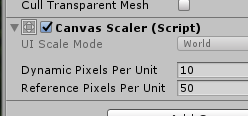
You can increase the text resolution on the canvas scaler if its somehow still blocky
rain shadow
Triggers have a dedicated set text function
queen ferry
random owl
Well there isn't really problems in those instructions so hard to say why it isn...
I'm not switching the world to Udon, specially since it's already been uploaded for months. I did what the thing said: I made a trigger box x distance away, made a new game object, made the ball (the key) pick up and then added a new sphere with what it said in the topic. Moving the ball into the slot doesn't get detected in VrChat.
outer terrace
does the ball and/or trigger box have a rigidbody
I assume the ball does, being a pickup object,r ight?
queen ferry
Ah never mind. Just went with an animator system. Was hoping to just use triggers but eh~
bold ibex
Hello i have there a small problem i would like to make the vrc udon video player play automatically when someone joins the world but whenever I add the url in the script and upload the world the video doesnt start does anyone have a solution?
random owl
This is sdk2, #udon-general for udon stuff
bold ibex
oh sorry
 acoustic tapir
dusk sapphire
acoustic tapir
dusk sapphire
a bit late to the discussion but if your text ui looks blurry, you'll want to add this component and adjust settings as needed https://nyanpa.su/i/X7LY1Wxv.png

There's a relatively popular video prefab that uses textmesh pro ui for some elements, that looks identical to the stock unity text components. However it uses a custom font file that increases map size by 10mb. 
 modern wyvern
Is there a.a Way to get more tutorials about World making, c.cause i can’t find more
A.and i need some more tutorials , l.like how to make sure a door open when you get a object close to it,
 hybrid wyvern
Could someone assist me please, I have the NewVirtualKeyboard 2.1 asset in my world and when typing with a desktop keyboard (using the seat), it types double, however, when typing with the buttons in VR, the text is fine.
red perch
If you upload a world can you still make changes to it later ?
desert python
yes
random owl
modern wyvern
A.and i need some more tutorials , l.like how to make sure a door open when you ...
https://www.youtube.com/watch?v=A70dtbfZeK0
Could have a look at this tutorial shows you the basic principle which you then can apply to your own systems
First actual tutorial on VRChat triggers. Goes over creating an object to act as a door, animating the object, adding triggers to make the object open on player enter area, and close on player leaving area.
In the next tutorial, I will go over how to make a lockable door and show how to use an object to unlock it, similar to how my world "Lab E...
 steel canopy
so i've just uploaded my first world, any time i try to load into a different world after being in mine i get stuck in a loading loop
steel canopy
i also can't see any friends, avatars, or worlds in the ui in my world, but i can blindly click on them lol
 brave bone
Anyone know hoe to fix this. This is the only thing that happens when i press upload world.
random owl
https://github.com/oneVR/VRWorldToolkit/releases
Import this and check VRWorld Toolkit > World Debugger should find the cause for that
random owl
Did you have sdk3 at some point in the project?
sinful laurel
Um yes
random owl
You need to also remove the scripting define in project settings to clear it out
Project Settings > Player > Other Settings > Scripting Define Symbols and remove Udon and or SDK3 mentions
steel canopy
anyone available to help me troubleshoot why anyone who leaves my worlds gets stuck in a loading screen loop?
i have no idea what could cause that
random owl
!outputlog
tawny lilyBOT
You can find your output log at C:\Users\%Username%\AppData\LocalLow\VRChat\vrchat named output_log.txt
random owl
Check your output log for further clues
steel canopy
[Always] Error Downloading or Instantiating Custom Scene - api link to world download - BlueprintIDMismatch
upon trying to load into a new world after leaving mine
random owl
That should only happen if the world they are joining is broken
steel canopy
it happens when i try to return to my home world, treehouse in the shade
and any world
random owl
Can you give me the world id of the world that causes this?
steel canopy
wrld_f389378c-8fae-44cf-a7e9-b7fdce7aaeb8
random owl
Well that's a pretty cursed world
steel canopy
thanks
random owl
As in just what it causes
steel canopy
oh lol
random owl
Are you able to zip this project and send it to me so I can check what's happening properly?
steel canopy
it would probably be easier for me to screen share, but i can try to zip it if you'd like
random owl
It's faster to check it myself
You can duplicate the project folder and delete the library folder inside to make the zip smaller
steel canopy
alright 1 sec
dusk sapphire
that.. was very interesting
seems like visiting your world makes the client think any other world after has your world id, hence the blueprint id mismatch
i think it also broke any network updates for menus?
random owl
I found the issue but I'm not gonna mention it publicly in case someone is gonna abuse it
steel canopy
dusk sapphire
i think it also broke any network updates for menus?
yeah i have no idea
still mega broken
only some people are getting the issue though
bold ibex
anyone knows how to do occlusion but for players? Like in the zombiedoll lounge, people appear only when you are in that room
random owl
There's only one kind of occlusion you can use it to occlude players as well
For example this would work for stuff
 remote summit
Anybody that can point me towards a tutorial on how to set up a video player that aren't setup whit udon?
 void bison
Good evening, is it possible to ban an object for everyone except for one person?
reef yacht
@remote summit VRC StarterKit has a video player. I've never used it, but it's deffo in there
remote summit
Okay. I will try and look at it
reef yacht
how are you folks planting trees using this? are you selecting each one and rotating them yourself?
golden storm
I'm having trouble finding a tutorial or instructions on how to place the video player from the SDK2, but with a URL search bar. I found one tut video that was very easy to follow, but I think it was for Udon only. I also tried using the video player prefabs from JetDogs, but I couldn't get it to work. Can someone point me in the right direction?
@remote summit Did you figure it out?
remote summit
I haven't tried it jet. Want to try and work on it tomorrow
golden storm
Okay let us know how it goes! I am so frustrated
remote summit
What is the clock for you?
golden storm
Wym clock
remote summit
The time
remote summit
Was thinking we could talk while trying some stuff out but its late for me
golden storm
ok tomorrow is good too
remote summit
I will dm u when i am going to work. Then we can see
 steel badger
Upon trying to upload, I'm given a list of errors (seen in picture), how can I resolve these without just deleting the objects?
random owl
You don't need to resolve those errors they are normal
 obsidian star
im guess this is a common question but i cant figure out why when i go into to the world on vrchat my vision is doubled can anyone help
random owl
On quest?
obsidian star
yes
random owl
Did you use the button inside the vrcsdk to switch to android building?
obsidian star
no
random owl
So you switched using the built in unity dialog?
obsidian star
wait i switch it to android in the vrcsdk
random owl
So you did use this button?
obsidian star
yes
random owl
There's a bug where that button can cause rendering problems sometimes
You should use File > Build Settings instead to switch between
random owl
If that doesn't fix it you might have some not mobile gpu friendly shaders
obsidian star
ohh ok
wise cobalt
Trying to upload this world, won't even let me hit the Button and then Unity lags... any advice?
random owl
What's in your console after hitting the button
wise cobalt
nothing, it's clean
random owl
Even though I see in your picture that there would be something in your console? 🤔
wise cobalt
like I have other worlds in the unity file, so it's not an issue with the SDK, but it's just being odd with this one
random owl
Well doesn't really change that something should appear in your console most cases after pressing the button
wise cobalt
oh wait now it's showing a thing wth?
"Cannot add menu item 'VRChat SDK/Utilities/Clear Cache and PlayerPrefs' for method 'VRC_SdkBuilder.ClearPlayerPrefs' because a menu item with the same name already exists."
random owl
Just that and nothing else? Do you have all messages enabled in the top right of the console?
random owl
https://github.com/oneVR/VRWorldToolkit/releases
Import this and check what VRWorld Toolkit > World Debugger shows
random owl
🤔
wise cobalt
Yeah, it's confusing as hell
random owl
Clear the console once then right after click build and show me a new picture
random owl
As in the button itself doesn't push down?
wise cobalt
yeah
it stays white, doesn't switch to the grey showing it was pushed
but when I press it, unity lags, and does nothing
but no error scripts pop up
random owl
Problems with no visible feedback or errors are a bit annoying to solve
wise cobalt
mmmhm
random owl
If I was you I would just run trough the full reimport steps
https://docs.vrchat.com/docs/updating-the-sdk#sdk2
VRChat
If you need to update your SDK, it is important that you follow these steps to ensure the update proceeds properly and you don't have any old/conflicting files. Version Control If you know how to use it, you may find it beneficial to use version control software like Git to manage your project. You ...
wise cobalt
alright
dusk sapphire
do you have a lot of objects parented to one of the objects in your scene?
the sdk will lag a lot when you have that
a lot being more than 100-200 objects
though from those screenshots i doubt thats the case
random owl
Yeah
rain shadow
If his parent object named trees has a couple hundred trees that may also be comprised of multiple parts that could be the case of whats causing it
 spark inlet
Is anyone able to point me in the right direction in where I can either get, or how I can make christmas string lights for my world?
The worlds made in Unity rather than Blender, so I'm not sure how I'd go about getting lengths and distances right if I were to make them in blender.
rain shadow
@spark inlet These ones are pretty nice and you have likely seen them in worlds before https://www.patreon.com/posts/xmas-lights-32030551
Does have a free option at the bottom of the page which might be all you are looking for
spark inlet
Thank you so much!
 peak shell
anyone else having issues uploading worlds with SDK2? using latest sdk and it just fails to create asset bundle
like just trying to run build and test here and thats not eve nworking
random owl
You have multiple scenes in your project with leftover asset bundle name set most likely from a crash or similar during a build
peak shell
its a new project
just created
only thing in here is the main scene copy of poiyomi shaders and the latest vrcsdk2
random owl
Do you have multiple scenes in it?
random owl
It doesn't matter for this problem whether the scene is loaded or not
peak shell
then what do i do
random owl
And if you have demo scenes they can incorrectly have the asset bundle name setup
random owl
Well that should fix it as well but you can also manually edit the meta files for the scenes
random owl
The problem wouldn't be the scene you are trying to build
Since if that was the only problem there wouldn't be a problem
peak shell
same issue
random owl
Did you check every scene you have in the project for that?
peak shell
i deleted all scenes that were not being used
and edited the meta for the one that was unused but wanted to keep to reflect what you wrote
random owl
Oh that was just me indicating that there should be nothing there
It should look like this
peak shell
for the one im uploading its blank
random owl
And there's no other scenes in the project anymore?
random owl
Well that would replicate the issue 😅
Sorry for being unclear
Remove the nowritinghere
You might need to restart unity
random owl
Oh?
random owl
Hmm I'm gonna have a look
peak shell
alright
im not sure why its failing to build asset bundle
avatars build fine for both sdk2 and 3
random owl
Well this is just that project with worlds so it wouldn't cause problems with avatars
peak shell
yeah but is a problem building asset bundle
Cannot mark assets and scenes in one AssetBundle. AssetBundle name is "customscene.vrcw".
avatar assett bundles build and upload fine
im just trying to do local testing
random owl
Yes but the way avatars are handled is completely different from uploading a scene
peak shell
im aware but its still using the same bundler
random owl
Not really
peak shell
same format
random owl
The format doesn't really change much from what I said 😅
random owl
I'm still checking that error
random owl
@peak shell reading trough the sdk code related to that other error you had didn't prove useful much, but if you can send me your project over I can more easily debug it locally.