#world-development
39 messages · Page 57 of 1
 viral jay
 random owl
This is in unity?
random owl
🤔
Is it better if you focus on a small gameobject?
Or still the same thing happening
random owl
What was it?
random owl
And moving from out of 0,0,0 fixed it? 🤔
That shouldn't be the case in normal conditions at least
I always parent things to 0,0,0 in my worlds
viral jay
Thats why im baffled
random owl
@viral jay is it possible you had baked in occlusion beforehand and didn't rebake after moving?
 normal harness
@normal harness missing how? What happens if you just enter playmode in unity?
@random owl Nothing :/ Like just a mesh without any interract
random owl
You might have a large are trigger collider in the area those block raycasts from happening properly if you set the large trigger collider to be on the mirror reflection layer that works around the issue
normal harness
I'll check that, thanks ^^
 storm sedge
What am I missing here? Why is this mirror button not working?
 near escarp
What is that interactive layer ?
storm sedge
It wasn't working under default so I switched it to interactive as a test.
near escarp
what isn't working exactly ? the interaction or the trigger
 wooden marsh
I have an OCD problem with Stairs, hope someone can answer. (Assume I'm using ProBuilder & Meter Units)
Depending on walk or run speed of the world, the VR character will constantly "fall" down into the steps, as opposed to a smooth transition, and I've always found that to be annoying.
Has anyone found a good ratio for Length/Height/#Steps for level design?
 autumn umbra
@storm sedge You have "is trigger" checked on the box collider, but it looks like it's meant to be a button. It should work if you uncheck it
storm sedge
@near escarp When I click it nothing happens, the mirror doesn't become active.
I can interact with it, I see the outline and stuff.
near escarp
What if the mirror is active by default, does it stay enabled ?
storm sedge
I'll check that.
storm sedge
So the mirror shows in my scene in unity but when I actually go into the world in VRChat even if I left the mirror on in unity it doesn't show. I have no idea what would cause that.
near escarp
what does the mirror components look like ?
storm sedge
near escarp
since it's rotated, are you sure it's facing the correct way ?
storm sedge
Fixed. It needed to be on the water layer.
 bold ibex
I can only see out of one eye in my world and the other is just messed up pleaser someone help
viral jay
How can you make it so when you fall out of the world a respawn it toggles a gameobject?
I have a button that turns off the spawn area an teleports you somewhere else. But when you respawn or fall out of the world you fall infinitely
Unless there’s a better way to do this?
would it be on spawn?
 lethal moss
Sponge you could animate the spawn game obect if you wanted, so when you teleport to this new location, it also moves the spawn to the new location (locally) as well. then if you ever hit respawn on menu or fall out of world u respawn in a safe spot.
viral jay
how would you do that?
lethal moss
if you would like to leave the spawn where it is, simply have a trigger collider at spawn, that collides with playerLocal layer which activates the spawn room again
you would use an animator on the VrcWorld object and transition between different animations upon user teleporting. those animations are just the different locations for your spawn
lethal moss
no, onEnterTriger
AvatarHit requires that the trigger is a collider NOT in trigger mode so you'll actually jsut hit it and glitch out if u respawn inside it.
need to be trigger mode
 rain shadow
@viral jay If you are trying to detect the player you need to set the OnEnterTrigger layers to have either playerlocal or mirrorreflection checked in the layers list
 elfin latch
anyone know where I can find the world clock ui thing that shows how long you've been in the world?
 digital basin
Working video player that doesn't white screen or fail to not work upon reloading into a world/joining after the fact?
Please @ me if so.
 idle harness
hey, i was making a world but after a while i noticed that that the vrchat panel on the side was missing and i cant select it using the top menu, how do i get it back?
random owl
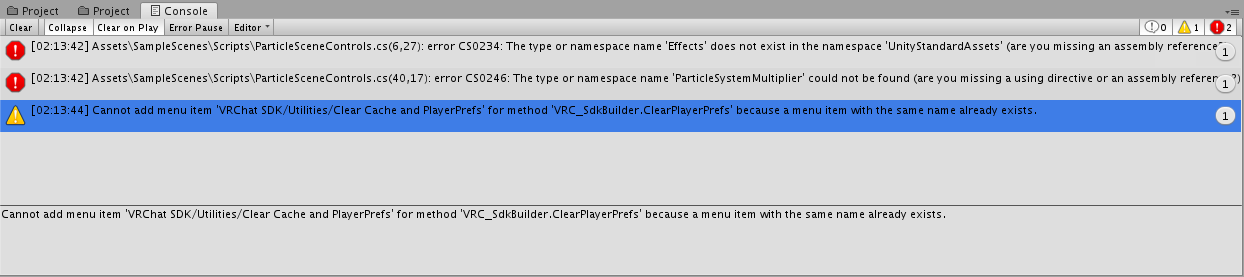
Check your console for errors
idle harness
Cannot add menu item 'VRChat SDK/Utilities/Clear Cache and PlayerPrefs' for method 'VRC_SdkBuilder.ClearPlayerPrefs' because a menu item with the same name already exists.
it says that
idle harness
nope
random owl
Hmm give me a second to check something
idle harness
ok thanks
random owl
Try right clicking the VRCSDK folder and pressing reimport
random owl
That didn't bring up any new errors either?
idle harness
nope just the same warning
random owl
Hmm curious I've seen this problem pop up couple this the past few days
Are you on the latest version of the sdk?
idle harness
i dowloaded it week ago, was there an update since then
random owl
Don't think there has been since
Did you do anything specific before the sdk started doing this?
idle harness
no i just launched it one day and it didnt appear
random owl
Didn't import any new assets or similar just before you noticed?
idle harness
i can try removing the last few to see if that helps
random owl
https://docs.vrchat.com/docs/updating-the-sdk#sdk2
Might also wanna just doing the steps here and see if it fixes the issue
VRChat
If you need to update your SDK, it is important that you follow these steps to ensure the update proceeds properly and you don't have any old/conflicting files. SDK3 For SDK3, you should be able to update in-place. This is especially important for SDK3-Avatars, as you may lose State Behaviors on you...
It's annoying to fix issues where there are no actual errors showing up telling what's happening
random owl
What asset @idle harness ?
random owl
It's also possible that it wasn't actually caused by that specific asset though
Before when I was debugging this issue for someone the issue just seemed to be that unity stopped compiling the sdk scripts for some reason
So also removing assets can force the recompile to happen
idle harness
oh ok, i didnt really need that asset anyway. but if that problem did happen again how would i recompile?
random owl
Just the reimport all should do it but unity can be unity sometimes 🤷♂️
idle harness
ok, well thanks
random owl
Do come back here if it happens again
 jolly mango
~~I'm having an issue and im sure it's somewhat related to what I did with the .meta file that @random owl suggested.
The world uploads just fine but the moment I enter into the world it instantly pops me out of the world and back to the homeworld, I've attempted to create a new scene and new blueprint ID to no avail~~
I found the issue, I had some pipeline managers randomly in the scene which were conflicting
viral jay
I have an OnEnterTrigger set to local but when you enter it, it disables gameobjects for everyone
viral jay
Is there another parameter I should set it to other than local to fix this?
I’m preventing lag by Turing off large areas when you enter a different zone, is there a better way to optimize the world?
 desert python
bake lights, lower camera render distance, force all avatars to have lower shader settings when joining, and what youre doing
viral jay
I just don’t know how to make the areas re-enable on respawn. It disables the other areas for other players as well.
I’ve done all of that except for the shader settings
desert python
uh, make everything locally togglible, and im not sure what youre using to make the triggers work
viral jay
On Trigger Enter, so whenever the avatar enters the area everything outside should get disabled Locally. But instead it does it globally and I don’t know how to fix it.
near escarp
Trigger set to local
near escarp
ok, layers should be playerlocal
 frail spire
Hi there, just forwarding an acquaintance's map making woes here to see if anyone has any helpful advice.
https://twitter.com/JMobile_Bio/status/1330218270708928512
She's apparently getting all of these errors on a fresh install of Unity 2018.4.20f1 with the latest version of SDK2 from the VRChat site. These errors pop up even on an empty project when importing the SDK. Any advice would be appreciated, thanks!

Anyone working on VRCSDK2 maps deal with this problem? I submitted my ticket already but even on a fresh project and fresh install of the proper Unity version/SDK, itll throw these warnings. Its frustrating. Might consider installing Unity on another computer to see what it does

 Twitter
·
random owl
Twitter
·
random owl
Top one is normal atm and doesn't really affect much
Second one is also normal and a lot of unity extensions throw those because of how you usually build stuff in unity
Next three looks like unity complaining about some assets in the project which don't seem to be included with the sdk
Six also doesn't really matter
And the last one is the first one again which doesn't matter
frail spire
appreciated! So none of these look like they'd be something which would prevent the SDK from functioning?
random owl
Yeah warnings in unity are usually not something you should bother with
Though the third would be fixed by adding weight paint into those missing vertices in the mesh in question
The walk really depends on what animation it is
Same with the one after it
 void bison
Hi, how do we add bloom to our worlds?
 floral pond
How do you hide the 'interact' outline on objects in-game? Like if I hover over an interactable object and it makes a highlighted outline around that object, how do I keep that outline from showing up?
 gusty cape
Hey uh, does anyone know why the VRC Object Sync isn't an option I can add?
bold ibex
Anyone knows why when I set this cylinder to give off light, it doesnt show up in game but it shows on unity?
lethal moss
void bison
Hi, how do we add bloom to our worlds?
follow the info on here https://gitlab.com/s-ilent/SCSS/-/wikis/Other/Post-Processing
and you will be on your way 😁

GitLab
A surface shader for Unity providing cel-shading. (Forward rendering only)
void bison
Thx/
gusty cape
gusty cape
Hey uh, does anyone know why the VRC Object Sync isn't an option I can add?
Just wanna bump this, anyone?
random owl
That really depends, have you imported the sdk, are you sure you are on sdk2, is there any compile errors in your console?
 sacred zodiac
Does anyone have issues where Builder is just blank?
I can't upload anything.
Even replacing the World Descriptor, same thing happens.
I don't have errors.
random owl
Try closing out of unity going into your project folder and deleting the Library folder there and then restarting
sacred zodiac
This one right?
random owl
Yes that would be the one
 unborn pilot
can someone help me figure out how to fix UV maps? 😓
random owl
Really depends on what the problem with them is
unborn pilot
they're stretched in unity
but then i fixed them in blender but when i imported the world it just didn't port over the UV map or something
rain shadow
Does the mesh have multiple UV maps?
unborn pilot
no they all have one map
bold ibex
could anyone help me with this

i only restarted my pc and the menu items are gone
i've tried reimporting the sdk
random owl
Check your console
bold ibex
@bold ibex if that doesn’t work make a new project and import everything form scratch
im trying to reimport all rn
ive been trying to solve this for like an hour or so now lmao
That unity and sdk for ya
random owl
Don't make a new project
random owl
bold ibex
im trying to reimport all rn
Show me some pictures of your console
These problems are easy to solve as long as you know what you are doing
There's only like 1% of the time where you need to make a new project
Otherwise it's just external assets, badly imported sdk or unity project settings from old projects causing problems
Which all can be solved with couple steps as long as you know what they are
Without having to go trough the trouble of creating a new project
 random owl
Delete the script specified in the error
I can't really tell you why it's there but it seems to be referencing some stuff that isn't really supported in unity 2018 and aren't supported in vrchat either
random owl
No worries
 rotund arrow
hey guys I'm having problems with Pickup.
I'm building a tabletop game world. So there will be lots of stuff to pickup. Is there a way to reduce the pickup distance? Because otherwise you have a difficult time picking up the thing you want to.
I tried changing proximity but it seems like it does nothing.
Same thing with interactable buttons.\
 supple sparrow
Can someone help me, when i try to upload my world an older version of the World is uploaded or shown when i go on "Test" it just wont sync with my updates i tried to change the World ID but it just wont work.
 latent bobcat
Can someone explain this error ?
it's wont let me upload the world. it's something with the pipeline...
Must be some kind of script interfering each other. but i can't find them.
 raw pivot
why don't point lights show up on mirror relections
rain shadow
@raw pivot Uncheck the disable pixel lights option on the mirror component
raw pivot
Thank you so much man
 tidal juniper
Internal screaming
What should you do when triggers can't initialize?
 snow pawn
hey is anybody able to help me with my vrchat world in unity?
for some strange reason whenever I try joining my world it automatically redirects me back to my home (tested 2 days in a row) and its happening for others not just me
if anybody has the time I could really use the help with ur knowledge of unity to find out the problem
snow pawn
nobody?
random owl
snow pawn
for some strange reason whenever I try joining my world it automatically redirec...
Don't really have the time but importing this and checking VRWorld Toolkit > World Debugger should show your answers
https://github.com/oneVR/VRWorldToolkit/releases
random owl
tidal juniper
*Internal screaming*
What should you do when triggers can't initialize?
You don't do anything that's normal just make sure you don't have error pause on at the top of the console
snow pawn
random owl
Don't really have the time but importing this and checking VRWorld Toolkit > Wor...
how would i run world debugger? sorry Im still new to alot of this
nvm
random owl
snow pawn
nvm
Got it figured out?
snow pawn
I've done the world debugger rn just uploading and gonna see if the windows version works and then make it quest compatibile so give me a few
are these errors things I should worry about?
nvm
nvm Im just gonna scratch the world it isn't worth it I don't think
snow pawn
still having the same problem. constantly getting redirected to home world whenever im trying to build and test. Now the world won't even upload to vrchat
I didn't spend much time on the world so its all good thanks for the help anyways
random owl
I could help you fix it but alright
snow pawn
I don't know what the issue is with it are you available to vc? or we can just dm for now?
might aswell give it 1 more shot
random owl
I'm commuting to work but as long as you give me a description and some pictures on what exactly is happening I should be able to name the issue
Like what exactly is happening when you try to upload
The world debugger should cover almost every case of where the world just redirects you back home
snow pawn
idk Im scratching it. gonna start from the bottom up and rebuild dw about it anymore its not worth it sorry for the inconveniance.
Thanks for the help
random owl
No worries
snow pawn
your world debugger is amazing though. i didn't know a thing existed its pretty usefull
random owl
Thanks I'm the person making it 👌
rotund arrow
Any way to reduce the pickup distance?
 ruby kettle
would any one know how to add a global audio que to your world for when someone joins? i'm trying to have a little audible bell play when a new person enters the world but i'm unsure how to do it.
rain shadow
@ruby kettle OnPlayerJoined-local > AudioTrigger
 half grotto
Who want's to help me make a christmas avatar world?
 forest hawk
So I'm working on a world that is pretty much complete but issue is that it has colliders for everything but none of them are working and I just fall through the floor indefinitely
random owl
Show me the inspector of one of those?
forest hawk
random owl
You don't have a mesh set in the mesh collider
forest hawk
It won't let me set anything as a mesh weirdly
random owl
You might be trying to set a model itself as the mesh and not a mesh then
But just removing and readding it should define the mesh on the object automatically
forest hawk
I've tried but it wont set it
random owl
Oh and you don't have a meshfilter either 🤔
forest hawk
Hold on I think I fixed it maybe?
random owl
Wait it's a skinned mesh 👀
forest hawk
Gonna test
forest hawk
It works now
random owl
Still that's a nightmare for optimization
forest hawk
I'm not finished with the world by a long shot, just trying to get it in some working compacity right now
random owl
Alright but please at some point create the geometry again properly
forest hawk
Will do
bold ibex
hmm is it possible to record post processing and animate it?
 tidal ridge
@forest hawk plowing ahead with zero shits to give about optimisation...my hero 🌞✨
Honestly, you can figure all of that stuff out later if you feel like it.
 stoic hound
I'm trying to hide parts of my avatar w alpha masks, I copied a material and put a different alpha mask in to hide a different part of the mesh, but its only reading the one alpha mask. does anyone know how to fix this?
stoic hound
oops wrong chat
 open thicket
bold ibex
hmm is it possible to record post processing and animate it?
open thicket
bold ibex
hmm is it possible to record post processing and animate it?
Yes
bold ibex
how would i do that? @open thicket
lethal moss
also curious how to do that. I've only ever animated the post processing volume up and down to fade it in and out of effect on the camera, but I remember changing bloom or other effect values alone never did anything on the animation tab.
lethal moss
🧐 ohhh, interesting. will have to try that out.
ruby kettle
@rain shadow thank you by the way, that was extremely helpful
idle harness
im trying to upload my world but the menu where u enter the world details doesnt show up when i press build and publish
this is the only error i get Cannot add menu item 'VRChat SDK/Utilities/Clear Cache and PlayerPrefs' for method 'VRC_SdkBuilder.ClearPlayerPrefs' because a menu item with the same name already exists.
UnityEditor.EditorApplication:Internal_CallUpdateFunctions()
idle harness
in the game view?
nothing it just goes to the main camera instead of spawning the thumbnail one
random owl
Some screenshots would be helpful of exactly what you are seeing
idle harness
ok, ill get them now
this is the game view when i click the build and publish button
random owl
I would suggest disabling error pause from the top of your console and then trying to upload again
random owl
Hmm actually disable clear on pause
Then try again and see if something shows up in the console
idle harness
am i re enabling error pause?
random owl
Nope don't re enable that
idle harness
kk
random owl
Realistically should show more in the console now after you start the build
random owl
Hmm those don't really add up either
https://github.com/oneVR/VRWorldToolkit/releases
Can you import this and check VRWorld Toolkit > World Debugger?
idle harness
this is what pops up
idle harness
the auto fix didnt work but yeah the build size is weird
random owl
Hmm if only there was feedback on what is causing the build go weird 🤔
idle harness
i tested the world and it should be 20mb
random owl
So build & test works? 🤔
idle harness
yes
random owl
That's even more curious then
idle harness
idk a lot of stuff about this but if i had to guess its a problem with the sdk then
random owl
Would you mind sending the project over and I can have a look?
idle harness
yeah ok, but first let me see if just deleting and reinstalling the sdks works
random owl
Sure
 clever karma
uhm should I use sdk3 or sdk2 for worlds
desert python
depends
 lofty notch
when i hit build and test it launches me into my home world instead of the unity scene, im on sdk3 but looked at 2 different tutorials and they were pretty much the same across sdks. Just bare bones basic setup spawning onto a simple plane, anyone seen this before?
random owl
Wrong channel #udon-general this is #world-development , but if you created your scene descriptor yourself you need to set a proper spawn point.
Also if you try this it includes detection for things going wrong under VRWorld Toolkit > World Debugger
https://github.com/oneVR/VRWorldToolkit/releases

GitHub
Unity Editor extension for making VRChat worlds. Contribute to oneVR/VRWorldToolkit development by creating an account on GitHub.
 neat pawn
guys i want a simple tv video for sdk 2
desert python
@neat pawn which one?
neat pawn
desert python
<@!156135123459244032> which one?
nvm man i found one thanks
lofty notch
random owl
Wrong channel <#657394772603830360> this is <#361741445352259584> , but if you c...
ah i thought this would be the closest channel as i downloaded worlds sdk3, have not touched any udon or scripting. thanks for the debug kit! i found a few things for optimization but couldnt fix the main issue. this is what the console looks like
i created a new project from scratch with just a plane and spawn minus the textures and skybox and it worked
would i just delete the lines that these error messages point me to to fix the issue?
random owl
The build is stopped by that asset because it's broken
If you delete the script that is there it's gonna be fixed
The script itself is literally just a web link and it's so annoying that it's there because people come asking why their builds are broken because of it 1 to 3 times a day
lofty notch
holy shit it worked, thank you! @random owl
 real moth
I'm having an infinite respawn issue or something, even when I try a very minimal world:
New Unity Project
Import SDK
Create Plane
Place VRCWorld
Build and Test
and then I get:
I feel like I've created worlds just like this many many times, I don't think I'm forgetting anything
random owl
You didn't place your spawn under the respawn height set in scene descriptor right?
real moth
Looks like I did, interesting, thanks
 sudden lily
How do I set up background music for a world? Proper global-audio BGM, I mean.
near escarp
sudden lily
Cheers!
snow pawn
hey Im having a issue with my vrchat world
My world is quest & windows compatible and quest users are having a issue where their entire right eye is completly black and when they look in their left eye they can't see the skybox
when they look through the mirror in my world everything is perfectly fine though. their able to see the entire world when looking in the mirror which is wierd.
Anybody else having these issues aswell? and able to help me?

How the world is supposed to look like ↓
 random owl
Right eye going black can be caused by using shaders that aren't quest friendly esp grabpass ones
Might be just the skybox shader you are using or might be some other shaders as well
You should use the skybox shader included with the sdk
 mellow talon
new bug i found dont know if its SDK or Unity. This world. Completely empty. No skybox no nothing only the VRC spawn. 140 mb? Did someone encounter this before?
snow pawn
random owl
Right eye going black can be caused by using shaders that aren't quest friendly ...
Should I change the skybox shader to Vrchat→mobile→Skybox to fix the issue then?
random owl
mellow talon
new bug i found dont know if its SDK or Unity. This world. Completely empty. No ...
Could be a bunch of reasons first I would suspect something is stopping a new build from happening and it's loading to the old one. Might wanna check your console after trying to build.
snow pawn
Sorry If im annoying & seem retarded I'm a newbie to unity and just started using it about 3 days ago so still got alot to learn
random owl
snow pawn
Should I change the skybox shader to Vrchat→mobile→Skybox to fix the issue then?
It could depending on if there's other problem shaders or not.
random owl
mellow talon
new bug i found dont know if its SDK or Unity. This world. Completely empty. No ...
This might also help you:
https://github.com/oneVR/VRWorldToolkit/releases
You can check your latest builds details from VRWorld Toolkit > World Debugger
random owl
snow pawn
Should I change the skybox shader to Vrchat→mobile→Skybox to fix the issue then?
Also to note if you switched build target using the button in the sdk that can cause problems you should use the build switcher in unity instead.
mellow talon
nah man figured it out. Its was the VRC Spawn. It saved 140 mb of data. I already checked for it. It always loaded the newest version because the size changed when i added stuff and it also showed up. Something was being saved in the VRC Spawn script i dont know what it was though... My guess is the attached screenshot. The list didnt dissappear. It stayed even though i deleted all objects
random owl
Yeah that would do it
snow pawn
random owl
Right eye going black can be caused by using shaders that aren't quest friendly ...
Im not sure which shaders are the problem as the entire right side is completely the same as the left Exept for the pictures(all I did was duplicate) Im gonna try and change the skybox to Vrchat→Mobile→/skybox although I didn't want to because then the skybox wouldn't move but that may be the issue
Ima test it
random owl
Well if it's a special skybox shader I could easily see that being being the problem
snow pawn
A noobie question here but I have to do the exact same thing for the windows version right? change the skybox for both the unity projects?
snow pawn
So I don't have to change it for the pc side aww hell yeah
thanks for the help! I really appreciate it. Still learning unity Couldn't have done it without help
 cloud niche
I can't load into my world I've just made, It's not big, I've checked that all colliders are correct, I've checked that there are no empty triggers and the spawn point is above ground and isn't obscured by anything. Yes, I am running the correct version of Unity and I've reinstalled the SDK
I can't make sense of this
cloud niche
I will check tomorow. I shut everythigoff for theight
Thank you so much I will checktoorrow
 wispy cloud
I don't think you can change the quality levels like that through worlds. Each world is essentially just another scene inside of the project that is VRChat, and I don't think you can redefine quality settings for specific scenes only. At most you can adjust the post processing and then of course optimize the hell out of your world, but I think that's about as far as you can take it
 heavy quiver
Alright, so I have an issue with syncing. I have an enemy that wanders around the map endlessly, and when someone gets nearby, they follow them and start attacking them. Thing is, after the master of the instance leaves, the enemies start teleporting everywhere and spin in circles. Does anyone know how to fix this?
rain shadow
@heavy quiver Would recommend checking the logs to make sure no unwanted behavior is occurring
Spinning in circles sounds like more than just a sync issue
heavy quiver
it works just fine when the instance is first made
there are no issues that i can personally see
but i'm no expert, so what do i know
rain shadow
Do you just have an object sync on the nav mesh agent game object?
 vestal ore
Excuse me, can the web page address be put into the module of the map and then click to jump to the browser to open the corresponding page?
cloud niche
And now everything broke... I really can't be bothered with these constant errors with Unity and the SDK. I'm quitting creating content.
random owl
vestal ore
Excuse me, can the web page address be put into the module of the map and then c...
Not possible without workarounds that would include the users running an external program reading the vrchat output log with udon
snow pawn
Hey I have a question
If I wanna update my world and add stuff for both the quest and windows version How would I do that?
Like persay i wanna add a second floor to my world. Do I have to do the exact same to the quest version of the world?
desert python
yes
snow pawn
Could I just build the 2nd floor on the quest version & then copy the quest version unity project --> Switch it to windows version & I would be all good right?
random owl
Best workflow is usually doing it in the same project
Not really sure why you are deleting the original windows version either
snow pawn
so really all I can do is just copy each thing i do to the windows to the quest right?
No way to just skip the painful process of copying the other?
Im retarded all I have to do is just delete the quest version nvm
random owl
It really sounds like you are overthinking this someway
snow pawn
then once im finished building in windows --> copy project ---> switch copy to quest version --. done deal i think
i may be slightly overthinking it yeh
random owl
Why copy it? Why not just swap between quest and pc on the main project?
snow pawn
I have two unity projects. One is windows the other is quest.
random owl
Why though?
snow pawn
thats how u make a quest compatible world right?
random owl
Some people do, but it's kind of a waste of time spending time working on two separate projects and not just using a single project and swapping between the builds
random owl

GitHub
EasyQuestSwitch is a Unity editor tool developed for VRChat world creators, it can automate changes to components within a scene as soon as the build platform is changed from PC to Android (for Ocu...
This can help you maintain the differences as well
snow pawn
i feel so fcking retarded
random owl
Did you think you can only swap to android and not back or something? 😅
snow pawn
thats fcking amazing Im learning so much this week
epic 
I guess I can Just ditch the 2nd vrchat world copy then. I feel like a absoulute noobie rn
random owl
Just don't use the button in the sdk
Use the build switcher inside unity
The sdk button causes problems on the quest side
desert python
id be careful going back and forth from android support to windows over and over, i had to remake several project (including rn possibly) from doing so
random owl
Why would you need to remake a project because of it?
desert python
because unity likes to fight itself if the support transition fails... which it is doing to me rn and it just kind of sparked on me to probably say something about it
random owl
Fight itself? That doesn't make much sense.
And I don't see why that would make you have to remake the project
desert python
so when i program does not resource itself, it will try to compromise, and transitions are very very hard to compromise.
i dont have to remake, i just have to copy the files and reset the address point in the file explorer
random owl
I still have no idea what you are talking about
desert python
rn im trying to at least get unity out of the "not responding" phase to maybe save some time
snow pawn
random owl
The sdk button causes problems on the quest side
When ur saying sdk button what are you meaning?
desert python
if you go back and forth on the supports, youll eventually get i
random owl
snow pawn
When ur saying sdk button what are you meaning?
The sdk button is the one in the control panel saying switch to android/quest build basically don'tever use that
snow pawn
so u mean the button in "build settings"?
snow pawn
hey
void bison
Hello, is it normal that the water of the standard resource is black in SDK3 when in play? problem that is not in SDK2.
desert python
sdk3 is a bit weird with lighting, still been trying to figure why myself
void bison
:/
desert python
try ticking auto lighting on and off, sometimes that fixes it sort of
void bison
on my points of light?
desert python
yes, unless the map was already baked, then something else sdk3 related has occured
void bison
bah to test, I recreated a virgin project, put the sdk3, the standard asset, the water and that's it, as a light point I only have the directional lite, to tell you, not only the water is black, but there are no even animations
desert python
are the animations set correctly?
void bison
Yep
void bison
in sdk2 everything works fine, but in sdk3 I have 999+ errors 😂
desert python
? what version exactly?
void bison
I use the basic sdk
desert python
that is not a version maam
void bison
if not I use the sdk3
desert python
well i suggest using a slightly older sdk3 if youre not doing anything big or using off-udon scripting
it sounds like sdk2 is your better sdk to use
void bison
....
but the sdk2 maps would not be compatible with the 3.0 animations of the avatars?
void bison
??
void bison
Hmm okay okay
desert python
are we talking about worlds or avatars miss?
void bison
Worlds ^^
desert python
3.0 avatars are seperate from 2.0 and origin avatars/worlds, you should be fine
desert python
ok gn
 fervent phoenix
Hello! I have an animation on the object in the world. Now it starts playing separately for each player from the moment he enters the world. How to make the animation start playing with the first player who created the room and then synchronize for everyone who came in later? I do not use udon, I would like to do it for SDK2
near escarp
object sync
bold ibex
Anyone knows why when I upload my world the baked settings dont show up? On unity, it looks fine but when I upload.. Its dark
Everything I want to be baked is static and these are my settings
 cosmic cairn
Quick question - does anyone know how to add a custom animation to a chair?
Can't seem to find anything about it online
cosmic cairn
Nevermind, found it! Just added a VRC station to a box and added an animation controller
random owl
bold ibex
Anyone knows why when I upload my world the baked settings dont show up? On unit...
Did you yet try to clear the gi cache and bake again? What about if you enter play mode in editor? I also wonder if the lightmaps are actually getting properly included in the build
fervent phoenix
about animation sync- I tried it - strange, but the animation changes its position a little when there are a lot of people in the room. This is especially noticeable, because, for example, my ship goes under water, since my animation is the movement of the landscape and water around a static ship.
After all, I should apply VRC_objectsync only on an animated object?
 livid current
Anyone know how to make a functioning URL in a world, so you can copy and paste in it, so it trigger it to show on the videoplayer? 🙂
desert python
wdym?
livid current
I made a videosyncplayer, how do I make a trigger for a working URL slot, so people can add their link and it shows on the videosyncplayer? 🙂 @desert python
desert python
im not sure how to add one manually in sdk2, but there are premade video players for sdk2 that is able to take links and play them
 mental steeple
is there someplace I can buy pre-built worlds that I can personalize and upload? I'm trying to host a music festival and I'm trying to figure out a world for hosting it
near escarp
There are some on booth
 ashen eagle
So for a world that will allow 40 people, are there any guidelines on how many Objects can have Sync on them before performance starts to tank?
near escarp
It's less about perf and more about the sync itself degrading
ashen eagle
I have something ridiculous like 40 glow sticks in a club area, but with 40 people in the world that is a huge amount of sync traffic... which will likely account for the majority of data transfers (minus avatars of course)
near escarp
Depends if they're sleeping or not
ashen eagle
Sleeping... as in inactive. But let's say I pick up an object, then throw it on the ground. Does it go back to sleep?
near escarp
If they're all being moved all the time it won't affect performance much, but they might not sync very well
yes if it stops moving it sleeps
ashen eagle
yeah by "performance" I really mean the accuracy of the sync'd world
My fear is 40 people will come into my world that has like 100+ available network objects and it'll instantly crash once people start interacting
Any experience / guidance on that? The world is already optimized from a vertex perspective, getting 50+ fps most of the time, have aggressive occlusion and level of detail.
But worried about lagging
near escarp
50+ by yourself ?
ashen eagle
yes. and it's 72 (Quest with Virtual Desktop) in almost all places
I've had 10 people in there before and fps is fine, it's just that network events get glitchy.
near escarp
Should be 90 by yourself then
ashen eagle
Friends say (I'm the master) that I stutter a bit when speaking (I have gigabit internet at home) and some objects will get stuck in space until someone interacts again with them
I've also got performance options in the spawn room, so there is definitely a potato mode for folks
near escarp
Master stutter is existing for everyone currently, not something you can avoid unless you have a mute user join first
ashen eagle
Roger that. So essentially I'm on the fence whether or not I should start removing a large percentage of my object sync objects... but unsure if that'll make a huge difference.
I do plan on going to the community event this sunday to try out the world, performance test it.
But just curious if there is any guidance. Is 50-100 objects with object sync in a world crazy?
near escarp
It won't look good
I'd suggest 30-50 as a test
but again, depends on how many are active at once
ashen eagle
I can make that work. About 15ish of those are animations that I want to sync with everyone (NPCs walking around) so I'd rather not cut those
Yeah I'm going for worse case... the world is a convention themed world with 2 dance clubs so in theory we'd have a full house if folks liked it
Ok thanks for the feedback. I'll focus on 30-50 and see where that lands me
bold ibex
random owl
Did you yet try to clear the gi cache and bake again? What about if you enter pl...
How does one clear GI Cache and also everything looks good in unity (playing as well) but when it goes to vrchat its black
near escarp
Edit > Preferences > GI Cache
bold ibex
Thanks @near escarp
 summer thicket
how do I do teleporting doors where you press on the door or button it teleports you to a location? ive been struggling to figure it out
all the videos ive watched are out dated
random owl
Triggers haven't really changed in forever any video should be good to learn from even if it's on an older version of unity
summer thicket
is there a video that better explains how to do it?
random owl

This tutorial shows you how to make another type of door, this time that teleports players around within the map simply by walking into the door. I'll also show how to lock the door so people can't walk through it. This version does not suffer from sync issues as the lock and unlock buttons are properly synced for all players.
(And I made the ...
 grand bough
So I'm trying to figure out how when you place your streaming camera inside a sphere, and you can show it on stream. so you can toggle different camera...(Like a podcast as to say...) I'm not sure If I'm explaining it right...
 golden storm
Does anyone know why a mirror added from VRCSDK would make the world flash and glitch?
desert python
did you edit it in anyway?
golden storm
I changed the size
desert python
then no
golden storm
Hhm 😦 ok. I haven't had this issue before. I'm also now experiencing issues with pickup and triggers as well that haven't given me trouble before. A basic cube i was able to add a pickup to. But adding a pickup to a remote control or bowl of apples will not work with the same settings applied. I'm so confused, maybe this is a problem with my unity file and not the SDK.
desert python
any errors? or warnings ig since some of those can correlate to warnings
golden storm
None that mention the cube, mirror, or remote/apples
desert python
odd, what exactly happens when you build and test. and publish (privately)
golden storm
i load into the world normally, it begins to flash and looks as if it is just about to crash. movement is off, and you can see black screen in your peripheral view. when i remove the mirror and reload into the world, it functions properly.
desert python
ohhh, wait. is there 2 mirrors or more?
golden storm
only 1 mirror, and it's quite small.
desert python
hmm, ok. usually theyll flash or go black when another mirror is present or 91 degrees towards eachother
golden storm
oh, interesting. it's the whole world flashing though, not just the area with the mirror, is that what you mean?
desert python
oh wait, do you have reflection probe/bake your lights?
golden storm
yes!
oooh i haven't re-generated my lighting since adding a few extra lights. is this the issue?
desert python
try removing the reflection probe/unticking it, thats how i solved my flickering issue
that can also be an issue if all the lights havenot been baked
golden storm
ok, i will try unticking the reflection probe and see if that helps (thank you so much for helping me with this)
lethal moss
did it fix your issue 
golden storm
i'm about to check, i will let you know in about 5 min
i hid / un-ticked reflection probe instead of deleting it, it still is doing the same glitchy flashing thing.
i tried to record a video, but it doesn't look as messed up in the recording as it is in the headset:
desert python
hmm, try rebaking the lights?
random owl
Might be just hitting the pixel light limit since you seem to have real time lights
desert python
that doesnt look like a lighting issue to me but more of clipping now
or a mirror issue
golden storm
ok, thank you. im going to make sure everything is set to baked lighting and try again.
oh wait, you said it doesnt look like a lighting issue
random owl
What's the world id?
golden storm
wrld_07cb7b89-0d82-4288-b5d1-7b17f158f190
random owl
I'm gonna have a quick look
Huh it's not allowing me to load into it
Seeing an error in my log that I haven't seen before
golden storm
omg D:
random owl
golden storm
wrld_07cb7b89-0d82-4288-b5d1-7b17f158f190
Are you able to load into the uploaded version just fine atm?
random owl
That wouldn't really matter when I'm joining the world directly
golden storm
ok :/ hm let me go back in and see if anything has changed
random owl
Though there's one thing that might be causing it
It might be just my end
That error is just weird
golden storm
what is the error?
random owl
golden storm
wth
random owl
I usually remember every common error out of my memory but this one I haven't seen before
golden storm
it's also quest only at the moment, would that matter for you?
random owl
Yeah that would def matter if I'm trying to load in on PC 😄
Didn't really check if it was quest only before trying to load in
golden storm
i forgot to mention that i'm sorry!! i haven't yet learned to upload for PC 😩 i am working on unity on an imac, and will not have access to a PC until saturday.
random owl
You just gotta switch to windows building
golden storm
i did try this, but it says "upload to UNSUPPORTED"
random owl
Oh yeah I did see an upload in the api to unkownplatform
golden storm
yes, i tried either yesterday or this afternoon, i can't remember, all my time on here is meshing together
random owl
But if this is a quest world even more reason to bake all your lights I'm seeing seemingly multiple shadows being casted in your video
And adding the extra cameras that need to be rendered with the mirror
That can def cause problems
golden storm
ah i see
i will do the light thing now and check back
i baked all the lighting and now it is hideous 😩
random owl
So was it all realtime beforehand? 👀
golden storm
yes, and im kicking myself because i know to use baked, and just didn't think to check
random owl
Yeah if it was all realtime that explains the flickering
golden storm
it was ALL realtime ;____;
random owl
😅
golden storm
so i suppose i will delete the mirrors, change my lighting back to realtime (no mirrors + realtime in my previous save loaded and operated fine). and i will start a new world with the proper lighting settings. ughhhffffff
random owl
https://github.com/oneVR/VRWorldToolkit/releases
If you are completely new this might help you VRWorld Toolkit > World Debugger
golden storm
i will take a look! thank you for your help
 errant pine
Hello, I'm having trouble building my world. Still new to unity but have a beginners grasp. I have several errors in console but no idea what they mean
random owl
Well post a screenshot
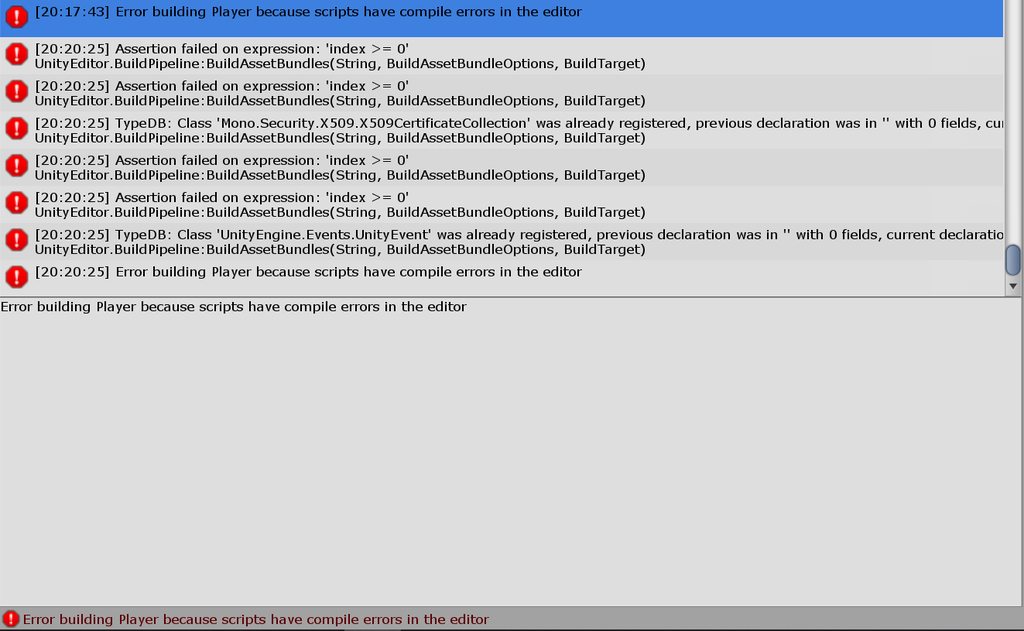 random owl
Is that all of them? Do any of them disappear if you press clear?
Usually you want to work them from top to down and that scroll ball seems quite large
random owl
Close out of Unity go to your project folder delete the Library folder in the root of it and reopen the project
Did you at any point open this project in newer unity versions than 2018?
errant pine
No
I had an issue with the sdk where the buttons weren't there. Reinstalled the sdk as per the documentation
random owl
Alright let me know if deleting the Library folder worked or not
errant pine
I will, this might take a while
random owl
Yeah it'll need to rebuild stuff
errant pine
My entire scene is gone and there is no more VRchat sdk control panel
random owl
Deleting the Library folder closes the scene you were in before
You need to open it again
Not having the sdk control panel just means there is still errors
errant pine
Ah good scene's back
Do you want me to clear then give paste the errors that are left?
random owl
Just the general screenshot is fine after pressing clear
errant pine
random owl
Could you show the full line from the bottom most one?
errant pine
random owl
This was and sdk2 project right?
errant pine
Yes sdk2
random owl
I might have to hop out really soon but let's see if I can quickly solve this
Go back to the Project folder and go into folder Packages and send me the manigest.json
errant pine
random owl
Ahh yeah I think I see the problem
Oh wait I might have sent the wrong one
No actually everything looks alright with what packages you have in the project 🤔
Show me the extra info from any of the higher up errors
random owl
That's a weird conflict 🤔
This might be far fetched but you don't have a random UnityEngine.dll in your assets?
Otherwise I gotta hop out
If you still need help with it later I can help more either in like 4 hours or tomorrow
errant pine
I do...
random owl
Well that would explain the errors then
errant pine
Its in a demo for an asset
random owl
Assets 😔
Yeah those assets are pesky that have their demos in the unitypackage
Guaranteed to break your stuff until removed
Just get rid of the whole demo folder
errant pine
All fixed, thank you very much
 bronze saddle
trying to figure out how to make a chair that shrinks a player when they sit. i know i've seen a couple avatars that have something like that. what do?
 fringe wren
For some reason in the world I am creating, ui sliders are taking input from my wasd keys. How do I fix this
rain shadow
@fringe wren On any UI components you have set navigation to none
fringe wren
Ohhhhhh ok tysm
 tidal marsh
Is there some kind of plugin or mod that can help with really bad tiling when using new terrain types? Like a smoothing button to "get rid of the creases" of the tiled terrain?
Using Unity 2018 and the latest version of SDK2.
 keen galleon
My test & build for sdk2 doesn't let me test my world it just redirect me to my vrchat hub
desert python
try build and pub
errant pine
tidal marsh
Is there some kind of plugin or mod that can help with really bad tiling when us...
In the terrain tools, there's a smooth brush
errant pine
keen galleon
My test & build for sdk2 doesn't let me test my world it just redirect me to my ...
Are there any errors in the console
fringe wren
Does anyone know any video players for sdk2 worlds?
I have been trying to find one but cant
desert python
@fringe wren you still need one?
fringe wren
yes please
tidal marsh
@errant pine I’m sorry, I meant to smooth terrain texture.
Most terrain texture is a square, which causes a “tiling” effect.
I tried to play with the tiling, but I can’t get rid of it unless I set the tiling to 0.
But by then the texture is featureless, just a solid ugly color. I don’t think the Smoothing tool will help with the texture.
I want to be able to “blend” the texture in or something, to get rid of the tiling effect to make it look more natural.
errant pine
You'd need a texture that blends well, which are you using?
tidal marsh
I dunno if I am or not.
But that’s what I’m asking about, to blend in the texture (to make it look natural).
Is there something that can do that?
 mental verge
Hey i was wondering if anyone know how the elevator world makes the floors it goes to? is it done with a camera texture? or is it something else
bold ibex
What can I do to remove the seam on my Skybox? I've tried other Wrap Modes but nothing is making any difference it se||a||ms
bold ibex
8k looks good
it appears to be the best tradeoff between quality and filesize
it's only 5.4mb with these settings
near escarp
8k is also terrible to decompress
There should be higher quality hemispherical skyboxes out there in 4K
bold ibex
i had a hell of time finding a skybox
anyway, there's no 'Wrap' option on the Wrap field
(and all of them give an identical result)
near escarp
texture type is set to default, i think it should be skybox ?
Unless you're using this texture onto a skybox mesh for some reason 
 slow orbit
bold ibex
What can I do to remove the seam on my Skybox? I've tried other Wrap Modes but n...
slow orbit
bold ibex
What can I do to remove the seam on my Skybox? I've tried other Wrap Modes but n...
Try turning off mipmaps
bold ibex
i'll try both, thanks
texture type 'skybox' also does not exist
nice, mipmaps solves the 'physical' seam
i still have a weird block but i'm guessing that's because the texture itself would need adjusting to align perfectly, somehow?
oh, that's only on my night sky edit - the original panorama doesn't have the block. So I should be able to remedy it 👍
mental verge
hey, im trying to use a reflection probe as a skybox, but it shows up super blurry, is there any fix?
like this
its baked at 1024x1024 btw
near escarp
i don't think i've seen this done before, what are you using it for ?
mental verge
just messing around with things mostly, thought itd be neat to try
near escarp
Try at highest res then
this looks about what i'd expect for 1024
hq skyboxes are sometimes 8k
 full citrus
near escarp
full citrus
near escarp
You really need to download Sharex @full citrus
random owl
Ctrl + Alt + Print Screen captures only the active monitor
full citrus
oh
full citrus
mental verge
does puppetmaster work in sdk2 worlds out of the box? ive had it for a lil while and only just found a world using it, i didnt know it was compatible with vrc
full citrus
errant pine
Can anyone recommend a good video player prefab?
fringe wren
How much trust do you need to make a world public?
full citrus
errant pine
fringe wren
How much trust do you need to make a world public?
User
fringe wren
Oh ok thx
 steel badger
I've got a mesh that I want to have a looping animation play on (to change its position), however it's animation just refuses to play on awake, any idea why and how to fix this? Also removing it from a rigged parent object and enabling root motion just makes it all through the ground and into the void.
 graceful eagle
I'm trying to make a lockable door that auto unlocks once the room has no players in it. but it keeps unlocking once one player leaves instead of when the room is empty. how do i make it so it only unlocks when the room is empty?
here's a screenshot of collider's vrc_trigger script I'm using to detect players
 bitter idol
Anyone know what this means and what to do
I get this message after pressing build and publish. Its a new world and has no ID on it I checked
random owl
Clear your console once try to build again and see what shows up when you try to build
bitter idol
Ok thanks
 near nova
if i make a world quest compatiable and upload only the quest version can PC people join aswell ????
random owl
If you only upload the quest version to a world id then only quest people will be able to join
Unity can't load assetbundles build for a different platform than the one you are on
 solid helm
@mental verge @near escarp Late but, if you're using a reflection probe as the skybox you'll need a shader that forces the highest mipmap level available to be used.
The reason for this is that when the texture is rendered at a lower size on screen, your GPU will automatically use the mipmapped version, because on normal textures the mipmaps are just pre-filtered scaled-down versions of textures. However, reflection probes use mipmaps as references for how rough reflections should look and as a result are extra blurry.
In this case, resolution won't matter because reflection probes always store 7 mipmaps from glossy to rough.
The simple way to work around this is to use a seperate texture.
mental verge
Gotcha, thanks for the info
 distant ivy
Hello everyone!
I haven't been here for a long time and I have a question. Is it possible to upload another mini-game made on Unity as a world for VRChat? 🤔
and if it possible, what are the restrictions there?
near escarp
Custom scripts are not usable
So i don't think your game would go very far
The whitelist can be found in our documentation
random owl
Best you can do is convert to udon sharp depending on the mini game
distant ivy

this minigame.. Well, I must to try
the character runs away from the death ray and jumps from planet to planet
that's all, I thought to implement it in the form of an arcade machine or something like that in VRChat
bold ibex
Anyone knows why that my world appears completely black when it looks fine in unity? I baked lights and it doesnt show in vrchat
This pic is unity
this is vrchat
bitter idol
anyone know what these errors are about and if it will stop my world from working (sending me home) in vrchat? this is in play mode btw and everytime i update my world it sends me home. i have no red errors and i made sure the VRCWorld and spawns are set up correctly, ive made worlds before. im so confused aaa
random owl
bitter idol
anyone know what these errors are about and if it will stop my world from workin...
Is it sending you home in build and test as well or only on the uploaded version?
random owl
How old is your sdk?
bitter idol
Not too old but not the newest one. Let me check
random owl
Import this and check VRWorld Toolkit > World Debugger
https://github.com/oneVR/VRWorldToolkit/releases
bitter idol
Yoooo
bitter idol
ill check that out later.
random owl
Well it will give you the answers faster than me playing 10 questions to narrow down the issue
bold ibex
for post processing does it have to be 2.3.0 or will 3.0.1 work?
random owl
VRChat uses 2.3.0 so that would be your safe bet but in reality in doesn't matter much
bold ibex
bet ty
 normal fossil
does anyone know how to use audio low pass filter in world, i already put it but it doesn't apply in game
its for muffled sound effect in dj world
desert python
@normal fossil did you add a listener?
normal fossil
yeah
desert python
where?
desert python
did you use another audio source to do the low pass filter or are you using the basic component?
desert python
yea, that doesnt work, and you might need something to tell it to play on awake if you dnt have any already
add a new game object, give it listener and the low pass filter
and untick "play on awake"
and see if work
normal fossil
aight i try
bitter idol
random owl
Well it will give you the answers faster than me playing 10 questions to narrow ...
ok so i updated to the newest SDK and downloaded that VRWorld toolkit and opened the world debugger, im not getting any red errors, just a yellow one about baked lights not being baked yet and how build and test wont launch on desktop even if i tell it too unless i set the path yadadada which isnt world related so.... : P
random owl
Can you give me the world id?
bitter idol
wait hold on, under build report its telling me something exceeds macimum size
normal fossil
@desert python it worked but it completely muffled the stream sound at all places, i just want to make it muffled sound at the entrance
snow pawn
o
desert python
shrink down the area effected
bitter idol
blacked out because the projects not revealed yet
by the way the fact its only 0.5 gb is amazing because it was like 4gb+ when i started. i made all the textures 1k instead of 4k
@random owl
random owl
Well that would sound like your scene has too much stuff still
bitter idol
yeah...
you think if i get it to 4 or less there itll work?
cuz it uploads and everything its only 0.5gb in vrchat but it just sends me home. i hate it
random owl
According to that message at least
random owl
@bitter idol is that also the latest build you tried when you look at the time?
bitter idol
today at 5:30am yeah why
random owl
Just making sure since there's always a possibility they could be silently failing
bitter idol
yeah no 5:30 sounds right
its not like it stopped working, it never worked lol
ok im removing a bunch of stuff, like almost half and seeing if it works. if it does, its because i have too much stuff. if it doesnt then its something else
random owl
Remember to also clear out the dynamic materials from your scene descriptor @bitter idol
bitter idol
forgive me but what is a dynamic material
random owl
Check the scene descriptor and expand the dynamic materials list
Simply put it's there for worlds swapping materials
errant pine
Hello, so I'm trying to get a Nice front wall of my structure but if I want a door I have to have 3 cubes to make a wall but I can't for the life of me get the textures to map up due to size differences. Anyone have any pointers? (I'm new to unity)
errant pine
Ok T_T
near escarp
Console errors
bitter idol
errant pine
Ok T_T
i mean you could try playing with the texture tiling on multiple materials but i doubt itll be perfect. your best option if you want it perfect is still making your own mesh and UV mapping it
errant pine
Check for a .unity or .exe
 final pine
hey anyone know why my ice is still reflecting my old skybox?. i cant see anything in the shader to do it and it does it with the standered shader
near escarp
Reflection probe ?
 raw yoke
anybody know why my mirrors are all black? have all layers showing to try and fix it but it still does it.
solid helm
Is your lighting baked?
raw yoke
it is, do mirrors need mixed/realtime?
raw yoke
i tried putting a realtime light behind it but no-dice
random owl
raw yoke
i tried putting a realtime light behind it but no-dice
Do you have a reference camera set up and if you do can you show the settings of it?
snow pawn
Hey is anybody available to help me out with qv pens?
I can't seem to get them to write anything at all
not sure how to make them work considering qv pens is in a different language
desert python
@snow pawn what sdk are they for and what sdk are you using?
if they dont match, then they wont work
raw yoke
@random owl
i have baked occlusion culling to help with some shader inconsistencies so I wonder if that could be it?
although when i toggle that it doesnt change the preview
or do you think disabling pixel lights on the mirror would help possibly?
snow pawn
desert python
<@!259910098023874561> what sdk are they for and what sdk are you using?
Sdk2
They are called QV pens
 north flare
Hey there! Just a quick question for the dev community. I was wondering if the Unity audio mixer is usable in SDK2. I've been trying to mix my sounds through the mixer, but it seems that the changes aren't being reflected when I build the VRC world. Is this expected behaviour?
desert python
@snow pawn try deleting and reimport them
 analog tangle
does anyone know how to have an audio source fade between 2D and 3D spatialized audio depending on player distance? I used to be able to set this using the audio source's graphic audio curves, but this no longer seems to function properly in vrchat. is there a way to get it to work?
for context, I am trying to add audio to an energy bridge in a vrchat world I'm working on. In the Unity editor, I have a functioning spatial curve which makes the bridge audio sound as if it's coming from the entire length of the bridge, then once off, it sounds spatialized. However, when loading into vrchat, the game ignores this curve entirely, and turns into a point audio source in the center of the bridge, which ruins the intended effect
lethal moss
the audio source could have 2 animations and transition between using a trigger collider encompassing the bridge. one anim has the audio in 2D the other has the audio in 3d and it switches between them using OnEnter/onExitTrigger
analog tangle
that might actually work
sucks that vrchat broke this feature, but your idea seems pretty sound, no pun intended
slow orbit
analog tangle
for context, I am trying to add audio to an energy bridge in a vrchat world I'm ...
What's the setup on the object with the audio components? If you want to use Unity's audio curves you need to add the VRC spatializer and then tell it to use Unity's instead.


 slow orbit
Ah, that's some bullshit then.
What you could do, is grab the player tracking prefab and find some way to have the audio source track the player and keep it locked within a planar region under the bridge.
desert python
define your definition of "spatial curve", there might actually be one, just not exactly what youre expecting
analog tangle
within a specified distance, the audio source will sound like it's coming from both ears, or everywhere. Outside of that distance or area, the audio source starts to sound like it's coming from a specific point/location
this works in unity, but doesn't when loaded into vrchat. I may have to do a weird workaround like Gallium and PopStep suggested
lethal moss
I honestly didnt realize one could change that green spatial curve in the graph thingy to achieve that effect. I'm suprised it doesnt work. 😅
 left hollow
So I got what I image in a simple question but for some reason I can't figure it out. What are the rigidbody/pickup settings to make a object bounce in game? I have messed around with a ping pong ball for about 30 minutes and can't find any settings to make it bounce. I'm using it for my own beer pong and no matter what I'm trying it just rolls on contact with the table or floor.
lethal moss
@left hollow you wanna create one of these: https://docs.unity3d.com/560/Documentation/Manual/class-PhysicMaterial.html
and apply it to your colliders
The Unity Manual helps you learn and use the Unity engine. With the Unity engine you can create 2D and 3D games, apps and experiences.
bitter idol
also @random owl thank you you fixed my world
random owl
No worries
left hollow
@lethal moss Thank you
 neat badger
I have a physics question as well. How do I make it so players can knock things over? I've added a lot of pickups to my world with rigidbodies and the default settings, but it doesn't seem like players can interact with these aside from picking them up and throwing them... usually. Sometimes a player will be able to knock something around somehow with their hands (perhaps they have colliders on them?) but running into the object with their body is like hitting a brick wall. Is the issue the mass? Is the player's default mass far less than the 1.0 that's assigned by default to objects? Or is there something else going on here? I want to be able to have the player knock over something and trigger a particle effect and sound effect with Udon when they either touch it, or if it just in general collides with something at a certain speed. I can probably figure out the Udon part, but first I need to get the physics working.
 supple drift
north flare
Hey there! Just a quick question for the dev community. I was wondering if the U...
supple drift
north flare
Hey there! Just a quick question for the dev community. I was wondering if the U...
The client uses the mixer to handle player volume controls afaik so we don't have access currently. You have to gain stage per source which isn't ideal, but it's a bit easier now if you download CyanEmu (pinned in this channel) because it'll use the spatializer that VRChat is using (Oculus') to let you test your spatialization in the editor.
snow pawn
desert python
<@!259910098023874561> try deleting and reimport them
still having the issue where none of the pens are drawing or any of that
do you have any pen recomendations other then QV Pens?
for some reason the pen just isn't writing at all
 desert python
select them in the hiearchy and see if a compile message appears, if not. the only other pens i can suggest are udon or u# only
snow pawn
desert python
select them in the hiearchy and see if a compile message appears, if not. the on...
Compile message? where would I find that?
desert python
like the "hold on..." message will pop up
snow pawn
random owl
Did you import standard assets like those pens need?
snow pawn
Probably not. All I did was import the QV Pen Unity Package and the Materials for quest and plopped the QV PenSet prefab right into the world
Not sure if thats all I had to do because QV Is written in japenese
random owl
Yeah then it wouldn't work
The description on booth should have the link for standard assets
snow pawn
Heres the site

VRChatのワールド用のペンセットです。 消しゴム機能も付いています。 Quest向けマテリアルに差し替えた場合はTrailRendererのWidthの値を0より大きい値にしてください(0.005など) 完璧に同期が取れるというわけではなく、速めにペンを運ぶと同期が取れにくくなります。その場合はゆっくり書くなどしてください。 Presentation RoomなどのようなLate Joinerへの同期は取れません。 デスクトップモードの人が書いた文字はVRモードに比べるとあまり同期しません。 ※ExMenu用最小限アセット ExMenu(拡張メニュー) (
random owl
Yes and now check the description for the link to standard assets
snow pawn
Found the standard assets I download and just import em right?
random owl
Yeah
snow pawn
Im so retarded 😅 I didn't even see that lol
I just download them & I should be good to go right?
bold ibex
trying to build and test or publish a world and i keep getting the same error where it flashes to the loading screen then sends me home instead
snow pawn
Oof I had that issue before
bold ibex
it's a real killer since almost everything is done
snow pawn
Are you trying to make it a quest compatible world?
random owl
Do you have a spawn point set in your scene descriptor properly?
snow pawn
did you already publish the world? or is it just testing the world in unity?
snow pawn
are you trying to test the world via the VRCHAt SDK?
bold ibex
yeah
random owl
https://github.com/oneVR/VRWorldToolkit/releases
Import this and check VRWorld Toolkit > World Debugger
snow pawn
Have you tried uploading your world to vrchat ---> going into vrchat ----> and testing it from their?
I have the same issue where I can't even test any of my worlds in unity
bold ibex
they're trying to tell me that there isn't anything below my spawn
random owl
Does the thing under your spawn point actually have a collider?
bold ibex
i think that's the issue
random owl
It would cause you to get thrown out of the world at least
bold ibex
im gonna try to add in one or two sphere colliders under the spawn to see if that fixes it
random owl
If my world tools told you there was no colliders under the spawn I trust myself 😄
Except if I'm wrong 👀
bold ibex
it kicked me straight out again
random owl
Can you show some pictures?
random owl
Oh if you look at the top of my world debugger that would be the reason
Build result: Failed
bold ibex
i don't understand though
random owl
Might wanna check your console
bold ibex
random owl
Usually after trying a build unity will put in couple errors for what caused said build to fail
Those are all fine
Anything else?
It helps if you clear it once then try to build and check afterwards then you should have less stuff confusing you there
bold ibex
it was the skybox package from the asset store that was screwing it all up
now i have to fix my spawn again 😂
random owl
Ahh that classic skybox script that is literally just a hyperlink to their website
snow pawn
random owl
If not might need to reimport the pens
heyo I decided it Aint worth it using qv pens. its too complicated n shit and wasn't working
now im using noenoes pen
but im having a issue
bold ibex
Anyone know how to make it so other players despawn if they're in a separate area?
@snow pawn clear your console and send a Screenshot of the errors
random owl
Did you delete the standard assets but leave some scripts that depend on them?
snow pawn
I had no scripts that depended on the standard assets. I only downloaded standard assets to use qv pen but I changed my mind due to implications with the unity package
random owl
Well I would just delete that script if it's not something you need
snow pawn
noobie question but how would I do that lol
bold ibex
It tells you where its located in that error message 😊
random owl
You read the error message you posted above and use it to either search for the script name or navigate your folders to find it and delete it
snow pawn
ok lol
bold ibex
@random owl any help w my occlusion question?
random owl
Occlusion question?
bold ibex
"Anyone know how to make it so other players despawn if they're in a separate area?"
I have occlusion all set up but I've seen worlds where after you move past a certain area it despawns or hides other players?
random owl
I mean usually that would be occlusion culling yeah
bold ibex
Hmm, I've seen people set it up to do it in "chunks" so even if I'm looking right at them if I move out of that zone they despawn
random owl
Well you could bake those chunks into your occlusion culling and have the "chunk" objects set to be editor only so they don't get uploaded
bold ibex
So if I set them to editor if I go inside of that area people would spawn in?
Sorry, occlusion is still def one thing I'm shotty at
"Zombie doll lounge" is a good example of what I'm talking about if you've been there
random owl
Well basically the objects you bake into the occlusion don't need to be in the same position or at all there when you upload it if you already baked it
There's also occlusion portals
Which as far as I remember you can control from animations with sdk2
 bold ibex
Oof okay, I'm gonna have to play around with that one haha
I wish there was just a box that I could place with on enter/exit triggers that culled out players 😪
random owl
Well you could do that with occlusion portals
golden storm
I have a world built for Android, and it works fine in game for Quest. When I change my build settings to PC, it will not allow me to upload to VR Chat. I use Unity on a Mac — is this why?
rain shadow
@golden storm I would imagine you would need to go to your unity install on the unity hub and select the add modules option and add windows
 dusk sapphire
2020.12.04 13:27:26 Warning - Internal: JobTempAlloc has allocations that are more than 4 frames old - this is not allowed and likely a leak
2020.12.04 13:27:26 Warning - To Debug, enable the define: TLA_DEBUG_STACK_LEAK in ThreadsafeLinearAllocator.cpp. This will output the callstacks of the leaked allocations
does anyone know what might cause a map to spam this warning constantly? started work on a fairly basic map, only a few simple triggers.
random owl
Do you have some assets using jobs system? 🤔
dusk sapphire
i dont even have any standard assets or anything lol, just started work on this map yesterday
just terrain and some buildings
havent optimized or baked lights or anything, test scene has no realtime lights
random owl
Any rogue packages?
dusk sapphire
nothing i could think of, even then all scripts are removed on upload
random owl
Oh those are inside vrchat?
dusk sapphire
yea
random owl
My head assumed unity editor console my bad
Don't have any straight answers for that though if it's ingame
dusk sapphire
annoying thing with this warning is that it persists indefinitely once it starts
random owl
I wonder if those would start getting thrown in other worlds as well?
This could be something canny worthy
dusk sapphire
eh, its more likely i have something wrong on my end
i've seen these pop up occasionally while world hopping
though they really should add something to rate limit repeated warnings/errors
random owl
Still if a user error can cause an error like that they should do something to warn/stop it
dusk sapphire
last vket was fun, had log files in excess of 1-2 gb
dusk sapphire
the error persists in unity editor until restart too 
it was happening in an empty scene i just created until i restart the editor
random owl
Anything special to start it happening?
Can you repro when opening the project into the empty scene without anything else?
random owl
Oh?
dusk sapphire
at least, i think so, will try reproducing
random owl
Can you give me details on the particle system?
https://github.com/oneVR/VRWorldToolkit
I would like to add detection for it in my world tools if it was the culprit
dusk sapphire

3Dエフェクト「金木犀の飾り」 制作:藍夜野雑貨 【概要】 Unity2018に対応した3Dエフェクトです。 Unityのパーティクル機能で、金木犀の花のモデルがひらひらと舞います。 後述の利用規約を確認の上ご使用をお願いいたします。 なお、本モデルをダウンロードした時点で後述の利用規約に同意したものとします。 【使い方】 Effect_kinmokusei.unitypackageを開きUnityへインポートしてください。 Aiyonozakka/Effect_kinmokusei/Scenesフォルダ内にあるEffect_kinmokusei.unityを開くと
random owl
Thank you I'll investigate at some point when I have time if that indeed was it
dusk sapphire
or maybe not, its not happening on a new scene
random owl
Rip
dusk sapphire
ok it happens in the new scene when i copy over the one i have from the other scene
all i did was have 4 copies of the particle system in different places of the map hmm
it happens when i have more than 1 copy of this particle system at the same time 😅
random owl
That's starting to sound like a unity bug
dusk sapphire
i dont think i've seen this happen with any other particle system
if i had to guess its because the prefab in question requires custom vertex streams from the particle system, and doesnt like it when unity tries to gpu instance the same material across 2 different particle systems? though i'm mostly clueless to shaders and just a wild guess
random owl
Don't worry I'm clueless when it comes down to shaders as well
dusk sapphire
no wait its just a standard unity particle shader
and using a seperate material for the 2nd system still causes the error
dusk sapphire
ok, its Particles/Standard Unlit that's causing the issue
I'm guessing its related to the required vertex streams, and having more than one particle system with different instances of those streams
I probably would have ended up with just 1 particle system with a custom mesh for its emission shape, but still good to know
random owl
That is definitely good to know
 proven cliff
so i went to upload my world and when i clicked on the sdk drop down menu there weren't any options. im on the correct version of unity and ive even tried installing a fresh version of the sdk, but when i did that the new sdk download wouldnt even give me a drop down menu. what am i doing wrong?
 left thistle
is there an asset online or a easy way to make the "rain on window" effect?
 short forum
@proven cliff this is because you have build errors preventing the sdk from working
bold ibex
anyone knows how to make it so when i walk out of the room, the bass of the music increases? like a club?
random owl
proven cliff
so i went to upload my world and when i clicked on the sdk drop down menu there ...
 spark bolt
Heeey I've got this weird issue with this guitar's UV texture map being all messed up. It looks as though the import setting aren't matching up or something. Anyone had an issue like this before?
https://media.discordapp.net/attachments/779475822305345577/784167132635856964/unknown.png?width=1202&height=296

 near escarp
@spark bolt Your UVs have an offset ?
spark bolt
near escarp
<@!167413498828029952> Your UVs have an offset ?
Yeah there's an offset option for this UV. I've tried changing it around but it just doesn't wanna match up. It's almost as if the texture mirroring isn't enabled or something.
near escarp
i'd suggest checking the UVs in blender
spark bolt
near escarp
i'd suggest checking the UVs in blender
agh jeeze blender's so finnicky and with it's dodgey ass UI and otherwordly controls
near escarp
Are you using 2.8 ?
spark bolt
near escarp
Are you using 2.8 ?
i ain't got blender installed right now, had it last year but lost it when i re-installed windows
near escarp
it changed quite a bit
spark bolt
it's UI is absolutely crazy, i'm real used to 3DS Max and the method of smacking a texture on an object in blender is so crazy i still don't fully understand it
random owl
You have your textures import settings right?
A certain big company which I'm not allowed to say in this context sets up their uv's creatively that need correct settings for things to display correctly
 foggy frost
out of nowhere my video players giving offf a rate limit error, worked yesterday, broke today. only using 1 video player
random owl
What's the exact error?
foggy frost
Rate Limited please try again in a few seconds and then it just says video player error
only thing i did was upload a test build for a new world within the last hour and when i went i made two instances of my home world due to a disconnect
random owl
Did you try a non youtube video?
foggy frost
yeah its an automatic playlist player, has 4 playlists on it but it wrked for like 3 hours yesterday
i didnt input any links
random owl
You can also check if they are broken in other worlds
desert python
also, ive only found a fix for it for udon vp. vrchat messed with their servers a bit yesterday and theres been a few problems occuring now, but if its not a youtube vid then i cant help
foggy frost
i mean what exactly is rate limited
is it my account being rate limited?
or is it the world
desert python
it is when the bit rate needs to be limited...
random owl
https://github.com/ytdl-org/youtube-dl/issues/23638
Well this is the first thing that comes to mind

GitHub
Solution: carefully read THIS. Further reporting Any attempt to open Youtube 429 issue ignoring instructions above will be considered spam with corresponding consequences. Any issue regarding Youtu...
desert python
wdym your account?
foggy frost
wouldnt that error of occurred the multiple times i visited my world yesterday if it was a fault of my own when making the world
random owl
Youtube-dl doesn't run trough vrchats server no servers have been changed
desert python
the rendering protocal from what ive seen and fixed is from the server forcing it to infinately expanding the cache flow. which may also cause the rate limited glitch because it is. well "infinate"