#world-development
39 messages · Page 24 of 1
 crystal badge
simply the basics, I've watched a good chunk of tutorials in the past and im not helpless. I just kind of seek the person to person dynamic
 hexed yacht
...
ok first what types of worlds are oyu two making
and what goals do u plan to achieve
crystal badge
I ultimately seek to make hangouts, nothing extreme but a cozy apartment for example
hexed yacht
then focus on map design not just appeal and art of spacing, intractability and theme
 solid quiver
i mainly want to make "game" world
hexed yacht
also good thing about hangout worlds is that you can do one thing at a time and add as you please
solid quiver
but that was like several years ago
solid quiver
no, for my hobby project
hexed yacht
ok?
solid quiver
i think for vrchat the sdk gonna handle the network for me, so im not too worry about that
solid quiver
but that also means there will be restrictions
like i cant just write my own script
solid quiver
i know udon is coming but apparently it's not ready yet
solid quiver
yea i was hanging around in udon channel and a lot people were saying this dont work yet, that dont work yet
so...
hexed yacht
best stay away for noe
solid quiver
and standalone quest wont be able to play the beta version
hexed yacht
... depend on what part oyu look at
solid quiver
i've played some games in it, and i think the sync is not bad?
solid quiver
like, is vrchat robust enough to support shooter games?
hexed yacht
..
yes and no
defualt hit boxes are calculated locally
meaning you have to hit them on "their' screen
and account for lag as the shooter
but there are work arounds
solid quiver
so i guess what i want is to only send the info about when and where the bullet is shooting at which direction and then just create bullet on local client and calc the collision locally?
solid quiver
yea... that's the difficult part right?
hexed yacht
get familuar with the triggers and stuff like on enter collider or on partical hit
dependign o nthe gun type
solid quiver
yea but those work on local only right?
solid quiver
but i still have to create the bullet on every player's instance
hexed yacht
that is easy
solid quiver
and make sure it's accurate
hexed yacht
jsut have what ever spawns the bullet be an alwasy unbufffered trigger
aka every sees the spawn ecept those who join later
solid quiver
so the spawn is a network event that create a local spawn object on every instance
solid quiver
o...k
hexed yacht
and using particals or colliders instead
solid quiver
i dont understand man, why do i need a trigger to spawn stuff? or u saying use the trigger to detect a local spawn and broadcast to everyone else?
hexed yacht
but it breaks down to teh cause in a casue and effect relation ship
solid quiver
see that's the kind of "general knowledge" im expecting, terminologies and stuff
hexed yacht
might be best if i walk you though a theory set up
so a gun object
with on interact trigger set to local equips the gun
solid quiver
ok
hexed yacht
then when they click it activates a on use trigger set to always unbuffed that activates your bullet
solid quiver
basically put this on the gun so player can pick it up
hexed yacht
yep
solid quiver
ok wut "unbuffed" means
hexed yacht
meaning not queued to be called when someone joins
solid quiver
ohhhhhhhh
solid quiver
@hexed yacht ty so much for the intro class!
hexed yacht
np
 stray sand
@solid quiver a quick version of whats allowed. Most unity components, vrchat sdk, standard assets, final ik. Main thing that is not allowed is custom scripting. So if it can run without any custom scripting it should work in vrc. For more complicated things in vrc they use animators and ui buttons.
Most knowledge is passed by word of mouth. So time to start mingling with other world creators.
solid quiver
ty!
 bold ibex
 balmy gate
That looks really nice!
The DoF looks really good in that photo/ One thing to be aware of for VR is some post processing effects like Depth of Field and screenspace AO are uncomfortable and extremely uncomfortable in VR respectively
 reef sparrow
@vapid badge If you set the cubemap reflection to box projection and align the bounds to the walls and floor of a rectangular room, the reflection will better track with perspective. Currently, you have box projection turned off, so the reflection doesn't change perspective when you move around.
 open thicket
is it possible to use mesh baker and get proper mesh colliders on the combined mesh?
solid quiver
i dont think mesh baker is used to get mesh collider
and u wanna avoid using mesh collider in general
try to just use some box collider to get the rough shape and that should be good enough
balmy gate
How many meshes? I'm not convinced its always worth combining things if there are few
But really you can do a better job in blender anyway.
solid quiver
idk, just joined the discussion... and i dont know any blender at all
im a shameless asset user
balmy gate
mesh colliders can work for static flat geometry like a ground surface
solid quiver
yea static is not too bad
open thicket
i'm aware of use of mesh colliders
and im for primitive colliders as well but these are low poly assets
but I want to segment different rocks together and then use mesh baker to get a fast result
but I don't know if combining those meshes will allow me to generate mesh colliders within unity
while also preserving occlusion
bold ibex
does anyone here know how to add modles in worlds
 cyan pike
anyone know any good water shaders? want to replace the wacowater4 shader i got
bold ibex
this one is really nice https://gitlab.com/s-ilent/clear-water

GitLab
Simple water shader for Unity/VRchat that (ab)uses some Unity features to get a pretty water surface.
 balmy pagoda
Im trying to optimize my mirror, but im missing half the reflect layers. Anyone knows a fix?
 mild spade
@balmy pagoda Are you saying that you dont see the "MirrorReflection" and/or "player" layer?
 random owl
If it's a new project you might have not setup the layers yet from the content builder
balmy pagoda
Yeah new project, ty
bold ibex
  at VRC.AssetExporter.ExportCurrentSceneResource () [0x00000] in <filename unknown>:0
UnityEngine.Debug:LogError(Object)
VRC.AssetExporter:ExportCurrentSceneResource()
VRC_SdkBuilder:ExportSceneResource(String)
VRC_SdkBuilder:ExportSceneResourceAndRun(String)
VRCSdkControlPanel:OnGUIScene(VRC_SceneDescriptor) (at Assets/VRCSDK/Dependencies/VRChat/Editor/ControlPanel/VRCSdkControlPanelBuilder.cs:977)
VRCSdkControlPanel:ShowBuilder() (at Assets/VRCSDK/Dependencies/VRChat/Editor/ControlPanel/VRCSdkControlPanelBuilder.cs:249)
VRCSdkControlPanel:OnGUI() (at Assets/VRCSDK/Dependencies/VRChat/Editor/ControlPanel/VRCSdkControlPanel.cs:169)
UnityEngine.GUIUtility:ProcessEvent(Int32, IntPtr)```
Any chance that anyone has the vaguest idea of what this meansI might try to reinstall the sdk in that situation if you haven't tried it yet
Extra effective if you follow these instructions completely
bold ibex
I literally just did that qwq
Also does "Find your Project folder with Windows Explorer" mean the File Explorer?
random owl
How did you delete it the first time?
random owl
@bold ibex there should be a VRCSDK folder in the assets folder and also a VRCSDK.meta file
bold ibex
So... Would I find the meta file in the VRCSDK folder, or just in the assets, or...?
random owl
In the assets folder
The meta files get generated by unity in the same folder as the folder/file itself
If you don't remove it unity is gonna generate the files back
balmy pagoda
Anyone knows the reason for this error message
bold ibex
A little confused still, sorry... So, ProjectName > Assets and then there's supposed to be a meta file...?
random owl
@balmy pagoda could try to detach the blueprint from your vrcworld and try again
bold ibex
VRCWorld > Pipeline Manager (Script) > Detatch
random owl
Yep inside there
Do close your unity project also while doing it
VRCSDK.meta and the folder VRCSDK and then inside the Plugins folder inside the assets folder and from the the same folder and file name
random owl
The folder itself that's inside the Plugins folder and also the meta file with the same name
bold ibex
Sorry I'm just very confused... So, "The folder itself" meaning VRCSDK, the project name, or what...
bold ibex
2017.4.28f1
random owl
You might need to enable hidden files to be shown
If you are on windows 10 it should be found under the View tab as a checkbox on the right
bold ibex
The vrcsdk?
random owl
Yes the folder named VRCSDK and also VRCSDK.meta
Whups
Didn't mean to include the photo nevermind it
random owl
Yes now download the latest sdk and reimport it
bold ibex
Oki
bold ibex
Same error message when I try to test the world ~.~
I'm not exactly a pro at unity so I have no idea how many things I'm doing wrong
But according to the red errors I have on the console, it's somewhere around... 142
random owl
You could have something else wrong in the project
bold ibex
~^~
random owl
Press clear on the console and post a picture here on what remains
random owl
Do you have pause on error enabled in the console?
bold ibex
And then Export Exception - System.NullReferenceException: Object reference not set to an instance of an object at VRC.AssetExporter.ExportCurrentSceneResource () [0x00000] in <filename unknown>:0 UnityEngine.Debug:LogError(Object) VRC.AssetExporter:ExportCurrentSceneResource() VRC_SdkBuilder:ExportSceneResource(String) VRC_SdkBuilder:ExportSceneResourceAndRun(String) VRCSdkControlPanel:OnGUIScene(VRC_SceneDescriptor) (at Assets/VRCSDK/Dependencies/VRChat/Editor/ControlPanel/VRCSdkControlPanelBuilder.cs:977) VRCSdkControlPanel:ShowBuilder() (at Assets/VRCSDK/Dependencies/VRChat/Editor/ControlPanel/VRCSdkControlPanelBuilder.cs:249) VRCSdkControlPanel:OnGUI() (at Assets/VRCSDK/Dependencies/VRChat/Editor/ControlPanel/VRCSdkControlPanel.cs:169) UnityEngine.GUIUtility:ProcessEvent(Int32, IntPtr)
Error pause you mean?
random owl
Yes
random owl
Should look like this if it's off
random owl
Hmm
bold ibex
From the error message, I would assume it's something with an object
But there are... Quite a few of those
random owl
What version of sdk are you on?
Should be found on the settings tab inside the control panel
Though it's getting a bit late for me and I'm running out of ideas right now so you might have to find someone else to help you
random owl
Yeah that should be alright as well then
bold ibex
Yeah I've been trying to fix problems for a while and I seem to just be creating other problems because of it
random owl
If you feel like you are upto it you can try making a new project but that really depends on how much work you have done
But that's usually a surefire way to fix it
bold ibex
Well I've done enough work to not want to redo all of it
The problem I was having before was not being able to test or go into my world without it sending me back to my home world
So if you know how to fix that, that would be a good help
 kindred thicket
I have the same problem when I try to test my worlds. The way around it (for me) is to upload it and make it my home world.
bold ibex
Hmm... I'll try, thank you
 opaque patrol
Whenever I try and publish my world it wont load at all. Does anyone know how to fix it?
I figured out that is coming from extra scripts.
 keen bane
So, how do I add a dimmer to my world?
 civic cipher
Hey guys... Anyone know of documentation/tutorials for advanced features of VRChat worldbuilding? I keep finding things in other people's worlds that I'd like to replicate myself but I don't understand how some of them are possible without scripting support. I can't find anything on Google.
 modern kayak
Vrchat.wikia.com has a good amount of documentation and tutorials, vrcprefabs.com/browse has a ton of prefabs to drag and drop or learn from, but really the best help you'll get is directly asking questions right here
On the wikia? Like what?
 deep knoll
ah sorry wrong chat 🤐
modern kayak
Oh you are right actually, because I linked the wrong wiki haha
http://vrchat.wikidot.com is the unofficial one that I meant
It has way more
deep knoll
was that previous link the one where it talks about using legacy animations?
modern kayak
Idk, it's a bunch of outdated stuff. It even mentions vrc_eventhandler
 long halo
what's the recommended amount of polygons for a world?
modern kayak
polygons aren't the limiting factor in worlds. What matters more is that you take advantage of the tools that unity provides to improve performance, like light baking, occlusion culling, and static batching/instancing
 opaque scaffold
I made my video player super big but why after clicking the "video" button the video player turns small and drops down underground?
civic cipher
@modern kayak Oh cool, thanks. I'll check those out.
 bronze smelt
That specific video player prefab spawns a new one every time you insert a link @opaque scaffold
You got to apply the changes to the prefab for it
opaque scaffold
I checked the setup in unity but the canvas for the spawnvideo is like the same\
I don't know what went wrong
How can I make sure that everytime a new one spawns the size is the same
modern kayak
if you set a collider to the mirrorreflection layer it won't block vrchat raycasts
also you want onexittrigger, not onentercollider
the reason is because you have set it to convex, which in a roundabout way is the correct way to do this. You don't want thin walls, that's very likely to not catch every situation. It also doesn't tell you if someone is entering the region or leaving the region. By setting it to convex, it is throwing away any detail in the inside, like the big bowl you have. Instead that makes it just a big cylinder. Thus when they leave that cylinder you want to trigger onexit
as for using onexittrigger instead of onexitcollider, that's because you don't want this to be a normal collider. You should also set it to be istrigger. A collider behaves like a physical object, while a trigger behaves like a region where you can detect things.
 sterile violet
Hi, I have a questing (This might be a normal unity thing.) But how do I put particle effects on particle effects. Like once the first particle effect collides with something it enable a particle effect at that spot. Thank you in advanced
 sterile violet
Thank you.
civic cipher
Hey, does anyone know how to set up collision layers so that chess pieces, for example, won't collide with each other or with players or with any other pickups but they will collide with the static environment?
 waxen bronze
I've noticed in some worlds parts of your model vanish at close range to yourself (Hands and such) and chunks of other players will at close range. It's not personal space either. Was curious what settings this is in world creation if anyone knows.
civic cipher
hmm
stray sand
@waxen bronze im assuming you are a smaller avatar. its the camera clipping plane.
the near clipping plane to be more specific.
waxen bronze
Typically yes, it would be smaller avatars, but I have noticed it on larger at a close range.
Hrm..
stray sand
world creators can make it smaller then the default but it will only go down to .01
.3 i believe is the default.
waxen bronze
I notice it mostly in places like the Black Cat and the Pug, IIRC.
But this is info I can work with, thank you very much.
stray sand
👍
 river frost
Hello guys its me again :) Does anybody know which version of post processing should I get now? is there a version that works for Unity 2018 update too?
 near escarp
I think you can get it through the package manager
 neat badger
I'm working on my first world and after reading Silent's tutorial and installing the post processing stack I've got a question...
The tutorial says to set the post processing layer to "water". This seems like an odd choice to me. The tutorial says it will improve performance because the post processing won't have to scan all objects. But it doesn't explain what that means. What's being scanned, and why? And why set the layer to "water" rather than creating a new layer specifically for post processing? What if I want to use different post processing in actual volumes of water? And I've read the mirrors use the "water" layer as well... But wouldn't that mean anything reflected in a mirror might get "scanned" by the post processing as well? I don't know what "scanning" means or what it means for a mirror to be on that layer so I don't know if this is something to be concerned about. I plan to have water in my worlds, so I would rather set things up correctly to allow for both above and below water than just using what seems to be a quick easy method to get started trying post processing.
river frost
Ahh thank you I ll go check it!
kindred thicket
If you change a component when the GameObject is not enabled, will the change happen?
Example. A cube is not enabled and I turn the box collider off. Will it turn off or do I have to turn the object on before I change the component?
near escarp
doesn't matter if it's not enabled ?
kindred thicket
It affects the state that the object is in when it's turned on. So instead of turning the object on and then setting the component I would rather set the component early and only have to turn the game object on.
I'm also looking at it for animations, like resetting objects in a default position. Do I have to turn them on before I run the animation or can I run the animation with it off and it will reset the object?
mild spade
With Ui buttons you can turn on/off components even if the object is not active. Not sure about VRC Triggers(set component active) The problem with resetting an object to other location is the sync property. The gameobject with the Object Sync component must be active while changing location for others to be synced. Turn on the object, move the object, turn off object.
kindred thicket
ok, Thanks.
 vapid badge
what would be the best way to, in a world with only a single directional light, make a specific area ignore it?
 hazy hare
anybody know how I can destroy all my spawned objects or a list of spawned objects with a button?
mild spade
The spawned object must call the RPC "ReapObject" on itself. Usually this can be done by "OnEnterTrigger" -- reap Object--- itself. And just have a collider that touches that spawned object. The call to reap the object must be inside the Spawned object itself for this to work. @hazy hare
hazy hare
thank you very much worked like a charm
reef sparrow
@mild spade What's the difference between destroy and reap?
mild spade
Destroy is for objects that already exist in the world, Reap is for objects that were spawned with a button. (Spawn object) While also removing their buffer.
reef sparrow
What if the object spawned by itself when the map loads?
stray sand
How is it being spawned?
If its spawned using a vrc trigger action “spawnobject” then you would use reap.
opaque scaffold
Does anyone get their video player not working? I cannot play youtube videos now.
I am using iwa synvideo
stray sand
Youtube had a update. Vrc will need to update youtubedl for video players to work.
opaque scaffold
oh
So no one can play videos now?
And I don't know why whenever I press the video button the another video screen spawned would be much smaller, even though the size looks like the same in unity
stray sand
Some videos still work. Ive not used iwa synvideo so im not sure.
If its spawned you would need to change the size of the spawning prefab.
opaque scaffold
What video player do you use
stray sand
I made my own. https://github.com/jetdog8808/JetDogs-Prefabs

GitHub
Prefabs for vrchat to help creators ranging from beginners to more experienced users. - jetdog8808/JetDogs-Prefabs
I usually edit it to fit the map/ world.
opaque scaffold
So I think the theatre folder is for the video player?
kindred thicket
Is there a way to have the world entry point different than the respawn point?
 rain shadow
@kindred thicket You can animate or use a SceneResetPosition component on the spawnpoint object to move it after someone loads into the world
kindred thicket
Thanks!
stray sand
@opaque scaffold i have a couple of video players in there. The theater was more to show how realtime global illumination worked. If you want just a standalone video player to drag and drop it would be in the jetdog prefabs.
On my phone at the moment. Would be located here.
opaque scaffold
thanks a lot!
opaque scaffold
is there a function to clear the list of loaded videos?
stray sand
@opaque scaffold if you are using the custom url prefab it gets cleared when you enter a new video. But if the next video doesn’t load it wont unload the previous video.
The clear method only clears the video playlist not the current loaded video.
I got to head off to sleep but if you have any more messages for me you can @ me and i can see them in the morning.
kindred thicket
Will it take very long for VRChat to update the YouTube dll? My world is kind of dependent on it working.
near escarp
We'll most likely push a patch early next week
kindred thicket
Thank you sooo much.
reef sparrow
@stray sand What if a spawned object falls below the respawn height and gets destroyed?
 river plank
Do I have to have a fresh project every time i want to update a world?
and on the same note, can I not have multiple world/scenes in the same unity project?
Is there a way to force the VRC SDK to "Set up layers" again so that I dont have to have millions of projects with tons of wasted space on my computer?
near escarp
No and yes
river plank
The issue im running into more specifically is i have a small test world uploaded. make a new scene with different assets. add a VRCworld and build and test. It continues to load the 1st uploaded world. and even when I change that world it will continue to just be the same world as it was the 1st time i uploaded it
near escarp
And not sure what you mean by tons of wasted space because of layers
Sounds like you have console errors
And it's not uploading correctly
Or you're uploading on a world ID that isn't valid
near escarp
Yep, that sounds like the culprit
river plank
how do I feex
near escarp
You should check the info in #vrchat-support
river plank
ok thnx
near escarp
I've never seen this one before, so I can't help, but do ping me here if the support team gives you a solution
You might also want to Google it
It never hurts
 vocal shard
is there a problem with world uploads right now?
bold ibex
I know it's been a while since I received the advice, but setting the world as my home world did not fix the problem of not being able to enter the world.
keen bane
I can't load into my own world for some reason..
vocal shard
I guess theres no fix to this is there?
rain shadow
That error is normal and you will see it if you run a test build and don't have a world uploaded to that ID, could also be an issue with the api if theres any server issues
 unkempt musk
Hi guys, is anyone aware of a good snow shader? I really want snowy trees and I've bought several assets from the unity store - however the shaders that come with these run off of scripts which obviously don't work in VRchat... This is the one I just got https://assetstore.unity.com/packages/3d/environments/winter-environment-nature-pack-142750 uploading to vrchat deletes all the snow on the trees.
I have amplify shader editor too (bf bought it with intention to learn it but hasn't had time)
Anyone have advice? Or a link to a good shader?
I'm not looking for snow collision or anything - just a shader to drop snow on trees leaves
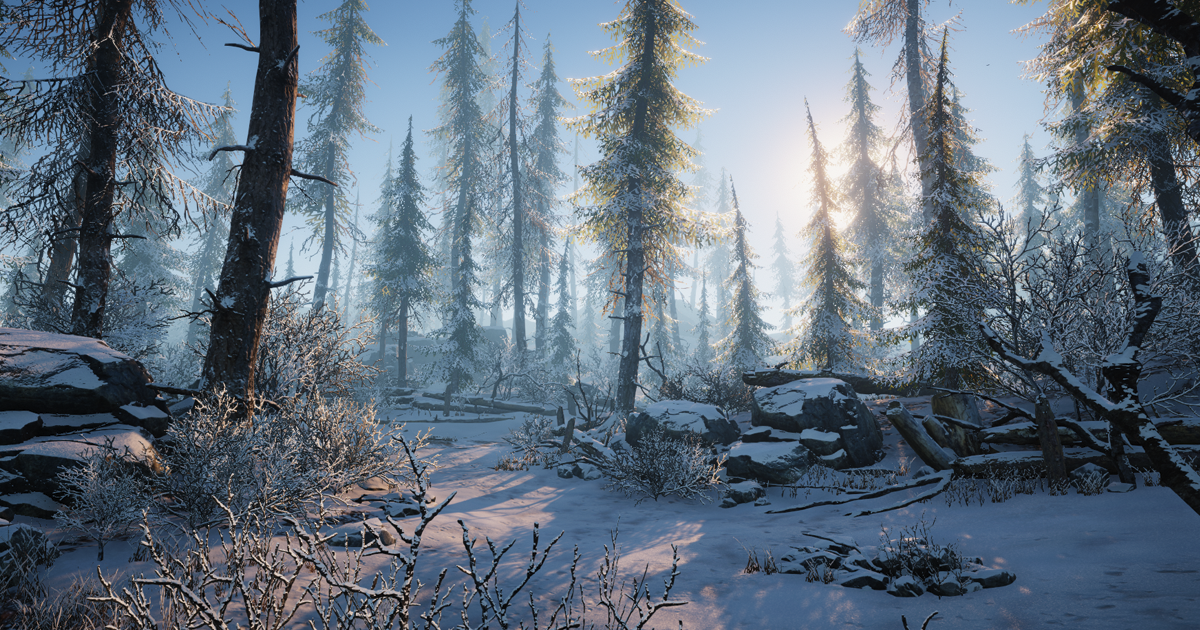
SUPPORT | DOCUMENTATION | FACEBOOK | TWITTER
Description:
Winter Environment asset created for quick and quality development of winter nature scenes. Contains additional shaders with which you can adjust the snow amount on trees, grass and props. All trees work...
 sacred warren
"Support Unity versions 2017.4.35 or higher" - Not sure what changed between 28f1 and 35, but VRC uses 2017.4.28f1.
bold ibex
can anyone here fix my laptop settings
unkempt musk
@sacred warren I'm using this in the Beta - so in Unity 2018.4.14
I've been able to replicate the snow disappearing in Unity too - its definitely script based. So I just need a good snow shader that isn't running off scripts :/
sacred warren
Ah ok.
 short gulch
Might not be the best place to ask but I was wondering if I could get some feedback on vehicle handling in my world so far? Here's the world, https://vrchat.com/i/personpetti-9de And here's a m,ap of the vehicle locations

VERY WIP Waterfront district from All Points Bulletin․
Finally getting back to working on this map, might actually finish it this time around
Buildings are still missing doors windows and shopfronts, but it at least has a playable framerate now so I'm not worried about people getting sick from driving.
 graceful bough
How do I get default music playing in a world?
That I can like, toggle on and off
short gulch
Is it just one song that loops?
sacred warren
Did you import it from APB, or manually recreate it all by hand?
short gulch
The vehicles or the map?
The map was all imported from the old 2009 0.6 beta of the original version of apb (the one that went bankrupt and took the company that made it down with it) but it took rougly a year to piece it all together and make all the materials. The thing is like a puzzle from hell. @sacred warren
I did all the vehicle stats myself, but I might be redoing them again soon because a friend of mine gave me a spreadsheet with all the vehicle's real stats from the game.
sacred warren
The map. I was curious because it looks like it would take a million years to recreate it from scratch trying to use imported parts, lol.
short gulch
It did lol, probably wasnt a good idea for one of my first vrc projects
Buildings are usually separated into a few meshes each, the ground underneath the buildings between the roads are never one solid piece, everything is sorted into city blocks
And a total of 48 city blocks if I remember correctly
Started working on it when APB really looked like it was doomed to shut down for the last time but I still wanted to be able to play the maps from it because I love the game.
sacred warren
Yikes. I'll have to check it out, it looks good.
short gulch
Thanks :3
Luckily a few months after I started working on it a new company bought out GamersFirst and it looks like APB is finally in good hands, but I'm already so far on this project that I can't stop now lol.
sacred warren
Yeah that's fair and it's nice to have the world anyway. Just make sure to keep off-computer backups.
short gulch
Yeah definitely, i have backups of it on all 3 of my external drives
 lilac summit
hey i hope this is right place for this but i'm having trouble making my UI menus work in unity and was looking for maybe someone who could help me figure out what i'm doing wrong
 jovial charm
@lilac summit whats wrong with it?
keen bane
Hey, why can't I load into my world?
It just, sends me back to the loading screen
then doesn't let me load me anywhere
 crisp crater
Please can I check if anyone knows anything further about the youtube dll issue? Is that something that VRChat are working on fixing, or is it up to individual people to start swapping dlls etc. Considering unpublishing my world until it is fixed, but I know that the second I do that it will start working again
balmy gate
but it's not a problem with your world. it affects every video player in vrchat
so what's the point in unpublishing your world? with that logic every world in vrc should be unpublished until it's fixed
graceful bough
Is it just one song that loops?
Yes
Just a looping song in the world
So it isn't dead silent
crisp crater
Yea, its just mine is a club with a thing full of tracks to play, and I'd prefer people not write it off as broken
the occasional track still works, so I might just put an overlay with some of the ones that actually do work
 slow orbit
Just put up a sign saying VRC's video backend is temporarily not working properly and it will work again soon enough. ¯_(ツ)_/¯
crisp crater
yea, will do. Thank you both for your help again
crisp crater
oh sorry to ask another question, but I'm having a play with an in game music creation thing, and the triggers work when I'm in vrchat, but clicking the play button in unity and they don't trigger. Is there a way I can test this from the play button without needing to the the whole offline testing thing?
oh wait, that sounds more like a question for the event system channel, sorry
keen bane
Day 3 of asking, does anyone know why I can't load into my own world I uploaded?
It just like, kicks me out.
It'll be fine for one second then broken the next..
stray sand
it could be multiple things. most likely people aren't wanting to help problem solve the issue.
near escarp
@keen bane you have to check your outputlog
near escarp
That's the unity console
near escarp
@keen bane You need to find the point in the log where you're joining your world to show useful info
near escarp
Well, somewhere where you can find your world ID of the world you're trying to join
near escarp
Can you paste the ID here
keen bane
Would it be okay if I just sent the notepat?
near escarp
well i just need the id
near escarp
and you're not on open beta ?
keen bane
How do I check that?
near escarp
on steam, but if you're asking it probably means you aren't
near escarp
I haven't tried, but you should reupload on another ID first
river plank
So I have a cylinder of water in my world thats a small pond. I wanted to make it so if you are in the cylinder your it would look like youre under water. any ideas on the best way to do this?
near escarp
You could buy RED_SIM's water shader, looks great for that purpose
river plank
It doesnt have that weird vr water reflection issue?
near escarp
Nope
river plank
Thanks!
keen bane
Still can't load into world.
kindred thicket
Do you know why dynamic bones would stop moving on a camera texture?
 remote summit
Anybody that can help me getting started making a world?
bold ibex
keen bane
Still can't load into my own world.
rain shadow
@keen bane World ID?
 wheat seal
could it be that the quest doesnt sync the vid player if a pc player puts in a video?
sacred warren
Video players don't work on Quest at all do they?
wheat seal
oh yea i just saw that on the vrchat help page.
long halo
I have a pickup object that has a rigidbody and boxcollider, but for some reason the part inside the boxcollider stretches out, how do I fix this?
modern kayak
try to avoid changing the scale of any object that has children, especially non-uniformly like 1, 0.5, 1
if you need to change the mesh scale, you should either edit it in an external program like blender or make it a child of the rigidbody and then scale that. And if you need to change the collider scale, you can change the component directly instead of changing the scale of the object
long halo
do you mean that I should scale the rigidbody or the object after making it a child of the rigidbody?
long halo
ok thanks I'll try that
I have another problem as well
this is an object that you can pick up and I wanted it to have gravity, I want it to hang on the wall in the beginning though so I added the brown rods
the problem is that the brown rods collide with the boxcollider of the sword so it moves away instead of hanging
how can I make specifically the rods not interact with the boxcollider?
modern kayak
what you can do is make the sword out of multiple box colliders. The blade/handle would be one, and the guard would be another, like a cross. It should be able to rest on the rods then
long halo
oh yeah of course
modern kayak
if you make a box collider as a child of a rigidbody, the rigidbody will use that collider. You can make as many colliders as you want
It is always better to use a bunch of primitive colliders than it is to use one mesh collider
long halo
and lastly (hopefully), the sword vibrates for some reason when holding it
modern kayak
that could come from a number of different things, could you take some pictures of your hierarchy and components?
modern kayak
the components of the sword?
long halo
the only component of the sword is an object so that you can hold it in the right position
long halo
I found something that might be the problem, I had changed the "angular drag" of it
yeah that seemed to fix it
well you helped a lot, many thanks 👍
 sinful moss
How does one use the "Controls Object" segment on the Vrc_station script?
I can't seem to find a way to put it to use
the documentation clearly states it grants control of things, but i can't even slot anything into it.
modern kayak
I don't think it's a supported feature. Probably some legacy thing from the SDK1 days
sinful moss
Pretty sure people use it for go karts,
I'm not sure how though.
I'm going to double check that actually
modern kayak
no they use the standard assets car controller for that
sinful moss
How would you suggest i go about granting a player control?
Animation and force?
like most of the basic vehicles?
modern kayak
depends if you want to do an actual car, or just generic joystick input
sinful moss
Was looking for some pretty basic input, X plus and minus, Z plus and minus. Nothing else.
Trying to make a table game
similar to a 2d character controller.
modern kayak
then you want the third person character controller. It's a drag and drop prefab from standard assets. Leave the script disabled for everyone by default and then enable it locally onstationenter/disable onstationexit
sinful moss
will it work alright alongside rigidbodies?
modern kayak
there's a rigidbody third person controller as well I think
sinful moss
I'll give it a go, brb
modern kayak
though you could also use the roller ball which directly applies force instead of root motion, which would definitely work better with rigidbodies
if you want to sync it, that's a bit more complicated but that should get you started
sinful moss
I see rigidbody FPS controller, should it accomplish vaguely the same thing?
modern kayak
no, the FPS controller is not what you want
because it uses the mouse input and without that it cannot turn, it can only go forward/backwards/strafeleft/straferight
sinful moss
I might be able to make that work. i'll give it a try quickly anyway.
vive touchpad input?
I can;t seem to manage anything here
modern kayak
are you using the third person character prefab?
 knotty portal
when i build and test my world, why are the avatar pedestals pink?
knotty portal
is there anything i can do to change the shader or is this just how it's gonna be?
knotty portal
no they are not @long halo
knotty portal
i can't find the material that corresponds with the avatar pedestal
near escarp
check the one on the prefab in your assets
knotty portal
I see!
bold ibex
Ya that’s normal
knotty portal
how do i extract the material
long halo
I can't change it as well, so create a new material and drag it onto it instead
long halo
good! no problem
keen bane
I can't load into my own world.
rain shadow
@keen bane can you give the world ID?
 wraith pewter
Hello guys I need a little help here please.
rain shadow
@keen bane I can load into the world just fine
wraith pewter
I've created my world in Unity it look like this

but when I test it

It look like this
Somehow it wont load the textures
rain shadow
@wraith pewter Are there any errors in the unity console?
rain shadow
Says theres 14 red errors can you scroll up to the other ones
wraith pewter
they look the same every time I try to test it
rain shadow
I would recommend just making a new unity project
wraith pewter
Well ok thankyou.
rain shadow
Yes but it takes awhile to load for some reason
keen bane
It just sends me back to my home, and then that doesn't even work..
rain shadow
So you cant make it into any world?
keen bane
If I load in normally, and I go in anywhere but my world
it's fine.
But it's only after I attempt to go into my world.
rain shadow
There is something causing your world to take a long time to load for me at least
What do you have in the world?
keen bane
Uhm.. I don't know. It's just a chill out world.
Is there light when you joined the world?
Or was it dark?
rain shadow
rain shadow
Possibly takes to long to load for you and will send you back to the home world
keen bane
It's only like, 6omb.
rain shadow
Yeah but there might be something strange in the world causing it to take a long time to load
kindred thicket
I have had that happen to me when I have a bad internet connection. I have also seen that when I have a cube or something "Enabled" that has a bunch of triggers and is Enabled and it's using (OnEnable) and it should be off when the world loads. Sometimes an event can be triggered and is dependent on other things happening first. If you have events happening when the world first loads and there is a missing component in one of your triggers that can make that happen also. Look at what is happening when the world first plays (check your triggers).
From my experience, which is limited, it only happens if there is an error when the world first loads (or push play in unity).
 dusk sapphire
i cant load into the world either
did you use any unity store assets/scripts to make the world? in particular lighting?
there is a bunch of warnings on missing scripts for various objects, which is what happens when vrchat removes non-whitelisted scripts
also a lot of errors for lightmapping
 umbral kelp
Hey can someone please for the love of god help me. I've just spent hours and hours all day on unity on my first world (i'm not experienced at all). For some reason it wouldn't let me go into the VRC Settings on the SDK thing up top, so I looked it up and it said I was using the wrong version of unity. I put the unity version of the project to the 2017 one on the VRC website and now for some reason every time I open my project it just opens a racetrack thing instead. I looked up a bunch of questions on google relating to that and it said I can't recover a crashed unity file after I've reopened unity, but even though my project didn't crash, the scene file still isn't there. Is there any way I can get it back? Like even to a version from a few hours ago that I could just redo everything.
kindred thicket
I made an MMD Dance world and couldn't get the animations to exactly sync because it's defendant on each persons internet connection and computer. Maybe someone will have an idea.
long halo
@umbral kelp moving a project back multiple versions is probably not the best thing, you probably have to create a new project with the correct version and recreate it
umbral kelp
Mega oof, thanks for responding
 grave mesa
So, downloaded QvPen from booth.pm and put them in my project, first thing i notice, they dont show up as blue in the hierarchy. And they draw all the time in Unity, i upload and they don't draw at all ingame, im mega confused. if anyone knows how to fix that please reply, or shoot me a dm
sacred warren
@grave mesa 2018 or 2017?
 cursive jolt
keen bane
cursive jolt
keen bane
My console has clustering job fails?
rain shadow
@keen bane If you click on the error it should expand and give more information about whats causing it
 sacred blade
I'm using Silent clear water shader but I'm having some problems. After a lot of testing I found the culprit, I'm using the depth of field in PP2 to get the underwater blurry effect, it triggers if I go underwater. My issue is, the water shader works fine, but if if I got underwater and come back to the surface the water has now this weird black distortions and the issue is that they render a lot differently on each eye, which makes my eyes hurt and brain melt xd.
Am I doing something wrong, or silent water will always break after I activate and deactivate depth of field on pp2?
sacred warren
Odd, I've not noticed that (I use DoF for my underwater effect in the sea and Silent's shader elsewhere in the world).
sacred blade
https://cdn.discordapp.com/attachments/435525256858304512/670566276338286602/20200125094542_1_vr.jpg

If I disable the DoF on the underwater it works flawlessly :/
I don't know if it matters, all my light are baked, I tried with a directional light realtime, but no change there
grave mesa
@sacred warren im using latest stuff, so i assume 2018, in vr as we speak so yeah
sacred warren
@grave mesa My friend has the same issue with the pens, they don't work in 2018 for him either.
Prefab stuff I'm using for other parts of my own world don't work properly in 2018 either.
Basically nothing works in 2018, lol.
grave mesa
should i try to put my project into 2017 unity instead then or?
or will it fuck up then, since i made it in 2018
@sacred warren
World is called Staffu's Chill & Sleep would be nice if you could check if there is stuff that might brick
or i could always do a backup
sacred warren
I highly doubt you'll be able to successfully load the project into 2017 if you made it in 2018.
grave mesa
well then, that kinda sucks, pens are like the last thing the map needs, ddo yyou suggest making worlds in 2017, or are there some good stuff in 2018 that are not worth to go to 2018 for @sacred warren
2017 for*
sacred warren
2018 will be dropping  so you'll have to upgrade eventually anyway I'd assume (as I guess whatever breaks the pens for the 2018 upload would also break it in the client when that goes live anyway). 2018 doesn't really have many benefits other than nicer prefab options, better terrain tools and GPU light baking.
grave mesa
yeah but vrc soon, can be another 2 months tho 
sacred warren
Yeah... you could try prefabbing your entire world and copying the assets folder to a new 2017 project, that may work.
 humble lance
Yeah it’s been awhile since the last announcement that includes 2018
grave mesa
ill try once i come out of vr, will @ if it ends up working
sacred warren
Mid december I think? (ignoring the one from the 14th of this month as that was basically just SDK3/Udon)
sacred warren
It's all a bit of a mess. Check the #open-beta-announcements channel which links to the newer SDK. Make sure to grab the one marked SDK2, not SDK3.
also you should be using 2018.4.14f1 now I believe
This is the newest SDK for 2018 - https://files.vrchat.cloud/sdk/VRCSDK2-2020.01.14.10.39.unitypackage
Technically that should work (I upgraded to 14 before they did) but they don't guarantee it.
sacred warren
It will do, they didn't bother making the SDK work properly, you can just ignore it.
(it doesn't actually block you from continuing)
And you're loading the beta client?
Can you see it on your profile on the website?
sacred warren
Was this with 16f1?
kindred thicket
Hello, I am a little confused with my Audio Sources. I have an AudioSource on a stage and I want loud full sound when you are on the stage (hopfully with both ears, so it doesn't fade where you turn your head), then when you leave the stage I want the sound to decrease.
The settings below are producing very low volume on the stage and it disappears just a couple of steps away from the source.
Thanks
sacred warren
What does the waveform itself look like?
kindred thicket
What is a waveform? Sorry... These setting are getting me closer to what I'm looking for (not quite there yet).
stray sand
@kindred thicket that looks right. whats happening that you are not wanting it to do.
kindred thicket
On the stage I don't like that when you turn your head the sound muffles. Currently the sound is rich on the stage and fades away like I prefer... This might be the best i can do.
stray sand
oh wait your second screenshot of the audio source is different.
you have spread set to 360
 buoyant hollow
do you want to sound on stage to be 2D?
kindred thicket
I wan't to hear it in other rooms but at a lessor volume.
2D on the stage was great until I had competing sounds. So it needs to fade as you move away from the stage.
stray sand
instead of changing the spread i think you would like the spatial curve better.
kindred thicket
So use my spatial curve in the picture and turn off spread?
stray sand
yes. spread changes the direction of where you hear it.
0 being the point of the audio source. and 360 being the opposite direction of the audio source.
kindred thicket
ok, thanks I will try it out. are the other setting good in my second set of pictures?
stray sand
ive not messed much with the vrc audio sources so im not 100% sure. just would need to be tested.
you might have to disable the "enable spatialization" could interrupt the 2d audio.
kindred thicket
I have it set to 3d, so I should change that?
buoyant hollow
I think they are fine the that checked
stray sand
for changing the spatial curve you can have the audio on stage 2d then as you walk away it switches to 3d. making the audio sound like its coming from the stage and decrease the volume over distance.
you can have the curve editor change from 2d to 3d.
the green line.
kindred thicket
I have 12 Audio Sources, so I have been setting each one up differently to test. I have already loaded the world 396 times and this help speed things up. It takes over 20 minutes to compile and load the world.
Like This?
stray sand
heres a example of one i did.
singling out the spatial. i have it 2d (0) then transition to 3d (1) the further you are from it.
then as you walk away the volume goes down.
you just have it at .5 for the whole thing.
kindred thicket
Closer?
stray sand
that should work.
kindred thicket
ok, I will test it be back in 20ish minutes. 🙂
stray sand
you can also test it in the editor.
kindred thicket
These settings worked best. Thanks So Much!
Does the Red Vertical line represent distance from the sound source. I ask because I have one audio source in a room where the distance is 19 but the red line doesn't show until after 40.
stray sand
@kindred thicket it shows the current distance of the audio listener. usually on the main camera in the scene.
kindred thicket
ok, thanks
 hexed elm
I want to create a zombie that walks towards a player in vrchat and does a certain action when it collides. Can someone point me to a tutorial if one exists
 weak jolt
I have an issue which causes a couple of objects in my world to be somewhat semi-transparent. For example I can faintly make out objects beneath the world. This is only visible in VR tho and not in the editor itself. Does anyone have an idea as to what could cause this?
near escarp
Shaders
weak jolt
I was thinking the same but I can't quite pinpoint what
 supple drift
Render queue changes to 'From Shader' in client iirc so I'd imagine that
 deep parrot
anyone know why pretty much every video player is broken
stray sand
YouTube had a update. so vrchat needs to update their youtubedl.
 verbal marsh
can anyone help me i cannot seem to have a custom models for level design render in vrchat. i use Blender to export .fbx or .obj literally d&d into unity assets then place in the scene all is fine until i test my level my models are nowhere to be found in the scene.
i made other models in the scene purely with unity and those show up fine (perhaps an issue with my method)
Does anyone use blender to import to unity?
near escarp
Everybody does
 cedar nebula
I'd start by checking your console for errors, there might be something wrong with the models which is preventing them from appearing in game
 fluid cipher
Not everyone ruubick some strange people use Maya or 3DS Max
near escarp
they don't count 
kindred thicket
@deep parrot @stray sand I just downloaded the latest YouTube-dl.exe and it works in my world.
stray sand
Its not something i personally suggest to people.
cedar nebula
If you manually download the latest it will only work for you. Other people still won't be able to see the video. Generally better to just wait for vrchat to update
VRC_Trigger component, set it up as OnPlayerJoin Local AudioTrigger
If you wanted to, but typically it's better to put it on its own empty gameobject
 sharp pewter
I have a few mirrors around a bed like in sleep worlds, but when I turn more than 2 on it gets really laggy. I've been to other sleep worlds before that can have like 4 mirrors on at the same time and the fps loss is only like you only turned on 1 mirror. What can I do to fix this?
cedar nebula
you'd have to improve the performance of your world in general, or set the mirrors to only reflect players (the MirrorReflection and Player layers). But honestly mirrors are bad enough, having more than 1 at a time is not recommended in even the most optimized of worlds
 balmy rapids
 dawn vault
Does anyone have a Prefab for those flying sits system?
long halo
@balmy rapids you need to move the camera, when uploading a world a new object called "vrccam" should automatically be added to the hierarchy, rotate and move that camera
short gulch
@long halo I think he was asking why theres a grey overlay on top of the preview, which I would like to know too. It makes it really hard to take a good picture of nighttime worlds. Especially considering the size of the preview.
long halo
oh okay, I don't know why that is
short gulch
@near escarp Sorry to bother you, but is there any way to fix this and get rid of that grey overlay on the preview image when uploading a world? Makes it really hard to see.
sacred warren
@dawn vault I think they're the jetpacks in the pinned prefabs page
dawn vault
@sacred warren where is that prefab located
near escarp
@short gulch Are you using the latest SDK ?
bold ibex
@dawn vault this is the prefab I used there
dawn vault
thanks@bold ibex
bold ibex
read the instructions, you shouldn't rotate the spawn point and you'll be fine 👍
prefab was made by synqark based on butadiene's drive system
bold ibex
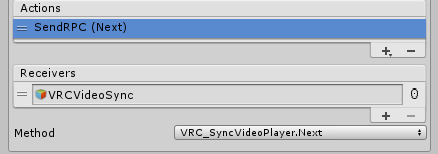 long halo
but that plays the next video, right?
bold ibex
yes
long halo
I wonder how to skip forward on the same video, like skip 10 seconds further
bold ibex
oof, I've never seen that work properly
long halo
I've seen it in one world were it works
he must have scripted that then
guess I'll use speed up for now
bold ibex
the videosyncplayer doesn't support it, so they probably add something to the stream request and reload that for everybody
dusk sapphire
only the stream sync player has fast forward/rewind rpc's
long halo
what even is the difference between the stream and video sync players?
dusk sapphire
stream sync can do livestreams, and has a resync rpc for audio desync
caveat is that it needs win10
long halo
so as long as everyone has win10 it's only better?
dusk sapphire
in my opinion yes, but some people prefer the video sync player because even on win10 they have some issues with the stream sync player
stray sand
there is a way to fast forward.
dusk sapphire
yeah was about to mention what you did in your demo map
long halo
I could add a button so that you can select which player you want to use
stray sand
@long halo @bold ibex for the sync video player everyone syncs up with the owner. so with ui slider you can change the playbackspeed to skip later into the video. you should have only the owner of the video player have access to the slider.
long halo
why only the owner?
and so you're saying that I don't need some kind of resync button with the video player?
stray sand
if someone does it locally it will not sync everyone. if you want everyone to see it the owner has to. and there is no resync button for the sync video player. ive not personally tested it of late but i have been told there is some audio drift in long videos.
long halo
does the stream player have a resync button?
stray sand
yes. i think if you pause and unpause a sync video player it should have the same effect as a resync button.
long halo
alright thanks, I'll try the stream player then
 marble thunder
Okay, anyone have any idea why reflections aren't functioning the same in VRC as they are in Unity?
One second, I have two screenshots that show it off.
This is how the reflection of this glass material is being handled in Unity, and how I was hoping it would function overall.
This is how it's actually displaying in VRC.
near escarp
Did you bake your reflection probe ?
marble thunder
Yeah.
Could it be because the cubemap resolution is too high? 1024x1024 is what I have that probe at.
Wait, it looks like the other probe is working, which has the same settings. Seems like a material problem, potentially, but I don't know why it would display properly in Unity if that's the case.
Changing some material settings. Might be because I removed the roughness map I was using but kept it on a roughness based Standard.
That did it. Changed it back and set smoothness to 1 instead of roughness to 0.
 icy tartan
Does anybody know how to fix that 1-5 sec freeze when the syncvideostream gets loaded by a button ?
 silent vale
Very random question, but how far is the hearing distance between players?
Like, how far does someone have to be away to be completely inaudible to others?
long halo
noticed that this had happened on two objects, anyone know why?
I think it happened after I baked the lightning
near escarp
you nee to generate lightmap uvs on the object
long halo
how do I do that?
 edgy root
Question;
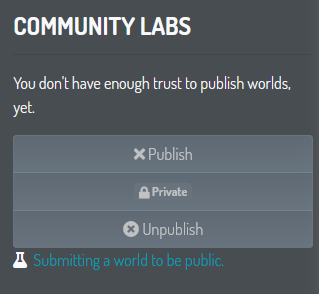
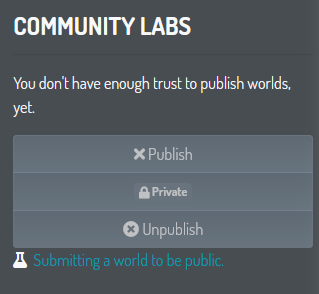
What Trust Rank do you need to be in order to publish worlds i.e make it accessible for everyone through Community Labs?
near escarp
click on it in the asset, the inspector menu
 near escarp
how many texels are you baking with
buoyant hollow
did you rebake after generating lightmap uv's
buoyant hollow
would recommend checking your scene for any other objects with this issue if you haven't already. Baking takes a long time and its annoying to find stuff and have to bake everything all over again.
long halo
I'll fix it for the other ones if it works
also just noticed this error
so this should fix this
buoyant hollow
that is correct
long halo
it looks normal now again, thanks! 👍
keen bane
Do videos play for people rn?
near escarp
It says what's wrong in the text 
 iron viper
probably a stupid question, but couldn't find anything after a quick google. Making a world, want to throw a fire particle effect into a fireplace. Grabbed a few different effects off the asset store. They all work in the editor in play mode, but in vrchat they don't show up at all. Any obvious things I may be doing wrong?
near escarp
could you instead list what you're currently doing ?
iron viper
I'm not taking any special steps or anything, just dragging a particle prefab onto a scene. I've done nothing custom yet, haven't gotten that far. These are the settings on the prefab tho:
near escarp
how are you spawning it ?
iron viper
I dragged a prefab particle into the scene. I'm not too familiar with unity's particle system so I'm unsure if that's what you're asking with your question.
near escarp
Where's the gameobject in your scene, is it enabled, what shader is it using, etc
iron viper
roger, one sec
mild spade
Could it be that it is using some custom scripting? You said you got it from asset store, they usually contain scripts which are not supported on VRChat
iron viper
The only components on the object are a particle system. shader is particles/additive btw
cedar nebula
check your console for errors, one of the assets you downloaded probably has a script on it that's throwing errors and preventing your scene from uploading correctly
iron viper
Will do when I get back, thanks for the tip!
iron viper
aha, it was indeed a script. Thanks again guys.
 frigid estuary
(EDIT: nevermind I found out)
bold ibex
where can I find information on adding UI to a video player in worlds? like adding your own URL with play pause stop etc
 small crystal
was trying to publish my world and this popped up, what do i do? https://gyazo.com/4e0847c335ef040f36545e6333abd398
 modern kayak
Check your console for errors
icy tartan
@bold ibex Just watch YT Videos
bold ibex
@icy tartan I've been youtubing, googling and searching for around 3 hours combined throughout the day. I come here when I can't find answers
icy tartan
SyncVideoPlayer Options can be found on The VRChat Website For UI Buttons Just search VRChat unity canvas UI Buttons or something like That on yt
bold ibex
sigh well, thanks for trying to help honestly
I've done all that though. there are a few tutorials out there that show how to add a video player, but none of the ones showing up in the search results have information on the UI of the video player. You just enter the world and the video player plays a default video or playlist.
dusk sapphire
https://github.com/jetdog8808/JetDogs-Prefabs/releases looks at jetdoggs dynamic theatre package as an example
GitHub
Prefabs for vrchat to help creators ranging from beginners to more experienced users. - jetdog8808/JetDogs-Prefabs
has video player with UI with url input etc
bold ibex
ooohhh this is very helpful
 devout monolith
this question's probably a red flag, but if a world gets taken down from labs, can you reupload it for private use or nah?
it's just that i made a replica of a game area as a sfw nonprofit fan art project using assets from the game itself, and i'm planning on using it for like a little creative video project, with vrchat as the platform. i'm proud of it so i kinda wanna publish it to the labs because it's comfy and nice, but if it gets shot down, i'm kinda worried that'd also kill my project plans. any input?
sacred warren
What are the moderation warnings on the world?
devout monolith
none, this is purely hypothetical
and there are certainly other worlds up currently using existing game assets
just other little nonprofit fan art things
idk, i just don't wanna ruin my project because i was proud and wanted to show off what i made lol
it took like a month, it wasn't just a drag and drop export or w/e
sacred warren
The majority of worlds, many very popular, are using assets from games and such. I wouldn't worry about it.
devout monolith
hmm, noted. alright. i heard some ugly stories about worlds with like, commission advertisements and game assets getting firebombed, buuut
not doing that here lol. just sharing a comfy cabin. thanks
bold ibex
Can anyone explain to me how the Master Checker works from the vrcprefabs?
rain shadow
@bold ibex any specific question about it?
bold ibex
I want to have a green crystal above the masters head, when i downloaded the Master checker. All I have is toybox and the master checker. I placed the master checker in the world and it doesnt do anything? @rain shadow
rain shadow
You likely need to import the unity standard assets
The masterchecker is likely using one of the scripts from that package
 inner kernel
Does anyone have any recommended tutorials to learn more about the animator in Unity?
icy tartan
Why does the VRC SyncVideoStream doesnt load Movies over 2 hours length :3
 charred grove
Please boost my server
long halo
no
stray sand
@icy tartan if its off youtube it would probably be cause of the youtube update. Requires a vrc youtubedl update. If its a mp4 file then it could be another issue.
icy tartan
@stray sand jetdog8808 its dropbox
It is an mp4 file but 1 Hour and 40 mins are working
...
I dont understand that
 misty cedar
very much considering porting in the Synty sci-fi city into vrc
really wanna dick around with that world
 rotund arrow
hey sorry
Is there a way I can publish a world without having trust rank? it would be just for me and a friend
icy tartan
Just make an Account lul
keen bane
Whenever I tp in my world, when I get to the area I set the spawn to, everything is all
like
Wiggly.
As if I was falling from thousands of miles above
My hands and menu get distored
stray sand
@icy tartan sorry for the late reply got busy. A direct dropbox hasn’t worked for a while. How I’ve gotten it to work is to replace the ?dl=0 at the end if the url to ?raw=1 . It gives a direct link to the mp4 file that you can then copy and put into a video player. The link is only a temp link though.
 tardy marsh
One message removed from a suspended account.
One message removed from a suspended account.
One message removed from a suspended account.
One message removed from a suspended account.
One message removed from a suspended account.
One message removed from a suspended account.
One message removed from a suspended account.
 nimble hull
your tabs 😃
tardy marsh
One message removed from a suspended account.
near escarp
@keen bane you're too far from 0;0;0
tardy marsh
One message removed from a suspended account.
stray sand
👍
frigid estuary
hey, where can I find a good video player prefab that works reliably for most people that join a world?
tardy marsh
One message removed from a suspended account.
One message removed from a suspended account.
 lyric dew
Anyone have a good tutorial for adding better seating into a world? My seating is so bad, when people sit down they end up like above the seat a bit and I dont know how to fix it
 gilded badger
help in my unity scene looks like this.
but in game the terrain looks black. how to fix this? thanks!
rain shadow
@gilded badger if you are using baked lighting you will need to set a custom material on the terrain for it to show properly
gilded badger
@rain shadow thanks for the reply! there you said? It worked! wiiiii, but looks a little bit blurry with the same texture in a material, maybe i need to change the size material 🤔?
rain shadow
Change the material shader to nature/terrain/diffuse
gilded badger
But in a terrain I don't have access to that kind of options I think?
rain shadow
you have to create a new material in your folder
 clever mirage
As soon as I load my world I get sent back to my home I don't know what is happening but my world ain't working does anyone know how to troubleshoot this I'm using unity 2017.4.28f1, the Vrc SDK, and the home kit. I'm on pc
keen bane
Do the video players work for anyone else?
 vale flame
does anyone know of a.i. tutorials that work for vrchat,
because trying search a.i. with vrchat the resaults are completely unrelated
modern kayak
if you're talking about pathfinding, start off by dropping in the aithirdpersoncontroller prefab from standard assets. It does everything for you except for syncing
The root motion prevents objectsync from working, so you need an alternative method. Typically the easiest way is to put objectsync on the target of the AI rather than the AI itself.
rotund arrow
Guys how do I gain a trust rank to upload a world? I dont even need it to be public it would be just for me and a friend
icy tartan
I think it cant be a temp link, if youre link is set to permanent it should work forever right?
so that solution doesnt work :/ still only movies under 2 hours
I will try @tardy marsh s solution
icy tartan
Also not working oof xD
So any other solutions? The SyncVideoStream is getting a freeze in the world for 2-3 secs if it loads a vid.the cache isnt getting anything whats good but maybe thats a problem idk
Is there an other videostream script?
 frozen glade
anyone knows how i add the avatar pedestal feature to for example a block or button instead of having the pedestal mesh?
grave mesa
Anyone know why video players refuse to fucking be local, and always gets controlled by anyone, i put everything i see to local, legit everything, and it's still the owner that can chose stuff and he pauses it for everyone, been fucking with this for soon 3 days, and i cannot find a fix.
rain shadow
VRC automatically handles most of the video player states and forces it to sync with the person who owns the video player game object
grave mesa
So there is no way of keeping it local?
well then back to no video controls then PepeHands
rain shadow
by not using the vrc video components yes
grave mesa
Im using Jetdogs video prefab
Since i thought maybe that would work
But don't either
Is there one that i can put a youtube video on? that would be able to be controller locally that you recommend?
rain shadow
Don't think theres any proper way to have local youtube videos
You can use the built in unity video player component on its own but that requires a url to a direct video file
grave mesa
Uploading it to google drive will work you think?
rain shadow
I wouldn't imagine that would work as its still googles video system
icy tartan
Are U using UI Buttons for your video player?
long halo
@icy tartan can't you cut the video into 2 parts, and then make the second half play automatically after the first one?
icy tartan
@long halo There must be another Solution I mean in Rooftop Movies there is No Freeze if its loading and there are also movies over 2 hours
rain shadow
You just need a link that ends in .mp4 or something and it would work
Possibly dropbox would work for that
long halo
Well, that's one solution I can think of at least, if you can't find any other way
icy tartan
hmm first of all I would like to fix that Freeze if its loading
@grave mesa make a screenshot of the configuration of the buttons
long halo
How long would the freeze be?
long halo
I don't see a 2 second freeze once in a 2 hour video to be a problem, but each to his own I guess
icy tartan
Im special haha xD
grave mesa
@icy tartan of the vrctrigger?
icy tartan
But I really dont know any World which makes a freeze on laoding a vid
@grave mesa yes
and of the Button script
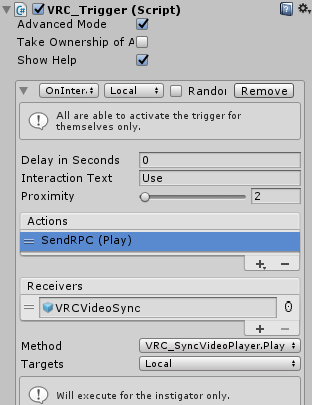 icy tartan
Try to change the VRC Trigger.Interact on the button script into this
grave mesa
3 aswell?
icy tartan
Nope
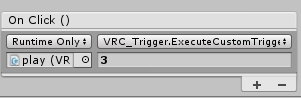 icy tartan
change that on every buttons and test it
grave mesa
Alright thanks let me do that real fast
icy tartan
if its not working also change the vrc trigger to custom not on interact
ok just change it now xD
grave mesa
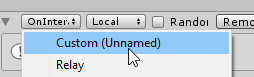 icy tartan
wait a minute
grave mesa
Alrighty 😄
icy tartan
do you just want to play it local for everyone?
grave mesa
yes, i dont care for it to sync since its just background music, i mean it be nice if that would be possible but yeah
Not that important
i rather want people able to turn it off it they want
icy tartan
just remove the vrc trigger
and make it like that
import your videoplayer
and install your buttons play/pause etc
Canvas UI is local without a vrc trigger
grave mesa
Wait so you want me to change the buttons from what you said ontop ?
icy tartan
you remove the vrc trigger on every button and make it like my screenshot but with play/pause and what you want
You just need to enter your videoplayer where my streamparent is
grave mesa
Alright, let me try
icy tartan
yes
grave mesa
I cannot find VRC_SyncVideoStream.Play
grave mesa
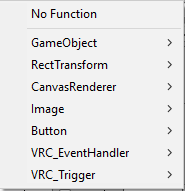 icy tartan
make a screen of the full button script
grave mesa
oh
icy tartan
pls* xD

 grave mesa
If this work, then your a god (, i keep forgetting emotes don't work here)
grave mesa
Let's fucking see
And you told me to delete the vrc trigger completely and delete event handler?
icy tartan

 icy tartan
hmm did your video worked before?
 light crag
Isn’t that TOS?
grave mesa
and then comes back once they put play again
icy tartan
show me the pause button xD
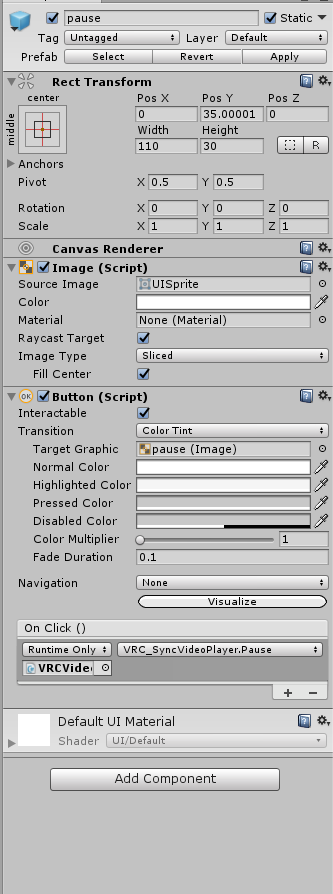


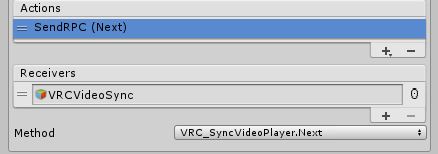


 grave mesa
Yeah like it gets paused for everyone
icy tartan
no xD which components are on it
icy tartan
does the video dies if youre pressing on pause or stop?
grave mesa
It's working fine, i just said die instead of getting paused but yeah
it does pause for everyone
grave mesa
can we go in a call in here? i can just show you it live
or wait there are no voice channels
Yikes,
you could pm call me if you'd like
and i can show my screen
You don't have to talk you can just write to me
icy tartan
I wrote a dm
misty cedar
stray sand
@icy tartan and @grave mesa are you still having problems?
icy tartan
@stray sand yeah xD
My freeze is there and its still not loading movies over 2 hours
I just contact the Owner of Rooftop Movies and hopefully get a solution xD
stray sand
It seamed like you weren’t able to get dropbox working.
icy tartan
Nonono Im using it since I made that world but it got still these problems
stray sand
What link are you putting in from dropbox.
stray sand
Heres a video i have on my dropbox. https://www.dropbox.com/s/3ihdhedn0wzkue2/Darling in the FranXX - Hitori (Episode 13 ED).mp4?raw=1 if you put in just that it wont work.
Once you click the link it will give you another url address.
That is what you will put into a video player.
icy tartan
Im trying it
stray sand
The only down side to this is the link that is generated expires after some time.
icy tartan
there must be a permanent link I mean everyone got that
how long does that link work?
stray sand
Never tested. So not sure. For the roof too movies he’s hosting the movies on a personal server.