#world-development
39 messages · Page 23 of 1
 narrow ibex
 cold zealot
hey guys, im trying to make a door so players can go in and out of a room. I'm using the Teleport Player -> onInteract for the door. I can only go in, but i cant go outside again. anyone know how to fix this?
narrow ibex
Does the door open or are they just interacting with a closed door?
 kindred thicket
Hello, I am trying to make a place in my world where someone without a mic or who doesn't talk can type in a UI Input Field so the text can be seen by everyone. I have the input field but when someone types in it no one but the person who typed the message can see it. I'm not sure what properties to be looking at.
cold zealot
just interacting with a closed door
i made two gameobjects which are spawn points inside and outside the door
but once im in the room, i cant get out.
narrow ibex
I would make an invisible on interact on either side an then link them to their respective teleports
Not sure how you are linking the exit teleport if you are using the door as the trigger
cold zealot
well i have one interact object and two spawns, but i guess that doesnt work. I should have two interacts connected to its respective teleports/spawn locations right?
narrow ibex
That is an easy way to do it
I’m sure there are more complex methods that just use the one trigger but why over complicate
 open thicket
will too many animators break synced events?
 near escarp
hundreds ?
near escarp
Then it's no worries
open thicket
and then events or seats weren't synced
used to be working but seem to be off now, lol
cold zealot
If i wanted to isolate sound in different rooms how would i do that? Meaning I only want sound to be heard in a room, so a person outside of a room won't be able to hear it
near escarp
enable an audio source locally
cold zealot
so if i do that, if i had like lets say a couple friends in a room watching something. Then other ppl outside of the room wont be able to hear it?
until they enter the room?
near escarp
yup
cold zealot
alright i'll give that a try thanks
 winter stump
How do you put post processing effects in a world? I'm guessing putting them on the normal way
 balmy gate
@winter stump follow this guide https://gitlab.com/s-ilent/SCSS/-/wikis/Other/Post-Processing
Use PostProcessing v2 because the old one is deprecated and might not even run in Unity 2018 or higher

GitLab
A surface shader for Unity providing cel-shading. (Forward rendering only)
winter stump
I will check it out
what version of post processing v2 does vrchat support now?
it says 2.1.1 but I don't know if thats been changed
ppv2 is up to 2.1.7
balmy gate
It's old in unity 2017, but it will be pretty new when unity 2018 hits
Just build with what you have... it doesn't matter
winter stump
I will use 2.1.1 and I will update if need be
winter stump
the post processing thing broke the vrchat mirror
balmy gate
Hmm? Explain. What's broken
balmy gate
Never seen that one? Oh mirror uses water layer by default and so does the post processing layer but I don't think that matters. Does it fix itself if you disable all the post processing components?
 serene estuary
Could someone show me how to sync audio for everyone in a world with jukebox?
winter stump
@balmy gate nah it's still broken
balmy gate
From importing the post processing package?
winter stump
yes
balmy gate
Can you check your console for any red errors?
Delete the Tests folder in PostProcessing if you haven't already done so
winter stump
Rip I didn't delete the tests folder like I read in the instructions, but now that I have deleted it it's still broken
oh, deleting the old mirror and replacing it with a new one fixed it
¯_(ツ)_/¯
@balmy gate It looks great, Thx for the help!
 dusty spruce
wut
Uh.
ahem, okay. uh.
@kindred thicket I think there might be one here: https://docs.google.com/spreadsheets/d/e/2PACX-1vTP-eIkYLZh7pDhpO-untxy1zbuoiqdzVP2z5-vg_9ijBW7k8ZC9VP6cVL-ct5yKrySPBPJ6V2ymlWS/pubhtml#
cold zealot
In unity, is there a way to draw a polygon and extrude it like how you can do it in CAD? I want to be able to creat my own shapes for doors.
dusty spruce
@cold zealot I'm not sure if there's anything you can get for unity that allows that, but why not just use Blender?
 autumn cedar
Extrude Faces in unity?
 unborn elk
ProBuilder addon in Unity maybe?
 short gulch
ProBuilder works nice, been using it for one of my worlds recently
dusty spruce
I think blender would be easier but it's up to them.
unborn elk
Don't you have an option to export your models from CAD as fbx or obj? @cold zealot
 wise sedge
Getting "Failed executing external processes for 'clustering' job." when trying to bake scene lighting. Anyone had this before?
Anti-virus was breaking it.
cold zealot
@unborn elk Haven't seen an option like that in cad
 weak stump
How do I get the underwater lighting effect, as seen in the JellyWorld?
short gulch
@cold zealot what Cad software do you use?
near escarp
@weak stump Post processing
 tepid eagle
has anyone ever made a object that can be destroyed by particles and like make another object go disappear or not be active anymore
I'm trying to figure it out
near escarp
OnParticleCollision > SetGameObjectActive @tepid eagle
tepid eagle
understood, my main thing is working on shield generators for a world.
 sullen tundra
anyone able to tell me why this is happening, i'm updating my world and this is all i get, i even rebuilt it in a separate unity project
 mild spade
You are using the wrong Unity Version @sullen tundra
VRChat
Requirements We're going to need a couple things before we can get started. Unity 2017.4.28f1 - Scroll down to find LTS Release 2017.4.28f1If you have Unity Hub installed, you can just click here to install the proper version. Do NOT install the 2017.4 version that's in the ...
sullen tundra
been using the wrong one for a very long time now, only just having problems today, so i pushed my suspicion of that aside
mild spade
Something that you added to your world (an asset) is causing some errors on your project. Check your console tab for red errors (usually bad scripts or shaders)
sullen tundra
fixed it
 reef sparrow
Does VRChat do something to the volume of my video player? Changing the gain doesn't seem to make it louder.
 bold ibex
Hey
If i have already uploaded a world to community labs and then i delete the world will it reset my community labs timer. I uploaded something i dont want on community labs on accident. i want my new world up instead.
Actual question im on the upload screen now
 modern kayak
No, don't delete it
bold ibex
okay
modern kayak
Just copy the world ID and use it for the thing you actually want to upload
then change the name and picture and everything
cold zealot
@stray sand for the video player, how can i let other ppl in the world play url's?
it seems like it only works for the master of the world
 stray sand
it should be working for everyone. did you mess with the hierarchy at all?
 storm plover
Anyone know if you're allowed to add volume sliders for Quest? Just curious
And if you can I'm wondering how
 zealous monolith
so i'm having troubles uploading a world, it lets me test it offline but the upload button won't work
the errors i'm getting
near escarp
VRChat
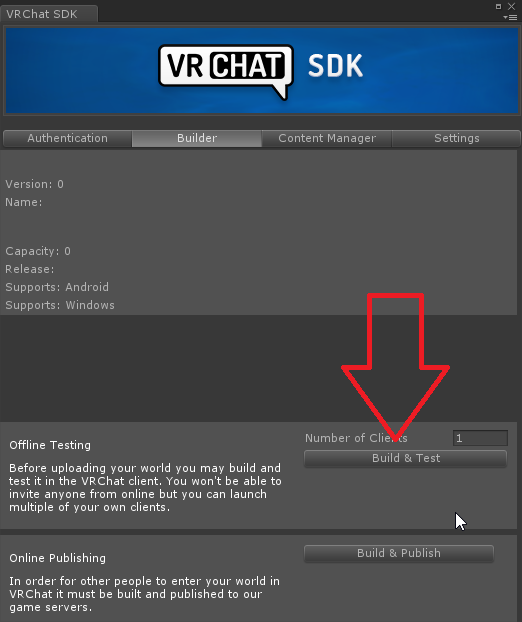
If you need to update your SDK, it is important that you follow these steps to ensure the update proceeds properly and you don't have any old/conflicting files. Simple Update Here's how you update your SDK. If you're just uploading avatars, you can use the following process: ...
zealous monolith
i've already updated the sdk and using that version of unity :c
storm plover
@zealous monolith Check and see if you have another object in your world using the world's ID, aside from your vrcworld object
You should have only one object with the pipeline manager for the world ID
storm plover
Don't worry, I only know this because we all make stupid mistakes 😅
cold zealot
how do i add mesh colliders for a staircase?
unborn elk
Select object -> Add Component -> Mesh Collider, but I suggest you use box collider and make it the right angle instead. Mesh colliders don't perform very well @cold zealot
near escarp
they also suck to walk on in VR
unborn elk
Are those that make you go up or down* a little each step?
near escarp
yep
 sacred warren
Judder city
 frosty bone
My current world problem is that (particle) effects from avatar are pushed down. What part of world can push the effects down?
cold zealot
Does anyone know how to make an opening like this on unity? I want to make a wall with that sort of shape
 nimble hull
a passageway entrance? modeling is all blender
 graceful bough
I made some simple land in blender and imported it into unity as an fbx but I keep falling through it
I know there's a way to make it solid but I'm unsure
unborn elk
You need to add colliders
graceful bough
ah
is there a good collider tutorial
I'm big dumb and just started, if not I can google
"Component > Physics > Mesh Collider"
that easy?
unborn elk
Sorry, dunno. I am working on my first world myself and added box colliders underneath floors. Maybe there is some terrain related collider?
graceful bough
I just tested it and that worked
literally that simple I've been confused for like 25 minutes trying to remember what colliders are
 weak hinge
hey vrc discord, I'm having trouble building and testing a world, whenever i attempt to I'm presented with this error. I've tried reimporting the newest sdk, removing foreign scripts, moving it too a new project and tried removing the post processing stack. Sometimes it uploads then puts me into vrc only to kick me out of the initializing screen of the world, then my screen goes all pink.
cold zealot
How do i turn off the mirror initially when i spawn?
near escarp
Have it off by default ?
cold zealot
yup
near escarp
@weak hinge How did you update the SDK ?
I meant leave the gameobject disabled by default @cold zealot
cold zealot
yeah how do you set the gameobject off by default, but then use a button to toggle it on/off
cold zealot
ohh okk i gotcha
weak hinge
through unity after that I tried removing it when unity was closed then did a fresh import of the sdk.
near escarp
yeah so that's probably why
VRChat
If you need to update your SDK, it is important that you follow these steps to ensure the update proceeds properly and you don't have any old/conflicting files. Simple Update Here's how you update your SDK. If you're just uploading avatars, you can use the following process: ...
follow those steps
weak hinge
Alright thanks!
 dapper field
hi. I installed vr chat on my computer and it doesn't start, please tell me what to do. when loading the world, I have 0.00% and it doesn't change . I was advised to contact this discord group .please help me. I apologize for mistakes I'm from Russia
weak hinge
Unfortunately same thing happens, just shortly after the pink screen though, my game crashes.
near escarp
yeah i'd blame the world then
@dapper field #vrchat-support
@weak hinge can you post some screenshots of your unity window ? would like to see what you have setup
near escarp
you have 138 errors
weak hinge
near escarp
Did you import the SDK3 in your project ?
weak hinge
sdk3? Where would I find that?
near escarp
Well if you didn't then i guess it's something else
Be aware that you can't have custom scripts in your world
So the MassSpring stuff won't work
weak hinge
im aware, but would that cause it to not load?
near escarp
It could definitely create some null ref spam and cause it to not load yeah
Try to remove all those custom scripts from your scene, clear the console, press play and see what shows up
near escarp
Sweet, try uploading again !
weak hinge
same outcome.
near escarp
Have you tried detatching the world ID from the world descriptor ?
balmy gate
@cold zealot make sure to turn on advanced mode and set your trigger to Local in the dropdown . Otherwise extra people joining the world are going to have a bad time
Toggle + not local will desync weirdly
bold ibex
it explains nothing about them in the docs
 shut palm
i created a new unity project but VR chat still running the old map
how do i fix this problem?
 elfin latch
i'm really wanting to use some hilly terrain / grass for my world but I really just don't know how to find that kind of stuff.
I know there's the flat terrain in unity but I was really wanting some hills / normal variance in the ground that's also grassy with trees and I'm not sure where to even start with that.
dusty spruce
@elfin latch You can make hills with the Terrain object.
elfin latch
Ooooh, I figured it out!
How would I go about getting grass / trees?
is it ultimately just gonna be unity store shit?
 bold helm
Hey guys so I am having a issue I’m trying to upload a world for the first time I’m using Vrchat’s home kit but it let me upload it but when I try to load into it in vrchat it kicks me back to the vrchat home I have a spawn point and I have these three errors. Can anyone help me out I’m doing this as a gift so I’m just trying to figure out what is wrong?https://media.discordapp.net/attachments/635833645747404800/668233069903347714/image0.jpg?width=894&height=671 https://media.discordapp.net/attachments/635833645747404800/668233070872100905/image1.jpg?width=894&height=671

 elfin latch
I'm wanting to go for something like this in my vrc world but it's my first time using any sort of terrain / water, how would I go about getting the water / land to flow properly?
graceful bough
I have another question I'd like spoon feeding on
how do I replace the default sky in unity
how does that work
near escarp
You can drop a texture on it
graceful bough
like, the whole scene ?
near escarp
on your sky
kindred thicket
I have been in a world where you can put on a hat or glasses and they stay with the player when they move around. I have a hat I could like players to be able to wear, any help will be appreciated. Thanks
modern kayak
check out vrcprefabs.com/browse, it's in there called vrhat
wait is it? I don't see it @left marlin
 left marlin
I never released the prefab. I made it part of the tutorial for player tracking, but I skipped a few steps to simplify it, which then make it suffer from drifting.
modern kayak
Iwashi prefabs has their own version of it too, do you know where to find it? I'm not sure what to search
left marlin
Null's prefabs
Their's use auto cam, which I had someone ask why it didn't feel the same.
 nimble echo
any good way to make a trigger collision box reliably react to a player entering it?
near escarp
OnEnterTrigger ?
kindred thicket
Thank you for the information. I really appreciate it.
cold zealot
how do i add a spawn sound everytime someone loads into my world?
reef sparrow
Does VRChat do something to the volume of my video player? Changing the gain doesn't seem to make it louder.
stray sand
@cold zealot on network ready > AudioTrigger
set the broadcast to AlwaysUnbuffered
unless you only want it to be local. (only the person who loads in hears the audio)
@reef sparrow ive not personally upped the gain on vrc spatial audio source. but how much did you put it?
cold zealot
thanks jetdog! that worked
another question, is there a way to make my models smaller? i dont want a world thats like over 100 mb in size, if i can do some sort of compression that would be great
stray sand
usually world file size increases cause of texture size and audio clips.
those are the areas i would look at first.
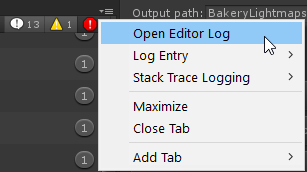
if you want to get more detailed information about file size : https://twitter.com/Ruuubick_/status/1166014308918185984

Turns out a lot of world creators didn't know this, but you can easily find out what your world is made of, how much it weighs, to then be able to reduce its overall size :
Retweets
139
Likes
312
 Twitter

usually there are compression options in the import settings
reef sparrow
@stray sand I tried from 0 to 70 dB. I didn't hear a difference.
stray sand
im assuming you had the audio source volume all the way up. other then that you might have to take it into something like audacity and and crank it up there.
reef sparrow
It's streaming YouTube videos
stray sand
have you tried a simple audio clip? curious if there might be a issue with video players.
reef sparrow
Yeah, regular audio clips I could change fine.
stray sand
my assumption is they are setting the audio clip at the start of the scene. but they dont change it with new audio clips put in.
that would be a thing to add into https://vrchat.canny.io/
Give feedback to the VRChat team so they can make more informed product decisions. Powered by Canny.
reef sparrow
Interesting
cold zealot
theres three methods of compression
default lz4 and lz4hc
which one should i use
94% of my textures are uncompressed lol
frosty bone
No answer at my problem, so i go play with some room setups and try discover the culprit what push effects down.
stray sand
@cold zealot build compression i dont think will help. for textures you will want to look at the bottom of the import settings for the texture.
(click the texture in the assets and look at your inspector)
cold zealot
oh okk i'll try that thanks
 maiden onyx
I feel a little dumb but wheres the cat plugin for blender?
stray sand
that question should go in #avatars-2-general but here. https://github.com/michaeldegroot/cats-blender-plugin

GitHub
:smiley_cat: A tool designed to shorten steps needed to import and optimize models into VRChat. Compatible models are: MMD, XNALara, Mixamo, DAZ/Poser, Blender Rigify, Sims 2, Motion Builder, 3DS M...
maiden onyx
Thanks 😄
cold zealot
@stray sand for your video player, is there a way to just enter the url and it play automatically after pressing enter without pressing the play button?
stray sand
There isn’t a 100% reliable way to do that cause there is no indication of when the video loads. If you want to try and automate it have a play method activate after a few seconds after pressing enter.
It wont play if you call play right after you enter since the video isnt loaded.
cold zealot
i see i see
 sweet silo
Does anyone know of a way to activate or spawn multiple randomized objects from a pool of 100 in different Locations? For example: When I click a button 40 random signs are shown next to each other, when I click again they're deleted and a new randomized set is shown. I can't think of a way that would not need insane amounts of work.
 stone garnet
is there a way to test worlds without vrchat opening in vr mode? dont want to unplug it everytime
cold zealot
Is there way to transition backgrounds in a world? For example the background would change from night to day
 wraith field
Are these good settings for 2D audio?
near escarp
wraith field
thx!
bold ibex
I'm trying to make a custom world similar to Fnaf VR Help Wanted.
 smoky kestrel
Hi! im pretty new to VRChat and i merged yesterday my account and now after sometime im making a map and i need help. I can't walk under the stairs even if i am crouching... 😢 ||This is my first map||
 neon narwhal
All chars have the same height in a way
So if the object is to low you will always hit it
Even as an ant
So if you cant walk under it you will never be able to crawl under it
smoky kestrel
ok thanks 🙂
dusty spruce
They should try to do an update on hitboxes.
near escarp
@smoky kestrel What you could do is have a small collider on the floor that disables the collider on those steps
smoky kestrel
😅 it's done i didn't fix it but im pretty happy with result im on the world rn
thanks for all answers 😊
little questing can i make out map in blender and then import it?
 blissful shoal
quick question: like avatars, there is a material limits for worlds?
 signal violet
CADE OS BR
bold ibex
I'm sure its been asked numerous times but I couldn't see any definitive answers to the question
Is it fine to add copyrighted music to your custom world, and if so is there a specific process you have to go through (like specifically using a player) or can you quite literally just import the song to your Unity and then your world without worry?
near escarp
@smoky kestrel Yeah, export to fbx and you can import that in unity
 glad nova
is there a better way to see which way a pedestal is facing in unity and align it? Right now im just attaching an avatar to them to see which way theyre facing then deleting the avatar
@bold ibex yes its fine. Most copyright stuff doesnt matter in vrchat besides stolen avatars
near escarp
If you press play you should see it ?
bold ibex
@glad nova Thank you
glad nova
pressing play doesnt show the avatar on the pedestal
near escarp
yeah that's expected
glad nova
just the mesh which is a solid color on all sides
near escarp
yep, what else do you need ?
 sterile violet
Does anyone know how to increase the view distance in unity?
sacred warren
Far clip distance on the camera
sterile violet
what about for the view port?
 supple drift
select an object and hit f to focus on it
sterile violet
I mean like there is more in the scene, I want to be able to see it in the view port regardless of distance. (If it helps the rest of the terrain should go on for 2km)
sacred warren
Yeah, you need to set the far clip to 2000 then
sterile violet
FFS, I figured it out hold shift and scroll mouse up.
sacred warren
Oh, you mean you've ballsed up the scene view itself, fair enough. 😛
sterile violet
Yep, second question How do I get a object to render regardless of distance. I have the HL2 citadel and I want to be able to see it in VRchat from 4km away.
sacred warren
You can't AFAIK, normally in Unity you'd use layers and different cameras but none of that is available in VRC.
sterile violet
damm, so I guess the citadel will always be out of render distance.
 solid helm
You can have it be smaller and follow the player's camera
 prisma trail
Help it says “Last built VRChat scene could not be found. Please Test/Compile Full Scene (slow).”
Halp please
Pleeeease
solid helm
Check the console for errors. Then, check the Unity manual for instructions. Study the Unity manual and meditate on it.
kindred thicket
Hello, I have a Camera in my world and when the camera gets a little close to a player the image on the Screen looks like really low resolution. How would I fix this (I know it's hard to see in the picture but you should see the color changes on the face and chin). Maybe I need to increase the resolution of the camera or should it be on the plane I'm using for the screen? I'm not sure where to look, I have been experimenting with no luck. Thanks
I looks kind of yellowish and on the dance floor is looks worse in the shaded areas.
I don't have this problem with mirrors just with cameras
solid helm
You can increase the resolution on the render texture, but ask yourself if it really matters first
kindred thicket
Yes, It really mattes. How do I do that please?
solid helm
So, the camera points to a Render Texture
The Render Texture asset, when selected, has a set resolution
You can raise that
kindred thicket
So I would change this to like 2000 X 1000?
 rain shadow
That would work but as you increase the resolution the rendertexture becomes heavier on your gpu
kindred thicket
I see it doubled the size of the file, from 7.4 megs to 15.3
Thanks for your help, I will test for the optimal size for the quality I want.
rain shadow
2000x1000 should be fine for most people
just make sure its not enabled by default and it wont really be an issue
kindred thicket
Great, that's good to know - it wont be.
rain shadow
also if the weird color banding is a noticeable issue for you change the color format from ARGB32 to ARGB Half
kindred thicket
ok, thanks again.
prisma trail
I think I figured out my problem? My world had an ID tied to it already for some reason and it kept trying to load that id and it doesn’t exist
Fingers crossed it uploads this time
Nope didn’t work
 random torrent
i have problem i cant update my world gaves this problem
near escarp
you're baking light
disable that in the lighting window at the bottom
the auto generate checkbox
@random torrent
random torrent
oh ok thanks
 jolly cedar
Howdy, a friend and I are having a few issues with the SDK on a map if anyone would be able to help us out
near escarp
@jolly cedar What kind of issues ?
jolly cedar
It keeps reinstalling the SDK and we're trying to take it out for now because it's importing a different version through Thry
near escarp
VRChat
If you need to update your SDK, it is important that you follow these steps to ensure the update proceeds properly and you don't have any old/conflicting files. Simple Update Here's how you update your SDK. If you're just uploading avatars, you can use the following process: ...
follow those steps
shut palm
This is my world, but when i test it, the texture is not working, can anyone help me:(
This is how it's look right now:(
near escarp
@shut palm Any errors in the console ?
near escarp
the unity console
near escarp
Which shader are you using for those pieces ?
shut palm
did you mean texture, im sorry that i just start using Unity (noob)
i think im using pro bulider
rain shadow
What unity version
near escarp
I think you need to apply a material to those pieces
Pro Builder may only show this color while in unity, but doesn't have an actual material
and so in vrchat you'll get this pink due to missing shader
shut palm
I think i have drag the material to the block
near escarp
And which shader are those materials using ?
if you click on them you can see that at the top right corner of the unity window
shut palm
Legacy shaders/diffuse
near escarp
yeah, try not to use legacy shaders, you can find similar shaders like standard
at the top of the list
near escarp

reef sparrow
How do I trigger an audio clip to stop playing?
prisma trail
Why do we HAVE to use unity 2017
nimble hull
cuz thats how games work 0 0
prisma trail
0.o
nimble hull
longer answer:
prisma trail
But I can’t use my model in 2017 version 😭
nimble hull
what model
prisma trail
😭
nimble hull
what about it
prisma trail
Idk it doesn’t work in the 2017 version
nimble hull
. . .
prisma trail
I try to import it and it’s all missing prefabs but if I import it the same exact way in 2018 it works
nimble hull
now thats an answer. unfortunately i dont dabble in worlds so i dont know what to tell you, but that still sounds so unspecific
like very unspecific. prefabs? just remake them
and make sure that you have all of the necessary assets
prisma trail
Idk it’s all missing if I import it to 2017
Even the assets
The folders are there but the actual building isn’t
nimble hull
thats kind of to be expected
are you trying to bring a prefab into 2017 or a project into 2017?
thats kind of to be expected
are you trying to bring a prefab into 2017 or a project into 2017?
prisma trail
Uhh
nimble hull
you n eed to go over unity basics again or sumn
prisma trail
Assets from another project
nimble hull
are you trying to bring a prefab or a project into 2017?
okay. all wrapped up in a unity package?
prisma trail
I literally take the asset folder and copy it to a blank project from 2017’s asset folder
Should do the exact same thing right?
nimble hull
pfft okay yeah uh, dont do that next time. first of all you shouldn't expect a project to seamlessly downgrade from a higher unity version or a lower one, not even from a lower one to a higher one. you would have to be really weird to have a project that didnt have bugs or assets that would need to be repaired after doing that
but also. thats. not really. you shouldve packaged what you actually needed
prisma trail
Ugh
nimble hull
like what were you expecting
of course shit is goingto break, its a downgrade
just take the necessary assets and rebuild the scene / prefabs / assets that broke
prisma trail
It’s all broke
nimble hull
so then repair what needs to be repaired
prisma trail
Ok so imma export this entire world as a package and see if it lets me open it in 2017
Would that work?
nimble hull
yes but stuff is still going to break and youre still going ot have to liklely repair scenes and prefabs because youre downgrading
prisma trail
How would I do that
nimble hull
how you did it in the first place. it is your world, you know how you put it together. im assuming you have everything set up in a way that makes upgrading and downgrading from unity versions as painless as possible
prisma trail
Idk how I did it tho 😂
nimble hull
then thats on you 0u0 youre gonna have to figure it out if stuff breaks because i didnt make your world
prisma trail
Well ya
 subtle pagoda
Anyone know why I can't build and test or even publish on the 2020.01.14.10.40 version of the SDK?
My account has the permissions
subtle pagoda
I saw the message, not sure why it flagged you lol
subtle pagoda
I'm testing with Udon, and they recommend that version for Udon
prisma trail
Oooof VRChat SDK requires 2017.4.28f1
subtle pagoda
Do I have to get ahold of tupper for this? this was a post made by them officially

VRChat Udon Discussion Forum
Please read this post entirely. We know it is a lot, but there’s a lot going on! Most basic questions are answered in this post. Hello all! If you’re reading this, welcome to VRChat Udon! We’ve been working on this for quite a while, and are super excited about getting...
 random owl
If you are doing Udon stuff you are on the right version
subtle pagoda
That's what I thought, does uploading work for you?
random owl
Are you able to open the control panel at all?
subtle pagoda
Yeah, everything's seemingly working, and it loads for a bit when I try to press either "Build & Test", or "Build & Publish", but it doesn't do anything after that
And the fact that I'm able to press the buttons at all should mean that there's no errors
random owl
Can you send a picture of the screen after pressing the build button
subtle pagoda
The only differences are the log entries, want me to send those?
near escarp
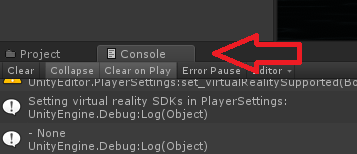
you're probably getting errors in the console when pressing those buttons ?
random owl
And you might have "Error Pause" on in your console which stops the upload from working
random owl
Do you have Error Pause enabled in the console?
random owl
Can you send a picture of the full unity screen after pressing the build button incase I can spot something
subtle pagoda
random owl
Yeah nothing seems straight up wrong you could try reinstalling the sdk3 and udon packages and seeing if that would help
subtle pagoda
Alright, so to clear things up, the SDK to use with Udon is the one on the post, right?
random owl
Yes for udon you need two unity packages the udon one and vrcsdk3 one
subtle pagoda
Yeah, alright
So, do I just delete the folders to remove them? or can I just import them and it replaces it?
random owl
Better to remove them first
subtle pagoda
Thanks a ton, @random owl, it's fixed now
 mild pulsar
uh hey so im trying to make a cross platform world and i got the android client and whatnot and its only on quest. how do i get it cross platform?
random owl
You need to also upload it while the build platform is set to pc
mild pulsar
the platform just needs to be set back to pc? and then its fine?
graceful bough
Is it possible to add a texture to only a certain part of a mesh?
near escarp
@mild pulsar and to upload on the same world ID yes
mild pulsar
aight cool I appreciate my fellow human being
kindred thicket
I was able to test my world with 4 people last night and to my great surprise many things started unraveling as people entered the world. That really let all the air out of my balloon 😦
Like the Hangout player would only play 1 second of a YouTube Video and then repeat the same one second. Everyone in the room could hear the 1 second playing over and over but everyone had a different image on the VRCVideoSync screen. It all works good when there is only one or two people in the world. Do you have any ideas what might be wrong?
Also, I have a bunch of camera motions (key elements to the world) and when I changed the Camera Texture from 1000 X 500 to 2000 X 1000 all the motions no longer show the same camera views they used to. Do I have to redo all my camera motions or is there a way to fix this without having to make all new motions?
Thanks
rain shadow
@kindred thicket By motions do you mean animations?
kindred thicket
Yes, sorry that's from MMD.
rain shadow
Whats the issue with it now?
kindred thicket
When the texture was 1000 X 500 the camera view is this
with the screen changed to 2000 X 1000 it looks like this
you see more of the stage and it makes the animations off in both position and angle.
I understand if I need to remake them. I've already started the process
 left kettle
Hello hello. I was wondering if I can get any help with an issue I am having with my world.
So basically, I am trying to make a boss with a aggro system. Anyone who gets near this boss will have the boss's attention. When they die however, they will leave outside another trigger zone that will tell the boss that the target has died.
Then from there, the boss will reset until someone else goes near her.
The problem I am having however is that when new players join the world, it breaks these trigger zones. I was wondering if there was a way to fix this or if I would have to do another method for boss aggro.
 tardy marsh
One message removed from a suspended account.
One message removed from a suspended account.
One message removed from a suspended account.
One message removed from a suspended account.
One message removed from a suspended account.
One message removed from a suspended account.
One message removed from a suspended account.
One message removed from a suspended account.
One message removed from a suspended account.
One message removed from a suspended account.
prisma trail
I’m remaking my world because the old one just wouldn’t work
rain shadow
@tardy marsh OnVideoStart > AnimationInt?
tardy marsh
One message removed from a suspended account.
One message removed from a suspended account.
One message removed from a suspended account.
One message removed from a suspended account.
One message removed from a suspended account.
One message removed from a suspended account.
rain shadow
I would recommend having 0 as an empty state
tardy marsh
One message removed from a suspended account.
One message removed from a suspended account.
One message removed from a suspended account.
rain shadow
Or 0 as an invisible state in your case as thats what you would want it to start as
tardy marsh
One message removed from a suspended account.
One message removed from a suspended account.
One message removed from a suspended account.
One message removed from a suspended account.
rain shadow
Well just mean having the text that you display not have anything happen on state 0
tardy marsh
One message removed from a suspended account.
One message removed from a suspended account.
One message removed from a suspended account.
One message removed from a suspended account.
One message removed from a suspended account.
One message removed from a suspended account.
One message removed from a suspended account.
One message removed from a suspended account.
One message removed from a suspended account.
One message removed from a suspended account.
 keen crag
Soo why hasn't my world uploaded yet? Its not even under my "mine" category?
random owl
What unity version did you upload it with?
random owl
Current version you should be using is 2017.4.28f1
Technically it should still be visible if you were using a bit older 2017 build but something might have gone wrong because of it
keen crag
Gotchya, will i lose anything when updating it?
random owl
You shouldn't but always better to do a backup just incase
Minor version updates go pretty easily
keen crag
actually my bad, the version im on is 2017.4.35f1
random owl
Ahh that explains it then
keen crag
I was looking at my other project
random owl
It won't show up if you have a newer version than the current one
keen crag
Alrighty, thank you
 cobalt ore
How do I fix this.
 hexed yacht
quick question, i have been working with the player tracking guide(http://vrchat.wikidot.com/worlds:guides:player-tracking) trying to get base player tracking working but end up always getting stuck unable to move at the teleport location. does anyone know why? i have gone up and down the guide looking for something i missed. i will provide screenshots as asked.
maiden onyx
Before I get invested in an idea, does anyone know if there’s a cap to the audio size, in mb
hexed yacht
as far as i can tell neither unity or vrc has a size limit, but i have had problems if the file size is too large the upload will drop after about 10 mins
so i believe it would depends on your internet speed at that point
modern kayak
what does your button event list look like?
hexed yacht
for my above issue, using the unity debugger i found that the reset scripts on the tmp camera were reversed, thanks again Superbstingray for the working prefab
thx for the look but got it fixed
modern kayak
That's quite an advanced technique to take on, great work! Just let us know if you need anything
hexed yacht
thanks just working with propspawner and base tracking to make a default like hit box on everyone's character, no too tackle the triggers and i have no clue on this one besides having owner transfer to trigger activator and having them activate the trigger locally(still figuring this part out)for the person targeted
used to have events collider(in trigger state) based but found it messed with how players interacted with the map(trigger collider preventing oninteract trigger)
so particle on hit triggers
alot of them
but going through those tutirial made me wonder if its possible to trigger and animaiton that pressed a button much like the event always animator by sampling the animations frame
but with that method i would still have to bridge the local gap that im trying to do
aka i need to know how someone can activate someone elses local trigger
rain shadow
On that players spawned objects?
hexed yacht
yes
basically how jar managed his new hit boxes if anyone understands that logic
at least thats what i assume his works on
rain shadow
not sure how Jar has his stuff setup currently
I doubt hes using PlayerBase tracking though, I would assume he would have tried to keep things somewhat simple
hexed yacht
hes using camera tracking
that much i know for sure
and that the initial trigger is cast by the onw with the gun based on his current views
rain shadow
And yeah you're trying to do some relatively advanced stuff with trying to use both base tracking and prop spawner
especially with trying to activate triggers on other peoples spawned objects
hexed yacht
actually its everyones current view i tested and did figure its an always trigger of some sort
i know
advance as heavens on earth but hey im getting there
slowly
the snail next town over might beat me
rain shadow
@modern kayak Could help you with the activating triggers on spawned objects
hexed yacht
0.0
rain shadow
I have my own way of doing that but I would imagine his way is probably better
hexed yacht
bold to ping the man
modern kayak
oh you want to do favor the shooter?
modern kayak
what do you mean by kinda?
modern kayak
seems like it might be a little unfair to do favor the shooter in that situation. Could die before you even see the obstacle
hexed yacht
ill use it to active a teleport condition to bring the target back into the trap
upon exit trigger
that way people caught normally wont be affected if thats possible
if this idea is unfavorable in practice its alot of work down the drain but alot learned at the same time
largest complaint in death run that i see is how did he walk through the trap
my attempt at fixing that
modern kayak
the problem is that in the case of favor the shooter, every individual event needs to be hard coded. If you want a gun that deals 5 damage, that's one hard coded thing. If you want a gun that deals 10 damage, that's another hard coded, etc. That's why the only public favor the shooter system is instagib, it makes it way easier. In this situation you would have to make every single trap be it's own event, which would be incredibly tedious to set up
hexed yacht
not if its to a single teleport point that is moved when the trap is activated
so one event
or how many it takes for said trigger
modern kayak
I guess if you only have one person activating traps, and one trap at a time, then sure
hexed yacht
yah i see the multiple activation problem
but in practice i dont think that would be a problem, ether way they are tp into a trap
and if you think timing would be and issue triggers should be called at the same time and therefor received at the same time too, referring to trap activation and tp
modern kayak
Though it wouldn't mitigate the problem entirely because objectsync (the thing you put the players collider on) will have a shorter latency than the players themselves, so it would still be possible to hit the button when the player is inside the trap while the collider is outside
hexed yacht
true
modern kayak
You can make the collider visible, that's what instagib did. But it seems a little janky
open thicket
so how would I make a pedestal for avatars that doesn't include the avatar photo?

example
modern kayak
put the pedestal somewhere else, below the floor, and call the function with a normal interact button
hexed yacht
rpc use the pedestal on interact with place holder object
open thicket
and the collider would act as the interact still?
hexed yacht
the yep
assuming ur refering to the dolphin and not the picture
just copy the trigger of the pedestal onto the object you want to represent it
technically you can just have the script on the object as well and therefor no original pedestal as well i believe
wait why is mine set to always should be local
modern kayak
yeah the pedestal prefab includes everything you need, but you can totally split it up into all the individual components you want
using an avatar pedestal is an example of something that is dependent on the instigator. Even if it's broadcasted, only the instigator will actually do anything with it. The same is true for entering stations or teleporting
though it's still dumb that it's not local. Idk, they probably didn't want to check advanced mode on a basic prefab or something
hexed yacht
oh
on an old work of mine i did find a way to have it as a true alwaysunbuffed call, turned everyone into eggplants with the hidden button
modern kayak
well first of all you need a propspawner set up, do you have that?
hexed yacht
v2
modern kayak
is that the one that someone fixed and reuploaded? It's had a troublesome history and I'm not sure what the currently working one is
hexed yacht
never go the one out of toybox to work
haven t gotten to test if this one works for multiple people
might have to change the trigger fron on network ready to whe nthey hit a collider for the first time
i apologize for my typing
modern kayak
the basic concept is that the shooter needs to have some kind of local collider so that they are the only one detecting anything. Then there's a hitbox on each and every person's propspawner and when it gets hit, it does an alwaysunbuffered activatecustomtrigger. Then the custom trigger that gets activated is local and only active for the person who owns the propspawner. Everyone else will receive that broadcast but they won't be able to do anything with it
hexed yacht
trying to wrap my head around it
trying my best here so going with the gun set up, upon shooting the "gun" a collider hits one of many hit boxes, all hit boxes are activated but only the one in the collider can active its custom trigger? i assume the collider activates an object only while its is on said hitbox...
and the said custom trigger that is activated is local
rain shadow
You would probably want to have the trigger that executes the hit condition on the persons spawned objects disabled and on prop spawner V2 there is the events of OwnerEvents and on that object you would add to that trigger an action to locally enable it
hexed yacht
that would prevent miss fire due to lag such as someone backing into a group before getting teleported
rain shadow
I would imagine you would want to use an OnEnterTrigger condition to trigger the colliders on the players
hexed yacht
thats what i have
but i think i have to redo all my animations to add a parent to the trigger object so only the activator can trigger its enable status
since its a trap that plays an animation
still working my brain through it too
modern kayak
the shooter should broadcast out to everyone, but then only the owner will be able to do anything with it. Because the custom trigger is only active for the owner
hexed yacht
ok i get that the broadcast is sent too all and only the one with the activated trigger truly receives it( because all the other are unable to do anything since they don't have an activated trigger) but i fail to see how that person is determined by the shooter and not locally.
how is the trigger activated for only the person hit even if they are not hit locally
i admit i might just be tired and dont see what is right infront of me
rain shadow
So the shooter will have their own local trigger that only activates for them and when that trigger hits a persons player collider it will do an AlwaysUnbuffered activate Custom Trigger event that triggers Custom trigger event on another game object that is disabled for everyone except the owner of that collider/propspawn
hexed yacht
ok i think i get it this time
every person has a prop with this has a custom trigger only active for the owner thanks to owner events,(still don't know how they managed that but i know how to use it) and is activated when the shooter shoots it calling all of them but it only activates locally for the person hit cause on their side all other are disabled... fingers' crossed
modern kayak
yeah I think you've got it
rain shadow
You don't have it already?
hexed yacht
i do just need to change it
only problem i see is the the bug with reaping an object with a disabled child then it not spawning next time its is called to spawn
rain shadow
I don't think I've ever had that happen
So do you have the propspawner v2 prefab already?
hexed yacht
yep
tested it with two test clients but only see the prop locally there so hoping its different when my friends wake up
rain shadow
Local testing with the sdk is extremely unreliable
hexed yacht
i figured
ether way i have alot to work with now and about 9 hrs before class
assuing owner active triggers should look like this
and that the trigger on the walkthough layer should be only active for the person clickign the trap
rain shadow
no the second trigger needs to be on a separate game object
hexed yacht
ok
rain shadow
first one is enabled for everyone
hexed yacht
second disabled by owner
rain shadow
for everyone except the owner
hexed yacht
sorry yes your right
and jsut incase that bug is still around before object is reaped it actives the separate game object
cold zealot
anyone know how to transition backgrounds? i want to be able to transition from night to day in my world
hexed yacht
There are different ways with different effects, the simplest would probably be to have a giant inverted sphere with the textures to change based on an animation
cold zealot
how would you do these animations on unity?
jolly cedar
What is the script for teleporting buttons?
elfin latch
stray sand
@jolly cedar https://docs.vrchat.com/docs/teleportplayer
short gulch
This probably isnt going to be very helpful, but I would say just do what you think looks right, and use reference pictures. Look at small details in the reference pictures if you think what you have looks bland or empty. What really will make it look good is having a realistic transition between the dry land, the wet ground touching the water where a wave might hit, and the ground under the water. The picture with the pirate ship is a good example of that with how the sand is darker along the edge of the water where it's wet.
short gulch
Does anyone here know of any good terrain shaders that can make use of a splatmap? I've tried Microsplat but it doesnt support as many colors in the splat map as I'd like.
near escarp
there's only 4 colours though ?
short gulch
Oof, sorry I was in a hurry to type that and I ended up wording it completely wrong, I meant textures. Some of them just dont show up on the mesh. And others just turn out really dark
near escarp
That'll completely depends on your vertex coloring then
short gulch
Alrighty I'll take a look into that. No clue what I'm doing in that regard, never messed with vertex colors, but I'll find a tutorial or something. Thanks for the info
near escarp
check the console for errors
wraith field
Would anyone be able to explain what unchecking "Enable Spacialization" does to 2D audio?
near escarp
Shouldn't do anything if audio is already 2D
wraith field
@tidal scarab Just tagging you because this was one of your suggestions 😮
super curious cos i might apply it to my world
 tidal scarab
i found that audio can behave weirdly if you have a 2d audio with enable spatialization checked
tidal scarab
as in the volume
graceful bough
is it possible to make a world that only friends can join?
balmy gate
yes, when you create the world, use the Friends Only or Invite Only instance type. this probably isn't the best channel to ask this type of question
graceful bough
@balmy gate no I mean uploading a world that literally only your friends can join. Is my only option to keep it private and invite people?
I don't remember having those options when I uploaded the world but I guess I'll delete it and retry.
stray sand
@graceful bough you can not restrict or allow specific people to a specific world. most you have is instance privacy. but you can make locks so only people who know it can get into a area of the world.
stray sand
i cant think of any tutorials but there are keypad lock prefabs that would handle the passcode. but how you want to "privities" the world depends on the user and how secure they want things.
i dont think you need it. just create a friends instance of your world and dont make it public.
balmy gate
You also can just leave the world as "private" and share the wrld_ id with your friends. As long as the wrld_ id doesn't get released publicly, nobody should be able to find it
you can periodically change out the wrld_ id and delete the old one, if you think people you don't want access to it have it
graceful bough
well it's mostly to protect a gallery I want to make that I only want my friends to have access to
can you search worlds by world id?
balmy gate
not if they are private (never submit to Community Labs or make it public)
if anyone creates a Friends+ then friends of friends can learn about it and bookmark a copy
so you'd want to make sure to use Friends Only or Invite type instances
 sinful moss
Hey, is there anyone around who might be able to point me in the direction of a guide to setting up vehicles in VRC worlds?
Or maybe knows how to themselves?
I have a World that i'm trying to get a flying car working in, but building the vehicle from scratch is proving difficult.
near escarp
@sinful moss You can search for things here https://vrcprefabs.com/browse
sinful moss
Thanks!
sinful moss
I want to make a ball that can roll, but the chair inside stay vertical while moving with it, any ideas?
(clearly making a theme park world at this point.)
I tried a few things with rigid bodies and fixed joints, but no luck.
balmy gate
@sinful moss import standard assets into your project. Its basically all whitelisted scripts for worlds and useful stuff.
Move the chair out of the ball, then add a FollowTarget script on it and set the target to your ball and set Y to 0
FollowTarget copies the position but not rotation of what you are following
sinful moss
Awesome
balmy gate
VRChat
The following is the complete list of scripts usable within worlds. Components that are not in this list will not work. Unity Components WindZoneVideoPlayerTilemapTilemapRendererTerrainTreeSpriteMaskParticleEmitterEllipsoidParticleEmitterMeshParticleEmitterParticleAnimatorPa...
sinful moss
Thanks a bunch!
sinful moss
Trying to apply FollowTarget prompts the "Fix Compiler errors" alert,
I have no compiler errors.
Are there any scripts in the bundle it relies on?
Closed and reopened, no idea why it works now.
sinful moss
Does anyone else have the issue where the avatar trails behind the object?
Or vehicle?
seeming to run in the air trying to catch up to the seat, while the viewpoint stays in the seat?
near escarp
For remote, that's usually an issue with stations on live, you can try your world in open beta to see the difference @sinful moss
 sudden lily
Can you use VRC_Trigger to modify a shape key value, or am I going to have to do this through an animation?
balmy gate
Animation. You can easily control animator controllers from a vrc trigger using the AnimationTrigger actiob
sudden lily
Okay. How can I get a Triggered animation to stay active rather than just on-click? (ie; holding down the mouse button or a VR controller trigger)
Nevermind figured out what I'd done wrong!
sinful moss
Alright, everything works but one now. When i exit a seat, i'm immobilized.
can still play animations, but i can't seem to walk.
 tawny rover
I have uploaded a world but am unable to join it
I just keep getting kicked back to home
 wheat seal
is there a way to stream audio in a vrchat world instead of adding the file to unity?
sinful moss
Add a web player, that's about all that i'm aware of
wheat seal
is there a prefeb to a web player :D?
sinful moss
Not sure, likely somewhere.
I'm not allowed to say the web site....
it keeps warning me
 queen ferry
I have an echo in a specific part of my map, but it only applies locally (you hear yourself echo). Is there a way to make it for everyone to hear instead?
 manic sonnet
I have placed a plane at 5000, 0, 5000
I have it so you can press a button to teleport there, I originally set it to teleport to a gameobject at y 0 but i just would fall into the void, i changed it to y 1, and it teleports me there but it shakes my avatar a bunch and i cant jump, im thinking this might be due to how far out it is but the reason i have it so far out is so you cant see spawn and i dont know another way of making it so you cant see spawn without placing it so far out
random owl
You start getting floating point errors when you get that far out
You can set a reference camera to change the clipping plane how far players see
random owl
Basically you just create a camera in your scene and inside your vrcworld you set it to be the reference camera
Inside the camera you can change the near and far clip planes
manic sonnet
also do you know what the max position is before the errors occur?
random owl
Doesn't matter it get's moved to be the players view when you are in the game as long as it's the reference camera
random owl
I use my reference camera to test performance usually and move it around the scene a lot and just leave it where ever
 crisp crater
Just published my first world to the community labs. A little dub and reggae club if anyone is interested in trying it
 spark thunder

can someone help me make this work?
idk if this is the right channel
i added thecomponent to the camera and nothinghappened
 latent cape
Out of my own curiosity; the worlds are built with Unity, right? I've only used Source's Hammer Map creator back when I attempted to make TF2 maps.
spark thunder
yes
stray sand
meggy that sounds like custom scripting. which you cant upload to vrchat.
spark thunder
-_-
latent cape
And is Unity relatively easy to pick up in terms of making worlds/maps? I remember finding Hammer relatively easy when I was like 13-14.
 cedar nebula
Unity is more for the final touches, you can't model in Unity right out of the box. Blender would be for the modelling but it can be difficult to use effectively
solid helm
You can find tools for Blender that can replicate the Hammer workflow.
bold ibex
anyone know how to add modle in the world
 lone sundial
as a avatar pedestal? (change to that avatar) or just simply have one in there standing around?!
bold ibex
stand around
sinful moss
Drag and drop an avatar into the scene
remove the animator
pose to your hearts content
@bold ibex
:3
bold ibex
why is the world pink
sinful moss
Chances are you haven't applied shaders. you can drag and drop the materials directly onto your models as well. :3
unborn elk
If I create a 3d model of a room with furniture can I unwrap assets onto the same space on texture and still have correct looking baked lights, reflections and ambient occlusion or is the bake data gonna use UV's I made and all assets unwrapped onto the same spot gonna share the same data from baking resulting in a complete mess?
For example floor texture being occluded because there is closet/bed/chair standing on it during bake, will ambient occlussion be also present on a different part of a floor unwrapped in the same spot on a texture despite there is nothing standing on it during bake?
cold zealot
is there a way to reduce lag in my world? I'm thinking it's the lighting but i'm not sure
sinful moss
Kohi, that sounds like a question you should take over to a unity dev discord or modelling for unity discord. I doubt that there are many people who will be able to answer that one here.
@cold zealot Optimization is a tricky thing to answer for, mainly because we need to be able to see everything you have in your world. Without poking around it ourselves it can be tough to give you a solid and easy fix.
Lighting is pretty high cost in terms of performance though, how many lights are you running in a space at a time?
(I try to stay to no more than two active lights in a single cell, as a note)
unborn elk
Thanks for suggestion CeramicDoll
sinful moss
no problem :3
rain shadow
@unborn elk You can create a second UV map and unity will use that for lightmapped data, if you don't want to spend time making custom lightmap UVs unity has an option to auto generate lightmap UVs under the mesh import settings
Using Unity's autogenerate lightmap UV's option is usually good enough
unborn elk
That would be great, I want to use the same texture in some instances and unwrapping each asset individually would either make textures take more space overall or I gonna have to decrease their resolution (want it to be Quest compatible as well so I want everything to be below 50mb) so if I could have another UV map for lights that would be great, thank you Superbstingray, I will try to find out how to do that
random owl
Is it possible you have some other trigger collider on top of it? If you are doing trigger occlusion stuff or similar
You can use the physics debugger to see more easily if you have overlapping stuff
sinful moss
Anybody have any idea how i might be able to make a chair have snap turn? I want to make spinning bar stools.
Vehicle controller maybe?
just take away the forward and back movement?
near escarp
yeah probably better to rotate the chair itself as vehicle ?
random owl
You could also do a animator and buttons to turn it
 craggy elbow
Hello, I have been having a trouble with my VRCVideoSyncs in all my worlds. They were all working perfectly fine last night, now all of a sudden the videos don't seem to want to play it just sits on the blank screen. I've tried switching to a different YT link, but still no dice. Any guidance is appreciated.
random owl
Mine just stopped working as well most likely youtube changed something backend again so youtube-dl needs to be updated with the new changes
craggy elbow
Thats what I was guessing so I downloaded whatever is out now and tried and still nothing. Guess it's just a waiting game then 😛
rain shadow
I just manually updated it and it works fine
random owl
It can always take a bit before the commits from github get to the compiled version
craggy elbow
I think I was just downloading a still outdated version, tried it again and it's working now. Thank you!
manic sonnet
Does anybody know how to change the size of the waves/ripples from the SilVR water shader?
rain shadow
@manic sonnet You should be able to change the various settings on the main shader for it
unborn elk
There isn't, also the poly cap for avatars is more for performance rating as you can upload avatar with as many poly as you like (but please don't do that)
 rose prairie
Yeah like I found this time machine model that I want to animate that has around 4 million tris and I was just wondering as all if there'd be an issue.
I'm definately going to decimate it down to around 1 million at least, but that'll be difficult
I wanted to originally put it on the avatar but it's insanely high poly haha
unborn elk
It's not recommended to have a lot of poly being displayed at once, animated asset with 4 milion poly would probably tank fps a lot
rain shadow
High poly count in worlds is only an issue with various shaders and of course a higher download size
rose prairie
You mean on an avatar correct? @unborn elk
unborn elk
Any mesh that moves although avatar would probably require more resources
rain shadow
If its set as static in the unity settings high poly objects don't usually cause issues, but avoid mesh colliders on things like that and it should be fine
rose prairie
Is there any way to decrease the poly count without degrading too much quality?
unborn elk
Easiest one is the one you mentioned - decimation
rose prairie
well that ruins the quality when used to heavily
I can get it down to 500k but it'll look very poor
rain shadow
Some models don't decimate well so you would have to show what the mesh is like
rose prairie
this is what I'm working with @rain shadow
I'm kinda unsure if I'll even be able to animate this properly haha
unborn elk
Removing edge loops would yield better results but ofcourse it takes much longer, especially if it is so high poly
rose prairie
edge loops?
bold ibex
My world is all black how do i fix this
rain shadow
@bold ibex What shaders are you using? and do you have a light in your scene?
unborn elk
It's a "set of connected edges across the surface" wiki said

Continues loop of edges
bold ibex
@rain shadow i have a light and im using unlit texture
bold ibex
just the game
rose prairie
Ah okay
unborn elk
You can select the whole edge loop and delete them one buy one, keeping those that preserve most shape of an asset
as long as mesh is made of quads
rose prairie
That'd be a real pain to deal with since this model is so intricate
rain shadow
@bold ibex try change the shaders to standard
unborn elk
Yeah, I wouldn't bother to remove edge loops from 4 mil model unless I really had to
rain shadow
I have a blender addon that auto removes loops that don't contribute that much to the mesh shape
cant find it though
rose prairie
if you do, could you send it please?
unborn elk
Another method of reducing poly count is retopologizing - you create mesh with much lower poligon density around your high poly mesh and use high poly mesh to bake details onto low poly mesh you create
rose prairie
o.0
rain shadow
@manic sonnet Yeah. I haven't looked at the water shader in a while but you can adjust the settings though it is fairly unintuitive at first, you should be able to find the material that the prefab references and adjust it there
rose prairie
I've never heard of that haha
unborn elk
but you probably dont wanna do it either
rose prairie
well I'm going to delete more small details anyways to make it easier to animate
that should reduce it a bit too
unborn elk
It is most difficult and time consuming, mostly used to bring sculped characters to games
I would try searching for that addon Superb mentioned, seem like a really useful one
rose prairie
yeah
unborn elk
Honestly I would like it too
rose prairie
plus I don't think it should be an issue if I were to upload it to a world
bold ibex
@rain shadow now everything is grey with shadows
rain shadow
@bold ibex Probably no referenced textures on the materials now that you changed the shader
@rose prairie https://github.com/vilemduha/optiloops

GitHub
Contribute to vilemduha/optiloops development by creating an account on GitHub.
manic sonnet
so do i edit the material or the shader? xD
rain shadow
Just add the textures to the material again
manic sonnet
silvr has it so you copy the prefab to a plane but it doesnt scale the ripples, that is odd, and then he doesnt explain how to fix them lol
bold ibex
the textures are still there do i still do it
rose prairie
thank you! @rain shadow
rain shadow
Yeah it should work in game
@manic sonnet Yeah its a real pain in the butt to adjust the settings on, I think I had to reimport it over and over because I kept breaking it
rose prairie
also where do I find it once I add it to blender?
manic sonnet
so which is it that i edit?
rain shadow
@rose prairie
rose prairie
ah thanks!
rain shadow
@manic sonnet I don't remember lol
Its not intuitive and takes a bit of time
@manic sonnet On the SilVR/Water Render Plane you would want to adjust the settings there, increase the dampening probably
 rain shadow
Yeah it can take awhile
alternatively you could do it in segments instead of all at once
rain shadow
expand the shader part at the bottom
manic sonnet
oh i see
rain shadow
On the Render_Plane object not the camera
manic sonnet
i adjusted the dampening and now it doesnt ripple lol
i lowered it because it is at .99 out of 1
rain shadow
Don't change the settings to much from the default
manic sonnet
i put it back
rain shadow
looking at my settings I have dampening at 0.9977
rain shadow
You might be using a different version of it than I used so my advice might not help much if so
manic sonnet
im using 3.4 or something like that
the problem is that when i run into the water with my avatar is that it is very "jelly-like" like it is bouncy
and not smooth like water
rain shadow
I used v2 so you could try that version instead
rose prairie
Yeah going on 20 minutes now haha, I guess I should have done segments.
mild spade
Unpause the scene.
 junior cloak
Trigger me so much that I have these
https://niyah.eu/i/61892.png
even tho the world got 8 reports and 180k visits kappa

No way to make em dissapear from the website I guess ? :T
balmy gate
@manic sonnet did you watch the video explaining the various scripts? https://youtu.be/j43rF7LdpBU
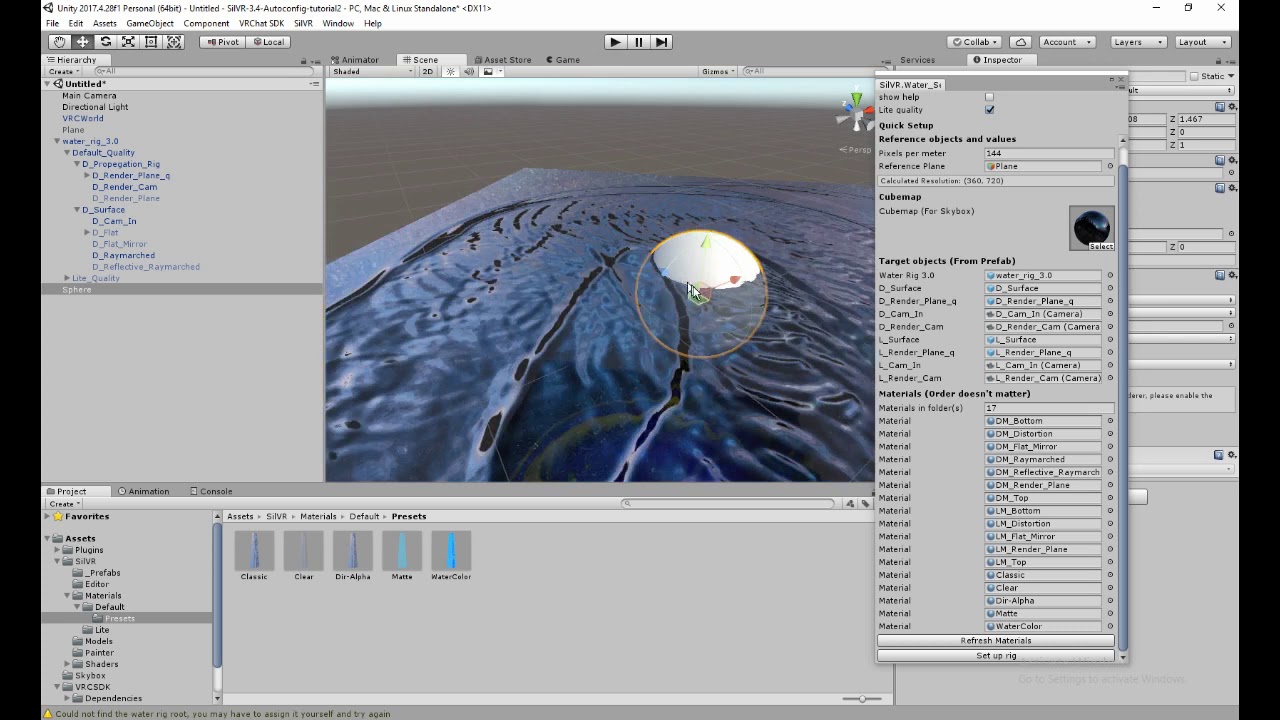
Ah so maybe some constants have to be tweaked if the area is bigger. It might also be a resolution problem over a bigger area : you might need more pixels = performance impact
sinful moss
Anyone have a few minutes to help me brainstorm up a way to make chairs rotate and hold position on an animator?
smoothly preferably
snap could work as well
When you try to use any other gesture, it turns the user back to to the origin rotation
rain shadow
@sinful moss Would using a UI slider be applicable for what you are trying to do?
sinful moss
sadly no, i plan to have peoples hands full with games.
a gesture override was my initial idea, but is it possible to set up stationary rotation on a vehicle type controller?
Someone agreed with me on vehicle controller yesterday, but i fell asleep and failed to continue my question line XD
rain shadow
Rotating and holding a position is possible with an animator
not sure what you're trying to do though so can't really come up with ideas for you
sacred warren
@junior cloak What is the world?
junior cloak
My own world, can find it by typing my name on the website ! It's my theater.
sacred warren
Oh, that one. I saw people in there last night. So people have reported it based on the movie content I guess?
 glad ferry
I've got an odd bug occuring. Triggers work perfectly fine in my world for desktop players, but VR Users can't use it. Is there a specific cause behind it?
 ornate turret
are the triggers placed inside the collider of another object?
vr users can't interact with anything thats inside something
so if you have a button, make sure it pokes out enough for vr users to be able to interact with it 🙂
sudden lily
Are dynamic bones just flat broken for spawned prefabs, or is there a proper way to generate objects using them and have the bones activate?
modern kayak
I haven't heard of that being an issue. But are you aware that dynamic bones get disabled at long distances? That may be what you're running into
the other common issue when dealing with whitelisted scripts is that you need to make sure it's in the original folder. Don't move it to some other folder for organization
 regal hollow
is there a prefab that setups Audio world transitions when a player goes from one area to the next .... say they spawn on a world with its world audio then walks into a small house or shop that would play its audio and then leaving the shop plays the outside world audio?
 grizzled marsh
@regal hollow you can enable and disable different audio sources on a trigger (just make sure it's set to local). If you want more fine adjustment for things like cross-fading the audio as you leave and enter areas, you can instead have an animation that plays on the trigger, and the animation can be used to adjust the volume of the audio sources.
Just make sure you still disable the audio source once you can't hear it (which can also be done in the animation)
crisp crater
anyone know if something changed with the youtube panels yesterday? I have an issue where 80% of videos just won't load any more. I tried the hangouts player prefab and got the same issue
balmy gate
YouTube changed their decryption function yesterday. Broke all third party players. VRChat needs to upgrade youtube-dl.exe
crisp crater
oh thanks - it was driving me crazy
6 months of getting it to a state where I felt comfortable to publish to labs. Then I publish it and suddenly the songs don't work
manic sonnet
@balmy gate Which constants? The resolution is 1000 x 1000 on a plane that is 20 x 20
 cerulean wedge
hello
kindred thicket
Hello, I'm not finding any examples online on how to use the UI Toggle. Would you please give me an example on how to use the UI Toggle (checkbox)? If's it checked turn on GameObject, if Unchecked turn off GameObject.
Thanks
kindred thicket
These are the settings I am using, but they aren't working. Also, how do I make the checkmarks unchecked by default?
Thanks
glad ferry
What's odd is that I never messed with the triggers and VR users could interact with it in an earlier build of the world.
mild spade
@kindred thicket You need to select this on toggles (checkmark on my image) And you can uncheck "Is On" to have it as "false" by default.
kindred thicket
Thank you. I believe I have it working now.
I am triggering it on a custom trigger and toggling Enable
storm plover
How do I add a volume slider to my world for songs? Not sure if it can also be a Quest thing but if so that'd be perfect
storm plover
Also I'm curious of what might cut down file size, since mine is probably gonna jump higher than I want and I already have the music set as OGG files. My only guess is maybe the 3D text I have around, though idk if it's better to just put those on objects instead
glad ferry
Here's an example of what the collider on the door looks like. You see how far it sticks out, yet VR users still have problems. And that's not counting the buttons or even the slider on the video player in the world.
 kindred void
good evening i would like to know if i can integrate orbital gravity script for planet in my map. I already have the script.
near escarp
nope
kindred void
oh ok
hexed yacht
anyone know how to prevent player base tracking from letting vr users go through walls
jolly cedar
How do I make sure audio is not world based
I have sections of a map I wanna have different music on but everything is playing at once
modern kayak
@hexed yacht I'm not aware of that being an issue, at least on its own. Are you referring to a climbing system or something similar that modifies the player's base, or just getting the base and using that information without modifying it?
hexed yacht
no the fact that the base is calculated based off of the camera that can be "leaned into walls" allowing the base to then be in the collider
and therfor they walk through
im working on a collider detection to switch the teleport point to a jointed point behind the normal base point
so yah just getting the base
no modifications yet
update i implemented what i said above and found the Collison is detected correctly but my execution of the joint and timing of resetting the base position to the joint is off
should work if i fix those
hexed yacht
Progress and fuctionality
its works
but my joint is more of a solf follow
so if u stay on the wall you are not moving after a few secs when the second point matches the original
left marlin
I haven’t heard of anyone having the issue with pure player base tracking being able to walk through walls. I know I did weird things with the delta which made me ignore Colliders. This is where I would have to ask how many teleports are you using per frame and do you have it all in one frame?
rain shadow
Unless you mean the base tracking location tracking their player vs their playspace @hexed yacht
Actually I know what you mean and what is probably causing it
hexed yacht
player not playspace
and its that the base is calculated from the veiw withc can be leaned into walls in vr
works jsut have to fix my roation
ill share if you want too
effect is similar to how pavlovs pushes you away form walls
rain shadow
Change the two teleport triggers to have align room to destination to false and see if that fixes the issue
hexed yacht
already fixed
ps i need player tracking not play space tracking
ether way i fixed it with the solution i have been working on above
im off to bed, mention me if you guys need anything
also thx again for the help
left marlin
I need to update the wiki to add approximate player base tracking until the rotation bug is fixed.
hexed yacht
luckly i dont need accurate rotation only location
rain shadow
rotation bug?
hexed yacht
also i havent seen the bug yet
rain shadow
Though I've only used base position + players view direction for rotation so I guess that would be why I haven't noticed rotation issues with base tracking
left marlin
Rotation bug is using player base tracking with two align with room false teleports. When you rotate your head on the z axis, it sometimes rotates your base. It can be some what sickening. The original climbing system before prefabed suffered from this. I doubt people remember this from the climbing trial maps though.
 inland granite
Im building my first map, and i want to know, how to make those fancy Youtube video Players, where you can enter an URL and it will play... how do i make one of those?
stray sand
@inland granite There are a couple of prefabs out there that you can take apart and learn how they work. One that i put together can be found here. https://github.com/jetdog8808/JetDogs-Prefabs it also has a bunch of other prefabs of how to do stuff in vrchat.

GitHub
Prefabs for vrchat to help creators ranging from beginners to more experienced users. - jetdog8808/JetDogs-Prefabs
inland granite
@stray sand so, do you have any problems if i am using them (at least try to use them)?
stray sand
no i put them out there for people to learn or use. There are already a lot of worlds with those prefabs in them.
inland granite
@stray sand alright thank you very much ❤️
stray sand
👍
sinful moss
anybody know how to get the vrc_station "Controls object" to actually control something?
The Doc is vague as heck about it.
 vapid badge
how would I get a map to reflect properly? ive got a cubemap of the map created, and ive applied it to the shader ive got on the glass, but it never quite reflects right.
https://streamable.com/xsz4h
I've seen though, maps that do have proper reflections.
is this a shader issue or the way i've got the cubemap setup or what?


 sinful moss
I've used realtime reflections with more success, but it looks like you might have a rough time on the performance end with that.
 solid quiver
hi guys, i wanna know what won't work in the uploaded world beside custom scripts, can i use prefab to instantiate stuff in the world?
 crystal badge
Hello! I hate to pester but if someone has some freetime would they be willing to give me a crash course on world making?
solid quiver
i wanna join too!
solid quiver
yea i saw that
hexed yacht
no not just the sdk versions
but others made by jetdog and phase i think
nope harcuri
solid quiver
i'd more like a general overview specific to vrchat, i already have experience with unity
hexed yacht
heres the link too their prefab
crystal badge
I understand they exist as do tutorials, but I was hoping to learn socially from another who'd be willing.