#world-development
39 messages · Page 15 of 1
 quartz hinge
 opal goblet
@bold ibex just be aware, that randomisation of triggers is always local. To make it synchronised you need to do some broadcasting trickery
 jolly cape
So as soon as I add the "Vrc pickup" component, I cant collide with the object anymore
Is there a way to fix that?
 maiden halo
Hello !
Do you have a ready-made and working door?
I do not want to do this from the very beginning.
 rain shadow
@jolly cape Set the layer from pickup back to default
jolly cape
I dont want it to collide with anything but the player
rain shadow
Make a custom layer then
rain shadow
Why only the player? that doesnt really make sense
so you want it to not collide with the world?
jolly cape
I want a world where you can build pillow forts and such
So I dont want pillows to collide
rain shadow
but you want to be able to stand on them?
jolly cape
Yeah
rain shadow
Enable the IsKinematic on the rigidbody
jolly cape
Is that all?
rain shadow
And set the layer to default again
It makes it so you can move them around and they wont collide with other non moving things
rain shadow
They wont be affected by gravity though
jolly cape
Thats perfect
rain shadow
@maiden halo What kind of door?
maiden halo
@rain shadow To the door mechanic that opens when you press the handle or from pressure on it by a character ... maybe there are ready-made doors?
Any door to put it in the aisle
which opens and closes
rain shadow
https://docs.google.com/spreadsheets/d/e/2PACX-1vTP-eIkYLZh7pDhpO-untxy1zbuoiqdzVP2z5-vg_9ijBW7k8ZC9VP6cVL-ct5yKrySPBPJ6V2ymlWS/pubhtml you could try the one named perfect doors on that list
maiden halo
@rain shadow thanks, now I'll see
This is a very cool door ... thank you very much
@rain shadow 🔥 👍
 sacred warren
@near escarp When Silent's shader works properly with terrain, it works well.
jolly cape
Does anyone have an easy to modify pillow in square shape and some textures for them?
sacred warren
Silly question regarding sound. Sound always appear to originate from a single point. Is it possible to make the sound originate from the entire object, rather than a point? Rolloff and such don't fix the issue as they just apply to the origin point, not to where the sound comes from, plus it's always a sphere. A good example would be a stream where you'd want the sound coming from pretty much the entire length of it, not a single point.
 sour mantle
Make the sound 2d by using a slider which i dont remember the name but has 3d on one end and 2d on the other @sacred warren
sacred warren
But the sound still needs to originate from the object, would that still work if it's set to 2D?
sour mantle
Yeah
You perhaps need to use curves to make it so cuts off at the end of the sphere and i dont really know how to explain this but you will see yourself
sacred warren
The problem is it being a sphere rather than the shape of the object. It's kinda like a box collider vs a mesh collider, but for sound, if that makes sense.
sour mantle
use box colliders (triggers ofc) to manipulate the sound then
sacred warren
That sound like a complicated workaround. Can sound not just originate from an object then as opposed to a single point?
 halcyon gulch
couldn't you use volumetric radius for that?
 flint gale
I need help. I'm on the www.vrchat.com/home website, and I don't know how to make it launch. I tried launching the great pub, as it is my first time playing but I see people play that world, but when I click launch, it doesn't launch.
sacred warren
@flint gale Wrong room for that, use #vrchat-general-2 or #user-support-old
But in reality, just load the game normally and go to the Pug from In-game
sacred warren
I suspect something has gone wrong with my lighting...
 bold ibex
help please my world crashes
 near escarp
did you add post processing ?
bold ibex
is that it
near escarp
if you're trying to access it on the open beta then yes
sacred warren
Hmm. Bakery is failing on every render now, just because I needed to get this done before the community meetup. Typical.
sacred warren
It tells you to check ftrace.log but doesn't tell you where that file is...
sacred warren
Really bot? Fucks sake.... anyway, I said.. aaaahhhh
 opaque chasm
where do people get the assets for making the world background a galaxy?
sacred warren
Look for skyboxes, that's what they're called.
opaque chasm
tyty
 sweet elk
Hey guys.
Quick question from a nooblet. Is it possible to build & test your world without booting it up in VR?
bold ibex
yes on desktop
sweet elk
I don't want to unplug my oculus from my desktop to boot it in non-vr mode. 
opal goblet
@sweet elk
There is a VBS Script that hooks into the startup process and changes some arguments to make it boot in Desktop...
Sounds shifty, but its widely used: http://secondstrife.com/vrchat-vbs/
sweet elk
Thankyou! I'll look into it.
 reef gyro
is there a bug with animations now in worlds? i been updating my map and over time sometimes the animations break on objects https://cdn.discordapp.com/attachments/593798096660725771/645785204090339348/unknown.png everything was working a week or so ago untill i did this new pickup item.
 bold ibex
ive spent 7 hours something i did screwed up my world too im so depressed
 outer crane
Can someone tell me what Layer the mirror needs to be on to be able to see your own avatar?
 stray sand
Im assuming your talking about the layer options in the mirror component and not the whole game object. The mirror reflection layer has your avatar.
outer crane
ooooo
stray sand
And for the previous messages above. Tales of woe from world development. Had spawning objects break in a recent world. So instead of a video player spawning a portal decided to spawn.
opaque chasm
trying to make a mirror trigger but it says the script exists and i don't see it on this menu on the left
any1?
 dim marsh
has anyone made detailed worlds before?
bold ibex
@dim marsh define detailed worlds? i mean we are all creators, and some of us create based on our own minds.. im not just speaking for myself here.. but yes overall there are those of us that create very detailed worlds and spend up to a year just for a release of one map.
opaque chasm
@rain shadow wait so will anything happen to the world i've been working on?
or can i fully import it
rain shadow
Reverting versions isnt really supported by unity so you would likely run into issues if reverting the project instead of importing the assets into a new 2017 or 2018 project
opaque chasm
can't i save this scene and open it with the 2017 unity
been working on it for 4 hours now e.e
bold ibex
^ What Superbstingray said, also if you bake.. there is zero guarantee that your data will transfer over successfully, especially if you use later revisions and revert too older editions.
dim marsh
by detailed, i mean with like interactible web panels, teleports, lighting, items, etc
bold ibex
I mean.. not exactly the best option.. but there is a way.. and thats by using Unlit on each texture.. which will obviously negate original light source and just light texture applied too.. its a bypass but not a very good one.
@dim marsh Well, you havent left much out there.. i mean every single step in a map defined by what is used is based on how the author see's it rather than the user who plays on it.. i know that with photography especially conditions and light and shadow especially is vital.. but it depends on the kind of map being created.. and the overall artistic perception.. dont mean to be deep on this subject.. but every artist see's differently so although one artist may see a release as his best others may see it from a different perspective.
opaque chasm
trying to test the world by uploading it, first time doing this
this is the only option i have in the SDK, how do i use it
there's no log in or anything
rain shadow
Script errors
if you click the play button at the top it will say something about there being errors
need to find and remove or reimport the scripts that are causing it
rain shadow
if you click the console tab next to the assets tab there will probably be lines of red text showing where the bad scripts are
opaque chasm
the red warning signs or the yellow?
rain shadow
you probably just need to delete the VRChat sdk and import it again
opaque chasm
still all i see is utilities when i open the sdk tab
errors seem to be minimized by like 70%
rain shadow
What errors are left?
opaque chasm
@rain shadow
rain shadow
Try reimport it but follow this guide https://docs.vrchat.com/docs/updating-the-sdk
If you need to update your SDK, it is important that you follow these steps to ensure the update proceeds properly and you don't have any old/conflicting files. ## Simple Update Here's how you update your SDK. If you're just uploading avatars, you can use the following proc...
opaque chasm
@rain shadow Thanks a lot for your help ^^ 
opaque chasm
quick question, i have some things i wanted to fix after uploading the world
how do i update the world quickly like a hotfix
 marble chasm
okay so I'm having the dumbest problem ever
I'm trying to make this mirror and I want it to just show you and other players
but when I set the reflect layer to "Player" it only shows other players and not yourself
I also tried combing "Player" and "PlayerLocal" but then it just doesn't show anything
marble chasm
well yeah when I select everything for it it shows you as well but I want a low quality mirror so it isn't laggy af
 sleek willow
opaque chasm
sleek willow
opaque chasm
"You can not edit your VRchat data while the Unity Application is running"
i keep getting this, trying to upload a world
anyone?
 bronze smelt
Go to the Game view tab. That's where you upload
 fiery magnet
i want to make an avatar into a toy that people can pick up however it only has a mesh and renders in a skinned mesh renderer. im not to familiar with how this works. im used to .fbx, .blend etc... the avatar is visible in the editor but when i go in game its completely invisible. is there anyway to fix this issue, ive tried every trouble shooting step i could find online and im at my wits end here.
 ornate turret
check the bounding boxes of the skinned mesh
in case its being automatically occluded
from the bounding being too small or out of view
(its in skinned mesh renderer component)
opaque chasm
So I made a world and i made one flat cube as a floor but for some reason on some part of it there's something that has colliders and it's like inivisble
can't go through it but can jump on it, any ideas?
and why this happens to the floor?
it goes around all the borders of it
opaque chasm
thanks ^^
any suggestions on how to make skybox more clear? using a 6 sided 4k images galaxy skybox but it looks quite pixelated and blurry in game
near escarp
Use one good looking texture instead
opaque chasm
thanks
last question, anything about the random collider in the middle of the room?
there's some place in the room where i can't walk through, like some invisible random square with colliders, can jump on it but not walk through
and there's nothing on my scene
near escarp
Well, with the physics debugger you can see that collider and click on it
opaque chasm
@near escarp
apparently there's an invisible bed in the middle of the room lol, how do i delete it?
NVM FOUND IT, had to click 'mouse click'
thanks again ^^ idk what i'd do without you guys lol
 boreal thunder
dose anyone know what is causing the light in the corners?
opaque chasm
how do i make my world public? says open to friends
near escarp
Publish to community labs
opaque chasm
i think i did that but still says open to friends
i always see the labs logo
i had a random guy in my world b4 but it was 2 updates ago
i think it's alrdy public but the 'open to friends confuses me
opaque chasm
i can't seem to get the world picture to be the picture i have on my camera preview, it keeps uploading random pics instead
sacred warren
Community Labs is the one that actually says "Open to friends"
Once it comes out of labs, it'll be normal
opaque chasm
ahh, how long does it stay that way
sacred warren
Until a lot of people have been there and spent time there
So potentially forever.
opaque chasm
anyone knows why when i add colliders and pickup to my pillows that are on the bed they just fall through the bed?
bed has colliders
bold ibex
Rigibody maybe @opaque chasm
opal goblet
There is a plethora of reasons:
If you mark a collider as IsTrigger it will not have physics collisions. That goes for both colliding objects.
The objects could be on layers that dont collide.
The collider could be setup wrong (like a mesh collider not set to convex)
sacred warren
I accidentally a spooky. https://cdn.discordapp.com/attachments/628102741037809666/646108644026482717/unknown.png
 sacred warren
Anyone tried Bakery with the Archery prefab before? It's creating weird artifacting on the boards themselves.
 left marlin
👀
Those don’t bake
I never released the updated version to properly calculate lightmap uvs.
sacred warren
I've set them not to be included in the lightmaps now anyway as it didn't make much sense for them to be shadowed 😛
Was there any reason not to release the update?
left marlin
Time involved in making prefabs. Also the bows have been completely reworked, but aren’t ready yet. The new map I have for them keeps getting delayed.
I could make a simple update just making all models fbx’s which will bake and not require blender.
sacred warren
That's fair enough, I was worried you meant there was some technical reason why all the new stuff is broken.
left marlin
Archery was my second map. I knew nothing about modeling. If you look at the objects, it’s just unity primitives merged together. I wrote a script to do it for me instead of learning blender to export it properly. Doing so made it unbakeable. The new map uses baked lights, so I was required to fix it then.
sacred warren
I actually thought they looked really good to be honest.
 delicate marsh
can i use player audio override to make one player louder than others
left marlin
Yes, but the region needs to be global. No way to make one person always louder and not have others near them. I haven’t actually tried though.
I’m honestly curious to know the limits of the system in if it is layer based or position based. How do they determine global?
delicate marsh
so i can't leave it unchecked and just have a box around my microphone object
it says if i have global unchecked it only affects players in the trigger region
sacred warren
Could it be based off an item that inherits ownership (on pickup) and applies the effect only to the owner?
left marlin
Last I heard was that it worked through on enter triggers and something about clients needing to agree. I never looked into what exactly that meant.
You can have it unchecked/not global, but it will need some range on the moveable collider. If that is even allowed.
delicate marsh
yeah i just put like a 2 meter box collider as trigger around my microphone
and left it unchecked
sacred warren
They're in the Worlds page in your in-game menu
delicate marsh
i'm not sure about this voice thing
it doesn't seem to have an effect
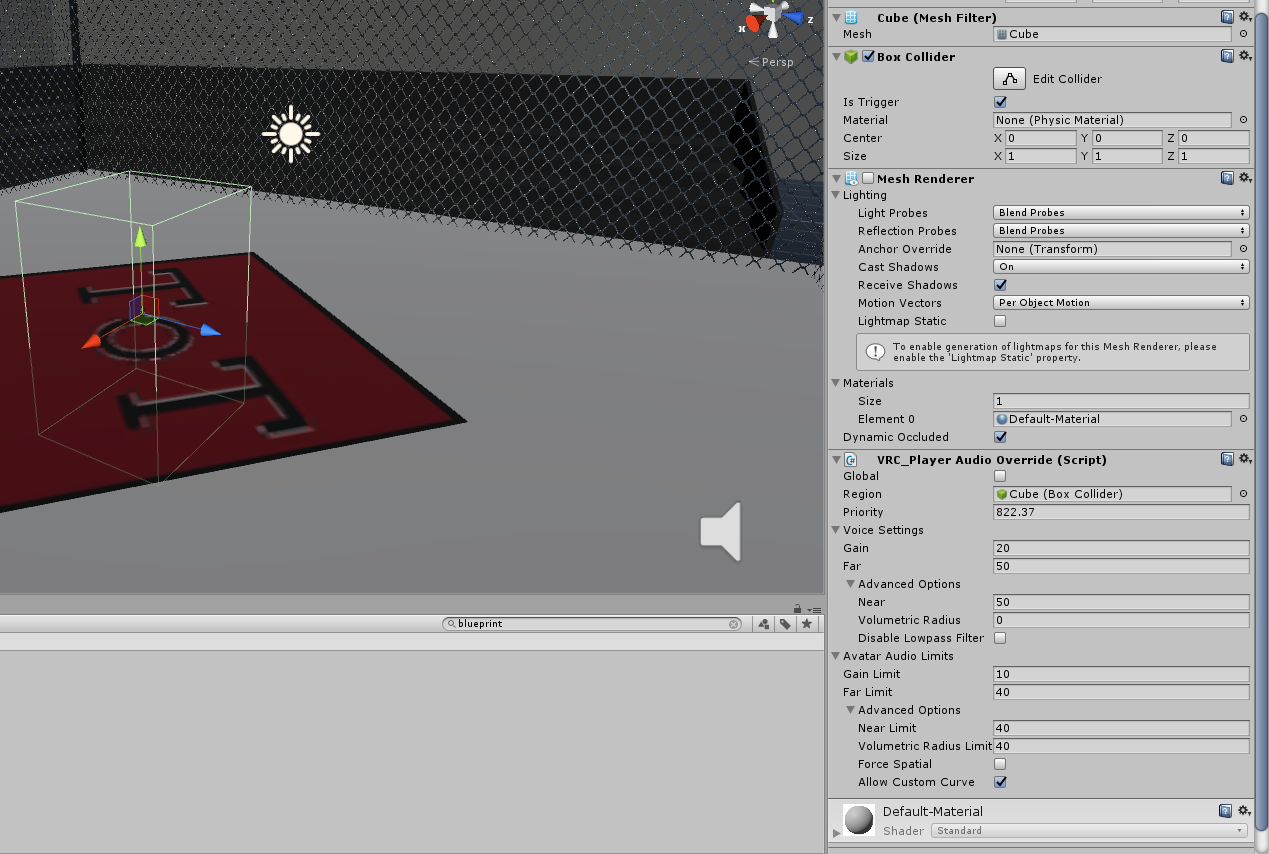
heres the setup
 blazing laurel
@left marlin This generates lightmap UV: https://docs.unity3d.com/ScriptReference/Unwrapping.GenerateSecondaryUVSet.html
left marlin
I already have the fixed meshes. I just never updated the prefab since it was originally created over a year ago.
 alpine perch
Are there any nice water shaders that work in VRC? All the ones I've tried [including the standard one] don't work or cause double vision in VR .-.
sacred warren
Silent's water shader looks good with a bunch of tweaking.
alpine perch
Oh yeah I got that one but...idk how to use it lol
sacred warren
alpine perch
Any default settings you can share?
sacred warren
It's literally a case of just play until it looks right in your setup, it depends entirely on the size and how it's all set up so copy/paste doesn't really seem to work.
alpine perch
Hmmmm...I'll see if I can get it working
bold ibex
how would i have a audio source have mutiple songs that play in a list in background
alpine perch
OH oh I can help!
Make an audio source like and have it set like this
Make an empty game object in the audio source and make an audio bank like so
@bold ibex
bold ibex
ya i see thanks
i done this in my club but that was a playlist you could select this is a playlist that plays by its self thanks buddy
alpine perch
That works too lol
opal goblet
Also regarding Player Audio Overrides...I think the trigger region basically just means that the settings you set in the override only effect you, when youre in the region.
Just speculation tho, havent used them yet
marble chasm
okay I don't know if this is a glitch or what
but when I go to add to the actions. Nothing pops up
like I right click on the plus and stuff but no menu pops up
 meager anchor
Hmm, I ran into a strange problem. This is about my 16th world version update, but when I publish or test it. It's still the old version.
I went back into Unity, placed a cube near spawn and tested the world again, and the cube isnt wasn't there. It's not updating to the server?
Nevermind, I fixed it, it was a script error when I imported post-processing v2.1.1. I just removed the whole darn thing lol
 remote wren
Hey guys, new builder here, any reason why a world would load then exit and immediately load the starter home world?
rain shadow
didn't detect a collider for the player to go on probably
make sure the vrcworld component has a collider under it
thats where the player spawns in
remote wren
Im just trying to load the home_kit prefab atm so im pretty sure the floor has collision
rain shadow
Then on the VRCworld game object go to the pipeline manager component and click the detach button and try reupload
remote wren
Awesome!, got it working thanks 🙂
sacred warren
Possibly a silly question, but for realtime shadows to appear on terrain, does the terrain also need to be in a group affected by the realtime light, or just the object casting the shadow?
bold ibex
How do you make Vrc pickus visble on global scale and not just local ?
sacred warren
@near escarp Found the issue in terms of the info missing from the log. The size breakdown is only echo'd to the log if you upload the world. Doing a test build doesn't actually print any of that info to the log unfortunately.
rain shadow
@bold ibex Add an VRC_Object Sync component to the object
 fair light
hehy, i'm uploading a world, but clicking upload doesn't do anything and the vrccam's just white
sacred warren
Does the first tab of the SDK say you have permission?
sacred warren
It may be stuck on the packaging stage, anything in the console?
fair light
what do you mean?
sacred warren
The Unity console, which tells you what's going on and if there are any issues.
bold ibex
@rain shadow thank you
fair light
it doesnt say anything
near escarp
@sacred warren it should with a test build as well
fair light
like i can test the world just fine
and everything looks good
just that when i'm uploading, i can move the vrccam but it doesnt show anything on the upload thing. It's just white
the upload button lights up but nothing happens when i click it
 balmy gate
@meager anchor always delete the Tests folder after installing post processing v2. Check out Silent's guide for post processing: https://gitlab.com/s-ilent/SCSS/wikis/Other/Post-Processing - it has a lot of common gotchas like that Tests folder thing.

GitLab
A surface shader for Unity providing cel-shading. (Forward rendering only)
sacred warren
@near escarp Just double checked, it's definitely only printing the whole size breakdown when I upload it. Bit weird. Is there something I maybe need to enable somewhere?
near escarp
I don't think so, build and test has always been my go-to for getting that information, and I never change any setting in my projects
sacred warren
I'll close unity, nuke the log then do a local built to see exactly what it logs. The log is a bit of a mess atm as it's an obscene size right now.
Looks like opening multiple copies of Unity breaks the log file, that's what was happening.
opaque chasm
can anyone help me set up a youtube video screen where you can put URLs inside, pause play etc..?
couldn't find a tutorial for some reason
 sharp steppe
You might ask in the karaoke central discord. They've implemented something close to that as a main feature
rain shadow
sharp steppe
Huh, looka like they autoremove discord links. Do you want me to dm you with it?
opaque chasm
super linked a prefab of it, but thanks to both of you
opaque chasm
is there a way to see what takes the highest amount of MBs in the project? trying to make it as light as possible
or if you guys can tell me what usually takes the highest amount so maybe i can get rid of something, i'm at 90 mb atm, expecting to get up to 110 but it's a little too much isn't it?
sacred warren
Yeah, switch to the Console tab, then in the top right of that tab is an option to open the Unity Log. In there it has a breakdown.
Although the sizes are the uncompressed sizes annoyingly, not the post-compression sizes.
 short gulch
Backing up Asylum in preparation for the move to 2018. A lot of bloat in this file.
near escarp
you can create .zip or .rar of your projects btw, much faster
short gulch
Oh? I'll look into that thanks
 dusk sapphire
I have layers set up such that only these 2 layers can collide with each other, but i've noticed that players will "soft" collide with them, where if you jump in them you sort of float down through them slowly, or sometimes end up walking on top of them only to sink back onto the floor. This of course doesnt happen with objects on pick up layer.
Can I not use custom layers to set up custom collision layers or is something else causin this?
short gulch
Also here's a bad but still better look than what I've provided before of the errors bakery is giving me. How would one go about fixing incorrect UVs?
near escarp
Did you generate them on the mesh ?
 crisp crater
heya, I'm trying to pass some values to a video screen to change a video. I can do it with manually set values ("send rpc (add url)" value youtubeblah.com , but is it possible to pass a variable through there? (or poll a text value somewhere)
short gulch
Sorry, hour late response. At work. Yup I have generate lightmap UVs ticked for all static meshes
 severe frost
hello
wanted to ask if anyone knows how to work with PlayerTracker here?
I have this flat cylinder with a plane that has a character image.
I want it so the character faces the player when they go near her.
But I don't think I've set it up correctly.
I used the player tracker prefab in Toybox v2.2
rain shadow
@severe frost Make sure the Y rotation turns the plane the right direction, other than that it will probably work
balmy gate
put Y rotation range at 360 and try with speed to 0
also, did you set the camera into the Render Camera slot of the player tracking?
if not, it will do something weird where something is scaled up based on screen resolution and the player tracker will be in the middle of nowhere
the Canvas component of the PlayerHandle
that's for testing in editor of course...in game, ui shape will assign the camera automatically
sacred warren
Does that script work? I removed it from my candles as I assumed it would be stripped.
rain shadow
Most of the standard unity ones are whitelisted
balmy gate
The following is the complete list of scripts usable within worlds. Components that are not in this list will not work. ## Unity Components - WindZone - VideoPlayer - Tilemap - TilemapRenderer - Terrain - Tree - SpriteMask - ParticleEmitter - EllipsoidParticleEmitter - MeshP...
rain shadow
And I think pretty much all of the standard asset ones are
balmy gate
yeah a good chunk of standard assets. Final IK has some good scripts too
you can also use an animator updating each frame and use UI Button to call Transform.LookAt function which does the same thing in both X and Y axes
sacred warren
Is there any other way of having a 2D animated texture always face the player except for that? Or rather is there a better way?
rain shadow
shader or particle set to facing probably
balmy gate
another great choice if you want configurability or also want to match tilt is AutoCam. The AutoCam needs to have an unchecked camera component on the same thing first...make sure to uncheck "Auto Target Player"!
yea Toocanzs has a great shader for billboards: https://github.com/Toocanzs/Vertical-Billboard/
GitHub
A vertical billboard shader for Unity. Contribute to Toocanzs/Vertical-Billboard development by creating an account on GitHub.
would suggest to avoid particles. also, unlike LookAt or the Vertical-Billboard shader, the particles are rotating based on your head direction, not looking at the head
rain shadow
by default they do
balmy gate
in desktop mode the difference is subtle, but in VR, it is very obvious that something is wrong. If you ever see the grass billboards that turn when you move your head around, that's what is going wrong
rain shadow
you can change it
sacred warren
Yeah, I'm used to seeing that rotation most often on smoke and such.
balmy gate
it's the default at least on particles...not sure if they have a lookat variant... but the Vertical-Billboard shader does it right, so I'd suggest checking that one out
though it is likely not designed for particles
you'd just want to put that onto a normal quad or whatever you have with the image on it
severe frost
@balmy gate I put Main Camera in the Render Camera slot
balmy gate
and you set rotation range X 0 / Y 360
you should test in play mode and move the camera around. should face the camera object if you look in scene view
sacred warren
Hmm, can a sprite renderer not handle this? I'm not familiar with this part of Unity.
severe frost
hmmm
the thing is acting weird
perhaps because it's inside a parent?
it's inside an empty that contains my triggers for it
but the rotation of the cylinder and plane changes when I put them in it
If I put the Plane inside their hierarchy
the rotation changes for Z
and the Lookat Target only does rotation for X and Y
balmy gate
that shouldn't matter
severe frost
If I do the X or Y rotation when the plane only rotates to Z
the plane ends up being stretched
balmy gate
oh do you have skew anywhere?
is this object inside something with non-uniform scale
(make sure Scale X Y and Z are all the same in every object above it in the tree)
severe frost
It's inside a Cylinder that I made flat
that's probably why
balmy gate
yep, skew is mindbending and I still don't understand it, but yea that's a thing that will happen
if you need a flat cylinder for rendering, make a sub object with a cylinder Mesh Renderer on it and make that one flat
 solid heath
so i uploaded a world but when i try to load into it, it gets to 100% then loads me back into the previous world i was in. how do i fix this
balmy gate
if you need it for collision (there's no collision cylinder anyway--it's a capsule) then you can tweak the height and radius directly on the collider component
!outputlog The output log file will have more information what is wrong
 tawny lilyBOT
You can find your output log at C:\Users\%Username%\AppData\LocalLow\VRChat\vrchat named output_log.txt
balmy gate
you may have forgotten to set a Spawn point in the VRC Scene descriptor, or you might not have a surface on which to spawn (missing a floor collider?)
any other bugs loading the scene would also do this. the output log should have some info what went wrong. wait to get booted then open up the output log and look near the end
on new vrchat versions it's named output_log_13:42:33PM.txt or something
solid heath
i have a spawn point and the floor has a collider
it worked but i had messed up some lighting so i fixed that and re uploaded and now i cant load
rain shadow
If its none of the other things 90% of the time its the world id
just click detach on the pipeline manager on the vrcworld object and reupload
solid heath
ill try that
severe frost
it doesn't matter after all
the plane still rotates through Z
I might just need to rotate the image in photoshop just so it rotates at Y when I make it stand the right way
balmy gate
oh I didn't understand what you meant. LookatTarget will reset the Z rotation to 0 too
if you want it rotated, just make a sub object inside the lookat script which is rotated ho wyou want
delicate marsh
So making one player louder than others is not possible
bold ibex
Just have them set there sensitivity to max @delicate marsh
delicate marsh
Yeah but I have a mic in my world and I want one person's voice to drown out everyone else's
balmy gate
the Voice override regions should do exactly that
just enable it locally on the player you want to be louder
like in OnPickup on the mic, turn on a override region that makes you super loud
an OnDrop turn it off
I think it's good to cover the whole map including the respawn area.
oh wait don't turn it off!!
put it off at like z +100000
and to "turn it on", move it to 0 so it is nicely centered around where the player may be
to move objects locally without TeleportTo, you can make an animator with two states: one sets position way off and one sets it to 0, and have two Trigger parameters, mic_on and mic_off that move it. Then in OnPickup, you can use a AnimationTrigger trigger to set a mic_on or a mic_off
severe frost
@balmy gate hmmmm
now its rotating properly when I move the main camera near it
the issue now is that the facing position of the plane to the camera is the side of the plane
so you'll basically just see a flat side and not the actual front part.
solid heath
still cant get it to load up into the world
balmy gate
@severe frost oh you're using a Plane not a Quad?
I would change the mesh filter to be Quad. might also explain why your model was rotated heh
but maybe make the mesh a child object
e.g. delete the MeshFilter and MeshRenderer on that specific object, and add a new Quad object inside and set the material on that
severe frost
ooooh
thank you its finally facing now
I also have another world problem
which is these trees
they're the Broadleaf_Desktop trees in the Standard Assets under SpeedTree
I painted them in the terrain
the problem is the leaves
they move with the direction of my head in VR
on Desktop they are completely fine
Only in VR the leaves move when I turn my head or tilt my head.
I've made the LOD 0 to 100% but it seem to still do it in the build test
there's another tree called Broadlife_Mobile that I use along with it.
but that tree doesn't do it anymore. I think I did something long ago, just forgot what it was
right now when I compare their settings its completely the same
balmy gate
what shader is the fire particle using?
I don't quite see the issue in the screenshot
opaque chasm
it's more to the left on the 2nd pic
well to the right without mirror
shader is the soft one
balmy gate
Yes, unity's default soft particles are incompatible with mirrors because they used a simpler formula for computing the screen position
I don't know why. the fix is fairly easy. lemme see if I have a fixed version lying around
sacred warren
How expensive is it to use particles for things like flames? Example...
balmy gate
hmm I may have struggled getting it to work...so maybe not "fairly easy"
yeah even if you apply the depth correction code as in https://github.com/lukis101/VRCUnityStuffs/blob/master/Shaders/DJL/Overlays/WorldPosOblique.shader

GitHub
Collection of Unity shaders, scripts and prefabs oriented for usage in VRChat - lukis101/VRCUnityStuffs
you'll have the issue that particles billboard based on the camera out the mirror. so you would need to make a shader that billboards them in the mirror too... and still some weird depth issues exist even with the fix. particles are tricky
severe frost
So for the trees that keep moving leaves when I turn my head
I went in VR to turn my head over and over to see if all the leaves move with it, I noticed some parts dont
I went back to Unity and checked, its the FacingLeaves Material that moves
and the one that doesn't is Leaves_3
I couldn't edit the model itself because the settings for it is locked
So I did a work around by dragging the tree model on the terrain instead.
then I dragged the Leaves_3 Material to the leaves that uses FacingLeaves material.
then I went to the hierarchy, dragged it back to the project to make a prefab
then added that prefab as a tree in Terrain.
Repainted the trees using that, now I will see if that fixes the issue
delicate marsh
@balmy gate so i made a cube that has the player audio override on it moves right to 0,0,0 as a child of my mic locally on pickup and moves to like 10000z on drop
but it doesn't affect my audio
or my voice distance
rather
does the cube need to encapsulate all the other players as well?
even though it's local so it wouldn't be there for them?
 queen ferry
Having this odd issue where any new models I add won't load in VrChat
delicate marsh
if playermods is enabled with vocal range set to something low am i not able to use the override for player audio to extend past that?
sacred warren
Anyone know how you achieve the voice reverb effect, for caves and such?
queen ferry
One sec. I can help you there
sacred warren
Or do "Reverb Zones" actually work as advertised?
sacred warren
I was in a world a while back and everyone was echoey.
sacred warren
Yeah, people's actual voices had the proper reverb to them.
queen ferry
I've only heard the local version. Would love to have the proper one.
but yeah. The ladder (and any other models I add) are missing in VrChat while they are visible in Unity
doesn't make much sense.
 cedar nebula
is your world actually updating? Try checking the unity console for errors when you do a build
queen ferry
Yeah it updated since the boxes here are new
(the shader is fine since it's the same one as the boxes. They look bright cause I keep the world dark and I can't see so I set it to like, 8 lol)
balmy gate
A region in a world where user voice and avatar audio properties can be adjusted.
@near escarp there's no mention of what happens when you also use player mods voice together with a playerAudioOverride. Is that allowed?
near escarp
I don't think playermod voice works anymore ?
balmy gate
@delicate marsh have you tried avoiding player mods voice and making a default region
Also did you double check things like the Is Trigger
delicate marsh
yeah it's all set up right
balmy gate
Ok, might be good to have it removed from the sdk if it no longer works
delicate marsh
i just tried
balmy gate
Maybe try avoiding player mods
delicate marsh
still doesn't work
balmy gate
So you have two player overrides: one for default and one for the mic user?
near escarp
it's on the list of : Sure, we'll do it one day eventually
delicate marsh
as in whatever the standard is and then when you pick up it moves the zone to you
locally
balmy gate
Right, @delicate marsh but player mods voice override is deprecated and may not work. Can you try not using player mods
delicate marsh
i'm not
i was
but i took it off
because i thought it might be affecting it
still didn't work
hm
wait maybe it's layering
what layer should my region be on?
default?
delicate marsh
okay i just realized it had been the child of a pickup prior to this so it was set to pickup
will let know if this works
delicate marsh
@balmy gate thank you it was just a layering issue!
 gleaming terrace
I was uploading just fine yesterday but now its stuck like this, been sitting like this for an hour and does it every time i upload now please help
cedar nebula
it's generating your lighting. Just close your Unity to stop it (Cancel button does nothing) and then reopen the project, go to Windows > Lighting and at the bottom disable Auto Generate Lightmaps. You should eventually learn how to bake the lighting but on your own time with your own settings. Check the pins in the #world-lighting channel when you get there
gleaming terrace
ah thank you!
outer crane
Trying to set up a Master Vol. Slider. How do you set it up with Unity's event system?
sacred warren
Any idea what is going on here?
balmy gate
More context to your question would be helpful. What's the problem? Are those random users in your world? or just you? probably someone threw a copy of the old vrchat nameplate template on their avatar.
sacred warren
That's my world in an instance I just created. There's a red nameplate half in the ground that everyone other than I can see.
It's not there in Unity.
Here's the area in Unity. Nothing there (not that I'd expect anything to make a fake red user title anyway).
Even more weird that everyone other than me can see it (not sure if it's because I'm me, or because I was the instance master, or because it's my world)
solid heath
i still cant get the world to load in and i cant figure out why
solid heath
neverminded i think i fixed it
i think it was something to do with the post processing
dusk sapphire
does anyone know what might cause a collider to "soft" collide with players even though its on a layer with collision matrix set not to collide with players? "soft" collide as in players will collide and sink through them occasionally
near escarp
We're still trying to figure this one out afaik
left marlin
Player controller's raycast for finding if they are grounded probably doesn't check for layers properly, but instead considers all layers except for the ones VRChat explicitly set as not colliding with the player.
dusk sapphire
ah so its a known issue and not something wrong with my setup
left marlin
Fionna made an entire world around this bug. Check out balloonicorns
sacred warren
No comments on the phantom red name box floating in my world? I feel I should be concerned about it...
 modern kayak
like lyuma said, it's almost definitely just something on an avatar
you're gonna have to be more clear on when exactly it shows up. Was it one time mysteriously and never again? Or does it always happen? Does it only show up when one specific person is there?
sacred warren
It's not something on someone's avatar. I was there only with a few friends, all of whom I knew well. Everyone in there left and rejoined at some point and they could all see it other than me, it never moved, even when everyone moved far away from it.
In terms of reproducing, I've not tried a new instance as I had to go to bed after this happened last night, but I'll double check tonight.
But yeah, it was just "there" as though it was part of the world itself, but I couldn't see it. It was stationary and didn't appear to be tied to a specific person or avatar.
Everyone's crowded around it in the above picture because everyone wondered what the hell it was.
Shot from someone else's perspective when everyone else had gone.
rain shadow
I've had that appear a few times for me before but a long time ago
never saw it after the nameplate ui update
@sacred warren World Id?
sacred warren
wrld_702c00a8-b5a2-4833-affd-ae2613bd4b8f
rain shadow
Can't get it to appear
sacred warren
It didn't appear for me either, only everyone else so either it was a one-off, or it's not visible to the instance owner.
rain shadow
I'm using multiple clients though
sacred warren
Ah
rain shadow
Yeah like the others said I doubt its your world
World looks very nice though now you've got everything working
sacred warren
Thanks 🙂 Realtime shadows cast from the player onto the ground still aren't working and I can't get the Archery prefab bow to work yet, but it's coming along.
sacred warren
inception bwaaaap sound
rain shadow
its on both clients
yeah reason I didnt see it was I thought it would be at the spawn point
sacred warren
What even is it? An internal bot of some sort? Some crazyness going on with the archery prefab? (although there's nothing placed there specifically in Unity)
rain shadow
Legacy nameplate ui
weird for it to show up like this
maybe it has something to do with this
I would guess theres something broken being triggered by a button and EventSelectorAlways
sacred warren
I have no triggers in the world yet, so it must be the archery prefab. I'll nuke it and see if the problem goes away.
rain shadow
Wonder if you could make that nameplate ui follow a player like the actual nameplate
and possibly manipulate it if you know what and where in the scene its being put
sacred warren
We don't even know how or why it's in the scene in the first place at the moment, lol. Nevermind manipulate it.
rain shadow
Probably can't do anything useful with it
But its still a neat little bug
Can you see if theres a gameobject in the scene at that location?
sacred warren
There isn't, I posted a picture from Unity further back in the channel.
(look for the isometric angled one with the icons)
rain shadow
Is that where the worlds 0 0 0 point is then?
sacred warren
Good question. I don't think so, let me check.
(still reuploading with the archery turned off ATM so that'll take a few minutes)
sacred warren
Lightmaps, unsurprisingly. Then textures, then meshes, then audio.
rain shadow
Ah yeah most of it would be taken up by the terrain lightmaps
sacred warren
They do compress well at least (down from 500MB to 90MB or so) but still. Shame that you have the choice of either performance murdering realtime, or massive baked maps.
rain shadow
Being able to break terrain up into multiple pieces should make it easier as you can set parts of the terrain to have higher or lower lightmap scale
sacred warren
Hmm, not sure I want lightmaps to look shit on any part of the terrain though, lol.
I've already got the trees running at 0.1 lightmap scale.
rain shadow
on some of it it seems like it wouldn't make a different at the moment
as the areas are basically empty with no shadows being cast there
sacred warren
AFAIK those areas aren't even in the lightmap, or if they are, I'd expect them to be compressed to almost nothing. I'll have to check the maps myself.
rain shadow
You aren't crunching them are you?
sacred warren
No. Is there a reason not to do that? Also I see what you mean, the terrain itself is a single 4096 lightmap.
rain shadow
I would think you could get away with crunching the lightmaps on this map because the textures are fairly noisy to begin with so it would be hard to notice the compression artifacts
Are your other textures crunched?
because if the terrain is just one 4k lightmap thats not even bad
How many lightmaps in total is the scene?
sacred warren
Crunching doesn't degrade quality anyway, it's lossless AFAIK. They're compressed too though, set to "Normal" quality.
93 lightmaps, totaling 135MB.
rain shadow
What size are most of those lightmaps?
sacred warren
Only one or two big ones...
I assume the 48MB one is the terrain itself.
That said, why is 4096 the max lightmap size rather than 8192?
rain shadow
can you screenshot this part
sacred warren
Not sure how accurate this is with Bakery though. It said 0.6GB before and shrunk down now, I assume because that was pre-compressed size and this is now the compressed size?
 random owl
Crunch compression is definitely lossy compression just fyi 🤔
rain shadow
yeah very lossy
sacred warren
Oh really? I was told that it's basically like LZMA or somesuch and affects compression times and decompression times, but has no actual effect on the texture itself. That said, I always use 100% so I've never noticed any artifacting.
random owl
On normal compression and 100% you wouldn't notice anything
sacred warren
Hmm, when does High Quality come into play then?
random owl
Even going down to 80% is pretty unnoticeable
If you use high quality the file size doesn't really go down at all usually so it's not worth using
sacred warren
@rain shadow I've reuploaded with the bows removed and the targets hidden. Can you see if it's still there for you?
@random owl Ahh, interesting, thanks.
random owl
Really depends on the situation though what settings you should crunch compress that's why I adjust it on everything differently in my worlds
rain shadow
sacred warren
Hmmmm. Curiouser and curiouser.
rain shadow
The NullReferenceException is also still occurring so none of that was the archery prefab
sacred warren
Hmm. I'll poke around. Thanks for the eyes.
 raw vessel
i can't upload my world
because i created inverted sphere
and i apply mirror reflection unity component
and mirror reflection unity shader
then inside of the sphere i create another flat cube
with 4 more colliders that can serve as wall's
then i was created camera,directional light and empty game object as "SPAWN POINT"
so in that spawn point i change this:
1 spawn size = 1 then i drag & drop that spawn point
inside empty field
2 spawn order = first
3 spawn orientation = align player with spawn point
4 object behavior at ... = respawn
so i done everything correctly like i done menu times before
and when i try to upload my option for clicking upload is greyed out
P.S.
i dont have any other asset's,scripts except vrcsdk
so is anyone able to tell me why is that happen
and how to fix that
please help
sacred warren
Did you put a NPC spawn component on the spawn point?
queen ferry
So anything about my issue with models not porting into VrChat? Any model I add in recently won't show up in game but are fine in unity.
sacred warren
@queen ferry Wrong channel?
queen ferry
this is the world help for 2017, correct?
sacred warren
Oh, you said models so I assumed you meant avatars.
queen ferry
Na.
https://media.discordapp.net/attachments/361741445352259584/646486783822921728/unknown.png?width=1443&height=604
Like this ladder. It's not in the world even though it should be. Anything I've added to the world before a few days ago are working though

I have 2 models that are not porting correctly and I'm seriously confused
sacred warren
You're not accidentally adding them to a culled LOD group or something like that? I assume you're using standard shader on them too to rule things out?
queen ferry
The shader is a wood texture that's already in the world. They shouldn't be culled due to being just added (one is a pick up in a room I don't have on the Occlusion bake)
did just run a test again to see what errors pop but it's just a bunch of uv errors for probuilder things.
sacred warren
If you put a camera there and run the game in Unity, does it still look ok?
queen ferry
not entierly sure how to do that? Clicking "play" has them there though?
rain shadow
Are they originally fbx format?
queen ferry
that's not gonna work, due to 2 different models not loading in (a fire poker pickup and the ladder, both of which are in 2 very different areas)
rain shadow
Since its against a wall it could be occlusion?
also they dont have rigidboides on them?
queen ferry
The ladder doesn't, the poker does, but it has a collider.
rain shadow
Send the ladder mesh?
rain shadow
works fine for me
queen ferry
yeah. which is odd
rain shadow
What shader is it using?
queen ferry
Noenoe, which is already on a few objects in the world
The poker is using a metal shader, which is also already on objects in the world
rain shadow
You haven't baked any occlusion?
queen ferry
I just redid it, just in case and still they aren't there
rain shadow
Try clear it instead and test
queen ferry
waiting on the compress.
I placed the poker with out any shaders and isn't loading, so that's not the cause
Uhg. outa time... I'll have to try this again after work =_=
Appreciate your attempting to help me.
sacred warren
@rain shadow Well that's annoying. Had an almost city wide power cut and my desktop I was remotely running Unity on hasn't come back when the power came back.
rain shadow
Well I don't imagine it would unless it was server type hardware or you were doing other hacky stuff
sacred warren
I set all my machine's power state to "Last Status" which should bring it back online automatically if it's power cycled, but this is a new motherboard and apparently I forgot to do it on that machine. The server I was gatewaying through has a UPS on it, but that doesn't really help in this instance.
rain shadow
Well so long as you didn't need access to that pc for important stuff, unity can always wait I suppose
sacred warren
Still, given that I normally need to try and bake the lighting 15 times before it actually succeeds, which in turn means it takes hours rather than minutes to complete, I'd have liked to have it still running now 😦
rain shadow
You keep running into so many issues for seemingly no understandable reason
compared to everyone else
awfully bad luck lol
sacred warren
I think it's because I'm going in full-force rather than just doing basic little things here and there. For example most of my friends haven't even bothered with light baking, nevermind using Bakery with full GI.
The author thinks my Bakery issues are because I'm using RTX mode with a large landscape, although I'm not sure why that would result in it randomly failing rather than failing in the same place/time each time.
Actually all my issues going back ages ago were light related too (e.g. either realtime would work OR baked lighting, not both).
A question regarding lighting though - if you're using realtime lights and mask them to only affect one group, does what you're casting shadows onto also have to be in that group, or should shadows work regardless?
e.g. I'm using realtime shadows for players and you can see the lighting on their avatars and self-cast shadows, but their shadows don't cast onto the ground.
rain shadow
both the object you want to have shadows cast on and the object want to have cast shadows have to be enabled for the lights culling settings
sacred warren
Ah, then that raises the issue that the realtime light now illuminates (and causes shadows from) the terrain too, which I don't want. I only want avatar shadows to appear on the landscape. How would people normally handle this?
rain shadow
Make separate small terrain objects for the areas you want to cast shadows to possibly
really is no good solution as far as I can think
sacred warren
Well, the whole landscape is where I'd want to cast shadows on to, lol. Basically anywhere where avatars would be. Seems really odd that I can't just have avatars cast shadows onto the terrain without adding full realtime lighting to the terrain itself.
rain shadow
You could add fake shadows that just darken the area where the player is standing
sacred warren
Will probably have to do that. Geez, world design in VRC is just an endless stream of compromises and disappointment isn't it.
sacred warren
Does 2018 actually improve on any of this? I've not seen or heard of anything that seems better about it.
rain shadow
Some nice stuff was added in 2018
but it hasn't been whitelisted yet
So we currently have all the bugs and no new toys
sacred warren
Hooray...
sacred warren
@rain shadow Projectors for the fake shadow, right?
rain shadow
yeah
standard assets > effects has some pre-setup ones
You would also need to use player tracking and prop spawning though...
sacred warren
Hmm... is any of that likely to cause issues or affect performance?
rain shadow
tracking and prop spawning doesn't really have a runtime performance impact
sacred warren
Ah, that's fine then.
bold ibex
Hello, I would like to know how to display the mesh of the chair in the blue outline instead of this giant box. Is it possible?
 past wave
I believe you can just make the mesh a child of the chair, by just dragging the mesh on to it
raw vessel
@sacred warren
yes i have spawn component in my project
put to 1 then drag & drop spawn point object inside of empty spawn field
bold ibex
@past wave Ok, I'm going to try. Thanks!
sacred warren
@near escarp Have you ever seen this red ghost nametag show up in worlds before?
near escarp
Nope, does it appear in every instance ?
sacred warren
Yes, superb recreated the issue earlier.
(scroll back to his images, he basically saw the exact same thing)
near escarp
what's the world ID ? if not public you can dm it to me
sacred warren
It's public - wrld_702c00a8-b5a2-4833-affd-ae2613bd4b8f
The catch though is that I don't think the instance owner can see it, only everyone else which is even more weird.
(I disabled/removed all the archery prefab stuff to rule it out - which is why it looks like things are missing when you reach that part of the map)
bronze smelt
where about in the world does it show up?
sacred warren
Head to your 11 o'clock from spawn, diagonally past the pond. It's next to the tables at the archery camp.
Here, use this professionally drawn map to help guide you -
bronze smelt
There is a lot of NulllRef exceptions being spammed in the log too
sacred warren
Is there any way to figure out what is generating those? I don't really have anything that should be triggering or running to be honest so it's not obvious what's doing that.
bronze smelt
You got triggers in the world?
sacred warren
Nope
sacred warren
I'm guessing nothing immediately stands out then?
(other than the flood of incredibly vague errors)
bronze smelt
Nope, not from the logs at least. I'd start by removing game objects until it stops. Then you'll know
sacred warren
Hmm, unfortunate as it's difficult to test. It doesn't appear for the instance master in my case, so I'd have to have someone join me each time. I'll continue scouring for rogue scripts.
Thanks for looking anyway
bronze smelt
Just load another client
sacred warren
..wait, that works?
sacred warren
.. oh
 glacial dawn
is vrchat having server problems again? because vrc sdk says i have updated my avatar world. but the strangest thing is, it didnt even go through the upload loading bar, it just said it updated. and while in the game its not updated at all!
sacred warren
Check the console, the build probably failed
glacial dawn
i found... something strange "That asset URL is already in use by another world"
UnityEngine.Debug:LogError(Object)
VRCSDK2.<UpdateBlueprint>c__AnonStorey8:<>m__1(ApiContainer) (at Assets/VRCSDK/Dependencies/VRChat/Scripts/RuntimeWorldCreation.cs:654)
VRC.Core.APIResponseHandler:RetryRequest(Int32, HTTPRequest, HTTPResponse, ApiContainer, Int32, Boolean, String)
VRC.Core.APIResponseHandler:HandleReponse(Int32, HTTPRequest, HTTPResponse, ApiContainer, Int32, Boolean)
VRC.Core.<SendRequestInternal>c__AnonStoreyE:<>m__13(HTTPRequest, HTTPResponse)
VRC.Core.BestHTTP.HTTPRequest:CallCallback()
VRC.Core.BestHTTP.ConnectionBase:HandleCallback()
VRC.Core.BestHTTP.HTTPManager:OnUpdate()
VRC.Core.BestHTTP.HTTPUpdateDelegator:Update()
but i dont have anything using a url?
glacial dawn
so i gotta reupload my world then? grreeaat.....
how i have a completely different error ApiFile file_0638c0c4-566e-4916-b60d-c2f642bac76b: Error: Failed to upload file.
File size does not match version descriptor
UnityEngine.Debug:LogError(Object)
VRC.Core.ApiFileHelper:Error(OnFileOpError, ApiFile, String, String) (at Assets/VRCSDK/Dependencies/VRChat/Scripts/ApiFileHelper.cs:1430)
VRC.Core.<UploadFile>c__AnonStoreyA:<>m__15(String) (at Assets/VRCSDK/Dependencies/VRChat/Scripts/ApiFileHelper.cs:858)
VRC.Core.ApiFileHelper:uploadFileComponentValidateFileDesc(ApiFile, String, String, Int64, FileDescriptor, Action1, Action1) (at Assets/VRCSDK/Dependencies/VRChat/Scripts/ApiFileHelper.cs:1527)
VRC.Core.<UploadFileComponentInternal>c__Iterator8:MoveNext() (at Assets/VRCSDK/Dependencies/VRChat/Scripts/ApiFileHelper.cs:2066)
UnityEngine.MonoBehaviour:StartCoroutine(IEnumerator)
VRC.Core.<UploadFile>c__Iterator0:MoveNext() (at Assets/VRCSDK/Dependencies/VRChat/Scripts/ApiFileHelper.cs:849)
UnityEngine.SetupCoroutine:InvokeMoveNext(IEnumerator, IntPtr)
delicate marsh
Can I put effects on somebody's voice I heard people were talking about a Reverb Zone
I figured out how to use the Player audio override script
But I'm pretty sure that's just gain and distance and stuff
glacial dawn
oookaayy... now its just stuck on building and compressing data... i REALLY want to know what is going on
bronze smelt
Try make a new project and upload a test world, see if it's the same there.
If not then it's locally in that project.
glacial dawn
if its the project, what the hell am i gonna do? i worked too damn hard on that world for it to go to waste
bronze smelt
We'll take that step when we get there ^_^
 hybrid mica
hello does anyone know if there a way load url images from ui image panel ?
bronze smelt
@hybrid mica you can use https://docs.vrchat.com/docs/vrc_panorama
VRC_Panorama is used to view Panoramas in VRChat. There is an example prefab of VRCPanorama in the VRCSDK in the Prefabs folder. The VRC_DataStorage component should contain the following values in order for the VRC_Panorama to work properly:
hybrid mica
yea thing with panoramas is it only works on mesh objects and not ui panels
bronze smelt
Only way to do it unfortunately.
hybrid mica
dam was trying make a scrolling ui and with panels it really dose not go away when u scroll down so no idea what else i can do XD
bronze smelt
Scrolling as in it will only show one picture at the time and scroll through it? @hybrid mica
 bronze smelt
Then you got to include them in the world.
hybrid mica
dam so many mbs
queen ferry
So I tried moving my project to a new folder and reimporting everything. the 2 newest models are still not showing up in the world and it's pretty annoying
near escarp
Are you sure the world is updating ?
queen ferry
It is, as some boxes I had in the world was added and moved to the new location
also, the ladder and Poker colliders work
just the meshes aren't showing
near escarp
Are they showing up correctly in play mode ?
queen ferry
I'm assuming that's just hitting the play button, right?
near escarp
yep
queen ferry
yeah they're there
near escarp
So they're static and not relying on any triggers ?
queen ferry
Poker uses Pickup and the ladder uses "teleport player" with "OnInteract"
near escarp
Any chance they're falling through the world when you load ?
and what kind of shaders are they using
queen ferry
Ladder has no Gavity, Poker sits on table. A photo I shared earlier shows the poker's collider on the table
NoeNoe, which is just a recycled Shader, as some things in the world already use it
I'd get an updated pic but I'm havign to run an undeleter as I was a dumbdumb and forgot I didn't copy the files around XD
near escarp
What layers are these objects on ?
queen ferry
Poker is on Pickup and Ladder is Default (from memory)
I tend to not mess with layers
sacred warren
Is there any decent way to handle (i.e. blur or anti-alias) shadow staircasing?
near escarp
higher texel/scale
sacred warren
Hmm, bumping up the texels from 20 to 40 didn't seem to have any visible effect on it (that's at 40)
near escarp
what are the objects scale on lightmap ?
sacred warren
Would that be the archery target, or the terrain that it's casting onto?
near escarp
the object itself
near escarp
Even at very low ?
And you can't really increase the terrain scale itself, so that's kinda difficult to fix
If you had a mesh of it you could make this zone it's own piece and increase the scale of that specifically, but for terrain I have no idea what the workaround is
queen ferry
by shear luck I was able to recover my project.. whew...
I actually had this issue before when I imported another set of models. These was set up for unity already but they wouldn't load the Mesh. I got the other version (only FBX) and they worked. Made no bloody sense. I tried changing the fire poker to an obj but the same issue of it's mesh vanishing
sacred warren
@near escarp Apparently the archery prefab stuff just doesn't handle baked lighting properly due to how the pieces are put together.
queen ferry
Oh, also, asking about the shader earlier: I have a second poker in the world with default shaders and it too doesn't load the mesh
sacred warren
This is what happens when you let it have baked lighting - https://cdn.discordapp.com/attachments/361741445352259584/646124210535530514/unknown.png

 solid helm
@sacred warren Shadow staircase on baked shadows?
left marlin
Ping me and I’ll see if I can package the archery prefabs with bakeable models.
near escarp
@queen ferry Does the mesh have option read/write enabled ?
solid helm
Bakery has an option to fix blocky shadows by replacing the shadow sampling Unity's internal shaders use with one that does bicubic sampling
It's slightly more expensive but it mostly resolves that issue. Unfortunately, you'll need Bakery to apply it
(Or someone could reimplement it, but that's tricky)
sacred warren
@solid helm Yes
@left marlin Not a concern really for me at the moment at least, they look ok without baked lighting. It's the floor staircasing I'm concerned about.
solid helm
@sacred warren It should be in the Bakery menu in your Editor, under the shader tweaks option
sacred warren
"Use Bicubic interpolation for lightmaps"?
solid helm
Yep!
sacred warren
Would swiching them to bicubic after they've been made have any effect?
solid helm
Yes!
This does not change the lightmap textures.
It changes the internal shader function to read them.
sacred warren
Hmm, in that case it doesn't help. I already did that earlier because I thought it may work.
Ah, so in-game they should look better, but not in the editor?
OH
solid helm
After checking that, you should restart the editor and see the changes
It should look different at the very least
sacred warren
Hmm.. "UnauthorizedAccessException: Access to the path "Assets/Editor/x64/Bakery/shaderSrc/ftrace.cginc" or "C:\Program Files\Unity\Hub\Editor\2017.4.28f1\Editor\Data\Managed\UnityEngine/../../CGIncludes//ftrace.cginc" is denied.
System.IO.File.Copy (System.String sourceFileName, System.String destFileName, Boolean overwrite) (at /Users/builduser/buildslave/mono/build/mcs/class/corlib/System.IO/File.cs:124)"
solid helm
Do you have multiple instances of Unity open?
sacred warren
Nope
solid helm
I would say, save your scene, hit Ctrl-N (new scene), quit it and try again
That should clear all the locks
sacred warren
I've actually tried this before (several times), it's never worked. Not sure why it's perma-locked.
solid helm
Hmmmm...
sacred warren
New session, nothing else Unity related is open
solid helm
Can you access that file yourself?
sacred warren
It doesn't exist. I'm in the CGIncludes folder, but that file isn't there.
solid helm
Oh, how weird!
sacred warren
Oh, that's the system one. Let me check for the one in the assets folder.
solid helm
There should probably be one there too. Unfortunately my PC is out today so I can't look myself at the moment.
sacred warren
Yup, I can access the one in the assets folder.
Ran it as admin, worked. That seems like a terrible idea, haha.
solid helm
Haha, just don't run any shady scripts while you do it and it'll be fine
sacred warren
Closed it after that and launched it again normally. Ok, so that's a slight improvement but nothing amazing. I guess that'll do for now.
Oh, your shader magically started working for me a while back. I have no idea why but I won't question it for now.
Last thing for this evening then, is there a guide anywhere on how to set up shadow blob projectors? I know how to set one up, but not in the context of them being applied to VRChat avatars.
queen ferry
Ok, after some struggling, I was able to recover my world. Luckily I had a backup for when we update to 2018 (which reminds me I should re-back up this world) and the poker's still not there. I didn't test the ladder, since I've yet to reimport it into the world space. Though given this result, I don't think it'd load too
near escarp
Any chance the normals are inverted and it's just invisible ?
queen ferry
If it's inverted, it'd be visible (which is hilarious on one of my avatars if shaders are off)
but even then, it's fine as a friend has a version shown on his avatar
https://media.discordapp.net/attachments/596879003206549505/646474792735866909/here_oit.JPG?width=922&height=663
 near escarp
try breaking the prefab then
queen ferry
hm~
interesting...
What I see. When I dragged the model from the prefab into the world, I got this
(which is nothing)
oh, nm I did that wrong.
just tested the idea on an item already in the world.
ah ok. Learning a bit of Unity still haha.
Breaking the Prefab didn't work x,x
queen ferry
So, in an experiment, I downloaded another model and added it, along with bungee cord I already had but didn't add to the scene yet. This is the result:
near escarp
have you tried making the object gigantic ?
maybe the transforms are odd
maybe something is moving
queen ferry
Both poker and the sword have no physics. It's just there. And why make them bigger, if everything else I've popped into the world didn't have this kind of issue before?
The poker itself is the length of the room already by default
near escarp
The only thing i can think of then is that these objects are part of a different asset bundle and they don't get exported with the scene
@sacred warren had this problem recently
queen ferry
Actually, I had that issue before. It just wouldn't compress in general
All three models are not in an AssetBundle group. (listed "none")
If it was, the SDK throws a fit and fails to compile the world
near escarp
not necessarily no
near escarp
it would silently fail but the upload would still go through without the assets
queen ferry
I'll add the sword to a group now.
huh, nice. guess this last one fixed that annoyance.
Either way, all the items wasn't in a bundle, or marked to be in one.
wait a minute
Oh I swear to ef'ing god.
Ok I am SO pissed right now
The FOLDER they was is was some how marked as an AssetBundle even though I didn't do so
This is the second time this has plagued me
Please put in a warning in the next major sdk build to detect AssetBundles
This wasted so much of my time... again
sacred warren
Yup, cost me 4 days
queen ferry
Combined, this is 2 weeks.
OH I'm so upset. At least this is fixed... Thank you for the help @near escarp ... Now I'ma go murder stuff in a shooter till I have to sleep to get this rage out
near escarp
have fun !
sacred warren
@left marlin It's just occurred to me that your Archery prefab doesn't seem to include the bow. It has a prefab called bow, but it's just an arrow, there's no bow, lol. Though there is a Blender file for it so I'm wondering if the prefab is supposed to use that (which fails due to the importer not working with this version of Blender, as per the error). There's also a controller error, but I'm not sure how much of an issue that is.
sacred warren
Yeah, all the other objects are .asset files where as the 2 bows are blender files. Curious choice.
sacred warren
Ok, so after replacing the Unity Blender conversion scripts, that allows it to import it which results in a visible bow, but something concerns me... I'm guessing these shouldn't be missing?
sacred warren
Also the bow in the prefab is still a... little broken. Removing it and dropping in a new one looks fine though (new on the right, prefab on the left)
balmy gate
do you have standard assets?
standard assets is reuired for almost everything. toybox is also common
sacred warren
Aaaaah, no. I removed all that stuff as I was cleaning up anything I wasn't directly using. It's not documented and I assumed something would tell me if it needed it. I'll grab those and see what happens.
sacred warren
@balmy gate Do you need a specific version of "Standard Assets"? I'm using "Standard Assets (for Unity 2017.3)" but it throws errors in the console so I'm not sure that's right - specifically in "ParticleSystems/Scripts/ExplosionFireAndDebris.cs"
sacred warren
Ok, nevermind. Some other assets were half-assing some of the shared files from the Standard Assets folder and that was causing issues. Nuking that garbage has got rid of all the errors (except for the "Broken text" one).
dusk sapphire
trying to use onentertrigger/onentercollider to detect an object in another collider but it isnt working. the former object is teleported into the collider. does the object have to "move" to be detected? or does it need say a rigid body?
ok yep it needed a rigid body
 frosty bone
I have big request for you creators: make a car that can driven with VR. I still hate all cars can drive ONLY with keyboard, WHY should i walk to my pc, go sit and TRY taste keyboard and that is just NOT friendly and way too akward way to drive stupid car with keyboard.
We have already perfect flying objects with VR steering / speed so i am still surprised why there is nothing for CARS.
If you transform the flying object in cars, without flying part so it will only stay on the ground instead go up/down, but it will speed up or brake, and steering left/right. That should not big work to convert it.
Thank you very much.
Perhaps if someone can make asset for VR-driveable cars, i will give you big hugs. Now there is assets but you need keyboard to drive it.
I understand desktop users should have a chance to drive it, but they have now no problems with currect cars setup, but me with VR, i have only hard time to get behind stupid wheel and try taste and swap to VRChat window so i can finally drive a bit... wow, that is way too much. And there is Desktop version flying object that can also used with VR, pretty universal flying system.
Who will make it?
near escarp
Why don't you just drive with the thumbstick in VR ?
frosty bone
Why not?
I am not gonna sit behind my pc, flip my headset up, find the WASD keys and i must swap to VRChat window so i can drive. Its not nice way.
near escarp
but no one does that
frosty bone
Who said that?
near escarp
there's two car prefabs and no one drives in VR that way
you drive with the thumbstick on your vr controllers
no one uses the keyboard in vr
frosty bone
I visited for example race track, but i cannot drive with controllers, and it seems only keyboard worked.
If you said so, i will check some worlds with cars and try if its working or not.
 slow orbit
In that case, what VR system do you have and which world can you confirm behaves this way?
frosty bone
WMR
near escarp
Yeah since it doesn't rely on the thumbstick
slow orbit
OH I think I know what might be up, are you using the thumbsticks to try to drive?
frosty bone
Actually its based on movement of my controller, not using joystick.
I think i tried it, but i will verify again soon.
I can choose between touchpads or joysticks btw on WMR
 tall void
does anyone know how to get qv pens to work? I dragged and dropped the prefab into my world, expecting them to work right out of the box, but they dont draw when i test the world
frosty bone
You need Standard Assets for qv pen
slow orbit
So WMR uses Vive wand input (as far as vrchat cares), and I remember driving cars purely by touching the trackpads, and the usual binds for WMR's thumbsticks sends trackpad clicks which may be what's making it not work.
tall void
ohhh okay thanks mrdummy. ill get that and try again
frosty bone
@slow orbit oke, i will verify what you say 🙂
I go visit known worlds with race tracks and also well known world with go-karts setup
sacred warren
Example one - Ridge Racer. That works well in VR.
dusk sapphire
is it possible to toggle physsound on/off?
I tried toggling the scripts off and it would disable the sounds if you picked the objects up and dropped them, but if someone else did them it still played
bronze smelt
@dusk sapphire Physsound is sending buffered events, so you either got to turn it off for everyone or leave it on
dusk sapphire
aw, i suspected as much
sacred warren
@left marlin Apparently the archery prefab is working great in my world now, so it was the missing dependencies creating the problems. The only outstanding issue then is the archery target but that's minor and isn't really an issue to zero it in the lightmap.
The prefab for the bow itself is still mangled, but it's a quick delete and swap to fix.
dusk sapphire
would it be a problem if a vrc trigger had 2 on interact actions one unbuffered and one alwaysbufferone?
bronze smelt
Yes / No. Was some changes to triggers, so got to dig that up again
Make a Interact trigger that is local. Then two custom triggers with it's on respective buffer
bronze smelt
Allow multiple Triggers/Trigger types on the same VRC_Trigger component
So you should be able to
I think, not done it in a while
bold ibex
does anyone know if aura 2 is compatible with vrchat?
near escarp
it isn't
bold ibex
oki thx
short gulch
Would anyone happen to know a shader that works with splatmaps other than Microsplat? Preferably one that allows 3 or more textures?
sacred warren
Is it possible to have sound originate from an area rather than a spot? I want sound to come from a sphere so that within that sphere the audio remains the same volume and appears to be 2D, but then drops outside of it as normal, with the whole sphere as the origin in 3D space. Is that possible? I'm playing about with falloff and such, but it still seems to come from an exact point.
bold ibex
how do you add post processing in your world?
sacred warren
Look for the PostProcessingStackv2
bold ibex
i have it but where do i attach the post processing layer to and the volume?
 fluid cipher
@sacred warren https://docs.vrchat.com/docs/vrc_spatialaudiosource maybe volumetric radius? Haven't played with it myself
Creates a spatial audio source in VRChat
near escarp
GitLab
A surface shader for Unity providing cel-shading. (Forward rendering only)
sacred warren
@fluid cipher I suspected that but it didn't have any effect. Maybe it only works in-game and not in play mode in the editor?
near escarp
You can have two audio sources for that purpose
One with no dropoff inside the sphere, and another one with dropoff outside the sphere
tall void
so i forgot to make a backup of my world project before converting it to android to make a quest version... and when I tried to convert it back suddenly the lighting and post processing is all gone and I can't get it back... does anyone know how to reverse these changes? the realtime directional light straight up does nothing at all anymore, so im wondering if the conversion changed some setting that i dont know about
modern kayak
@sacred warren volumetric radius should not be used for sound that you'll be anywhere near. Use it for very"large" sounds that are far away
What you want is to change the curves so that it transitions from 3D to 2D within a range.
The spatial blend
sacred warren
I tried that but it seems to remain audible from any distance if I have it set to 2D at all, whereas given the way it draws the line, I'd expect it to be 3D outside the line. Let me get a picture.
So here I'd expect it to be 2D within 20m then 3D from that point onwards...
short gulch
You gotta curve the green line to have an abrupt drop off at the end
modern kayak
No, it needs to be like this https://cdn.discordapp.com/attachments/361741445352259584/626697389134053386/unknown.png

It needs to actually change at some point. The way you have it now it never changes
near escarp
@tall void try running the unity lightmapper once to see if it does anything
short gulch
Oof yup Phase is right, I said it backwards
near escarp
Couldn't you just enable another audio source component within that range instead ?
Seems easier than animating properties
sacred warren
Oh, I didn't even realise I could manipulate that part of the graph. Thanks.
tall void
@near escarp so it does generate a lightmap, but it doesnt look remotely the same as before (much brighter). Plus, I had post processing which doesnt seem to work anymore, and a single realtime light that seems to do nothing now
short gulch
Thats how I have the music zone set up in Asylum and it works fine. No animation necessary, just edit the curve.
sacred warren
Great, this works perfectly. Thanks for that.
short gulch
Nice
near escarp
@tall void You just need to run it, not keep it, so now you can clear all the baked data in the lighting window
you can also create a new realtime light and copy the values from the first one and paste it onto the copy
tall void
but that's not the problem. realtime lights dont work period, and neither does post processing. so it doesn't matter if i make a new realtime light, because that wont work either. and everything in the project is way lighter both before the bake and after than it was before I switched platforms
near escarp
Can you take a screenshot of your unity window ?
 bold ibex
hello me again for some reason the post processing effect works in unity but in vrchat there is no effects i did everything that was said on the website
tall void
@bold ibex did you make the camera you put the post processing on the "reference camera" in vrcworld?
tall void
sorry, i would help you but i dont know what to do either
bold ibex
ye thx anyways 🙂
short gulch
\o/
near escarp
@bold ibex Follow the steps again, it will work if done correctly
bold ibex
oki il try
 vivid storm
What's the best way to do animations in world design? I'm trying to make a fan spin.
opaque chasm
i'm trying to make this place a tiny bit darker so the lights from the lamps will be a little more noticeable
can anyone tell me how to make it a little darker inside?
bold ibex
ye still doesnt work im just gonna give up on the post processing
bold ibex
now my world doesnt want to update anymore
near escarp
@opaque chasm how are you lighting up the whole place ?
@bold ibex Did you delete the test folder ?
opaque chasm
@near escarp with point lights
i guess i can make them stronger but i want the place to be a little darker in general so they'll be noticeable that way
for the atmosphere
near escarp
@bold ibex Check the unity console then
opal goblet
Be careful Ruuubick, people might think youre the user-support :^)
near escarp
eh, i don't mind helping for trivial stuff
opal goblet
Ill keep that in mind :^)
 timid jackal
this world have stolen avatars in it.
it is public, stonel from tng, stolen from twinch.
had stolen dogger avatars but they got removed after a streamer spotted them, still allot off stolen avatars in this world made by crichi
opaque chasm
Most avatars are stolen anyways xd people just change something minor and that's it
timid jackal
this is different these are rips direct from other ppl not taking away textures even from them.
 normal wave
hey everyone, im trying to get an animated skybox.
this is the current skybox and im trying to have it look similar to this, but animated and stars move and its glowy and magical. does someone mind helping me on this?
balmy gate
Is the current skybox a shader or is it a static image
balmy gate
That will be a challenge. It would probably take me 12+ hours of work to make a high quality skybox shader or more (I've never made one this complex)...A lot of shader authors (myself included) don't do commissions, at least for me I have too much on my plate already.
If you're really passionate you can try to pick up Amplify and get working :-p but this isn't the sort of thing you can whip up in a few minutes (which means a few hours anyway for me due to debugging time and all that)
That said, I don't want to discourage you from working on it. We'd be happy to give you help in #shaders if you decide to try to develop something. Just want to explain why it would be difficult for someone else to offer up time to build a skybox shader for you...and a shader is probably the only feasible way to make something performant that does what you want.
So as for simplified versions of what you're asking for: having a few overlapping cubemaps that are added together might be possible. but if you want the stars glowing, you would still need some sort of multiplier on the brightness for each star--maybe simplified version could be some sort of scrolling emission over star textures but it wouldn't look the same
I would encourage you to browse Shadertoy as well..if you find a shadertoy that is similar to what you want, and doesn't use raymarching (too costly for a skybox shader), it might be feasible to replicate that technique in unity: mostly involves converting hlsl->glsl and figuring out what to use as a UV (for skybox, direction is usually determined by camera position - world vertex position).
normal wave
hmm
balmy gate
If you want to learn shader authoring, you need to do some basic research and get a starting point. if you get stuck on something, that's what #shaders is for, but it's going to be several hours of learning and experimenting. If you've written code before, you can write text shaders. If not, you'll want to use Amplify (paid) or possibly scrounge up something in ShaderForge which isn't really maintained any more but might be good enough to prototype something.
normal wave
what about that starnest thing? some people were telling me about that
balmy gate
You can try this version: https://raw.githubusercontent.com/lyuma/LyumaShader/master/LyumaShader/StarNestAvatar.shader
I tuned it so it's less performant overhead than the asset store version
normal wave
ok
how do i use the shader? never used it like this before, only made the skybox in the lighting tab
balmy gate
it says avatar but it may work for skybox. Keep in mind, that even with reduced iterations, it will still cause lag. Don't expect to get good framerates in your world with this..but if you do want to use starnest, please try my version first
normal wave
ok
balmy gate
make a material, and you can put the material into the skybox slot in the Lighting tab
normal wave
ok
balmy gate
if you don't use a procedural skybox it might not provide light to the world so you may need to make your own light sources
it's a bit of a shame. I'd honestly encourage you to have the image you chose as a static cubemap, than be yet another vrchat world with starnest.
normal wave
well i dont have to, im just seeing what the options are. trying to make a cool party world for my friend whose birthday we're celebrating in a few days
i wanted to make cool lights everywhere like a dance party but i'm not that advanced so thats not happening XD but i'm adding party tables and balloons
couldnt find any good disco balls online
balmy gate
a few days is not enough to develop something custom from scratch
normal wave
the world is already made, just want to change it a little to make it more party-ish
balmy gate
oh I just found this @normal wave : https://gitlab.com/s-ilent/neo-panosphere

that might be a cool skybox
This panosphere shader is designed to let you set up complicated skyboxes that can be animated.


 balmy gate
Silen't skybox is not laggy
normal wave
oh
balmy gate
my comment was specifically about StarNest
normal wave
gotcha
balmy gate
Silent makes really well optimized stuff. There's some cool stuff here: https://gitlab.com/users/s-ilent/projects - fake lights is a replacement for having lots of realtime lights in the world, all done in one pass
 normal wave
oooooh!
that will be helpful
ok so you said about adding a material to the skybox tab so ive already done that
now i add the shader to the material?
balmy gate
yes
normal wave
ok so ive done that, now i need to go find textures. im assuming main texture is like a still image, then overlay 1 & 2 is like moving stars or whatever in front of it?
sorry i sound really dumb
solid helm
@vivid storm For a fan, here's how you'd set it up:
Have a mesh for the fan, and a mesh for the blades. The blades should have the fan as their parent. The pivot point of the blades should be the exact centre of their volume. Then you simply have an animation that rotates them around. You can even set this up in the editor, by recording the fan with a few keyframes for the rotation, and then changing their interpolation mode to linear.
Yeah, Overlay 1 and 2 are multiplied over the base texture
So, in my worlds I actually have set the other way around
solid helm
Main is the star field you want. Then you use overlay 1 to fade out out at the horizon. From there you can add more stars when you look straight up with the Sky Cover setting
normal wave
thanks silent! 😄
uh
its going
very
fast
it looks like a snowstorm XD but for real i don't understand how to make this work lol, i tried another background and it breaks for me
balmy gate
I would just turn the scrolling speed way down
Scroll, when set, the scale/offset is used to set scroll values.
Overlay multiplies the overlay over the main texture, designed for masking regions out.
so you'll want to turn those numbers way down probably
either X/Y or Z/W
one you want it moving very slowly, like the night stars
balmy gate
huh. I wonder why
if you edit the shader and remove the [Toggle(_)] bit from the beginning of the line, it will let you set the amount
[Toggle(_)] _ScrollOverlay("Scroll Overlay?", Float) = 0
to
_ScrollOverlay("Scroll Overlay?", Float) = 0
normal wave
i see
balmy gate
I'm a little confused why it's a binary 1 or 0 since it doesn't look like anything multiplies with it
normal wave
yeah i was just about to say the same thing
sacred warren
Hmm, reverb zones only work locally, they don't affect everyone's voice. Now I know I've been to a world before that affected everyone's voice - what do you need to do to make that actually work?
balmy gate
you have an AudioListener? are there any settings for that?
yeah I've seen some worlds do that
normal wave
changing the values isnt really doing anything blehh
balmy gate
_ScrollOverlay2 isn't used. both run through _ScrollOverlay. ("Scroll Overlay?" value). possibly a mistake...but that one should work
does setting it to 0 work at least?
normal wave
they were set to 0 by default .-.
balmy gate
i mean in the material
the value set in the shader doesn't do anything except the very first time you make a new material
sacred warren
@balmy gate That may be it, thanks.
normal wave
so you're saying to remake the material?
balmy gate
not sure...you have the "Scroll Main" and "Scroll Overlay" values at 0 in the material and it's still scrolling?
I can't see how that would happen. the only place it uses _Time.y it multiplies with those values
normal wave
there's no option to set values for scroll main and scroll overlay
"only maintex scale + off X"
like are you talking about this?
sacred warren
"Each scene can only have one Audio Listener." - Hmm, that rules it out using it on reverb zones...
balmy gate
@normal wave wait I thought you removed the [Toggle(_)]