#world-development
39 messages · Page 11 of 1
 rain shadow
 open thicket
checking
rain shadow
Or if the objects have colliders on them that arent on the game object that the pickup script is
open thicket

theres a trigger inside the knife that i want to use seperate from the knife itself
rain shadow
any colliders on the trigger game object?
open thicket
box collider is trigger
rain shadow
What function does that trigger have?
rain shadow
Maybe you could reverse the trigger setup?
Set the knife to a unique layer and have that trigger a trigger on the ropes
 vague panther
Hey guys! A bit of a general question, but I'd like to ask - would it be possible to have a system/trigger that would only activate if all buttons in a world have been pressed? Not at the same time, but basically as soon as all buttons have been pressed at least once, the event activates.
 ancient pecan
Do all avatar worlds have the "hide new" tag on?
 bronze smelt
All worlds that are updated after it's first been published will get the tag.
ancient pecan
hmm
bronze smelt
You still end up in recently updated
ancient pecan
@vague panther You can make a bunch of disabled gameobjects parented to each other with a gameobject with the event at the bottom of the stack, and each button enables one of the parent objects. Once all of the parent objects are enabled the event object gets enabled
bronze smelt
You could also use a animation controller and use bool parameters. Then have a Idle and a execute state in the controller. Set the transition to only happen once all params are true. Then execute a trigger within the execute animation (Animation Event)
vague panther
Thank you so much guys! I'll definitely explore both options.
 raw vessel
hi
quick 2 q's:
is there a way to disable all hierarchical item's component's ?
like i will call it as multi component disabling protocol
or is there a free unity asset that will allowe's me to do that?
p.s.
i asking that because i need to multi disable dynamic ocludde check box
and i know that on static i can enable given components
but thoes it disable them on second turn when i press yes
"yes change Chaldean"
 random owl
Anyone know if I can change the video player UI element from looking like this to looking like this somehow:
Might not be possible but any help would be appreciated
random owl
Nvm found a hacky solution by increasing the line spacing a lot and changing the alignment 😅
 modest field
i have a question in #world-optimization im not sure if it should be here instead
 lapis jacinth
https://gyazo.com/0233df5465244d2edb82be4b855ed2d4 Can someone tell me what this means and how to fix it? Im trying to do some offline testing, but my game gets to the spinning vrchat loading screen and then crashes

 cedar nebula
that's an unrelated error, you've got bigger problems. Are you sure you don't have any other errors? Try disabling Error Pause and Clear on Play if you haven't already then enter Play mode and see if any new problems come up. If not you'll have to check your outputlog for errors and see what's happening from there
!outputlog
 tawny lilyBOT
You can find your output log at C:\Users\%Username%\AppData\LocalLow\VRChat\vrchat named output_log.txt
lapis jacinth
I can enter playmode just fine with no issues in unity, but when I attempt to build and test thats when I get the console errors. im going to go look at my log
Lots of errors in my log that im not really sure what they mean
cedar nebula
send a screenshot?
lapis jacinth
https://gyazo.com/a350547e0505addc9d9c019951717c45 everything underneath is pretty much the same
 cedar nebula
language errors? I've never seen that before. Have you done anything fancy with this project with fonts or something?
lapis jacinth
Nope, I have not touched any of the fonts
cedar nebula
that's really weird. Can you try making a new dummy project and testing that? Might not just be this project
lapis jacinth
Yea give me a bit
I was having issues with my sdk last night, but I did manage to resolve them and upload a couple avatars just fine. If that makes any difference.
 tidal loom
question about the halloween tab, How do i add my world to the halloween tab?
cedar nebula
just give your world the Halloween tag when you upload it
tidal loom
ohhh okay thanks 😄
lapis jacinth
Did the samething with a fresh project, all it has in it is a cube to act as the floor and the sdk.

^from the new project
cedar nebula
that is so weird. Have you tried restarting your computer? That's all I can think of, otherwise I've got no idea
lapis jacinth
Not yet I havent. I wanted to try everything else before that.
lapis jacinth
Ok, makes sense. What do you think is causing me to not even be able to offline test then?
bronze smelt
The same with the "World don't exists error"
Have you set the path in the SDK settings?
lapis jacinth
For the vrchat client? Its automatically pointed at the vrchat.exe
lapis jacinth
Alright, what to?
 lapis jacinth
Alrighty, ill go do that
modest field
may of broke the world 😦
i made a back up file and trying to load it now but not sure if its moving
says it decompressing
 potent trail
Anyone know if at all possible to disable the respawn button? I currently have a set up where under the right conditions it deleted the VRC World Prefab and that seems to disable respawn but i just want to check if there isnt a better way to do so
lapis jacinth
Thank you for the help phaxe, it worked
 mild spade
@potent trail I dont think it is a good idea to "delete" the VRC World prefab. What are you trying to do? A condition where the player cannot respawn to the spawn location?
potent trail
i figured it wouldn be XD but its a fail safe to stop clients from teleporting in to set zone on the map if they do i send them to kingdom come delete their VRC World prefab and that prevents them from coming back with out reloading the world... a deteriant of sorts...
but id like to disable it for the purpose of player needing to walking rather than hit respawn ... more immersive kind a thing you know?
cedar nebula
you can move the respawn point with animations
bronze smelt
Animate the spawn location to where ever you want it to be
mild spade
Like a check point
potent trail
mmm okay thanks for the advice... i got a idea to work with that then 🙂
 grave flare
Is it possible to import an MMD stage to VRChat, asking for a friend? 😂
 sharp pewter
How do I make it so that when I have two mirrors facing each other they don't reflect each other's mirrors?
Nevermind, figured it out, just had to change the layers
cedar nebula
@grave flare Yeah you can. You'd have to convert the pmx file into an FBX if it's not one already, but if you're familiar with converting MMD avatar using the CATS blender plugin then it shouldn't be hard at all
grave flare
Awesome, thank you! 😄 @cedar nebula
open thicket
so something really strange just occured where
each trigger that was previously active
were all erased
inactive triggers were not affected
what just happened?? luckily a lot of the complex ones were not affected but how could this even occur
cedar nebula
define erased? Like it was set back to the default OnInteract AlwaysBufferOne?
open thicket
i spent the last 3 hours adding vrc_triggers to ones that were active
the ones that were disabled in the scene were not affected
cedar nebula
well I know that selecting multiple objects with triggers on them can force them all to be the same thing. If you ever have to do that, minimize the trigger component so they don't get overridden. If you meant something else then I have no real idea
raw vessel
hey there
does LOD component makes object only invisible to player at certain distance or it hide i mean (temporary disable it) and save preciouses resource and restrain CPU?
cedar nebula
LODs will swap out the model at a distance, but I wouldn't really bother with it unless you really need it; like if you were doing a large outdoor scene with a lot of trees
 jolly cape
Is there a way to add a lot of pics to your world without using many materials
(I dont want them all combined as a single pic tho cuz it doesnt look good)
cedar nebula
sadly there's no way around that without combining the textures. Your issue with low quality might be in your texture import settings though, like having too high of a compression or you need to up the texture resolution so it doesn't compress as much (e.g your texture atlas is 8k but it's being compressed to 2k)
cedar nebula
you can atlas the textures but then setup the mesh UVs, so they all share the same material and texture but each mesh is displaying a different picture. You'd have to set that up in Blender though, no way to do it in Unity unless you use Probuilder but PB has god awful UV tools
jolly cape
Well shit
cedar nebula
the auto atlas plugin might help a bit with that? Just make some quads, give them your images, and then just let the atlas put them together and sort out the UVs for you
rain shadow
@jolly cape you could also use the Ui raw image as it doesnt require materials at all
jolly cape
Thanks for the tip!
rain shadow
But notably you have no control over how it looks as its not a material
so the image just displays as is
jolly cape
thats fine
cedar nebula
I don't think that gets around the main issue of performance though, Unity still can't batch them like as far as I'm aware
rain shadow
Raw image should still be better than using a different material for each image
Haven't tested with the profiler but raw image doesn't increase draw calls
 timid jackal
Hello i have a world and would like to change so that if i jump off it i respawn direktly after i leave the main area,
so how do i change the bottom off map (the area that if u hit u respawn)
bronze smelt
It does break batching, but only if the react overlap. So got to watch out for that
@timid jackal in the scene descriptor you can set the respawn height
VRCWorld if you’re using that
timid jackal
Is it respawn height Y ? that is -100 or.
size 1 ?
rain shadow
yeah
make an object in your scene and put it at the point you want the respawn to occur
then take its y value and set it on the vrcworld component
timid jackal
Alright that did it.
im making a optimised mirror what value shows the player atm im hidden but i can se other ppl in the mirror
rain shadow
MirrorReflection layer is the one that shows your avatar
raw vessel
is trigger command...
'destroy object" can disable game object?
bronze smelt
Destroy object does what it says. It destroys, removing it from scene completely
raw vessel
wait...
i know that SetGameObjectActive mean if i hide (disable) game object
the object will be unhidden (undisabled)
but i didn't know for that command can also do invert effect as well
raw vessel
so destroy game object can also be used
but because of that the question is
is SetGameObjectActive and destroy game object do the same thing?
raw vessel
i'm confused now
rain shadow
other will just turn off and on
raw vessel
hm...
i think it's better to use both commands for some object need to be completely removed
am i right?
rain shadow
So you want to delete object and stuff on that object?
bronze smelt
Delete and disable are two different things
raw vessel
ok
so that is why i am right now deciding to apply 2 triggers for some object
bronze smelt
No. If you want to remove the object completely. Use only destroy
If you are going to re enable the object later on, use set game object active
raw vessel
ah i know that you two want to help me
but because two of you giving me deferent choice
i will just in case apply 2 triggers
sorry but that is how i'm convinced
bronze smelt
You’re not getting difference choices
rain shadow
Also isn't triggering stuff on destroyed gameobjects a really bad thing to do?
bronze smelt
Yes
You also don’t destroy object sync items. You reap
You can disable then destroy the object. But why add the extra method when destroy will just make it go POOF
 tacit radish
How do i make where the particles won't go through colliders?
bronze smelt
Enable collision
rain shadow
raw vessel
ok then
so be it
i will use destroy command then
tacit radish
I did that but it still goes through.
tacit radish
rain shadow
only collides with playerlocal
your world is most likely not on the playerlocal layer
tacit radish
Than how do i fix that because i want it to collide with players to.
rain shadow
vrchat doesnt have collision for remote players
rain shadow
You can just add the default layer to its collision but it could break your trigger setup
bronze smelt
You’re not able to set multiple layers on it? Don’t remember atm.
tacit radish
But which one.
bronze smelt
Yeah, so select player local and default
tacit radish
Alright.
bronze smelt
Hen you’ll collide with the world and players
rain shadow
but he probably has it so it triggers on collision
bronze smelt
Ye
bronze smelt
My suggestion would be to move any environment game object to the correct layer and then use that
tacit radish
Well it solved one but it caused another one.
When it hits the wall it stops but stays there.
 daring fulcrum
does anyone know why my unity keeps crashing when i try to upload my world?
 near escarp
Your project is either too complex or you have errors in your console that spam your log
daring fulcrum
it doesnt show any errors but i guess it could be complex
 marble field
quick question: does voice override zones work well on non-trigger concave colliders if I set it special layer in collision matrix, so this collider will not interact with anything? I need complex-shaped voice zone and I don't want to create mix of convex areas
I gueess I cant according to docs
near escarp
If it doesn't interact with anything then it won't work at all ?
 craggy elbow
Hello! I have a VideoSync setup in my world with a playlist of youtube videos, and I tried to setup buttons to skip to the next and go back to the previous video but it doesn't seem to work. I setup the VRCTriggers on both buttons to be SendRPC (Next) and SendRPC (Previous), not sure if I missed a step.
near escarp
screenshots !
craggy elbow
Inbound
The previous is the exact same, just Actions is set to SendRPC (Previous)
near escarp
what does your video sync object look like
craggy elbow
it isnt attached to the TV though, its just the prefab placed in front of it
the middle cube is toggle, left is next, right is previous
near escarp
Did you check your log to see if the RPCs are being sent/received ?
craggy elbow
I'm not entirely sure how to check the log, is that in the build & test?
 left thistle
i am trying to update my world but i dont know how the blueprint ID got detached. anyway to get it back so i dont have to upload a new world?
near escarp
C:\Users\X\AppData\LocalLow\VRChat\vrchat
@craggy elbow
@left thistle Check your content manager in the SDK and click on Copy ID
left thistle
I did but when i try to upload it uploads as a whole new world
near escarp
Does the previous world still exist ?
left thistle
yes
near escarp
Do you see any warnings/errors in your console when trying to upload ?
When you press new build what do you have on the upload screen ?
left thistle
near escarp
ah, reinstall the latest SDK properly
If you need to update your SDK, it is important that you follow these steps to ensure the update proceeds properly and you don't have any old/conflicting files. ## Simple Update Here's how you update your SDK. If you're just uploading avatars, you can use the following proc...
sharp pewter
How do I prevent two mirrors facing each other from reflecting each other's mirrors?
Thought I fixed it last night when it was just about switching layers and that fixed it in Unity, but it's still doing it in-game
 lone shell
is there anyone who can help me with buttons triggering post-processing?
sharp pewter
Just make a button with a trigger on it that sets the game component active of the post processing object with a toggle
lone shell
the thing is, the object the post-processing has to be in is the camera
and I'm not really sure if disabling the camera is gonna work out well
sharp pewter
So make an empty gameobject parented under the camera and then put the post processing under that, and you can enable/disable the empty gameobject for the post processing without disabling the camera
lone shell
hmm, ill try
this happens when i try to put the post-processing in the gameobject under the camera
it basically creates a new one
sharp pewter
should be able to just disable the script component then on the game object
lone shell
no, because the post-processing has to be on the working camera for it to be applied to the user
i tried making it that the button turns the script on and off but everytime i go into recording and select the camera to check the post-processing behavior it stops recording
 bold ibex
you can't turn the post processing off, but you can animate the weights of the volumes
 abstract plover
Never actually put avatar pedestals in a world before
Is it possible to put a pedestal that points to a different user's public avatar?
bold ibex
yes as long as you have the blueprint ID to put into the pedestal descriptor
abstract plover
Hey that's pretty neat. I could possibly let my friend host certain avatars instead of cluttering up my avatar list
bold ibex
yes absolutely
modest field
having problems with the sdk
i try to update it and it doesnt work
just comes up with the clear cache and prefabs
ive tried to delete the sdk folder and download a new one but it just breaks the world
 left marlin
Are you sure you deleted and re imported properly?
modest field
ive go to the folder in unity and delete it and gone to the vrchat site downloaded the sdk but just says clear cache and prefabs
modest field
https://vrchat.com/home/launch?worldId=wrld_bab4e038-b012-4aae-9c99-4dda2abac470 here its a temp world 😄

ren's temp world
near escarp
@modest field You should publish your worlds when they're ready to go through community labs, not much point publishing something empty
 stone hollow
discord server ad 
 prisma moat
how do i set up background sound? ..iv tried audio sourse connected to button /audio sourse connected to vrc spatial audio sourse and other combos but i seem to be missing something
also is thare any good rain setups for vrchat ..i keep finding ones that brake after launch and test
cedar nebula
you should only need an audio source with your audio clip attached, and then if you want it as true 'background' set it to 2D and disable the spatialization in the spatial audio component. There's a 2D audio prefab in the vrcprefabs database you can just take and use (link is pinned in the channel)
prisma moat
ok igive it a try thank you
prisma moat
so i broke my audio somehow on one map i was able to spawn a cube add a audio sourse to it and it worked and plays the music ..on the other map when i launtch it deletes the cube....Error building Player because scripts had compiler errors ..how do i fix this?
near escarp
check the unity console, find out what's throwing errors, and fix it
modest field
is there something I can do to sort my world our like contact unity or vrchat?
@near escarp sorry it's just a world people can get Halloween avatars that's why it's temp
 balmy gate
@modest field your assets folder organization is broken: you have Assets - ren-winter - Assets - VRCSDK
This is improper . Close unity first!!! Then get rid of that whole Assets folder inside ren place 3.0 - if you have any of your data there, move it into ren place 3.0 so it's not in the second Assets. Delete all copies of VRCSDK from your projects.
Then, download the latest version of the SDK from https://www.vrchat.com/home - then open Unity and import the VRCSDK. Finally, clear your console. Disable "Clear On Play" in the Console panel. Then look for any red errors

VRChat lets you create, publish, and explore virtual worlds with other people from around the world.
Everything i'm saying is described better here: http://help.vrchat.com/kb/section/7/ @modest field I'd suggest following the steps there too
modest field
thank you ill try it now
left thistle
how do i add a vrc player name tag as a world object?
cedar nebula
We can't, emphasis on 'we'. If you thought we could because it's on CTF, Steel n' Gold, etc that was made by the devs using scripts that we can't. Closet thing we have is using cameras to take a picture of the nametag but it's a garbage solution
left thistle
oh i might have to use that solution i guess
raw vessel
is there a way to disable all chosen partial sub-components at once
like this shown in pic:
any help ?
i mean is there filter in unity that can only filterize results
and when i click on enable/disable it will enable/disable all of those
chosen components in hierarchy (scene object's).
 mild python
Aaa, was looking into getting my world into Spookality but "All submissions must consist entirely of original assets and the submitter must own full rights to the content (and all components of the content) submitted". Everything in the world is actually created entirely by me but the skybox, the fire particles and the video player aren't, and while I could create my own fire particles, I can't really do the other two ^^' I'm guessing that automatically makes it disqualified for Spookality, right?
cedar nebula
Depends? You can check with the licensing on the assets you've used, you might have the rights to use them for whatever you want. But really if only those 3 things are stopping you, then do something about it! Making worlds from scratch is very hard, and letting just these three things stop you is a huge waste
rain shadow
If the fire particles are the free unity ones I would imagine they're fine
mild python
I'm going to take a look at that, thanks! Yup, you're right, it seems silly to let only 3 small things keep me from submitting the world to the event. I'll see what I can do, I want to eventually learn how to create skyboxes anyway ahah
 short gulch
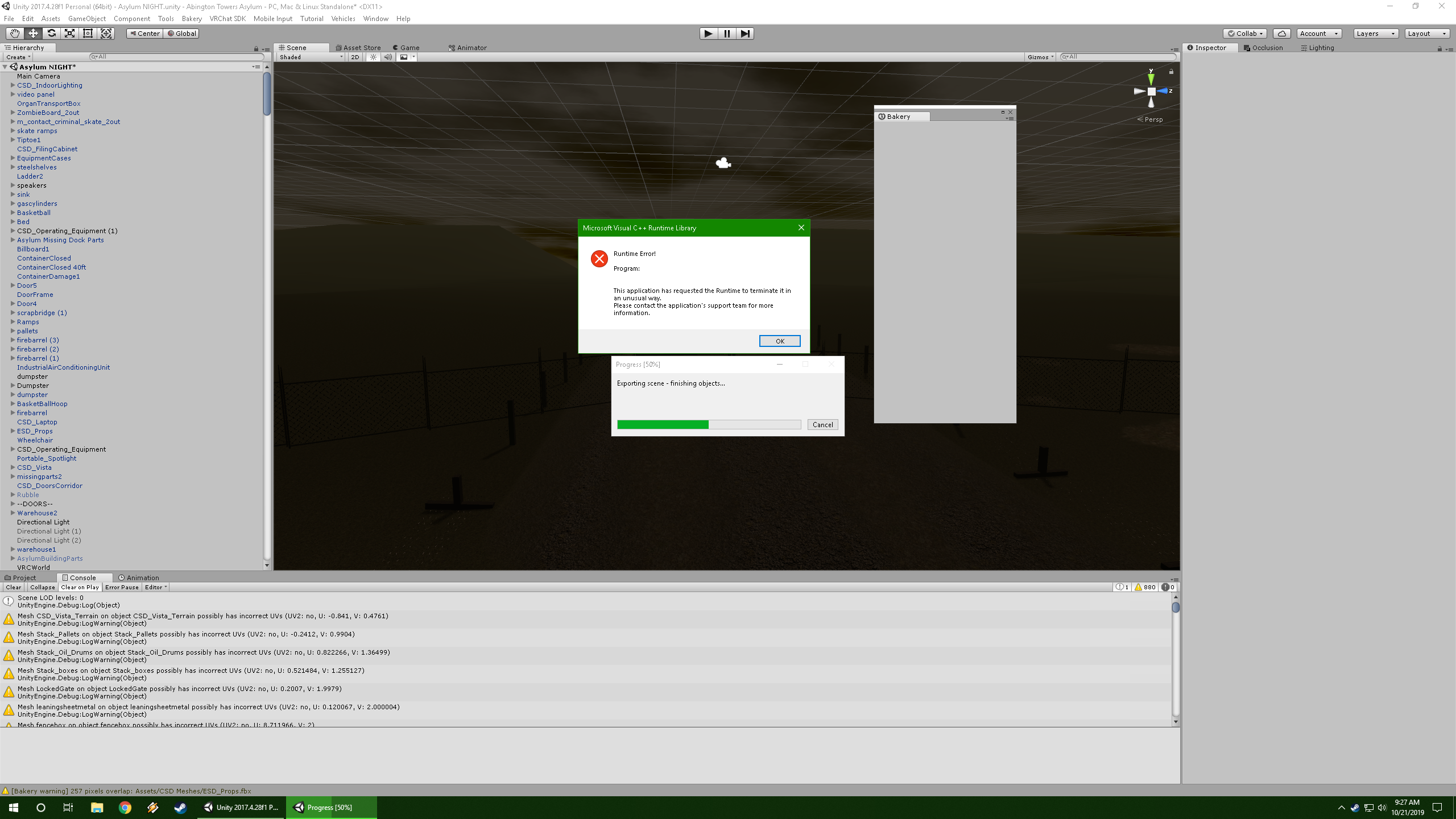
I see the 880 warnings there, but does anyone know what would be causing Bakery to do this? https://i.imgur.com/lsQGeyf.png
 rain shadow
Disable everything in the scene and then try and render
It could be an object in your scene causing the issue
short gulch
Oh ok, thought bakery was supposed to do that itself, I'll give it a try as soon as i get home. Posted that right before leaving for work
random owl
Also since your console seems to be complaining about UV's you could also try enabling Generate Lightmap UV's in your model import settings @short gulch
short gulch
Mmkay Ill see what happens, thanks. I should probably also note that if I click ok, unity crashes, but if I click the close button Unity just freezes.
random owl
Interesting
It seems to also be complaining about UV2 so there might be something messing up there enough for it to crash
short gulch
I'm aware that these models do have super messed up UVs from the start too. Part of why this map took so long to get together. Mostly been using the UV editor in Probuilder to fix them
rain shadow
Did you try enable generate lightmap uvs?
short gulch
Not yet, ill try it out when I get home from work and see what happens
I managed to bake the lighting in Enlighten over the course of 2 days and it turned out looking awful
rain shadow
Unless you've made your own lightmap uvs in blender you pretty much would always want to have the generate lightmap uvs option enabled for your meshes
and ouch 2 days?
short gulch
Ok cool, not sure if it was enabled or not but ill give it a looksie
And yeah, I expected it to take a while because its a pretty big map, but not that long
Artifacts everywhere, black splotches on almost everything, some hallways look like someone puked all over them
rain shadow
Caused by UVs overlapping
which the generate lightmap uvs option is supposed to fix most of
short gulch
Ah okay makes sense
Realtime lit version looked great but ran at about 11 fps, baked version ran great at a steady 90 fps but looked god awful
(Wasn't plannig on keeping it realtime)
rain shadow
Can see that with the fact that you waited 2 days for the lightmap to bake lol
short gulch
Yeah lol
Luckily I was able to play Crossout withou lag while it baked somehow
Heres how it was supposed to look
rain shadow
is it a lot of meshes or mostly just some big ones?
short gulch
An absolute fuckload of meshes. This thing was a puzzle from hell to put together
Ended up having to use probuilder to edit most of them just to make it fit together properly
rain shadow
whats it from
short gulch
All Points Bulletin
Not the current APB Reloaded though, this is from an early beta of the version that shut down 2 months after release
rain shadow
How big is the part you have in your scene?
short gulch
A little bigger than most outdoor vrchat maps ive seen plus a bunch of corridors
 crimson night
Might want to combine smaller clusters of meshes together. Lots of seperate items in a scene adds a lot of bloat to the world size, from what I've seen.
short gulch
Should I use something like Supercombiner for that?
Oh and I also just wanted to mention that after baking the lightmaps through Enlighten the world's download size went from 71 mb to 823 mb.
Is that normal?
prisma moat
anyone know of any good rain that works for vrchat? im looking around atm
 cobalt beacon
anyone know how to get a youtube playlist playing on the vrcvideosync? can get one song haha but not more
balmy gate
no way - you have to put them into the vrchat playlist.
cobalt beacon
How do i do that?
 normal viper
What would you all guess the average world volume level is set to for most players? 100%? 50%? 10%?
I'm trying to decide if I should design the sound in my level around the most probable average, or for 100%. Things like ambient sfx I wouldn't want to be too loud or too quite
 fluid cipher
You should design your world at 100% as that is the base value. If you design it around a lower value it will be more often too loud than too quiet
 graceful sinew
Is anybody else unable to test worlds with the new SDK? Every time I try it just takes me back to my home world. No compiler errors or anything.
 lyric dew
Why does it take so long for my worlds to get public from labs? I have the world extremely optimized with UI buttons, baked lighting, occlusion, LODs and toggles on mirrors and objects. Can anyone tell me why my world is taking so long to be public?
fluid cipher
Pretty sure worlds going from labs to public is a calculation of visits, favorites, and reports. Get a good ratio and it goes public as far as I know
@graceful sinew I think that issue happens when you have no floor collider for players to stand on or no spawn point. Pretty sure it's not an SDK issue but if you think it is I would recommend deleting your sdk and importing the one from the website
graceful sinew
Nevermind, my client path is wrong
fluid cipher
Easy fix at least
lyric dew
Its weird though cause I have 5 favorites on it and 250 visits and its public where I have 1 favorite and 240 visits on an old world thats not optimized at all and its public
fluid cipher
I'm not sure, the calculations are hidden just like how we don't know the calculations of trust ranks
 limpid pivot
A recent world of mine has been doing pretty well but has 1 report. Is it possible at all for me to see what the report was about so I can improve on whatever this person had a problem with?
lyric dew
I'm pretty sure all worlds have that one report. Because I have exactly one on all my worlds
limpid pivot
ah ok
lyric dew
Yeah I just checked all my worlds and even the labed ones and all have 1 report so I think that is 99% a glitch
fluid cipher
Yeah every world starts with 1 report to scare the people that don't know that
limpid pivot
Lol
lyric dew
worked well
fluid cipher
Also you can't see what reports say so if you do get one it's just an image of a middle finger for all you know
limpid pivot
it would be nice to know what people don't like about though. then maybe you could actually address the issue
fluid cipher
God forbid
lyric dew
Basically. I wish they had a faster way to get worlds approved. Like if the world has been in labs for 2 weeks you can request for a manual check.
 solid helm
@short gulch Did you bake with or without Realtime GI enabled? It can really bloat the filesize of a world, for no benefit if you're not using it.
As for combining things, that's kind of a bad idea. Occlusion culling needs seperated objects to work correctly. Also, repeating the same mesh is free, but different combinations of meshes will bloat the filesize.
 fallen bay
does anyone have any idea why rigidbodies on avatars do not work in a world i uploaded? its not just me a couple people have told me this issue exists. i use them for bone rotation cloning and it makes the legs/arms not work in that world
fluid cipher
Are you using the combat system?
 royal bay
i wanna experiment with a depth of field post proccessing effect. how bad could this effect my world?
cedar nebula
performance wise I don't think it does much, but it's really sickening in VR and can be annoying in desktop. DoF looks great for pictures, not so much for other stuff. If you're gonna use it have it be disabled by default and players have to enable it themselves
royal bay
yeah, that's my plan. i just kinda find it a nice look if you set the values to only affect things really up close to you but you can see pretty fine otherwise.
crimson night
I would just not use it at all.
royal bay
i'm making it an optional switch within my world. or atleast i hope to.
 pallid jolt
Idk if anyone else has asked about this or mentioned it, but I was pretty sure at one point the VRChat documentation specified that putting avatars that aren't yours in an avatar world was not allowed. And yet there's currently a world up that has thousands of public avatars in it that don't belong to the uploader of the world. Is this allowed now?
royal bay
i doubt it.
cedar nebula
that might have been when performance stats were being enforced, which they don't do now because the safety system takes care of it. I think it's discouraged because the avatar owner could swap out the ID for something malicious and get the world taken down but I don't think it's against the rules per say
 steel shell
Too hard to chase down most likely, some people get permission, others use alts to mot flood their own avatar lists, plus if ppl don't report a world, I think the creation lab systems now takes most of the world moderation out of the dev's hands, so harder to catch on upload now too
cedar nebula
yeah I would just assume it isn't a problem unless it becomes a problem. If you get permission from people to use the avatars then it's fine, otherwise... hard to verify and enforce
pallid jolt
The world has literally thousands of avatars, I highly doubt the world uploader got permission from everyone who owns those avatars.
steel shell
Well if it's a public avatar uploaded in a world I think they don't care because you aren't stealing the model, just also referencing the lookup Id of a public model
pallid jolt
Idk about anyone else, but I have avatars I've uploaded which are marked public so I can share them with friends, but don't necessarily want them in an avatar world. I'd be pissed to find one of mine in there. But like I said, there's thousands of avatars, I'm not going to browse through them to see if anything of mine is there.
cedar nebula
well you could contact the moderation team about it directly and see what they say. I doubt you'd get much of a response but they might be able to do something about it
pallid jolt
That's what I'm doing atm.
This is the world btw https://vrchat.com/home/world/wrld_3a9b0d36-de2d-478d-a7a6-2e4557119ef1

World that brings public ID's into one world․ Over 9000 Avatars․
modest field
wont let me upload it
left marlin
Uncheck pause on error
You also have other log messages hidden. Could be old sdk too
rain shadow
Make sure to follow these steps https://docs.vrchat.com/docs/updating-the-sdk
If you need to update your SDK, it is important that you follow these steps to ensure the update proceeds properly and you don't have any old/conflicting files. ## Simple Update Here's how you update your SDK. If you're just uploading avatars, you can use the following proc...
 rain shadow
Is the drive you have your project on close to being full?
open thicket
oh
wait you might be right
the gi cache?
both my drives are fine
more than 50+ gbs on each
but maybe i should clear my cache
let me see
rain shadow
When trying to bake what is your ram usage
rain shadow
yeah
modest field
i didnt work 😦
rain shadow
restart unity?
balmy gate
@modest field please turn off clear on play, then clear your console and try again
Also click on the first red error to see more details
modest field
clicking on it nothing happens
balmy gate
I know but next time you try to upload all the errors should show up
@modest field this your issue? https://www.reddit.com/r/VRchat/comments/bwj6rv/help_nullreferenceexception_object_reference_not/ Googled the last error you had

reddit
I am trying to build my world and I run into this error. I have been trying to fix this for hours. NullReferenceException:...
Type t:vrc_scenedescriptor exactly into the scene search bar to find it
modest field
thanks ill try it 🙂
modest field
it works yay 😄
it was the avatars causing it had to get rid of some stuff
but 2 objects in my world keeps bouncing me away from it when i touch it
balmy gate
Try avoiding the use of mesh colliders. Much better to delete the mesh collider component and use Box Collider or Capsule Colliders when possible @modest field
 weak jolt
Would anyone have an idea why certain static objects in my scene don't cast shadows and other static and non-static objects do? I use a mixed directional light. And yes, the objects have Cast Shadows On and it actually did work before but suddenly stopped
rain shadow
Something to do with the layers the objects are on possibly?
weak jolt
The SDK did indeed spit out some kind of warning, I just pressed the auto fix.. Anything specific I should look for?
rain shadow
when you say they aren't casting shadows do you mean baked or realtime?
or somehow both
weak jolt
The objects are set to static and my directional light is mixed. I do bake the shadows
Actually.. Most of them are static, the only one that is casting shadows at the moment is the non-static object
rain shadow
can you screenshot?
weak jolt
That's the problem.. Inside Unity everything is casting shadows, it's only when I get into the map playing that there are no shadows
rain shadow
Try use realtime or baked instead of mixed?
weak jolt
Already tried that with no luck but I will try it again
rain shadow
So you only have one directional light and its not casting shadows in game?
cedar nebula
is that terrain
weak jolt
It is casting shadows on the non-static object as well as the players
And yes, only 1 directional light
cedar nebula
if you're trying to bake lighting on terrain you need to use a special shader for it, otherwise it doesn't work. It's a weird quirk of vrchat
weak jolt
But it worked before without doing anything extra
It literally just stopped working 2 days ago
cedar nebula
try this tutorial and see if it helps at least?
https://www.youtube.com/watch?v=ESGUg7SKmRU&feature=youtu.be

If you want to skip to the gist of it, just skip to the end. Note: I forgot to mention that you will want to bake occlusion whenever using terrain. Open up t...
rain shadow
Realtime isnt working on it either though is it?
weak jolt
Give me a few minutes, I am trying baked right now and will try real time in a few
cedar nebula
if nothing seems to help I'd try asking in #world-lighting, they tend to know more about these bugs
 solemn swan
Hey! Anyone here knowledgeable on triggers?
rain shadow
If you are baking on to terrain though you do need to do the thing igbar linked
cedar nebula
Lamb it's better to just ask your question, someone can probably help you out hours later if no one knows right away
solemn swan
Well, I'm trying to make my very first spooky map. And I have a corridor. So I wanna make it so that once the player reaches the end of this corridor, a wall appears behind them blocking them from going back.
I tried making an invisible collider box with OnAvatarHit making the wall gameobject appear, but that didn't seem to work
rain shadow
Better to use OnEnter/ExitTrigger
solemn swan
That works with avatars?
cedar nebula
yeah, just have it look for the PlayerLocal layer
solemn swan
Right, got the trigger set up like this now, this should work?
rain shadow
Need a box collider with is trigger option checked
So once they walk through the collider it will trigger
weak jolt
Tried realtime and baked, watched the video and did what he said but wasn't successful unfortunately
cedar nebula
probuilder can be annoying about colliders, I'd recommend putting this on an empty gameobject that is just a box collider with the trigger and nothing else. Also only have it activate for PlayerLocal, if you use Default as well you might run into issues
weak jolt
I just don't understand what is happening.. Suddenly the shadows don't work anymore and my whole project is 20Mb bigger
rain shadow
@weak jolt try go to the lighting tab and go to the generate button but click the drop down and select clear baked data
weak jolt
I do that everytime before baking new lights 😄
rain shadow
That is strange then
weak jolt
Indeed indeed
rain shadow
So shadows show in editor but not it game?
not even realtime shadows will show in game?
weak jolt
Realtime do, like on the non-static object and the avatars
But for the sake of the performance I set most objects as static and those don't emmit shadows anymore
rain shadow
whats your baked lighting settings?
weak jolt
rain shadow
The lightmap size seems way to small I think
Also you could try use progressive instead of enlighten
rain shadow
256 is probably way to small for how your scene is
weak jolt
Well I was trying to shrink the size down
weak jolt
Oh?
weak jolt
I see.. I tried understanding the whole concept of lighting but the more I read the more I get confused
rain shadow
a lot of the tutorials for it are not great

VRCat: Community-Run VRChat Forums
Greetings! Over my course of playing VRChat I've noticed that most worlds, mainly the ones that have baked lighting, are done poorly, or in an...
That one should actually help though
weak jolt
Changing to 2048 didn't help either... Oh well, I'll read the link, thank you!
short gulch
@solid helm sorry for the late response, so you're saying that i should enable the realtime GI?
solid helm
No, don't
short gulch
Oh ok good lol. I just started baking it again last night with it off
I also enabled the generate lightmap uv option on all my meshes but it didnt fix the bakery issue unfortunately. So I'm trying Enlighten again. I should probably move this conversation to #world-lighting from now on
raw vessel
hallo
is there a way to extract animations from multiple FBX's ?
any help please
rain shadow
Select the animations you want and press control+D?
 thorn grail
is the world upload server down? i keep getting an error "Request Finished with Error! No such host is known." when i try to upload an update to my world.
cedar nebula
@thorn grail check your unity console for errors and see if you can resolve them
actually just got word the upload servers are having problems
bronze smelt
AWS is having issues yes @thorn grail
bold ibex
how do they display avatar pedestals in a stacked formation? like ive seen them in worlds where they're displayed on a wall in litle squares with their pictures.
cedar nebula
you can just remove the cylinder mesh and then scale down the prefab and stack them
 late blaze
Is there a way to make a Sync Video Stream interactable to everyone in world? Only the master is able to even play or pause it with no apparent toggle to make at least those functions available to everyone even with the vrc triggers set to Local. I can't set the stream's object to be toggled active/inactive locally because non-master clients get spammed with errors when the master interacts with it 
bronze smelt
You can toggle the mesh and set the audio volume (maybe even toggle) But yeah, once disabled, they will have to rejoin
And you should be able to set up RPC's to make others use it. Just got to target the owner/master
late blaze
So, the VRC Trigger on the 'Play' button for example has a SendRPC to the SyncVideoStream's Play function. Does the 'Targets' dropdown under the Method need to be set to Master for non-master interactions to work?
cedar nebula
I don't think the Targets works with anything but Owner. You just need to broadcast the trigger though, so it'd be like OnInteract AlwaysUnbuffered SendRPC Play with Targets as Owner
late blaze
Testing it now 
 opal goblet
@late blaze you should not toggle the streams object anyway. It is synchronised. Meaning that you should not desynchronise its state.
late blaze
Ok yeah, that works. I'll have to do the same to the actual song buttons
opal goblet
Also you can do a AlwaysUnbuffered->MasterUnbuffered
 delicate grotto
What causes the upload image of a world to get greyed out? Like there's a light grey screen in front of the camera. @ me if you know please
opal goblet
However it syncs itself so technically you would need AlwaysUnbuffered->MasterLocal
late blaze
I tried toggling it because I wanted the stream to be 100% local since there's no non-sync video player that lets me use the youtube-dl function vrchat uses for the sync one
opal goblet
Thats not how that component works tho.
Its a synced video player. If you want the non synced video player just use a video player?!
late blaze
video player doesn't let me use the youtube-dl function the sync one has
late blaze
Yeah
opal goblet
that would only work with direct Media files
late blaze
It's kind of dumb
opal goblet
well. Then youre fucked. xD
There is no "good" way of making it localised
It forces a synchronisation. And it can only have one Owner. So you cant put multiple different Videos in it (for each client)
late blaze
I can't get a php wrapper redirect to load every video either like the youtube-dl one does and I can't figure out the difference between the mp4 urls they spit out
opal goblet
Yeah unfortunately thats just how it is.
Either you provide the files yourself, or you need to accept that it will have to be synchronised.
opal goblet
Well they are technically not working for non-masters. They are just telling the master to do it for them ;P
late blaze
I just have the audio volume at 0% as the default that way you have to turn the volume up if you do want to listen lol
opal goblet
Also AFAIK its dependent on the owner, not the master. But if you dont transfer ownership that will be the same
cedar nebula
@delicate grotto It's just like that sometimes, I don't think there's anything you can do about it. It'll look normal after the picture is taken, it's just the preview in the uploading window that goes all gray
delicate grotto
Alright thanks
 onyx kindle
How would one add text on someones screen like subtitles?
prisma moat
o i have a weard glitch going on ..iv had this world working for a wile now ..i flattened out the terrain in a small spot to add some houses i built and uploaded it so i could test it out with multiplayer again for the 5th time" worked the other 4 times" and this happened
crap thought i had a pic but i dont-_- ... so everything wa fine for me but for everyone else it looked like the terrain was on a diffrent height all the oblects were half way in the ground for them and everyone wa standing on diffrent hights compared to me......thay were floating to me.....i was in the ground to them?? nani
im trying the upload again after restarting unity ill get pictures if it isent fixed
cedar nebula
there was some uploading server issues earlier today, could have been related to that
prisma moat
cedar nebula
I'd say try to reupload the world, and be mindful of unity errors
prisma moat
this was the 4th re upload-_- ill lookarround for a fix tomorrow....goodnight
open thicket
anyone else ever get combined meshes that replaced individual meshes in the scene?
it happened after I cancelled a scene that took too long
it would create "Combined mesh (root:scene) for most meshses
- Download attached project "Sand_6_v2" 2. Open scene "Scene 1" 3. Notice that it contains a lot of game objects. That's the same g...
basically it's something like this but I cannot find a bug fix for this
rain shadow
revert to a previous scene save?
open thicket
where can I find that?
rain shadow
If you dont know you may not have been making saves
open thicket
i haven't had any scene backups as in creating a new scene save
😦
i have learned the hard way
rain shadow
Yeah its probably a good idea to do so
open thicket
this stinks
Basically this bug doesn't allow me to lightbake
move any meshes that have been statically batched
even if you remove them from any static properties
rain shadow
you still have the separate game objects though right?
open thicket
it would take several days for me to replace and redo the scene with separated game objects
which this was suppposed to be my spookality submission
I am still submitting, but this backup won't include a lot of animations and areas I've already created
i'm still currently looking for a fix
rain shadow
can you go through and set the meshes in this slot to their original?
open thicket
oh shit
doing that actually made it really bad
lol
it converted the gameobject mesh into a tiny version of the combined root mesh
which you cannot revert back to
rain shadow
ouch
open thicket
wait
actually i may be able to fix this
thank you I think you found a fix
it's now moving
but i wonder if it will affect the lightbake
because previously it would stall majorly during the lightbake phase
because of combined meshes
rain shadow
Good luck though seems like a horrible issue to run into
open thicket
omg this may explain why i've been having those weird occlusion bugs too
because of them being combined meshes
ffs this is some stupid bug but if everything works I may be able to turn this WIP into a full project again
Cheers @rain shadow
 vale jay
I was just wondering, If anyone ever used UE4 Geometric brushes then import that to Unity instead of using ProBuilder?
I Did couple tests and it was successful so far, though didnt try Layering stuff
Just checked the model inside Unity and couple textures and it looked ok
cedar nebula
@tacit radish check the channel pins for the vrcprefabs database, you can find the Not Bad Cars prefab in there which is a really good car prefab
tacit radish
Thank you
short gulch
I cant remember the name of the prefab I use for cars unfortunately. It uses a sporty red 4 door sedan as a base model and is really good for making realistic vehicles that dont flip out at the slightest tap or even rollover. It was shared by someone on here. It has a radio, normal and sport modes, mirrors, lights and a reset button that I dont think works currently. Dont remember who shared it initially either unfortunately, but I have the prefab if you want it.
Pretty sure i just found it. No wonder i didn't remember the name, it was just a bunch of boxes. Heres their original post.
QUOTE:
If anyone wants it heres a update to my car prefab now it switchable Normal and Sport mode https://drive.google.com/open?id=11boGQsdbtMytq73Njkd9_IK05U5T6cxE
thorn grail
is the world upload server still having issues? still cant upload an update to my world.
cedar nebula
I don't think so, but you'll know based on the error you get in the console. If it says something about the amazon servers then yeah it might still be the uploading servers, though I haven't had a problem recently myself. If you get something else for an error then you might have a different problem
thorn grail
ya my error is from the amazon server ending in "Request Finished with Error! No such host is known."
mild python
Still got 1 hour and 11 minutes to submit to Spookality, right? Timezones are confusing
cedar nebula
@mild python even if you're not finished right this second, I'd submit now and then finish any last minute things as soon as you humanely can. I don't think the judging begins right away. You got 20 minutes
@unique comet you typed into the search field for the hierarchy. Just clear out the search field and you're good, just look for the "rwwq"
mild python
Thank you, @cedar nebula! Appreciate it, just submitted it!
 unique comet
hol up
how can i set up a teleport system?
because i wanted to make doors
but the texture would oof
soooo any help?
prisma moat
so im gonna try another upload today "if it works" thares nothing in the error console and iv checked the terrain mesh and it all looks good. after testing last night it seams like for anyone who shows up it instance the terrain and moves it all. the objects are still in the same location but the terrain ,trees,grass have moved for them up 6 meters and to the south by 50meters ...dosent seam to have changed for east west exept 6 meters up... if she walks to her edge and falls off "still 50m from my edge" she falls throu my terrain, she dosent even see my terrain and i can walk out to my edge, looks like im walking out in to the void for her
prisma moat
so it seams to be ok now ..for desktop atleast . it might of been something with vr that was messing up. i wont know until i get a vr user in. if it was just broken for vr users what might it have been?
bold ibex
Anyone knows how to make a particle effect stick to a moving object?
 queen ferry
Yo~ So I'm wanting to make one of those spiffy pannels you can aim a laser at but I'm unsure how to actually make one x,x
 fervent scarab
aim a laser at? can you elaborate a little more the function of this pannel?
queen ferry
Er~ Like the UI menu you can spawn normally but already in a world. I want to make a pickup-able control panel and instead of blocky buttons, I want to use one of those UI like panels
balmy gate
@queen ferry You're looking for UI Panel / UI Button in the Create->UI menu
queen ferry
Oh? pokes around
balmy gate
Combined with a skinny Box Collider and a "VRC_UI Shape" Component on the generated Canvas object
make sure to set Navigation to none on all of your widgets (especailly sliders) or VR users will randomly move sliders with the touchpad as they try to walk around
queen ferry
Holy crap this thing's massive haha
balmy gate
want a pickup? put that canvas into another object and put a VRC Pickup script on that one
balmy gate
make sure to have the Box Collider for the Canvas slightly in front (in the z direction) a tiny bit so your laser hits it first before hitting the pickup box collider
queen ferry
Yeah, figured as much there~
balmy gate
all ui widgets have navigation on them. sliders cause the most trouble but I always set Navigation to None on any of them just in case
queen ferry
I'll have to poke more with this. Ok~ One other question was how do I replace a sit animation with a custom one for someone that will sit in it?
balmy gate
you have a station (chair)? I think you make an override controller just like you would for an avatar, and you replace the idle animation on it
queen ferry
Ahhh~ ok~♫
balmy gate
then put that override controller into the station script as the animator
queen ferry
I figured that would be as simple.
balmy gate
but to be aware that this will prevent avatars from using their custom emotes in the chair. it will be your emotes instead
queen ferry
It's temporary
sweet. Figured the chair was that simple. The UI thing I'll have to experiment with later~
Thank you bunches ❤
One more: If I have the UI Button change the screen (From say "Main menu" to "Music Selection"), would I need another UI Canvas?
mild spade
@queen ferry You can use many screens with one Canvas. You would just hide one screen while showing the other. (setGameobjectActive) Also all UI functions are local, if you want to broadcast to others you would need a VRC trigger. You can watch this video to help you https://youtu.be/us-yO_E31gU

This tutorial shows you how to make Unity UI Text and Buttons. With the buttons you can activate different functions but these functions will be local to you...
bold ibex
anyone know how to fix the tpose bug after sitting in the vrc station with final IK ?
 cobalt sluice
Is it possible to see trail renderers in mirrors? Mine don't show up
bold ibex
Anyone knows how to allow someone to get off a chair and make them stay? like I want to make a ride where you sit down and the animation takes over.. when the ride is finish, you are then allowed to leave? Anyone knows how to do that?
cobalt sluice
@bold ibex set the station to "Disable Station Exit", then add these triggers:
OnInteract -> Station - SendRPC (UseStation), ActivateCustomTrigger (Exit Station)
Custom (Exit Station) -> Station - SendRPC (ExitStation)
and set the delay in seconds for your Exit Station trigger to be whatever the duration of the ride is
Also set the Exit Station trigger to Local (check Advanced Mode) and make the RPC target Local
bold ibex
Has anyone got an ambient smoke/pool steam/fog particle they wouldn't mind sharing with me 🙂
 fossil zodiac
im having trouble with the vrc pickup...
i have for example a wine glass, i put a mesh collider on it, the object sync and the vrc pickup
but i only pickup like collider, the mesh is not attached and wont move with the collider
balmy gate
is anything set to Static?
cobalt sluice
@bold ibex I modified one of the particles in this pack to make fog https://assetstore.unity.com/packages/vfx/particles/starter-particle-pack-83179

Easy to customize particle effects including sparks, bokeh, fireworks and lightning bolts. Complete with extra textures. All textures free to use in your own Unity projects, paid or unpaid.
fossil zodiac
my world is seen 4 times in vr instead of only 1....is this some camera setting or post processing?
im super confused
fluid cipher
Post processing
If you use features that are unsupported in VR you'll get double vision or worse, check out https://vrcat.club/threads/xiexes-lighting-tutorial-how-to-get-good-at-baked-lighting-101.2081/
VRCat: Community-Run VRChat Forums
Greetings! Over my course of playing VRChat I've noticed that most worlds, mainly the ones that have baked lighting, are done poorly, or in an...
queen ferry
is there a way to guarantee to get 2 test clients into the same test world, or is that bugged? I'm getting frustrated with having to launch 4~8 clients just to get TWO into the same world to actually test it...
and then one I do get sometimes can't even use teleport triggers =_=
opal goblet
@queen ferry Using local testing for multiple clients is generally not recommended, as some stuff can break.
Also they should generally get sent to the same world, but sometimes that just doesnt work.
Best way is to test with two seperate accounts, but thats pretty tidious. And thats just how it is...
queen ferry
I'm not uploading the world to test it with 2 accounts. The local test needs to be fixed. The only thing I know that usually doesn't work is stations, since it sometimes teleports all your test clients to it, which is fustrating though amusing
and why give us the option to multi-client test if it shouldn't be used?
fluid cipher
The same reason we have future proofing but shouldn't use it
queen ferry
I don't even know what it does (my fp is disabled, since it kept crashing unity). This has a pretty clear purpose though. Local testing.
 dry vale
How do I assign a custom shape for a chair trigger? I've done it before but it doesn't seem to want to work
bronze smelt
Create a mesh, disable the mesh render and assign a collider to it
@queen ferry It's not that it shouldn't be used, but something you got to look at when testing specific things.
Basic unity and SDK stuff will work locally. But when you start getting to the more advanced networking things, you might end up getting unexpected results running it locally. Because you aren't able to send networking events properly
queen ferry
Still needs to be fixed.
dry vale
Am I supposed to use a mesh collider? There's no way to turn a mesh collider into a trigger (without making it convex)
opal goblet
@dry vale No the Mesh will determine what the "blue outline" looks like. The collider is just there so you can interact with it.
Use a primitive that gets close to what your chair looks like
bold ibex
can someone help me with a world problem?
balmy gate
Ask away. Lots of folks read this channel @bold ibex
bold ibex
uhm im having alot of trouble uploading a world
balmy gate
In the Console panel or window, if you see any red errors in the console panel or window, can you paste or screenshot them?
If you do not see any errors, in the console panel, Disable the "Clear on Play" button, clear your console and move some object a tiny bit so it changes, then try another upload and show all the red errors you see
Also questions to confirm: what unity version? Which sdk version did you import? And are you using PostProcessing? If using PostProcessing make sure to delete any Tests folder inside of PostProcessing
dry vale
@opal goblet Which object should the Collider be on
opal goblet
Same object the Station script is on. Same goes for the mesh. And then have a child of that gameobject that is the actual mesh. I think thats how that worked
tacit radish
Does anyone know how to make a working scope?
dry vale
You can use a Camera and a Render Texture
Or, you can use a magnification shader.
The Magnification shader behaves more realistically but it will have a bad resolution because it will only upscale the pixels that are shown through it
The Camera method is your best bet
Basically the render texture can be used as a texture on a material, and will show whatever the camera is seeing. If you put the render texture on the inside of the scope, and the camera on the other side, tweak the Field of View slider on the camera (for zoom level) and you're good to go. You can also add a transparent scope reticle on the scope as well
@tacit radish
Make sure to turn down the resolution of the render texture and camera though, because it doesn't need to be that high when the scope is so small
 verbal breach
hi, i'm making a world with the last sdk in the 2018.4.9f1 , and I included the VRCWorld prefab
but when I click the build and test option, the game crashes
anyone knows why?
i'll try with an older version
balmy gate
@verbal breach If you intend to be testing the Open Beta, You should be using 2018.4.11f1. If you intend to be beta testing, PLEASE go to #open-beta-info and click the labs icon on the second to last notification to get messages about the beta.
If you are not interested in beta testing, please use the latest stable version of unity for VRChat which is 2017.4.28f1 ! Do not use unity 2018 unless you intend to be beta testing
balmy gate
if this is for 2018 and/or beta we should move the discussion to the open beta channels
balmy gate
no, 2017 to 2018 is a long migration and riddled with the usual bugs and incompatibilities, this being but an example. but I think after the end of this month maybe...
good to keep in the back of your mind because 2018 is coming :winteriscoming:
bold ibex
I get this strange effect on avatars with standard shader.. It appears at certain angles
Like an off on switch
I have baked lights and a real time light
do I need light probes?
 past burrow
hi guys, the comunity labs checkbox does not appear when uploading my world, i tried detatch the id to use a new one but still doesnt work
i dont have the most recent sdk version, does it has something to do with it?
mild spade
Very likely. Have you tried with the new SDK? Unless you are using a very old version of the SDK
fervent scarab
I blame @solid dock
solid helm
You probably shouldn't do that for no reason
@jovial vapor Because of how Labs works, the best way to answer that would be to ask your friends
Unless a world breaks rules, it won't be removed without reports (IIRC)
fervent scarab
I got my boss death working really well. It's looks like im gonna get it polished up so i can drop it into my Spookality world this saturday!
prisma moat
hit a wall.. thares onavatarhit for onentercolider but is thare something for onexitcolider?
trying to make rain /fog turn on and off depending on player location
mild spade
Use OnEnterTrigger instead
prisma moat
dose it work with avaters entering a collider?
i have 9 sections of rain emiters ..i want to turn one on when i enter a colider with the avater and turn one off when an avater leaves the colider
if i could add a colider to people that enter would be nice but i dont think i can
mild spade
Yes, OnEnterTrigger is better than OnAvatarHit.
prisma moat
ok so it dose work with avatars?
mild spade
Keep in mind that if the collider is covering the player hands (with VR), they will have a very hard time pointing at things.
cedar nebula
put the trigger on the MirrorReflection layer and you won't have that problem
sharp pewter
I'm trying to make a hot tub, does anyone have any recommendations on how to make a bubbling/boiling particle effect?
sharp pewter
Nevermind, found a good prefab for $10. Link if anyone's interested: https://assetstore.unity.com/packages/vfx/particles/environment/hot-tub-jacuzzi-bubbles-149509

A realistic hot tub jacuzzi water bubbles effect.
The effect is comprised of multiple elements including water surface, water bubbles, water small splashes and water mist.
The combined effects are available in multiple shapes (square, oval, circle) to be scaled and placed...
 ripe garden
Hm I would use some plane particles that get bigger and than fade out to make the water splashing, and the mist is just some slow rising particles with low alpha that fade over distance
But if you really need a very realistic jacuzzi and don't have time to make/hunt for textures the prefab one is ok
dry vale
anybody know why i can trigger my chairs from across the map?
cedar nebula
your proximity on the trigger might be really high, the other thing is that colliders can screw with the range and make it pretty much infinite if you position your hand right
dry vale
what do the colliders do that screws the range up so bad? My proximity is 2. setting it lower doesn't help
rain shadow
It pretty much just resets the raycast distance
dry vale
so how do I fix that?
rain shadow
Depends on your setup
dry vale
On what exactly?
cedar nebula
not much you can do, it's a vrchat issue. If you have a collider between you and the chair it'll always be grabbable from really far away
dry vale
that's really dumb...
rain shadow
Its possible putting it on the ignore raycast layer could fix it
I've never tried doing that though
and i mean the object thats between you and the chair not the chair
cedar nebula
I don't think so, ignore raycast is more to do with the ProtectCameraFromWallClip aka 'raycasting' then the actual raycasts VRChat uses
dry vale
i mean there's a lot of things between me and the chairs...
by virtue of how worlds work...
rain shadow
Even the pug has that issue still I think
It can be annoying though, can just have a toggle to disable all the chairs so they don't constantly highlight off and on
cedar nebula
the pug was the entire reason the bug happened in the first place lol. They added it so that desktop players could grab stuff off the tables and instead introduced this bug and never reverted it 😭
rain shadow
Pretty sure desktop still struggles to grab stuff of those tables
cedar nebula
yep, not only did it not work but it also created an even worse bug
rain shadow
yeah ouch
pretty bad
So does ignore raycast layer not actually work for the vrc raycast?
cedar nebula
as far as I know, no. I tested it only a little bit though so maybe there's a way to make it work but as far as I saw the raycast was only for the ProtectCameraFromWallClip script
dry vale
thanks guys. At least now i know its not my fault. lmao
 drifting oyster
What do you guys use for scaling your worlds, whats a good average and how big do you usually make everything since avatar sizes can differ drastically
cedar nebula
drag the tutorial avatar into your scene and resize it to about 0.825. I've found this to be about the 'average' height of vrchat avatars and haven't really gone wrong with it. It's always better to have things slightly lower for the short guys though; tall avatars can just bend over but short avatars have to switch avatars entirely or use play space mover
drifting oyster
Thanks for that
prisma moat
is there any way to get the ai character control to target more than 1 object ...like what ever is closest ...right now i half to make one enimy for eatch target player 1 and player 2
wait could i make a change target trigger set to the object triggering it?
wait that still wouldent work ..if player 1 enters itss the target if player 2 enterssss it will target 2 and forget 1-_-
im useing a sword for the tracking and trigger object could thare be something thare i can do to make 2 of the same swords that can be tracked by distence to enimy?
cobalt sluice
That sounds difficult
You might have to put a trigger around the swords and perform a raycast out from the enemy and see which hits first
 junior cloak
Hellow, just to know, anyone got a local 2D audiosource setup somewhere ? I don't want it to be world wide. but still 2D in the range I give it.
Weirdly enough I can't get that to work correctly.
Even tho my setup seem to be fine... I think ?
 cobalt sluice
Disable Spatialization
You never want to enable Spatialization with VRC_Spatial Audio Source, it doesn't really work
fossil zodiac
im having a lil bit of trouble with my video player. the video plays and i can change the video also, but the sound isnt working. i cant hear it at all
i cant find the option to put that audio source in the video player anymore with the new one
the audio output mode is set to audio source but i cant put the audio source anywhere
 frosty axle
Someone should make a Alice and wonderland trippy world
cobalt sluice
@fossil zodiac are you sure it isn't just falling off too early? Try setting the curve to linear or just change the Spatial Blend to 2D (if you want it global)
fossil zodiac
where can i change the spatial blend
cobalt sluice
Np
junior cloak
But if I disable spatialization... It does not uqe the curves anymore, does it ?
cobalt sluice
If you disable Spatialization, it does use the curves
That's the only way to get it to use them atm
junior cloak
🤔 so the "use audiosource volume curves" checkbox is useless ?
Good to know tho, i'll check tomorrow
cobalt sluice
Yeah that checkbox doesn't work
There are a lot of Cannys about how broken VRC_Spatial Audio Source is
Just always disable Spatialization and use the audio source curves
junior cloak
will do ; thanks
fossil zodiac
its still not working, i walked right into the audio source, its not the range or falloff
rain shadow
Are you using video clips or urls
fossil zodiac
youtube urls
 potent thorn
Might be a lost cause but I am stumped. In Unity, I downloaded a model of a bush that I want to add to my terrain object as a "tree" so I can paint it on the map. The bush prefab is too large so I resized it, made it a new prefab, and added it as a tree. However, the bush is still the original size despite making it a new prefab. Any ideas?
cobalt sluice
Click on your bush in the tree tab and click Edit, change the size there?
@potent thorn this button here
 royal shell
Does anyone have a prefab to make vehicles? I would want to turn a gaming chair into a vehicle 😁
cedar nebula
check out the Not Bad Cars prefab, it's in the vrcprefabs database (check the channel pins for a link)
sharp pewter
Is there an easy way to make it so I can mass respawn/teleport every pick-upable in the map back to where they started from? Or do I have to make a teleport point for every single one individually?
sharp pewter
Yeah I actually just realized there is a Respawn command, that should definitely do the trick.
mild spade
@royal shell You can do that. You would need a button to spawn more and a button to destroy them.
prisma moat
how do you see global fog in vrc mirror?
cedar nebula
Linear fog won't show in mirrors, but I've heard that exponential does. So try setting the fog to exponential and see if it works, otherwise it's not possible
sharp pewter
How do I disable pickup on an object via a button or trigger? I set the component active to false for the pickup component but it doesn't work.
balmy gate
Disabling the colliders in theory should work as you shouldn't be able to raycast to it...
sharp pewter
I'll give that a try real quick, although I feel like that may have been something I tried before.
balmy gate
Hmm do you have colliders in child objects?
Even triggers may count
I mean Is Trigger colliders
sharp pewter
Someone recommended that I try doing that before, by putting the pickup component and collider in an empty gameobject underneath the main object, but all that did was make it so I could move the invisible gameobject around, and the actually visible parent just stayed still
OH
Disabling the collider worked!
Thank you.
sharp pewter
Aaaaand I just realized that will only work on objects like that magazine that don't have gravity. Getting rid of the box collider on pick-ups that do have gravity just causes them to fall through the floor.
Tried also setting the rigidbody to not use gravity on the object, but still fell through the floor
Map making is suffering
mild spade
You could use animations to uncheck the "pickupable" on the VRC pickup script.
cobalt sluice
does anyone know if 'Play on Awake' for VRC Video Sync will cause the video to restart for everyone in the instance when someone locally disables/reenables it? It's restarting in singleplayer but I don't want it to in multi
thorn grail
if i remeber from my first world. if the player and the trigger are set to local it should not affect anyone else. i would check but unity keeps locking up when i click the sdk.
might just be the trigger that needs to be local
cobalt sluice
well it's a checkbox on a UI canvas, so I assume its local
thorn grail
im very new to using UIs so not sure on that.
cobalt sluice
uh yeah the master was able to restart the music for everyone
if anyone else did it the music didn't restart
either way, not what I wanted
royal shell
yayyyyy I made it 😂
The only think I couldn't make it work was to turn off the audio from UnityStandardAssets.Vehicles.Car.CarAudio (engine sound), and I was using the same method to turn it on/off as with the convertible music D:
left marlin
Not bad cars shouldn't have caraudio script though?
royal shell
It uses the one from UnityStandardAssets i think
Not bad cars doesn't use CarAudio, it uses Audio Source
the prefab car from StandardAssets uses CarAudio, but just leaves it on forever, doesn't have any toggle
so idk how to fix that
left marlin
The reason not bad cars doesn’t have it was because we couldn’t get it to work using menu sliders. It was bad.
left marlin
@rich silo check the prefab database in the pins. You can find pens there
bold ibex
Anyone know how to get a light source not to show up on terrain
I want it everywhere else
open thicket
@bold ibex just make the terrain it's own custom layer
and then cull that custom layer on the light source
if i threw a dynamic prefab off the map, would it respawn based off the object respawn height behavior?
 rich silo
I did not understand and explain more @left marlin
junior cloak
@cobalt sluice Thanks again for the help yesterday: It's working perfectly now :D
cobalt sluice
np, glad to hear it!
rich silo
What do you mean by [prefab]
cobalt sluice
 bold ibex
My vrchat triggers ingame delete when i click them and i can't click them again how can i fix
cobalt sluice
Drag 'Pen' into your scene, then press Ctrl+D to duplicate it as many times as you like @rich silo
mild spade
@bold ibex can you post a picture of the trigger setup? Like the actions it does
mild spade
What is it toggling? by any chance, can you post screenshot of hierarchy as well? (it is toggling an object called "scroll" but where is it?
opal goblet
@bold ibex If you mean that the Triggers disappear when you click "Run" in Unity, thats normal.
None of the VRC_Components work in Unity, since they are dll files that only work in conjunction with the VRChat client.
cobalt sluice
There is an emulator for it if you want to use the editor though
Does anyone know why if I enable wind on my grass, it slides around in vrchat? It looks fine in Unity
fossil zodiac
which option in the mirror settup disables the particles so they wont be shown in the mirror?
 modest sun
There's something that picks the layers it shows, I think
fossil zodiac
yeah but what layer is it
modest sun
I guess the one the emitter is set to but I haven't tried it
cedar nebula
yeah you'd have to set the layer of the particles to something besides Default and then in the mirror component make sure it's not reflecting that layer
 vocal schooner
what does the update time do for worlds?
and increasing this would it help with performance, because everything isnt updated so often?
cedar nebula
So yeah, increasing it helps with network performance a bit. I personally don't ever really bother with it but if you're doing intense networking then it might be worth it to add some delay
 primal panther
Does anyone know how to upload a custom world and set it as your new home? I downloaded this world and i'd like to make it my new home but I'm having some issues trying to upload it
near escarp
which issues
primal panther
when i try to upload it i get an error saying "Error building Player because scripts have compile errors in the editor" in the console. There also other errors. I can send you a screenshot
near escarp
sure, but your goal is to fix the compiler errors in your console
primal panther
Im kinda new to unity so i have no clue what im doing 😂
 stark python
 harsh zinc
@stark python Unless the problem is specific to building new worlds for VRChat, you might be better taking your question to #vrchat-general-2 or #vrchat-support
opal goblet
Do people even know that there is a channel description at the top?!
prisma moat
what layer should a colider object be on for a "local ,layer playerlocal" trigger? i tried playerlocal
left marlin
What is your goal, Detecting the player?
prisma moat
detecting individual player and turning on a object local to them
left marlin
MirrorReflection is the layer I recommend putting the object on as this will prevent any raycasting issues and it collides with the player.
This will hide any meshes though
Not sure on your setup
prisma moat
makeing a lod turn off a building when that go to far
thay
building i in a parent with a colider and a trigger to turn it on and off
the building doesn't have a turn off at x distance for it.....so i just put it under a game object with a collider and trigger to turn it on and off locally for each player.....do i leave it on default?" worry about it turning off whill in the house becaue of bugg". i thought playerlocal but it dident trigger
 past wave
Is there any way of adding a "mic" into a world that can play audio to another place in the world, working a kind of talk show stage and it would help to have something like this.
prisma moat
jut found out about setting an occlusion area:)
 vague tide
how do i get a voice chat echo effect?
 severe frost
Whats the right layers I choose just to show the people in the mirror without anything else?
I currently have Player and PlayerLocal selected and when I tested, I couldn't see myself in the mirror
prisma moat
i think you need mirror reflection to
cobalt sluice
What's a good update time if there's a lot going on? 60 ms?
 stray sand
A region in a world where user voice and avatar audio properties can be adjusted.
past wave
not entirely what i was looking for, but it will work fine enough
stray sand
You can emulate a mic system. For a talk show you would place the audio override on the stage making the players voices on stage louder.
@severe frost player layer is for viewing the other players. Mirror reflection is for viewing your self. If you use player local you would see your model with no head.
prisma moat
i have a sword that works but it wiggles alittle when turning your head iv made shure thares only 1 rigid body and no colliders are toutching.. whats causing the wiggle?
it dose have object sync for combat ..is that the wiggle?
opal goblet
I think thats the normal jitter you get with VRChat for any pickup
royal shell
After testing and changing many values I got rid of the vibration produced at normal and fast speeds, but there was always another vibration when tapping forward or backward a little, that I don't know how to get rid of 🙉
 rain burrow
im trying to upload a world but each time i click
"Online Publishing" I get this message. how do i fix this?
cedar nebula
check your unity console for errors and try to resolve them. If you recently installed post processing v2 then delete the Tests folder
rain burrow
new issue
i solved the error problem
but when i click upload it will not do anything
prisma moat
got a small problem people can use the buttons on my map but cant see thare names?
 gleaming terrace
hey, I want to create a little ball that when I join in my world it follows me and when i click it I can open like a admin menu, ive seen this done with some worlds, but with backpack systems, How would i go about creating this is I can?
cedar nebula
@rain burrow if you don't have any obvious errors then try duplicating your scene as a backup and then deleting stuff from the scene until it lets you upload normally again. If you've cleared everything and nothing works then your VRCWorld might not be setup right, like missing a spawn, that kind of thing
@prisma moat what do you mean by can't see the names? As in they don't see the interaction text of the buttons? If they disable tooltips in their settings then that text doesn't show up, they have to turn that back on themselves. In general though it's better to label your buttons instead of relying on interaction text
bold ibex
If I upload a world for first time, how long does it take for it to show? Do I have to constanly link people my world or invite others? I am New User
So cant use community labs
cedar nebula
@gleaming terrace Kind of an info dump, but what you're looking for is PlayerTracker, it's a prefab you can get from the Toybox. You can find it in the vrcprefabs database, check the channel pins for a link. You also need the Standard Assets pack from the asset store. Once you have all that, you can use scripts like Follow Target and have it target the PlayerHandle from the PlayerTracker. That's just to track your head position though, you might need to setup some more stuff to get what you want. BUT PlayerTracker is the basic principal for attaching stuff to players
@bold ibex If you upload a world to your account it should show up instantly in your Mine world row. If you want other people to visit you need to send them invites or join links though, no other way for them to join
 minor shale
this tutorial may help with player tracking:
https://www.youtube.com/watch?v=Yik63cfyuD8&list=PLIoLQ-8wanr9jQWDUIs_2zshaDD_Lg-9R&index=13
Enjoy the videos and music you love, upload original content, and share it all with friends, family, and the world on YouTube.
bold ibex
But how to make it public to be added to worlds public avatars list?
How long it'll take xo
cedar nebula
you need to rank up to at least User, and then you'll have the option to upload it to community labs
bold ibex
Ahh okay, thank you!
 mild venture
I just figured out how to make a follow player script, so. He going to follow you and this shall be his idle. I've already decided.
cedar nebula
is that a custom script? Because it won't work in VRChat if it is
mild venture
...... :X custom scripts don't work? 😭
cedar nebula
nope
royal shell
is there a way to reset the movement of a car and place it in the same spot (xyz aligned), not taking it back to its spawn?
cedar nebula
have you looked at the Not Bad Cars prefab? They have that functionality
left marlin
What do you mean by not taking it back to its spawn?
royal shell
Not Bad Cars prefab has a reset button but it place the car back to its origin
I just want to flip/align it, remove its speed, and place it right where it is
left marlin
It's possible, but takes some extra gameobjects. I assume a follow target + lookat script and then a scene reset position to that other object.
 sacred warren
@mild venture All custom scripts get removed, the only things that work are whitelisted ones, e.g. dynamic bones. That said, there is a "follower" functionality in the SDK.
fossil zodiac
how can i toggle a collider for example a couch collider?
opal goblet
@mild venture I made a stand-alone PlayerFollowing Prefab.
https://drive.google.com/file/d/1sD_ibNyxRl-gxku_btYR64QjH-b39_w_/view
Replace the Camera that is on the Canvas with your Main Camera in Unity.
It will perfectly mirror the Player Camera / Head.
Google Docs
@fossil zodiac Theres multiple ways, but the most simple one is to use a VC_Trigger, with SetComponentActive, then drag-n-drop the Couch in the list, set the component to something like Unity.GameObject.BoxCollider and set it to Toggle.
opal goblet
Ohh yeah dont use MeshColliders. Its highly unrecommended
If you really want to, it has to be Convex.
fossil zodiac
i mean i could also smack 2 box colliders on it
opal goblet
But better use Primitives that approximate the shape of your couch
yep, that would be better.
fossil zodiac
ah yeah it says box collider now, but i have 2 box colliders. will it disable both of them or do i have to make 2 setcomponentactive?
opal goblet
@cedar nebula Just for further reference: I made a standalone Player Tracking system, that is a bit more simple than the one from Toybox. It doesnt use any Standard Assets scripts by itself (I dont remember if HardLights actually did or not). If people really just want player tracking, it might be better just handing them that, since having to download the entire Toybox and navigating it can be a little confusing...
@fossil zodiac See that little plus on the right below receivers?
Click that and you get another field
fossil zodiac
ye
rain shadow
in the VRCSDK folder you can go VRCSDK>Prefabs>World
and in there is a VRCVideoSync object which is a video player
and then on that object just remove the links you dont want from here
and then put the link you want to play into that url field
rich silo
 rain shadow
You can just select those and remove them until theres one slot

 rain shadow

GitHub
Contribute to ziritsu/SyncVideoPlayer_iws development by creating an account on GitHub.


 rain shadow
you can delete the other vrcvideosync
from the sdk folder
also I think you're looking at that one from the back
 boreal sable
Hi i cannot get the spatial audio source to work it just sound like a regular audio source that pans left and right when i turn my head. any suggestions?
im trying to add the 3d effect to it
worked just fine with older sdk and onsp
idk if the new spatial audio source is different but enablind and disabling it doesnt change anything
i mean like a virtual surround
so u know exactly where the sound is coming from
it jsut worked out of the box with the same settings
i mean the complete opposite 😄
yes that is exactly what i want
it works but doesnt have that surround effect
i jsut tried to do it with the old onsp too but doesnt work. my old world works fine. idk whats going on xd
i did that and the settings are exactly the same
wait except theer is a SpatializerMixer int he audiomixer
near escarp
If you reset both components, and set the spatial component to have spatialisation then it works
Don't touch the mixer
boreal sable
resetting them just made it 2D. i put spatial blend to 3d but it just doesnt have the surround effect like other users in vrc
if i turn around i cant tell if its coming from behind or in front of me
rain shadow
That should work but its possible that having two box colliders on the same object are causing a weird conflict
rain shadow
Try have them has separate game objects
fossil zodiac
found the issue....there was a invisible mesh in the couch with a mesh collider
wtf
rain shadow
Also might be possible that it is working and you just have extra colliders
oh yeah lol
rain shadow
Lol
boreal sable
oh it does work that way hmmm
i tried to do it with a video player
i used the VRCVideoSync prefab
yeah spatialization works with audio clips but when the video player uses it the spatialization is disabled
sacred warren
Trying to make a super simple avatar world. Unity crashes every time I hit Bake Lighting. Great start.