#world-development
39 messages · Page 10 of 1
 left thistle
 near escarp
SetGameobjectActive
left thistle
Do i make new object for it? Sorry I am new to this
near escarp
that's not a vrc_trigger
you need a vrc_trigger, chose SetGameobjectActive and set it to local
at the bottom you can chose True, False or Toggle, you chose toggle
left thistle
Okay, so i dont use the Toggle script but i use the vrc_trigger instead?
near escarp
yep
left thistle
okay ty
left thistle
when i went into my game to click it, it does not work
near escarp
Did you create a button with OnInteract ?
near escarp
And you had all your UI inside the object you're toggling on and off ?
left thistle
no I had my UI in the canvas
near escarp
what's the target of your OnInteract trigger ?
left thistle
The Audio source i want to toggle on and off
 mild spade
From my understanding, all UI functions are local by default and dont require a VRC trigger. Unless you are planning to broadcast the action.
left thistle
Okay from following Squall's advice this is what it looks like, but i uploaded and the buttons still dont work
 supple drift
you have an event system in your scene?
 cedar nebula
anywhere really, doesn't matter as long as it exists somewhere
cedar nebula
@left thistle not quite like that, when you make a new ui canvas it should auto make an Event System object for you, I don't think it works if you attach the component onto an object like that
supple drift
I'd search your scene hierarchy just to double check that it's not already there first tho (bcs like Igbar said, should automatically be unless it was deleted)
 swift frost
can somebody please point me in the right direction. I want to make a system where you have to collect a bunch of objects in order to get access to a reward. wanna know the simplest way to do so
cedar nebula
Look into using Animators to make a state machine, with that you can use int parameters to do simple math and 'if' statements. So I'd set it up that collecting an object adds 1 to a parameter and then after x amount of points the state transitions into a 'success' state that would unlock the reward
 hardy nest
For some reason, transparent effects go through everything except the skybox in my mirror. I've seen the same thing happen in other worlds, does anyone know what causes this?
 stone hollow
Something something render queue
cedar nebula
you can't fix that in your mirror, you'd have to fix the render queue on the particle itself probably. Keep in mind that changing the render queue at the bottom of the material does nothing, you have to change it in the shader itself
 bold ibex
Anyone knows why when I add new things to my world and "build & test" it shows how it was previous aka not updating?
near escarp
Check the console for errors
bold ibex
hey Guys, i have published a project to Git, but just noticed that when i make a new project, when the VRC layers are generated, they erase the Layers used in a previous export of a package... it still works, but they are blank... is there a way to retain custom layers for sharing a prefab witht the community?
i use camera culling in my package and these layers are important
 left marlin
Prefabs do not save layers as that is per project. I did write a script a while back to save layers and collision matrix for them. If you feel like digging it up, it was in my old archery prefabs. I never made it obvious how to setup for other uses.
 proper blaze
is there a way to have multiple separate audio files play one after the other like a playlist? without merging them into a single audio file.
 cobalt sluice
VRC_AudioBank?
proper blaze
I found that, now Im tryna make it work. Im a massive idiot and Ive used triggers like 3 times ever
near escarp
cobalt sluice
Boom
near escarp
Just switch from random to continuous
proper blaze
why the hell does that package contain half the sdk
I have the whole audiobank setup, I just suck at triggers, I have an OnEnterTrigger I added to the VRCWorld object, and it sends the play command to the audiobank on a different random gameobject. https://homebrew-on-the-wii-mini.is-pretty.cool/4p9XEx6.png
 near escarp
Includes dependencies just in case
In that case you can open that in another project/scene and copy the component settings
proper blaze
I just looked at how the triggers were on your prefab and I was able to fix me thing. thanks
and I now have a world that's 3.36mb in size with an hour and 15 mins of music.
now, to see if this even works on Quest it should
 soft lynx
Why is this happening to my world? https://gyazo.com/37f1875bac5a75a40bf020bfea207603
near escarp
occlusion issues
soft lynx
That's weird. It's only happening with this one GameObject I have, but not the others.
And I haven't really modified them individually.
The gate is a separate game object from everything else in the GIF.
And I never had issues with this until now.
 latent dragon
I'm trying to get Post Processing to work in my world but i cant figure it out, where do i put the component?
cedar nebula
I'd recommend looking through this guide, also use v2 if you aren't already
https://gitlab.com/s-ilent/SCSS/wikis/Other/Post-Processing

GitLab
A surface shader for Unity providing cel-shading. (Forward rendering only)
 fluid forge
This may be common knowledge to some of you, but is pickup "proximity" not a thing? It seems that it doesn't matter what I set it to, it doesn't extend the range in which you can pick up the object.
cedar nebula
Proximity should work, It's been finnicky in the past but it should be fine now
fluid forge
what are the units set to? 1 = ?
I tried 1 - 4 and it seemed the same. I'll try an extreme number and see if there's a difference
cedar nebula
meters technically but it definitely doesn't seem to work like that
 solid helm
@hardy nest What shader is the world using?
fluid forge
I don't usually Spawn objects but I'm doing a test right now and the spawned object is spawning tiny. Is this because the object spawning it is scaled?
mild spade
very likely. You can create a Cube for size reference. A cube is 1m x 1m x1m
 modern kayak
It's probably dependant on the object used for the location you are spawning at
fluid forge
oh, no I know for sure that it's shrinking. It's supposed to be the size of a basketball and spawning as a grape
I wonder if I can just put it in a 1x1x1 empty and prefab that
maybe my prefab is scaled
modern kayak
It's good practice to never scale an object that has children or is used for anything logic related. If it's a mesh that you need rescaled then you should reorganize your hierarchy so that the mesh does not have children
fluid forge
actually, yeah. it's my prefab
modern kayak
I wouldn't be surprised if the scale is messing with the pickup proximity as well
fluid forge
I just pulled in my prefab alone and it's a grape
yeah, that's my thoughts too (about the proximity)
it was a different object with that proximity issue, but still scaled i think
havent tested that again yet
Thanks for all the info, guys
Trying to finalize some Easter Eggs for tomorrow's public launch
fluid forge
@modern kayak I just got around to testing the pickup proximity on the object with the value of 100 and its still the same 10-12inch distance to the object.
Also the object was a 1x1x1 scale
modern kayak
Is that testing by putting your hand near it or by pointing at it with your laser? Pretty sure if it works it would only affect the pointing distance
fluid forge
hand
actually, I lied, hang on. The object is in a parent which is 1x1x1 but the object is the one with the pickup. Give me a second to try with a brand new sphere
Also, while this loads, I gave up on the spawned object. It works, it spawns, its the right size, but i don't have control over doing things like making the box colider local for that spawned object or anything so i cant use that
modern kayak
Wait what are you trying to do? We have options for stuff like owner local
fluid forge
so about the proximity. It looks like it IS working but not like I was imagining. From a distance, I can pull the object, but the angle I have to point my hand is so specific that any small movement makes me lose contact.
I've remedied this by putting a bigger trigger collider around it which expands the range but it also makes it a huge trigger collider that gets in teh way of things when holding it.
I'll mess with that part some more... but as for the Spawn object
I'm trying to spawn an object (global) but only the person who spawned it can grab it
modern kayak
Yeah the trick is you can open your menu to reveal the laser, use it to point at the object and then close the menu while keeping your hand in the same place to grab the object
fluid forge
yeah, i saw that, but not an ideal option for everyone
not everyone knows that method
And even though the proximity works, why is the target range like 1 pixel wide?
modern kayak
Because that's how a raycast works
fluid forge
yeah, bummer
guess i'll leave it as is for now
One last question! (and thank you for your time)... I'm trying to make an object go back to respawn when It interacts with a collider. I'm using OnEnterCollider, SendRPC to the parent of the object (1 layer higher than the object itself) and telling it to use a Custom Method of "Respawn". Nothing happens on collision
can I not target it's parent?
mild spade
Does the parent has the Object Sync component? @fluid forge
fluid forge
no
left thistle
my toggle ui is still not working and i already have a event system
mild spade
@left thistle does it works when you use Play mode with the mouse on the Game tab? You can press the ui with mouse to test (when using ui without vrc triggers)
left thistle
yes i do
 stray sand
Im assuming your trying to get it to work in vrc.
left thistle
Yes i am
stray sand
Do you know you can set game objects to different layers?
stray sand
Yes
stray sand
That is the issue. The ui layer is set to not collide with anything. Set the canvas to default and it should work fine. Changing the parent will allow you to also change the children at the same time.
left thistle
So all the toggles should be set to default too?
stray sand
All the world ui should be set to the default layer. Or another layer you can interact with.
left thistle
okay thank you
stray sand
👍
left thistle
is there a way to allow picking up an object without a collider on it
cedar nebula
technically no, all pickups need a collider. However that doesn't mean it needs proper collision. You could set the rigidbody to kinematic for one
 maiden halo
Is it possible to publish my world without the help of "COMMUNITY LABS"?
I published the previous world through "COMMUNITY LABS" 4 months ago and it is still there.
cedar nebula
all worlds have go to through community labs, if you didn't get through the first time then consider updating it with more stuff, make it more appealing, etc. Sadly the labs system is a bit of a popularity contest
maiden halo
@cedar nebula thanks for the answer
 serene kite
So I want to make a world with blinking lights. What is the best way to do this? I was thinking of an animation enabling/disabling objects, but I worry this will cause performance issues if I have too many of them
cedar nebula
Enabling and disabling isn't necessarily bad, but if you're doing too much at once then yeah it can get bad. Also the lighting would most likely have to be realtime (maybe mixed?) which can impact performance just by existing. I'd recommend using a fake light, something that's emissive but not actually casting light if you can
serene kite
Oh, yes it's fake lights. Just flashing colours, not light sources
 hazy temple
how to show another config panel when you press Escape ? is there a prefab that do that ?
 balmy gate
You can detect key press using a trigger, so that can be used to toggle an object on and off.
hazy temple
cool thanks
left marlin
Overly complicated, but the extended menu from vket is publicly available.
 fervent scarab
working on a boss battle. it will be mega hard
 warm marten
 lucid shale
Damm that’s amazing!
bold ibex
 humble lance
question how can you prevent steamvr from running everytime you test a world/
cobalt sluice
humble lance
thanks that worked
cobalt sluice
np
 modest gull
Virtual BT21 cafe to celebrate Jimin's birthday tomorrow!! World: BTUniverse 
It says that the event gathering will take place at 3.30pm on 13/10/19 (S.korean time GMT +9)
 dusk ermine
Hello people. it was my first time making a world last night and I have a question. How do you make the video player works for everyone? When I host the world, it works perfectly for me but doesn't for anyone else. I let my friend hosted it and he could view it but I couldn't.. How do I fix this?
I appreciate any help!
I'm using VRC SDK video player btw.
 vocal schooner
i have a weird issue with my world and "teleport player" trigger, that my friends get teleported above, below or wherever, but their avatar stays in the same room as the trigger, but when i use the "teleport player" trigger, it works perfectly fine for me
what could cause that issue?
allign room to destination was false before, i enabled it to see if it would change anything
near escarp
@dusk ermine Check "Take ownership of action target" and Targets for RPC at the bottom to "All"
dusk ermine
Thank you! I hope that fix the issue.
near escarp
@vocal schooner Try using MasterBufferOne instead of Local
@dusk ermine Same thing for you too actually, try using MasterBufferOne instead of AlwaysBufferOne
dusk ermine
Okay~!
Can you explain me the difference? I feel like I should need to know how to use these things
@near escarp
near escarp
I don't understand all the quirks myself yet, but for this kind of setup, the master is the owner of the screen, he should the one to send the RPC to the rest of the users, if they call it locally for themselves, it might not work, but calling it for all makes sure it does for you and for the owner of the object
dusk ermine
Oh thank you! I'm just alittle confused on "owner" and "master", is the owner the one who activated the trigger?
vocal schooner
@near escarp but wouldnt that teleport everyone if the roommaster uses that teleport trigger?
near escarp
Are they supposed to teleport themselves only ?
near escarp

vocal schooner
and everyone needs to activate the teleport trigger themselfs, because i have many doors and everyone wants to go into different rooms, thats why i put it on local
near escarp
Do your friends see you teleporting fine ?
vocal schooner
yes, 9/10 times it telepots me fine
sometimes, rarely that bug happens to me too and the only way to get out of it is basically to hit respawn
near escarp
that's very odd, if you test it again, try to record a video and keep your outputlog, we can look for errors
 jolly cape
Hey uh I have a question
vocal schooner
first i thought i placed the teleport location to close to a wall, so they get launched into oblivion
jolly cape
Im rather new to making worlds and just found out how to make an object with physics that people can pick up, now I want it to interact when it comes into collision with a special object, how would I do that?
near escarp
Does it have a collider ?
jolly cape
Both objects have colliders yes
near escarp
Are they on the default layer on the top right corner ?
vocal schooner
the empty gameobject?
near escarp
@vocal schooner Make sure players aren't colliding with the ceiling too
jolly cape
Yeah they are
near escarp
And they don't already collide ? What settings do you have on your pickup component
near escarp
Oh i see what you mean, in that case you want to use OnEnterCollider
vocal schooner
they arent colliding with the ceiling, i always make sure the ceiling isnt to low, i have jumppower 3 on my worlds and even with jumping they wont touch the ceiling
jolly cape
ah
near escarp
Chose a special layer for those two, and when they interact, they'll trigger it
like water
jolly cape
Oh okay
near escarp
@vocal schooner Would be good to get a video of it then
vocal schooner
maybe i can get a friend to test it out right now realy quick
jolly cape
I didnt expect it to be that easy wow
Another thing I would want to know is how to add animations to objects, because I have trouble doing so
near escarp
You'd have to use an animator if you want to use multiple
or an animation component if they need to play in succession
jolly cape
Mhm
vocal schooner
ruuubick, should i post the video in here and tag you?
near escarp
sure
vocal schooner
could it be that the teleport player trigger gets scuffed when you have a "bad" playspace or moved yourself very far out of it with playspace mover? @near escarp
near escarp
oh yes absolutely the case
vocal schooner
oof
okay i will yell at people in the future then
because right now i cant reproduce that issue
dusk ermine
I tried "MasterBufferOne", while it worked when I'm in a world with a friend at the same time and I press play at the same time, it doesn't work if he joins late and I'm already watching the video. It'd just stop working for him at all. I'm gonna try AlwaysBufferOne to see if there's a difference
vocal schooner
okay i triggered the issue myself now and im in desktop
dusk ermine
@bronze smelt also thanks for the info!
balmy gate
@vocal schooner that's caused by "Align Room To Destination". You should avoid it unless you absolutely need it.
vocal schooner
lyuma it was disabled before
and because i couldnt figure out the issue
i tried to change that, still the same issue
@balmy gate this is how i normaly do my teleport player triggers
left thistle
how do you make pick up objects global
mild spade
@left thistle by global do you mean that it syncs their position with everyone?
vocal schooner
maybe it changed already, but the way i do it is add the component "object sync" on the pick up object
ooof now i need to fight to reduce the file size of my world >.<
left thistle
yeah
and i just imported the iwaSyncVideo_v2.2s into my world but everytime i press "video" or "live" the player disappears
 minor finch
@left thistle I had that issue when using a certain version of the VRCsdk, when is the last time you've updated?
I'm having issues with my animation not playing in play mode, but it plays fine in preview. Does anyone know what might be happening?
https://gyazo.com/13def40ab39dedd4247f87a40bab7ff3 (preview mode)
left thistle
like last wek @minor finch
near escarp
unplug your headset
minor finch
try using an earlier version of the VRCsdk, sometimes the updated sdks do break dynamic prefabs @left thistle
if you haven't already, I would start collecting the sdks on your drive as they come out
 open thicket
are UI sprites for toggles reflectable?

for example this is set to reflection probe static
but it's not reflecting off the floor
minor finch
I wonder... do reflection probes only take certain layers into account?
@open thicket
open thicket
I think so
sprites don't seem to register for reflections
i ended up baking using a dummy clone and saving that bake
minor finch
@minor finch your objects were marked as static thats why they don't move in play mode
oh thanks much appreciated I'll fix it now
bold ibex
Is there an issue with uploading worlds rn? I can't seem to load into one I just uploaded for testing.
minor finch
oh
so
you may not have put a VRCworld prefab in your scene
it'll still upload the world if you've somehow managed to place one in another project or something
i've seen other people do it
I'd double check your hierarchy and make sure that everything is okay with VRCworld
bold ibex
Will take a look
It's been a little while since I've done world stuff
That seems to have worked! ❤ Thank you! @minor finch
minor finch
no problem!
 severe frost
Does anyone have a link to the latest Pen Prefab for worlds that can write in sync?
All I find are from 2017 - 2018 pens
modern kayak
Look for qv pens, they're the best available right now
severe frost
ok, I'll look it up tnx
minor finch
Wouldn't expect too much from pens unless you're drawing for yourself @severe frost
 rain prairie
Any way to prevent Unity from launching my offline test in VR without uninstalling Steam VR?
minor finch
unplug your headset if you want to test it in desktop mode
cedar nebula
someone linked this the other day, seemed like it worked
http://secondstrife.com/vrchat-vbs/
rain prairie
It still launches steamVR, I'll check out that link thanks
minor finch
interesting
rain prairie
Yep, that seems to have worked, thanks a ton @cedar nebula!
Now to figure out how to get functioning doors to open and close on their respective triggers xd
 zinc vector
1619Hz was music could be changed by moving away from each place.but, with the new VRSDK hear music everything.
I want to know the solution.
cedar nebula
The grammar came out a bit strange but I think I get what you're saying, your audio sources can be heard throughout the whole world? If your audio source is 2D even by 0.01% then it will be global. You have to set your audio to be 100% 3D
severe frost
a bit noob in maps again
but I'm making a full baked lighting map
but our avatars are all pitch black in it, any fix?
zinc vector
@cedar nebula thx!
I'm sry for my bad English....
Im get the try.
u sure are a good VRChatter!!
cedar nebula
@severe frost baking lights only works on static objects. Obviously, players aren't static. You need to create some lightprobes and bake those as well. Check the pins in #world-lighting and there should be some resources for that
 chilly grove
What layer should a trigger collider that a player can walk through be on so that it doesn't interfere with canvas UI raycasting?
left marlin
Mirror reflection will not block interactions
chilly grove
Oh nice, will give that a try, thanks!
 opal goblet
@ashen flume @near escarp A better way to test a world in Desktop without unplugging your HMD is by using a Visual Basic Script that sets some arguments (--no-vr) before launching the game.
Put this script in the same directory as VRChat.exe and set your launch path in the SDK to this script. It will then ask you if you want to launch the game in VR or not.
(That is for Windows only tho I think)
near escarp
It'll most likely be an option in the SDK 3.0, I'd rather people don't add random scripts they're being given randomly, even if it does do what people claim it does
bold ibex
why didn't you link the actual page with information and description? http://secondstrife.com/vrchat-vbs/ ... linking visual basic scripts directly is dodgy
vocal schooner
is there another shader that works like unlit but isnt as blindingly bright as unlit?
near escarp
use unlit and reduce the intensity of albedo ?
 vestal canyon
Does anyone know how to fix the AOs (Post Processing 2) affecting Mirrors and Vr cameras?
near escarp
Don't use post processing AO
vestal canyon
SAd boi
cobalt sluice
Does anyone know why this blue stuff appeared after I baked lighting?
near escarp
Could be UV padding, bad lightmap UVs
cobalt sluice
it started when I enabled Ambient Occlusion and Final Gather
I'll try disabling Final Gather I guess
 dim marsh
wheres a good place to start learning vrchat maps?
im experienced in source and have worked a fair bit in unity, but idk how to make a vrchat map
cobalt sluice
I think these videos are a good start https://www.youtube.com/playlist?list=PLIoLQ-8wanr9jQWDUIs_2zshaDD_Lg-9R
 dim marsh
thank yae
opal goblet
@bold ibex I didnt link it, because I didnt know there was a link xD
I dont remember where I got it from lol... Also you can always open a VBS in the editor and look at what it does. Yeah you shouldnt download anything and run it if youre not sure its safe. But I would probably get banned from here if it was some virus so yeah ¯_(ツ)_/¯
 cinder sentinel
anyone have a numberpad preset?
bold ibex
@opal goblet ah, no worries, it's the devs fault for not adding this after two years of people asking for it 😛
opal goblet
Making an Update to the Audio System was more important :^)
bold ibex
welllll .... they updated the sdk menu and still forgot about this so I guess it just slipped everybody's mind
opal goblet
Because they dont actually use their own god damn software I guess?!
Like thats one of the first things you notice when using the SDK with VR. It always launches in VR.
HOW COULD THEY POSSIBLY MISS THAT?!
sorry.
bold ibex
or maybe they all have some build script running 😄
opal goblet
Wait isnt @near escarp responsible for QA?  (Ohh yeah you already said its gonna be included in SKD 3.0, apologies 😘 )
bold ibex
pretty sure it's not his or anyone's fault
they people who complained about it found a workaround, so the wailing dies down 😄
opal goblet
"If the community finds a way to do what we cant, then why should we even try"
bold ibex
I don't think that's at all how they feel about this, third party visual basic scripts are evil
opal goblet
You could fill an entire book with little QoL changes you could do in VRC/SDK
bold ibex
please do! https://vrchat.canny.io/
Give feedback to the VRChat team so they can make more informed product decisions. Powered by Canny.
opal goblet
I dont think canny supports more than 750 characters :^)
bold ibex
that's actually a feature 😋
canny posts are not supposed to be long, ain't nobody got time for that
opal goblet
I said you could fill a book. Wasnt saying that those features havent been posted to the canny before tho :P
vocal schooner
@near escarp sorry to respond only now, i cant reduce anything of the unlit shader
thats all i have
opal goblet
He was talking about compression on the asset (i.e. the image) not the shader/material
 copper prairie
What is causing this?
 stoic latch
 cedar nebula
that depends completely on how you have your animator setup and what you named the variables
Open is your variable then
bold ibex
anyone know how people trigger audio when a player joins the world?
... oh there is literally a 'onplayerjoined'
cedar nebula
yeah OnPlayerJoined Local AudioTrigger
bold ibex
why has the uploading tab been like this when trying to add a thumbnail for a time now?
near escarp
Don't worry, it'll update correctly
cedar nebula
that error you can ignore, you only get that because you haven't uploaded the world yet
bold ibex
im trying to do a offline test before i do go "online" with it
 wispy cloud
Are you sure that your path to VRChat is correct in the SDK settings?
bold ibex
idk, i dont mess around with the sdk settings
so for some reason, i uploaded it and when i jumped to my world it instantly kicked me out and put me in my home world
open thicket

what spotlight settings/general lightmap settings can i use to achieve what I already see before baked lighting?
just the general colors
because whenever I bake it's usually the whole room turns orange
bold ibex
i actually forgot that i needed VRCWorld included
open thicket
it's most likely a spawn point
no spawn point set
vrcworld automatically adds itself as a spawn point
bold ibex
now im getting this NullReferenceException: Object reference not set to an instance of an object
bold ibex
idk why im getting this
i give up...
i just want to upload this world without issues and no one is willing to help me out...
nevermind i figured it out...
bold ibex
now im falling throw the floor and no one can say that i dont have colliders or meshes on
near escarp
Does your mesh have read/write enabled ?
left marlin
Box collider is marked as isTrigger :hmmmmm:
near escarp
Does a box collider overwrite a mesh collider as well ?
left marlin
They both should work together
But it's hard to see the mesh collider from the picture
near escarp
Then I guess it's a combination of both issues
Unless the mesh is inverted
But most likely not
@bold ibex
left marlin
Simple test would be to see if a box with a rigidbody on player local falls and hits the floor
bold ibex
that worked and one more question. how do i move the spawn?
left marlin
The spawn point is like any other gameobject. You can move it in anyway. Animations, standard asset scripts, etc.
bold ibex
i think that was my major issue, i would clip through the ground a few times and then spawn on top of the floor
left marlin
The VRCWorld is the default spawn. Have you checked the height of it?
bold ibex
its at default -100
im gonna try something, cause im spawning underneath my restaurant
cobalt sluice
Does FollowTarget behave like AI Character Control?
I'm having a problem when targeting PlayerHandle where they teleport beneath me and force me to fly into the air
cedar nebula
no, FollowTarget is instantaneous
cedar nebula
it can be used for a lot of stuff really, I suppose UI is mostly what you see it used for though
cobalt sluice
I guess triggers that follow the player too
but ty I think I solved my problem
or not... it still teleports underneath me
cedar nebula
you can test it out in play mode, just set the Target to some test empty gameobject and see what it's doing
cobalt sluice
good idea
hm it's not moving, does look like the third person character collider (if that's what it is) is appearing above the capsule collider though- not sure if that's a problem
I bet it's not moving because I don't have a navmesh
yup that was it
 waxen trellis
@bold ibex i asked @solid helm about the titanic map, she say's she is interested, you should add her on discord so you can explain more to her
bold ibex
What’s her discord?
waxen trellis
Silent#0264 @bold ibex
bold ibex
Thx
waxen trellis
no problem man
open thicket
for flashlights if im setting it to true
is it
OnPickupUseUp?
The light spotlight to be enabled?
 last granite
when developing a world is there a way to test it without having to constantly upload the world?
near escarp

OnUnityEditorVRCEmu: On Unity Editor VRChat Client Emulator I made a VRChat client emulation tool working on Unity editor environment. It's aim is improving debugging process of VRChat world. You can debug VRChat worlds with Unity editor functionality. Unity エディタ上...
 thorn grail
im trying to make a mirror that turns on when you enter a trigger and off when you leave. can some one tell me how i should have it set up becouse for the life of me i cant get it to work.
 junior glacier
So when I try to go to my world I uploaded, I'm IMMEDIATELY booted out of it and send to my homeworld. Weird thing is, I'm hearing sounds from another one of my worlds.
Like for a split second when I get in
near escarp
@thorn grail What have you set up so far ?
@junior glacier You're most likely missing a floor collider
or there's too much happening at spawn
junior glacier
No idea what was causing it, but reuploading it fixed it.
Thank you though ^^
Also wondering, I remember there was a way to see what exactly was taking up space in the map in MB, but I've forgotten how to see it.
Op, forget me. I got it >_<
cobalt sluice
@thorn grail Set the gameobject that represents the zone to be on the MirrorReflection layer, and make sure the box collider has Trigger checked
Then add a VRC_Trigger and add the trigger "OnEnterTrigger", set the networking to Local (advanced must be checked), and set the layer it operates on to PlayerLocal
Then in the trigger do SetGameObjectEnabled, put your mirror gameobject in as the target, and set the operation to True
Also add an event for "OnExitTrigger" with the same settings that instead sets the mirror gameobject to disabled (False)
 rustic mantle
@bold ibex Hey a friend of mine told me you visited my Black Pearl map earlier and Twilight Town a few days ago
thorn grail
@cobalt sluice thanks. Didn't think about the layers.
cobalt sluice
No problem, always make sure you have triggers be MirrorReflection, otherwise they'll break trigger & UI interaction when players are inside them
copper prairie
How do you keep textures tiled at the same size across walls that are different sizes than each other?
 glacial pond
Project UV’s in blender
near escarp
Do your walls need to be single meshes ?
glacial pond
Regular unwrap should conserve texel size I think
copper prairie
They do not, but I made them with cubes in Unity. I don't know how or if you can combine them in the engine itself.
cobalt sluice
If you're using primitive cubes you need to make one that has the right tiling, then duplicate that one and never resize
Unity cubes are really just meant for prototyping
glacial pond
Oh yeah you probably want to do it in a 3D modeler. Or use a shader that does planar texturing
A triplaner shader would help you out
Will repeat a texture on your walls at the same size everywhere
cobalt sluice
Ooh nice idea
glacial pond
But probably best to learn blender :D it’s much more freeing
copper prairie
Ty you guys this was frustrating me to no end. I will give your suggestions a shot.
cobalt sluice
TheSnooze and Sayon could really use a triplaner shader lol
glacial pond
I believe the asset store has a free one. Or I may have bought it I don’t remember
copper prairie
It does, checking it out now.
cobalt sluice
This is the only one I see https://assetstore.unity.com/packages/vfx/shaders/toz-triplanar-shaders-32519

Fast triplanar shaders for every occasion!!
Includes the following object shaders both in local and world spaces:
Terrain-Diffuse
Terrain-Standard
Unlit
Diffuse
DiffuseSpec
DiffuseBumped
DiffuseBumpedSpec
DiffuseDetail
DiffuseParallax
DiffuseParallaxSpec
Standa...
copper prairie
@cobalt sluice OMG I love you. Fixed it, ty.
copper prairie
@glacial pond Thank you, sorry thought you and Ostinyo were the same person.
cobalt sluice
Oof lol
cedar nebula
both profile pictures have green backgrounds, basically the same person
 raw vessel
in unity when i add AUDIO SOURCE component to quad object,
in OUTPUT i dont see anything everything is empty there
and when i test in in my world
i can only see video but not hear it
p.s.
almost 1 year ago
i was able to see and switch master decoder in output mode or how it's call'd
and when i test it in my world i was able to hear sound from video
any help please
near escarp
post screenshots
raw vessel
i cant because when i take it
the window from output sound disappears
near escarp
in that case keep the default settings, unless you're trying to do something very specific ?
raw vessel
yes yes
i din't touch anything
but it's still blank in that option
no any encoder at all
...
i just add vrc_player... dont remember
and add audio source but when i play it in test world it only play video but not sound from video
near escarp
Did you add the audio source to video the component ?
raw vessel
ok i will fire-up unity and i will try to take a screenshut as best as i can
pls w
 dry vale
for a world join trigger, should I use OnPlayerJoined or something else
cedar nebula
OnPlayerJoined is what you want, just make sure it's set to Local broadcast
dry vale
Why?
dry vale
I should clarify
I'm using it to play a sound to indicate somebody joining the world
so it does need to be global
In the past, OnPlayerJoined has given me weird results, in that it more often than not will play the sound twice
cedar nebula
it's tricky to explain, but everyone will see that a player has joined and will trigger it for themeselves
so if you put it on an Always broadcast then it will play as many times as there are people in the room. Local is all you need
 bronze smelt
The person joining has to do a "OnNetworkReady", then send a broadcast event
cedar nebula
that also works
raw vessel
so when i say's about that option is empty i mean that i click on gear
and in there is empty list @near escarp
dry vale
@bronze smelt i'm not sure I understand
near escarp
@raw vessel I don't think that's how you're supposed to set it up
Which guide did you follow ?
bronze smelt
@dry vale You make a trigger with "OnNetworkReady", that does a UnbufferedOne action to play a sound. Then it will play for everyone when ever a new player joins
raw vessel
i know that you see 2 players inside of it
i do that cause i was in hurry
but if i create 1 (video player) and add audio source in it
i still will not be able to find anything in audio output
dry vale
wait, there is no "unbufferedone"
cedar nebula
use AlwaysUnbuffered
dry vale
Ok, I thought so but I wasn't sure. Thanks again.
raw vessel
ok it's pretty late for me to do more testing now
but i will continue tomorrow
have a good night/day there
@near escarp
bold ibex
I have a world where you can change sceneries/background/the map you're in (basically). How could I give it a nice transition effect?
cedar nebula
animation most likely? Totally depends on the objects or even materials though. If that's too much work you could animate a post processing weight instead so the screen goes black for a moment, does the scenery change, and then restores your view
bold ibex
Probably. Essentially I'd want it to fade to black on a trigger and then fade back in with the changed scenery
I just don't know how I could get it to look nice..
 royal canyon
perhaps post processing volume?
bold ibex
That could work
I've never animated with post processing before though, how would I do that exactly
modern kayak
You can animate the weight property of a post processing volume
I don't see why that wouldn't work, but just in case t doesn't, it's worth mentioning that you can also do this with mochie's screen fx if you have it. We used that in dead station to black out your screen and change the scene for a moment before blacking out again and changing it back
Mochies is a paid shader, but there are other free screenFX shaders that should also have the same option
bold ibex
Thank you, I found a free screenfx shader that hopefully will work!
modern kayak
The option you're looking for should be just "color" and all you do is set it to black
 bronze dome
So I'm making my first world and I have this problem that I can't join my world. It loads the map and kicks me. I have a spawn and I have solid ground. I'm searching everywhere with no answers. When I try to go do an offline test, it works but only spawns me in the first version that I tried and not the newer version.
cedar nebula
you've got errors my friend. Open up Unity, go to the console, disable Clear on Play and Error Pause if they aren't off already and hit Play at the top. Then see what errors pop up and resolve them. If you recently installed post processing v2 then delete the Tests folder
bold ibex
Okay, so.. Now that I have my fade working, how would I actually animate the switch? It'd be triggered by a button.
So the animation would play, but is there like a delay option between changing active game components or
 cyan pike
anyone know why this is happening? im just trying to get the flowers that are white to show white not green
 teal slate
it could be reflecting. try reducing smoothness on the material
cyan pike
its not
smooth and metallic are 0
plus the grass and flowers are are all put in on terrain so they kind of dont have material
teal slate
youre using terrain grass?
teal slate
so i assume u want to flowers to look like they do in the scene. are u using baked directional light?
cyan pike
yea even without baked they still come up green
teal slate
so if u using real time directional light it still does the same?
teal slate
i know there's a lighting bug with terrain. u could try removing the terrain from static, adding light probes and try then. this video explains how to fix that bug if its related to your problem. im not sure what else it could be. https://www.youtube.com/watch?v=ESGUg7SKmRU

If you want to skip to the gist of it, just skip to the end. Note: I forgot to mention that you will want to bake occlusion whenever using terrain. Open up t...
cyan pike
could be the problem
cyan pike
didnt fix it oh well ill mess with it some more tomorrow
open thicket
how many realtime lights does unity support enabled at a time?
minor finch
by default unity has grass colored in different hues
ranging from "healthy" to "unhealthy"
it could be changing the color of your flowers @cyan pike
modern kayak
@open thicket as far as I know there is no proper limit for the scene as a whole, but there is a limit for each mesh. Each mesh can only have 8 lights illuminating it at once
The limit you'll really run into pretty quickly is going to be more about performance than a hard cap. Real-time lights are expensive
near escarp
It also looks ugly as hell
cedar nebula
as we say in the business, "It is stinky."
 snow crater
Anyone know a good way to convert DirectX files (.X) into FBX? I found a Blender plugin for the import but its just keep saying errors. Doing this for an MMD Stage I found
open thicket
i agree
@near escarp
i guess that's good then, I only wanted realtime lights for certain sections of the map
each individual area occludes other areas too
solid helm
@snow crater Try Assimp
left thistle
Im trying to get the iwavideo player to work but when i test it in my world the screen disappears.
one time it became smaller and went down into the ground
snow crater
Alright, I'll give it a shot. Thank @solid helm
cedar nebula
@left thistle did you set it up correctly? Still haven't gotten around to using it myself but the readme file should explain it (though I think it's in Japanese, Google Translate it?)
 flat heath
hmm
left thistle
the readme file only states the update changes and says i need an event system in hierarchy which i have.
and there is a picture that shows i have to put the SpawnVideo and SpawnStream into the dynamic prefab of the scene descriptor
cedar nebula
oh actually are you using the most recent SDK? There was a bug with the previous SDKs that prevented the player from working
cedar nebula
2019.09.18.12.05 should be the latest
left thistle
yeah thats the one im currently using
cedar nebula
I'm not sure then, I should really try it out sometime so I can help with these issues... have you messed with the scaling of it at all?
left thistle
yeah i have
i made it bigger
but i think i found something that might work. heres the link if others have the same problem
raw vessel
i create some custom text up & down position animation
and whenever i change play speed it only play fast animation
i was locking this tutorial:
https://docs.unity3d.com/Manual/TimelineChangingClipPlaySpeed.html
but i can't find that option for clip edit mode
because i got only this option's available to me:
and this
 covert hornet
What causes someone to be unable to join a world they've uploaded (private)? One world i might be able to join but the next upload of a different world im unable too.
near escarp
@vast lantern What are you using the button for ?
@covert hornet No collider at spawn usually
near escarp
Why are you using the OnInteract with then ?
 vast lantern
for the button to be interactable
near escarp
You just need a cube with a collider set to trigger 🤔
vocal schooner
how can i set up a surveillance camera that show the video on a screen in a different room?
balmy gate
@vocal schooner
- Create a new Render Texture asset. Set the width and height in pixels, keep it reasonably small for performance, but up to you what quality you want.
- Add a new Camera game object to your scene. Put the Render Texture asset into the Target Texture slot on the camera. Position, resize etc as you desire.
- Make a new material, often using a shader like Unlit/Texture to make it fully emissive, and assign the texture in the diffuse slot
 royal flower
Hi, I can't seem to get Post Processing to work. It looks good in the Unity Editor (working there) but not in the game itself. I couldn't find anything that states support has been removed.
Camera Settings: https://gyazo.com/fc8b83e53034d09bc22c1f03a69f3bc1
Reference: https://gyazo.com/3109785182fdc97685a209c1a8f45af1
ReadMe: https://gyazo.com/bd3ec55660fb08e3809f2d3024e02d60


 shell frost
is there documentation on the audio zones?
near escarp
@shell frost There's a demo scene in the SDK and https://docs.vrchat.com/docs/vrc_playeraudiooverride
A region in a world where user voice and avatar audio properties can be adjusted.
shell frost
perfect, thanks for the link
i missed it because i was looking for Audio instead of PlayerAudio lol
teal slate
@royal flower do u have any other post processing volumes set up because I've noticed this one has 0 priority as there could be another one overidding it. Other than that you should check the layer you've assigned the volume to and I'm not sure if a global volume requires it or not but I've added colliders to all my post processing volume objects regardless of global setting. If you're still getting stuck, silent has a very helpful guide on post processing: https://gitlab.com/s-ilent/SCSS/wikis/Other/Post-Processing
GitLab
A surface shader for Unity providing cel-shading. (Forward rendering only)
balmy gate
@royal flower do not put post processing volumes on the camera
Make a new top level game object and make sure to set the layer to a specific layer . I usually use Water
Them change the cull mask on post process layer script and uncheck Everything and change it to only Water checked. And follow the guide to set sane values. Your bloom is way way too high!!
royal flower
@balmy gate the values are high because its a very very dark world, inside a cave with only the objects (I.E. Crystals/Mushrooms) creating the light - so the high bloom looks rather good in a dark environment. I'll adjust it further once I can test inside VRChat. I'
ll try your suggestions now! Thank you.
balmy gate
I think eye adaptation is more appropriate
you should not be adjusting the bloom to fix that. rather you can adjust the light curves in Color Grading
please follow the guide in silent. If you have proper tone mapping set up, the low intensity bloom should still give the desired effect
royal flower
Again, the bloom looks good in Unity - doesn't mean it looks good in VRChat. Once I get it working in VRChat I can fix them
balmy gate
Silent has a world which does this to unbelievable effect: you spawn in a cave and when light comes through you will find yourself shielding your eyes
royal flower
I have all the lighting and such down
balmy gate
I didn't see Color Grading in your profile. This is the most important things
royal flower
https://gyazo.com/be891606f18d7950b5c7a7663b7febb6 I have it, it was in a separate object.

AHhhhh! My issue was the threshold - when I set that to 0 as per silent's recommendation the bloom got crazy ridiculous and I had to bump the bloom down to like 0.15 to get the same effect.
shell frost
so from what i can glean, you can't "wall off" audio, only change player broadcast distance based on trigger collider zones?
near escarp
correct, there isn't yet a way to turn off audio that way, or you'd have to use override regions and triggers everywhere
shell frost
so if I have a little side room
if I toggle an audio region active that covers everything but that side room, but it's local, to quiet down the rest of the map for just me
would that work?
near escarp
That's what i was going to suggest
shell frost
awesome
near escarp
i believe it works, but you'd need to test to make sure it works that way
shell frost
yeah some testing will be had
i'm excited about having real-proximity rooms without teleporters, but without having to go the PUG route
for keeping conversations separate
etc
 late blaze
Is there an easy alternative to the SyncVideoStream that is entirely local? Even if the PlayIndex rpc is called on a local-only trigger, it plays for everyone and only the world master can play/pause it. Would rather not have to make a VideoPlayer for every song and just have to toggle the object active/inactive locally
near escarp
Can't have it both ways :/
late blaze
I meant that currently when using the SyncVideoStream, even if I set the trigger to local, the videostream is started for everyone else and when a late-joiner arrives it syncs and plays for them
which is not what I want
I just tested the normal Video Player but it requires the raw mp4 stream url from youtube which doesn't work for every video either
 misty sable
Hey just checking. Is there any particular reason to use unity 2018 over the 2017? Any particular updates
near escarp
misty sable
Ah thanks. Lots of channels so i get lost sometimes
near escarp
So use Unity 2017 for now, the correct version, but we'll be switching to 2018 in the new few weeks
misty sable
So dont commit too hard to 2017 with 2018 coming around so soon got it
near escarp
oh you can commit to your projects in 2017 right now, but know that if you upload them, you'll most likely have to reupload again in 2018
not a big deal though if it's a single project
misty sable
I was reading around and i didnt see if there would be any sdk changes happening
 copper comet
Hey, I have a problem with my lightmaps on a terrain. I can see them in Unity but in VRChat they are gone. Every other object is fine.
I already tried to set the default material to custom. I can see the lightmap then but the whole terrain is reflecting like ice
bold ibex
do u know how to fix not being able to upload worlds i can type just cant upload
no Errors
it happens randomly
 rain shadow
Log out of the sdk and sign back in?
rain shadow
could also be the blueprint id
rustic mantle
Also is the player on pause when this happens
bold ibex
nope
rustic mantle
Yeah try detaching the id and attaching it back
rain shadow
the issue looks like it cant reach the vrc api
bold ibex
ive done all of that and sometimes ill just hope in too unity and upload right away
rain shadow
Try launch unity as admin?
rain shadow
ah just the play mode in the settings?
bold ibex
i never noticed it lol
have any ideas ?
or no if anyone in here i can call ? that can maybe help
rain shadow
I'm bumping around in here because I have free time to do so lol
bold ibex
lol
rain shadow
I'd be happy to try and help
bold ibex
well that be nice can u call ?
rain shadow
yeah in a minute sure
bold ibex
ok cool
rain shadow
in unity right click in the scene hierarchy UI>Button
rain shadow
@bold ibex i can send you a simple example menu for that if you feel you need it
late blaze
Is there a way to use the youtube-dl function of the syncvideostream and pass the url to the unity videoplayer?
 graceful terrace
having an issue with my world, the carpet here turns completely black while in-game
rain shadow
@graceful terrace what shader is it using
graceful terrace
bumped diffuse under legacy shaders
rain shadow
yeah maybe dont use legacy
cedar nebula
yeah stick with Standard
chilly grove
shell frost
is there a way to swap lightmaps in runtime
balmy gate
lightmaps specifically, there are some tricks but can get complicated.... the simplest one is bake another copy of your stuff at 1000 and swap out the objects (hide one set, teleport the other set to 0,0,0 and vice versa)
if it's about lightening and darkening the world, you can use Silent's Fake Lights shader to dynamically apply any lighting changes to a scene, at the cost of enabling the "Camera Depth Texture":

GitLab
A shader for Unity that renders simple, cheap fake volumetric lights with instancing.
Requires a special Directional Light in your scene with exactly the following settings: https://raw.githubusercontent.com/netri/Neitri-Unity-Shaders/master/Images/Light_to_force_CameraDepthTexture.png

there are other methods theoretically possible such as generating multiple lightmap textures and changing the shader to reference a specific texture...bakery might be easier to work with since they are not built in to unity. This is probably quite technical though
Finally, you didn't say anything about GI (lighting dynamic objects like avatars). This is much harder to change, though Silent's Fake Lights will apply the fake lighting / darkness to avatars so it might be the best approach if this is what you need @shell frost
shell frost
nah not planning on using GI, just wanted to swap a lightmap based on some furniture movements
i know i'd bake another copy regardless, but just wanted to know if there was a way to do it
i guess it would also have to be paired with a new lightprobe group and new reflection probes, maybe I should just forget it
i feel like everything i want to do i should just wait for udon
it's very frustrating
open thicket
anyone have good flashlight settings for the exact grip/gun orientation?
or how to even do it?
left marlin
I'm posting this here in hopes people use this. Changing player mods works again
https://twitter.com/CyanLaser/status/1184340419309494272


Not sure when it was fixed, but we can finally change player mods at any time in a world. Hopefully people will use this for proper asymmetric game play. I can finally remake my Freeze Tag world. #VRChat https://t.co/2yLBJjzxcj
 Twitter
open thicket
Twitter
open thicket
this is perfect for my underwater scene
actually
@left marlin thanks for the share
left marlin
No problem. Sadly I haven't messed with pickups in a long time. I think exact gun would probably feel better for vr users, but it also depends on where you put it. If only we had a vr no grip, but desktop grip setting.
open thicket
your animator meddlings are top tier no worries
rain shadow
@left marlin do you know if it works in the current 2018 build?
left marlin
Just tested, and yes
rain shadow
Wow cool
cedar nebula
@open thicket use the Grip orientation and set it so that it faces straight forward for desktop users. For VR users it will be rotated into a more natural hand position. It's hidden vrchat magic
 sleek willow
I'm dumb so can someone tell me how you make an object an equipable object? (As in when you pick it up it attaches to your hand without you having to hold it)
cedar nebula
on the pickup component, set Auto-Hold to Yes
open thicket
if you have an on enter trigger inside of an on enter trigger
for example on enter trigger to disable a game object when you enter the house
but an another onenter trigger to trigger an event but in a certain room
modern kayak
are you asking a question?
open thicket
sorry i thought i said it
yes
can you have an onenter trigger inside of an onenter trigger
modern kayak
what do you mean inside of eachother? Like multiple onenter in one vrc trigger?
open thicket
Say there is a house where you wanted to disable a gameobject outside, so using an Onentertrigger to disable it while you're inside the house, but onexittrigger to enable when you're outside. But I wanted the whole house to be filled with that trigger. Then there's a seperate room inside the house that also does pretty much the same thing
so a trigger collider inside a trigger collider
modern kayak
yes, as long as they are looking for a layer other than the one that the other collider is on
like if both of them are mirrorreflection and they are looking for playerlocal
raw vessel
hi
in this picture i was attempting to make working
add url search field
but it wont work for me
so how to make working adding url field trigger
thank's in advance
cedar nebula
that picture is way too small to read
raw vessel
i think this is better one
cedar nebula
The Target can't be set to Master, it has to be Owner. If you only want Master to be able to change it then set the broadcast type to MasterUnbuffered instead
raw vessel
so except that ,
my configuration is correct ?
cedar nebula
What are you trying to do? Setup one of those video players where players can copy-paste in a video URL to play it?
raw vessel
correct
cedar nebula
oohh, okay in that case I would recommend using one of the prefabs instead: Iwashi player or the hangout house player. Trying to set it up yourself is wwwaaayyy more trouble than its worth
raw vessel
where to get those prefab's
are those prefab's are free?
can those prefab's be found on unity store,unity-vrcsdk or somewhere else?
cedar nebula
yeah they're free. The iwashi player is in the vrcprefabs database (link in the pins), not sure where to find the hangout house player but a google search will probably pull it up
raw vessel
ok thank's allot
✌ 😌
vocal schooner
is there a way in unity to reduce the file size of the world without deleting objects from your world?
balmy gate
@vocal schooner First step is identify what is actually taking up space: the results might be surprising
https://twitter.com/Ruuubick_/status/1166014308918185984

Turns out a lot of world creators didn't know this, but you can easily find out what your world is made of, how much it weighs, to then be able to reduce its overall size :
Retweets
140
Likes
309
 Twitter
Second, make sure you have texture compression on for all your textures, and consider lowering the resolution of textures that don't need full quality (things like smoothness/spec maps, or far away/small objects)
vocal schooner
i dont understand why you pointing out the test build feature? i am using it to test out the world
vocal schooner
oh
balmy gate
stupid discord shows only the first
vocal schooner
sorry
balmy gate
I bet a lot of people miss that tip because they see only the first
near escarp
did you make a build first ?
vocal schooner
like a full upload?
near escarp
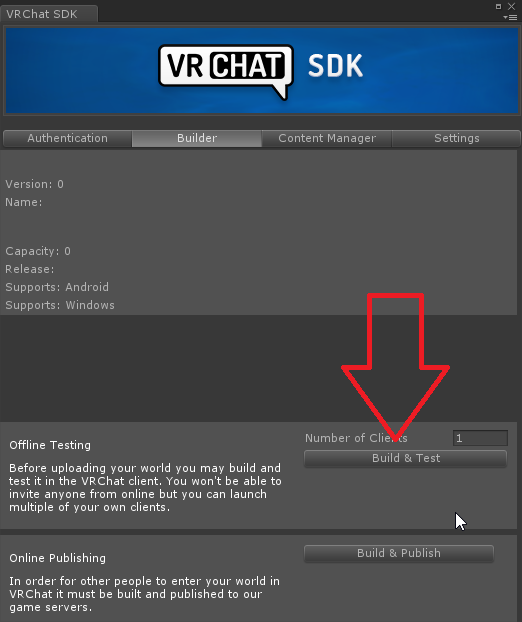
no, build & test like in the screenshot
near escarp
Did you close unity inbetween ? if not then you should be able to find those stats in your editor log
search for customscene.vrcw
vocal schooner
let me do those steps again and see if just something messed up or i messed up
im also having some trouble with bakeed lighting that some textures are just suuper dark and others are absolutly fine >.<
unity is a bully
balmy gate
@vocal schooner quick comment on build and upload...you have to change something in your scene however small...move an object, rename something
otherwise it will maybe detect nothing changed and not actually do a build
vocal schooner
i changed my baked lighting a slightly to see if the change does something, so i should be good
i need to reduce the filesize of my world tho, i dont like that its 120 mb -_-
okay, so aparently its textures
near escarp
time to crunch compress !
vocal schooner
its down from 120mb to 77mb now
near escarp
nice
vocal schooner
i would loove to be under 50 mb
but i dont know if thats even possible without absolutly scuffing things
 celest grail
i have a question on unity conditions for a lift (more than 3 floors)
there are currently trigger points to indicate direction of lift (whether up or down)
there are also already trigger points that update the current level of the lift
buttons (placed in front of lift for easy testing) as shown will tell the lift which floor it is going to
there are conditions set for ignoring down commands when lift is currently going up
e.g. If lift is going to floors 1, 2 and 3, someone pressing B2 will not make the lift stop halfway and go down just because it is the last pressed command
HOWEVER, there is a problem... yes the lift doesnt go down, but the lift also refuses to go up because the condition 'GoingTo' is currently set to B2, so its just... stuck at 2nd floor, not going to 3rd floor to complete the upwards cycle, not going down as well..
picture for reference
animator tab for reference
opal goblet
Id suggest that your system is fundamentally flawed.
Please state what exactly the lift is supposed to be doing and under which conditions.
celest grail
hello, thanks for the reply
the lift is supposed to take users up or down based on their input, but if lets say the lift is currently at 2nd floor going up to 3rd floor and someone presses the button to change the destination floor to B2, then the lift will not continue to 3rd floor
near escarp
you should have a ton more transition between staates
celest grail
i can technically force the lift to check if the 3rd floor's marker has been created to forcefully set back the intended floor back to 3, but after that the B2 marker would still be there and the lift will not continue automatically down
opal goblet
Well theres a lot of ways you can design an Elevator
near escarp
like b2->3
opal goblet
Some elevators always go to the closest destination that is required and stay at the last destination
near escarp
each button called at different floor should have its own transition that you call
that'd make it so much simpler imo
opal goblet
Well Ruuubick that again depends on how you want your elevator to function
celest grail
i could set an animation from b2 -> 3 as suggested,
but this is the reason why i have made it pass through every floor: currently if lets say the lift is from B2 -> 3, and midway the input for 2 has been given, it will not go to 3 first before going to 2
near escarp
yeah, i guess i'm suggesting to make it work like aa real one does
opal goblet
Theres multiple ways elevators work irl tho :P
Some have a home position they return to, some just stay at the last destination
near escarp
ah, i've never taken an elevator that stops at every floor in my life lol
celest grail
while if the animation for B2 -> 3 state is playing, then it will play the animation in full before moving to the 3 -> 2 state
near escarp
but yeah they probably exist
opal goblet
Some go to the next destination thats closest to their current position, some first go all the way up (or down) and then go back to Floor 0
celest grail
oh ok
probably our understandings of lifts are a little different
im sorry for causing any misunderstandings
opal goblet
Just try to explain how your elevator should behave
celest grail
but for lets say B2 -> 3 and level 2 is pressed mid-destination (meaning its already on the way), it will still stop at 2 but skip every other levels beforehand, and then continue on to 3
opal goblet
Okay so should the elevator always goes back to the first floor, while its idleing?
near escarp
you don't stop an elevator mid floor transition, so it shouldn't matter
and this way you just have easy state transitions, you can go from top to bottom in one click
from any floor to any other floor
near escarp
lol
opal goblet
This would only work locally tho
celest grail
i totally scrapped the world to remake it into the current way it is right now so....
opal goblet
Or if there was always just one person using it
near escarp
i've never seen a broadcasted elevator function correctly
because afaik it's not possible
people either revert to seamless teleportation or don't care about having everything go through the floor slowly
near escarp
Sure, you could enforce everyone into a station, but that's a bigger undertaking
celest grail
while i understand the convenience behind other alternatives, im also using this as a chance to learn more on unity as well
dont get me wrong im enjoying myself pulling my hair out figuring how to fix the issue i have right now
with the sudden input halting the lift
opal goblet
Again. Do you want your lift to work for everyone synchronously. Or do you only need it locally?
opal goblet
Well as Ruuubick said, making a Lift synchronised for all clients has problems
Because everyone will receive the messages at a different time, the platform will start to descend/ascend at different times, which has weird physics and networking problems
opal goblet
Id suggest just try to make a platform that moves like 10 units up and 10 units down and test it with like 2 or 3 people and see how bad it actually is
raw vessel
i want to make sofa seatable
so i copy paste vrc_chair command's to selected object
and i reconnect receiver to that object
but when i test it
i can't seat on him
so what else do i need to do
i'm pretty confused
because i copy paste all those commands to that object and retarget all commands to that same object
but it won't work
but how vrc chairs works on those commands and mine don't
it's really confusing me
any help please
here is another part
cobalt sluice
Does your sofa have a collider that is covering the use trigger? @raw vessel
vocal schooner
is there a way to reduce skybox quality and compress it?
i have a very nice space skybox but its 8k and 128mb uncompressed, its just to big
 deep parrot
 past wave
 jovial charm
Compress the images used for the skybox material in unity? @vocal schooner
vocal schooner
i tried that, didnt worked, changed the skybox now, but thanks anyways
copper prairie
Please help, my world just flattened itself as thin as a plane and idk how to fix it.
rain shadow
Just your terrain or everything?
cedar nebula
send a screenshot?
copper prairie
Figured it out, idk how I pressed a button that says 2d. Cursor was nowhere near it
rain shadow
oh lol
copper prairie
Lol yeah I am a dumbass
hazy temple
you tried OnPickup ?
open thicket
i'm trying to make a pickup play a particle only once and then the particle is destroyed after it is done
but onpickup function
i only want that particle to play once when you pick it up, not the second time
hazy temple
oh so you can do ParticlePlay and then Disable the particle so it wont work the second time
open thicket
so if it is already enabled
and you setparticleplaying
and then you have a setgameobjectactive disabling it simultaneously
the particle should still play without cutting off?
hazy temple
that's true, so here my idea : on the particle, you put a custom event that SetParticlePlaying and on the Pickup,the OnPickup will call this custom event and disable the component VRC trigger on the Particle, so the second time the OnPickup Event wont be able to call the custom event since it will be disable now
 analog basin
https://booth.pm/en/items/1510744
World teleport menu with working chat, it's from Virtual Market 3 <: Hope this gets passed around quickly

このパッケージはワールドに拡張メニューを追加できるプレハブになります! ※ 現在拡張メニュー内で使用しているCombatSystemによる不具合としてアバター内にJointがある場合Jointが動作しない現象を確認し...
wispy cloud
As cool and innovative as this is, I've been to a few worlds that have something similar (if not that exact menu) pop up when you open up your context menu, and honestly they're more annoying than anything. Sure it's a cool way to hide local user settings in the world without having buttons laying around everywhere, but having it pop up every time I open my menu (or usually it's only when I click the menu button, not when the menu is actually open) really does get bothersome.
The only one I've seen done well in the few worlds I've been to was the Islands of Nightmares one by ImLeXz. It's very minimalistic (a few buttons on the left side of your view, very small) that opens up menus when you actually click on one of those buttons. It opens up when you hit the menu button, but disappears when you move or hit the menu button again. It's the only one that wasn't completely annoying or "popup-ad" styled
link to world for those curious to see themselves: https://www.vrchat.com/home/launch?worldId=wrld_14a873d0-b4bf-4d52-9d4e-de9be3e3e9b8

Sleep world with ambient sounds‚ pillows‚ light options‚ rain‚ fireflies and shooting stars as well as a video player for music․ Halloween Update (Islands Of Dreams)
modern kayak
if you have some sort of control panel that you need the players to be able to take with them, I prefer to attach it to the left shoulder, so it doesn't piggyback off the normal menu button and is still very easily accessible.
 distant gulch
Some worlds have sliders where you can set the avatar brightness, how is that done?
balmy gate
avatar brightness? or post processing?
the most common one is using Color Grading in the post processing stack v2 to adjust overall brightness level. , using a slider to adjust weight
near escarp
Realtime light on player layer maybe ?
balmy gate
or that: bake your world lighting and then adjust intensity of a realtime light: you can use one realtime directional light without shadows with no performance overhead
distant gulch
It only affects avatars
balmy gate
does it affect all avatars including Unlit ones?
distant gulch
Not that you mention that, I'm not really sure
near escarp
you have errors in your console
balmy gate
@chrome echo disable Clear on Play in the console panel, and change something tiny in your scene: rename something or move an object a bit. Then try Build and Publish again. then look for red errors in the console
 chrome echo
@balmy gate it says cannot mark assets and scenes in one assetbundle
Then it gives the name of the asset bundle
 sharp pewter
How do I add sounds to objects when they collide with other stuff? Like what The Great Pug has (or had? don't know if they still have it) where you could clink bottles together or whenever the glass touched the table it'd make a small thud
balmy gate
Look earlier. There might be another errorr
Can you copy the exact error?
@sharp pewter have you tried PhysSound? It is whitelisted
sharp pewter
How easy is it to use and set up?
chrome echo
Cannot move asset from assets/coconut/prefabs/treecreatoreditable/coconut_palm_tree03.prefab to assets/coconut/prefabs/treecreatoreditable/1241.prefab. destination path does already exist
@sharp pewter
chrome echo
Anyone know why the fog is like that
I never put fog in the world and yet its there
Its not the sky box either
And sometimes when i go far or close to something it disappears
Its very odd
I can disable every object in the game and yet its still there
left marlin
Open your lighting settings and check if it is enabled there. It should be the bottom option in the lighting settings window.
chrome echo
Oh i see
Is there a way i can have that on and off with a toggle ingame? Because i like it and i wanna use it still and switch
@left marlin
left marlin
I do not know of a way to switch it dynamically in game. I don't believe we have that option right now
cedar nebula
you'd have to use some kind of mesh with a fog shader on it instead, you can't change any of the lighting settings in-game
chrome echo
I wanted to keep it on but also switch a sphere on with a shader to use as a skybox
@left marlin i have a ocean in my map but it could be laggy if i add too much is there a way to make it so the shaders turn off or doesn't render unless i move closer
It seems to be the shader
Some Shaders get effected by the fog but some don't how can i make a starnest shader not show fog
@cedar nebula
chilly grove
Is there a spawn frequency limit on SpawnObject?
cedar nebula
yeah, "1 prefab per person per second" is how I've heard it described
chilly grove
That's too bad, thanks for clarifying though
 tacit radish
Does anyone know how to make particles add damage?
cedar nebula
Assuming this is for a PVP gun, look into using raycasting. Jetdog's prefabs has an example prefab for it, think it was just the Rifle. It's wwwaaayyy less complicated and a lot more consistent. Just make sure you import Standard Assets first
cedar nebula
It's the ProtectCameraFromWallClip component from Standard Assets, but it's kind of wonky to use if you don't how it works. I'd definitely take a look at the prefab
tacit radish
Where can I get the prefab?
cedar nebula
Jetdog's prefabs https://github.com/jetdog8808/JetDogs-Prefabs
I believe it's just called "Rifle"

GitHub
Contribute to jetdog8808/JetDogs-Prefabs development by creating an account on GitHub.
tacit radish
Thanks.
raw vessel
i have problem seeing material's image's
here is an screenshot:
 leaden atlas
Hi all,
have a short question regarding the render distance in VRChat worlds. Does anyone have an idea how to change it? I have a space scenario with an object in far distance which is not shown in VRChat. I think this is due to a render distance limitation... or has anyone a better idea how to make for distance objects visible in VRC?
tacit radish
Are you able to load into the world?
leaden atlas
yup... world is working fine. Just far distance objects (might be > 2000m) are not rendered
bold ibex
With which program or addon i can create interior of building? ProBuild is broken
near escarp
@leaden atlas It's on your main camera settings
 tropic yarrow
@leaden atlas you can use LODs system to define when object should be hidden, and you can use custom camera assigned to player camera part in world descriptor with edited render distance on that camera (sorry)
raw vessel
is there a way to prevent person to access seat trough wall
any help?
leaden atlas
@near escarp & Amplituda: Thanks a lot... will try
 mild python
Question for any lighting gurus on here! What should be checked when Unity isn’t baking the ground mesh of a scene? I’ve had this happen with two friends now where the ground just isn’t baked at all.
We’ve made sure all models are static, that the model has UVs, that Generate UVs is checked (and tried while unchecked), tried the lights both baked and mixed (only realtime seems to work), and double checked the lighting settings to make sure everything is normal/good.
mild python
Oh, thank you! Apologies!
stray sand
@tacit radish @cedar nebula for pvp guns i would suggest my guns system in my prefabs uses particles. While the raycast rifle is accurate its too accurate for vrchats current combat system. The big thing you will have to take into account in combat worlds is network lag. While on your side you might be hitting the user they are probably a meter ahead with your bullets shooting behind them.
With particles you can have them hit a larger area to make it more likely to hit the other player.
tacit radish
@stray sand but how do I make the particles add damage, is it a collider?
That’s all I need to know.
stray sand
If you use my prefab its already set up. You add a trigger with on particle collision to the same object as the particle system. Then in the collision module for the particle system you turn on send collision message.
The action would be add damage.
tacit radish
It’s all in the trigger component right?
stray sand
The on particle collision and add damage is. But for the trigger to be activated you will need to turn on the collision messages for the particles.
tacit radish
Oh I have all that but the particle collision thank you so much.
stray sand
👍
raw vessel
how to know is my scene world view in correct cammera position
because something happen and everything starts to flicker and get little pixelized
what i do:
because i have 3 rooms and everything inside of them
i created 3 empty game object then put every room each one of them
and i duplicate those packed rooms and scattered all across unity world
but my main original rooms are getting flickering and losing smoothness
so what happen and how to fix it
please help me
and when i test it
the result is same
am i damage my world shape of objects color and shaders permanently?
is there a way to return all back?
even vrchat meny and icons in it
are shaken left and righ
copper prairie
Can't upload because the option to open control panel is suddenly gone.
raw vessel
@copper prairie
you got vrchat-sdk's unsupported:
shaders,assets and script's that might present in them
delete all unsupported things and you shod be fine
the best thing that you can do is to look at bottom left info corner for errors
NOW PLEASE ANYONE HELP ME IN MY PROBLEM
i need dev's support in this as well
bold ibex
@raw vessel you objects are really far away from world origin (0,0,0), this causes unity's position calculations to mess up because the precision is too low
always build your unity scene around origin so you have the highest positional precision
seeing the vrchat menu messed up like that, it's 100% world positions being too far away from origin
supple drift
 short gulch
Is there any good height fog that works with vrchat? Basically just want a thin layer of fog floating just above the surface of the water. Im ok with spending a little money if its an asset store package too.
near escarp

Make various clouds with Massive Clouds
Massive Clouds renders 3D clouds with volume rendering in screen space. More than 60 different presets are available and you can start using them right away. Of course, all the parameters can be customized freely, so you can create ...
supple drift
I think they have a 'vertical fog' asset on the store too that is rlly fast (and should work bcs it's just a shader)
bold ibex
@near escarp how will that ever work with vrchat?
 supple drift
XSVolumetrics could prob work too tho
 rich silo
help
near escarp
@bold ibex i think it just does, AFAIK it's being used in the https://vrchat.com/home/world/wrld_973faa4b-3446-4ea6-9a61-01212b67a338
JAPANELAND SKY
bold ibex
they rewrote some of the shaders afaik
near escarp
so their version isn't script based then, might be harder to control
i haven't found a good way to do condensed fog yet
bold ibex
they moved the stuff the scripts do to the shaders etc
near escarp

A swirling atmospheric fog particle effect.
Simply drag the Fog prefab into your environment to fill it with a realistic floating mist.
The cobbled ground texture (with normal map) is also included.
New to version 1.1 is Ground Mist, a alternate knee-high fog effect.
@rich silo look at your console for errors
bold ibex
that one moves around when you tilt your head in vr
near escarp
can't the billboarding mode be changed to fix that ?
bold ibex
I don't know, it might but I doubt it's vr proof
raw vessel
this is a problem that i have
i need your help please
raw vessel
how to do it
please i dont know how to adjust it
raw vessel
where is those(0,0,0) located?
bold ibex
world position
bold ibex
position in the gameobject
near escarp
top right corner
bold ibex
top line in the transform component https://docs.unity3d.com/StaticFiles/ScriptRefImages/TransformRotate1.png
 near escarp
you manually put those objects in your scene super far away in the first place, so go to 0,0,0 and then move everything there
near escarp
that's one way to do it
bold ibex
yeah, just move the empty objects to around 0,0,0
raw vessel
it is impossible for me to move each one by one to default possition so i will first pack it and i will move them in groups
bold ibex
everything inside will follow
you should be fine only moving the outer container objects
raw vessel
oh that is good
because for a second thought i was afraid that everything inside will return to wrong place upon extraction
bold ibex
it will move everything relative to the container so that won't happen 👍
raw vessel
oh ok that's good point
thank you all
👍 💙
short gulch
Awesome, thanks guys! Very much appreciated.
bold ibex
and they all should be in a range where unity has high precision position calculations
this problem is fixed in unity 2019, and all the unity games before unity 2019 use a 'floating origin' hack script to work around this, it's a unity limitation, it doesn't support large worlds at all
tacit radish
Where can i get world props and stuff?
royal canyon
@tacit radish what kind of props do you mean?
tacit radish
MIlitary.
cedar nebula
OnEnterTrigger, Local, looking for Layer PlayerLocal, with the Actions TeleportPlayer. I'd recommend putting this on a child object of your NPC, and it needs a Collider on it with IsTrigger enabled. When the player enters that the IsTrigger collider they'll be teleported to whatever gameobject you set as the Location
 bitter mesa
Hello, how do you actually go about and check how well optimized your map is? I'm working on a somewhat high-end system so most maps is kinda perfoming pretty well/samey (either stable 90 or 45 fps) for me.
cedar nebula
check with the profiler and frame debugger. You're mostly looking for drawcall count but keep an eye on MS time as well. Quest needs to be under 50 drawcalls, PC can probably be 200 or less though as long as you don't have too many people. But obviously, less is always better
bold ibex
hi
cedar nebula
hi, need help with something?
cedar nebula
you might have better luck with that in #user-support-old not much we can do about that in worlds
 rancid ingot
how to switch mirror high to low with one button in ui menu?
cedar nebula
you'd have to have two mirrors and swap between them, I don't think you can change the mirror settings with UI but I haven't tried myself
bitter mesa
Can't find a way to start up Probuilder on unity, anyone know why?
near escarp
check console for errors
bold ibex
how do I submit a world for the halloween event?
cedar nebula
this form
https://docs.google.com/forms/d/e/1FAIpQLSfyol_dbCndIQmLqxTxYBvwFm8oYv__jdgZBKMQc0Jas3vMWw/viewform

Google Docs
View the full terms of the Spookality 2019 Contest on our site: https://vrchat.com/spookality
This form will close on October 23rd at approximately 12PM Pacific (Los Angeles) time.
sharp pewter
How would I go about adding a local brightness slider to my world?
 stoic breach
how do i add bloom to my world?
open thicket
i keep having this issue where pickup objects are too far range
gravity still acts on them
rain shadow

GitHub
Post Processing Stack. Contribute to Unity-Technologies/PostProcessing development by creating an account on GitHub.
open thicket
but when you pick it up several feet away it won't come to you closely
it's ignoring grip orientation
rain shadow
Are they getting stuck on things?
open thicket
still collides


just able to pick them up far awway for no reason
proximity is at 2
rain shadow
Is the range seemingly infinite for picking it up?
rain shadow
how far can you pick it up from
rain shadow
Do you have a trigger collider over your scene?