#world-development
39 messages · Page 4 of 1
 balmy relic
I dont really like to ask for prefab. But where could I get one that can equip someone with a hat for example attach to the head.
 jovial charm
Check the prefab list @balmy relic I think cyan has it in there
@bold ibex just disable the mesh render on them I believe or just make a material that's invisible and apply it to it
 solemn pulsar
aw man, you can only upload 1 map a week?
jovial charm
yeah
 royal canyon
is there a video player in the Prefab database that's the most reliable video player?
@bold ibex you can apply a material with the alpha turned down 🙂 or just turn down the Alpha on the existing material and you should be good to go!
jovial charm
none are super reliable they will all break when an update to vrchat happens, the devs even said so themselves @royal canyon
royal canyon
what happens after an update? do you have to republish your world?
 torpid hazel
Can I make a world public through the website?
 inland badge
so what is everyone using for a video player? iwasync seems to be the standard mostly
 lilac swift
@royal canyon Sky what you mean by that? I have a world which is currently public for months but people can't find it anymore.
and still public on VRChat website
 bronze smelt
@torpid hazel yes you can
@lilac swift has it been updated with the current unity version?
bronze smelt
I see two worlds from that username, is that the only ones?
lilac swift
yes
did you search it on VRChat or the website?
on website people still can find it, but on VRChat my friends can't find it anymore =/
bronze smelt
I’m on the mobile at the moment so the website. Will have to check in game later
I see them in game too
 bronze smelt
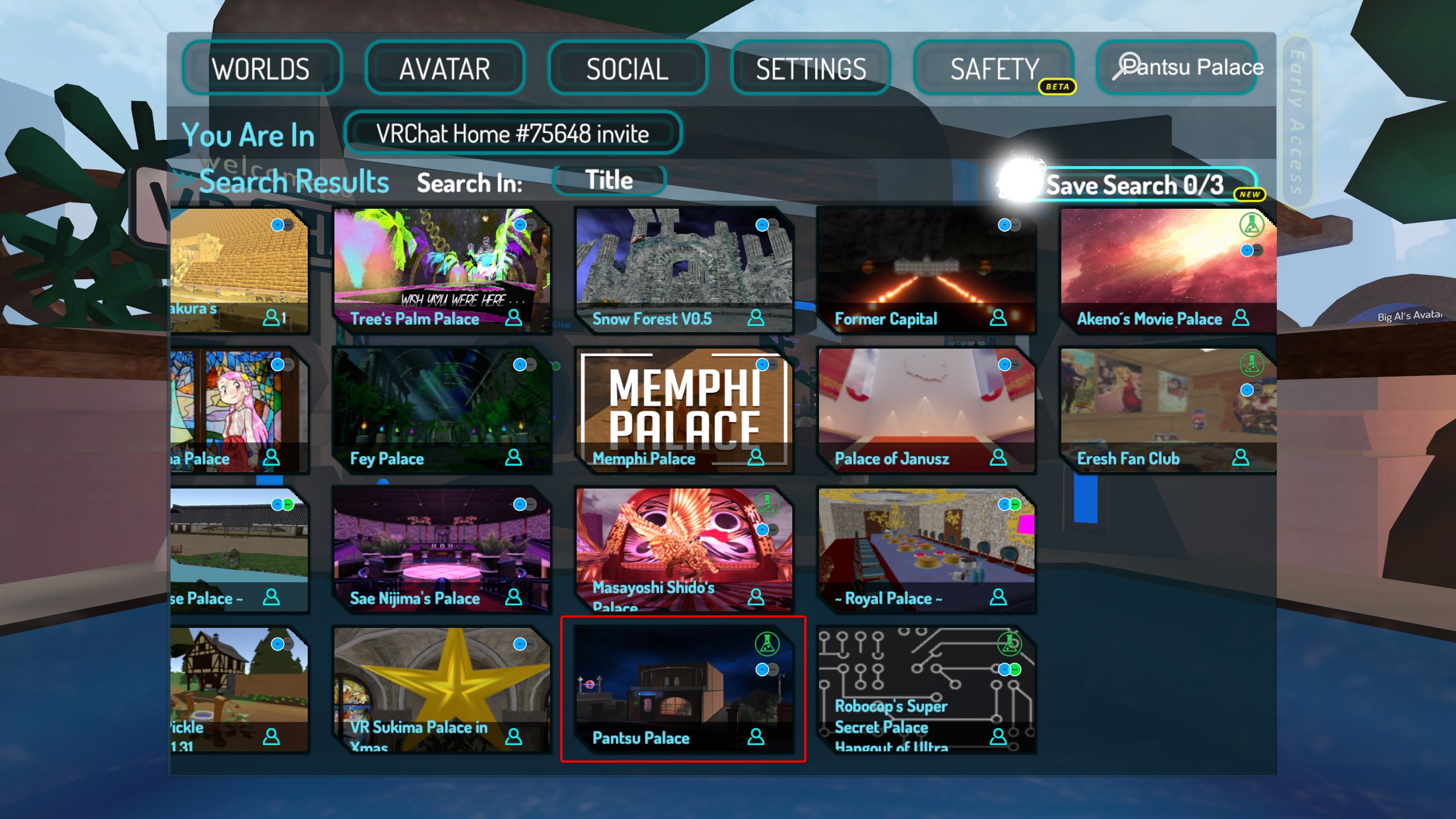 bronze smelt
👍
lilac swift
I will update the map today, so I hope my friends can find it again.
 ionic pecan
is my world meant to go back to community labs when i reupload?
 stone hollow
Is it a quest world?
ionic pecan

Thank you for checking out the world․ The avatars have been created by Buttercup and ♡ for you․ Enjoy your stay ♡
this is the world
stone hollow
Is it quest compatible
ionic pecan
nope
balmy relic
That happen to me when I update it to much time in a row
 still thistle
I just updated the SDK to current version on my LABS world which has been up for months. When trying to publish, it's treating it as a new world now and not linking to the existing one D: I don't want to start the wait in labs all over again for my worlds. Anything I can do to relink with my already uploaded world?
Pipeline manager still indicates attached id
 near escarp
the same ID ?
still thistle
Strange. My pipeline manager ID now in Unity doesn't match the one indicated in the new SDK control panel.
 hybrid mica
does anyone have prefab to use ui in the menu?
stone hollow
Elaborate
 bold ibex
hey so, I am working on a world and the canvas has some weird collider around it when I go into vrchat
like a box collider is put into the canvas I never placed
and it expands bigger than the canvas
(world space canvas)
I have a VRC_UI Shape on the canvas
I also heard that the VRC_UI shape can cause a box collider to spawn if there is no box collider already on it so I placed one on as a trigger but the strange box collider keeps appearing
image of canvas. The arrows depict where this invisible box is appearing
do I need the canvas on a specific layer?
inland badge
@bold ibex add lighting to the scene and flip off the default unity lighting
jovial charm
no just the video coding breaks every time they update @royal canyon
royal canyon
how is it fixed then?
bronze smelt
It breaks when ever Youtube decide to update, which happens quite often. Nothing VRChat can prevent.
The only ways for them to get this fixed fast is to allow us to download updates directly when the library is updated, but right now they can't because of Steam and Oculus.
The other way would be to get Youtube to actually help them add proper support for Youtube (with ads) but that is more difficult than it sounds like
 ancient ether
why my lights on unity look like this and in game doesnt have any bloom?
 blazing gyro
Could anyone help out?
I am trying to make certain objects spawn in by walking in a isTrigger box collider, but no matter what i do, i cant get it to work
 spark thunder
is there a way to see all colliders in the scene at once so i can figure out which coliider is blocking my way through a entrance?
royal canyon
yeah just ctrl+click all of the items with colliders on them
@spark thunder
and you should be able to see them
spark thunder
its weird then im clickiing everything and no collider is blocking the entry way i dont get it
royal canyon
@blazing gyro is your trigger set up as "OnEnterCollider"?
blazing gyro
Yes, i also tried OnEnterTrigger, which didnt work
royal canyon
try setting the Operation to "True" and test that
near escarp
Use OnEnterTrigger
 coral wing
you need to set the "Layers" in the trigger to be player local
still thistle
So I guess to self answer my earlier question, since the updated SDK changed my worlds Blueprint ID I have to start over with the LABS wait process as though they are new worlds? TT
blazing gyro
@coral wing @near escarp @royal canyon
Finally, thanks for your help!
royal canyon
no worries @blazing gyro
 stiff lava
hey !
Im currently using Audio Bank.
I followed with Guideline in the documentation but the audio clip doesn't play
Somebody here who has experience with this stuff?
royal canyon
@still thistle you should be able to go to your published world, copy the ID and paste it back into the descriptor, I had to do that twice.
still thistle
I just actually was reading into that. So I need to detach in Unity project descriptor and then paste the matching one from VRC?
royal canyon
correct, if you want it to upload to the same world
jovial charm
do u have ur intensity really high @ancient ether
still thistle
It worked! Thank you a million @royal canyon c:
royal canyon
Cool glad to help @still thistle
torpid hazel
when I click on publish in the website, nothing happens
I wanted to publish a world of mine that's private through the website, I can no longer access that world data anymore to do it through unity
bronze smelt
@torpid hazel you get this screen? https://i.imgur.com/RzBNAaE.png
 torpid hazel
yeah
 torpid hazel
it says it's private
bold ibex
Anyone knows how to fix objects falling thru the map? I have a set of dnd dices and like it just kinda falls thru the map.. it has mesh collider, special layer, object sync and pick up
torpid hazel
try adding box collider
torpid hazel
I have no other idea
bronze smelt
What layer do you have on the object?
bold ibex
pickup
bronze smelt
@torpid hazel Are you a New User or User ++?
torpid hazel
trusted
spark thunder
can someone post the adress thing for cleaning out my vrc cache?
 runic hamlet
Question, does anybody here know a VRC user by the name Kuranes? They made a world that I really like but recently made it private. I was hoping to get in contact with them to see if I could get the world public again or if I could get them to let me have a version uploaded to my account. If anyone knows them and is willing to help me out, I'd appreciate it!
 green lagoon
I do not know this person and I doubt if they made the World Private that they would be inclined to be convinced to make it public again
royal canyon
@bold ibex add a VRC_ObjectSync component. Also if you have Mesh Collider, make sure it is "Convex". If your collider is smaller than your mesh, make it slightly bigger than your mesh. Also you can try "Continuous" collision detection in the Rigidbody component, but don't do it unless it's necessary for it will tax your machine a bit. Also if your mesh is multiple parts, make sure it is on the Parent object in the Hierarchy.
bold ibex
doesnt work @royal canyon
it has Rigid and for the mesh collider.. convex doesnt do anything
royal canyon
do you have VRC_ObjectSync on @bold ibex
on your item
If that doesn't work then try turning off Gravity and turning on "Is Kinematic", that should work.
torpid hazel
Is it possible to make an audio source start only when a player approaches it?
bold ibex
But I want the object to have gravity so I can roll it
jovial charm
yeah it looks like u have everything setup correctly just need to have the mesh collider as convex if its not working not sure if somethings up with them but i can ask a friend for some that are setup for it
 cerulean shadow
can someone help me ?i have an issue about upload a world, after upload my own world it said it have shown at 'Mine' but in my account it does not show it.
 vestal karma
Could anyone help me figure out why my in game build is so much darker than what it looks like in Unity?
It only looks like this after using baked lights, and almost nothing I change will make any difference to what it looks like in game. Im just trying to get that black shadow to be a little brighter
 foggy brook
My build control panel is lagging like crazy when I open it to the point of making my unity almost crash, and even after it's open, I can't interact with it since it's lagging so much.
Does anyone have an idea ?
vestal karma
Have you updated to the latest version of the SDK?
 quartz merlin
hey guys, does anyone know how the summer hub did their avatar accessories? I am referring to the hats and stuff that you could attach to your avatar's head
I'd like to potentially be able to implement that in worlds
stone hollow
@foggy brook Use the correct version of unity, it literally says it at the bottom of the picture.
 minor finch
does anyone might know what might cause sprites (images) to be black squares or just hard to see?
they appear clearly visible in unity, but in game they are hard to see
stone hollow
@quartz merlin The system they used is private and somewhat undocumented, but the basics of it are covered in this video https://youtu.be/Yik63cfyuD8
quartz merlin
I see, thank you for the pointer 🙂
 chilly shoal
No it loops by default
Also does anybody know why this happens. I can see parts of my panel through other geometry
minor finch
Anyone know a way i could get this sprite to brighten up a bit? it doesn't seem to react to lighting
 fluid linden
i updated my world and now its stuck in labs what do D:, it was a public world
 subtle garnet
@minor finch plug the texture into the emissive bit of the material?
fluid linden
What a joke
chilly shoal
unlit material @fluid linden
subtle garnet
Ah, yeah you'll want to make it unlit
 mystic wave
it doesnt let me upload it says last built vrc scene could not be found
please test/compile full scene what im supposed to do?
subtle garnet
tbh I'd just make it a regular material
royal canyon
@minor finch just make a plane and drag and drop the picture onto it. You can make the image the Albedo of the Standard shader.
royal canyon
that's what I do and it reacts to lighting 🙂
minor finch
well my main issue was that i thought they were too dark because i like to make my directional lighting darker and add in other lights
but i tested it in another world and my sprites are fine so i must be missing something
i'll just use planes this time
royal canyon
indeed. good way to test is to put a Point light right next to it
minor finch
exactly
minor finch
planes are always nice to have
royal canyon
if you put a texture on a thin rectangle, the texture will wrap around the whole thing. With a plane, it literally has no "sides" to do that with, and the back is going to be invisible because of the normals aren't double sided
minor finch
but from an optimization perspective i think sprites are better because the shader allows for you to reduce the quality
royal canyon
so if I ever use an image, it's on a plane. And if it's a PNG transparent bg image, I'll use the Transparent Cutout shader
minor finch
i think what i might do is take a single plane, use a transparent back ground, and then add in pictures as i need them and add all of them to a single plane
one plane, one material, all the pictures
royal canyon
not sure if you can do that
cuz if you try to put another picture on the same plane, it'll replace the current image
minor finch
so basically
take multiple images and size them down
onto a single texture
place that texture on a plane
royal canyon
You can do that, or you can just position one plane, and then copy paste and position the others. You can put a Alpha Zero material on the ones you don't want to show right now, but they'll still be there just invisible until you're ready to throw an image on
the planes will still be there they'll just have an invisible shader
it's up to you though 🙂 use your creativity lmao
bold ibex
Anyone knows how to make 1 audio source play multiple songs
when i press a button, it changes
 left marlin
Do you need it to be one audio source exactly?
You could use multiple but swap between them?
bold ibex
But if I add a bunch of them, wont it cause lag and issues
left marlin
How so?
If only one is playing at a time, and the rest are disabled, then they shouldn't lag.
 vast lantern
A weird question, but do collider triggers trigger when the player's head enters it or does it still trigger when any part of the player enters the collider?
This is for the Post Processing volume
left marlin
I was going to answer for the general case but I don't know if it applies to post processing.
It might be the camera only
royal canyon
does anyone know how to make a simple Player Arrival notification/alert?
 cedar nebula
OnPlayerJoined Local AudioTrigger
royal canyon
would that tell everyone in the world that someone has arrived?
I was thinking about using Player Tracking
cedar nebula
well if you wanted to have a visual as well then yeah you could use Player Tracking to render something in front of you when a player joins. A sound effect is just easier and maybe not as distracting but either will work, OnPlayerJoined Local is the only important part
royal canyon
how would I set up player tracking to display something in front of the camera? PT still confuses me a bit
cedar nebula
Not as hard as you'd think. You already know about Follow Target right? Instead of following the Player Handle, follow the Forward object instead and then have it Look At the Player Handle. Simple UI!
vast lantern
Would having an onEnterTrigger overlapping another onEnterTrigger with the same actions cause any issues?
cedar nebula
shouldn't be an issue, OnEnterTrigger is pretty exclusive
vast lantern
Okay, thanks
royal canyon
as long as the colliders aren't overlapping I think it should work??
vast lantern
Also I noticed that onEnterTrigger triggers whenever any part of the player enters it, is there a way to trigger it for only the Player's Camera?
cedar nebula
overlapping shouldn't be an issue, in theory at least.
If you only wanted it to active with the player camera then you'll have to use the Player Tracker prefab and then have a collider Follow Target the Player Handle. Also it needs a rigidbody
vast lantern
I see, thank you
cedar nebula
by the way if I can add this is actually my preferred method of OnEnterTrigger. It gets around a few issues like players sitting in chairs and that OnExitTrigger activates when you switch avatars. Putting the OnEnterTrigger object itself on the MirrorReflection layer also gets rid of the 'raycast blocking' issue for VR
royal canyon
@cedar nebula if I'm doing the OnPlayerJoined Local to trigger audio, what will that trigger go on? will it go on the VRCWorld (player cam)?
 fluid tapir
How do I go about turning off music in a world with a button?
 steel crater
how do u make it so a world is climable if anyone knows dm me
vast lantern
@royal canyon On the Audio Source
jovial charm
@steel crater check the prefabs list theres a prefab for setting up the climbing
steel crater
is it a update on the sdk?
royal canyon
@fluid tapir you'd need to do it with a VRC Trigger. Add a cube, click "add component", find VRC_Trigger and then set it to OnInteract for the trigger. For the action, "SetGameObjectActive" and add your Audio Source in the Receivers. If you want to toggle the Audio on and off, set the operation to Toggle. If you don't want to turn it back on, set it to false. Setting it to true would only be used if the audio source was first set to off. Now when someone clicks that cube in VRChat, it will toggle on and off the audio.
jovial charm
nah its a prefab in the prefab database in the pinned messages in this channel @steel crater
steel crater
witch one ?
royal canyon
@steel crater it'll be CyanLaser's climbing prefab
http://tinyurl.com/vrcprefabs
royal canyon
be sure to read the ReadMe first @steel crater
so if I set a trigger to AlwaysBufferOne it'll only trigger once per instance, correct?
 rustic mantle
Anyone know why when I tried tiling a texture on a mesh it looks fine in Unity but in VRChat. It stretches it
bold ibex
@rustic mantle The UV for that pert of the mesh is really small, as such ti doesnt have a suitable area of coverage for the Grass texture you're attempting to apply to it.
Not sure why its appearing fine in unity and not in vrchat, but this is 99% of the time the cause of the issue
royal canyon
try making the polygon larger maybe?
stone hollow
In the UV editor*
foggy brook
@stone hollow I'm using the correct version, it's a slight bug
 short gulch
Hmm, so I noticed that in the laggiest area of my Waterfront world theres a bunch of overlapping surfaces. You know, those ones that cause the textures to twitch when you turn your camera. Could that be a huge source of lag? It seems like most of the planters and hand rails outside of one of the hotels are like that.
near escarp
Do you have realtime lights in your map ?
 sacred zodiac
Is the bug still present regarding when you update your world, it just goes to the labs?
near escarp
Does it happen every time you update ?
short gulch
@near escarp sorry for the late response, not anymore nope. I finally managed to bake the lighting at a low resolution using bakery
near escarp
Nice, then check in the editor with your camera how many batches/drawcalls you see in play mode in that spot you mentioned
short gulch
Will do. Someone here told me to use supercombiner to cut down on the draw calls because I think I had about 8k before at some point too, but i havent been able to figure that out yet.
 warm orbit
Anyone know why my emissions come across so blocky? And also why my emissions only work on this one object, and no other objects in the world that use the same emissive material?
short gulch
Here's the world if you would like to check it out yourself. The laggy area is between the two tall buildings on the right in the thumbnail.
https://vrchat.net/home/launch?worldId=wrld_17ddcc95-69d6-44b5-a10e-37729fb90222&instanceId=84811

VERY WIP Waterfront district from All Points Bulletin․
 slow orbit
@warm orbit What's your Indirect Resolution set to in the lighting tab?
warm orbit
slow orbit
Increase it to 8 or 16, your bake time will go up but so will the indirect light quality.
I mean, it should do.
warm orbit
Will try that right now. Any idea on why my other emissive objects aren't giving off emissions?
slow orbit
Possibly also due to the low indirect resolution.
cedar nebula
@royal canyon sorry for late response, the OnPlayerJoined trigger can be anything, it doesn't matter where as long as the object is enabled.
Also AlwaysBufferOne means that only one instance of that trigger will be buffered for late-joiners. So if you had a gun on AlwaysBufferOne and you shot it 100 times, only the last instance of the gun being shot is buffered to people who join after-the-fact
short gulch
One more thing I just thought about after testing my world out with a few people last night... The map is huge, so you tend to lose track of other players pretty often. I think it was the Murder gamemode that had a minimap on a wall that shows you where everyone is. Is there a prefab for that? I'd really like to apply that to the spawn map in my world.
bronze smelt
The VRCPrefabToybox has a map prefab you can use
You'll find it in the pinned vrcprefabs database (https://tinyurl.com/vrcprefabs)
short gulch
Alrighty awesome thanks!
short gulch
@near escarp Here's the stats for the problem area https://i.imgur.com/iSWY9fU.png?1
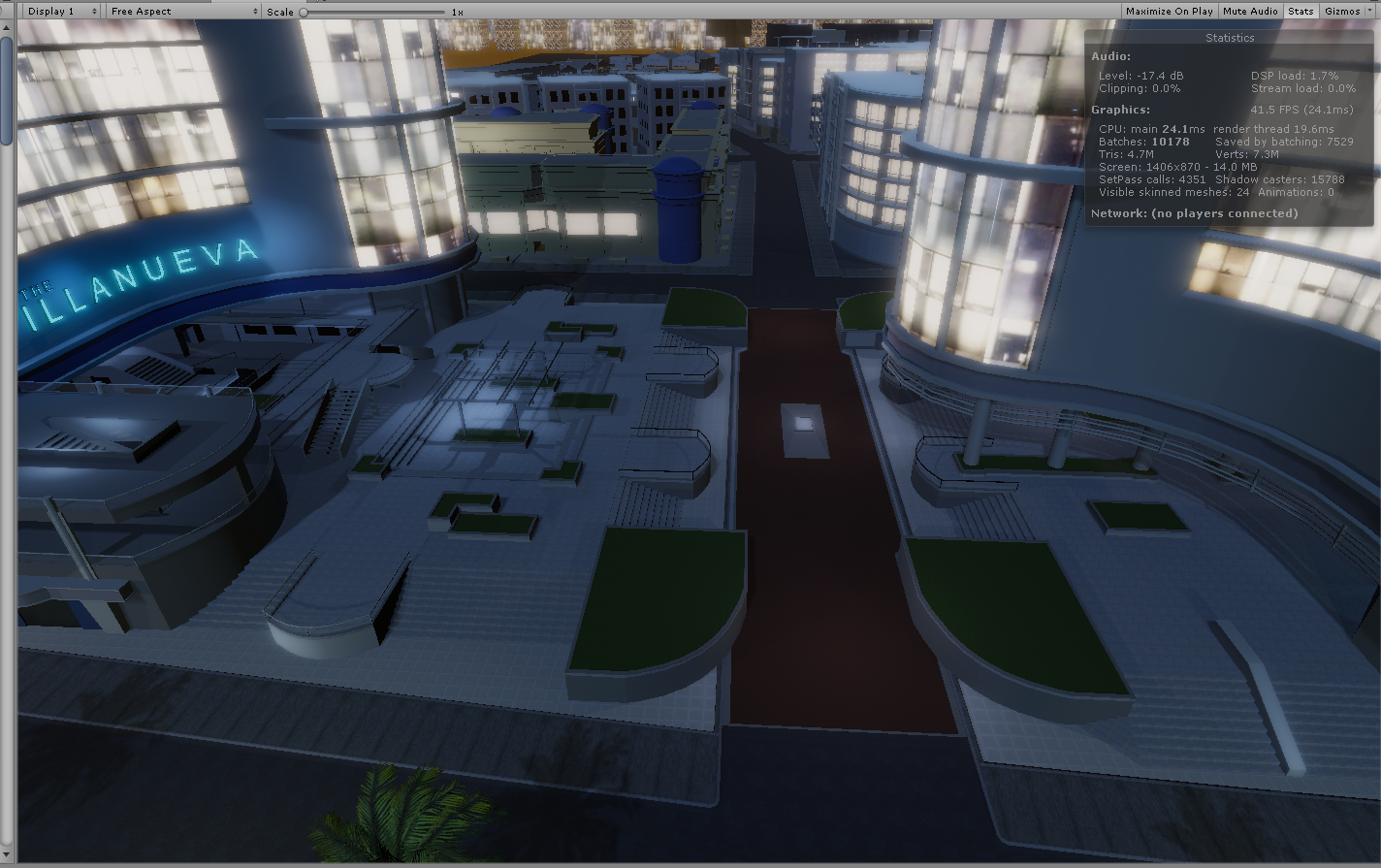 short gulch
Thats what I figured lol
near escarp
You want to try being under 1000, below 500 if possible
short gulch
Yikes, so it might be a good idea to tear down part of it and rebuild it myself or something?
Maybe I could find the LOD models for that area actually
royal canyon
@cedar nebula thanks dude!
green lagoon
I'm assuming that 1000 to 500 is draw calls @near escarp
and what are you currently doing for lighting Brandon
near escarp
batches
green lagoon
yeah that is an awful lot of batches at the moment
well considering the amount of shadowcasters it doesn't seem to be enough light baking
 supple drift
@short gulch Yeah, lighting should def be evaluated - seems to be real-time or mixed. That could be highly contributive to the amount of batches going on there! As an aside, using less complicated geometry (like the LOD models you mentioned) might not benefit you much if they're not all atlas'd together. You'd really want to cut down the amount of materials you're using on the meshes if your batches are still too high after you fix your lighting stuff!
near escarp
And give mesh compression Low a try
 gritty pewter
!online
 tawny lilyBOT
There are 6117 users in VRChat currently
 tropic smelt
is it intentional that I'm unable to animate properties on the material for my mirror while the mirror script is enabled?
short gulch
Ya know what? It was set to mixed. I've tried atlasing before but had some issues
And for some reason I'm not getting notifications when someone pings me
so I'm sorry for the late response again
supple drift
How many batches when you go full baked (or just turn off mixed)? Having manual control of your UV layout is best when it comes to getting multiple meshes into one UV for fidelity-sake, but there are some free assets out there that help you cheaply atlas within Unity too!
Maybe try this: https://github.com/maxartz15/MA_TextureAtlasser I haven't used this in practice, but have checked to make sure it works in our version of Unity (it does!)

GitHub
Texture atlas creator for Unity. Contribute to maxartz15/MA_TextureAtlasser development by creating an account on GitHub.
 strong holly
i can't seem to test my world offline,i logged in and put the vrcworld prefab, but when i click new build the game start and i'm in my home instead
also i doesn't let me name it or anything
strong holly
where my test is placed in vrc? usually was in ''mine'' but the section is not there anymore
short gulch
Theres actually about ~50 more batches now that I've turned off mixed and set mesh compression to low
near escarp
Did you turn off the light components ?
 cinder zinc
!online
tawny lilyBOT
There are 6479 users in VRChat currently
 thorn kite
I should spend more time on here
Teaching people to make worlds is the absolute best way to improve with it yourself
sacred zodiac
Oh umm sorry for the late reply but I recently updated just 1 world and yeh it went back to the labs.
royal canyon
^^^^^^ @thorn kite absolutely correct. I'm gonna start making YT Tutorials for absolute beginners all the way up to what I currently know. As I learn, I'll make THOSE videos too. The faster we can make everything easier for everyone, the faster we can have more worlds, and truly allow those who want to make worlds to be able to. You don't know how often I have heard "Man I wanna make worlds but I don't know how to"
Well, I got you guys. 🙂
royal canyon
@left marlin what's that about? 😂
left marlin
More tutorials for people
royal canyon
I think it's very much needed
left marlin
Too much of the information is trapped either in here or in people's heads.
royal canyon
Indeed. I just want to be useful in some way 😂
left marlin
I also haven't made a tutorial in 6 months. . . so someone needs to take over 👀
royal canyon
lol does that mean I can make an @left marlin alt? LMAO jkjkjk
& I'd be honored to take over. 🙂
left marlin
Do you have the voice for it?
royal canyon
You heard my voice lol
left marlin
I have gotten so many comments on my "tutorial voice"
royal canyon
my voice isn't as "ASMR" as yours is but I think I can do a decent job lol
left marlin
Even though I haven't made video tutorials, I still want to get the wiki going. But yeah, slow project
 valid ember
I rely a lot on using google translate on the japanese wiki
when udon is out we get to start over, yay!
I hope no one hoards knowledge on it on the tricks they figure out
left marlin
Oh joy
It just reminds me that I should get back into tutorials so that I'm ready for Udon's drop and everyone scavenging for information.
short gulch
is 35.5kb way too small for the lightmap data?
left marlin
Don't ask if the lightmap is too small. Ask "does it look good?"
If it is small and looks good, then awesome
short gulch
Well I mean in the context of what I'm doing because I'm not sure if it worked properly. It's a pretty huge city
left marlin
Yeah, that sounds small if the lightmap is for an entire city. Check the lighting settings to see the actual images
short gulch
When I turn off the light components everything goes dark even after baking, is that normal?
by turning off the light components I got it down to 1460 batches from 10229
left marlin
Are your lights set to baked?
short gulch
All of them except the directional light for the moon which I forgot to switch from mixed
near escarp
For your map you would expect a 100mb+ of lightmaps
short gulch
Yikes, it is a little small then
near escarp
yeah, 35kb is an empty lightmap
short gulch
oof
ok stupid question time. If I have the original lightmaps made for this map, would I be able to apply them in unity?
they're just a butt load of images
near escarp
I would hope so ? I have no idea but i would think it would work
short gulch
ok, I'ma see if I can figure it out
green lagoon
you may need to rebake but anyway as if there's any changes from when you originally bake it it no longer works
also are you doing any of occlusion culling
 solid helm
You could expect up to 100mb+ but also down to 16 or so
green lagoon
depends on the Texel density you set up
which is pretty much how many pixels do you allocate per meter on the light map
 distant gulch
Can anyone tell me the default layers? My project somehow messed up itself. Buildin Layer 3 is blank for me, so I'm wonder if that's the case. The error is:
"A game object can only be in one layer. The layer needs to be in the range [0..31]"
left marlin
How did you manage to set an object's layer to more than one?
distant gulch
I have no idea. It's a new scene, I just made a game of checkers by duplicating boxes, and now the SDK broke..
UnityEngine.GameObject:set_layer(Int32)
VRCSDK2.VRC_Pickup:Reset()
UnityEngine.GUIUtility:ProcessEvent(Int32, IntPtr)
It's not a very helpful error, either
Any idea for a fix?
left marlin
Have not seen this before. Try removing the pickup script and adding it back?
distant gulch
I don't know which object it is, or if it's even in my scene
A window popped up about mass-deleting or moving files, but I closed it right away. I must have hit delete or something by accident. I couldn't find any new files in my recycle bin, so I assumed that I canceled it, but it seems that I really fucked something. Found the objects without layers, but fixing that didn't help the SDK any, so I will try deleting and reimporting it
mono.exe just hangs Unity. Seems my project is dead. Good thing I had just barely started it
Nevermind all that, my Unity newest sdk (how did I manage to mess up an archive file?) is what's dead.
Older SDK has no problems
minor finch
Does anyone know how to make the Unity grass VR friendly? Because of how the 2D textures work it spins with the headset to face the player. I'm guessing you have to have to use something other than Unity's terrain grass?
wait
I have a feeling that a detail mesh behaves differently

So detail mesh allows you to use prefabs
I'm guessing the answer is I have to find a prefab that uses a 3d model?
royal canyon
turn off "billboarding" in the grass settings if you're using a terrain @minor finch
royal canyon
never had experience with "detail mesh" I don't believe
but the turning of the grass to follow the player is called "Billboarding"
royal canyon
oh yeah like the "paintbrush" tool on the terrain or whatnot?
royal canyon
perhaps. I don't really mess with terrains all that much
minor finch
Oooo thanks again @royal canyon @jovial charm
 fervent scarab
@bold ibex @solid dock. Is holloween going to be an event again this year? I already getting ideas
@near escarp. ^
fervent scarab
@stone hollow rule 23?.... looks..... ah oops
stone hollow
I'm sure they won't mind, it's a genuine inquisition
fervent scarab
yeah i just wanted to know so i could allocate my small amount of free time effectlively
stone hollow
I should get working on a Halloween map too actually
stone hollow
@primal pollen Weird question but have you tried using a different avatar?
Sometimes avatars can stop sound coming in and out
 hidden minnow
Does anyone know a reason for why a trigger wouldn't become blue? I'm trying to make a on/off switch for a mirror but I can't use it.
Im trying to make a trigger to make the mirror appear and disappear
But I can't click the sphere
Oh
Ok ty
bold ibex
How do I stop particles to move with the players head?
 gentle umbra
I have a slight issue, I just made a world to test out, I uploaded it, and it shows on my profile on the vrchat website, but the world doesn’t show up in game, and I put it on community labs to be public
jovial charm
are you using the correct unity? @gentle umbra
cedar nebula
No
gentle umbra
Yes, at least I’m sure, I’m using the 2017.4
cedar nebula
2017.4.28f1?
gentle umbra
I think it’s another one because that one didn’t show up when I tried to download one
gentle umbra
I’ll have to go to unity website, because it didn’t show up in the unity hub
cedar nebula
yeah you have to get it from the website if I remember, it was annoying to find
bronze smelt
All the links are here: https://docs.vrchat.com/docs/setting-up-the-sdk
Requirements We're going to need a couple things before we can get started. - Unity 2017.4.28f1 - Scroll down to find LTS Release 2017.4.28f1 If you have Unity Hub installed, you...
gentle umbra
Thanks
 shy storm
So the 2019 SDK doesn't mean we update Unity from 2017 to 2019?
near escarp
That's the SDK's release date
near escarp
@gritty pewter #vrchat-support
gritty pewter
k
 idle sage
Super dumb question, how can I make an audio source '2D' for a video player? 🤔
I know I can increase the range, but it'll still sound like it's coming from the direction of the source.
And setting audio to 'Direct' in the video player didn't appear to work.
near escarp
idle sage
Thanks! 🙃
 fresh plover
umm uummmm do you have that with a UI and Toggles now
 copper falcon
!online
tawny lilyBOT
There are 6453 users in VRChat currently
bold ibex
Anyone knows how to fix objects falling thru the map? I have a set of dnd dices and like it just kinda falls thru the map.. it has mesh collider, special layer, object sync and pick up
https://cdn.discordapp.com/attachments/361741445352259584/615010611943833645/unknown.png
 near escarp
Special layer should be pickup, not environment
left marlin
Special layer should be removed as it is no longer used.
Environment shouldn’t make it fall through the floor though.
cedar nebula
the mesh collider also needs to be set to Convex
gritty pewter
sacred zodiac
So umm yeh about my world I just uploaded it and it was placed in the labs.
Is this still a bug?
stone hollow
Worlds go through community labs first.
If it was just uploaded, this is expected behaviour
stone hollow
So you mean you just updated not uploaded?
If it was previously public and has been sent back to labs then yeah thats a bug
Im not sure what the course of action is to amend this
sacred zodiac
Oh sorry, yeh I updated the world.
stone hollow
Send a DM to Ruuubick, hes currently debugging why this is happening - He can help fix this and also get some info on why it happened.
sacred zodiac
Mmkay.
 unkempt musk
Hey all, I just uploaded my first world and it's great 😊 I'm really happy with it. (Big thanks to the folks over in world optimization)
Anyway, I had a few questions.
- My friends and I enjoy hanging out in worlds and showing off avatar effects - my world is blocking out pretty much all of the shaders - things like screen shake, color changes, etc.. what do I need to change to get these effects to show up? I'm guessing Render Queue, but do I change it on the skybox or something else..is it hard to change?
- I THOUGHT the world was private, as I didn't upload it to labs or anything, but somehow it's got 29 views ..and someone even reported it (why??) It's intended right now as just a world for myself and anyone I invite to it as it is right now. (I think a total of 6 people have been in it so far)
stone hollow
The first part just sounds like incompatible shaders, the skybox or something rendering over other shaders. What shader are you using?
The 29 visits are likely from yourself testing it, and the 1 report is default. All worlds start with 1 report.
unkempt musk
Soo.. I've got it setup a bit weird from trying to fix the shader issue before. I baked lighting using the default skybox. Then added a sphere with the skybox shader and covered the world with that.
I'm using post processing too, but not sure if that would affect things or not.
Also - comforting to know that the world is indeed private. I'm a bit of a perfectionist so I don't want it go public just yet♥️
stone hollow
Have you tried it with just the default skybox
Also If it's a sphere with an hdri on it you can use an unlit shader instead of the skybox one I think
sacred zodiac
Huh strange, the world just became public.
unkempt musk
I'll try the unlit shader when I get home tonight - otherwise I don't think I tried with only the default visible. It doesn't look good in the world at all, so I hadn't considered trying it. Thank you @stone hollow
 ripe garden
Nemi, seems like ruuubik heard your prayers
sacred zodiac
Thank you 👌🏻
stone hollow
@unkempt musk No promises, I'm not a shader wiz kid so I have no idea if that could be the problem
ripe garden
get Rokk in here, hes a shader wiz x10
stone hollow
I can think of many shader magicians
ripe garden
rokk is the level of looking at a shader magician shader, recreating it, but also twice as optimized 
 ripe depot
I'm gonna press x here.
ripe garden
ok that's true only 1.5 
but in my defense twice sounds better
 scenic rune
Is there a way to setup and audio source so that ifs evenly distributed throughout an entire world? Like for music for example. I cant get it to be even
unkempt musk
Are you on the newer SDK? They changed audio around and all.. but in the new one 2D audio worked for my world
Creates a spatial audio source in VRChat
 frosty bone
Who can help me with pickup items problems: https://www.reddit.com/r/VRchat/comments/cwig8c/help_problems_with_pickup_things_stop_rolling/
reddit
1 vote and 0 comments so far on Reddit
make box solid is still not found btw
frosty bone
they are pretty common problems for most users
left marlin
Just answered that on reddit
frosty bone
Ah Cyanlaser 🙂
bronze smelt
Some of those are Unity specific too and not really a VRChat issue. You’d have to look up Unity tutorials too and not just VRChat related ones
short gulch
Mmkay I managed to dig up the lightmaps that were made for this world. So far the only way I found to apply them would be to have a separate legacy material for every mesh, which would be ridiculous, and then an even more ridiculous task of figuring out which lightmap goes to what mesh just by looking at the images. But on top of all that, better for organization but worse for practicality, the lightmaps are all divided up into folders based on which city block they belong to, each numbered starting at one, usually seems to be about 90ish per block, so if I would merge them all into one folder there would be a ton of name conflicts considering that there are 60+ blocks.
One other way I suppose I could do it would be to separate each city block into its own scene, do the ridiculous method of making a material for each mesh, then run Supercombiner on it or something to combine all the materials down into one and then just put each block back where it belongs in a new scene. But that seems like way too much work and something I should have considered before starting the project.
I might just keep trying to bake the lighting myself unless an easier solution than that comes around where I can use the original lightmaps
Sorry for the wall of text lol
supple drift
I think baking within Unity (or using Bakery within Unity) is probably your best move! I'm not sure if there's a decent easy method to use external lightmaps in a way that just works with Unity.
For example, you can't light dynamic objects if you're not using lights + can't bake light probes! Another consideration might also be how batching could be affected by the separation of geometry across lightmaps -- which in this case you wouldn't be able to control. @short gulch
short gulch
Yeah good point, I'm eventually going to port the other district from this game, and I'll try to find a way to use the original lightmaps from the start with that one. Materials seem to carry over from 3ds Max alright, so maybe I could make that work in my favor somehow. If I could just get the original lightmaps on the meshes then I could use it as an accurate reference for setting up lights to bake the light probes with that I could just disable when I don't need them. Plus this other map is going to need a lot more lights that Waterfront did. Waterfront has a lot of dark areas because its a lot more spread out, but this other district is the downtown area. The whole thing is gonna be a major pain in the ass but it should be worth it if I can figure it out.
Do LODs work properly in Vrchat?
I didnt export any of the lods when working on getting Waterfront set up because I didnt think it would be worth rebuilding the map twice but in a lower poly form, but now I kinda wish I did after seeing the performance impact.
supple drift
You probably already answered this earlier, but what's the issue you're having with it? Lights not baking or a performance issue?
LODs do work in VRChat, but geo complexity isn't usually the bottleneck (at least with modern desktop GPUs) -- it's usually just a crazy amount of draw calls that kills perf in a lot of cases. There's many reasons it can happen, but a major one here is either lights not being baked or just assets not being atlas'd + having too many materials.
short gulch
Well baking lights in general is part of the issue, since the map is so huge and theres so many buildings casting shadows I usually end up running out of Vram when using Bakery, and secondly performance when looking at the center of the map. Occlusion culling doesn't really seem to help much in that instance, it just makes everywhere else in the map run better. When I disabled the lights in Waterfront I went from ~10k batches down to a little over 2k
frosty bone
Hmm, where can i find layers to select collision?
there are no options in standard functions
oh its full above on layer button
short gulch
I also tried atlasing before with Supercombiner but I couldn't really get my head around it
frosty bone
oh lock layer for picking
short gulch
Probably just misunderstood something so i should try that again
gritty pewter
i just got a crash error
frosty bone
Should i lock player layer to make stand on pickup items possible or not?
supple drift
@short gulch Do you have an older card? It def shouldn't be running out of VRAM. Are you using the default settings in Bakery or using the new experimental stuff at all? With Bakery, you could possibly split your objects up into Lightmap Groups (it's described in the Bakery docs) and bake everything in sections to get around the VRAM issue if you have an older card.
short gulch
Its a 1st gen TitanX lol
supple drift
As far as optimization and draw calls, there's not much else to do in that case besides biting the bullet and jumping into atlasing your objects (either with a Unity asset or manually). There may def be a learning curve and the overall fidelity may suffer, but it's usually worth it because we have such a limited perf budget when we account for (or ...attempt to account for) avatars
short gulch
I was told not to touch the experimental stuff in bakery so I stayed away from those
supple drift
Yeah, VRAM shouldn't really be an issue there. Hmm, that's odd. That might be something to ask the bakery dev because he could probably troubleshoot it. It's a good idea to avoid the experimental stuff for now, it can be kind of dangerous!
@frosty bone I think you're lookin' for this! https://docs.unity3d.com/Manual/LayerBasedCollision.html
short gulch
Alrighty, at this point I'm not super concerned about the visual fidelity as much as I am just wanting people to not drop to 11 fps when glancing toward the center of the map.
frosty bone
oke i cannot find where i can open collision matrix
supple drift
Edit > Project Settings > Physics
frosty bone
i can see its on pickup layer
oh that is different
i need enable pickup layer on player layer i think
supple drift
You use the collision matrix to dictate what collides with what, but if you change the Pickup layer to collide with PlayerLocal then all pickups will do that so it's usually better to make a new layer for the specific object you want to collide with the player!
frosty bone
Here is mine
quartz merlin
I am bad at unity, I have an object on a map with gravity (using a rigidbody), how could I spawn many copies of the object and also how could I shoot them in a direction (or spawn them with velocity)
frosty bone
So its better to make "standup" layer for some cubes?
cedar nebula
If you need information on VRChat and Layers you can check this page http://vrchat.wikidot.com/worlds:layers
frosty bone
are there simple guides for making pickup items and you can stand on it?
cedar nebula
all you'd have to do is switch the layer to Default, though it's not recommended because when you pick it up at your feet you fly off of it. You could get around that by using OnPickup and OnDrop to toggle a collider on the Default layer instead. So OnPickup turn off the collider and then OnDrop turn on the collider again
(the collider being a child object of the pickup)
left marlin
You don’t fly if you are the one holding it. It might do weird layer magic for pickup object only. It’s if you have a child when you fly.
frosty bone
Is this extra layer StandOn ok and set cube on StandOn layer?
oh onpickup layer and ondrop layer?
supple drift
It doesn't matter as long as the matrix is set up so that layer collides with the player -- but if you want to avoid using another layer, you could just set your pickup object to Default like Igbar said
frosty bone
okee
i go try default
i can stand on it, but box wont stay and want move away. So it's like very slippery cube.
fresh plover
@short gulch i try many combine tools and found really the best way always comes down to go into blender and just getting it done .. dont waist to much time with Unity combine tools .. also note that free version of the Unity combine export FBX tool will kill you making a 400trix model into 100,000 + so don't use that also
the only FBX combine export tool i found that handles well is WRP FBX export tool and run it thru audodesk to convert into binary and finalize lock in the transforms in blender
if you are running out of Vram tell me do any of your model transforms go out of scale 1x1x1 ... is so fix this then try again it will bake 10x faster and a hell of a lot less memory
supple drift
@frosty bone Hard to say without looking at what's going on but - read into the properties of the rigidbody component in the Unity docs bcs you can control mass, drag, etc. + maybe try changing the physic material on the collider component of the pickup. I think there's a pre-configured one called 'MaxFriction' in Unity's standard assets that might help.
frosty bone
got it
frosty bone
i go figure out what worked best.
 toxic yarrow
hi guys i know i never type here but im working on a really cool looking map https://streamable.com/ixm0z
 stone hollow
Very neat!
toxic yarrow
working on the dragon animation and the house eye too
so when walk near the house it will look at you
stone hollow
I look forward to it
 cyan pike
anyone know where i can get the rain shader the world "The room of the sleep" uses for the windows?
 wheat meteor
how does one make a video player get a url entered in a UI entry box?
valid ember
the addurl function. you can dive into some of the prefabs in the database to see how they do it
on mine, I have a 2nd offscreen input that handles firing the triggers
wheat meteor
the database?
but yea i saw the addurl, but im just drawing a blank on getting the url to the button, so it can then send it
valid ember
valid ember
and then these custom triggers sit elsewhere
I have one for livestream synctypes and another for normal video syncing
usually any trigger against a video player you want to run locally except this this grouping of custom intermediate triggers
the delay between the clear and the fire are important
left marlin
Prefab database is located in the pins.
Jetdog’s prefabs tsuna’s, and iwashisync have a url player.
https://tinyurl.com/vrcprefabs
wheat meteor
Well thanks all around to you both, ill try to get it going now
 open thicket
what layer should i put the main camera and the post processing v2
bold ibex
@open thicket generally people make a separate layer for it
solid helm
Water is generally unused by anything else
 pallid flicker
so, audio on stream players just doesn't work at all anymore? tried re-uploading with new SDK and videos play but have no sound. clicked the "fix" buttons in the build panel related to Audio.
cedar nebula
they should still work, does it have the audio speaker component on it as well?
pallid flicker
Hmm; seems to have just been that one stream I was testing with. Tested another and it works. -_-
my RNG needs work.
royal canyon
Some video players won't work during a Test Build.
cedar nebula
bruh just buy the Naughty nightwear from Mick & Ralph's in Freeside for that +1 Luck
 lusty basin
 torn hemlock
My first world ! wrld_a5fb3d4c-7f3d-4622-af13-415db895c977
type in "The Friend Zone" in worlds tab
I hope you like it !
royal canyon
I will check it out soon @torn hemlock
btw if you go to Vrchat.net and sign in you can generate a link to share your world
short gulch
Alrighty I'm letting the lighting bake with Bakery while I'm at work today. I tried baking it overnight last night, but it just spit out some black images, then I noticed it was set to shadowmask instead of full lighting, so I have it running the full lighting mode now.
 woven condor
bakery is awesome - why so long to render ?
short gulch
Huge ass map lol
woven condor
my picture sprite not seen in map with latest sdk - with old sdk is fine - is a new method for picture sprites ?
short gulch
I think I've been seeing people say something about sprites being bugged but I dont remember for sure if thats the case or not
woven condor
i search but not find anything ? i try replace with other but same problem -
open thicket
i think the latest sdk is not working correctly
open thicket
dont quote me tho
but every time i try to import
any project including new ones
it said failed to import package with error: couldn't decompress package
woven condor
map was on very old sdk - imported package ok - i fixed many thing but picture i cannot - is main feature for map -
i wait for more info i think
valid ember
@pallid flicker there has been a bug with sampling rate forever. if you are listening over usb audio on a vive, like half of all twitch streams won't have audio. you can fix it by switching to any device that supports swapping between 44.1 khz and 48 khz, like the vive hdmi audio device. it's annoying because hdmi audio isn't active when you start up and you have to do it manually each time you play. once I switched to a wireless steel series headset, every stream started working for me
 rustic cypress
everytime i make a world and test it loads for a second then boots me to my home world
cedar nebula
check your Unity console for errors, there's definitely something messing with your project. Also if you recently installed post processing v2 then delete the Tests folder
woven condor
@rustic cypress this happen when you have 2 scene loaded - remove empty scene should fix it.
 bold forge
Hey guys, does anyone here that understand how audio source/ audio bank work in vrc could please give me some tips on how to fix my problem?
cedar nebula
You don't really need to use audio bank most of the time, what's the problem?
bold forge
I have a virtual piano simulator world, and I use one audio bank component for each note of the keyboard, everything is working fine, but when someone press 2 or more notes at the same time, one audio play with no problem but the other one sound like it was interrupted or something like that
cedar nebula
Do you have the playback style set to One Shot instead of Continuous?
bold forge
yes
cedar nebula
yeah then I'm out of ideas, did you already read over the documentation?
https://docs.vrchat.com/docs/vrc_audiobank
Can used to play sounds easily in a scene RPC's are available via the SendRPC action ## Quickstart Guide 1. First, create an audio source in your Unity project and turn off the "Play on Awake" feature in the inspector. 2. Create an empty object (position is...
bold forge
Yeah I did , it may be a problem with the triggers i use too i guess?
 autumn umbra
you have a separate audio bank for each note? why not have one audiobank with all the sounds on it? 🤔
bold forge
Because for someone to play the piano, they need to press one hotkey on the keyboard ( ex: A) for it to work
then for each note i used one trigger set to (SendRPC) to activate the audio bank for that note
I actually dont know if i could use only one audio bank for that
autumn umbra
you can set all the triggers to point to the same audio bank, yeah
bold forge
I may have tried to do that before, but it made the problem worse
autumn umbra
uncheck "use playerid as last", and then you can specify the number of the audio clip you want to play
bold forge
Oh ok
autumn umbra
I've used it in that way for jukebox type stuff before and it works ok, could be worth a try
bold forge
Yeah i'll try again to make sure, I'm using audio bank because I asked the author of the first piano simulator world, and he told me he used audio bank for his world
Thank you Nichevo and Igbar for the help
autumn umbra
No problem, good luck
 narrow ibex
Hey, anyone seen a prefab for a reclining chair, where your legs are up? I can only find the standard SDK chair 😦
 royal bay
yo i need some help on uploading my world, it's really ticking me off.
basically when i try and update my world by uploading a new build, my computer makes an error ping noise, and when it finishes upload, no new builds are uploaded
royal bay
i already tried that. no luck :/
royal bay
i'll re-upload one of my old worlds to see.
coral wing
you can try removing and and re-installing the sdk
royal bay
did that too.
coral wing
try pressing the play button at the top middle of unity if it says there are compile errors there is probably a script that' isn't compiling
that'd usually be from some asset you imported
royal bay
hm... i'll get back to you with the results shortly.
ok so uploading other worlds are fine, i'll check the compiler
apparently it has to do with the post-proccessing stuff i have on.
"Assets/PostProcessing-2/Tests/Runtime/PostProcessingRuntimeTests.cs(2,7): error CS0246: The type or namespace name `NUnit' could not be found. Are you missing an assembly reference?"
anyone familliar with this error?
near escarp
Update the SDK while following the correct steps and make sure there's no compile errors after that
spark thunder
while following the steps
?
should i get rid of the sdk in the scene now? then put the new one in?
or just drag it to the scene
near escarp
Check the VRC documentation, the steps are written
cedar nebula
@royal bay delete the Tests folder from post processing v2
near escarp
The internet 
royal bay
I... had totally forgotten about that step. thank you a ton @cedar nebula
near escarp
Look up VRChat SDK documentation
cedar nebula
If you need to update your SDK, it is important that you follow these steps to ensure the update proceeds properly and you don't have any old/conflicting files. ## Simple Update Here's how you update your SDK. If you're just uploading avatars, you can use the following proc...
spark thunder
thank you :/
royal canyon
If you use Probuilder, here's a cool tip. Can do a ton of things with this technique alone. :)
https://www.youtube.com/watch?v=Of1yrS_CsiI
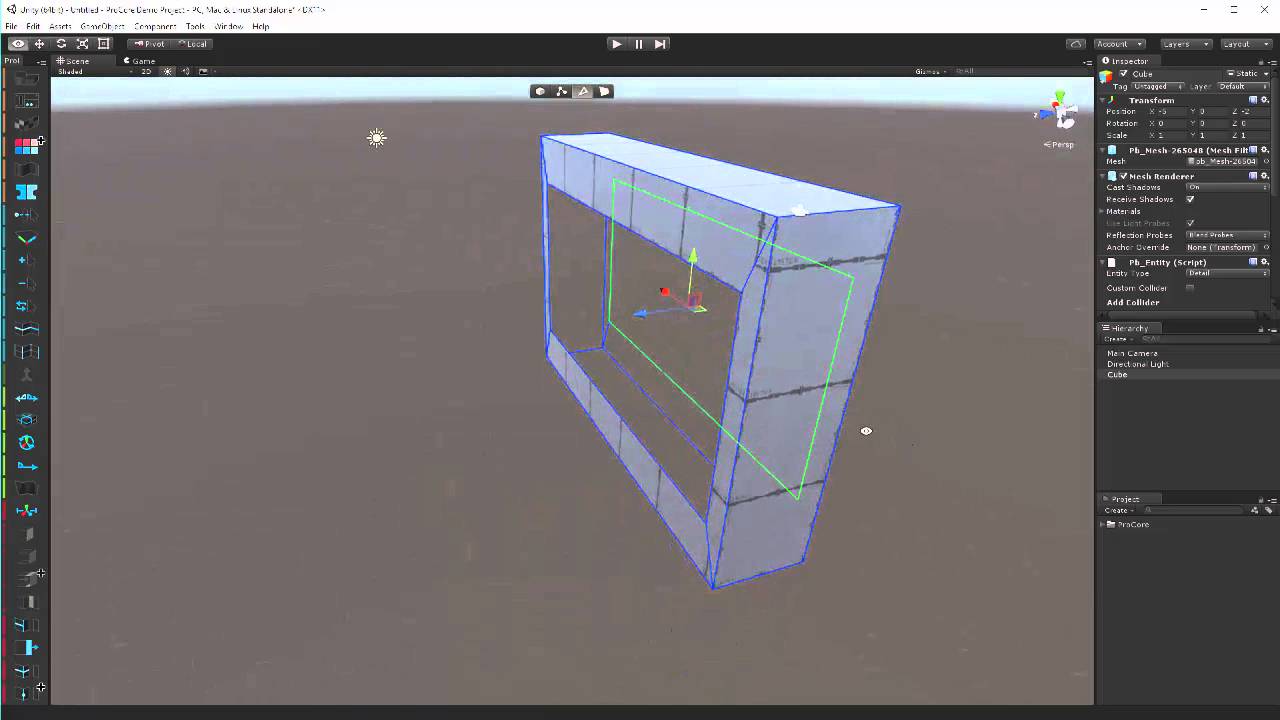
ProBuilder is a tool for building and editing geometry directly in the Unity editor- more info at: www.procore3d.com/probuilder
torn hemlock

Made by PINE - Version 1․0
my brand new map !!!
try to find the tiny hummingbird next to the pine tree 😄
tell all your friends please , favorite it !
frosty bone
How can i disable the gray ball (its from base home kit)
only on balcony part the gray balls are seen, not on walls
but every item i put in the home world, all have gray balls, which is annoying
Here you can see they're linked
left marlin
Disable light probe gizmos.
frosty bone
yeah, found it and disable light group. But why are items suddenly connected to lightgroup?
fresh plover
try just the 3d icon slider bar turn all the way down then check off .. if you check off before tuning it down it does not always work as expected
frosty bone
well at least i have disabled and can now see pieces
 gleaming terrace
Hey i want to make a cake and i want to make it so some pieces can be eaten, like in the bowling world how can i do that?
bold ibex
Should be an prefab for that in the prefab list https://tinyurl.com/vrcprefabs @gleaming terrace
gleaming terrace
thanks ill try it
 inner kernel
Should I set static animated objects?
 past wave
where do i find the vrchat home sdk?
cedar nebula
if an object is expected to move then you you shouldn't set it as static
you can get the vrchat homekit from the unity asset store
https://assetstore.unity.com/packages/templates/tutorials/home-kit-vrchat-sdk-template-149278

Get started building VRChat worlds with the Home Kit VRChat SDK Template project.
Official VRChat Discord | Documentation
Customize your home, set up interactions, and publish to VRChat with this example project. Follow along with the Home Kit Tutorial t...
past wave
oh its on the asset store now
 harsh wagon
I'm having a weird issue with one of my worlds. I don't know what's causing it, but when I spawn into the world I get teleported to a station all the way across the map.
jovial charm
Does the station have something on it that could cause it force u into it?
Some type of trigger or something
harsh wagon
I don't see anything wrong with the seat itself, I copied it from an existing chair in the world
gritty pewter
its fiji
cedar nebula
You sure you don't have some type of OnEnable or OnNetwork ready set to immediately sit you into the chair?
harsh wagon
It's OnInteract
 flat dagger
Anyone know if there's a file size/length limit to adding music to a world?
near escarp
how long do you need it to be ?
flat dagger
I wanted to put in a DJ mix, so it's almost 2 hours long
140 MB MP3 atm
Guess that's pushing it huh?
supple drift
That's a bit much, yeah. You could stream it from YouTube or an .mp4 if you want to self-host
cedar nebula
also if you aren't already, set the audio quality to basically 1 so it compresses more
flat dagger
Yeah, that's what I guess I'll do, post a video on youtube with the audio I want and some stills...
Thanks
 sick torrent
Okay, uh...small problem whenever I log into VRChat for PC since I first logged in: The worlds end up having this weird sort of look in the textures, as pictured to the right from my first time using an avatar I found and uploaded. To also expand, the textures on the avatars all seem fine, it’s just the worlds that always look weird. So, my question is, are there any possible fixes for this problem, like uninstalling and reinstalling the game? Or is it likely a graphics card issue?
 delicate grotto
how can i check how big my world is from unity?
supple drift
@delicate grotto https://twitter.com/Ruuubick_/status/1166014308918185984


Turns out a lot of world creators didn't know this, but you can easily find out what your world is made of, how much it weighs, to then be able to reduce its overall size :
Retweets
118
Likes
275
 Twitter
supple drift
Twitter
supple drift
You gotta run a build first, then search for 'customscene' in the log. I didn't know if Ruuubick mentioned that in his tweet!
delicate grotto
i lowered the quality of my textures and it didnt change at all after building a scene
supple drift
What do you mean by quality? The resolution of the texture or the compression quality?
Are you using crunch compression?
delicate grotto
the resoltuion, and no
do i have to fully upload the world or does test uploads work
supple drift
Local tests will still show up in your editor log, just gotta make sure you're looking at the most recent 'customscene'
delicate grotto
alright got it, any tips on optimizing songs?
cedar nebula
set the quality of the audio file to 1
delicate grotto
really?
supple drift
Igbar likes breaking my audiophile heart -- but yeah, you could do that. Unity would encode it to Vorbis (so effectively .ogg) at the lowest quality. Most people probably wouldn't notice a fidelity difference
You could also reduce the size of your audio by shortening it and having it seamlessly loop if it's an instrumental or ambient track, or you could just stream it from YouTube (breaks often) or self-host it as a mp4
cedar nebula
yeah the low quality isn't really not that noticeable if it's background music. I also go the extra step of turning it into a .ogg in audacity first because I've heard that it sounds a lot better at lower quality
 wise bone
i am pretty sure map download size will be the same regardless of quality setting of the file in unity but don't quote me. converting .wav and .flac files to .ogg will help with that
flat dagger
Well, the vorbis quality will actually impact the size of the world. Unity re-encodes the file being imported to OGG, so that setting determines the size of the imported asset, and since that asset is included in the uploaded world, it does have (an albeit small) impact...
wise bone
interesting
royal bay
yo how do i make an optimized mirror? (player only reflections)
cedar nebula
set the reflection layers to Player and MirrorReflection
royal bay
thx dad
flat dagger
Anyone else getting a unity editor crash every other time they try to publish?
flat dagger
If anyone has time to comment, I'd love to hear what you think:
https://vrchat.com/home/world/wrld_e4329251-ff74-4a72-b5b1-1d43429b721c
The avatars are all really rough still but you can see them getting better with each one so that's progress. I also need to lay down a ton of light probes to get the avatars to be lit properly. Still reading up on best practices for that.
Cheers!

VRChat lets you create, publish, and explore virtual worlds with other people from around the world.
sacred zodiac
Xeph, you need a GPU like me.
Without a GPU, you rely on Integrated Graphics Card and because of this, you cannot see specific shaders, baked lights, and etc.
 crisp torrent
hi guys, my uGUI text did not render properly in VRChat... Unity editor shows exact image. how can i fix this anyone can help?
I tried:
change font to "Arial" and "None" but no effect
crisp torrent
thanks guys, problem solved. revert material selection in text to "None" solves problem.
royal bay
is ambient occlusion a good or a bad in terms of messing with post proccessing in VRC world development?
woven condor
Is there anyway i make reflections not flat - this smart car look terrible in reflection
is smudge on floor
supple drift
@royal bay Baked AO is alright, but AO in post-processing isn't ideal for VR because it's expensive + renders differently for each eye.
@woven condor No way to really fix that because it seems to be box projection, and that's just how that works! You'd could cull the car from the reflection probe's bake, though.
royal bay
Got it, thanks for the advice. Doesnt seem to be dragging my frames down by too much but optimization amirite
woven condor
ooh ok thanks for advice @supple drift - i'll remove it 😦
 sacred blade
I have a pickup object within another pickup object (hierarchy wise the smaller one is also inside the big one. I'm trying to make it so I can grab the inside cube when I'm holding the outside cube.
After I grab the outside cube for the first time, I stop being able to grab the inside one. Can some one tell me what I should look into to fix the pickup hierarchy?
Edit: nvm, found a way, onPickup disable the outside cube collider, onDrop reEnable.
supple drift
@royal bay The new multi-scale AO in PPv2 is way more performant than the old implementation that was in PPv1, at least! but with the whole rendering differently in each eye thing, I'd still only do it for Desktop players obviously (We have a VR detector in the prefab database if you wanna have that set automagically)
royal bay
Right, my frames are tremendously better on desktop. My world is pretty particle intensive so i've gotta try and work that out and optimize it a lot more.
 mint python
I'm attempting to make a rotating skybox. To do this I believe I have to create a sphere with inverted normals, which I have done by creating it in Blender and have then imported it into Unity, but the sphere does not show in game. My map is inside the sphere. Does anyone know what I have to do or what I am missing to make it viewable in game? Thanks
I have the shader set to Skybox/Panoramic, which wraps my texture inside the sphere perfectly and allows me to set it as an actual skybox under the lighting tab, but then I have no physical sphere, so I'm not sure if I could animate it that way.
frosty bone
If you build a chess game like this, i made on all pieces pickup and added mesh collider, all set on pickup layer. The board is on pickup layer with box collider, but when i let it run, all chess pieces just fell througt board, table and even the floor! What is missed here to avoid falling down?
oh chess pieces have no collision set
box collider worked ok
ah, mesh collider need convex enabled
frosty bone
now there is challenge for chess pieces collision: they must ignore other pieces but must have collision with table.
minor finch
@sick torrent Might want to take that question to user-support instead of the worlds channel, but if you haven't already I would try updating your graphic card's drivers
frosty bone
Who have some collision / layer advice on chess board where pieces may not collide other pieces but must have pickup and stays on the board instead fell through it?
i see many worlds have working boards, so should possible
minor finch
I'm not an expert on layers, but have you tried using just a plane to see if you could get it to collide with the pieces? Does the chess set collide with other items set on the pick up layer?
frosty bone
I tried ChessBoard layer and set pieces and board on that layer, but they collide together
i can disable box colliders and gravity, but they will not drop
minor finch
a box collider should work, but just to entertain the idea have you tried using the mesh collider component?
instead of box?
frosty bone
its basically same
mesh wrap more around difficult forms
box is just box
i know there is collide control
i go try with new layer
minor finch
okay good luck
 junior cloak
@proven tusk @echo flower
frosty bone
and set only on chessboard collide and nothing else.
 bitter flicker
is there a way to search for an object with a specific component cause for some reason i have 2 scene descriptors and there are too many objects to look through haha
frosty bone
Found it
Need setup 2 layers for it
Layer1: ChessBoard, Layer2: ChessPieces. I remove all [v] except between two layer1 and 2. And it worked ith correct collision with board but ignoring pieces. All pieces are on layer2, board is on layer1.
jovial charm
@mint python u'll need to setup ur far render distance ur sphere may be too far away for u to be able to see it possibly? U change it on ur reference camera for ur scene
frosty bone
I discoverd if you lock in RigidBody on X, Y, Z Rotation, it STILL rotate in VRChat. Why does it still rotate and not fully locked?
At first view, it stays correctly straight and can move
But if i rotate my hand so much, the piece will rotate (in big steps ofc)
it was not supposed, is there way to avoid it?
cedar nebula
The pickup script overrides physics constraints so that won't work. What you can do instead is make the pickup just the collider and then use the Follow Target script from Standard Assets to track it. This will make it so the piece can't be rotated, only moved
left marlin
@bitter flicker You can search for objects with a specific component by typing t: and then the component name
t:vrc_scenedescriptor
frosty bone
ah oke!
sick torrent
Update @minor finch and anyone curious: It didn’t work, so, I’ll just wait until I can get a gaming laptop to play the PC version of VRChat. Until then, looks like I’ll have to stick with the Quest version
frosty bone
I made some nice game in one world, and want copy it over to other project and use it. What is best way to copy over to keep everything in place, like asset or prefab
 woeful turret
I'm having an issue where voices seem to be completely broken in my world, does anybody know how to fix it?
left marlin
MrDummy, if you want to move objects from one project to another, you will need to export it. This can be either exporting the entire scene with it, or you can make it a prefab and export just the prefab. In you assets folder you can right click an object and say export.
frosty bone
thank you!
near escarp
@woeful turret Did you change any of the settings in your world descriptor ?
woeful turret
My scene descriptor looks like this.
near escarp
The audio override would be the reason
woeful turret
It happens regardless of the audio override's presence
near escarp
Are you using override anywhere else ?
Voice by default shouldn't be affected if you're not adding any of those components
woeful turret
That's the only override in the scene
This only started happening after the recent audio overhaul
bronze smelt
Seen one more case with it, but not experienced it myself yet. Are you loading the world directly via Unity?
woeful turret
Do you mean testing the world through the SDK?
bronze smelt
yeah
woeful turret
It's a public map, so no
I only realized the issue was happening when I tried to show some people the map last night
bronze smelt
There is a bug where regions don't get applied if you leave a world while in a region. Can't remember seeing it being fixed yet either
But don't think this would apply here
near escarp
The uploaded version is the one with the override region ?
woeful turret
As of now, yes
I put the override region on it to try and fix it and it hasn't had any effect so far as I can tell
near escarp
Yeah it needs a specific setup
bronze smelt
Global just need the component
Which world is it? Flooded Grounds or Rainy Meadow?
Also, describe what it sounds like to you. Going to try recreate it
woeful turret
Rainy Meadow.
In my testing with other people the most audio I get from other people is a very slight blip, but other than that there's nothing
It's somewhat inconsistent as I was once able to hear my friend but they couldn't hear me
bronze smelt
Does it always happen or at different occasions?
woeful turret
Far as I can tell it happens at least 90% of the time
bronze smelt
Oh, you are exceeding the limit. Upload a test version of your world with no ambience
^ That is the cause
woeful turret
There should only be one active at a time, unless the trigger spam trying to turn it on is breaking it
bronze smelt
Did you change the Near on the region?
woeful turret
For what specifically?
bronze smelt
The global voice audio
woeful turret
No, it should be default
bronze smelt
Yeah, i'd try disable the ambience and see if that works.
The audio works fine when you get further away from each other too, so something with the audio for sure
bronze smelt
Yes, you also need to account for player voices too
woeful turret
I was more asking what that number actually is
bronze smelt
Actually don't remember what the updated value was now, but 32 at minimum
supple drift
Dunno if you're already doing this but - Unity will drop priority for audio outside of the max distance to prevent having too many real voices at once (you can't hear it cut out at that point anyway) -- but it doesn't read the range of the spatial audio source so you need to try to roughly mirror the fall-offs between the components even if you're not using the native audio source's volume fall-off.
bronze smelt
But it's the ambience set up you got in that world that is breaking it for sure. I jump to another world that also got ambience and it's not happening there
woeful turret
It's not the ambiance
There's a separate section in the world with a lot of audio sources in it, I can cut those down a lot
That should fix it
bronze smelt
Try it, as not even the menu sound is working anymore 🤷
woeful turret
There are about 60 audio sources in the world and I can probably cut it down to less than 20
supple drift
Or limit the max distance so it's free to cut out if you're not within range to hear them! Might be a good case for ambisonics too depending on what it is
woeful turret
By that logic it wouldn't be an issue in the first place, since the majority of these audio sources are a huge distance away from spawn
& have very short max distances on them
frosty bone
Hmmm... make package is not giving correct results.
bronze smelt
Just try with limited audio first, if that works then you know what to do next
woeful turret
I'm sorting it out now
frosty bone
I want copy over what i have made in the world, but package uses old prefab files and not what i made.
copy paste is not working between projects
or it's scene part?
try again with rightclick, select package and then in assets rightclick just made prefab (has now correct everything in preview) and export it.
ah finally correct one
woeful turret
@bronze smelt Uploaded the version with a cut down number of audio sources and it seems to work
Thanks for your help
 cobalt sluice
I have the same issue, is there any way to have voices work when nearby without having to nuke all my audio sources?
It seems like the recent audio update caused it and I'd rather not remove/limit a bunch of audio sources
cobalt sluice
it's proving pretty difficult to prevent audio popping rip
Does anybody know if the number of audio sources you can hear at once has been decreased to help support Quest? It seems like it has since this number of audio sources used to work fine
bronze smelt
It did change a bit, but it mainly apply to Quest/Cross worlds
spark thunder
idk where to post this. can someone help me with that weird thing where when you go topick up something u just grab the invisable collider and not the whole thing, i know about parenting but its literally just the pizza slice nothing else in the hierarchy
bronze smelt
The PC shouldn't be affected by it.
supple drift
I'm working on a world with a large amount of audio. Balancing max distance, priority, reusing audio sources for one shots / PhysSound, and using ambisonics for anything ambient has kept me clear of those issues in testing (so far, at least 🤞). I'm using the SDK version right before the audio update so maybe something there? It shouldn't matter because I believe most audio changes happened in the client tho!
cobalt sluice
yeah I'm using the latest SDK and switched all my audio sources from ONSP to VRC
maybe it doesn't apply to the old ONSP sources?
Really my map broke with the switch
I'm also using physsound but the most sources you can be in at one time is 6-7
frosty bone
@spark thunder make sure that pickup is not static set.
cobalt sluice
@supple drift also seems like priority may not have any effect anymore and unchecking "enable spatialization" doesn't work :/
I'd stick to ONSP audio until they get all the problems sorted out
supple drift
@cobalt sluice Do you have the enable spatializtion thing checked on your build control panel? I think that may force it to default spatial audio source settings. I haven't done much testing with the spatial audio source lately, but it basically is just a future-proofing conduit for the ONSP anyway so I dunno why (or if) it's causing issues. In my case, I have to import the Oculus audio scripts to properly decode ambisonics anyway so I guess I'm just sticking with ONSP and hoping shit doesn't break!
cobalt sluice
yeah I don't ever do that, there's no point when you can set audio up properly yourself
but I've had confirmation that at minimum 2D audio doesn't work with the new audio component, so I'd imagine disabling VRChat's spatialization in general is broken
the way to do 2D audio now is to just have a Unity audio source with no added components (which is deprecated)
just sucks that the source limit seems to have changed, I used to have a bunch of birds chirping in trees but now they make voices not audible + a bunch of audio popping issues
mint python
@jovial charm That was exactly it, thank you! : )
jovial charm
No problem
 snow crater
I try to upload my world but this came up, how exactly do I do this?
supple drift
@snow crater Any errors in your console?
snow crater
supple drift
You have a script (the AllSky Menu script) preventing you from building!
Try removing it and see if you can enter play mode
snow crater
I can enter play mode, let me find that script
Nice it's working, Thank you very much for the help @supple drift. You are awesome!
cedar nebula
I'd check that your world is updating properly first because sometimes it's something dumb like that
cedar nebula
I don't think so but you could try?
supple drift
What is that tree script/component?
vast lantern
yeah it came with the prefab
vast lantern
So I removed the tree script and changed the shader to the Moving tree and grass shader by 1001, but it's still not showing up:
Is there something I'm missing?
cedar nebula
did you already check with the Unity console? I feel like if something just isn't showing up at all there's an error involved
vast lantern
I checked, but I don't see any errors coming up :/
cobalt sluice
Does it work using the standard shader? And make sure you check for errors in play mode
 torpid bear
Any vids on telling people how to toggle music with a button in their worlds?
 weak jolt
Does anyone have an idea why my script for flashing lights works in Unity but not in-game? It simply toggles the light off and on
left marlin
VRChat does not allow for custom scripts.
weak jolt
Ohh...
left marlin
There is a script whitelist which is mainly standard assets and final ik
weak jolt
So there is no way I could create a flashing light then?
left marlin
You can with the VRC_Trigger system.
Or animations. I'm not sure what you are trying to make exactly
ripe depot
Just animate it! :P
weak jolt
Yes.. I don't know why I didn't do that in the first place.. Was way easier
frosty bone
Special help needed how to add HUD to player with on/off switch on the play area. Is there shader for it, and is there guide to make it possible. I got request from friend who need HUD for the game.
ERROR's hud is ok, but must used in world and not on avatar.
woven condor
@torpid bear try this

Making a simple task even simpler! Need to watch the first video for setup phase?: https://www.youtube.com/watch?v=uZlKTm8Uhd0 💕💕💕 💕DISCORD💕 : https://discor...
you can toggle with oninteract - setgameobject
I'm look for video tutorial for "Post Processing 2.0" anyone point me in correct direction please ?
bronze smelt
Be careful with uploading audio with the world. Too many and the world size will increase drastically.
woven condor
i think all good avatar break vrchat rules now
i still see avatar public maps with 50+ materials and 300K poly + avatars
stone hollow
Wrong.
All badly made avatars break VRChat rules.
Good avatars are made by people who know what they are doing.
woven condor
@stone hollow you have examples ?
vast lantern
@cobalt sluice Nope, I changed it to standard and there weren't any errors in play mode either
minor finch
Why are we talking about avatars in the worlds chat? Edit: https://docs.vrchat.com/docs/avatar-optimizing-tips
Do you want your avatar to be efficient and be loved by everyone because of all the frames you're saving them? Follow these tips and you should be good! Any recommended numbers or limits in this document are subject to change at any time. Although some of the descriptions pr...
People running around saying "it's so easy" and don't provide any information on the matter 😂
"just slap some buttons in CATS" isn't instruction at all
 loud storm
um, how long is a world supposed to sit in community labs for
i have a world now thats been in the lab for like a month and a half (since 16th july) with 11 favs and 848 visits but its still in the lab
yet i had a friend who put something up into the lab and it went to public within like a few days...
cedar nebula
I think it has to have a certain threshold of "play" before it leaves labs but how that's determined isn't known to us in the slightest. They say there's a system in place to make sure worlds will eventually leave labs but I've been keeping an eye on one world in particular and it's been in labs for maybe 3 months now. You could try updating the world with some content to get more people to check it out?
 indigo narwhal
Hey lads, trying to upload a map and all i get is this when i hit publish.
Any advice?
left marlin
Check unity console for compiler errors and fix those first.
indigo narwhal
It literally just gives me that the world doesnt exist but theres no blueprint attached
So im super confused
im just gonna keep hitting publish in hopes its gonna give me a proper error.
Oh wait that actually worked
Apparently its my post processing stack that i just took from github.
so thats cool i guess
fresh plover
@weak jolt
for a flicker type of effect you may try two ways adding first a dimming of the light up and down very lightly then moving the light itself in a circular type motion around the object
if that's not good you can add render it on and off randomly very fast
weak jolt
@fresh plover I needed a beacon light like the ones on airplanes that flash in a certain pattern. I did it, however, very easily with an on-off animation
cedar nebula
@indigo narwhal Delete the Tests folder from Post Processing v2
 past burrow
hello, is there a way to change between realtime and baked lighting?
near escarp
nope
woven condor
@past burrow you can have same scene twice, one with baked other with real-time, switch one off other on is way I do it.
narrow ibex
Man, I've been working hard on my world but just found out labs needs"User" rather than "new user". This gonna take a while?
cyan pike
depends
 cyan needle
Hello!
I was wondering
What does the tags avatars-performance, content_sdk_example and content_featured in a world means?
bronze smelt
It's what lets the game know where to display them in the list or what to look for when you search
 somber basin
i am have an issue uploading a world, get this error (VRCSDK-2019.08.22.15.58) (unity version 2017.4.28f1)
near escarp
remove the sdk and reinstall it with the correct steps
 vocal schooner
is there a way for me to increase the audio range to make people more louder over distance?
the default dropoff is to fast for my world
cedar nebula
yeah increase the Far distance on the voice override region component
vocal schooner
doesnt the far distance only increase the furthest distance you can hear the voice in?
i need to increase the voice drop off, so it doesnt drop off and get quiet so fast
and yes i increased the near drop off and it didnt changed anything
somber basin
followed everything still got the error 😦
cedar nebula
@vocal schooner You can't edit the curve at all, it'll always use an inverse-square curve. But because it always uses this curve, it means that increasing the Far distance also increases how far away something must be before it's audio 'drops off' harshly. Increasing the Near distance isn't recommended for similar reasons
vocal schooner
oooooh
so i just increase the far distanse and that will also increase the near distance
will try that out tomorrow, thank you
cyan pike
anyone have a good DoF setting that is useful for both VR and desktop?
vocal schooner
changing the far audio range doesnt change the audio atall
i have no idea what else i can try to make the audio not fall off so fast and quiet
would the vrc_player mods change it maybe?
 lavish aspen
what can i do to keep my worlds from dropping out, like i have a whole list of worlds i have made that have ether went private or i have had to take down because it went open to friends? like im really confused on what i even do now post google sheets
cedar nebula
@vocal schooner can you take a screenshot of the entire object and component?
@lavish aspen That's definitely not suppose to happen. If these were worlds that were once public you should email vrchat support about it (with world IDs) and explain what happened. This has been known to happen from time to time unfortunately
vocal schooner
@cedar nebula it is just the vrc_scene descriptor
i defaulted the settings again
i had "use custom voice fallof" checked, "falloff near" was 50 and "falloff far" was 1000 the last time i tried
cedar nebula
oh there's your problem, those don't work anymore
lavish aspen
thanks ill do that, almost every world i have reuploaded goes down
vocal schooner
so how can i change the voice falloff range then?
cedar nebula
What you have to do is update your SDK to the latest version and use the player audio override component instead
https://docs.vrchat.com/docs/vrc_playeraudiooverride
A region in a world where user voice and avatar audio properties can be adjusted.
vocal schooner
can i just import the new sdk and override the one i use?
cedar nebula
no, you have to delete the old SDK and then download and import the new one
If you need to update your SDK, it is important that you follow these steps to ensure the update proceeds properly and you don't have any old/conflicting files. ## Simple Update Here's how you update your SDK. If you're just uploading avatars, you can use the following proc...
vocal schooner
thanks, will do that now
so changing the near wont do anything?
i have to increase far?
cedar nebula
you don't want to increase Near if you can help it because it will make everybody within that range sound like they're talking right in your ear. It's better to increase Far instead
vocal schooner
here, what i am struggling with right now, let me explain, maybe you will get the idea
i have a club were people dance in and 1 person that plays music through soundpad, but the volume dropoff is to quick and gets to quiet to fast, i want to change the volume falloff so it stays loud longer
valid ember
for that you probably do want to increase the near, but only within the trigger volume you set up on the stage or whereever that person stands
cedar nebula
ah okay so what you should do for that is make an actual region where the person who plays music can stand and have it be heard by everyone. That's probably the only case where you might actually want to increase Near so it sounds like the sound is close by and loud. Maybe turn down the Gain for it a bit though
valid ember
though honestly the whole system is still buggy. I use the audio overrides so decrease the volume and range of everyone in the main dance floor area and occasionally 1 or 2 people won't have the effect applied to them and they're louder than everyone else. especially if you join the world while they're inside the trigger and they don't move
I have 3 areas with different settings separated by 100m with no overlap and their effects just kinda randomly don't apply sometimes
 zealous sundial
How do I make a moving skybox (rotate the main directional light)?
cyan pike
animation plus a inverted sphere for the skybox
zealous sundial
and how do I sync the animation for every player? vrc_objectsync? @cyan pike
cyan pike
probly i never really messed with that kind of stuff
zealous sundial
ok 🤔
 lavish zealot
Anyone had the issue with the console error "vrc_globalroot not defined"?
near escarp
@lavish zealot You can ignore that one
lavish zealot
@near escarp well when I'm unable to join my world after it uploads because it fails to fetch a blueprint id and basically just kicks me back to my homeworld
near escarp
Detatch the blueprint before upload
lavish zealot
Can you dm me? This has been an ongoing issue that I've done a lot of troubleshooting for already but I'd like to get itresolved
@near escarp
near escarp
Have you already tried detatching the blueprint id ?
lavish zealot
yes, I've also made a new project, tried uploading an empty prefab with literally nothing, most recent sdk, done network troubleshooting as well
near escarp
Then you should send the editor log + outputlog of your VRC session to the support email
near escarp
C:\Users\X\AppData\LocalLow\VRChat\vrchat
Editor log is a dropdown menu in the Unity console tab
lavish zealot
It also had a weird habit of reverting to a previous version of the world even though I uploaded a new one with no blueprint ID attached it that is of any use
but I sent my editor log in
minor finch
I've never actually touched this, why does it want a VRC_Trigger?
what is the VRC_Trigger doing?
narrow ibex
I think it's an error. I think the old method was to use triggers and the new method is event handlers. Don't quote me on it though.
minor finch
That makes sense. It's weird that the event handler is asking to use a trigger then though.
bold ibex
Does anybody know how to enable the avatars on Medi Kawaii's world?
bold ibex
how can i publish my world? where is the form to fill out
supple drift
@bold ibex That doesn't exist anymore! You publish to Community Labs, and it will eventually become public (as long as it's not reported, etc.)
 keen cypress
yes
bold ibex
Ok, thx
 crisp crater
Hi, sorry if this is a question answered before, but I am struggling to get the unity default waters working. I tried it with an existing world and was getting this clipping , and it was wonky when I tried it in a new world with terrain too
this is an example,so it kind of clips through
oh also, is there a way of telling it to load in non vr when you test a world from unity - I run in oculus normally, but installing it separately in steam still skips the "vr or not" question and boots me into vr, so its more of a pain to test
stone hollow
Have you tried using a different shader for the water
crisp crater
I tried "water" and "water 4"
stone hollow
Try silents water shader
crisp crater
water4 seemed better but was still acting in a similar way
cool ill give it a search, thanks
stone hollow
If it's getting cut off at a distance then it's your far clipping plane being too shallow
crisp crater
thanks - ive not looked at that,. so ill check that too
I have so many ideas. and so little talent
bold ibex
would you visit my new map if I asked you to see and give feedback?
cedar nebula
some people might, it's not a problem in this channel so it doesn't hurt to ask
bold ibex
visit my new world, Lily Space Brazil, make comments to improve my world, thanks
 sleek orbit
ill see
cedar nebula
you can get a link from the website and post that here, helps a ton so people don't have to search for the world
bold ibex
Ok @cedar nebula