#development-advanced
1 messages · Page 39 of 1
 wide wolf
 manic cloud
what kind of animation[s] are you trying to toggle
wide wolf
its essencially a transision into a "flight mode"
i will show a sscreenshot of the animator... probably easier to explain that way
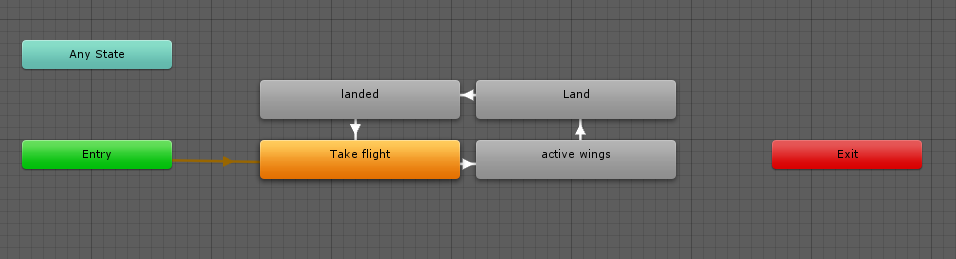
basically im toggeling this cycle and stopping it to have it stay in the state i want
by toggeling it for a specific ammount of time i can basically make an emote that toggles the "flight state"
im using an animation to activate the animator component for long enough that it can cycle to where i want it
well...
i will go back to trying to fix this soon:
the info i got here was genuinely helpful.
i now know whats actually causing the issue. x)
 warm niche
You should just be able to animate what you want in other hierarchy. You shouldn't need to put an animator on your avatar object
You can place animators on bones if you need to, but in the majority of cases you want to keep toggling animators organized at root of avatar where you can freely create necessary hierarchy. Your flying plane can be at root so just give it a parent animator. @wide wolf
As a side note, cycling animators for persisting states is not great. Special care for timing and a limited number of states is necessary or you will desync a lot. I recommend using a 2 handed toggle for major state changes, and 1 handed toggles for minor state changes, or using stop action to make it touch based. DM me if you want help with that
Set material with random is buggy, yes. If you make a trigger and then make up a prefab, then transfer that prefab to a new project, all the triggers are reset.
I witnessed at least one Unity crash with Set material while changing the random figures.
wide wolf
yeah the animations were originally made in other hierarchy.
the only reason there's an animator on the game object is to play the animations in unity for testing purposes.
@warm niche
basically i was intending to account for the timeing by using an emote with a specific duration to time the toggeling between persistant states.
since i dont know any other way to toggle states its what i decided to go for.
though some of the things you say certainly sound intersting.
i will write you a DM to clarify it a bit.
im not one to decline potential new info.
warm niche
are animators synced by default? like if i use a AlwaysBufferOne trigger to change the value of an animator parameter, that happens for everyone?
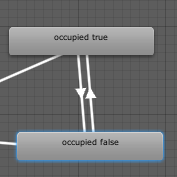
my goal: have a gameobject active only if 1 or more people are in a collider. rn there's an animator with a int value, every time someone enters the hitbox, it adds one, every time someone leaves the hitbox, it subtracts one. if the value is > 0 , the game object is enabled, if value is < 1, it is disabled. It works just fine if one person only does it, but when more than one person is involved, it seems to switch between those two states every frame, like it cant decide.
my best guess is that im misunderstanding which broadcast mode i should be using. ATM its on always buffer one
(btw i checked the animator in play mode and played with the values, it seems to funciton as expected)
 proud meadow
Animators are synced if you have object sync on them. Otherwise no
Also animation syncing requires you have your states set to loop and are ok with the states looping while waiting for the master to update the state @warm niche .
warm niche
oh I see.
gotcha, thanks!!!
where in the state's settings do you set states to loop?
( i mean they do loop already it seems, unless the transition conditions are met, then it transitions )
 near bronze
but when more than one person is involved, it seems to switch between those two states every frame, like it cant decide.
Sounds like you have the transitions set up wrong. Could you share a picture of each one?
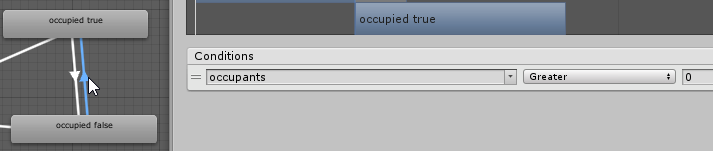
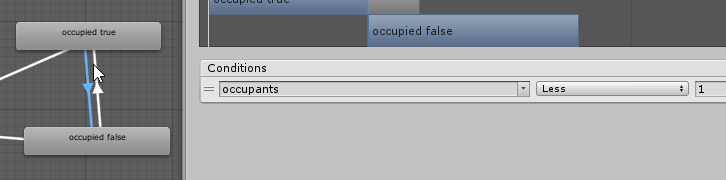 near bronze
that looks fine, but what's happening with the transitions on the left?
warm niche
i put an empty state as the default
and had it decide between occupied true and false states
lemme screenshot


maybe that's not needed
now that i think about it
near bronze
Yeah
warm niche
ill just make occupied false default
near bronze
What about your animations? Do you have like the first keyframe doing one thing and the second keyframe doing something else?
warm niche
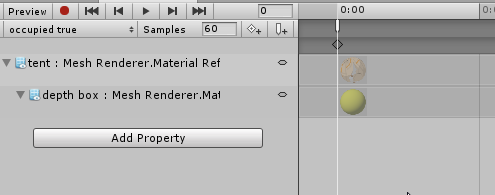
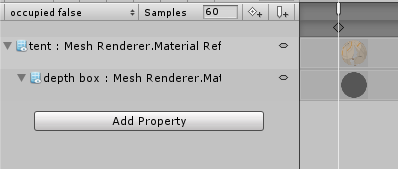
just the first key frame
and the animation events call their respective triggers (that are on the same gameobject)
the triggers then set a game object (a light) , active or inactive respectively
proud meadow
Oh be careful with animations missing a second keyframe and with animation events on the last keyframe
warm niche
oh so should i just duplicate the first one to the second keyframe?
proud meadow
You're going to want another keyframe and maybe set them to not loop... it's a bit scary with animation sync because it could skip backwards
Maybe safest is activate a separate game object that runs a trigger on enable
warm niche
🤔
near bronze
events on the last keyframe will have trouble, but that's not the last keyframe. Animations with only one keyframe will be 1 second long, so you could put the event anywhere before 1 second safely
warm niche
okay then, what does allow collision transfer do on object sync scripts
should i have that on in my case?
 stable hazel
basically if you pick something up and throw it and it hits something else then you get ownership of the object it hits, because you already owned the pickup. If you're using object sync on something that's not a pickup then disable it
warm niche
Made my own little audio player, not tested with other people though. It's simple enough, it plays 6 songs and then loops. One thing though, the trigger time has to be set to the audio length of the song. It should be easy enough to create next and forward buttons. As for mute, not sure.
stable hazel
You might have a problem using OnTimer, because the ResetOnEnable function doesn't work correctly, it behaves like ResetOnDisable
warm niche
So what happens when it doesn't reset? If it just carries on then it will activate the song and turn the rest off, including itself (which is last).
stable hazel
I'm not sure if it'll effect your setup or not, just wanted to warn you if it was a vital part of it
warm niche
i have a flipped sphere that i got from the asset list thing. it works fine on desktop, but when i play in vr, its not visible.
i put the render queue on transparent
this is because i dont want anything beyond the sphere to be visible from the inside
as if you're in a seperate world, when in reality you're just in a sphere
is transparent queue just broken for VR or something?
 drifting egret
@warm niche you cannot change the render queue in the material settings
It won't be saved
You can only use the render queue that is the "default" in the shader
Also, that's probably not the way you want to use the render queues. Leaving it on Geometry should work fine as long as the shader is opaque.
warm niche
ah okay
i think i might learn how to code basic shaders litterally just to change the render queue lol
near bronze
you don't need to know how to code shaders, it's just changing one number
except it's not in an easy box, you have to find it within the code
warm niche
yea its just, the thing in question doesnt have a shader
so i at least need to know how to set one up, and the only thing in it be the render queue setting
im still having that problem with the flickering between two animations when more than one person is involved with my Tent lights
near bronze
everything has a shader. If you can't access it, it's using standard shaders. You can download them from here and then edit them into your own thing https://unity3d.com/get-unity/download/archive

Unity
Unity is the ultimate game development platform. Use Unity to build high-quality 3D and 2D games, deploy them across mobile, desktop, VR/AR, consoles or the Web, and connect with loyal and enthusiastic players and customers.
warm niche
ah awesome thanks
warm niche
so i have a "tree" (just a mesh, not a unity tree object) , and i can paint it onto terrain like normal, except, it doesnt let me use random rotation or height or anything. Is that really exclusive just to the shitty tree maker trees?
warm niche
man unity's terrain tree system in 2017 version really sucked lol
my trees still get dynamically culled too soon , meaning in the corner of your eye you can see a branch disappear, and even more jarring, the shadow disappears when you arent looking at a tree
note: im reffering to regular frustrum culling
 bright dragon
is there a way to change the skybox through a world button?
 buoyant phoenix
pokes area
Hey is the community labs working? Cause I hit publish and nothing is happening. Do I need to resubmit again? I have submitted this map before 4 months ago, would that warrant a resubmission to vrchat?
I reuploaded to make it private due to some harassment problems and I am hoping I can reupload my map now >~<
Any suggestions?
 shadow dock
Since you’ve made it private you need to submit it to community labs, then do the public world form like you previously have.
shadow dock
I think thats only for community labs not the official public list.
buoyant phoenix
it mentions that if it's like and blah blah blah, it'll go official "public" eventually
shadow dock
I dont think that system is in-place at the moment its planned for the future of community labs.
buoyant phoenix
ah
lookin at the documentation it would seem so
Q: I have a Private world. How do I put it into Community Labs?
A: Just check off the "Publish to Community Labs" checkbox in the SDK, or press the "Publish" button on your World page on the VRChat Home Website. You can only Publish a world once per week.
option 2 is broken
shadow dock
Since its in beta it could be an error. You can submit a bug report about the problem. I guess for now you will have to use the sdk if the website isn’t working for you.
buoyant phoenix
Maybe
although my map is outdated and a textures are a little outta wack, so I might have to resort to using the form sigh
it's fully functional and I plan on updating it as I go
shadow dock
You will have to use the form anyway for it to be officially public. The publish for the website if only for community labs.
buoyant phoenix
thanks for ya help, gonna go do it
shadow dock
👍 make sure you get it into community labs first before submitting.
buoyant phoenix
I'm probably gonna skip that and go the old fashion way with the form since it's still seems buggy. I'm not making any changes to my map and I'm just republishing it
It should be ok >~< since they approved it before
shadow dock
Oh miss read what vrchat wrote. I was thinking it was a requirement instead of an opt in thing.
Actually im reading the whole post and now im not sure. Let me double check with someone.
 sharp burrow
@shadow dock @buoyant phoenix You are required to put the worlds onto the community labs, then submit it to the forms
 buoyant phoenix
I can't do that for my world . . . it's been months since I've touched and some textures have gone missing 😾
my private world is still functional . . . and I'm just trying to get it public again.
and the community lab publish button doesn't work either . . . sooo wtf do I do
I mean heck it's even still admin approved
12/20/2018 was when I updated it to be private because of some harassment issues
Ok, in the world public status area it does say it's status is public and passed . . . so I guess I'll find out in 24 hours
warm niche
so just checking, we are only allowed to use unedited scripts from the unity standard assets right?
near bronze
yes
warm niche
somethings currently breaking my brain
my goal is to have a map in front of the player at all times
but only on the x z axis
meaning like
if i look left and right, the map moves left and right to remain in the center of my screen
but when i look up and down, it stays at the same heigh relative to the player
ive managed to make it so it follows the player, but when i look up and down it too moves up and down
im using the player tracker from the VRC asset list link
it uses all 3 axis of rotation of the camera, but im not sure how to get it to ignore the up and down rotation
near bronze
The lookat script is what you want
Set it to 360 on the X axis, but 0 on the Z axis
followtarget the playerhandle, lookat the forward object, and put all your stuff inside that
warm niche
well no i have that on it
hmm hold on
got it to work
i used a configurable joint thats locked to the position of the player handle object from the player tracking asset, locked the z and y and left x axis rotation free
near bronze
That certainly works, and it's good to know configurable joints but you might also want to learn how to do it with scripts because they'll ultimately give you much more options and behave better
warm niche
im uh
currently already feeling weird about the configurable joint behavior
it worked great when the limits were set to 0
but when you want a 30 degree window of non rotation when you look, it kinda like
bounces? from side to side
really weird
ill try it with follow target instead
hmm @near bronze is your logic somewhat flawed in your explanation? if i use "follow target" script, it sets only the position + offset
and then, if i use also the look at script
near bronze
followtarget for the position, lookat for the rotation
warm niche
it looks AT the player, but it needs to rotate around the player aswell
near bronze
Lookat the forward direction of the playerhandle
so it's always looking in the same direction as you are
warm niche
ohh
i see
sorry :p
ohh
my confusion was
i thought you meant LookAt the foward player handle
near bronze
forward object in the playerhandle, yeah
warm niche
i set to follow the foward player handle, and look at the player handle itself
that works well
thanks C:
so, i just realized
that locks to maps position to the foward player handles transform
meaning it moves up and down too
near bronze
hm, that's kinda tricky. What do you want to happen when they jump?
warm niche
i wish i could move the map to the x + y of the foward transform, but have the Z constantly at the camera z not the z of the forward object
when they jump it doesnt matter if it goes with them tbh
i just dont want it floating everywhere while you're trying to click on it
near bronze
oh, you have it set up backwards then
followtarget should be set to playerhandle, lookat should be set to forward
with that set up, it won't do anything when you look up and down directly
warm niche
true, but then it doesnt rotate horizontally around the player
warm niche
yeah no i did
it looks at the camera foward just fine
but the position is always set to the camera position + offset
meaning when you turn your head left and right, the map stays put
near bronze
So you want it to always follow they player offset by a certain amount, and looking at the player. But you don't want it to always stay in front of the player, right?
warm niche
i do want it to stay in front of the player, just not vertically
meaning always in front of the player when they turn their head left and right
but stays put vertically when the player looks up and down
near bronze
Ok that's what I thought, but what do you have now?
warm niche
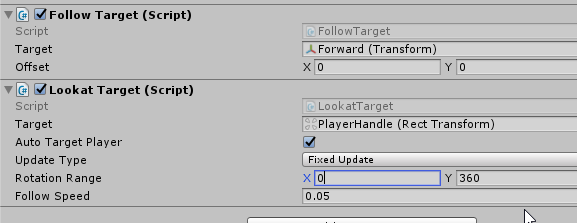 warm niche
thats not quite what i want
doing that makes the map stay put relative to the player
its true that it doesnt rotate around the player vertically
but it also doesnt rotate around the player horizontally
uploading some gifs
this is what your suggestion does https://imgur.com/AasaOkS
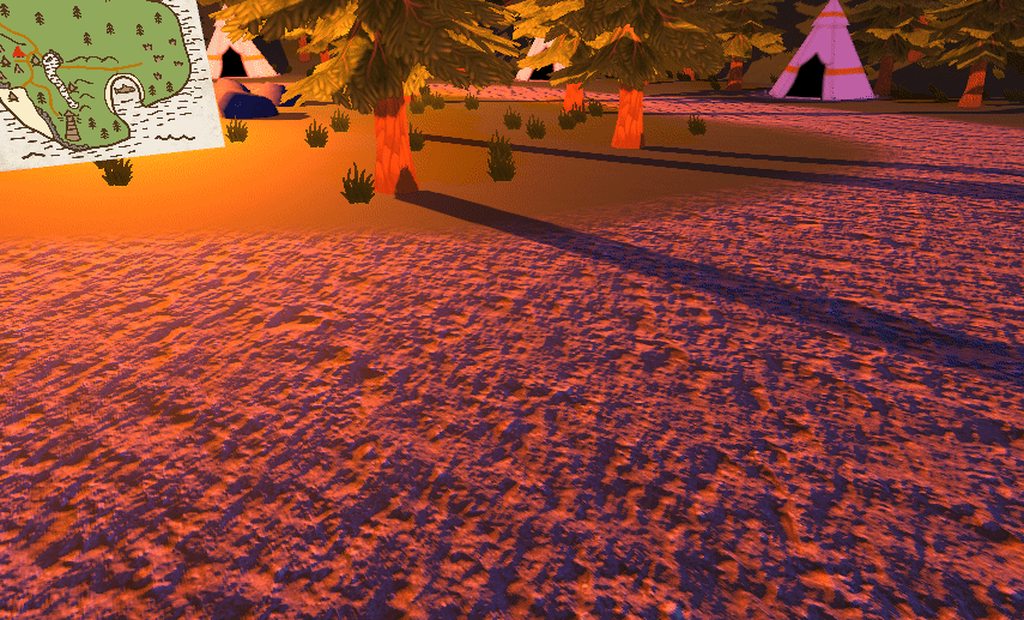 near bronze
no, you're missing something then
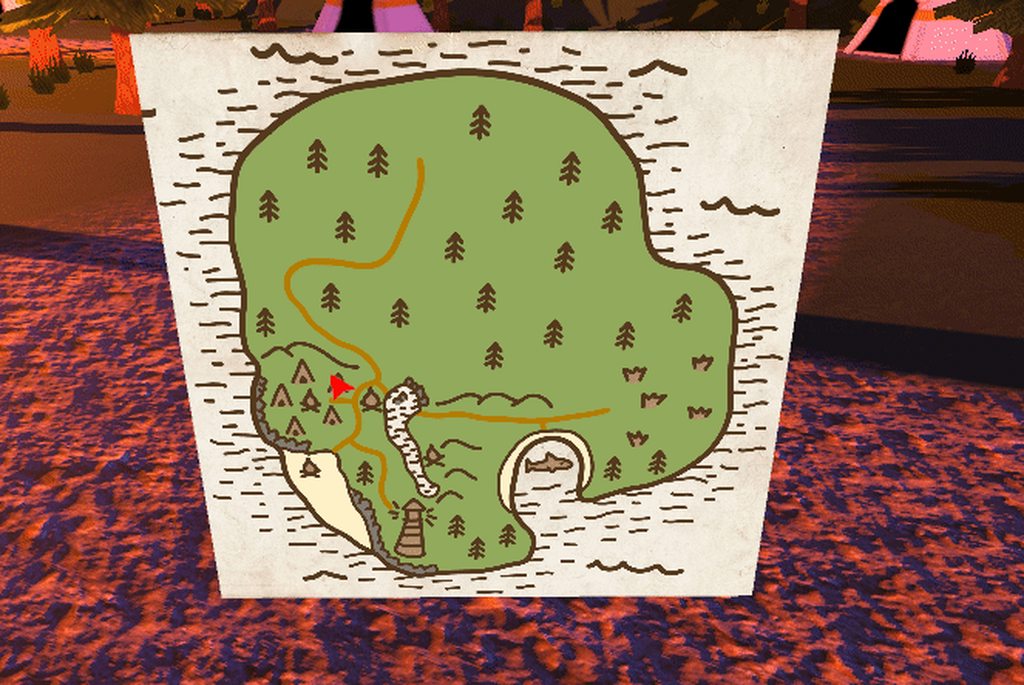 near bronze
what do the components of the first gif look like?
warm niche
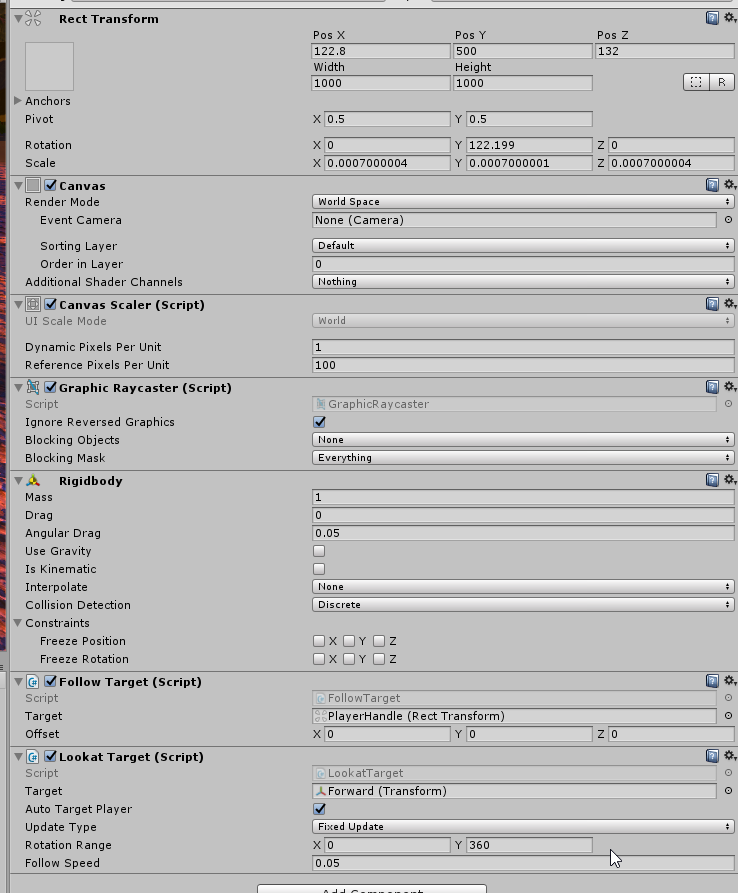 near bronze
Is that inside the playerhandle?
This is what you want, correct? https://gfycat.com/PerfectFloweryAnkolewatusi
 near bronze
then you want this
as a separate, brand new object outside the playertracker
and then put your map inside that, offset to where you want it relative to the player
warm niche
ok ill try that
ahhh
finally got it working
i tried that before, but i made a silly mistake
by creating the parent object as a child of another
instead of going through the gameobject menu
so the rotation was that of the original parent
and it was so wack
but i got it sorted
thanks for all your help c:
warm niche
ive seen worlds that have objects tied to their head
and you can interact with them
i assume all you need is an interact trigger and a collider right?
near bronze
yeah, or a UI you can click on
warm niche
ah yea that would work too
cool
followup question,
ive seen onKeyDown
thats only for desktop users right
near bronze
no, there are keys for vr controls as well
however they interfere with normal movement so it gets tricky
but if you have the player sit down, you can allow them to press buttons safely without interfering with normal movement
warm niche
interesting
dumb quesiton, how the heck do you scroll down the drop down list of keys
its not letting me
is that normal
near bronze
yeah it is a little weird I guess
warm niche
i assume "joystick" means vrcontrollers
warm niche
unity's line renderer doesnt let you assign gameobject transforms as the positions https://imgur.com/NdeJxSM

😦
so this is the best i could come up with as far as rendering a line between two game objects in vrchat
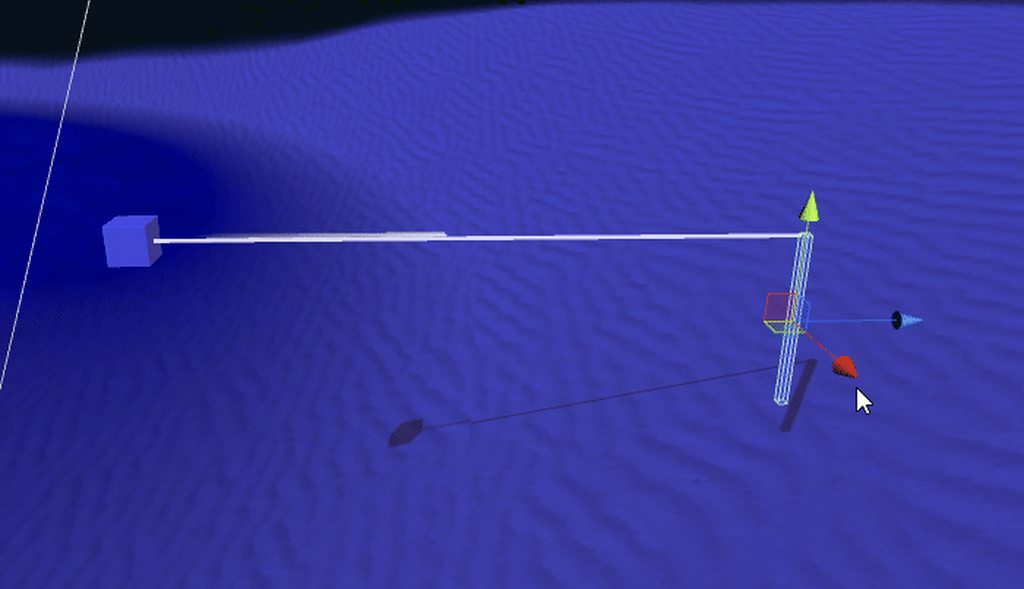
uses LookAt Target asset
this would be okay if there was a way to detect the distance between the two gameobjects, then set the z position of the second point of the line renderer to that distance
i don't think that's doable though
near bronze
if you want to render a line between two objects, the best way to do it is to have a mesh controlled by two bones, one controlling one end and another controlling the other
warm niche
oh! thats a good idea
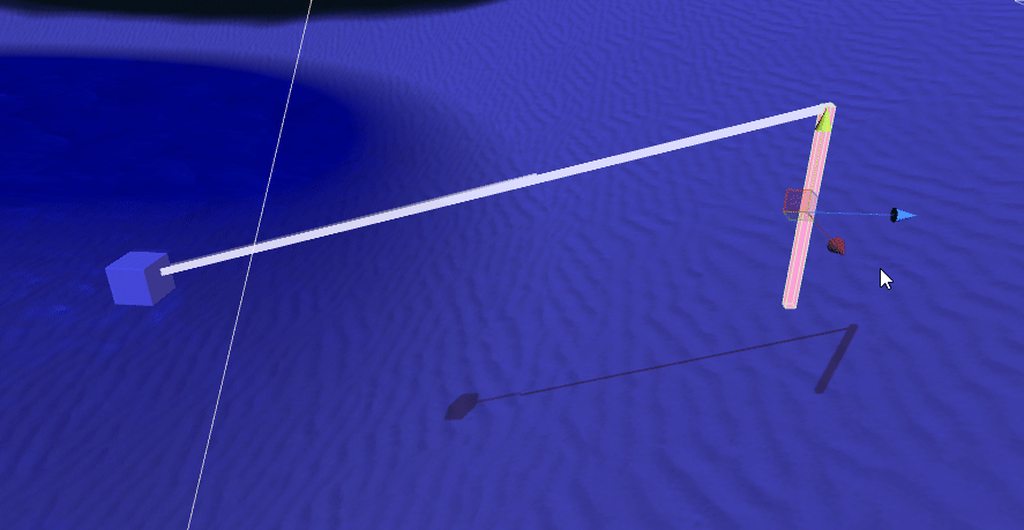 warm niche
lil question about SendRPC. I attempted to do SendRPC (EnableGravity) on a gameobject that has a rigidbody on it. and in the logs it said "could not find any components capable of receiving RPC "EnableGravity(Vector4)" on object"
the gameobject also has Object Sync on it (which allowed me to select enable gravity from the action list)
seperate question : how the heck do i enable the in game log viewer? esc + 3 does nothing for me
@near bronze i just checked out your twitter. the fzero like vehicle that can do mobius strips is by far the coolest thing ive ever seen in vrchat
near bronze
😃
proud meadow
@warm niche it's menu + 3 ... (menu = the key that looks like ≣⃞⇱)
 late steppe
does anyone know how to make a limb ik spot spawn where your avatar is instead of spawning where it was first spawned?
im new to final ik so
warm niche
I was just thinking why the VRC Jukebox stops once in a while. The jukebox does not loop the songs once they are all played, and so if shuffle is ticked it may reach the end song rather too quickly. When loop is ticked and shuffle is unticked then it only plays the first song over and over again, which is kind of weird. In theory, when both loop and shuffle are ticked the song should shuffle and when it reaches the end song, loop to the next one.
shadow dock
@sharp burrow @buoyant phoenix finally got a reply back. "at the moment you don't need to use community labs just use the form to make a world public." in the future of community labs it will probably be enforced.
buoyant phoenix
Map went public a few hours ago, all goood
warm niche
Loop and shuffle doesn't work well, just repeats. I guess a way around it is to turn shuffle and loop off and then repeat the playlist again with the same songs until it's about 10 hours long or something.
 tough sand
i have been getting this error can anyone help? https://gyazo.com/bae4b7639ecd407fcdb9e226e5940135

 random dove
I would like to ask a question and hope someone can help >.< I was trying to create a pickup object that only allow people to move it in a certain degrees but not break the object like a joystick. in vrchat.
Any help would be greatly appreciated
the joystick base mesh should be on an acade~
late steppe
@warm niche none target
warm niche
then afaik you do not, nor do you really need to
You can reset a child object to your location and it will still be in world space
warm niche
You can use physics or more ik
late steppe
Ok
warm niche
I have a prefab for it, and so does retrogeo if you want it
late steppe
Sure I’ll try it
warm niche

GitHub
Contribute to oofdesu/lin-unity-packages development by creating an account on GitHub.
This will auto reset when turned on
If you don't want that, just study it and make it manual
Soft benefits to a manual reset
Like resetting while objects are off
To avoid visual location changes for 1-2 frames
late steppe
Ok thanks
warm niche
You want to apply the world_root, world_offset, and world_end as bone 1, 2, and 3 in the ik script
late steppe
Ok
warm niche
And make sure to place the ik script at the root of your avatar for best performance
The objects themselves can go anywhere
warm niche
You don't need execution order or the vrik script if your target is not an armature bone
It will work regardless. I mean the provided world_fixed_ik script, which is just the limbik script
Should be a child of your avatar at the same level as armature and body objects, as a sibling
Nesting the limbik script degrades the update rate for some reason
 eternal ruin
can i borrow some of your time, i need to get my account fixed something went wrong and i cant do content creation. thanks in advanced 😃
a mod
 stiff lily
eternal ruin
stiff lily
eternal ruin
iv tried but i think theyyare really busy
late steppe
@warm niche im ytrying to figure out his prefab but im not sure how to get it working
late steppe
@warm niche it aint working
 snow juniper
is there a way to send rotation data from an object as an input for another script
like lets say I somehow got a basic steering wheel set up thats attached to a bone
could I limit the steering wheels rotation to about 90 degrees each way
then link whatever the rotation of the steering wheel is to the front wheels?
proud meadow
Have you tried using a configurable joint? That can let you link the rotation of two objects together
warm niche
Is there a way to attach a chair to an object affected by constant force? Whenever i try, the interact part seems to move in the opposite direction to the moving object the chair is attached too.
near bronze
the best way I know of to attach a chair to a dynamically moving object is to use autocam on fixed update like this
autocam is a script that sets the object to follow another
zero out the bottom 3 fields and add a disabled camera component
shadow dock
for my jetpack i have a constant force on the same object as the chair.
near bronze
Yeah, putting it straight on works just fine in situations where you only care about the rotation of the pickups you're holding, like jetpacks. But if the position of interactables and pickups matter as well, then the thing you're on works best when it only moves on fixed update. Probably something to do with how vrc station works, like it only moves you in the chair on fixed update as well
I was just dealing with this problem here https://twitter.com/Phasedrake/status/1107672995403726848

got inspired to make a glider for #VRChat. Built for fun and exploration, drifting along on updrafts from geysers. Has a semi realistic flight model that takes into account speed and applies lift. https://t.co/kbJ5MPOLaJ
 Twitter
trying to make a control scheme where you move your hands around instead of just pointing where you want to go
warm niche
@late steppe do you have final ik?
near bronze
It's still pretty bad at low framerates, which hurts when recording, but it's the best I could get
warm niche
Turn the world_fixed_object off and back on
It auto resets every time it's turned on
@late steppe
warm niche
 late steppe
Thank you
warm niche
👌 lemme know if you have questions. I'm going to make an install guide video like with my state inventory
 dusky drift
I have a Sync Video Player up that works fine. But every time when specific people (and always the same people) join the world, the log fills up with messages trying to sync and the video loops the last few seconds since they joined over and over. When they leave it works fine again.
Video player is set to play on awake and all the buttons are Unbuffered. Anyone know what could be causing the problem?
drifting egret
Pretty sure render queues are capped in this game, and anyone who tries to go higher than the cap just makes themselves look utterly foolish @warm niche
If your avatar needlessly "overrenders" whatever the hell (nameplates for example) it's getting blocked
 celest fiber
I'm just starting to look into the sdk documentation but I was wondering if it's possible to add a DBZ Scouter-like animation on a character model. I was thinking if there was a way to trigger an even event when you look at another avatar or interact with them somehow, it would essentially show you the avatar statistics as a number on your scouter. So I'm wondering if two features are possible in the sdk:
- Triggering an event when you look/interact with another avatar
- Getting another avatar models statistics
proud meadow
You could make your own avatar display your own avatar statistics when someone looks at you
Ironically adding an extra material and making your stats worse in the process
celest fiber
Thanks but that's not what I was asking. Does that mean that you can detect when someone looks at you, or do you mean display your stats generally. I want to know if it's possible to get other avatars stats and use those values in a custom shader/animation
proud meadow
Yes you can detect when someone looks at you using either a shader, or objects attached to your eyeball's rotation.
My proposal would be make a prefab that bakes your own avatar's stats onto some material that gets displayed when you are on screen, then if people add it to their avatar you can see the stats for those avatars
But if you want something that just finds out this information ingame, not a chance
 dark sigil
Doesn't render queue cap at 5000 🤔
drifting egret
That's what I thought as well
Or at 4999, or at least that's what I heard
But the behaviour ingame does not seem consistent with this so I don't know if it actually happens
 trail jacinth
How would you make a Slider that you can slide back and that springs back to its original position when you let go? I assume it would work with a spring joint, but I just dont know how to set it up :/
proud meadow
Using a UI slider in a world? Yeah there's no on end edit sadly. You can set transition to animator if you want control over hover, press and release. Will generate a nice animator controller
If you are talking about hardlight's slider can't you add a trigger on drop?
trail jacinth
No I actually meant a Slider that you can "pull" back
I figured out a way to make it work however
Yeah I figured that much, but its not as simple as that sadly :P
trail jacinth
Can you detect a certain rotation of an object (i.e. a Glass being upside down) and make it Trigger something?
proud meadow
Attach a box to it at like y 2000 that triggers something on collision and make a 1000x1000x1000 box collider at like -2000 that is set is trigger
Basically far enough away that players won't it it so raycasts etc aren't affected
trail jacinth
Ahh I get what you mean...well but that is very over-engineered for my situation tho
proud meadow
Hey you asked for a solution. And how is it over engineered :-p? It's just one way to do it of course but you often get good results by using physics system to solve things.
trail jacinth
In my particular situation something like that might cause problems
and also I actually dont want to detect if something is upside down, but rotated to the right relative to the player's facing direction who is holding the object
So that would make it alot more complicated
proud meadow
There's another question of what you want to happen. For example if it's purely visual you might want to consider shaders or even stencils to achieve glass pouring effects. Those you see in the pug are of the simplest variety but you can do pretty much anything visual
trail jacinth
It has to trigger a VRC_Trigger. Thats the problem
proud meadow
Ok so you want rotation relative to player's head? Use screen space canvas (camera tracker), and fixed joint (freeze position only) it to an object at like 0,-50,0. Then take the pickup and fixed joint (also freeze position only) it to an object also at 0,-50,0. Put a small collider at y=+1 on the first and collider at y=-1 on the second. When the colliders collide do something
 charred lagoon
Question about emote toggled props, last night it seemed like RNG determining who can and who cant see my props that i can toggle from the emote menu using Xiexe's inventory structure. Sometimes i couldnt see it but select others could and vis versa. Leaving and rejoining the world would sometimes allow people to see it, but if i leave and rejoin, again a seamingly random selection of people would be able to see it, however there was no guarentee id even be able to see it. This has never happened before and im wondering if there is something i need to do in unity to prevent this
drifting egret
Toggle props desyncs a lot
People who don't see you emote will also not have the prop toggled for them
Xiexe's inventory has separate "off to on" and "on to off" emotes for that reason, I use it several times to make sure it worked
charred lagoon
I noticed that, like they have to be in the instance before hand. But the system very rarely works, could the size of the assets related to the prop be an issue?
Cuz i mean it often doesnt even work for myself. Spamming on to off emotes doesnt fix it from my perspective either
drifting egret
No, they also have to be looking at you
And sometimes the animations generate wrongly, you could try regenerating the system
charred lagoon
Oh alright, that is very weird. Yeah i can do that, the only reason im not very confident that would work is simply because, on occasion, it works exactly as intended.
My main issue is that it so rarely works in comparison to other systems ive seen people use
warm niche
Does their inventory system have a suspend state in the animator? How long is the active state?
Also, you can put a very large cube on yourself, so large that nobody will ever see it visually, and that will make it so nobody culls your animations
drifting egret
That messes up your bounds size
proud meadow
It is a performance hit to always be simulating IK and your animator yes. That's why bounds size belongs as a performance metric.
But you can decide if it's worth it.
drifting egret
I avoid emote toggles most of the time anyway
And I don't think any one person is important enough that they have to have their avatar active all the time
It's on a similar level as people whose accessories render through walls lol
charred lagoon
it used to be consistent to where so long as the person did not join an instance late, they would be able to see me toggle on. but i'm going to try a state machine solution instead of the emote menu and hope that fixes things. The big box isnt necessary imo, i just want to make sure if the person isnt culling my avatar, that things are behaving atleast normally.
drifting egret
IMO what we could use is a way to sync animators
Provided by VRC
Could tie in with custom animator controllers once they implement those.
Have the player's main animator synced, would facilitate state machines quite a bit and would prevent culling or late join issues
Could put very complex stuff on the animator, such as emotes to switch to another blend tree of animations entirely for walking/gestures etc.
warm niche
Would be very much appreciated, but not gonna hold my breath! Learned lesson from split gestures
drifting egret
Everyone always refers to that as split gestures lol
Seems like most people weren't interested in doing anything else with them
warm niche
Yeah pretty much, most people don't need more
I can't think about it though I get dejected
drifting egret
Lol
Same
Another use case I see a lot is people who want to make fundamental changes to the walk cycles. Walks that involve more than two legs, or changing the way run/walk blend together
near bronze
The problem is that if you try to sync an animator, it restricts what complex things you can do because precise timing is off the table
At least that's the car with objectsync on worlds. It's probably not an unsolvable problem but not something vechat has wolves either
drifting egret
Depends. What if the person in the avatar is the "owner" of the animator and just broadcasts its state to everyone else? Shouldn't that make it easier to do strict timings?
I remember when I had a prop cycle on a gesture, everyone would see different things if the cycle time was too short.
For avatars, it seems far more reasonable to want consistency across players. And besides, we don't need to rely on timings that much when we have state machines
near bronze
Nah, forcibly telling everyone where the state is is exactly the problem. It can skip around and jitter and it's not smooth
drifting egret
Even just for regular states? Assuming that it wouldn't sync the animation time itself, only which state the animator is in
near bronze
For an inventory system, no it would work great. It's more like if you had a state that's only active for a single frame for some reason, it's very unlikely it would happen
Vrchats own character animator is clearly not syncing state either, just parameters. And for good reason
One method to syncing an animator is to manually set up "sync states" where you get to that point and then broadcast to everyone that that's where you are. They then use an any state transition to join you at that state no matter where else they are
buoyant phoenix
Does anyone know if vrchat supports Planar reflections?
cause . . . it doesn't seem to work and would've just wasted 9$ and 3 hours trying to get this to work on unity to make something reflect for my map
sigh guess I can FPS eater VRChat mirror ;n;
 summer berry
If the asset uses scripts, it will not work.
proud meadow
The VOLT has a custom shader based screen space reflection done purely as a shader (for the glossy dance floor if you turn rtx on). I don't know if the custom shader was released publicly
Otherwise your options are vrc mirror, camera, camera based depth mirror (see netri's github)
buoyant phoenix
oh . . . Dang it cyan I should've just went into your area 🤦
also interesting Lyuma
proud meadow
What asset did you get? Sadly even if they work without scripts, many assets in the store are broken in vr
Always check for vr support
buoyant phoenix
it's actually in the photo
Realtime Planar Reflection
proud meadow
Sounds like what vrc mirror is
buoyant phoenix
actually it seems to be the same
Although I was hoping to not kill frames like VRC-mirror does
proud meadow
Vrc mirror kills frames because what it is: two cameras
You can do one camera yourself
buoyant phoenix
but 🤷
I've started with a cool render from blender and then tried to get it in unity, bought something dumb and found out it was pointless 🤦
proud meadow
That will be half the cost but not stereo
Yep that's the way things go in unity sometimes
 frosty bone
I have another question that I can't seem to figure out. Is there a way to have multiple colliders set as "triggers" that overlap to make certain shapes? As an example, i have a weapon selection area smack dab in the center of an arena. I have the trigger set up to only make the weapon 'deadly' when they leave the weapon selection area and enter the arena (basically, OnEnterTrigger, set box collider on the weapon to active, and OnExitTrigger, destroys the weapon). HOWEVER, the issue is when you walk into different areas of the arena, basically 'exiting' one trigger, but still in an overlapping trigger, it still destroys the weapon. This is the current attempt, but seems worse than having 3 empty objects with the same overlapping colliders, just one on each empty object.
proud meadow
@frosty bone I can't say I fully understand your situation but I'd suggest looking into Animator Controllers and finite state machines. If you make each OnEnterCollider activate an AnimationBool true and OnExitCollider activate AnimationBool false then you can set up transitions in your animator controller based on which colliders are active and which are not active
shadow dock
@frosty bone why not just have one trigger volume in the weapon selection area so it only activates when you leave. then destroys when you enter it again.
 jolly turret
any reason a specific stream on a videoplayer could cause a crash ?
because there is one stream that is 100% guaranteed to cause a crash after a minute. other streams work just fine
frosty bone
@proud meadow in that one sentence I’ve realized I have much to learn still regarding unity. I’ll read up on it and see if I can give that a shot though!
@shadow dock I tried doing that but it was quite strange, since anything in the box around the weapon selection couldn’t be interacted with unless you were in desktop mode. As soon as I removed the box the weapons worked for VR and Desktop
shadow dock
i dont remember having those issues maybe a vrchat update caused an issue. i helped the electric sands festical world with its weapons, and how it works is the guns are disabled while in the spawn. then once you exit the safe zone spawn collider the guns enable.
last i knew it was still fine but ive not been there in a while.
frosty bone
Gotcha. My friend and I were utterly confused by it since it made no sense. I’ll try playing around with that idea again too. Thanks a lot for the help!
proud meadow
@frosty bone if you are in VR and inside a large box collider I believe you might not be able to interact with anything
random dove
@jolly turret not sure is that the same situation. But I did find out that a link that is invalid will cause that crashed. You could try with the URL panel and put a random link and it will crash it. Hope this help ~ if not good luck 😃
jolly turret
is it possible to use emotes as a way to change clothes using bools
or does everything reset after emote animation is finished
manic cloud
yes, have two animators where one disables 2nd enables the mesh, then with emote toggle one of the animators
jolly turret
it gets stuck in an animation loop even thought i turned of looping and it resets afterwards
anything obvious im missing?
warm niche
I've got a chair which moves with Contant Force, it has a VRC sync on it. If i put another chair inside that chair, will i need to add another sync or will they both sync?
 stoic tapir
if that chair is for all intents and purposes not moving relative to the parent chair, then yes you could say its sync'd, since it will follow the parents transforms
afaik
near bronze
yes, if a parent is synced then all the children are synced as well, not because objectsync magically affects everything below it, but because they're naturally moving along with the parent.
warm niche
Right, thanks
warm niche
Where do i order devkit knuckles controllers
 final wigeon
From Valve https://partner.steamgames.com/
Also note there's no guarantee they'd even send you a pair.
 open lion
Hay i wanted to made a car to drive around my island with but i have no clue where to even start with the movement of it
 dapper mountain
@open lion You can download the "Standar Assets" from the Unity asset store. There is a prefab for a car. Just drag that into your scene and add a chair to it. You can also look for a kart prefab on pinned messages on #world-development all ready to use (You will need the "Standar Assets" for all cars to work)
open lion
ah now it works i got that prefab before i asked but could not build or it would crash the client on load. But after adding the vehicals asset it works but when i try to go it ejects me dit i can still control the car
figured it out needed to check disable allow exit
open lion
Is there a way i can feed the speed of the car into a rotation on the speedometer on my car
 neon heron
@cinder trail
how bout animation
its easy task to make an manual animation by making an object appear and dissappear from an emote?
i have to google it right?
 cinder trail
i barely do any kinds of animations so i dont really know much about it yet, but based by what youre saying i think youre basically saying about toggle prop
i dont really know how to do it for a emote but you can bind a object to a gesture, so when you do a hand gesture the object appear
neon heron
well.. i need to make an avatar(navi) dissappear and appear on the palm of the avatar
that is where ive installed it 😄
instead of here...
ive put it here
cinder trail
i know its possible to do that but i never done it myself so i cant say much
neon heron
looks way cooler on palm too
of course needs vr user to do the trick
ok dude
tanks anyways..
il watch tutorials..
proud meadow
@neon heron @cinder trail check out VRCInventorySystem https://github.com/Xiexe/VRCInventorySystem

GitHub
An Inventory system that is easy to set up for your avatars, using emotes. - Xiexe/VRCInventorySystem
Can be used either as emotes or gestures. Do be aware of desync: anybody not looking at you when you did it will not see it. You can fix by doing the gesture multiple times or every few minutes to make sure late joiners get the experience
open lion
does the kart prefab work for VR users?
near bronze
Yes, but some controllers are different
Vive uses touchpad and Oculus use joystick of course, but then WMR uses joystick despite using touchpad for normal walking. And if someone has done the playspace moving configuration on WMR that will not allow them to use their joystick ingame
@open lion
jolly turret
so if i want to update the sdk do i just import the newer one?
or will that break something?
how do people usually go about doing this?
dapper mountain
@jolly turret check the "Updating the SDK" section on this page https://docs.vrchat.com/docs/setting-up-the-sdk
Requirements We're going to need a couple things before we can get started. - Unity 2017.4.15f1 - Scroll down to find LTS Release 2017.4.15f1 If you have Unity Hub installed, you...
jolly turret
thanks
 rocky ginkgo
So. I have a a model I'm trying a few things with. Specifically the skirt and having correct physics. I attempted to use dynamic bones and colliders on the knees for pushing the skirt aside but all I got was a bunch of clipping and very poor performance. My next idea was to use a cloth component (which requires a whole new smr [skinned mesh renderer]). Although I can't exactly separate the skirt from the model by materials in blender as the skirt and body use the same material. I was wondering if there was a way to potentially separate them
rocky ginkgo
what exactly would I select after ctrl+l
drifting egret
You select a part of the skirt with RMB or C or B or whatever
Then CTRL+L to select linked
Press G to move the skirt and verify that you got it all. If so, CTRL+Z to undo the movement you just did and then press P to separate into a new mesh
But cloth is no guarantee for this working either tbh
rocky ginkgo
I know but I suppose using components which actually use Unity's physics engine would be more performant than dynb
drifting egret
Cloth works best for very low poly meshes so I do hope you plan on keeping that low poly
Additionally, cloth is laggier in this version than it is in 5.5 or 2018
rocky ginkgo
lovely. Do you believe it would just be better to save myself some pain and just switch back to dynb and try and work out better phys?
proud meadow
Dynbone has extremely strict limits in the new version. You will need to consider a skirt weighted to only a few bones
open lion
Am i able to make flyable planes in VRChat using the same idea as the cars or are not all the standard assets scripts available in game
open lion
Is there a brief explanation on why the Video sync player uses a realtime emission texture shader instead of a unlit texture? Isn't realtime emissions bad for performance
drifting egret
No, it uses Realtime GI
Which is fine for performance
@open lion
It's not like a realtime light
open lion
sorry for my ignorance but thats the differance
drifting egret
The downside is that it requires baked realtime GI which can take up a lot of space
Realtime lights act like a real light. It adds drawcalls on every material it hits, and possibly shadows too.
Realtime GI is more like changing the baked lighting. It adds no drawcalls as far as I know and is therefore better for performance.
open lion
ahh thanks the more you know
I saw in a world that the video screen would effect the lighting in the room is that a different shader. If felt how you say magical
drifting egret
It works on any shader with Realtime GI, so that also includes standard
But for the visual fidelity, the video screen shader that they use is not ideal.
What you really want is for the screen to be an Unlit Texture, but for the emission to be adjustable freely without affecting the screen, only affecting the environment.
So far I have found only one workaround and it only works on Videosync, not stream sync.
open lion
i asume using the render texture
drifting egret
Silent suggested I should use a particular if-statement in a shader to determine whether realtime GI is currently being done or not
So I'll try that next
open lion
Need to learn shaders so i can cross that off my list of things to learn
Also is there a way to make you UI elements not look so jagged
 dim owl
Hey, I've been having a problem where custom physics materials on rigidbodies stop working occasionally. I have a sphere with a high bounciness and it functions properly but occasionally stops bouncing altogether and won't fix unless I reset the instance. The bounciness is set to maximum so it shouldn't get averaged out to zero when colliding with other surfaces.
Anybody know what's wrong?
dim owl
Yes
drifting egret
That's a bug that's been reported a few times
If you rapidly pick up and drop a pickup it will permanently lose bounciness
You can also force this to happen by grabbing an object with one hand and then regrabbing it with the other several times.
This should almost guarantee it to happen
 unique forum
Did they fix Ontimer ResetOnEnable?
I saw VRChat 2019.1.4p1 Patch Note
Fixed an issue leading to some triggers not working properly
drifting egret
Probably not, they only fixed a recent issue caused by the latest patch
That caused, for example, Luxerion World to not be functional
unique forum
How much longer should we wait? :(
It is doubtful that they are aware of that.
 tawdry hamlet
So here is an odd one. I'm using Post Processing Stack V2 and the last update broke my world somehow? I guess it has to do with this "Fixed some headsets having oddly offset object selection highlights" But that is literally the only thing that comes close.
What happens is ill enter my world and things look fine for 2 seconds, then on both eyes the screen will literally shrink to the bottom left and keep the old one rendered in the back as if it didn't clear the buffer. Then it does this 2 more times with a delay of 1 second again going smaller into the left bottom but this time it doesn't clear the buffer and gets stuck on the screen it rendered except for the smallest one and the biggest one.
I have updated the PPS to the latest version and same for the sdk. 1 other person had the same issue with my world and was also just like me using the oculus version of the game. I think its bloom honestly but i was wondering if there is a fix for it before i report the bug.
 rough sleet
@tawdry hamlet Are you on Rift?
tawdry hamlet
yes
rough sleet
Which build are you on?
tawdry hamlet
oh my look at that an update just as i read this
rough sleet
Yeah, try the update. Build 737 should fix that issue.
tawdry hamlet
Thanks, i will ^^
warm niche
I cant seem to get the karts to work
the prefab from 2017 isnt working, and i have the standard assets installed
 tired gate
Im having issues in the latest version where some vr users are unable to click on about 100ish triggers, but desktop users are still fine
And there is also a lot of new syncing issues
Everything worked last update
Can anyone help?
drifting egret
I've been having similar issues since last update
The same thing happens to avatar chairs
proud meadow
A few people reporting avatar chairs yes. Is there a canny?
tired gate
Some of the people can't toggle the button; the object the triggers are on are there, you just click them when you hover over them
I even tried deleting and recreating them from scratch with no luck
I created them about a weekcago and they worked fine, but then suddenly after the update some of them broke
And it is only for some of the vr users, some vr users and all desktop users can use them normally
Also, OnDrop calls stopped working for everything in the world
drifting egret
There are so many broken triggers right now
tired gate
Yeah, and it's annoying cause Im basically unable to work on the world until it's fixed
As almost all the triggers are vital to moving around, with me now having to change the world spawn to get to new areas
stoic tapir
anything in the logs?
like does it show the trigger registering at all?
menukey+3 on desktop to bring up the log screen
 polar robin
Is anyone else experiencing a bug where it automatically loads you to your home world after some time? My internet is fine and for some reason it's only happening in one of my worlds. I'm guessing it has to do something with this update acting weird.
 latent hemlock
Re the trigger fix I have a world where the triggers broke but still don’t work
 soft zenith
someone else getting ur model bugged and broken when activating safe mode in fullbody?
tired gate
I've figured out part the issue on my world, the logs are showing it as going deferred, which has already been reported so I've just upvoted the canny for it
Now I know the sync issue cause, but still not why some triggers arent turned on at all
warm niche
Anybody knwo if there's any flier prefabs that exist
summer berry
Testrun jetpack in the prefab database
summer berry
It is, just not the first pin
 acoustic mantle
is there any way to access player and playerLocal from an avatar?
dark sigil
Do you mean like collision? You can set particles to collide with that layer
You can add a local camera and have it cull everything but those layers
 graceful stump
how do you change the sitting animation for the vrc chairs
near bronze
If you're familiar with avatar gesture overrides, stations use the same system. Just give the station an animator that applies the sitting animation in the idle slot.
trail jacinth
Did Hardlight himself or anyone else make some form of documentation (besides the README) on how to use the "PropSpawner" prefab or even better how it works?
Im quite lost on how to work with it...
near bronze
I think it's mostly broken in vrchat at the moment
They're dealing with some trigger bugs
acoustic mantle
@dark sigil primarily collision, yes. I've tried manually creating a player and playerlocal layer for it to collide with but it doesn't work. I've not seen any accessible version of those other than what I put in, have I missed it somewhere?
summer berry
@trail jacinth PropSpawner still works in my world. Hardlight did have a readme file for each prefab in toybox, but they don't explain everything. You can ping me if you want a more detailed explanation on how it works.
trail jacinth
@summer berry In this chat?
summer berry
Oh, pinged already
The original propspawner was a good way to explain it, but in toybox v2, he added some things that complicate the spawning portion of it.
Basically, all it is, is spawning an object from the scene with additional logic to allow for easier ownership.
trail jacinth
Well I know what it does in theory, but I have no idea on how it handles the ownership, how it handles despawning, and how it works in more detail so I can use it for my own systems...
summer berry
Uh, I'll explain the original version's spawning since I haven't really looked into the new version.
When someone joins the world, it tells the system to spawn an owned object. This method does three things. It locally enables a gameobject that will ONLY be on for the owner. It then globally spawns the object. It then disabled the owner only object. Since the owner object was only enabled for this person, everyone else will spawn the version that does not have the owner logic, and will not do those things.
Owner only logic then sets up a boolean in the ownership animator. This animator is used to check if the original owner has left the room.
It works by waiting for a player to leave. When a player has left, the animator goes to another state to wait to see if the owner is still in the room. At the same time, the owner will broadcast to everyone that they are still there (setting the boolean back) and that object will be kept in the scene. If the owner is not there to send this message, then the animation will finish that state and reach the destroy part, where it destroys itself.
All of that logic is about manually handling an object's "ownership" and is unrelated to actual object sync. Object sync handles true ownership and controls syncing of moving objects. When someone calls spawn object, the new object will be owned by that player.
Rough explanation. Let me know if you want more details
trail jacinth
Hmm good enough for now, Im working on something else right now. Ill get back to you later, thanks!
summer berry
👍
 main marsh
Does anyone work with VRC_OscButtonIn? I have arduino messege 1/0, client js, and one bool parameter in animator, simple scale changes, but it's doesn't works
final wigeon
I heard reports elsewhere of the MIDI stuff being broken, OSC might also be buggered at the moment.
If all your other OSC stuff is working fine then it's very likely vrchat.
proud meadow
@main marsh please post all information including an example world and relevant osc scripts at the canny https://vrchat.canny.io/bug-reports/p/vrcoscbuttonin-is-not-working
The error is probably on vrchat's side. True it's hard to test
Still contribute any information you can
Especially if it's a simple test world. Nobody submitted one yet
main marsh
@proud meadow i'm doing this for the first time, i'm not sure that the error is on the vrchat side. In this thread, people have already shared what worked exactly.
trail jacinth
Has anyone an idea for "Snap-Collision-Testing"? So an object that has a collider checks if there is a collision or not on an Event (Trigger,Animation,Enable, doesnt matter).
main marsh
@proud meadow Is world must be public? Because I have "not enough thrust to publish to community labs vrchat" mesage
summer berry
@trail jacinth What do you mean? Sounds like standard object detection?
trail jacinth
Well I want to do a Raycast detection that looks if it collides with something. Problem is that OnEnterTrigger only triggers when it first collides with the object, but not if you raycast at the same object again
I have a bunch of different ideas that might work, but none of them seem really efficient or performant.. :/
summer berry
What are you trying to build, not how are you trying to build it.
trail jacinth
I just want to see if two colliders collide and then execute something if that is the case. just that.
summer berry
You were explaining something way more complicated than that.
trail jacinth
Well sorry, might have gotten myself a bit confused aswell, but yeah...how would you do that as simple as possible?
summer berry
Detecting an object is simply OnEnterTrigger on one object, looking for a layer that the other object is on. Now, the complicated parts are when multiple objects are on this layer.
If these objects are moving, you need to have a rigidbody for the detection to work properly.
trail jacinth
No thats not my problem
The collider never leaves the other collider
So OnEnterTrigger will not trigger again
summer berry
Disable the collider and re enable it. Do not disable the object. Note that using VRC_Triggers with this have a limit on how fast you can disable/enable an object. Using ActivateTrigger from standard assets has no delay and will fire right away. I use Activate Trigger for one of my systems to know if the player is still in view of another object. I also had to do some weird system since OnExitTrigger doesn't always work properly. (Ugh, I still need to write that canny)
trail jacinth
Ohh okay, I tried dis/enabling the Collider, but it didnt do anything...weird
trail jacinth
What do you mean rigidbodies?
summer berry
One of the objects needs a rigidbody for OnEnterTrigger to work, but I assume you already have that.
trail jacinth
No I dont...but why does it need a rigidbody?
summer berry
Unity requirement since OnEnterTrigger is a physics interaction
trail jacinth
Ohh right
proud meadow
@main marsh world is allowed to be private to post a link
main marsh
@proud meadow thank you! I already post link. I will hope it will be alright
 swift wren
@here I'm looking into these this AM:
https://vrchat.canny.io/bug-reports/p/build-738-buffered-triggers-fail-to-replay-for-new-joins-if-instigator-leaves
https://vrchat.canny.io/bug-reports/p/trigger-onenable-no-longer-working
Any other Trigger bugs I should be aware of?
 sterile cipher
well that was fun, happy april fools or etc
gonna leave this channel locked up for a few hours, sorry about that
summer berry
👀
 tardy folio
👀
 harsh fox
Is it safe?
 tame dagger
what even happened
harsh fox
A mod thought that pinging here would just alert users in this channel, didn't realize that everyone is in this channel, everyone lost their collective mind
 shell temple
 high pagoda
it was great 😂
latent hemlock
saw the aftermath, was not impressed, mods did right cleaning it up
 wispy cape
deeply regret that i couldnt impress you
i speak on behalf of all gamers when i say we are sorry we didnt impress synergiance
 stray tapir
what did I miss? i was too busy playing vrchat at the time
final wigeon
Nothing to see here. Mistakes were made and it's been sorted. Please keep any further messages in here on topic, thanks.
stray tapir
great, i missed fools-gate. if anyone willing tell me by pm plz
 daring elbow
So alot of people probably know and noticed the buggy chairs when moving/animated etc, could this be linked to the way unity limits angular velocity to 7mps, its fixable by placing .maxAngularVelocity = float.MaxValue; and all rollercoasters, chairs on avatars/animation etc should work 10x better
tardy folio
Might have to elaborate on that @daring elbow, like where does one do that? lol
daring elbow
None of us, some of the devs have to do it, am I in the wrong channel? Dont know where else to post this info
@sterile cipher sneaky tag
daring elbow
near bronze
I don't see how that's related at all
the issue isn't even relevant to rotation, it's jittery position. Seems more like an update order issue, like there's no defined time that each part of the avatar should update at. Instead some parts update at fixedupdate, others at lateupdate, and the ones that share the same time sometimes go before one another and sometimes after.
drifting egret
Currently avatar chairs also still have displacement on occasion when the seat is tilted up/down
And when first entering, your viewpoint is pretty much guaranteed to be displaced and you have to manually move back into place
 median raptor
uh, I can't properly screenshot this, but I got a huge problem that has effected my entire project of models.
for some reason, one day, at seemingly completely random, all of my avatar's rigging/weightpainting has been set to 1.0 it seems
like, they are ALL screwed up and i don't know why, anybody got a fix for this or even how the heck it happened, this just happened out of the blue.
all the blender models and fbx files are fine, its just all of the things within the unity project seem to be forced into 1.0 weight painting for some reason
meaning that a model with normal acting and high quality weight painting has very rigid and bad weight painting for seemingly no reason
drifting egret
Wut
Uh, on the skinned mesh renderer is a "bone quality" option or something. I think the choice is 1 bone vs. 2 bones, but by default it's set to "auto". Can you set it to 2? @median raptor
This may be affected by your project quality settings, which is yet another reason I don't keep everything in the same project
median raptor
@drifting egret uh, how would i do this?
drifting egret
On your avatar's meshes there is a skinned mesh renderer component
Oh yeah, it's "quality"
Set it to 2 or 4 bones and see if it helps
median raptor
ok yea
drifting egret
The "auto" setting may be affected by your project's quality settings, which are prone to breaking on occasion. The SDK should set them automatically but
median raptor
that worked
drifting egret
¯_(ツ)_/¯
median raptor
but now how do i fix the auto function?
drifting egret
Alright, sweet. Annoying though. If you look at the Unity docs for this feature I'm sure you can find it in your project settings so you don't have to do this for every mesh.
median raptor
oof, don't know where i would look for that, i know this is turning into a "avatars" problem, but i don't want to suddenly switch chatrooms for these questions
drifting egret
A 5 second google search for "unity skinned mesh renderer quality" gave me this https://docs.unity3d.com/Manual/class-SkinnedMeshRenderer.html

Quality

Define the maximum number of bones used per vertex while skinning. The higher the number of bones, the higher the quality of the Renderer. Set the Quality to Auto to use the Blend Weights value from the settings on the Quality window.
And a hyperlink to the mentioned quality window
 golden token
is steam down for anyone ?
 timid tapir
Hi, I am trying to make a player counter for a mini game I am making. I am a little stumped as to why this isn't working. I tried doing it all in the animation, I tried doing it in triggers, and currently in a hybrid of the two and none of them would cause the text on the wall to change, but when it was all in the animation it would always force the starting number regardless which motion it was in - so if I started the number of players at 0 it would say 0 no matter what, and if I manually changed which active text was true it would instantly change it back - even if I removed the motion that changes it to 0. I have verified the variable is getting change correctly and of course tested it manually with no luck. I have 12 pads to 'register' the players, and when you step on them it adds 1 to the player - with a test if there is more than one player on the pad or not (which does work and changes the text), and depending on how many people are on the pads it adds to the playerz variable, which runs the animation, which triggers the .. trigger .. which SHOULD toggle the text visible or not for each of the 12 numbers but it doesn't do anything. https://gyazo.com/0ca362334ba5e9fc66e4c8f2819203f7 - https://gyazo.com/dc3abec94ebb01c57668e59d6aabe742 - https://gyazo.com/03d8574d83bd8bb1a0bce014f7c65fbd


 shadow dock
Triggers wont appear in the editor. Did you do a test build?
timid tapir
Yes
When it was only animation, and not a trigger, it should have worked in the editor.. still didn't which was odd.
The animation was an example of what I am looking for, not to test.
shadow dock
I want to say something was set up wrong but i don’t know what it would be at the moment. Im assuming the right animations are in the correct node.
timid tapir
Yeah, I double checked that and even deleted the whole thing and rebuild it one node at a time with no luc
What is odd, is that other things work - like the check for 3+ players works, the check if there are 2+ players on a single pad works, the actual teleport event works.. just not this.
All using a somewhat similar method.
Which is why I am so stumped.
shadow dock
For my projects that use the animator and triggers last i knew still worked fine. So it might be a small thing overlooked thats causing an issue.
I have to head away for now but i can come look at this more later.
timid tapir
I'll keep looking
 dapper sky
I'm having some trouble with World Particles where they either just don't appear at all or they appear off-position from where they're supposed to be but still follow the rigidbody they're attached to. Is there anything about a specific particle that could make it break as a world particle, or am I just attaching it wrong? I have the particles inside gameobjects under the mesh but outside the armature with fixed joints bound to rigidbodies on a sword (gameobject) located under the hand in the armature.
drifting egret
@dapper sky put the rigidbody on your hand instead
Both the rigidbody and the fixed joint object have to be always active, or it will offset itself every time you activate it.
So put the rigidbody on your hand, put the disabled sword in your hand, put a fixed joint outside of your armature. The fixed joint should always be on. Activate both the particles and the sword on the same gesture.
dapper sky
Oooooh okay, didn't know that the rigidbodies needed to be always active. I'll see if that fixes my issue
dapper sky
@drifting egret You're a god, this fixed my issue
warm niche
So i also have a question about that stuff
Is there a way to make it so the object in the fixed joint doesnt jiggle
drifting egret
Not really
warm niche
Hrm
drifting egret
Use IK Follower instead I would recommend. I heard it doesn't work very well in fullbody, and I know that it also breaks if you sit down in chairs.
warm niche
IK Follower?
drifting egret
IKFollower is intended to be used to help particle systems sync up with their proper location after the IK has been solved, so you can shoot particles out of your hand into world space without having to use RigidBodies. This is far more optimal and has almost no performance c...
You'll have to treat them roughly similarly to fixed joints. They have to be always on, and you only enable/disable the children
warm niche
Oh is that where im messing up
cause i have to run up to my flag and pick it up or else it teleports further from me
drifting egret
Wait, are you talking about "world objects" that stay in 1 place?
warm niche
yeah
drifting egret
That's an entirely different matter.
You need a reset animation. I have a prefab already set up here https://github.com/HugoZink/RokksPrefabs
GitHub
Contribute to HugoZink/RokksPrefabs development by creating an account on GitHub.
You can just grab the world objects package
It's not an easy task to set up the animations yourself
warm niche
So i just throw my shit in the joint?
drifting egret
Yeah, remove the cube and replace it with your own object(s)
A sample gesture animation is also included which you have to copy (or use outright)
warm niche
Yeah
Will try it out
That's pretty nifty
it doesnt freak the fuck out when i move now
thanks
Oh wait it does
big oof
Oh well atleast it spawns at my position now and not in the distance
drifting egret
It'll freak out locally more so than for others
If you really want it to not freak out, use world mesh particles
warm niche
Well it's a cloth with a flag mod on it
drifting egret
But use ones with Local rotation and put it in the fixed joint object
Ah, nvm then
warm niche
It bugs me but it works
warm niche
if you have final ik you can use world fixed ik
its more stable than physics 95% of the time, it will only move with ik movements, and its just a tiny sway, pretty imperceptible
and if you have fullbody, it doesn't move at all
i dont know if it moves in desktop, i would think not
 reef field
I have a question how do you convert a model plus not in a native model format for many games as the output
This is another game model from a game called star wars galaixes i have a few player models i want to convert for vr chat and tower unite and gmod left for dead 2
trail jacinth
@reef field
First of all it is forbidden to "rip" models out of games without permission and so is talking about it in this Discord!
But in general (assuming you had a model that you have the rights for) you want to convert the model into a file format that is compatible with Unity (https://docs.unity3d.com/Manual/3D-formats.html). This can be done by using any applicable converter or usually in Blender with the right plugin if the format is not supported natively. This however doesnt allways produce the best outcome since most of the time Armature and Textures are not converted correctly and have to be re-done manually. But again DO NOT upload any unlicensed or pirated content to the VRChat Service, as this is a violation of the VRChat ToS aswell as the DMCA.
 zinc briar
Ruubick? If you are checking these channels out, do you know if there's any way to prevent the combat system from removing avatar rigidbodies?
near bronze
you can't, but instead you should just make your own combat system with triggers and animators
the main two things combat system gives you is the ragdoll on death and the colliders matching your avatar. Everything else can be built custom
zinc briar
The problem is that the only feature I want from the combat system is the ragdoll on death ^^'
MMm
Maybe a station with a custom ragdoll animator could work?
near bronze
you can't make them ragdoll, but you can make them play a a death animation
zinc briar
yeah that's waht I meant
near bronze
and that death could be what looks like a ragdoll if you want
zinc briar
^
Are there any good guides on using ONSP? I found the Oculus one but I'm just wondering if there's anything else out there
stiff lily
For now it's better to add the component and disable it
zinc briar
Doesn't work as expected?
stiff lily
It's better to try working with multiple audio sources, falloff and mono sounds
Well you can try, but i don't think there's a single guide
zinc briar
Only one I could find was https://developer.oculus.com/documentation/audiosdk/latest/concepts/book-ospnative-unity/, I'll try toying with it in the next week or so
stiff lily
Also there's no occlusion, and i couldn't set any reverb, if you get cool results out of it, let me know !
zinc briar
Since my map is very confined, if it actually worked it'd be very useful, would prevent hearing through wall... I think? You said no occlusion but... anyway, I've to go, I'll check it out and report later 👌
stiff lily
I don't know if we support all the scripts
zinc briar
Fingers crossed
stiff lily
I'll ask and if you ping me tonight i'll let you know, i'd actually be interested in trying using it again
zinc briar
Alright, thank you!
Last I heard Ron (I think?) was testing Steam Audio so it'll probably change soon, but I'm pretty sure it'd work on similar principles so it doesn't hurt to look into it ^^
reef field
Yes thanks for your help im still looking for a good bit of free pre rigged models for a few games so i can get rid of the middleman
I want my own homebrewed content but i uslay need help because i cant read the screen on blender
Also where can i download some blender themes to make blender feel more like unity plus all the features of unity
stiff lily
Nowhere, blender is blender, unity is unity, for beginner questions you should ask in #user-support-old
reef field
Plus i like drag and drop on my model thats why i like using unity for vr chat
zinc briar
Well, I can't even get the audio propagation to work in a sample project
zinc briar
Welp, big fail trying to get anything decent out of the ONSP today, darn...
stable hazel
I wouldn't bother with ONSP unless you need it for 2D background audio. Keep the component but disable it, and that will usually give the best results
zinc briar
That's sad though ,it could add so much if it
- Worked properly
- Had a decent documentation
stiff lily
@zinc briar Yep, looks like we don't support those additional components, once we upgrade our audio, we'll have much more control over it
zinc briar
Really looking forward to that!
stiff lily
We all are 
zinc briar
This + Udon should really open up the doors for a lot of cool stuff
Even though the animators allow you to do a lot of complex stuff already as is
drifting egret
Hopefully the audio upgrade will be soon, voice prioritization not working makes busy rooms impossible to talk in
 silent schooner
Speaking of audio, in a audio centric project I’m working on I found when I changed my audio sources priority to its lowest value (most priority), Voice cut offs basically disappeared. I’m inclined to believe change the priority to anything besides its default value may be what the fixes the problem. Huge amounts of people talking will of course cause cut offs still.
 frail grove
Is there a event or trigger we can use that will detect if a user is on desktop or VR?
zinc briar
It's in the VRC prefabs spreadsheet, "VR Display detector" https://tinyurl.com/vrcprefabs
@frail grove
frail grove
Thank you very much @zinc briar
frail grove
So here is a scenario I am facing. I have a local control panel that I want to be respawned on a location. I can't use object sync, because that makes it visible to others. I can use a button to destroy and recreate the prefab, but all the targets in my triggers are wiped when it respawns. Is there a way to just have the panel move to the spawn point without destroying it?
dark sigil
For object sync you can disable Synchronize physics and that'll make it so it won't follow for other people.
If only one person can have it active you can just enable it locally for the owner and then disable it for everyone else.
frail grove
ahh sounds good. I found a prefab just now that could do it also
I forgot that i probably need a onnetworkready trigger to activate the panel locally. Thanks for that one as well
near bronze
There are several ways to teleport objects, I would not recommend objectsync's teleport to, it has issues. Instead you could add the standard assets script "autocam" and either enable it for a moment or manually update with buttons. Autocam is just a script that makes one object follow another.To set it up how you want, just set the top 3 fields to 1000 and the bottom 3 to 0. Then because it will disable itself if it doesn't have one, add a camera component but disabled for performance.
warm niche
So i need a bit of help
So i have an avatar, and it works perfecty fine, but it has a render texture on it
and when my friend clones it it basically steals said render texture and uses it on their avatar
how would i go about making it so the rendertexture is dynamic on the avatars
proud meadow
yes, render texture references are shared between clones of the same avatar
warm niche
The thing is, when they rejoin the world, they get a unique one
proud meadow
the same bug is responsible for the avatar textures staying black if you first meet someone with it who is not your friend
it's not a perfect system. just the usual vrchat bugs. I heard there is something like a in memory cache and so maybe rejoining caused it to load a new copy off the disk instead
warm niche
I see
proud meadow
so you have options like upload multiple copies of the avatar, or have different camera/render textures and assign one randomly (quite difficult) then somehow figure out which one is correct (also difficult) probably involving shaders and particle tricks
warm niche
hrm
proud meadow
I won't say such a thing is impossible, but it's really not worth it for this rare case, and you can make multiple copies of the avatar or a emote toggle to switch between them if you are advanced
frail grove
Here's the error I'm getting.
Here's the trigger I'm trying to use.
What I'm trying to accomplish: Anybody hits stop, it stops for everybody
shadow dock
the target needs to be set to owner.
frail grove
no matter what?
shadow dock
all the video players use the owner (by default is the master) to sync the video to everyone else. so all the video controls run through him.
shadow dock
if set up correctly yes.
frail grove
and if so how do i make it so that anybody can trigger it? I am confused by what the difference is in the top drop down and the target one
my thought process is this. I'm going to put a owner lock button on the control panel. its going to switch all the triggers to owner so only one person can activate it (basically a clone panel). Then I want to be able to unlock it and anybody in the world can change the video.
shadow dock
the broadcast type is who can activate the trigger(https://docs.vrchat.com/docs/trigger-broadcast-types). the sendrpc action has some advanced options so while someone activates it the action can be executed differently.
there are a few ways you could probably go about doing that.
frail grove
ok so i had it set up as always unbuffered / owner before
and other people could execute actions but the video player did nothing
frail grove
well im saying that it was set up as send rpc to owner
im gonna switch them all now that i know it has to be owner then test i suppose. I just switched everything on the panel from (onclick) events to custom triggers
that was tedious
shadow dock
i have some prefabs if you want to look how i set my stuff up. https://github.com/jetdog8808/JetDogs-Prefabs

GitHub
Contribute to jetdog8808/JetDogs-Prefabs development by creating an account on GitHub.
i have a custom url player that switches owners when they put in a url.
frail grove
yeah im gonna poke in to them again
we talked in the volt awhile ago and you gave me a lot of good info
im just trying to get a litte more advanced
shadow dock
oh ya i remember that. im bad at names
frail grove
its ok man
near bronze
What error
frail grove
I always overlook the obvious things. You're the one that said "are you switching the video player to stream mode?" to which I replied "there are modes?"
 dense cedar
shadow dock
dense cedar
shadow dock
👌
near bronze
Seems pretty straightforward... Move the spine bone a tiny bit
dense cedar
i moved it back from the hip bone a bit
tiny bit
is this just play with it until something works?
ill move it a bit more this time i guess
shadow dock
is the spine the root? shouldn't the hip be root?
dense cedar
can try that
i was looking at the documentation on the page and in all pictures, one of 3 spine bones was there
yeah no fix for both
moving the spine gives no fix, same with changing the root to hip
near bronze
Also is your avatar set up for full body? Last I heard final ik doesn't work when you're inbfullbody
dense cedar

Editing by Me A short, lightly edited addendum to my last video about FinalIK Uses. In this addendum I cover an overhauled setup, fullbody fixes, adjusted ob...
"if you have fullbody you cant use VRIK, you have to use Fullbody Biped"
proud meadow
^ ooh this is for stuff like the two handed bow and arrow?
near bronze
Oh alright
Well in any case, final ik for avatars I'm not familiar with, I only know about using it for worlds
dense cedar
when i searched the problem online, i only got 1 hit, which the questioner said they solved themselves by using a biped from the author of finalik
which isnt very helpful so thats why im here
hmmm
on different forums people are stating even with Full Body component, it wont work
 mental narwhal
@dense cedar make a new root bone that is the hip’s parent on the ground between feet. Also, the hip bone should really point up. And the spine bones should be evenly sized, or just get rid of one and have only 2 spine bones.
dense cedar
reason why i flip them is due to the fullbod fix
my armature goes hip->spine->chest too
no multiple spines
mental narwhal
It’s actually better to have the hip pointing up and no extra leg bones
dense cedar
without the leg duplicates i have to adjust my height all the time
mental narwhal
You should make spine and chest bones more evenly divided
dense cedar
i shall try this
warm niche
how do people get the reflective surfaces as mirrors such as reflective windows and in the Avatar Testing world the reflective new 'mirror'?
proud meadow
@warm niche The latest SDK includes a slot for shader as well as an example Mirror.shader to base your edits on. It also respects any mirror material you set. Only issue I have seen is animations seem to have trouble animating material properties of a mirror.
warm niche
oh, sweet!
proud meadow
In addition there are now low res options either stylistically for a blurring effect in the mirror but also to improve performance and reduce Gpu memory usage for people like me with only 4GB of VRAM
zinc briar
Are the PhysSound materials set in stone or is it possible to add other ones? The default is "Hard","Soft" & "Others"
stiff lily
I'm pretty sure they're static
zinc briar
Would make sense, since you have to save to a file, ah well, 3 is enough, thanks 😄
frail grove
So if you use OnAvatarHit to activate something when your avatar walks in to a collider, what trigger deactivates when your avatar leaves it?
drifting egret
I think it's better to use OnEnterTrigger and OnExitTrigger @frail grove
frail grove
i read in the vrc doc (and tested in a world) onentertrigger doesn't work on the avatar level?
timid tapir
It 100% does, I just used it 20 minutes ago and worked beautifully
frail grove
I know people have it working in those hangout sleep worlds where you walk up and the mirror appears
Ok nothing is working at all. The dev console isn't even showing an event when I walk in to the collider. I'll start over.
drifting egret
An object with a box collider marked as "Is Trigger", on the Default layer
With an OnEnterTrigger that detects PlayerLocal collision
That should work
frail grove
I figured out that I had layers wrong. I'm looking in to it now
putting the collider on the default layer now.
Thank you, Rokk. I was confused by the manual and thought the collider had to stay on the pickup layer where my control panel was.
 true prism
Quick question about quality settings for maps. Does VRChat automatically apply the quality settings to maps by default or is it up to us to include them in the levels?
dark sigil
No, the quality settings are defined by VRchat so you don't need to worry about them, you need to optimize maps by doing things like baking lights, batching, occlusion, etc
the pinned message just shows what settings are being used for VRchat so you can apply them to the project so you get a more accurate visual of what the world would look like with those settings
true prism
ohh alright. Thanks
proud meadow
Can you check the log file for the whole stack trace. Is it your own world? If not which world did it happen in
frail grove
And the client that worked wasn't the instigator
yeah im running 3 local test clients atm
of my own world
proud meadow
Are you using destroy or reap anywhere? Do you have any triggers where you forgot to set a target object?
frail grove
i combed every single game object once
no destroy or reap being used
i'll comb the entire tree again just be safe
proud meadow
What's the stack trace show in output_log.txt? That can give some clues
Usually a whole list of functions after the line saying NullReferenceException
frail grove
ok let me find it. got 3 logs to dig thru. pm pm1 pm2
2019.04.05 15:21:42 Exception - NullReferenceException: Object reference not set to an instance of an object
SyncVideoStream.Update ()
proud meadow
Aha so it's related to stream
frail grove
well yeah. thats what broke
proud meadow
((Use SyncVideoPlayer please unless you really want twitch)
proud meadow
You're apparently using stream here
proud meadow
Having both active in the same world might cause trouble maybe
Also there's a note that they fixed something with the video player
Maybr youtube broke stuff again
Try in the open beta
frail grove
2019.04.05 15:15:19 Exception - NullReferenceException: Object reference not set to an instance of an object
PoseRecorder.DoAdjustment (Single GGPAOOJAICD)
PoseRecorder.LateUpdate ()
the other two have this spammed everywhere
 young rover
Hello people, I am wodering if there is a prefab or a tutorial about how to make flying vehicles in VRChat, I am working on a world where such mechanics will be perfect
I can't find any info, assets or tutorials about this topic
Could any one help with this topic please?
proud meadow
there are some flying machines in the prefabs database, like the TwinDrive jetpack you see in some of the more trippy worlds like fractal explorer and Treehouse in the shade
the prefabs database (google sheet) can be found in the pinned messages in #world-development
young rover
Thanks @proud meadow , but I dont see any pinned messages in worlds chanel, could you please send me a link to the prefabs database please
proud meadow
@young rover https://tinyurl.com/vrcprefabs pinned mesages are there in the #world-development channel but discord is confusing
young rover
Beautiful dude
Thanks
A lot
This VRC triggers system is a pain in the ass, its much easier to make something functional trough scripts
proud meadow
UI Button's are basically calling unity c# functions directly. embrace them
warm niche
@dense cedar not sure if you already found this out but, FB biped IK script has broken elements in vrchat. the head and neck are frozen. final ik for limb stuff doesn't work in full body. only worldspace stuff and other non-armature targets will work, and you don't need VRIK or execution order for those to work

 warm niche
i think its probably possible with a very convoluted setup that uses final ik, physics, dynamic bones, and stop action
otherwise keep your 2 handed weapon out of your armaturee
then its easy
drifting egret
Two-handed weapons can be done with dynamic bone alone quite easily
I use them for my guns
@dense cedar
You pretty much just add a dynamic bone script to the weapon, add end offset along the length of the weapon (so the white line follows the weapon), then add an inside-bounds collider to your other hand
You pretty much set all the dynamic bone settings to 0, but make sure to add the children of the weapon as exclusions if there are any
drifting egret
End offset is a dynamic bone property that makes the chain act like there's an extra game object at the end.
Dynamic bone always needs at least two transforms to do anything.
With end length or end offset, you only need one
The end offset "particle" will be pulled towards the inside collider, which means its parent (the weapon) will rotate towards it
dense cedar
yeah im still as confused as before
all my knowledge with dynamic bones is it needs a bone to work and then you can adjust the sliders for values and then add colliders
drifting egret
I recommend experimenting in Unity a little bit until you "get" how it works. Basically, dynamic bone is just a bunch of spheres (turn up the radius a little to see this)
And the spheres are connected by white lines
And this system is physics-affected
dense cedar
id imagine id need to re rig my weapon to work for this, since theres two places to hold
yeah the white lines are the bones
the spheres the radius
i think it will be easier for both if i just said what im trying to do
thats the weapon and the spaces id like to grip
would i need a bone added to both of these locations for the dB component?
drifting egret
I think it could work if you just place the back grip in one hand and the inside-collider in the other hand
 jaunty gust
Dynamic bone with negative values for a magnet type effect
drifting egret
If you align the end offset correctly you can make the inside-bounds collider pull the grip to your hand
dense cedar
is this testable in unity
drifting egret
Yes
Just hit play mode and you should see the gun point to your other hand
You may have to offset the end offset or the inside-bounds collider a little to ensure it stays in your hand correctly
dense cedar
alright so
the gun itself is strapped onto the chest
putting a inside collider on the hand, the front handle will bend down towards it, which just looks bad
is this how its suppose to work? because this doesnt seem right
thats with the end points on it too
removing the end points, nothing will move
what im hoping for is that if the hand is near by to the handle, it will kinda get 'sticky' around it, almost temporarily locking it in place
is this possible ? @jaunty gust @drifting egret
warm niche
if you do it with just dynamic bones, can you still toggle from 1 hand to 2 handed?
near bronze
You don't disable it, you make it really big when you don't want it to do anything. Then really small when you want it to look at the collider
near bronze
We're talking about inverse dynamic bone colliders, right?
near bronze
Yep
warm niche
and you make the radius huge?
near bronze
Yeah, just big enough to not matter
warm niche
neat
drifting egret
Huh?
You can disable the dynamic bone component @warm niche @near bronze
A friend of mine toggles between one-handed and two-handed that way
And even if you couldn't, you could always just put the dynamic bone component on a separate object and toggle that object on/off
You just can't toggle individual components on/off if you have multiple on the same object.
@dense cedar not sure if you can toggle the collider on/off, but you want to be toggling the dynamic bone component and not the collider
I missed that part earlier about it being about colliders, my bad
If you make the collider big then you need Inert 1 for it to not move on its own
If I put my hands really close together the gun just spins around on its own
near bronze
ah, I think I remember that particular advice I gave was from if you had multiple separate points you want the bone to look at, and be able to choose between then. If you just have one point then yeah disabling the dynamic bone is probably the better option
dense cedar
but anyways
drifting egret
Oh yeah true, toggling individual colliders would be better in that case
dense cedar
i dont think my trials here are possible for what im going for with DB
and only with FiK
drifting egret
You wanted to auto-detect when your hand comes close, that sounds like a job for particle stop action animation
dense cedar
🤔 💭 ❓