#development-advanced
1 messages · Page 37 of 1
 proud meadow
 ember lake
Original polygon is sent out first, then the extruded geometry is second.
Also I meant that I never explicitly declared a ZWrite nor ZTest
proud meadow
if you are using a geometry shader, you will probably be generating all the output polygons for a given input tri in a sequence, so it might render in this order too: original, extruded, original, extruded, original, extruded
so your first original might render fine, but then your first extruded poly might cover up the second original , and third, etc
https://docs.unity3d.com/Manual/SL-CullAndDepth.html here it says ZWrite is On by default
ember lake
Was actually just reading through that
proud meadow
so you have a few options. One is to use ZWrite Off. However, this might make things worse: your fully opaque original polygons might render on top of the extruded ones!
If you're willing to accept a bit of visual noise, Unity actually comes with one really awesome low effort fix to this sort of problem: dithering using AlphaToMask
there might be better solutions but you can try adding AlphaToMask On and see if you like the result. it will allow it to use depth buffer and everything will be completely opaque
ember lake
Actually, ZWrite Off, ZTest LEqual seemed to fix the issue of other polygons being not rendered.
I'll try that though
proud meadow
but it might mean the opaque geometry covers up your extruded polygons depending on the order
ember lake
Actually just realized I'm seeing the back of my mesh with the ZWrite Off, ZTest LEqual
proud meadow
another common approach (that the oft-loathed-and-loved laggy fur shader everyone uses) is to use multiple Pass {} blocks in series to force one set of geometry to render before another. This is probably the worse option performance wise but it might lead to a better looking result. And unlike the fur shader you will only need 2 passes, not 30
ya ZWrite Off leads to the issues with transparent shaders I was hinting at int he user support channel
ember lake
Didn't think about having multiple passes actually
proud meadow
Please don't do what fur shader does. but 2 or 3 passes may be acceptable and possibly better performance than one pass with bad sort order
becuase it may reduce overdraw by doing the opaque polys first
ember lake
Yeah only two would work lol
Would actually probably reduce the amount of clutter that I have as well.
proud meadow
you can put your functions into a CGINCLUDE block directly inside the SubShader to reuse code from each Pass
(or use a .cginc file)
ember lake
Yeah, my noise functions and stuff for handling colors are all in different cginc files.
It's a pretty simple shader overall, so I'm not expecting to run into some issues with keeping it dry across the passes
proud meadow
Noise functions are black magic to me still. voronoi noise looks pretty cool actually--never played with it at all
ember lake
It's pretty fun. Not too hard to use either, and you can find a few guides online for implementing it
Just have to convert vert positions over to world positions because the noise is based off of that.
And add a bit to your worldPos via like _Time or something.
Otherwise it'll just be static and not moving
proud meadow
ah cool
ember lake
I just got a great idea for a feature to add to the shader.
Allow the user to put in a vector for the extruded polygon to lerp itself by, and also maybe a rotation/scaling option for the heck of it.
Shouldn't be too hard to do. Just a bit of simple linear algebra
And then just lerp to them using the value the polygon is raising itself by
 noble folio
Um.. Just making sure I'm doing things right, but triggering audio to play is basically making a VRC_Trigger send a custom RPC to an VRC_AudioBank to Play(), which will in turn make whatever Audio Source is attached to it play whatever clip is you've set it to (in the audio bank) do, right?
 summer berry
Audio banks will play only the song at the index given in player number. They reused sdk scripts for this and player number should not be the name or the option. Uncheck use last and set the song index specifically. The songs are numbered starting from 0.
 sand canyon
Depending on what you are doing, there are a few ways to handle audio. If it’s short sound effects, music, animations, etc
noble folio
@summer berry Wierd. VRC_Trigger isn't giving me an option to set an index.
Bug maybe? (As in I have to manually put it in bypassing its interface)
summer berry
Use player as last part, uncheck that
 still pawn
F
summer berry
Use that field as the index even though it still says player.
noble folio
I was just a bit confused because the wording and all is different from the docs.
noble folio
Um.. Also, how does one set the camera to listen to with for UI events?
summer berry
What do you mean?
noble folio
@summer berry When you create a world-space canvas, you have to define a camera that the EventSystem will raycast from in order to calculate UI events.
But as you know, you can't really get that defined with the SDK.
summer berry
Add VRC_UIShape
noble folio
Onto what? Anywhere or the canvas?
summer berry
It will automatically add a box collider for you to interact with it (Blue raycast thingy). Make sure it is not on the UI or UIMenu layer.
Add it to the canvas object.
noble folio
Wait... I'm confused.. If it makes a selectable collider, then wouldn't it go on the individual UI elements then?
summer berry
Nope, it goes on the canvas
As UIShape sets the camera to the player's camera
in the canvas*
noble folio
Ohhhh.. Gotcha.
 tame dagger
anyone got pretty textures or something for UI?
 shadow dock
@tame dagger ive seen people using this before. https://assetstore.unity.com/packages/essentials/unity-samples-ui-25468
tame dagger
so i have 3 buttons that bring up 3 panels for each button, but i want to make it so that if i open one panel and another is already open it auto closes. does anyone know? or a video that can help guide me.
 dusk thicket
then just close all the panels on any button press
 twilit haven
Is there any way to append text to an InputField, e.g. from a Button OnClick event? there's no obvious method for sure, but perhaps there's some arcane hack that'll do it
proud meadow
Yes, Append does it
twilit haven
or otherwise buffer text without an inputfield
hmm, Append is a protected method, right? it's not showing up in the little OnClick event thingy at least
proud meadow
To synchronize it, one method I have experimented with is making an animator with a state per letter, and using the Play action on the animator with the letter you pressed and the having the animator have an event that fires an Append event on the input field with that letter
Lemme check what I did
twilit haven
do you have to use the debug inspector to make it send an Append event?
proud meadow
Also never got far enough with this to test it ingame. Maybe I should try a few letters to see
twilit haven
hmm, well that's what I'm trying to do right now it sounds like
make an in-game keyboard
well, you can just enter in the method name in debug inspector
proud meadow
I was working on a concept of making a literal typewriter- using a particle system to shoot letter particles on a piece of paper but getting input from a input field
O rly? Takes any method even protected?
twilit haven
well, i just typed it in, I'm not sure if it'll actually take
Gonna run a test build now and see
neat, it actually worked
it's a bit buggy since you have to reselect the inputfield to actually display the text
proud meadow
Ah Animation events allow Append(string)
twilit haven
but yeah, i'm guessing that whatever reflection magic the unity events system uses doesn't respect protection
proud meadow
But it doesn't show in the menu for OnClick or OnValueChanged
In that case, Should also be able to do it as a Dynamic string option from OnValueChanged on an inputfield. But you will need some way to sync the events to other players in the world
twilit haven
what do you mean by "Dynamic" string?
and yes, the networking part, i dunno how to do that, but my current goal is to just sent the output to VRCSyncPlayer.AddURL, so no sync required beyond that
i guess you could do that trick where you have a vrc_trigger activate a gameobject with a Button in it to do the actual append
proud meadow
In input events like sliders and text fields, there is a way to pass the float or string value directly from the widget to a unity function (probably like Append). It shows up as a section called dynamic string in that case. Though the lack of sync makes it only mildly useful
For slider you can sync through animation offset. For input field maybe letter by letter but allowing copy and paste would be impossible the way I was trying to do it
Ya vrc sync player has its own magic that allows syncing the url string. I don't think there is any other way I have heard to sync a string. And no way to get the url out of the AddUrl on the other side
twilit haven
well one weirdness: Append is actually Prepend, but still cool
well, it makes it less useful for an actual keyboard
proud meadow
Oh append is based on where the cursor is
twilit haven
oh, i'll try moving the cursor
proud meadow
Stick a set_caretPosition(999999) works - maybe there's a better function
twilit haven
yeah, that works to actually append
i kind of want to figure out how to sync the text state between players now, but testing multiplayer seems like a pain
i thought the "number of clients" in the test build section would let you multibox in the same instance, but I guess not
hmm, i can't think of a good way to implement a delete/backspace button either
proud meadow
you can call Delete and Backspace on it but for detecting delete and backspace button keypresses on another input box you might need to start with some string pattern like A|B and have the cursor between A and B so you know which was deleted
@twilit haven because I usually develop on a separate machine anyway I usually upload and then use https://www.vrchat.net/home to create a launch link for a specific instance, then load a bunch of copies from a batch file with --no-vr.
twilit haven
How do you call "delete" on it? Doesn't appear to be an actual method https://docs.unity3d.com/ScriptReference/UI.InputField.html
there is a protected method that processes an actual Event, but I dunno how you'd synthesize that in the debug inspector
proud meadow
so you might need to trigger an animation event (animators are how I was planning on doing my synchronization anyway)
twilit haven
curious
proud meadow
backspace works at least...didn't test delete. probably again depends on where the cursor is
I'd guess you can set it in debug same way you did Append. they appear to take no arguments
twilit haven
invoking Backspace directly from the onClick didn't work, trying the animation event thing now
proud meadow
Append took an argument but Backspace does not take anything. Make sure you edited it correctly like a function that takes no arguments
also check console to see if you hit an exception somehow
twilit haven
can you attach the console to a running vrchat instance somehow?
proud meadow
oh you're testing ingame? for simple stuff like this I was doing it in play mode in editor
though exceptions will show up in the output.log
twilit haven
yeah, doing test builds. nothing in output log yet, i'll keep trying
thanks for your help
proud meadow
good luck, I'd be curious how far you get. nice text input widgets could bring new possibilities in world design
twilit haven
how do you activate canvas elements in play mode in the editor? Do they have to be on a specific layer, or in screenspace?
hmm, i also see the Backspace method under the huge list of animation event function choices, though it doesn't take effect for me, testing in game
oh, maybe backspace is actually working, but because the text field isn't selected, the "cursor" is set to selecting the entire field, so it erases everything
very complex
okay, that was it, i have a working Backspace button now
Hmm, maybe the method was removed in 2018.3 since it's not in the script reference
but you can call it directly from OnClick, using the same debug method as calling Append
But I had to also add a call to InputField.MoveTextEnd(false) to move the cursor to the correct place
with the caveat that it's not synced, vs. the animation event, I suppose
welp, Backspace method is just plain undocumented it seems
well, that's mildly exciting
the crux being that you can call protected methods from UI events by using the debug inspector, you can control the contents of InputField using Append/Backspace
and presumably sync them over the Network by roundtripping through an animator
hideous, but that's vrchat scripting for ya
proud meadow
@twilit haven ah MoveTextEnd sounds cleaner than what I tried
twilit haven
Yeah, though should be equivalent to setCaret(99999999) practically
anyways, here's a prefab if anybody else is curious https://my.mixtape.moe/lqncrf.prefab
with sufficient time you could lay out a full keyboard of Buttons, each one sending its character to Append
i just have a test button though
proud meadow
cool
@twilit haven this is the typewriter concept I was working on. Only supports 3 letters so far. It's all done through a single animator with one clip per possible letter and particle system subemitter (will need a shader that renders colors as letters), so the idea was to make it light in terms of number of objects. https://giphy.com/gifs/w7vW1HSyYT2BBMNrko
I think I should be able to make it work with just a text widget and Append() events also, but I thought this would be more fun looking.
I use Animator.Play(string) to trigger a particular animation clip to play by name, and my animation clips are named the same as the letters you press
though I haven't tested if it syncs correctly. I should upload this and check
twilit haven
how do you get the canvas to interact in play mode? I couldn't press anything in the Game window
proud meadow
canvas set to Screen Space - Overlay. That will break it ingame though. just use it for testing
and you go to game tab in play mode.
mine also has Graphic Raycaster again only for editor purposes. for ingame you need VRC_UI Shape
twilit haven
hmm, i have it on screenspace overlay, but still no events seem to work
i'll test a fresh scene
proud meadow
in a fresh scene, right click -> UI -> Input Field
twilit haven
ok, that works
i wonder what happened to my other scene
... i disabled and reenabled the canvas gameobject, works now
¯_(ツ)_/¯
well, this has been an adventure
proud meadow
hmm setting Event Camera to Main Camera fixes my scene where it was a world space canvas. I wonder if it was because I imported this from unity 5.6
tame dagger
does anyone know how to adjust the collision boxes when playing around with UI? i cant seem to find where the modifier for it is..
 drifting egret
@tame dagger add a UI Shape component to the canvas
And make sure there are absolutely no other colliders on it anywhere
tame dagger
nah
drifting egret
And make sure every element in the UI has a Z Pos of 0
tame dagger
i fix
trying to make it so i click button it makes sure all other panels are off so it doesnt just turn all of them on, but then it doesn't work argh my brain
i have 3 buttons, if i click one and another is active i want it to turn that one off but still be able to switch the next one that was clicked
drifting egret
Pretty sure you can use toggle groups for that
drifting egret
A toggle group can be used with X number of toggles
So you can have a selection menu of like 3 checkboxes
And if you click one, all the others turn off
tame dagger
thank you rokk i love you so much
drifting egret
But when they get turned off like that, they also fire their "on change" event
So they'll also turn off any other objects they're bound to or whatever
tame dagger
so i add the group thing to the parent which has all the buttons
drifting egret
 hallow portal
How can I make something invisible for the player but still visible for a camera in my scene?
drifting egret
How I got mine set up is 3 buttons and then a toggle group object just about anywhere
Usually next to the buttons, it's invisible anyway
tame dagger
is there a way to make ui only visible from one side?
 uneven quiver
Dirty way: Maybe a plane with shader that has higher render queue and makes things transparent behind the ui panel
tame dagger
okay but that wont make the world invisible aswell? o.O
uneven quiver
That depends on shader and queue, I'm not sure how easy it is to grab such shader though
tame dagger
oh i changed the queue of the front facing mirror and it fixed it, works fine :p
tame dagger
when you make a ui system does the event system do anything? can it be deleted
proud meadow
I leave it. I think it is useful to let you test in play mode in editor at least
I have to guess that vrchat has its own event system anyway for ingame
tame dagger
maybe
tame dagger
how do i make a button that controls different layers that that mirror renders?
is it even possible?
 tardy folio
Well you've seen it done before right?
You essentially have different mirror game objects with different layers and you toggle one of them on, and the rest off.
 warm niche
im having an issue with physics. i have a joint which handles collision for another moving joint. it works fine in unity, but in vrchat its broken. it works as intended if i animate the collider is_trigger to negative (which turns collision on) with a gesture override. why, and how could that be? animating it with an animator doesn't work. having collision on by default doesn't work. why does using an override to do the same thing work? and why is it broken in such a way that it works in unity, but not in vrc UNLESS i use an override?
 frozen wing
vrchat broke collision with joints and have not fixed it yet https://vrchat.canny.io/bug-reports/p/hinge-character-joints-broken-with-update. i think configurable joints might still work, but after they broke joints I havent gone back to try and find a workaround
warm niche
it works perfectly if i turn collision on via gesture override, and im so confused why
tame dagger
@tardy folio i dont think thats right but i got it anyway :p
drifting egret
Character joints self-collide with your mirror copy locally
@warm niche the only thing I can think of is that Write Defaults somehow makes it work
 vivid bobcat
I am in need of a few good devs of Unity I'm a gamer and host for many years and have no idea how to use the graphic side of my ideas and need someone to pick there brains about what can be done and can not be done.... Anyone?
 manic cloud
what?
 wet cipher
I dun get it honestly
vivid bobcat
I'm just getting into the idea of VRchat its very close to alot of others I've used over the years but this is one is great so far I liky
but I have overall dev issues as I'm not one and I can't seem to get out of the gate I know what I want in my VR but can't seem to get answers if can for sure be done or not
wet cipher
I'm trying to self taught in Unity
 near bronze
@vivid bobcat You might have more luck if you ask specific questions, otherwise it's sort of like "well, what do you want?"
vivid bobcat
I did ask a direct question but I think I have found a good resourse for what I'm looking for in unity. My question for VRchat next will only be about ingame content and I thank you for listening to my random questions here.
 dark meteor
Hey d00ds, I'm thinking on building a game type with custom avatars.
I had an idea to use cinemachine for smooth 3rd person cameras, but I'm not sure f anyone's done it yet or if it causes problems.
Would you guys happen to know anything on using cinemachine for VRchat or nah?
near bronze
Cinemachine isn't included in the whitelisted world scripts
dark meteor
Ah, so I suppose it won't read scripts/ tools outside of that scripting?
near bronze
Nope
However if it's something you can use to create an animation, then you can play that animation ingame. It just won't be dynamic. Not sure all the stuff cinemachine is meant for, but if there are some specific things you're looking for, I might be able to point you toward some alternatives that are available
dark meteor
Ah alrighty
More or less, I was thinking of a 3rd person camera with smooth in/out panning & turning.
That way the camera wouldn't be too snappy to focus on the player
near bronze
That's just up to how long you set the transition in the animator
dark meteor
Hmmmm, trying to find a video on it but most vids that pop up are animator override tuts.
But what you're saying is I can access the animator in unity to smoothen the camera's transition?
Also another thought is to put a render to texture plane in front of an avatar. Then have the camera behind the character.
First option you described would probably be easier though
near bronze
look up generalized animator tutorials, not vrchat specific. There's a lot you can do with them
And if you want to have someone record the view from a camera, no need for render textures and all that. Just set a camera to render to none (main display) and then keep the camera disabled on start. When you enable it ingame, it will render over the entire screen without interfering with the VR view, so you don't even need to have a separate account just for recording
dark meteor
Yee that makes sense. I'll have to mess around with it for sure. Thanks!
tame dagger
does anyone know how to have different skybox in a mirror reflection but the players cant see that skybox? only the mirror renders it, my current skybox is a nighttime sky and i want the one in the mirror to be a galaxy
proud meadow
The easy/obvious way is make a large inverted sphere around the mirror just within the far clip on the main reference camera
for the previous messsge you would put that sphere on the mirror reflection layer.
If you want it to be all done as a skybox material, you might need to edit the shader to have two textures and pick one if the camera is the mirror camera or not. This would be more work but might fix issues with the far clip plane if it's a big world?
tardy folio
@proud meadow Mirrors have a far clip of like 4.8k or something dumb, so you can have the sphere at 4k scale so the VR Camera can't see it but the mirror can.
proud meadow
Oh the mirror cameras completely ignore everything about the reference camera
drifting egret
Yes
noble folio
Um... Is there any way to do an IF with VRC_Trigger, like when calling a custom trigger, it doesn't activate unless the VRC_Trigger containing said custom event is active, etc?
proud meadow
Animators are often used for complicated logic. They contain full state machines which can use Animator Parameters (these are set by vrc triggers) to compare bool, int and float values as well as use trigger events to force state changes. I would suggest you learn those to do what you want. Also parameters can be blended to render the analog value (for example use float param of 0.473 on a blend tree with animation that moves to 0 and one that moves to 1000 and it will be moved to 473).
@noble folio
 split bolt
awesome workaround to use animators but imo cant wait to see node coding implementation
One reason ive been holding off world dev
Other is vrc playing addiction hahaha
 agile python
Is there any way of making the raycast and ui trigger work within a box collider? I know something can be done via script, but not sure if it'll work on vrc.
 stable hazel
not much can be done, but you can be to make it work within a collider, but you can use FollowTarget to handle the collisions out of the way of players
sand canyon
@noble folio Not exaclty IF but you can use animator controller parameters and transitions for AND/OR
 cold crest
Is there any way to have more layers for detecting different game objects in my triggers, or is this a bad way of doing things? I want to have spawnable objects that "Combine" when you touch them together, just by destroying one and activating a disabled mesh on the other.
I feel like I should use custom triggers, but I don't know if those triggers can be pointing to specific spawned instances of those game objects
stable hazel
@cold crest I'm not sure anyone's made a proper tutorial on it yet, but we have a method for that commonly referred to as "infinite layers" (name pending). You basically have your pickup object, and there's a separate object with a FollowTarget on that pickup, maybe 100 meters above it. This second object is nothing but a trigger collider, so give this a custom layer like "TriggerKey". Then on what you want it to collide with you do the same with a FollowTarget trigger collider at 100 meters, with a custom layer "TriggerLock". Both colliders have an OnEnterTrigger for the opposite layer. Now to get more layers, you just change the heights on the pickups and give your Lock a matching one. So your Lock might have 10 TriggerKeys, each one 100 meters apart on the Y axis. Then you have 10 pickups and each one has a TriggerLock at a different Y axis level.
cold crest
guess i'm gonna find another way to do it then
because I sure as hell am not doing that lol
thanks for the info though
sand canyon
dahZee you get only the standard 32 layers to work with, of which VRChat hogs a bunch. You can get more by adding them in combinations but that is also finite and complicated. If you want many many layers the offset colliders is the only current way.
How many unique layers do you need?
cold crest
it's okay, i'm pursuing a way to keep all the logic based things within a single gameobject for each spawned object
the layers just would have made it a lot easier is all
 gaunt tiger
is it at all possible to control or manipulate or tweak the shape keys in such a way to reduce the time it takes for it to animate between two visemes?
shadow dock
@gaunt tiger im assuming this is for facial expressions for an avatar using hand animations. i don't think there is anything you can do cause the animator has transition time between hand animations. so there will always be a blend time when switching.
gaunt tiger
when an avatar talks is what i am refering to
cold crest
yes, a shapekey maxes out it's animation at 100, and between 2 keyframes next to each other, it interpolates between 0 and 100 value for the vertices
but you can set the value of a shapekey above 100
it will still max the animated effect in the same spot BUT
it will interpolate between 0 and your new max value, which makes it animate faster, reaching 100 faster
if that makes senes
TLDR, set the shapekey to like 1000 or something
@gaunt tiger sorry, forgot to @ you
i guess in the visemes though you can't set the raw value of the shapekey now that I think about it
i don't use visemes very often, but i use shapekeys a lot, so i don't know, that's how I do it in shapekey animations though
 gleaming bane
Fairly new to shaders and just got into visual studio due to having to modify a pre existing shader. How do I make my shader render on the inside of a mesh instead of the outside?
I have a shader that i got from the booth which maps textures to geometry, but for some reason it culls out when inside the mesh.
If anyone can help with this let me know with an @
 golden valley
Cull Off in the subshader will do both front faces and back faces
gleaming bane
I gave that a try earlier but it seemed to be doing some wonky stuff, so for now i have it set to ztest always from a friends help.
Using this for a map so it shouldn't be an issue, but thank you for getting to me so quickly. i appreciate it.
noble folio
Is it possible to trigger a VRC_Trigger or a custom trigger on it using an animation clip?
drifting egret
Apparently yes. You can put a Button component on an object and have it trigger the other VRC_Trigger on Click ().
You can put an animation on the same object with an animation event on it that triggers the Click () method
noble folio
@drifting egret That's not an animation trigger. OnClick() is a button callback..
Oh.
So basically trigger an UI event to trigger VRC_Trigger?
near bronze
Animators can call button clicks but that's a bit roundabout as they can also call custom triggers directly, as long as the animator and the custom trigger are on the same gameobject
noble folio
@near bronze I have my VRC_Trigger on the same object as the animator but VRC_Trigger.ExecuteCustomTrigger(string) doesn't seem to run.
near bronze
You're using an animation event? The white arrow?
noble folio
Yes
near bronze
That should work. There are a couple options, maybe your capitalization is not correct? Or the animator transitions aren't set up right and it never gets to the event or something
noble folio
Nope, because the animation plays without the event being called.
near bronze
Or if you check your logs, perhaps the trigger is firing but what it does isn't set up right
noble folio
It's not firing.
near bronze
Perhaps you could share some pics of how you have it set up? The animator, the animation, the trigger
noble folio
I only see the events for the button to trigger the animation..
Um.. Can't upload to this channel.. Where?
noble folio
Actually, I think it's better to explain.
I have a button on a World Space UI with a OnInteract trigger. It hides itself and sends a Animation Controller change. I've changed a boolean from false to true.
In the animation controller, there's four states, an off state, an on state and a transition state for both.
At the end of both transition state animations, there is an animation event for VRC_Trigger.ExecuteCustomTrigger(string).
near bronze
is it an any state transition?
noble folio
Of course not. You can't event a transition.
Basically this: https://i.imgur.com/0FnGoD4.png
near bronze
When you change the parameters in play mode, does it do what you expect? And do the animations actually get to where the event is?
noble folio
Well yeah, the transition is set to change after the first clip ends, without blending.
So the entirety of both clips are played without any overlap/blending.
... in the transition.
near bronze
You said the event is at the end of the transition, is it like the very last keyframe? It might be skipping it or something. Try putting it slightly earlier, even one from the last. I usually put them at the very start though just to be sure.
noble folio
And as far as I know, let's say you have two clips blending in a transition, if let's say the end of the first and start of the second has an event, they both fire.
Yeah, I have it like a whole second early
near bronze
Do you know how to pull up logs?
near bronze
You can also get it ingame by pressing menu button + 3
Menu button is this https://fasteratexcel.com/wp-content/uploads/2015/11/menu-key-keyboard-excel.png
If the trigger is firing it'll show up
noble folio
Yeah, nope. Not showing up.
near bronze
Are the buttons firing?
near bronze
I guess double check all of the wording and capitalization is correct on all the animation parameters and the trigger and everything
noble folio
Yep, it's correct. Already double-checked.
Ima try reimporting the whole project.. Maybe it's a broken reference.
near bronze
If it was a case of the trigger firing but not doing anything, then yes it might be. But an animation event has no reference, I doubt that would do anything. Worth a shot though
 fresh ermine
Semi-paradoxical question: A non-moving object being affected by vertex displacement (a shader that emulates wind in this case) still technically counts as static, right?
warm niche
yes
but the lighting information and shadows (and optional colliders etc) will be 'wrong'
visually it will move ofc
unity has no idea of the vertex displacements happening in that case
when you code your shader so that it also recalculates normals on the fly and all the lighting and shadow passes also have the displacement it will look perfect, but colliders etc and bounds will still use the static default vertices for their calculations
if you just want to wave some grass or tree leaves or water it won't be noticeable if you only wobble the verts a little
fresh ermine
hmm, that makes sense. i was actually going to ping you because i figured you'd be the one to ask that question to. thanks! so you'd still get the benefit of static batching by setting it to static then, id presume?
warm niche
well, a ton of things break static batching even if you request it, I always look at the little stats gizmo to make sure
this is a list for 5.6, shouldn't be too different, lemme see if there's a 2017 one: https://blogs.unity3d.com/2017/04/03/how-to-see-why-your-draw-calls-are-not-batched-in-5-6/
that's both for static and dynamic
fresh ermine
oh yeah derp, the frame debugger would have been the best way to check this. thank you!
warm niche
most importantly maybe: multi-pass shaders break batching
drifting egret
How does that work with additive light passes?
gleaming bane
@golden valley So after messing with that shader in unity i went on vrchat to find its not vr compatible. Someone referred me to you saying you might be selling a tri-planar worldspace texture shader?
I was wondering if what you had was the same as what i was using but supported stereo pass rendering.
golden valley
@gleaming bane add me and we can talk in dms
warm niche
PUBLIC: Mirror crash / bad optimization bug fix by !! KURO !! from CLASSIFIED
https://docs.google.com/document/d/1sDCYvT0Rrh-GyTytepvex9A0AX6DutazXeDO38_NRuM/edit?usp=sharing
proud meadow
What does TDR mean? The bit "Increase your pagefile size to 32000+ in windows... helps prevent mirrors and unoptimized worlds from crashing you" might be good if I had more disk space. I think my pagefile is still quite small.
warm niche
works for me and the people that tested it
TDR stands for Timeout, Detection, and Recovery components in Windows. It’s supposed to be there to help stop BSODs by resetting the GPU and/or driver when there’s an issue causinga lengthy delay. If this problem happen too many times in a row, a blue screen of death occurs.
tame dagger
is there a way to use the unity fog but have it disable in certain areas or if something is clicked?
warm niche
@tame dagger Wouldn't it be easier to just use particle fog in that case?
tame dagger
send me the thing coz i cant find it DX
warm niche
Cant find what?
 quick heron
Omega ahhhhhhh what happen
warm niche
^ resolved 😛
tame dagger
im getting a weird flickering effect when ambient occlusion is on in the post processing profile on my mirrors
drifting egret
@tame dagger AO is broken in this game and probably should not be used
drifting egret
It works best in deferred rendering and on desktop, but the game uses forward rendering and supports VR.
tame dagger
i love ao
drifting egret
AO in lightmaps is fine
tame dagger
it makes sthings so much better
drifting egret
Wrong rendering path and not VR optimized at all
tame dagger
and im the one you met inm vr before rokk
drifting egret
Frankly avoid anything that isn't auto exposure/eye adaptation, bloom, and color grading.
Ah, I see
If you're using PPS v1 you can also use slight amounts of film grain, but avoid in v2 as dithering already exists
tame dagger
i dont use any of that but thanks rokk x
tame dagger
MY MIRROR IS Z-FIGHTING with something that isnt even there/ what have idone someone help
drifting egret
You're uploading in Unity 2017 right?
tame dagger
of course
something broke but i maganged to move it .001 forward so its not z fighting anymore so i made a temporal fix
does anyone know if using occlusion culling in mirrors actually work?
drifting egret
Well I don't recommend it
It's very glitchy
Occlusion Culling works in worlds with mirrors, but you have to disable OC on the mirror itself
Or stuff will randomly disappear in one eye etc
tame dagger
so its very sickening for vr mostly?
drifting egret
It flickers on desktop too
tame dagger
okay
drifting egret
Just generally not recommended
tame dagger
hm
drifting egret
Most people use layers instead
drifting egret
They have special layers for the stuff that's only visible from the mirror (the world geometry viewable by the mirror)
And they hide the default layer from the mirror
tame dagger
okay i will try that thanks :)\
drifting egret
Generally I only show the Default, Player, MirrorReflection layers in my mirror and that gives good optimized results
You can go without Default entirely like some maps do
tame dagger
yes i have 2 mirrors for that
 steel hornet
looking for help, trying to get a novel teleportation method to work
its kind of complicated and involves headtracking, raycasting, and multiple rigid bodies
but the gist of it is that I want to use my arm as the vector for determining teleportation direction
proud meadow
I think CyanLaser had something kind of like that as a world prefab...like an object you pick up with a laser on it projecting a red point and a teleport when you hit the trigger. Check his white city world ingame. it sounds like a cool concept though
summer berry
I saw my name
Jetdog has a prefab like that, and he is the one that uploaded the city. It's probably in his prefabs collection on Github, the idea is really simple. Using the ProtectCamreaFromWallClip script as a raycast from the pickup object and on use teleport to the hit point. I don't think you can do anything like this on avatars though.
I did apply it to player tracking and on button press, teleport to where I was looking, but there is no way to get the hand location now that PropAPI has been killed.
proud meadow
Oh sorry it was jetdog :-p
It's just your name has laser in it haha made too much sense
manic cloud
ye u can't do that kind of stuff on avatars
proud meadow
@steel hornet Ya the problem with avatars specifically is the only known way to move is through controlled collisions with the mirror clone of your avatar. So you could make some sort of engine maybe that launches a rigid body away from and you causes collisions along a hinge attached to the rigid body you launched to move it in that direction, then periodically use an animation to reset the bodies back to your avatar. But it will basically be a collider flyer
steel hornet
yeah I talked to jetdog and got hte prefab
I also picked up a prefab from something called Toybox which has a player tracker
I'll draw a diagram
manic cloud
mainquestion is, do you want that in world or on avatar
steel hornet
in world
near bronze
Could you explain what part of it you think is complicated? Jetdog has the teleport cube and toybox also has a very similar teleport staff. Both are just point in a direction and teleport there, which doesn't really involve very much. Just a trigger on the handle to teleport the player to the raycast position
summer berry
I can't believe I watched all of that...
No rigidbodies necessary, still required to have a pickup for hand tracking and buttons.
You should look into "LookAt" and "FollowTarget" scripts along with the "ProtectCameraFromWallClip" script
 frail grove
hey quick question. Do I need to add a trigger for every function of the video player on the video player prefab itself?
stable hazel
you might need to restate that question, not sure what you're asking
frail grove
Do I need to add a component for each trigger such as play rewind and stop on the VRCVideoPlayer game object.
near bronze
Don't add multiple trigger components, add a single component and then multiple triggers inside it
And no, the trigger doesn't need to be on the very same gameobject
drifting egret
I'm making a PBR shader, how do I remove the "normal mapped shader without normal map" warning?
It seems to happen when I name my normal map property _BumpMap
But I want to keep it named that way for compatibility with Standard
frail grove
I want to make a flat control panel thats basically akin to the menu of vrchat. Do I need 3d objects on the panel to make it work as buttons or can it be 2d?
frail grove
Thank you so much
 trail jacinth
Can a Particle collide with the same player that spawned it (PlayerLocal if im correct)? I think I remembered that there is some limitations to that...
warm niche
What function do I need to toggle to make my mirror to become active only when someone get close to it? I saw some world have it the mirror does reflect player until it get close to it, how can I do that?
stable hazel
those system are using a box collider set to trigger and have the OnEnterTrigger to turn the mirror on and OnExitTrigger to turn the mirror off
warm niche
Oh isee, thanks, will try it
tame dagger
was vrchat forward or deferred?
drifting egret
Forward. @tame dagger
tame dagger
thanks
 final wigeon
Is there a technical reason why Light Probe Proxy Volumes aren't an allowed component for avatars? Or is it just a "huh, I guess we didn't list that one as allowed/nobody ever used it" kind of thing?
drifting egret
Probably the latter
We can't have projectors on avatars either although we can have lights
steel hornet
is it possible to constrain one objects rotation to the rotation values of another object
like some simple script that says "this object will inherit the rotation of ____ object, even if they are not in a parent-child relationship"
frail grove
Is it possible without scripting to make an in-game keyboard on a UI that will type in a text field? I can use the method string text, but it doesn't append. It overwrites.
proud meadow
Yes
You can call the Append method. It isn't always available from OnClick but I think you can fire an animator that runs on the same game object as the Text field and does Append ().
I don't have it in front of me but I was working on a synced keyboard prefab. I should finish that but I needed an animation for each letter so I was going to write an editor script to generate each letter
For animators, there are new tricks for triggering same frame animator events in fully synced (and buffered) by firing Update() and sending stuff through Inputs
warm niche
Does anyone have a really good shader for Gaussian Blur?
 robust yarrow
proud meadow
robust yarrow
proud meadow
Also mention if you are asking for world or avatar, what performance requirements and how do you intend to use it
 vagrant vigil
Anybody know how particle subemitter/collisions work?
warm niche
Oooh awesome thank you!
vagrant vigil
or maybe why my particle system works in unity but not in vrc
frail grove
Thanks for the tips Lyuma
drifting egret
@vagrant vigil particles don't work in mirrors
And subemitters are sometimes unreliable in VRC
I have an exploding missile that doesn't do anything 50% of the time
 faint yew
Debug with alt account watching you
Must get second computer
I really need to debug without relying on strangers
near bronze
if it's a world, you can do a local test with multiple clients
If it's an avatar, you can use world local test to launch 2 clients and then go from there
faint yew
Hmm, I never actually got that to work
near bronze
It changes and improves slightly every update. Current update actually works very well
vagrant vigil
The thing is my main particle works in the camera/mirror of Avatar Testing fine, its just the collider and subemitter that seems to break when moving into vrc
I cant see it, the camera/mirror cant see it, but I havent tried another client yet
manic cloud
screenshot of your collision and subemitter tabs @vagrant vigil
vagrant vigil
Ill send it when im back at my pc
But im using a trigger module on the main particle system, which when outside the collider on another part of the avatar kills the particle. Then the subemitter waits 0.2 seconds after parent spawn to spawn itself, but that only should happen inside the collider due to the parent dying otherwise. The subemitter emits in a single burst of 1 particle every .5 seconds. The collision boxes are activated with the same gesture as the particle system group
manic cloud
if the trigger collder is on hands then it has to be on fixed joint to work properly
manic cloud
yes
vagrant vigil
Ive added joints and rigidbodies to both parts different ways and it either cant be tested because they move unpredictably or doesnt work
vagrant vigil
Ive followed the steps on the prefab im basing mine off of (Yash Particle Keyboard) and followed a tutorial (Phasedragon's particle trigger) and I still cant get it to work. The particle part works as the trigger tutorial shows, just not in game. I have yet to see the keyboard work for me.
manic cloud
fixed joints have to be active at all times
keyboard is pretty much a waste of your time to type 🤷
better use emojis for that
vagrant vigil
i already write with my pen so I figured might as well be legible all the time lol
it was in fact the joints not being active, ty for your help
steel hornet
looking for help on a novel teleportation mechanism - made some progress but stuck on some stuff
explanation video
faint yew
Rogurs stare at Udon turning slowly in the microwave
 vestal lodge
Thumbnail tools coming along nicely
The plan is to be able to save camera settings and position, facial expressions and poses to a file so you can have presets for everything
And never have default unity skybox thumbnails with the camera on your crotch again
 fierce python
Crotch 
vestal lodge
unless that's what you want 👀
proud meadow
for camera position and text, my simple approach is I drag in a prefab I made once and then drag vrccam into it and reset position/rotation. But posing, facial expressions sounds is a challenge. And skybox. Sounds nice 😃
noble folio
Um.. VRChat doesn't have any animator syncing capabilities (I mean, without writing your own), does it?
stable hazel
it does actually, vrc animation sync
noble folio
Oh, cool.
stable hazel
two exceptions: it can't sync non-looping animations, and if the game object ever turns off it breaks
noble folio
Oh.
Well, so much for non-looping, because I don't want the same animation event calling over and over.
stable hazel
you can just have it so once the animation ends and goes into an empty state, or a state that's just the last frame of the animation so even if it loops it's not noticable
noble folio
Yeah, but it makes my animators really messy.
And it's in a mess. It doesn't need another layer of complexity.
I'll just experiment.
cold crest
Can I mark my stations in my world as static without breaking the interactivity?
I would like to batch them
near bronze
Yeah that won't affect it
Although depending how it works, the batching might break the interact outline
cold crest
i'll try it out
 silk horizon
Anyone have a better Transfer Motion script, it only limits between 0-1 I need exponential movement
Not fractional
summer berry
What do you mean by Transfer motion script? Is that a specific script or are you asking for different ways to copy motions?
drifting egret
Put an animator on the fixed joint object, tick "apply root motion" and give it any controller
Yeah
manic cloud
fixed joint object has to be disabled, at 000pos/000rot and a child of a parent that has animator that resets rot/pos to 0, with gesture disabling animator on parent and enabling the fixed joint object
 proud belfry
I'm having some trouble keeping animations consistent for multiple users
i'm not quite sure if i've set up my triggers incorrectly or if i can't rely on animations for certain things in worlds o.o
has anyone else had issues with users seeing the same object in different states?
stable hazel
if you're using an animation/object sync and the object is ever turned off, you're going to get some weird behavior like that
proud belfry
i seeee! that actually makes sense!
stable hazel
actually it doesn't need a sync, turning off an animator at all will do weird things like that
proud belfry
oh. i don't think i ever turn off the animator
just some subobjects
i was actually thinking that it might be related to how i trigger animation changes.
stable hazel
sub objects should be fine so long as the object with the animator itself isn't turned off
proud belfry
hmm.. well, that might be the issue! though i usually take care to reset everything
thanks for your help igbar.
though i'll get back to you if it turns out that it happens for another reason :9
because i'm firing AnimationTriggers using the OnPickupUseUp and OnPickupUseDown events. i feel like that might also be prone to glitches
stable hazel
uh oh, is this on a pickup? Is your object sync on the same object as the animator?
why did my message not send reee
let me try that again,
"uh oh, is this on a pickup? Is your object sync on the same object as the animator?"
twilit haven
Has anybody figured out how to set an animator Float parameter from the value of a UI Slider, or an equivalent sort of analog input? The closest I've seen is toybox's SliderControl prefab, which works by abusing the Third-Person Character script and Suspension scripts in standard assets along with some configurable joints to set a float parameter named Jump in an animator from roughly 0 to 1. It works, but i feel there's got to be a simpler way
i did find out you can almost do float math by calling Animator.Update() with a positive or negative delta from a UI button to affect the animator playback head relatively, and then set an animation parameter inside an animation clip itself, but Animator.Update() also affects other layers in the animator that you probably want to play, so it's not quite there
proud meadow
@twilit haven yes that's roughly as far as I got. To set a specific value instead of adding, you can call Rebind() to reset the animator to the beginning and immediately Update(floatval) but it will have the problem that it only works with one layer: so you would have to stack game objects each with a one layer animator. Hardlight is working on a new synced int parameter that works in a much cleaner way...I'm not sure if it can be extended to floats
near bronze
@proud meadow are you talking about the cookie clicker counter? That functions off of floats
proud meadow
Yes that's true - I was tired and my previous answer was quite incomplete. my question was can you add a float to @dull umbra 's cookie clicker from a slider and I think you should be able to: the cookie clicker animator does not use time, so you should be able to set update rate to 0 to freeze time (was missing that important detail). Instead of using rebind maybe it is possible to use Play to restart just a single clip...haven't quite gotten anything to reset to 0 without rebind . then you can call Update to input the float slider and call the Set trigger to force a set of the float value.
Regarding arbitrary syncing of a float value but not handling ownership switch, I have successfully tried a trick where you have the owner swap out to a different RuntimeAnimatorController that sets a param based on time, and a VRC DataStorage to send this parameter to the other clients using the original animator controller. So this trick could also come in useful. Haven't worked further on this. @near bronze @twilit haven
twilit haven
@proud meadow hmm is the cookie clicker available as a prefab somewhere, or an explanation of how it works? thanks for the explanaion on Rebind(), I didn't know that also reset the playback of the animator, useful
summer berry
Not sure if HardLight wants it spreading before it's ready for release, but the main part of it is using VRC_DataStorage to send animator values for syncing only. Data storage only works when two players are connected so you can't depend on it for main logic. The rest of it is a blend tree calculator that given some inputs, modifies its own parameters, and sets a float value.
 dull umbra
@twilit haven I'm still working out a few bugs, but I'll send you a link to the test build.
summer berry
By the way @dull umbra, did you ever test with multiple TriggerRelays? I noticed if you had more than one in a scene, they will fire at the start.
twilit haven
On a tangent, is there a way to attach gameobjects to parts of the local player's armature (assuming humanoid), namely the hands/wrists?, through the hierarchy, not a vrc_pickup
dull umbra
You mean for OnDataStorageChanged? Nope, never tested that.
twilit haven
or more to the point, getting the equivalent of a onmouseover on a collider, with avatar hands
summer berry
Not any more Hiina... PropApi was killed recently
twilit haven
rip. well, there's always udon soon™


 proud meadow
@twilit haven you can use Animation Triggers (intended for drawing UI) to get mouseover events . I set up an animator that uses an animation event to call Click () on hover
So if you want to detect it you make a simple ui panel with a vrc uishape and inside a button that is full screen and has this animator on it.
warm niche
Just realized there’s not a particles channel, but was curious- does anyone have recommendations as to the best way to create this effect? https://youtu.be/csu8MofSL4Q
Assuming some kind of particle system but not sure what settings would be the best for it/what types of particles to use.
 copper acorn
that look like a smoke but instead of smoke textures - circles 🤔
steel hornet
black circle as a particle, do size over time and then emit volumetrically in a sphere or something similar
then move the sphere around
no idea how to create the outline around it
 karmic burrow
Hey I'm not sure if this is the right place to discuss this but I'm just curious if the any of the VRChat devs are working with eyetracking
 queen hearth
@steel hornet @warm niche could probably throw a toon shader on the particle and use that shader’s outline system
warm niche
Ooh thank you guys! I’m going to try these when I get back home from work and see how it works- do you think the outline of a toon shader might allow them to blend like they do, where the outline changes based on the particles being close together? :0
twilit haven
So, I got this basic crank widget working that fires discrete events as you turn it clockwise or counterclockwise, a short video: https://a.hiina.space/turret-traverse.webm . It's pretty satisfying to use in VR (and at least possible to use in desktop with some mouse waggling), but for some reason, the isTrigger colliders I have set up on crank for its operation stop firing OnEnterTrigger events when the whole crank is hinge-jointed to something other than the world... I think. I still haven't isolated the problem entirely, but the red and green boxes in the video along the sides of the crank should be what fires the OnEnterTrigger events, when collided with the crank. Physics layers and stuff appear to all be kosher. The identical widget just stops working when I change the hinge joint connected body from None to some other rigid body. I have this vague sense that the isTrigger colliders somehow detach from their gameobject, which i've seen in other situations with hard-to-press OnInteract triggers (canonical example being the buttons on the vrchat camera). I dunno if that's related to whatever if breaking here though.
steel hornet
that crank is moving through worldspace
maybe try testing it with having the crank be exactly in the center of that larger object
silk horizon
anyone here familiar with sync video players?
stable hazel
@silk horizon not an expert but I understand most of it, what are you looking to do?
noble folio
Can you still read key presses to trigger custom animations as per: http://vrchat.wikia.com/wiki/Trigger_animations
... or has that been deprecated/completely removed? I don't see any of the components here in the whitelisted components page.
Basically, any way to call Animator.SetTrigger(string) on your own avatar that will sync with other clients?
noble folio
Neither is VRC_Trigger whitelisted in https://docs.vrchat.com/docs/whitelisted-avatar-components
near bronze
@noble folio none of that is available for avatars anymore. The current system is called gestures, for quick actions like finger point, thumbs up, or manually replaced with something like holding a sword. If you look up how to do vrchats gestures you should get some good video tutorials
noble folio
@near bronze Is that the gestures in the emotes in the 'emote' (not 'emoji') menu? Or completely different?
drifting egret
Hand gestures
On desktop done with shift+F1-F8
In VR done with touchpad or with your actual fingers
noble folio
So no full-avatar controls anymore?
near bronze
Emotes are full-body static animations that you get stuck in for a set period of time, like dancing. Gestures are things you toggle on and off freely
noble folio
I mean I was thinking of controlling with your usual Animation Controller that you'd use in a standard Unity game, and inputs is your WASD (movement) and any other free key.
near bronze
You can't set animator parameters, so the usual logic does not apply. You can still put animators on your avatar, but they'll be limited to linear paths.
At least for avatars. For worlds, you do have a lot more options. You can set parameters with triggers and take full use of animators from there.
noble folio
I know about worlds :) - Been trying my hand at creating complex systems.
Waiting to hear back with the job application, so that perhaps I could do the features that other people have been asking for..
I got a boss battle in the works...
silk horizon
@stable hazel i was having issues with twitch streams, youtube seem to still work
twilit haven
I attempted to make a rowboat in vrchat, using the usual vrc_pickup and configurable joint force combo for grabbing. Couldn't figure out how to actually make the paddle propel the boat effectively though, as well as the fact that the vrc_pickup exerts force by itself. If anybody has other ideas for how to do rowing mechanics within the confines of vrchat, i'm interested to know. video: https://a.hiina.space/boat.webm
stable hazel
@silk horizon the stream player is honestly some black magic that I have never gotten to work consistently, especially because your rig actually matters. If you're running anything lower than windows 10, the stream player pretty much doesn't work. If that's not the issue though then you might want to try different twitch channels until one works. But it's honestly still a coin flip whether it chooses to work or not
silk horizon
i think it has to do with encoding settings tbh as different streams from the same source have seperate reactions
faint yew
You might need Udon to get info on paddle speed and direction if inside boat's trigger.
And quite a bit of trial and error
uneven quiver
Is there a reason VRC DLL files are not signed with certificate or they are and hackers are still getting around it ?
 cyan locust
Not worth it.
uneven quiver
Could prevent any injections though unless I misunderstand it
I would say it's worth it if that's the case considering 50% of the pub worlds have someone flying, stealing and logging others out
drifting egret
Would that even help? And is that even possible with the current network infrastructure?
steel hornet
isn't flying a product of people animating rigid bodies under their avatars?
copper acorn
colliders under your model make you fly
near bronze
Yeah, you can see what triggers are being fired by viewing the log in real-time. Just press menu button + 3. Menu button is that 3 line hamburger button to the right of the spacebar
proud belfry
mmmmwwwwaaaaaah thank you so much!!
that's exactly what i was looking for, heh. i assume it won't look pretty in vr?
near bronze
Nah it will, it's all curved and huge and you can get up close to it. If anything it's better in vr
proud belfry
gotta love those huge curves! thanks phasedragon.
uneven quiver
Rokk from my understanding it has nothing to do with networking, it's not related
I only read briefly so might be talking nonsense but from my understanding they would need a server-sided 'caller' (server sided so it doesn't get altered by a user) that would check whether the DLL is original since last signing
It could still be modified by hackers even after signing but that check could technically ensure someone can't log in to game with DLL altered
That's a Stack Overflow answer though
proud meadow
If you can modify the DLL, then you can also update the check to use the original hash always
drifting egret
@uneven quiver yeah, that's what I mean with the networking
It would need an official "authority" to verify the DLL
And this authority would also require the power to keep you out of the game
Which might not be possible with Photon
proud meadow
You really just need to make your networking apis robust to bad data. I don't understand why photon has no server side checks for this stuff but this sort of thing should really be done server side.
 rose hamlet
Say you have multiple weapons on the same collision layer, but want each weapon to have seperate damage values, fire rates... etc. What would be the best method for variable storage?
stable hazel
it really depends on what you're using weapons for, but what you should do is give each weapon a trigger box that's different from its physical collision, and then use OnEnterTrigger to deal damage
rose hamlet
It's PvE, currently I have the enemy check OnEnterTrigger with the weapons though, because I feel like multiple enemies would lead to requireing more trigger boxes as well
stable hazel
ah that makes it a bit harder, so the AI enemies would need the OnEnterTrigger and be looking for the different weapon collision layers, but you don't have too many spare layers to work with. You might be able to use the FollowTarget layer stacking to use more but it might be a bit wonky
rose hamlet
I was thinking about having a custom triggers on an empty game object that would then receive that "Weapon X was picked up" and then enable another game object's vrc_Trigger script. (locally) then the enemy would collide with the weapon, and activate a custom trigger that a bunch of these game objects shared, but only the active one, the one the player is holding, would send back an always trigger to deliver the custom damage value.. Just awfully tedious
stable hazel
that actually would work pretty well, the only issue you might have is that if you're spawning the enemies, then the reference to the customtrigger won't work unless you do it as a dynamic prefab
rose hamlet
Yeah, If it's possible to spawn an object as a child, I could probably get away with different enemy types still using the same base Ai that would run collision checks, maybe use an animation to change collider size depending which enemy type is spawned
I'm awfully new to using Triggers and not Code, so It's hard to tell what is the best way to handle this stuff. I think I got the right idea now though, Thank you! @stable hazel
stable hazel
honestly you already had it figured out yourself, best of luck on it though
rose hamlet
One more thing, now that I think about it. I want my enemy AI to follow the nearest player it can find, and display chasing the player to everyone. I have been to some worlds where the AI is local, so I thought I would ask about it and see what method works best to get it to chase everyone correctly
By this, I mean if someone gets closer to the enemy than it's current target, it would switch to them
stable hazel
you might want to look at Fionna's pet AI pack from the prefabs database to get an understanding of how to use AI and sync it. The basic idea of syncing it is to give it an Object Sync, and then have somebody take ownership of that sync. So maybe you'd put a trigger sphere around the AI that when someone enters it, they take ownership of the AI's object sync so that it will chase them
rose hamlet
That seems reasonable enough, I haven't played with Ownership yet
before I left for work, I had also noted there is a Trigger option for data being changed or something... What kind of data are we talking about? I'm curious about it, but I am not home to look into it
stable hazel
I haven't touched data storage at all yet but that's okay because Cyan's right here to explain it!
summer berry
So... thanks to network latency, I feel it is hard to do a proper transferable targeting system. I know I was able to do it for the mini Freds in WaL, but I had a distinct event to know who to target (Hit by arrow). Having it be closest player means using colliders for detection and then sending out a signal to everyone that it has transferred, but in that time, someone else could do the same thing and now you need to figure out a way to make it so that one player "wins".
lol, thanks Igbar
There isn't much we can do with DataStorage yet. HardLight did some testing but it only works when there are multiple people in the instance, so you cannot depend on it. The only thing it has that we can use is animation parameter forwarding. Basically, you can specify a value in the data storage to be synced with an animator and then you can use a trigger to use that value to send somewhere else. An example would be his cookie clicker sync which just broadcasts the value that master had to everyone else so late joiners synced to the proper number.
stable hazel
And that was Cyan with this week's weather. Coming up next: a dog wearing a hat. Stay tuned.
steel hornet
@rose hamlet If you get the enemy behavior and weapons layers figured out, let me know
currently I'm doing something similar and I have to have a different layer for each weapon type
 open lion
so im building a recording studio and I am making my props and assets by hand and im having issue with light baking where I get this https://imgur.com/a/REBW5TD What do i need to in blender to get my assets to have a proper UV map for lightmpping
Figured it out, just made another UV map called UV2 and used smart project unwrapping
drifting egret
You can also let it generate lightmap UV's @open lion
open lion
thats the problem when i used unitys generator it looks like crap
I can show a example in a secound
quick heron
in blender edit mode select all verts and press "U" unwrap , view this in the UV image editor
for space between UVs to not waste space in Unity try setting the space between UV charts to 3 (3/512 = 0.005859375) Unity default light map size is 512x512 .. use UVs dense as possible into smallest area as possible .. also make the map as flat as possible
If your using Bakery for light maps don't generate UV maps importing the FBX as its a bit different and will mess your bake up a bit and make redundant maps that can add up on memory
open lion
what do you mean by the spacing do you mean the margins when i so smart uv project
quick heron
on the edit mode view tool bar near the bottom find "Unwrap" look for "margin"
drifting egret
@open lion did you tick Generate Lightmap UV's in the mesh though? In the import settings
Because if you have no lightmap UV's of your own it will just plain break unless you tick that
open lion
I unticked it before i replaced the FBX
I still have issues like this even after manual UV2, at least now it looks more normal and not random dark patterns https://imgur.com/a/Kp2QB7Z
This is what i got before when i used Unity's generator https://imgur.com/a/8bWBsHx
quick heron
best to get it better in blender first make it flat with no overlaps , also remove double tab in the mesh tool again in edit mode tab tools
hum thats a very complex mesh ok
open lion
didnt find the margin thing yet and I know there are no doubles sense i made it lol
Its pretty simple, Its supposed to be dampening foam
quick heron
the margin option is only viewed when you first click unwrap
its on the side tool bar area below the tabs
but you can only see it when you first click unwrap
open lion
ok but i cant set it to 3, 1 is the max
quick heron
0.005859375
you may need to add mark seams on the object to get it flat
thats in the shading-UVs Tab
quick heron
use unwrap for best results and work with mark seam
if you use projection type it will overlap stuff in the back
it can make it hard to color also
open lion
mark seam? I know it will overlap but thats inside the wall
my UV1 map does the real texture
quick heron
ah just looked that's not bad but shrink the size , that is in the UV edit window tools tab
open lion
?
quick heron
e edges could be pulled in from the sides just a little
so they are not so close to the edge of the maps
but that's basically it
open lion
still dont know how to fix the random black spots on them from baking though
quick heron
if your still issues after this may need to look at light probes
and reflection probes
open lion
how should i place my reflection probes that i dont understand
I have the whole room full of light probes
quick heron
check in lighting group #world-lighting look for Mr. Xie's manual to start with
open lion
ya i read that and still dont know what its talking about
quick heron
use box projection set the box to size of the room just a little into the wall but perhaps not all the way thru , move the probe around even try placing it a little overlapping in the wall
quick heron
suggest you take the lighting questions to lighting group you will get better support
 mighty compass
anyone know of "VRC_IKFollower"? and if it used for world particles?
near bronze
Yes, but it's not very good because it follows wrong when you walk around. Rigidbodies and joints work better
mighty compass
is there a tutorial on that? i cant seem to find a good one
the IK kinda works, but its not where i put it, its like stuck on the joint
i have final IK but not sure how to use it either >.>;
near bronze
1: put a rigidbody component on the bone you want to follow, like your hand. Turn off gravity and turn on kinematic
2: make an empty gameobject inside it
3: drag that gameobject out to the root of your avatar
4: put a rigidbody on that gameobject, disable gravity (leave kinematic off)
5: put a configurable joint on that gameobject, set the target to the bone you want to follow, and then change all 6 axes from free to limited
mighty compass
so 4 then?
near bronze
Yes
mighty compass
okies, im saving that post to use, thanks
near bronze
anything you put in there will follow your hand properly and world space particles will work
 cedar marten
If you know a little about nginx and hosting webservers, I wrote up a guide on how to get a rabbit-like experience (more like a private twitch, though,) experience for VRChat. https://github.com/kayteh/VRC_HLS/blob/master/README.md
Just if you like watching stuff with others in VRC but want to look at literally anything, not just YouTube or Twitch.
mighty compass
is it normal to crash unity every other upload?
near bronze
no
mighty compass
so why it happen?
cedar marten
future proof publishing will usually crash unity for me
might be doing the same for you
mighty compass
what does that do, and can i turn it off?
cedar marten
it mostly just crashes unity, it's practical use seems to no longer be relevant.
In the settings panel where you log in, there's a tickbox for it.
 tawny galleon
does anybody have any pointers for "painting" particles on surfaces of worlds? for example shooting a gun and leaving a bullethole that isnt just billboard/preset angle but will actually sit on the mesh that it hits. i've seen it done several times now and i believe its a shader, but i can't find anything that works, or any info on how it's done. my search has lasted months now.
rose hamlet
I have a canvas that spawns with a prefab; I need the canvas to follow an object while being slightly above it; and also constantly look at the player. I am using Follow Target and LookAt Target scripts from toybox, but it doesn't seem to be doing either of these things at the moment. If I disable the animator, the canvas will follow the object, but it still refuses to look at the player. My canvas is set to world space. Anybody know how to make this work?
near bronze
Does the animator animate the position at all? And did you leave lookat defaulted to 0 rotation range?
rose hamlet
LookAt has full 360 in both X and Y fields, the animator only changes the scaling and position of one of the images inside of it, to serve as a health bar
near bronze
Oh you want the spawned prefab to follow a separate object that's not spawned?
is that correct?
rose hamlet
No, it's part of the same prefab
It's a parent that contains the object and the HP bar, but the object moves freely from the parent, which just contains them
near bronze
Ok, and is the playertracker also in the prefab?
rose hamlet
Player Tracker isn't in the prefab, but leaving it blank is said to make it default to the player
near bronze
Eh, sort of, but it's not consistent as it might end up targeting any player
rose hamlet
There's a copy of the prefab that exists before spawning, which still doesn't work
near bronze
You should put the playertracker inside the prefab. Prefabs need to be entirely self contained, they will lose all outside references when spawned
rose hamlet
I suppose I could make it follow the playertrackerhandle and see if I get better results
I'm worried it would stack a lot of player trackers on someone over time
Though then again, I guess they could be destroyed with the prefab when it's no longer needed
near bronze
I haven't seen any adverse effects with multiple player trackers. Not sure if there's a limit or anything
rose hamlet
I'll give it a go real quick and see if it does the trick
http://prntscr.com/mbeof5 No luck
near bronze
That should've worked. You made sure you applied the new prefab and everything?
near bronze
What's the lookat look like
rose hamlet
http://prntscr.com/mbepcv I realized I forgot to untick auto target player, I'll give it another shot
near bronze
Oh, don"t look at playertracking, look at player handle
Handle is the one that moves, tracking is just the parent
Also follow speed is the opposite, 50000 means it will take that long to get there. 0 would be instant
near bronze
also if you want auto target player to work, check out this canny https://vrchat.canny.io/feature-requests/p/only-the-local-player-should-be-tagged-as-player
rose hamlet
http://prntscr.com/mbeqyj Set the value to 0; they all kind of seem to be looking at the floor in front of them now
near bronze
is auto target player still checked?
rose hamlet
It is not
near bronze
do they move with the player, even if it's incorrect?
rose hamlet
They do move with the entity it's attached to, It's an HP bar for a PvE target
near bronze
What I'm asking is, is the lookat target not working or do you just have the objects inside the lookat target facing the wrong direction
rose hamlet
The direction is correct, I was just showing the side view to display that it wasn't functioning. I just did some troubleshooting.. Currently it is following the prefab player tracker that we gave it, from there I realized I was making the wonderful mistake of having it follow the tracker and not the handle, everything works as intended now. Thank you @near bronze
rose hamlet
Is is possible to have a spawned prefab obtain information from an outside source?
 sharp burrow
At the moment, no. You can however use object pooling to achieve the same thing, the only difference is that the object already exists in the world and is never spawned
Or maybe you can with dynamic prefabs. Been a while since I’ve done it
near bronze
Dynamic prefabs can, yeah. They're a little annoying to set up though. When you do, you're not actually making a unity prefab, you assign a gameobject to the scene descriptor and then you can spawn that object by manually typing in it's name in debug mode into a spawnobject trigger
Dynamic prefabs are annoying to deal with because they mess up triggers inside them though. Iif you have one gameobject trying to modify something on another gameobject, like setcomponentactive, it won't work unless it's a direct child. Custom triggers work, however, so in most cases you have to activate custom trigger just for that trigger to do what you actually want
 dim owl
Alright, so I'm making an interactive dungeon/labyrinth map where one player controls the dungeon (spawns enemies, sets off traps, can close off paths, ...) and the rest try to get to the end of it. It's more a question of design than execution but do y'all think it should have compatibility with late joiners or should it be more party based?
drifting egret
Getting stuff working for late joiners is kind of a pain, but if you properly manage spawned and destroyed/reaped objects it should be doable
You have to buffer basically every broadcasted trigger
And some of them have to be buffered, not buffer one
proud meadow
@dim owl That sounds really awesome. Having a really large avatar for the DM to switch to would be fun for VR users: you would be able to look over the whole map and see the tiny players running through it like lab rats as you exert your power over them.
dim owl
The dungeon master is actually going to have a room with a bird's eye view camera showing the whole labyrinth. The render texture will take up the floor of the room and have buttons where the doors and traps are so they can run around and track the players. I might also have some cameras inside the labyrinth that the dm can scroll through by having the animation int hooked up to different render textures.
I probably will have it party based so I can have more freedom with events like puzzles and stuff.
rose hamlet
I want to have a non-prefab object assign an animation int value for a prefab object through a trigger. However, I want this to apply to all later spawned copies of the prefab, how could I achieve this?
summer berry
If you want it to apply to a spawned object, then you need to have the spawned object be something from the scene to get a reference. If it is from the scene, then you can send messages to it (although awkwardly). If you want them all to get the same message, then the physics/collider version of message passing will work.
You spawn an object, it then moves a collider to a fixed location using follow target. You then have an animator externally sending different layers to that location so you know what to do in the spawned object.
Oh, 8 hours ago... @rose hamlet
rose hamlet
No worries @summer berry ! I just recently woke up.. I do have a copy of the prefab in the scene initially, so this should work. Would it also work in reverse, though? Could I have the prefab connect triggers to non prefab objects?
And if a non prefab object sends information to the prefab, would it send it to all of the prefabs, or just the one copy that it sends to?
summer berry
So, prefabs can reference things out of it, but nothing can reference the spawned object.
If you use the physics messaging, it would be the same for all as every prefab would react to the same collider
rose hamlet
Okay, so I have a system set up so the room can identify which object is being held by firing a custom trigger to multiple objects, but only the one vrc_Trigger related to the held object is active to send anything back. If It sent information to the prefab on stage, would it be able to update all of the prefabs, or is it the same concept where It just wouldn't be able to connect to the spawned ones?
twilit haven
@tawny galleon i think most of the decal techniques people use in vrchat are using triplanar mapping with world coordinates. https://github.com/netri/Neitri-Unity-Shaders World Triplanar Mapped.shader
Unrelated question, has anybody figured out how to make VRC_pickup objects stay with the player when the player is moving at high velocity, e.g. in a vehicle? By default, they just start jumping all over the place, e.g the handles in Testrun Jetpack
Was going to try a few ideas myself, but maybe there's an existing technique out there
proud meadow
If they are local pickups anyway and you don't need object sync, what happens if you put an animator on them with apply root motion?
twilit haven
hmm, you mean just stick an empty animator on them with that checked?
proud meadow
Yeah the same trick that helps for stability with fixed joints attached to your avatar
twilit haven
interesting
proud meadow
How stable is the player camera tracker. Another option is to add fixed joints from the pickups to the player camera follower and then do the animator trick
twilit haven
yeah, i was going to try parenting to the camera follower
making a test world now, i'll report back I guess
twilit haven
no luck sadly. The root motion with empty animator doesn't seem to have an effect off or on. Neither do the interpolate/extrapolate modes on the rigidbody itself. Reparenting the pickups to the PlayerHandle or Chair itself doesn't help either, though it changes the.. origin of the pickup object wiggle from around the hand to around somewhere else
i think however the vrc_pickup script works just isn't updating the transforms fast enough, no matter what the hierarchy parent is
even the VRC_station script has trouble keeping your butt in the seat at high velocity
near bronze
oh yeah, they fixed it but then it broke again
proud meadow
Maybe not rigid body/animator on the pickup itself but on a child of the pickup with the mesh renderer. For the actual pickup you can use a trigger box collider and the blue outline might be jumpy but at least the child fixed joint should be locked to the camera while active
Basically thinking vrHat at this point.
tawny galleon
@twilit haven i was thinking so too, but i have tried these shaders and they don't produce anything like the desired effect - in fact they all seem to just be completely broken for me. i'm almost certain that i'm just missing something, but i have no clue what and i've only ever seen it done in-game twice for some reason. so chances to ask have been severely limited
twilit haven
@tawny galleon what does the triplanar shader look like for you, just sticking it on the material for a particle system? it should at least basically work, in a scene/in-game, as long as there's a realtime light somewhere in the scene so the shader has access to the normals
the other technique for decals is using Projectors, which there are example's in jetdog's prefabs for. I don't think you can use them with particle systems though
tawny galleon
the decal either tiles across the object, or spawns on the same part of the mesh regardless of where it hits
depending on the shader
i've tried a few at this point and they all are broken similarly
twilit haven
hmm, iirc the tiling part could be fixed by changing the texture wrapping settings for the texture you're using, dunno about the same part of the mesh bit though.
tawny galleon
am i supposed to be using vertex streams with these shaders or something
they definitely do not work out of the box
twilit haven
er, with that Neitri triplanar shader, no, it should just work. main thing it needs is directional light
i'll see if I can make a bullet hole decal with it in a bit
tawny galleon
hmh. it does work if i put it on one sphere mesh and then rub it against another sphere
but when i try to use it on particles..regular particles or even sphere mesh particles..it just totally breaks
well, thanks for info and help, if it's supposed to work out of the box at least i know it's probably something i can fix that i'm doing wrong
twilit haven
it is a grabpass shader, so it only applies to the geometry behind the mesh, camera-relative. for the particle system i set up, I had a regular particle with collisions on that spawned a a single-particle subparticle sytem with the shader and a cube mesh
tawny galleon
yeah, i have a similar test setup right now, just a subemitter on default particle system spawning 1 particle bursts of sphere meshes with the shader on it
twilit haven
ah, @tawny galleon i see what you mean about the weirdness with the texture either tiling, or just papearing in a weird place. I can fix the tiling by turning the Wrap Mode on the texture to "Clamp", but then the decal only appears on what looks to be the axes of the origin
does work fine for regular mesh renderers though. I'm guessing that this bit of the shader o.modelCenterPos = mul(UNITY_MATRIX_M, float4(0, 0, 0, 1)); doesn't work for however particle systems work
twilit haven
i'm pretty sure the technique the shader uses can still work, but it's outside my shader knowledge how to modify the "center" of the triplanar mapping to match the center of the meshes the particle system uses
proud meadow
For particle systems you may need a custom vertex stream to expose the position of each particle (otherwise world particle systems are always located at 0,0,0)
noble folio
Um.. Is there a method for quickly getting blueprint IDs as placeholders?
quick heron
This tool creates links to worlds inside of VRChat
http://thegreatpug.com/vrchat-link-generator/
noble folio
@quick heron I meant avatar blueprint IDs without having to get a blank avatar, build, copy ID, detach blueprint, repeat.
 open hedge
I don't know if this truly belongs here, and tell me if it doesn't, but I'm trying to figure out how i could have only a part of a texture translucent (blush) but still use shaders that look like Cubed's shaders. Anyone got any tips?
noble folio
You might have to write your own shader, or find another shader that supports transparency.
noble folio
Does Cubed's shaders even support transparency?
open hedge
I don't believe so, i was wondering if there was an alternative that does
 strong geyser
@open hedge Cubed does have transparency
just use drop down to selected cutout
under /rendering mode/
open hedge
Oh right, yeah it does. But i'm needing translucency, not pure transparency
tawny galleon
Cubeds does have transparency, but it's notoriously buggy/horrible. i've been using poiyomi's transparent shader for now, and it works really well for what i use it for - you should give it a shot @open hedge
(not referring to cubeds cutout btw, referring to actually transparent)
drifting egret
Yeah, literally any shader that isn't cubed's will support transparency properly.
@tawny galleon I hope that's not poiyomi master transparent :P
His later iterations (Poiyomi slim and poiyomi toon) are good, but master has some issues that will cause issues for other people
I think Cubed's lite has a separate transparent shader that works
But they might as well remove the transparent and fade modes from the regular Cubed's IMO
tawny galleon
it is @drifting egret , and i'm aware, hence the "for now", i cant find anything that works as well. does slim/toon have the same nice transparency?
drifting egret
Yes
Noenoe Toon Transparent also has good transparency
But if it's the transparency part you're worried about, I think a lot of shaders will have what you're looking for
Noenoe Toon Transparent has transparency with ZWrite, which means it also works really well for stuff that is partially opaque. It won't look inside-out.
I think poiyomi does that as well
tawny galleon
hmm..i guess i must have skipped over trying noenoe's somehow :S
i just vaguely remember trying a lot of toon shaders and running into issues and settling for using poiyomis for some reason
drifting egret
Well it doesn't really advertise itself as a toon shader, even though it's (IMO) one of the best and most reliable ones out there
Most people know it for the overlay stuff, but that's been separated a little, a while back
open hedge
Well thank you for the tips guys, really appreciate it
noble folio
Um.. I can't find any information anywhere about in-game keyboards that work in the worlds... Are those still not released for public yet?
stable hazel
that's probably a prefab, not sure if it's in our database or the japanese database though
noble folio
Yep.. Pretty much slotting new UI elements into a UILayout, and a bunch of collider trickery.. I guess no in-built way then :(
Hoping to having to avoid making a bajillion prefabs and manual branches in animation controllers.
 wary canopy
I have a sort of unique problem I need to solve. I need an object to copy another objects rotation (which I already know how to do) but I need it to transform those coordinates to the object's local space. Is this possible in a world? I have been tinkering with things but so far have not come up with a solution.
for reference, this is an example of what I need to happen: https://i.gyazo.com/90ff9911145b75ad2d040ccc28a0f362.mp4
warm niche
Assuming im taking what you're asking correctly, you can make an object follow another objects simply by making the receiving object a child of the other one.
wary canopy
unfortunately that is not a solution to this
because then the child object is rotating on the wrong axis
basically I need to copy the rotation, but offset it on the y axis only, without effecting the other axiis
I wish it were that simple lol
wary canopy
to clarify, the two objects will be completely separate, neither being under the other in the hierarchy
I'm using Autocam from standard assets to copy rotation, problem is that autocam applies rotation in world space, not local space
stable hazel
have you tried making the autocam object a child of an empty gameobject so that is copying the rotation in local space?
 hollow oak
Other than remove doubles, which i have done, is there a way to delete all non-visible faces/vertices from a mesh? To basically expand everything to what is visible like you would in Photoshop.
this is in blender
drifting egret
There's a button at the bottom to also show stuff behind other stuff
Looks like two overlapping squares
hollow oak
right, wireframe mode
hollow oak
oh?
drifting egret
Something with the depth buffer
hollow oak
ah i see it
drifting egret
Wireframe works but won't allow you to actually select the other stuff
hollow oak
limit selection to visible?
i apologize, I'm still learning blender.
what i have is some one made a braid by using 2 objects and joining them together. The outside of those 2 objects overlap each other. I have used ctrl+J to make sure everything is joined but this does not seem to cause it to recognize the overlapped parts as "interior"
hollow oak
@drifting egret Thank you for showing me how to use that button. It has come in handy when weight painting. I can (de)select everything inside and out thanks to the depth buffer
open lion
Is it possible to have a tape (pickup/collider) that someone can put inside a player (a trigger collider) that will play a animation and then play a specific song that is attached to that tape? Please i really want this
summer berry
Yes, it is specific object detection
open lion
any guides or videos on that?
summer berry
Not sure. I know it's on my todo list, but I still haven't made one.
You can use layers if you only need at most 10
Or
You can do a "lifted" collider system to simulate layers
open lion
i was looking to have more then 10
summer berry
Fionna used a good example to describe it. Instead of using the layer directly, imagine each object having a balloon attached. Each object's balloon has a different string length. This length is what determines which triggers.
open lion
Ohhhh i kinda get what your saying, what about people rotating the items?
summer berry
The way I build the system is by separating the object and collider. The pickup can be used as normally but then you create an empty object with the collider and add a FollowTarget script with the offset equal to its length/height.
Make sure this following object also has a kinematic rigidbody.
open lion
i kinda follow what your saying sounds similar to player tracking, but i stoped using that because it would cause users to get kicked if 2 people were in a instance. may give it another go
summer berry
I doubt that was the exact cause, but it is the same as I said with player tracking before but with other objects. You'll need to consider syncing things though since the pickup will have sync. Easiest way would be to set the onEnter to either local or MasterUnbuffered/MasterBufferOne depending on what you want.
Also, you should check the log for why the 2 people get kicked .
open lion
Ya i put the logs on here before and i dont think anyone could figure it out, I didint see anything that made any sense. Nothing that stood out
open lion
Is it possible for a user to enter a room and have there talk distance increased and everyone in the adjacent room talk distance decreased?
proud meadow
One way is have the user you want increased sit in a station, and locally teleport them near the local camera (maybe you can use configurable joint or something to keep them at some distance away)
quick heron
so how does a texture file get converted into a .asset file extension in unity ?
proud meadow
@quick heron you can convert a Texture2D to a .asset object by using AssetDatabase.CreateAsset (myTexture2D, somePath);
It's a good idea if you want to generate half or full float textures for data storage
For standard non-hdr textures they have a function to save as png
(This would be done From an Editor script). Here is an example that converts mesh data to an rgba half texture in .asset format using a simple compute shader: https://github.com/lyuma/LyumaShader/blob/skinning/LyumaShader/Editor/GenerateArmatureBasedTexture.cs - it's probably not the bast way to do what I'm doing: int casting and rgba32 will be possibly more precise.
quick heron
ya i have a few textures sent to me that are already in .asset format that i need to figure out a way to change them back so i can edit the textures adding more maps
ah thank you i just figured it out after ready this
noble folio
Um.. Does anyone know how are you able to populate a UI with someone's name?
sharp burrow
Not possible at the moment
noble folio
Dang.. I guess the bowling world is using some black magic (unreleased; not publicly avaliable feature).
sharp burrow
It's using a custom script in the world
We will get access to that info when Udon comes out
 silver ginkgo
Is it possible to make a camera follow a player?
I know there is the player tracking system and I tried to attach a camera on there and activating it,
but apparently it activates the camera on every player and they only see their own camera on the render texture.
Is there a way to display one view from one person on one render texture for all players?
copper acorn
@silver ginkgo theres a system on toybox to local spawn object and make it global (in Minimap prefab), not sure if that will work great with render texture for everyone
drifting egret
How do I roughly profile how long it takes for my avatar to render? I need to do a quick shader comparison
It's two versions of a geometry shader I'm making
twilit haven
@tawny galleon if you're still looking, I figured out how to modify that triplanar decal shader to read the center of the particle to correctly orient the decal. https://pastebin.com/0eM7CkyM lines 36, 41, and 104 are the simple changes. You need to enable the Center (TEXCOORD0.xyz) custom vertex stream in the particle, then it should work.
tawny galleon
@twilit haven !!! you're a hero. thank you very much!
 unique dune
Does configurable joints working in current version of vrc?
I never used them before, configuration seems working fine in unity but does nothing ingame
console log say's Deleting component dependency ConfigurableJoint found on *** so i guess no...
near bronze
no, configurable joints work in vrc. But it sounds like something else on the gameobject is doing that, what all is on it?
unique dune
just Configurable Joint and Rigidbody
near bronze
screenshot of settings?
unique dune
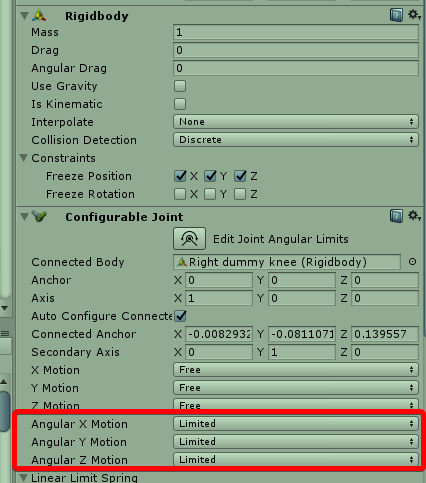
i did touch only highlighted ones in configurable joint
maybe not work with humanoids?
near bronze
don't see anything wrong there, not sure what's going on
no they work just fine on anything
tardy folio
That deletion line in the log could be deleting it from your mirror/shadow/??? copy.
unique dune
I am overdried it with an animation, sorry for bothering, everything working fine now...
dim owl
Is there any way to bind an object to every player in the server? My map is going to have a top-down camera of the whole map and I want indicators above players' heads (only visible to the camera) so the person looking at the camera can track the players.
proud belfry
Check out the VRCPrefabToybox. it contains player tracking and a minimap, so maybe that'll help.
open lion
Is there a way to have backdrop that is seen by a camera but is not seen by a player. Basically i want to have the background of the view rendered as a image and disable reflections of objects
 sweet crystal
Look into how Layers work
open lion
any sort of starting point........
sweet crystal
I recommend the Unity manual
summer berry
Set your object to mirror reflection. It will make it so that you can only see it in mirrors or player cameras.
open lion
Thanks your the best
drifting egret
On an avatar, what's the most reliable way to only show something locally?
I'm thinking something with cameras but can't think of a reliable and performant solution
Do the render textures stay black for other people?
near bronze
Do the stop action particle thing with playerlocal
proud meadow
then if someone else walks through you wouldn't they hit the particle and trigger stop action also for playerlocal
Head scale is still a good way to detect local player
near bronze
Yes, if you leave the particle on permanently. But you could have a gesture to test for player local and do that once, then leave it be
proud meadow
Hmm I see, turn off particle but in a wsy that doesn't trigger stop action
near bronze
Ooh I never thought of that, that's a really good idea
proud meadow
Or animate looping on
The head thing is a bit tricky- doing it right for something you do not want attached to your head needs some custom shader code and something like a skinned mesh renderer (fixed joints might be unhappy with head scale changing)
near bronze
You could use head scale in addition to stop action in order to trigger any animator
proud meadow
Huh. Interesting idea. Using particle trigger instead of particle collision
So it is only you interacting with yourself
near bronze
Like with head scale 0 it moves the particle into a trigger collider, which subemits a particle elsewhere that does stop action and animator stuff
proud meadow
Yeah
summer berry
(1/1000, not 0)
near bronze
Oh, interesting
summer berry
When it was 0, it would cause weird geometry on amd cards I think
near bronze
Yeah I've seen things break with scale 0, especially with bloom. That's what causes those huge white blots
open lion
If i lower the clipping plane of the main camera does that intern lower the render distance for the users view?
drifting egret
Yes, if the main camera is set as reference camera in the scene descriptor @open lion
The near clip plane is always between 0.01 and 0.05, but the far clip plane is adjustable however you like I think
open lion
thanks, i lowered it to 20 with would be the farthest it should ever see for a corner of a room does that help with performance. Mainly i did it to stop people from jumping into a room they are not allowed to be in
 limber gorge
Hi Guys,
I'm looking for a way to give to a single player some privileges (Like a "GameMaster" so that he's the only one who can see some stuff or move objects around) but i can't figure a way to do whit only VRCScripts.
Any suggest on how to do this? ^-^
Thanks in advance :3
summer berry
How do you want people to activate these privileges? Easy way would be to have a button that on interact, locally enables things. You can take it a step further and have it then globally turn off the button so no one else can press it.
limber gorge
Yeah, this is exactly how i wanted to do, i have already the panel, i know how to toggle it off forever after one player interact whit it, but the problem is how I'll recognize that player (or even those if the first "master" re-enable the panel) as a privileged one and let them pickup object that other players can't.
summer berry
You are not really saying how you want it. The only thing we can detect about a player is if they are the current master. We can't detect specific people. That is why I said a simple button would be easy.
limber gorge
Ok, so let's do whit a simple button, I need to add the VRC_Trigger component on that GameObject and enable the Advanced Mode (Right (?))
summer berry
OnInteract Local
-> SetGameObjectActive True "GameMasterControls"
-> ActivateCustomTrigger "Disable"
CustomTrigger AlwaysBufferOne "Disable"
-> SetGameObjectActive False "Button"
proud meadow
GameMasterControls trigger is of type Master?
summer berry
It can be anything
I just named it that since they mentioned GameMaster. I assumed it wasn't VRChat instance master
limber gorge
Uhh, thanks again @summer berry :3
I got it and understood perfectly why this works ;D
I mean, I didn't tough that showing locally for the master some GameObjects would have done the trick ahahah
I'll probably fall in a future problem, show over the master head a tag or some kind of marker that everyone can see, but right now I'll try to solve by myself, so I'll not bother you ^-^
Thanks Again :3
summer berry
If you have questions, this is the place to ask. Marking players is easy now that we have PlayerTracker and standard assets. Once the master items are enabled, they can take ownership and force it to follow that player
tawny galleon
does anybody know how directional lights are removed from avatars even though the light component is whitelisted?
drifting egret
They don't seem to be removed on my end
Intensity has to be above 0 to be considered "active"
tawny galleon
huh..
if i put one on an avatar, it just gets flat out removed
my avatar should be Poor just for having the light on my avatar, but my avatar is medium and Lights: 0
where did you attach it?
drifting egret
Lights on disabled objects don't count @tawny galleon
tawny galleon
mm its definitely not disabled 😦
never mind, it seems to have fixed with a few reuploads. for some reason it was letting me do point lights but not directionals.
tawny galleon
is there any way to stop the violent clientside shaking of an avatar object with physics collider on it? it looks fine for others but spazzes everywhere for the avatar wearer
proud meadow
@tawny galleon colliders for your own avatar exist on both PlayerLocal/headless and MirrorReflection duplicate copies (only the avatar wearer has these duplicates) which collide with each other. That may be causing the spazzing out you are seeing.
tawny galleon
hmm, ok. i tried using layers to stop them colliding with player/playerlocal but that didn't seem to have any effect
tawny galleon
@proud meadow you wouldn't happen to know if layers actually work for avatars? i didn't try it for MirrorReflection, just playerlocal and player, so if they actually have an effect it seems that's my solution
proud meadow
No they don't let you set a layer except for UIMenu. once you load your own avatar, it takes everything snd moves it to PlayerLocal. Then it creates a clone of the whole avatar and puts it all on MirrorReflection. From other player's perspective, your avatar has only one copy on Player layer
tawny galleon
damn. i guess there is no way to accomplish what i am trying right now then. it did work on a distant patch, but then it started freaking out eventually
proud meadow
There are probably tricks to make something that works in a stable way. I have a theory that you can use the fact that certain objects are unsynced in a mirror to destroy parts of your avatar but only from MirrorReflection
tawny galleon
hmm. from the sounds of it i either need that, or a way so that i can have colliders on my avatar that collide with everything but myself
just frustrating that it looks perfect for others but it's just unusable completely for me
proud meadow
Though you can't destroy your duplicate player capsule that's like 1.5-2m tall. So maybe you are colliding with that. One way to test is try making a giant version of your avatar by scaling up the armature and scale up the eye position in the avatar descriptor to match. Your collider capsule is always the same size so if it works differently, that's what you are hitting
tawny galleon
about 7-8 months ago this never happened and you could hold your own objects with colliders and you + other players would see them smoothly collide with the world etc
i'm pretty sure it's my own player hitbox/capsule
i did try hold it as far outward as i could from my avatar since there's only a collider on the end of the object
but that didn't really seem to help, so who knows
warm niche
Is It possible to make portals clickable? Let's say click an object and you teleport to that world?
copper acorn
@warm niche if not, you can try to teleport player to the room with portal and move player into the portal 🤔
warm niche
Oh 🤔
open lion
SO I am making a elevator, is there a good way to move the elevator without player glitching on transport
 stray stirrup
Can you make an object that plays a sound upon collision with another object?
open lion
on enter trigger with a layer
like pickup layer
Let object to a layer like pickup. Set the trigger to OnEnterTrigger, change the layer in the trigger settings to trigger. Add a colider to where the trigger is and set it to Trigger
copper acorn
objects must have rigid bodies tho, to collide
stray stirrup
Collisions can occur while the object goes through something, right?
 dark sigil
oh you mean something like that
you'd wanna use phys sound
unless you mean it's something on an avatar
you wouldn't be able to do something like that on an avatar
stray stirrup
I'm a complete noob to any of this, so excuse my stupidity.
I'm trying to learn Blender and Unity in case I get into VRChat, even with my lack of a VR headset.
 willow merlin
How do I make a humanoid object walk after a player when the player goes close to it? Im trying to make enemy that walks after you and when you touch it , it kills you.
open lion
Check the ToyBox demo it has NPC, never messed around with it my self
willow merlin
Yeah I have the toybox thingy and there is a NPC folder which contains: NPC simple prefab, NPC path follow prefab, and a animation folder which includes a lot of animations but there are two animations that I feel like are the ones I must use: NPCLookatplayer and NPClookatrest. I have no idea how Im supposed to use these files tho
I've never done anything like this before
I tried to just drag the NPCLookatplayer animation on the enemy object but as I thought it wasnt as simple as that. the enemy was just stuck in that wierd pose where half of the body is under the ground in a wierd sitting animation
summer berry
Getting npcs working and syncing is difficult. HardLight’s is the only public example I know of, but his still takes work to understand and edit for your use case. You would need to take the entire npc path follow prefab and edit it.
willow merlin
Yeah I understand it takes a lot to understand, But I really wish there was a place where I could learn this
 static relic
Still looking to understand why my shoulders get dragged down in VRC once I add Final IK to my models. I'd also still like to know how I can correct it. Maybe I'm missing some of VRC's setting for the VR IK component. Because VRC's VR IK actually overwrites a lot less than you'd think after uploading.
drifting egret
It's something to do with IK execution order
 flat topaz
Anyone take commssions for worlds?
summer berry
You would have better luck asking in the VRCTraders discord.
 ruby monolith
@flat topaz depends on how much you want done
 signal linden
whats a good way to teleport multiple people at once? I would like a button that teleports me and everyone in the same area as me to another area, and I don't know what's the best way to do that
I was thinking just a collider that moves up that is a on avatar hit or something
but if anyone has a better solution, I'd like to hear
drifting egret
That's one thing you could do
Wouldn't an AlwaysUnbuffered broadcast type work though?
Oh, if you only want it to happen in one area you probably want OnEnterTrigger with an "Is Trigger" box collider. @signal linden
Broadcast type local in that case
open lion
Anyone know what the Relay VRC Trigger is?
 grand pendant
Hey. I'm looking for someone who has audio engineering experience who I can bounce some ideas off of, to see what is possible or not possible in vrc in terms of music performance, from band performances to using custom built OSC instruments.
PM me, and we can talk further! 😃 Thanks in advance
signal linden
Appreciate it @drifting egret I love your shaders btw, they're amazing
flat topaz
@ruby monolith I would want to see their prices and decide based off the prices
 fathom bough
Hello, im new to discord