#development-advanced
1 messages · Page 27 of 1
 normal aurora
normal aurora
normal aurora
the sequential version just turns out to hang unity instead
didn't seem to complain when it compiled it though
 noble cypress
When using RainAi and letting a model move along a waypoint path, how do i set it up so it always looks in the direction its going and not spawn looking west but while moving its always looking south for example
 pine pasture
is it possible to attach a Worlds object locally to all players?
I want such an Object to rotate and move with the players head (PlayerCamera).
Is there a way to do that?
Setting such an object as Child of the PlayerCamera (reference Camera in VRCWorld) does not work. The Child objects won't be loaded it seems
 winged lintel
hmm, I'm trying to get a glass to fill up at a bar. I tried setting the fosset cylinder to fill up the glass upon it entering the trigger, but it doesnt seem to work. I have both the glass and the cylinder on the pickup channel, but it doesnt seem to work. Also set the filling up to a animation bool
I'm wondering what I'm missing
noble cypress
I got it to work... but only in playmode.. when i open a vrchat test world my model runs all over the place and into walls. Anyone knows whats up? Playmode, fine. VRChat, not..
 sand canyon
Skiz, is RainAi an asset you downloaded? or part of standard assets?
noble cypress
something i downloaded it enables me to create waypoints and let models follow it
sand canyon
yeah it gets stipped out
only whitelisted assets allowed
Can you try with standard assets AI? That's something I mean to play with some day
noble cypress
its whitelisted
sand canyon
If you are talking about synquark's unity store page, that is not official. Sadly.
 exotic tree
Only a very specific, very old, version of rainAI is whitelisted. I'm not sure which one, but they plan to unwhitelist it sometime in the future, so don't bother using it.
sand canyon
😩
pine pasture
we've a RainAI version which is whitelisted and was used by someone else for another map already.
 warm niche
sigh
exotic tree
Yeah, I have the RainAI package that is supposed to work if anyone wants it. But playmaker is coming very soon, and I've heard from the devs that the RainAI being whitelisted was a mistake and they intend to remove it sometime in the future.
warm niche
can someone tell me the particle setting sfor glowsticks it isnt working
i dont know how all the club worlds have the same glowsticks
but i cant figure out how they did it
pine pasture
"is coming very soon" => August
warm niche
i cant find any prefab glowsticks anywhere
the particle settings that i am using arent working
 frigid nymph
pine pasture
frigid nymph
pine pasture
we want to get our NPCs to work until then^^ Otherwise we won't be able to release our map before August :<
RainAI does work in Unity as we want and we heard RainAI still works in the current VRChat-Version. That's why we want to use it until then.
Unfortunately we have a small problem that the NPC doesn't follow the Navigation-Path in VRChat. But it follows it in Unity Player. That's why we asked for help. Probably someone knows how to setup the navigation paths correctly in Unity for VRChat.
The NPC moves, that means RainAI works somehow... but it doesn't follow the Navigation Path.
exotic tree
Do you have the old whitelisted version of RainAI? Keep in mind you're not actually uploading scripts with the world, VRChat is just copying the settings for the scripts to versions of the scripts that have been compiled into the game. If your using a newer version, it's possible that the script responsible for pathfinding changed significantly so the settings from the new script are no longer compatible with the version built into VRChat.
pine pasture
We're using RAIN 2.1.11.0. Is this the supported version?
exotic tree
Yeah, that is the correct version I think.
pine pasture
okay.
It's weird and I don't understand why it doesn't work correctly.
It looks like the NPC tried to get straight to the goal, ignoring the Walls and the given Path in VRChat. :S
sand canyon
Is this "august" based on any real communication or rumor?
Also so I don't waste my time later, is there no way to get any standard assets nav to work?
warm niche
it's all rumors
 odd fable
@normal aurora @rough sleet flow control is so (relatively) expensive on GPUs, and there's no stack, so there's little reason to not inline functions
which is also why many loops are unrolled by default as well
oh and I see now you were talking about recursion, it's not possible to do recursive calls again because there's no stack
 rough sleet
@odd fable Yeah, and why there's so many shader variants. It's way more efficient to compile separate shader programs for each situation and switch between them than to use flow control.
odd fable
you can make your own small stack though
for things like iterating a BVH it's fairly common to do that (though there are better ways now)
rough sleet
Trejkaz had "unrolled" their recursive algorithm into separate functions but it made the shader compiler die.
But yeah, GPU code is very constrained compared to CPU code but that's the trade off for the massive parallelism.
warm niche
always trust the compiler to optimise your unrolls better, sometimes if you add a mul somewhere your shader becomes FASTER because the compiler found a way to combine it with other muls in one go
the HLSL compiler is a thing of beauty
rough sleet
That's a good point
odd fable
when I was implementing voxel cone tracing in an engine, we had a loop set up for marching spheres along a cone to sample the voxel volume
the loop would terminate when it hit a fully solid voxel
turns out it was faster to make the loop run to the end of the voxel bounds instead of terminating early
does extra work, but then it could unroll and kill all the flow control
rough sleet
I guess being predictable made it faster?
odd fable
break is still flow control
yeah, it could completely avoid flow control and just execute all the instructions every time
warm niche
I'm just speaking from experience
odd fable
got like 2x speedup
rough sleet
Wow
odd fable
this was a very specific case though, as the cone expands it samples larger and larger mipmaps, which meant far out samples would read memory that was very cached
rough sleet
I stumbled onto this recently while playing with some compute shader stuff. https://developer.nvidia.com/content/understanding-structured-buffer-performance
warm niche
oh yeah that makes sense, yeah texture lookups are also something that can speed up massively in a counterintuitive way when the compiler gets to grips with it
rough sleet
Adding padding to your structured buffer structs can improve performance due to cache line alignment.
warm niche
yup, same for VBOs
I mean vertex buffers in Cg 😉
lay them out properly and they are twice as fast
rough sleet
I was helping Cubed with this: https://twitter.com/NickBenge/status/978157204204175360
odd fable
man I wish Unity would move away from Cg
warm niche
why?
odd fable
all sorts of quirks compared to GLSL
warm niche
they are both quirky
rough sleet
The HD render pipeline has a lot of hlsl
odd fable
everyone in the industry is used to GLSL quirks though, Cg is basically a dead product now
warm niche
lol
rough sleet
odd fable
ah yeah from https://developer.nvidia.com/cg-faq: The Cg Toolkit is a legacy NVIDIA toolkit no longer under active development or support. Cg 3.1 is our last release and while we continue to make it available to developers, we do not recommend using it in new development projects because future hardware features may not be supported.
rough sleet
Also the "LightLoop" stuff is great
warm niche
I love Cg compared to GLSL
odd fable
yeah to get the latest features you need to use HLSL or GLSL
modern integer code and so on
atomics
wide texture format support
warm niche
I'm happy GLSL became stricter, I'm also happy Cg is dying but it's cleaner and I like that
opengl was a mess for a long time
rough sleet
You might be able to write straight HLSL shaders right now even in 5.6.
odd fable
I haven't really been following so maybe this exists already, but hopefully someone implements "what OpenGL would be if it wasn't a giant global state machine" on top of Vulkan
rough sleet
According to https://docs.unity3d.com/Manual/SL-ShaderPrograms.html there is HLSLPROGRAM and ENDHLSL tags for writing HLSL snippets instead of Cg
rough sleet
How are they holding things back?
odd fable
you want to be stuck with NVIDIA and Intel entirely controlling the direction of APIs?
rough sleet
I wish AMD would figure out how to get competitive with Nvidia
rough sleet
If AMD were to fail I'd consider it necessary to do something to break up Nvidia's monopoly
Same for Intel
warm niche
ye agreed 😐
rough sleet
CPUs and GPUs are too important to allow one company to completely dominate the market
warm niche
even more now with AI and self driving cars coming up like this
rough sleet
Yeah
warm niche
not even mentioning the cryptocoin angle
rough sleet
Crypto will fix itself if GPU prices get (or stay) too high
Bitcoin already uses ASICs
and the ASIC resistant altcoins will either develop ASICs (because GPUs are so expensive it's worth it) or more likely just switch to Proof of Stake.
warm niche
why is it pink and not red green blue
it's material is missing
or broken
magenta means error
which shader do i need
so that the material will change colour
any shader with a diffuse color will do
its not working
sand canyon
Element 0 where it says NoMaterial. You want a glowing type trail? Pick a particle material from standard assets maybe
warm niche
o
i did it
just need a black/white material
and it will pull from colors
thanks
😄
yw!
hm
how would i get the trail renderer to match the colour of a particle/light
normal aurora
@odd fable you can't even have your own stack in the traditional sense because arrays of structs are banned too, so you end up writing multiple stacks, which is what I did, but I find that it still doesn't work. but now that might just be that the algorithm is so much worse that it never finishes rendering one frame
I had also thought about removing the break instruction from my original ray marcher but even if I returned an array of the values I couldn't find a way to get the first hit without then using another break
sand canyon
Edit-Project Settings-Physics. I don't know if that translates to game but that Y-9.81 is gravity in m/s^2
warm niche
well i just need to simulate the ingame normal gravity
warm niche
the gravity ingae isnt 0
sand canyon
no, it's -9.81 Y
If you don't have the set by default, that's the value to use for normal earth gravity
warm niche
o ok
sand canyon
(high school physics)
warm niche
im trying to have particles fall when i move my hands but it isnt working
if i have it on local the direction is wrong
i think it is supposed to be on world
normal aurora
Gravity Modifier is set to 1?
warm niche
.1
noble cypress
couldn't you give particles colliders?
sand canyon
for particle system I assume 1 means 100% world gravity?
noble cypress
oh i just checked i thought i remembered it had a gravity setting in the colliders tab somehow
normal aurora
oh is this just another world space particle problem, where you just turned on World but didn't apply the usual workarounds
I thought that bug only affected the position objects came out
warm niche
positioning is broken too
normal aurora
position is what I said
I should look at my flair particle effect because that appears to be affected by gravity despite not using the workaround...
warm niche
whats the workaround
normal aurora
the rigidbody/fixed joint one
not sure what the best tutorial is right now, there are several
normal aurora
it definitely does because I use it on my banana weaponry
the only thing I can't get to work is inherit velocity
it isn't clear to me why inherit velocity isn't working, because the component the particle system is attached to should be moving like any other physics object
but it's like you always get velocity 0 when emitted even if you're moving the emitter really fast
warm niche
ok
so if i addthe rigid body component to the particle
defaults are fine>?
and the particle will fall
?
normal aurora
rigid body goes on the bone you're controlling the other object with
the other object also has a rigid body and is under Armature directly
warm niche
i just want gravity to be applied to my particle
normal aurora
does it work in Local?
warm niche
no
normal aurora
hmm... is that normal maybe
noble cypress
velocity over lifetime? that it has more drag down the y axis the longer its active?
normal aurora
that should simulate it too
warm niche
o
normal aurora
if the world space workaround isn't already being used, I'm surprised you're even getting them to position correctly in the first place
usually the particles just pop out of your hips instead of the place you want
warm niche
im trying to get the particle to drip from my hands when i hold an orb
normal aurora
that should definitely require the workaround
warm niche
whats that
normal aurora
google for vrchat world space particle
there are several tutorials, like I said earlier
warm niche
normal aurora
yeah this guy's looks like it's talking about the same thing
meanwhile, I am trying to make a flying machine like the one everyone already knows about, and am hitting a snag or two
thought I'd try it just to see if I knew how it worked
turns out I didn't know
the missing bit is that when I grab the right handle, it causes a rotation cascade that spins the craft wildly until I let go
and setting various drag options on configurable joint doesn't seem to help
normal aurora
there are two options
you could make the orb a rigidbody and move the particle system to higher in the hierarchy and put the fixed joint on that
or you could make the hand a rigidbody and move the entire orb to higher in the hierarchy and put the fixed joint on that
I tend to use the first option because the first few items I made were wobbling when I tried the second option
warm niche
😐
normal aurora
other people have been saying they don't get the wobble problem so I dunno anymore
there must be something about the centre of gravity of the item
normal aurora
you could separate it, but I'd just try the second approach of moving the whole prop to under Armature and see if it works
normal aurora
the fixed joint is the thing doing the actual work
and the rigid bodies require particular settings to work correctly
warm niche
ok
normal aurora
IIRC, angular drag 0, gravity off . then on the hand's rigidbody, check all the lock checkboxes, and on the prop's rigidbody, check none of them
then fixed joint itself has one option to fill in but it should be fairly self-explanatory
normal aurora
yeah
warm niche
even tho the prop is seperate
normal aurora
well, the fixed joint on the prop can only connect to another rigidbody
warm niche
o
normal aurora
so the idea is that you set it up so that it's in the right position initially and then the fixed joint will try to keep it in position
warm niche
so do i add fixed joint to both objects or the prop or the hand
normal aurora
both
warm niche
rigid body to both too
normal aurora
when you add a fixed joint it will auto-add a rigidbody for you anyway
warm niche
o
normal aurora
crud, time to start the day's errands...
warm niche
ok
ill see if this works
o
it broke
the rigid body made the system think my avatar is too large
nope
it didnt work
with the normal version the particles fall from the hips
with the rigid body version nothing displays
 manic cloud
@warm niche : https://www.youtube.com/watch?v=VmEED0E_e4w
manic cloud
your game object has to be active at all times
warm niche
that might be why
manic cloud
or else your particles will spawn in random places
warm niche
i will try
lets try this again
lol
i wish it didnt take so long to upload a file
so
if i wanted to do trails for my feet
i would need to use rigid bodies as well
?
or just use trail render
manic cloud
u need rigid body if u do on wrist/fingers and head
normal aurora
I made a similar mistake with some other thing recently which wasn't even using fixed joint and found that when I enabled it, it appeared at 0,0,0 in the world, lol
warm niche
thanks it worked 😄
 golden valley
from what i've noticed if the object is inactive when uploaded and activated with an animation of any kind, the animation won't play in the mirror meaning the particles aren't shown
same thing with meshes
you can get around it with meshes by activating/deactivating the mesh renderer instead
i think for particle systems if you animate emission instead of setting the object active it might work the same
normal aurora
nah, mine are doing that and they don't appear either
object enabled, particle system enabled, emission disabled
it's clear that Configurable Joint can do the thing I want, I just can't find the right combination of settings
 granite imp
How do I fix my shader which is having that double-vision glitch for VR (where both eyes see two different images)?
 hollow lotus
Is it possible to arrange triggers similar to the ones we have for the food in the hub?
 autumn hatch
@granite imp I don't code or know much about technical shader stuff, however your shader has got to be single pass stereo. If it's multipass then you get a separate picture per eye
noble cypress
@hollow lotus what do you mean by that? you mean creating pickup items? thats possible
noble cypress
have you seen it in other worlds before?
my first guess would be its a custom thing they did that it can react to getting close to bones like the bones in the head and then trigger its eating sound and destroy the object
because if it would trigger on colliding with it alone it would be eaten as soon as you pick it up?
 robust yarrow
checked the hub a few minutes ago and it is mouth only trigger 😮
interested to know if this is possible with the toolset we have or if this is another hub/dev only trick for now 😛
pine pasture
Probably if object touches a trigger that is attached on a PlayerCamera?
And PlayerCamera is a reference Object in VRCWorld
 bleak tendon
but isn't playercamera only for post processing? I've heard that if you add a combat component or something to the world like that the player gets more collision boxes, haven't tried that out yet, don't even know if that's true
 drifting egret
I've seen it in the bowling alley too
bleak tendon
yeah but that may be the dev trick lakuza was taking about, cause as far as I know that world is in some way dev related
pine pasture
at least you can try
Add a collider to the PlayerCamera and change it to "Trigger". Haven't tried it, tho
bleak tendon
Imma try it out right now then. I'm going to report back
robust yarrow
is there a way to give the person who spawned a prefab ownership over it so others can see it but not interact with it?
noble cypress
you can add an invisible static particle system to the player camera and add triggers onto those
if they collide, bam
maybe this way?
bleak tendon
I'm not sure if I did it wrong but for me it didn't quite work 🤔 the thing with the box colider on the player cam
I took an existing system that worked and kinda copy pasted it so that I can be sure that I'm not hecking up too badly
noble cypress
when i give an object the object sync component.. what does reapobject do? http://puu.sh/zZ3s6/2833b9cefc.png
there is nothing listed in the vrchat documentation
 harsh nest
@noble cypress I think it means respawn
 oak mountain
Playmaker when?
 hearty lantern
wen broly
 tulip fractal
wen
warm niche
hm
i need to figure out how to drop world particles
i just wanna drop stacks of money all over the place
XD
i think it's just a lifetime/timer setting
with some gravity
and rigged bones
normal aurora
I swear I found a world where you could hold a bottle up to the vague mouth area and it would make a sound like you were drinking it... but I forget where
maybe it was actually detecting intersection with any avatar part though, who knows
 wary path
its an onavatarhit on a trigger
at the mouth of something probably
so like the mouth of the bottle
normal aurora
yeah that's the way I'd do it assuming no better option
also set up the audio so that you can only hear it within 30cm or so
robust yarrow
@normal aurora i know the old hub lets you drink that way too
normal aurora
maybe that's what I'm thinking of, in which case that's probably cheaty too, lol
robust yarrow
😛
normal aurora
meanwhile I have been trying to figure out why my GPU performance spikes every now and then on a scene with a single object in it 😐
setting more things to static...
every 30~31 frames there is this 8ms spike in GPU usage which isn't accounted for in the table at the bottom of the profiler
for this one frame, GPU:8.34ms, but then in the bottom table, Camera.Render is 1.405ms
where on earth is the missing 7ms
if it's the profiler itself, that would be very dissatisfying
robust yarrow
are there any colliders on that object? (not that it should be caused by that since its just a single object
pine pasture
Is it possible to trigger animations/triggers on a Pickup-Item depending on the Hand gesture you're doing in VR?
Like: you're doing the "Point Finger" to activate the flamethrower you're holding (just a dumb example)
 echo bay
Yeah there is a triggeron activate key
pine pasture
and I need to bind this triggerOn Activate Key on the pickup item?
echo bay
You must activate the trigger when holding the item and then on key activation you do something
pine pasture
okay, I'll try it!
noble cypress
is there a way to track what vr controller someone is using or if they're on desktop?
just the if the tracking is possible, so for instance based on it they see different prompts
 mental rune
yes if there arms stay by there side there computer such as me
pine pasture
@echo bay thank you, it works! 😄
noble cypress
mean not visualy in worlds that i want to figure out who is using vr.. i mean how can unity track it.. like if they use a vive, there is an information panel that shows up and lists vive specific things or if they use oculus it shows oculus stuff instead
echo bay
Have you figured out how the gamepad key are called @pine pasture
I need their names for my own map :X
pine pasture
unfortunately not :S I don't have VR but we're looking for that now.
is CTRL+F1 == Hand Gesture with VR?
pine pasture
we need a "OnKeyHold" :<
echo bay
Oh... yeah
drifting egret
CTRL+F1 is not a hand gesture, SHIFT+F1 deactivates gestures on desktop
But it doesn't work very well on desktop, audio doesn't get canceled. For this reason, I always assign SHIFT+F2 (Fist) to nothing on desktop avatars
So people can press shift+f2 and then f1
pine pasture
I want to find out how to trigger specific events on specific hand gestures :<
drifting egret
I don't think that's possible with the system we have right now
Even if you can detect key presses, good luck standardizing that across all VR sets, including Windows Mixed Reality.
pine pasture
it's possible to trigger specific events on specific KeyDowns... so why shouldn't it work with Gestures
drifting egret
Because the SDK doesn't expose that as a trigger or event or whatever
drifting egret
Oh yeah, that's a good point. But can you even read the animator's current state?
If so, there's your answer.
 dark sigil
It would probably be possible with scripts
pine pasture
hmm... our System for Weapons with different skills does work for Desktop users only then :S
dark sigil
you could probably attach a trigger on the weapon to scroll through skills
pine pasture
okay, with Shift+F2-F8 my characters does different "Hand gestures". I thought VR does the same with some headsets. Because for some VR Users it looks exactly like they're using this Key-Combination like Desktop users.
drifting egret
Well yeah, they're the same gestures.
Until a few updates ago, desktop users could not trigger these gestures. The shift+f-key combinations were added later as compatibility.
They share animation slots too, but their implementation is slightly different
pine pasture
oh, okay
dark sigil
The gestures tell the player's animators to go to the gesture's state
doesn't mean it's mapped to the same button
 boreal flame
autumn hatch
boreal flame
autumn hatch
You still need to set up simulated eyetracking. Eyeblinking is part of it.
One doesn't work without the other.
robust yarrow
oh that explains why some of my recent avatars dont have eyetracking
i got lazy and started skipping the blinking visemes XD
autumn hatch
Well
Eyetracking does work without the blendshapes
Guess I worded it bit weird
However if you want blinking then you absolutely need simulated eyetracking set up
The eye bones must be mapped in the avatar config scene also
robust yarrow
i see, i think it might be the bones, i remember you mentioning a while back the bones need to be pointed upwards. I think thats where i messed up on my recent ones. I'll go back to them eventually and fix those as i still need to animate emotes for them anyways
drifting egret
Well, you can make blinking work manually
By manually animating the blink animation and putting it on a legacy component
In fact, this method allows you to stop the blinking if you need your eyes closed for gestures.
pine pasture
is there a way to get Playernames?
Saw Maps (like the Bowling Map) where the monitors show the player names
pine pasture
saw some other maps, too. :<
robust yarrow
oh 😛
pine pasture
I would love to see a feature like this to use it for Player UIs
robust yarrow
i guess if you dont get answers for it here, you could try to track down the creators for the worlds you saw
they might be on this discord but not check this channel
it would be cool though to be able to use that info
pine pasture
Thanks! I'll try that!
Or lemme try this...
@sterile cipher ? Is it possible to get PlayerNames to print them somewhere as text? I saw Maps where this was a thing. Like the Bowling Map, the Tron-Map and some others
 sterile cipher
That's done via scripting. It isn't possible for players at this time. D:
pine pasture
awwww D: I wish I could use that for my world, too ;-;
Is there really no way to get access to it?
Would like to add the players name to an optional UI for my world I'm working on
 sharp burrow
Playmaker should be able to access it. So once that is out you could probably do it
 raven idol
playmaker /might/ be able to access it. I doubt it though assuming the player name is stored and used via the Photon api
we need a trigger which can pull up PhotonNetwork.player.name (or whatever it is I forget)
echo bay
Is vrchat using photon ?
warm niche
yeah
echo bay
Sweet
 cold minnow
I read in game files that worlds can contain scripts but have to be approved beforehand
Is this true?
autumn hatch
There are a very few whitelisted scripts you can use for worlds https://vrchat.readme.io/docs/supported-assets
Other than those, no other 3rd party scripts are allowed. There exist no approval process.
Worlds like Steel and Gold and bowling world has custom scripting because they're made by VRchat themselves.
warm niche
Guys
Help pls
My particle works if i sit down on a chair/sofa but if i stand the particle just drops in front of me.. Im pretty sure it has to do with colliders
How do i make it work
I think i have to add something to my body so that it ricochets off but i cant get it to work
warm niche
@drifting egret help pls
drifting egret
No idea
sand canyon
K when you sit you have no collider. When you stand you get your capsule. Your particles have collision?
noble cypress
can i control the speed of an animation with a vrctrigger?
sand canyon
Skiz you can!
Set a parameter as a float
Maybe int works too I dunno, click the clip in the animator window and you can control the speed with that parameter
Even set to negative for reverse
noble cypress
ah nice, our hp bar updates very slow right now since it has a grace period after each hit to update a second bar behind it which is red and slowly goes down based on the damage you did aswell.. we're going to reduce that to an amount that feels better but want to give players the ability to cast blood rush on the shaman weapons that sets it to an even faster update time
pine pasture
does all VR-Controllers have the same buttons in common?
Are we able to use keybinds for the VR-Buttons?
Are there "unused" Buttons in for VR-Controllers in VRChat so we can use Buttons/Button-Combinations to trigger Skills (like we do already with KeyDowns for Desktop users)?
never had vr tbh :<
sand canyon
Dieu is working on similar things, ping him about controllers etc
Maybe Superscope too
pine pasture
he has the same problem, i guess @echo bay
echo bay
I guess VRChat do not track the thum + index on triggers and the medius lifted
You can see the controller in the sdk whatever
There are 3 buttons so 9 combinations possible but only 7 emotes
dark sigil
I'm gonna assume VRChat uses the steamvr plugin and I'm pretty sure steamvr maps the buttons pretty similarly, but afaik there's no option to access them through triggers
pine pasture
only three buttons? o.o
echo bay
i'm even more sure that VRChat is based on the vrtk SDK
pine pasture
there's no Equivalent to the Shoulder Buttons/Triggers like on Gamepads, right?
normal aurora
there are more combinations possible but not being used and/or difficult to perform
oculus rift has (grip + trigger + top) * (left + right)
echo bay
Yeah, when you trigger emotes it's with your gamepad, and you only has three button. The Thumbstick, the trigger and the grip
normal aurora
but the only "unused" button is still "used"
echo bay
But you can totally do it without scripting Cellenseres
noble cypress
we can set it up like a regular game for desktop users, abilities on 1,2,3,4,5 thats not the problem
pine pasture
but I don't know how the Controllers are working. Never had VR^^
normal aurora
and the docs page for controls has been blank forever lol
pine pasture
that'S the problem 😂
normal aurora
I was thinking of filling it in but first I have to find a nice diagram of the touch controllers
noble cypress
we have another solution for it already but being able to actually trigger/track those button presses from the hand gestures would make things a lot easier
pine pasture
or from the Controller buttons
echo bay
When you do an emote from the left hand, you can activate a gameobject for this specific emote. And you can child like 7 deactivated gameobject to this gameobject.
And every of this 7 child can be activated by a RIGHT hand emote.
So to resume whenever you play an emote from the right hand it activate one gameobject on the 7, but it come to be childed to a deactivated gameobject only triggered by a specific Left hand emote, so you don't see it unless you play this left hand emote at the same time.
This way you have 7 emotes by hand. So 7x7 spells possibility
Of course you need custom avatars
normal aurora
how to make c—shot in head
pine pasture
cshot?
noble cypress
how to activate that first gameobject even when you can't track the button presses?
normal aurora
I blame discord for unnecessarily formatting something in a weird way
noble cypress
or not track i mean, but actually find the prompts in the onkeydown vrc_trigger
oh you were talking custom avatars myb
yeah thats another solution we try to avoid
especially because you can't really add triggers on the custom avatars that interact with world objects, right?
@echo bay
echo bay
I'm pretty sure you can do it with custom avatar having objects linked to World Position for your area
Than you put trigger activating at this world position
And from this triggers you can do whatever you want
pine pasture
yea... we still won't do that stuff with Avatars xD
Everyone should be able to fight the boss with their own avatars
echo bay
You can give a cube to everybody, and each side of the cube launch a spell
You trigger it with the other hand
pine pasture
the skills are bound to weapons already
as long as the player has the pickup Item in hand, they can use the skills by using Keybinds (1-5 for Desktop users)
we need to do a alternative way for VR Users
echo bay
Can you have like a sphere in the right hand, and a sword in the left. You attach a lot of mini balls to the sphere and when you cross them with the sword it activate the sword skill ?
pine pasture
I would like to avoid that tbh
echo bay
So you can activate as many spell as you have little balls attached to the sphere
If you do it well with cool effects instead of balls it could look like a real feature
But yeah I understand
pine pasture
should look like the good 'ol World of Warcraft. :D
Players are using the weapons to hit the boss. Using Skills with Keybinds
noble cypress
holy shit
we could create stands like in jojo's bizarre adventure that trigger things
hold shield in a specific way, invisible collider floats in the air above it, only reachable in a specific way of holding the sword upwards
it then triggers the ability
people on pc can still press 1,2,3,4,5 but vrchat can do cool poses
echo bay
You may be able to attach coliders to the camera
So if you pose you could for real trigger stuff
noble cypress
you can basically add all components you want, no?
you just can't add child objects
thats what i'll try to use to create a custom crosshair, add a 0.00000001 big cube collider with i.e. 40m range that collides with the other weapons so the healer will be able to heal other players by looking at them when activating a heal, if colliding you'll also see a circle on your gui meaning you're actually targeting something right now
 small prawn
@autumn hatch pls make that tutorial for the visemes!
autumn hatch
Which one?
warm niche
does anyone know of a distortion shader which can have 2d distortion bumps that follow the camera viewing angle similar to how a matcap does?
 frozen pike
Sorry no but I use this resource for most shader stuff http://www.shaderslab.com/shaders.html
drifting egret
I'm using a stencil shader to give my avatar a "portal" effect, and it works great. Problem is, I cannot see myself due to the stencils.
Is there a way to still be able to see myself?
I heard someone found a way to make objects only show up for the local player (the one using the avatar). If that's true, then I could fix it, but I would have to know how to do that.
Since then I can essentially just put a hollow box around myself that makes myself visible again
warm niche
is there anyway to make UI elemets synced over the network? like sliders etc?
cold minnow
Can we know what version of Playmaker is VRChat going to use? I'd like to start working with it
 kindred kiln
It has to be the latest
kindred kiln
doesn't matter as long as it's updated.
since you typically can't revert assets to their previous version.
unless you archive them
 crude schooner
anynews on that playmaker anyway that news was like on December ....
 naive crag
Lots of rumors about playmaker, but is there any official sources mentioning it's implementation in the near future?
autumn hatch
Playmaker support IS coming, but when is the question.
naive crag
Learned to use it, and it is very very useful. Not just for managing state in general, but a great alternative to most scripting.
autumn hatch
Original plan was shortly after last new years, but then the mass influx of people arrived to VRchat and servers were on fire 24/7, trolls galore and such. Priorities was changed because of that but things have calmed down now so hopefully it'll be in soon, rather than Soon™
naive crag
Well yeah. After the meme inspired influx of new players. Many of them stay to become a part of the community, so the delay is understandable.
autumn hatch
I believe long-term scripting solution is to write their own scripting language
Like you said, playmaker is super nice in the meanwhile
naive crag
Saw the position on vrchat (https://vrchat.com/careers). Could actually apply lol
Where one of the tasks is"Deliver an SDK to content creators and ensure its usability"
warm niche
y'all got examples of what could be done with playmaker ?
autumn hatch
Think the game Hearthstone was made in playmaker?
naive crag
Yep
autumn hatch
So that's one example
warm niche
could you create a world with full rpg systems?
naive crag
But if you want a questing system for a rpg game for example, you could do that
autumn hatch
Yup, sounds like it
naive crag
yeah
autumn hatch
I haven't heard anything it being used for avatars, no
naive crag
The struggle atm is managing state, and having propper managed logic based on events.
and based on variables etc as well
autumn hatch
Avatar "scripting" might be a thing later on but nothing set in stone how it'll work exactly
warm niche
guess <you can have a lot of trolls with that
naive crag
Yeah. Avatar scripting is a bit more difficult. Public worlds need to be approved to make sure they are just annoying game-breaking things. To ensure that in scripting is very difficult.
autumn hatch
Yeah... Unfortunately you always have to view these cool stuff as weapons first
Because you cannot have nice things
 quartz slate
I welcome the day we can shoot each other in a VR CounterStrike clone that isn't Pavlov
And I can hide behind the skirt of my teammates' anime girl avatar
warm niche
interaction with each other is what i want to see
like touching the hair and cloth of others
or small model standing in your hand or shoulders
autumn hatch
Have you been to Steel and Gold, Minor Dispute and CTF worlds yet? They're obviously not Counterstrike-esque, but fun either way
Steel and Gold is hands downs the best
I want handholding 😊
quartz slate
I got turned off from them because they used VRChat's old locomotion style
and I still won't play them as FPS games since movement is tied to HMD direction
and not the offhand/left controller
autumn hatch
Yeah, movement being tied to controller would be great for those worlds
I've just sort of learned to deal with it
warm niche
PLEASE HELP ME
pine pasture
no one is gonna help you if you're not explaining your problem, dude
warm niche
hello
pine pasture
hello from the other side ♪ ♫
 whole crystal
Anyone know how to have unity recalculate normals? :>
pine pasture
open the Model in Blender, go in Edit mode, recalculate the normals and save :>
there's no other way to do that in Unity
whole crystal
hmm how do I execute that script in unity tho? ;< ive been trying to figure that out for a whilee
pine pasture
You should do that in Blender. Not sure if this script-method is even a permanent solution.
I guess it's runtime only (and not supported in VRChat)
whole crystal
if only i could, im using cats new protection thing, it turns the character into a box on base shape, so i dont think blender would work
pine pasture
uhh, never did something with CATS tbh
whole crystal
its got some good stuff, mainly use it for visemes and now the protection, but the normals thing is just an issue rn ;< trying to fix that since im a bit vary of security rn
pine pasture
doing the most stuff by myself :D
isn't it possible to get the model stuff from CATS and save the model as "unprotected model" somehow?
whole crystal
well yea, but i do want it protected ; P
whole crystal
pretty sure it does that automatically once you hit protection again
pine pasture
try it manually
whole crystal
did, doesnt work, if only there was a way to keep it as it is
pine pasture
that sucks :S
Sorry, but I don't think that Unity has a method to recalculate normals directly without scripts. And Scripts aren't supported in VRCHat
whole crystal
ye ;< its fine, guess ill have to wait for vrchat to ramp up security on their own, ty tho~~
pine pasture
yw o/
sand canyon
I thought the cats plugin was only blender...
 subtle kelp
@sand canyon It is
@whole crystal Protecting the model with cats does not recalculate the normals automatically
If you recalculate the normals before protecting it there should be no problem
whole crystal
ctrl + n is recalculating right
set normals from faces
make normals consistent
none of that works, the shading on the avatar is completely fucked up ;<
before protection obv ^
warm niche
anyone know how they render a texture only to the desktop app and not in the headset, the way it's done in the photo studio map? i know how to do the fullscreen effect but not sure how it only goes to the desktop app and not headset
golden valley
#if UNITY_SINGLE_PASS_STEREO would probably do that
maybe something like
~~```
int isSinglePass = 0;
#if UNITY_SINGLE_PASS_STEREO
isSinglePass = 1;
#endif
if(isSinglePass == 0)
//render texture
#if !UNITY_SINGLE_PASS_STEREO
//render texture
#endif
@golden valley @warm niche Even better is to put the rendering inside the if directive.
GPUs don't do branching that well
golden valley
good to know
rough sleet
Since GPUs aren't that good at branching the default behavior for conditionals is to calculate both results and then choose which result to keep
However for things like the single pass stereo we can use the preprocessor directive to selectively include code depending on which shader variant is being compiled.
To avoid the shader needing to branch for stuff like different light types or single-pass vs multi-pass Unity compiles a whole bunch of different variants of the shader and switches between them as needed.
warm niche
i thought that's how you would do it, but it seemed to not be working for me
warm niche
actually, i put it in the frag function, would that affect it?
warm niche
nope
golden valley
is clip more performant than just discard?
warm niche
rough sleet
Discard's probably more appropriate
warm niche
i hate it like that for testing
golden valley
you probably need to return something in the case of vr
i assume it's giving an error?
warm niche
it rendered the same thing in the desktop view and inside headset, which was just the white, no texture was rendered
rough sleet
Hmm, maybe UNITY_SINGLE_PASS_STEREO is true in desktop?
warm niche
ya no error, just white, but i had it with the ! before like you mentioned, no else, and it would render the texture in both desktop view and headset
golden valley
that seems odd
rough sleet
Try using USING_STEREO_MATRICES instead of single pass
warm niche
seems to be false for both, just to be clear tho, i'm not switching between vr/desktop, i'm only using VR and while using VR i want the desktop preview to only render the texture and in the headset, nothing should show up
which is probably why these aren't working correctly? but i know it's possible cause it was done in that photo map
golden valley
you might be able to mess around with this to find if it's in desktop.
if (unity_CameraProjection[0][2] < 0) {
    //left eye
}
else {
    //right eye
}
Perhaps unity_CameraProjection[0][2] is 0 for desktop
in fact when i used this i think desktop users saw the right eye image
so it's certainly >= 0
warm niche
seems desktop uses the left eye, doesn't seem to be a different value for desktop
golden valley
really? In my scene the right eye texture shows
can you try that in a new unity project or in game? It might be something with your current project
that should certainly be showing the right eye on desktop
subtle kelp
@whole crystal I found the way to prevent all lighting issues with copy protection:
Upon export in Blender set the setting in Geometrie > Smoothing to "Face"
whole crystal
Oh wow that works Thanks @subtle kelp even tho i still got a few artifacts left
like just at the mouth corner~
subtle kelp
@whole crystal Maybe try the option Edge instead of Face. I don't know what the difference between those two re ally is
whole crystal
tried on 2 models
for some reason both have the same issue one the mouth
but one has it on the nose too
subtle kelp
Maybe a weird texture?
whole crystal
hmm
nah if i change to cubeds shader
then theres the typical cubeds shadow
its just extremely dark there
@subtle kelp
normal aurora
as I thought, as long as something is one mesh and one material, its custom shader can use stencil buffer within its own geometry without having to worry about things like Hakanai's stencil scanners. I could probably even have a final pass to erase it and nobody would ever know
 tidal belfry
Is it possible to have a player spawn in sitting on an object?
So when players enter the world, they'll be sitting in this.
https://gyazo.com/9f385da9c37e0b83dbaef9231f31360c
sand canyon
Sure, you will either need one per player or queue in your spawns
Make that a station with a custom animator
When they spawn, you can use a trigger to send them to the station
 zinc briar
@warm niche If you find the answer to the texture rending only on desktop, please tell me I'm searching for that as well!
warm niche
sure, still searching for an answer, I gave up last night :p
warm niche
anyone know how to change the game into 3d person view?
im searching very long some tutorial but nothing
i tried in unity3d too i changed the vrcamera Z coordinate into -1 or -2 thats not working too
rough sleet
@warm niche Did you try the stereo matrix check?
Nevermind, I scrolled up
Oh, I misunderstood your goal
warm niche
ya, i didnt do a new project or whatever, i gave up for the night, so i'm still trying to find a solution ;p
rough sleet
I thought you wanted it to only be visible for desktop users
Those macros probably won't do it.
warm niche
ah, nope, what i'm wanting to do is record the desktop view on my monitor, but not have anything in the headset, cause i'm trying to put a rendertexture there from a camera
 tiny quest
Possibly rhetorical question, but, is it possible to optimize shaders?
Is their performance based what they do? How much they do? How the script for the shader is? How they react in game? (such as reflective lighting and emission, etc.) or all of the above?
Like, if a model is well optimized already, can you optimize the shaders to increase performance, or alternatively, can the shaders decrease performance if done poorly?
warm niche
@tiny quest it's possible and important to optimize shaders, the more operations it does, the more it will slow down rendering frames, especially fragment shaders since they operate on every pixel can be very heavy if you have supersampling turned on, ways of optimising include doing the same calculations with less precision, unrolling loops, removing passes or certain effects, optimising data so it fits the caches better, etc etc
tiny quest
Thanks! If I'm not using the parts of a shader, say they're inactive, unchecked, etc.
Do they still affect performance since ce they technically exist?
warm niche
depends totally on the shader's code
hopefully yes, but usually no
most have a set amount of things they do in a certain order, not using a property or texture doesn't take it out of the code being executed in most cases
rough sleet
@warm niche Unity does everything at float precision in DirectX.
warm niche
I know
rough sleet
Ah, ok.
warm niche
but you can still do fast approximations instead of the 'proper' math
rough sleet
Ah, yeah that's true.
tiny quest
I'm just now learning how to modify shaders at the text or script level. Like, still learning all terms, what they do, etc.
warm niche
fixed only works on mobile
@rough sleet made on AMD but should speed up any card https://github.com/michaldrobot/ShaderFastLibs/blob/master/ShaderFastMathLib.h
like with avatars you're just trying to squeeze more out of less wherever you can
rough sleet
@warm niche Thanks
rough sleet
@warm niche Do you use any profiling tools besides just running the shader?
tiny quest
Thank you for the information :)
I feel like my particle systems, which overall the effects arent drastic, the particle count is incredibly low, but sometimes people have issues, so I'm looking to optimize where I can.
warm niche
@rough sleet not really but there's a lot of options https://www.youtube.com/watch?v=4TbvHqf0U04
I just test a lot in vrchat and have different people run it
rough sleet
@tiny quest Take a look using Unity's overdraw mode
It's under the Shaded view drop down in the Scene view
warm niche
I use the debug overlays sometimes
tiny quest
On mobile atm, but I can look shortly. Does it display like, usage and such?
warm niche
the steamVR one and the oculus tray tool
tiny quest
Or does it break it down even more to like what uses how much?
rough sleet
It changes everything to use a reddish additive shader
So you can see where things overlap
Without Particles: https://i.imgur.com/NeAhEeX.png
With particles: https://i.imgur.com/Lf7TCfW.png
It can be a little misleading as opaque meshes usually don't overdraw as much as the overdraw view shows.
But for transparent meshes and particles it really adds up to a lot of extra pixels to draw.
Also, here's the shaded view: https://i.imgur.com/uMDvq6h.png
I'm not entirely sure what's too much overdraw but the view is still useful to see where your worst case is.
rough sleet
No @exotic tree made it, or well ripped it from Doom and animated it.
tiny quest
I see
That was the original inspiration and first major goal to get to, and I've been able to replicate all the effects more or less so I gotta thank him 😛
normal aurora
hmm, I was wondering about profiling too, because I got my world runtime down to 1~2ms in Unity but I can't get a clean 45fps in vrchat
I'd like to know where all the other time is
warm niche
anyone know shader forge and can help me make a refraction/distortion shader that behaves like a matcap? ie goes around the contours of the mesh with a 2d normal relative to view angle
warm niche
nevermind i think i figured it out
warm niche
would anyone be able to tell me what is used to make shaders that only move when you move, but are stationary if you move camera? i do not want it moving when i rotate the camera to face away from it
tidal belfry
Is it possible to make a working GUI/HUD for worlds in VRChat?
I've tried using the UI canvases but they don't seem to work.
wary path
You can
It's tricky
and there isnt much point to it
It's basically a shader that covers your entire camera and renders something over everything else
 dull umbra
@tidal belfry If you set the canvas to ScreenSpace - Camera and then attach a VRC_UiShape component to it, it should stick in front of the player's camera in the world.
dull umbra
It won't work in the editor, but at runtime the VRC_UiShape will automatically set it to the game camera. While in the editor though, it's fine to set it to the reference camera.
The VRC_UiShape will also spit out an error whenever you go into playmode which is a pain for uploading. To fix that, you can set the component to be disabled by default and enable it only at runtime using a VRC_Trigger.
tidal belfry
Tried it in runtime @dull umbra
dull umbra
And you're sure you added the VRC_UiShape component to it as well?
tidal belfry
Yes.
This is how it is set up.
It enables VIA trigger which then should trigger a countdown text normally.
dull umbra
Does it show up as expected in the reference camera if you just hit play in the Unity Editor?
dull umbra
It should look something like this:
https://i.imgur.com/WbE5vms.png
tidal belfry
Is that the button you've selected or the canvas?
dull umbra
The canvas
dull umbra
Kk.
tidal belfry
Yep, still doesn't work.
dull umbra
Check how far you're putting the canvas from the player. It can be easily blocked by other geometry.
https://i.imgur.com/jz6E3Si.gif
dull umbra
0 will also scale it to 0, so it will be invisible then. Anywhere between 1 and 5 should be fine I think.
dull umbra
Well, I've helped you everyway I can. You've obviously got something setup weird on your end. Try trimming it down to just a simple canvas with setup shown in the previous screenshot. Then work your way up.
warm niche
hey guys
how do i change the sitting in chair animation
i saw some guy have 1
but i cant figure out which 1 it isd
tidal belfry
I believe it's tied to the animator on the station.
dull umbra
@warm niche The VRC_Station has an AnimatorController parameter. If you put an standard avatar override controller into there, the IDLE animation will become the player's sitting animation.
It also works for emotes I believe.
tidal belfry
warm niche
and my normal 1 for standing
tidal belfry
Gotta change that.
warm niche
?
warm niche
oh that 1 is different from the override
tidal belfry
Yep.
warm niche
do i need to change anything in it
oh
the controller is the 1 duplicate animation thing right
it didnt work
do i apply the controller to my default avatar
or do i apply it to the animation clone
well i just broke my main avatar
ffs
how doi fix it
custom sitting animation + idle
but if i change the controller my avatar will glitch out
i put the controller that i made a custom animation with and it didnt work
warm niche
well
i did it
the only problem is the 2nd avatar gets stuck to me when i get up
lol
 cinder atlas
I'm trying to access the camera depth texture to generate a height map for one of my shader and it seems to work fine in unity, but in VRchat it always comes out white, any ideas?
 hybrid raft
cinder atlas
hybrid raft
cinder atlas
Hold on I'll try to explain my setup
warm niche
There are worlds with live streams in them. How is it done?
cinder atlas
This is going to be difficult to expain without screenshots but here's the shader I have applied to the plane I want to see the depth data on:
Shader "Custom/DisplacementShader"
{
    SubShader
    {
        Tags{ "RenderType" = "Opaque" }

        Pass
    {

        CGPROGRAM
#pragma target 3.0
#pragma vertex vert
#pragma fragment frag
#include "UnityCG.cginc"

        uniform sampler2D _CameraDepthTexture; //the depth texture

    struct v2f
    {
        float4 pos : SV_POSITION;
        float4 projPos : TEXCOORD1; //Screen position of pos
    };

    v2f vert(appdata_base v)
    {
        v2f o;
        o.pos = UnityObjectToClipPos(v.vertex);
        o.projPos = ComputeScreenPos(o.pos);

        return o;
    }

    half4 frag(v2f i) : COLOR
    {
        //Grab the depth value from the depth texture
        //Linear01Depth restricts this value to [0, 1]
        float depth = 1 - Linear01Depth(tex2Dproj(_CameraDepthTexture,
        UNITY_PROJ_COORD(i.projPos)).r);

    half4 c;
    c.r = depth;
    c.g = depth;
    c.b = depth;
    c.a = 1;

    return c;
    }

        ENDCG
    }
    }
        FallBack "VertexLit"

}
Then I have a camera that renders that plane into a rendertexture that I use on another shader as a height map. It works fine in unity but in VRChat the plane is always white.
autumn hatch
@cinder atlas I don't have an answer for you, but just to make it look nicer you could format your code in a multiline code block shown here:
https://support.discordapp.com/hc/en-us/articles/210298617
Would make it easier to read
 agile owl
message i'm getting after hitting "new build" under "test" you'll need a new app to open this VRchat....
someone please help.
i'm new to VRchat
 split hull
@cinder atlas If you're sampling the depth texture, you need to be in a map with a directional light that has shadows enabled for it to work
I use Gaia Night for testing normally if I need to sample the camera's depth texture since it works there
cinder atlas
@split hull I'll try it on that map then thanks 😃
Still looks white in Gaia night, I'm probably doing something not right...
agile owl
hello?
split hull
Are you using VR? If you are you gotta do the single pass screen space sampling for it to look correct, though I think you'd still get some valid-ish data without the single pass sampling
@agile owl your question isn't very clear, what is the message it's giving you?
agile owl
i figured it out thanks though!!!
@split hull Have we met before?
in a different discored
split hull
I don't think so
agile owl
oh ok. you have the same user name as someone else
split hull
Yeah I imagine there are a bunch of other Senpai's
drifting egret
How do I prevent a particle from colliding with myself, or possibly other players? I just want it to collide with the world. I told the particle's collision module to only collide with "default", but this seems to also include my own body.
I have no colliders anywhere on my body (except dynamic bone colliders on legs), but I do have a rigid body on my hand
My guess is that the particles are colliding with something that the game adds to me locally, maybe? Or it just collides with my mesh regardless. Either way, I need a way to stop this.
warm niche
hello
help pls
how do i change the origin point of an object'
my sitting animation has me floating because even if i move the character up or down in unity
in game he just sits in the air
drifting egret
That's because you need root transform on the animation, not a physical movement up/down.
drifting egret
sand canyon
I have an untested suggestion. Remove your avatar descriptor, and add VRC World and a floor, and test build or upload one time. That will set up the layers for you.
Then remove the VRC World etc and put your avatar descriptor back on
The Pickup and Walkthrough layers do not collide with player avatars
warm niche
drifting egret
Alright cool, I'll try that out! Thanks
warm niche
ugh
why sint this working
i moed the root bone location
i set apply root transofmr
*apply root motion
root bone location is moved from the floor to the hips
but my sitting animation still isnt working right
drifting egret
I actually fixed my particle problem, I disabled dynamic object collisions in the collision module. It probably won't collide with solid dynamic objects, but it's good enough for my purposes. Still, I'll keep the collision layer generation from VRCWorlds in mind in case I ever want dynamic collisions. Thanks again!
I'm pretty sure that it would only affect moving objects in specific cases anyway, such as those gondolas in that tower map
I don't really care about that lol
cinder atlas
I finally found what was the problem... I had to put the camera that was rendering the depth to be to deferred...
split hull
Ah nice
sand canyon
I have not tried to put a custom sit animation on an avatar. Stations do allow world creators to put custom animations in the station. I did not have a problem with this, though.
zinc briar
@warm niche Ever figured out the desktop only shader?
harsh nest
@merry coral scroll up HardLight680 explained world HUD there
 merry coral
Kk thx
Also
How would one pull off a screen shake effect
Say if a monster stomps
I want the players view point to shake
warm niche
How do bullets work? I'm at my wits end trying to get proper exploding bullets working. If I use "Collision" or "Death" as a condition to spawn sub-particles, they never spawn. I have to use Birth. But birth just activates it at specific intervals (and colisions), and the bullet itself doesn't dissapear.
@warm niche I have the same problem. Animations using avatar movements (up/down or forward/backward) do not work properly. They do work in unity, but in VR chat the avatar is barely moving. If I set it to fly up 30 feet in the air, it does so in Unity, but in VR chat it never flies more than 1 feet. Likewise, I made a jump pack attack animation ,where the avatar leaps into the air and slams into the ground - looks good in Unity, but in VR chat the avatar does the body movement (army, legs moving into a knee landing pose), but his body isn't moving up and forward.
warm niche
well
i am a genius
and i managed to get it to work
my sitting animation works
my y axis is fixed
i dont fall thru the floor
normal aurora
is there still no way to get a reliable video playlist without just hard-coding the whole list of videos?
just wondering, before I set out on making a script to update the playlist
 tidal light
@merry coral i believe you have to create an animation in a shader sphere
warm niche
i saw tlak about seated animations, how do you change the seated pose? i literally filled an override controller with an animation i made, and it's still default
drifting egret
Make an animation override controller, and override the IDLE animation in there. Put that override in your "Custom sitting anims" slot.
warm niche
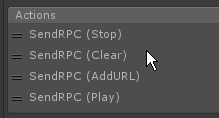
anyone have an idea on why Clear() and AddURL() don't work? https://b.catgirlsare.sexy/BC9h.png
for RPC usage
hey guys
do emote/animation kill switches work so that you dont have to reload or change avatars when they bug out
@drifting egret @sand canyon
normal aurora
the yaml unity outputs is invalid yaml? 😦
 uncut badger
 heavy flicker
When object1 touches object2, the object2 becomes inactive, after 3 seconds i want the object2 to be active again, how do i do that?
autumn hatch
When object1 touches object2 it also activates empty1 that has an OnTimer trigger on it set to 3 sec (low and high) to activate object2
If you want it repeatable you make it so the OnTimer trigger deactivates the empty1 again also
OnTimer triggers only start counting when their game object is set to active
If the low and high seconds are set to different times then the action will occur randomly between those times
 sick lodge
anyone know what the shader in avatar testing that renders faces (not tris) is?
drifting egret
What do you mean?
The flashlights? @sick lodge
It's a Projector I think
But those only work on worlds, you can't have those on your avatar
sick lodge
i know, i want one in my world
what's the shader for wireframe faces?
i have a shader for wireframe tris here but i don't want tris, i want to render wireframe quads
 trim ibex
does anyone know how to get unity to jump from 0 to 100 in blendshapes/shapekeys, rather than gradually going from 0 to 100?
i am trying to do 2d mouth movements and don't want my mouth to stick out when i talk
sick lodge
how does the fullscreen thing in iris photo studio and the great lasagna's photo booths work?
drifting egret
@trim ibex unfortunately, that's just how the animator is set up. There's no way
As for 2D mouth visemes, there are tutorials on that. Try those out
trim ibex
@drifting egret thanks for the info
warm niche
Dont need a flashlight just add a light to your body so everyone can see you
And everything around gets illuminated
It's also good for the scary maps
dark sigil
it's also good for lagging people since you have realtime lights on your avatar
drifting egret
Realtime lights are super laggy yeah, especially in VR
I block people who have rapidly flashing realtime lights
autumn hatch
Shadow, specifically, are FPS murderers
So if you absolutely need to have a light source on your avatar, please make sure it doesn't cast shadows
 final wigeon
I'm willing to bet setting the light's Render Mode to Not Important will help, since then it becomes a vertex light. Much lower quality but cheaper to render.
Probably, I haven't tested it but the unity manual suggests that's how it'd behave.
noble cypress
did anyone find out what button the triggers are on vrcontrollers for a OnDown trigger?
rough sleet
@final wigeon Not all shaders are guaranteed to handle vertex lights.
You can have four vertex lights for no extra draw calls as they're included in the base pass but some people and worlds won't get lit up by them.
sick lodge
this is probably a bit too obscure but is anyone experienced with using realtoon enough to tell me why i get this weird black spot over my neck that only appears in render textures? https://i.imgur.com/1p5ngax.jpg
 patent stratus
https://assetstore.unity.com/packages/tools/visual-scripting/playmaker-368
Will we have to buy play maker to use it for making maps?
Or are they developing their own version of it specifically for VrChat?
what do you guys think.
 runic mauve
@patent stratus mostly like yea
patent stratus
do you think they are working on there own version or do we just have to buy the normal play maker?
runic mauve
well they dont own play maker i think they would just make patch for playmaker to work with VRCSDK
patent stratus
if they are working on it so much they might have made a deal with the playmaker devs
but yeah a downloadable vrchat mod for playmaker sounds more probable.
runic mauve
i think in opinon more like have buy playmaker then get it for free
autumn hatch
I haven't heard anything suggesting an alternative playmaker version
It's pretty much safe to say the actual playmaker version is the one going to be used
patent stratus
2:55 (in the new update video) - he talks about developing features for playmaker
runic mauve
like Dyanmic bone you have to pay for that to use vrchat
autumn hatch
Those are literally things you can do with playmaker
patent stratus
yeah I know but he aslo sais they don't want to rush it out with limited features
and you can basically make anything with playmaker right now
runic mauve
just mean take alot longer to work on it
autumn hatch
Just means playmaker isn't fully supported yet and needs more time to work out bugs and such that might limit it
Otherwise it'd be out, right?
patent stratus
yeah so they are probably working on frame work / mod around playmaker to limit it's use (so that you can't do malicious stuff with it) for VRChat
runic mauve
yea dont give fullpower of tools just bring in malicious user
have limit some stuff if running a server
autumn hatch
Playmaker you can't do anything malicious with to begin with
That's why it was chosen
 livid raft
Is there any rough ETA for playmaker yet or are people screwing about with security still delaying it?
runic mauve
but there still limit need in place alot people can figure loop in system just with visual programming as well
autumn hatch
Believe the video in #announcements said no ETA
livid raft
Hoky doky
runic mauve

patent stratus
of course closing down conventional unity scripting would be impossible
 pine crest
Anyone familiar with how to play an animation from a trigger in your world? Im currently trying to work out which component to use in the VRC_Trigger, nothing seems to be working for me so far.
 next hazel
have this weird issue, trying to get inherit velocity to work on a particle, in unity editor it seems to respond correct since the particle jets off super fast when moved, but once uploaded into vrchat the particle just falls to the floor and seems only barely affected by it. The particle is world spaced as well.
help would be much appreciated if anyone has an answer to this
sand canyon
@pine crest there is legacy animation. However the best way is to use an animator controller and use an Animation Trigger or other parameter to start your animation. For a basic explanation of the animator controller, see https://www.youtube.com/watch?v=JeZkctmoBPw
pine crest
Thanks, I did notice that to use the PlayAnimation I needed my animation to be labeled Legacy but couldnt figure out how
Ill check out the video
sand canyon
The controller is a flowchart that tells the object what to do when. It is a little more complicated than just one animation clip, but you can do a lot with it.
pine crest
I found a video more related to VRChat and what I was looking for, ty Fionna though for the link!
I figured out how to do it, now to implement it how I had planned
warm niche
I've got a problem with some spotlights in my world. They are lighting up a transparent double sided shader when they shouldn't. I have each translucent object set to the reserved4 layer, and each spotlight culling mask to everything but reserverd4. Lighting for the spotlights is set to bake and i've baked it. It still lights it up, am i doing something wrong?
warm niche
Hmm, mustn't work for spotlight then...
Maybe i need to create a lightmap parameter? not sure what to put though.
warm niche
@warm niche uncheck lightmap static on the objects you do not want included in the lightmap
It turns it bright blue when i disable light map, i'm trying to get a glass like effect.
it only seems possible with the lightmap on, but any light shining on it makes that part bright blue.
Seems the only solution is to direct the light away from it but really makes the lighting look blotchy.
rough sleet
@warm niche Do you have light probes?
 sick forge
The "visual programming" aspect is just a bonus for learners and those not familiar with Unity. What playmaker is really about is being able to script in-game addons almost (like garry's mod) in order to make maps 10000x cooler. Imagine a zombie survival map with NPC's that run at you, and try to route to you
Or a working casino
 frozen urchin
Not sure if this is a advanced question or just me beeing completly stupid. But I have been trying to set up a world where if you press a button you play 2 diffrent YT vids on 2 diffrent screens deppending on what button you pressed. I have tried diffrent variations of playing them and so far the only thing that has worked is having the link in the Video Player/Sync Player then just sending a Play RPC. I am probebly missing something completly obvius and it could help with some fresh eyes.
Currently I have it set to do "Clear(Screan1,Screan2), Send URL(Screen1), Send URL(Screen2), Play(Screen1,Screen2)"
I thought that would work but I guess not.
sand canyon
@frozen urchin h ave you seen the prefab pinned in #world-development
frozen urchin
I have not, I should probebly have looked at that before writing all of that 🤔
warm niche
@rough sleet No light probes in the scene.
rough sleet
Try adding probes and see if that helps with the blue issue.
 cursive totem


 robust yarrow
anyone know why some of my triggers don't work correctly? They are not complex at all (mainly just On interacts" set to local that are turning a few objects off and others on, and an animation bool change). They work inconsistently, some players will be able to see the interaction but clicking won't trigger the actions, others it will work fine. For some reason the trigger will work after about 20 minutes of waiting and then re-interacting lol. Another trigger won't work for anyone if theres more than 1 player in instance, but will half work after waiting like 20-30 minutes (but still not perform every action).
frozen pike
That is a lot of interesting things
Lets break it down
Lets do animation first
Have you been going into the game tab, selecting the item with the animation on and within the animation window checking that it runs through it correctly when the bool is changed.
robust yarrow
@frozen pike oh its not changing or looping 😮
the first quest's animation runs fine though
oh wait
the other one works fine too XD
it was set to off
lol
frozen pike
First thing to work on then. Make sure the transitions are setup correctly.
robust yarrow
yeah, the first one that i said wasnt working, that wasnt playing since its off by default
its turned on when accepting the quest , turning it on to test in game mode and it works
frozen pike
Solved that one then?
robust yarrow
no, thats unchanged
basically the animator was working fine
but for some reason its not being triggered in game
by the on interact
the on interact is also toggling a sprite which doesnt show up either
(although after 20 minutes, it will start showing when interacted with again)
frozen pike
I know it is a pain in the ass