#development-advanced
1 messages · Page 20 of 1
 sleek locust
and its same as putting a sword on a avatar etc make sure you put the item in the hand or wrist of your avatar when you are done adjusting it
 barren lantern
Would I be able to distance fade that mirror using the same shader?
 atomic shuttle
Anyone know why that my 2 objects with different layers and in the collision matrix they are not set to interact, are still triggering the VRC_Trigger layer?
Might have fixed it 1 sec..
sleek locust
hmm if there is a mirror fade shader then yes @barren lantern
barren lantern
I'll have to look around or try to make one, then. It sounds silly, but I basically need to have a mirror on my wrist so that I can check if my facial animations are correct, but I'd like for this mirror not to be visible to other players, as it'd break the look of the avatar.
atomic shuttle
So does the Pickup Layer supercede any other layer i put on it? so if i make a trigger happen on the non pickup layer it wont trigger unless it looks for the pickup layer too?
Basically I need object A to be triggered by Pickup B but not by Pickup C
nvm think i found a solution
 warm niche
I've been seeing the thing with people using phones for selfies in game and it's so adorable, does anyone have any idea how it's done? Is there a unity shader, or type of material I could use?
atomic shuttle
Phone locked to hand bone, with a mirror on the front to look like its a camera
There is a reflective material that acta like a mirror
just have to stick it on the phone model
warm niche
Alright thank you, I'll have to try to find that tomorrow when I'm on. Thank you, hopefully it's not hidden too deep.
 final wigeon
@warm niche There's a #full-body-tracking channel hiding away down the list. Come on in :D
 waxen sierra
What layer are nametags rendered on in Unity?
 forest osprey
So how would someone go about optimizing their world if they aren't exactly sure what they need to optimize?
 runic mauve
think bake light, reduce material
idont over use particle
less draw call better the world would load
and use LOD
 untold vigil
aggressive use of lod is the bread and butter of optimisation. Also possibly look into texture atlasing.
Does the vr chat avatar system support eye tracking driven by blend shapes/morphs or even bone translation rather than rotation. I have a character whos eyes are just not suitable for rotation driven . an alternate approach i could take would be to use rotation but set the pivots in like the back of the head, and limit rotation to a few degrees, but im not sure the pipeline would support that either and honestly doing it with morphs would be a lot easier for me.
 robust yarrow
is there a way to trigger a one time spawn animation? so for example I switch from Avatar A to Avatar B and it plays a small animation like an emote before going to the idle pose or whatever the player is doing. The only way to have it trigger again would be to change to a different avatar and switch back.
 stiff lily
@rough sleet That sorta worked, but unity didn't like the result too much after export, i'll try something else just in case, thank you !
@untold vigil I believe you can you use bones for visemes, what do the eyes look like ?
 lament tulip
Does any one know where the settings panel is created? at the end of the hand bone, infornt of the face or some where else?
warm niche
question, i've seen some giant people in vr chat, how are they able to bypass the height limit in unity?
stiff lily
Asking how to break the SDK rules in the official discord 👏 👏 👏
 rare ravine
😂
lament tulip
😂
untold vigil
@stiff lily Hmm. my issue was more the opposite, i wanted to use morphs to drive eye tracking rather than bones. The eyes are a large flat plane so unless i pull the iris way off the eye rotation is going to cause intersection. if it cant be done with visemes will just not bother with eye tracking, but would like it.
stiff lily
Didn't the 2D visemes tutorial work for you at all ?
stiff lily
If they are annoying the people in the room please use the report abuse function or take a screenshot and send it to moderation@vrchat.com
stiff lily
Good catch, i'll edit that
runic mauve
@gray mulch this channel for people who more advance stuff after you learn most stuff from avatar channel and world
most time people come here ask somone maybe know more how to do it
 gray mulch
Aha right
 old bridge
Did anyone notice that VRChat started fucking up the bone weights? I mean in blender everything's fine when I raise my hands. When I use emotes like cheer it is ok too. But if I raise my hands in VR some vertices are starting to popup ot of nowhere.
and there's nothing I can do about it since as I said its all ok in Blender
 final dragon
Anyone in here know how to convert a unity asset to be able to use in vrchat? I bought Faye off there and for the life of me cant get her to work properly, I would gladly give you the file (P.S if this request shouldnt be here lemme know and ill delete it)
warm niche
So Im trying to find a way to simulate a mirror in an animation override. I found a shader but apparently it does not work for vr, as well as I couldnt get it to work anyways. Does anyone have any suggestions?
warm niche
And do you know how, or could point me to a tutorial on how to do that? Im trying to make a version of one of the cell phones people have been using to do mock selfies with
runic mauve
change reolustion on material better resoulation
you only be able see the camera though
if your able to see somone camera mostly like bypass somthing in sdk we cant talk about that
warm niche
Alright, so doing that method I would be the only one to see it? For example though this is one of thpictures I was talking about, https://cdn.discordapp.com/attachments/337679085599850499/398421597511352320/20180104034852_1.jpg
lament tulip
When I move in game the model snaps to the same location and snaps back when I stop moving https://i.gyazo.com/473ec30f572afc70fdb1e08dbd345e2a.mp4
Since the model moves when I go in to playtest (what ever its called) could that be it?
If it is how do I fix it, I dont see any changes to the transform position values on the model or game object.
I have also poked around in the animations and it does not look to be an issue with the idle animation being anywere else (position wise)
 thorny vale
I can't seem to find help with this anywhere else, but when using VRC_SyncVideo_Player the defaults work fine with audio, but when I make them a youtube link, the audio go to cracking static and noise. Anyone run into this?
 graceful stump
got combat swords working and you can have battles lol more to come
runic mauve
@graceful stump so you got the broke Hp to work lol
 wild juniper
If I wanted to give my avatar cell shading, similar to Breath of the Wild, what should I do?
runic mauve
@wild juniper https://github.com/cubedparadox/Cubeds-Unity-Shaders
 analog dune
For some reason whenever I try and load in a whole song in an animation the song sounds like its breaking and distorted. Yet a sound clip works fine. Anyone know why?
stiff lily
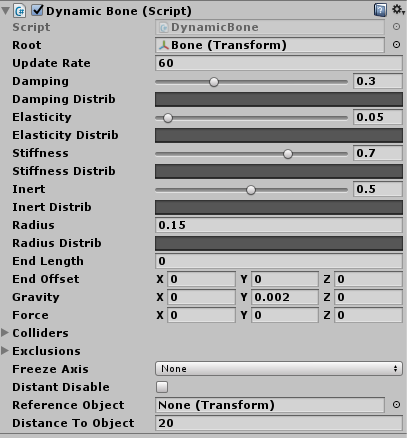
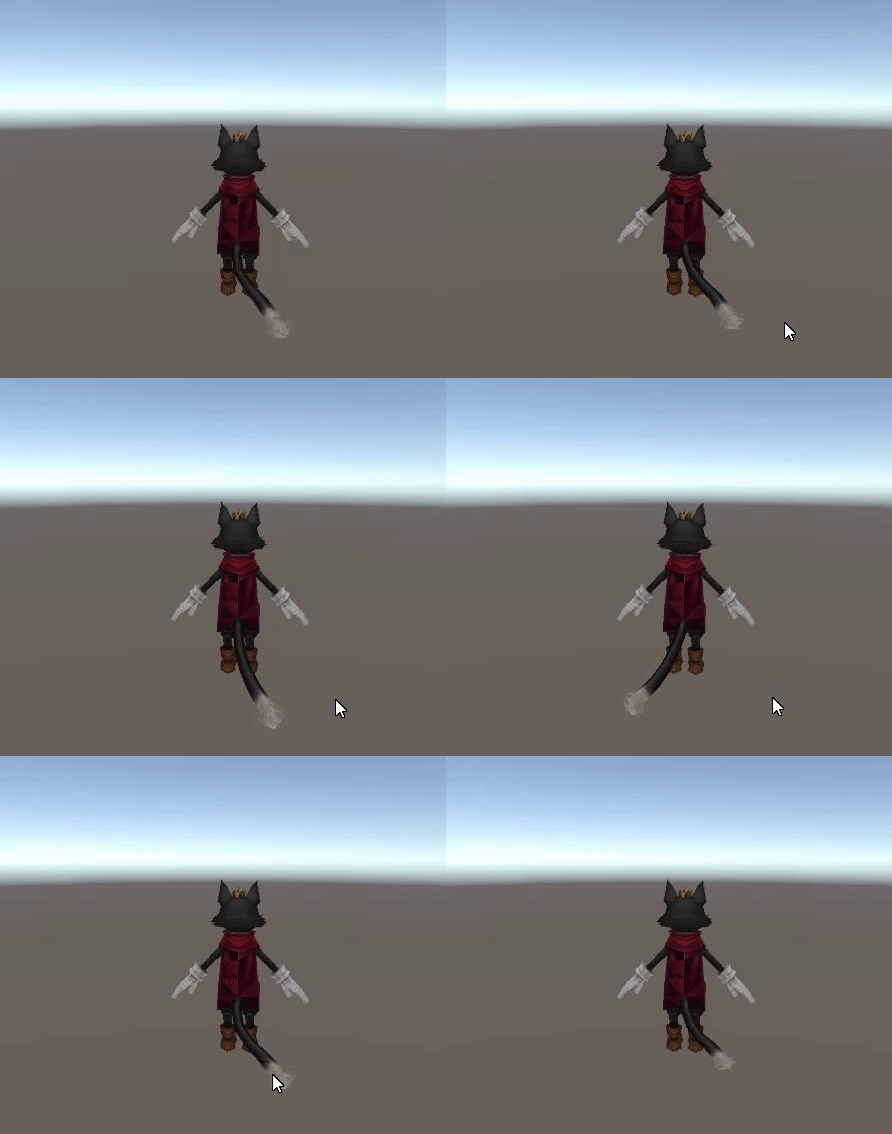
Do i need to add dynamic bones to each tail bone to fix that issue ? https://i.gyazo.com/81ffa00c7bae64be63745734a1e1dca7.mp4
Or just reduce the amount of bones in the tail
or is there something else i should know about tails and dynamic bones
Current settings https://i.gyazo.com/02dab9cbddf74949d5305bce32ec31e5.png
 runic mauve
@stiff lily i animation big tail like that use dyanmic give it better effect
runic mauve
just use tail root in vrchat it make it stick straight alot
if you add some animation to tail move back foward
it make tail more realstic
stiff lily
bone is already the tail, and it's set as root, what should i use instead ?
i feel like something is wrong with the way it moves, i'm not sure how to make it move straight like you're explaining
but it my head that would solve the issue because the tail wouldn't break at the end
graceful stump
how do you do the driving car
runic mauve
@stiff lily talk about this https://i.gyazo.com/55fd8322f5c3604ec9d5e0af2ca93d51.gif
i animation the tail
stiff lily
oh, an actual animation
i'll have to learn how to do that then, you're right it looks much better
 umbral crypt
So in Blender I can use the toon and sphere textures on my model, but when I import it to unity it looses all it's nice spa/sph/toon textures
graceful stump
thanks
gray mulch
Is there a way to stop unity from opening worlds in vr mode ?
 nimble nova
Alright, this is driving me mental. It's a simple thing but I can't get any answers on it. How the hell do I have text exist in the world? TextMesh renders above geometry.
warm niche
Does anyone here know of a good and reliable tool for creating sprites, other than using unity?
Or rather, merging sprites and then creating a small animation loop, rather simple request really, but i cannot use unity for this.
@nimble nova are you refering to 3D text field? also if you are you may want to do this with your shader or youll end up having your text field leak through objects > http://wiki.unity3d.com/index.php?title=3DText
stiff lily
@nimble nova #world-development probably
 junior plaza
Can I replicate these selfie cams with a render texture/camera combo? If so, how do I "pause" the texture when i take the photo?
nimble nova
@warm niche Yeah, I saw that. I was hoping there was a way to do it without making a new shader. That really should be something that ships in Unity be default.
Oh well though.
warm niche
Well.. every engine in the world has issues one way or another, though saying that.. i dont ever recall having issues with unreal 😛
nimble nova
Unreal is the gold standard of usability.
Source 2 is pretty good as well, but still not Unreal level.
warm niche
Cryengine is better than most.. having used it on and off i found it to be really easy to use despite what others say about the learning curve.
 ocean mirage
Unreal is UI heaven
 keen turret
Not sure if this is a advanced or beginner question, but my arms keeps acting like "chicken wings" where the elbow etc jumps behind my back whenever I'm walking around and stuff, anyone know how to fix it?
stiff lily
Are you using vr ?
runic mauve
your model to is short need 3d view
stiff lily
I still don't understand how to use a mixamo animation, i've been told how to, i've tried and it doesn't work, why is this so difficult
runic mauve
need to see how the model with avatar desciption l
keen turret
What do you mean Jazneo?
runic mauve
just screen shot your avatar with the ball
avatar decirption can be to far back
and .9 height would need different z
keen turret
No the elbow and stuff, like a chicken
runic mauve
put your hand next your mouth in vr
if you dont touch mouth in real life then avatar description and height not correct
plus if the arm to long
it do that to
avatar description picking on that stuff
keen turret
When I touch my mouth irl it touches it in VR too, but it still does the chicken wing thing when I have my hands around and infront of my chest irl and ingame
runic mauve
could be the arm to long
keen turret
Damn, any safe way to reduce the length without fucking up the entire rig?
stiff lily
could also be shoulder rotation
keen turret
Well shit
runic mauve
i think some people see in that avatar have same problem
stiff lily
Could the hierarchy be incorrect somehow ?
keen turret
Not that I know of
stiff lily
if it wasn't an mmd i'd definitely take a look myself, but i don't know enough about those
keen turret
Damn
 dry dagger
 viral verge
what changed in the sdk?
 fringe tundra
sorry for asking here but im not getting answers anywhere else. anyone know if it is allowed to modify vrchats public avatars? if so, where to get them
atomic shuttle
Anyway to equip a player with something? Like they click it once and its attached to them forever
and can continue to use both hands
fringe tundra
well if you want to equip and unequip in game and still be able to use your hands, no.. at least not that i know of
barren lantern
Hey-- is there a changelog for the new SDK or is it just stability/bugfixes?
final wigeon
@barren lantern https://vrchat.com/release
barren lantern
Thanks
 lusty charm
Any good world building assets worth buying?
lament tulip
I am geting super frustrated, where is the settings panel created? View point? Bones?
Does no one know, for the life of me I can not get the panel to show, either it just is not opening with this one model or it opens out of sight and I cant get to it
stiff lily
@lament tulip What do you mean by setting panel ?
lament tulip
when you press escape you get the quick select menu thing
 prime wadi
if you're too tiny it wont show
lament tulip
The model is 1.5m~ tall
 glacial current
How can I make pickable items get destroyed after being thrown out of the map? and how to make them respawn?
lament tulip
I remade the models bone structure from scratch, the menu now shows in game.
Neither Unity or the VRchat SDK had any errors relating to height, a bug maybe?
 lucid herald
 dull umbra
@lament tulip How wide is your avatar? Certain parameters such as pickup range and menu distance from your eye are determined by the avatar's length/width as opposed to their height. At a certain minimum width, the menu disappears entirely.
For the rig anyways.
lament tulip
@dull umbra 🤦 I didnt think about width, the model its self was 0.5 wide but the rig used to be 0.001, after I remade the bones it was 0.5 (Added atual arms)
Thanks
@lilac mural could it maybe to far in the coner to see in the headset 🤷
 lilac mural
nope tried putting it in the middle 😛
lament tulip
Anyone know how to rotate an model? I can get it working in preview but not ingame all it does it wiggle
I think that it is tring to roate the armature at the same time so when ingame the model wants to stay facing the view hence the wiggle (rotates 1 degree or so then is reset to the view)
In the animator I have tried to alppy a transform the the mesh nothing happens
Any ideas?
 ivory stone
I think I might be having a problem with the Unity upload in that it breaks my animation that worked perfectly fine before. It was a simple knife holding animation, but recently I added a rose, and now the knife holding animation makes my character's model stretch and break across the sky, though I left it totally untouched in unity. I'm hoping I don't have to re-make the thing, do I?
Or is this a unity upload problem?
 bright rivet
@warm niche SDK Changelog?
warm niche
 sour mural
Is anyone willing to share the shader or whatever used to make those mobile phones i see people use for selfies or whatnot?
Or atleast teach me?
:3
 golden valley
Btw if anyones wondering how to do a camera like https://clips.twitch.tv/MushyBovineTurtlePJSalt

You just add a camera and make it write what it sees to a render texture and to take the picture you disable the camera. It will display the last thing it saw before it was disabled
but there's one trick, other players can't see the render texture unless it is uploaded inactive
so activate it with a gesture
no shaders needed
warm niche
I'm following this tutorial for a finger pen but I was wondering if there's a way for me to delete all the trail once I disable the pen?
 autumn plover
hey does anyone now how to do 4 legged avatars?
 turbid meteor
I've asked in a few other places but no response so ill try here. im having a small issue, ive done custom hand gestures on 2 other avatars but for some reason every avatar i do now is missing its blendshapes in the mesh bar in unity. I have no idea why its not there when i dont decimate the face at all.
 stiff basalt
Fixed issue where doing an emote with a non-humanoid avatar caused you to no longer be able to move. I read this at vrchat.com/release does this mean you can make custom emotes with generic rigs now?
lament tulip
I made a custom idle animation and my model is stuck in the ground, if I compensate for this my model when finishing motion moves from in the floor to the position I set in the animation.
Is there some blend between the default idle (which I can override) and some other animation that can’t not be overridden/is not in the override controller?
Also of note, when in VR and in idle the avatar will not move up and does with the head set but does in the walk/run/strafe animations
Has anyone else had this problem?
 sand radish
Does anyone know if the unity asset called Obi Cloth works in vrchat? when you answer please @ me thanks !
final wigeon
@sand radish These are the supported scripts on avatars
https://docs.vrchat.com/docs/whitelisted-avatar-components
And worlds
https://docs.vrchat.com/docs/supported-assets
thorny vale
when adding a custom player mod on an interaction what is the syntax for increasing jump?
what would go in the custom method to make this work?
warm niche
If I set a camera to render a texture, then applied it to a material, and attached it to an object in an animation override, would I be the only one to see it, or would others be able to as well?
golden valley
others can see it, but if it's uploaded with it always active then they can't for some reason
so if your animation override is the thing that activate it then it works fine
warm niche
Awesome, Im gonna give it a try, Thanks!
 wanton turtle
Does vrchat still use unity 5.6.3p1 with the new sdk?
 dusk arrow
yep
wanton turtle
cool thanks
warm niche
Im attempting the camera thing but Im recieving this error? What is this mean?
I found the audio listener, it was within the camera used, I removed the component
 remote chasm
vrchat got an SDK update? what's new
warm niche
atomic shuttle
I always see and hear of TextmeshPro working in VRchat, but it's the 1 thing that won't work in my world, does the test mesh need any VRC scripts on it?
Text*
dusk arrow
TextMeshPro has issues with rendering through objects and not respecting depth, it might be more useful to look inot Unity's Canvas system for displaying Text in world
also, while nomrally those sorts of rendering artifacts are just annoying to see, in VR it can cause vertigo so... uh... yea...
protip: If the player of your thing vomits while using the thing they probably won't recommend the thing
warm niche
@golden valley so as of now in the only one who can see the render, no one else can
May I ask what always active would entail? And how to circumnavigate that?
golden valley
my camera has stopped working as of the most recent patch
so i have no clue atm
if you see anyone else who has a working camera please dm me, i don't think i changed anything but this morning i was using the camera fine any everyone could see
for now i'm just going to assume it's not possible in the most recent patch
warm niche
If I find out anything I'll let you know, and if you do please dm or @ me
God that's frustrating
golden valley
yea i changed like fov on my phone avatar but i don't think i changed anything else. I'm pretty sure they are disabled for others now
warm niche
The day I go to make one nonetheless
 pale violet
is it possible to have a directional light ignore an object/layer?
warm niche
@waxen sierra I've seen you use what I'm assuming is the same sort of thing. Has the latest patch effected you at all?
waxen sierra
Latest patch disabled global cameras.
 hearty lantern
I can confirm that my camera also no longer works
waxen sierra
The camera deal wasn't meant to be in anyway. They accidentally enabled them in a previous patch.
So don't expect them to enable them again.
hearty lantern
Why disable them I wonder.
warm niche
That's heartbreaking but understandable, thank you
runic mauve
Performance just same as mirror
waxen sierra
They're essentially mirrors
Or half-mirrors
Bottom line, not happening again any time soon.
warm niche
Rest in peace my dreams...
hearty lantern
I appreciate the explanation.
I wish i'd waited until tonight to make someone with a polaroid camera, instead of last night 😦
waxen sierra
Mmhmm. I was incredibly upset over it, and complained enough for half the VRChat population, but this wasn't a sudden decision.
Lots of people seem to be upset over it.
warm niche
Yeah, like I said I understand why. But it was so adorable I just wanted to join in.
waxen sierra
:'(
warm niche
I'll cry enough for all of you guys don't worry
waxen sierra
I've complained to the devs for a few days even before the patch came out
They understand the frustration, but there's nothing they can do. It's just too much on performance
hearty lantern
It's understandable
atomic shuttle
600% pop growth in a week can lead to making quick cuts to stuff, all understandable
hearty lantern
even without the growth 2x draw calls is still plenty
atomic shuttle
True
 bold wagon
How would i go about learning doing avatars from scratch and other more complicated things?
 serene folio
@waxen sierra I had beem not using a constantly active camera recently, but mostly a photo camera to take pictures of people <aaaand some other stuff (peopel who know me know whati am talking about :P)> - this was essentialy a camera activated for one milisecond, render texture stayed as the moment of activation. I am not sure, but i dont think this would affect performance. Cannot we have a global cameras with single pass draw and for example 20 second delay? This should not affect performance so much... This could be some custom SDK object/script...
serene folio
also, @warm niche any thoughts about this idea?
bold wagon
Most of the videos do it from mmd models
runic mauve
People can still use camera but only see it or make world with phone lol
People can still use camera but only see it or make world with phone lol
warm niche
Not anymore
 merry coral
did that come with the recent update?
warm niche
yeah, scroll up a bit in this chat, Compatible gave a fairly good explanation on why. I'm sad about it, but again I understand why
merry coral
yeah
but if it only works for the local player
you could use it for scouting
for CTF
._.
warm niche
Yeah but I wanted to be a cute friendly person taking selfies with people. But alas this is but a dream...
merry coral
ye
 glass nest
whats the best way to make ur world collided instead of putting a much of box colliders everywhere
dull umbra
With regards to selfie cameras:
https://vrchat.canny.io/feature-requests/p/allow-limited-camera-component-functionality-across-clients
@waxen sierra
hearty lantern
@dull umbra cheers mate
 timid token
If someone could give me some assistance. Im trying to put a real time camera on my avatar, and I have a display it renders to. But VRchat doesnt seem to like the camera. Anyone have a potential workaround?
Nvm im dumb and didnt look up 2 posts
warm niche
@dull umbra upvoted ❤ make my dreams come true
 glass cosmos
Does anyone know how to make a working phone screen. Specifically having it display what the on the phone camera would be showing.
Would that be done with VRC_MirrorCamera?
runic mauve
@glass cosmos you just put a camera on the obj but they disable gobal camera
only you would see it
glass cosmos
How do I get it showing on the phone screen? @runic mauve
glass cosmos
Merci, I'll give this a shot
 mighty compass
So i have the oculus, how can i get foot tracking?
hearty lantern
Im not sure oculus supports full body
lusty charm
Any good unity assets for world building?
runic mauve
@mighty compass only with kinect with driver 4 vr put cant move spinn need stand in place
cant even lay down with it
vive tracking only best way or could use ps move but alot work get it setup
and correct ps move controller
mighty compass
okies, thannks
 somber moth
I can't get this audio rolloff thing to work. I have audio sources from two separate video players for two rooms. I want to only hear each respective audio source in their own room, but I hear both audio sources wherever I am in the world.
atomic shuttle
Whats your ONSP settings
somber moth
Does that apply to the audio source settings as well?
atomic shuttle
uhhh not sure
but thats the only thing i see different from my audio sourcesd
sources*
Wait in your first picture
You have just 1 audio source selected?
or 2
somber moth
I usually do 1 at a time
atomic shuttle
yeah but for that picture
is just the 1 audio source object selected
for the inspecter
 normal aurora
has anyone here ever seen an issue where an avatar or any other object will render in the correct position for the left eye, but then in the right eye display they will render in the same position, causing the user to think there are two of them, instead of it properly resolving into a 3d object?
that's the effect I'm getting when I try to set a certain shader, but people are saying it isn't a shader issue, and I'm thinking that I haven't really done anything else that could cause such a bizarre problem
atomic shuttle
yeah I feel like it would break the game with the OSNP settings hitting 2 different audip sources on same object
just make a seperate entity
for the other room
keep em seperate
glass nest
why is my showing up as a error shader
 frozen copper
The cameras causing 2x draw calls makes sense, but at the same time, I've never noticed any kind of performance difference when people enabled/disabled their cameras. Hell, it was only a day or two ago that someone showed me the idea of leaving the RenderTexture active while disabling the associated camera, in order to have a 'still' frame on the texture, as if they had just taken a picture. That blew me away! If I never saw that person until after the most recent update, I never would have gotten to see that amazing functionality. I wish it could at least be a user-controlled setting...
somber moth
@atomic shuttle Is it an issue if the audio sources have the same mixer?
They both have Master
somber moth
Im still hearing both audio sources. I even deleted one and redid it to make sure they're separate.
The video players each have their own URL and no more
atomic shuttle
I wonder if the Video Players have their own audio source bubble
somber moth
When I'm uploading I'm getting a 500 ISE code
atomic shuttle
havent used that VRC yet
somber moth
Dk if this is why I cant fix it, maybe I haven't even been seeing my changes?
glass nest
my mirror shader isnt working?
atomic shuttle
Temporarily disabled, for performance I think
mirrors are basically another camera rendering everything
so the 2x draw calls are bogging it down
glass nest
ah
somber moth
Yes I do
frozen copper
They shouldn't be disabled in worlds, though, it's just the avatar cameras that are local-only
somber moth
My mirrors still work
frozen copper
I was just in the AvatarTesting world earlier tonight and the mirrors were working fine
runic mauve
@glass nest in vrchat only use one mirror
they have that well have no fps problem you need move the other mirror away from each other
to work
warm niche
hey So does anyone know anything about hip and feet tracking?
glass nest
ah
runic mauve
it show up correct in vrchat it just pink in unity
glass nest
Oh thank you so much! @runic mauve
somber moth
I dont know what I just did but as soon as I loaded my world my ears filled with eardrum shattering static
Even audible at 0%
atomic shuttle
Any thoughts on my Kinematic pickup with frozen rotations, automatically rotating a bit for non VR users on pickup?
somber moth
So do two video players not play nice with each other or? I just broke both of them
runic mauve
@somber moth cant be near each other
somber moth
Is the disableGravity method not working for SendRPC? I want to turn off gravity for some objects when I use a trigger but nothing happens.
atomic shuttle
Yeah mine hasnt worked consistently expect onSpawn, so for work around I made my rigidbody have almost infinate drag and angular drag
which slows its fall speed and turn speed
dunno how long it will look like grav is off tho
sloowwwwly falls
And does anyone know how to stop my object im holding from rotating when I turn using the joystick on my rift
the 15 degreee snap or whatever
makes my frozen rotation object turn
 sweet crystal
I want this box to enable an object while the person is inside it and disable it when they're outside it. I only want it to affect the person locally. How do I set it up right?
atomic shuttle
Click advanced mode on your VRC_triggers
change alwaybufferone to Local
and instead of everything layer
just select player
should function
and you have it backwards it looks like the player will enter and it will disable your object, and will enable it once they leave
unless thats what you want
sweet crystal
Yes, it is
atomic shuttle
Then what I said should work
sweet crystal
Should I use OnEnterCollider or OnEnterTrigger? I don't want the box to be solid
The main reason I ask is because it doesn't seem to be working
sweet crystal
Oh, setting the layer back to Everything worked. Thanks@
glacial current
How can i make sure that pickable items that gets thrown out of the map actually get destroyed?
 copper ravine
anyone know how i would be able to make cubed shaders able to show vertex colors?
sweet crystal
Nevermind, stupid mistake
 blissful root
for some reason every time i import the SDK into a unity project unity cant load the project, it just freezes.
any help?
oh never mind it loaded xD
sweet crystal
Welcome to Unity 👀
So, this collider I set up, none of the interactable triggers inside it work. Is that normal? Do I have to work around it somehow?
 queen crow
Does anyone know why my outfit goes from this
To this when I create an atlas for my materials?
 grave zealot
try packing islands and making a larger atlas
queen crow
Is there some sort of guide to manually atlas? 😮
or just something I'd have to figure out
runic mauve
tupper has video on it
queen crow
Alright, I'll take a look at that, thank you ^_^
runic mauve
basic just make the metal part i own mesh till you finish the atlas on the other part
then join mesh back on
queen crow
Ooh gotcha
 inland edge
https://puu.sh/yWgci/fdbdc76b15.gif anyone managed to call animations stats by onInteract?
I managed to get this to work by pressing a key but it doesnt actually move down the tree. https://puu.sh/yWgCE/25965ce5d9.gif
It will never move from empty to the next state even if it has been properly triggered.
:/
Never mind I wasnt using a bool https://puu.sh/yWh7i/6b69f9254e.gif its all good now
lusty charm
does atlasing make performance better? ive been just deleting dupe mats
 bleak tendon
deleting dupe mats helps a lot, but atlasing is the best performance wise, cause you then theoreticly only need to load one texture
 median flare
It reduces the drawcalls substantially. As an example, I've seen some pretty bad MMDs hit 80-100 drawcalls. Atlasing them can reduce them to one single call.
(They'll typically be around 20-50 normally though)
bleak tendon
damn 80 to 100 are a lot
median flare
Yeah, most MMDs are made for videos or still images. A quick image render, or where you render a video all day. (Edited for wording)
 faint shell
does anyone know how to fix a model that has camera in had, I tried to more in the front but still not working, always in game is in head, I can see anything cause this
head*, sorry for my bad english
bleak tendon
did you correctly set the camera point of view in unity?
median flare
Generic avatar?
bleak tendon
weird, maybe there is a limit, how far off the camera can be forward, try draging your model backwards? and then adjusting the camera again
median flare
Was making sure it wasn't a humanoid issue. I'm not too sure honestly, I guess try what MC said and maybe check the animations to make sure they're not pushing you away from where you want
bleak tendon
yeah, maybe try that and then put it further back, see if anything changes
if the further forward doesn't do anything and the further back does something it's probably because there is a limit of how far forward the camera can be
dull umbra
@faint shell Camera placement for generic avatars is broken. Currently it is only possible to move the camera up and down.
Either move the camera up above the avatar, or enable backface culling on the mesh.
dull umbra
That would work.
faint shell
Ok After some endless loading loop, now I can't load my model at all, I see only a red model/something
 dreamy dagger
@faint shell some avatars got overwritten
happened to about a quarter of mine, like 15 of them
faint shell
and the "fix" for the camera was just placing bove the head, a bit glitchy but is working
above*, watev
 spiral otter
I asked this earlier but for the life of me cant find if I got any responses (search fails me). Is there a way to set the Useragent string for the in game web browser panels?
autumn plover
so im working on a 4 legged creature model
what do i need spefically for the animation contoller
or in the controller?
faint shell
you need to have a rigged model
autumn plover
well of course
iv got base stuff
im on about the contoller its self
nothing else
im sorta used to unitys animation controller system
faint shell
you need to make some animations like idle, walk.. there are some tutorials on youtube how to use the animation tool in unity
autumn plover
do you need a walk for each direction
as my model that i did has a run and walk
:T
in one direction
faint shell
most easy is to make a walk forward and backward
left and right don't need a special animation
autumn plover
im guessing the animtions need to move the root bones
faint shell
yes
faint shell
when you animate you need to use the bones
autumn plover
i mean for movement
so like moveing the root bone for a direction
forwards back ect
faint shell
yes but you need to record this with unity and make keys
autumn plover
oh
ok
il go do that in blender
unless it needs a special type of easing
or whatever
autumn plover
how this for move speed? https://puu.sh/yWog9/8cba299b2e.gif
so
i have some of it kinda there
what do i need for peramiters
?
Can anyone give some advise?
stiff lily
you might have to wait a bit, this channel are not for regular issues and so not everybody can help
autumn plover
has anyone used final ik for there avatars? as its surported
pm me if you guys can help me with my avatar
warm niche
How can i make a particle System, like a flame that is made to stay at a specific part of the clothes stay at that place when i move? Dragging onto like the shoulder bone looks shitty in my opinion
autumn plover
I think that's the only way to do it
warm niche
aw shit
autumn plover
If there was scripting it could be done differently
You can make the Sim space local
 hallow lantern
in need of help with a blender importing python script please dm if you can help.
warm niche
Hey is there an easier way to change the fingers rotation/item scaling etc while making the animation? Or just value's only? ;l
 raven idol
does anyone have any ideas if there's any way to spawn an object locally? Or something similar like setactive(f) or !enable the colliders of an unowned obj?
would be a HUGE optimization boost if I could somehow do that.
cause each deck costs about 20 frames (for me at least)
because of the colliders
well, moreso the colliders being stacked I think is causing it. (yes they're set to triggers in the deck)
runic mauve
@warm niche muscle animations editor cost $15 assest store
warm niche
Thanks @runic mauve
warm niche
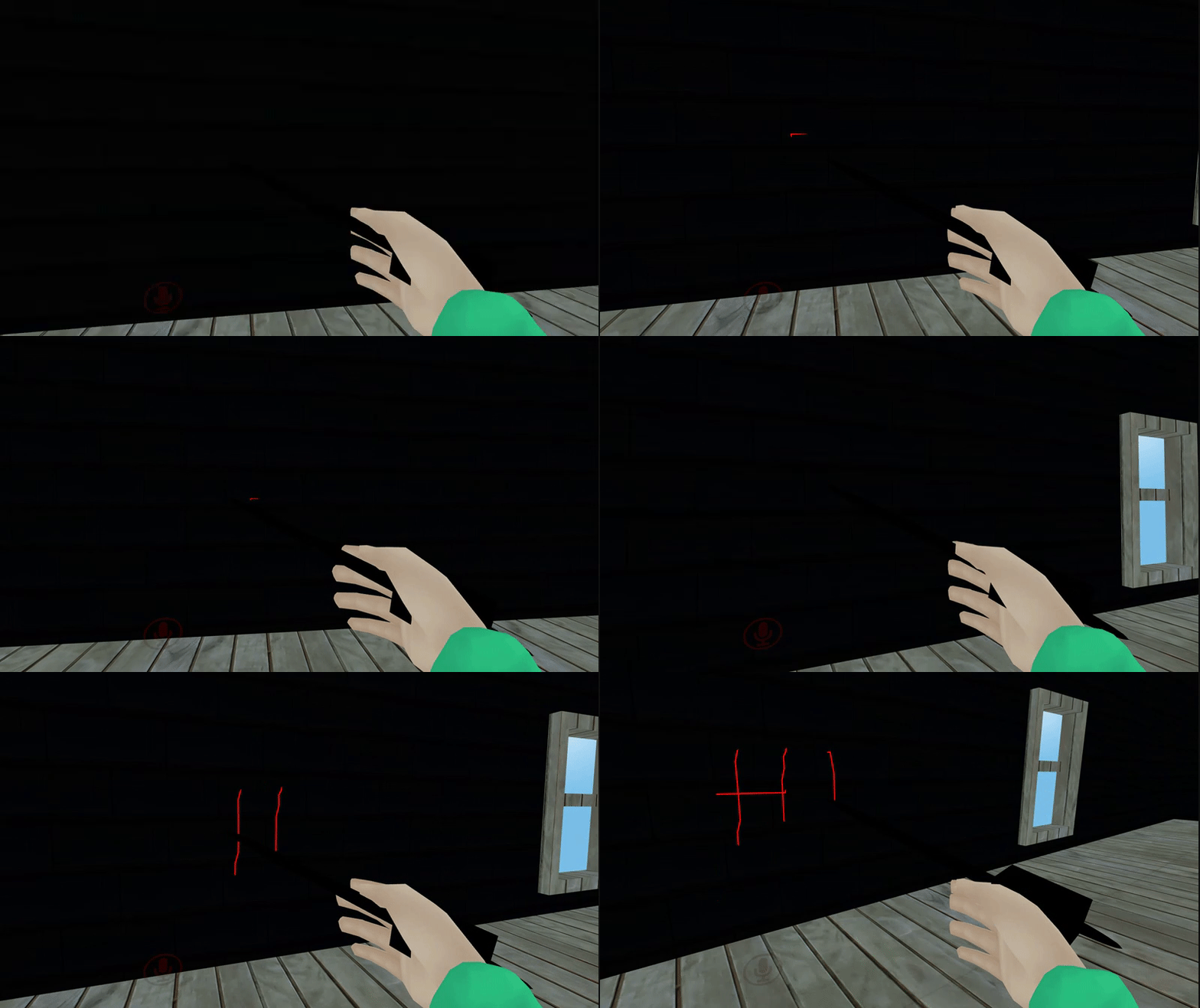
Is there a way to make trail (drawing with finger actually to be specific) be able to pause drawing (cut the line) and finish drawing on so you can write letters seperately and such?
runic mauve
@warm niche https://www.youtube.com/watch?v=Pi7i4sF_BgQ
dull umbra
@warm niche Not that I was able to find in my own experiments. However, you might be able to get something to work if you used world space particles instead of trails.
warm niche
@dull umbra so what you're saying is that @runic mauve vid is useless?
For what i want that is
runic mauve
you can do with trail render
dull umbra
It uses a TrailRenderer, which is limited to a single line.
runic mauve
snail made shader
you can stop and draw with this
snail made shader then stop line draw when it get sent other side of the world
trail render use animation and shader made for it
@dull umbra watch the video
before think it wont lol
warm niche
So if i follow the video it will work like that?
warm niche
Then it should work now
runic mauve
and snail draw with all the time
i made perfab for my room with this it do the same thing https://i.gyazo.com/3c504b166ba1f35f38a906cdad03373f.gif
it portable marker
dull umbra
@runic mauve I don't see anything in the video or the shader code indicating that lines can be broken using this...
But I'd be happy to be proven wrong.
runic mauve
it can be done if you know how to make shader and snail is pro mathcial guy
if figure way to do it
here outdate tutiroals but it show
how it works
warm niche
You can get snails marker here https://github.com/theepicsnail/Marker
Ye it isnt working with the older video you gave.
runic mauve
it work when i use it
dull umbra
@runic mauve Neat. I'll have to give that a try then.
warm niche
I did everything step by step cx
runic mauve
need to make sure snail shader on the trail render
only work with that shader he made
warm niche
Is what i did
warm niche
Yes, as i said i literally did everything
How would I go about the simpler version of just drawing with a fingertip, and it erasing when the animation override is over?
runic mauve
 fast berry
When I want to test my world the "New Build" option of Test doesn't launch VRChat. My only option is to use the New Build option of Publish and launch VRChat myself, then my world, which is quite long when you have to test something quite often. Is it a bug or a normal behavior?
atomic shuttle
Go into your settings for the SDK in unity
at the bottom make sure the file path is correct
@fast berry
in your steamapps folder
fast berry
Oh, I'll get a look at it when I'm home, thank you @atomic shuttle
 misty narwhal
Anyone got any tips on how to fix the eyes and mouth on this one?
I can switch out the shader, as it seems to be caused by backface culling
But changing the shader to sprites removes the back on the character
 zinc harbor
or clone the front for the back
sand radish
^
misty narwhal
Any quick way to do in unity?
autumn plover
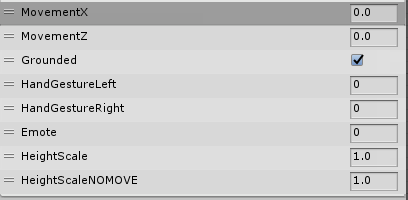
does any one know what paramiters for a generic animation contoller?
golden valley
this is what the default controller has. I don't know if hand gesture stuff works but you can for sure use movementX and Z https://i.gyazo.com/6cdfd13743bd768085a9d36e6115c7e0.png
golden valley
yea ik, i'm just not sure if the parameters are still set even if you can't move fingers because you don't have them
autumn plover
the avatar has paws
so
unless i make fake bones for it
then no
im guessing head movement is done automaticly even if its not a humanoid rig
?
golden valley
i don't think so. Just rotation of your avatar. There's not a way to tell the game what bone is your head if your using a generic rig
autumn plover
oh :/c
thats ok i guess
im mainly working on walking and idle
nothing else
maybe a emote or two
im guessing movementx and y are floats
im gonna give it a try on how it is atm
 last parcel
@misty narwhal scale it on the respective axis to be thicker. If that doesn't change anything, you probably have to go into blender and drag the vertexes a bit towards the front. You could also try to use the cubed's paradox flat lit toon shader and play with the outline setting (0- 0.002, sth inbetween), but if it has no depth it might not change anything, didn't use 2d chars yet
autumn plover
tested it and it kinda works
it didnt exit the walk though
and dint work on run
-n-
but i may have fixed it
 marble root
random question: in Unity can you use the first UV channel as the lightmap channel, similar to Unreal?
final wigeon
I think unity likes to use the first UV channel for normal texture UVs and the second one for lightmaps.
misty narwhal
Thanks @last parcel, tried the shaders with no luck, fixing the axis didn't do much either
last parcel
hmm, then you should try moving it infront of him via blender in edit mode
autumn plover
idk if you can do this but try doing a bevel modifyer
zinc harbor
i wonder what difference there is in 1 dynamic bone component on hair root versus one in each strand. does that actually make and difference in cpu load?
autumn plover
or something
zinc harbor
from my understanding the afected bones in the end are essentially identical
autumn plover
look at the profiler
zinc harbor
i guess, i was hoping sombody knew
autumn plover
im pretty sure doing each bit would make some diffrence
if you them to be diffrent kinds of movement just do for a couple and make another and do it for other couple
median flare
There's some overhead, so one single script is prefered. If you need to, go ahead and use more for other chains, but keep it reasonable.
 low sinew
Is there a way to tell a collider to only interact with one thing ? Because if i want to use Cloth phisics i need to add (capsule/sphere coliders) but if i do that i get launched into space as soon as i hit something or jump ^^ witch is not fun
median flare
Set it as a trigger --> "IsTrigger"
low sinew
ok, done but that can't be it
median flare
That should stop you from flying away. (It's been a while since I've done it myself, so your mileage may vary)
low sinew
is that all ?
median flare
Yeah, that's it
low sinew
wow
hahhaahaha
oki thank you ^^
oh so we set it as an hitbox instead of an solid object , got it
zinc harbor
cloth always ends up glitchinf my characters around the map
 steel nymph
Anyone know if the Embedded Browser from unity asset store would work with vrchat?
autumn plover
no from what i remember its not on the whitelist of components
but it counts on what you are using it for
warm niche
any ideas how folks are doing phone-selfies? I presume its a camera that they then somehow lock a frame on
 charred olive
phone selfies are broken
golden valley
it's not possible for other players to see them anymore. Only you can see them.
The way it works is they have a camera and a render texture. If the camera isn't active the render texture still displays the last thing written to it, so you position the camera and deactivate it to take a picture
warm niche
@warm niche if it was something you were interested take a look at the canny and consider upvoting it. https://vrchat.canny.io/feature-requests/p/allow-limited-camera-component-functionality-across-clients
I saw it just a few days ago
Yeah it was broken with the latest patch
RIP
good to know how it was done though, thank you. I'll support that link
 wet iris
Is there any way to open a URL with a Trigger from a map? Or is it not yet implemented?
warm niche
I'm following this tutorial on how to make a finger pen and I was wondering if there's a way to clear all the trails once I stopped the pen gesture, is there a way to do that?
warm niche
Too much work involved on fixing this next project i'm doing. Lot's of one sided glass walls connected to each other. I used a double sided shader to fix the visual problems but placing box colliders on each wall would takes weeks for me to do, not to mention performance issues. So i'm just going to leave it without colliders so people can walk though the glass. Seems to be the best solution. There's 50+ doors too, would be daft to put teleporters on each one.
 flat bloom
Quick question about particles, does anyone know if its possible to add an object or something to particles? I have some particles set to float around like fairies, just I'm trying to figure out a way to add wings to them, to give them a nice final touch, just hoping I dont have to model my own particle for it
warm niche
I have 300+ chairs so i'm going to have to pick the best ones, unless someone knows a way. It's not as simple as putting an onEnterTrigger because the trigger turns off when you sit down, creating all sorts of problems. My museum is set up to turn off/on the chair script component when you go through a door, this is not possible on a large map such as this with lot's of chairs.
dull umbra
@warm niche Add an animation to the default hand gesture that sets the TrailRenderer's Time variable to 0. This will immediately erase the entire trail.
warm niche
Thank you very much.
dull umbra
@flat bloom Further expanding on what I mentioned before, I would add 2 OnBirth sub-emitters to your fairy particles. Each one would emit a single oriented quad particle that would rotate up and down to simulate wing beats.
Although IIRC OnBrith sub-emitters don't support burst emission, so you may have to get a little bit creative using continuous emission and limited lifetime particles.
flat bloom
@dull umbra Sweet thank you I'll try that out! I have some wings on now with sub emitters, my only issue now is the scaling, they look good up close, but seem like the wings take over in size the further out you go, is there any way I can keep the size constant with the particle instead of how close the player is to the particle?
@dull umbra This seems to be my main issue at the moment
dull umbra
@flat bloom To get a fixed size, set the Max Particle Size under the Renderer tab to some large value. Then scale the particles to your desired size.
flat bloom
@dull umbra Thank you! (:
glass cosmos
who knows how to get the rainbow shader to move?
flat bloom
@dull umbra Last question, because everything else is pretty much done, do you know if theres a way to make the sub emitted particles stick with the main particle? they spawn together great and everything, but once they start moving they go in seperate directions
warm niche
what is Hagbard username? anyone know have a question about some sitting pose overides
atomic shuttle
Is the simulation space for the sub particles local? @flat bloom
 narrow token
Hi, I have a question, is it possible to stop this cape from clipping into the ground with dynamic bones? Without Dynamic bones it's horizontal from the back of his shoulders.
junior plaza
check #announcements
atomic shuttle
Cheers
atomic shuttle
Can you explain the issue real quick? what kinda effect is the main 1 and what should the subs do
Nvidia graphics update just crashed my unity before I saved T.T
flat bloom
so basically the main particle is just a ball of light that floats around, the sub particles are just particles that look like wings, and are attached to the main particle, Basically I'm trying to make an ocarina of time type fairy that floats around
but when they float around
the wings and the main particle seperate and go different directionjs
atomic shuttle
Navi? or w/e
flat bloom
yeah
 frosty nova
@warm niche for your many chairs, you ever think to put them into groups with an empty object and disable them all via that one main parent object?
atomic shuttle
hmm let me poke around real quick
You can see the wings so its not an issue of your max particles
Since sub emmiters take on the shape on the parent, why not just put 2 emmiters on the object thats supposed to move
and dont make the particle systems rely on eachother, but a root object
narrow token
Would it be possible to make a cape that's longer that my avatar "trail" along the ground? It doesn't need to literally do it but it'd be nice to give off that effect.
flat bloom
@atomic shuttle Yeah in total the main particle and wings are a total of 3 particles, and how would I go about doing that? would I still be able to get it to float around randomly like normal particles can?
atomic shuttle
Ah, not sure, I know sub emmiters are pretty wonky, but maybe you just have to make a sphere. remove the renderer, and put a animation on it that just moves around
and just make the emmiters child of that
 fair nest
Does somebody know how to make this effect?
I think it was possible with cube's rainbow shader
but can't find the values
warm niche
@frosty nova disabling chairs doesn't work, there's a bug where it locks you into the chair and you can't move at all.
frosty nova
is the trigger volume pretty much set for a hallway or something?
runic mauve
@fair nest that more like get trouble
dusk arrow
Is there a way to set the camera a world uses to be Deferred rendered instead of forward rendered?
 frigid briar
weird but not really question: what happens to the copyright of things we upload to VRchat? anyone seen any kinds of agreement?
I use creative commons music in my world while giving credit but i can't give that copyright away 😛
 lucid flax
Copyrighted stuff is still copyrighted when you upload, if there is ever a DMCA takedown on content in the game VRChat has to honour that
atomic shuttle
Rip my world someday lol
frigid briar
@lucid flax I'm wondering about my own copyright though
does VRchat own any of it?
since i use their service
I haven't seen any ToS
lucid flax
No, VRChat does not claim any content uploaded by users
frigid briar
good to know! do you have any source for that? I use sounds that my friend made for me too and he cares a bit more than I do ^^
lucid flax
frigid briar
thanks!
lucid flax
7. User Content

7.1. User Content Generally. Certain features of the Service may permit users to upload content to the Service, including software code, messages, photos, video, images, folders, data, text, and other types of works (“User Content”) and to publish User Content on the Service. You retain copyright and any other proprietary rights that you may hold in the User Content you post to the Service.
cool thx for info. heard that question brought up a few times in the past w/out a direct answer
frigid briar
anyone else got a "moving file failed" error when trying to build with the new version of the SDK?
"customscene.vrcw: The system cannot find the file specified"
tried publishing instead and it seems to be stuck on future proofing content now :/
 white fable
Hey guys, i have a question about Eye Map Movment, when i do that and export to Unity Appears like that?
atomic shuttle
Anyone know why my local OnEnterTrigger VRC is spawning almost infinate objects when I just want 1 when it enters
warm niche
i'm working on an advanced toon shader that i'll be sharing... you'll have setting options for pretty much everything.
atomic shuttle
Getting Bad Gateway on SDK login.. anyone else?
@warm niche Just started happening moments ago
Err...looks like its fixed nvm
keen turret
Hey guys, so I was wondering is it possible for an animation to replace your entire model, I've made this cool rave party avatar with music, but when I go ingame it wont show my wings, and wont change my characters look, is there a way to do this? (I'll include screenshots after this of what I mean)
Guessing I'll have to crack this myself lmao
 next smelt
If i'm making a model from scratch and I wanna maintain quads and not tris due to ease of modelling, doesn't the export just convert to tris, or will I have to triangulate the mesh just before I export to unity?
 dark sigil
how come eye tracking makes my avatar's mouth open and makes their mouth open every so often?
lusty charm
i deleted the particles and it still does it
dark sigil
yes, unmap it I assume?
 lime field
when i export my blender .fbx into unity the hair and eyes are messed up
 severe halo
daf are your keyshapes for blinking and shit at the top or bottom of your keyshapes
lime field
i dont know how to fix the hair from looking blocky
lusty charm
change material from opaque to cut and se
dark sigil
I disabled the blinking thing
severe halo
but do you still ahve eyebones
lime field
you mean the rendering mode right
severe halo
the eyebones might be telling vrchat to use the top 4 visemes for eye blinking
thats all I can tell ya
if you dont want blinking either remove the eye bones or create 4 dummy visemes at the top
lime field
setting the material to cutout and changing the alpha works but it looks terrible
 cobalt osprey
@lusty charm You might not have a directional light in your scene. The lighting might be as if it was sunset without a directional light active. Also remember to toggle the scene lighting on to preview the lighting in the editor.
lime field
so i fixed my texture to have proper transparency but the material still renders the full hair
zinc harbor
wrong rendering mode
dropdown under shader
set to transparent if thats what you changed
lime field
that makes the hair do something weird
blender
vs
unity
the hair is different shades
lime field
that makes the hair noticeably aliased
is there a way to make it more smooth without using fxaa?
lime field
thanks i'll try it
somber moth
Does anyone know why people can't interact with my web panel? "Is interactive" is set but I seem to be the only one who can actually use it.
runic mauve
@somber moth did you put a obj sync on it
somber moth
No. Do lights need those as well so everyone sees them in the same state? I have a trigger set to turn them on and off, but people have still been seeing them in different states even with object syncs.
somber moth
There is a synchronize URI option on the web panel already and I think they see what I'm doing. The issue is that only I can actually mess with the panel (going to diff sites and stuff), and everyone else has said that they can click and see the cursor on the panel but it doesn't do anything for them.
runic mauve
any thing want to be sync with network need obj sync
only way it works
need add obj sync on pickup item, buttons etc
if you want to be on the network
if dont have obj sync it wont be on the network
severe halo
would this be the right place to ask for direction on shaders
 zealous jacinth
Is this the right place to ask about an alternative to the dynamic bones asset?
I don't have $20 to spend ATM, as I just bought an Oculus
somber moth
@runic mauve People get stuck in my chairs and can't get out. I can, however. Is that an object sync issue?
somber moth
Would you know why they can't get out of them? I can press W and get up with no problem. However, everyone else gets stuck and can only get out by switching to another station
runic mauve
make sure chair set like that
it default like that to begin with
i test the chair work
@somber moth
warm niche
For performance reasons i usually set the chairs to 'advanced mode', 'local' instead of 'AlwaysBufferOne'. Proximity of 1. Not recomended to have too many chairs in a scene (30 should be fine). Don't use a local SetGameObjectActive' on them, seems to cause a bug where you can't get out of seat, instead, disable the scripts using a local SetComponentActive.
warm niche
Does anyone know what I need to do to have the other facial expressions of MMD models be an animation file?
is it possible to modify the way a vehicle handles?
thorny vale
Is there a way to respawn objects that have triggers built in?
 hallow urchin
 tawny warren
Does anyone have information/instructions/videos regarding making your avatar be able to draw with their finger? Thanks.
runic mauve
@tawny warren https://www.youtube.com/watch?v=Pi7i4sF_BgQ
it work for me just need watch video and listen careful
dont skip it
it snail marker
tawny warren
@runic mauve Thank you very much for this information! I've been searching for a couple of days on this, so I really appreciate your response.
 stark fog
Is this part of the server overlode?
 crisp quest
if it says that it’s broken
stiff lily
@stark fog Yep server
stark fog
got it th
 hollow osprey
Noticed people talking about dynamic bone plane colliders on here, but they don't seem to be on the avatar components whitelist. Anyone know why that is?
stark fog
I didint
hollow osprey
servers are having some issues, you just have to wait
severe halo
Do you think it would be possible to create an expanding sphere that tints everything grey when a character is inside of it
stiff lily
A time stop kind of effect ?
severe halo
yeeee
stiff lily
Doable, but performance should be top priority
severe halo
I've gota particle system that expands in a sphere, just no idea how to get the actual visual effect
stiff lily
I don't think there's specific tutorials for this though
severe halo
assuming shaders of some kind, but I dont know if they would effect everything inside
I've seen animations where the entire sky goes red, so I assume its doable
stiff lily
definitely doable
 timber raven
 trim ibex
dont blame the poor servers
they were not build for this
or actually they might have been built for this
 plush warren



 strange grove
is there any cape tutorials?
turbid meteor
Was wondering if anyone is experienced with audio bites on avatars that could help me out
 fair valve
is there something i need enabled for me to select bones while weight painting
also, is spliting the mesh and then mirroring it the only way to get symetrical weight paints?
 hoary trail
I don't know if this is the place for this, but i have hair that is pulled out and I want ot put weight back into it so it drops enought to be called hair. I have dyn Bones in it and here is the screen shot. Anyone have any ideas?
Right now it acts as a tail.
wet iris
Does anyone know how to use the VRC_AudioBank correctly?
Where do I have to put it? How can I trigger it?
 bright dragon
does anyone knows if it's possible to remove that function that makes you freeze on your spot when you use an emote? I would like to add some emotes there that don't make me stay freezed on the spot...
 plucky coral
OH WOW SHINY ZOROARK NICE
hearty lantern
zoroark ftw
 lofty sail
Soooo. this happened to my model's arms after putting it in the scene on humanoid rig. any fixes?
warm niche
does anyone who uses shader forge know what even works for vrc environment lighting? everything i try doesn't do squat.
attenuation does nothing, ambient light does nothing . . .
light direction only works in worlds with light sources, but what makes you dark in dark parts of the world??
atomic shuttle
Okay, I'm not sure if its jus tthe limitations of the current SDK or what, but I cant get consistency on my VRC_Triggers. They happen everytime, but the more people in the world, the more times it triggers the triggers. Works 100% when by myself, but when its 2 people it just cant sync, I have object syncs, and ive tried local trigger and alwaysbuffer 1
It will function normally like 80% of the time
but that last 20% causes crashes due to spawning x10 more then normal
atomic shuttle
Any thoughts on making spawning objects more consistent across clients?
 smoky wind
I'm running into issues with Unity freezing/locking up when I'm editing avatars. Either the interface will become completely unresponsive, or it will go blank. Weirdly, I can still hit CTRL+S to save when this has occured. I've reinstalled Unity and created a new project, but the problem still persists. Does anyone have any ideas?
dreamy dagger
@atomic shuttle buffer your input to the trigger. AKA, trigger a trigger that triggers your spawn trigger on Enable so it can't be repeated
then make sure you clean that up and reset that object to false so you can do it all again
probably the trigger you spawn things with would be the best to turn the spawner itself off
so, to reiterate, Input(collision, interaction, etc. Disable Input here)->CustomTrigger(sets object active)->OnEnable(send spawn RPC and disable this object. Either Re-Enable input here or through other means)
if you are doing input based on collision you will have to buffer that too
and do a handshake with the thing you are colliding with
which is a whole other mess of code
somber moth
I can't get a video player to play/pause when using a trigger on it. Does anyone know why this is happening?
It uses the VRC.SyncVideoPlayer_Play/Pause methods
zinc harbor
are you using the premadd one from the prefab scene?
somber moth
@zinc harbor Okay so I found out what caused the triggers not to work. It has to be set to the valid target defined in the SDK (which is Owner). However, the pause method resets the time to 0 seconds rather than pausing in place.
zinc harbor
interesting
i just generally avoid using the webpanel with video
it seems to explod into earrape ever so often
somber moth
I'm using the SyncVideoPlayer, not a Web Panel w/ video
atomic shuttle
@dreamy dagger Hey thanks for the reply! I have an idea now of what might work
Still same problem tho, on enable trigger, is happening twice randomly
atomic shuttle
Anyone have any thoughts on what Trigger Individuals means on the collider VRC_Triggers?
Nvm, missed it in the documentation
robust yarrow
does vrc_pickup component work on objects placed on an avatar? I've seen some avatars have props that others can use , am i correct in assuming its as easy as adding vrc pickup?
atomic shuttle
Avatars props and physics are localized as far as i'm concered... no interaction
sure it wasnt a world item or great acting?
atomic shuttle
Yeah, there is no interaction
even boob jiggle physics
is only used by the player
robust yarrow
thanks for the quick answer 😄
fair valve
So this happens evertime I export
any ideas what might be causing it?
still happening 

this poor atst
old bridge
Does anyone have a default walking animation as .anim file?
warm niche
I dont know if i am the only one with this problem but with the new SDK every time i upload something 9 out of the 10 uploads becomes errors for everybody else after a little bit of time. How is this fixable? It's pretty annoying now.
Anyone that has a fix for me please mention m,e in the message. Thank you very much.
zinc harbor
same but i think thats still cuz of server issues
 lone spire
what can i do about this. (unity instalation)
warm niche
I am trying to add a mesh collider to a Posed (in unity) skinned mesh, and the collider is still in TPose and the mesh is posed (a skeleton) how can I bake or get the mesh collider to work as expected?
I moved the Bones and posed it in Unity
is there any way to bake the Pose to a static object and have the mesh collider work? when i use mesh Filter and regular renderer, it only shows up in Tpose... I assume I need to pose it in Cinema4d, but then I would have to Export the Terrain as a Reference, so what would be the best way to get a mesh collider on this model so people can jump on it
 brazen lotus
Does anyone know what and how to solve this problem? Mesh 'ClinkerNov17/Clinker_Base_26Oct2017' has no normals. Recalculating normals.
I get a preview of the image fine, but when I place it in the scene, it's not there
warm niche
flat bloom
quick question with particles, I made a flamethrower, and it all works great, but I want the flames to collide with the world as well, does anyone know why when I turn collisions on the flame shoots out about an inch then shoots off upwards or in some random direction? I cannot for the life of my figure out why its doing this
dull umbra
@flat bloom Very likely you have an errant collider that your flames are running into. Double check to ensure your avatar doesn't have any colliders near where the flames are appearing. Also check that the size of the colliders for the individual flame particles isn't too large. Finally, if you want the particles to get destroyed when they hit a wall instead rebounding, then set the lifetime loss to 1.
zinc harbor
@warm niche you can pose it in blender etc then that wouldnt be an issue
 hallow portal
@warm niche I'd say use box collider and place/scale them in a proper way.
Maybe if you move it in the configure window to the position you want and click apply. But I'd go for the box collider.
lucid flax
@flat bloom That's because collision is world space (for all intents and purposes) and world space simulation on bones doesn't work well with the IK. Unfortunately there's no good way to replicate the effect you want.
What's happening is the particles are colliding with the floor because that's where it thinks it is.
 mild fossil
@warm niche https://docs.unity3d.com/Manual/SL-CullAndDepth.html Take a look at this link. You'll have to create a custom shader and modify the "Cull" value to "Front" if you only want to render the inside or "Off" if you'd like to render both sides.
@ me if you need more help :)
warm niche
How do you toggle an object from visible to invisible and so forth by clicking on an object?
@warm niche VRC_Trigger on the object you click on and then drag and drop the object that needs to be affected
no clicking area to add?
@warm niche you can adjust the proximity i believe
 oak sparrow
How would I go about creating an ocean like that which is in the map Uganda. It seems tobe a Terrain , underneath a plane? That is patterned and translucent, and has a foam an all the water where the island touches. :< I mostly have everything down but this.
warm niche
@warm niche the area depends on the object you apply the trigger on i think
oak sparrow
I'm dying not being able to understand how. 😦
warm niche
Oh right it got to be on a mesh my bad, i knew i was doing something stupid
atomic shuttle
@warm niche Hey, So I have a bird that flies with a seat attached, and it all works great, but the game cant seem to keep me synced with the seat so I find myself floating off to the side of the object most of the time. Is there a better way to make the player locked onto the chair in the object?
warm niche
@atomic shuttle No.. its a vrchat issue it happens everywhere else.. happens on all my rides too.. the one thing ive found that helps is rigidbody.. but with rigidbody you cant exactly link children to parent with it enabled because things parented like seats to chairs as an example just fall through.. the easiest way ive found is colliders main place holder for seats and rigidbody then works but doesnt make the physics engine go crazy keeps chairs in place and stabilises movement.. but when it comes to us flying out with 1st person camera.. thats a vrchat thing.. for some reason.. we all have it right now.. i will work on a fix in the meantime i believe i may know how to fit it.. but it will take some experimenting as usual.
bright dragon
does anyone knows how do i remove the 1 min freezed in place of the emotes? I need to use emotes on that menu, and move freely, and don't actually freeze my head or body in one place...
 halcyon pendant
https://youtu.be/1OHXDfIvF98 . I added the same components and did the same setup as the chair to this animated flying cube. What should I do to be able to ride it ?
warm niche
@timber musk link me your world id so i can create a portal from my world to yours, we should link all theme park worlds together on a great chain to make fun ever-lasting.
how would i go about using colliders to make my helicopter float?
atomic shuttle
Anyone have thoughts on why my triggers seem to happen multiple times based on the amount of people in world? Ive tried local and AlwaysBufferOne and I have the spawning happening on enable... so how does it spawn more
 magic glen
ctrl+z
warm niche
Thanks
 steel grotto
'Development advanced'
@warm niche you can just set the origin for your model in blender to like, a few meters below the actual mode
Much easier imo
mild fossil
@warm niche
In the Project window, Right click. Select Create>Shader>Unlit Shader. Name it whatever you would like.
Now that you've made a custom shader We can create a material to use this shader.
In the Project window, Right click. Select Create>Material. Name it whatever you would like.
With your new material selected, Look at the Inspector window. Right underneath the Name is a drop down menu. From there, you can select Unlit>(whatever you called your new shader)
Now you can select the texture and drag the material onto your object in the scene.
After that, you can double click the new shader in the Project window and it should open up your prefered editing program.
With the code in view, find the line "LOD 200"
Hit enter, and on this new line Type "Cull Off"
Save the file and go back into Unity. The object should update and you should be able to see the texture on both sides.
Rendering something different on either side is a tad more complex but still possible. Let me know how this turns out first.
warm niche
in unity how do i move my my mouse facing my avatar
pale violet
i'll ask here... why are my convex mesh colliders no longer colliding with the floor, when i'm using rigidbodies? i can't tell what i'm doing differently.
barren lantern
Hey, I'm having a Unity issue, and I have no idea why it's happening. I can't configure the rig for any avatar in the editor; it used to work, but for seemingly no reason in particular, clicking the "Configure..." button to set bones just causes Unity to hang for a few seconds, then select the avatar in the project folders without actually opening it to edit. This happens with any model, even ones that used to work fine. I've completely uninstalled and reinstalled Unity, as well as created a new Project, and it's still happening.
 distant oar
@warm niche refer to the rules neaxt to development-advanced
@warm niche if you hold down right click you can rotate the camera and you can scroll through the space using the middle mouse button
 summer eagle
is there a unity setting where i can adjust the hand alignment of my avatars hands to the vive controllers? Its currently at an obnoxious angle that makes my real hands bend at awkward angles just to make the avatar look like its holding its hands straight. I cant find settings anywhere.
I can trick the bone sets to be at the 90 degree difference, but they are still placed at the base of the controllers rather than the tips.
 steel swallow
anyone experienced in optimizing particle lighting?
trying to get a grasp on what would be considered a normal maximum number of lights
warm niche
thanks
runic mauve
@summer eagle would bone and avatar description need to adjusted
sour mural
anyone know where i can get a shader that renders stuff behind it?
So i can make a model that is like transparent in certain areas without removing mesh parts neccesarily?
runic mauve
@JeperHof#8665 need double side shader
 agile trout
Does someone have the link to the "make world public" form
cause the old link died somehow
 dusky drift
I've got a VRC Slideshow with two images, set to autoplay and the material set to the plane. The Slideshow sets it to the first image and then stops, any ideas?
sour mural
Double sided shader eh? I wil try that.
runic mauve
sour mural
seems like mentions aint working
If i change the mesh of the mirror, will it still work 🤔
man, that double sided shader is not exactly what i am looking for
Wanted one that hides me inside
like it hides my player model
 burnt knot
Has anyone had issues with a large complex world + many pickupable objects? I found when profiled that Physics, related to the pickup rigidbodies, was eating a good chunk of CPU time. Causing the world to drop to about 30 frames. Has anyone solved this problem for themselves? To achieve decent performance in complex and large interactable worlds?
dreamy dagger
@burnt knot how massive? like how many interactables and how large is your map
 sick shuttle
what water shaders are people using? The one I have on my old map has a weird camera
so it changes when i turn my head and shows two different views in each eye
dreamy dagger
I had tried with maybe a hundred? just make them all box colliders, it will help some.
unless there are ones that really wouldn't look right with box coliders, then try adding mesh ones.
for the large map problem I just used occlusion baking. if you are indoors you can use occlusion areas as well
that is, if it is a series of rooms. or even if you have an open world with some interiors you can occlude the interiors.
 rose hemlock
Is there support for depth layered multiple cameras in vrchat ? I know/heard that 5.6+ does support it on the VR_camera component [using depth attributes]
[Wanted to use a small scale scene as a 3d skybox scaled up via 2nd camera, it's a gag used a bit in flight sims/ space games]
burnt knot
@dreamy dagger I'm not sure. Maybe a couple hundred, I didn't count. They don't use anything but box colliders. Maybe afew with sphere colliders. No mesh colliders.
Rendering isn't the bottleneck. Occlusion culling was fine, the Unity3D profiler indicates it's a physics issue.
dreamy dagger
okay if you are going into the hundreds then yea it will be slow
without custom scripting it is much harder to optimize that many objects
burnt knot
Well largescale or complex worlds need to support many objects. I imagine others will also run into this issue at some point. You're probably right though, custom scripting could solve this issue. Since you could ditch the rigidbodies and implement a less heavyweight pickup solution.
dreamy dagger
I agree with you as I too am trying to scale my worlds up, I just don't know of a way to optimize it through the components alone
usually at that scale you would just use some kind of dynamic occlusion to only process ones near players
I mean idk if you could add a collider to the players but maybe that could work? Just have big spheres turn on the rigidbody and collider
burnt knot
Mhmmm, I only had about 20 minutes to think of a solution for this problem due to the 2am UTC cutoff, which I think I missed anyway, so I haven't come up with a way to deal with it yet. I highly doubt there is a way we as content creators can do right now. VRChat needs to support non-physics based pickups. Because Physics eating half of the frame time is bad. Or like you said, a way to stop calculating physics through a manual occlusion culling algorithm.
Hmmmm, you found that manually turning on the rigidbodies as you encounter them allowed you to support hundreds of objects? That's interesting, I'll have to check that out.
I don't think Rigidbody can be enabled or disabled though 😦
It doesn't appear to matter if they are kinematic either.
runic mauve
@warm niche the new sdk work fine
warm niche
Oh, nobody can see my avatar, or go to any of my worlds except me
atomic shuttle
Hey anyone have any thoughts on how to use different pickups with different objects? because all pickups need that special pickup layer so every pickup triggers stuff..
Or more so the layer of the object is overridden by the pickup layer causing all collider triggers to look for a pickup to trigger
warm niche
is there a way to make sound echo, like when you are in a cave irl?
 tiny finch
Anyone having upload issues with the SDK?
runic mauve
@tiny finch server issue again
 magic yacht
just login issues not uploading issues
tiny finch
My VRC SDK is logged in to the servers but when I go to upload it tells me to log in again, but you can't while you're trying to upload.
Also my character randomly broke in the last half hour, like the custom anims lost some properties somehow, without any update of the avatar. Very strange behavior both in game and out of game the last half hour.
Ok for some reason it is only an issue in one of my scenes, wtf?
wet iris
Is there any tutorial on how to correctly use the VRC_AudioBank script? I can't seem to get a hang of it :(
I've added a trigger, an audio source, told the trigger to activate the audio source but where does the Audio Bank actually go? How does it trigger the random sounds I've set?
wet iris
Is there a way for a world creator to allow others to upload to their world ID? Because we're working together on a map and I'd love to test it inside VRChat but whenever I do so it'll launch it in VR and not Desktop mode.
rare ravine
Just detach the world I'd and upload it
It will be a separate world, but it will allow you to upload
Two people can't update the same world for security reasons
 restive kindle
Hello, does anyone have any more info on the playmaker support for the game, I can only find it mentioned once on the reddit announcement from yesterday.
runic mauve
need to make new ID because if people were apply overwrite other people id it be Big headace
@restive kindle in the script channel there fourm in the pinned only info we have there going use play maker it cost $65
in asset store
mostly like close beta be first for playmaker wont see public for while
till it get out all the bugs
restive kindle
Playmaker allows for visual scripting, I'm just wondering if they are going to support additional functionality with custom scripts in some way, like maybe they mention it in a blog post or something.
runic mauve
maybe after they release playmaker