#development-advanced
1 messages · Page 19 of 1
 wet quiver

 solar ermine
lmfao thats sick
 warm niche
my avatar isnt a humanoid, it's generic but whenever i put it in generic the animation stops working
 weary mica
Since I'm now starting to work with Unity, does anyones know if it supports POM (Parallax Occlusion Mapping)?
warm niche
anyone who knows a thing or two about generic models please dm me
 hollow lotus
Hey guys, I have a problem here. When I spawn a prefab, most objects on the "Receivers" list are gone. Is it possible to fix this?
 sweet crystal
@weary mica It supports a form of parallax but the quality is questionable
weary mica
mmm.
warm niche
Hi, got the problem that the particle doesnt stay at the sword and gets moved with my head, but i can still rotate it with my hand like i do with my sword
Anyone knows how to fix this?
 glass cosmos
I'm currently trying to import an fbx into unity with shape keys from blender but for some reason they aren't working in unity. I see them as options but they don't appear to be effecting the mesh at all.
warm niche
I'm not sure this is an advanced level issue, but I figured I'd ask here as well.
Can I not have visemes and animation overrides at the same time?
Or is there a workaround I should use when creating the animation?
 stray lark
anyone know how to fix this issue where the mouth on this avatar moves by itself at seemingly random intervals?
ive checked all the custom animation overrides and none of them seem to affect the mouth movement.
ive tried removing visemes on a duplicate avatar and testing in-game. The mouth was still moving.
yes my mic is muted in game. the normal visemes do work when i talk with my mic open in-game.
the jaw bone is unmapped in unity.
the mouth issue doesnt occur when i press play in the unity game-scene and watch for a bit.
would appreciate if anyone could help me out, thanks!
 sturdy frost
Any extra bones that possible effect the mouth possition
stray lark
i went into blender and went ahead and tested a bunch of bones in pose mode
and nothing moved it except for the head bone
i havent had this issue on any of my other avatars, just this one
sturdy frost
what model?
stray lark
mccree
sturdy frost
from deviantart? Is it in MMD format aswell?
sturdy frost
swiftly answered 😃 I'll play around with it myself
So it moves the mouth randomly or does it do it consistantly in a direction?
stray lark
yeah everyting else works from blinking to eye tracking and custom overrides
it just moves as if im talking using visemes
but my mic is muted and im not talking
itll do it for like half a second and then stop
and then do it in random intervals
sturdy frost
Sounds like unitys fault then, probably... No clue, I've seen others with this model and no issues
stray lark
hm
sturdy frost
I thought you were talking about the mouth physically drifting off sorry 😖 👌
stray lark
np appreciate the help man
warm niche
can everybody check out this issue im having, its been so difficult that i've even made a video on it https://www.youtube.com/watch?v=7eDGzHiRZhQ&feature=youtu.be
 zinc harbor
Hello. Looking on some info about eyetracking.
I got my shapekeys done, my bones working, my bone root renamed armature, my bones up to the eyes named, my shapekeys names exactly, my mesh named body, my rig configured corrrectly and using visime mouth movements and ensured my uploader shows zero error. And its not working. I dont understand. Can anyone help?
I'll go make more fake visimes for the mouth. They already work ingame but I'd be suprised if that changes anything but ok.
 winged lotus
Is there a way to apply decimation with deleting the shape key or using the decimator in Unity.
zinc harbor
my issue is solved apparently it checks for a minimum ammount of shapekeys, aweful!
stray lark
@zinc harbor make sure the eyes are mapped in unity
also make sure your mesh is named "Body"
zinc harbor
my issue is already solved#
zinc harbor
not sure that even matters
what i did was
have shapekeys named all this
vrc.blink_left
vrc.blink_right
vrc.lowerlid_left
vrc.lowerlid_right
vrc.v_aa
vrc.v_ch
vrc.v_dd
vrc.v_e
vrc.v_ff
vrc.v_ih
vrc.v_kk
vrc.v_nn
vrc.v_oh
vrc.v_ou
vrc.v_pp
vrc.v_rr
vrc.v_sil
vrc.v_ss
vrc.v_th
not just the firest 4
i named my others differently and reused many
apparently you ned to have the same amount of shapekeys and you cannot reuse any
otherwise it just stops working
 dapper ocean
nvm
 delicate valley
I need help with my avatars world scale in VR.
Right now, everything is much too small. People are tiny and the floor is in my chest.
The avatar itself is normal height and has the normal 1.6 viewpoint.
wet quiver
I just try to make an animation that spawn a weapon, but when I use it; my avatar "Shake up and down like I'm glitching through the ground" https://gyazo.com/bd90d327a0a79e602a5098def6b56f13  .. How do I fix it ?
delicate valley
Decided to come to advanced because the avatar chat moves too fast and no one so far seems to know what to do
zinc harbor
check your avatars pivots both in unity and blender. see where 000 is in unity.
i dont think you issue is wordscale but rather the issue of your characters origin
turns out it is most likely your bones arent mapped correctly in the config
@delicate valley
delicate valley
Thanks, I'll have a look in to it. It should be rigged correctly. The avatar works fine outside the scale in VR
zinc harbor
rigging itself isnt the issue, configured correctly in unity is
another user had a similar issue and feet werent defined. it looks both feet and toe define player "height"
altho vrchat/unity might apply a set amount of height to foot soles. unsure. testing it
delicate valley
The feet are firmly planted on the floor, if that helps.
Just the floor is in my chest, haha
zinc harbor
yes but unitys avatar config decides where the floor is gonna be it seems like
delicate valley
Thank you, I'll post some screenshots after dinner.
zinc harbor
ok so toebone seems irrelevant, still dont know what exactly the game uses as position height. if anyone knows then let me know. right now i suspend it uses the foot bone but i am unsure about how to edit that without fucking up anyhting
zinc harbor
still looking into what defines character height. never had an issue with it until now.
or rather where it defines the floor
hollow lotus
Do we have any good tutorials on triggers, world animations, stuff like that, etc.?
zinc harbor
yeah i am running into the same kind of issue now where everything seems find but somehow ingame it isnt
delicate valley
zinc harbor
interesting part is that for me the entire skeleton is shifted upwards. might try a transform reset again
delicate valley
Maybe, would be odd if it was. But I had moved hips around and it didnt seem to change anything before
wait
I just clicked on it twice
and theres a white box under it https://i.imgur.com/WDVHqbM.png
Should it be like this?
zinc harbor
i dont think so but you can just tick update when offscreen
delicate valley
What does that do?
zinc harbor
i got a couple inches over my char instead of under
unsure but it makes the bounding box match again
delicate valley
Maybe this will fix the scaling issue
delicate valley
Well Ill try tick that update box
zinc harbor
maybe its an issue with IK solver
if you have specific angles
i got the pelvis error atm. im gonna fix that and check if it changed
delicate valley
No errors here, just uploading
delicate valley
How?
zinc harbor
if you dont know i cant help ya in blender tbh
im xform resting and moving pivots now
again no idea what blender quivalent is
from the looks of it i am one of the very few ones who managed to get this stuff working on 3dsmax so i am probably not that helpful
delicate valley
Hmm, so you said before you're running in to the same issue?
zinc harbor
my characters feet are underground
delicate valley
ah
zinc harbor
but i think i will just reset transformations and ill be fine, hopefully
i dont think changing pivot of hip is a good idea
but changing root might be a good choice
do you have a root?
delicate valley
A what?
zinc harbor
a root/origin bone
delicate valley
Uhh, hips normally, arent they?
Hmm, I cant actually edit this bounds box, strange
delicate valley
oh?
zinc harbor
yeah now im entreiyl in the floor xD
delicate valley
uh oh xD
zinc harbor
unless
oh yeah this is interesting
if you have a root bone
your mesh pivot shoudlnt be on floor
otherwise that will fuck things up
delicate valley
I dont have that issue, my root is the hips
zinc harbor
yeah i know
i m thinking when there is no root the game does a fallback to ik solution bone lenght
adding the root bone changed a lot on how the model is positioned
oh yeah this seemms good but you need to remake part of the unity settings for it
delicate valley
bounding didnt fix it
 lilac crater
Can anyone explain what's happening here? My POV Left, server (other player) right
zinc harbor
model specific?
lilac crater
Yea
I have re-uploaded a few times now (diffrent names) and my side it looks fine both in VR and Desktop, but for others it's wrong
warm niche
Does anyone know why the head of my Avatar disappears when im proning? (only for others, not for me)
zinc harbor
@delicate valley add a root bone but set it about 3cm lower than needed
delicate valley
How? Does that mess with the hips at all?
zinc harbor
looks like it will use the highest bone as origin
so if you add one it will use it as reference for origin
zinc harbor
didt you say you were half in floor?
delicate valley
No. My world scale is tiny.
Like, the floor is in my physical chest
real life
but the avatar is fine and normal sized to everyone else
zinc harbor
scale you char up in unity
 spring sail
IS there like a guide to making bones. My mmd models dont have chin bones at all
delicate valley
Its like I have my head in a toybox or a dolls house
No, as I said. My avatar is fine in desktop mode or to other people
Just not for me in VR
zinc harbor
you use vive?
delicate valley
Yes
zinc harbor
is it only with that character?
delicate valley
Yes
zinc harbor
Avatar eye hight set correctly?
delicate valley
as in the VR view point?
zinc harbor
ye
 maiden spoke
I'm so close to uploading my avatar, but it says it needs an animator. Can anyone help me out on that?
 topaz ravine
@maiden spoke Did you setup your rig to be humaniod? It should auto give you one in unity if you did that. If it didn't just add an animator component to your gameobject
Anyone else getting the your avatar is humanoid but upper arms and feet aren't specifide error? (even though I've already rigged the whole avatar and its all specified in unity)
 stiff lily
what are they named as ?
maiden spoke
@topaz ravine Should I assign anything to the componet, like the controller?
topaz ravine
@maiden spoke The animator then just drop the avatar file you configured into it. If you clicked your asset and rigged it ahead of time it should auto add all this when you drag in the prefab but unity is weird sometimes.
zinc harbor
seems like toe actually defines position of toe, and if not existing it uses foot
the game acts like it but there must be some way around it
@delicate valley https://www.reddit.com/r/VRchat/comments/7m39ft/floor_distance/ possibly relevant
delicate valley
arm length, hmm.. I see
Damn thats a pain
Thank you @zinc harbor
I pray that isnt it
zinc harbor
might be a combination of arm length to body. The loader bot really does have long limbs.
delicate valley
I dont know why there isnt an option to turn off this odd scaling
zinc harbor
and im still going on about this issue with feet in floor
it turned out the female anims are bugged
and all female anim models habe legs stuck in floor
delicate valley
well that sucks
zinc harbor
yeah. i can seemingly cheat this with toe bone position but that just bugs things. there must be some way around
mb if i add a bone just for sole, if i am.lucky i can redefine ground with it
or if i move root.
delicate valley
The odd thing about the world scale thing is
due to it, my loader bot has arms that are way too short
even though it has long arms
 round kiln
Hi there. I'm having a problem where my mouth is always open and my eyes wont blink
Can anyone solve this issue and help me out?
@delicate valley
delicate valley
Afraid I dont know, sorry
warm niche
if anyone knows a fix ^
 sour mural
Is there any way to make animations for generic avatars to work_ Since i plugged in my custom animation overrides filled with animations that only plays when in humanoid rig and that breaks the avatar horribly
 fleet roost
Add a humanoid armature that has no mesh assigned to it and stick that in as a "Humanoid Rig"?
 mental helm
Hey guys, does anyone know how can one do this?
 heavy ivy
Has anyone tryed AvatarControler ?
sweet crystal
How can I sync up an animation between two objects?
Like, I want to make an emote where another object pops up and performs an animation , but how do I time that up?
zinc harbor
transformations need to be reset. the mesh initial position is wrong relative to bones. @warm niche
@round kiln eye movements via eyetrackong requires 20 specifically named shapekeys, visime set in ava desc and possibly some specific bone and mesh names.
solar ermine
So what kind of file type do I need to use a model as a prop? Just FBX?
stiff lily
yep
solar ermine
alright sweet
i don't have VR yet but i'm gonna try to see if I can get some animations to work
 honest sundial
Can i use my own animator controller with my own blend trees for a generic rig? Will that work ingame?
 quick bluff
Is it only me or does opening the vrchat build panel (after it has lost focus) take a bite of time?
zinc harbor
it also takes some time to actualy reflect any changes
 prime wadi
@zinc harbor eye tracking requires four specifically named shapekeys, the blink and lowerlid keys, they can be dummy keys but need to at least have 0.001 weight on them or else they will not be exported to Unity, mouth visemes are not needed for eye tracking to work
zinc harbor
they are needed
i also assumed they arent but that isnt true
you need to specifically set mouth visime on your avatar
and even then it wont work unless you got 20 uniquely named keys
i spent several days on messing with this.
whenever i filled out visimes with identical keys it stoped working
prime wadi
They're not needed, only need specific hierarchy and blink + lowerlid
Can show you a working .blend file I have with only those keys if you'd like
zinc harbor
go ahead
the tutorial by vrpill specifically states it needs 20 keys and that it wont work if visime isnt selected and filled
it didnt mention they need to be unique tho
prime wadi
sec
zinc harbor
blend wont help me tho, fbx please.
 frigid nymph
hey guys, is there a guide to learn shader stuff like what diffuse does and all that stuff what the proper mat for that has to look lik?
 final wigeon
@frigid nymph Here's a good place to start.
https://docs.unity3d.com/560/Documentation/Manual/shader-StandardShader.html
frigid nymph
@final wigeon thanks
honest sundial
bump
"Can i use my own animator controller with my own blend trees for a generic rig? Will that work ingame?"
Non-VR obviously.
Need to know before I waste hours on something that doesnt work anyway.
 golden valley
I was using one for my toucan avatar, so yes
honest sundial
thanks, guess ill start working then 😄
golden valley
Just make sure your animator controller has all the properties that the example one has. You will need the exact same name on all of them and the same data type for them to work
 dusky drift
That reminds me. I have tried to do animations on a generic rig, but the actions didn't work. Thought it didn't work but seems I'm wrong. Great, will take a look at it again then
golden valley
Which animations didn't work? you can't override emotes on a generic rig currently if that's what you tried
but movement should work fine as long as you blend based on movementX and movementY
dusky drift
Ah, its not the emotes that i wanted to override. I wanted a model with a generic rig to spawn a item on their body with the hand gestures override. But I assume those don't work?
golden valley
i'm not sure i haven't tried that
but probably not because it would try to use the fingers to do that and it doesn't know what your fingers are because it's not a humanoid rig
dusky drift
Fair enough. I'll experiment a bit to see if I can find a solution, I'll keep you updated if I do.
(well, besides having an invisible humanoid rig. Bit of a waste)
heavy ivy
@golden valley animator controller override so i can also set a have deferent animations on left and right jouystik as well ?
Or just the walking animation
Do i also need to add rigidbody to the avatar ?
golden valley
I'm not sure if you can do different stuff based on controllers as i haven't tried myself. There is a animation parameter in the animator that us called HandGestureLeft and HandGestureRight though.
heavy ivy
I experiment with that tonight
golden valley
You can look at the default animator to see which number of the parameter coreseponds to which gesture too
heavy ivy
but the main thing im still missing is the VR movement with the controler to have coustom walking animation
golden valley
The vr movement should be automatic. Is your rig humanoid?
heavy ivy
i have the desktop and siting down set up dne
yes
but vr movment for me loo off
the slums the sholders
and its like tipy toeing
but the other modes its fine so i just need to firure out blend trees for controler
im guessing thats where he problem is
locomotion layer
golden valley
Yea probably.
warm niche
so my head kept flailing around when i walked because head bob is an animation, so someone suggested i download the mixamo t-pose to replace my walking animations so my head doesnt bob. that worked but now my head goes into the floor when i walk
heavy ivy
are you useing dynamic bones for a unity joint?
with rigid body
there are couple of ways you can do this
@warm niche You can have the head as a rigid body and have a spring joint with ancor at the bese of the neck and have a box colider that covers the rest of the body so the its not falling down but will bounce back.. Here is a nice tutorial on unity joints https://www.youtube.com/watch?v=GB8BdFjX8vM
 soft lava
Yo, hows everyone doing today. I got a quick question if someone can help?
Is there an easy way to share avatars with other users?
 old bridge
@torn schooner don't do it >.<
Its unsafe
You can export unitypackage with avatar and let them import it and upload the avatar
@torn schooner just a bad advice in general >.<°
You won't share your credentials with anyone normally though
They can steal your avatars though. If they're unique ones its not really good idea
Or reupload them all with cubes
👌
 runic mauve
share idea not best idea you got Italy prove you can download avatar from account access
from API
that info out more likely somone can figure it out just steal people account lol
give out pedestial ID
or package
more likely person have problem because they install unity wrong way
or download wrong verison
or they have future proof on with 20 different avatar in one folder
quick bluff
Does the vrchat build panel take so long to display/update because it ihas to check a bunch of things everytime or is it something else?
 long sand
whenever i try to upload an avatar (even with correct unity and sdk i cant upload) this message pops up in the console when i press the upload button
is this something thats preventing the upload?
quick bluff
@long sand double click on it and see where it brings you
heavy ivy
From what i found out you can send them unity package of the avatar
put everything then need for the avatar in one folder export it and send them buy dropbox i guess They will have to maualy reaplly sdk and materials to the avatar
@soft lava From what i found out you can send them unity package of the avatar
put everything then need for the avatar in one folder export it and send them buy dropbox i guess They will have to maualy reaplly sdk and materials to the avatar. Thats is mine experiance with sharing an avatar i work on.
 remote chasm
Is playmaker finally implemented?
 glad valve
Im using the oculas touch controllers, does anyone know if there is anyway to asign the A and B buttons on them to trigger animations?
I cant find anything online about it.
remote chasm
@glad valve you cannot
glad valve
dang ok
quick bluff
Does anyone know how to import .shader into unity?
golden valley
you should be able to drag it into the asset folder with no problem
unless you mean the source code perhaps?
 rough sleet
@remote chasm Nope, not yet.
remote chasm
ahw shame
rough sleet
🔜
long sand
im actually not able to click anything once the pushing upload speeds message pops up
 dim fern
Apologies if this is the wrong spot to ask, but does anyone have a good "max" number I should shoot for with dynamic bone optimization?
 autumn hatch
@dim fern I base this out of nothing concrete, but try to not physicalize more than 10 bones in total
The less the better always
dim fern
Yee
autumn hatch
Dynamic bone colliders are very very expensive too, use them if you really need to
dim fern
Oh they are? Didn't know there was a difference
Honestly they're annoying as fuck to add so now I just have an excuse not to lmao
 steel wigeon
@rough sleet thanks for that 👌
 bright rain
active hacker in the hubs
under name jimmy lol
just crashed one whole hub
prolly going to another
runic mauve
@bright rain need to post in #moderation-reports not in discord
 stark quiver
anyone know the name of that rainbow shader that changes colors
 bold epoch
@long sand i was able to fix that issue same as u having by deleting vrchatsdk multiple times clearing cache and to redo my pc clock to be the same time that is on my cell phone
@dim fern honestly from my experence i try to group bones up as much as i can IE if i have skirt bones i make a copy of my hip name it skirt bone and attach all to that single bone and then make that bone the child of the hip, so i have one bone script controlling the skirt bones, id say try to shoot for not more then 10 bones at max being if you think of how to group bones togeather u can optimize them well
 tiny finch
How do people get these random facial expressions happening? Are they based off face tracking or some other scripting?
glass cosmos
I'm having troble with the Lip Sync. I've got it set to Jaw Flap Blend Shape but in game it appears that it barely moves unless the person is screaming. Is there a way to make it more sensitive to audio?
 trim ibex
@stark quiver you probably mean cube's whatever shader
hollow lotus
Does anyone know good animation tutorials I could use for my doors? Not the animating process itself, just how to make the animations work in the world.
sweet crystal
Is there a way to cut off parts of one model based off bones and paste them on another? I want to give this model new hands. The ones it has are the same as the other models but the weights are broken.
hollow lotus
I cut off my head and placed another one, so yeah, it's possible.
sweet crystal
Yeah, but I want to select the mesh by the bones, because I don't want to rely on my own skills to get it symmetrical 👀
hollow lotus
Well, you could delete one half and enable the "Mirror" modificator.
It's not as problematic as weight paint, but it depends on your model.
sweet crystal
Actually, the main problem is that I want to change the mesh and bone mapping but keep the UV mapping the same
Hmm
hollow lotus
I don't think you can save your bone settings based off your previous model.
Unless the new one is a modification of the one we just mentioned.
sweet crystal
Wait, no, I don't even care about changing the mesh. The weight painting is all I care about.
hollow lotus
I know that repainting fingers could be problematic, unless you can manage to make Blender rig and map everything for you automatically, but other than that, you'll definitely have to do that manually.
sweet crystal
If I put these two models over each other, the hand mesh is exactly the same. As far as I can tell.
hollow lotus
If the positioning is just the same, you can parent bones/mesh automatically (I don't really remember the name of that option).
final wigeon
You can transfer weights from one mesh to another. https://stackoverflow.com/questions/34719718/transferring-rig-weights-from-one-mesh-to-another-in-blender-2-76/34760742#34760742
How well it'll work, ¯_(ツ)_/¯
hollow lotus
It should be fine, unless you forget some bones.
So. Does anyone know good world animation tutorials?
sweet crystal
In what sense?
hollow lotus
I need to make several animations in my world, but the most simple example is door animation.
I've been searching guides for weeks, but it looks like no one ever made one.
sweet crystal
Hmm. I think for that you'd want to look at general tutorials for how Unity's Animator system works. Then, for instance, you'd know you can set a trigger to see an Animator State on the door to trigger an opening animation and change the state to an opened state, which then can be triggered to play a closing animation and set it back to the initial value
Holy carp, I think this modifier actually worked. Just had to apply it. Thanks, Gallium!
...For some reason, the viseme/shape assigned to lowerlid left is being considered the base viseme for my avatar's face in Unity.
Oh, this actually broke the weight painting for everything else, which I forgot to check. Hmmm.
zinc harbor
any ideas why most female characters have feet in the floor?
zinc harbor
whatever. im just gona use male and overwrite sitting
sweet crystal
I blame the floor
 hallow portal
Is it possible to render the camera view of a 2nd player cam(like a camcorder) to a window on the desktop?
zinc harbor
sounds like thats not gonna be easy
 urban tapir
render texture
 stone cedar
I have a problem with eyetrack.
It works fine but it does some weird mouth movement. (probably related to shape keys)
I removed the moth shape keys, no more glitching however the eyetrack stopped.
I added the vrc.blink shape keys, the eyetracking started to work howevr the animation texture was creating gaps and it looked weird.
I tried to create 0 value shape keys for the blinking however that made eyetracking stop as well.
Can I somehow disable blinking and keep eyetrack active?
The problem seems to be with shape keys since noblink+tracking worked with the mouth glitch.
Not sure what was causing the mouth movement. 🤔
 hollow smelt
Oh I did that model last night. Check the console log for the issue on assigning bone mappings; mine doubled up the left eye and Jaw for some reason, as well as being grumpy about some of the other bones.
It'll say what was multi assigned in the console though.
 proven obsidian
@hollow smelt awesome, the enforcing worked but since u did this model, did you also happen to come across this bug? Her flip flops spaz out in game much like how they appear here in Unity 😦
hollow smelt
Did not have that issue, no. Though I brought the 33k tris down to 19k solely through decimating slippers and hair.
Though, I didn't atlas the materials as I was less than sober and didn't feel like screwing with the alpha channel on the shirt's separate NASA logo.
lilac crater
Anyr eason a partical would dissapear prematurely?
golden valley
maybe you have particle collisions on and it loses lifetime when it collides
or maybe the lifetime is too low to begin with
hard to say from just that
 hushed lion
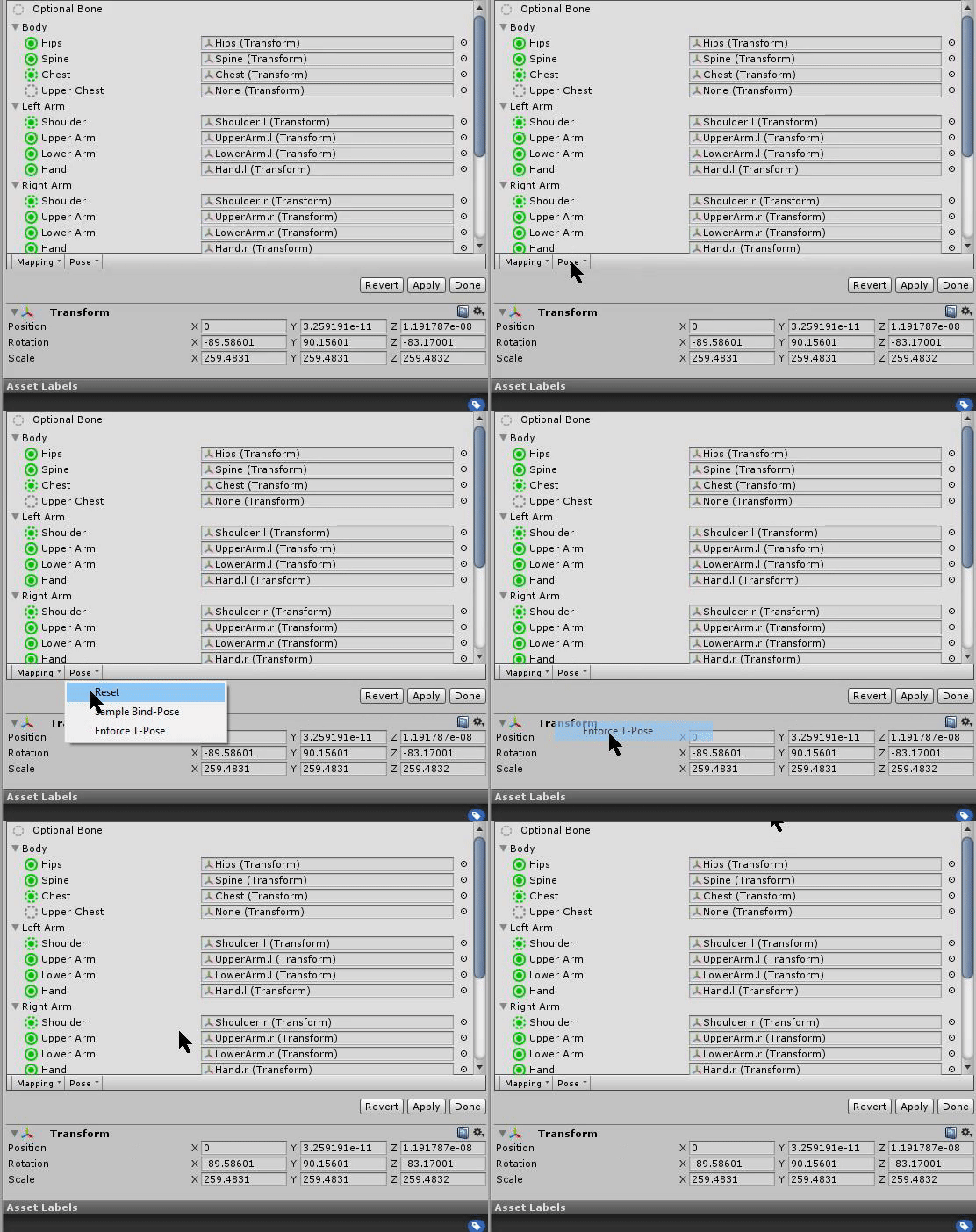
How do you force T-Pose?
golden valley
warm niche
planning on using web panel to get twitch comments into a world will that work?
twitch chat popout url
 pale matrix
im trying to add jiggle physics to this chick but the root of both the breast is the spine :\
warm niche
Does anyone here have 3ds max? Need a file converted for new years room
 lucid flax
Have you tried Noesis?
warm niche
Don't have it. Noesis can convert .max files?
lucid flax
Can't remember if it can specifically with max files but there are a lot of options
Hmm
From a couple mobile phone searches it seems so?
warm niche
got someone
lucid flax
👍
 night sonnet
I am sorry if this is the wrong channel, but noone inside the rigging section knows how to solve this
The SDK won't let me upload my model, even though there arn't any red errors inside it
And every time I open the SDK it gives me this error in the Unity console:
And when I double click on the error, it throws me into visual studio and drops me into the SDK code itself and points to this one line
I have the correct Unity version as well
5.6.3p1 Personal (64bit)
Is my SDK borked?
night sonnet
I'm not sure if it's the center of the problem
But I'm just curious
I'll try unsintalling and re-installing Unity
And the SDK
night sonnet
Didn't work
 merry coral
@night sonnet what happens exactly?
merry coral
k
night sonnet
It's bones are correct, it has the descriptor
Everything
And I go to open the SDK control panel to upload it
I get that GUI error in the Unity Console
And I can't upload my model
As the "Build and Publish" buttons are greyed out
As you can see, there are no red errors in the model itself
One in the camera, but that would be automatically removed
So I'm not sure as to why I can't publish my model
night sonnet
M'k
The unity error might be nothing
Okay, the unity error is nothing
I just had to remove the audio listener manually from the camera
WOOO
solar ermine
Is there something I need to do to get a particle to stay as a part of my avatar if I just place it down in unity?
delicate valley
Are footstep sounds possible for avatars?
I presume there's a way, because heck, if I saw someone that could draw in the air with their avatars, simple footstep sounds should be possible
runic mauve
@delicate valley you need script to do that. particle and Trail render are built in feature unity have
there no script for avatar make sound when walking
delicate valley
Damn
 untold vigil
Quick question ,i downloaded a blue man with visemes that appears to be a test file. I threw up an error indicating the hip rotation made it incompatible with full body ik. Is there a newer version of a test file , did i get an old one by mistake? Secondly with the blue man i didnt notice and lod meshes. How does vr chat handle lod on avatars. is it auto generated by the plugin when converting the avatar for use in vr chat? Or are most people not using lod's
runic mauve
@untold vigil there no lod on avatar
delicate valley
I don't think I've ever seen lod in game
untold vigil
interesting, and kind of unexpected
delicate valley
As for the example avatar, yes, it is broken
runic mauve
only lod in world making
delicate valley
It requires fixing before use
You can use cats to do it, or if you leave me a Pm I'll, send you it tomorrow
untold vigil
nah dont worry about it. Can take care of it , was mostly asking because the error with the hips made me think it was made pre vive pucks and there might be a newer standard..
delicate valley
Alrighty
untold vigil
But thanks a lot
runic mauve
fullbody is all about adjust the bone on the model if the arm ane leg to long it will make the fullbody not work right
untold vigil
The character im looking to build has pretty long legs, so i dont think i would be going the full ik route
but good to have the info
urban tapir
just have to override the walking animations
therefore you can add whatever animation can add
but you have to override all of them if you want it to look proper
 fading sparrow
Anyone have an expertise in gravity when creating dynamic bones?
zinc harbor
dont use it
use force instead
i can give you a good value in a sec. but some models will need adjustment if their transforms arent properly reset
warm niche
Is there a way to select all the hand animations in here all at once?
warm niche
Oh, I meant like when adding the property.
fading sparrow
Oh, i don't think there is unless you have a preset :/
But what i usually do is i only add 2 and 3 of every bone except for thumb, where i use 1, 2, 3 & spread
warm niche
Do I need to create a different preset for all the models I have or could I make just one for a character and use it on another one?
And I'll try editing those two and see what settings I need.
zinc harbor
@fading sparrow Force for Y either -1e-06 to -0.001 The gravity one doesnt behave correctly for some reason
 raw pebble
Hey guys quick question, does vr chat support full mocap systems like iKinema in a way Altspace VR allows it? If so are there any necessary avatar changes that would need to be made in order to enable this?
 wind adder
hey guys, is there any tutorials out there for adding custom dances to avatars? i'm having trouble finding one
 tulip wagon
Anyone know what it takes to make a "pistol" shoot in vrchat
Don't see any function for that in VCR_trigger
proven obsidian
Hey I was wondering if anyone could help me with animating, my character just teleports into the ground with her arms up and this happens in game too
proven obsidian
can anyone help with this animation? 😦 idk why this is happening
 dark sigil
if you're making an emote you need to animate the arms and legs too
or it will just be in the default pose
quick bluff
Hmn
proven obsidian
but it isn't even set to any of that right now? This is just the animation and nothing more, I haven't set it to be an emote yet or something else
quick bluff
So does anyone know if it is possble to access the properties and the keyframes of an animation (clip) in a script
proven obsidian
well I did want it to be an emote
but before I even select it to be an emote, this happens
how do I go about animating the rest then when my character is in a position like this?
dark sigil
yeah when you animate humanoids in unity they do that for some reason
you can animate the legs and such by adding properties -> animator -> and then you have to individually do each body part
or you can animate outside of unity and import the animation from there
 green lake
its real tedious
proven obsidian
and gestures can't play an entire animation? it's just from one expression to another and that's it
green lake
and you dont need to reanimate it
you should've made a duplicate avatar to do the animating on
proven obsidian
I did
green lake
and you finished the gesture?
proven obsidian
what do you mean?
I followed a vid this other guy posted
hold on
this one, I followed everything in there, and yes I know I'm only working on a single avatar now but when making the animation originally I was working on a duplicate which also sank into the ground
green lake
yeah thats unity being unity
proven obsidian
and I can't do gestures unless I have VR right?
green lake
depends if you bind it to an emote or something like "victory" or 'handgun"
binding it to an emote would mean you couldnt move while playing the animation though
proven obsidian
I see
I suposse I can just grab a custom animation off mixamo and smash that on one of the emotes
right?
green lake
yeah
 crimson pagoda
try detatching the pipeline, via components in the inspector when you selected the avatar.
proven obsidian
how do I do that?
crimson pagoda
Well, if you go back to the avatar, then where it shows the descriptor, there's also a pipeline manager, this is what tells the server which avatar you're using, there'll be a button called "detatch" which if you do another build, it'll make a new avatar instead of updating the old one.
crimson pagoda
^^ np, can't use external emojis ; _;
aaanyway, i got a question! Is it possible if I can make my own shader and import it with my avatar? I don't know if I can do that, cause yknow, the only shaders I've seen were Cubek's. And I was hoping to make my own shader using ShaderForge. Want to make a rainbow arc around my character along with text saying "Imagination"
proven obsidian
Since every shader I see in Unity just works in the actual game I suppose any unity compatible shader will work
crimson pagoda
Yeah but I'm not uploading the shader, am I? I'm uploading the material using the shader, and on their end they might have cubek installed... I'm not sure how VRChat handles that, that's why im asking lol.
rough sleet
@crimson pagoda Shaders are uploaded.
crimson pagoda
awesome, just wanted to make sure!
rough sleet
Shaders are inherently quite restricted so there isn't a need to lock down shaders like there is with scripting.
stone cedar
I can't get any eyetrack + blinking with cats. I have to do everything manually. Anyone facing a similar issue?
 heady gorge
@stone cedar yes, i wasnt having an issue using it until recently, dunno why
tulip wagon
Anyone know how to make "pistols shoot" in vrchat?
tulip wagon
@feral kindle I don't mean that I mean in world itself
You pickup a pistol and shoot from in the world.
stiff lily
tulip wagon
appologies
stiff lily
Can eye tracking still be made when the eye is a textured sphere ?
delicate valley
Anyone know how to add a light to an avatar? I saw an avatar that could glow, I want to make my Loaderbots eye glow
urban tapir
Unlit textures or put a light
warm niche
Hi! Im having some issues with lighting in unity. Ive been researching and trying things 24hrs+ the last couple days, Ive posted in the world channel, and have tried contacting other people.. NO DICE. It would be awesome if someone who's made some worlds could call me up on discord I'd really appreciate it. tyvm
delicate valley
How do I put a light?
@urban tapir
also I just added a weapon to my avatar. How do I stop it vanishing while I move?
lucid flax
if you're on a Vive you can't at the moment
delicate valley
damn that sucks
urban tapir
you can grab a controller
but you have to hold it somehow
also just create a new light in unity
in the hierarachy
right click
delicate valley
Oh I see, thanks blade!
If I want a different item in each hand, but each mapped to that hands rock and roll, how do I do that?
Is that even possible?
delicate valley
So like
I can choose to have a gun in one hand, shield in the other.
Mapped to the rock and roll emote on each hand, rather then rock and roll triggering both
urban tapir
nope
delicate valley
Darn, oh well.
I can do without the gun.
Is there a way to have a bone aim where you're looking, thats not the head?
Say I wanted a rocket pod on my shoulder, to aim where I look, but it stays on the shoulder
stiff lily
I've got a particle effect in unity, size it and placed it, added it to my armature under the forearm, is that the correct way to do it ?
nvm i'm dumb as fuck
delicate valley
@urban tapir So I have that light, but when I get in game it shines on the back of me as well
yet radius doesnt go that far https://i.imgur.com/CKlr9mP.png
urban tapir
that's an inherent problem with the lighting
basically anything with colliders blocks light
its a tricky thing even with worlds
try spotlight
 quasi bobcat
does anyone here recognize this error and maybe how to fix it? i tried changing my avatars size but it seems that, thats not it.
 prisma fox
No that is size. Change your model transforms
quasi bobcat
i tried, ill make it really tiny even and ill get the exact same error
i have no clue but my guess is that its this big box from my capsule collider?
delicate valley
meh, avatar weapons are still so janky, due to finger movements.
Keeps activating when I move and so on
 wise flame
Hey guys im trying to import some animations from mixamo and I rigged my avatar in blender
I'm getting this error "copied avatar rig configuration mis-match transform hierarchy mis-match transform 'Hips" for human bone 'Hips' not found"
Ive tried to match the hierarchy exactly with no solution.
any ideas?
wise flame
I have a Hips bone
I tried to match my bone hierarchy to that of the imported mixamo one (on mine i was missing a spine2 for eyetracking to work)
and it still didn't work
trim ibex
@wise flame did you hit apply? Because it clearly states that it doesn't have a hip bone
Actually have you even tried to configure it?
wise flame
yes of course
 amber elbow
yo, anyone i can talk to about shaders? im having an issue with my custom one.
amber elbow
are there issues with certain shaders? my custom shader ends up black ingame, but in the avatar selector it works fine
https://i.imgur.com/Ci1rzeC.png https://i.imgur.com/I9OZYhg.png
it was made in shader forge if that means anything
sweet crystal
Shaders that don't take lightmaps into account will show up black in-game for some reasons. For example, if using Shader Forge, you have to use PBR mode or else it won't take it into account.
amber elbow
yeah i was using PBR. i am also using the light wrapping and transmission nodes, does that matter?
 topaz marlin
can i ask a question about models here
im using a 2d model and everything is good but when i get in game im halfway in the ground
know how to fix it?
amber elbow
this is what the shader looks like btw
sweet crystal
Yeah... in my experience, those modes don't work
amber elbow
damn it
rough sleet
If you're not sampling from light probes then that's probably your problem. Your shader has to sample from light probes because a lot of worlds exclusively use baked lighting.
sweet crystal
That's probably more the fault of Shader Forge not doing it properly
amber elbow
it works in my scene which has no light probes, and it also works in the avatar selection screen
amber elbow
turns out it was the light wrapping
lilac crater
How do we upload a custom controller?
Rather than it using the SampleController
Can't find any documentation on it
lilac crater
@mental narwhal Is it possible to upload an entire controller as opposed to just the override for the default animations? Asking because with a custom controller than for VR gestures per-hand overrides can be added, as opposed to the Custom property which replaces the animation for both hands?
 mental narwhal
not for humanoids. there is too much interaction with our specific controller and ik, hands and face anim, so we can't let you roll your own. looking into maybe allowing new layers in the future, though
lilac crater
Thanks. An alternate solution would be adding (L/R) specfic overrides to the Custom Anim Override.
mental narwhal
If you aren't using a humanoid, you can put any controller you want in the main Animcontroller.
The SampleAnimationController can be modified and stuck in there if you want support for locomotion speed and falling animations, etc. @heavy frigate is writing up some docs about this usage as we speak, and it should be available soon.
warm niche
does anyone know how to fix the pelvis fully sticking out while in full body tracking?
 median flare
I think one of the causes for that has to do with the head of the hips being lower than the head of the leg bones. Raising the head transformation on the hips might help - but no promises.
lilac crater
@mental narwhal Cheers. If not using a humanoid than the hand-tracking in VR won't work any more, right?
sweet crystal
Would anyone have any idea why my eye motion isn't working? It seems fine on some models but not others, but they're all set up the same way.
stiff lily
Can blinking be made on models with a sphere for eyeballs ?
mental narwhal
@lilac crater yes, without the humanoid ik, there is no hand tracking.
@sweet crystal That all looks correct. Is the SkinnedMesh named "Body"? That is required too.
@stiff lily You can have spherical eyeballs, but the blinking is a linear blendshape blend. So you have to make sure the eyelids don't curve too much, because the blend is a straight line from open to close, not a rotation.
stiff lily
Gotcha, i'll give that and eyetracking a shot then
sweet crystal
Ooh... It was the wrong Body.
 waxen parrot
Hello good afternoon and happy holidays. Some time ago, the user @rough sleet helped me to make a shader compatible with VR by adding a "component" to the shader; the "UnityStereoTransformScreenSpaceTex" then now I have another problem with the "CubedParadox/Flat Lit Toon shaders", with "Shade" and "Transparency" rendering modes.
Looks fine on unity, but when I upload it to Vrchat looks... invisible
So I thought that maybe I have to add a new line of code to the "Flat Lit Toon" shader or something similar to make it compatible with VR.
Thanks in advance. ^^
For example, the other Shader to make it compatible with VR I changed this line:
float4 sceneColor = tex2D(_GrabTexture, sceneUVs); for this:
float4 sceneColor = tex2D(_GrabTexture, UnityStereoTransformScreenSpaceTex (sceneUVs) );
But in the Flat Lit Toon shader I can't see the "_GrabTexture" line
 exotic tinsel
can someone
teach me
how do i create sayan aura?
in unity?
a guy told me to go on photoshop
Make a transparent aura, like 5 textures, them i will then set these textures as billboard textures in Unity
and have an animation toggle them on and off in order 1 > 5
rough sleet
@waxen parrot Sadly this issue is not as simple to solve as your previous one. This is a limitation of how Unity renders alpha blended materials (Transparent and Fade are both alpha blended, Cutout is not). Unity usually renders things in front-to-back order and skips rendering pixels if they're behind something that has already been rendered (the pixels are opaque so you won't see the further away pixels anyways). When alpha blended pixels are rendered they are blended with the colour of whatever was rendered there before. In-order for this to look correct Unity has to reverse the order it renders things and do it in back-to-front order (just for the alpha blended pixels). The issue you are experiencing is because Unity only sorts things into back-to-front order on a per mesh basis. This causes meshes with overlapping triangles to often render with triangles out of order which leads to the behaviour you are seeing. At the moment the only way to avoid this issue is to ensure that no alpha blended meshes overlap themselves; unfortunately this restricts where alpha blending can be used rather significantly.
The reason it appears to work in Unity and doesn't work in VRChat is because in Unity the transparent area on the arms isn't overlapping with any other transparent part of the same mesh; in VRChat it's overlapping with the transparent area on the body.
waxen parrot
Manyt thanks @rough sleet for the response. This problem only appears with flat lit toon shaders, but if I use the standard shader with transparent rendering works very fine
urban tapir
How would I go about inverting the cubed fade shader? So it disappears when its close up
lilac crater
Are world simulated partials auto deleted in Vrchat?
 trail ruin
Can anyone explain this? It only happens with vrchat, not with the unity fps controller, https://streamable.com/i5472
Same project worked fine earlier
lilac crater
Does that happen in every level?
lilac crater
Has the floor got a collier?
trail ruin
yup
lilac crater
Are avatars spawned above the floor?
trail ruin
yup
lilac crater
Does the avatar go trough anything else? Aka if our spawn above the map do you still go all the way through ?
trail ruin
nope, if i spawn in the bulding it works fine, but when i step on the grass it falls through
the building has an invisible cube as collider, so if i put that on the plane i should be good
but it's weird tho, cause the avatar fall through a plane with collider and a terrain with collider
warm niche
Anyone know why this pops up?
warm niche
ok
trail ruin
@lilac crater the cube worked
warm niche
wait do you mean unity? @trail ruin
trail ruin
yes
trail ruin
any downloads/imports maybe?
 wise solar
trail ruin
wise solar
trail ruin
fire away
oh shit dont ask me that XD
you know a lot about unity light?
unity sucks, lets just agree on that
yup
i have soooooooooooo many random bugs that i have to fix
for someone that works every day with lumberyard/cryengine its a real pain in the ass
its not that simple
unity has a shit tonne of low poly assets
so its good for vr in that way
just do a star citizen and use cryengine so nobody can run the game XD
source engine, so we canhave the hammer editor
hammer editor = best editor
it's so user friendly
yeah
and baked lights doesnt work for me, all lights just go black when i enable it...
its because you have to bake the lights
how'd you do? i cant find the button XD
why is that not under edit > lighting
good luck XD
amber elbow
are you talking about the fps while playing vrchat???
runic mauve
@hearty prawn script were disable because people did bad thing to people computers. they need update the security problem first. that why script disable in vrchat
lilac crater
@warm niche Is their a invisible object/mesh around the VR controller around 0.4-5m out with a collider turned on?
I have a partical that kills it self when it hits something (Simulating a projectile) however when I shoot it out, it hits something about 0.3 away from me that's invisible each time. if i turn collision off (So it will just keep going till it's lifespan runs out) it gies unimpeded
sturdy frost
vvv Anyone have any ideas on how to make these eyes possible? vvv
Also there has to be a material that could do something like this? https://gyazo.com/71bdb62adcaa32d504194524a61926fa (Im thinking like, make a texture material that sits above the body, with all the lines drawn onto it. Then have the material rotate a brighten effect over the uv or material or whatever.)
amber elbow
I could try making a shader for it if you'd like
sturdy frost
Dude if you could that would be a godsend 😄
want me to pass the model to ya so you can play around with it?
weary mica
It seems pretty simple tbh. Just need to make a fancy emisive mat.
amber elbow
The hell are you on @hearty prawn, there are plenty of VR games that were made in unity.
Either you're doing something wrong, your PC sucks, vrchat devs are doing something wrong, or the players fucked up models are making the game run like trash with their terribly made avatars.
I think there is some kind of fps lock, at least for non-VR users, because my fps never goes above 91..
Sure @sturdy frost
untold vigil
I was looking around documentation but couldnt find a map of what visemes etc are mapped to the vive touchpads by default. Anyone know if there is a list of image map lying around?
sweet crystal
No VR games do what VRchat does. And as far as I'm aware, the best performing Unity games have had to outright hack around the engine because of how poorly performing parts of Unity's core functionality are.
Just look at Google and Valve outright coding their own renderers that bootstrap Unity's own. Or Inside where they used their own GameObject handling.
trail ruin
Am i the only one having trouble with unity and lighting?
sweet crystal
No
How To Light In Unity:
- Use PBR principles to guide your lighting
- Once you see what Unity can't do, hack around it with no regrets
stiff lily
Can shapekeys rotation be chosen ? https://i.gyazo.com/c3d10bab330f3ce25efa0a655df7a12d.mp4
I really don't want this to clip during blinking
final wigeon
@stiff lily Shape keys are a linear blend. :/ Can't do much about that right now.
stiff lily
So i need to move the vertices above too to attempt creating a rounder shape ?
final wigeon
That might work. You could also try adding an edge loop that's not part of the blend to give it a bit more support, but wouldn't really prevent clipping through the eyeball.
stiff lily
Well that sorta works, but this is not satisfying 😦
final wigeon
The start and end poses pretty much need to be on a surface tangent to the eye sphere to not clip, and towards the end of the blink animation it'd probably look a little weird.
untold vigil
ruubick i would personally handle that with bones for the eye blinks that rotate on same pivot point as eyes. im not sure how unity/ vr chat handles this but you could also have an intermediate blend shape for animation purposes at the half complete blink point, and transition from a to b to c for your full blink
stiff lily
Do you know how these transition blend shapes need to be named as ? Afaik if they aren't named correctly they just aren't used at all
untold vigil
i dont even know if vr chat supports them
im just saying from an animation perspective those would be the two options i would use in that istuation
stiff lily
yeah that definitely sounds like it would work perfectly, but not sure about vrchat
untold vigil
what i would say is
final wigeon
https://docs.google.com/document/d/1W5KFa_aszCMrJaFD8mb9a-GHYO4X4S9M63GjM4UwuEw/pub
For blender
https://docs.google.com/document/d/1LdxE2Ke9svZqPnlwTYwturwd0Fb7j00_YiO0dX49x2E/pub
for Maya
If you use something else the shape key info is what you need.
stiff lily
yeah these are the ones i have already
It's weird that it doesn't just rotate around the 3D cursor as part of the shapekey as well
final wigeon
Shape keys are just two mesh states with linear interpolation between them.
final wigeon
Even if you use A as a basis to B by rotating things, all the vertexes will go in a line from A to B.
stiff lily
well, when they use 3D cursor as a pivot point, it's fine
Honestly, it's so quick that i don't think it's worth spending too much time of it for now, it looks okayish
untold vigil
you seem to know about unity and vr chat specifically, can you use the same principal thats used in the animation override to select your blink as an animation that occurs over multiple frames, if so that would suggest an intermediary morph shape could be keyed in to transition
stiff lily
yep it's literally just a straight line
final wigeon
Currently blinking morphs need to be present for eye tracking to work, I think.
stiff lily
yeah, eye tracking should be funny with this, i have no idea how it's gonna work, i hope the opposite eye isn't going to go inside out
final wigeon
What you could do is put some dummy blink shapes in, and have blinking a looping animation on some bones weighted to the eyelids.
stiff lily
That could work as transition blinking shape yeah that's a good idea
i'll try creating bones at 45° inbetween and see what i can do
final wigeon
Well it'd completely bypass the A-B linear shape state problem, since the animation would be a bone rotating with its root at the eyeball's center.
untold vigil
if you are going to create bones, then just do the whole blink bone driven. same effort
stiff lily
I'll look into all options deeper, thank you both for the help !
untold vigil
np. i wish i had more specifically applicable info, but im completely new to unity and vr chat specifically
 pale violet
does anyone here know a lot about timers? sometimes they work great, but at least in this one room they keep failing, they're supposed to turn off animations at certain times but some work and some don't. and it seems like they can work occasionally even without changing anything in unity. there's obviously some factor i'm not accounting for.
 keen crystal
@warm niche
not sure if this is the right channel
but I was wondering why VRC doesn't have essential post-processing effects
like, SSAO barely takes any GPU time, but it improves the graphics a lot
trim ibex
@keen crystal i mean there is AO so i would assume there might be SSAO also available
i definetly dont see the point of SSAO if you can have AO
i mean i get that AO is not realtime as SSAO is, but there are not that many things on most vrchat maps that move anyway
keen crystal
what do you mean by non-SS AO?
like, baked?
Because a ton of worlds don't have baked AO.
example ^
warm niche
So random question, due to this being made in unity, i can still make it do basically anything that can happen in unity yes?
Or will only things relating to VR Chat work
hallow portal
Can we do something usefull with SendRPC (get_Current_Speed) on the car prefab?
sweet crystal
"SSAO barely takes any GPU time"
Incorrect
SSAO is expensive because VRchat is forward rendered
And in VR to boot, which doubles the processing load
hallow portal
What does ReapObject do?
keen crystal
Man that would be insanely helpful @crimson oar
untold vigil
just to check, in terms of shaders, and not knowing much about unity or vr chat specifically, is it fair to say if a shader is for sale on the unity store it will work in vr chat
warm niche
Anyone know how to keep a camera preview up in Unity while working on a scene?
 outer bobcat
Is there a way to share a VRC_Avatar Descriptor?
Well, someone is having an issue where it says they don't have permission to use the one they made, but their avatar uses the same model as mine, so I'd like to let them use my VRC_Avatar Descriptor.
@crimson oar, thank you, it worked.
winged lotus
So just a quick question, is there a way to work off an avatar in Unity that's already been uploaded to the servers with it overwriting the original, Like a new copy of the model without re-working all the animations and all that.
And where would I find the blueprint ID? 😃
Ah! So all I would need to do is just remove that component then re-import said SDK?
Or I mean the Pipeline comp.
amber elbow
I think he just wants to upload the same avatar as a separate avatar instead of overriding it
winged lotus
Sorry for overcomplicating, thank you. 😃
stiff lily
How do i symetrically copy vertices for shapekeys ?
I really don't want to spend hours doing the other eye
when i mirror shapekeys they transfer on the other eye instead
 rough flame
Can anyone provide me with some detailed information about whether and how Object-Sync interacts with collider triggers when there is a collider on the synced object?
outer bobcat
Okay, maybe one of you know how to get animated materials?
amber elbow
Only way that I know of making animated materials is either through code switching the texture, or through a shader.
stiff lily
.psd might work in unity but i haven't figured out how yet
outer bobcat
What kind of shader can mke a twithy eye effect? or is codeswithing better you think?
 meager ridge
So for some reason an unassigned mouth shape toggles between 100 and 0 with each step my avatar takes. I know it's the blend shape because it's a shape none of the assigned vowels make ( I made a generic open and close to make the other mouth shapes) and I know it's not rigged to another bone cause it's not deforming in a strange way and posing other parts of the body doesn't affect it. Any ideas?
 junior tiger
One message removed from a suspended account.
One message removed from a suspended account.
One message removed from a suspended account.
 blazing girder
what is the correct way to use VRC_ObjectSpawn?. seems like it is now on legacy components, what is the correct way to do spawn a prefab now?
blazing girder
I pretend to make my avatar to spawn a prefab
 queen crow
Is there a way to have a plane that acts as a sort of icon constantly turn to face a player that's looking at it?
I'd like to add a 2d image above the head of one of my avatars, and I've seen the gangs around vrchat do something similar
hallow portal
Try to find a billboard shader.
queen crow
Got it ty
lilac crater
@queen crow Sprites will always follow the camera
 robust ridge
i give up attaching audio to bones. half of people say they can't hear anything.
proven obsidian
Anyone know how I should go about doing the following? Because google doesn't help that much...I basically have a model already done in unity and I wanna add an animation now, say to replace one of the emotes. So I got a mmd animation, a .vmd file. Now it seems I can't get this into unity unless I have a model attached to this animation, and I can't attach my .fbx. No I would need to get the mmd file and start all over again in blender or something? Is there someway to just get a .vmd file in Unity as JUST an animation.
basically how Mixamo would give you an animation
keen crystal
Is there someway to just get a .vmd file in Unity as JUST an animation.
doubt it
proven obsidian
goddammit
and starting from scratch with my mmd model doesn't even work too, as soon as I start decimating the animation doesn't play on my character anymore
outer bobcat
Does the Unity-chan shader not work in VRChat?
outer bobcat
thank you.
warm niche
Huh
So every time I upload my world, it gets changed to a random avatar photo a minute or two later
has anyone else had this issue?
keen crystal
sounds like a backend issue
warm niche
It's so weird because at one point I opened my menu and suddenly my world's icon was a Unity Chan and I was like O-o
 marble root
@warm niche a couple days ago some new anime thumbnail image appeared in place of the thumbnail for my latest uploaded World. It's the the first time someone's overwritten my thumbnail since I started messing w/ Unity months ago. I'm thinking the upload /overwrite issue is back for Worlds or it never fully got fixed for worlds. I do still load into my world (so the actual world didn't get overwritten), but it's someone else's preview image.
proven obsidian
quick dev question, how do you get POM or PBR mapping into unity, and is it supported in VRchat?
hallow portal
@proven obsidian Here are examples of the Unity Standard shader. I use a normal map a height map an occlusion texture, specular texture and a few more. Combine them in the right way and it looks good. But you can still try shaderforge or a texteditor.
proven obsidian
heightmap is basically POM for unity?
hallow portal
I'd say it is the closest you can get.
The profile on the wheels is not that bad...
Just that and a normal map...
proven obsidian
my normal and height map is the same one. Basically I took the normal map and height map and masked them to create what you'd call a POM map. Which is just a normal map with transparency on it to show where height is
hallow portal
I think the tranparency is not needed for the normal map and the height map needs shades of grey. Try indexed colors. (8bit/256 colors)
or for a good start try black and white. the rest should be done with the normals. The more shades the worse the height map looks.
proven obsidian
alright thanks 😃
hallow portal
There may even be a way to bake that stuff like normals in blender...
and low values help a lot in vr!!!
@proven obsidian Take look. I use indeed some masked/transparent textures...
final wigeon
My experiences with heightmaps in unity & VR is keep the values low. Real low. 0.1 or 0.01 kind of low.
proven obsidian
what do I keep low?
final wigeon
height map
hallow portal
the value for ... too slow
final wigeon
When it's… anything higher than really low it has this strange glassy look in VR.
hallow portal
I call it eyecancer look
proven obsidian
also about specular maps, how would I do those? Mines are black/white tints like normal maps
but the thing is, the game doesn't recognize my .png
the game, I mean unity -_-
final wigeon
Have a read up on unity's standard shader.
https://docs.unity3d.com/560/Documentation/Manual/shader-StandardShader.html
 forest osprey
So uh, someone in VR is trying out a avatar of mine that I stuck in some custom animations into it and the hands aren't being animated with them, they're still being controlled by the person
final wigeon
@forest osprey I can confirm that happens in full-body mode. Hand rotations are not affected by animations, leading to some fun results.
forest osprey
Ya, we just came to that realization aswell when he tried on another that's stil ldefault
dusky drift
Is it possible for an avatar to be able to spawn a specific prefab as part of it, and if so could someone point me in the right direction? The only thing that I can find are VRC_Triggers, and they seem to be outdated.
 keen hare




 ember kindle
Is there a guide for how to apply post processing stack to VRChat worlds?
runic mauve
@Casuallynoted#0568 wonder it effect by people use outdate sdk
 bright dragon
hey, is there a new way to add sound on vrchat? i've seen people using music on their avatars, and you can hear well, but my sound continue all bug and low
 graceful stump
need help with making a damage but i have the sowrd kill you when you touch it but when you hold it
it just does not let you hold and kill
i real need someone to help me
please
warm niche
Does Video Sync work with youtube streams
graceful stump
hello
 tribal blaze
Working on some vehicle stuff.
https://www.youtube.com/watch?v=3k6-bcCz2SI
final wigeon
@ember kindle Apply the post processing stuff to a camera in the scene as normal, then set that camera as the reference camera in vrcworld.
queen crow
Hmm so I'm trying to optimize my avatar It's only a single mesh, and material yet it still lags people
Any other reasons why it would be doing that?
tribal blaze
@queen crow Have you got a massive amount of polys?
queen crow
19k
final wigeon
@queen crow Texture size? what shader are you using?
queen crow
Cubed shader
and I think texture size is whatever the default was on cats
I'll double check though
autumn hatch
@queen crow Use crunch compression on your textures in unity. That'll dramatically reduce the filesize
queen crow
Oh I found out probably part of the reason
texture size was 2048
I'll do that too though, is that found by clicking on the texture?
graceful stump
need help with making a damage but i have the sowrd kill you when you touch it but when you hold it
it just does not let you hold and kill
i real need someone to help me
please
autumn hatch
@queen crow Yup. Select the texture file itself and you should see a tick box in the inspector window
autumn hatch
In the end filesize is what matters.
So try to find a good midpoint between texture size and filesize
But in terms of fidelity, up, up you go
queen crow
Okay thank you ^_^
Oh wait.
Just went to reupload I don't think it was my avatar people were seeing. Might've gotten overwritten
ember kindle
@final wigeon Thanks!
dusky drift
Is there currently any use for VRC_NPC api and VRC_NPC spawn?
winged lotus
A question, how would I go about getting the plug in or whatever it is for the animation override that allows me to keep an eye on the YT chat box.
hallow portal
@winged lotus animation override for a YT plugin? So you have it on your wrist? Forget it...
What you can do is download OVRDrop from the steam store. Allows you to see an overlay of the desktop or single window in many vr games including VRC. Great fun in games like Elite when you travel for hours and want to watch YT in your ship.
That little tool is worth every cent of the 15€ I payed....
You can put it on the top end of your FOV and when you look up a bit it slides down....
 quiet thicket
Polys aren't usually what lags people since that's GPU based. It's drawcalls, materials, shaders, dynamic bones that are all CPU-bound which lags most people.
 dreamy quail
how do i make the sleeves act naturally in game, instead of stiff wings
 river brook
@dreamy quail You can try making a root parent for those bones, then in unity, try lowering elasticity a bit and play with dampening when using dynamic bones.
dreamy quail
okay thanks i feel stupid because i added gravity to it and it looks so bad lol
river brook
I've never messed with gravity yet.
I've avoided it even for things that should require it and just mess with the damping/elast/stiffness and inert and then their distribs to make something i'm happy with.
so a good example to use for those sleeves with be inert or stiffness disrib and playing with that.
You can make it more stiff near your hand and ease it down so it is more loose nearing the ends.
The one thing i can't get right atm is having a collider prevent my hair from clipping into my head. lol. I thought this would be easy to fix.
dreamy quail
how do you make it stiffer at one end
river brook
@dreamy quail you can test this in play mode but i reccomend taking record of the settings you end up liking since play mode won't save.
Anyways, clicking on distrib. this little window with a line will pop up, the left side is the start and the end is the right.
You will have some presests, you can play with those or even make the line on your own. clicking the tips will make a hard to see white block you can grab, this is used to cause a curve.
Curves can change the value making any of the effected bones influence weaker or greater near those curves.
dreamy quail
oh neat i had no clue what those curves were for, just made me think of stupid math lol
river brook
the best way to learn how they work is to play with radius distrib. Just for the visual reference in the scene. Since radius only really effects the bones influence if you were to use colliders.
 vestal breach
Hey, just wondering if anyone knows a way to play sounds on avatars when a key is pressed?
Seems like it was once possible before, but no longer now. Is there a new method?
quiet thicket
AFAIK only with vr headset
vestal breach
Thanks for the tip, but I was wondering what component is used?
VRC_Event_Eventhandler is not accepted anymore
For future reference
 silver widget
I'm not sure how I feel about that image
 spiral otter
Is there any way to define a useragent in the web panels?
sweet crystal
Is there a guide on how I - Wait, nevermind, I'm dumb
 orchid gorge
Does anyone know how to put a single blink in cats?
blink is on the right
never mind, I found it
What do you do if cats doen't read shape keys
?
I see them but cats isn't
sturdy frost
@tacit adder Check the origin point. The origin needs to be at the feet. 😃 If you made it in blender its an easy fix, But if you made the plane in unity I am not sure
(Origin point is where the manipulation controls show on the model when in the origin mode. (Click the "Center" button next to "Local"))
sweet crystal
How does Unity behave in regard to material shaders which ask for a texture but don't receive one? Does it cost much extra performance?
golden valley
acording to https://forum.unity.com/threads/sampler2d-initialization-when-texture-is-none.30084/
it is either a 1x1 or 2x2 grey/white texture instead
 ocean silo
anybody know why tris double when exported to unity
 haughty spire
do you have a lot of quads
 subtle kelp
@orchid gorge You have to select the correct mesh which is probably the head
amber elbow
@ocean silo youre either accidentally reading the faces instead of tris (a face has 1 or more tris) or you have a shader that shows back faces, which doubles the poly count because it renders it twice (once for each side).
i think i remember reading about something similar to what you asked but cant remember what was said about it exactly. might be that.
delicate valley
I have some cannons on my loaderbot that I want to make shoot, how do I do this? Any good tutorials or anything?
stray lark
Is there a trick to get audio on a gesture animation to sound normal? Right now its too quiet. I remember someone saying that the audio is a bit buggy right now, but I've seen avatars with normal level sounds on them
quiet thicket
afaik it's being worked on (in terms of being buggy).
 tranquil sage
hello! Does anyone knows how to fix feet being below floor level?
just by an inch or so
 tacit adder
@sturdy frost Thanks Smoothie 😃 I realized that after countless hours of staring at my mesh and why a white line was coming out from what I though was the origin.
sturdy frost
No Problem man 😄
tacit adder
Came out great :p
quiet thicket
@tranquil sage do you not have bones in the feet?
tranquil sage
@worthy ventureo yes, i have sloped ankles. And toe bones are protruding upward from the center of ankle, for some reason
yes, i have sloped ankles. And toe bones are protruding upward from the center of ankle, for some reason
My best guess is that VRChat animator recalculates my origin or something like that.
The clipping only happens when I hit play in unity
the T-pose has feets on the correct level
i'm trying to fix it right now by moving the ankle bones down by an inch.
seems to work, finally
 sick pier
Hey guys bit of an optimisation / limit question here, I've gotten a current Miku model down to one texture atlas and a separate material /texture for her hair.
I'm using the panosphere shader for her hair due to the model being very spaced theme and trying to create a galaxy style look to her. Currently the separate texture is a 3Mb 1920 * 1080 image but it still comes across as low quality, is there a limit to texture size that's sort of "accepted" as a maximum or is it very much up to user/host preference?
 lament tulip
Can I hide my entire model from my point of view only? I am using the NoeNoe Projectaion overlay shader
 turbid meteor
Hi, just curious, ive seen a couple videos of avatars in VRC having smaller avatars jump onto their hands and they support them. i was wondering how the smaller avatar was able to not cut through and stay supported. Is there a way to do that thats easy to understand?
sick pier
Hey @turbid meteor, Gallium taught me this little trick in regards to A player called Rad who does this, it's actually a trick in game where you open a menu item while midair and just timing it right. Not actually any part of the avatar development lifecycle. I can't remember off the top of my head which menus can pause your Y position but jump in game and give it a go. Not sure if it's locked to VR mode only or not as well
turbid meteor
ahhh gotcha, maybe some day they will make it a real possibility i guess. thanks for the info!
sick pier
No problem, would be interesting to see if it could become a possibility with collider's, but as you can imagine, that could also cause a whole bunch of issues as well :)
turbid meteor
true that, no more walking through people then i suppose
sick pier
Or someone could set there collision box to like 5 times there player size and literally block other users from walking around
turbid meteor
yea, cant forget the people who would abuse it
 round salmon
anyone know where to get free dynamic bones
sick pier
Unfortunately, not a possibility to really get it for "free" per say chap as it's a unity store asset, not sure if any free similar components have been made though
round salmon
oh, i was told there was a way just to find it in discord
turbid meteor
thats by someone buying it and sending download link, which isnt particularly legal
lucid flax
discussion of piracy is not allowed in this discord
sick pier
^ this
round salmon
good to know
 hollow blade
I have an Unlit transparent cutout is there a flat lit toon transparent cutout as well? If so can someone tell me where to get it? I'm real tired of my models blaring like the sun because it's unlit lol
warm niche
How do folks draw in the air? IT's animation override of course, but what are they using to do it?
 normal aurora
TIL unity can be reconfigured to use text formats for assets, and now life is 900% better
how can anyone live with the binary formats though... like literally how do you even know what's safe to check into source control if you're using the binary formats
urban tapir
What do I need to do to get eye tracking working for a non mmd model. I'm using 3dsmax since exporting it to blender just breaks the model.
runic mauve
urban tapir
oh it updated
runic mauve
@urban tapir nah only guide for maya
urban tapir
i guess its the same for 3dsmax
 atomic shuttle
Hey, anyone know how to make the SpawnObject trigger only spawn 1? It always spawns 3 of the prefab
The Spawner object
Nevermind I figured it out
Another question, Is there a way with the current VRC_Trigger settings, to spawn a random prefab from a list instead of a specific 1?
 sleek locust
@sick pier dunno if you question was answer put texture are my speciality with avatar , there is no limit with texture in vrchat , if I would be you I would put a seamless texture and tilt it up alot so its gonna make it super high res
atomic shuttle
Anyone know why the rigidbody on my spawned object that is kinematic, wont disable with the DisableKinematic RPC?
on interact
stiff lily
This is with backface culling turned on in blender https://i.gyazo.com/05253dd0c6a177b7d6df7b51df3a99e6.png
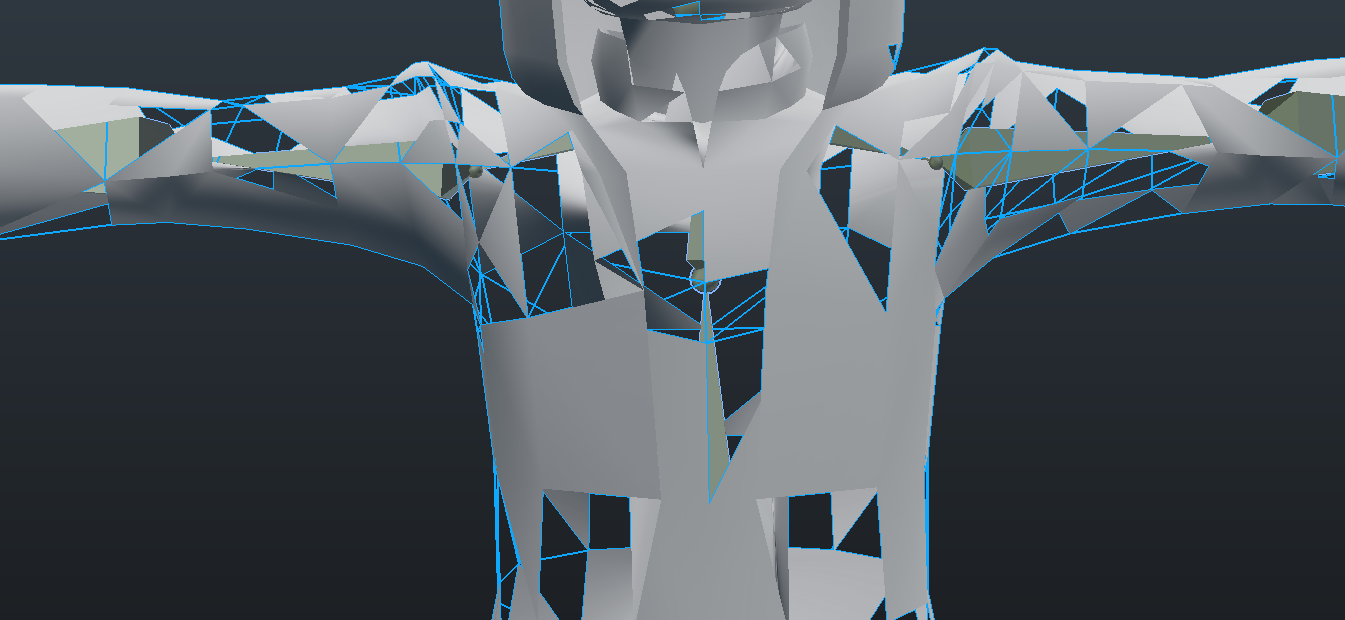

i'm not sure what mixamo did
atomic shuttle
Finnaly it all works 😄
warm niche
I don't know where to ask this so direct me if this isn't the right place. Where is the best place to put the hip Vive tracker? I seem to have issues with the tracking kind of going out of wack for the spine no matter where I put it (on the hip, on my backside, or on the front). Is it better to have it higher up your back or lower towards your legs?
rough sleet
@stiff lily That's weird, what happens if you recalculate normals?
 shy kiln
How do I add jumping and voice lip sync to a character on unity?
atomic shuttle
any way to revert a project even after you saved over?
atomic shuttle
Is it common for changes to a prefab to not be shown when you click test world? keeps happening, nowhere should my object despawn from a trigger, but it does even after removing it
tried saving and re opening project
sick pier
@sleek locust cheers for the advice chap!
 barren lantern
Hey, is there any way to attach a mirror to the wrist of my avatar and have it distance fade so that it's only viewable up close? I've tried attaching a mirror to my avatar, but it doesn't move with the mesh.