#development-advanced
1 messages · Page 16 of 1
 marsh narwhal
marsh narwhal
marsh narwhal
problem found, the sword wasn't linked to the right bones '-'
 sleek locust
I got a small question
I want to know from a rift user , what are the button you press for single finger(edited)
if you know what i mean like put a single finger up and down because i am mapping my ps move controller to do so but im tryna see wich button would that be
here are all the possiblity for me
"system"
"application_menu"
"grip"
"dpad_left"
"dpad_up"
"dpad_right"
"dpad_down"
"a"
"button_8"
"button_9"
...
"button_30"
"button_31"
"touchpad"
"trigger"
"axis_2"
"axis_3"
"axis_4"
this is my mapping as of right now
"ps": "system",
"move": "touchpad",
"trigger": "trigger",
"triangle": "application_menu",
"square": "grip",
"circle": "a",
"cross": "button_8",
"select": "button_9",
"start": "button_10",
"rumble_suppressed": false,
"use_spatial_offset_after_touchpad_press_as_touchpad_axis": true
circle and cross do nothing
 verbal wolf
I can't help much on the development side but the rift controllers are capacitive, so you just lift your finger off the trigger irl and it points in game. Could be something to do with the trigger
 river brook
So, if i have a model, that is fine the way it is material wise and i want to use CATS to atlas it.
Is there a specific setting i should choose so i don't f-this up within the atlas tab?
or just do a few presaves and test it?
 warm niche
Is there any drawback to using 8K texture? Can all PC's/laptops handle them?
 rough sleet
@warm niche Obviously the first issue is it'll use a lot of VRAM. According to the Unity documentation cards that support DX11 also support 16K textures. https://docs.unity3d.com/Manual/ImportingTextures.html#TextureSizes However Unity's importer will only import up to 8K.
Are you planning on using a single 8K texture atlas for your world?
warm niche
Yes
rough sleet
That should be fine then.
warm niche
Got another problem though, it is running at 60 FPS on desktop. It has 999 tris but i decreased it to 300k tris and it's still the same framerate. There's no light in the scene, it's an unlit texture.
warm niche
I haven't uploaded it yet, i'm just looking at it in unity.
rough sleet
Oh, in the editor?
warm niche
yes
rough sleet
The editor likely just has VSync enabled.
It's under Edit->Project Settings->Quality
"V Sync Count"
warm niche
Oh gosh how stupid am i? Thanks, it's now 2700 fps.
rough sleet
Lol, yeah, it does that by default.
It's a bit odd that VRChat doesn't use VSync or a 60 FPS limit when in desktop mode.
warm niche
It's usually about 90 in the game, i don't know if that's vsync or a framerate limit.
 sterile cipher
This is so frustrating. Unity 5.6.3p1 has a bug in it that crashes it for me after a few minutes of work. The only fix, according to Unity support, is to upgrade to something other than 5.6.3p1. I can't be the only person experiencing this-- the UI stops responding, although you can still Ctrl-S to save. The UI blanks out and screws up. If you try to resize the window, Unity crashes with a crash report. I've tried updating drivers, swapping down to D3D9 (works, but breaks other things), and etc. Apparently it is a DX11 issue. I'm completely unable to work on levels or avatars. 💢
If it continues I'll probably do a full reformat. I can't think of anything else to fix it.
 hallow portal
Tere was a trick to fool unity into using DX12. I don't think it will help but it may be worth a try.
-force-d3d12
 sour mural
Is my audiosource supposed to be quiet as a mouse in VRChat?
warm niche
shaders affect gpu and not cpu right?
 dark sigil
I dunno if it's helps but my unity loves to fuck up whenever I have my vive wands plugged in
sleek locust
oh i see so this mean that the rift controller have ther own finger tracking sensor wich seem to be imspossible for me atm thanks
 covert chasm
Hey guys, Trying to figure out this particle trail thing, So i have my trail working in game as a gesture, However when i stop gesturing and gesture again the trails dont "reset" and just continue off from where they were,. Any ideas?
warm niche
Does anyone have a synced webpanel they can send me?
or lets talk options of external media, can I set up a playlist that can be modified at runtime?
I would like to be able to search youtube and play a video from within VRC, that would be ideal, but what is my best option to get Web Content in? I have seen a few people with youtube playing, but My situation I would need to be able to switch between different videos realiably
I am trying to understand the WebPanel Audio as well, and gain control over it as it will be crucial for working with music
 tiny forge
is post-processing Unity Pro only? I'm trying to add bloom to my camera but can't for the life of my find it in my unity, even tho, it should be there
 winged lintel
its not Unity Pro only
tiny forge
well wtf
"The old image effects have been deprecated and moved to the Asset Store: https://www.assetstore.unity3d.com/#!/content/83913
We recommend that you now use the new post-processing stack. You'll find it at https://www.unity3d.com/postprocessing"
there was a readme inside the imageEffects folder
now I'm probably fucked since it won't be whitelisted by VrChat
well I assume it wont
winged lintel
post processing stack is whitelisted
 urban tapir
just don't kill people with it
 autumn hatch
And don't add AA or grain. Makes it look like shit in VR headsets
 dull umbra
@covert chasm Are you using the Trail Renderer? Set the time variable to 0 by default and in the hand gesture, set it to 99 or whatever. After you end the gesture, the time duration will revert back to 0 and any of your previous trails will disappear.
 merry coral
How do I make an object move?
 hollow blade
Hey can someone help? I got like 7 of these errors plus the part of her skirt in the back is see through.
 lucid anvil
@hollow blade Are you trying to do anything with audio?
hollow blade
Nope just trying to get her into VR Chat lol
lucid anvil
What version of Unity?
hollow blade
.2.0f3
hollow blade
Oh really? thank you so much! lol I had a weird feeling I downloaded the wrong one
 final wigeon
@hollow blade Is the version of unity you were using an earlier or later one than 5.6.3p1?
hollow blade
I believe a later one. Nothing was making the errors go away and I couldn't figure out why. This might also help me get her skirt working who knows lol.
@merry coral you mean physics and stuff right?
final wigeon
Okay, you'll need to redo the whole unity project in 5.6.3p1, since you can't really downgrade unity projects (well you can but it's unsupported)
hollow blade
Lol unfortunately I know....I'm gonna go cry now lol jk but yeah I'll restart. Wasn't too bad the model was already rigged.
 runic mauve
any project made 2017 need be brand new project unity not downgradable in project
final wigeon
It's not that bad since most of the difficult stuff you've already got done.
 fathom slate
What's the difference between p1 and f1? I have f1.
final wigeon
Just a case of create project, import vrcsdk, import model, add avatar descriptor, configure, upload.
Bugfixes I believe @fathom slate
Both are compatable with vrchat but p1 is recommended
hollow blade
Right...lol I had no idea I had donwloaded a really old version of it xD My bad. I appreciate the help. Also does anyone know if there is a way to put in physics without having to purchase the dynamic bone extension? I'm out of money but would love to see my avatar flow.
runic mauve
@fathom slate f1 had secitry brench in asset store it not safe to download from it
some hacker can get your info from that
warm niche
Does anyone here have a shader that can move a 6 sided skybox up vertically?
don't want to use mobile shader b/c it makes the skybox a block
final wigeon
@hollow blade https://docs.vrchat.com/docs/whitelisted-avatar-components
Is a list of allowed avatar components.
You could use rigid bodies+joints on the bones to make stuff dangle around like DB does, but adding colliders can cause issues at the moment.
runic mauve
cloth work but problem with clothe need 2 skin mesh lol this combine cloth and dyanmic bone
hollow blade
ah okay thank you! So dynamic bones would be a more simple solution then...for the moment. maybe I'll ask someone to do it for me cause with Xmas coming up I can't afford $20 lol
runic mauve
i try to make skirt mesh render it wont let me it make look crappy. only soluation was to make 2 different mesh
only way to get working skirt in vrchat
merry coral
@hollow blade ye
hollow blade
@merry coral you'll need to buy/download an extension to Unity called dynamic bones.
hollow blade
@merry coral Hmm... you may want to try animation for it instead of the dynamic bones. Kind of like how people animate blinking to an avatar. I'm not quite sure I'm sorry.
runic mauve
to make moveing ship use car script put the boat in water
make sure water has collider floor
so the boat can drive on
runic mauve
there aircraft script in standard asset
merry coral
Kk
runic mauve
they made animation
runic mauve
Q made video on it https://www.youtube.com/watch?v=G4Ja-asl8hQ
hollow blade
When I add dynamic bones on my model over all when I move her the dynamic bones stay in place but she moves.
Also my play button doesn't let me move her around to check the dynamic bones....I'm so confused lol
urban tapir
please, that's too many dynamic bones
plus that model will wiggle
you essentially made all of the bones dynamic
hollow blade
Right...I'm not sure how to fix her. This is my first time using dynamic bones >.<
Nevermind I figured it out lol
runic mauve
@urban tapir i think this be better idea https://vrchat.canny.io/feature-requests/p/turn-off-and-on-particle-and-dynamic-bone-vrchat-setting-menu
just have option to enable and disable in vrchat setting
if people cpu cant handle then just turn it off
it just make your client no render the particle and dyanmic bone
you just see them as static
merry coral
Is it possible to make a one time spawn??
runic mauve
yea when it spawn let the button destory it self
after click on
just add destoryobjection
merry coral
I want something where once you go into a said place you can't come out by respawning
So for players
Not objects
runic mauve
there no vrc trigger for that
runic mauve
what you trying to do
merry coral
Have you been to the Thot Prison
I have it where you walk into a cell but you can't get out
runic mauve
make random spawner each cell
merry coral
But I want to stop people from respawning
runic mauve
when they get in there stuck in there
make your master spawn for your self be outside the persion
merry coral
Ok
tiny forge
does the Video Player wait for a URL to be downloaded before playing it?
runic mauve
@merry coral in spawn location slot in vrc world if you put empty each one
they try respawn the go to next prison
tiny forge
I don't know what I'm doing wrong
I tested the audio source with one of the test files and it worked fine
merry coral
How do I make more then one spawn point??
tiny forge
change the size of the spawn tab @merry coral
and put whatever object you want players to spawn on in the Element
runic mauve
just make empty place each empty in prison
then name so you know what prison they are and add them to vrcworld spawn tabs
tiny forge
lol I should have read higher
tiny forge
disregard what I said @merry coral, I didn't know what you were trying to do, it won't work for your prison thing
runic mauve
it will
just when they get to that area
be all ready in prison lol
he can make master teleport or door to get out only him
tiny forge
so everyone spawns in a cell?
I mean, if that's what you want
could work
the police could force people into the portal
to the prison map
imagine a map where it lines of sight your menu, so you can't even change world
runic mauve
problem that can abuse be annoying
tiny forge
it would be a dick move ofc
if you put a collider inside your cell with that trigger
whenever someone leaves the cell will get teleported back in it
assuming the teleport receiver is inside the cell
no idea if respawning triggers the exit
but if it works that would be the best way to do it
if you remove Trigger Individuals, you could basically have a prison cell where only the last person to exit gets teleported back
merry coral
So would this be under VRC_World?
tiny forge
on the collider inside the prison cell
merry coral
No
tiny forge
what do you mean?
merry coral
To set different spawn points
merry coral
Ok
tiny forge
there's a little tab you can expand called Spawns
merry coral
Also how would one have an object attach to a person's head
Like in ctf
Where if you die you get that bubble over ur head
runic mauve
ctf custom script only vrchat developer have access to
tiny forge
add child object to an object you set as reference Camera in the VRC_Scene descriptor
and use triggers to enable/disable the objects on your reference camera
huge hack
might work, idk, but it's the only thing I can think of that could work without scripting
I really should make a lab world just to try out stuff like that
merry coral
Understandable
Also I gotta work on a gun
Where it shoots you and it does a said task when hit
 sweet crystal
I imported an animation into Unity to replace IDLE, but in-game it appears upside down. How do I fix it?
 quick forge
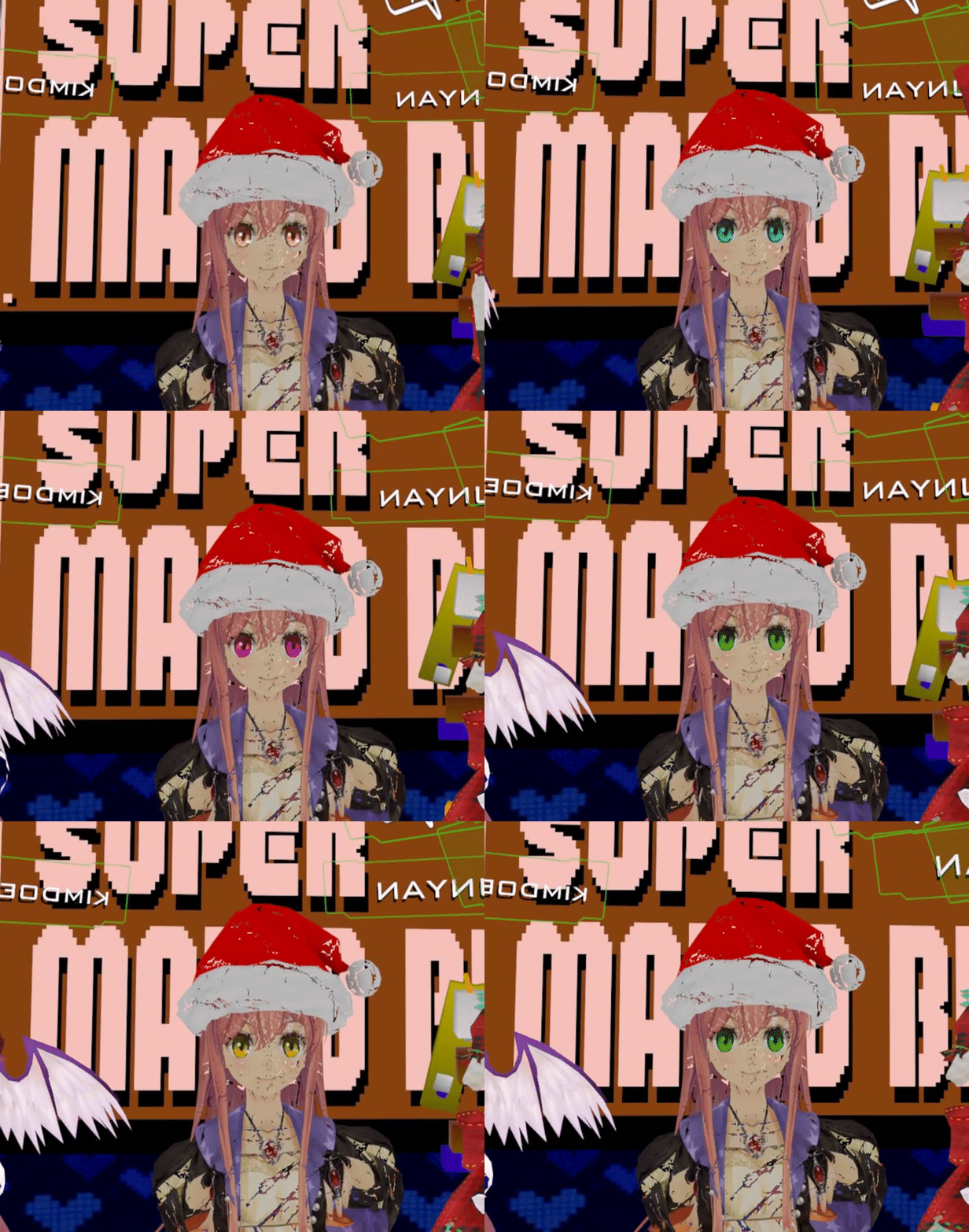
so for some time now I've had this weird thing going on with my avatar that I really don't know what it is caused by
certain rooms will cause this werird effect on screenshots, and in the mirror I will see my avatar as black, or random colors
Rooms with baked lighting are very dim, as if there was no lighting
or barely any
note for the gif above, the cracked effect was intended, but the strobing eyes was completly out of nowhere. For the most part they stayed completely black but at that moment thye started cycling through random colors.
minus the gif, the others were just using cubed shaders, but I'm wondering why just this avatar is causing these weird effects. If anyone has any idea of what it could be causing it I would greatly appretiate the help :). It makes it hard to take mirror screenshots when my avatar is doing these weird things.
quick forge
only the gif has the custom shader but shouldn't cause the eyes to spaz out like that, the rest are cubeds. I'm going to upload a version in standard and see if that changes anything
hollow blade
Sorry to bother everyone again but I'm having trouble on this final thing. In blender the back skirt appears, but in unity it becomes invisible. I've tried backface culling but then it disappears in blender and unity. Unchecked it shows in blender but not unity....any ideas on how to fix this?
sweet crystal
Unity is culling the backfaces. What shader are you using?
hollow blade
unlit texture. I've tried different kinds but it still is culling
sweet crystal
You need to use a shader specifically with culling turned off
hollow blade
Culling is turned off though with the unlit texture. Do you mean download one specifically? Or where do I go for a shader same place I selected unlit for the mesh?
sweet crystal
Well, as far as I can tell, the back of the skirt's being culled
hollow blade
Right. every shader I've tried including the standard one makes it culled...but not in blender which I don't understand how. If I cull it in blender then it goes away there too lol. It's so odd.
sweet crystal
Great!
 queen crow
If I have an animation that changes my position it makes all my dynamic bones flip out, is there a way to prevent this?
hollow blade
Thank you soooo much! I've been at this for 11+ hours and I was about to cry xDD lol thank you @sweet crystal
sweet crystal
For reference, I took the standard Unlit-AlphaShader and added Cull Off after the Tags section
That's all you need to do to fix that problem
hollow blade
Oh excellent! Thank you I'll remember that for my next one incase it decides to do it again
warm niche
How can the humanoid rig be put on something that is not humanoid?
 hollow loom
I want to import the mmd montion to my avatars.
After I import a vmd dance file, it doesn't show up nor play in the animation bar in blender.
need help 😢
 frigid steeple
Is there a possibility of adding a sound on a particle? Both should come up by a trigger.
 lapis grotto
warm niche
lapis grotto
warm niche
asking for help with .vmd animations..there's several tutorials like https://www.youtube.com/watch?v=kWFvuRmTeFg&t=6s but for me it ain't even moving after fixing armature via cats.... { and yes I readed the description and the comment section }
 old bridge
ok, did anyone ever encounter this weird mouth thing in MMD models? the model itself has several face meshes and separate mesh for mouth, but face meshes have mouth closed so even if inner mouth goes with blend shapes, mouth doesn't open. It is my second time and I have no clue how to fix it. in pmx editor everything looks fine though
warm niche
Does anyone have a tutorial or something about changing the clothes of a model?
 upbeat citrus
Has anyone encountered a bug or something where your sound from an animation override doesn't play for you but others can hear it?
dark sigil
sometimes my sounds play sometimes it doesn't, no idea why might just be clientside
upbeat citrus
Yeah I'm in that same boat. I've noticed it doesn't play when you are in a populated area.
I thought it had something to do with the priority slider in unity
In the audio source component
 errant dirge
Dunno if this counts as advanced, sorry if it doesn't: I want to do custom animations for an avatar while also having an idle blinking animation. Can I do the idle by just adding a Animation component to my model or do I have to set it as something in the AnimationOverrides?
That's actually a pretty nifty solution
Thanks 😃
Still got way too much to learn, started out like a week ago Xx
 lucid flax
Only if it's a legacy animation
blink doesn't have to be legacy :P
Helps if it is
And hi 
errant dirge
It is legacy, yes
Just wanted to make sure it wouldn't interfere with other overrides
Welp, I gotta ask again: I'm trying to make my avatar blush. There's a texture and a shape key for it and it changes properly in blender, but nothing happens when I adjust the shape key in Unity. How come?
Can I still Texture Atlas the main mesh then?
Fair. I'll just give it a show
Worked like a charm! Thanks :3
 lilac atlas
Has anyone come up with a way to update UI in game using the trigger system? For instance, say you have a UI panel that reads 0 and when you press an up button it is able to update the UI to read 1. The only way I can think to do it is by creating multiple UI panels and then activating/deactivating on the button press.
warm niche
Is there a guide on how to make pickups destroy themselves when exiting a trigger box?
Also who has the car prefab? Really want to put a bus in Japan Town 😃
runic mauve
@warm niche i put the perfab for car i made that mimi told me in here https://vrcat.club/threads/helpful-world-building-tools-for-unity.33/
 woeful cairn
Since my avatar is the Persona 5 protagonist I kinda wanna see if I can do an animation override to summon Arsene behind my avatar, don't know how possible that is though, since I'm a beginner. I already know how to do animation override but I don't know if it would work with the way I want it to for this idea. Lol
tiny forge
It's definitely doable, I've seen it done in-game before
woeful cairn
If it's doable then I just gotta figure it out. No idea how but I'll get there.
woeful cairn
Well that's what I expected.
After all, it's making a whole other character show up.
warm niche
Asking here as well just in case anyone knows.
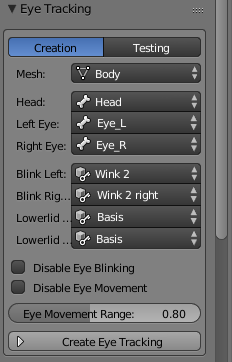
For the eye tracking in Cats blender, do I just create it in blender and upload it straight away? Or do I have to do something else in Unity?
runic mauve
you would have to make a shader @woeful cairn make become soildly
errant dirge
runic mauve
it basic turn and on off animator controller nad game obj
errant dirge
Trying to animate my pupils but I can't change the values. Am I missing something here?
runic mauve
@warm niche nothing else in unity just need to make sure have 4 blendshape for blink or your mouth open up
with blink animation
woeful cairn
I might do it when I have more free time cuz I like doing everything all at once.
So probably on the weekend.
warm niche
Alrighty.
errant dirge
Anyone? :/
warm niche
@runic mauve thanks!
hollow blade
I tried to upload my avatar this morning and now it's saying I have over the ammount of Polys when in blender it's 19700 ish....what did I do wrong?
is it because I added dynamic bones?
errant dirge
Does blender say 19700 faces or tris?
hollow blade
yes
errant dirge
That's an either or question, silly
hollow blade
oh sorry lol faces
hollow blade
Oh no way! :c aww thanks for telling me. I was misinformed then.
 rotund perch
is there some specific settings/conditions to making overrides work for expressions?
right now (1 frame animation) it just doesn't work
errant dirge
Have you added the animation to your AnimationOverrides?
Are you testing the proper gesture
rotund perch
I know the override itself works
It tries to do the animation
but just quits
and making another animation is like
it takes a little while
and then the animation happens... slowly
errant dirge
Have you made sure the animation is only one frame long?
errant dirge
Huh, that's odd
rotund perch
I've done it before
it just decided not to work with custom anims
ah well, I'll figure it out
warm niche
Is it okay to use Crunched compression in VRChat?
merry coral
So I have a empty game object as a spawn point
If I have a trigger on that said empty object
Saying Onspawn>Owner
Am I the only one that can spawn there
 atomic forum
how does one fix an avatar that is partially in the ground? i forgot
merry coral
You move it in the skeleton hierarchy
atomic forum
move it up till its in the correct position in vr chat?
hollow blade
Hey quick question when I uploaded my avatar it doesn't show in VR. I heard it's because of a steam vs VRchat account....could I sign in Unity with the steam account in VR or sign in VR with the unity account it's linked to?
atomic forum
you use your vrchat account so the one you use in unity
so in the game log out of your steam account and log into the vrchat one
atomic forum
ok
tiny forge
is the API down? my SDK is stuck on "Signing in"
hollow blade
Yup It's down for me :c
tiny forge
PANIC
hollow blade
Lol I know... I just finished an avatar and then this....
2 days of work and when I'm finally done and for the first time....VR is down...lol I wanna cry someone hold me
tiny forge
ahh check #announcements
hollow blade
AHHHHHHHHHHHHHHHHHHHHH omg lol I'm crying I wanna cry....
queen crow
Quick question I made myself a custom walking and idle animation
Is there anything extra I have to do to make it loop?
Or does it do it automatically?
dark sigil
I think it loops as long as you're walking/idle
queen crow
ok cool, ty
dark sigil
you just gotta make sure the animation loops smoothly obviously
queen crow
Yeah it looks good in unity 😃
Made the Bremen mask from majoras mask inside of vrchat, I hope it looks smooth in game
 verbal tusk
If you are adding dynamic bones to a simple skirt, does it take more performance to add a bone to each skirt bone, or just a parent bone that skirt is connected to? Is there also a way to set the root of a dynamic bone, but not include it or to skip it in making the script?
warm niche
@tiny forge just saw your response. thanks a lot! i'll look into that
tiny forge
np, didn't try it, but according to the doc, it should do what you need
verbal tusk
Does anyone know if you can upload seperate models that have been reparented through unity? for example, get a character and a gun in unity, then parent the gun to the hands.
 calm nacelle
do you mean stick a 3d model that was not originally created with the avatar?
because it that's what you're asking, then yes. It doesn't care where the models came from as long as they have meshes and materials to represent their images
 lofty tinsel
Anyone know how to disable automatic blinking during a custom animation?
dark sigil
disable the componenmt
lofty tinsel
which component is it?
dark sigil
just the animation one ror w/e you put the blinking animaton on
you can hit the record button and then uncheck the component while "recording"
lofty tinsel
I don't have a custom blinking, its handled by the default controller
dark sigil
not sure then
verbal tusk
You could try to force the eye's shapekeys open
lofty tinsel
Yeah, I've tried that but it doesn't seem to work
verbal tusk
Is it possible to upload meshes taht aren't currently activated?
lofty tinsel
Just had a word with Shotariya and he's recommended swapping to a custom blink which I can disable at leisure. Cheers for the help all.
 queen hearth
bug report time!
or maybe suggestion
For the CATS Blender plugin, in order to make it compatible with Mixamo, you should add a check to every place it would search for strings such as "Hips" or "Spine" etc. so it checks to see if they contain the string "mixamorig:" and removing that part, then also removing/renaming them to whatever their actual counterpart is
Becuase I'm currently in the process of manually doing that, as it says it didn't find "hips" because it was named "mixamorig:Hips"
runic mauve
@queen hearth mixamo you just use mix weight tool only
just need click on extra spine click mix weight tool
then you have only 3 spine
with the right weight paint
it not hard relabel after that
queen hearth
oh so you just select Spine1 and Spine2 and mix weights?
runic mauve
yea
queen hearth
alrighty
runic mauve
yea
runic mauve
just make sure label bone Hips, Spine Chest, Neck and Head
queen hearth
ohhh alright
runic mauve
oh wait
queen hearth
hm?
queen hearth
yeah
I undid it
and mixed only one of the extra spines
then renamed the second one to chest
runic mauve
yea
 dire raft
Hey everyone - Long story short, for some reason, on an MMD model I have, the mouth movement visemes do not move the teeth. The model has two separate visemes to move the upper and lower teeth. Does anyone know of a way to combine the teeth movement visemes with the mouth movement visems so that my teeth move when I talk?
runic mauve
use silder in keyshape menu then click black down arrow mix new blendshape
then move the back the silder
then test your new blendshape
you can mix blendshape right in just the menu
dire raft
Holy cow, that worked! Thank you!
 strange juniper
i was told that some one has a code lock prefab and i was wondering if i can have a copy of it
runic mauve
@strange juniper only people i know might know about owlboy, Ghoster or Korro Bravin
strange juniper
ok
sweet crystal
Is it just me or are mirrors clamped in luminance?
 charred bramble
Anyone know why my model is broken but when I walk it works?
trying to find out why she glitche out when I stand still
warm niche
I'm trying to add sound to my avatar but after I made these changes no one can hear the sound anymore including myself. Before this you could hear the sound across the map.
 maiden crescent
Disable Oculus attenuation checkbox.
warm niche
Alright thanks
 hazy spear
can anyone with knowledge in shader forge tell me if this would still work? because i got this set up and it doesnt show on the pics of the nodes whats supposed to be on them.
 wintry haven
im trying to recolour a texture which i recoloured the material for in unity, how do i get the same colour?
using ps^^
rough sleet
@wintry haven Create a new layer above the original, fill it with the color you used in Unity, and set the layer blend mode to multiply.
wintry haven
ok but how do i find the colour i used in unity?
@rough sleet
oh shit nvm
thank you so much
warm niche
does someone know how to prevent blinking so that the smiling animation does not get destroyed? I added the blinking keyframes into the smiling animation and set them on both keys in the animation to value of 0
is there a trick to it?
sweet crystal
The node previews are delayed, or they don't work exactly, don't rely on them
Would anyone have an idea why Unity can't find my model's blendshapes?
 still folio
Ok I'm now asking here since the people in #avatars-2-general had no clear answer to my question. I have made a custom animation. Now I have the problem that its rigged wrongly but is not part of an fbx file avrata. They just float in my project tap with no option to change their rig.
How do I get to teh rig options?
 median flare
@warm niche Turn off the blinking animation component in the face animation
warm niche
can you tell me how?
because the blinking animation is with the shape keys vrc.blink_left and so on. I dont have any animation set in loop or anything while running the other animation, cause ACchat is doing the animation with the provided keyframes. @median flare
median flare
Ah
You can't touch that - it's why people make their own animation for the blinking and just set the vrc.blinks to random vertex spots
warm niche
is there already a new update out?
 solemn knoll
Can anyone help me on how to set up my model for full body tracking
runic mauve
 lunar crane
I need some quck help on Visemes, when I'm creating visemes using CAT's blender plugin and exporting an FBX to unity. Attaching the base to the Viseme shape blender, I get no options for mouth movements in the drop down..
runic mauve
@warm niche yep new update more feature
@lunar crane more like them blendshape didnt had vertex movment in them
warm niche
but then i need to make an blink animation in unity right?
how can i disable the animation then?
runic mauve
@warm niche you need to fix this blender or remove eye bone from model
in uinty
then wont have eye tracking no more
warm niche
well i want eye tracking
so is there no way to have eye tracking and disable blinking when i dont want it?
runic mauve
then you have to go back in blender make new blink blendshape
the tool do it for you
them 4 slot need blendshape that have no effect to face because if you delete or remove them then use visime for blink animation
script base off the 4 colum for eye tracking
if one them slots fill with mouth movment
it use blink animation add to mouth
lunar crane
@runic mauve You helped me on vrcat, I unchecked the baked animation but it still wont carry over the viseme movements
I get -none- in the drop down
runic mauve
did you check they move in blender
runic mauve
does it have more then one mesh on the avatar?
lunar crane
no just a "body" mesh
I've tried so many avatars to get visemes, nothing works. Just gonna give up on it. Thanks for the help
warm niche
How do you make it you spawn into your own hub? Does anyone known?
warm niche
vrchat://launch?id=wrld then idkl correct?
median flare
vrchat://launch?id=wrld_9w34534509345690u3i490tguje098oojut9o8i5e43jt8o945ee
Yeah something like that
runic mauve
if you want your own private world you need to make one
put you can use any public id with it
or private world somone made
charred bramble
if I wanted to make a model float up what property do I use?
hollow blade
Uhh...wut. Can someone help? She's like turned around and not in a T-pose and omg she's also tilting....how and why.
 quasi bobcat
did u try enforcing t pose @hollow blade
hollow blade
How do I do that?
quasi bobcat
so u see where it says left leg and all that
quasi bobcat
yeah
hollow blade
Oh jeez lol
 daring snow
you click it and hit "Enforce T-Pose"
quasi bobcat
tell me if it works
hollow blade
it worked but not I'm rigging and it says she's not in a t-pose...hmmm
is there a way to put her in it in blender before?
quasi bobcat
wat do u mean
hollow blade
oh nope I figured it out she had an animation attatched to her lol
thanks for the help!
quasi bobcat
oh ok no problem
verbal tusk
What wrap mode should animations be set to?
hollow blade
My model's palms in a T-pose is facing up...so in VRchat my hands are backwards so that the back of my hands are where the palms should be...any idea how to fix it?
 night topaz
Anyone know how to pull the models out of steam workshop
 exotic tree
@night topaz For what game? For most games, workshop content is saved to Steam/steamapps/workshop/content folder in one of the randomly numbered folders. Try using last modified date to search for the file you downloaded. If your trying to get files from a garrysmod addon, check out my tutorial on vrcat.club: https://vrcat.club/threads/rough-tutorial-for-porting-source-engine-models-to-vrchat.122/
night topaz
It's through gmod
old bridge
@hollow blade rotate the bones in armature editing mode in blender
night topaz
I extracted the file i got the mdl and vmt files just need to convert them somehow
exotic tree
@hollow blade You'll need to use blender to fix it. Rotate the wrists 180 in pose mode so the palms are facing down. Then select the mesh, go to the modifiers tab (wrench icon) under the properties pannel and apply the armature modifier. Then select the skeleton again, go to pose mode, press crtl-A, click apply pose as rest pose. Then select the mesh again and go back to the modifiers tab. Add an armature modifier, and select your skeleton in the object box.
@night topaz my tutorial explains how to decompile source models, including garrysmod models. You'll need the .vtf textures and not the .vmt files by the way, the .vmt's are just text files that define the textures and properites a material will use.
night topaz
Ok Thank you so much
exotic tree
@night topaz Also, I forgot to update my tutorial to say that you don't need to delete one of the spine bones. Just redefine ValveBiped.Bip01_Spine2 and _Spine4 as the spine and chest in the humanoid configuration.
night topaz
Ok thank you
verbal tusk
i'm ahving toruble with animations playing reverse with emotes
i mean hand gestures
They play backwards, slowly
old bridge
@verbal tusk probably some incorrect values in animator? Like -0.2 speed instead of 1. You enable objects wiht animators for that, right?
old bridge
You mean preview when you hit play in unity or animation preview in the lower right corner?
verbal tusk
Neither
It happens in VR Chat when someone is doign the gesture itself
The preview itself in unity is one way
@old bridge I have no way to explain it
other than spooky
verbal tusk
Animation in this case can't be that short
I'm also getting animations for expressions that are mixing witht eh blinking @runic mauve
The animation that i'm tyring to make work is unfolding the RWBY scythe
old bridge
@verbal tusk the only way to do it is to have an animated object of that scythe and make it enabled with gesture
@verbal tusk you can't make gesture animation longer that 2 frames (probs you know that already)
runic mauve
he would have to make animator controller
for that object
then have animation to turn on that game obj
old bridge
Yeah
exotic tree
Hey, does anyone have the default movement/sitting animations? I've seen people with edited versions of the default sitting animations that fix the height issue for small avatars, and I've seen some discussion on here about editing the default movement animations to make non-humanoid avatars. Where do I get the animations from? They're not in the vrcsdk. Are they mixamo animations?
verbal tusk
Is there really no way to make animations longer than 2 frames? @old bridge
old bridge
@verbal tusk as I said, you need to make and object with animator controller and it may have your long animation. Then disable the old scythe and enable animated one with gesture
@exotic tree probably Mixamo
@exotic tree they there animated? Or just still? Probably someone manually edited it in mechanim in Unity
 zinc basalt
@exotic tree i was asking myself the same question the other day. I'm interested too!
warm niche
@exotic tree you saw ppl with MMD avatars doing that? or nah?
hallow portal
@split orbit you were right at least one light can throw shadows from rt objects on static geometry in substractive mode. but it looks like crap.
from the manual...
Static GameObjects do not show any specular or glossy highlights at all from Mixed Lights. They also cannot receive any shadows from dynamic GameObjects, except for the main Directional Light (see paragraph below for more information on this).
hazy spear
Why are they looking so different? even though they have the same values? (on the blue arrows has to be an "-" but they are not shown in the pic. i had to figure that out myself)
marsh narwhal
I would like to make those hand thinner and smaller. Have an idea ?
final wigeon
@marsh narwhal alt+s will scale it along the normals making it thinner. Just s will scale it as usual.
marsh narwhal
Ok thanks 😃
final wigeon
Hold shift to make mouse movement scale it less for fine control.
marsh narwhal
And do you know if I can make the bones which are linked, scale too ?
Like scaling the bones and the mesh together so it don't do anything weird.
If I scale the bones the mesh should scale too no ?
final wigeon
If you scale the bones they'll scale normally. They'll only pull the mesh with it if you scale in pose mode.
To keep the changes you'll have to
apply the armature modifier
apply the new pose as the rest pose
re-add the armature modifier.
marsh narwhal
ok
 pale violet
is it possible to have a light that works just on an individual, for instance a switch for desktop users in a darker environment?
for that matter, if we're switching lights back and forth, do i need object syncs on all of them? not sure if i'd put it on the trigger or on the actual light
 near obsidian
🤔
urban tapir
yes
near obsidian
🤔 🤔 🤔 🤔 🤔
sweet crystal
Is that a Gundam?
sweet crystal
Nice
sweet crystal
😮
near obsidian
no textures either its just colors
so i need to sort the colors out on the attachments
sweet crystal
I hope you know how to make normal maps
near obsidian
I do but this doesnt need them
as long as it has proper smoothing, it will be fine
ill be using the flat toon shader anyways so any smoothing errors wont show up
and wont require normals
urban tapir
yes
near obsidian
is that your final answer
urban tapir
yes
near obsidian
👌
rough sleet
@near obsidian Are you using vertex colours? If not the you should UV unwrap your model and bake a texture atlas to minimize the number of draw calls. Otherwise if you use separate materials for each colour you'll end up with a separate draw call for each one as well.
near obsidian
good point
sweet crystal
I'd like to know if the idle animation needs some kind of special properties or something
 sturdy lynx
is there a way to fix
audio breaking after using for some time
charred bramble
Is it possible to add particles to an animation?
runic mauve
@charred bramble yea
charred bramble
How do you do it?
 cursive sapphire
when you import a vmd onto an mmd in blender, and export to unity. does the vmd become an animation with key shapes in unity? i never bothered to check
charred bramble
Anyone know how to add particles in an animation?
marsh narwhal
If i want to make a LaserBeam, what's better making it on Unity or Blender ?
runic mauve
@marsh narwhal only make particle in unity only
marsh narwhal
Ok
runic mauve
@marsh narwhal https://www.youtube.com/watch?v=pWxucHof_5A
marsh narwhal
What is the maximum amount of particles that I can put for on effect so It don't get laggy for people ?
Thanks for the video 😃
 ornate comet
@marsh narwhal common sense is your friend here. If you've seen those huge avatars with circles and all the obnoxious stuff, and you still get decent fps. I wouldn't worry too much. Just don't go overboard lol
marsh narwhal
ok
urban tapir
Yeah, i have two stupidly giant avatars o use sometimes but everyone still gets decent fps
marsh narwhal
What do you mean by scaling the animation ? O_o
When you do an override gesture animation. And make it last for 10s (not 1s). Does it affect the reaction time to pop out the animation. For example, if I'm doing 'handgun' for 2s, then do other gestures. Does the animation will be cancel after those 2s of animations, or does it gonna take 10s after the gesture was ended ?
marsh narwhal
Yeah I'm at the same problem
testing things
but I have not a good connection so can't tell if it is my connection or the animation
marsh narwhal
Don't change samples
they need to be at 60 or your animations gonna be laggy or look weird
This is the frame time at which is played your animation
 crude schooner
hm all my anims are at 30
marsh narwhal
Like if you want 5s animation. You need to put the start at the 0 key and the 60x5 => 300 key for the end
crude schooner
its like in blender when u want to scale animation time
marsh narwhal
But I don't think that there is an other solutions than take key per key and make them at the good point
crude schooner
LOL f unity
marsh narwhal
(I'm a begginer, so I don't know if there is one actually)
crude schooner
yah im looking in gogle but nope
marsh narwhal
So just multiply all your key by 5 and place them :X
marsh narwhal
I wonder if you make the durations double if it double it
wait
gonna see on mine
No o-o
Maybe it's not on our version ?
marsh narwhal
Ehhhh
My animation is lagging ;-;
When I press or don't press one or an other button it make animation play
Is there a solution to make an animation override that lasts 1s but If I'm pressing continually the same key without interuptions it make it 9s longger without repeating it (for particles to stand and continue they're way) ?
marsh narwhal
Solution found :d
 bright dragon
Guys, any idea how do i make my avatar not sink into the ground when i use an animation i made in unity and that i put on emotes?
upbeat citrus
Make the animations on a copy of the model
bright dragon
i did, avatar still sinks into the ground when o use the emote/during the emote
marsh narwhal
Without the red recording button put your avatar in the right position
bright dragon
without the red recording button, the avatar is in the right position. only when i click on the record button
or when i start the animation itself
marsh narwhal
Yeah I mean if you move it after the position is f*cked without red button does it works ?
dark sigil
are you making an emote or override?
I know for overrides it doesn't matter if the model is underground
ornate comet
In the animator how do I get it to change facial expressions? I add them into the key frames but I don't know if there is a specific thing I need to do to make them work or
any suggestions?
bright dragon
@marsh narwhal i click on the red button, the position gets f*cked. I click it again (to turn it off), the position goes back to normal
@dark sigil I created all the movements of the avatar throught unity animator
even on the preview the avatar get's underground:
so i presume it's the animation itself..
dark sigil
@ornate comet theres a number near the property and you can change those values to get the expression
and @bright dragon are you trying to make an emote or a gesture for hands?
bright dragon
emote
marsh narwhal
Ehhh
dark sigil
I'm not too sure then
ornate comet
@dark sigil Yeah found it, didn't realise that it was out of 100 on scale
ornate comet
Thats probably easier, however keyframes feel easier in unity
bright dragon
i have the entire animation ready, the only problem is that it sinks into the ground..
dark sigil
Nah i'm not talking about the blendshapes, those I just add in after in unity since it's easier
ornate comet
@dark sigil Do you know how to get the hand gestures ontop of any animation I do?
I'm guessing I have to find the keyframes
Wherever they are
dark sigil
if you go to the animation override thing and click on the gray circles next to the box to replace them I think you can find the animations from there
they should be named the same as the name for the override
ornate comet
Yeah I see them
hard part is getting those keyframes into the animatior
Think I got it
Copy pasted even though its read only
warm niche
Does your version of that file with the hand animations have different values for each action? Look in the animator to hand open and fists, are those values different at all? I've been trying to source the finger values for a long time.
bright dragon
i think i fixed it. If you're wondering how, i was looking into the animations components, and added some of the "T poses" it has there. probably the "motion" or the "root" one made the trick
still need to see if it's good ingame, but it should be
verbal tusk
How does someone animate props already attached to an avatar?
I'm still having trouble with that
 wet hull
I put it #avatars-2-general and was redirected here:
I made a wave animation and works fine but the face shapes don't show in game. anyone know how to make them work? keyframes do appear inside unity
https://cdn.discordapp.com/attachments/89849953131696128/388223210090397697/2017-12-07_00-59-47.gif
verbal tusk
@wet hull did you bind it to an emote button or a controller button?
and what do your keyframes look like?
verbal tusk
@cloud cobalt Could you also take a picture of the entire animation window?
wet hull
sure
wet hull
it shows purple for some reason. lemme see if i can fix that
verbal tusk
I'm trying to find out @cursive sapphire (i think) did this https://youtu.be/3ljM2OieewE?t=295
but with a completely different applicaiton
wet hull
yeah. no shape animation u.u
oh, ok. says component missing. must be some labelling issue or something
verbal tusk
what does your heiarchy look like?
wet hull
should be the same as the animation fbx. but maybe i misnamed something
yeah. something went wrong
verbal tusk
It's hard to tell without actually seeing the file itself
wet hull
seems like the HIK in maya (or myself) grouped the already grouped avatar so the clip can't find the shapes and some bones. i'm exporting again and see if it works
YES! thank you! gonna see if it works IG
yup! it was a hierachy issue from maya that I didn't notice. thanks again!
ornate comet
Can someone send me the Female standing animation packet
I can't find it
Need the keyframes for the handmotions
Thats why I'm asking
warm niche
I'm after the same thing. So you found that all the values in the SDK are the same for each gesture?
can i ask world related questions here? 😃
ornate comet
@warm niche I think so, having technical difficulties
 graceful pasture
Would anyone know why the "floor" for some avatars is artificially higher than on others?
autumn hatch
Different proportions on the armature. If you got short arms, you get stilts. Long arms you sink through the ground
 desert jasper
Is there a way to make a mesh or object rotate constantly in a 1 frame animation. For example how someone would pull out a gun but instead of a gun its a drill that is constantly spinning? I know how to do animation overrides, its just that I cant get this object spinning. I've used Cs Rotate and it works but I can't attach that script to something thats going to be uploaded.
autumn hatch
Animate the drill seperately, then for the gesture override just enable the drill game object or mesh
desert jasper
thank you
 trim ibex
could someone maybe send me a unity project with working dynamic bones?
i would like to find out how you work around this bug https://vrchat.canny.io/bug-reports/p/dynamic-bones-flickering-since-update-0120p1
runic mauve
everyone use same dyanmic bone from the asset store
it more vrchat problem
then script it self
they would have update it to work with vrchat better
trim ibex
yeah i get that we all use the same dynamic bones
runic mauve
dyanmic bone when you far distance does get shut off
trim ibex
but other people do not encoutner that bug on their avatars
trim ibex
yeah..
runic mauve
well need video it
trim ibex
i dont need to take a video of it. i can just show everyone in vrchat
runic mauve
for perfect skirt in vrchat would use clothes but that take 2 skin mesh render and it perfomance hog as well lol
runic mauve
what your setting on your bones
need adjust them not every model
can be same setting
because different bones layout
trim ibex
but different setting do not seem to affect the bug
also yeah i know it capps at 60 and i have tried setting it to 60 or lower
runic mauve
might have lower how many bones
are on the skirt
you can do that with mixd weight tool
cat plugin
could be limit on bones as well
trim ibex
i cannot say that limits on the bones themselves arent the reason
but i dont really know how to find out
the amount is definetly not the problem
this happens even with just one dynamic bone
trim ibex
i assume it has something to do with the IK. maybe the IK updates more often than the dynamic bones and that might cause it to flicker like that
no its not the hip bone
also the things i am trying to do are not the skirt
runic mauve
what you trying to do
trim ibex
i am doing the hair, boobs, ears, and a collar
runic mauve
boobs you have to stiff it up more
hair dont use gravity or force
ear just hook to root ear not the headband
need alot more adjust on them
plus base on weight paint
set on them
if weight paint little werid
dyanmic bone look werid in vrchat
trim ibex
the thing is that they dont look weird
they flicker when my framerate is over 60fps
since the update
trim ibex
yeah that does not do anything
runic mauve
90 fps what cuase fps drop in vrchat
mimi had 120 fps
they lag a room
reason it got reduce
trim ibex
the problem is that when my actuall framerate is higher than the update rate of the dynamic bones they flicker
and i am not the only one that has that problem
but i want to find out what causes this since there are many people who dont have that problem with their avatars
runic mauve
there not using 90 fps
there using standard 60fps
set all ready on dyanmic bone
dyanmic bone be optimze for perfomance problem
so it not going be perfect
marsh narwhal
What's the shader that make thing Invisible ?
autumn hatch
Do you just want to make something invisible?
runic mauve
dont need shader for that just need turn off mesh render off
marsh narwhal
I've a sphere with shape key that make it bigger so it take in my avatar and other. And I wanna make those avatars invisible
I've seen people with a shader that make them invisible, wanna do the same but with the sphere. But will it make the sphere and us invisible or just the sphere ?
autumn hatch
Hm... Sounds you need some kind of stencil shader for that effect, if you want that sphere to turn other objects invisible.
marsh narwhal
Ok thanks ! 😃
autumn hatch
MAYBE you can put the render queue on the sphere ridiculously high
Not exactly sure if it will work
Doubt it
marsh narwhal
Gonna test it this afternoon
marsh narwhal
Ok thanks i've test it on unity it's cool 😃
old bridge
@trim ibex oh god why do you use 0.9 stiffness? I usually use 0.05 and damping like 0.1-0.15. inert is ok here I suppose
@marsh narwhal just flip the normals on sphere and use any shader with backface culling (like a standard for example). backface culling will make everything inside the sphere invisible from outside. You'll see the sphere from the inside though
marsh narwhal
@old bridge So basicly I need a script with that to flips the normals ? "using UnityEngine;
using System.Collections;
[RequireComponent(typeof(MeshFilter))]
public class ReverseNormals : MonoBehaviour {
void Start () {
    MeshFilter filter = GetComponent(typeof (MeshFilter)) as MeshFilter;
    if (filter != null)
    {
        Mesh mesh = filter.mesh;

        Vector3[] normals = mesh.normals;
        for (int i=0;i<normals.Length;i++)
            normals[i] = -normals[i];
        mesh.normals = normals;

        for (int m=0;m<mesh.subMeshCount;m++)
        {
            int[] triangles = mesh.GetTriangles(m);
            for (int i=0;i<triangles.Length;i+=3)
            {
                int temp = triangles[i + 0];
                triangles[i + 0] = triangles[i + 1];
                triangles[i + 1] = temp;
            }
            mesh.SetTriangles(triangles, m);
        }
    }
}
}"
old bridge
@marsh narwhal well...I'd better just flip normals in blender with like one command 😥
but if it works then why not...
old bridge
probably your material has transparency on it?
like the color is slightly transparent
marsh narwhal
No it's because the script don't actually work ;-;
Gonna flip normals on blender so
How do you flips normals in blender @old bridge ? :3
old bridge
in edit mode select your whole spere then press Space, type "flip normals" and press enter
marsh narwhal
Ok thanks
old bridge
👌
old bridge
probably I was wrong. let me try it too
yeah, I was wrong. It only culls the sphere itself, sorry for misleading 😓
marsh narwhal
Np :p
marsh narwhal
Looks complicate to make .-.
I thinks I could make my self and the sphere invisible but not other objects :X
marsh narwhal
Yeah probably can't do what I want, because I need people in or me to have a special shader ;-;
dark sigil
transparent shader for the outside and then a skybox shader on the inside?
marsh narwhal
What's the difference between fade and transparent ?
warm niche
Think fade can be almost invisible, might also be worse for performance but couldn't find any info on that.
marsh narwhal
Ok
I just noticed "Play On Awake" for a particule effect (which is in an animation but need to be at the same time in the original avatar). Does it makes the Particules go on without the animation playing it ?
warm niche
Hello! Can i ask a question to a advanced person here? Basically im having problem that my model is looking good in blender/unity then when its in-game its broken so hard
tiny forge
@warm niche Pics
 stiff lily
Is there anything about animation overrides that makes you sink into the floor during the animation ? Specifically the run animation
I can provide a gif if necessary
warm niche
how do i setup trail in particles to draw with finger? it doesnt want to make a trail when i move my character
please help
sour mural
@stiff lily Is the anim mapped as humanoid rig
stiff lily
Nope, generic
sour mural
Make it humanoid
runic mauve
if you want to make non humaniod you need use generice mode
on avatar
make your own movment
for that animal
sour mural
I think it is that his animation makes him go into the ground which is from having it set to generic instead of humanoid
runic mauve
@sour mural i know ዘልኗጌልዪዕ_ርቿረጎክቿ - would know how to do it
stiff lily
Animation doesn't seem to trigger either, my avatar is just moving with his waist into the ground
If i set the initial animation to generic, will it work with a different skeleton ?
stiff lily
run animation
stiff lily
blender
runic mauve
in animation tab in fbx
make sure the Y bake
up on the floor
before pull out the animation
and fbx file need to be humaniod
stiff lily
What do you mean by pull out the animation ?
runic mauve
you can make dublciate of the file when it setup in humaniod first
you know there rigg next to is animation tab
stiff lily
Yep
runic mauve
make sure the fbx is humaniod
then in animation tap
make sure bake Y
set on the ground
stiff lily
i'll give that a try, thank you
runic mauve
what you want to do?
runic mauve
you would just need use zerofriction material
on the surface
if every went there in vrchat
snowe place with them ride slieds
merry coral
how do I get or make a zero friction material??
runic mauve
need to install standard asset https://assetstore.unity.com/packages/essentials/asset-packs/standard-assets-32351
it come with material does that
merry coral
Is it possible to have an object do an animation as an avatar
exotic tree
Hey, someone mentioned a while ago that there was a IK script on the unity asset store that was whitelisted. Was it FinalIK?
exotic tree
Damn. Is there any workaround for not having gestures and emotes on non-humanoids?
autumn hatch
Write your own controller and apply it to your avatar
Controllers don't get overwritten on generic avatars
exotic tree
I've tried that before, using the AvatarControllerTemplate as a base. That appears to have everything set up for emotes and gestures, but for some reason the gestures won't play and attemping to do emotes freezes me in place permanently. I honestly don't know how to do controllers, but without some sort of example that works I'm not going to be able to figure it out.
 tired fable
Do the bones for the eyes for eye tracking have to be perfectly up right to work?
autumn hatch
No, but they work much better if they do @tired fable
 opaque light
How to do you add a Camrah to a Room in unity for VRChat? I want it to desplay on a screen inside the room. that brings me to the next thing. How do you add a screen?
warm niche
I have an avatar with an extra set of arms, is there a way to put them in one position so that they don't move but I can move the other pair?
 potent canopy




 near obsidian
Is there a way to modify the default animations? Walking running etc
 rough flame
I can't get my proximity trigger to work for my mirror. Does anyone see anything wrong with my setup?
autumn hatch
@rough flame Change the trigger to OnEnterTrigger because the capsule collider has Is Trigger active, and change layers to Player Local
rough flame
What is OnEnterCollider used for?
autumn hatch
For example, if you were to hold a lightbulb for a game world and if you drop it to the ground, it breaks. Then you would put a OnEnterCollider on the lightbulb and an action to destroy it
autumn hatch
The layers window decides on what layers comes into contact with it, in your case when a player enters it, an action is triggered
rough flame
Thank you for the info <3
autumn hatch
https://vrchat.readme.io/docs/trigger-triggers
This could be very useful to look up aswell if you haven't already
 prisma void
TRIGGERED 
autumn hatch

prisma void
there is misinformation in the docs zarniwoop 😦
autumn hatch
Euuuuan!!
Still, very useful to look up stuff. It's a bit out of date too, like the OnEnterStation isn't even in there
sour mural
Anyone know what the sprint forward animation override is used for ingame?
Added a custom anim to it but nothing seems to trigger it
So wondering where its used
VR only option?
autumn hatch
If you change the roomspeed to very fast on VRC_Player Mods then the sprint forward is used
(There isn't a very fast setting. Just dont know how fast you need to go to trigger it)
sour mural
I see 🤔
Found out if you replace the running forward animation the walking animation at the end also becomes slightly fucked
 whole crystal
yea it kind of merges the closer you get to the next forward animation speed i think?
sour mural
It barely makes a difference for me but it ruins my rolling forward anim i replaced lol
 dark epoch
Im back. And need some terrible ideas for characters. Lets make spawns of satan a reality.
 gilded karma
Dora the explora glitching into mickey mouse.
dark epoch
got it
 winged lotus
So I'm having a problem right now with my avatars hair not being attached during motion (in picture) , and I've tried placing the hair to the Head parent and attaching the bones, but nothing worked. Any ideas?
dark epoch
The only explanation would be... is the hair even weighted to that bone?
winged lotus
Er, I think I weighted it. Was I not supposed to ._.
dark epoch
I mean if you want a mesh to just float then there.... You can do like I do and just parent the mesh itself to the head bone. But if its the same mesh as the main body and doesnt move. I would recomend making sure its even weighted
warm niche
Anyone have a transluscent water shader that works with VR?
winged lotus
So I would weight it and let the head parent the bones? I leave the mesh alone too right
dark epoch
Yup.
winged lotus
Alright, I'll try it and hope it works!
dark epoch
@warm niche You can use the one unity has
warm niche
The WaterProDaytime one? The simple one isn't transluscent. The water4advanced one doesn't seem to be compatible with VR.
merry coral
How are people making avatars that collide with other avatar
dark epoch
I imagine its using that dynamic bone thing. One person can have a collider set to a layer that the dynamic bone is setup to and they can interact
stiff lily
Can we import anims onto objects in Vrchat ?
dark epoch
Yes. But its depends on the circemstance. If you were to simply try and put an animation onto a humanoid object. VRC's IK system would simply overide it.
 barren lantern
Hey-- I tried asking around in #avatars-2-general, but I didn't get any replies, so I figure I'll try here.
I'm making my first model with animations. Most everything works, and I was able to get the blinking animation working, but none of the other animations I've made are working on the avatar. I'm using a CustomOverride to try and replace the hand gestures with animations that change facial expressions, which I've seen used on other avatars before, but none of them are triggering at all. In addition, I've also set Visemes for my model, but those aren't working, either. Is there some basic to avatar animation I'm missing?
stiff lily
Which tutorials did you follow ?
barren lantern
I followed this tutorial:
https://www.youtube.com/watch?v=p0txtOuZtx0
In the part where they're mapping the finger gestures to facial animation, I skipped also re-setting the finger gestures, because my avatar very literially doesn't have fingers. Are those animation triggers disabled entirely if the finger bones aren't detected?
stiff lily
Well, if they can't be played, then i'd assume so
They need to be bound to fingers afaik ?
like eye, eyelid, jaw etc
barren lantern
I'm not sure. As far as I'm aware, this just re-maps the gestures to play a different animation file. In that case, they'd work, and that still wouldn't explain my Visemes not working, either. There might be something wrong with my Avatar Descriptor, but I don't see anything out of place.
stiff lily
your custom standing anim isn't overwritten ?
or are you using CustomOverrideEmpty 1 for both ?
barren lantern
I don't think it gets overwritten, as this is the exact method the tutorial used, and I've seen the same technique applied to other avatars, too. In the CustomOverride, I'm only overriding the finger gestures, but everything else is still set blank and uses the default animation.
I would check if the default animations are triggering at all, but I have no fingers to test with.
stiff lily
Have you also seen this video ? https://youtu.be/V0l4-pH3vI4
But it's pretty odd to not have fingers
barren lantern
It's a highly stylized model.
dark epoch
The animations you use have to be mecanim animations
Im not sure if there is a software you have to use or if you can get a plugin through unity. Youll have to research it.
...unless you plan to make it a non humanoid object. But you plan to overide say a walk cycle or a sitting anim.. Then mecanim is da' tingy.
barren lantern
Hm. I'll have to look around, then. It's weird that my blinking animation works fine, and mecanim seems to only work with skeleton animation, not the blend shape animation that facial expressions use. Seems I've got a lot of looking at the docs ahead of me...
sterile cipher
If you don't have fingers, then some animations will not work properly. You can make some fake fingers in Blender and then assign them in Unity (even if they're not weighted to any verts, its fine)
dark epoch
"extreme texture mode acctivated"
barren lantern
I managed to get something vaguely resembling fingers rigged up and working in Unity (it's not complaining about them, so that's a good sign) but was still unable to get the facial animations to trigger. Hm. I'll fumble around with some settings in Unity until this (hopefully) works.
Got it working! My issue the second time was me trying to re-use the animations on the edited model, which Unity didn't appreciate very much. Re-creating the animations has fixed it and gotten this working, finally. Thanks, @sterile cipher!
 rich wyvern
How do you fix this stuff

this happens on an vmd animation imported using mmd tools
and the model im applying it to is using the fixed armature
 prisma fox
No idea :/
warm niche
is there any way to find out what is causing a lag spike in a world I am building like a way to see the Profiler inside unity but running live on the server
i cant seem to figure out the bottleneck
pale violet
is there any chance that Playmaker will make it possible to trigger the unity fog on and off?
marsh narwhal
There is some animation that takes a lot of poly but they're rare. Mainly it's because number of people with dynamic bones and thing like that :p
warm niche
Is there an animation overwrite for the controller trigger "if you place your finger on the button (Occulus at least, dont know what it is in vive)"?
cause then the finger bend a little and i want to overwrite this animation to a smile
covert chasm
argghh how can i save decimation for objects that have shape keys?
 stoic brook
just realized this is probably the proper place to ask about animations.
anyone know why the animations I've made for my avatar in unity make it go to the "muscle test" pose?
marsh narwhal
How do you duplicate a materials and his texture and settings?