#development-advanced
1 messages · Page 15 of 1
 whole crystal
 old bridge
@whole crystal i believe range is sometging like -1 : 1 so its pretty easy to tweak fingers for the gestures you want to make
whole crystal
yes and no I think its more like 0.8, 1/-1 seems to overstretch it a little
been adjusting 3 times now, was hoping the data would be lyin around somewhere
but ty for the tip o/
 winged lintel
I might have the actual gesture animations around here, lemme check
here, download this
 royal warren
anyone know how to use amplify shaders here that can teach me?
winged lintel
I'll probably ask to get this pinned over in the Avatar channel
also, ping, @whole crystal
royal warren
who
 warm niche
what are the red things? https://i.gyazo.com/e982f80d3efcb6ca26287488e176ab78.png
ive figured out it has to do with sound but how do i turn off the visual red balls? its annoying
 desert jasper
Anyone know what the cause of this error is? Its stopping me from uploading https://i.imgur.com/r0ot1Gz.png
or how to fix it at least. It says the issue
 steel wigeon
this might be a really dumb unity question, but lets say you make an animation clip for animation override and delete the model you used to make it, how can you edit that animation clip using a different model in the scene, but that contains all the same parts, objects, etc.
Update: I already went and redid it regardless but if there is a way by all means let me know
Update 2.0: I figured it out o.o
 full flame
trying to export a model with visemes, but I cant do it without getting rid of the decimations
steel wigeon
on a serious note, when you make animation clips, do you have to add in each property one at a time, or am i missing something o.o
old bridge
@steel wigeon just select this animation clip and go to animation tab. You can change the values here. They will be a bit different: you should write 0 or 1 instead of disabled or enabled
steel wigeon
i'd only just realized that i answered both my questions with what i did a moment ago, but thanks, you're absolutely correct @old bridge
steel wigeon
oh yea, whats the simplest way possible to change the scale of a model that has animations and all that jazz, and upload it as a new model rather than updating the previous one, up until now i've just had to redo everything on a new import, I'd like to not have to redo all of this multiple times xD
 sweet crystal
What's the best way to make a character's hands smaller in blender?
 harsh nest
@warm niche those are ONSP Audio Sources
@sweet crystal scale down the mesh, then the bones
 sturdy frost
ONSP!!!! gotta delete that 😎
sturdy frost
Max texture size in Unity:?? anyone know?
 maiden crescent
Never delete ONSP Audio Sources. Deleting it prevents Sound FX volume control from adjusting audio volume. To turn off red spheres, in Scene View click Gizmos button and uncheck ONSPAudioSource
sturdy frost
ONSP screws with the sound settings making the sound act weird though. ONSP being not there has been the best fix. And as far as I know I am still able to control the sound of them by using hte SFX bar..
unless there are settings you can put the ONSP at which makes the audio not shrivel up and die.
maiden crescent
No. Just disable Oculus Attentuation if you want to use Audio Source settings
sturdy frost
Ooooooooh?
maiden crescent
yes
sturdy frost
I'll test that then
then I'll continue to say that to people instead of deleting it if thats the case 😃
maiden crescent
This option overrides Audio Source 3D settings by own curve for more realistic sound
sturdy frost
"Realistic"
hasnt worked like that for me or anyone Ive talked with (that Oculus attenuation I guess)
 mental narwhal
You just need to make the maximum distance further. It follows an inverse square curve which is like real life atmosphere.
I'd recommend oculus attenuation if you are attempting to achieve realism. Turn it off for special effects only.
winged lintel
So, I'm wondering. If I have more than one video, but the videos are in the world itself instead of streaming, will the audio still go crazy?
Going to be making a long awaited update to Horizons soon, and I want to have as much operational as I can
 deft island
@runic mauve Hello
I saw you make the sprite sheet animation and was wondering if you know how to fix my image?
I have a steady photo that only bounces and I added a text bubble but
I also equally aligned them together in photoshop but when they animate in Unity it seems like the bubble goes off to the other side
also it moves a bit from right to left
Any ideas how to make it steady?
I'm aiming for it to move like this
instead it moves like this
https://gyazo.com/d05ec416859f651559abc8ee033884f9
deft island
Ok I think I figured it out
it took some math to calculate the distance of the moving tail to the original frame and adding that distance to the space between each image
and then calculate the same thing to the 3rd image and so on.
https://gyazo.com/e4e6f7efcf2d701cf945b1ea1d40b64c
it looks okay now. not perfect but good enough
 near obsidian
The only titan drop animation you need in life
 fathom slate
Titan dab
sturdy frost
@near obsidian BOOOOIIIIII
near obsidian
👌
sturdy frost
When you add a pilot in the animation, you should have either, the pilot dab, then backflip into the titan, or the titan grab/smack the pilot when it dabs
near obsidian
Ill have to merge the pilot skeleton with the titans, but eventually I will do one where the hatch opens and the pilot stands up and dabs
sturdy frost
Boi :3
desert jasper
My audio source from my emote is being tied to frame rate for some reason. 90 FPS = plays fine while sub 90 makes it skip or not play at all. Anyone know why?
 split orbit
I am pretty sure that is a VRChat issue
desert jasper
other people ive talked to dont have that problem though
near obsidian
I've experienced it randomly, pretty sure it is related to vrchat
Some times it's just been a high pitched screech
sweet crystal
How much performance do dynamic bone colliders cost?
It seems impossible to get away with using only a few to prevent things from clipping though because bones just roll around them
near obsidian
Not much i dont think, pretty sure it disables them when you're not looking at them
to help with performance
This is annoying, I added the drop animation to the controller so I could modify it, switch it back to None and its stuck in the air
No idea how to fix this
warm niche
which one is the animation of the scissor hands
sturdy frost
Hmm @near obsidian That usually happens for me when I havent done a "Default Pose" animation when I export from blender. Try just making a simple single frame animition of the model in a standing pose when you export the model next time 😃 (Also name the animation something like "A Default" or something so it appears first aplhabetically)
near obsidian
👌
 merry coral
anyone got some good vfx packs?
merry coral
thx
 buoyant niche
Would anyone be able to help me out with weight paint? I have a avatar im working on but it's looking weird and i think its the weight paint proberly
I would be very greatful for the help!
thank you
This is how it looks like
and it looks like this in blender
@sturdy frost
 tawny ridge
Question i have here.
How hard is it to give my c haracter props i can pull out?>
Say like, a handgun?
sturdy frost
relativly easy but I havent done it myself yet. I know its got to do with turning on and off meshes with animations though
merry coral
@tawny ridge if you need help with that there are tutorials online to help you with that
here is one by morgus explaining it
warm niche
@tawny ridge dont do guns. Do something creative
tawny ridge
I planned to have a handgun with my little loli character.
because of the little gang thing that i run around with
Mutes and Autists, and we go around stealing peoples waifus
warm niche
dies on the inside
tawny ridge
lmao
warm niche
@tawny ridge but yea i might help you out if u will struggle with addimg that
Its simple but time consumimg to make animation for all the fingers
 tranquil jackal
Hey guys, I wanna use some C# or Playmaker in my scenes. I signed up to get whitelisted on the form. Any ideas about when we hear back about that?
 runic mauve
@tranquil jackal right now there no way to use playmaker right now you have to play in new project till they release date on close beta for it
@tranquil jackal if you want to join this close beta need signup to this https://goo.gl/forms/3kMRJ2d8HUvbzg3f2
tranquil jackal
Yea, I had signed up before, but thanks for relinking it!
I am just worried that my entry will be denied based on the information that I had input
tranquil jackal
Yea, this form asks for a first/last name and I am wanting to work under a pseudonym when doing stuff in VRChat
tranquil jackal
Oh, I understand that, but even then, I am not interested in sharing that information with a team, especially considering that I have to protect myself from certain forces online.
runic mauve
mostlyl ike tell you in annoucment to check your email
tranquil jackal
It's a whole shit thing
Yea, I am just worried that I will be excluded based on the information I gave - in other words that I didn't give them my real name, etc.
runic mauve
i dont think they care for your real name just your skills lol
 autumn hatch
I wouldn't worry too much about that
tranquil jackal
And proving those skills requires a name lookup in many cases.
I just do games professionally, so if I am involved in any sort of infringement with my name stuck on it, it's a bad look for me.
runic mauve
best to learn playmaker before even close beta started need to know how it works first
tranquil jackal
I already know playmaker.
autumn hatch
I don't think it'll be nessesary to prove anything, as in sending stuff in
sweet crystal
I hate how dynamic bones is tied to an update rate. Why make something like this framerate dependant?
runic mauve
@sweet crystal it only go up to 60fps it reduce FPS problem with tons people using it
sweet crystal
You do not understand the meaning behind my words
runic mauve
that what you mean?
old bridge
What really makes me sad is that they are updated locally, so everyone see them moving differently
runic mauve
that be more problem if there were sync
more networking problem
dont want everything be sync to the network just create more fps drops
old bridge
@lucid flax do you think sending several 100s of 8byte numbers will affect bandwidth so bad?
sweet crystal
It should interpolate between the frames of the update rate when the game is running higher or lower
Because having it be choppy when the framerate isn't perfect is awful, and especially when the cap is 60 while VR runs at 90
 lucid flax
not so much bandwidth
something has to translate those bytestrings into actual transforms :p
not to mention the delay causing issues
sweet crystal
Synced physics would have huge overhead
old bridge
Doesnt seem that bad for me. Translating numbers to bone movement is just normal variable assignment which still happens since they are updated
runic mauve
problem with dyanmic bone is create problem for cpu with 60 people in one room have over 100 bones in one skirt
old bridge
It would affect servers more tbh.
lucid flax
since vrc is mostly p2p it would affect the master of the room a lot
old bridge
If they would be simulated on server side, it would be even benificial for us players
sweet crystal
I've yet to see an avatar with bones that actually killed framerate 👀
lucid flax
Dynamic Bone is one of the 4 main CPU hogs
old bridge
P2P means that if soneone has bad framerate or ping then pretty much everyone will be affected by this bottleneck. Not sure if it is so
And again, where did you get that info? I've heard different versions so I would be convinced only if devs would say so
old bridge
And I think vrchat is not so different from your usual mmo game. Practically the same amount of data is transfered between players.
runic mauve
@old bridge different from mmo we dont have abitly add avatar of are own in them games
they have made system for there avatar dont effect there peformance
old bridge
@runic mauve I mean in terms of networking of course. Everything else is absolutely different 😅
lucid flax
networking isnt the issue though
runic mauve
@old bridge it collect of bad optimze avatar that effect the fps drop. in can come from world badly made as well
perfect avatari n vrchat would be 1 material 1 skinmesh and no dyanmic bone
old bridge
Yeah, also unity. I know that. Not sure if anything can be done though except for some kind of moderation. And I've heard that devs wanted to implement the system to kick those who's avatars are killing the fos
@runic mauve yeah. Perfectly boring avatar. If everyone would have the avatars like this, vrchat would became altspace and eventually die
We have to admit it
runic mauve
reason perfomance hard to do in vrchat
old bridge
Even if these avatars are killing fps they are usually very fun to watch
runic mauve
because everyone like this feature lol
in game development have to balance everything
cant just be all graphics lol
sweet crystal
The ultimate problem is Unity. Unity is just a poorly optimised engine, all game developers agree.
old bridge
Yeah, right. But I believe now we need lots of this kind of avatars to attract people. Vrchat online is skyrocketing recently (+500 in a month) but it is still nowhere near pubg etc
lucid flax
If everyone took care to minimize materials and merge meshes they'd still have the same look and features but much better performance
sweet crystal
The only reason this stuff is expensive is because Unity makes it slower than it should be
old bridge
@sweet crystal totally agree, but without unity I'm not sure if anyone could import and customize their avatars as easy as it is now
runic mauve
not alot people dont know how to make mask type shader real problem to do any peformance wise on material
lucid flax
A lot of the CPU hogs are 3rd party unity add-ons though
old bridge
I think for now vrchat found a sweet spot. Hopefully devs will find a good direction to move from here
lucid flax
uSpeak, finalIK, Dynamic Bone
old bridge
Btw are all these plugins just c# scripts? Or some compiled libraries?
lucid flax
both
old bridge
Well...anyways ue4 is superior in terms of performance but virtually noone would be able to customize their avatars and worlds which is the whole idea of vrc as I see it
runic mauve
unity just need support muitcore
sweet crystal
Yeah, the problem is UE is a game engine foremost. Not as easy to use as Unity because it's made for developers.
lucid flax
Unreal is a pain
sweet crystal
It's made for people who earm money to suffer through using it
I don't know why you think masks in shaders would help. There's no reason they would.
runic mauve
it let you use 1 shader have muit different thing like people do with material
with differenst shaders
sweet crystal
Sampling an extra texture would incur a performance cost. On top of that, a shader has to evaluate every branch that could run in a block of pixels. So instead of rendering 4 different materials across different meshes, you'd be potentially running a shader as expensive as 4 materials across all meshes
runic mauve
then the fps drop will stay in vrchat
 final wigeon
@sweet crystal in the state vrchat is right now, shouldn't using a fancy shader vs 4 materials be better? Since shader stuff happens on the GPU which isn't maxed out, unlike the cpu often does.
sweet crystal
It depends.
steel wigeon
I'd like to know if theres a way to take a specific model, rescale it, and have it upload as a new model rather than updating an existing model, I would much prefer for it to be this instance of the model, because it has all my hopes and dreams on it, animations and all
steel wigeon
I might be blind, where is that? 😅 @old bridge
harsh nest
@steel wigeon select your model game object, go to inspector, in pipeline msnager click Detach
 tired fable
Do I want "Leaf Bones" enabled when exporting to FBX to keep the extended bones?
winged lintel
no
 sterile cipher
Hummm... ShaderForge vs AmplifyShaderEditor?
 rough sleet
Amplify is actually getting updates.
sterile cipher
Yeah, I see that. Hrm
rough sleet
They're pretty close on features but there's a few differences, mostly because Amplify is based on surface shaders while shader forge is vertex and fragment shaders.
sterile cipher
Ahh. Can you do vertex/fragment shaders with Amplify? My first big project will probably be attempting to duplicate that vertex normal projection effect that Blender does.
 quasi bobcat
hey guys i was wondering if somebody could help me with some eye tracking problems ive been having
sterile cipher
Sure, what kind of issues are you having?
quasi bobcat
so when i try to create my lower lid movement with shape keys using blend from shape nothing happens when i turn up the slider
my blinks work fine and all my mouth movements work
sterile cipher
Try recreating the lowerlid shape, seems like you didn't blend from shape properly
quasi bobcat
i think im missing something cuz i tried recreating it a bunch of times now
is there some way to apply the blend from shape or something
sterile cipher
So to Blend from shape, you need to set the various other keys to whatever you need in order to make it look right, then select "create new shapekey from blend" or whatever
are you setting the other keys first?
quasi bobcat
you mean new shape from mix?
sterile cipher
yes, that
quasi bobcat
cuz i have all my other shape keys these lower lids are the last thing i need
should i have any other shape keys selected or turned up when i press new shape from mix?
sterile cipher
well, yes-- otherwise blender doesn't know what you want to mix in.
quasi bobcat
but when i mix in my wink 2 for example, it doesnt just take the lower lid it uses the whole thing
sterile cipher
Yes.. in that case, you can't create from mix. You have to apply a shapekey partially and create a new one. I'd check out Lather's tutorial video in #tutorials . I'll get you a link
quasi bobcat
awesome ill check this out thanks dude
 waxen parrot
Hello to all, I have an problem with a effect. Looks nice on desktop mode but make visual errors on VR. It's a Vrchat problem? Maybe I need to fix something on Unity? I need to change the shader code? I have screenshots 😃
rough sleet
@sterile cipher You can make vertex shaders but it's coupled with a surface shader. You can still do non-PBR stuff with the custom lighting modes. The main difference is that shader forge's fragment shader will have more of the lighting calculations while Amplify's surface shader has it hidden in Unity's surface shaders
waxen parrot
a*
quasi bobcat
w8 lol that was the one i was following actually
sterile cipher
He covers how to do the lowerlids in the video. Watch it again 😃
quasi bobcat
when i do what he says nothing happens when i turn up the slider
sterile cipher
@waxen parrot Can you post a screenshot?
waxen parrot
Yes @sterile cipher thanks
rough sleet
Amplify has a new template system that they're using as a basis for non-surface shaders but it is still new and a bit rough.
sterile cipher
@rough sleet I see. I ended up buying ASE as it seems it'll cover most of what I want, and it gets much more updates
Plus its on sale, so.. 🤷
waxen parrot
This is Unity. It's a black hole effect which make dirtorsion
And works fine on unity
Ingame, in desktop mode (mouse and keyboard) looks fine too, and the light's works
but in VR....
rough sleet
Distortion in VR is difficult.
rough sleet
That's not the error I was expecting.
I might be handling the screen space UVs incorrectly for Single Pass Stereo.
waxen parrot
The problem appears only on VR mode for VR people
sterile cipher
What the heck
waxen parrot
"I might be handling the screen space UVs incorrectly for Single Pass Stereo." @rough sleet Where I can change that?
sterile cipher
You'd likely need to edit some shader code. It isn't really a checkbox you can just check off.
Depending on how the shader is written it may require a bit of work.
waxen parrot
It's C# i think
rough sleet
You can't upload any C#.
quasi bobcat
i get as far as here, so it recognizes that it needs to move up and it doing everything correctly in edit mode but when im out of edit mode nothing happens still
rough sleet
That's allowed, but any C# scripts that modify the behavior of the particle system just won't do anything.
If it works in VRChat in desktop mode then it's more likely the shader issue.
VRChat uses single pass stereo when rendering VR which renders both eyes together instead of one after the other. This is a lot more efficient but it does make screen space effects a little more complicated.
waxen parrot
I will read this on the link you send me
Then the single pass stereo it's the key
?
rough sleet
It's the likely candidate as it's the main difference between desktop and VR.
You'd most likely need to find where the shader is using the GrabPass texture and add the single pass stereo UV functions.
waxen parrot
}
SubShader {
Tags {
"IgnoreProjector"="True"
"Queue"="Transparent"
"RenderType"="Transparent"
}
GrabPass{ }
Pass {
Name "FORWARD"
Tags {
"LightMode"="ForwardBase"
}
ZWrite Off
        CGPROGRAM
        #pragma vertex vert
Here is the grabpass code
then I need to add the new function, right?
rough sleet
Look for _GrabTexture further down in the shader.
waxen parrot
float4 sceneColor = tex2D(_GrabTexture, sceneUVs);
steel wigeon
@harsh nest thanks, I totally failed to notice that xD
waxen parrot
It's the last line before "Lighting", because on "Lighting" have another _GrabTexture
rough sleet
Try putting UnityStereoTransformScreenSpaceTex around "sceneUVs".
Like this:
float4 sceneColor = tex2D(_GrabTexture, UnityStereoTransformScreenSpaceTex( sceneUVs) );
Do that anywhere _GrabTexture is used.
waxen parrot
On Lighting don't have that "sceneUVs"
float3 finalColor = lerp(saturate(tex2D( _GrabTexture, node_2935).rgb),_Color.rgb,node_6699);
rough sleet
Put UnityStereoTransformScreenSpaceTex around the second thing in the tex2D.
In that case it's node_2935.
waxen parrot
float3 finalColor = lerp(saturate(tex2D( _GrabTexture, UnityStereoTransformScreenSpaceTex (node_2935)).rgb),_Color.rgb,node_6699);
Like this?
rough sleet
Yep
rough sleet
Is there a #include "UnityCG.cginc" somewhere?
waxen parrot
let me check
rough sleet
Also if you select the shader file in the Unity project it will show the error in the inspector.
rough sleet
Ok, that's required. Does the shader or console show any errors?
waxen parrot
float4 sceneColor = tex2D(_GrabTexture, UnityStereoTransformScreenSpaceTex (sceneUVs) );
The lighting line
rough sleet
Are there two copies of the sceneColor line?
If so you want to replace the original line with the modified one so delete the line without UnityStereoTransformScreenSpaceTex.
rough sleet
Ok, give it a shot in VR.
waxen parrot
Okay gimme a moment to reupload
rough sleet
The distortion might not match between your eyes, if it doesn't then that isn't really something that's easy to fix and you shouldn't use the shader.
rough sleet
Great.
warm niche
Anyone know how to destroy a pickupable cube when it falls off the map?
 cursive sapphire
yell at it to come back here right now
waxen parrot
@warm niche with destroy effect, teleport to the respawn or just delete the cube?
runic mauve
you would just need to make enter collider destory this obj when get near it i would think but i had problem with obj made into perfab the obj become offsync when it spawn new one
warm niche
thanks guys! How do I do the destroy with the SDK?
runic mauve
think somthing like this
very lack info how to use this trigger just short info vrchat document i think people better knowlege on this trigger should make little guide
buoyant niche
Guys, how do i actually add gun shooting particles on guns? I mean the costum animation override video is about a light saber and eh.. well just makes me confused
waxen parrot
@buoyant niche You need to make a new animation and just put your particle system "Active" to ON on the 0 and 1 frame
Like this. You need to make the same for audio clips too if you want sounds
Watch any tutorial of particle system to make shells, rays or something
buoyant niche
Ah, thank you.
I'm trying to make so i shoot "Ki Blast's" from my hand palms
Althought, i have yet to find any "Ki blast" effects.
waxen parrot
When you end the animation put it on the CustomOverrideEmpty (the animator override of VRchat)
haha that's fine, but look the effect you download don't have any script, only particle system because You can't upload scripts
A tip: Make a copy of your current avatar in Unity and use the duplicated to do the animations
 fading sparrow
Did not know where else to ask this, but does anyone here know if i can hook up virtualpiano.net to vrchat?
tawny ridge
Is there a video on how to give my character facial expressions
I noticed some people have expressions for their models
runic mauve
runic mauve
mmd models come with blendshape if you didnt delete them all
 edgy spade
Heyo. working on a BB8 avatar and I've been trying to get the ball rolling for the past couple of hours. Pretty new to Unity, so any help would be appreciated greatly
By ball rolling, I obivously mean, trying to get the ball to roll when I walk instead of being a frozen avatar
runic mauve
that for hand gensture with vr controller
tired fable
My model has two meshes for mouth flaps. Is it possible to use them both? The VRC Descriptor seems to only allow one.
runic mauve
make the model into 1 mesh
tired fable
Do I keep the blend keys and everything if I do that?
runic mauve
yes every thing stay togther
join mesh not hurt the blendshape
what hurt the blendshape more if 2 seprate parts to beging with
for blendshape you vertex group the area of the mouth like the tounge teeth lips
so you have more control over move the face
then join the mesh back into 1
tired fable
Is it possible to get eye blinking, animations, and tracking while the model is in one mesh AND mouth flaps?
sterile cipher
by "mouth flaps" do you mean visemes?
tired fable
Yeah, I can't splel.
sterile cipher
Yes, you can get all of those working simultaneously
Tracking includes blinking. Visemes are independent from tracking. Animations are independent as well.
tired fable
I had a Unity-chan model that couldn't do both because the "fixed" model was one mesh. The eye blinking would over write the visemes.
I don't know. my first MMD model I worked with.
runic mauve
you have the blendshape in wrong order
this blendshape have to be order before the visime
vrc.blink_left
vrc.blink_right
vrc.lowerlid_left
vrc.lowerlid_right
them 4 slots program to use them blendshape
just like this in blender
tired fable
Any guides on getting facial expressions working on MMDs? lol
I should probably fuse the meshes first, then figure out blinking and what not.
runic mauve
yea best have mesh into one because if eyelid tounge and etc all different mesh it make big issue for blendshape making
for easy bendshape before make into 1 mesh vertex group face parts
it make easier to move the mesh around
tired fable
There are a ton of meshes just for the eyes. But only two for the mouth. The face itself, and the teeth/jaw behind the face.
 hazy spear
hey does anyone got a cable component to work? i want an object linked to another object via a cable. or is there any way of adding gravity to dynamic bones? both ways could/should work.
tired fable
Yep. And ALL the bones. :/ So many skirt bones... and scarf bones. All dynamic too.
runic mauve
@tired fable get this plugin https://vrcat.club/threads/cats-blender-plugin-0-0-8.6/
this will help you fix up avatar
tired fable
What does it do?
runic mauve
plus make more visieme
tons stuff has alot feature for mmds
buy you need to make your 1 mesh
tired fable
Do I need an up to date version of Blender? I'm lucky I got MMD tools working. :/
edgy spade
So can anyone help me with this BB8?
All I'm trying to do is get this damn ball to roll when I walk. I got the animation, I just need help figuring out how to get the animation to work when I walk. Right now it just stay's frozen still. I checked the wikia, but I'm still having a hard time figuring this out.
runic mauve
@edgy spade ask @hallow portal
edgy spade
Thanks! I'll PM him/her
tired fable
How do i find the plugin folder? I need to delete the old MMD tools. It won't instal the new version.
runic mauve
@tired fable it in same place you install the plugin in first place just delete it then put new mmd tool there
 hallow portal
@edgy spade you need no rig at all and an animator and an avatar controller. use the simple avatar controller make a copy and replace the 5 animations for the directions and idle.
quasi bobcat
when i try to add my viseme's in unity i press the rectangle and all that comes up is none, not my mouth movements. does anyone know how to fix this?
edgy spade
@hallow portal Thanks, I'll give it a try
tired fable
@runic mauve How do I delete it than?
runic mauve
@quasi bobcat before export the file into fbx uncheck bake animation
quasi bobcat
oh ok thanks jazneo
runic mauve
@tired fable right click blender hit porperties click open file location
best to learn how to use your computer first
because it long run going have problems
quasi bobcat
@runic mauve its still only letting me select none actually
quasi bobcat
im pretty sure
old bridge
There's currently no way to allow using avatars only in the world where do their pedestals stay, right?
hallow portal
No...
edgy spade
@hallow portal Okay, got it to work, sort of. Its a bit buggy, but I'll figure it out hopefully. Thanks again man!
Now its a matter of getting head movements set up. takes deep sip of coffee
steel wigeon
nevermind
hallow portal
@edgy spade head movements? failed and gave up. I think if you could give it a second (humanoid) avatar you could control the head with the ik system. All I have is a little idle movement.
I wish it would pull the head back when I move forward. but it didnt play the animaion. only the rolling.
edgy spade
Yeah, BB8 isn't very VRChat friendly. xD
hallow portal
Maybe If I apply another slot for all 5 directions and put separate anims in there for the head.
quasi bobcat
do i need eye tracking to have a blink animation?
runic mauve
@quasi bobcat no you dont need to https://www.youtube.com/watch?v=cBIZrRWeBTM
 abstract canopy
why it do dat
quasi bobcat
ty @runic mauve
 gray cobalt
I've been looking into doing an animation for Ichigo in Bleach, something that would like like this picture. Is there anyone who is willing to help me as I have no clue how to even begin?
 rigid gust
Is anyone here familiar with creating an animation override with a particle system? I have been trying to make a gunshot animation for a few days now and there are no guides online for my specific problem. I have the particle system running exactly the way I want, but the animation window will not trigger it for whatever reason. I already have an animation override to put the gun into my avatar's hand, and that works perfectly, but the particle system will NOT trigger with an animation.
desert jasper
@rigid gust can you send me pictures of your animations for the particle effects? If I can't help you over text I'll hop in a voice chat with you to help. It should work exactly like a static object.
steel wigeon
Can anyone confirm if 2d facial animations, controlled with gestures, can be seen in the mirrors? and if so, using what method o.o
autumn hatch
Turning on and off game objects via animation overrides does not show in mirror. Apparently turning on and off mesh renderer does show in the mirror. @steel wigeon
steel wigeon
I see, I'll just have to check with other players to see whether my animations work properly, thanks @autumn hatch
 stiff lily
I may have a difficult question : My avatar's armature had to be altered to match VRChat's SDK preferences and use the IK system, a hip bone was created as a parent of Root, root isn't used, but the weight paint is still attached to it, meaning that the mesh associated never moves with the rest of the avatar, is there a way for me to transfer the weight paint from a bone to another ?
Also there's no vertex group for hips, if that changes anything
autumn hatch
@stiff lily So you got a vertex group for a specific bone you want to assign to another bone?
stiff lily
If that is possible yes
the root bone itself should just be a placeholder for the hip bone, i don't really want it to do anything else
autumn hatch
In blender, select the mesh and go to the data tab (upside down triangle), look for the vertex group tab, find the vertex group and double click on the text to rename it to the exact name of the bone you want to assign it to
stiff lily
i'll export and upload to try that out, i appreciate the help !
autumn hatch
Alternative rename the bone to match the vertex group's name
stiff lily
i'm afraid that if i try that it'll break something in vrchat, my avatar is broken pieces on top of broken pieces lol
autumn hatch
Unless you have simulated eyetracking, you don't need to care about the naming convention at all
stiff lily
Gotcha, i'll try with both then
quasi bobcat
@stiff lily hey ruuubick i asked you some questions a day or two ago about making an avatar and i just wanted let you know i learned a lot so far and i got everything figured out
stiff lily
I'm very glad to hear that ! Looking forward to see what you made !
quasi bobcat
yeah you wanna see a picture? i made it so his mouth moves when i talk too
its a character from a game i really like
 tiny forge
what do?
this only happens with collada files and this model
everything looks fine in blender
anyone know why he's laying on the floor like that instead of standing up?
royal warren
any yall know how to use amplify shaders?
fathom slate
How are people doing the Initial D cars that play music? I need to be able to play Speedy Speed Boy at will.
 shell shard
Deja Vu
fathom slate
I've been in this place before.
warm niche
Blender is having problems importing a 1.5gb FBX file. Any tricks I can do to make it accept it? Pretty sure it's due to the size
I think i need to increase page file settings in my computer. trying that now
gray cobalt
Anyone know where I can get one of theese .png sword trails?
 dull umbra
@warm niche Is it animated? If the size is due to animation keyframes, then you can strip out the animations by opening the file as text and deleting the library_animations xml node.
Otherwise you could try deleting some of the mesh nodes from the main visual_scene node and import the file in parts.
 charred bramble
Lets say I want an audio queue to play after x seconds, what audio properties am I suppose to put in the animation model to trigger it?
warm niche
@dull umbra not animated. Think I'm going to have to import in parts by deleting some of the mesh nodes. Strange thing is dae version of it opened in blender
dull umbra
@warm niche Whoops, forget what I said. Fbx files are binary, so what I said won't help... Is there any reason you can't use the original dae file?
warm niche
easier to use fbx as textures attach automatically to it
i'm pretty sure blender was just throwing an out of memory error. i restarted my computer after increasing page file settings on my pc to 16gb max (i have 32 gigs of ram). Seems to be looking promising so far
dull umbra
@gray cobalt Not sure if this is the most common way of doing it, but you can get a pretty decent approximation using the Polar Coordinates distortion in photoshop.
 sturdy lynx
just a curious question
does the thumbs up and victory mean a finger pose ?
if yes
does anyone know what those weirdd stuff is
strafelt135
strafer135
sturdy frost
Heres a list of what the movement animations are, made this a while ago with my finger lol
final wigeon
thumbs up & victory sound like finger poses.
strafelt135 is, I think backwards and to the left
sturdy frost
Victory is a hand pose, not sure which one, and fingerpoint is a hand pose
sturdy lynx
yeah i understand the word strafe
but idk what 135 or 45 is
final wigeon
victory will be the two fingers
sturdy lynx
fist is basically grabbing ?
sturdy frost
Yep
sturdy lynx
poor person way of spawning sword :'')
sturdy frost
If you want to animate for hands, you do both hands in the same pose, when you use these animations it layers on which hand is using the animation and applies it to only that hand. However external stuff like other bones or swords NOT A PART of the hands in the humanoid config will NOT MASK, meaning that if you have a sword turn on if your left hand, it'll turn on even if you use the right hand
sturdy frost
The hand guestures is the usual way that people use factial expressions. However this limits how they can use their hands.
sturdy lynx
i would do a drawing sword animation on grab
but im just too lazy
sturdy frost
Halt tright there. You cant really animated the hand poses. I've been told it'll last a second max, but I havent been able to test with no vr myself.
sturdy frost
The only one you can "Animate" technically, is the grab. Its on the trigger, so itll scroll through an animation, no mater how long it is. But the animations 'time code' is directly linked to how far the trigger is pulled
sturdy lynx
grabbing stuff is the fist motion but
sturdy frost
People usually use the grab animation for Shocked expressions, as they can scale the 'shockage'. Some other people like Chris Patstone have used it for mouth animations on puppets
sturdy lynx
the hands dont close fully
hmm
so i just have to set a higher value so for that tiny amount of fist its 100%
sturdy frost
huh? in the configure menu?
The configure menu is Unitys perspective, not VRChat's. The hands will use an animation in vrchat and not a scalable 'muscle' value like in the configure menu
sturdy lynx
ohh
o then
so if like i use grab and set face animation on desktop mode it just goes 100% ?
only on vr can i control the % by how far i push ?
sturdy frost
Only is VR you can use the hand guestures
they do not play in vrchat
As far as i know....? Im pretty pretty sure
sturdy lynx
ive seen one person spawn a weap on grab doe
desktop mode
im experimenting on that
sturdy frost
HUuuuuuuhhhhh? nani
sturdy lynx
dats why im testing it now
XD
i screwed up the axis of the sword pretty badly
gaaaadammit
sturdy frost
I havent heard of that. Al i know is the fact that the arm just rotates up when in Desktop mode
Tell me if you figure it out. It could be the fact that the user was using a controller. MAY act differently with controllers
sturdy lynx
just curious for vr
how do you open your hands
they should do something like a hole for each finger and a ring with springs attached so you can move your fingers up and down to control that
autumn hatch
The well-spoken Knuckles controllers have touchcap sensors for each fingers to track them without any strings like that
autumn hatch
Not that I know of
final wigeon
Nope.
autumn hatch
:(
final wigeon
If there'd have been any whisper of a date /r/vive would have gone apeshit.
sturdy frost
Damn tho, can't wait till they are released. Sooooo much better.
Vive 2.0? I tried googling that and nothing came up. Where is everyone getting that from? theres like 1 video on youtube that isnt a podcast or speculation
final wigeon
because everyone assumes that since the vive is the main (and currently only) steamvr system it's… some kind of… something?
autumn hatch
SteamVR is like a desktop computer. You can choose which brand of graphics card (HMD) or CPU (Controllers) you want to get.
And they will work with each other
Hopefully that analogy isn't too crap
sturdy frost
✅
autumn hatch
Right now there's only one pre-built computer you can buy (Vive), but there are other parts coming out from different brands you can swap out with
sturdy frost
Lol cool analogy bro 😉
final wigeon
Well yeah, I get that. It's when people don't and seem to think that the vive is part of a future line of VR systems when there's no indication htc plan to do another.
It's like the difference between apple computers and generic PC hardware.
Apple have a plan of future releases with incremental upgrades from existing models.
Generic hardware you just grab whatever works together.
sturdy frost
I just want nice controllers tbh, Its really the one reasonable weakness the vive has rn 😃
final wigeon
Yeah. And from what I've read about the knuckles controllers, each finger is treated like a trigger, so if the input & animation override system stays mostly the same, we'd have the option for multiple blended animations.
Although by then hopefully a more advanced input config would be available.
Being able to trigger certain things with a specific hand gesture would be fantastic.
sturdy frost
Hell yeah. I had a talk with someone at one point about this and what it would mean for VRChat. It ended in having 2 different hand modes, one for the normal inputs for guestures, and one foreach figure being 'reactive'
Definitely would be great if you could treat them all the same way that the trigger does in terms of the scaling animation :D
If it was possible to make groups like, if middle and index are within 10% of each other and are above 5% held, it'll trigger it's own animation. would lead to a whole bunch of possibilities for guesture controls :D
sturdy lynx
if i were to do custom sitting animation to fix short chracters sittin halfway thru the chair
how do i know the height
sturdy frost
See the height of the Chair in unity, then make sure in blender or whatever program that is the same units above the ground :)
I presume you only need an idle animation
sturdy lynx
so i just take the chair prefab ?
sturdy frost
Yep
All chairs in VRChat would follow that prefabs height. However things like smaller avatar chairs, like in VRPills office, may end up being incompatibile
 pulsar thorn
is there a way to move an animation a few seconds....so that the animation will start a bit later?
as a delay
sturdy lynx
yeah just select and drag the keyframes :v
pulsar thorn
wha 😮
these things? O.O
cause my Unity keeps crashing whenever I try to touch those
pulsar thorn
is there an easier way than this? :< like shortkeys?
im having like a 100 keyshapes and my Unity keeps dying
pulsar thorn
ugh....I am getting so sick of this now....4,5 hours lost.....just to search how to delay the animation 2 seconds.....and I still gotten nowhere
sturdy frost
Nope, youll just have to drag the keyframes further down the line. It shouldn't be difficult though
However, the animation, I presume being an emote, will lock you in place as soon as the animation starts. Meaning that even if you delay it. You won't be able to move around
You may want a keyframes at the very beginning however, to avoid issues
pulsar thorn
it is a mmd dance.....it is over 130 seconds long.... 😐
 turbid moon
aare you trying to make a dance animation?
 rich pendant
Anyone know how to give something a glow effect?
buoyant niche
Anyone here that has experince when it comes to gun effects? I would love some help! 😃
Been trying to figure this out for 2 days now with no success haha
rich pendant
Ditto, I would like to know about gun effects as well
buoyant niche
I wish people would be able to help me out with that part :/
turbid moon
How do i put dynamic colider in my legs so the skirt won't click through ._.
rich pendant
@turbid moon on the part of the legs you want the colider find it on your character then attach a colider scrip to that bone, adjust the capsule size to around the part of the legs you want to collide with the skirt you can then copy component (right click on the gear) then go to the other leg and do paste component as new (right click the gear and select paste as new) then go to each of your dynamic bone scripts and put the legs as coliders
turbid moon
was the script you ctalking about within dynamic bone component??
rich pendant
No, for colider it is the dynamic bone colider script
turbid moon
alright will try now
 trim ibex
is it possible to get the same look that the shader blender uses does into unity?
the shading blender uses looks MUCH better than anything i can achieve in unity with thoose shaders
setting the shading in blender from gsls to multitexture also looks REALLY good
trim ibex
i found the error
unity did not decode the textures properly
i converted them to png and now it works
does anyone know if i can make toon shaders not use a color? https://puu.sh/yvmqD/7f365f3bb4.png
trim ibex
the thing is that the color seems to intervein with the color of the texture
but i just want to use the color of the texture
ok sry it works now
that was also due to the bad texture decoding
warm niche
Is this the right place to ask how to add an ssj aura to a avatar?
runic mauve
@warm niche https://www.youtube.com/watch?v=CnykzgSxtz4
warm niche
Oh thanks, tried searching on yt but couldn't find anything good
runic mauve
@warm niche to find more info on vrchat go to vrcat.club or #tutorials
warm niche
Alright, appreciated
abstract canopy
How would I go about making an object translate on xyz but not rotate?
I have one sphere I need to attach to the inside of another sphere, but I want the inner sphere not to rotate while the external one does
 shadow dock
ive noticed world optimization needs to be worked on for people making worlds. so im working on a simple document to help these people any suggestions on what to add or change.
runic mauve
@shadow dock should add to vrcat.club so it dont get lost
shadow dock
@runic mauve alright. its currently just a rough draft looking for feedback . ill be releasing an official one after a couple of days.
sterile cipher
That's awesome jetdog, please do post on VRCat once you're comfortable with it
More optimization is always good
 prisma void
What? Discord is searchable. /s
runic mauve
@prisma void it can search to point but if everyone use the same word it become big mess reason tutiroals channel lock
prisma void
I know. I'm making fun of everyone who said we should store tutorials and important info in Discord during the Slack to Discord transition.
prisma void
🤦
buoyant niche
@runic mauve How extacly do i combine UVMap?
tiny forge
Is it normal that animations overrides seem really buggy? I replaced the RockNRoll animation and now all my hand gestures became un-responsive and laggy.
the override worked however
runic mauve
@buoyant niche https://www.youtube.com/watch?v=XB0XaaFfAxQ
if you doing altas follow that video
or you can try cats plugin https://vrcat.club/threads/cats-blender-plugin-0-0-8.6/
 exotic tree
Hey, does anyone have the default running animations? I remember someone posting them not to long ago, but its impossible to find anything on discord.
old bridge
Ok guys, does anyone know why polygon count doesnt just sum up if you attach some model to your avatar? Seems like the armature of attached items contribute to number of polys calculated by vrcsdk, but it sounds kinda strange. Did anyone experience this kind of thing before?
@tiny forge yes this is normal you should add keyframes for your finger to make a gesture if you want it along with animation. Just check the animations override tutorials with swords etc
warm niche
Ok so i have been stuck on this issue all day - I have made a short video to explain my issue and I can send a more detailed one if you are interested in helping. THANK YOU PEOPLE
edgy spade
Hey, is there any possible way to use a script for avatars? I found a really good "floating" script for the Eyebot avatar I'm making, but VRChat isn't allowing it to be published. Is there a way around this?
autumn hatch
@edgy spade https://vrchat.readme.io/docs/whitelisted-avatar-components These are the components allowed on avatars. If it's not on the list, then you can't upload it.
edgy spade
Hmm, okay. Then is there a way to translate this script into an animation? I'm still faily new to all this.
autumn hatch
However you can simply just animate the Eyebot with the animation view yourself to float
Sorry, you'd have to google that. :/
edgy spade
Darn. I really liked this scrip too, since it it was just like the one from the Fallout series..
warm niche
is anyone really good with vrc trigger????
autumn hatch
What are you trying to make?
warm niche
watch this
its really complicated and hard to explain by typing
please let me know what im doing wrong
so theoretically my model should change into the super saiyan variant of it by pressing q and it works in the unity editor but not in vr chat i press q and nothing happens
autumn hatch
Well... You can't have triggers on avatars
warm niche
so youre saying i need to seperate the super saiyan blue model from the regular?
autumn hatch
Triggers are for world creation only
warm niche
or i cant do that effect at all
strange though then how would i go about making that happen
autumn hatch
I'm saying you need to look into animation overrides
autumn hatch
You basically override an animation, like a hand gesture, to activate the aura
warm niche
do you have any links or anything that can get me started?
autumn hatch
Should be some guides in #tutorials
warm niche
ok ill look into animation overides
autumn hatch
Good luck
warm niche
ok so i took a look at the tutorial - so for like the handgun animation what exactly is that in game
so i know what i would be replacing
and you guys should update it so it doesnt edit out my script that changes the models 😛
Can anyone help me with a blinking issue
that I can't seem to figure out
here is my final question and if it cant be done thats ok
 urban tapir
@runic mauve do you have that hand gesture picture?
urban tapir
Is it possible to add bloom to a character?
tiny forge
@old bridge Thx, Guess I might have skipped a step, I'll let you know how it goes
 versed sorrel
@warm niche scripts aren't enabled on avatars
@warm niche as @autumn hatch and I mentioned in a PM you'll probably need to watch the tutorial on animation overrides.
 brave inlet
Does anyone get issues of your PC running slow along with slow download and upload speeds after running Unity? I've recently keep having this issue.
 ruby cliff
I didnt experienced that issue yet
brave inlet
I'm just unlucky xd
warm niche
idk if this is the right place to ask and many users have already been plagued by the infinite loading, but this is the problem:
[Log:11/29/2017 10:38:38 PM] <color=yellow>Unloading scenes</color>
[Log:11/29/2017 10:38:38 PM] <color=yellow>Waiting for ApiWorld.Fetch() for wrld_0d464955-204c-4abf-9fb7-5f2f4a0f2dbf</color>
[Log:11/29/2017 10:38:38 PM] Ok
[Log:11/29/2017 10:38:38 PM] <color=yellow>ApiWorld took 0.9057007s to fetch.</color>
[Log:11/29/2017 10:38:38 PM] <color=green>Event Log destroyed</color>
[Log:11/29/2017 10:38:39 PM] Room metadata was updated, old hash 0, new hash 3938
[Log:11/29/2017 10:40:38 PM] UnityActivityWatchdog: OnApplicationFocus [False]
[Log:11/29/2017 10:42:50 PM] UnityActivityWatchdog: OnApplicationFocus [True]
[Log:11/29/2017 10:48:38 PM] Error Downloading Custom Scene - http://dbinj8iahsbec.cloudfront.net/Worlds/wrld_0d464955-204c-4abf-9fb7-5f2f4a0f2dbf_15_5.6.3f1_1_standalonewindows_release.vrcw - [http://dbinj8iahsbec.cloudfront.net/Worlds/wrld_0d464955-204c-4abf-9fb7-5f2f4a0f2dbf_15_5.6.3f1_1_standalonewindows_release.vrcw] Error Downloading AssetBundle: TimedOut
[Error:11/29/2017 10:48:38 PM] LoadCustomEnvironment returned error: [http://dbinj8iahsbec.cloudfront.net/Worlds/wrld_0d464955-204c-4abf-9fb7-5f2f4a0f2dbf_15_5.6.3f1_1_standalonewindows_release.vrcw] Error Downloading AssetBundle: TimedOut
[Log:11/29/2017 10:48:38 PM] <color=red>Resetting game flow</color>
on the log with the link there happens the "infinite loading" where the portal fades to black then fades out to a reset in loading.
and that goes on forever
i could easily download that world via a browser or a separate download manager
while in game I just end up going in the "infinite load", altho I can go in the hub.
so I'm thinking maybe I can download that .vrcw file separately then put it somewhere 'til the game detects it (was thinkin of putting that in AppData/LocalLow/VRChat/vrchat/ but it doesn't seem like the game is storing there)
and unpack that world so it wouldn't go in an infinite loading.
btw I tried the what @warm niche said which are the basic things to fix the problem like clearning vrchat cache, and reinstalling, but nada.
You probably need to change your startup world to something that isn't the HUB. The new hub has a high ping issue which can prevent people from loading into other worlds (constant loading bug).
how could I do that one?
i do have a high ping, around 300 which is really highh
Try putting this in your Steam launch options for the game.... vrchat://launch?id=wrld_45b5a419-583e-45f2-80eb-bfd599fd610e
i managed to get out of the infinite loading by going to the old hub
altho I'd still try that one out thanks.
lucid flax
you put it in the normal map btw
also you should add a time module to the panner
Put the texture into emission
for unlit
put a time module into Dist for the panner
lol
lucid flax
check your curves in the animation
 obtuse kelp
What kind of music do y'all dev to?
Huh, never heard of it
Huh, that's a weird vibe for programming
I listen to this piano playlist
https://www.youtube.com/watch?v=AULG4MoYxQk&list=PL50IxJCqDPz87YNj5w8Ru3R8FsSF0LNKi
warm niche
this one might not be possible but I figured i'd ask. I'm exporting minecraft to blender in chunks. Trying to remove just the side meshes from the model.
Is there anyway to use ctrl + or another way to only select side mesh?
trying to just select and use ctrl + ends up selecting stuff behind it as well
final wigeon
Try using shift+g and select… hmm, maybe co-planar?
lucid flax
Maybe go into orthographic mode and select visible faces?
 azure hare
the brush tool (shortcut c) maybe?
final wigeon
Yeah, just did a quick test on a voxel structure, co-planar is probably your best bet Pill. Select one face from the area you want to select, shift+g, co-planar.
obtuse kelp
I can think of a way to do it programmatically, but I'm not familiar enough with blender api to write the actual script for it
warm niche
Hey if anyone is interested in doing some kind of "Late Night / Live Show" in VRChat here is the VRSTUDIO Live project assets for you guys to customize https://we.tl/pCdD3QD2jl you first have to import the "Post Processing Stack" from asset store, then the VRCSDK, THEN this package... the entire studio is a prefab in "Prefabs" Huge shoutout to @hot quail for helping me with this project! I cant wait to see what all of you guys come up with to extend / customize this I think if we all start some sort of "Production Repo" with tools like studios / camera / audio gear is a way to make VRChat a practical tool in production. It still is early, but with custom avatars and custom worlds, this is really the best place to do any kind of production with almost no overhead.. If anyone needs help with the studio, hit me up! I can show u how it works ingame, much love!
Prob should have posted that in Videos* sorry about that
Thanks Godfrey!
@final wigeon yep seems to be best option but still slow. Really need a script for this. There are soooo many unused faces hidden inside a Minecraft map export
coplaner still selects meshes behind though
tiny forge
So I added a dynamic bone to a hat I have on my avatar, and now when I crouch, I can't look up anymore, anyone knows how to fix it?
I tried adding my head and neck to the exclusions list but it didn't change anything
sturdy frost
First time using the dynamic bone script. Just checking, do you apply the dynamic bone collider to the avatar or a parented cube mesh?
 upbeat citrus
i accidentally added an animation on my 'main' avatar in unity instead of the copy and now its stuck in the default animation pose. Is there a way to restore the original model to the t-pose?
tiny forge
in the mapping window, there's a drop-down called "Pose", and in there there's "Enforce T-Pose"
@upbeat citrus
upbeat citrus
hmm yeah. It didnt update the model. The asset is t-pose but its still not changing it in the scene
the only way I've found is to revert it from the inspector tab and start from scratch
rough sleet
@warm niche There's a trick to remove hidden faces where you bake ambient occlusion and then select all of the faces darker than some threshold and delete them.
I know how to do it in Mesh Lab but I've never tried doing it in Blender.
warm niche
ahh ok i'll give that a try. thanks TCL
rough sleet
That's the guide for doing it in Mesh Lab.
Mesh Lab is free so you could do it in that if you want.
warm niche
@rough sleet where's the vertex ambient occlusion color filter? don't see it
i'm guessing it's the first one that just says ambient occlussion
warm niche
Question, does anyone know if there are any hard limits to Videosync playlists?
Got a world with 103 videos in a playlist and it seems to drop the frames really bad for a minute or two and then plays only the link I had inside the playlist before I updated things
rough sleet
All of the URLs get processed simultaneously by separate processes when the room loads. This kills your CPU. I don't know why it's only playing one link though.
warm niche
Oh dang ok
so probably cut that playlist down quite a bit then
@rough sleet confused by the setting screen
 tough linden
Quick question, would it be possible to use a Kinect 360 for body tracking but have the game on a monitor?
rough sleet
@warm niche I'm not sure what settings you need, try the defaults.
If that doesn't work then I'll give it a shot when I get home.
final wigeon
Hey @warm niche I think I've figured out a kind-of solution to what I imagine you want.
Select the piece you want to work on, press \ that'll put it into single object mode, turn on 'limit selection to visible' (It's to the right of the vertex/edge/face buttons in the 3D view header)
Make sure your view is in solid mode, set it to face select ctrl+tab, then just orbit around the object selecting the whole thing with ctrl+left click.
This should select most if not all of the surface faces. Then you can invert the selection ctrl+i and delete faces x key. Then I'd do a remove doubles w key.
You should then be left with the outer surface of each piece with nothing inside.
Press \ again to return to normal show-everything mode.
Also for the co-planar selecting more than it should, turn the threshold down as low as it'll go.
warm niche
@final wigeon how do you know that it's in single object mode?
@rough sleet yeah defaults didn't do anything. messed around with it as well to no success
this is my test model btw
final wigeon
At the top left of the 3D view, when in normal view it'll say "User Persp" or whatever view alignment you have, when in single object it'll have (Local) after it.
warm niche
yep that did the trick. problem with that method is making sure you have all the faces selected before inverting
warm niche
Has anyone found out a solution to the static audio issue when using specific youtube videos with videoplayers? 😮
I think it's fixed in next patch
warm niche
Awesome 😃 Thanks Pill!
ruby cliff
Great!
 crude schooner
there is also vertex ambient occlusion in blender
 wary epoch
if anyone could give me tutorial on how to make working vehicle that would be great
hallow portal
@wary epoch Jazneo posted a prefab here: https://vrcat.club/threads/helpful-world-building-tools-for-unity.33/
warm niche
How does the video player work? Does it use adobe or maybe a web browser?
final wigeon
I doubt it's using a browser anymore considering web panels are… rather delicate at the moment in vrchat.
hallow portal
Buttons for the video player, buffered or unbuffered?🤔
warm niche
Thanks! @crude schooner when i get back on saturday i'll need to try that
 pale violet
does anyone know of a way to hold up an avatar from a ledge using box colliders added to the rig's hands? i can push around a rigidbody but if i freeze the ledge in place, it doesn't hold my virtual weight.
pale violet
i'm doing continuous colliders on my rigidbody hand cubes, but still it doesn't hold me up
warm niche
Just made a proximity trigger, object turns on or off depending on whether you are in the box collider or not.
Posted in case it helps anyone else
Seems to work alright.
@crude schooner Hmm, if so that would explain the crashing i get with it, because there is currently an issue with Vivaldi and reddit video players, and i presume reddit uses HTML5. In theory if i use Microsoft Edge browser as default browser it should fix the crash.
Nah, it still crashes. 😦
crude schooner
;/
 radiant rock
Hello i didn't knew where to ask this question, but i was just wondering why is VRchat using Unity engin 😮 ?
just curious
autumn hatch
It's easy to use and very modular. I can't imagine VRchat working as well with user generated content if it were made with, say, Unreal
radiant rock
oh ok thx for answer 0w0
hallow portal
There is hi fidelity that uses unreal engine. Way too complicated. But you can create most if not all the stuff in realtime in VR. For me it works better with mouse and keyboard but sometimes I wish I could modify some simple small flaw in my world directly from within VRChat.
 livid raft
Not sure if this is the right place but what would be a good setup for a flame thrower particle effect that isn't gonna tank everyone around me?
autumn hatch
Make sure it doesn't spam too many particles
livid raft
It's default was 1000 but I've dropped it to 20 since it's only going to be a small wrist one, not sure of the other settings though
warm niche
Can someone explain to me how to get occlusion portals to work? i have literally no idea, i tried placing them in various combinations and nothing was happening. Worlds didnt help me so i guess i can ask here
hallow portal
The portal for dynamically changing occlusion at runtime? Needs scripting...
warm niche
oh
i was hoping to just place boxes for each room so it wont render other rooms. Sadly its not that simple
warm niche
thank you, i will start to read 😄
royal warren
anyone have a floating character animation set for vrchat characters? because im trying to add fidget to vrchat but shes a flying animal and is really small
warm niche
@hallow portal It works now when i move camera in the unity. Thanks ❤
near obsidian
Hey guys, I made an animation for my Stryder titan which has the eyes look around for a few seconds, where do I add the controller so it plays all the time no matter what im doing?
I set the Mask transforms to these only
It's also playing just fine when previewing
sturdy frost
In the idle slot? Unless you are doing your own animation animation controller
It won't play on-top tho, it'll just play the 'whole' animation as the idle
 candid owl
pale violet
candid owl
pale violet
@hallow portal high fidelity uses unreal?? that's surprising to me, considering how it looks. and in beta it felt quite different from anything else i've tried. i just assumed they were using some very basic homemade engine.
hallow portal
I may be wrong. it's open source.
No clue why I mixed it up. Maybe because both engines support editing from within VR.
warm niche
😑
I'm making this map, i'm going to try it, i went to import it and I got this error :,DD
runic mauve
@warm niche just reinstall vrcsdk
there error in it some how
or could be asset your download that bug up vrcsdk
warm niche
download many things but most 3d models, i do not understand why that happened, i do not know if it will be a script that fails with the sdk or something @runic mauve
warm niche
I solved it, it was a script that failed @runic mauve
 astral yoke
does anyone have mic issues on VRchat?
charred bramble
How do you set an audio queue to active on a specific part of a animation?
autumn hatch
@charred bramble I would have the audiosource be deactive to begin with, parent it to the animated object, and in the animation timeline activate the sound source gameobject (Make sure play on wake is active) to play the sound.
That's how I generally play sound effects aswell, by activating soundsource game objects.
charred bramble
when your saying parenting you mean just drag it into the animation model right?
charred bramble
I've tried all that, but for some reason it never plays on VR chat but works in unity.
charred bramble
Audio doesn't play.
But when I put it on the model for VR chat, it works perfectly.
But doesn't work on the animation
autumn hatch
Not sure why that is the case
charred bramble
This is what I have for the animation timeline: https://i.gyazo.com/683d935f0df803d0cf39eab4d9580b33.mp4
How do you set it up?
autumn hatch
Is this supposed to be a gesture override?
autumn hatch
Ah
I know gesture overrides needs to be 2 frames long
Not sure if "emote" overrides have any obscure rules
But that looks like the way I would have done it
Can you show the the audio source settings themselves?
autumn hatch
Maybe the problem lies in there, or where it's parented? Maybe the animation moves the audio source away somehow?
charred bramble
And heres the parent: https://gyazo.com/64b79b75a913bd335312b65eaf9377ca
autumn hatch
Yeah, I can't find any obvious issues
It's parented to the game object and not the armature, so it can't be moved away by any bones, so that's ruled out
If you try to activate the audio right off the bat in the animation instead of waiting a second, does it play?
charred bramble
As in a single key frame?
autumn hatch
If it does, then you can add 1 second of silence in the audio file
On keyframe 60 you activate the sound source in the animation timeline
But what if you activate it on keyframe 0?
Not sure if that will fix it, but just to rule out everything
autumn hatch
It's possible on gesture overrides, I know that for a fact, but I don't see why it shouldn't be possible for emotes.
Though I haven't confirmed it's actually possible.
charred bramble
well the video that teaches people how to make custom sound gestures has comments saying that they couldnt get it on an emote
rip
autumn hatch
Oh really? Damn, that sucks
charred bramble
yee
 fleet roost
35k Tris... Hmm... what to delete next...
charred bramble
canny?
autumn hatch
From #feature-requests 's description
Basically the formal feature request form
If you want something changed or added, this is your best shot.
 zinc basalt
is there a way to download the SDK_Worlds to recycle the examples?
i mean, the one that are now in the menu
crude schooner
they are in sdk folder look for scenes there @zinc basalt
zinc basalt
ooww cool
whole crystal
I kind of came across this error with an mmd, this is her middle finger, even if I use the original file it'll go like this, its fine in blender, just once it hits Unity it goes like that.
Removing the bone in question moves this rotation error to the next one, further showing this aint a specific bone issue but something else. Anyone got any idea?
warm niche
Any know what might cause audio to contantly freeze itself for about 1-2 seconds? I don't think it's effecting framerate, but not sure because it happens so fast and at random.
sterile cipher
I've finally tracked down my Unity issue, thanks to actually submitting a bug report (turns out they read them!). This is the issue:
Sadly, the fix is easy, but impossible for me right now. "It's expected that this crash will be fixed in the upcoming 5.6.4p4 or 5.6.5. Also, in other major releases (2017.1, 2017.2, 2017.3, 2018.1)"
Until then, using Unity is kind of a crapshoot-- sometimes it'll crash immediately, sometimes it will crash 4 minutes and 59 seconds into doing something when I've been saving every 5 minutes. >_>
whole crystal
Allright to my upper issue, captain snuggles showed me that the finger tip bone is responsible for that. Deleted it, issue fixed. Give CaptainSnuggles headpats if you find him. also me.
sweet crystal
https://blogs.unity3d.com/2015/02/11/having-fun-with-the-new-mecanim-features/ Is it possible to do this in VRchat, or does the script block block it?
I want to have an animated thing in my world play a random idle animation
autumn hatch
As long you don't use any C#
sweet crystal
I guess the real question is, how do I do this without writing any code
I just want to plug a random number into this Animator thing but Unity doesn't have it
As usual
winged lintel
So, question. What would you recommend for a optimizer on the asset store
hallow portal
@sweet crystal what if you use several animation clips and trigger them with the random check-box ticked and a timer?
sweet crystal
Which random check box?
hallow portal
in the vrc trigger. you can select randomly between different events....
well you can tell the trigger do select a random event.
sweet crystal
⬅ has never used VRC_Trigger before... and didn't know the documentation existed.
I see now. Thanks!
If I set a value via OnInteract, how do I clear it afterwards? Oh, it clears itself. Excellent! It works!
ruby cliff
https://gyazo.com/8ba67dc023689175429d256b031a38ca Does anyone knows why is this happening to my model when I try to animate it?
sterile cipher
- you don't have your meshes joined. Join them!!!!!
- probably a bounding box issue, which the first point will fix.
@ruby cliff
sterile cipher
Either way, please make sure you join your meshes.
It is very important for optimization.
 sour mural
Why does jaw flap bone make my avatar scream without any lip sync 🤔 Its weighted and all the jaw bone 😦
I have seen avatars who just have a flapping jaw
sweet crystal
Disable Jaw in the rig
old bridge
Hey guys! I'd like to clarify one thing: should I connect bones for arms, fingers, legs etc or may I leave them with "keep offset" parenting even if this offset is 0. Are there any guidelines on that? I usually connect everything I can, but I'm not sure if it's right thing to do
 still folio
Hello =3 I have a question, It seems that in avratas no one could help me. Now here is my question. How do i create a laserpointer/sniper beam that breaks on objects/walls/players ?
pale violet
how can i make people bounce really high from a spot?
 jovial jasper
Ok, I have a trigger question. Say I want to spawn a car, but i dont want people to spam it and ruin things for others. So i want to set up a trigger system to deactivate the spawer button untill the previous object or any object is removed from the spawner location. Would I use "OnExitCollider?"
Or "OnExitTrigger?"
 marble root
instead of that solution, my plan today or tomorrow is to spawn a vehicle on a ramp so that after it spawns it will then slowely move forward or backward and out of the way, eventually to stop, and after a certain amount of seconds the vehicle spawn button becomes re-enabled so another car then be spawned, do the same, and line up behind or in front of the previous vehicle. Got to test the spawn button first though - i like the theory of it
 ornate comet
Anyone know how to map a gun animation to my avatar? My gun animation says its missing if I put the keyframes and such on the avatar. When I put it on the gun, it works but its invisible ingame. Any suggestions?
 calm nacelle
@still folio add collision to a beam particle effect
@pale violet trigger box that will set their vertical velocity
pale violet
@calm nacelle olivier was just telling me that these bounces don't work like they used to, using physics materials. but not sure if what you're saying is similar
calm nacelle
@jovial jasper either one would work, but I find the exit to not be very reliable. Try using ontriggerstay to disable while something is inside.
@pale violet you can grab the object when it enters the trigger, and adjust it's rigidbody to increase it's velocity upwards
rough sleet
@calm nacelle Is that possible without C# scripts?
jovial jasper
Ah ok thanks @calm nacelle i just tested out what i said and i see what you are saying. Ill try that!
calm nacelle
mother effing... ignore what I said... I'm thinking c#.
jovial jasper
oh haha
pale violet
@calm nacelle are you saying create a pickup object they can hold on to that launches them?
calm nacelle
this is going to be a long and hard battle/adjustment
No, I was saying create a trigger area and apply a C# script to just make it do what you want.
I'll shut up until I get used to doing things how VRchat allows you.
 potent canopy
Heya
Does anyone here have a viseme sheet for vr chat avatars with pictures?
I need to redo mine
royal warren
anyone know how to get wings to move as part of custom blender animations?
in unity the wings wont move
but in blender they do
im trying to have the idle and walking animations include movement on the side of the wings
pale violet
@calm nacelle ah okay wasn't sure if the script part was for me or sven
 dark sigil
how are the wings rigged
I'm pretty sure you can just rotate the transform in the unity animator
for the wings anyway
dull umbra
@royal warren Import the model as 2 separate assets using a generic rig and a humanoid rig. Copy each of the humanoid animations and merge in the keyframes from the corresponding generic animation.
 viral verge
Has textmesh pro been removed from the whitelist?
autumn hatch
I think it never was on there, despite it's supposed to. Never could get it working myself
ornate comet
So my gun animation for it shooting is on the gun itself, not my avatar. I wasn't able to put it on my avatar as it would say the animation is missing. When I go in game, and do the gesture, all it does is play the noise and makes my empty hand freak out. Any ideas?
old bridge
Hey guys! Is there any cure for forearms twitching yet?
final wigeon
There's mention of that being fixed in the next patch.
 wintry portal
@dull umbra youve just inadvertly helped me get animation overrides on my facehugger.
Thanks.
old bridge
@final wigeon hooray, finally 😃
sturdy lynx
i placed some stickers on my avatars face and one of them stays there but the other one keeps teleporting back to 0/0/0
when i click on the model
and i have both parented to the same bone
any way to fix that
also i put my descriptor in my mouth but in game its between the eyes :0
old bridge
@sturdy lynx change the player height for the second one
sturdy lynx
im in desktop mode
and only when it walks does the descriptor go into the right place
 marsh narwhal
https://cdn.discordapp.com/attachments/361742235525709825/386561100763758592/unknown.png Have a problem for my sword animation. I have two sword one is invisible in the hand and the other is visible in the scabbard. I want to make the sword in the scabbard invisible and the other one visible. BUT i've placed the key for the animation and the result is that. (Sword have a bone and a mesh who are linked) Does the sword in my hand need a bone ?
still folio
@calm nacelle How do i give the effect collision? It seem to have a tab collison but as I place a wall infront of the 'beam' it gets not blocked and simply moves trough the wall? How do i give a beam collison?
calm nacelle
You turn it on and give the wall a collider
If you make a graphic wall, it’s still just graphic and anything can pass through. You need to also give it a collider mesh
marsh narwhal
calm nacelle
if the wall has a colliding hitbox and the particle effect has collision set to on, it should bounce off of a collision when detected. If it's still going through, it means the velocity is too high and it passes through anyway, something doesn't have a collider, ping is off and it passes through before sending the packet to process the collision, or it could be because we are using very old unity technology
still folio
Hm. It is still passing trough. Collison is on and the wall has mesh and box collider.
In the collison menu there is the choice between world and planes. What does that mean?
@calm nacelle
calm nacelle
im not sure as this is all OLLLLD unity stuff. I'll look it up and see what I can tell you.
looks like world is your bet
then ramp up the energy loss
because I don't think you want the laser bouncing in different directions as... it's a laser.
viral verge
When uploading a world does it pack your whole projectfolder or just whats being used in the scene?
Seems to be talking longer then it should
calm nacelle
I don't have an answer for you puppy. I can't even get personal characters to load on my menu anymore, so I have no idea how their storage system works
still folio
No I don't want it to bouce around. But it should't I have turned off the reflection effect. No boucing then right?
@viral verge Hi war. Yes all textures and materials/models are being packed and uploaded.
still folio
@calm nacelle The world option seem to stop the beam right in my head and not let it out.
calm nacelle
because it's colliding with your head
can try setting your character's head on a different collision layer
still folio
Ok I did that It should collid only with default now. But its no beam. Only a big being send out in short intervals. How do I make a beam?
calm nacelle
that is something only you can figure out by fiddling with it
 lofty tinsel
Has anyone found the cause of the lower arm twitching yet?
final wigeon
@lofty tinsel If you're talking about the one that only occurs when playing in desktop mode, I believe that one will be fixed in the next patch (soon).
still folio
Ok. I got it like a beam. The problem is it woun't follow me. It is slow and will not react like a laserpointer.
lofty tinsel
@final wigeon Possibly... I see this one quite ofter in VR, the forearm texture seems to twitch.
 steel grotto
Why is there no #development-beginners ? even #development-advanced refrences the existence of it, lmao
warm niche
There is #world-development and #avatars-2-general
Will VRChat cope with 500k vertices in a single scene, all one mesh?
maiden crescent
You can not have mesh more then 65k
maiden crescent
Unity will split model
500k should work fine if it not Skinned Mesh Renderer
and not affected by lights
with one directional light it will become 1M mesh
and general recommendation for VR scene is less than 2M polygons
maiden crescent
it should
warm niche
Okay, thanks.
exotic tree
Where do you get the normal humanoid animations from? @dull umbra mentioned merging the keyframes of humanoid animations with custom animations, but the VRCSDK doesn't actually include any of the humanoid animations, only 1 frame placeholders for the animations.
hazy spear
is there ever gonna be a proper youtube prefab? because i heard the one in the sdk right now is not suppordet by the dev anymore
livid raft
anyone know how to add a sound and make it loop on an avatar?
 night marsh
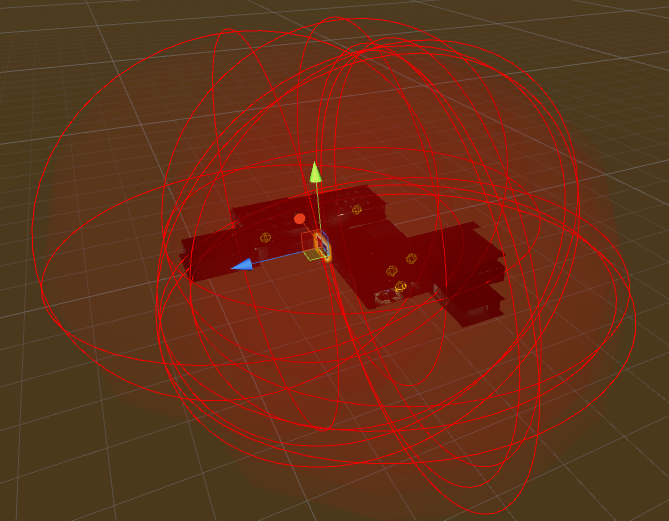


 broken umbra
hey guys, does anyone know whats going on with this? its looks fine in blender, but when i import it as an fbx to unity is screws up. Im not sure if its the uvs, or something to do with the geometry.
rough sleet
@broken umbra Try recalculating normals in Blender.
 queen crow
Would anyone happen to know why an animation I'm using for an emote override is ending way before it's supposed to? The animation as a whole is less than 10 seconds
Yet it ends around 3/4 of the way through it
It looks perfect in unity, but once it's in vrchat it screws up bad
broken umbra
@rough sleet Ledgend, Its still a little wonky, but much, much better!
rough sleet
It looks like the mesh has some errors.
The normals were just one of the issues.
You'll need to take a look at it in Blender and see if you can fix it.
broken umbra
Ya, I suspect some wierd problems with the geometry. but nothing a little editing cant fix.
rough sleet
Probably, worse case you'd have to retopology it.
Also if that's using separate materials for each coloured part you should look into baking a single texture for it.
exotic tree
@livid raft You need to attach an audio source game object to your avatar. On the 8th line in the inspector you'll find a checkbox to make it loop. Note that you'll need to delete the ONSP Audio Source (Script) at the bottom of the audio source's settings in the inspector, and you need to change the volume rolloff under the 3d sound settings to linear. Be respectful of other players and decrease the volume to something much lower than 1 and the max distance to something reasonable.
livid raft
@exotic tree Ah I see, cheers
queen crow
So I'm making a particle effect for the first time, and it's an explosive kind of thing
It's way too big right now, does any one know how to reduce the size of the explosion?
tiny forge
nice tool to make night skies (skyboxes) http://alexcpeterson.com/spacescape/
 verbal tusk
Is it possible to create scripts, to modify how the player moves?
so you can go fly, jump further, or just zwoosh in some silly way
livid raft
What would be a reccomended volume for a avatar sound? keep getting some people saying my sound is only too loud when I'm practically on top of them while others say its constant with no changes over distance
ruby cliff
@verbal tusk you cant make scripts for your avatars, you can only able to use some allowed script as far as I know
@livid raft I would recommend setting the 3D sounds range to like 5m maximum and I usually use 30% volume, and the volume is never on max when someone to close, beacuse its to loud for you then xd
livid raft
I have it at 30m range but 0.089 volume and it seems like the sound isn't dropping off for some people yet fine for others
marsh narwhal
Hi ! How do you move a bone with his mesh in blender ?
(Like wanna change position and rotate something with his bones)
ruby cliff
In edit mode I think (Im not sure, Im not experienced with blender to much yet
marsh narwhal
Yeah but can't select bones + mesh ;-;
ruby cliff
you could select them from the hierarchy
marsh narwhal
don't works D: Gonne try something
ruby cliff
Well, I can't help. This his how far my Blender experience goes xd