#Kellar troubles
1 messages · Page 1 of 1 (latest)
 digital bay
You probably want to add displacement/tessellation then,
all I saw in your image is you trying to generate another normal map from your height map and combine it with the original normal map.
Let's keep it here for now, I won't be around all evening
 digital bay
That's not what normal maps do. You can increase their intensity to get more intense "fake geometry detail", but you can't give them depth.
You could use POM, Nanite tessellation, or BumpOffset to get something approaching "actual" depth.
All of those would take a height map as input.
 ionic ibex
I downloaded a height map
for the texture
The height is what adds the ''height'' to the bumps
digital bay
The POM/ParallaxOcclusionMapping node would go into the UV input on your texture samplers.
BumpOffset as well.
Nanite Tessellation would need to be enabled and then go into the Displacement output in your material attributes.
 digital bay
It's not working, since you're just trying to create a normal map out of the height map.
Like I said, you will need to use either POM/BumpOffset/Nanite tessellation to get the effect you're after.
ionic ibex
I really appreciate your help, but I really dont know what to make of tha
I gotta go, maybe if u have time later, u could show me. Id pay u for ur time
digital bay
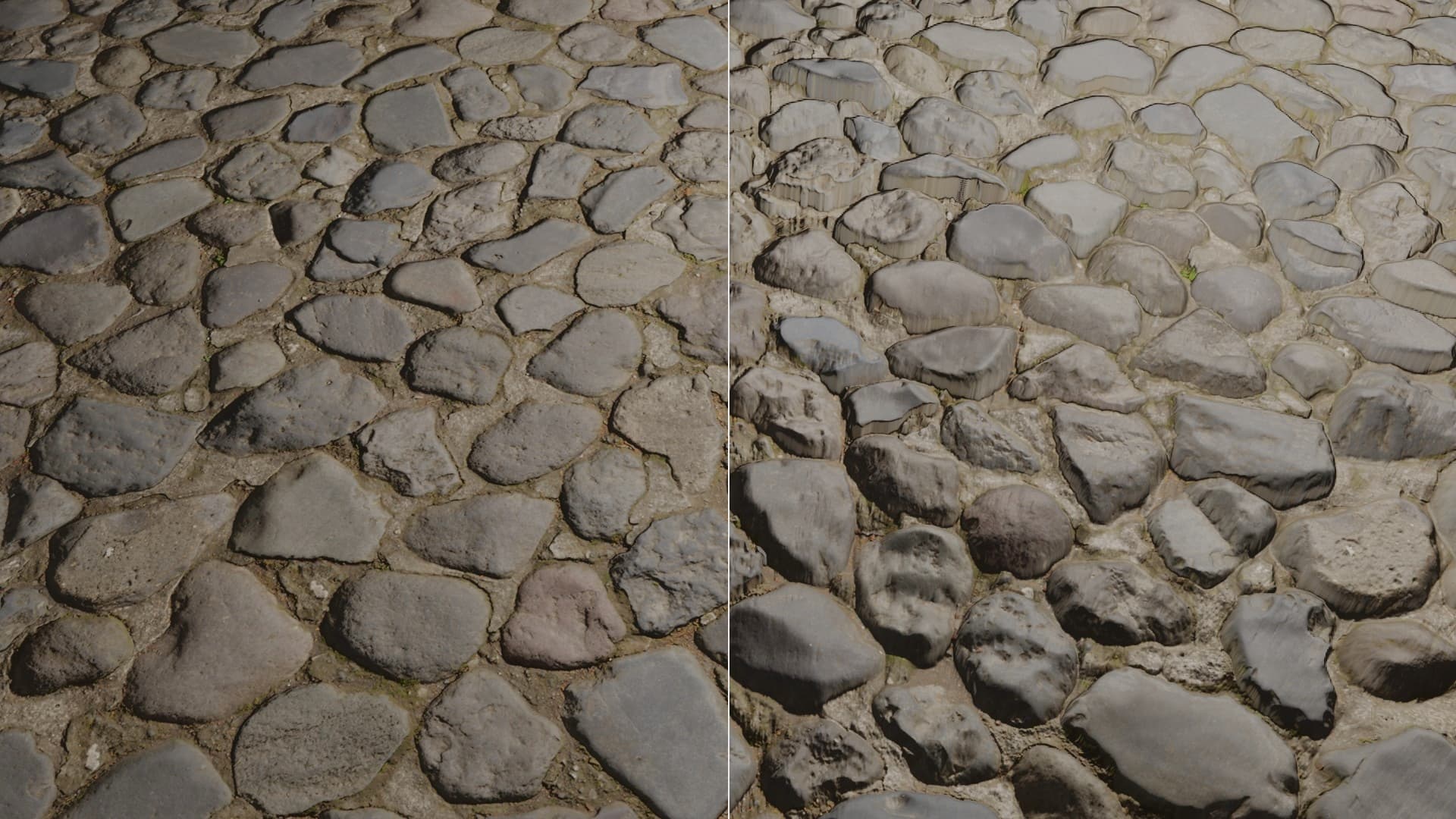
Example, is that what you are after:
https://blenderartists.org/uploads/default/original/4X/2/f/8/2f8f2cc82523fd72b7449f522bc1f8e81c85ce09.jpeg

Left is just with a normal map, right is with POM.
ionic ibex
yep, but I have that already. I just dont know how to increase reduce the texture. Also I probably set it up badly
digital bay
In your graph you showed you DON'T have it, you just have a normal map there.
digital bay
In both

 digital bay
In both you're just using a normal map, if what you're trying to get is actual depth, then that's the wrong approach.
You can increase the normal map intensity (look up the FlattenNormal node), but you won't get depth.
ionic ibex
Problem is I have to put down 8 panels and then boolean cut out the overflow because I cant resize them and keep the alignment
And I cant be doing that on the entire map
digital bay
Okay, so you maybe just want to blend a second normal map on top of it and don't need depth?
That's why I said in the first place to just generate the normal map FROM the height map outside of UE.
Like here for example, and then import as normal map and blend it together like you did. Or with the WA_Blend, if you need to.
Online NormalMap Generator FREE! Create a Normalmap directly inside your browser! No Uploads required, completely client-based
ionic ibex
But I dont think this is gonna work, Im nowhere near your understanding of textures. If you have time some day I could share my screen and its better. Again, Id pay u if u can help me
digital bay
ionic ibex
Problem is I have to put down 8 panels and then boolean cut out the overflow bec...
I'm sorry, I don't understand that part ☺️
digital bay
ionic ibex
But I dont think this is gonna work, Im nowhere near your understanding of textu...
Sorry, I don't really have the time beyond this.
It's really just basic material stuff, watching a few tutorials, like Ben Cloward/TharleVFX would surely help you out a lot to get at least the basic gist of things.