#ue5-engine-source
1 messages · Page 4 of 1
 blissful beacon
 torpid valve
i still don't get you problem
coordinates for Actor in World is just FTransform
and FTransform is now douible
so idk ?
blissful beacon
Try. Un simplefloat now, you need rebase origine for large distance
blissful beacon
Ue5
blissful beacon
Look commentary in code sources
 pale tiger
hm, no noticable difference in performance seems counterintuitive for me, we will see  backward compatibility seems like a nightmare
torpid valve

yeah sure
you probabaly found some old first attempt at large world using hacks
like hierarhical coordinate system
torpid valve
pale tiger
hm, no noticable difference in performance seems counterintuitive for me, we wil...
it's true, Star Citzen Lost maybe like 5% of performance
and that was like 6 yeara ago
for modern PC/consoles
it's meaningless
pale tiger
i see, that's good to hear
torpid valve
most of the performance is lost on rendering
 zealous yarrow
Don't forget that doubles are in some cases actually quicker
So there shouldn't be any noticeable difference on any "modern" cpu from last decade
 gilded pecan
UE5 source code question: Does Actor Palette do anything under the hood other than copy an asset's reference from one level to another? I've messed around with it but it doesn't seem to copy asset properties/details.
https://github.com/EpicGames/UnrealEngine/blob/ue5-main/Engine/Plugins/Experimental/ActorPalette/Source/ActorPalette/Private/ActorPaletteModule.cpp - doesn't seem like they've done anything to it in the last year
torpid valve
I don't think it will be developed
that's my pure speculation
but it seems it serves similiar purpose as level instances
 static copper
WorldBuilding plugin appears to be some kind of template for showing how world parition/level streaming works
interesting?
Not sure what the idea here is
probably not seeing the whole story in the public main
 blissful rampart
If anyone has dug into the ue5 source. Does it look like Displacement in materials can be flicked back on or is completely removed? Just odd the option is there but it's not turned on.
 covert cove
I think it's a limitation for meshes that use nanite
If your mesh does not use nanite then displacement map should work as it used to
 scenic mauve
I'm getting a build error on projects that use Nanite with ue5-main branch. I was able to compile the engine from source just now, but when I compile an existing project or even make a new one using the third person template and enable Nanite on any single mesh it hits this break point.
File: Engine\Source\Runtime\Renderer\Private\Nanite\NaniteDrawList.cpp
Line: 497
ensure(FParallelMeshDrawCommandPass::IsOnDemandShaderCreationEnabled());
Any help would be much appreciated.
Default Mannequin animation broken in standalone mode as a result after enabling Nanite on one of the cubes.

 void charm
Does anyone else have an issue compiling UE5 from source where I get a ton of errors from the UnrealFileServer including one that I don't see why it should be erroring ("Cannot open include file: 'ShaderCompiler.h': No such file or directory" when it is indeed in the project's files/directory?
zealous yarrow
Ignore errors from UnrealFileServer, it's broken, it's a separate program
UE5 should still build fine
void charm
Ah, ok. I usually just clicked "Build Solution" which ends up erroring out at the file server. Should I only worry about building UE5 alone for future reference? (Build Selection [Ctrl + B] vs Build Solution [Ctrl + Shift + B])
Sorry if noob question, been programming for years but only just starting to learn/explore unreal engine which is pretty much my first project involving a compiled language.
zealous yarrow
Even if it did throw errors it still compiled the engine if there were no errors in the engine itself, it just skipped over the file server since it failed
void charm
Good to know, thank you for your help. I see what you mean now. (I only saw the error window after it was done, didn't switch back to the build output which says it still compiled everything else) My apologies for the trouble/noobness
zealous yarrow
No worries 👍
 ruby pulsar
Gas packs and gats
 cursive finch
Hey guys, what's the expected branch to do a PR? Is it the EAP ok?
cursive finch
roger that
 umbral kite
Hello, has anyone else had trouble getting the houdini plugin to work in UE5?
umbral kite
Don't worry I got it 🙂
scenic mauve
Am I really the only one still getting errors with Nanite? I'm running a ue5-main compile as of yesterday and no animations work in standalone, everything else seems fine.
I guess I'll just keep recompiling every few days to see if the error goes away.
 crimson granite
Missing import: UnrealEditor-Party.dll Missing import: UnrealEditor-TimeSynth.dll
crimson granite
Looks like UE5 is not searching the proper /Binary/Runtime/ folders for them...?
blissful rampart
covert cove
If your mesh does not use nanite then displacement map should work as it used to
How would it even know I have a mesh with nanite? The option is fully disabled.
Even when it's not attached to any landscapes.
it's just a material.
btw im talking about the "Node" in a material blueprint.
Not a specific displacement texture.
 solid cypress
Looks like lumin is removed.
https://github.com/EpicGames/UnrealEngine/commit/d64b146cb286a51cfaf2aa197532001518d34213
I like it and hope that all the future platforms will be done in the newer modular platform way.
 ashen kiln
Good for reducing complexity of source code. Also like 10 different plugins about lumin(magic leap) were enabled by default on new projects.
 cedar tree
for a minute I read "LUMEN REMOVED?!?!"
"oh god it's the sparse voxel conetracing story again"
torpid valve
make VR and mobile off by default -;-
ashen kiln
SteamVR launching automatically & freezing the editor for a brief moment is the worst thing.
ashen kiln
I think tech is still not there yet for that, maybe wait for Unreal 6? 😄 😄
ashen kiln
lol
 shell mason
Hey,
I was wondering how big (size GB) a built unreal engine 5 early-access-2 source build is after setup, generate and building in visual studio?
solid cypress
Isn’t it being deprecated? I heard they are deprecating all VRs in favor of OpenXR
Sounds like annoying oculus store app which opened everytime on editor launch since I installed it
 hallow panther
anyone finding loading a project with ray tracing enabled to be near impossible?
do you need ray tracing to use lumen?
does it help?
i wanna experiment with lighting but ray tracing literally crashes my pc
yeah lol, it's annoying because I have to open a project on this ue5 course i'm doing and the project already has ray tracing enabled
basically makes the course inaccessible to me unless I can disable ray tracing from outside the project

see now i'm even more confused
bc raytracing wasn't even enabled yet the project wouldn't load
ashen kiln
solid cypress
Isn’t it being deprecated? I heard they are deprecating all VRs in favor of Open...
that's impossible lol, it means lots of VR projects being broken in Unreal 5.
but the sad thing is, steam vr plugin is developed by an outsource company hired by Valve, and it's not getting much love from what I see.
solid cypress
ashen kiln
but the sad thing is, steam vr plugin is developed by an outsource company hired...

reddit
164 votes and 49 comments so far on Reddit
ashen kiln
Interesting decision. I think I should be happy as a HP Reverb G2 owner 🙂
solid cypress
4.27 notes have additional info and also converted VR template to OpenXR
 upbeat sigil
looks like UE's going to be able to infer your saved NN weights! Even has editor types for weights.
https://github.com/EpicGames/UnrealEngine/tree/ue5-main/Engine/Plugins/Experimental/NeuralNetworkInference/
upbeat sigil
u asking for nn in general or specifically how
torpid valve
there are actually many uses
ie.
Ambient generated dialog for NPC
animations
terrain generation
physics
there was quite a bit of reasearch into ML physics
upbeat sigil
for example I've got GPT3 conversations in my game, using an open source GPT3 model.
all offline
that's ue4 though
 primal night
Is Unreal Engine a game engine now or slowly becoming a cybernetic organism
torpid valve
Medium
Read writing about Machine Learning in Embark Studios. Embark Studios is a Stockholm-based games studio, on a mission to blur the line between playing and making. https://embark.games/.
upbeat sigil
the savedmodel weights end up being around 500mb
that's the sweetspot imo
@lofty idol

ashen kiln
If anyone here wants to try AMD FSR on ue5-main (or possibly early access branch), here is the required changes https://github.com/dyanikoglu/UnrealEngine/commit/2b6e5bbaebd41f8b7e93361be9621320d61f497e
and docs are here: https://github.com/GPUOpenSoftware/UnrealEngine/blob/FidelityFX_FSR1-4.26/docs/FSR1-UE4-Documentation.pdf
 lofty idol
how the main source code is different from early access ?
ashen kiln
A lot
lofty idol
Like?
torpid valve
alooooot
lofty idol
Like?
ashen kiln
Like upgrading 4.21 to 4.22
lofty idol
Hello, if I build the engine from the source, the "Engine" folder has around 100+ GB. What can be safely deleted so I can pack it into zip and unzip somewhere else? Probably the Intermediate folder, but it's not enough. Same folder from Epic Games has around 30 GB. Thank you
 ashen kiln
Do you have virtual lightmaps enabled?
crimson granite
Yes
ashen kiln
Try disabling it
crimson granite
I can't, the editor wont launch
crimson granite
How do I make those changes without the editor opening. One of the ini files propbably?
ashen kiln
hmm
sec
[/Script/WindowsTargetPlatform.WindowsTargetSettings]
DefaultGraphicsRHI=DefaultGraphicsRHI_DX12
-TargetedRHIs=PCD3D_SM5
+TargetedRHIs=PCD3D_SM6
put this in your DefaultEngine.ini
crimson granite
interesting
Now I get a new error that keeps it from launching
Fatal Error: Pure virtual function being called
Still on the same line as before
Guessing VirtualTexture->IsCompiling() is pure virtual somehow?
 slender scarab
Anyone know how to add a platform extension to a binary build? For some reason UE5 is refusing to pickup the platform extension I've created, it works in a source build though.
 quaint kindle
Hello, I get a source code where World Partition has been fix for traveling or loadlevel https://github.com/EpicGames/UnrealEngine/tree/9d9acb6ee807d98b20e01171edcb9150a458e639
 reef agate
if I build UE5 myself can I get more bleeding edge features/fixes? Or is everything currently on GitHub up to the same version as the Epic Games Launcher one?
 south wind
reef agate
if I build UE5 myself can I get more bleeding edge features/fixes? Or is everyth...
south wind
reef agate
if I build UE5 myself can I get more bleeding edge features/fixes? Or is everyth...
if by 'fixes' you mean 'breakages' and if by 'bleeding edge' you mean 'probably will crash' then yes compile ue5-main. It's very buggy and only intended to be tested so the devs can get feedback and bug reports. You should not develop on it
reef agate
south wind
if by 'fixes' you mean 'breakages' and if by 'bleeding edge' you mean 'probably ...
makes sense. thanks for the info
south wind
reef agate
makes sense. thanks for the info
no worries, imo Lumen (just to pick one feature) is more functional on the EA2 than UE5-main, some people reporting totally black maps.
reef agate
better Lumen is actually what I wanted most. I have a bunch of content (specifically game levels) not made for it and they seem to be unusable without a huge effort of splitting meshes (or whatever) to something that Lumen will like
south wind
reef agate
better Lumen is actually what I wanted most. I have a bunch of content (specific...
Yeah, I've heard a few people mention this issue - especially as combining meshes to reduce draw calls was encouraged in UE4. There's a guy on YT who's been doing that using the editor (instead of editing in blender or some other software). I'm not sure there's a way around the issue, Lumen will always struggle with large meshes and they're trying to push devs to split their levels up into smaller meshes because they also play better with nanite
reef agate
to a non engine dev it seems like automatically splitting meshes to play nice with Lumen would be something that a team like the UE5 one could achieve, but I suppose it's actually a very difficult problem?
that or it's not a priority (not sure about the Lumen roadmap), though I would imagine it'd be a fairly a common issue
south wind
reef agate
to a non engine dev it seems like automatically splitting meshes to play nice wi...
You mean like having Unreal automatically split meshes up for you if it thought they were too big?
reef agate
yeah or just manually giving it at a mesh to auto-split for Lumen
I mean, there are some insane mesh processing algorithms, perhaps it would be possible
for a best-effort / heuristics-using / configurable kind of algo, ofc
south wind
reef agate
yeah or just manually giving it at a mesh to auto-split for Lumen
I think that would cause all sorts of issues with how textures / objects are streamed / displayed if unreal was doing it under the hood. But I don't see why someone couldn't make a separate tool that did it for FBX / OBJ files
south wind
reef agate
better Lumen is actually what I wanted most. I have a bunch of content (specific...
Are we talking about buildings in your game? Are they the complex meshes?
reef agate
some meshes are huge containing all the main geometry like buildings & the floor
south wind
Because lumen doesn't mind complex meshes generally, it just doesn't like single meshes with a lot of internal voids
reef agate
south wind
I think that would cause all sorts of issues with how textures / objects are str...
mhm I could imagine ie. Meshroom having tools for something like this
south wind
reef agate
mhm I could imagine ie. Meshroom having tools for something like this
yeah, agreed
reef agate
south wind
Because lumen doesn't mind complex meshes generally, it just doesn't like single...
so like holes?
or non convex geo perhaps
south wind
reef agate
so like holes?
Yeah, like internal spaces, like rooms inside of a building that's all one mesh
south wind
reef agate
or non convex geo perhaps
That's it
south wind
It's best practice to make each straight wall section an individual mesh, each floor section a single mesh etc. But you might get away with the external walls being one mesh, then everything inside being individual meshes, not perfect though
I'm lucky in that I was deving a game that would eventually have each building comped into a single mesh, but I was making tools that built them from smaller meshes - so I had all the buildings made from small meshes already
I had a map that I would just use to make buildings from small parts, then once they were finished I'd merge them into single meshes and drop them in the main game map
reef agate
@south wind thanks for the insights
south wind
reef agate
<@!219473954719399936> thanks for the insights
good luck fixing your meshes
reef agate
Thanks. I might look into a semi automated way with Meshlab/etc. Will share the process if I get anywhere.
in #lumen though, this got kind of off-topic
 strong agate
south wind
I'm lucky in that I was deving a game that would eventually have each building c...
strong agate
south wind
I'm lucky in that I was deving a game that would eventually have each building c...
Just for curiosity, was there a reason for not opting to just use HLODs? Since you mentioned you made a tool from scratch to do that...
south wind
strong agate
Just for curiosity, was there a reason for not opting to just use HLODs? Since y...
I have used HLODs in places, but the game I'm working on doesn't have long view distances, so there's not much need for them. But now all the geo for buildings will be nanite, so that's made HLOD redundant for me.
The tools I was talking about were for quick building construction, as I had to build out a whole town with each building being unique. So I made spline based tools that placed modular meshes quickly, to avoid hand placing them. Here's an example (there's more elsewhere on my channel).
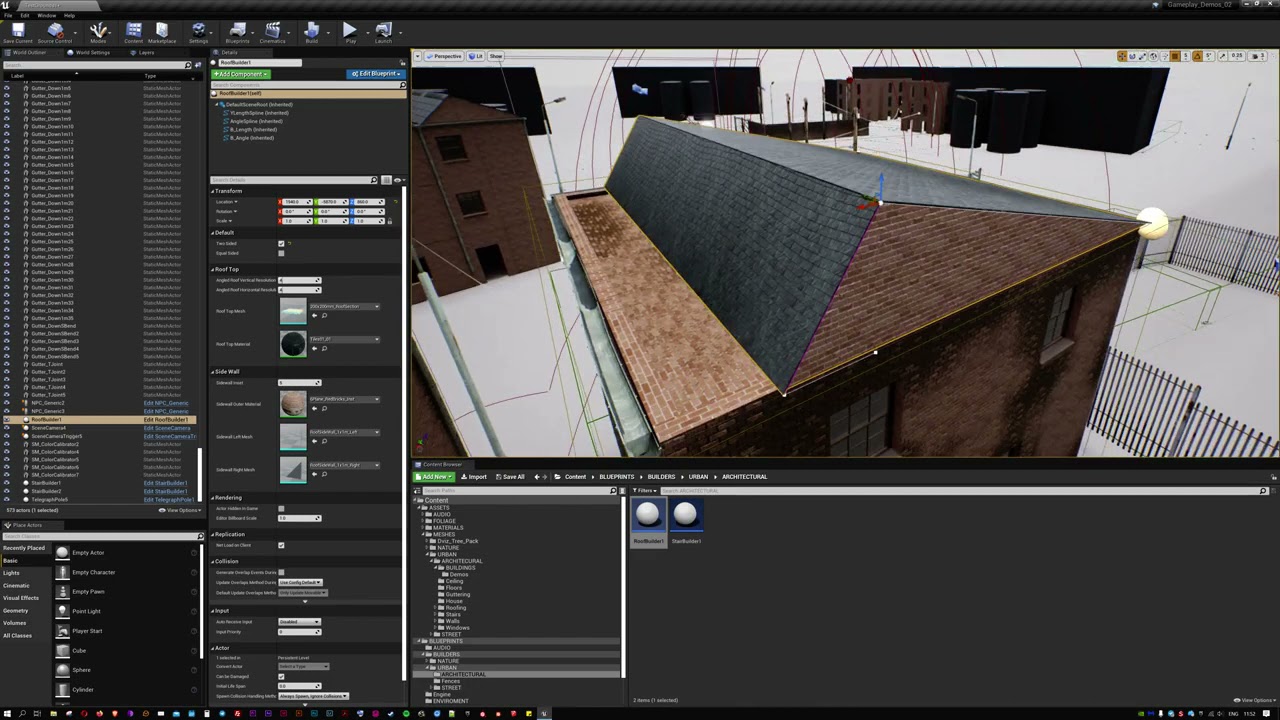
I have a lot of roofs to build out for my current project and found placing endless angled modular parts a chore + they wouldn't lead to much variety. In response I've developed this roof builder blueprint that places static meshes based on a set of splines that are easy to manipulate. It allows for the choice of materials and a simple set of ro...
south wind
strong agate
Just for curiosity, was there a reason for not opting to just use HLODs? Since y...
Here's some of those buildings working with Lumen on one of the construction maps I was talking about. Having everything built from modular meshes paid off luckily

Having spent months going back and forth on developing a new type of AI follow cam (see previous videos) I decided to ditch it and go for a more established mode of 3PP control system. This is the first iteration after a day's work. Orientation is controlled by the right stick and motion by the left. All movement is driven by the root motion ani...
strong agate
south wind
Here's some of those buildings working with Lumen on one of the construction map...
Ahh I know your channel 😛. You did a really great job with your camera, it's pretty hard to make 3rd person to work on such small interiors
south wind
strong agate
Ahh I know your channel 😛. You did a really great job with your camera, it's pr...
Thanks! Yeah I've been playing around with that for months, ditched it all recently and have gone with a Last Of Us style system, much more simple and robust.
strong agate
Do you care of detailing your Lumen settings in your video a little bit? Is it in Epic scalability? What's the quality in the post process?
south wind
strong agate
Do you care of detailing your Lumen settings in your video a little bit? Is it i...
This is just default Lumen settings, I am using hardware ray tracing (not software) and that seems to make smaller details more well defined and gets rid of a lot of off-camera glitches
 south wind
strong agate
Do you care of detailing your Lumen settings in your video a little bit? Is it i...
south wind
strong agate
Do you care of detailing your Lumen settings in your video a little bit? Is it i...
Just Epic scalability yeah, whatever the engine default is
 long fossil
Can anyone confirm if UE5 main branch is buildable now?
I want to try out few things and that is there in UE5-main branch
static copper
long fossil
Can anyone confirm if UE5 main branch is buildable now?
I want to try out few t...
3d9deba23a50892d108cf6996f05f8640a04d45a is buildable for me
keep in mind LWC is turned on
long fossil
what is LWC? @static copper
static copper
large world coordinates (world positions expressed in doubles)
long fossil
ohh i see, and thanks brother for the commit-id
torpid valve
reef agate
better Lumen is actually what I wanted most. I have a bunch of content (specific...
it is better
but doesnt work on radeon [;
ashen kiln
static copper
large world coordinates (world positions expressed in doubles)
we've switched our engine to latest commit by today, and seems like LWC didn't affect us so far. I was going to disable it from UBT, but they wrote a comment something similar to "LWC disabled is not supported" on there.

if anyone fancy with trying it out anyways, set bLWCDisabled to true in UBT's TargetRules.cs
torpid valve
the fact that is is called disabled instead of enabled
suggest it's going to be default
static copper
I definitely have some questions about when you can implicitly just use a float etc
static copper
I did (float) a for some ambiguous function calls
not sure why they overload some and template others
unless I'm an idiot and forget how templates get types through the argument list
like, if we made a templated version of FMath::FInterpTo(double/float) instead of overloaded could we change templates based on the arguments called instead of adding a FMath::FInterpTo<double>(thing)
templates are still a mystery to me
 ember finch
Ye that's already how template deduction works
But sometimes there are ambiguities
Eg template<typename T> DoSmthg(T a, T b)
Called with a float and a double will be ambiguous
But DoSmthg(floata, floatb) will work just fine
static copper
oh, I guess the end resulting code of a template would still work like permutations of float/double so ambiguities still happen, right?

thanks for the explanation
ember finch
LWC being enabled by default is very interesting
Didn't realize it made so little of a difference on today's hardware
zealous yarrow
I wouldn't expect it to make any difference, some operations are quicker on doubles, some are slower
 fleet sapphire
why UnrealEngine\Engine\Source\Programs\UnrealBuildTool\UnrealBuildTool.csproj: Error MSB4057 : “Programs\Datasmith\DatasmithFacadeCSharp”?
torpid valve
ember finch
Didn't realize it made so little of a difference on today's hardware
there was little difference 5 years ago
Im not sure it is even measruable today in say normal conditions (;
solid cypress
ashen kiln
we've switched our engine to latest commit by today, and seems like LWC didn't a...
I think the reason for this comment is that the LWC is now on by default and nobody is testing with LWC off (assuming Fortnite with LWC off is just a temporary state), so disabling the LWC can result in errors which they won't work on in the future.
ashen kiln
torpid valve
Im not sure it is even measruable today in say normal conditions (;
btw double/float still makes huge performance difference in image processing related topics, not sure why it shouldn't affect a game engine.
 limpid light
Most games that have large worlds already need to deal with the floating point issues. A world origin shift is common, or store an additional float that offsets a tile at a time.
So in some ways, games are already paying a perf cost in order to solve float precision jitter problems.
ashen kiln
Nothing, lol.
torpid valve
ashen kiln
btw double/float still makes huge performance difference in image processing rel...
You are talking about some extremly optimized cache friednly code i guess
something that game rarerly is
ashen kiln
I mean, double is slower.
torpid valve
it's not measruable in game
it doesn't matter
what is the point of arguging about game perfroamce problem using doubles if you most likely not going to have that problem ?
ashen kiln
If your game relies on lots of additional vector calculations, it'll matter.
but that's for your own project's code, probably won't change anything for Unreal's internal performance like you said.
torpid valve
ashen kiln
If your game relies on lots of additional vector calculations, it'll matter.
doubtfull
you will probabaly more locked on rendering performance
unless someone show me raw data about it in game
ashen kiln
It depends on project
torpid valve
Star Citizen migrated to doubles long time ago and it changed exactly nothing
ashen kiln
and the gpu you have.
ashen kiln
If you have bad gpu, you'll have cpu bottleneck
torpid valve
you pretty much always are, except dedicated server
yeah
and that bottleneck will most likely still be from CPU creating commands for GPU
nothing to do with doubles really
ashen kiln
I still believe it'll affect performance if you're doing lots of stuff with position vectors in tick callbacks.
From what I see, everything you get from engine's internal vectors about position data is now based on doubles, as expected. Doing heavy calculations with those values will surely affect your cpu time.
and again, this depends on type of the project.
ashen kiln
Hmm, that also depends on the project lol. There are surely situations where you need to use tick.
but of course it's always best to not use it, event based approaches are always better.
 earnest bronze
do you participate to the gamejam
ashen kiln
Nah, too busy with my current project :/
torpid valve
there is not ;s
like I don't see any difference ;
none that would worth invesetigating anyway
zealous yarrow
@ashen kiln
Not true, test it yourself and do some research...
Modern hardware implements float and double operations natively so they are the exact same speed.
Doubles can be slightly quicker in some operations due to memory alignment
Vectorization plays a big role, division is typically slower on doubles.
There will only be some small difference if you are bandwidth bound in which case doubles will be very slightly slower but that will only make a difference if you are doing operations on millions of values every frame
So in reality it will make absolutely no difference
ashen kiln
Can you point me to a test result/paper or anything similar where it's proven double can perform better than float in C++? @zealous yarrow
I'd like to learn if that's possible in real world applications.
zealous yarrow
Well read what I said and you will realize I never said doubles are quicker, what I said is considering what's actually going on on hardware and software level it will make no difference
Please show me where did I claim that doubles are quicker in real world situations...
ashen kiln
"Doubles can be slightly quicker in some operations due to memory alignment " ?
zealous yarrow
Did I say real world?
zealous yarrow
zealous yarrow
<@245783099181498369>
Not true, test it yourself and do some research...
Mode...
Read my explanation
ashen kiln
Then not sure how this means i should "do some research", you're basically being evasive here now.
I asked a source to do that "some research", but instead you're telling me you never claimed doubles perform better.
Not sure what's your purpose..
zealous yarrow
Any alignment benefits are negated by larger memory footprint which if you read the last part of my explanation you'll see that I never claimed that doubles are quicker in real world situations, I explained exactly what's happening and you are trying to twist it to fit your narrative of doubles instantly being slower
By "do some research" I meant that you should read about what's happening on the hardware level and software in terms of what the compiler actually does to understand that it makes absolutely no difference
Well the biggest difference where doubles can be slower is with vectorization, you can fit more doubles into a single operation than floats, meaning if you are working with an extremely large data set doubles will be slower, I never claimed otherwise
I haven't tested the performance of floats vs doubles directly, but I know when I experimented with doubles for a flight sim I couldn't see any difference
I'm curious if the alignment actually has any real world benefit since it should be negated by the larger size of doubles
torpid valve
im more curious if people worrying about less doubles fiting into cache (and less being vectorized) are really doing some hardcore sims where you simulate every possible condition and your code if perfectly vecotrizable
it's pure academic discussion
no AAA game will lose perforamce on using doubles
zealous yarrow
Did a small test
    TArray<float> TestArray;
        //TArray<double> TestArray;
    TestArray.AddZeroed(5000000);

    for(int64 a = 0; a < TestArray.Num(); a++)
    {
        TestArray[a] += FMath::FRand() * 500.0;
    }

    {
        //measuring performance from here
        int64 b = TestArray.Num() - 1;
        for(int64 a = 0; a < TestArray.Num(); a++)
        {
            TestArray[a] += TestArray[b - a];
        }
    }
5M elements
float addition = 5.33ms
float division = 5.1ms
double division = 6.6ms
double addition = 6.4ms
torpid valve
zealous yarrow
Did a small test
```cpp
TArray<float> TestArray;
//TArray<double> Te...
yeah, and that is perfectly aligned benchmark (;
zealous yarrow
torpid valve
yeah, and that is perfectly aligned benchmark (;
it is but I think it proves the difference is not that massive as people make it out to be
torpid valve
over internet
everybody will now think it is massive difference
it's about 21%
but in reality you never get this kind of cache coherency
zealous yarrow
Slightly different test
    TArray<float> TestArray;
    //TArray<double> TestArray;
    TestArray.AddZeroed(500000);

    for(int64 a = 0; a < TestArray.Num(); a++)
    {
        TestArray[a] += FMath::FRandRange(1.0f, 500.0f);
    }

    float ToAdd = FMath::FRandRange(1.0f, 500.0f);
    //  double ToAdd = FMath::FRandRange(1.0f, 500.0f);
    {
        //measuring performance from here
        for(int64 a = 0; a < TestArray.Num(); a++)
        {
            TestArray[a] += ToAdd;
        }
    }
500k elements
float addition = 0.44ms
float division = 0.43ms
double addition = 0.35ms
double division = 0.31ms
doubles end up beating floats here by around 25%
 slim violet
Ok thanks
Especially for the commit ID. I had it working last week before I reformatted my machine
Tried last night and have been fighting it. Couldn't remember the commit ID I was on when it was working
zealous yarrow
torpid valve
but in reality you never get this kind of cache coherency
the 2nd test but 5m elements
double addition = 3.58ms
float addition = 4.33
20% difference
So yeah I don't think it is really that black and white as people make it out to be, doubles are not generally slower
This test might not represent 100% real world scenarios but I think it proves the point
would be curious to see the same test ran on different CPUs
crimson granite
Not sure if this is relevant to the conversation, but a year or so ago we had a team add double-precision coordinates to UE4. We learned that if you vectorize the doubles you get performance improvements, just as the standard UE4 engine does with floats.
You need a CPU that supports AVX512 instruction sets though, which isn't too unreasonable
static copper
is anything we do with positions heavily vectorized anyways in the engine internals?
crimson granite
static copper
is anything we do with positions heavily vectorized anyways in the engine intern...
If you're running on a platform that supports it, then yes
crimson granite
iirc only desktop platforms support it
static copper
I guess I'm thinking of moving actors and the like and less so the actual fvector implementation
which isn't really low level I suppose
crimson granite
Moving actors involves FVector...
And thus would use intrinsics on desktop platforms
static copper
I guess my point is: where does anything get vectorized when we have thinks tick pretty much randomly and store data all over the place
I guess animation stuff does?
zealous yarrow
the functions you call on the vectors, transforms, quats, rotators are vectorized
crimson granite
When we talk about vectorization in this context, we're taking about UE4 being clever with how it uses the CPU. Using non-floating-point registers for floating-point operations, and calling AVX instructions.
static copper
my assumption that might make me seem dumb: I thought vectorization required you to do a data operation multiple times
I might be mixing it up with heavy simd stuff?
crimson granite
In computer software, in compiler theory, an intrinsic function (or built-in function) is a function (subroutine) available for use in a given programming language whose implementation is handled specially by the compiler. Typically, it may substitute a sequence of automatically generated instructions for the original function call, similar to a...
zealous yarrow
But yeah in general I think the tests I showed and your experience proves that using doubles doesn't instantly result in worse performance like it did 10 years ago
crimson granite
zealous yarrow
But yeah in general I think the tests I showed and your experience proves that u...
Agreed. This is why I'm dying for UE5 to move to doubles
static copper
I wonder how much of your average actor is position data anways
Can't be that much
I definitely question making it the default for everyone but if has such a small downside it seems fair
crimson granite
Didn't realize they killed off AVX512, ouch... thanks Intel
zealous yarrow
Intel really is trying to make themselves real difficult to like
static copper
solution: make server cpus trendy
 stiff heath
crimson granite
5950x was close enough in performance to my 10980xe
stiff heath
crimson granite
5950x was close enough in performance to my 10980xe
What do you mean by "close enough"? 10980xe is 33842 score while 5950x is 46109 score: https://www.cpubenchmark.net/high_end_cpus.html

PassMark Software - CPU Benchmarks - Over 1 million CPUs and 1,000 models benchmarked and compared in graph form, updated daily!
crimson granite
Pretty sure the 5950x slightly underperforms in real-world gaming senarios
stiff heath
That's +36% performance at -25% price.
crimson granite
Either way, happy with the transition
stiff heath
crimson granite
Pretty sure the 5950x slightly underperforms in real-world gaming senarios
Who cares about gaming scenarios. We compile C++ here.
stiff heath
I remember older days when nvidia sucked at double math, while amd/ati (not sure if they were bought already by that time) were great. The problem was... Nobody was actually calculating doubles on gpus 😄
crimson granite
didn't think you could do doubles on GPUs nor would you ever need to
All you need is doubles for UE coordinates imo
The Renderer could stay in floats provided it renders camera-relative
zealous yarrow
☝️
Double for rendering is not important, it is converting to local space anyways
stiff heath
Actually, unreal is a joke. They calculate time in floats. 😄
zealous yarrow
crimson granite
5950x was close enough in performance to my 10980xe
I switched to 5950x from i9 9900k recently, it's a beast of a CPU 😅
crimson granite
stiff heath
Actually, unreal is a joke. They calculate **time** in floats. 😄
Literally this was the first thing I changed in the source LOL
zealous yarrow
crimson granite
Idk why but I remember UE4's renderer *not* being camera relative
I don't think it was but they are doing in now for LWC
Remember seeing commits about it
stiff heath
calculating time in doubles is almost as stupid as calculating it in floats. I'm talking about UWorld::TimeSeconds.
crimson granite
zealous yarrow
I don't think it was but they are doing in now for LWC
Remember seeing commits a...
Do you remember where those were? I haven't seen any news on the LWC branch
zealous yarrow
Hmm can't remember tbh, I remember seeing commit about it on UE5 main right after first EA released
stiff heath
And actually there isn't any fundamental reason why BPs could not be taught to understand doubles.
Yaaay! nanoseconds ftw!
crimson granite
You can turn on doubles for BPs in the UE4 source. We did it at one point. Requires mangling with the UBT
zealous yarrow
yeah they implemented FDoubleProperty or whatever it is called long ago but was never actually "enabled" for BPs
crimson granite
Yup
Honestly I think they should just replace floats with doubles in BP for UE5
Give the people what they want: higher precision
stiff heath
That what's my point is. Just store time as a huge integer number. Number of CPU ticks or nanoseconds or whatever.
UE had at least two opportunities to throw away legacy (UE3-> UE4 and UE4->UE5).
Dunno, we made a game (not in UE) that has server worlds running for weeks. I don't want to even count how much float precision would drift their time away from real world.
zealous yarrow
Still disappointed they did nothing about component transform updates in UE5...
easily one of the worst parts of the engine
stiff heath
zealous yarrow
Still disappointed they did nothing about component transform updates in UE5...
You mean, that "all child transforms update immediately when parent moves" thing?
zealous yarrow
yep
stiff heath
Agree, it is just a performance killer.
zealous yarrow
and there are so many better ways to handle it, the way they did it is just the most convenient
stiff heath
I sometimes wish const never existed at all in C++. Okay, I also wish lots of its other "features" didn't exist or at least were consistent with the rest of the language...
stiff heath
static copper
(but I imagine they have their reasons)
They call it encapsulation
 static copper
Kinda wish we had less layers lol
That was my main hope for UE5
I wonder how much faster we could get component transforms if you just deferred their position changes to one thing all at once
slim violet
@lofty idol you mean this one? https://github.com/EpicGames/UnrealEngine/commit/acc8c5f399ca01f6f549108be1fb75381fecbca8
static copper
set ComponentToWorld, UpdateBounds(), RenderStateDirty()
 slim violet
@lofty idolWhat do you mean? You mean like a private discord server or something?
solid cypress
stiff heath
And actually there isn't any fundamental reason why BPs could not be taught to u...
@lofty idol Uhm, even UE5 EA has double support in BP. The type has a bit darker green than float.
 crimson granite
@solid cypress is it on by default?
solid cypress
yes
crimson granite
Wow love to hear that
slim violet
When I start a new project that targets ue5-main, I get it to compile just fine
when I use my existing project, I get these errors:
[8/25] Compile Module.Raevin.4_of_5.cpp
1>C:\src\UE5Main\Engine\Intermediate\Build\Win64\UnrealEditor\Inc\Engine\KismetSystemLibrary.generated.h(38): fatal error C1189: #error: "KismetSystemLibrary.generated.h already included, missing '#pragma once' in KismetSystemLibrary.h"
1> [9/25] Compile Module.Raevin.3_of_5.cpp
1>C:\src\UE5Main\Engine\Source\Runtime\CoreUObject\Public\UObject\CoreOnline.h(5): error C2338: UObject/CoreOnline.h has moved to Online/CoreOnline.h in the CoreOnline module. Please update #includes and module dependencies.
1>C:\src\UE5Main\Engine\Intermediate\Build\Win64\UnrealEditor\Inc\Engine\PlayerState.generated.h(16): fatal error C1189: #error: "PlayerState.generated.h already included, missing '#pragma once' in PlayerState.h"
The coreonline module I've already added as a dependency and I've used notepad++ to find all instances of #include "UObject/CoreOnline.h" and replaced it with the Online/CoreOnline so I don't know why that still is showing up
the pragma once errors are the ones really getting me though
all of my header files have #pragma once at the top of them
both of the offending generated entries listed also have #pragma once listed at the top
fleet sapphire
why UnrealEngine\Engine\Source\Runtime\Engine\Classes\Components\ActorComponent.h(373): Error C3668
: “UActorComponent::GetWorld”:
static copper
solid cypress
<@456226577798135808> Uhm, even UE5 EA has double support in BP. The type has a ...
next time someone needs me to explain what a double is I will say it's just darker green
awesome that it's already in bp
ashen kiln
I can confirm ue5-main compiles just fine, probably issue is on your end @slim violet
slim violet
Just not sure what it could be. The project compiles just fine under ue5-early-access-2
I even did a batch clean on all projects, deleted intermediate / derived data cache, re-ran .\Setup.bat and .\GenerateProjectFiles.bat, then rebuilt development-editor and I am still getting the same error
slim violet
@ashen kilnWhat commit ID are you on in ue5-main?
slim violet
Is there anyway to narrow down where to look for issues based off of the output?
Using Visual Studio 2019 14.24.28325 toolchain (C:\Program Files (x86)\Microsoft Visual Studio\2019\Enterprise\VC\Tools\MSVC\14.24.28314) and Windows 10.0.19041.0 SDK (C:\Program Files (x86)\Windows Kits\10).
1>[Adaptive Build] Excluded from Raevin unity file: RaevinPlayerInteractComponent.cpp, RaevinPlayerState.cpp, RaevinUIHostWidget.cpp
1>[Adaptive Build] Excluded from RaevinLoadingScreen unity file: RaevinLoadingScreen.cpp
1>Determining max actions to execute in parallel (12 physical cores, 24 logical cores)
1>Building 8 actions with 8 processes...
1> [1/8] Compile Module.Raevin.4_of_5.cpp
1>C:\src\UE5Main\Engine\Intermediate\Build\Win64\UnrealEditor\Inc\Engine\KismetSystemLibrary.generated.h(38): fatal error C1189: #error: "KismetSystemLibrary.generated.h already included, missing '#pragma once' in KismetSystemLibrary.h"
1> [2/8] Compile Module.Raevin.3_of_5.cpp
1>C:\src\UE5Main\Engine\Source\Runtime\CoreUObject\Public\UObject\CoreOnline.h(5): error C2338: UObject/CoreOnline.h has moved to Online/CoreOnline.h in the CoreOnline module. Please update #includes and module dependencies.
1>C:\src\UE5Main\Engine\Intermediate\Build\Win64\UnrealEditor\Inc\Engine\PlayerState.generated.h(16): fatal error C1189: #error: "PlayerState.generated.h already included, missing '#pragma once' in PlayerState.h"
1> [3/8] Compile RaevinLoadingScreen.cpp
I don't know where it is generating the module count, since I only have three module folders in the project
but it says x_of_5
slim violet
Ok I figured out the issue. Visual Assist X put a fully qualified path in a couple of my includes
I corrected those includes and I am no longer getting the errors above
I am getting linker errors now
1>Module.Raevin.3_of_5.cpp.obj : error LNK2001: unresolved external symbol "__declspec(dllimport) public: __cdecl FGuidReferences::FGuidReferences(class FGuidReferences const &)" (_imp??0FGuidReferences@@QEAA@AEBV0@@Z)
1>Module.Raevin.4_of_5.cpp.obj : error LNK2001: unresolved external symbol "__declspec(dllimport) public: __cdecl FGuidReferences::FGuidReferences(class FGuidReferences const &)" (_imp??0FGuidReferences@@QEAA@AEBV0@@Z)
1>Module.Raevin.gen.12_of_14.cpp.obj : error LNK2001: unresolved external symbol "__declspec(dllimport) struct FLogCategoryLogNetFastTArray LogNetFastTArray" (_imp?LogNetFastTArray@@3UFLogCategoryLogNetFastTArray@@A)
All but a handful have to deal with the fast array serializer
slim violet
So.... anyone here using fast array serializer w/ ue5-main?
I'm using the same commit a lot of others seem to be using
and are having success with
FFastArraySerializer is still living in NetSerialization.h, so I don't know why I'm getting linker errors. The linker errors are useless, because Module.Raevin.gen.10_of_14.cpp.obj doesn't tell me where the offense is occurring
Nevermind. Found the issue by peeling through all of the commits. Find it hard to believe no one here has encountered this issue before, but I guess since no one responded, you need to add NetCore as a dependency in your build.cs file now to use FFastArraySerializer
primal night
What should I install to resolve this error? AutomationTool.csproj(61,31): error MSB4236: The SDK 'Microsoft.NET.Sdk.WindowsDesktop' specified could not be found.
I have both VS 2022 Preview 3 and VS 2019 installed. The above error pops up when compiling the engine
primal night
Ok nvm. I had to install .NET Development from Visual Studio for 2019. 2022 didn't work. 🙁
ashen kiln
Early access is based on 4.26, so probably it won't work @primal night
 gloomy kayak
ashen kiln
Early access is based on 4.26, so probably it won't work <@148762361413500928>
gloomy kayak
ashen kiln
Early access is based on 4.26, so probably it won't work <@148762361413500928>
What is ue5-main based on?
ashen kiln
4.27
primal night
Ue5 main broke skylight?
Even after placing sky atmosphere, movable directional light and movable skylight with realtime capture, shadows are black.
primal night
Yeah me too. Movable directional light, Sky Atmosphere and Movable Skylight with real time capture
slim violet
@torpid valveYou have any luck with networking or have you not used any of that with ue5-main?
torpid valve
it's working as always
 spring ocean
i did manage to have this issue on the current main that volumetric fog disappears unless there's a screen space widget only on the listen server lol
slim violet
Um... did something change with the root motion system since ue5-ea-2 and a recent build of ue5-main?
scratch that, this wouldn't be using root motion. Something is off. My character used to strafe just fine around an enemy. Now that I switched to ue5-main, the character's capsule is moving slower than the animation, so the animation is snapping back at the end of the strafe animation
primal night
torpid valve
idk it's working for me
Problem is Strata. When enabled skylight wont work. Maybe skylight does not support Strata yet 🤔
torpid valve
wouldn't be surprised, nothing changed in it, since at least month ;
primal night
Mm will keep an eye 👁
 valid pendant
So, im currently building ue5 from source and its been 30-35 mins since it started. Right now im at 261/4742 and i was wondering if this is the speed it will run at for every single file since it would take about 10 hours for it to finish...
 ashen kiln
Build it from your game project after generating project files.
You will have lesser modules to build with that way.
valid pendant
ashen kiln
You will have lesser modules to build with that way.
would it still work for dedicated servers?
ashen kiln
valid pendant
would it still work for dedicated servers?
Yes, it should. You will be building only the modules that your project requires.
Otherwise, you're building the whole engine, even the stuff that your project won't use.
limpid light
More RAM, CPU with more cores and make sure you are compiling from an SSD.. those all speed up the compile quite a bit
If you only have 8 GB RAM and are running from a normal HDD then yeah the compile times can be.. very slow
 unborn jolt
Siggi I need a beast pc for ue5 what do u recommend
limpid light
Get plenty cores, AMD 16-24 cores if you can afford. 32GB ram, at least a 2070 RTX or 3070 if you can find one. And a good m.2 SSD drive.
ashen kiln
Not sure how a gpu can affect your build times? 😄
ashen kiln
Oh, we're not talking about build times anymore? Now I got it 🤦♂️
cedar tree
well you probably would want a good enough GPU to be able to use the new and shiny UE 5 features like nanite and lumen
primal night
Careful though. Devs PC might be able to handle but if releasing a game, might want to try on a low-medium hardware as well especially if using Lumen.
cedar tree
at least the env artists and level designers should get mid tier HW so that they don't design environments that run 60 fps on a 3090 RTX 😛
ashen kiln
I believe it's possible to enable/disable lumen in runtime?
It may be an optional feature in graphics settings.
So, players with nasa-capable systems can benefit from it, while mid range systems can still play the game without lumen.
torpid valve
just fyi
lumed is going under really heavy optimizations
what is there in EA
is totally not representative on how it is on main right now
ashen kiln
Is it optimized on ue5-main?
torpid valve
it's under going but for example
ashen kiln
I even did not touch lumen on ue5-main because of last impression it gave me on early access.
It'll be optimized for sure with time, but I'm not expecting super differences for first release of UE5. Maybe 5.0.1 or so on.
torpid valve

it's at the point of "death by a thousand cuts" there is not one thing to optimize, but it is adding up
ashen kiln
Yep, I saw that, we'll probably check out latest commit on next weekend. but the thing is, is that an overall improvement (1.74ms -> 0.48ms part), or just improvement for a specific scene setup.
By "sandbox", I think they mean very generic scene setup, so that's a good thing.
torpid valve
it's probably improvemnt only for denoiser part
but there is no one part to optimize anymore just cutting corners;
primal night
I added more options to the Plugin Wizard and changed its layout. This is how it looks now.
https://github.com/EpicGames/UnrealEngine/pull/8366
 solid cypress
@primal night Took an inspiration from you for twitter posts, I hope you don't mind 🙃 . Sneak peek at experimental UE5 structure inheritance and instanced structures: https://twitter.com/Skylonxe/status/1433829202592210957

In #UnrealEngine 5, experimental StructUtils plugin allows creating instanced structures. It includes also basic struct inheritance support. Its behavior is similar to behavior of instanced UObjects.
#UnrealEngine5 #UE5 #UnrealFeatures

 Twitter
·
Twitter
·


 primal night
solid cypress
<@!148762361413500928> Took an inspiration from you for twitter posts, I hope yo...
primal night
solid cypress
<@!148762361413500928> Took an inspiration from you for twitter posts, I hope yo...
Thats really cool man! Keep 'em coming. 😃
Happy to see you're using #UnrealFeatures hashtag 👍
ashen kiln
torpid valve
Im using it for utlity ai
hmm, what's your use case within utility ai?
ashen kiln
Interesting, I was using heavily modified version of Easy Utility AI plugin and not sure how they can be used for considerations 🤔
torpid valve
ashen kiln
Interesting, I was using heavily modified version of Easy Utility AI plugin and ...
 solid cypress
torpid valve
solid cypress
torpid valve
Hmmm, but are these considerations UObjects or structures?
 dense widget
hey anyone know what happen to game mode base 😄 seems like it got ripped out is there a replacement class or something 😅
or its still in source code but cant parent to it anymore...
dense widget
has to be a bug 😄 needed to recreate my game modes in bp from engine class from scratch to get it to work :/ getting more dangerous to do recent pulls of main branch 😅
ashen kiln
solid cypress
Hmmm, but are these considerations UObjects or structures?
They're instanced structures.
torpid valve
solid cypress
Hmmm, but are these considerations UObjects or structures?
structs
 winter patio
Hey code scavengers and editors. Whats the most brute-force code youve seen in the engine so far in the ue5 engine? Just out of curiosity
static copper
winter patio
Hey code scavengers and editors. Whats the most brute-force code youve seen in t...
my submission:
#define dynamic_cast UECasts_Private::DynamicCast
using dynamic_cast? not without this template!
solid cypress
torpid valve
structs
That's cool. How can you do that in UE4? Does that type have different name or is in different plugin?
solid cypress
Ah ok, I was confused as you mentioned it exists since ue4, I thought I just missed it.
valid pendant
why is it compiling so many shaders, and why does ti take so much to complie them... 😦

 harsh swift
Because its a AAA standard game engine with bleeding edge technology....
If you want something that loads quickly, use Godot?
valid pendant
Understandable. No, i'll still use this. Just gotta wait about 4 hours now 🙂
solid cypress
valid pendant
Understandable. No, i'll still use this. Just gotta wait about 4 hours now 🙂
Depends on HW. With Ryzen 5950 it is less than 5mins
valid pendant
i3 8100 4 cores 3.5ghz or something like that
i mean its not that bad and thats why i wasnt understanding this timings
valid pendant
solid cypress
Depends on HW. With Ryzen 5950 it is less than 5mins
Can this be a bug or something?
zealous yarrow
I would say the shader compile times you are getting are reasonable based on your CPU, for UE you really wanna get as beefy of a CPU as you can get
It's still gonna be usable with lower end CPUs you'll just have to wait much longer for some things
primal night
valid pendant
why is it compiling so many shaders, and why does ti take so much to complie the...
Open task manager and set process priority of all shader compile worker to high. This will reduce time it takes for shader compiling. Don't expect miracles but it helps.
primal night
primal night
VS 2022 works with EA2?
It doesn't work. UE5-Early Access requires VS 2019.
valid pendant
primal night
Open task manager and set process priority of all shader compile worker to high....
Only if i read this before i left... Its been 270mins and it compiled only 1k shaders. Now i set priority and its doing la 300-400 a minute...jesus...thanks man
winter patio
static copper
my submission:
```cpp
#define dynamic_cast UECasts_Private::DynamicCast
```
Lmaoo
 crisp root
In the source code, if you go to "Engine\Programs\CrashReportClient\Config", you can see a line that says
"DataRouterUrl="https://datarouter.ol.epicgames.com/datarouter/api/v1/public/data"", and was wondering what that does?
 granite warren
if I want to build UE5 from source to use for my game should I be using ue5-main or ue5-early-access? Seems like early access is the more stable one right?
 vale hill
@granite warren ue5-main changes daily. ue5-early-access is frozen in time with the features and bugs it had. there is no clear answer which to use, although eventually ue5-main will be the better choice inevitably. I started a new project today and used ue5-main....
granite warren
vale hill
<@!402197957597986848> ue5-main changes daily. ue5-early-access is frozen in ti...
Oh I see, didn't realize it was frozen like that, thanks for the info
ashen kiln
ue5-main is like the new master branch
solid cypress
crisp root
In the source code, if you go to "Engine\Programs\CrashReportClient\Config", you...
reports debug info when engine crashes and you press "Send". You can even create your own backend and redirect these reports to your server to receive crash reports from players.
slim violet
Anyone here have any luck running an uncooked dedicated server with world partition enabled?
It keeps crashing for me
It does not crash in the actual editor if that helps any
 halcyon loom
i have a problem : i migrated something into my project and it changed some widgets and things i didnt want to change , is there a way yo undo the migration or load a previous save ?
crisp root
solid cypress
reports debug info when engine crashes and you press "Send". You can even create...
Funnily enough, I wanted to actually get the crash reports sent to me so that way I could see what happened, do crash reports contain the ram amount, cpu, and gpu?
ashen kiln
Yes
ashen kiln
If anyone is interested, lightmap density optimization view was broken in ue5-main because of latest LWC update, here is the fix if anyone needs it https://github.com/EpicGames/UnrealEngine/pull/8372
 wide cobalt
Struct::SerializeBin doest work ? doesnt work to me and i see some insues about this..
static copper
I assumed that was the case for a while now
 agile flame
Hey guys, if i just need to set up dedicated server with ue5, will i need to build stuff in the "Programs" project (like Headless Chaos, UnrealFileServer,..
) too or i just need to build the main ue5?
 grand epoch
Does anyone know if there were any major changes made to the animgraph classes in UE5? Specifically, I'm trying to compile a UE4 plugin for it but am encountering this error when doing so: Cannot open include file: 'Editor/AnimGraph/Classes/AnimGraphNode_SkeletalControlBase.h': No such file or directory
Thanks!
 magic isle
header still exists, but that's not the correct include path. Wasn't the right path in 4.27 either. Probably need to make sure that the module dependencies in the plugins Build.cs are correct.
oh, wait, I read wrong, that was the right path in 4.27
it's in Editor/AnimGraph/Public now instead of Editor/AnimGraph/Classes, correct module dep in Build.cs and adjusting the include probably the correct fix
grand epoch
magic isle
it's in Editor/AnimGraph/Public now instead of Editor/AnimGraph/Classes, correct...
Hey, thanks so much for the response and letting me know where the file was moved to. I'll make an attempt now. Really appreciate it.
grand epoch
magic isle
header still exists, but that's not the correct include path. Wasn't the right p...
Just updating that it worked and wanted to say thanks again! Have a good night.
ashen kiln
ashen kiln
If anyone is interested, lightmap density optimization view was broken in ue5-ma...
merged on ue5-main, now everyone can use lightmap density view back :))
 low gulch
bahaha now with the source code i can make unreal engine 6 /s
static copper
wow, network prediction example maps might actually work
I got the skatepark running
static copper
torpid valve
sometimes it is out of bound array ld
try np2.enable 1 first
well, it runs but definitely not working
when players interact the simulation diverges without reconciling
must be some other thing I'm missing
torpid valve
static copper
try `np2.enable 1` first
Oh i did, that's when it started crashing on replication : D
the funny thing
is
that when you set fixed tick physics and simulate physics on some relatively simple objects
like object pulled toward other object
it actually works pretty good in client-server
static copper
a lot of it might just be because chaos is fixed rather than whatever np is doing
torpid valve
nah
network prediction
is using chaos
for simulation
rewind is completly chaos based
and so is fixed simulation
torpid valve
the one without network prediction ?
static copper
oh, nevermind
torpid valve
I honestly don't know there is nothing I cloud see that being rewinded or corrected
static copper
I see what you mean now
torpid valve
either way network prediction have few modes in which it run
fixed tick
which will lock entire engine into fixed tick
which is not really recommended
variable tick which will result in quite a bit of corrections, since server and client diverge in simulated frames
and async fixed tick running on physics thread
which should be default to physics simulation using np
static copper
last I checked np prediction models can be set to be fixed or individual but that's the outside physics part
torpid valve
yeah fixed will make entire engine fixed
static copper
oh man lol
torpid valve
there is also async implementation
static copper
I assumed it was just physics
torpid valve
which is also fixed
nah the plugin is huge
and covers a lot of things
in future it will be also used as base for ability system
so we will get 100% prediction on abilities/effects on fixed tick
static copper
yeah, that's crazy
about the async physics thread, is it deferred/1 frame delayed ?
torpid valve
it's not reallyu deffered
i mean
it is fixed
which means
you can set it to 20fps
i mean 30fps
static copper
it runs exactly at whatever hz, yeah
torpid valve
and run rendering on 60fps
so it will be 2x slower so it is delayed before inputs get processed
whether that's issue or not depends on your game
static copper
let's say I set the async physics to 60hz and the game is currently running at 60hz
will they still need to wait to exchange input/output?
torpid valve
I don't know, prolly yes, last time I talked with Dave Ratti, he said there is delay in inputs
and they are evaluating if it is acceptable or possible to eleminate
static copper
adding 16.66ms to player input isn't that awful honestly
plenty of big games do far worse
static copper
the examples are getting pretty elaborate
there's one that's a 3v3 physics puzzle platformer
where you compete to roll a ball to the end
I wonder what "Adam" is
 torpid valve
name of one QA : D
lofty idol
torpid valve
in future it will be also used as base for ability system
🤔
Is that a long term plan, or did they start working on it on fortnite, I wonder 🤔
torpid valve
anything that comes to gameplay part of engine is coming from Fortnite (;
lofty idol
no, I get that :D, just wondering if it is just a long term plan or do they have a working prototype or something. Plans involving gameplay framework usually gets put on the backburner rather quickly.
torpid valve
from what I understand it's pretty much set to do
lofty idol
oh, I see! that's good news then 😄
torpid valve
network prediction is new baseline for any replicated system
lofty idol
hopefully they won't have to scale back on it this time. once upon a time they were talking about axing the framework too 😅
torpid valve
moving it to plugins is still on the table (;
there just no working alternative yet
 lunar axle
hey there a quick question, for some reasons my volumetric clouds looks wrong in scale
like instead of looking like they should seems like i see the individual sprites
should i set specific scale somewhere?

 autumn abyss
Looks good from below, maybe do some noise-based clustering to make it feel more natural looking up at them, as for the different layers, it looks like you have the layers gapped out too much. Cloud layers should bleed into one and other a bit
so do some Y offsets of the center of clusters and allow them to move up and down a bit from the center as they go out
biasing downward offsets usually looks best to me
the natural transparency of them will stack and fill in the rest once you have clustering and layering working well
 eager tendon
How to set vs2019 intellisense for UE5? It's always 100% CPU and the database is over 17GB.
ashen kiln
I can highly recommend Rider for Unreal Engine, it works wonders
lol, true
Everyone should use Rider 😄
You can always use visual studio for debugging 😛 Unfortunately nothing can beat VS's debugger :/
but while coding, it's pure pain while working with visual studio. Intellisense going crazy most of the time.
Yep
I also tried resharper for VS, but because of VS being cumbersome with unreal projects, it works better with Rider from what I've experienced so far.
Maybe VS 2022 may fix that problem.
zealous yarrow
Still not sure what's wrong with the debugger 🤔
Where does the myth about Rider debugger being bad even come from?
Show me an example?
And then prove the same thing doesn't happen in VS
ashen kiln
It works without any issues, but I think VS's debugger is more flexible and easy to use.
personal preference ofc
Also not sure if rider has immediate console and other different stuff that VS provides while debugging?
zealous yarrow
Well don't spread misinformation then if you can't prove it, simple as that
Have to get on my pc to check the link, sec...
ashen kiln
lol 
zealous yarrow
Oh are we talking about a bug that happened once in 6 months of using Rider and gonna completely ignore issues with VS?
ashen kiln
Technically speaking, Rider is using LLVM for debugging tools. and most of devs know LLVM is better infrastructure compared to VS's build tools.
I also wish using clang without issues on unreal projects was possible for Windows, I'd immediately switch to clang compiler in that case.
but the thing is, Rider's debugging UI is too complex and I'm having hard times while trying to find stuff I'm looking for. I like vs debugger a lot because of that, but that's completely personal preference.
zealous yarrow
I just don't know where the "Rider debugger is bad" even comes from and it's getting annoying to constantly be reading the same thing from the same few people
but the thing is, Rider's debugging UI is too complex and I'm having hard times while trying to find stuff I'm looking for. I like vs debugger a lot because of that, but that's completely personal preference.
It's personal preference yeah
I haven't encountered anything so far that Rider's debugger wasn't able to do or showed incorrect results compared to VS, they are about the same
ashen kiln
yeah, debugger showing wrong results is a serious issue imo, it shouldn't be present in anything calls itself "a debugger" 😄
 quiet kraken
judging by the numbers, people simply ignore Rider updates and are sitting on quite old versions of UE that still has pretty subpar debugger experience in comparison to VS...
That being said, the only big thing Rider's debugger is missing is debuggig on consoles. And it's not Rider team's fault ><
if anyone wants to debug their games on devkits using Rider, please, tell your local vendor representative about it.
BTW, latest dev build of Rider loads debug symbols and steps in debugger faster than VS when debugging LLVM source ;)
ashen kiln
I think Rider for ue has improved since last year a lot in each aspect, really awesome work 👍
 severe ledge
Rider debugger often doesn't list local variables. They have been saying that they are improving the debuggers but it still has some problems.
That's the only reason I keep VS around and I hope I just stick with Rider.
zealous yarrow
The difference is that Rider won't show optimized variables at all while VS will show random values
severe ledge
Oh, is there an option not to optimize?
zealous yarrow
If you compile with Debug Editor almost all compiler optimizations are disabled and you'll be able to inspect all local variables
In Development Editor a lot of the compiler optimizations are enabled and as a result most of the local variables are optimized away by the compiler
severe ledge
Thanks for the tip. I'll give it a try.
solid cypress
I have to agree with @zealous yarrow and @quiet kraken. I used to open VS for debugging year ago but it is not the case anymore. Most annoyances were fixed and missing things implemented. It already has tools no other IDE has (at least I believe so), like UHT parsing your code in background and displaying you errors before you actually compile. I did some comparisons when the debugger was doing weird stuff but it did the same in VS. There are some smaller UX things like need to often open same dropdowns again and again (did not compare this one with VS) but it is pretty much usable now. I was also VS only guy and initially Rider experience was not really the best or there were bugs which were troubling. As these were often unfixed (probably unnoticed) for some time, I decided to take the time and report every single thing on their YouTrack. Well, they fixed many of these and also implement some requested UX improvements and now I have very little issues with it. I am not sure if I could expect such support from other teams. My recommendation to everybody is that as soon as you see there bug or UX issue, report it, that's the only way how we can get perfect IDE for UE.
 shut hatch
valid pendant
i3 8100 4 cores 3.5ghz or something like that
shut hatch
valid pendant
i3 8100 4 cores 3.5ghz or something like that
Those specs are some of the lowest I've seen on the forums or discord, to be honest. Is that a laptop? If so that amount of time seems about right.
 raw charm
Hey quick question everyone! How can I properly nest a developing plugin? Say I want a "World" filter to then hold all "world" related code? I tried it a couple of times and it just gives me the error that the item doesn't exist.
 stark urchin
quiet kraken
judging by the numbers, people simply ignore Rider updates and are sitting on qu...
stark urchin
quiet kraken
judging by the numbers, people simply ignore Rider updates and are sitting on qu...
At least JetBrains know how to parse source files in the background. Look at visual assist parsing UE4 it drains your CPU and makes your computer freeze.
 stark urchin
ashen kiln
visual assist <:LUL:485761132963823627> is it still alive?
stark urchin
ashen kiln
visual assist <:LUL:485761132963823627> is it still alive?
it is obviously i don't know how epic games are using it 
 proper hearth
I would say that 50% of visual assist versions work great, and the other half don't seem to work at all
I found one that works and I have a stable VS2019, I'm never upgrading
raw charm
So I figured out my previous issue, but now I ran into another situation haha. I get a bunch of LNK2019 and LNK2001 errors when building a class derived from the UUserWidget. Any thoughts?
magic isle
probably need to add UMG to your module dependencies
 half nebula
Cant build Unreal Engine.
The SDK 'Microsoft.NET.Sdk.WindowsDesktop' specified could not be found.
 ashen kiln
Install .net sdk 3.1
half nebula
I have NET SDK 3.1.115 & 3.1.412 installed, shouldn't that be enough? Or is there a specific one?
 ashen kiln
Try also installing runtime one for v3.1
 lilac osprey
half nebula
Is installed aready, doesnt fix the problem for me
lilac osprey
half nebula
Is installed aready, doesnt fix the problem for me
https://developer.microsoft.com/en-us/windows/downloads/windows-10-sdk/ - this is an installer that should install everything you need besides visual studio
I would install the 2019 visual studio app with all c++ plugins
aswell
 tranquil zenith
Whats the state of UE5 main? Is it worth getting latest git
 rough sky
@tranquil zenith this guy builds ue5 near daily and posts if the build was successful or not and any warnings /errors that came with it
https://twitter.com/RyanJon2040/status/1410119659563614208?s=19

I'll compile @UnrealEngine ue5-main branch (almost) everyday when there are changes. Results are posted on my Discord channel. Feel free to join. I hope this will help the community to decide which build they want to choose without fear of failing build.
 Twitter
·
Twitter
·
 native blaze
so i downloaded UE5 from source and tried to run my project and it crashes on shader compilation every single time
is this expected?
downloaded the ue5-early-access branch
so rather than just open my project straight away i decided to start the editor by itself and it seems to be compiling more shaders now. it would suck if there's something specific in my project that crashes it, not sure what it could be
oooooo i didn't realize there's a ue5-early-access-2. i'll try that one instead
i'm sweating watching the number go down for the shaders... i think it's gonna work... thank the lord
nope it failed
native blaze
i built the source using visual studio (rather than rider) and things are working as expected now
ashen kiln
Afaik ue5-main was getting built for like a month or two without issues. Probably it won't break in the future again.
ashen kiln
Hmm, our project doesn't use anything from enterprise stuff, so that's probably why it's getting built without issues since last month then.
If you're building the engine from your project, I recommend disabling unused plugins on your uproject file.
crimson granite
I'm just building it from the default UE5.sln
crimson granite
error C2664: 'uint32 CADLibrary::GetTypeHash(const CADLibrary::FFileDescriptor &)': cannot convert argument 1 from 'double' to 'const CADLibrary::FFileDescriptor &'
ashen kiln
That feels like a LWC issue, since it mentions double.
crimson granite
right
ashen kiln
or I may be mistaken. Any compile error about doubles I see was caused by LWC stuff recently, so that may be another one.
ashen kiln
but have no idea how a file descriptor is related with double 😄
 torpid valve
that looks like Ctrl+H 😄
crimson granite
Does the latest main compile for anyone else?
Or is there a way to disable this particular plugin?
Actually I don't know why this doesn't work
It imports TypeHash.h which has that function designed for doubles...
crimson granite
Wait I don't even think there is a CADLibrary::GetTypeHash function... wtf
Oh it does. CADData.h line 110 friend CADTOOLS_API uint32 GetTypeHash(const FFileDescriptor& FileDescription);
So is this some sort of function collision?
Even though the parameters passed in are different?
So maybe instead of GetTypeHash(Param) I need ::GetTypeHash(Param)?
Yup, wow that fixed it
torpid valve
the thing is
is not enabled by default
none of the enterprise plugins are
just do not compile ue5 without project
crimson granite
Why not? I can't even create the project without the engine compiled first
crimson granite
Ok so just to be clear
The default UE5-main, with no additional setup, has LWC turned on?
Or do we need to turn on world-partition?
torpid valve
it have
crimson granite
So I can just fly the camera to infinity and still get precision?
Infinity is not literal in my comment
Floating point allows, what? 20 Km^3 of precision at 0.25 cm?
So I should be able to go beyond that and get better results
It's not obvious, theres nothing in the editor or docs that denote this other than the code...
That's why I'm seeking to confirm
LWC sounds like too big a change to "flipflop" every week
That's good to hear
Right...
Wonder if the Location vector fields in BP are now in doubles then
ashen kiln
As far as I know, anything about world locations is based on double now
torpid valve
it's really more about physics using doubles
eager tendon
3D Vector is double , 2D/4D is float
tranquil zenith
rough sky
<@725503585080705065> this guy builds ue5 near daily and posts if the build was...
Nice thanks
 hazy moat
Hello, Getting .zip or tar.gz is broken for ue5-main? https://github.com/EpicGames/UnrealEngine/tree/ue5-main
ashen kiln
You can't download branches other than release as .zip from what I know, you should clone it with git
hazy moat
ashen kiln
You can't download branches other than release as .zip from what I know, you sho...
actually this far i did when i tried to compile.
 urban perch
Hi guys I'm getting this error every time I try and open my project, what do? Assertion failed: Level [File:D:/build/++UE5/Sync/Engine/Source/Runtime/Engine/Private/LevelInstance/LevelInstanceLevelStreaming.cpp] [Line: 84]
ashen kiln
More motion matching stuff coming: https://github.com/EpicGames/UnrealEngine/commit/972c9dcdb9ecd56410654296ab1acd8fa1f2f087
slim violet
Anyone here have any success using the VS 2022 preview with UE5?
I haven't tried it yet
Curious if it is stable enough / performs any better in its current state
by performs better, I mean better than VS2019
Yeah I have VS 2019 Ent installed
That's great news
torpid valve
you don't need VS2019
ashen kiln
slim violet
Anyone here have any success using the VS 2022 preview with UE5?
vs2022 works with ue5-main as standalone
slim violet
Oh good. I'm using ue5-main
I'll keep VS2019 for now though
Does the UE extension still work in VS2022?
I'm guessing not and they are going to have to re-package it to work with VS 2022
torpid valve
there is version for vs2022
ashen kiln
https://github.com/EpicGames/UnrealEngine/commit/695a69e8b77cb0a06a513a08aa17a5430f7096ab Advanced Locomotion System? 👀
zealous yarrow
interesting
torpid valve
and motion matching implementation in UE5 is quite advanced
it's combing distance matching and pose seraching along with some automatic IK corrections
ashen kiln

Unreal Engine
Motion matching and pose matching tools for high fidelity animation synthesis.
torpid valve
it also does not need dance cards
(though you can use them)
the next evolutionary step is also machine learning for animations, to just fill gaps in data
yeap as much as I ;like Motion Symphony I doubt anybody will need iot in UE5
primal night
Oh does this mean Advanced Locomotion will also get obsolete with UE5?
torpid valve
not that it was particulary good in first place 😄
I played around with MM in UE5
it literally make any other locomotion system worthless
you can mix and match with any other part of the graph
ashen kiln
primal night
Oh does this mean Advanced Locomotion will also get obsolete with UE5?
ALS is already pretty obsolete atm, since OG dev joined Epic's anim team.
torpid valve
this tried to generate procedural motions
but I don't see it being useful in current form, when we have control rig
ashen kiln
Only thing matters is replication imo.
primal night
torpid valve
but I don't see it being useful in current form, when we have control rig
Control rig can adjust animations at runtime? I thought it was Editor only thing.
ashen kiln
MoveIt has nice replication implemenation
ashen kiln
primal night
Control rig can adjust animations at runtime? I thought it was Editor only thing...
Yes it can. You can do IK and stuff in realtime
torpid valve
primal night
Control rig can adjust animations at runtime? I thought it was Editor only thing...
the main purpose behind it, was to work at runtime
ashen kiln
it runs within anim bp
torpid valve
the editor stuff is byproduct (;
primal night
Oh thats cool. I was thinking it was only for creating custom animations in Editor
ashen kiln
but god knows when epic will release proper documentation for those new plugins. Probably with full release :/
 hardy bane
What are Strata Materials?
primal night
hardy bane
What are Strata Materials?
BRDF materials. @torpid valve can better explain it
torpid valve
BSDF materials
you can layer different material types on each other
ie. Metal material with semi transparent coat of paint
hardy bane
torpid valve
ie. Metal material with semi transparent coat of paint
I see. Do you think this new material type will be more favorable for elements such as Glass/Liquids?
primal night
Link?
torpid valve
there is also
IK Rig Plugin
which for retargeting only
but it seems half implemented now
it seems the intention behind it is procedurally correct retargeted animation between totally different skeletons
primal night
Thanks man. I'll check it out.
slim violet
I don't understand
So many people said resharper is their goto for UE as opposed to visual assist x
Now I love resharper for everything other than UE
But I installed VS 2022, so I decided to try resharper again.

I'm greeted with a billion red squiggles
Oh the rage
I hate broken intellisense this bad
What am I missing
?
ashen kiln
You're using preview software, can that be the problem?
slim violet
I think that it is just resharper
it doesn't seem to index code the way visual assist X does
idk, I am installing Visual Assist X for VS 2022
we'll see what happens
don't get me wrong, I love resharper for C#, but it seems like absolute garbage for C++/UE5
ashen kiln
Resharper for VS2022 is also in preview atm as far as I know.
So, issues are expected.
(insert you should use rider meme here)
By the way, is it just a placebo effect or builds with vs2022 compiler are faster?
ashen kiln
I was mostly comparing ue5-main build with vs2019 / vs2022 on Unreal Game Sync.
torpid valve
Visual Studio 2022 + ReSharper is not that bad
though
still slower
(WTF)
but it's more equal now, Rider can also hitch while editing code
torpid valve
I figured out the editor is to slow, when I'm writing code
but then.. maybe im typing to fast
😄
primal night
I guess VS 2022 is now official
https://github.com/EpicGames/UnrealEngine/commit/1290d6f521d2b52a2e874b55439f211df8d2905e
ashen kiln
and rip vs2017
lofty idol
rider's hitches mostly come from live compile (for me at least)
I end up restarting rider a few times everyday during work
slim violet
Well, Visual Assist X isn't doing that great for VS 2022 atm either
Can't get it to fully load
just freezes when I open my UE5 project
Did you all upgrade the tooling version used when switching to VS 2022?
It prompted me, but I kept it the same tooling
 quiet kraken
slim violet
quiet kraken
slim violet
sooo, all these red squiggles are invalid for you? You have UObjective2 class defined in the visible scope and everything? I'd be happy to share your experience with R++ team.
slim violet
Yeah the code compiles just fine
quiet kraken
And it will compile with unity disabled?
slim violet
I haven't done anything special with my build setup to disable anything related to compiling the project code
I just generated a new project about a year ago under ue4 using ue source
And have been compiling it with defaults ever since
quiet kraken
I mean, by default Unity builds are enabled in UE. Even though they are improving your compile time, they encourage bad practices for the code dependecy resolving, they make your build status indeterminate, eg if it builds on your machine, it doesn't mean that it'll build on another one
or if it'll build on clean clone of the project
so to keep your builds healthy, it's a good practice to disable unity builds every once in awhile and fix all errors.
slim violet
Interesting . Well I have reformatted my machine several times (upgraded hardware since then) a few times and it always compiles. Don't get me wrong, as I do love ReSharper, I just haven't gotten it to really work for ue projects. The intellisense is a big one for me. I want it so it doesn't show red lines as much as possible
Ok I can try to disable unity and see what happens
quiet kraken
That being said, if you do disable Unity build and it still compiles just fine and R++ gives you squiggles, I'd be happy to pass your feedback to the team, false positive red code has pretty high priority in our task tracker
slim violet
But I guess my problem with that is then why can visual assist x handle it with no issue
quiet kraken
Does VAX have code analysis at all?
slim violet
Yes
quiet kraken
I mean I've been power user of VAX for the last 8 years before joining JB, but the first thing you do with UE projects is you disable IntelliSense DB
OK, not the last 8 years, but 8 years before joining JB 3 years ago XD
slim violet
Well I haven't disabled anything, so maybe that would help
I've been using the default settings the whole time. No modification at all of any build vars or vs behavior
quiet kraken
judging by VAX docs, you need to explicitly disable VS support for unknown symbols to make VAX use their own algos.
https://docs.wholetomato.com/default.asp?W200
slim violet
Interesting. Well it doesn't underline things in red sometimes. It just isn't my entire code base. Mainly if I generate a new method and I haven't compiled yet or like I mentioned with the blueprint native event
quiet kraken
though it still might be silent, cause vcxproj files generated by UBT use force include quite lavishly eg implicitly adding include macros to every single file in your project (at least they used to) , so even if you do enable IntelliSense or code analysis from VAX, it might still accept your code as valid
ashen kiln
that's right, recent commits are building well with vs2022 natively.
I think it should be even better after that vs2017 deprecation commit
slim violet
See like here

VS 2019 w/ Visual assist x
it is only highlighting my invalid code
That's how I want Resharper to work
Out of the box
quiet kraken
I'm not arguing with VS + VAX showing less squiggles than R++. They are doing their best with information they have been provided.
I'm merely trying to explain why the squiggles are there
Let me try it another way. Do you know what Unity Builds are and how files end up in the Unity blob for the build?
quiet kraken
I'm betting on this one, but until sathenizer checks if their project builds after disabling Unity builds, I can't say for sure if it's lack of includes or some bug in R++
We have had multiple meetings discussing if we want to support Unity builds in R++ eg make R++ understand that current file is inlined inbetween some files so it would shut up on showing red squiggles that are actually fixed by some implicit dependecy from another cpp file
but in the end we deliberately decided not to.
I have seen so many broken projects in UE teaching courses that would build just fine on lecturer's machine, but would fail on the student's workstation after cloning repo
my favorite case was:
- you clone project
- you build it just fine
- add comment to some random cpp file
- UBT uses git status to determine changed files
- places changed file in one blob
- places rest of the files in another blob
- trying to build project shows 100+ errors all around the codebase
- good luck figuring this out if you are a student that takes their first steps in programming
 quiet acorn
Just curiosity, how long does it take for you guys to compile the engine and how good is your PC?
ashen kiln
quiet acorn
Just curiosity, how long does it take for you guys to compile the engine and how...
About 6 mins with Ryzen 5950x
ofc this is project build including engine, we have lots of plugins disabled.
zealous yarrow
6? 🤔
I takes me around 17-20min for UE5 and around 12-14min for UE4 on a 5950x and other are reporting similar results
for a full engine rebuild
ashen kiln
Did you overclock it?
zealous yarrow
no but you won't gain x2.5 perf boost by overlocking it
ashen kiln
it may take + 1-2 minutes additionaly, but I don't remember full project build taking more than 10 minutes.
That I'm taking lots of full rebuilds frequently
zealous yarrow
You'll be lucky to get 6min with a threadripper so it doesn't make sense
ashen kiln
I recommend activating PBO in bios by the way, if you have a good cooling for your system. That will boost your build times a lot. 17-20 minutes sounds horrible for a cpu like that.
zealous yarrow
PBO gives you a 10-15% boost max
6min on a 5950x is impossible
i9 9900k takes around 35 min for UE5 so the times I'm getting are realistic and expected
 ashen kiln
%10-15 boost only makes sense for single thread performance.
Also be awared I'm not getting full rebuild of the engine, it's engine build from project and this differs a lot compared to full engine build from UE5.sln
So, no enterprise stuff and other useless plugins being built, which is expected for %90 of projects in this server.
I think something is really wrong on your end, 17-18 minutes for a engine build with 5950x sounds horrible, again.
zealous yarrow
from a project or not there is no possible way for a 5950x to be below 10 minutes
On our build server with 128 threads (threadripper) we are getting 3min build times so 6min with 5950x is impossible
zealous yarrow
ashen kiln
I think something is really wrong on your end, 17-18 minutes for a engine build ...
Then something must be very wrong with the benchmarks and everyone I know and their 5950x
lofty idol
doesn't that benchmark compiles the entire engine while doga compiles a project with disabled plugins?
torpid valve
compiling about 3500 modules, takes about 5 minutes on threadripper
i doubt ryzen with 16 cores can come close to it
lofty idol
I used to compile ue4 project in a ryzen in about 7-8 minutes at most
that wasn't a latest gen ryzen either
torpid valve
full editor build takes about 30 minutes on tr
zealous yarrow
Even with disabled plugins nearly impossible to get anywhere close to 6min on a 5950x
zealous yarrow
lofty idol
doesn't that benchmark compiles the entire engine while doga compiles a project ...
If it's just the project 6min would be way too long for a 5950x
They are triggering an engine build from a project solution which leaves out some engine modules
Usually around 3200 actions compared to around 4500 with a full rebuild
 trim locust
also how was the time measured? a clock? time make? or just the time that UBT spits out at the end and taking it for granted?
and was it built from a clean repo which required all files to actually build?
ashen kiln
zealous yarrow
If it's just the project 6min would be way too long for a 5950x
They are trigge...
Our build is 2442 actions atm, just checked it.
Those all sounds like unoptimized project structure to me.
and really, there is no point on full engine rebuild, you can decrease that time by half by optimizing your build settings.
A ryzen cpu without PBO + full engine rebuild every time. I think you should reconsider how you're building your project @zealous yarrow
and I recommend to not rely on those random benchmarks in internet, because they're mostly being ran in horrible conditions and those people have 0 idea how Unreal Engine build infrastructure works.
ashen kiln
trim locust
also how was the time measured? a clock? `time make`? or just the time that UBT ...
I'm basing that duration on the log that I see on Unreal Game Sync log window.
spring ocean
what horrible conditions? downloading the source and pressing build? you've obviously stripped out like half the code, great that works for you, not likely everyone else
18-20 minute builds are pretty much common on my 5950x without leaving the system alone
zealous yarrow
ashen kiln
A ryzen cpu without PBO + full engine rebuild every time. I think you should rec...
Umm I don't think anyone asked "how long does my half stripped engine take to build", the question was how long full engine build takes
I very well know how UE build infrastructure works since I'm building and working on the engine daily
There is no "optimized" project structure when it comes to building the engine, you can get by without building a lot of the plugins but your 2442 actions sounds more like you are not testing it in a clean solution
Except if you stripped away core engine modules
I tried PBO when I got the CPU and decided on not keeping it on since in my opinion extra 10% perf boost is not worth the extra 15C
Pbo does nothing for a single thread performance, 10% I'm talking about is multicore
ashen kiln
Unless you're not distributing "installed engine" to devs in your team, building whole engine is pointless. I wish you luck with that workflow of yours 👍 Also I've already denoted that build time is with build from game project, can't see what's the issue here.
ashen kiln
ashen kiln
ofc this is project build including engine, we have lots of plugins disabled.
Here.
and interestingly, I was told that build time is impossible to reach.
Not sure what you're trying to achieve here.
I also remember you already did same thing on a previous discussion with me in this channel, I really can't understand your purpose.
zealous yarrow
The problem are your unrealistic claims not backed up by real evidence, with "a lot of plugins disabled" you won't be going below 3000 actions, unless you are manually getting rid of engine modules
The story sounds made up since a lot of your points don't add up at all, I'm just here to correct misinformation
And yes we had a discussion about double precision which you abandoned after I proved my point with examples
pale tiger
i'm using a binary build made from ue5-main and when i'm cleaning the solution i get 'Error_UBTMissing' is not recognized as an internal or external command
i had to fix Clean.bat to get it to work properly, anyone else is getting it as well?
dense widget
does anyone have insight into blend poses (direction) it seems to not compile on ue5-main at least and might have been an issue for awhile under main branch... is this like deprecated or something?

produces this error
 pale tiger
i tried to reproduce this but i don't have EDirection enum available, is it your own ? @dense widget
dense widget
no its not
pale tiger
can you create a new blend poses with direction enum ? perhaps it got removed?
dense widget
just look for direction
ya i tried that
actually sorry the enum is my own...
but works clean on 4.27 going to try latest EA again for sanity
pale tiger
just out of curiosity, how does your enum is defined?
dense widget
but the enum is just a basic Forward/Right/Left/Backward enum
pale tiger
is it BP enum ?
dense widget
yes
pale tiger
hm, works for me
dense widget
do you have it plugged into an output?
 dense widget
interesting
pale tiger
i built the engine from sources downloaded yesterday
dense widget
ue5-main right not the EA
pale tiger
yeah, ue5-main
try and make new BP project, see if it gives you trouble
if yes then update the engine, if no then it's something with your current project configuration
at least that would be my approach
dense widget
going to try a smaller example like you have
i updated engine yesterday but its a problem I saw before in 1 other plugin i have this time I want to fix it 😅
oki it works its how its being implemented something changed in engine ill have to tinker with this lol
base case works like yours*
not my original case
dense widget
think this is the issue it doesnt like being fed the array of values anymore

removing those pins and it compiles fine
whether its a bug or just not supported anymore though idk 😅
did a work around by promoting to variable and feeding it that way
ashen kiln
Probably a bug, anim bp is also doing strange stuff like that with node pins on my end too
solid cypress
8e78854bdf: Removed the "(Experimental)" tag on the LiveCoding UI button.
People finally won't be scared of it without trying it first, haha
ashen kiln
well, hot-reload is fully broken atm, so there is not much chance to not use it 😄
stiff heath
🙈

 acoustic oracle
Does anybody konw if VR and nanite function correctly in the ue5 main branch already?
strong agate
acoustic oracle
Does anybody konw if VR and nanite function correctly in the ue5 main branch alr...
It's been a while since Nanite got new commits in the main branch. I doubt VR support will come in the 5.0 release, for now they're focusing to implement SM6 and mesh shaders, maybe in 5.1
acoustic oracle
strong agate
It's been a while since Nanite got new commits in the main branch. I doubt VR su...
ok, thank you

 steep vessel
I used to have an issue where my packaged projecrt would say fatal error on other machines but now it just works so if anyone else has this issue just wait a week
 robust zealot
I'm trying to update a UE4 project's automatic build system to build on UE5 but having some trouble
Originally I called %UnrealDirectory%\Engine\Binaries\DotNET\UnrealBuildTool.exe, but I see that it's moved to AutomationTool.
But when I call that instead I get a library 'hostpolicy.dll' required to execute the application was not found in 'C:\Program Files\dotnet'
Any ideas?
nvm changing the path from AutomationTool to UnrealBuildTool seems to work
quiet acorn
Did Chaos physics performance improved since early access released? How’s your experience with it?
ashen kiln
quiet acorn
Did Chaos physics performance improved since early access released? How’s your e...
ue5-main is not getting most recent chaos updates. It's being worked on 4.27-chaos branch from what I see, and will be reflected to ue5-main probably soon.
Edit: Seems like they're now directly reflecting commits to ue5-main.
quiet acorn
Thanks, watched a comparison video couple of days ago and results were not good at all, that cached my interest. Saw a some people complaining about removal of PhysX due to those reasons but it's work in progress so hopefully it will be improved.
ashen kiln
I think there was a thread in forums about chaos' current state, you can check it out.