#ue5-engine-source
1 messages · Page 3 of 1
 primal night
Might as well delete it and clone again
 steep pendant
I suppose, yeah
primal night
Nuke the whole folder and clone again. That's how I hard clean 😛
steep pendant
gitdependencies - you mean re-run the setup.bat?
steep pendant
ok yeah, looks like my SlateColorBrush.h was out of sync somehow. After a reset it looks fine again and compiling away happily... so far
 fickle zealot
guys why Am I always get this error whenever I tried to Open any blueprint. I upgraded from UE5EA binary to UE5-main. I deleted and downloaded again still the same. What is that causing it? it work completely fine on previous version. even opening empty actor class blueprint still crashes with the error array out of bound?

I've stuck here for 2 days 😦


These are the break points trigger when debugging. after hitting f5 like 9 times, it opens and function normally. anyone else facing it? but I have to go through debug and multiple f5's inorder to open blueprint which is so time consuming 😦
 steep pendant
Well, my Slate error is gone, but I'm getting compile failures on #include "ShaderCompiler.h" in the UnrealFileServer project... I'm guessing some messed up module dependency or something like that might cause it, maybe?
 torpid valve
I suggest to not compile full engine
bo do so from base game project
most of the commits on git works, but they are usually tested against game projects not full engine build(;
this one will work 100%
steep pendant
that makes sense then, thanks 🙂
fickle zealot
torpid valve
I suggest to not compile full engine
will it works for me too?
 simple dirge
to create a compatible base game project...one needs the engine compiled first no?
(unless you try to upgrade an earlier one..)
torpid valve
just create any code project using any engine version
 inland kelp
Hi All,
I'm curious to know how others are handling working on a project collaboratively when using source versions of the Editor, particularly with Perforce. Typically you'd see a 4.XX version in a .uproject file, but if you're working on a source build, each person's machine will have their own unique hash, forcing collaborators to checkout the .uproject file and rebuild plugins every single time they get latest. (Correct me if I'm wrong, but last I recall, every person who builds from source, even from the same commit revision will end up with a different hash too)
Error/Info Messages:
- this project was built with a different version of the editor
- or if not checked out, when setting the association: "Couldn't set association for project. Check the file is writeable"
Until recently, we had been using github, and we could simply ignore changes to the .uproject file (aka not add them/ or discard them) or files that hadn't been modified directly by us. The only path we are considering is for every new project, after we do an initial commit, we ignore the plugins and uproject file. This feels like an ugly workaround.
Additionally, as an aside, is it common practice to use Swarm for reviews? I've found it very finnicky so far, and lacking documentation.
steep pendant
inland kelp
Hi All,
I'm curious to know how others are handling working on a project colla...
the simplest way to handle that is to create an installed engine build using UAT or @primal night's binary builder and distribute that alongside your project, and then use a relative file path for the engine association in your uproject file
all programmers can still use the source version of the engine and compile locally, but all non-programmers can use this same binary engine version
fickle zealot
torpid valve
your case is probabaly some asset
even creating empty actor blueprint still causes crashes with those error. Can you point to me the most stable version of ue5-main branch? or use the one you mentioned
steep pendant
also, worth setting up your p4 typemap to not treat .uproject files as exclusive checkout, so that multiple people can check them out at the same time
same for binaries, to make sure that programmers can compile locally without having to check out the binary folder
combine that with a CI system to deploy new project binaries to the non-programmers and you should have a smooth experience
fickle zealot
fickle zealot
even creating empty actor blueprint still causes crashes with those error. Can y...
I mean commit to revert to
inland kelp
steep pendant
combine that with a CI system to deploy new project binaries to the non-programm...
Thank You Jan! Time to do some research into "installed engine build using UAT" and p4 typemaps :). I tell ya, the learning curve for switching source control systems...
steep pendant
Haha, yeah... It's a bit of a mess to sort through, and not well documented last I checked. Hmm... Might be worth a tutorial...
inland kelp
That shouldn't happen unless you're cleaning the Engine's folders. Did incremental builds all the time without an issue.
 lunar violet
Perhaps there are so many changed files that an incremental build looks like a full build?
simple dirge
are you using ue5-main or ue5-early-access branch ?
that branch is changing everyday so those cpp files (and especially h files) might actually be quite important 😄
when i managed to compile the ue5-early-access branch - I had around 4700 actions (not including UBT, UHT etc.)
which IDE are you using ? There was an issue with Rider until the latest release where it was building the full engine all the time even though the project didn't need to...
 arctic comet
anyone run into Assertion failed: Shader.IsValid() [File:C:\UnrealEngine\Engine\Source\Runtime\RenderCore\Public\GlobalShader.h] [Line: 175]
Failed to find shader type FOcclusionMainRG in Platform SF_VULKAN_SM5 yet?
I made what seems to be a mistake updating yesterdays source to current source
never mind, I found the culprit
 slender scarab
Anyone try using Verse yet?
arctic comet
did it release?
slender scarab
I can't say for sure, there is a setting in the source code to enable it and I don't see why they would not be including it in the ue5 repo.
arctic comet
ah, but no complete runtime then?
 zealous yarrow
🤔
 torpid valve
yes
it's ongoing intiative
to move gameplay into separate thread
and leave game thread as sync point
the reason is, it is impossible to decouiple game thread update rate from rendering
and the gameplay is supposed to work at fixed rate
torpid valve
I exchanged few emails with dave ratti about it
was curious my self, since Network Prediction to work requires fixed tick
zealous yarrow
Wonder what the implications for existing projects would be of having parallel gameplay logic
I like the direction this is heading
torpid valve
probabaly none
that's the reason why only new stuff is on separate thread
maybe with the expection of Ability System it is also supposed to move towards network prediction
and frame sync
so there won't be prediction keys anymore
something like this:
https://www.youtube.com/watch?v=W3aieHjyNvw

In this 2017 GDC session, Blizzard's Timothy Ford explains how Overwatch uses the Entity Component System (ECS) architecture to create a rich variety of layered gameplay.
Register for GDC: https://ubm.io/2yWXW38
Join the GDC mailing list: http://www.gdconf.com/subscribe
Follow GDC on Twitter: https://twitter.com/Official_GDC
GDC talks cover...
when you use ability in overwatch you record frame and send it to server, and you can easily reason if you can or cannot do it, since server and client update at exactly the same rate
it's really mainly done to make writing multiplayer games easier, the bane of existance is that server and clients work at different update rates
zealous yarrow
yeah, physics stuff especially is impossible to do without fixed updates
We've moved to fixed timestep ages ago for our net code but it's still major pain because of how nondeterministic physx is
Gameplay side of things is still doable (multiplayer wise) without fixed updates but it's gonna be a whole lot easier with it
But a separate gameplay thread should also bring some potential performance improvements
The actual logic won't run any quicker but gameplay and game thread could do their stuff in parallel
torpid valve
yeah the chaos fixed tick is mainly done for multiplayer support
I've been playing with chaos on our game (moved to UE5)
all issues aside
it work's really well over network with fixed update rate
and network prediction plugin enabled
it's going to be polished, but most work is done at Fortnite branch
mainly on physics stuff, I guess we can expect some epic winter season for Fortnite if the manage to move it to UE5 by then (;
zealous yarrow
Haven't played Fortnite in ages, miss the good old days when it just came out lol
Yeah I'm really looking forward to all the new stuff they are working on
Only thing I did notice is that Chaos is relatively slow compared to PhysX but I hope that's something they are still working on
 hallow forge
Anyone know what the equivalent to -ue4exe=UE4Editor-Cmd.exe for compiling ue5 from the command line passed to RunUAT.bat?
is it -ue4exe=UnrealEditor.exe?
-ue5exe=UnrealEditorexe?
 spring rock
did visual studio 16.10.2 fix the msbuild ue5 issue? or is everyone still sticking to 16.9.x
 grizzled birch
Anyone knows what UI framework UE5 used?
 lavish grove
Anyone tried the version of DLSS here? https://developer.nvidia.com/dlss/unreal-engine-plugin
It causes decals to flicker for me unless I limit FPS (I'm on main branch). I've reverted back to the older version on NvRTX branch (2.1.5 I think) which works fine.
NVIDIA Developer
NVIDIA DLSS Plugin for Unreal Engine 5 and 4.26 NVIDIA set out to redefine real-time rendering through AI-based super resolution - rendering fewer pixels and then using AI to construct sharp, higher resolution images. Powered by dedicated AI processors on NVIDIA RTX GPUs called Tensor Cores, DLSS is a deep learning neural network that boosts fra...
 static copper
grizzled birch
Anyone knows what UI framework UE5 used?
static copper
grizzled birch
Anyone knows what UI framework UE5 used?
their in house UI thingy Slate just like UE4
grizzled birch
Ahhh.... Thanks
static copper
Throwing 5495e6b4b2a723bfc03d44c30131be74a9c740bb into the "this commit works" pile
if people are still having issues
 cyan imp
hallow forge
-ue5exe=UnrealEditorexe?
cyan imp
hallow forge
-ue5exe=UnrealEditorexe?
Still -ue4exe=UnrealEditor.exe . ( \Engine\Source\Programs\AutomationTool\AutomationUtils\ProjectParams.cs , line 1367 )
hallow forge
They have not changed from Slate, they build Slate, so it's their own "language". I say that meaning that it's C++ but it's like a new language with some heavy preprocessor backend.
so it almost is like UI scripting in C++
hallow forge
cyan imp
Still -ue4exe=UnrealEditor.exe . ( \Engine\Source\Programs\AutomationTool\Automa...
I found a UnrealEditor-CMd.exe would it be that?
static copper
SM6? I can try
¯_(ツ)_/¯ unsure if this is what you mean

everything seems fine so far
cyan imp
hallow forge
I found a UnrealEditor-CMd.exe would it be that?
Sorry, are you asking how to build the editor from command line or what command arguments to use in UAT? (I answer the command but maybe isn't helpful.)
hallow forge
cyan imp
Sorry, are you asking how to build the editor from command line or what command ...
We are using RunUAT.bat from the command line to BuildCookRun our packages, I was asking what --ue4exe= should be set for to run the same operation through UAT from the command line. Sorry for the confusion.
arctic comet
It sounds reasonable enough, why don't you test it yourself?
the naming pattern UE4Editor-* has indeed become UnrealEditor-* in most places
cyan imp
hallow forge
We are using RunUAT.bat from the command line to BuildCookRun our packages, I wa...
No problem. I normally run BuildCookRun once in editor and then I copy the RunUAT line from Output log.
arctic comet
That's a good tip Darkness
hallow forge
Yeah, I should probably just do that. Thanks for the tip.
cyan imp
👍
 lofty idol
@lavish grovehey
you have nvrtx branch ? can you uplaod it for me i mean the full build
can you please repack it for me and upload it 🙂
lofty idol
will ue5 have adaptive trigger support?
or does it
 regal shore
What is an adaptive trigger ?
 blazing finch
I think he means the ps5 controller thing. Force feedback for triggers basically if I understand things correctly
 mint goblet
I think it's called haptic feedback
 slim spear
Weird I got a failed to import in vs2019.. I tried to import directly from github..
slim spear
Yes when click on clone repository, it first imports the source, then opens it
slender scarab
Anyone know what's up with 32bit support? I'm trying to compile for a 32bit platform, but this assert is getting in the way.
static_assert(!PLATFORM_32BITS, "32bit Platforms are not supported");
Are they really removing 32bit support?
primal night
slender scarab
Anyone know what's up with 32bit support? I'm trying to compile for a 32bit plat...
UE5 officially removed all support for 32-bit.
slender scarab
primal night
UE5 officially removed all support for 32-bit.
Thanks, do you have a reference for this? Not that I don't believe you, but I've been doing some googling and I'm not seeing an actual official response anywhere. I assume it was in a video stream or something?
slender scarab
nvm found it!
https://docs.unrealengine.com/5.0/en-US/MigrationGuide/
Migrate your Unreal Engine 4 projects to Unreal Engine 5 Early Access quickly and smoothly.
arctic comet
anyone compiling with vs22? did you encounter any problems?
primal night
Anyone?
arctic comet
other than through VS ? @primal night
torpid valve
arctic comet
anyone compiling with vs22? did you encounter any problems?
worked
arctic comet
were they vs22 specific issues, @lofty idol?
or is that issue you've been complaining about that is just something in the runtime code going wrong?
yep perfect, my question implied vs22 specific issues, but it does not explicitly state it
alright, guess I'll give it a shot then soon. shame it throws away the entire vs19 build and pretends it's not there
arctic comet
what are you talking about Lorash?
torpid valve
been using VS2022 at least it does not run out of memeory every 5 minutes
but compared to Rider it's ancient
only saving grace is debugger
arctic comet
Oh did you try the most recent commit?
I had that same issue before too but not anymore
I think I solved it by running setup.bat again though
I think it may be one of the templates
there was an incompatibility between some template/starter content and the runtime
at least, that is what it seemed to me, I never really found out how gitdependencies.exe determines what to get where and when
yes, but that file does not exist when you check out
I think
oh that one right that one does
but still
that refers to what?
let me properly rephrase myself: those files/hashes have no history attached to them. They are mostly untracked as far as changes go
yep
I disagree
there's a huge tree of folders and files that you can't track individually
there's some changes somewhere in either the Templates or the StarterContent that introduced either the same or a similar issue you are having but it's not possible to deduce what changed when from that xml only
not without doing a lot of extra work retrieving and diffing the actual files
arctic comet
torpid valve
but compared to Rider it's ancient
what makes you say that? I've always been a big fan of the jetbrains offerings for web dev but it seemed that for windows development VS was the golden standard. I'd love to be convinced otherwise though
arctic comet
so functionality wise they're similar at this point but in speed Rider wins?
torpid valve
Rider have far better code generation
refactoring
it's all over better editor in every aspect you can imagine
it's only downside is debugger
That's because Rider indexes everything upfront
I'd love to have this option in VS
instead of intellisense deciding to index file on Go To or opening it -;-
static copper
oh sorry Lorash, I should have mentioned I was on the 2019 compiler yesterday
primal night
arctic comet
other than through VS ? <@!148762361413500928>
Yes. How to build AutomationTool without VS
torpid valve
the shit I get sometimes in C++
like now, something is reallocating array, and this invalidates cached pointers to elements in array
yeah I know stupid idea
so I figured out i override copy operators and manually recache pointers from new place in memory
nope
arctic comet
did you solve this issue? I thought of a maybe thing to try
if setup.bat didn't fix it
arctic comet
What I realized is that 2 things has happened that have since resolved that issue for me. 1 was the setup.bat but the other was that all my shaders have been recompiled from my switching between DX11/12/vulkan manually. That is all ~18000
Perhaps there's an issue with the ID for a set of shaders that needs recompiling but is still the same ID
So I would remove all Intermediate and DDC folders from project + engine and rebuild fresh
I am on bc4d2ea3803c0059ed8e540fb17d622e68eb2a03
regal shore
Oops .. sorry .. thougth i was in ue4 channel
primal night
Unreal Binary Builder now supports UE5 https://github.com/ryanjon2040/UE4-Binary-Builder
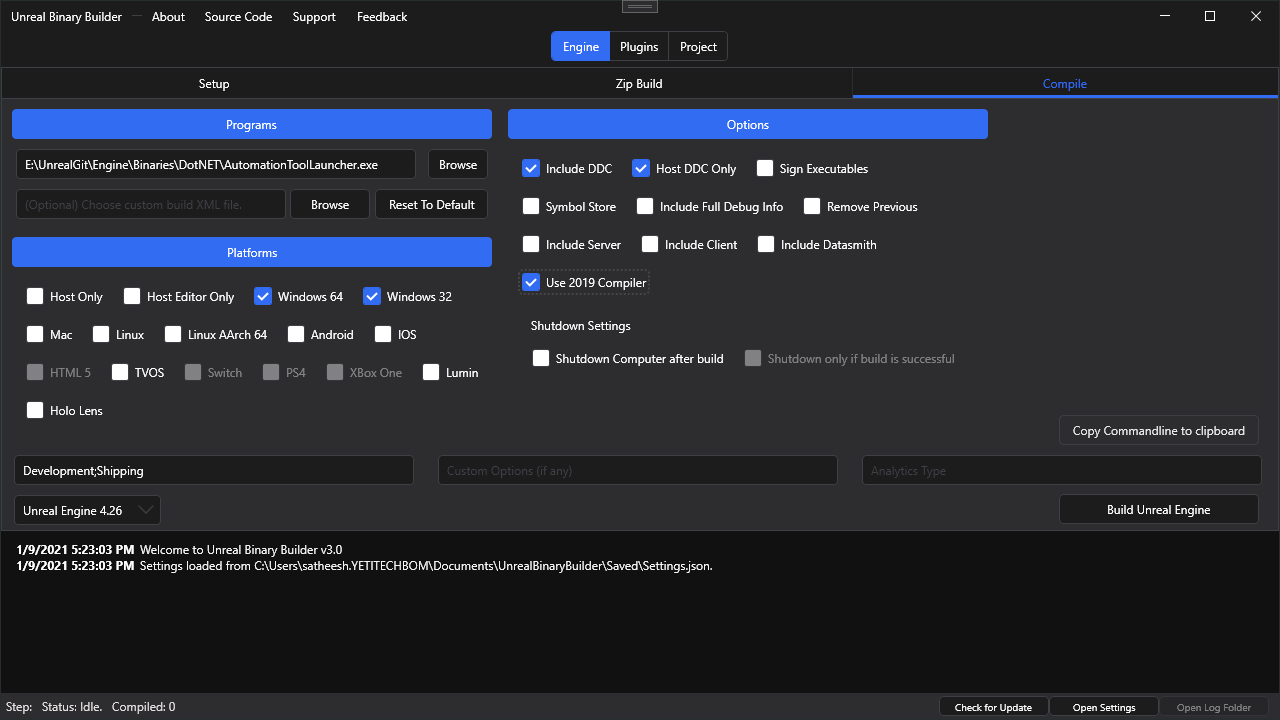
GitHub
An application designed to create installed Unreal Engine builds (aka Rocket builds) from Unreal Engine GitHub source. - ryanjon2040/UE4-Binary-Builder
static copper
I've shown this to at least 5 different people asking about how to distribute binary builds. Thanks for the awesome tool!
cyan imp
Using VS2022?
did you changed the project settings C++ standard?
I'm using 17 too for UE5, I only saw this Cpp20 error playing with project settings and changing to "Preview - Features from the Latest C++ Working Draft (/std:c++latest)" .
slender scarab
Anybody run into this issue when launching a game made with UE5? /Script/AssetRegistry/Default__AssetRegistryImpl (1) was not complete (0) after registration was complete.
 eager hedge
Anyone seen this fatal error? Started happening as of EA1 and looks like it hasn't been fixed in EA2, haven't tried ue5-main.
Fatal error: [File:Engine\Source\Runtime\TypedElementFramework\Public\Elements/Framework/TypedElementData.h] [Line: 266]
Element is still externally referenced when being destroyed! Ref-count: 2; see above for reference information (if available).
Callstack is uninteresting, and is deep into engine code. Reference information when enabled isn't particularly interesting either. Happens semi-consistently by having a blueprint editor open, starting PIE, and then from within PIE loading new levels or reloading the current one (non-seamless travel). Going to debug what I can but wanted to see if anyone has seen this before first.
eager hedge
Well, can't figure out what's actually causing it but I did figure out it has something to do with sublevels... and got a minimal repro working. Bug report time 🙂
 tranquil zenith
Has the compiling problems for the UE5 update been fixed for source lol
Im not waiting 4 hours for a bunch of Fcolor errors and random crap
?
 hot raven
any ideas
 primal night
static copper
I've shown this to at least 5 different people asking about how to distribute bi...
primal night
static copper
I've shown this to at least 5 different people asking about how to distribute bi...
Very happy to hear that!! 🙂
Oh man nooooooooooo. Took 9 hours and 52 minutes to compile ue5-main only to fail with this line:
E:\UnrealEngine\Engine\Saved\CsTools\Engine\Source\Programs\IOS\iPhonePackager\Properties\Resources.resx(123,5): error MSB3103: Invalid Resx file. Could not find a part of the path 'E:\UnrealEngine\Engine\Saved\CsTools\Engine\Source\Programs\IOS\iPhonePackager\Resources\GreyCheck.png'. Line 123, position 5. [E:\UnrealEngine\Engine\Saved\CsTools\Engine\Source\Programs\IOS\iPhonePackager\iPhonePackager.csproj]

 sick nimbus
Is 'FGlobalTabmanager' not the proper way to extend the editor toolbar in ue5? I migrated a 4.26 project, surprisingly compiled without a hitch, but while running the project it does not add a tab to the new toolbar as it does in pre ue5.
Also, when trying to understand what changes have been made to the toolbar and the way it should be extended, I got the idea to just generate a a plugin using the 'standalone window' template, and then taking a peek at the generated code and see how it differs from pre ue5.
But for me atleast, the editor fails to generate the plugin using the plugin templates, so that idea was a dead end as-well.
Anyone that could hint me in the right direction, like names of relevant classes I can use when searching the source
 spare plank
whoa progress report that works

no more 75% from UE4 that i don't know what's happening behind
primal night
Anyone tried compiling the latest commit? Is it working?
https://github.com/EpicGames/UnrealEngine/commit/51a8498dc6590526b2a48fee249e76b7cb614dec
torpid valve
I compiled few before it today and it worked
primal night
I think I'll just go ahead and compile. Last one took around 10 hours and failed because of a GreyCheck.png related to IOS (#ue5-engine-source message)
 glacial dove
primal night
Oh man nooooooooooo. Took 9 hours and 52 minutes to compile ue5-main only to fai...
glacial dove
primal night
Oh man nooooooooooo. Took 9 hours and 52 minutes to compile ue5-main only to fai...
iphone packager
damn
primal night
Yes iPhone packager
arctic comet
That's just rough
 ashen kiln
is ue5-main still dead? 
eager hedge
Is water wet?
hot raven
Unreal Engine 5 Early Access ( 2 ) Git Build

Unreal Engine 5 Early Access ( 1 ) Git Build

any ideas ?
cyan imp
sick nimbus
Is 'FGlobalTabmanager' not the proper way to extend the editor toolbar in ue5? ...
Look into Engine\Source\Runtime\Slate\Private\Framework\Docking\ , TabManager , SDockingArea, SDockingTabStack, is where you'll find details of the new Tab system.

 primal night
Damn it. I faked GreenCheck.png, GreyCheck,png and YellowCheck.png files and Unreal failed at the last moment again saying it can't find those files. The thing was Unreal deleted it sometime while compiling ¯_(ツ)_/¯
 surreal hull
unreal engine Early Access 2 has new engine build system?
torpid valve
the Early Access 2 only fixes some bugs
but it doesn't add any particular new features
to keep it binary compatibile
primal night
Oh man not again. Wasted another hour and now it failed because of this error.
ERROR: Source file 'E:\UnrealEngine\Engine\Binaries\ThirdParty\ARM\Win32\astcenc.exe' does not exist
       while executing task <Copy Files="#Copy for Installed Win64" From="E:\UnrealEngine" To="E:\UnrealEngine/LocalBuilds/Engine/Windows" Overwrite="True" Tag="#Installed Build Win64 Files" ErrorIfNotFound="False" />
I'm trying to make installed build of the Engine from source.
torpid valve
so yeah, engine without game project (;
primal night
Yes
torpid valve
I wouldn't bother really
primal night
Why?
torpid valve
because EA/Main/Master
is usually tested in CIS only against build with game proejct
just as programmers who push commits also test only against game project
torpid valve
the full engine build is just ridiculously time consuming
primal night
The iPhonePackager was the most irritating
I just removed this line from InstalledBuild.xml for now
<CsCompile Project="$(CsToolsDir)/Engine/Source/Programs/IOS/iPhonePackager/iPhonePackager.csproj" Configuration="Development" Platform="AnyCPU" Arguments="/verbosity:minimal /target:Rebuild" Tag="#Build Tools CS Binaries;#Sign Binaries" TagReferences="#Build Tools CS Binaries"/>
 compact swift
Hello community i have created a Character.h and Character.cpp class but the first line, #include "CoreMinimal.h" says that couldnt be found, also the "Character.h" could not be found, How could i fix this errors?
 vale hill
@compact swift Use the "File...New C++ Class..." in the editor to create new classes.
 jolly wyvern
For upgrading engine versions do I need to rebuild everything?
 mental karma
I dont think it is necessary.
primal night
FINALLY! I compiled.
And now there is 234 new commits 😐
So basically the 2 errors I had was iPhonePackager and the lack of astcenc.exe.
primal night
primal night
I just removed this line from InstalledBuild.xml for now
```
<CsCompile Project...
This is how I fixed iPhonePackager error.
primal night
primal night
Oh man not again. Wasted another hour and now it failed because of this error.
`...
I copied astcenc.exe from Early Access launcher build and saved it at Engine\Binaries\ThirdParty\ARM\Win32\astcenc.exe
primal night
v3.1.3 of Unreal Binary Builder now available: https://github.com/ryanjon2040/Unreal-Binary-Builder
GitHub
An application designed to create installed Unreal Engine builds (aka Rocket builds) from Unreal Engine GitHub source. - ryanjon2040/Unreal-Binary-Builder
 uneven orbit
Someone an Idea?
 hot raven
im trying to setup a git repo on a ZAS but i cant push to it dos anyone know why
arctic comet
forward shading?
arctic comet
Aye, issue confirmed
No clue how to fix it though but it is indeed the forward shading being on
Does that at least get you going now?
And did you submit an issue report yet @lofty idol ?
Well disabling it fixes it for my project, and what difference does it make that it's 5main? Do they not want any issue reports on it?
 digital stone
Ummmm "Generate Visual Studio Code Project" doesnt work xD, doesnt genearate the workspace and vscode
wtf....it creates visual studio files
lel
I've set that i want to use Visual Studio Code, restarted Editor, and Generate button generates visual studio files instead of visual studio code ;))))
static copper
digital stone
I've set that i want to use Visual Studio Code, restarted Editor, and Generate b...
are you opening VS code through the editor thingy?
or just double clicking the sln
digital stone
Cant open VS Code through editor, because editor do nto create required files
instead of VS Code files it creats sln and .vs
static copper
I'll give it a shot
static copper
digital stone
instead of VS Code files it creats sln and .vs
seems like I get a workspace after using the in-editor new class wizard
it seems a little incomplete?
unsure how to use workspaces, oh well
digital stone
Well
for me it doesnt create the files
So had to fallback to Visual Studio 🙂
Eagerly waiting for Rider for UE
 fast sluice
Trying to compile UE5 from sources..
I do have Net and SDKs. I build 4.26 with no issues.
Maybe I need something extra or other version?

I use Rider, btw
digital stone
install .net and windows 10 sdk 😉
fast sluice
@digital stone I do have it installed. Maybe there is specified version I need to install for UE5?
digital stone
Maybe u need to explicitly specify sdk in rider project settings
fast sluice
@lofty idol Nope, still get this error
 waxen lantern
Anyone else have an issue where a migrated project from 4.26.2 to 5.0 cant see any of the source files int he public/private folder structure?
waxen lantern
oof, had to manually put in all the includes and alter them for ue5 directory lol
that didnt fully fix it either... gah
lol

oooo super fun, everytime you generate project studio files it erases all the includes
primal night
Try deleting intermediate folder and regenerate solution file
waxen lantern
i did 3 times
Rebuilt the engine as well
Engine in the game solution builds fine. The game portion wont with all these errors
all of the errors are in engine files too, none in my project source

 echo bough
@brisk trench Is there any guide or something? Made by anyone anywhere? I cloned the ue5-early-access branch, followed the readme steps (Setup/GenerateProjectFiles), then compiled it and I still get the UE 4.26 splash screen for some reason. I triple checked I'm on ue5-early-access branch
 brisk trench
what are you opening?
echo bough
Opening? I'm trying to run the editor from Visual Studio
brisk trench
you need to create a UE5 project for that
echo bough
When I try to open an UE5 project directly (I right-click .uproject and switch engine version to the one built from source):

and UE4.26 fires up
The project was made with the Launcher version of UE5 early access
git status
On branch ue5-early-access
nothing to commit, working tree clean
I compiled the engine as "Development Editor"
echo bough
This one was BP project I think, the third person template
gonna try a C++ project
Hm a C++ project says just "Failed to launch editor"
I've only just compiled the UE source
Are there any additional steps I need to do to open a project besides swapping the engine version?
brisk trench
what configuration did you build the engine in?
echo bough
"Development Editor"
brisk trench
that's super strange
I'm on the exact same commit as you
and it works fine for me
echo bough
Okay, what steps did you take to get it running please?
 ember finch
which exe is started (check in the task manager)
echo bough
UE4Editor.exe
brisk trench
1. Clone from github
2. Setup.bat
3. GenerateProjectFiles.bat
4. Open up my IDE
5. Build```it sounds like UE5 isn't actually opening for you
 echo bough
so the exec has already been renamed to UE5Edior.exe yeah?
echo bough
I don't think the problem is in the uproject, I'll try to clone the source over
the project starts fine with UE5 Early Access from the Launcher
ember finch
doesn't hurt to upload it 😬
echo bough
{
    "FileVersion": 3,
    "EngineAssociation": "{7ADED4F0-4AE0-EA30-95D0-13A84D4D509C}",
    "Category": "",
    "Description": "",
    "Plugins": [
        {
            "Name": "ApexDestruction",
            "Enabled": true
        },
        {
            "Name": "GPULightmass",
            "Enabled": true
        },
        {
            "Name": "Landmass",
            "Enabled": true
        },
        {
            "Name": "Water",
            "Enabled": true
        },
        {
            "Name": "HairStrands",
            "Enabled": true
        },
        {
            "Name": "AlembicHairImporter",
            "Enabled": true
        },
        {
            "Name": "ControlRig",
            "Enabled": true
        },
        {
            "Name": "LiveLink",
            "Enabled": true
        },
        {
            "Name": "LiveLinkControlRig",
            "Enabled": true
        },
        {
            "Name": "LiveLinkCurveDebugUI",
            "Enabled": true
        },
        {
            "Name": "RigLogic",
            "Enabled": true
        },
        {
            "Name": "Text3D",
            "Enabled": true
        },
        {
            "Name": "VirtualHeightfieldMesh",
            "Enabled": true
        },
        {
            "Name": "FullBodyIK",
            "Enabled": true
        },
        {
            "Name": "Volumetrics",
            "Enabled": true
        },
        {
            "Name": "Bridge",
            "Enabled": false,
            "SupportedTargetPlatforms": [
                "Win64",
                "Mac",
                "Linux"
            ]
        }
    ]
}
Is this double clicking the uproject or starting from VS
echo bough
@ember finch So when you compile the editor, there will be a Editor/Binaries/Win64/UnrealEditor.exe correct?
ember finch
yes
echo bough
which I don't have
so somehow I still have 4.26 source code for real
gonna try it all over
echo bough
yep
ember finch
haha
ember finch
hf recompiling I guess 😄
brisk trench
command line?
echo bough
when I run git status it says ue5-early-access though
brisk trench
github desktop?
echo bough
with a command
echo bough
I'm cloning it over
ember finch
Or from your project sln
echo bough
git clone --single-branch --branch ue5-early-access https://github.com/EpicGames/UnrealEngine.git UE5 --depth 1
this way I should only have the UE5 branch
ember finch
yeah clone looks good
 echo bough
@ember finch @brisk trench Stop it guys, I'm cloning it over because obviously I still had the UE4 source code. I'll try to compile it again after it clones, setup downloads. Then I will see if there is an UnrealEditor.exe, which is a way for me to tell UE compiled. Thanks for your help so far 🙂
ember finch
😄
brisk trench
😅
echo bough
much appreciated 🙂
 spring rock
what is the latest official compiling commit on main?
echo bough
@lofty idol @ember finch @brisk trench I've got the UE5 editor running now, thank you for your help 🙂
downloaded the source over and all went smoothly
 distant bronze
Does ue5-main build for other folks?
I get a bunch of
Severity    Code    Description    Project    File    Line    Suppression State
Error    C4458    declaration of 'Widget' hides class member    HeadlessChaos    E:\Engines\Unreal\UE5\Engine\Source\Runtime\SlateCore\Public\Layout\WidgetSlotWithAttributeSupport.h    59
When compiling Development Editor Win64
brisk trench
The main branch isn't guaranteed to build @distant bronze
distant bronze
Right, I guess I'm just kinda shocked at the amount of compilation issues
Is the flow at Epic to just check in code and hope it compiles
distant bronze
That's insane
Sure, but this is Epic Games we're talking about, not some indie company with three employees
Like, hire a couple dev ops engineers to throw together a jenkins pipeline that runs on a couple branches of the engine
I work at a mid-size mobile game company and we have jenkins pipelines for every game and even some of the less used branches of games have a CI build
including build pipelines for our in-house engine
I've even considered putting together a CI system for the side project I'm working on with a couple friends, though I need to pick up a proper server first, my digital ocean thing won't cut it anymore
Anyway, is the UnrealFileServer vs project necessary? Everything else was able to compile successfully with a few modifications, but that one seems broken
Seems to work 🤷
brisk trench
idk about that. Pretty much every studio i've looked into has a CI pipeline
it could honestly just be part of their, push what you have at the end of the day, policy
it could also just be a tool that snapshots their current work since their github is a copy of their internal perforce
eager hedge
I'm sure epic has CI. Gated checkins are a different story.
static copper
yeah, we aren't really getting the full picture
echo bough
Morning guys
I get Assertion failed: LODInfo.PaintedVertices.Num() > 0 [File:X:/UE5/Engine/Source/Runtime/Engine/Private/Components/StaticMeshComponent.cpp] [Line: 1366] when trying to build for shipping with UE5, any ideas?
distant bronze
ue5 ea?
arctic comet
distant bronze
Does ue5-main build for other folks?
I get a bunch of
```
Severity Code De...
\Engine\Source\Runtime\SlateCore\Public\Layout\WidgetSlotWithAttributeSupport.h#57-65
void RequestSortAttribute()
    {
        SWidget* WidgetPtr = TSlotBase<SlotType>::GetOwnerWidget();
        ensureAlwaysMsgf(WidgetPtr, TEXT("FSlot needs to be constructed before we modify the FChildren."));
        if (WidgetPtr)
        {
            UpdateContainerSortOrder(*WidgetPtr);
        }
    }
Yeah... I fixed it yesterday, see my later comments
ashen kiln
Wake me up when ue5-main compiles without errors
torpid valve
4 days ago [;
torpid valve
ashen kiln
Wake me up when ue5-main compiles without errors
it usually compiles without errors
 scenic needle
should i just remove the checkcode and ensure?
torpid valve
this assertion is there for some reason
I would start from checking why you hit in first place
torpid valve
chance are it will simply crash if you comment it out
scenic needle
Well, there isn't any crash
only temporary trigger
which can be solved by either wait a while or attach debugger process and click "continue" once
you recommend comment it out since it is a chance?
hallow forge
Anyone know a way to just compile changed shaders on the command line?
I am trying to create a build job that just compiles the changed shaders to update a remote data cache for remote users to access as the DDC.
I know that I can UnrealEditor.exe <project_path> -run=DerivedDataCache -fill -unattended to prime a shared DDC with the shaders, but I am wanting to just compile the changed shaders so a log can be generated of just the changed shaders
 quartz garnet
Does anyone have issues with Convolution Bloom? For the past week or so (building from ue5-main), if I open a project that had Convolution Bloom enabled in a PP volume, the lighting disappears and the scene looks black. This gets fixed right away if I set Bloom to standard, or if I save it with standard bloom set and then switch it to convolution after opening.
This is still present in a build from today
 unkempt sleet
?
 hollow sail
Large World Coordinates?
torpid valve
LWC is hit or miss
some things work
some don't
some outright will crash editor
I can say that rendering is not yet made fully relative to camera
hollow sail
I don't know if I hugely need LWC tbh
torpid valve
I don't think it will be option when finished anyway [;
hollow sail
heh heh
primal night
Hello everyone,
Do you want to compile ue5-main but afraid it might compile or not? Fear not young warrior for I come to rescue. Well, I'm not gonna give you access to super computer but I decided to compile ue5-main branch (almost) everyday (if new changes are available) and post the results to my new Unreal Binary Builder channel I just created. There you will be able to see what commit I'm compiling and if it is successful or not. What's more interesting is I post the errors also if there are any. Feel free to join 🙂
Above screenshot is the latest (at the time of compiling) commit I tried to build.

Discord link from here: #released message
I hope this will help the community to decide which build they want to choose without fear of failing build.
distant bronze
@tranquil crane #ue5-engine-source message
 tranquil crane
distant bronze
<@!690457579985305610> https://discord.com/channels/187217643009212416/847540731...
tranquil crane
distant bronze
<@!690457579985305610> https://discord.com/channels/187217643009212416/847540731...
oh thanks
i fricking cloned the wrong branch
 tranquil crane
ember finch
I have mine set at 128GB
tranquil crane
ember finch
I have mine set at 128GB
i have an ssd
what should i change mine too
without causing to much wear to drive
also the build is on my E: drive. do increase paging on C: or add one to the E:
Changed my C: to 20384 mb. That should be good right?
Increase of 4 gigs
ember finch
also don't ping
tranquil crane
ember finch
128GB don't worry about drive wear
20 wont cut it?
ember finch
for 16 use 32 or 64
though
12 cores
use 64GB of page file
dw about drive wear
not really an issue here
tranquil crane
ight thanks ill put it at 64
 dim yewBOT
:triangular_flag_on_post: ryanjon2040#5319 received strike 1. As a result, they were muted for 10 minutes.
 cedar tree
OS managed should be used always, don't really understand why people would want to change it 🤔
just let the OS manage it, it knows best 😛
I mean, from an application standpoint memory is a limitless resource most of the time
be that virtual or actual ram
sure, limiting specific drives makes sense
 gusty tartan
Hey everyone, I've built UE5 from source for the first time
and I'm trying to compile my project ,but it looks like I'm compiling the entire engine as well when I do so is this normal?
So if I understand correctly, if I'm using a version of the engine thats built from source, in order to compile a regular unreal engine project I have to also compile the whole engine itself every time?
zealous yarrow
Also avoid the rebuild button at all cost 😉
gusty tartan
Nice thank you for replying @lofty idol @zealous yarrow very helpful!
 round ruin
Any place where to see what changed with respect to 4.26 without having to dig in the source itself?
https://docs.unrealengine.com/4.26/en-US/API/Runtime/Foliage/UFoliageInstancedStaticMeshCompo-/
But: Cannot open include file: 'FoliageInstancedStaticMeshComponent.h': No such file or directory
Nvm, it seems I needed to load the module
round ruin
zealous yarrow
Also avoid the rebuild button at all cost 😉
How long it takes to build from source in a decent machine?
zealous yarrow
On my i9 9900k, 64GB RAM it takes around 40 - 45 minutes to build UE5, about as twice as long as UE4 which takes me around 25 minutes
round ruin
Lack of optimization I guess?
zealous yarrow
🤷♂️
eager hedge
type promotion has nothing to do with templates, so yes
It isn't even remotely based around templates - each variant of the various operators still exist on their own in C++. Type promotion just auto selects the appropriate function based on the incoming types instead of making you manually select it.
I looked this up because I had hoped type promotion was some sort of preliminary template support but alas... It's just a fancy K2Node that selects the appropriate function at edit-time.
static copper
oh, I guess the real reason behind the templates is probably LWC support
eager hedge
Yeah, it just means they can have a single vector implementation for float/double/whatever
 stiff heath
ember finch
Vectors and transforms are templates now
stiff heath
ember finch
Vectors and transforms are templates now
Where do you see that? FVector is still just a struct: https://github.com/EpicGames/UnrealEngine/blob/5.0.0-early-access-2/Engine/Source/Runtime/Core/Public/Math/Vector.h#L26
stiff heath
woooah
 past flame
probably to handle FVector of double for the 64bit mode
zealous yarrow
yep
cedar tree
stiff heath
Where do you see that? FVector is still just a struct: https://github.com/EpicGa...
blazing finch
@primal night Latest release of your binary compiler gets deleted by windows 11 for "virus", probably a false positive but perhaps good to know
primal night
blazing finch
<@!148762361413500928> Latest release of your binary compiler gets deleted by w...
Thanks for the heads up! Another user also told me this in reddit and I honestly don't know why this happens. I assure you it is 100% false positive. I'm guessing it is reporting "virus" because of analytics or sentry.
static copper
I had a blueprint only project trigger antivirus once
static copper
 👀 👀
👀 👀

Verse is maybe happening in Main?
never gonna compile again... we are finally free
(sometime in the next year I guess)
cedar tree
yeah
 solid cypress
static copper
<a:siren:608748712017264640> 👀 👀 <a:siren:608748712017264640>
solid cypress
static copper
<a:siren:608748712017264640> 👀 👀 <a:siren:608748712017264640>
Do you know from which commit it came?
 spare orchid
i want to know if it uses the blueprint VM or not
if it does, its dead on arrival
if it doesnt, it has promise
for the syntax i kinda dont give a fuck. i use so many langs its not even an issue. But i want to know the features and runtime
gusty tartan
Hello everyone! Has anyone else had the issue where their motion warp notify states turn into regular notify states after they save and close?
fickle zealot
Anyone know why UE5EA has very poor performance. When my scene was in 4.26 the frame rate was 120fps locked. but after converted to UE5EA source, I only get 10fps. any one know what causes it? I am running Ryzen 9 5900HX RTX3070 laptop.
gusty tartan
Whats happening is I save a montage with functioning motion warp notify states like so:

but when I re open the project all the motion warps that I did give this warning

and look like this as if they were regular animnoties
 solid cypress
spare orchid
i want to know if it uses the blueprint VM or not
solid cypress
spare orchid
i want to know if it uses the blueprint VM or not
I highly doubt it does. Given that it is coming from Skookum guys and it aims to improve workflow, using BP VM would be like shooting own foot.
 strong agate
Yeah on the Skookum forums a developer said that there will be a update for UE5 and maybe a future update to convert code to verse
fickle zealot
Lumen is also turned off. Yeah I guess I have to profile it. Thanks
 sweet vault
What is the equivalent of get player auth token in blueprints for UE5? Can't find it
torpid valve
spare orchid
i want to know if it uses the blueprint VM or not
Probabaly not
if look at engine build settings to include verse, it specifically references separate set of modules
"Solaris",
"VerseCore",
I bet one of them is new VM
which honestly still sucks
one would think that if there is new scripting languague it will be build upon LLVM
either way I still think starting with new languague
sucks balls, yeah we have now languague servers but still tooling is king
If the verse API cover is as vast as as rest of unreal engine, without properl intelli sense it's DOA for me
zealous yarrow
Many people are excited for it but I still don't see the point of another language, it's probably gonna be one of those things I'll look at once and never again if I don't have to
eager hedge
Because blueprint spaghetti isn't great for all situations, but you don't want designers having to write C++ either.
I don't understand why you'd want to build a scripting language on top of LLVM though. If the target isn't native code generation what's the point? It's much more complex to maintain than a simple VM. If they do, great, but it's hardly something to expect.
zealous yarrow
eager hedge
Because blueprint spaghetti isn't great for all situations, but you don't want d...
But it's questionable how many designers are gonna be willing to learn and be comfortable with a text base language
eager hedge
Seeing as lua is incredibly common... plenty
strong agate
I think the main reason for the need of a high level language, is that most of time as a designer you don't need the control and robustness that cpp gives you, but you still need something faster than blueprints
eager hedge
faster in terms of writing it, I doubt it'll be much faster in terms of execution speed if it's built on a similar VM.
strong agate
Unity folks has C# and they are doing fine with dots and stuff
Well Skookum is a lot faster than Blueprints
eager hedge
Skookum doesn't have full interop with blueprint/C++ and can't be used in the same way though.
strong agate
If it's the same speed of blueprints then what's the point? The comfort of writing in text? There's a plugin for writing BP code in text, lol
eager hedge
If the complaint was just speed then they'd rewrite the blueprint VM
not write a whole new language
strong agate
I speculate that they're doing a new unified VM, because of the removal of Nativization
eager hedge
I'd agree with that speculation, I don't see why they'd want to maintain two separate VMs.
strong agate
And one of the Skookum developers said that Skookum DNA will still be there in Verse
So I doubt that it will be slow
zealous yarrow
Very curious what the feedback is gonna be like when people start using it... If it's something that was needed or not, time will tell
spare orchid
@zealous yarrow blueprint has a lot of really huge issues due to its node based nature
for example, you cant source-control it
eager hedge
My biggest issue is just information density
spare orchid
but then if you want text code, you need to go to cpp, which has its own huge can of worms
the fun thing with the script language is that its better than blueprints in features, while still being sourcecontrol-able
and would mean that people need far less cpp
plus that script lang specifically is basically skokum 2. (it looks like it). Making it pretty damn great for mission scripts and AI/weapon logic
zealous yarrow
I probably don't see the point of it because 90% of my work is C++ related and I very rarely write BP logic except in some rare cases when I'm doing UI.
eager hedge
Fair enough, if you don't use blueprint much you probably wouldn't use verse much.
spare orchid
then you are best use case for the script lang
most of the times using cpp for pure game logic is kinda pointless
its super annoying dev-wise to restart the engine constantly for it
and compile times
stuff like Verse has been demonstrated to have full reload control (which blueprints dont have)
so you can keep your game running and keep writing and tweaking the script
in cpp you have livepp for that, but cant add new members to classes, its functions only
strong agate
And they deploying it to Fortnite is a sign that it will be accessible
spare orchid
in ue4, the speed of cpp gets near completely wasted anyway
its not that cpp is fast is just that BP is hella slow
and ue4 cpp still gets heavily bottlenecked by the incredibly slow game framework
the actual places where cpp for game code would win vs a script lang that wasnt terrible wouldnt be that much
mostly stuff like complex AI systems and calculations that iterate the map or edit 50 objects at a time (where you wouldnt be using Actors to begin with)
for 99% of typical UE4 game code it could be done in a script lang with zero perf hit
spare orchid
people tend to forget that on ue3 era most games were done near-entirely on unrealscript which is same speed as BP (super slow) and stuff still was mostly fine
unreal script was kinda fixable. its main issue is having to re-open the engine to compile it (WHYYYYYYYYYYYYY!!!!!! ITS A SCRIPT LANG) and its slowness which is just due to bad VM
zealous yarrow
spare orchid
so you can keep your game running and keep writing and tweaking the script
Yeah I can see the point of that
For gameplay stuff I see how it can be useful, would still argue if it is needed but yeah I see the benefits
Still won't have much use for it myself, I'm mostly working on tools and lower level systems which is not a place for a scripting language I think
But yeah you have a point, could be useful for gameplay logic
strong agate
spare orchid
people tend to forget that on ue3 era most games were done near-entirely on unre...
Yeah, IIRC there's a presentation of Bioshock Infinite and they used a ton of UnrealScript
That's why I get mad people saying that BP is just for prototyping code and you should write everything in C++
blazing finch
I'm moving as much as I can just to data assets/tables/tags, that are then run through c++. Even rule engines, No more recompilation of stuff and much easier to manage than imperative scripting/programming
spare orchid
its because BP has some absolutely huge issues due to its nature
when you link a bp from another BP it creates a hard reference, causing direct reference explosion
and the cause why shitty games load the entire game from the main menu
plus BP isnt sourcecontrolable
making it an INMENSE mess in a team environment
in a way, BP is directly worse than unrealscript ever was
due to this
blazing finch
the chasm between refactoring c++ and bp is what really sets you up for failure, even if you can stumble around with redirects and stuff. Structs simply arent feasible IMO
strong agate
Yeah that's a problem, but the way they're heading with ModularGameplay and DataRegistries seems to tackle this
spare orchid
they are highly buggy anyway one should never ever do blueprint interfaces and structs
blazing finch
They're taking steps towards more data-oriented design, they'll get there eventually 🙂
strong agate
yeah, dataregistries are such a godsend, it solved a lot of problems in my project already
blazing finch
and gameplay tags are the greatest thing since polygons. So many nice orthogonal features
strong agate
Now we just need a magic optimize button, that takes your hugely unoptimized code and refactor it in the most performant way
Nanite for programmers 😛
zealous yarrow
Cursed words have been spoken
spare orchid
removed in ue5
makes me think they are either kinda shelving bp, or moving it to a upgraded runtime
a lot lot of games rely on nativization to run acceptably
strong agate
That's the reason why I speculate they're doing a new VM, maybe it's that Solaris module
eager hedge
I don't think it means they're shelving BP (new runtime would be nice though). Nativization was probably just horrible to maintain and with a new scripting language on the horizon it was about to be even worse.
strong agate
Didn't Epic bought the guys that did the hot reload? What happened to them?
eager hedge
hot reload was always in-house
are you thinking of live++?
which I don't think was bought by epic, no
strong agate
I'm not sure, I just remember that they bought a plugin from marketplace and implemented it officially
Probably was live++
eager hedge
It may have been a plugin or something, but they didn't buy the company making it. They bought licenses to allow everyone to use it and implement it in the engine itself.
strong agate
Yeah, they apparently just licensed
I wonder if they licensed a specific version and didn't update anymore, because it's broken as hell
eager hedge
it's not, though?
There's one specific issue with the newest version of MSVC (which has been fixed on github... not sure which branches), everything else works fine.
strong agate
Hmm that's probably the problem that I was facing when I tested it
I will give a look, thanks
torpid valve
spare orchid
in cpp you have livepp for that, but cant add new members to classes, its functi...
You can now add new classes directly, haven't checked members, but it should work as well
at least on mian
strong agate
eager hedge
There's one specific issue with the newest version of MSVC (which has been fixed...
I compiled again with the commit and it just solved my problem with live coding, thank you! 😃
sweet vault
So I have a question, should I mostly stick to C++ going forward in UE5 or is it possible to still use Blueprints for stuff like UI, calling animations, etc?
static copper
sweet vault
So I have a question, should I mostly stick to C++ going forward in UE5 or is it...
nothing significant in that regard really changes from 4 to 5, you're good
calling BP for one off gameplay code isn't a big deal
sweet vault
alright, thanks
 rose gyro
hey everyone! im in need of some advice and maybe a bit of a trouble shooting session re: source building for UE5. I'm trying to follow a ue4 tutorial to get open cv installed as a Third Party plugin in ue5 and am getting two unhandled exceptions, one for delayhlp.cpp saying KernelBase.dll 'Module not found', and the other is an 'Access violation executing location' when initializing an object (ACameraReader::ACameraReader(const FObjectInitializer& ObjectInitializer) : Super(ObjectInitializer) {). Anyone got a sec to take a look and maybe give some pointers? thanks!
References below:

 gusty tartan
Can anyone point me in the direction of the repository with the UE5 source build that is currently working the best?
static copper
you are probably thinking of a particular commit rather than the repo, right?
there are only two repositories: UE5-main (latest stuff) and ue5-early-access (same stuff in the launcher binary download)
static copper
gusty tartan
Can anyone point me in the direction of the repository with the UE5 source build...
I built with this 9 days ago https://github.com/EpicGames/UnrealEngine/commit/9366100a2fdf32ef6ae45ce166570d4d75221a44
but ue5-early-access might be more stable overall, haven't built it yet
simple dirge
ue5-early-acess branch can be built - it's the one I have used
haven't done too much with it though...yet.
No crashes yet 🙂
gusty tartan
Thank you guys I've built the ue5-early-access branch ,but I'm still getting a bunch of error I guess I just need to figure it out I'm not entirely sure what I'm doing wrong
 gilded pecan
Isn't the EA branch the same thing as the binary in the Launcher?
simple dirge
yes it is 🙂
hot raven
Does anyone know how to start debugging this crash?

I have had this crash over and over and have fixed it by rolling back in my git history till the project will load
I need to find a more permanent solution to fixing this issue that does not make me redo everything every couple of days
 spring ocean
spare orchid
they are highly buggy anyway one should never *ever* do blueprint interfaces and...
spring ocean
spare orchid
they are highly buggy anyway one should never *ever* do blueprint interfaces and...
what exactly is wrong with either of them?
hot raven
hot raven
Does anyone know how to start debugging this crash?
it seems this error comes up if i switch versions of unreal. or better yet switch repositories i am using to build unreal
if i switch branches from say ue5-early-access to ue5-main
after building unreal the first time i launch the project it crashes with the isinrenderingthread error
no matter what it crashes on the same line
I am currently trying to setup debugging in ue5 and my project to see if i can get a better stack dump
stiff heath
hot raven
I need to find a more permanent solution to fixing this issue that does not make...
What about just using a released engine version?
hot raven
i'm in ue5-main
I started by upgrading to ue5-early-access
then switched to ue5-main
 misty onyx
How did you get the ue5 main
hot raven
each switch caused the isinrenderthread issue
hot raven
misty onyx
How did you get the ue5 main
I downloaded github and checked out ue5-main
hot raven
misty onyx
i would suggest using the ea2
ea2.... ok did not know that was there
misty onyx
Early access 2 came out 2 weeks ago
hot raven
misty onyx
isnt the github source is the most unstable version ?
I was hoping to use it to get the latest fixes to stuff like chaos
hot raven
misty onyx
Early access 2 came out 2 weeks ago
is ue5-main early access 2?
hot raven
misty onyx
In epic games launcher it says im on early access 2
I am going to give that a shot
thank you
misty onyx
yup
stiff heath
hot raven
I was hoping to use it to get the latest fixes to stuff like chaos
"getting the latest" just simply doesn't go together with "permanent solution".
hot raven
stiff heath
"getting the latest" just simply doesn't go together with "permanent solution".
true
 vital stag
ive been getting weird results with a dedicated server using the advanced steam sessions
it seems to want to use port 1985 if its available, if not it just uses seemingly random ports
so i was able to get dedicated servers to work with a source build, but only on lan
torpid valve
did not have any issues with servers
vital stag
Dedicated steam servers?
 steep imp
How to download source Code ?
torpid valve
I don't use steam
steep imp
UE5
vital stag
If you don’t need dedicated, do listen server. Testing is really easy.
Dedicated server testing with PIE is not very representative for whatever reason though.
I ran into a lot of timing issues in a full dedicated server build that I never saw in pie testing
 sage roost
seems like ue5-early access cannot be build
i mean he generate like a bunch of errors
huh cool thanks
echo bough
Hey guys, I get Assertion failed: MappedName.GetType() == NameMapType
Which sounds pretty general to me, no idea what to look for
I've post the entire log here: https://answers.unrealengine.com/questions/1039914/assertion-failed-mappednamegettype-namemaptype.html
If anyone could have a look, much appreciated 🙂
tranquil zenith
does earlyaccess 2.0 have the same compiling problems as early access 1
takes hours for me to compile so I dont wanna download source version if its gunna be a beotch
 regal swallow
[3326/3329] Link (lld) libUnrealEditor-NiagaraEditorWidgets.so
make: *** [Makefile:1288: UnrealEditor] Error 6
Building on PopOS 20.10, had it working before a week or so ago, now getting this two times in a row. Downloaded using Github Desktop, and HTTPS, both failed.
 daring kraken
@echo bough you provided link is broken
surreal hull
Anyone have a good resource or tutorial on how to disable/remove (without breaking) the Android, Iphone and other platforms before compiling the engine?
tranquil zenith
Any c++ file I create isnt showing in the c++ classes folder..tf
 abstract sun
tranquil zenith
Any c++ file I create isnt showing in the c++ classes folder..tf
abstract sun
tranquil zenith
Any c++ file I create isnt showing in the c++ classes folder..tf
try running generateprojectfiles.bat
eager hedge
did you create the files through visual studio? Did they end up in the wrong folder? (vs defaults to a folder in Intermediate which is wrong, you need to tell it to put them in Source/YourGameModule)
 fickle mortar
I'm trying to link my GitHub account to my epic games account so I can view the unreal engine repo on GitHub but there are no options for me in my connection settings.
 fickle mortar
oh wow, I had to disable ad blocker
Unreal website is completely broken on internet explorer btw
eager hedge
...why are you using internet explorer
most websites won't work correctly on internet explorer these days
any modern website working in internet explorer would be a god damn miracle
fickle mortar
eager hedge
any modern website working in internet explorer would be a god damn miracle
true
 copper loom
How big is the editor install on linux? I downloaded the github source at depth of 1 so it wasnt that big, but when I run setup.sh and it starts downloading dependencies it swells to over 50GB and I ran out of disk space so I deleted it all.
Would like to know how big it is after I compile it, so I can make sure I clear the space ahead of time.
static copper
copper loom
How big is the editor install on linux? I downloaded the github source at depth ...
on windows it uses around 150gb no clue what that means for linux ymmv
copper loom
Is any of that project samples? Could delete those
That is a lot bigger than I thought it'd be. I read 10 GB was all ue4 needed
eager hedge
Sure, if you're not building it yourself.
copper loom
The script downloads dependencies for each system, windows, macos, and Linux. Perhaps I can remove windows and Mac dependencies...
I believe for Linux it has to be compiled so I guess I have to
 waxen sphinx
Can ULandscapeComponent::UpdateCollisionHeightData run at runtime now?
copper loom
what is debug info and why is it 30 gb
Ive got my 2tb nvme in the mail today, so Im sticking her in and should have room now
 tropic plaza
How can I hide texture repetition on an object like a floor ?
I will just wait ig until it will work or smth cause im pretty new to ue5 and I dont really have any idea about those techniques
waxen sphinx
LandscapeEdit.h includes InstancedFoliageActor.h but that doesn't seem to exist.
blazing finch
tropic plaza
How can I hide texture repetition on an object like a floor ?
You can use some UV tricks to randomize repetition, https://www.youtube.com/watch?v=FuPQNIx3dh8, There's also a product on the marketplace, Extile that does that

SOA Academy presents a tutorial on how to create endless textures with Substance Designer.
You can download the file to follow along the tutorial at this link: http://bit.ly/sd_endless_textures
New tutorial on how to make endless textures in Unreal Engine is available here: https://bit.ly/2IaxzNz
Interested in learning how to use Substance De...
fickle mortar
How long did it take for you guys to build the source code?
vale hill
fickle mortar
How long did it take for you guys to build the source code?
25 minutes
(18 for 4.26)
surreal hull

primal night
9 hours
torpid valve
fickle mortar
How long did it take for you guys to build the source code?
5-10 minutes\
fickle mortar
damn, that's pretty quick. I got a third of the way through the build until I crashed due to low storage space. Took like an hour and a half. Now I have to try to rebuild on my hard disk drive, which is gonna take an ungodly amount of time. 😩
zealous yarrow
primal night
9 hours
You compiling on a microwave? 👀
 bitter token
zealous yarrow
You compiling on a microwave? 👀
bitter token
zealous yarrow
You compiling on a microwave? 👀
could be an AMD processor from way way before TR got gud
 pliant jolt
This might be the wrong channel, but it's not entirely unrelated - Is there an easy way in git to switch between UE4 and UE5? I'm fairly new to USING git, and I kinda thought "checkout" to switch between the two branches would be good enough, but clearly it wasn't.
(for reference, I had UE4 running fine from git, was excited about UE5 so switched to that branch, built, had it running fine, then was curious if I could just run the UE4.sln to be able to run UE4 instead of 5... and it wouldn't build.)
or should I just keep two seperate directories for UE4 and UE5, and not over complicate this? XD
primal night
bitter token
could be an AMD processor from way way before TR got gud
i7-4790k
9 hours for building ue5 engine. Isn't that what @fickle mortar asked right?
 final pendant
Has anyone built OnlineSubsystemEOS from newest UE5 build?
vale hill
5950x took 25 minutes
torpid valve
final pendant
Has anyone built OnlineSubsystemEOS from newest UE5 build?
It has issues
but mostly work
and the few issues are easy enough to fix
final pendant
torpid valve
and the few issues are easy enough to fix
i fixed the UE5-main build
Now trying UE5-early access
lofty idol
is epic going to release a new ue5ea with the changes in the main anytime soon?
fickle mortar
Has anybody encountered these errors before when trying to build from source:
 surreal hull
torpid valve
early access is so old
surreal hull
torpid valve
early access is so old
You what.............. 
torpid valve
It's truth
static copper
Main is pretty far ahead
 surreal hull
but main is borked
stiff heath
What exactly are the benefits of TObjectPtr over a good old raw pointer? I read through its code several times, but didn't see anything useful besides lots of code that helps TObjectPtr behave as if it was just a raw pointer.
I.e. "with TObjectPtr I can do <foo>, but I can't without". Or "usage of TOjectPtr prevents/detects errors of type <bar>, which are impossible to detect with raw pointers".
surreal hull
surreal hull
how do i fix this
stiff heath
Imagine that answers.unrealengine never existed and just fix it yourself.
tranquil zenith
Trying to update the capsule collision size outside of construction script causes a fatal error in UE5
tf lol
dim yewBOT
:triangular_flag_on_post: Marius Sheppard#2002 received strike 1. As a result, they were muted for 10 minutes.
surreal hull
Took you a while......
static copper
until 5.1 comes out and we all get 100000 deprecation warnings from uht
zealous yarrow
Wouldn't be surprised if it eventually becomes a requirement (for reflection exposed variables at least)
eager hedge
The only concrete thing is that it allows for lazy loading of otherwise hard pointers (in the editor only).
Except I have no idea if the editor actually makes use of that, so even that bit of functionality is nebulous...
actually I take that back, it's definitely used. I just don't know the exact situations where.
so the upside of using it right now is, for example, that when editing an asset that hard-references other assets the editor won't actually load those other assets until absolutely necessary.
In theory it could improve load times for levels in the editor if there are a lot of external assets referenced.
hmm... I'm seeing some other interesting bits as I dig deeper too - there seems to be some functionality around sorting object references when saving packages (I assume for cooking), so that objects within the same package are loaded together instead of jumping between different packages. I'm not entirely sure if it depends on TObjectPtr though.
stiff heath
eager hedge
In theory it could improve load times for levels in the editor if there are a lo...
Thanks, that sounds interesting. I need to dig through the code more.
torpid valve
Documentation is already outdated. There was several commits on p4 which make TObjectPtr mandatory for engine modules/plugins
 high rampart
static copper
until 5.1 comes out and we all get 100000 deprecation warnings from uht
high rampart
static copper
until 5.1 comes out and we all get 100000 deprecation warnings from uht
Yeah
fickle mortar
Are there any files that we can safely delete after we build the engjne? Im trying to fit my uneal projects on to my C drive.
final pendant
Trying to update windows SDK on my project
But no matter the privileges on my drive, i cant seem to get it to work
UATHelper: Installing Sdk (Win64): C:\dev\UnrealEngine\Engine\Binaries\ThirdParty\DotNet\Windows\sdk\3.1.403\Microsoft.Common.CurrentVersion.targets(4187,5): error MSB3021: Unable to copy file "obj\Development\BuildGraph.Automation.dll" to "..\..\..\..\Binaries\DotNET\AutomationTool\AutomationScripts\BuildGraph\BuildGraph.Automation.dll". Access to the path 'C:\dev\UnrealEngine\Engine\Binaries\DotNET\AutomationTool\AutomationScripts\BuildGraph\BuildGraph.Automation.dll' is denied. [C:\dev\UnrealEngine\Engine\Source\Programs\AutomationTool\BuildGraph\BuildGraph.Automation.csproj]
UATHelper: Installing Sdk (Win64): RunUAT.bat ERROR: AutomationTool failed to compile.
UATHelper: Installing Sdk (Win64): BUILD FAILED
In my whole dev file, i have removed readme attributes
Allowed 'Everyone', 'Administrators', 'MyUser', 'System' && 'Users' Full control of the folder
And still get build errors...
Tried using a registry script to take full ownership of the folder
Anyone know of any work arounds?
final pendant
final pendant
Trying to update windows SDK on my project
But no matter the privileges on my dr...
Fixed this solution by first fixing the permissions
Then cleaning the errored project BuildGraph.Automation
Rebuilding BuildGraph.Automation
lofty idol
final pendant
i fixed the UE5-main build
Now trying UE5-early access
u fixed ue5 main build? what main?
final pendant
lofty idol
u fixed ue5 main build? what main?
Thats the build and version
 lofty idol
final pendant
Thats the build and version
lofty idol
final pendant
Thats the build and version
i thought u meant ea5 has main build version... what
but its ea
 sleek coral
Anyone has any clue why I'm missing 'target selection' in the packaging/platforms menu?
 unborn jolt
fickle mortar
Are there any files that we can safely delete after we build the engjne? Im tryi...
unborn jolt
fickle mortar
Are there any files that we can safely delete after we build the engjne? Im tryi...
get google drive. or an SSD drive. best investment of my life
unborn jolt
i got the 2TB I believe its like $10/mo ? cancel ur dumb netflix subscription it sucks
if ur making a project thats even relatively large and ur experimenting with it its inevitably going to corrupt / give you problems at SOME point and google drive has saved my ass more than once
from my experience though, if there's an issue and you have a decent amount of structures definitely look there first. 90% of the time its a structure issue, ue4 for whatever reason isnt friendly with them
lofty idol
onedrive works better in my experience, and it gives you full offline office suit included in its pricing
fickle mortar
unborn jolt
get google drive. or an SSD drive. best investment of my life
yeah, the thing is that Im using a gaming laptop and the manufacturer that made my laptop made it impossible (if not extremly difficult) to do any upgrades ☹️
fickle mortar
unborn jolt
get google drive. or an SSD drive. best investment of my life
I just ended up using junctions to point some of the directories, like the source code, to my D drive which is a hard disk. This didn't seem to affect the build speed.
lofty idol
Its more than a good deal, onedrive syncing is simply more reliable. Google drive has the tendency to crap itself out on random when dealing with large number of files.
The best option is dropbox, which has the best syncing performance of all, but its pricing just isn't as good as onedrive or google drive
when I say large number of files, I really mean it. I'm talking about hundreds of thousands of files big and small (3-4tb for everything)
 brazen wolf
for DX interested people in UE5:
https://github.com/EpicGames/UnrealEngine/pull/8113
echo bough
Hey guys, I'm failing hard trying to pack a game with UE5, anyone else having issues?
Seems like UE5 is unable to pack some assets, which work just fine in the editor but in packed game they throw Seeked past end of file or Serial size mismatch when read
Serial size mismatch is what I get when I try to run a packed game, because the uasset file is probably empty (windows explorer says 1kb)
Seeked past end of file is what I get when I try to copy/paste the uasset from the editor Content folder to the packed game, also saying that the file is exactly 1 byte longer than it should be
cedar tree
looks like geometry processing plugin got promoted from experimental to stable/runtime https://github.com/EpicGames/UnrealEngine/commit/9b4922340e98094d78a7569985030fa1d6c3edb0
 sick vine
im new to world creation, im trynna get a height map to make my life easier however i cannot find one. Can anyone help me out??
echo bough
@sick vine In the "MegaAssemblies" stream they presented how they built a "terrain" world completely out of meshes, without landscape. Worth checking out.
sick vine
ok perfect thnx
 ornate bone
Is this normal to have this message with a simple scene ?

 spiral plaza
if your machines is basic, yes
ornate bone
So you can't deploy a game with a "basic" machine ?
ornate bone
I mean, i still have this message in the deployed game
primal night
Probably because you are still playing it in the "basic" machine 🤔
ornate bone
I can play a fps game with 400 fps in HQ, i don't understand why i can't play a game with 20 polygons :p
Mhh i made a shipping build, i will double check
Ok the build configuration was on shipping but not the binary one, i don't have the message anymore indeed
 graceful trellis
Has anyone had any luck getting an installed build to work correctly? If i make one I'm unable to create a c++ project which throws me this error(I tried debugging the Unreal), oddly enough if i build the DDC alongside it I manage to create a c++ project which does not compile though. Anyone had this happen to them?

 haughty sundial
ornate bone
I can play a fps game with 400 fps in HQ, i don't understand why i can't play a ...
haughty sundial
ornate bone
I can play a fps game with 400 fps in HQ, i don't understand why i can't play a ...
polygons dont make the whole VRAM, there is your textures, render targets etc
solid cypress
Just stumbled on void APlayerController::StartFire( uint8 FireModeNum ) in UE5 source.... what a nostalgia
primal night
graceful trellis
Has anyone had any luck getting an installed build to work correctly? If i make ...
ue5-main currently doesn't generate sln file. You need to use Rider.
static copper
looks like they are starting to add some new project templates
Templates/TP_OpenWorld/TP_OpenWorld.uproject
stiff heath
graceful trellis
Has anyone had any luck getting an installed build to work correctly? If i make ...
We have installed builds for 5.0EA1 & 5.0EA2 and both work without issues.
 scenic mauve
I pretty much spent the whole weekend building UE for the first time over and over again with build errors until I just found out that my antivirus software (Avast) was causing interference with permission issues while trying to build. The work around was to add an exception within Avast for the UnrealEditor.exe Win64 binary.
static copper
it's not a bad idea to just exclude the entire folder from antivirus scans
 summer atlas
I'm trying to do an early test conversion of my project in UE5 and I am getting this error on build:
WorldBrushComponent.cpp.obj: Error LNK2019 : unresolved external symbol "__declspec(dllimport) public: static void __cdecl FChaosEngineInterface::SetUserData(class FPhysicsShapeReference_Chaos const &,void *)" (__imp_?SetUserData@FChaosEngineInterface@@SAXAEBVFPhysicsShapeReference_Chaos@@PEAX@Z) referenced in function "protected: void __cdecl UWorldBrushComponent::SetShapeToNewGeom<struct FKBoxElem>(class FPhysicsShapeReference_Chaos const &)" (??$SetShapeToNewGeom@UFKBoxElem@@@UWorldBrushComponent@@IEAAXAEBVFPhysicsShapeReference_Chaos@@@Z)
This builds fine in 4.26 and 4.27. The ShapeComponent that I copied the code from is unchanged. I'm assuming that there might be a dependancy that I need to add into the Build.cs but I haven't figured out which one. Any help is greatly appreciated.
primal night
summer atlas
I'm trying to do an early test conversion of my project in UE5 and I am getting ...
Try PhysicsCore
 median gulch
I'm getting a breakpoint when trying to edit the UV input of a TextureSampleParameter2D node in the material editor. By "edit" I mean either disconnect the existing one, or connecting a new one.
Leaked 1 refs```
Has anyone experienced this so far, and is there a way to avoid it? grim crest
Hiho! Quick question. How much space does UE5 require to build from source on windows?
zealous yarrow

 broken sorrel
Hey guys, what branch should we use to build ue5 atm?
static copper
If you aren't using cutting edge features stick with the launcher binary
static copper
probably missing the EnhancedInput module
 hearty knot
 solid cypress
interesting, looks like virtualized content, so that it won't be probably necessary to download the whole content folder. It also introduces additional file type .upayload which will probably go together with uasset.
 graceful quest

 static copper
4e326891c5467df6ce18d9149cbb34966b9f1479 worked for me ¯_(ツ)_/¯
it's from last week
torpid valve
 static copper
Private-Frosty has been in the engine branches list last I checked
god knows what that is
some stuff on cloth sim... no clue
static copper
probably unrelated
which means it can only be the Unreal ECS,the make game button,full Verse scripting support, Tim Sweeney full 4d metaverse, and hopefully some Niagara scratchpad ui updates
you pick
static copper
I'm still riding that high of seeing "entities" mentioned in a commit from last year ;__;
torpid valve
the idea is unfortunetly most likely dead
first hand info
instead they are moving gameplay to be thread safe
static copper
oh?
that's something
that would arguably make it easier for a 3rd party ecs to make multithreaded actor changes
I don't blame them for not wanting to make the jump after seeing how DOTS is turning out
just having some easy way to make threaded jobs would neat
(and I mean foolproof easy)
I imagine that's part of the async network prediction code
they are making crazy physics game samples in there
strong agate
torpid valve
the .uplugin of FrostySensorGrid says "Niagara DataInterface for vehicle damage"
torpid valve
sounds like something for Fortnite winter season : D
strong agate
Probably they're going to add vehicle deformation into Fortnite, and yeah, Frosty seems related to winter, lol
solid cypress
I would expect it to be codename for another sample project like Reverb for the desert project they did.
they mentioned they are preparing new templates
maybe this one will be some chaos vehicle example
 unique gyro
Does anyone know how to update UE4 Plugins to work with UE5?
 storm lichen
stick them in your projects plugin folder and try to compile. half of them just work. the other half have not been that hard to fix, at least for me
ive moved the Linter plugin, ALS_community, EasyMultiSave, LE stdlib, custom autosettings, and a few others into ue5 alongside a project of mine and minimal work was needed to get it to work
just make sure to remove any uses of "win32" from the uplugin files
 chilly fjord
Anyone worked with Chaos Vehicles yet? I'm getting a weird SkidNormal which isn't actually relative to the ground? If I debug with Contact point and the SkidNormal with Draw Debug Normal, it seems to sit towards the wheel well upright
vale hill
How much improved is UE5 main over UE5 EA2 at the moment?
torpid valve
night and day
static copper
oh, looks like the network prediction example thingies might work
torpid valve
don't expect any merge from it before october
static copper
seriously? sheesh
torpid valve
yeah the next season is supposed to be on UE5
yeah, there are some merges from time to time, mainly fixing compilation 😄
or some api changes, but the core erm, gameplay support work is not merged yet
final pendant
Anyone know an easy way of changing EOS Client ID & Secret in UE5 for a dedicated server?
Seems like it only supports client id/secret for now
primal night
torpid valve
DedicatedServerEngine.ini
You can have separate ini for dedicated server like that?
primal night
Nice. I didn't know that
torpid valve
yeah It's not really documented
primal night
torpid valve
you can also have it per platform
Yeah like WindowsEngine, MacEngine. right?
primal night
Oh wow
primal night
Thats a great info. So can you have ini for client as well?
Or is it just Default*.ini for Client?
primal night
So like ClientEngine.ini?
torpid valve
yeah
it's going from Base down, merging changes
so the msot specialized ini is the most imporant as it it merged as last one
primal night
Cool! So that means I can have API keys/secrets etc in DedicatedServerEngine.ini
And not share with Client
torpid valve
yeah
primal night

torpid valve
I think it always worked like that
but without going with debugger of and looking for what kind of files it looks
it's just impossible to find 😄
primal night
This is a great info actually. Very nice 🙂
torpid valve
I think the general rule is [PlatformName][TargetName][IniName].ini
primal night
Ahh that makes sense
torpid valve
probabaly most imporant feature when you doing game with dedicated servers, and some custom backend services 😄
primal night
Exactly. Putting api secret in ini and not worrying about client is neat.
static copper
it already does on ps5 iirc
grim crest
Is there any way to know which commit id I should use to build ea2? I tried the ue5-early-access-2 tag, but it has a lot of problems and crashes. The ue5-main branch compiles and runs just fine. I'd like to share my changes with a friend by giving him only the patched dlls to install in his launcher ue5 installation, without having to tell him to build it himself or sending him 20-30 GB of binaries.
grim crest
but ea2 from epic games launcher seems to work :/
 robust wyvern
Anyone using ReSharper C++ ?
 agile flame
hey guys, im trying to compile UE5 Early Acess from source and i get most of them compiled but there are lots of errors related to the UnrealFileServer project

is this normal?
zealous yarrow
yeah file server is broken, just build the engine and ignore the file server errors
agile flame
ah that's good to know 🙂 thanks
final pendant
Has anyone got this error before:
1>CSC : error CS0006: Metadata file 'C:\dev\UnrealEngine\Engine\Source\Programs\Shared\EpicGames.Build\bin\Debug\netcoreapp3.1\EpicGames.Build.dll' could not be found
 sour rivet
Hey everyone, what’s the difference between early access and UE5 Main?
 upbeat sigil
Peaked at UE5 source code the other day, anyone know what the Horde modules are about?
My first guess was a propagated networked build system
just a guess though
sour rivet
So bleeding edge untested
eager hedge
upbeat sigil
Peaked at UE5 source code the other day, anyone know what the Horde modules are ...
It's some sort of custom CI (a la teamcity) from what I understand. Not a networked build system (like incredibuild).
solid cypress
upbeat sigil
Peaked at UE5 source code the other day, anyone know what the Horde modules are ...
I got Horde running for my project a few days ago. Basically something like timecity built on top of buildgraph & p4. It can read buildgraph scripts and distribute execution accordingly. It is also replacement for UGS metadata server. Iirc you can also hook there console dev kits for gauntlet.
 ionic nymph
On MacOs I'm hitting an error in:
SceneHitProxyRendering.cpp
Due to the VertexFactory being null in the GetHitProxyPassShaders call.
I added if (VertexFactory == NULL) return false; at line 821, stopped the editor from crashing but when using the ActionRPG project switching to the main menu caused a complete system crash, not sure if that is related or not.
lofty idol
Hey,Guys.I want to push command line args for Android ,but none of the command line arguments seem to be applied.
Engine:UE5-EA
 civic egret
Hi!! Anyone tried to compile UE5-Main lately? Does it work properly? Any VS version that you know is incompatible? 16.10.2 was not working a while ago, and now there's 16.10.4
ashen kiln
A question, is ue5-main currently compatible with upgrading from 4.27?
ashen kiln
I mean, will uassets work without major issues after upgrading to ue5-main? :)
Also, is there any known major issue where ue5-main branch can rekt your assets randomly? 
pliant jolt
not sure, but so far building off the ThirdPersonMP template is working the same as when i had started it in UE4? But i didn't upgrade that project to UE5, I just restarted my project (I wasn't far along)
spring ocean
engine issues aside, 4.27 to ue5-main worked shortly after ue5ea started. do it with a copy, versions don't go backwards after
 crisp root
Trying to compile UE5 from source, I get this error.
AutomationTool exiting with ExitCode=6 (6)
https://docs.unrealengine.com/4.26/en-US/ProductionPipelines/DeployingTheEngine/UsinganInstalledBuild/ using this documentation.
In Visual Studio I compiled AutomationTool, and then used that command, pointing it to AutomationTool.exe and then set the platform to Win64.
ashen kiln
We need more logs, that doesn't mean anything
ashen kiln
solid cypress
I got Horde running for my project a few days ago. Basically something like time...
Were you able to also build horde dashboard? I'm currently getting index.js is missing error.
solid cypress
ashen kiln
Were you able to also build horde dashboard? I'm currently getting index.js is m...
Yes, jusy install yarn, add it to path and run horde installer script via build graph
It will build everything and package to it single msi
Make sure you are running it in clean project with binaries downloaded
Build graph script shows how it should be compiled
ashen kiln
solid cypress
Yes, jusy install yarn, add it to path and run horde installer script via build ...
what's the command to run build graph?
pliant jolt
Hey guys, is there any known issue with UE5 not launching a dedicated server when you hit "play"? like i am set to client, I expect a dedicated server to show up but it never does
i know it never does, because if i manually launch a server i build from a package, the client connects to it and it works correctly
daring kraken
what is your network settings in editor ?
 whole pulsar
Hey y'all, I'm trying to access the source, but not receiving any emails to join the organization after linking my GitHub account. Anyone else had this problem or know how to fix it?
 strong isle
Does anyone have any problem with enabling live coding on the current version of ue5-main?
as for me it just gets stuck at 83% and doesnt move
and also while its stuck for some reason doesnt take any cpu usage
ashen kiln
strong agate
https://github.com/EpicGames/UnrealEngine/commit/153948b5aff4921d30d09cbe091988a...
It's disabled back after a few hours https://github.com/EpicGames/UnrealEngine/commit/6d03d83fccd7c573602df760c2b6c37256bbc04b
😆
torpid valve
and it's coming again (;
scenic mauve
For anyone wondering about why git suddenly stop being able to read from the remote, as of Aug 13th they switched over to Personal Access Tokens. https://docs.github.com/en/github/authenticating-to-github/keeping-your-account-and-data-secure/creating-a-personal-access-token
The command to get things flowing again is:
git remote set-url origin https://[ YOUR_PERSONAL_ACCESS_TOKEN ]@github.com/EpicGames/UnrealEngine.git
If you're starting from scratch and are doing a "git clone", you just need to generate a token first, then copy/paste your token instead of a username, and it skips the password automatically.
torpid valve
it's back ;d
 eager hedge
Do we need a "this many days since LWC was toggled" sign
Though with how many times it's happened maybe it should be "this many hours"
static copper
Is there a templated single float we can use?
'float distance;' for example would break with lwc afaik
Unless the madmen already redefine float
torpid valve
FReal
you should just use it
unless you are 100% sure you need just float or double
fickle mortar
Which version of XCode should we be using to build the source code?!?!?
stiff heath
fickle mortar
Which version of XCode should we be using to build the source code?!?!?
Latest 12.5.x should be fine.
 blissful beacon
we just checked the last commit of UE5, the double coordinates are completely canceled?
static copper
there are 150+ instances of "LWC_TODO" in the codebase
if that's any indication of how far off this being done is
 pale tiger
When making installed build from source, is EmbedSrcSrvInfo optione useful? I switched it to true but it seems like it's breaking the build
ERROR: Build product from a previous step have been modified:
       File size differs from manifest - Engine/Plugins/Enterprise/DatasmithCADImporter/Binaries/Win64/DatasmithCADWorker.pdb is 158896128 bytes, expected 145518592 bytes
this is the error I'm getting
torpid valve
static copper
if that's any indication of how far off this being done is
Not really, main work on LWC is on private branch, the main is is just in compilation stage
torpid valve
blissful beacon
we just checked the last commit of UE5, the double coordinates are completely ca...
nah they are enabled by default now (;
blissful beacon
torpid valve
nah they are enabled by default now (;
Hum i see code, double is full commanded
torpid valve
commanded ? (;
blissful beacon
Disable*
torpid valve
it's enab;ed by default now on main
blissful beacon
For Math or coordinate ?
torpid valve
for math
it's no simple 1:1 conbversion
physics used doubles on main
but rendering will use floats
and be in local space
what else do you need ?
physics on doubles means most of the things will not break ;
pale tiger
won't that hit performance though ?
torpid valve
you see
you get the terminology wrong
coordinates is just overarching umbrella term
what you really want is 64 bit physics for ie, traces to work
that's what people usually mean by talking about coordinates (;
torpid valve
pale tiger
won't that hit performance though ?
there won't be any noticable difference
on main every part of core library is now double
so yeah
FVector is double
blissful beacon
...
blissful beacon
Yes
torpid valve
float != double
blissful beacon
For math, in ue4 you can easy add fvector double, i remerber you have Plugin for this, no ?