#metahumans
1 messages · Page 3 of 1
 jade snow
 crystal oxide
The basic Epic Games license allows free use of Unreal Engine royalty-free unless/until your project grosses $1 million, and I presume this applies to metahumans as well though it would be wise to double-check.
 nova kiln
crystal oxide
The basic Epic Games license allows free use of Unreal Engine royalty-free unles...
nova kiln
crystal oxide
The basic Epic Games license allows free use of Unreal Engine royalty-free unles...
Thank you
 desert ocean
nova kiln
Thank you
desert ocean
nova kiln
Thank you
Pretty sure the End Pipeline needs to be Unreal Engine to use it commercial
nova kiln
desert ocean
Pretty sure the End Pipeline needs to be Unreal Engine to use it commercial
Sorry i didn't get it
desert ocean
nova kiln
Sorry i didn't get it
The Last Tool you used , the Render in your Case should happen in Unreal.
jade snow
jade snow
can i use morph targets to make eye blinking?
???
nova kiln
desert ocean
The Last Tool you used , the Render in your Case should happen in Unreal.
So i cannot import that to blender?
desert ocean
nova kiln
So i cannot import that to blender?
You Can Import it , but for Commercial i guess u need UE not Blender ,pretty sure same like all Quixel stuff., (atleast you have normal License)
nova kiln
desert ocean
You Can Import it , but for Commercial i guess u need UE not Blender ,pretty sur...
🥲🥲 i see
 warm shoal
ehy guys how are you? I'm really struggling with metahumans. I'm using unreal 5.1 and mixamo animations. I followed so many tutorials but they are all for unreal 5.0. It's like something is changed to metahumans with the last update, so what I was able to create is this animations with weird bones at shoulders and hands, but above all head is missing. I really need help because I'm already late with the delivery and I've spend 3 days trying to figure it out by myself 😦
 clear isle
jade snow
can i use morph targets to make eye blinking?
clear isle
jade snow
can i use morph targets to make eye blinking?
Yes
jade snow
clear isle
Yes
how
clear isle
jade snow
how
the Face control board is a good way to do it. here's a tutorial: https://www.youtube.com/watch?v=Ca5jNZu1-3I
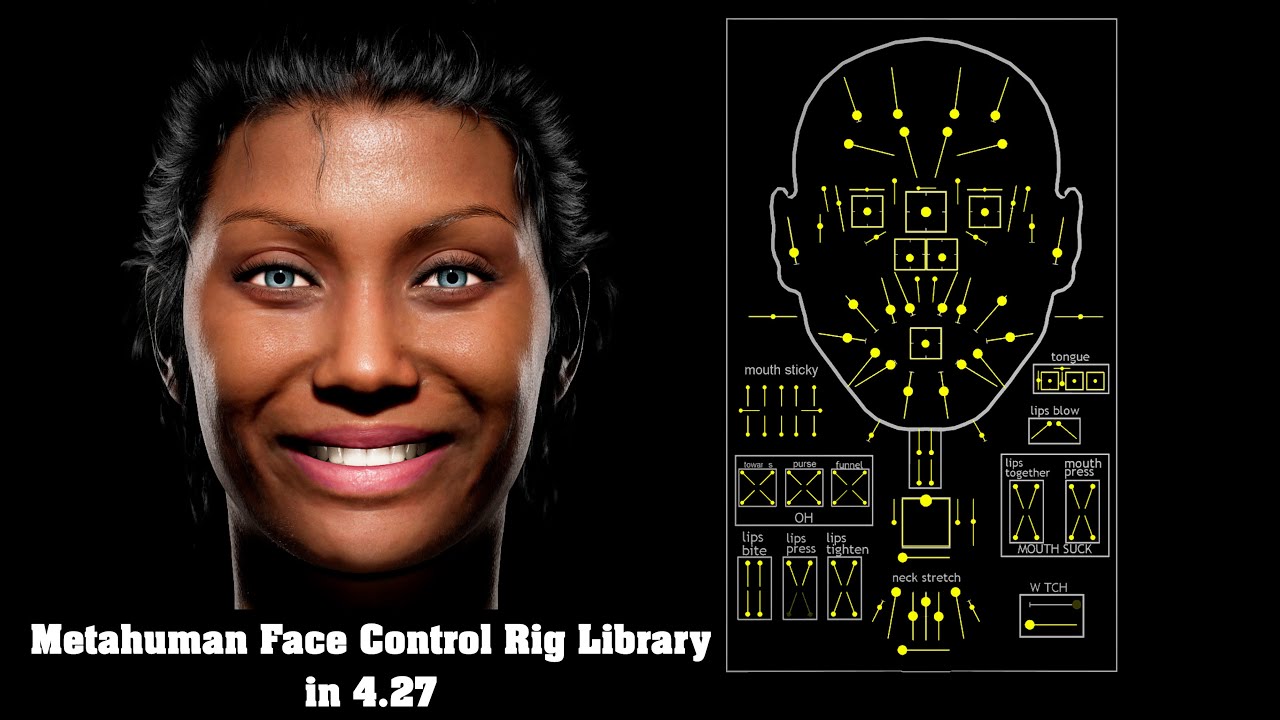
This Metahuman Face Control Rig Board video library has been inspired and tailored by the original video shared by Unreal Engine featuring Adam Walton from Cubic Motion. All the credit goes to Adam Walton for his descriptions and incredible overview. This library would not be possible without his video.
Link to original Metahuman Control Rig v...
warm shoal
warm shoal
ehy guys how are you? I'm really struggling with metahumans. I'm using unreal 5....
Nobody able to help?
 median osprey
Late to this, but easy enough. You could copy the skin weights
 plucky kelp
Hi, I'm struggling with some issue between groom and directional lights. Some noise like white dots appear in render and I don´t know how to solve it. I'd tried setting up Distance Field Shadows, and every related but I cannot find the key.
Please can anyone help me!?
 warm shoal
Hello, do you know why I can't update in unreal any change I do in mhc?
clear isle
warm shoal
Hello, do you know why I can't update in unreal any change I do in mhc?
It does not change dynamically. If you change something in MHC you will have to re-download and re-import
 grave rock
plucky kelp
Hi, I'm struggling with some issue between groom and directional lights. Some no...
grave rock
plucky kelp
Hi, I'm struggling with some issue between groom and directional lights. Some no...
Are you using the render queue?
Increase your AA samples.
warm shoal
clear isle
It does not change dynamically. If you change something in MHC you will have to ...
thank you!
Hello. do you know anything about this black spots on clothes? It happens if I try to use the citysamplecrow clothes on my metahumans. Would be nice to solve it because there is not plenty of clothes around 😦
 desert ocean
warm shoal
Hello. do you know anything about this black spots on clothes? It happens if I t...
desert ocean
warm shoal
Hello. do you know anything about this black spots on clothes? It happens if I t...
looks like Normals, or Vertex Issues, on Shadowing, prob on the Mat?, i never used CitySample stuff but looks like that
warm shoal
desert ocean
looks like Normals, or Vertex Issues, on Shadowing, prob on the Mat?, i never us...
It's not the material because if I change it the problem remains. I don't know about normals. they are models from a epic games collections, I don't see how can they have wrong normals
desert ocean
warm shoal
It's not the material because if I change it the problem remains. I don't know a...
I Mean the Model Normals issue, or its an Low LOD Model, looks weird
warm shoal
desert ocean
I Mean the Model Normals issue, or its an Low LOD Model, looks weird
Yes, anyway I don't know how to check. I wonder if I was the only one to have this issue
desert ocean
warm shoal
Yes, anyway I don't know how to check. I wonder if I was the only one to have th...
try force LOD or Export it and inspect it in your Main 3D Programm if u have it from an epic Pack thats weird
warm shoal
desert ocean
try force LOD or Export it and inspect it in your Main 3D Programm if u have it...
maybe because the peoplecrowd pack is not compatible with 5.1 so I have to copy manually beacuse I wasn't unable to migrate, or I migrated but there were some errors, I can't remember
desert ocean
warm shoal
maybe because the peoplecrowd pack is not compatible with 5.1 so I have to copy ...
Yeah probably but still weird, Even its 5.0 Stuff that shouldnt look like that
 twilit meteor
warm shoal
Hello. do you know anything about this black spots on clothes? It happens if I t...
twilit meteor
warm shoal
Hello. do you know anything about this black spots on clothes? It happens if I t...
Try to chaeck that a mesh (like f_tal_nrw_body) in the skeletalmesh of body only shows arms and ankles, the clothes should not be visible
warm shoal
twilit meteor
Try to chaeck that a mesh (like f_tal_nrw_body) in the skeletalmesh of body onl...
yes, no cloth visible in the skeletal mesh of the body. Anyway it's really weird because opening the skeletal mesh of the cloth it appears ok. I tried also to change some lod and other settings available but nothing. It becomes like that when it get attached to the body
warm shoal
I don't know if it can help, but the problem is totally related to light. I mean, all in shadows parts are ok, if I change the position of light, the black spots change in shape and position
 final jetty
hey all, why does this happen when i add any pose to my metahuman? it pops out of a pose, even though i try to add the a-pose asset?
 tardy rock
has anyone here successfully added metahuman to the alsReplicated? My metahuman appears to be using the ALS animations in the blueprint viewport, but in the actual gameplay it just floats around in t pose, no animations 😦
 fluid wasp
I've got a problem where as shadows from the ground foliage are making this weird pixilation effect on my metahuman. The foliage is animated moving back n forth. Not really sure though what the problem is. Any help would be greatly appreciated.

 warm wagon
Does anyone know if I can fix the eyelash shadows so there's no mismatch? I'm using pathtracing but not sure why the shadows are misaligned.
 final jetty
anyone have any issues with their metahuman hair protruding the body mesh?
 sage python
Updated from 5.03 to 5.1 and it seems that the metahumans causing some performance issue now.. not sure exactly why, did any of you have similar experience?
 flint lichen
Hey, do you know if there is a way to realtime lip sync metahuman on Unreal via Audio2Face?
 junior jacinth
Let's do it...
junior jacinth
flint lichen
Hey, do you know if there is a way to realtime lip sync metahuman on Unreal via ...
 junior jacinth
flint lichen
Hey, do you know if there is a way to realtime lip sync metahuman on Unreal via ...
junior jacinth
flint lichen
Hey, do you know if there is a way to realtime lip sync metahuman on Unreal via ...
I can help you figure it out...
 woeful wharf
a really dumb question xD
when i export metahuman through Q-bridge, i only get a metahuman BP, where do you get the mesh out of it ? 😮
desert ocean
woeful wharf
a really dumb question xD
when i export metahuman through Q-bridge, i only get a...
Thats really Basic-> Just open the Blueprint and than u can see it .
woeful wharf
you mean in viewport, yeah i can even drop it into level, but i cant find a mesh to implement it into a diffrent mannequin. i saw some videos that do it via retargeting and copy the movement bp into it, but is there no other way to get a normal mesh so i can drag and drop into other mannequinns
its my first time trying them out, was working since yesterday, at first i thought its simple, now im getting more confused xDD
woeful wharf
found it. on the top by "Actor" open it and you will find " convert BP_ to mesh"
woeful wharf
anyone knows an easy way to rig/retarget a metahuman for the ue mannequin?
warm shoal
twilit meteor
Try to chaeck that a mesh (like f_tal_nrw_body) in the skeletalmesh of body onl...
Looks like that disabling raytrace shadows in the light source solved the issue
 sly sparrow
Did they give a release date for metahuman creator at GDC? I know they released a lot of animating features but are they going to release it anytime soon?
 wanton magnet
is metahuman in-engine now?
woeful wharf
hey guys pls help ! I feel like going in circles with the metahuman start.
-I know how to rig and animate a mesh, giving him bones-> retargeting etc.
- i know how to make a metahuman thirdperson actor and work with animation retargeted on tick.
I want to make diffrent metahuman Npc so i need diffrent metahuman skeletons, so i can change them in the level per drop and click.
I rigged and set the bones in the metahuman folder, but i cant just copy the body skeleton into my npc cause its not a full mesh preview (only hands).
My question how do i start ? Where do i get the first mesh ? i found out that i can drop the Bp into level and take a static mesh out of it that way, but than he the mesh doesnt have the hair information in it.
How do you do it guys ? or what tutorial helped you understand the first step ? pls guide me senpai :3
jade snow
wanton magnet
is metahuman in-engine now?
IT IS?!??!?
median osprey
sly sparrow
Did they give a release date for metahuman creator at GDC? I know they released ...
'months'
 fervent stag
I have no idea what are you talking about, the way I use metahumans is downloading them from Quixel and retargeting to mannequin
 elfin edge
Anyone know how to fix the hair physics on this metahuman? Simulation has been disabled in the groom
 crystal oxide
A Metahuman I created in Metahuman Creator is importing into my project without the hair I chose in the Creator. So far this has happened twice. Is there a workaround?
 visual pendant
crystal oxide
A Metahuman I created in Metahuman Creator is importing into my project without ...
visual pendant
crystal oxide
A Metahuman I created in Metahuman Creator is importing into my project without ...
Is grooming plug-in on? What version you are using? Your project or using some sample project?
crystal oxide
visual pendant
Is grooming plug-in on? What version you are using? Your project or using some s...
My project, v5.1.1, I will check about the grooming plug-in.
visual pendant
crystal oxide
My project, v5.1.1, I will check about the grooming plug-in.
Also sometimes there is a bug, where there is no grooming on your character after import, but if you restart project they are back
crystal oxide
visual pendant
Also sometimes there is a bug, where there is no grooming on your character afte...
Thanks. Yeah, the plug-in is on. And after a couple of project restarts still no hair. Thanks for the help, though.
visual pendant
crystal oxide
Thanks. Yeah, the plug-in is on. And after a couple of project restarts still no...
hm, that's weird.
 sly matrix
Just in case anyone finds this useful, I'll post the link...
This is a list of all the default metahumans, and the output of an AI face classification algorithm, giving some basic barely-close metrics on the metahumans. I just found it daunting myself to make the decision on someone's race or gender, so I let the computer do it for me. Lmao.
https://gist.github.com/n8bot/b9502c6536a55dd5eda47557f560c2fe

It's pretty bad, ngl, but it's at least a starting point for developing a reference for the demographics
plucky kelp
Okay so
How do I enhance the breast size on my metahuman
Not for perverted reasons
It's a part of the body like every other
So I need that characteristic too
No for real now how do I make them bigger the default one ain't gonna cut it
crystal oxide
My "not for perverted reasons" t-shirt is generating a lot of questions already answered by the shirt.
elfin edge
Anyone have an idea of how to make a metahuman limb look like it was amputated? (see photo)

 summer furnace
Is it normal i lose about 10-15 fps when my medium quality metahuman is in the scene?
summer furnace
Also is hair strands plugin required for metahumam hair?what does it do?
 noble cave
How would I go about getting this hood onto my metahuman? I had earlier added it on a socket(as a skeleton mesh) and it seemed to be deforming with the control rig but it broke and no longer works. Here's a pick of it weight painted to the metahuman face bones in Blender. So I have a setup here with the proper weights but I can't get it onto the metahuman properly.
 elfin edge
I've created a mask to get rid of a metahuman leg, but this piece of the ankle still remains, does anyone know where it's located on the material png? Thanks


 sudden berry
elfin edge
I've created a mask to get rid of a metahuman leg, but this piece of the ankle s...
sudden berry
elfin edge
I've created a mask to get rid of a metahuman leg, but this piece of the ankle s...
Here is a clean MH Body Texture with all body parts , you can overlay/underlay it to the orig. MH textures :
 elfin edge
sudden berry
Here is a clean MH Body Texture with all body parts , you can overlay/underlay i...
elfin edge
sudden berry
Here is a clean MH Body Texture with all body parts , you can overlay/underlay i...
I think I can see from this where I'm missing, thank you
 hoary jetty
Is the metahuman animator only available to use with iphone? No Android alternative?
junior jacinth
Does anyone have any pointers for krowd sim?
 tawdry lintel
Hello Guys, i got a short question:
I`m trying to get a skeletal mesh from a metahuman. how would i go about it ? The skeletal preview doas not show full body with face..

 sly matrix
hoary jetty
Is the metahuman animator only available to use with iphone? No Android alternat...
sly matrix
hoary jetty
Is the metahuman animator only available to use with iphone? No Android alternat...
I'm not sure what the big differences are with the upcoming "Metahuman Animator" but the currently available way of doing things is with Livelink which is tied to ARKit/iPhone IIRC. But the upcoming animator should be able to use other devices? Something like that.
 unkempt palm
Is is possible to use old home videos and create Metahuman characters?
sly matrix
unkempt palm
Is is possible to use old home videos and create Metahuman characters?
in a multi-step process, yes. There are tools to make 3d models from video. Visual SFM (Surface From Motion) is one such tool. Once you get an acceptable 3d model (might not be easy or possible), you can try and feed it to mesh-to-metahuman.
 astral fern
Hello, is it a known issue that my shirt gets meesed up when i zoom in? or is it on my side? I didn't change anything really but just imported it. Seems to be a LOD issue (?) I use 5.1

At this distance it's fine again

 normal sorrel
hi! any advice when rendering metahuman's hair? the rest of the scene renders fine, without noise, but the hair has a lot of noise and appears very shiny. thanks!

 quiet sigil
hello! I'm using City Sample Crowd asset for my project. I need to turn off LODs for my metahumans and found that I can set ForceLOD to 0 or 1 so the highest LOD was used. But it brakes the animation of walking, that comes with the asset. The problem is that some parts of character are wiggling, especially in legs. Can anyone help me or give an advice how can I solve it?

here are screenshots of wiggling legs and hands of animated character

 river gull
is it possible to hide all menus and toolbars in the metahuman creator ?
 midnight karma
my attempt at Obed Marsh from Lovrecraft's Innsmouth stories

 topaz radish
Are there any alternatives to iPhones for metahumans?
desert ocean
midnight karma
my attempt at Obed Marsh from Lovrecraft's Innsmouth stories
why i need to think of Hayashi .. of tekken
 hot wolf
Hello! Does anyone know how to customize the range that Metahuman LOD's change? Cant find this anywhere online
visual pendant
Hi everyone. has anyone mange to save new blend shapes when modifying dna in maya?
 novel cape
Hey all, relatively new to metahuman here. Does anyone here know if it is possible to change the base clothing? There is no option for it in the creator. I'm making a medieval-ish survival game and I'd need the player to basically start out in rags. The base clothing is really the only thing stopping me from moving to metahumans. Any advice is greatly appreciated!
midnight karma
novel cape
Hey all, relatively new to metahuman here. Does anyone here know if it is possib...
I just made them naked so I can make custom clothes
novel cape
Awesome, how did you manage that? Is there any documentation or a tutorial you could link me to? I’m pretty new to metahuman stuff so any learning material is appreciated
 wise condor
Does anyone know a solution in 5.1 for the fingers not retargeting correctly, from a ue4 to meta human? i've followed documentation in setting the metacarpals to none etc, but the fingers always end up offset in the wrong direction. Everything else is targeting properly.
Or is the basic IK rig for the meta human in the hands wrong? would i have to set my start and end with all the extra finger bones in it, they currently dont have it setup that way
They are just slightly off to the point it makes holding anything weird lol
 teal trellis
hi all surprisingly i'm not seeing much on this topic, how to get metahumans going in 5.2? marketplace and directly within plugins can't do it
wise condor
It appears this issue now happens even from ue4 skel to ue5 the fingers do not go to the proper positions. in 5.0 this wasnt an issue
This is the meta humans hand,


ue4 mani

ue5 mani, as we can see the issue is the same
I've set retargeting options to skeleton on everything in the skeleton of the meta human aswell thinking maybe it had something to do with that, no change.
Interesting enough in 5.0 we could just drag and drop a meta human skel mesh on a ue4 mani, or a ue5 mani skel mesh and everything would work perfect.
in 5.1 this is no longer the case. using compatible skeletons also results in rampant crashes when previewing animations that drive the hands.
teal trellis
hi guys, anybody know if 5.2 will support the actual metahumans plugin like 5.1? i'm not understanding how metahumans improvements is the chief point of the tech demo yet it doesn't seem to be obviously compatible or am i missing something
teal trellis
actually i guess my first import into pulled in all the plugins and dependancies to work heh
 simple forge
wise condor
in 5.1 this is no longer the case. using compatible skeletons also results in ra...
simple forge
wise condor
in 5.1 this is no longer the case. using compatible skeletons also results in ra...
where are you getting that hand data from out of curiosity or is it from an asset pack?
wise condor
simple forge
where are you getting that hand data from out of curiosity or is it from an asse...
Doesn't matter which anims are used. The issue is with base ue4 skeleton with the new 5.1 retargeting to ue5/meta human. This one is from Frank, I don't use poor quality anims
Unsure if it's the pose being different from ue4 to 5, and the tabs to edit pose are not exposed anymore in the retargeter like they were in 5
simple forge
wise condor
Doesn't matter which anims are used. The issue is with base ue4 skeleton with th...
who is Frank? I am noticing something has changed also.
wise condor
simple forge
who is Frank? I am noticing something has changed also.
Frank climax. Makes top notch stuff.
simple forge
wise condor
Frank climax. Makes top notch stuff.
Interesting, hes got some nice assets on Marketplace.
wise condor
Been busy today but tomorrow I plan to figure out how I can edit the pose of the ue4 skel in the retargeter and match it up see if there is any change for some reason it's picky about it, atleast that's my hunch. Nothing is wrong with my chains or IK
Also going to do a controlled test in a separate project but something is wrong now. Or it's a setting buried. I notice there is no option to retarget IK either now they don't even show up in the chains. Which maybe is the issue?
simple forge
Do you have the Metacarpals in your chains?
wise condor
Like my IK hand IK foot etc, before between 4/5 the IK rigs had it. Just thought about it. IK goals are fine though.
wise condor
simple forge
Do you have the Metacarpals in your chains?
Your supposed to set them to none going from 4 to 5 haha it looks like they were holding a stick of dynamite in their hands if you leave it targeted
simple forge
wise condor
Your supposed to set them to none going from 4 to 5 haha it looks like they were...
ok ya, I leave mine out entirely
wise condor
Like everything is perfect sooooo close but the fingers are bending up
Up and past the thumb.
Transforms and stuff should all be fine. These are base IK rigs too defaults so it's not like I configured them wrong, even though I've built many for my monsters with no issues what so ever in 5.0
simple forge
This has been a challenge for a while. I had everything working perfectly with IK retargeter and finger data before the recent update.
I have to have my source and target in a Tpose so that the fingers are straight on both rigs
wise condor
So we have to make the ue4 manny A pose the same ore just straight up T pose them
How are you editing the pose in the retargeter now
I suppose I could copy local transforms maybe
simple forge
Im not using the mannis. What I do is create a Tpose Animation and then convert it into a Pose Asset. I then go to source and target and import those poses
wise condor
Brutal
simple forge
I know
wise condor
Lol this patch has devolved us
simple forge
I found a better way, and it was working perfectly, until I retested with the update...and since you are noticing something is off, maybe its not just me
wise condor
Shared skels lol just crashes me too
Or compatible lol
Live retarget everything's wonk cause as we can see if the pose im assuming or bone transforms are not the same it hurts the anims. Just my theory. Weird cause this was working perfectly it's like interpolation is busted
But I don't know forsure, we can't be the only ones retargeting I've found nothing for info about this either, just old problems that are silly mistakes
simple forge
wise condor
But I don't know forsure, we can't be the only ones retargeting I've found nothi...
Well it is possible this hasnt been discovered yet. Maybe developers dont test with hand data and just test the body data
I have a project set up from 5.1 before the update and everything in there is still working. But when I created a new project and reset up the IK retargeter and rigs exactly the same way...not getting the same results
wise condor
Yeah we pay attention to our work and make sure it's quality lol no finger clipping in weapons and stuff
simple forge
so now I use that older project for the retargeting till I get this sorted
Fingers are so time consuming
wise condor
I honestly don't even need this to retarget it's the only way I know of to get the skeleton mesh assets
All our armor is based on meta humans
simple forge
right, yes same here, metahumans
wise condor
I'd use the new skeleton cause why not
simple forge
I always use the female medium one
wise condor
But most anims out there were made with the legacy skeleton
So we kinda gotta be able to retarget like we could in 5
Lol 30 sets of armor, over 100 unique abilities really like to consolidate this so we can start worrying about morph targets with custom char creation
simple forge
ya at some point I had to resort to retargeting in 4.27 and transferring the uassets over to 5 cause IK retargeter didnt have the edit pose options i needed
wise condor
Lucky I have this worked saved in 5.0 too I may just retarget there then migrate to a blank project then update the project and migrate back into the main project lol so I still have my back ups
simple forge
Are you just bringing in the packs and assigning them to the other skeleton. How are you doing this. IK retarget right?
I just copy the uassets over of the animations
wise condor
Ik retarget I just target it all to the main skel
That way root motion doesn't get clapped
Cause root needs to be globally scaled and all the
IK bones
Or root motion won't work lol it'll just teleport back to origin
simple forge
As a test why don’t you expect the right skeleton to 4.27 retarget in there and see if the thumbs look right
Sorry the fingers
 ebon sun
Hello lovely people 🫰 I've been searching for a tutorial on how to make my Metahuman hold a gamepad and recognize the inputs (ideally a fightstick) and could only find a short demo by citizenmetaone (https://www.youtube.com/watch?v=R3g7cAAfFxE&ab_channel=CitizenMetaOne). Any clue on how I could set this up? I am 2 months into unreal engine with no previous developing experience

This is a clip from my live Twitch Stream showing a basic "Gamepad / Controller" mode for my MetaHuman VTuber app.
Watch Live @ http://www.Twitch.tv/CitizenMetaOne
Computer Hardware
HP Z8 Workstation
Nvidia RTX Quadro 8000
wise condor
simple forge
As a test why don’t you expect the right skeleton to 4.27 retarget in there and ...
Haven't used meta humans in 4 at all lol
simple forge
Works like a charm hehe
ebon sun
ebon sun
Hello lovely people 🫰 I've been searching for a tutorial on how to make my Met...
I found a plugin for advanced gamepad rigging for anyone interested, but unfortunately its only for vtube studio. I assume you can't use it on metahumans https://github.com/maruseu/Nyarupad-VTS

GitHub
Vtube Studio gamepad plugin. Contribute to maruseu/Nyarupad-VTS development by creating an account on GitHub.
 true fog
Has the method to get clothing onto metahumans changed recently? No matter what I do, i get "FAILED TO MERGE BONES:
This could happen if significant hierarchical changes have been made
e.g. inserting a bone between nodes.
Would you like to regenerate the Skeleton from this mesh?
WARNING: THIS MAY INVALIDATE OR REQUIRE RECOMPRESSION OF ANIMATION DATA."
I thought it was because I set up a control rig in maya, but even if I go back to a clean import straight from bridge and skin that it still errors. I even tried exporting just the body bones from inside the metahuman bp "m_med_unw_body" and skin those to see if theres some naming convention error, still same issue. 2 days of this and I'm no closer to an answer 😦
 worn shell
Spent a few hours to dl a metahuman, pc go to sleep at 90% and now I need to restart from 0 again. Bridge is amazing lol
simple forge
true fog
Has the method to get clothing onto metahumans changed recently? No matter what ...
Maybe check when you export from Maya that the heirachy does not have anything extra in there. Usually it likes to add an extra group. You have to ungroup it and then export.
 dreamy depot
true fog
Has the method to get clothing onto metahumans changed recently? No matter what ...
dreamy depot
true fog
Has the method to get clothing onto metahumans changed recently? No matter what ...
If I get this fault, generally at some point in workflow I've combined parts of 2 skeletons i,e shirt/pants
On that note, I am struggling with blender clothing weights, there's so many bones I have no idea what's doing what. Anyone found an easier workflow for weight painting clothes for metas?, I've managed to get it to only 1 point on the armpit that's pinching forward by quite a long way, can't figure out which bone is causing it
wise condor
simple forge
Maybe check when you export from Maya that the heirachy does not have anything e...
Interesting enough you can't even assign a meta human skel mesh a ue4 skeleton right now it'll fail to merge bones.
These things are concerning consolidating 1000s of $s of modular armor to the new bone meta humans lol
But I will figure this out lol. There must be a way
Without DCC round trips
wise condor
dreamy depot
On that note, I am struggling with blender clothing weights, there's so many bon...
Honestly just assign things how you normally would with weight painting and don't give weight to random bones. Do it by hand
dreamy depot
wise condor
Honestly just assign things how you normally would with weight painting and don'...
Tbf it's not really something I've looked into before now generally could get away with minimal adjustments and where they were needed it was easier to find the bones, it just feels painful now lol
wise condor
Weight painting is brutal I don't do it for that reason id rather pay someone
My brain feels like it's been in a microwave with all these changes so now I don't even know what applies or works anymore always having to re-learn, new issues happen with the same work flow etc
Epics documentation for going from ue4 to metahuman results in issues too lol
Ie my finger problem
dreamy depot
Thing is because epic provide a select number of premade outfits, you can copy the weights across in most cases, but yeah in this specific case I have 1 armpit that just keeps tareing, nothing I do helps lol
Almost ready to go back to makehuman/blender tbh haha
 full ocean
hey when i use live link with meta human, there is a little bit shake in the head rotation, how to eliminate this shake head rotation?
full ocean
full ocean
additional information: im using ipad pro for recording my face
wise condor
dreamy depot
Thing is because epic provide a select number of premade outfits, you can copy t...
They are making tons of progress giving us the latest tech and making things available to us for free which I'm super grateful for, I'm sure everything we could do in 5 or even 4 can still be done it's really just a matter of how to go about it now
dreamy depot
No doubt, also early days in sure there will be shortcuts and things people find
teal trellis
Hi all, it seems 5.2 just has some memory leak issues and i'm wary of getting started into a project that will constantly have issues. so what am i really missing with metahumans going back to 5.1? isn't most of the 5.2 features relate to animation?
i mostly just want to pull in some real scans and fix the textures. animation would be basic for starters, assume i could always port it into 5.2 down the line once official?
true fog
simple forge
Maybe check when you export from Maya that the heirachy does not have anything e...
I've even brought in a clean import from bridge and tried and it still fails. Followed every tutorial, multiple times. Tried everything I can think 😦 I've even brought the skeleton from inside unreal over and that doesnt work either. I'm at my wits end.
I have tried messing with the hierarchy but will try again. Thank you.
true fog
Problem solved. No idea why, but exporting as FBX from maya the normal way and chosing the same settings everyone seems to use on tutorials (Autodesk Media and Entertainment preset) doesn't seem to work for me at all. I exported using the game exporter and it worked. Thanks for the replies guys, I appreciate the help.
teal trellis
anybody else using reality capture? seems no matter how nice i do the images, how much i follow the tutorials and videos, all my images come in all scattered and never makes an model
wise condor
Okay
I figured it out, Not a perfect solution but it gets us close
We have Pose Assets now
Or we can generate them and sync the poses in the retargeter


Its not as tight.
But its more in line with where things are. I've been experimenting with what method of interpolation is used on rotations,
wise condor
simple forge
Works like a charm hehe

Basically you can take either your source or target, export its pose and then just assign it in the retargeter and it fixes alot of the issues. Ofc its not perfect unfortunately
but its not as bad as it was
I'll figure it out, So if someone else somewheres down the line, Which im sure someone will be using ue4 manni anim assets and want to use them on the meta humans. You can basically throw all the YT videos on this out the window, They only tell you a fraction of the story.
For some reason aswell. Some anims like rotation mode on the chain map to be one-to-one and others like the standard Interpolation. I suppose its how it was all made

Still not perfect, But not as bad as it was. The issue is 100% pose related.
The built in copy pose does a good job but its not as polished as one would like i guess.
this is a meta human with a ue4 mani pose and its what cleaned up a crap ton of the above issue

it gets us very close, There is an edit mode. non destructive which is nice. Ill attempt to line up the fingers perfectly and arms see how she goes.
simple forge
wise condor
Basically you can take either your source or target, export its pose and then ju...
yep thats what I have been doing to match the poses is to use Pose Assets
simple forge
wise condor
these are close, but im wondering how did you match the poses? Manually adjusted them? Have you considered just tposing both of them and zeroing out the fingers and creating those as poses to be used with IK Retargeter?
wise condor
simple forge
these are close, but im wondering how did you match the poses? Manually adjusted...
I just exported, Now im manually lining stuff up
wise condor
simple forge
these are close, but im wondering how did you match the poses? Manually adjusted...
I suppose if i zero'd em out and made sure it was lined up perfectly that probably will help rather than manually line em up lol
Shame it doesnt apply proper transforms
getting it super close now,
Wont really have to do this again so it is what it is.
lol Id love to just copy local space transforms to all chains and be done with it.
then we know its 100%
when you originally said export pose i was like nooo i dont wanna go into blender or maya
teal trellis
hi all, whenever i bring in my mesh to metahumans i get to the point where it does metahuman identity solve, but i then get : Some active curves are placed outside the promoted frame area.
i'm not sure if that's thinking i have something enabled that's not relevant, or some other data i'm not seeing or what
wise condor
simple forge
these are close, but im wondering how did you match the poses? Manually adjusted...
Did you Do the T pose in the retargeter and 0 out or somewheres different like an external DCC
simple forge
wise condor
Did you Do the T pose in the retargeter and 0 out or somewheres different like a...
I think I show this process in two different videos
simple forge
wise condor
post me a link :p

Link to our short film Enzo: https://youtu.be/psw2M94h_aA
This is the fifth part of the behind the scenes, where I share the pipeline I used in order to get Enzos body and finger motion capture data into UE5. Enzo was brought to life using the mesh to metahuman plugin by @EpicGamesStore & @3lateral4 in @UnrealEngine 5.
I cover the UE4 to UE5 u...
simple forge
wise condor
post me a link :p
I go over how I create a pose asset around 1:29 and then how to assign it in IK retargeter around 6:40
simple forge
wise condor
post me a link :p
https://youtu.be/8p-AfDWH0v8 and in this one at 6:22 I go over how to create a tpose and zero out the fingers correctly
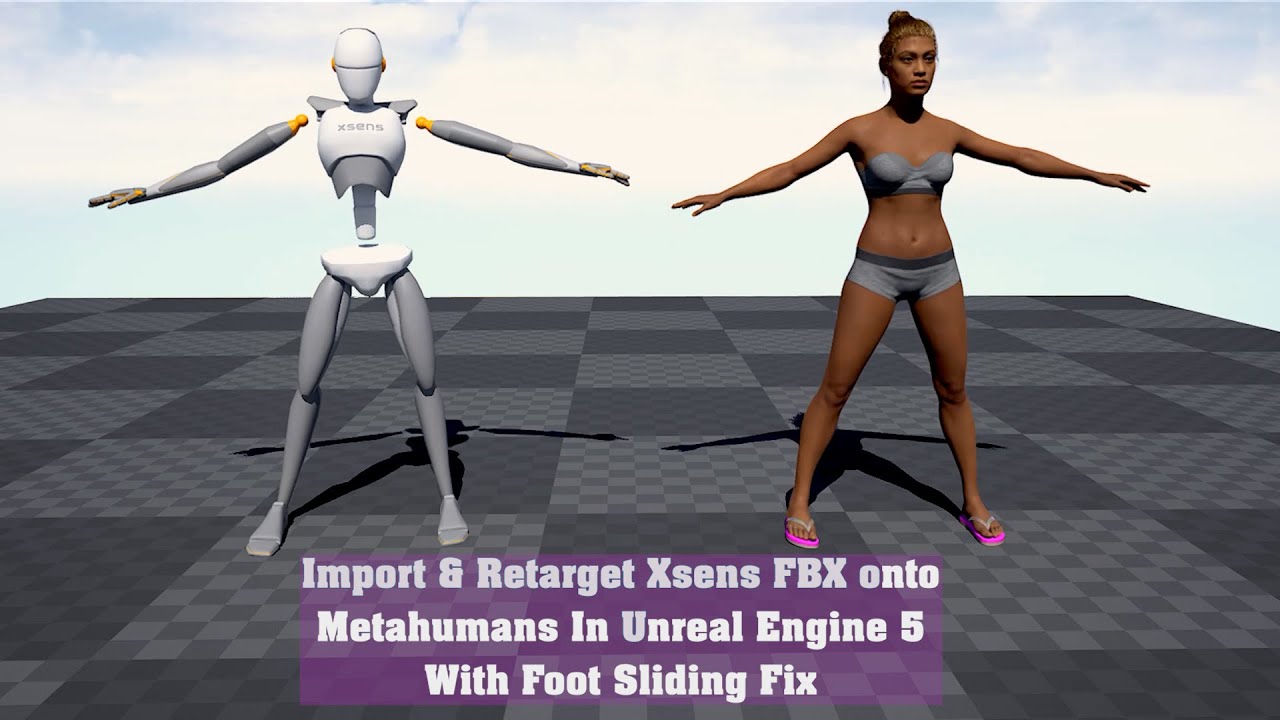
In this video I go over how you can import your Xsens FBX data directly into UE5, thanks to the Xsens Import Puppet and how to retarget your Xsens mocap data onto the Metahumans. This method also works for earlier versions of UE.
Special thank you goes to Katie Jo from Xsens, to Arsene from Manus, to Jonathan Winbush, to Gabriel Paiva, to JSF...
simple forge
simple forge
I go over how I create a pose asset around 1:29 and then how to assign it in IK ...
If you tpose both your rigs and import those pose assets you should be able to get one to one
wise condor
I'll check it out, Lol manually doing it is rudimentary
teal trellis
i'm still struggling to get a working model. i have use polycam and realitycapture, followed everything to a T, can not get a solid model. finally got something workable but there are artifacts and not sure how to boolean clip off my model. can't use reality capture to change the bounding box and lasso like the videos say. and no polycam output seems to be liked by reality capture to take the data in, the raw images just show as points. losing my mind lol
simple forge
teal trellis
i'm still struggling to get a working model. i have use polycam and realitycaptu...
You are getting an error when trying to run the identity solve?
teal trellis
i did, i deleted the whole thing and trying to just improve my capture. i have a usable one from polycam i can export in various methods, but i was unable to pull it into reality capture to do the easy lasso clipping, so tried obj right into ue5 and not sure how to clip parts. im tryin gltf now
simple forge
Could be that you have more than one frame with the same trackers enabled OR you have trackers checked on and those trackers are not on the topology
teal trellis
there is an artifact off the shoulder behind in open space
i think i'm not sure how to tell which trackers are valid on this?
wise condor
simple forge
That should not give you that error
can you send me that Tpose?
xD ❤️ save alot of time
the pose asset, file size should be small
simple forge
wise condor
can you send me that Tpose?
Lol why you don’t feel like tposing? Come on it’s so fun
simple forge
teal trellis
there is an artifact off the shoulder behind in open space
https://youtu.be/0wYkqlqLaHk skip to 3:40

Link to our short film Enzo: https://youtu.be/psw2M94h_aA
This is the first of the behind the scenes, where I share how the original mesh used to create Enzo was sculpted by @tomassackmann9687 from scratch from his course on @cgcircuitLLC on how to create a realistic character in @MaxonVFX Zbrush, @Autodesk Maya & Mari, using @Russian3dscannerS...
wise condor
simple forge
Lol why you don’t feel like tposing? Come on it’s so fun
xD i think i have 4.27 installed still,
simple forge
wise condor
xD i think i have 4.27 installed still,
You can tpose in either of them, it takes like 2 minutes
You can tpose in 5 and create the pose assets I. There as well
simple forge
teal trellis
there is an artifact off the shoulder behind in open space
If you don’t have any bogus trackers then the mesh itself might have something going on and unreal isn’t liking it, maybe an artifact somewhere. I am a bit useless outside of unreal but I’ve removed things from meshes in blender pretty easily
teal trellis
yea its looking more and more like blender may be worth getting even if just for a few specific things
i haven't watched that vid yet but some others have shown importing images right into blender and dumping to fbx
simple forge
teal trellis
i haven't watched that vid yet but some others have shown importing images right...
I had to remove hair from a head mesh….it was a bit painful until I figured out how to do it, time consuming but it’s definitely a software that always comes in handy
teal trellis
and baseline blender is free right?
also when i dump from polycam fbx right into unreal, it says file is corrupt and there is no scene
teal trellis
holy crap i may have gotten it
obj import AND has to uniform scale import 10x
it was coming in super tiny and trying to scale it big after the fact was corrupting
but i need to fit a childs head on a body without lookingweird
wise condor
welp guess i gotta T pose the meta human too on its own, Making one pose asset based off of ue4 skel will not get the hands correct still
ah the good ol days where you could click a couple times and be done with this. time is money
wise condor
Well, Thats enough for tonight for me, Resume tomorrow. Even with T poses made from ue4 skel, or the meta human the fingers will never give me 1 to 1
it was actually closer copying an A pose. Everything is zero'd in local space too, so im at a loss
crazy the new metahuman plugin too, Very odd i've had metahuman skel meshes assigned to a ue4 skeleton in the past. but now i cant even go back to how it was. 😦 assigning that same skel now, will result in failed to merge bones.
Shame i should have made this change before 5.1 and avoided this all together.
without the new plugin it warns you it'll crash the engine without it.
wise condor
For curious onlookers, in 5.1.1 when you grab the clavicle on a meta human (in 5.0.3 it calls this the upper arm R) it calls it a clavicle as it would be, so we know we have hierarchy changes. What's the point to this. There is now 3 different skeletons. How do we standardize this process, most of us all have anims made with the ue4 skel. And not all of us are doing mocap either.
So at some point for some reason even with zeroing out all my bones in a Tpose we have translation issues still.
And why won't saving a pose and using it in the retargeter work correctly too? Is there that much of a difference? And why was this all never consolidated when making all these changes to the skeletons I understand it has alot to do with live link and making advancements, but there was no reason to change the A pose to begin with.
simple forge
teal trellis
and baseline blender is free right?
yes free
teal trellis
my kids wer pretty blown away at my first attempt on importing them. going to clean up and mask the face texture and pull it back in. but with one of my kids he had bangs going over his head, so the scan wasn't very good and added to his forehead mesh making him look like a troglodyte
wise condor
@simple forge thanks for the help lastnight, I'm going to do the process again, its very possible I did something wrong lol.
But who knows, haha gotta solve the issue anyways!
teal trellis
ok wow im just gonna say after all the crap i struggled with in regards to capture, the Keen tools facecapture for Blender is AMAZING
the wrapping AI around the mesh is like at least 80% in most cases and i just have to tweak, would tweak less if my shots were optimal
unreal takes it very well
ebon sun
Hi everybody, I was wondering if anybody knows what might be wrong with the lighting on the left side? On right side is just the viewport and a camera on the left with default settings, just the focal length adjusted. I have this problem with many environment assets from the marketplace - i think it has to do something with the environment being built in previous versions? Also the prompt: rebuild lighting. Any tips for a good tutorial?
 teal trellis
are you not using nanite? doesn't it ask that if you're not using it
ebon sun
Where would usually see that? Never adjusted any settings regarding nanite (learning ue since january)
after changing left side to viewport and back, both sides are broken

after restarting the project. Id be thankful for any clue on what causes this
 wise condor
ebon sun
after restarting the project. Id be thankful for any clue on what causes this
wise condor
ebon sun
after restarting the project. Id be thankful for any clue on what causes this
looks like auto exposure on this one. Lumen and nanite or no?
VSM?
teal trellis
sorry i had meant lumen earlier lol
wise condor
yeah lumen should be used with nanite as the surface cache updates extremelyy slowwww without it. With The new lighting you can def get artifacts in the shadows on skel meshes, We have them currently, but i haven't taken the time to fix it. as its not too noticeable, But the documentation basically says to tweak the settings. You get a haze around stuff moving. and issues in the penumbra. Very minor though
wise condor
ebon sun
after restarting the project. Id be thankful for any clue on what causes this
You have two options, Adjust auto exposure with lumen in a post processing. Or turn auto exposure off, I opt in for the Post process method as its nice to have control over auto exposure.
Also see if you have Virtual shadow maps enabled. I see you have alot of light sources in there its good to see what your Cache is doing with VSM aswell. it can point at issues too
Check your lumen scene aswell, see if anything is black if its black it is not contributing to lighting and can cause issues aswell.
ebon sun
wise condor
You have two options, Adjust auto exposure with lumen in a post processing. Or t...
Thank you Hexen for giving me directions 🫰 🫰 Does it mean that I have to rebuild all lights in my level? Also, I've never set up any post processing so it's time to learn that I guess. Just so to understand: Why can't I turn the lights in the level off completely?
simple forge
ebon sun
after restarting the project. Id be thankful for any clue on what causes this
if you change your lights to movable it should go away. If you are using lumen, and not baked lighting you dont need reflection captures.
ebon sun
wise condor
You have two options, Adjust auto exposure with lumen in a post processing. Or t...
like basically every keyword you've used is new to me hahah need to abuse chatgpt
ebon sun
simple forge
if you change your lights to movable it should go away. If you are using lumen, ...
that was one of the solutions ive found, changed all to movable but metahuman is still broken.
also tried turning post process on and off in outliner
(with the eye button)
simple forge
How is the metahuman broken
ebon sun
changes nothing on the character
ebon sun
simple forge
How is the metahuman broken
check above, the first screenshot. On the left side, the metahuman is i think not casting shadows
the groom and skin looks overlit
simple forge
Are your camera settings set to manual exposure? You might also want to check the scalability settings to see what you have those set to. Cinematic or Epic?
ebon sun
I clicked on the camera in outline and searched for 'exposure' in details. All results are greyed out and unchecked. So does this mean I have no post processing on the camera?
simple forge
ebon sun
I clicked on the camera in outline and searched for 'exposure' in details. All r...
all cameras have a post process.
Check your scalability settings and only use one viewport at a time just to test
ebon sun
Weird, when I go into single viewport mode, the Metahuman is again broken
Isn't this just a bug then? Because sometimes it works and sometimes it doesn't
wise condor
ill post some snips of where to find and setup post post processing for you,
wise condor
ebon sun
I clicked on the camera in outline and searched for 'exposure' in details. All r...
camera wont control that stuff as far as i know

set your post process volume to this,


You can hand scale your PPV, Or you can hit infinite extent and it will globally cover everything, When doing large worlds, I do this and set priorities up on the PPVs,
Nice for mountains when exponential height fog needs to be manipulated in different ways depending on elevation


Check your lumen scene

And see if any of your lights are invalidating your VSM

 plucky kelp
anyone know why metahuman hair may stretch or become distorted when rendering in movie render queue?

 ebon sun
plucky kelp
ebon sun
plucky kelp
I had these kind of issues when I recorded that facial animation in a lower LOD. You have to make your recordings in 0 LOD
plucky kelp
ebon sun
I had these kind of issues when I recorded that facial animation in a lower LOD....
Like the groom itself or do you mean the lod fix for metahumans where you change it to 0 so the groom doesn’t disappear outright?
ebon sun
im not sure if this will work: set you metahuman bp LOD to forced zero. Make the recording. Check if hair is distorted
plucky kelp
 wise condor
ebon sun
wise condor
ebon sun
Blue is invalidated means it updates the shadows everyframe, Skel meshes will do this or anything moving. Thats normal
plucky kelp
ebon sun
im not sure if this will work: set you metahuman bp LOD to forced zero. Make the...
Forced lod has been zero. Maybe it’s something with AA and temporal samples? I haven’t found anything on forums about this
wise condor
plucky kelp
Forced lod has been zero. Maybe it’s something with AA and temporal samples? I h...
Warm up frames?
plucky kelp
wise condor
Warm up frames?
64
wise condor
plucky kelp
64
lumen etc?
ebon sun
couldnt make anti aliasing work on my characters
plucky kelp
Idk why lumen would screw with grooms but im using raytracing
plucky kelp
ebon sun
couldnt make anti aliasing work on my characters
How so?
ebon sun
plucky kelp
How so?
always thought its not compatible with the long hair grooms
dont know how to fix the off physics
wise condor
plucky kelp
Idk why lumen would screw with grooms but im using raytracing
do you have alot of emissive light and other lights off?
plucky kelp
wise condor
do you have alot of emissive light and other lights off?
Yeah
Ton of lights
How do you mean other lights off?
The scenes painted with a ton of point lights and such
wise condor
just an emissive source will screw up grooms
plucky kelp
Any emissive source?
wise condor
do you have a directional light?
plucky kelp
wise condor
do you have a directional light?
I do not
wise condor
And he looks like he's got hair loss outta random xD
 wise condor
thats more work
plucky kelp
 wise condor
Someone else likely has encountered this. I've seen it in a different way than this, Your hair is physically leaving where it should be, I've seen it thin out and look balding
plucky kelp
It just randomly stretches in odd directions
Sometimes over his face, other times just outwards in strange directions
Happens if I scrub through the sequencer too quickly
wise condor
try warming up for like 300-400frames
plucky kelp
I’ve tried disabling hair simulation
wise condor
should be anyways with lumen to let that surface cache get nice and cooked
plucky kelp
wise condor
should be anyways with lumen to let that surface cache get nice and cooked
Just set it to 128. Gonna keep messing with settings. You said AA wouldn’t work with your character?
wise condor
plucky kelp
Just set it to 128. Gonna keep messing with settings. You said AA wouldn’t work ...
not me
wise condor
plucky kelp
Just set it to 128. Gonna keep messing with settings. You said AA wouldn’t work ...
what CPU/GPU
plucky kelp
I7 11700f 3060ti
wise condor
yeah let it warm up atleast try that first.
plucky kelp
Looks to be doing better with more warmup frames
Have a resource for lumen as opposed to ray tracing?
plucky kelp
wise condor
should be anyways with lumen to let that surface cache get nice and cooked
^ in terms of this
wise condor
can use hardware raytracing where avail, you can path trace all kinds of stuff
but let it cook for awhile especially when you have settings cranked.
teal trellis
is there an easy way to send a demo 'snippet' of a metahuman you created to people without having to do a complex workflow?
i'm trying to dump a few examples of the rig animations in metahumans creator just to show them what i did
i also noticed MH doesn't do so well with making children characters. not saying it can't be done but it's more geared to adults, so scanned my 12 year old son in and made him look 16, was pretty cool and creepy, every little extra work done so i can really improve it if i wanted
 jovial ruin
Anyone ever seen this sort of moire pattern on MH hair? It only seems to happen with telephoto lenses at certain distances away

Also happens on eyebrows:

Gets even crazier on super long focal lengths:
Almost seems like a weird clipping plane issue... fresh MH download, LOD0, cinematic quality, works fine in a fresh project
 plucky kelp
jovial ruin
Anyone ever seen this sort of moire pattern on MH hair? It only seems to happen ...
plucky kelp
jovial ruin
Anyone ever seen this sort of moire pattern on MH hair? It only seems to happen ...
what are telephoto lenses?
plucky kelp
jovial ruin
Also happens on eyebrows:
I know this is off topic regarding the issue, but how did you manage to get those custom clothes on your metahuman? Head on different body method or something else?
teal trellis

In this tutorial you will learn how to add Custom Clothes for your Metahuman using Blender and Unreal Engine. You can use any model e.g. from Sketchfab. You can also use your assets, just export them to blender as in this video.
That's just a Beginner tutorial, I have more to share about custom metahuman clothings, please leave a comment if yo...
bottom line is get your clothes (paid, sketchfab, etc), export the metahuman models, put it together in blender, pull it back in
wise condor
teal trellis
serp, https://www.youtube.com/watch?v=gBEUvLq3Rak
This is teaching people bad habits.
wise condor
Should be doing this with leader pose component. Some of the information does apply but it doesn't properly fit so looking into using morph targets to make it fit properly etc.
teal trellis
i realzie now its his only video and there are a few other better ones, i was just trying to get the general idea
is there a more intuitive way to make it auto fit on the mesh?
teal trellis
lol just did a capture of my 5 year old daughter. it basically makes her look like a mix of my daughter wife and sister all combined. but it's very realistic and i can't believe this is with essentially no touching up
true fog
Is there any reason my metahuman would be significantly taller in unreal engine than in maya? its thrown off all alignment, all scales are 1, yet its a good 15-20 cm's taller in ue5 than maya (cube for height reference, also hands should line up on the handle)

 wise condor
oh man. Tposing in 5.1.1 is literal cancer.
wise condor
 sly pilot
are they game ready now?
sly pilot
are they game ready now?
Yes just adjust your max in game textures. However retargeting anims to them from a ue4 skeleton is pooched right now. Having alot of issues
sly pilot
ah so they use another skeleton?
wise condor
Yeah they recently put a new skeleton in that has alot more bones than the simple ue5 skel, poses are different IK retargeter got an update, you can make a pose from the ue4 skel to use on the meta human, or vice versa but it's transforms make the pose way off anyways. I've tried Tposing but have no success with that, largely to something else being wrong with manipulating bones to save a pose in engine too. Which may even be the issue all together.
And well we have in my mind a serious issue with retargeting from what most people have from ue4 to it.
If you don't care about inaccurate finger data then it works like a charm.
sly pilot
alright im just going casual research 🙂
wise condor
The ue5 skel now has this new skel too not the original one we got with 5
It's a headache lol
sly pilot
do you think metahumans will be some kind of goto as a game character asset?
wise condor
Yeah forsure it should be the new standard especially with modular clothing and armor etc, once we can retarget quickly like we used to be able to no issues
I'm sure someone will start selling pose assets for $$$ that is a work around for this cause who knows when it'll actually be fixed
sly pilot
alright! i suppose the complexity atm just makes it a waste of time for me 🙂
wise condor
sly pilot
alright! i suppose the complexity atm just makes it a waste of time for me 🙂
It's not supposed to be complex xD
I've tested this in blank projects as a control the new skel/ik retargeter hates ue4 skeletons
sly pilot
ait
so
does metahumans have height and body size?
i have literally only seen faces and i dont need face stuff
wise condor
Yeah
They are similiar to Mannie I guess
Pretty close anyways
All depends how you make them in MH though
sly pilot
manny doesnt have size
wise condor
But they use the same skeleton regardless,
wise condor
sly pilot
manny doesnt have size
?
sly pilot
maybe i am confused
i just assume metahumans is a character model creator
full body service
😄
wise condor
Well if you have things that fit in Manny's hands it'll fit in the metahumans hands perfectly, provided you get that fabled one to one retargeting working that wasn't broken before the new skeleton
sly pilot
i was refering to widht and height of the body
short and thick to muscular tall
and everything in between
wise condor
They have some body types at the moment, check it out on the website 👌
wise condor
Yeah if your like me and have ue4 anims already, getting those poses 100% matched up is a bit of a pita, other people have done it but not with a ue4 skel that I've seen
sly pilot
yup
i mostly combine what you said with the specifics of the problems i have seen people ask about in general 😄
"not for me at this point in time"
wise condor
Ah others have mentioned this?
sly pilot
mostly material and animatrion related thngs
my needs are more about having a solid humanoid and research how to make a character creator, primarily body types and shapes.
wise condor
They are pretty solid, it's only really one small concern with retargeting
Ups and downs my friend ups and downs.
sly pilot
aye
 vestal scarab
my metahuman animation is not synced between bodyparts. i see the head detaching from the body sometimes, then i jump and its fixes but sometimes it happen again

 vestal scarab
it happens only in build
 neon epoch
@spice plaza
I found a fairly stable fix
r.HairStrands.ComposeAfterTranslucency - 0
put this in the console commands for movie render queue as well as in your viewport
teal trellis
hi all, i know that one of the big things that metahumans puts a lot of time into is the eyes and hair, and those 2 and ears tyipcally ignored in custom creation. the problem is i'm trying (as a learning project) to scan in something that isn't human lol. the eyes and ears are way different, not worried about hair
is it possible to stick a non metahuman head on a metahuman body and do very minor specific things with the head over the top?
ear wiggles, eye blinks, not super up close shots
full ocean
vestal scarab
it happens only in build
try to run the package .exe with -log parameter and take a look what error causing it happen
vestal scarab
Ok, it's not only a build problem.

happens sometime after zooming in the character
probably something related to hair
desert ocean
vestal scarab
Ok, it's not only a build problem.
i would say ASYNC Skel Meshes
vestal scarab
desert ocean
i would say ASYNC Skel Meshes
what u mean? how could i solve it?
desert ocean
vestal scarab
what u mean? how could i solve it?
more than 1 Skel Mesh and they not sync, there are some Nodes for it aswell, but im Pretty sure u miss an Guideline from Metahuman prob aswell.
plucky kelp
Hi i Can assist you in creating your meta human
 bold inlet
Anybody know how epic managed to optimize the matrix demo with the meta human pedestrians walking around? Trying to optimize metahumans in my game without mass-downgrading the quality of the models and textures
final jetty
is there an easy way to do rigify to metahuman retargeting?
 fading juniper
I noticed that when using e.g. a male normal weight metahuman that there's also a folder for common metahuman stuff, in there there's also an over/under-weight body included.
I'd like to use them as morph target, but it doesn't seem like there's also a over/under-weight head mesh for it, is there an easy way to also get them ?
wise condor
fading juniper
I noticed that when using e.g. a male normal weight metahuman that there's also ...
I've never scaled head sizes but you could try that in the creator
vestal scarab
https://forums.unrealengine.com/t/metahuman-animation-help-needed-head-separating-from-body/732608/3

Epic Developer Community Forums
Whenever this happens to me, I click Face in the Details panel, then change Animation Mode in the drop-down menu from Use Animation Blueprint, to Use Animation Asset, (and then back) to reset the head. Hopefully Epic fixes this bug, but until then, this seems to work
 rare lagoon
Hey guys really need your help!
The hairs of my metahumans disapear / become see through ... any idea why???


and i get these artefacts...
 rare lagoon
rare lagoon
rare lagoon
i think its because of the glass... any idea ?
it is because of the glass... i used the UE automotive materials glass...

 gentle cave
Anyone know if there's a way to Cache Groom physics from inside unreal? I'm making a clip where I have an identical animation of a Metahuman actor moving through a scene, rendered twice with different lighting setups to compare footage, but I'm getting different outcomes with hair physics even though air velocity is identical (same Sequence, different lighting) as hair is non-deterministic. Any tips?
 cold phoenix
why is my metahuman showing up as "bad blueprint"???
this is what the log says

from the looks of it it's breaking because of this

but with it just being dubbed "bad cast node" i don't even know what it's casting TO
judging from "as face anim BP" it would be that but no such thing exists
so what am i supposed to do here?
crystal oxide
gentle cave
Anyone know if there's a way to Cache Groom physics from inside unreal? I'm mak...
This brings up something I need to know for my own cinematic: how to get hair to move in the breeze when my Metahuman is walking. Is "air velocity" something I can define, and how?
gentle cave
crystal oxide
This brings up something I need to know for my own cinematic: how to get hair to...
Yeah, in the hair object in the Metahuman blueprint, Im currently not at my PC but I believe it's under physics
gentle cave
crystal oxide
This brings up something I need to know for my own cinematic: how to get hair to...
It's got controls for wind as a Vector 3
 thorn sparrow
Can someone explain what are these artifacts in metahuman meshes preview?
 thorn sparrow
for what ive seen its skilight
as soon as i disable skylight, the artifacts go away
crystal oxide
gentle cave
It's got controls for wind as a Vector 3
Thanks!
neon epoch
thorn sparrow
Can someone explain what are these artifacts in metahuman meshes preview?
it is an engine thing i believe
ive been getting freaky artifacts in the engine in random places.
restarting the engine helps a lot but they keep coming back time to time
 stiff moon
Hey peeps,
Got a very annoying issue with using meta human. Every person I make it automatically assigned to UE5 and not UE4. I need to create a metahuman to use in a UE4 project but it won't let me. How do I make it so that in metahuman, the character I make is compatible with UE4 and not UE5?
stiff moon
OK seriously, wtf is wrong with metahuman creator? There is no option to create a ue4 compatible metahuman. Everything defaults to UE5 which I don't want. I want to export to 4.27 but everyone I make it says "incompatible to UE4. Must open Quixel Bridge in UE5.". This is stupid.
Before anyone suggests it by the way, I've tried the older version as well of metahuman and that also is only creating ue5 compatible ones.
fading juniper
Is it possible to get multiple hair styles in one download ?
It seems pretty wasteful to "generate" and download the exact same Metahuman again, but with different hair
 fathom galleon
my metahuman is not picked up by my auto focus system? the metahuman does have collision.. not sure how the line trace by channel works exactly.. I'm wathcing tuts about it

ah collision preset is set to no collision by default
wait.. metahumans don't have bones for their fingers???

oh it just doesn't show.. I'd need collision for individual bones.. is that possible?
ah also.. only static mesh have complex collision?
 prisma jacinth

 ionic ocean

Does anyone know how to get different control values to not combine? When using a picker it combines all the values
simple forge
ionic ocean
Does anyone know how to get different control values to not combine? When using ...
How many controls are you selecting?
ionic ocean
Happens with even just 2
simple forge
ionic ocean
Happens with even just 2
Hmm so I noticed that as well. It used to display up to 4 or 5 controls but with ue5 it only shows me two as well
That little anim detail window is buggy though so I modify the values in sequencer instead
 inner rain
Hi Guys! New here. I want to attach a meta head to my custom body and use a Control rig to animate it. How can I do it?
My Problem is:
- I can combine the head and body in a new blueprint class "actor". But then I dont get an option to create the control rig. As you can see the body has wires which have bones, and need Ik in the middle of the wire to jiggle it.
- Is there something I'm missing in terms of understanding how Control rig, blueprint, and metahuman work in unreal?
- What would you guys suggest to achieve this?

Can I add meta head to the 'skeletal mesh' of the body?
 coral fossil
hello, can someone help me ?
I've been wondering how to fix the leg deformety in here
 inner rain
This is too silent for such a crowded server.
 green mural
how can I give a metahuman a default idle animation?

 warm fossil
fluid wasp
rare lagoon
and i get these artefacts...
warm fossil
fluid wasp
rare lagoon
and i get these artefacts...
GPU memory corruption. Your GPU getting too hot. Make sure your on latest GPU driver if custom PC. Manage what applications you have open in task manager. If not. Download lowest metahuman resolution. The best scenes which work often comprise of one metahuman. Because that's all lower spec PC's can handle.
coral fossil
coral fossil
hello, can someone help me ?
I've been wondering how to fix the leg deformety in...
Anyone?
 azure moat
Hi, I had a question about Maya UE RBF nodes that I posted on anim, but maybe this is a better place - #animation message
I need information on how these nodes work, any sort of documentation. Theoretically I could work it out on my own but the output from poseWrangler seems slightly different than Metahumans setup.
 fresh dragon
Are metahumans actually game ready or right now are they only really used for renders?
 eager coral
The Morph Target Slider in custom Metahuman is not showing any effect. Can you help me determine the reason ?
inner rain
In editor itself or in runtime viewport?
For run time viewport you'd have to enable the morph in the event graph or construction graph via blueprint.
Just trying to help, i'm new to this. But people are just not answering here.
If not showing in editor itself that might be an import or fbx version issue?
 fathom galleon
why is my shading all wrong? I believe it's related to normals?

disabled the normals.. still the same issue.. it's probably the lighting.. but why?
 wind hull
does anyone know how to optimize
MetaHuman LODs (hair) for VR ?
Please can someone help me 🙏 🙂
 mossy pecan
Does anyone else see these really bad shadows on MHs from Lumen?

Seems to only happen from Lumen GI. If you add some lights close to the model, they go away
 swift socket
Hello there, I am having an issue aligning my Metahuman’s face animation with the body animation. The animations were recorded using the Take Recorder, a motion capture suit, and the LiveLink mobile application. This left me with 2 animation files for my metahuman’s face and body.
When I look at the metahuman, the body and head are aligned.
If I attach the animation to my metahuman bp, the head stays right where it should. Note there are no facial expressions, as this is a part of the facial animation.
When I add the related face animation to the MH bp, The whole head component shifts over, then when the 2 animations play, I am left with a head that is floating in front of the body until the body starts to move, and from there the head’s movement get wacky.
I followed some instructions from this article (https://forums.unrealengine.com/t/metahuman-to-character-body-attach-issue-solved/772666) where the user, instead of attaching the head to a socket on the body, a cube is created, scaled down, and then placed at the bone socket. After this, the head component is made a child of the cube component and adjusted. The video in this user’s article seems to have a similar issue to mine, so I assumed this solution would work, but it did not.
I have tried several workarounds; making the socket from the body to the head directly and simply trying to key (in a level sequence) the head and body in the correct starting location of a shot.
I have some screenshots and screen recordings if anyone wants to see them. They can be found in this G-Drive folder: https://drive.google.com/drive/folders/1hdwtlVqtWl27fMGRgXvpbdd7HKMiQcNc?usp=share_link
Thanks
simple forge
swift socket
Hello there, I am having an issue aligning my Metahuman’s face animation with th...
Check first that you are using a fresh metahuman in sequencer and you are working with a new sequence. Sometimes the face does not work cause its still someone pulling from the live link blueprint. If the head is floating around from the body, open up the animation (duplicate it first for safety) then in the animation file, go to asset, remove all bone tracks. You will lose the head movement from UE Live link, and instead will get head movement from the body animation.
swift socket
@simple forge I will try this out. Thanks for the advice, big fan of your work!
 little apex
Dear Community,
I have published an easy tutorial to Retarget Body+Face to a MetaHuman in #unreal #retargeting animation https://youtu.be/8yhPieOQqQ8

This is a super simple tutorial to Retarget Mocap Animation Data to a MetaHuman in Unreal Engine.
Enjoy dear friends.
Please don't hesitate to ask for help. Down below I answer all entries.
Like and Subscribe if you feel appreciation :-)
#rokoko #motioncapture #virtualproduction #retargetanimation #animation #facemocap #generativeai #unrealen...
 drowsy anvil
little apex
Dear Community,
I have published an easy tutorial to Retarget Body+Face to a Met...
drowsy anvil
little apex
Dear Community,
I have published an easy tutorial to Retarget Body+Face to a Met...
Probably paid
little apex
drowsy anvil
Probably paid
Nope; I am a self taught Creative Technologist. And I found my way kind a hard throughout the years about learning new skills as So Few People really offered me a real hand about overcoming an obstacle along the learning curve. So as I find a solution to my concerns about any relevant topic; I release a tutorial. I have ZERO sponsorship nor I seek 🙂 So enjoy this anyone who needs ✌🏼
drowsy anvil
little apex
Nope; I am a self taught Creative Technologist. And I found my way kind a hard t...
Do you know how to create dust particles from chaos destruction
little apex
drowsy anvil
Do you know how to create dust particles from chaos destruction
Unfortunately Don’t 🤷🏻♂️🙋🏼♂️
swift socket
simple forge
Check first that you are using a fresh metahuman in sequencer and you are workin...
This worked! oh my gosh you really are a wizard! Thank you so much. If you don't make a video on it, I will !
sudden berry
drowsy anvil
Do you know how to create dust particles from chaos destruction
Dust? You should add Niagara , here is a great tutorial , part 2 is the Niagara part : https://youtu.be/kHOw73Fbc4g ; https://youtu.be/sAiwbXXf6-g

0:00 Intro
1:12 Setup scene
2:50 Geometry collection
8:10 Interior details material
10:21 Field nodes
15:16 Propagation data
16:31 Slowmo with sequencer

https://docs.unrealengine.com/5.0/en-US/niagara-fluids-reference-in-unreal-engine/
0:00 Setup niagara
3:37 Connect niagara to Chaos
12:06 Add fluid
15:25 Lighting fluid
drowsy anvil
sudden berry
Dust? You should add Niagara , here is a great tutorial , part 2 is the Niagara...
Thanks
swift socket
@simple forge Okay, so I believe a new issue has happened (related to the last issues). I removed the bone tracking from my face animation and successfully added it to my BP in the sequence. Now, the head rotation does not show in the sequence. I can open the body animation, and see the head rotation work perfectly. Here is a video for my details: https://drive.google.com/file/d/1yXgBsYFIqUmktEs3D1BYyb8x6cuCy4sz/view?usp=share_link
Google Docs
 buoyant stump
Hello everybody! I have a curious problem and am wondering if anyone here knows the solution. I have an animation (facial and body) in iClone and I want to transfer it on my metahuman. Trouble is when I use the Take recorder and try to record the motion that way. When I setup LiveLink as source for Take recorder, it works. But when I switch it for the metahun, unreal freezes right after recording starts. Then it depletes any available RAM and crashes. I have checked only the face part of recorder properties, but it did not help. I am using latest UE, latest iClone with all their plugins and custom BP and everything. But still no luck. Any help would be deeply appreciated. Thank you!
buoyant stump
buoyant stump
Hello everybody! I have a curious problem and am wondering if anyone here knows ...
Well as it turns out, the bug must be in UE 5.1.1 because it works in UE 5.0.3... I'm done for today.
If there is some developer from the Epic, I will be more than happy to share this issue with them. It is very annoying. Thank you.
simple forge
swift socket
<@755265182334320711> Okay, so I believe a new issue has happened (related to th...
ok so you are saying the head rotation from the body is not working?
mossy pecan
mossy pecan
Does anyone else see these really bad shadows on MHs from Lumen?
Bumping this. I'm getting this in any level that uses a directional light and a skylight with Lumen. Anyone else seeing this?
swift socket
simple forge
ok so you are saying the head rotation from the body is not working?
Yeah, if you check out the video I linked, the body animation shows the head rotation fine but once it is set on the BP all head rotation stops.
simple forge
swift socket
Yeah, if you check out the video I linked, the body animation shows the head rot...
Again, make sure you are using a fresh metahuman that was not used for recording or streaming in any live link data. Check the anim blueprint for both the body and face in the details panel with the MH in sequencer.
drowsy anvil
How to attach items in bones
Equipment and other items

Using the example of attaching a hat to a custom metahuman you'll learn 3 techniques for attaching something to your character in Unreal
0:00 - Title card
0:10 - Intro
0:50 - Technique 1 - Adding a static mesh to your character blueprint - permanent solution
4:04 - Technique 2 - Using an attach track in sequencer - shot based solution (for sing...
Using take recorder makes a duplicate face
Am I doing correct
Should I record the live link and not the face
 harsh idol
Can I transfer the metahuman face video from my Android phone to the game engine as an animation? Or is it just an iphone?
swift socket
simple forge
Again, make sure you are using a fresh metahuman that was not used for recording...
First, I really appreciate you helping me. This whole process at every step of the way has been a nightmare. Setting up MH with any mocap is anything but seamless imo.
So I have created a new instance of my MH BP and added it to my sequence. In the MH BP copy, I can choose "Use Animation Blueprint" to work with. When I choose the following anim class the animation works but I get no head rotation;
- None
- AnimPreviewInstance
- AnimSequencerInstance
- AnimSingleNodeInstance
- ControlRigLayerInstance
Also, the sequencer is constantly pushing the Animation Mode setting to "Use Custom Mode". For a number of BPs that I choose, the second I move the timeline in the sequencer the setting has been moved back to "Use Custom Mode".
As always, here are some image references: https://drive.google.com/drive/folders/1IOMs1986VaVIYQ3xM7trUSMmDuqNHTIs?usp=share_link
final jetty
hey! does anyone have any experience of meteahumans heads popping off the body?
swift socket
final jetty
hey! does anyone have any experience of meteahumans heads popping off the body?
Currently working on it hahahahah
swift socket
swift socket
Currently working on it hahahahah
Look at the convo I am having above
final jetty
swift socket
Currently working on it hahahahah
haha

does anyone have any experience of posing the metahuman neck?
i feel like whatever i do with the head ik it just looks anatomically wrong
 errant mauve
swift socket
First, I really appreciate you helping me. This whole process at every step of t...
errant mauve
swift socket
First, I really appreciate you helping me. This whole process at every step of t...
I think it should be face_animbp. Have you tried a completely different MH? Meaning not the one in the screenshots. Can be helpful to see if that breaks also, and if it doesn’t go down the settings for it and make sure your existing one mirrors them
also make sure to edit the original bp and not the instance in level
swift socket
@errant mauve yeah, I ended up taking Feeding Wolves advice. I reimported from scratch the MH files, then I watched this video: https://youtu.be/YykusK2Tidc. Then I used 2 MH copies. One for recording the mocap and one for adding the animations in sequence. It works great now!
errant mauve
swift socket
<@100436032209584128> yeah, I ended up taking Feeding Wolves advice. I reimporte...
This is what I had to do for my face livelink stuff. I have a separate level to record takes and then I put those anims on my real level
Maybe not the same prob but similar
swift socket
No, that is the same issue. I am using LiveLink for the face and Xsens/Manus for the mocap. I have my 2 MH bps in the same level though and it worked fine
errant mauve
I also notice that the head stuff can happen just randomly and restarting editor fixes haha but making sure the animbp are correct for each part of the MH bp is step 1 100%
errant mauve
swift socket
No, that is the same issue. I am using LiveLink for the face and Xsens/Manus for...
I lucked into solution bc I had been screwing with changing to anim asset from anim bp and didn’t need MH Queen @simple forge help
Literally last night lol
swift socket
My bp has LOD 0-1 hair grooms and sometimes they can get a bit squirmy, by just highlighting them it resets the position.
errant mauve
swift socket
My bp has LOD 0-1 hair grooms and sometimes they can get a bit squirmy, by just ...
So I use showflag.forcelod 0 for that but it taxes the system
swift socket
I know ahhahah FW on this Discord actually talking to people is insane. I have never worked with any of this tech so there is a lot to understand let alone implement. What I find wild is that sooo many people have the same issues with MH. I am glad I figured it out.
errant mauve
Yeah it’s released but still feels like it’s beta. Control rig too
errant mauve
so with metahumans in cinematics i think some of the jank can come from unreal drawing thumbnails for your frames when you zoom inand out of a shot's itmeline. you can sort of fix by right clicking and have it draw only one thumbnail (or none)
 haughty hedge
Any insight to why theres that distortion during the camera rotation? Only thing I could thing of was motion blur but thats not it. It happens as they are walking as well. I've toyed with the LOD's and i dont think thats the issue either. I mean, I only have a 3060. hopefully thats not it.
drowsy anvil
Any good workflow to attach physics clothing
buoyant stump
drowsy anvil
Any good workflow to attach physics clothing
There are several ways. I tested uDraper (paid) and it worked great. Though I did not used it in production in the end. Not because of the addon, it was abandoned by client. You could have some nice results even with Chaos, but I dont know about multiple garments working together. But for a skirt of stuff like that it should work great. There are several tutorial on youtube for that.
drowsy anvil
buoyant stump
There are several ways. I tested uDraper (paid) and it worked great. Though I di...
link please .. all i need is the workflow ...
making skin clothes looks bad
buoyant stump
https://udraper.com works great, but it is paid addon
uDraper
uDraper is a bundle of 3D clothes designer and Unreal Engine plugin that allows real-time clothes simulation in Unreal Editor, caching, and render movies using sequencer. You can also import garments created in Marvelous Designer or Clo3d using OBJ format.
buoyant stump
drowsy anvil
link please .. all i need is the workflow ...
Start with this and move on: https://www.youtube.com/watch?v=tRodVZKuM6I

My MetaHuman Virtual Clothing Workflow
MetaHuman City Sample Crowds Clothing vs uDraper Cloth Simulation in Unreal Engine 5
HOW TO import Marvelous Designer clothes for a MetaHuman (UE5 SOLUTION)
Metahumans virtual fashion show with Unreal Engine cloth simulation plugin
Reducing MetaHuman collider mesh for UE cloth simulation
How to Create Custo...
drowsy anvil
buoyant stump
Start with this and move on: https://www.youtube.com/watch?v=tRodVZKuM6I
nice sales pitch
buoyant stump
I am not in any way affiliated with udraper. I just tested it for a month and it gave me the resulst. There is always a free way, which you can find it the video. Sorry if you think I am trying to sell you anything. It is not that.
buoyant stump
drowsy anvil
nice sales pitch
Oh my bad, I did not realise the video is using udraper as well. Check this video: https://www.youtube.com/watch?v=12k1gs65tlA

For the past couple of days, I have struggled to find a suitable workflow for adding custom clothes to my Metahuman characters. It frustrates me to sit through hour-long videos that could have been easily condensed down to 10 minutes.
Keep in mind, this is just a step-by-step clickthrough and not a tutorial about "How to create clothes in Marve...
drowsy anvil
buoyant stump
I am not in any way affiliated with udraper. I just tested it for a month and it...
Np
cold phoenix
ok i need some help
my metahuman's broken
adding it out of the box, it'll be straight up broken cuz of a bad cast node from the ARKit face thing
removing the cast node, the metahuman technically works
but none of the materials are there
they're all grey
how do i fix this?
 errant mauve
drowsy anvil
Metahuman import ask this
errant mauve
drowsy anvil
Metahuman import ask this
You can safely ignore for now
errant mauve
cold phoenix
adding it out of the box, it'll be straight up broken cuz of a bad cast node fro...
What version are you using? This doesn’t make sense, 5.1 works out of the box for me
cold phoenix
errant mauve
What version are you using? This doesn’t make sense, 5.1 works out of the box fo...
5.1.1
cold phoenix
the hell is the point in that if i need it in my project?
and i need a specific MH?
errant mauve
?? Just trying to troubleshoot bro. You might have clicked a setting/overwritten a file
So try brand new imported MH in new proj to find out if the problem is your MH bp
cold phoenix
i tried to import another MH in the same project and same issues
so i'll try diff project
errant mauve
Export brand new Mh too from creator, literally anything you haven’t downloaded yet
 random shoal
Hey guys so I'm working on making a game with metahumans and I converted a mixamo animation to the unreal mannequin and the meta human rigs all play out of sync. Does anyone know what I should do to fix it?
random shoal
cold phoenix
i tried to import another MH in the same project and same issues
I think ive had that issue before. I forget what it was for me but I know theres some plug ins you should double check that need to be installed and I had to change some of the blueprints. Did you import it from Bridge or download it from the MH creator?
I can try and see if I cant recreate the issue when I get chance
buoyant stump
Helle eveyrone! Can anybody point me to direction where I can find solution how to make metahuman look into camera in the sequencer? I have some animations and I would like to have a switch for eyes to look at camera (or any target fot that matter) and controll it via sequncer. I dont do games, most of my work is cinematic or rendering. I did try the ARKit solution, but that of course does not work in the sequencer. Any help would be deeply appreciated. I am using 5.1.1. Thank you!
cold phoenix
random shoal
I think ive had that issue before. I forget what it was for me but I know theres...
i imported it from bridge
but also FINALLY some progress! so it could be plugins???
cold phoenix
@random shoalwhat are the plugins?
sudden berry
buoyant stump
Helle eveyrone! Can anybody point me to direction where I can find solution how ...
https://youtu.be/p4cX4oEvhRA , you can bake the constraints to key frames and clean up popping when you switch back
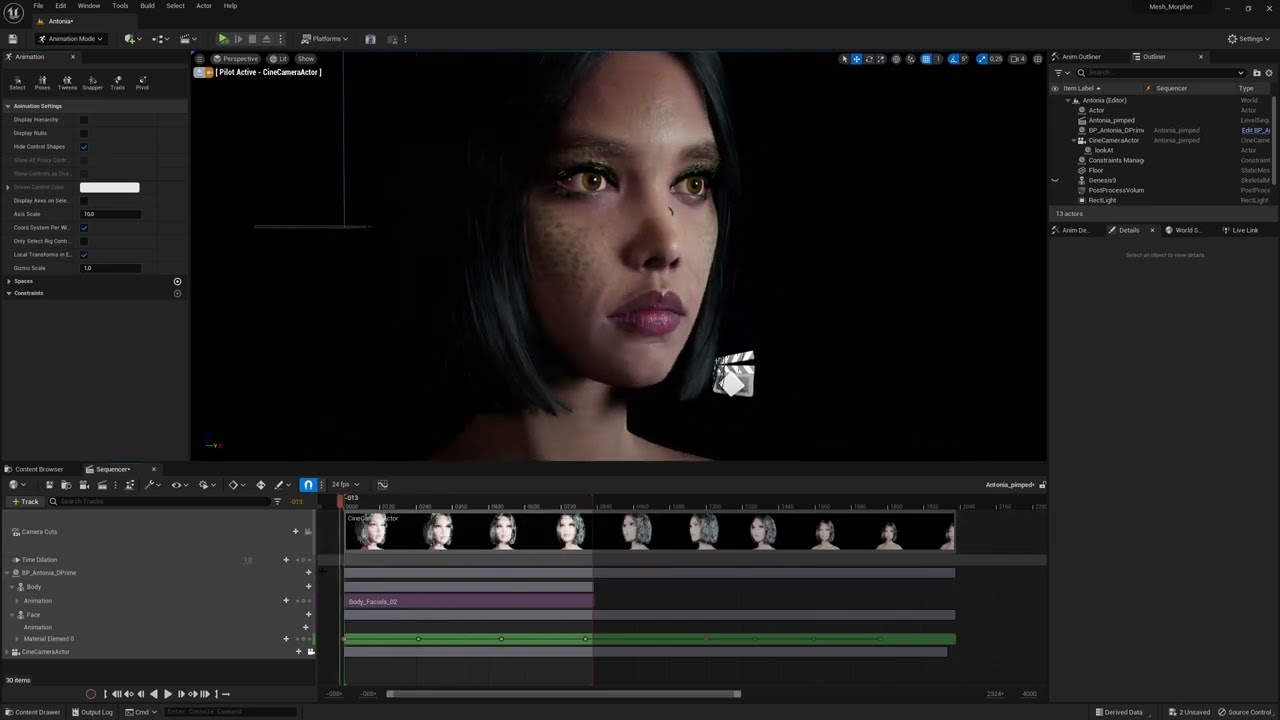 cold phoenix
<@436352096338706442>what are the plugins?
cold phoenix
cold phoenix
<@436352096338706442>what are the plugins?
......
random shoal
cold phoenix
<@436352096338706442>what are the plugins?
there should be three. one is called live link, live link control rig, apple arkit face support
so if you import a metahuman you should get three errors that pop up including some missing project settings. in the error box just hit the 'enable missing' buttons and you should be good

Hello guys, in this quick and simple tutorial we are going to make a simple enemy AI, which will follow the player, have its own vision area, and attack when it's near the player in Unreal Engine 5.
Follow me on Twitter: https://twitter.com/GorkaGames
Subscribe to the channel: https://www.youtube.com/channel/UCv_n9oioNF6OpzR2dt6E4xg?sub_confirm...
This is the tutorial I followed the first time I did it
cold phoenix
random shoal
so if you import a metahuman you should get three errors that pop up including s...
that's what i did the first time tho
also those plugins are all installed
random shoal
ok. Well let me do some snooping around on my end. I'll try to see if I can get the same errors. what version of unreal are you using?
cold phoenix
random shoal
ok. Well let me do some snooping around on my end. I'll try to see if I can get ...
5.1.1
a bunch of errors like this also pop up when i import

all anim related
BP out the box

errors
 random shoal
oh for those I know a tutorial vid for that. You have to change the blue prints a little hold on I'll find the video
cold phoenix
random shoal
oh for those I know a tutorial vid for that. You have to change the blue prints ...
pls gimme
cold phoenix
i don't know if fixing these errors would fix the materials too but still
random shoal
https://www.youtube.com/watch?v=vuhquaUE5HI this is it. He goes through those warnings. As for the errors I'm not totally sure but i'm gonna try something

How to use your Metahuman as a ThirdPerson character in UnrealEngine 5.1
#unrealengine #Metahuman #GameCharacter
SUBSCRIBE FOR MORE:
Please support my channel and help me bring more content.
Like and subscribe and hit the bell icon for notifications.
Subscribe:- https://www.youtube.com/c/Jobutsu
Follow Me:
Buy Me A Coffee: https://buymeacoffe...
you said the materials are just showing up as the default checkerbox?
cold phoenix
random shoal
you said the materials are just showing up as the default checkerbox?
yes
they show up as the grey checkerbox
cold phoenix
random shoal
did you download it as highest quality?
tried diff qualities, same result
cold phoenix
@random shoalthe video goes through how to fix the skeletal mesh warnings, not the broken cast node
cold phoenix
random shoal
you might wanna try deleting and reinstalling ue5
what????????
random shoal
yeah its a pain and its a last resort but if need be it might fix whatever is going on. I've had alot of issues where doing that somehow fixed things. I'm not getting it on my end. Could you go on metahuman creator and download that metahuman and link it here and I'll plug it into a project on my end and send it back if it works\
cold phoenix
random shoal
yeah its a pain and its a last resort but if need be it might fix whatever is go...
ok lemme do that real quick
random shoal
ok cool
random shoal
Im just getting the skeletal mesh errors right now
cold phoenix
random shoal
Im just getting the skeletal mesh errors right now
bruh
so it's like 3 things broken on my end
there it is
random shoal
ok great. I'll plug it into a project and get it working hopefully and just send you the zipped project file and you should be able to migrate it to your project
cold phoenix
random shoal
ok great. I'll plug it into a project and get it working hopefully and just send...
how would i migrate it to my project? just extract the imported MetaHuman?
random shoal
if you right click in the file browser hierarchy theres a button that says migrate. you can also go into the project file and file browser tab and copy and paste the metahuman folder into your project
cold phoenix
oh nice!
random shoal
yep! I'm launching it in the metahuman real quick so I can plug it into my bridge
cold phoenix
@random shoalstatus?
drowsy anvil
hello
i created IK rig but its not asking for skeleton to select
and it looks empty

 random shoal
cold phoenix
<@436352096338706442>status?
random shoal
cold phoenix
<@436352096338706442>status?
just got it into unreal. no errors other then the skeletal mesh and the materials are looking good
cold phoenix
random shoal
just got it into unreal. no errors other then the skeletal mesh and the material...
wtf bro
why me : (
so how can you send over the project
random shoal
I'm gonna zip and send it over haha. Everyone gets to have their turn with the errors at some point lol
I may have to send it as a mega.nz file
cold phoenix
go ahead
 errant mauve
random shoal
I'm gonna zip and send it over haha. Everyone gets to have their turn with the e...
errant mauve
random shoal
I'm gonna zip and send it over haha. Everyone gets to have their turn with the e...
It’s less like everyone gets a turn and more like everyone has to deal with errors for days on end until you beat them into submission 🤣
random shoal
errant mauve
It’s less like everyone gets a turn and more like everyone has to deal with erro...
Yeah that’s accurate😂😂😂 theres alot of times where I just neanderthal my way through it😂😂
errant mauve
Or google fu thru it
cold phoenix
@random shoal downloading now
random shoal
cold phoenix
go ahead
Let me know if that works
cold phoenix
random shoal
Let me know if that works
do i open the project?
i'll open it and migrate
random shoal
Open it first to make sure it works then migrate jt
drowsy anvil
help me ?
drowsy anvil
drowsy anvil
i created IK rig but its not asking for skeleton to select
this
random shoal
Then when you migrate it only select the metahuman folder and overwrite it
random shoal
drowsy anvil
this
Ill take a look in a second im walking my dog right now lol
drowsy anvil
random shoal
Ill take a look in a second im walking my dog right now lol
thanks
random shoal
Yep. I dont know much about unreals ik system but ill see what i can do
cold phoenix
@random shoal IT WORKS!
in my project it works!
in yours i don't know wtf happened

this is cursed
random shoal
WTF
😂 😂 😂
we're just gonna act like that didnt happen as long as it works in your project lmfao thats horrifying
cold phoenix
random shoal
we're just gonna act like that didnt happen as long as it works in your project ...
yeah but how do i force a lower LOD?
random shoal
in the metahuman blueprint there is a lod sync
cold phoenix
random shoal
in the metahuman blueprint there is a lod sync
yeah but nothing is changing
random shoal
ok hold on
cold phoenix
maybe it worked? i'm not sure
errant mauve
Showflag.LOD 0
cold phoenix
it does not look at all like the LOD's in the creator
errant mauve
Change number for desired LOD
random shoal
set num LOD to 1 set forced lod to which ever you want it at and set the min lod to how ever many lod's you want try that
cold phoenix
random shoal
set num LOD to 1 set forced lod to which ever you want it at and set the min lod...
i want it to be at LOD 5
random shoal
at all times?
cold phoenix
yes
errant mauve
showflag.lod 5 in console
cold phoenix
it was MUCH less detailed in the editor so what's going on?
 errant mauve
during gameplay idk, maybe kevlar knows
cold phoenix
random shoal
go in the LOD sync and set min 5 and forced to 5
alrdy done
 errant mauve
did you compile? your engine scalability settings might change result also
 random shoal
ok then try going down to 4. it may also be your engine scalability
cold phoenix
if i back away the camera it turns into the monster i showed you earlier @random shoal
 random shoal
yeah that happens when you set it to low
yeah make sure you have the engine scalability to at least medium. I've had that happen before where it deforms when I have it on low
cold phoenix
random shoal
yeah make sure you have the engine scalability to at least medium. I've had that...
how do i change that
errant mauve
drowsy anvil
thanks
FYI we are not epic staff
random shoal
top right under settings
errant mauve
errant mauve
FYI we are not epic staff
when you creat ehte IKRig asset it prompts youto choose a skeletal mesh, what did you choose?
cold phoenix
dude my scalability was on epic
errant mauve
@drowsy anvil
cold phoenix
and now when i set it to medium it's recompiling the shaders and the metahuman's freaking out
like it goes to the monster thing in a single frame
random shoal
yeah yeah just give it a second
errant mauve
cold phoenix
and now when i set it to medium it's recompiling the shaders and the metahuman's...
welcome to metahumans
cold phoenix
he also doesn't look any diff
random shoal
lol yeah just let it do its thing and it'll fix
cold phoenix
still like this
 cold phoenix
random shoal
lol yeah just let it do its thing and it'll fix
cold phoenix
random shoal
lol yeah just let it do its thing and it'll fix
alr
i need this metahuman for the main menu and for just some cutscenes so i'm not exactly asking for much here lmao
random shoal
lol yeah once its done you just need to play around with the lod settings
errant mauve
you should change the LOD setting in the blueprint, not the instance in your level, and then recompile. try deleting existing and dragging the BP out again into world
cold phoenix
i wanna force the LOD cuz the game i'm using it for is meant to have a whole nostalgia trope and all and tbh it looks good at htat LOD
cold phoenix
errant mauve
you should change the LOD setting in the blueprint, not the instance in your lev...
yeah dude i've been changing the one in the BP.........
errant mauve
and you def recompiled?
cold phoenix
yes
errant mauve
try deleting and dragging out
cold phoenix
errant mauve
try deleting and dragging out
while shaders are preparing again??
random shoal
also try building the scene
errant mauve
no
cold phoenix
ok i did and nothing changed
cold phoenix
random shoal
also try building the scene
wdym
random shoal
top left there is a menu and one of the options is build. click that and build all. I would wait till its done compiling the shaders because you can crash the engine due to having too many processes going on
errant mauve
if shaders are compiling you stop everything and wait to finish
cold phoenix
random shoal
top left there is a menu and one of the options is build. click that and build a...
ok i'll wait
random shoal
yeah. honestly when compiling thats a good time to get up and take a break for a bit that way your not tempted to try something and cause crashes and more issues
cold phoenix
does the player have to wait for it to prepare shaders in the final product when the metahuman is present?
or do i just have to do this cuz it's the first time i'm doing it in the engine?
drowsy anvil
errant mauve
<@346620085063909377>
yes
cold phoenix
errant mauve
do you play call of duty? then yes
what?
drowsy anvil
errant mauve
when you creat ehte IKRig asset it prompts youto choose a skeletal mesh, what di...
it prompts nothing thats the issue
errant mauve
cold phoenix
what?
it was a joke. cod recompiles shaders in front of player often
cold phoenix
errant mauve
it was a joke. cod recompiles shaders in front of player often
oh yes it does lmao
random shoal
lol pretty much. when you package the game it'll cook, build and compile everything and then its good to go
cold phoenix
random shoal
lol pretty much. when you package the game it'll cook, build and compile everyth...
oh that's lovely
i was worried this long ass wait would happen to the player
you're prob wondering by now why i chose to use a metahuman if i just force a low detail LOD anyways
errant mauve
cold phoenix
you're prob wondering by now why i chose to use a metahuman if i just force a lo...
you should be using default ue5 mannequin to prototype, but no harm in having fun with MH
cold phoenix
well:
the protagonist is meant to be based on me, and the metahuman is based off a scan of me and was done with mesh to metahuman
it's an easy way to get a free model that looks exactly like me with built in downscaling options, so why not?
i also am not a modeller, got no idea how to make models so it's much easier all around
errant mauve
drowsy anvil
it prompts nothing thats the issue
restart editor? idk man that sucks. you sure a skeletal mesh exists in your project?
errant mauve
cold phoenix
i also am not a modeller, got no idea how to make models so it's much easier all...
this is easy? lol
cold phoenix
errant mauve
this is easy? lol
it was easy to make the model
it's making it work that's hard lmao
drowsy anvil
errant mauve
restart editor? idk man that sucks. you sure a skeletal mesh exists in your proj...
yes both meatahuman and mixamo
cold phoenix
this thing breaks for no reason
errant mauve
drowsy anvil
yes both meatahuman and mixamo
what version?
random shoal
@cold phoenix you should look into blender. its amazing for modeling
errant mauve
of ue
cold phoenix
hope it doesn't break on me when i gotta animate it for cutscenes
cold phoenix
random shoal
<@705141879863377971> you should look into blender. its amazing for modeling
i know what blender is but i am not gonna go learn how to use blender which will take ages
i'm using blender for my project already for bones and stuff if needed
but none of the models used, i'll make
errant mauve
drowsy anvil
5.2
yeah i mean thats still in preview, stuff could break all the time. cliche but thats what it is. you should try to open a 5.1 project and see if it still screws with you
cold phoenix
project is being made completely free and all assets are either made by me (if i can) or are taken from people that freely share their work and allow it to be credited
errant mauve
cold phoenix
hope it doesn't break on me when i gotta animate it for cutscenes
it will
cold phoenix
i think it's a cool way to make my game ngl
errant mauve
struggle withn it every day
cold phoenix
finding ways to do everything without spending a penny
random shoal
fair enough. Just be careful using prefab models. Make sure theyre licensed for free (BC-00 I believe)
cold phoenix
random shoal
fair enough. Just be careful using prefab models. Make sure theyre licensed for ...
sketchfab tells you
so dw
i got that covered
random shoal
cool cool
cold phoenix
the only real issue is finding GOOD free stuff
the textures are the absolute easiest part to do
i literally can draw them myself if i need to
otherwise i can just get them from that AI materials website or textures.com
mixamo covers a lot of the animation and models
random shoal
I use substance designer and painter for all that. textures.com is amazing lol
cold phoenix
random shoal
I use substance designer and painter for all that. textures.com is amazing lol
textures.com has nearly no free stuff by default
but you see they give you a bunch of preview images for free
all i gotta do is download those and downscale them to 128x128
bam, Retro style textures completely free
EASY
drowsy anvil
errant mauve
yeah i mean thats still in preview, stuff could break all the time. cliche but t...
i can open 5.2 project in 5.1 ?
cold phoenix
i mean look at this wall and floor
 random shoal
If you wanna get a lil risky you can use the substance plug in xD download some substance files from substance share and you can modify the settings
errant mauve
drowsy anvil
i can open 5.2 project in 5.1 ?
just try in new project in 5.1
but yes you can if needed
random shoal
@drowsy anvil if you started a project in 5.1 I wouldnt jump around between engines. Im not sure how stable 5.2 is. I had to go in and download abunch of stuff in visual studios to get it to package my game. I'd be careful with jumping into the latest build
random shoal
yeah no
errant mauve
thats why i told him to make new project in 5.1 to see if problem persists
random shoal
yeah I've had issues with 5.2 acting weird lol
errant mauve
yeah its not stable
random shoal
exactly. I just updated to windows 11 and had issues packaging and had to go into visual studios and download windows 10 suppports and some other stuff
cold phoenix
@random shoal@errant mauveso
they compiled
engine scalability is on medium
and it still does not look like the editor's LOD
it definetely is changing LOD
cuz i set it to 8 and it looks less detailed
but still nowhere near as less detailed as it should be
this is LOD 8
 random shoal
the higher the lod the less detailed. 0 is highest detail
so you should try like 3 or 4
cold phoenix
yes dude i know that
but i want it to look like LOD 5 from the editor
that was the one i liked most
even at LOD 8 it looks nothing like LOD 8 in the editor
it looks in general higher detail than in the editor
well, idk what to do
errant mauve
It looks like the right polycount
You might want to try changing the lighting in the mh creator
Bc the normal map is providing the detail you seem to loathe and changing the lighting in the creator will give you a better idea of what it actually looks like in diff lighting scenarios
Instead of the one where it’s full blown out like you showed us
cold phoenix
alr cool i'll keep it at LOD 5 then
any higher and the fingers become smushed together
and i don't want it like that
so i guess i'm good to go
expect me to come back complaining about something else breaking ofc
random shoal
you should try 4 just see how it looks
drowsy anvil
Better go back to 5.0
buoyant stump
buoyant stump
Helle eveyrone! Can anybody point me to direction where I can find solution how ...
So nobody knows solution for eyes tracking target?
errant mauve
buoyant stump
So nobody knows solution for eyes tracking target?

Epic Developer Community
This tutorial shows how to setup a Dynamic Look At Target behaviour, that can be used together with the iPhone facial tracking ( or any other facial tra...
fresh dragon
Hi, in the City Sample project the documentation says they used metahumans straight from the metahuman builder, but in the project there one is using a skeletal mesh which has the whole body merged into one mesh and then a face mesh which already has eyelashes attached to it instead of a groom asset that comes with the metahuman when you import it, the actual skeleton is also different which isnt the metahuman_base_skel that comes default when you import the metahuman.. did they merge the skeletal meshes outside unreal then re-import them or is there a way to do this now with metahumans that im missing?
errant mauve
they probably had a pipeline for that kind of thing. you can change the skel for metahumans tho in unreal if you need
fresh dragon
Can you merge them together like that in unreal?
errant mauve
im not familar with how they are merged, haven't opened the city sample project, sorry!
you can bake an animation down to a diff skeleton tho if that's what you are asking?
buoyant stump
errant mauve
https://dev.epicgames.com/community/learning/tutorials/mJGj/unreal-engine-ue5-te...
I did try that, but unfortunatel this method does not work in sequencer but only for direct data from iphone.
errant mauve
have you been overriding skeleton/AR rig files?
errant mauve
buoyant stump
I did try that, but unfortunatel this method does not work in sequencer but only...
yeah im not sure, haven't had to do this yet
buoyant stump
errant mauve
have you been overriding skeleton/AR rig files?
No, can you elaborate please?
 small grotto
Hi here, wondering if anyone has ever succeed on removing Metahuman’s underwear texture? Needed it to express a swimsuit garment
 wild hazel
small grotto
Hi here, wondering if anyone has ever succeed on removing Metahuman’s underwear ...
wild hazel
small grotto
Hi here, wondering if anyone has ever succeed on removing Metahuman’s underwear ...
 astral bloom
Is there any beginner way to animate a metahuman for shooting a weapon, for example? I'm trying to make a fight scene/car chase and I really want a metahuman in there but I can't find anywhere to begin animating them?
errant mauve
astral bloom
Is there any beginner way to animate a metahuman for shooting a weapon, for exam...
Mixamo to MetaHumans - UE5 Tutorial.
A BRAND NEW way to retarget your Mixamo animations.
In this video, using UnrealEngine 5 (Preview 2) -
I Retarget Mixamo animations onto MetaHumans.
I also show a workaround for crashes that are happening with
UE5 preview 2, while using the IKRetargeter.
Get Animations here:-
https://www.mixamo.com
New Mi...
errant mauve
buoyant stump
No, can you elaborate please?
this happened to me when i had played with the arkit developer files by accident. try creating a new project to see if that's the issue.
 toxic depot
hi, may i ask, does the control rig for metahuman doesn't have an IK setup for arms?
it has an IK setup for the leg, but not the arms
errant mauve
toxic depot
hi, may i ask, does the control rig for metahuman doesn't have an IK setup for a...
it does, you have to enable it from the global_ctrl track
errant mauve
did you put your metahuman inside a level sequence?
toxic depot
yes
errant mauve
go to the control rig for the body
and expand it
its like the first track, then make sure the ik_arms_ctrl or something is checked
and hten boxes will show up on the hands which act asthe ik controls
well, wrists haha
toxic depot
ohhhh
drowsy anvil
importinig two metahuman give this msg what should i do ?
 toxic depot
u have the option to switch betweeen ik and fk
thats cool
cant do that in blender
well
hard to do it in blender
errant mauve
drowsy anvil
importinig two metahuman give this msg what should i do ?
should be fine... although you are really hte only one who knows what you've changed - are you re-importing from the metahuman creator?
drowsy anvil
errant mauve
should be fine... although you are really hte only one who knows what you've cha...
imported 1 metahuman from quixel bridge
errant mauve
drowsy anvil
imported 1 metahuman from quixel bridge
okay you should be okay
errant mauve
drowsy anvil
what should i click
import
errant mauve
toxic depot
hard to do it in blender
ask me why it isn't enabled by default
the answer would be whoooo knowwwwwwssss
drowsy anvil
errant mauve
import
now its asking this after clicking import
 errant mauve
drowsy anvil
now its asking this after clicking import
errant mauve
drowsy anvil
now its asking this after clicking import
you're good, don't worry abuot DNA stuff im pretty sure you can click any button and it won't matter haha.
toxic depot
hey, while im here, do you happen to know if theres a keyboard shortcut for moving things freely without binding it to an axis?
i found about the ctrl + left click/right click/left+right click
but i cant seem to find the shortcut to move it freely
errant mauve
toxic depot
hey, while im here, do you happen to know if theres a keyboard shortcut for movi...
i wish. i literally was trying to create an editor plugin for this the other day. if only we had blender grab, blender cursor (for snap to 3d cursor), the shift+a menu, shift_lmb to rotate/scale in increments, and tab pie menu for mode select
i would need to spend a lot of time on it tho and i cant right now
toxic depot
aww, so not for now i guess
well thats okay
ill try to make do with whats provided
thanks a lot man
you really helped me out a lot 😄
errant mauve
toxic depot
ill try to make do with whats provided
this is my attitude for now
toxic depot
ive been trying to find the ik solution for hours in youtube, all it kept pointing me to a bunch of retargetting videos
thanks again 😄
errant mauve
figuring this stuff out you need google fu skills at MAX
toxic depot
yes you do, but thats the thing, ive been browsing sites after sites for it, none of it mention about the ik option
i was thinking about asking it in the unreal forum, but its not quite alive by what i had seen
i mean when i had trouble with blender back then i always browse the stackexchange, but i cant seem to find one for unreal -,-
errant mauve
you need to spend more points in google fu - first result using 'hand ik rig not showing metahuman' is https://www.google.com/url?sa=t&rct=j&q=&esrc=s&source=web&cd=&cad=rja&uact=8&ved=2ahUKEwio3drsvcD-AhW3jokEHfgrC-EQFnoECAYQAQ&url=https%3A%2F%2Fforums.unrealengine.com%2Ft%2Fmetahuman-hand-ik-controls-cant-be-moved-and-there-isnt-a-handle-to-grab%2F224300&usg=AOvVaw0kqVzOqZqRB1I62CFDk2Pn
well this discord is usually good, sometimes you're shouting into the void - in that case go to forum
toxic depot
errant mauve
you need to spend more points in google fu - first result using 'hand ik rig not...
OMFG, there it is!
LOL
xD
errant mauve
hhahaha
errant mauve
toxic depot
OMFG, there it is!
and to be fair almost every other link from that google search is about retargeting lmao
toxic depot
yeah ive used blender for for than a year now, i was starting unreal last few weeks, really helps speed up the learning process
 unique saddle
is metahuman plugin work in 5.2 ?
toxic depot
i mean im still getting used to the blueprint, but its not bad, it looks fun once you've know more about it
errant mauve
unique saddle
is metahuman plugin work in 5.2 ?
the plugin meaning the mesh to metahuman?
errant mauve
toxic depot
i mean im still getting used to the blueprint, but its not bad, it looks fun onc...
blueprint is the best, so powerful. its like geometry nodes but better, you can do anything
toxic depot
errant mauve
and to be fair almost every other link from that google search is about retarget...
yeah lol, it was so frustrating for me, i was like "goddamit theres bunch of advance tutorials, wheres the basic"
toxic depot
errant mauve
blueprint is the best, so powerful. its like geometry nodes but better, you can ...
yeah? i suck when it comes to coding, so learning blueprint is gonna be a while
ive heard people telling me that visual script will be easier if you know how to actually code
but the thing is, idk anything about coding xD
so yeah, thats gonna take some times
but for now i have to learn everything first
i rmb when i used to struggles with blender
but after a few months, after ive gotten used to it
man it shittons of fun
errant mauve
toxic depot
yeah? i suck when it comes to coding, so learning blueprint is gonna be a while
do some of the basic stuff on the unreal portal to learn, and then when you have questions about specific nodes go to mathew wadstein's stuff on youtube. he usually lurks in #ue5-general and #blueprint too
errant mauve
toxic depot
ive heard people telling me that visual script will be easier if you know how to...
yes, knowing basic programming logic and variable stuff is definitely a boost but not necessary, just will take more time like you said
toxic depot
errant mauve
do some of the basic stuff on the unreal portal to learn, and then when you have...
ohh thanks, ill be sure to keep his channel on standby on my browser
well, among the other youtube channel

look at my tab bruh
xD
ill keep him on standby, besides dozen other youtube channels
oohhhh
he explains what every single blueprint does
shiet man, thats so damn useful
thanks man, i really fking appreciated it
ive been trying to find a channel that does that
and now i do
errant mauve
Yes and provides a use case as example. Your only struggle now is figuring out what node you need in any given situation 😂
errant mauve
np np

 errant mauve
drowsy anvil
how to fix the hand not matching
errant mauve
drowsy anvil
how to fix the hand not matching
you need to match hte reference pose better
the T pose
the hand rotation is likely not the same as the mixamo one
simple forge
drowsy anvil
how to fix the hand not matching
try turning off IK
errant mauve
np the closer you get to the ref pose the better the retargeted anim will be but sometimes its not 1:1 haha
drowsy anvil
errant mauve
np the closer you get to the ref pose the better the retargeted anim will be but...
next issue

cant delete the old mess up retargeter
reference links
is there force delete or something
errant mauve
if you're not using it you can delete
just make sure you're all saved on anything you are ACTUALLY using
but be 100% you're not using anywhere
 errant mauve
go to file and click save all then try again
drowsy anvil
errant mauve
go to file and click save all then try again
not going away
errant mauve
drowsy anvil
not going away
ive never seen that, but if you're not using it just let it live 😄
if it aint breaking anything but it wants to break the project if you delete keep it haha
toxic depot
ohh, one more question, does metahuman use hair particle for the hair?
i wanted to make a new variation of hairstyle since the options for metahuman is very limited.
if i make hair in blender using the hair particle system, will that impact the performances?
i mean i am running this on rtx 3060, so i dont really mind going heavy
but if theres a 100 people on the scene with the custom hair particle, than i gotta say, that worries me lol
drowsy anvil
errant mauve
ive never seen that, but if you're not using it just let it live 😄
any lip sync free plugins ?
from audio
toxic depot
is it okay if i use blender hair particle? im not sure if metahuman use hair cards on texture, or they actually use an actual hair particle for their hair
errant mauve
drowsy anvil
from audio
not sure - i've been using my iphone livelink for facial animation until metahuman animator comes out
drowsy anvil
errant mauve
not sure - i've been using my iphone livelink for facial animation until metahum...
should i record the mesh or the livelink ?
best workflow
recording the face seems to create a clone mesh
errant mauve
toxic depot
is it okay if i use blender hair particle? im not sure if metahuman use hair car...

Hello guys, in this quick and simple tutorial we are going to learn how to create hair using the Groom plugin in Unreal Engine 5.
Follow me on Twitter: https://twitter.com/GorkaGames
Subscribe to the channel: https://www.youtube.com/channel/UCv_n9oioNF6OpzR2dt6E4xg?sub_confirmation=1
unreal engine 5,ue5,create hair,tutorial,quixel,megascans,un...
toxic depot
yeah i watched a few tutorial on it a few days ago, but i was wondering if it will impact performances that heavily?
in blender, it sure did
errant mauve
drowsy anvil
should i record the mesh or the livelink ?
put a dummy MH in sequencer, activate livelink for face on it and record using sequencer, then save out the facial animation and add to your to your actual MH in animation track in sequencer
toxic depot
but im not sure if its the same in unreal
errant mauve
toxic depot
in blender, it sure did
watch that one he seems to have a good workflow. i can't speak for blender's performance (always an issue) but grooms are usually not a huge performance hit in ue
toxic depot
also, do you happen to know if metahuman used hair particle?
i tried entering the wireframe mode, but the hair would dissappear lol
errant mauve
toxic depot
i tried entering the wireframe mode, but the hair would dissappear lol
they use a custom physics simulation and call hair "grooms" which i believe at their core are a particle sim but i'm not sure
its strand based
that guy goes over the whole thing
