#hardware
1 messages · Page 54 of 1
 novel briar
 wispy flare
the pro version have 128
the normal verison i think it's not 6t4 but more but trying to find specs
novel briar
The others were not so high... but gotta see the facts
3990x = 64
Okay, not so low, lol
Anyway, you need the ware for that and make use of it.
 novel wedge
Hey my TUF gaming x570-pro has 12 pins for the cpu, my PSU has 8 (4+4), but it also has a modular 8 + 8, can I connect a modular 8 and the non modular 4 to that 12 pin slot?
 shrewd shard
No, they're different
Usually your motherboard will still boot with just the 4+4
Unless you're balls to the wall with a CPU and perhaps clocking
 ripe bridge
Hey guys
Which laptop is better ?
Lenovo ideapad Gaming 3
HP pavilion gaming 15
They both have ryzen 7 4800h 8 core 16 thread, Gtx 1650 ti , 8GB
And the same price
And please don't just say HP is better or lenovo is better tell me why for example :
The cooling system in HP/Lenovo is better in this laptop model
My usage : unreal engine , blender (Game development)
Do you even advice me to buy one of them or do you advice me to buy something else
The price is 1000$ in my country
I know their real prices are around 800$ but they cost 1000$ due to taxes and import fees
novel briar
@unborn pike on idle, my 5950x stays ~50 Celsius
1000 rpm for the Noctua, you can use that as some base to compare to I guess
 unborn pike
on idle this thing is 30 C
but on torture test in mersenne prime it's close to 90 C 😄
novel briar
Well, then I should be more concerned than you, lol
hmm.. okay, on ~5-10% usage, not idle
unborn pike
have you tried the prime torture test?
novel briar
Yeah, after you mentioned it, I just tried to run a small test of it, but after 10 minutes it was still 57, so I got bored.
What were you running?
unborn pike
the one that causes maximum heat and power consumption on cpu with 32 workers
novel briar
For how long?
unborn pike
like five seconds
I'm guessing I didn't either screw in the cooler properly or I have too much thermal paste
gotta reapply
I hate the retaining system of this cooler btw
novel briar
5 sec? wtf...
unborn pike
😄
novel briar
I'm running it. Small test or something, Max stress
But yeah, definitely something is not okay then.
Maybe too much paste, lol - I think it is common problem.
Tbf, that paste + all the Motherboard wiring is what stops me from full assembly of new PC
Once upon a time it was much easier I think, lol
unborn pike
I have too many sata devices, makes wiring a pain
6 HDDs/SSDs + a bluray drive
I actually ran out of sata slots on the motherboard
😄
had to disconnect the bluray drive
novel briar
Huh... I always wondered about these slots, lol. Never had more than 2 disks + one external.
Currently 2 nvmes + big, fat, hdd
Anyway, it been few minutes already, it stays still on 56 Celsius :/
I think the RPMs just went to 1200 only, lol
unborn pike
gotta get rid of the top hdd rack to make space for the 3080 rtx once it arrives
 novel briar
 unborn pike
also need to mount an exhaust fan
novel briar
Ha! Is that.. what was the name of that case, looks damn as my previous one.
unborn pike
fractal design define r4 arctic or something
novel briar
huh, mine was nzxt

Aah, you have the lite Noctua too
The case looks kinda barely big enough tho
unborn pike
the cooler?
novel briar
Yeah
novel briar
750 looks small, the PSU
unborn pike
works fine for now
novel briar
Hmm...
unborn pike
the 5950X doesn't use any more power than my old i7 2600k 😄
novel briar
Well, wait to add the 3080
Gotta test it out.
Might be okay, but to me is like on the border, afaik
novel briar
Why you need the amps?
unborn pike
well I don't remember fully anymore but back when I built my earlier pc you had to look at the amps on the rails from the PSU and see how much the output was
novel briar
Kinda can't find good numbers for 5950x, reports are from 150 to 200 w
unborn pike
with that you could figure out if it was enough for some specific card
novel briar
Hmm.... I mean, amps matter, but the continuous drain of energy - watts should be enough.
3080 is given on average 350 w
So, on average 500 for gpu+cpu? For stress / gaming will go up.
Anyway, you will notice if there are issues 🙂
novel briar
Good luck.
 dreamy elbow
novel briar
Kinda can't find good numbers for 5950x, reports are from 150 to 200 w
dreamy elbow
novel briar
Kinda can't find good numbers for 5950x, reports are from 150 to 200 w
afaik AM4 has a default socket limit of about 140W, so that's what all chips (not just 5950x) are capped to. the limit can be raised on some motherboards in bios, to about 200W, but there's no reason to do so, it's already plenty fast at default limit
unborn pike
@novel briar try the prime95 torture test with just two threads
that's actually the one that causes highest temps on my end 😄
 wet ore
any recommendations on headsets with great sound quality?
bonus question: do wireless headsets give you headaches after long sessions?
shrewd shard
Wireless or wired, it depends on how loose the headset itself is
It has to fit your head perfectly and not squeeze your ears too much
Though obviously it's hard to test headsets for that
wet ore
yes definitely, your skull is multiple bones and it absolutely not designed to have hard pressure for X hours per day X days a week.
after some research I decided to give the sennheiser HD 599 wired a try. I'm sure wireless headsets are perfectly safe but the inner hippie in me just doesn't like the idea of a wireless for 40+ hours a week
novel briar
dreamy elbow
afaik AM4 has a default socket limit of about 140W, so that's what all chips (no...
Yeah, you are right 140w capped. Not sure why some reports more, could be a short peak increase? I dunno.
 somber island
Does anyone know where i can get a cheap ass 1050 TI in the UK?
Preferably brand new/unused.
 pearl quartz
@sick cedar Corsair Vengeance CMW64GX4M2D3600C18 is my RAM
 sick cedar
pearl quartz
sick cedar
pearl quartz
It is 2x32GB
Doesnt look like its available anywhere atm, last I looked it got super expensive
In all honesty Im curious how the move to DDR5 will go, if its just more fast 8GB DIMMs not sure it'll be worth it for awhile
 frank glade
Anyone known if you can dual boot win10 on 2 hard drives, both being C: ?
novel briar
Hard to imagine it.
To begin with, you can't have two drive letters being the same under one Win.
If each one of them have C: (its own drive) that fine.
However, Win's bootloader is kinda monopolistic afaik. You can use only after it some non-Win specific ones, like grub (Linux, BSD, etc)
frank glade
novel briar
If each one of them have C: (its own drive) that fine.
hmm I think so. I mean I already have a C harddrive with win, I just added a new ssd to install fresh, but I want to keep both installs so I can migrate over a few weeks
novel briar
I did my migration recently, by just offloading everything more important to my external HDD and then just washed out everything from the new drive. As the old one was still attached, I was able to pull the necessary stuff from it. However, mine didn't had Windows. In your case, I would just format it at some point. I mean, no need to spend weeks to migrate everything, for few hours you should be all set. Ofc, in the next weeks you will gradually install sw and tune stuff as it arises.
shrewd shard
You can usually clone an SSD to another SSD and it won't matter
You only need to run some console commands to make it work fully
unborn pike
5950X single core boost temps are crazy
4.8 GHz and temp spikes to 85 C
with fans on 100%
novel briar
What is single core boost?
 mighty cosmos
unborn pike
5950X single core boost temps are crazy
mighty cosmos
unborn pike
5950X single core boost temps are crazy
Looks over to my i9 9900k with a 360 aio still reaching 85C
unborn pike
90C!!!
😄
I don't think it would matter if I had a water cooler or not
it's simply that the die is so packed that it doesn't transfer heat fast enough to the cooler
need a better material with better heat transfer capability
mighty cosmos
could be
 chilly jungle
ibm model m swquad
 shrewd shard
Gonna be having trouble running UE4 with that one
But considering the situation, understandable
frank glade
do you guys think the new rtx a4000 and a5000 would be ok for unreal or 3d software? I think they're based on the 3060 Ti, but with 16gb of ram
novel briar
Why wouldn't they? Never knew the exact difference between these two lines btw 🤔
frank glade
I think gaming performance is stunted because of the drivers, (I don't need that anyway), but I would expect them to work better with heavy scenes, viewport performance, baking, etc. Not sure about it though 😄
oh and also they could actually sell at msrp, ~1000E
making worth it to buy one in the current market instead of paying 3x for any 3060 Ti
I have to work on a 20mil poly scene in 3ds and my old 1060 can't handle it anymore 😔
 pallid hinge
unborn pike
5950X single core boost temps are crazy
pallid hinge
unborn pike
5950X single core boost temps are crazy
Prob. Bad thermal Paste or Bad cooler
My 5950x stays below 70°c at all times
But they should write on the packaging that you should use high quality or even liquid metal thermal paste.. the default stuff my CPU waterblock came with resulted in Up to 85°c... I then swapped it Out for some cooler master mastergel Something and temps went down to 70°c max.
 uneven jasper
 violet hinge
wait... wheres the gpu 
frank glade
https://www.tomshardware.com/news/hard-drive-ssd-shortages-imminent-if-new-cryptocurrency-blooms another pc part shortage! 😬

Tom's Hardware
Here we go again
pallid hinge
Cant cryptos finally be banned goddamn
violet hinge
uneven jasper
wait... wheres the gpu <:hmm:767238045304619009>
It's right there in the middle, dark
GT 710 - placeholder until I can get something better
unborn pike
pallid hinge
My 5950x stays below 70°c at all times
even a torture test with 2 worker threads in prime 95?
I mean, compiling UE 4 I barely reach 70 C
pallid hinge
unborn pike
even a torture test with 2 worker threads in prime 95?
prime95, wow i havent heard that name in a while
unborn pike
I dunno what else to use to properly test my CPU 😄
novel briar
huh 2 threads are really something
pallid hinge
P95 was reported to potentially cause damage to CPUs a few years ago, the majority stopped using it then
novel briar
unborn pike
I dunno what else to use to properly test my CPU 😄
Yo, two threads: 88-89 C and 1500-1600 rpm
unborn pike
I mean that the fan speed does not make much difference in temperature when you're fully utilizing the CPU
pallid hinge
if there is no difference between 50% and 100% rpm its pretty obviously a thermal paste issue
novel briar
Yeah, not sure what you mean. If that didn't up to 1500, shit will go south fast with that test.
novel briar
Run that Max stress thing
unborn pike
maximum heat
prime95 is a great way to check if your overclock is truly stable too
used it years ago when I still bothered overclocking
pallid hinge
dont have those options here, i dont use P95
unborn pike
your 72 C is then hardly comparable here
pallid hinge
alright, let me try it
starts at 80, drops down to 75 as soon as my waterpump speeds up
novel briar
?
 pallid hinge
did that
novel briar
omg, just discovered that I can control the case fan speeds with a slider.
My case is Be Quiet and was the most loud thing I have heard.
... I put them on 70% and is like barely audible now, lol
unborn pike
😄
my msi mobo has bios settings for all fans
can setup fan speed curves there instead of using some bloatware app for it in windows
uneven jasper
violet hinge
It's right there in the middle, dark
thats tiny 
novel briar
unborn pike
can setup fan speed curves there instead of using some bloatware app for it in w...
It is hardware slider. Not sure that the case fans are connected in way that the mobo can control them, tho certainly it can read their data.
unborn pike
depends on mobo
violet hinge
what do you use for monitoring temps generally?
 devout pendant
One of those software programs added vRAM junction temperature, back in January.
That's why there was reporting about how GDDR6X temperatures get wild runaway temps ... then people started jerry/jury rigging heatsinks and fans on the underside/backside of their RTX cards.
 rugged wedge
does anyone know of an integrated Intel GPU that can run UE4 under DX12?
devout pendant
rugged wedge
does anyone know of an integrated Intel GPU that can run UE4 under DX12?
If the Rocket Lake iGPU cannot, then the Alder Lake iGPU should.
Just need an i9 Intel CPU with iGPU.
rugged wedge
I'm looking for the oldest intel igpu that would run ue4 w/ dx12
devout pendant
rugged wedge
I'm looking for the oldest intel igpu that would run ue4 w/ dx12
from https://www.intel.com/content/www/us/en/support/articles/000005524/graphics.html
You can see the point where Intel started supporting DX12.
 rugged wedge
that's just feature level I think
several gpus I've tested my game on say 11.1
yet dx12 is supported
(it gets weird)
devout pendant
Can you run "dxdiag" from the run dialog box in Windows?
The "dxdiag" program might say what the iGPU supports.
I'm on my phone at work, so I can't do deep-googling to find a list of DX12 iGPUs.
I type too slow on my phone, but I type 70 words per minute on a normal keyboard and use keyboard shortcuts/hotkeys to do things faster.
devout pendant

 lol … not worth the price … especially on Rocket Lake … worst microarchitecture ever.

 shrewd shard
Wouldn't it be better to find a Ryzen APU?
A few special ones like the 4750G have been popping up and the launch of the 5000G is imminent
pallid hinge
rugged wedge
does anyone know of an integrated Intel GPU that can run UE4 under DX12?
AMDs APUs maybe can.. they are far more powerful than the intel ones at least
rugged wedge
I'm looking specifically for Intel because I want to make my game run on them
pallid hinge
any specific reason ?
rugged wedge
some people have intel gpus? :)
have no problem w/ AMD gpus, my game works on them without any special tweaks, for the most part
pallid hinge
well, if it runs on intel iGPUs it runs on pretty much anything
rugged wedge
yes, but it doesn't that's the proiblem
Intel igpus are different, they have variable/dynamic wave sizes and refuse to run ue4 for some reason
pallid hinge
tried vulkan ?
rugged wedge
dx12 only
I'm not really looking for a workaround - I'd like to get an Intel igpu that I can test ue4 on under dx12
preferably the oldest one that should support dx12
pallid hinge
i think the ones i have here support dx12
rugged wedge
what are they?
rugged wedge
for reference my 4770k w/ an HD 4600 refuses to boot ue4 on dx12
 rugged wedge
the UHD 630 is better because unlike the HD 4600 it can at least create memory for DRED breadcrumbs
pallid hinge
it runs smoothly on apples M1 gpu tho.. but that one is pretty powerful anyways
rugged wedge
where it's failing at is when ue4 tries to get GPU timing metrics
yeah I don't do apple
pallid hinge
well, if i find a working PSU i could hook up my old 6700k and see if it works xD
rugged wedge
is that the HD 620?
pallid hinge
i think so
ah, no its a 530
Damn, If im going back to using UE4 i def. Need a build server
rugged wedge
just need a 5950x
pallid hinge
I have that one
rugged wedge
me too, it's plenty
pallid hinge
Still Takes 30+ minutes to do an engine build
rugged wedge
did you ever run the benchmark build
rugged wedge
if you ever do

compare your numbers to this
also, you probably won't need to be doing a full engine build every day
pallid hinge
It definitely Takes more than 15min
rugged wedge
unless you're modifying something like Actor.h constantly
pallid hinge
Well, its the 3rd build in less than a week
Because Nvidia released Patches
For some reason it needs a full rebuilt
rugged wedge
3 builds a week omg 😂
pallid hinge
Thats over 1.5h lost, and i already barely have time for gamedev stuff
rugged wedge
is the engine on an nvme?
pallid hinge
Yep
rugged wedge
how much ram
pallid hinge
128gb, ddr4 3666
rugged wedge
Task UE4 Editor Win64 (NoXGE 32c): 00:12:48
this is my record and 00:14:31 is the worst
def not 30 minutes
(4.25)
pallid hinge
Dunno if its the rtx branch... But im nowhere near 15min build time
rugged wedge
latest bios, chipset drivers etc?
shrewd shard
One option you have is underclocking the hardware you get yourself
So if your GPU is a 1030 GDDR5, which is about 2x the Intel, you slash its clocks in half and you'll get estimated performance
rugged wedge
you shouldn't need to do anything on a 5950x tbh
that 14:31 for me was right after assembly, no bios updates no nothing
shrewd shard
Alternatively, get a GPU from 10 years ago
I'm running a Radeon HD 6790 (on my server PC) and it's decently good at simulating low end hardware
rugged wedge
did you run some benchmarks to check if your 5950x is not a dud?
devout pendant
rugged wedge
that's just feature level I think
This article is dated from 2014.
This might be a hint to the oldest Intel iGPU that supports DX12.
 shrewd shard
A lad I know with a 770 said he isn't able to run DX12
rugged wedge
yeah it gets tricky w/ dx12
that's why I'm looking for someone that actually has an intel igpu that runs dx12
shrewd shard
I think most people would have updated from their 6000+ CPUs by now
8000/9000 kinda cursed since there's the F parts that got bought more
devout pendant
shrewd shard
A lad I know with a 770 said he isn't able to run DX12
Is that 770 an Intel Celeron CPU?
shrewd shard
GTX 770
devout pendant
Oh, discrete GPU.
Weird because that list says DX12 should be supported by that card.
shrewd shard
It should, but it's mostly just a flip, there's no actual support for most DX12 stuff
rugged wedge
D3D12_FEATURE_DATA_EXISTING_HEAP this is the cap bit that's missing from my HD 4600 btw
the HD 630 has it but has other problems
shrewd shard
Why not target DX11 if you're trying to get it to run on Intels?
A lot more things will support DX11 over 12 including capable enough old dGPUs
rugged wedge
dx11 doesn't have wave intrinsics
I'd have to load up each IHV's auxiliary libs
there's other things too like async queues etc
they make things faster so would really benefit integrated gpus
shrewd shard
Then I'm afraid you have to yeet the idea of supporting Intel iGPUs
rugged wedge
since they're slow anyway
shrewd shard
Then target that, Intel iGPUs are a lost cause
They're there for the occasional browser user on an i3 and that's it
Anything older than rocket lake iGPUs will be cursed problem and a half to try and support on DX12
rugged wedge
you know what's cursed? EVGA 780 GTX
it's a perfect gpu for testing
so many unsupported features it's hilarious
I used to have a zotac 780 but it melted so I got the evga as a testing gpu - the zotac supported all sort of typed UAV loads while the EVGA supports none above the bare minimum
(which is like uint32)
it also writes to wherever it pleases when you're doing an out of bounds write on dx12 - the zotac behaved
devout pendant
rugged wedge
yeah it gets tricky w/ dx12
from https://www.wikiwand.com/en/List_of_Intel_graphics_processing_units
Not sure how accurate this data table is.
Some Intel CPUs are listed supporting Direct3D 12 (feature level 11), but this screenshot is where the Intel CPUs support "12".
I think that extends to the iGPU, where applicable.
 shrewd shard
The 700 series are too powerful for what they support, I'll agree there
pallid hinge
rugged wedge
latest bios, chipset drivers etc?
Yep
rugged wedge
sell it on ebay for $3k and get a new one? :)
shrewd shard
You'd think they're more futureproof but they don't even properly support DX12
It can't even mine so 
Ah, you meant the CPU
Either way, if you're trying to support DX12, I think the Radeon HD 7000s did well
That's about the oldest GPU with proper 12 support
rugged wedge
yeah I want to get one of those actually
ideally, the same PC would have an intel igpu w/ dx12 and a radeon hd 7xxx
so I can just disable the radeon in device manager when I need the igpu for testing
once I have a computer like that I have about everything covered
shrewd shard
6000/7000 series should be out there for cheap
The 7850 is common since it's basically the PS4 GPU
rugged wedge
dedicated nvidia x2, dedicated amd, amd igpu, intel igpu
devout pendant
There should be a cloud company that allows cloud virtual machines where you can play with older CPUs / iGPUs / dGPUs.
rugged wedge
I think someone's recommended the 7770
shrewd shard
7770 is about equivalent to a GT 1030
rugged wedge
devout pendant
There should be a cloud company that allows cloud virtual machines where you can...
I've thought of that but I think it's more convenient to have the HW myself
shrewd shard
Also about equal to Vega 11
It only has 1 GB VRAM however so that might be a limiting factor
It's like 10% faster than my HD 6790
devout pendant
rugged wedge
I've thought of that but I think it's more convenient to have the HW myself
It is more accurate, but more expensive because you need to buy/own the hardware … but probably gets cheaper, each passing year.
rugged wedge
well I mean old hw like that is not that expensive
and you don't have to be uploading your builds anywhere
they double up as white noise machines against the stupid birds outside too :P
shrewd shard
You would be uploading your builds, just manually
No bottleneck from internet at least
rugged wedge
what are these services btw?
devout pendant
You could connect your 2020 rig to your 2015 rig with a LAN/ethernet cable, and transfer your UE4 builds that way.
rugged wedge
I am
rugged wedge
devout pendant
There should be a cloud company that allows cloud virtual machines where you can...
what companies?
devout pendant
rugged wedge
what companies?
It was a hypothetical question.
I was thinking out loud and brainstorming.
I was thinking there would be a market for that sort of thing … but I guess not many developers provide backward compatibility to such extent.
"must run on Intel iGPUs from 2015"

shrewd shard
If it runs, it runs
But targeting such old hardware is a liability especially if you include it in your marketing materials
Check the steam statistics and look from there
rugged wedge
think of China and Latin America for instance
world of tanks supports ultra low settings only because of China
huge market w/ crappy computers
when they did their render tech overhaul they'd explicitly left the ultra low settings in b/c China
rugged wedge
Steam doesn't do China does it
only recently got into China afaik

yeah
so Steam doesn't reflect the Chinese market
shrewd shard
Even then, China most commonly plays on PC bangs
And those are pretty much with a 1060 5 GB
And Latam isn't exactly a big market share
Even tho they'd be playing heavily monetized esports, their market share is <2% of the global
rugged wedge
imo you can't go wrong by supporting more things
shrewd shard
More testing time, could prove detrimental
rugged wedge
I'll try & get an HD 630 and a 7770
devout pendant
Blizzard's World Of Warcraft is also a good marketing example.
It has low system requirements, AND it's still able to demand a monthly subscription.
rugged wedge
yeah or take Diablo 2 - runs on a literal potato
shrewd shard
But those run on older engines
If I'm not mistaken, WoW can run on DX9 PCs still
Targeting your game for Asia, I'd understand, since their market share is around 50% if not more
Targeting latam might just suck money off you
rugged wedge
it's not like I have to physically go to latam to target their market
just make sure the game runs on old hardware, done
devout pendant
shrewd shard
If I'm not mistaken, WoW can run on DX9 PCs still
… which shows how many gamers are still running on old hardware.
If a developer can tap into all or some of that demographic, it squeezes out more potential profit.
shrewd shard
Yeah, but also we have our lad's cursed problem here that he needs DX12 for async and wave intrinsics
Do you see why it's a cursed problem
 hoary urchin
 shrewd shard
Targeting DX11 would be enough to let you support a lot more
Targeting DX12 starts to be an issue when a large market share is in the GT/X 700 series
Particularly 750Tis
rugged wedge
what's wrong w/ the 700 series?
shrewd shard
Not properly supporting DX12
rugged wedge
they support dx12, they're just finicky about it
async queues work, wave intrinsics too
it's the edge cases that can get funky, like typed uav loads and out of bound writes
workarounds abound, just have to catch the problem
shrewd shard
About 57% of all users on Steam have a GPU that supports proper DX12
And that's only until you reach the highest market share with finnicky support, the 750Ti
After that there's still a lot that have proper support
 novel briar
rugged wedge
novel briar
rugged wedge
Yeah, no. I have similar spec and it took 1700 (almost double) of what is written there. 5950x
devout pendant
shrewd shard
Look at all that potential profit.
novel briar
shrewd shard
About 57% of all users on Steam have a GPU that supports proper DX12
Hmm... last time I checked it was like 80%+ or so. If not more.
shrewd shard
The people that already run low end hardware would be less prone to paying for microtransactions, because they have a reason to be still running that low end hardware
devout pendant
rugged wedge
that's why I'm looking for someone that actually has an intel igpu that runs dx1...
from https://en.wikipedia.org/wiki/Feature_levels_in_Direct3D
Here's another source of information.
Between the Intel support page on graphics and the data table and this Wikipedia page, you should get a decent idea on where the earliest DX12 support is, on Intel iGPUs.
 devout pendant
rugged wedge
that's why I'm looking for someone that actually has an intel igpu that runs dx1...
devout pendant
rugged wedge
that's why I'm looking for someone that actually has an intel igpu that runs dx1...
Here is another table (at the bottom of that Wikipedia page) ... reiterates that DX12 support started at 9th gen Skylake.
 devout pendant
rugged wedge
that's why I'm looking for someone that actually has an intel igpu that runs dx1...
devout pendant
rugged wedge
that's why I'm looking for someone that actually has an intel igpu that runs dx1...
Back to that Intel graphics support page, I think the Intel 6000/5000 iGPU coincides with 8th gen Broadwell.
The table says "DirectX 12" ... but on the other Wikiwand page and Wikipedia page, 8th gen Broadwell had DirectX feature level of 11 ... so I think true DirectX 12 support from Intel started in 9th gen Skylake CPUs (in the year 2015).
 novel briar
Some effort, lol
devout pendant
novel briar
Some effort, lol
Well, I'm home from work, and I can actually use a real desktop computer instead of a dinky smartphone, so I can type fast and click fast and use keyboard shortcuts.
devout pendant
rugged wedge
that's why I'm looking for someone that actually has an intel igpu that runs dx1...
The cheapest Intel CPU with iGPU that supports DirectX 12 should be a $42 dual-core Celeron.
($42 as of its release date in Q4 2015)
A third grader could probably afford a 2015 Celeron, these days. 😆 joking
Problem is building a PC around it ... finding compatible motherboard that's still around ... RAM ... operating system ... but shouldn't be too hard ... was only six years ago.
All this to maximize compatibility with UE4 DX12.
 devout pendant
shrewd shard
GTX 770
devout pendant
shrewd shard
GTX 770
According to Wikipedia, the GTX 770 came-out in 2013.
Intel didn't have DX12 support until 2015.
That might be why nVIDIA's DX12 support on that card is finicky.
nVIDIA probably tried patching with 2015 drivers for a 2013 card ... but probably left some holes or incompatibilities.
 pallid hinge
There is not a lot of people with 7xx cards left for a reason
devout pendant
pallid hinge
There is not a lot of people with 7xx cards left for a reason
According to Wikipedia, DX12 support from nVIDIA started with 2nd gen Maxwell.


... 2H 2015 ... coincides with the start of Intel compatibility with DX12.
... oops ... except for those 2014 cards ... probably were patched with drivers in 2015, but had better success than the nVIDIA cards from 2013.
Perhaps a better interpretation would be: Microsoft and nVIDIA were in cahoots with each other, hashing-out compatibility with GPU hardware and DX12 software, way back in 2014 ... and Intel? ... was moving at a slow pace.
The cheapest nVIDIA card with full DX12 compatibility would be the GTX 950 for $159 (as of August 2015).

... dual-core Celeron and GTX 950 ... two pieces of a cheap original (first generation) DirectX 12 gaming rig. 😆
Now, would Unreal Engine 4 run on that hardware?
That's the question.
shrewd shard
The celeron will be an issue
UE4 still likes to run on at least 4 threads
Counting in the rest of the software that would be running, gonna be spiky at the very least
devout pendant
Good point.
devout pendant
Looking at the Intel 9th gen Skylake data table in Wikipedia ... I guess the cheapest DX12-compatible CPU would be the $182 quad-core Core i5-6400 and variants.
(one thread per core 😆 )
That price would be as of Q3/Q4 2015.

If Unreal Engine 4 absolutely refused to work on a CPU below 2.5 Ghz clock speed, then that would remove the Intel Core i5-6400T.
Intel Core i5-6400 and Intel Core i5-6402P are both above 2.5 Ghz.
Obviously, you can spend more money and have a wider choice of old DX12-compatible CPUs with iGPUs.
shrewd shard
I ran UE4 on a dual core laptop CPU long time ago
I will say it lagged like hell tho, absolutely
devout pendant
I suppose UE4 won't complain if you run it on a dual-core Intel Celeron or Intel Pentium from 2015 ... but the system requirement for a quad-core at 2.5Ghz or higher ... is more for your own sanity. 😆
shrewd shard
Absolutely
At the end of the day UE4 loves singlethread performance more than anything
Running on an 8 core @ 1 GHz will be beyond painful
devout pendant
Fortunately, the slowest dual-core Intel with DX12-compatible iGPU shows to run at 2.3Ghz, and the slowest quad-core Intel with DX12-compatible iGPU shows to run at 2.2Ghz, but any other choice of Intel CPU would have faster clock speed.
A UE4 developer would do a lot of afk'ing while testing on an old DX12 gaming rig like that.
Turn it on for the day, walk-away and make breakfast ... come back and start UE4, walk-away and do some work on main PC ... copy a build over LAN/ethernet, alt-tab and do something else while waiting ... etc.
shrewd shard
Testing on such old hardware is simply painful
Hell, even my server has trouble running my projects occasionally
(6 core xeon @ 3.6 ghz)
devout pendant
rugged wedge
imo you can't go wrong by supporting more things
Just have to make that kind of time sacrifice to make your UE4 projects compatible with older DX12 hardware. 😃
You would just have to multitask on main PC while compiling or running program/game on older DX12 PC in the background.
I suppose if you just wanted to test if something runs, then you wouldn't need to copy the build ... just copy the EXE and run.
shrewd shard
I have 2.5gbps connection between server and PC so I just run off network
Does a good job of emulating running from an HDD too
rugged wedge
devout pendant
Just have to make that kind of time sacrifice to make your UE4 projects compatib...
I already have two test computers besides my main one, it's not a problem at all
you need an actual gpu from each of the IHVs for dx12 development - dx11 is easier, takes care of all the low level details for you
devout pendant
rugged wedge
I already have two test computers besides my main one, it's not a problem at all
... but do you have a DX12 gaming rig with an Intel 9th gen Skylake CPU with iGPU from 2015? 😃
rugged wedge
like I said, I'm looking for an intel igpu...
devout pendant
I know you are.
shrewd shard
If you want to emulate an intel iGPU, try to find an equivalent AMD
rugged wedge
doesn't work like that
shrewd shard
AMD and Intel perform about equal clock to clock since most the optimizations are from Nvidia
shrewd shard
And I can confirm that from my old laptop, Intel HD 4000 and a Radeon HD 7650M
However, it is DX11
That's one thing I'll admit
However, when running benchmarks to compare both, then downclocking the AMD to be equal to the Intel, they performed pretty much equally
rugged wedge
shrewd shard
However, when running benchmarks to compare both, then downclocking the AMD to b...
like I said, it's not about clock speeds
devout pendant
rugged wedge
like I said, I'm looking for an intel igpu...
Intel 9th gen Skylake CPU with iGPU from 2015 is as far back as you can go and as old as you can go, for DX12-compatible iGPU from Intel.
Look at the Skylake data table on Wikipedia, then buy one of those CPUs, and build a DX12 gaming rig around it.

Here is a 9th gen Skylake CPU on Amazon.
Intel iGPU = HD 530
Wikipedia said that CPU cost $182 at 2015 release, so the crossed-out $180 coincides with that.

This Intel 9th gen Skylake DUAL-core Pentium is actually more expensive than 2015 MSRP.

Amazon gives a link to the specification PDF ... "recommended customer price = $64" ... haha.

Intel HD 510 iGPU ... one of the earliest supporters of DX12.

The spec sheet for that dual-core Pentium even says:
DirectX Support = 12
https://www.intel.com/content/www/us/en/products/docs/processors/core/core-technical-resources.html
I believe these are the first Intel CPUs with DX12-compatible iGPUs.
 devout pendant
rugged wedge
like I said, I'm looking for an intel igpu...
devout pendant
rugged wedge
like I said, I'm looking for an intel igpu...
eBay seems to have a couple cheap prebuilt PCs.
I looked at one of the descriptions, and the iGPU seems to be one of the early DX12 supporters.
 devout pendant
rugged wedge
like I said, I'm looking for an intel igpu...
devout pendant
rugged wedge
like I said, I'm looking for an intel igpu...
NewEgg sells old prebuilt PCs that are DX12-compatible, too. 😆

 devout pendant
rugged wedge
jesus christ what have I started...
devout pendant
rugged wedge
jesus christ what have I started...
I was interested in the answer, too.
I was curious about the oldest DX12-compatible iGPUs, so it was fun doing the research … especially on a desktop computer where I can type fast, click fast, and use keyboard shortcuts.
I'm back to work, now, and I'm on my dinky smartphone, so my typing is reduced to hunting-and-pecking with my thumbs. 😆
Posting screenshots on Discord from a desktop computer is also easier because you can just copy/paste.
On a smartphone, you don't have such luxury/convenience.
novel briar
Yeah, GB you should stop poking people around and leaving :D
 fervent jolt
legend has it that Newbz is still researching the most ancient of DX12 hardware to this day
devout pendant
fervent jolt
legend has it that Newbz is still researching the most ancient of DX12 hardware ...
Nah.
I think we have reached the answer to GlassBeaver#5247 's question or dilemma.
He was looking for the oldest Intel iGPU that could run UE4 and that was DX12-compatible.
Now that we know you can buy such a prebuilt PC on eBay or NewEgg, we can all finally move-on with our lives. 😆
novel briar
Haha, wait a bit he to come with the next question.
devout pendant
novel briar
Haha, wait a bit he to come with the next question.
In the meantime, let's talk about GDDR6X temperatures. 😆
Does anyone in this discord server own an RTX 3080 or RTX 3090?
 devout pendant
hoary urchin
And I don't monitor my gpu temps lol <@456226577798135808>
devout pendant
hoary urchin
And I don't monitor my gpu temps lol <@456226577798135808>
lol … probably better that way.
As the saying goes, ignorance is bliss. 😃
 tropic stratus
yooo does anyone know of a gpu thatll beat the 3090 coming out? like when? does anyone know? im trying to build a system to last like 3 yeears well should i just get 3090?
devout pendant
tropic stratus
yooo does anyone know of a gpu thatll beat the 3090 coming out? like when? does ...
The next Intel and AMD CPUs will have the same sockets for three generations … so it's easier to answer your question for CPUs.
… but for GPUs, AMD wants to go MCM (multi chip module) while nVIDIA wants to do one more monolithic die before they go MCM, so it's complicated.
fervent jolt
yeah just get a 3090. make sure spend at least $6000 on an ebay bidding war for it or it might not be legit
devout pendant
fervent jolt
yeah just get a 3090. make sure spend at least $6000 on an ebay bidding war for ...

devout pendant
tropic stratus
yooo does anyone know of a gpu thatll beat the 3090 coming out? like when? does ...
https://videocardz.com/newz/nvidia-ad102-lovelace-gpu-rumored-to-offer-up-to-18432-cuda-cores
We have rumors, but no concrete evidence.


 devout pendant
https://hothardware.com/news/nvidia-geforce-rtx-3080-ti-launch-999
This is a cross between a rumor and a fact. 😆
 obsidian oak
Anyone has any clue how to get nvidia shadowplay to record a specific screen when not in a game?
It always records the wrong screen for me
hoary urchin
@obsidian oak please do not post into multiple channels
obsidian oak
@hoary urchin Sure! Sorry, realized there was a better one for that and forgot to delete old 😓
unborn pike
still waiting for my goddamn GPU
goddamn MSI and their ventus OC line
I wonder if they even manufacture them anymore
novel briar
You wanted it cheap, so it is wait game I guess 🙂
devout pendant
unborn pike
I wonder if they even manufacture them anymore
Your MSI Ventus is in this Chinese shipping package. 😃
 unborn pike
it's not sadly
those are 3080 Ti with 12 GB memory
what I got was just a plain ol' 3080 with 10 GB memory
hoary urchin
plain ol 3080 lol
like its a bad card 😄
im happy with my plain ol 3080
got it at good price (actual MSRP)
devout pendant
Intel and TSMC are building fabs in Phoenix, Arizona.
Once they are finished, they should help CPU/GPU production.
I think Intel's discrete gamer GPU card will be released in late-2021 or early-2022, so that will help relieve some of the pressure (a.k.a. "demand").
novel briar
Oh, pulling production from Asia.
devout pendant
novel briar
Oh, pulling production from Asia.
… at least, "adding" production to Asia.
The world needs all fabrication facilities online and working together.
devout pendant
novel briar
Oh, pulling production from Asia.
 novel briar
They speak for quite some time to be a bit more independent from Asia. Ultimately, yeah adds resources.
devout pendant
novel briar
They speak for quite some time to be a bit more independent from Asia. Ultimatel...
I saw some news about 🇺🇸 The U.S. starting its own rare earth metals mining/refinement.
Those are used by electronics industries.
Currently, 🇨🇳 China has 80% of the world's market share for rare earth metal mining/refinement, and there should be more balance in the world.
novel briar
Yes, what oil is for the Middle East, that's electronics for Asia.
 safe apex
hey all,
I'm looking for a Graphic Tablet to start sculpting and modelling with blender,
now im wondering a few things:
*Should i get 1 with or without a screen
*Should i look for specific futures when i look in the product description
Budget is about 250-300 dollars
devout pendant

Source Video, Credit Marco:
https://youtu.be/4KTXxHQHNG0
Song used:
https://www.youtube.com/watch?v=YdW5-uJqCVY
Maybe Graphics Cards like RTX 30 series and Radeon RX 6000 Series will come back in stock before we are all gone...
Hey You, Wanna Connect with me? Here's where to find me on Social Media:
Discord:
https://discord.com/invite/PeUZkP...
😆 
 devout pendant
hoary urchin
http://www.thegames.dev/snaps/opera_kAxsftlQx6.png
devout pendant
hoary urchin
http://www.thegames.dev/snaps/opera_kAxsftlQx6.png
stylized hard-tubed open-case gaming rig? 😆
I was going to guess "steam punk" style, but I think a true steam punk rig could do better than that.
It just looks like a transparent style with hard tubes (as opposed to soft tubes).
http://youtu.be/gaKMywnji-A
 Apple Event in 60 seconds (by Linus Media Group)
http://youtu.be/wtFtaAoxiEw
Apple Event in 5 minutes by Wall Street Journal

iMacs have come a long way.
devout pendant
tropic stratus
yooo does anyone know of a gpu thatll beat the 3090 coming out? like when? does ...
This is a reply to an old question.
I posted a picture of rumor/speculation on the next nV GPU, but this photo was released officially, so this roadmap is official, not rumor/speculation.
 devout pendant
tropic stratus
yooo does anyone know of a gpu thatll beat the 3090 coming out? like when? does ...
devout pendant
tropic stratus
yooo does anyone know of a gpu thatll beat the 3090 coming out? like when? does ...
.

 timber cobalt
Hi, I would like to ask for some advice for a build.
Here is the link for it : https://pcpartpicker.com/list/dfdhwz
Only difference is there would 2x16GB RAM in it and not 4x8.
Because of the crazy GPU prices I will put my current RX580 in that. Definitely a bottleneck, but it would be way out of my budget, and it is fine right now.
What do you think? Pro-Con?
Thanks!
novel briar
Maybe that cooler will be enough, but not sure. Also if you plan to add later a better gpu, consider bigger PSU?
timber cobalt
I checked a psu calculator and I dropped a 3090 to the list and I got around 480W
but would not hurt to choose a 600-650W for sure, that is true
the cooler is a good point. My friend has a Ryzen 5 3600X and he has that cooler. I liked it because it was pretty silent. But totally forget to check if it is good for a 9 3900. That is a good point. I will look into it, thanks!
Some articles say it should be enough for it, but better to have a stronger one.
novel briar
If 3090 is rated like 350 w (as far I remember) and your CPU socket am4 is like 140w, then that's yeah ~500w.
However, you have and other components, plus I'm really not sure whether these are rated for how much they provide or consume.
Because that's another, say 20%
I also remember that for 3090 they just recommended like 750+
timber cobalt
i used that page to calculate it : https://outervision.com/power-supply-calculator

Power Supply Calculator - Select computer parts and our online PSU calculator will calculate the required power supply wattage and amperage for your PC.
To be honest I do not think I will have a 3090 soon or ever :D
novel briar
It tells like ~600w
I mean, you can always swap later the PSU, but if you see a good option - take one a bit bigger.
timber cobalt
It can be I remember wrong and I dropped different GPU as a placeholder one, because yeah, I got 600W now as well. Brainfart
novel briar
These are insurance numbers. Sometimes there are spikes of drain and etc. Consider how, future-proof you wanna build it and ofc, the cost.
timber cobalt
Fortunately the price difference between a a 550W or 650W as not crazy
timber cobalt
novel briar
These are insurance numbers. Sometimes there are spikes of drain and etc. Consid...
That is true, and always good to have some headroom.
novel briar
Otherwise, it looks good build. Tho, if you don't have separate storage, I would just swap one of the nvme's with something big which can serve as storage / backup and etc. Slow, but big and cheap.
timber cobalt
I have a 1 TB HDD and I will build in it, also a 2TB NAS
timber cobalt
the 1TB one is basically for UE
novel briar
For one project + few examples around it, seems fine 😉
timber cobalt
I have these two already, so I just drop them to the new PC
novel briar
Oke 👍
timber cobalt
but yeah, I agree. Our project is around 550GB already
novel briar
Just saying from my experience. I do have also 1 TiB for UE projects and assets around it. However, it is not enough for backups and keeping around originals and etc. For that I have separate 4 TiB external hdd
timber cobalt
Fortunately we have git for backup, so I am not crazy about it
novel briar
You need LFS for that.
timber cobalt
but good to backup all the work files as well
yup, git lfs indeed
fortunately I am not the one who has to make git work :P
Thanks for the sanity check on it!
devout pendant
novel briar
Just saying from my experience. I do have also 1 TiB for UE projects and assets ...
Cheap large-capacity HDDs would be good for scratch disks.
I agree.
devout pendant
novel briar
I mean, you can always swap later the PSU, but if you see a good option - take o...

It's safer to aim higher on the wattage number, for your PSU ... and add UPS for insurance.
The PSU will perform at that % (according to the chart) ... and then drop %, slowly, over time.
PSUs do not perform at 100% of the wattage advertised ... due to electrical conversion inefficiencies.
shrewd shard
I recently installed a water cooler on my friend's 3900X
I believe it was the Cougar Helor 240
With a slight undervolt it doesn't go above 70°
However that cooler might be over budget as I believe it's one of the higher end 240s
frank glade
timber cobalt
but would not hurt to choose a 600-650W for sure, that is true
I think nvidia recommends 750W for the 3090, and some 3090 models with triple cables draw 420W+
novel briar
 timber cobalt
frank glade
I think nvidia recommends 750W for the 3090, and some 3090 models with triple ca...
timber cobalt
frank glade
I think nvidia recommends 750W for the 3090, and some 3090 models with triple ca...
3090 was only a placeholder GPU, and I honestly do not think I would have one in the next 2 years :D
devout pendant
devout pendant
.
... and the next AMD and nVIDIA GPUs will be here, next year. 😆
 kind talon
You definitely want at a min a 750W with the 3090
Especially if you mix it with a high end CPU
(my setup during heavy load gets damn close to a 750W PSU)
And just note that you don't want to get "just enough" you want enough headroom that you're getting the best power delivery, especially with the standard 80 Plus PSU's

 devout pendant
shrewd shard
450$
devout pendant
shrewd shard
450$
12-year warranty = reliable PSU that lasts for 12 years
devout pendant
shrewd shard
<:ArangScream:614066056461287436>

devout pendant
shrewd shard
450$
Seriously, though ... try the 850-watt PSU ... might be cheaper ... probably has same high rating ... probably has similar years-long warranty. 😆
shrewd shard
But can I at least power 2 PCs with the 1000W
devout pendant
shrewd shard
But can I at least power 2 PCs with the 1000W
I don't see high-end CPUs and GPUs using less and less electricity, going into the future.
The fab will get smaller and smaller … but Intel and AMD and nVIDIA will just cram more cores onto the same die.
If we switch to photonic transistors, then that would drastically drop power draw and heat dissipation … but that's an "if" and maybe a "when".
shrewd shard
Currently my server and my gaming PC don't go above 700W from the wall including monitors so that's why I'm curious
devout pendant
Rocket Lake draws a lot of power and generates a lot of heat.
Intel actually co-released a peltier plate based CPU cooler.
I personally interpret that as foreshadowing for the future.
I personally also pray to the semiconductor gods that Alder Lake runs cooler than Rocket Lake.
devout pendant
(best climate to own an Intel gaming rig in, with any GDDR6X card) 😆😆
devout pendant

Intel's Cryo Cooling technology
Why is this even a thing?
Intel is preparing for the future, that's why. 🤣🤣
 wind egret
Last time I heard about something like that, condensation came up.
devout pendant
https://www.intel.com/content/www/us/en/products/docs/processors/core/cryo-cooling.html
Straight from the mouth of the blue beast itself.
wind egret
It considers workloads, user risk tolerance, and environmental conditions in real time.
devout pendant
wind egret
Last time I heard about something like that, condensation came up.
Yes, that's why this CPU cooler has a sensor for dew point, so it stays away from condensation.
wind egret
Intel, what is the humidity?
Damnit Intel, even when I'm trying to mock and joke.
Will it come with its battery / UPS for that extra bit of boost voltage?
devout pendant
That's my point.
Intel is actually putting effort into peltier plate cooling, and making it viable … sensors and chipsets and firmware and everything.
wind egret
...while you can choose to boost performance even more or minimize the condensation risk.
Option A: Minimize condensation risk.
Option B:Don't minimize condensation risk.
devout pendant
wind egret
> ...while you can choose to boost performance even more or minimize the condens...
The user can choose different settings, in Windows.
You can choose a safe setting, or you can go all out, balls to the wall, max power draw and risk of condensation.
Der Bauer made a video.
I'll try to find the link.
devout pendant
wind egret
> ...while you can choose to boost performance even more or minimize the condens...
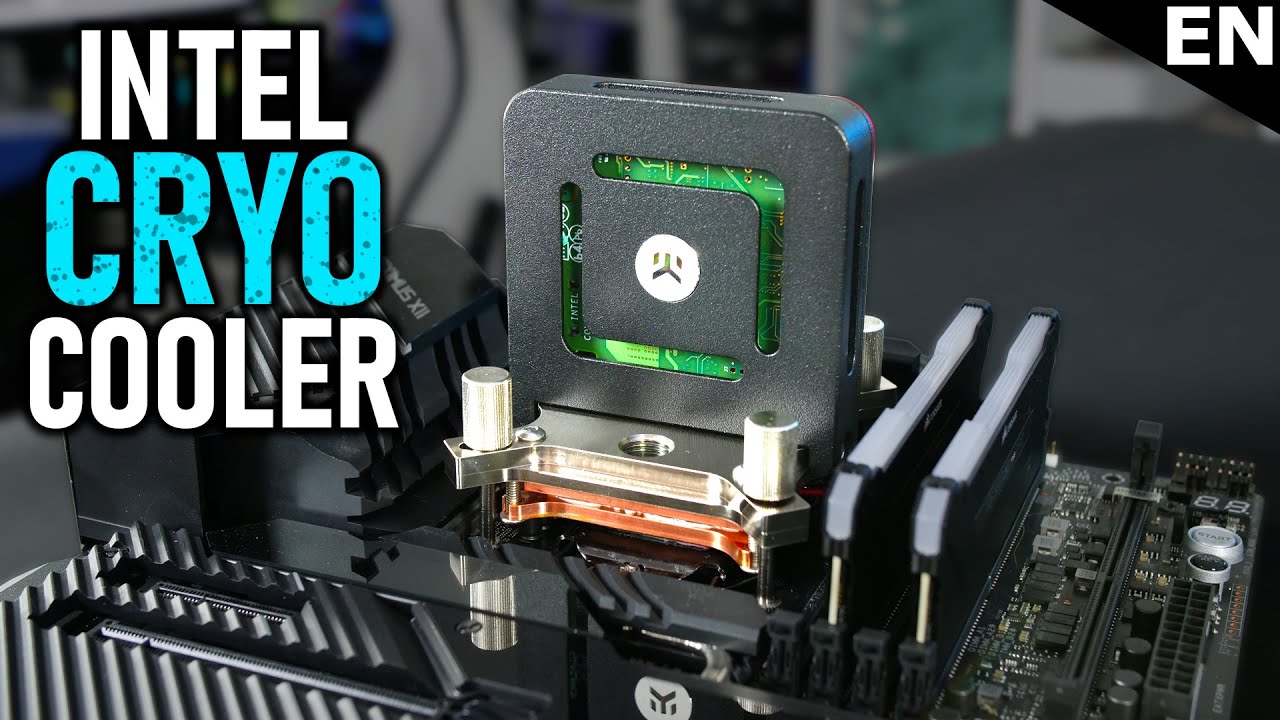
Support me on Patreon:
https://www.patreon.com/der8auer
Save 10% on your iFixit purchase: DER8AUER10
iFixit: http://ifixit.com/Der8auer
Buy the Pro Tech Toolkit: http://bit.ly/2JOFD8f
Buy the Manta Precision Bit Set: http://bit.ly/2JSpkYa
-----------------------------------------------...
wind egret
Meh, I'll just soak my motherboard in polyurethane, thank you.
...Wonder if PU would bubble from the overclocking.
devout pendant
wind egret
Meh, I'll just soak my motherboard in polyurethane, thank you.
You know about 3M Novec?
devout pendant
wind egret
Meh, I'll just soak my motherboard in polyurethane, thank you.

One of the most interesting things I have seen at #CES2019. This is a PC/Data Rack that is completely under liquid with a non conductive 3M liquid cooling! Can you imagine this pc cooling system coming to homes? Check out Unboxed here: http://unboxed.tv/signup
How exactly does this pc cooling fluid work? Is this the future of pc technology and...
wind egret
I've heard of it. First time I've heard it's "environmentally-friendly"
devout pendant
wind egret
I've heard of it. First time I've heard it's "environmentally-friendly"
You can read the MSDS, if you want.
 wind egret
"May cause drowsiness or dizziness." Not exactly the specific organ toxicity I expected. ...Is it an alcohol?
Maybe an alcohol diluted in something besides water.
devout pendant
wind egret
"May cause drowsiness or dizziness." Not exactly the specific organ toxicity I e...
wind egret
Yummy flourine. Wonder if it could be used for lightweight cooling. In space. Coolant leak! (Come to think of it, why is coolant in sci-fi always cold?)
devout pendant
The exact chemical composition can't really be disclosed, due to industry competition.
Maybe an industry insider would have a better idea on what's in it or how it's made.
wind egret
Mostly I'm suspicious of any industry declaring something to be safe. It's none of my business, just wary skepticism adopted as a rule.
Besides that, I'd expect there to be more of a market for it than for Intel's peltier cooling. Accepting condensation as a "risk" sounds absurd for ordinary overclocking. Maybe someone equivocated it with the supposed risk that overclocking burns out hardware.
devout pendant
https://en.m.wikipedia.org/wiki/Novec_649/1230
I found this Wikipedia article from Google … and at the bottom of that article, there is a link to the fluorinert article which is related to 3M Novec.
I'm actually not sure how similar or different Fluorinert and Novec are to each other.
To play devil's advocate and put myself in 3M's shoes … if I were a mega-corporation, and I wanted to commercialize a product to as many enterprise customers and consumers as possible (for maximum profitability), then I better make sure this product is as safe as possible, lest I face lawsuits, further down the line.
lawsuits/settlements = detrimental to reputation and corporate profitability
frank glade
Do you guys have any suggestions for simple cloud storage? I just want some work folders to auto sync in the background
devout pendant
frank glade
Do you guys have any suggestions for simple cloud storage? I just want some work...
You want storage that's accessible from home and while away from home?
… and would 1TB be sufficient for your needs?
devout pendant
frank glade
Hmm only from home
I own a CalDigit two-HDD RAID.
Not sure if CalDigit still sells them, but I'm sure you could find a RAID setup for mirrored/redundant backup of your files.
 frank glade
Hmm interesting. Does it have an auto sync app?
I use an icybox in raid, but its just like an external hdd and I have to backup manually daily
Im looking for a set and forget solution
devout pendant
frank glade
Im looking for a set and forget solution
I only backup my files once per year. 😆
Someone else here might know of a good [local software] solution or a good [remote cloud] solution for you.
frank glade
Ah thanks!
fervent jolt
novel briar
Any ideas of why a PC sometimes won't boot after wake up from sleep? Like even shut down does not help, I need to drain up the whole PSU, which resets the BIOS too, so it can boot.
 thin mist
That sounds mental
Might be worth checking the event viewer @novel briar
See if Windows gives you a halfway informative log entry
novel briar
Can't see anything relevant. Basically, it is either events at 00:00 o'clock which is after the the successful boot, but reset BIOS, or just some generic events and issues.
Nothing specific caught my eye. So, it might be a lower level issue if Windows is not catching up.
devout pendant
novel briar
Nothing specific caught my eye. So, it might be a lower level issue if Windows i...
In the meantime, can you prevent Windows from going to sleep? ... ever?
Maybe just turn the screensaver on, after some amount of minutes ... and/or turn-off the monitor after some amount of minutes.
 novel briar
Hibernate is not available.
Sleep is what I intentionally use, lol.
It does not happen always. Maybe like once in 10 times.
Something else which got screwed after the last sw updates is that my monitor goes off even when a video is playing. The power settings seems correct for that not to happen, but it still does.
devout pendant
novel briar
Something else which got screwed after the last sw updates is that my monitor go...
There is a possibility that something in your motherboard is not working correctly.
In my previous ASRock motherboard, some SATA ports were not working, and some USB ports stopped working, over time.
shrewd shard
You can enable hibernate specifically
I believe the shutdown by default acts like hibernate that turns off all programs prior
You have to explicitly enable the hibernate option for it to save everything as if it was sleeped
novel briar
Hibernate is not available. EDIT: found it, lol
And yeah, likely a low level issue which I don't know even how to figure out.
devout pendant
novel briar
And yeah, likely a low level issue which I don't know even how to figure out.
Do you have UPS / battery backup attached?
novel briar
No.
I was thinking that if during sleep, there was a power outage (which happens regularly) maybe it bugs off the system.
However, it does not explain why it does turn on and blinks and etc, but does not want to boot up in windows.
devout pendant
novel briar
No.
… then my next guess is that various power outages and power surges have screwed-up the circuitry on your motherboard.
Voltage regulators and capacitors can only buffer so much electrical chaos coming from the mains outlet in your home.
novel briar
I was thinking for some small(?) battery anyway due to that. Might be also a good way to check whether it is related.
My PSU is 1 kw, so I need to find something fitting for it.
Need just a minute or two.
devout pendant
novel briar
However, it does not explain why it does turn on and blinks and etc, but does no...
I am guessing that Windows checks a jumper or interrupt value coming from the motherboard, but perhaps the motherboard doesn't return the correct value back to the operating system.
novel briar
No clue. Mobos are madness. More to debug.
Because Sleep drains some power, other option is to see whether Hibernate can handle that issue 🤔
devout pendant
novel briar
No clue. Mobos are madness. More to debug.
https://www.sciencedirect.com/topics/computer-science/sleeping-state
ACPI sleep state interrupt values coming from the motherboard, etc
novel briar
Interesting, but it arises more questions and possibilities.
Even if completely drained from power, it should boot as just after shut down.
devout pendant

Windows Report - Error-free Tech Life
To fix various PC problems, we recommend DriverFix: This software will keep your drivers up and running, thus keeping you safe from common computer errors and hardware failure. Check all your drivers now in 3 easy steps: Download DriverFix (verified download file). Click Start Scan to find all problematic drivers. Click Update Drivers to get […]
I just googled something random.
Not sure if that will fix your problem or not.
novel briar
Thanks. Haven't found something which I can do from these. Maybe to try disable the peripheral power supply from the BIOS during sleep.
Drivers and SW are up to date. Imma not installing some magic driver fix for sure and the rest where kinda are not applicable or I have tried.
thin mist
Hibernate indeed needs to be enabled specifically if you want it iirc, but it's a lot more stable
Worth trying
novel briar
Yeah, regretfully it is workaround and is slower due to the full reboot and ram loading.
devout pendant
unborn pike
goddamn MSI and their ventus OC line
Your Ventus OC is being sold-off in 🇵🇱 Poland. 

 lucid cedar
Hey guys, can someone recommend a good laptop for UE4 Development up to 1500 eur? I'm living in germany
devout pendant
 lucid cedar
It's not scalling. Alienware m15 costs 1500 usd and here it's 1800-1900 eur
devout pendant
lucid cedar
It's not scalling. Alienware m15 costs 1500 usd and here it's 1800-1900 eur
Get the best laptop you can buy, for 1500€. 😃


i5 8GB RAM vs i7 16GB RAM … I would go with the better specs.
Just have to shop-around for the best deal and best value.
lucid cedar
Another issue is that it's really hard to find a laptop with qwerty keyboard
But thanks!
devout pendant
lucid cedar
Another issue is that it's really hard to find a laptop with qwerty keyboard
NewEgg laptops should have qwerty keyboards … but I am not sure if they will ship to 🇩🇪 Germany.
 frank glade
lucid cedar
Another issue is that it's really hard to find a laptop with qwerty keyboard
frank glade
lucid cedar
Another issue is that it's really hard to find a laptop with qwerty keyboard
Did yoy look at bestware.com?
 steep cairn
I am in the market for a new monitor after 12 years. I think I am after a 27inch 4k gaming monitor that displays text clearly, something that when I demo my work also looks good
devout pendant
steep cairn
I am in the market for a new monitor after 12 years. I think I am after a 27inch...
https://www.notebookcheck.net/LG-s-first-32-inch-and-4K-OLED-monitor-gets-a-release-date-and-an-eye-watering-price-tag.526414.0.html
OLED tends to have the best picture quality.
nVIDIA has been pushing 360Hz gsync monitors, for pro gamers ... not sure if OLED can refresh that fast, though.
I haven't done the research.
devout pendant
LCDs are cheaper than OLEDs.
They range from 60Hz to 360Hz.
I use a cheap refurbished 1080p LCD from NewEgg, and I can view fonts just fine.
Turning-on the "true type font" setting helps, with regards to visibility/readability.
 vivid skiff
If it's two 4 GB RAM sticks, they are dual channel.
devout pendant
If it's DDR5 RAM, then yes. lol
Intel desktop motherboards are typically dual-channel, while AMD is typically quad-channel, but correct me if I'm wrong.
devout pendant
vivid skiff
If it's two 4 GB RAM sticks, they are dual channel.
That is true, too.
If you have two 4GB sticks, it's dual channel.
In an AMD board,
two = dual channel
four = quad channel
In an Intel board,
the RAM will be dual channel no matter what.
Correct me if I am wrong.
Regardless of your question, DDR5 RAM will be dual-channel per stick, and each stick will have a voltage regulator (instead of the motherboard having the RAM voltage regulator).
I think it is best to split your RAM evenly among all the RAM slots your board has … like RAID striping for SSDs (as one analogy).
If I lived in your home, then yes, I would know you're on a laptop … but (fortunately) I do not live with you. 😆
Some people have no computer … so consider yourself lucky. 😆
 shrewd shard
2070 is better in every case
But also I'd consider what you'll have to downgrade to get one
Also do keep in mind the situation with GPUs is horrific, prices are marked up a lot
shrewd shard
shrewd shard
Does that one even support DX11?
Checked and it doesn't support SM5, so the DX11 implementation is shady at best
 green flame
Thanks @shrewd shard
devout pendant
shrewd shard
Also do keep in mind the situation with GPUs is horrific, prices are marked up a...
You might be more-likely to get a GPU, if you buy a pre-built gaming rig on one of those PC build websites.
green flame
I'm kinda looking for a reasonable laptop for college
For 3d animation and rendering
 upper shuttle
yo
newegg shuffle ends in 1 hour

Checkout Newegg’s popular product drawing queue. Enter your product of choice, submit your email, and wait to see if you win! All customers who win will be given the chance to purchase highly popular products.
 acoustic aurora
I didn’t see a shuffle on Twitter today?
 analog wraith
Anyone using one of the Ryzen laptops with 5800h or 5900hx cpu? Wondering if the shader compiling etc is as good as I'd expect based on the synthetic benchmarks I've seen
Currently running a laptop with i7 9750h
upper shuttle
im trying to get one of those 3090s in the shuffle
devout pendant
 devout pendant

Check out http://KiwiCo.com/LTT for 50% off your first month of any crate!
Many members of the PC community have started to notice a glaring issue with their RTX 3080 and 3090 series cards - excessive vRAM temperatures. Fortunately, the boys over at EKWB have cooked up an interesting solution to the problem with their own actively watercooled ...
GDDR6X VRAM runs hot.
Derp.

It's common knowledge that the lower your temps, the longer your semiconductors will last. 😐
... and if nVIDIA did not design their founders edition cards with adequate cooling ... means that they want all your GDDR6X cards to fail sooner than they would have otherwise failed ... so that you are more-likely to buy their next generation cards!
Genius!
#ConspiracyTheories


 rain summit
Does UE development (blueprint only) benefit a lot with increased cores?
For example:
Ryzen 5 5600X (6 cores, 12 threads), $300
vs
Ryzen 9 5900X (12 cores, 24 threads), $550
Trying to justify if the price is worth the benefits
devout pendant
We compare the AMD Ryzen 9 5900X with the AMD Ryzen 5 5600X with a wide selection of benchmark tools and data to help you choose the right processor, for your computing needs.
The second website has this comparison, but not sure how it is calculated.


 rain summit
Yeah, I read 5600X has better price/performance but I wouldn't mind paying more for 5900X if I knew that I would greatly benefit UE development (which seems to be if UE developing benefits from more cores/threads)
I don't really do anything else, maybe light gaming, so it's really just going to be UE development
wind egret
PiE framerate or shader compilation/light baking?
shrewd shard
Shader compilation always benefits from extra threads
Project packaging benefits from more too
analog wraith
the real trick is finding a 5900x for $550
I would definitely recommend it of you can. I've got a machine with the 3900x 12 core and I love it
rain summit
How often does shader compilation, light baking, and project packaging happen?
Like if it's just one big wait time but it happens very infrequently that it's fine
Or if it happens every time you go to play mode
devout pendant
@rain summit https://www.youtube.com/watch?v=5NXJjY_fCkQ I watched this video when I wanted info about the 5k series
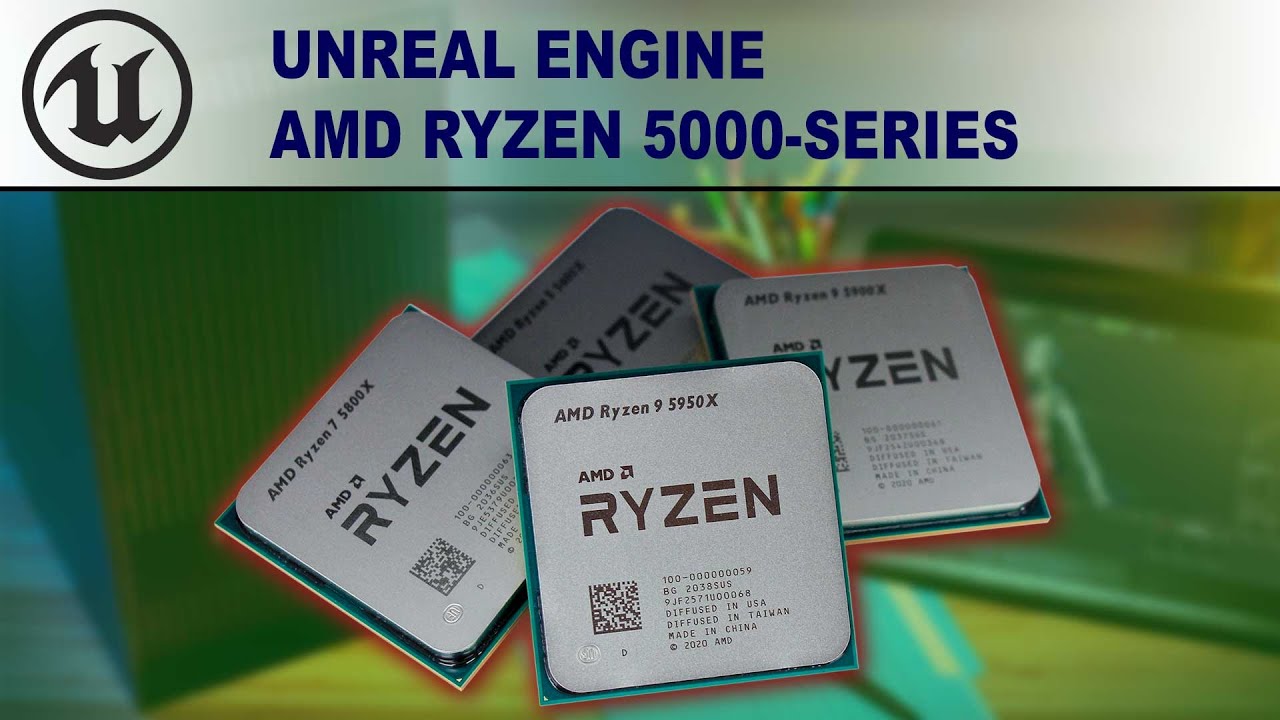
View Full Article: https://www.pugetsystems.com/labs/articles/Unreal-Engine-AMD-Ryzen-5000-series-CPU-Performance-1967/
Unreal Engine has grown by leaps and bound over the years, with more and more industries developing new workflows in it. AMD has released their new Ryzen 5000 Series, so we'll see if they can improve those workflows and how th...
although honestly I don't know about pros/cons for blueprints
and the video isn't about blueprints either
rain summit
Interesting video
Yeah, he did mention "compiling code, build lighting, packaging a project, and recompiling shaders" as things that benefit from more multi-threaded
Just wondering how often those actually happen in normal development
 rotund moth
@rain summit The more cores the better. I have a 3900X 12-core and I am very happy with it! It's been a game-changer for me.
I make Blueprint-only games, too, and the number of cores in my CPU comes in handy frequently.
Compiling materials, Niagara systems, and building lighting are all things I do pretty frequently, and they all benefit significantly from more cores.
shrewd shard
When you get to making more complex materials, the extra cores absolutely help
But even then it's beneficial if you have faster build/package times for testing
kind talon
rain summit
Does UE development (blueprint only) benefit a lot with increased cores?
For exa...
Certainly worth it for the extra cores imo
It won't benefit you in your blueprint work (editor side) nor cooking but light baking, pak-ing and shader compilation will definitely be majorly improved!
Also will come in handy if you need to work on consoles later down the line as you'll need to compile engine source!
novel briar
Damn, my bios reset each other week. Like, aren't there batteries anymore in the mobos?
devout pendant
novel briar
Yeah, regretfully it is workaround and is slower due to the full reboot and ram ...
Compounded with your earlier problem, sounds like you need to buy a new motherboard. 😆
novel briar
This is the new one.
 devout pendant
Are you using a UPS/battery setup?
It's supposed to protect against power surges and power outages.
You should activate your motherboard warranty, and get a replacement.
novel briar
Well, the bios resets after Wake up from Sleep, like 1 in 20 times. And this time the reset was after a power outage.
Point is, my previous mobo never did such things. Instead, it was waking up from Sleep randomly.
devout pendant


 wind egret
Obligatory "those are the best odds I've had in years"
That number, of course, disregards that many people get a chance each Shuffle, as multiple GPUs, motherboards and other components are available each time.
In other words, the title lies.
wet ore
what does classify files do in samsung magician and why would I want to do it to my SSD? can't find any info online and maybe someone here knows.
sorry and please let me know if this is too unrelated of an unreal question
devout pendant
SSDs, in general, need wear-leveling … but that can be performed on a hardware/firmware level.
Maybe Samsung has a small software layer, on top of the hardware layer.
Not sure.
novel briar
Any good 5950x temperature vs fan guides? Someone up mentioned they stick to always 50% cpu fan all the time. I kinda target more quiet mode, regretfully the CPU spikes to 60-65 degrees all the time: opening some web pages, or just previewing stuff in UE and etc. Currently I'm playing with this setup:


 fallen spindle
And a Sprite
 obsidian berry
unborn pike
obsidian berry
unborn pike
@novel briar mine is like an exponential cure, less than 50% fan speed for temps lower than 60 C I think
hits max at 85C
or 80 C
can't be bothered to check right now, the settings are on BIOS side 😄
novel briar
haha, fair enough

I came up with this so far.
Point being that when I run UE it stays like 62-65 and is low noise.
novel briar
The standard profile, the one posted up, is kinda quite heavy at that point and it just saves like 3 degrees.
unborn pike
because then the single core boosts go sky high
with air coolers the fan speed isn't going to do much if the metal cooling block is large enough
the heat just doesn't transfer fast enough in it
novel briar
Yeah, Noctua 15h lite
Its big.
On that setting up, normal operating mode is like 50-60% fan speed for the range of 40 to 70 degrees.
Not sure about the upper bound of 70, kinda feel like putting down it down to 65 or so... but damn if I know how much it matters at the end. These CPUs are quite jumpy.
unborn pike
rebuilding my ue 4 game solution and my temps stayed lower than 70 C and fan speed was less than 650 RPM
now in "normal" use the temps are like 41 C and fan speed is 300 RPM
novel briar
Hmm.... much, much lower than mine RPMs.

So, at 40 degrees, 50% it is ~900 RPMs. It is silent as the Case's fans.
unborn pike
well I did aim for quietness 😄
loudest thing in my PC is now my old HDDs with spinning disks in them
novel briar
I might play around more with the fans then. Kinda scared to put say fans on 20% or 350 RPM. Are you also using Noctua 15?
unborn pike
noctua nh-d15 chromax.black
which I think is a bit bigger than the lite one?
half the size?
Anyway, I just ran some prime95 torture tests and made sure that peak temps stabilized below 85 C
and those torture tests are like the worst case scenario power draw wise 😄
you aren't going to hit similar temps in other use
novel briar
The 2 thread case?
unborn pike
yea I think so, one or two
that way you get highest single core boost clocks
should hit something like 4.8-5 GHz
with crazy temps
novel briar
I think I also stayed like 80-something back on the old profile, but that's already on max fans so nothing to be done. Apart from adjusting the case's fans.
I might play around a bit to reduce even further the noise later 🙂
devout pendant
I have a cheap Dell/Alienware PC from Best Buy (because my custom rig broke), but it has Alienware software that controls RGB and fan speeds.
I would screenshot the fan speed curves/controls, but I am at work for another seven hours.
novel briar
Thanks. I think the type of CPU is kinda relevant in this case though. I'm searching for nice balance between noise and coolness. So far it seems that it is quite normal 5950x to jump down & up from 40+ to 60+ celsius on regular basis.
unborn pike
ffs no BMP support for discord?
gah
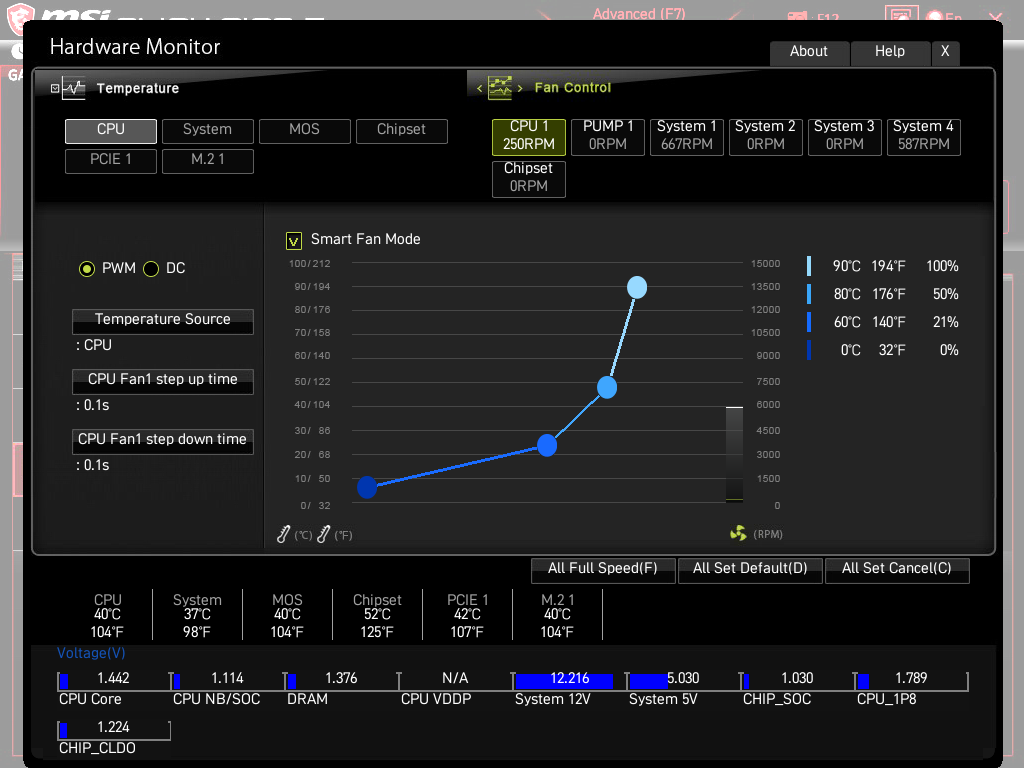
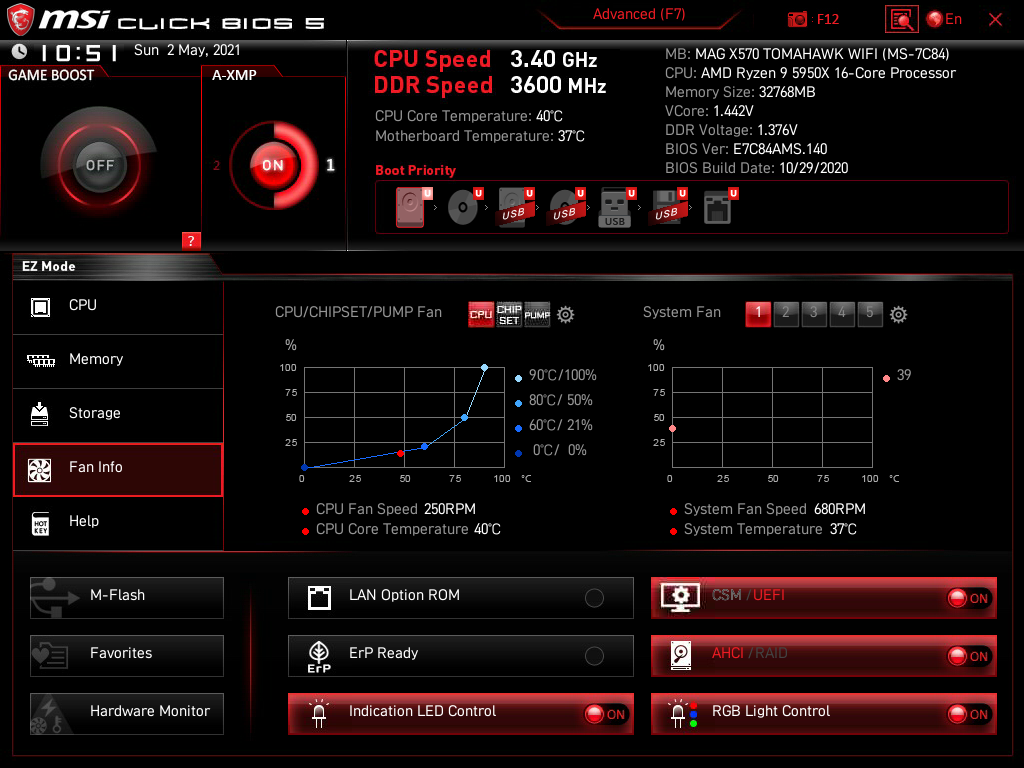
there you can see where the CPU fan is at
the red dot on the graph
 willow pollen
hello
I need a suggestion about building a PC for developing games and playing games
unborn pike
3090 RTX and AMD 5950X
willow pollen
unborn pike
3090 RTX and AMD 5950X
r u comdey me
devout pendant
TSMC uses AMD EPYC CPUs, but TSMC doesn't play computer games on their hardware.
shrewd shard
These days, a good enough gaming PC is also good enough working PC
It's not like the older days where a gaming PC has fewer cores and you need extreme amounts of money to get more than 4 cores
Getting something well balanced by your budget should suffice
The only thing I'd highly recommend is maybe skewing on the side of more RAM and a larger (or additional) SSD that would have your development things
devout pendant
shrewd shard
The only thing I'd highly recommend is maybe skewing on the side of more RAM and...
I am personally a big fan of more RAM.
devout pendant
novel briar
haha, fair enough
 devout pendant
novel briar
haha, fair enough
devout pendant
novel briar
haha, fair enough

The CPU fan and side fan settings let you choose "auto manage", "offset", or "smooth line/curve" ... and you can just move the marker or dots at various fan speeds and temperatures, yourself.
devout pendant
unborn pike
3090 RTX and AMD 5950X

Check prices on Amazon below
AMD Ryzen 5900X: https://geni.us/zvyB
Asus Crosshair VIII Impact: https://geni.us/dSRcWQe
Nvidia RTX 3090: https://geni.us/Jvto
Corsair SF750: https://geni.us/eq9FDs
Noctua NF-A12x25: https://geni.us/sZB5H
Noctua NF-A12x15 Chromax: https://geni.us/BYQyXN
EKWB PE 240mm Rad: https://geni.us/H1LB
XSPC Ultra Slim 240mm R...
devout pendant
unborn pike
3090 RTX and AMD 5950X

Sign up for Private Internet Access VPN at https://www.privateinternetaccess.com/ShortCircuit
EKWB wanted to send over one of their highest spec gaming PCs, the Vanquish 295. It has an AMD 5950X and a NIVIDA 3090 RTX graphics card. We couldn't say no, but there were a few issues...
Check out EK's Fluid Gaming lineup at https://lmg.gg/R4KR9
B...
(3090 & 5950X both in that PC / video)
 muted holly
just copying/pasting what i typed in the wrong channel
so im running two p6000 gpu and thinking of upgrading to the
rtx6000
has anyone ever ran two differnt video cards ? or should i just go for two rtx
 scarlet solar
Amazon.com: Razer Blade 15 Base Gaming Laptop 2021: Intel Core i7-10750H 6 Core, NVIDIA GeForce RTX 3060, 15.6" FHD 1080p 144Hz, 16GB, 512GB SSD - CNC Aluminum - Chroma RGB Lighting - Thunderbolt 3: Computers & Accessories
Worth it?
scarlet solar
Recommended screen size?
unborn pike
large
shrewd shard
More screen
Try to find a 1440p screen if possible
It's such a huge improvement for any work
vivid skiff
"1080p ought to be enough for everyone."
 blazing spire
Hey quick, possibly stupid question. would it be possible to overload a pcie 4 x4 with a gtx 1080, 2 ssds, and 1 Hdd? just seems like so few lanes to the chipset.
shrewd shard
The chipset gets 4 lanes, the first PCIe slot gets 16 lanes, the first NVMe SSD gets 4 lanes too I believe
On mobos with a second NVMe support, the lanes are slashed to 2x2
Which makes them slower
Or alternatively chipsets lose their bandwidth to get the second SSD at full speed at the cost of ports not working (usually SATAs)
Depends on the exact setup you're getting
But if 1 SSD is NVMe and the other is SATA, both will work at full speed
Also most HDDs will be happy enough to run at SATA 2 instead of 3, they don't take up much bandwidth
With a GTX 1080, 1 NVMe, 1 SATA SSD and 1 SATA HDD, everything should be working full speed
blazing spire
shrewd shard
The chipset gets 4 lanes, the first PCIe slot gets 16 lanes, the first NVMe SSD ...
I should have been more specific, i am in the second pcie slot with my gpu and the ssd is also in the second slot. both simply because my cpu fan blocks access to them. i didn't realize they took different paths at the time.
 shrewd shard
Most motherboards have an x8 electrical connection for the second slot
And also, the second NVMe slot should generally cause issues even if the first NVMe slot isn't filled
Issues like aforementioned ports being turned off
The x8 shouldn't be an issue for a 1080 but still can be sub-optimal performance since the 1080 will run at PCIe 3, not 4
blazing spire
shrewd shard
Issues like aforementioned ports being turned off
so having an ssd in the second x4 slot will cause the x8 to turn off?
shrewd shard
I don't think it should
But that's a really tricky situation you got
That CPU block better be hella worth it if you have to move such major components around like that
It can still be hard since the first x16 slot is a direct link to the CPU and is hella fast
Every other slot beyond the first can depend on the mobo manufacturer after that
Some manufacturers enable the x2 config, some have only x4 or SATA
blazing spire
sounds like i should just replace the cpu fan
i want another ssd anyways!
thank you for the information!
shrewd shard
I've worked with a few mobos when I was still in retail and I've had a few situations with people using second slots with no consideration
But each person would have a different issue
Some graphics cards didn't even start if they're in the second instead of first slot
And the first slot is empty
I think that was for older hardware however, can't be sure now
blazing spire
shrewd shard
But each person would have a different issue
I have consistent gpu crashes on almost every game i play
shrewd shard
Use first slots unless they're already filled with something
blazing spire
i thought my gpu was just ruined 😂
shrewd shard
Otherwise you'll be facing weird bottlenecks
It's possible the crashes are from that
But unless you're using a workstation grade mobo, the second slot is x8 at most
blazing spire
shrewd shard
But unless you're using a workstation grade mobo, the second slot is x8 at most
yeah it's x8
shrewd shard
I have my server GPU at my most bottom slot because it's still x16, but only because I have a bunch of expansion cards covered up otherwise
But for consumer mobos, that can and most probably will be an issue
blazing spire
well if I'm understanding right its x8 to the chipset along with all the drives. and x4 from there
shrewd shard
I'm not familiar with how it works for the x8, I only know that for the love of god use first slots
Sometimes if there's a second GPU the CPU will split 2x8 for the GPUs
But if there's just a second GPU it depends on mobo by mobo, sometimes even CPU
I can't be sure
It's tricky because it's only caused problems in my experience
blazing spire
alright thank you for the help, i am definitely going to get it back in that other slot!
devout pendant
I've looked in a couple of my motherboard manuals, and I have seen sections where it describes what speeds will be used at various layouts ... like if you install this in this slot, install that in that slot, etc.
devout pendant

That's a screenshot of an Asus Intel Z590 motherboard manual.
It tells you what speeds you get at what slot configurations, and tells you what bus the M.2 slot(s) use.
I am not 100% sure, but with these new CPUs that come with 20 lanes of PCIe … it helps your GPU keep 16 lanes all to itself, in most configurations (or maybe all configurations).
I've heard that we can't saturate the PCIe v3 bus … but … Intel and AMD are also coming-out with PCIe v5 … and new GPUs and new SSDs will be pushing PCIe v3 to its limits … so actions speak louder than words … when Intel and AMD are about to roll-out PCIe v5 support, next year.
shrewd shard
RX 5000+ ran more than marginally better on PCIe 4
But for a PCIe 3, most of those GPUs (except I believe a Titan V) shouldn't be bottlenecked by bandwidth
devout pendant
shrewd shard
But for a PCIe 3, most of those GPUs (except I believe a Titan V) shouldn't be b...
Even if a new GPU and new NVMe SSD (together) do not saturate the PCIe v3 bus … PCIe v4 and PCIe v5 do increase bandwidth or speed of data throughput … so a new GPU and new NVMe SSD could both use the bus, at the same time, and also take advantage of the faster bus speed.
The way I see it, a freeway could have three lanes, and two lanes could be full of cars, driving at 60mph (not saturated).
The freeway could be expanded to five lanes, and the speed limit could be increased to 85mph.
The freeway would still not be saturated, but the cars would be traveling faster and reaching their destinations sooner.
shrewd shard
There's a reason they're literally called lanes
In the case of PCIe 2 vs 3 vs 4, you have a set number of lanes
However, they run at 5 vs 10 vs 16 gbps
Doesn't matter how much of them is really saturated, the lane is taken up either way
There was some PCIe bifurcation support, but it's on very limited motherboards (usually workstation grade)
Actually bifurcation splits lanes (e.g. 16 lanes into 2x8)
But I don't think there's anything that supports converting, say PCIe 4 x8 to PCIe 3 x16
devout pendant
shrewd shard
Doesn't matter how much of them is really saturated, the lane is taken up either...
It seems like GPUs will always have 16 lanes.
It's just a new/recent improvement for CPUs to have enough lanes to allow the GPU to have 16 lanes, all to itself, regardless of what other devices you have plugged-in to the motherboard.
Probably old news for AMD and new news for Intel, but I am just a regular joe schmo consumer, not an industry insider.
I only learn about things when I google them, not as they happen in the industry.
As for SSDs, they have been getting more and more lanes made available to them, over the years.
GPUs have had 16 lanes allocated for a long time … dropped to x8/x8 (in the past) … or x16 (currently).
Lanes given to SSDs seem to be increasing, however.
AMD and Intel probably give them lanes based on what's out on the mainstream consumer market, at the time.
The industry and market are dynamic … always adapting.
DDR5 will have voltage regulators on-DIMM, so that probably put less voltage pressure on motherboards to help allow for PCIe v5 sooner (assuming AMD and Intel both release PCIe v5 CPUs by next year).

Microsoft DirectStorage and RTX IO will also be a thing (in the future) … another process using the PCIe bus.
AMD's S.A.M. (resizable B.A.R. support on all platforms) also uses the PCIe bus.
GPUs and SSDs will be sharing the bus with CPUs accessing GPU VRAM and GPUs accessing SSDs.
There is going to be a lot of action on that bus. 😆
shrewd shard
PCIe 5 can't come fast enough
devout pendant
shrewd shard
PCIe 5 can't come fast enough
I'm worried about cooling.
more devices/components + faster devices/components = higher power draw = more heat generation
blazing spire
devout pendant
I'm worried about cooling.
more devices/components + faster devices/components ...
I'm worried about cost! pcie4 mobos are already quite pricey
devout pendant
blazing spire
I'm worried about cost! pcie4 mobos are already quite pricey
Start working-out, so you can find a sugar mama.
devout pendant
devout pendant
I'm worried about cooling.
more devices/components + faster devices/components ...
A good case-in-point is GDDR6X.
It's not certified by JEDEC, but Micron developed GDDR6X anyway, and nVIDIA is using it in the 3080, 3080 ti, and 3090.
Not sure if the RTX 3070 ti will be using GDDR6X or not.
Ever since HWiNFO added memory junction temperature reading in late-January ...
https://www.reddit.com/r/nvidia/comments/l5bwnv/hwinfo_642_adds_memory_junction_temperature_read/
... the high temps reached (from some gaming and most crypto-mining) in GDDR6X VRAM shows the point ... the point that new technology is fast, maybe has larger data bandwidth, but generates a lot of heat.
PCIe 5 ➡️ PCIe 6 ➡️ PCIe 7
GDDR6 ➡️ GDDR7 ➡️ GDDR8
DDR4 ➡️ DDR5 ➡️ DDR6
SSDs not needing any heatsinks on the controller ➡️ NVMe SSDs reaching high speeds and needing heatsinks and fans on the controller and memory chips
You see the pattern.
I really am curious how the industry will handle the higher generation of heat, as we move forward into the future.

Motherboards used to come without any heatsinks.
Now, heatsinks cover various capacitors, voltage regulars, VRMs, whatever.
Sign of things to come, as we move into the future.

M.2s used to come as a plain stick.
Now, there are heatsinks and fans.
#SignOfThingsToCome

PCIe SSDs usually already come with heatsinks, but it won't surprise me when I start seeing fans on them, in the future ... and they start looking like skinny versions of GPU cards.

lulz
Found one.
Gigabyte Aorus 8TB SSD ... it has a fan on it ... because it runs hot. 😆

lol ... heatsink + copper heatpipe + heatsink ... for an M.2 stick. 😆

If we are going to reach the 2035 goal, in this nVIDIA graphics roadmap, then the industry needs to deal with all that heat.
blazing spire
that has me a little bit worried for the pcie4 m2 i just bought because it doesn't have a heatsink 😅
both m.2 slots have tubes to a fan though
devout pendant
blazing spire
that has me a little bit worried for the pcie4 m2 i just bought because it doesn...
Make sure your case fans blow a lot of air over it. 
blazing spire
devout pendant
Make sure your case fans blow a lot of air over it. <:Devil:621068015978414081>
it will be blocked by the gpu 😂
shrewd shard
devout pendant
If we are going to reach the 2035 goal, in this nVIDIA graphics roadmap, then th...
0.5nm nodes
devout pendant
shrewd shard
0.5nm nodes
#1
You are referring to fab size, but CPU die size and GPU die size will remain the same or even increase.
#2
You are not addressing all the other hardware components I mentioned above.

blazing spire
on a different note. that cpu fan that was blocking my pcie slot 1 was actually upside down and boy it is not symmetrical at all like i thought it was
so I'm back to gpu in slot 1!
devout pendant
blazing spire
on a different note. that cpu fan that was blocking my pcie slot 1 was actually ...
I'm actually a fan of horizontal motherboards, but most people don't seem to like them because they require a PC case to be larger at the base ... but with horizontal motherboards, you don't have to worry if something is upside-down or rightside-up ... but back to my topic of heat-generation ... I would like to see submersive cooling available for regular consumers ... then it won't matter what orientation the motherboard is.
shrewd shard
If I had a 10 sq. m. desk to put that bad boy on, sure
blazing spire
they can't be that big! surely you jest
blazing spire
i do just so happen to have a big desk though 🤔
devout pendant
shrewd shard
If I had a 10 sq. m. desk to put that bad boy on, sure
We can reach nVIDIA's 2035 graphics roadmap goal ... without a large desk ... with this ...
One of the most interesting things I have seen at #CES2019. This is a PC/Data Rack that is completely under liquid with a non conductive 3M liquid cooling! Can you imagine this pc cooling system coming to homes? Check out Unboxed here: http://unboxed.tv/signup
How exactly does this pc cooling fluid work? Is this the future of pc technology and...
blazing spire
isn't there mobos where you don't even need a cpu fan though
shrewd shard
Isn't that kinda bad at cooling?
blazing spire
shrewd shard
Isn't that kinda bad at cooling?
i hope not because it costs your soul plus probably your cat
the aurous extreme
devout pendant
shrewd shard
Isn't that kinda bad at cooling?
https://www.extremetech.com/computing/321578-microsoft-dunks-servers-into-boiling-fluid-to-cool-them-off
Tell  Microsoft that submersive cooling is bad. 😆
blazing spire
apparently they use the whole mobo as a heatsink
wind egret
devout pendant
#1
You are referring to fab size, but CPU die size and GPU die size will remain ...
0.5nm nodes for everything then! Die size increasing is good, actually; it's more area to apply a heatsink. Most of the heat comes from clockspeed and voltage anyway, so if you want to go back to the days of 66Mhz I think we'll be just fine using radiative cooling.
shrewd shard
Silicon won't live to see 0.5 anyway
It's beyond what allows it to be stable I believe
Other elements, like I believe Germanium, can run at lower voltages and work at such lithography
devout pendant
https://www.eetimes.eu/a-new-way-for-photonic-chips/
https://semiengineering.com/brighter-future-for-photonics/
Photonics would solve some heat/power problems ... but reaching a working photonic chip itself is a problem that I haven't seen a solution to, but I am just a joe schmo consumer, not an insider like Intel CEO Patrick Gelsinger or AMD CEO Dr. Lisa Su or nV CEO Jensen Huang.
Maybe they have seen a photonic chip in front of their eyes.
I don't necessarily see a linear path.
I see multiple possibilities, going into the future.
We can solve heat in a variety of ways.
Quantum electron tunneling is a fab problem, but I read that TSMC is doing 3nm prototypes, so they must have found a solution ... or maybe they still encounter quantum electron tunneling but are dealing with it.
shrewd shard
Either way, the solution is in a different element
Silicon has a hard cap, we simply haven't reached it yet
devout pendant

According to Wikipedia, Intel/Samsung/TSMC have either reached 3nm or are going to ... I'm assuming using different processes from each other.
devout pendant
shrewd shard
Silicon has a hard cap, we simply haven't reached it yet


You can joke and say they are charging us consumers so much $$ for these new hardware components ... in order to fuel their R&D for 3nm and beyond.
https://www.eetasia.com/18032601-2nm-end-of-the-road/
There may be diminishing returns, going smaller.
Being able to do it, is one thing.
Commercializing it and corporations being able to profit from it, is another thing.
 novel briar
The need of new architectures was coming for some time. Like lastly they optimise mostly and add cores only.
wind egret
There are already diminishing returns. Pentium D failed. Intel sticking to 4 cores stalled. They're exceeding 5ghz now, decades late, by pushing out more heat. More or less the same for AMD.
Also just because the process shrinks doesn't they're able to shrink every type of transistor, so there might still be quite a few 14nm structures on a 5nm die. And unless someone solves whatever stopped those from shrinking, they may still be there on the 3nm die.
shrewd shard
I think we might be hitting diminishing returns territory now
This latest gen of GPUs don't have a 200$ part
At least for now
Though the previous gens got one announced a similar time period after flagship released
And also the performance increase isn't that much better at lower price points (3060 for example)
novel briar
4080 -> $2k+ 😉
wind egret
I don't think that's strictly because of diminishing returns. The next step down from the 2060 was the 1660 Ti (or was it the super? Is the super the newer one? GD Nvidia)
There's an argument that it's not worth marketing the RTX feature set at that level.
Meanwhile, even if AMD was planning to make a 6500 XT, they're too busy making PS5 and XSX chips.





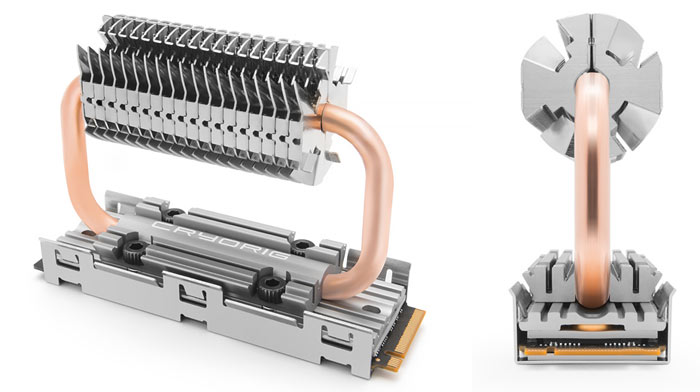
 wind egret
What is that Final 6mo. price? The 3060 is >$400 now.
devout pendant
I am guessing MSRP was used.
wind egret
A few decent Gigabyte ones are 389
Samsung is going to have a 5nm process for them, so there's at least another generation or two to grow.
devout pendant
... anyway ... if consumers watch these review channels on YouTube ... and they see that the next greatest hardware isn't too much of a performance improvement ... then consumers might be less willing to upgrade on as frequent of cycles ... and that could hit corporate profits ... which also affect R&D.
It could be a domino effect.
Corporations usually diversify their market presence, however, so it might not be such a big deal.
wind egret
Heat is worrying. Mostly because I remember when they were trying to make dual-GPU cards and they were straddling the 300W limit. The problem then was maybe wafer sizes?
But I find there's something uncomfortable about having a kilowatt space heater in the room with you.
devout pendant
devout pendant
True.
If corporations don't handle the heat in hardware, silicon/semiconductors will just last shorter lives, and cause consumers to buy replacements/upgrades more frequently = continuing profit cycles for corporations.
frank glade
wind egret
What is that Final 6mo. price? The 3060 is >$400 now.
3060 is 1200$ here, 3090 is 3900$ best retail prices 😆
wind egret
From secondhand retailers. They can charge whatever they want. MSRP for the reference 3060 Ti on Best Buy is only $399 but obviously not available. There's not even a reference 3060.
But usually the AIB cards weren't that much more expensive than the reference version, and weren't more expensive than the next tier unless they were watercooled.
I think the 3060 can sell profitably at $200 to $300. The demand is just too high.
frank glade
It's good that retailers there have some moral fiber, these prices we have are on every store, for brand new cards. They figured that they sell like hotcakes anyway, so prices are 3x-4x everywhere. Scalpers sell them for cheaper now
You can buy them though, plenty in stock (they still sell at these prices though). I hope it won't get this crazy everywhere
wind egret
Mining is driving the price of video cards. E.g. There's a shortage of CPUs but the price hasn't gone totally mad because there's very little profitability in CPU mining. But shipping and distribution has got stupid expensive so everything's gone up in price a bit anyway.
 delicate meadow
Does anyone know if this is enough to run builds?
 novel briar
Define "run builds".
hoary urchin
if its building the engine/cooking a project, that will be super slow about 2hours or more per build MINIMUM 😄
and that is being optimistic
delicate meadow
novel briar
Define "run builds".
Make builds?
delicate meadow
hoary urchin
if its building the engine/cooking a project, that will be super slow about 2hou...
Is it the CPU?
novel briar
delicate meadow
Make builds?
A bit better, but still too undefined. It can mean from compiling from source, to lighting work, to localisation, to mobile games, to high-end top games. And as you can imagine, requirements for any of these vary wildly. So be specific.
delicate meadow
An average PC game @novel briar
fervent jolt
they don't think it be like it is, but it do
kind talon
Definitely want an SSD in it tho @delicate meadow
It'll do it, as people said above but it wont be amazing. With SSD at least it will be a lot better
shrewd shard
Those Xeon Ds are basically laptop CPUs
Ultra low power, the 4 core is a 3.2 Ghz at most
They're focused on single core performance a ton more over multithread and are a competition to ARM for the most part
Well, low power for a Xeon that is
Not like the actual laptop chips
But it's pretty damn comparable to 4000QM parts