#hardware
1 messages · Page 44 of 1
 mighty patrol
 wise elbow
sidevent is fine if you actually have a fan there
mighty patrol
The designer you mean
 short bramble
The designer yes x)
wise elbow
relying on negative pressure for airflow is stupid and will fill the case with dust
mighty patrol
A mascocist
short bramble
mighty patrol
A mascocist
I agree.
 orchid iron
wise elbow
relying on negative pressure for airflow is stupid and will fill the case with d...
orchid iron
wise elbow
relying on negative pressure for airflow is stupid and will fill the case with d...
Don't worry, the flat front has a dust filter!
wise elbow
i sure hope the entire case is hermetically sealed!
orchid iron
XD
 grave sundial
Fractal Torrent Mid-tower E-ATX comes with five Dynamic ™️ fans already included.
Two in front and three on the bottom.
 median marsh
so... what did you sell this poor guy today?
short bramble
median marsh
so... what did you sell this poor guy today?
xD
We ended with Fractal Case and Air cooler Noctua
Like before lol
Do you remember when we saw that the G2 is only for LGA1700 ?
I saw in the description the G2 is also for LGA1200
AMD AM5 & AM4 and Intel LGA1851, LGA1700, LGA1200, LGA115x
So it's better to buy the G2 instead of the normal
It says recommended for LGA1700 in the title but in the description and official website it's compatible with LGA1700 and LGA1200
orchid iron
short bramble
It says recommended for LGA1700 in the title but in the description and official...
I'd trust more the official site

MNT Reform open hardware laptop: https://mntre.com
Full video: https://www.youtube.com/watch?v=_DA0Jr4WH-4
The MNT Reform in this video was provided by MNT, and I am not keeping it, nor did they have any input into the content of this short.
Support me on Patreon: https://www.patreon.com/geerlingguy
Sponsor me on GitHub: https://github.com/sp...
orchid iron
short bramble
So it's better to buy the G2 instead of the normal
These 2 products were released 8 years apart because Noctua is so quality focused
short bramble
orchid iron
These 2 products were released 8 years apart because Noctua is so quality focuse...
So G2 is better and from official website is compatible LGA1200 so it should be ok ?
SecuFirm2+™: Multi-socket Torx Mounting System Noctua SecuFirm2™ mounting systems have a long history of quality, security, and ease of installation. The SecuFirm2+™ version with Torx screws (screwdriver included) offers even greater ease of use and durability. Supported sockets include AMD AM5 and AM4, as well as Intel LGA1851, LGA1700, LGA1200, and LGA115x (LGA1150, LGA1151, LGA1155, LGA1156).
This is the Noctua NH-D15 G2, Dual Tower CPU Cooler, Standard All-Round Version
Standard all-round version is this ?
orchid iron
short bramble
Standard all-round version is this ?
Yeah, that's the better one if you want to use it for as long as possible
 agile lodge

Tom's Hardware
IFS continues to gain momentum.
orchid iron
agile lodge
https://www.tomshardware.com/tech-industry/semiconductors/intel-and-umc-team-up-...
Oh no, not stagnation again xD
short bramble
Ok great thank you very much !
wise elbow
helping gf with a threadripper build
whats the fastest ddr5 memory you can get that isnt OC?
like stock speed
orchid iron
wise elbow
helping gf with a threadripper build
Also, congrats on finding a gf that enjoys threadrippers 🎉 xD
grave sundial
What really matters is whether you enjoy... never mind.

Dell Laptops with AMD AI processors.
orchid iron
I listened to the latest broken silicone podcast where he interviewed someone who primarily focused on laptop reccomendations (he is also the dude helped by Steve from GN in order to test mobile 5090)
And nobody cares about AI on their laptops, the few TOPs even if they are like 50 tops, that's just not enough to run any kind of reliable AI model locally
Compared to dedicated GPUs, that tiny NPU isn't being used by applications youd think it should be used by, Copilot's calculations are mostly done in the cloud, most "AI Guides" are done in the cloud because they have over 500 tops over there
And most importantly, the memory available to do any kind of AI tasks is really low to run actually good models
(talking about AI stuff for consumers, some people here probably have specific AI set ups for their specific needs that don't require a whole server )
median marsh
yea, because there aren't many applications yet
i feel like companies may add small models for specific tasks into their software over time, given that even a laptop with intel gpu will have access to some AI acceleration in the cpu
your average consumer doesn't have the need for an nvidia gpu in their laptop
 tough owl
orchid iron
And most importantly, the memory available to do any kind of AI tasks is really ...
tough owl
orchid iron
And most importantly, the memory available to do any kind of AI tasks is really ...
makes me wonder was this the reason AMD sent their iGPUs to the gym, because they got some serious gains in the top-end ai cpus
and being integrated, you can just choose how much RAM you give to it
 grave sundial
The flexible VRAM is one of the reasons I love the Strix and the Radeon 8060s.
I hope they keep developing that tech more and more.
grave sundial
median marsh
mini cities.
median marsh
and some companies make 3 fan cards of this...
grave sundial
Such a small thing, requires such rectangular, long cooling.
 grave sundial
When I got my 4060ti, I was expecting a brick.
I got something close, but much less-bricky than I expected.
median marsh
currently the 5060TI seems llike the only reasonable choice of the 50 series
grave sundial
Then, I saw the space allocated for a 4090 and I was like 😓 😓 😓 😓
median marsh
16GB VRAM, fair price, no 12VHPWR bullshit...
grave sundial
I THINK I read today that its price is coming down a bit, soon ™️
Because of stiff competition from AMD cards.
median marsh
it's the only card which is close to MSRP here
grave sundial
Apparently, they are outselling NVidia. That might not be entirely true, since NVidia is more interested in cloud and business customers.
median marsh
probably because of the 9070 yea
grave sundial
It's good news for God Todd, all these new tech advances, yeah.
He can just remaster more old crap and make a billion or two.
mighty patrol
grave sundial
Then, I saw the space allocated for a 4090 and I was like 😓 😓 😓 😓
Don't remind me
Thing takes up most of my case
and I got a huge case
mighty patrol
grave sundial
It's good news for God Todd, all these new tech advances, yeah.
Hey at least we get fallout 3 next
Wish it was fallout 1 😢
grave sundial
No, no. Tried and tested strategies must be exploited to the fullest.
God Todd shall reign supreme.
Heck, I won't be surprised if Bethesda makes a GPU - ToddX 1000 - and it magically sells to every household in the world, even those without PCs.
mighty patrol
mighty patrol
Wish it was fallout 1 😢
To be fair it would be rated Adult only
unless they changed gameplay
orchid iron
We are in a time where Nvidia GPUs are going below msrp and AMD GPU s are selling for above msrp
grave sundial
NVidia is discounting the tariff from the MSRP, clearly.
Expert trade policy. 😛
I guess AMD can increase the prices a bit, given they start from a lower point?
mighty patrol
They can afford to eat the loss
median marsh
i think it's the 5070TI which is affected mostly
5060TI doesn't have an AMD competitor in that range, other than eventually the 9070 non rx, for those who CAN afford 150 bucks more
while some 5070TI dropped below MSRP here
mighty patrol

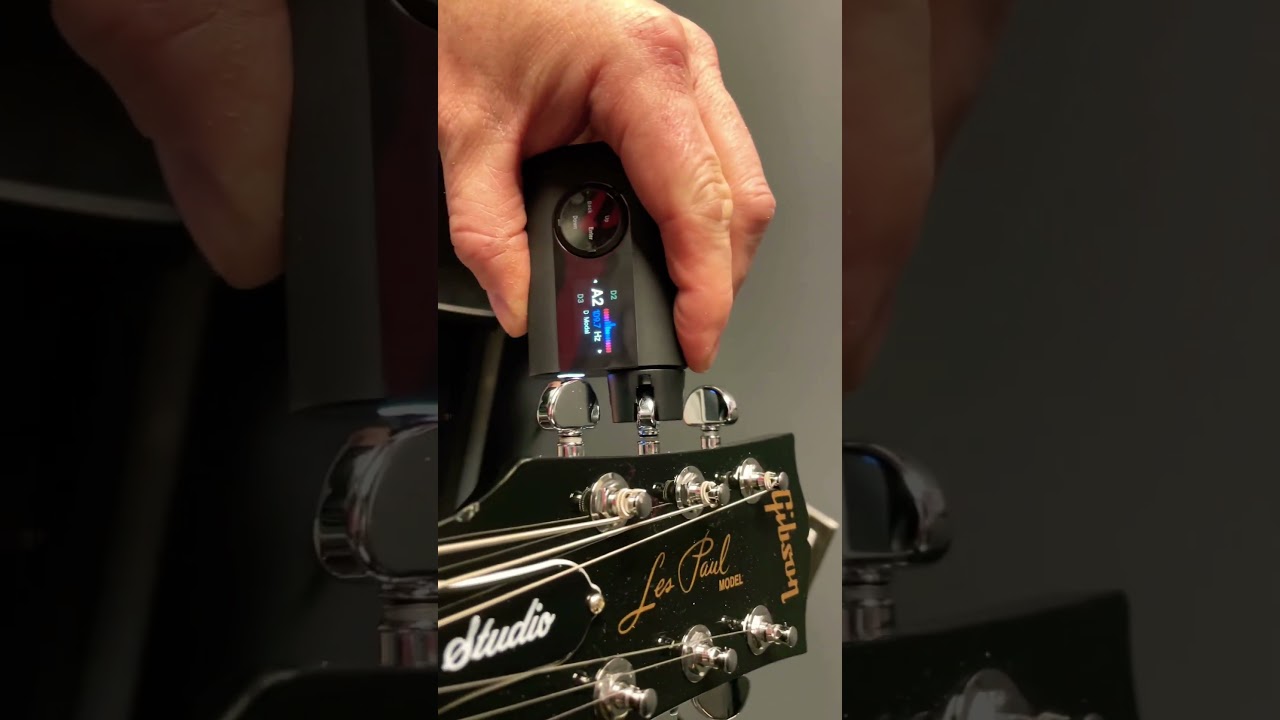
Using a @RoadieOfficial auto tuner! First time ever seeing this! Crazy ! Haha
All official music on Spotify!! And itunes!! And everything else !!
Official Website 👇🏻 find everything you need there! 👇🏻
https://provokethetruth.net/ 🍺
Full music discography 👇🏻
https://provokethetruth.bandcamp.com/
Come hang out on disc...
orchid iron
mighty patrol
https://www.youtube.com/shorts/XhLuhBXeBwQ
skill issue
orchid iron
mighty patrol
https://www.youtube.com/shorts/8t64g8shMlk
amazing
tough owl
hey I had one of those strix laptops, 1060 model tho
gosh gaming laptops were horrible back then
mighty patrol
Have they gotten much better?
orchid iron

Cohh on Twitch: https://twitch.tv/cohhcarnage
Cohh on Twitter: https://twitter.com/cohhcarnage
Cohh Main Channel: https://youtube.com/@CohhCarnage
Edit by: https://twitter.com/faminekidtv
#CohhCarnage #twitch #streamer
 delicate crystal
tough owl
gosh gaming laptops were horrible back then
delicate crystal
tough owl
gosh gaming laptops were horrible back then
remember having an alienware about ten years ago, the 18 inch screen I think. They thing melted video cards. WEnt through one roughly every two months
delicate crystal
we used to have...it was either inspirons or lattitude? the workstations from dell, at my last sysadmin job. They were awesome. Rarely broke and when they did tech was out next day.
mighty patrol
A note book connected to your phone via blue tooth
This is how it works

 X
·
X
·
 wind egret
I'm impressed that it works. Not impressed that it looks like they're trying to cut through the pages with that pen.
orchid iron
Nowadays laptops are designed to give in right after warranty expires xD
orchid iron
mighty patrol
Hardware? https://x.com/gunsnrosesgirl3/status/1917994483615990050
We going back to pen and paper, I love it
mighty patrol
and as much as I dislike twitter I still sometimes find cool stuff on it
orchid iron

Thie event is intended to be a community gathering and swap meet for PC enthusiasts! With live panels, activities and lots of hands on activities, this is the perfect event for families and enthusiasts of all ages! Space is limited and tickets are required!
Learn more at - https://ibp.gg/SoCalTechFair
○ Get your JayzTwoCents Merch Here! - ht...
Be sure to go there if you are in the area of that tech yard sale
mighty patrol
Some properly stress tested equipment ftw
orchid iron

00:00 Welcome to Miyconst Hardware
03:01 Test hardware and software
03:51 LLMs - Phi4, llama3.3, DeepSeek R1, Gemma3
07:39 Stable Diffusion image generation
08:33 Wan AI video generation
09:18 Conclusion
Dell / HP workstations:
- T5810: https://ebay.us/ppyRMR
- T7810: https://ebay.us/oFUJl6
- T7910: https://ebay.us/vb0FZA
- Z440: https://ebay.u...
Uh oh
grave sundial
So, even older GPUs will become super expensive now?
I mean, I'd love to set up three instances of my AI models and let them generate 30 images at the same time (batch of 10 each). 😄
median marsh
haven't watched it all, but the stats looked like there was little to no benefit?!
other than deepseek, which may be able to run reasoning steps parallel or smth
 mighty cosmos
orchid iron
https://m.youtube.com/watch?v=yW3K3F3wqxY
mighty cosmos
orchid iron
https://m.youtube.com/watch?v=yW3K3F3wqxY
So he clearly doesn't understand how ollama parallelism works 😆
Ollama implements model parallelism
Ollama does not do tensor sharding
Tensor sharding would have each gpu process a chunk of the tensor in parallel with other gpus before moving on to the next, in theory with a high speed interconnect the performance would scale with the number of gpus, but ollama doesn't support that and that is only useful in datacenters
Model parallel which ollama supports offloads layers to different devices if they don't fit on the single one
Lets say a model has 32 layers, lets say half of the model fits on 1 gpu, it would offload 0-15 to gpu 0 and 16-31 to gpu 1
Since layers require outputs from previous layers the second gpu has to wait for the first to finish its work before it can do its part
Meaning you won't get any performance boost from multiple gpus if it already fits the entire model on 1 because the gpus can't run at the same time
The only time you will get a performance boost is if the model would otherwise overflow on one gpu into the system memory and that chunk processed by the CPU
And pci lanes basically don't affect anything beyond model loading, the entire model is in vram and very little data is transfered over the pci bus during inference except the prompt loading, cpu launching kernels and transfering the sampled tokens back to the cpu at the end
mighty cosmos
median marsh
other than deepseek, which may be able to run reasoning steps parallel or smth
it can't be in parallel, it's still sequential
The only reason the deepseek got a boost there is because on 1 gpu it overflowed onto the cpu and with 2 gpus it fit the entire model
If you have just a few layers offloaded to the CPU the t/s will take a nosedive from even 50t/s to single digits
For example for 70B it didn't matter at all because with 3 gpus it still overflows, so you have the CPU doing like half of the model
orchid iron
mighty cosmos
So he clearly doesn't understand how ollama parallelism works 😆
Ollama implem...
Now it makes sense why in his testing the GPU was at 100% and the NPU was at max 40%
So the NPU is considered like "the second GPU" but in a laptop environment, wouldn't you want it the other way around? Probably some software tweaks to do
mighty patrol
Tis a long one but it has some useful info for those willing to spend the time, https://www.youtube.com/watch?v=1W_mSOS1Qts

SUPPORT GAMERSNEXUS' REPORTING: Grab a Paper Launch shirt https://store.gamersnexus.net/products/paper-launch-cotton or PC building Modmat https://store.gamersnexus.net/products/large-modmat-gn15-anniversary (or one of many other items on our store).
This deep-dive investigation digs into the impact on the computer industry by volatility from fr...
orchid iron
mighty patrol
Tis a long one but it has some useful info for those willing to spend the time, ...
Already watched all of it, very insightful, learned a lot about how tariffs work
Quite sad that if the tariff situation gets solved in 1-4 weeks, all the tariff essays will basically be ignored even though so much effort was put into these
mighty patrol
Those whom seek the knowledge will be able to find it now at least.
orchid iron

Microsoft states that, starting with 2023, all laptops that run Windows 11 must have a working, HD webcam installed.
Is this actually real?
Not only to have a webcam, but it must be an HD webcam wtf
mighty patrol
Just use Rufus bypass all windows 11 reqs
or use a linux distro
Still gross if that's their plan
orchid iron
also, I never knew track pads were a windows requirement, always thought people never plugged a mouse in their laptops xD
mighty patrol
Are you a right to repair advocate?
orchid iron
mighty patrol
Are you a right to repair advocate?
heck ya
mighty patrol
orchid iron
heck ya
If you choose there's a discord link in the drop down on the left. But it's basically a group that compiles evidence vs big tech etc in attacks vs our rights to repair.
Things like Synology nas changes are in there
orchid iron
oof
mighty patrol
Heading in the right direction at least
Did you see the recent EU changes?
For right to repair
orchid iron
nope, I have no idea how to navigate wikis, I just hit random page a bunch to see interesting stuff
mighty patrol
lol

European Commission - European Commission
Basically they want categories for how easy it is to repair
Scale of 1-4 I think
Subject to change iirc
median marsh
by which standards?
median marsh
e.g. a electronic device, most people wouldn't even dare to repair them.... someone from the field however would have their own 1-4 scale
mighty patrol
I 100% agree
orchid iron
oh yeah, also saw phone labels like repairability, efficiency and durability in case it falls to gets dipped into water
mighty patrol
Also not everyone has the tools on hand
To repair specific things
Some stuff is also potentially dangerous
orchid iron
as long as the phone doesn't solder or glue, they are very easy to repair
mighty patrol
Which without knowing risks, say the one that posted the notes forgot to include risk of electrocution.
median marsh
orchid iron
as long as the phone doesn't solder or glue, they are very easy to repair
also depends
mighty patrol
Which you could label user error.
median marsh
is swapping components = repair
mighty patrol
But they would blame the company
orchid iron
yes
median marsh
or would you change a broken smd capacitor?!
mighty patrol
Both in some cases
orchid iron
median marsh
or would you change a broken smd capacitor?!
nah, as long as the device works again, it is fine imo
median marsh
see, there we go, a 1-4 scale isn't even sufficient for most electronic things 😄
mighty patrol
Because some companies have restrictions on hardware you can use in their systems
Some being software coded
To block other hardware
orchid iron
cough cough apple
mighty patrol
Synology is the more recent example too
Their drive update
Is software level
On the drive itself
If you plug the drive into an old synology
Then into the new one
It will work without the restrictions
It's a "bypass"
For their new changes
median marsh
i doubt that kinda
mighty patrol
It was tested
median marsh
i would assume they use the harddisk firmware serial or smth against a whitelist
orchid iron
it is so spaghetti that it is believable
mighty patrol

Linus Tech Tips
Since this year, Synology is enforcing their own drives with minimal to no support for third party drives. This means that you cannot use other drives other than one or 2 third party drives and Synology's own HDD's. After a lot of discussions on the phone and by e-mail with Synology and our accou...
Synology just needs to get with the times
People will realize there's more weight in making your own nas
and that's okay
orchid iron
or use open source alternatives
||or remove the synology os and use linux on it instead||
mighty patrol
Hex os seems to be doing well
orchid iron
mighty patrol
People will realize there's more weight in making your own nas
it is like cooking
You can order food that's already cooked by someone else
Or you can make it yourself and have all the flavours you want for cheaper/ higher quality
mighty patrol
Exactly
orchid iron
kinda same with desktops tbh, I've heard many horror stories of pre-builts
mighty patrol
I own 1
orchid iron
are you a lucky one?
orchid iron
Acer is one of the nicer options tbh
orchid iron
sounds nice
mighty patrol
It is
I got it for free from a friend
They said if I can fix it I can have it
I used that pc for like 8 years
orchid iron
we had the one who bought an MSI pre-built who greatly showcased why MSI is bad with pre-builts
mighty patrol
Oof
orchid iron
remember that "AIO" and "special custom case"
orchid iron
from a company called HP, you'd think their products have a lot of Health Points but no
mighty patrol
You'd think
I'll give them one thing though
They are really good at making things compact
median marsh
orchid iron
it is like cooking
You can order food that's already cooked by someone else
Or y...
yea but not everyone wants to learn how to cook
orchid iron
median marsh
yea but not everyone wants to learn how to cook
of course, which is why companies like HP exist, for your health
orchid iron
bro mcdonalds are so expensive
orchid iron
no no, Ikea
mighty patrol
Costco hotdogs
orchid iron
now we are cooking
median marsh
all that stuff is way to cheap
mighty patrol
Live like Elon Musk baby
median marsh
considering how much they throw away
mighty patrol
Landfills have how much electronics in them nowadays.
Wouldn't be surprised.
Think of all those rare metals just wasting away
orchid iron
oh yeah, didn't Intel plan to standardise computer parts for mini pcs or laptops, smth like that
median marsh
they are only rare because someone told you so 😄
mighty patrol
I think they were given that term due to how long it takes to process
Maybe I'm wrong
orchid iron
rare = hard to make = expensive
mighty patrol
Yeah but there will be a point we run out
orchid iron
lol
mighty patrol
It's non-renewable
orchid iron
we'll use hydrogen batteries soon
and they'll pollute way more!
and explode harder
mighty patrol
Yay
median marsh
finally exploding cars like in the movies
orchid iron
imagine phones being banned in airplains because they can be rigged to explode
mighty patrol
Ban pagers first
orchid iron
oh yeah
median marsh
i was thinking of road accidents...
median marsh
yea
mighty patrol
Toonces the driving cat
orchid iron
phone can also flip, and blow up, and be as expensive as a car
mighty patrol

Toonces' owners (Steve Martin, Victoria Jackson) discover he can drive a car, but not very well. They worry when he goes to take his driver's test with Kevin Nealon. Aired 05/20/89
#SNL
Subscribe to SNL: https://goo.gl/tUsXwM
Get more SNL: http://www.nbc.com/saturday-night-live
Full Episodes: http://www.nbc.com/saturday-night-liv...
Like SNL...
Guess it doesnt blow up in this episode
But hey
 primal kite
Thinking of adding another 64gb 3200mhz to my 16gb 3200mhz... Guessing there'll be not too many problems, correct?
orchid iron
primal kite
Thinking of adding another 64gb 3200mhz to my 16gb 3200mhz... Guessing there'll ...
Different ram capacity might be a bit funky to use
Make sure to have one pair on the 2 left slots and the other pair on the 2 right slots
One kit of ram per memory channel
Worse case scenario you may need to restrict ram capacity and ram clocks if something goes wrong
primal kite
orchid iron
Different ram capacity might be a bit funky to use
Make sure to have one pair on...
Yeah I intend to pair them that way
orchid iron
primal kite
Yeah I intend to pair them that way
Then good and hope you got lucky
orchid iron
primal kite
I'll make them same brand too
Unless it is a brand that has its own fabs, it doesn't matter
primal kite
orchid iron
Unless it is a brand that has its own fabs, it doesn't matter
Hmm... Might go cheaper then, same MHz
orchid iron
Oh wait, you are on ddr4?
Those are stock speeds, so you'll be fine, just tweak the timings to the highest values if something goes wrong, but highly unlikely
primal kite
orchid iron
Those are stock speeds, so you'll be fine, just tweak the timings to the highest...
Ahh cool...
Thanks man!
 vestal tundra
Is 64gb per dimm ram any count yet?
grave sundial
31C - going to 40C - no air conditioner and I am sweating. The PC is holding nicely at 60C while gaming. I am half-tempted to open its side panels and let the fans cool ME instead.
grave sundial
Not really. Last time, it lowered surrounding temperatures by 1C.
Problem is, it'd get dustier faster.
mighty patrol
Just clean it
grave sundial
While true, and I do, it's easier to stick my head in the freezer.
mighty patrol
Just take a cool shower
grave sundial
Water's hot too
mighty patrol
😮
orchid iron
vestal tundra
Is 64gb per dimm ram any count yet?
Crucial has 64gb dimms available on the market
Kingston should have them too, I think or they are almost ready
grave sundial
Order has been restored!
The transformer has been fixed and the AC is working again.
Harmony shall exist once more!
🙏
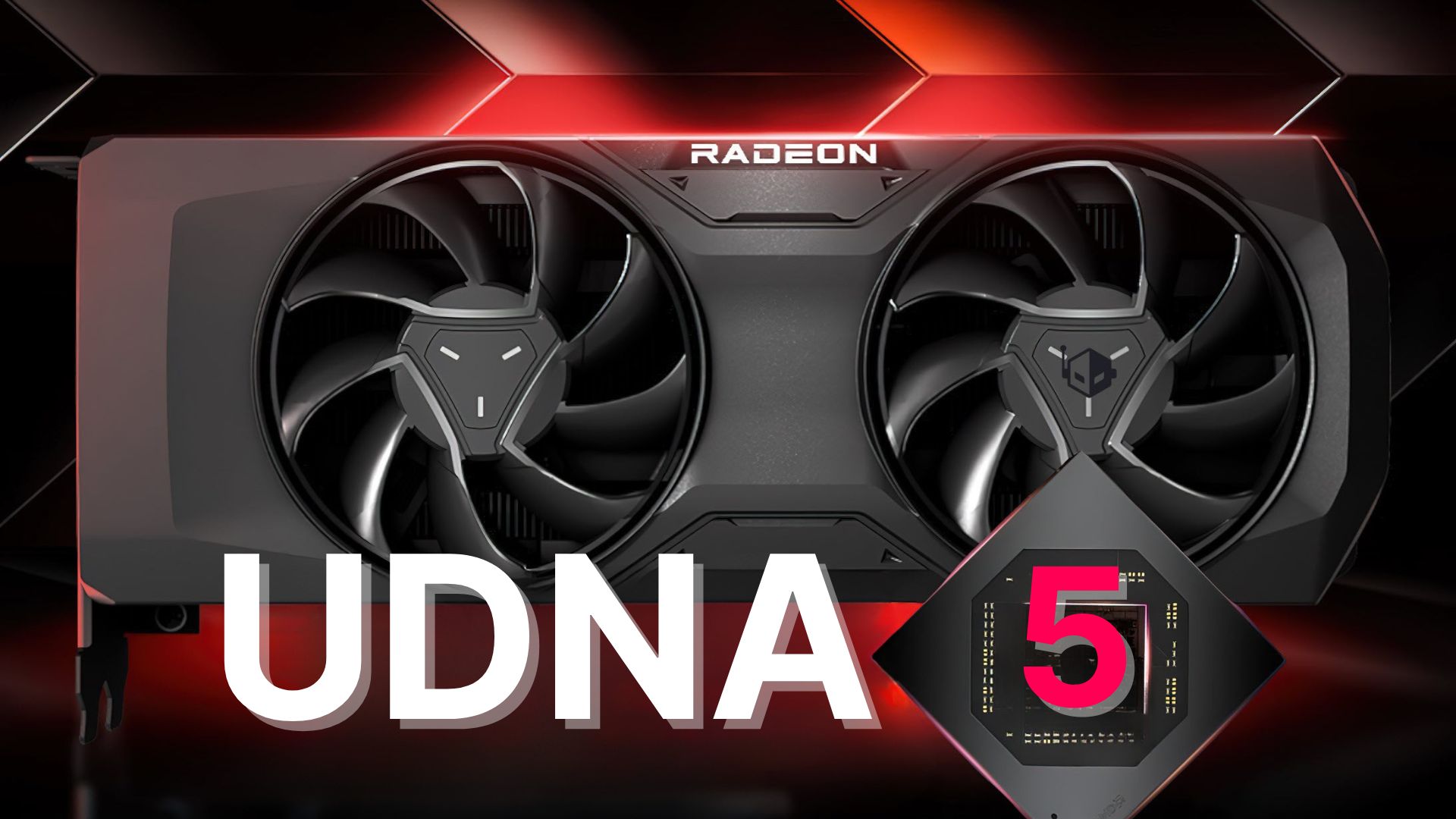
Wccftech
AMD has big plans for its UDNA 5 GPUs, as a set of patent filings over the last two years indicate that firm plans to upscale its RT game.
Best of luck, AMD!
I hope they bridge that gap and trounce NVidia.
orchid iron
I'm not worried about UDNA selling well
I'm worried how many of those customers are individual users Vs servers
Because that gen combines CDNA which was meant for that...AMD GPU shortage possibly?
orchid iron

Find out more about the Hetzner Cloud:
https://htznr.li/der8auer/250402_en
“der8auer15” for € / $ 15 off for new customers
Music / Credits:
Outro:
1998 Beats - Strange Things
Paid content in this video:
- Hetzner Spot
Sa...
Undervolted 4090 with a high quality cable this time
Cause is very likely load imbalance, again
median marsh
was the dremel really necessary?
could've just cut off the cables to make it easier to solder out
orchid iron
I think he wanted to inspect it
wise elbow
grave sundial
Not really. Last time, it lowered surrounding temperatures by 1C.
your PC is sadly physically incapable of cooling your room
grave sundial
wise elbow
your PC is sadly physically incapable of cooling your room
While true, it does the job well enough for my right hand (which is near it).
orchid iron

GamersNexus Official Store
The Official GamersNexus Store. We sell Anti-Static Mats for building PCs (GN Modmats), ESD bracelets and common ground points with banana plugs, and merch made by the GamersNexus website and YouTube channel.
Steve is also doing hardware sales here for cheaper value
Didn't list everything in one go, so he reccomends to check back regularly
grave sundial
Sadly, a lot of these sales in the west are available for cheaper prices in India first-hand. 😄
I liked the prebuilt PCs he has, but so did others. They are out of stock.
orchid iron
For nowTM
orchid iron
grave sundial
Sadly, a lot of these sales in the west are available for cheaper prices in Indi...
Really?
grave sundial
orchid iron
Really?
Yeah, pretty much everything NOT involving a GPU is cheaper.
As a simple example, those awesome drinking mugs are $3-ish here.
And if you buy sets of 2 or 4 mugs, the prices drops to $1.5 each. 😄
grave sundial
I think most first world countries will find it useful. 🙂 India and China benefit from the mass-production, mass-sales model in terms of prices.
short bramble
@grave sundial I have a "CPU and Pump fan error" on startup
All of the fans working correctly but my idle cpu is at 50°C
I have the same fractal torrent as you
mighty patrol
Sounds more mobo related?
short bramble
Maybe bios settings ?
mighty patrol
Be a good place to start
short bramble
Because with the Noctua, I connected both to a splitter Y cable and then plug it to the case
And then in the case I have another cable that I should connect to the CPU_FAN1 pin
That's what the Fractal manual said to do
 fallen oasis
Has anyone ever used usb-c to hdmi... on a laptop?
I wanna hook up a third monitor. Only 1 hdmi port.
tough owl
I would check does the laptop support third display first
this is kinda of an unspoken limit with laptops, they dont tend to support more than 2 displays
but outside that if you have type-c that supports displayport passthrough, you can just buy type-c -> hdmi cable
tough owl
short bramble
Because with the Noctua, I connected both to a splitter Y cable and then plug it...
95% chance your motherboard is not detecting RPM signal from CPU or PUMP fan headers. It's just failsafe notification because normally that would mean pump or cpu fan is broken
You should still use those headers with 4pin fan/pumps directly, motherboards usually rely on that signal for overheating protection
grave sundial
short bramble
And then in the case I have another cable that I should connect to the CPU_FAN1 ...
I know you said all the fans are working correctly, but I'll ask again:
- Can you see the Noctua fans spinning? Both of them?
- Are all the fans in the case working? The two fans in the front and two/three at the bottom?
short bramble
grave sundial
I know you said all the fans are working correctly, but I'll ask again:
1. Can y...
Yes they all spinning
grave sundial
Okay. When you go into cooling profile / fan speed set up options, can you set the RPMs for CPU Fan 1?
short bramble
What I did is just plug in the Noctua fans to the "CPU_FAN" on the MB
grave sundial
Correct.
short bramble
And set the "Fan1" of the case to the Sys_Fan6 of my MB
short bramble
grave sundial
Okay. When you go into cooling profile / fan speed set up options, can you set t...
Now yes into BIOS
grave sundial
short bramble
And set the "Fan1" of the case to the Sys_Fan6 of my MB
Say what?
short bramble
My temps are good but I still got the message
grave sundial
What do you mean Fan1 to Sys_Fan6?
short bramble
grave sundial
Say what?
Not Fan1 sorry
The PWM of the case into the Sys fan6
The 4th
From right to left it's the 4th
grave sundial
Okay. You should plug all the OTHER fans (not dual-tower cooler) into the 9Nexus Hub.
And then, plug the hub cable into Sys-Fan1.
grave sundial
Kind of. Because, as far as I remember, you do not control the speed of the hub connected fans.
short bramble
It's just that my Sys Fan6 is closer
grave sundial
They are linked directly via the hub to the cpu fan.
short bramble
I can control them in the BIOS
grave sundial
Okay. Do this. Boost the speed of the Noctua's to 100% max at all temperatures via the BIOS. See if it works. Then lower it to 10% and see if they slow down.
If that works, they are working correctly.
short bramble
The Hub is into a Sys Fan header and the CPU is directly plugged into the CPU_FAN header of mB
Yes thr speed changes I can even see the RPM count now
But I still got the error
grave sundial
Is that just a notification? Or does it prevent you from installing Windows?
grave sundial
Okay, and in Windows, can you control the fan profiles via MSI or whatever software?
short bramble
It says "CPU and Pump fan error. Please check !:
No I don't have softwares
I control them via BIOS only
grave sundial
There should be. You can get the control center for your MOBO.
short bramble
I tried to disable the Fan Smart of the Pump into the BIOS but no success
grave sundial
You can just set and save a manual profile for your fans, both pump and others.
short bramble
Oh so maybe I have to install MSI softwares to disable the pump and then uninstall it ?
grave sundial
Is your Mobo MSI?
short bramble
Yes
short bramble
The I can uninstall it or not ?
grave sundial
Not to mention monitor basic hardware health and temps.
You don't need to uninstall it.
It doesn't run in the background. Don't install any of the AI and other software features.
short bramble
grave sundial
Not to mention monitor basic hardware health and temps.
I already have HWmonitor
Ok so MSI center so I can disable the pump profile you think ?
grave sundial
Yes, but HWMonitor doesn't let you control the fan profiles, IIRC.

This is mine.
CPU Cooler + Hub = CPU Fan 1 profile
short bramble
I think this notification is because my prebuilt PC was meaning to use AIO so it is searching a pump
grave sundial
Arctic white extra fan = Sys 5.
short bramble
grave sundial
Arctic white extra fan = Sys 5.
So mine will be CPU fan 1 Noctua and Sys Fan6 Hub. Right ?
grave sundial

 short bramble
And if I set all the others on "Manual" it will be ok ?
grave sundial
short bramble
So mine will be CPU fan 1 Noctua and Sys Fan6 Hub. Right ?
It ought to be, IF the nexus hub can be controlled manually.
Manual is better for me, anyway.
The auto profile has lower temp thresholds.
short bramble
Ok so I'm installing MSI center but I have anoter issue related to this maybe
grave sundial
Before you do all this, try plugging the hub into Sys_Fan1 and see if you get the same error.
short bramble
I let my PC in idle for like 1 hour without touching anything
And after this hour, it started to hang so much. Like it was overheating. Then I moved the mouse and after 30 seconds it became normal again...
This is because of the message error of pump ? Or low cpu usage ?
I feel like my CPU went into sleep mode or something weird lol
grave sundial
short bramble
I feel like my CPU went into sleep mode or something weird lol
What are the temps at that time?
short bramble
I don't know I could not even click on the software
Everything was lagging so much
short bramble
What is this for ?
short bramble
(And now I can't even refresh my desktop x) it freezes but my computer is working normally)
short bramble
But the issue was not when using CPU it was when idle mode
I was not doing anything
Only a youtube video on firefox
It's like the CPU went into sleep mode very weird
mighty patrol
Could be a recent bios update
short bramble
So I need to update BIOS ?
short bramble
Because it does not freeze when active like playing or doing something very weird
mighty patrol
That was a response from someone w/ a similar issue was reverting to an older bios fixed their problem.
I personally had stutters recently but it was power related
short bramble
So I will try changing the SYS_FAN 6 to 1. Then I will try to update BIOS. Then if it still does not work I will try the MSI Center profiles
mighty patrol
mighty patrol
I personally had stutters recently but it was power related
and for some reason when ever I open level blueprint in unreal it hitches 😂
Only unreal not my pc
short bramble
Power related ? I don't think so for my case
mighty patrol
short bramble
Power related ? I don't think so for my case
Yeah I had to disable C-states
short bramble
Lol that's a UE issue so x)
mighty patrol
Was also causing windows crashes
short bramble
I'm lucky it does not crash but only lagging af
x)
But maybe it's just the SYS Fan 6/1 thing. I will try this. Thank you !
short bramble
mighty patrol
Yeah I had to disable C-states
Be careful. I read some saying that disabling C-State is not recommended. I don't know enough about this to tell you why but they said that
mighty cosmos
it will use more power when idling
mighty patrol
Yeah I read the risks before using it. It's worth the risk vs crashing multiple times a day.
mighty cosmos
otherwise it's safe
short bramble
mighty cosmos
it will use more power when idling
So maybe it can resolve my issue ? Because I feel like the hanging comes when my CPU usage is too low
mighty cosmos
on my 9950x my whole system randomly decides to restart when idling, I'm yet to mess with c states but looks like it's probably gonna be my only option too
short bramble
Ok thank you very much guys ! Another thing on my list to test !
mighty cosmos
mighty patrol
7950x here
we got the amd curse, oh joy lol
mighty patrol
Except sometimes I'd go to do something irl come back and its rebooted
At first I thought it was windows updates
Then I looked at reliability history
short bramble
Sometimes with my old PC I was just watching TV and my computer freezes lol
No BSOD or nothing
mighty cosmos
mighty patrol
At first I thought it was windows updates
yep, same
one of the updates did make it less common but still happens like once a day
mighty patrol
mighty cosmos
yep, same
one of the updates did make it less common but still happens like once...
I was hoping bios update would fix it
But it seemed to be introduced by a bios update
mighty cosmos
usually in the worst possible moment
short bramble
But never when I'm working. C-State seems to be a solution
mighty patrol
At some point
Because at first I had no issues for the longest time
6 months or so in
mighty cosmos
I did have like a month of no issues and then it came back
mighty patrol
Tis strange
mighty cosmos
and annoying as all hell lol
short bramble
Low CPU usage issues are common it seems..
mighty patrol
Agreed I just want things to work 😢
At least 4090 hasn't melted yet
I take the small victories
mighty cosmos
😆
short bramble
Good mind lol
mighty patrol
Worst case can always see how a 3700x runs it
mighty patrol
short bramble
Good mind lol
You were amd right?
short bramble
mighty patrol
You were amd right?
No, Intel
But I saw a lot of people with AMD have very strange issues
short bramble
Yes I know but if nothing of above solutions work I don't know what else to do
mighty patrol
13th or 14th gen?
short bramble
11th lol
short bramble
I hope 🙏
grave sundial
So, did Sys_Fan1 get rid of the notification?
mighty patrol
If you havn't maybe worth checking bios updates
grave sundial
mighty patrol
If you havn't maybe worth checking bios updates
This is also correct. When you install your mobo at least for the first time, update BIOS from MSI site.
short bramble
grave sundial
So, did Sys_Fan1 get rid of the notification?
Did not test yet. I will try when getting back home and tell you what worked. Thanks !
short bramble
grave sundial
This is also correct. When you install your mobo at least for the first time, up...
It's not first time I just changed the case and the CPU cooler from AIO to air cooler
short bramble
But I did not update the BIOS when I got this prebuilt PC first time (I guess)
short bramble
grave sundial
Did you have the same issue in the previous case?
No
grave sundial
🤔 That means it's probably not c-state.
mighty patrol
Transferred a prebuilt to a new case?
short bramble
mighty patrol
Transferred a prebuilt to a new case?
Yes
grave sundial
Well, Sys_Fan1 might solve the problem. Let's see.
short bramble
I will try when home and tell you! I hope! Thank you!
grave sundial
Do you remember what the power plan is?
short bramble
Performance
grave sundial
Try setting it to Balanced and idle the PC for 30 minutes.
See if the problem recurs.
short bramble
Ok after switching to sys 1 ?
grave sundial
Yes. Sys_1 for the notification.
short bramble
Ok Sys 1 is only for notification issue
And balanced for hanging after idle. But with previous case it was already in Performance power plan, so..
Maybe the Sys 1 will solve all of this lol
grave sundial
Yeah. That hanging is interesting 🤔 .
short bramble
grave sundial
Yeah. That hanging is interesting 🤔 .
It really feels like CPU low usage behavior as when I moved again my mouse it became normal again after 30 seconds... but I really don't know
grave sundial
Is there any water cooling related software running in the background?
Or any settings related to that?
short bramble
No. I tried to see settings in BIOS but I can't disable PUMP Fan anywhere
grave sundial
Any software in Windows for water cooling?
short bramble
No nothing
grave sundial
Windows hard drive is plugged into the same port as before, right?
short bramble
I think maybe when MSI built this PC it was designed for water cooling so I'm sure I have to disable something related to water cooling somewhere. Maybe in MSI center
short bramble
grave sundial
Windows hard drive is plugged into the same port as before, right?
Yes the same exactly
grave sundial
🤔 All righty.
After all the steps we have discussed, you can try installing MSI Center and see if it updates any drivers. Don't install any of its other programs. Hardware Monitor and Cooling Wizard are enough.
You can quit MSI programs while using Unreal Engine.
short bramble
Ok once I made the profiles and settings I don't need MSI programs running to keep the settings right ?
mighty cosmos
screw it, disabled global c state control because it restarted again just now lmao
Lets see if it fixes it
short bramble
mighty cosmos
screw it, disabled global c state control because it restarted again just now lm...
Wish you luck !
mighty cosmos
so looks like idle temps are maybe 5C higher and uses about 20W more when idling
In other words don't care if it fixes my problem
grave sundial
mighty cosmos
so looks like idle temps are maybe 5C higher and uses about 20W more when idling...
This is the right attitude.
Especially when you have good cooling.
mighty cosmos
😅
grave sundial
And if you have AMD, as long as you have good cooling, the processor will keep pushing its performance to the highest possible temp.
mighty cosmos
so it looks like it disabled C6 (C6 is basically the core is turned off)

and core voltages look about the exact same as before, from 1.25-1.35
mighty cosmos
grave sundial
And if you have AMD, as long as you have good cooling, the processor will keep p...
yep, mine still reaches like 90C at heavy workloads, but that's by design
grave sundial
Yeah, power saving is rubbish. Screw the environment.
Burn those trees!
Emit that CO2.
MORE POWAHHHH!
And a lot of that nonsense hobbles the PC than actually help it, AND the environment.
Marketing rubbish.
grave sundial
short bramble
Ok once I made the profiles and settings I don't need MSI programs running to ke...
Yeah, you can quit MSI center in the taskbar. And you should. Unreal Engine doesn't like MSI programs.
mighty cosmos
since I built this PC last year I estimated that it used about 70-80KWh
Which is basically nothing, the PC is running almost 24/7
median marsh
mighty cosmos
since I built this PC last year I estimated that it used about 70-80KWh
Which is...
why!?!? is deja reading you nightdaytime stories?
talking about that... hide.... the sun is out
grave sundial
Sun is good... hardware.
 orchid iron
@short bramble try downgrading your Nvidia drivers, latest ones are known to have a tone of issues
fallen oasis
tough owl
this is kinda of an unspoken limit with laptops, they dont tend to support more ...
Great! I think it supports up to 3. I remember reading it somewhere. And there's 2 usb-c ports that support displayport and thunderbolt 4!
mighty patrol

XDA
Synology’s new NAS models block third-party drives I found a way around it.
fallen oasis
I would just never purchase anything from that company ever again.
mighty patrol
Good choice
median marsh
yesn't
there are reasons to not support certain drives, they are just not eligible for raid usage, will they work? sure. but at what cost...
 devout vine
Which drives???
mighty patrol
Nas nerds may know a thing or two, https://nascompares.com/guide/black-friday-nas-hard-drive-buyers-guide/
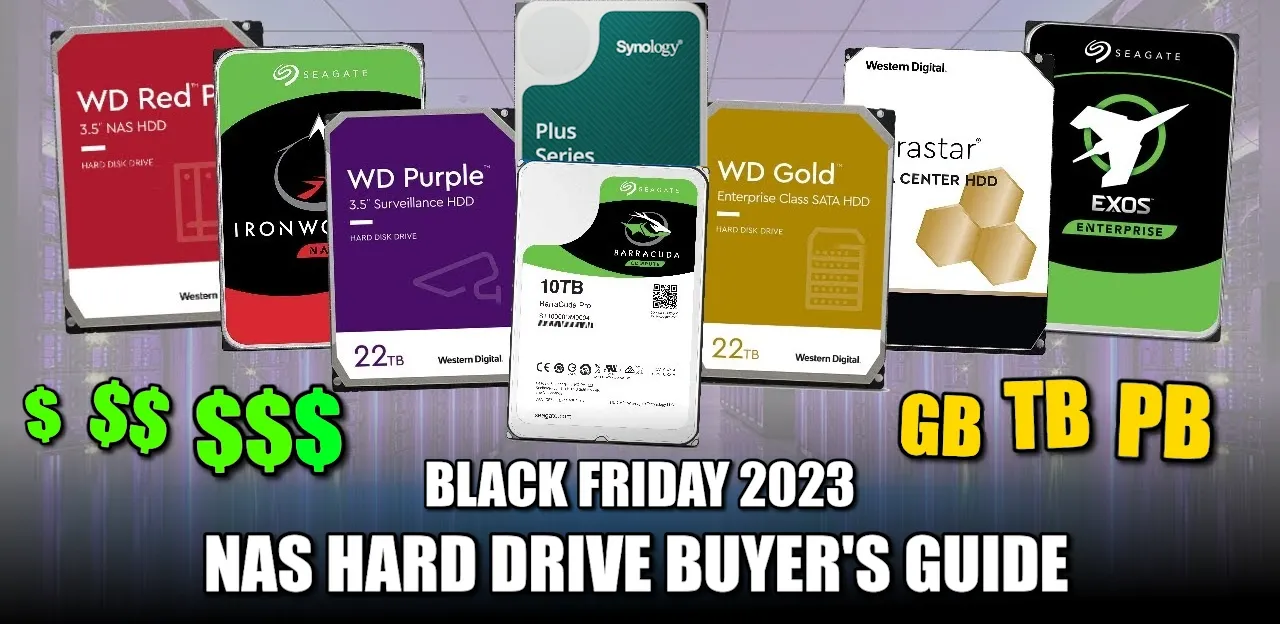
Choosing the Best Hard Drives for your NAS
If you're considering a NAS server for your home or business, selecting the appropriate hard drive is crucial. Just as each utensil in a cutlery set serves a unique purpose, NAS drives are designed for specific scenarios. Using unsuitable drive media in yo
median marsh
sometimes it's pretty much the same hardware but the firmware acts in a way that's not ideal for raid
as you ideally want matching behavior between the drives, otherwise it all breaks down to the weakest part of the chain
orchid iron
I didn't realise HDDs had such low TBW
fallen oasis
median marsh
as you ideally want matching behavior between the drives, otherwise it all break...
That's fine, but just rebranding oem drives, selling them at a higher price and not allowing competing drives?
Utterly ridiculous.
median marsh
i think for now they still support some "normal" drives?!
i didn't follow the whole thing tho, so no idea
fallen oasis
That'll be patched, I'm sure.
mighty patrol
It's a software level thing
fallen oasis
They basically pulled a Unity.
mighty patrol
So I'm sure someone will crack their synology
Only a matter of time
or they go under
or reverse uno
median marsh
no, they still support "3rd" party drives?!
fallen oasis
fallen oasis
They basically pulled a Unity.
Nope?
They need to match the internal drive database. And they only list Synology branded drives.
The entire crack is adding more drives to that list.
mighty patrol
Starting with the Plus series, Synology will only offer full support for drives that are either Synology-branded or explicitly certified by the company.
So yeah
They say you pay
fallen oasis
Which will also be higher priced because they're "synology certified"
mighty patrol
^^

 mighty patrol
Yes
median marsh
so it should be affected by the update
agile lodge
refurbished ones from enterprice
mighty patrol
The list will only get shorter
median marsh
that's speculation at this point
fallen oasis
The whole idea is to push people into the synology ecosystem.
mighty patrol
Why not include other drives that are just as good?
fallen oasis
Get them trapped there.
agile lodge
other options might be then come to play
mighty patrol
Ugreen looking good
median marsh
and may depend on how well their own drives sell, divided by the NAS units they sold
median marsh
for what they cost you can buy an mini itx case + board/cpu combo
but then you have to deal with installing freenas or similar
mighty patrol
Worth
agile lodge
HexOs use truenas right
median marsh
and some people want the peace of mind to just throw their money at someone and have something that works as expected
mighty patrol
What if they bought the wrong drives
median marsh
without dealing with shit like getting suboptimal drives and lower transfer rates
the only thing i see critical about this, is that there's no opt out of this
fallen oasis
median marsh
without dealing with shit like getting suboptimal drives and lower transfer rate...
That's why there are Synology branded drives and certified ones. That doesn't mean you should stop people doing their own thing.
agile lodge
there is reasons why 45drives what focus on enterprise storage launched 45dhomelab and 45Professional divisions
median marsh
e.g. "you use unsupported drives, and we wont give you support for your configuration, click here to confirm"
and then still give you access to the features available...
mighty patrol
Also Synology will end support for DSM 6.2 in 2024, affecting many older NAS systems.
Which is fairly old
median marsh
that's to be expected with every piece of hardware that you buy
median marsh
and when did it receive it's latest update?
fallen oasis
I don't expect the firmware in my mouse to become obsolete because the company decides I need a new type of usb lead that only they sell.
median marsh
more like a specific patterned mouse pad only sold by the brand that made your mouse
otherwise you fall back to 300dpi
fallen oasis
Logitech do acutally do that. It's retarded.
mighty patrol
I knew I had to blame lg
median marsh
good, so i'm not giving them ideas that they didn't had already...
fallen oasis
Their charging mousepads don't work with normal wireless charging mechanisms and are specific to their mice.
mighty patrol
Isn't logitech doing some annoying stuff rn too
median marsh
they are doing annoying stuff like ~10 years
 median marsh
like producing crap which breaks after warranty ran out
mighty patrol
Why does logitech need access to discord
Who knows
Heard corsair M & K are not bad
median marsh
i want to hear that from people who use their stuff more than 3 years
mighty patrol
I have had my razer mouse for 3 years
median marsh
but that doesn't help much either since they all push out new product lines each year
mighty patrol
and my razer keyboard for 5
fallen oasis
mighty patrol
https://www.reddit.com/r/LogitechG/comments/luow53/why_does_logitech_need_access...
To be fair, this is pretty legitimate if they have discord integration in their software (that you can opt out of)
 median marsh
also i'm picky about the shape of the mouse
fallen oasis
I like the logitech shape tbh.
median marsh
https://www.logitech.com/content/dam/logitech/en/products/mice/m500s/gallery/m500s-gallery-02.png i love this one
 mighty patrol
fallen oasis
To be fair, this is pretty legitimate if they have discord integration in their ...
mighty patrol
fallen oasis
To be fair, this is pretty legitimate if they have discord integration in their ...
In the consumer rights wiki discord someone was upset it was requesting access trying to call it malware lol
median marsh
but they all break after 2 years
fallen oasis
mighty patrol
In the consumer rights wiki discord someone was upset it was requesting access t...
Because they're an idiot.
mighty patrol
bloatware maybe
fallen oasis
It may very well be getting to that, yes.
median marsh
imho anything, not necessary to operate the device, is bloatware
mighty patrol
Razers app is bloatware for sure
That thing has app errors daily

But it still works?
Just errors all the time
median marsh
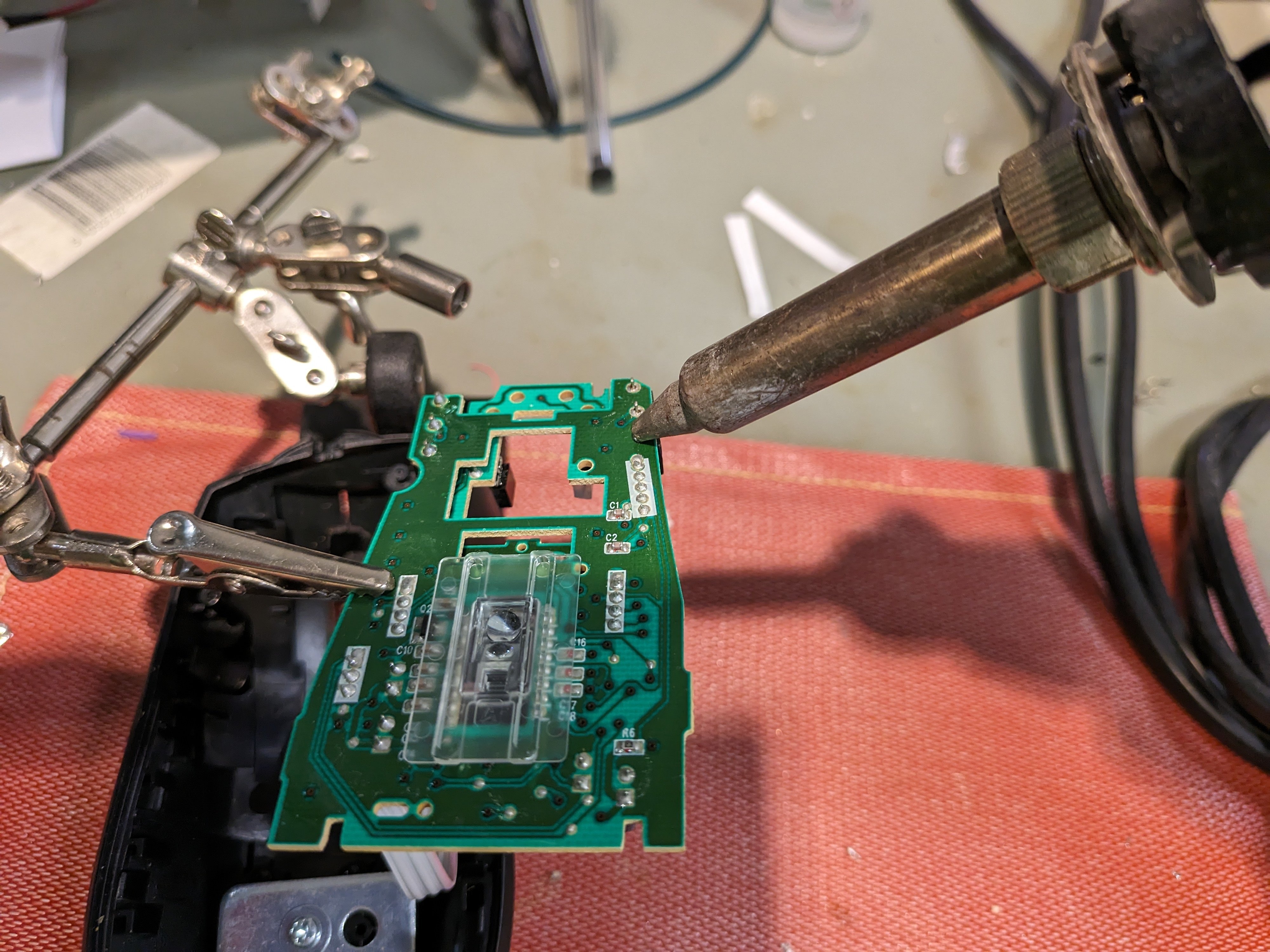
iFixit
The switches on a mouse wear out over time, and often start double-clicking from a single press. Luckily, replacing them is quite straightforward...
they made a ifixit manual to fix it...
mighty patrol
Gross
Only time I had to take apart a mouse
was when I owned it for 5 years
I had to replace the mouse wheel
fallen oasis
Tbh, the mousewheel on this 703 did break. But it was a few £ and very easy to replace the part.
No soldering required.
mighty patrol
Usually the copper goes first
median marsh
tbf, after 2 years the soft rubber side starts to become gross anyways
mighty patrol
Yeah
So it's due a replacement
Even if just the rubber
You can get replacement rubbers
For some mice
I know mine has them
or at least did last I looked
median marsh
ideally the internals would last forever...
mighty patrol
To be fair it has an ifixit page to, https://www.ifixit.com/Device/Razer_Naga_Trinity
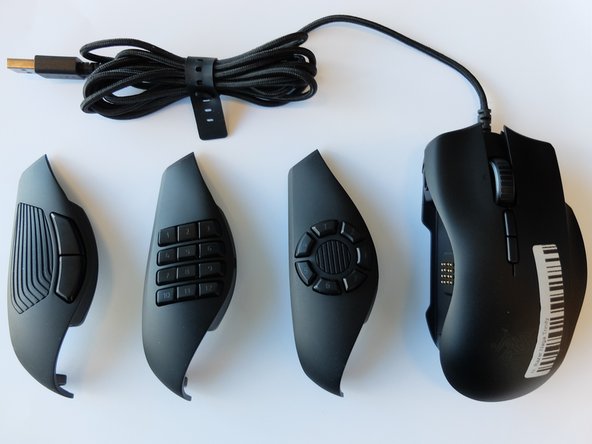
iFixit
The Razer Naga Trinity is a gaming mouse made by Razer and powered by Razer Chroma. This device comes with three interchangeable side panels and is compatible with Mac and Windows computers. Model number RZ01-02410100-R3U1.
median marsh
optical switches are probably a thing
isolate the inner of the mouse so that no dust wont get in
mighty patrol
Then again I would hope most mice do nowadays
Because mice usually die first
Before any other piece of peripheral in my experience.
median marsh

Reddit
Explore this post and more from the MouseReview community
apparently they exist
fallen oasis
What's the difference between regular switches and encoders and optical ones?
No moving parts?
median marsh
well you don't have an electrical contact which has to be closed to cause a click
so that's less likely to wear out
fallen oasis
Ah ha.
median marsh
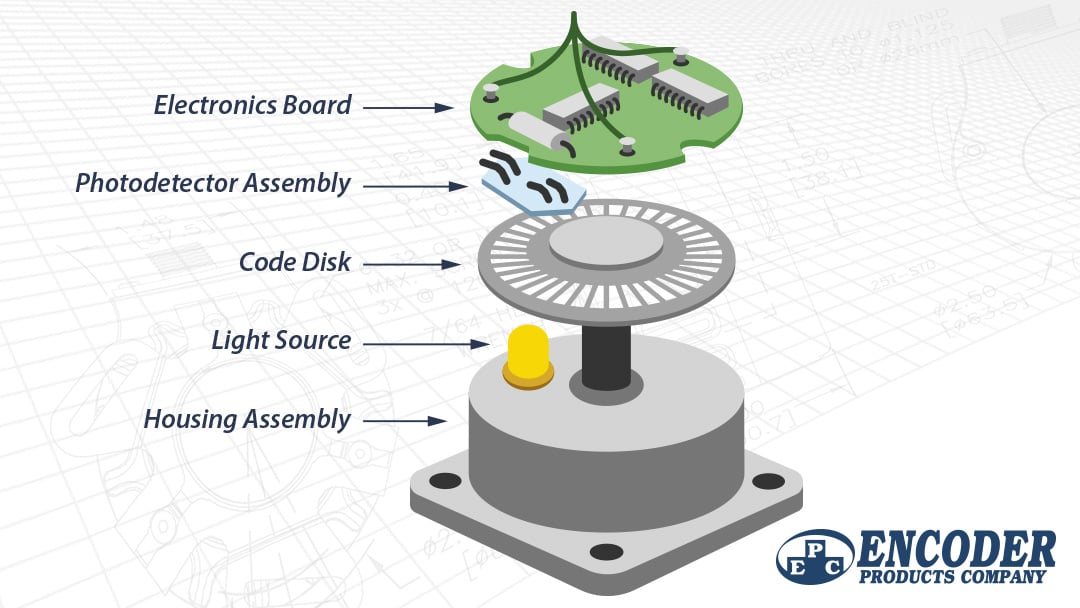
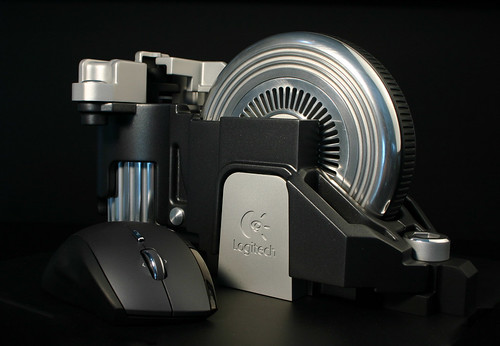
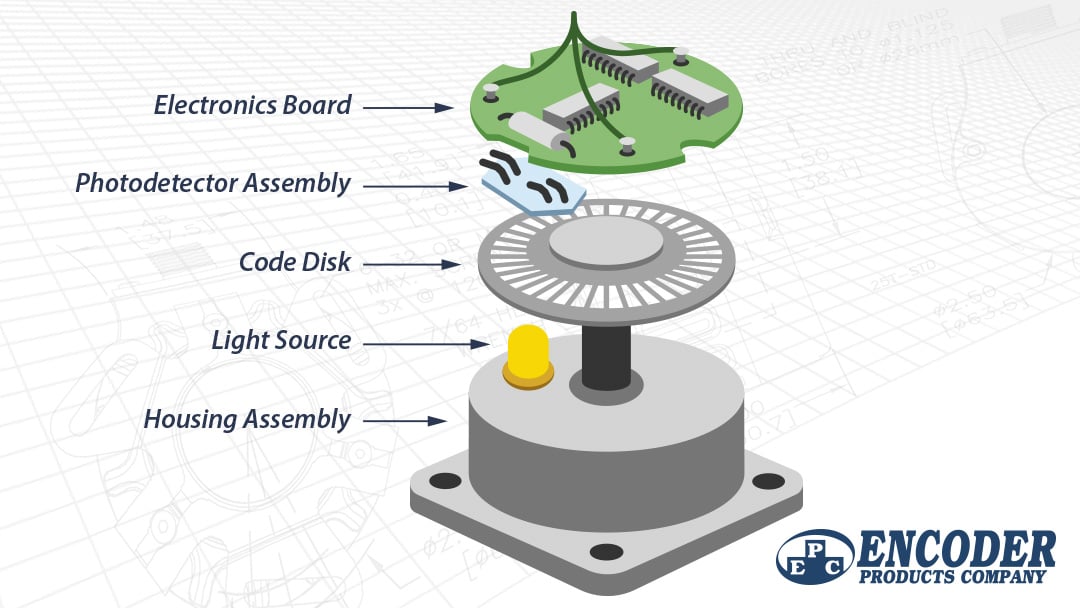
i think most mouse wheel encoders are optical anyways
fallen oasis
So like lasers instead of electrical trips?
median marsh
never seen a mouse without optical encoder for the mouse wheel (even the cheapest logitech use them)
yea, LED most likely
mighty patrol
Makes sense
 mighty patrol
I randomly came across this site it has limited comparisons but, https://www.lttlabs.com/categories/mice?mice[menu][bluetooth]=true&mice[menu][receiver]=true
 fallen oasis
What broke on my mousewheel was the actual spindle it rotates on.
median marsh
see those slits in the mouse wheel? that's where the light passes through
fallen oasis
median marsh
see those slits in the mouse wheel? that's where the light passes through
Very cool!
median marsh
https://www.techpowerup.com/review/zowie-ec-b-series/images/15-switches.jpg here the "slit wheel" is on the axis of the mouse wheel
probably less likely to catch dust
no idea what the actual technical term is 😄
fallen oasis
Axle?
mighty patrol
Mouse roller?
 mighty patrol
Nice
mighty patrol
I found more replacement wheels on ebay
median marsh
reminds me of when i've disassembled a old dvd drive... they are pretty damn involved for what they are...
especially how the laser get's focused on the disc with electromagnets
mighty patrol
Ever take apart a hard drive
Those are cool too
Especially if it has/ had data on it
median marsh
yea, but imho cd/dvd/.. are cooler 😄
median marsh
mighty patrol
Especially if it has/ had data on it
i don't think that you see a difference?!
mighty patrol
Never had a shitty drive to try
median marsh
tho there was a tech to engrave images on cd/dvd
lightscribe

that's pretty neat
mighty patrol
mighty patrol
Especially if it has/ had data on it
Like the bottom of disks
mighty patrol
median marsh
https://i.redd.it/9ei1i6rp1es01.jpg
Bring back burning cds
median marsh

Back when CD-Rs were the thing, there were CD burner drives which would etch images in the unoccupied areas of a CD-R. These so-called LightScribe drives were a novelty of which most users soon tir…
short bramble
orchid iron
<@637453107424395265> try downgrading your Nvidia drivers, latest ones are know...
I did not update my drivers since previous case and did not have this issue in previous case so I don't think it's related. Above all the PC hanging when idle too much time and stops hanging when I move the mouse lol
orchid iron
short bramble
I did not update my drivers since previous case and did not have this issue in p...
You might wanna reinstall windows since that software issue seems annoying to deal with
Also did you get a new CPU cooler yet?
short bramble
orchid iron
You might wanna reinstall windows since that software issue seems annoying to de...
Yes the issue is since I installed the new case et cpu air cooler
Before that I never had this issue
orchid iron
Oh yeah, did you try the other people's fixes, disabling C state and changing to balanced power profile?
short bramble
But I think because my CPU was always too hot so the fans / pump were always running
short bramble
orchid iron
Oh yeah, did you try the other people's fixes, disabling C state and changing to...
I will test it right now
I really feel like when my CPU is too cold so fans are not running I got this issue
The PC isn't freezing, just lagging as hell and then came back to normal wheb moving x) really weird
I will try balanced and change the plug of sys_fan6 to sys_fan1 before the C State
Before they don't recommend disabling C-state for Intel CPUs
orchid iron
Perhaps it is detecting when you are afk, and drops massively the performance so it can save power
But when it detects you aren't afk, it goes back to normal
short bramble
(And lagging after 1 hour or more idle so not directly)
short bramble
orchid iron
Perhaps it is detecting when you are afk, and drops massively the performance so...
Yes really seem like that. I tried to search a setting related to that in BIOS or Windows but nothing
orchid iron
short bramble
Yes really seem like that. I tried to search a setting related to that in BIOS o...
Sounds like it is probably some ECO feature
short bramble
But since my power plan is performance it should not do this "afk" thing
short bramble
I know x) but where is this freaking setting
I did not know I could have issues because CPU is too cold haha
orchid iron
Also, you can control the fan speed of the fan hub, the only down side is that from the Mobo POV, it only sees one fan, so all the fans attached to you fan hub will only have one speed setting
short bramble
orchid iron
Also, you can control the fan speed of the fan hub, the only down side is that f...
Yes that is the "Sys_Fan6" header.
And in BIOS I set it to work with the CPU Core Temp
(It was like that by default)
orchid iron
Hmmm, id still blame windows because it is so easy
short bramble
I will try to search such a setting
If it's a Eco mode or Power Saving mode, I have to disable it in BIOS I think
But it would certainly be in the OC tab :/
short bramble
@grave sundial I still have the notification even with Sys_Fan1
short bramble
I could try to see the settings into MSI Center ?
grave sundial
Aye, but MSI comes into effect in Windows, not the BIOS itself.
So, the notification in the BIOS won't go away.
MSI Centre is still useful to control the fan speed profiles in Windows, so yeah, install it.
short bramble
I'm sure there is a setting somewhere which says "search for watee cooling"
grave sundial
which mobo is this?
grave sundial
do you know what the bios version is?
short bramble
No how can I know ?
short bramble
Ok I'll do it now but why the version will impact the search of pump/fan ?
grave sundial
Old versions of the BIOS might have a detection error that's patched in later versions.
AND, if the BIOS was customised for your pre-built PC, then that notification will be overridden by a BIOS update.
IF that is required. Hence, the version number.
short bramble
grave sundial
IF that is required. Hence, the version number.
BIOS Version : EB930IMS.B10
Build date : 03/18/2021
grave sundial
is this mobo z590 plus, pro, or gaming plus?
short bramble
Don't really know, maybe plus
grave sundial
Ah, no. Your prebuilt PC from MSI has a separate BIOS.
You had the MSI MAG Codex which model?
short bramble
grave sundial
You had the MSI MAG Codex which model?
X5 11te
grave sundial
Okay, it's BIOS was updated in 2024.
You have three choices here.
Choice 1: Ignore the notification if it doesn't bother your work
Choice 2: Update the BIOS with the MAG Codex BIOS file
Choice 3: Update the BIOS with your Motherboard's BIOS file for MSI z590, which is different. - https://www.msi.com/Motherboard/Z590-PLUS/support
There's a fourth choice which we will try first.
Go back into your BIOS and the FAN / OC / Hardware settings.
See the fan profiles and check if you can DISABLE the PUMP fan setting.
short bramble
grave sundial
See the fan profiles and check if you can DISABLE the PUMP fan setting.
I go to BIOS Hardware Monitor. I can only uncheck "Smart Fan"
grave sundial
short bramble
I go to BIOS Hardware Monitor. I can only uncheck "Smart Fan"
Is there a PUMP anywhere?
short bramble
Yes the "Smart Fan" setting
grave sundial
Okay. So, Choice 1, 2, and 3.
Basically, you were right before. Your PC is prebuilt with a BIOS for water cooling.
That's the Codex BIOS.
short bramble
You recommend me to update bios 2 or 3 ?
grave sundial
Personally, I would recommend choice 1.
Ignore it if it isn't a problem.
I can't guarantee a different BIOS update won't brick it.
That's why.
orchid iron
Yeah, updating BIOS is quite special, especially if you don't have BIOS flashback feature
short bramble
It's not a problem because my temps and performance are good but I thought the hanging windows maybe comes from there
short bramble
grave sundial
I can't guarantee a different BIOS update won't brick it.
Ok I understand updating BIOS is dangerous
orchid iron
Fun fact, we call it BIOS, but it is actually UEFI, bios is an outdated system that was no longer used but everyone keeps calling it that
grave sundial
short bramble
Ok I understand updating BIOS is dangerous
You CAN safely do choice 3.
BUT, I can't guarantee they removed the PUMP bug in it.
If you want to try it, then download the BIOS file from the choice 3 link, put it on an empty USB drive, then plug it into the back of your motherboard - in the USB port titled FLASH or BIOS, or BOTH.
wise elbow
or just clear cmos
short bramble
But updating BIOS (UEFI) will only remove the notification right ? The hanging windows after idle can't come from that ?
grave sundial
I doubt the hanging windows has anything to do with the fans.
It's probably a power management problem.
For that, do the Balanced setting thing I advised.
short bramble
A C-State thing ?
grave sundial
You can do C-State last, after checking Power Plan - Balanced.
Make sure Sleep, Hibernate, Turn off Monitor options are all set to NEVER.
short bramble
grave sundial
You can do C-State last, after checking Power Plan - Balanced.
Fun fact man : my Windows power plan set itself to "balanced" lol
grave sundial
ah....
short bramble
Yesterday it was performance and I did not change anything
grave sundial
I think the High Performance was bugged.
You need make a new High Performance plan.
Try Balanced first.
And check for 30 minutes or whatever.
short bramble
How it set itself to balanced x) wtf
short bramble
Ok so I will stay like that and I won't change the BIOS atm
And for the Sys_Fan6 and 1. So atm I'm on Sys Fan1. It's not a problem, right ?
grave sundial
short bramble
How it set itself to balanced x) wtf
If the power plan is bugged, it resets itself.
short bramble
I don't have to change it again to 6 ?
grave sundial
No. If all the fans are working, no problem.
short bramble
So 1 or 6 don't change anything. We just tested that for the notification
grave sundial
yep.
short bramble
I could stay on sys fan6 ?
grave sundial
yep.
grave sundial
unless you want to control fan profiles from Windows, yeah.
it's also nice for updating drivers.
short bramble
So I uninstall
grave sundial
Sure.
short bramble
Thank you
 simple mulch
mighty cosmos
screw it, disabled global c state control because it restarted again just now lm...
simple mulch
mighty cosmos
screw it, disabled global c state control because it restarted again just now lm...
Did it work?

 mighty cosmos
simple mulch
Did it work?
mighty cosmos
simple mulch
Did it work?
I think it did, will see if it restarts today
grave sundial
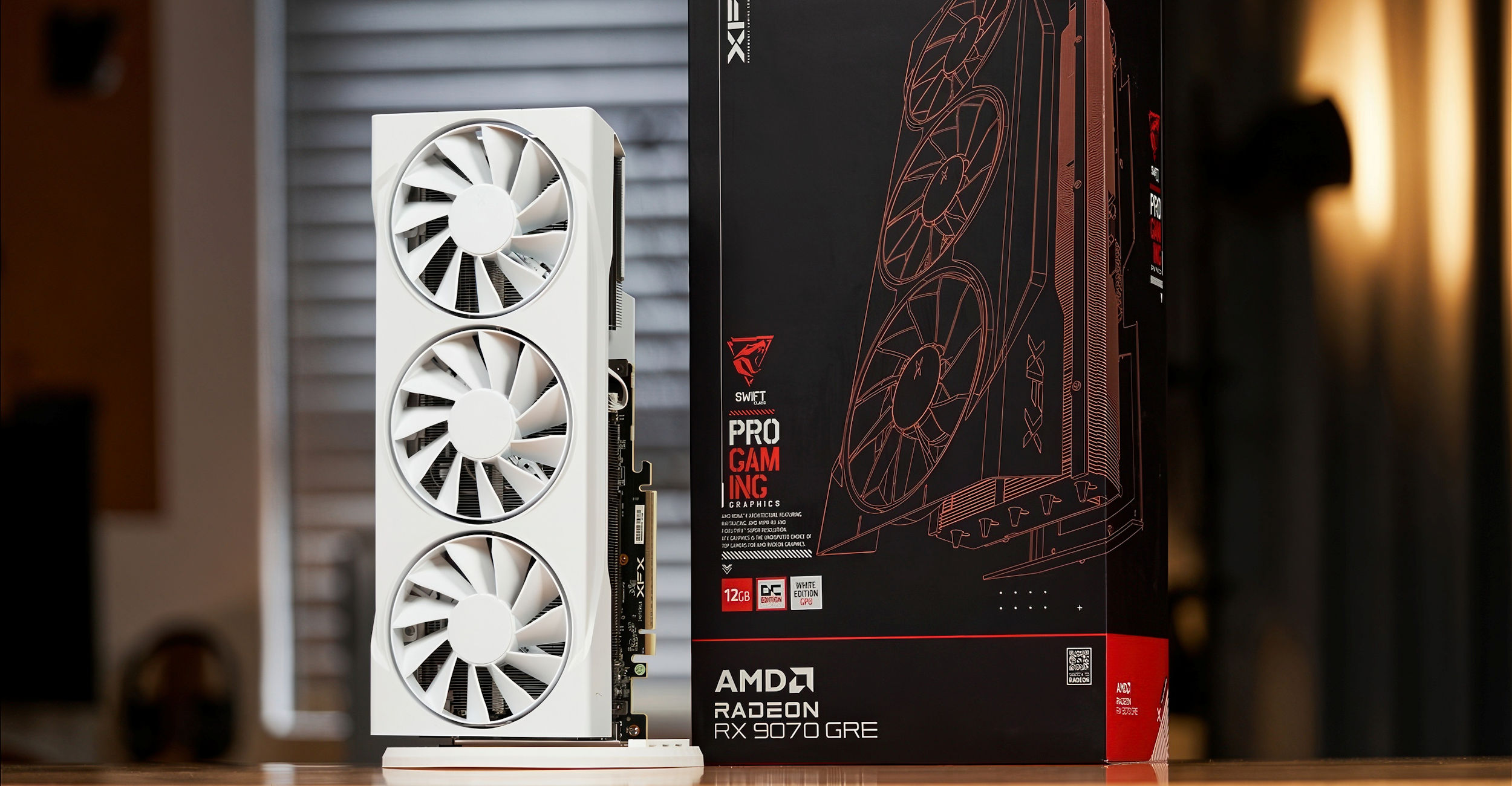
VideoCardz.com
Radeon RX 9070 GRE tested New graphics card with Navi 48 GPU and 12GB memory. Tomorrow marks the official launch of the Radeon RX 9070 GRE, AMD’s newest desktop gaming card. Unlike the RX 9070 XT and RX 9070, which were released in March, this model will not be available in all regions. The GRE […]
orchid iron
This May will be very interesting
 wise elbow
grave sundial
https://videocardz.com/newz/amd-radeon-rx-9070-gre-reviews-are-in-rtx-5070-perfo...
wise elbow
grave sundial
https://videocardz.com/newz/amd-radeon-rx-9070-gre-reviews-are-in-rtx-5070-perfo...
seems like a dud
grave sundial
wise elbow
seems like a dud
ok
grave sundial
mighty patrol
More powerful than all the computation power on the planet they claim
Small enough to put in your wrist? 😄
mighty patrol
grave sundial
Small enough to put in your wrist? 😄
Allegedly
wind egret
mighty patrol
More powerful than all the computation power on the planet they claim
Anyone who'd says something like that is absolutely full of it.
On the plus side, the guy who said sort of sounded like he didn't believe it himself, so maybe marketing told him to put it in those terms.
orchid iron
This has the same marketing balls as claiming the 5070 had the same performance as a 4090
wind egret
At least that claim works if you turn on vsync.
tough owl
several lab tests show clearly it struggles to keep up with 4070
and imaginary frames don't matter in performance tests
orchid iron
wind egret
At least that claim works if you turn on vsync.
On a 1080p60fps monitor? xD
orchid iron

So a few weeks into lending my rig out to a friend, and whilst he was watching movies the System just said no display and then the CPU was gone.... what happened?
Sponsor check out Deepcool's CH260 case here https://www.deepcool.com/products/Cases/CH260-High-Airflow-M-ATX-Compact-Case-Supports-Rear-Connector-Motherboards/2025/20030.shtml
Chapte...
 plush turret
anyone know if there is a push to opperate wall switch? i wanna put it on the garbage disposal cause i have young kids
its far enough from the disposal that only an adult could turn it on and put their hand into it
if you had to press and hold
google isnt helping me
plush turret
yeah still makes it harder
short of locking the switch behind a cover, cant 100% stop them
but its one more step to take
median marsh
they exist pretty sure
look maybe in the shutter category
they often use those kind of switches
plush turret
i mean i have enough electrical engineering knowledge to build basically a reverse deadmans switch, but yeah
be nice if theres one that nicely fits into decora plates without me needing to design and 3D print the actual switch
grave sundial
plush turret
its far enough from the disposal that only an adult could turn it on and put the...

Pass & Seymour TM870STMWCC6 Garbage Disposal Switch, 15-Amp, White
Like dis?
wise elbow
plush turret
short of locking the switch behind a cover, cant 100% stop them
cover probably best
if you have more than one kid there's technically nothing stopping them from having one push the button the the other get injured
though tbf I don't think I've ever seen a household with a childproofed garbage disposal?
plush turret
tbh its more that they are 3 and 5 so at that stage where everything is a curiosity
so far it seems to scare them when it comes on
I installed a higher power one than normal so it can grind up heavy stuff
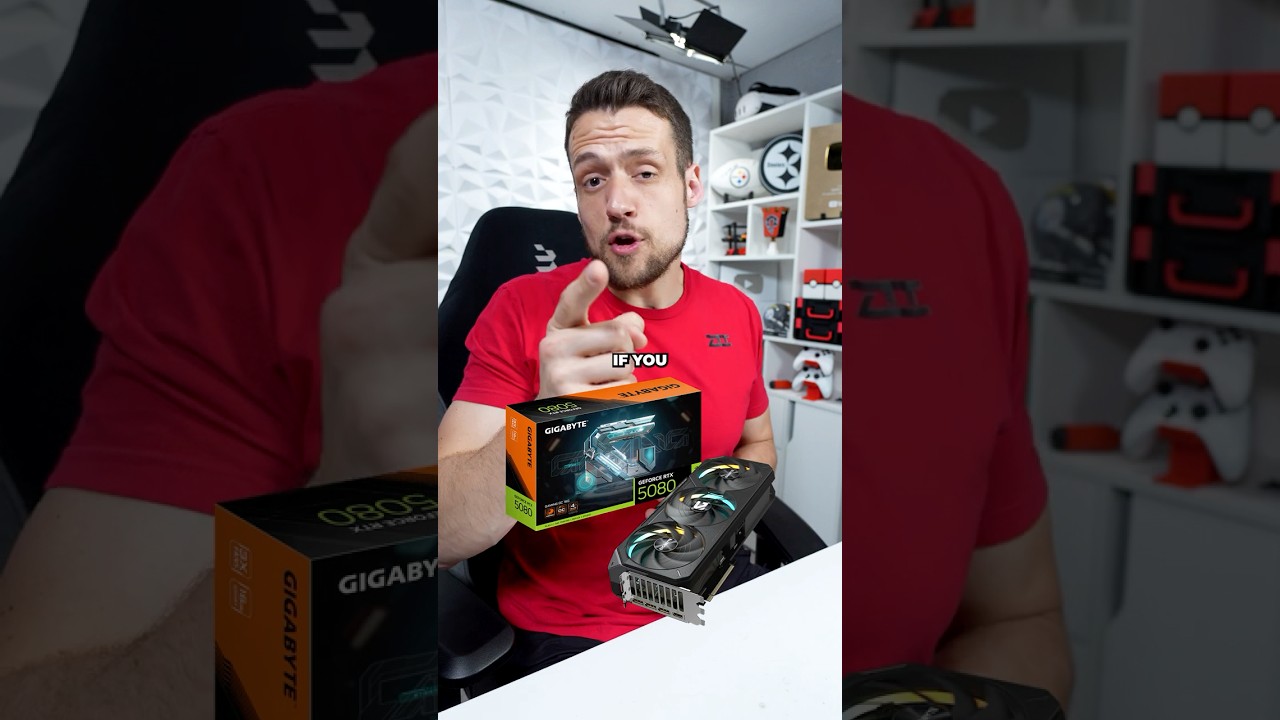 fallen oasis
TL;DW?
orchid iron
median marsh
and too much thermal paste applied by gigabyte apparently
either that, or the thermal "gel" may have slipped out of the GPU that was vertically mounted, meaning the GPU die will now reach TEMPS OF THE SUN
median marsh
doubt that, the thermal paste between die and cooler is supposed to fill TINY air gaps
the majority of the surface is supposed to have direct contact
but it's possible that this was from some other component like VRM, where the gap might be bigger and that could cause issues long term
orchid iron
median marsh
but it's possible that this was from some other component like VRM, where the ga...
yup
orchid iron

Try Opera here: https://opr.as/05-Opera-browser-hardwareunboxed
Support us on Patreon: https://www.patreon.com/hardwareunboxed
YT Membership: https://www.youtube.com/channel/UCI8iQa1hv7oV_Z8D35vVuSg/join
Buy relevant products from Amazon, Newegg and others below:
Radeon RX 9070 XT - https://geni.us/CH0CxfR
Radeon RX 9070 - https://geni.us/3neQ...
Those are some shocking benchmarks
I can't believe the 5070 isn't anywhere close to the 4090, I'm deeply destrubed
 kind pond
I won't be able to connect my meta quest 3S with my PC through link cable . Can anyone help?
 fervent jolt
plush turret
tbh its more that they are 3 and 5 so at that stage where everything is a curios...
fervent jolt
plush turret
tbh its more that they are 3 and 5 so at that stage where everything is a curios...
hmm, never seen one in person but they do exist https://www.amazon.ca/Momentary-Push-button-Wall-Switch-ZAC99/dp/B07828MYZJ/ref=asc_df_B07828MYZJ
tough owl
orchid iron
https://m.youtube.com/watch?v=Zlzatw1E2vQ#
the fact that you cant hit 165fps at 1080p with 5090 tells a tale how much effort boys put into this ID tech masterpiece...
meanwhile Doom2016 I belive has been one of the few games that can run over 1000fps
wise elbow
tough owl
the fact that you cant hit 165fps at 1080p with 5090 tells a tale how much effor...
it's sad
2016 and eternal run on anything
and do it well
I'm hoping there's a lot of optimization to come
a 9070xt outperforming a 5080 is weird
tough owl
no idea has nvidia still even managed to fix 50-series drivers
apparently every hotfix they release just breaks something
wise elbow
vibecoded fucking drivers
median marsh
that's quite the difference...
 median marsh
i would still be pretty optimistic that this will be one of the most optimized games of the next years...
the performance difference might be a bug, as it's probably shuffling textures between gpu and host memory
orchid iron
median marsh
that's quite the difference...
That's with frame gen on, Steve commented that frame gen doesn't work if the VRAM is almost full
The irony is that it was Nvidia who provided an early access copy of the game to showcase their technology
Oh boy did Steve showcase xD
Showcased 5080 getting beat by the 9070xt and 7900xtx because of vibe coded drivers
median marsh
there's also a giveaway of Doom with some nvidia gpu's right now (at least over here)
orchid iron
ah, is this a more advanced scam tactic to not get flagged?
 strange mountain
Do I really need to explain electroboom?
mighty patrol
I thought it was a scam too till I saw ElectroBoom
Oh shit
It's actually free
Nvm patreon just has bad UI





 plush turret
is this a solid NVME? https://www.amazon.com/gp/product/B0B7CQ2CHH/

Strap in for breakneck gaming speeds with the WD_BLACK SN850X NVMe™ SSD. Crush load times and slash throttling, lagging, and texture pop-ins for a smooth, fast experience that lets you compete at your absolute peak. This purpose-built gaming drive comes in capacities of 1TB to 4TB(2), with an opt...
agile lodge

DerBauer (Founder of Thermal Grizzly) just sent us their 5090 Astral Delta Mate GPU block and its unlike anything I have seen yet in watercooling! From the packaging, to the manual, it is a refreshing new take on watercooling!
Sponsored Links:
New Users sign up for a Free World of Warships Account and receive the following! 7 Days Premium Time...
orchid iron
plush turret
is this a solid NVME? https://www.amazon.com/gp/product/B0B7CQ2CHH/
Yup, one of the best in the consumer market
plush turret
orchid iron
Yup, one of the best in the consumer market
is the 8tb version worth it or should i get 2 4tb if i want that much NVME storage?
and is the heatsink worth the additional $25
when my MB has dedicated heat sink system
like it has something you would screw in on top of the C drive
agile lodge
when your m.2 go to that motherboard with heatsink then its no need
plush turret
but id need one if i plug it into one of the other 3 m2 slots that dont have their own heatsinsk right?
agile lodge
when motherboard dont have heatsinks to all m.2 slots then sure for those what dont have heatsink already there provided by motherboard
orchid iron
plush turret
is the 8tb version worth it or should i get 2 4tb if i want that much NVME stora...
Depends on the price of one 8TB Vs two 4TB
Both models are solid so the size is the only real difference
Also gen 4 drives don't need super beefy cooling, as long as your case isn't chocking for air like a pre build with a custom case, you'll be fine using whatever heatsink
plush turret
corsair 4000D case with every fan slot used
and a 450 square foot room to bleed air into
with fresh air piped from the houses main AC unit directly to the front of the case
orchid iron
Do you want to overclock your storage or something? XD
plush turret
more that its for mix of development and the fact that modern games take stupid amounts of storage
i have 2 16TB HDD's for mass storage
🙂
im a data hoarder
orchid iron
plush turret
more that its for mix of development and the fact that modern games take stupid ...
Then you are set
orchid iron
plush turret
i have 2 16TB HDD's for mass storage
Are they clones of each other in case of a failure?
orchid iron
Yeah, that's impressive
orchid iron
16TB for 170$ wtf
plush turret
had them for 2 years now and they have zero flaws
they are "used" but like refurbished
all 5 are toshiba too
orchid iron
plush turret
they are "used" but like refurbished
Doesn't mean much, perhaps they changed the write/read head but that's about it
orchid iron
plush turret
all 5 are toshiba too
Nice
plush turret

ServerPartDeals.com
We stock 16TB capacity enterprise drives for servers at the lowest price with free shipping. Shop now!
all the items are "used" but like solid
they get extensively tested
wouldnt use them for a C drive
but for mass storage? hell yeah
their stock changes daily so i like to surf it
orchid iron
Pays quite well I see
orchid iron
Oh yeah, I definitely wouldn't have found it on google
plush turret
but yeah
orchid iron
Plus who would trust a random site from a Google search with no background
plush turret
also the drives come totally uninitialized
orchid iron
Nice