#hardware
1 messages · Page 5 of 1
 obtuse rapids
obtuse rapids
obtuse rapids
youtube this one - there is a better checklist you'd find than I would give you
"Troubleshooting PC won't boot"
you want the checklist and just go by the numbers
 chilly valley
Ok ty, i will send it to professional if nothing work, thank you very much
 north arch
If you put in the wrong ddr rating and thus voltage, you could have done some damage
north arch
but they have different form factors so it shouldn't ve possible
depends on the damage
north arch
pictures are fine
obtuse rapids
chilly valley
Maybe i should push it harder ?
as long you make SURE it is the RIGHT ORIENTATION (not trying to install backwards) - open up those black slots (press them UP and AWAY from the slot) that means it's "open" then you press down, HARD and those should lock IN
north arch
are the key notches in the same spots?
obtuse rapids
he's right, one of those rams is not like the other
 fallen oasis
Using different brands/types of ram (even the same brand/type but bought at different times) can cause instability.
Be warned.
chilly valley
I fucked up
north arch
what's the label on the white ram stick say for speed, voltage, and format?
fallen oasis
Do you have three different types of ram there?
chilly valley
Yes
chilly valley
No
fallen oasis
You really fucked up.
 mighty cosmos
It shouldn't break anything even if they are different speeds but it won't boot
chilly valley
What is the fix for that ?
mighty cosmos
Take out the new sticks and make sure the ones you had before are properly seated
chilly valley
mighty cosmos
Take out the new sticks and make sure the ones you had before are properly seate...
Done it,no change
It clicked , seem seated to me
Ty very much ! everybody , i will take my pc to pro
mighty cosmos
Did you put the old sticks in different slots than they were originally in?
chilly valley
Yes
mighty cosmos
Put them back how they were
chilly valley
No change
chilly valley
mighty cosmos
Put them back how they were
Good ?
 fallen oasis
Seems right
chilly valley
Before, one was on the black notch and the second on the grey
I thought it should be easy, didn't know i should check so much stuff .
mighty cosmos
Try putting one in the slot 1 (closest to the cpu) and another one in slot 3
That's been a config on a couple of MB I had so worth a try
chilly valley
mighty cosmos
Try putting one in the slot 1 (closest to the cpu) and another one in slot 3
Nop
mighty cosmos
Well out of ideas then, never heard of anyone frying something because they mixed different memory sticks but no clue what happened here
north arch
if you improperly seated them just right, had the key in the wrong spot, or used the wrong voltage grade, it's possible to damage the cpu
but really, if you fully seat ram of a compatible speed, timing, voltage, and type (ddr2, ddr3, ddr4, ddr5, their laptop or error-correction versions) it should be fine
chilly valley
Ty kor
north arch
chilly valley
Thank for your try 🙏
just to be sure, you opened the clips, then pushed the sticks in, minding orientation via the key slot, until the clips fully clicked and secured the ram in place?
chilly valley
Yes
 arctic sluice
hi! my code build times are usually really slow (10 - 15 mins) so i saved up some money to upgrade my pc but only enough to upgrade certain stuff. here are my specs:
1x 8gig ram (2400MHz)
i3-8100 CPU (3.60 GHz)
1TB hdd (not sure how to get the speed of this one)
which component do you guys recommend upgrading first?
north arch
what's the gpu?
arctic sluice
does it affect build time?
north arch
shader compile times I think
arctic sluice
i really dont care about that, my project atm does not have any complex shaders that i need to compile
it's just frustrating to wait 5 mins for compiling cpp code everytime
i dont think i waited for shaders time compile for a good month or two
 median marsh
get an SSD then
and its hard to tell what your current bottleneck is, but an HDD is not gonna do anything good to compile times
arctic sluice
i assumed it was the ram. since VS alone can take up to 3gb of it leaving about 2~gig for the compiler to use
median marsh
well, you can see your memory/cpu usage in task manager
fallen oasis
You need to replace everything.
SSD can at least be added without replacing everything else.
median marsh
yea, 8GB ram is probably your main bottleneck, usually you calculate with 2gb/thread for the compiler
arctic sluice
well i guess i can get an SSD an save up more money to replace everything else 🥲
fallen oasis
Frankly, I'm surprised the editor even starts with 8gb of ram. 😦
median marsh
well, another used 8gb dimm should be cheap to grab on ebay or similar
fallen oasis
And, yeah, another dimm (or another 3 dimms for 32gb) would be a big boost.
arctic sluice
fallen oasis
Frankly, I'm surprised the editor even starts with 8gb of ram. 😦
unreal barely uses 2 gigs!
median marsh
with 16gb chances are high that you hit another bottleneck 😄
which then is either the HDD or the CPU
fallen oasis
arctic sluice
unreal barely uses 2 gigs!
What magic are you using on UE?!!
median marsh
probably 4.xx?
arctic sluice
🤷♂️
arctic sluice
median marsh
probably 4.xx?
nope. it's 5.0.3
median marsh
ok...
fallen oasis
35% loaded and it's already using 6gb of ram 😄
arctic sluice
proof:
 fallen oasis
Ah, it's compiling shaders, that's probabyl why.
arctic sluice
it's not...
fallen oasis
I mean mine!
arctic sluice
arctic sluice
proof:
the only reason it's running at 45fps is because i limited it at that!
median marsh
around 6gb for me, just loading my project 😕
median marsh
both 😄
arctic sluice
money speaks! and it says i can only get one of those items
median marsh
~20€ here for a new one, so an used one should be super cheap
arctic sluice
where is that!?
median marsh
europe
arctic sluice
ah right
fallen oasis
Just make sure you don't do what the last guy did: buy mismatching ram.
If you can, buy the exact model of the other dimm.
arctic sluice
noted 👌
median marsh
and ~1tb ssd you get for 60€
fallen oasis
SSD is gonna be a huge boost!
arctic sluice
still not sure where you're getting these cheap prices
fallen oasis
Stick windows and ue on there
median marsh
where do you live?
arctic sluice
algeria, north of africa
median marsh
ok, i don't know any vendors there :/
arctic sluice
yeah pc parts are pretty expensive here. i guess i will get more ram, save up more money, get a new SSD, save up more money, upgrade all parts
am i right?
median marsh
yea, the SSD is pretty much a nobrainer
wouldn't spend a fortune on an 8gb ram stick tho
but then... time is money and 15mins compile time is annoying and time consuming, too 😄
arctic sluice
true dat
 karmic trout
What's better: Nvidia Geforce 3060 or new AMD Radeon RX 7900 XT?
mighty cosmos
7900xt is gonna be somewhere in between 4080 and 4090
 wind egret
MSRP is below 4080 and these companies usually don't get it wrong.
wind egret
It's a huge win if it doesn't melt the power connectors.
Actually I just remembered it's going to have 2 8-pin connectors.
Three of those is still less power than what the 12VHPWR is supposed to handle. If it manages to do any melting that would be impressive.
 sullen patio

3060ti is 40% faster in rendering tasks.... Don't know how much of that will matter in Unreal but 3060 (non TI) has 12gigs of Vram which seems pretty sweet considering I'm not gonna be doing anything related to game development...
I wanna be able to create scenes with millions of polys and preferably 2K textures...
sullen patio
It is tho... In games, fps , ray tracing, more cuda core
wind egret
Run out of VRAM and you go from 50% faster to 90% slower.
chilly valley
Kingston fury Beast RGB 32GB (2x16GB) 3600MHz DDR4 CL18 של 2 KF436C18BBAK2/32 https://a.co/d/2aDX5Mq

Kingston FURY Beast DDR4 RGB delivers a boost of performance and style with speeds of up to 3733MHz, aggressive styling, and RGB lighting that runs the length of the module for smooth and stunning effects. This dazzling, cost-effective upgrade is available in 2666MHz–3733MHz speeds, CL15–19 laten...
Is this ram good and compatible for motherboard b550 asus ?
median marsh
well, blender is one of the rare occasions where cuda is really used
that doesn't matter at all for gamedev in my experience
at least i'm not aware of any standard feature which uses cuda
median marsh
sullen patio
3060ti is 40% faster in rendering tasks.... Don't know how much of that will mat...
uhm... dude?
this is rendertime, lower is better (which they even wrote on the graph :D)
median marsh
chilly valley
Is this ram good and compatible for motherboard b550 asus ?
probably, usually you can get a list of official tested memory modules for your board
which doesn't exclude other modules, actually they all should work
chilly valley
Ty
median marsh
usually when mixing different kind of modules it can get complicated
and you might have to run them at lower speeds/timings to get the system running stable
chilly valley
median marsh
usually when mixing different kind of modules it can get complicated
Right, i decided to sell my memory cards and buy Corsair DDR4 Vengeance LPX 64GB 2X32 3200Mhz C16
As i know the pc take the lowest mhz of the two, and mine is 2666, so i think it's the best option.
chilly valley
I've learned so much about hardware these two days how to dissemble and assembly all pc hardware, i learned so much mostly about RAM from my stupid mistake, i have warranty so the company gonne fix everything for free, lucky i didn't fucked up after all.
north arch
key lesson: ram isn't all the same
mighty cosmos
chilly valley
I've learned so much about hardware these two days how to dissemble and assembl...
Did they tell you what happened, I'm curious
chilly valley
mighty cosmos
Did they tell you what happened, I'm curious
It will take a week, i am curious as well, i will post here when done
obtuse rapids
How will a faster GPU help with development time/iteration. - I'm building a new machine but my existing one (which has a 3080TI) will serve as a demo machine
On new one I'm getting a faster CPU but I am thinking I can probably just go with another 3080ti
fallen oasis
Not that much, over a 3080ti.
obtuse rapids
Didn't think so
median marsh
i'd still consider a 4080 because of the vram and lower energy consumption on the same load
wind egret
How much lower would the energy consumption need to be to compensate for the cost?
median marsh
depends on a lot of factors... i haven't ever seen any power draw benchmarks for hardware where they used the same load
so apparently same max power as 3080ti but 2-4x faster
so at the same load your might have saved 150W, which could sum up to an kwh/day, which is probably ~0.50€ in some places already
now consider how long you will use that card, which is probably at least 2 years, say 200 work days/year... 200€ difference might pay off on the long term usage and you get a higher max performance
it's probably less, but even if it's just 100€ it's something you should consider if you have to pay it anyways
migh aswell spent it on performance/vram instead of the power bill 😛
gotta wait 2 days more to see dealer prices i guess (and stock...)
wind egret
I'm expecting it to be more than the supposed 1200USD MSRP (4090s are well past 2000USD), but the 3080 Ti isn't cheap either. But it's not out yet and won't be until January. You may also have to fist-fight some scalpers in the parking lot over it. I don't know. 2021 was weird.
median marsh
4080 should release 16 nov?!
 wispy flare
median marsh
i'd still consider a 4080 because of the vram and lower energy consumption on th...
wispy flare
median marsh
i'd still consider a 4080 because of the vram and lower energy consumption on th...
I would consider RAdeon 7900 XTX
I'm not buying this nvidia crap for next 5 years
raytracing aside 3080 ti was downgrade from Radeon 6900 XT -;-
wind egret
median marsh
4080 should release 16 nov?!
Did I confuse it with the 4070 Ti? I probably did.
 vagrant anvil
obtuse rapids
How will a faster GPU help with development time/iteration. - I'm building a new...
vagrant anvil
obtuse rapids
How will a faster GPU help with development time/iteration. - I'm building a new...
GPU lightmass is the only thing you'd see an improvement in development time if you use that.
the 4080 does "release" on the 16th. actual availability and street prices are yet to be seen
obtuse rapids
vagrant anvil
GPU lightmass is the only thing you'd see an improvement in development time if ...
Yeah and currently we only use dynamic lighting
obtuse rapids
So stick with a 3000 series for now
I'm building a new development machine so I can use my current one just for demos
We got a sale and have enough money and I'm sick of breaking down my rig to do demos
This way we can keep a pelican case or two packed with all the things needed to do a demo and my dev machine can sit at home unmolested
I'll still develop to spec with the demo components - but mainly I want to iterate faster so the only difference is this will be an 13th gen i9 and just a bit more ram
.
mighty cosmos
I wouldn't put a 40xx card in my PC even if I got it for free, I don't want a potential fire hazard
obtuse rapids
lol I'm a firefighter that's just training for me
 balmy oyster
Hey, it's winter... catching fire could be a selling point when you wind up homeless from buying one ;).
Pfft plenty of outlets around
Just gotta be a little creative.
obtuse rapids
What's wrong with NZXT?
obtuse rapids
ah - but are the coolers still good? z73 looks so good and is supposed to perform well, as long as it doesn't set things on FIRE?
 north arch
what do you seek to do with it?
 devout dagger
just want to run unreal and do some blueprinting, my games might use some quixel scans too
And to also support blender
wind egret
A used gaming laptop from 2019.
fallen oasis
obtuse rapids
https://tenor.com/view/one-job-you-had-one-job-loki-fail-gif-21911643
What's his name again? I can never remember.
 glass spindle
Hello everyone! I'll be starting to learn Unreal for game dev and currently have a RTX 2060. I was originally saving to buy a new GPU (3080 or better) around March/April when I hopefully got the hang of the software a little more, but I got a better-than-black-friday deal on a RTX 3060 and was wondering if I should make the jump now, though I wound't be able to switch again for a whole year.
I'm not sure how well a 3060 can handle more complex projects, and I would have it for an entire year
wind egret
The 3060 12GB is the best budget choice for an unreal engine dev pc (according to random chatter in this discord).
If it's a 3060 8GB, you'll make more money setting it on fire and uploading the vid to youtube.
glass spindle
It indeed is 12GB. I honestly didn't know there was a 8GB version...
wind egret
I just learned something new about the 2060. It comes in 6GB, 8GB and 12GB varieties.
glass spindle
Does the raw VRAM outweight the overall performance of the card? So during development, the 3060 (with its 12GB) would be better than a 3080 10GB?

Only info I found in PS was this graph with "Overall Score"
Oh nvm, found a GameDev specific score

Thanks for the answer, Laura
Would you say that, with me being a beginner, a 3060 would be sufficient for the projects I may work on during my first year?
Right now, would cost around 70% of its normal price
Converting to U$, would be 288
But that's a complicated conversion considering that hardware is super overpriced where I live
vagrant anvil
to add to what Laura has already said. Also consider if you have other GPU-intensive apps open. For example, if you are using UE, Maya, Substance at the same time. How detailed of a project are you trying to make. Sure the City Sample requires huge amounts of VRAM, but are you doing anything close to that level?
when I made those charts, most of the testing does not use more than 8GB, and UE is the only application running.
For the 4.26 testing, I used the Megascans Goddess Temple, Megascans Abandoned Apartment, and ArchViz Interior from Epic.
glass spindle
vagrant anvil
to add to what Laura has already said. Also consider if you have other GPU-inten...
I'm still ignorant of how much hardware power my projects will demand, since I am a total beginner. But I can't imagine it being even the slightest close to something like the City Sample. I mostly will focus on learning the software and participating in Game Jams and perhaps a few more projects for portfolio.
About other apps, I'm also unable to say, unfortunatelly
obtuse rapids
If you're okay with buying used hardware, look into it because people will be upgrading
Shoot - my current main rig I bought at the absolute height of the GPU shortage - I met someone at a gas station at 11:00 at night like I was buying drugs or something
Thankfully I don't think you'll have that problem now
vagrant anvil
honestly, I'd say don't put too much pressure on having the "right" hardware. it will constantly be evolving. by this time next year (or sooner), there will be something way faster for the same price. most users on Steam have less than a 3060, so you'll already be ahead of them.
glass spindle
vagrant anvil
honestly, I'd say don't put too much pressure on having the "right" hardware. it...
Thanks a lot for you input! This does sound like a plan to me. Make a good deal now, and save to afford something truly better when I have the skill to put it to use.
Also, thanks for all your UE articles, they helped me a lot!!
glass spindle
obtuse rapids
If you're okay with buying used hardware, look into it because people will be up...
I would be ok, but the used market in my country is... weird. People overestimate what their products are worth by a lot, unfortunately.
 fallen oasis
Eh. Waste of money!
obtuse rapids
fallen oasis
Eh. Waste of money!
What would you get?
fallen oasis
Something I can stuck under my desk and forget about.
obtuse rapids
I have a standing desk too - right now my rig is in a closet
fallen oasis
Do you/your employers hate you?
obtuse rapids
Anyone know how to turn make my integrated video nonprimary? - I need it on for a 5th display (vr headset takes one) but when I do a lot it makes windows slow, like windows is running on the integrated
fallen oasis
I love my comfy, soft, relaxing chair, personally!
 fallen oasis
That looks more like just an adjustable height desk.
https://youtu.be/Q8UGAbAPPkk?t=56 this is how multiple height desks should work.
obtuse rapids
I don't see a a desk in there
fallen oasis
😦
 slim flax
Finally all of my PC parts are here, RTX 3090, Ryzen 9 7950X, 64gb DDR5-5200 RAM, and a 2tb 980 Pro M.2 ssd
Thanks for all the help in this channel that made me figure out what stuff to get!
Last decision will be to install Windows 10 or 11 lol
obtuse rapids
There has to be a way to diagnose what is using this ? what is using 46% of the onboard - I've been selecting programs to run using the Manage 3D settings and putting the Nvidia selected on there
 fallen oasis
Unplug your monitors and see if it goes down.
obtuse rapids
It's wallpaper engine
obtuse rapids
Yeah the moment I "pause" on wallpaper engine, it goes down - I don't know if this window setting is actually DOING anything

Nvidia doesn't have this "Use preferred graphics process for this program"

Tech Advisor
We show you how to assign a default graphics card in Windows so you can make sure its doing its job.
 agile lodge
4080 founders edition seems to use much less power than 4090
obtuse rapids
agile lodge
4080 founders edition seems to use much less power than 4090
It takes more energy to ignite, that's why
agile lodge
the RT cores on 4090 just shows
 crimson whale
u guys strike me as computer people. Do I bite the bullet and get an i9 with 4090 rtx and blow all my money or do I go with a 3080 / wait for the 4080 and get an i7? The sole purpose will be unreal engine dev, maybe some streaming, and consistently using nanite/lumen.
from what I've seen the 4090 literally just destroys everything else, in some cases doubling fps
fallen oasis
It also destroys the planet with its energy comsumption
median marsh
and power connectors
fallen oasis
And catches on fire a lot.
crimson whale
I saw that issue and afaik they're saying its mostly related to the cable as opposed to the unit itself, but yeah I suppose if there's no other way to plug it in thats a big issue
I think they're saying the cable has to be placed in correctly, in a very certain way.
median marsh
yea, but the 4080 has a board power of 320W
which is probably way less than the 4090
crimson whale
I'm very interested to see how the 4080 performs tbh
are there any leaks or we waiting til tomorrow?
its about $1k as opposed to the $1600 4090 right?
that major difference although nice is also somewhat concerning. I can't imagine its even near the 4090 level at that price
median marsh
msrp is $1199 if im not wrong
see, for dev you shouldn't care
except for the video memory maybe
crimson whale
I'm on a 1050TI right now on a 5 year old laptop and I'm getting 40 fps in editor using nanite lol
cant even imagine when I upgrade. Memory has been a HUGE headache for me tho
vagrant anvil
4080 reviews are out today
obtuse rapids
median marsh
msrp is $1199 if im not wrong
As far as I can tell, the video memory is just more of a quality of life issue for being able to multitask the editor with other DCC tools, or having things like wallpaper engine up
Ouch - does this mean moving to ATI for a generation?
I've been spoiled with the gens, I started dev with a 1080TI, then moved to a 3080TI - 4080 obviously isn't worth it it seems
median marsh
that depends, upgrade not so much, but if you get a new card anyways?!
vagrant anvil
ATI? what year is it?
obtuse rapids
vagrant anvil
ATI? what year is it?
I normally build a new system every 4-5 years
reminds me of the classic "64k should be enough" but someone says like "8 gig video memory should be enough"
obtuse rapids
median marsh
that depends, upgrade not so much, but if you get a new card anyways?!
Not upgrading, just building an additional system but to use as a new main rig, then current main rig because machine for trade shows/demos
vagrant anvil
I just mean they killed off the ATI brand like 10 years ago
median marsh
well, it seems to be ~30-50% faster than an 3080 and has 4GB more VRAM (than the 3080TI)
if it really is just $100-200 more i would rather get the 4080
whut, MSRP is at 800 for 3080TI?
median marsh
still better than an 3080TI
but looking at current prices here... a 3090 is $50 more than an 3080TI 😄
sure, but with nvidias current marketing strategy they gonna keep some 30xx cards for a while
well... a slap in the face is that i paid $600 for a 3060...
which should have been like half that price (according to nvidia)
vagrant anvil
Here is my Unreal Engine specific testing
 mighty cosmos
I would recommend waiting for amd cards to release to anyone planning on getting a 4090 or especially 4080
agile lodge
4080 is faster than 3090
mighty cosmos
At 1200$ it's a joke
agile lodge
intel gpu and nvidia gpu
median marsh
i would still prefer the 3090 😄
agile lodge
without msrp 3080 price was over 2k
median marsh
just because the performance is probably sufficient and 24GB 😄
agile lodge
because pandemic caused chip shortages
median marsh
and crypto bullshit
agile lodge
there is still shortages on chips
vagrant anvil
my guess for AMD is they will be closer to a 4080. The only reason I say that is because AMD didn't do any performance comparisons in their presentation even though the 4090 was out. Even still, should be interesting to see what they do
median marsh
not for long, some companies went bankrupt, nvidia is probably selling less cards now, since the pandemic also boosted sales cause everyone had more home time
agile lodge
all the laws on imports got restricted
median marsh
last year they said TSMC is booked up until 2025, now its 2024
vagrant anvil
exactly
agile lodge
i can say easy that I dont even care amd and havent cared for amd for years
you can go back to athlon days
mighty cosmos
vagrant anvil
my guess for AMD is they will be closer to a 4080. The only reason I say that is...
The info so far point to it being within 10% of the 4090 which is pretty impressive
vagrant anvil
what results?
mighty cosmos
vagrant anvil
what results?
There are extrapolated benchmarks people did plus amd showed the fps numbers the other day which puts it very very close to a 4090
agile lodge
i have still 4th gen i5
median marsh
guess they've been too focused on other markets and their own production processes
agile lodge
gtx 770
when amd bough ati then for me amd came obsolete
having no money to upgrade doesnt mean running on obsolete hardware
you assume that i run on that hardware now?
when i dont
median marsh
i still have an core2quad in the basement...
agile lodge
it just only pc parts what i have now
mighty cosmos
No matter how you look at it this is a huge win for amd for this gen of GPUs
median marsh
which excels at excel
agile lodge
the competition is good for business
vagrant anvil
median marsh
i still have an core2quad in the basement...
the amount of stuff that I've held on to because "maybe I'll make something with this" but then never do is embarassing
vagrant anvil
agile lodge
the competition is good for business
This is why I dont care if AMD can outperform Nvidia. as long as they get even close it will light a fire under Nvidia. which then puts pressure back on AMD to improve again
fallen oasis
My backup "pc" is my phone. 😦
median marsh
my backup phone is better than my actual phone 😄
fallen oasis
Is your main phone sold by Apple?
median marsh
also that 6 year old android is doing it's job fine
mighty cosmos
vagrant anvil
This is why I dont care if AMD can outperform Nvidia. as long as they get even c...
Also not to mention amd GPUs age like fine wine
6900xt which was supposed to be a 3080 competitor is beating a 3090 many many driver updates later
median marsh
i use the iphone only for live link with unreal 😄
agile lodge
who remembers company called ATI Radeon?
mighty cosmos
I haven't had issues with their drivers (I'm using the optional ones which are newer), not any worse or better than on my 2080s in the second pc
median marsh
3dfx made better cards than ati
median marsh
and they had loopback cables 😄
vagrant anvil
probably. there is a lot of hardware over there that never makes it out of the country
median marsh
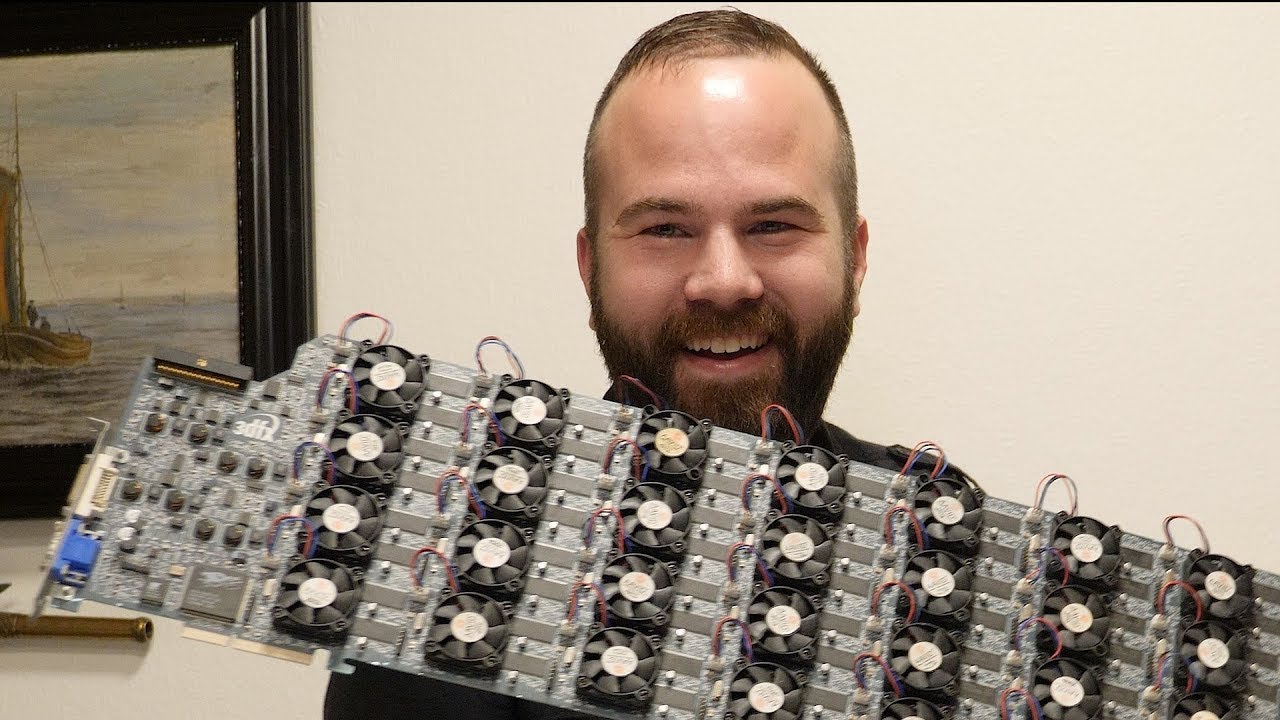
I bought the 3DFX Voodoo 5 9000! Thanks you Kasper for making this possible! We also take a look on the BitchinFast 3D 2000 card!
3DFX Voodoo 5 9000: https://youtu.be/_3iHV0NvLPI
BitchinFast 3D 2000: https://youtu.be/ZmCEXbspWuI
Big thanks to my Patreon supporters you are awesome! https://www.patreon.com/retromachines
now fit that in your ITX case 😄
north arch
brb finding dremel
devout dagger
Have 600 euros, what type of pc can i buy?
That can run unreal engine and blender.
median marsh
a used one and even then you are probably on the low end of the bare minimum specs for UE
north arch
maybe a couple prebuilts around there that'd work for small projects
fallen oasis
Do not buy a laptop.
obtuse rapids
Maybe he could go with a 5900 series AMD - I remember seeing youtubers push those as GPU-less entry leveling gaming machines - toss in a cheap card and while you aren't going to be remaking the Matrix in UE5, you could at least start messing around
median marsh
the cpu alone would be like half of the budget
ryzen 3 sounds more reasonable
but really, rather go 1-2 gens back, i used a 3rd gen i7 for over a year, and it was bearable 😄
obtuse rapids
Who here knows the absolute best video or document that really explains the differences in the CPU - I tried watching LTT's explanation of the difference in an i7, i9, but its still hazy as hell
When you say disabled does that mean the most expensive CPU cost the same as the least expensive to manufacture, of the same generation?
fallen oasis
SSD?
wind egret
100gb free, I imagine
fallen oasis
Heh. I see!
I've never found a need for a NAS. Networks aren't fast enough to make it worthwhile 😦
Unless you have like 8tb of pirated movies and music or something.
Ah laptop, okay.
Cool
 serene dome
obtuse rapids
Who here knows the absolute best video or document that really explains the diff...
serene dome
obtuse rapids
Who here knows the absolute best video or document that really explains the diff...
This is a very simplistic and rough breakdown:
1. Collect sand that has very high quartz content
2. Purified into insanely pure silicon ingot
3. The ingot is "sliced" into silicon wafers
4. Photolithography, a technique that uses light to produce precise patterned thin film(s) over a substrate, is used to generate the processor's design onto the silicon wafer layer by layer.
5. Silicon wafer is exposed to chemicals that allows the pattern created by the photolithography process to be etched into the wafer.
6. Repeat 4 & 5 until the processor's design is completed.
7. A silicon wafer contains multiple dies and incredibly precise lasers are used to slice the wafer into individual dies.
8. The dice are tested and segmented into tiers according to their quality.
9. Dice get sent off for packaging.
In the pre-Zen 2 and pre-Alder Lake eras, both AMD and Intel had their CPUs based on homogenous computing designs and used monolithic integration technology for packaging. For Alder Lake, Intel transitioned to using a heterogenous computing design but still uses monolithic integration technology for packaging. For Zen 2, AMD transitioned to using heterogenous integration technology for their packaging but still uses a homogenous computing design. If rumored plans are to be believed, both AMD and Intel will be using heterogenous computing designs and heterogenous integration technology for packaging in Zen 5 and Meteor Lake respectively.
median marsh

Receive a $25 credit for Ting Mobile today when you sign up at https://linus.ting.com/
Get 50% off on your annual Zoho CRM subscription at: https://lmg.gg/ZohoCRM
Linus travels to Israel to get a tour an Intel Manufacturing Center known as Fab 28. This level of access is absolutely unprecedented.
Discuss on the forum: https://linustechtips.co...
chilly valley
mighty cosmos
Also not to mention amd GPUs age like fine wine
6900xt which was supposed to be ...
Please don't laught, Nothing bad has happend to the computer , the memory wasn't fix properly(i pushed it as hard just before breaking everything and pulled the notch, dunno how it wasn't fix) and the power SW in the front panel connector was connected to the wrong socket 😳.
serene dome
median marsh
https://www.youtube.com/watch?v=2ehSCWoaOqQ
Imo, Linus does a much better job explaining it in an older video from his other channel: https://www.youtube.com/watch?v=N7ut61pSLwk
For those interested... the best by far is this one though it is quite technical: https://www.youtube.com/watch?v=bor0qLifjz4

How are microchips made - from sand to semiconductor: Microelectronics usually is hidden to society – however, it is a constant companion in our daily lives. It tremendously contributes to the ongoing development and digitization of our world. But what is actually behind this technology?
This is how semiconductors work! In this video we explain...
serene dome
chilly valley
Please don't laught, Nothing bad has happend to the computer , the memory wasn'...
A tip for the next time you try putting it together: When it doesn't POST (Power-On Self-Test), your motherboard should be able to output some kind of error either by generating an audio (beeps) or visual (LED color or error code on a small LED screen) code that you can read up on inside the motherboard's manual. Quite handy when it comes to some troubleshooting.
chilly valley
serene dome
A tip for the next time you try putting it together: When it doesn't POST (**P**...
Thank!
north arch
chilly valley
Please don't laught, Nothing bad has happend to the computer , the memory wasn'...
at least it was nothing serious!
mighty cosmos
chilly valley
Please don't laught, Nothing bad has happend to the computer , the memory wasn'...
Ah, well glad nothing was broken of fried
You have to push it in way harder than you would think, the clip thing has to click by itself
 prime loom
Holy crap the 4080 is beyond expensive for what it is.
The cheapest 4080 in Australia is $1500USD
The most expensive is $2000USD
I can buy the cheapest 4090 for the same price as the most expensive 4080....
WTF lol
mighty cosmos
4080 is embarrassing, I don't know how they felt comfortable even releasing it at that price point
prime loom
I feel sorry for anyone who buys it. I thought the 4090 was overpriced (Im still buying one though), but the 4080, wow.
vagrant anvil
I'm curious if they would have called it the 4080 Ti, and the canceled 4080 was just the base 4080, if people would have been as upset
serene dome
That would have made them even more upset x-x
vagrant anvil
in my tests it was 40% faster than the 3080 Ti for the same price
mighty cosmos
pretty much lol
fallen oasis
4090s should be force to come with little fire extinguisher accessories.
Clipped to the back of the board.
 cinder latch
then it automatically extinguishes itself
fallen oasis
Ethanol coolant.
fallen oasis
I love his this video is basically saying, "you dun suck at buildings pcs"
(but also a tiny bit of hardware failure)
fallen oasis
Oh absolutely, it looked like that cable he showed the video of pulling out was properly seated.
And was clearly less than a millimetre from being connected 😛
crimson whale
studied this vid and I feel like the 4090 is the way to go

RTX 4090 vs RTX 4080 vs RTX 3090 Ti | Test in 12 Games at 4K | Raw Performance |
System Specs :
RTX 4090 https://amzn.to/3VmjShx
RTX 4080 https://amzn.to/3g3PkBK
RTX 3090Ti https://amzn.to/3DYyNIB
i9 12900K https://amzn.to/3e8dOZk
Asus Maximus Z690 Extreme https://amzn.to/3QZL57m
|...
Only thing that slightly concerns me is the CPU temp seems to run higher with the 4090
on top of the fact that ppl are saying the gpu is melting. Have they addressed that in a formal way yet? lol
serene dome
Not yet
Peripheral Component Interconnect Special Interest Group (PCI-SIG) is an electronics industry consortium so it's more than just one company. Intel designed the ATX 3.0 specification, which includes the PCIe 5.0 power cable and connector, and PCI-SIG helps develop products based on that specification. IMO, the onus is on nVidia (as a member of the PCI-SIG) for being an early adopter. They should have gone the same way as AMD and given the new specification more scrutinization from PCI-SIG (either from its other members or nVidia to be more stringent).
prime loom
From my estimation of this videos conclusions was that you basically have to be a moron to cause the connector to melt lol.
I just bought my new PC, which includes a 4090, so if mine melts, ill have to eat my words and brand myself a moron 😛
mighty cosmos
4090 is 2400$ here lol
wind egret
It's still scalp season for those cards. Ask again in 6 months.
mighty cosmos
and 4080 is 2200$
wind egret
I saw a generous scalper for only $1550 (USD)
mighty cosmos
I'm very glad I didn't wait for these and went with a 6900xt
equal to insanity
lol
😅
I got the 6900xt at a sale at around 1100$ usd, it was 50% off
yeah lmao
"OFF"
you know how bad it is when 1100$ seems great
the 6900xt was actually a huge upgrade over my 2080s, I'm seeing like over 2x performance with SMA enabled
yeah I have no clue
Like I remember years ago when 800$ seemed way too much for a top of the line card, look where we are now lol
😆
I'm over here with a 6900xt playing rocket league, at 1440p, capped at 170 fps at 40% utilization
Really using it to its full potential lol
true 😅
wind egret
at least they've updated minecraft with fancy effects. Diablo II remaster though
crimson whale
so will premade pc's with a 4090 in them be discounted for black friday or are they un-black friday-able?
so counting on a discount is for fools.
unfortunate.
lol
Using something everyday for the next (hopefully 5+ years) is worth the investment
cant imagine the 4090 will be out of style anytime soon, assuming it doesnt melt.
wind egret
Premade PCs generally don't react to scalper prices. The crypto craze was an interesting time.
 unkempt pelican
So the best thing is to buy prebuilt and replace what you don’t like?
wind egret
For the sake of getting a single component, prebuilts are never the best option. It was merely for a couple months when crypto skyrocketed, GPUs were scarce, and prebuilts hadn't caught up to demand, that such bizarre opportunities were present.
crimson whale
I tried out a theoretical custom build / individual part purchase via newegg and a few other sites and honestly there's some really good premades out there right now for the value, u might save a little by making it urself but probably not worth the hassle unless u just loev doing it
 ornate hornet
2x32GB DDR4
OR
2x16GB DDR5
Both have nearly the same cost
ornate hornet
 frank glade
32gb doesn't cut it anymore 😔
frank glade
32gb doesn't cut it anymore 😔
:0
Guess I'll stick with 64gigs then.
ornate hornet
frank glade
Waiting for 64gb ddr5 sticks to get 2x64
Also, should i get 3060 12GB VRAM OR
3060Ti with 8 GB VRAM
I guess the answer would be 3060?
frank glade
Yup, the more the better
median marsh
yea get the non-ti, imho it has sufficient performance and the extra memory is just the better trade for gamedev
ornate hornet
Alright, how is this looking
i5 13600K
RTX 3060
64GB DDR4 RAM
2TB NVME SSD
4TB HDD
Should I go for the non graphic card version of the processor? (KF)
fallen oasis
Isn't the 13700k only slightly more expensive and a lot better?
Eh, nevermind then.
Yeah, never mind then!
median marsh
well, 20 threads is neat enough for UE
also, if you dont have a bunch of videos/music/homework i wouldn't get an HDD
nah, i like to get my assets fast 😄
agile lodge
Thermaltake take test of cool the 13th series cpu on cinebench
median marsh
specially when searching in the content browser
well yea, i have everything in my project...
why wouldn't i?
agile lodge
custom loop with 420mm rad totally work great
median marsh
doesn't really bother, it's ~15-20 seconds
and i doubt it would be much faster without all assets available
ornate hornet
I agree. The price difference is very small. Only reason I thought about it is because, even when I manually set my GPU to "High Performance" in graphics settings for UE5, at times it still reverts back to system default and uses iGPU
 rough spindle
Hey there! Not sure if this is the best place to put this, since it's more for a gaming PC, but still
I need some advice from you guys for a friend of mine who's finally being able to afford replacing his old computer, with a GTX980. It's been more than 7 years since he's had it and he wants to up his game to be able to play newer installments, but hasn't really kept up with the latest releases and needs some advice to pick some parts. Mainly he is hesitating regarding GPU, he's always been with NVidia but knows it's changed quite a lot since then, and AMD is getting pretty good (also better for budget maybe). I've told him to look up Intel Arc GPUs but not sure how trustworthy they are for now.
Also regarding CPU I told him Intel may still be the best bet since he doesn't plan on working with that computer and gaming is pretty much the most intensive task for it. Is this still true or are games starting to make use of multiple CPU threads more than before?
He's aiming performance around a RTX 3070, with a CPU that doesn't bottleneck and vice versa. Budget might be around 2'000$ dollars depending on GPU prices.
Then, once he knows what GPU and CPU he wants, I told him PSU and such come second and kinda depend on those two main components.
Any ideas? Or advice?
It'd be greatly appreciated, thanks!
ornate hornet
Hmm, that makes sense. Plus since system would use iGPU, there'd be a bit more VRAM for UE5 to gobble on
 minor veldt
rough spindle
Hey there! Not sure if this is the best place to put this, since it's more for a...
minor veldt
rough spindle
Hey there! Not sure if this is the best place to put this, since it's more for a...
I'd say wait for the AMD 7000 series reviews, though I don't know if those will fit in the 2000$ budget.
rough spindle
minor veldt
I'd say wait for the AMD 7000 series reviews, though I don't know if those will...
Yeah I feel like that's gonna be too expensive, but might be worth waiting to see if prices drop
cinder latch
rough spindle
Hey there! Not sure if this is the best place to put this, since it's more for a...
try r/buildapc
they're more focused on gaming
crimson whale
rough spindle
Yeah I feel like that's gonna be too expensive, but might be worth waiting to se...
the way things are going... doubtful. but heres to hoping.
rough spindle
crimson whale
the way things are going... doubtful. but heres to hoping.
What do you mean? Do you think prices will go up?
 feral crane
What are some of the best CPU these days for compiling C++ fast? Threadripper?
crimson whale
I mean I just don't see them going down is all
why would they, economy is for shit, inflation thru the roof, chips are in massive demand and little supply, and internationally I think most people are worried about ww3 breaking out (not to get too political)
 hoary urchin
feral crane
What are some of the best CPU these days for compiling C++ fast? Threadripper?
hoary urchin
feral crane
What are some of the best CPU these days for compiling C++ fast? Threadripper?
I'm using 16-core i9, will upgrade to 24-core soon. It's painful compiling on 8- or fewer cores. 16 works pretty well tho. NVMe is also required for optimal compile times, it's insane how much hard drive access the engine requires.
 devout pendant
hey guys i9 13900k or ryzen 9 7950x for the unreal engine 5?
 pale terrace
and even more to the point https://www.pugetsystems.com/labs/articles/Unreal-Engine-13th-Gen-Intel-Core-vs-AMD-Ryzen-7000-2377/
devout pendant
thank you 😀
ornate hornet
Seeing the 5800X3D blowing up on yt rn makes me reconsider 13600K
I think i should stick with 13600, but I'd like to get more views
On rechecking, the massive 6 core difference makes it a no brainer to get the 13600K.
Problem solved
obtuse rapids
Most of the watercooling advice I see on YT indicates it's not as necessary in the past - I've used an AIO CPU cooler and am happy to do that but it seems currently there are very few options for GPU AIOs - so if I want the best thermals I'd have to do a custom water cool loop - I have the budget to do one but I'm concerned about leaks - I plan to leave this main rig on as it acts as a content server and I few other things - I know I could do POE/wake on lan and just keep it off but I'd be interested in other opinions
 lapis knot
imo don't bother unless you really want to
most gpus can tolerate very high temps
unless you plan to overclock
really depends on your like actually uhh ig experience
that or if you gonna dual GPU with water cooling
lapis knot
obtuse rapids
Most of the watercooling advice I see on YT indicates it's not as necessary in t...
What kind of content?
prime loom
If you are concerned about temps. Slightly undervolting either/both your CPU or/and GPU gives great results in thermal reduction without sacrificing much performance from what ive been seeing and reading.
The great thing about that approach is you can always gain back that performance in the future by adjusting back to default if you are ok with dealing with the higher temps again.
Also saves on power consumption to as an added benefit
rough spindle
prime loom
If you are concerned about temps. Slightly undervolting either/both your CPU or/...
Does that happen in the BIOS?
devout pendant
Anyone have suggestions for a new gaming/3D animation laptop?
prime loom
rough spindle
Does that happen in the BIOS?
Depends on the hardware. GPUs will usually have an app you can install to control their settings. CPU will have to be done in BIOS i think.
I plan on slightly undervolting my 4090 to reduce its power consumption when it arrives.
Might undervolt my 7950x a tiny bit. The 95degree temp still scares me lol
Will see what its like when i get it working on UE compiles etc.
I would like it to live for at least 10 years lol
rough spindle
prime loom
Depends on the hardware. GPUs will usually have an app you can install to contro...
Thanks! I'll research it
rough spindle
prime loom
Might undervolt my 7950x a tiny bit. The 95degree temp still scares me lol
I got Ryzen 5800X and it heats so much I was scared at first
crimson whale
prime loom
If you are concerned about temps. Slightly undervolting either/both your CPU or/...
are there any cons to doing this (aside from perhaps slight performance reduction, I'd be moreso concerned about any other issues)
prime loom
crimson whale
are there any cons to doing this (aside from perhaps slight performance reductio...
Well the drawback is you lose performance lol
prime loom
I think it has risks when it comes to stability, but that (from my understanding) is mainly something you avoid when you find the right setting.
Its better to do some research and lookup some tutorials on it or reviews from others on Youtube because I am no expert.
crimson whale
gotchya thx
lapis knot
it's also usually not 100%
due to how each chip is unique
silicon is unfortunately
gonna make you play a lottery to an extent lol
prime loom
Im not very knowledgeable on that but I cant imagine the difference would be significant between chips. Unless you are doing some hardcore Overclocking.
wind egret
Ryzen 7000 series has an 'eco' mode that lowers maximum clocks as well as voltages, but that's not the same as manually lowering the CPU voltage.
lapis knot
true for the most part
I should honestly overclock my CPU
seeing I have water-cooling
and it runs at like 25 idle
 cosmic wyvern
It's ok for now with i5 4570, 16gb ram, gtx 970?
cosmic wyvern
cosmic wyvern
It's ok for now with i5 4570, 16gb ram, gtx 970?
Can I create something with this?
north arch
it won't be a quick, responsive experience, but for small projects it may be fine
median marsh
cosmic wyvern
Can I create something with this?
it's good enough to get started and learn the basics
agile lodge
if you like modding this was cool https://www.youtube.com/watch?v=RvYqAKr6BiM

2022 Thermaltake CaseMOD Invitational Season 1
Vote for your favorite mod on our Forum to be included in our giveaway draw!
Vote date: 21st November 2022 ➡ 2nd December 2022 (GMT+8)
Vote now 👉 https://bit.ly/CaseMOD2022S1
More information 👉https://casemod.thermaltake.com/2022s1/#/en
Follow us on Social Channels for more updates!
Instagram: @T...
 near raft
Does anyone know if steam deck will go on sale soon? Or should I just buy it now?
median marsh
i would wait for black friday week / autumn sale
near raft
median marsh
i would wait for black friday week / autumn sale
Thanks!
 peak quartz
seems like my second Classic intellimouse broke within 3 months... keeps giving me double clicks for single clicks somewhat randomly. Same thing happened to the previous one after about 3 months, same thing now with this one, after about 3 months.
Pretty suspicious, but I can't seem to figure out anything. Settings are fine, different USB port doesn't help, tried deleting the Microsoft Mouse and Keyboard Center so the drivers are now default windows 10 ones, didn't help either. Not sure what else I can do... the one I used prior to this lasted like 6 years or so.
Any ideas? Seems likely it might just be some bad batch or something, bought this mouse from same shop, within 3 months.
north arch
just some jitter on the switch
you can probably clean or replace it, just open the mouse and pull out the board
peak quartz
So you think there's some weak spring or something? Sounds possible, thanks.
fallen oasis
I've heard of that happening before and it wasn't hardware related.
Though it may not be the same cause, obv.
north arch
dirty contact, bad switch, something
prime loom
Anyone thinking of getting a 4090 will pretty much absolutely need one of these.
Unless you plan to vertical mount it inside the case.


The new cable is just ridiculous lol
Total design failure
IMO
Its almost like whoever designed it has never put a GPU into an actual PC Case.
median marsh
is that card using reference design?
median marsh
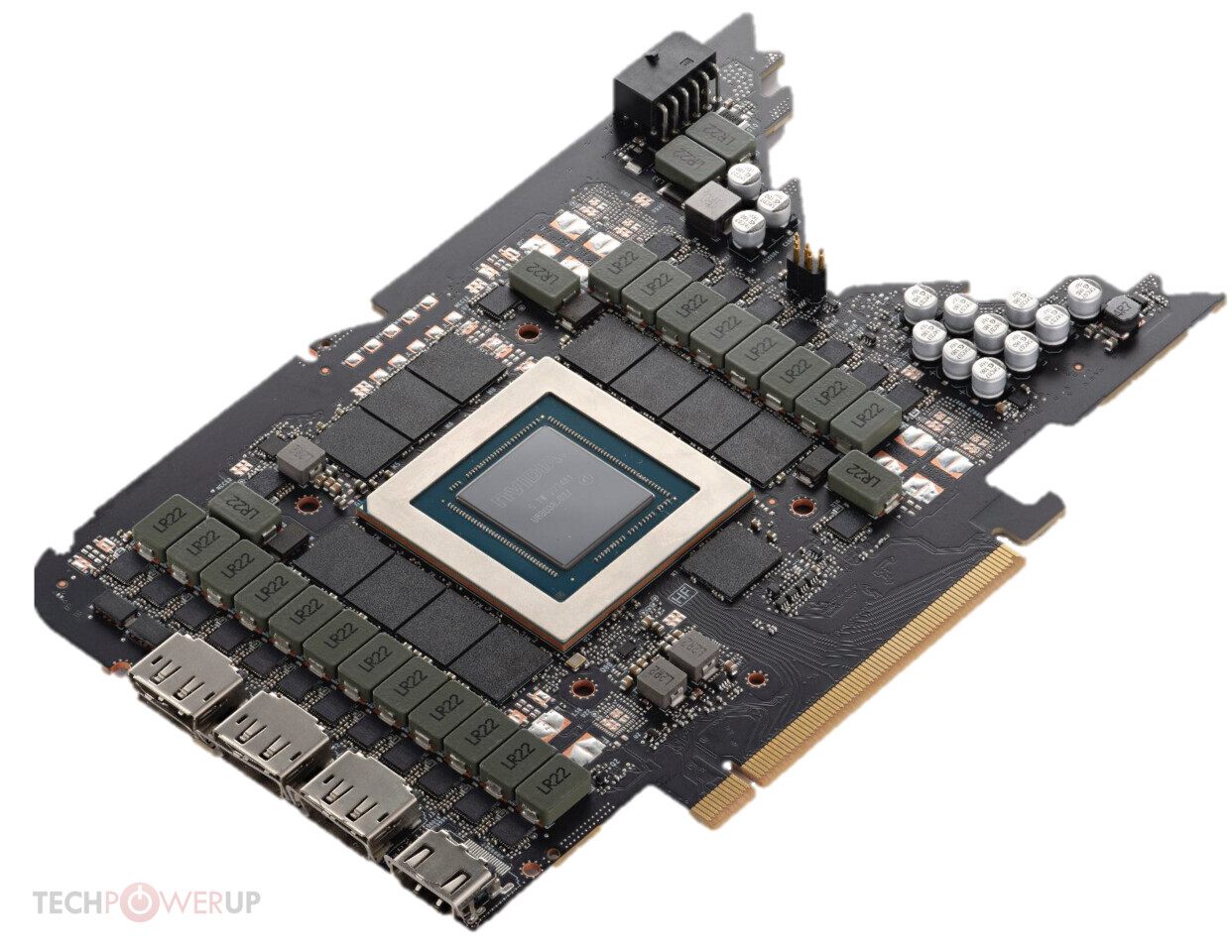
apparently it is
incredible how they design the most advanced graphics processor but fail so hard on the power connector
prime loom
I really dont understand how they messed this up so badly.
median marsh
i mean, they create a new market for this...
soon we have adapter plates, which have normal pci ex connectors and the 90° angle
no bending, no melting, fixed
prime loom
Its just a massive face palm...
Totally avoidable problem
Now I have to wait for the CableMod adapters to release, guess ill be running without a side panel for a while lol.
fallen oasis
Or just get a bigger case!
north arch
It's an engineering tactic. It needs more room for cooling so they want it in a middle slot, not humping the case
prime loom
fallen oasis
Or just get a bigger case!
Funnily enough I do have a bigger one, I just dont want to use it for this rig.
Im looking forward to getting some desk space back lol
fallen oasis
So you buy a gigantic card, stick it in a small case (when you have a bigger one available) and it's somehow the designer's fault?
prime loom
When its an entirely avoidable problem where an easily adoptable solution exists, yes.
wind egret
Somewhere, in Gigabyte's fine print: "For E-ATX cases only"
prime loom
fallen oasis
So you buy a gigantic card, stick it in a small case (when you have a bigger one...
Its not a small case.
Standard ATX isnt small...
Is it unreasonable to expect that it should fit in a standard case?
fallen oasis
It would be unreasonable if the dimensions weren't readily available.
wind egret
The 4090 is somewhat unreasonable.
I wonder if E-ATX gives more height from the motherboard.
prime loom
The card fits in great, with room to spare, the specs do not mention anything in regards to the required room for the power cable.
fallen oasis
And to be fair, a standard case might even cause you cabling issues on last gen cards too, if you aren't careful. The fact that it literally goes to the edge of the case with no room for cables is a little unexpected, though!
prime loom
Which would add 20+mm to the dimensions if so.
fallen oasis
If you don't wnat your cables to catch on fire, i would say you need a good 10cm gap, not just 2.
prime loom
fallen oasis
If you install them in anything but a perfect manner, you're basically screwed.
wind egret
10cm?
prime loom
This is what Im waiting for.
wind egret
I'm picturing one of those cube cases now.
fallen oasis
Yeah, if you bend the cables too much, they might catch on fire, basically, because of bad contacts.
foreign object debris inside the cables and all sorts of fun stuff can contribute.
 wind egret
Are those 140mm fans in the front?
prime loom
The Noctua CPU cooler is like a millimetre off the sidepanel lol
prime loom
wind egret
Are those 140mm fans in the front?
2x200mm
fallen oasis
I would bend those cables less, but good luck!
north arch
wind egret
I'm picturing one of those cube cases now.
I love cube cases, I'm bummed I have a boring tower now.
prime loom
fallen oasis
I would bend those cables less, but good luck!
They look worse than they are in the pic.
slim flax
This might be a bit off for this channel but does anyone know a proper RGB software to manage your PC's lighting?
Asus Armoury Crate, which is what I would need to use because of my mainboard and gpu, is the worst piece of software I've seen, performance is terrible, I get around twenty small processes that are all draining CPU and RAM
I just want to stop the notorious blinking in my case 😠
frank glade
ac freezer 360
 eternal spindle
What are the better drivers for Unreal stuff? Just the latest gaming driver or the Studio driver? (If it's relevant, asking for AMD cards, RX 6900 XT specifically)
eternal spindle
Okay. That awnsers that question. Thank you very much!
 olive gulch
@frank glade you mean this Arctic Liquid Freezer II
CoolerMaster Masterliquid ML240L V2 i am using this currently but in heavy load especially summertimes i hit 85 celsius
olive gulch
actually i was thinking about this Corsair iCUE H150i RGB PRO XT
i see it has full load of 2400rpm
and the airflow is 75cfm
which is great
but the only bad thing is a bit loud
 magic parrot
How good this PCE-4 drives compared to nmve's for work?

Its price kinda x3-x4 compared to nmve's with same sizes
Just curious why
median marsh
chances are high that it's just an nvme
you get those adapters for <$20 and you can put in any m2 nvme ssd
wind egret
magic parrot
How good this PCE-4 drives compared to nmve's for work?
It's an Optane drive based on 3d Xpoint instead of NAND Flash memory (typical SSDs). It was faster than nand at the time, but it's slower now, and probably not much more durable.
Intel/Micron were never able to upgrade it at the same pace as nand.
magic parrot
If i have not empty m2 slots left, i can buy adapter m2 -> pce and it will not affect speed? (I mean will not reduce it)
Thanks 🙂
Lol, 1.5 TB Intel Optane $5k...
wind egret
That's an interesting question. There's PCIe 3, 4 and 5, as well as NVME gen 3 and 4, which I assume correspond to the same number PCIe type. If you put an NVME 4 drive in a PCIe 3 port... maybe it would be slower? I don't know.
median marsh
the adapter card doesn't slow anything down
you are just using the lanes from the pci express slot, rather than from an onboard m2 slot
the only thing that might slow it down is that some pci ex lanes on the pci ex slots go through the chipset
but thats also the case for some onboard m2 slots
median marsh
no, 4
and that has at least pci ex4 from cpu to chipset, so good that you don't have a b550 then 😛
magic parrot
Wow, so, why it has su MUCH bigger speed compared to nmve?

8 gigs / sec
i mean m2
sorry
so depends on memory type?
median marsh
no, it's literary the same
they use 8 lanes
if you use 2x nvme in raid0/1 you would get something close to that
now take 4 nvme's and run them in raid1 :>
however, don't buy this card unless you know what you are doing, as it wont work on any mainboard
wind egret
4 of the best NVME 4 SSDs, 28000 MB/s 😄
median marsh
why not @iron zenith ?
yea, but i guess the failure chance is close to what those premade cards can archive
also, theoretical you can get 32gb/sec out of it, most likely something else in your system will bottleneck it anyways
oh wait..
i meant raid0 sorry
indeed 😄
wind egret
Either one sacrifices 75% of capacity, but raid 0 gets you the performance
median marsh
wind egret
Either one sacrifices 75% of capacity, but raid 0 gets you the performance
raid0 is stripping, so you get the capacity of each nvme
yea, while doubling your write speed
and best case 4x read speed
median marsh
i think i've seen things like those in datasheets, but i guess you are more curious about integrated transistors in cpus/gpus/etc.?!
which is truly another dimension
my guess is that at this point of scale it's not only a transistor problem
pretty much everything manufactured this smol is probably stressed by high temps
since we all know that warm things expand...
 rustic bramble
I know, I'm doing it
I've been using 16gb ram and a 7700k for too long
the question is to get 64gb or 128gb
I think 64gb should be good enough
really...? having one slot is that much better?
you would think moar chips = moar fast
alright, sweet
 neon radish
heya, anyone have experience with lenovo prebuilds? this thing looks like it rips https://www.lenovo.com/us/en/p/workstations/thinkstation-p-series/thinkstation-p360-tower/30fm002kus
rustic bramble
neon radish
heya, anyone have experience with lenovo prebuilds? this thing looks like it rip...
intel effeciency cores are not so nice for compiling
but it might not really matter
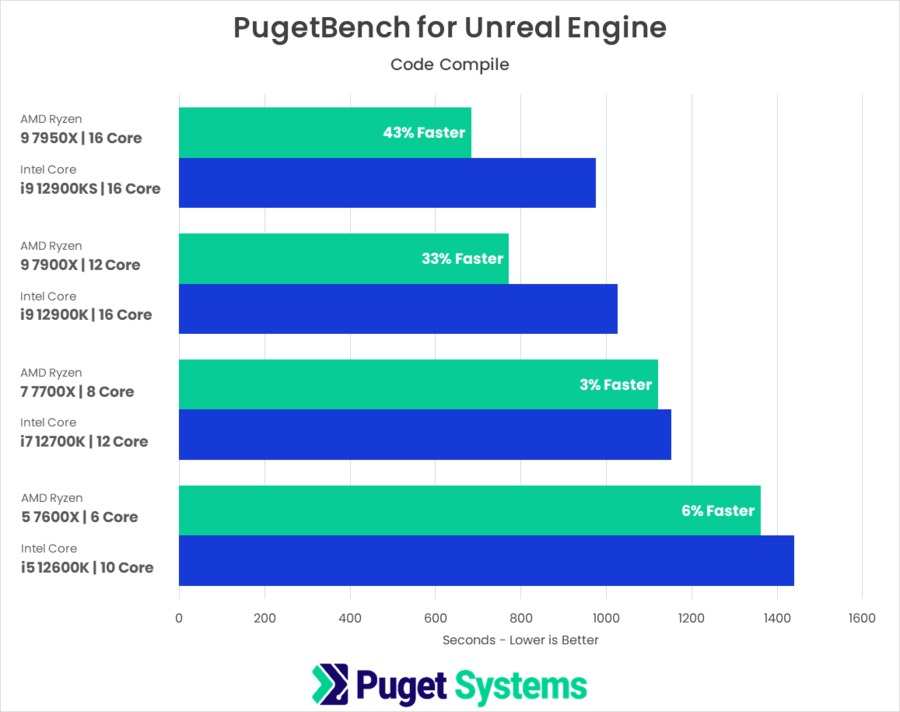
okay, which cpu do you have?
ah
oooh
that doesn't look like a bad deal either..
I've never needed vtune but it can't hurt
what kind of ram?
 shell rivet
Im trying to build a PC for gaming and deving. Idk what would be a good graphics card that I could use. A 3060 is a bit too high for me, but I was recommended a 1660 and a 2060. What would he a good choice or should I go for the 3060 anyway?
Im a solo dev working on a 3rd person 3d game in an open city. Was working on it until the environment kinda giving issues since I have crap hardware.
Oh ok. Gotcha.
Oh ok I'll check it out. I know what I need for all the other parts, but I wanted help on gpu
How much ram should I go for on the gpu
I know I'm getting 2x16 as well
Ok
 flat glade
Yeah I was so pissed reading mobo prices
Just give me a bios on a stick, I don't need wifi
shell rivet
I keep hearing bad things about the Radeon series.
I don't get it since I'm pretty new to actually building. My friends ALL crap on it, but they don't give reasons. So I just want to ask people that actually know what there talking about.
Lol great question. Im just wondering if there's a performance issue or something. I don't get the fuss
Oh ok I understand now XD
I just know the difference between GTX and RTX
It was just something I read about rtx being better than gtx from the article or whatever.
Fair
shell rivet
Also another newbie question.
Is there a fix for this or do I need to get different parts?

Ok because so far this is my build that I've been getting parts for slowly https://pcpartpicker.com/list/wKwwZw
Part List - AMD Ryzen 5 5600X, GeForce RTX 3060, NZXT H510 ATX Mid Tower
Alright. Sounds good. I'll be sure to do that
neon radish
opinions on 12700K vs 13600K? seems like they bench and cost about the same rn
neon radish
Mmmmmmm probably ddr4
flat glade
13 series beats it hands down for heavy stuff in benches I have seen
aaaagh, it's so close between the 13900k and the 7950x
flat glade
feels bad because it is a fair bit faster for compilation
but overall better for gaming
you won't forever...
the efficiency cores are just sus
wind egret
Efficiency cores on a CPU that burns 250+ watts is a somewhat amusing irony.
 dapper ember
hello all,
I have a new workstation, with nvidia RTX A3000, and using UE5.1
While moving in the world, all fine
But when Project Settings opened (or editor settings), the GPU goes berserk at 90% usage
any idea why or how to fix it ?
fallen oasis
Good thing I bought a 1200w psu
fallen oasis
To be fair, I have my heating off.
wind egret
The next Intel server generation is 56 (!) p-cores. Must be better than 224 e-cores. Or is that going to start a petty fight with some startup's 500-core ARM CPU.
prime loom
Damn going from a 4c/8t to a 16c/32c (7950x) is just night and day lol
I dont have time to make a cup of tea doing a full rebuild of my project solution anymore 😦
mighty cosmos
You've been on 8t all this time? 👀
That feels like pain, compiling with 8 threads lol
prime loom
200 seconds and done lol
prime loom
mighty cosmos
You've been on 8t all this time? 👀
That feels like pain, compiling with 8 thre...
Yeah lol
The 4090 just doesnt break a sweat.
Cant wait to jump into a UE5 project and take a look at Lumen at max settings haha
mighty cosmos
Triple check that connector tho (since it looks like the issues are mostly user error)
prime loom
mighty cosmos
Triple check that connector tho (since it looks like the issues are mostly user ...
I made sure it clicked and its visually perfectly seated.
Ive already left the rig running overnight doing a sync from P4
Mind you the GPU probably had no usage so i guess that doesnt mean much
mighty cosmos
I just wish AIBs were allowed to put normal connectors on 40xx cards otherwise the 4090 is an awesome card
(And I'll ignore 4080s existence...)
prime loom
I was pretty surprised with the size of the new connector. Its really small compared to regular PCIe connectors
Especially given how many PCIe connectors are attached to it lol
mighty cosmos
yeah, that connector in general makes me real uncomfortable lol
There was literally 0 need for it
prime loom
mighty cosmos
yeah, that connector in general makes me real uncomfortable lol
There was litera...
You have a 3090?
mighty cosmos
6900xt
prime loom
The 3090ti looks like it has the same type of connector?
mighty cosmos
I believe it was the first iteration of that new connector if I remember correctly
Or something like that
prime loom
I just dont remember hearing much of anything from the 3090(ti) launch about similar issues.
 bright tendon
does having more xtreme in the motherboard name does anything?
karmic trout
bright tendon
does having more xtreme in the motherboard name does anything?
sounds cooler
bright tendon
more like does buying higher end motherboard give you any advantage in utilizing your CPU and memory?
or is it all fancy RGB lighting
frank glade
depends if the extreme is in the chipset name
 bright tendon
hmm
cinder latch
frank glade
depends if the extreme is in the chipset name
i love how this official amd graph has two spelling errors next to each other
 north forge
cinder latch
i love how this official amd graph has two spelling errors next to each other
north forge
cinder latch
i love how this official amd graph has two spelling errors next to each other
which?
fallen oasis
I'm going to go with no?
bright tendon
What are some top of the line AMD GPUs that can compete with nvidias 40xx series?
median marsh
wonder how much pci express bandwidth the 4090 uses
most 3000 series are fine with 8x PCIe 4.0
fallen oasis
7
median marsh
it saturates 7 lanes?
"Raptor Lake" PC builders can breathe a huge sigh of relief—we're happy to report that the GeForce RTX 4090 loses a negligible, inconsequential amount of performance in PCI-Express 3.0 x16 (Gen 4 x8-comparable) mode. Averaged across all tests, at the 4K Ultra HD resolution, the RTX 4090 loses 2% performance with Gen 3 x16. Even in lower, CPU-limited resolutions, the performance loss is barely 2-3 percent.
so not even close to saturating 16x 4.0 lanes, so guess the really expensive amd chipsets aren't worth their money for a while
source if someone is interested: https://www.techpowerup.com/review/nvidia-geforce-rtx-4090-pci-express-scaling/
it still beats any other tested card in x16 PCie 1.1 😄
fallen oasis
I was just being facetious. 😛
crimson whale
trying to make a pc purchase decision, both high end builds and the only noticeable difference are the motherboards
Motherboard: Z690-A vs B660
the b660: Processor: Intel Core i9-13900KF Twenty-Four Core Processor (36MB Cache, 2.2GHz-5.8GHz) 125W (Liquid Cooled)
the z690: Intel Core i9-13900KF Twenty Four Core Processor (32MB Cache, 2.2GHz-5.8GHz) 125W - 253W
From a quivk google the z690 appears to be a higher end board, but Im wondering if that really matters and also about the cache difference + (liquid cooled) whatever that means...
north arch
The cache is used for storing upcoming prefetched instructions and data as well as some process switching stuff I think, and is processor-specific
north arch
I was wondering if that was the case
crimson whale
i see ty
and as far as the motherboard differences? Does that actually make a difference (significant or otherwise)? I cant imagine it really matters as long as it is supported
crimson whale
thanks for the info Laura, went ahead and made the purchase. Now here's to hoping the shipping process works without any damages >.<
 normal cairn
I would appreciate any feedback/advice on this build. Younger brother wants a gaming PC for about $700 but been a few years since I built one so I'm not sure what's all 'meta' for that price range currently. Based off LTT's $500 budget build from a few months ago https://pcpartpicker.com/user/Vazumongr/saved/hHkxgs (Please feel free to ping regardless of time)
 dapper hornet
Just found some laptop RAM sticks on sale
for some reason I can buy two 16Gb for 40€ each, or a kit of 2 for 144€. Seems too cheap to be true, but it's from a reputed seller - is there any difference between those kits or just buying the sticks one by one?
 lethal geode
Anyone know why my screen has been flickering and glitching for months at random times? I have taken it in to get fixed, they found no problems. I also update my drivers every time they need to be. The laptop is only 3 years old, and it started flickering a few months ago. It does it at random times every few weeks. Here is a video of me restarting it.
median marsh
this could have several reason, like a fried display controller or a loose flat cable connector
where did you drop it to get "fixed"? official acer support?
lethal geode
median marsh
where did you drop it to get "fixed"? official acer support?
No I forgot my mom called a guy from some shop over
median marsh
yea, they most likely can't really check that without disassembling half of the laptop
lethal geode
He did
median marsh
well, if he checked the cable and it isn't it, it's most likely the display controller
median marsh
which is why it might sometimes work, could be just a cold soldering joint
lethal geode
It gets hot
lethal geode
median marsh
which is why it might sometimes work, could be just a cold soldering joint
Yea you’re probably right
median marsh
i guess the problem either occurs when it's hot or when it's cold?!
lethal geode
Hot
north arch
gpu overheating's my guess
median marsh
well, the gpu seams to output fine on the external screen
north arch
when's the last time you blew out the ducts
lethal geode
Few months ago
north arch
median marsh
which is why it might sometimes work, could be just a cold soldering joint
or a fracture or similar
median marsh
yea, could also be in the cable actually
lethal geode
So how do I fix it
median marsh
but that's some problem that only real acer support can check for a reasonable time/money investment
like, at their workplace, where they have every single spare part
if it's within warranty you might be able to ship it in and get it fixed
lethal geode
I don’t have one near me
north arch
it'd be their factory
north arch
do you have canned air?
lethal geode
What’s that
north arch
vacuum can't build enough pressure
lethal geode
I don’t have that
median marsh
i'm not a fan of either
north arch

Falcon Dust, Off Compressed Gas (152a) Disposable Cleaning Duster, 1, Count, 3. 5 oz Can (DPSJB), Black
median marsh
pressured air just pushs the dust further in 😄
 median marsh
also you would have to block the fan somehow, because those can be damaged
 north arch
vacuuming can't get stuck on crud out of the ducting
north arch
and while fans do generate emf while spinning, quality fans have protection sufficient for quick bursts
median marsh
yea, but it's also not great for their bearings
north arch
slightly humid dust sucked into vents cakes on the inside of the ducting routing air around, and a vacuum can only generate 14.7psi to help dislodge it (in practice closer to 6-8psi for consumer grade stuff), while you really need a strong, quick burst of high pressure air to break the crud loose
north arch
target, walmart, etc should have it
lethal geode
So should I vacuum it
north arch
it's a must for electronics ownership, a key maintenance item
vacuuming won't do much
median marsh
no
lethal geode
ok
median marsh
because i feel like you have no idea what you are doing
and also, i feel like this wont solve the issue
median marsh
the issue shouldn't appear, even if it's full of dust 😄
lethal geode
Well let’s see
crimson whale
gotchya thx
serene dome
dapper hornet
for some reason I can buy two 16Gb for 40€ each, or a kit of 2 for 144€. Seems t...
Memory sticks in kits are tested together and they tend to be more compatible with one another.
Are you overclocking? Also, you want to be careful when messing around with LLC. You don't want it to overcompensate too much...
That's because it can differ between each motherboard.
flat glade
Cancelled my HYTE Y60 order as it seems to be bad with larger gpus
too bad, it looks so cool 😔
karmic trout
Hi guys
Where I can buy PC parts in Asia?
Amazon shipping fees are enormous
Aliexress u mean?
Is it safe to buy there?
 shrewd gust
Yow, question
What is the cheapest build (desktop or laptop) that can run UE5 well?
By "well", as in run at least 30-60 fps on average
karmic trout
I found ebay is a better option safety wise
What capacity is good for HDD to keep backup of UE projects and others files?
Now I'm looking between 2 or 4TB
 fickle vector
Hey, what CPU should I take for really smooth experience with Unreal Engine 5 + CLion (Visual Studio) ?
R9 5900X or R9 5950X
I'm hesitating between both but I don't really know if the second is too overkill for Unreal Engine, because it's also 250€ more expansive
Thanks a lot :)
median marsh
5900X is sufficient, 5950X is worth ~33% more (if you have much multithread load)
karmic trout
fickle vector
Hey, what CPU should I take for really smooth experience with Unreal Engine 5 + ...
I'm also planning to buy 5950x. Why is it overkill?
I think it's best if working with source build UE5
fickle vector
I don't really know, but I'm planning too, but it's pretty expansive
I have to buy a ventirad too, so it would cost me $700
karmic trout
fickle vector
I don't really know, but I'm planning too, but it's pretty expansive
for now maybe a bit expensive. But I think it will drop in price over time
I will buy it in 3-6 months
fickle vector
I want to buy it now
karmic trout
now you can afford 5900 😉
fickle vector
Why not the 5950X ? Won't it be better ?
fickle vector
Or maybe you're advising me to buy the 5900X, then sell it when the price of the 5950X is better ?
fickle vector
I currently have the 5600X
And it's pretty bad with UE5 and CLiion running together
karmic trout

I have an ancient PC rn
I'm on UE4)
Even this can run UE5 if to turn off Lumen, Nanite and some other settings
 modest coral
does anyone know that intel supported ddr5 rams (eg 6400mhz cl32) works with same speed on ryzen 7000 motherboards expo enabled?
 haughty mica
i have rx6800xt, what better buy, intel core i9 13900kF + Ddr4 ram OR amd ryzen 9 7950x + ddr5 ram
 wooden folio
Anyone able to help me pick a device for unreal. I’m trying to find a laptop that’s touch screen for portable development when I don’t have access to my pc at home
pale terrace
not a surface pro 9 for sure
fallen oasis
wooden folio
Anyone able to help me pick a device for unreal. I’m trying to find a laptop tha...
Do you want to run UE on the actual laptop? Or maybe use it as a dumb terminal accessing your instance at home?
wooden folio
fallen oasis
Do you want to run UE on the actual laptop? Or maybe use it as a dumb terminal a...
I’m tryna run it on an actual laptop fully rendering everything
fallen oasis
You're looking for a pricy laptop then.
pale terrace
pick a cpu, pick a gpu, pick some memory, mix in some storage. you should be good. dont skip on any of those parts. also, since we dont know what you are doing... might be harder to give more accurate suggestions
wind egret
pale terrace
not a surface pro 9 for sure
You jest (maybe?) but I've used played with a Surface Pro 2 in Unreal. It could run the shader editor in UE4 but the screen was so small you couldn't see the spaghetti.
 fading idol
wooden folio
I’m tryna run it on an actual laptop fully rendering everything
fading idol
wooden folio
I’m tryna run it on an actual laptop fully rendering everything
I got ASUS Zephyrus Duo 16. The best laptop that money can buy today.
It has two screens, a CPU that is on par with desktop version of 3800X, it has 3080 Ti Mobile with 16 GB VRAM...
Here's a complete review video of it - https://youtu.be/U_4gd1CyECQ
median marsh
looks wild, the 2nd screen however must be awesome for working on timeline stuff
 frigid heath
lol ive dropped coffee and beer on laptops a few times... ill never buy a top line
keyboards are easy to replace
wooden folio
fading idol
I got ASUS Zephyrus Duo 16. The best laptop that money can buy today.
It has two...
Tysm I’m defiantly thinking about this
north arch
wooden folio
Tysm I’m defiantly thinking about this
twitch defiantly is not the word you seek, you want definitely
defiantly is proudly in open opposition to
north arch
could be I suppose
wife: your budget is $800
wakaba: defiantly spends $2,300
it looks good though
frigid heath
yea that 2nd screen you can see the money spend from 30m away 🙂
 quartz oxide
Best laptop for unreal engine… GO!
north arch
anything and a connection to a remote workstation or compute instance
 turbid galleon
karmic trout
External HDD or Internal?
turbid galleon
karmic trout
External HDD or Internal?
Well i prefer using ssd
karmic trout
turbid galleon
Well i prefer using ssd
HDD for backups
fallen oasis
prime loom
Otherwise they are basically identical
You're going to get good data rates, but surely there's going to be more lag time in starting transfers?
frank glade
by far the easiest solution for me was onedrive...autobacks everything and file history (saved me a ton of times). I have an 2xhdd rack but it was just a pain to turn it on very day and run the sync
turbid galleon
median marsh
at least e-sata exists
Or DNS server 💀
turbid galleon
frank glade
by far the easiest solution for me was onedrive...autobacks everything and file ...
Oh c'mon i hate Microsoft
frank glade
yeah but it's so easy! get a dual rack in raid and it costs you what...300$+...or you can get 30 months of seamless storage
median marsh
turbid galleon
Or DNS server 💀
did you mean NAS? Oo
but isn't stuff like onedrive also prone to be target of malware that encrypts files, if it's always connected?
i feel like nothing can replace an off site backup on actual media
yea, but to your system it's transparent
ok, thats pretty cool then
 paper geyser
Is an upgrade of Mobo + CPU worthwhile right now? considering some Black friday and Cyber Monday deals
Running on a Ryzen 5 3600x and MSI X470 Pro Carbon.
Looking at this:

 cedar wedge
You can always transfer that money on the CPU to buy instead a 5950X
You'll realistically need as many cores as you can, keep in mind that you'd want 2 GB of RAM per Core too

 fringe sonnet
cedar wedge
You can always transfer that money on the CPU to buy instead a 5950X
You'll rea...
fringe sonnet
cedar wedge
You can always transfer that money on the CPU to buy instead a 5950X
You'll rea...
isnt the right one better?
fallen oasis
Single thread is still important.
Plus, uf it's 12v16 cores, but the 12 cores run 40% faster, it's better.
Not sure about the speed difference between 5950 and a 7900, probably worth a check.
(it's not just about core speed)
The 7900X is probably better in this case. It significantly outperforms the 5950X
fringe sonnet
cedar wedge
And for UE no, it's mostly about Cores and 5950X has more
thanks
fringe sonnet
fallen oasis
Single thread is still important.
going to check that out
cedar wedge
Usually between generations it's a 10% increase iirc
So 2 generations would be around 20% on single core
fringe sonnet
hmmm thats good thinking
cedar wedge
Probs even a tad faster since AM5
fringe sonnet
i have 2900 euro is that enough to make a good computer then ?
 cedar wedge
Yeh, new generations are always gonna be somewhat better indeed, atleast you would hope, you would wanna balance between speed and amount of cores usually
We're talking of 2 different beasts here tho, AM5 may allow way more improvements compared to AM4, didn't really look into it
But that would mean you need to change most of your hardware since you'll most likely be going for DDR5 too
5950x is still extremely good
fringe sonnet
cedar wedge
But that would mean you need to change most of your hardware since you'll most l...
wel my computer chrashed so i need to buy the whole computer new; i think i beter go am5 then
thanks for the insights i think i am going for that
cedar wedge
At this point yeah, if you building from the ground up go for AM5
fringe sonnet
thanks
going to do that
and uuuhhhmmm
beter go low on ram guess i can upgrade that later yes?
cedar wedge
2 gb per core ideally iirc
fringe sonnet
like better 4 X 8 then 1X32 guess i can upgrade it later with my extra money in about an half year
thank you lannis
helped me alot out here
cedar wedge
You would want to Dual Channel them
fringe sonnet
okay
cedar wedge
2 sticks better than just 1
cedar wedge
So if you have a 16 cores CPU, minimum would want 32 GB
fringe sonnet
if you have time to make a computer of 2900 euro be free to pm the hardware stats haha :p stil going to build it myself and searching my own websites to make it
okay thanks
frank glade
cedar wedge
At this point yeah, if you building from the ground up go for AM5
but realistically speaking, in 2-3 years would we be able to drop in new amd cpus on todays motherboards? or you'd be better suited with a new gen MB+CPU?
cedar wedge
The premise of the AM architecture was to keep it compatible as long as possible, the life spans seem to be 6-7 years for a new one to drop
If you wanna be up to date CPU wise, I had the need to change every 2 new generations
But I was running mid scope
fringe sonnet
that means am5 then ? 😄
frank glade
I'm undecided between 13700k (slightly faster) and 7900x (new platform, more upgrade options later) 😔
median marsh
i've never in my life upgraded the same platform... (except for memory)
fringe sonnet

after an houre of searching this is going to be mine motherboard
lol now the rest that define the beastmodus of mine untold computer :p
can i hear some stuff about the rtx 3060 /3070 /3080 / and 3090 ? 😄 3090 is alot of money i think i beter do everything good and just use a 3070 or something
median marsh
3070 isn't an option for UE imho
either take the 3060 for the extra vram, or go 3080
fringe sonnet
median marsh
either take the 3060 for the extra vram, or go 3080
thank you ben; there are alot of 3080 is a 10gb 3080 good enough ?
median marsh
well, at least it's better than a 3070
the 3080 TI has 12GB iirc (same for the 3060)
 frank glade
median marsh
i've never in my life upgraded the same platform... (except for memory)
frank glade
median marsh
i've never in my life upgraded the same platform... (except for memory)
Me neither, but I always bought Intel and it seems like every new cpu had a new socket...so not because I didn't want to 😅 if AM5 really will have that many years of support it sounds better
median marsh
frank glade
Me neither, but I always bought Intel and it seems like every new cpu had a new ...
sure, but an upgrade that's worth it, might cost you as much as a cheap version of the new generation 😄
upgrade plan is good if you have to settle for the low budget option in the first place
that's just my personal impression
frank glade
🤔🤔🤔
median marsh
also i wouldn't expect that AMD pulls off another zen1 => zen3 performance increase
they probably all gonna spent the next years to get their power consumption / temps down
north arch
I'm looking for a very specific pointer-driver recommendation. It needs to be handheld, single hand, WIRED, scroll wheel, 3+ mouse buttons (scroll wheel click is fine for one but the others have to be discrete buttons that can be operated while moving the cursor), joystick or accelerometer driven (no trackball, no touchpad, no surface necessary).
fringe sonnet
eeuuhhhm were to read vram ? :p
fringe sonnet
fringe sonnet
like this?
.
north arch
the location it'll be in prohibits wireless, and no trackball because of trapping contaminants, and I hate touchpads
frank glade
I'd get something with 16!

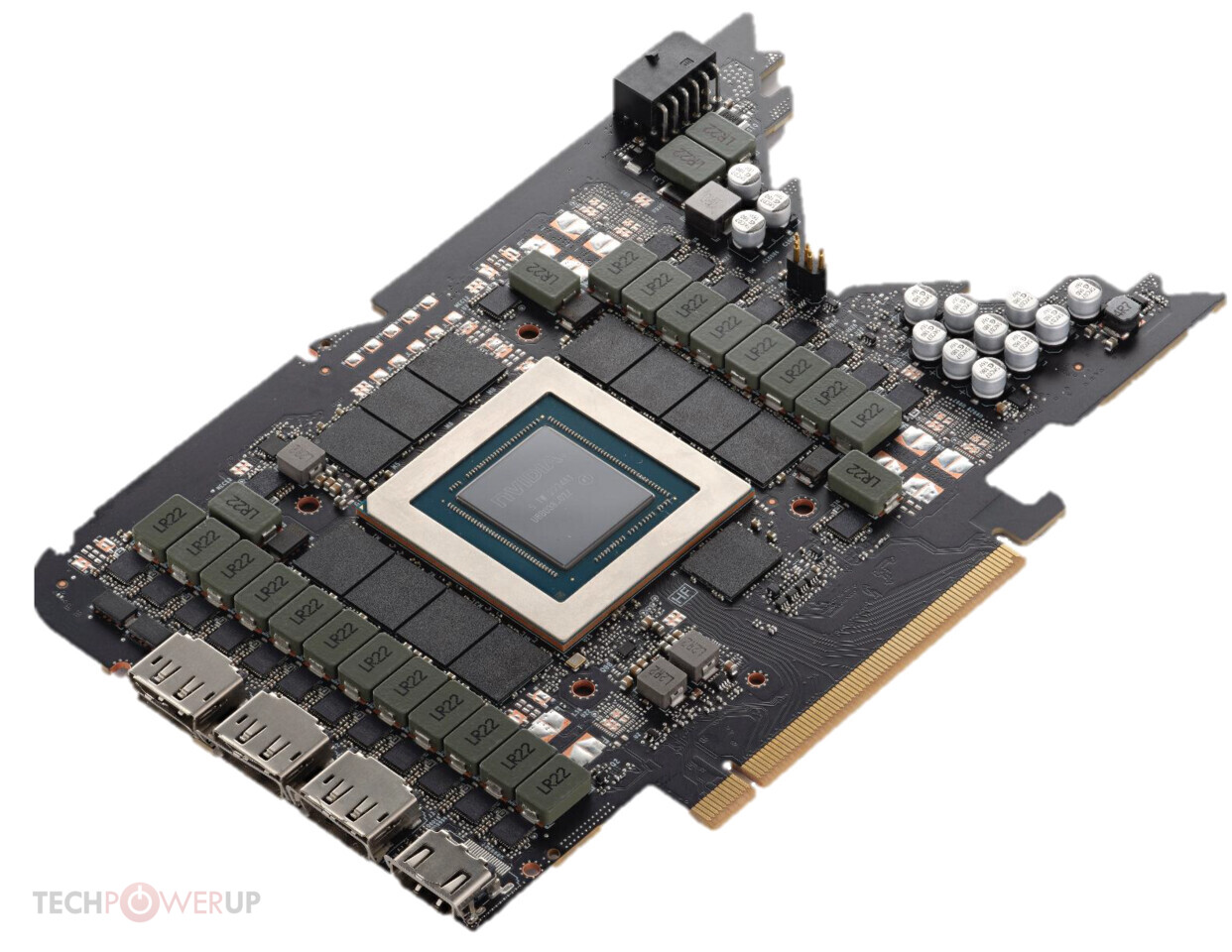
 fallen oasis
Probably
 hybrid pendant
I've been looking for a laptop that can run UE5 smoothly without lag. Would an RTX 3050 graphics card work?
arctic sluice
just run? my gtx 1060 seems to run unreal smoothly but i wouldnt even wish to run projects like the city sample
hybrid pendant
arctic sluice
just run? my gtx 1060 seems to run unreal smoothly but i wouldnt even wish to ru...
What's the city sample?
north arch
run != develop with
 tawdry drum
Practically means AMD is the only choice 😭
hybrid pendant
Well, do u know how far UE5 could go with rtx3050?