#hardware
1 messages · Page 4 of 1
 spark girder
spark girder
spark girder
Mac silicon to be supported but only from source, launcher will only provide x86_64 binaries.
 wind egret
from 24 to 64 cores only 40% faster 🧐
 slim flax
Exactly my plan!
Also curious, so far I've heard that the 13900 is slightly better than the 7950x but I'm waiting for Puget's UE specific benchmark on this
 shy pike
Hey anyone looking for a high end laptop for Unreal? Selling a nvidia rtx quadro 5000 Razer Studio laptop with 32gb of RAM
 vagrant anvil
https://www.pugetsystems.com/labs/articles/Unreal-Engine-13th-Gen-Intel-Core-vs-AMD-Ryzen-7000-2377/ here you go all. Exciting to see competition back in the market.
slim flax
vagrant anvil
https://www.pugetsystems.com/labs/articles/Unreal-Engine-13th-Gen-Intel-Core-vs-...
Wow, thanks for the breakdown! There's alwasy trust in you guys
I assume the ryzen's a bit faster cause it utilizes all 16 cores while the intel one theoretically only has the 8 performance cores to offer
vagrant anvil
thats my assumption. they provide the same number of threads, but Ryzen just has them all at peak performance
we changed up how we present the articles, but here is how they stack up against Ryzen 5000 and Intel 12th Gen
 slim flax
is it better for normal gaming purposes though?
vagrant anvil
we dont test gaming anymore. haven't had any chance to look at other reviews yet.
I'm more of a 4k, ultra settings player anyway, so CPUs dont make as much difference
 fallen oasis
vagrant anvil
we changed up how we present the articles, but here is how they stack up against...
fallen oasis
vagrant anvil
we changed up how we present the articles, but here is how they stack up against...
Do you have stats for the TRs?
(the 3xxx and 5xxx)
vagrant anvil
Puget Systems
AMD's new Threadripper PRO 5000 WX-Series CPUs have arrived, promising faster performance with the same high core count and platform features found in the previous generation. Just how must faster are these new CPUs in Unreal Engine, and how do they compare to the Intel Xeon W-3000 line?
fallen oasis
Thanks!
No way mine compiled the latest source in 491s though.
It should say which version it compiled!
vagrant anvil
Its compiling 4.26 in Visual Studio 2019.
on our to-do-list for next year is to break that portion off and make a standalone "programming/code compile" benchmark package. That should make that section a bit more useful
just need to hire a programmer so that we don't have me, a former game environment artist, trying to learn code
slim flax
ha I'd gladly offer myself if you send me the cpus lol
fallen oasis
Heh
slim flax
I wonder why the intel's single core performance is so much better though, shouldn't the amd be running a higher frequency?
 vagrant anvil
in the CB article I mentioned how these tests were run at stock settings. If you were to enable PBO, the single core would score around 2000'ish for Ryzen 7000
Didn't get a chance to look at Intel's MCE to see what that would add, but those are running stock as well
fallen oasis
PBO?
vagrant anvil
it just varys so much between motherboards, and coolers, etc that leaving it at stock give us a better baseline to then build up the whole system
fallen oasis
Indeed.
slim flax
Unfortunately these results don't make it any easier for me to decide haha. Sounds like the AMD is just marginally "better" than the Intel when it comes to compiling code and shaders, but the Intel one is significantly better when it comes to gaming. And, it's 100€ cheaper, and allows use of older ddr4 memory and mainboards that are cheaper to get.
fallen oasis
Plus if the stock cooler doesn't deliver, that's their company's fault.
So it should absolutely affect stats.
Yeah, my TR mobo was like £800. Ridiculous.
vagrant anvil
slim flax
Unfortunately these results don't make it any easier for me to decide haha. Soun...
I would strongly advise going with DDR5, especially for code compile. When we tested intel 12th Gen, DDR5 was about 20% faster than DDR4.
slim flax
vagrant anvil
I would strongly advise going with DDR5, especially for code compile. When we te...
Oh yea absolutely, but the CPU base price alone, and their Mainboards, are cheaper than getting the 7950x, which seems to be on par in unreal, but worse in games
So I might build my workstation that's supposed to last for the next year's with the Intel instead I guess?
GPU will be a RTX3090 if that matters
vagrant anvil
but how much "worse"
if you are gaming in 1080p, and you drop from 200FPS to 180, are you actually going to notice?
slim flax
Not really but what would be an opposite reason to get the 7950x instead if it + it's Mainboards are more expensive?
It's a really on par race I feel, so power consumption and all that stuff needs to be dragged into the equation
I'd be fine with getting both tbh, I'm just unsure about the pros and cons of both CPUs
vagrant anvil
yeah, in the 7950/7900/13900 race, I dont think you'll have a bad choice.
slim flax
vagrant anvil
if you are gaming in 1080p, and you drop from 200FPS to 180, are you actually go...
So the extra 20 fps you can have with the Intel are the cherry on top, even if not really noticed, because I can't find a really good pro argument for the 7950x on why it should be better
Oh, I believe one thing is it doesn't require Windows 11 for it's thread director 😛
vagrant anvil
true. the 7950 is still the ultimate multi-core performer. the "worth" is hard to pin down as that is different for everyone
fallen oasis
The only thing you're really going to notice is the compile times.
You absolutely notice 100s vs 80s 😄
slim flax
So what would you suggest to someone who's mainly doing UE game dev / programming, but some gaming, music production and a bit video cutting? Unfortunately, that's a bit of everything haha
vagrant anvil
I mean, we sell a LOT of TR Pro 5995WX for unreal dev work, but thats not worth it to a lot of people
fallen oasis
If you aren't compiling the engine from source regularly, you don't need a TR
slim flax
Yea that's a bit out of my budget. I'm building this PC for my use case to last for the next 6-8 years
vagrant anvil
the other thing to consider, this is AMD's first CPU in this socket, so you could potentially upgrade CPUs in a couple years. Intel is on the second CPU for its socket. It will likely see new CPUs, but Intel will Intel
that said, if you did choose 13900k, I doubt you'd regret it.
 agile lodge
jay2cents explained it well
fallen oasis
Tbh, it's only tough because it's so inconsequential.
If it was clear cut and one was definitely better, it would be an easy decision.
slim flax
fallen oasis
If it was clear cut and one was definitely better, it would be an easy decision.
Absolutely
My problem isn't the money, as Daekesh said, a few hundred extra bucks for 8 years isn't much, it's more that I wanna make the right choice
And with them being so close together, it's hard to find the winner
fallen oasis
Think of the alternatives then.
If you spent those 200 extra dollars, what couldn't you do?
slim flax
...have a couple more FPS in games and a better IPC (at least the current benchmarks suggest that)?
BUT if I didn't, what is it that the amd would've done that I wouldn't have with intel
so far the only negative point when considering benchmarks is that the intel drains more power, which makes sense though if it's around 5-10% faster
 frigid heath
slim flax
Yea that's a bit out of my budget. I'm building this PC for my use case to last ...
frigid heath
slim flax
Yea that's a bit out of my budget. I'm building this PC for my use case to last ...
why build a pc to last 6 to 8 years?
you could buy a high end system thats 3 or 4 years old on the cheap and use it for 4 years?
cuz thats what ur looking at in 4 years
buy it for the years u get warranty on it 😛
200$ could be 10% of ur next system in 3 years:P
also high end
buy what you need now.. not what might make ur system less suck in 6 years
intel gettin soo behind... AMD just killin it with the ipc gains
slim flax
frigid heath
why build a pc to last 6 to 8 years?
So you'd go for the amd?
frigid heath
yea prolly , not really up to speed on the latest...
vid card i really couldnt say... some ppl need cuda ... i dont
i have an amd 3600 now... it aint fancy but gets the job done
if it got fried tomorrow i really couldnt care cuz i can get a faster cpu for 200$
my rig is not build to last
slim flax
My daily work is Unreal C++, but I do plan to play some titles I couldn't play on my old ass machine here 😄
And in gaming the 13900k seemed a bit better but it's a battle against windmills I feel
wind egret
at 4k the difference in gaming matters even less
and the 5800X3D is still tops for many games
which is almost annoying at this point.
wind egret
if electricity is free, 13 gen is fantastic
comes with free space heater and toaster oven
distributed compilation rarrr
I wonder how long before a CPU on a pcie board makes it to the consumer market.
Are they?
I've never looked them up. Maybe they don't leave enough room for RAM.
vagrant anvil
like the Xeon Phi? they went up to like 72 cores, but have 4-way hyper threading, so like 288 threads per card, and 384GB of RAM
thats also kinda way they tried with the NUC 12. the CPU/motherboard is basically a PCIe card, so you could update your system buy pulling that out and putting in a new one. swill waiting to see if they keep going with it
frigid heath
wind egret
if electricity is free, 13 gen is fantastic
comes with free space heater and toa...
that would be in qatar.. you would have to buy an extra airco tho
vagrant anvil
exactly
wind egret
Somehow I like the idea of ATX being thrown out and making everything out of PCIE cards.
vagrant anvil
it always lags behind their CPUs too, so like by the time it sees a 13900, the 14th gen will be almost out
right. I'd like for them to really go all in on it, and try to get AMD to make one, make it a standard form factor.
until them is kinda a niche thing
our customers are always asking for smaller computers, but video cards keep getting bigger
wind egret
Can't fit 800W of hardware into something the size of the old NUCs. Not without cooling by a power washer.
I like the idea of a thin client that fits in your pocket, paired with dumb portable monitors.
Hopefully not the 7030ti
In 2017, Intel announced that Knights Hill had been canceled in favor of another architecture built from the ground up to enable Exascale computing in the future. This new architecture is now expected for 2020–2021.
wind egret
so there's no Xeon Phi 3 and I can't find any numbers for Phi compiling C++
wind egret
stares at Arc GPUs
vagrant anvil
in Intel's defense of canceling the Xeon Phi. they were like $7000 and got outclassed when things got optimized for GPU
wind egret
It felt like they were outclassed when they came out. Personally I was hoping they'd be a good alternative to multi-CPU Xeon motherboards, but that was looking in from the outside.
Now there's those ARM chips with 100+ ARM cores.
fallen oasis
There's an ARMy of cores!
wind egret
The 13900K has a 125W TDP and a 253W PL2 that can be overridden. But what happens to your 13900K if you actually hard limit it to 125W?
Performance-core Base Frequency 3.00 GHz
Efficient-core Base Frequency 2.20 GHz
fallen oasis
That's not the best.
wind egret
Granted you'd never use it at TDP, but it makes me think you could make it a 35W TDP if you can lower the base frequency enough. (Does the CPU get unstable if you pull it down that much? Or is base frequency completely arbitrary...)
fallen oasis
I'm pretty sure something would go wrong if it went down far enough.
wind egret
Hm. Maybe they make the -T models with different transistors.
E.g. The 12900T goes down to 1.4/1.0 Ghz instead of the K's 3.2/2.4. But the turbo speeds are almost the same, so that's probably one hot potato.
Maximum turbo power for the K is 241, but for the T is 106. Yet the K's turbo speed is 5.2 Ghz, but for the T it's 4.9 Ghz. It can't possibly be losing 6% speed for 56% less power.
fallen oasis
Less cores?
wind egret
Same cores. Assuming these figures mean anything at all, maybe Intel's assumption is that T processors aren't required to stay at their turbo speed for the same duration as K processors do.
Maybe they're poorly binned laptop parts.
vagrant anvil
The t-series are lower power version for micro computers with minimal cooling. You'd never really see them in a full size desktop
they are probably poorly binned desktop parts
wind egret
The laptop chips have different feature sets so it does seem like they can't be based on the laptop chips.
 frank glade
What if I don't do rendering or compiling, but instead need good single thread perfomance for DCC apps like 3ds, Maya, Substance Painter, etc (and multitasking). Should I get the 13600k/13700K or are there better options?
 meager zealot
If I had the choice between a 3070 and a RX 6800 non xt, which will be better for a solo UE5 developer, all the way from using the engine, to the software making the assets for the game?
 fervent holly
any one knows if i7 11700 will be good for Unreal Engine 5 ?
 rugged osprey
hmm is it worth using ryzen master on am5 processors?
also do i need to do anything to make sure UE is using all the threads?
wind egret
meager zealot
If I had the choice between a 3070 and a RX 6800 non xt, which will be better fo...
The 3070 only has 8GB of VRAM versus 16GB. Although I'm not sure what makes the 3070 so popular and I'm concerned I've overlooked something. GDDR6X doesn't seem that compelling.
meager zealot
While the extra vram looks compelling, we do also have to take into account the rest of the hardware, like the cuda cores for example. Also Nvidia is way better suited for blender for example
wind egret
Render your scenes in UE 😄
vagrant anvil
frank glade
What if I don't do rendering or compiling, but instead need good single thread p...
most modeling tasks are single threaded. Some simulations, such as cloth, fluids, particles, ridgid body, etc will sometimes be single threaded, or multi threaded. Each DCC handles them differently. if you do any of those, open task manager then generate the cache and see what the CPU does. If you don't, and you just do modeling, most modern processors are more than fast enough unless you are have a huge modifier stack on something with hundreds of millions of poly's (just dont do that)
frank glade
I'm not unhappy with modeling speed, but usual operations that seem to take more and more time, like unfolding many/large meshes, auto UV layouts, 4k projects in Substance Painter slowed down (looks like it uses the CPU a lot in working with materials)
 vestal shoal
Hey everyone, where can I buy an off shelf PC, desktop or laptop, that will run 3D software smoothly? I’m struggling to understand what I need. Im running on a Mac and it’s so slow… help!
vestal shoal
Only Blender at the moment

How does this look for 3D work? I’m pretty clueless and have put this together after watching YT videos
vestal shoal
Thanks for the feedback I really appreciate the help. I’m currently working through the Kitbash Minerva challenge and I’ll be doing this type of work.

Have you ever wanted to learn how to create your own worlds in Blender? Well now you can! In this video, William Bang from CriticalGiants takes you step-by-step through building your very own planetary settlement using the free Mission To Minerva Kit from KitBash3D.
Download the Free Kit here: https://kitbash3d.com/products/mission-to-minerva
...
Is this better?

 north arch
Ew, windows 11... Windows peaked at 95!
vestal shoal
What set up do you suggest?
It really feels like you need to be an engineer to buy a PC 😅
Ok, modelling and rendering
Eeevee
Appreciate the help. I’ve also asked in Blender forums and eveyone is more than happy to tell you what NOT to get, but not what to get which isn’t very helpful 😂
I’m not fussed about price. I just want a machine that will work and not chug along. It should be able to handle unreal as well
I work in advertising so I’d imagine more high end automotive rendering
What set up do you use?
 mighty cosmos
All I know is that I'm getting 128GB of ram the next time I upgrade
fallen oasis
I have that now. Smoooooooooooooth sailing.
mighty cosmos
64GB at the moment in some cases feels barely enough
 opaque pond
how long will a 3700x last?
 opaque pond
vestal shoal
opaque pond
vestal shoal
ehh you can do better
fallen oasis
You don't need a 1200W cpu
vestal shoal
opaque pond
ehh you can do better
What do you suggest?
vestal shoal
fallen oasis
You don't need a 1200W cpu
What do you suggest?
opaque pond
well a 1000W psu
opaque pond
and maybe a better cooler for the same money
fallen oasis
Be Quiet! is my go to brand.
 median marsh
Nvidia recommends an 850-watt PSU for its Founder's Edition (FE) 4090 and they have to play it safe and add some margin
but some 3rd party cards come with 1200W recommendation
after all, it depends on the PSU, there might be 800W ones which can handle the transient spikes just fine, and there might be some which don't
well, even within the same brand there will be differences
vestal shoal
Ok, it sounds like 1200W could be too much but if it’s not going to negatively impact performance I’ll just keep it
I would rather overspend than go budget
median marsh
i thought we got rid of that 50% myth
which may have applied to PSUs 10 years ago, but not to the 80+ stuff
where was the source?
there was a video from a corsair guy which said it's not true anymore iirc
yea well
1-2% efficiency difference..
vestal shoal
Does everyone feel more comfortable with this?
 median marsh
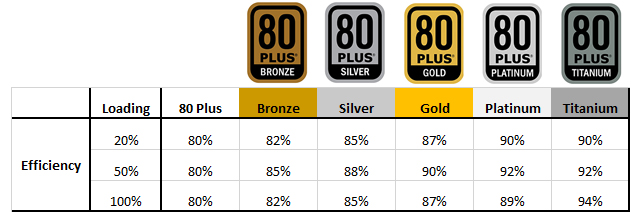
most people here go gold+ anyways
like the majority here could even calculate/assume when they hit 50%
are you gonna say that you will mostly use 600W in a 4090 system? because i guess it's rather half of that
and most likely closer to 600W while the gpu has load
median marsh
anyways, get the 1200W PSU if you don't mind the money, better safe than sorry
vestal shoal
 median marsh
uhm, idk
rather get an nh15 or a bequiet darkrock pro 4
funny enough there was a company which sold OEM keys in local supermarkets which got took down not too long ago
vestal shoal
Thanks for the heads up
median marsh
doubt
i guess those keys have been supposed for pre installations, which never took place
vestal shoal
median marsh
rather get an nh15 or a bequiet darkrock pro 4
I’m a bit restricted by what the site offers
median marsh
the EU law said, that customers can sell their keys, not that vendors can sell OEM keys
but idc too much about that honestly, got 2 win7 keys from cases from the trash which i've turned to win10 licenses 😄
vestal shoal
Is it no good?
Aha sorry I will use that site when I’m at my desktop. I promise!
That’s super helpful
Buying a PC is a lot of effort!
well, building a PC
Yes I would have had no idea about that if it wasn’t for you!
I would much prefer a pre built PC
vestal shoal

Kingdom Key PC Build 2022 by Viet_tommy - Intel Core i7-13700K, GeForce RTX 3080 10GB, Fractal Design Meshify 2 ATX Mid Tower
Pc part picker is very helpful. I can just look at other peoples builds
I’ll just copy
north arch
32gb ram and 10gb vram might be considered light for dev work
vestal shoal
PC Builder - Intel Core i7-12700K, GeForce RTX 3070 Ti, Phanteks Eclipse P300A Mesh ATX Mid Tower
What are your thoughts?
Shit forgot the VRAM
I can’t add the 13700K at the moment
PC Builder - Intel Core i7-12700K, Radeon RX 6800 XT, Phanteks Eclipse P300A Mesh ATX Mid Tower
But increased the VRAM, I’m not sure about the brand though
Price pretty reasonable
opaque pond
What do you think about the 3700x anyway?
vestal shoal
I will get the 13700K but PC part picker doesn’t have the option atm.
I’m not entirely sure what your last comment means
vestal shoal
Ok that’s added but with disclaimer ‘If the motherboard is using an older BIOS version, upgrading the BIOS will be necessary to support the CPU.’
vagrant anvil
if you are doing blender rendering, then you are better off with Nvidia. a 6800 XT is slower than a 2060 Super according to their benchmark database.
it takes a LOT to max out VRAM in a blender scene
I'd only go DDR4 if you are trying to keep this build cheep. DDR5 will improve shader and code compile by about 20%.
vestal shoal
Thanks for your input
 prime loom
November 3rd is the announcement for release date i think?
slim flax
ha let me know if you figured that out, I'm in front of the exact same question 😛
prime loom
Even though AMD are more expensive right now, im going for the 7950x
slim flax
I think that's what I am leaning towards too as well
prime loom
New Intel CPUs draw a lot of power.
slim flax
I've read somewhere that the 13900k will be the last cpu on this socket, while the 7950x is the first one
prime loom
If you plan on using the same mobo in the future for a CPU upgrade, then yeah, I wouldnt go Intel.
slim flax
prime loom
New Intel CPUs draw a lot of power.
Yea, I mean you can set a power limit without affecting too much of it's performance, but Intel still seems to draw a bit more than the AMD one
prime loom
Me personally, I usually buy new stuff after years lol
My current rig is 6 years old.
Ill probably go another 6 years before upgrading again after I buy all new gear this year.
prime loom
Im going all out with a 4090
slim flax
Nice! Yea i think the 3090 will be "good enough" for the next years for me
It's only the cpu that I am still unsure with
prime loom
Yeah it probably would be.
4090 seems rediculously overpowered that im confident it will last at least 6 years 🙂
If not 10 haha
slim flax
I would hope lol
I think the 24gb of Vram is a real nice to have for the future, the 3080 has 12 (or 10, I forgot), and there's currently only like a 200€ difference between them
GPU prices have become somewhat reasonable fortunately
prime loom
slim flax
GPU prices have become somewhat reasonable fortunately
You mean last gen prices have
lol
Im waiting for AMD GPUs to release towards the end of the year before I get a 4090
My hope is it will push the price down at least some.
wind egret
4090 wasn't priced that badly but it's all al-a-scalp now.
frigid heath
i thought scalping was over... enough supply these days
wind egret
Crypto eating up every card is over with, but not having enough cards for the first few weeks is probably 'normal'. Especially as each new generation of cards launches more slowly than the last.
Should be better when they launch the 4080 and whatever the 4080 12GB version is renamed to (surprise, it's the MX4080!).
north arch
4080 12gb would be 4190 or 4092?
slim flax
So you've went for the Intel? Don't know if I understand correctly 😅
slim flax
Sales for the Zen4 amd processors are shitty right now but I believe that is because people can't upgrade their rigs with them and with the prices of motherboards and new rams they might need an upgrade is too expensive, and there aren't a lot of people building a new pc from scratch right now
and lots of gamers wait for a 7950X3D appearantly
 elder pebble
Between the 7950x and 13900k
Which would be better for UE5 / Blender / AE / Premiere?
elder pebble
slim flax
and lots of gamers wait for a 7950X3D appearantly
There was no 7950x3d announced yet
more cache involves less clock speed, which does not translate into more fps in every cases
for games more cache can be good, for other games less frequency has bigger negative impact
for productivity it's a loss
 vivid skiff
elder pebble
Between the 7950x and 13900k
Which would be better for UE5 / Blender / AE / Prem...
vivid skiff
elder pebble
Between the 7950x and 13900k
Which would be better for UE5 / Blender / AE / Prem...
Either are fine, but I think AMD still excels when it comes to multi-core, and if you do lots of compiling in UE5, you're going to need it a lot
Not to mention Blender, AE, and Premiere are mainly CPU bound, but with Blender you can at least make it more GPU bound
elder pebble
vivid skiff
Either are fine, but I think AMD still excels when it comes to multi-core, and i...
Your answer surprises me, have you watched some of the benchmarks in youtube?
the 13900k always has the edge
I was wondering if an OC 7950x beat the 13900k
vivid skiff
elder pebble
Your answer surprises me, have you watched some of the benchmarks in youtube?
th...
Honestly, up to your judgement, really.
Main takeaway is UE5 also going to use lots of CPU power for compiling.
elder pebble
vivid skiff
Honestly, up to your judgement, really.
Main takeaway is UE5 also going to use l...
So when you check the results of the benchmarks like R23
13900k has better perf than 7950x
Multi: 40k vs 38k
Single: 2.2k vs 2k
in both multi and single core
i would have loved amd to be ahead
So, that is why I am concerned the intel is better for everything that i heavy on the CPU, like UE5...
vivid skiff
elder pebble
So when you check the results of the benchmarks like R23
13900k has better perf ...
I'm not stopping you.
elder pebble
No no, I want to understand what makes you think the AMD would be better
I'd love to finally have an amd rig for once
but so far benchmarks at intel's better, and i don't know what to look at outside of those benchmarks
vivid skiff
elder pebble
No no, I want to understand what makes you think the AMD would be better
At least from Puget Systems data, AMD had the lead from Intel when used to compile UE, though admittedly it was from previous generation, and also including Threadrippers.
slim flax
https://www.pugetsystems.com/labs/articles/Unreal-Engine-13th-Gen-Intel-Core-vs-AMD-Ryzen-7000-2377/ This compares Zen4 AMD and 13th Intel
fallen oasis
And what that says is: it really doesn't matter.
Or, in fact, that the 7950X is slightly better.
slim flax
just have a good cooling for the CPUs
fallen oasis
Just buy the 5995X
 timber cobalt
Hey, I would like to ask an advice/confirmation:
I have 2 m2 SSD in my PC. One for UE basically (engines, DDC, Projects) and one for the system and everything else.
I would buy a new m2, which would be faster than the old ones, and I am thinking about to use the new one for UE, as I believe I would benefit of the extra speed more in that case.
Am I thinking that right?
timber cobalt
yeah, you are right, I checked it with Task Manager. It only used it more on editor launch and loading some bigger level, but nothing serious
 tawdry drum
Why? I absolutely love the EVO ssds
vagrant anvil
reminds me of when we sent off some RAM because it was throwing errors in MemTest, and the company just disabled those specific sectors and returned it as "fixed"
 wet ore
I've always gone with samsung, they have the best lifetime and overall value for everything in my experience with them. They have a decent silicone lottery also, but somewhere if you read the fine print in the subsection of fine print article 2831-c_FinalV4, they say something about only being guaranteed x% of your sectors to actually be working. Still EVOs are great and even the QVOs make great second drives
wind egret
And environmentally responsible! Imagine if it came with a proportional discount.
And this is our 7.99 GiB model, with a 0.125% price reduction.
wind egret
vestal shoal
https://www.reddit.com/r/nvidia/comments/yc6g3u/rtx_4090_adapter_burned/?utm_sou...
RMA Jeopardy: "What is user damage?"
wind egret
Built perfectly to spec, working as intended
opaque pond
How much ram is recommended for an 8 core cpu?
fallen oasis
32gb?
opaque pond
Could 24 do?
Oe even 16
Eh the price increases make that hard
The 8gb one would be the cheapest
Ok so 8gb is 1410€
16gb is 1850€
24gb is 2620€
Its for the entire pc
fallen oasis
Beyond ridiculous.
opaque pond
24 is the max
fallen oasis
What's she's saying is that you're being ripped off.
Unless there are extreme upgrades in other areas.
opaque pond
I think just ram if I am not wrong
fallen oasis
Then do yourself a favour, never, ever go to this retailer again.
opaque pond
Let me check the other specs
opaque pond
Ok the 24gb also has a 1tb ssd instead of the 256gb on the other ones
opaque pond
And the ram
fallen oasis
Desktop or laptop?
opaque pond
Laptop
fallen oasis
Are you in some country where tech is expensive?
Like 5x as much as oither countries
opaque pond
Yeah
Tech is expensive
Well in the us its 1199$/1399$ and 1999$
For the exact same thing
fallen oasis
Don't buy a mac.
opaque pond
Isnt it good for unreal
fallen oasis
No
opaque pond
I thought it had great battery life and power efficiency
fallen oasis
That's not what you want for Unreal.
opaque pond
Well tho I can work for long periods of time
fallen oasis
So plug it in.
opaque pond
Well i dont have access to power sockets
fallen oasis
How are you going to charge it when ti runs out of battery then?
opaque pond
Well i will when i get home
Well windows is too
Linux hss been the best experience so far
 opaque pond
Like some things didn't work from the start but once theh got solved its pretty much flawless
Like on windows i cant compile while having the engine open
Compiling on linux is flawless so far
Like on windows it throws errors not associated with my project
I've tried asking and they all just said to ignore the errors
 fossil cipher
you serious? Mine were so much more expensive. I paid like 150€ more or so
I couldn't even find 32 GB single stick RAM anywhere 🙈 I would've loved to eventually upgrade to 128 GB as well. Now I have 4x16 GB.
dunno if DDR5 is even worth it rn 😄 but had to buy new MB anyway.
you can't have more than 128 GB anyway, can you? At least current CPU's are capped to 128 GB afaik.
 narrow berry
This is why I waited to buy a 4090, plenty of YouTube video's said this could happen before they were even available for purchase

And last year with the 3080's
Lol
mighty cosmos
I don't know who in their right mind thought a few tiny pins can handle 600W
Like anyone with some basic knowledge would see it as a bad idea
narrow berry
mighty cosmos
I don't know who in their right mind thought a few tiny pins can handle 600W
Li...
Yeah all the tech guys discussed it as a possible fire hazard and it seemed like a bad idea...from my understanding Nvidia was just trying to save some space so they combined them into one
Seems like quite a few pictures are floating around of burned connectors like this
Seems it may be caused from bending it. People putting the side cases on is bending it and I guess shorting it out or something?
Ah yeah
lol

It's dumb that you should have to worry about that at all
mighty cosmos
Someone should be fired for even suggesting this new connector
narrow berry
Yeah, very poor design on their part
narrow berry
mighty cosmos
Someone should be fired for even suggesting this new connector
For real
Yeah
 frigid thicket
I'm buying this laptop on loan specially for unreal engine please tell me Is it Good for VR Dev. ??[Asus Vivobook pro 15 Ram : 16GB, 512GB SSD, AMD Ryzen 7 5800H 8core cpu/16threads, NVIDI GeForce GTX 1650 4GB VRAM]
wet ore
"through our extensive testing", sounds like someone got to fry a few Gs worth of cards to figure that one out lol
thanks for sharing, that's beyond crazy. they should have the connectors that could bend like that be a hard L plastic hold come by default, hopefully there will be a standard shipped solution
fallen oasis
Then don't buy a laptop.
narrow berry
wet ore
thanks for sharing, that's beyond crazy. they should have the connectors that co...
Yeah for sure
narrow berry
frigid thicket
I'm buying this laptop on loan specially for unreal engine please tell me Is it ...
It depends on if your going for Desktop VR or a Standalone VR or PlayStation VR....that may be suitable for a Standalone VR but not the other 2
I would try to get one with a better graphics card the 10 series by now isn't suitable for modern applications in gaming and even more so for Developing.
north arch
vram influences shader compile times, ram influences compile times, both of which you should do often, both impact editor performance, unpacked assets are huge, source code is too, and you need room for the compiled result too
you will be struggling there, but I'm not sure it meets editor minimum requirements
narrow berry
north arch
vram influences shader compile times, ram influences compile times, both of whic...
Yeah as he said you would have issues with room
512gb ssd is going to fill up fast
you could store all your projects on an external though. That's what I did for a while
narrow berry
north arch
how big's the editor?
Somewhere around there if you add all the extras and stuff
the symbols alone are 50gbs but that's optional

Without the symbols or android/ios/mac etc support

odd
north arch
google says: https://docs.unrealengine.com/5.0/en-US/hardware-and-software-specifications-for-unreal-engine/ and https://forums.unrealengine.com/t/size-from-unreal-engine-5-post-launch-2022/550636/3

 frigid thicket
narrow berry
512gb ssd is going to fill up fast
frigid thicket
narrow berry
512gb ssd is going to fill up fast
Yeah same thing I would do😊 too
frigid thicket
north arch
google says: <https://docs.unrealengine.com/5.0/en-US/hardware-and-software-spec...
The laptop I'm buying meets the minimum requirements
Actually on Asus website they says it's a creator edition
4.4 ghz cpu 8 core and 16gb ram could run unreal in Linux??
Which Graphic card is better Intel iris or GTX 1650 4GB???
fallen oasis
Intel Iris? That sounds awful "onboard"
north arch
creator probably means content creator, streamers and youtubers
fallen oasis
What are you expecting this to meet the minimum specs for? Starting windows?
north arch
and tiktokkers shudder
frigid thicket
fallen oasis
Intel Iris? That sounds awful "onboard"
😅
north arch
technically ue5's minimums
fallen oasis
Minimum does not mean "fun to use" or "useful" just "it will start and your pc won't explode"
north arch
but "minimum" and "enjoyable experience for more than a NES clone" may be vastly different
technically, my old i3 with 670gtx and 8gb ram could load 4.27 but it was not even remotely viable
frigid thicket
fallen oasis
Minimum does not mean "fun to use" or "useful" just "it will start and your pc w...
Ohh got it
north arch
15 minutes to start
fallen oasis
You need to basically double everything on that laptop.
1650? Double it. Buy a 3300!
😄
north arch
there is another option
buy a cheap laptop as a dumb terminal to remote into a proper workstation or cloud-based server
frigid thicket
Okay thanks @fallen oasis
frigid thicket
north arch
there is another option
Yeah ??
north arch
north arch
buy a cheap laptop as a dumb terminal to remote into a proper workstation or clo...
this
desktop hardware's cheaper, so if you have good net...
fallen oasis
Just to be clear, a 3300 doesn't exist. But you probably want something in the 3xxx range.
frigid thicket
fallen oasis
Just to be clear, a 3300 doesn't exist. But you probably want something in the 3...
Yeah I know 😅
vagrant anvil
will it work? yes. Will it be an enjoyable experience? probably not
and Epic really should update its hardware page. I just closed everything except Unreal and created a blank project. my system hovered around 16GB of RAM in use while it built the project and compiled all the shaders before settling down to 11GB in use. so I'm not sure why they are saying 8GB minimum
and don't even get me started on the quadcore processor. I get annoyed with shader compile times and I have a 5950X
whats worse is the E5-2643 is a four core CPU. so even that much is incorrect
vestal shoal
north arch
buy a cheap laptop as a dumb terminal to remote into a proper workstation or clo...
What’s the best service for remote workstations or could based servers?
north arch
vestal shoal
What’s the best service for remote workstations or could based servers?
I know it's a thing you could do, but I haven't looked into it enough to answer that.
I assume an aws or digital ocean instance would work but not sure which wins for value or utility, or if others are around
 vagrant anvil
what kind of GPU performance does that give?
 devout pendant
ayo guys, looking to build a laptop, one thats at least as good as my pc. Right now im running on an acer nitro n50-500, with a gtx 1650, 16 GB of RAM, a 550W power supply, a i5-9400F cpu, and a 1 TB SSD. I want to get a laptop though, because I travel often and want to take this with me, and I want it to be at least as good, if not better, but I also want to avoid spending thousands (id rather keep it under 1500, 1000 if thats manageable). I heard the Lenovo Ideapad L340 15 was good, but I'm not quite sure if its equivalent, not so in touch with hardware, anyone think they could help me out?
vestal shoal
vagrant anvil
what kind of GPU performance does that give?
It doesn’t say which is annoying. Found this service which looks promising
 devout pendant
any idea of what GPU I should buy for UE5
I currently have a cheap mid range GPU that I have been using ( rx 6800 ) and I was wondering what people recommend for an upgrade
I went from 1660 super to rx 6800, but I feel like I should buy one of them 4090 or whatever they are called
would a 4090 be worth the upgrade?
 minor veldt
devout pendant
would a 4090 be worth the upgrade?
minor veldt
devout pendant
would a 4090 be worth the upgrade?
Depends on what you plan on doing with it. What can't you do with the 6800 that you would like to do?
devout pendant
minor veldt
Depends on what you plan on doing with it. What can't you do with the 6800 that ...
well I plan to make a huge open world map, I am ofc using world partitioning but I was just wondering if a 6800 is powerful enough or if I should get an upgrade
median marsh
yea but it might stream in/out resources on purpose, while editing something like this might need something more beefy than a switch 😛

that's kinda interesting, 5800 X3D + Zotac 4090
so my guess is that for most systems a 1000W PSU should be sufficient, rather than the 1200W that some vendors recommend

 full kite
Hey, got a question about hardware. I'm upgrading my cpu soon and was thinking of 5950x but for the same price I could get 5900x and upgrade my ram as well (32gb 2500MHz to 64gb 3200MHz.) The increased core count of 5950x is assumably better but I don't know how impactful the ram update would be for unreal so which option do you think would be more beneficial?
full kite
Yea, my system is AM4.
full kite
Semi small scale RPG with realistic graphics
devout pendant
Is it?, Well I guess thats good, is it an upgrade over the 1660 super, that was my old GPU
full kite
I do game design, 3d work (maya, substance) and some blueprint programming.
For what reason?
devout pendant
yes I do
median marsh
i second the 64GB over the 5950x
unless you really do a lot of light building on cpu, which imho benefits most from multicore (but then, it may benefit more from more memory rather than a faster cpu/more threads)
there are other things, too. but those don't happen too often that it wouldn't be bearable with the 5900x
fallen oasis
You could get the 5950x and 32gb of ram and then upgrade later to 64.
It's far easier to upgrade ram than a cpu.
median marsh
the question is how much you want to keep investing in that system
north arch
treat it like a rolling oil change, just swap parts as needed until nothing remains
agile lodge

igor'sLAB
Those who are now beating up on the new 12VHPWR (although I don't really like the part either) may generate nice traffic with it, but they simply haven't recognized the actual problem with the…
wind egret
The blessing of the lowest bidder.
north arch
... crimp connectors shouldn't be soldered... and that's horrid soldering...
slim flax
Since I'm building a complete new setup from scratch with the 7950x and a 3090, would you pick a X670(e) mainboard or a B650(E)?
Can't really decide between the chipsets, there's a 100€ difference but I can't really figure out whether a X670 is really worth the extra bucks
median marsh
north arch
... crimp connectors shouldn't be soldered... and that's horrid soldering...
are you sure that they are supposed to be crimped?
that looks more like the pins end with a solder pad
north arch
I haven't known any individual connector pins to be designed for soldering (d-subs and the like being soldered) as crimping is typically superior from a mechanical strength standpoint
wet ore
agile lodge
https://www.igorslab.de/en/adapter-of-the-gray-analyzed-nvidias-brand-hot-12vhpw...
Wow very interesting, they basically lay out it's nvidias implementation of the cable that causes the issue, and they show the be quiet cooler using the same connector doesn't have that issue
agile lodge
the join where cables are connected is the issue on adapter
wet ore
just for nvidia, not for other brand manufacturers making the same cable
which is good news meaning it's not as big of a deal as it was originally made out to be and will be fixed quickly, and not even a problem when buying cards from most big brands
 rancid ginkgo
Hi everybody, today I ordered Steam Deck. So if somebody wants to test your games / projects...pm me and we will do something about it. (So you can simply config your game to be Deck ready).
median marsh
north arch
I haven't known any individual connector pins to be designed for soldering (d-su...
my assumption is based on this picture

those pad's don't look large enough to be supposed to be crimped, so they must be supposed for soldering
however, the space between each connector looks horrible small
The solder base is a mere 0.2 mm thin copper base with a width of 2 mm per incoming wire, which then results in 4 mm per pair for the middle connections. Soldering one or even two 14AWG wires to it is very sporty. Confucius says succinctly, “What is cast in cannot be seen, and what cannot be seen cannot be broken.”
lmao
that looks like someone fucked up on purpose
ok, apparently the whole set of pins is using +12V while the lower one is for ground only, so the short distance is kinda okayish
i wonder if it's safe to connect multiple rails from the PSU like this, tho
usually there should be at least some small voltage difference which would induce backward current to the other rail 🤷
north arch
that is a terrible solder job, and no way those pads can handle that current
add in noise from the terrible geometry adding reflections...
median marsh
it's indeed one of the worst i've seen

look at this nightmare 😄
well, the thing can handle the current, pretty sure
that's 50 amps for 600W, so around 8,3A for each pin
after all, it's shortened over the 6 pins anyways, so it can distribute 😄 (if the GPU side also is shortened)
north arch
part of the problem is high current needs a lot of metal, which is a lot of thermal mass, which is not conducive to fast manufacturing
note to self: next upgrade, resolder all my psu cables
median marsh
might directly solder them to the GPU then 😄
north arch
I worked on a buddy's rc car once, all I did was reflow the motor connections and it was dog-legging on carpet. So of course I did the FETs too, and brazed the differential into a locked version, he was quite happy
median marsh
neat, but motors are quite sensitive to overcurrent
which reminds me of the time i had to make coils for a motor for a school project 😄
which was a nightmare, but good learning exercise
north arch
oh, the motor was rated to take it
median marsh
you can give them more for a short period of time tho 😄
north arch
And if you're relying on crappy soldering to limit current in your design, you should be fired. Out of a cannon. Into a wall. Of bricks made of contact explosive.
median marsh
but it might reduce the lifetime, as the insulation from the coilwire might burn off
median marsh
and the driver FETs?! 😛
north arch
literally just reflowed the solder
crappy $15 chinese toy
think he paid $50 for it
I mean, he was driving it around on his living room and kitchen floor, a small can of an inrunner brushed dc motor
generic tin can type
711 size I think?
median marsh
is that a supermarket joke? 😄
median marsh
oh i see
frigid heath
north arch
note to self: next upgrade, resolder all my psu cables
i rather keep warranty intact... also i know just enough about electronics too know those can kill with the power off
north arch
indeed they can
frigid heath
ur skills might be more capable with psu than mine tho in that case go ahead if u like 🙂
north arch
and frankly the psu warranty is the least of my concerns
agile lodge
well when ground is there and other one is broken it still see as plugged so deliver power
some have provide cable what every wire have ground so issue is fixed per say
frigid heath
if there is big capacitators or leaking battery acid imma not touch it and call tech support 😛
also if you smell fumes the air could catch fire
agile lodge
its basically luck how well that is soldered too
median marsh
frigid heath
if there is big capacitators or leaking battery acid imma not touch it and call ...
even small caps can be a pita
got 400V from a small cap from a photo camera...
never forget 😄
agile lodge

Read Igor's Labs finding about the NVIDIA 12VHPWR adapter design here - https://www.igorslab.de/en/adapter-of-the-gray-analyzed-nvidias-brand-hot-12vhpwr-adapter-with-built-in-breakpoint/
Learn more about the Canvas lineup of Monitors from NZXT at https://nzxt.co/Canvas_Jay
Get your JayzTwoCents Merch Here! - https://www.jayztwocents.com
○○○○...
north arch
median marsh
got 400V from a small cap from a photo camera...
sucked 2kv from a plate supply once... I had 3 arcs coming off my hand, numb to my shoulder for a few hours
 short bramble
Hi all
After some time working in UE5, the editor is taking more and more memory (RAM)
is it normal ?
at start it takes less than 10%, and after hours it takes more than 30%
Is there a setting or it's just normal ? I have to restart the editor after some hours ? I have 32GB of RAM
I'm afraid that it is bringing down my FPS in game
narrow berry
short bramble
Is there a setting or it's just normal ? I have to restart the editor after some...
What are you working on that's consuming so much ram is the question
And are you sure it's just Ram and not VRam
When you run out of VRam the engine will crash so that will be pretty obvious
short bramble
It's RAM because I'm looking into the "Task Manager" of Windows 10
I'm just working on a basic landscape
and when I start the editor all is ok, it's just after a time, that's why I thought it was a setting maybe or I don't know
Or maybe I imported too much FBX files without restarting editor ?
narrow berry
short bramble
Or maybe I imported too much FBX files without restarting editor ?
Yeah idk, I've had it do that too me a few times and I think it could be a memory leak of sorts in 5.0
Restarting normally fixes it

Once again have Nvidia caught us by suprise, this time with their RTX 4090 and 4090ti.
Hot specs include:
18.000 Cuda cores
232 RT cores
2.169 MHz boost clock
48Gb GDDR7 VRAM
1 kilowatt
For more information and pictures please visit my facebook page:
https://www.facebook.com/CaptainsWorkspace
Please do not reupload this video, if you want to ...
I think they accidentally sent him the 5090
wind egret
Back when 1000 watts was outrageous.
 shadow prairie
/Stramer
north arch
short bramble
I'm afraid that it is bringing down my FPS in game
why would you leave the editor open while gaming?
short bramble
north arch
why would you leave the editor open while gaming?
When I say "in game" it means when I press "Play" in UE5 sorry ^^
north arch
ahh
narrow berry
So What do you guy's think of Lumen vs Raytracing....Raytracing performance is improving with Nvidia cards but with 5.1 and the improvements on reflections I wonder if the performance would be the same or better with Lumen? Has anyone seen a recent comparison video? One that compares not just the visuals but the performance in real time as well?
Rumors are that the next gen AMD cards may actually top Nvidia on rasterization based on past trends. I've held out to see if they will but I'm not holding my breath
median marsh
nvidia is working on making RTX GI/DI the real deal
this shows thousands dynamic lights
narrow berry
median marsh
nvidia is working on making RTX GI/DI the real deal
Interesting
I'll check that out, I've heard rumors hear and there about other GI systems
median marsh
the whole video is interesting tho, to get an idea of what might be coming to UE at some point
narrow berry
Yeah Lumen performance Tanks with lots of lights
median marsh
however this is vendor specific, so no idea how it would work for AMD cards
narrow berry
median marsh
however this is vendor specific, so no idea how it would work for AMD cards
I see
narrow berry
median marsh
however this is vendor specific, so no idea how it would work for AMD cards
Knowing Nvidia they will try to find a way to make it only support their cards lol
opaque pond
I've looked that up tho its bettery life isnt that good
So ive thought if another 2 options
one is the hp EliteBook 835 with the 6800u and the other is the m1 mba with 16gb ram @median marsh
median marsh
i can't give you any recommendation
the legion 5 thing is just what i noticed here
16GB RAM is the bare minimum tho
opaque pond
well that has a dgpu that rips the battery life
median marsh
and get sure that it has a decent video card with ~8GB video memory and some nvme ssd large enough for OS + UE
opaque pond
well both would have more than 8gb video memory
median marsh
then they have a dgpu, too
opaque pond
well both the hp and the mba would have their entire memory available as vram
opaque pond
well i mainly care about the battery life
since the current one doesnt have alot of that
narrow berry
opaque pond
well i mainly care about the battery life
I don't have a lot of experience with laptops in general but I would be surprised if there were any that could handle game development for more then 3 hours without being plugged in.
I do know one thing though is that under intensive workloads they all pretty much suffer from overheating
All it takes is for you to close it thinking it will turn off and you stick it back in your bag and next thing you know your smelling smoke. Almost happened too me with my last laptop...it was so hot I could barely hold it.
median marsh
i think it's also recommended to wait until it cooled down a bit before you shut it down and turn off the fans
narrow berry
After that I realized that Laptops just weren't a good idea for game development unless you really have no other viable options
median marsh
i even do that on my desktop, so that it doesn't get disabled with 80°C cpu/gpu and no fan spinning
narrow berry
median marsh
i even do that on my desktop, so that it doesn't get disabled with 80°C cpu/gpu ...
Yeah
I leave my case open with a fan blowing in though
every since I got that 3080Ti last year I can't close my case because my GPU will overheat the coolant on my water cooler that runs to my CPU....the thing will cause my CPU to overheat
It puts off so much heat it actually heats up the radiator that would normally cool the water.
When I upgrade again I may need to buy a case with a better design so the radiator doesn't sit so close to the GPU
opaque pond
narrow berry
After that I realized that Laptops just weren't a good idea for game development...
i spend most of my time not home
north arch
if you're so focused on game dev on a laptop, perhaps a lighter engine would be better?
opaque pond
i've tried others
narrow berry
opaque pond
i spend most of my time not home
Just be careful and make sure it's actually off before you put it away. I think I probably damaged that one but I had only purchased it a week before that happened and it was actually the smell of something burning that gave it away. I returned it the next day and just built a computer...it wasn't a cheap laptop either, I spent about $2000-$2500 on it I don't remember exactly how much.
It will help battery life as well if you keep the visuals set to low quality in Unreal.
opaque pond
narrow berry
Just be careful and make sure it's actually off before you put it away. I think ...
wdym off?
narrow berry
I mean like I bought an expensive laptop, but just closing it at least that one time didn't actually turn it off. It was so quiet I thought it had shut down
but it didn't so when I put it in the bag the thing was still on and it started overheating
I actually smelled something burning like plastic so I checked it and when I went to grab it I actually burned my hand lol
Anyway It was still under warranty so I just returned it
This was like 2 years ago or something and it had a 2080 in it...I can't imagine having a laptop with a 30 series card in it....
opaque pond
https://www.skroutz.gr/s/32626405/Lenovo-Legion-5-15ACH6-Ryzen-5-5600H-16GB-512GB-GeForce-RTX-3050-FHD-No-OS-Phantom-Blue-Shadow-Black.html?from=listing what about this?

Skroutz
Δες τιμή, χαρακτηριστικά & πραγματικές κριτικές χρηστών για το προϊόν Lenovo Legion 5 15ACH6 (Ryzen 5-5600H/16GB/512GB/GeForce RTX 3050/FHD/No OS) Phantom Blue/Shadow Black. Αγόρασε εύκολα μέσω Skroutz!
narrow berry
Seems like a pretty good laptop, the specs are decent. I would just be really careful with airflow. May want to invest in one of those cooling things to sit it on.
The 30 series cards at least the one I have gets very hot, as I mentioned before it get's so hot I have to leave the side of the case off with a big fan blowing into it to keep it from overheating my CPU
of course the Laptop variants aren't quite as power hungry but it may have issues with battery life
and those things never have adequate airflow so they can overheat if your not careful
I would pay the extra money for a warranty
north arch
narrow berry
I mean like I bought an expensive laptop, but just closing it at least that one ...
default windows setting is lid closed=sleep, you have to change it for it to shut down
narrow berry
north arch
default windows setting is lid closed=sleep, you have to change it for it to shu...
Yeah but I just wasn't used to laptops so I assumed they would be designed to shut themselves down when closed
I know the old ones did
north arch
yeah, that would make sense
but quick restart makes sense from the standpoint of walking between meeting rooms or classrooms and closing the lid so confidential information isn't visible to visitors
narrow berry
north arch
but quick restart makes sense from the standpoint of walking between meeting roo...
Yeah I could see that
One thing for sure is if you buy a Laptop it's worth spending extra for a 2 year warranty
median marsh
i would suggest 32GB ram, 1TB ssd and if possible 8GB video memory (at least 6GB)
anything else wont last you long if you don't want to work with low res textures and simple games
 nimble kindle
3900x and dual Xeon 2697 v4 both have the same passmark score of 40,000. What cpu configuration would benefit UE5 more. 36c 72threads of the Xeon sounds like it would fair better.
fallen oasis
More cores isn't always better, especially with that many.
Most of the time you aren't using them all. I would look at single thread performance as well.
opaque pond
The reccomended specs for unreal on google are a 7900x,rtx 3090 and 32gb ram how accurate is this?
fallen oasis
Not unreasonable for a good experience.
You're probabnly fine with an older tier cpu, though. ANd a 3060 or above.
mighty cosmos
Those you found sound pretty reasonable, except the 3090, you don't need a 3090, probably 3060/3070 or up
And 32GB of ram as a minimum, would recommend 64GB
median marsh
source: i have 12GB and reach the limit 😄
but vulkan might behave different than DX
i feel like the performance of the 3060 is fine enough to get stuff done, so imho it has the best price-value from the nvidia cards
if you reach a point where your game is polished enough to think about RTX and Epic graphics settings, you should have sold enough to not worry about the price of a 3090 to even serve the high end market
how much faster is GPU lightmass compared to cpu lightmass tho?
i haven't used the former yet
what about the memory usage? with cpu lightmass i hit >64GB on some levels, how would that work on GPU which usually has way less memory available?
 north inlet
median marsh
what about the memory usage? with cpu lightmass i hit >64GB on some levels, how ...
north inlet
median marsh
what about the memory usage? with cpu lightmass i hit >64GB on some levels, how ...
It may or may not depending on how effective instancing is in your scene
north inlet
in general it scales by the number of unique meshes and materials (textures) in your scene
and the density of VLM
VLM vram usage is improved in 5.1 though
it can page out lightmap tiles
but not meshes
VLM probe bricks can be paged out (during baking) too in 5.1
 plucky meadow
Am I just unlucky or do AIO radiators suck? I just RMA'd the second one in a year because air bubble becoming permanently trapped causing rattling that can't be cleared (it seems that usually it can be, but these because permanent)
mighty cosmos
I have 1 in my main PC for the last like 2 or 3 years I think and another one in my 2nd PC and haven't had any issues so far with either of them
wind egret
Are they gigabyte?
mighty cosmos
wind egret
Are they gigabyte?
My main is Gigabyte Aorus and in the other PC I think it's Fractal
slim flax
I'm trying to understand what AM5 chipset mainboard to pick, B650 or X670. So far, I see that the X670 supports PCI 5.0 and has more usable PCI lanes than the B650, but I am unsure whether that's worth it
I got a 3090 and planning to get the ryzen 7950X
to be honest I don't think I'll ever get something that's not a GPU for the PCIe slots
at least I never had anything else for the past 10 years in there
or does a M.2 ssd count?
I see, the mainboard I'm looking at now is the ASUS TUF Gaming B650-Plus, it has a PCIe 5.0 for the M.2 slot, just the other slots are PCIe 4.0
As I mentioned the B650+ board (https://www.asus.com/de/motherboards-components/motherboards/tuf-gaming/tuf-gaming-b650-plus/techspec/) has a PCIe5.0 slot for the M.2 ssd, but yea it's questionable whether it would matter - at least it has that. What it doesn't have is a PCIe 5.0 slot for the graphics card or anything else on the "big" PCI slots, but as I mentioned, I doubt I'll put anything else on there except the graphics card
So I'm wondering if there's any other advantage in the X vs B chipset that's worth the extra money
slim flax
There isn't a big price difference between a B650E and a X670 though, so I might as well consider getting that instead then
opaque pond
amd doesnt look like a good option
looks like a 13600k with a b660 is a good one
i meant at the 2-400$ range
like for unreal puget got their tests out
and....

only the 7900x and 7950x are competitive
the other 2 just fail to beat intel's last gen i5
a 13600KF + motherboard is 500€
a 7600x + motherboard + ram is 740€
ye so
i could get a 13700KF bundle cheaper than a 7600x bundle
wind egret
That gap is because the 7900X is seriously overperforming. The 7700X is almost half the 7950X in that benchmark, just like its cores. Suspicious.
 cold summit
ive got a ryzen 9 5950X, but ive got an NH-L9a fan on it
had to turn off the auto overdrive until i replace the cooler haha
managed to overheat it trying to render a scene a couple days ago though due to the render seemingly dumping everything on my cpu instead of gpu lol
median marsh
i even hit 85°C with a nh15 "clone"
 lucid dawn
I considered buying a GIGABYTE RTX card, but found a cheaper ASUS TUF one. Does anyone know if Asus is trustworthy enough regarding this kind of hardware, or do they tend to fail more often?
median marsh
personally i only have good experience with ASUS and it's probably my #1 brand for mainboards/gpu
lucid dawn
Alright, thanks
 livid gate
Hi guys, I have one question. On my current PC setup I use RTX 4090, 64GB RAM, i9 13th gen. While using UE5 software, seems my CPU makes some noise. Does this behavior normal? or i need to fix something, any suggestion
mighty cosmos
If it's a whining sound that's your GPU, it's called coil whine, perfectly normal
Some GPUs have it worse than others
north arch
mmm... loose windings or core laminations on inductors or transformers
 lucid cedar
Hey! Is here a place where I can ask about windows?
agile lodge
https://cdn.discordapp.com/attachments/796843592135082034/1037464820276019271/unknown.png galaxy rtx 4090 what is in socials

no
if you mean new powerconnections as regular then yes

NVIDIA RTX 4090 for extreme overclocking New images shared by NordicHardware reveal the design of the flagship GALAX GeForce RTX 4090 GPU. The Hall of Fame series will soon get a new member, the RTX 4090 HOF which is the first known RTX 40 model to feature dual 16-pin power connectors. The card is equipped […]
wind egret
Are they for overclocking, or cheap components that require overbuilding?
narrow berry
This first image is from a site showing the stats of a 4090....so I'm not sure if that's much to go on but it looks like it won't be quite as powerful as a 4090 but it will be faster then a 3090 Ti


@restive star ^
mighty cosmos
That's not much to go by, it's not an indicator of the real performance
narrow berry
mighty cosmos
That's not much to go by, it's not an indicator of the real performance
Yeah I get it, not sure why it is an industry standard. It doesn't give a super accurate representation as to how it will perform in games but It seems like strong evidence too me that it's not going to match a 4090.
 mighty cosmos
From the numbers they showed it seems like it's going to be very very close to 4090 in terms of rasterization for about 600$ less
1.7X faster over 6950xt is about there
narrow berry
It may be better with some games given it has the new display port
narrow berry
mighty cosmos
From the numbers they showed it seems like it's going to be very very close to 4...
Yeah, I'm still up in the air but I may end up getting one idk...it's a lot cheaper...if it comes fairly close to a 4090 then I'll get one
Cheaper and draws far less power
mighty cosmos
I'm curious about the independent benchmarks once it releases but so far it seems like it's going to be close
narrow berry
mighty cosmos
I'm curious about the independent benchmarks once it releases but so far it seem...
Yeah, will they release the cards to the testers or whatever before they publicly release them?
I'm assuming they will
I want to see the results before I commit to buying one
mighty cosmos
They usually do that
narrow berry
Nice
I don't want to have to buy a bigger case and a better power supply just to support a new gpu
I've never heard of anyone preordering a gpu
Is that a thing?
north arch
wind egret
ah now I'm disapointed there's no actual lmaobenchmark
register it and just put up a redirect
 tender yarrow
What PSU should I buy if I'm planning to buy an RX 5700xt and a Ryzen 5800x? I have read that the GPU require at least 500W, but should I take a 600W or even a 700W one for the future upgrades or something like that?
median marsh
idk what kind of mainboard you have, but i kinda have the same problem and for my Asus board it definitly does ram training by clocking it down with each restart until it posts
so depending on how much it has to decrease timings/frequency it might need a few restarts
what can help is to increase the memory voltage a bit, but i'm not gonna give any recommendations here (that's how i got my stuff stable on my old i7) haven't bothered with my current setup yet
that's weird behavior, what mainboard is that?
and yea, XMP is already running the memory chips out of the specs, so i'm not sure if it's smart to bump the voltage even higher
median marsh
tender yarrow
What PSU should I buy if I'm planning to buy an RX 5700xt and a Ryzen 5800x? I h...
should run totally fine with 600W PSU if you have it already, otherwise if you want to upgrade later 600W will probably not be enough, get 750W if you can afford it, and at least 80+ gold
mighty cosmos
Had something similar when I upgraded to the 5950x, after enabling xmp it was doing something similar, in my case it would be just in a constant boot loop until the BIOS auto resets itself
Ended up manually setting the SOC voltage to 0.95 which is lower than what it was by defaults but it works
My theory is that the auto option was setting the voltage too low when booting up
median marsh
that's the XMP spirit 😄
tender yarrow
median marsh
should run totally fine with 600W PSU if you have it already, otherwise if you w...
Gotcha, thanks
lucid dawn
General question: do you know if the Black Friday / Cyber Monday period is good for buying hardware? I was thinking about doing my full build this month with the discounts, but I saw a graph of the price of some component rising, and now I fear it might be all fake discounts
 teal mulch
13900k or dual Epyc 7551 for unreal workstation?
lucid dawn
Okay thanks
So there's very few real discounts even there. Should have tried earlier
I know the Christmas period is the worst, but I heard the best deals were during Black Friday. Apparently not there either, though less bad
frank glade
Just buy stuff as you need it...black friday is a shill and the "good" discounts are impossible to obtain, low stock, first serve, etc
lucid dawn
It's not much about discounts actually, just things not being overpriced during a certain period of time just to drop again but being more expensive
 hoary urchin
So I've been working on a 16-core i9 for the past 6 months. Now installing UE from custom engine build on an older 8-core i9, and...
...
... one of these days it might compile ...
🤣
I'm so spoiled. The 8-core even has 64 GB of RAM, but that doesn't matter, because all cores 100% pegged for a long time...
Hopefully it's usable after it finishes compiling. 🙂
New 24-core i9 looking pretty good right about now.
 pure trail
Hey guys I currently do UE4 game dev full time and wanted to take my work with my on the road this winter. I was thinking I'll probably setup my home PCs with Remote Desktop and get a laptop to RDP into them with. I think screen size is the most important thing for me to be productive so I was deciding between:
 a) A cheap laptop with a small screen AND a large portable monitor

 b) A cheap laptop with a large screen

 c) An expensive laptop with a large screen (can do work locally and not have to RDP if internet is questionable)
I'm leaning between B/C but curious to hear what anyone here has found works best for them when traveling?
north arch
A and B depend on good home and travel internet, and if you lose power at the house and the pc doesn't restart. having a way to remotely turn it on (like calling your spouse or the local burgular)
wet ore
yes the PC doesn't restart but most modern motherboards have a "wake from LAN" setting you can trigger even when your PC is off. would need more research to determine what "wake" actually means, if it turns on from complete power loss or only when the system is sleeping/hibernating
median marsh
both
but then, you need some device on your local network to send the signal to begin with
some routers support it, but not the majority (and it obviously only works for connection with cable, not wifi)
vagrant anvil
teal mulch
13900k or dual Epyc 7551 for unreal workstation?
Are trying to compare a 24 core, 32 thread cpu, were a full system price would be less than $5k (FULLY loaded with 4090, 128GB RAM, etc), with dual CPUs with 64-cores/128threads that will have a system price of over $20k?
 karmic trout
teal mulch
13900k or dual Epyc 7551 for unreal workstation?
karmic trout
teal mulch
13900k or dual Epyc 7551 for unreal workstation?
second one for sure
lucid dawn
I'm on one, the first offer for a brand new 3080 Ti in my country I see that's 3 digits
What NVIDIA propose themselves don't seem less expensive unfortunately, or perhaps it's me who ask to much
slim flax
I'm really confused by the chipset lineup of the Zen4 cpus right now 😄 I don't understand why a X670E mainboard is sometimes worse than a B650E mainboard
thought B was a more mid-tiered chipset
many of the X670-E mainboards I can find have 1x PCIe 5.0 x16 slot, while some of the B650-E mainboards I find have two of them
I'm currently comparing the ASUS ROG Strix B650E-E Gaming WIFI and the ASUS TUF Gaming X670E-Plus for example
maybe I'm not really comparing apples with apples here though
just trying to figure out the best am5 mainboard for max 400€ for my new build
ah didn't know that, what would you suggest as a future-proof am5 board for my 7950x and a 3090?
hm then it might be better to get a way cheaper asrock board
they seem to have kinda the same features (they have less power stages, idk what that means though)
ah I don't think I'll OC the 7950x that much as it seems to be pretty powerful already anyways
fallen oasis
And it already reaches tmax if you just cough in its general direction.
wind egret
slim flax
I'm currently comparing the ASUS ROG Strix B650E-E Gaming WIFI and the ASUS TUF ...
The Strix board offers an x16 PCIE 5 slot, but if you use the other (x4 PCIe5) slots it drops to x8 (it's sharing with the other ports). The TUF's slot never shares, but overall that board is leaving a lot of PCIe channels unused (but at least you get a SATA M2 slot /s).
devout pendant
is it feasible to use a PCI-express to USB converter to plug a GPU to a laptop to use it for number crunching?
north arch
if you manage to find a laptop with a pci express card slot, that's an x1 pcie slot, if an old version...
slim flax
wind egret
The Strix board offers an x16 PCIE 5 slot, but if you use the other (x4 PCIe5) s...
Ah thanks for the info, I didn't know that
I still have a feeling the Strix B650E might be a pretty good board, I might be wrong ha
But as you and I both mentioned above, the TUF X670E seems worse than the Strix B650E-E, and X670E's that might be better cost more aswell, unless you go ASRock, where I haven't heard anything good nor anything bad
median marsh
i had a sockel 370 board from them, which literary was bend like crazy after mounting the cpu heatsink...
 balmy ocean
@wraith silo I think the complete opposite and anyone I have gamed with over my like 15 years of gaming has kind of agreed.
 wraith silo
balmy ocean
<@506926004313522188> I think the complete opposite and anyone I have gamed with...
wraith silo
balmy ocean
<@506926004313522188> I think the complete opposite and anyone I have gamed with...
I have 2 ssd's and 2 hdd's, and I move things around quite often, and what I have noticed is, if it isnt a comp game, like Val, Siege, ect, it doesnt need to be on a ssd
COD works the same on my HDD, just like 10 sec more loading times
not sure how you put your windows on a HDD tho, thats a HUGE bottleneck
balmy ocean
wraith silo
not sure how you put your windows on a HDD tho, thats a HUGE bottleneck
Takes like 10 second to load it on my HDD..
wraith silo
not possible, not evern the fastest ssd takes 1 sec
balmy ocean
wraith silo
not possible, not evern the fastest ssd takes 1 sec
misstype, lmao. 10***
wraith silo
my gen 4 nvme takes 35 seconds
true, but I dont get how he loads in 10 sec on a HDD
thats not possible
takes atleast 2 min
I do too
but not windows
I 100% agree
but even a brand new harddrive isnt that fast
anyways
I got a different hardware issue I am trying to solve, which is figuring out what is bottlenecking my system, I got a i9 12900k and a RTX 3080 10GB, 32 GB of ram with 3200 mhz, and for some reason, my gpu in most titles wont go above 50% utilization lol, only games that is gpu dependent, like cod, uses 100% but games like valorant, it doesn't, not even my cpu goes above 50%, but I have 360hz screen, and am not hitting it lol, it also affects my Unreal Projects
I got a triple AIO cooler, and 3 extra fans, so it cant be cooling the problem
any ideas @iron zenith ?
1080p vsync off
but my cpu never gets even anywhere close to 100% in val, which is SUPER cpu intensive
what if I want it too, I am not reaching my desired frame rate
I guess I need to overclock then
it is
could be be because of ram speed? is 3200 enough
or is it time to upgrade?
I hate having paid so much, and not getting what I thought I was getting lol
I get like 320 to 340 average, depending on the map, thats not the problem, it's the drops to 200 thats anoying
especially in a competitive setting, where every lag spike could mean winning or losing
maybe it just needs a bit of overclocking
yes
not from the server side, but getting ride of those frame drops are quite important, it's those stutters thats are the worst, it's better to have a constant 200 fps, then have it keep dropping
but would rather fix the problem, then limiting my hardware
balmy ocean
I got a networking question can I ask it in here? It doesn't have to do with UE4 or 5 its just a overall networking question..
Or do I ask it somewhere else?
devout pendant
I'm using a cheap keyboard USB in my laptop. I can no longer doge in unreal with it. Double tapping WASD fails to dodge.
is this hardware or some setting in windows?
all turned off in windows
north arch
wonder if they're using crappy switches and have overzealous hardware or software debounce to compensate
open notepad and double tap
fallen oasis
devout pendant
I'm using a cheap keyboard USB in my laptop. I can no longer doge in unreal with...
Logitech K120 is the ultimate keyboard. Costs about $10.
devout pendant
double tap in notepad works fine
north arch
so it's how the game's processing it
 obtuse rapids
What type of monitor setup does everyone find useful for UE dev? I've got an 34 ultrawide that works "okay" but I'm probably not using it right - never did establish a workflow I felt was very good in terms of window/monitor layouts
median marsh
for me it's 27" as main, 24" on top and 24" in pivot on the left
but i usually only use two at the same time, top one mostly to watch BP execution flow while running the game, and the rotated one for viewport when working on characters
yea, the vertical screen is also kinda good to have docs opened while coding
which reminds me of my neck pain, it's probably about time to move the vertical screen to the other side 😄
mighty cosmos
Main 27" and a vertical 24.5"
frank glade
one 42" and 2x25"...I can never go back to something smaller now
minor veldt
One 30" 16:10 and one 32" 4K, side by side. I like the difference in DPI, easy to switch between large and small pixels by moving windows between the monitors.
Interested in the upcoming 8K ultrawides, but the ones I've seen so far are too low.
median marsh
an 8k ultrawide would be great for sequencer timelines 😄
devout pendant
my laptop's baterry is swollen. Should I buy a new battery or pay to have the LI-ION cell replaced?
replacing the cell while keeping the battery's circuits a nd carcass costs ~10$ lless
in my case I'm paying for the service
agile lodge
the Intel Nuc Raptor Canyon come to market on Q4
obtuse rapids
For those with multiple monitors, what are you using to organize your window layout - any software with docking macros - things like display fusion are so old I'm not sure what to use
agile lodge

The all-new NUC is here for gaming and creators, packing 13th Gen Intel Core unlocked processors (codenamed “Raptor Lake”) making the NUC 13 Extreme “Raptor Canyon” an obvious choice for gamers and creators who want small desktops. We take a deep dive with the experts at Intel into all the new features, such as how this 13.9L chassis has an all-...
tender yarrow
Just installed a new rx 6600xt, and it's working fine in games and in the editor, however the whole computer starts lagging just when I start creating any nodes in BP, and if I stop (i.e. close the nodes selection menu) it doesn't lag anymore. After some time trying using BPs, the editor just freezes. Any thoughts?
Everything was working fine with the old GPU, and it's the only thing that I changed since last time I used BPs
Where should I write it?
At the first glance it did work, but after I tried to place a node, it just froze. It didn't lag though.
Btw after closing the editor by pressing the Stop button in the IDE makes the whole computer to freeze as well.
Apparently it happens if I try to close it any way.
Oh, yeah, I also changed the drivers to be able a use a rendering related thing in Blender, so I went from the standard edition to the pro one.
Edit: Installing the recommended Adrenalin version fixed the bug.
How should I try to fix the issue then?
agile lodge
intel showed on twitchcon stream the Intel nuc on inside pc
obtuse rapids
Let's say I'm using 64 gig of Ram with a speed of 3000mhz - someone sneaks in my computer at night and replaces it with 4800 - would I notice the difference anywhere?
Doing things like opening large maps, compiling complex shaders/iterating master material changes, etc
mighty cosmos
You probably won't notice anything, with ram there is usually a sweet spot at around 3200Mhz for ddr4, past that it's usually just diminishing results
mighty cosmos
Yeah I have no clue what's the case with ddr5
fallen oasis
Colleague just got a 7950X with 5600mhz ram. My 3200mhz cried.
wind egret
mighty cosmos
Yeah I have no clue what's the case with ddr5
That's a possible DDR4 speed. Although the voltage must be blistering.
median marsh
DDR4 3200MHz is 25.6 GB/s
you most likely hit another bottleneck then (if memory really was one before) 😛
wet ore
obtuse rapids
For those with multiple monitors, what are you using to organize your window lay...
I just use built in windows hotkeys, WIN+shift+arrow keys and WIN+arrowkeys, and side snapping for side by side windows. Definitely wish there was an easier way to snap and dock windows around
wet ore
I really wish for that, and also the ability to change the identity of a monitor (swap 2 and 3). But unfortunately I suffer from a rare win 11 perf issue caused by my hardware/driver combination or something, so I have to avoid
 serene dome
There's PowerToys by Microsoft. You can set custom arrangements in FancyZones with it.
cold summit
I'm having some issues with my new cpu cooler haha

my rear case fan is too thick to fit the nh-d15 in here
should I remove the case fan and install it like this?
median marsh
it doesn't fit like this? or is this already 180° rotated? if so, why not just mount like this?
mighty cosmos
Looks like there is supposed to be a fan here 🤔
 serene dome
It already has a 2nd fan on the left side
Looks to be configured in push/push, so I don't see the issue
mighty cosmos
Ah yeah you are right, thought it was a 3 fan monstrosity
 serene dome
If they insist on having a pull/pull configuration and want a fan on the rear, there should be slim fan designs that they might be able to squeeze in
That's the rear fan case
mighty cosmos
I meant attached to the cooler lol
serene dome
It does
mighty cosmos
yeah it does, I thought it was supposed to have 3
but I was wrong
looks fine 🤷♂️
median marsh
they are push/push, you can see the arrow on the middle fan
it should be mounted rotated like this
so that it pushs to the case rear fan
serene dome
Maybe the reason for pull/pull configuration is for memory clearance (using all 4 slots, maybe)?
median marsh
at least for my cooler which is kinda the same, you can move the "front" fan up a bit if you need more space
mighty cosmos
Also do I hate these clips 🥹
I cut my hands and fingers so many times on the cooler and the case in my old old PC

I hate them with passion
serene dome
I'm not saying it's currently in pull/pull. I already said it's in push/push. I'm suggesting that they may want pull/pull for memory clearance, possibly
median marsh
i hate the pci express securing thing, but probably everyone does
so @cold summit, what's the problem here?
cold summit
sorry for not clarifying
the case fan is too thick for the cpu cooler to fit properly
the picture is showing the offending pieces of technology
median marsh
mount it outside 😄 (the case fan)
cold summit
I ended up removing the case fan for now, and I'm getting temps around 60C
wind egret
median marsh
mount it outside 😄 (the case fan)
Getting the cable through is the tricky part.
median marsh
you can probably get it through one of the PCI slot covers, and then mount the cover
cold summit
I might end up moving the intake fan for the cpu cooler to where the case fan was, but for now I'm happy enough that it fits in the case mostly
also If I wanted to, I could probably feed the case fan cable through one of the exhaust holes for the mobo io
serene dome
I'm not sure if you read what was above but did you consider if a slim design for the case fan would work?
median marsh
i would keep it as it is if the temps are fine
 sullen patio
Hello everyone...
I'm building a new PC for Unreal Engine but not for game developing but for all it's other bells and whistles....
There are some questions I have concerning it's render engine and the hardware it requires.....
fallen oasis
Any graphics card in the last few years will support UE just fine.
Depending on what you want to do, you may need a beefier card.
sullen patio
fallen oasis
Depending on what you want to do, you may need a beefier card.
The issue is not the graphics card
(hopefully)
I'm getting a 3060Ti or 3070 if lucky
fallen oasis
Do you want to play UE games?
I mean, what would you use UE for other than some sort of project? (not necessarily a game)
sullen patio
fallen oasis
I mean, what would you use UE for other than some sort of project? (not necessar...
I personally feel like unreal engine is like the best tool to bring everything you've made in Blender or Maya together to make something cool with it's realtime render, Nanite and Lumen and all the other great things...
fallen oasis
So you're making a scene of some kind?
sullen patio
I wanna do short sequences with
fallen oasis
Ah ha. Movies!
sullen patio
fallen oasis
Ah ha. Movies!
Well..... Kinda ya
fallen oasis
Short ones. 🙂
sullen patio
And I don't know if it needs more CPU or GPU power in it's sequencer....
fallen oasis
You'll want a lot of vram, so the 3060ti with 12gb over the 3070 with 8gb is probably a better bet.
(there's no 12gb 3070)
sullen patio
There's no 3060ti with 12gigs of vram that's 3060
fallen oasis
Ah.
Well, go for the 3060 then?
The difference in gpu speed is minimal (really), the difference in vram is huge.
sullen patio
fallen oasis
The difference in gpu speed is minimal (really), the difference in vram is huge.
Ooohhh
fallen oasis
And any processor with good single thread performance and a lot of cores will do.
sullen patio
fallen oasis
And any processor with good single thread performance and a lot of cores will do...
Hmmmm
fallen oasis
5950X is a good example, the new 7800 is fantastic for the price.
sullen patio
If I save a bit from GPU I can go for a better CPU
fallen oasis
Or was it 7900? The one down from the 7950X
sullen patio
I was going for I5 12400 at first
fallen oasis
Don't get 11th gen intel cpus, or @iron zenith will shout at you.
sullen patio
fallen oasis
Don't get 11th gen intel cpus, or <@971879383373578310> will shout at you.
Oh 😂 ok
I5 12600K has 10 cores?
sullen patio
sullen patio
I5 12600K has 10 cores?
Soooo???
fallen oasis
Not bad? I don't know the differences in cpu speed offhand. I've been in the AMD camp for a while now. 😦
There's a comparison somewhere...

Intel has launched their new 12th Gen Intel Core desktop processors (code-named "Alder Lake") featuring support for DDR5, PCIe 5.0, as well as a completely new hybrid architecture using a mix of Performance and Efficient-cores. This is a lot of new technologies in one product, so we are excited to see how much of a performance boost the 12th Gen...
5900X seems to be pretty great. It should be coming down in price now the 7xxx ones are out.
sullen patio
I'm on a budget too so can't really go for a Ryzen 9 or I9
I ain't creating something with 8K textures and ray traced reflections...
I think I5 12600K is nice spot for me
fallen oasis
Fair dos!
fallen oasis
UE? Yup. It's very... bursty in that regard.
sullen patio
I know I'm stupid and you don't have to reply to me every time
fallen oasis
Compiling shaders will take ages on a bad cpu. Or creating precompiled lighting.
But most of them time? Runs fairly well on anything. It's those key moments you need the oomph.
sullen patio
fallen oasis
But most of them time? Runs fairly well on anything. It's those key moments you ...
The "oomph"......
William Faucher?
fallen oasis
No. Just a random English expression.
fallen oasis
I work on a virtual production plugin for the broadcast sector.
sullen patio
fallen oasis
I work on a virtual production plugin for the broadcast sector.
Ooohhh sounds fun
fallen oasis
It is!
mighty cosmos
sullen patio
The "oomph"......
I was thinking more something like this 😅
 fallen oasis
Heh.
Sadly random guys wearing eyeliner and tophats do not speed up your lighting render.
mighty cosmos
eh what a shame, I was just planning on dressing up like that 🥹
fallen oasis
You mean you don't already ?!
mighty cosmos

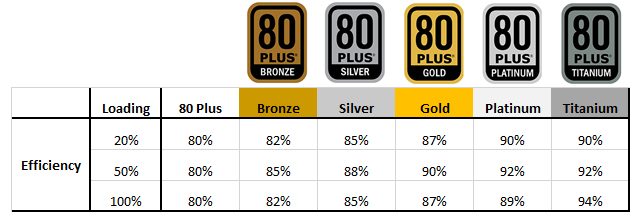
-chart.png)
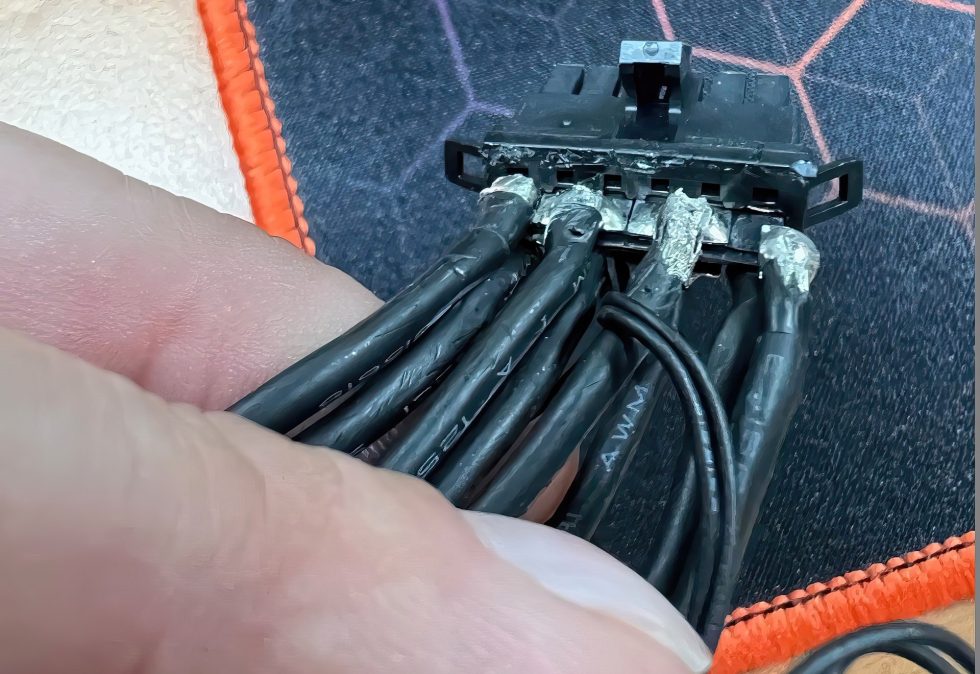

 devout pendant
Help me with this build for UE5 C++ compile, Shaders + Gaming. Is there anything else i need to add or change?
-GIGABYTE Z690 AORUS PRO DDR5 MOTHERBOARD
-ASUS ROG STRIX GEFORCE RTX 3080 TI GAMING OC
-Corsair 64 GB (32X2) DDR5 5200Mhz Vengeance CL40
-SAMSUNG 980 500GB NVME SSD
-SAMSUNG 980 2TB NVME SSD
-LIAN LI GALAHAD 360 ARGB AIO COOLER
-EVGA SuperNova 850 GT 850 Watt 80 Plus Gold
-COOLERMASTER TD500 MESH```yea, don't get the 500GB SSD
waste of money
rather get a 2nd 1TB/2TB one later
beside of that it looks like a nice build 🙂
 magic parrot
Any idea what cooler i can use to handle this one?

Its amd epyc, my friend bought it for ue4 and he just cant find any cooler that has that high tdp
but i think that coolers which can handle threadripper will be able to handle epyc cooling
obtuse rapids
I know it's not standard, because most people are gamers and not unreal developers - but I would kill for some shader compilation benchmark system -
"Hi I'm Blake and we6 testing out this 13 gen Intel with our standard Megascan Master Material Compile, let's see how well it does."
Oh wow
That's exactly what I was looking for thank you
Oh yeah I know unreals like a lot of programs that Don't take advantage of multithreading
@iron zenith is that essentially what the compilation booster plugin does Just automatically so you don't have to do it yourself?
Yeah I got it the other day - there's a checkbox that will automatically add a new compiler worker if The system can handle it
vagrant anvil
Aren't they building the compile on demand into 5.1?
vagrant anvil
for the testing linked above, I use CLI to rebuild the DDC, which loads the CPU up to 100% without the overhead of the editor.
it is actually kind of a handy trick because you can create a bat file and have it run when convenient, then when you do sit down to work, everything opens quickly.
north arch
'tis the season for outside computing! Sub-freezing temperatures and free watercooling!
 wind fiber
I know nothing about harddrives
mighty cosmos
Except for compiling especially the engine on a high core CPUs
lucid dawn
Does anyone know if Zotac, Inno 3D and Gainward are good hardware brands? Found some cards that are under those, but I wonder if they're any good (pretty afraid of buying crap that breaks after some months)
I first read on Trustpilot terrible ratings for Zotac, then a TechPowerUp article that says Gainward is okay, to later find on LinusTechTips forum comments that say every of those brands are equal and just as good as the more mainstream brands (MSI, Gigabyte…) but I don't know if that's any true
wind fiber
big thanks
north arch
Why no love for the spinning platters? Do you prefer rewritable DVDs?
or are tapes your style?
obtuse rapids
Traditionally I've always ignored ram speed as being a priority but I'm wondering now as I'm looking to build a more development focused machine, if I would see a difference in things like opening the editor, large assets, if I increased put faster RAM in the next build, instead of something cheap like 2667
north arch
I was joking, but your insight is appreciated
vagrant anvil
obtuse rapids
Traditionally I've always ignored ram speed as being a priority but I'm wonderin...
ram speed does help, but not as much as upgrading from DDR4 to DDR5, or by using more RAM channels. i.e. octa-Chanel is much faster than quad, which is faster than dual. (which stinks that TR Pro's 8 channels are still DDR4)
wind egret
You can overclock DDR4 to low DDR5 speeds (4400-4800ish) but the Samsung B-die chips that are always credited to this cost even more than DDR5.
obtuse rapids
vagrant anvil
ram speed does help, but not as much as upgrading from DDR4 to DDR5, or by using...
Crap I've been out of the hardware game for awhile - they have OCTA channel now? Last I remember was just making sure you alternated dimms or you'd be putting it in single channel mode
vagrant anvil
Yep. TR Pro is 8 channel.
obtuse rapids
I just want the editor to open as fast as possible for when I crash it ...
wind egret
I wonder how that works with only 8 sticks. Each stick is split up between two channels?
median marsh
last time i've checked HDD space was cheaper than DVD/BR, the only benefit might be long term storage, but then mdisc might be the better choice
wind egret
That's pretty long-term.
median marsh
yea, but normal BR is like 5-50 years which is a weird timespan since you have to trust the company which made them...
and then they are kinda expensive imho
wind egret
I can confirm 95% of my perfectly normal CDs have lasted 20+ years
median marsh
but then... how much data is so important that you still need it in 20 years 😄
wind egret
When I say 95%, I mean that silverfish have eaten less than 5% out of each of them
median marsh
yea CD seems to be one of the most stable optical disc formats
unless you lay them in the sun or store them on your oven 😄
wind egret
Or do anything to let them get scratched (or nibbled) on the label side.
Wonder how M-disc handles that. Embeds the data layer in the middle?
median marsh
well, they probably still have the same rules in terms of optimal storage
guess they just use better materials, which may not decay on their own that quick
and maybe some additional software stuff for error correction
 chilly valley
I have 16GB of ram , how much more GB should i add in order to work on Unreal engine smoothly ? which company would be recommended, and last question , i have never added GB by myself will it be properly doing that by myself ?
obtuse rapids
chilly valley
I have 16GB of ram , how much more GB should i add in order to work on Unreal en...
plenty of youtube videos for adding - but I'd go at least 64 gb - I noticed that i have less crashes when doing big stuff - the engine will eat a lot.
chilly valley
obtuse rapids
plenty of youtube videos for adding - but I'd go at least 64 gb - I noticed that...
Just added from my old pc 32 gb 16 each, and now my monitor mouse and keboard doesn't turn on with the pc 😟 tried to clean cmos , replug cleaning component and nothing work
obtuse rapids
chilly valley
Just added from my old pc 32 gb 16 each, and now my monitor mouse and keboard do...
it's probably not compatible - the PC won't boot with the wrong ram installed, but it shouldn't break anything, just take it out
chilly valley
I did take it out, still not working
obtuse rapids
also, if you have 4 slots, you want to alternate them,
chilly valley
I have 4 slots, what do u mean by alternate ?
obtuse rapids
not a big deal right now, YouTube single channel /dual chanel ram
chilly valley
I tried multiple cobination with only the original one , still no change
obtuse rapids
something else is the problem if you put the ram back in - either it's not seated
does the power come on at least
chilly valley
The power come
obtuse rapids
and after that, can you get to the bios, hold down DEL key as it boots
chilly valley
Monitor mouse and jeyboard no