
#hardware
1 messages · Page 1 of 1 (latest)
 warm reef
 livid gate
Hi Guys, I want to build my own PC for working on UE5 for game development. Would you guys like to share some of your PC setup details that will be helpful for me as UE5 requires high performance cpu to work on. Thanks in advance.
Any suggestions or tips to custom build a new PC for working.
 fallen oasis
Working with c++ or not?
 unkempt pelican
Is there a significant difference if you're using c++ or blueprint?
I kinda have the same question right now
fallen oasis
Compiling in c++ can take a while if you don't have too many cores.
unkempt pelican
Okay. I was thinking of a CPU with 12 cores. Would that be good enough?
fallen oasis
Well you ddin't answer the question.
unkempt pelican
Oh, right. I'm still testing the waters with unreal, but probably yes
fallen oasis
It's not really as much to do with cores as it is virtual cores, but as long as it's a late edition i7/i9 (12xxx) or a 59xx amd you're probably okay
You'll want at least 10-12gb of vram (so a 3060 or 3080, not a 3070, they onyl come with 8)
64gb of system ram.
at least a 1gb ssd
Other than that? Whatever
unkempt pelican
Hmm, alright. Thanks.
Is there a reason why compiling blueprints is a lot faster than c++?
fallen oasis
Compiling blueprints doesn't involve compiling engine code
Compiling your own c++ code is probably okay, but if you ever go for a source buidl, it will take at least an hour, maybe several, to build the engine.
fallen oasis
I have a good machine and it takes me 13 minutes.
fallen oasis
Taht's the one.
unkempt pelican
Get an ssd for storage and not an hdd then?
unkempt pelican
So you store all the Unreal data and assets on the ssd and everything else on the hdd, basically?
fallen oasis
Engine +Project+Assets on ssd.
The games I actually play on hdd.
The 2 are not related.
unkempt pelican
Right, got it
 quartz skiff
I’m working on a project with plenty of assets as well as landscapes and so on. I got several materials and textures placed amongst everywhere. The play test is perfectly fine but my pc gets very hot. So I’m trying to figure out if it’s possible for me to lower the heat on my pc while I’m working so it isn’t burning out my components.
These are my specs:
Intel i9-9900K - GeForce RTX 2080 Ti - 32GB DDR4 - 1TB SSD - Liquid Cooling 240mm
Also yes, I put it in the freezer and it was a temporary solution.
Any answers are welcomed, thanks.
 cinder latch
if the gpu is not hooked up to the water cooling, then adding more fans can help the gpu temperatures
and upgrading the cpu cooler can help the cpu temperatures
 kind talon
quartz skiff
I’m working on a project with plenty of assets as well as landscapes and so on. ...
kind talon
quartz skiff
I’m working on a project with plenty of assets as well as landscapes and so on. ...
Might be worth defining what "very hot" is, as the parts can get hotter then you'd expect
To much of course and you'll thermal throttle
quartz skiff
Those commands actually helped, the fans stopped blaring so loudly when I enabled it. but now my next question is how to I keep those settings when I close the engine, and then reopen it? Cause when I reload it it goes back to default.
 devout pendant
fallen oasis
You'll want at least 10-12gb of vram (so a 3060 or 3080, not a 3070, they onyl c...
devout pendant
fallen oasis
You'll want at least 10-12gb of vram (so a 3060 or 3080, not a 3070, they onyl c...

The price of 12GB 3080 is coming down at least
Can't bring myself to drop to 3060…
 scarlet isle
I would rather have even a better cpu, than 3090 in my rig. Mainly, because of:

 north arch
devout pendant
The price of 12GB 3080 is coming down at least
north arch
devout pendant
The price of 12GB 3080 is coming down at least
why?
scarlet isle
miners selling out + Nvidia is lowering some gpu prices.
 median marsh
it's genius that they held the price until the next gen was ready 😄
now they can sell out and people still wont feel scammed
north arch
devout pendant
Can't bring myself to drop to 3060…
I meant why to this
scarlet isle
Considering the hardware, I don't feel scammed at all.
Time is money too, and we all can find a sweet spot of Time wasted vs money spent.
median marsh
that's true
devout pendant
north arch
I meant why to this
The 3060 has 12GB of VRAM
north arch
yes
devout pendant
Video memory has an outsized impact on performance in some of UE5's features.
So the 3060 may outperform the 3070 for some use cases.
north arch
but why not drop to a 3060 instead of up to 3080 from a 3070?
is it really that much worse?
devout pendant

Based on 617,218 user benchmarks for the Nvidia RTX 3060 and the RTX 3070, we rank them both on effective speed and value for money against the best 682 GPUs.
Appears substantial.
Also, I haven't yet ran into bottlenecks with my 3070, so I'm not in a rush… but if I do, I don't think I could bring myself to "downgrade" for more VRAM.
devout pendant
Nvidia has begun shutting down production various 30xx cards I believe, in preparation for 40xx.
Yeah, a trade would be cool. I know a PC shop that isn't the easiest to work with, but they do offer that sometimes.
median marsh
isn't it mostly selection which GPU die ends up as 3090/3080 and such?
north arch
devout pendant
Appears substantial.
indeed!
devout pendant
As in, the wafers for 4070, 4080 and 4090 have distinct manufacturing processes, but I'm not sure about that.
I'll look into that 3070 to 3080 12GB trade, that would be cool.
north arch
I compared flops and bandwidth on a different site
devout pendant
Ugh that's terrible
That reminds me of W3Schools
Well, despite userbenchmark being trash, the 3,584 CUDA cores on 3060 vs 5,888 on 3070 would suggest a noticeable difference in performance for many use cases.
Of course, the higher the resolution, the more the increased VRAM would give advantage to the 3060, but I don't know enough to say when it would outperform a 3070.
I haven't yet found other benchmarks…
I think I saw some at one point that were very specific to UE though, and greatly flattered the 3060.
LOL that YT video is hilarious
"An alternate measurement of FPS, that only they seem to be able to measure called EFPS"
 mighty cosmos
This is on an rtx 2080s on max load
It's reaching like 95-100C on the hotspot
I'm curious what other people with similar GPUs are getting

 spark vortex
this is when running UE? oh god, i dont wanna know what my single fan 1660 super is gonna run at (for a rough idea, it runs at 80c when playing Valheim which runs uncapped fps wise)
mighty cosmos
I'm gonna take the GPU out tomorrow and clean it, those temps are slightly concerning to me
devout pendant
Guys kinda stupid but , what lappy would ya recommend under 950 dollars for unreal engine ?
north arch
anything that can remotely connect to your dev box at the office
cinder latch
spark vortex
this is when running UE? oh god, i dont wanna know what my single fan 1660 super...
it will throttle the performance before reaching temps that are actually bad for it
mighty cosmos
mighty cosmos
I'm gonna take the GPU out tomorrow and clean it, those temps are slightly conce...
Ok yeah clean your GPUs people
 devout pendant
Wooot!
median marsh
that must have been dusty af
also might want to look into the airflow of your case? i would be concerned >80°C, even if they say "it's okay"
mighty cosmos
median marsh
also might want to look into the airflow of your case? i would be concerned >80°...
From what I've read the hotspot is always around 15C higher than GPU core
And for the GPU core it's apparently fine up to like 89C 🤷♂️
The case is Thermaltake View 71 TG
median marsh
is the gpu mounted vertical with riser?
if not, it might be worth to check if your PSU has a fan which sucks air from the case, then if you mount the PSU with the fan upside, it would suck the hot air from the GPU out of the case
mighty cosmos
It isn't mounted vertically
My PSU is mounted with the fan being upside and I also have an exhaust fan right below the GPU sucking air out
median marsh
ok, that sounds like there's nothing to improve then
which GPU is that btw? nvm 2080S
mighty cosmos
it's rtx 2080s
MSI gaming x trio I believe or something like that
Yeah I really feel like I can't do much to help it
the core temp is fine, the hotspot is a bit toasty but I'm also not sure what's considered normal for the hotspot
median marsh
was it always that hot on load?
mighty cosmos
pretty sure yeah
median marsh
ah ok, otherwise checking thermal paste would be another thing, but if it was always like that...
mighty cosmos
And it's not even thermal throttling so I guess it's fine with it 🤷♂️
Hm only thing I could to is crank up the fans with MSI afterburner because the automatic mode is keeping them at around 60% at like 80C
median marsh
you say that after all the things 😄 dude isn't even running his fans on full speed 😄
 west quail
mighty cosmos
Ok yeah clean your GPUs people
west quail
mighty cosmos
Ok yeah clean your GPUs people
I seen someone running on nearly 80 on idle
They kept saying "it's in Celsius" like that matters lol
 proud cargo
hey guys i'm making a new pc build with i7 12700k and i was wondering which gpu would fit the best. Generally i use ue for vr and ar development but i'd like to make more complex scenes. Should i go for a 3060 with more vram or i should go for more cuda cores like 3060ti o 3070?
devout pendant
proud cargo
hey guys i'm making a new pc build with i7 12700k and i was wondering which gpu ...
There seems to be a huge emphasis on VRAM, so I think 3060...
I can't speak to VR/AR specifically though.
 serene dome
mighty cosmos
From what I've read the hotspot is always around 15C higher than GPU core
And fo...
serene dome
mighty cosmos
From what I've read the hotspot is always around 15C higher than GPU core
And fo...
Standard is 10-15 but you can increase the delta with hard overclocks that increase voltage and cooling better. The limit for hot spot temp is 115 (5 buffer + 95 core temp limit + upper limit of standard delta [15]). At this point a GPU will throttle heavily so you never want to come anywhere near close to it...
 opaque pond
in terms of laptop hardware , what would be the min for UE5?
fallen oasis
There was a nice one somebody linked the other day for about $2k?!
mighty cosmos
serene dome
Standard is 10-15 but you can increase the delta with hard overclocks that incre...
Oh ok, thank you for the info 👍
opaque pond
fallen oasis
There was a nice one somebody linked the other day for about $2k?!
laptop?
fallen oasis
No, a very expensive banana.
opaque pond
well is there anything cheaper?
fallen oasis
Probably ones that arne't made of gold.
opaque pond
bruh
opaque pond
like isnt there a cheaper laptop that will do? @fallen oasis
fallen oasis
Not if you want a comfortable experience in UE.
 shy edge
you could get lucky on a used laptop or score a deal if you have an inside person at a retailer like Microcenter to get a loaded unit for cheap but computer horsepower usually costs money. no way around it.
opaque pond
uhh are macbooks out of the question?
fallen oasis
Absolutely.
opaque pond
cause of hardware or software?
fallen oasis
Both
opaque pond
🤔 wdym
fallen oasis
You pay more for the smae hardware, so you will get a worse laptop.
UE and Mac don't really work together as well as you'd like.
opaque pond
ahh....
i mean i got a laptop now
but i dont really want to try
@fallen oasis are there specific specs i need to look for?
fallen oasis
IF you want a new laptop, the one linked the other day (just scroll up until you see it) is what you should look for.
opaque pond
fallen oasis
IF you want a new laptop, the one linked the other day (just scroll up until you...
actually could i try on my current laptop?
fallen oasis
Is your current laptop a banana?
 golden dirge
fallen oasis
There was a nice one somebody linked the other day for about $2k?!
golden dirge
fallen oasis
There was a nice one somebody linked the other day for about $2k?!
The one I linked? 🙂
There's a slightly more expensive (but IMO worth it) QHD version too
https://www.bestbuy.com/site/asus-rog-strix-g15-advantage-edition-15-6-fhd-gaming-laptop-amd-ryzen-9-5900hx-16gb-memory-radeonrx-6800m-512gb-ssd/6466550.p?skuId=6466550&intl=nosplash
fallen oasis
Probably?
 weary glacier
Hi what is a good PC build for UE5 dev? My budget is $1000-$1500. Have not built a PC in a long, long time
Also dumb question, is a Radeon Pro 580 8 Go a bad graphics card?
It's what's on my current computer. Seems to do OK with the starter games in UE4 but not sure how it will scale
golden dirge
weary glacier
Also dumb question, is a Radeon Pro 580 8 Go a bad graphics card?
It's OK, bit slower than a 3050 but faster than a 6500 it seems (at 1080p)

With crazy detailed scenes, it's going to struggle yeah
weary glacier
golden dirge
It's OK, bit slower than a 3050 but faster than a 6500 it seems (at 1080p)
Thanks I'm already going down the rabbit hole of listing out parts for a build. Looking at:
Radeon RX 6700 XT
Don't know for CPU. Ryzen 5800x or 5900x or some intel chip?
64GB of RAM... don't know what brand or speed
The CPU is what I don't understand, because I don't understand the intel naming scheme and how it compares
 wind egret
The naming schemes are impossible. Their retail cost is usually respective of their perfo- desirability.
golden dirge
5950X is pretty amazing for productivity
weary glacier
golden dirge
5950X is pretty amazing for productivity
I can't afford that right now. I'm hoping to get a motherboard that will support an upgrade path in 2-3 years though if needed. But I don't understand the matrix of CPUs/mobos/sockets in the market right now yet either
$250-$350 is pretty much my limit for CPU I think. It will only be for UE5 dev and Maya, After Effects, Substance Painter. I will keep doing web dev on my iMac
golden dirge
Make your build in PCPartPicker.com then, does a lot of compatibility checking for you
weary glacier
Oh yeah the other thing I'm worried about is cooling. I don't understand that at all. Back when I used to build PCs when I was a kid you just slapped thermal paste on the CPU and a big fan, made sure the case had good air flow and you were good. I don't want to get into water cooling
I also don't want to hear a jet next to me. The iMac is awesome for that it's quiet
golden dirge
Air coolers are usually both faster and cooler, but Zen is a bit unpredictable with the heat
spark vortex
my graphics card (single fan 1660 super) runs hotter than my cpu ever has lol (ryzen 5 3600)
golden dirge
Helping you build a PC, at any budget.
The noise would be fan quality and the fan settings, you can always just turn the fans down
wind egret
spark vortex
my graphics card (single fan 1660 super) runs hotter than my cpu ever has lol (r...
That's a 200 watt video card versus a 65/95 watt cpu?
golden dirge
wind egret
That's a 200 watt video card versus a 65/95 watt cpu?
TDP is not the only thing that affects heat
spark vortex
Its also kinda not fair since most gfx cards are 2 or 3 fan
never buy a single fan card
worse idea ever lol
golden dirge
CPUs are smol and hard to heat due to higher heat density
My 3080 pretty much always ran cooler than my 5800X 🤷♂️
spark vortex
weird eh
weary glacier
golden dirge
https://www.logicalincrements.com/
This looks amazing thanks
wind egret
High-end GPUs do have some beefy coolers these days. Those poor PCIE slots...
spark vortex
if i upgrade to a 30xx or 40xx I'm def getting a bracket to support the card lol
golden dirge
I'd skip the HDD entirely, just get SSDs, add more RAM too. CPU threads are always nice
wind egret
If it's not a prebuilt, your case might have come with a bracket already.
spark vortex
hmm ill have to check the cases shipping box, maybe i missed it during the build
also id add another ssd but my mobo (b550 phantom gaming 4 - asrock or w/e) has the 2nd ssd slot under the graphics card and that thing runs too hot at the moment to put an ssd under it haha
golden dirge
spark vortex
also id add another ssd but my mobo (b550 phantom gaming 4 - asrock or w/e) has ...
That's some galaxy brain shit yikes
spark vortex
ikr
ill probably switch off the board eventually but it has the new zen 4 socket -_-
golden dirge
Maybe a cool Gen2/Gen3 SSD with a nice copper heatsink or something might work
spark vortex
yeah eh
golden dirge
Or get a GPU riser 🙂
spark vortex
i should ngl
im gonna get some more ram first tho, im only at 16 gbs and i think thats barely enough for UE
wind egret
Most mobos I've seen put an m2 slot directly under the gpu. Torn whether that's better or worse than putting it on the back of the motherboard.
golden dirge
Especially if you touch C++. Compiling CPP with 1 thread is insulting to the soul
My one had two under MB-heatsinks, was good
The second one is under a GPU yeah, but who the heck uses a second GPU anyway
 spark vortex
so fair lol
but yeah Ill probably upgrade RAM then storage and then maybe graphics card but ill probably also need a new power supply, esp if get a 40xx lol
cuz 16 gbs feels like the bottle neck knowing the rest of my build
and the 1660 super is a 6gb card VRAM wise so its decent
wind egret
Oh yes. 40xx series is going to want to use those 12 pin pcie connectors.
spark vortex
damn eh
thats finna be wild
I do want to swap out my gfx card sooner than later tho
earlier this year/last year I would get intermittent black screening issues that required a hard reset to get visuals back
it was wierd af
pretty sure its the graphics card as i tested the RAM, among other things
nothing about it in the windows logs
golden dirge
Black screen's usually RAM, maybe VRAM
But could be just about anything. Computers are hard
spark vortex
even weirder is that reseating the gfx card temporarily fixes the issue, and ever since i reseated it last it hasn't black screened.
yeah i know what you mean eh
i hate troubleshooting hardware issues lol
spark vortex
word, ill give that a shot. thanks Laura!
weary glacier
Looking into the Intel chips you basically need to do some dumb washer mod or buy a replacement mounting socket frame or your 12700 or 12900 will hit 100c and throttle on benchmarks -_- so dumb

Sponsor: Linode Hosting - get $100 credit with GN (https://geni.us/UaKrUmF)
Intel's CPU socket for the Alder Lake (12th Gen) CPUs applies higher pressure on one side, causing reduced pressure between the cooler coldplate and CPU. We're replacing the stock Intel ILM (on the socket) with a Thermal Grizzly Contact Frame. Testing includes analysis ...
spark vortex
dafuq lol, shame on intel
median marsh
interesting, but overall probably only relevant for a small % of all sold cpu's
most people won't be bothered by that
spark vortex
When I got a laptop in 2013, intel was top dog. Now AMD is killing it, hard, with their processor game and I got a Ryzen when i built last.
cinder latch
weary glacier
Looking into the Intel chips you basically need to do some dumb washer mod or bu...
dont forget that the mods also void ur warranty
weary glacier
cinder latch
dont forget that the mods also void ur warranty
Good point thanks. I'm looking at the 5950x now. Thinking Arctic Freezer II 420mm AIO for cooling. Then just have to decide on a case and motherboard
spark vortex
my ryzen 5 3600 never goes over 60 celsius and i have 4 case fans, no AIO
but my single fan 1660 super is the the temperature of the sun (at full load lol)
tho YMMV
golden dirge
weary glacier
Good point thanks. I'm looking at the 5950x now. Thinking Arctic Freezer II 420m...
When I SUGGESTED IT YOU LAGHED AT ME
I'm not mad, just butthurt
weary glacier
golden dirge
I'm not mad, just butthurt
Lmao I had images of some crazy aquarium stuff but I guess these AIOs are pretty foolproof these days
golden dirge
420mm rad and a case to fit it both sound quite expensive. Don't dismiss a good air cooler if it lets you upgrade your GPU a tier, for example
Nah I mean the 5950X haha
weary glacier
I stand corrected though, you were right 😄
golden dirge
I was confused because it was like $100 off some CPUs you were talking about, but didn't want to be annoying haha
weary glacier
golden dirge
Nah I mean the 5950X haha
Oh yeah I was budget yesterday now I'm all in because I found I can do zero interest payment plan for 18 months lol
golden dirge
I'd check out the Dark Rock Pro 4 as well, for the CPU cooling
AIOs are better at sustained cooling, but UE is more bursty unless you are packaging constantly
spark vortex
I'm getting a new SSD for UE, but its gonna be under the graphics card as thats where the other M.2 slot is. Praying to the robot gods that the heatshielded version fits under the card lol.
weary glacier
I might do some dumb shit like compile Chromium
golden dirge
spark vortex
I'm getting a new SSD for UE, but its gonna be under the graphics card as thats ...
What MB?
spark vortex
I have a 1TB in the cart but i might do a 2TB one instead
golden dirge
I mean motherboard 🙂
spark vortex
ooo sorry
Asrock b550 phantom gaming 4
i bought it off a friend cuz he bought the wrong one for the processor he had (he had an AMD integrated graphics chip that the MB didn't support) and it fit my specs, but i didn't pick it per se as much as it was chosen for me xD
Its an aight board
not great, but its my first build so i dont have many points of comparison
i think the SSD has to be PCIe 4.0 4x tho cuz its the hyper m.2 slot thats empty on the MB
whereas the other m.2 slot supports PCIe Gen3 x2 and SATA3
but I mean this is kinda ideal, PCIe 4.0 4x is the newest/fastest coupling/connector eh?
golden dirge
spark vortex
i think the SSD has to be PCIe 4.0 4x tho cuz its the hyper m.2 slot thats empty...
Nah they're backwards compatible, doesn't matter much. If you get a Gen4 one, definitely give it the slot with the best cooling though
spark vortex
Hmm okay
I might have to just get a new GFX card sooner than later
cuz my current card runs insanely hot, like im talking 80 celsuis when running a Valheim server o.o
I honestly thought it would die by now lol
but its still chugging along
I guess we'll see lol
serene dome
spark vortex
but I mean this is kinda ideal, PCIe 4.0 4x is the newest/fastest coupling/conne...
5.0 is the latest (at least for Intel). AMD soon with Zen 4
spark vortex
I just dont like the idea of losing work cuz my card runs too hot/ends up frying the SSD
spark vortex
serene dome
5.0 is the latest (at least for Intel). AMD soon with Zen 4
ah ok
golden dirge
serene dome
5.0 is the latest (at least for Intel). AMD soon with Zen 4
None on sale yet, right?
serene dome
If we're talking about SSDs, none that uses PCIe 5.0 x4
median marsh
spark vortex
I just dont like the idea of losing work cuz my card runs too hot/ends up frying...
your gpu is your least problem, make backups ffs
spark vortex
do ya'll backup on an external hdd or is there source control that can handle huge projects lol?
spark vortex
source control is more about keeping your code clean then?
median marsh
it's about keeping track of changes
and in case something didn't work as planned it's easier to rollback with source control rather than using a backup
spark vortex
ah yeah okay
golden dirge
You can do source control + backup, essentially just backup the server image and you're goods
 upper goblet
Good morning!
So my company is going to be buying a custom solution for unreal and are looking at a threadripper and a6000
i am aware unreal does not do multi gpu traditionally but i thought i saw somewhere that unreal can multiple utilize a6000 in NVLink
can anyone help find a resource that confirms this please?
https://www.awn.com/news/epic-games-releases-unreal-engine-426
this is the source i found stating this
and the RTX A series is the main NVLink capable card.
was curious if anyone used it yet


Animation World Network
Update includes new creative tools to for more convincing characters and real-time environments; users will also see usability and performance improvements in the Collaborative Viewer template enabling multi-user design reviews on VR/AR/Desktop enhancing the collaborative design review process.
 astral musk
That is for filming on led walls. One GPU will render the inner frustum (the part on camera) while the other renders the outer frustum (the part of the LED wall the camera is not looking at)
It takes a bit of work to get nDisplay to work properly with multiple gpus, but then again, it takes a bit of work to get nDisplay to work with LED volumes
fallen oasis
dx12 can do multi-gpu shenanigans, but it's not ue related specifically.
upper goblet
So if there a point of getting dual a6000 for realtime and rendering?
or is there a way to set it up as a render farm?
astral musk
If you are using a different rendering engine then yes.
But for real time within unreal, no point
weary glacier
Do I want to be on Windows 10 or 11 for UE5? Building a new box (AMD)
golden dirge
W11 is just fine. Everyone hates ${CurrentWindowsVersion} by default
Try it out and see if you hate it
 prime loom
I usually skip every second version of Windows.
Win7 -> Win10 -> Win12
The ones inbetween tend to be worse in my experience lol
Vista -> Win8 -> Win11 (probably)
north arch
what about 8.1?
weary glacier
@golden dirge OK after 2 full days of research I've got my build ready, what do you think? https://pcpartpicker.com/list/By47GL
PC Builder - AMD Ryzen 9 5950X, Radeon RX 6900 XT, Fractal Design Meshify 2 Compact TG Dark Tint ATX Mid Tower
golden dirge
weary glacier
<@174160195591602176> OK after 2 full days of research I've got my build ready, ...
$1500 budget was a big ole bamboozle 😄
weary glacier
I also have Kryonaut thermal paste in the cart, and an anti-static bracelet for assembly. Will be using a large surge protector (no UPS). Not sure if I'm missing anything obvious or conflicts. I know the video card will be a tight fit in this case but in theory it should go together. The Meshify 2 Compact was chosen for space constraints, it's the only thing that will fit where I live
golden dirge
Do you care about noise much?
golden dirge
CPU cooler picks:
https://pcpartpicker.com/product/F3gzK8/be-quiet-dark-rock-pro-4-505-cfm-cpu-cooler-bk022
https://pcpartpicker.com/product/kNZzK8/alphacool-eisbaer-aurora-280-418-cfm-liquid-cpu-cooler-11729

be quiet! Dark Rock Pro 4 50.5 CFM CPU Cooler (BK022)

Alphacool Eisbaer Aurora 280 41.8 CFM Liquid CPU Cooler (11729)
weary glacier
golden dirge
CPU cooler picks:
https://pcpartpicker.com/product/F3gzK8/be-quiet-dark-rock-pr...
Reason I picked out the Celsius S24 is it's a 240mm listed as compatible for top mount on the Meshify 2 Compact at the bottom of the page https://www.fractal-design.com/products/cases/meshify/meshify-2-compact-light-tempered-glass/gray/

Meshify 2 Compact is a high-performing case with a bold, stealth-inspired aesthetic. Its striking exterior features bolt-free, flush tempered glass, a fully removable top panel granting excellent interior access, and a front USB 3.1 Type-C port.
golden dirge
weary glacier
Reason I picked out the Celsius S24 is it's a 240mm listed as compatible for top...
Ohk the 280mm probably won't fit, GPU is too long
DR4 is sick though
weary glacier
I thought AIO might be better to keep heat away from the GPU. Really worried about the cooling for this GPU because apparently the Meshify 2 compact can create a dead air zone in the bottom under the GPU see this vid at timestamp https://youtu.be/aMpWo-fOiJ0?t=64

The eagerly awaited Compact version
of our Meshify 2 classic evolved
Learn more – http://bit.ly/2M0bhCA
Find Fractal on Social:
Twitter - https://twitter.com/FractalDesignNA
Instagram - https://www.instagram.com/fractaldesi...
Facebook - https://www.facebook.com/fractaldesign
Website - https://www.fractal-design.com/
golden dirge
weary glacier
I thought AIO might be better to keep heat away from the GPU. Really worried abo...
Are you going off just that video?
GPUs will draw in air when the fans are running, fans create negative pressure areas that the air flows in to
weary glacier
I saw some people on reddit complaining about this case + the massive GPUs giving disappointing heat results on benchmarks (one of them linked this vid)
weary glacier
golden dirge
GPUs will draw in air when the fans are running, fans create negative pressure a...
Oh interesting
golden dirge
I had the Lancool, and you get intake fans at the bottom if you want to spice it up
PSUs actually push air into the case too, since there's a holey bottom normally
Oh yeah, Meshify can have a bottom fan too if you remove the HDD cage (lol)
Who the fuck uses an HDD right?
weary glacier
golden dirge
Who the fuck uses an HDD right?
Not me after learning about nvme and their current prices (never used one before)
golden dirge
Yeah it's a small gap for insanely improved performance, I don't get it. I do stream most media so don't need TBs of porn anime or whatever storage though
weary glacier
Hrm so maybe I should considering air cooling instead of AIO? The price is about the same
golden dirge
BTW there's also the RGB Celsius+, think it may be just a tiny bit warmer and louder but not a biggie either way
weary glacier
I don't care about looks it will be in a corner near my feet
If anything I find RGB distracting
golden dirge
I'd go for the Dark Rock Pro 4 personally, but depends on what you're going for I guess
weary glacier
I'm not even sure what the tradeoffs are, other than air being simpler and more reliable. I guess in theory AIO would be cooler and move the hot air further from the GPU?
golden dirge
BTW I couldn't recommend the Thermal ToughFan enough, they're solid as fuck
They are Noctua-ish in design I think. Turn the max speed down a little, get a lot of airflow and quite a pleasant, low fan hum
weary glacier
golden dirge
BTW I couldn't recommend the Thermal ToughFan enough, they're solid as fuck
Oh like to slap one of those on the bottom you mean for more GPU cooling?
golden dirge
It's like scooter brap vs a V8 engine idling
Yup, and would blend into the case too, much black
And you may want top fans too, if you aren't getting an AIO
weary glacier
Would the top fans blow into the case, or pull out?
golden dirge
You could probably go 120mm at the bottom and 2x140mm top
Out usually
So intakes front and bottom, exhaust back and top. It's like roughly diagonal air flow
You have to figure out the air pressure too, if you live in a high dust environment especially
weary glacier
Yeah I'll be leaving the dust shields on front and bottom (can't remember if top has one too) even though it will sacrifice airflow a bit
golden dirge
You want the balance being positive pressure inside to prevent heaps of dust going in, but that's less of a concern with filters and all
golden dirge
weary glacier
If anything I find RGB distracting
PS the only RGB I enjoy is CPU load meters haha. I've got my laptop changing from red to green at CPU usage thresholds. Compiling C++ feels so satisfying
weary glacier
That sounds pretty awesome actually
golden dirge
PS @weary glacier https://videocardz.com/newz/pro-hi-tech-chinese-gpu-supplier-to-receive-nvidia-geforce-rtx-40-cards-in-less-than-a-month

Chinese graphics card supplier reportedly expects first GeForce RTX 40 shipment in less than a month According to Ilya Korneychuk from PRO Hi-Tech, their video card supplier from China is now expecting the first batch of RTX 40 graphics cards in less than a month. During PRO Hi-Tech tech news roundup it is mentioned that […]
weary glacier
I heard about this next gen stuff coming out within a month or two, for both CPU and GPU. My thoughts were if I get the current gen at least I have a couple year's worth of reports from people about all their teething problems, plus I can get started on serious Unreal dev earlier. I also read that the new video cards will have massive power requirements, which might not help cooling in this mid tower setup
The power requirements are why I picked the 6900 xt instead of 6950 xt. I got scared about heat
golden dirge
Gen to gen they always get more efficient per W, you can always undervolt a bit and lose some performance but gain a lot of efficiency still
I wouldn't worry about CPU, but GPUs seem to be close to the next gen releases, and the stock situation should be much better now
But yeah, always hard when waiting costs you progress on things you want to do
weary glacier
Yeah plus I have to buy all this crap at once to get it all on a payment plan
weary glacier
golden dirge
Gen to gen they always get more efficient per W, you can always undervolt a bit ...
That's interesting though
Well if I get an Unreal job maybe I can get my employer to buy me a new card then 😄
If I can't get a game dev job within like 4-5 months I'm going to have to go back to web dev
golden dirge
IDK if I'd ever be able to get a job in games lol. Too used to that 7.5 hour day and GTFO, and no commercial game experience
spark vortex
check art stations jobs board, theres tons of postings on there
golden dirge
weary glacier
If I can't get a game dev job within like 4-5 months I'm going to have to go bac...
 spark vortex
honestly tho if im being fair, the only reason i can try the indie dev route is cuz I live at my parents still, and have some monthly income from disability (from a prior mental health thing)
weary glacier
Any ideas on what to get for a 27" monitor? Will be doing Maya, Photoshop, Substance Painter, UE5
 rotund mist
Does anyone have a Dark Rock Pro 4? I want to upgrade my rams, currently have 2x8gb Vengeance RGB Pro and it was a bit painful to install them even with the front fan adjustment. I was thinking about selling these corsair rams and buy a G.Skill Aegis 2x16gb kit, because they are smaller in height and i don't really need any RGB tbh.
 brazen sand
weary glacier
Any ideas on what to get for a 27" monitor? Will be doing Maya, Photoshop, Subst...
brazen sand
weary glacier
Any ideas on what to get for a 27" monitor? Will be doing Maya, Photoshop, Subst...
I love my Dell S2721DGF. It goes on sale pretty regularly and it's on sale on Dell's website right now. It's IPS and 165hz, the color is fantastic too.
weary glacier
What are people using for automated backups? I'm getting 2x 2TB nvme and will be using Windows 11 Education. On Mac I used Time Machine and it worked well. Was thinking maybe I should get a 2TB or 4TB sata SSD for backups of either 1 or 2 of those nvmes, to backup everything or maybe just crucial project files stored on one of those nvme drives
golden dirge
I don't 🤔 I have a Perforce server that backs up to an external drive though, but that's a Linux laptop upstairs
weary glacier
OK the deed is done, everything should be here in 7-10 days
Thanks for all your help man! I was totally lost a few days ago lol
golden dirge
weary glacier
Thanks for all your help man! I was totally lost a few days ago lol
Fuck yeah, have fun! For the lols download Valley of the Ancient on your current CPU, and time how long it takes to compile shares with it vs the new one!
Only about 100GB SMH, so dramatic
Just a cheeky overnight blob of fun
median marsh
you can fix them with a strong magnet
golden dirge
median marsh
you can fix them with a strong magnet
the 145 working sectors?
 kind shore
Is the Ryzen 9 5900 good enough when it comes to Unreal or should i really pay ~150€ more for the 5950 ?
(Ignoring the next gen CPU's as i don't wanna buy a new MB / DDR5 RAM)
golden dirge
kind shore
Is the Ryzen 9 5900 good enough when it comes to Unreal or should i really pay ~...
5950X is 15-25% faster in multi-threaded workloads, and about the same in single-threaded ones. Is that worth it for you?
- assuming you can cool it
kind shore
Well yeah, i guess the extra 150€ is worth it just due to all shader which have to compile and similar
golden dirge
Time is money! More time spent waiting, is less time to do the things you want to do. Like eat ice-cream.
kind shore
Maybe if the RNG is with us the 5950 will drop even more once the next gen is out
Or well, the 5950 didn't really dropped, but the 5900 did by like 50€
opaque pond
Oh i think I forgot to ask if my laptop can handle unreal
Well it has a ryzen 5 8gb of ram and like 200gb storage
 mental jolt
opaque pond
Oh i think I forgot to ask if my laptop can handle unreal
mental jolt
opaque pond
Oh i think I forgot to ask if my laptop can handle unreal

Minimum and recommended hardware specifications and necessary software for developing with Unreal Engine.
mental jolt
Try it out
kind shore
That would only make it slightly better as it would be "only" a new MB xD
Besides that i'd like to stay with the AMD + AMD combo
Well yeah, the gain from SAM is not that big atm, but i can imagine that it will be only better in the future
opaque pond
well looks like a desktop 1050ti can somewhat be bearable
so how far away would mine be from that 🤔
opaque pond
opaque pond
well looks like a desktop 1050ti can somewhat be bearable
oh i guess its a bit too far away
 sinful gazelle
Ok I'm looking to buy 3090Ti. There's Asus and Gigabyte for 1,7k€ and Zotac for 1,5k€. Which one would you go for? Whatever I buy I try to buy Asus if I can as I've never had bad experience before. But I'm leaning towards Zotac purely because it's much cheaper but is there any difference in manufacturers here? Your experiences?
I also have 850W psu which from what I found online is a bottom limit for 3090Ti though I'm skeptical and think it may not be enough for high end rendering.
golden dirge
sinful gazelle
I also have 850W psu which from what I found online is a bottom limit for 3090Ti...
Good PSUs can spike far higher than rated for, for short durations. I was just fine with a 750W IIRC for my 3080, which is about 100W or so off the 3090Ti
sinful gazelle
golden dirge
Good PSUs can spike far higher than rated for, for short durations. I was just f...
https://www.corsair.com/eu/en/Categories/Products/Power-Supply-Units/hxi-series-config/p/CP-9020073-EU
I have this one. I always go for a more quality PSU in case I need to upgrade a thing or two.
shy edge
I have a 3090FE. When I installed it, I was using a Corsair HX 850w PSU that would shut down the PC (Ryzen 9 5950x on an X570 Aorus Master board) on high transient spikes (heavy action in a game, heavy renders, extended benchmarks, etc) even though it was above the recommended specs on the box. I replaced it with an EVGA 1000GT and have zero issues since. YMMV
Regarding brands, I used a Zotac 2080ti AMP prior to getting the 3090 and it works flawlessly. Customer service was prompt and courteous when I asked about whether it would void their warranty to install the waterblock. They were fine with it. I'd use them again.
sinful gazelle
shy edge
I have a 3090FE. When I installed it, I was using a Corsair HX 850w PSU that wou...
That's what I'm afraid of as I had this situation in my previous rig. I guess I'll have to up my PSU, it's only going to go up from here anyways in the future. The only hesitation I have is freaking cable management all over again lol.
sinful gazelle
Yeah that would definitely run on a lower point of efficiency with that gpu then. I already brought 1200W so I don't need to bother upgrading for a while.
fallen oasis
So you're getting about 760W out of it as peak capacity.
That's not so awful.
It only dips slightly above 50
By 2% in fact. "Ideally" can go to hell.
sinful gazelle
my cpu alone does circa 350watts on high load so I'm on a really tight spot with this psu
sinful gazelle
Ryzen 9 3950x
that's on highest load limit from what I searched, on average it's around 100-150ish
Could be that data is wrong tho
shy edge
my 5950x only hits 161w running cinebench r23 according to Ryzen Master with PBO enabled. 350w seems unreachable unless overclocking the snot out of it.
sinful gazelle
Got this on quick google, by looking up further yeah it's totally incorrect
 golden dirge
fallen oasis
So you're getting about 760W out of it as peak capacity.
golden dirge
fallen oasis
So you're getting about 760W out of it as peak capacity.
I don't think that's how it works. It will still deliver 850W, but it will consume more power to deliver that.
PSUs can draw more at the wall than they are rated for, over sustained periods. I'm guessing that just a product of (in)effciency
fallen oasis
Okay, so it's consuming 940W
If your power requirements at 850W then buying a 1800W psu will drop that to like 925W
Wow
golden dirge
TBF this is a top tier PSU, the non-Plat ones are... worse
Sometimes a lot worse
But 50% -> 100% is a few percentage points usually. Not enough to offset the massive increase in price just to draw 50% capacity vs 90% or whatever, all else benig equal
 median marsh
i would just test the 850 one, worst case OPP kicks in and shuts off your computer
OPP 1028.35W (120.98%)
so it can provide ~1kW for your transient spikes 😛
golden dirge
Maybe eventually you'll be able to buy a PSU just for your GPU, so you can upgrade the GPU half of your build by itself.
median marsh
dont even think about that
you'll most likely fry your pc when you hook up 2 different PSUs
they need at LEAST a common ground
spark vortex
frick always price shop, almost bought an SSD off newegg for like 80 dollars more than amazon lol
same model and size etc etc
 inner plaza
Hi guys.
So I started up somewhat of a game studio (it's actually more broad than that, a software company) and I work on client's projects during the day and my own games in my down time.
So my use cases for this laptop I'm going to buy are quite wide (at the moment a desktop is not a great option). I am taking my time and going to do the art, sound, possibly more video editing than I do now, and programming (really no rush to market, the money comes from freelancing).
Anyway it seems like unreal / unity dont need a ton of vram from what I read. I've heard of it using a ton of ram though.
Here's my two choices and I'd like to hear from some industry pros which laptop they'd prefer out of these two:
i7-12700H / 64 gb ram / 1.5 tb ssd / rtx 3060 6 gb
r9-5900HX / 32 gb ram / 1 tb ssd / rtx 3080 16 gb
inner plaza
3060 has 6gb and the 3080 has 16gb
I'm 99.99% sure the seller can go to 64 gigs of ram but they way their online store works is they just have a few presets and if you need custom just ask
 worldly olive
So I bought a 5900X, they sent me a 5950X. Not complaining
I told Amazon support about it, they just closed the ticket and sent me a survey asking if my problem was taken care of. No problem so I guess it's a done deal. Maybe stock on 5900X is low and they just sent it?
 dense phoenix
Hello, what is the best 2022 build for UE5? plz
dense phoenix
fallen oasis
You got 50 grand to spend?
what is grand?
fallen oasis
The point is, you can always get better if you pay more.
The returns start to become less and less.
unkempt pelican
Are the requirements for ue4 lower than ue5?
 hoary urchin
I have a 16-core i9, 64 GB DDR5 RAM, 3090 GPU, multiple NVMe SSDs.
It seems to work well. I'd love more RAM, but 128 GB DDR5 is currently pretty hard to get. Definitely don't get less than 64 GB if you are compiling stuff often. To use 16 physical cores you need 64 GB of RAM.
 dim pewter
I've noticed just how much if loves RAM.
My company-provided laptop, an Alienware M15, 11th Gen I7, RTX3070 and 16Gb ram, struggles to do anything in unreal, let alone attempt to compile the Lyra Starter game.
Minimum 40GB ram I've found is needed to do anything in reasonable time, and the more cores the better it'll run.
unkempt pelican
Is this what engine scalability settings do? Or do I have to change something else?
hoary urchin
dim pewter
I've noticed just how much if loves RAM.
My company-provided laptop, an Alienwa...
I have a laptop with 64 GB of RAM and it works decently well. With only 16 GB you can only probably run 2 concurrent compilers.
dim pewter
Oh I'll totally agree!
They've seen how crappily it's been running and are organising a new desktop machine.
Yeah, it's okay for most things, but not quite enough for this role
dense phoenix
So 3090ti is recommended ?
dim pewter
What I've found interesting, is since my machine couldn't cope, I've been doing the compiling on an AWS instance.
48 core, 96GB RAM, and it'll happily max out all 48 cores, using 48 processes, but never seems to jump over 30GB of RAM usage.
dense phoenix
What do you recommend ?
It's for to do environment design stuff map etc... and yeah probably gaming 
 woven geyser
I just recently did a build that cost around $2k and works great for UE5 with a Ryzen 9 5950x, 32gb ram, Nvidia 3060 and 1TB NVMe storage but I’m a gameplay engineer and my need are going to be different than yours
 fickle burrow
I cant decide what to do. I could either buy a 3080/3090 now or wait for the 4xxx series. OR i could buy a cheap 2080 and keep it until i get my hands on a 4080 or something probably next year. 2080 would still be a decent upgrade from my old vega 56.. 🤔
median marsh
i would wait for next gen and try to get a 3090 "cheap"
mainly because of the 24GB video memory
from what i've read so far nvidia doesn't increase vram much on 4xxx series
fallen oasis
I would go 64gb of memory if you want to be comfortable in UE5
fickle burrow
median marsh
i would wait for next gen and try to get a 3090 "cheap"
that sounds like a smart option too. will be hard to wait tho, who knows when the new gpus show up. saw a 2080 for around 300 bucks used just now, might just get that in the meantime 😄
median marsh
sounds like a good deal if the card works fine
fickle burrow
aye. it seems like i could break even if selling my vega too, surprisingly. might be hard to sell tho, dont see any reason people would want that
spark vortex
frick I bought 2x 8GB sticks of RAM to bump it up to 32GB (4x 8GB sticks total) and its due to arrive tommorow but now I'm looking at the mobo manual/manufactures QVL list again and Idk if its even gonna run -_-
I might need to get 2x 32gb sticks
their fairly cheap for 3200 mhz ddr4 tho
median marsh
it might run, the QVL list is more like a help for buying working sticks
90% of the time it just works fine, 10% of the time it works if you reduce clock speed/timings
spark vortex
Alright thats a little relieving lol, I'll test it in the morning anyway so no use worrying bout it
fallen oasis
As long as the new sticks you bought are the exact same specs as the old, you should be okay.
median marsh
"same specs"
it went from specs to adverting them with their XMP Profile "specs"
at least rarely seeing jedec standard in the product title
 boreal remnant
Hey, I didn't notice this channel existed, so I've already asked this question in general. But I'm asking here again just to be sure. Is a Lenovo Legion 5 Pro good enough for basic/mid/mid-high level UE work?
Rtx 3070
Ryzen 7
32 gb
2tb SSD
8 gb VRAM
kind shore
Ryzen 7 really doesn't say much xD
But it's also important to know whenever you'd work with Blueprints or C++
boreal remnant
kind shore
`Ryzen 7` really doesn't say much xD
Oh okay... It's 5800h octa core
Does that help?
kind shore
kind shore
But it's also important to know whenever you'd work with Blueprints or C++
It does, but also that ^
boreal remnant
kind shore
It does, but also that ^
I'd need to with UE right?
astral musk
8 core is about the lowest I'd consider going these days, just for shader compile times
boreal remnant
I don't really know much about this, I'm trying to get my first piece of hardware that I can learn UE on. And make it at least a little bit future proof
boreal remnant
astral musk
8 core is about the lowest I'd consider going these days, just for shader compil...
Is there a laptop with more cores for around the same price?
astral musk
it should be fine, you just wont want to try high end projects
kind shore
It's just that if you write a project with a lot of C++ files it really makes sense to aim for 12/16 cores on the CPU
boreal remnant
I found a legion for 1300-1600 btw
kind shore
Also generally for shaders and co more core's wouldn't harm while less core's can really harm
boreal remnant
Are cores the no. 1 most important thing for ue, over ram and graphics?
kind shore
Everything matters somehow
boreal remnant
Because I found a 14 core laptop but it's got rtx 3060
kind shore
The best GPU wont bring you much if you have a really bad CPU
Just as it doesn't give you much when you have the best GPU and CPU while having 8gb RAM
boreal remnant
kind shore
Just as it doesn't give you much when you have the best GPU and CPU while having...
Fair enough
Do you have any laptop recommendations?
astral musk
CPU is how fast things compile, GPU is how much you can put on screen and how fast your FPS will be, and RAM is how many things you can have open at a time
kind shore
I couldn't recommend laptops for unreal at all if you don't have 10k€ to spend 😹
astral musk
to be overly simple
boreal remnant
Everyone keeps telling me to buy a pc but I really need a laptop..
I would if I could
astral musk
laptop is fine, just dont expect to be doing the Matrix city sample.
north arch
boreal remnant
Everyone keeps telling me to buy a pc but I really need a laptop..
desktop+laptop for remote access to desktop?
boreal remnant
north arch
desktop+laptop for remote access to desktop?
That's some high level thinking
north arch
budget-wise it's not always doable, and internet-wise it could be a challenge
boreal remnant
Are the laptop names mentioned here?
How do I find a laptop with these exact same specs? Is there some tech website you can just plug them into and get models?
No worries, this helped a lot. Thanks for the specs
Just one last question. Are these the best possible specs for a laptop below 2000$?
astral musk
spec'ing laptops is somewhat difficult because there are so many unrelated variables, (screen type, resolution, refresh rate, battery size, system weight and size, each manufactures markup, etc). but try to get as many CPU cores as you can find (8 at the minimum, with 32GB ram, and the best video card you can find.
boreal remnant
astral musk
spec'ing laptops is somewhat difficult because there are so many unrelated varia...
What's the best video card I can get?
astral musk
I think laptops max out at 3080 Ti? could be wrong
I should have said, the best video card you can afford
because even at 2000, you probably wont find a system with a 3080 Ti
boreal remnant
Well it's probably the 3070 for me. The legion 5 is already stretching my budget
The legion 7 has 3080, but it's 2400$. I don't know if it's worth it to spend that much
astral musk
as long as you dont want to go high end in Unreal, then you'll be fine
boreal remnant
Yeah I just want something that doesn't make the learning experience frustrating, that I can use to make at least some good-quality work
I'm not trying to compete with ILM or anything, I just want a laptop that I can use UE on to a reasonable extent
astral musk
I learned Unreal on a laptop 15 year ago, you'll be fine.
yeah, dont open the city sample on a laptop
I mean, it opens to a warning message about you need high end stuff before it even loads the level
at least 8 GB of VRAM * (assuming the driver doesn't crash) 😂
boreal remnant
is an intel i7-12700H better than an amd ryzen 7 5800H?
boreal remnant
too late
why isn't it reliable?
wow, this rabbit hole keeps getting deeper. 2 days ago I didn't know what a gpu was. Now I'm reading articles explaining the difference between nvme and raid0 ssds and watching videos shitting on userbenchmark
isn't rain0 unreliable...because of striping or something
astral musk
my suggestion. if you dont know what raid is. dont use it
I know what raid is, and I still dont use it
just use good backups
north arch
boreal remnant
oh okay, not for real world use then
corporate fileserver and database uses are not real world?
boreal remnant
north arch
corporate fileserver and database uses are not real world?
in the sense that it's not something I'll ever have to worry about
astral musk
they are shopping for a laptop, so they have no real world use for it
north arch
true
boreal remnant
is it worth spending 300$ more for an rtx 3070ti over an rtx3070?
astral musk
if you are sacrificing RAM or CPU cores, then no
boreal remnant
by limits you mean watts right?
what spec do I look at to see what the limits are? They're both lenovo legion 5 pros
what's a good site for that?
also one of thems a ryzen 7 6800H+3070ti, the others ryzen 7 5800H+3070
okay, ty
astral musk
6800H is also a newer CPU, so you are likely paying more for that too
boreal remnant
astral musk
6800H is also a newer CPU, so you are likely paying more for that too
a better cpu and graphics card for an extra 300$ seems like a pretty good deal, ig
astral musk

TechSpot
For testing the Ryzen 7 6800H, we'll see how it performs up against a range of other laptop CPUs, but most importantly Intel's competing Core i7-12700H, and...
boreal remnant
I dunno, watching a video
the i7 12700h would definitely be better in that case, since I think it has 14 cores. But the 5i pro is soo expensive
okay, so correct me if I'm wrong but the actual performance you get out of your gpu is based on the wattage
north arch
not true
in general, compute and shader model versions, architrcture, cores, memory and core speeds, amount of vram, etc all play a huge part
a decent comparison is flops
an older generation is often less efficient in flops/watt and with a less effective instruction set (shader/compute model) than newer generations, and are objectively worse despite higher power dissipation
boreal remnant
often, not always?
north arch
in the case of nvidia, the internal layout of the silicon (warps and kernels in CUDA parlance) matters too, and which is better depends on the task you're performing
north arch
boreal remnant
often, not always?
often because I haven't done enough comparison to say always, but I haven't seen a comparison to the contrary
but among same generation, same manufacturer, same architecture, more tdp is typically more capable
This list contains general information about graphics processing units (GPUs) and video cards from Nvidia, based on official specifications. In addition some Nvidia motherboards come with integrated onboard GPUs. Limited/Special/Collectors' Editions or AIB versions are not included.
boreal remnant
north arch
but among same generation, same manufacturer, same architecture, more tdp is typ...
what is tdp?
north arch
total dissipated power
boreal remnant
is that like how much heat it can lose how quickly?
north arch
basically power in but not technically so because a tiny fraction of that goes into the actual entropy change of flipping a bit
the difference being so tiny as to be an academic distinction at best
boreal remnant
north arch
the difference being so tiny as to be an academic distinction at best
so if the difference is so tiny, why does tdp matter?
and this changes from manufacturer to manufacturer, for the exact same card?
north arch
boreal remnant
so if the difference is so tiny, why does tdp matter?
the difference between dissipated and input power, not the difference between models
when considering same generation and architecture, yep!
boreal remnant
okay, how is this power limit calculated and where can I find it so that I can compare the same card from diff manufacturers?
north arch
laptops don't really get dedicated cards, it's the chip from a desktop gpu soldered straight to the motherboard with custom cooling and various design-based limits, with very rare exceptions
boreal remnant
north arch
laptops don't really get dedicated cards, it's the chip from a desktop gpu solde...
really? I don't know much but I'm p sure it's dedicated
only dedicated gpus have separate vrams right? or is that incorrect
north arch
by dedicated, I mean a seperate card
architecturally it still has it's own ram
falcon northwest used to build laptops with desktop cards in them
boreal remnant
integrated graphics cards use the system ram, dedicated ones use their own cpu and ram
is that right?
or did I understand it wrong
astral musk
integrated graphics are built into the CPU and use system ram. dedicated GPUs are their own chip
north arch
boreal remnant
integrated graphics cards use the system ram, dedicated ones use their own cpu a...
discrete use their own
boreal remnant
and the separate ram for dedicated gpus is called vram, yes?
north arch
yes
dim pewter
yes
boreal remnant
so any graphics card with a vram would automatically be dedicated
then the legion laptop deifintely has a dedicated gpu
is there any reason why?
or is it just one of those weird things
dim pewter
Pretty much if it's an Nvidia or AMD GPU in a laptop then it's more than likely dedicated, if it's Intel graphics then it's more than likely integrated. (Side case being Intel is coming out with dedicated cards).
astral musk
AMD and intel offer both integrated and dedicated now
boreal remnant
I see
by the way, I just wanna say thanks for answering all my noob questions you guys
I really appreciate it
north arch
(and the difference between dissipated power and consumed power is somewhat explained by the landauer principle: https://en.m.wikipedia.org/wiki/Landauer's_principle, but basically energy is used both as switching and dc losses (dissipated as heat) and entropic changes, the vast minority of the energy involved, for those curious)
boreal remnant
Can you load 64gb ram into a laptop that only has a max limit of 32gb? A friend told me that you can, but it just doesn't recognise the extra gbs
astral musk
it doesn't really work like that
boreal remnant
how does it work then?
dim pewter
if it's unsupported then it likely won't even POST/boot up.
Keep to what the manufacturer says the maximum is in the technical documentation
boreal remnant
ok
astral musk
or do you mean, you have 32gb installed, and your applications are trying to use 64gb?
i've never seen a laptop with a max limit of 32gb
boreal remnant
no I mean the laptop specs say max upgradable to 32, and I try to slot in 2x32 for 64 gb
 dim pewter
It's not supported, so it's not likely to work.
There's the slightest possibility it would, but if you're wanting more than 32GB, then I'd purchase a laptop that you know for sure supports more than 32GB
north arch
why would you even try? for comparable timings and clock rates, 64gb will be a lot more expensive than 32gb
boreal remnant
is cpu processor speed a huge deal? I have an amd ryzen 7 5800h with 3.2ghz, and an intel i7-12700h with 2.3ghz. The i7 has 14 cores compared to the ryzen's 8
boreal remnant
north arch
why would you even try? for comparable timings and clock rates, 64gb will be a l...
I'm just checking
boreal remnant
dim pewter
It's not supported, so it's not likely to work.
There's the slightest possibili...
yeah it seems like it wouldn't be worth the risk. I'll probably stick to 32 gb then. Thanks
boreal remnant
boreal remnant
is cpu processor speed a huge deal? I have an amd ryzen 7 5800h with 3.2ghz, and...
the i7 seems to be better than the ryzen 7 generally, but the processor speeds are weird
dim pewter
boreal remnant
yeah it seems like it wouldn't be worth the risk. I'll probably stick to 32 gb t...
I'd definitely have 32GB as a minimum, my current work laptop (Alienware M15) only has 16GB and struggles far too much with the most simple tasks in UE5. Combined with the 11th gen Intel I7 Processor, it's just a struggle.
32GB + the 12th Gen I7 in that machine you're talking about would be an improvement over what I have for sure
boreal remnant
dim pewter
I'd definitely have 32GB as a minimum, my current work laptop (Alienware M15) on...
yep pretty much every review for the legion 5 is 'great laptop but the ram sucks'
dim pewter
boreal remnant
yep pretty much every review for the legion 5 is 'great laptop but the ram sucks...
32GB would still be good though. More than likely enough.
boreal remnant
dim pewter
32GB would still be good though. More than likely enough.
how come you use a laptop and not a desktop though?
dim pewter
boreal remnant
how come you use a laptop and not a desktop though?
New role at the company, they weren't sure what to get me (Only been here less than a month), but they're going to order a desktop for me shortly since this can't handle the work.
I'm not actually a developer either, so don't need the power as often, but as the DevOps engineer I'm still building and testing stuff quite often, so the slow down does waste a lot of time
boreal remnant
dim pewter
New role at the company, they weren't sure what to get me (Only been here less t...
I was hoping I'd find someone who made a laptop work lol but that's fair 💀
dim pewter
It would work, but since it's a previous generation it's a struggle sometimes. If it was 12th gen with more cores, and double the memory it would probably be okay. But as it is when compiling it's maxing everything out, and sounds like a jetplane, and gets very hot
boreal remnant
dim pewter
It would work, but since it's a previous generation it's a struggle sometimes. I...
yep overheating's the worst...sitting there thinking about my super-expensive delicate harware getting baked like a cake isn't a great feeling
dim pewter
boreal remnant
yep overheating's the worst...sitting there thinking about my super-expensive de...
Yeah, if you're going to get a laptop, try get one of the fan-cooling pads as well.
boreal remnant
boreal remnant
is cpu processor speed a huge deal? I have an amd ryzen 7 5800h with 3.2ghz, and...
do you have any idea about this? I can't really figure it out.
boreal remnant
dim pewter
Yeah, if you're going to get a laptop, try get one of the fan-cooling pads as we...
I read a review that said fan cooling pads are a scam. I think the guy did a temp test and the cooling pads weren't really doing much
don't know if he was just using low quality cooling pads though
dim pewter
boreal remnant
do you have any idea about this? I can't really figure it out.
tech specs of the i7 12700h shows it as up to 4.7GHz on turbo?
https://ark.intel.com/content/www/us/en/ark/products/132228/intel-core-i712700h-processor-24m-cache-up-to-4-70-ghz.html
quick reference guide including specifications, features, pricing, compatibility, design documentation, ordering codes, spec codes and more.
astral musk
clock sppeds are complicated, there is base, boost, turbo, etc
 astral musk
and amd/intel define them differently
boreal remnant
astral musk
and amd/intel define them differently
bruhhh
what's the point of having units of measurement then
dim pewter
boreal remnant
I read a review that said fan cooling pads are a scam. I think the guy did a tem...
I have a cooling pad for my Plex server at home, which is a Dell XPS15, without the pad it was constantly at 100c and throttling, with the pad it sits around 80c, so definitely makes a difference, and only a $20 cooling pad too
dim pewter
boreal remnant
got a link?
boreal remnant
astral musk
also the 12700k has two different types of cores opperating at differnt speeds. 2.3 is probably the lower power E-cores
boreal remnant
astral musk
also the 12700k has two different types of cores opperating at differnt speeds. ...
how does that help performance?
astral musk
the system can shift background tasks to the efficiency cores saving on power/heat and letting important tasks use the performance cores
north arch
make sure the pad's fans line up with the laptop vents and blow the right way for the laptop (bottom input vs bottom exhaust, for example)
I've had both issues
dim pewter
12th Generation Intel® Core™ i7-12700H Processor (E-cores up to 3.50 GHz P-cores up to 4.70 GHz)
https://www.lenovo.com/us/en/p/laptops/legion-laptops/legion-5-series/legion-5i-pro-gen-7-(16-inch-intel)/82s00004us?orgRef=https%253A%252F%252Fwww.google.com%252F
Official lenovo site says otherwise compared to walmart
boreal remnant
dim pewter
12th Generation Intel® Core™ i7-12700H Processor (E-cores up to 3.50 GHz P-cores...
isn't that a different model though? it says 3050ti. Or does that not make a difference?
the walmart one is 3070
dim pewter
boreal remnant
isn't that a different model though? it says 3050ti. Or does that not make a dif...
So many different models, their site is annoying, but it's the same processor 🤷♂️
astral musk
3.5 and 4.7 are boost clock. the base clock is lower
dim pewter
Yup, and I don't believe intel do a 12700H with a max clock of 2.3Ghz, so I'd assume walmart just listed the lowest clock of the E-Core 🤔
boreal remnant
welp I'll trust the manufacturer over walmart I guess
boreal remnant
astral musk
the system can shift background tasks to the efficiency cores saving on power/he...
does that mean 'heavy' tasks can only utilize the P cores?
astral musk
so if you are playijng a game, the game will use the Performance cores. while background windows tasks will be pushed to the Efficiency cores
boreal remnant
but the game itself won't ever use the E cores
astral musk
it could. Windows controlls what goes where
boreal remnant
I ask because there are 6 P cores in the 12700H compared to the 8 on the ryzen 7 5800h. Does that mean that technically I get more cores in the ryzen for heavy lifting?
boreal remnant
astral musk
it could. Windows controlls what goes where
but if it does there's a performance drop because of the lower processor speed?
is it better to have 8 cores with a high processor speed, or 14 cores only 6 of which have a high processor speed?
astral musk
could go either way. this is litterally the first time a CPU has attempted this kind of configuration. you'd need to look at benchmarks. like the ones I linked you. to see how it plays out in real life
boreal remnant
the benchmarks say the i7 is better, but I'm just trying to understand it
astral musk
its just not that simple. it depends on how each specific software handles p/e cores
spark vortex
my new RAM and NVMe has arrived
pls pray to RNGesus that my mobo recognizes the RAM
dim pewter
boreal remnant
is it better to have 8 cores with a high processor speed, or 14 cores only 6 of ...
Generally the more you can give it the better. I'm currently Compiling the Lyra starter game on a 48 Core Xeon, and it's maxing that out. The more cores Memory, and power you give it, the faster it'll go, but it'll still do it either way, just might take a while. This same demo game on my laptop takes over an hour, if it even compiles at all due to the memory issues, sometimes it does, sometimes it doesn't. Here it's using all 48 cores at 100% and over 40GB of RAM. But I also had it building on an 8 core with 32GB ram, just took almost an hour.

 wicked orbit
There is liquid cooling on the front of the case, which do you think provides better air circulation? blue one entering air red one leaving air

liquid cooling only fits in the front
let's not do the one on the right ?
wicked orbit
Doesn't evacuating hot air over liquid cooling increase the temperature of the processor? @iron zenith
liquid cooling is on the front in both pictures @iron zenith
hmm i will try now
 meager skiff
!stream
cinder latch
wicked orbit
There is liquid cooling on the front of the case, which do you think provides be...
the best is in through front/bottom, out through back/top
which is the left one
fallen oasis
cinder latch
the best is in through front/bottom, out through back/top
The hot air will be pushed up by the denser cold air, so if you suck it in from the top, you're sucking in hotter air.
(so, yes, I agree)
median marsh
wonder which case that is
if you got space for 2 fans on the top, you usually also have space for an 240mm AIO?
wind egret
If it's just one (240mm AIO), I imagine the gpu isn't water cooled.
wind egret
The only way the gpu exhausts its hot air is having it pushed away by the front fans. Mediocre if it's warm air coming from an AIO, but better than nothing.
median marsh
it's not ideal, but some cases have place for 2 fans there, so if the case stands on flat ground it works, too
wind egret
Though a two fan AIO for a CPU might not be that warm, depending on the CPU.
median marsh
yea, depends on the CPU/load i guess
usually probably makes more sense to watercool the gpu rather than the cpu
the cpu by default has a good spot for aircooling in most cases
 storm tulip
~stream
 blazing ferry
wicked orbit
hmm i will try now
blazing ferry
wicked orbit
hmm i will try now
basic physics would tell you the right one is the worst option since u won't get any cold/fresh air in. the left one is the better option maybe even sucking in from the left too
median marsh
just mount the AIO on top, put the fans outside and some duct tape to seal it
or try overpressure in the case, and dont use fans at the AIO, but make it basically the only way for air to get out of the case
who said to push warm air on the mainboard?
yea
well, but even "warm" airflow is better than no airflow
specially for passive cooled components like chipsets/vrm
also kind of hilarious how AIO doesn't utilize the best heat dispenser at all
got a whole case out of metal which conducts heat fabulous, and then pretty much zero surface area from the radiator to the case
boreal remnant
hey just had a general tech question
are two ram sticks with the exact same specs but from diff manufacturers the same?
is there a brand that makes 'the best' ram sticks and ssds?
wicked orbit
I did the one on the left. Because it made more sense to me. Easier to evacuate the cold air from the front from the top. Because the hot air condenses and becomes lighter so that it is transferred out more easily from the top and back.
I can't place the radiator on the top of the case, it hits the memory
cinder latch
boreal remnant
are two ram sticks with the exact same specs but from diff manufacturers the sam...
they are "the same", but they might not behave the same when they are in your board, so it is recommended to buy the same sticks from the same brand
boreal remnant
cinder latch
they are "the same", but they might not behave the same when they are in your bo...
oh okay, ty
spark vortex
has anyone set up a server for multiplayer (the server that doesn't have a player host, i forget its name)? afaik its mostly custom setups depending upon the game, but are there any general rules of thumb for what to expect in terms of num. of servers and hardware requirements for say, a battle royale style game with 10,000 concurrent players?
fallen oasis
Just checking heh.
spark vortex
appreciate it
fallen oasis
I doubt you'll get too many of those per instance
spark vortex
hmm
fallen oasis
Depends on tick rate and stuff as well
spark vortex
I see, okay good to know. Ill keep that in mind.
 blissful heath
Hello, I'm new to discord and I'm here to get the answer about an issue which deprives to use UE4, here it is https://forums.unrealengine.com/t/what-is-the-last-version-of-ue-that-supports-directx-11-with-10-1-feature-lvl-and-shader-model-4-1/609786

Unreal Engine Forums
Okay, I’m new to UE4 and impatient to develop my game ideas but when I tried to run UE4.27.2 it says that I require a DirectX 11 10_0 feature level and a 5.0 shader model (which I don’t have), so please may you tell me what is the last UE4 version that supports Shader Model 4.1 and DirectX 11 with Feature level 10_1 (since they are my specs but ...
if I am not in the right section please tell me
Thank you in advance !
blissful heath
sorry but what "dx10 potato" means ?
shy edge
old PC hardware
blissful heath
I'm not really sure if my PC is old but if you need infos about...
shy edge
is the screenshot from the thread you posted above yours?
blissful heath
yes
shy edge
Try what Laura posted above. That GPU is a mobile business class chip from mid-2010 so your experience will probably not be very good with your hardware.
blissful heath
one last question : is it worth to learn UE4.22 ?
ok because I want to create games a little like Crash Bandicoot 4 merged with Sonic Forces in term of power and graphism
so i'm wondering if it's sufficient
thank you
north arch
It always takes more resources to make a game well than to play the same game. Also crash bandicoot did some very low-level hackery to work well, if memory serves (much like the quake 3 lighting reflection sorcery)
north arch
https://youtu.be/izxXGuVL21o
https://arstechnica.com/gaming/2021/09/war-stories-how-crash-bandicoot-hacked-the-original-playstation/

For today’s episode of War Stories, Ars Technica sat down with Naughty Dog Co-founder Andy Gavin to talk about the hurdles in bringing the original Crash Bandicoot to gamers around the world. When Andy and his partner Jason Rubin made the decision to bring the action platforming genre into three dimensions, it required living up to their company...

Ars Technica
Naughty Dog's Andy Gavin reveals mid-'90s memory management and 3D animation tricks.
yes, it breaks types, it's amusing
 karmic trout
Will UE5 run as good as UE4 on most decent PCs on this setup?
 fallen oasis
Should be alright.
boreal remnant
Hello, is it worth upgrading my laptop to 64 gb ram instead of 32?
median marsh
isn't there any mainboard with integrated wifi available?
ASUS Prime B660M-A WIFI D4
price difference here is ~$20, so cheaper than the extra card
and why is there no brand name for the PSU/SSD?
cinder latch
its buildredux i believe, which is a company that builds pcs
so probably because the psu/ssd suck
median marsh
yea really looks like what's on buildredux
thats some fun stuff for lorash and co 😄 according to the linus video they have a 600W PSU with an 3080 😄
karmic trout
Yes, I screenshoted from that website. It's their "BEST" setup. Is it bad?
fallen oasis
If they aren't giving brand names, probably.
If there are no specifics on brands and model numbers, avoid it.
Not even a brand on the gfx card. Nice
north arch
cinder latch
its buildredux i believe, which is a company that builds pcs
I had some issues with them... My girlfriend's PC was a week late, mine though... for a couple months they were lying to me, saying "it'll ship next week" every time I contacted them. I FINALLY got the truth: my selected GPU was backordered, I can downgrade for just a little more or upgrade for a lot more. I finally got them to honor the GPU price at the date I placed the order, they missed one more ship date, I cancelled and bought an alienware that showed up in a week.
they make good-looking PCs though, with good cooling
I ordered the two minutes apart
on the plus sides, her PC is fine* and they processed my refund in a day
*fine, except for losing the boot drive on restarts sometimes until I removed and reinstalled the ssd
karmic trout
I was just looking for the brand and models of the pc parts. Then order parts and build myself. It's cheaper
fallen oasis
It's fun too!
north arch
karmic trout
I was just looking for the brand and models of the pc parts. Then order parts an...
not always in the current market
boreal remnant
Hey, so does anyone know if upgrading to 64 gigs ram is worth it?
mental jolt
I upgraded to 32 when people said it was ridiculous, life got a whole lot better for me. 🤷♂️
mental jolt
I constantly feel like I'm fighting against the swap/page file.
boreal remnant
mental jolt
I upgraded to 32 when people said it was ridiculous, life got a whole lot better...
hmm...well 32 I can understand, but 64 gb ram is another beast
mental jolt
boreal remnant
hmm...well 32 I can understand, but 64 gb ram is another beast
A beast I'm going to get behind next build I do.
boreal remnant
mental jolt
A beast I'm going to get behind next build I do.
Do you think it's worth investing that much money in 64 gb? Does anyone really need that much?
mental jolt
boreal remnant
Do you think it's worth investing that much money in 64 gb? Does anyone really n...
It depends on what you do.
It also depends on what you have right now.
boreal remnant
mental jolt
It depends on what you do.
It also depends on what you have right now.
I'm buying a machine for unreal and I'd like it to be at least relatively future proof, so that's what I want to do. As for what I have now, the laptop I'm buying has 32 gigs
I guess my question is. Assuming I'll get to a moderate level in Unreal Engine, is it necessary to have 64 gb ram over 32 gb?
mental jolt
boreal remnant
I guess my question is. Assuming I'll get to a moderate level in Unreal Engine, ...
You'd be fine with 32 for UE I'd say.
boreal remnant
mental jolt
You'd be fine with 32 for UE I'd say.
thanks, I really needed a second opinion on this
north arch
I like 4096 bits, personally
fallen oasis
I like big bits and I cannot lie.
hoary urchin
With i9-12900K I'm fine with 64 GB. Compiling on 16 cores never uses more than ~ 32 GB which gives me an entire 32 GB for my IDE + other dev/art tools. I usually sit around 45 GB used at max.
Doing anything with all 16 cores pegged on CPU doesn't work great though. Would love to have 64 cores 🤣
karmic trout
north arch
not always in the current market
Why is that?
north arch
the current market is kinda funky, but economies of scale may be catching up
karmic trout
boreal remnant
Hey, so does anyone know if upgrading to 64 gigs ram is worth it?
Me on my 20GB RAM (Crying 😭)
karmic trout
north arch
the current market is kinda funky, but economies of scale may be catching up
I order from China.
 lone quest
hellos
guys i have a 750gb hdd. should i get a 512gb ssd instead of it to increase my reading writing speed etc. you know
does it worth
90 dollars
i dont think so cuz i dont play so many games
and 1tb's are so expensive for me
median marsh
by filling up he meant filling it up with unreal data 😄
just from grabbing free market place assets i horded around 512GB already
i wouldn't want to browse those assets on a HDD
karmic trout
median marsh
i wouldn't want to browse those assets on a HDD
Browse on HDD.. sounds fun
median marsh
well, the vault cache is only used when you add the stuff to a project
 frail pagoda
lone quest
i dont think so cuz i dont play so many games
frail pagoda
lone quest
i dont think so cuz i dont play so many games
it'll be filled up with unreal engine assets not your games
blissful heath
hello, another problem : UE4.22 takes just 12.6 GB when downloading but why it occupies more than 50GB in my disk !? and since I haven't enough space I cancelled the installation but is there a workaround ?
median marsh
because the download is compressed, and once its installed it will also generate additional data instead of computing it each time
blissful heath
and is there a solution ?
north arch
50GB is smaller than many modern games
dev takes more space than the finished product, you should probably have at least 500GB dedicated to development
blissful heath
ok, thank you
 wet ore
the next usb will evolve into a form of pure energy where you need only will the devices together, (sometimes you need to flip the direction of your willing until it fits)
kind shore
would it make any sense to buy a new gen CPU with 8 cores instead of the old gen 16 cores ?
(AMD)
frail pagoda
kind shore
would it make any sense to buy a new gen CPU with 8 cores instead of the old gen...
Why would you buy the old gen?
shy edge
I'm curious which specific chips they're asking about.
kind shore
Old gen was very likely the wrong term, should've said current gen, i think.
I basically meant if it's any worth to buy the Ryzen 7 7700 instead of the Ryzen 9 5950
cinder latch
kind shore
Old gen was very likely the wrong term, should've said current gen, i think.
I b...
i don't know if we could make that decision because of the fact that real ryzen 7000 benchmarks (not leaks) don't exist
kind shore
I guess it was a dumb question anyways.
Like 1 core from the 7700 would need to be 2 times as fast as 1 core from the 5950 to make it better, theoretically speaking, no ?
And i think this is pretty unrealistic
north arch
kind shore
I guess it was a dumb question anyways.
Like 1 core from the 7700 would need to ...
not strictly, no
aside from multithreading overhead, if your task can't be split into parallel branches (strictly sequential, like long division or iterating through a sequential algorithm like one might find in a calculation of pi or running through the fibbonachi sequence), you gain nothing from more than 2 (OS and other tasks on one core, your process on the other)
indeed
it's implicit he cares about UE performance, based on the server, but it may not be his only concern
median marsh
not necessarily, i would say 8 cores is enough for most devs
while i often hit 100% load on one core, so faster single core speed can also be a benefit over more cores
hoary urchin
During daily work, even when I'm modifying several files at a time, I usually end up seeing compilations of 5-8ish processes at a time. Rarely do I need more than 8 cores dedicated to compiling, practically speaking.
Determining max actions to execute in parallel (16 physical cores, 24 logical cores)
  Executing up to 16 processes, one per physical core
Building 8 actions with 8 processes...
Of course, in the times when I need to recompile the entire engine for example, going 2x the speed makes a significant difference. 8 cores still works for that, just takes longer.
Unless you need to recompile the engine really often, probably 8 cores is a good price point for an effective productivity boost. If you can do more, then great, go for it.
IMO don't do less than 8 cores, if you do it will increase the amount of sitting around waiting on compiles, which is a complete waste of your personal and professional time.
median marsh
well, for that example it cant use more than 8 cores because you only have 8 tasks 😄
hoary urchin
Exactly.
dim pewter
So I just received my new work PC (12900KF, 64GB DDR5), and having the typical issue of Unreal only compiling on the E-Cores, has anyone found any decent ways to have this use all cores without using Process Lasso?
Using Windows 10 I have it as high as possible, but I just read after making that post that I might need to move it to Win11 to use that feature. Which is okay, as i was planning on that anyway, so have started that process
Nothing I can see in there related to it:
 astral musk
Win10 has some scheduling issues with 12th gen. Upgrading to windows 11 fixes it, or you can look though this thread to find a few other solutions to force win 10 to work. https://forums.unrealengine.com/t/how-to-get-the-build-system-to-use-more-threads-4-27/266993/16
dim pewter
Hmm, upgraded to Windows 11, set to best performance.
Still using the E-Cores only. disabled powerthrottling for cl.exe, still only using 8 cores. Must be missing something, just not sure what yet

Right, ignore me. A reboot and it'll now use all threads!


 spark vortex
oh shi-
fallen oasis
What you get for buying alienware!
north arch
I tried to buy non-alienware, they lied to me for 3 months!
then I got a higher-specced alienware for the same price
and in a week
Every time they missed a ship date, I'd reach out to them and be told "they've started it" or "they're scheduled to start it on monday" and "It'll ship on friday."
I called them out on it once and they said "oh, your gpu is on backorder, you can upgrade for $400 more, or downgrade for only $50 more". I ripped into them for lying to me, said I'll be consulting with my local consumer protection agency and filing a complaint with the AG, and you're going to upgrade me, honoring the prices at date of order. They agreed. They missed another ship date. I demanded to know what the status was, "it'll be started on Monday", so I demanded a refund.
fallen oasis
Don't blame a bad shop :P
north arch
came highly recommended
a national custom shop, not a local hole in the wall
my only problem with the alienware order was my bank thinking it was fraudulent, cutting off my card, and stranding me at a gas station
spark vortex
bruh thats an absolute saga
just trying to buy some hardware F
i offer you this simple 🍀. may luck be now on your side.
north arch
spark vortex
i offer you this simple 🍀. may luck be now on your side.
Thanks. I can renew my warranty for $200 or order a new fan or pump from dell...
think it's the pump since I hear the fan ramp up
happened when the lights flickered, it's on a surge protector
wind egret
wonder if PCs should have lemon laws
spark vortex
it'd be nice if the QC was better for sure lol
wind egret
rereading I thought this "saga" was recent, but "renew my warranty" suggests otherwise
you'd think a power supply would protect even lesser components like fans/pumps, but gestures
unless the failing pump was the source of the flicker, which would be mildly alarming
north arch
lightning was the source
pump was probably unlucky and just seized, the 12V line is high power and thus very resistant to minor power hiccups
the cpu would die first
it's only a year old and happened today
median marsh
for $200 you get a new AIO 😄
don't you know someone who could check the pump/fan thing? an electronics guy or maybe pc guy
north arch
me, but I have limited time
 dry summit
Hi,
I've been trying to use unreal but it doenst start on my pc. It has only worked once since trying to use it since last week. I keep getting the d3d being lost message. I've updated my drivers and am using the latest veriosn of unreal. I'm using a software that has been recommended to me by a site to clean my pc however I doubt it will work. Can anyone help, thank you NightGuardian
karmic trout
Is buying Falcon NW custom build cheaper than building myself?
shy edge
unlikely but possible
upper goblet
I need some help and opinions please.
My company is about to get a bunch of hardware
either 2x $5k Unreal engine machines, with probably 5950x + 3090
or I can dump my 10k budget into their office server solution budget is $30k on that
and get a Dual 48 core Epyc Workstation with 2x RTX A6000
we would be sharing the CPU load, for their simulations
but the GPU's would be primarily for myself and my partner
Does UE5 work decently on VMWare or Virtual Box?
does anyone know if this is a viable option?
i have seen old information around 2017 and 2018 about DX12 being an issue of support, but cannot find any information on whether these problems have been solved in 2022
karmic trout
and much trustworthy and reliable than buying parts on ebay or other places
shy edge
I'm spoiled by a local Microcenter so I'd never buy parts on ebay. as far as figuring out if their prebuilt is cheaper, go over to pcpartpicker and build a system with the same parts and check the differences.
astral musk
karmic trout
Some say it's cheaper
when GPU prices were over inflated, it was definitely cheaper. however prices have been dropping dramatically the last month or two so that may not be the case any more.
also keep in mind Falcon is very high quality, with good support. so you are also paying for peace of mind and ease of service
astral musk
upper goblet
I need some help and opinions please.
My company is about to get a bunch of ha...
I've seen people use UE through virtual machines but can't speak on the specifics on performance. do know that the 3090 and A6000 are roughly equal in performance unless you really need more that 24GB of VRAM, and UE will only use one GPU. hard to estimate performance without knowing what everyone will be doing at any one time. but my guess is that you'd be sacrificing GPU/viewport performance compared to a dedicated machine with a 3090
median marsh
i wouldn't do the server route, you add delay through network and that stuff, you still need clients to connect to the server, etc...
however, what you could use a server for is building shit, light builds, etc. they can need a ton of memory depending on the project, and they only need cpu power
@upper goblet
upper goblet
median marsh
i wouldn't do the server route, you add delay through network and that stuff, yo...
we would have the machine directly in our office and connecting with display ports to our monitors, the rest of the office would be using their server from the workstation
median marsh
you also add a single point of failure...
upper goblet
dual 48 core epyc and 1tb of ram with dual a6000 48gb
median marsh
is there enough budget to get spare parts quickly if something fails?
and i wouldn't want to sit in an office with such machine, considering the cooling it needs
are you using unreal for gamedev or something else?
because i would also add some test machine(s) to the budget which don't run on insane hardware...
upper goblet
median marsh
are you using unreal for gamedev or something else?
cinematic production mainly
median marsh
ok, then i'm out, i know next to nothing about that
and the light build thing i said is probably also irrelevant then
upper goblet
median marsh
ok, then i'm out, i know next to nothing about that
it is the same as game dev with the movie render queue
virtually the same thing with some optimization for rendering
upper goblet
median marsh
and the light build thing i said is probably also irrelevant then
this is true but i think what you stated was still valuable
astral musk
for the most part, rendering is all GPU based (though there is some CPU if you use path tracer and the denoiser)
upper goblet
astral musk
for the most part, rendering is all GPU based (though there is some CPU if you u...
agreed, cpu is for shader compiling which happens 2-4 times a week
my 3900x takes 40mins-1.5 hours to compile many shaders
astral musk
the 5950x would drop that to ~30-60min range I'd guess. If your biggest goal is to reduce the shader compile time then the server would be nice. assuming you can access enough cpu cores when you need it, I'm not really clear on how that division of resources works.
hopefully someone with direct experience with UE in a virtual machine can respond
I still think you'll be sacrificing GPU performance, since you'll be sharing the A6000 with other users.
north arch
ram?
median marsh
well, i used a 1660 for my first year with unreal, for learning a 1650 should do
 inland python
north arch
ram?
inland python
north arch
ram?
imagine an empty storeroom with 1 breadstick, 8gb
inland python
median marsh
well, i used a 1660 for my first year with unreal, for learning a 1650 should do
yeah lumen cant be used
median marsh
well, that can get tough
inland python
right?
median marsh
yea lumen is nogo then
median marsh
but then, before you should consider playing around with lumen, you should learn the basics
the "old" lighting is still superior in many cases (specially when it comes to performance)
inland python
median marsh
but then, before you should consider playing around with lumen, you should learn...
yeah but i need to toil for 5 more months before i can afford a laptop
median marsh
so you haven't bought the 1650 one yet?
inland python
rtx 3050 4gb vram
median marsh
i wouldn't invest in a laptop with 3050 4GB
4GB isn't cutting it long term
you want at least 8GB video memory
inland python
median marsh
so you haven't bought the 1650 one yet?
yes, i am in my room at 50 degrees, cooking steak over my intel hd graphics
median marsh
unless you make games that aren't too demanding
inland python
median marsh
you want at least 8GB video memory
yeah but i need something that more mobile.
inland python
median marsh
unless you make games that aren't too demanding
do you use lumen with your gtx 1660?
 median marsh
8gb video memory, at LEAST 16gb system memory, better 32gb (specially if you want to use c++) and 8 core/16 thread cpu
median marsh
inland python
so this level of graphics is just a wet dream
if you dont want a desktop, that wont even be a wet dream because water vapors at the heat they produce 😄
inland python
median marsh
if you dont want a desktop, that wont even be a wet dream because water vapors a...
life is fair, my golly
astral musk
you can get that level of graphics, just not in real time
inland python
astral musk
you can get that level of graphics, just not in real time
not interested in real time
north arch
and aim for at least 1TB dedicated to UE and project (note the lack of plural)
inland python
because that would dreaming about heaven, which i have never seen
might as well not torture myself with it
median marsh
it's cold up there
inland python
north arch
and aim for at least 1TB dedicated to UE and project (note the lack of plural)
how about i sell my kidney
then i afford the necessary hardware plus an upgrade XD
median marsh
how much?
north arch
500GB can work
median marsh
could always need a spare one
astral musk
you could probably use path tracer on the 1660 and get one 1080p frame every 24 hours or so
inland python
median marsh
could always need a spare one
Yeah but I have higher chances of dying from a gun than kidney failure
inland python
astral musk
you could probably use path tracer on the 1660 and get one 1080p frame every 24 ...
ok
astral musk
of course, keeping the laptop cool for that long may be an issue
inland python
astral musk
of course, keeping the laptop cool for that long may be an issue
dont worry, i got endless supply of my lung air
i am literially blowing my intel hd graphic laptop right now
because it can even handle discord properly
north arch
get some canned air and clean it out right
inland python
north arch
get some canned air and clean it out right
yeah, but its not available in my village
spark vortex
order some online if possible?
inland python
spark vortex
order some online if possible?
the delivery dudes, steal stuff along the way. so its unreliable
yes, I know, you are wondering. what kind of hell i live in
inland python
think of something even more worse
fallen oasis
Anywhere north of the Thames? 😂
frail pagoda
inland python
then i afford the necessary hardware plus an upgrade XD
not worth for a thing, prioritize health than anything as u can get another job so
frail pagoda
median marsh
8gb video memory, at LEAST 16gb system memory, better 32gb (specially if you wan...
i have 32 GB and 12c cpu, can it run UE5 😳
and an rtx 3070
inland python
frail pagoda
i have 32 GB and 12c cpu, can it run UE5 😳
How may I serve my lord
do you need tea?
coffee
or perhaps some tobacco, i will row across the ocean to cuba and get some cuban cigars for you
sinful gazelle
I just got HX 1200 corsair psu and I have HX 850i platinum installed from before. Can I just leave the cables in and just hook up the psu to avoid the tedious rewiring?
shy edge
maybe. corsair has three different pinouts for their various PSUs, iirc. Cablemod has diagrams and I'm pretty sure Corsair has charts somewhere in their support pages.


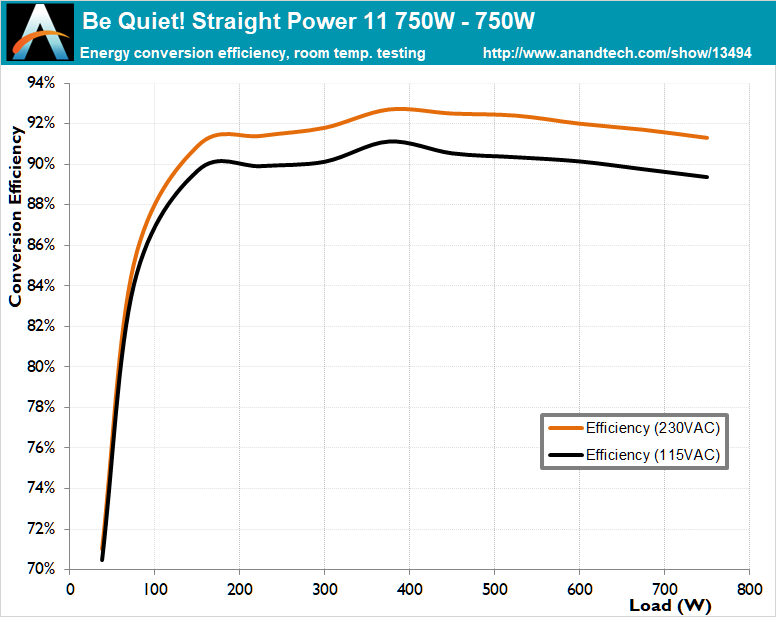
 sinful gazelle
I decided to swap also because cables are 3 years old already in the last one
median marsh
that was wiser than the "they are both 80+ platinum certified" conclusion 😄
also i guess the 850W would have been sufficient unless you have an threadripper or a cpu with similar high power consumption
median marsh
peak 350W compiling UE on an 5950x (+ 3 screens, logitech 2.1 speakers + led light bar and my wifi/internet router) idle was around 150W-200W btw
damn im not even close to 50% load of my 650W psu with 100% cpu load 😭
and 17% gpu load according to nvidia info tool, which is 30/170W
fallen oasis
He's going for that 50% load power efficiency.
However, I also bought a 1200w platinum psu the other day.
But I have special circumstances.
median marsh
yea, which he hits when gpu is at peak load 😄
which?
you going dual threadripper? 😄
fallen oasis
I have a TR, 6800 OC and a 3090 ti
median marsh
yea, but why did you upgrade the psu?
fallen oasis
I had a 700W psu.
median marsh
didn't you also run all that on 850W PSU, too?
fallen oasis
It used to be a 3080 ti, but that died the other day.
median marsh
oh
fallen oasis
3090 draws more power, so I decided to upgrade the PSU.
median marsh
and 700W, ok
yea that was probably not a bad idea for that setup
there's not much wrong with investing in a few extra Watt, unless it's unnecessary to buy a new PSU at all
i'm pretty confident the user above could've run the 3090 on his 850W psu
fallen oasis
1000W vs 1200W is basically 2 euros.
And, yeah, absolutely.
Unless he was one one of those old AMDs (3xxx series?) that drew ridiculous wattage.
frail pagoda
inland python
do you need tea?
Nope, i'd need an rtx 3090 😊
inland python
frail pagoda
Nope, i'd need an rtx 3090 😊
crikey, cant do that
spark vortex
wait for black friday
if the 40xx series drop the deals should be j u i c y
nov 25th
frail pagoda
spark vortex
if the 40xx series drop the deals should be j u i c y
i hope so, planning to upgrade to rtx 4080
i hope the price is same as the rtx 3080 🚶♂️
finally a fair 16 GB Vram
median marsh
nah, nvidia is sitting on a bunch of 30xx series cards, so i doubt that the new gen will be cheaper until they sold the old ones off (at least thats what some tech site reported here)
 dim vapor
So i am thinking of buying a laptop for Game Development and a bit of gaming too. Need Suggestions. (Ik a pc is better but i need portability)
frail pagoda
median marsh
nah, nvidia is sitting on a bunch of 30xx series cards, so i doubt that the new ...
ah crap, business thing huh
inland python
median marsh
nah, nvidia is sitting on a bunch of 30xx series cards, so i doubt that the new ...
yeah, they found a way to make alot of money during covid,
reducing supply on purpose
and selling at a high price
cinder latch
median marsh
nah, nvidia is sitting on a bunch of 30xx series cards, so i doubt that the new ...
they’re gonna be sitting on a bunch of 40xx chips as well since they overbooked fab capacity since they didn’t expect the crypto crash
spark vortex
median marsh
let them sit
I paid $589 CAD ($461 USD) for a 1660 super when the prices were elevated 😩
median marsh
damn i should have sold my 1660 back then
but i kept it as backup as i was afraid that when the 3060 fails i wouldn't have any gpu for a while
spark vortex
so fair
things were looking pretty shaky at the time for gpus
and crypto had showed no signs of the sharp downturn its since experienced
honestly I think economics forecasting is a lot like weather forecasting
there a lot of variables at play, and while you can predict the behaviour of some systems, its not 100% and you need to be familiar with all the theories and tools to get a picture
median marsh
imho it was/is just a matter of time for crypto to fail
spark vortex
ye
median marsh
it's just an small ecosystem next to "real" cash, which also has it's flaws
spark vortex
the fed chair economist who tamed inflation in the 70s with double digit rates (lmao compared to our rates xD, insanity!), thought the only thing innovative in finance was like the ATM lmao
but that was like a few decades ago but still
median marsh
the idea behind crypto isn't bad/wrong
spark vortex
ye
the og bitcoin white paper is really interesting
decentralized currency, without the need for a central authority to verify transactions and ledgers? sounds insanely cool and futuristic
median marsh
and then it's traded for normal cash, which is one of the big problems
median marsh
any currency needs some kind of infrastructure
spark vortex
I feel like i'm better off gambling money on options then I am with bitcoin
as well as stability (ie low volatility)
median marsh
indeed, if you invest in stock of a company they usually(!) spend it on research etc.
and try to improve their company value
which is something that crypto totally lacks 😄
spark vortex
ye