
#packaging
1 messages · Page 34 of 1
 woeful relic
However I think I found the cause
I didn't delete the old build before building so I think there were some stray assets
 mellow bane
Nothing interesting in that file so I can't help
woeful relic
My hunch was right, there were still some stray .uplugins from previous builds it seems like. I wiped the folder and copied the staged build and now it seemingly works
Thanks anyways @mellow bane!
 timber copper
(x-posting from #cpp, hope that's ok) having trouble accessing the mipmaps of a StaticLoadObject UTexture2D in a packaged windows build. Does anyone have any insight? https://answers.unrealengine.com/questions/943088/cannot-get-mipmaps-from-staticloadobjectd-texture2.html
 raven eagle
Hi, I'm trying to build my game for MacOs from my windows 10 pc, is there any way I can do this. I can't find anything online for it
 austere jay
Can't find any information on an iOS packaging error I'm getting "Assets.car is not under any mapped directory". Anyone else get this before? I've gotten it awhile back, just forgot how I resolved it lol Any help is appreciated
austere jay
4.24 is supposed to include app bundling. Can anyone point me in the direction of how to bundle upon packaging? Currently when I package, it's still exporting out multiple apk's
 spiral tinsel
Hello! I packaged my project and as soon as I run the build this message appears. Does someone knows why?
 scenic rain
Hi there devs! I have been looking out for releasing updates of my game over mobile stores but I'm facing an issue with it. I'm hoping you guys can help me out on this one. So here is the thing, I have a game uploaded on PlayStore in Testing phase. Now everytime i upload an updated shipping build, It makes me download the whole game all over again. So my question is what do i need to do in order to get only updated or new content to be downloaded from Playstore (which would usually be small in size) instead of downloading the whole build. It would be great if i can get some leads.
Hi guys, I'm trying to package a game and I'm noticing that the packaged version is requesting for plugins that are not enabled in the project such as SlateRemote
@woeful relic Check if those unused plugins are there in your project's plugin folder if they do exist then remove them
 patent forum
@scenic rain Updating mobile games isn't really like how clients do it. I believe if it is a simple packaged game (no additional packages from servers) then all mobile stores in all plaforms update the entire thing. Like, re-download the new APK and update the app
A question from my part, since 4.24 I have noticed that my game has been broken on packaged builds because the PlayerController is getting intiated before the GameState and other classes. This isn't the case in editor/standalone and in previous packaged 4.20. Any help on this?
scenic rain
@scenic rain Updating mobile games isn't really like how clients do it. I believe if it is a simple packaged game (no additional packages from servers) then all mobile stores in all plaforms update the entire thing. Like, re-download the new APK and update the app
@patent forum Hi Shinzo! My game sizes around 1 GB. So, if I add small content to the project, I want only that new content to be downloaded from playstore as an update rather then downloading the whole Gig again.
 open rapids
Anyone knows why some project require visual studio 2017 and other doesn't? When packaging.
 dark raptor
Hey all, can anyone point me to some resources on how to ship the editor with my project? For modding purposes
mellow bane
@dark raptor You can't, the license specifically forbids you to.
dark raptor
I saw some modding tools for Ark, Battalion, Mordhau etc?
mellow bane
Yeah, you have to contact Epic to release the mod kit on the Epic launcher
They'll give you a bunch of forms to complete, legal contracts, assets to put on their store, etc
dark raptor
I see, thanks
 tropic dawn
anyone using solidworks > ue4?
tropic dawn
or better, whats the best third party app to optimize cad-assets for UE4?
 wild basin
Hi, so I'm trying to launch my game, however, it keeps slamming this message in my face (Error: ERROR: Missing precompiled manifest for 'EditorWidgets'. This module was most likely not flagged for being included in a precompiled build - set 'PrecompileForTargets = PrecompileTargetsType.Any;' in EditorWidgets.build.cs to override.)
I think it's because I extended UUserWidget class, however ... What should I do?
I also tried some sources on the internet but it didn't work ... That, or I was stupid enough to not make it work ? 😩
 marsh chasm
is this in a packaged build ?
EditorWidgets is editor module, your game should not depend on it in the build
@wild basin
wild basin
Oh ... so do you mean there are functions that only works inside the editor?
@marsh chasm
Also sorry for being late
marsh chasm
in short, yes
you have 'editor only' modules that are designed to work with the editor
also, irrc we can't legally distribute builds with editor stuff
my guess is you added EditorWidgets as a dependency to one of your runtime modules
@wild basin
wild basin
Okay, so I have to go through my code and find which part of the code is depending on that editor module and replace it, right?
marsh chasm
yeah, you should move it to your own editor module probably
the easiest way to catch it would be to search for "EditorWidgets" in your Build.cs files
wild basin
Alright. Thanks a lot @marsh chasm . 😉
wild basin
So I've finally figured it out ... it was so silly though.
My team member wrote some blueprints and forgot to take out "PrintMessage" nodes ... so when I build, it creates a "UMGEditor" module and adds it to .uproject which messes up the launch. So I got rid of those and all working fine.
Thanks again @marsh chasm . I'll leave this here in case someone ran into the same problem in the future
marsh chasm
ah, i see 
 steady maple
Looking for insight into how a particular piece of code works and to better understand the purpose to determine whether or not I'm misusing the feature.
If I use Cast<UPackage>(LoadPackage(NULL, TEXT("/Game/Maps/MyOtherLevel.umap"), LOAD_None)) in PIE, I get a UWorld from that package, in which I can use with TActorIterator to get all the actors (etc) that were placed in that umap.
But on a dedicated server or a standalone game, after calling LoadPackage, I still get the UWorld, but none of the actors (etc) are present (in other words, I fail to see any actors when using TActorIterator with the UWorld).
MyOtherLevel.umap in this context refers to a level that is not already loaded (not the PersistentLevel). I noticed that if I use LoadPackage on the level that is already loaded as the PersistentLevel when not in PIE, I can successfully use TActorIterator to see all of the actors from the UWorld that I get from LoadPackage, perhaps because the UWorld that I get from LoadPackage points to the same world I'd get from GetWorld() in this scenario? (EDIT: Confirmed this is true)
The root of my confusion, though, is that in PIE, I can load MyOtherLevel.umap and reference actors in that level just fine, but I can't in a standalone game or a dedicated server. Unsure of what I'm not considering.
steady maple
Aside from the details of the above, I feel it'd be just as valuable for me to know what LoadPackage itself is actually for, as it's not clear to me what it's actually doing.
 winter tree
My packaged 4.24.1 VR project gets 2 FPS, what could be causing this performance loss?
 pine quartz
Make sure u are tabbed in?
 tawny lotus
@winter tree You may didnt use static objects..? :/
Massive problem rh 😦 Please help me anyone!
winter tree
I figured it out, I needed a NavMeshBounds in my persistent and any other streamed level
tawny lotus
Pleees help im fucked...
 feral radish
I'm having trouble with packing for mobile- I've divided all of my assets into chunk0 and chunk1, the idea being that I'd like to package my binary with only chunk0 and package chunk1 into DLC. My assets look to be appropriately divided, but I can't seem to get the binary to be packaged without chunk1... Has anyone had luck with this?
feral radish
basically I'm trying to do this: https://www.unrealengine.com/en-US/tech-blog/optimizing-battle-breakers-for-chunked-downloading

Unreal Engine
We explore the tools and techniques we used when making Battle Breakers, ensuring that it would have the smallest possible initial download size while allowing additional content to be downloaded on demand.
mellow bane
No error here
 vestal laurel
THEN WHY IS IT PACKAGING FOR AN hour
my game is tiny
@mellow bane
i need to package this today
mellow bane
restart your PC and retry
vestal laurel
UATHelper: Packaging (Windows (64-bit)): ERROR: A conflicting instance of AutomationTool is already running. Curent location: C:\Program Files\Epic Games\UE_4.22\Engine\Binaries\DotNET\AutomationTool.exe. A process manager may be used to determine the conflicting process and what tool may have launched it
PackagingResults: Error: A conflicting instance of AutomationTool is already running. Curent location: C:\Program Files\Epic Games\UE_4.22\Engine\Binaries\DotNET\AutomationTool.exe. A process manager may be used to determine the conflicting process and what tool may have launched it
UATHelper: Packaging (Windows (64-bit)): AutomationTool exiting with ExitCode=1 (Error_Unknown)
UATHelper: Packaging (Windows (64-bit)): BUILD FAILED
PackagingResults: Error: Unknown Error
i tried many times doesnt work
it still gets stuck
mellow bane
This particular one will be solved by restarting your machine
vestal laurel
all my mappings are gone ;-;
what do i do
i was using the default 3dperson template
mellow bane
Gone where ?
mellow bane
I thought you were trying to package your game ?
mellow bane
Your project was gone when you made that decision, then
You don't need internet for source control
Not in any way
vestal laurel
I FOUND IT IN THE RECYCLE BIN
some config files i restored and i belive it works
lets try to package
i think its stuck again
its one of the configs settings that makes it stuck
mellow bane
So wait
vestal laurel
BUT WICH
well ue crashed
its stuck and it wont finish
ive been here for 20 minutes
mellow bane
Did you consider leaving it running for a few hours ?
How big is your project content ?
vestal laurel
very smoll
removing the config and leaving the input config worked
now how do i remove motion blur
 iron wraith
Any one having issues with 4.22 and SteamVR?
It works fine for the VR side, however the main screen on the monitor is messed up. On 1920x1080 the bottom right cuts out, on a 1440p screen it just sits in the top right corner and it wont allow me to size it or move it
However, with Steam VR off e verything works off
vestal laurel
in the project settings
iron wraith
to me or the above ?
mellow bane
@vestal laurel Post process volume
mellow bane
Yes
You use PP volumes to disable motion blur
Anyway, come back if you have packaging questions
tawny lotus
pls help :/
 hollow cloud
I cant really see the log can you copy and paste the warning and error log, into a Private Message. or just use snipping tool and just show the log so its more zoomed in @tawny lotus
tawny lotus
@hollow cloud It just says that it wasnt amle to import Script/Engine.Default_RenderSettings
I upgraded from an older version.. :/
The problem is probably the DefaultEngine file but how can i fix it?
 west granite
I am currently creating a virtual studio where there are 4 screens playing videos from 4 Media Player-based Shaders.
At first, the ask is to essentially generate a build of this project where my colleagues can easily open it as a standalone executable but being able to switch the content with their own videos. Sort of a "drag and drop" situation for their MP4s to a folder where the media players would theoretically source their content from.
It doesn't seem to be that complicated within the editor/project in hands, but I was wondering how can you approach this scenario with a standalone build
hollow cloud
Can you explain ur issue a little more @west granite
west granite
@hollow cloud Basically I need to package the UE4 Project for a specific team that only wants to PreViz their content/videos on the Displays that are placed in the Map without having to deal with the UE4 Editor.
So we have 4 Displays in the Level which have Media Players attached to them.
The issue is that, I need to have this project packaged, but with a way for them to change the videos for the screens as simple as possible.
A great example of this simplicity would be having a Folder for each screen's content, and then being able to drag and drop their videos in that said folder where the packaged/cooked build of the project would recognize the new MP4s on the fly without needing the Editor.
Not sure if this level of flexibility is possible but that essentially what I have to do in order to move towards the next steps.
 zinc stump
Hey guys. I'm having an issue where some Dynamic Material Instances using Material Parameter Collections aren't working properly when I package up my game. Everything seems to work properly though when i PIE or in standalone game.
Edit: The issue appears to be with how I'm calling the vector parameter value names in the material paremeter collections. I'm using Get Display Name of my character blueprint and naming the MPC variables as Sidescroller_Character, Sidescroller_Character1, etc., for my multiplayer game. But it looks like in packaging the names get a string of numbers added to the end. In this case is Sidescoller_Character_C_2147482118
 whole prism
I keep getting this crash when I open my inventory widget in-game?
What could MakeBrushFromTexture() be doing so wrong?
Image not loading, but here it is
UE4Editor_UMG!UWidgetBlueprintLibrary::MakeBrushFromTexture() [d:\build\++ue4\sync\engine\source\runtime\umg\private\widgetblueprintlibrary.cpp:415]
UE4Editor_UMG!UWidgetBlueprintLibrary::execMakeBrushFromTexture() [d:\build\++ue4\sync\engine\source\runtime\umg\public\blueprint\widgetblueprintlibrary.h:29]``` dusky fossil
I'm setting up a build server and we're getting crashes when we try to run two simultaneous instances of the UBT. Is there any way around this?
mellow bane
AFAIK, UBT locks
So the only workaround would be multiple VMs
Or one engine per project
dusky fossil
hmm darn, that's more hassle than I have time for
feral radish
you could try: https://github.com/adamrehn/ue4-docker

GitHub
Windows and Linux containers for Unreal Engine 4. Contribute to adamrehn/ue4-docker development by creating an account on GitHub.
but I just run 1 build per machine because we have a lot of machines around but not a lot of time
 kind warren
hey, i was wondering if there was any way of creating PDB files for non debug packages (dev, ship or test)? perhaps i'm doing things wrong but I'm confused as to how my team is suppose to debug a crash that players have without having them play on debug builds. I tried using PDB generated by a debug package but when i try to run the dump files of the crash it says the pdb isn't the right one for the binary (exe). Any help would be much appreciated. Thanks.
 spark dove
@west granite all video files are packaged if they are stored in the /Movies directory. You can then simply replace the files if you keep the same name. Is that what you were looking for?
 placid bison
Could anyone help me with some packaging errors I'm having? I've tried so many things and still haven't found the problem.
 austere kernel
What does the error look like?
placid bison
hold on a sec and I'll copy them
UATHelper: Packaging (Windows (64-bit)): ERROR: System.IO.FileLoadException: Could not load file or assembly 'file:///C:\Users\Owner\Documents\Unreal Projects\MultiTempCopy\MultiplayerTemplate 4.21\Intermediate\Build\BuildRules\MultiTempCopyModuleRules.dll' or one of its dependencies. Operation is not supported. (Exception from HRESULT: 0x80131515)
-PackagingResults: Error: System.IO.FileLoadException: Could not load file or assembly 'file:///C:\Users\Owner\Documents\Unreal Projects\MultiTempCopy\MultiplayerTemplate 4.21\Intermediate\Build\BuildRules\MultiTempCopyModuleRules.dll' or one of its dependencies. Operation is not supported. (Exception from HRESULT: 0x80131515)
-UATHelper: Packaging (Windows (64-bit)): ERROR: UnrealBuildTool failed. See log for more details. (C:\Users\Owner\AppData\Roaming\Unreal Engine\AutomationTool\Logs\C+Program+Files+Epic+Games+UE_4.21\UBT-MultiplayerTemplate-Win64-Development.txt)
UATHelper: Packaging (Windows (64-bit)): (see C:\Users\Owner\AppData\Roaming\Unreal Engine\AutomationTool\Logs\C+Program+Files+Epic+Games+UE_4.21\Log.txt for full exception trace)
-PackagingResults: Error: UnrealBuildTool failed. See log for more details. (C:\Users\Owner\AppData\Roaming\Unreal Engine\AutomationTool\Logs\C+Program+Files+Epic+Games+UE_4.21\UBT-MultiplayerTemplate-Win64-Development.txt)
-UATHelper: Packaging (Windows (64-bit)): AutomationTool exiting with ExitCode=5 (5)
-UATHelper: Packaging (Windows (64-bit)): BUILD FAILED
-PackagingResults: Error: Unknown Error
 civic escarp
Is there any possible way for me to Package a game to DirectX10 or something? My teacher doesn't have a good enough graphics card to be able to run DirectX 11 10.00
 valid cargo
Having an error when trying to run a build: Assertion failed: BackBuffer->GetRefCount() == 1
 gentle lava
Happy Monday everyone, question for you all. I'm packaging a simple prototype build for windows 64bit, no plugins used, C++ project. Packaging runs smoothly, all is well until I try to run the .exe and windows kills the process the moment it tries to run. I have no antivirus enabled, I have added exceptions to windows defender to try and allow the process through, even removed pre-requisites installer from being packaged so there's no exe to exe communication that might be flagged, but nothing seems to help. Has anyone else ran into this issue? Or think of any other methods I could try?
mellow bane
What happens exactly ? are you running this on your own machine or another one ?
gentle lava
I'm running it on my own machines and trying on 2 other machines in the office. Basically I launch the .exe, the process pops up in task manager for about half a second and then disappears
Just rebuilt with crash reported and it says CreateProcess() has failed 570, so now looking up what could be causing that
mellow bane
Let's start by your own machine - non-devs machine will require dependencies that you might not have installed, but your own shouyd work
So it doesn't work on your dev machine right ?
gentle lava
No createprocess fails, I have ran other UE4 project on here before
mellow bane
So this is on your own machine where UE4 runs ? Sorry, trying to be sure here
gentle lava
Yeah sorry, on my machine the engine runs and I have ran plenty of other UE4 packaged game projects
mellow bane
So your packaged game fails to run on the machine that runs UE4 ? Correct ?
gentle lava
It's just this a prototyping project I'm working that has the problem when I try to run it
yes correct
mellow bane
Can you do a development packaged build and get the logs ?
gentle lava
so it is already a development build, no crash logs are generated. Which leads me to think windows is stepping in and stopping the process
as the build never even gets to initiate to create logs
mellow bane
Crash logs are one thing, what about regular logs ?
What's in Saved folder in that packaged build ?
gentle lava
No saved folder gets created
mellow bane
You're sure this is a development build, right ?
gentle lava
Yeah certain
mellow bane
Any project plugin you're using ?
gentle lava
No plugins, only a C++ blueprint library that I put together, although all of the code compiles just fine and I did a full rebuild of the engine before packaging to rule out binaries or intermediates playing up
mellow bane
I'm asking because there is very little difference between running a packaged development game, and running the editor
If it truly fails to even write logs, it's usually a missing library or something like it
gentle lava
hmm
Actually, datasmith was used to import a floorplan, I could try disabling that and trying again
mellow bane
Can you share the full packaging log ?
Err
Studio projects can't be packaged, AFAIK, so that might be one thing
gentle lava
It's not a studio project I don't believe. Was create as an empty C++ project in 4.24. Only used datasmith to import a layout
mellow bane
What's your .uproject like in text ?
gentle lava
"FileVersion": 3,
"EngineAssociation": "4.24",
"Category": "",
"Description": "",
"Modules": [
{
"Name": "Nanfung_4589",
"Type": "Runtime",
"LoadingPhase": "Default",
"AdditionalDependencies": [
"Engine",
"CoreUObject"
]
}
],
"Plugins": [
{
"Name": "OculusVR",
"Enabled": false,
"SupportedTargetPlatforms": [
"Win32",
"Win64",
"Android"
]
},
{
"Name": "SteamVR",
"Enabled": false,
"SupportedTargetPlatforms": [
"Win32",
"Win64",
"Linux",
"Mac"
]
},
{
"Name": "DatasmithContent",
"Enabled": false
}
]
mellow bane
So it's a VR title too ?
gentle lava
No, just windows desktop standalone
mellow bane
Ah right, disabled
gentle lava
A map was migrated from an existing VR build, so I think that's what added the VR references
mellow bane
Well at this point you can only debug the executable in Visual Studio
gentle lava
I tried, but it's cancelled before I can attach to the process. Unless there's another way of doing so?
I'm only familiar with running a program and then attaching to it
mellow bane
Basically open the game executable in VS from ProjectName/Binaries, press debug, wait for the crash
Debug symbols should be found unless you removed PDB files
gentle lava
Okay cool, will give that a try next.
Thanks for the help @mellow bane Much appreciated
mellow bane
You're welcome, this stuff is nasty to work out
gentle lava
Haha tell me about it
gentle lava
@mellow bane thanks for the tip on debugging the .exe straight inside Visual studio instead of attaching to a process. It pointed me to a memory access violation. Looks like there was an actor trying to reference an object after it had been destroyed in the scene setup. Editor had never flagged any warnings but the VS debug gave some helpful info.
Thanks again for the advice
tawny lotus
Does anyone know if deleting unused assets in the editor can make the packaged project size smaller❔❔❔
mellow bane
Not if you package correctly
 queen tusk
Thanks in advance, can someone help me to package for iOS remotely I tried everything nothing seems to work, my main issue is generate .SSH
 frank sentinel
I'm trying to pack for Android, but it can't find a vulkan, although I don't use it for packing
hollow cloud
Have you figured the issue out @frank sentinel
whole prism
 mighty lodge
your source code doesn't compile.
mighty lodge
there are compilation issues
it's compiling something
something called Yashar and Yashar_RT
which would suggest it is not a blueprint project
austere kernel
If you're nativizing the BP then you need to make sure there are absolutely no errors in it. Play the game in editor, have the Output Log window open, and see if errors and warnings are being thrown from that BP.
 thick oar
Actually this is coming up when PIE
No idea what this is?
honestly I'm helping a friend, so I'm not too familiar with this project myself. but all he does is AEC stuff in the basic BP template, he doesn't write code or anything
mighty lodge
that log looks like it's from a different project
ah no, it's the same project
just funky naming conventions
austere kernel
It's saying you're trying to get index #0 from an array coming out of a "get all actors from class" node, but that index is invalid cuz the array is empty. You can use an "is valid index" node to first check if the array actually has stuff in it.
thick oar
in no where am I using the get all actors from class node
only bit of BP code is in the level BP and it's just about playing some music
austere kernel
Hmm weird. Idk then.
austere kernel
I assume you're nativizing it cuz the log says it's compiling a ".cpp"... If you gotta get this thing packaged at all costs you can try disabling nativization in the project settings.
thick oar
It's disabled
WARNING: Trying to build an enterprise target but the enterprise directory is missing. Falling back on engine components only.
PackagingResults: Warning: Trying to build an enterprise target but the enterprise directory is missing. Falling back on engine components only. <--- Also this thing pops right when trying to package
austere kernel
Sorry, I'm at a loss. Don't know a damn thing about enterprise builds.
thick oar
No problem, thanks for trying!
hollow cloud
@thick oar I gave you a solution inside the #ue4-general
PM me If you need any other help with this @thick oar
 eternal lintel
Hello, i have a project in which emmisive intensity of some objects is driven by fft cooked data yet when i cook and package for windows everything that is connected to it doesn't work and appears black. Is there any way to fix this issue?
 static badger
is UE4 exporting to HTML 5? or how can a full project go on web without pixel streaming?
mellow bane
HTML5 support was removed recently
static badger
wo
i wanted to make some interactive content for customers content on web, product configurators
but cant figure out how its done in UE4
mellow bane
UE4 actively removed it last year
UE4 is not made for the Web at all - basic projects still are around 100MB large
static badger
yea
i could use sketchfab but its expensive and kind of limited
unity would need to learn.
mellow bane
Unity is the closest
mellow bane
UE4 had HTML5 export for years, then removed it
It's a dead platform
People just don't play games on the Web
Mobile has replaced that market entirely
 river sapphire
Pixel Streaming is the way
 lapis coral
well if you are on 4.23 you can still get the web export working
mellow bane
With the knowledge that no other UE version will ever work
lapis coral
yeah, but some people might be ok with that
 regal quest
Hello Guys Anyone know this issue ?
mellow bane
Did you add plugins to the editor ?
regal quest
no i have no plugin like this
i will show you the plugins
its advanced session and steam session
    PublicDependencyModuleNames.AddRange(new string[] { "Core", "CoreUObject", "Engine", "InputCore" , "UMG" , "OnlineSubsystem" , "OnlineSubsystemSteam" });

        PrivateDependencyModuleNames.AddRange(new string[] { "Slate","SlateCore"  });
and this for c++
mellow bane
And you put the plugins in your project folder, not the engine folder, right ?
regal quest
you mean the packaged one ?
mellow bane
I'm asking if plugins you added are in your project folder, or the engine folder.
The latter being a common mistake
regal quest
its in my project directory
how can i check the engine directory maybe its duplicated or something ?
mellow bane
Cool
regal quest
but idk the directory
mellow bane
What's the full Build.Cs file like ?
regal quest
using UnrealBuildTool;

public class EndlessProject : ModuleRules
{
    public EndlessProject(ReadOnlyTargetRules Target) : base(Target)
    {
        PCHUsage = PCHUsageMode.UseExplicitOrSharedPCHs;

        PublicDependencyModuleNames.AddRange(new string[] { "Core", "CoreUObject", "Engine", "InputCore" , "UMG" , "OnlineSubsystem" , "OnlineSubsystemSteam" });

        PrivateDependencyModuleNames.AddRange(new string[] { "Slate","SlateCore"  });
}
}
yes its
maybe my launched settings ?
launcher
i set it long time ago havent change anything
mellow bane
I never use that launcher thing to package so I don't know really, but I'd check the rules for compiling the project
In the launcher
regal quest
2>Total time in Parallel executor: 2.91 seconds
2>Total execution time: 8.13 seconds
========== Build: 1 succeeded, 0 failed, 0 up-to-date, 1 skipped ==========
its built normally now
its said something in error
ERROR: Missing precompiled manifest for 'EditorStyle'. This module was most likely not flagged for being included in a precompiled build - set 'PrecompileForTargets = PrecompileTargetsType.Any;' in EditorStyle.build.cs to override.
set PrecompileForTargets = PrecompileTartgetsType.Any; ?
mellow bane
EditorStyle should never be compiled for shipping
It's an editor module so it can't be in shipping builds
regal quest
i dont have it included anywhere
mellow bane
It's not the default configuration, so do make sure
mellow bane
Cool
regal quest
mellow bane
You said you had plugins - you're 100% sure you only have AdvancedSessions and AdvancedSteamSessions ?
mellow bane
And you have only one module in source ?
regal quest
idk if there are any other directories including this stuff
which one
if i have this plugins in BP and in c++ does it effect ?
mellow bane
How many folders do you have in Source ?
mellow bane
Just show me the non-editor file here
regal quest
you mean the one in build->WindowsNoEditor ?
all this stuff in the project directory im showing
if i got it right
hollow cloud
Is the plugin in your project folder or UE4?
mellow bane
Already asked
regal quest
in my project folder -> Plugins
mellow bane
@regal quest The EndlessProject.target.cs file
regal quest
using UnrealBuildTool;
using System.Collections.Generic;

public class EndlessProjectTarget : TargetRules
{
    public EndlessProjectTarget(TargetInfo Target) : base(Target)
    {
        Type = TargetType.Game;

        ExtraModuleNames.AddRange( new string[] { "EndlessProject" } );
    }
}
Well, I really have no idea what's happening here.
regal quest
i just used the create c++ class from editor i changed nothing in these files
i've changed the shipping settings from the top menu do i need to change it from configuration file somewhere ?
mellow bane
Try this just to be sure : in VS, with editor closed, set your build config back to Development Game Editor (this is what the editor uses so you should almost always use this), compile, and then retry. building the shipping one
I took it that DevGameEditor worked, but...
regal quest
ok one sec
hollow cloud
i see there is spaces in between some of your code, sometimes it causes issues so try unspacing some of it "InputCore" , "UMG" , "OnlineSubsystem" , "OnlineSubsystemSteam"
regal quest
is it complaining about spacing too ?
there was spacing between them
and i've tried to build on Development Editor its built
switched back to Shipping same error
hollow cloud
Did you remove the spacing in between the commas
regal quest
yes i removed it same error
are there differents between Build and Build "ProjectName"
ok its same building the project and whole solution
same error
hollow cloud
go in your uproject and right click and open with notepadd++ or what ever you want to open it with, and then SS or paste it in here
regal quest
if i packaged the game as Development its ignoring this issue and packiging successfully
but when trying to shipping the project its complaining about this
{
    "FileVersion": 3,
    "EngineAssociation": "4.23",
    "Category": "",
    "Description": "",
    "Modules": [
        {
            "Name": "EndlessProject",
            "Type": "Runtime",
            "LoadingPhase": "Default",
            "AdditionalDependencies": [
                "Engine",
                "UMG",
                "FunctionalTesting"
            ]
        }
    ],
    "Plugins": [
        {
            "Name": "MegascansPlugin",
            "Enabled": true,
            "SupportedTargetPlatforms": [
                "Win64",
                "Mac",
                "Linux"
            ]
        },
        {
            "Name": "AdvancedSessions",
            "Enabled": true
        },
        {
            "Name": "AdvancedSteamSessions",
            "Enabled": true
        },
        {
            "Name": "OnlineSubsystemGooglePlay",
            "Enabled": false,
            "SupportedTargetPlatforms": [
                "Android"
            ]
        },
        {
            "Name": "OnlineSubsystemIOS",
            "Enabled": false,
            "SupportedTargetPlatforms": [
                "IOS",
                "TVOS"
            ]
        },
        {
            "Name": "OnlineSubsystemUtils",
            "Enabled": false
        },
        {
            "Name": "OnlineSubsystemSteam",
            "Enabled": true
        }
    ]
}
this is UProject config
hollow cloud
What are your TargetPlatforms
regal quest
Windows
hollow cloud
Do you have any Blueprints?
regal quest
Yes Sure
I just have my lobby system and lobby's UI on C++
the rest of codes on BP
hollow cloud
Whats your Blueprint Nativization Method settings
regal quest
how can i check that ?
hollow cloud
in project settings and then the packaged area
regal quest
Disabled
regal quest
inclusive ?
hollow cloud
🙂
regal quest
Can you explain please to me what was that ?
no wait hahaha
at the end of building now its showed the same error
at the end now
hollow cloud
Let me explain what that setting was since you asked, and since you said it is a has some BP in your project its trying to convert those files to CPP for packaging and you need to enable that or it wont compile the BP wont work in a packaged build, and if you change it to Inclusive it will unblock all blueprints and if you change it to Exclusive you will have to pick what blueprints you want to unblock if you know which blueprints you are going to be using.
regal quest
Oh Cool So its need to change to CPP in building
but we still have the same error but now its at the end 😄
hollow cloud
PM me your error log
regal quest
ok sec
mellow bane
Wait
FunctionalTesting ?
@regal quest That might be the issue
As to nativization, you should never use it
Remove FunctionalTesting from your dependencies in the project
It's an editor module
regal quest
@mellow bane sorry i was afk
i will try now
Error: Couldn't find parent type for 'EndlessProjectGameMode' named 'AFunctionalTestGameMode' in current module (Package: /Script/EndlessProject) or any other module parsed so far.
@mellow bane
now the error changed when i removed Functional
mellow bane
I think I'm slowly getting it here
Basically I don't think you can use anything FunctionalTest related in your game
regal quest
So how can we remove it
regal quest
its the default config as i told i havent added something like this
mellow bane
So - new project ?
regal quest
since last year when i've created this project
but havent work on it until last month
i added the lobby and session system using cpp
and the rest of game on BP
mellow bane
Well I'm guessing you used a weird template here
regal quest
xD
mellow bane
Here's what you do : remove the AFunctionalTest classes, and use their parent classes instead
Parent is AGameModeBase
regal quest
it was working last week i 've shpped it many time
but yesterday i've added Procedural Road Tool
maybe because of it ?
mellow bane
Dunno, what's that ?
regal quest
its a module you can create Procedural Roads
mellow bane
Got a link
regal quest
i migrated the project to my project its all used BP
Yes sure one sec
Unreal Engine Forums
Hi everyone!
I'm really excited to finally share my Modular Road Tool with the community!!
Trailer:
https://www.youtube.com/watch?v=JLIJxV2XSYU
Tutorial:
mellow bane
Doubtful
But I don't know
Can't test easily since well, I don't have time to add this to a project
regal quest
Well i can duplicate my project and remove it from one of them and test
mellow bane
Basically you have a C++ issue with UnrealHeaderTool, which is unrelated to Blueprint entirely
The issue is that you're trying to compile a module that's not avaialble for shipping
I don't think Blueprints can do that
regal quest
how can i except that from packaging
mellow bane
If I'm right, you have to remove all FunctionalTesting related stuff
regal quest
its not included in GameMode files
mellow bane
🤷 I thought your game mode class inherited from it
regal quest
makes me confused these errors
im the only one who getting weird errors even on web development lol
xD
#include "CoreMinimal.h"
#include "FunctionalTestGameMode.h"
#include "EndlessProjectGameMode.generated.h"

/**
 *
 */
UCLASS()
class ENDLESSPROJECT_API AEndlessProjectGameMode : public AFunctionalTestGameMode
{
    GENERATED_BODY()
public:
    AEndlessProjectGameMode();

};
its included xD
mellow bane
Well, yeah, the compile errors aren't coming from nowhere
Just CTRL + SHIFT + F "functionaltest" in the project
See how bad it is
regal quest
well 451 function
mellow bane
In your project only ? Or including UE4 ?
regal quest
no including UE4
mellow bane
So in the project itself ?
 sweet star
Hi guys . On 4.24.2 with megascans plugins has a packaging error. Is there anyone who has encountered this problem before? (Actually packaging process done properly but package exe didn't work)
When disable the plugin and re export package problem gone
mellow bane
@regal quest Replace the functestgamemode with AGameModeBase, replace the include with the appropriate one, drop the uproject one too
regal quest
can i replace include with my gamemodebase or not
mellow bane
#include "FunctionalTestGameMode.h" -> include for gamemodebase instead (GameFramework/GameModeBase.h)
public AFunctionalTestGameMode -> public AGameModeBase instead
And remove the additional dependency
regal quest
ok im building now
i hope its works because my eyes almost fell from my face haha
@sweet star its happend with my friend once i can ask him tomorrow because he is off now i forgot how he fixed that
and he sent the bug to support they said we will fix that
@mellow bane its done successfully mate
i really dont know how to thank you tell me
mellow bane
Call me when you're a billionaire 
regal quest
hahaha i hope you will be a billionaire and call me 😦
appreciate your time and energy for help ❤️
 haughty quarry
i keep getting an error of "access to path denied", what could cause that?
mellow bane
Put the full build log on pastebin
tawny lotus
@mellow bane you told me if i package correctly unused assets wont matter in size.. how could i package wrong then? Thanks a lot!
whole prism
When I package it's giving me warnings about assets that are long gone? How can I refresh it?
UATHelper: Packaging (Windows (64-bit)): LogInit: Display: LogUObjectGlobals: Warning: While loading '../../../../Common Drive Release/Ayden_Branch/LegendsOfTheForge_R1/Content/Assets/Textures/Temp_Ore_Icon.uasset' failed to load '/Game/Assets/UI/Icons/NewIcons/Iron_Ore': Can't find file.
I removed this a while ago
 hidden gulch
Hi, can any provide link or steps for remote build iOS app in windows friends.....
 frosty nexus
Hi, i have this error when i try to package my project. UATHelper: Packaging (Windows (64-bit)): ERROR: Unable to instantiate module 'UnrealEd': Unable to instantiate UnrealEd module for non-editor targets.
 sacred parrot
Hello,
I am attempting to package a small project, but what I am receiving is something I have never really seen before:
UATHelper: Packaging (Windows (64-bit)):   LogObj: Error: LoadConfig (/Script/Engine.Default__RendererSettings): import failed for bEnableAlphaChannelInPostProcessing in: False
PackagingResults: Error: LoadConfig (/Script/Engine.Default__RendererSettings): import failed for bEnableAlphaChannelInPostProcessing in: False
Has anyone had a similar issue?
open rapids
@sacred parrot I've seen that before, don't remember where exactly, didn't happen to me, but I briefly looked into it out of curiosity and this is what I found out
in C:\Program Files\Epic Games\UE_4.24\Engine\Source\Runtime\Engine\Classes\Engine\RendererSettings.h
UPROPERTY(config, EditAnywhere, Category = Postprocessing, meta = ( ConsoleVariable = "r.PostProcessing.PropagateAlpha", DisplayName = "Enable alpha channel support in post processing (experimental).", ToolTip = "Configures alpha channel support in renderer's post processing chain. Still experimental: works only with Temporal AA, Motion Blur, Circle Depth Of Field. This option also force disable the separate translucency.", ConfigRestartRequired = true)) TEnumAsByte<EAlphaChannelMode::Type> bEnableAlphaChannelInPostProcessing;
r.PostProcessing.PropagateAlpha Can be set to true or false in DefaultEngine.ini in the [/Script/Engine.RendererSettings] Section, I think
My comment may not necessarily help you, but that's all I know 🙂
 halcyon marlin
BUILD FAILED
PackagingResults: Error: Unknown Error
Is all hope lost?
austere kernel
if you scroll up the log, are there errors and warnings beforehand?
halcyon marlin
A ton of warnings, one second
LowLevelFatalError [File:Unknown] [Line: 153]
ICU data directory was not discovered:
../../../Engine/Content/Internationalization
../../../Engine/Content/Internationalization
Sorry, wrong copy/paste but that's also another error I'm getting
Well, no warnings actually I think?
I tried to open a basic content starter scene and build it right away.
Still either get errors and it doesn't build, or it builds and gives errors, or it just doesn't ever open when I try to run the .exe
I downloaded a build from the internet and it worked flawlessly
But non of my build seem to work. Tried on 2 systems so its def me who's doing something wrong
😦
open rapids
@halcyon marlin What's the full error here
maybe you can include the logfile in the \Saved\Logs\ Folder
halcyon marlin
Is that the correct log?
Here's the log of a "starter map" that builds but never opens, not even with an error
open rapids
@halcyon marlin Yes that's the one, the first one
C:\Users\Zii\Documents\Unreal Projects\CPPRolling\Source\CPPRolling\CPPRollingBall.cpp(124): error C2084: function 'void ACPPRollingBall::SetupPlayerInputComponent(UInputComponent *)' already has a body C:\Users\Zii\Documents\Unreal Projects\CPPRolling\Source\CPPRolling\CPPRollingBall.cpp(56): note: see previous definition of 'SetupPlayerInputComponent' C:\Users\Zii\Documents\Unreal Projects\CPPRolling\Source\CPPRolling\CPPRollingBall.cpp(123): error C4458: declaration of 'InputComponent' hides class member C:\Program Files\Epic Games\UE_4.24\Engine\Source\Runtime\Engine\Classes\GameFramework/Actor.h(560): note: see declaration of 'AActor::InputComponent'
In this class ACPPRollingBall something Is bad with SetupPlayerInputComponent
already has a body
halcyon marlin
Uh oh, not sure if I can figure this one out but I'll try
open rapids
It gives you the line number in the class as well, so poke around a bit 🙂
probably you have it declared at line 56 and line 124
and one of those is not needed 🙂
halcyon marlin
What about the 2nd log?
I didn't make any changes at all and it creates an .exe
I just can't open it... Don't know why
I remember making some changes in the cpp code and I know I shouldn't have
open rapids
[2020.02.02-08.08.58:792][124]UATHelper: Packaging (Windows (64-bit)): BUILD SUCCESSFUL [2020.02.02-08.08.58:792][124]UATHelper: Packaging (Windows (64-bit)): AutomationTool exiting with ExitCode=0 (Success)
The second log looks good
@halcyon marlin
open rapids
@halcyon marlin Your .exe probably silently fails
It's unlikely it's because of the antivirus
it's more likely it hits a null pointer
halcyon marlin
Null pointer?
Even with a fresh blueprint scene?
I swear I didn't touch anything
 tender storm
Hey having issues with packaging navigation on a project. Works in editor and in standalone but in packaged project none of the move to location nodes are firing. Any ideas? Thanks in advance! 🙂
open rapids
@tender storm In situations like this it may be a good idea to enable a shipping with debug on and then check your logs
mellow bane
@open rapids This has no effect on logs, it just also copies PDB files next to the executables for Visual Studio debugging
Shipping removes logs entirely from the code
open rapids
@mellow bane I politely disagree 🙂 unless life is just a dream, and my memory of debugging shipped project this way is just an illusion of the matrix 🙂
mellow bane
I'm pretty sure Shipping removes logs, and I'm pretty sure "debug files" mean PDBs
There are no other debug files to be copied
@open rapids Here's what that box does : https://github.com/EpicGames/UnrealEngine/blob/6c20d9831a968ad3cb156442bebb41a883e62152/Engine/Source/Editor/MainFrame/Private/Frame/MainFrameActions.cpp#L759
And here is what the nodebuginfo switch does : https://github.com/EpicGames/UnrealEngine/blob/6c20d9831a968ad3cb156442bebb41a883e62152/Engine/Source/Programs/AutomationTool/Scripts/CopyBuildToStagingDirectory.Automation.cs#L1387
Basically copy the PDB and manifest stuff.
So I don't know what you did, but I doubt you got logs to work in Shipping that way
open rapids
@mellow bane You are of course correct. I would also like to thank you for providing those links, useful information and I get a chance to learn too!
 proud elk
Hey guys, I am about to give up, after days of not finding any answer; do you have any idea what the heck is this error when trying to package? "resource fork, Finder information, or similar detritus not allowed" I am using a Mac
mellow bane
What's the full output log
lapis coral
QA1940: describes the cause of a new codesign error on iOS 10, macOS Sierra, watchOS 3, and tvOS 10.
open rapids
hello I have problem with packaging the project
how to fix the problem?
whatever I fixed it
 spiral wing
@open rapids fix errors
 stark oar
Hi. I have a issue with my packaging of the game. It goes well when done. But when you are ready to test it. The screen becomes black. Nothing happens. Any ideas on how to fix it
 alpine merlin
Hi guys, I guess I found the right place to ask a question, I am line tracing by channel along the spline mesh, the "complex trace" is checked this spline mesh is curved in X and Y dimensions, but its flat in Z, while in Editor the spline mesh is traced just fine, the packaged version ignores the spline mesh completely, unless I uncheck the the complex trace, but that is not the result I need. Im gonna grab some screenshots
Result in editor
This is when its not complex
you can see how it ignores the spline mesh curvature
This is with the complex ticked, spline ignored completely
 lament acorn
I keep running into this error when attempting to package my project in 4.24.2 for Windows x64:
ERROR: Unable to instantiate module 'UnrealEd': Unable to instantiate UnrealEd module for non-editor targets.```

I've checked the build.cs, target, and editor target and nothing contains that module. Some googling led me to this forum post: <https://forums.unrealengine.com/development-discussion/c-gameplay-programming/1714431-developemnt-packaging-broke-with-editor-plugins-when-upgrading-from-4-23-to-4-24>

Am I missing something here or is this a bug?@lament acorn This usually means you're using the editor code in your game
Check your Build.cs file
And your .uproject file
 eternal flare
UATHelper: Packaging (Windows (64-bit)): Error: Couldn't find parent type for 'BP_Sky_Sphere_C__pf1379775596' named 'AActor' in current module (Package: /Script/NativizedAssets) or any other module parsed so far.
anyone seen that before?
(it's the default sky sphere, btw)
oooooh.... that's the issue! I didn't install engine content, I think 😛
thanks chat! 😉
eternal flare
damnit... that wasn't the problem after all 😦
I thought I had it
hmm... if I disable nativisation, I get a different error...
fatal error C1083: Cannot open include file: 'C:/UE_4-24-1/Engine/Source/Runtime/Core/Public/CoreSharedPCH.h': No such file or directory
guess I need to install engine source too...
mellow bane
You don't
That I know of really
If you've played with nativiation i'd suggest removing Intermediate and retrying
eternal flare
thanks, I'll try that!
 unkempt kernel
hey guys, trying to test my game on my mobile device. however now i get the error message that my dialogue plugin cant be found.
"Plugin "DialoguePlugin" failed to load because module "DialoguePlugin" could not be found. Please ensure the plugin is properly installed, otherwise consider disabling the plugin for this project"
It worked before, with the plugin enabled.
I googled and found that there was a common issue with plugins not getting linked if its a blueprint only project, but that was around 2015. this cant still be running around can it?
would be thankful for any help on this
mellow bane
Is your plugin compiled for the current mobile platform ?
mellow bane
So what did you change since before ?
unkempt kernel
started getting the project working with googleplay dev console etc. signing and packaging settings
also i changed 2 blueprints from the plugin according to their documentation
but as far as i remember i didnt touch something that coulkd disable the plugin
mellow bane
The plugin doesn't advertise mobile support so I thought this would be worth mentioning
If it did work on mobile before, then it does support it
What's your packaging log like ?
unkempt kernel
some warnings but nothing curcial as far as i can see
LogBlueprint: Warning: [Compiler WBP_Notify] The  Brush  is a Read Only property and can not be modified directly.
LogPlayLevel: Warning: Z:\app\src\main\AndroidManifest.xml:33:5-100 Warning:
LogPlayLevel: Warning: Z:\app\src\main\AndroidManifest.xml:34:5-118 Warning:
LogPlayLevel: Warning: Z:\app\src\main\AndroidManifest.xml:33:5-100 Warning:
LogPlayLevel: Warning: Z:\app\src\main\AndroidManifest.xml:34:5-118 Warning:```oh okay, but yea as you say, it worked so it should be fine.
mellow bane
Okay but please give me the full packaging log
unkempt kernel
those are all warnings that appear. rest seems fine.
i'd have to check with a colleague before i can send you the complete log
mellow bane
Right, see you later
unkempt kernel
I redid the package on development config, forgot to change that. now it worked. @mellow bane
 spiral cove
@stark oar did you try to check your default maps in the project settings?
@lament acorn You are using editor code in your app, check the app for editor code, for example print text
I have a PackagingResults: Error: Unhandled exception: System.IO.DirectoryNotFoundException: Could not find a part of the path '\Binaries\Win64\UnrealHeaderTool.target'. in a C++ project I can build the the binaries folder but I don't know how to do that in a blueprint project, appreciate the help
Just to inform you I copied the file from the Engine folder and created the missing entries manually and it worked, is there a better way to do this?
stark oar
:@bater I did try that. Everything is good there
spiral cove
@stark oar Are you building for mobile?
stark oar
Yes
spiral cove
@stark oar Check the lights and baked lights as in my case it was that, lights for mobile are limited, try to use static lights, I've seen this in the following UE documents: https://docs.unrealengine.com/en-US/Platforms/Mobile/Lighting/index.html
Setting up lighting for mobile games.
@stark oar I had many issues when trying to build a mobile game with Unreal Engine ones that I couldn't solve till date, apparently it is easier to build a PC game than a mobile phone game due to the limitations of mobile devices
stark oar
Yeah. Lesson learned 😂
But the apk works perfectly. But package the game is still a issue
spiral cove
@stark oar try building for Vulkan, solved many of my issues, https://docs.unrealengine.com/en-US/Platforms/Mobile/Android/VulkanMobileRenderer/index.html
Setting up your UE4 Android project to work with the Vulkan mobile render
Now I'm stuck with package patching issues
stark oar
Thank you 👍 I will check it out
spiral cove
@stark oar Glad I could help
spiral cove
I have a game that is 600MB in size designed for mobiles, I created the main APK, and I wanted to divide the DLCs as per map for the game not to consume the device's storage space, I have a couple of questions about DLCs if anyone can help:
1-Can I build a DLC per map?
2-Can I delete the DLC and its map after the player passes that map?
3-An Error in DLC build on UE 4.23, regardless how many maps I build:
ProcessResult.StdOut: LogOutputDevice: Warning:
ProcessResult.StdOut:
ProcessResult.StdOut: Script Stack (0 frames):
ProcessResult.StdOut:
ProcessResult.StdOut: LogWindows: Error: begin: stack for UAT
ProcessResult.StdOut: LogWindows: Error: === Critical error: ===
ProcessResult.StdOut: LogWindows: Error:
ProcessResult.StdOut: LogWindows: Error: Assertion failed: Plugin.IsValid() [File:D:/Build/++UE4/Sync/Engine/Source/Editor/UnrealEd/Private/CookOnTheFlyServer.cpp] [Line: 2028]
ProcessResult.StdOut: LogWindows: Error:
ProcessResult.StdOut: LogWindows: Error:
ProcessResult.StdOut: LogWindows: Error:
ProcessResult.StdOut: LogWindows: Error:
ProcessResult.StdOut: LogWindows: Error: end: stack for UAT
CommandUtils.Run: Took 103.5590231s to run UE4Editor-Cmd.exe, ExitCode=3
InternalUtils.SafeDeleteFile: SafeDeleteFile C:\Users\bater\AppData\Roaming\Unreal Engine\AutomationTool\Logs\J+Program+Files+Epic+Games+UE_4.23\Cook-2020.01.18-08.14.02.txt
 tender stirrup
@spiral cove maybe you can look into this: https://forums.unrealengine.com/community/community-content-tools-and-tutorials/85047-the-art-of-packaging-shipping-builds-in-unreal-engine-4
Unreal Engine Forums
This is the place to show, share, and link to your stuff!
Can I ask you where you store your DLCs? On a cloud?
lament acorn
@mellow bane I did, theres nothing there.
mellow bane
Okay, I'll bite, what's nothing ?
It's hard to help on issues without data, which is why I usually ask for data
spiral cove
@tender stirrup Thanks I'll look into it, yes I store the DLCs on Google drive but still I didn't get there yet, the issue is when building the DLC, the APK build goes fine
tender stirrup
@spiral cove did you try with cook "by the book"
lament acorn
@mellow bane i mean, there's nothing unordinary there. I think we tracked it down, but it's the strangest thing if this is actually the issue.
From going back a few commits, we were able to package, but the error seems to actually stem around a class inherited from UWidgetBlueprint
spiral cove
@tender stirrup yes I did that
@tender stirrup I also stumbled onto the document earlier, I also found a better Chinese document (thanks to google translate) that explained the process and its issues in details but no luck follow is the project launcher log
mellow bane
@lament acorn UWidgetBlueprint is an editor class, so it's not available to you, and you could only use it by adding UMGEditor or something like it to Build.cs, unless I'm mistaken
Which is why I asked for that file
tender stirrup
@spiral cove does this path exist on your end? "C:/DurianEscapePatched/Releases/1.0/Android_ASTC/Metadata/DevelopmentAssetRegistry.bin"
lament acorn
right, the only thing in our build.cs is: PublicDependencyModuleNames.AddRange(new string[] { "Core", "CoreUObject", "Engine", "InputCore", "NavigationSystem", "OnlineSubsystem", "OnlineSubsystemUtils", "UMG", "Slate", "SlateCore"});
tender stirrup
it seems to try to link to this but can't
lament acorn
UMG shouldn't be causing this issue
i have that in another project and it works fine.
mellow bane
No, UMG is fine - but what's the include for UWidgetBlueprint ?
Ah, I think I know how this happened
UMG probably adds UMGEditor in Editor builds
spiral cove
@tender stirrup yes the path is there
mellow bane
The class is off-limit for packaged builds anyway so that was the real issue
lament acorn
regened, rebuilt
mellow bane
Rule of thumb is, if the include has Editor or Developer inside the path - you aren't allowed to use that in your game
lament acorn
yeah, i've made sure to avoid that in the past too
spiral cove
@tender stirrup I'll try to build without the 1.0 as I think this causes the issue
lament acorn
i checked the .uproject file again, and somehow the UMGEditor was in additionalDependencies, after i deleted it last night lol
seems to work now
thanks for the help 😄
tender stirrup
@spiral cove I think it is excpecting a path more than a release number
mellow bane
@lament acorn Yeah, my first message was asking about both files because either has to contain illegal dependencies for this error to show up
The additional dep one is dynamic libraries IIRC
lament acorn
yeah, i was checking those before, that's why I said nothing out of the ordinary there.
there's a surprising lack of info for that error on google
lament acorn
true
but they'll at least point in the right direction
i had removed that line in the .uproject last night, but it still tossed me the error.
which is about as useful as saying FATAL ERROR: Reason Unknown
huzzah
mellow bane
Nice
lament acorn
Thanks again mate
 zinc ether
Hi Everyone, I have a question. We have already launched on android but we are trying to package for IOS using the remote from windows to a Macbook pro. I can see my mac from my windows computer it was built on but when I get to type password into to get ssh It wont let me type has anyone ran into this problem?
 hot slate
How Can I Fix This Someone Help Me
 stone herald
@hot slate do you have a project selected here?
 flat glade
Anyone seen this error before:
ERROR: System.ArgumentException: Staged filesystem references cannot end with path separators (MyProject/Content/).
Can't seem to find much about it online...happens when packaging after upgrading to 4.24
 vital narwhal
Hrm, probably something in your defaultengine.ini if I had to guess. See any paths in there ending in /?
open rapids
anyone know why im getting this error

my level file size and lightmass isnt even over gb
mellow bane
One of your levels probably is
hot slate
@stone herald
open rapids
im only packaging 2 levels - main menu & level and their both not over 2gb
mellow bane
@open rapids Alright, so what's the full size of your Content folder to start with ?
mellow bane
Search for large files, there a few ways in Windows
open rapids
and what remove them
mellow bane
Start by finding what's too big
Make sure it's needed in your game
If it's not used by the levels you chose to package, it's not a problem
open rapids
i only found i thing file that was bigger then 3 gb
out of all of the content folder
im deleting it and testing package now
mellow bane
Well I wouldn't just delete it since that's going to break anything using it but okay
open rapids
it wasnt a relevent file
i just checked my whole project using the file browser and theirs nothing in their over the size of 2gb
its working now
🙂
open rapids
makes no sense i just packaged the error disapread and it was a succesfull package
now i go to package again and the erros back
but i didnt add or remove anythin
 covert moth
Hello everyone! Is it possible to cook a single uasset and patch with it a cooked project? Maybe someone could tell where I can find such info?
mellow bane
@covert moth What's the goal here ?
covert moth
@mellow bane To replace an existing object on a level with another one
mellow bane
Okay, but what is your goal ?
Is this a game update ?
Is this a mod ?
Is it a DLC ?
covert moth
I guess game update
covert moth
It's not distributed. It's for debug purposes. And platform is PC
mellow bane
The reason i'm asking is that on PC, the way to go is to just create a new build, and let your distribution system patch it
Steam, itch, GOG, EGS are all very good at handling the update for you, with a download size smaller than the built-in patch system
If you aren't using any distribution system, itch is free and full-featured
covert moth
I can't use any of those. I just need to do it locally on my computer. If there is a way to do it 🙂
mellow bane
Well, just make a new package ?
Literally the same way you made the original game package
covert moth
Ah, okay. I thought there is some tricky steps like "use that batch script, rename to somename_p.pak" and so on
 woven mango
Hi all, I have an issue with nativizing blueprints. In my C++ code I have an enum defined like this:

In one of my blueprints I use a switch statement like this:
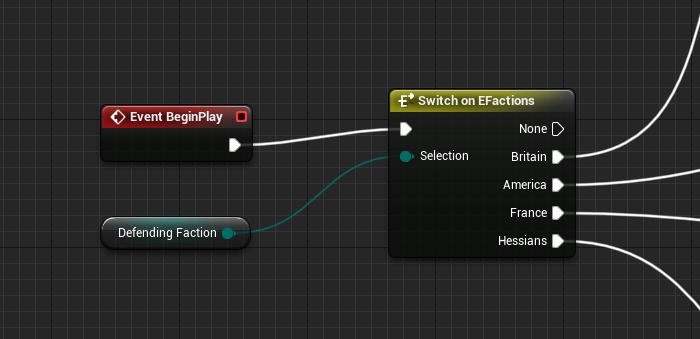
However when I then go to package, I get an error that says this:
'static_cast': cannot convert from 'TEnumAsByte<EFactions>' to 'uint8'
In the nativized C++ for that blueprint
This is what the offending line contains:
b0l__K2Node_SwitchEnum_CmpSuccess__pf = UKismetMathLibrary::NotEqual_ByteByte(static_cast<uint8>(DefendingFaction), static_cast<uint8>(EFactions::britain));
Looks like the static cast fails, any idea on how to resolve this?
whole prism
Can anyone tell me why I keep getting this packaging error?
LogAudioMixer: Display: Audio Buffer Underrun detected.
tawny lotus
What can id do? :/
tawny lotus
Please.. someone?
tawny lotus
Nvm i just deleted Config, seted all up new and now it work.
 sharp juniper
Hello, I'm trying to compile an old c++ project, but keep receiving this error. Any ideas as to why?
tawny lotus
try delete and rebuild
 modern pond
Hey friends, getting a "access denied/Error_unknown" issue when attempting to build in 4.23.1:
I have tried deleting my Binaries, Build, Intermediate, and Saved Folders, then deleting my solution nd rebuilding it, still no luck
Here is the log it mentions in the above pastebin:
 green solar
Please help i waisted all day... 😦 Is it possible to expose texture file to main catalog, so I could simply replace that texture without need to rebuild project everytime?
open rapids
@green solar Perhaps you can try and make a folder in your project that is outside the regular cooked hierarchy, And access it via FPaths::ProjectDir() + the_name_of_folder, and dump your uncooked Content there, Including but not limited to a JPEG texture. I personally never tested images this way, but I had other file types I accessed without any problems
green solar
Thanks, i will try
tawny lotus
Im mentaly dying, if gotta upload this as a final project till tomorow and now this message pups up! 😬 😬 😬
UATHelper: Packaging (Windows (64-bit)): C:/Users/dehrk/Documents/Unreal Projects/Yoramir/Intermediate/Plugins/NativizedAssets/Windows/Game/Source/NativizedAssets/Public/HUD__pf1985822212.h(177) : Error: Unrecognized type 'AStonerBP_C__pf1985822212' - type must be a UCLASS, USTRUCT or UENUM
Jesus christ!! 😭😭
tawny lotus
I did it! 😄
modern pond
Share with the rest of the class @tawny lotus
austere kernel
that fixing-unanticipated-packaging-bugs-hours-before-deadline feel
modern pond
Friends, I figured out why I couldn't package. A few weeks ago I was having problems with a game I was playing, and a suggested fix was to disable as many startup processes (not including windows ones) as possible. Turns out I disabled incredibuild -_-
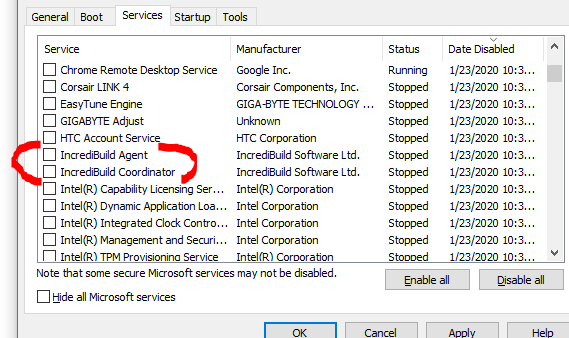
Now, for some reason my tilesets aren't being included in my packaged builds, so that's the next thing to tackle:
tawny lotus
@austere kernel it feels horrible:/
@vocal leaf im sorry for you :/ this doesnt look too healthy, maybe make a new project and migrate the assets?
 vocal leaf
rip
 tardy mica
Any idea about this one?
LogAssetManager: Error: Found multiple "PrimaryAssetLabel" Primary Asset Type entries in "Primary Asset Types To Scan" config. Only a single entry per type is supported.
A few of my projects can no longer be packaged because of this error
and the mappings show up twice in the Asset Manger section in Project Settings
But deleting the second set doesn't seem to do anything
and if I quit/restart the editor after doing so, they're just magically back again
Ahhh, I figured it out by myself. Deleting all of the entries in there and then quitting the editor made it restore the original two entries only
stark oar
Hi. I have some issues to update the codeworks for the latest version of armv7 and arm64
 tight siren
Is it possible to configure ue4 through the editor to package my windows build with a Pak file and my Linux build without, for incremental deployment to a dedicated server?
Or, must I make batch files to automate that?
 left eagle
-UATHelper: Packaging (Windows (64-bit)): (Exception: System.ComponentModel.Win32Exception (0x80004005): A required privilege is not held by the client
All of a sudden one day I can't package any projects anymore, failing with 👆 this error. Seems like a windows permissioning thing. Anyone run into this? (yes I'm running as admin, even command window with UAT admin fails).
Also compiling via the front end as well fails with the same error (like for example when changing engine versions).
-UATHelper: Packaging (Windows (64-bit)): ERROR: Failed to launch compiler to compile assembly from source files:
this is very odd 🤔
left eagle
Solution found: windows just needed the latest update. 🤦♂️
 chilly furnace
Hey guys, i have a probably stupid question, is it normal that when i'm building it tryies to build even the engine content??
It compiles like 9k shaders when i only have maybe 200? i find it weird, could it be i'm doing something wrong?
 stray harness
When I package my game to test, the material for the character is super ghostly-like! This only happens in packaged builds though, it appears perfectly fine in-editor. Has anyone else ever experienced this issue before? Is there a setting in-editor I can flick to show what it would look like 'packaged'?
(a bit dark, but the colours are fine)
lapis coral
engine version?
I've seen that kind of problem before, not sure it was packaging but
something about how UE4 changed the way skin works
stuff like r.SSS.Checkerboard setting
that's a setting that might change behavior between editor and packaging version I suppose
stray harness
4.23.2
Ok, thanks for the info, not come across that before. I'll have a look now and see what I can find
vital narwhal
@stray harness That looks like it's failing to render a texture because it's not set up for characters. In the editor it will enable that flag for you, but in cooked builds it won't and falls back. Check your packaging log for errors about textures
err, it's probably in the material rather
stray harness
Thanks @vital narwhal , I'll check it out. There is some type of material there, it's just super light. There were no errors in my logs when packing but let me double check
 plain cosmos
Hey, i got this message PackagingResults: Error: Tools.DotNETCommon.JsonParseException: Unable to parse C:[Path to project] Could not find token at index 153
Many thanks in advance for any help on this
mellow bane
The doc page explains it quite well tbh
Add new assets to the project, package against a previous named version, voila
 jagged seal
@mellow bane so there is nothing special I need to do in the base project until it's ready to be packaged for final release ?
do you happen to have the link to that doc ? I can't seem to find it via Google
mellow bane
This page describes how to create a patch for an existing project.
It's for patches, but DLC is all but a patch
vital narwhal
Yeah those instructions are good. The UE4 support for "actual DLC" is pretty limited, you often instead want to put most of your content in a patch and just download an unlock thing
jagged seal
well, I would patch base game if I am adding new code or something. DLC would be only for content (models, textures, maps, etc.)
some free, some paid
jagged seal
aye, cool
 limber spindle
Hey guys I'm trying to package to my Android device and I'm getting a R32_UINT texture format not supported (sRGB=0).I have an empty map with a sky sphere.Where do I make configurations.This is for UE4.24
 wind owl
I Keep getting this error. I set the default server gamemode as well.
ProcessResult.StdOut: LogPackageName: Error: DoesPackageExist: DoesPackageExist FAILED: 'None' is not a standard unreal filename or a long path name. Reason: Path should start with a '/'
help
i fixed the other errors, i couldnt get a new copy sorry
wind owl
plz ping me
 main stirrup
Hey guys , am trying to package my project for android using some plugin but getting "Execution failed for task ':app:transformClassesAndResourcesWithProguardForRelease" this error . Basically feels like its an gradle error. Please help me with that ???
that was its log file ..
scenic rain
Hello there, I'm trying to generate patch in chunks but only .pak file is coming out. Only while building a DLC, chunks are getting created. Not sure where I'm going wrong.
 flat wing
Hello everyone, does anyone know if it's possible to include the steamclient.dll, tier0_s.dll & vstdlib_s.dll files from the engine steamworks binaries in a packaged product? At the moment only steam_api.dll is included, but I need all four of these dll's for my dedicated server to work.
vital narwhal
Well, I have no idea what the steam legal rules are, but assuming you can you could probably modify Steamworks.build.cs to also include those other libraries if it's a Server build type
whole prism
Does anyone know what's causing this when I try to run my build?
 pliant hill
"UATHelper: Packaging (Windows (64-bit)): ERROR: Expecting to find a type to be declared in a module rules named 'AutoSettings' in AUTOSETTINGSModuleRules, Version=0.0.0.0, Culture=neutral, PublicKeyToken=null. This type must derive from the 'ModuleRules' type defined by Unreal Build Tool.
PackagingResults: Error: Expecting to find a type to be declared in a module rules named 'AutoSettings' in AUTOSETTINGSModuleRules, Version=0.0.0.0, Culture=neutral, PublicKeyToken=null. This type must derive from the 'ModuleRules' type defined by Unreal Build Tool.
"
Help me daddy!
XD
This is being produced from a plugin BTW...
I just want to know how to make it work.
XD
 dim grail
Hi. I trying to cook UT4, but there is many "Forcing save package" and warnings about nonexistent EpicInternal directory
Release branch
open rapids
I'm having trouble getting our project to work with bp nativization. On start it crashes with RecursionNotAllowed.Increment() == 1Is it even possible to nativize bigger projects? I always run into problems with it
 bold vortex
Hi, ppl! I have problem with packaging ActionRPG for Android.
If I make new project and build, it's building good.
 north wyvern
@bold vortex Did you compile it? Or build in VS?
bold vortex
- Compile in VS 2017 and it's ok
- In editor File->Package Project->Android->Android(Multi:...
north wyvern
Maybe need full rebuild, but that error show in special CPP, so try to look into this code
bold vortex
Ok. But it is clean learn Ue4 project. I don't make anything, just download from epic launcher and try build
north wyvern
I try now, and see what i get.
bold vortex
ty
@north wyvern I think that something wrong with my Android SDK
For Windows ARPG packaged well
north wyvern
@bold vortex try only ETC 2 package
north wyvern
Have you tried running it directly through a wire?
And have you installed the Android SDK as requested by Epic
bold vortex
Install by epic codeworks
Have you tried running it directly through a wire?
@north wyvern no. just in editor
Engine version 4.24 from launcher
north wyvern
I am on shader part, so some more time and i see
@bold vortex Yes, i have problem too 😄 I think for now its problem created by EPIC
north wyvern
If i find some thing i said to you
bold vortex
ty
north wyvern
@bold vortex think i get it
Action RPG use x64 type code in CPP, so you need to activate it, but to activate it you need to use GIT Hub source version of unreal engine, it from 4.24 from launcher, x64 say its need GIT Hub version to use it.
Its my GIT Hub version.
Not test it, but i think my theory is true 😄
bold vortex
Ok. ty. Tomorrow need to update ue4 source
 woeful harbor
I am trying to package the game and got the .exe file to work on my computer. When I try to give to other friends they get this error:
 wooden zodiac
who wanna join voice chat
 keen nacelle
I keep getting this error: UATHelper: Packaging (Linux): LogTargetPlatformManager: Error: Invalid target platform specified (LinuxServer). Available = { AllDesktop, Android, Android_ASTC, Android_ATC, Android_DXT, Android_ETC1, Android_ETC1a, Android_ETC2, Android_PVRTC, AndroidClient, Android_ASTCClient, Android_ATCClient, Android_DXTClient, Android_ETC1Client, Android_ETC1aClient, Android_ETC2Client, Android_PVRTCClient, Android_Multi, Android_MultiClient, IOSClient, IOS, Lumin, LuminClient, TVOSClient, TVOS, WindowsNoEditor, Windows, WindowsClient, WindowsServer, XXX }
I'm running UE4 source built engine on 4.24.2 and have installed the cross compilation tools for linux, but the engine does not see a linux option :/
open rapids
Hi everyone, I was hoping you guys could help me. I'm currently having issues with my game icon in windows when building my game. It shows the default windows icon instead of my game icon when running the build. I just followed the simple steps on making an .ico file but it is still not recognizable by windows. Am i forgetting something? Thank you in advance for the help! 🙂
stray harness
@open rapids link the steps you've followed and what you've tried. Difficult to advise with that high level summary
open rapids
hi @stray harness I just watched this video and adjust the other steps since I'm using unreal 4.23 as of the moment
https://www.youtube.com/watch?v=IG00FByBETk
 stray harness
I'd recommend trying to a find a more up-to-date tutorial, that was posted in 2016, the engine has evolved a lot in 4 years!
It might also include a step that was skipped
open rapids
I tried doing that but the most up-date that I saw was also unclear. Some are broken links too
Will try to dig in further
dim grail
UE4Editor: 1001[2020.02.17-12.53.24:319][ 0]LogInit:Display: LogBlueprint:Error: [Compiler PersistentLevel.Example_Map_Adrian] Error Could not find a function named "GetRandomPointInRadius" in 'NavigationSystem'.
UE4Editor: Make sure 'NavigationSystem' has been compiled for Get Random Point in Radius from Source: /Game/RestrictedAssets/Weapons/Weapon_Effects/Example_Map_Adrian.Example_Map_Adrian:PersistentLevel.Example_Map_Adrian
UE4Editor: [2020.02.17-12.53.24:329][ 0]LogInit:Display: LogBlueprint:Error: [Compiler PersistentLevel.Liandri_Asset_Test_Map] Error Could not find a function named "GetRandomPointInRadius" in 'NavigationSystem'.
UE4Editor: Make sure 'NavigationSystem' has been compiled for Get Random Point in Radius from Source: /Game/RestrictedAssets/Maps/Test/Liandri_Asset_Test_Map.Liandri_Asset_Test_Map:PersistentLevel.Liandri_Asset_Test_Map
UT4
 worldly pewter
Need sum help
Running AutomationTool...
Parsing command line: -ScriptsForProject="U:/Unreal Projects/Alpha_1/Alpha_1.uproject" BuildCookRun -project="U:/Unreal Projects/Alpha_1/Alpha_1.uproject" -noP4 -clientconfig=Development -serverconfig=Development -nocompile -nocompileeditor -installed -ue4exe=UE4Editor-Cmd.exe -utf8output -server -serverplatform=Win64 -noclient -build -cook -map=MainMenu+ThirdPersonExampleMap+Advanced_Lighting+Demo+Minimal_Default+Overview+StarterMap -unversionedcookedcontent -compressed -stage -package -stagingdirectory=U:/Export/Alpha1server/ -cmdline=" -Messaging" -addcmdline="-SessionId=A4C360274E0FC2DA2199648A5AEFFE6F -SessionOwner='johnh' -SessionName='Server' "
Setting up ProjectParams for U:\Unreal Projects\Alpha_1\Alpha_1.uproject
ERROR: Server target not found. Server target is required with -server and -cook or -cookonthefly
(see C:\Users\alex\AppData\Roaming\Unreal Engine\AutomationTool\Logs\U+Editor+UE_4.21\Log.txt for full exception trace)
AutomationTool exiting with ExitCode=1 (Error_Unknown)
BUILD FAILED
 night merlin
im getting an unknowncookfailure, anyone available to help?
 mental hare
@worldly pewter It seems that you are missing a *.Target.cs file for the dedicated server build. If you don't already have one copy 'Alpha_1Editor.Target.cs' and rename it to 'Alpha_1Server.Target.cs'. In the file then also change the name of the new class (the one that inherits from TargetRules) to 'Alpha_1ServerServerTarget'. In the constructor there then change the line where the target type is assigned to 'Type = TargetType.Server'. Also make sure that you game is added as a depndecy like 'ExtraModuleNames.Add("Aplha_1");' - also in the CTOR of the TargetRule child class.
worldly pewter
@mental hare i do not even have a Alpha_1Editor.Target.cs
im only using blueprints from the editor from the launcher
mental hare
If you are using the Launcher version of UE4 then unfortunately you will not be able to build a dedicated server target (that's at least my current level of knowledge and was still very true 2 1/2 months ago at a project in our studio). To get a dedicated server build you would need the engine being built from source. AFAIK it's now included in the launcher version due to size constraints bc Epic did not want to bloat the download package size.
worldly pewter
im runing 4.21.2 and i cant get the Source code work work for me it keeps giveing me errors
mental hare
Not sure if it's an option for you but here are some links related to the topic (including pretty straight forward how-to articles): https://variable63.wordpress.com/2019/09/27/how-to-build-unreal-4-4-23-0-from-source-code-and-server/ (targeting UE4.23), https://wiki.unrealengine.com/Dedicated_Server_Guide_(Windows_%26_Linux) (a bit older but principles are still the same),
Content Visual Studio Download Set up Solution PsAllocator Build and Launch (client) Server Cooking Launching Joining Build Times Summary Use Visual Studio 2017, Visual Studio 2019 solution is mess…
If you want/need the dedicated server try at first to get a clean UE4 source build that compiles without errors. If you have achieved that, it's a very solid starting point for the dedicated server articles.
worldly pewter
well i was able to create Alpha_1Editor.Target.cs from inside the editor that i have but now will not let me run the project
i will try and download the thing once more from github hope it works today 😐
mental hare
Even if you get the two files there is right now no way to get the dedicated server to compile without having a source built engine version. (you need the C++ built targets for those configurations which you will only get this way)
Good luck, give it some time and I bet you will get it to run!
worldly pewter
i been trying to get it to work for the past 2 weeks
mental hare
I know, sometimes it can be a pain to get stuff to run, but it will work
worldly pewter
if i cant get this to work can we do a screen share so you can show me what im doing wrong
mental hare
Not really available the next two days, bur after that maybe we can get together
worldly pewter
well if i cant get this to work today im just going to finish working on the codes i been doing
mental hare
Kk, just make sure you follow the steps for setting up dependencies and project files for the source build. So invoke the Setup.bat script and download everything. For compilation check that you got everything necessary along visual studio 👍
worldly pewter
is Unreal Engine installer really that important? for VS
mental hare
@worldly pewter the unreal I stalker from withing the VS setup is not important if you run your own engine source
worldly pewter
well i hope it works
worldly pewter
i wish this was faster
worldly pewter
@mental hare @mental hare ok this is what i got when it finished trying to build
mental hare
Is this the whole error output?
worldly pewter
yes
7 errors no warnings and no messges
it did give me the error about typeinfo before but i fixed that an did a rebuild
mental hare
And it's from compiling the UE4 project?
worldly pewter
yep
mental hare
Visual Studio version is 2017? I have something in mind that there was a regression in some of the versions that made the warning C4800 (implicit conversion to bool) appear for certain files. The best fix would be to solve the issues by changing the faulty code - but to check you could add 'Arguments.Add("/wd4800");' to the VCToolChain.cs file of the UnrealBuildTool iteself, recompile that and then try recompiling UE4 again. Then that warning should not be treated as an error anymore (but this is just a workaround, I bet there is a commit in github that fixes that in some version)
worldly pewter
yes its 2017 i also have 2019 installed
mental hare
That's especially weird bc AFAIK C4800 was not generated in VS2017, where VS2019 reintroduced it and therefore led to issues.
worldly pewter
this is also 4.21 of UE4
mental hare
Yep, I also know that a bugfix for this problem with C4800 warning was merged into UE 4.22 - so for fixing it here I would suggest exclude the warning for now from the UnrealBuildTool to at least get the engine to compile
worldly pewter
ok so in the VCToolChain do i have to put Arguments.Add("/wd4800"); in a set spot?
i do not know alot about c++ i only know the basic stuff lol
mental hare
Put it around line 618, that's where certain other warnings are disabled. I hope that helps a bit, I'm put for today. Good luck!
worldly pewter
ty hope this works im just trying to make a dedicated server for a game im working of for my friends. lol
worldly pewter
nope did not work 😦
 jagged valley
anyone have an idea on what might be causing this error
 ebon kernel
How do I I package only what I'm using in the game. It took like 3 hours to package my game and it has almost nothing in the level.
ebon kernel
Nvm. Just deleted all the crap I didn't need
mellow bane
Set the list of maps to package and only used content will be included.
feral radish
Anyone had luck making patches on 4.24? My IOS patch build process throws an error terminating with uncaught exception of type std::__1::system_error: mutex lock failed: Invalid argument, then the process just gets stuck... Didn't happen on 4.22, not happening on my windows Android build either.
 hallow field
I upgraded my project from 4.22 to 4.24, and without doing anything else, trying to package in 4.24 gives me this error:
https://hastebin.com/dezerosawi
It's pretty ambiguous to me, so if anyone has any leads on what might cause an error like this, please let me know! 🙂
 opal plinth
Hi all,
I have a problem when I packaging my map in unreal.
Some object will disappear in exe.
What steps I need to do before packaging?
opal plinth
Step1: select my map in maps&mode
Step2: package > windows >x64
open rapids
@opal plinth if I recall correctly, adding maps to the list to be included in the packaged build would cascade through all the objects that the map/s references
this would not work with assets that are being loaded at runtime via code though
opal plinth
some object still disappear
and in unreal 4.24 , It does not have this setting in project > Packaging
 sweet mantle
Hey all, getting a weird error while packaging.
Unhandled Exception: EXCEPTION_ACCESS_VIOLATION reading address 0x00001888
Followed by a bunch of unknown function errors.
Anyone has any idea what might be causing this?
Happens ever since I upgraded to 4.24.
One other thing I did was to recompile all blueprints using the '-run=CompileAllBlueprints' command
Looking for the address on google nets no results
tight siren
question: if ive made my game so it isnt using pak files, and someone who doesnt have the source for the game wanted to make a map, could they just make a map in any instance of unreal editor against any dummy project, cook that project also without pak files, and take the cooked umap, drop it into my games content dir, and play that map from the commandline? assuming of course that my game has no requirements for any special code within the level blueprint?
or will it just break horribly.
mellow bane
This is true regardless of using paks or not
(you should be using paks)
You can't prevent people from modding your game
 frail mango
is there a reason why a packaged game has no config files?
 violet otter
Hey hopefully this is an easy one: My packaged game starts up in Windows like this before the startup movies play.
I'm not even using wheeled vehicle assets in my game
I set in my project settings to exclude Editor Content to make the package smaller.
How do I hunt this thing down and make sure there are no references to it in my project?
(It doesn't show this error when I run the Android build from the same project, only happens on Windows build).
violet otter
hmm problem went away when I deleted previous install and included editor content. Shouldn't have to include editor content though right?
 naive plover
@violet otter you can disable the phsyxvehicle plugin
violet otter
For now I am including editor content to get around the problem, but I ran into a totally different problem when trying to package for windows 32 bit. It fails saying it cant find the binary file or something. I will try to get access to the computer soon so i can get the exact error message
 left ferry
I'm on Unreal 4.24.2 trying to build a Linux dedicated server of the 3rd person template. It builds Windows server but not Linux server. I have the Linux toolchain installed but I get this error:
does anyone know what this means?
it says my project does not exist
this is my target file:
nvm I fixed it
 zinc briar
how much does a pak like compress file size / lower it compared to the folders with uasset
 honest acorn
If anyone could please help me out with DLC it would be huge. Specifically Android:
I can find no hints online.
I am packaging individuals maps on Quest to be downloaded from Amazon S3.
Logs states successful download, install, and mount. But it says failed to resolve map. I have unpaked the Pak file using UnrealPak and its definitely in there.
Any ideas? Thank you
 storm pike
Hello all I'm trying to package a game in Windows. For some reason, my current project builds but I'm not able to start the game. I tried just doing a blank third party UE4 Project and built it, and it ran no problems. What can I look at as a cause of why it wouldn't run?
honest acorn
@storm pike did you set your starting maps and game mode?
storm pike
I have them both set to the persistant right now.
as far as maps
game mode is just set to the third person game mode
storm pike
Ok I think its something to do with world Composition.
I remade the scene from scratch and enabled world Comp and added a single landscape to a new layer and just from that the build failed.
open rapids
I keep getting errors like this. any fix?
storm pike
Ok, It wasn't World Composition after all. It was the Megascans plugin.
tight siren
This is true regardless of using paks or not
(you should be using paks)
You can't prevent people from modding your game
if i understand you correctly @mellow bane this is good news -- thanks. i dont want to stop modding, i want to encourage it but i also dont want to go through the faff of having to release my game's source code or modify the editor and release a version of it (which to my understanding needs special agreement with epic)
so if a player can make a map for my game in any copy of the unreal editor, and just drop it into the same dir as my pak folder... either in a pak or not... its all good.
on that note my dedicated server build doesnt use paks because it is a ton slower to rsync over one huge changed pak file rather than bunch of cooked .uasset's
but the packaged game i make available to others does
 silent swallow
Question: does sandbox.babylonejs.com imports .obj file from Unreal4?
I'm have exported a obj file of my archiviz project....when i drop my obj on sandbox.babylon.js.com.....it doesn't works...i mean it does something but I can't see my project? The outcome is very weird as i cannot see any of my meshes...just a sphere with ramdom colour on it???
 haughty depot
hey guys, our project is super laggy when packaged, dev or shipping build are both terrible. runs fine in editor. is there a way to attach the profiler to a packaged project or what is the best way to debug the performance on a deployed package?
 paper cipher
trying to nativize with exclusive and for some reason it's trying to nativize a class I have not request and also trying to do something with a c++ class that is not linked
any ideas what to do here
and or how to add #online.h to the included headers ini thing
 karmic python
i got this while trying to launch to an android phone. I've done this several times before, but now i got this.
 ocean cloud
Does anyone know what this warning is? I couldn't find any information. 🤔
 coarse tusk
Hello, this is my first post here. I tried packaging a game for Windows 64bit, and got this error https://pastebin.com/W8WAuQ5x
I asked a friend and apparently it's something Visual Studio related.
Hope someone can help me since I have to release the build as fast as I can.

Pastebin
hallow field
When packaging a project, what does it mean when I get a warning that says "Unable to find package for cooking path/to/asset" ?
I haven't found any leads on the forums or AnswerHub.
mellow bane
Listen server, sure. Not dedicated obviously
 rapid matrix
hello i am new to ue4 and i tryed to package a project but it will not run when ever i start the exe
here is the log: https://pastebin.com/pDnZBZLV
Pastebin
 marble oar
Base game packaging works, but when I try to create a patch I get:
LogWindows: Error: Assertion failed: Key [File:D:/Build/++UE4/Sync/Engine/Source/Developer/PakFileUtilities/Private/PakFileUtilities.cpp] [Line: 1231]
If I unselect to use .pak files for both release & patching, the procedure completes and I get the patched version of the game.
Anything I can do to troubleshoot this?
rapid matrix
anyone have an awnser?
 frank mauve
hey guys, our project is super laggy when packaged, dev or shipping build are both terrible. runs fine in editor. is there a way to attach the profiler to a packaged project or what is the best way to debug the performance on a deployed package?
@haughty depot Same here, in some parts of he game though.. what version do you use ?
what causes this?
@haughty quarry No idea, unfortunately.. Never seen it before.. Have you found a solution ?
 scenic zephyr
 mellow bane
Yeah, the answer to performance issues is, profile it
haughty depot
i couldn't figure out how to profile it, we brute forced debugging it, our problem turned out to be landscape tesselation. I am using 4.24
@frank mauve
mellow bane
How to identify performance problems and fix them.
UE4 has pretty amazing profiling tools
haughty depot
i couldn't get the profiler to see any packaged build, shipping or development, apparently after some reading, you can use it in standalone which i didn't try, but still not sure how different from a packaged build standalone is, we had great performance in editor
mellow bane
Standalone means packaged
rapid matrix
can somone help? my packaged project wont start when i open it https://pastebin.com/pDnZBZLV
Pastebin
open rapids
@rapid matrix you sent the wrong log 🙂 that's the packaging log, which is successful. We need to see the runtime log, if you packaged in debug mode or development mode, the log should be somewhere in the project folder, patiently look for log or saved subfolder in your packaged project folder, and upload that. Most likely you have a nullptr somewhere...
Keep in mind that if you package your project in shipping mode, there would be no runtime log, so you really need to package it in development or debug mode
rapid matrix
alrighty let me look for that :)
here you are
should be it
yeah it errored out
i dont think i have a runtime i need i dont know witch one tho
is it visual c++ 2013? thats common
@open rapids
open rapids
@rapid matrix LogPluginManager: Error: Unable to load plugin 'AdvancedSessions'. Aborting.
open rapids
by runtime I mean the executable of your project, after packaging is completed
rapid matrix
oh
open rapids
you can comb through that log you sent, there are some other potential culprits...
rapid matrix
is there a setting to stop steam vr from starting when i run the packaged product?
open rapids
I don't know, perhaps you can try and Google it
hidden gulch
Hi,
I m getting this warning when packaging,my facebook online service not working
My project is blueprint based ,iOS mobile game,I enabled online subsystem and online subsystem facebook idk why this warning I m getting
Any suggestion will be helpful friends..
Default Engine ini file with online subsystem configured
mellow bane
Online subsystems don't work in editor.
hidden gulch
@mellow bane so is this normal when packaging..
I got this warning when packaging bro..
mellow bane
Yes, it's normal, because OSS don't work in editor
hidden gulch
Thanks for reply friend...
But facebook analytics in my FB developer acc not working.....do you have any experience bro with FB....FB service not working @mellow bane
mellow bane
Never used Facebook in my life.
hidden gulch
K bro...
 zealous remnant
Anyone got a link to some explanation of how to package Project-level plugins properly?
I have a plugin in my project that refuses to package so the game can't be opened.
zealous remnant
It was saying the plugin couldn't be found. Since it works now that I made it an engine plugin, I'm guessing it's because it was missing the libs
 lofty pendant
Anyone using nativization encountering extremely long packaging times?
4.21 packaged the entire game with inclusive nativization fine in around 30-45 minutes.
4.24 packaging with inclusive nativization takes around 8-9 hours and then game crashes with an "Async loading event graph contained a cycle"
I think i understand why the "async" stuff is happening but i really don't understand why it takes more than the regular time to package
With exclusive nativization i was able to cut it down but it's still quite unreasonable. Then it crashes with struct errors from async graphs.
I'm stumped, am i missing something obvious between 4.21 and 4.24 settings?
 median ruin
Hey guys... having a first go at uploading a game to Steam. I've integrated Advanced Sessions into my project. I can get the Steam overlay to come up on my stand alone game... but only if I use app id 480. As soon as I switch to my own it fails with the following log messages
LogSteamShared: Display: Loading Steam SDK 1.46
LogSteamShared: Steam SDK Loaded!
LogOnline: OSS: Creating online subsystem instance for: Steam
LogSteamShared: Warning: SteamAPI failed to initialize, conditions not met.
LogOnline: Warning: STEAM: Steamworks: SteamUtils() failed!
LogOnline: Warning: STEAM: Steamworks: SteamUser() failed!
LogOnline: Warning: STEAM: Steamworks: SteamFriends() failed!
LogOnline: Warning: STEAM: Steamworks: SteamRemoteStorage() failed!
LogOnline: Warning: STEAM: Steamworks: SteamUserStats() failed!
LogOnline: Warning: STEAM: Steamworks: SteamMatchmakingServers() failed!
LogOnline: Warning: STEAM: Steamworks: SteamApps() failed!
LogOnline: Warning: STEAM: Steamworks: SteamNetworking() failed!
LogOnline: Warning: STEAM: Steamworks: SteamMatchmaking() failed!
LogOnline: STEAM: [AppId: 0] Client API initialized 0
 raven flare
Hola Everyone, hope to find someone which already fell into this. Found nothing online whatsoever
pasting here below the full error which falls out the screen
UATHelper: Packaging (iOS): LogMac: Error: appError called: Assertion failed: [File:/Users/build/Build/++UE4/Sync/Engine/Source/Programs/ShaderCompileWorker/Private/ShaderCompileWorker.cpp] [Line: 75]
it started suddenly a month ago over a binary version of UE4 with no downloads in between
Any guess?
vital narwhal
Did you, as the error suggests, try manually compiling ShaderCompilerWorker from visual studio?
 frosty plover
how do I enable console commands in a game? Does development target keep them?
mellow bane
Console commands work fine in game
The console UI is compiled out in shipping though
violet otter
Not sure if this is the place to ask, but how do I make it so my game doesn't cause a security warning? I am distributing for windows and android on the itch.io store. I guess some stores have code signing or something to prevent that problem, but even if I put my game on google play and solved the problem that way, what about the windows version if I am not distributing on Steam?
mellow bane
Steam will mark the game as safe
The Itch client should do it
There isn't really a solution for direct download, but that's the point really
eternal flare
why the heck would 4.24.3 complain about FilenameToLongPackageName in UE_4.22/Enterprise/Plugins/Editor/StaticMeshEditorExtension ????
mellow bane
What's the full path ?
eternal flare
just standard C:\Program Files\Epic Games