#packaging
1 messages · Page 27 of 1
 scenic egret
started with one idea in mind, it changed, now I dont know. about a month ago? but I only work on it on weekends... damn day job..
 wraith dune
haha, yeah i have a game im making for mobile and i started months ago. It's not even close to being done(sorta)
i can relate with not lots of time to code
scenic egret
I've got a tutorial level to sorta show the character controls that I've got in there so far, but its very minimal
and a main menu that goes to that tutorial level 😄
scenic egret
I wanted my friend to see how my game plays right now, so I could bounce some ideas off him
wraith dune
i can help you out if you want 😃
scenic egret
I dont even know where to start with questions right now really. I wanted to do an RPG, and ended up choosing sidescroller over top down
wraith dune
choosing what you want to do is hard
scenic egret
And I cant find examples of sidescrolling RPG type games to reference... most RPGS are topdown/isometric/FP
wraith dune
i wanted to make an fps game, but realized i dont have game servers for it, so yeah
um
i think i can give you one
scenic egret
and I cant go full RPG due to the complexity of the full RPG D&D stats type thing. its a bit beyond my current skill level
wraith dune
i dmed you a link
scenic egret
But I'm also shit at level design, so doing a metroidvania type thing might be rough
scenic egret
yah, thats one of the reasons I stayed away from topdown, its hard to get things to look right in a 3D top down view, unless its vehicles and such
a person you're just looking at the top of their head
and a semi-isometric view is difficult too... especially cause I want to use guns and raytracing (cause its easier for me to code:D haha)
wraith dune
lmao
scenic egret
ok verified, loading... see how this pans out...
wraith dune
good luck!
scenic egret
still no exe
wraith dune
wtf
scenic egret
UATHelper: Packaging (Windows (64-bit)): Parsing command line: -ScriptsForProject=F:/UE4/RP/RP.uproject BuildCookRun -nocompile -nocompileeditor -installed -nop4 -project=F:/UE4/RP/RP.uproject -cook -stage -archive -archivedirectory=F:/UE4Packaged/RPSep29_2018 -package -clientconfig=Development -ue4exe=UE4Editor-Cmd.exe -clean -pak -prereqs -nodebuginfo -tar
getplatform=Win64 -utf8output
thats the setings it shows at the beginning
scenic egret
guh... really?
scenic egret
haha, ok, how do I do that? 😄
wraith dune
oh okay
um
lemme send u link
Download Visual Studio Community, Professional, and Enterprise. Try Visual Studio Code or Team Foundation Server for free today.
click free download
scenic egret
Ok, well. it says 27GB. so this will be a while.
scenic egret
Guess I'll go shower. maybe have a good nights sleep... try again in the morning 😉
scenic egret
thanks for the help
wraith dune
yup 😃
scenic egret
Ok, back in editor,, hit package, still no exe.
changed the "build" option in the settings from "if project has code, or using ..." to "always"
now its doing something with VS
exe!
It works!
that was probably the setting I needed all along...
course the project is 1GB
 open rapids
hello guys I have a problem with my packaging for my project
when I package it it shows me this:
what to do? I search it in google but I coudn'tfind link to download this version-if anyone has the link please send me to download it
 fierce pebble
Zeblote is going to save me
 bleak cloak
you're missing some kind of external library
fierce pebble
well
as i figured. i am not missing it
it just seems like unreal... is ignoring it
really weird
bleak cloak
#include <winsock2.h>
#include <ws2tcpip.h>
#include <stdio.h>

#pragma comment(lib, "Ws2_32.lib")```try putting that somewhereidk where
but that should work
bleak cloak
Most likely you do have this library but it must be added via Project->Poperties->Linker->Input->additional Dependencies.```im not sure then
have you tried turning it off and on again?
fierce pebble
yes
this isnt a bad error
not at all
itll totally work on my other pc
but i want it to work here...
a bit annoy
fierce pebble
no
that would make it worse
4.20 is too broken
i am currently removing all windows visual studio tools
everything
then i will reinstall it
 supple galleon
PackagingResults: Error: Assertion failed: RenderTarget [File:D:\Build++UE4+Release-4.19+Compile\Sync\Engine\Source\Runtime\Engine\Private\UserInterface\Canvas.cpp] [Line: 270]
I get this error at packaging. But i have no Rendertargets in my Userinterface Folder.. There are only widgets^^
 lone tinsel
I can't package because of this error
PackagingResults: Error: UBT ERROR: Failed to produce item: C:\Users\mit nigger\Desktop\UE4Source\UnrealEngine-4.19\Engine\Plugins\Media\WmfMedia\Binaries\Win64\textx3Menu-WmfMedia.lib
How to solve it?
 reef burrow
@lone tinsel look up your build log, search for the word "error." You will probably find something else causing the lib to fail to compile.\
 wanton mist
the same exact bug error (as i can't call it a proper error) has made its way back without me changing absolutely anything. it doesn't want to compile a linux dedicated server for some reason. everything is set up exactly the way it was while i compiled more than a dozen servers. i have removed and re-added the environment variable, refreshed defaultengine.ini and made sure everything's right and even rebuilt the engine for linux and it still gives me this error. note: i can perfectly package windows and linux clients and windows dedicated servers. any help would be appreciated. ps: the way i fixed it yesterday was just to randomly remove and add back the environment variable and reboot my computer twice, none of which made any sense in actually fixing the issue, but it did. of course i tried doing this today too, but it didn't want to work. so i'm stuck with this crap.
supple galleon
OMG... i had to rename a folder since i got the filename too long error at cooking, then it didnt find a ton of references and now i have the old folder and the new one, without any files....😱
lone tinsel
thats incredible
supple galleon
theres no chance to get it back?
lone tinsel
never seen this before
wanton mist
anyone knows any fix for my issue? it's really preventing us from going forward with testing and developing at a steady pace...
bleak cloak
looks like incompatible binaries
delete the binaries and recompile
@wanton mist
specifically recompile those binaries on that machine
its using a different binary encoding that whatever built those binaries originally
therefore not elf_x86_64 compatible
 inner island
here we go
LogMeshUtilities: Error: Raw mesh is corrupt for LOD0. ProcessResult.StdOut: LogInit: Display: LogStaticMesh: Error: Failed to build static mesh. See previous line(s) for details ...about 768 of whose what is wrong with my HLOD's
any ideas? the first time the error appears is around here - ProcessResult.StdOut: LogSavePackage: Display: Finished SavePackage C:/Users/blmcc/Dropbox/LIVES/Alpha Version/LS Beta Version SourceControl/Saved/Cooked/WindowsNoEditor/LiveSimulator/Content/SketchupImports/3DS/TankerTruck_JustTruck/0046_Gold.uasset ProcessResult.StdOut: LogCook: Display: Forcing save package C:/Users/blmcc/Dropbox/LIVES/Alpha Version/LS Beta Version SourceControl/Content/Spline-RopesHosesCables/materials/tube/tiling/_tube_color_tiling.uasset because was already requeued once ProcessResult.StdOut: LogCook: Display: Cooking /Game/Spline-RopesHosesCables/materials/tube/tiling/_tube_color_tiling -> C:/Users/blmcc/Dropbox/LIVES/Alpha Version/LS Beta Version SourceControl/Saved/Cooked/WindowsNoEditor/LiveSimulator/Content/Spline-RopesHosesCables/materials/tube/tiling/_tube_color_tiling.uasset ProcessResult.StdOut: LogSavePackage: Display: Finished SavePackage C:/Users/blmcc/Dropbox/LIVES/Alpha Version/LS Beta Version SourceControl/Saved/Cooked/WindowsNoEditor/LiveSimulator/Content/Spline-RopesHosesCables/materials/tube/tiling/_tube_color_tiling.uasset ProcessResult.StdOut: LogTexture: Display: Building textures: AnalogHat (AutoDXT, 32X32) ProcessResult.StdOut: LogTexture: Display: Building textures: T_MobileMenu2 (AutoDXT, 512X512) ProcessResult.StdOut: LogTexture: Display: Building textures: T_MobileControls_texture (AutoDXT, 512X512) ProcessResult.StdOut: LogShaderCompilers: Display: Shaders left to compile 63 ProcessResult.StdOut: LogShaderCompilers: Display: Shaders left to compile 53 ProcessResult.StdOut: LogShaderCompilers: Display: Shaders left to compile 43 ProcessResult.StdOut: LogShaderCompilers: Display: Shaders left to compile 33 ProcessResult.StdOut: LogMeshUtilities: Error: Raw mesh is corrupt for LOD0. ProcessResult.StdOut: LogStaticMesh: Error: Failed to build static mesh. See previous line(s) for details.
wanton mist
@bleak cloak and where do i find those binaries to delete them?
and then recompile..what? the engine for linux? or the project
 foggy warren
so im having this issue where its asking me to build in IDE no clue how to fix this . any ideas?
wanton mist
first check if you've got the file it's searching for there and then rebuild the engine with vs
bleak cloak
The engine would need to be recompiled
And to find those binaries a little grep would do it
wanton mist
i’ve already recompiled the engine...i guess i’ll try to delete those and compile it again. when i get home i’ll report back
wanton mist
@bleak cloak alright. a guy on reddit recommended i delete the Intermediate and Saved folders from my project. this seemed to work. i believe this was probably what you refered to by deleting the binaries. thanks.
wanton mist
but now i have another error...substance doesn't compile for Linux ARM :(
wanton mist
yeah i know
but what would be the chances of someone coming up to me with an actual fix
bleak cloak
admittedly quite low
wanton mist
i found out there is actually a newer version for the 4.19 plugin. if i am really lucky, this thing is fixed. if i'm not...anyone here who might know how to fix that...feel free to send a message..
i only have two errors when trying to build for ARM..that one and this one which seems more manageable..any ideas on how to fix it? i'm sorry if i'm spamming / being annoying...i just want to get over this crap once and for all
 solemn narwhal
All, I keep on getting this warning when cooking
UATHelper: Packaging (Windows (64-bit)):   CookResults: Warning: Unable to find package for cooking /Game/Maps/Menus/OSA_Menu_Main
UATHelper: Packaging (Windows (64-bit)):   LogCook: Warning: Unable to find package for cooking /Game/Maps/Menus/OSA_Menu_Main
PackagingResults: Warning: Unable to find package for cooking /Game/Maps/Menus/OSA_Menu_Main
PackagingResults: Warning: Unable to find package for cooking /Game/Maps/Menus/OSA_Menu_Main
Now, that used to be a level that has been renamed. Thus, the fantastic linker (TM) always messes up with renames & Co, so now how can I find what is referencing this package so that I can fix this warning?
wanton mist
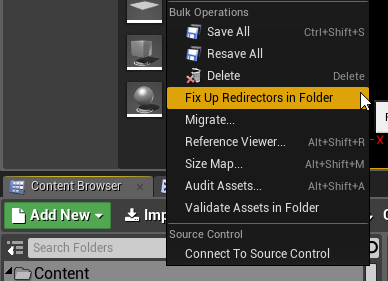
i believe you can see the references of a file (in & out of it) by right clicking on that file inside the content browser and clicking on reference viewer. and if you can't determine what's wrong from there maybe you'll find something useful by right clicking the content folder and checking out one of the options there: https://i.imgur.com/JDDgy4F.png
 solemn narwhal
as i said unfortunately that file is not there
it used to be there, then got renamed
 turbid kestrel
heyas. do i still need to get source ue4 to create a dedicated server?
reef burrow
Does UAT use java? My Java disk usage goes way up when using RunUAT.bat to package.
wanton mist
@turbid kestrel yes, you do. it’s quite a silly process.
turbid kestrel
Thanks @wanton mist
wanton mist
np
solemn narwhal
is there a recent guide on this?
also, is it customary to rip off all textures and so to make it smaller?
wanton mist
@solemn narwhal recent guide on dedicated servers?
and regarding the textures, you mean compressing them?
solemn narwhal
yes, and re textures i mean removing them completely it's not like a dedicated server needs them
wanton mist
you don't need to worry about that. dedicated servers are headless meaning they don't have anything to do with graphics so that means textures and anything else related
solemn narwhal
? of course that's what i mean
do you remove them when you package a dedicated server
wanton mist
no dude, no need for that. textures don't matter for dedi servers
solemn narwhal
what part of "since they don't need it, do you remove them from the package" is unclear 😃
wanton mist
you don't remove them.
solemn narwhal
well then you have extra GB that are unneeded
so instead of having a smaller file you pump it up with all textures
wanton mist
what. dude. i don't think we're talking about the same thing. if you want to continue we better go into DMs, this is #packaging
solemn narwhal
you don't package a dedicated server?
i'm talking about packaging yes/no textures in a dedicated server, where is this supposed to be discussed?
wanton mist
what part of "this isn't something to worry about as dedicated servers don't have textures, they are headless" is unclear?
solemn narwhal
the part that textures are GIGABYTES that I don't want to put in if unnecessary
oh forget about it
thanks anyway 😃
wanton mist
i think i get what you are trying to say. by "dedicated server" do you understand it is a fully-featured client that you run with a shortcut in which you put -server -log as arguments?
if yes, that's not a dedicated server. that's a client which you use as a server which is not good and is not a true (dedicated) server.
 spice prairie
Does anyone knows a workaround to avoid the pdb files being generated on a packaged build (shipping config, include debug files disabled)?
reef burrow
Er did you try purging your saved, other generated files, & packaging directory? Those settings shouldn't generate pdb files.
If it does make a clean project and try to reproduce the error. Then you can create a bug report on the unreal answers site.
spice prairie
There's a post on https://answers.unrealengine.com/questions/814102/view.html?sort=oldest, but i don't know if a bug report already exists
(that question it is not mine by the way)
bleak cloak
nativizeation is a flakey thing
dont use it if you get errors
the code it generates doesnt always work
@misty bluff
just UE being UE
rewrite it yourself in C++
nativisation just doesnt always work
99% chance if its not running fast you've fucked up somewhere and should just use the profiler
you can profile the blueprints themselves as well
open rapids
anyone can help me for my problem with the packaging?
open rapids
wanton mist
does anyone know what this crap is all about? when i tried to package for windows it doesn't want to. i have been perfectly packaging for windows and haven't changed anything now it can't compile...any ideas?
bleak cloak
read the output log
wanton mist
yeah so i need to rebuild the engine for windows for absolutely no reason at all because it's giving errors in engine files such as UBTUtils.cs or UE4Build.cs
my fucking god
bleak cloak
it tells you it dumped the full output to a file, read that
wanton mist
oh my fucking god are you for real
 lusty ivy
anyone have a habit when coding where u call higher level functions and implement them later?
what i mean is top down programming
bleak cloak
i just dont find the function in the docs and then implement them myself anyway
lusty ivy
ye but what i mean is I tend to write code with lots of nonexisting functions (blackboxes), and then i implement them later. I use the compiler error to remind me of whats missing
bleak cloak
i do that sometimes as well
 dreamy panther
Hey everyone
Due to our P4 directories always being quite long, we always find that we have to copy our project into a root drive (such as C) to bring the cooking paths right down.
Sometimes this becomes really impractical (for instance, our current project is sitting at 30GB for the project). Is there a way we can can fool UE4 into thinking the path name is shorter without moving the project to a root drive?
Thanks
 cosmic radish
any one have a salution to why i get baking errors only in 4.20.3 an d not 4.19
dreamy panther
@cosmic radish What's the errors you're getting? Are they relating to particular assets?
cosmic radish
UATHelper: Packaging (Windows (64-bit)): LogInit: Display: Warning/Error Summary (Unique only)
UATHelper: Packaging (Windows (64-bit)): LogInit: Display: -----------------------------------
UATHelper: Packaging (Windows (64-bit)): LogInit: Display: LogObj: Error: LoadConfig (/Script/Engine.Default__RendererSettings): import failed for bEnableAlphaChannelInPostProcessing in: False
UATHelper: Packaging (Windows (64-bit)): LogInit: Display: CookResults: Warning: Unable to find package for cooking /Game/BattleRoyaleTemplate/1-Maps/TransMap
UATHelper: Packaging (Windows (64-bit)): LogInit: Display: LogCook: Warning: Unable to find package for cooking /Game/BattleRoyaleTemplate/1-Maps/TransMap
UATHelper: Packaging (Windows (64-bit)): LogInit: Display:
UATHelper: Packaging (Windows (64-bit)): LogInit: Display: Failure - 1 error(s), 2 warning(s)
UATHelper: Packaging (Windows (64-bit)): LogInit: Display:
UATHelper: Packaging (Windows (64-bit)):
UATHelper: Packaging (Windows (64-bit)): Execution of commandlet took: 15.12 seconds
UATHelper: Packaging (Windows (64-bit)): Took 20.6251608s to run UE4Editor-Cmd.exe, ExitCode=1
UATHelper: Packaging (Windows (64-bit)): ERROR: Cook failed.
UATHelper: Packaging (Windows (64-bit)): (see C:\Users\SADraco\AppData\Roaming\Unreal Engine\AutomationTool\Logs\d+UE_4.20\Log.txt for full exception trace)
UATHelper: Packaging (Windows (64-bit)): AutomationTool exiting with ExitCode=25 (Error_UnknownCookFailure)
UATHelper: Packaging (Windows (64-bit)): BUILD FAILED
PackagingResults: Error: Unknown Cook Failure
LogDirectoryWatcher: Warning: Failed to begin reading directory changes for J:/Unreal Projects/Brtemp/Plugins/. Error: The system cannot find the file specified. (0x00000002)
LogSlate: Window 'Plugins' being destroyed
LogSlate: Window 'Plugins' being destroyed
LogDirectoryWatcher: A directory notification for '../../../Engine/Plugins/' was aborted.
i can build this without error on 4.19 but 4.20 it gives me these
 mossy shoal
I'm trying to remote-build an iOS project, and it's mostly working (got over some initial code-signing issues). The build appears to be successful, but the command at the end (zipping it up) is failing with an error no matches found: Payload/FaceARSample.app.dSYM/*
(this is the FaceARSample from epic). Looking in the build folder referenced in the logs, there's a FaceARSample.dSYM in the working folder, but not in Payload as the command appears to be expecting
 lethal rain
I'm getting this error when launching a packaged game. It builds just fine, but when running the exe this pops up
load package async failed to begin to load a package because the supplied package name was neither a valid long package name nor a filename of a map within a content folder
mossy shoal
btw I fixed my issue, changed default shell back to bash instead of zsh
open rapids
I have errors with the packaging-how to fix these problems
I delete the packets from the marketplace where I download them because I don't need them-why the project want them?
this packaging I started it from 18:07 my time now is 18:07 is this real?
it doesn't bugged but....
 light junco
UATHelper: Packaging (Windows (64-bit)):   Using Visual Studio 2017 14.14.26428 toolchain (C:\Program Files (x86)\Microsoft Visual Studio\2017\Community\VC\Tools\MSVC\14.14.26428) and Windows 10.0.16299.0 SDK (C:\Program Files (x86)\Windows Kits\10).
UATHelper: Packaging (Windows (64-bit)):   ERROR: System.IO.DirectoryNotFoundException: Could not find a part of the path 'C:\Program Files\Epic Games\UE_4.20\Engine\Intermediate\Build\Win64\UE4\Development\SourceCodeAccess\SourceCodeAccess.precompiled'.
Anyone an idea? Google brings up nothing
Folder does indeed not exist
bleak cloak
why dont you try making the file?
light junco
Cause it's a Launcher Version of the Engine. That file should be there.
Specially since it seems to be precompiled
I wouldn't even know how to create it :D
bleak cloak
just create a new file with that name and see what error it spits out then
its always worth a try
light junco
Building for Shipping seems to throw the proper error.
One of the included moduls was editor only.
Removing it from the build.cs fixes the above error.
Always happy about UE4's proper error messages...
bleak cloak
error reporting is harder than making it work properly
light junco
¯_(ツ)_/¯
 meager lion
@open rapids if you just deleted the files from kitedemo like i did or move them to a folder and then delete your redirection files then you did what i did a long time ago and your project will most likely need restored from backup or put the files back where they were.
open rapids
but I don't want to use these resurces alreay
When I start again packaging to don't search for them-is there a way to do this?
 cosmic flare
I need help packaging for iOS. I'm trying to get a build working on testflight, and having trouble with distribution certificates. On attempt to package, I get the error: "Signing key not found. The app could not be digitally signed, because the signing key is not configured. I created the certificate in .p12 format via xcode, and then downloaded the provision off of the Apple Developer website. I am hitting package in shipping mode. This is a BP only project. Thanks in advance.
 bleak ruin
So i made a custom build of UE and long story short build a test game to run as UWP for my xbox. I got the game packaged and sideloaded onto my xbox in dev mode (I payed for it) and it didnt run. It just opened, showed the title, and then crashed a few minutes later saying it took to long to start. Also, it wouldN't start on my PC as well. something about an invalid certificate
 stray mica
Anyone know how to fix this packaging error? PackagingResults: Error: System.ArgumentException: An item with the same key has already been added.
stray mica
I know it's probably because I made a copy of my project for a backup. I just don't know how to fix it without messing things up. 😦
 gilded spade
 mellow bane
@gilded spade What do you mean ?
 rough zinc
When optimizing for games that make use of multiple streaming levels, should you be looking to reduce size on disk, or memory size? We had a lot of high res textures made for our project, and have been using the MaxResolution setting in the texture editor to lower the resolution to something more manageable. This helps us keep the loaded memory size low, but the on disk size is still large.
My assumption is on disk size wouldn't matter too much once it's on disk, and it wouldn't impact load times. But I'm starting to think this is wrong, and the size on disk is the most important factor when optimizing for level streaming. Is this correct?
Any clarification would be super appreciated.
mellow bane
@rough zinc Actually, max resolution should lower the disk size too
For the packaged game
And yes, loading time is very much about size on disk
 glossy haven
What's the best practice for including external files alongside the game exe in a shipping build (and shipping build only)? So far, I've been doing the copying manually and would like to automate it.
glossy haven
that copies the files under WindowsNoEditor\<GameName>\
I need them at WindowsNoEditor
@crisp breach Best would be either running a batch file automatically after packaging's done, or working with UBT somehow to have a c# script copy the files over. Unfortunately, I'm not yet familiar with UBT at all.
nevermind, found an answerhub https://answers.unrealengine.com/questions/411431/prepost-build-step-in-ubt.html
 normal cypress
Hey, so, I've been working on lighting and the windows package looks completely different than what I'm seeing in the pie and launched game. Any ideas? Trying new settings, packaging and going back is kind of a pain.
Might be worth noting that the mobile pie matches the android package spot on, so I'm lost.
 reef lantern
Getting this can anyone help
 quasi blade
UATHelper: Packaging (Windows (64-bit)):   LogInit: Display: LogCook: Warning: Unable to find package for cooking /Game/FirstPersonCPP/Maps/FirstPersonExampleMap```

If I started with the first person project and have since deleted the first person example map, why does this still show up in the output log when packaging?Thanks! I will see if I can find anything referencing it. Any idea what could be referencing a map? I would say it has to be one of the default settings for the First Person example project but not sure which one.
open rapids
Hello guys I ave a problem with my lackagin
I started it 2 minutes ago and it still packaging
now is this
how to can package any project without problems-eeh
bleak ruin
Yeah. It depends on the size of your project as well, and how many times you’ve done it.
bleak cloak
did the person i helped really just delete all their messages?
 craggy marsh
outplayed
 drifting abyss
hi, can anyone explain what does each of this options do?
i want to know what is the difference between them
I can guess, windows server is probably a dedicated server.
but windowsnoeditor, windows, windowsclient....... no clue what they do different from each other
😖
reef lantern
can i just do /game for directors to cook? or do i have to do individual folders?
 finite tangle
Has anyone seen this error yet in 4.20? I'm seeing it even if I delete derived data cache, intermediate and saved folders, right as soon as I hit Package for Windows
ERROR: System.Reflection.TargetInvocationException: Exception has been thrown by the target of an invocation. ---> System.ArgumentNullException: Value cannot be null.
finite tangle
FIXED
had to un-check the encryption settings under Crypto - I'm told I can re-enable it, but just in case anyone else randomly gets this error in 4.20 while this is still visible 😛
open rapids
Hello, I am having an issue packaging my game. I migrated my project into a new one. I do a shipping package for win 64. It starts and I see 'compiling shaders'. All the time my CPU usage is 100% and my GPU about 60%. After about 10 mins my pc totally locks up, shaders make up 40% ISH of CPU usage but GPU usage is 0. I added a lightmass importance volume in every level and my game is pretty small.
Thank you for any help. Do you think the problem is graphics related? I guess I can do a GPU check.
mellow bane
Compiling shaders is CPU only
@open rapids
And it's slow the first time you package
Depending on which RHIs you support too
open rapids
It's okay I fixed it (touch wood) by removing some dynamic shadows of invisible objects and reducing light sphere influence. I was so slow it was crashing my PC
I now have only one problem if anyone is willing to help, that in my packaged project for some reason my level 2 game mode is incorrect, though all the other levels work.
 tawdry kettle
How do i choose my JS engine for html5? How do you pAckage for html5
tawdry kettle
nvm
 hollow granite
Hi everyone. I have some entities (widgets in this case) which are not Linux compatible due to a plugin, and I only want to build Linux for dedicated server and don't need the widgets anyway. Is there a way I can mark widgets (or anything) to be blacklists/not build for specific platform targets? Thanks 😃
 solar wharf
you can try the PakBlacklist
also mentioned here
@hollow granite
should just need one for the Linux folder specifically
hollow granite
@solar wharf thanks a lot, that sounds exactly what I need!
 plain pecan
has anyone here ever packaged html 5 for the newgrounds website? i'm having a few issues with it.
if so can you @ me please
 fathom wigeon
hi everyone
Does anyone know how to deal with this: WARNING: The config file 'MyProject/Config/MyConfig.ini' will be staged, but is not whitelisted or blacklisted. Add +WhitelistConfigFiles=MyProject/Config/MyConfig.ini or +BlacklistConfigFiles=MyProject/Config/MyConfig.ini
solar wharf
@fathom wigeon whitelist if you WANT your config in your packaged game, blacklist if NOT
fathom wigeon
I understand that, but where do you set up those whitelist items. That is what is confusing me.
fathom wigeon
@solar wharf -- you sir are a Rock Star. THank you.
solar wharf
Np 😄
 real blade
why would the launcher have to recompile shaders when all that I made is a simple change in the UI behavior?
fathom wigeon
@solar wharf Thanks for the help. Put it in the DefaultGame.ini and no more warnings in my packaging process. Appreciate the help.
open rapids
Hey! I'm having trouble with having this on multiple PC's, I made a demo for everyone to play, but everyone keeps reporting this error to me, I'm using a BP only project and its only on windows. I don't know how to fix this problem, any ideas? thank you
I am also using the Substance Plugin
solar wharf
This happens when you launch it correct @open rapids ?
open rapids
No, when I package the game and I send it off to other PC’s they tell me about this error when they open the exe file
solar wharf
How are you packaging this?
 rancid mountain
open rapids
rancid mountain
open rapids
For Windows
open rapids
Ok, thank you
solar wharf
let me know if those work out for you or not @open rapids
open rapids
my first solution is to add a GamMode server, I've heard that it might not work without it
solar wharf
sounds good
 haughty turtle
Hey
My packaging in just saying this... it doesn't seem to actually be doing anything
UATHelper: Packaging (Windows (32-bit)): XGEEXPORT: Exported 'E:\Program Files (x86)\EpicGamesEngines_2\UE_4.19\Engine\Intermediate\Build\UBTExport.000.xge.xml'
UATHelper: Packaging (Windows (32-bit)): Took 9.2675301s to run UnrealBuildTool.exe, ExitCode=0
UATHelper: Packaging (Windows (32-bit)): Running: C:\Program Files (x86)\Xoreax\IncrediBuild\xgConsole.exe "C:\Users\Christopher\AppData\Roaming\Unreal Engine\AutomationTool\Logs\E+Program+Files+(x86)+EpicGamesEngines_2+UE_4.19\UAT_XGE.xml" /Rebuild /MaxCPUS=200 /no_watchdog_thread
UATHelper: Packaging (Windows (32-bit)):
UATHelper: Packaging (Windows (32-bit)): -----------------------------------------------------------------
UATHelper: Packaging (Windows (32-bit)): Xoreax Grid Engine Console 8.1 (build 1874)
UATHelper: Packaging (Windows (32-bit)): Copyright (C) 2001-2017 Xoreax Software Ltd. All rights reserved.
UATHelper: Packaging (Windows (32-bit)): -----------------------------------------------------------------
UATHelper: Packaging (Windows (32-bit)):
UATHelper: Packaging (Windows (32-bit)):
UATHelper: Packaging (Windows (32-bit)):
UATHelper: Packaging (Windows (32-bit)): Maximum number of concurrent builds reached.
UATHelper: Packaging (Windows (32-bit)): Waiting for a build to complete...
solar wharf
@haughty turtle just asking if its installed. you don't have to get it. can you check your installed apps for it?
looks like its may be running off on its own (somehow) and UE4 is unable to build using it
haughty turtle
Okay... so it is building without it? So will it take forever to package?
 paper cipher
combo boxes do not drop down in packaged builds for me. Does anyone else have this issue? Works fine in PIE and VR preview. Even works in a cooked build, just not in packaged.
please @ me with your response
solar wharf
@haughty turtle have you tried restarting your PC?
haughty turtle
not yet
 worldly obsidian
hey guys. I tried to use PrimaryAssetLabel data asset to label system levels in plugin for explicit packaging. But it doesn't seems to package these levels.
Is there proper way to explicitly package system levels in plugin ? (4.19)
solar wharf
@worldly obsidian, in the asset manager, you've listed your plugin content directory under a tag?
worldly obsidian
what do you mean ?
 hearty prairie
Hey everyone. Is there a handy collection of tipps for reducing packaging sizes under 150MB for mobile? Pak_Blacklist.txt seems to do nothing and Im running out of ideas-
solar wharf
I would like to know if that exist as well haha
@worldly obsidian you mentioned you're labeling them, can you show me how?
worldly obsidian
@solar wharf I used Primary Asset Data asset. With explicit asset refereces to levels or "Label everything in directory" and Always Cook rule. Is that enough to force asset packaging ?
worldly obsidian
seems like plugin content primary assets are not considered for packaging
so these only can be packed if referenced by game content
but
Is there a way to add hard references for it using C++ or Build.cs ?
 lofty trench
I have a question. In my project I have a lot of map for demoing certain feature. I'm packaging my project using the command lines from this guide: https://wiki.unrealengine.com/How_to_package_your_game_with_commands
Does the -allmaps option cook every single demo map I have
or does it only cook the map and any streaming map related that I specified in the Map/Modes in the project setting?
Thanks in advance
solar wharf
@lofty trench -allmaps will cook all the maps within the project versus -maps=Map1+Map2 which will only build those two maps.
lofty trench
Does it package all those map into the final build as well or does it only package map that are needed as specified by the Map/Modes setting?
@solar wharf thanks so much for the clarification on allmaps
solar wharf
My pleasure, let me know how everything goes! @lofty trench
lofty trench
@solar wharf if I specify a map like this: -maps=Main_P, would it build the map that is included in that map? (The map that would be streamed in)
Or I would have to specify all of them?..
solar wharf
@lofty trench As long as it's part of the Level Streaming of that map, if you're using a function to load the map, like, "Load Level Instance", then you'll need to reference it within the -maps= property
lofty trench
I see...
If I added them using the level menu and I specify them as being always loaded, would they be included?
solar wharf
as long as it's part of that level menu
always loaded or not, it will be packaged with the map
solar wharf
seems like on Tick you try to remove an Invalid Index from Pos2 arrray and using Get Player Character's null reference. I have a question for you. Does this occur when packaging? @reef lantern
 sleek wasp
UATHelper: Packaging (Windows (64-bit)): [3/4] Module.NativizedAssets.cpp UATHelper: Packaging (Windows (64-bit)): c:\program files\epic games\ue_4.20\engine\plugins\marketplace\objectpool\source\objpool\public\PooledProjectile.h(23): error C3861: 'FOBJP_ProjectileStop_DelegateWrapper': identifier not found UATHelper: Packaging (Windows (64-bit)): c:\program files\epic games\ue_4.20\engine\plugins\marketplace\objectpool\source\objpool\public\PooledProjectile.h(24): error C2143: syntax error: missing ';' before '<class-head>' UATHelper: Packaging (Windows (64-bit)): c:\program files\epic games\ue_4.20\engine\plugins\marketplace\objectpool\source\objpool\public\PooledProjectile.h(24): error C4430: missing type specifier - int assumed. Note: C++ does not support default-int UATHelper: Packaging (Windows (64-bit)): c:\program files\epic games\ue_4.20\engine\plugins\marketplace\objectpool\source\objpool\public\PooledProjectile.h(33): error C2143: syntax error: missing ';' before '<class-head>'
would this error be caused because of nativization?
theres been a recent update to a object pool plugin i have been using, and it was compiling fine up until now... and when i contact the maker he says the problem is nativization
its just weird how "out of the blue" this error pops up when i was using nativization since i started my project
sleek wasp
Or im thinking maybe he updated the plugin but since i had it in the engine plugins folder that version didnt get the update somehow? Is that a possibility
Remind me to never rely on 3rd party plugins again
And Learn how to do it myself
 inland atlas
a clear syntax error of a missing ";" on a nativized plugin using its base as BP's.
As you can see header file PooledProjectile.h is suffering of a stupid error of missing identifiers due to a bad "include" chain (probably because of the new IWYU)
also I would recommend you always installing the plugins on your project instead of your engine
so if the plugin update ran through it probably updated the engine one
and you didn't get it
Nativization error sounds a bit unlikely on this case lol
mellow bane
Plugins are bad
Unless you really really really need them and can maintain them yourself
sleek wasp
yeah, having the plugin in my project AND in the engine
was cuasing it
i actually removed it from the project, i dont want updates... if it aint broke
dont fix it
thanks guys
now back to the actual problems i have to solve
sleek wasp
update* that only fixed it for a windows build, still having that isssue on android
i think the opposite of what i was supposed to do... so instead, delete the engine plugin and leave the project plugin, as the update was an engine plugin update... and everything was working previous to that update... hoping logic will side with me on this one
omg
yes
fixed
 thorn swift
I am having a strange error when packaging. I have never had this particular one before. I looked up some stuff online, and added streaming levels in hopes to fix it, but so far no dice. Any suggestions?
UATHelper: Cooking (Windows): LogWindows: Error: begin: stack for UAT
UATHelper: Cooking (Windows): LogWindows: Error: === Critical error: ===
UATHelper: Cooking (Windows): LogWindows: Error:
UATHelper: Cooking (Windows): LogWindows: Error: Fatal error: [File:D:\Build++UE4+Release-4.19+Compile\Sync\Engine\Source\Runtime\Core\Public\Serialization/MemoryWriter.h] [Line: 42]
UATHelper: Cooking (Windows): LogWindows: Error: FMemoryWriter does not support data larger than 2GB. Archive name: None.
I would really appreciate any tips and or advice.
 fast harness
Anyone know how can we save in cache the HTML 5 package, in that way the user does not need to download the game every time?
solar wharf
@thorn swift Have you tried selecting specific maps to cook / set generate chunks on?
solar wharf
@fast harness is IndexedDB enabled in HTML5 in Project Settings?
fast harness
@solar wharf not yet, IndexedDB do that?
solar wharf
I was looking it up and this is how you store clientside information. @fast harness
spice prairie
hi guys, seems like packaging is broken in 4.20 if you disabled any plugin https://answers.unrealengine.com/questions/835455/no-exe-if-any-plugin-is-disabled.html
can someone test it in 4.21? (disable any plugin and package an empty project)
paper cipher
what up? UE4 4.20 compiled from source, trying to cook content and getting this
haven't changed anything
content cooks fine in non source build
solar wharf
@spice prairie I don't have this issue, but I am using source.
@paper cipher would you submit your log?
paper cipher
@solar wharf
cleaning the build and rebuilding the engine. If it doesn't work I'll do the same to the game
this didn't happen in the non source build btw, cooked fine.
solar wharf
do you think it could be related to the VictoryBPLibrary plugin? are you using the source version of it as well? @paper cipher
paper cipher
theres only one version and no I did not have this issue when I cooked in the non source build
Victory BP library has never given me issues like this in other projects
solar wharf
I just presumed there would be a binaries and source version of VictoryBPLibrary
just making sure you got the source version
Unreal Engine Forums
Dear Community,
I've decided to create my own C++ Blueprint Function Library of any functions that I've written that think you will find useful!
A Blueprint
like did you get it from here
or github
looks like the one on the forums is the binary version
ah okay
paper cipher
that shouldn't cause errors for landscape and grass node though
solar wharf
yeah
I'm pretty sure that's unrelated
which is why it makes no sense
could just be a worker on another thread
cause that's how that works
I would point fingers at 3rd party plugins before that
try deleting the intermediates and binaries from that plugin folder
rebuilding the solution
and then cooking again
all you want is source & content when building from source
other binaries / intermediates can create false errors
mostly intermediate stuff but just to be safe
mismatched binaries aren't helpful either
paper cipher
the engine compiles fine though. are you saying I should put the plugins in the games plugin folder instead?
solar wharf
no
go inside VictoryBPLibrary folder, delete the Intermediate and Binaries, click GenerateProjectFiles, then build the Editor
paper cipher
@solar wharf didn't fix it
solar wharf
@paper cipher okay that rules it out at least. say it was the grass some how making things weird. have you tried the unreal frontend?
paper cipher
Not yet, I figured this had to do with building the engine. A good chunk of files were skipped.
Also I copied the plugins folder from my non source build and dropped it into the source folder and built that. That folder/runtime is the source Location of the error.
solar wharf
right
stray mica
So i added several paragon characters to my game and it's taking forever to package. Is there a way to speed up the "compiling shaders"??
solar wharf
There is a cook content option in the FIle Menu. Do you have any issues with that? @paper cipher
@stray mica Incredibuild can help with shaders - you can install it with a Visual Studio setup
paper cipher
@solar wharf that was the first thing we were talking about.
@stray mica i second incredibuild
and swarm
i think swarm works that way right
solar wharf
@paper cipher Ah okay, make sense. I thought you were actually building.
stray mica
@solar wharf Thanks I'll try it out
stray mica
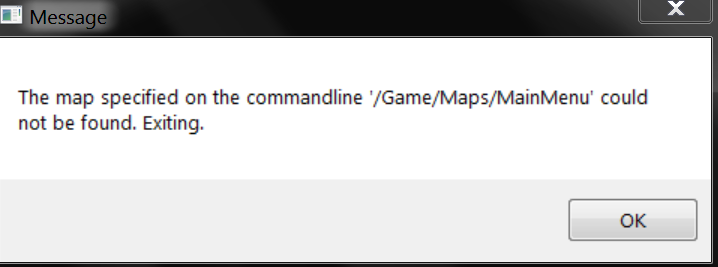
So I packaged my game but when I run it I get this error: https://i.gyazo.com/2df137c9a89ec569fc38e6995e775d27.png

In the editor it runs fine why does it do this when I try to run the packaged game?
fierce pebble
you are lucky that you even get a message...
prolly 4.21
can you show me how the map is called in editor cb
stray mica
I'm using 4.20 lol Give me one sec I might have found something that could be causing it
stray mica
Well I must have broke something becauase now I can't even get it to package. It just says UATHelper: Packaging (Windows (64-bit)): BUILD FAILED
PackagingResults: Error: Cook failed.
PackagingResults: Error: Unknown Cook Failure
I had some unused characters that had broken blueprints so I deleted them to free up space and now I can't package lol. I'm not sure whats going on.
 fierce pebble
is that the entire log?
stray mica
That's what was in red.
fierce pebble
entire log pls.
stray mica
Ok 1 sec
Huh... So I repackage to get a fresh new log and I have tons of yellow saying it can't find pretty much all my blueprints and files. What the heck??
its almost done then i'll post it all
It won't even let me paste all of it in
fierce pebble
its ok to split it
just dont try to hide things...
i cant help you if you hide everything
stray mica
Lol ok I wont lol
Well There is definately something major broke because there is so much yellow and some red saying it can't find anything. None of that stuff was their earlier. 😦 I can't even get it all into separate pastebins lol. Here is one part I'll try and get the largest part. https://pastebin.com/QuTGHn9v
So this crap is not even in my project. I don't have a folder called Game/SGT What that heck is going on
I have another project with stuff like that but not it this one.
fierce pebble
ok
i want you todo something
in content browser
click the most parent folder
called
content
right click
and rix up redirections
tell me what happens
E:/Unreal Engine Games/SteamProject 4.20/
this path is making me a bit uncomf
theres alot of special symbols ue4 will just convert into more signs...
the empty spaces
and the dot
you cannot use these signs.
ue4 can work around this yes
but only bc its very advanced
not bc its smart
meaning that any platform build will mind
stray mica
Ok I did it and am trying it again
Well from the yellow i'm seeing so far it looks like its gonna fail again.
fierce pebble
did you actually get a message when clicking fix up?
stray mica
No I don't think so
So what I did to cause this mess was I had a Paragon character that I deleted. It took forever to delete too
I had a paragon character and a folder full of broken characters and blueprints. I deleted them and BOOM everything broke
I'm not referencing those either. Everything works in the editor.
So my question is, If it is a directory problem, can I just move the project to my C drive? Or will that break it even more?
My C: drive is my SSD where I have a few UE4 projects. I forgot I had this project on my old Hard drive.
Is there a right way on moving a project? I don't wanna break it even more
stray mica
What about copying a project?
stray mica
Nope thankfully its all Blueprint for this project
fierce pebble
then you can just move it somewhere else
stray mica
😃
stray mica
Yea I think its C:/mydocs/ue4projects/ or something like that
Thing is UE4 gave the project the 4.20 name when I opened it with the new version of the engine lol
I try to never use spaces and special characters. I use camelcase or underscores
As you could probably tell I haven't packaged many games. Maybe 2 or 3 small projects. This is my first large one. I just wanna test multiplayer with different PC's and can't get the thing to package
fierce pebble
i dont think this is about packaging
you broke something more sensible
do you get errors when you open the project?
stray mica
No errors when I load. The game runs fine in the editor. I tried shutting it all down and opening it back up. I moved it to my C drive and it still wont package. I'm still getting lots of yellow with a directory that doesn't exist. My directory is Content/OnlineMultiplayer/Blueprints but the Yellow in the Log is saying it can't find Game/OnlineMultiplayer/Blueprints
fierce pebble
well
it sounds like alot of the redirectiors are broke
can you open all these files
stray mica
In the past I had to just make a new project and slowly add back all the stuff from my other broke project. I might have to just do that again
I really do appreciate your help though I'll ping you tomorrow when I fix it. I'm going to go to sleep.
solar wharf
@stray mica BlueprintGeneratedClass /Game/Base/DmgType_ZombieMelee.DmgType_ZombieMelee_C - when you open this, do you get any errors?
paper cipher
Ensure condition failed: ChildActorTemplate == nullptr [File:U:\Engines\UnrealEngine-4.20\UnrealEngine-4.20\Engine\Source\Runtime\Engine\Private\Components\ChildActorComponent.cpp] [Line: 105] Found unexpected ChildActorTemplate BP_BasicWall_C /Game/DA_Snap_GameDemo/Connections/MySnapConnection.Default__MySnapConnection_C:Wall.Wall_BP_BasicWall_C_CAT when ChildActorClass is null
@solar wharf got a new lead
solar wharf
interesting, so if that is populated with something, do you no longer get that error when you Cook Content?
paper cipher
that is a crash log from trying validate assets
solar wharf
Have you looked at that BP already?
paper cipher
don't need it so i'm gunna delete that folder
solar wharf
Yeah that works
paper cipher
that didn't fix it, seems to be unrealted
starting to think this is from deleting landscape proxies at some point
anyway to clean the project? I've done the whole delete the folders and regenerate trick. that didn't work
fierce pebble
👀
you need errors tho
you cant clean stuff without needing to clean it
show log
paper cipher
crash log or cook log? I get same errors trying to validate assets as when I cook or package
fierce pebble
show
paper cipher
yeah which log I just mentioned though
fierce pebble
all
paper cipher
cook log
fierce pebble
pastebin pls
paper cipher
um...ok? one sec
solar wharf
looks like its ending in the same place but starting somewhere different
that's nice
paper cipher
pastebin is limiting me and I'm not paying for pro just for this instance
crash log
solar wharf
@paper cipher in the editor viewport, have you tried toggling off grass haha?
and see if you get that same crash from the grass
paper cipher
my grass comes from a material node
it works in the editor and preview too
most likely it stems from trying to access a tile that isn't there anymore
paper cipher
maybe it's because of this? don't know when this happened
all my foliage from all my other tiles suddenly in in the center of the map
weird, had to reload the map 3 times for everything to go back to normal. the second time everything was placed way off the map
paper cipher
54 tiles in world comp
also I removed grass node and tried cooking. The error didn't come up, BUT A NEW ERROR did. It was related again to something in the plugins/runtime folder. My suspicion is that perhaps I messed up adding the plugins from the non source build engine to this build by dragging in the folders and not by adding them through the launcher
new crash log
solar wharf
interesting
we're playing wack-a-mole
you're cooking on the fly?
can you show me your Project Settings -> Cooker
you can collapsed the classes if they're expanded
@paper cipher
stray mica
So I'm new to packaging and have some questions. Do yellow warnings cause the packaging to fail? And does having old blueprints and files that you don't use and may have errors also cause packaging to fail even though they are not being referenced or used?
solar wharf
Yellow warnings may cause the package to fail but it's unlikely, but should still be addressed. It is possible that old blueprints could be cooked and cause issues. You can blacklist them from cooking if you want to prevent this.
There is some warnings like file access which show up yellow, and will end up as red after # of tries. So it just depends. But in almost all cases, unless the red error is unrelated to the cooking process, will cause cooking to fail.
stray mica
Ok Thanks. Last night I packaged my game fine. But I deleted some broken blueprints and now I get huge lists of yellow warnings and a UAT Failure when I try to package
solar wharf
Yeah you have to be careful how you delete old Blueprints. I don't know if you can bring them back or not but that may allow you to build. At least then you can force them not to be included in the cook with a blacklist OR go through the reference viewer, and ensure you've deleted all existence of a reference to that BP before you delete from the editor.
stray mica
@fierce pebble @solar wharf I finally got it to package. I just went thorugh the list of yellow and red warnings and errors either fixing or blacklisting them. Now it works. Whew! What a pain. That took forever.
stray mica
Thanks for helping me out. I was stressing out lol
solar wharf
No worries dude. Glad I could help. I knew it was one of those weird non-descript issues. Unfortunately going through this is a good thing, because you'll know for next time.
stray mica
Yea that was part of my stress. I wanted to know what the right thing is to do but I'm new to it all so I felt overwhelmed.
solar wharf
Do you use fix up redirectors as well after you've moved something or even deleted a BP?
stray mica
I did. That guy I thanked earlier with the name I can't type lol showed me it last night.
solar wharf
Oh sweet!
 frank trellis
this is probably the best place to ask for help
in my blueprint project I get this when trying to package
The thing is, I have visual studio installed anyways
even though I'm not using it in this project
solar wharf
is it Visual Studio 2017?
meager lion
ooookkkaaayyy!!! WTF!? I just changed my package from development to Shipping and now it seems that my Game Instance Variables are not being updated when the levels are loading. The Levels set a ton of data.
what changes when you change from development package to shipping?
paper cipher
@solar wharf packing, cooking, and validation will fail with errors related to the runtime folder
getting you a screenshot now, I don't think it matters though
what I should also do is try cooking in the non source build engine as well to see if the error is there
here you go
solar wharf
Are you packaging with File -> Package or?
solar wharf
can you show me the log from that?
meager lion
nevermind it was a typo. haha
paper cipher
@solar wharf same log
 nocturne holly
I think i need to install someting in the Visual installer, but i don't know exactly what...
 vague bloom
hi there. could someone explain me what is cooking, what does cooking to performance or what does improve it etc..? I want learn more thing than doc.unrealengine.com
solar wharf
@vague bloom Cooking is the process of taking raw assets and converting them into files suited for the target platform. UE4 does with the knowledge it has of the assets from the editor and configurations provided by the project, then taking those things making the required output neccessary to run the application in the operating system.
Not sure what else you'd like to know but thats the gist of it.
solar wharf
building from source or binaries @open rapids ?
vague bloom
@solar wharf what could you say about relation between metadata and cooking? ty for your answer
open rapids
 solar wharf
metadata such as resources for an application?
vague bloom
yes
solar wharf
The configuration of the project plays a bigger part in this, providing things platforms specifically need such as an Application Title or Icons for the app. Its part in cooking is just copying those asset and creating things like .plist for iOS which describe the app generated from the project settings to the root folder of the package typically.
 solar wharf
can you make a client fine?
also
can you send me the log from this build
@vague bloom updated it a bit
open rapids
mhm
frank trellis
@solar wharf you responded to my plea for help earlier but I was asleep, but yes, I have 2017
solar wharf
Under Project Settings -> Platform -> Windows -> Toolchain -> Select 2017
frank trellis
I already did
solar wharf
See if you still get that issue, if so could be an installation issue
solar wharf
did you select all the components related to game dev things?
frank trellis
Yeah
ill check again though
I used the installer that epic games gives you when you try to create a c++ class
yeah I have it all
@solar wharf ??
frank trellis
as someone who hasn't used unreal engine in a while and is trying to package a game I made a year ago, I have no idea what those are
solar wharf
you an admin on your pc I presume?
frank trellis
mhm
if I take a min to respond it's because I'm getting my main menu music set up
nvm got it working
solar wharf
oh what did you do
solar wharf
ah
frank trellis
Gosh it's been so long since I made this
solar wharf
go to this with your file explorer %VS140COMNTOOLS% or %VS150COMNTOOLS%
frank trellis
I am trying to find the blueprint that spawns the objects
solar wharf
see if one of those work
frank trellis
the first one worked
idk about the second
im an idiot the spawner was in the level blueprint lmao
solar wharf
try setting that tool chain setting to 2015
frank trellis
still no
I know my project isn't C++
because theres no compile option at the top
solar wharf
try reinstalling vs 2017 but start the setup with run as administrator
solar wharf
that visual studio 2015
its the env variable used so other apps can find it
yeah sorry, it just weird that you don't have an env variable for 2k7 if thats what you said is installed
thats the vs15
frank trellis
yeah
but vs15 doesnt work either
im gonna reinstall it because its a smaller download
frank trellis
are you serious
I completely reinstalled visual studio
restarted my pc
and it still doesnt work
FML
solar wharf
@frank trellis ran it as admin and check that %VS150COMNTOOLS% ?
frank trellis
i installed 2015
solar wharf
@open rapids can you show me your target.cs for the dedicated?
oh so did you select vs2015 in the Tool chain settings?
also try
opening Visual Studio Selector
and should only be 2015
open rapids
@solar wharf
solar wharf
@frank trellis search within start
solar wharf
maybe the phased it, okay so at this point you are still getting the install vs message?
frank trellis
@solar wharf yeah
solar wharf
@frank trellis is there C++ in your package?
frank trellis
No
solemn narwhal
Does anyone have updated instructions on how to package for steam? I've been watching official steam videos and reading UE4 docs. There are a variety of different instructions, like: include the steam_api.dll at root level y/n? Include steam_appid.txt y/n? Is a separate DRM request needed y/n? Update the steam SDK to latest before proceeding or use the one with the engine?
and so on
 crisp breach
What i did:
steam_appid.txt inside Binaries\Win64
steam_api64.dll, steamclient64.dll inside root*
no drm request
kept default sdk version
tbh i think you only need steam_api64.dll in there
idk why did i put the other one 🤔
solemn narwhal
lol
but that for instance: where is this explained? I couldn't find in any docs that you need to put the steam_api64.dll in the root
so obviously I've missed something
(thank you BTW)
did you do any of the things in https://docs.unrealengine.com/en-us/Programming/Online/Steam ? for instance, adding in mygame.build.cs:
DynamicallyLoadedModuleNames.Add("OnlineSubsystemSteam");
that auth i didnt do
solemn narwhal
[/Script/Engine.GameEngine]
+NetDriverDefinitions=(DefName="GameNetDriver",DriverClassName="OnlineSubsystemSteam.SteamNetDriver",DriverClassNameFallback="OnlineSubsystemUtils.IpNetDriver")
...and so on
solemn narwhal
awesome thank you
 meager elbow
Does anyone know if it is possible to strip texture LODs per platform? Like a per platform cook with different max texture sizes)
As a disc space optimization, the per platform runtime max texture size is working.
frank trellis
ughghgghgh
i cant fix my issue

-Removed all plugins
-literally everything else you can do to fix this
-Project is entirely blueprints```@frank trellis https://visualstudio.microsoft.com/thank-you-downloading-visual-studio/?sku=Community&rel=15 get 2017
Thank you for downloading Visual Studio If your download does not begin, click here to retry Find tutorials, samples, and documentation to help you start coding.
Learn more Create your first "Hello, World!" C++ console app with Visual Studio
solar wharf
okay
lets try this
one sec
%VS150COMNTOOLS%
can you go there now?
@frank trellis
open rapids
Hey, is it just my project or aren't the new 4.21 sequencer events firing in a packaged build?
solemn narwhal
All, still a steam question. I've got my app approved and in prerelease. My DefaultEngine.ini file contains:
[/Script/Engine.GameEngine]
+NetDriverDefinitions=(DefName="GameNetDriver",DriverClassName="OnlineSubsystemSteam.SteamNetDriver",DriverClassNameFallback="OnlineSubsystemUtils.IpNetDriver")

[OnlineSubsystem]
DefaultPlatformService=Steam
bHasVoiceEnabled=true

[OnlineSubsystemSteam]
bEnabled=true
SteamDevAppId=480

[Voice]
bEnabled=true

[/Script/OnlineSubsystemSteam.SteamNetDriver]
NetConnectionClassName="OnlineSubsystemSteam.SteamNetConnection"
and I have a steam_appid.txt with 480 in it.
Like this, it WORKS, i.e. I can shift-tab into the overlay.
If I just modify it with my appid, the overlay doesn't show up anymore.
Any ideas?
(cc/ @crisp breach as you seem to know quite a bit about this 😃 )
crisp breach
480 is the testing ID
unless you have your own ID (paid the fee) you need to use the 480
mellow bane
@solemn narwhal The overlay works in packaged development, and in packaged shipping only when started from Steam
solemn narwhal
Takain I do have my id

@mellow bane so the SAME build (with the exception of the modified IDs) works for 480 but not mine
mellow bane
Okay, so what kind of build is it ?
solemn narwhal
 solemn narwhal
config files -> see here above (the 480 gets changed)
NO, not started from steam in both cases
mellow bane
Like I said, in shipping, Steam only works in Shipping when launched from Steam
mellow bane
Maybe, I don't know
solemn narwhal
ok then
my issue is that I have an horrible upload connectivity so I'm trying to see if everything works correctly before uploading 6GB of stuff
mellow bane
You don't need to upload for that
solemn narwhal
everything works for 480 but not for my ID
mellow bane
Well, maybe
solemn narwhal
so only thing I can try is to start it from Steam?
mellow bane
You can try adding it to Steam as an external game but I'm not sure it will actually work that way either
I would start with a development packaged build
That should work outside Steam
If it does work in development using your appid, no reason it won't once uploaded
solemn narwhal
that's a nice suggestion
let me try that
building
could it be this is because i have NO BUILD configured yet on steamworks?
(which obviously requires the upload)?




 mellow bane
That would be possible too
By the way, don't worry too much about upload. If you disabled compression of your pak file, Steam is extremely good at generating diny diff
It's actually even better than generating patches within UE4
Most of our updates are less than 50MB for a 4GB game
solemn narwhal
got it thanks
thorn swift
does anyone know where the ue4.sln file is located in windows 10?
solar wharf
@thorn swift root of the engine folder of UE4, but if you did not download the engine from github.com, than you won't
also would need to deliberately create one once you got the source from github
(with a batch script you click)
 stiff rover
Whoa peter lives
solar wharf
😄
 lament sparrow
Hey what does has no valid outer when cooking! mean when packaging?
lament sparrow
https://pastebin.com/wrewLdqT @solar wharf
it's the part error is in
but there's not much useful info in there
 naive plover
Do you have another UE open when packaging?
solar wharf
its deleted @lament sparrow
fierce pebble
ooof
pastebins 1 hour function snapped @naive plover s neck
right when it died XD
1 hour between
naive plover
lol I didn't even look
 thick bay
The packaging of our game for the megajam failed
Could it be because we've deleted some not needed assets to get the filesize under 1 GB?
thick bay
i know :/
solemn narwhal
all, does anyone know what prerequisites to install for ue4?
can’t really use ue4_prerequisites because that file will lock if run in silent mode when the requisites are already installed
 gaunt wedge
Hi there, I want to pack a ue4 project so the client can use it with VR steam, but I don't use VR steam so my question is it possible to pack ue4 project to be used with VR steam without having one and if yes what steps should I follow?
nocturne holly
I think i need to install someting in the Visual installer, but i don't know exactly what..., reinstall vs17 didn't help
solar wharf
I think if you go to uninstall 2017, and instead, modify the installed components, search for CRT. Like its shown here. https://developercommunity.visualstudio.com/content/problem/6111/visual-studio-2017-universal-c-runtime-crt-for-win.html
Developer Community for Visual Studio Product family
@nocturne holly
nocturne holly
@solar wharf Thx, I made everything exactly so, but I get always the same Error....
 timid yew
Getting this error while packaging. Any idea how to fix this? Posting image of the section in the BP it's referring to below
 misty bluff
What is this 🤔
lofty trench
I'm having this super weird issue where the my widget is not showing properly in the packaged build, however when playing in the editor it's showing ok
I have checked the packaged map setting, and it is the same build. I'll try other method to make sure they are the same scene, but just wonder if anyone have the same problem as I
I'm gonna try to nativize the widget and see if that solve the problem :-?
 mossy folio
guys, i have a question: after packaging the game to have the exe of the game that i created, and there are other files..can i continue to, lets say, to add a character in engine, and after to update the package(the game) and if i open that .exe to show what i added?
 jagged junco
Hey, anyone getting crazy results when packaging a project with Blueprint nativization turned on?
My game gets stuck with sound playing and that's it. But only if I turn on Blueprints nativization. I am on 4.20.3.
mellow bane
Nativization is, not a great feature
jagged junco
@mellow bane I think it would if it worked properly. Now I am adding blueprint by blueprint to check what makes it fail.
mellow bane
Moving to c++ is a much better idea if you need performance
jagged junco
Honestly it is working very smoothly also without nativization, but I was curious to check if it makes any difference.
Ok narrowed it down to this. I have a base class BP which uses a number of actor components. If I nativize the actor components everything works well. As soon as I nativize also the base class, it gets crazy on play. But there are no errors or warnings during packaging,
Weird.
Anyway the actor components are doing the heavy-lifting, so I can be happy with them being nativized.
 stoic cargo
When launching/packaging my project, it starts blinking every other frame (trigger warning).
been like this for a long time. any suggestions for things to do to troubleshoot it?
if I let it run for a while, it throws a
this happens in every level I try loading
open rapids
idk might be a rendertexture or something
stoic cargo
got no render-textures.
here's another random error when launching/building:
craggy marsh
Anyone get this iOS error updated my project from 4.20 to 4.21 and did some minor changes packed and got this when loading on my phone
fast harness
Is there another step to enable IndexedDB? I already check the option with UE from source code but still have the message that IndexedDB is not enable.
I don't know if IndexedDb is not ready to use or I'm doing something wrong.
open rapids
I built a new computer and moved my project to a new ssd. Game's window's icon is now only displaying on the .exe. On windows taskbar / window'd mode game bar it's the UE logo. the .ico is built for 256, 64x64, 48x48, 40x40,32x32, 24x24, 20x20, 16x16. 4.21.0 previously 4.20.3. any leads?
lofty trench
Hi all, I'm getting this error on my Jenkin setup with Perforce:
UnrealBuildTool Exception: Error while trying to write file PATH/TO/Solution.sln. The file is probably read-only.
How would I go about solving this problem
Here's the full log:
I've tried to nuke the workspace and have it pull fresh, but this problem persists
 broken harbor
well did you search your HD for the file and check and see if its marked read only?
lofty trench
@broken harbor holy cow that was the problem
a teammate accidentally pushed his sln file to the depot
 stoic iron
Is there a way to cross compile on linux for windows? I want to get an ubuntu CI server working for my game
meager lion
This shows up on packaging after i modified a struct. The structs this is referencing are NOT the ones i modified.. I opened the BP that i am using these in and everything compiles just fine. i just get those warnings. Are they safe?
 marsh chasm
can I use BuildGraph to build and package my game or is it just for building the engine ? 
marsh chasm
no matter what i try i'm failing with BUILD FAILED UBT Manifest.xml not existing, if anyone knows how to make it work let me know
broken harbor
@meager lion if its yellow its not that bad of an error if its red however.
 hardy swallow
@marsh chasm last time I tried (UE 4.19), I came to the conclusion that you can package your game with BuildGraph, but only if you build it with the engine sources. But it's been quite a long time, maybe things have changed
marsh chasm
i see i will give it another try, maybe i can make it work and if not i will try it with engine sources, thanks !
marsh chasm
it looks like epic fixed some things in 4.21, i managed to compile my game without any problem after switching to 4.21 @hardy swallow
hardy swallow
@marsh chasm cool ! I'll try too. Were you able to cook and package too?
marsh chasm
not yet but since i made some progress i will try to do all that
marsh chasm
looks like both Compile and Command BuildCookRun work, i got my first package @hardy swallow
is there a wiki page or a blog post explaining various packaging options ?
i copied things from google for now but i'd like to understand what i'm doing : D
 serene bluff
Hi!
Vulkan for windows is available?
mellow bane
Yes
serene bluff
How can I start my game with vulkan on windows?
I mean: NomeGioco.exe
The final cooking
mellow bane
@serene bluff You need to enable support for Vulkan in the project settings if you didn't, and launch with -vulkan
serene bluff
@mellow bane The game.exe does not start with Vulkan
I do not want to start the graphics engine with vulkan.
I want to fart my game.exe with vulkan
mellow bane
You want to "fart" your game ?
Like I said, if you want to start your game with Vulkan, enable support first, and pass -vulkan to it at launch
serene bluff
Maybe I explained myself badly, sorry.
If I try to start my game in vulkan, it does not start.
I have already enabled RHI vulkan desktop
mellow bane
Okay, try with a development packaged build to get the logs and see what happened
mellow bane
Logs will be in <gamename>/Saved/Logs next to your executable
serene bluff
I only receive this error when I create the link to put -vulkan
mellow bane
I get it, but you need to look at logs to understand why
serene bluff
Okay.
Ok, put on development build
I'm cooking the game
Okay, i have the log.
Can I send it? @mellow bane
mellow bane
Put it on pastebin
serene bluff
I can not do anything then?
mellow bane
Try a different engine release maybe, I see you're on 4.21, it's not released yet and is very probably broken
(Any reason to want specifically Vulkan on Windows ?)
serene bluff
I just wanted to try these new APIs
mellow bane
Vulkan works on 4.20 IIRC, but I haven't really tried it on Windows, DX11 is the safe choice
serene bluff
So on Windows it does not work
mellow bane
It worked for me on 4.20, but it probably doesn't work on any hardware just yet
(and 4.21 is not meant to work well yet)
mellow bane
I definitely wouldn't expect new UE release + AMD GPU + Vulkan to work on Windows
serene bluff
Right
hardy swallow
@marsh chasm the engine sources were my best friends 😛
 lethal pelican
Upgraded my project version from 4.18 to 4.19, checked that everything was working the same as in previous version and so it did. For everything except packaging..
Anyone know how to solve ERROR: System.ObjectDisposedException: Cannot access a closed file. ?
 dusky carbon
before packaging wwise audio don't work!! 😦
 sacred token
build engine from source now when packaging i get target needed to cook
please help
 rapid flint
I keep seeing this error
UATHelper: Packaging (Windows (64-bit)): LogInit: Display: LogNavigation: Error: [/Script/Engine.RecastNavMesh] found in the DefaultEngine.ini file. This class has been moved. Please rename that section to [/Script/NavigationSystem.RecastNavMesh]
when trying to build my project in 4.21
I can't find DefaultEngine.ini (I found a BaseEngine.ini and that new line is present, the old line is not)
hardy swallow
@marsh chasm could you share the command line you used to package your game with BuildGraph? I'd like to give it a new try too
marsh chasm
sure, i should be home in few hours
marsh chasm
here is my toy script @hardy swallow
you don't need Compile option, i was just testing things out
also there is a lot more flags you can add to BuildCookRun
but i have to migrate my project to 4.21 before i will dig more into this : D
hardy swallow
yes basically, Command is "just" a wrapper around calling RunUAT.bat in a batch file
marsh chasm
i figured that one out, but when you build with editor it adds like 15 extra options
hardy swallow
I don't remember what I tried those days, but I remember I had a look at what they do in UT : https://github.com/EpicGames/UnrealTournament/blob/clean-master/UnrealTournament/Build/UnrealTournamentBuild.xml
but maybe I already tried using the Command task, but this was not working in an installed builds
I don't think I'll go back to BuildGraph since I wrote a packager in Python, which gives me already a lot of flexibility : https://github.com/TheEmidee/UE4Packager

GitHub
Python scripts to quickly and easily build / cook / package UE4 games - TheEmidee/UE4Packager
marsh chasm
i was thinking about writing python module for that but then i discovered BuildGraph
your project looks pretty cool
hardy swallow
it's a personal project but we used it at the end of the development of Shift Quantum. You can define new preprocessor defines on the fly for example, or execute custom actions after the build, to push the release on steam, for example
marsh chasm
hmm, you don't have any license or am i missing something @hardy swallow
hardy swallow
true :/ forgot to add. will do right now
marsh chasm
it looks like it's all i would ever need for my small project
hardy swallow
done
marsh chasm
MIT sweet, thx!
i'm going to test it out on the weekend 😄 it looks like it will save me alot of time
marsh chasm
i will, once again thx
 quick kayak
Does anyone know why, when I hit build, my editor freezes during Building Texture Streaming?
I can package my project fine, but even if I'm in a blank project the editor freezes at this point in the build
I tried disabling my firewall/antivirus while doing the build and it didn't make a difference
the whole editor freezes and I have to close it with task manager, and task manager says unreal/swarm agent aren't using any cpu
quick kayak
So, turns out