#packaging
1 messages · Page 11 of 1
 winged moss
 serene dock
 slim wraith
Hello Im having an issue with Cooking. I've posted details on the Unreal Forum here. https://forums.unrealengine.com/t/error-cook-failed-exitcode-1073741819/1518360/1
Lmk if you have any debugging ideas
Epic Developer Community Forums
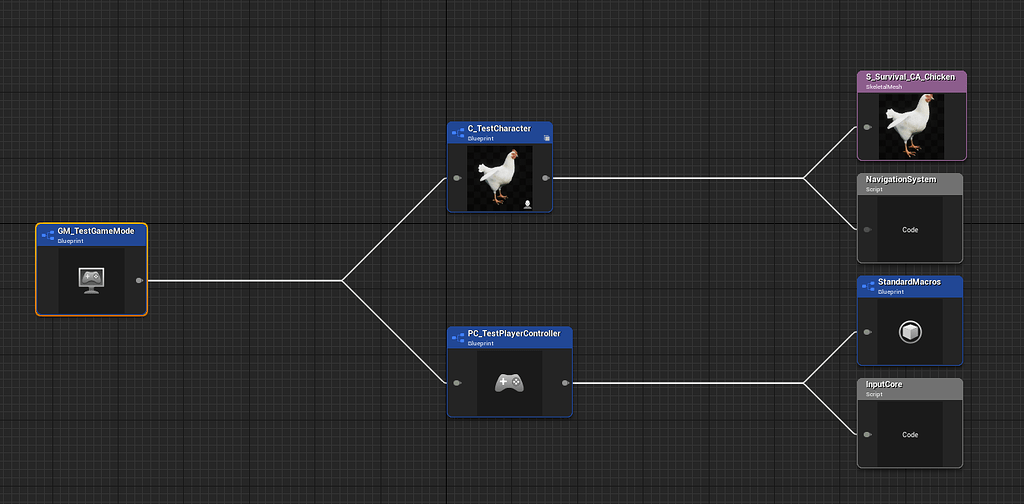
Hello Im having a problem building my project. I have 2 problems. I can’t stop the cooker from cooking everything in my project. Im only cooking one map and it’s using a GameMode with minimal references. I’ve included screenshots. Because the cooker is including everything it’s cooking an asset that throws an Access Violation exception. I ...
winged moss
slim wraith
Hello Im having an issue with Cooking. I've posted details on the Unreal Forum h...
The log (as text) would be handy
slim wraith
winged moss
The log (as text) would be handy
I'll generate one and add it to the post
slim wraith
winged moss
The log (as text) would be handy
I've added the logs are replies to that post. Any ideas on how to attach the debugger to the cook process to find the asset that's throwing this exception?
winged moss
Attach to UnrealEditor-Cmd during the cook?
slim wraith
Im not following. Is that were you run the Cook command from command line arguments in VS Studio?
winged moss
Run the cook with your preferred method and attach to the running process
slim wraith
Ok I'll do some research on how to do that
winged moss
Research for "attach to process" from the debug menu?
slim wraith
Yessir. Thats a new window to me
Well this is new
It's an Acces Violation on write, not read
 winged moss
You'd need to inspect the stack, not just exactly where it crashed
slim wraith
On it, re-running it
Any chance you could hop into VC to help me find the stack trace? Im in MegaJam Hangout
Okay I think I found the Stack. I scrolled down to the first function that had some argument types that were useful and readable. It did actually give me an asset path!! Im gonna go open it up and see what happens.


I looked a bit up the call stack and it gave me a game asset that was referencing the asset throwing an exception and it's my PlayerController.
 winged moss
that's pretty long, is there a circular reference going on?
slim wraith
I just added the Circular Dependency plugin and I do have a lot of circular dependencies. I've been fixing them up over the course of this week by creating a lot of Interfaces to send messages back up to the PlayerController or Pawn mainly.
BIG UPDATE THOUGH!!! I removed the reference to the W_SkillTreeWide in my Player Controller and it cooked successfully!!!!
slim wraith
Woohoo! Thank you @winged moss for sharing which process to attach the debugger to (UnrealEditor-Cmd) and to inspect the stack frames!! I documented the process in the Forum post linked above.
 gritty zealot
hi there, every time I try to package my game it fails with this error message: [File:D:\build++UE5\Sync\Engine\Source\Runtime\CoreUObject\Private\UObject\UObjectGlobals.cpp] [Line: 2152]
I uaed to think that was happening in UE 5.3.2 because of game instance so I removed it, but my package still failed even without game insatance. I ve looked far and wide and cant find any solution for this. thanks for all your help
gritty zealot
downloaded the debugging symbols. for ue 5.3.2 the package failing log is much more clear, the complete log.
https://drive.google.com/file/d/1ALs09cpq9AXe7RX7KE2abcDT6Ipz6sbe/view?usp=drive_link
Google Docs
 limpid thistle
bUmP!
 feral kite
Hello, does anyone know how to make sure that .pak files are generated deterministically?
They are different every time when I build them, even though I didn't change anything.
The result is that users always have to download all pak files, as I cannot know if a pak file has changed or not.
I use the chunking system
 cerulean harness
Having an issue with shipping builds being much bigger with UE 5.3 than they were in UE 5.1, anyone familiar with the problem? For the main project, our .ucas file used to be ~6-7GB, now it's ~11GB, with no settings changes. Seems like textures and materials have the biggest differences, but more or less all files are somewhat bigger - sometimes 3-5 times.
Have there been any major changes when it comes to build/compression settings or something?
 ember stirrup
Hey everyone, has anyone encountered an issue where they have assets in a level, but when building they aren't there? I can play through my whole level in editor just fine.
In my editor you can see all these tables and some food in a circle. When I play the level it's all there.
The second picture shows my dev build. It's all missing


so it looks like when I play in the editor, actors are fine, but in the build they're all stretched and in one location. I just don't understand why there would be a difference at all 🤔
 thin anchor
Can anyone give me some extra insights about this warning? I'm failing to package on 5.3 (recently upgraded from 4.27 - yeah, last few days have been a pain).
Already updated dotnet and installed all windows SDK versions via VS installer
 winged moss
thin anchor
Can anyone give me some extra insights about this warning? I'm failing to packag...
winged moss
thin anchor
Can anyone give me some extra insights about this warning? I'm failing to packag...
What messages are displayed if you continue, what does the log say?
cerulean harness
cerulean harness
Having an issue with shipping builds being _much_ bigger with UE 5.3 than they w...
A bit of extra info to my question here: It seems like the worst sinners are materials, and especially material instances. Lots of them have tripled or quadrupled in size, which seems very odd.
cerulean harness
@hearty reef I wouldn't think so, but what kind of APIs are you thinking of?
Ah, right. Should only be DX12, both in UE 5.1 and 5.3, so it's weird that they're tripled in size
Here's a size map for one that has gone from ~4mb to ~15mb

Here's the output for that file when inspecting the pak file (first is from 5.1, last is from 5.3)
LogIoStore: Display: "../../../Content/Project/Base/Content/Materials/Clothes/MI_m_Shirt_01.uasset" offset: 4933457920, size: 15030844 bytes, hash: 68CC4191E9C36FC97CE3671054372BEB708E0C92, compression: Oodle.```This material is based on MetaHumans content, has minimal changes
@hearty reef Also double checked the APIs supported. We just had the default DX12 for SM5 and SM6. Turning off SM5 and rebuilding had minimal impact.
Yeah, but the weird thing is the one you can see from the pak inspection, where it says that material has a size of 15mb ish. And I can see it in the .uexp files if I don't package to a single file.
Ok, that's what we had as a starting point. But when I look at the packaged size (compressed and all) for the materials themselves, the differences are much smaller - in some cases smaller in UE 5.3 than 5.1, as we've set a bit stricter parameters for MaxLODSize and compression.
That's basically why we're so confused as well, but we're probably missing some basic knowledge here 😉 Thank you very much for the help btw
Yeah, haven't found any textures that differ in size by more than a few bytes, but will try to look through all the ones referenced from the material that I posted before here, to see how much they all changed.
cerulean harness
We're digging it up here
Also testing out more compression settings and whatnot to see if that can solve it. We must have missed something somewhere.
 bitter marlin
I just dug up the audit from the 5.1 version, it looks like it is pretty much the same in terms of texture sizes referenced.
 cerulean harness
Yeah, that's the weird thing here. After looking a bit more into some build logs here, I see that the compression is a little worse than it used to be (down from 60% to 53%), but not enough to account for the massive difference in total size.
Thanks for looking into it, @hearty reef !
cerulean harness
Btw, is this a little strange? We've set the compression type to Kraken, no settings mentioning Mermaid. In 5.1 it doesn't say explicitly what it uses for shaders. LogIoStore: Display: Processing shader libraries, compressing with Oodle Mermaid, level 9 ((null))
 flint olive
Hello. I am trying to figure out why the B in this image does not contain metadata about engine version etc. Any idea which setting governs this?

 inner island
flint olive
Hello. I am trying to figure out why the B in this image does not contain metada...
inner island
flint olive
Hello. I am trying to figure out why the B in this image does not contain metada...
Pretty sure that's in the project settings somewhere, it might not be in the packaging section
 abstract blaze
hello! Does anyone know what causes this:
UATHelper: Packaging (Windows): UnrealBuildTool failed. See log for more details. (C:\Users\Student\AppData\Roaming\Unreal Engine\AutomationTool\Logs\C+Program+Files+Epic+Games+UE_5.3\UBT-Labyrint_byggd14e-Win64-Development.txt)
UATHelper: Packaging (Windows): AutomationTool executed for 0h 0m 30s
UATHelper: Packaging (Windows): AutomationTool exiting with ExitCode=6 (6)
UATHelper: Packaging (Windows): BUILD FAILED
PackagingResults: Error: Unknown Error
winged moss
abstract blaze
hello! Does anyone know what causes this:
UATHelper: Packaging (Windows): Unre...
There's more to the log output than this
abstract blaze
winged moss
There's more to the log output than this
Here's (I think) the whole thing
winged moss
abstract blaze
Here's (I think) the whole thing
UATHelper: Packaging (Windows): [1/4] Compile [x64] SharedPCH.Core.Cpp17.cpp
UATHelper: Packaging (Windows): c1xx: fatal error C1083: Cannot open compiler intermediate file: 'C:\Users\Student\Desktop\Labyrint_14dec_f��rdigbyggd\Intermediate\Build\Win64\x64\Labyrint_byggd14e\Development\Core\SharedPCH.Core.Cpp17.h.pch': No such file or directory
Well there you go
The special characters in your project directory probably don't help
abstract blaze
I deleted the intermediate folder (was a solution posted online) for my build error, are you saying this is another error then caused by my deletion?
abstract blaze
winged moss
The special characters in your project directory probably don't help
Ah, good catch! Didn't notice that, I usually avoid them
I got a much shorter error now:
Sorry, I'm not a coder. Is the issue the game target thing? I can't really see what is the actual issue
abstract blaze
Hello! A project that worked fine was transfered to another computer, and now it gives this error
 ornate plover
Did you figure this out? My custom config works when I package from the editor, but not through UAT...
 chrome cloud
Hello, i currently have a custom c# programs that runs whenever i build my project. It automatically changes project version and uploads it to perforce. As of now this runs EVERY time i build in visual studio. I want this code to run only when i package my game.
I use PostBuildSteps in my target.cs, is there something similar to run this only when i package it?
winged moss
abstract blaze
Hello! A project that worked fine was transfered to another computer, and now it...
fix your wall BP
winged moss
ornate plover
Did you figure this out? My custom config works when I package from the editor, ...
are you sure it's building the correct target with CustomConfig set
you can also see the command line that the editor runs
though the original asker didn't need CustomConfig for Server since there are already ways to have server-specific configs
ornate plover
winged moss
are you sure it's building the correct target with `CustomConfig` set
Yes. I made a new target and set custom config there. When I build through the editor it works, but through UAT it doesn’t. Same target. I checked checked if I was running the correct binary and yes, it’s generating the same name of the target.
winged moss
ornate plover
Yes. I made a new target and set custom config there. When I build through the e...
yes and are you sure you are passing the correct target to UAT?
and how are you passing the target?
ornate plover
winged moss
and how are you passing the target?
-BuildCookRun -target=MyTarget
I even compared the autogenerated command in the editor with mine and it’s exactly the same
winged moss
That can't be the full command line, a build log might be useful
 dull phoenix
I've a 8k map (not WP, and not WC). It takes about 4 mins to load the level in the packaged build. How can I reduce the load time? I'm using the fastest decompression which is Selkie.
 light plover
Hello guys having issue packaging RVT Path tool I made PIE and packaged builds looks broken but when I launched Stand Alone from editor looks fine any settings you guys think I'm missing?? or maybe I need to explicitly cook certain assets for RVT to work??
 light plover
Hello guys having issue packaging RVT Path tool I made PIE and packaged builds l...
light plover
light plover
Hello guys having issue packaging RVT Path tool I made PIE and packaged builds l...
fixed, more of a custom primitive data issue than packaging
 fallen granite
UATHelper: Packaging (Android (ASTC)): RenderDocPlugin: Display: RenderDoc plugin will not be loaded. Use '-AttachRenderDoc' on the cmd line or enable 'renderdoc.AutoAttach' in the plugin settings.
UATHelper: Packaging (Android (ASTC)): LogHMD: Warning: Required extension XR_EXT_eye_gaze_interaction is not available
UATHelper: Packaging (Android (ASTC)): [2023-12-17 10:04:52.198] [info] [Config.cpp:59] API layer configuration file does not exist, skipping
PackagingResults: Warning: Required extension XR_EXT_eye_gaze_interaction is not available
UATHelper: Packaging (Android (ASTC)): Error [GENERAL | xrCreateInstance | OpenXR-Loader] : LoaderInstance::CreateInstance chained CreateInstance call failed
UATHelper: Packaging (Android (ASTC)): Took 2.19s to run UnrealEditor-Cmd.exe, ExitCode=-1073740940
UATHelper: Packaging (Android (ASTC)): Cook failed.
UATHelper: Packaging (Android (ASTC)): (see C:\Users\MindExpander\AppData\Roaming\Unreal Engine\AutomationTool\Logs\E+UNREAL_ENGINE_PROGRAM+UE_5.3\Log.txt for full exception trace)
UATHelper: Packaging (Android (ASTC)): AutomationTool executed for 0h 0m 15s
UATHelper: Packaging (Android (ASTC)): AutomationTool exiting with ExitCode=25 (Error_UnknownCookFailure)
UATHelper: Packaging (Android (ASTC)): BUILD FAILED
PackagingResults: Error: Unknown Cook Failure
please family help me out not sure what i am doing wrong
I got all my SDK stuff correct I feel
it does it when I attempt to build windows to
just wanna get some of these cool ideas on my headset to test
Anyone know what could be issue direct me
Just using default test VR template
ornate plover
winged moss
That can't be the full command line, a build log might be useful
I omitted part of it as the rest might not be relevant unless I'm missing something.
Here's what the command line looks like:
%UE_PATH%\Engine\Build\BatchFiles\RunUAT.bat -ScriptsForProject=%PROJECT_PATH% ^
Turnkey -command=VerifySdk -platform=Linux -UpdateIfNeeded -project=%PROJECT_PATH% ^
BuildCookRun -nop4 -unattended -installed -utf8output -cook -CookCultures=en ^
 -iterativecooking -project=%PROJECT_PATH% -target=%TARGET% ^
 -unrealexe=%UE_PATH%\Engine\Binaries\Win64\UnrealEditor-Cmd.exe -platform=Linux -SkipCookingEditorContent -stage -archive -package -build ^
 -pak -encryptinifiles -iostore -compressed -prereqs -applocaldirectory="$(EngineDir)/Binaries/ThirdParty/AppLocalDependencies" ^
 -archivedirectory=%OUTPUTDIR% -manifests -CrashReporter -distribution -server -noclient -serverconfig=%CONFIGURATION%
I'll try again to compare UAT and the editor and try to find relevant bits in the build logs as I don't want to bother you reading a full log
 thorn flame
Please if someone know how to fix this, I just want to package on windows first. And then i will try on hololens but they send both the same error...
 waxen aspen
i am creating an ios app ...if a run that ap on mobile using xcode its working..if im trying through testflight its crashing
 summer dock
waxen aspen
i am creating an ios app ...if a run that ap on mobile using xcode its working.....
summer dock
waxen aspen
i am creating an ios app ...if a run that ap on mobile using xcode its working.....
- Use a dev build
- Look at the runtime logs for clues
- Read the docs ( make sure you have correct engine version selected ) https://docs.unrealengine.com/5.3/en-US/debugging-ios-projects-with-xcode-in-unreal-engine/
Bonus : On PC you can use a program called 3uTools to get RealTimeLogs

Use Xcode to launch your project on device and debug with break points and LLDB commands.
ornate plover
winged moss
That can't be the full command line, a build log might be useful
found the problem:
The config file 'Contenders/Config/Tags/DefaultChallengesTags.ini' will be staged, but is not explicitly allowed or denied. Add +AllowedConfigFiles=Contenders/Config/Tags/DefaultChallengesTags.ini or +DisallowedConfigFiles=Contenders/Config/Tags/DefaultChallengesTags.ini to the [Staging] section of DefaultGame.ini
16:44:35 Including config file U:\projectOS\client\Platform\Linux\Config\Tags\DefaultChallengesTags.ini
I added the section there with all of the problematic inis and I'll test again
ornate plover
Update: Now I'm seeing the INI I need being included
Including config file U:\projectOS\client\Platform\Win64\Config\Windows\Custom\EOS\WindowsEngine.ini
But it's still not using it... Any suggestions?
 fiery coral
ornate plover
Did you figure this out? My custom config works when I package from the editor, ...
fiery coral
ornate plover
Did you figure this out? My custom config works when I package from the editor, ...
I didn't found the solution
 thorny sigil
Having a problem with packaging a Shipping build- it opens steam and tries to install the steam version instead of just run the packaged game exe in the folder... Tried deleting Saved/Intermediate/Build folders. Full rebuild is ticked. Disabled all platforms except windows. UE5.3.1
 odd iris
Hello, we're having an issue building our game. It runs fine in the Editor. When using a CI we get the attached cryptic error. (No errors above). Reverting back a couple of commits causes the build to work again. Any ideas where to look for isolating the problem? We can't find any other errors in the logs.
 chrome isle
OodleDataCompression: Error: OodleDecode: compressed buffer starts with zero byte; invalid or corrupt compressed stream. I cannot seem to get past this error. I have tried with Kraken and Mermaid and not exactly sure what is causing this. I am in 5.3.2. It only happens in a project that is heavily utilizing nanite.
 glacial tiger
I'm in dire need of some expert help.
It's a problem that only appears after packaging. Control Rigs are not running their Rig Graphs. This leaves the affected skeletal mesh in its reference pose. (Ref. screenshot)
Now, this isn't the first time I've encountered this problem, and last time, after deconstructing my entire project and adding piece by piece back in, I eventually discovered that I had hard references in my GameInstance blueprint. (To some widgets, but I'm not sure that's relevant.) When I changed those references (Get All Widgets By Class) to interfaces (Get All Widgets with Interface), the Control Rigs started working again.
Once again, I find myself in this situation. But this time, even replacing the whole GameInstance blueprint with a blank one doesn't help. Which means there's likely a hard reference somewhere else in the project, and again, I have no idea where to start looking. I can't seriously be expected to take apart the whole game piece by piece on a regular basis.
It seems obvious this is some kind of bug in the engine, but I have no idea what is going on. I need some kind method of identifying the cause of the control rig failures, so I can fix it without spending days in a process of elimination.
Please help! I'm at my wit's end here!

5.1.1, in case that is relevant.
Runs as expected in editor, and in standalone.

I have done extensive debugging on this, and the problem is not in the control rig itself. It simply is not running. And again, removing the hard references resolved the issue last time. I just don't understand why. There's no logic to it.
 limpid raptor
glacial tiger
I have done extensive debugging on this, and the problem is not in the control r...
limpid raptor
glacial tiger
I have done extensive debugging on this, and the problem is not in the control r...
Are you getting any packaging errors?
glacial tiger
limpid raptor
Are you getting any packaging errors?
No, both the cooking and the packaging is successfull without errors. And I can't see any relevant errors in the packagaged game's logs either.
Checking the logs again now, just for the sake of it.
limpid raptor
glacial tiger
No, both the cooking and the packaging is successfull without errors. And I can'...
Okay what it sounds like to me is something to do with Timing
limpid raptor
limpid raptor
Okay what it sounds like to me is something to do with Timing
I haven't been working on something with a CR in quite while, but is there something happening around or near any Begin Play Events where you're doing something with your CR? My assumption is that you're trying to do something with your CR before you have a reference to it, or, there's something when you go to set up your CR using whatever BP nodes you're suppose to use (not sure what you have to do exactly since it's been awhile), but anyways, I think that there could be some Actor in that setup process that you don't have a reference to either when you're playing the "actual game". If either of those scenarios happen, you're not going to be able to use your CR and it will appear like it's not working. In the Editor, however, it's possible that these references are working fine because of how running a project in the Editor works, and then in the "actual/packaged game" that timing works a little different and so does the order things are referenced in. If you can figure out what that missing reference or references might be, either rework your logic so that whatever those Actors depend on, those dependencies are loaded first, or, you can just throw a "Delay Until Next Tick" on those Executable lines.
Sorry reworded that a bit so it might help
glacial tiger
I've gone through the cook and build logs again, and they're clean as a whistle. Nothing that even remotely looks like an error or warning. Currently looking for candidates like you're suggesting. Stand by.
limpid raptor
glacial tiger
I've gone through the cook and build logs again, and they're clean as a whistle....
That stuff wouldn't show in those logs as it's something that's happening on your "Game" thread
glacial tiger
limpid raptor
I haven't been working on something with a CR in quite while, but is there somet...
Okay, so. I'm not doing anything to the control rig itself. It's just set up with references to it's Anim Class, Skeletal Mesh and all that in the Details panel.
I do fiddle with the blueprint that uses the skeletal mesh at Begin Play. (Ref screenshot.)
I'm replacing components (weapons) on the player model, based on variables that are in the GameInstance blueprint.


I can try disconnecting the execution path. Just for kicks.
Do you know if I have to cook every time before packaging? (I've been doing it, just to be sure.)
limpid raptor
glacial tiger
Do you know if I have to cook every time before packaging? (I've been doing it, ...
Once you Cook once, it should "Iteratively Cook" but you have to turn that on in your Project Settings under "Packaging" I think or in your Project Launcher Profile

Use Control Rig in Blueprints using the Control Rig Component.
limpid raptor
limpid raptor
https://docs.unrealengine.com/5.3/en-US/control-rig-in-blueprints-in-unreal-engi...
Potentially, you have to do something here...
I'm not sure really. Perhaps it works In Editor without doing this but you need to do this step for it to work in the game...? Didn't read it much just noticing there's some BP stuff to do.
glacial tiger
limpid raptor
https://docs.unrealengine.com/5.3/en-US/control-rig-in-blueprints-in-unreal-engi...
I have no reference to a Control Rig component anywhere. It's just referenced by the AnimBlueprint.

Maybe I'm doing it wrong... hmmm...
glacial tiger
limpid raptor
https://docs.unrealengine.com/5.3/en-US/control-rig-in-blueprints-in-unreal-engi...
In this article, I think they're using the Control Rig component in order to push gameplay stuff onto it. I'm guessing I don't have to do that part if I don't need it to be that fancy.
I just have leggy legs that do leg things.
Yeah, it seems to be something you'd do if you want IK hands to grab specific items and such.
After reading through it, I don't think that approach would change anything. It's more like a step you add to gain access to controls on your rig, so you can change it during runtime.
You might be on to something about the order of execution though. I think I might have a look at some more tutorials on control rigs, just to see if they do anything differently than I have.
limpid raptor
glacial tiger
Yeah, it seems to be something you'd do if you want IK hands to grab specific it...
Ah yes I see
limpid raptor
glacial tiger
After reading through it, I don't think that approach would change anything. It'...
Does your leggy thing Spawn on Begin Play? Try delaying its Spawn and see if that helps, or something like that...I'm just trying to think on how you can delay whatever is using the CR so that you can just rule this out to see whether that's the problem or not.
glacial tiger
limpid raptor
Does your leggy thing Spawn on Begin Play? Try delaying its Spawn and see if tha...
I'm a little unsure about how it spawns. It uses Unreal's magic PlayerStart object. The reference to the blueprint that spawns is set in the GameMode blueprint.

 limpid raptor
Okay it Spawns right away then
glacial tiger
limpid raptor
Okay it Spawns right away then
Yeah. Not sure how to slow it down...
This is Unreal's default, and most basic way to spawn players, right? It would be odd if that was causing issues...
It's from the TopDown starter project, actually.
limpid raptor
glacial tiger
Yeah. Not sure how to slow it down...
It's more complicated and hard to explain, but essentially you'd have to not set it there, and add some logic in another BP (Level Blueprint for example) that spawns it etc., and you'd create a Delay off of Begin Play in that BP before all that takes place to do that Test.
glacial tiger
limpid raptor
It's more complicated and hard to explain, but essentially you'd have to not set...
Spawning actors, I can do. Stopping Unreal from spawning the actors is the main problem.
I get what you're saying though.
 normal cairn
So I packaged my project for the first time and it went well no hiccups
but I thought all the print strings and visuals like line traces would not show in a packaged shipping build
yet they do for me?
am I misinformed or do I have to set it to non development somewhere? I assumed that's what shipping meant but idk
limpid raptor
normal cairn
am I misinformed or do I have to set it to non development somewhere? I assumed ...
You have to set it to Shipping. You may have it set to Development.
limpid raptor
limpid raptor
You have to set it to Shipping. You may have it set to Development.
In Project Settings > Packaging or in your Project Launcher Profile

 narrow zenith
Assertion failed: r == METIS_OK [File:D:\C 5.3\UnrealEngine\Engine\Source\Developer\NaniteBuilder\Private\GraphPartitioner.cpp] [Line: 181]
UATHelper: Packaging (Windows): LogWindows: Error: Call to METIS_PartGraphRecursive() failed - error code: -3, Graph->Num: 208080
i got this error in Shipping Build how to i fix this can someone fix !?
normal cairn
I very specifically set it to shipping when packaging in the packaging menu
is there another place I'm supposed to set it?
I'll take a screenie in a little bit
glacial tiger
limpid raptor
It's more complicated and hard to explain, but essentially you'd have to not set...
In case you're curious. Delaying the spawning had no effect. Neither did adding the control rig as a component (in case that might encourage the control rig to be included in packaging or something.).
 normal dock
did you end up sorting this out? i found in the Project Settings -> Packaging theres an option called Package Compression Commandline Options which runs UnrealPak.exe with the specified options but doesnt run the TOC with the same options
waxen aspen
hi im packagin my project for ios and using this oplugin called firebase features..im using 5.3 modernized flow..if i launch the prokject from xcode on test device its running perferctly but when i use test flight to run its crashing
 tidal sundial
hi! does anyone know why my build ends with UATHelper: Packaging (Mac): RunUAT ERROR: AutomationTool was unable to run successfully. Exited with code: 1 PackagingResults: Error: Unknown Error?
tidal sundial
Fixed it by changing the name of a folder called "Windows" to "Window" 🙂
limpid raptor
glacial tiger
In case you're curious. Delaying the spawning had no effect. Neither did adding ...
Any luck?
glacial tiger
limpid raptor
Any luck?
No, nothing has helped so far. Pretty sure I've eliminated load order as a cause. I'm considering attempting to update the project to the latest Unreal version, just to see if it makes a difference.
glacial tiger
Updating the project to 5.3.2 made no difference either. Hmm...
 limber plover
hi i have done an android game packaging the problem i'm facing is that it is working in one device but not in other devices. Even in many devices its not opening. If any one has any solution please provide
 fierce arrow
Hello. I'm trying to package my game, and I keep getting this same packaging error.
I have no idea what animation blueprint could be causing this
and it doesn't give me an animation blueprint in the logs
so I'm kinda just left in the dark here
winged moss
You would have to attach the debugger to the cooker to find that out
fierce arrow
nevermind, I found out the issue
for some reason a Layered Blend Per Bone node was causing issues
even though it never caused any crashes in the editor
 trail willow
Hey do y'all know how i can override DirectoriesToNeverCook to in RunUAT BuildCookRun command?
my build command looks like this:
RunUAT.bat BuildCookRun -Project="H:/Unreal Projects/UGCTest/UGCTest.uproject" -noP4 -clientconfig=Shipping -serverconfig=Shipping -nocompile -nocompileeditor -installed -utf8output -platform=Win64 -build -cook -CookCultures=en -unversionedcookedcontent -pak -compressed -stage -stagingdirectory="H:/Unreal Projects/UGCTest/Mods/TestMod1234/Staging/BaseGameRelease" -package -createreleaseversion=BaseGameRelease -ini:[/Script/UnrealEd.ProjectPackagingSettings]:DirectoriesToNeverCook="{Path='/TestMod1234'}" -SaveConfigOverrides
winged moss
trail willow
my build command looks like this:
might have to wrap it in a -additionalcookeroptions parameter
since that'll be passed to the editor-cmd exe
though, it's meant to pass the -ini parameters already
limber plover
hi i have done an android game packaging the problem i'm facing is that it is working in one device but not in other devices. Even in many devices its not opening. If any one has any solution please provide
Plz help
limpid raptor
glacial tiger
Updating the project to 5.3.2 made no difference either. Hmm...
Are you including Editor Content in your Cook?
glacial tiger
limpid raptor
Are you including Editor Content in your Cook?
Hmm. I don't actually know. Is that a project setting?
glacial tiger
limpid raptor
Are you including Editor Content in your Cook?
I've tried cooking and packaging with both of these. Doesn't seem to make a difference, other than the cooking time.

 cold urchin
hay guy any one can help me with this ? AutomationTool exiting with ExitCode=1 (Error_Unknown)
 mortal saffron
I think this error has something to do with sound?
not sure, never done this before.
any ideas?

this is for a christmas present, first person to help me successfuly package the game gets discord nitro
mortal saffron
how do you recommend renaming the project name?
i renamed the .uproject file in my folder but it still shows the space in the output log
How would I see whats in the target.cs file?
i'll try renaming in a sec
where can i find the target.cs
I dont know should i move it one directory out?
Theres no plugins folder, so i guess no plugins?
But i have only used BP
Give me a sec
mortal saffron
Ok
 blissful fog
i am still getting the same error
mortal saffron
Just migrated everything over
Opening the new one now, will start setting up project settings now.
can i export / import all project settings?
you sure this is the easy mode? i've got several compile errors is 2 BP's
here is one of the errors, not sure, never seem this one
also i imported the input page of the project folder but nothing happened

 blissful fog
i cant find anything online that works. does anyone know how to fix this packaging error?
there might be something there that runs on editor time
i'll check
5 i think. 3 of your plugin. one of some other plugin and one for the project
no those aren't in the dependencies
how do i do that?
doing that. also i tried packaging another project to see if it is an issue with my project and it worked fine in another project so it's probably something in the project.
is the init function on game instance problematic (runs on editor)?
blissful fog
hello. i have an error when trying to cook my project.
it's something about conflicting redirects and i don't know how to fix that
 stark current
hello im trying to package my game it says that the export happened but nothing add to the folder i have 0 errors can i have some help?
blissful fog
blissful fog
hello. i have an error when trying to cook my project.
nvm i fixed the issue
stark current
hello again in content cook i found this can i have some help?
PackagingResults: Error: Couldn't find file for package /Game/NewFolder/NewLevelSequence requested by async loading code. NameToLoad: /Game/NewFolder/NewLevelSequence
 feral belfry
Hey! I'm having a weird issue with Unreal Water Plugin.
The river is fine in editor but in packaged game it breaks into segments. Anyone have faced this issue before ?


 astral stirrup
hey did you ever happen to figure this out?
 spiral shard
Hi! My game's build keeps crashing (?) abruptly and I don't know what's causing it. Can anyone help me out?

Here's the whole log file, if it can be used to help.
 viscid plover
Good afternoon, I am attempting to build a project, I have a source build of UE5 and VS2022 community. I am attempting to build as a server file and have the server target in the source folder. I have attempted to build a 3rd person example project and get the same/similar errors.
 pine pelican
Hello guys, you know those .txt manifest files that get added to the build folder after it's completed, does the game need those to run or can I delete them before uploading to steam?
 thin trout
So is it even possible to build a game for xbox with 5.3? It seems like the dev mode for hobbiests for xbox only runs UWP projects which is only for old UE4 projects.
 mystic atlas
pine pelican
Hello guys, you know those .txt manifest files that get added to the build folde...
mystic atlas
pine pelican
Hello guys, you know those .txt manifest files that get added to the build folde...
Have you tried playing the game after deleting it and seeing what happens?
 hearty spire
Can i removed texture and sound from dedicated server builds?
winged moss
spiral shard
Hi! My game's build keeps crashing (?) abruptly and I don't know what's causing ...
At least use the debug symbols that are made as part of your build to get a readable callstack
 autumn bloom
When packaging a game, you can encrypt the pak files. This helps prevent people stealing your assets/game? If you later push out a small update do they have to redownload the full pak again (since encrypting it changes all the bytes I assume)? I'm using SteamWorks for distribution
https://docs.unrealengine.com/4.26/en-US/API/Plugins/CryptoKeys/UCryptoKeysSettings/
Implements the settings for imported Paper2D assets, such as sprite sheet textures.
autumn bloom
feral belfry
Hey! I'm having a weird issue with Unreal Water Plugin.
The river is fine in e...
Is it a single object in the level or multiple? Is that a single level or multiple sublevels? I had issues where collisions behaved differently in packages builds vs editor
spiral shard
winged moss
At least use the debug symbols that are made as part of your build to get a read...
I'll need to install them right? From the engine's install options?
 main rain
For some reason any map I create in 5.3 with the water plugin, it looks fine in the editor and in simulations/viewport play but after build I get this, over and over again when playing the game? I'm at a loss 😦

only happening where it meets the landscape and not everywhere
but in many spots around this island, also happens if I use water body lake or river but same, never in viewport
winged moss
spiral shard
I'll need to install them right? From the engine's install options?
Unless you're making a BP only project, they are made as part of the packaging process
glacial tiger
@limpid raptor Hey! I finally got the control rigs working again on packaged builds. Figured you might appreciate knowing what the issue was.
So, there were two issues, which made finding them a bit more difficult. Last time, the cause was isolated to the GameInstance blueprint, so when I excluded that from the project settings, the control rigs started working again. This time however, changing to an empty GameInstance did not resolve the issue, and I ended up having to migrate large parts of the project into an empty one, so I could see when the control rigs stopped working. So, the issues this time were:
- The GameInstance blueprint contained hard references to my "EnemySpawner" blueprint. I moved that function to my GameMode blueprint, and called it through an interface from my GameInstance blueprint. Thus, there were no hard references in the GameInstance blueprint. I think the node I used was "Get all Actors of Class", and that was enough to break the packaged build.
- I had to duplicate the player's character asset, which incidentally was the one running the control rig, but I'm not sure if that last part was actually relevant. Using the duplicated character asset instead of the original one fixed the packaged build. I had a look at the diff between the two, and it looks like some references were moved around or recreated.
So, yeah. I don't know what to do with this information, other than "Keep all logic the hell away from your GameInstance blueprint" and "Sometimes, things just break for no apparent reason".
Don't mind the wonkyness at the start, I just need to reset the legs when teleporting, or they'll take a while to catch up. 🙂
glacial tiger
Huh. I just noticed Windows' video capture didn't capture the game scene behind the menu widget. It was there when I was recording these two videos, but only the one in the editor shows up on the recording. Do Widgets run as a separate process after packaging the game?
stark current
can anyone help me with the packaging?
winged moss
stark current
can anyone help me with the packaging?
Don't ask to ask, just ask
stark current
winged moss
Don't ask to ask, just ask
im doing the packaging it says completed but nothing added to the folder i have 0 errors
winged moss
a log or ...anything?
stark current
i have some warnings
winged moss
just a vague reference to something isn't enough to go on to help you
specifics, like the log, would be helpful
stark current
i will make a fresh package and i will send you the log in pm
winged moss
Please don't DM me. I also have DMs disabled on this server
winged moss
UATHelper: Packaging (Windows): c1xx: fatal error C1083: Cannot open compiler intermediate file: 'D:\ ? ? , ? ? ? ? ,\Unreal Engine 4\Projects\CubicZ\Intermediate\Build\Win64\CubicZ\Development\Core\SharedPCH.Core.ShadowErrors.h.pch': No such file or directory```so much for it packaging
move your project out of the folder containing non-ASCII characters
mystic atlas
If anything you should limit it to just a-zA-Z0-9, even spaces and punctuation can cause issues.
winged moss
worst of all "Νέος φάκελος" is just greek for new folder
stark current
i will give it a try i had this problem with another engine too
@winged moss this time something added to the folder but is just a folder
error: PackagingResults: Error: Unhandled exception: Dependency file "E:\tomb raider download folder\CubicZ\Intermediate\Build\Win64\UnrealGame\Development\CubicZ\CubicZ.cpp.json" version ("1.2") is not supported version
stark current
@winged moss the weird thing is that if i open a new one the packaging works fine even with the Νέος φάκελος
stark current
i fixed it
 formal quail
UATHelper: Packaging (Windows): AutomationTool exiting with ExitCode=103 (Error_MissingExecutable)
UATHelper: Packaging (Windows): BUILD FAILED
PackagingResults: Error: Missing UnrealGame binary.You may have to build the UE project with your IDE. Alternatively, build using UnrealBuildTool with the commandline:UnrealGame <Platform> <Configuration>
Anyone knows why this happens?
winged moss
formal quail
```
UATHelper: Packaging (Windows): AutomationTool exiting with ExitCode=103 (Er...
context? log? installed build? bp-only project?
mortal saffron
i plan on making my game playable to a point where I will package and release it.
should I get into the habit of packaging often and early?
that way potential errors in packaging will be more managable because the project will be less complex in earlier stages.
any advice on this?
 deep echo
Hi guys, I am trying to package my project but it says "PackagingResults: Error: Expected AIC.h to be first header included." and also "UATHelper: Packaging (Windows): C:\GA.V1\Source\GA\AIC.cpp(3): fatal error C1083: Cannot open include file: 'YourAICharacter.h': No such file or directory".
I read online and all I cand find is related with C++. I created a C++ class but gave me errors after it and now I don't know how to fix it , any ideas please?
I found this guy with the same error but I am not sure how to remove a library and I am scared to break the project further
https://forums.unrealengine.com/t/solved-fatal-error-c1083-unable-to-open-include-file/99119

Epic Developer Community Forums
Since switching to 4.17 I have been unable to use my regular build script that has worked flawlessly so far. I must stress that I have issues with building as opposed to starting the editor etc… When trying to build, I am encountering the following issue; " UnrealBuildTool: C:\Users\Altrue\Documents\UnrealEngine\Engine\Source\Runtime\Engine\C...
 strange ledge
hi! is there a way exist to reduce libUnreal.so? and why so big difference exist?
If I do android build from launcher libUnreal.so is 300mb and it is acceptable ,but if I use git engine libUnreal.so is 2-3 gigs ( dev/shipping )
but both do exact the same thing - let me see the crash .
what is the difference between it , and how to resolve it? I want small libUnreal.so building from git engine as well as from launcher one
 leaden patio
Hi everyone.
I need some help.
I have reproduced the map of a studio ghibli film on UE5.2. I've finished version 1.0 and I'd like to export it but I've had this problem since the beginning.
Not being an expert, I can't identify the source of this problem. Here's the error message below. (link)
There's only one map for the menu and the main map to export, nothing very complex and I have almost no blueprints, only a lot of volumefoliage and the worldpartition enabled with datalayers.
https://drive.google.com/file/d/1MvuFsI779eZjAG2czyFAtg6HqjfeGLIj/view?usp=sharing
I hope you'll be able to help me, as I'd like to share this map on the Internet for free for fans of the film when it's finished.
Google Docs
summer dock
leaden patio
Hi everyone.
I need some help.
I have reproduced the map of a studio ghibli fil...
I would start by doing some basic sanity checking
) avoid unusual letters like the é in Mononoké
) Rename that and clean up redirectors
) Clear Intermediate + Saved folders and rebuild
) Post full text log of builds if still failing
leaden patio
summer dock
I would start by doing some basic sanity checking
) avoid unusual letters like t...
In fact i already rename it (see below), i saved it at the beginning of my windows file explorer, i rebuild it and package but i still have an error :
summer dock
leaden patio
In fact i already rename it (see below), i saved it at the beginning of my windo...
we still see this though:
UATHelper: Packaging (Windows): D:\ue\Intermediate\Source\Mononoké_map_5.2.Target.cs(3,28): error CS1514: { expected
UATHelper: Packaging (Windows): D:\ue\Intermediate\Source\Mononoké_map_5.2.Target.cs(3,28): error CS1513: } expected
UATHelper: Packaging (Windows): D:\ue\Intermediate\Source\Mononoké_map_5.2.Target.cs(3,28): error CS8803: Top-level statements must precede namespace and type declarations.
UATHelper: Packaging (Windows): D:\ue\Intermediate\Source\Mononoké_map_5.2.Target.cs(3,30): error CS1002: ; expected
UATHelper: Packaging (Windows): D:\ue\Intermediate\Source\Mononoké_map_5.2.Target.cs(3,50): error CS1002: ; expected
UATHelper: Packaging (Windows): D:\ue\Intermediate\Source\Mononoké_map_5.2.Target.cs(4,2): error CS1513: } expected
UATHelper: Packaging (Windows): D:\ue\Intermediate\Source\Mononoké_map_5.2.Target.cs(5,9): error CS0116: A namespace cannot directly contain members such as fields or methods
UATHelper: Packaging (Windows): D:\ue\Intermediate\Source\Mononoké_map_5.2.Target.cs(5,25): error CS1002: ; expected
UATHelper: Packaging (Windows): D:\ue\Intermediate\Source\Mononoké_map_5.2.Target.cs(5,43): error CS1003: Syntax error, ',' expected
UATHelper: Packaging (Windows): D:\ue\Intermediate\Source\Mononoké_map_5.2.Target.cs(5,51): error CS1002: ; expected
UATHelper: Packaging (Windows): D:\ue\Intermediate\Source\Mononoké_map_5.2.Target.cs(5,51): error CS1022: Type or namespace definition, or end-of-file expected
UATHelper: Packaging (Windows): D:\ue\Intermediate\Source\Mononoké_map_5.2.Target.cs(5,65): error CS1002: ; expected
UATHelper: Packaging (Windows): D:\ue\Intermediate\Source\Mononoké_map_5.2.Target.cs(11,1): error CS1022: Type or namespace definition, or end-of-file expected```In case anyone managed to find this and wants an answer. Xbox does have a creators program that allows us to upload games to the xbox; however, there is only two offical ways to do it and both have issues.
First, the newer way which is using the Xbox GDK (Not UWP we'll get to that). There is a public version of it on Github but the specific packaging tools for Xbox via Unreal are still locked behind the ID@Xbox program according to this: https://learn.microsoft.com/en-us/gaming/gdk/_content/gc/get-started-with-pc-dev/get-started-with-unreal-pc/gc-get-started-with-unreal-pc The Github says that their working on more public documentation so maybe on day.
Second, is Universal Windows Platform (UWP): This appears to be depreciated in Unreal and not in 5. I did however manage to get running with a Unity project. Rumors say that its bad for games and not worth building for but my only goal was to get a game to run on my Series X, which it did. I used this tutorial, its old but helped greatly. https://www.youtube.com/watch?v=uibEl3SmI1k

Describes how to get started with Unreal for PC development.

Join our Filmstorm Motion Library: https://www.patreon.com/filmstorm
Support us on our Gumroad https://gumroad.com/filmstorm
In this tutorial, I cover from start to finish how to build a game from Unity to the Xbox One.
Reference links w...
 fading iris
When naming a project in UE does that directly correlate with the packaged game name? Wondering because in most engines/frameworks you can package your game with a different name than the project, or in some you can even package it then rename the folder/exe file
I see a lot of stuff about UE being a nightmare to rename projects and I know most games start as prototypes without names so it seems like there should be some simple thing I'm missing
winged moss
summer dock
we still see this though:
```Errors generated while parsing 'D:\ue\Intermediate\...
Mononoké is likely to be problematic
Projects should ideally just be A-z, no accented letters
mortal saffron
I built a big game a while back and had tons of packaging errors (never solved them)
Now that im building a new game, should I just get into the habit of packaging often and early?, that way packaging errors are more managable?
mystic atlas
First thing everyone should do with a new project is package it. Get environment issues out of the way.
Nobody ever does, though.
 zealous loom
I built the GAME in VS2022 after it failed to build in UE5 and it's still giving me the
UATHelper: Packaging (Windows): Stage Failed. Missing receipt 'j:\UMSPV5\Binaries\Win64\UMSPV5.target'. Check that this target has been built.
UATHelper: Packaging (Windows): (see C:\Users\Kenny\AppData\Roaming\Unreal Engine\AutomationTool\Logs\J+Program+Files+Epic+Games+UE_5.3\Log.txt for full exception trace)
UATHelper: Packaging (Windows): AutomationTool executed for 0h 2m 58s
UATHelper: Packaging (Windows): AutomationTool exiting with ExitCode=103 (Error_MissingExecutable)
UATHelper: Packaging (Windows): BUILD FAILED
PackagingResults: Error: Missing UnrealGame binary.You may have to build the UE project with your IDE. Alternatively, build using UnrealBuildTool with the commandline:UnrealGame <Platform> <Configuration>
LogSlate: Window 'Message' being destroyed
Message dialog closed, result: Ok, title: Message, text: Missing UnrealGame binary.
You may have to build the UE project with your IDE. Alternatively, build using UnrealBuildTool with the commandline:
UnrealGame <Platform> <Configuration>
mystic atlas
What's the rest of the output?
And does 'j:\UMSPV5\Binaries\Win64\UMSPV5.target' exist?
zealous loom
the target file does not, but i am not sure how to generate it, i thought if i built it in vs2022 it would generate it
I know i'm probably half-assing something here but i took the UMSPV5.target.cs file in the source folder and renamed it to UMSPV5.Target and put it in there
yeah that didn't work.
mystic atlas
It should be UMSPV5.Target.cs
zealous loom
i'm putting the .cs file in there...without renaming it
let's see if this works.
Did not work.
Here is my workflow:
Tried to package the game as a windows project in the editor > Didn't work
Went into Tools > New C++ File > made empty class
Right clicked the .uproject file and generated C++ project files
Expanded the game tab in VS2022 and build just the game.
Tried again in UE5 after a Successful build and it popped up with said error
Anyone?
mystic atlas
Are you trying to build for the editor or for a standalone game?
 proven wyvern
guys im going mad, im getting the \rungradle.bat" :app:assembleDebug error while trying to package for android and I have tried everyyyything on the unreal forums, tried different sdks, ndks, java version, the project is just a blank project for testing and I cant seem to packagin iiit aaaaah
proven wyvern
Hey man sorry to bother I'm facing the same issue rn but on 5.1 did u manage to solve ur problem?
winged moss
zealous loom
Anyone?
And what's in the Target.cs? This is output I'd expect when the uproject file lists a game module but the Target.cs doesn't
zealous loom
I figured it out, I had to change the visual studio startup project filename
Now I'm renaming the project...which is a pain
summer dock
proven wyvern
guys im going mad, im getting the \rungradle.bat" :app:assembleDebug error while...
app:assembleDebug is usually a setup issue, sadly it can be painful to sort out and the docs are not perfect. What engine version are you on?
summer dock
proven wyvern
guys im going mad, im getting the \rungradle.bat" :app:assembleDebug error while...
First thing is to go through setup doc for your engine and make 100% sure everything is exactly as given there, including Android Studio version etc https://docs.unrealengine.com/5.3/en-US/how-to-set-up-android-sdk-and-ndk-for-your-unreal-engine-development-environment/
proven wyvern
summer dock
app:assembleDebug is usually a setup issue, sadly it can be painful to sort out ...
5.1.1, yeah I have been trying different setups all these time
I will try with 5.3 and a new setup now, but idk if my project will work on 5.3 lol
but honestly ive tried everything i could find
summer dock
proven wyvern
5.1.1, yeah I have been trying different setups all these time
I am on 5.2 and can do a sanity check with you, but hmm gotta check if my home machine is setup for droid. 5.2 and 5.1 should be pretty compatible but 5.3 is fresh again
couple of mins to check if i have my home station setup for droid builds
I would stick to 5.1 / 5.2 for the moment if you have no pressing need to go to 5.3
proven wyvern
appreciate it, this is the last setup I tried
 summer dock
proven wyvern
5.1.1, yeah I have been trying different setups all these time
summer dock
proven wyvern
5.1.1, yeah I have been trying different setups all these time
yeah my home machine is not set up for packaging. I'll see if I can remote onto an office builder
proven wyvern
summer dock
I would stick to 5.1 / 5.2 for the moment if you have no pressing need to go to ...
I will try with 5.2 then, thanks for the input
summer dock
proven wyvern
I will try with 5.2 then, thanks for the input
So, I think next step would be for you to open the Android Studio SDK Manager and go through all the package details
proven wyvern
summer dock
So, I think next step would be for you to open the Android Studio SDK Manager an...
yep, im following a tut rn, its almost the same as 5.1.1 but it uses some newer version of the SDK
but same java and NDK
5.3 is totally different thats why i wanted to try that

 proven wyvern
on one tutorial it says i have to rename a file dx to d8 on the sdk lib, idk if that might mess up, because its not on the original documentation
proven wyvern
summer dock
yep, i have the same sdk and ndk
summer dock
 proven wyvern
yup, same as well
summer dock
 proven wyvern
 proven wyvern
summer dock
proven wyvern
summer dock
also same, which java version do u have?
summer dock
proven wyvern
I definitely did not have to do stuff like that
summer dock
proven wyvern
also same, which java version do u have?
hmm, let's see if i can dig that up
proven wyvern
summer dock
hmm, let's see if i can dig that up
im usin jdk 1.8, tried with jre, jdk 17 and others too
 summer dock
1.8.0_311 I believe is the active one for us
Those 3 first fields are all blank for me, should be unnecessary with a clean setup
Hmm, so far everything looks pretty clean, odd
proven wyvern
i also thought it was something with gradle because thats where I get the error
tried researching on that way but with no luck so far
summer dock
Sanity checks:
You have Android Studio 4.0
You have run the SetupAndroid.bat script
You are on Windows
The SetupAndroid script needed some slight mod on 5.1
Pain Is Fun, I guess that's all I can say for now
proven wyvern
hahaha, yeah I did all of those, thanks so much for your help
summer dock
After you tinker a bit, can send a full build log to have a peek too
proven wyvern
sure, im trying with more sdks now lol
proven wyvern
summer dock
After you tinker a bit, can send a full build log to have a peek too
heres the full log, the project is just the third person default project
summer dock
proven wyvern
heres the full log, the project is just the third person default project
hmm what's all this then
Exception in thread "main" javax.net.ssl.SSLHandshakeException: Remote host closed connection during handshake```that doesn't look familiar to me
proven wyvern
summer dock
hmm what's all this then
```Downloading https://services.gradle.org/distribution...
yeah I tried looking it up and some ppl had the same error using ue, but mostly ppl building android apps so the solution dont apply
like I looked on that folder and it tries to unzip the gradle but its corrupted
also idk why is using that version of gradle
hmm maybe that handshake thing is because im using a vpn?
without the vpn i cant build cuz i cant connect to epic from where i am rn
summer dock
proven wyvern
hmm maybe that handshake thing is because im using a vpn?
jaa-a. Very much unsure what is going on there, but 99% sure that is your problem
proven wyvern
summer dock
jaa-a. Very much unsure what is going on there, but 99% sure that is your proble...
thanks so much I will look into it
proven wyvern
summer dock
jaa-a. Very much unsure what is going on there, but 99% sure that is your proble...
I had to buy a different VPN and managed to build it! thanks so much for your help, I was going crazy trying all the sdks hahaha
summer dock
proven wyvern
I had to buy a different VPN and managed to build it! thanks so much for your he...
nice one
summer dock
proven wyvern
I had to buy a different VPN and managed to build it! thanks so much for your he...
remember to look closely at log errors, they will lead you to the right place 99% of the time
cerulean harness
If you're curious about the issue we had before Christmas, it was due to changes in the config names for Oodle Texture - and the docs being out of date. So Oodle wasn't compressing textures at all anymore.
[TextureFormatOodle] to [TextureFormatOodleSettings] in BaseEngine.ini 🙂
It was actually changed between 4.27 and 5.0 it seems, but was still working for us up until 5.1, maybe because of backwards compatibility or something. The docs still say [TextureFormatOodle] though.
 mortal ridge
Anyone know why these are failing? Like, I promise these structs exist, the game plays just fine including functionality which needs those structs to exist.

The fuck?
 winged moss
most stable BP struct usage
 brave widget
please help

 fallen topaz
mortal ridge
The fuck?
fallen topaz
mortal ridge
The fuck?
Refresh your BP Structs by renaming them
 proud river
hi, how much time a small android game should take to package ?
summer dock
proud river
hi, how much time a small android game should take to package ?
depends on your hardware. We have a ~1Gb apk which takes ~15 minutes to package on a fairly recent MacStudio machine. Note that the first build will always take a significantly longer time
 glossy lodge
Hey i have this error: PackagingResults: Error: Unknown Cook Failure and i dont know what causes this please help me
summer dock
glossy lodge
Hey i have this error: PackagingResults: Error: Unknown Cook Failure and i dont ...
    Line  593: LogAssetRegistry: Error: Package C:/GitHubProjects/UnrealEngine/Survive The Backrooms/backrooms/Content/Maps/Lvl3_sharedassets/mossGround_I_LayerInfo.uasset has malformed tag
    Line  594: LogAssetRegistry: Error: Package C:/GitHubProjects/UnrealEngine/Survive The Backrooms/backrooms/Content/Maps/Lvl3_sharedassets/baseGround_V_LayerInfo.uasset has malformed tag
    Line  595: LogAssetRegistry: Error: Package C:/GitHubProjects/UnrealEngine/Survive The Backrooms/backrooms/Content/Maps/Lvl3_sharedassets/baseGround_VI_LayerInfo.uasset has malformed tag
    Line  596: LogAssetRegistry: Error: Package C:/GitHubProjects/UnrealEngine/Survive The Backrooms/backrooms/Content/Maps/Lvl3_sharedassets/baseGround_IV_LayerInfo.uasset has malformed tag
    Line  597: LogAssetRegistry: Error: Package C:/GitHubProjects/UnrealEngine/Survive The Backrooms/backrooms/Content/Maps/Lvl3_sharedassets/baseGround_II_LayerInfo.uasset has malformed tag
Line 598: LogAssetRegistry: Error: Package C:/GitHubProjects/UnrealEngine/Survive The Backrooms/backrooms/Content/Maps/Lvl3_sharedassets/baseGround_I_LayerInfo.uasset has malformed tag```oh okay what does has malformed tag mean?
summer dock
glossy lodge
oh okay what does has malformed tag mean?
no idea : ) time to hit google / unreal forums / search this disco
mystic atlas
Take the spaces out of your folder name
Probably won't fix it, but it'll solve future issues.
hearty spire
Why blueprint does not exists on dedicated server build but does on editor?

Can i make server not strip some folders?
winged moss
hearty spire
Can i make server not strip some folders?
How is it referenced?
hearty spire
winged moss
How is it referenced?
 hearty spire
winged moss
Well ain't that gross
hearty spire
winged moss
Well ain't that gross
The path will come from JSON (inside a mongodb)
winged moss
It won't work by default for ANY cooked build
hearty spire
This is a mmorpg server
winged moss
Including game/client
hearty spire
i fixed that
winged moss
And? Doesn't really excuse it
hearty spire
It is working for me
winged moss
Clearly not based on you original message
The cooker will only cook what it thinks is referenced, so the only workaround here is to always cook the containing directory
 proud river
summer dock
depends on your hardware. We have a ~1Gb apk which takes ~15 minutes to package ...
proud river
summer dock
depends on your hardware. We have a ~1Gb apk which takes ~15 minutes to package ...
yes thank you it takes very less time now
but i am facing an issue it's my first time packaging anything at all , and i am getting this message while installing my apk, i tried SDK 31, 32 and 34 same issue, my phone is samsung NOTE 10+ android version 12
 summer dock
proud river
but i am facing an issue it's my first time packaging anything at all , and i am...
summer dock
proud river
but i am facing an issue it's my first time packaging anything at all , and i am...
yeah, I remember occasionally seeing this, but I don't remember what the magic was... hmm
proud river
summer dock
yeah, I remember occasionally seeing this, but I don't remember what the magic w...
but it can be solved right?
summer dock
proud river
but it can be solved right?
we are not having any problems currently
proud river
I mean there is no problem with my game files
summer dock
we can install apks directly + aabs from GPlay without issues
summer dock
proud river
I mean there is no problem with my game files
a quick peek at our internal slack didn't give any clues as to what it might have been I'm afraid
summer dock
proud river
internal slack ?
company comms channel
proud river
summer dock
company comms channel
oh
ok thanks for the help I'll try to fix it somethow
maybe one should try to package a blank project
and see how it goes
summer dock
proud river
and see how it goes
yeah that's always a good sanity check
 echo bison
Is the assumption that dedicated server builds don't need DDC compiled correct?
echo bison
Ever able to figure this out?
 dawn kite
How do i fix this. Pleas I need help fixing this

 wooden stream
Guys any ideas how to solve this ? I changed project from 5.0.1 to 5.31 and suddenly I cant build anything it says first sdk is wrong even its right then this
 winged moss
dawn kite
How do i fix this. Pleas I need help fixing this
winged moss
dawn kite
How do i fix this. Pleas I need help fixing this
Gonna need more info, like the rest of the packaging log
dawn kite
winged moss
Gonna need more info, like the rest of the packaging log
by rest you mean the packaging log before it right?
winged moss
Yes
 winged moss
It's telling you that the C++ toolchain for VS is not installed, so install the relevant workloads from the VS installer
winged moss
Visual Studio
dawn kite
ya ya took a moment to get it
dawn kite
winged moss
It's telling you that the C++ toolchain for VS is not installed, so install the ...
How do i know which workloads to download and how?
winged moss
The documentation tells you
dawn kite
ok thx
winged moss
But generally it's desktop C++, desktop .NET, game development
cold urchin
anyone know how to fix it? i keep getting this error even the fresh new project from ue5.


 coral kernel
anyone know of a guide to changing the name of the exe file in your packaged games moving forward? i have a cpp project and some of the guides ive followed dont have the steps required for cpp projects.
if i dont have to, i dont want to completely erase the previous name of the project, (in code etc) but i would like to at least have my games public name as the exe name.
im useing 5.3.2 if that changes anythign
 agile fern
how do you set quality level for packaged builds?
[2024.01.07-18.56.20:310][  0]LogTemp: Current Scalability Settings:
[2024.01.07-18.56.20:310][  0]LogTemp: Resolution Quality: 0.000000
[2024.01.07-18.56.20:310][  0]LogTemp: View Distance Quality: 3
[2024.01.07-18.56.20:310][  0]LogTemp: Anti-Aliasing Quality: 3
[2024.01.07-18.56.20:310][  0]LogTemp: Shadow Quality: 3
[2024.01.07-18.56.20:310][  0]LogTemp: PostProcess Quality: 3
[2024.01.07-18.56.20:310][  0]LogTemp: Texture Quality: 3
[2024.01.07-18.56.20:310][  0]LogTemp: Effects Quality: 3
[2024.01.07-18.56.20:310][  0]LogTemp: Foliage Quality: 3
Mine is setting Resolution Quality to 0 even in shipping builds, can't find why, and can't find anywhere to set the scalability to Epic
 steep field
Hey gang, I'm having a issue when i package my game for windows, i have no errors but when I play my game it's very bright. I updated my nvidia driver and I tried to put post process exposure to manual, nothing worked. any tips on how to fix this?


 proven sorrel

Does anyone know how to make it so when packaged my game shows the main menu and then will play my game once you click "start". it only will package whichever level is put in the "default map"
 oblique silo
I'm tried to export my UE5 game to android and this happen. Anyone know how to fix it ?


 hidden notch
Anyone here have worked on Chunking in Unreal Engine 5?
 tranquil sigil
I need some help. I can't package a project for some reason. I've packaged a project on my system before, but this one wont work. I download the Medieval Game Environment demo project and went to package it so I can actually play test it out and stuff but it just says "SDK Not Found" and I've installed VS2019 and everything.
tranquil sigil
tranquil sigil
I need some help. I can't package a project for some reason. I've packaged a pro...
That was annoying. I ended up finding this comment on a forum and it worked if anyone else has this issue.
https://forums.unrealengine.com/t/can-not-generate-project-files/694601/4
Epic Developer Community Forums
Wonderful! I can confirm this worked! For anyone who finds this answer later, the exact solution is: Open Visual Studio (you can select Continue Without Code) Navigate to Tools > Options > NuGet Package Manager > Package Sources You’ll most likely see only one source titled “Microsoft Visual Studio Offline Packages” Click the “+” button to ad...
 limber bear
If the project is divided into chunks, can I tell unreal to build only one of the chunks?
 umbral vale
Is there a way to generate PAKs without actually packaging the whole project ?
 north trail
Not sure if this is the right channel to ask in, sorry if its wrong! I want to start targeting Xbox as a release platform. UE5 should support this iirc but i cant seem to add either of the two console platforms as a device in the editor
do i need to like contact epic games directly?
nevermind, dead links to the console request form exist all over their website, found the right one
mortal saffron
any ideas?
 mortal saffron
project built but the game wont open
any ideas?

 zinc gazelle
I have a C++ actor with a static mesh component, it shows up fine in editor and in PIE, but not in my packaged project
cold urchin
cold urchin
anyone know how to fix it? i keep getting this error even the fresh new project ...
Solved AutomationTool exiting with ExitCode=1 (Error_Unknown) by do this uncheck this two thing
 winged moss
Weird way to solve it, but you didn't really show any errors originally
 open rapids
guys i have to use sdk 29 and api 29 (android 10). what ndk should use and are they compatible?
limpid raptor
Does anyone know what this error means?
LogEngine: Error: Failed to load '/Script/CommonUI.CommonGameViewportClient', falling back to 'GameViewportClient'
 steep cairn
quick question, i'm trying to enable multi process cooking, and i've put the [CookSettings] ect in the project's editor.ini file. Do i also need to add the startup param command and/or the custom project launcher profile addtionalcookeroptions command?
steep cairn
okay, the answer is that the docs are wrong. you don't put Cooksettings in your project's engine.ini, you edit the baseengine.ini file for your ue installation and it already has a line for it, defaulting to 1.
open rapids
how do fix this
UATHelper: Cooking (Android (ASTC)): ERROR: System.Exception: Unable to convert UnrealBuildTool.MicrosoftPlatformSDK version 8.1 to an integer. Likely this version was supplied by code, and is expected to be valid.
 sand cipher
somoene knwo why my main menu is not package? i include all map, but in result the main menu nto showing (automatic play in main game)
 sage folio
compiled Oculus branch 5.3 with VS 17.8.4, compiled the project as well succesfully, but now I can't package at all and when I open the project these errors immediately show up in logs.
Tried to compile the AutomationTool Manually but it fails also. Any advice please?
 sage folio
sorry about the late reply, I resolved this issue by deleting the "Saved, Intermediate, Build, Binaries" folders and regenerated VS Project files
 steady niche
Does anyone managed to generate a .pak file alongside a android build?
i've tried enabling and disabling "Use Io Store" in the packaging settings
This is the UAT script i'm using:
pause``` limber moth
Hi there, i asked over in #linux but maybe this channel is more appropriate:
I tried to setup cross compiling for linux. I downloaded the correct clang for unreal 5.3 regenerated project files and can see linux as a target in rider.
However in engine linux is greyed out and it logs:
Turnkey Platform: Linux: (Status=Invalid, Allowed_Sdk=v22_clang-16.0.6-centos7, Current_Sdk=, Allowed_AutoSdk=v22_clang-16.0.6-centos7, Current_AutoSdk=, Flags="Platform_ValidHostPrerequisites")
Is there some step i missed or a way to tell unreal where to find the sdk?
 hallow lake
how do i fix "Failed to open descriptor file" on a packaged Windows game (test or development)?

it never appeared until today
i do not know what i did to cause this
hallow lake
oh maybe it was a disk space error during the "archive command" process. build succeeded but pak copying was failing over and over and i didnt notice. ill try clearing space and going again
yeah that was it. silly. ill leave that up just in case
 torpid pilot
Can someone help me? My packaging is failing due to these errors
UATHelper: Packaging (Windows (64-bit)): LogInit: Display: LogCook: Error: Could not clear asyncdelete root directory 'D:/Game/Game_1.0/Game_1/Saved/Cooked/WindowsNoEditor_Del'. LastError: 5.
UATHelper: Packaging (Windows (64-bit)): ERROR: Cook failed.
PackagingResults: Error: Unknown Cook Failure
I'm trying to understand the issue
summer dock
torpid pilot
Can someone help me? My packaging is failing due to these errors
UATHelper: Pac...
I would start by naming your project without a '.', that coud be a problem
no unusual characters, no spaces etc
torpid pilot
summer dock
I would start by naming your project without a '.', that coud be a problem
Thank you but I got it working! The name went through fine, deleting the “Saved” and “Intermediate” folder was the solution for me.
 outer roost
I have a bizzare problem where a bunch of my textures are blurry in shipping builds, but are perfectly fine in development builds.
And yes I already checked by mip settings. I have no clue what could be wrong.
I am on 5.3 and this was not a problem when I was working on this project in 5.0
summer dock
outer roost
I have a bizzare problem where a bunch of my textures are blurry in shipping bui...
PC? Might be streaming settings or something maybe, Quality related?
On Mobile, MobileContentScale can be a factor

 summer dock
 thorn leaf
start by locating or copy-pasting the logs to a .txt file and posting them instead of pictures/screenshots
 summer dock
thorn leaf
Plz help i will appreciate
summer dock
thorn leaf
Plz help i will appreciate
Full log please, as .txt file
thorn leaf
Ok sir
winged moss
yes, you need to wait until the cooking inevitably fails. some truncated warnings that may or may not be related isn't particularly helpful information
thorn leaf
So how much i wait sir 1 week
winged moss
if it takes 1 week to package a project then I worry about your PC specs
thorn leaf
Sir its cook project got stuck at 112
winged moss
112 what
winged moss
I don't know what that is
thorn leaf
16 gb ram
Core i3 7th gen
Amd r7 450
Pirate asset pack whuch is not compatible with Android is that reason its not cock
winged moss
damn, i3. that's probably letting to team down a lot
thorn leaf
3.90 GHz
Pirate asset pack whuch is not compatible with Android is that reason its not cock
winged moss
and the storage medium is hopefully an SSD, for both engine and project, because a HDD will also kill packaging speed
thorn leaf
Yes thats ssd
Pirate asset pack whuch is not compatible with Android is that reason its not cock
winged moss
lol cock
and I'm not sure, I don't have the assets
mobile preview should show you if the materials work in ES3.2
thorn leaf
Do you know how to solve my problem
winged moss
not unless you post some information
and i just told you that you can use the mobile preview to see if the materials the asset pack uses actually compile on mobile
thorn leaf
UATHelper: Packaging (Android (Multi:ASTC,DXT,ETC2)): LogShaderCompilers: Warning: Last Error 206: Failed to create directory for shader debug info 'D:/Game Engine/UNREAL ENGINE 5/Project/MyProject2/Saved/ShaderDebugInfo/OPENGL_ES3_1_ANDROID/M_Landscape_master_U3_9f554c277adaff45/Low/FLandscapeTileVertexFactory/TMobileBasePassPSFMobileDirectionalLightAndCSMPolicyHDRLinear64LOCAL_LIGHTS_DISABLED/0'. Try enabling large file paths or r.DumpShaderDebugShortNames.
winged moss
and if they don't, that's something you'll have to fix manually
winged moss
I'm not going to accept a random friend request
That can't be the only thing the log says, and in addition, if the doubt is the assets work on Android then you can verify that easily with the mobile preview. did you at least do that?
thorn leaf
The warning i get is this and some failed shader compiles
Please help i will never forget this help sir


 summer dock
thorn leaf
https://tenor.com/view/spongebob-squarepants-begging-pretty-please-beg-on-your-k...
summer dock
thorn leaf
https://tenor.com/view/spongebob-squarepants-begging-pretty-please-beg-on-your-k...
Stop that stuff, it helps not
thorn leaf
Karma help
 summer dock
thorn leaf
Karma help
summer dock
thorn leaf
Karma help
Sanity check
- The project runs on your editor
- We asked for a .txt file of the log, you have not sent one.
winged moss
 wintry hearth
Can anybody help me with this? I just packaged it and it just wont even start up...
wintry hearth
Can anybody help me with this? I just packaged it and it just wont even start up...
Launch with -waitfordebugger
Attach to the process
When it crashes, it should break
summer dock
wintry hearth
Look for logs, or what sswires said : )
wintry hearth
winged moss
Launch with `-waitfordebugger`
Attach to the process
When it crashes, it should ...
How do I do that? I am new to UE (switched from unity)
 clear urchin
thorn leaf
Karma help
clear urchin
thorn leaf
Karma help
Be patient. You still haven't deleted your previous crossposts.
Spamming won't get you help quicker, and people have lives outside of this channel. Read the #rules once again
You still haven't posted your full log either
wintry hearth
wintry hearth
How do I do that? I am new to UE (switched from unity)
same thing here @summer dock
winged moss
wintry hearth
How do I do that? I am new to UE (switched from unity)
-waitfordebugger is a command line argument. Use "attach to process" in VS/Rider
thorn leaf
Ok i try to send
wintry hearth
winged moss
`-waitfordebugger` is a command line argument. Use "attach to process" in VS/Rid...
In the UE console? (what I got is a packaged build)
winged moss
no, command line arguments are not specific to unreal
wintry hearth
okay lemme just boot up VS real quick
winged moss
run it with command line and specify the argument, or create a shortcut and add the argument there
-waitfordebugger makes the engine wait and is pretty early in the engine initalisation
if it crashes before that point then you might have some even weirder stuff happening
wintry hearth
winged moss
run it with command line and specify the argument, or create a shortcut and add ...
I am really sorry, but what cmd line, like what programm? haha
wintry hearth
There is not a cmd for -waitfordebugger
winged moss
ffs
wintry hearth
 winged moss
wintry hearth
winged moss
wintry hearth
I don't know how you don't know what a command line argument is, but you would do something like nameofexe.exe -waitfordebugger
wintry hearth
winged moss
I don't know how you don't know what a command line argument is, but you would d...
Sorry mate, got a long day of work behind me, I'm a bit slow haha
summer dock
thorn leaf
ss.txt
IMPORTANT: STOP SPAMMING.
) Try renaming project folders so they don't have spaces, that can sometimes cause issues
) Delete Intermediate folder and rebuild
If you continue to spam, help will not be forthcoming.
wintry hearth
Okay now there is nothing, all that happened is it started and there is no debugger window, just the error again
thorn leaf
I have do both but not solve problem
summer dock
thorn leaf
I have do both but not solve problem
Do you have plenty of space on your drive?
Also once you have for real changed folder names, come back and post Full Log from start to end, not a snippet.
winged moss
wintry hearth
Okay now there is nothing, all that happened is it started and there is no debug...
show how you ran your game exe
wintry hearth
winged moss
show how you ran your game exe
nothing more
 winged moss
run it against the exe in TD/Binaries/Win64
though I thought the bootstrap exe did pass args
wintry hearth
Same result
 outer roost
summer dock
PC? Might be streaming settings or something maybe, Quality related?
On Mobile, ...
outer roost
summer dock
PC? Might be streaming settings or something maybe, Quality related?
On Mobile, ...
Yes PC. I guess it could be quality related but these aren't 4k textures, they are rather small.
thorn leaf
My texture are 4k but i reduce them to 1080 p
summer dock
thorn leaf
asa.txt
So, my technique is to look at the .txt log file in a text editor like Notepad++ or similar, and search for All Occurences of "Error" - with that, we can see there are multiple problems even before the create dir. I suggest solving them in order of appearance.
    Line  1253: LoadErrors: Failed to load /Game/Pirate/Mesh_UE5/Full/SKM_Pirate_Full_01.SKM_Pirate_Full_01 Referenced by CharacterMesh0
    Line  1272: MapCheck: Map check complete: 0 Error(s), 0 Warning(s), took 0.41ms to complete.
    Line  1368: LoadErrors: New page: Loading map: L_greek_island.umap
    Line  1389: MapCheck: Map check complete: 0 Error(s), 0 Warning(s), took 0.575ms to complete.
    Line  1391: LogD3D11RHI: Timed out while waiting for GPU to catch up. (0.5 s) (ErrorCode 00000001) (00000000)
    Line  1392: LogD3D11RHI: Timed out while waiting for GPU to catch up. (0.5 s) (ErrorCode 00000001) (00000000)
    Line  4083: PIE: Error: Blueprint Runtime Error: "Accessed None trying to read property CallFunc_Array_Get_Item". Node:  SpawnActor Treasure Graph:  EventGraph Function:  Execute Ubergraph L Greek Island Blueprint:  L_greek_island
...
Line 14194: UATHelper: Packaging (Android (Multi:ASTC,DXT,ETC2)): LogShaderCompilers: Warning: Last Error 206: Failed to create directory for shader debug info 'D:/Game Engine/UNREAL ENGINE 5/Project/MyProject2/Saved/ShaderDebugInfo/OPENGL_ES3_1_ANDROID/M_Landscape_master_U3_2a64a9da511fb47c/Low/FLandscapeTileVertexFactory/TMobileBasePassPSFMobileDirectionalLightAndCSMPolicyHDRLinear64SkylightLOCAL_LIGHTS_ENABLED/0'. Try enabling large file paths or r.DumpShaderDebugShortNames.```there are also actual shader compilation issues in that log
thorn leaf
What to do with this i am beginner sir
winged moss
UATHelper: Packaging (Android (Multi:ASTC,DXT,ETC2)):   shader uses 22 samplers exceeding the limit of 16
UATHelper: Packaging (Android (Multi:ASTC,DXT,ETC2)): LogShaderCompilers: Warning: Failed to compile Material /Game/Greek_island/Landscape/M_Landscape_master_U3.M_Landscape_master_U3 (MI:/Game/Greek_island/Level/L_greek_island.L_greek_island:PersistentLevel.Landscape_0.LandscapeMaterialInstanceConstant_41) for platform GLSL_ES3_1_ANDROID, Default Material will be used in game.
UATHelper: Packaging (Android (Multi:ASTC,DXT,ETC2)): shader uses 22 samplers exceeding the limit of 16```Also your project is still in "D:/Game Engine/UNREAL ENGINE 5" - now I am not 100% certain that spaces causes issues, but it has been mentioned here from time to time
summer dock
winged moss
```UATHelper: Packaging (Android (Multi:ASTC,DXT,ETC2)): LogShaderCompilers: War...
In there, critical is " shader uses 22 samplers exceeding the limit of 16"
too much stuff in the material
thorn leaf
No its white color
winged moss
?
you have a landscape mat, and it's using too many samplers
though this isn't actually fatal, since it'll just use the grey default mat instead in-game
thorn leaf
How to change mat to default
winged moss
reading comprehension would be good
winged moss
wintry hearth
Same result
not had this not work, but it is a shipping build. does a dev build have the same issue?
thorn leaf
Yes
wintry hearth
winged moss
not had this *not* work, but it is a shipping build. does a dev build have the s...
...this is the dev build
I already tried both
winged moss
shipping is a funny spelling of development
that's what your screenshot showed anyway
wintry hearth
yea i tried both
thorn leaf
Hel0
winged moss
wintry hearth
yea i tried both
https://github.com/EpicGames/UnrealEngine/blob/072300df18a94f18077ca20a14224b5d99fee872/Engine/Source/Runtime/Launch/Private/Launch.cpp#L101 well make sure, because it is compiled out of shipping builds
summer dock
thorn leaf
How to change mat to default
At this stage I would suggest going back a couple of steps, working with Template projects, looking at some Materials tutorials etc.
Try packaging a template project to make sure everything is working normally in simple test environments
summer dock
thorn leaf
Help
You have been given several pieces of advice, I suggest listening and working with that and coming back in like a week or something, a little wiser
winged moss
<@&213101288538374145> ^
wintry hearth
Bro chill out there for a sec
 cold tapir
@thorn leaf Please adhere to rule 1. "Be excellent to each other". This sort of behavior will get you a strike. 3 strikes results in a ban. You're new here, please read the rules again and adhere to them.
cold tapir
Also, I see you are spamming way too much, consider that part of the strike I gave you, so that I don't have to strike twice. But please be much more patient when communicating here.
outer roost
Are there settings for shipping builds that would make textures appear blurry?
For context I have a project that was working fine in development or shipping builds in 5.0. I migrated it to 5.3 and now in shipping builds (not development builds) a bunch of the textures are blurry. I'm thinking it's a setting somewhere but I'm not sure where or what it would be.
Some of the textures are imported at runtime and then have their settings changed. Has that changed somehow between 5.0 and 5.3?
I can rule out mipmapping problems unless imported textures can no longer have their settings changed in 5.3. It also shouldn't be a problem with memory, because these are like 16x16 or 32x32 textures meant for pixel art.
summer dock
outer roost
Are there settings for shipping builds that would make textures appear blurry?
F...
Maybe post pic of the details including LOD, Texture Filter, Compression settings
summer dock
outer roost
Are there settings for shipping builds that would make textures appear blurry?
F...
outer roost
summer dock
Maybe post pic of the details including LOD, Texture Filter, Compression setting...
how would I do this for textures imported at runtime?
summer dock
outer roost
how would I do this for textures imported at runtime?
ahaa, hmm hmm - not familiar with that, missed that detail
outer roost
summer dock
ahaa, hmm hmm - not familiar with that, missed that detail
I did use that link for reference on what settings to use. Like I said though it was working perfectly in 5.0

this is how I apply those settings
5.0 Development: Works
5.0 Shipping: Works
5.3 Development: Works
5.3 Shipping: Blurry 😦
summer dock
outer roost
5.0 Development: Works
5.0 Shipping: Works
5.3 Development: Works
5.3 Shipping: ...
nasty, can't even do debug logging
outer roost
thats why I'm assuming some setting somewhere has changed between 5.0 and 5.3
summer dock
outer roost
thats why I'm assuming some setting somewhere has changed between 5.0 and 5.3
mmmaybe some Texture Streaming thing, but dev/shipping behaving differently sounds weird. You have all the same configs regardless of dev/ship I assume
outer roost
summer dock
mmmaybe some Texture Streaming thing, but dev/shipping behaving differently soun...
as far as I know, whats a good way to confirm that?
summer dock
outer roost
as far as I know, whats a good way to confirm that?
well, if you don't do any custom stuff for shipping builds, it shouldn't be that I guess
outer roost
summer dock
well, if you don't do any custom stuff for shipping builds, it shouldn't be that...
I didnt know they could be different so I guess not
I could try turning off texture streaming I guess
summer dock
outer roost
I could try turning off texture streaming I guess
It's worth a try. If that solves it, I think you should be able to change it more granularly, I don't recall if it's per texture or with texture groups but something like that
outer roost
summer dock
It's worth a try. If that solves it, I think you should be able to change it mor...
texture streaming wasnt it
I wonder if theres a default somewhere that changed
clear urchin
Are you exceeding the VRAM pool perhaps?
outer roost
clear urchin
Are you exceeding the VRAM pool perhaps?
almost certainly not
clear urchin
That would force your textures down to lowest mips
outer roost
a handful of 16x16 and 32x32 textures wouldnt do that
unless the pool has been cut to like 256mb in ue5.3
outer roost
clear urchin
That would force your textures down to lowest mips
mips are off for these textures
 wintry hearth
Hey there, so I tried packaging a demo project and it just says "Fatal error!", nothing else. I tried multiple projects, but it just doesn't seem to start properly...
summer dock
wintry hearth
Hey there, so I tried packaging a demo project and it just says "Fatal error!", ...
Make sure you are building a dev build so you can look at logs
wintry hearth
summer dock
Make sure you are building a dev build so you can look at logs


I looked into C:\Users[username]\AppData\Local\ but the project is not there
summer dock
wintry hearth
I looked into C:\Users\[username]\AppData\Local\ but the project is not there
Check the actual folder where your build appears, does it have a Saved/Logs
wintry hearth
summer dock
Check the actual folder where your build appears, does it have a Saved/Logs
I may have found an issue
summer dock
wintry hearth
I may have found an issue
if you solve it, do post a brief recap for posterity
 worthy mist
how can i package my game with exposed config files ?
i can see, games doing this, but in my build, config folder always is hidden or somehow inside that binaries.
Is there an option on how to expose them to make them a little bit more adjustable in the end running client ?
i can see "bIncludeConfigFiles" but don't know how to apply that ...
summer dock
worthy mist
i can see "bIncludeConfigFiles" but don't know how to apply that ...
If you can see it in a .ini file you can just change it there, no need to find it in the editor settings
summer dock
worthy mist
https://docs.unrealengine.com/5.2/en-US/build-configuration-for-unreal-engine/
ok, then have to figure out where to add it
hmm
summer dock
worthy mist
https://docs.unrealengine.com/5.2/en-US/build-configuration-for-unreal-engine/
I think this is a flag for UAT, building from command line?
summer dock
worthy mist
i cannot add it to my project build file ?
I suspect this is just generating default ini files for new projects...
I tried to google a bit for exposing the .ini files in a Shipping build and couldn't find any hits on short notice
 proven grove
Hello everyone - is there a way in unreal to look through the length of each assets file path to see if they are too long?
I am running into this error when trying to run my game after it finished packaging (which the editor said it had done successfully)
 worthy mist
summer dock
I suspect this is just generating default ini files for new projects...
I tried ...
worthy mist
summer dock
I suspect this is just generating default ini files for new projects...
I tried ...
thank you !
 wintry wasp
Hey, i got some wierd error, i'm trying to crate the editor binaries for my project in VS, the compiling works great, but for some reasong the editor excludes a plugin from the build process, does someone know whats happening here?
The plugin that is not compiled is ConvAI
and it's not an option to use the ConvAI binaries from the marketplace because when the binaries get not created while building, then the binaries bill also not be compiled when i try to Packacke (Build & Cook)
winged moss
wintry wasp
and it's not an option to use the ConvAI binaries from the marketplace because w...
not what sure you mean by this, but gonna need more context
where is the plugin installed to?
deep echo
hi guys, I am having issues packaging my game. It says "PackagingResults: Error: Unknown Cook Failure"
These are all the red fonts I got, if anyone has any idea I would really appreciate your help
UATHelper: Packaging (Windows): LogInit: Display: LoadErrors: Error: /Game/ModularBuildingSet/Demo_Scene : Failed import for World /Game/AdvancedPlatformer/Map/Demo_Scene.Demo_Scene [redirection] in /Game/ModularBuildingSet/Demo_Scene
UATHelper: Packaging (Windows): LogInit: Display: LoadErrors: Error: /Game/AdvancedPlatformer/Blueprints/iInteractable : Failed import for Blueprint /Game/AdvancedPlatformer/Blueprints/Custom/iInteractable.iInteractable [redirection] in /Game/AdvancedPlatformer/Blueprints/iInteractable
UATHelper: Packaging (Windows): LogInit: Display: LogOutputDevice: Error: begin: stack for UAT
UATHelper: Packaging (Windows): LogInit: Display: LogOutputDevice: Error: === Handled ensure: ===
UATHelper: Packaging (Windows): LogInit: Display: LogOutputDevice: Error:
UATHelper: Packaging (Windows): LogInit: Display: LogOutputDevice: Error: Ensure condition failed: NewMP.Mass > (1.e-8f) [File:D:\build++UE5\Sync\Engine\Source\Runtime\Experimental\Chaos\Private\Chaos\MassProperties.cpp] [Line: 301]
UATHelper: Packaging (Windows): LogInit: Display: LogOutputDevice: Error: CombineWorldSpace: zero total mass detected
Then I have several messages saying almost the same the only difference is the number and instead of chaos.dll unrealeditor-engine.dll;
[Callstack] 0x00007ffede167f25 UnrealEditor-Chaos.dll!UnknownFunction []
wintry wasp
winged moss
where is the plugin installed to?
in the game, i guess its because of the bUsePrecompiled flag
winged moss
possibly because plugins in project by default should compile when the game does
 kindred burrow
anyone know what gpu utilization is like on packaging ? i am looking for an excuse to buy a 4090 .
will it speed it up deployments? as far as i can tell no
winged moss
no
kindred burrow

 sinful meadow
hello
i was hoping to perhaps get some help with a packaging issue i've got
for the life of me i can't seem to wrap my head around the unknown error right after build failed
 winged moss
sinful meadow
for the life of me i can't seem to wrap my head around the unknown error right a...
winged moss
sinful meadow
for the life of me i can't seem to wrap my head around the unknown error right a...
And did you check that directory to make sure it exists and has files present?
I don't accept friend requests on this server
Ask in the channel
 hard star
Any one can help with BuildPatchTool ?
 jolly nymph
recently ive found that, in a packaged game with shipping config, every time a client (windows) tries to join a (linux) dedicated server, it runs into some kind of serialization error (fatal crash), usually with a 'corrupt data, please verify installation' message. The only way to get it to work is to purge intermediate/build/binaries/saved/deriveddatacache and rebuild all 4000+ actions from scratch.. every time I want to patch.
if anyone has any leads as to what I can look into to fix the problem, it'd be much appreciated
 eternal ice
winged moss
I don't accept friend requests on this server
eternal ice
winged moss
I don't accept friend requests on this server
just fyi, user tried to at-everyone and got muted for a week.
mystic atlas
Lol
winged moss
kinda got what they deserve with trying that in a community this large
 hoary rune
hey, I'm planning to set up a separate machine (very budget) to create automated project packaging and I'm wondering what kind of hardware it requires. I assume that this does not necessarily require approaching the recommendations of the engine itself.
winged moss
well "very budget" has alarm bells ringing already
since packaging is a very intensive operation
I wouldn't really consider the requirements far off from what you would run the editor with, minus GPU
hoary rune
winged moss
I wouldn't really consider the requirements far off from what you would run the ...
oh, minus GPU is a huge difference then
hoary rune
winged moss
well "very budget" has alarm bells ringing already
well, I mean I was looking at something on the ryzen 3 level not a Pentium 4 😄
winged moss
that is still very underpowered for that workload
unless you like waiting a long time for builds
hoary rune
winged moss
unless you like waiting a long time for builds
Tbh it won't make much difference, but maybe u are right and I'll take a look at something a little bit better. Until now, I had trouble finding any information on what contribution the graphics card makes in the process and I mainly been wondering about that.
winged moss
for a build? nothing
hoary rune
I had unclear information about this
winged moss
from where? build servers are a thing and they literally don't have GPUs
you package using the command line (BuildCookRun)
hoary rune
winged moss
from where? build servers are a thing and they literally don't have GPUs
it comes out that from poor sources
thanks for the clarification 🙂
 unreal mirage
I encountered a problem when packing, Turnkey error code =-1, something related to Android, anyone know why?
Warning: Turnkey failed to run properly, full Turnkey output:
Running AutomationTool...
Using bundled DotNet SDK version: 6.0.302
Starting AutomationTool...
Parsing command line: -ScriptsForProject=F:/UE/UE5.3.1/DaBao/DaBao.uproject Turnkey -utf8output -WaitForUATMutex -command=VerifySdk -ReportFilename=F:/UE/UE5.3.1/DaBao/Intermediate/TurnkeyReport_1.log -log=F:/UE/UE5.3.1/DaBao/Intermediate/TurnkeyLog_1.log -project=F:/UE/UE5.3.1/DaBao/DaBao.uproject -Device=Win64@LEGION
Initializing script modules...
Unhandled exception: System.Exception: Script module "E:\Epic\UnrealEgine\UE_5.3\Engine\Binaries\DotNET\AutomationTool\AutomationScripts\Platforms\Android\Android.Automation.dll" not found for record "E:\Epic\UnrealEgine\UE_5.3\Engine\Intermediate\ScriptModules\Android.Automation.json"
at UnrealBuildBase.CompileScriptModule.Build(RulesFileType RulesFileType, HashSet1 FoundProjects, IEnumerable1 BaseDirectories, IEnumerable1 DefineConstants, BuildFlags BuildFlags, Boolean& bBuildSuccess, Action1 OnBuildingProjects, ILogger Logger) in E:\Epic\UnrealEgine\UE_5.3\Engine\Source\Programs\Shared\EpicGames.Build\System\CompileScriptModules.cs:line 350
at UnrealBuildBase.CompileScriptModule.InitializeScriptModules(RulesFileType RulesFileType, String ScriptsForProjectFileName, List1 AdditionalScriptsFolders, Boolean bForceCompile, Boolean bNoCompile, Boolean bUseBuildRecords, Boolean& bBuildSuccess, Action1 OnBuildingProjects, ILogger Logger) in E:\Epic\UnrealEgine\UE_5.3\Engine\Source\Programs\Shared\EpicGames.Build\System\CompileScriptModules.cs:line 196
at AutomationToolDriver.Program.MainProc() in E:\Epic\UnrealEgine\UE_5.3\Engine\Source\Programs\AutomationTool\Program.cs:line 478
AutomationTool executed for 0h 0m 0s
AutomationTool exiting with ExitCode=1 (Error_Unknown)
BUILD FAILED

 tepid ivy
Does anyone know how to implement SDK’s (such as firebase for example) to the Projects APK? Any advice is welcome as the documentation isn’t helping as much. Thanks
 hollow juniper
Hey everyone, I'm getting this error during cooking content for Windows.
UATHelper: Cooking (Windows): LogWindows: Error: === Critical error: ===
UATHelper: Cooking (Windows): LogWindows: Error:
UATHelper: Cooking (Windows): LogWindows: Error: Fatal error!
UATHelper: Cooking (Windows): LogWindows: Error:
UATHelper: Cooking (Windows): LogWindows: Error: Unhandled Exception: EXCEPTION_ACCESS_VIOLATION reading address 0x000000000000001c
UATHelper: Cooking (Windows): LogWindows: Error:
UATHelper: Cooking (Windows): LogWindows: Error: [Callstack] 0x00007ffec9f4fd52 UnrealEditor-UnrealEd.dll!FPackageBuildDependencyTracker::StaticOnObjectHandleRead() [D:\build\++UE5\Sync\Engine\Source\Editor\UnrealEd\Private\Cooker\PackageBuildDependencyTracker.cpp:100]
UATHelper: Cooking (Windows): LogWindows: Error: [Callstack] 0x00007ffec9ec8a06 UnrealEditor-UnrealEd.dll!UE::Core::Private::Function::TFunctionRefCaller<void (__cdecl*)(TArrayView<UObject const * const,int>),void __cdecl(TArrayView<UObject const * const,int>)>::Call() [D:\build\++UE5\Sync\Engine\Source\Runtime\Core\Public\Templates\Function.h:480]
UATHelper: Cooking (Windows): LogWindows: Error: [Callstack] 0x00007ffefc10a36a UnrealEditor-CoreUObject.dll!UE::CoreUObject::Private::OnHandleReadInternal() [D:\build\++UE5\Sync\Engine\Source\Runtime\CoreUObject\Private\UObject\ObjectHandleTracking.cpp:202]
UATHelper: Cooking (Windows): LogWindows: Error: [Callstack] 0x00007ffefbd728df UnrealEditor-CoreUObject.dll!UE::CoreUObject::Private::ResolveObjectHandle() [D:\build\++UE5\Sync\Engine\Source\Runtime\CoreUObject\Public\UObject\ObjectHandle.h:223]
 timber musk
im getting this cooking error, but the file is there and i dont understand how cant it find it


it turns out it looks for a file i have moved
so how do i show it that the file is where i moved it
solved it by creating the folder and moving files there, cooking, then moving the files back
winged moss
This article actually has a decent packaging tip in it (https://dev.epicgames.com/community/learning/tutorials/dXl5/advanced-debugging-in-unreal-engine)
Logs - Cooking
Set Project Settings -> Engine -> Cooker -> Cooker Progress Display Mode to Instigators and Names (and Count) to get a log for when each package starts getting cooked, while also showing the Instigator, i.e. the reason why that asset is being included into the cook. Helps a lot when you get cook errors that don't show you which package they originate from.
hollow juniper
hollow juniper
Hey everyone, I'm getting this error during cooking content for Windows.
```
UAT...
@winged moss Hi, do you have any idea why I'm getting this error message during cooking?
winged moss
no
hollow juniper
I'm getting this error after
UATHelper: Cooking (Windows): LogAudio: Display: Registering Engine Module Parameter Interfaces...
This could be related with engine files? Should i reinstall the UE5.3?
winged moss
I would be looking at before rather than after
you can also attach a debugger to the cooker (UnrealEditor-Cmd.exe)
hollow juniper
Could warning messages causes this error?
winged moss
well it depends
you can attach to the running cooker process in VS or Rider. or try the hint in that debugging article so you actually know which package is being cooked
hollow juniper
winged moss
you can attach to the running cooker process in VS or Rider. or try the hint in ...
I'm reinstalling the whole of engine right now. I will back to you when its finished.
strange ledge
Hi! cant load aab file to google play console with error The total download size of upfront Asset Packs in this App Bundle is 1081888660. Upfront Asset Packs can have a combined download size of 1074000000
current aab file size is 1.1GB exact as it was before week ago.
what is wrong ?
summer dock
strange ledge
Hi! cant load aab file to google play console with error The total download size...
1.1 Gb is not an exact number.
Ask yourself : what assets have you added between then and now?
In any case you are on the danger threshold, and should consider auditing your project for over-large assets
summer dock
strange ledge
Hi! cant load aab file to google play console with error The total download size...
One way is to take something like WizTree or WinDirStat to get a visualization of your Content folder
Also it is possible to inspect the exact results of your packaging process:
build an apk
open it up with apktool
( if there are easier ways to do this, I would welcome the insight )
strange ledge
dont got you , sorry. why do I need to see what becomes bigger? sure it is bigger then before because some content is added and updated.
for now it seems like main.obb file inside is too big and must be separated to chunks. main.obb file is 1gb+ now
summer dock
strange ledge
dont got you , sorry. why do I need to see what becomes bigger? sure it is bigge...
yeah. Doing paks is a lot of work, I recommend starting by optimizing for size.
strange ledge
summer dock
yeah. Doing paks is a lot of work, I recommend starting by optimizing for size.
Thanks for support , but this is not size optimization task, we will grow 2x-3x-5x from current size in few next years. its all about handling google can eat this.
some guys suggest me to use multiple paks ( chunking )
summer dock
strange ledge
Thanks for support , but this is not size optimization task, we will grow 2x-3x-...
Google top limit even with asset packs is 2 Gb. Further than that you will have to start providing paks from your own servers
https://developer.android.com/guide/playcore/asset-delivery
hollow juniper
winged moss
you can attach to the running cooker process in VS or Rider. or try the hint in ...
How can i attach debugger to running cooker process?
hollow juniper
@winged moss This is the first breakpoint that i have
 winged moss
well look at the callstack?

 winged moss
hollow juniper
winged moss
hollow juniper
well you're using FClassFinder which is kinda bad, but let's ignore it. what is APourInstance?
hollow juniper
APourInstance is base class of poured actors.
This is totally bad i think, I need to rewrite this code or set the UClass from the derived BP class. i am having the issues with packaging and during the building with ConstructorHelpers::FClassFinder
I don't remember why I called two different of consturctor it in two times
hollow juniper
@winged moss Thank you for helping, Package is done ✅
But what I achieved so far constructorhelpers is not properly working during the cooking stage. I enforced to set my BP class via creating child classes of game state.
 half summit
hey does anyone know why file media Player working is on my computer but not working on other computers (packaged game) it just shows a white screen
 turbid glen
Any reason lit particles in a packaged game are black, but in PIE they are coloured correctly?
 scarlet rivet
does anybody know this annoying error?
UE 4.27
scarlet rivet
 summer dock
scarlet rivet
summer dock
scarlet rivet
Please post as .txt file or
as a text snippet
so people can view the text more easily and do copy pastes as needed
scarlet rivet
summer dock
scarlet rivet
well, you seem to have somehow ended up with a duplicated asset
Found Duplicate PrimaryAssetID MaterialInstance:Concrete_Wall_vhjldck_inst! Path /Game/Mat_Lab/COLUMN-CONCRETE/Concrete/Concrete_Wall_vhjldck_inst.Concrete_Wall_vhjldck_inst is replacing path /Game/Mat_Lab/COUNTERTOP-CONCRETE/Concrete/Concrete_Wall_vhjldck_inst.Concrete_Wall_vhjldck_inst
scarlet rivet
I checked the path but it has only one
summer dock
Not sure exactly what is needed here. Maybe start by checking redirectors.
Maybe make a backup of the asset, delete, and then re-create it
scarlet rivet
the issue is there are a lot more warnings with the same meaning for other material instances in the same folder

so when I delete one, another one pops up as an error
winged moss
why are MIs being treated as primary assets?
scarlet rivet
no idea tbh
winged moss
well you configured the asset manager settings like that?
iirc they're not primary assets by default
also this is two different paths that contain an asset of the same name as another path
there's one in Mat_Lab/COLUMN-CONCRETE/Concrete/ and the other is in Game/Mat_Lab/COUNTERTOP-CONCRETE/Concrete/
column vs countertop
scarlet rivet

I am not sure, seems someone in team done it
but I am still not sure what's wrong about it
I get it there are 2 different folders that the material is appearing in
winged moss
well look at the commit history on the INI and ask whoever did it
not sure there's a good reason for it
but this sure is a wacky configuration where it's only MIs
 leaden pecan
So I was looking at ContentExamples for 5.3 and there's this Substrate material that is totally bugged.
It says "Shader is using too many Samplers" but all the textures are already have their Sampler Source set to Shared:Wrap.
Anyone know what's going on here?

 midnight gulch
Sorry if this is the wrong channel to ask, but what is the difference between my game's GameUserSetting.ini and GameUserSettings.ini?
 urban leaf
Hi guys can anyone help me its been a few months and I still cant fix this issue it happens when I try to export My UE4 Android game. Here is the error: "A failure occurred while executing com.android.build.gradle.internal.tasks.Workers$ActionFacade" And here is a screenshot too:

 fervent lake
Has anybody else had issues with trying to cook / package their game and a second instance of Unreal opens? My packaging has been getting stuck or "completing" in 10 seconds so I'm assuming the two are related
 knotty swift
let's say i package a multiplayer server as debug/development package(for logging purposes), and a client as a shipping package... will i run into any problems? will my client be able to connect to the server?
winged moss
yes because that's fairly common, though debug might be a bit overkill
knotty swift
Will development build have a log streamed to a file?
winged moss
yes, but you can always enable logging in shipping if you're on a source build
knotty swift
@winged moss unfortunatelly i'm not 😄 like to keep things simple 😄
autumn bloom
In a shipping build, I will change the screen resolution from 2k to 1080p & windowed mode from fullscreen to windowed. This action calls Apply Settings node on Game User Settings which says it's supposed to save to storage? But if I restart my build, these settings are reverted to 2k full screen?
Has anyone seen that in shipping builds setting GameUserSettings.ini not actually write anything out where it works as expected in editor? Why would it be blank after clicking "Apply Settings" in our menu that calls the "Apply Settings" node for GameUserSettings then closing the game? Shouldn't it write out to that .ini?
I originally posted in #blueprint but was told this channel may be better.


 winged moss
autumn bloom
In a shipping build, I will change the screen resolution from 2k to 1080p & wind...
winged moss
autumn bloom
In a shipping build, I will change the screen resolution from 2k to 1080p & wind...
which ini file are you using to verify this, bear in mind shipping builds write their inis to %LOCALAPPDATA%/<project name>/Saved
autumn bloom
winged moss
which ini file are you using to verify this, bear in mind shipping builds write ...
Editor
"PROJECTROOT\Saved\Config\WindowsEditor\GameUserSettings.ini"
Shipping
"STEAMROOT\steamapps\common\Dirge\Dirge\Saved\Config\Windows\GameUserSettings.ini"
winged moss
autumn bloom
**Editor**
"PROJECTROOT\Saved\Config\WindowsEditor\GameUserSettings.ini"
**Shipp...
that path is only used for dev/test profiles, unless you've explicitly changed it, it's in %LOCALAPPDATA% for shipping
autumn bloom
winged moss
that path is only used for dev/test profiles, unless you've explicitly changed i...
Is this true when the build is deployed on Steam and you launch through the steam client?
winged moss
autumn bloom
Is this true when the build is deployed on Steam and you launch through the stea...
yes. I'm not sure why that would make a difference
the config system doesn't know what steam is
autumn bloom
winged moss
yes. I'm not sure why that would make a difference
"%LOCALAPPDATA%\Dirge\Saved\Config\Windows\GameUserSettings.ini"
So those look populated, the assigned resolution is 1920x1080 and FullScreenMode = 2 (assuming windowed?). Yet when I start the game, it defaults to my native 5120x1440 and FullScreen (assume that's enum0?).
 winged moss
autumn bloom
"%LOCALAPPDATA%\Dirge\Saved\Config\Windows\GameUserSettings.ini"
So those look ...
winged moss
autumn bloom
"%LOCALAPPDATA%\Dirge\Saved\Config\Windows\GameUserSettings.ini"
So those look ...
PreferredFullScreenMode is 1, which is window fullscreen, which is forced to the display resolution
 limber oracle
trying to package project but keep getting this error
what is it?
limber oracle
 autumn bloom
limber oracle
autumn bloom
limber oracle
I see this all the time if you edit a struct. If you do, you must refresh nodes and recompile and resave any BP that touches it.
autumn bloom
winged moss
PreferredFullScreenMode is 1, which is window fullscreen, which is forced to the...
OK that makes sense, I'll look into this. Do you know off hand if full screen mode vs preferred full screen mode are both BP editable? Or should I be fixing this in c++?
autumn bloom
winged moss
PreferredFullScreenMode is 1, which is window fullscreen, which is forced to the...
So I changed the %APPLOCALDATA% one to
PreferredFullscreenMode=2
and changed ALL the Xs to 1024 and all the Ys to 768 and started my game. It still started at fullscreen 5120x1440.
I then copied the contents of the ini from the %APPLOCALDATA% one to the Steam folder one.... and when I started my game it was in windowed mode at 1024x768. This means that it is using the ini from the Steam folder location.
I do know that there can be multiple locations of the same file, but is there a way to write to the Steam Folder ini path since I know that one is read and used when starting the game?
clear urchin
limber oracle
Yeah bp structs are cursing you. This is one of their many issues.
Don't use them. Move your structs to c++
fortunately its minimal effort, especially with header preview writing 90% of the code for you
 frozen dust
hi does anyone know if it's normal for my cpu (Ryzen 9 7950x) to run at about 80-94C while packaging a game for the first time it also dropped to about a constant 75c mid way through packaging and took about 10-15 mins to package?
limber oracle
autumn bloom
I see this all the time if you edit a struct. If you do, you must refresh nodes ...
is it possible now to fix them ?
"refresh nodes" ? how?

he is not happy with All my structs now
 verbal willow
Hey, is there any way to save Launch Profiles on a per-project basis instead of in the engine itself?
If not, I was thinking about working on a PR to add that, but from the looks of the repo, I'm not quite too sure if epic merges those.
autumn bloom
frozen dust
hi does anyone know if it's normal for my cpu (Ryzen 9 7950x) to run at about 80...
Yeah, in the packaging process it recompiles shaders which spins up a bunch of threads and maxes your CPU for quite some time, my game ends up being about 9GB packaged, 120GB unpackaged and the shader compile is about 25 minutes every build
 autumn bloom
clear urchin
Yeah bp structs are cursing you. This is one of their many issues.
Don't use the...
autumn bloom
clear urchin
Yeah bp structs are cursing you. This is one of their many issues.
Don't use the...
You'd still have to recompile every change, while that may not be so bad you also loose access to all BP enums and everything else defined in editor
clear urchin
BP enums are also broken for the same reasons and should only be done in C++
They are two things that are fundamentally broken
It would be great if they weren't
autumn bloom
I build via the command line and all the CPU thread go to 100%, at least that what it looks like in Win task manager?
limber oracle
autumn bloom
Thank you!, i did this in all blueprints and recompiled them.. and renamed my structure
and then i found that in 1 "Format text" node i have an error cus result pin was wrong for some reason, i remade this Format Text compiled and then it fixed my packaging error 🥴 🆗
clear urchin
limber oracle
Thank you!, i did this in all blueprints and recompiled them.. and renamed my st...
Save yourself the issues next time and declare them in C++.
BP structs are a whole can of worms you can find a lot of info about by searching this discord
And a nice collection of the troubles people have with them
limber oracle
clear urchin
Save yourself the issues next time and declare them in C++.
BP structs are a wh...
"declare them in C++" ?how
clear urchin
If you right click your struct, you can view a header preview.
That is basically all the code you need to copy paste into a C++ file.
If you've already got a c++ project then you'd just add a new file in your project source, and paste that in there.
You might need to add "BlueprintType" to that USTRUCT you see there, inside the braces.
If you have a BP only project, then make sure you've got a latest commit in your source control, and a backup in case anything goes wrong or you decide against it. Make sure you have visual studio downloaded and setup according to the docs, and then just "Create a new C++ Class" in editor, and put the code in the resulting file. Once you compile and launch the project, you'll have the struct be able to use in the same way you would a blueprint one, without any of the project destroying tendencies BP declared structs can have.
The folks over in #cpp will be able to guide you on this too
The only downside is making edits requires you to go into the cpp file and add new lines of code. However these are very simple to do even without much or any C++ knowledge, and it's something many people here have done before. Always make sure the editor is closed before you compile the changes though 🙂
It's definitely worth even picking up a few of the C++ basics if you're in the desire to ship games stage.
Even if it's just so you can do this comfortably
limber oracle
autumn bloom
This what error i got that didnt let me to package my game
and now its apear again.. whats wrong with this Format Text i dont get it why result is error
when i delete it and remake evrything is fine.. 🤔

 thorny jasper
Hi guys!
I am setting up a test environment using steam.
Basically, I want to use Developer Comp Package that holds a list of depots.
The problem is that I want to add different launch options that are available on a certain depot. However, launch option visiblity is based only on Owns DLC ID and Beta Branch ?
How should I set the environment to do such that? or are there other ways (better ways) to do this?
 proper furnace
Hello, Can someone explain what is soft garbage collection please? I dont have enough ram?
 raw timber
Hi, i have this error Error: Couldn't find file for package <filepath> requested by async loading code. NameToLoad: <filepath> but the file doesn't exist, how could i fix that ?
winged moss
then something is likely referencing the deleted asset
raw timber
Is there anything to find the broken references ?
raw timber
Ok thanks !
autumn bloom
limber oracle
This what error i got that didnt let me to package my game
and now its apear aga...
Probably something that goes into that FormatText is using a struct that was modified, somewhere in the internals of how BP works there is a cache of the struct with the old format causing it to break. You have to force it to the new structure format. I don't think there is an obvious or explicit way.
But I'd say that one isn't too hard, if you ca either alt click + drag or shift click + drag (forget the combo) from the broken bottom ping to the top working pin. If that doesn't work you could just make a new FormatText node with the same values you said that worked?
limber oracle
autumn bloom
Probably something that goes into that FormatText is using a struct that was mod...
i remade it and refreshed all nodes in blueprints and it fixed it after few attempts
 ember ether
Anyone knows why?
 foggy sail
limber oracle
This what error i got that didnt let me to package my game
and now its apear aga...
foggy sail
limber oracle
This what error i got that didnt let me to package my game
and now its apear aga...
I'd say try changing the name of the {result} bit of your format. Having two pings with the same name, even if one is a return value, might cause issues when the node gets refreshed, which might bring this issue back in the future.
autumn bloom
foggy sail
I'd say try changing the name of the {result} bit of your format. Having two pin...
Yeah that makes a lot of sense, since the return is result probably shouldn't use it in the output/input!
 slow lion
Hello, iam having an issue with materials assigned to a geometry collection for fracturing.
The issue is that within a dev build the correct material as seen on the left floor/rectangle is used. But in the release build the default material (see right rectangle) is applied and i dont understand why. It works just fine on any normal mesh. I believe its some fundamental thing with geometry collections and materials i didnt understand so far. Can someone enlighten me? Thanks for any clarification (Sorry for re-asking this here but the material chat wasnt the right channel i think)
 dawn kite
this error appearing when i try to launch my game after packaging
 clear urchin
I already notice two things that are odd. One, your live working folder is a one drive folder, and two, your folder has a space in it's name.
You don't really want either of those
 finite pebble
 autumn bloom
Anyone have a link to the documentation that explains ALL the flags and such for the BuildTool? Like... what's -noP4, -clientconfig, -distrubition, -compressed, etc.
mortal saffron
UATHelper: Packaging (Windows): Scanning for envvar changes...
UATHelper: Packaging (Windows): ... done!
UATHelper: Packaging (Windows): Cleaning Temp Paths...
UATHelper: Packaging (Windows): BUILD SUCCESSFUL
UATHelper: Packaging (Windows): Setting up ProjectParams for C:\Users\Nick\Desktop\OGS_1.02\OGS_1.02.uproject
UATHelper: Packaging (Windows): ERROR: Editor target not found!
UATHelper: Packaging (Windows): (see C:\Users\Nick\AppData\Roaming\Unreal Engine\AutomationTool\Logs\D+Dev+UE5+UE_5.2\Log.txt for full exception trace)
UATHelper: Packaging (Windows): AutomationTool executed for 0h 0m 2s
UATHelper: Packaging (Windows): AutomationTool exiting with ExitCode=1 (Error_Unknown)
PackagingResults: Error: Editor target not found!
UATHelper: Packaging (Windows): BUILD FAILED
PackagingResults: Error: Unknown Error
need some help with this guys
summer dock
autumn bloom
Anyone have a link to the documentation that explains ALL the flags and such for...
UAT Docs by botman99
https://github.com/botman99/ue4-unreal-automation-tool
GitHub
Contribute to botman99/ue4-unreal-automation-tool development by creating an account on GitHub.
Could be almost pin-worthy despite being 3 years old, probably still 99% on point
<@&213101288538374145> Could we pin the botman99 link just above there please?
 opal thorn
summer dock
UAT Docs by botman99
https://github.com/botman99/ue4-unreal-automation-tool
summer dock
opal thorn
summer dock
UAT Docs by botman99
https://github.com/botman99/ue4-unreal-automation-tool
summer dock
Thank you!
autumn bloom
summer dock
UAT Docs by botman99
https://github.com/botman99/ue4-unreal-automation-tool
That is exactly what I needed, hell yes
 light junco
Wouldn't it make more sense to pin that to #automation ?
I guess it's both worth a pin, idk
summer dock
light junco
Wouldn't it make more sense to pin that to <#799710959564095498> ?
despite being called "automation tool" I don't think that doc has much to say in-depth about the actual topic of automated tests and such
but if you think it worthy there, please do spread it - it's a great resource
at least it lists the relevant build flags
light junco
summer dock
despite being called "automation tool" I don't think that doc has much to say in...
Isn't having a BuildMachine to Compile Binaries, to Package the Project, to maybe run a CompileAllBlueprints test etc. automation? A lot of the stuff listed on that page is used by us on our build machine scripts.
summer dock
light junco
Isn't having a BuildMachine to Compile Binaries, to Package the Project, to mayb...
certainly
ok, I can spread it, see if a mod will help out once more
autumn bloom
UE5 kinda pushed moving to BuildGraphs vs. command line parameters for the UAT right? Any major changes worthwhile learning a whole new approach?
summer dock
autumn bloom
UE5 kinda pushed moving to BuildGraphs vs. command line parameters for the UAT r...
I don't even know what a BuildGraph is : E
light junco
autumn bloom
UE5 kinda pushed moving to BuildGraphs vs. command line parameters for the UAT r...
We are still using command line for all of this in 5.3
- '"%CUSTOM_BUILD_TOOLS%" -projectfiles -project="%PROJECT_FILE%" -NoHotReload -game -rocket -progress'
- 'call "%CUSTOM_UAT%" BuildCookRun -project="%PROJECT_FILE%" -target=ProjectName -nop4 -utf8output -cook -package -build -installed -CrashReporter -pak -compressed -prereqs -platform=%JOB_PLATFORM% -clientconfig=%JOB_UE_CONFIG% -stage -stagingdirectory="%JOB_STAGING_DIR%" -archive -archivedirectory="%JOB_ARCHIVED_DIR%"'
Not sure if there is a different way, this works mostly just fine for the command line automation at least
(stuff is from GitLab. The %% are variables)
autumn bloom
I was using something like this
"%UE5dir%\%engineVersion%\Engine\Build\BatchFiles\RunUAT.bat" -ScriptsForProject="%SVNdir%\%branch%\Dirge\Dirge.uproject" BuildCookRun -project="%SVNdir%\%branch%\Dirge\Dirge.uproject" -noP4 -clientconfig=%ClientConfig% -serverconfig=%ClientConfig% -nocompile -nocompileeditor -installed -unrealexe="%UE5dir%\%engineVersion%\Engine\Binaries\Win64\UnrealEditor-Cmd.exe" -utf8output -platform=Win64 -build -cook -ddc=InstalledDerivedDataBackendGraph -pak -iostore -makebinaryconfig -distribution -compressed -stage -archive -archivedirectory="%OUTdir%\%label%"
But there is a problem in that trying to save GameUserSettings.ini uses MY local directory from my build server. So a client will use the pathing of my local machine!
I suspect it's that -clientconfig
light junco
Yeah that looks pretty similar
autumn bloom
What is your value of "JOB_UE_CONFIG"
autumn bloom
summer dock
I don't even know what a BuildGraph is : E
Customize your builds with the BuildGraph scripting system.
light junco
autumn bloom
What is your value of "JOB_UE_CONFIG"
Will have a look once I'm at my PC. Just woke up.
light junco
autumn bloom
What is your value of "JOB_UE_CONFIG"
Either Development, Test or Shipping. Depends on the build.
dawn kite
clear urchin
I already notice two things that are odd. One, your live working folder is a one...
took care of both of those it still wont launch
 west canyon
Getting this error when packaging to Android. doubt it's a project thing as it used to package fine before I reset my OS
autumn bloom
dawn kite
took care of both of those it still wont launch
What settings did you build with, if you run your game from editor but in standalone mode does it startup?
 eager trench
Not sure if this is the right place to ask, but i'm trying to upgrade from UE 5.2 -> 5.3 and i'm running into this issue with what seems to be engine generated code while trying to package? has anyone seen anything like this with 5.3?
UATHelper: Packaging (Linux): In file included from Runtime/UMG/Public\Blueprint/UserWidget.h:17:
UATHelper: Packaging (Linux): C:\Program Files\Epic Games\UE_5.3\Engine\Source\Runtime\UMG\Public\Components\Widget.h(222,2): error: a type specifier is required for all declarations
UATHelper: Packaging (Linux):         UE_FIELD_NOTIFICATION_DECLARE_CLASS_DESCRIPTOR_BASE_BEGIN(UMG_API)
UATHelper: Packaging (Linux):         ^
UATHelper: Packaging (Linux): C:\Program Files\Epic Games\UE_5.3\Engine\Source\Runtime\UMG\Public\Components\Widget.h(222,68): error: expected ';' at end of declaration list
UATHelper: Packaging (Linux):         UE_FIELD_NOTIFICATION_DECLARE_CLASS_DESCRIPTOR_BASE_BEGIN(UMG_API)
UATHelper: Packaging (Linux):                                                                           ^
UATHelper: Packaging (Linux):                                                                           ;
UATHelper: Packaging (Linux): C:\Program Files\Epic Games\UE_5.3\Engine\Source\Runtime\UMG\Public\Components\Widget.h(217,2): error: allocating an object of abstract class type 'UWidget'
UATHelper: Packaging (Linux):         GENERATED_UCLASS_BODY()
UATHelper: Packaging (Linux):         ^
UATHelper: Packaging (Linux): C:\Program Files\Epic Games\UE_5.3\Engine\Source\Runtime\CoreUObject\Public\UObject\ObjectMacros.h(711,36): note: expanded from macro 'GENERATED_UCLASS_BODY'
PackagingResults: Error: a type specifier is required for all declarations
PackagingResults: Error: expected ';' at end of declaration list
PackagingResults: Error: allocating an object of abstract class type 'UWidget'
I'm running into a similar issue for packaging for Windows as well it seems:
UATHelper: Packaging (Windows): C:\Program Files\Epic Games\UE_5.3\Engine\Source\Runtime\UMG\Public\Components\Widget.h(223): error C2059: syntax error: '('
UATHelper: Packaging (Windows): C:\Program Files\Epic Games\UE_5.3\Engine\Source\Runtime\UMG\Public\Components\Widget.h(230): error C4183: 'UE_FIELD_NOTIFICATION_DECLARE_CLASS_DESCRIPTOR_BASE_BEGIN': missing return type; assumed to be a member function returning 'int'
UATHelper: Packaging (Windows): C:\Program Files\Epic Games\UE_5.3\Engine\Source\Runtime\UMG\Public\Components\Widget.h(235): error C2143: syntax error: missing ')' before ';'
UATHelper: Packaging (Windows): C:\Program Files\Epic Games\UE_5.3\Engine\Source\Runtime\UMG\Public\Components\Widget.h(235): error C2059: syntax error: ')'
PackagingResults: Error: '('
PackagingResults: Error: missing ')' before ';'
PackagingResults: Error: ')'
 cinder rain
I'm trying to get a build working on a SteamDeck. I built for windows, and uploaded it to the steamdeck via Steam Devkit Management Tool. When I launch the game, i get:
The following component(s) are required to run this program:
Microsoft Visual C++ Runtime
Woiuld you like to install them now?
How can I package the game up so that it works w/ proton experimental? I have Include prerequisites installer checked already. I added $(EngineDir)/Binaries/ThirdParty/AppLocalDependencies to Applocal Prerequisites Directory as well, as a forum post said that.
Is there a more efficient way to get a game on a Steamdeck?
 wild lion
I referenced a string table for the Project Displayed Title property in Project Description settings. However it's clear to me now that string tables don't get cooked. It's not a primary asset so I can't seem to add it to Primary Asset Types to Scan in Asset Manager settings. Anyone got any ideas how I can cook this string table? It's not referenced by anything else.
Would I have to put the string table in its own directory then add it to "Additional Asset Directories to Cook"? Is this the only way?
 stone sonnet
wild lion
I referenced a string table for the *Project Displayed Title* property in Projec...
stone sonnet
wild lion
I referenced a string table for the *Project Displayed Title* property in Projec...
You could add a primary asset label in the same folder, or yeah add it to additional directories.
wild lion
stone sonnet
You could add a primary asset label in the same folder, or yeah add it to additi...
But a string table is not a primary asset, or is it?
stone sonnet
wild lion
But a string table is not a primary asset, or is it?
You'd have to check source. If it isn't then the primary asset label could help. Why is it not referenced by anything tho?
wild lion
Because it’s only referenced in Project Description for Displayed Project Title. I’d assumed it’d create a hard reference right there and then, but it doesn’t. Running the shipping build crashes with a fatal error when trying to look up the localized text.
Can primary asset labels target secondary assets for cooking?
stone sonnet
wild lion
Can primary asset labels target secondary assets for cooking?
Yes, it can reference anything in a directory. Don't forget to package the primary asset label tho.

 glacial tiger
I'm having an issue that only occurs after packaging.
None of my characters are moving. It's as if the NavMesh isn't there.
The log outputs: "LogNavigation: Warning: NavData RegistrationFailed_AgentNotValid, NavData instance contains navmesh that doesn't support any of expected agent types."
But I have three supported agents set up in the project settings. The masks are checked for all of them.
The NavMeshBoundsVolume also has all three checked.
And again, it works before packaging.
I'm struggling here. Any ideas?


 glacial tiger
zomg helped me figure it out! Had to delete the three navmesh recasts, and then rebuild paths. Wasn't the first time I did that, but apparently something was different this time. I did restart the engine in the meantime, so that could be relevant.
So, solution; Delete and rebuild recasts. Then cook and package.
glacial tiger
Aye. It's pissing me off something fierce. But I don't know who to yell at.
open rapids
not sure what this is about

it says dotnet took 15 seconds to run and exited
why? and how do I fix it
summer dock
open rapids
why? and how do I fix it
Please post as text snippets, easier to copy paste error lines
is not in 3.00 format
looks like a showstopper
 tight zealot
Packaging build error
Hello everyone. maybe someone has encountered a error of this kind?
Everything is yellow except for the "Barrel", I corrected it, you don't have to look at it.
But this asset with the value NaN, I do not even know where to dig.
 dull phoenix
Anybody knows the issue in UE5.2 packaging? error C4668: 'ENGINE_MAJOR_VERSION' is not defined as a preprocessor macro, replacing with '0' for '#if/#elif'
#if ENGINE_MAJOR_VERSION == 5 && ENGINE_MINOR_VERSION < 2
 cedar crag
Hi, how can I debug my build on my steandeck? I'am able to attach the visual studio debugger but there are no symbols for debugging. Can anyone help me?
winged moss
cedar crag
Hi, how can I debug my build on my steandeck? I'am able to attach the visual stu...
does the steam deck have the PDBs available to it?
cedar crag
I guess so, but I will check. I followed the official documentation here: https://partner.steamgames.com/doc/steamdeck/debugging. But I dont know enough about Visual Studio or Remote Process Debugging to get my Breakpoints going.
cedar crag
cedar crag
I guess so, but I will check. I followed the official documentation here: https:...
There is an Unreal Engine example a bit further down in the page.
Yes, the pdb of my application is also there.
winged moss
and it's on the deck, next to the exe?
cedar crag
It is in the binaries folder some folders deeper
winged moss
well <project name>/Binaries/Win64 ain't that much deeper, but is the location it should be in
cedar crag
Yes this is exactly where it is.
I am sorry but im total noob at these things. Is it possible to manually point to local pdb at my machine to be used in the remote debugging process? It just a suggestion. Or do you have an idea what I can do?
winged moss
well what does the modules panel show?
 winged moss
what process did you attach to then?
cedar crag
steam.exe like it said in the documentation
winged moss
but it doesn't tell you to do that
you attach to the game exe
the one in Binaries/Win64
cedar crag
But they are disabled, I cant attach them. Is this maybe because of the child procress debugging thingi?

Okay I attached to the game process but it seems have problems loading the pdb

Ahh it works!
I now could manually select the pdb from my disk.
And the breakpoint works!
Sorry sswires for the rollercoaster. But thank you a lot for pointing me into the right direction! Thanks a lot!
 dense warren
can anyone help me out with why this is happening when i try package ?
Contents of : C+Program+Files+Epic+Games+UE_5.3\Log.txt is in the paste cuz its kinda long 😅
summer dock
dense warren
can anyone help me out with why this is happening when i try package ?
Contents...
LogBlueprint: Error: [Compiler] Cannot use the editor function "Play" in this runtime Blueprint. Only for use in Editor Utility Blueprints and Blutilities. from Source: /Game/NaturePackage/Maps/Showcase.Showcase:PersistentLevel.Showcase
 earnest skiff
I get thrown this error when I try to package my project. It works perfectly fine in editor, but it just can't package. I don't have any C++ classes on this so can't trace it back to any code I've done.
dense warren
ok thanks 😄
limber oracle
Can someone please help me
my simple "game" program contain just 1 UserWidget and that's it, (UpdateEvent was not used)
when i shipped my project and after that launch it .exe
my pc heating like crazy, like i playing some CyberPunk
and after few minuets of work give video memory error and crash
how to fix it? why this is happening?
But when i launch my project from the unreal editor(PIE window) everything is fine
this my Ship settings:

 winged moss
limber oracle
Can someone please help me
my simple "game" program contain just 1 UserWidget an...
winged moss
limber oracle
Can someone please help me
my simple "game" program contain just 1 UserWidget an...
well if your game is that simple then the GPU is going to be rendering as fast as it can, therefore fans spinning
limit the FPS if you want the limit that
limber oracle
winged moss
well if your game is that simple then the GPU is going to be rendering as fast a...
hm interesting idea, where i can find it?
winged moss
just set the t.maxfps cvar?
limber oracle
winged moss
just set the t.maxfps cvar?
Please tell me, where i can find this setting?
limber oracle
 .
.
winged moss
it's a cvar...
limber oracle
winged moss
it's a cvar...
сonsole C++ variable ?
limber oracle
winged moss
it's a cvar...
You was right! this helped!

 potent flax
I'm attempting to package in Shipping my project, which has one editor-only plugin in the project's Plugins/ directory. This is preventing the packaging from completing, as for some reason UE insists on running the StartupModule of the Editor-only plugin, which obviously causes it to crash.
- The .uplugin is set up as
"Type": "Editor" - The plugin does not contain any dependencies in Build.cs to anything else except engine modules, neither does any of its code
- The game modules do not contain any references whatsoever to the plugin, not in the build.cs file or anywhere else
Any ideas what could be the problem?
summer dock
potent flax
I'm attempting to package in Shipping my project, which has one editor-only plug...
post the log for inspection please
Just post the file please, let's not spam the channel
or code block for short snippets
potent flax
Yeah was just thinking maybe I should do a file instead, sec :)
But yeah that's the error it gives me - It looks like for some reason the module that's marked as Editor is still being loaded, which subsequently causes it to call StartupModule on it, which then naturally crashes because the editor modules it uses are not available
summer dock
potent flax
But yeah that's the error it gives me - It looks like for some reason the module...
do you have any links to the plugin developer's docs / github page etc?
potent flax
It's my own plugin. Any info you would be interested in in particular?
summer dock
potent flax
It's my own plugin. Any info you would be interested in in particular?
Not yet, just checking
I would at this point acquire a Free editor-only plugin from Marketplace/Github and compare your setups, or go to #plugin-dev for consultation
potent flax
Yeah I did that too and I can't pick out any differences 🤔
I also tried adding a dummy Type: Runtime module into the plugin just to see if it would affect it but that also had no effect
summer dock
Then, perhaps post the complete packaging log from the very beginning
potent flax
Sure, sec
summer dock
also, do you have the plugin added as a dependency in your build.cs
potent flax
The plugin is not mentioned anywhere in the game modules, not as a dependency in build.cs, or in the uproject file either
summer dock
hmm hmm
summer dock
potent flax
The plugin is not mentioned anywhere in the game modules, not as a dependency in...
not seeing any clues. I would at this point create a nearly-blank dummy editor plugin and see if I can get that to package in a blank test project to sanity check that you are on the right path
potent flax
Okay, I'll give that a spin. I have had this same problem with editor modules within the game project in the past, which I worked around by wrapping the problematic code with #if WITH_EDITOR but that feels like a hack since it clearly shouldn't be needed :)
summer dock
potent flax
Okay, I'll give that a spin. I have had this same problem with editor modules wi...
ah - that is indeed very much needed if you are calling the plugin code from c++ outside the plugin
potent flax
Oh yeah clearly in that case, but that wasn't being done then or here either
The one thing I'm noticing in the log is it says UATHelper: Packaging (Windows): LogTargetPlatformManager: Display: Loaded TargetPlatform 'WindowsEditor' - which seems a bit odd it would load WindowsEditor as a target platform, but I don't know if that part of it is about some other stuff
summer dock
I don't think that is relevant, but not 100% sure
-platform=Win64
-clientconfig=Shipping
seem to me the defining params
potent flax
Yeah
Thanks for looking into it, gonna try making a new project with a blank plugin now, see if it that works
potent flax
Hmm yeah not having much luck with that either 🤔
Same exact issue. I just added a check(GEditor) into the StartupModule so it would crash the build
Hmm okay so it works if I make it "Type": "EditorNoCommandlet"
potent flax
Yeah, what confuses me however is if I drop another plugin (flowgraph in this case) into the plugins dir, they compile just fine with an editor module...
Feels like there's something suuuper obvious somewhere that I'm just not paying attention to
potent flax
Hmm okay so it does appear that editor modules do always get started.... but apparently this just doesn't cause problems except if calling very specific parts of the editor, and some editor modules happily let you call functions in them without causing a problem because ???
summer dock
potent flax
Hmm okay so it does appear that *editor modules do always get started*.... but a...
"pain is fun" : E
potent flax
lol
at least I finally confirmed that and I can just assume if my module doesn't work then I happened upon an editor api that just doesn't like you using it like that
I dropped a check(false) into the startupmodule of flowgraph's editor plugin, which does not interfere with shipping despite calling a bunch of editor modules... and the check caused it to crash in packaging, so they do definitely always run
summer dock
potent flax
I dropped a check(false) into the startupmodule of flowgraph's editor plugin, wh...
good to be learning stuff as you pick through the problem
 midnight crown
Hello! I got a project Im gonna upload to the play store, and I wanna package it for IOS for some friends of mine. Looking at the documentation it says I need a Mac computer. Can I do it without one?
clear urchin
No
 thin root
How would I package my project entirely from the command line? I am trying to build on a machine with no GPU for the editor
clear urchin
Look at the pinned UAT doc
summer dock
midnight crown
Hello! I got a project Im gonna upload to the play store, and I wanna package it...
I've heard rumors of some "cloud builds" but always we have acquired a MiniMac to be a dedicated build machine ( Jenkins for the win )
 twilit fern
I get a Assertion failed: CurrentApplication.IsValid() [File: SlateApplication.h] [Line: 255] when packaging
Has anyone else run into this?
It seems the Slate App stops being valid sometime into the package
Oddly enough
It looks like it has to do with subsystems
FSubsystemCollectionBase::AddAndInitializeSubsystem() [File: SubsystemCollection.cpp] [Line 259]
summer dock
twilit fern
`FSubsystemCollectionBase::AddAndInitializeSubsystem() [File: SubsystemCollectio...
Post full log file
 plush mason
UATHelper: Packaging (Windows): Unhandled exception: Unable to delete C:\Users\Unreal Projects\Projectname\Plugins\Runtime\Nvidia\NIS\Intermediate\Build\Win64\x64\UnrealGame\Development (Unable to delete \\?\C:\Users\Unreal Projects\ProjectName\Plugins\Runtime\Nvidia\NIS\Intermediate\Build\Win64\x64\UnrealGame\Development\NISBlueprint)
Whats the issue here? After adding DSSL to project I cant package anymore. Plugins are in projectfolder
slow lion
slow lion
Hello, iam having an issue with materials assigned to a geometry collection for ...
I found the solution to my issue. There is a Used with Geometry Collection setting in the base material which i wasnt aware of...
twilit fern
summer dock
Post full log file
LogTemp: Warning: My View Extension Subsystem Initization
LogOutputDevice: Warning:

Script Stack (0 frames) :

LogWindows: Error: appError called: Assertion failed: CurrentApplication.IsValid() [File: ..\Engine\Source\Runtime\Slate\Public\Framework\Application\SlateApplication.h] [Line: 255]

LogWindows: Error: begin: stack for UAT
LogWindows: Error: === Critical error: ===
LogWindows: Error:
LogWindows: Error: Assertion failed: CurrentApplication.IsValid() [File: ..\Engine\Source\Runtime\Slate\Public\Framework\Application\SlateApplication.h] [Line: 255]
LogWindows: Error:
LogWindows: Error: [Callstack] 0x00007ffedf7c7e0b UnrealEditor-Engine.dll!FSubsystemCollectionBase::AddAndInitializeSubsystem() [C:\ ..\Engine\Source\Runtime\Engine\Private\Subsystems\SubsystemCollection.cpp:259]
LogWindows: Error: [Callstack] 0x00007ffedf80f296 UnrealEditor-Engine.dll!FSubsystemCollectionBase::Initialize() [C: ..\Engine\Source\Runtime\Engine\Private\Subsystems\SubsystemCollection.cpp:132]
LogWindows: Error: [Callstack] 0x00007ffedf9560d2 UnrealEditor-Engine.dll!UEngine::Init() [C:\ ..\Engine\Source\Runtime\Engine\Private\UnrealEngine.cpp:1953]
LogWindows: Error: [Callstack] 0x00007ffed8f978da UnrealEditor-UnrealEd.dll!UEditorEngine::InitEditor() [C:\ ..\Engine\Source\Editor\UnrealEd\Private\EditorEngine.cpp:752]
LogWindows: Error: [Callstack] 0x00007ff76c636237 UnrealEditor-Cmd.exe!FEngineLoop::PreInitPostStartupScreen() [C:\ ..\Engine\Source\Runtime\Launch\Private\LaunchEngineLoop.cpp:4073]
LogWindows: Error: [Callstack] 0x00007ff76c62c836 UnrealEditor-Cmd.exe!GuardedMain() [C:\ ..\Engine\Source\Runtime\Launch\Private\Launch.cpp:140]
LogWindows: Error: [Callstack] 0x00007ff76c62cbfa UnrealEditor-Cmd.exe!GuardedMainWrapper() [C:\ ..\Engine\Source\Runtime\Launch\Private\Windows\LaunchWindows.cpp:118]
LogWindows: Error: [Callstack] 0x00007ff76c6300a4 UnrealEditor-Cmd.exe!LaunchWindowsStartup() [C:\ ..\Engine\Source\Runtime\Launch\Private\Windows\LaunchWindows.cpp:258]
LogWindows: Error: [Callstack] 0x00007ff76c646034 UnrealEditor-Cmd.exe!WinMain() [C:\ ..\Engine\Source\Runtime\Launch\Private\Windows\LaunchWindows.cpp:298]
LogWindows: Error: [Callstack] 0x00007ff76c648566 UnrealEditor-Cmd.exe!__scrt_common_main_seh() [D:\a\_work\1\s\src\vctools\crt\vcstartup\src\startup\exe_common.inl:288]
LogWindows: Error: [Callstack] 0x00007fffcee3257d KERNEL32.DLL!UnknownFunction []
LogWindows: Error:
LogWindows: Error: end: stack for UAT
are you trying to call SlateApplication methods in your own c++ code?
twilit fern
summer dock
are you trying to call SlateApplication methods in your own c++ code?
No, Slate Application is called in engine loops though
summer dock
I seem to recall having something similar at one point, digging through our Slack. That was definitely related to our c++ code needing a guard though
    {
        UE_LOG(LogMyDeveloperSettings, Log, TEXT("DeveloperSetsGameIsFakingTouchEvents %s"), Value ? TEXT("true") : TEXT("false") );

        FSlateApplication::Get().SetGameIsFakingTouchEvents(Value);
}```not sure how you would be getting trapped by this case if you have no c++ code referring FSlateApplication, and haven't modified engine code
twilit fern
Yeah a plugin we use does relate to it, but I actually think they Slate Application not being valid is a symptom
In the sense that it isn't valid because something else has failed
If you look at the callstack, that subsystem fails to initialize
But because the packaging process is spawned separately, I cannot debug it to see the crash happen
winged moss
twilit fern
Yeah a plugin we use does relate to it, but I actually think they Slate Applicat...
A commandlet isn't going to have UI
twilit fern
Right. Any way to attach to a commandlet to debug it?
summer dock
twilit fern
Right. Any way to attach to a commandlet to debug it?
I would consider, if possible, removing / disabling the plugin to at least sanity check whether the problem is caused by it
twilit fern
Yup. Working on that now
winged moss
twilit fern
Right. Any way to attach to a commandlet to debug it?
I would do what was shown above with IsInitialized or use IsRunningCommandlet
There's not really much utility in debugging it, it's just something not available when the engine is headless
twilit fern
Yeah it's hard to figure out what's wrong without the debugger
 devout frigate
Hi guys,
I have been working on a mobile app and I would like to take it to work to be tested.
Is there an easy way to build it onto an ipad?
I have just watched a couple of tutorials (hard to find)
They mentioned keys and licences...
Is it possible to avoid all that extra work?
winged moss
twilit fern
Yeah it's hard to figure out what's wrong without the debugger
I was saying the complete opposite. You're trying to do something with UI on something without UI
So the fix is pretty clear
Though there is some info missing from the stack. I would assume that you have a subsystem that does access FSlateApplication in some way
And as expected, there are no references to FSlateApplication in SubsystemCollection.cpp
clear urchin
devout frigate
Hi guys,
I have been working on a mobile app and I would like to take it to wor...
No not really.
winged moss
devout frigate
Hi guys,
I have been working on a mobile app and I would like to take it to wor...
Mobile dev is annoying and you'll need to do that work, like getting developer access from Apple
clear urchin
You can thank Apple for making things needlessly complex for the sake of exclusivity
twilit fern
My subsystem doesn't access the Slate Application directly from what I can tell. I'll go through it and see if maybe I am making an indirect call somehow
winged moss
both iOS/iPadOS and Android both require to sign your executable
devout frigate
Hi Guys,
do I need to have access to a MAC in order to get my app onto my ipad (so that I can begin testing it) ?
clear urchin
yes you need a mac to compile things for ios
devout frigate
does it need to be a modern one or would any old mac do the trick? @clear urchin
clear urchin
unsure on that one
devout frigate
I think I could borrow one but I know it wouldnt be a recent model
winged moss
I think that'll depend on the supported macOS version
devout frigate
Ok thank you for the knowledge guys!
devout frigate
Sorry I am not very savvy with IOS devices, would I be able to do it on an apple laptop? (I think they are called mac too, right?)
winged moss
Any device that runs the latest macOS (iMac, MacBook, Mac Mini, etc)
Mac Mini in a cupboard somewhere was our Mac build server back in the day
 plucky grotto
Hello,
I need some guidance on publishing a game on the Epic Games Store?
Is there any video tutorial on how to upload the game on epic games store(using build Patch tool) ?
winged moss
woah someone enthusiastic to publish on epic. I worked on a game that was on epic, and the numbers were eclipsed by steam, but anyway, the official docs show it pretty well https://dev.epicgames.com/docs/epic-games-store/publishing-tools/uploading-binaries/bpt-instructions-150
summer dock
Aye, sadly Epic Store numbers have not been great for us either : (
But I still want to give props for at least trying to bring some competition to the table dominated by Steam
 bronze halo
hey, i am having problems with packaging, is anyone able to hlep me?
summer dock
bronze halo
hey, i am having problems with packaging, is anyone able to hlep me?
Post a log, full text file preferably
bronze halo
summer dock
bronze halo
hey, i am having problems with packaging, is anyone able to hlep me?
well, these error lines are problems, but then to dissect why they are arising
DoesPackageExist FAILED: '/Substance/Templates/parent_materials/Substance_Basic_Template' is not a standard unreal filename or a long path name. Reason: Path does not start with a valid root. Path must begin with: '/Engine/', '/Game/', '/GeometryMode/', '/SpeedTreeImporter/', '/Niagara/', '/NiagaraExtras/', '/ChaosNiagara/', '/ChaosSolverPlugin/', '/ChaosVehiclesPlugin/', '/MagicLeap/', '/MagicLeapPassableWorld/', '/GeometryProcessing/', '/Landmass/', '/PythonScriptPlugin/', '/ShallowWater/', '/MediaCompositing/', '/Water/', '/Volumetrics/', '/AudioSynesthesia/', '/OpenXR/', '/OpenXREyeTracker/', '/PostSplashScreen/', '/Synthesis/', '/OpenXRHandTracking/', '/WebBrowserWidget/', '/Takes/', '/OculusVR/', '/SteamVR/', '/Config/', '/Script/', '/Extra/', '/Memory/', or '/Temp/'
bronze halo
yeah I keep on having that and I dont know why they are there
summer dock
bronze halo
yeah I keep on having that and I dont know why they are there
Missing materials maybe
bronze halo
I dont think so
summer dock
Can you just nuke ( delete ) the assets? or are they needed for something
summer dock
bronze halo
I dont have any files named Substance
hmm. You have checked searching in Editor Content Browser, and filename search in project content + plugins?
bronze halo
yep
summer dock
bronze halo
yep
that sounds odd. It definitely sounds like some Substance Painter plugin stuff
bronze halo
I thought so too but I searched Substance in both plugins and content
summer dock
Also search in code IDE. Surely it must be coming from somewhere
Maybe try clearing Intermediate, Saved and Binaries folders to make sure you are clear of any old crufty bits.
summer dock
Yeah, that stuff gets regenerated. Sometimes it helps to solve mystery problems, but anyway. Hmm
bronze halo
do you know another issue?
summer dock
bronze halo
do you know another issue?
I'm out of ideas. Usually a comprehensive search of files and text comes up with a clue
summer dock
Sanity check : do you use version control
summer dock
It is the thing that lets you roll back changes to find where things went wrong
bronze halo
I dont think so
I have never needed to use it, cuz not so long ago it packaged, and then ti just stopped
summer dock
Strongly recommended for all developers.
Anyway at this point, you need to ask yourself what changed between the time you last packaged successfully, and this point in time
bronze halo
I just rlly added a helicopter