#packaging
1 messages · Page 1 of 1 (latest)
 hasty valve
 hidden bone
any devs for android here?
 random pewter
Hi, I have a packaging issue with a couple of structs, I use these structs to build some datatables at runtime, and I have 4 tables, all using structs in different paths, and for some reason it fails with one of the 4 structs.
The struct does exist and works in the editor. I have no idea what is wrong, how do I solve this?
UATHelper: Packaging (Windows): LogInit: Display: LogProperty: Error: FStructProperty::Serialize Loading: Property 'StructProperty /Game/Planes/KS_EasyFM_BaseBP.KS_EasyFM_BaseBP_C:PreFlightSetup:PlaneDataRow'. Unknown structure.
EDIT: Solved, renaming the variable accessing the struct solved the issue, seems this issue has been around since Noah floated his boat
 agile berry
I'm using OnPostLogin with my Gamemode, to create a character & possess them. However when I package the game the only thing that gets possessed is the Server.
It did work, but I changed something and cannot recall what. My code seems perfectly fine
 wispy lagoon
Hey, this is a really rookie question here, I'm wondering how/if binaries are optimised? I'm combing through our little jam game and a good 80% of the file size comes from these binaries. I'm comparing to UE4 builds of a previous project, one that was 3D multiplayer and much more fancy, and it has a much smaller size (about 16MB).
So I'm wondering if there's something I'm doing wrong for it to come out like:

Or if maybe UE5 is just like this right now?
I've went through what should be the relevant documentation, tired to look through the forums, and searched on here, watched a few video tutorials too, but no luck 😔
 winged moss
wispy lagoon
Hey, this is a *really* rookie question here, I'm wondering how/if binaries are ...
winged moss
wispy lagoon
Hey, this is a *really* rookie question here, I'm wondering how/if binaries are ...
how are you comparing? does one have symbols and the other doesn't? did you disable plugins you don't use?
wispy lagoon
Unfortunately whether or not the old one had symbols (that's something I've just learned exists, to be completely honest with you) is lost, but the current install we're working on doesn't:

And there's no plug-ins that are enabled but not used, I've even specifically just combed the one plug-in we do use to 4MB down from like 300MB.
Honestly the other game's builds are mostly just my reference point for me wondering why there's such a disparity in size.
Guess who just learned about this dropdown.

Kept digging through messages and that's made a decent improvement, like 549MB to 343MB (enough to let Itch.io play it in browser if a html5 build works out which is my goal). Not sure how I missed this in documentation, that's quite silly.
EDIT: Yeah I checked out the first commit, when it was an empty project and it was this same file size (340MB~). I guess that's just the basic size then?
 severe ember
Does Anyone know how can i debug this issue?
want to package my project but have some errors! you can see in attached file.
Thx in advance
tried fix up redirectory then deleting intermediate, saved and binaries folder and then packaging once more.
still same error
 scarlet lily
here's a question, how to setup platform specific assets?
Lets say I set up a very nice and big mesh for Windows version
and another small and good enough mesh for Android version?
 swift cargo
Anyone know that this issue is? Ensure condition failed: !FindPin(FFunctionEntryHelper::GetWorldContextPinName()) [File:D:/Build/++UE4/Sync/Engine/Source/Editor/BlueprintGraph/Private/K2Node_FunctionEntry.cpp] [Line: 364]
It's not displaying the function that's causing the issue.
 mystic atlas
Breakpoint that like in code and it may catch it.
Then you can discover the issue by looking at the vars.
swift cargo
mystic atlas
Breakpoint that like in code and it may catch it.
Found it. There's 0 breakpoints in my own code for it. It's due to BPFLs being glitchy and causing the compiler to see two _WorldContextObjects when you duplicate a function.
Is there a specific configuration you should use for the best packaging results for optimization and security or are the out of the box settings fine?
 simple sparrow
No clue what this means but can someone help it was when I was packaging.....
hasty valve
how do I stop people reverse engineering my pak file to get the key
Cause someone did it by going into the exe of the game
 mellow bane
hasty valve
how do I stop people reverse engineering my pak file to get the key
mellow bane
hasty valve
how do I stop people reverse engineering my pak file to get the key
You can't
There is no such thing as client-side security
If it's on someone else's computer, it's gone
hasty valve
u sure cause people have done it before
mellow bane
Yeah, I'm sure
 serene jolt
anyone know how i can solve:
[2022.07.24-22.16.26:618][360]LogStreaming: Warning: LoadPackage: SkipPackage: /Game/Titans/UI/W_FloatingDamageText (0x9012DFA9E6F8D981) - The package to load does not exist on disk or in the loader
in a packaged game? this particular class is referenced by my developer settings class but for some reason it doesn't seem to be getting packaged
serene jolt
hasty valve
how do I stop people reverse engineering my pak file to get the key
key for what
serene jolt
hasty valve
encryption key for the pak file
ah got it
yeah that seems pretty difficult to prevent
i thought maybe the key was for something else, disregard
hasty valve
yeah Idk what to do
serene jolt
what are you trying to prevent
winged moss
hasty valve
how do I stop people reverse engineering my pak file to get the key
You dont
serene jolt
serene jolt
anyone know how i can solve:
```
[2022.07.24-22.16.26:618][360]LogStreaming: War...
i deleted the Saved folder let's hope this works
nevermind, it wasn't the saved folder. this is my bad. it's FloatingCOMBATText not FloatingDAMAGEText  for some reason the developer settings did not properly update
hasty valve
winged moss
You dont
so they can just take all the assets and models of the game
winged moss
hasty valve
so they can just take all the assets and models of the game
Yes? People will reverse assets from a game however they see fit. If their computer can read 'em, they can rip 'em
We didn't even bother with Pak encryption on the last game I worked on
But it was moddable
hasty valve
But everyone can cheat
winged moss
How is this to do with cheating?
hasty valve
cause they can use hxd and change things in the game
winged moss
Use Pak signing then?
I'm surprised you're paranoid about this, they could just do the same with cheat engine
 warm grove
hasty valve
cause they can use hxd and change things in the game
warm grove
hasty valve
cause they can use hxd and change things in the game
I felt bad for the RTCL developers when their game was ripped within a day 😂
hasty valve
yeah but its like not that many people know about it
winged moss
Anyone who knows about a hex editor will know about cheat engine
hasty valve
winged moss
Anyone who knows about a hex editor will know about cheat engine
yeah but what does the pak signing do
I have it enabled
winged moss
Since the paks are signed, modifications to those Pak files will fail verification
Though I'm not sure if you need to implement something in the game to handle failed signature checks
It's been a while
hasty valve
Well Im on 4.18 so i cant generate new pak signing
like I really need to do something with the encrpytion key
 normal dock
winged moss
I'm surprised you're paranoid about this, they could just do the same with cheat...
normal dock
winged moss
I'm surprised you're paranoid about this, they could just do the same with cheat...
I used to be paranoid about this year's ago then one day I was like "this really doesn't matter" and also I learned about crc checks and stuff so..
winged moss
Where there's a will there's a way
normal dock
hasty valve
But everyone can cheat
What sort of game are you making? If it's single player why do you care if a player mods the game to make it more fun for them? If it's multiplayer with dedicated servers, you really should invest in some kind of checksum or signing like sswires mentioned. If it's lobby based mp then just have a vote kick or something. If you are worried about tournaments and stuff, the players are usually vetted or aren't allowed to bring their own files for those
hasty valve
its a multiplayer game
is there a way to make it so it checks if they are using the pak file
winged moss
If someone can be disruptive through some modified data files in a multiplayer game, I'd be concerned about how much power a client has in your game, security wise
hasty valve
they can
They can modify stats making them be able to get items that are not added in the game
They can modify stats in game to repair stuff faster and have better strength
simple sparrow
can someone help
winged moss
hasty valve
They can modify stats in game to repair stuff faster and have better strength
that sounds like a you problem with how you're handling that in game code
hasty valve
theres over thousands of cpp files
well lines of it it will take forever
I know there is a way to do something with the exe so its harder for the person to find the encryption key within it
winged moss
not really and that's security through obscurity
which someone will also figure out
fix your code
mellow bane
hasty valve
like I really need to do something with the encrpytion key
No, you really do not. You shouldn't encrypt anything in the first place because it degrades update speed and load-time performance for your game.
Encryption is a waste of everyone's time that does not give you any meaningful protection
Breaking Unreal's encryption is literally tutorial level of documented
Focus on building a good game - and if you're concerned about cheating, here's news for you: no one can prevent client-side cheating and no one does. Latest trend in fighting cheats is suing the cheat makers because the technology battle can't be won.
(That, or having players install a kernel driver that checks the anticheat for tampering during the OS boot, which I obviously do not suggest)
 fossil spruce
UATHelper: Packaging (IOS): ERROR: Precompiled rules assembly '/Users/ecophobia/Library/Application Support/Epic/UnrealEngine/Intermediate/Build/BuildRules/MarketplaceRules.dll' does not exist.
PackagingResults: Error: Precompiled rules assembly '/Users/ecophobia/Library/Application Support/Epic/UnrealEngine/Intermediate/Build/BuildRules/MarketplaceRules.dll' does not exist.
anyone ever get this ? when tryiing to ackage for ios in ue5?
everythhing else painstakingly kosher?
i even manually got the file and moved it to the right location by creating all the files it wanted
 drowsy ember
Hey, I'm trying to package using ES3.1 (image 1) for windows but my application says this when run (image 2)


Any ideas on this?
mystic atlas
That's the generic "You're running a packaged game with uncooked content" message.
drowsy ember
I know that bit but is there anyway to add what I need in there? I can't see any other option regarding the setting I need
I'm updating VS and adding a few modules just to make sure it's not that
winged moss
building the game from VS does not cook content
drowsy ember
I'll have a look now
winged moss
and the ES3.1 emulation RHI would have to the default
since the default will likely be D3D11 or 12
mystic atlas
You'd think it would be intelligent enough to not select those as default when you don't select them as targets.
winged moss
I'm not sure what it does tbh
drowsy ember
winged moss
since the default will likely be D3D11 or 12
I had a look through the documentation that says basically the one you tick is the default. ES3.1 isn't in the list
 winged moss
odd but I've not had to use mobile rendering so 🤷♂️
though I do know that's how fortnite's perf mode works
drowsy ember
no worries, I'm going to try dx12 just in case my pc is being strange. Just cooking content
drowsy ember
winged moss
https://udn.unrealengine.com/s/feed/0D52L000053KgtJSAS
deadlink for me
 winged moss
yes you need to be a licensee to see UDN content
drowsy ember
ohhh I see
winged moss
Yes, the Fortnite performance mode is using the mobile renderer on desktop. It's essentially the same as running with -featureleveles31 on the command line.
you can also try launching the game with that commandline
but this is providing you actually cooked content
drowsy ember
and just packaging regularly?
lol yeah I did what I always do to package and it said nope
winged moss
packaging builds the game so yeah
drowsy ember
I mean without changing the RHI
drowsy ember
winged moss
packaging builds the game so yeah
thanks! you helped fix it. So on when the RHI settings are set to ES3.1 running the application through the exe brings up the uncooked error. Running through a shortcut with " -featureleveles31" stuck on the end lets it open and run at 1000+FPS instead of 200-300FPS on directX11

 toxic pier
Hi, my call to RunUAT from .bat file isn't giving the same results as packaging from the Editor. Yet I copied all the arguments the editor was giving RunUAT, so they should be almost the same calls. It seems to not be getting C++ changes and the cooking fails because of that(Blueprint references C++ function that exists, but says it's not there). Is there additional things like working directory that I should set before hand? (I've tried setting working directory to the unreal engine directory and also the project's working directory with no luck). Or ideas why this might be failing to incorporate the latest C++ changes?
Here's my RunUAT call:
 dusk tundra
can someone help me with this error when i package my android app it runs the unreal starter logo then crash and this the logs can anyone help fix it?
so the project is basiic just norma first person project create it and than build it without anychanges
 molten dirge
it seens that Unreal 5 don't have XDK for Xbox One Available to Download. (On Epic Games Developer Page)
Can someone cofirm that please?
mellow bane
molten dirge
it seens that Unreal 5 don't have XDK for Xbox One Available to Download. (On Ep...
Consoles always require a specific agreement with the console maker to get access to the engine source for that console
So yeah, you won't get it from Epic
Or rather you'll get it from Epic after signing the NDA stuff etc
 barren marten
is there issues with packaging niagra and / niagra fluid? when i do it and run the build im getting dependency error when it spawns the niagra system
 noble trail
What’s the best way to package for windows to put on a site like itchio where someone can click a link and download just the game. The way i’ve packaged it before had a zip file with all these folders with the game in one of the folders
 river gust
Hey, I hope this is the right channel. Why are some of my patch .paks the same size if not bigger than my regular .paks ?

The intention with the patch .paks is to just slap them into the folder and the game will read them, right? Is there a better alternative to deploying updates? I've been struggling with this for maybe a week now
 snow mural
When I use "Launch this level on Quest" I get a rock solid fps. When I package and install the game on the Oculus Quest, my fps goes into the gutter on the same level.
What gives?
For instance, PlayerController tick has 4 input events, it takes .4ms for "Launch this level on Quest" maps, and .8ms in packaged / installed versions of the same map
 covert jungle
i need help
 mellow bane
river gust
The intention with the patch .paks is to just slap them into the folder and the ...
mellow bane
river gust
The intention with the patch .paks is to just slap them into the folder and the ...
Normal update method on most platform is to send the full package on the platform and let it handle updates. Every PC shop will do it much better than the built-in patching, provided you don't have encryption.
mellow bane
covert jungle
i need help
You have errors in your c++ code, fix them. Likely victim of unity build here that would randomly get your incorrect code to compile anyway despite missing headers.
mellow bane
noble trail
What’s the best way to package for windows to put on a site like itchio where so...
You packaged the correct way, though itch has a nixe command line client to avoid the zip step.
 mint leaf
yes its a windows feature
 prime river
When I package for Development and play my game my GPU (3080TI) hits about 70-80% usage but when I package for Shipping it pings out at 100%. The game seems to run fine in both versions.
I also tried on an older PC with a 1080TI and I get the same outcome, still running fine but the GPU is tapped out in the Shipping build.
All the profiler/stat outputs look good. 5-10ms. I just spent the last few hours doing as many optimizations as I could think of (disabled tick on everything, Merged static meshes, made sure enemy AI wasn't running if I wasn't near it, etc.)
Any ideas? This is my first dive into optimization/profiling in UE
mellow bane
prime river
When I package for Development and play my game my GPU (3080TI) hits about 70-80...
Make sure to enable vsync.
Keep in mind GPU usage as a percentage is a made-up metric that means nothing
If performance is good and graphics are good, you're good
If you want the game to run more lightly, limit framerate and reduce scalability
prime river
hmm yeah, that makes sense. I just don't like that my 3080TI fans start screaming lol.
prime river
mellow bane
If you want the game to run more lightly, limit framerate and reduce scalability
forced to 60 FPS and that fixed it! thank you!
I wonder if that's good practice though, I wasn't going to add a way to change the frame rate in the menu but maybe I should if I'm going to limit it?
mellow bane
Normally a vsync button is enough since most people have 60fps monitors
prime river
@mellow bane working perfectly now, thanks again!

 coarse kernel
Hi there
I am packaging for Quest 2, and I want to package game data inside .apk
But it gives error in packaging : ERROR: cmd.exe failed with args /c "D:\Work\Makami_Media\Standard_Kits\Standard_Kit_1\Unreal_File\Makami_STD_Kit_1\Intermediate\Android\armv7\gradle\rungradle.bat" :app:assembleDebug
Do anybody know the solution ?
 dusky fossil
I've disabled "Use Pak File" in my project settings but when I choose Windows > Package Project, the resulting packaged project has .pak files... Is there anything else I could be missing?
Edit: Checking Generate No Chunks seems like it fixed it?
 primal pivot
What is everyone using for crash reporting? I've looked at Sentry and Backtrace so far.
river gust
Is there any particular reason why my packaged .exe icon would reset back to the default ue4 icon when its moved to a different directory?
primal pivot
Actually, just found benui's post about bugsplat and its free version is perfect for what I need right now.
yeah, wow that was too easy to setup. Had a hard time because I expected to have to do more.
winged moss
primal pivot
What is everyone using for crash reporting? I've looked at Sentry and Backtrace...
backtrace is disgustingly overpriced, at both my old and new company we use bugsplat
primal pivot
Yeah, it looks like Sentry might be cheaper on the lower paid tiers but bugsplat was incredibly simple to setup.
Now I get to break things on purpose. 😆
winged moss
it does annoy me that you have to update the datarouterurl for every build, but we used <ModifyConfig File="Engine/Programs/CrashReportClient/Config/DefaultEngine.ini" Section="CrashReportClient" Key="DataRouterUrl" Value=""bugsplat url here"" /> in the buildgraph to automate it
primal pivot
Oh, nice
snow mural
When I package and install my game to target hardware, I'm losing 25 fps compared to the editor launch version of the same map on Oculus Quest. Anyone know why?
primal pivot
editor launch is probably running on your PC, packaged is using the quest hardware.
snow mural
That's definitely true for PIE, that is using PC hardware. But this is specifically the launch level button that compiles and launches the map to the headset
snow mural
How can I check? I've been profiling and optimizing already, and had to optimize so that even launch on level would run at target fps
primal pivot
you'll have to profile it packaged using android stuff ,adb or whatever, I learned how to do it through google's documentation.
snow mural
still a bit confused, what am I looking at for adb profiling vs ue4 profiling?
cuz for ue4 profiling, one instance has player controller tick taking .4ms, where packaged player controller tick takes .8ms
for a lot of things it's like ms has just doubled
and if I run with PIE my fps is effectively uncapped and same stuff takes like .004ms lol
 gray ingot
UATHelper: Packaging (Windows): (referenced via Target -> Multiplayer5.Build.cs -> UMGEditor.Build.cs -> Sequencer.Build.cs)```Anyone know how to fix this?
winged moss
gray ingot
```UATHelper: Packaging (Windows): ERROR: Unable to instantiate module 'UnrealEd...
show Multiplayer5.Build.cs
 narrow stratus
Any idea how to solve this sh*t. Trying to package the project for android, trying to find the answer on stackoverflow but no luck.
 mellow bane
narrow stratus
Any idea how to solve this sh*t. Trying to package the project for android, tryi...
mellow bane
narrow stratus
Any idea how to solve this sh*t. Trying to package the project for android, tryi...
Make sure you installed the correct version of every dependency as outlines in your engine version's release notes
 dreamy panther
Hi all,
Just setup a Unreal Project to package via automated building which is using Linux based agents.
Does anyone know if it's possible to make this build process build for Windows on Linux agents, or is cross compile not a thing in this regard
mellow bane
dreamy panther
Hi all,
Just setup a Unreal Project to package via automated building which is u...
nope
It's the opposite, Epic suggests compiling Linux releases from Windows.
dreamy panther
Yeah no problem, it was just easier for us to setup Linux agents vs Windows - we're just about to adjust that haha
Thanks for the swift reply 🙏 was pretty sure it was the case, but always nice to get confirmation
 rapid sphinx
Hey everyone! I'm currently trying to package in ue5 for quest 2 and keep running into this error. I've updated android studio, changed my sdk version, restarted etc but can't seem to get anywhere. Anyone know what's causing this maybe?
"PackagingResults: Error: System.IO.DirectoryNotFoundException: Could not find a part of the path 'C:\Users\Blake\AppData\Local\Temp\UAT\D+Stuffs+Unreal+UE_5.0\Rules\UATRules-a6cf6bf48bd3e735b2f58f99670fd771Manifest.json'."
 noble trail
I just packaged my 2d game and i want to have a download link that i can put everywhere like youtube twitter and itchio but the problem is the game itself is stuck in this windowsnoeditor folder with other file folders and i’m not sure what they are. Is it possible to make it so if someone downloads a zip file of my game they can only download the application. Also could somebody with unreal engine open these file folders and extract my resources used?
 coral palm
noble trail
I just packaged my 2d game and i want to have a download link that i can put eve...
coral palm
noble trail
I just packaged my 2d game and i want to have a download link that i can put eve...
If you zip that folder you can distribute that. Would that not work for you?
coral palm
noble trail
I just packaged my 2d game and i want to have a download link that i can put eve...
That seems relevant for you:
https://forums.unrealengine.com/t/how-to-integrate-the-whole-project-into-one-exe-file/369927
Unreal Engine Forums
When we buy a DVD of a game, there’s usually an installation file suffixed with .exe. I wonder how can I generate this file using UE 4? Or I need to write my own codes to compile all my projects into one execution file? Thanks, wcl1993
toxic pier
Does cooking require Debug/Dev editor DLLs?
If I delete my UE4Editor-GameName.dll , it fails cooking almost immediately with "LogModuleManager: Warning: ModuleManager: Unable to load module"
If this is the case, then I need to build the editor versions of my DLLS before I cook - and so I must do this when doing a full packaging (Build NoEditor exe, Build Editor DLLs, cook, package)?
It seems if I don't build the editor DLLs, blueprints won't cook properly if it's looking for new CPP functions
Ok hmm going to try removing "-nocompileeditor" from the packaging and see if that works
toxic pier
Ah that was it all along.. needed the editor to always compile with the packaging or else it won't grab new changes. Didn't think it required this to build non-editor builds I guess...
noble trail
coral palm
That seems relevant for you:
https://forums.unrealengine.com/t/how-to-integrate-...
I decided to just put the zip file on itch and I put instructions such as making a desktop shortcut
 primal depot
When I package my game with the shipping config the game builds and cooks perfectly fine without any errors but when I launch it the game is just frozen at a blackscreen with nothing happening. There are no logs written and the game does not crash. It just seems to be stuck in an endless loop. Any ideas on how to fix this?
Development and Debug Game work perfectly fine
noble trail
Did you add the individual levels (maps) to the packaging build in the settings, I forgot to before and had a similar experience
primal depot
Yep the levels are packaged correctly
As I said it works in all configs but Shipping
 woeful relic
Is there a way to create a DDC Pak from the existign DDC?
 honest badge
So for some reason, when I build the game, I get an error of
IOSAccessibilityElement.h(9): [C1083] Cannot open type library file: 'UIKit/UIKit.h': No such file or directory
This just started happening today, and I'm not working with anything related to IOS at all! I'm very confused...
Any input on where I should start digging?
mystic atlas
Are you using UI Kit?
honest badge
I'm using the UINav plugin, but that's it, and it hasn't done it before
honest badge
I'll look into it, thanks!
 hoary rapids
Can someone help me debug this error I received?
[2022.07.28-18.24.39:895][ 0]LogWindows: Error: No outstanding IO, no nodes in the queue, yet we still have 58 'AddedNodes' in the graph (with 4 boot nodes).```My last packaging worked fine
and the game runs fine both in PIE and in standalone mode, so I'm not sure what's going on
 open rapids
how do i choose a location to package my game
mellow bane
open rapids
how do i choose a location to package my game
Normally the "package" button asks you for a directory
open rapids
mellow bane
Normally the "package" button asks you for a directory
oh. yea. right. 
primal depot
Is there any information about the iostore flag, other than it putting stuff into different files when packaging?
open rapids
i cant build
winged moss
hasty valve
I know there is a way to do something with the exe so its harder for the person ...
and for some reason, 5 days later you sent me an abusive discord DM
 distant belfry
1-) What is Build Target in packaging settings?
2-) Can i have a relative path as packaging directory? For example ProjectRoot/Build
 mystic atlas
Win64 Linux etc (I think)
OR!
If you have multiple game modules, you can specify which one is your primary one
It's one of those 2 things.
distant belfry
mystic atlas
If you have multiple game modules, you can specify which one is your primary one
Is it even possible to change your primary game module?
Isn't it always the same name with .uproject name?
mystic atlas
It is possible, yeah.
It's specified in the uproject what your module is called.
And you can add more
distant belfry
I know you can add more with or without plugins but i didn't know you can assign a different one as primary
It's interesting. Thank you 🙂
distant belfry
distant belfry
1-) What is `Build Target` in packaging settings?
2-) Can i have a relative path...
Any help for question 2?
mystic atlas
Not a clue. Try it? 🙂
distant belfry
mystic atlas
Not a clue. Try it? 🙂
I don't know what to type. But looks like whatever i type, it will still open a windows explorer dialogue and want me to select a path. Afterwards it will re-assign selected path as staging directory. So i guess not worth to find out

 tight fjord
The answer is to lower the sm light resolution
 wooden jolt
hi friends, how upload large .aab file in google play store ?
snow mural
snow mural
When I package and install my game to target hardware, I'm losing 25 fps compare...
If anyone else needs this answer; it's two fold. The launch level button uses editor settings and if you've optimized those settings you'll be fine there, but the packaging process does not use those same settings!
You have to add cvars for optimizing in device profiles to match, and you have to select a non-epic scalability in the settings menu dropdown. I did a third thing of copying my DefaultScalability.ini somewhere else, but don't think that actually helped anything.
 pale finch
When I was trying to package Lyra, I got an error "PackagingResults: Error: Stage Failed. Missing receipt '\Lyra\Binaries\Win64\LyraStarterGame.target'. Check that this target has been built." Does anyone know how to fix it?
dusky fossil
I have vanilla 4.25, 4.26, and 4.27 from the Epic Games Launcher, but I can't run RunUAT.bat BuildPlugin for 4.26 because it can't find AutomationTool.exe. In 4.25 and 4.27 it's named AutomationTool.exe but in 4.26 it's DotNET_AutomationTool.exe. Has anyone else seen this?

 slate jetty
not for me
 undone ravine
How the hell do I prevent the project launcher from packing every single level into my builtproject? I'm trying to reduce the size of my test builds, but it's including every single level from my project into it. I only have the needed maps selected in the project launcher under "cooked maps", and according to the reference viewer, the map I am cooking has no references to the maps I don't want to include, but they still package into my build
Do I just have some hidden references I haven't found?
 cyan wraith
hey there guys, I'm having issues packaging my project, would this be the right channel to ask?
 brittle geyser
anyone knows when does the packaging process includes the config inis?
is it on the cooking process?
or just the packaging overall? (if i do skip cook does it updates the configs?)
im gonna guess it's on the final stage
since there is a lot of "Excluding config file...."
 edgy shadow
Hi guys, i created a project using ue 5.0.3 source code, downloaded from Git.
I created a simple TPS project with a Metahuman, but when i click on Package Project (Dev mode) it starts to compile thousands of files and creates hundreds of folder inside the build folder.
I tried to package a simple project i made with ue 5.0.2 (no source code) and it only compile 30 files and creates a single folder "Engine" inside the build folder.
It seems like there's something wrong in my build config of 5.0.3, what can i do?


 thorn oriole
Hey I'm trying to build for Oculus Quest 2, game works fine in editor and pie but it crashes whenever I try and open it in Quest2, I get the following ```Fatal signal 11 (SIGSEGV), code 1 (SEGV_MAPERR), fault addr 0x0 in tid 13080 (GameThread), pid 13041 (main)
24:51:45.155
DEBUG
24:51:45.155
DEBUG
Build fingerprint: 'oculus/hollywood/hollywood:10/QQ3A.200805.001/35444700575000000:user/release-keys'
24:51:45.155
DEBUG
Revision: '0'
24:51:45.155
DEBUG
ABI: 'arm'
24:51:45.155
DEBUG
Timestamp: 2022-08-01 00:51:45+0300
24:51:45.155
DEBUG
pid: 13041, tid: 13080, name: GameThread >>> com.VRCentre.VRClassroom <<<
24:51:45.155
DEBUG
uid: 10118
24:51:45.155
DEBUG
signal 11 (SIGSEGV), code 1 (SEGV_MAPERR), fault addr 0x0
24:51:45.155
DEBUG
Cause: null pointer dereference
24:51:45.155
DEBUG
r0 d47fb3f0 r1 bec4434c r2 bec44448 r3 00000000
24:51:45.155
DEBUG
r4 00000000 r5 dcd37780 r6 0000b56d r7 bec443e0
24:51:45.155
DEBUG
r8 bec442d8 r9 0db46c0c r10 bec444b4 r11 bec444a0
24:51:45.155
DEBUG
ip bac24194 sp bec44288 lr b98faf5c pc 00000000```
#00 pc 00000000 <unknown>
24:51:46.025
DEBUG
#01 pc 0cc2ff58 /data/app/com.VRCentre.VRClassroom-X4NZBnhPN_fBXWuMKepIsw==/lib/arm/libUE4.so (FNetworkPlatformFile::EnsureFileIsLocal(FString const&)+944) (BuildId: 36363b3fbd24d7768f73109d839987b18158a17b)
24:51:46.025
DEBUG
#02 pc 0cc33c4c /data/app/com.VRCentre.VRClassroom-X4NZBnhPN_fBXWuMKepIsw==/lib/arm/libUE4.so (FNetworkPlatformFile::GetFileInfo(char16_t const*, FFileInfo&)+276) (BuildId: 36363b3fbd24d7768f73109d839987b18158a17b)
24:51:46.025
DEBUG
#03 pc 0cc37c30 /data/app/com.VRCentre.VRClassroom-X4NZBnhPN_fBXWuMKepIsw==/lib/arm/libUE4.so (FNetworkPlatformFile::FileExists(char16_t const*)+76) (BuildId: 36363b3fbd24d7768f73109d839987b18158a17b)
24:51:46.025
DEBUG
#04 pc 07c7cdd8 /data/app/com.VRCentre.VRClassroom-X4NZBnhPN_fBXWuMKepIsw==/lib/arm/libUE4.so (FPackageName::FindPackageFileWithoutExtension(FString const&, FString&, bool)+276) (BuildId: 36363b3fbd24d7768f73109d839987b18158a17b)
24:51:46.025
DEBUG
#05 pc 07c70f98 /data/app/com.VRCentre.VRClassroom-X4NZBnhPN_fBXWuMKepIsw==/lib/arm/libUE4.so (FPackageName::DoesPackageExist(FString const&, FGuid const*, FString*, bool)+428) (BuildId: 36363b3fbd24d7768f73109d839987b18158a17b)
24:51:46.025
DEBUG
#06 pc 07ccd0bc /data/app/com.VRCentre.VRClassroom-X4NZBnhPN_fBXWuMKepIsw==/lib/arm/libUE4.so (FAsyncPackage::CreateLinker()+3908) (BuildId: 36363b3fbd24d7768f73109d839987b18158a17b)
24:51:46.025
DEBUG
#07 pc 07ccbecc /data/app/com.VRCentre.VRClassroom-X4NZBnhPN_fBXWuMKepIsw==/lib/arm/libUE4.so (FAsyncPackage::Event_CreateLinker()+316) (BuildId: 36363b3fbd24d7768f73109d839987b18158a17b)
24:51:46.026
DEBUG
#08 pc 07d50668 /data/app/com.VRCentre.VRClassroom-X4NZBnhPN_fBXWuMKepIsw==/lib/arm/libUE4.so (BuildId: 36363b3fbd24d7768f73109d839987b18158a17b)```24:51:46.026
DEBUG
#10 pc 07cef1e4 /data/app/com.VRCentre.VRClassroom-X4NZBnhPN_fBXWuMKepIsw==/lib/arm/libUE4.so (FAsyncLoadingThread::TickAsyncThread(bool, bool, float, bool&, FFlushTree*)+772) (BuildId: 36363b3fbd24d7768f73109d839987b18158a17b)
24:51:46.026
DEBUG
#11 pc 07cee68c /data/app/com.VRCentre.VRClassroom-X4NZBnhPN_fBXWuMKepIsw==/lib/arm/libUE4.so (FAsyncLoadingThread::TickAsyncLoading(bool, bool, float, FFlushTree*)+724) (BuildId: 36363b3fbd24d7768f73109d839987b18158a17b)
24:51:46.026
DEBUG
#12 pc 07cff7fc /data/app/com.VRCentre.VRClassroom-X4NZBnhPN_fBXWuMKepIsw==/lib/arm/libUE4.so (FAsyncLoadingThread::FlushLoading(int)+2140) (BuildId: 36363b3fbd24d7768f73109d839987b18158a17b)
24:51:46.026
DEBUG
#13 pc 07d60ac0 /data/app/com.VRCentre.VRClassroom-X4NZBnhPN_fBXWuMKepIsw==/lib/arm/libUE4.so (FlushAsyncLoading(int)+408) (BuildId: 36363b3fbd24d7768f73109d839987b18158a17b)
24:51:46.026
DEBUG
#14 pc 08013610 /data/app/com.VRCentre.VRClassroom-X4NZBnhPN_fBXWuMKepIsw==/lib/arm/libUE4.so (LoadPackageInternal(UPackage*, char16_t const*, unsigned int, FLinkerLoad*, FArchive*, FLinkerInstancingContext const*)+2320) (BuildId: 36363b3fbd24d7768f73109d839987b18158a17b)
24:51:46.026
DEBUG
#15 pc 080111b0 /data/app/com.VRCentre.VRClassroom-X4NZBnhPN_fBXWuMKepIsw==/lib/arm/libUE4.so (LoadPackage(UPackage*, char16_t const*, unsigned int, FArchive*, FLinkerInstancingContext const*)+184) (BuildId: 36363b3fbd24d7768f73109d839987b18158a17b)
24:51:46.026
DEBUG
#16 pc 0800e6a0 /data/app/com.VRCentre.VRClassroom-X4NZBnhPN_fBXWuMKepIsw==/lib/arm/libUE4.so (ResolveName(UObject*&, FString&, bool, bool, unsigned int, FLinkerInstancingContext const*)+1320) (BuildId: 36363b3fbd24d7768f73109d```24:51:46.026
DEBUG
#18 pc 07ff039c /data/app/com.VRCentre.VRClassroom-X4NZBnhPN_fBXWuMKepIsw==/lib/arm/libUE4.so (StaticLoadObject(UClass*, UObject*, char16_t const*, char16_t const*, unsigned int, UPackageMap*, bool, FLinkerInstancingContext const*)+904) (BuildId: 36363b3fbd24d7768f73109d839987b18158a17b)
24:51:46.026
DEBUG
#19 pc 07401800 /data/app/com.VRCentre.VRClassroom-X4NZBnhPN_fBXWuMKepIsw==/lib/arm/libUE4.so (UStaticMesh* ConstructorHelpersInternal::FindOrLoadObject<UStaticMesh>(FString&, unsigned int)+748) (BuildId: 36363b3fbd24d7768f73109d839987b18158a17b)
24:51:46.026
DEBUG
#20 pc 073f1b44 /data/app/com.VRCentre.VRClassroom-X4NZBnhPN_fBXWuMKepIsw==/lib/arm/libUE4.so (ConstructorHelpers::FObjectFinder<UStaticMesh>::FObjectFinder(char16_t const*, unsigned int)+316) (BuildId: 36363b3fbd24d7768f73109d839987b18158a17b)
24:51:46.026
DEBUG
#21 pc 0b76178c /data/app/com.VRCentre.VRClassroom-X4NZBnhPN_fBXWuMKepIsw==/lib/arm/libUE4.so (ADefaultPawn::ADefaultPawn(FObjectInitializer const&)+728) (BuildId: 36363b3fbd24d7768f73109d839987b18158a17b)
24:51:46.026
DEBUG
#22 pc 07d9a888 /data/app/com.VRCentre.VRClassroom-X4NZBnhPN_fBXWuMKepIsw==/lib/arm/libUE4.so (UClass::CreateDefaultObject()+1364) (BuildId: 36363b3fbd24d7768f73109d839987b18158a17b)
24:51:46.026
DEBUG
#23 pc 07ffcd00 /data/app/com.VRCentre.VRClassroom-X4NZBnhPN_fBXWuMKepIsw==/lib/arm/libUE4.so (ProcessNewlyLoadedUObjects(FName, bool)+4952) (BuildId: 36363b3fbd24d7768f73109d839987b18158a17b)
24:51:46.026
DEBUG
#25 pc 05f441dc /data/app/com.VRCentre.VRClassroom-X4NZBnhPN_fBXWuMKepIsw==/lib/arm/libUE4.so (FEngineLoop::PreInit(int, char16_t**, char16_t const*)+120) (BuildId: 36363b3fbd24d7768f73109d839987b18158a17b)
24:51:46.026
DEBUG
#26 pc 05f43b70 /data/app/com.VRCentre.VRClassroom-X4NZBnhPN_fBXWuMKepIsw==/lib/arm/libUE4.so (AndroidMain(android_app*)+3028) (BuildId: 36363b3fbd24d7768f73109d839987b18158a17b)
24:51:46.026
DEBUG
#27 pc 05f57368 /data/app/com.VRCentre.VRClassroom-X4NZBnhPN_fBXWuMKepIsw==/lib/arm/libUE4.so (android_main+176) (BuildId: 36363b3fbd24d7768f73109d839987b18158a17b)
24:51:46.026
DEBUG
#28 pc 05f8d944 /data/app/com.VRCentre.VRClassroom-X4NZBnhPN_fBXWuMKepIsw==/lib/arm/libUE4.so (BuildId: 36363b3fbd24d7768f73109d839987b18158a17b)
24:51:46.026
DEBUG
#29 pc 0009a6d5 /apex/com.android.runtime/lib/bionic/libc.so (__pthread_start(void*)+20) (BuildId: adcfc534098235ba5d6501ea7c144148)
24:51:46.026
DEBUG
#30 pc 00000ffe <anonymous:beb4c000>```This is in a packaged game, it happens in debug, development, shipping, in all of them etc.
 umbral galleon
Has anyone seen an issue getting outdated shader types when cooking? We just turned on Runtime virtual textures and our build server (and local packaging) seems to be running into issues LogWindows: Error: Unhandled Exception: EXCEPTION_ACCESS_VIOLATION reading address 0x0000000000000038 LogWindows: Error: LogWindows: Error: [Callstack] 0x00007ffeddb5d3e4 UE4Editor-RenderCore.dll!FShaderMapContent::GetOutdatedTypes() [D:\Perforce\dev1_build\Engine\Source\Runtime\RenderCore\Private\ShaderMap.cpp:597] LogWindows: Error: [Callstack] 0x00007ffece52e46f UE4Editor-Engine.dll!FMaterialShaderMap::GetAllOutdatedTypes() [D:\Perforce\dev1_build\Engine\Source\Runtime\Engine\Private\Materials\MaterialShader.cpp:1102] LogWindows: Error: [Callstack] 0x00007ffecee48207 UE4Editor-Engine.dll!GetOutdatedShaderTypes() [D:\Perforce\dev1_build\Engine\Source\Runtime\Engine\Private\ShaderCompiler\ShaderCompiler.cpp:5014] LogWindows: Error: [Callstack] 0x00007ffecee5d8a7 UE4Editor-Engine.dll!RecompileShadersForRemote() [D:\Perforce\dev1_build\Engine\Source\Runtime\Engine\Private\ShaderCompiler\ShaderCompiler.cpp:5957] LogWindows: Error: [Callstack] 0x00007ffecc1d3a2d UE4Editor-UnrealEd.dll!UCookOnTheFlyServer::SaveGlobalShaderMapFiles() [D:\Perforce\dev1_build\Engine\Source\Editor\UnrealEd\Private\CookOnTheFlyServer.cpp:5577] LogWindows: Error: [Callstack] 0x00007ffecc1d7a2b UE4Editor-UnrealEd.dll!UCookOnTheFlyServer::StartCookByTheBook() [D:\Perforce\dev1_build\Engine\Source\Editor\UnrealEd\Private\CookOnTheFlyServer.cpp:6942] LogWindows: Error: [Callstack] 0x00007ffecc00e409 UE4Editor-UnrealEd.dll!UCookCommandlet::CookByTheBook() [D:\Perforce\dev1_build\Engine\Source\Editor\UnrealEd\Private\Commandlets\CookCommandlet.cpp:966] LogWindows: Error: [Callstack] 0x00007ffecc038e58 UE4Editor-UnrealEd.dll!UCookCommandlet::Main() [D:\Perforce\dev1_build\Engine\Source\Editor\UnrealEd\Private\Commandlets\CookCommandlet.cpp:663] LogWindows: Error: [Callstack] 0x00007ff76b699cfa UE4Editor-Cmd.exe!FEngineLoop::PreInitPostStartupScreen() [D:\Perforce\dev1_build\Engine\Source\Runtime\Launch\Private\LaunchEngineLoop.cpp:3434] LogWindows: Error: [Callstack] 0x00007ff76b690ddd UE4Editor-Cmd.exe!GuardedMain() [D:\Perforce\dev1_build\Engine\Source\Runtime\Launch\Private\Launch.cpp:132] LogWindows: Error: [Callstack] 0x00007ff76b69116a UE4Editor-Cmd.exe!GuardedMainWrapper() [D:\Perforce\dev1_build\Engine\Source\Runtime\Launch\Private\Windows\LaunchWindows.cpp:137] LogWindows: Error: [Callstack] 0x00007ff76b69418d UE4Editor-Cmd.exe!LaunchWindowsStartup() [D:\Perforce\dev1_build\Engine\Source\Runtime\Launch\Private\Windows\LaunchWindows.cpp:273] LogWindows: Error: [Callstack] 0x00007ff76b6a5524 UE4Editor-Cmd.exe!WinMain() [D:\Perforce\dev1_build\Engine\Source\Runtime\Launch\Private\Windows\LaunchWindows.cpp:320] LogWindows: Error: [Callstack] 0x00007ff76b6a7452 UE4Editor-Cmd.exe!__scrt_common_main_seh() [D:\a\_work\1\s\src\vctools\crt\vcstartup\src\startup\exe_common.inl:288] LogWindows: Error: [Callstack] 0x00007ffeee5b7974 KERNEL32.DLL!UnknownFunction [] LogWindows: Error: [Callstack] 0x00007ffef0a7a2f1 ntdll.dll!UnknownFunction []
edgy shadow
edgy shadow
Hi guys, i created a project using ue 5.0.3 source code, downloaded from Git.
I ...
Any suggestions?
 crude granite
Is there a supported way in UE4 to specify alternative assets per platform so that only that asset gets cooked for the target platform? A contrived example would be marking a complex Niagara particle system for desktop platforms, and then in the same scene, marking a simple texture flipbook quad for Android.
gray ingot
does anyone know why the console is disabled in my development build?
 rare relic
hello.. what is the difference between debug and shipping build? if i make the debug build all work, but if i try switch to shipping when i start the game a fatal error appear... any suggest?
mellow bane
rare relic
hello.. what is the difference between debug and shipping build? if i make the d...
Debug is extremely slow and uncommon to use (default is development), shipping is for shipping - full optimization, files written in user dir instead of program files
rare relic
How i can find the problem of the fatal error on shipping build?
mellow bane
rare relic
How i can find the problem of the fatal error on shipping build?
Debug it
rare relic
mellow bane
Debug it
No error when i build, only when try to run the game
mellow bane
rare relic
No error when i build, only when try to run the game
Okay so like I said, debug it with Visual?
distant belfry
Is there any idea why my engine (4.27) tries to use VS 2017 when packaging plugin?
I have VS 2022 and VS 2019 build tools

(UE 5.0 builds fine)
mellow bane
distant belfry
Is there any idea why my engine (4.27) tries to use VS 2017 when packaging plugi...
Packaging plugins compile them with every supported compiler
So you need 2017 too
distant belfry
Is build tools enough?
mellow bane
Probably
distant belfry
mellow bane
Probably
Do i need "Universal windows platform build tools" or ".net desktop build tools" ?
I don't think so but it's better to make sure
 mellow bane
You need MSVC
distant belfry
mellow bane
You need MSVC
It worked with build tools. Thank you 🙂
 untold thicket
Has anyone ever had problems getting the crash reporter to show up in packaged builds? I basically just realized I should've been seeing the same crash reporter I can see in the editor when my packaged build crashes but that's not the case. Include crash reporter is ticked in the packaging settings and I'm building from a binary version of UE4
rare relic
mellow bane
Okay so like I said, debug it with Visual?
Ok the problem it was in game mode on begin play i had setting all quality to low... now with auto it's working but i need to force the quality to low, have any suggest to do that?
mellow bane
Why do you need to force the quality to low
rare relic
mellow bane
Why do you need to force the quality to low
We don't need quality in our game, so for make better performance we have decide to set all to low
mellow bane
rare relic
We don't need quality in our game, so for make better performance we have decide...
That's extremely weird - you don't normally want blurred textures, bad antialiasing or disabled shadows. If you want extreme performance there are saner options, like forward rendering with baked lighting
tight fjord
when i click on packaging for win 64, it gives me a link to UE4 documentation... am i missing something?

Information on developing for platforms other than PC.
rare relic
mellow bane
That's extremely weird - you don't normally want blurred textures, bad antialias...
Ok thx
 sleek dagger
Hi all!
So anyone has same problem as me: then I package&run my project, Control Rigs seems to be not working at all in UE5. Works perfectly in PIE on standalone mode.
Also, worked good in UE4.
 rough marsh
Hello good afternoon sorry for the inconvenience but someone could help me translate a document to understand what I am doing wrong in my project of a serious real d e much help here I leave the document thanks
 timber hill
rough marsh
Hello good afternoon sorry for the inconvenience but someone could help me trans...
timber hill
rough marsh
Hello good afternoon sorry for the inconvenience but someone could help me trans...
..\Build\Windows\Resources\Default.rc2(95) : error RC2175 : resource file C:\Users\marel\OneDrive\Documentos\Unreal Projects\Lost_Village_Game\Build\Windows\Application.ico is not in 3.00 format
rough marsh
What does that mean as I solve an apology for the questions but I am new to this ECOSYSTEM OF UE5
rough marsh
timber hill
`..\Build\Windows\Resources\Default.rc2(95) : error RC2175 : resource file C:\Us...
👆
timber hill
i don't know what it means but it seems you're not the first person to get this error, this SE isn't even talking about unreal https://stackoverflow.com/questions/16888866/what-does-error-rc2175-icon-ico-is-not-in-3-00-format-mean

Stack Overflow
I recently ported a project from VC6 to VS2012, fairly successfully. Trying to change out the splash screens and icon that were previously bad looking bitmaps. From the looks of it, 256 color bit...
rough marsh
timber hill
i don't know what it means but it seems you're not the first person to get this ...
You think that this is why I won't let me compile my game for windows
timber hill
that error is blocking compilation, yes
it seems to me that Application.ico is somehow corrupted, or not what is expected.
rough marsh
timber hill
that error is blocking compilation, yes
Oh, so what I should do is change the dimensions of the app icon? Or am I wrong?
timber hill
"The resource file must be converted or recreated using the format for version 3.00 or later." however that image was created did it wrong. try re-saving it with different image editors.

Learn more about: Resource Compiler Error RC2175
google how to create .ico files there are tools that will do it
rough marsh
Thanks for help I will search
 jolly nymph
Does anyone know why - when packaging a dedicated server - it's taking so long to cook material resources, when it's for a dedicated server? Isn't it supposed to skip everything rendering related?
mellow bane
jolly nymph
Does anyone know why - when packaging a dedicated server - it's taking so long t...
It doesn't in fact skip anything
woeful relic
Once packaged, is there a way I can override a setting that would usually be set in DefaultGame.ini?
mellow bane
woeful relic
Once packaged, is there a way I can override a setting that would usually be set...
Depends which, but generally speaking inis are runtime-modifiable
You'd load the config, change the var and save it
woeful relic
It's a setting to a filepath
Yeah, but I can't find the config file in the packaged build
Or can I put it in Game.ini file?
mellow bane
You don't need to find anything
Get the UObject that has the Config for it, edit value, call SaveConfig
Text files containing property settings for configuring gameplay or engine behavior.
mellow bane
I mean if you want to locally, manually edit settings for a given ini file to debug something, go edit the generated Game.ini in the game's saved folder
woeful relic
Yes that is what I'm looking for
[PACKAGE]\WindowsNoEditor\[PROJECTNAME]\Saved\Config\WindowsNoEditor\Game.ini is that I should be lookign at right?
I need to load some external files up and it differs for each computer
Thanks! That worked, I just needed to be nudged in the right direction
 radiant pond
is there a way to name the chunks so they are not "pakchunk0" "pakchunk1" but instead "Meshes.pak" "Textures.pak" etc.?
mellow bane
A Python script
radiant pond
you mean for renaming? can I just rename those and unreal will still load them?
mellow bane
Yes
radiant pond
oh, I thought they had to be the exact name, so how does unreal loads the paks? it just loads everything that's inside the pak folder?
 static prawn
Anyone knows about what I need to do to get gameplayability system Cues to play on a packaged build? it works in the editor fine, but when I package the cues just dont do anything.
 primal thorn
hello, when i package my game in shipping if i go to the task manager the main process is called UE4 and then it has a child process with the actual executable name, is there a way to get rid of that UE4 main process or change it to something else?
 digital rain
in packaging i got:
Error: Hung shadermap detected, time spent compiling: 7200.007620 seconds, NumPendingJobs: 1067, FinishedJobs: 3612
what is solution
digital rain
how can change this icon? i changed game icon in project settings but this didn't changed

 hearty crypt
Is there easy way to crerate dlc?
jolly nymph
If I want my data asset to cook correctly into shipping builds but it's not referenced anywhere except a config file as a TSoftObjectPtr, do I just need to add its directory here?

Because from my tests that also doesn't seem to work, and the TSoftObjectPtr returns a null object
I'm wondering what I might be doing wrong
winged moss
jolly nymph
Because from my tests that also doesn't seem to work, and the TSoftObjectPtr ret...
yes, you need to load it
jolly nymph
winged moss
yes, you need to load it
Would this be sufficient?
 winged moss
yes but you need to keep a hard reference to it for it to stay loaded
jolly nymph
Yeah, I do that with whatever calls that function
Argh I have no clue why it isn't working then
winged moss
use unrealpak to inspect your cooked pak file then
jolly nymph
Oh? I don't know what unrealpak is, but I'ma look for it, thanks 💪
open rapids
Hello! I have this error and i made all the steps of this video what should i do? https://www.youtube.com/watch?v=EoIdyhjW9e0

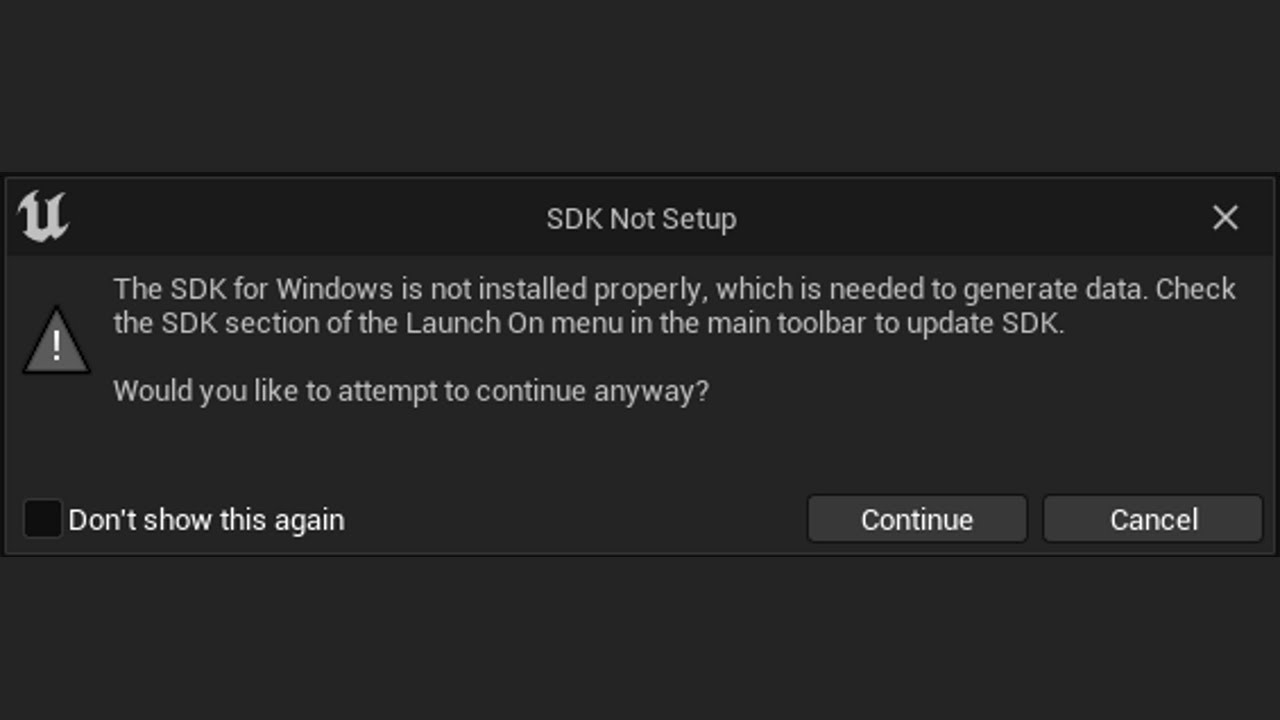
Use the following link by July 31, 2022 for a huge discount on a 10-hour Unreal Engine 5 Beginner's course: https://www.udemy.com/course/unreal-engine-5-the-complete-beginners-course/?couponCode=JUL2022
How to Fix SDK Not Setup - The SDK for Windows is not installed properly, which is needed to generate data. Check the SDK section of the Launch...
can somebody add me and help me in DM, pls?
 astral moat
Well this is something new. Project packaged just fine, no major adjustments were made and this looks weird since it Not even related to my project but missing a DOTNET thingy. Can I get some clues as to how to fix this?
UATHelper: Packaging (Windows (64-bit)): ERROR: Failed to load script DLL: C:\Program Files\Epic Games\UE_4.27\Engine\Binaries\DotNET\AutomationScripts\AutomationScripts.Automation.dll: Could not load file or assembly 'AutomationScripts.Automation.dll' or one of its dependencies. The system cannot find the file specified.
As a note No projects can be packaged. I also verified the instal to repair anything with UE4
So I get the same error no matter what project I package.
Err try to package.
 fair night
I really don't understand Unreal Engine way of doing stuff.
Packaged game works fine... except one single mesh does not load.... other meshes from the same folder are loading properly. Did the Fix redirect thingy but still nothing. You guys have any syggestions? Did this happened to you?
astral moat
I am not the only one experiencing this issue I posted above and posted on the UE Dev forums.
https://forums.unrealengine.com/t/error-launching-packaging-project/594764
Unreal Engine Forums
Hi, I’ve been trying to Launch and Package a project to upload it to the Stadia Portal but I keep running into this error: LogPlayLevel: Error: ERROR: Failed to load script DLL: C:\Program Files\Epic Games\UE_4.27\Engine\Platforms\Stadia\Binaries\DotNET\AutomationScripts\Stadia.Automation.dll: Could not load file or assembly ‘Stadia.Automation...
hearty crypt
Hi,
How to create mod to my game that replaces low res textures with high res textures?
mint leaf
fair night
I really don't understand Unreal Engine way of doing stuff.
Packaged game works ...
check the build log, it can be super helpful
 stray maple
How to change CrashDumpMode for dedicated server builds?
fair night
mint leaf
check the build log, it can be super helpful
It was something I really couldn't realize until I placed a static mesh in the world as StaticMeshActor...
For some reason one of the meshes in my BP was Stereo Static Mesh, something related to VR and I have no idea how I added such component instead of a Static mesh
 orchid cypress
I have a UMG widget that displays properly when playing in editor, but when I package the game with shipping configuration the UI doesn't appear
I tried using create widget from the Game Mode, Level Blueprint, Player Controller BP
all the same result
the widget blueprint are being cooked properly in the built pak file as I have checked the cook log and extracted the files themselves
 arctic prawn
does anyone know why my packaged project gets flagged as a virus
every single one of my friends has their anti virus go crazy whenever they try to launch the gmae
and i need to have it finished before 12 am today or they wont let me in the jam
i would appreciate afast answer because it takes a while to package and publish on gamejolt
winged moss
arctic prawn
i would appreciate afast answer because it takes a while to package and publish ...
It's a false positive so I don't know why that would affect your eligibility to enter a game jam, unless you have an infected machine and it is infecting other executables
Typically code signing will make anti viruses generally trust your game more but that costs money
arctic prawn
winged moss
Typically code signing will make anti viruses generally trust your game more but...
someone online said i had to generate keys in the crypto section
and that was completely free to do
so far
winged moss
Well that sounds like bullshit frankly
arctic prawn
 winged moss
And it's not the same as code signing
arctic prawn
so i just gotta hope that the game jam guys dont instantly disqualify me
arctic prawn
avast which goes ape shit over it
and windows defender which is fine it just gives you a notification saying it might be harmful
winged moss
And by this I mean show the virustotal for it
Avast is trash so no surprises there though
And is the second thing just Smartscreen?
arctic prawn
yea
arctic prawn
winged moss
And by this I mean show the virustotal for it
i think it was just 1 virus that it detected
it was the shipping.exe
winged moss
You know what a false positive is right
arctic prawn
nope
winged moss
Also this isn't uploading the exe to virustotal
arctic prawn
winged moss
You know what a false positive is right
falsely detected as a virus?
winged moss
Yes
arctic prawn
oh then yeah i do know. i thought it was a fancy term for ue stuff
thanks for telling me tho
i wouldve spent too much time trying to fix it
 somber creek
im trying to pass a level as a command line param to a dedicated server. the map is definitely in the packaging list of maps to package, but i get ...


And town, the default map, loads fine with no param

when i select the map from explorer with the ..., it actually changes content to /Game, which is probably my issue
but, why would it be /game and not my actual folder name?
winged moss
somber creek
but, why would it be /game and not my actual folder name?
because it's a virtual path, the first part is the mount point
which for the project is /Game/
 sudden onyx
Does anyone know how to fix these problems?
LogFeaturePack: Error: Error in Feature pack C:/Epic Games/UE_5.0/FeaturePacks/TP_VirtualRealityBP.upack. Failed to parse manifest: Invalid Json Token. Line: 43 Ch: 4
PackagingResults: Error: LyraGameEOS modifies the value of CustomConfig. This is not allowed, as LyraGameEOS has build products in common with UnrealGame.
PackagingResults: Error: LyraGameEOS modifies the value of CustomConfig. This is not allowed, as LyraGameEOS has build products in common with UnrealGame.
PackagingResults: Error: LyraGameEOS modifies the value of CustomConfig. This is not allowed, as LyraGameEOS has build products in common with UnrealGame.
winged moss
sudden onyx
Does anyone know how to fix these problems?
LogFeaturePack: Error: Error in Feat...
Other than the corrupt file, LyraGameEOS changes a setting that requires a source build
 rough star
Hi, im running into this error while packaging my project
UATHelper: Packaging (Windows (64-bit)): Running: C:\Users\HP\Documents\Unreal Engine\UE_4.27.2\Engine\Binaries\DotNET\UnrealBuildTool.exe test Win64 Development -Project="I:\Unreal project\test\test.uproject"  "I:\Unreal project\test\test.uproject" -NoUBTMakefiles  -remoteini="I:\Unreal project\test" -skipdeploy -Manifest="C:\Users\HP\Documents\Unreal Engin
e\UE_4.27.2\Engine\Intermediate\Build\Manifest.xml" -NoHotReload -log="C:\Users\HP\Documents\Unreal Engine\UE_4.27.2\Engine\Programs\AutomationTool\Saved\Logs\UBT-test-Win64-Development.txt"
-UATHelper: Packaging (Windows (64-bit)):   ERROR: No target name was specified on the command-line.
-PackagingResults: Error: No target name was specified on the command-line.

UATHelper: Packaging (Windows (64-bit)): Took 0.6508656s to run UnrealBuildTool.exe, ExitCode=6
UATHelper: Packaging (Windows (64-bit)): UnrealBuildTool failed. See log for more details. (C:\Users\HP\Documents\Unreal Engine\UE_4.27.2\Engine\Programs\AutomationTool\Saved\Logs\UBT-test-Win64-Development.txt)
UATHelper: Packaging (Windows (64-bit)): AutomationTool exiting with ExitCode=6 (6)
UATHelper: Packaging (Windows (64-bit)): BUILD FAILED
-PackagingResults: Error: Unknown Error
Im setting up dedicated server, i cannot package my project using 'test' build target but i can package 'testServer' build target. I can run the game on the server normally if i start the game in PIE mode. But I want to package the game so i can test run it with my friends. I have stuck on it for quite a while, can anyone help me on this?
 winged moss
sudden onyx
Cant find any help on the internet if I google this
winged moss
sudden onyx
Cant find any help on the internet if I google this
If you want to build LyraGameEOS then use a source build
winged moss
rough star
Hi, im running into this error while packaging my project
```diff
UATHelper: Pac...
You called your project test which you should never do because that's a reserved keyword
sudden onyx
winged moss
If you want to build LyraGameEOS then use a source build
So if I build it with the source engine code it should work?
winged moss
sudden onyx
So if I build it with the source engine code it should work?
CustomConfig requires a unique build environment that would be provided with a properly setup source engine
sudden onyx
Aight ... the more I "play" with Lyra the more I got the feeling it is not for newbies
winged moss
it definitely isn't
sudden onyx
It is nice but getting it mp ready, nightmare
rough star
winged moss
You called your project test which you should never do because that's a reserved...
thanks a lot ━┳━ ━┳━
 inland onyx
The reason for the project not being able to cook or package, would be line 108 in "FWGChunk", where "DestroyComponent" is called, right?
 wicked rampart
Hello, Willing to Offer help / assistance to Game Dev teams with Source Control, Packaging, Revision Maintaining and prebuilds. That will also enable me to learn and grow in my Career . Not an expert btw
winged moss
inland onyx
The reason for the project not being able to cook or package, would be line 108 ...
yes but I don't know why an actor would have to manually destroy its components
inland onyx
winged moss
yes but I don't know why an actor would have to manually destroy its components
It's being called in the ~AFWGChunk, so the destructor of the actor(?)
And I'm actually not sure why it's being called 🤔
inland onyx
I guess I could do without the DestroyComponent(?), it's just calling it for some triggerboxes
open rapids
does anyone know about this error?
I've been stuck on it for a long time.
 wicked rampart
Run UE as admin and try
by Looking at the logs, UE seems to be missing perms
@open rapids
inland onyx
inland onyx
The reason for the project not being able to cook or package, would be line 108 ...
Yeah, so I can still neither cook or package because of this line now:
Pastebin
Pastebin.com is the number one paste tool since 2002. Pastebin is a website where you can store text online for a set period of time.
stray maple
How to clear config files so that config variables don't get packaged if they have been set in editor? I have some variables in my UUserWidget classes, but somehow they also end up into packaged game
open rapids
Hiya! I'm trying to give my packaged game a test run but when I startup a level, I get a fatal crash like this one. I'm not sure what went wrong but usually someone would tell me to show my log

So here it is
If anyone could help that would be great!
wicked rampart
LogStreaming: Error: Couldn't find file for package /Game/BP_SonicWorldMenuGameMode requested by async loading code. NameToLoad: /Game/BP_SonicWorldMenuGameMode
open rapids
thanks for responding. This error is kinda weird to me because how come it can't find the file?
the game modes work in the editor
literally everything works in the editor. It's just when I package the game when It becomes a problem
rough star
can you ever pause packaging
wicked rampart
rough star
can you ever pause packaging
No i guess.
rapid sphinx
Hey everyone! I'm currently trying to package in ue5 for quest 2 and keep running into this error. I've updated android studio, changed my sdk version, restarted etc but can't seem to get anywhere. Anyone know what's causing this maybe?
"PackagingResults: Error: System.IO.DirectoryNotFoundException: Could not find a part of the path 'C:\Users\Blake\AppData\Local\Temp\UAT\D+Stuffs+Unreal+UE_5.0\Rules\UATRules-a6cf6bf48bd3e735b2f58f99670fd771Manifest.json'."
 wicked rampart
can u share the full logs?
rapid sphinx
Yeah let me get that quick!
 wicked rampart
Full logs pls @near gyro
 near gyro
wicked rampart
Full logs pls <@223107300347346944>
near gyro
wicked rampart
Full logs pls <@223107300347346944>
Pastebin
Pastebin.com is the number one paste tool since 2002. Pastebin is a website where you can store text online for a set period of time.
Is this what you need?
Nevermind found the actual log
rapid sphinx
Where did you find that @near gyro ?
near gyro
C:\Users\MYUSERNAME\AppData\Roaming\Unreal Engine\AutomationTool\Logs\A+Program+Files+Epic+Games+UE_5.0
wicked rampart
LogMaterial: Display: Missing cached shadermap for LandscapeMaterialInstanceConstant_0 in PCD3D_SM5, Default, SM5 (DDC key hash: FB08A4532D0A7F966FABE6A111F44BD91FA4B79B), compiling.
LogMaterial: Display: Missing cached shadermap for LandscapeMaterialInstanceConstant_0 in PCD3D_SM5, Default, SM5 (DDC key hash: DD634B68F36918C902FBFDD9DD431312EFCA31D7), compiling.
LogMaterial: Display: Missing cached shadermap for LandscapeMaterialInstanceConstant_11 in PCD3D_SM5, Default, SM5 (DDC key hash: 1DFB0CC40A6689668BD62028ECB4F4E5C0E608B9), compiling. Is special engine material.
@near gyro Can u look into LandscapeMaterialInstanceConstant_0 and fix the errors?
near gyro
That must be an engine thing, will take a look
as i havent made a landscape material
Hmm ok ive found that asset but it doesnt show any errors for me
wicked rampart
@near gyro ERROR: Cook failed. [491]
Edit -> Project Settings -> Packaging and add necessary maps to be included in game. Should help
near gyro
wicked rampart
Edit -> Project Settings -> Packaging and add necessary maps to be included in g...
Hmm adding the one map I use didnt help unfortunately
wicked rampart
C:\Users\danpo\AppData\Roaming\Unreal Engine\AutomationTool\Logs\A+Program+Files+Epic+Games+UE_5.0\Cook-2022.08.09-14.50.05.txt
LogSkeletalMesh: Building Skeletal Mesh Player Avatar...
LogSkeletalMesh: Built Skeletal Mesh [0.00s] /Game/Blueprints/Characters/BP_DiceCharacter.Default__SKEL_BP_DiceCharacter_C:Player Avatar
LogWindows: Error: begin: stack for UAT
LogWindows: Error: === Critical error: ===
LogWindows: Error:
LogWindows: Error: Fatal error!
LogWindows: Error:
LogWindows: Error: Unhandled Exception: EXCEPTION_ACCESS_VIOLATION reading address 0x0000000000000038
LogWindows: Error:
LogWindows: Error: [Callstack] 0x00007ff821fb9973 UnrealEditor-Engine.dll!GetPlatformSkeletalMeshRenderData() [D:\build++UE5\Sync\Engine\Source\Runtime\Engine\Private\SkeletalMesh.cpp:1662]
Something related to your Skeletal Mesh
 median portal
I am new to Unreal and trying to get a better understanding of difference between building a pak and executing the compileAllBlueprints cmdlet. The goal is to create a CI pipeline that is faster than building the full pak.
Currently my team can build a pak and run our "game" without errors however the 'UEditor-cmd.exe -run=compileallblueprints' cmdlet fails with many errors
example 'Error: Detected key mismatch in uber graph frame for instance <name> of type <type>, iteration will be unsafe'
we are using Unreal 4.22
why would our pak build not need to compile the same blueprints and also fail?
near gyro
wicked rampart
LogSkeletalMesh: Building Skeletal Mesh Player Avatar...
LogSkeletalMesh: Built ...
The D: drive it references is an external drive which isnt plugged in
i wonder why its referencing that, maybe it installed something to the drive when I installed UE5
wicked rampart
It has nothing to do with D
Game/Blueprints/Characters/BP_DiceCharacter.Default__SKEL_BP_DiceCharacter_C:Player Avatar something is missing or corrupted here
near gyro
Im jst verifying my UE install then will look into that BP and Skeleton
thanks for the help
wicked rampart
median portal
I am new to Unreal and trying to get a better understanding of difference betwee...
can u try asking with #blueprint channel
rapid sphinx
@wicked rampart , got it all figured out, thanks for the help here! 🤘
wicked rampart
Glad am able to help you with the issue .
near gyro
Got my issue figured out too thanks @wicked rampart !
wicked rampart
what was the issue though?
Game/Blueprints/Characters/BP_DiceCharacter.Default__SKEL_BP_DiceCharacter_C:Player Avatar ??? With this or something else?
near gyro
In my CPP file for DiceCharacter
which derives from ACharacter
I was creating a skeletal mesh component called Player Avatar
but the ACharacter class already has a skeletal mesh component
so i guess it just didnt like that
 wicked rampart
glad i was able to point the issue atleast
near gyro
commenting out this line of code solved it
yeah definitely sent me down the right route, and now know where to find the logs for future packaging issues
 unreal creek
Hey there! I hope this the right place to ask. I have troubles building my project using a GitLab worker. I specified building the "Client" target of the game, which does not seem to cause it to build the "Game" target it requires. Anyone has some pointers on how to debug this?
"C:\UE\Engine\Build\BatchFiles\RunUAT.bat" BuildGraph -Script=Z:/Wj4y4/BuildScripts/Lib/BuildGraph_Project.xml -SingleNode=Compile LyraClient Win64 DebugGame -SharedStorageDir=C:\jx15xf-s-in7j8hns4cxudhl3aqew09fmrtsnxvywlzhwx-w\ -NoP4 -WriteToSharedStorage -set:EnginePath="C:\UE" -set:GauntletTests="" -set:UProjectPath="Z:\Wj4y4\Lyra\Lyra.uproject" -set:ProjectRoot="Z:\Wj4y4\Lyra" -set:GameTargets="" -set:StageDirectory="Z:\Wj4y4\Lyra\Saved\StagedBuilds" -set:RepositoryRoot="Z:\Wj4y4" -set:ClientConfigurations="DebugGame" -set:BuildScriptsLibPath="Z:\Wj4y4\BuildScripts\Lib" -set:PrepareCustomCompileScripts="" -set:ExecuteBuild="true" -set:ServerTargetPlatforms="Linux" -set:EditorTarget="LyraEditor" -set:GameConfigurations="" -set:DeploymentSteam="" -set:ServerConfigurations="DebugGame" -set:ClientTargets="LyraClient" -set:TempPath="Z:\Wj4y4\BuildScripts\Temp" -set:ClientTargetPlatforms="Win64" -set:CustomTests="" -set:ServerTargets="LyraServer" -set:IsUnrealEngine5="true" -set:StrictIncludes="false" -set:Distribution="Lyra-WithDedicated" -set:BuildScriptsPath="Z:\Wj4y4\BuildScripts" -set:GameTargetPlatforms="" -set:DeploymentCustom="" -set:ExecuteTests="true" -set:MacPlatforms="Mac;IOS" -noturnkeyvariables
BuildCookRun -project=Z:\Wj4y4\Lyra\Lyra.uproject -nop4 -NoCodeSign -platform=Win64 -clientconfig=DebugGame -SkipCook -cook -pak -stage -stagingdirectory=Z:\Wj4y4\Lyra\Saved\StagedBuilds -unattended -stdlog -noturnkeyvariables
Stage Failed. Missing receipt 'Z:\Wj4y4\Lyra\Binaries\Win64\LyraGame-Win64-DebugGame.target'. Check that this target has been built.
Content of Target.cs
public class LyraClientTarget : TargetRules
{
    public LyraClientTarget(TargetInfo Target) : base(Target)
    {
        Type = TargetType.Client;
        DefaultBuildSettings = BuildSettingsVersion.V2;

        ExtraModuleNames.AddRange(new string[] { "LyraGame" });

        LyraGameTarget.ApplySharedLyraTargetSettings(this);
    }
}
can we get logs?
wicked rampart
C:\Users\Administrator\AppData\Roaming\Unreal Engine\AutomationTool\Logs\C+UE\Log_2.txt
can i get this?
@unreal creek
 gleaming mason
Hello, I'm new to UE (and using UE5), I'm learning to package a tutorial game in windows. I'd like an EXE of the project so I don't have to load UE to play it. I can package it up, but when I run the executable after a couple pop-ups requesting some permissions, the load halts at this error,
LogPluginManager: Error: Unable to load plugin 'Bridge'. Aborting.
I've tried all the different windows packaging options from shipping to use project settings, and get the same result. Any ideas what I may need to do? Thanks.
wicked rampart
gleaming mason
Hello, I'm new to UE (and using UE5), I'm learning to package a tutorial game in...
Try disabling the Plugin if you dont require it
Try copying the project from Engine/Plugins to Project/Plugins and try again
Also Try adding a Cpp class and then recompile
one of the solution should work
gleaming mason
Thx for the reply. To disable the plugin I do what?
The copying should be done in main project, or in the packaged version?
Add a cpp class to do what? IE, create a cpp 'bridge'? I'm a little unsure how to go about that, but I can experiment.
gleaming mason
Thanks @wicked rampart - disabling the 'Bridge' plugin did the trick.
open rapids
Hey guys, I'm back again because I have been messing around with my packaged game for testing purposes and so far I have been getting fatal errors in specific areas of the game. I need to fix them to have my game be in a playable condition so I've tried to replicate the errors in a debug build. so far I've gotten this in my logs
it's this part that I think is the issue but I feel like I'm not getting enough info on how to fix it

or why it's calling an unknown function
again, this works perfectly fine in the editor
wicked rampart
LogWindows: Failed to load 'aqProf.dll' (GetLastError=126)
LogWindows: File 'aqProf.dll' does not exist
LogWindows: Failed to load 'VtuneApi.dll' (GetLastError=126)
LogWindows: File 'VtuneApi.dll' does not exist
LogWindows: Failed to load 'VtuneApi32e.dll' (GetLastError=126)
LogWindows: File 'VtuneApi32e.dll' does not exist
open rapids
What does that mean...
I'm sorry, I'm just
really bad at translating packaging errors
😭
VTtuneApi is very new to me
wicked rampart
i assume u changed a lot with Project plugins and preferences
Why dont u try migrating your content to a new project and try
open rapids
The only plugin I remember was wwise
I have a lot of content though so I think that'll be my last resort
wicked rampart
Delete intermediate, Saved and try repackaging
open rapids
okay I'll try that
welp, that didn't work
does 'aqProf.dll' and 'VtuneApi.dll' look familiar to you? I ask because maybe they come from a plugin idk
wicked rampart
I have never seen this before
must be more project settings related
Try migrating to a blank and package
open rapids
is there a button for migrating? or is it all manual? 😅
wicked rampart
right click and migrate
or copy content folder and paste
you gotta redo project settings though
open rapids
yeah that's fine but where should I be right clicking? In the editor? On the blank project?
Or my current project?
open rapids
Okay ima load that up rq. Just finished making the blank one. Is there a specific area to be right clicking?
wicked rampart
naah . Just on your folder view
open rapids
bet
I've only got 2 folders so hopefully everything will be fine

from there I'm assuming I go into blank project folder->Content and put them inside
bc rn its asking for me to select a destination content folder
wicked rampart
yes
open rapids
well, can c++ classes be migrated? lol
They havent been imported here
They are 100% necessary for the game to run 💀
wicked rampart
🥲 i feel we are complicating everything lol
open rapids
My b brother
open rapids
So me and ToxXxic ended up solving the issue! Running the debugged build is key. But it won't show which lines of code are causing the error until you tick this box in package settings (Shown below which was not enabled by default in my case.) From there you can check the logs and fix the messed up code lines


Thank you @wicked rampart 🤝
wicked rampart
Glad i can help with the issue
 wooden elm
Could anyone help with this? When I try to run my packaged game, only started last day or so:
Assertion failed: Level == 1 [File:D:\build++UE5\Sync\Engine\Source\Runtime\CoreUObject\Private\Serialization\AsyncLoading2.cpp] [Line: 4495]
__scrt_common_main_seh() [d:\a01_work\43\s\src\vctools\crt\vcstartup\src\startup\exe_common.inl:288]
0x00007ffa314f7034 KERNEL32.DLL!UnknownFunction []
0x00007ffa32ca2651 ntdll.dll!UnknownFunction []
sudden onyx
Does someone know how to fix PackagingResults: Error: 262144
 tawny spoke
i've got a problem and i wish i could tell you what it was but i can't
when i package my game, i get no errors or anything in the output log, however i can't start the game at all on any configuration
i simply double click on the program, the cursors shows that something is loading and then nothing, not even an error message or anything. nothing happens at all, the game isn't even in the background
trying to run it from cmd with -log attached doesn't do anything either. i have no clue what's wrong because the packaging doesn't yield any errors or warnings
 ocean berry
hey
can someone help me pls

i keep getting this error
i really need help quickly man 😭
 remote arch
leaving this here for the next person as stuck as i was getting PSO cache generation working on PC and not finding anything anywhere - doesnt work on dx11, add -dx12 as a launch param in the project launcher
 wicked rampart
ocean berry
wicked rampart
ocean berry
Something with SDK
 near rose
thanks! actually just got it fixed haha
now trying to figure out "navmesh needs to be rebuilt"
wicked rampart
So in Unreal, Down arrow next to Build, you can see Build NavMesh option
wicked rampart
wooden elm
Could anyone help with this? When I try to run my packaged game, only started la...
More info or Logs pls
wicked rampart
sudden onyx
Does someone know how to fix PackagingResults: Error: 262144
More info or logs
wicked rampart
tawny spoke
i've got a problem and i wish i could tell you what it was but i can't
when i pa...
Try Event Viewer for more info
near rose
wicked rampart
So in Unreal, Down arrow next to Build, you can see Build NavMesh option
is that in the build tab? because I dont see it
wicked rampart
okay
 rain bane
Where can I go to install the linux packaging sdk?
I already have the toolchain and everything
wicked rampart
just toolchain is enough right?
rain bane
I thought so but this is what I'm getting in the editor

Now that I think about it my android adk isn't showing up anymore either
wicked rampart
not sure. Sorry
rain bane
Thanks
 jaunty phoenix
Hi
Is there a good way to debug what gets packaged and why?
 thick marlin
Hello all, how can I reduce V-Ram usage do you know any information about that?
wicked rampart
no i guess
wooden elm
wicked rampart
More info or Logs pls
Hi Sam, re packaging seemed to fix this error when creating a development build. However when creating a shipping build I do get the following error "Game files required to initialize the global shader library are missing from" its set to shipping in editor cooks and builds fine but I cannot launch in on my machine.
wicked rampart
Might be DX12 is Ticked in Project Settings
wooden elm
wicked rampart
Might be DX12 is Ticked in Project Settings
Ah yes it is, I thought it was required for Nanite/Lumen based projects though?
wicked rampart
so did it work?
inland onyx
Whenever I try to Package, or cook my project, it fails with the following error:
https://pastebin.com/rgUCUgtW
And I'm really unsure as to what is causing it 
(updated the log)
Pastebin
Pastebin.com is the number one paste tool since 2002. Pastebin is a website where you can store text online for a set period of time.
 hollow isle
Hello, does anyone know how to fix this issue that appears during game packaging:
UATHelper: Packaging (Windows (64-bit)): LogPackageName: Error: DoesPackageExist: DoesPackageExist FAILED: '/VertexAnimToolset/VertexAnimFunctions/ExtractAnimData_Pivot_Interp' is not a standard unreal filename or a long path name. Reason: Path does not start with a valid root. Path must begin with: '/Engine/'...
It seems like it's some issue with the VertexAnimToolset plugin that I use, but I can see and open the material functions that are listed as errors just fine. The game also runs as intended, only the packaging is problematic.
wicked rampart
Try unticking the plugin while packaging?
Looks like a editor plugin
Or may be you no longer have that plugin?
hollow isle
I tried unticking it but then it starts complaining that the functions can't be detected (since plugin is disabled). I tried both installing this plugin into the engine, then into the project, then both. Nothing seems to solve the issue
I also tried deleting Intermediate, Config and Saved and regenerating the files, but the error is still there
wicked rampart
Is reference missing in your project?
Try running -FixupRedirectors once
is it a BP only or cpp?
Sometimes long path can also cause this
rain bane
@wicked rampart From my issue yesterday, I think I might've found why it doesn't compile
wicked rampart
SDK one?
rain bane
Looks like im gonna have to download another version then 😭
wicked rampart
Downgrading package? project?
So i have tried downgrading from 4.25 to 4.24 and It gave me errors! Not sure if its possible now.
also lots of fuckups happen with art assets and rigs and meshes
hollow isle
wicked rampart
Try running -FixupRedirectors once
I tried it but it didn't fix anything
hollow isle
wicked rampart
is it a BP only or cpp?
It's cpp and bp
thanks for helping btw! I really appreciate it
sudden onyx
Does someone know what "PackagingResults: Warning: FLwsWebSocket[1]::Connect: State is not None (StartConnecting), unable to start connecting!" is?
UATHelper: Packaging (Windows): LogCook: Display: Cooked packages 3128 Packages Remain 46 Total 3174
UATHelper: Packaging (Windows): LogWebSockets: Warning: FLwsWebSocket[1]::Connect: State is not None (StartConnecting), unable to start connecting!
PackagingResults: Warning: FLwsWebSocket[1]::Connect: State is not None (StartConnecting), unable to start connecting!
UATHelper: Packaging (Windows): LogCook: Display: Cooked packages 3128 Packages Remain 46 Total 3174
i dont know what this is
wicked rampart
Packaging for? Which Platform?
sudden onyx
Windows
wicked rampart
UE version?
wicked rampart
its alright as long as its fixed
sudden onyx
I want to cry
wicked rampart
bruh 😱
sudden onyx
yes ...
I feel pain
suffering
agony
i dont know whats wrong with the assets
think i will remove them xD
sudden onyx
u2
 broken frigate
Hello, question if I may: Is there a way to make the packaging process output smaller individual ".ucas" files, rather than trying to pack it all into one large one?
sudden onyx
I dont know if someone can help me, but these are my errors and warnings, idk how to fix them
 wicked rampart
PDB files can be reverse engineered to a extent.
Also why do you have to include pdb files in shipping build
swift cargo
wicked rampart
Also why do you have to include pdb files in shipping build
Many players are getting fatal crashes at certain times
And I can’t reproduce it
So I want at least some kind of log
As opposed to just “fatal crash”
Or 0xfffffff memory invalid
wicked rampart
You can ask them to share crash dumps and then figure out yourself
Wont wont that work?
Also setting up Crash Reporter should let you know the retail crashes right?
Not sure how this works though, but thats the functionality
swift cargo
wicked rampart
You can ask them to share crash dumps and then figure out yourself
All they get is a window saying “fatal error” when it crashes
If I use the crash reporter, do I also need to include debug files?
Since the crash reporter isn’t very helpful if it just gives you a memory address with no context
mystic atlas
You want the crash dump which you then load up in VS
You don't need them to have the debug files for you to do that.
wicked rampart
How will VS debug without PDB file?
wicked rampart
swift cargo
If I use the crash reporter, do I also need to include debug files?
No
You need to configure in a way that It will send the minidump to server you specify
swift cargo
mystic atlas
You don't need _them_ to have the debug files for you to do that.
I don't mind having them if they help
just want to make sure it won't expose any sensitive code
wicked rampart
Crash dumps can be found here : %localappdata%\CrashDumps
swift cargo
wicked rampart
Crash dumps can be found here : %localappdata%\CrashDumps
They seem like random memory dumps. I'm setting up Sentry atm to deal with them but a memory address isnt very help for me
wicked rampart
You can have pdb on your repo and not ship them on Steam
swift cargo
wicked rampart
You can have pdb on your repo and not ship them on Steam
What does pdb expose?
that otherwise wouldn't be?
The game is already shipped
and the bugs aren't reproducible by me.
winged moss
swift cargo
The game is already shipped
well you need the PDBs for the released version so you can view the dump at all
NEVER distribute PDBs to the public
swift cargo
winged moss
well you need the PDBs for the released version so you can view the dump at all
Ok, so if I'm understanding correctly, the PDB file is uploaded to the crash reporting server.
While the client only includes the crash reporter
and that PDB on the backend translates the raw crash?
winged moss
this is windows debugging 101
swift cargo
Sorry, I'm a web dev who got into game development
winged moss
a PDB is a symbol file, that is able to translate dumps into something readable
swift cargo
all i know about are stack traces
winged moss
it's also useful for debugging a running process
swift cargo
winged moss
a PDB is a symbol file, that is able to translate dumps into something readable
Gotcha. Any recommended crash reporting servers or should I continue with Sentry?
mystic atlas
swift cargo
I don't mind having them if they help
They don't help.
winged moss
also with "crash reporting server" you need to implement one or use something off the shelf (bugsplat, sentry)
swift cargo
winged moss
also with "crash reporting server" you need to implement one or use something of...
I see. So I package it once with debug files to add to Sentry, then package it again without them for shipping each update?
winged moss
what
swift cargo
I mean package the game in order to get the .pdb files to upload to Sentry
winged moss
you only package once with PDBs
when you upload to steam or wherever your game lives, you just exclude the PDB files from the upload
swift cargo
Gotcha
wicked rampart
So PDBs are compile specific, Even if you dont make any change, PDB of one compile wont work with another compile
swift cargo
Ahh ok got it
wicked rampart
swift cargo
I see. So I package it once with debug files to add to Sentry, then package it ...
Hard way:
Ship game, Have copy of PDB with you
Ask People to share crash dumps from %localappdata%/Crashdumps
Debug locally and fix them
swift cargo
wicked rampart
**Hard way:**
Ship game, Have copy of PDB with you
Ask People to share crash du...
I'm currently implementing Sentry
so that they can just send it directly to that
no need to manually ask them for it
wicked rampart
Umm even that works, just u gotta pay for the service
swift cargo
Looks like I need to compile from source in order to add Sentry...
wicked rampart
Try backtrace, free upto 25K
swift cargo
welp, how can I debug the PDBs locally against the crash dump?
wicked rampart
Run in visual Studio, load symbols and Debug
Will point you to the exact source file and line
swift cargo
wicked rampart
Run in visual Studio, load symbols and Debug
True, but I want to set it up at scale so I don't have to manually ask people for files
brb let me compile from source for 5 hours to change 1 config file.
wicked rampart
Backtrace doesnt need source compliation
swift cargo
wicked rampart
Backtrace doesnt need source compliation
I'll check it out now. Thanks.
wicked rampart
swift cargo
brb let me compile from source for 5 hours to change 1 config file.
Also that ini is open and doesnt need source engine
Assuming CrashReport Config file is the one you are mentioning about
swift cargo
wicked rampart
Assuming CrashReport Config file is the one you are mentioning about
It's strange because Sentry says you need to compile from source to edit it. But it makes no sense since you can override the values in the project level DefaultEngine.ini.
Either way, setting up Backtrace now.
winged moss
wicked rampart
Try backtrace, free upto 25K
lolno
the most expensive solution to this on the market
winged moss
swift cargo
It's strange because Sentry says you need to compile from source to edit it. Bu...
I really would use sentry or bugsplat, backtrace is disgustingly expensive
swift cargo
winged moss
I really would use sentry or bugsplat, backtrace is disgustingly expensive
Do Sentry/bugsplat require compilation from source? Seems like some of their setup guides are conflicting in that.
winged moss
no?
but I've only ever used a source build
you would need a way of modifying that INI though, but you still get PDBs that are suitable for upload
wicked rampart
F:\UE_5.0\Engine\Programs\CrashReportClient\Config
winged moss
typically yes, not sure if it's PDBs multiple with a binary engine though
why would it
wicked rampart
Keep PDB backup
wicked rampart
logging in Production as in Development or Retail
mystic atlas
Logging is disabled in shipping, but you can turn it back on I think. Not sure how/where.
wicked rampart
run game with commandline -log
 ashen finch
Need some help getting some of my files loose in packaging
Content
|-Things
  |-LooseBinaryAsset01.bin
  |-LooseBinaryAsset02.bin
  |-LooseBinaryAsset03.bin
  |-LooseBinaryAsset01GeneratedDir
    |-PackagedAsset.uasset
  |-LooseBinaryAsset02GeneratedDir
    |-PackagedAsset.uasset
  |-LooseBinaryAsset03GeneratedDir
    |-PackagedAsset.uasset
So I need all of the *.bin files in "Things" to be loose. However, I need all of the uassets located in the GeneratedDirs to be packaged and known to the Asset Registry. How would I accomplish this?
tawny spoke
tawny spoke
i've got a problem and i wish i could tell you what it was but i can't
when i pa...
ok, so this is weird
last time i said that there's no error or anything but the game doesn't start at all
that was when i had C++ code in the project
i removed it so it's purely blueprints and now i do get an error when crashing
it says that a plugin that i made is missing a module and can't find it
but the module is right there and everything in my plugin compiles just fine
when removing the plugin, the game actually works
however, i really need this plugin working so i can't do that
this is the whole screen and i can't figure the issue out
 winged moss
blueprint projects can't contain code plugins for a start
tawny spoke
that's kinda whack
but it still doesn't work even with a C++ project. i tried the event viewer and all it's telling me is that the application crashed with event id 1000
winged moss
tawny spoke
that's kinda whack
but it still doesn't work even with a C++ project. i tried th...
ok then in your C++ project, launch with the debugger then
mystic atlas
It doesn't. Logging is compiled out of shipping builds.
You juts need to google how to re-enable it.
You could remove them.
Or create your own logging function
That wraps the stadnard ones
winged moss
you also need a source build to enable logs in shipping
 astral stirrup
Unreal doesn't seem to be recognizing my SDK. And when I try to package it shows error System.Exception: Found no script module records. I've installed the latest VS SDK, also tried the SDK Installer, installed .net core 3.1.0 runtime, and copied the hostfxr.fll file to the proper location. I've also restarted and rebuilt the engine and project. Any ideas?
tawny spoke
tawny spoke
ok, so this is weird
last time i said that there's no error or anything but the ...
got some good news
i found out what causes the game to instantly crash
in one of my plugin's modules, i have a static variable of type ISocketSubsystem
and in my cpp i set it to ISocketSubsystem::Get(PLATFORM_SOCKETSUBSYSTEM)
that is the thing causing my issues
if i set the variable to nullptr then the game starts
so there we go, i found the root of the problem
for some reason, ISocketSubsystem::Get(PLATFORM_SOCKETSUBSYSTEM) makes the game crash in a packaged build, but works just fine in the editor
what could i do about this? i do need that part of code so i can create objects of type FInternetAddr
mystic atlas
Have you tried debugging your packaged game (yes, you can do this quite easily) to see where the problem is?
tawny spoke
i don't know how i could debug the packaged game
if it involves attaching something to the process, that wouldn't work because the game doesn't start at all, not even an error message that pops up
the weirdest thing for me is that the code compiles perfectly but that part just breaks everything. i don't even have to do anything with the property
i tested that by removing the affected module and defining it in another module. that still breaks, so i know for certain that ISocketSubsystem::Get(PLATFORM_SOCKETSUBSYSTEM) is the issue
mystic atlas
Add the exe of the packaged game as a project in VS and then set it as the startup project
(to your current solution)
tawny spoke
mystic atlas
Add the exe of the packaged game as a project in VS and then set it as the start...
i did that and it says 'Access violation'
tawny spoke
no, that's just when i debug the exe and nothing else
i can't add a breakpoint for an exe, though
and the code has no problems in the editor
mystic atlas
You don't "add a breakpoint to the exe"
The breakpoint you add to your code. If the pdb file is there, it will automaticlaly use your solution to debug the exe.
It works just like any other project you start from VS
tawny spoke
well, i don't know about any pdb file, but i think i may have solved the problem
i set the variable to nullptr like before, but then i set it again in StartupModule to ISocketSubsystem::Get(PLATFORM_SOCKETSUBSYSTEM) and it booted up
i need to make some more tests to see if all is well, though
astral stirrup
Any idea how to fix this? It built fine last night.
** Error: Couldn't find target rules file for target 'LyraEditor' in rules assembly 'UE5Rules, Version=0.0.0.0, Culture=neutral, PublicKeyToken=null**
wicked rampart
May be check Package configuration
astral stirrup

It's just not finding the SDK at all on UE5 source. It does see it on UE5 Launcher
wicked rampart
Do you have build Target for LyraClient, LyraGame, Lyra Server and duck?
Also SDK you have to install via VIsual Studio Installer
astral stirrup
Yeah I have the SDK. Do I need to do something for a build target?
wicked rampart
yeah
So generally Build Target is available for debug, shipping release and default one
Since here its Lyra, u have to create
 quasi mulch
Heyo! Can anyone else not package a shipping build on UE5?
Whenever I do it just defaults to development
 tiny storm
hey could you solve that issue ?
having the same
Assertion failed: OutputPin->LinkedTo.Num() > 0 [File:D:\build\++UE5\Sync\Engine\Source\Editor\KismetCompiler\Private\KismetCompiler.cpp] [Line: 323]
astral stirrup
wicked rampart
Since here its Lyra, u have to create
How do you create a new build target? I've seen no mention of this anywhere.
 mystic atlas
Create new .Target.cs files in your project source folder?
astral stirrup
Okay I don't see anyone else saying they've had to do this with Lyra but it does give me somewhere to look ty
mystic atlas
I mean they should already be there?
astral stirrup
I would think so
Does the target need the same name as my uproject? Yourproject.Target.cs?
mystic atlas
Honestly, I don't know.
But I suppose not?
You can have YourProjectEditor, for instance.
Whether it has to start with your project name is another question
 deep scroll
SDK not set up for Windows packaging. Any help?
Need some help with setting up the SDK for Windows Packaging.
mystic atlas
Install all the windows sdks with the visual studio installer.
mystic atlas
I do not.
deep scroll
darn
wicked rampart
🥲 not rocket science, u can figure out urself
deep scroll
OK
deep scroll
thanks
wicked rampart
May be u can hire someone to do ur builds if its difficult 😉
 echo stratus
So I'm having issues with packaging our linux server via the BuildCookRun command. It works just fine when packaging via the Project Launcher in the editor, but as soon as I try to run that same exact command in PowerShell (via a .bat file) outside of the editor, cooking fails. I've turned on verbose logging and I get nothing helpful. The only thing that seems relevant is this: Plugin 'AutoSettings' failed to load because module 'AutoSettings' could not be found. Then the log line immediately after says LogCore: Engine exit requested (reason: EngineExit() was called). What's odd though is when I disable that plugin, it just fails to load the next plugin, then the next, etc. Until it says that it's failing to load the project module. So I'm not sure if this is what's causing the build to fail or not, but I also don't no how to go a bout solving that error if it is causing it. My gut is telling me that some code is trying to reference something from a module before it's loaded.
Here's the log.
wicked rampart
Can you try #automation channel
echo stratus
Done
 raw timber
Hi, i would like to know how the packager works.
When i'm packaging my project, i guess the BP are compiled, those BP use tags added from C++ but the native tag adder function is called later so there is an error saying my tags doesn't exists.
It's working with tags added in the ini file.
Is this the expected behaviour ?
deep scroll
Tried to package my game and it wont work. Here is the log
 winged moss
deep scroll
Tried to package my game and it wont work. Here is the log
winged moss
deep scroll
Tried to package my game and it wont work. Here is the log
did you read what it said?
since it literally tells you what to do
the "Warning: Visual Studio 2022 is installed, but is missing the C++ toolchain. Please verify that the "MSVC v 143 - VS 2022 C++ x64/x86 build tools (Latest)" component is selected in the Visual Studio 2022 installation options." part
deep scroll
where is that tho?
winged moss
in the screenshot that you provided
deep scroll
no I mean where in VS?
winged moss
in the installer
run it, and find it in optional components
you probably did not install VS with C++ components installed
deep scroll
It was already installed tho
 wicked rampart
raw timber
Hi, i would like to know how the packager works.
When i'm packaging my project,...
wicked rampart
raw timber
Hi, i would like to know how the packager works.
When i'm packaging my project,...
Provide Logs please
wicked rampart
deep scroll
It was already installed tho
sswires pointed out the issue, its upto you to fix and run it
deep scroll
But I have no clue, the MSVC was selected, but the project is acting like it wasnt
raw timber
wicked rampart
Provide Logs please
Everything ?
raw timber
LogPackageName: Warning: FPackagePath::TryFromMountedName was passed an ObjectPath (/Game/nverse/Avatar/Neia/Ability/Shield/GA_Neia_Shield.GA_Neia_Shield) rather than a PackageName or FilePath; it will be converted to the PackageName. Accepting ObjectPaths is deprecated behavior and will be removed in a future release; TryFromMountedName will fail on ObjectPaths.
Maybe that's not related to the packaging but i have this warning i don't understand
And the logs :
Native tags from C++ are loaded after the warnings, but tags from ini files are loaded before
deep scroll
Ok new set of errors now
 wicked rampart
Apologies if my tone is bit rude, But just read them once before asking in group
deep scroll
I understand
deep scroll
The NET Framework SDKs?
wicked rampart
Yes
deep scroll
Got it
wicked rampart
 wicked rampart
Anything 4.6.0+
deep scroll
got it
wicked rampart
Just one is fine
deep scroll
so just 4.8.1?
wicked rampart
That should work
@raw timber
Log UATHelper Packaging (Windows): LogAbilitySystem: Warning: No GameplayCueNotifyPaths were specified in DefaultGame.ini under [/Script/GameplayAbilities.AbilitySystemGlobals]. Falling back to using all of /Game/. This may be slow on large projects. Consider specifying which paths are to be searched. Log UATHelper Packaging (Windows): LogAbilitySystem: Warning: Found GameplayCue tag GameplayCue.Ability.Anekra.Ultimate in asset /Game/nverse/Avatar/Anekra/Ability/Ultimate/GC_Anekra_Ultimate but there is no corresponding tag in the GameplayTagManager. Log UATHelper Packaging (Windows): LogAbilitySystem: Warning: Found GameplayCue tag GameplayCue.Ability.Attack in asset /Game/nverse/GAS/Ability/bolt/GC_Bolt but there is no corresponding tag in the GameplayTagManager. Log UATHelper Packaging (Windows): LogAbilitySystem: Warning: Found GameplayCue tag GameplayCue.Ability.Shield in asset /Game/nverse/GAS/Ability/shield/GC_Shield but there is no corresponding tag in the GameplayTagManager.
GameplayTagManager Looks like tags are missing in gameplay manager, sure everything is setup right?
raw timber
I know, but the packager seems to load tags from ini files first, but i add native tags from C++ code, so i don't know if it's normal FGameplayTagNativeAdder is called too late during packaging
Log UATHelper Packaging (Windows): LogNverse: Display: Load Tag Ability.Attack 1
You can see on this line i'm adding tags, but it's after the warnings (i removed other tags from the logs to avoid flooding)
Everything works while playing in editor, tags are working when used only in C++, but the packager can't find the tags, no idea why
deep scroll
Ok so I have a massive wall of Red and Yellow errors and I really have no idea what they are
wicked rampart
deep scroll
Ok so I have a massive wall of Red and Yellow errors and I really have no idea w...
Share logs
deep scroll
can I DM you?
wicked rampart
yeah
raw timber
They said to ask here :p w/e i will just try to debug the packager i guess, thanks :p
open rapids
I keep on trying to package or launch a game for IOS using a Mac. Can somebody please help me?
LogPlayLevel: Error: Code Signing Error: Provisioning profile "MobileTestGame" doesn't include signing certificate "Apple Development: Matthew Freedman (YQ6CPNUF7X)".
LogPlayLevel: Error: Code Signing Error: Code signing is required for product type 'Application' in SDK 'iOS 15.5'
LogPlayLevel: BUILD FAILED
LogPlayLevel: The following build commands failed:
LogPlayLevel: Check dependencies
LogPlayLevel: (1 failure)
LogPlayLevel: Took 4.210421s to run env, ExitCode=65
LogPlayLevel: Error: ERROR: CodeSign Failed
LogPlayLevel: (see /Users/matthewfreedman/Library/Logs/Unreal Engine/LocalBuildLogs/Log.txt for full exception trace)
LogPlayLevel: AutomationTool exiting with ExitCode=32 (Error_FailedToCodeSign)
LogPlayLevel: Completed Launch On Stage: Build Task, Time: 39.278986
LogPlayLevel: Error: RunUAT ERROR: AutomationTool was unable to run successfully.
PackagingResults: Error: Launch failed! Failed to Code Sign
If I select no certificates I have 2 green ones but if I select any all of the certificates turn gray.

 wicked rampart
The Signing Certificate you select in your Project Settings must match the one used to generate your Provisioning Profile, otherwise your project will fail to package.
 shrewd ibex
Hey, is consolevariables.ini created by default in appdata when a package is run?
astral stirrup
It's weird. I was able to package LyraStarterGame in source. My project using Lyra still does not find SDK. Any ideas?
shrewd ibex
Another question, but is there a way to add, change or remove lines from engine.ini? Seems like i have to do changes there to make them apply, because execute console command doesnt work
astral stirrup
My project recognizes SDK in UE5 Launcher. It does not recognize SDK when using UE5 source build. What am I missing?
 viscid girder
Hi, i've made a build and my friends want to play, the build is a little bigger than maybe it should have been so i thought maybe i could package up the assets than change less frequently and have some sort of sync for those helping me
 digital dust
hello, can anyone help me resolve this error?

had a similar problem with the common ui plugin
wicked rampart
digital dust
hello, can anyone help me resolve this error?
Create new .Target.cs files in your project source folder for the custom tareget u are trying to build
digital dust
@wicked rampart i have this

also, i should probably mention that im on my second tutorial, so i pretty much dont know anything
wicked rampart
Change build config to Debug or Shipping and try
winged moss
digital dust
<@381269215790759938> i have this
where is it relative to your project?
viscid girder
Hi, i am looking at this pretty big file, is it possible to break it down into smaller more static packages? I think my friends will kill me if i ask him to download 5gb when i do an update
 open rapids
wicked rampart
The Signing Certificate you select in your Project Settings must match the one u...
open rapids
wicked rampart
The Signing Certificate you select in your Project Settings must match the one u...
Okay. Sorry for responding so late but I will try that right now
open rapids
wicked rampart
The Signing Certificate you select in your Project Settings must match the one u...
Can you please tell me how I can do that?
digital dust
winged moss
where is it relative to your project?
where it belongs, i assume? it got created automatically
 winged moss
not really, is this a BP only project or something?
 torpid elk
Does anyone know how to solve unreal automation error code 6 when trying to package a project? It works perfectly in editor and the solution file builds in VS without error but I can't get it to package
digital dust
@winged moss any clues?
 burnt remnant
ERROR: System.ArgumentException: An item with the same key has already been added.
I get this while launching UAT during a project launcher build., what causes it?
this always happens with windows builds, it must not happen to other people because there's no indication of how to fix it
is there a way to package without that error or is that it?
fuck, I just remembered what causes it. unreal doesn't like having a copy of a plugin in the engine and in the project folder
that was it
it could be a lot better
mystic atlas
Handy to know!
 bronze lark

Hi! Help please. This happening during build. Seems there is a double of the persistent level. Don't now how to fix this error because i have only one world composition map (with sublevels) and one persistant (i guess)
 silent orbit
im trying to package my game (mostly just to test if the game still works in a packaged state) and the notification in the corner says its successful instantly, but doesnt make any files. theres a few errors in my log, but i dont know what to make of them.
i did make my project in ue5.0 initially, but am running it with 5.0.3 now. everything works fine in the editor but with some of the references specifically to 5.0 in the log i think that might be the cause of the issue, but i have no clue how to fix that either as things people use on ue4 simply dont seem to exist for ue5
 wicked rampart
Something with toolchain
 maiden oak
Hello all i packaged my game but it works only in my pc when i sent to my friends nobody can play it. it has visual problem can somebody help me please
winged moss
then what is the visual problem
maiden oak
@winged moss what should i do
winged moss
you didn't describe the problem in any detail
until you do, I don't know
you didn't show a screenshot or video even
maiden oak
@winged moss it is the videos i sent now its like this it will upload now
video dosent upload .
problem is i package my game and i sent to my friend
he can open it but game has sound but white blank in background
 calm hollow
Anyone know why the options to package my game are missing?
I don't see the option even under my File header
using UE5
maiden oak
Hello All, i have movies in my game when i package it how can i add them that appears in game when i send it to someone else
open rapids
wicked rampart
The Signing Certificate you select in your Project Settings must match the one u...
When you have a chance, can you please tell me how I can do that.
maiden oak
all in packaging there is " specific movies to package " in there i should i add movies that will show in game in other pcs i think but what name should i write there the place of the movies in my drive?
please if anyone knows helps me i
 supple moon
can i test my game on android? how?
 hushed snow
Hello everyone! I can't get the Open Level node to work in the Shipping build. It works in Development but not in Shipping. Any assistance is appreciated! Thanks
maiden oak
all pls is there some one helps me
 dry cedar
I am using UE5 and want to try unrealcontainers for a project i'm working on so I am following the tutorial on youtube https://youtube.com/playlist?list=PLa-0TOOD3kaN3pzT2GTPWGu_pf6HMq9p9 but in the 3rd video while packaging a first person shooter template as a sample project as shown in the 3rd video, i'm following the same steps but i'm getting an Unknown error and the packaging fails everytime with logs as below:


YouTube
We will cover from start to finish setup off a scalable multiplayer game and infrastructure using Docker, Kubernetes & Open Match with Agones.
Can anyone help
?
wicked rampart
dry cedar
I am using UE5 and want to try unrealcontainers for a project i'm working on so ...
looks like an automation error, can u check with #automation
dry cedar
wicked rampart
looks like an automation error, can u check with <#799710959564095498>
thanks Sam
maiden oak
hello all i have a problem, when i package game and send to other pc the movies dosent work its only white blank screen but game is working pls what should i do some one help me
wicked rampart
maiden oak
hello all i have a problem, when i package game and send to other pc the movies ...
Did u add them in packaging section
maiden oak
wicked rampart
Did u add them in packaging section
you mean in specific movies to package?
wicked rampart
Yes
maiden oak
i added them but maybe i wrote something wrong what should i write there
i wrote name of the movies exactly and also path of the movies in project>content>movies too
wicked rampart
Exclude movie files when staging - Did u tick this?
wicked rampart
can u put all ur movies in one folder and add them to Additional Non-Asset Directory to Package
maiden oak
i done that too
it only accepts project>content>movies
but again no result
it works on my pc but in other pcs its blank white screen
it has sound but no visual
wicked rampart
which UE version?
maiden oak
4.27.2
wicked rampart
weird though
maiden oak
yeah it made me crazy if you want i can come to discord and share my screen
why this is not working i dont know
open rapids
Is packaging for IOS better/easier on Mac or Windows? I don't really know
winged moss
well on Windows it remotely compiles the project on a Mac, so either way you need one
open rapids
Okay. Thanks
 inner island
Build failed - I checked into the log and found the error :
UATHelper: Packaging (Windows (64-bit)): LogInit: Display: LogProperty: Error: FStructProperty::Serialize Loading: Property 'StructProperty /Game/IncidentCommand/FullScenario/Widgets/AssignmentMenus/FireAttackMenu.FireAttackMenu_C:Button Pressed:Specific Assignment Pressed'. Unknown structure.
UATHelper: Packaging (Windows (64-bit)): LogInit: Display: LogProperty: Error: FStructProperty::Serialize Loading: Property 'StructProperty /Game/IncidentCommand/FullScenario/Widgets/AssignmentMenus/FireAttackMenu.FireAttackMenu_C:ExecuteUbergraph_FireAttackMenu:K2Node_MakeStruct_IC_FireAssignmentsStruct'. Unknown structure.
UATHelper: Packaging (Windows (64-bit)): LogInit: Display: LogProperty: Error: FStructProperty::Serialize Loading: Property 'StructProperty /Game/IncidentCommand/FullScenario/Widgets/AssignmentMenus/FireAttackMenu.FireAttackMenu_C:ExecuteUbergraph_FireAttackMenu:K2Node_CustomEvent_Specific_Assignment_Pressed'. Unknown structure.
UATHelper: Packaging (Windows (64-bit)): LogInit: Display: LogProperty: Error: FStructProperty::Serialize Loading: Property 'StructProperty /Game/IncidentCommand/FullScenario/Widgets/MainButton.MainButton_C:AssignmentsStruct'. Unknown structure.
UATHelper: Packaging (Windows (64-bit)): LogInit: Display: LogProperty: Error: FStructProperty::Serialize Loading: Property 'StructProperty /Game/IncidentCommand/FullScenario/Widgets/SpecificAssignmentMenu.SpecificAssignmentMenu_C:AssignmentParentMenu'. Unknown structure.
however when I open up the blueprint in question, it compiles fine - I've tried refreshing nodes, that didn't work (and again, it compiles fine) the blueprint seems to be asking for a deprecated structure - I'm not sure how the build log says it's unknown
You can see the blueprint, the structure variable is listed and hooked up correctly -


 fallow sand
Hi, anyone know how to fix this error?
 wicked rampart
Something wrong with template may be
 hidden egret
Hello! I am having an issue at cooking phase with included headers in a custom material expression node.
The cooker cannot import the shader file as the virtual directory is not mapped. Do you know how I can fix this?
 lethal pelican
I'm trying to package a texture to a separate chunk than chunk0.
The AssetLabel has a higher priority than chunk0, the texture isn't referenced in any blueprints or materials, the only reference shown is the one to the DataAsset, the asset audit and size map shows it being inside the separate chunk, I've added ObbFilter to DefaultEngine.ini to exclude the separate chunk...
Yet when I check after packaging the texture still ends up in chunk0. Anyone got a clue why that is?
lethal pelican
lethal pelican
I'm trying to package a texture to a separate chunk than chunk0.
The AssetLabel...
Issue resolved. Had to uncheck IsEditorOnly for PrimaryAssetLabels in project settings asset manager
 ornate plover
Hey guys, I have a dependency for BlueprintGraph (a blueprint node I created) that's inside a module, inside a plugin.
The module is set to UncookedOnly, but packaging still throws the error "Unable to instantiate UnrealEd module for non-editor targets". I don't reference UnrealEd directly, but BlueprintGraph does.
How to proceed with this? Any help is highly appreciated.
 meager dragon
hi, im trying to submit my project in the marketplace and its the second time i receive this issue where it says that “Your product looks to only contain 117 unique meshes. While the rest of your 2000+ meshes are just duplicates that need to be removed. When we say unique, we mean a mesh that has a different design than the other meshes within the level. So only changing the scale, Textures, or Materials on a already existing mesh, is not considered to be unique.” (image)
Basically the project consists in 117 unique meshes with some variations of color making a total of 2000+ assets, i have already that specified on the project description but still have the same issue
Can someone explain me what is the problem and how to solve it?
 wicked rampart
Tell them its 117 meshes and shit tons of textures 😛
 gloomy garnet
Hi y'all. Let's say you want to package a project for mac but you are using a Virtual machine (Virtual box in specific) and your host machine is windows. Unreal engine and your unreal engine project is in windows. Does anyone know how to package an unreal project directly from the windows side after doing a SSH into the VM Mac? What are the steps? Would really appreciate. Thanks!
open rapids
Hello buddies ^.^
Any help with this?
 wicked rampart
So ProgramFiles has spaces in between
Install it to somewhere where there is no space
Like E:\SDK
open rapids
wicked rampart
Like E:\SDK
Done Thanks for help
 tranquil star
 fathom void
hi, when i have animated metahumans in level i get always a cooking failed error. any idea about that how to fix that?
 ripe geyser
Anyone know if it's possible to have a transparent splash screen?
 north rose
Guys, is there any tuts available to show the process of releasing a game on Steam or Xbox platforms to learn it:)
 summer pasture
north rose
Guys, is there any tuts available to show the process of releasing a game on Ste...
summer pasture
north rose
Guys, is there any tuts available to show the process of releasing a game on Ste...
to upload on steam, you need a ‘steamworks’ account, log in with steam then you have to sign a bunch of forms and pay a 100$ fee
per game it’s also 100$
steam is kind of pricy
if you want to upload on xbox or playstation you need game ratings like ESRB
A ground-breaking global rating and age classification system for digitally delivered games and apps.
IARC is free, submitting through ESRB isn’t
winged moss
$100 is a very minimal cost in game development
mellow bane
summer pasture
steam is kind of pricy
But doesn't come with a NDA, doesn't require an official company setup or hardware to install at your house with a fixed IP address and whatnot
(and not in fact pricy)
north rose
summer pasture
to upload on steam, you need a ‘steamworks’ account, log in with steam then you ...
Thank you, it does make sense.
north rose
summer pasture
if you want to upload on xbox or playstation you need game ratings like ESRB
I saw this ESRB logo in some game company website, is it required for everyone who release game on xbox? Or not mandatory.
 nova kraken
I'm facing this issue here in making server build, any idea guys????
 summer pasture
north rose
I saw this ESRB logo in some game company website, is it required for everyone w...
summer pasture
north rose
I saw this ESRB logo in some game company website, is it required for everyone w...
it’s sadly mandatory
it’s so little kids don’t play something they’re not supposed to and get traumatized
north rose
I see, it make sense
nova kraken
nova kraken
I'm facing this issue here in making server build, any idea guys????
anyone?
winged moss
nova kraken
anyone?
why are you trying to build a server for a chiefly single player sample project?
also by the looks of it, that is also assuming a correctly setup source build
 keen moss
Hey guys. If anyone has a few minutes to take a look at my log and help me figure out why this cook failed I would appreciate it.
inner island
Does blueprint nativization inclusive cook EVERY single blueprint in the content folder, or just the ones that are referenced via the cooked maps?
I'm getting a lot of this in my log - it hasn't failed yet but I bet it will (first time cooking with BP nativization)
talSwordGrabbable1
UATHelper: Packaging (Windows (64-bit)):   LogBlueprint: Warning: [AssetLog] /Temp/__TEMP_BP__/Game/IncidentCommand/Widgets/CustomBenchmarks_PanelCW.CustomBenchmarks_PanelCW (no disk path found): [Compiler] OnTextCommitted (Editable Text) (AgencyNameTextINPUT)  does not have a valid matching component!
UATHelper: Packaging (Windows (64-bit)): LogBlueprint: Warn```it's all replicated and added code for dedicated server
nova kraken
winged moss
also by the looks of it, that is also assuming a correctly setup source build
it's working with other blank project
 patent apex
Greetings! I've ran into a little bit of trouble with the packaged build of my game. The game works great in PIE, however when I'm running a packaged build some blueprints just stop working as like it skips certain commands and events, returns 0 values of variables etc. I think it might be connected with me clearing the Saved folder. I backed it up and try puting back the Config folder into saved but to no effect. Does anyone have any thoughts?
 woven glade
Any idea why my packaged project is crashing? It appears to be calling FClassFinder Recursively. From a bit of research I've found that it could have something to do with the BindWidget meta tag used in my Menu class. Is there a better way of handling things than the Bind Widget or am I misinterpreting this error?

 winged moss
woven glade
Any idea why my packaged project is crashing? It appears to be calling FClassFin...
winged moss
woven glade
Any idea why my packaged project is crashing? It appears to be calling FClassFin...
remove the circular dependency
liberal use of FClassFinder is bad
inner island
first time trying to using a nativized blueprint when packaging - got many errors - why is the include in the wrong spot? C:/LS Local Build/LiveSimProject/Intermediate/Plugins/NativizedAssets/Windows/Game/Source/NativizedAssets/Public/WB_Button01_Native__pf2491387312.h(22): Error: #include found after .generated.h file - the .generated.h file should always be the last #include in a header
 opal sorrel
Currently packaging my project, it's in the 'Compiling Shaders' stage and has been for like an hour but the number of shaders keeps going up. Is this normal?
winged moss
did you not use material instances or something?
keen moss
keen moss
Hey guys. If anyone has a few minutes to take a look at my log and help me figur...
Still stuck on this. Anyone have any ideas where my cool is failing from looking at my log?
inner island
opal sorrel
Currently packaging my project, it's in the 'Compiling Shaders' stage and has be...
yes, but when you package it again you shouldn't have to compile them anymore - I had one time that packaged about 25k shaders
opal sorrel
inner island
yes, but when you package it again you shouldn't have to compile them anymore -...
Oh wow! Good to know it won't take that long after the first time though. Thanks very much. :)
tight fjord
Does chunking hard references only cause larger chunk? My project went up by 40 mb almost
 robust goblet
Hi, everytime I do small changes an package my game it takes very long. I noticed that the command taking the most time is 'ARCHIVE COMMAND'. I remember that in the past, that packaging after a small change usually was very fast.

should I use the project launcher instead?
 proper chasm
Hi guys, is it normal when I package I got a lot of errors related to stuff that is deleted and no longer exist in the project ?
It's trying to load and access deleted references and assets ?
Also how can you Identify what caused the package to fail ?
 deft dust
deft dust
deft dust
What could be causing this
winged moss
debug the cooker? are you using a custom UAnimInstance class that uses sparse data?
 indigo jackal
Hey ! Coming from the same problem as yesterday : Does someone know why the grooms from my character are available everywhere in the editor / in play mode, but not when I package my game ? Thank you a lot ! 😉
winged moss
"grooms"?
shrewd ibex
Is there any logs to see why an package wont open?
We are currently only getting this error

This error appears on some computers but not all
winged moss
indigo jackal
From Metahumans
this is still specific to your game. how are the assets referenced?
indigo jackal
winged moss
this is still specific to your game. how are the assets referenced?
What do you mean by referenced ?
They are parented to my character
winged moss
assets have to be referenced in some way to be packaged
and if you have some weird way of referencing the assets then add the containing directory to the list of directories to always package
indigo jackal
winged moss
and if you have some weird way of referencing the assets then add the containing...
Okay, I will try it thanks !
tight fjord
long shot but why not, when i package my game for android, the packaging works fine. I even do it inside a directory inside the project.
When i try to do it through the projectLauncher as per: https://docs.unrealengine.com/4.27/en-US/SharingAndReleasing/Mobile/MobilePackagingWizard/
I get errors for failure to copy a manifest file.
ERROR: Failed to copy "D:\Custom Unreal Projects\Sphero_A\DLC\HTTPchunks\DLC1.0\Android_ETC2\CloudDir"\Sphero_A_Sphero_ADLC1.0.manifest to D:\Custom Unreal Projects\Sphero_A\DLC\HTTPchunks\DLC1.0\Android_ETC2\ManifestDir\Sphero_A_Sphero_ADLC1.0.manifest
ERROR: System.ArgumentException: Illegal characters in path.```
The weird bit is that it should work but fails and if i copy paste it myself, it deletes it and fails anyways....Using the Mobile Packaging Wizard to reduce the install size of your UE4 mobile project
I am basically trying to make a DLC that can be downloaded on demand however this keeps failing at the last step
 autumn flicker
Hi, I'm having a problem when packaging maybe someone could help me
The error is this one:
UATHelper: Packaging (Windows (64-bit)): ERROR: Unable to find target 'UE4Game'
PackagingResults: Error: Unable to find target 'UE4Game'
I've searched it on google but there is no solution, at least what I tried, does anyone have any suggestion please?^^
thank you ^^
indigo jackal
winged moss
and if you have some weird way of referencing the assets then add the containing...
Hey ! I've put the folder in "Asset directories to always cook", but it's still not in my final package
shrewd ibex
So weird, we are having issues opening a package, getting descriptor failed to open in shipping builds, but not in development builds..
 south jacinth
Hi! Trying to package project for Windows, but as soon as I hit the button, it sends me to a doc page, that is 404.
(https://docs.unrealengine.com/5.0/en-US/Tutorial/Installation/InstallingVisualStudioTutorial.InstallingVisualStudioTutorial)
I have launcher 4.26, all the compilers are there, project is c++. I do not have VS though, I use Rider.
4.27 and 5 start packaging normally, but not 4.26.
Does anybody know, why it might happed? Do not really want to package through console commands.
viscid girder
I was wondering, is it possible to control what goes into a .pak file? as I am developing there will be things that get updates and things that won't
i figured it would be better to only give out the delta of the changes not an entirely new .pak file
winged moss
indigo jackal
Hey ! I've put the folder in "Asset directories to always cook", but it's still ...
how are you verifying this and what is the setting? it would be impossible for it to be missing because it forces the cooker to cook them