#slate
1 messages · Page 9 of 1
 grave hatch
 frigid gazelle
oh thats interessting
grave hatch
But you'll have a hard time using those with UE systems - like slate, for example.
They all use the UE smart pointers.
And they are not compatibel.
frigid gazelle
yes but its interessting for third party libs
grave hatch
Yeah.
frigid gazelle
thanks a lot 🙂
 split maple
I keep these variables as private members and use raw pointers (without UPROPERTY to prevent garbage collection). However, I encountered an address violation only when pressing F11, which suggests there might be an issue with how I added the widget to the game viewport. @grave hatch, if you have some time, could you explain how to correctly add a widget to the game viewport? I want to make sure I'm doing it properly.
grave hatch
Not sure, honestly? I don't work with games that much.
It might be that you get a violation when you hit f11 because that's when the widget is re-rendered. If it's not rendered every tick, you won't get an error.
Storing UAssets (or any UObject) on teh heap in a raw pointer is a terrible idea.
 fluid jewel
Thanks for the help. Was able to achieve the results i was looking for
split maple
grave hatch
It might be that you get a violation when you hit f11 because that's when the wi...
When it’s re-render its possible that something is assigning again brush to image or something else?
grave hatch
split maple
When it’s re-render its possible that something is assigning again brush to imag...
Or the brush has simply been GC'd.
split maple
It’s impossible cuz GC doesn’t know that USlateStyleAsset* slate exists
I think that widget could be just GC
grave hatch
Lol
split maple
Auto correct 👍🏾
So in function construct should I add to root brush?
To prevent GC
grave hatch
Create TStrongObjectPtrs on your widget and assign them to that...
split maple
Ok thx ☺️
split maple
@grave hatch Im cooked , because today I decided to remove these lines of code just for fun and after that I don't get the message about the address violation🤨 ``` + SConstraintCanvas::Slot()
.Anchors(FAnchors(0.5f, 0.5f, 0.5f, 0.5f))
.Offset(FMargin(-40.0f, -45.0f, 80.0f, 80.0f))
          .Alignment(FVector2D(0.0f, 0.0f))
          [
              SNew(SImage)
          ]
           ```
I solved my problem and I have mind blow. I don't know but when I create SNew probably I have to add at least 1 element for example : SNew(SImage)
.ColorAndOpacity(FSlateColor(FLinearColor(1,1,1,1)))
I've reverted to a previous state (when the address violations occurred) and now everything magically works. Any suggestions as to why?
grave hatch
Magic
split maple
@grave hatch I want to make a complex main menu (in slate of course :D) that I might use in my game and my question is, is it a good idea to first make it in UMG and then rewrite it to slate? If that's not a good idea (I suspect it's a terrible idea), could you give me some cool tips how to do it?
grave hatch
Erm. I don't really have to worry about that so I have no idea. I don't touch umg. 🙂
I really must finish my wysiwyg slate editor...
split maple
I just want to visual for me look of main menu 😄 and I don't know what to do now
grave hatch
You can always use both. Make uwidgets in c++ with named slots to put umg elements.
 pallid gyro
I think slate shines when you want to create non-trivial 'data relationships' between widgets and other objects, if you have a widget that takes some object and uses its data to construct a bunch of widgets that are all synced to the object it is much easier to do in slate, but actual visual design is naturally easier in UMG with the widget designer and all the other various editor goodies, using the 'bind widget' functionality and some cpp classes it's completly possible to create a 'data scaffold' in slate and keep the design fully flexible in UMG
grave hatch
What he said!
frigid gazelle
how are lambdas in Slate Widgets updated? every tick? for example:
for a SButton
 .IsEnabled_Lambda([this]()
     {
         if (!TestSubSystem->CheckForValidPath(Path) && bWasChanged == true)
         {
             ColorStatus = FColor::Red;
             StatusString = FString("Path is not Valid");
             return false;
         }
         if (TestSubSystem->CheckForExistingFolder(Path))
         {
             ColorStatus = FColor::Red;
             StatusString = FString("Folder Already Exists");
             return false;
         }

         ColorStatus = FColor::Cyan;
         StatusString = FString("Path is Valid");
         return true;
     })
 cinder oriole
frigid gazelle
how are lambdas in Slate Widgets updated? every tick? for example:
for a SButto...
cinder oriole
frigid gazelle
how are lambdas in Slate Widgets updated? every tick? for example:
for a SButto...
Just my understanding a lambda isn’t very different from dedicated/member function, they’ll get called in the same way or as frequently
for your case that’s probably when “IsEnabled()” is called… if nothing is calling that your lambda won’t get called… its just a function bound to a delegate.. delegate doesn’t trigger, lamda doesn’t trigger
frigid gazelle
cinder oriole
for your case that’s probably when “IsEnabled()” is called… if nothing is callin...
yeah that is true, but when i change the input of another slot (where i input path) the IsEnabled directly updates accordingly, so i guess it must evaluate my if statements on every tick
i have a slot which is a SButton
 SNew(SButton)
     .Text(LOCTEXT("Button2", "Setup Test Folder"))
     // Check for Validation of Path
     .IsEnabled_Lambda([this]()
         {
             if (!TestSubSystem->CheckForValidPath(Path) && bWasChanged == true)
             {
                 ColorStatus = FColor::Red;
                 StatusString = FString("Path is not Valid");
                 return false;
             }
             if (TestSubSystem->CheckForExistingFolder(Path))
             {
                 ColorStatus = FColor::Red;
                 StatusString = FString("Folder Already Exists");
                 return false;
             }

             ColorStatus = FColor::Cyan;
             StatusString = FString("Path is Valid");
             return true;
         })
     // On Click Execute Folder Creation
     .OnClicked_Lambda([this]()
         {
             TestSubSystem->CreateFolder(Path);
             return FReply::Handled();
         })
with these lambdas and another slot with a SEditableText which sets the "Path Variable"
 + SHorizontalBox::Slot()
 .FillWidth(5)
 [
     SNew(SEditableText)
         .ColorAndOpacity(FSlateColor::FSlateColor(FColor::Cyan))
         .AllowContextMenu(true)
         .IsCaretMovedWhenGainFocus(true)
         .SelectAllTextOnCommit(true)
         .SelectAllTextWhenFocused(true)
         .HintText(LOCTEXT("HintText1", "Enter Path e.g. /Game/Testing/"))
         .Text(LOCTEXT("FolderPath1", "/Game/EDTesting/"))
         .OnTextChanged_Lambda([this](const FText& NewText)
             {
                 bWasChanged = true;
                 Path = NewText.ToString();
             })
 ]
and when i change the editableText my Text which i show next to my button immediatly updates, thats why i thought i would evaluate on tick

 grave hatch
Yes, they are evaluated every tick.
Try to use events, rather than bindings, if you can.
frigid gazelle
grave hatch
Try to use events, rather than bindings, if you can.
so for example in my case to use the "OnTextChanged" delegate for my textfield
split maple
@grave hatch Do you know whether converter from UMG to slate exists? I came up with idea that I can do it if it doesn't exist XD something like generator of huge code
grave hatch
frigid gazelle
so for example in my case to use the "OnTextChanged" delegate for my textfield
I suppose. I mean the other way around, too. Instead of binding to a method to get a value, use an external event to set the value on the widget when you know it has changed.
split maple
@grave hatch I have a problem, in the progress bar in UMG I have a variable called "Is Marquee" but I can't find it in Slate. Why? lol

fr it's probably variable of UMG not slate
Ok, I probably figured out what this is. It's a variable that determines whether a percentage has a value but in slate you have to do it manually. Idk why i'm writing it here
 grave hatch
🙂
split maple
@grave hatch I started making converter UMG to Slate X D (yes, I am masochist)
grave hatch
Lol
split maple
I resigned XDDDDDDDDDDDD I made a 2k line function that returns "code" but as strings like .Value(%ff) (TUTORIAL ON HOW TO WASTE LIFE FROM MIDNIGHT TO 3PM :D)
 shell silo
Not sure this goes here, but I am trying to create a custom graph node by inherting from UEdGraphNode. I want to be able to place this new node on any graph, not on a custom graph but in any. I cannot use k2nodes as if I am not mistaken they are only for bluerprints. So far I got a class inhertiting from UEdGraphNode and another one from SGraphNodeResizable. Do you know where or how do I register my new node so that it appears on teh context menu. I think it has to be something related to FGraphNodeFactory as it calls FNodeFactory::CreateNodeWidget, which is where nodes are spanwed, but I am a bit lost. Any idea?
split maple
shell silo
Not sure this goes here, but I am trying to create a custom graph node by inhert...
ask chat gpt 🔥 (I have never made a k2nodes)
shell silo
chatgpt just gives non senses, happens quite a lot when dealing with unreal API as it suggests inexistent code that gets from random githubs i suppose
 stuck jewel
Sorry... what? You want to make a node that magically works with any graph?
shell silo
You know the comment node? the same but I would run my own logic in there. Just wanna be able to place it in any kind of graph. Shouldnt be that hard, I just dont know if it is doable without engine mod
stuck jewel
why didn't you look up how comments do it? i don't think they have one class, i'm sure they're all unrelated "copies" of the same thing. maybe with a common parent for the common slate functionality?
shell silo
thats what I am trying to, but I cannot find how to hook up my class into the factory
 tribal bolt
grave hatch
I really must finish my wysiwyg slate editor...
tribal bolt
grave hatch
I really must finish my wysiwyg slate editor...
omg, PLEASE
grave hatch
The aim is that'll produce compileable c++ code too.
And it saves/loads the slate tree as json right now.
I did 90% of the actual coding, got to the bit where I'm making the UI for it and kinda stopped 😦
I need the slate builder to make the slate builder! 😄
 faint oriole
How could I go about implementing a custom pin type for UEdGraphs where there is no concept of input/output, and every pin can connect to every other pin? Should I just not check for the pin's direction in the schema's CanCreateConnection() function?
fluid jewel
grave hatch
I need the slate builder to make the slate builder! 😄
now that's a patreon i'd be willing to sub to 😉
pallid gyro
Feels like a silly question but so far whenever I did something like this I implemented it through a tick event and I'm wondering if there's a simpler option: I need to create some 'activity monitor' indicators, really any simple element that will change colors briefly whenever some event is fired and then revert/fade-out after a brief amount of time; I'm very much a dev noob and I know that unity has things like 'co-routines' but I don't know what's the unreal equivalent, or maybe there's even some ready-made slate option. Any thoughts?
like evne in BP I could possibly set this easily with a timeline, but in cpp I literally have no idea how to do it without some variable that decrements every tick
pallid gyro
faint oriole
How could I go about implementing a custom pin type for UEdGraphs where there is...
Yeah, just implementing the functionality you want in CanCreateConnection and TryCreateConnection in the Schema and on the node's PinConnectionListChanged, pins can be bi directional.
The default SGraphNode will split the pins to the LeftNodeArea and RightNodeArea or however they are called based on the pin direction, and schemas can use the direction (and any other data) you store in the PinType struct, but that's really all the direction does. If your CanCreateConnection always returns CONNECT_RESPONSE_MAKE all pins will be connectable
grave hatch
pallid gyro
Feels like a silly question but so far whenever I did something like this I impl...
Google the ue5coro library
faint oriole
How do you set the "Size to content" value of a Canvas slot in slate?
split maple
faint oriole
How do you set the "Size to content" value of a Canvas slot in slate?
my tactic for rewriting UMG to slate: just write the variable name from UMG when creating the property
or find it in class for example : I want to find a Alignment so im doing something like that (look at image) if that doesnt' work im going to class and try to find my target property (look at image)


And you can see that SizeToContent is AutoSizeAttr
grave hatch
The api docs are really good for finding this stuff out too.
Sadly they api docs search is horrific.
faint oriole
Thanks!
faint oriole
What's the purpose of FOptionalPinFromProperty
grave hatch
I guess something like 'world context' where it's optionally provided if world context can't be gotten from the context.
pallid gyro
It looks to me like it is used by a helper interface FOptionPinManager that is used in some k2 nodes that have optional pins that are constructed from uproperties, but I'm kinda just guessing by looking at its usages, it doesn't seem like this feature is used all that much, only in a handful of mostly animation related nodes.
the make struct node uses it, for instance.
faint oriole
What's the difference between a SLATE_ARGUMENT and SLATE_ATTRIBUTE
grave hatch
An argument is a one time thing. It's a value.
An attribute can be either a value or a delegate.
Technically you could specify an argument to be a delegate type, but why would you when you have attributes...
So, for instance, an argument would be a style (since you really poll fro new styles...)
But the size of an image or enabled/visibility state might be an attribute as that's commonly calculated each tick.
Also, you can add mandatory construction parameters directly to the Construct function.
E.g. void Construct(const FArguments& Args, USomeObject* ThisIsARequiredArgument)
Then you do SNew(SYourWidget, SomeObjectInstance);
 obtuse prairie
what is the diff between UEditorUtilityWidgetBlueprint and UEditorUtilityWidget
sounds like UEditorUtilityWidgetBlueprint has no designer
but all examples i see on how to run a editor utility widget in c++ a is using UEditorUtilityWidgetBlueprint
grave hatch
I have no idea.
 primal bison
Do collapsed widgets use performance they shoudlent be included in state prepass and paint right as thier not hit testable or visible when collapsed asking as im making a widget pool system
grave hatch
Hidden still get prepassed, so take resources. Collapsed do not.
Though if something has ticking enabled, it'll probably still tick when collapsed.
faint oriole
How can I go about binding a delegate for when a node is selected in a graph (So I can update a details panel to show node details)
grave hatch
Details panels generally work by following the selection. You might find that the global selection objects contain the node when it is selected.
But that's just a guess.
pallid gyro
faint oriole
How can I go about binding a delegate for when a node is selected in a graph (So...
It's one of the 'AdditionalGraphCommands', most of the graphs in the editor have this functionality, something like OnNodesSelected(TArray<UObject*>) it exists all over the place.
And yeah usually the actual mechanism is that there's a details panel and the selected objects are being set as an object array to the details panel (which with the right settings can support multi selection).
Here's how I did it in my shitty graph, I use a single property viewer that just watches a TArray property cause it was easier to set up and I was lazy, but this is the method you need to implement - https://github.com/Amir-BK/unDAW/blob/bbeb294842a1880c12c244527151b8c8d2f4ac36/Source/BKEditorUtilities/Private/SequenceAssetEditor/UnDAWSequenceEditorToolkit.cpp#L234
And here's binding it to the graph delegate - https://github.com/Amir-BK/unDAW/blob/bbeb294842a1880c12c244527151b8c8d2f4ac36/Source/BKEditorUtilities/Private/SequenceAssetEditor/UnDAWSequenceEditorToolkit.cpp#L295
 prisma gulch
Hiyas!
Is there any way to achieve this behavior with normal UPROPERTY/Meta specifiers?
https://i.gyazo.com/a00f5b0547f9b67f441682f293f9bb73.gif

Basically there's a class selection, but properties of the class are shown, based on the class. Unity has this feature
For unreal all I can think of are having ALL properties available and just hiding them based on the class selection, but that's not very elegant and might not even work.
pallid gyro
I think UPROPERTY(Instanced) ?
prisma gulch
It works 😄 BUT, how do I now access the changes made to those variables? They are gone when using NewObject
prisma gulch
Edit: Answer is Cast<UObjectSubclass>(object->GetDefaultObject())->YourChangedVaraible
faint oriole
pallid gyro
It's one of the 'AdditionalGraphCommands', most of the graphs in the editor have...
Thanks! Super useful.
faint oriole
pallid gyro
It's one of the 'AdditionalGraphCommands', most of the graphs in the editor have...
Working through that and I'm just having trouble actually getting the selected nodes. You're using Graph->SelectedNodes but no built in graphs have this property it seems, or at least rider can't find them. Is SelectedNodes something you built in or am I being blind?
pallid gyro
Yes, the array is mine, did you implement the method I pointed you to?
You need to bind to the SGraphEditor delegate - https://github.com/Amir-BK/unDAW/blob/bbeb294842a1880c12c244527151b8c8d2f4ac36/Source/BKEditorUtilities/Private/SequenceAssetEditor/UnDAWSequenceEditorToolkit.cpp#L295
The delegate function will contain the const TSet<UObject*>& SelectedNodes, those are the selected nodes, I also store them in an array, cause it's easy, but other graphs probably just pass them to the details panel.
faint oriole
Ohh, I see, I was being blind. For some reason I didn't figure that last bit out lol, sorry
Got it working, thank you!
pallid gyro
The humble 3rd party editor extension plugins are often easier to follow than the fancy epic graphs.
stuck jewel
prisma gulch
Edit: Answer is `Cast<UObjectSubclass>(object->GetDefaultObject())->YourChangedV...
this statement triggers some yellow flags for me. you're reading the blueprint data when you do this, not that object's own copy of the instanced UObject. which might be what you want, but it feels weird without some context
(might have to move to C++ if there's actually anything to talk about but anyway)
prisma gulch
stuck jewel
this statement triggers some yellow flags for me. you're reading the blueprint d...
Yeah that's exactly what I want lol. If there's a proper way to do it i'd love to hear it. Doubt it would be more than just 1 line anyway
stuck jewel
sure, yeah that's the correct way to read the source blueprint data.
prisma gulch
stuck jewel
sure, yeah that's the correct way to read the source blueprint data.
No I'm saying what you described is what I want, to read the instanced UObject
I didn't know such a thing was possible, but feels like the correct way to do it
Perhaps even to create that object with it's instanced data already set?
stuck jewel
your code reads the blueprint (i.e. Content folder asset)
which, again, may be what you want
the instanced UObject is part of the blueprint, but also obviously spawned blueprints have their own copies
the whole point of Instanced UObjects is to be able to change the variables but not just in the blueprint, also (possibly) in the level -- just like any other variable of a class -- i was just making sure you weren't having some misconception about that
prisma gulch
Oh, meaning the changes persist through gameplay?
prisma gulch
prisma gulch
Hiyas!
Is there any way to achieve this behavior with normal UPROPERTY/Meta spec...
My goal was to only display/modify vars corresponding with the selected class (for clarity)
But would then create those objects however needed, and pass the vars into them. No different than the shake class shown above. You modify only what matters, but can create any number of shakes.
Is that the correct use case? Or am I still not getting something
stuck jewel
yeah that's all fine
prisma gulch
ex: I have Item > Behavior. The Behavior vars will changed based on which one is selected. But you can create 50 of those items that all function independently. The vars are just set initially only but may change with the Item as any other object
Just trying to understand the real purpose of instanced classes
Because googling nearly anything in unreal gives no information lol
stuck jewel
this is it. compositing behavior using component-like subobjects
prisma gulch
Oh right nm I just reread things and understand it sort of behaves like a struct -- a part of the owning class, as apposed to it's own uniqe thing.
 shrewd finch
Hey does anyone have any good links for a general slate tutorial.. I've got some stuff up and running but mostly with the help of Copilot.. the main problem I'm having is trying to get a material sprite sheet to work.. it works fine in UMG, but when I set the brush image in Slate it is still.. I'd welcome any tutorials that are just general Slate workings
prisma gulch
prisma gulch
Hiyas!
Is there any way to achieve this behavior with normal UPROPERTY/Meta spec...
Oh btw it looks like instanced is not correct for this application.. It only allows 1 copy of the data.
So when I make multiple assets with an instanced object on them, they all share the exact same data. That's not how the shake class works 😦
pallid gyro
What is the uproperty? it seems like you're editing class defaults rather than a new instanced object, besides, why not look at the header where that shake thing is?
it should be a UPROPERTY you can easily see how it's set up
prisma gulch
pallid gyro
What is the uproperty? it seems like you're editing class defaults rather than a...
I tried both Instanced and EditInline, both can be accessed through code -- but also are shared globally lol
Ah, I don't have the source code, and I don't think VScode would be able to search it properly. Do you know of an online resource that shows the source?
pallid gyro
What is the property? you called it Subclass, implying it might be TSubClassOf<>, I think you want it to be a simple TObjectPtr<>
prisma gulch
Oh
pallid gyro
prisma gulch
Ah, I don't have the source code, and I don't think VScode would be able to sear...
yes, join the epic github org and you'll have access to the source repo
you can also download the code via the launcher
prisma gulch
TSubclassOf<UTileState> TileStateSubclass;
I spawn the object and then fill it with the data from that blueprint
prisma gulch
pallid gyro
yes, join the epic github org and you'll have access to the source repo
Awesome, don't have much space on my laptop so I like the idea of online docs
pallid gyro
a TSubClassOf property is a class property, like the purple variables in BP, you want it to be an object property I believe.
basically TSubClass of is saying "this property will be the name of a class that is derived from T", you want "this property is an instance of an object derived from T"
prisma gulch
Ah okay gotcha, seems like it can no longer be created with NewObject
pallid gyro
This may depend on other factors as well, the camera shakes are probably instances of objects that exist as assets in the content browser
prisma gulch
pallid gyro
This may depend on other factors as well, the camera shakes are probably instanc...
They are, and that's exactly what I'm trying to achieve
pallid gyro
So, if the objects don't exist (as BP classes, assets, cpp classes, etc) you'd expect that TObjectPtr<UMyBaseClass> to be empty
wherein TSubClassOf will show you a list of classes
TSubClassOf is usually used to instantiate new objects of a certain class
prisma gulch
Yeah that's exactly what happened lol, empty TObjectPtr
 prisma gulch
TSubClassOf worked perfectly, especially with the "Instanced" properly you suggested earlier, however it just shares all the values
prisma gulch
Lol that site is already the first bookmark on my browser 😛
pallid gyro
that will allow you to create a new instance of the class from the object picker
prisma gulch
Oh, trying editinlinenew
pallid gyro
Really having access to the source code and looking at the example of the functionality you're trying to achieve is invaluable here, it makes the whole thing a simple process of elimination
prisma gulch
Oh nope, didn't affect anything
Yeah I'm gonna hop to that
Thanks for the unreal github suggestion btw!
pallid gyro
And this is even more pertinent with slate widgets, cause google is useless (gives you incorrect answers from 5 years ago) and even Ben's wonderful website is nowhere close to being comprehensive, the editor source code (with the help of the widget reflector widget) is the most valuable documentation by far.
prisma gulch
Oh, well wuddya know, turns out I already have the engine source installed 🤦♂️
prisma gulch
pallid gyro
And this is even more pertinent with slate widgets, cause google is useless (giv...
Haha yeah. I've resorted to chatgpt for most of my questions, which is a bit better than google, but also mostly incorrect
pallid gyro
Mmm, I don't know if it's better than google, I pay for copilot and it's largely only good for auto-completing boilerplate and some c++ syntax, the unreal editor lets you jump to class and function definitions, the widget reflector helps you find the slate code that's actually spawning a visible widget, and the various search functions in the IDE can show you the actual hierarchy (not to mention breakpoints and the such). Getting comfortable with slate really is just getting comfortable with looking for the epic implementations in the source code yourself.
prisma gulch
Btw you were indeed correct -- Instanced on the TSubobject, and EditInlineNew within the uobject class -- will have to dig deeper why it doesn't work for me.
But yeah your right! Now that I know I have the source, definitely gonna be sniffing through it more often. Thanks man 🙂
prisma gulch
pallid gyro
Mmm, I don't know if it's better than google, I pay for copilot and it's largely...
Ah figured it out! So here was the issue:
UObject* did not work, as it's just an object.
So I was using TSubObjectOf<BlueprintObject>() with inline. And the reason everything shared the value, is because everything was changing the values of BlueprintObject.. they all modified the same base object in the content browser.
adding EditInlineNew, DefaultToInstanced (unsure if both needed) allowed UObject* to be edited in the editor, and properly be instanced! Woopwoop!
faint oriole
Whats a good way of creating brushes at runtime using a variable texture? Should I just have some base brush and whenever I need a variant I just FSlateImageBrush NewBrush = BaseBrush and then modify NewBrush's image source?
 dusk moth
What parent class would be the best for things like a main menu or a hud? There are not many modern tutorials on youtube and in the few that are available some use the hud parent class, some the user widget parent class und nobody talks about the slate widget parent class
grave hatch
dusk moth
What parent class would be the best for things like a main menu or a hud? There ...
AHUD?
dusk moth
the thing with the hud parent class is, that it supposedly only has very simple functions and is somewhat deprecated (?)
grave hatch
It's not deprecated at all.
The thing with HUD is that it's a good wrapper for a HUD.
It's not where you actually make your hud, it's just like the "manager" class.
Add your widgets to the screen there, handle events and the interface between the actual hud/widgets and the player.
dusk moth
Understood so the hud class is the place where everything that i create is managed. Next step is to find out how to create stuff that can be managed
dusk moth
but isnt umg the blueprint version? Id like to try and use as much c++ as i can in my current project. I wanna find out if its suitable for me or if i should stay with umg and only use c++ for gameplay stuff
dusk moth
So its better to use slate for extending the editor like a new toolbar functionality but when it comes to game UIs i should stick with umg?
grave hatch
That's the general consensus.
You don't really get slate-based ui libraries aimed at games.
So common ui is in umg.
For instance.
dusk moth
Good. Im acutally glad you said that because the more i look into slate the more i feel like this is a topic i should not touch if im not serious about creating my own plugins/extending the engine itself lol
you really are a wizard
grave hatch
🙂
dusk moth
May i ask if you work in a studio or something like that?
grave hatch
Sort of?
I work for a tech company that subcontracts for Epic. I do tool development.
(in Slate)
dusk moth
So if i ask something about c++ or more specific slate i can rely on your answers being correct. Awesome
grave hatch
...in general...
I don't really do anything with blueprints or games, so my knowledge about adding new k2 nodes (bp nodes) is very limited, for instance.
And adding a Slate widget to a game ui? Shrug
dusk moth
lmao
 late rain
Hi, all
I want to disable gamma correction of UImage.
My render target does not apply gamma correction, but It does on my UI.
How should I do?
grave hatch
For U-stuff, try #umg.
In the past I've had to "unapply" the gamma to the image in a material or something. I'm not sure if you can specifically turn it off for individual elements.
faint oriole
What's the class for a widget used to modify a specific data type in a property viewer called again? Like the text box for strings. material picker for static meshes, inline curve editor etc
faint oriole
Oh is it ILayoutDetails
faint oriole
I think its IDetailCustomization :P
grave hatch
😛
Best to look at something that already has a customisation with the widget reflector.
dusk moth
Can someone help me with this error? everything compiles just fine but its still annoying

i solved it by making it a pointer?
no because then other code breaks
the error goes away when i include the necessary header file. But is a forward declaration not enough?
grave hatch
Is that a compile error or an intellisense error?
You can ignore intellisense errors.
dusk moth
intellisense. Weird thing is i have the same pointer as a variable but its not complaining there. only when i use it with this slate argument
Guess rider is not as perfect as i imagined it. It also has problems detecting unused engine headers. Hope they fix that stuff because everything else is awesome, its just small bugs like that
faint oriole
If I wanted to make a custom widget for modifying a TArray if the array is of a specific class, how could I go about doing that?
Not as in a custom widget for each array element, but for the array itself
pallid gyro
mmm, many ways, depending on how customizable you need it to be, a DetailsViewer is fully capable of editing a TArray of UObjects, the objects you pass to it are up to you, the details viewer will show the 'details' for a given object, which will generally its UPROPERTies based on their accessibility/visibly specifiers (editanywhere, visiblenywhere, etc).
But it's also possible to create a custom widget that takes some TArray<UMyObject> as an argument or an attribute and does anything with it, like dynamically populating an SVerticalBox based on the contents of the array
grave hatch
I'm assuming she means a specific UPROPERTY that's a tarray of some data type.
pallid gyro
So a property viewer?
A property viewer for a property with right meta/specifiers is pretty customizable, TArrays have a bunch of options that affect how they are displayed
grave hatch
I assume she wants a completely different widget in the standard editor details panel.
I.e a details customisation which she's been asking about.
faint oriole
Sorry for the late response and my general cluelessness - yes, I want to create a widget which can modify an array property inside of a details panel (sorry if i'm getting the names for all these details / property things wrong or mixed up) if the array's contents is of a specific class. For example, (this is not my use case, just an example) if the array is of TArray<FVector2D>, show a graph that has a dot for each array element at the coordinates that it's vector holds.
That's just an example though - dont worry about the implementation of the graph thing lol - all I really want to know is:
how can I detect that a TArray is of a given class (SPECIFICALLY a TArray, I don't want this widget on instances of the class, just arrays of the class. If that's impossible I'll just make a wrapper class for the array and detect that instead) and replace the standard array property editor with a custom widget.
grave hatch
I believe details customisations have a "can I customise this?" check on them.
Or the registration method does.
Something like that.
virtual void RegisterCustomPropertyTypeLayout( FName PropertyTypeName, FOnGetPropertyTypeCustomizationInstance PropertyTypeLayoutDelegate, TSharedPtr<IPropertyTypeIdentifier> Identifier = nullptr); - the Identifier has a "IsPropertyTypeCustomised"
Though I'm not sure if that specific method would let you customise a TArray...
faint oriole
I see. I've got that working now for array elements, now to see if its possible to apply it to arrays itself... Surely it must be, I mean, the engine does it itself :P
stuck jewel
faint oriole
Sorry for the late response and my general cluelessness - yes, I want to create ...
make a new struct, like FVector2DArrayWrapper, which contains your TArray<FVector2D>... and build a Property Type Customization to draw your example graph idea, and then draw your normal array editor as well
then if you want it fully generic... good luck, i say: just don't 😄
otherwise if you think the engine does this already somewhere, you find an example and (we) study it
grave hatch
I looked at this yesterday and there's just a list of "can I render this?" checks in FDetailItem and the array renderer is the first one checked
I don't even know if it accepts customisations.
faint oriole
Oh, In that case then I will just do the wrapper thingy
grave hatch
You could save yourself some code changes by making the wrapper implicitly convert to the inner array too. _This being a good idea or not is a separate issue 😛 _
operator TArray<FYourDataType>&() { return array; } (and a const one)
Or adding a operatior-> to return the array ptr.
faint oriole
It's no big deal - not much code will have to be changed
faint oriole
Eric's Blog
This article is based on Unreal 4.17 code base, tested in Unreal 4.23. This is a step by step tutorial to write tools for your Unreal project. I would assume you are familiar with Unreal already. This is NOT a tutorial for SLATE code, that deserves a tutorial
Found this absolute holy grail of a tutorial
It covers so much
stuck jewel
new users beware: studying this won't be nearly as fun as spending 7 hours trying to figure out how to change left justified text to centre justified via the traditional hunt-and-peck trial-and-error slate learning method
grave hatch
That's eaaasy. Just set the alignment of the containing slot! 🙂
stuck jewel
it's easy once you know, but don't dare pretend that back in the day you didn't pack 3 days of rations to prepare for your journey into the slate undercodebelly to discover how to actually perform this magic
grave hatch
Unless you've got some min width on the text. That will fuck you.
grave hatch
stuck jewel
it's easy once you know, but don't dare pretend that back in the day you didn't ...
There are still some dragons to be slayed.
Like I was trying to get a text block to clip earlier. I gave up in the end.
I surrounded it with an Sbox, set a width override and set the clip to always. Just merrily kept going past it.
pallid gyro
had a very similar experience with the SWrapBox, when I used it in my graph node it behaved bizzarly when zooming out of the graph (it would become small and misaligned and then wouldn't revert to its original size, if I zoomed out first and created the widget it was fine), solution? "okay so a simple SBox it is"
It seems to me like the interactions between different containers in the hierarchy are one of the hardest to predict things in slate
faint oriole
stuck jewel
new users beware: studying this won't be nearly as fun as spending 7 hours tryin...
On that note, how?
it's just .Justification(ETextJustify) right
grave hatch
That will justify the text within its own layout space.
It won't position the text within its containing slot.
E.g. if you set the MinDesiredWidth of the text to 100 pixels and the text itself was only 30, then justification would do something.
Or you have multiline text that has lines of different length.
faint oriole
Anyone have pointers on where to look to create dynamic asset icons (Like how static meshes icons are an image of the mesh itself)
 craggy holly
Look into AssetTypeActions and Thumbnail Renderers
faint oriole
Thanks
faint oriole
Does anyone know how to remove this white outline around my widgets, or where they could've come from? I never defined it anywhere. The brushes the brushes here were created by me and I never defined it in those either.

I'm using SCompoundWidget as a base
faint oriole
Oh, yeah, lots of SBorders. Is that just built in to SBorder? The container for that particular widget is a list view but it appears outside of the listview too (on other SBorders lol)
faint oriole
Should I use SBox instead
It seems that white outline only appears on SBorders which I don't set the brush of. It also appears on my custom STableRow, though, presumably because STableRow inherits SBorder. What should I do about that?
For now I just created a transparent brush in my style set and in my STableRow's construct function I just SetBorderImage() to the transparent brush. That fixes it but feels like its not the intended solution lol.
craggy holly
It's probably coming from the default STableRow style
 sleek pumice
Hi there, I have posted my help request in the UMG room but was wondering if anyone in here had crazy UMG knowledge and could help! If you could help I would be forever in your debt
faint oriole
Is it possible to create a toolkit that can be docked to the sidebar?
Or rather, an application with tabs.
not necessarily a requirement of what I'm making but it sure would be nice
faint oriole
as in how you can do this to nomad tabs

and it gets tucked away like this

similar to the content drawer
grave hatch
I'm not sure that's possible with nomad tabs?
Find out how the floating content browser does it. 🙂
faint oriole
Well, that's the thing, the content browser doesn't have tabs either :P So my guess is that it's impossible (or just very nontrivial). But that's okay, I'll live without it
grave hatch
Search the source for "dock to sidebar" and find out what that option does.
And find out how the tabs it uses are created, etc.
It's probably not simple lol
 magic forge
Is anyone using Slate for in-game UI? is there any advantage over UMG?
grave hatch
Speed.
I believe Fortnite uses it directly for things that are destroyed and recreated a lot.
magic forge
Is it also easier to maintain state? is it like IMGUI?
grave hatch
Slate is a mix of design paradigms. It's pretty easy to maintain, sure, but it requires you to recompile your c++ files to change it.
Unlike UMG which you just edit in teh editor.
magic forge
Is there any slate tutorial? my worst problem with UMG is sync state between c++ code and gui (two way) and i don`t really liked the new ModelView system
I like how IMGUI works, i hope Slate is the same
IMGUI is imediate mode gui
grave hatch
Have you tried using a custom UUserWidget with named slots?
It makes the 2-way communication a lot easier.
You can set up UPROPERTYs in the umg widget class and give them a name, then when you add a widget to your UMG-subclass of that uuserwidget and give it the same name, it is assigned to that UPROPERTY, meaning you can manage it via c++.
And add your own BNE/BIEs, of course.
magic forge
grave hatch
Have you tried using a custom UUserWidget with named slots?
Do you think using Dear IMGUI for in-game UI is a bad ideia? looks like a lot of games uses it
Many using UE
grave hatch
I can't say I've used ImGui, so I don't know.
grave hatch
faint oriole
https://lxjk.github.io/2019/10/01/How-to-Make-Tools-in-U-E.html#_create_a_tab_wi...
<@&213101288538374145> can we get this pinned, please? It's pretty useful.
 placid beacon
faint oriole
https://lxjk.github.io/2019/10/01/How-to-Make-Tools-in-U-E.html#_create_a_tab_wi...
grave hatch
placid beacon
faint oriole
https://lxjk.github.io/2019/10/01/How-to-Make-Tools-in-U-E.html#_create_a_tab_wi...
grave hatch
Thanks!
faint oriole
I'm really confused as to what's going on with this SVerticalBox - Both of it's slots are set to VAlign_Top yet for some reason this SSeperator halfway down acts like it's on VAlign_Fill
 grave hatch
Use the widget debugger and see what's going on!
faint oriole
By widget debugger do you mean the reflector?
Because I've been using the reflector and neither widget seems to be claiming any more space than it takes up visually
As can be seen in the image above, the "No asset selected" set of widgets only extends to the bottom of the icon
faint oriole
I put valigns on pretty much everything just to try bruteforce the desired result but, no luck
grave hatch
Slate is painful without syntax highlighting lol
faint oriole
here, stitched it together in MS paint lol
 grave hatch
Lol don't worry, I just copied+pasted it into VS 🙂
You do have it set to AutoHeight
Which should be fine for a spacer...
Oh separator...
Hmm
Have you tried adding .AutoHeight() to the separator's slot?
faint oriole
That didn't work, but sent me in the right direction. Putting .AutoHeight() on the slot above that one fixed the issue!
Thanks!
And sorry for the late response, I went out lol
grave hatch
No worries. Glad it's fixed!
 low bluff
I wonder where we could pin this: https://www.youtube.com/watch?v=ovpiYkYFlPM
Guess Slate and #plugin-dev maybe
Extending the Editor: Making the Most of Unreal Engine's Existing Framework | Unreal Fest 2024
In this talk, Tanglewood Games will present how to add extra functionality to the Unreal Editor by leveraging its existing framework, enabling the creation of tools that feel native and intuitive to use, and that are tailored to custom projects, modular, and easy to maintain.
These frameworks will be presented through a series of practical e...
low bluff
low bluff
Extending the Editor: Making the Most of Unreal Engine's Existing Framework | Un...
faint oriole
Could someone help disamibiguate for me what exactly the uses for SDetailView, IDetailView, ISinglePropertyView, and however many other "Detail/Property view" classes I'm forgetting there are? What's the difference between "Detail" and "Property"? I seem to get them all mixed up right now
grave hatch
The I classes are interfaces that are exposed to the public.
The S classes are the actual widgets that are private. You can't use them directly.
A details view is widget showing the properties of an object or set of objects.
The details panel is a tab with a details view.
Essentially a detail is a property I guess?
stuck jewel
IDetailsCustomization - how to draw everything within a Details window. the entire window frame
IPropertyCustomization - how to draw a single property row entry within a regular details panel displaying rows of properties
one other common source of confusion - you can have both for some things, i.e. you could implement Details and Property customizations both for UObjects. Opening the properties of that UObject will use the Details code. Adding that UObject as a property of something else (like an Instanced UObject) will use the Properties code.
not immediately what you mentioned but you did say "and other classes"
faint oriole
I see - Thanks! That clears stuff up a bit
placid beacon
Has anyone dug into this commit? It seems like a bandaid? It looks to force a ton of slow path updating for retainer boxes
https://github.com/EpicGames/UnrealEngine/commit/b577bc15598cecb5d662a742423fb6849037654f
{
    if (bEnableRetainedRendering)
    {
        if (NeedsPrepass())
        {
            SetNeedsSlowPath(true);
        }
        ProcessInvalidation();
        if (NeedsSlowPath())
        {
            FChildren* Children = SCompoundWidget::GetChildren();
            Prepass_ChildLoop(LayoutScaleMultiplier, Children);
        }
        return false;
    }
    else
    {
        return true;
    }
}
Where should I look if I want to change the size of the snap grid on a custom graph? Is that allowed?
 frigid stirrup
programmatically or just in general? because you can do that in editor preferences under "grid snap size" in the graph section.
faint oriole
frigid stirrup
programmatically or just in general? because you can do that in editor preferenc...
Programatically. I see the GetSnapGridSize() function in SNodePanel but think it'd be overkill to subclass snodepanel just to change the snap grid
faint oriole
If I have an IPropertyHandle of a struct, how can I get the members of that struct as IPropertyHandles? I've tried GetChildHandle but in the debugger the ChildNodes field is empty
grave hatch
Does the struct have UPROPERTYs?
faint oriole
Decided to go a different route, old one was roundabout
anyway, a new question!
When it comes to Tab Factories & Tab Spawners, what's the practical difference? Can Spawners registered by a toolkit be used in modes of the toolkit? Additionally, is it possible to register a Factory to a WorkspaceMenuCategory?
grave hatch
I think there's just 2 different versions of the same thing. Classic Epic, a new system is added (workflow centric) and they keep the old one.
faint oriole
I'm yet to know what the difference between a normal toolkit and a "workflow centric" one is
grave hatch
Honestly I've not used a toolkit for anything workflow centric, I've only used them as part of the interactive tools framework.
faint oriole
Is it bad that I've not heard of the interactive tools framework
I've been doing everything with toolkits and stuff
unless I have been using itf but just have not heard the term itf
grave hatch
You know things like the landscape editor? The modelling tools? Etc. That toolbar over on the left is the ITF.
faint oriole
Oh, I see, so is ITF intended for editor modes? Or just any toolbar that resides by the viewport?
grave hatch
It works with editor modes, it doesn't have to use them, though.
Like we have a system that uses editor modules without any ITF integration. And we have an ITF mode that uses a couple of different editor modes for various things.
stuck jewel
so right now all of my stuff is made with attribute bindings, and there's a lot of it, of course now my graph is turning bloody slow once i have a hundred things in it.
attributes of course must be checking on tick since they update immediately... is there some keywords i can search for to see if i can maybe switch my widgets to instead use arguments, and manually re-Construct() an individual widget upon an external event, instead of relying on attributes' tick monitoring?
like this screenshot would have at least a few thousand bound attribute fields, and i'm guessing if i switch all of these to arguments that didn't keep updating my graph would run much snappier

i also wonder if widgets that are fully Collapse'd still calculate anything...
stuck jewel
bleh, maybe that's a red herring i've given myself. switched a few to hardcoded values and it isn't much different. maybe i'm just drawing too much shite 😄
faint oriole
When you spawn a tab in a layout (from a tab factory) is there any way to get the content of that tab? As in the widget within.
pallid gyro
faint oriole
When you spawn a tab in a layout (from a tab factory) is there any way to get th...
What I do is just declare some SharedPtr member and use SAssignNew instead of SNew where I want to be able to access one of the child widgets or its contents in the future
faint oriole
pallid gyro
What I do is just declare some SharedPtr member and use SAssignNew instead of SN...
Ended up doing this :D
fluid jewel
i have an editor widget i created that displays a custom graph
at points i need to switch the graph instance from one to another.
im having trouble clearning the initial graph, and displaying the second.
i tried iterating through all the nodes in the graph and deleting them manually, but this doesn't seem like the correct workflow
I tried clearing the working graph, along with the graph editor, creating a new instance of SGraphEditor with a new instance, and this just seems to create bugs where the nodes that previously existed in the graph are in some kind of limbo state
i feel as though I'm approaching this wrong
pallid gyro
fluid jewel
i have an editor widget i created that displays a custom graph
at points i need ...
I think you may be missing the distinction between the UEdGraph object and the SGraphEditor widget, the actual graph object should be something you create 'per asset', like some UObject has a graph member, they are linked, you also have the SGraphEditor widget that expects an object derived from UEdGraph to work with, you need to create a new graph editor widget and point it to the new graph, you definitely don't want to remove nodes in the existing graph
unless it's some transient graph or something? though that's probably not the case.
faint oriole
Is there a bindable delegate in DetailsViews for when any property is changed?
Actually, I could just use PostEditChangeProperty for this.
fluid jewel
pallid gyro
I think you may be missing the distinction between the UEdGraph object and the S...
Thank you for the clarification, though i may still not be understanding completely.
A runtime representation of the graph is added to the runtime object
this is how I'm creating the graph
void SQuestEditorWidget::CreateQuestGraph(UQuest* Quest) {
    // clear existing graph if it exists
    if (WorkingGraph) {
        WorkingGraph->Nodes.Empty();
        WorkingGraph = nullptr;
    }
    GraphEditor = nullptr;

    // Create a new Quest Graph
    WorkingGraph = NewObject<UEQQuestGraph>(Quest);
    WorkingGraph->Schema = UEQQuestGraphSchema::StaticClass();

    // ..Commands appearance and events

    // Build Graph
    GraphEditor = SNew(SGraphEditor)
    .AdditionalCommands(CommandsList)
    .IsEditable(true)
    .GraphToEdit(WorkingGraph)
    .GraphEvents(InEvents)
    .Appearance(AppearanceInfo);

    UpdateDetailsView();
}
And the widget is just displaying it like so
            + SSplitter::Slot()
            .Value(0.60f)[
                SAssignNew(GraphEditor, SGraphEditor)
                .AdditionalCommands(CommandsList)
                .IsEditable(true)
                .GraphToEdit(WorkingGraph)
            ]
 tardy steeple
Has anyone tried setting icons for user widgets? Been trying to add icons onto user widgets so they can be easier to find in the UI. I've tried the following but it seems to not do anything.
// Get the slate widget
TSharedPtr<SWidget> SlateWidget = Widget->TakeWidget();
TSharedPtr<SDockTab> Tab = StaticCastSharedPtr<SDockTab>(SlateWidget);

if (Tab.IsValid())
{
    const FSlateBrush* Brush = FMyStyleSet::Get()->GetBrush(SlateIcon);
    Tab->SetTabIcon(Brush);
}
in umg you set the widget icons in the class settings under thumbnail settings. not sure if that helps.
tardy steeple
frigid stirrup
in umg you set the widget icons in the class settings under thumbnail settings. ...
That only sets the classes thumbnail. What I'm wanting to set is a tab icon for a UMG based widget in the editor, the thumbnail does not do this
 pallid gyro
fluid jewel
Thank you for the clarification, though i may still not be understanding complet...
pallid gyro
fluid jewel
Thank you for the clarification, though i may still not be understanding complet...
I think calling SNew and SAssignNew on the same member here can cause undesired results, you should only SAssignNew to the member ptr once and then add it to the hierarchy, when you want to edit different graphs you probably just want to remove the existing graph from the hiearchy and SAssignNew again (to this purpose you may want to store a pointer to the panel widget that contains the graph editor and just call Clear Children on it).
The way you have things set up depending on the order where things are called your GraphEditor pointer may just be pointing at a widget that is not in the hierarchy (you're creating a new object two times, but only one of them is added to a slot)
pallid gyro
tardy steeple
Has anyone tried setting icons for user widgets? Been trying to add icons onto u...
I dunno why it doesn't work with SetTabIcon but if you just use SetIcon when you register the TabSpawner is works -

 pallid gyro
Anyone knows what controls the 'which tabs get to dock where' behavior? like, a sequencer tab cannot be docked in a 'standalone asset tab', and tabs from standalone assets can't just be attached wherever, it seems like there are some different categories of tabs, is this the 'workgroup' thingie you declare in the tab spawner?
pallid gyro
Well, turns out that's really simple just
 tribal bolt
pallid gyro
Well, turns out that's really simple just
tribal bolt
pallid gyro
Well, turns out that's really simple just
Tangential to your solved issue,
Do you know if there is a function to control the tabs “hide” behaviour, so you can hide the tab name and shows a small blue triangle
pallid gyro
tribal bolt
Tangential to your solved issue,
Do you know if there is a function to control...
I tried to figure it out (also next time, an in-editor example of the behavior you're trying to figure out can be helpful), I think you're talking about the way the tabs get hidden in say the control rig editor, but I couldn't find the exact setting, it seems like the control rig editor uses the old style tab factory method which I can't quite figure out. I'll give it another look tomorrow. If you have a few more in-editor examples to look at it might be helpful as they might have a TabSpawner based implementation that's easier to read.
faint oriole
tribal bolt
Tangential to your solved issue,
Do you know if there is a function to control...
I don't know how to do that in code but if you right click a tab and press "hide tab" it does that
 light dragon
I'm trying my hardest to create a 2D viewport that houses a widget and I am having a nasty linker error but i believe i have the module included can anybody help?
TSharedRef<SWidget> NerveDialogueViewportTabFactory::CreateTabBody(const FWorkflowTabSpawnInfo& Info) const
{
    const TSharedPtr<NerveDialogueEditorToolkit> Tool = ViewportToolKit.Pin();

    const TSharedPtr<SVerticalBox> DialogueUserWidget = SNew(SVerticalBox);
    Tool->SetCurrentWorkingDialogueScreenViewport(DialogueUserWidget);

    return SNew(SNerveDialogueViewport, Tool);
}
module list
 stuck jewel
light dragon
I'm trying my hardest to create a 2D viewport that houses a widget and I am havi...
stuck jewel
light dragon
I'm trying my hardest to create a 2D viewport that houses a widget and I am havi...
this isn't something to do with modules, forget about that. it's something about your code but i've only bumped into this once and no recollection. simplify your code down so it's only about a single one (SRuler? looks easiest to fix first?) and always post the full build output, not a snippet
on that note, SRuler is private...
SZoomPan should work though
light dragon
stuck jewel
SZoomPan should work though
Tried simplifying and it did not work
 stuck jewel
if you comment all that crud out and just put TSharedRef<SWidget> ASDF = SNew(SZoomPan); somewhere does that build? it should
is SZoomPan (also) private in 5.1?
light dragon
yep 🥲. this is nonsense

 light dragon
stuck jewel
https://tenor.com/view/seinfeld-kramer-thumbs-up-gif-15451120498744112839
light dragon
stuck jewel
https://tenor.com/view/seinfeld-kramer-thumbs-up-gif-15451120498744112839
is it publick in newer version? i want to update but if its not public then no reason to
stuck jewel
szoompan is
sruler is still private
light dragon
stuck jewel
szoompan is
sruler is still private
well i can live with that
stuck jewel
no fknig idea what bozos at epic think when they make this stuff and decide to forcefully make it impossible for people like us to use it
light dragon
ill just copy the exact same code the engine uses and make it public
light dragon
stuck jewel
no fknig idea what bozos at epic think when they make this stuff and decide to f...
they already fired the intern
stuck jewel
pretty much... wonderful duplicated code go brrrr
light dragon
Well i copied everything i don't get errors regarding ruler and zoom pan but I still get error for the blueprint util library
0>Module.LazyNerveDialogueEditor.cpp.obj: Error LNK2019 : unresolved external symbol "public: static struct TTuple<struct UE::Math::TVector2<double>,struct UE::Math::TVector2<double> > __cdecl FWidgetBlueprintEditorUtils::GetWidgetPreviewAreaAndSize(class UUserWidget *,struct UE::Math::TVector2<double>,struct UE::Math::TVector2<double>,enum EDesignPreviewSizeMode,struct TOptional<struct UE::Math::TVector2<double> >)" (?GetWidgetPreviewAreaAndSize@FWidgetBlueprintEditorUtils@@SA?AU?$TTuple@U?$TVector2@N@Math@UE@@U123@@@PEAVUUserWidget@@U?$TVector2@N@Math@UE@@1W4EDesignPreviewSizeMode@@U?$TOptional@U?$TVector2@N@Math@UE@@@@@Z) referenced in function "protected: struct FOptionalSize __cdecl SNerveDialogueViewport::GetPreviewAreaHeight(void)const " (?GetPreviewAreaHeight@SNerveDialogueViewport@@IEBA?AUFOptionalSize@@XZ)
0>Module.LazyNerveDialogueEditor.cpp.obj: Error LNK2019 : unresolved external symbol "public: static float __cdecl FWidgetBlueprintEditorUtils::GetWidgetPreviewDPIScale(class UUserWidget *,struct UE::Math::TVector2<double>)" (?GetWidgetPreviewDPIScale@FWidgetBlueprintEditorUtils@@SAMPEAVUUserWidget@@U?$TVector2@N@Math@UE@@@Z) referenced in function "protected: float __cdecl SNerveDialogueViewport::GetPreviewDPIScale(void)const " (?GetPreviewDPIScale@SNerveDialogueViewport@@IEBAMXZ)
0>UnrealEditor-LazyNerveDialogueEditor.dll: Error LNK1120 : 2 unresolved externals
 pallid gyro
Do you declare dependency on the "UMGEditor" module?
stuck jewel
is it exported?
light dragon
pallid gyro
Do you declare dependency on the "UMGEditor" module?
yep did that
stuck jewel
class UMGEDITOR_API FWidgetBlueprintEditorUtils
just upgrade to 5.4 already lol
light dragon
stuck jewel
is it exported?
yea its public
 light dragon
stuck jewel
class UMGEDITOR_API FWidgetBlueprintEditorUtils
just upgrade to 5.4 already lol
light dragon
stuck jewel
class UMGEDITOR_API FWidgetBlueprintEditorUtils
just upgrade to 5.4 already lol
so much problems, ill start downloading it now
stuck jewel
light dragon
yea its public
It's not exported in 5.1
light dragon
stuck jewel
It's not exported in 5.1
Well no more pain for me after this installs (cross fingers)
 stuck jewel
Iirc around 5.1 there was a big push to make a bunch of stuff private and/or non-exported to reduce engine compile times. And then they've been back tracking on some of it since. Might be what happened 🙄
light dragon
stuck jewel
Iirc around 5.1 there was a big push to make a bunch of stuff private and/or non...
lets hope they dont change their mind in the future
grave hatch
stuck jewel
no fknig idea what bozos at epic think when they make this stuff and decide to f...
If it's public they have to maintain a consistent api and stuff. Private bt default saves them work.
Also if its private, just copy and paste the entire class. That'll work fine for SRuler.
stuck jewel
grave hatch
If it's public they have to maintain a consistent api and stuff. Private bt defa...
ehh... that's only because managers suck at being chads and making executive decisions. break the damn API, make it better, make people adapt to it. it's not like this API is responsible for fort knox's gold vault security. lol
(not to mention they do change public crap all the time, both for better and worse  )
)
stuck jewel
stuck jewel
like this screenshot would have at least a few thousand bound attribute fields, ...
using Flow Graph. I have an annoyingly complex graph node widget which takes like 15 ms to Construct()... and with the way graphs work, any time you add a new node or change pins it has to reconstruct the entire graph... so after I get 100 nodes in the graph, this means a 1.5 second wait for almost every user click.
the annoying thing is that usually 90% of it is hidden and doesn't even really need to be Construct()ed most of the time. I wonder if i'm missing some obvious strategy here. I guess usually you're relying on the Details panel to display data about what is selected, but I was really enjoying having it all on the graph easy to edit.
my current idea is to make a global toggle that permanently hides all of the expensive advanced widgetry, so you can at least go about your business easy most of the time and then turn on the advanced junk to finish up. but that's just such a shit workflow
or approach number 2 is give up, build a pretty details customization instead and leave the graph nodes simple and uggers
talking to myself, approach 2 might not be too bad if i just have simple/cheap labels on the nodes that show what data they have set (i hate big graph representations of what is mostly just data, where it isn't possible to easily see everything about everything without clicking into each node)
pallid gyro
I think it should just be possible to override the OnNodeUpdated method somewhere in the hierarchy and make it a little more selective, I am not sure how Flow exactly operates, I looked at it a bit but never used it; if the nodes inherit from UEdGraphNode (and I'm pretty sure that they do) you should be able to override what happens when it's updated, and possibly inject your own SNodePanel if you need to get really specific with how things get painted.
grave hatch
stuck jewel
ehh... that's only because managers suck at being chads and making executive dec...
That's what you get told if you aren't one of the special people, though.
stuck jewel
 stuck jewel
pallid gyro
I think it should just be possible to override the OnNodeUpdated method somewher...
stuck jewel
pallid gyro
I think it should just be possible to override the OnNodeUpdated method somewher...
going to see if i can discover anything useful on these leads this week, thanks!
 hexed jungle
The plugin i use had me do it manually, never really checked how/what caused it but
stuck jewel
Yeah I think I'm just going to throw in the towel and switch to cheap "display" info text in the graph and keep the expensive setup widgets in the details pane lol
magic forge
Hey guys, how do slate works? is polling for changes the right way of using Slate?
 vast scarab
What are the requirements for a slate widget to be drawn on the UMG editor?
I have a Slate widget that is wrapped with a UWidget and placed inside a userwidget but for some reason it is invisible in the UMG editor, it works just fine in-game.
BEGIN_SLATE_FUNCTION_BUILD_OPTIMIZATION
void Splayer_hud::Construct(const FArguments& in_args) {
  w_consumable = in_args._w_consumable;
  if(!w_consumable.IsValid()) return;
  anim_fade = FCurveSequence();
  const float fade_duration = 0.25f;
  curve_fade = anim_fade.AddCurve(0.0f, fade_duration, ECurveEaseFunction::QuadInOut);
  // clang-format off
  ChildSlot
  [
    SAssignNew(hud_canvas, SConstraintCanvas)
    + SConstraintCanvas::Slot()
    .Anchors(FAnchors(0.91f, 0.86f, 0.96f, 0.93f))
    .Alignment(FVector2D(1.0f, 1.0f))
    .Offset(-12.0f)
    .ZOrder(0)
    [
      SNew(SScaleBox)
      .Stretch(EStretch::ScaleToFit)
      .StretchDirection(EStretchDirection::Both)
      [
        SNew(SBox)
        .WidthOverride(188.f)
        .HeightOverride(250.f)
        [
          SAssignNew(img_consumable, SImage)
          .Image(w_consumable->get_consumable_brush())
        ]
      ]
    ]
  ];
  // clang-format on
  hud_canvas->SetVisibility(EVisibility::HitTestInvisible);
  upd_consumable_hud(false);
}
END_SLATE_FUNCTION_BUILD_OPTIMIZATION
I don't think you need to do anything for a widget to be visible in the UMG designer, it will work by default, I suspect that your visibility related logic is triggered by something external to the widget and that doesn't happen when you spawn it in the editor?
vast scarab
pallid gyro
I don't think you need to do anything for a widget to be visible in the UMG desi...
Oh, I'm an idiot, you were right, the visibility condition was written on the SCompoundWidget's tick.
For some reason I thought it would never get evaluated outside of runtime (which as I'm writting this I realize it doesn't make any sense since the entire editor runs of Slate.)
void Splayer_hud::Tick(const FGeometry& alloted_geometry, const double in_current_time,
    const float in_delta_time) {
  SCompoundWidget::Tick(alloted_geometry, in_current_time, in_delta_time);
  float new_render_opacity = 1;
  // if(hud_canvas) { new_render_opacity = get_anim_fade_value(); }
  hud_canvas->SetRenderOpacity(new_render_opacity);
}
 tawny timber
How does slate Render Transform work? I'm using Slate to draw some text labels for a space map using unprojected render target positions. If I add an STextBlock to my overlay, and set .RenderTransform using actual screen positions, it's wrong.
Basically transforming the X position of my SText 1200 places it all the way to the right side of the parent widget, no matter if the viewport is tiny or huge.

The actual screen x value here is way way larger than 1200
grave hatch
Are you sure that's not an alignment issue?
tawny timber
Yeah I figured it out, I just took my unprojected position and divided it by the FGeometry.Scale, and it seems to work now
It is strange how added STextBlock is sized however:

That's me inspecting the STextBlock I've created, seems to translate fine, but is inheriting the full width/height of the parent overlay
grave hatch
Enclose it in a size box.
tawny timber
TextOverlay->AddSlot() [
        SNew(STextBlock)
        .TextStyle(FDefaultStyle::Get(), "MapSystemTextStyle")
        .Text(Star->GetName())
        .RenderTransform(FSlateRenderTransform( FScale2D(1.f, 1.f), TransformedScreenLocation))
      ];
Or an SBox if you're slate.
Or set the slot's alignment to Left/Right/Top/Bottom.
(not fill)
tawny timber
grave hatch
Or set the slot's alignment to Left/Right/Top/Bottom.
How do I do that? Just do .HAlign on the AddSlot()?
grave hatch
Ya
tawny timber
Thanks, that works, now I have to mess with my TransformedScreenLocation math as well.
If I do TextOverlay->AddSlot().HAlign(HAlign_Center).VAlign(VAlign_Center), and set the render transform to 0,0, it's centered, but off the top left of the text block
 grave hatch
Yeah. If you want it centred, you'd need a full screen widget with the text centre aligned.
Or run the prepass and set the text's render offset to half the widget's size.
faint oriole
Is there some sort of "on pin connected" delegate for UEdGraphs?
pallid gyro
You can override the connection change method
fluid jewel
I have a custom asset that opens a custom editor with a UEdGraph
The graph basically acts as a builder tool for my asset
I'm tying to find the right hook to actually build the asset from the graph
similar to the "Compile" button on BPs or how it will compile the BP graph when saving / entering pie, etc
Anyone have any ideas? thanks
grave hatch
Do you just want it to "compile" the asset when you hit save in the custom editor?
Just set up a save button and bind the action (probably in FGenericCommands or whatever it is) to your compile+save code.
Your asset editor probably already has a TSharedRef/Ptr<FUICommandList> you can use to bind the commands. If not, add one and process the key events to trigger it.
fluid jewel
grave hatch
Do you just want it to "compile" the asset when you hit save in the custom edito...
yeah I'm trying to avoid a phyisical button, and for it to be able to just "compile" when i save the asset, or when i enter play mode
grave hatch
People like buttons.
Ask yourself - how do you save the asset?
I'm not pushing for a button, it's a serious question.
stuck jewel
to add to that, i also like compiling without saving. i use it all the time.
grave hatch
Which should be another button. And another keybind in the editor.
fluid jewel
apologies, let me rephrase I'm not against having a button. in fact i have one for testing and it works great
but what i want is for it to auto compile when i ctrl + s or ctrl +shift +s
as well as for the "compilation" to occur when i enter play mode.
I've tried just tying into when the graph has been modified, but that leads to several issues. seems that the creation of nodes is an async task, so not all the properties are set the same frame that the node is created.
so i was hoping i could instead just compile when i manually save the asset
frigid stirrup
its super common in other platforms to have post save hooks to perform other actions. I think though if all you want is for it to auto compile when you save in your ide you can do that using the ide. Both Clion and vscode let you "auto compile" as a feature of saving.
I think though you'd need to override the save functionality in UE to get it working in code via serialization : https://forums.unrealengine.com/t/how-to-serialize-additional-data-with-an-asset/611423/3

Epic Developer Community Forums
I’m making a brand new asset. There are no preexisting assets of this type. I’ve been deleting them and recreating them for each test, just to minimize variables. The error is actually because more data is deserialized than expected. By exactly the amount that I’m adding. /Game/EntityDefinitions/A.A: Serial size mismatch: Got 16, Expected 12 ...
you could just call a command line util to compile your project as an alternative.
command line documentation on building is here https://dev.epicgames.com/documentation/en-us/unreal-engine/build-operations-cook-package-deploy-and-run?application_version=4.27
Epic Games Developer
An overview of the available Build Operations (cook, package, run, and deploy) that can be for Unreal Engine 4 projects.
so serialize to hook into file save -> system("UE compile CLI command string") to compile.
fluid jewel
frigid stirrup
its super common in other platforms to have post save hooks to perform other act...
sorry that's not quite right
basically i have an asset. when you open the asset in unreal it opens a custom graph
the graph isn't a typical execution graph. it instead functions as a visual flowchart/factory. when i press the "save/compile" button in the editor it builds the asset. that's what i mean by "compiling"
im just trying to streamline that building process
so that whenever the asset is saved it first builds the asset from the graph
grave hatch
How does your save button work?
fluid jewel
grave hatch
How does your save button work?
It just runs through all the modes starting at the root node, and builds the asset. The graph is basically a flow chart representation. And when I build it stores the serialized data on the asset itself.
grave hatch
No, that's how the save works. I'm asking how the button works.
fluid jewel
grave hatch
No, that's how the save works. I'm asking how the button works.
not sure i follow then.
button is a standard SButton and all it does is call my custom build function that serializes the data, stores it to the asset, and then calls Modify() on the asset. it's basically a compile and save button put together
grave hatch
So it doesn't tap into the save command?
pallid gyro
I think the k2 schema and some graphs derived from it have some entry points for classes derived from FCompilerContext or something like that, some 3rd party plugins also use it (I think Flow does but I'm not 100% on that) but it was hard for me to wrap my head around, in my custom asset changes happen in real time but there is also a custom init entry point that builds the asset for in game usage (the asset is a metasound dynamically edited using the metasound builder subsystem), if you want to have something like that happen automatically you can override the UObject's post save method -

There are several editor graph schemas that use some form of compiler context, plenty of examples, I'm not sure if it's even that complicated I just didn't feel like investigating that whole thing, the blueprint compiler itself is pretty daunting to even look at.
 cinder nimbus
I have made my first widget using slate rather than umg components, painting me this nice image. Everyone knowing a bit about maps and rooms can see, what i did do. What i would want to do next is press on the lines and change their color from green to red and vice versa.
But i am stuck on a good tutorial, entrance or sth. to the topic in complete, and can't really see, how i would use my mouse input in this scenario.
Anybody in here, who could guide me a bit to where i can find out how to do that ?
 grave hatch
Are the lines individual widgets? Or are you drawing the lines manually through the paint method?
If they're individual widgets, it's extemely easy.
If you're painting them manually, you'll have to do some math to work out whether your mouse is over the lines or not.
cinder nimbus
                FSlateDrawElement::MakeBox(
                    OutDrawElements,
                    LayerId,
                    AllottedGeometry.ToPaintGeometry(FVector2D(TileLength, TileHeight), FSlateLayoutTransform(FVector2D((i + 1) * StepSize, (j + 1) * StepSize))),
                    &Brush,
                    ESlateDrawEffect::None,
                    Color);
Just a paint job
And yes, i can do some math for it, that's ok, but i don't know yet on how to identify my event anyway
grave hatch
I would use the on mouse move event to switch cursors between default and the pointy finger one.
Then use on mouse down to trigger interactions.
They're methods you override in your widget.
cinder nimbus
i know them from UMG ^^
grave hatch
And of course you want some kind of algorithm that can be reused to tell you which line you are hovering, if any.
An algorithm that does not check the hitboxes of each line. 🙂
cinder nimbus
It's a small editor, so even that wouldn't be that bad ... but i know what you mean.
grave hatch
It's really simple to detect which line you're over.
cinder nimbus
i believe that ! ^^
grave hatch
I mean, really simple and efficient.

You can do the first step by simply diving the mouse offset from teh top-left by the size of the quad and flooring it.
Then you take the remainder (the non-floor part) and check if it's in the given line sections.
You can probably ignore the intersections as you won't be 100% which line they refer to.
cinder nimbus
first, i need to get my click tell me, we can try to do that ^^
i'll dive more into google, showing me more about slate ... unluckily i don't have the entrance to it, yet ...
grave hatch
All the information you need should be in the FGeometry and FPointerEvent variables on the mouse move/down events.
cinder nimbus
Oh ! Maybe i better Review UButton and SButton then ... They should do that, too.
grave hatch
SButton definitely will.
Just don't forget that if you have a 4x4 quad grid that you have 5 possible lines each axis. And the last quad won't have an r-shape, it'll just be a single side.
 grave hatch
Neat.
cinder nimbus
Simple... I want to click it to adjust my output
Until here i added the definition of what is red and green inside one of those assets ^^
faint oriole
How does the anim state machine graph go about creating one-way connections between two output pins?
 vernal moth
I have this SListview and I am trying to set the item that its viewing by default to the last item, I see this and am investigating but I thought i'd ask here quickly if someone knew
    /** When not null, the list will try to scroll to this item on tick. */
    NullableItemType ItemToScrollIntoView;

// I also see this, it gets deeper

    /**
     * Navigate to a specific item, scrolling it into view if needed. If the item is not found, fails silently.
     *
     * @param Item The item to navigate to on the next tick.
     */
    void RequestNavigateToItem(ItemType Item, const uint32 UserIndex = 0)
    {
        TOptional<ItemType> FirstValidItem = Private_FindNextSelectableOrNavigable(Item);
        if (FirstValidItem.IsSet())
        {
            Private_RequestNavigateToItem(FirstValidItem.GetValue(), UserIndex);
        }
    }
The thing is I dont know how to use it lmaooo
                 SNew(SListView<TSharedPtr<FOutputData>>)
                 .Req
Oh I see, I think I need to store the SListview in a pointer list right? (I'm being lazy)
I'm super new to slate and working a nomad tab
 kindred nova
you can use SAssignNew(variable, type) will do var = new type inside
you can try find things in SB plugin, it is smaller codebase than engine
vernal moth
I wanna read about it in that UMG/Slate thing but its a lot. (I will do, I do use your plugin 🐐 )
kindred nova
RequestNavigateToItem is a request, not the selected item.
engine has plenty of samples if you text search
sry gonna rush for the bus, will answer tomorrow if you still have questions
faint oriole
faint oriole
How does the anim state machine graph go about creating one-way connections betw...
Oh, apparently the connection between the two pins is actually a node. Delightfully hacky!
vernal moth
kindred nova
RequestNavigateToItem is a request, not the selected item.
engine has plenty of ...
I should be okay, thanks heaps
cinder nimbus
grave hatch
Neat.
I now can click and get a point as screen position.
How would i translate that to my geoemtries coordinate space ?
cinder nimbus
it's really not too difficult, even though a lot of scripting happened, that i wouldn't have done myself just like that if i couldn't lent from SButton and UButton, but it looks like it works.
Thanks a lot !
grave hatch
Np
cinder nimbus
It did work out. And as you said, really easy. Just calculated the if it is inside the tiles area, then broke it down to one tile, checked against a coordinate of a tile and away we are. and in between i got the values, which tile was hit.
now translate that back to my object, but i already published it to my editor via events.
very very nice...
 toxic badger
Hey guys, I'm trying to implement Drag and Drop functionallity and wanted to implement it in C++. I already have a setup for the draggable component (even though there is an issue on the first time dragging it) but I need a drop target, which I wanted to implement in C++ for consistency. Now the issue is I was trying to set the WidgetTree Root to a CanvasPanel in the NativeConstruct of the UserWidget, but it appears to not work. So I wonder, should I use slate, because I'm not finding any examples, that set the WidgetTree in c++ and most of the C++ examples are just in slate.
pallid gyro
Editor classes all use an SDropTarget widget usually placed on an SOverlay on top of the other widgets in the hierarchy, there's no UWidget with this functionality in the engine, I know there's a UMG alternative for drag and drop I have no idea if it's CPP exposed or how it operates but either way SDropTarget is a public widget and you can wrap it with your own UWidget (can throw in the overlay as well).
The SDropTarget already has delegates you can bind to, you don't need to do much slating. If you're in CPP you can of course also just add it to the widget hierarchy with a bit of slate.
toxic badger
There is a NativeOnDrop function, but I suspect, that constructing the widget tree like this does not work

because I'm also not seeing the button
But I'm wondering, what happens normally in games, would drag and drop functionallity be done complete with blueprints, because there are almost no source online, or would most of the c++ stuf be done with slate instead of umg?
pallid gyro
When you open up the slate page on the epic site it says "hey if you're making a game use UMG" and UMG is designed to work with the BP designer, so I think that generally yeah they expect people to use the UMG/BP accessible systems for in-game usage.
toxic badger
and slate is mostly to just implement new elements right?
i was just thinking it might be a good idea, to have a base class setup in c++ which implements the drag and drop functinallity, but maybe I'm sticking with pure bp then
pallid gyro
in my opinion slate really isn't that scary and the fact that it can easily be extended with BP/UMG really doesn't make it an alternative to UMG but rather like, a way to quickly create the underlying 'data/viewmodel' and the widget's layout
toxic badger
But for things like, being able to move around UI components, or being able to drag and drop around abilites, you would implement this purely in BP?
(Except for data definitions and managin the abilites)
pallid gyro
Personally? all slate.
pallid gyro
Yeah
toxic badger
and slate is doen mostly in c++ right?
pallid gyro
You can create a base widget in slate and expose panels and stuff to which UMG widgets can be easily added in the designer, you can expose attributes/arguments from slate so that they're configurable in the UMG designer
It kinda depends on whether you're working with a team that has UI designers and whether you can give them the 'scaffolding' they'll need to do their job, doing things in slate can potentially also leave you with a widget that restricts UI designers down the line too much and slows things down
toxic badger
pallid gyro
It kinda depends on whether you're working with a team that has UI designers and...
Thats not an issue in my case
pallid gyro
That's why I personally prefer to go all slate all the way, I just like it, and it's fun to play with c++, and like making a pianoroll in BP felt really silly to me
today I know how to draw a piano in a single for loop with 4 lines of code, makes me happy I guess.
(not really 4, but not far off)
toxic badger
I just want to have a clean setup and also being able to maybe tie this to things like abilities, I was watching a basic tutorial on drag and drop with blueprints and it seemed so verbose already and thinking about then reusing it I think this is a path i won't go so I wanted to go C++.
toxic badger
pallid gyro
today I know how to draw a piano in a single for loop with 4 lines of code, make...
yea exactly thats what I like, it's doable in BP but it can get messy for things.
I guess I'm realizing to late that UMG is mostly for BP and that I should use Slate for the C++ parts. But what I'm gathering from your comments is, that it's worth learning about slate right? 🙂
pallid gyro
Yeah, I think so.
toxic badger
TBH in the beginning I tought that slate was the predecessor to UMG, and it might be outdated at some point 😅
pallid gyro
The syntax is just a bit strange and if you're not comfortable with lambdas well you're gonna be comfortable with them real soon. co-pilot helps a bunch imo.
Epic kinda want it to appear like UMG is the newer shinier toy while really it's just BP exposure for slate, which is way more powerful
toxic badger
Yea I mean i totaly get that UMG part especially for designers and also for me personally, setting up a UI in pure C++ does not feel nice instead of having an editor where you see everything, but for certain things yea ... 😅
pallid gyro
I mean it's not "just" BP exposure, it's also a visual designer which is not a trivial thing at all.
toxic badger
But everything has slate underlying right?
pallid gyro
google about the BindWidget UPROPERTY, it's actually fun to play around with, creating low level scaffolding with slate etc
every widget is a slate widget yes
toxic badger
pallid gyro
google about the BindWidget UPROPERTY, it's actually fun to play around with, cr...
Yea when i started trying to figure out how to get UMG working with C++ thats what I foudn first, this completely messed me up, until I understood that it's just creating the Widget in the editor and then being able to bind to it.
Now I'm wondering what some good resources for getting startet with slate are, but I'll probably watch that https://www.youtube.com/watch?v=1n3oIfI7nBM ^^

This talk was part of the JetBrains GameDev Day Online 2022 conference. Details: https://pages.jetbrains.com/dotnet-days-2022/#g-359405869
Description: Game developers should be good at crafting the UI, shouldn’t they? This talk will dig into game UI goals and how best to attain them. It will give you hints of a good UI design and how to guide ...
pallid gyro
Yes Ben is a legend.
toxic badger
and also before i forget it, thanks a lot you gave me really good and needed advice 🙂
toxic badger
pallid gyro
Yes Ben is a legend.
I was just skimming through it a few hours ago before I needed a break and still some of the parts are stuck in my head ^^
pallid gyro
I think he has one called "How I stopped being scared of slate" or something, it's nice, honestly I think like once you get even a tiny bit comfortable you should dive in to the editor code and look at the many examples you can find there (like if there's some widget that does a thing, go find its code), Ben's materials and many of the slate tutorials focus a lot about like 'making new classes' with slate where half the power of slate comes from being able to create complex widgets in-place with lambdas and other tricks, you see that in the editor all the time, but definitely Ben's tutorials are a great resource
There are also a few basic examples on Epic's website
toxic badger
pallid gyro
I think he has one called "How I stopped being scared of slate" or something, it...
Yea thats examctly that one ^^
I was trying to set this up with UMG a few hours ago until I gave up and needed a break, I'm so glad to have this other perspective now and didn't continue to try getting UMG work from C++, because as far as I understand now, it does not make too much sense. Maybe for binding a widget and then do some basic stuff with C++. But it also appears so hard if not impossible to just build a widget tree in c++. At least I didn't find any resources online (that worked) and couldn't get it to work.
So slate gives me new hope now, to be able to do the things in C++ 😄
pallid gyro
It's funny but many of the common topics in the UMG channel and in the unreal forums require really convuloted UMG solutions but can be solved in 2 lines of code in slate
Like setting an enum combo box
toxic badger
pallid gyro
It's funny but many of the common topics in the UMG channel and in the unreal fo...
Yea thats exactly what I was thinking!
pallid gyro
also the unreal forums are not great for slate topics, I ran into many confusing answers there
toxic badger
Yea I guess it might be more of a "coding" thing then
But I hope, that as long as you get down the basics, it's then most of the time just looking at the documentation or just figure out what functionallity to use.
pallid gyro
Uhm I mean, what documentation.
toxic badger
😅😅
pallid gyro
it's just the editor source code (and 3rd party plugins, which help a lot as they're often written by people who try to figure out the system)
toxic badger
Thats more documentation than you get in some cases 😅😅
Yea but it's crazy to me, if you compare the documentation of unreal engine things with things like from google/facebook or maybe even a half decent open source project its crazy if you think about what a huge company is behind it
I wonder if they have better internal documentation but I guess not otherwise it would be public
pallid gyro
I doubt they have anything, it doesn't look like they sanitize their code for comments or anything like that it's just generally not documented.
toxic badger
Yea I think the same 😅
But yea also might be a little bit of a different focuse in comparison to something like android and maybe a company culture thing
cinder nimbus
With Save Option, my first editor script is working quite well !
 grave hatch
Neat.
toxic badger
Hey guys, I'm trying to move a widget on mouse move like this. But the further I move the mouse the bigger the offset between the widget and the cursor becomes. What Could that be?
 grave hatch
You're using the delta twice.
I would assume.
Store the original position of the mouse when you start dragging.
Compare it against the current position.
Use that as yoru render transform.
Mouse delta is also very unreliable as moving the mouse really fast fucks it up.
Hence using hard reference points.
toxic badger
Yea it's a sample I found, but the widget is behind the mouse
I tried it bevore with the difference but maybe I'll try that again
but using SetRenderTransform is a okayish way of doing it right?
grave hatch
Not... really?
If the container has clipping, for instance, moving it beyond the bounds of the container will cause it to disappear.
toxic badger
But if it's a child of a SConstrainedCanvas, could I set the position from within the child?
What would you recommend for that?
grave hatch
You could use the widget's slot in the canvas to move it.
toxic badger
But how could I know which solut is currently dragged?
grave hatch
Shrug
toxic badger
and something is still of, I now set the position of the widget to the mouse position and the more i move to the bottom right the more the cursor wanders out of the initial position
and it's also not dpi scalign i already checkt if it differs from 1
grave hatch
The render transform is the offset from its start position, not its absolute position.
toxic badger
yea but it has got to be different units for the transform in comparison to the mouse position
otherwise i would nod expect the cursor be in the middle of the widget on the left and the more to the right i drag it the cursor is outside on the right side of the widget
red point is the cursor


and its consistent i can move it forward and back and it will stay the same
grave hatch
There are local to absolute and absolute to local position functions.
You probably want to use them.
toxic badger
FVector2d CurrentPosition = MouseEvent.GetScreenSpacePosition();
SetRenderTransform(FSlateRenderTransform(CurrentPosition));
Yeah that's not correct at all.
toxic badger
FVector2d CurrentPosition = MyGeometry.AbsoluteToLocal(MouseEvent.GetScreenSpacePosition()); Would that be better?
grave hatch
No
You need to work out the mouse offset from when you started dragging.
Using "whatever teh value are now" is not correct.
toxic badger
yea but if i set it to that position i would expect the widget just being moved toward the mouse position dependent on the pivot
But now I'm getting even weirder results
I dont undestand it
pallid gyro
I haven't read all the thread but the mouse delta is always the delta from the last from, when you look at all the drag operations in the editor it always works the way Daekesh is telling you to do it, you store the relevant position when you start dragging and you calculate the delta between this position and wherever the mouse is until the mouse up event
toxic badger
and what about AbsoluteToLocal and vice versa?
So then I would do that in Mouse down:
InitialPosition = MouseEvent.GetScreenSpacePosition();
and that in the mouse move:
FVector2d CurrentPosition = MouseEvent.GetScreenSpacePosition() - InitialPosition;
But I'm still having the usse of the offset
hmm :/
grave hatch
You need to convert screen space into local space.
Easiest way to do that is position * local size / absolute size
I'm sure there's a method on the geometry too that does it the "proper" way.
Is there not a "get local position" for the mouse?
toxic badger
grave hatch
Is there not a "get local position" for the mouse?
Sadly not

When I try to convert it to do it with AbsoluteToLocal it gets even worse 😦


Thats what I dont understand how can this be so hard and so completely off
pallid gyro

PositionOffset is just a vector I use because my widget is a panel you can pan/zoom in, can ignore that
pallid gyro
we're never gonna know why your code doesn't work, we don't know what you did differently, looking at examples and figuring out the differences is part of the process


 grave hatch
Why are you still doing this?
 pallid gyro
Well, for starters, it's really not the render transform you should be setting, it's the position of the slot on the canvas, so I'm not sure
yeah
grave hatch
Render transform should be Current - Initial
And what you really should be doing is exposing the slot and setting it via that.
Not using a render transform.
toxic badger
So RenderTransform and Offset are two different units?
grave hatch
Yes...
toxic badger
Ok then I'll refactor it
pallid gyro
Find a widget that does the thing you want to do.
toxic badger
I was trying to, but is there one that allows you to freely position widgets on the screen?
drag them around?
pallid gyro
SGraphNode and SNodePanel do that
but it might be a little hard to parse
it's really just adding the mouse delta to the root position of whatever you were grabbing in the 'space' of the owner widget
you're not far off, just need to keep trying the different options.
toxic badger
Yea, I mean I'm new to slate, and what ever, but it's crazy, how hard such a "simple" thing is.
grave hatch
It's really not hard, you just have your logic wrong.
toxic badger
Also the fact that the widgets needs to be in aparent so it will size to it's content.
 toxic badger
Yea because it seemed like a suggestion not a this is this is the issue when you mentioned it first, and it's crazy, that i have to couple the children and parent so thightly to just position a widget.
grave hatch
Record the starting position of the widget.
Record the starting position of the mouse.
Get the current offset of the mouse from the starting position and add it to the starting position of the widget.
toxic badger
Yea but this does not change anythign regarding the different unit spaces.
toxic badger
The widget/mouse position subtraction is a absolute thing, then the mouse should have an offset of n units but the offset should not change when moving the mouse
grave hatch
Okay, so 1 of them.
 toxic badger
grave hatch
Okay, so 1 of them.
toxic badger
grave hatch
Okay, so 1 of them.
And this gives even worse results
grave hatch
toxic badger
The widget/mouse position subtraction is a absolute thing, then the mouse should...
If you convert the mouse position to local (which you are already doing in that screenshot), it should be fine.
But you can't do just one of the things. You need to do all four of them.
toxic badger
toxic badger
When I try to convert it to do it with AbsoluteToLocal it gets even worse 😦
And it is not
grave hatch
This is not a Slate issue.
toxic badger
I just don't understand the different unti spacing how can moving the mouse 100px to the right move the widget only 70px to the right
but as far as i understand its because I'm using RenderTransform instead of the offset
grave hatch
They are both in the same unit space.
toxic badger
Then why is this happening
then I don't need to refactor it and make it more complicated when there is adifferent thing
grave hatch
Because you are doing only one of the four things you need to do.
It's a simple logic problem and you have the wrong logic.
toxic badger
I should try this?
 toxic badger
and that is?
grave hatch
This works perfectly well. I've literally written widgets that do this.
It's the next line I said.
After what you just copied+pasted.
toxic badger
Okok set the widget position
so can i do it for testing prurposes with the RenderTransform or do i need to set it with the canvas offset ?
grave hatch
You can probably use render transform.
It should be the same.
As in, adding 10 to the offset will do the same thing as adding 10 to the render transform.
But they are not the same value.


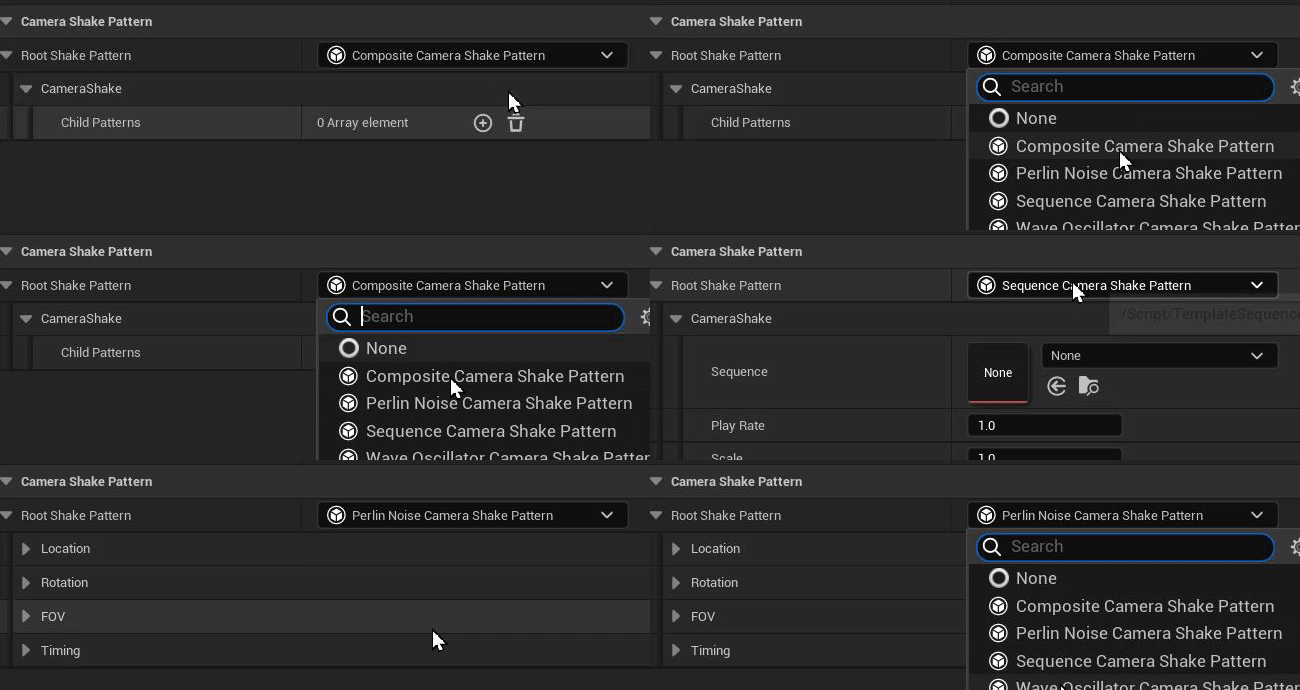 grave hatch
You should probalby save the initial render transform as that's what you're changing to move it.
But, yes, that logic seems more sound.
grave hatch
grave hatch
You should probalby save the initial render transform as that's what you're chan...
Here.
 toxic badger
Ok, because the problem still persists, because I'm just subtracting a static value 😦
grave hatch
You shouldn't be.
toxic badger
besides that I'm getting flickering now
grave hatch
Did you do the fix I just suggested?
toxic badger
StartMousePosition + FVector2d(StartWidgetPosition) is a static value that wont change
pallid gyro
BTW Daekesh, if I may seek your wisdom myself for a bit, as I was playing around with the sequencer I tried to bind to the OnKeyAdded/Deleted/Moved delegates of FMovieSceneInteger channel and it just didn't work, after snooping around for a bit I realized that this was because on the construction of the TMovieSceneData<> type for all the primitive movie channels "this" wasn't passed as the 'OwningChannel' parameter, after modifying the engine code and adding it I confirmed that the delegates now work, am I missing something or is this an obvious bug (or more likely, the delegate was added and no one ever fixed the older MovieSceneChannels as this functionality was added for the MovieSceneRigSpaceChannel class)? I made a pull request, I just kinda wonder if I was missing something silly.
grave hatch
toxic badger
`StartMousePosition + FVector2d(StartWidgetPosition)` is a static value that won...
Then you could probably save this as a single value, yes, but it's easier to read if you don't.
toxic badger
grave hatch
It changes based on where you started dragging from...
Yea I totaly under stand that, but how does this change the fact that moving the mouse 100 Units to the right moves the widget only 60px to the right
there is some factor that is altering that
its not the offset htat is wrong
toxic badger
toxic badger
Take a look at that video
pallid gyro
I also tried binding to the ISequencer's various change delegates in 5.4.4 and I'm not sure they're working either, I'm trying to make a 'read only' data channel that can still be moved but the relative key positions are always absolute relative to the section (it's midi notes yada etc)
grave hatch
pallid gyro
BTW Daekesh, if I may seek your wisdom myself for a bit, as I was playing around...
It does sound like an oversight.
toxic badger
toxic badger
Take a look at that video
Especiall at the mouse cursor, how it is on the widget in the top left corner but moves of it in the bottom right.
But maybe the ConstraintCanvas is altering it?
grave hatch
toxic badger
But maybe the ConstraintCanvas is altering it?
Is the widget itself scaled? Because the value you need is local to the canvas not the widget being dragged.
pallid gyro
BTW everything in the mouse-move/up/down events and the paint event is also available in blueprints, the syntax can be a bit different for exposing slots and the such but figuring out the whole local space geometry math in blueprints is good and fast, it's what I did when I was just starting with slate
easier when iterating takes 2 seconds instead of 60
grave hatch
I live coded to victory 😛
toxic badger
Maybe the AutoSize does something? I'm just doing auto size here, because otherwise the last added widget will span the full screen width and will block drag events on widgets below
 grave hatch
AutoSize won't change scale.
It will just set the size of the slot to the desired size of the widget.
toxic badger
the i don't think so
grave hatch
this is... not what you should do.

MoveableObject->MoveableWidgetRef->MoveableContainer = MoveableContainer;
pallid gyro
grave hatch
I live coded to victory 😛
I started having more faith in live coding recently
grave hatch
It's great when not used with uobjects.
toxic badger
I wanted to try to pass the canvas to the widget, so I can set the offset insead until i realized that i needed a reference to the slot instead of the canvas and realized i have no clue how i can pass a referenc of the slot to the widget so i can set the offset
grave hatch
Second you start involving blueprints or whatever, don't even bother.
The AddSlot() will let you do .Expose(SlotPtr)
(you define slotptr earlier)
It's a raw pointer, though, so be careful.
What I generally do is define the slot ptr on my class and make sure to set it to nullptr.
Then check, every time it's used, if it's null.
And make sure to unset it if the owning widget is ever destroyed.
toxic badger
by class you mean the widget right?
toxic badger
yea in my case it is the widget
grave hatch
Technically you can get the slot from the child widget, if you get the attached parent widget, get teh children, and iterate the slots for the correct one.
But that's a hassle.
pallid gyro
I don't wish to complicate things but for a simple hud-like widget it's pretty easy to set up a dragging canvas without even using any SPanel class or messing around with slots, you just need to override the paint event
toxic badger
grave hatch
But that's a hassle.
Yea I think i dont want that 😅
pallid gyro
A widget that broadcasts the mouse delta when it is moved, yada yada
I did that for my pianoroll when I wanted a 'floating transport'.
toxic badger
Yea I don't know, it already took me so long to having a bad working example.
pallid gyro
can start with a widget that lets you drag around boxes which are defined with a vector instead, etc.
toxic badger
I'm also right now thinking of having the canvas manage the mouse move maybe this will help with the weird mouse scaling
grave hatch
Horizontal box is pretty much the easiest widget to do it with. If you want multiple widgets that are draggable, use an overlay with multiple horizontal or vertical boxes.
toxic badger
But I think I give up for today
grave hatch
grave hatch
Horizontal box is pretty much the easiest widget to do it with. If you want mult...
Easiest and more efficient than canvases.
toxic badger
But arent horizontal and vertical boxes just to stack them horziontally/vertically?
grave hatch
Yes.
But you just set the padding of the top/left to position the inner widget of the slot. 1 slot per box.
It's super simple.
toxic badger
But won't that be an issue, if you ahve the mouse event on the widget with the horizontal box, that it will block mouse events for the widgets below
Oh or do you mean that the boxes should be outside of the drag widget and manage by a parent?
pallid gyro
you want to block it, but anyway it is completly up to you, that's what those FReplys and their various options do
toxic badger
check
Yea big thanks to you guys, I probably have to change this, but it still bugs me a lot, to now know why there is a difference between the widget position and the mouse movement what factor that is.
But maybe I switch to vertical and horziontal boxes and then it gets solved
pallid gyro
Don't develop too much attachment for your early attempts
toxic badger
Yea but you know if I would do that in js, I mean there are quriks don't get me wrong but jus simply moving a div around would just work.
pallid gyro
My repo looks like this with all the failed attempts at things, one day I'll clean it up and make it a real product I'm sure
 toxic badger
But I guess I'm just overseeing a detail
pallid gyro
Slate also just works, it just works very well, I don't know, really, I never used JS, it'd probably confuse the shit out of me.
remember that the editor is fully slate
and also remember that the fact that the editor is fully slate means that you can use the Widget Reflector tool to look at a thing and see how the code works
toxic badger
yea it has to work, and there might be just somehow some kind of scaling issue which is just a obvious thing for a game engine if you know it ^^
pallid gyro
The way widgets behave inside hierarchies is one of the more frustrating aspects of slate, I think there are just too many options and each of the SPanel container widgets may have its own subtle implementation details and when you nest them together it might not work great
grave hatch
toxic badger
But won't that be an issue, if you ahve the mouse event on the widget with the h...
No it won't.
pallid gyro
But it's all perfectly managable, using the simple predictable containers and building with them, the various canvases are really not that neccesary in slate, idk
toxic badger
I was just drawn to the canvas, because of the autosize for children and because In UMG this is the thing everbody is using 😅
pallid gyro
I had a very similar journey with my pianoroll, at first it was a canvas containing sbuttons
toxic badger
- in the tutorials ^^
pallid gyro
now it's just an SCompoundWidget with a paint event
toxic badger
But when using a horziontal and vertical box, will the widget inside them, fit to it's contents size like with autosize in the canvas?
grave hatch
SBox has autosize and you can set padding dynamically.
toxic badger
Wow ok that appears to be the choice then 🙂
pallid gyro
BTW all my terrible widget code is here, if you want an implementation of a pannable/zoomable panel without using any of the panel classes etc - https://github.com/Amir-BK/unDAW/tree/main/Source/BKMusicWidgets
SBox is often the MVP
The one class that does what you tell it to do and nothing else.
toxic badger
Yea thats awesome
grave hatch
I made a cool slot manipulator class.
toxic badger
Btw is there any page, where I can just look up the widgets?
https://dev.epicgames.com/documentation/en-us/unreal-engine/API/Runtime/SlateCore/Widgets/SWidget?application_version=5.1 or just this?
Epic Games Developer
Abstract base class for Slate widgets.
pallid gyro
Ah you mean unreal documentation.
toxic badger
Yea because it feels like just guessing, looking at that page i see a SBox and a SBoxPanel and I'm not even sure do i need a panel to go with the box or not
pallid gyro
I don't think there's anything comprehensive, searching the source code for implementations of SPanel would give you all the panel implementations, etc.
grave hatch
Best is to just ask.
We can suggest good ones.
And eventually you just remember them.
pallid gyro
And of course all (or almost all) the panels and widgets you see in the UMG designer are all available as slate versions
grave hatch
But the Slate/SlateCore /Widgets folder is a great place to look.
toxic badger
grave hatch
We can suggest good ones.
thats nice 🙂
toxic badger
pallid gyro
And of course all (or almost all) the panels and widgets you see in the UMG desi...
Yea thats what i also tried to follow a little bit to get some directions
toxic badger
grave hatch
But the Slate/SlateCore /Widgets folder is a great place to look.
Yea I also looked at them a little bit, but it's also a bit overwhelming at the beginning
Feels a litle bit like looking at lyra for the first time ^^
grave hatch
They have different names in c++ sometimes, though.
"Canvas" in umg is the constraint canvas, for instance.
Size Box is just SBox
toxic badger
Yea that constraint canvas i had to figure out ^^
pallid gyro
Slate is like the anti Lyra, a real battle tested system that does all it says it does and does it well, Lyra is… other things
toxic badger
I've one thing, which I wondered, regarding performance, if I do have the mouse event, this will be called for every widget in the tree regarding what right?
toxic badger
pallid gyro
Slate is like the anti Lyra, a real battle tested system that does all it says i...
Yea also true ^^
pallid gyro
OnMouseMoved will be called only for widgets under the cursor, and I think only for the topmost one unless it returns FReply::Unhandled() but I am not sure
toxic badger
Because lets say I create a widgeht with SBox, and then i Stack 10 on top of each other all 10 will receive the mouse move event for example
returns FReply::Unhandled() this would just be the function all then i guess right?
pallid gyro
all the mouse event functions have an FReply return type
toxic badger
And if i disable the cursor none will be called right?
pallid gyro
this dictates behavior and is important for dragging and panning and the such, like a pan event can take the cursor off the widget or off screen, that's what the mouse capture reply is for for instance
toxic badger
I'm just wondering because if you have 10 widgets and in each of them for each mouse move there is an if to check if it is dragged or not you have 10 x if for every mouse move
pallid gyro
it's easy to test
toxic badger
Yea true probably got to do that then.
But I guess that there is something, otherwise most of the UI would be a performance issue at some point ^^
pallid gyro
The mouse events are probably way cheaper than the actual paint events, and widgets can also tick, but either way yeah of course it can be managed, it IS managed, it's the same in UMG widgets really, the topmost widget gets the mouse event, you can reply with handled or unhandled, unhandled will pass it to the widget below
like, overlays are used ALL the time, sometimes you want them to do things and in other times you don't
that SAssetDrop target for instance
toxic badger
Yea thats true
btw because you mention it, what would be the appropriate widgets, for dragging and dropping?
Probably have got to implement it myself right?
becuase DropTarget is a editor widget
toxic badger
 pallid gyro
It's actually funny but unreal is like opinionated about some game UI practices and tries to disourage them by not having accessible widgets for them, like right click context menus
It doesn't look like the SDropTarget itself really uses too much editor only functionality, it can probably be largely copy pasted and converted to a runtime widget in your module, but I'd also start with just trying to study it cause it looks like most of the functionality comes from SlateCore "Input/DragAndDrop.h"
Infact when you look at it the OnDragOver/OnDrop etc come from SWidget
meaning you can override these events in any widget
well tbh unreal does have a UMG implementation of drag and drop so maybe I'm just babbling senslessly, fuck do I know. I'm a big noob as well.
toxic badger
pallid gyro
It doesn't look like the SDropTarget itself really uses too much editor only fun...
Yea I was just taking a quick peek at it yesterday and I tought the same copy it strip the things I don't need and adapt it a little bit
pallid gyro
Either way looks like overriding those methods is a decent starting point
figuring out how to create and use an FDragAndDropEvent will be the key here
toxic badger
For me the whole thing started, because I already hat the drag and drop for the widget perfectly working in UMG
It took me about an hour following a tutorial super easy
pallid gyro
(search the engine for FDragDropEvent, find someplace where the context makes sense to you)
toxic badger
then I thought, i want to be able to tie id to c++ stuff or at least have a way to be able to reuse it.
Then I found that using UMG with c++ is limited binding things super easy, but having the drag and drop functionality implemented in C++ was tricky.
pallid gyro
Once you figure it out it won't appear so tricky any more 🙂
toxic badger
Then I realized if you want to create a C++ Widget you probably have to use Slate for that
and ye a ... ^^
toxic badger
pallid gyro
Once you figure it out it won't appear so tricky any more 🙂
I hope so and one of the big things I'm hoping, that this is also an investment, because understanding slate better, will give me more tools to work with, and hopefully it results in a cleaner solution
pallid gyro
and really dragging and dropping inside your own widget is actually also possible to simply achieve with widgets that report their mouse up/down/move events and cursor deltas via a delegate and a parent that binds to these delegates
in c++ there's freedom
FDragAndDrop is largely for passing data between unrelated widgets
toxic badger
Yea for me it's just I want to have a ability bar, where I can drag the abilities around. But I'm using GAS for the abilities, so if I do it in UMG I feel like this would get messy pretty quick
where as having a umg widget that just references a ability, and maybe even has access to the ability component and stuff like that would be so much smoother
Also if you have cooldowns for abilities or are they active or not and stuff like that, feels like it's easy to implement in c++ but blueprint that could get messy.
pallid gyro
idk, it can be not terrible in BP either if you design correctly, but personally yeah i'd probably prefer to have some singular base widget that does 'most of the setting up'
toxic badger
Yea, because I feel like down the road sooner or later you get to blueprints anyway
grave hatch
pallid gyro
It's actually funny but unreal is like opinionated about some game UI practices ...
It's really pretty easy to add right click menus, tbh.
REspond to right click, create a menu wiget and FSlateApplication::Get().PushMenu()
pallid gyro
Not my most thought out comment! but tbh i do have context menu phobia and I need to make a bunch and I always procrastinate on it. I need to figure it out, thanks for the pointer.
Is there some way to make the keys read only from the section class (or section editor... or ISequencerSection editor class)? even with my PR that fixes the delegates it's super messy when moving the keys, I'm very close to giving up and just being content with the user being able to rebuild them but idk if there's another path I'm missing, I can't find any 'read only' option or something similar on the integer channel, I'm thinking about making my own data channel implementation which could cool but I'm also not 100% sure I'll be able to prevent the user from directly manipulating the keys through there 😦
Always more rabbit holes to dive into.
toxic badger
pallid gyro
Is there some way to make the keys read only from the section class (or section ...
looks and sounds complicated but also cool 😅
pallid gyro
It's not really a slate related question I'm just sneakily trying to get some insight from Daekesh 🙂
toxic badger
😅😅
toxic badger
FYI the SBox works fine, had to be some scaling issue or whatever with the Canvas
toxic badger
Is it possible, that events only propagate upwards or downards, meaning if there are two elements overlapping each other, then only the top one will receiv the mouse event?
toxic badger
Because I have added two sbox to the viewport But even if I reply unhandlich just the one on the top receives the mouse event.
Is this expected and would only parents/child receive the event or is there smth wrong?
grave hatch
toxic badger
Because I have added two sbox to the viewport But even if I reply unhandlich jus...
Which mouse event?
Clicks definitely bubble. I think mouse move is just a void return and I'm not sure if it triggers on everything.
toxic badger
The mouse down event it's only triggered for the most top sbox
😦
I added them all tp the vieüort als Triest Petting all of them in a overlay
Even though I return unhandlich the sbox in the back never receives the event
grave hatch
Are both sboxes under the cursor?
toxic badger
Ok finally figured it out, appears to be, was that the widget itself received mouse hit as assumed 🙂
Thank you guys very much! 🙂
grave hatch
Great!
 outer zinc
[UE] Assertion failed: IsInGameThread() || IsInSlateThread() || IsInAsyncLoadingThread() [File:Runtime/Slate/Public/Framework/Application/SlateApplication.h] [Line: 257]
I am accessing it in a UBlueprintAsyncActionBase. Is there some way to tell the async action "run on game thread" ?
 wind temple
outer zinc
```
[UE] Assertion failed: IsInGameThread() || IsInSlateThread() || IsInAsyncLoa...
wind temple
outer zinc
```
[UE] Assertion failed: IsInGameThread() || IsInSlateThread() || IsInAsyncLoa...
Use the task system? https://dev.epicgames.com/documentation/en-us/unreal-engine/tasks-systems-in-unreal-engine
Epic Games Developer
An Overview of the Tasks System in Unreal Engine.
outer zinc
wind temple
Use the task system? https://dev.epicgames.com/documentation/en-us/unreal-engine...
ahhhh. ok. thats exactly what i needed to hear to trigger my memory i appreciate you. Using
    AsyncTask(ENamedThreads::GameThread, [&]()
    {
        if (IsInGameThread())
        {
            // my stuff
        }
    });
You are saying because the task is deployed using the named game thread it shouldnt be needed? That may be true but it causes a crash in prod if it isnt on game thread so id rather be safe i guess haha
outer zinc
grave hatch
Also [&] is bad!
This is a blanket statement that is simply not true in many circumstances. & and this are synonymous, and as i am calling a multicast delegate bound to the class i need to capture the class anway.
grave hatch
outer zinc
You are saying because the task is deployed using the named game thread it shoul...
Capturing everything in scope by reference
and passing it across threads is a terrible idea.
And fair enough. I guess there could be a bug where it goes to thr wrong thread. But you shouldn't silently fail such a monumental error.
grave hatch
outer zinc
This is a blanket statement that is simply not true in many circumstances. `&` a...
& and this are not synonymous as & also captures all local variables in scope and function parameters.
Specifically capturing things like smart pointers that you were unaware you were capturing can lead to very hard to track down bugs. Just as an example.
Now if it was a local lambda function, I'd agree, & might be fine, but this is not.
It's very bad practice.
Even if there's nothing in scope in that function, you shouldn't get into the habit of doing it.
And if you just want to capture this, just use this.
pallid gyro
Is there any way to make SSplitter just increase in size when one of the elements is resized? Maybe if I wrap it in an SBox and add the delta to the box's height override?
pallid gyro
Is it better to have a persistent widget that needs to check for nullptrs or disposable widgets that use references (or guranteed valid pointers, to that purpose)? I suppose it matters on how heavy their instantiation is but basically i'm starting to notice my widgets being sluggish and I'm validating pointers all over the place and I'm wondering if it's a bad practice.
grave hatch
Epic's suggestion is to destroy and replace regularly.
fluid jewel
Is there a way to set the default # of rows on SMultiLineEditableText?
AI keeps giving me a made up MinDesiredHeight property
grave hatch
INVTEXT("\n\n\n\n\n") for 5 rows?
Or put it in an SBox with it's valign set to fill and give it a minimum height.
fluid jewel
I'll try an SBox
def don't want to out in blank new lines otherwise I'll have to santiize them, and add them the correct number back when the user is typing no?
grave hatch
Yeah.
It was more of a sarcastic reply 😛
The SBox idea definitely works. Done it many times.
grave hatch
Np!
 terse shard
How does one modify a brush retrieved like that FAppStyle::Get().GetBrush("FocusRectangle");? Where's a brush like that stored?
grave hatch
It's stored in a style set that deletes it when the style set is destroyed.
Do you want to modify the existing brush? Or create a new one from it?
 mint comet
ugh why is Construct's FArguments const reference? Is there a safer way to get mutable arguents to a widget than just using const_cast?
faint oriole
Why would my ComboBox show up like this?

As visible, there are options available.
.OnGenerateWidget_Lambda is bound
 faint oriole
Fixed it by adding .Content() attribute, but I see in the source many other comboboxes don't use this. What's the rundown on .OnGenerateWidget, .OnSelectionChanged and .Content?
I assume .Content is what goes in the main body of the combo box and .OnGenerateWidget is what goes in the dropdown options, and OnSelectionChanged is obvious I guess
grave hatch
mint comet
ugh why is `Construct`'s `FArguments` const reference? Is there a safer way to g...
If you absolutely require the argument, you can add it to the Construct function and then use it in your SNew/SAssignNew
E.g. void Construct(..., int32 Moo); -> SNew(SMyWidget, 5)
grave hatch
faint oriole
Why would my ComboBox show up like this?
Did you provide the [] content widget?
Yeah.
faint oriole
Yep that did it lol
grave hatch
Content is what goes in the main display before opening. GenerateWidget is what goes in the dropdown.
faint oriole
Right now in Content i'm just SAssignNew()'ing a textblock and updating the text upon selection change. is that normal to do?
grave hatch
mint comet
ugh why is `Construct`'s `FArguments` const reference? Is there a safer way to g...
What exactly are you trying to pass? You can still copy things by value out of the arguments struct.
grave hatch
faint oriole
Right now in Content i'm just SAssignNew()'ing a textblock and updating the text...
I thought the generate widget thing also updated the main display when selection changed, but I may be mistaken.
Just do whatever works honestly.
faint oriole
Maybe it does, i'll comment out my updating of the text and see if that works on my next build
faint oriole
oh, by the way, it didnt work when i commented that out
 rain heron
I'm slightly confused as to where some odd lag/delay is coming from.
I have a drag'n'drop operation for panning some view.
When the operations OnDragged function gets called, I update the Offset used by the widget i created.
But it appears as if the paint "lags" more than one frame behind.
and I dont know why.
I've tried the widget as its own window, and added to the viewport.
The viewport one appears to have some more lag than the window one, but it too still has a bit of lag.
What could be sources of such lag? What should I try to get rid of it?
faint oriole
Anyone know where to look regarding generating thumbnails for a custom asset type
 solar plaza
hey @faint oriole, this is not enough for you right ? https://www.youtube.com/watch?v=raiaGRBD_c4

A short tutorial demonstration on how to modify the thumbnail that is generated for all 3D assets within Unreal Engine 5.
Website - https://matthewlake.net/
Twitter - https://twitter.com/MattLakeTA
LinkedIn - https://www.linkedin.com/in/MattLakeTA
#UnrealEngine5 #Unreal
faint oriole
No, I'd specifically like to know how to generate thumbnails for a custom, user created asset type
pallid gyro
what do you mean by generate? just 'use' a custom thumbnail brush/widget or generate it a thumbnail procedurally from the asset?
faint oriole
Generate procedurally
pallid gyro
And you know how to override the thumbnail widget with a custom asset type class thingie right?
I think generating thumbnails is even possible in BP and there's an editor utility widget that does it in the cropout sample, once you have an image with an asset path it'd just be about using the image in the custom thumbnail class, you can have a full widget going on in the thumbnail
I'd look for the Static Mesh asset types customization class and try to follow the tree up from there, see what actually populates the brush for the thumbnail, this functionality exists in multiple engine assets that have custom procedural thumbnails like level sequencers and materials.
grave hatch
You can use the asset manager to set a custom thumbnail for an asset, I think.
We do it in MD somewhere.
If you want to render a custom thumbnail, it's a bit of an involved process. I just did this (had to make a new material-based thumbnail renderer).
grave hatch
What I had to do to achieve that:
- Add LoadThumbnailInfo overload to my asset definition (this adds the correct class to work with the editable thumbnails)
- Create a new thumbnail scene based on the static mesh thumbnail scene. (Check *ThumbnailScene classes)
- Create a new thumbnail renderer based on the static mesh thumbnail renderer (Check *ThumbnailRenderer classes)
- Register the renderer with the thumbnail manager (UThumbnailManager::Get().RegisterCustomRenderer (don't forget unregister))
It will use the saved thumbnail image until the asset is loaded/opened, then it will switch to the thumbnail renderer.
pallid gyro
uhm... is any of the FSlateDrawElements statics convenient to paint a small circle shape or is this a job for a MakeBox with a circle brush?
grave hatch
Hmm. Only if it has a dot or circle item, I guess.
pallid gyro
You're right! I should paint a diamond shape instead.
rain heron
How do you properly scale child widgets of a cusomt Panel?
Just passing the scale to the child widget layout in the Arrange Children function seems to not be enough.
Well, input bounds and painting is mostly correct, but Cursor and Text Selection of Editable Text Boxes are not scaling.
Ah... setting bHasRelativeLayoutScale to true in the constructor and implementing GetRelativeLayoutScale seems to have fixed it
pallid gyro
Is anyone perhaps familiar with a simple way to surround a slate draw element with an outline? In this case I'm drawing a gradient to make a rounded box and want to give it a dark outline -
 pallid gyro
I guess make lines works but it's a bit ugly and slows things down significantly, maybe drawing the whole thing with a brush would work better, I need to stop being a brush noob -
 grave hatch
A 9-split brush would be the way to go, I think?
pallid gyro
I'm familiar with the concept of 9 slices from other engines, is there a way to configure a brush with this behavior in unreal?
I'm a total brush noob (and in general I'm just trial and erroring these paint functions, had a miserable time getting makebox do what I want it to)
pallid gyro
Gotcha

But I'm still not really getting it, like, I need a brush that has a border for this to actually give me a visible outline, right?
grave hatch
You would make a brush with 9 pixels (if you want a simple color like you have there)
The 8 outer pixels would be your border. The middle pixel would be the centre colour.
Then set your margin to 1 pixel on either side I suppose.
Though I don't see where to set the margin in that method...
Maybe it's already in the brush?
pallid gyro
I think this looks promising.

I'll try to figure it out from here, thank you once again Daekesh
Should also put on my to do list "start using style classes instead of loading brushes from soft paths like a lazy person"
 vale stump
I have a UObject inherited class that is registered to the settings panel through the ISettingsModule. the UObject class has its Uproperties that are given functionality through meta=() modifiers.
i want to add to it an SWidget button and maybe some other things, however i cant figure out how to make them work together.
does anyone know how to do this?

