#slate
1 messages · Page 6 of 1
 hearty lantern
hearty lantern
hearty lantern
 grave hatch
Both line 19 and 27 are empty.... so what did you change?
Though I'm pretty sure it's because you're trying to assign an SWeakWidget TSharedRef to an SInitializationCompoundWidget TSharedPtr.
 grave hatch

This is the problem.
You can't assign a copy of SWeakWidget to whatever tyoe WidgetMap is.
I'm assuing some sort of TMap<enum,TSharedPtr>
hearty lantern
yes
grave hatch
The type of the TSharedPtr in the map is wrong.
hearty lantern
TMap<EUIType, TSharedPtr<SCompoundWidget>>
grave hatch
And is SWeakWidget an SCompoundWidget?
hearty lantern
Got it Will keep it to SWidget
What is the difference between SCompoundWidget and SWeakWidget
grave hatch
No idea. Never heard of SWeakWidget.
hearty lantern
https://www.youtube.com/watch?v=jeK6DPB5weA
I followed this tutorial for this here he as used SWeakWidget

Try my C++ Survival Game Course:
http://bit.ly/unrealsurvival
Discord:
https://discord.gg/meFRZfm
Today we're going to be using the Slate Framework to do pure C++ UI in Unreal. This gives you more features, and better performance.
Business Email: contact@reubs.io
grave hatch
The difference is ownership.

Implements a widget that holds a weak pointer to one child widget.
Explains what it does and where you might use it.
hearty lantern
Thanks a lot for the help
grave hatch
np
 balmy vector
UE5,1,1
Hi,
I have a C++ editor utility widget and inside I have a simple Combo Box strings that shows the name of static class, the widget allows us to set properties in data asset.
My designers would like to have a slate dropdown, similar to the native dropdown menus in Unreal instead of that combo box,
I would like to know if it’s even possible to create it in a editor utility widget in the first place as I’ve only found documentation on slate to add options to the Unreal’s Menu .
Thank you very much
grave hatch
What do you mean by "slate dropdown" ?
A combo box is a text field that has a dropdown...
Pictures would probably help.
balmy vector
I mean the native unreal engine menus,like for instance the Window menu with all its sub menus
grave hatch
Look into UToolMenus
And opening those with an SComboButton
Or just an SButton really.
balmy vector
Ok thank you but can they be added to an editor utility widget ?
grave hatch
Shrug I don't do UMG
 pulsar remnant
balmy vector
Ok thank you but can they be added to an editor utility widget ?
pulsar remnant
balmy vector
Ok thank you but can they be added to an editor utility widget ?
Do you wanna have an editor menu in your widget as is?
balmy vector
pulsar remnant
Do you wanna have an editor menu in your widget as is?
Yes, a dropdown menu in the same style as the native unreal menu which are slate if I understood correclty and I want it in an editor utility widget, do you think it's possible ?
balmy vector
grave hatch
If UToolMenu(s) are exposed to BP, sure.
My editor widget is written in C++ so that’s not an issue, it’s just that I can’t add for instance a SCompoundWidget object to my UEditorUtilityWidget directly, just like I would do with a UButton or whatever
grave hatch
Wrap it in UWidget subclass then
balmy vector
grave hatch
Wrap it in UWidget subclass then
Ok I’ll try that thanks.
pulsar remnant
balmy vector
Ok I’ll try that thanks.
Take a look at these:
https://youtu.be/1n3oIfI7nBM?si=WhWhaKt6wVOk16rV
https://github.com/benui-dev/UE-SlateExample
That's what I used to figure stuff out
balmy vector
pulsar remnant
Take a look at these:
https://youtu.be/1n3oIfI7nBM?si=WhWhaKt6wVOk16rV
https://g...
Thanks
 grim radish
Im binding some basic slate to Nim, but the macros are a bit hard to follow. In the example here:
SNew(SOverlay)
  +SOverlay::Slot()
    [
      SNew(SVerticalBox)
What's the shape of the + operator? In what type is defined over? Seems to be FOverlaySlot::FSlotArguments but not sure
thanks!
there should be something that Im missing though, tried it before on the gen code but this seems to work (IDE doesnt complain)
SNew(SOverlay).operator+(SOverlay::Slot())
But not this:
typedef TSharedRef<SOverlay> TY__oBkgQEQ7XqJnm7fWed9bnKg;
...
TY__oBkgQEQ7XqJnm7fWed9bnKg overlay = SNew(SOverlay);
(void)(overlay.operator+(SOverlay::Slot()));
says + is not a member of TSharedRef<SOverlay,ESPMode::ThreadSafe>
crap
grave hatch
That's generally not how slate works anyway, you don't have a ; after the SNew, you build it up inline.
Or you use like overlay->AddSlot()
grave hatch
grave hatch
That's generally not how slate works anyway, you don't have a `;` after the SNew...
Using chain methods
grim radish
Dunno much about Slate, I wanted to keep the semantics, I dont have that amount of control over how the C++ is generated. But I guess, I should do the later, to use chain methods, and just build a DSL on top
grave hatch
Slate is... a mess of operator overloads.
SNew(SButton)
  .Style(...)
  .BackgroundColor(...)
  .Content()
  [
    SNew(SomeOtherThing)
];``` and even with this the .Content() part is optional and not using it will simply add to the default slot, rather than specifically to teh content slot.[ ... ] represents child content that is added to a slot in the parent widget.
Or you can do cpp TSharedRef<SButton> Button = SNew(SButton); Button->SetContent(SNew(SomeOtherThing).stuff.otherstuff); Button->SetButtonStyle(...);
There are a lot of things which are not available post-construct, though.
And can only be used inline, as in the first example.
And there's also like cpp TSharedRef<SButton> Button; SAssignNew(Button, SButton) .Style(...) [ ... ];
(Imagine the defintion and declaration are in 2 different places.)
You can also specify additional mandatory parameters for the SNew/SAssignNew by adding extra parameters to the slate widget's Construct function. E.g. ```cpp
void Construct(const FArgs& Args, float RandomValue, const FString& Moo);
// Requires
SNew(SWidget, 5.f, FString("Some Text"));```
And then there's a difference in slate argument, attribute, event and slot parameters.
grim radish
Okay, thanks. Yes, that I manage to bind all of that over Nim. It was the + operator that got my struggling. Will attempt now the [] as this seems o compile:
auto t = SNew(SOverlay);
    t->AddSlot()[
        SNew(SButton)
    ];
Yup, that's generally how that works.
I'm not sure if there's a multi-child widget that requires inline child definitions.
grim radish
I will see when it breaks I guess 😛
That's a good idea
Got this working
      let overlay = sNew[SOverlay]()
      overlay.addSlot()[
        sNew[SOverlay]()
      ]
So close enough, I guess I could also just override + in Nim so it calls addSlot
Anyways, my intention is not bind all Slate now. Just wanted a few things so I can use it for editor stuff. Most UIs I do in BPs anyways with TakeWidget. But in the future I would like to bind most of it at least and keeping the semantics as much as I can
 gloomy hearth
Anyone know how to show this kind of text inside a text box नमस्कार क्या हालचाल हैं
 limber stump
gloomy hearth
Anyone know how to show this kind of text inside a text box ```नमस्कार क्या हालच...
limber stump
gloomy hearth
Anyone know how to show this kind of text inside a text box ```नमस्कार क्या हालच...
you need to use a font that supports those characters
gloomy hearth
limber stump
you need to use a font that supports those characters
I am using Devnagari, but its not working not sure what is wrong, when i paste the above text inside a text box , everything changes to Question mark
pulsar remnant
Question mark means either you didn't set any font or your font doesn't support these characters
limber stump
Devanagari is the name of the . . . "alphabet" (abjad). you still need a font that supports Devanagari
abugida
whatever that one is
https://devanagarifonts.net/ download one of these
Free download of hundreds of Devanagari fonts like Hindi(Indian),Nepali, Marathi, Sanskrit fonts. Archive of the best Devanagari fonts. Remember us for Hindi fonts free download.
gloomy hearth
yes you are right
Can i make one font which will have english font as default, then other languages as sub level
?
gloomy hearth
limber stump
https://devanagarifonts.net/ download one of these
is it possible ?
 gloomy hearth
So in theory i can have one font, with lots of sub-Font Family, i just need to provide the character range correctly ?
limber stump
it does that automatically. if the glyph exists in the default it uses that, otherwise it tries the fallback
gloomy hearth
only fallback ? what about sub-Font Family ?
limber stump
oh yeah, you can also use subfonts to override character ranges
 gloomy hearth
yeah, it is working, But i was trying different hindi fonts, and that did not work, not sure why
I think font is suppose to support Unicode, only then it works
gloomy hearth
limber stump
oh yeah, you can also use subfonts to override character ranges
I see there are these Google fonts, Noto-fonts which supports multiple languages, but i am not sure how to use it or import it for unreal.
Do you have experience with those ?
grave hatch
Import it into the content browser like nay other asset.
balmy vector
pulsar remnant
Take a look at these:
https://youtu.be/1n3oIfI7nBM?si=WhWhaKt6wVOk16rV
https://g...
Hi again, so I’ve checked all that and digged even more, it seems that what I’m looking for is the FMenuBuilder class, I tried to wrap its construction in a UWidget but nothing appear whereas my previous test with SCompound was working…Would you have any doc or example on FMenuBuilder ?
 spring monolith
Are there any good slate tutorials?
grave hatch
See the pinned messages.
Other than that, not really 😛
I should really write some examples.
spring monolith
Benui is very good, but he doesn't start from the beginning 🤣
pulsar remnant
balmy vector
Hi again, so I’ve checked all that and digged even more, it seems that what I’m ...
Well, I don't think editor stuff meant for UMG at all, if you don't think there is a chance for it to work this way, you basically have 2 options:
1-) Completely get rid of UMG and don't use editor utility widget, just use a blank window and fill it with editor stuff
2-) Try to re-create your desired editor widget inside slate OnPaint() and wrap it with UMG
grave hatch
Wait, what? Why would you use OnPaint for #2?
 mossy nymph
So i am trying to figure out the slate programming that epic uses on their editor for Actor Placement window. I want to do something similar but restricted to my custom asssets. Problem is I am a Junior Unreal engine Developer and New to C++. so i am trying to figuire out the slate Core , SWidget headers component but i could not understand most of it and how they implimented.
If there is a possible way for anyone here that can help me pinpoint the Headers and the implimentations i can do the rest. I get lost in the complexity of the codes and could not figure out how to navigate properly.
Please if you already have ideas like "Actor Placement " window in unreal engine editor has. just give me those Headers and implimentation, Just give me a small heads up like this header shows the widget area and this implimentation workks in that area and you can find them in this folder of the engine. That would help me a lot.
Currently i am wondering around LViewport.h(or something( sorry i am not on PC so i am writing in my mobile)) and Got it SWidget.h , SCompound ,PlacementWdiget etc headers and implimentations. and getting lost as i do not understand most of it at all.
So any kind souls can guide me ?
I already have Browsed Slate Compound in Github(Did not fully read the file yet) if it has what i need then which section should i focus on ?
i already have looked into AssetBrowser brom Github community.
Looking for some guidence Here.
Please be Kind i am a bit of a sensitive guy, i can take a punch or 2 but remember i am still a Junior and reletively New . Just want some help.
 mild oracle
mossy nymph
So i am trying to figure out the slate programming that epic uses on their edito...
mild oracle
mossy nymph
So i am trying to figure out the slate programming that epic uses on their edito...
Jumping straight into Slate as an Unreal and C++ newcomer will be very hard
grave hatch
It's not really something that should have been dumped on a junior programmer heh
mossy nymph
grave hatch
Do you know about the widget reflector?
yes i know that. But it only shows how it looks like in slate and the herarchy. I need the functionalities too so Reflector is not giving me the necessary code examples.
grave hatch
What u mean is, you can use it to look at the placement tab and find out how it's out together. Same goes for any widget you see.
pulsar remnant
What does [IR] means?
 grave hatch
I'm going to do a massive guess and invalidation something? Request?
pulsar remnant
So I'm having an issue about sometimes my widget isn't getting rendered at all (using OnPaint())
At worse invalidation box can cause it to not update, right? So it has nothing to do with it?
pulsar remnant
pulsar remnant
So I'm having an issue about sometimes my widget isn't getting rendered at all ...
Actually "It's sometimes disappearing" describes problem better
 neat basin
I am Getting a crash when my slate is opening.
The Crash:
Assertion failed: IsValid() [File:D:\build\++UE5\Sync\Engine\Source\Runtime\Core\Public\Templates\SharedPointer.h] [Line: 1109]

UnrealEditor_Slate!SDockTab::HandleIsCloseButtonVisible() [D:\build\++UE5\Sync\Engine\Source\Runtime\Slate\Private\Widgets\Docking\SDockTab.cpp:939]
My Code:
InTabManager->RegisterTabSpawner(PreviewPanelId, FOnSpawnTab::CreateLambda([=](const FSpawnTabArgs& Args)
    {
        const TSharedRef<SDockTab> DockTab = SNew(SDockTab);

        TSharedRef<SThemePreview> Frontend = SNew(SThemePreview, *EditingObject, Args.GetOwnerWindow(), DockTab);
        DockTab->SetContent(Frontend);

        return DockTab;
    }))
Anyone know what I'm doing wrong here?
grave hatch
I'm assuming your EditingObject isn't valid
Find the error actually in your code.
(the error output)
neat basin
grave hatch
(the error output)
it is valid. The error in the error output is:
appError called: Assertion failed: IsValid() [File:D:\build++UE5\Sync\Engine\Source\Runtime\Core\Public\Templates\SharedPointer.h] [Line: 1109]
neat basin
Yea from the callstack looks like the culptrit lies in SDockTab line 939 which is:
EVisibility SDockTab::HandleIsCloseButtonVisible() const
{
    return bCanEverClose && ((IsHovered() || IsForeground()) && MyTabManager.Pin()->IsTabCloseable(SharedThis(this))) ? EVisibility::Visible : EVisibility::Hidden;
}
Which means this isn't valid?
Or the tab manager isn't.
Sounds like you've goy a dangling pointer to your sdocktab
You should also capture things explicitly, not using just & or =
It may be due to bad capturing
Have you stepped through the spawn tab lambda to make sure everything is valid?
 wind sapphire
If you had a leaderboard using a VerticalBox, and needed to implement an animated re-sort after each round, like seen here, how would you approach it? I'm the engineer. Experienced but still kinda new to Unreal.
 neat basin
grave hatch
Have you stepped through the spawn tab lambda to make sure everything is valid?
neat basin
grave hatch
Have you stepped through the spawn tab lambda to make sure everything is valid?
the cuplrit was tab manager. But for some reason. I am not able to see anything on the tab. Even simple text block. I'm missing something easy?
It ended up being the tab manager. I use the same = capture with a different tab and it works correctly. Now I'm facing a different issue. For some reason, my tab is just blank.
Tab code:
InTabManager->RegisterTabSpawner(PreviewPanelId, FOnSpawnTab::CreateLambda([=](const FSpawnTabArgs& Args)
    {
        auto ColorPreview = SNew(SColorPreview, *EditingObject);
        return SNew(SDockTab)
        [
            ColorPreview
        ];

    }))
    .SetDisplayName(INVTEXT("Preview"))
    .SetGroup(WorkspaceMenuCategory.ToSharedRef());
SColorPreview:
void SColorPreview::Construct(const FArguments& InArgs, const UOakTheme& InTheme)
{
    Theme = &InTheme;
    if(!Theme)
    {
        UE_LOG(OakUI, Error, TEXT("[SColorPreview] [Construct] Could not get theme"))
        return;
    }

    ChildSlot
    [
        SNew(STextBlock)
        .Text(FText::FromString("In Development..."))
    ];
}
The [=] and [&] captures aren't necessarily a problem for you right now, but they are a problem. It's a coding style issue.
Are you sure that SNew(SDockTab)[ ... ] actually sets the content? Have you tried using .Content() [...]
Also you should use INVTEXT("...") for not translated strings
Also on the tab, you should use the widget reflector to see if it the text is there, but is unsized somehow.
Zero actual width or height is a common issue.
neat basin
it was 0 actual size 🙃 thanks for the help!
 proper hawk
wind sapphire
If you had a leaderboard using a VerticalBox, and needed to implement an animate...
proper hawk
wind sapphire
If you had a leaderboard using a VerticalBox, and needed to implement an animate...
There's a lot going on there, and basically I think you would have to roll your own solution for the whole thing, be it in cpp or blueprints. You can make new children/extend/override classes like VerticalBox to do your bidding if that seems useful
wind sapphire
proper hawk
There's a lot going on there, and basically I think you would have to roll your ...
Nice. I did exactly that today! I extended VerticalBox and animated them via Render Transforms to the new positions, then at the end shifted the actual widget children in the array and reset the translations.
proper hawk
wind sapphire
Nice. I did exactly that today! I extended VerticalBox and animated them via Ren...
solved : )
didn't even take long, you must be pretty sharp already on this area : )
wind sapphire
Hah. Well I've been programming games for almost 40 years, but just started working on an Unreal project for the first time like 6 months ago. My animating vertical box is working which is pretty cool, though I had to add my own Tick function to the UCustomVerticalBox that doesn't overload anything, and call that from the parent BP script Tick. Seems like I should be able to get a tick to a widget from base code.
proper hawk
wind sapphire
Hah. Well I've been programming games for almost 40 years, but just started work...
nice nice. I am 20 years in dev, 2nd year of unreal going but haven't touched Slate much yet, just starting to look around all the channels and get a feel for what are interesting areas and assisting in any areas that I have stumbled over myself in last years
grave hatch
wind sapphire
Hah. Well I've been programming games for almost 40 years, but just started work...
You can make that a little better by extending FTickableGameObject
Glad to have more competent people in #slate ! 😄
If UHT complains you can do cpp #if CPP , public FTickableGameObject #endif (it used to if you extended more than 1 class... not sure these days)
wind sapphire
awesome, I'll try that!
 golden elm
Hello 👋
I'm trying to make a custom UButton and SButton class but they're crashing when I call SetFocus on the UButton and I don't know why 🤷
Can someone help me?
I can send the U and SButton files if that helps 👍
 grave hatch
Stack overflow means there's some infinite recursion going 9n.
You have some method calling itself or a chain of methods that repeat. Check your call stack. You may need to scroll down. When it gets low on memory, it's not always accurate.
I would copy+paste the original SButton and UButton classes and satrt from there.
 iron kayak
I need a Tick to attach an FCurveSequence in Slate outside of SWidget
what are my options? maybe get it from some subsystem?
or maybe I'm looking at it wrong?
all I want to do is this:
    ThrobberAnimation = FCurveSequence(0.0f, 1.0f);
    ThrobberAnimation.Play(/* an FTickerDelegate& InDelegate here */, true, 0.f);
Extend from FTickableGameObject
That will allow you to tick any object, UObject or otherwise.
iron kayak
grave hatch
Extend from FTickableGameObject
I got it to compile, but not sure it works correctly.
FTickerDelegate::CreateSP requires a signature bool FuncName(float), which is not typical of a Tick function.
Not sure what it's supposed to be. I just made a FakeTick function that always returns true.
Even though I now have a real Tick due to FTickableGameObject inheritance.
grave hatch
Oh erm
I may have misread what you said.
Or maybe not?
I think teh bool for the ticketdelegate returns true if it's meant to continue ticking, but false if it doesn't.
iron kayak
not sure myself, but it crashes the editor
iron kayak
nvm, got it working, thanks @grave hatch
grave hatch
Np!
 cloud belfry
Hi All.
I need to create a emotional assistant game with transparent window use Unreal that only showing 3d object, but hid the window, so user can continue see the desktop when they use the game.
I know Unity has such function, but not able to find in Unreal.
I tried added WITH_ENGINE to the file: \Engine\Source\Runtime\ApplicationCore\Public\GenericPlatform\GenericWindowDefinition.h
As:
#define ALPHA_BLENDED_WINDOWS IS_PROGRAM || WITH_EDITOR||WITH_ENGINE
But it is not work.
(I also know that use Stream publish the unreal app can achieve this transparent window, but I don't want to use Stream.
What I need like:
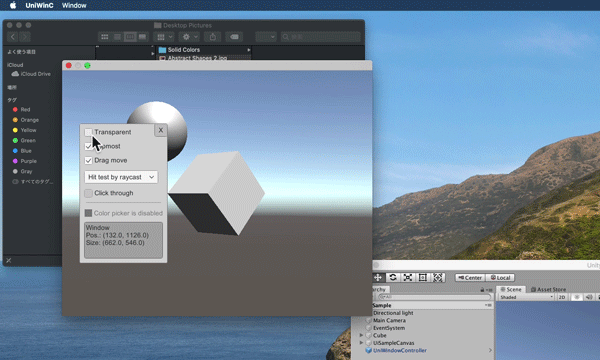
GitHub
Makes your Unity window transparent and allows files dropping - GitHub - kirurobo/UniWindowController: Makes your Unity window transparent and allows files dropping
I guess using Slate c++ programming can acomplish this function, but I don't find any inforamtion.
The game I try to create is a 3d emotional assistant:
When a people not happy, and a 3d assistant coming out (can be a 3d dog or 3d human), and smile , and speak some thing encourage the user, while she or he can still doing other work use computer.
Can somebody give some suggestion?
grave hatch
ambershee (since left the server apparently?) was looking into something similar.
Maybe you can glean some information from their posts here.
cloud belfry
What I tried is that if use QT, if I put the unreal scene to QT window, the window can be transparent by Qt transparent window setting.
But when Qt intergrated with unreal, some unreal event become void and not work.
So only the mesh can be showing, some other stuff beome stop work.
(I also conside to use Qt- unreal , but there I cannot find enough tutorial can reslove me blocker. Some people told me that using Slate is much eariser than Qt or other UI. Of couse I will use any UI which can embeded with Unreal app)
 kind bronze
I’m trying to make a widget that includes a scolorpicker but also lets the user select a texture. However when I put a Scolorpicker in a window I notice that the sliders do not disappear when a new value is selected. This results in multiple old slider positions being visible when only one is real. I assume that using the OpenColorPicker function fixes this, but I am looking to put the picker in the same widget as the texture selector. Is this a known issue, or am I making a mistake in creating the SColorPicker. I am initializing it with no parameters.
Ok, never mind, for some reason I appear to be adding an new picker to the window about 10 times a second.
kind bronze
I think the issue may still be in the color picker code but it is hard to tell.
grave hatch
Maybe try putting a breakpoint in teh construct function and see why it's being instantiated...
kind bronze
It isn’t being instantiated as best I can tell with break points. Calling the open color picker doesn’t have this problem. Only making a new SColorPicker in slate construction. This is likely due to the amount of other stuff the opencolorpicker function does in addition to making the color picker.
kind bronze
Ok, the widget is definitely only initialized once.
grave hatch
So how do you know you're adding a new picker 10 times a second?
kind bronze
When I watch the picker I see at first the text is clear, but after roughly 100 milliseconds I see it starts to get fuzzy. When I change the advance mode that causes a redraw, which clears out the multiple draws on top of each other.
So actually it might be because something is not properly clearing out the state and or setting the state to dirty.
Look, I’m not a blue printer who has to read slim documentation or enter a new utility to view the source code. I’m out here looking at the source code and I am still baffled. Snew(SColorPicker) is used in other places also so it isn’t like there is no support. But for some reason the draws are overlapping.
 plush sandal
In 5.3, I'm trying to add a button to the editor toolbar. I use the "Editor Standalone Template" to create a basic plugin, which is suppose to add a button. However, the button doesn't appear.
It also adds a menu entry at the bottom of the Window Menu and that works fine. It appears and opens the window.
Anyone know why the button is not appearing? I set a breakpoint at the code in RegisterMenus, but I don't see anything wrong stepping through the code.
grave hatch
plush sandal
In 5.3, I'm trying to add a button to the editor toolbar. I use the "Editor Sta...
UToolMenus* ToolMenus = UToolMenus::Get();
UToolMenu* LevelEditorToolBar = ToolMenus->ExtendMenu("LevelEditor.LevelEditorToolBar.User");
FToolMenuSection& Section = LevelEditorToolBar->FindOrAddSection("SomeSection");
Section.AddEntry(...);``` Something like this?Null check at your leisure.
 quaint oyster
Hello! I'd like to create multiple instances of a single widget with different data, but to do so I need to recreate it from the ground up (or putting that construction code in the Construct method of a whole new class). Is it possible to directly duplicate the widget and assigning it to a new pointer?
plush sandal
grave hatch
```cpp
UToolMenus* ToolMenus = UToolMenus::Get();
UToolMenu* LevelEditorToolBar ...
This is what the Plugin temple generates
UToolMenu* ToolbarMenu = UToolMenus::Get()->ExtendMenu( "LevelEditor.LevelEditorToolBar"); { FToolMenuSection& Section = ToolbarMenu->FindOrAddSection("Settings"); { FToolMenuEntry& Entry = Section.AddEntry (FToolMenuEntry::InitToolBarButton( FBlueprintViewerCommands::Get().OpenPluginWindow)); Entry.SetCommandList(PluginCommands); } }
 oak dust
How can I rotate SImage in Slate?
grave hatch
I believe you can use its render transform setting.
You may need to investigate the correct constructor for FSlateRenderTransform, though.
It's not as useful as FTranform!
    template<typename VType = float>
    explicit TTransform2(const TQuat2<T>& Rot, const UE::Math::TVector2<VType>& Translation = UE::Math::TVector2<VType>(0.f, 0.f))
        : M(Rot), Trans((Vector2Type)Translation)
    {
}``` it's that one.Yup, found it, thanks
grave hatch
Slate troubles will be a thing of the past soon
 round spear
I need some assistance with disabling all mouse clicks within my c++ preprocessors? Is this the place to get some advice? (I am experiencing a touch input double click)
grave hatch
Maybe so!
Just create a preprocessor and consume all inputs within certain times?
(in similar positions)
round spear
okay what is the process of that creation and where do i need to put it? in the .cpp?
I haven't really been able to find input preprocessor documentation, very new to C++
round spear
yes
grave hatch
A source directory, module, build.cs etc.
Good.
Just create a class anywhere in your source folder. Source/YourProject/Private/MyInputProcessor.h/cpp will do
Then in your module's startup method register the input processor with the FSlateApplication::Get() object.
round spear
okay i have created the .h file
grave hatch
Is your module.cpp file just IMPLEMENT_PRIMARY_GAME_MODULE(...) without an actual class in it?
round spear
#include "DEI_3Di.h"
#include "Modules/ModuleManager.h"
IMPLEMENT_PRIMARY_GAME_MODULE( FDefaultGameModuleImpl, DEI_3Di, "DEI_3Di" );
that is the .cpp
grave hatch
Okay so you need to change that
round spear
okay!
grave hatch
1 moment
round spear
awesome!!!
grave hatch
#include "DEI_3Di.h"
#include "Modules/ModuleInterface.h"
#include "Modules/ModuleManager.h"

class FDEI3DIModule : public IModuleInterface
{
public:
    virtual void StartupModule() override
    {
        // Register your input preprocessor here
    }

    virtual void ShutdownModule() override
    {
        // Unregister it here
    }
};

IMPLEMENT_PRIMARY_GAME_MODULE( FDEI3DIModule, DEI_3Di, "DEI_3Di" );
See if using that will compile
You don't need to change your header.
grave hatch
That hasn't actually done anything yet, it's just given you a space to register your preprocessor.
grave hatch
Sort of. You need to create your preprocessor class in another file, include the header in your module there and then instantiate it and register it with the slate application.
In the indicated positions.
round spear
woah, okay
so adding the preprocessor.h file behind an #include in the header of the .cpp
grave hatch
Something like that.
round spear
sorry, i am very new to C++
grave hatch
http://www.learncpp.com is a very good resource (and free)
round spear
Thanks!
 mild cradle
Anyone know if in slate I can create single property views for each index of an internal array?
I'm having an issue because I can't really use GET_MEMBER_NAME_CHECKED(Class, Property) because that would return the name of the array property, while I'd like to have a single view per-index
Also I don't really want to use a details view for the array, this is my first introduction to slate and I'd like to see if there's a way around this rather than defaulting to what I would do in UMG
 grave hatch
The details panel / property editor module is an arcane pit of despair.
I don't think you can create a standard "details panel" view for an array element - the array customiser does this internally (and probably in private) if you want to check out what it does.
Try using the widget debugging tool to get a look at it.
(widget reflector)
Other than that, you can just create your own slate widgets to edit the property.
mild cradle
@grave hatch Thank you for the response! Do you have any links to docs/blogs/videos that explains creating my own slate widget to edit the property? That definitely sounds like something I'd like to look into
grave hatch
Erm, not really? The pinned messages here are a good start.
What sort of property is it?
An array of ...
mild cradle
grave hatch
An array of ...
An array of pointers to actors in the world! Whether that's weak/soft/TObject, doesn't really matter too much, this is for an editor mode display
mild cradle
grave hatch
Erm, not really? The pinned messages here are a good start.
And I'll check those out, thank you!
grave hatch
The Scene Outliner module has a CreateActorPicker function which might be useful.
Check the engine source to see how it's used.
mild cradle
grave hatch
The Scene Outliner module has a CreateActorPicker function which might be useful...
Ooo interesting yeah, this is really cool. I could probably use this and filter out only the actors I need, thank you very much for pointing me here, this give me some ideas
But also just for context, what I was envisioning originally was a scrollbox of SinglePropertyViews with actor refs, that had bools next to them for whether or not they're selected by the mode
- With the actor picker I'm not quite sure if I'll be able to hit all of those points, but I'm definitely going to try it out
 grave hatch
You can build your own list like that certainly
Just use a SVerticalBox or something 😛
mild cradle
Yeah definitely! I think the main thing was having the single property view per-actor because the UI is easy to work with and familiar for designers, but the SinglePropertyView per-actor for an array of objects is what was giving me trouble
So I might keep exploring alternatives, but it is really cool to reuse the level outliner like this
 rotund prism
In my module I have this code ``` StyleSet = MakeShareable(new FSlateStyleSet("GameEditorStyle"));
StyleSet->SetContentRoot(FPaths::EngineContentDir() / TEXT("Editor/Slate"));
StyleSet->SetCoreContentRoot(FPaths::EngineContentDir() / TEXT("Slate"));
const auto brush = new FSlateImageBrush(
    StyleSet->RootToContentDir(TEXT("/Icons/T_Icon_WaitForGlobalMail"), TEXT(".png"))
    , FVector2D(64.0f, 64.0f)
    );

StyleSet->Set("FuncIcon.WaitForGlobalMail", brush);
FSlateStyleRegistry::RegisterSlateStyle(*StyleSet.Get());``` to create an icon for a custom node I made. However when I go into editor the node has a white box instead. Inside my custom node i have overidden this function. ```FSlateIcon UK2_WaitForGlobalMail::GetIconAndTint(FLinearColor& OutColor) const
{
static const FSlateIcon Icon = FSlateIcon("GameEditorStyle", "FuncIcon.WaitForGlobalMail");
return Icon;
}``` What am I doing wrong?
Also where exactly to I put the icons folder? Do I put it in like Content/Editor/Slate/Icons or do I place it in Content/Icons?
 grave hatch
I would put a breakpoint in the GetIconAndTint method and step though it. See what the slate icon constructor is doing.
If anything..
grave hatch
Just a random note, MakeShared<Type>(...); is the preferred way of making shared pointers these days!
 muted condor
How do I implement Tabbing between editable texts in a SListView?
 tribal fractal
anyone know if there is an way to check if SWidget is currently being rendered? I have an editor widget for my custom asset using FAssetEditorToolkit and I need to check if this editor can tick depends on the tab user is "viewing". (eg. you can open 15 tabs of the editor and I want only one, currently visible to tick)
grave hatch
I don't think that's the way to approach it.
There's probably an "on tab activate" or some event.
tribal fractal
I searched whole source and wasn't able to find any good event to create my behavior
grave hatch
Bind to FOnTabActivatedCallback on SDockTab
That might do what you want.
I'm not sure if that's when it's tabbed to or opened, though.
tribal fractal
not working when I'm just changing the tabs.

It's working only when I'm launching my asset from content browser
That's why I'm searching for actual rendered SWidget because I can not find anything that will get proper event
grave hatch
If you have 2 tabs open and both visible, it will render both tabs.
You could try overriding OnPaint to set a "last painted" time and disable ticking if it's beyond a certain time.
Like if it's ticked for 1s longer than the last paint, at the end of tick it disables the tick.
Something like that.
 ripe lava
How do I access a widgets "Render Transform" in an SWidget?
I see the "GetRenderTransform()" function, but I cant figure out how it works (not as simple as .Scale or .Angle like in UWidget).
ripe lava
It gets concatenated into an FSlateWidgetTransform, then that is applied to the SWidget.
    {
        return ::Concatenate(
            FScale2D(Scale),
            FShear2D::FromShearAngles(Shear),
            FQuat2D(FMath::DegreesToRadians(Angle)),
            FVector2D(Translation));
    }```
Is there a way to revert it to access the values?It's based on a TTransform2
It's all kinds of shitty.
😛
Check out the methods on that.
The FWidgetTransform that you're taking that method from is a UMG-only thing.
Nothing to do with slate.
ripe lava
Yea... I'm trying my best to make sense of it lul.
Related question, Is there a way to prevent a widget using render transforms from clipping outside of its parent?
I imagine I could just use the render transform (once i figure out how to access it) to adjust it to fit? but I'm not sure what the best way to do that would be.
grave hatch
SScissorRect I think it's called
Use that as a parent widget.
    ChildSlot
    [
        SNew(SScissorRectBox)
        [
            SAssignNew(PropertyGrid, SGridPanel)
            .FillColumn(1, 1.f)
        ]
];``` something like thisCan anyone with familiarity with SColorBlock explain the reasoning behind binding a function/lambda to the .Color() or .Color_Lamda() function on widget construction?
I'm trying to adjust the widget's color based on certain other actions / clicked fields and I have a feeling this is the clue to what I need, but it also seems to me like these bound functions will only run once when the widget is constructed
- I could store some global variables that modify the return value of that function and then rebuild the widget I guess, but that seems almost as useful as just determining the color in the rebuild function itself
 grave hatch
The whole point of having it dynamic is taht you don't need to rebuild the widget.
If you simply cause the GetLightColorValue return value to change, the colour of the block will change.
You can base that return value on whatever you like.
Global variables are usually not the answer.
mild cradle
grave hatch
If you simply cause the GetLightColorValue return value to change, the colour of...
This helps clear up one part of the confusion I was having, which is that from what I could gather from using chatgpt and also looking at other engine examples it seemed like this function would only ever be run once on construct, however based on what you're saying it seems like this fires onpaint or something equivalent, which is good to know
But also while I understand that global variables are bad practice and should be avoided, I also don't really understand how a function would return a different value without some parameter being changed / global variable being modified
- Even if I add a payload to this delegate, won't that only be cached by value when it's bound on construct?
I think I may be misunderstanding or missing something simple about this so please let me know if so
- If I could forcibly call this function to make the color change, that would be more akin to what I'm looking for, but also I don't think that's how that will work
grave hatch
The value will be polled each time it's painted.
The general thing will be a TAttribute, which can either be a set value or a delegate that returns a value.
(Hence SLATE_ATTRIBUTE)
If it's SLATE_ARGUMENT then it's a 1-time construct-only thing.
Some of these things may or may not also have functions to set them directly on the widget
Like you can probably do ->SetText(...) on an STextBlock after creating ti or whatever
That depends on the property and the widget in question, though.
You can absolutely change a parameter, but it just shouldn't be a global variable.
You can create your own widget class, put a variable on the class and use that.
Consider the class ```cpp
class SColorWidget : publuc SCompoundWidget
{
void Construct(const FArguments& Args)
{
ChildSlot
[
SNew(SColorBlock)
.Color(this, &SColorWidget::GetColor);
];
}
void SetBool(bool Value) { Bool = Value; }
protected:
bool Bool;
FLinearColor GetColor() { return Bool ? FLinearColo::Red : FLinearColor::Blue; }
}```
YOu'd use .Color(this, &SColorWidget::GetColor) on your color block
And then mutate the Bool variable using SetBool
And the color block would change colour.
mild cradle
Ah okay that makes sense. So a member variable is still kind of necessary to do this, but this at least limits the scope to a class that's based around just displaying this color
Thank you so much for going into detail with that, I think that rounds out the questions that I had
grave hatch
It's not entirely necessarily, you could, for instance, do:
FLinearColor GetColor() { return IsHovered() ? FLinearColor::Red : FLinearColor::Blue; }
mild cradle
Ah that's interesting, yeah that makes sense
Hm I can probably do something similar, so it's essentially querying something about the editor state / using data stored in its parent classes, thank you for that as well 😄
ripe lava
grave hatch
SScissorRect I think it's called
Does it cut the clipping parts off or force it to fit? I'm looking for the latter. The description and the code I looked at seems like it does the former.
ripe lava
I was hoping you wouldnt say that
grave hatch
Override the arrange children method maybe.
ripe lava
I ended up just storing the render transform, removing it, then re-adding it after I'm done doing what I need to do.
Definitely wont work for all cases, but it worked for mine.
 mint comet
So I've implemented the ability for slate to render text using bitmap (offline) fonts by using a custom ISlateTextRun implementation, but am still trying to figure out the best way to integrate this. I'm able to use it with a RichTextBlock through a custom decorator but getting it to work with just a regular TextBlock isn't so simple. The STextBlock creates it's SlateTextRun via an ISlateTextMarshaller and it directly creates a FPlainTextLayoutMarshaller to handle this itself. Due to the TextLayoutCache on the STextBlock being private rather than protected, I cannot override this in a subclass. So my question is if there's a simpler way that I'm not seeing to make a TextBlock use my custom text marshaller or if I have to continue with my current path of just largely duplicating the entire STextBlock/UTextBlock classes to use my custom marshaller instead?
Similarly the underlying STextBlock used by UTextBlock is private as well so I couldn't really make it use my SBitmapTextBlock either even it did inherit from STextBlock
 slow drift
How can I add Paperflipbook to slate?
I get unresolved symbol even tho I already add Flipbook.h 😦
 grave hatch
mint comet
So I've implemented the ability for slate to render text using bitmap (offline) ...
grave hatch
mint comet
So I've implemented the ability for slate to render text using bitmap (offline) ...
Probably a case of a lot of copy+paste.
Also can't Slate already use offline fonts?
grave hatch
slow drift
How can I add Paperflipbook to slate?
I get unresolved symbol even tho I alread...
Did you include the module in your build.cs?
slow drift
grave hatch
Did you include the module in your build.cs?
I did paper2d
But I guess there's no such thing as spaperflipbook?
grave hatch
No idea.
One would assume that you found that class in teh paper2d plugin somewhere and are attempting to use it.
If you just invented it or got it off chatgpt, that's your issue, really.
Also just ignore intellisense errors. They are often wrong. Only work with compile errors. And don't use the errors list.
slow drift
grave hatch
If you just invented it or got it off chatgpt, that's your issue, really.
Chatgpt bs 😄
I got most of the code from ActionRpg
can add Image and throbber but I am having issue with adding paperflipbook
grave hatch
SPaperFlipbook doesn't exist.
I'd suggest looking at the public headers in teh paper2d plugin for some sort of useful widget.
slow drift
I'm trying to change the image piece from the throbber Im displaying in slate
This doesn't seem to do anything? The throbber runs but the image displayed is default instead using the Loaded texture file

 grave hatch
Okay, first, don't use FName there.
use TCHAR*
Then you don't have to convert it to an FString and then to TCHAR*
Also don't screenshot your code because now I can't just copy+paste it and correct it.
slow drift
My bad
grave hatch
Copy+paste it into Discord and put ``` before and after it.
slow drift
`static const FName LoadingScreenBackground(TEXT("/Game/Level/Main_Menu/Texture/Config/Character_Creation_Example"));
static const FName ImageThrobberPath(TEXT("/Game/Icons/Face/T_F_Face_Icon_4"));
    LoadingScreenBrush = MakeShareable(new FAGLoadingScreenBrush(LoadingScreenBackground, FVector2D(2560, 1440)));
    FSlateBrush *BGBrush = new FSlateBrush();
    BGBrush->TintColor = FLinearColor(1.f, 1.f, 1.f, 0.0f);
    FSlateBrush *ThrobberImg = new FSlateBrush();
    ThrobberImg->SetResourceObject((LoadObject<UObject>(NULL, *ImageThrobberPath.ToString())));`
How do people paste code with colors?
grave hatch
```cpp
code
```
static const TCHAR* ImageThrobberPath(TEXT("/Game/Icons/Face/T_F_Face_Icon_4"));
ThrobberImg->SetResourceObject((LoadObject<UObject>(NULL, ImageThrobberPath)));
slow drift
Thanks, will try to compile
grave hatch
But that won't fix your issue if it doesn't update.
Also is there a reason you're creating slate brushes on the heap?!
slow drift
for loading screen 😦
i never wish to venture here but it doesn't seem I have a choice
grave hatch
Does your widget containing the throbber not survive the duration of the loading screen?
SAGLoadingScreen ?
Can you put not a slatebrush variable on that widget and just use that?
slow drift
that's my own thing, I tried to follow Async Loading Screen by epic
grave hatch
class SAGLoadingScreen : public whatever
{
public:
  void Construct(...)
protected:
  FSlateBrush ThrobberImg;
}```
`.PieceImage(&this->ThrobberImg)`Will try that, tyvm
grave hatch
Again, this isn't going to fix the issue, but it will give you somewhere to change the image.
slow drift
My issue is that I couldn't change the throbber img , was there some other thing that you spot?
slow drift
Allrighty, appriciate the time 🙇♂️
grave hatch
Or you're using the wrong argument maybe
It's not.
All it's doing is forwarding that brush on to an SImage internally.
 boreal remnant
Shot in the dark for my sanity
Is there a helper function to generate the "standard" details panel property widget for an array?
I'm being forced by a plugin to write a custom slate widget for a UObject, in which I want to display a UPROPERTY() - like you would see it in the details panel if you selected any other actor
The property is an array and well, I'm going mad trying to figure out how to make the correct widget for it
I tried PropertyEditorModule.CreateSingleProperty for the array, which worked, except for some reason it displayed every struct value inside the array as Multiple values
grave hatch
There probably is
But it might well be buried in the property editor module... and private.
I believe it's a detail customisation.
boreal remnant
Unfortunately mine isn't a detail customisation, but if I can just snatch the code or make it public, that's fine too
grave hatch
Yeah.
Use the widget reflector to find out where the array widgets are created and it'll be there somewhere.
boreal remnant
I don't know if detail customisations weren't a thing back when this plugin was written but ouch
aight
It's a SDetailSingleItemRow hmm
Wait scratch that - the plugin is indeed using CustomizeDetails
Just in a weird roundabout way
Is there a way to just use the IDetailLayoutBuilder& DetailBuilder to add the "default" widget?
mint comet
grave hatch
Also can't Slate _already_ use offline fonts?
No unless I'm doing something wrong or just missing something obvious. FSlateFontInfo has a default customization to filter out offline fonts in the asset picker and if you manage to get a RichTextBlock/TextBlock to use one anyway it just renders placeholder/missing glyphs
Oops didn't mean to ping there, but thanks for the second opinion.
grave hatch
Hmm!
neat basin
boreal remnant
I don't know if detail customisations weren't a thing back when this plugin was ...
Not sure if this helps but this function will return a details panel SWidget:
TSharedRef<SWidget> Test::SpawnDetails()
{
    FPropertyEditorModule& PropertyEditorModule =   FModuleManager::GetModuleChecked<FPropertyEditorModule>( "PropertyEditor" );
    FDetailsViewArgs DetailsViewArgs;

    DetailsView = PropertyEditorModule.CreateDetailView( DetailsViewArgs );

    if(EditingObject)
    {
        DetailsView->SetObject(EditingObject);
    }

    return DetailsView.ToSharedRef();


}
The "EditingObject" is the UObject that the details panel is showing the details for.
 sinful hollow
Hello, how can I create a custom property or custom details for delegate (such as TMulticastScriptDelegate) ? Because they are templates, i can't add them to PropertyModule 🤔
and I think it only works with struct or classes
grave hatch
Yup.
Create a struct and put your delegate in that.
Then you can customise the struct.
sinful hollow
Ok so I can't create an custom editor for "all kind of delegates" but only for delegates I want
grave hatch
Look at a delegate that you can already see in teh details panel (do they even exist?)
Use the widget reflector to see how the widget is created.
If you can find anything useful from teh class name, you may be able to do something.
Good luck!
sinful hollow
grave hatch
Use the widget reflector to see how the widget is created.
oh yes, I can do that !
grave hatch
And now sleep!
sinful hollow

sinful hollow
grave hatch
Look at a delegate that you can already see in teh details panel (do they even e...
because event dispatcher are serialized like this for the moment

it kinda useless, I want to be able to bind functions to the delegate in level details
sinful hollow
Yes, I already know how to retrieve functions of an object
grave hatch
Good luck then! 🙂
sinful hollow

sinful hollow
grave hatch
Use the widget reflector to see how the widget is created.
can i know the call stack for a specific widget draw ?

for exemple, i Know the delegate is drawn with a SConstrainedBox by the SDetailSingleItemRow class
but i doesn't help me
grave hatch
If you click the underlined bit it will tell you where it's instantiated.
You can get a lot of detail like that. Just find the right line...
sinful hollow
Yes, i see the code in the class, but this code can be called by multiple classes
grave hatch
You need to walk up the stack until you get to the bit that's specifically about delegates...
 unborn rune
Hello guys, I would like to learn more about how yo use slate. Do you guys know any good tutorial about it? Thanks in advance...
grave hatch
There's some pinned messages that'll be useful.
The qt to slate guide is pretty good even if you haven't used qt before.
unborn rune
Ah nice, thanks for the tip I haven't seen
 delicate marsh
I remember reading somewhere that there is a... spaceship? starship? demo where unreal puts everything slate can do in a single window kinda thing
but I can't find it
anybody remembers where/what was it?
(it looks nothing like a spaceship, It was just the name)
it was an editor window with just a bunch of UI controls
The Slate Widget Examples (also known as Slate Test Suite if using UE4/ Starship Suite if using UE5)
ok, it should be there 😐

maybe only works on source builds?
plush sandal
delicate marsh
> The Slate Widget Examples (also known as Slate Test Suite if using UE4/ Starsh...
It looks like it is part of something called QAGame. There are references to it in the source, but they all have a perforce directory prefix so I think it is only internal.
grave hatch
It'd be starship. That's what the engine style is called.
plush sandal
grave hatch
It'd be starship. That's what the engine style is called.
There are references to a starship style in the source as well. But I think it is only in QAGame. You can search the source on GitHub if you want to see.
grave hatch
No, it's what the entire engine's style is called.
If you use FAppStyle or FCoreStyle, you get the starship style.
mild cradle
Is there a proper way to handle class inheritance in slate?
I'm noticing that parent class Construct(const FArguments& InArgs) isn't called, I even tried trying to override the parent Construct function but that doesn't seem to be how that works
Also with things like SNew(SChildWidget), it seems to let me set member values of the child widget when constructed but not set the values of the inherited parent class (like SNew(SChildWidget).ChildMemberVariable(Value), but doesn't allow SNew(SChildWidget).ParentMemberVariable (Value))
Is slate inheritance just not really a good idea? Or am I doing something wrong?


 grave hatch
You can call it yourself and supply your own arguments.
Generally you don't usually inherit from other classes, but rather just contain them as children. Sometimes you do, of course.
You can add the parent's fargument class as ab argument to the child class and pass them in that way if you want
There's probably a way to extend the parent class farguments, but idk how.
grave hatch
grave hatch
You can add the parent's fargument class as ab argument to the child class and p...
E.g. SLATE_ARGUMENT(SCompoundWidget::FArguments, ParentArgs)
Then do SCompoundWidget::Construct(Args._ParentArgs) in your Construct.
mild cradle
Ohhh I see, sorry that took me a bit to try to understand lol, let me try that
I wouldn't need to store the ParentArgs as a member variable though, right? Is the SLATE_ARGUMENT macro just for allowing it to be passed in during creation?
grave hatch
Correct
mild cradle
How would I initialize parent args during construction with SNew()? Is there anything to pass in or would I just be leaving it blank? (ignore the errors that's not the real class name)
 grave hatch
SCompoundWidget::FArguments().Thing1(moo).Thing2(foo).etc
Inside your ParentArgs brackets.
mild cradle
ohhhh cool thank you! This is perfect, I'm really trying to share the functionality between a few classes, and even though this is a bit more explicit than I'm used to I don't think it's a big deal
grave hatch
Generally when I do something like this the child class already knows most of the params for the parent class a r can work them out itself.
So actually providing them this way isn't always necessary.
You can always make your own FArguments inside the child Construct method too.
You don't have to supply it with a slate argument.
Or just copy a few arguments from the parent class and forward them on, if you only want to expose a few of them.
mild cradle
Oh yeah definitely, that makes sense
grave hatch
(copy the SLATE_ARGUMENT macro)
mild cradle
For this one the shared parent is a parameter that should be specified between both classes, and is also the only variable on the parent so for this I think what you said originally works best, but I like what you suggested about creating a custom FArguments for only particular values to pass into the parent if I need that, that seems good to know
And it worked great! Thank you for the info 😄
grave hatch
Np
In the end slate is just cpp. You can call the methods and use the objects the same way!
mild cradle
Is there any way to make a SCompoundWidget be restricted to the height of the window?
When I'm adding children to a scrollbox in my widget, the scrollbox is extending below the screen
- Ideally the scrollbox would be restricted from extending below the window, and at that point the scrollbar would be used to see further children
This is the 'root widget' of my main widget, the parent vertbox is where the scrollbox is added (with a border in between)
I do however want the scrollbox to extend to fill up the empty space of the window, which is why I'm using FillHeight(1.f)

 grave hatch
Have you tried putting .AutoHeight() on the vertical box slot?
Though I'm not sure why you're using a vertical box.
mild cradle
Hm yeah that didn't seem to do it unfortunately
And I did the vertbox because that's what I'm used to doing with UMG 😅 but yeah good point, probably don't need that there, I'll try just adding these to the child slot
grave hatch
Are you creating a tab?
mild cradle
This is an editor mode widget if that answers your question, because I'm not 100% sure. It's at least within a tab, but I'm not manually handling it, that's kind of done by the editor mode system
mild cradle
grave hatch
Though I'm not sure why you're using a vertical box.
Also looking at it actually, I think I need a vertical box either way when adding to the child slot, I think that has only one slot to add a widget in (though I don't need to store a ref to it)
grave hatch
You can add your border directly to the child slot.
mild cradle
Sorry, there's other widgets above the border as well, the border I want to fill up the remaining space of the widget
grave hatch
Ah.
Then you might need to add an SBox wrapping it all
And set that to valign(fill)
mild cradle
grave hatch
Then you might need to add an SBox wrapping it all
Just to be sure, when you say 'wrapping it all', do you mean wrapping the border/scrollbox? Or wrapping the parent vert box?
grave hatch
Wrapping the entire vertical box
mild cradle
Hm that didn't seem to do it either, looks like the scrollbox still extends all the way down
I think part of it may be due to the fact that I just found out that the editor-mode-widget (the crossed out one) is actually inside of an SScrollPanel, and from my experience with UMG I don't think those are ever 'bound' to the bottom of the window
Maybe tomorrow I'll look into whether or not that's something that I'm specifying myself or if it's doing it automatically, in the latter case then there's probably not much I can do outside of just hard-coding a height override for an SBox
 grave hatch
Yes. You're probably using the area of the scroll panel above.
It's very hard to fix that.
The editor team hasn't even done it with the details panel.
mild cradle
Lol makes sense
Yeah I'll probably just end up having it take up a portion of the window in that case, thank you for the help though!
grave hatch
You could calculate the height of teh scroll panel manually by checking the render size of the overlay parent 😄
mild cradle
Hmmm that sounds interesting 🤔 maybe I'll look into that lol
 spare bane
im using this color wheel plugin, I have it converting the slider and color wheel into a hex using a node the plugin provides, but I don't know how to convert a hex code that's inputted into the seperate values of the color wheel and the slider independant of each other, anyone have an idea of how I could do it?

 grave hatch
So you want to convert a string/text of hex characters back into a colour?
You should have at least 3 sliders. One for hue, one for luminosity and one for saturation. And then one for alpha, as you seem to have all 4 channels.
Or you do red/green/blue/alpha.
spare bane
the plugin provides a node to get the RGB values, what I need is the "Value" the one that determines the brightness of the color, the value that would be put on the slider
after doing a bit more research I believe it would just end up being whatever the largest RGB value is
gonna try and see if it works
spare bane
so this is kind of hard to explain but the brightness value is by default 1 on this color wheel and only changes if you do it via programming, as far as I know there is no way for a user to change the brighness value, hence using a slider
basically if I take a linear color (like inputting a hex and using hex to linear color node in pic above, or a saved color) that doesn't have the brightness value at 1, it ends up setting the color wheel brightness value lower, so then when I go to edit the color it's already darker because I'm taking the color wheel color and multiplying it by the slider value to get the output color.
what this means is I need to somehow take an RGB value and separate the RGB value as if it has a brightness value of 1 so I can set the color on the color wheel, and also figure out what the separate brightness value would be to set the slider value
spare bane
also for the record the color wheel is is an input device and what selects hue and saturation, I just can't figure out how to take an RGB value with a brightness value below 1 and somehow calculate what the RGB values would be while having a brightness value of 1 so I can set the color wheel color without darkening it
it's a pretty weird issue
 river thunder
this isn't a slate issue tho
there's a convert HSV to Linear Color and backwards nodes
Hue/Saturation are on the wheel, value will be the slider probably
grave hatch
spare bane
after doing a bit more research I believe it would just end up being whatever th...
Yes, that's how luminosity works!
Using the colour wheel and a slider is enough for all 3 aspects, you're right, but you still can't change alpha. You'll need a separate slider for that if you want to include it.
If you want to get the "full bright" colour from a darkened colour
Take the 3 components, r g b, and multiply them by 1/max(r,g,b)
Erm
Yeah, that'll work for linear colours. For FColor, it'd be 255/max.
Then you can use that colour to set the colour wheel I guess.
So FLinearColor(0.1, 0.2, 0.4) x 1/0.4 -> FLinearColor(0.25, 0.5, 1)
However, if your colour wheel plugin isn't doing that math for you, it's a bit shit 😛
spare bane
yeah lol, I will try this out thanks so much for the help
grave hatch
Don't forget to check if max(r,g,b) is zero.
If that's the case, then you'll be diving by 0...
spare bane
gotchya
grave hatch
In that special circumstance, I would just set it to white on the colour wheel.
spare bane
grave hatch
In that special circumstance, I would just set it to white on the colour wheel.
you are genius it worked 🙂
spare bane
grave hatch
I made my own colour picker 😛
hey so it actually turns out I'm dumb 🙂
for some reason it's not copying correctly
it's copying darker im not sure why exactly, I copied 2nd color to 1st color and 1st color became darker

i swear it's just something stupidly obvious I'm missing or programmed poorly but can't seem to find it
idk it maybe is something with the color wheel and how it's programmed... I feel like it shouldn't be having this much of an issue
it's weird that the saturation is higher but the luminosity is lower


as far as I can tell I did everything as you described
grave hatch
shrug
 hushed apex
spare bane
hushed apex
spare bane
What are you using to change your node wires to a circuit board style?
Awesome, thank you!
Worth the 13$?
Sounds like a gem to me. Anything to make the nodes clearer with less tedium. Thanks for the help.
kind bronze
Epic games worships the Flying Spaghetti Monster (Not the atheist parody religion, the person who told them to make blueprint code look like spaghetti)
 woeful sun
Hello,
Is there a way to receive widget input callbacks, but let those callbacks pass to the widget below even if the widget is set to EVisibility::Visible ?
If I set the widget to EVisibility::SelfHitTestInvisible I do not receive the input events anymore. If I set the widget to EVisibility::Visible the events are not forwarded to the widget below even when returning FReply::Unhandled();
void SCogImguiWidget::Construct(const FArguments& InArgs)
{
    [...]
    SetVisibility(EVisibility::Visible);
    [...]
}

FReply SCogImguiWidget::OnMouseButtonDown(const FGeometry& MyGeometry, const FPointerEvent& MouseEvent)
{
    DoSomething();

    // Unhandled does not forward the even to widgets below
    return FReply::Unhandled();
}
Thanks!
grave hatch
Unhandled should bubble it down to the parent.
Should
There might be a widget in between that's consuming the input?
There's a console command to show what is consuming input
Type "slate" in the console and see if autocomplete shows something.
woeful sun
grave hatch
Unhandled should bubble it down to the parent.
Hello Daekesh,
Here is the hierarchy and the debug of the routing of the mouse button down:

My expectation was that the blue routing would happen giving the input to the button (which is under the mouse cursor )
Instead the red routing happens.
grave hatch
It passes it to its parent, not "what's under the mouse cursor"
woeful sun
Yeah, I guess it is not possible to have a widget receiving inputs but not consuming them.
grave hatch
You can use an input preprocessor.
 long holly
Hello, this might be a too general question, how hard is it to reuse editor ui for some other purpose?
Im in the middle of designing system and im wondering does reusing the engine ui hard to use or like take apart
long holly
both
long holly
grave hatch
Or for an editor plugin?
im planning to reuse state tree ui for a combo system since its a hierachal tree
i have the general idea on how i want to build it in my design document
im just wondering, is it hard to take the ui side of it or repurpose the existing sytem to fit my own need
grave hatch
You can re-use the widgets used to make the state tree ui, but not the ui itself.
And any specific widget classes in the state tree module are probalby private/editor only.
 regal anvil
i made this pickup and inventory system which has an interaction widget where if you look at an item it tells you what it is and whether it can be picked up: “[+] Apple” as an example. however, i can’t seem to get the border i used as the background to match the same length of the item name, like if the item name became longer, so would the background. how would i do this?
grave hatch
How did you create the widget?
 jovial summit
hey everyone, I have a derived UGridSlot in C++, I’ve marked it as BlueprintType and Blueprintable, but can’t get it to show in the UMG panel. The documentation says it’s within the UMG module but I have a feeling this is a slate primitive. Can anyone confirm?
grave hatch
Anything starting with U has nothing to do with Slate.
They might contain Slate, but they are not Slate classes.
limber stump
jovial summit
hey everyone, I have a derived UGridSlot in C++, I’ve marked it as BlueprintType...
UGridSlot is a "slot" class, which are never manually added via the UMG panel, so no big surprise yours doesnt show up. UGridSlot is used by UGridPanel, maybe thats what you meant to derive from? Or you would have to also derive from UGridPanel and have it use your custom GridSlot class.
jovial summit
limber stump
UGridSlot is a "slot" class, which are never manually added via the UMG panel, s...
Yea I started to figure that after diving into the source. It seems like they aren’t actually widgets themselves but just sort of an interface class the slotted widget gets cast to in GridPanel contexts?
grave hatch
Something like that, yes.
 wary totem
Is it possible to specify customisation for a type when it is used as a parameter in a Blueprintable function?
e.g. I have a Name parameter, and I'd like it to have suggestions as you type, using an SSuggestionBox or similar Slate widget, when calling that function from Blueprints
grave hatch
Not without a custom node
wary totem
That... sounds like unpleasantly much work (which probably describes most things in Slate to be fair!)
grave hatch
I'm not gonna disagree.
 opaque copper
Hey everyone, is there a way to uniformly increase the font size in a widget? I have an IsVertical boolean as argument and would like to make every text a little bigger in vertical mode
grave hatch
Not really.
You could set up a function which returns 1 of 2 fontinfo and then bind the font to it.
Without binding, you'd have to set it on each widget individually.
opaque copper
Makes sense - I haven't changed anything regarding fonts yet, so everything is just using the default.. still trying to wrap my head around all that
grave hatch
FCoreStyle::GetDefaultFontStyle("Regular", 10);
opaque copper
I can't seem to figure out how to adjust the font size of things like the header row of an SListView or a SSearchBox, or how to otherwise scale them. Does anyone have a pointer for that?
okay SSearchBox has a SetFont method, but SHeaderRow still eludes me
opaque copper
Looks like it always uses the "NormalText" style, and I'm not sure what things I would screw up if I'd try and change that.. if it's even possible?
 grave hatch
Set your own primary content....
opaque copper
wonderful, sometimes the solution can be so easy. Thank you!
I definitely still feel like a monkey with a keyboard when it comes to slate
no offense to monkeys
grave hatch
Look at the code. It clearly says if x is null, do y. And you're trying to edit y instead of making x not null!
opaque copper
yeah I see it now, no idea why I didn't before
 raw hull
anyone know exactly what is called when I click e.g. a checkbox that's created for a details view for a uproperty boolean? I'd like to set a breakpoint there.
grave hatch
You'll want to find FBoolProperty and it should ahve some relevant methods.
raw hull
thanks
 plucky cedar
Hey. If I have a Slate widget A. If I inherit from it another Slate widget B. Would the attributes of the A will be available in B. (I'm checking and it does not seem like it). How do you often deal with inheritance of Slate widgets? And the attributes
Suppose I have a STableCell. And SIntTableCell, SBoolTableCell etc. I want some attributes common to all of them stored in the STableCell. How do you deal with this case. And how do you often deal with similar cases in Slate?
grave hatch
You would copy over the properties, I think. And then do STableCell::Construct(STableCell::FArguments().X(...).Y(...)) from inside SIntTableCell's Construct.
Or
Expose the entire FArguments value with SLATE_ARGUMENT(STableCell::FArguments, CellArguments) on your subclass and then do STableCell::Construct(Args._CellArguments); inside the child Construct.
So you might end up with something like: cpp SNew(SIntTableCell) .CellArguments( STableCell::FArguments() .Thing(A) .OtherThing(1) ) .IntArgument(...) .OtherIntArgument(...)
It's not pretty.
plucky cedar
Wow, the second approach is very interesting. I will try that... That might be the solution. I wouldn't want to copy over properties in the each descendant...
grave hatch
Yeah.
It depends on your requirements.
Sometimes you want to customise a child so you'd expose like 1-2 properties from teh base class and then, inside the child Construct, you provide 90% of the pre-determined values yourself.
You might be able to do something with "Mixins". God I hate that name.
plucky cedar
Thats quite good solution I think. Its sad that there is no FArguments inheritance. I tried dismanlting the macros and declaring FArguments myself derived from the parents FArguments. But I get the error on the this->Me() beeing not able to cast
    struct FArguments : public STableCell::FArguments
    {
        typedef FArguments WidgetArgsType;
        FORCENOINLINE FArguments()
        {

        }

        FText _HeaderText;
        WidgetArgsType& ArgName( FText InArg )
        {
            _HeaderText = InArg;
            return this->Me();
        }
    };
But I have no idea how they work and the name annoys me so much that I am never going to find out.
Yeah, it's better to just not try to circumvent the macros.
plucky cedar
The mixin stuff is to hard for me at that point. I'm still a beginner in Slate and in Unreal in general... 😅
it probably requires a lot of template magic
plucky cedar
I was away from c++ for too much time to remember how it is done... Never had a full grasp of them nevertheless...
Thanks for the idea
grave hatch
Np
 viscid field
Is it possible to create a UMG widget from a slate context?
raw hull
fooling around with a custom TArray uproperty. I want to get something to run whenever I make any modification the array - add/remove an element from the TArray in the editor, but also when I modify any existing element. Is there any way to get that sort of behavior?
I'm using TSharedRef<FDetailArrayBuilder> in my details customization code, but I'm not sure it's suitable - there's no way to setup any delegates here, SetOnRebuildChildren is protected.
Any pointers on how I could go about getting my desired behavior?
There's AsArray that returns a IPropertyHandleArray so I suppose that might be the way to go... but IDetailCategoryBuilder doesn't have any sort of AddPropertyArray method, only AddProperty
raw hull
Hmm seems like IPropertyHandle::SetOnChildPropertyValueChanged can be used for handling changes to the child objects, and FDetailArrayBuilder::OnGenerateArrayElementWidget when new elements are added/deleted.
Not really sure why, but ShaderInfos_PropertyHandle->AsArray()->SetOnNumElementsChanged doesn't really seem to do anything... if anyone knows what its intended use is, please let me know.
 teal fjord
hey everyone, I've been trying to start a Lyra project but I've been stucked with massive slate tick time (7-16 ms) and somehow my async pool thread is flooded with dozens of new threads every frame... what is the proper way to profile slate tick, and why does it happen in editor out of play mode even in a completely empty level ?
grave hatch
In the editor or packaged game?
Because your stats will include the editor... Which is written entirely in slate.
grave hatch
viscid field
Is it possible to create a UMG widget from a slate context?
Sure, but why would you?
viscid field
grave hatch
Sure, but why would you?
I'm working in a Slate codebase but don't have the skills to create complex widgets in it
grave hatch
So develop those skills. 🙂
viscid field
Sure, I'd like to, but I also have deadlines. If I can add a pragma_todo("Fix this later") I'd just like to create something I know how to.
grave hatch
You can create any umg widget given an appropriate context a d just take its underlying slate widget.
You may or may not need to save the umg widget as well.
viscid field
But how do I create the UMG widget? I can't GetWorld in Slate, do I need to pass World as an arg?
grave hatch
You can getworld in slate, but you have to set up the ability for you to do so.
Pass in the right arguments etc.
All depends on the context.
opaque copper
the one time I needed it I got it from GEngine->GetWorld(), is there a better way?
 wild wyvern
Hi.
Working on a in editor plugin. From the toolbar, there's a button, and once clicked it'll create a SWindow which contains a SCompoundWidget I made.
In the SCompoundWidget it gets a png file loaded as UTexture2D, and then make it as a FSlateBrush that can be set in a SImage.
It works as intended on construct of the SCompoundWidget.
However, when I click save/save all within the editor, while the SWindow is shown, the textures disappear, and have to re-open the SWindow to make them appear again.,
Not sure what's going on here.
Any help is greatly appreciated.
Best,
Matias
grave hatch
Are you holding a strong reference to the utexture?
It's probably running the gc and deleting it.
Why are you even using a utexture? You can load them directly as slate brushes. No intermediate step necessary
wild wyvern
grave hatch
Why are you even using a utexture? You can load them directly as slate brushes. ...
I'm holding it as a FSlateBrush. But not sure exactly how to skip the UTexture2D step though?
I think it is gc removing it or something.. But where would be a good place to store the brush, so it doesn't get removed?
grave hatch
Check some style files. They load pngs directly into slate brushes.
Starship.cpp probably has quite a few examples.
IMAGE_BRUSH or some such is the macro they use.
 knotty mason
How do you add padding or spacing between a SSplitter inside of a Vertical box
Here, if there is a better way to have elements aligned on the same row without using a SSpliter please let me know
        SNew(SVerticalBox)
        + SVerticalBox::Slot()
        .AutoHeight()
        .Padding(7.f, 7.f)
        [
            SNew(SSplitter)
            + SSplitter::Slot()
            .SizeRule(SSplitter::SizeToContent)
            .Resizable(false)
            [
                SNew(SButton)
                .TextStyle(&NormalText)
                .Text(FText::FromString("My Special Slider"))
                .HAlign(HAlign_Left)
                .OnClicked(this, &SEditorToolingTab::OnButtonClicked)
            ]

            + SSplitter::Slot()
            .SizeRule(SSplitter::SizeToContent)
            .Resizable(false)
            [
                SNew(SBox)
                //.VAlign(VAlign_Center)
                .WidthOverride(200)
                [
                    SNew(SSlider)
                    .Value(0.f)
                    .SliderBarColor(FLinearColor::Red)
                    .OnValueChanged(FOnFloatValueChanged::CreateLambda([](float value) {
                        UE_LOG(LogTemp, Warning, TEXT("Slider value: %f"), value);
                    }))
                ]
            ]
        ]
 grave hatch
A horizontal box?
knotty mason
Yeah tonight is my first time using slate so I didn't realize I didn't need to call SNew(SHorizontalBox) for every slot so I had assumed it would only take one thing at a time and then I learned a little more and realized the whole + ::Slot() thing and never went back to try it.
This is pretty full on but it does have a concise workflow to it, I don't hate it as much as I thought I would. Thanks
wild wyvern
grave hatch
IMAGE_BRUSH or some such is the macro they use.
That worked! Thanks
grave hatch
Np
knotty mason
What is the most appropriate way to add slate UI to in game stuff, not editor, is it to build an interface kinda like with UMG how it has the UWidget that has a TSharedPtr to its slate counterpart and then just add slate through UMG widgets? Ive also seen that you can add it through the gameviewport class by calling GEngine->GameViewport->AddViewportWidgetContent.
I'm just unsure of the recommended workflow how integrating slate with in game stuff not just editor tooling Nomad tabs. Thanks.
grave hatch
Good question
knotty mason
BUI's server recommends UMG wrapper around slate so I guess thats the general flow for those things
grave hatch
I guess it's the easiest way
 sage forge
Hi guys, how to make SListView scrollable,
Here is my setup, ListFileWidget is a SListView,
        +SVerticalBox::Slot()
        .AutoHeight()
        .Padding(10.0f)
        [
                SNew(SSearchBox)
                    .OnTextCommitted(this, &SPullRequestEditor::OnFilterTextCommitted)
        ]
        +SVerticalBox::Slot()
        .Padding(10.0f)
        .HAlign(HAlign_Fill)
        .VAlign(VAlign_Fill)
        .FillHeight(1.0f)
        [
            ListFileWidget.ToSharedRef()
        ];
Wrap it in an SScrollPanel
or SScrollBox
I always forget which one you're meant to use...
 sudden zealot
Hello, I don't use slate a lot so can you guys tell me how to properly store a reference to an SWidget so I can execute code later on it?
At first I thought it was a TSharedRef but I can't have that s a class member variable it seems
should I just use a regular pointer?
grave hatch
"You can't have it as a class member variable" ?
You can, if you instantiate it in the right place.
Better to show what you're trying to do. A raw pointer is never a good idea. For anything.
sage forge
grave hatch
Wrap it in an SScrollPanel
I tried, it does not work,
 robust dew
How to achieve Input passthrough, where fire button and camera look at the same time?
grave hatch
Not really a slate question?
robust dew
Is there a way to register an input manually the FSlateApplication::OnTouchStarted()? What I'm trying to achieve is after the Button Input is received by the SButton dont make the Input button down end there, make the input button continue so that other widget can receive it. In simple word multiple Widget interaction with a single InputMouseDown.
grave hatch
If you reply FReply::Unhandled() it will continue to bubble down to other widgets.
It would require a custom SButton class (or a subclass)
 distant gate
Im sure its known but in case someone missed it like i did, visual studio with unreal integration thing installed has slate formatting tools;p
 rancid shadow
Heh this is a super long shot but wondering if anyone has ever used ImGUI in the editor. Like in a details customization or a custom editor window. Not "in game". We have a bunch of useful ImGUI huds for debugging and there are a few that don't actually require the game to be running and it would be nice to use them "offline" in their own window in the editor. But so far all the unreal ImGUI plugins I've looked at are tightly coupled with UGameViewport.
grave hatch
You can get FLevelEditorModule to get the level editor and then the viewports and use AddOverlayWidget to add things to the editor viewports.
Or use a details customisation if you want the details panel stuff.
 orchid nova
Is there a list of FSlateIcons of the engine somewhere in some other format than scattered across the source code?
Just looking to add some icons to my custom placement categories and figured I'd just pick one from the engine but the names elude me
grave hatch
orchid nova
Is there a list of FSlateIcons of the engine somewhere in some other format than...

GitHub
Unreal Editor Icon Browser. Contribute to sirjofri/SlateIconBrowser development by creating an account on GitHub.
Also if you search for like pointlight in the engine files, there's directories fill of actor-specific images.
orchid nova
That looks useful but how do you install it? 🤔 I can see a build.bat in there but not sure how that's intended to be used
orchid nova
Ah of course
grave hatch
😛
orchid nova
Yeah was looking for this one at the moment, nothing in StarshipStyles about Character at least but maybe the icon browser will find it
 orchid nova
Ah, yeah found some random ones at least, let's see :)
it's probably some factory thing but I wonder what is it called...
grave hatch
It's generally styles with ClassIcon.Character or wahtever
orchid nova
Yeah that's what I thought but nah
I found a file called Character_16.svg and Character_64.svg which matches that visually, however I don't find any references to it in engine code
...unless it generates the name with string concatenation
lol yep
it is indeed ClassIcon.Character as you suspected
this string just didn't exist anywhere in code, nor references to the icon files... so I guess it must be generating it via string modification somewhere
grave hatch
Or it's using ClassIcon.Pawn
Or it has its own custom icon somewhere.
Where are you even seeing the character icon?
Try searching for character.svg in the engine files
character_16 or character_64 actually
the svg will be cut off because of macros
 open raven
hi. I will start learnins slate and deep dive myself a long time till I really grasp things. Before I really want to learn whether as slate editor tool is it possible to create a new complete world, spawn actors inside the widget (inside slate widget editor nothing runtime)
 low bluff
open raven
hi. I will start learnins slate and deep dive myself a long time till I really g...
low bluff
open raven
hi. I will start learnins slate and deep dive myself a long time till I really g...
Not sure about spawning actors. But in theory you can have an Asset with a custom Editor (check Paper2D for example) and in that you can spawn Components.
grave hatch
You can do anything you can do in c++ from within slate. You can absolutely create a world and spawn actors in it. Then create a scene capture and display that scene capture's render on a slate ui.
Or even a UMG ui.
The world editor ui itself is just a slate widget with a render frame drawn on it.
Or you can go the scene view / viewport client / viewport widget route if you want, of course.
 fossil pulsar
starting to look into slate, is it possible to modify existing editor windows with it? ie in our case we want to limit what designers can do while editing blueprints inheriting from a specific class, ie limit what components they can add & possibly hide the event/function editor
grave hatch
Not really.
fossil pulsar
alright shame, thanks anyway
grave hatch
Np.
 cinder oriole
fossil pulsar
starting to look into slate, is it possible to modify existing editor windows wi...
cinder oriole
fossil pulsar
starting to look into slate, is it possible to modify existing editor windows wi...
You probably can… If you’re starting out , i don’t recommend it.
But if you have to do it, your focus won’t be mostly slate but managing the Blueprint Pre and Post Compilation and Serialization.
It’s not impossible
Limiting the components would be easy,
Hiding the function or event not so much, youll need to dig deep
fossil pulsar
are there resources specifically on the "overriding the editor" aspect then? everything I've seen for slate has been about how to make new widgets, not so much change the behaviours of existing ones
fossil pulsar
cinder oriole
Limiting the components would be easy,
Hiding the function or event not so much,...
possibly if I can get access to the blueprint editor as a whole there's a function there to just close the event graph, whichever one gets called when you just press X on it? that'd be enough for our needs
cinder oriole
fossil pulsar
are there resources specifically on the "overriding the editor" aspect then? eve...
Most good things about unreal are undocumented. The things you see documented are just a tip of the iceberg of what you can do and the control you have over the entire engine. The good shit you have to figure out on your own… it’s nice when you do though
fossil pulsar
if you're talking about reading source I'll try but it's been very hit or miss for me
cinder oriole
fossil pulsar
if you're talking about reading source I'll try but it's been very hit or miss f...
Yeah youll have to read the source.
That’s why the easy answer is No you can’t,
The real answer is yes, but you have to get your hands dirty
You can get access to the Blueprint, then go from there, you might need to write some code to go over it and check what the designer is doing/trying to do, then deny that action
It’s sounds hacky,
but i’ve created entire blueprints and added components to them from code… then saved them. I could go a step further and add bp nodes but that was not worth the time. That’s why you need to consider if the time is best spent here
or just give your designers documentation and instructions
fossil pulsar
will I need a custom engine build for any of this? or is slate & maybe a plugin or something enough to go in and override editor behaviour like that (ignoring having to actually figure out how to do it) ?
cinder oriole
fossil pulsar
will I need a custom engine build for any of this? or is slate & maybe a plugin ...
Whether you need a custom engine build depends on ; if while writing your code, you run into some code that epic has hidden behind private modules. or need to change the private cpp files.
I ran into those but i always found workarounds. but some situations, albeit not a lot will require custom build.
I recommend not to start with a custom build until you know the default build is hiding code you need
fossil pulsar
alright, thank you
grave hatch
To stop tabs being available, you'd need to either create a new editor (blueprint editor) or change the current one so that the tab was conditionally not available. Neither of those are really Slate things.
It's generally not worth it.
Tell you designers what they aren't allowed to do and force code/blueprint review.
And, yeah, you can use compilation/serialization events to check as well.
 stark gazelle
Hey everyone, im trying to use a png ive imported into unreal and have it render on a .Image() but the result is just a white image instead of the logo im using. any idea what im doing wrong?
ive tried (full path just shorted to save readability. tried switching the .png to .uasset, removing the filetype, not inside my unreal folder but using my desktops path. all nada
.Image(new FSlateImageBrush("Content/Images/logo3.png", FVector2D(190, 190), FLinearColor(0.5, 0.5, 1.0, 1)))
Ive also tried making a FName above and assing in that as the filepath instead of directly
 grave hatch
- don't put non-uassets in teh content folder. Create a Resources folder or something.
- check the console log on loading, it will tell you if it fails to load an image
Chances are your path is just wrong
If it's for a game you could try FPaths::GameFolder() / "Resources/Images/logo3.png" or whatever the FPaths method is.
stark gazelle
will doublecheck and get back to you @grave hatch thanks 🙂
stark gazelle
doesnt seem to print out any warnings in the log, got all the verbose options checked. alas, i also tried one of the engines pngs and that didnt show either, same colour as above
grave hatch
Hmm.
Have you tried using the widget reflector to see if taht's actually what you think it is?
stark gazelle
mmm could be a good shout. im trying to use the
FSlateBrush Brush;
Brush.SetResourceObject(texture);
.Image(&Brush)```

to see if i cant get that working too but im actually getting errors back from output saying they cant be found but im 100% the path is correct which is whats so annoyingNo need to do that.
An FSlateImageBrush should do you fine.
Take a look at the usages of the IMAGE_BRUSH macro in the engine. It's used a lot with pngs and svgs to load them in style files.
stark gazelle
yeah i think the IMAGE_BRUSH slatestyles is what im gonna have to look into as thats what pretty much every unreal usage of .Image uses
grave hatch
You should be able to do it locally. You're probably just getting the path wrong.
You won't get an error utnil you try to load the file in your widget, if you were looking at the logs before that happened, it won't show any errors.
You should probably also make the brush a local static var so it doesn't load every time you run the method...
fossil pulsar
is there any reason a bunch of slate widgets have no UMG equivalent? like I just found out there's 2 different viewport widget, one usable in blueprint (UViewport) and one that's slate exclusive (SViewport/SEditorViewport) & the later is a lot more feature complete
Is this like assumptions about performance requirements to try to prevent ppl from accidentally making slow tools or windows in EUW? is it stuff that would just straight up not work when called from BP? did they just not get around to it yet?
btw I saw some message earlier mentionning the widget reflector and whoever talked about it thank you that thing seems incredibly useful
grave hatch
Because Epic hasn't needed that functionality?
fossil pulsar
fair
fossil pulsar
nope, UViewport is a separate implementation
it dates from like 2014, is still marked experimental, and is pretty rudimentary
grave hatch
Damn.
fossil pulsar
you can use it in blueprint but you have to spawn it from the bp graph, it's not in the list of widgets in design mode
grave hatch
Well, you know what your next task is then!
fossil pulsar
definitely gonna give it a try
also I finally found the actual blueprint editor cpp class and it seems like it's got a bunch of customization options including potentially control over adding components although I'm having a hard time figuring it out
 keen linden
Hey there, the old slate channel is gone so I'm gonna post here, hope that's okay. I have an issue where the packaged game screen res differs from the desktop res resulting in a cursor offset. Does anyone know how I can fix this ?
 grave hatch
That's super weird.
keen linden
Yep, it’s sorta just me btw. Other people didn’t have this problem
I was reading on Udn about something similar but as far as I could see that got fixed a while ago
fossil pulsar
is this full screen?
and/or do you change game resolution when switching to full screen
ok that is literally exactly what I need https://i.imgur.com/shFl3I3.png
 keen linden
Yeah full screen mode has the issue. If I switch to windowed all is fine
fossil pulsar
classic "incredibly useful feature has zero documentation outside of its own code"
grave hatch
Hey now, the guy that added it for his own needs knew what it was.
What more do you want?!
fossil pulsar
a doc page with a quick overview of this kind of stuff per editor window
basically "this exists, here's vaguely what you can do with it"
fossil pulsar
those are empty most of the time, like it's just variable & function names and that's it
& yeah I know it's unlikely anything like that will ever happen but the problems this'd fix still remain
 glad herald
Hi 👋 So Im trying to take user keyboard input as string while having the editor Viewport widget focused
Ideally, I would want to be able to feed FKeyEvents into a widget like SEditableTextBox and read the text it generates with GetText() (so the user can type longer texts, use backspace, left/right arrow etc) and I can just read the result of what the user have typed. I had a go at doing exactly this by calling OnKeyChar the method but it doesnt seem to affect the output of GetText() (SetText() works fine however - so Im guessing theres some kind of input filtering happening here because the widget isnt focused?)
But because I have been searching for a solution for this for some days now Im also open to implementing my own code to convert the keyboard input to characters - but then the question is, how do I know how to map the keys to what character so it works on all keyboard layouts (like on my keyboard shift+7 is supposed to become slash - but on most Windows keyboards, it should become &)?
Any ideas would be very welcome 😅
Also just to point it out, this is for an editor-time plugin
 vagrant ermine
How should you set an added font for STextBlock? I tried this:
.Font(FSlateFontInfo(FPaths::EngineContentDir() / TEXT("/Game/Fonts/PT_Sherif/PT-Serif_Bold"), 80))
But it doesn't recognizes the font and I get

Also, PT-Serif_Bold is Font Face type, if that matters, and maybe it does. I do have a font which contains a few families if that is what is needed, but I want to use the Bold version:
 grave hatch
vagrant ermine
How should you set an added font for **STextBlock**? I tried this:
```
.Font(FSl...
grave hatch
vagrant ermine
How should you set an added font for **STextBlock**? I tried this:
```
.Font(FSl...
Have you tried looking at how FSlateFontInfo is used in the engine.
Also /Game/ isn't in any "engine" folder.
/Game/ is your project's content folder.
vagrant ermine
grave hatch
Have you tried looking at how FSlateFontInfo is used in the engine.
I normally use Blueprints, but this time I needed Slate so I had to use C++, so everything is based on examples I've seen or using ChatGPT
vagrant ermine
grave hatch
/Game/ is your project's content folder.
Yes, and the font is located in Content/Fonts/PT_Sherif
vagrant ermine
Like I said, I don't normally use C++, so looking at the source code will make it even harder to understand
grave hatch
Then get rid of /Game from your path
vagrant ermine
I tried with
.Font(FSlateFontInfo(FPaths::EngineContentDir() / TEXT("/Fonts/PT_Sherif/PT-Serif_Bold"), 80))
but same
vagrant ermine
the H is a typo in the folder when I made it, but it is with H in structure
grave hatch
The font got shot. It's now sans-sherif.

 grave hatch
😄
Are you sure you should even be using uassets for tihs?
Slate generally doesn't.
For fonts it does, apparently.
vagrant ermine
Textures also work in .uasset
grave hatch
But generally you don't. Mostly it's icons loaded directly from pngs or svgs.
Generally!
vagrant ermine
well then it is a good thing that this is the only time I actually need it, I only need slate to add an image and a text, but who know maybe in UE 5.4 I won't even need it then
grave hatch
(nvm)
I'm like 100% sure it won't work if you pass in a uasset file location.
You need to load the font asset first.
Then pass in the loaded asset. If you're doing it that way.
vagrant ermine
ok I'll get the ttf file, it is not a problem
grave hatch
FSlateFontInfo(FPaths::EngineContentDir() / TEXT("Slate/Fonts/Roboto-Italic.ttf"), 10); is an example from the engine of loading a font (that is not an asset)
Just replace the EngineContentDir with ProjectContentDir() and change teh path.
And ProjectContentDir() already has the /game part.
vagrant ermine
grave hatch
I'm like 100% sure it won't work if you pass in a uasset file location.
yep, it doesn't work with .uasset when it comes to fonts
grave hatch
You would have to load the uasset first.
vagrant ermine
grave hatch
Just replace the EngineContentDir with ProjectContentDir() and change teh path.
and this worked, thank you
vagrant ermine
grave hatch
You would have to load the uasset first.
it is fine for now like this, I might try it later, at least I got it working
vagrant ermine
in package I leave the structure the same, I don't use the single file, or compressing them, but I will try next week the method with loading
to be honest I didn't even noticed the extra H in folder name. that was done a long time ago and didn't had to use that folder since, I fixed that typo, thank you 🙂
vagrant ermine
grave hatch
You would have to load the uasset first.
btw for texture with .uasset I did used LoadObject<UTexture2D>(nullptr, TEXT("/Game/...")); to make it work
grave hatch
Works the same for font assets.
glad herald
glad herald
Hi 👋 So Im trying to take user keyboard input as string *while* having the edit...
@grave hatch I was kinda hoping you would have a clue
glad herald
Im using IInputPreProcessor right now
I dont think it has the ability of giving me characters like shift+8 = (
glad herald
grave hatch
Aggregate the input yourself?
I dont know how, unless Im gonna do a non-Unreal Engine solution (I could start digging for like generic C++ libraries for this, because I want it to work on all keyboard layouts)
grave hatch
The key event will tell you which key is pressed and it must work that out somewhere.
glad herald
grave hatch
Look at how the edit box does it 🙂
So I did try looking for this as well
I noticed that Slate Widgets like SEditableTextBox forwards OnKeyChar function calls to a delegate FOnKeyChar (the callback of which I suspect is responsible for actually generating the TCHAR associated with the key keyboard) - but searching for FOnKeyChar in the Unreal source doesnt really give any results that leads to who is binding to this delegate (which I find strange, I literally searched for "OnKeyChar" & "FOnKeyChar" in the entire engine codebase, but I couldnt find the original caller)
grave hatch
Put a breakpoint on teh method and follow the callstack.
glad herald
Well when you call FOnKeyChar it calls a delegate
But Idk who binds to it
so Idk where to place the breakpoint
Actually there is one place I could try...
Thanks 🙂
grave hatch
Step into the function!
It should go through the bound delegates and step into them.
vagrant ermine
grave hatch
Works the same for font assets.
Yep, I decided to test it today as I had a little time, and it worked like this:
serifFont = LoadObject<UObject>(nullptr, TEXT("/Game/Fonts/PT_Serif/PT-Serif"));
FSlateFontInfo info = FSlateFontInfo(serifFont, 160 , FName("Italic"));```👍
vagrant ermine
Thanks again for your time! 🙂
grave hatch
Np!
glad herald
Sooo, from my breakpoint, I believe the delegate gets bound in SNew, which looks like:
#define SNew( WidgetType, ... ) \
    MakeTDecl<WidgetType>( #WidgetType, __FILE__, __LINE__, RequiredArgs::MakeRequiredArgs(__VA_ARGS__) ) <<= TYPENAME_OUTSIDE_TEMPLATE WidgetType::FArguments()
RequiredArgs::MakeRequiredArgs only seem to be doing casting - which kind of leaves out __VA_ARGS__, which by a quick google search seems to be some kind of macro argument list unpacker - but since theres only one argument fed into SNew (WidgetType), __VA_ ARGS__ should be empty (I think)
So Im at a dead end (again)
Actually maybe Im wrong about that with MakeRequiredArgs


I will try and find some generic C++ library for converting the keypresses to characters
grave hatch
You can ignore the SNew macro itself. Just look at how it's used.
glad herald
grave hatch
You can ignore the SNew macro itself. Just look at how it's used.
You told me to set a breakpoint earlier, in the callstack was SNew
grave hatch
Yes, but that's like just a syntax helper.
glad herald
Oh
grave hatch
The important parts are how it's called and what the parameters are
grave hatch
Also, if you aren't passing in a delegate that processes key input, then it isn't the SNew part.
It'll be in the text edit widget or in the slate input processing.
glad herald
Idk what else it could be
grave hatch
I fear you're looking in the wrong places.
glad herald
I really wish C++ didnt have private members
 celest locust
I'm listening
 weary sorrel
Hello!
I wanted to ask if someone has any tips on how to approach developing a solid Rich Editable Text inside Unreal Engine.
I'm trying to understand what should be the architecture of storing styles per character / letter, etc.
Perhaps a struct of each character to hold font size, font family, etc.?
I assume it will require a lot of low-level slate programming to achieve something in the nature of Google Docs or Word, to allow individual letter styling and such.
I've tried going in the path of cloning character from Editable Text to Rich Text Block, but there are really too many quirks in this kind of setup. I prefer taking the long road to achieving something more robust.
I would really appreciate any directions and tips on developing something like that 🫡
Thanks!
grave hatch
I think you can create the styles in the editor. It's a stupidly complex first time setup, but pretty easy from there, iirc.
weary sorrel
Can you elaborate please on what you mean by that?
The main limitation for something like Multiline Editable Text is only 1 style per widget. So no individual letter styling there, etc.
grave hatch
With rich text boxes you create rich text styles and use those within the rich text box with something like markdown code.

Unreal Engine
We explore how to work with the new RichTextBlock widget in UMG both as a UI designer and as a programmer while explaining how you can extend it with additional functionality using Decorator classes.
That's for UMG, but I guess it'll be something similar for Slate.

Epic Developer Community Forums
Hello, I’m writing the full UI of a game purely in Slate, but now I’m stuck, because I can’t get the SRichTextBlock to work with image Decorators, I just can’t figure out the workflow to create/get the image decorators with slate. Any advice(?) thank you~ PS.: The Rich Text Block Styles were no problem, solved like this: StyleInstance = Mak...
Some small slate example.
weary sorrel
Thanks for the references!
Yeah, I stumbled upon these while searching in UE forums too
I've tried working with Rich Text Block -> converting Editable Text to Rich Text. But after some time I realized this setup is very unstable and problematic;
-
I need to create style for every possible scenario (font size, font family, etc. the combinations are semi-infinite so the solution needs to be more procedural then manually pre-defining styles)
-
I somehow need to track when the user is going down a line (shift+enter) and mark inline accordingly. This is somewhat possible (maybe) but really feels not like the right path for building a robust Rich **Editable **Text
Cloning text from Editable Text and converting to Rich Text Block is more of a limited hack than a real solution imo
grave hatch
Also, I believe, that you can't nest styles.
Honestly, I don't think a user-editable rich text block is really the way to go for a game.
You want a wysiwyg editor with buttons, like a regular text editor.
And to hide the actual style information.
It's not terribly difficult to do, it's probably difficult to make efficient, though.
weary sorrel
Yeah exactly!
This is precisely what I'm aiming for
I wonder how to go about it though
Probably first steps will be digging deep on how SEditableText is built
Do you think modifyng existing Slate Widgets (SMultilineEditableText, etc.) will be enough or should I create something from scratch?
grave hatch
My first thought would be an array of text blocks, each block containing a style and set of text. Then arranging those blocks in order, according to the style with appropriate line breaks.
weary sorrel
Interesting
So a Text Block for each letter?
grave hatch
No
You can use a textblock for any length of characters that share the same style.
Not to be confused with an STextBlock which would render the text itself.

Making wysiwyg text editors seems a bit too much for a game...
Why do you need it?
Why not use a web widget and render it in html?
weary sorrel
grave hatch
Not to be confused with an STextBlock which would render the text itself.
Gotcha
weary sorrel
grave hatch
Why do you need it?
Also as an exercise and also I think it'll be awesome to have a native rich editable text inside Unreal. I feel like it can be a useful tool
It might be an overkill but for some reason I find a lot of interest in this
weary sorrel
grave hatch
Why not use a web widget and render it in html?
You mean like the Web Browser plugin or something like that?
I want in the end to have native Unreal support because I imagine writing the text into a paper that simulates physics inside a classic UE environment with all the awesome graphic features.
Like a Google Doc but inside Unreal with ambient and visual effects.
In my head, it can be really awesome to edit text and write ideas in a journal like that
grave hatch
You can render the web page (with has native unreal support) onto a texture and then put that texture on any geometry you want, including a piece of cloth-physics paper.
weary sorrel
grave hatch
You can render the web page (with has native unreal support) onto a texture and ...
But then binding events to completing a todo list or things in that nature can be tricky, no?
Also like storing multiple documents in a book or a space might be a bit quirky?
grave hatch
Why? Teh web browser is only the renderer. Whatever backs that is entirely up to you.
weary sorrel
grave hatch
You can render the web page (with has native unreal support) onto a texture and ...
But yeah I can definitely see the appeal in that route and will give it a think
weary sorrel
grave hatch
Why? Teh web browser is only the renderer. Whatever backs that is entirely up to...
You mean like for example inside the Web Browser put a Google Docs and then do all the writing over there with their editing tools?
How would I be able to bind events to some actions inside the web page?
grave hatch
Why would you need to ?
I'm not suggesting you give them access to the web browser, only that you use it to render a texture.
And no, not a google doc. There are plenty of javascript-based wysiwyg editors that would probably work.
weary sorrel
Gotcha!
Thanks for the help - definitely will research on what you suggested 🫡
grave hatch
Though if you're using a javascript wysiwyg editor, you probably need to give them access...
I guess you could implement that part on your own and just render the text itself with the web browser.
weary sorrel
👌 👌
I'll evaluate both native Unreal development of such a tool and external Javascript wysiwyg option 
It can be really awesome to have a native functioning wysiwyg editor inside Unreal imo though 🥲
I can understand why the demand for something like that isn't high though, haha
open raven
I called this in construct ``` FSlateApplication::Get().SetKeyboardFocus(SharedThis(this), EFocusCause::SetDirectly)
bCanSupportFocus = true;
;
I cannot invoke any of these two ```FReply SProGenWidget::OnKeyDown(const FGeometry& MyGeometry, const FKeyEvent& InKeyEvent)
{
    if (InKeyEvent.GetKey() == EKeys::Enter)
    {
        UE_LOG(LogTemp, Display, TEXT("Enter"));
    }
    return SCompoundWidget::OnKeyDown(MyGeometry, InKeyEvent);
}
FReply SProGenWidget::OnFocusReceived(const FGeometry& MyGeometry, const FFocusEvent& InFocusEvent)
{
    UE_LOG(LogTemp, Display, TEXT("Focused"));

    return SCompoundWidget::OnFocusReceived(MyGeometry, InFocusEvent);
}``` When I press any key how can I invoke a function?yes
grave hatch
Are you sure it's getting focus?
It may not work before it's added to the hierarchy.
open raven
no 😦 OnFocusReceived never invoke as well
grave hatch
That'll be it then.
open raven
in slate, I need to somehow capture the key presses when the custom editor tab has focus
grave hatch
SEditableTextBlock ?
grave hatch
"attach it to a variable" ?
grave hatch
Weird.
open raven
my plugin's module class became very cluttered after I passed lots of stuff to slate editor widget. I wondering
-
To create editor widget tool that will be available anywhere inside content browser, is best practice creatong slate in module class?
-
Is it perfectly fine to retrieve and pass lots and lots of stuff inside module class to created slate class?
grave hatch
When things start to become cluttered, just create another class.
It doesn't matter where stuff is, really, as long as it makes sense. And it's easy to maintain.
Putting stuff all in the 1 module class is probably a bad idea.
open raven
also I had to capture any key press within slate editor I did this
``` ```bool FMyInputProcessor::HandleKeyDownEvent(FSlateApplication& SlateApp, const FKeyEvent& InKeyEvent)
{FKey Key = InKeyEvent.GetKey();
PressedKey = Key;``` I feel I did something really wrong. Is input Preprocessor for slate good approachfor just capturing any key when slate editor is open (no focus on textbox or anything general)
grave hatch
If that's what you want to do, then the input preprocessor sounds perfect.
Makes sense.
 lucid void
@mild oracle Thx a lot for your awesome unreal blog! I have a question regarding the customized version of SBox (BYGSBox) which you mentioned in your tutorial https://benui.ca/unreal/ultrawide-ui/

Since MinAspectRatio and MaxAspectRatio are both private members of SBox, and are both needed for SBox::OnArrangeChildren, how exactly did you go about making the override of SBox::OnArrangeChildren in BYGSBox? Because, unless you modified the engine source to add a getter for MinAspectRatio and MaxAspectRatio of SBox, I don't see any other way of doing what you described than creating an SBox equivalent from scratch for BYGSBox instead of deriving from SBox.
mild oracle
lucid void
Since MinAspectRatio and MaxAspectRatio are both private members of SBox, and ar...
IIRC my BYGSBox wasn't a subclass, it was just a copy+paste and customize. I did that a lot with the basic engine widgets when they didn't do what I wanted.
That tutorial could do with some more details. It's a bit "then draw the rest of the owl"
lucid void
mild oracle
IIRC my BYGSBox wasn't a subclass, it was just a copy+paste and customize. I did...
Thx for the reply, I was trying really hard to think about how you could've done that with subclassing, but it seemed impossible. I made a PR which applies the change by default to SBox a few weeks ago, do you think it could have any unwanted side effects?
SBox is a bit of a pain to recreate from scratch because the UBoxSlot and what not is also tied to it...
mild oracle
lucid void
Thx for the reply, I was trying really hard to think about how you could've done...
Can you link the PR?
lucid void
Sure thing
lucid void
mild oracle
Can you link the PR?
I mean, I've been using that PR myself ever since then, and the only issue I found is when MinAspectRatio is also enforced, things start to glitch out, but that might not be related to the PR, I recompiled UE5 to test without the PR now
Yeah I just tried without the PR, the glitches are still there, seems that the entire aspect ratio clamping of USizeBox is not that great
I also made the PR because it seemed odd to me, that USizeBox normally centers the content, but does not when an aspect ratio is enforced, that seems to be pretty inconsistent to me
lucid void
Seems the quirks came from having a vertical/horizontal box as the child of the size box, when wrapping my content with another size box (or making the vertical/horizontal box fill the area), it works as intended (with the PR)
 toxic dagger
Is there any way of overriding the gameplay tag management window or inserting custom slate widgets into it? I'm making a plugin that adds metadata to tags and I'd like to make it more easy to see what metadata has been associated with a tag and possibly modify any metadata for a tag inside the tag manager window

 grave hatch
Not really. The best you could do is write another gameplay tag details customisation.
But it seems that's there already!
toxic dagger
So that would fall into overriding it right? I assume the engine loads its own version first, then my plugin and should use my customization?
grave hatch
You could make your own tag manager.
You want to customise the window on the left, correct?
toxic dagger
Yeah
Or at least override it and make my own
At minimum I just want a dropdown thingy on the left or right of each tag which would show the metadata array, at best I'd like to be able to modify the array
grave hatch
Yeah, that'll most likely require an entirely new window.
You're not going to be able to customise the tree view entry in any sane way.
You can probalby just copy+paste the one from the editor and modify it, though.
open raven
TSharedRef<SListView<TWeakObjectPtr<ARoomActor>>> SProGenWidget::ConstructListView()
{
    return SNew(SListView<TWeakObjectPtr<ARoomActor>>)
}``` this shoots 'FSlateControlledConstruction::operator new': cannot access private member declared in class 'FSlateControlledConstruction’. ARoomActor is a pointer I pulled from another actor's property. I need to display array of actorsif I change weakobjectptr to raw pointer, even just copy shoots 31 random error
grave hatch
Did you include the room actor class and the weakobjectptr header? And the slistview header?
And what's the exact error from the error log?
open raven
0>SlateControlledConstruction.h(103): Reference C2248 : see declaration of 'FSlateControlledConstruction::operator new'
0>SlateControlledConstruction.h(81): Reference C2248 : see declaration of 'FSlateControlledConstruction'
0>SharedPointer.h(214): Reference C2248 : while compiling class template member function 'TSharedRef<SListView<TWeakObjectPtr<ARoomActor,FWeakObjectPtr>>,ESPMode::ThreadSafe>::TSharedRef(void)'
0>ProGenWidget.h(42): Reference C2248 : see reference to function template instantiation 'TSharedRef<SListView<TWeakObjectPtr<ARoomActor,FWeakObjectPtr>>,ESPMode::ThreadSafe>::TSharedRef(void)' being compiled
0>ProGenWidget.h(33): Reference C2248 : see reference to class template instantiation 'TSharedRef<SListView<TWeakObjectPtr<ARoomActor,FWeakObjectPtr>>,ESPMode::ThreadSafe>' being compiled
So it's a problem with your header.
Do you have a TSharedRef in your header as a class member?
open raven
yes. ``` TSharedRef<SListView<TWeakObjectPtr<ARoomActor>>> ConstructListView();
I mean a member variable, not a return value.
open raven
``` I have this. I was returing this assigning SNEWit fixed
thank you
did you understood easily from the error message or the member decleration
grave hatch
I figured it out when it didn't mention any of your cpp code
The only place you can have a TSharedRef member like that is when you assign it in a constructor initialiser list.
open raven
slate really taking so much time to learn. In my portfolio is good looking slate quite impressive and different for companies when I apply?
I am just learning to make my plugin easy to manage but I mainly doing to show off in portfolio
grave hatch
It'll definitely get you a leg up in UI jobs.
open raven
Can you say, if I won't assign TSharedRef in constructor, I should never declare TSharedRef member variable?
grave hatch
You can define tsharedref member variables, but you generally need to instantiate them in teh constructor initialiser list. E.g. cpp SYourWidget::SYourWidget() : RefMember(MakeShared<SOtherWidget>()) { }
This, of course, happens before Construct so it can't have any construct arguments.
grave hatch
Just don't add the property?
(that isn't your code, I take it?)
Don't add EditAnywhere or whatever to the UPROPERTY
Things are only editable because you make them so.
 cold quarry
I'm trying to "auto-expand" my custom category
Ah but SetNodeExpansionState isn't exported 🙃
grave hatch
 cold quarry
wait but it's an interface so it doesn't need to
cold quarry
grave hatch
https://benui.ca/unreal/uclass/#autoexpandcategories
that doesn't work
I'm expanding a sub-struct in the category
I have that and it is working
grave hatch
Then set the struct to only show the inner properties
grave hatch
Alright
cold quarry
I'll show the code, one sec
UCLASS(PrioritizeCategories=("Twixt"), HideCategories=("Animation", "Mesh"), AutoExpandCategories=("Twixt|Rendering"), meta=(BlueprintSpawnableComponent))
class TWIXTRENDERING_API UTwixtSkeletalMeshComponent : public USkeletalMeshComponent
{
    GENERATED_BODY()
protected:
    UPROPERTY(BlueprintReadOnly, EditDefaultsOnly, Category = "Twixt|Rendering", meta=(ShowOnlyInnerProperties))
    FTwixtSkeletalMeshContainer SkeletalMeshes;
};