#slate
1 messages · Page 3 of 1
 grave hatch
The option at the bottom will only give you editor worlds, not preview ones,
Iirc correctly, one of the fundamental drawbacks of the actor picker (and possibly the component picker?) is that the property editor module doesn't allow you to specify the world.
Even though the underlying widget it uses does allow that.
You encounter all these fun things making asset editors! 😄
 gray jolt
grave hatch
Iirc correctly, one of the fundamental drawbacks of the actor picker (and possib...
gray jolt
grave hatch
Iirc correctly, one of the fundamental drawbacks of the actor picker (and possib...
Oh, that's interesting, I'll have to figure out how to grab a reference to that.
grave hatch
It's all in the property editor module. And most of it is private.
 grave hatch
Somebody feels my pain!!! 🙂
gray jolt
Well, looks like I've found the option for the scene outliner to be able to specify the UWorld
FInitializationOptions::SpecifiedWorldToDisplay
Now to test
Actually, now to duplicate the component picker since it doesn't allow for those options to be passed through to the scene outliner :/
 celest locust
grave hatch
Somebody feels my pain!!! 🙂
celest locust
grave hatch
Somebody feels my pain!!! 🙂
Literally me when I found out that STimelineEditor was a thing then finding out its private
grave hatch
gray jolt
Actually, now to duplicate the component picker since it doesn't allow for those...
Iirc correctly, one of the fundamental drawbacks of the actor picker (and possibly the component picker?) is that the property editor module doesn't allow you to specify the world.
Even though the underlying widget it uses does allow that.
THE PAIN
 spiral latch
Hello all 👋
How can I get UWorld context in a case where I'm binding a function to a FToolMenuEntry button.
Basically want to instantiate (GetWorld()->SpawnActor ... )a bunch of actors on clicking the shelf button available (InitializeActorsImpl is already being called on click)
    PluginCommands->MapAction(
        FMyCommands::Get().InitializeActors,
        FExecuteAction::CreateRaw(this, &IModuleMyEditor::InitializeActorsImpl),
        FCanExecuteAction());
^ Nevermind I was able to get it with UWorld* World = GWorld;
Is this safe? 🤔
gray jolt
So I manually iterated through GEngine->GetWorldContexts() (of which there were 3 with only my test actor blueprint open) using live coding but haven't found a world that appears to present my actor blueprint's hierarchy. I did confirm though that the world types were [EWorldType::Editor, EWorldType::EditorPreview, EWorldType::EditorPreview].
It doesn't seem as if the blueprint actor editor UWorld generates the edited actor the same way as as a map's UWorld making it so the SceneOutliner widget doesn't work in that context... I'll probably have to abandon SceneOutliner or duplicate and modify it.
 edgy zinc
Hi guys, I have a newbie question 👋
I am just getting to know Slate by following Unreal official tutorial on Slate, which simply create a new plugin, open up a new tab with a vertical box inside and add a button to that box and bind the button with a method to print log. Then when you press the button, the engine will print log in Output Log window.
My question is, how can I show something in that same box instead of printing to Output Log? The Construct method is only called once and I don't know how to update the tab when I press that button. I tried add a STextBlock but that will only show the default text, and not update when I press the button.
grave hatch
You need a reference to the text block in your button. You can set it as a construct parameter.
Of course, you have to add a class variable and a slate argument too.
Or use the container you're adding the button in. Store a reference to the text there. You probably already have a method like this to do your log.
 slate spoke
do i need unbind my UWidget before pending kill?
UStoragePanelWidget::~UStoragePanelWidget()
{
    UE_LOG(LogTemp, Warning, TEXT("[UStoragePanelWidget::~UStoragePanelWidget]"));
    if (IsValid(StorageComponent))
    {
        StorageComponent->OnStorageSlotsUpdated.RemoveDynamic(this, &UStoragePanelWidget::OnStorageSlotsUpdated);
    }
}
 kind bronze
I am trying to override the on paint of a custom sCompoundWidget subclass to allow me to draw lines in it. However I am not able to get the lines to draw. My code for the on paint override is as below :
int32 SPlotTicks::OnPaint(const FPaintArgs& Args, const FGeometry& AllottedGeometry,
const FSlateRect& MyCullingRect, FSlateWindowElementList& OutDrawElements,
int32 LayerId, const FWidgetStyle& InWidgetStyle, bool bParentEnabled) {
FSlateDrawElement::MakeLines(
OutDrawElements,
LayerId,
AllottedGeometry.ToPaintGeometry(),
TArray<FVector2D>{FVector2D(0,100), FVector2D(100, 0)},
ESlateDrawEffect::NoPixelSnapping,
FLinearColor(1,0,0,1),
false,
10
);
return 1;
}
Wow that came out several orders of magnitude worse that I thought it would. I’ll fix the kerning once I get to a desktop.
grave hatch
slate spoke
do i need unbind my UWidget before pending kill?
```c++
UStoragePanelWidget::~U...
Bindings to UObjects should remove themselves, but it's never a bad idea to make sure.
slate spoke
i get this crash, and don't know, where is problem?
grave hatch
kind bronze
I am trying to override the on paint of a custom sCompoundWidget subclass to all...
Change this so it has proper indentation. 😦
Also I believe you return LayerId, not just 1.
kind bronze
grave hatch
Change this so it has proper indentation. 😦
Yeah, I was posting from my phone, so I need to get to a desktop to fix it.
 undone scarab
Hello everyone, I am currently attempting to create a custom color picker widget. I started by copying and pasting the SColorPicker code into my own color picker code for testing purposes. However, when I try to build it, I keep receiving errors regarding SEyeDropper and SColorThemes
grave hatch
You can't do it.
Not normally anyway.
Those 2 widgets are private, maybe?, within the Property Editor module.
Or the color themes one might be, the eye dropped you can use I think.
Either way, check their classes. Check where they are defined (private/public) and if they have the property editor API macro.
I know some of the colour picker code is unusable outside of the property editor module because I've implemented my own colour picker. It was something to do with themes. You can update the theme widget or osmething.
undone scarab
SEyeDropperButton is located in the private folder but SColorthemes isn't
grave hatch
The headers, yeah?
You can look at the dropper code to re-use it. Nothing about how it actually works is unusable, it's just the widget itself.
undone scarab
I copied and pasted SEyeDropperButton and SColorThemes like SMyEyeDropper, SMyColorthemes and my custom color picker widget compiled successfully
Yes header is located in the private folder
Is it right way to implement the custom color picker widget?
I just wondering whether am I doing right or wrong..
grave hatch
Np. Good luck!
edgy zinc
grave hatch
Or use the container you're adding the button in. Store a reference to the text ...
Thank you, you helped me a lot 😄
grave hatch
Np!
celest locust
is it possible to use IDetailCustomization or whatever the custom property detail thing is, in normal slate? i want to have it show in a k2 node instead of a details panel
grave hatch
Everything is possible!
Though I'm not sure how you'd get a blueprint graph node into normal slate.
celest locust
you can override TSharedPtr<SGraphNode> CreateVisualWidget() to make custom slate that represents the node
grave hatch
So you're creating regular slate in a blueprint graph?
celest locust
ye
grave hatch
You could literally create a details panel inside hte node 😄
celest locust
ye i tried to have a look how its done but maybe i was looking in the wrong sections. i had to create SDetailSingleItemRow which needs FDetailLayoutCustomization which itself needs a bunch of other stuff
id like to just give it a USTRUCT and have it spit out the details slate for me 😅
grave hatch
Do you have your own customisation, or are you just trying to use anything built into the engine?
You could use the struct details builder.
celest locust
basically just trying to use whats built into the engine
celest locust
grave hatch
You could use the struct details builder.
never heard of this. is that whats used in the engine to build a details panel from a ustruct?
grave hatch
Yes.
I don't know where it is or what it's actually called.
But basically there's a create single property thing on the property editor module, but it doesn't work for structs.
You need to use that builder.
grave hatch
Np
grave hatch
@celest locust did you find the thing?
celest locust
grave hatch
<@102286643368558592> did you find the thing?
nope lmao. had a look through FPropertyModule at some of the functions that take a UStruct* and the DetailLayoutHelper namespace and didnt find anything
grave hatch
@celest locust see this message, it's discussed here somewhere
In fact, it's in that exact message.
celest locust
ah thank you so much. ill read up on how to make a IDetailChildBuilder
 cobalt kestrel
SBox::ComputeDesiredSize() inside SWidget::CacheDesiredSize(InLayoutScaleMultiplier) computes different desired sizes for the same widget (root is sizeBox with overridden maximum and minimum width) which stays unchanged (by unchanged I mean no relative functions were called by my code) resulting in widget resizing for several ticks.
I doubt that is intentional.
Has anyone encountered such a problem? Should I report that as bug?
Im unable to debug further at the moment as SBox::ComputeDesiredSize() is somewhat recursive and even just evaluated variables can not be watched (debugGame configuration)
 celest locust
ah thank you so much. ill read up on how to make a `IDetailChildBuilder`
celest locust
celest locust
ah thank you so much. ill read up on how to make a `IDetailChildBuilder`
man this is honestly a giant big ass rabbit hole
celest locust
is there a way to make SSpinBox expand its width to be the size of its parent?
celest locust
how do i make this not resize and turn into a wideboi? using SGridPanel and SSpinBox
celest locust
turns out wrapping the SSpinBox in SBox and setting the width solves literally all of my problems
celest locust
ye.. this is my graphnode source right now

for the graph node in the video i posted
because i cant figure out how to iterate over a struct and pump out slate for it's properties
grave hatch
FYourStruct::StaticStruct()->GetProperties() or some such
celest locust
ye i know how to iterate over the properties, but i dont know how to generate slate from those which is why i wanted to look at the custom details thingo
grave hatch
FPropertyEditorModule::CreateSingleProperty(...)
celest locust
am i on crack
grave hatch
Probably?
celest locust
ngl after writing this entire piece of junk out by hand a bunch of times, i think im actually over slate for a good while. i dont even think i have it in me to rewrite this :( but ill add a trello card to revisit it because this is a maintenance nightmare
grave hatch
I've done this multiple times.
It's super fun.
I'm going to do it again today because I need to rework somebody else's code who does the asme thing.
celest locust
i mean.. its not like i dont at least partially enjoy it, but by the 5th or 6th iteration of hundreds of lines of code you kind of get over it for a bit. i know its my fault for not exploring this further but still..
grave hatch
The hardest part is just the boilerplate that's required to go around it, tbh.
celest locust
Ye that's true. I was so tempted to make some macros for it but by the time I wrote all the different macros out it would have taken me ages but would have been quicker to iterate over.
celest locust
Ye but lambdas would force me to write proper c++, with macros I can give it a partial property name like "bar.baz" and have it write out all the slate for property "MyClassPtr->xyz.bar.baz" which is more helpful to this abomination
 wheat dagger
Anyone know what would cause this to be spammed in the log?
Query 'SlateUI' not ready
celest locust
SlateUI not being ready perhaps?
 wild lichen
~ key doesn't open up the console during play but the shortcut is set in Editor Settings. Is this something related to NVidia cards?
grave hatch
Probably not nvidia related.
kind bronze
I am making an swidget but no matter what I do the first item I put in the childslot has an actual size of 0,0. The desired size is right, but changing the alignment of the first item has no effect, even including the whole swidget in a size box has no effect. The Swidget itself has the right size but the sbox and everything under it is 0,0
grave hatch
"Making an swidget" ?
kind bronze
Making a subclass of scompoundwidget
grave hatch
The "first item" you put in the child slot?
It only has a single child slot. Are you changing the content?
kind bronze
In the childSlot I make an sbox of the size I want the scompoundwidget to be. Then I put the soverlays that include sub scompoundwidgets with their respective sizes
kind bronze
I specify the width and height override and a top and left alignment for the sbox. The custom widget is added to an swindow by setting the swindow’s content to be that scompoundwidget as created by SNew(name).
kind bronze
Yeah, I am comparing what I have now to other scompoundwidgets I have made that did work, but I am following it closely.
I get the idea that you want to make it hard to hard code sizes instead of allowing for easy scaling, but it shouldn’t be this hard to do that anyways.
grave hatch
It's not hard to code specific sizes!
If it still being a dick, try using an SCanvas ? You can literally set the position and size of every element inside it.
SConstraintCanvas is the regular UMG canvas and is a lot harder to work with.
kind bronze
At this point I’m not even trying to do specific sizes, I just want a non-zero size.
kind bronze
Ok, I think I’ve figured it out. All my windows are “autosized” meaning they take up the minimum needed space. But for some reason the size boxes are not changing the size requested for auto sizing.
I now know why the issue is happening, and knowing is 90% of the battle.
grave hatch
Autosize, I think, ignores the set sizes and just calculates the size of the contents and uses that
And if your sbox has no size, its contents may not try to get a size and that means your sbox doesn't need a size
And so on.
edgy zinc
How could I create a derived class from SGraphNode? Since Unreal don't support adding that class I added it manually then compiler starts spill out a ton of weird error messages
Here is the header
{
public:
    SLATE_BEGIN_ARGS(STestGraphNode)
        {
        }

    SLATE_END_ARGS()

    /** Constructs this widget with InArgs */
    void Construct(const FArguments& InArgs, UTestEdGraphNode* InNode);
};
And the cpp
BEGIN_SLATE_FUNCTION_BUILD_OPTIMIZATION
void STestGraphNode::Construct(const FArguments& InArgs, UTestEdGraphNode* InNode)
{
    GraphNode = InNode;
    this->GetOrAddSlot(ENodeZone::Center)
    .HAlign(HAlign_Fill)
    .VAlign(VAlign_Fill)
    [
        SNew(STextBlock)
        .Text(FText::FromString("AAAAA"))
    ];
}
END_SLATE_FUNCTION_BUILD_OPTIMIZATION
 upbeat orchid
Has anyone seen/know of a way to do this?
https://forums.unrealengine.com/t/split-viewport-into-areas-of-different-contents/335038

Epic Developer Community Forums
I want to split my viewport into three different areas of content like the picture below. There are two UMG Widgets and the main viewport. I know how to make a UMG Widget to show in the viewport, but I want to separate the viewport from the UMG. One thought is to make 3 Canvas Panels in one UMG Widget and then assign the content to each pan...
grave hatch
upbeat orchid
Has anyone seen/know of a way to do this?
https://forums.unrealengine.com/t/spli...
In the editor or at runtime?
grave hatch
edgy zinc
And the cpp
```
BEGIN_SLATE_FUNCTION_BUILD_OPTIMIZATION
void STestGraphNode::Con...
What are the errors?
upbeat orchid
in the shipping game at runtime
grave hatch
It's probably possible. You'd have to change how the game's window is set up, though.
edgy zinc
grave hatch
What are the errors?
Here they are, sir. There are a few more lines below but just the same unresolved errors.

 thick pasture
edgy zinc
Here they are, sir. There are a few more lines below but just the same unresolve...
thick pasture
edgy zinc
Here they are, sir. There are a few more lines below but just the same unresolve...
Linker errors mean you’re either missing a module dependency, a header file, or didn’t implement a function
Usually a module dependency
edgy zinc
Hmm... wonder what am I missing here...
Already included everything that should be enough, really don't know what is missing since all this is just an experiment and no guide to follow 😋
 edgy zinc
Alright, I'm an idiot
Tried to find some plugin that uses custom graph node and see what module they included that I didn't. Looks like "GraphEditor" is the missing module. Problem solved.
Thank you @grave hatch and @thick pasture 😁
That rises the question, how could I know which module to include when using some engine class, like SGraphNode?
 craggy holly
Usually you can look at the source class and check the name of the ####_API macro before the class name
In some cases it's missing, but usually the name or the root folder is the same as the module name.
edgy zinc
Oh, that's new. I didn't notice that before, thank you a lot 🤗
edgy zinc
Next question, is there any setup I need to do in order to use FAppStyle? I tried to mimic the blueprint editor but when I call
&FAppStyle::Get().GetWidgetStyle<FDockTabStyle>("Docking.Tab");
It returns a struct with null resource object, thus doesn't change anything in slate appearance.
grave hatch
Are you sure it actually does anything in the editor either?
All you need to do is include the app style header.
 orchid nova
Does anyone happen to know if SColorPicker can be wrapped into a UMG component to use ingame, or is there some limitations with that?
edgy zinc
grave hatch
All you need to do is include the app style header.
I'm not sure about it doing anything, really. I means, I don't know how to check if it is working correctly.
I did include the header "Styling/AppStyle.h", still not working
On the other hand, FEditorStyle does work, so things becomes even weirder, since AppStyle::Get() just return a FEditorStyle instance...
Beside, where can I get all the strings that can be pass into FEditorStyle? Does the engine store it somewhere, config file maybe?
grave hatch
Search for starship.
edgy zinc
Oh, got it, thank you very much :3
 coral schooner
Anybody familiar with the Common UI Plugin?
Trying to setup the CommonWidgetCarousel with a ..NavBar. The NavBar requires a button widget to be set. I created on that inherits from the UCommonBoundActionButton type and can be set to the to the NavBar.
Though the button itself fails to compile as it says it requires a variable Text_ActionName be set. That variable is read only in Blueprints but has a meta tag 'BindWidget'. The Designer does not allow me to set the variable.
grave hatch
Can you set an action?
coral schooner
I can give the button blueprint an action, but then every instance of that button would have that action by default. Neither does it set the missing reference
Within c++ there is no way of setting the variable either. It is just queried. The only hint is the 'BindWidget' meta data
grave hatch
Oh
You need to create widget called Text_ActionName (a text widget in umg) I think
Or ActionName
It will bind that widget to that variable.
coral schooner
 thick pasture
coral schooner
Within c++ there is no way of setting the variable either. It is just queried. T...
thick pasture
coral schooner
Within c++ there is no way of setting the variable either. It is just queried. T...
The widget needs to be the same name as the binded variable in C++
So in that case Text_ActionName
You can see the binded actions for a widget under the “Bindings” / “Binded Widgets” tab
coral schooner
Thanks Cade, that fixed the compile issue. Where do I find that Tab?
thick pasture
It would be in the Unreal UMG Designer next to the hierarchy tab
coral schooner
Also thanks @grave hatch. Definitely not intuitive
Found it, never new that existed
grave hatch
I had forgotten as well. I don't use UMG!
coral schooner
So I assume the text is supposed to get the name of an action when auto spawned by the carousel NavBar. Yet they don't get set to anything. How do it set those actions?
Its actually pretty weird, as the buttons already navigate the carousel, thus they don't need actions
grave hatch
So just leave the text blank.
coral schooner
They are not supposed to be blank. There is no use of a blank button. If I was about to create a settings menu, they should tell "Audio | Graphics | Gameplay | .."
grave hatch
Maybe they're not automatic shrug
coral schooner
Well, the Widget can't know what it is supposed to name the buttons with. So it definitely requires some additional data from the user.
By statisfying another binding of the Button, I managed to get the default text of the buttons cleared. It overrides the text from a bound action, that the button gets from an action handle. The action handle can only be set via C++...
Seems you still need to do lots of work around that plugin to make it usefull
grave hatch
Like a lot of things in UE, it's designed for a specific purpose.
If you deviate, you're going to need to do extra stuff.
coral schooner
The specific purpose of that Navbar is to show buttons with (in this specific case) text on it, which is not fullfilled. ^^
thick pasture
I might be able to take a look at it later today
grave hatch
It might be a misconfiguration.
coral schooner
I'm not excluding that possibility.
In order to set the action handle to the buttons, you would need to get the buttons from the NavBar, what is not possible, as the buttons are protected and there is not function or event that gives you access to the buttons. The only way I see is to inherit from the NavBar in C++ first 😢
@thick pasture if you want to take that burden uppon you, that would be nice.
thick pasture
coral schooner
They are not supposed to be blank. There is no use of a blank button. If I was a...
Are you trying to create a settings menu with this widget?

I was able to get it working, but yeah I'm not sure if it's possible out of the box to set the button text for each page/tab
None of the functions are virtual either so I'm not sure how you could easily do it either without an engine change or creating your own separate classes
coral schooner
Yeah, thats as far as I got. Thank you anyway @thick pasture
 shut trench
Hi, apologies, I understand this is the slate channel, it just seems closest.
Has anyone managed to set CommonUI up in a workable fashion? I've followed the youtube tutorials and combed the documentation (which, let's face it, doesn't take long), and have reached a situation where:
when I push a settings widget onto my menu stack, it
a) doesn't recieve focus, despite being pushed with exactly the same code as the underlying title or pause widgets, and
b) Only recieves and executes 'back' input on the title menu, not the pause menu, with the only difference I can see being that the pause menu is in-level and therefor has an underlying default pawn, though it is in UI only mode.
I'm really hoping someone here has had similar issues and managed to crack them. If not, still trying. Thanks in advance.
shut trench
For anyone wondering you can solve this in the least elegant way possible by setting keyboard focus shortly after activation, and overriding the OnKeyDown event like it's 1995 and you're doing everything straight in DirectX. You can't show your face in public afterwards, but it works.
grave hatch
Lol
thick pasture
shut trench
Hi, apologies, I understand this is the slate channel, it just seems closest.
H...
Have you taken a look at Lyra? It has a functional CommonUI setup
It has an additional layer on top of it for layer pushing with ConmonGame, but the core is still there and working
shut trench
thick pasture
Have you taken a look at Lyra? It has a functional CommonUI setup
Yep, downloaded and went through it. That example is a lot more complex than my requirements, and the additional setup they've done appears to be what's driving the success of the system, not the actual core system itself. It does lend a lot of credence to something the Epic team demo said, in that a lot of what's shown in the settings and blueprints actually also requires hooking things together in C++ as well. I have a functional implementation now, but my 2c at least is that something as fundamental as input to UI really should work pretty much straight out of the box. I am a huge fan of Enhanced Input though, that works great.
celest locust
It will probably get better over time. Isn't common ui still kind of new?
thick pasture
celest locust
It will probably get better over time. Isn't common ui still kind of new?
It was added in 4.26 iirc, but yes it will be expanded upon and updated
celest locust
maybe by the time 6.x rolls around
shut trench
I'm sure it'll improve. Hell, even just expanding the docs will help a lot.
 crimson bone
Hello all, is there any way to detect with a raycast, or with the widget interaction component, if you are hitting a button inside a widget? Thank you kindly.
crimson bone
crimson bone
Hello all, is there any way to detect with a raycast, or with the widget interac...

after continuing my investigation, now I know that the Slate UI framework has the answers...but some enlightenment would be appreciated
grave hatch
Honestly no idea. I would go about it something like: Get the point where the ray hits the widget. Convert that to local widget space. Check the area of the button against the hit location in local space.
Or, in that very particular case there, just have 3 widget components.
If it hits any part of each component, it's over the button.
 narrow terrace
Oh boy... I just finished that section of the compendium, basically the widget component does some extra math to convert it from world space into widget space and then the widget navigation path.
The image is an excerpt from that section(waiting for approval from work to post it, they always approve it because it follows the guidelines but they have to double check for legal reasons)
 shut trench
Hi, apologies, I understand this is the slate channel, it just seems closest.
H...
shut trench
shut trench
Hi, apologies, I understand this is the slate channel, it just seems closest.
H...
Replying to myself with the solution, because that's what all the cool kids do.
- Your base UI widget should not be a child of class UCommonActivatableWidget, it should be of class UCommonUserWidget.
- The first menu popped onto the stack should be marked as "As Modal", not just the conifrmation pop-up prompts.
 wind cloud
Hi guys!
Is it possible to add UUserWidget into slate's construct function?
Like this:
SBorder::Construct(
        SBorder::FArguments()
        .BorderImage(this, &SMultiCodeEdit::GetBorderImage)
        .BorderBackgroundColor(this, &SMultiCodeEdit::DetermineBackgroundColor)
        .ForegroundColor(this, &SMultiCodeEdit::DetermineForegroundColor)
        .Padding(this, &SMultiCodeEdit::DeterminePadding)
        [
            [‘Assign UUserWidget here’]
        ]
)
No.
Unless you constructed it somewhere, kept a reference to the uwidget and then added the underlying / backing widget.
wind cloud
grave hatch
Unless you constructed it somewhere, kept a reference to the uwidget and then ad...
Do you have an example for this?
grave hatch
Is there a reason you need to use a uuserwidget?
 grave hatch
I'm like sure if you create a widget in umg and then try to just add it to slate, none of the events will work.
(the ones you set up in umg)
 brisk fern
Where can I find this in UE5?

I remember there was a EpicGames Livestream where they showed I believe a upgraded version of this.
grave hatch
I don't think I've ever seen that.
 limber stump
brisk fern
Where can I find this in UE5?
limber stump
brisk fern
Where can I find this in UE5?
it was renamed to Starship, and is now found in the insights menu
 narrow terrace
Not just insights, you can open it in the editor or as a standalone app
grave hatch
There's also a super useful texture atlas in the widget debugger.
And a plugin called slate icon browser that's cool too
limber stump
narrow terrace
Not just insights, you can open it in the editor or as a standalone app
grave hatch
I see a plugin coming out to fix that in the future.
 solemn saffron
What are some things I must include in my code to add a button to the toolbar of a custom editor window?
I want to put a button next to the Save and Browse buttons, similar to what is shown in the below picture (from Epic's Pose Search plugin). I've looked into various source files to try to find the correct approach. I keep thinking I've got it, and my code compiles, but nothing shows up in my asset.
I currently have a child class of the FAssetEditorToolkit class. I initialize, bind commands, extend the tool bar, and fill the tool bar. I must be missing something somewhere though.
Any ideas?
 grave hatch
Seems you have your button? Or is Build Index not yours?
solemn saffron
That's a button from Epic's Pose Search plugin. I was aiming to create something like it for my class.
Thankfully, I managed to get the button on the toolbar to display a few moments ago; however, now I have another issue.
My custom asset is based off the UAnimationAsset class, and I want to keep the same default layout. When using the InitAssetEditor function, how can I tell the engine to use the layout of the UAnimationAsset class? In the below picture, I'm not sure what to place in the red-text portion. I don't need a custom layout.

@grave hatch, whoops, I meant to ping you in my response.
The below picture is the format/layout I want to keep. (The pic is pre-button implementation. To get the button to show, I used InitAssetEditor, but that messed up the entire format.)
 grave hatch
solemn saffron
That's a button from Epic's Pose Search plugin. I was aiming to create something...
grave hatch
solemn saffron
That's a button from Epic's Pose Search plugin. I was aiming to create something...
Just extend the animation asset editor then
solemn saffron
grave hatch
Just extend the animation asset editor then
I'm not sure why I didn't think of that initially. 🤦🏻♂️ Okay, I'll try that now.
Thanks, by the way.
grave hatch
Np
solemn saffron
I got it. I actually just needed to add tab spawners. This is my first rodeo with editor stuff, so I'm probably stating the obvious.

 gaunt turtle
I'm trying to use the technique described by BenUI here: https://benui.ca/unreal/button-custom-hitbox/ to get a custom hitbox, however I ran into an issue. I'm trying to do the same for checkboxes instead of buttons and it seems like even if I mark the checkbox as Non hit-testable (Self-only) it still triggers when I hover over it.
Upon some more investigation, it seems like I'm actually hitting an SCheckbox that is inside the UMG checkbox. However I can't find a way to change the visibility of that checkbox, while keeping the other children hit-testable.
Any ideas?

 tired valley
im making a loading screen in C++, and i want it to fade in over time
but i cant figure out how to change the opacity inside of the slate thread
or more generally, how to tick inside the slate thread. Tick seems to run in the game thread for a SWidget
grave hatch
You'd have to store a reference in whatever is running in the slate thread.
Slate in general runs entirely on the game thread.
 warm vault
I'm trying to change the cursor hit detection for buttons for example with FSlateApplication::Get().SetCursorRadius(30.f);, but it's not working, I tried a bigger value like 200 but doesn't working
grave hatch
Have you checked if that cursor radius actually affects if you're hovered over buttons?!
warm vault
yep :/
kind bronze
To make slate items I need to be in the game thread or slate thread. However, I often want to make a new slate item in response to a user action, not at construction. Is there a way to do this without manually changing the thread, or am I thinking about this the wrong way? I also may need to make multiple new widgets, not just one.
grave hatch
All user interaction occurs in the game thread.
And slate doesn't have its own thread outside of loading screens.
kind bronze
Yeah, so if I start a game thread with a while loop it hangs, since it continually does that thread and never goes back to the main game thread.
grave hatch
You don't start a game thread, the engine does that for you.
I assume you mean, if you do a while loop in the game thread, then, yes, it will block the game thread while that loop executes.
 sick pier
Hi, is it possible to use the default slate UI components in a game, basically to use the slate window, tabs, menu and toolbars and other widgets inside a UE5 game? Any links on how it would be done? I found some info on how to use slate to write a typical windows app, but that's not what I want to do.
 grave hatch
You can't use any code inside the editor or developer folders in a game. You can't just use the editor in a game. You can recreate as much of it as you like, though, so it's totally possible to do whatever you like.
sick pier
I thought the slate ui was separate to the editor?
grave hatch
It is, but you might find things are implemented in the editor.
You aren't going to find the details panel in a game module, for instance.
You can create applications in slate, though. The Epic Launcher, for instance.
sick pier
Is the source for that available to us?
 calm ravine
HI, im trying to dock my SDockTab with: DockTab->GetDockArea()->AddTabToSidebar(DockTab); but it keeps saying " pointer to incomplete class type SDockingArea is not allowed" , anyone know how to start a widget docked ?
grave hatch
sick pier
Is the source for that available to us?
Of the launcher? No.
grave hatch
calm ravine
HI, im trying to dock my SDockTab with: DockTab->GetDockArea()->AddTabToSidebar...
Include the header for SDockingArea?
calm ravine
grave hatch
Include the header for SDockingArea?
I tried but even with the header I get the same error :S
grave hatch
Which header did you include?
It's probably because hte docking area is in the private slate folder, despite it being exported.
Good luck with that.
I suggest looking for something that calls AddTabToSidebar from another class maybe
Or adding the slate private folder to your build.cs
calm ravine
grave hatch
I suggest looking for something that calls AddTabToSidebar from another class ma...
#include "Framework/Docking/SDockingArea.h"
I tried calling it from TabManager, its the same.
okay thanks, I'll try and add the private folder.. 👍
grave hatch
Yes
warm vault
hey, I tried to change the cursor radius with FSlateApplication::Get().SetCursorRadius(100.f); but the cursor has the same radius, any idea?
 fervent plume
Is there a way to get the user widget which owns a slate widget if you have a SWidget pointer?
grave hatch
Not easily, no.
You have to assume that the slate widget is actually directly owned by the user widget and it's not a child of the one that is owned.
Or it just gets very messy.
fervent plume
What would be a way to find/check who the owner of the slate widget is from SWidget? nothing struck me looking through the class
grave hatch
GetParentWidget() ?
narrow terrace
Yeah it's very one way sort of thing without saving the UWidget that the slate widget is tied to as well
SWidget knows nothing about the UObject framework but UWidget's know about SWidget's
 hasty rapids
o/ How one goes about fixing this: No focus target for leaf-most node
alos: Attempting to focus a widget that isn't in the tree and visible.
hasty rapids
No, this is from FActivatableTreeRoot, yes, widgets are ofc visible.
OnInputMethodChangedNative seems activating FActivatableTreeRoot::FocusLeafmostNode() which then resets focus to Viewport
grave hatch
Ah. I have no idea then, sorry. 😦
thick pasture
hasty rapids
o/ How one goes about fixing this: `No focus target for leaf-most node`
Do your activatable widgets have a desired widget to focus set?
 reef cradle
lets say i have a SColorBlock, how can i chaange its size and color based on some vars held by lets say the player controller?
Im searching my ass of on how to animate slate, and i cant seem to hold a correct pointer to the SColorBlock in the widget.
any hints on either how to do it or where to look?
grave hatch
Sure
You'd animate its container or slot for its size
And use a binding for its color
Or set it every tick etc
reef cradle
grave hatch
And use a binding for its color
can u explain that? like, how to set up the dynamic stuff for color/size
or link a doc, where this is actually described
grave hatch
SNew(SColorBlock)
.ColorAndOpacity(this &SYourWidget::GetColorBlockColor)


FLinearColor SYourWidget::GetColorBlockColor() const { return some color / do your animation stuff / whatever; }```How you actually do your animation is up to you.
reef cradle
gotcha
grave hatch
You could also store a reference to your color block
reef cradle
huh, yes pls, how
grave hatch
TsharedPtr<SColorBlock> MyColorBlock;

SAssignNew(MyColorBlock, SColorBlock);

MyColorBlock->SetColorAndOpacity(some color);``` if that method even exists, check the api.For the size, you might use a canvas component where you can manually set position and size. Or a constraint canvas where you can set relative position and size.
reef cradle
ah, yeah, i wanted to cache the sharedptr as a member var
but that threw a couple erros regarding private shared ref stuff from slate
grave hatch
The SConstraintCanvas is the thing used in UMG as a "Canvas"
reef cradle
so i could change it in tick
reef cradle
SNew(SColorBlock).Color(FLinearColor(0, 0, 0, 1)).Size(FVector2D(20, 20))
the colorblock is pretty neat already in terms of size and color
use slot for align, done
grave hatch
You can use the slot for size, too.
You don't need to set a size directly on the color block.
By default (well, depending on teh slot) it will just fill the slot. So change the slot size.
reef cradle
yea, i thought it was neater to have it one one obj tho, nothing speaks against it api wise right?
reef cradle
 grave hatch
You can generaelly expose the slot itself by doing .Expose(SomeMemberVar) on your SNew/SAssignNew
reef cradle
that is weird tho right?
grave hatch
And then change properties on teh slot.
No.
Lots of widgets have construction-time inputs that can't be changed later.
reef cradle
mkay, so i cant even change the color of the block, hmmm
so gotta go with slot and image?
reef cradle

yeah, with bindings i can do w/e, but weird tho that its not exposed then
just trying to understand WHY its not exposed if i could change it anyways
grave hatch
grave hatch
```cpp
SNew(SColorBlock)
.ColorAndOpacity(this &SYourWidget::GetColorBlockColor)...
This ^ Just add an FLinearColor member to your class and return that. You can even use a lambda like .ColorAndOpacity_Lambda([this](){ return SomeColorVar; })
(instead of .ColorAndOpacity)
reef cradle
yup, already tried and worked, just wanted to decipher this a bit
reef cradle
thx a bunch btw
grave hatch
Np
 misty summit
does anyone know how to implement custom shader effects to slate? i'm implementing adobe animates texture atlas support, but in order to properly add filters i need to do some post processing effects on top of different parts of the widget. i've looked at UBackgroundBlur, and slate has FSlateDrawElement::MakePostProcessPass, but as far as i can tell so far this function is specifically tailored to work with background blur, and not for doing actual post process effects?
thick pasture
misty summit
does anyone know how to implement custom shader effects to slate? i'm implement...
I would check to see what the underlying slate is for UMG’s Retainer Box
misty summit
Thanks, i'll take a look
cobalt kestrel
Can I somehow tie my code to SWidget::Prepass_Internal() or SWidget::SetDesiredSize() from UUserWidget? I need to manually call USizeBox::SetWidthOverride() after any desired size change
I need to keep button square-sized with a side equal to the height of the text nearby. Height is maintained by fill alignment. If there is a better solution, I would love to hear it :)
UPD I ended up using scaleBox
celest locust
cobalt kestrel
Can I somehow tie my code to `SWidget::Prepass_Internal()` or `SWidget::SetDesi...
For slate you would use SBox which is the same thing. Also your picture gives flashbacks
grave hatch
In umg that's a size box
 fiery mural
I'm trying to change my Slate Brush's ZOrder in Blueprint. Is there a way? I can't seem to find any info about it
grave hatch
Blueprint and Slate don't interact.
 mortal vessel
Hello, Im new to Unreals UI and I am trying to just make a Utexture2D to just like spawn and be the background on my scene. I currently have the texture imported using "FImageUtils::ImportFileAsTexture2D". Is there a way to make that happen with pure c++ without having to create widgets and blueprints and all that ?(I'm sorry if my question is a bit weird)
grave hatch
You can use Slate, which is the c++ backer for UMG.
It sounds more like you want a postprocess material or wipe/clear material, though.
mortal vessel
So I will need a 3d mesh you mean to apply that material to it ? Is there not a way to have it instantiated in the scene like a 2D Sprite ?
The purpose of this Texture is to be the map background of an Isometric 2D game basically, with a grid on top to place other images on the grid.
 astral flicker
I'm making a lot of Utility Widgets these days. Does anyone know of any market place assets that copy all the UI slate stylings of the Editor so I don't have to recreate those styles if I want them to match in my Utility widgets?
grave hatch
Why not just use the editor styles?
astral flicker
grave hatch
Why not just use the editor styles?
What do you mean exactly? Are there default styles???
astral flicker
grave hatch
Search for starship.
My apologies "starship"? Search in editor?
grave hatch
In the editor c++ code.
Just to check, this is the slate channel, so it's all about c++.
Not umg.
(mostly)
astral flicker
I just wanted to know If I had access to the slate styles directly in editor without having to get into the C++
grave hatch
No.
grave hatch
I'm not sure how you're using slate at all without getting into the c++.
misty summit
misty summit
does anyone know how to implement custom shader effects to slate? i'm implement...
So figured i'd lay some updates here about my progress for any people who search for similar issue, It took me awhile, but slate widgets have an FSlateDrawElement::MakeCustom(which has no goddamn documentation surrounding, and i barely found any examples at all of it's use in the wild). that you can add a custom drawing class to hook into, this gives you an RHICommandList interface and a render target to where to draw your results into(but not the damn widget for some reason, so i had to use a TQueue to push/pop which widget i wanted to draw in order). then after writing a handful of shaders and render passes, i can now have nice blur/drop shadows/etc all exported pretty closely to how adobe animate exports the texture scene.
For example here's what a simple object looks like in adobe animate:

and here's what it looks like in unreal:
 grave hatch
By custom shader effects do you mean something you might see in a material?
grave hatch
misty summit
and here's what it looks like in unreal:
That's pretty cool!
misty summit
grave hatch
By custom shader effects do you mean something you might see in a material?
no, i've currently hardcoded the shaders right now, it might be possible to extend with custom filter materials using the material editor, but atm i'm just focusing on trying to get a 1:1 scene export from animate.
grave hatch
Ah. I was just thinking you can use materials on slate widgets if you wanted to write custom shader code into a material.
grave hatch
You'd have to get the underlying slate widget from the userwidget
Or just use a regular blueprint-based timer
(on your userwidget)
grave hatch
Leverage what, exactly? That register tick function from a userwidget? Or leverage the regular tick? Or what exactly do you want to do?
grave hatch
Expose them with a bp library.
grave hatch
You can.,,
 trail prism
Heyo! I wanna use SThrobber in loadingscreen to have it moving even during loading. When I launch the project in editor with -game, the throbber is stuck most of the time.
is it an editor behavior or would that happen in build aswell? Whats up with that?
I thought native Throbber works on a different thread
grave hatch
Slate works on the game thread. You can set up a different thread for loading screens.
kind bronze
I am making a slate overlay with three different items. The first two are made with the declarative syntax, the last is made using SAssignNew on the overlay and adding a slot outside of the declarative syntax to allow me to add it conditionally. Is there a way to manually set the SOverlay slot order or should I do all of this outside of the declarative syntax?
grave hatch
You can clear the children and add them in the correct order.
I don't think you can rearrange.
You might be better off just calling the "create in correct order" method in the construct method and be done with it.
kind bronze
Yeah based on what I have seen that looks right
So just SAssignNew everything and add it back in one function.
grave hatch
It's not like it's a heavy operation. If you store the other 2 widgets in their owner TSharedPtrs on your class, you don't have to recreate them.
Yeah.
kind bronze
I guess, it just isn’t as syntactically clean as I would like.
grave hatch
You could create 3 widget siwtchers and then 3 copies of each widget and set the widget switchers to the correct widget 😂
trail prism
grave hatch
Slate works on the game thread. You can set up a different thread for loading sc...
I did make a separate thread to sustain the spinning circle animation but it ensures on the FRunnable not being a slate thread. Wat do!
 granite fjord
Hi, I am having alignment and size issue in my widget
I have written only functionality in C++ but it gets distorted in Canvas panel even if I set it anchors.
1st Image: Before Compile
2nd Image : After Compile.
I am getting random padding values on compile.
I havent used slate, Do I need to use it if I am doing with C++
https://cdn.discordapp.com/attachments/221799467689574410/1088439541536407593/image.png
https://cdn.discordapp.com/attachments/221799467689574410/1088439541863559198/OnCompileimage.png

 grave hatch
trail prism
I did make a separate thread to sustain the spinning circle animation but it ens...
grave hatch
trail prism
I did make a separate thread to sustain the spinning circle animation but it ens...
Honestly I've never created a loading screen slate thread. Try Google. 😦
grave hatch
granite fjord
Hi, I am having alignment and size issue in my widget
I have written only functi...
Are you using live coding or hot reload? Is that a skate widget used in umg or directly in slate?
granite fjord
grave hatch
Are you using live coding or hot reload? Is that a skate widget used in umg or d...
I am not using slate, its a UUSerWidget.
Do I need to ?
grave hatch
There's no need to use slate just because you're using c++. Just use some blueprints as well to handle your ui with umg.
granite fjord
grave hatch
There's no need to use slate just because you're using c++. Just use some bluepr...
oh okay, thanks
 chilly nymph
hello how can I add resources from content browser to the slate I am creating? I am trying to add a texture to an image.
grave hatch
An SImage with a FSlateImageBrush
chilly nymph
grave hatch
An SImage with a FSlateImageBrush
Thanks for the response. How can I fill the FSlateImageBrush with the texture I want?
grave hatch
Load the reference the same way you would with any other c++ asset.
And just pass the reference to the slate image constructor
 chilly nymph
does this look correct?
 grave hatch
Right click on the image you want to use and do 'copy reference'
Then put that in the TEXT() macro
Put InitialTexture where TEXT("ss") is.
And remove the third line.
chilly nymph
i couldnt make it work with FSlateImageBrush but it worked with FSlateDynamicImageBrush
grave hatch
👍
 timber belfry
Is there a function I can set center of the widget to other relative location without transporting widget?
 ocean palm
when slate refers to absolute coordinates and local coordinates what exactly is it referring to?
- local = based on game/viewport resolution
- absolute = based on monitor resolution
is that correct?
or is is it more like:
- local = based on the widget's parent
- absolute = based on game/viewport resolution
?
ocean palm
I see
 simple delta
trail prism
I did make a separate thread to sustain the spinning circle animation but it ens...
simple delta
trail prism
I did make a separate thread to sustain the spinning circle animation but it ens...
You can't create a separate render thread yourself. You have to use MoviePlayer to play loading screen on a separate render thread.
You create a FLoadingScreenAttributes and set all the attributes yo want. One of the attribute is Widget, that's where you would create your slate widget - SNew(SThrobber).
Then you would do GetMoviePlayer() - >SetupLoadingScreen(Attributes)
And then - optionally - GetMoviePlayer() - >PlayMovie.
trail prism
Hey @simple delta, that's exactly what I did already and it gets stuck while loading
no 100% cpu though
So it should still spin
Like, thats what I did before even delving into threads
Because I took MoviePlayer slate thread for granted
I dont know what im doing wrong. The managing of loading is on my own GameInstanceSubsystem
where I create FLoadingScreenAttributes, spawn a SCompoundWidget of my own
not just a throbber but a whole screen, and the SNew(Throbber) within, I hope that's fine
loading tip, text, the throbber, and so on..
simple delta
Do you have Slate Global Invalidation enabled by any chance?
Is the line where you do GetMoviePlayer() - >PlayMovie getting hit before it starts loading of map?
trail prism
I do have it enabled
the invalidation, globally
I wanted to manually wrap some spammy elements in InvalidationBox
simple delta
What I do is disable it before loading and enable it right after
trail prism
Yes yes, and the movie in the BG plays aswell
and the throbber spins
but then, it often stops completely
simple delta
Fortnite enables it just where performance matters - in game hud
trail prism
Yeah same here, HUD is pretty chunky already
Aight ill try it, thank you very much!!
 hollow dagger
how would I add a class selector in my slate UI, preferrably the same one that you see in blueprint editor UI to select a class that extends another one
what's the widget name ^
grave hatch
SObjectPickerWIdget probably
Or something like tha t.
Go tools -> debug -> widget reflector and use that to see what the class is in the bp editor.
 ripe lava
Does anyone know how to create a button that uses an image as its hitbox? I tried looking through SButton's cpp, but I don't really know anything about slate. If someone could point me in the right direction, I would really appreciate that! (to reiterate more clearly, I'm trying to make a button with a non-square hitbox)
grave hatch
Use the "SimpleButton" style and put an SImage as its contents.
ripe lava
grave hatch
Use the "SimpleButton" style and put an SImage as its contents.
I apologize, but I'm not quite understanding what "SimpleButton" style is or how to use it. Could you do into a bit more detail? I couldn't find anything online.
grave hatch
Best place to learn about slate is the engine source. Just search for that string in the code.
ripe lava
Okay, Thank you!
ripe lava
grave hatch
Best place to learn about slate is the engine source. Just search for that strin...
So I gave it my best shot, but now can't get it to compile and I'm not sure why.
Also are you sure this will achieve this? (Hitbox example):
 grave hatch
Oooh.
You mean you actually have to click on the light bulb or it doens't register?
Or what?
ripe lava
grave hatch
Oooh.
Yes. Like if the button uses a PNG image, the click/hover only registers on the visible image, not the masked out areas. I'm trying to make a point and click game template.
grave hatch
Oh erm. I'm not sure that's very easy to do at all.
ripe lava
Its possible though, right?
grave hatch
Sure. You have 2 options. You either look at the image data or you set up an estimate by covering the image with triangles and hit testing the triangles.

Something like that.
How you do that is your issue! 🙂
ripe lava
Alright, well thank you for your help and pushing me in the right direction! If i do end up figuring this out, i'll be sure to share it here.
grave hatch
🙂
 true forge
Does anyone know if there is a problem with the drawbox function
Draw line works perfectly
Tho even if I replace the size and position with just const numbers it still fails to draw
my brush is valid from my understanding
and my paint context works fine for DrawLine
this is getting called on NativePaint
grave hatch
Have you tried just drawing an image with your brush instead of a box?
true forge
grave hatch
Have you tried just drawing an image with your brush instead of a box?
will try that!
kind bronze
I am using textures to set the image of an SImage. I have checked that the asset exists in the packaged project, I load the texture with static load object, and all the textures are uproperties so they shouldn’t be garbage collected. In the editor this works fine. In the packaged project I get a “Attempted to access resource for texture which is pending kill, unreachable, or pending destroy” after 0-60 seconds, which I think means it is garbage collected. Is there an easy way to debug or fix this?
grave hatch
UPROPERTYs on what?
A UPROPERTY on a non-uobject won't cause a compile error, but also won't actually do anything.
kind bronze
On the UTexture2D, and the FSlateBrush that the texture is applied to so I can set the SImage to that.
I also use it on the TCHAR* for the name of the resource but like you said that apparently does nothing, which may be the issue.
grave hatch
Don't use uproperty. Get rid of that.
Make your texture member a TStrongObjectPtr<UTexture>
Then it won't be gc'd.
kind bronze
I changed the uproperty UTexture2D into a TStrongObjectPtr<UTexture2D> but it still looks like it garbage collects. Does the texture need to be a texture instead of texture2D?
Oh, I didn’t change the SImages to strongptrs. I will do that first.
true forge
grave hatch
Have you tried just drawing an image with your brush instead of a box?
yea works perfectly in bp
grave hatch
Odd!
kind bronze
grave hatch
Make your texture member a TStrongObjectPtr<UTexture>
Do I need to be using an fslatedynamicimagebrush for the SImage, or can I use a FSlateBrush instead?
 serene silo
I am porting some code from 4.27 to 5.1, and it appears SCustomDialog has been removed (UnrealEd package), does anyone know if there is equivalent functionality in another control? I'm just looking for a dialog with configurable buttons.
grave hatch
serene silo
I am porting some code from 4.27 to 5.1, and it appears SCustomDialog has been r...
That's definitely still in the engine. It may have just been renamed.
grave hatch
serene silo
I am porting some code from 4.27 to 5.1, and it appears SCustomDialog has been r...
FMessageDialog::Open
serene silo
cheers
kind bronze
grave hatch
Make your texture member a TStrongObjectPtr<UTexture>
That worked. Thanks again Daekesh!
grave hatch
Np
 ruby remnant
Is slate going to get deprecated in near future and get replaced completely by UMG? Just asking
grave hatch
Not a chance.
It would be, in fact, impossible.
UMG is just a blueprint-accessible wrapper for Slate.
It's not either or.
- the entire editor is written in Slate.
ruby remnant
Great
narrow terrace
Yeah removing slate, removes UMG
ripe lava
ripe lava
Also are you sure this will achieve this? (Hitbox example):
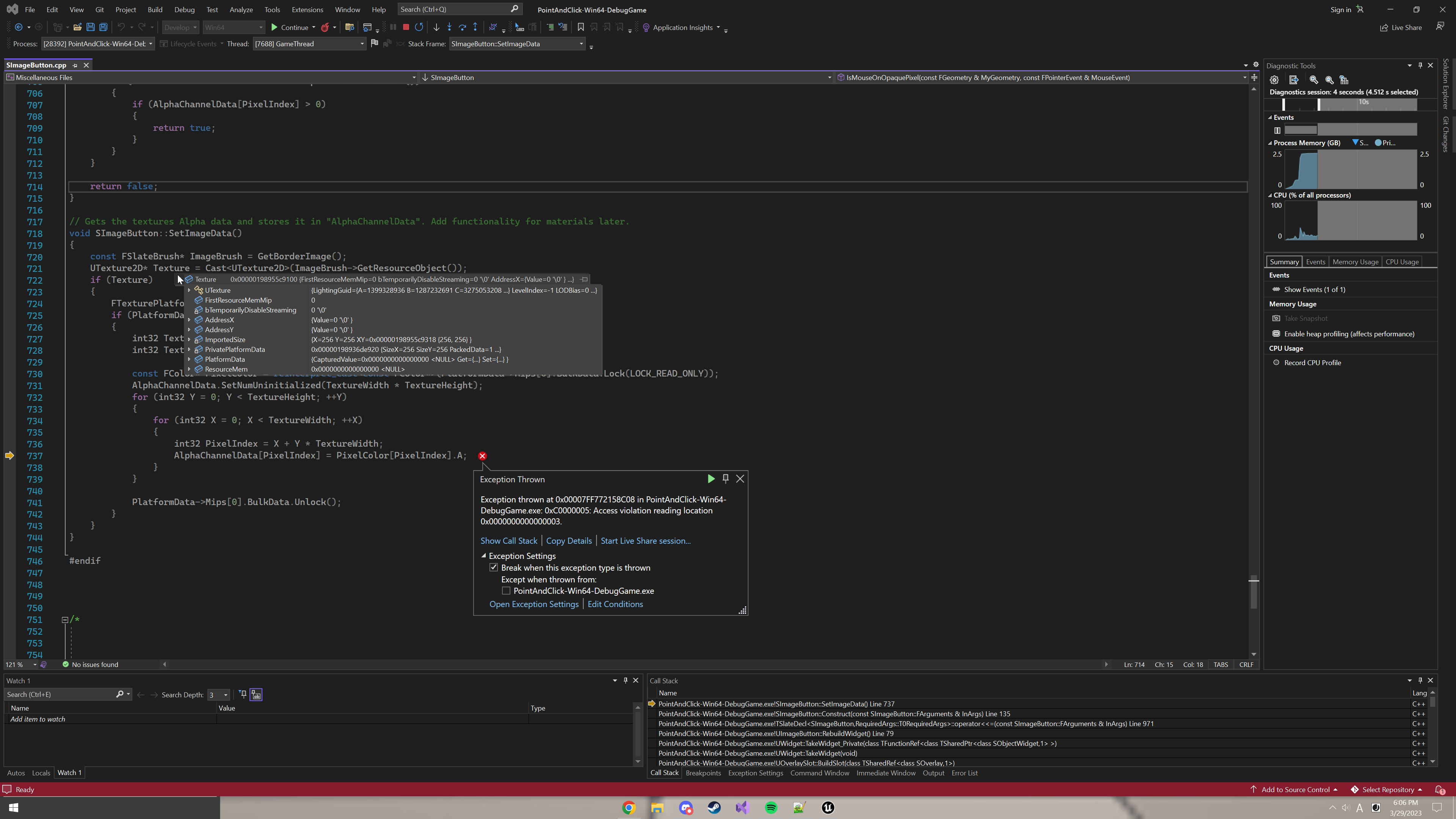
So I ended up figuring this out (sort of), but it crashes when packaged because I'm calling the function to read the texture data on the Slate widgets construct (I'm getting access violation error, even though I'm locking the texture data). my gut feeling says i'm calling it too early, where else could I call this from? I thought about doing it in the UMG counterpart (UImageButton), but I really dont know if that would work better, nor do I know how to call a function inside of a slate widget from its UMG counterpart.
`
void SImageButton::SetImageData()
{
const FSlateBrush* ImageBrush = GetBorderImage();
UTexture2D* Texture = Cast<UTexture2D>(ImageBrush->GetResourceObject());
if (Texture)
{
FTexturePlatformData* PlatformData = Texture->GetPlatformData();
if (PlatformData)
{
int32 TextureWidth = Texture->GetSizeX();
int32 TextureHeight = Texture->GetSizeY();
        const FColor* PixelColor = reinterpret_cast<const FColor*>(PlatformData->Mips[0].BulkData.Lock(LOCK_READ_ONLY));
        if (PixelColor)
        {
            AlphaChannelData.SetNumUninitialized(TextureWidth * TextureHeight);
            for (int32 Y = 0; Y < TextureHeight; ++Y)
            {
                for (int32 X = 0; X < TextureWidth; ++X)
                {
                    int32 PixelIndex = X + Y * TextureWidth;
                    AlphaChannelData[PixelIndex] = PixelColor[PixelIndex].A;
                }
            }

            PlatformData->Mips[0].BulkData.Unlock();
        }
    }
}
}
`
Forgot to mention, I added that "if (PixelColor)" and now it doesnt crash, but it just doesnt work in packaged builds.
grave hatch
Are you sure your image is being packaged?
ripe lava
It shows up in the game (after i made the "if (PixelColor)" change, other wise it crashed when the texture tried to load.)
Here's the error and where it crashes: https://i.imgur.com/LqMIxx1.png
 grave hatch
Shrug
ripe lava
I think it'll work if i can figure out a delayed way to call the function.
ripe lava
Okay, so I managed to do it finally!
I abandoned the method of using "BulkData" and switched to using "RHI".
RHI stuff can only be called in the render thread to my understanding, and I managed to get around that with these two snippets of code:
"ENQUEUE_RENDER_COMMAND(SetImageData)([this, Texture](FRHICommandListImmediate& RHICmdList) { "Your code here" });"
and
"if (IsInRenderingThread())"
I'll post the whole thing once I clean it up
grave hatch
Nice!
 summer drift
Anyone here know how I can get the image data from a FSlateMaterialBrush? Such as the material rendered in the preview window?

Writing it to a render target makes the colors wrong, so if it's possible to get just the image data that I can convert myself, it'd be ideal
grave hatch
You can't get the result of a material directly. You have to render it to something.
Materials aren't textures.
How are the colours wrong?
summer drift
grave hatch
How are the colours wrong?
This is in the viewport, the second is the exported image. Way too washed out

 grave hatch
I think it may be applying gamma twice.
There will be some render target options to adjust that.
summer drift
UTextureRenderTarget2D, I didn't change any settings as I pretty much copied from a post lmao
 grave hatch
If it comes down to it, you can just "unapply" the gamma.
Hmm. Maybe create a render target in the editor and look at the options.
It's a lot easier than examining the cpp source.
summer drift
Should I have the widget renderer set bUseGammaCorrection to false instead of true?
grave hatch
That's probably it.
summer drift
I somehow broke something as now when I try to use the UImageWriteBlueprintLibrary::ExportToDisk function it just tells me "Invalid texture supplied"
summer drift
grave hatch
That's probably it.
this is without gamma correction, so also not right 
 grave hatch
So it's applying too much gamma?
summer drift
I guess so
grave hatch
It will be some setting on the render target. Sadly I'm not sure which. 😦
summer drift
grave hatch
It will be some setting on the render target. Sadly I'm not sure which. 😦
Might you know why when I try to do the Blueprint trick for doing this, the rendered mat becomes stretched like this?

 grave hatch
Is Size correct?
summer drift
grave hatch
Is Size correct?
I'd think so, I've set Size to (512, 512) because the main texture is 512x512 and that's the output size I have. And screen position is 0,0 because that should be top left.
changed it to this to not use size in case

I just don't get how in BP the gamma is correct, but in C++ it's not
grave hatch
Check what the BP node does...
 spring depot
Please help me , how can i change jpg file which is stored locally on pc or android and change it to texture and then to slate brush struct so that i can use it to display on widget
grave hatch
You want to display a jpg on a slate widget?
spring depot
grave hatch
You want to display a jpg on a slate widget?
Yes i want to display jog on widget
grave hatch
On a slate widget?
spring depot
grave hatch
On a slate widget?
No simple widget
grave hatch
What is a "simple widget"?
spring depot
I want my jpg file to converted to texture in runtime
This is the thing i facing from a lot of time
Plz help
grave hatch
You can load an image with FSlateImageBrush("path", FVector2D(size)) at runtime.
You should probably use FPaths as well to get your content folder's location. Or whatever folder you use.
I would suggest not using content for things that arne't uassets.
spring depot
grave hatch
You can load an image with FSlateImageBrush("path", FVector2D(size)) at runtime.
So this will load jpg file directly to slate inage brush ?
grave hatch
Yes
spring depot
Okk ok plzzz be online for sonetime
I do like this
FSlateBrush * Brush = the code u give
@grave hatch but it shows white color only
grave hatch
Checked your output log?
spring depot
grave hatch
I assume your path is wrong.
File path is correct , i check it
grave hatch
grave hatch
Try stepping through the function.
^
spring depot
Everything seems correct 🥺i stuck in this from many days
grave hatch
Did you step through the function?
spring depot
Nope , i dont know how to do that
grave hatch
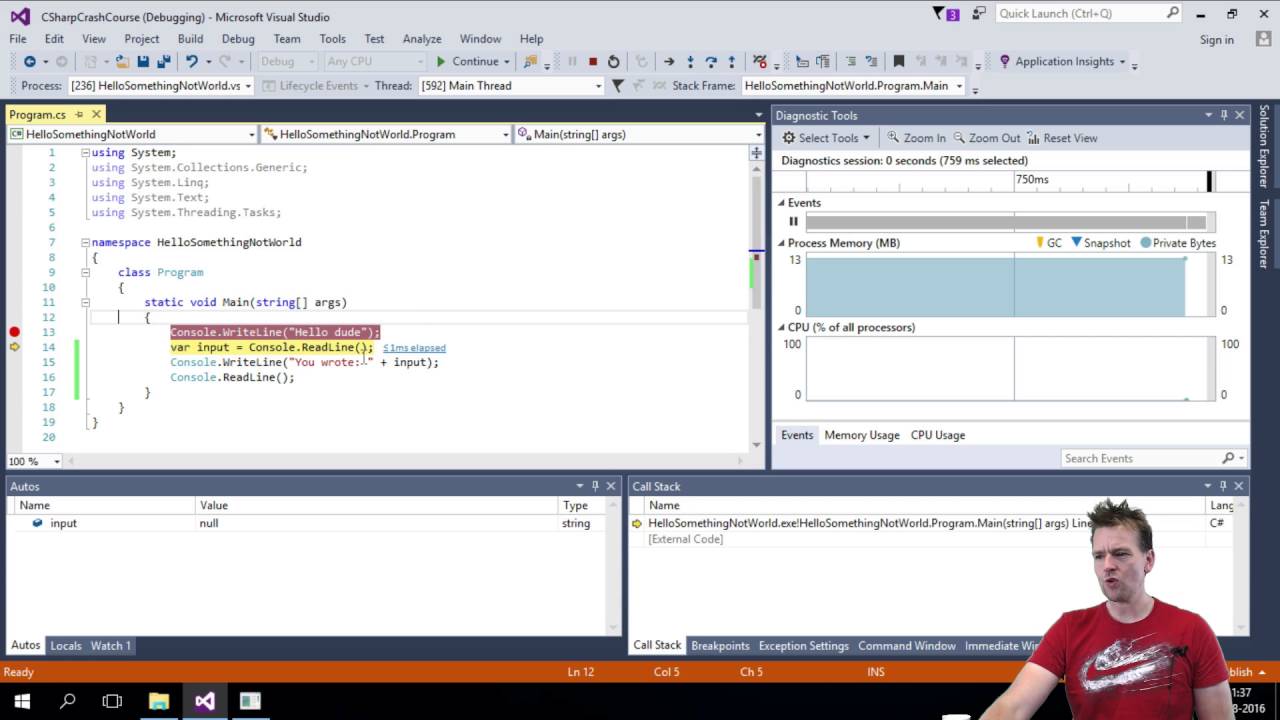
You will learn how to use the Debugger in Visual Studio.
Learning how to use the debugger is crucial to find errors later on.
This might be helpful. Or not. Idk.
spring depot
Okk ill check
 mental dawn
Hello yall, I'm starting to learn Slate and to do so I'm following this Unreal Tutorial https://docs.unrealengine.com/5.0/en-US/slate-editor-window-quickstart-guide-for-unreal-engine/
The problem is: when I open my plugin window, it appears AND the WidgetDebugger displays the EditorMenu but nothing appears on screen..
Do someone knows what I did wrong here ?
Thx in advance

 grave hatch
That'll be a problem in your spline editor class, not the tab code.
mental dawn
in the header file ?
Because when I put the Construct code directly into the Tab content (where _menu is), everything works fine
grave hatch
Show your code for the actual spline editor widget.
Oh you did
Ah.
I see your problem.
In your menu you're creating a vertical box but you're not actually putting it in anything
it's the equivalent of: cpp class Moo { Moo() { int x = 5; } };
And then wondering why Moo->x doesn't work.
Your menu widget should extend from SCompoundWidget
And then your construct function should be:
{
  ChildSlot
  [
    SNew(SVerticalBox)
    ...
  ];
}```man...
An entire day wanting to die
you saved my heckin life
god bless your soul 🙏🙏🙏🙏🙏🙏🙏🙏
grave hatch
🙂
sick pier
Hi, can I open a slate window seperate to the game window so tha tit can be draged to another monitor, and then used UMG in that slate window?
thick pasture
and then used UMG in that slate window?
What do you mean by this?
sick pier
pop open a slate window, and then use UMG widget system to make a ui in the window.
I am assuming it can't be done in umg itself, opening t he second window that is
grave hatch
You can.
You can use FSlateApplication to create a window.
FSlateApplication::Get().somethingsomethingdarkwindow
 spring cape
Styling Question: I am trying to implement centred button-tabs like Epic did for the Landscape Mode for my own Plugin. Does anyone have any pointers on how to implement this type of styling (and to learn in the process?)

I already have slat based button tabs... but I am using flat styling and they span full width sadly.
grave hatch
Use a wrap box?
 spring crescent
spring cape
Styling Question: I am trying to implement centred button-tabs like Epic did for...
spring crescent
spring cape
Styling Question: I am trying to implement centred button-tabs like Epic did for...
Have you tried pointing the Widget Inspector at that widget?
spring cape
spring crescent
Have you tried pointing the Widget Inspector at that widget?
Truly thank you - its the Widget 'Reflector' that allows me to understand how things are built.
spring cape
grave hatch
Use a wrap box?
They seem to be using SBorder and SText... so I will ditch my SButtons
spring crescent
spring cape
Truly thank you - its the Widget 'Reflector' that allows me to understand how th...
Ah yeah, Reflector, sorry. 😅 Glad to be of help.
grave hatch
I always call it the inspector.
spring cape
grave hatch
I always call it the inspector.
Reflector seems a bit odd of a name imho
grave hatch
Yeah.
 cobalt laurel
Somewhat random but does anyone know if the Quixel plugin ui is a webview or a built with fully custom rendered slate components? Just looking at some different directions for plugin UI development

 low bluff
cobalt laurel
Somewhat random but does anyone know if the Quixel plugin ui is a webview or a b...
low bluff
cobalt laurel
Somewhat random but does anyone know if the Quixel plugin ui is a webview or a b...
Easiest way for you to check that is to open the WidgetReflector and to hover that Window
grave hatch
Does the widget reflector even work on the launcher?
 odd copper
@grave hatch Hi! Would you know why the CustomizeChildren’s content cannot be drawn when using IDetailsView to display the FInstancedStruct variable? I found that ChildBuilder had successfully added the properties by debugging.
 grave hatch
Do you have a correct base struct set?
odd copper
Yes.
 grave hatch
I don't know, sorry, I've never customised an instanced struct.
Does it work in the regular details panel with instanced structs?
odd copper
Yes.
Could you check whether my window creation code is correct?
the window

Create the window
 grave hatch
I don't see anything particularly wrong with it.
What I would do is put a breakpoint in the customisation code fro your struct and then open something in the regular details view.
See the code path it's following to get to your customisation and what is required to get there.
odd copper

 grave hatch
Check the call stack as well.
Go through each call and examine it.
The code and variable values.
odd copper
Ok. Thank you!
grave hatch
odd copper
Ok. Thank you!
Any luck?
 strong bluff
If I wanted to make a text tooltip with lots of custom behavior that can create its own children, do you guys think it'd be better to:
- build off of SToolTip somehow
- use mouse-entered/etc. events on STextBlock to display a custom widget derived from some other class
- something else entirely
I'm thinking 2 is probably the best option but I don't know for sure. Pretty new to Slate, not sure what's going to bite me in the long run.
grave hatch
I haven't looked at SToolTip, but the only requirement seems to be that you inherit from IToolTip.
If SToolTip basically just does that and adds a standard background and a text field, you can probably re-use it and just replace the contents.
strong bluff
I'm guessing most of the functionality I'd want in a more "generic" class is probably also provided to SToolTip through SCompoundWidget, right?
(or by using its child slot, if nothing else)
grave hatch
Yeah. Most likely.
You can, in fact, just construct SToolTip with arbitrary content
Using .Content() [ stuff ]
So, yeah, you should probably use SToolTip
strong bluff
Neat. Thanks!

 grave hatch
So it works perfectly fine if it's not an instanced struct?
grave hatch
I see.
So it just doesn't work at all.
I still think you need to go through the call stack and find where they diverge.
odd copper
Okay, I'll try tracing the call stack again. There is so much obscure code that it takes a lot of time to try to make sense of it, but otherwise there is no other way.
craggy holly
Do you have a customisation defined for FActorCustom?
Best guess is that a customisation for that is hiding it's properties
grave hatch
It apparently works in the main details panel, but not in his custom one.
craggy holly
Ooof
grave hatch
Exactly.
 livid tendon
I'm trying to fix a very low framerate in SWebBrowser. Doesn't appear to be a 'real' performance bottleneck, and the browser-based animations run at solid 60fps in chrome, firefox and edge. Things I've tried:
- Subclassing, overriding
RebuildWidgetto setBrowserFrameRateto 60. No improvement. Verified that it is hooked up correctly by trying framerate of 1, which did in fact run at 1fps. - Setting "Volatile" for the relevant Slate object(s), which didn't have any perceivable effect
at a bit of a loss what to even try next, any thoughts?
grave hatch
It might be our good ol' friend slate throttling.
There's a console command to disable it, I think. Not a clue what it is.
livid tendon
hey it's something, thanks!!
livid tendon
seems like the issue is probably not throttling, assuming Slate.bAllowThrottling 0 is what disables it
odd copper
@craggy holly No. But I found a weird thing. Initially, it can display child layouts.

However, even when I comment out these lines of code, child layouts are still displayed correctly. The only issue is that ComponentAddons is not being drawn properly.

I spent too much time tracing the code without finding a solution, so I decided to proceed to other work.

 pure cave
So I followed a course. In there a SListView is added to a custom SCompundWidget. I wanted to do the same but instead of creating a new custom widget I just want it to be added to a SDockTab that I create inside the delegate that spawns the tab for my plugin
So I register the tab
FGlobalTabmanager::Get()->RegisterNomadTabSpawner(CourseExampleTabName, FOnSpawnTab::CreateRaw(this, &FCourseExampleModule::OnSpawnPluginTab))
.SetDisplayName(LOCTEXT("FCourseExampleTabTitle", "CourseExample"))
.SetMenuType(ETabSpawnerMenuType::Hidden);
And create the SDockTab in the delegate
return SNew(SDockTab)
  .TabRole(ETabRole::NomadTab)
  [
...
...
+SSplitter::Slot()
[
  SNew(SScrollBox)
  +SScrollBox::Slot()
  [
    SNew( SListView<TSharedPtr<FAssetData>>)
    .ItemHeight(24)
    .ListItemsSource(&SelectedAssets)
    .OnGenerateRow(this, &FCourseExampleModule::GenerateItemRow)
  ]
  ]
]
And generate the actual rows
TSharedRef<ITableRow> FCourseExampleModule::GenerateItemRow(TSharedPtr<FAssetData> Item, const TSharedRef<STableViewBase>& OwnerTable)
{
    return SNew(STableRow<TSharedPtr<FAssetData>>, OwnerTable)
        [
            SNew(STextBlock)
            .Text(FText::FromString("Hi"))
        ];
}
But I get an error
So I followed the course and it works if you create a custom widget. Looking at SWidget it turns out that's because it inherits from public TSharedFromThis<SWidget> // Enables 'this->AsShared()'?
And at this point I am totally confused because I don't understand anything anymore
grave hatch
class FCourseExampleModule : public TSharedFromThis<FCourseExampleModule>
pure cave
Wasn't sure what implications that would have so I didn't do it. So I did that class FCourseExampleModule : public IModuleInterface, public TSharedFromThis<FCourseExampleModule> and it now fails at this
     * Provides access to a shared reference to this object.  Note that is only valid to call
     * this after a shared reference (or shared pointer) to the object has already been created.
     * Also note that it is illegal to call this in the object's destructor.
     *
     * @return    Returns this object as a shared pointer
     */
    [[nodiscard]] TSharedRef< ObjectType, Mode > AsShared()
    {
        TSharedPtr< ObjectType, Mode > SharedThis( WeakThis.Pin() );

        //
        // If the following assert goes off, it means one of the following:
        //
        //     - You tried to request a shared pointer before the object was ever assigned to one. (e.g. constructor)
        //     - You tried to request a shared pointer while the object is being destroyed (destructor chain)
        //
        // To fix this, make sure you create at least one shared reference to your object instance before requested,
        // and also avoid calling this function from your object's destructor.
        //
check( SharedThis.Get() == this );```I think I have to take a break from it because I've been looking at this for way too long. Brain just says no and I can't think for myself RN 😓. But thanks Daekesh 👍
grave hatch
I think you might be using your module wrong.
pure cave
Was curious if I can use a lambda for SCheckBox::OnCheckStateChanged and found that there is SCheckBox::OnCheckStateChanged_Lambda but it's not in the class? using VAX goto implementation goes to SCheckBox::OnCheckStateChanged 😮


 grave hatch
pure cave
Was curious if I can use a lambda for `SCheckBox::OnCheckStateChanged` and found...
grave hatch
pure cave
Was curious if I can use a lambda for `SCheckBox::OnCheckStateChanged` and found...
Just use _Lambda. They all have them. They aren't necessarily listed.
grave hatch
odd copper
Figure out🙂
So you were missing some code?
pure cave
I just wonder what other magical functions exist and how to find them
grave hatch
_UObject _Raw _Static probably
pure cave
I just stumbled over them because I used visual studio search to search the entire solution for lambda 😅
grave hatch
The default version is the SP version.
odd copper
My previous code. DataRegistryId, bool, and etc were drawn correctly.

 snow relic
Hi guys! Doe anyone have example of SMeshWidget using? I have found only particles. https://forums.unrealengine.com/t/smeshwidget-hardware-instanced-slate-meshes-thread/58020/6

Epic Developer Community Forums
Okay so here’s an update (finally). Got back to working on my radar stuff, but decided to work in the example project nick gave first. I finally have this circular mesh drawing as slate geometry! Source code (though it’s very simple). You can see the shader setup and the mesh in the video. What I want to do next is have better co...
hollow dagger
how can I access another slate widget from a seperate one
even though they don't really know about each other
is there a way I can get all slate widgets visible of a specific class
or is there possibly a way for me to hold a reference to these widgets on creation?
so like on Construct() I'd add them to some sort of static array of widget refs
though I'd need to remove them on Deconstruct somehow
grave hatch
hollow dagger
is there a way I can get all slate widgets visible of a specific class
No. Unless you add such a feature yourself.
grave hatch
hollow dagger
or is there possibly a way for me to hold a reference to these widgets on creati...
Yes. That's what people generally do.
grave hatch
hollow dagger
though I'd need to remove them on Deconstruct somehow
Use the destructor?
hollow dagger
where should I handle adding and removing
hollow dagger
grave hatch
Use the destructor?
are slate widgets deconstructed whenever they are off-screen? didnt know that
grave hatch
I think you're going about tihs very wrong, btw.
hollow dagger
I explained it poorly but its probably the right way
grave hatch
If you need 2 widgets which have no idea about each other to reference each other, your system probably needs to change.
hollow dagger
eh
grave hatch
hollow dagger
are slate widgets deconstructed whenever they are off-screen? didnt know that
No, they aren't.
They destructed it when all the shared pointers to them are destroyed.
hollow dagger
whenever I start a drag I want to look if any inventory widget has something to do with the dragged item, and if it does set a boolean
there can be any amount of inventories on the screen at once
grave hatch
Then I would use delegates.
Have a static delegate, something like, "OnMyTHingDragStarted" and have your inventory subscribe to it and your drag operation trigger it.
grave hatch
Delegates in c++ are 100x more flexible than in BP.
grave hatch
Probably
hollow dagger
thanks for the help
grave hatch
Np
strong bluff
Can someone explain (or link to some reference) how SNew can be used with constructor arguments? Or can it? I'm trying to figure out how IsInteractive works with SToolTip, but I'm not sure. Should I just be making my own class with default constructor values, deriving from SToolTip (or implementing IToolTip, either way it's more or less the same I guess).
grave hatch
void Construct(FArguments Args (or whatever it's called), Type1 Arg1, Type2 Arg2)
SNew(YourType, Arg1, Arg2)
Personally I like to make mandatory parameters as construct arguments and anything optional as slate_argument/attributes/etc.
strong bluff
Does that work similarly to C macros, where I can't pick and choose optionals if they're out of order? i.e. either manually enter defaults until I reach the arg I'm changing, or pass null if applicable
grave hatch
I'm pretty sure it does __VA_ARGS__ and then forwards those args to the Construct method.
You need to match the argument list exactly, like any other function.
(other than the FArguments one which is provided by the macro)
strong bluff
Alright yeah, that's what I kinda figured. Kinda sucks, but I get it (and understand the mandatory thing you mentioned above a bit better now).
Thanks.
grave hatch
Np
strong bluff
Alright, still pretty confused.
I figured out it's a slate attribute, so I should be able to set it, and this does seem to work:
return SNew(STextBlock)
            .Text(InRunInfo.Content)
            .TextStyle(&TextStyle)
            .ToolTip(SNew(SToolTip)
                [
                    SNew(STextBlock)
                    .Text(FText::FromString(InRunInfo.MetaData[TEXT("text")]))
                    .TextStyle(&TooltipTextStyle)
                ]
                .IsInteractive(true)
            );```
but all this does is break the tooltip after one use.

Am I misunderstanding what `IsInteractive` actually does? I'm trying to allow the player to interact with the contents of the tooltip, which (according to the docs) is supposed to happen using ctrl when `IsInteractive` is enabled.You have, at least, your ) in the wrong place.
Is "IsInteractive" a property of the outer textblock or the tooltip textblock?
strong bluff
It's an attribute of the SToolTip, so it's in the right place. That compiles, at least.
grave hatch
Fair enough!
strong bluff
Whether or not that's a fault of the macro's leniency or it being actually correct, I have no clue.
grave hatch
I'm just used to putting properties before slot stuff, I guess!
strong bluff
Didn't even know that worked, the whole slot syntax is mega confusing.
grave hatch
E.g. I'd put it before that [, rather than after ]. If it's valid than that's cool.
strong bluff
So you're saying:
.ToolTip(SNew(SToolTip)
                .IsInteractive(true)
                [
                    SNew(STextBlock)
                    .Text(FText::FromString(InRunInfo.MetaData[TEXT("text")]))
                    .TextStyle(&TooltipTextStyle)
]```(which also does seem to compile, so fair enough - I do agree that looks a bit cleaner, even though it kinda blows my mind that it works both ways)
Issue remains either way, the attribute being true just breaks the functionality and the ctrl key doesn't seem to do anything at all.
grave hatch
That's what I'd do, yeah. But it doesn't overly matter.
It would look even cleaner if you put a newline before SNew 😛
strong bluff
True. And Discord kinda screwed the tabs there anyways, but you get the general idea.
grave hatch
Yeah!
strong bluff
Still mainly confused about the intended functionality, if I'm misunderstanding the behavior of that attribute, or if it's maybe a bug? I dunno.
grave hatch
Though I'm not sure what ctrl not working has to do with your original question about construct arguments!
strong bluff
Nothing really - it's just what I was trying to get working. Wanted to make sure it wasn't the way I was writing it that was breaking it.
grave hatch
I may have been conflating Construct arguments with the slate parameters. Sorry if that was confusing.
strong bluff
I initially thought it was a constructor-only argument, rather than an argument and an attribute, which is what it ended up being.
grave hatch
What are you expecting to happen? And what actually happens?
strong bluff
I assumed the weird/broken(?) behavior was due to me fucking up the syntax and needing to use the constructor, rather than it being just... The behavior in general.
grave hatch
Slate is weird/broken in a lot of ways! 😄
strong bluff
grave hatch
What are you _expecting_ to happen? And what actually happens?
The docs for IsInteractive seem to indicate that the user holding ctrl would allow them to interact with the tooltip, but setting that doesn't allow that AND it makes the tooltip only fire one time (and then it's disabled indefinitely).
grave hatch
Have you had a look at the source to see what it actually does?
strong bluff
I wouldn't even know where to look, honestly
grave hatch
In the source for SToolTip.
A lot of Slate programming involves checking sources to find out what things actually do.
And copying patterns from the engine!
strong bluff
I guess I just have no idea what it actually does, it just looks like a boolean attribute. The source looks like it just uses it to return the value in the function IsInteractive(), which is just a getter of the attribute.
So I'm guessing the functionality is somewhere else, and I'm not sure how I'd search for that. Just ctrl+shift+F for "IsInteractive" and hope it appears somewhere in the project's engine code? I don't know how much of that is hidden away in libraries/the engine itself or whatever, I guess. Still pretty new to this.
strong bluff
bool SToolTip::IsInteractive() const
{
    return bIsInteractive.Get();
}```
is all that exists, outside of the constructor/arguments/etc. that handle the SLATE_ATTRIBUTE itselfIsInteractive() isn't used anywhere else in teh tooltip code?
strong bluff
Nope.
strong bluff

there's a TON of classes that have their own IsInteractive, none of which are tooltip related or that implement IToolTip
this is going to be SO much fun
thank you cliffy B, thank you unreal engine devs
strong bluff
Yeah. The documentation code, which I'm guessing is the docs viewer... In the editor? Seems to have some custom tooltip logic that uses it. So I guess I'm going there, but nothing useful so far.
strong bluff
Basically, I'm implementing some rich text stuff, using URichTextBlockDecorator. The decorator widgets can spawn tooltips as well, so I'm trying to generate rich text blocks INSIDE that tooltip.
So let's say you've got text that reads "Welcome to New York City!"
you could hover over "New York City" and it'd have a little description
but let's say inside that description is text like "A city full of commerce and skyscrapers, like the Empire State Building"
then you could hover over THAT tooltip's text and it'd open ANOTHER tooltip with a description
and so on, until you run out of patience or links to follow or screenspace
And so far all I can seem to get is the first tooltip, and it's starting to seem like I might just have to use hover events to implement my own, rather than relying on SToolTip at all. Or heavily modify how/when the tooltips spawn, if that'd even be possible.
I'd also want to change the keybind from ctrl to some other behavior probably, but I at least figured I'd give Unreal's default approach a try before I went trying to modify that. But here we are, lol.
grave hatch
So you want tooltips to have tooltips?
strong bluff
Pretty much. Here's an implementation I did in Godot, although I didn't finish implementing the "close" behavior yet, among other things. Shameless Morrowind placeholder text.
grave hatch
I'm not sure that's even supported. Idk.
strong bluff
It will be by the time I'm done with it.
...or maybe not, but I'm going to try at least lmfao
I think given the discovery that IsInteractive is maybe not what I was expecting, I'll probably just have to implement this all myself
hollow dagger
I'm trying to add a widget at runtime, using GEngine->GameViewport->AddViewportWidgetContent but it crashes with a weird exception
in some random place
ObjectMacros.h 575
 grave hatch
And the callstack is?
 hollow dagger

Holder is a TOptional<TSharedRef<SWidget>>
thought that'd be able to hold on it
I guess I need to hold the ptr itself
hollow dagger
GetValue is for TOptional
hollow dagger
does SNew return the TSharedPtr?
hollow dagger
grave hatch
And where is the widget coming from?
wdym coming from
hollow dagger
well it's a TSharedPtr now but I still use TOptional to reference other widgets
if I do TSharedRef<SWidget> it doesn't compile
it tries to initialize SWidget for some reason
grave hatch
Use a TSharedPtr.
grave hatch
Yes you can.
hollow dagger
Draggable Window
-> SNew(Window Header)
.Parent(SharedThis(this))
so the header holds a ref to its parent window
so it can move it on drag
is that bad design?
grave hatch
No.
hollow dagger
huh
grave hatch
That's basically what you're meant to do. However, you should store the .Parent value in the window header as a TWeakPtr
 grave hatch
The declaration of Holder is?
hollow dagger
TSharedPtr<SWidget> Holder;
hollow dagger
an SItemWidget which I'm certain is still alive when this is called
grave hatch
"certain"
hollow dagger
well
grave hatch
How do you know?
hollow dagger
it's held on in like 10 places
plus it's still rendered
there's no reason for it to die
grave hatch
Fair.
hollow dagger
I can move this somewhere else if you want to double check
hollow dagger
yes but it's not related to this widget I don't think
SItemWidget references a UObject
grave hatch
Then it migth not be related to this widget at all.
Something, somewhere, crashed because it's resource object (UTexture/UMaterial) was gc'd.
hollow dagger
any way to help debug that?
grave hatch
Find any and all references to UObjects you use in slate and check they are referenced properly.
hollow dagger
if I remove the spawning of it it all works fine
is that enough to guarantee the issue is within it and not another widget?
grave hatch
Probably.
What if you spawn a different type of widget?
Like just an STextBlock instead of the window?
hollow dagger
spawning it on Construct instead of OnDoubleClick doesn't crash but it eventually does
will do
I'm just trying to see how the widget looks ingame why is it this painful lmao
grave hatch
Why are you using Slate for game ui is the question.
hollow dagger
idk I don't like UMG
other than it being a client's request
TextBlock works fine
hollow dagger
for STextBlock?
I'm just using default
not setting it
let me try setting it with my variable
grave hatch
For the window...
hollow dagger
oh
grave hatch

 grave hatch
That shouldn't be a problem.
grave hatch
The window will hold a reference to its content automatically. (A regular SWindow would, but this is your class, which may not...)
hollow dagger
oh
makes sense yeah
here's the draggable window, might help

huh content is a sharedptr
let me fix that
grave hatch
That's "fine"
grave hatch
That'll do it.
It's checking that, which should hold a uobject, but doesn't...
(because it's just completely null)
grave hatch
Np
 limpid fractal
class TITANUMG_API UKeyPrompt : public UImage
{
    GENERATED_BODY()

#if WITH_EDITORONLY_DATA

public:

void SetPrompt(FString InPrompt);
    FString GetCurrentPrompt();

    UPROPERTY()
FString CurrentPlatform;

private:
    UPROPERTY()
FString CurrentPrompt;

#endif

};
any one knows why variables gets reset after compiling / moving the widget around in UMG ?
hollow dagger
given a pointer event how would I get the cursor position within the window
not its absolute screenspace
grave hatch
There's a thing to get the window for a widget in FSlateApplication. Then you can use the window's absolute position to work out the cursor local position
... if nothing else works.
hollow dagger
hm I'm trying to make my own context menu
trying to spawn a canvas panel where the player right clicks
the position of the slot inside of the canvas panel is what I can't achieve atm
do menus work after packaging or would it only be in editor?
FSlateApplication::PushMenu
grave hatch
Try compiling in shipping. if it works, you're fine.
hollow dagger
I have an SImage with a texture assigned to it but for some reason it just doesnt render the image
it's set

 grave hatch
Use the widget reflector to see if it's actually got any size.
If it doesn't it might be because:
- it has no desired size
- It's too big to be displayed in the given space, so its size is set to 0
hollow dagger
fixed it
it was because I was copying the object containing the brush
and it was dying in scope
I should think more about memory when doing this for some reason it's an afterthought lmao
strong bluff
Anyone know anything about setting up FSlateHyperlinkRun? I'm trying to call SNew to construct an SRichTextHyperlink, and it needs the former as a required arg for the constructor.
It seems to be loop-related information, so I'm not sure if that's something I can pull from a parent widget or if I have to somehow create it and add it to some manager that throws it into the update loop.
(implements ISlateRun, if that's a little less niche to anyone, maybe)
grave hatch
What does that class do? The hyperlink run one.
strong bluff
Honestly, no idea. I'm tempted just to not touch it because I mostly wanted it for the hover functionality, but I wasn't sure if there was an easy way to set one up.
I'm curious if these hyperlinks wrap, because if they do I'd like to figure out how. Working with Rich Text Decorators and the widgets get inserted in-line, but if it's a text-based widget (e.g. STextBlock or SRichTextBlock) then there's no way for them to inherit the wrapping from their parent text, because they have to return a brand new widget.
strong bluff
the main issue I'm really struggling with is the wrapping honestly
if I use a widget via CreateDecoratorWidget, then I lose wrapping functionality
I could use CreateDecoratorText for styling and whatnot, but then I lose the widget boundaries for getting mouse input, so no hover/tooltips/etc.
this is driving me nuts
grave hatch
A run seems to be a portion of text with a single style/application.
E.g. a paragraph with the same style or, in this case, a hyperlink.
strong bluff
I don't really get that, since it's a required argument for SRichTextHyperlink which would... also be a portion of text, with a single style/application?
I'm so lost on this, I wish there was some useful documentation out there lmao. Like, I can't even find instances/posts online where people have used basic stuff like this. Is Slate just shit for anything that isn't simple box widgets?
grave hatch
It's probalby the part that describes the visual representation of the hyperlink.
hollow dagger
my OnKeyDown or OnPreviewKeyDown doesn't get called
I have the widget focused with
FSlateApplication::Get().SetKeyboardFocus(SharedThis(this), EFocusCause::SetDirectly);
but still nothing
grave hatch
Which widget?
grave hatch
Do you have any subwidgets in there?
hollow dagger
yes
grave hatch
Are you sure they aren't intercepting your click?
hollow dagger
it's a keyboard click should that really matter
is there a way I can make it work regardless of interception
just on key press
grave hatch
Intercepting your key press then.
There's a slate debug mode that tells you what's consuming your input events.
I can't remember how to activate it, though.
 spark palm
Hi, I know very little about C++ and Slate but I hope someone might be able to give me a hand. I followed this wiki article on how to create a loading screen https://unrealcommunity.wiki/loading-screen-243mzpq1
Everything works but I can't figure out how to add my own slate widget to display something, rather than the simple stock throbber.
Could anyone show me what I should write to get a custom slate widget to pop up on my loading screen?
I have this in mygameinstance.cpp so far:
#include "MoviePlayer.h"
void UMyGameInstance::Init()
{
Super::Init();
FCoreUObjectDelegates::PreLoadMap.AddUObject(this, &UMyGameInstance::BeginLoadingScreen);
FCoreUObjectDelegates::PostLoadMapWithWorld.AddUObject(this, &UMyGameInstance::EndLoadingScreen);
}
void UMyGameInstance::BeginLoadingScreen(const FString& InMapName)
{
if (!IsRunningDedicatedServer())
{
FLoadingScreenAttributes LoadingScreen;
LoadingScreen.bAutoCompleteWhenLoadingCompletes = false;
LoadingScreen.WidgetLoadingScreen = FLoadingScreenAttributes::NewTestLoadingScreenWidget();
    GetMoviePlayer()->SetupLoadingScreen(LoadingScreen);
    }
}
void UMyGameInstance::EndLoadingScreen(UWorld* InLoadedWorld)
{
}
In this tutorial I'll show you how to properly setup a self-contained Loading Screen System for your game - which will allow you to safely play movie files, audio clips or load a widget to the screen during any type of map loading.
hollow dagger
hollow dagger
my OnKeyDown or OnPreviewKeyDown doesn't get called
I'm still having the issue with this :/
if you find the name of that debug tool would really appreciate it
kind bronze
Is there a way to convert a slate widget to a PNG? I am working on a project with a window that has slate drawn info that I want to put a button in front of to save. However, I don’t want that button itself saved.
grave hatch
You can render it to a target target and then expert it to a file.
How you do either of those I have no idea off hand.


 weary egret
yes, but that's also the last layer in the input stack
 opal whale
quick question: I'm currently building a state machine editor (based off a couple of the editors that UE4 provides since I lack knowledge in making editor tools). I wanted to have 3 tabs displayed horizontally (a list view tab, a graph tab and a details tab) though, only the later 2 are opened by default.
This is how I set the tabs:
    ->AddArea
    (
        FTabManager::NewPrimaryArea() ->SetOrientation(Orient_Vertical)
        ->Split
        (
            FTabManager::NewStack()
            ->SetSizeCoefficient(0.1f)
            ->AddTab(InStateMachineEditor->GetToolbarTabId(), ETabState::OpenedTab)
            ->SetHideTabWell(true)
        )
        ->Split
        (
            FTabManager::NewSplitter() ->SetOrientation(Orient_Horizontal)
            ->Split
            (
                FTabManager::NewStack()
                ->SetSizeCoefficient(0.2f)
                ->AddTab(AIStateMachineEditorTabs::GraphViewDetailsID, ETabState::OpenedTab)
            )
            ->Split
            (
                FTabManager::NewStack()
                ->SetSizeCoefficient(0.5f)
                ->AddTab(AIStateMachineEditorTabs::GraphEditorID, ETabState::OpenedTab)
            )
            ->Split
            (
                FTabManager::NewSplitter() ->SetOrientation(Orient_Vertical)
                ->SetSizeCoefficient(0.3f)
                ->Split
                (
                    FTabManager::NewStack()
                    ->SetSizeCoefficient(0.6f)
                    ->AddTab(AIStateMachineEditorTabs::GraphDetailsID, ETabState::OpenedTab)
                    //->AddTab(FBehaviorTreeEditorTabs::SearchID, ETabState::ClosedTab)
                )
            )
        )
    );```
Am I missing anything?I can only open the tab if I go to Window > then click on its name though
pure cave
opal whale
I can only open the tab if I go to Window > then click on its name though
Did you make any changes after you changed the name to Standalone_StateMachine_Layout_v1?
opal whale
pure cave
Did you make any changes after you changed the name to `Standalone_StateMachine_...
yes, do I need to change the name everytime I do a change?
pure cave
If so, you have to rename it every time you make a change in the layout
not 100% sure where it saves the layout but it is also mentioned somewhere in code
opal whale
gotcha, thank you
grave hatch
Resetting your editor layout also works.
warm vault
what is the use of IPropertyTypeCustomization?
grave hatch
To customise how properties are displayed in the details panel?
warm vault
TSharedRef<SVerticalBox> widget = SNew(SVerticalBox)
+ SVerticalBox::Slot()
.HAlign(HAlign_Center)
.VAlign(VAlign_Center)
[
SNew(STextBlock)
.Text(FText::FromString(TEXT("Test button"))).Font(FSlateFontInfo("Arial", 36))
];
GEngine->GameViewport->AddViewportWidgetForPlayer(GetWorld()->GetFirstPlayerController()->GetLocalPlayer(), widget, 1);
I am using this code but the text is not rendering properly

 high hedge
warm vault
TSharedRef<SVerticalBox> widget = SNew(SVerticalBox)
+ SVerticalBox::Slo...
high hedge
warm vault
TSharedRef<SVerticalBox> widget = SNew(SVerticalBox)
+ SVerticalBox::Slo...
Issue with the font most likely
Incorrect name or something
warm vault
high hedge
Issue with the font most likely
Okay, thank you, I'll check it
warm vault
high hedge
Issue with the font most likely
Is there a way to set size for font in STextBlock?
Okay, got it. Size is a blueprint type with No accessibility through any C++ function. Would need to probably set widget through BP
warm vault
grave hatch
You set the size via the font.
Yes but how do I set size on FSlateFontInfo?
grave hatch
In the constructor.
warm vault
grave hatch
In the constructor.
And what has to be argument for font name?
grave hatch
Good question. I only use the default font in the engine.
Bear in mind that you'd have to import the font you want to use if it isn't in the engine already.
warm vault
grave hatch
Bear in mind that you'd have to import the font you want to use if it isn't in t...
I was making a mistake. I feel today is not the best day. I could simply make a var FSlateFontInfo MYFont and set it's Size
I made the mistake of calling it as a funnction. lol