#engine-source
1 messages · Page 51 of 1
 rain lake
 nova sleet
Very interesting
 twin hazel
✨ nice ✨
 lilac isle
fyi, https://github.com/EpicGames/UnrealEngine/commit/fcbe1fe6a0e150c1c9a310ffe6f7fa9b9ac0becc causes a huge perf regression with metahuman head meshes
 calm mason
Not quite sure where to ask this.. but in the Launcher version of UE5 the Bridge plugin is built in.
In my source built version it is not.
How do I add the Quixel Bridge plugin to my source built UE5?
 hidden hedge
if you have a binary engine installed, just copy it from that?
and compile
so you'd skip the binaries and intermediate directories
 calm mason
I did do that in the end but seems... Bad? How does the Epic Launcher version have Bridge as an included plugin?
hidden hedge
it's downloaded separately by the launcher
calm mason
I can see in Github and locally that the Bridge source is included in the engine source, but I wonder if I can build it and include it as part of my source Installed build
Engine\Plugins\Bridge\*
so there must be a file somewhere that says for an Installed build, include these plugins
InstalledEngineBuild.xml perhaps
there's a InstalledEngineFilters.xml file which has a section called CopyEditorExceptions which includes Bridge specifically (along with some other missing plugins like TwitchLiveStreaming).
I'll try removing that next time I build the engine and maybe it will be included!
 shrewd thorn
Bridge is fully available on my github version of UE5, it's just not enabled by default and you need to enable it in the plugins for your project. The way they install Bridge via the launcher kind of breaks the normal plugin install process and forces it on for every single project that doesn't explicitly disable it
 humble gulch
Anyone know why I would be getting these errors after running the setup.bat for the source. These errors show up when attempting to run GenerateProjectFiles.bat
F:\UE5\UnrealEngine\Engine\Binaries\ThirdParty\DotNet\Windows\sdk\3.1.403\NuGet.targets(128,5): error : Failed to retrieve information about 'System.ServiceProcess.ServiceController' from remote source 'https://api.nuget.org/v3-flatcontainer/system.serviceprocess.servicecontroller/index.json'. [F:\UE5\UnrealEngine\Engine\Source\Programs\UnrealBuildTool\UnrealBuildTool.csproj]
F:\UE5\UnrealEngine\Engine\Binaries\ThirdParty\DotNet\Windows\sdk\3.1.403\NuGet.targets(128,5): error : The SSL connection could not be established, see inner exception. [F:\UE5\UnrealEngine\Engine\Source\Programs\UnrealBuildTool\UnrealBuildTool.csproj]
F:\UE5\UnrealEngine\Engine\Binaries\ThirdParty\DotNet\Windows\sdk\3.1.403\NuGet.targets(128,5): error : Unable to read data from the transport connection: An existing connection was forcibly closed by the remote host.. [F:\UE5\UnrealEngine\Engine\Source\Programs\UnrealBuildTool\UnrealBuildTool.csproj]
F:\UE5\UnrealEngine\Engine\Binaries\ThirdParty\DotNet\Windows\sdk\3.1.403\NuGet.targets(128,5): error : An existing connection was forcibly closed by the remote host. [F:\UE5\UnrealEngine\Engine\Source\Programs\UnrealBuildTool\UnrealBuildTool.csproj]
shrewd thorn
That looks like a firewall is blocking access to microsoft's C# packaging system
humble gulch
Hmm
 thick storm

procedural content generator
and MVVM editor

this is one thing I can't really wait to get my hands on
 heady sparrow
I had no idea mvvm would have an editor
hidden hedge
probably so you can do it all from BP
 stuck forge
Hrm anyone see an obvious problem with my installed build registry entry (windows obvs)

Oh derp I added a new key when I should have added a new string value under Unreal Engine\Builds
This works (after removing the auto-generated dupe with random identifier)
 stuck forge
Oh interesting, I only asked for the Debug configuration but it looks like UAT went ahead and included DebugGame in my installed build anyways?
"c:\Users\Admin\git\UnrealEngine\Engine\Build\BatchFiles\RunUAT.bat" ^
BuildGraph ^
-target="Make Installed Build Win64" ^
-set:GameConfigurations=Development;Shipping;Debug ^
...
EDIT: Is this because DebugGame can be thought of as a subset of Debug, since the latter includes debug assistance for the game project, anyways?
 thick storm
heady sparrow
I had no idea mvvm would have an editor
thick storm
heady sparrow
I had no idea mvvm would have an editor
It easy to setuup shared binding this way,
you can have single ViewModel, shared between muultiple views, where some views have read only access, other bidirectional, and other can only write
that's going to be game changer for making UIs in uunreal ;
heady sparrow
can you only update it when data actually changes or does it just tick?
thick storm
it's event based
heady sparrow
sweet
thick storm
changes are pushed when is upadted
there is load code for, code generators, even if youu don't use its worth looking at to check some advanced engine featuures which can be used in plugins 😄
(the same goes for StateTree)
heady sparrow
currently dealing with statetree
and trying to figure out what it can do out of the box...
at least with the mass schema
thick storm
puush ai across ZoneGraph
heady sparrow
puush?
thick storm
you need to write move to task, to move something across navmesh
well
they don't really move along ZoneGraph lanes
but we can say move AI along ZoneGraph lane
 thick storm
either best part of StateTree are evaluuators and and property binding
heady sparrow
no more blackboard!! weeee
thick storm
i didn't know youu can do something like this, and it solves my issue with feeding my Utility System with data : D
heady sparrow
I'm not quite sure how it even gets data honestly
heady sparrow
let me read Linker.LinkExternalData I guess
thick storm
there are some fancy macros for it
but the true magic happens in editor code
where the widgets are created and the bindings are actully compiled as final asset
heady sparrow
I'm assuming FStateTreeExternalDataDesc is created somehow with reflection?
heady sparrow
oh, it just finds or creates in LinkExternalData
jsut the FStateTreeExternalDataDesc Desc(Struct, Requirement); constructor
 vital hawk
heady sparrow
vital hawk
heady sparrow
Is that from the template? I've been trying to figure out how to build ZoneGraph, as I have quite a bunch of road data from one industry standard (OpenDRIVE) that I'd like to try to convert to ZoneGraph
heady sparrow
vital hawk
Is that from the template? I've been trying to figure out how to build ZoneGraph...
this is from a PR on the community Mass Sample
the official City Sample probably has better info on how to make it dynamically (with the crazy houdini stuff they have in there)
I'm still a little confused with how to make intersections though
the rest are just simple splines
 spark oriole
When i try to build my game for "Development Server". I get this error message: Missing precompiled manifest for 'LowPolyShooterPack', 'C:\Users\alexc\Documents\Unreal Projects\SpielOhneName\Intermediate\Build\Win64\SpielOhneNameServer\Development\LowPolyShooterPack\LowPolyShooterPack.precompiled'. **This module was most likely not flagged for being included in a precompiled build - set 'PrecompileForTargets = PrecompileTargetsType.Any;' in LowPolyShooterPack.build.cs to override.** So it's the fault of the "LowPolyShooterPack" plugin. I included the code (as the error message told me), but it still doesn't work.
 shrewd thorn
If you're trying to make a real dedicated server build you probably need to do a github version of the engine and not try to use the precompiled engine binaries. I'm not sure marketplace plugins can even precompile for dedicated server builds
That should then recompile the plugin from the source (which it would have to provide for this to work)
spark oriole
shrewd thorn
If you're trying to make a real dedicated server build you probably need to do a...
I did build ue5 from source, of course
shrewd thorn
Hrm weird, it shouldn't be trying to use the precompiled stuff at all then
spark oriole
Btw just to clarify, normally everything works fine. But since i've added this plugin to the engine, it won't build for server
 stable hemlock
Hello,
i dont know if im right here for my problem.
So i was making in UnrealEngine 4.27.2 from EpicGames a Project.
Now i want to create a Server for that, so i downloaded UE 4.27.2 from github and compiled it.
Now when i select the target edition on my project to the new compiled version it would say me this message

 hard geode
Hi, does anyone contribute to the engine? I'm working on something with that aim and I was wondering how you setup your gitignore
Really any advice on contributing would be good
 pallid path
There are a few contributors, some even contribute via the official perforce. what is wrong with the default gitignore that comes with the git repo?
stable hemlock
rip
Fully remove Nanite and Virtual Shadow Map SM5 vendor extension, lock buffer hack, and DX11 support from UE5
honorable mention: https://github.com/EpicGames/UnrealEngine/commit/5f34587cc531b236693b7494be4176151bab794b
UHierarchicalInstancedStaticMeshComponent: Stop assuming that an empty PerinstanceSMData means that the component is grass.
Created UGrassHierarchicalInstancedStaticMeshComponent
 main echo
hello, when trying to compile UE5 source code (ue5-main branch) I have a following error: "The current .NET SDK does not support '6.0' as a target." At first, I thought it needed to be resolved by installing some new components via VS installer, but I'm not able to find any ".NET 6.0" related components. What am I missing? 🙂
VS 2019 16.11.13
I'm guessing I need to change the targeted version somewhere in the project, but I have no clue where.
 torpid echo
well, depending on the version you would check the release notes
for example, searching for ".NET" on https://docs.unrealengine.com/5.0/en-US/unreal-engine-5-0-release-notes/

Overview of new and updated features in Unreal Engine 5.0
shows the following requirements for Windows:
- Visual Studio 2019 v16.11.5
- Windows SDK 10.0.18362
- .NET 4.6.2 Targeting Pack
- .NET Core 3.1 Runtime
main echo
yes, the thing is I have all those installed...
torpid echo
ue5-main branch?
main echo
yes
torpid echo
the MemoryProfiler2 project complains about .NET SDK...although i simply unloaded that project
just right click 'unload project'
ue5-main doesn't always compile out-of-the-box
 torpid echo
it's under the Progams folder
torpid echo
also, you don't need to build all those extras. just right-click UE5 and build, instead of building entire solution
main echo
C:\Program Files\dotnet\sdk\5.0.407\Sdks\Microsoft.NET.Sdk\targets\Microsoft.NET.TargetFrameworkInference.targets(141,5): error NETSDK1045: The current .NET SDK does not support targeting .NET 6.0. Either target .NET 5.0 or lower, or use a version of the .NET SDK that supports .NET 6.0.
5>Done building project "EpicGames.UHT.csproj" -- FAILED.
still the same
torpid echo
try installing .NET 4.8 and regenerating your solution
main echo
I had .NET 4.8 installed, but not. 4.8 Targeting Pack, perhaps that's it
torpid echo
yes
FYI i've got it running in VS 2022 as well
if you really want to live on the edge
although to be honest, I question if it's worth it
main echo
I'll skip it for now 😉
torpid echo
i barely have time to keep up with existing features, let alone new ones
main echo
nah, still the same
is there maybe some config file somewhere where I need to implicitly indicate the targeted SDK?
"Either target .NET 5.0 or lower, or use a version of the .NET SDK that supports .NET 6.0."
damn
it started working after "Set as Startup Project"
I have no idea what this command does, but it often fixes things
torpid echo
set startup is the project you want to launch
where a solution is a container file for many projects (and their deps)
torpid echo
🤔 not sure where you can set the .NET version...would like to know
main echo
it's working now, UE5 is launching
torpid echo
🥳
main echo
thanks 🙂
hidden hedge
Did you clone main or something because they upgraded that to .NET 6
Which requires the relevant SDK for the .NET components of the engine
main echo
hidden hedge
Did you clone main or something because they upgraded that to .NET 6
I have ue5-main.
hard geode
Yea I had to install the latest .net when I switched from release branch to ue5-main
main echo
I use VS 2019, with these installed:

It turned out my main problem was that I didn't do "Set as Startup Project" before compiling
after I did, this strange .NET 6 error disappeared
hard geode
Maybe that's what fixed it for me then, I dunno it was hell getting it to compile on that branch
main echo
well, development branches are never guaranteed to compile 🙂
sometimes you have to comment out some code etc.
hard geode
I'm very new but I'm looking to put together a pull request at the end of this so I needed to be on that branch
main echo
I see. I did a few pull requests for UE4, one was even merged with 4.27, so if you need any help regarding the steps you need to take I can try to help.
But it's rather straightforward and quite well explained in the docs: https://docs.unrealengine.com/4.27/en-US/ProgrammingAndScripting/ProgrammingWithCPP/DownloadingSourceCode/ContributingToUnreal/

Describes how to use the GitHub Pull Request mechanism to submit changes you've made to the Unreal Engine source back to Epic.
hard geode
Thanks
hidden hedge
main echo
I have ue5-main.
Well you need .NET 6 then, not sure why you’re on that branch though
And why not VS2022?
hard geode
Just back to the gitignore question. Why is git trying to include my engine ini files?
Also, has anyone tried out Rider? VC++ is pretty sluggish for me
I'm on 2019, should I just hop to 2022?
main echo
hidden hedge
And why not VS2022?
Heard it's not fully stable yet.
pallid path
hard geode
Just back to the gitignore question. Why is git trying to include my engine ini ...
Engine/Config/* is in source control, Saved/Config/XXX is not. so BaseEngine.ini for example should be in source control, but the generated ones are not.
This is correct.
# Ignore any saved local files
Saved/
Which files in which folders are you specifically referring to not being supposed to be in git?
 craggy whale
hard geode
Also, has anyone tried out Rider? VC++ is pretty sluggish for me
craggy whale
hard geode
Also, has anyone tried out Rider? VC++ is pretty sluggish for me
Rider for UE4 is awesome!
hard geode
pallid path
Engine/Config/* is in source control, Saved/Config/XXX is not. so BaseEngine.ini...
I don't know why but something edited one of my ini files. I discarded the edit and it hasn't popped back up. I just didn't want to have to keep dealing with an ini file sneaking into my commits
 pulsar kestrel
main echo
Heard it's not fully stable yet.
pulsar kestrel
main echo
Heard it's not fully stable yet.
It is, and it's much faster than VS19.
pulsar kestrel
If you turn on indexing in VS22 (in the "Preview Features"), "Find in Files" actually becomes instant, which is great.
No need for an extension anymore. 😄
craggy whale
Actually I use Rider, VS2022 is better then previous version, but not enough.
pulsar kestrel
Yeah, VS22 by itself is unsufficient without ReSharper (which is what drives Rider) or Visual Assist.
 kind storm
Personally Intellisense is workable for me, though granted, I'm trained in poor condition where buying Visual Assist or Rider would cost me weeks of food, so getting used to it do give the bias.
main echo
pulsar kestrel
It is, and it's much faster than VS19.
Ok, good to know. :)
I know its faster, just didnt know it was stable enough.
stable hemlock
VS22 is "usable" where as VS19 was garbage (for unreal).
hidden hedge
main echo
Heard it's not fully stable yet.
Who even says this, yet you’re using the main branch lol
main echo
hidden hedge
Who even says this, yet you’re using the main branch lol
Using main branch for pull requests 🙂
main echo
hidden hedge
Who even says this, yet you’re using the main branch lol
I have 2 I need to pick from master, as probably no one will check those ever again
 quiet knot
Hey guys, I'm building the editor from source and when I place my Project along the Engine folder and try to "Generate Visual Studio Project Files" it won't generate a .sln file for my project.
 kind storm
quiet knot
Hey guys, I'm building the editor from source and when I place my Project along ...
kind storm
quiet knot
Hey guys, I'm building the editor from source and when I place my Project along ...
But it's right there...
quiet knot
This won't happen if I move my project to a different folder
kind storm
Is your project appear in UE5.sln?
quiet knot
Yeah, that's the UE5.sln file that opens everything, including programs. It works from there as well but it's causing some issues
Yes my project appears if I open UE5.sln but Rider doesn't work properly if I do that.
kind storm
JetBrains pls fix
Because I'm certain it works fine in Visual Studio
hidden hedge
quiet knot
Hey guys, I'm building the editor from source and when I place my Project along ...
You generally don’t do this with a source build anyway
You should always use UE5.sln rather than generating a separate project solution
 wooden shadow
quiet knot
Hey guys, I'm building the editor from source and when I place my Project along ...
wooden shadow
quiet knot
Hey guys, I'm building the editor from source and when I place my Project along ...
why is your project in the engine folder to begin with?
 kindred moat
Actor depenetration. I know that Unreal automatically tries to depenetrate a character when they enable their collision whilst inside a static mesh. Any idea where that code is?
hidden hedge
wooden shadow
why is your project in the engine folder to begin with?
this is standard practice with source builds
wooden shadow
hidden hedge
this is standard practice with source builds
is it? interesting, didnt know that. Is there somewhere you can point me with more info on that
hidden hedge
wooden shadow
is it? interesting, didnt know that. Is there somewhere you can point me with mo...
I can't really link anything, but it's standard as UnrealGameSync even expects it that way
and that's what I've experienced at my previous studio and my current one
wooden shadow
oh i dont disbelieve you at all, just wanted more info cos I feel like it's something that should be more self-evident in docs etc. I can understand the logic behind it
Especially considering that if you save a project in the UE directory of a launcher binary build rather than source, it will actually be deleted by the epic launcher if you uninstall that unreal version
hidden hedge
yeah but you wouldn't do that with the binary engine
stable hemlock
hidden hedge
You should always use UE5.sln rather than generating a separate project solution
Isn't that going to compile the entire engine every time?
I keep hearing epic internally uses game projects for development, especially for fortnite.
kind storm
wooden shadow
oh i dont disbelieve you at all, just wanted more info cos I feel like it's some...
Excerpt from https://docs.unrealengine.com/4.27/en-US/ProductionPipelines/DeployingTheEngine/UsinganInstalledBuild/
 hidden hedge
stable hemlock
Isn't that going to compile the entire engine every time?
hidden hedge
stable hemlock
Isn't that going to compile the entire engine every time?
No
Not sure what your other message means either since it’ll be setup the way I described since they’ll probably use UGS
Which won’t be an installed build either
stable hemlock
Ah, I didn't consider UGS at all.
Compiling UE5.sln will still compile all the plugins in the engine, but when you compile through a uproject you can disable whatever you want and cut roughly 1/3rd of actions depending on your needs.
Installed build naturally takes longer, but I wasn't referring to that.
 rancid shell
Hey everyone. Im currently trying to build to the hololens 2 using 4.27 epic launcher version. When I try to build I'm getting this error and have no idea why. I'm not using eye tracking.
PackagingResults: Error: Class 'UEyeTrackerFunctionLibrary' must inherit UObject or a UObject-derived class

``` I have no idea how to fix it.i also cant create a visual studio project as i get these two errors

i tried following this https://forums.unrealengine.com/t/error-msb3073-building-4-26-caused-by-extra-quotation-mark/471123/3and then I received this message in CMD

line one in the EyeTrackingFunctionLibrary.h is just a comment.
#pragma once

#include "CoreMinimal.h"
#include "UObject/ObjectMacros.h"
#include "Kismet/BlueprintFunctionLibrary.h"
#include "EyeTrackerTypes.h"
#include "IEyeTracker.h"
#include "EyeTrackerFunctionLibrary.generated.h"

UCLASS()
class EYETRACKER_API UEyeTrackerFunctionLibrary ; public UBlueprintFunctionLibrary
{
    GENERATED_BODY()

public:

    /**
     * Returns whether or not the eye-tracking hardware is connected and ready to use. It may or may not actually be in use.
      * @return (Boolean)  true if eye tracker is connected and ready to use, false otherwise
     */
    UFUNCTION(BlueprintPure, Category = "Eye Tracking")
    static bool IsEyeTrackerConnected();

    /**
     * Returns whether or not the eye-tracking hardware is connected and ready to use. It may or may not actually be in use.
      * @return true if the connected eye tracker supports per-eye gaze data, false otherwise
     */
    UFUNCTION(BlueprintPure, Category = "Eye Tracking")
    static bool IsStereoGazeDataAvailable();

    /**
     * Returns unfied gaze data from the eye tracker. This is a single gaze ray, representing the fusion of both eyes.
     * @param PlayerController        The player for whom we are tracking. Null can be ok for some devices, but this may be necessary for others to determine viewport properties, etc.
      * @return                        True if the returned gaze data is valid, false otherwise. A false return is likely to be common (e.g. the when user blinks).
     */
    UFUNCTION(BlueprintCallable, Category = "Eye Tracking")
    static bool GetGazeData(FEyeTrackerGazeData& OutGazeData);

    /**
     * Returns stereo gaze data from the eye tracker. This includes a gaze ray per eye, as well as a fixation point.
     * @param PlayerController        The player for whom we are tracking. Null can be ok for some devices, but this may be necessary for others to determine viewport properties, etc.
      * @return                        True if the returned gaze data is valid, false otherwise. A false return is likely to be common (e.g. the when user blinks).
     */
    UFUNCTION(BlueprintCallable, Category = "Eye Tracking")
    static bool GetStereoGazeData(FEyeTrackerStereoGazeData& OutGazeData);

    /**
     * Specifies player being eye-tracked. This is not necessary for all devices, but is necessary for some to determine viewport properties, etc.
     * @param PlayerController        The player for whom we are tracking. Null can be ok for some devices, but this may be necessary for others to determine viewport properties, etc.
     */
    UFUNCTION(BlueprintCallable, Category = "Eye Tracking")
    static void SetEyeTrackedPlayer(APlayerController* PlayerController);

};
when you compile through UE4/5.sln, you compile the game target. it then only compiles what your game uses
hard geode
If you're running the editor from VC++ and you throw an exception is there any way to get back to an operable state without restarting?
 proper hull
https://github.com/EpicGames/UnrealEngine/commit/047b9d41c31fb8197a6092690f60ed57ea08ce4e
Fully remove Nanite and Virtual Shadow Map SM5 vendor extension, lockbuffer hack, and DX11 support from UE5
So, is UE fully dropping DX11 support? Or there will be no Nanite/VSM on DX11? And why this commit is empty... So many questions.
proper hull
Okay, found it: https://github.com/EpicGames/UnrealEngine/commit/9b68f6b76686b3fabe1c8513efcf95dd74dea1c3
There's no more Nanite on SM5 (and, thus, on DX11).
 mighty stump
After building the engine from git, the resulting server is not compatible with a client built on a different machine. Where exactly does UE store the Engine GUID. Is it enough to change the GUID in the registry of the new machine?
mighty stump
mighty stump
After building the engine from git, the resulting server is not compatible with ...
I would really prefer NOT to have the Engine on Perforce.
proper hull
mighty stump
After building the engine from git, the resulting server is not compatible with ...
You can force them to pretend they are compatible via Config/DefaultEngine.ini:
[ConsoleVariables]
networkversionoverride=12345678 ; Exact number doesn't matter, you just need it to be the same on both sides
You can achieve the same effect by editing Engine/Build/Build.version before building engine from source.
mighty stump
proper hull
You can force them to pretend they are compatible via `Config/DefaultEngine.ini`...
Thank you! Build.version is probably what I am looking for.
hidden hedge
mighty stump
I would really prefer NOT to have the Engine on Perforce.
that's pretty common though
mostly because of UGS
 dense kettle
Hi, when building 5.0.1 from source with BuildGraph, I get .NET Framework, version=4.5 not found
Into vs installer I get SDK 4.8 installed. I have to install something else ?
dense kettle
Found, I need to install manually 4.5.2 version
dense kettle
Seems 4.5.2 is no longer supported
 marsh tartan
In case you haven't already known: UE5.0.1 has blacklist Plugins/Marketplace folder, it won't add "Marketplace" code plugin into your custom build. The solution is to rename marketplace folder to something else such as 3rdParty.
hidden hedge
marsh tartan
In case you haven't already known: UE5.0.1 has blacklist Plugins/Marketplace fol...
why wouldn't you put them as project level plugins anyway
marsh tartan
I am going to ship them as custom engine build which that way makes thing easier. There are also couple pretty general plugins that are shared between projects.
hidden hedge
you generally don't share a custom engine build between projects
 heavy crater
rancid shell
Hey everyone. Im currently trying to build to the hololens 2 using 4.27 epic lau...
heavy crater
rancid shell
Hey everyone. Im currently trying to build to the hololens 2 using 4.27 epic lau...
I’m also getting the same error, I have tried 4 times but same thing happening again and again
wooden shadow
hm, did main remove the prereqs exe? Just cloned it and cant run setup.bat
craggy whale
Can I ignore modules I don't need ?
wooden shadow
wooden shadow
hm, did main remove the prereqs exe? Just cloned it and cant run setup.bat
right so the refactor of the gitdependencies structure from yesterday's commit broke something 😄 testing with a setup.bat from a prev version now 😂
 wet pike
So uhh, how much disk space does the engine compile take?
I had 100 gigs free and it has filled it all up...
And why was it giving seemingly random looking errors like this, or are these symptoms of it running out of disk?
  Level.h(757): [C3668] 'ULevel::GetWorld': method with override specifier 'override' did not override any base class methods
Actor.h(2912): [C3668] 'AActor::GetWorld': method with override specifier 'override' did not override any base class methods```(there are a lot of these, and later a bunch of ones which obviously point out to no disk space)
 fresh horizon
anyone tried to build the source on mac? the build fails for me. i need to temporarily work on mac since i need to go away for a while and that's my only machine to work with portably (edit: xcode is fine, but rider for UE fails! specially on vukan impls)
wet pike
 iron dome
My source build is 400gb without my project.
iron dome
My source build is 400gb without my project.
Uugh lol
Someone please tell me that's an exception because I'm already struggling to clear up over 250 gb's of space on my fast SSD 🤦♂️
Gonna have to go buy a new one cause I don't want to put the source on a slower one because it already took it two hours before it crashed the first time I tried to do the build lol
fresh horizon
it takes more than 400gb typically, specially on ue5
wet pike
oh ffs lol
iron dome
I have a tb ssd. Never going smaller again! :)
iron dome
I have Windows, UE main and my project on my c ssd. That's it.
Still got like 400gb free.
wet pike
I have something like 4.5 TB in disk space in total and it's not looking great lol
Gonna have to clear up some space from my slower 2 TB drive so I can move some less important files onto it from the faster drive :P
fresh horizon
samsung ssd qvo 4tb is on sale in different stores i think, worth expanding yr storage for these cases
wet pike
Yeah I probably should check the m.2 compatibility on my aging mobo and get one of those
fresh horizon
wet pike
Yeah I probably should check the m.2 compatibility on my aging mobo and get one ...
i was refering to sata, not even m2
wet pike
Ah
wet pike
Okay managed to free up 440 gb's on another drive with great difficulty. Somehow I'm not convinced it's still going to compile considering some of those errors started showing up before the disk was full :P
thick storm
anyone tried to compile and run main from today or yesterday ?

 thick storm
i sniped it from https://www.youtube.com/watch?v=R5TsbnW4fk8

Watch our evangelism talk ‘Blockout and Asset Production in Unreal Engine 5’ from the State of Unreal 2022 livestream.
Learn how to make models in Unreal Engine 5 with this primer on the new and improved geometry tools. In this session, we take you through the process of creating a scene from scratch using the new geometry tools found in Unreal...
Optimus is framework for GPU Compute using graphs in editor
there is one for custom skeletal mesh deformations
If i had to guess... It's for custom deformation of static meshes...
like..
custom tessellation 😄
 thin kettle
Hello. Does anyone know where I can tweak in the UE5 folder any ini to make the UE5 editor start in DX11 instead of DX12?
I'm getting a blackscreen on Windows 11 with the editor currently
Not sure if this is the right place to ask this question, sorry in advance
 round pagoda
thin kettle
Hello. Does anyone know where I can tweak in the UE5 folder any ini to make the ...
round pagoda
thin kettle
Hello. Does anyone know where I can tweak in the UE5 folder any ini to make the ...
Engine config files
Installlocation.../Engine/Config
Getting this error trying to convert UE4 world composition map into UE5 world partition. Can't save a Static Mesh foliage asset? Anyone got anything similar?

 jaunty shoal
Hey all. I'm looking at changing a project from working on the Epic Launcher UE 5 over to using a source code build. I'm confused about project hierarchy though - does my games' source/assets need to be nested inside the engine source folder? Or can I keep them separate and still have a reasonable workflow. I'm not sure how the two get bundled together essentially and what the requirements are. Anyone have any advice, or links they can provide? Thanks
 quick mica
jaunty shoal
Hey all. I'm looking at changing a project from working on the Epic Launcher UE ...
quick mica
jaunty shoal
Hey all. I'm looking at changing a project from working on the Epic Launcher UE ...
You don't need to change anything. After you have compiled the engine you usually just need to right click on your uproject and change the engine assiciatione.
jaunty shoal
quick mica
You don't need to change anything. After you have compiled the engine you usuall...
ah ok, so it is essentially the same as working with the epic launcher builds, it just enables me to make changes and set up my own build. fantastic, thanks
quick mica
yep
wet pike
What's the right way to share source builds of the editor? I don't really feel like sending over the entire 100 gigabyte folder, so I assume there must be some files in there that are needed that is hopefully less than 100
For reference, I've done the source build by switching my game project over to the custom engine, and built it from my game project and not through the UE4.sln file
iron dome
Don't share the intermediate folder.
You can skip the pdb (debug) files if you want
Also only share 1 build version (debug or development, etc.)
wet pike
Hmm
Even the binaries dir is 17gb
:P
I wonder which of these folders actually contain files that were changed by the build...
iron dome
That's what source control is for! 😄
wet pike
Guess who didn't clone the UE Git because not doing it would save time and space
iron dome
But like everything in your binaries folder is what a build will update (and needs to be shared)
wet pike
Ugh. This isn't gonna work well through GitHub LFS is it...
wet pike
It's worked without issues on my projects :)
But I've not tried uploading 17+gb's worth of crap into it lol
iron dome
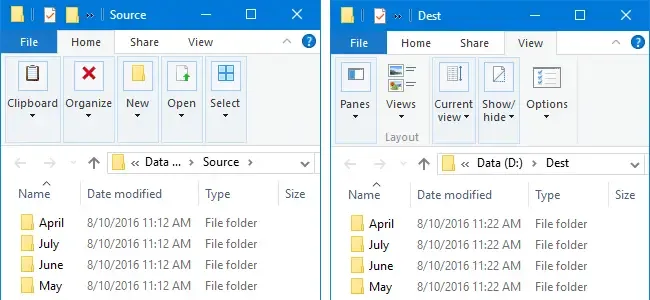
Winhelponline
Let's assume you made a backup task XCOPY, SyncToy or any other tool to mirror copy a certain directory to a different location. If you're using Microsoft SyncToy especially on Windows 10, it'
This might be helpful.
wet pike
heh yeah
I might just try to stick it in git on Azure DevOps since they offer unlimited space and see how that works because it would be less effort than having to do it manually like that
@iron dome are there any other folders besides the contents of Binaries that are needed but ignored by the default engine gitignore?
iron dome
Binaries, Config, Content, Plugins, Saved(maybe?) and Shaders.. I imagine those are the required folders. I'm not sure whcih are ignored by gitignore.
Same the structure for each plugin, too.
wet pike
Oof, and I thought I was just gonna put an exception for Engine/Binaries/Win64 into the gitignore...
:D
Is there seriously no actual method for doing this in a sane way, how do people get artifacts from build servers for this 🤔
iron dome
Better to scrap the gitignore and make oyur own, ignore */Intermediate/* etc
Or, at least, modify is significantly.
wet pike
Yeah, I'm looking at it and assuming the contents of Binaries is mostly what it needs, I can maybe just have an exception for DLL and UE4Editor.modules files which should grab the contents of binaries folders across the whole thing...
Plus the config and other stuff you mentioned
lol yeah looks like the buildgraph example script just.. doesn't copy Intermediates
:P
<!-- Copy all the files to the output directory -->
<Node Name="Tag Output Files" Requires="#ToolBinaries;#EditorBinaries;$(GameBinaries)" Produces="#OutputFiles">
    <Tag Files="#ToolBinaries;#EditorBinaries;$(GameBinaries)" Except=".../Intermediate/..." With="#OutputFiles"/>
</Node>
Engine\Build\BatchFiles\RunUAT.bat BuildGraph -Script="Engine/Build/Graph/Examples/BuildEditorAndTools.xml" -Target="Submit To Perforce for UGS" -set:EditorTarget=ArcGameEditor -set:ArchiveStream=//depot/SG-UGSEditor -p4 -submit
the editor buuild from it is around 400-700mb
youu can skip
p4 part
and just buuild editor
look at this BuuildGraph xml
wet pike
400-700mb? 🤔
thick storm
yeah for editor
not counting content
sec
currently my buuild is 850mb
with debuug symbols
youu can strip them from build if you want
wet pike
Oh really, that's interesting
I wonder why the binaries folder is almost 20gb for me then
maybe it's the debug symbols
wait nevermind you did say yours is 850mb with them...
pulsar kestrel
Live Coding patches?
wet pike
I don't think that's the case, I've only done recompileshaders 🤔
I think it's the PDB files but I'm not quite sure how inside has them but still sub 1gb

:D
thick storm
it's 850mb zipped
but then
unzipped is 2.7GB
maybe you are making
"installed build"
instead of per project ?
wet pike
Yeah I originally tried building this from UE4.sln
so maybe I should just clean the whole thing first
iron dome
Never build from that. You'll get a ton of useless shit.
wet pike
and then rebuild from my Game.sln
Yeah, GB pointed it out but I never cleaned the engine dir between switching to Game.sln :D
marsh tartan
Has anyone integrated Zstd compression method for packaging into UE5? I am having trouble to make UnrealPack load my Zstd Plugin : https://discordapp.com/channels/187217643009212416/402958499660955658/969973114354143272. It would great if anyone has done it before.
Discord
Discord is the easiest way to communicate over voice, video, and text. Chat, hang out, and stay close with your friends and communities.
wet pike
What does RunUAT need in terms of deps? I'm getting a bazillion C# errors trying to run it :P
dense kettle
thick storm
```
Engine\Build\BatchFiles\RunUAT.bat BuildGraph -Script="Engine/Build/Graph/Ex...
What is arcGameEditor target ?
thick storm
target of my project
 storm pier
I built UE5.1-Main from source successfully. I'm trying to port my UE5 marketplace plugins, but when I launch the editor I get these errors for all my ported plugins.
I suspect it might have something to do with .NET6.0 SDK (which I had to install to build the source). Maybe I installed it incorrectly. Or perhaps I'm missing some other visual studio component. I followed this guide to install .NET 6.0:
https://dotnetcoretutorials.com/2021/03/13/getting-setup-with-net-6-preview/#:~:text=If you build and you get the following,.NET 6 SDK installed. If not%2C install it.?msclkid=8a0e4c9cc77e11ecb9f622a259775d3c
Any ideas what's going on here and how to fix it?


In the coming months I’ll be covering the new features of .NET 6, including things like MAUI (Cross platform GUI in .NET), PriorityQueue, and so much more. So I thought it would be worth talking a little bit on how to actually get set up to use .NET 6 if you are looking to touch […]
hidden hedge
marsh tartan
Has anyone integrated Zstd compression method for packaging into UE5? I am havin...
Is there a reason to prefer zstd over oodle?
marsh tartan
We use zstd internally, that's the only reason. Technically though, oodle is pretty good in all aspect
marsh tartan
storm pier
I built UE5.1-Main from source successfully. I'm trying to port my UE5 marketpla...
You should use the .net 6.0 come with the engine source?
under UnrealEngine\Engine\Binaries\ThirdParty\DotNet\6.0.200\windows
storm pier
marsh tartan
under UnrealEngine\Engine\Binaries\ThirdParty\DotNet\6.0.200\windows
ohhh shoot. I wonder if it has any differences from the version I downloaded from microsoft's website. I had no idea this was in the third party folder. Thanks for pointing that out!
 versed rapids
Anyone having crash on launch with the RiderSourceCodeAccess plugin?
 meager vale
whats the difference netweet plugins and open source ?
iron dome
That's like asking the difference between apples and yoga.
meager vale
are there things you can add or things you can change about the engine with the source code, but not with plugins ?
iron dome
Absolutely.
Quite a lot of stuff.
There's also quite a lot of stuff that you can change with plugins, but to make simple, small changes, it would involve copying entire engine modules and putting them in a plugin.
Because the thing you want to change is a small part of a private module that isn't dynamic.
Pick your battles.
meager vale
i dont understand
so you can do more things with the source code within the engine then with plugins
am I right ?
meager vale
can you name a few ?
things that you can change to the engine with the source code but not with plugins
can you name a few please ?
iron dome
The level editor selection system?
A lot of things are hard coded when it comes to the level editor.
meager vale
but i have seen plugins that can do this
iron dome
Do what, specifically?
meager vale
like change how the selection gos
iron dome
You can react so selection changes, sure, but is it changing the underlying selection system?
iron dome
Tbh, I work a lot more with the editor than anything else, so I'm not sure of any examples to do with game projects.
meager vale
so are there features you can add with the source code and not a plugin ?
yea im new to this
iron dome
Probably not extra features that need source build. It depends how they integrate with the engine.
meager vale
ok tysm
nova sleet
Generally the engine is pretty extendable, there are a lot of points in the engine for your plugin to hook into
But there are also a lot of things that are hard coded and a plugin can't do anything about it
meager vale
but adding features ?
iron dome
It depends on the feature...
meager vale
ok thank you
 surreal meadow
What are the requirements to have my modified C++ plugin code included in the unity file? I'm getting [Adaptive Build] Excluded from OnlineSubsystemSteam unity file: OnlineSessionAsyncLobbySteam.ccp
 olive basin
I'm building 5.0.1 from source and I get complaints that it can't find Houdini engine (namely: Houdini Engine : Houdini 18.5.532 could not be found. Houdini Engine will not be available in this build.) but the issue is I have the exact version installed with manually copied plugin folder too (to Engine/Plugins/Runtime) - still, it seems not to be able to find it. Tried the new version but with no success. I just get the same error.
surreal meadow
Not sure what happened, but I checked in the code to my local git and deleted the temp folders in the plugin and now it seems like it's working.
 plain mulch
dunno why but i can't build my project anymore, there is simply no correct configuration.
i already try deleting intermediate, saved, regenerate project file, re-installing VS2017... nothing work, totally lost, someone have a clue ?
 heady sparrow
@thick storm Get excited! New weird plugin just dropped https://github.com/EpicGames/UnrealEngine/tree/ue5-main/Engine/Plugins/Runtime/GameplayStateTree
GameplayStateTree!!
seems to extend UBrainComponent
this appears to be how you could run regular actor AI through StateTree?
thick storm
it was always here, just in StateTree plugin :
thick storm
but

this is interesting
seems like another restricted plugin not yet published ;d
thick storm
what is nice is, since the AI team growed to 7 people
heady sparrow
I cannot believe it was one guy for years
thick storm
we get a lot of gameplay related generic things : D
heady sparrow
that is just nuts
wet pike
7 AI people? I sure hope they fix some of the really confusing design decisions in EQS
wet pike
Is it going to convert all of its parameters to float like EQS does? 
thick storm
i don't even know when it will be ready : D
 zenith ridge
nvrtx branch for 5.0 is out now https://github.com/NvRTX/UnrealEngine/tree/nvrtx-5.0 has some improvements for rt shadows with nanite
I think ue5-main has an 'AvoidSelfIntersectionTrace' option for this already, will have to see how it compares
 wintry coral
I have been having a visual studio nightmare and I need some advice, basically I get these c1001 errors randomly if I try to build my project and or engine, sometimes it will build without the errors but 9 times out of 10 the error shows up
Has anyone had these issues, we are very scared getting so close to release and having to deal with c1001 error codes that are random
torpid echo
I just read this and it doesn't make sense. It's a primitive data type. there is no pointer/allocation, so why would it be garbage collected
 hidden hedge
where are you reading this? because for a primitive all it's doing is exposing it to the reflection system
and why did you post it here rather than in #cpp?
iron dome
torpid echo
I just read this and it doesn't make sense. It's a primitive data type. there is...
Whoever wrote that just made a mistake.
torpid echo
hidden hedge
where are you reading this? because for a primitive all it's doing is exposing i...
exposing for the reflection system makes sense
wet pike
wintry coral
Has anyone had these issues, we are very scared getting so close to release and ...
If this is with VS 2022, I've been told there is a compiler bug causing these. VS 2019 should be fine
I was getting it pretty reliably from IoStoreReaderImpl in 2022
 elfin badge
Has anyone gotten PreLoadScreenMoviePlayer to work? It causes the packaged game to hang at a black screen for me pretty often with nothing useful in logs
quick mica
For me it seems to work, how ever I had to do some tweaks to have the movieplayer work properly for my usecase of loading screens.
I can just suggest to look where the update loops for the loadingscreens are and set some breakpoints (not sure if the PreLoadingScreen endsup in the same code as the loadingscreen) and check what could cause the hang
elfin badge
Unfortunately it only happens in the packaged game so it's not the easiest thing to debug. I can add some logging but thinking this plugin is just not there yet
quick mica
hm you can also debug a packaged game, is it dev package or shipping?
elfin badge
Shipping, I'll throw together a dev build and check it out
quick mica
at worst add pragma optimize off on the code parts, if the optimization is too hard^^ (shipping builds do generate pdbs, right?)
hidden hedge
wet pike
If this is with VS 2022, I've been told there is a compiler bug causing these. V...
specific to 14.31.31103 toolchain
@wintry coral Install a more recent version of the toolchain from the Visual Studio installer or fallback on 14.29.30133 which is referenced as 'MSVC v142 - VS2019 C++ x64/x86 build tools (v14.29-16.11)' in the 'Individual Component' panel. UBT will automatically pick 14.29 or the most recent version if it's not present. Make sure to Clean your solution to avoid weird linking issues.
 keen nacelle
Hey guys, can I ask what some might be perceived as a stupid question. Its looking like I’m going to rebuild UE5 engine from source to collaborate on a project. Can someone give me an insight as to what benefits might be gained from straying from the production build of the engine and what ramifications might this have for the project later down the line.
Is this quite common practice? And would this mean any future updates from Epic would not be viable without some significant tweaking after each new release.
 dark spindle
keen nacelle
Hey guys, can I ask what some might be perceived as a stupid question. Its looki...
dark spindle
keen nacelle
Hey guys, can I ask what some might be perceived as a stupid question. Its looki...
Main benefit is if you're doing source code changes, or want the latest bleeding edge unstable version
Downside, everything else
hidden hedge
keen nacelle
Hey guys, can I ask what some might be perceived as a stupid question. Its looki...
it is pretty common for medium-large studios to use a source build
ramifications not much if you actually have a process to upgrade the engine, which will depend on the underlying source control you use
wet pike
Tbh unless you have a specific reason to do use a custom source build it seems like a gigantic waste of time lol
iron dome
It's nice if you want to compile on debug mode.
It's required for dedicated servers (apparently)
 full jewel
it's not really that bad of an investment, especially if you end up needing bug fixes from another branch
 lone scaffold
 noble sphinx
Hi i get an error when i try to load the Engine Folder with an error that is failed to load because it needs user input?
 wintry coral
I cant open my project anymore I get this error what are my options? Assertion failed: Module [File:C:/UE4/Engine/Source/Runtime/Core/Private/Modules/ModuleManager.cpp] [Line: 359]
AndroidDeviceDetection
wintry coral
do I need to rebuild my ENGINE again?
 lofty crow
First time building the engine and when I'm building the engine I get this "warning?" "Detected compiler newer than Visual Studio 2019, please update min version checking in WindowsPlatformCompilerSetup.h" Is it okay, or am I wasting my time building?
 normal vortex
any idea why chaos vehicle is in slow motion in ue5-main?
 small surge
normal vortex
any idea why chaos vehicle is in slow motion in ue5-main?
small surge
normal vortex
any idea why chaos vehicle is in slow motion in ue5-main?
wel it is not a production ready branch. Something is bound to break.
normal vortex
small surge
wel it is not a production ready branch. Something is bound to break.
after building scene it was fine
 warm rover
UE5 World Partition HLODs still won't work.
As it did not work in 5.0 and 5.0.1 I now movied to the main branch of UE5 on Github and tried the newest version. Still nothing. I build them, it closes with no message and I get holes in the Landscape while playing. Any ideas?
The 5.0 Source build crashed HLOD general with memory access violation
 small surge
normal vortex
after building scene it was fine
small surge
normal vortex
after building scene it was fine
oh
normal vortex
small surge
oh
first time i saw building fixed something tho

 cyan solar
Hey guys, after compiling unreal there is any file I can delete and use the engine okay? Like my engine is getting 300gigs but I am sure I dont need all this to run the project, so there is any file I can delete?
iron dome
Intermediate folder is generally not needed.
You can (technically) delete every pdb file if you don't want to debug anything. I'd advise against that, though.
 lament oracle
UE is throwing this weird error when trying to compile
---> System.FormatException: The input is not a valid Base-64 string as it contains a non-base 64 character, more than two padding characters, or an illegal character among the padding characters.
at System.Convert.FromBase64CharPtr(Char* inputPtr, Int32 inputLength)
at System.Convert.FromBase64String(String s)
at UnrealBuildTool.EncryptionAndSigning.ParseCryptoSettings(DirectoryReference InProjectDirectory, UnrealTargetPlatform InTargetPlatform) in D:\UE_Edge\Engine\Source\Programs\UnrealBuildTool\System\EncryptionAndSigning.cs:line 324
at UnrealBuildTool.TargetRules..ctor(TargetInfo Target) in D:\UE_Edge\Engine\Source\Programs\UnrealBuildTool\Configuration\TargetRules.cs:line 1648
at PHSQTarget..ctor(TargetInfo Target) in D:\UE_Edge\PHSQ\Source\PHSQ.Target.cs:line 10
--- End of inner exception stack trace ---
at System.RuntimeMethodHandle.InvokeMethod(Object target, Object[] arguments, Signature sig, Boolean constructor, Boolean wrapExceptions)
at System.Reflection.RuntimeConstructorInfo.Invoke(Object obj, BindingFlags invokeAttr, Binder binder, Object[] parameters, CultureInfo culture)
at System.Reflection.MethodBase.Invoke(Object obj, Object[] parameters)
at UnrealBuildTool.RulesAssembly.CreateTargetRulesInstance(String TypeName, TargetInfo TargetInfo) in D:\UE_Edge\Engine\Source\Programs\UnrealBuildTool\System\RulesAssembly.cs:line 585``` agile storm
Hi there, how can i fix ue4 editor engine.pdb not loaded crash?
wintry coral
I have been getting these weird crashes on ue4.27.2 anyone know how to fix it?
Assertion failed: Module [File:C:/UE4/Engine/Source/Runtime/Core/Private/Modules/ModuleManager.cpp] [Line: 359]
AndroidDeviceDetection
 wintry coral
I just rebuilt, it works now but why do things like this happen?
stable hemlock
Is it possible to make an engine plugin out of a code change for a built-in class? I'd like to modify one of the classes, but instead of requiring a full engine replacement with a custom build, I want to be able to give an engine plugin to the art team so they just put it in and forget about it. Can I do it?
stable hemlock
cyan solar
Hey guys, after compiling unreal there is any file I can delete and use the engi...
I think you can delete these too .

 cyan solar
Thank you all. Will try it. I hope I dont f everything
stable hemlock
cyan solar
Thank you all. Will try it. I hope I dont f everything
Don't remove Extras maybe 😛
cyan solar
I've removed Samples as well
stable hemlock
Yeah, keep in mind you'll miss samples. (obviously)
DDC, Intermediate and Saved are all recreated. You can also rebuild binaries too, but, it's a bit tricky if you don't get around it easily.

 wooden shadow
Anyone know which is the 'easiest' material pin to hijack (primarily on the default_lit shadingmodel) to pass custom data through the gbuffer to a PP scenetexture? Been trying it with subsurface color but following the data flow through the code is extremely painful and there are a million shading model-specific checks along the way so I haven't managed to get it working yet. It doesn't have to be a float3, can just be float.
 nocturne mantle
hello there! Not sure if this is the proper channel for my question, but here it is:
I have a button mashing mechanic that works great on a small, testing map. Once I open the big map with lots of actors and systems functioning, the button mashing sometimes fails to detect gamepad inputs. On keyboard it still works fine, but when using gamepad, it becomes much more difficult since it detects between 50 and 75% of the button inputs. Any idea what could be causing that problem?
 runic olive
normal vortex
😳
runic olive
normal vortex
😳
*crying in 2mb/s
 pallid osprey
hey guys
having problem compiling 4.27 from source with VS 2022, hitting a variety of errors
 sand bluff
warm rover
UE5 World Partition HLODs still won't work.
As it did not work in 5.0 and 5.0.1...
sand bluff
warm rover
UE5 World Partition HLODs still won't work.
As it did not work in 5.0 and 5.0.1...

 runic comet
Hey there I need to check that an FString property being edited in a DataAsset meets certain requirements, I can't seem to find a way to get the value of such property, any help would be appreciated.
bool UADSCubeSetId::CanEditChange(const FProperty* InProperty) const
{
    // If other logic prevents editing, we want to respect that
    const bool ParentVal = Super::CanEditChange(InProperty);


    if (InProperty->GetFName() == GET_MEMBER_NAME_CHECKED(UADSCubeSetId, ConnectionRules))
    {
        return ParentVal && InProperty-> // This property (FString) is part of an array, I need to check its length is 8 Char Max and it's only numeric values
    }
}

#endif // WITH EDITOR```
Is there anywhere in the source code I can check to understand how the Uproperties values are accessed?Is it a member of that class you've just pasted source code from?
runic comet
I took the first bit from it to check the property changed was the right one
{
    UStruct* OwningStruct = PropertyChangedEvent.PropertyChain.GetTail()->GetValue()->GetOwnerStruct();

    if (OwningStruct)
    {
         for (TFieldIterator<FProperty> It(FADSCombinationRule::StaticStruct()); It; ++It)
                {
                    FProperty* Property = *It;
                    FString VariableName = Property->GetName();
                    if (VariableName == TEXT("CombinationString"))
                    {
                        FString* StringValue = Property->ContainerPtrToValuePtr<FString>((void*) OwningStruct);
                        if (StringValue)
                        {
                            ADS_RUNTIME_LOG(Warning, TEXT(" %s"), StringValue);
                            break;
                        }
                    }
            }
I tried in PostEditChangeChainProperty since the property is within a struct and the struct is part of a TArray but I get a rubbish value there
quick mica
runic comet
Hey there I need to check that an FString property being edited in a DataAsset ...
If the string always need to fulfil certain criteria and is part of a UStruct, I'd just implement an details customization, or how it's called for structs, as you then have the full control.
What I don't see is how this should work with the CanEditChange, as it doesn't seem to provide you the actual value that will be written.
For the IPropertyTypeCustomization approach you basically just would need to create a STextBlock and hook into the OnVerifyTextChanged
bool FMyCustomization::OnVerifyTextChanged(const FText& Text, FText& OutText) const
{
    if (Text.ToString(). /*...*/)
    {
        static const FString ErrorMessage = TEXT("Nice error message.");
        OutText = FText::FromString(ErrorMessage);
        return false;
    }
    return true;
}
Thank you, great idea 👍
 coarse canyon
Anyone gotten a stable build from ue5-main recently?
 cyan grotto
I added new trace channel, in which file it saves it?
after I upload changes to perforce other team members that get latest revision don't have the new trace channel, can someone explain why?
hidden hedge
coarse canyon
Anyone gotten a stable build from ue5-main recently?
there is never an expectation of a stable build from the main branch. if you need something from it, I would suggest just cherrypicking it
 inland steeple
hi, please tell me what a Unreal File Server is needed for in general? I have 4.27 from the source, and unreal file server causes me an error, I'm in a hurry to look at it, but I would like to know, it is somehow connected with multiplayer games. I didn't find any information on the network what it is
thick storm
coarse canyon
Anyone gotten a stable build from ue5-main recently?
depends what you mean, current one compiles at least 😄
coarse canyon
I've had that in the past, cant remember what caused it or how I fixed it.. but it was a local problem 🙂
coarse canyon
thick storm
depends what you mean, current one compiles at least 😄
yeah mostly that 🙂 I'm currently on a ue5-main build from around mid-march and have a couple showstoppers I need fixed. But fully expect some fresh problems along with my fixes 😄
I didnt need to when I came across this... it was a few months ago actually
 lethal leaf
geez is source code seriously over 200gb?
dark spindle
Source code isn't, but a small engine build is, yeah
300-400 with all tools and a few different targets
stable hemlock
I'm trying to extend the editor's viewport toolbar. I can only find examples on how animation editor application modes do this. But I can't find a way to add a button to the viewport without making a new App Mode. Does anyone have a hint on how I could do this?
lethal leaf
dark spindle
Source code isn't, but a small engine build is, yeah
ah my misinterpretation
FIrst time building the engine frome code
Here is where i am at........
i believe i am 95% the way to finish...or was... I got to 5390 / 5841
at the very last step before opening the engine, i got to this image. almost finished when i ran out of memory because my uninstallation of almost everything miscelaneous was not fast enough
have now experienced a fatal error on memory and i cannot break my code as it just hangs at "4>[5476/5841] Link UnrealEditor-DataCharts.dll
4>LINK : fatal error LNK1201: error writing to program database 'C:\Users\LaPyRa\Documents\UnrealEngine\Engine\Plugins\VirtualProduction\DataCharts\Binaries\Win64\UnrealEditor-DataCharts.pdb'; check for insufficient disk space, invalid path, or insufficient privilege
"
i cannot close VisualStudio because i need to break the code. but i cannot break the code as it is not responding
its 320am here. i am not sure what to do. google isn't pulling much up and i am seriously concerned to force quit as this is my first time and i don't know if i have to wait another 3 hours of if it salvages from where it left off

 dark spindle
"check for insufficient disk space" it says
Alternatively, make sure C:\Users\LaPyRa\Documents isn't under OneDrive, for example
lethal leaf
dark spindle
Alternatively, make sure C:\Users\LaPyRa\Documents isn't under OneDrive, for exa...
no onedrive. i never use onedrive
basically i had to constantly remove things off my C Drive
Had i known it would be well over 200gb i would have prepared properly
it was honestly like a race
thank you for replying btw
dark spindle
Yeah you need >300GB for a full build with tools. If you're just going to use it for a single project, you can start fresh and not compile the UE5 solution
Instead, just associate your C++ project and compile your project solution
heady sparrow
yeah, compiling from a project context = less pointless plugins
dark spindle
It'll be like 150 to 200GB depending on used plugins
Only works for C++ projects though
(and won't have the project launcher etc)
lethal leaf
so i just pulled the Main-UE5 branch because I need the high quality reflections on translucency
that is all i need
dark spindle
I would argue strongly against using main since you will likely not be able to switch to a regular engine release for 6 months, if ever
heady sparrow
yeah, backporting is mostly impossible with assets
the C++ code will mostly survive though
there was one crazy guy on her still on the early access preview
dude was too scared to upgrade to release
lethal leaf

Added today in UE5-Main branch, High Quality Lumen Reflections on Translucent Surfaces!
Activated under Reflections in the post process volume, Here you can see the High vs Default setting.
Great stuff! #GameDev #UE5 #UnrealEngine #UnrealEngine5 #Shader
Likes
307

 Twitter
·
Twitter
·

this is what i need.
dark spindle
Okay, sure
heady sparrow
good luck finding a stable commit I guess
lethal leaf
here is context
dark spindle
We're just saying, be mindful that this is a one-way trip for your project
And that 5-main could simply not work (or not compile)
lethal leaf
heady sparrow
good luck finding a stable commit I guess
that is fine. i had an issue where i wasn't able to free up memory for install fast enough
but what i need to know is if the compiling step in visual studio is salvagable? or do i need restart the git process and delete the entire content
dark spindle
Just just keep removing stuff and restart the build
Do note that you'll need a lot more space yet for shaders
lethal leaf
like can i just rebuild code and it read the 5394 steps out of 58xx
dark spindle
Personally I would only use source builds with 1TB free for project+source
stable hemlock
if you don't want to distribute the engine, just compile your game project
dark spindle
Yeah we've said it already
heady sparrow
have the git reset and the re-run the setup.bat if you are really worried it's corrupted
sometimes I have had to nuke plugin binaries on a bad build
 weary tangle
does this finally solve horrible ages long screen space reflections on water too? Water using screen space has been so horrible that eyes pop up😆 when looking down on water.
dark spindle
weary tangle
does this finally solve horrible ages long screen space reflections on water too...
Probably not
lethal leaf
stable hemlock
if you don't want to distribute the engine, just compile your game project
all i need to do is render the high quality translucent shaders in Movie Render Queue
Added today in UE5-Main branch, High Quality Lumen Reflections on Translucent Surfaces!
Activated under Reflections in the post process volume, Here you can see the High vs Default setting.
Great stuff! #GameDev #UE5 #UnrealEngine #UnrealEngine5 #Shader
Likes
307
Twitter
·
dark spindle
lethal leaf
all i need to do is render the high quality translucent shaders in Movie Render ...
FWIW if you're doing MRQ, just use raytracing
UE4 is good enough for that
lethal leaf
heady sparrow
have the git reset and the re-run the setup.bat if you are really worried it's c...
Ok so at the least i can remove and start back at ./Setup.bat
thank you so much, ya
dark spindle
Lumen is meant for real-time, if you're doing movies you can get much better quality
heady sparrow
nice to have that quick feedback I guess
lethal leaf
dark spindle
FWIW if you're doing MRQ, just use raytracing
I would use Pathtracing personally and may just do that
dark spindle
Yeah, or that
lethal leaf
but i wanted it to be entirely lumen and ue5
dark spindle
Lumen has worse quality so why?
lethal leaf
Lumen is better than raytracing for this scene, i have tried to dial RT in but i just dont like it. I can take comparison shots for you if youd like to see
it is the City Sample
Pathtracing is best but isn't optimized in CitySample and much of the city breaks
dark spindle
City is dedicated to Lumen
lethal leaf
makes sence
weary tangle
dark spindle
Probably not
Well this would be bummer as SSR on water is most horrible thing ever, it is so nasty to look on water because of that. Maybe i am wrong, but is 5.1 supposed to have Lumen reflections on water?
dark spindle
weary tangle
Well this would be bummer as SSR on water is most horrible thing ever, it is so ...
Nobody knows what 5.1 does tbf
lethal leaf
weary tangle
Well this would be bummer as SSR on water is most horrible thing ever, it is so ...
thatd be nice
so ii hit rebuild on the project
4>Build succeeded.
4> 0 Warning(s)
4> 0 Error(s)
4>
4>Time Elapsed 00:00:01.67
4>Cleaning UnrealEditor, ShaderCompileWorker and UnrealHeaderTool binaries...
4>Using bundled DotNet SDK
4>Log file: C:\Users\LaPyRa\Documents\UnrealEngine\Engine\Programs\UnrealBuildTool\Log.txt
4>Using 'git status' to determine working set for adaptive non-unity build (C:\Users\LaPyRa\Documents\UnrealEngine).
4>Creating makefile for UnrealEditor (no existing makefile)
oh sheesh it is only doing 72 now
and somehow i went from 8.5gb to 85
ahhhhhhhhhhhh ok it is recompiling all 5742 over
but hey that still saves a few hours
hoping this is good
THANK YOU all for jumping in seriously i appreciate that and idk what i should do to say thank you or be there in return,
but i will message a bit later if it works or not after the 5742 compile
coarse canyon
Fyi, if anyone cares. Ue5-main source build from yesterday is quite stable. No major bugs so far
stable hemlock
Is it possible to provide my artist with a plugin that would act as a replacement of a built-in class like Character? Motivation is to avoid custom engine build, but make it something compatible with regular releases.
dark spindle
Very
stable hemlock
coarse canyon
Fyi, if anyone cares. Ue5-main source build from yesterday is quite stable. No m...
Isn't it a continuous commit stream with no milestoned releases?
stable hemlock
dark spindle
Very
Which of the comments is this an answer to? Mine or Siggi's? 😛
dark spindle
stable hemlock
Which of the comments is this an answer to? Mine or Siggi's? 😛
Yours. Copy that character into a project plugin - or project sources directly.
stable hemlock
As a plugin, wouldn't that fail with class redefinition on project compile?
dark spindle
You would indeed need a rename
The only potential problem is if other engine features that you use depend explicitly on the original class
stable hemlock
Ah yes, and he would need to use my class, not the original, right?
I was hoping for a way to replace it, like with virtual classes I can easily override.
dark spindle
You can override methods, but if you need more than that you have to either edit the source or copy all of the classes needing modifications to your projects (under a different name)
As long as you're not trying to do it for say, Pawn itself, it'll be fine
stable hemlock
Yeah, so, seems easier to modify, rebuild and distribute. Annoying is I can't download marketplace plugins to such an engine. It's invisible to the Launcher.
dark spindle
You would put plugins under the project anyway
So that they're transparently shared with source control
stable hemlock
Thanks
heady sparrow
I have als-cpp running in 5
just spammed double casts everywhere
is it working completely? unsure
normal vortex
5 means from launcher?
coarse canyon
stable hemlock
Isn't it a continuous commit stream with no milestoned releases?
Yes, and on occasion the branch is completely broken and doesnt work at all
 soft zinc
quick question - looking at some skinning things in the HLSL and Im a bit unfamiliar with row/column major order in HLSL.
If I have a transformation matrix (float4x3, specifically the FBoneMatrix) and I want to extract the scale factor, do I need...
float Sy = length(thisMatrix[1]);
float Sz = length(thisMatrix[2]);
float3 scaleFactor = float3(Sx,Sy,Sz);```
or
```float Sx = length(float3(thisMatrix[0].x, thisMatrix[1].x, thisMatrix[2].x));
float Sy = length(float3(thisMatrix[0].y, thisMatrix[1].y, thisMatrix[2].y));
float Sz = length(float3(thisMatrix[0].z, thisMatrix[1].z, thisMatrix[2].z));
float3 scaleFactor = float3(Sx,Sy,Sz);```
?in this case it was both a binary build and a source build
still, don't take my word for it
there might be things busted I can't see
 ornate rose
Guys, any news on nanite foliage and Lumen reflections?
normal vortex
ornate rose
Guys, any news on nanite foliage and Lumen reflections?
nanite works on main but no performance changes
reflection works nice
on tranparency surfaces
 lime mulch
I`m having this too because i updated visual studio
ornate rose
normal vortex
nanite works on main but no performance changes
nanite foliage works on main? Has there been any improvements with wpo for nanite foilage?
normal vortex
ornate rose
nanite foliage works on main? Has there been any improvements with wpo for nanit...
idk if there is improvments. but wpo works anyway.
ornate rose
normal vortex
idk if there is improvments. but wpo works anyway.
Thats really good news. Might have to grab a build. But I am hearing its really not very stable atm.
normal vortex
same crash count as released version tho
so very minor
but reflection in transperency surfaces is why i downloaded it
ornate rose
Ok. Will definitely download a build now. But if the next ue5 version is released. Will a project done with the build be transferable to the official release version. I heard something about some builds not going to work.
coarse canyon
ornate rose
Ok. Will definitely download a build now. But if the next ue5 version is release...
Nanite grass with WPO wind has apparently been working for some time 🙂
https://www.artstation.com/artwork/5BbdlO
coarse canyon
ornate rose
Ok. Will definitely download a build now. But if the next ue5 version is release...
Stuff done in a build on ue5-main will work with the 5.1 release once that comes out. It will not work in the current 5.0 release.
thick storm
I honestly wish we will get some dedicated foliage path
something as optimized for foliage
as nanite is for more opaque meshes
ornate rose
coarse canyon
Nanite grass with WPO wind has apparently been working for some time 🙂
https://...
Yeah, I have seen that vid. I was wondering if there has been further improvements since then 🙂
coarse canyon
I think we'll get more for that iniside.. I think there might be a whole new landscape system in the works behind the scenes.. or maybe that's just wishful thinking on my part 😄
thick storm
last thing i saw was LandscapePatch to modify landscape at runtime
i guess lotta survival games needed that 😄
ornate rose
coarse canyon
Stuff done in a build on ue5-main will work with the 5.1 release once that comes...
Ok. Thanks. Will probably look into using nanite foilage with no wind for the time being. At least I don't have to worry about drawcalls, and overdraw issues.
coarse canyon
thick storm
i guess lotta survival games needed that 😄
Im working on an open world survival game, and I'm probably going voxels 🙂 it will have its challenges yes, and wont be able to benefit from World Partition as much
thick storm
Voxel Plugin + World Partition for everything else (static that is) is perfect match
coarse canyon
aye, but I'm probably going to have to customize WP cells in some way.. I dont want the harvestable rocks to pop back up in the distance 😄
most or all things in the world are dynamic in some way
thick storm
probabaly the esieast thing is to excluded them from HLOD
but if most things are generated I guess "harvastebles" cloud be as well ? and just let some spawner manage their lifetimes ?
lethal leaf
Severity Code Description Project File Line Suppression State
Error Could not find definition for module 'MegascansPlugin', (referenced via default plugins -> Bridge.uplugin) UE5 C:\Users\LaPyRa\Documents\UnrealEngine\Engine\Intermediate\ProjectFiles\UnrealBuildTool 1
Error MSB3073 The command "....\Build\BatchFiles\Rebuild.bat -Target="UnrealEditor Win64 Development" -Target="ShaderCompileWorker Win64 Development -Quiet" -WaitMutex -FromMsBuild" exited with code -1. UE5 C:\Program Files (x86)\Microsoft Visual Studio\2019\Community\MSBuild\Microsoft\VC\v160\Microsoft.MakeFile.Targets 51

is there any good way of fixing this?
in trying to purge memory i tried getting rid of megascans files as i hadn;t used them. and installed bridge
guessing somehow removed it from the actual repository file
any suggestions?
or do i need to redownload the repository?
lethal leaf
coarse canyon
Fyi, if anyone cares. Ue5-main source build from yesterday is quite stable. No m...
ok So i am just restarting the process.
managed to break a lot and think a fresh start is necessary
is this the UE5 Main Source that is stable?
https://github.com/EpicGames/UnrealEngine/tree/ue5-main
and can i just clone this repo directly?
or do i need to download the main repo and use the Branch/Tag git function to identify the Main?
coarse canyon
lethal leaf
ok So i am just restarting the process.
managed to break a lot and think a fres...
Im currently on this exact sha, you can sync your git repo to that if you want
https://github.com/EpicGames/UnrealEngine/commit/b1055029db17edeb37f3a98f306008b074b5f80c
lethal leaf
coarse canyon
Im currently on this exact sha, you can sync your git repo to that if you want
h...
thank you!
this whole thing makes me realize i am still a noob with code...
i ended up clearing what i had and am redownloading now on a fully cleared harddrive
is syncing my git repo where i select the branch/tag?
 granite elbow
Hi there~ ,what is the actual difference between
SimpleConstructionScript and Instance
in EComponentCreationMethod ?
It looks like both are from Component section?
UENUM()
enum class EComponentCreationMethod : uint8
{
    /** A component that is part of a native class. */
    Native,
    /** A component that is created from a template defined in the Components section of the Blueprint. */
    SimpleConstructionScript,
    /**A dynamically created component, either from the UserConstructionScript or from a Add Component node in a Blueprint event graph. */
    UserConstructionScript,
    /** A component added to a single Actor instance via the Component section of the Actor's details panel. */
    Instance,
};
well friends i believe i got it


 lethal leaf
i don't get it. i followed everything perfect this time, I had zero failed issues when compiling in visual studio
but now it is getting locked out on line 349
higher quality screenshot

i tried going to the documentation to understand ERHIAccess, tho i do not get what is going on
https://docs.unrealengine.com/4.27/en-US/API/Runtime/RHI/ERHIAccess/
lethal leaf
is THIS what i am running into?? as per the readme
"Most active development on UE5 happens in the ue5-main branch. This branch reflects the cutting edge of the engine and may be buggy — it may not even compile. We make it available for battle-hardened developers eager to test new features or work in lock-step with us."
iron dome
granite elbow
Hi there~ ,what is the actual difference between
`SimpleConstructionScript` and...
One is from the blueprint editor, the other is from the details panel
coarse canyon
lethal leaf
is THIS what i am running into?? as per the readme
"Most active development on ...
You really should not be using the ue5-main branch unless you have a very good reason to do so, and are comfortable with dealing with common problems there.
small surge
how far is 5.1?
lethal leaf
coarse canyon
You really should not be using the ue5-main branch unless you have a very good r...
thank you!
i ended up getting it working !!
turns out the main repo was unstable but i rolled back to a build from 5/11 that someone said was stable and it is workin relatively well now!
 mint portal
full jewel
mint portal
full jewel
SM6 is also completely broken on main right now with my 6800xt. which as far as i can tell was required for nanite currently
thick storm
you managed to even get the shaders to compile ? 😄
full jewel
seemed like it, but they also have that on demand compilation now so eh
iron dome
I can also report that my 6800 XT falls over in the editor.
ornate rose
I am trying to download from github, Is there a way to pause and resume download when building from github?
 light verge
having troubles with Visual Studio 2019, says incompatible but I've included all required plugins under the Game Development C++ button, and made sure I followed the documentation. If anybody knows a potential cause any input would be great, thanks!
(I'm using the release branch)

I also have this for reference just in case

 wispy relic
light verge
I also have this for reference just in case
wispy relic
light verge
I also have this for reference just in case
Are you using Win10 or 11?
ornate rose
What git command do you use to update your repository if you have downloaded it before and rebuild?
Thanks. I know. My internet keeps cutting off. I downloaded like 2.9 gb of the repository and it cut off and restarted again. So I might use the pull to update the initial folder. I kept copying and saving the folder to another directory at intervals so in case it cuts off, I can replace it. The folder gets automatically deleted when the internet cuts off.
the destination folder when using git clone which is the .git folder. I am a source builder noob. If the internet cuts off, the folder gets automatically deleted.
I don't understand. Sorry. You mean it will download small parts of the clone and save them?
Ok. Thanks a ton.
light verge
wispy relic
Are you using Win10 or 11?
win10
light verge
would like to rebump this, seems like the fix is most likely a simple one
#engine-source message
hidden hedge
light verge
would like to rebump this, seems like the fix is most likely a simple one
https:...
Though why are you using VS2019 over the vastly superior VS2022?
Though you might see that if you’re opening a project designed for a later VS version too since I’m sure the error is different if you don’t have the workflows installed
light verge
hidden hedge
Though why are you using VS2019 over the vastly superior VS2022?
hmm didn't know 2022 was superior, good to know. I will try it out and see how it goes, was following the instructions on the github source, thanks for the input!
light verge
wow, got to my desktop, opened it with VS2022, and immediately i have the option to build it. will hope it works out now 😄 ik it takes a while for this step
light verge
so I right clicked Engine/UE5 and hit build, after that finished I hit F5, can't tell if this green/white bar is a progress bar because it says "Ready" on the bottom left, and all the drop downs on the top is grayed out/not clickable.
solved

 upbeat karma
what are the new features in version 5.1?
dark spindle
upbeat karma
what are the new features in version 5.1?
We'll know when it releases. Should have masked opacity & WPO for Nanite, some Lumen improvements w/ translucency
upbeat karma
hmm I see
I just notice so many people using 5.1 already
makes me think if I'm missing out on something 🤔
dark spindle
No one is using 5.1, people are using source builds with features that may be included in 5.1
upbeat karma
yea thats what I mean
lots of people are already building from source
so I was wondering if there are some big features that make people do this instead of sticking to 5.0.1
dark spindle
There are many reasons for source builds so many teams do it - dedicated servers, custom changes to the engine, preview of features that aren't debugged completely, etc
Just need 500GB and a few hours
upbeat karma
oh I see
wait I was actually thinking about doing a game with dedicated servers in the future, I have to compile the source myself for that?
dark spindle
upbeat karma
wait I was actually thinking about doing a game with dedicated servers in the fu...
Yeah
heady sparrow
it's not so bad if you have a decent pc
upbeat karma
yea I think that wont be a problem, I got a ryzen 3700x and 32gb of ram
was just thinking about setting up the dev environment just to be able to compile with any errors/issues, thats probably going to be painful
dark spindle
upbeat karma
damn, that will probably not be very fun
Dedicated server isn't for fun, it's normally for fairly high budget games since it only makes sense for higher player counts
upbeat karma
yea I know theres other options but I'd like to give people the ability to host their own servers like minecraft for example
heady sparrow
just remember to have a lot of disk space for the build
full build can be like 300gb
light verge
upbeat karma
was just thinking about setting up the dev environment just to be able to compil...
thats what im doing right now and im on day 4 lol, making progress in figuring it out though 😅
upbeat karma
yea I think that is the hardest part for sure
setting up the build environment with right dependencies and versions
light verge
yea, I've done it 5 times now bc I keep messing something up and I've pretty much memorized the steps by now lol
upbeat karma
yea atleast you get some practice in if you have to do it in the future again I guess
light verge
true, random info always comes in handy at random times
light verge
update:
After right click building the UE5 file, this loading bar on the bottom does seem to be progressing. Is it going through a process that can take overnight? Not sure how long this step usually takes

 fiery vault
Anyone knows, which source folder the main editor icon is located in?
ornate rose
I found a way to pause and resume downloading from git. The internet kept cutting for some reason. I kept saving the git folder to another directory so windows shell doesn't delete the folder if the internet cuts (why does that happen though? The folder supposed to remain there) When I want to resume, I replace the folder, and use git pull and the download resumes.
Ok. Thanks for the info. I am glad I can build now without any issues. Even with using git filter, the damn internet was having issues. A nice workaround for pause and resume.
ornate rose
fiery vault
Anyone knows, which source folder the main editor icon is located in?
Engine>Binaries>Win64?
fiery vault
ornate rose
Engine>Binaries>Win64?
You mean the ones embedded in the binaries?
ornate rose
fiery vault
You mean the ones embedded in the binaries?
Are you looking for the editor.exe or the icon?
fiery vault
For the icon that it uses.
ornate rose
fiery vault
For the icon that it uses.
I wouldn't know. Sorry. 🙂
fiery vault
Thanks anyway 🙂
 quick crystal
Have any commits come out since the official 5.0 release that have fixed the animation mapping not carrying over root motion?
*animation retargeter
 livid fiber
Guys, trying to clone Unreal but get empty folder after and no commits. Does anybody know why this might happen?
 livid fiber
iron dome
Maybe just try "git pull"
livid fiber
iron dome
Maybe just try "git pull"
I tried. It started to download everything again and after couple hours empty folder again..
iron dome
Does the master branch even exist?
iron dome
Try going to a branch that exists.
livid fiber
Yeah, I've tried. No such branch
I'm trying to do a shallow clone in different folder now, see if it helps
Yeah, looks like shallow clone into different folder does help.. But now I do not know which one helped
iron dome
Lol
ornate rose
when I enter git branch I see only master no other branches
ornate rose
Is there a way to just install ue5 main directly instead of downloading the whole repository first?
dark spindle
ornate rose
Is there a way to just install ue5 main directly instead of downloading the whol...
You don't install main, you download the repo, and then you download the dependencies, and then you compile it
If you intend on never updating ever, you can download a zip of the files from a specific branch on Github (but then if it fails to compile you have to start over from scratch)
proper hull
Was anyone able to build 4.27.x with VS2022 only? By only I mean "take a fresh Windows machine, install git, use VS2022 installer to install some components (which? it's not documented anywhere), then proceed the usual build procedure. I start to think it just doesn't work: https://github.com/adamrehn/ue4-docker/pull/253#issuecomment-1126097780
Running AutomationTool...
Parsing command line: BuildGraph -target="Make Installed Build Win64" -script=Engine/Build/InstalledEngineBuild.xml -set:WithDDC=true -set:HostPlatformOnly=true -set:VS2022=true -compile
[ue4-docker build] [2022-05-13 14:10:25] [Available disk: 805.93 GiB] [Available memory: 26.67 GiB physical, 5.00 GiB virtual] [CPU usage: 21.60%]
Dependencies are out of date. Compiling scripts....
...
[C:\UnrealEngine\Engine\Source\Programs\DotNETCommon\DotNETUtilities\DotNETUtilities.csproj]
       CSC : error CS1617: Invalid option '6' for /langversion; must be ISO-1, ISO-2, 3, 4, 5 or Default [C:\UnrealEngine\Engine\Source\Programs\UnrealBuildTool\UnrealBuildTool.csproj]
       (see C:\UnrealEngine\Engine\Programs\AutomationTool\Saved\Logs\Log.txt for full exception trace)
Components we've already tried:
Microsoft.Net.Component.4.6.2.TargetingPack + Microsoft.Net.Component.4.8.SDK
Microsoft.Net.Component.4.6.2.TargetingPack + Microsoft.Net.Component.4.8.SDK + Microsoft.Net.ComponentGroup.4.6.2.DeveloperTools
Microsoft.Net.ComponentGroup.4.6.2-4.7.1.DeveloperTools
Microsoft.Net.Component.4.6.2.TargetingPack + Microsoft.Net.ComponentGroup.DevelopmentPrerequisites
 gritty hill
negative
If you build engine from source, then use the Epic Launcher to update it, will it become a 'regular' build? e.g. should I build updates from source instead of using the launcher? I am not seeing any new plugins in my existing project, but they are shown in a new project, and I see they have different Engine Associations in the .uproject file...
mmm, if I change the version from {08A5A4D7-44F8-677F-204C-FFA704AFF6B5} to 4.26 it wants to rebuild the project to a 'newer' version (actually the same, current version afaik... .... ....?)
gritty hill
ah, I forgot that my source build is in a different directory and got confused, nvm :p
ornate rose
dark spindle
If you intend on never updating ever, you can download a zip of the files from a...
Ok. Thanks for the heads up 👍
I am getting this issue while trying to open ue5.sln with Visual studio 2022 . Is ue5 using framework 4.5?

Should I update to framework 4.8?
full jewel
i haven't had any problems doing so yet, otherwise you need to install the older version
proper hull
ornate rose
I am getting this issue while trying to open ue5.sln with Visual studio 2022 . I...
Just read the source. Yes, that particular project uses .NET 4.5: https://github.com/EpicGames/UnrealEngine/blob/ue5-main/Engine/Source/Programs/MemoryProfiler2/MemoryProfiler2.csproj#L26
proper hull
ornate rose
I am getting this issue while trying to open ue5.sln with Visual studio 2022 . I...
Technically, this means "no, UE5 is not ready for VS2022 as of today".
proper hull
thick storm
git sync is dead again
What does that mean
thick storm
it means changes from p4 are not synced to github
because someone tried to make pr with full engine..
 tired bolt
Hello nice people of code 🙂
I have landed a couple of PR related to source control in ue5-main
Do any of you have a rough idea of when we will start to get preview builds for it? In a month or two, something like that?
proper hull
tired bolt
Hello nice people of code 🙂
I have landed a couple of PR related to source cont...
I'd expect first 5.1 preview not earlier than in July.
tired bolt
proper hull
I'd expect first 5.1 preview not earlier than in July.
Thanks, but is this only a guestimate like mine 😉 ?
I mean, I know that even Epic Games doesn't have a precise date for the release, but I know they have plans, and IIRC they also take some weeks off during summer so they would try to land a release before (or after?) August?
Well, I'll wait and see if someone from Epics answers this, but I could ask in one of the PR itself
 rustic marsh
is there any way to decrease engine source build size?
i just excluded ios, android, linux etc. But still huge af
tired bolt
rustic marsh
is there any way to decrease engine source build size?
i just excluded ios, andr...
How do you exclude these? Using Setup.bat -exclude=Xxx like in https://forums.unrealengine.com/t/tutorial-how-to-use-setup-bat-and-how-to-reduce-download-size/17640/21
Have a look at the .gitdepsignore also mentioned in this thread
or https://forums.unrealengine.com/t/slim-down-engine-source-build/101112/6
Unreal Engine Forums
Incase anyone is interested, I’ve managed to slim down the engine size on disk a lot. I’ve optimised it for Win32/Win64, but you can theoretically remove the excludes and ignores for the platform you want to use. Setup.bat command line Setup.bat -exclude=WinRT -exclude=Mac -exclude=MacOS -exclude=MacOSX -exclude=osx -exclude=osx64 -exclude=os...
proper hull
tired bolt
Thanks, but is this only a guestimate like mine 😉 ?
I mean, I know that even Ep...
Yeah, this is just a guess. But I am a professional UE release date guesser with several years of experience! 😄 My UE5.0 release date guess was just one month off (too optimistic).
thick storm
i would even say september
I don't think they will even try to make preview before the SM 6.0 / Strata is resolved
right now it breaks every two weeks 😄
ornate rose
proper hull
Technically, this means "no, UE5 is not ready for VS2022 as of today".
So does that mean VS 2021 should be used for building ue5 main? That means I have to download the .NET Framework 4.5 targeting pack if I need to VS 2022 to build ue5 main? If 4.5 framework is downloaded and used, is there a security risk to your CPU since its no longer supported?
dark spindle
VS 2019 is indeed what UE5 releases are built with
Per the release notes
VS 2022 latest is literally broken with 5
ornate rose
dark spindle
VS 2019 is indeed what UE5 releases are built with
Thanks for the info. Is there a reason why Unreal devs are using VS 2019? Is it for stability reasons e.t.c?
dark spindle
Is there a reason you would use 2022 when it's so unproven yet?
It literally doesn't compile UE5 projects in its latest release
ornate rose
I used VS 2022 to build ue5 sometime ago and there wasn't any issue so I am surprised this issue came up.
This was before 5.0 release
dark spindle
So did I. As of last week, latest 2022 release of MSVC breaks in 5, fix is in source and a hotfix from Epic is probably coming soon
2019 is not gonna break anything
Most of my work colleagues are on 2019, some on 2017, fwiw
ornate rose
Ok. Will get VS 2019 then. Thanks man
dark spindle
Please don't multi-post your questions
 burnt ibex
I'm trying to build 4.27.2 from source on my mac. I did this step ->Select the ShaderCompileWorker for My Mac target in the title bar, then select the 'Product > Build' menu item.

and getting this error
 static stirrup
Has anyone encountered a build error like this?
UnrealBuildTool : error : Unhandled exception: Dependency file "F:\Feudal_Lands\Git\FeudalLands\Plugins\DungeonArchitect\Intermediate\Build\Win64\UnrealEditor\Development\DungeonArchitectRuntime\Module.DungeonArchitectRuntime.gen.3_of_8.cpp.json" version ("1.2") is not supported version
static stirrup
nvm i figured it out
ornate rose
dark spindle
2019 is not gonna break anything
I downloaded VS 2019 and its saying this:

when I open the ue5.sln
Any idea what the issue might be?
hidden hedge
Ok then what “edition” did you install?
burnt ibex
I have 4.27.2 from launcher on my PC and 4.27.2 source build on my mac. when i try to open the same project, im getting the project was made with a different version of the engine error message
Does this mean i cant have the same project between project and launcher builds?
I would use launcher version on mac too but it throws like a 1000 errors when i compile my project.. something to do with xcode and UE4 not playing well
ornate rose
hidden hedge
Ok then what “edition” did you install?

This is the version I installed.
ornate rose
hidden hedge
Ok then what “edition” did you install?
I am seeing this:
The build tools for v143 cannot be found. Install v143 to build using the v143 build tools.
heady sparrow
you need C++ build tools
add them using the VS installer to modify your install
C++ and game development C++ packs should include that
ornate rose
heady sparrow
C++ and game development C++ packs should include that
They are installed 🙂

but it is still showing v143 not found.
seems v143 tools are specific to VS 2022? Does this mean ue5 main is compartible with 2022 after all. or there is some issue when I downloaded the repo from github. I have about 100gb of ue5 repo on my drive so I can't figure out what the issue is.
dark spindle
ornate rose
seems v143 tools are specific to VS 2022? Does this mean ue5 main is compartible...
You need to restart the process from the setup. Uninstall 2022, wipe the repo, regenerate the files
And UE5 is compatible with 2022 just don't be surprised if you have problems
ornate rose
dark spindle
You need to restart the process from the setup. Uninstall 2022, wipe the repo, r...
I uninstalled 2022 before installing 2019. Sorry, by wiping the repo, do you mean deleting the whole ue5 folder downloaded from github and redownloading it again, or run setup,bat again?🙂
dark spindle
ornate rose
I uninstalled 2022 before installing 2019. Sorry, by wiping the repo, do you mea...
At least run setup
proper hull
dark spindle
And UE5 *is* compatible with 2022 just don't be surprised if you have problems
No, it isn't.
dark spindle
proper hull
No, it isn't.
I've used 2022 exclusively for the past year, so yeah - just don't get the latest update from a week ago or so if you're on binary UE5
proper hull
dark spindle
I've used 2022 exclusively for the past year, so yeah - just don't get the lates...
There are at least two issues: .NET 4.5 and compiler crash on IOStore.cpp.
dark spindle
Those have to be fairly recent regressions - I used source builds with 2022 up to a month ago or so
Like I said, "don't be surprised if you have problems"
Both UE4 and UE5 have no particular, generic, ongoing support problem though
proper hull
dark spindle
Those have to be fairly recent regressions - I used source builds with 2022 up t...
VS2022 doesn't have .NET 4.5 targeting pack since the very beginning. And UE depends on 4.5 for ages: https://github.com/EpicGames/UnrealEngine/blob/5.0.1-release/Engine/Source/Programs/UnrealSwarm/SwarmCoordinator/SwarmCoordinator.csproj#L26
dark spindle
proper hull
VS2022 doesn't have .NET 4.5 targeting pack since the very beginning. And UE dep...
And it works with the 4.8 SDK, so there's no issue there
Not to mention you can, like, install the 4.5 pack
proper hull
dark spindle
Not to mention you can, like, *install the 4.5 pack*
Where from? From VS2019?)
dark spindle

Microsoft
Downloads for building and running applications with .NET Framework 4.5.2 . Get web installer, offline installer, and language pack downloads for .NET Framework.
VS installer for 2022 has all supported versions (4.6 and up)
proper hull
dark spindle
https://dotnet.microsoft.com/en-us/download/dotnet-framework/net452
4.5.2 != 4.5. They are separate in VS2019.
proper hull
dark spindle
VS installer for 2022 has all supported versions (4.6 and up)
How "4.6 and up" is relevant when project specifically requires "4.5"?
dark spindle
You seem really bent into inventing an issue out of this
Are you saying that 4.5.2 will not work in UE5 to compile 4.5 projects?
proper hull
Yep
dark spindle
And can you confirm that updating a project from 4.5 to 4.6 or 4.8 will prevent it from working?
Because like I said - this is not an issue I've had and I somehow doubt that no one can compile current Unreal with current VS
proper hull
dark spindle
And can you confirm that updating a project from 4.5 to 4.6 or 4.8 will prevent ...
Updating to 4.8 enters "now you have a modified, untested by Epics engine version".
dark spindle
proper hull
Updating to 4.8 enters "now you have a modified, untested by Epics engine versio...
By definition, anything but the build farm software version is untested by Epic
That's not the same thing as "incompatible"
I'm literally the one who told UE5Nanitize here to use VS2019 since that's what UE5 releases compile against - but saying VS2022 isn't compatible is straight up wrong
proper hull
If changes to source are ok, then UE can be compiled with Rust compuler (well, after some code adjustments).
proper hull
You talk. You suggest editing csproj files.
dark spindle
I suggest clicking a checkbox
proper hull
dark spindle
We're in checkbox territory here
That will change csproj.
dark spindle
Sure it will
Did you try running git diff after running setup.bat?
You might be surprised
Arguing that a checkbox to click is "changes to sources" and that doing this is "untested by Epic" and thus 2022 is "incompatible" is incredibly bad faith talk
There are real issues with 2022+5 and these ain't it
(And to use Swarm of all Unreal components as an example makes this even more bad faith trolling imho)
proper hull
dark spindle
(And to use **Swarm** of all Unreal components as an example makes this even mor...
Swarm tries to build when you build installed engine. And this causes real issues: #844121719475535913 message (not sure whether discord urls work like that)
dark spindle
You don't have to build Swarm to successfully build the editor
This is only an issue if you're intending to use CPU Lightmass for baked lighting
In case you wanted 15-years old lighting tech with your UE5, VS2022 project compiled from sources 🙄
(Assuming again that it doesn't work with .NET 4.6 which it probably does)
proper hull
Okay, we're just treating the same situation differently. You feel like it is still compatible even if requires changes, I feel like it isn't. My reasoning is:
- If changes are ok, ANY use version is compatible with ANY vs version, it just needs changes.
- If you try to say "there are bigger and smaller changes, editing a couple of lines in csproj doesn't count", then I'll ask you to draw the border. How many lines/files/whatever one needs to change so it becomes a big change and doesn't count as compatible anymore?
dark spindle
proper hull
Okay, we're just treating the same situation differently. You feel like it is st...
You cannot compile UE5 without creating changes
Setup.bat does changes to versioned files
So I will not be hearing trolling about how clicking "OK" on a project update is a source change
proper hull
dark spindle
Setup.bat does changes to versioned files
That doesn't matter. Epics say: 1. git clone 2. setup.bat 3. generateprojectfiles.bat 4. open in vs 5. build
pallid osprey
what's the best way to build from source without hololens?
like I want it to be gone completely
dark spindle
proper hull
That doesn't matter. Epics say: 1. git clone 2. setup.bat 3. generateprojectfile...
Alright, you know what, you won't be hearing anymore of this from me, have a nice day
pallid osprey
without having to fiddle with command line args
proper hull
dark spindle
So I will not be hearing trolling about how clicking "OK" on a project update is...
As I said:
f you try to say "there are bigger and smaller changes, editing a couple of lines in csproj doesn't count", then I'll ask you to draw the border. How many lines/files/whatever one needs to change so it becomes a big change and doesn't count as compatible anymore?
proper hull
thick storm
you can just as well install .net 4.5
... from VS2019?
proper hull
vs2022 doesn't have .net 4.5. just check the facts before talking.
https://docs.microsoft.com/en-us/dotnet/framework/install/guide-for-developers
Starting with Visual Studio 2022, Visual Studio no longer includes .NET Framework components for .NET Framework 4.0 - 4.5.1 because these versions are no longer supported. Visual Studio 2022 and later versions can't build apps that target .NET Framework 4.0 through .NET Framework 4.5.1. To continue building these apps, you can use Visual Studio 2019 or an earlier version.
dark spindle
thick storm
wtf is this even about
Pure unadulterated trolling, just block and move on
 proper hull
thick storm
ok.. then install it separtetly ?
proper hull
thick storm
ok.. then install it separtetly ?
where from? ms doesn't distribute .net 4.5 developer pack separately.
thick storm
visual studio installer ?
pallid osprey
at this point of time it is a safer bet to go with VS 2019 anyway since newer MSVC has problems compiling UE from source
nova sleet
We are using the latest vs2022, it took about 40 seconds to cherry pick the UBT fix from ue5-main (or could literally just fix it manually about equally as quick) and we haven't had any other issues at all
pallid osprey
what is the MSVC version you are using?
there is an ICE when compiling IoStore.cpp, and then there was an issue with Json 1.2 something
round pagoda
I'm getting this error when using editor in debug mode. I've made some basic changes to a BP and compiled, nothing sinister. What does it mean about 'REINST_'? being parented to another 'REINST_' class and causing recursion? Are my blueprints corrupted?

 arctic juniper
does anyone know when and where mips of a UTexture asset are loaded in? I want to edit some stuff so it only loads in the first mips, not all the rest
dark spindle
arctic juniper
does anyone know when and where mips of a UTexture asset are loaded in? I want t...
First as in LOD0, or first as in the lowest resolution LOD?
arctic juniper
only the mip of the resolution i need
not all the others
so if i need resolution 1080, all the smaller ones i dont want to load
but normally the whole chain UP to a resolution is loaded in
i wanna be able to specify
dark spindle
I'm not sure that's possible
arctic juniper
well with engine changes everything is possible
dark spindle
I'm not sure it's physically possible on a GPU, is what I'm saying
arctic juniper
I just need to know where its specoified which mips will be loaded in
dark spindle
What's possible is to decide to load up to a certain res - the GPU then has say a 1024² pic with all the lower mips
If you then stream a 2048 or 4096 version it's just a new image with the other mips with it
But having say 1024 and 512 requires everything below too
arctic juniper
yah that kinda sucks
unnecessary space taken up
As I dont need any mips loaded in, except the base mip of its resolution
dark spindle
So make it not mipmapped
arctic juniper
so if its a 512x512 texture I only want 512 * 512
dark spindle
If you're sure it's never going to be visible from a distance, just set the mipmapping method to no mipmaps
arctic juniper
the thing is, we might need the mips later
just not at the start when the assets are loaded in
we want it more dynamically
dark spindle
arctic juniper
the thing is, we might need the mips later
Any good reason not to use the regular streaming system which does exactly that?
If you have the max LOD - the total VRAM footprint of all the others is 50% more
if you have the two highest mips the rest start getting quite insignificant
ornate rose
nova sleet
We are using the latest vs2022, it took about 40 seconds to cherry pick the UBT ...
Are you saying the latest version of VS 2022 has now fixed the compile issues with ue5 or ue5 devs fixed the issue?
This last 5 days has been frustrating for me just trying to build from ue5 main😵💫 😭
thick storm
good news main is working again with SM6
bad news git sync is dead
so these changes are not on git -;-
arctic juniper
dark spindle
Any good reason not to use the regular streaming system which does exactly that?
i am using it, but i might want some changes. I wonder if I have a 4K texture, but I scale it to 2K in code and then draw that texture to a rendertarget, does the draw use the 4K mip scaled to 2K or does it use the 2K mip
dark spindle
arctic juniper
i am using it, but i might want some changes. I wonder if I have a 4K texture, b...
Drawing a 4k texture to a 2k render target should use mip1 (2k)
No idea what you mean by scale
The point of mipmaps is cheap high quality rescaling
 halcyon urchin
guys can I import source build of unreal engine 5 inside epic game launcher somehow ?
I need download some samples and open it in ue5 but I cant because in epic I dont have any ue installed
full jewel
thick storm
so these changes are not on git -;-
such is life on github. between mistakes and borderline maliciousness it feels like something needs to get fixed somewhere
 vagrant mica
anyone know where the editor is pulling the version number from that appears in the top right? specifically the changelist part
arctic juniper
dark spindle
Drawing a 4k texture to a 2k render target should use mip1 (2k)
what is do is i set a widget with a texture, but i rescale the size of the widget, and draw that widget with slate to a rendertarget, and i wonder if it took the mip level of the size of the widget being baked
dark spindle
arctic juniper
what is do is i set a widget with a texture, but i rescale the size of the widge...
Doing that gets you the most appropriate mip level
arctic juniper
ooh okay, so yah the reason i wanna be able to set what mip level to only load in to is because: the texture is for instance 4K, so when loading the texture it loads in everything up to 4K. but the texture might only be used ever at 2K so i only want to always load in up to 2K, not the 4K max size of the texture
dark spindle
It should not load 4K if it is not used
This is also controllable in multiple ways through mip bias
arctic juniper
at what point do the initial mips get loaded in for textures etc
at runtime I mean
hidden hedge
round pagoda
I'm getting this error when using editor in debug mode. I've made some basic cha...
sounds like you hot reloaded and corrupted your BP
round pagoda
hidden hedge
sounds like you hot reloaded and corrupted your BP
Thanks for the reply sswires! Unfortunately I'm not sure that's the case, I have firmly stayed away from hot reloading due to fear of corruption rumours I heard in this discord 😂
hidden hedge
so did you try reverting the BP in source control?
ornate rose
dark spindle
At least run setup
Thanks for the info. Appreciate all the help. When you run setup.bat does it use Visual studio to install the dependencies?
dark spindle
no
ornate rose
Ok. Thanks
ornate rose
Finally built it with VS2019. Can't find the UnrealEditor.exe in Engine/Binaries/ Win64
 still dawn
i'm having issues with the engine detecting clang for cross compilation on my pure compiled version of release of 5.0.0
installed the 4.27 clang from the documentation
it is in my enviorment
but
alas
 open lily
Hey can anyone let me know how can I build a linux Server on windows
Cause linux platforms are not available due to some sdk issue
tired bolt
open lily
Hey can anyone let me know how can I build a linux Server on windows
https://github.com/EpicGames/UnrealEngine/pull/9156
The dates for UE 5.1 branching/release aren't announced yet, but you have a couple of weeks in front of you to implement fixes.
https://docs.unrealengine.com/4.27/en-US/SharingAndReleasing/Linux/GettingStarted/
Download the Linux cross-compile toolchain.
https://github.com/EpicGames/UnrealEngine/pull/9156
The dates for UE 5.1 branching/release aren't announced yet, but you have a couple of weeks in front of you to implement fixes.
soon ™️ 🙂
 swift pumice
getting this error when trying to package with the latest source 5.0 build, any ideas?
 swift pumice
getting this error when trying to package with the latest source 5.0 build, any ...
arctic juniper
swift pumice
swift pumice
getting this error when trying to package with the latest source 5.0 build, any ...
arctic juniper
If I change a textures lodbias at runtime, will it unload the mips that are now not needed anymore
ornate rose
Hmm...while building using VS 2019, I see this: The current .NET SDK does not support targeting .NET 6.0. Either target .NET 5.0 or lower, or use a version of the .NET SDK that supports .NET 6.0.
4>Done building project "EpicGames.Build.csproj" -- FAILED.
Any ideas what this means?
hidden hedge
you do not have the .NET 6.0 SDK installed, as indicated by the error
ornate rose
How do I install it?
@hidden hedge Is this available to modify VS 2019 using the VS installer? Can't find it there.
ornate rose
I don't get what is going on. Initially when I tried to build, .NET Framework 4.5 targeting pack was missing. So I had to download VS 2019. Now I am trying to build, it saying .NET framework 6.0 which is available in VS2022.
hidden hedge
".NET Framework 6.0" doesn't exist
it's just ".NET 6.0"
6.0 should be listed with this command
 ornate rose
Thanks for the example. Tried it. I don't have .NET 6.0 installed.
Kinda weird. I have never had these issues before when I built ue from source in the past.
How do I install .NET 6.0?
ornate rose
hidden hedge
https://dotnet.microsoft.com/en-us/download/dotnet/6.0
Thanks a ton.
 abstract warren
Hello, we are creating a timeline system in our application built on UE5 which is very similar to the sequencer timeline in-engine. Does anyone have an idea of if it would be easier to expose engine code of the sequencer’s timeline to our project or build our own from scratch. I haven’t dove into the sequencer code so I’m not sure if it would be more of a mess to try to utilize some of UE5s existing code or simply rebuild from scratch.
ornate rose
Finally built it. Fps is worse than 5.0.1 official release. Nanite visualization mode don't work. All of the modes are white in color.
Still got this error after installing 6.0 and rebuilding ue5.sln

I might have to redo the whole thing from scratch all over again. It is getting frustrating.
Can I delete all the other folders except .git?
 severe sage
Does anyone know what happened to the Epic Games FTP server? I'm seeing a few people saying it's been missing for a while. Is there a replacement?
severe sage
severe sage
Does anyone know what happened to the Epic Games FTP server? I'm seeing a few pe...
For anyone wondering, it looks like this is all managed through the Epic Games Developer portal now instead
 sage iris
How to learn about engine? any materials
dark spindle
Tutorials, sample content
 charred tiger
Hey I managed to build the engine from source and now I am trying to build the server. But when I follow the tutorial I get this error: Non-agnostic games on cooked platforms require a uproject file be specified
can anyone help me how I can do that?
 celest flower
How stable is the 5.0 branch? Am I likely to encounter nasal demons?
iron dome
S'not that bad.
ornate rose
Whats the difference between build and rebuild and Clean in VS studio?
celest flower
Clean deletes all build output, final and intermediate.
Build does an incremental build. E.g. only stuff that's changed gets rebuilt.
Rebuild is Clean followed by Build.
ornate rose
Thanks. I am reading Rebuild doesn't always give a good result. So I am going to use Clean and try rebuilding again. I built ue5 from ue5 main and there are a lot of errors with Nanite visualization mode not working at all and the fps is bad.
celest flower
Well, it can get fucky sometimes, but that should be the exception rather then the norm. Build works 99% of the time.
ornate rose
celest flower
Well, it can get fucky sometimes, but that should be the exception rather then t...
I am still getting this error even though I have installed .net 6.0: #engine-source message
I installed x64 windows. Am I supposed to install x86?
when I check donet --lists-sdks. It shows up.
Unless there is a problem between VS2019 and .net 6.0
hidden hedge
it's not properly supported in VS2019, but there was a workaround
if you are building 5.0 or main branches, why not just use VS2022?
ornate rose
hidden hedge
if you are building 5.0 or main branches, why not just use VS2022?
I had a retargeting 4.5 issue so I was advised to use VS 2019
hidden hedge
you don't have to retarget
ornate rose
hidden hedge
you don't have to retarget
This is the issue I was having with VS 2022 #engine-source message
hidden hedge
and did you install the required targeting pack, ie. the second option in the prompt
ornate rose
hidden hedge
and did you install the required targeting pack, ie. the second option in the pr...
No. I was recommended to instead use VS 2019 as it won't break compared to 2022
ornate rose
You are right. I probably should have just installed the pack
But it is wierd that VS 2019 isn't recognizing .NET 6.0 though even though it is installed.
hidden hedge
yeah but VS2019 technically does not support .NET 6.0, and epic tried to work around it
ornate rose
What is the workaround if you use VS 2019. I am guessing it is a lot of coding stuff
hidden hedge
I think they made some changes to the csproj file
there's pretty much no reason to stick to VS2019 when you get everything working in VS2022
and it seems "getting everything working" seems like a .NET Framework targeting pack
ornate rose
Will install VS 2022 and install the pack. Thanks man.
thick storm
 hidden hedge
ah nice
though yeah literally just the libraries for now but it's good to know that they're working on it
 bronze niche
What the hell is this about now? lol
1>UnrealBuildTool : error : Unhandled exception: Dependency file "D:\Unreal Games\UntitledGame1\Intermediate\Build\Win64\UntitledGame1\Development\Engine\SharedPCH.Engine.ShadowErrors.h.json" version ("1.2") is not supported version
hidden hedge
bronze niche
What the hell is this about now? lol
1>UnrealBuildTool : error : Unhandled exce...
bronze niche
hidden hedge
this https://github.com/EpicGames/UnrealEngine/commit/4fbf8b740a60b391483ede5699...
404 error my man
hidden hedge
then why are you posting in #engine-source ?
that github link is where you clone the engine source from
bronze niche
OK? Well I don't know what to tell you there man, cause the link's a 404 error
that you posted
hidden hedge
yes because you're either not logged into github or you didn't link your epic and github accounts
bronze niche
hidden hedge
yes because you're either not logged into github or you didn't link your epic an...
Alright you posted the source code, but that's not telling me why there's all of a sudden an error here now.
hidden hedge
that's the fix to the error
and you're posting in the channel to do with engine source lol
bronze niche
Yeah cause it's not MY code that broke lol