
#engine-source
1 messages · Page 48 of 1
 timber sluice
 hidden hedge
well have you created collections?
you can have collections that are shared between other developers and are in source control and personal ones
it's a vanilla UE4 feature
 ancient sorrel
 tender elm
Not much info to go off of there… code 6 could be anything.
 candid cave
Hello! Today I tried to compile the UE5 EA2 using Visual Studio 2022. My CPU is the AMD Ryzen 2500U and I have 16GB of RAM.
I left the laptop to do its job but when I came back after a few hours, I got many errors but mainly the "Compiler is out of heap space". I had nothing else opened and even closed unnecessary background processes to free even more RAM.
*Before I left, I checked with Task Manager the RAM usage and it was never near the limit.

I also changed the MSVC version number in the WindowsPlatformCompilerSetup.h header because it was giving me warnings all the time that I was using a newer version of the MSVC compiler.
 candid cave
hidden hedge
just retry the compile until it goes through?
candid cave
hidden hedge
just retry the compile until it goes through?
Well a guy from my uni said the same, I guess I will try this I guess.
1st try I got a bit over 1000 errors and with the 2nd try it went down to 361.
hidden hedge
and are you compiling solution too because that's a big old time sink
candid cave
hidden hedge
and there was an EA2 build?
 hidden hedge
also I wouldn't recommend using UE5 unless it's to explore its new features, it's not production-ready
candid cave
Well yeah I like playing with new experimental stuff! XD
hidden hedge
is there even a reason you need to compile it from source?
candid cave
hidden hedge
is there even a reason you need to compile it from source?
Well after compiling it (untouched) to see if it finishes the compilation correctly, I was thinking of experimenting with the project. Nothing crazy.
 summer pelican
candid cave
Hello! Today I tried to compile the UE5 EA2 using Visual Studio 2022. My CPU is ...
summer pelican
candid cave
Hello! Today I tried to compile the UE5 EA2 using Visual Studio 2022. My CPU is ...
If you're still struggling with this you can limit the number of parallel build actions at once that will help make sure you don't run out of space. Just edit your BuildConfiguration.xml in %appdata%\Unreal Engine\UnrealBuildTool to be something like this:
<?xml version='1.0' encoding='utf-8'?>
<Configuration xmlns="https://www.unrealengine.com/BuildConfiguration">
    <BuildConfiguration>
        <MaxParallelActions>64</MaxParallelActions>
    </BuildConfiguration>
</Configuration>
Where you change MaxParallelActions to be how many actions you want (64 is likely way too many unless you have a threadripper). You can tweak this until you find the sweetspot where you can compile but still have as many parallel actions as possible
candid cave
summer pelican
If you're still struggling with this you can limit the number of parallel build ...
OK, thanks! 😁
 fresh bolt
Getting a crash in HairStrandsClearClusterAABB on the GPU anyone have an Idea on what can be done to stop this?
tender elm
fresh bolt
Getting a crash in HairStrandsClearClusterAABB on the GPU anyone have an Idea on...
check the engine logs
 tough valley
not sure if I should ask here or in cpp chat, but: does anybody here know enough about the rendering guts to help answer some questions on adding a new pass? I'm trying to do an effect, I know how I want it to work, but I can't figure out how the data flows from the point it generates the scene proxies to the new render pass function call in FDeferredShadingSceneRenderer::Render
tough valley
looks like it adds all the relevant draw data for a pass to the DrawListContext field that in the base class of FMeshPassProcessor when it registeres a mesh batch, so now I just need to figure out how we're expected to get that data from the FMeshPassProcessor instance in the rendering function for the associated pass
 unique sand
UE4Editor.exe' (Win32): Loaded 'F:\UE4-GameWorks-4.19.2\Engine\Binaries\Win64\UE4Editor-XMPP.dll'. Symbols loaded.
Exception thrown at 0x00007FFF54C74FA3 (UE4Editor-XMPP.dll) in UE4Editor.exe: 0xC0000005: Access violation reading location 0xFFFFFFFFFFFFFFFF.
Unhandled exception at 0x00007FFF54C74FA3 (UE4Editor-XMPP.dll) in UE4Editor.exe: 0xC0000005: Access violation reading location 0xFFFFFFFFFFFFFFFF.
try to rebuild the engine from the source
got this error
 boreal jungle
is it possible to convert a project built from source to one based off the official release binaries?
 heady sparrow
Yep, just convert the uproject
 opal gorge
Can you build 4.27.1 with VS 2022?
heady sparrow
I believe yes
opal gorge
Anyone get this error:
Building 4.27.1
Seems to have to do with the HoloLensTargetPlatform
C:\Program Files (x86)\Windows Kits\10\include\10.0.22000.0\winrt\wrl/event.h(211): error C4668: '_NOEXCEPT_TYPES_SUPPORTED' is not defined as a preprocessor macro, replacing with '0' for '#if/#elif
Looks like it is a VS2022 problem...
 rose wing
I downloaded Unreal from the Epic Game Launcher, but now I am missing VS-files and files, like the "GenerateProjectFiles.bat". Can I somehow add these to the version I downloaded from the Epic Game Launcher or do I need to reinstall the version by using the Git-repo?
rose wing
Asking, because I am currently working in the 4.26.2 version and I am missing the VS scripts etc.
 pulsar kestrel
I had my source build separate from my launcher build but decided to put the source Engine side-by-side with my project folder and was able successfully to regenerate the project files and rebuild the project, but it no longer loads some debugging information (for example for APlayerController — it just says "Impossible to read from memory"). What step do I need to take to fix this?
 still saddle
When you make an installed build, can you move the installed build folder somewhere else and delete the original source build of the engine and it'll all still work?
Basically making your own version of a launcher build essentially?
opal gorge
How do I exclude the Hololens module from my engine build
It is causing me all sort of headaches
still saddle
Try the latest source build from github (in the 4.27 branch)
Just built with no errors from that
But not using VS2022...
opal gorge
I'm using VS2022 and more importantly Windows 11
Which I think is my issue
using Windows.Management doesn't exist (at least anymore from what I'm guessing)
HoloLensPlatform.Automation.cs Line 17
Oddly it builds and runs fine actually
Just doesn't build with --rocket
opal gorge
The Hololens module fails to build if you're using Windows 11 SDK
I've added these two references manually

Intellisense errors are gone now
hidden hedge
why would you be using --rocket?
tender elm
still saddle
When you make an installed build, can you move the installed build folder somewh...
Theoretically, all you need are the dll/lib libraries and their accompanying headers, the executables, and the scripts/configuration files. If the folder the build is installed to includes all these, which I assume it does, then theoretically the answer is yes. 😬
still saddle
Thanks!
opal gorge
hidden hedge
why would you be using --rocket?
Because I need to distribute a pre-built engine to our artists
hidden hedge
git based then? because for perforce there's UGS for that
but even then you don't really need --rocket if all you're doing is distributing pre-built binaries
opal gorge
Yes, using git
Not sure I understand
I thought I had to use RunUAT.bat -rocket to make a build that I could send to team members that they then don't need to compile themselves
hidden hedge
for artists that don't have visual studio installed, it's not really going to make a difference
hidden hedge
this is not specific to --rocket
opal gorge
Ok, so then what is it specific to? Just sending the compiled binaries?
hidden hedge
yes because that's pretty much what we did before UGS
but with perforce, UGS is obviously better
opal gorge
Yeah we are using Perforce
hidden hedge
since with UGS, you don't store your build products in the same location
opal gorge
Not using UGS
hidden hedge
uh
you said git earlier
but UGS really is the way to distribute the game binaries to a p4-based team
the build products live in a different place on p4, in a zip file, and is only downloaded by designers/artists
hidden hedge
well that makes less sense
hidden hedge
yes which would require you to version your engine in perforce, rather than git
but it's so much easier for everyone involved
and has build labels that your CI server can use, and has sync filters
which are way more performant than virtual streams
that and robomerge
hidden hedge
well we have a perforce based workflow to handle engine upgrades
since we have the "clean" engine in another depot
and you can just merge that in when you do an engine upgrade
we get the engine source from epic's perforce, but I'm sure you can do something similar with github if you don't have a custom license
opal gorge
Yeah we need to look at that workflow
 kind storm
Installed builds?
summer pelican
Pretty sure they're just doing this: https://docs.unrealengine.com/4.27/en-US/ProductionPipelines/DeployingTheEngine/UsinganInstalledBuild/

This page describes the Installed Build process, including an overview of how to write Installed Build scripts.
 robust epoch
I'm getting this error when trying to create an installed build of UE5
C:\Program Files (x86)\Windows Kits\10\include\10.0.22000.0\winrt\wrl/event.h(211): error C4668: '_NOEXCEPT_TYPES_SUPPORTED' is not defined as a preprocessor macro, replacing with '0' for '#if/#elif
How can I fix it?
robust epoch
opal gorge
Anyone get this error:
Did you manage to fix it?
opal gorge
Sadly not yet
 thick furnace
could be because of 10.0.22000 SDK, try using older version
robust epoch
thick furnace
could be because of 10.0.22000 SDK, try using older version
Yes that was the cause! Using only Windows SDK 10.0.18362 and removing the other Windows SDKs fixed it!
heady sparrow
you hate to see it...
hidden hedge
that seems a weird way of distributing a source build to a team
never knew that option existed
oh are you using some weird hybrid SCM model?
because why would they ever be out of sync?
I was thinking if you were using git and perforce together or something similarly messed up
the standard is to use UGS
but that's only a perforce tool
licensing issue?
if you use git, there aren't many options. but the standard for unreal is definitely UGS
which stores build products in a zip file in a different depot, and only designers/artists sync those, programmers don't and build locally
 soft flint
Couldn't it be changed to fetch binaries from whatever backend tho?
 calm mason
How did you make the installed build?
This is my cmd line which definitely makes a folder in LocalBuilds
.\Engine\Build\BatchFiles\RunUAT.bat BuildGraph -target="Make Installed Build Win64" -script=Engine/Build/InstalledEngineBuild.xml -set:WithDDC=false -set:WithFullDebugInfo=true -set:VS2019=true -set:GameConfigurations=DebugGame;Development;Test;Shipping -set:WithServer=true -set:WithClient=false -set:WithLinux=true -set:WithLinuxAArch64=false -set:WithWin32=false -set:WithMac=false -set:WithAndroid=false -set:WithIOS=false -set:WithTVOS=false -set:WithLumin=false -set:WithLuminMac=false -set:WithHoloLens=false
Where can I modify the Version and Branch of a custom build?
 opal gorge
How do I disable a module in my engine build?
tender elm
opal gorge
How do I disable a module in my engine build?
Option 1: module dependencies are usually listed in the target’s .build.cs file; therefore, you could try removing it from the module dependencies for the editor/game. If it is a dependency though and not a plugin, then removing it will very likely break parts that depend on it.
Option 2: rename / remove the build.cs file for the target module. Engine plugins are auto-added by UBT by scanning for all .build.cs files. So, no file, no plugin.
Option 3: completely remove the module’s source folder (same as [2], but just for surety)
Other than that, I am not aware of any blacklist features yet for Engine plugins.
opal gorge
A great explanation @tender elm thank you
 slate thistle
Does anyone know how to fix this. Happens on every ue5 branch but EA2. Cant use EA2 need new IOS/MacOS SDK
 tender elm
slate thistle
Does anyone know how to fix this. Happens on every ue5 branch but EA2. Cant use ...
tender elm
slate thistle
Does anyone know how to fix this. Happens on every ue5 branch but EA2. Cant use ...
Is there a reason it needs to be UE5?
You could try asking on #ue5-engine-source
 untold yew
Are the ue4 doc pages decent for explaining how to get started building from source? my c++ is not great and I've only used launcher builds so far
tender elm
untold yew
Are the ue4 doc pages decent for explaining how to get started building from sou...
The Doc-pages from Epic are very limited as far as documenting source code.
However, building an engine from source is pretty straight forward…
Get the source code:
git clone https://github.com/EpicGames/UnrealEngine.git
Get the necessary dependencies:
cd UnrealEngine
Setup.bat
Generate the build files:
GenerateProjectFiles.bat
Open the UE4.sln solution in VisualStudio.
Important: Build the UE4 project and not the solution.
slate thistle
@tender elm The reason im using ue5 is when using metahuman on ios it crashes right away on 27 but worked on 5
untold yew
Reviewing data, not sure if i'm set up with github
tender elm
slate thistle
<@!883986234140139561> The reason im using ue5 is when using metahuman on ios it...
Are you fortunate enough to get the error logs? 🤔
tender elm
untold yew
Reviewing data, not sure if i'm set up with github
You need a github or perforce account to access the UnrealEngine source code. 😉
untold yew
seems I havent even reinstalled VS since I upgraded. doc page says VS 2017 ?
slate thistle
 tender elm
untold yew
seems I havent even reinstalled VS since I upgraded. doc page says VS 2017 ?
tender elm
untold yew
seems I havent even reinstalled VS since I upgraded. doc page says VS 2017 ?
VS2019 is sufficient for 4.27 (release)
slate thistle
This is one i managed to get
tender elm
SegFaults! (Love tracking those down!)
Do you have anymore of that stack-trace at the end?
slate thistle
to make not so big
tender elm
Looks like thread 8 crashed in this log:
UObject::ConditionalPostLoad() is the last function call before the seg-fault.
My hunch is that some values are not being loaded on package-load or that a simple guard was missed. - I would need to review the Engine source.
slate thistle
its weird. the other weird thing is if i download EA2 bridge works but its the same thats in source
untold yew
I keep getting a 404 trying to access the github code. I just linked my account...
tender elm
slate thistle
its weird. the other weird thing is if i download EA2 bridge works but its the s...
I’ll have a look at the engine code for curiosity’s sake. Maybe I’ll get lucky. 😁
tender elm
untold yew
I keep getting a 404 trying to access the github code. I just linked my account...
Yes; you’ll need to request access from Epic. The repo is private.
slate thistle
it's such a weird issue
untold yew
ohhh, sends an email to give access...
untold yew
@tender elm Thanks for the help. Its Resolving deltas, whatever that means. Probably wont get to further testing/issues till tomorrow 🙂
 stable hemlock
Also is there any way where I can build ue4 from source on another computer and shift the build to my laptop?
tender elm
untold yew
<@!883986234140139561> Thanks for the help. Its Resolving deltas, whatever that...
’The "resolving deltas" stage involves decompressing and checksumming the entire repo database’ 😎
tender elm
stable hemlock
Also is there any way where I can build ue4 from source on another computer and ...
You can copy the entire source folder (after the build) to another drive/computer. The computer should be running the same os (so windows to windows for example).
Supposedly there is also a way to copy the installed-build (after running RunUAT.bat), though I haven’t had a need for it myself yet.
stable hemlock
@tender elm is there any website where I can download this already build ue4 source for windows?
Sorry for pinging you
tender elm
stable hemlock
<@883986234140139561> is there any website where I can download this already bu...
Well there’s the Epic Launcher. It’s pretty standard to download pre-built engines through that app.
If you’re targeting a linux system though, then you’ll have to build from source. I believe Epic is currently working on a way to provide docker builds for various other target platforms.
stable hemlock
calm mason
stable hemlock
<@883986234140139561> I want to build server in order to deploy to AWS.So that's...
You're right, there's no way to build dedicated server without building engine from source.
 tribal arch
im trying to rebuild UE5 from source, but with the 5.0 / UE5 - Main / UE5 - Early Access repositories i end up with UE4, posted my Question here, find it rather confusing xD https://forums.unrealengine.com/t/rebuild-from-github-source-ue5/263018

Unreal Engine Forums
I tried rebuilding from UE5 source, these 2: UE5 Early Access. UE5 - Main With both sources i end up with UE4, how is this possible? NOTE: I would like to get a UE5 Github build to create a Dedicated server for my UE5 Project, but since both these UE5 sources give me UE4, what to do?
tender elm
tribal arch
im trying to rebuild UE5 from source, but with the 5.0 / UE5 - Main / UE5 - Earl...
On GitHub, the default branch is “release,” which is 4.27. You need to select the UE5-main branch. (git checkout ue5-main)
tribal arch
tender elm
On GitHub, the default branch is “release,” which is 4.27. You need to select th...
well i already did 5.0, UE5 - Main, UE5 - Early access (cloning reps) didnt do it with gitbash, thats the only difference
tender elm
You can’t clone the specific branches, you can only clone the main repo and then checkout the branch
tribal arch
tender elm
You can’t clone the specific branches, you can only clone the main repo and then...
hmmm aight ty
tender elm
slate thistle
it's such a weird issue
Finally got around to exploring a little...
I analyzed the stack trace a little more, I suspect the segfault is the result of calling a member function on a nullptr.
My analysis:
UObject::this   - guarded in FAsyncPackage::PostLoadObjects()
ObjectArchetype - guarded in UObject::ConditionalPostLoad()
StaticClass()   - guarded in UObjectBaseUtilit::IsA() and UClass::IsChildOf()
GetClass()      - not guarded; this can be a nullptr based on how UObjectBase::ClassPrivate can be assigned; it should be unlikely though
GetOutermost()  - not guarded; calls UObjectBaseUtility::GetPackage(), which performs some unsafe logic - the loop is infinite and the variable "Top" is also not guarded; UObjectBase::OuterPrivate can be a nullptr
 dusky zinc
anyone else get a fail for the UnrealFileServer module. I've been seeing that and It looks like it's not including some headers or something properly
tender elm
dusky zinc
anyone else get a fail for the `UnrealFileServer` module. I've been seeing that ...
Are you building the solution (which you should never do)?
hidden hedge
I think we had the same conversation months ago
dusky zinc
tender elm
Are you building the solution (which you should never do)?
yes, also why?
hidden hedge
if you're building solution, typically you're doing a source build wrong
UnrealFileServer isn't a required component to run the engine
slate thistle
@tender elm thanks for taking a look just got out of work going to take a look at it tonight
opal gorge
What gives with the CryptoPP ThirdParty? It seems to have no build.cs file and no lib or dll?
Why is it even there?
tribal arch
i get these errors while trying to pack/launch my server from inside VS22 (i can open UE via VS and build my regular client) seems to be pointing to non existing files,
 junior skiff
I made a new Client.Target.cs file but it doesnt show in visual studio does anybody now why? ```// Copyright Epic Games, Inc. All Rights Reserved.
using UnrealBuildTool;
using System.Collections.Generic;
public class TestClientTarget : TargetRules
{
public TestClientTarget(TargetInfo Target) : base(Target)
{
Type = TargetType.Client;
DefaultBuildSettings = BuildSettingsVersion.V2;
ExtraModuleNames.Add("Test");
}
}```
found out why, had a sneaky "space" in the file name
tribal arch
tribal arch
i get these errors while trying to pack/launch my server from inside VS22 (i can...
nvm, got it working in UE 5.1
 meager basin
if anyone here can get reimporting for custom data type to work in ue5 or 4.27 let me know
its just refusing to overwrite anything through reimporter, manually importing and going through dialog box works fine...?
 sturdy pond
How to fix this?

 final wasp
Hey all 🙂 so.... um...
when you install unreal from launcher, you can save a ton of space if you deselect all the targets you don't want included - like, since I'm only ever packaging for windows, I can say, "don't install all the ios, android, etc. stuff" - which is great...
but building from source, all that stuff gets built and takes up a not insubstantial amount of drive space - is there a way to build so all those extra targets aren't included?
pulsar kestrel
final wasp
but building from source, all that stuff gets built and takes up a not insubstan...
You put the Engine and your game project directories side-by-side such that you have
- \Engine
- \YourProjectRootFolder
- GenerateProjectFiles.bat
then when you run the .bat, it will generate a UE4.sln that has two projects in it, UE4 and your game. Don't build the solution or UE4, just build your game and it will only draw in the engine dependencies you need.
final wasp
Brilliant! Thank you 🙂
 flint basalt
Anyone has problems with building Editor from 4.26 release branch? I have problem on 2 different PCs, Editor build success, but crashes on RunSmokeTests in EngineLoop
hidden hedge
are you on that version of VS2019 with the bad codegen?
flint basalt
i'm using the latest MSBuild 16.0 and building from Rider
GenerateProjectFiles and then build from .sln file using Rider
what version of VS2019 i need to install to fix this?
hidden hedge
I don't remember that exact version but you'll want to make sure you have the latest VS build tools (NOT MSBUILD) installed
flint basalt
ok, thanks for help, i'll update now VS2019 to latest version, and try to rebuild all
sturdy pond
pulsar kestrel
You put the Engine and your game project directories side-by-side such that you ...
Can you please tell me about error response: unathorized, when i pull docker- unreal engine
tender elm
sturdy pond
Can you please tell me about error response: unathorized, when i pull docker- un...
IIRC docker containers from Epic are not publicly available yet
sturdy pond
tender elm
IIRC docker containers from Epic are not publicly available yet
I know i have created the git token and login into docker as per documentation says
Get started using Unreal Engine containers.
 turbid goblet
sturdy pond
Can you please tell me about error response: unathorized, when i pull docker- un...
turbid goblet
sturdy pond
Can you please tell me about error response: unathorized, when i pull docker- un...
I am also getting the same error can anyone help me to solve this
tender elm
@turbid goblet @sturdy pond Curious, do either of you have access to https://github.com/EpicGames/UnrealEngine ? If not, then that there may be your issue.
Also according to the Unreal Engine website, docker containers are still in beta.
untold yew
I am attempting to modify the ChaosVehicle plugin, in UE5, can I just compile that plugin? or do I have to build the entire engine?
it seems to be a seperate entity, but not sure how to do
tender elm
untold yew
I am attempting to modify the ChaosVehicle plugin, in UE5, can I just compile th...
Plugins are as the name suggests: "plugins" 😉
Each plugin is considered an "unreal module", so each plugin should have its own module class that extends IModuleInterface.
Anyways, to get to the point, yes, you theoretically could extract an engine plugin, place it in your game project's plugins folder, modify it to your heart's content, and then compile it without recompiling the entire engine. There is one catch though: you must avoid plugin naming conflicts. If the engine loads its own "ChaosVehicle" plugin, then you cannot also name your variant of the plugin the same thing.
untold yew
tender elm
Plugins are as the name suggests: "plugins" 😉
Each plugin is considered an "un...
so if I leave it in as an engine plugin, its a full rebuild?
tender elm
untold yew
so if I leave it in as an engine plugin, its a full rebuild?
Not necessarily. If you build your game project, then UBT will build at most what your game needs and nothing more.
If you build the entire engine from source and then make changes to that one plugin, then only that plugin will be recompiled (and anything that includes the plugin’s headers - supposing you make changes to the headers)
untold yew
Hm. so I'd click rebuild, instead of build? My project is just blueprint at this point
the project is about 1hr dev time so far tho
tender elm
No; a Rebuild will clear your cache and literally rebuild everything. Build will just update the build with your new changes
untold yew
ah ok
Will try that out closer to bedtime so I can just call it if it decides to rebuild everything
stable hemlock
Hello.I am building my unreal from source.Downloaded 4.26 zip file and compiled it perfectly.Now when I run editor from windows local debugger I am getting this error

 stable hemlock
I did it by cancelling and starting build several times in span of two days
tender elm
stable hemlock
Looks like a corrupt dll binary.
I would recommend cloning the git repo instead of downloading the zip. It’s easier to do a git clean -fx and start fresh than to delete the entire source folder and re-extracting (or tediously deleting intermediate and binary folders).
You can git checkout 4.26
stable hemlock
can I start compile it from scratch.Will it work?.Do I need to do entire process again?.
tender elm
The only difference between cloning a repo and downloading a zip of one of the releases is that with a cloned repo you have more control. You can also pull the latest source changes without needing to redownload the zip and extracting it.
Building the engine won’t be any different.
stable hemlock
Can you tell me how to do with what i currently have?.
tender elm
stable hemlock
Can you tell me how to do with what i currently have?.
How would you like me to help?
 cobalt tree
so ive noticed that my compiled build of UE runs slow and someone told me to see if i can compile with optimizations dose UE have some flag to do this like godot dose
hidden hedge
Shipping builds are built with compiler optimisations enabled
So are development builds so profile it I guess
There isn’t a magic make my code go fast button
There is BP nativisation but the code it generates isn’t human readable and often causes issues, it’s removed in UE5
stable hemlock
No problem.It is working perfectly now.Pausing it is the problem
 cinder jungle
It seems that deleting assets in the content browser will also blacklist these asset files as ignored files for filecache monitors, is this right? And how could I prevent this?
I want to delete an asset, and then copy a new asset with the exact same name back into the content browser, but currently this requires an editor restart
 eager lagoon
Is there a function in the editor to review all the current asset guIDs? I'm afraid i have a duplicate guid in one of my materials and i have over a 1000 in my project....
thick furnace
eager lagoon
Is there a function in the editor to review all the current asset guIDs? I'm afr...
yeah, you can loop over assets, use outer or GetPackage to get UPackage of the asset and it has GetGUID
opal gorge
How can you start a build from the command line?
 upper hedge
Did you ever get this resolved? I am experiencing this issue myself right now.
tender elm
opal gorge
How can you start a build from the command line?
You’ll want to know how to run msbuild.exe; can’t recall off the top of my head, but it’s something like msbuild.exe /target:UE4 UE4.sln
 dark bridge
Hey people :o Could anyone give me a short explanation of what the difference between origin/4.X and upstream/4.x branches is? :o
upper hedge
Don't click this
opal gorge
The type or namespace name 'DeploymentInterface' could not be found (are you missing a using directive or an assembly reference?)
Not sure why it can't find this?
 mint vault
I have fresh pc with windows 11. Just installed visual studio 2022 and grapped the engine source. I get these errors when building the engine
1>C:\Program Files (x86)\Windows Kits\10\include\10.0.22000.0\winrt\wrl/event.h(211): error C4668: '__cpp_noexcept_function_type' is not defined as a preprocessor macro, replacing with '0' for '#if/#elif'
1>C:\Program Files (x86)\Windows Kits\10\include\10.0.22000.0\winrt\wrl/event.h(371): error C4668: '_NOEXCEPT_TYPES_SUPPORTED' is not defined as a preprocessor macro, replacing with '0' for '#if/#elif'
1>C:\Program Files (x86)\Windows Kits\10\include\10.0.22000.0\winrt\wrl/event.h(371): error C4668: '__cpp_noexcept_function_type' is not defined as a preprocessor macro, replacing with '0' for '#if/#elif'```Any idea what I should do?
tender elm
mint vault
Any idea what I should do?
Make sure you have the latest windows build tools for VS2022. (They differ to the build tools used with VS2019)
 crystal glade
Does anyone know which version of SDL2 is included in 4.27?
Getting some unresolved external symbols on some functions that are in the includes but apparently not in the lib
I'm using the one included in the engine because I wanted to use the one bundled but it's causing more issues than I'd hoped lol
I have a lot of other functions working, just seems that SDL_JoystickGetVendor and SDL_JoystickGetProduct aren't resolved unfortunately
If you want to see how I'm including it, I have it up on github here: https://github.com/JaydenMaalouf/JoystickPlugin/tree/develop
tender elm
crystal glade
Does anyone know which version of SDL2 is included in 4.27?
Getting some unresol...
If the declarations are in the includes but the definitions are not in the libs, then the libs were likely compiled with a different configuration.
Are the declarations wrapped within any #if preprocessor directives?
 vital hawk
crystal glade
Does anyone know which version of SDL2 is included in 4.27?
Getting some unresol...
vital hawk
crystal glade
Does anyone know which version of SDL2 is included in 4.27?
Getting some unresol...
2.0.12 (see Engine\Source\ThirdParty\SDL2\SDL-gui-backend\include\SDL_version.h)
You can probably diff it with a vanilla SDL release to see what Epic changed. But since SDL is only used for GUI on Linux, I wouldn't rely too much on it for joystick stuff. I know the default lib doesn't work with my (albeit weird) joysticks, so I'm using a vanilla 2.0.9 (so I'm not sure if the issue is between 2.0.9 and 2.0.12, or due to possible Epic changes).
crystal glade
vital hawk
2.0.12 (see `Engine\Source\ThirdParty\SDL2\SDL-gui-backend\include\SDL_version.h...
Ah right. What a mess haha
I’ve added a new feature coming in the next release of my joystick plugin and was hoping to rely on product guids but I’ll just resort to device name ig
Basically I’ve added a settings system that allows you to setup a mapping for individual axis, so that you don’t have to manually map your inputs min max ranges in code
Works fairly well. Just gottta do some maintenance cleanup on it
Gonna add your suggestions for UI support and the Device Manager improvements in the same release too
 broken knot
Hey all, I've recently upgraded my project from 4.26 source engine to 4.27 source and when I go to package my game server to linux it can't find the clang install. Though I have Clang 19 installed from the unreal documentation and the linux multiarch root is set correctly in my system variables. Anyone know what might be the problem here?

 sinful oak
Morning all. Anyone know what the latest UE5 branch has over the launcher version?
 weary locust
sinful oak
Morning all. Anyone know what the latest UE5 branch has over the launcher versio...
weary locust
sinful oak
Morning all. Anyone know what the latest UE5 branch has over the launcher versio...
Around 20,000 commits
sinful oak
Bug fixes right?
weary locust
sinful oak
Bug fixes right?
In 5.0 maybe, but there's new systems coming in too otherwise
 runic cove
To install a plugin from marketplace I need to
Move plugin to engine Plugins/Marketplace folder
Compile source
Is this correct?
tender elm
runic cove
To install a plugin from marketplace I need to
Move plugin to engine Plugins/Ma...
You can also drop the plugin in your project’s Plugins folder eg MyGameProject/Plugins
 simple wharf
I was able to finally find a solution for this. It was that the Android NDK wasn't successfully installed somehow, by doing it manually. Installing from Android Studio is much cleaner. Also, make sure to get the Java JDK, which Epic doesn't mention much in their Android packaging setup instructions. This video series is what helped me: https://www.youtube.com/watch?v=VcAB7CGK85c

Unreal Engine 4.26 Android Packaging For Android | Unreal Engine 4.26 Export Android Packaging .
Facebook page : https://www.facebook.com/Code-Prof-110511874050372/
 narrow lion
Hello all
When I'm trying to build in Visual Studio I have an error "Could not find generated.h"
I don't have generated.h files
someone has an idea please ?
 tender elm
narrow lion
When I'm trying to build in Visual Studio I have an error "Could not find genera...
tender elm
narrow lion
When I'm trying to build in Visual Studio I have an error "Could not find genera...
“*.generated.h” files are the files that UBT generates for your classes. For example:
// in MyClass.h
#include “MyClass.generated.h” // <— this file

UCLASS()
class UMyClass : public UObject {
    GENERATED_BODY();
};
These UBT-generated files are stored in your Intermediate folder.
mint vault
tender elm
Make sure you have the latest windows build tools for VS2022. (They differ to th...
Yes I have the latest build tools installed but still getting the same error
tender elm
stable hemlock
I accidentally rebuilt the project which erased my ue4 source files.So when I st...
Start again as in “rebuild”? Yes. If you accidentally ran it and that canceled it, the old build is long gone and the new one was canceled, so a clean (re)build is necessary. Naturally a bit of a pain.
stable hemlock
So I just to need to press rebuild when I right click ue4 right??
tender elm
stable hemlock
So I just to need to press rebuild when I right click ue4 right??
Yes, Rebuild your game/project (not solution). If you rebuild your game and not the entire editor, UBT is smart enough to build only what your game needs. 😉
stable hemlock
I am not able to see ue4editor.exe is no longer seen in binaries folder
tender elm
Assuming you are running on windows, you open the editor for your game by double-clicking on your game’s .uproject file.
stable hemlock
Anyways I will try to rebuild entire ue4 from source.Thanks for help
tender elm
mint vault
Yes I have the latest build tools installed but still getting the same error
Unfortunately that’s the only thing I can think of. I personally haven’t built the engine with VS2022 yet. This was the solution for another dev here who ran into a very similar problem on their system. (Incompatible windows build tools)
tender elm
stable hemlock
Anyways I will try to rebuild entire ue4 from source.Thanks for help
The editor itself should be cached in the engine’s binaries when you build your game. Just to be aware, it will save you a little bit of time to build your existing game project.
The minimum for a working editor will be built for your game and any new features you want to add later will automatically be compile when added. UBT takes care of a lot of the heavy lifting for you behind the scenes.
stable hemlock
Okay.
Thanks for the info.
But I don't want to risk anything so I will rebuild it just to prevent future issues.
narrow lion
tender elm
“*.generated.h” files are the files that UBT generates for your classes. For exa...
Thank you it's solved ! I had to delete folders like ".vs" and "Binaries" and "Intermediate" and then Regenerate Visual Studio files project. Thanks a lot !
 abstract rune
any idea?
 tender elm
abstract rune
any idea?
tender elm
abstract rune
any idea?
Looks like Unreal Automation Tool failed to launch… 🤷🏻♂️ (not many clues there)
 crystal void
what was the correct way to add (market place) engine plugins to source build engine? Copy and delete binaries and get them build somehow?
pulsar kestrel
crystal void
what was the correct way to add (market place) engine plugins to source build en...
I don't know if there's a more correct way but all I did was copy the Marketplace folder from the launcher Engine\Plugins folder to the source Engine\Plugins folder.
crystal void
yeah might have been just version missmatch 4.27.1 vs 4.27.2. updated the launcher engine. also build project from VS.. At least I was now able to open the project again...
 vague peak
the bottom right corner for animation blueprints read "ANIMATION" instead of the default "BLUEPRINT". does anyone happen to know where this is configured? i'm making my own graph editor, and would like custom text here instead of the default "BLUEPRINT"

should i be looking in the schema? or is this done in slate? or in BlueprintEditor class itself. im not finding a clear way to override this
tender elm
vague peak
the bottom right corner for animation blueprints read "ANIMATION" instead of the...
Have a look at BlueprintEditor.cpp: FBlueprintEditor::GetGraphAppearance(UEdGraph* InGraph) which contains:
AppearanceInfo.CornerText = LOCTEXT("AppearanceCornerText_Blueprint", "BLUEPRINT");
vague peak
tender elm
Have a look at BlueprintEditor.cpp: `FBlueprintEditor::GetGraphAppearance(UEdGra...
yo, thanks!
robust epoch
For an installed build of the UE source, how/where can I specify a version name that will show up on the top right where also the branch name is displayed?
 sonic pasture
hello, is there a way to know from the crash log file or crash reporter if the crash is from client or server?
tender elm
I believe the crash log will be with respect to the program that crashed.
 static dirge
anyone had issues with this?

 unborn nimbus
Hey guys, I have a question that I been struggling to get answers, hopefully this is the right channel for it.
I'm making a dialog system using async nodes to trigger dialogs and build the flow like so , but I would really like if the Options and selected pins could be part of the same node so you have a add pin and automatically it creates a new option input and a new option selected output (like on the 2nd image). But this been a UBlueprintAsyncActionBase it uses UK2Node_AsyncAction by default so I cannot extend the functionality, I supposed to use the meta HasDedicatedAsyncNode to prevent the used of the default UK2Node_AsyncAction and use a custom, but I cannot find how to link a custom UK2Node to the child of UBlueprintAsyncActionBase. and also i cannot seem to find (or at least identify) how the node converts the delegates into outputs cause I will have to make something more dynamic if i have an dynamic outputs pins.
Maybe someone can point me in the right direction


 smoky goblet
unborn nimbus
Hey guys, I have a question that I been struggling to get answers, hopefully thi...
smoky goblet
unborn nimbus
Hey guys, I have a question that I been struggling to get answers, hopefully thi...
If you're making a custom node derived from UK2Node you should probably just ignore the AsyncActionBase. You can make a custom node that functions latently exactly as you want without it. For example I have this custom node for doing dialog boxes that looks like a latent node but is just wired together with custom events and delegate bindings internally. Once you're building your own node you can also do really crazy things with pin functionality. I haven't done anything that's needed the Add/Remove pin functionality but since other nodes do it it's definitely feasible to replicate.
I published a tutorial about writing custom K2Nodes that you might find interesting here: https://www.gamedev.net/tutorials/programming/engines-and-middleware/improving-ue4-blueprint-usability-with-custom-nodes-r5694/
 unborn nimbus
smoky goblet
If you're making a custom node derived from UK2Node you should probably just ign...
unborn nimbus
smoky goblet
If you're making a custom node derived from UK2Node you should probably just ign...
Thanks @smoky goblet i will look into it!.
unborn nimbus
How did you circunvented the fact that the node can't be part of the project/pluging code but it needs no know about the Two Option Dialog class internally?
smoky goblet
unborn nimbus
How did you circunvented the fact that the node can't be part of the project/plu...
I didn’t really circumvent anything, but I based it’s functionality on the CreateObjectForClass node. All the inputs (other than the class selection) are members marked as ExposeOnSpawn and all the extra output execs are event dispatchers. So the node dynamically builds the pins based on reflection data of the class that is selected.
unborn nimbus
So the class cannot be filtered by TSubclass of since the base class is elsewhere? Also In my case I also need to feed it a game specific struct that contains character data of "who" is taking to you, I'm screwed?
unborn nimbus
I guess I can user an object pin and just have an object exposed at spawn and cast it internally
but I would really like to have the options be limited so just the right thins go in
smoky goblet
@unborn nimbus The class pin can be filtered by a base class. In this case the K2Node exists in the same plugin as an abstract UDialogBox class (though in different modules within the plugin). This allows the K2Node to limit the class pin to only things derived from UDialogBox and the use of reflection data allows it to work for any derivation of the class regardless of the module that the class exists in or the class being a blueprint or native type.
As for feeding it a game specific struct, that shouldn't be a problem. You can make custom nodes in a module along side your main game module and allow it to access any of the game types you want. There's no requirement that custom nodes get put in some engine module that are completely game agnostic.
unborn nimbus
Thanks for the help!
Sorry for the noob questions, is my first time getting into this node stuff and is VERY different form the flow I'm used to.
smoky goblet
@unborn nimbus it's alright. I don't think most people that do stuff with unreal make many custom nodes this way. That's why I wrote that tutorial, I couldn't find any good resources when I was building them. And once I felt like I was to the point where I could do some really interesting ones (like a TMap For Each, which can't be done as a UFUNCTION or blueprint macro), I decided to write it down to make it a little easier for anyone else.
unborn nimbus
Yeah I been reading it and understanding a lot more, awesome work!
I just wish I had some working code examples to some of this stuff 😛.
 cyan parrot
I work in a source build, cause of the need for dedicated servers. I'm about to share the project with a friend, would he need a source build too? Or would it only be necessary for me? 🤔
 obsidian linden
did not know this channel existed so hopefully this is the right place. so im having an odd issue. this is using 4.27.2 source with chaos. whenever i try to play as client on a level i get a black screen and my mouse stays active. playing as server works just fine. i also noticed that if i clear the Game Default Map this error appears and again its only on the client. i tried this on the installer 4.27 build and it seems like its working just fine. any thoughts?
Edit: Fixed. its something related to EOS

 pulsar kestrel
cyan parrot
I work in a source build, cause of the need for dedicated servers. I'm about to ...
pulsar kestrel
cyan parrot
I work in a source build, cause of the need for dedicated servers. I'm about to ...
Our team is on a launcher build but I use a source build for debugging and experimenting — when I asked on #cpp about committing even "clean" source-build binaries the answer was a definite no.
cyan parrot
pulsar kestrel
Our team is on a launcher build but I use a source build for debugging and exper...
Do you know any reason of the reasons?
And well, for now it would seem that there aren't any problems 🤔
pulsar kestrel
cyan parrot
Do you know any reason of the reasons?
And well, for now it would seem that the...
cyan parrot
pulsar kestrel
https://discord.com/channels/187217643009212416/221799439008923648/9182098542529...
Thanks^^
 humble nexus
Hi , I have the source build installed currently : https://github.com/EpicGames/UnrealEngine/tree/5.0 , (I built from zip download and sitting at 168gb install), what's the best way to update to the Early access Build ? https://github.com/EpicGames/UnrealEngine/tree/ue5-early-access , I have a plugin Id like to use that's not working and will apparently work with EA build. Thanks
tender elm
humble nexus
Hi , I have the source build installed currently : https://github.com/EpicGames/...
You’ll actually want to clone the repo via git (rather than downloading a zip). It will give you lots more control.
git checkout https://github.con/EpicGames/UnrealEngine.git
cd UnrealEngine
git checkout 5.0
UE-EA5 I hear is not very great. The latest UE5 would likely be better.
humble nexus
tender elm
You’ll actually want to clone the repo via git (rather than downloading a zip). ...
Thank you I was hoping to update my current version rather than a fresh source build if that's possible 🤔
tender elm
If you’re targeting UE5, source-builds may be the only way to go for a while.
humble nexus
tender elm
If you’re targeting UE5, source-builds may be the only way to go for a while.
Yeah which is ok, wanting to update my current source build of 5.0 to UE5EA , is that possible or do I need to rebuild from scratch at UE5EA ?
tender elm
humble nexus
Yeah which is ok, wanting to update my current source build of 5.0 to UE5EA , is...
UE5-EA is a little out of date compared to the 5.0 branch. If you select the 5.0 branch, you’ll notice the latest change was pushed about five hours ago.
humble nexus
tender elm
UE5-EA is a little out of date compared to the 5.0 branch. If you select the 5.0...
Thank you @tender elm , so I should be able to sync the 5.0 source version I installed locally a few months ago with the .zip download with the the latest online branch somehow with Github Desktop ? appreciate your help 👍 👍
tender elm
zip files don’t have any git information, which is why I suggested ditching the zip and cloning the repo. 😉
humble nexus
tender elm
zip files don’t have any git information, which is why I suggested ditching the ...
Thank you, here we go with another build 😛
 clever igloo
Is there a possible way to put UE's undo transactions in some context? For instance: I have a custom editor mode, and when I close my custom mode, UE4 should stop applying transactions on objects that I modified during work of my custom editor mode.
 uncut dew
Hi! i'm running the source version and was working fine for months, it's suddenly crashing when i try to open.
It freeze at 93/94% load and crashes with some error about nodegraph.
Is there any way to read a log or something about the crash? so i can look into it with more detail
the error appears and goes really fast and i can barely read it
i got it, there's a folder with logs on the "saved" folder of your project
[2021.12.21-18.30.39:023][ 0]LogWindows: Error: Assertion failed: Result [File:D:\UnrealEngine-4.26\Engine\Source\Runtime\Engine\Classes\EdGraph/EdGraphNode.h] [Line: 582]
uncut dew
is there any way to edit a blueprint file without opening the engine? it's throwing me error because of a line and crashing the engine
the backup file is from 5 days ago and i would like to save the file if posible
tender elm
uncut dew
is there any way to edit a blueprint file without opening the engine? it's throw...
Blueprints are saved as uassets. (They are binary files, so you wont be able to edit them in a text editor.)
I’m a little skeptical the blueprint would be the cause of the error, but I’m curious, what exactly is the error being logged to the log file? Also, are you able to run the engine from visual studio or rider?
hidden hedge
backup? no source control?
stable hemlock
hi all
I am building unreal 4.26.2 form source code
and it is not working
after complete shedering and it become 75% it stops with out nothing
I played the UE
form the Visual Studio and it through this error

I downloaded the source code 3 times and build it more than 15 times
without any hope
please help
tender elm
stable hemlock
please help
How are you getting the source? Are you downloading a zip or are you git-cloning the repo (recommended)?
tender elm
Okay, are you willing to give git for windows a try?
stable hemlock
can we try anything else?
tender elm
Git is the best solution for getting up-to-date sources.
stable hemlock
I am using Visual studio Enterprise 2019
tender elm
Well, this is the procedure I would follow for successfully building UE4:
git clone https://github.com/EpicGames/UnrealEngine.git
cd UnrealEngine
git checkout 4.26
Setup.bat
GenerateProjectFiles.bat
Then open the solution in Visual Studio and build UE4 (project NOT solution). Then run the UE4Editor.exe under Engine/Binaries/Win64.
tender elm
Thanks to the magic of git, you should not need to git-clone more than once. If you want to reset to the original source code and delete all binaries, simply run:
git reset --hard
git clean -fX
Setup.bat
GenerateProjectFiles.bat
 frank rose
I'm following the Linux Quickstart here: https://docs.unrealengine.com/4.27/en-US/SharingAndReleasing/Linux/BeginnerLinuxDeveloper/SettingUpAnUnrealWorkflow/ And I'v econnected my github account, and I'm logged in to it, but I go here: https://github.com/EpicGames/UnrealEngine and its giving me a 404 still... Is there a delay when my github account is allowed to get to that repo?
Learn how to download, build, and run UE4 on Linux.
pulsar kestrel
frank rose
I'm following the Linux Quickstart here: https://docs.unrealengine.com/4.27/en...
Yes, and it make take longer than usual during the Christmas hols.
frank rose
ah okay 🙂 I guess the world will have to wait for my game then muwhahaha
thank you @pulsar kestrel
uncut dew
tender elm
Blueprints are saved as uassets. (They are binary files, so you wont be able to ...
it's indeed the file, i can remove it and the proyect won't crash. I can add it and when i click to open the file from within the engine, it crashes.
It's a blueprint. The error is the following: [2021.12.21-18.30.39:023][ 0]LogWindows: Error: Assertion failed: Result [File:D:\UnrealEngine-4.26\Engine\Source\Runtime\Engine\Classes\EdGraph/EdGraphNode.h] [Line: 582]
i kind of gave up already and i'm trying to redo the file with the backup version i have from days ago
hidden hedge
stable hemlock
yes i am building the ue4 not the solution
that's just a wasteful way of compiling it but won't be the cause of the issue
 peak zinc
dumb question but when creating a UE build there is a -set:WithWin32 switch, why would i need it? in case there is a pc running windows 32bit?
hidden hedge
? UE4 does support building win32 but is deprecated and iirc completely removed in UE5
tender elm
uncut dew
it's indeed the file, i can remove it and the proyect won't crash. I can add it ...
I looked up that line; the associated comment is Find a pin on this node with the supplied name and optional direction and assert if it is not present. It looks like your blueprint was corrupted at some point. Do you have hot-reload disabled? (If not, then you probably ought to do that now.)
kind storm
❔ Just installed VS 2022, so if I change the source build's and the Unreal project's platform toolset, does that mean I have to effectively rebuild the entire engine the next time I build just the Unreal project?
tender elm
If you have the project, you can just rebuild the project, and UBT will make sure all the necessary engine / editor components are built as needed.
kind storm
tender elm
If you have the project, you can just rebuild the project, and UBT will make sur...
Yeah, but I don't want it to rebuilt the entire engine by itself.
tender elm
No, you would build your project, which in turn would only build the engine components your project needs (if they need building)
hidden hedge
that should be the default way anyone sets it up
it should work fine if the project and engine are side-by-side
tender elm
I discovered recently several weeks ago that you can right-click on the uproject and select from a list of source-built engines. In other words, you can either place the game within the UnrealEngine folder or leave it as is elsewhere and target that specific engine.
kind storm
tender elm
I discovered recently several weeks ago that you can right-click on the uproject...
The docs refers this concept as "foreign projects"
kind storm
Update on the VS 2022 thing
It rebuilt the entire engine anyway 😄
 tender elm
If you hadn’t yet built the entire engine already with VS2022, then that was kind of to be expected. Technically binaries shouldn’t need to be recompiled if they were built with VS2015 or later, but… UBT? 🤔🤷🏻♂️
hidden hedge
2511 things isn’t entire engine
 real frost
How is visual studio 2022?
 vagrant osprey
that moment when you are rebuilding the engine from scratch hoping it moves faster...
vagrant osprey
?? Anyone know how to resolve this
 hidden hedge
Agreed especially now Resharper performs competently
vagrant osprey
Well.. imma try to run the editor once then recompile and see if that fixes it
that didn't fix it
is there a file permission i need to set on that live coding stuff
or a way to turn it off
kind storm
hidden hedge
2511 things isn’t entire engine
I removed many built in plugins :P
Mainly those concerning XR, Datasmith, mobile, and Virtual Production stuff. Those are gone, as I don't have intention to use those with the current projects.
hidden hedge
kind storm
I removed many built in plugins :P
2.5k should still be less than 15 minutes on a high end CPU
kind storm
hidden hedge
2.5k should still be less than 15 minutes on a high end CPU
Except I don't have a high end system
tender elm
hidden hedge
2511 things isn’t entire engine
Depends on your definition for “entire engine.” 😉 I see the entire engine as the bare minimum needed to run a game - not including many of the optional plugins. But I suppose others could argue the entire engine to be the entire code-base.
 amber kestrel
i get errors building can someone help? i want latest eu5. thats ue5-main, right? i have visual studio 2019. do i need 2022? because i get this when opening solution : Error NETSDK1045 The current .NET SDK does not support targeting .NET 6.0. Either target .NET 5.0 or lower, or use a version of the .NET SDK that supports .NET 6.0.
but can i get .net 6.0 SDK for vs2019? or is it only available for 2022?
or should i ignore that initial error?
hidden hedge
just install the .NET 6 SDK on its own?
 amber kestrel
it clearly says it supports only vs 2022 so maybe for ue5 i need vs 2022?
hidden hedge
where
the dotnet sdk is independent of vs
but still, not sure why you'd prefer VS2019 over VS2022
amber kestrel
 hidden hedge
???
 hidden hedge
also the 5.0 branch is probably going to be more stable than main
amber kestrel
 hidden hedge
can you just ignore it and install it
amber kestrel
ok sure
hidden hedge
though if that doesn't work, you will have to. the .net sdk is independent of vs
dotnet --version should report 6
amber kestrel
ok will try that. thanks
amber kestrel
ok @hidden hedge it worked, thanks. those support instructions by microsoft were totally misleading
stable hemlock
hidden hedge
that's just a wasteful way of compiling it but won't be the cause of the issue
what is your advice to solve this issue
I compiled UE4.24 without any issue
kind storm
stable hemlock
what is your advice to solve this issue
I compiled UE4.24 without any issue
You said you get UE4Editor.exe runs at all (get into the splash screen) right?
hidden hedge
stable hemlock
what is your advice to solve this issue
I compiled UE4.24 without any issue
If you compile your game target (providing project and engine are side by side) then it only compiles engine modules used by your game
kind storm
I found this on answerhub, not sure if this is going to work, because mine's somehow already not triggering the launcher
https://answers.unrealengine.com/questions/17919/prevent-the-editor-from-launching-the-launcher.html
 dark bridge
Hey Guys :o How would I go about "packaging" a pre-compiled version of the engine for my designer to download? He doesn't need source aswell but I'm afraid it won't work if I just "delete" things
 ocean wolf
after building 4.27.2 from source and running it for months the engine directly has swollen to 176 GB , is this normal ? DDC path is set to a different location
55GB in Engine\Intermediate
tender elm
This can be do to versioning. The old binary will be suffixed with a unique number, and then a new binary will be created as a replacement - rather than overwriting the original.
ocean wolf
whats the difference between UE4 branches with Chaos in its name vs without
kind storm
dark bridge
Hey Guys :o How would I go about "packaging" a pre-compiled version of the engin...
You can also use this tool. This will assist you making installed build of your Unreal Engine source build, with GUI, for you to share around your team.
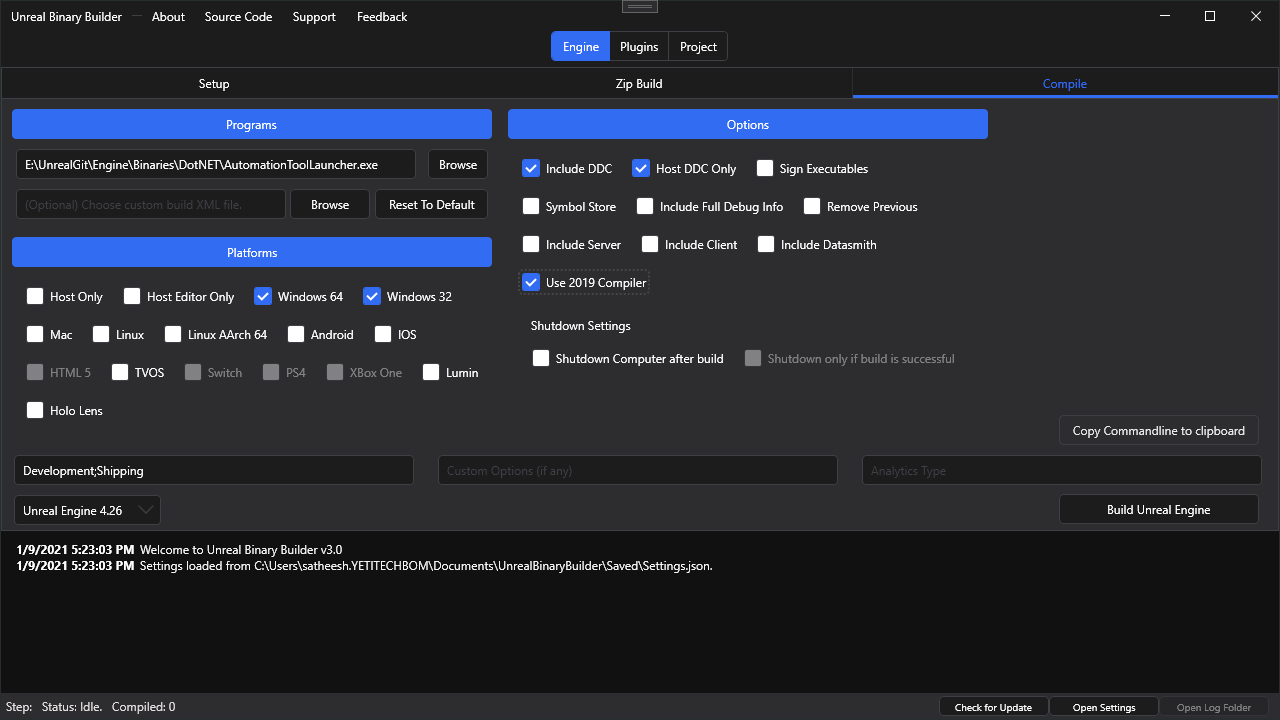
GitHub
An application designed to create installed Unreal Engine builds (aka Rocket builds) from Unreal Engine GitHub source. - GitHub - ryanjon2040/Unreal-Binary-Builder: An application designed to creat...
dark bridge
kind storm
You can also use this tool. This will assist you making installed build of your ...
I like dis
kind storm
ocean wolf
whats the difference between UE4 branches with Chaos in its name vs without
As the name suggest, the branch has Chaos enabled. Chaos integration goes to engine level, and isn't just a plugin.
ocean wolf
so in the branch without chaos in its name , the chaos code exists but is not used?
kind storm
Yeah, it's just at least one variable away, but do require full engine rebuild
And at least in UE4, Chaos sucks.
dark bridge
kind storm
You can also use this tool. This will assist you making installed build of your ...
looks like I cannot use it :o It's trying to find VS2019 but I only can install 2022
kind storm
I guess it's looking for MSVC v142 x86/64, you can add it in your VS2022 installation
dark bridge
nah the entire path is wrong :o Can I set it somewhere?
 ocean wolf
kind storm
And at least in UE4, Chaos sucks.
ocean wolf
kind storm
And at least in UE4, Chaos sucks.
you mean its not production ready?
kind storm
ocean wolf
you mean its not production ready?
Nope.
kind storm
dark bridge
nah the entire path is wrong :o Can I set it somewhere?
From what I can tell, it really needs VS2019, not even the build tool is enough 🤔
dark bridge
Yea Unlucky the VSInstaller removed 2019
kind storm
Though maybe you need to install C++ ATL and MFC too?
Just adding the ATL might be enough it seems
C++ v14.29 (16.11) ATL for v142 build tools (x86 & x64)
dark bridge
let me check
dark bridge
kind storm
Just adding the ATL might be enough it seems
nah it's still looking for 2019
But yea again theres nothing in that path so obviously it can't find it
kind storm
How about regenerating the project files? Add -2022 arg on GenerateProjectFiles.bat
dark bridge
there?
 kind storm
dark bridge
there?
kind storm
dark bridge
there?
Haven't tried that, but from your terminal/command prompt, run the engine's GenerateProjectFiles.bat followed by -2022 arg
dark bridge
kind storm
Haven't tried that, but from your terminal/command prompt, run the engine's Gene...
well the generate project file thingy works if I use it on it's own tho :o I've already did all the Setup and dependency downloading stuff so I just unchecked that in the GUI and now it seems to work... atleast it's compiling
amber kestrel
are there ways to minimize the space needed for compiling the engine?
i have cloned the repository and i run setup to check and update dependencies and i already use 89GB on my drive. i want to build ue5-main. i know that building will take many more GBs, so can i do something about that to use the least space available?
tender elm
amber kestrel
are there ways to minimize the space needed for compiling the engine?
Some have removed iOS and Android platform dependencies. Others have removed plugins they know they wouldn’t use.
I would just get a larger [external/SATA] SDD/HDD.
amber kestrel
@tender elmcool. im also not interested in ios android and other platforms. how do i remove the dependencies? manually removing dirs every time after cloning? or are there other ways?
im on a laptop away from main desktop and i need to build soon. i dont usually work on laptops
tender elm
Can’t remember off the top of my head, but here is one result from a quick search on discord: #ue5-engine-source message
amber kestrel
ok thanks, will try in a bit. i just ran out of space on the laptop drive
repository, dependencies and built so far are 240GB
but maybe im doing something wrong, this space is too much, isnt it?
tender elm
amber kestrel
but maybe im doing something wrong, this space is too much, isnt it?
My 4.27.1 build is 157 GB
My ue5-main build is 300 GB
A packaged build (from Epic) is about 42 GB
amber kestrel
@tender elm ok thanks for the info
kind storm
amber kestrel
are there ways to minimize the space needed for compiling the engine?
I personally remove most of the Virtual Production (DMX, nDisplay, etc), mobile, Enterprise (Datasmith), and XR plugins
Managed to get the installed build size down to 13 GB or so, and even slimmed down for artist only down to 4 GB or so (highly compressed down to 1 GB)
amber kestrel
@kind storm how do i remove those? manually or through some tool?
kind storm
amber kestrel
<@325627930484932608> how do i remove those? manually or through some tool?
Manually. Just delete the folder of those plugins, and any XR or Enterprise templates
amber kestrel
ok thanks @kind storm
oh, by the way, there arent any nightly builds available from somewhere, are there?
kind storm
amber kestrel
oh, by the way, there arent any nightly builds available from somewhere, are the...
No. Build yourself from master branch.
kind storm
Though I should point out that using "nightly builds" is pointless for production purposes, or more general testing.
kind storm
❔ Does anyone know how big current 4.27.2 source code is, excluding binaries/dependencies?
I'm downloading 8 GB and somehow still nowhere mid way with the download. 4.27.0 wasn't used to be that big, I think, around 5 GB and it's Setup.bat time.
pulsar kestrel
kind storm
❔ Does anyone know how big current 4.27.2 source code is, excluding binaries/dep...
On my end, the Engine folder excluding Build, Binaries, Intermediate and Saved is 35–40 gigs. Engine\Source alone is 21 gigs. Additional stuff (FeaturePacks etc) is only a couple of gigs but I may have deleted loads of stuff ... 18 gigs originally, possibly, going by the Perforce repo.
kind storm
Why the fuck it explodes in 2 hotfixes 😭
pulsar kestrel
I looked in WinDirStat and the PhysX3 libraries for non-Windows operating systems take up 9 gigs alone. But I never looked for previous versions of UE so I don't know what's changed.
 dull ledge
reinstalled windows and tried to install from source again but whenever i build it tells me I'm missing these macros. I tried googling it but couldn't find anything on it

 cold wigeon
I fighting with origin rebasing and cinematic cut scenes, the first location is correct on the first "tick" then starts flying off the map, until KillZ takes over, which teleports the player back on the map, but the player just flys off the map again.
It's like every time origin gets rebased, it is adding on top of itself instead of properly rebasing.
WorldComposistion::UpdateStreamingState() calls PC->GetPlayerViewPoint, which is the expected location of the first tick of the cutscene, but the next call to it, is way way off.
cold wigeon
LogLevel: WORLD TRANSLATION END {-4901114, 3520996, 0} took 93.7251 ms
LogActor: Warning: BP_PlayerSurvivor_C_0 is outside the world bounds!
LogActor: Warning: BP_PlayerSurvivor_C_0 is outside the world bounds!
LogLevel: WORLD TRANSLATION BEGIN {-4901114, 3520996, 0} -> {-5891045, 4110959, 0}
LogLevel: WORLD TRANSLATION END {-5891045, 4110959, 0} took 107.9130 ms
LogActor: Warning: BP_PlayerSurvivor_C_0 is outside the world bounds!
LogActor: Warning: SM_Chair_01a_497 is outside the world bounds!```origin shifting just seems to be all over the place
stable hemlock
hi guys
I have this error with source build 4.26.1 and i did not find a way to solve it
when i run it it reach 75 and close without anything at all
when i run it from the visual studio (2019) this is the error that showed up

 junior dawn
Hi, when I'm trying to open project using ue5 compiled from source it crashes. Did anyone had same problem or know how to fix this?
 pulsar kestrel
junior dawn
Hi, when I'm trying to open project using ue5 compiled from source it crashes. D...
pulsar kestrel
junior dawn
Hi, when I'm trying to open project using ue5 compiled from source it crashes. D...
Best place to ask: #ue5-engine-source.
junior dawn
thx
junior dawn
Thanks
 crimson crane
if i have a source build of ue4 (untouched source but needed it for dedicated servers), how do i bundle the binaries up so another team member can open my project in the editor and not have to compile the source themselves (eg for someone making maps and not needing to touch source at all). do i need to bundle anything in the engine binaries folder? or just my project's binaries folder
kind storm
crimson crane
if i have a source build of ue4 (untouched source but needed it for dedicated se...
Look up on how to make installed builds of your custom UE source build.
This page describes the Installed Build process, including an overview of how to write Installed Build scripts.
crimson crane
kind storm
Look up on how to make installed builds of your custom UE source build.
oh awesome i didnt realise this was a thing. ill look into it thanks
hidden hedge
or UGS if you're using perforce
 stiff pollen
Hi people! I'm currently trying to do some audio processing in unreal on the audio from the built in WebBrowser plugin. For this I need to somehow get an array from a JS script I wrote into the C++ part of unreal, how can this be done?
I've read through the code that's used to send the JS from the web browser C++ code to the CEF implementation, but I'm not really sure where to go from there.
it seems there is no way to make a call like this return data https://github.com/EpicGames/UnrealEngine/blob/c3caf7b6bf12ae4c8e09b606f10a09776b4d1f38/Engine/Source/Runtime/WebBrowser/Private/Native/NativeWebBrowserProxy.cpp#L204-L211
ocean wolf
which windows sdk is recommended for 4.27 ?
stable hemlock
stable hemlock
any help please
kind storm
ocean wolf
which windows sdk is recommended for 4.27 ?
19041
Though I'm sure one version below it will work fine.
ocean wolf
what about the ones above it?
kind storm
ocean wolf
what about the ones above it?
Windows 11 SDK should be fine as well, though you might losing on Windows 10 users.
ocean wolf
so I messed up vs 2022 installation and windows thinks there are two VS 2022 at the exact same location 😄
kind storm
Though I found one issue with making installed build using VS'22 and .NET 4.8, something about /langver
kind storm
❗ PSA: If you're using Visual Studio 2022, don't upgrade any of the engine's C# projects's NET Framework to 4.8. While you can build the engine fine, you'll have some trouble when making Installed Builds (builds to be shared within your team working on your project)
stable hemlock
so im trying to install ue4 on arch and its been stuck here for abt an hour. any ideas?
 kind storm
At least in Windows, last step is building the target file. Dunno about linux tho
kind storm
stable hemlock
so im trying to install ue4 on arch and its been stuck here for abt an hour. any...
Try asking on #linux
crimson crane
hey so im trying to make an "installed build" but its failing to compile with ERROR: Visual Studio 2017 must be installed in order to build this target.. I had no problems building the source from inside VS2019, only running the BuildGraph command to package it. I have .NET Desktop Development, Desktop Development with C++ and Game Development with C++ packages installed for VS2019 and dont have any other versions (aside from VSCode) installed. the command im running is this .\RunUAT.bat BuildGraph -target="Make Installed Build Win64" -script="Engine/Build/InstalledEngineBuild.xml" -set:HostPlatformOnly=true -clean -VS2019 is anyone able to help me out here?
im running this from outside of VS from the commandline
kind storm
crimson crane
hey so im trying to make an "installed build" but its failing to compile with `E...
IIRC the command was -set:UseVS2019=true
Try checking on the InstalledEngineBuild.xml to see the exact name of the parameter
crimson crane
kind storm
IIRC the command was `-set:UseVS2019=true`
Try checking on the InstalledEngineBu...
Yep did this about 1.5 hours ago. I wanted to see if it worked before replying that it was a solution. Thanks
it probably has about another hour left until its done :(
kind storm
crimson crane
Yep did this about 1.5 hours ago. I wanted to see if it worked before replying t...
Should followup that the question as solved, and post the solution you used 🙂
That way someone won't unknowingly give answer to your question when you already sorted it out yourself.
crimson crane
kind storm
Should followup that the question as solved, and post the solution you used 🙂
Ye like I said I wanted to confirm it first before posting the solution and its probably going to be a few hours before its finished
 proven imp
I am asking here, because I figured you guys would be the ones to know.... THE CODE.....
I have a VR game I made.
I created an opening title mov, and put it into the Project settings.
When the game launches, it jumps to full screen.
When it is done with the opening credits, it pops back to the small popup window.
-- I want the game to play fully in full screen or popup window. Not both. Both seems to be very frustrating for streamers, as they need to keep adjusting their screen grab.
--How/where do I do this? ❔ ❓
 ember roost
Hi guys, i try to build Unreal Engine from source, but after the builld, isf i try to start the UE4Editor in /Engine/Binaries/Win64 i have this error :

My windows sdk

Anyone have an idea ?
kind storm
ember roost
Hi guys, i try to build Unreal Engine from source, but after the builld, isf i t...
Delete the .modules file and try rebuilding
stable hemlock
hi guys
I have this error with source build 4.26.1 and i did not find a way to solve it
when i run it it reach 78% and close without anything at all
when i run it from the visual studio (2019) this is the error that showed up
 crimson crane
probably a really dumb question but can if im using a linux host, can i build ue4 editor from source for windows?
pulsar kestrel
crimson crane
probably a really dumb question but can if im using a linux host, can i build ue...
crimson crane
unfortunate. thanks for the info
kind storm
At least cross compiling for Linux, from Windows, is possible 
maximum compatibility
(except Mac and iOS I guess)
stable hemlock
hey, how to turn off automatic game pause in windowed mode while dragging / moving window? because when I start to move the window, game was stopped / paused. Where can I find this code in engine?
pulsar kestrel
stable hemlock
hey, how to turn off automatic game pause in windowed mode while dragging / mov...
Do you have bPauseOnLossOfFocus set to false in BaseEngine.ini?
ember roost
kind storm
Delete the .modules file and try rebuilding
The .modules doesn't exist
stable hemlock
guys please some help
stable hemlock
pulsar kestrel
Do you have `bPauseOnLossOfFocus` set to `false` in BaseEngine.ini?
yes. is this variable responsible for the pause?
pulsar kestrel
stable hemlock
yes. is this variable responsible for the pause?
Apparently not. 🤔
stable hemlock
pulsar kestrel
Apparently not. 🤔
any idea what else can I check?
pulsar kestrel
stable hemlock
any idea what else can I check?
It appears the UEngine::OnLostFocusPause() function which uses that bool doesn't have any callers anyway. Does the game just stop ticking entirely when you drag & drop? And is it just when you drag & drop, or all the time when you are out of focus?
stable hemlock
pulsar kestrel
It appears the `UEngine::OnLostFocusPause()` function which uses that bool doesn...
only stop ticking when I do drag & drop
proven imp
Anyone know the answer to this?
I have a VR game I made.
I created an opening title mov, and put it into the Project settings.
When the game launches, it jumps to full screen.
When it is done with the opening credits, it pops back to the small popup window.
-- I want the game to play fully in full screen or popup window. Not both. Both seems to be very frustrating for streamers, as they need to keep adjusting their screen grab.
--How/where do I do this? ❔ ❓
 quick stone
Hi! I am about to start a project using a dedicated server and marketplace assets (both for project and engine). What is the best way to do this? From what I've read, a source build is necessary for having a dedicated server, but importing marketplace assets to source can be a bit cumbersome. Any best-practices or good workflows for solving this?
calm mason
quick stone
Hi! I am about to start a project using a dedicated server and marketplace asset...
The easiest solution I've found is to install the Epic launcher version of the engine you're using. Create a project in there and import the marketplace assets to that project.
You can then right click the assets you want in the content browser, choose Migrate, and point it to the Content folder in your custom source project.
This also allows you to migrate just some of the assets instead of the whole pack which can be useful.
quick stone
calm mason
The easiest solution I've found is to install the Epic launcher version of the e...
All right, thanks! Importing individual assets from packs sounds amazing, always been a bit annoying having to import the whole pack. Does the same migrate process work for engine assets and plugins as well?
calm mason
I don't know tbh, I've never used Engine plugins or assets.
I even hacked Megascans plugin so it works from the project folder!
quick stone
calm mason
I don't know tbh, I've never used Engine plugins or assets.
Ok, I'll just experiment with some information I've already gathered and see if it works :)
quick stone
calm mason
I even hacked Megascans plugin so it works from the project folder!
Oh really, nice! Was it hard?
calm mason
no, just a minor code change to where it looks for the plugin folder.
it's slightly annoying to have to fix it up every time we upgrade the plugin.
I think for UE5 megascans is built in so maybe it won't be an issue going forward.
 noble notch
so uhm. So i wanna use this colllection: https://www.unrealengine.com/marketplace/en-US/product/factory-environment-collection
As I created a project with it there was already a character n' stuff.
Is there a way to export only the map and import it to a first person project?
calm mason
yes, create a new FPS project. open the first project, right click the map and choose Migrate. Point it to the new project Content folder.
quick stone
calm mason
no, just a minor code change to where it looks for the plugin folder.
it's sligh...
I see! That sounds kinda annoying yea.
Ah, that's right, makes me look forward to UE5 release even more!
noble notch
calm mason
yes, create a new FPS project. open the first project, right click the map and c...
where do i find it?
is it also possible to just copy the content folder?
ah just found it
Thanks!
ember roost
Hi, impossible to launch UE after build, i have this :

Unable to read module manifest from '../../../Engine/Binaries/Win64/UE4Editor.modules'. Module manifests are generated at build time, and must be present to locate modules at runtime.```Anyone ?
stiff pollen
I'm trying to build the editor, but it's taking a good bit of time and I'm not sure whether I'm doing things right. Is this what you are supposed to build?

Otherwise I've searched around a bit and found it mentioned that building from command line can be a bit faster, using a command such as: msbuild.exe UE4.sln /p:Configuration="Development Editor" /p:Platform=Win64 /t:Build /m /target:UE4
Where would you run this from within the command line?
pulsar kestrel
stiff pollen
I'm trying to build the editor, but it's taking a good bit of time and I'm not s...
Nope, you are supposed to place your project side-by-side with the engine, thus:
\ProjectRootFolder
\Engine
GenerateProjectFiles.bat
...
then run GenerateProjectFiles.bat and build your game target in UE4.sln, not the UE4 target.
Otherwise you will build the whole engine instead of just the stuff you need.
stiff pollen
pulsar kestrel
Nope, you are supposed to place your project side-by-side with the engine, thus:...
Alright thanks. I ran GenerateProjectFiles.bat when following the steps on the git, so that should be set. Do you mean the visual studio project?
My folder currently looks like this

I was now at step 5, which lists "Load the project into Visual Studio by double-clicking on the UE4.sln file. Set your solution configuration to Development Editor and your solution platform to Win64, then right click on the UE4 target and select Build."
not sure what target I am to click :)
or is that for building everything, not just the editor?
Just for reference I wish to edit the source code for the WebBrowser as well as the WebBrowser plugin. Will it suffice to build the editor for that?
pulsar kestrel
stiff pollen
My folder currently looks like this
Your game/project folder should be among the folders there.
Otherwise GenerateProjectFiles.bat will not show it as a build target when you open UE4.sln.
stiff pollen
Right, so then if you make changes to the source code and build for the specific project it will build the project with those editor changes?
pulsar kestrel
That is correct.
stiff pollen
I moved a project folder here but rerunning generateProjectFiles seems to have changed nothing
Oh right does any project work or does it have to be a C++ project?
pulsar kestrel
I've only ever done it with C++ projects — seems a BP project doesn't have a Source folder so you'll have to add a C++ class to it for GenerateProjectFiles.bat to "discover" it, I imagine.
stiff pollen
hmhmm that would make sense. I'll see what happens if I just make a new c++ project in the folder.
Ah right that seems to have done the trick, there's now a separate games folder with a build target. Thanks again
pulsar kestrel
👍 No problem, just make sure you build the game target rather than UE4 once you've done your changes and you'll see it only build those parts of the engine that you need.
 frozen olive
27>C:\Program Files (x86)\Windows Kits\10\include\10.0.22000.0\winrt\wrl/event.h(211): Error C4668 : '__cpp_noexcept_function_type' is not defined as a preprocessor macro, replacing with '0' for '#if/#elif'
27>C:\Program Files (x86)\Windows Kits\10\include\10.0.22000.0\winrt\wrl/event.h(371): Error C4668 : '_NOEXCEPT_TYPES_SUPPORTED' is not defined as a preprocessor macro, replacing with '0' for '#if/#elif'
27>C:\Program Files (x86)\Windows Kits\10\include\10.0.22000.0\winrt\wrl/event.h(371): Error C4668 : '__cpp_noexcept_function_type' is not defined as a preprocessor macro, replacing with '0' for '#if/#elif'
27>C:\Program Files (x86)\Microsoft Visual Studio\2019\Community\MSBuild\Microsoft\VC\v160\Microsoft.MakeFile.Targets(45,5): Error MSB3073 : The command "..\..\Build\BatchFiles\Build.bat -Target="UE4Editor Win64 Development" -Target="ShaderCompileWorker Win64 Development -Quiet" -WaitMutex -FromMsBuild" exited with code 6.```

Has anyone seen this issue in ue4.27 when compiling the engine?so when i open up UE4.sln it tells me that GitDependencies and MemoryProfiler2 use .NET Framework 4.5 which is no longer supported and gives me the option to upgrade them to a new version. do i just ignore this? it seems to have built fine without upgrading it but im curious
kind storm
crimson crane
so when i open up `UE4.sln` it tells me that `GitDependencies` and `MemoryProfil...
Don't upgrade the .NET Framework to newer versions.
Even with MSBuild .NET 4.8, things got fucked up.
kind storm
At least with MSBuild from .NET Framework 4.8, C# projects refuse to be interpreted correctly
crimson crane
thats weird but i also dont know how it works so maybe its perfectly normal behavior
hidden hedge
never say yes to any retargeting requests
kind storm
So, I have a weird issue with AutomationTool, where it insist on using MSBuild located on C:\Windows\Microsoft.NET\Framework64\v4.0.30319\MSBuild.exe as opposed to the one in VS'22 directory. This caused the .cs code to be incorrectly interpreted, and spew out a shit ton of errors. In contrast, compiling with MSBuild from VS'22 run just fine, no errors.
I tried setting the environment PATH to the VS'22 directory, but to no avail.
What gives?
thick furnace
frozen olive
```27>C:\Program Files (x86)\Windows Kits\10\include\10.0.22000.0\winrt\wrl/even...
use 19xxx windows sdk
stable hemlock
hiiii
i cant install epic launcher with git
i need to do cd documents, in the tutorial but no bone in my body wants it to be there, i want it to be in the D directory
how can i do that ?
heady sparrow
stable hemlock
i cant install epic launcher with git
you aren't installing the launcher, you are installing a version of the engine specific to that git branch
you can use github desktop if that's easier for you
 limber heath
Is there a place to see the meaning of each prefix in the vars: r.X, s.X.. etc? I know render stands for rendering but what's s? How many of those are? etc. Also how do you know in what ini file you set them?
kind storm
Okay so apparently Visual Studio 2022 refuses to deal with .NET Framework 4.5, and many of the engine's C# programs were bound to 4.5
Though not all of them, being bound to 4.6.2
kind storm
limber heath
Is there a place to see the meaning of each prefix in the vars: r.X, s.X.. etc? ...
Search through the engine's GitHub repo.
limber heath
kind storm
Search through the engine's GitHub repo.
LOL
 bleak sleet
Hey guys, I'm not too familiar with VS, but I'm trying to rebuild the engine source...
I have a solution for my game, and inside there is the UE4 and my game.
I've added a breakpoint in the engine source, built it, and ran with local windows debugger but my breakpoint isn't getting hit...
Oh actually I see a message at it this breakpoint will not be hit. No symbols have been loaded for this document
bleak sleet
any ideas...?
pulsar kestrel
bleak sleet
any ideas...?
What build configuration are you on?
bleak sleet
pulsar kestrel
What build configuration are you on?
debug game editor, win64.
pulsar kestrel
bleak sleet
debug game editor, win64.
Engine is optimized in DebugGame [Editor].
Debug [Editor] is the only build configuration that will reliably enable you to hit breakpoints in engine code.
bleak sleet
pulsar kestrel
Engine is optimized in DebugGame [Editor].
I get a different error in this config
bleak sleet
pulsar kestrel
Debug [Editor] is the only build configuration that will reliably enable you to ...
Game files required to initialize the global shader library missing from (my dir)
pulsar kestrel
bleak sleet
Game files required to initialize the global shader library missing from (my dir...
Is that in Debug or Debug Editor?
bleak sleet
pulsar kestrel
Is that in Debug or Debug Editor?
DebugGame gives me the game files error.
pulsar kestrel
bleak sleet
DebugGame gives me the game files error.
Right, because you haven't cooked the game for that configuration, probably.
Until you've cooked a game for a given configuration you can't run the non-Editor configuration.
bleak sleet
Can I cook it from VS?
pulsar kestrel
No, but is the engine code you want to break into accessible from PIE? Because if so, with your game as the startup project, you can just use Debug Editor.
Since this is a different configuration from DebugGame Editor it will recompile but then you'll have a non-optimized version of the engine that you'll be able to break into reliably.
Make sure you have your game as the startup project and that that's the target you're building so that it only builds the engine dependencies you need, not all of the engine.
bleak sleet
I'm just running a test currently, and the breakpoint is basically when unreal engine starts, so it's before even the game is loaded
I don't need it to be so early, the real reason I'm wanting to change engine source is for SubsystemOculus
pulsar kestrel
Well, Debug Editor will hit all breakpoints.
bleak sleet
Ok... I changed the breakpoint to be in the OculusSubsystem... from VS I run DebugEditor
Breakpoint still doesn't fire
and theres the same message next to it
this breakpoint will not be hit. No symbols have been loaded for this document
I must not be building the config with the breakpoint, right?
It says "build started" when I start it
pulsar kestrel
What do you see in your output tab?
If you've never compiled Debug or Debug Editor before then it should be in the process of compiling it, with however many thousands of actions that requires.
bleak sleet
from debug
'UE4Editor-Win64-DebugGame.exe' (Win32): Loaded 'C:\Program Files\Epic Games\UE_4.27\Engine\Binaries\Win64\UE4Editor-Win64-DebugGame.exe'. Cannot find or open the PDB file.
doesn't look right
no editor?
pulsar kestrel
Did you download the engine source code from Github?
bleak sleet
UE
pulsar kestrel
The launcher?
pulsar kestrel
Okay, that was going to be a wild goose chase. 😄
You need to download the source code from Github to have access to Debug configurations.
DebugGame is not the same thing as Debug.
DebugGame = engine is optimized, your game isn't.
Debug = neither is optimized.
pulsar kestrel
I'm not sure what your VS is showing you, but if you only have the source code from the Epic Games Launcher then you can neither make changes to it that will actually have any effect nor use the Debug configurations.
Only config families that the Launcher offers are DebugGame, Development and Shipping.
bleak sleet
Okay
pulsar kestrel
When you build UE from Github just make sure that your files are laid out thus:
\Engine
GenerateProjectFiles.bat
ie, your project root folder should be side-by-side with the Engine one you got from Github when you run GenerateProjectFiles.bat.
When you do that, you'll be able to build Debug Editor and reliably break in engine code.
pulsar kestrel
Can you take a screenshot of the folder you cloned it into?
pulsar kestrel
Yeah, if you just downloaded the release branch you should have 4.27.2.
bleak sleet
I actually have previously forked this before, thats why.
pulsar kestrel
Ah, okay.
bleak sleet
Ok got 4.27
@pulsar kestrel So I need to get this source into my project directory? Should I move the files into my project?
pulsar kestrel
Engine and game project directory side-by-side.
bleak sleet
Ok, Gonna duplicate my game and move it into the engine then
And I'll follow the rest of the getting started
 lyric tiger
Burning through the night. Is anyone rocking the Intel 12th series 12900k? We need a few more CPU's for the office and were wondering if it comes close to the 5950X's performance. Clean, full engine build took around 32-33min.
 pulsar kestrel
bleak sleet
Ok, Gonna duplicate my game and move it into the engine then
pulsar kestrel
bleak sleet
Ok, Gonna duplicate my game and move it into the engine then
Make sure you don't put it into the Engine folder but next to it.
bleak sleet
pulsar kestrel
Make sure you don't put it _into_ the Engine folder but _next_ to it.
I pm'd you a screenshot
pulsar kestrel
bleak sleet
I pm'd you a screenshot
Ah, sorry, missed that.
crimson crane
Probably a really dumb question but do I need to build UE4Game? When I build the source from visual studio (using the development-editor config) I get a smaller engine size than of I do an installed build and I have a feeling it's because the installed build is building UE4Editor and UE4Game
kind storm
crimson crane
Probably a really dumb question but do I need to build `UE4Game`? When I build t...
Use the configs without the Editor suffix.
crimson crane
kind storm
Use the configs without the Editor suffix.
For an installed build? I still need to build the editor to open projects right?
stable hemlock

hi
im trying to install the thumbnailer into mine 4.27 sourceCode plugin folder
but i dont know what i have to do
my first time and i dont wanna do it the first time wrong
to much at stake
 pulsar kestrel
stable hemlock
but i dont know what i have to do
pulsar kestrel
stable hemlock
but i dont know what i have to do
Either put it in your project folder's Plugins folder or put it into your engine's Plugins\Marketplace folder (create it if needed).
If you're switching from a launcher build to a source build and you want to carry Marketplace plugins over, you can just copy the Marketplace folder over from your launcher engine Plugins folder.
stable hemlock
pulsar kestrel
Either put it in your project folder's Plugins folder or put it into your engine...
thanks i am going to try that
 timid scarab
Are there community/official patches available for AMD GPUOpen 4.27?
specifically the feature patches, I already integrated the relevant performance patches

GPUOpen
Develop for Unreal Engine on AMD hardware with our plugin, performance and feature patches, including FidelityFX support.
 crude horizon
Hey guys, I'm trying to build UE from source and I'm facing this issue here with VS 2017:

it should display 85 projects, but the rest are simply not loading properly. Some of them say (incompatible)
I installed all the required packages (C++ Game Dev, NuGet Package Manager and UE Installer)
 rapid silo
Hi all,
I'm digging in UE4 code after the static friction parameter (belong to physics material) because it doesn't influence any of the physics behavior.
- I created a project with static mesh cube and attached it a physic material with static friction of 0.2
- I verified that the correct physics material is indeed set in the function FPhysicsInterface_PhysX::SetMaterial as shown in the snapshot.
So the value 0.2 is given to the Physx shape object.
Any idea where to continue to dig to find why it has no influence over the physics behavior?

 gusty axle
I suppose this might not be the place to ask this but I don't see a better one, is there any documentation on the pak file structure? Header/etc
limber heath
Hey guys, the defines for the shading models used to be in FMaterial::SetupMaterialEnvironment, where are they know?
pulsar kestrel
rapid silo
Hi all,
I'm digging in UE4 code after the static friction parameter (belong to ...
If you search for usages of the StaticFriction member variable (Shift + F12) literally the only usage of it is its zero-initialization in one of the constructors.
bleak sleet
Hey guys, I'm trying to get Quest Multiplayer to work, following a guide here: https://www.reddit.com/r/unrealengine/comments/optd6y/the_secret_oculus_quest_2_multiplayer_guide/
To do this I need the Oculus-VR source, and then checkout branch 4.26? The guide says 4.26.2 but I don't see a branch for that... is there another way to get that exact source or... does 4.26 == 4.26.2 in this case?
reddit
26 votes and 27 comments so far on Reddit
rapid silo
pulsar kestrel
If you search for usages of the `StaticFriction` member variable (Shift + F12) l...
Indeed, this is initialization value (UPhysicalMaterial::UPhysicalMaterial). But when applying an attached physics material, the engine updates the actor phsyx shape with the values reflected from the editor. You can see the values in the snapshot - 0.2 for the static friction. Do I miss something?
pulsar kestrel
rapid silo
Indeed, this is initialization value (UPhysicalMaterial::UPhysicalMaterial). But...
Well, it's UPROPERTY(EditAnywhere), so I would expect it to reflect the value given it in the editor. But the value isn't used anywhere in the code.
rapid silo
If I understand correctly the code, there is only need to feed this value to the physx engine. This is done as shown in the snap shot. Line 1110 - the UE UPhysicalMaterial structure parameters values are copied into a Physx structure PxMateiral, then in line 1114 the actor physx shape is updated with this PxMaterial (in my test only one material). From now on, the physx engine should solve within static friction of 0.2 and yields results for UE accordingly.
pulsar kestrel
rapid silo
If I understand correctly the code, there is only need to feed this value to the...
Ah, gotcha. Your best bet is to use Ctrl+Shift+F and look for all usages of "StaticFriction". It may very well be a value that's copied about but never used.
rapid silo
pulsar kestrel
Ah, gotcha. Your best bet is to use Ctrl+Shift+F and look for all usages of "Sta...
According to my check, there is no use except of feeding the physx engine - but this should be enough for giving the desired behavior , isn't it?
limber heath
limber heath
Hey guys, the defines for the shading models used to be in FMaterial::SetupMater...
ok it's on HLSLMaterialTranslator
kind storm
crude horizon
I installed all the required packages (C++ Game Dev, NuGet Package Manager and U...
How about these?
- Desktop development with .NET
- Desktop development with C++
crude horizon
kind storm
How about these?
- Desktop development with .NET
- Desktop development with C++
I'll try it, thanks
 placid furnace
We're just using a source built engine for the first time here as we need to be able to make a dedicated server. For regular ue4 projects there is an ignore file for source control. Does such a thing exist for the source built engine, or do we need to stick everything on source control?
pulsar kestrel
rapid silo
According to my check, there is no use except of feeding the physx engine - but...
If PhysX itself never makes use of the notion of static friction in its calculations, then it won't be reflected in the physics.
 rapid silo
pulsar kestrel
If PhysX itself never makes use of the notion of static friction in its calculat...
rapid silo
pulsar kestrel
If PhysX itself never makes use of the notion of static friction in its calculat...
Agree. I will dig further to see if there is any additional code that should use the friction in order physx will behave accordingly
limber heath
Is there a file where I can see the engine guid in the engine intermediate files?
 sleek vortex
how do i fix these errors when building the engine?
 hidden hedge
does the editor build or is it just ShaderCompileWorker?
and show the output log not the error log
sleek vortex
 hidden hedge
I would suggest installing the Windows SDK relevant for your version
with 4.27, it's 10.0.19041.0
also you don't really have a source build in a usual way, ie. side by side w/project
 stiff plank
can i get some help installing source code ?

im at 13 houres + doing the same thing over and over
with bash to command promp to the zip file from github
bleak sleet
@stiff plank I would use the git command line utility to clone the repo. from your terminal you can git clone <paste repo url>
I have a question about persisting changes when building from source....
When I run my project from double clicking the .uproject it loads fine... when I run from source, I'm missing blueprints... when the level loads it says fails to reference etc... they are the standard bp_pickupcube that should come standard with the level
stiff plank
i got it 😄
 formal moon
Hey all, I was wondering how I can go about fixing the below errors? I am using a version of the engine that was built from source. Thanks in advance :D

 limber heath
stiff plank
can i get some help installing source code ?
limber heath
stiff plank
can i get some help installing source code ?
what is your problem exactly?
limber heath
formal moon
Hey all, I was wondering how I can go about fixing the below errors? I am using ...
it's saying to you that the module was built with a different version of engine. You need to recompile the module with the engine from sources. Just open the project in visual studio and select your game as target
formal moon
limber heath
it's saying to you that the module was built with a different version of engine....
That makes sense, but how can I tell it where the engine is (it's saying it failed to load it and thus won't succeed)
 pulsar kestrel
formal moon
That makes sense, but how can I tell it where the engine is (it's saying it fail...
pulsar kestrel
formal moon
That makes sense, but how can I tell it where the engine is (it's saying it fail...
Do you have multiple versions of Visual Studio installed?
At least when I've had that problem it's because GenerateProjectFiles.bat was generating a solution for another VS than the one I was opening the .sln with. You can append eg -2017 or -2019 to your call to the bat to generate an sln for that version of VS.
formal moon
pulsar kestrel
At least when I've had that problem it's because GenerateProjectFiles.bat was ge...
I do have both installed, but I've already successfully built the engine once so I assumed I didn't need to rerun the .bat again and could just build it from VS?
Ok actually, after further investigation, I discovered the culprit, my dependencies got eaten, now we're up and working again, thanks all 😅
 stable rose
Hey I would like to make opaque defualt lit material be able to access to the (dynamic) shadow map info from a directional light.
I assume I need to do the following.
- Find the shadowmap textures built for directinal lights (I assume shadow maps are generaed in early stage of the rendeirng path)
- Pick one from them. (I assume there should be only one active directional light, so this process is practically not needed.)
- Set the shadow map texture (and sampler) to the uniform buffer for default lit materials
- Make a material node to access the texture
I have some ideas to do 2, 3, and 4.
Does anyohe know where I can find the shadow map textures in engine sources?
Target Engine version should be UE4.26 or newer, and/or UE5EA.
(esp for when VSM is enabled, but any info will be appreciated)
For someone who's wondering why I watnt to do the above.
I'm donig this for NPR things, and I have a reason I can't use Forward Rendering Mode.
So please don't comment something like "just switch to forward rendering, bro" becuse it wouldn't help me at all.
 gloomy mesa
Is there a way to use Unreal Insights to profile the editor, and not your running game? We get to a point where opening a directory can take 5 seconds to load, and the mouse stutters around. But I can't find resources on doing this
stable rose
gloomy mesa
Is there a way to use Unreal Insights to profile the editor, and not your runnin...
I don't think you need a profiler for that. What's inside your directory?
gloomy mesa
stable rose
I don't think you need a profiler for that. What's inside your directory?
Our team consists of about 20 students. We have 34GB of data stored in our repo (the directory for our unreal files) including maya models, substance painter files, and animation files. This is a large amount of information, but the editor runs smoothly for about an hour before chugging and sometimes crashing with "Out of video memory trying to allocate a rendering resource." types of error messages
I can't figure out how to profile the editor itself, and not the running game
stable rose
gloomy mesa
Our team consists of about 20 students. We have 34GB of data stored in our repo ...
[memreport] debug command might help you.
https://www.unrealengine.com/en-US/blog/debugging-and-optimizing-memory

Unreal Engine
When a game reaches a certain stage of development, it becomes critical to figure out what exactly it’s loading into memory and why. As new assets are built, games tend to become larger and larger until load times slow to a crawl and the game starts to run out of memory. Luckily, UE4 has some useful tools built in to track down what’s in memory...
 brisk wasp
Hi I tried to build the engine (RTX branch) but it gave a load of errors about running out of heap mostly ... I have 64 GB RAM and a 20 GB pagefile lol, how can it run out?
"Compiler internal heap limit reached"
c1xx: note: please visit https://aka.ms/pch-help for more details
3>c1xx : fatal error C1076: compiler limit: internal heap limit reached
3> [164/4682] Module.MainFrame.cpp
3>c1xx : error C3859: Failed to create virtual memory for PCH
3> c1xx: note: the system returned code 1455: The paging file is too small for this operation to complete.
is 20 GB paging file really too small???
This post written by Mark Hall, Xiang Fan, Yuriy Solodkyy, Bat-Ulzii Luvsanbat, and Andrew Pardoe. Precompiled headers can reduce your compilation times significantly. They’ve worked reliably for millions of developers since they were introduced 25 years ago to speed up builds of MFC apps.
and it also can't seem to find files which makes no sense 3> [186/4682] Module.MovieScene.gen.2_of_4.cpp
3>c1xx : fatal error C1356: unable to find mspdbcore.dll
brisk wasp
wow it really does want more than 20 GB. Set it at 50, so far so good ... but wow
 stable glade
So one of the examples someone gave me for using a source build would be for individual bone damage. Like leg or arms.
It was that adding tags in source would be more efficient, as the alternative would be building an individual damage system for each character, even if they were just copies.
I more recently saw a video showing how to add gameplay tags in-editor. Are these the same kind of tags, or different?
Is a source build still the best way to implement limb damage?
brisk wasp
E:\UE Builds\NVRTX\Engine\Intermediate\Build\Win64\UE4Editor\Development\UnrealEd\SharedPCH.UnrealEd.RTTI.ShadowErrors.cpp(2): fatal error C1085: Cannot write precompiled header file: 'E:\UE Builds\NVRTX\Engine\Intermediate\Build\Win64\UE4Editor\Development\UnrealEd\SharedPCH.UnrealEd.RTTI.ShadowErrors.h.pch': Insufficient system resources exist to complete the requested service.
3>
Man just what are these errors? I have like 30+ GB of RAM free, terabytes of SSD space, 200 GB of pagefile, the hell resources is it talking about?
 serene plaza
been trying to complile 4.27-chaos from source. Pulled from github. everything completes but ue file server ( don't need ) and the ue4 editor. Editor error has a 2005LNK error, says TKinematicTarget is defined multiply only definition I think I am seeing is in the KinematicTargets.cpp/h but error says module.engine.34_0f_50 has it already. How to fix this? where to see the objects included in the x_of_y modules? Feels like I am close to a solution...
Severity Code Description Project File Line Suppression State
Error LNK2005 "public: __cdecl Chaos::TKinematicTarget<float,3>::TKinematicTarget<float,3>(void)" (??0?$TKinematicTarget@M$02@Chaos@@QEAA@XZ) already defined in Module.Engine.34_of_50.cpp.obj UE4 F:\UnrealEngine\Engine\Intermediate\ProjectFiles\UE4Editor-Chaos-Win64-Debug.lib(UE4Editor-Chaos-Win64-Debug.dll) 1
Error LNK2005 "public: class Chaos::TKinematicTarget<float,3> & __cdecl Chaos::TKinematicTarget<float,3>::operator=(class Chaos::TKinematicTarget<float,3> const &)" (??4?$TKinematicTarget@M$02@Chaos@@QEAAAEAV01@AEBV01@@Z) already defined in Module.Engine.34_of_50.cpp.obj UE4 F:\UnrealEngine\Engine\Intermediate\ProjectFiles\UE4Editor-Chaos-Win64-Debug.lib(UE4Editor-Chaos-Win64-Debug.dll) 1
 olive dock
hi. i need package my mobile game for X86_64 architecture. if i download 4.26-chaos its enable or i have to download it from github?
 half mantle
Has anyone stumbled upon the articles named "Analysis of Unreal Rendering System" or "Analysis of Illusory Rendering System"? I believe they are auto translated from chinese but seems to share great detail into the engine's rendering. i.e https://copyfuture.com/blogs-details/20210802230911045t
Catalog 8.1 An overview of this article ( 81 An overview of this article ) 8.2 Shader Basics ( 82 shader Basics ) 8.2.1 FShader ( 821 fshader) 8.2.2 Shader Parameter ( 822 shader parameter) 8.2.3 Uniform Buffer ( 823 uniform buffer) 8.2.4 Vertex Factory ( 824 vertex factory) 8.2.5 Shader Permutation ( 825 shader permutation) 8.3 Shader Mechanis...
 hard crypt
I'm guessing this is just outdated? The file doesn't exist. There's an OnlineSubsystemSteamPrivate.h, but no similar #define directive
https://docs.unrealengine.com/4.27/en-US/ProgrammingAndScripting/Online/Steam/
 hidden hedge
you don't need to make these changes since the steam SDK is distributed with the engine
and that's more #online-subsystems talk
stable hemlock
i'm trying to build 4.27 in vs2022 on win11, but i'm getting this error:
'_NOEXCEPT_TYPES_SUPPORTED' is not defined as a preprocessor macro, replacing with '0' for '#if/#elif'
anyone have a good idea? i've tried adding ProjectFileGenerator/WindowsPlatform to Buildconfiguration.xml as well
 mint vault
How can I find commit 17728209 from the github?
I'm trying to find this https://issues.unrealengine.com/issue/UE-135765

Unreal Engine
Welcome to the Unreal Engine Issue and Bug Tracker. You can check the status of an issue and search for existing bugs. See latest bug fixes too.
 limber jacinth
Building 5 actions with 24 processes...
  ** For UE4Editor-Win64-DebugGame + UE4Editor-Win64-Development
  Module.HoloLensTargetPlatform.cpp
  C:\Program Files (x86)\Windows Kits\10\include\10.0.22000.0\winrt\wrl/event.h(211): error C4668: '_NOEXCEPT_TYPES_SUPPORTED' is not defined as a preprocessor macro, replacing with '0' for '#if/#elif'
  C:\Program Files (x86)\Windows Kits\10\include\10.0.22000.0\winrt\wrl/event.h(211): error C4668: '__cpp_noexcept_function_type' is not defined as a preprocessor macro, replacing with '0' for '#if/#elif'
  C:\Program Files (x86)\Windows Kits\10\include\10.0.22000.0\winrt\wrl/event.h(371): error C4668: '_NOEXCEPT_TYPES_SUPPORTED' is not defined as a preprocessor macro, replacing with '0' for '#if/#elif'
  C:\Program Files (x86)\Windows Kits\10\include\10.0.22000.0\winrt\wrl/event.h(371): error C4668: '__cpp_noexcept_function_type' is not defined as a preprocessor macro, replacing with '0' for '#if/#elif'
BUILD FAILED:  failed, retries not enabled:
AutomationTool exiting with ExitCode=1 (Error_Unknown)
BUILD FAILED``` anyone have any clue on this?V:\UnrealEngine4_27\Engine\Build\BatchFiles\RunUAT.bat BuildGraph -target="Make Installed Build Win64" -script=Engine/Build/InstalledEngineBuild.xml -set:WithClient=true -set:WithServer=true -set:WithDDC=true -set:WithLinux=false -set:WithWin64=true -set:WithWin32=false -set:WithMac=false -set:WithAndroid=false -set:WithIOS=false -set:WithTVOS=false -set:WithLumin=false -set:WithLinuxAArch64=false -set:WithHoloLens=false -set:WithLuminMac=false -set:WithHoloLens=false WithLuminMac=false -set:WithFullDebugInfo=true this is how i am buildin it
calm mason
@limber jacinth my guess is that 4.27 does not build on that SDK. The patch notes specify: 10.0.18362
limber jacinth
yeah trying a different SDK now tho im on vs2019
limber jacinth
yeah its building now i switched the SDK down, no idea how i got the latest SDK with vs2019
stable hemlock
I’m on vs2022, so I can’t really uninstall 10.0.22000, still trying to find a way to get it working
limber jacinth
@stable hemlock you can specify custom SDK
AppData\Roaming\UnrealEngine\UnrealBuildTool and edit the .xml there
 stable hemlock
Testing now with old sdk, w/ vs2022 toolchain
stable hemlock
Success
limber jacinth
i am still failing builds urgh now on a different issue
calm mason
.net issue? I remember having to install some extra stuff from VS Installer.
 limber jacinth
uigh
  V:\UnrealEngine4_27\Engine\Saved\CsTools\Engine\Source\Programs\AutomationTool\HoloLens\HoloLensPlatform.Automation.cs(17,15): error CS0234: The type or namespace name 'Management' does not exist in the namespace 'Windows' (are you missing an assembly reference?) [V:\UnrealEngine4_27\Engine\Saved\CsTools\Engine\Source\Programs\AutomationTool\HoloLens\HoloLens.Automation.csproj]
  V:\UnrealEngine4_27\Engine\Saved\CsTools\Engine\Source\Programs\AutomationTool\HoloLens\HoloLensPlatform.Automation.cs(1235,24): error CS0246: The type or namespace name 'IAsyncOperationWithProgress<,>' could not be found (are you missing a using directive or an assembly reference?) [V:\UnrealEngine4_27\Engine\Saved\CsTools\Engine\Source\Programs\AutomationTool\HoloLens\HoloLens.Automation.csproj]
  V:\UnrealEngine4_27\Engine\Saved\CsTools\Engine\Source\Programs\AutomationTool\HoloLens\HoloLensPlatform.Automation.cs(1235,52): error CS0246: The type or namespace name 'DeploymentResult' could not be found (are you missing a using directive or an assembly reference?) [V:\UnrealEngine4_27\Engine\Saved\CsTools\Engine\Source\Programs\AutomationTool\HoloLens\HoloLens.Automation.csproj]
  V:\UnrealEngine4_27\Engine\Saved\CsTools\Engine\Source\Programs\AutomationTool\HoloLens\HoloLensPlatform.Automation.cs(1235,70): error CS0246: The type or namespace name 'DeploymentProgress' could not be found (are you missing a using directive or an assembly reference?) [V:\UnrealEngine4_27\Engine\Saved\CsTools\Engine\Source\Programs\AutomationTool\HoloLens\HoloLens.Automation.csproj]
Took 0.6503932s to run MSBuild.exe, ExitCode=1```now getting this
 stable hemlock
it's always the hololens stuff... can you disable that portion?
calm mason
I make Installed builds to distribute to my team using
.\Engine\Build\BatchFiles\RunUAT.bat BuildGraph -target="Make Installed Build Win64" -script=Engine/Build/InstalledEngineBuild.xml ...
But it does not build/include the UnrealVersionSelector exe. Does anyone know if it's possible to add this to the installed build?
stable hemlock
Hello, i have a strange problem
I'm making a doom shooter, and some players experience a issue that the mouse button does not fire event when camera is on a certain angle, i did not found a solution on internet, but it seems like its a engine issue.
From the game shooting code every think is fine, but the Input Fire (Mouse LMB) does not fire when the button in press, and this happends not all the time but sometimes and only for some users (Major part of users uses laptops but there is a guy on pc that also have this issue )
I found that UT3 had the same issue and a lot of UE4 engine game have that issue (maybe event fortnite)


 forest pawn
Hi, so I wanted to make a dedicated server recently and I have read that you need ue4 from source, the problem is that my project with my UI and some game logic is in the "epic games launcher" version how can I make the change to source of my project, Do I automatically see my project upon getting source version? if not what do I need to do to change my project to source version?
forest pawn
Oh so its like a normal engine version switch, thanks
 mellow ridge
hello guys ..
I just build the engine and i add the android to whitelist in OnlinesubsystemGoogle plugin

i removed what i added and build again same issue
hidden hedge
stable hemlock
Hello, i have a strange problem
I'm making a doom shooter, and some players exp...
this is something specific to your game and is not to do with engine source
forest pawn
Can anyone help me with this error when I tried to install the source version of UE 4.26.2 and to the setup?
 mellow ridge
forest pawn
Can anyone help me with this error when I tried to install the source version of...
mellow ridge
forest pawn
Can anyone help me with this error when I tried to install the source version of...
copy the folder to something shorter like
H:/UnrealEngine4.26.2/
Because it is like H:/UnrealEngine4.26.2/UnrealSourcecode/blablabla/UnrealEngine/
forest pawn
Damn after the file change I have to reinstall the whole setup 😦
cause I cant generate the project files
mellow ridge
it will continue from where you stopped i think
forest pawn
It should
mellow ridge
because you will copy them
forest pawn
it should but it just blocked
mellow ridge
Can you show me the path of your Setup.bat
forest pawn
D:\UnrealEngine-4.26.2-release
mellow ridge
forest pawn
D:\UnrealEngine-4.26.2-release
this is the new one right ?
mellow ridge
the old one
forest pawn
D:\UE4Data\Source\UnrealEngine-4.26.2-release
mellow ridge
well i build the engine morning and it done at afternoon when i tried the engine it crashed
so i'm rebuilding the engine again 😦
forest pawn
damn
 forest pawn
well then, no point in just being sad since that wont make any progress... should better start redownloading it again
mellow ridge
forest pawn
well then, no point in just being sad since that wont make any progress... shoul...
Yes goodluck
forest pawn
failed again...
ocean wolf
My UE Build has swollen to 170 GB after building various targets like dev , test and debug game , is this normal?
 quick mica
yes
kind storm
ocean wolf
My UE Build has swollen to 170 GB after building various targets like dev , test...
Perfectly normal.
200 GB for full configuration is more expected tbh
ocean wolf
 hard crypt
You can reduce it to about 100gb
I managed to get my build to 101gb
I could probably delete the intermediate folders too now since I doubt I'll be changing anything soon
Which would make my install about 60something gb
 undone oxide
Hi everyone!
Does anyone know, why AActor::SetActorLabelInternal is changing not just the label, but also renames the Actor completely, breaking it's references? (Rename(...))
forest pawn
How can I make this work? It keeps on failing and everytime I have to redo the goddamn download
 kind storm
forest pawn
How can I make this work? It keeps on failing and everytime I have to redo the g...
kind storm
forest pawn
How can I make this work? It keeps on failing and everytime I have to redo the g...
What directory did you put the engine source code in?
forest pawn
In D\
just d\ ( I have already tried this multiple times to change to a shorter directory and ended up putting the folder in d\ )
still doesnt work
hidden hedge
you really wouldn't put it on the root of a drive
 paper epoch
in the Engine/Config/BaseEditorPerProjectUserSettings.ini file anyone know what [section] to put for the source code editor value?
I tried changing a blank project's and then comparing the difference, but I can't find where the source code editor is being set
When I checked the blank project, I looked at the User one that gets created in the project Saved/Config
 void oar
hey, looking into bugs during seamless travel
it seems, that when we seamless travel, the clients also take every AI we spawned at runtime with them, because of this rule
World.cpp:6476
// Keep if it's in the current level AND it isn't specifically excluded AND it was either marked as should keep OR we don't own this actor
It's in the current level (persistant), since it is spawned at runtime
and we don't own it, because the server owns it
so basically this includes EVERY replicated actor that was spawned at runtime by the server
why would I want them all to seamless travel? I don't get it
obsidian linden
alrighty really annoying problem. i have a project on a 4.27.2 chaos enabled source build. each time i close my ide and build that project it also compiles 1630 files from the engine as well. if i keep my ide open after this big compile it works like normal and is fine. i noticed after this happens if i go to my source engine and try to launch it, it recompiles the entire engine (3330 files). after this is complete if i go back to my project im met with the same result of trying to compile it with 1630 files
hidden hedge
this is probably doing the source build wrong which I say a lot here
STAY in your project, and have it side-by-side with the engine
if you're doing the "right" way, then your game should be in UE4.sln
obsidian linden
hidden hedge
this is probably doing the source build wrong which I say a lot here
whats the right way to setup a repo with that setup? currently we both have the source build built ourselves with chaos setup in it, then our gitignore is ignoring the .uproject and were pushing the binaries as well. this is the first time ive had this issue with a source build and even the other guy doesnt have this problem.
hidden hedge
you likely have settings that require a unique build environment
so when you build the UE4 target or solution, it'll invalidate everything
and then when you go back to the project target, it'll do it again
doing source the right away is Engine/ Project/ sharing the same top level directory, where the batch files live
obsidian linden
in my projects target.cs files im overriding the build environment so that would explain that -_-
 hidden hedge
it's also what UGS, an epic tool used with perforce, expects
 pearl seal
Compiling shaders are too slow than usual. I Tried to comple 120 shaders and that took 1h, 120 shaders before was just 3-4 minutes or even 1 minute sometimes.
stable hemlock
dumb question, if I use unreal engine from source, do all members of my team have to use the same unreal engine source or could they use it from the epic games one?
and if I don't have the source folder in my C drive (SSD) does unreal engine run slower?
hidden hedge
you should have it on an SSD or it will be unbearably slow
and usually with a source build, your source build is distributed via binaries on source control. I recommend the use of UGS if you're using Perforce
 marble trench
I'm building source but I don't where it is going wrong. Any idea

 marble trench
No, I built the source and then I tried to run it.
oh i forgot to set it up as a startup project
 graceful hornet
Hello everyone! I was wondering if it's possible to hot reload core engine shaders such as those found in ShadingModels.ush? I'm implementing a custom brdf and it would be nice if I could recompile changes from within the editor instead of having to restart the editor every time
RecompileShaders 1 doesn't recompile them
pulsar kestrel
graceful hornet
Hello everyone! I was wondering if it's possible to hot reload core engine shade...
That's a #graphics question, but have you had a look at this? https://docs.unrealengine.com/4.26/en-US/ProgrammingAndScripting/Rendering/ShaderDevelopment/
When working on shaders, be sure to enable
r.ShaderDevelopmentModeby setting it to 1. The easiest way is to edit ConsoleVariables.ini so it is done every time you load. This will enable retry-on-error and shader development related logs and warnings.
Use Ctrl+Shift+., which executes therecompileshaders changedcommand. Executing this command should be performed after you have saved your changes to the Unreal Shader (.usf) file.
graceful hornet
@pulsar kestrel Yes I have, this is only for non-core shaders. Turns out the answer to my question is that you have to use recompileshaders global
crimson crane
does anyone know what the reason for UENUM(BlueprintType) being restricted to 8 bits is? yet i can create a blueprint enum with way more than 8 and have it specified as a bitfield. can i just increase the limit in the HeaderParser.cpp to uint32?
 loud pawn
I get this error when trying to run in VS. I followed the tutorial to build from source

It also shows for more dlls when I click ok
stable hemlock
anyone know how to override those common classes ?

 slender vault
Anyone know why View Modes even after enabling them the Shader Complexity graph won't work in packaged builds regardless of type DebugGame, Development, Test, or Shipping.
olive dock
hi. i installed ue4 source and now wanna change drive frome Q to D. if i use ctrl+C its will work?
kind storm
olive dock
hi. i installed ue4 source and now wanna change drive frome Q to D. if i use ctr...
If you move the folder of the engine, you might going to have to rebuild the entire engine all over.
(can blame Unreal Build Tool for that)


 fierce oxide
Hello guys! Do you guys know how to fillConvexMeshDesc from StaticMesh or BodySetup please? I need it to Validate ConvexMesh because it fails sometimes during Convex Mesh generation. It makes invalid mesh and I can't find way to get information that mesh is invalid
kind storm
I felt deja vu from it 🤔
kind storm
Not just that, but the question post were like the exact same from few days ago
As if nothing were changed
Okay, maybe the date did change
I don't know what the fuck happens with that issue anymore, being from seemingly incooperative (not sure how he doesn't try building 4.27 at this point)
 stable hemlock
this is the output of it
stable hemlock
stable hemlock
this is the output
i cann't debug this error
i have tried to build 4.26.2 and 4.27.1 and i had the same error
i have deleted vr plugin that showed some error but without any hope
what info do you need ?
okay just a sec

this is the debug result

any ideas ?

 spice vine
guys
have you seen a crash like this?

it's trying to load UE4Editor-TextureFormatDXT.dll
but fails
 novel horizon
Reposting here because it might be relevant 😁
Basically my VS Build Configurations got corrupted and I don't know how to fix them 😭
I've deleted the .sln as well as the Binaries and Intermediate folders and regenerated project files. My game's project is set as startup project. Still didn't work.
If anyone could help that would be great ❤️
#cpp message
 tired spade
Install Visual Studio 2017. All desktop editions of Visual Studio 2017 can build UE4, including Visual Studio Community 2017, which is free for small teams and individual developers. To install the correct components for UE4 development, check the "Game Development with C++" workload, and the "Unreal Engine Installer" and "Nuget Package Manager" optional components.
Just an FYI this may need to be updated on github
UE4.27.2 is no longer compatible with VS 2017
hidden hedge
what's with the random tag
hidden hedge
yeah but I've never seen someone randomly tag someone from epic here
DM would actually be better anyway
tired spade
it may have been the wrong behavior... I apologize
tired spade
I'm in a few other discords with him so its probably taboo in slackers

 tired spade
ue4.27.2 release is on github
with the included copy of directions straight off the github link
hidden hedge
yes and this is not going to be updated
UE4 is not being actively updated

also this is usually the authority in VS versions for releases
4.27 does still support VS2017 but 2019 is recommended
tired spade
I understand ue4 isn't being updated after 4.27.2 but source doesn't support the last update of 2017 literaly says "incompatible" unless you manually edit the sln and even then it will not build
hidden hedge
you probably have to manually specify -2017 when generating project files, especially if it detected VS2019 on the system
tired spade
will bomb at the actorcomponent.cpp and header
hidden hedge
changing settings in the VS project itself is usually ineffective because UBT does all the work
tired spade
I know most of this
this isn't for me however .... its for the ton's of community people and others that care about "new" people coming into the UE4 family
and running into an issue right out of the gate following the first guide they see when pulling the last release
hidden hedge
well it's unlikely at this point to see an update and not everyone follows the readme.md as seen here a lot
the UE5 one is at least correct
tired spade
I'm a marketplace seller and have been working with UE4 for a while now... just tired of getting hit up by new users or mentions of UE4 source won't build in 2017 for me post
hidden hedge
that's odd if they find you responsible for their VS2017-based source build working
tired spade
pretty simple to update the git guide... hell I'd do it for them if I could
hidden hedge
well they actually use perforce internally, not git
github is a git-based mirror of it
tired spade
they don't ... they just "ask" because I have a support channel for marketplace assets
Its not that big of a deal.... not even a huge ask honestly. UE4 is still the last "stable" engine while ue5 is getting production ready. Was something I noticed is starting to creep into discussion and questions alot and figured I'd try to help. Sorry if I bothered anyone
hidden hedge
well I'm sure there was a rule against tagging epic staff members so I wanted to be sure you didn't fall foul of it
tired spade
Sure there is.. again I was in a community with him before he was "epic staff" and I've tagged him before talking VR stuff
but yes
hidden hedge
I'm confused as it was a recent thing but maybe 4.27 has its own issues
tired spade
things change and thats kinda out of place here
tired spade
hidden hedge
well they actually use perforce internally, not git
only way to fly
hidden hedge
well yeah, thankfully epic also distributes their internal tooling with the engine
that being UGS and RoboMerge
 manic condor
hidden hedge
yeah but I've never seen someone randomly tag someone from epic here
manic condor
hidden hedge
yeah but I've never seen someone randomly tag someone from epic here
it's fine but the forums are better for it
hidden hedge
alright then there ya go
manic condor
just you know, use the @ sparingly 😅
stable hemlock
stable hemlock
help
kind storm
stable hemlock
help
I don't know if you're dismissing my suggestions few days ago on the same issue as horse manure, but I felt like you're not seeking to resolve the issue with your source build.
It's the exact same thing, save for date timestamp difference.
stable hemlock
i did all the suggest that i had but without any result
kind storm
Those few days could've been wasted on trying different branch/version of the engine, particularly 4.27, but who am I to boss around.
stable hemlock
i tried that
and i had the same exact error
i had build 4.26.2 and 4.27
and the same error showed up
i have 4.24 working like charm
stable hemlock
kind storm
Those few days could've been wasted on trying different branch/version of the en...
but the newer version dose not works for me
i did not dismiss your suggestion i was glad for you
but it did not work
hidden hedge
kind storm
I don't know if you're dismissing my suggestions few days ago on the same issue ...
and here also lies the problem with asking the same question in multiple channels, the suggestion I gave was to upgrade VS2019 as the version they give was an early release - ie. around the time there were a lot of weird codegen bugs in MSVC's compiler
stable hemlock
hidden hedge
and here also lies the problem with asking the same question in multiple channel...
I am stuck with this problem for month
and i did all the suggestions
hidden hedge
did you do that one and rebuild after upgrading?
 spare torrent
Is there a way to register a source directory as an engine build in epic launcher instead of only "Installed Builds" so we can grab marketplace assets?
I apparently can't make an installed build without running out of SSD space because it copies basically everything over again.
hidden hedge
no, you have to have a donor project with the binary engine and then copy it to your source build project manually
nothing to do with installed builds, which imo are a bit of a waste of time
 swift pumice
can you build with VS22? recently upgraded my drives and a raid failure caused me to lose some data, visual studio 17 & 19 along with it. trying to build from source again and I keep getting
Microsoft.MakeFile.targets(44, 5): [MSB3073] The command "..\..\Build\BatchFiles\Build.bat -Target="UE4Editor Win64 Development" -Target="ShaderCompileWorker Win64 Development -Quiet" -WaitMutex -FromMsBuild" exited with code 6.From poking around on google it seems to be a VS issue. Can I download an older version or am I barking up the wrong tree?
quick mica
? You don't need the binary engine to get assets, or at least didn't. Wasn't there a dropdown where you could decide to use a different engine, without specifying it?
but what still is not working that the epic games launcher can properly read modern project files, so if you for example use the new enum values for the startup of a module it can't parse it and won't show your project <.<
heady sparrow
swift pumice
> can you build with VS22? recently upgraded my drives and a raid failure caused...
this is probably not the real error either. check the build output log and not the error list
swift pumice
heady sparrow
this is probably not the real error either. check the build output log and not t...
i tried looking in Engine/Saved/ but there is no log folder. This is the full error output
 kind storm
quick mica
? You don't need the binary engine to get assets, or at least didn't. Wasn't the...
kind storm
quick mica
? You don't need the binary engine to get assets, or at least didn't. Wasn't the...
For C++ code plugin, vanilla launcher build is required
swift pumice
is it normal for your shell to exit immediately after prompting for windows authorization for installing dependencies?
quick mica
kind storm
For C++ code plugin, vanilla launcher build is required
Oh, I see. Hm so I guess the code plugin is not available on github so you could just install it on your own?
swift pumice
this is what my output log shows right before crashing

i tried uninstalling and reinstalling the dependencies but no such luck
swift pumice
when you run that it tells you to tell it to use vs2022 in the buildconfig.xml. Which I did do. I really have no idea why its throwing the error
kind storm
swift pumice
this is what my output log shows right before crashing
Does it happen on other engine plugins?
swift pumice
Interestingly removing windows from the whitelist of HoloLensAR.uplugin and ResonanceAudio.uplugin allows it to build without any errors, anyone know why this is the case?
swift pumice
kind storm
Does it happen on other engine plugins?
only with those 2 I guess, HoloLensAR.uplugin and ResonanceAudio.uplugin
heady sparrow
sweet, I was worried it would require a full engine redo
kind storm
swift pumice
only with those 2 I guess, HoloLensAR.uplugin and ResonanceAudio.uplugin
That's still odd tho, I got Resonance Audio working just fine, but I do get to remove XR plugins
stable hemlock
hidden hedge
did you do that one and rebuild after upgrading?
thanks a lot
I am really glad for you
It worked
hidden hedge
Why would you be glad for me lol
stable hemlock
I was stuck with this prob for one month
now I fell so stupid after knowing the solution
 near frigate
Hi I'm buidling on linux, I asked this in general chat, trying to see if it's possible to configure build for single platform, like avoiding building other stuff on linux, no win32, I don't need cross compilation and I do not need compatability with any other platform
Tho I can see 4.27 docs say Cross Compiling on Linux is not supported so I guess I might be fine, hopefully all of that other stuff in the deps XML is skipped then
 elfin wadi
Hello I don't know if this is the right channel to ask but I want to create an application based on the landscape creation system and level editor which is built into the unreal engine. So i want to be able to create landscapes and move assets around with the default UE4 gizmos, do you think that is possible to do?
kind storm
elfin wadi
Hello I don't know if this is the right channel to ask but I want to create an a...
Yes, but if you're reusing the editor code, your application is bound to the Unreal Engine EULA for developers.
elfin wadi
so I couldn't sell it as a game
kind storm
elfin wadi
so I couldn't sell it as a game
Nope.
The only way out is to make your own implementation of landscape creator from scratch.
(not entirely from scratch, you can still use plugins that can dynamically make terrains in runtime, like the Voxel Plugin)
 narrow anvil
First timer making changes to the editor.
Was following a tutorial about localization (https://www.youtube.com/watch?v=0Pi4_ceURHY 22minute mark) in which some changes are made to the TranslationEditor.cpp file (adding some additional collumns to display).
However, I'm not able to actually 'build' the UE4 project. I mean: It succeeds, but really fast and my changes do not have any affect.
Do you have to set another build configuration or something?

This is an updated guide on how to localize your content into multiple languages in Unreal Engine 4.18+ using the localization dashboard. We also go over some C++ code to modify the engine, create persistent config settings using save/load, and a bunch of other 'gotchas' you may encounter with localization.
Citations:
https://www.youtube.com/w...
pulsar kestrel
narrow anvil
First timer making changes to the editor.
Was following a tutorial about locali...
Are you using a source build of UE off Github?
Sounds like you just modified the reference source code from the launcher.
narrow anvil
So if I understand correctly, when creating your own project, the UE4 project in VS is just a reference. So any changes you want to make to the engine should be done in the source (forked from github) ?
Should I update the reference link after building the source engine myself?
pulsar kestrel
narrow anvil
So if I understand correctly, when creating your own project, the UE4 project in...
You won't need to if you set up the project properly, ie if you use GenerateProjectFiles.bat with the source Engine and your project root folder side-by-side.
That will generate a UE4.sln where the "UE4" is the source-build engine.
Then once you've made a change to that you just need to build your game target in UE4.sln (not the "UE4" target) to bring in the necessary engine dependencies.
narrow anvil
Aha OK, thanks for the help.
One question: what do you mean with 'side-by-side'?
Something like this:
\Root
-- \UnrealEngine
-- \MyGameProject\
pulsar kestrel
When you download the engine off Github, you'll have a folder with
GenerateProjectFiles.bat
Setup.bat```
and a few other folders.What you do is put your project root folder in that folder, so that it's next to \Engine.
Then run Setup.bat and GenerateProjectFiles.bat and you will have a UE4.sln in that folder, which will work as you expect.
Then once you've made your change to TranslationEditor.cpp, you just need to build your game target in that UE4.sln — otherwise you'll build way more of the engine than you need to.
narrow anvil
OK, I'll give it a try 🙂 Thanks again!
 umbral breach
I was installing Visual Studio here and I got a question
If I already have Epic Games, I don't need to install the "Unreal Engine installer", right?

What's the difference?
hidden hedge
there isn't any
ticking it probably just makes sure you have the correct installation components selected
kind storm
Even then the "Unreal Engine installer" is just an outdated version of Epic Games Launcher