#engine-source
1 messages · Page 45 of 1
 plush hinge
And it will build the engine too?
That sounds like it will just build the project and error bc dependencies are missing
plush hinge
I'm trying to use the editor, not just build my project only
 hidden hedge
???
plush hinge
I just need to do this https://docs.unrealengine.com/en-US/InteractiveExperiences/Networking/HowTo/DedicatedServers/index.html
How to set up and package a dedicated server for your project.
 hidden hedge
yes and this builds the editor but only the components your game needs
not sure how many times I have to repeat that
plush hinge
Alright I'll come back here if I get stupid again
Is it possible I got the heap error bc my ssd is out of space? It has about 150 gigs free
hidden hedge
probably not, usually you get something different for disk space
 neon shoal
hey I didn't get much help over in multiplayer...but I've got an issue with replicating an FQuat in the FSplineCurves struct.......I'm hitting the FQuat::NetSerialize() function and "if (!ensure(Q.IsNormalized()))" is triggering every time. Does anyone have advice on this? I'm trying to have a mid-session client get updated data about splines from the server, and it seems that every time I try and replicate anything involving FSplineCurves, the FQuat on ArriveTangent is throwing that ensure...
but the thing is...right after this ensure on IsNormalized, the engine just normalizes Q and everything runs
and because it's an ensure, I never have the problem again...I just have this massive 7 second hitch during the first encounter, but clients get the data just fine and splines update and it seems like things replicate
hidden hedge
are you a licensee because that's the type of thing I would really say "post on UDN" to
plush hinge
@hidden hedge Thanks for your help. It just completed building. I can confirm that I did run out of ram the first time. I re-built it by closing all apps on my pc including Discord and chrome
 waxen tide

 subtle cliff
Project selected as the default (bold in solution view) and its dependencies.
 candid elbow
@plush hinge you can also set up MaxProcessorCount in BuildConfiguration.xml
 shut jacinth
hello, i got this error, anyone know what can happen ? Everything work fine, but after a little bit of time, it crash :
Assertion failed: NetDriver == Driver
[File: D:/engine/Plugins/Online/OnlineSubsystemUtils/Source/OnlineSubsystemUtils/Private/OnlineBeacon.cpp] [Line: 140]
 torpid plover
eyy, somebody know anything about perforce and SourceControl? we are kinda struggling because the LOG is full?!? and yeah i found stuff on the internet but I'm a Artist and dont understand that language^^' so if anybody can help us, damn we would be really grateful
hidden hedge
torpid plover
eyy, somebody know anything about perforce and SourceControl? we are kinda strug...
 blazing crown
Has anyone got a minimal fork of the engine? I'm sure you can remove nearly all the plugins and perhaps even some modules
 misty oyster
I've been working on something, i got it down to 69GB after build. We haven't made it public yet, but if there is enough interest, we might
I was hoping to start a group interested in properly slimming down UE4 for game development as its full of virtual production, ios, android, etc shit that most people don't need
blazing crown
misty oyster
I've been working on something, i got it down to 69GB after build. We haven't ma...
I'm building it now with 90% of the plugins removed, how difficult was it to remove the other stuff like virtual production / ios / android etc?
 full jewel
i feel like the more difficult is trying to update it later with all the dependencies than just removing unused stuff
blazing crown
That was what I was thinking, I'd imagine removing stuff from Source would require a lot of changes
misty oyster
blazing crown
I'm building it now with 90% of the plugins removed, how difficult was it to rem...
I found that most of the space usage was in the third party libs, so for example physx was taking up about 10gb, so i removed the IOS,Android,Mac,Holo folders from there and did the same for most third party libs
the architecture of UE4 is a state tbh, which made it very difficult to remove "modules" and "plugins"
there are various core modules that depend on plugins and other modules that you would expect to be removable, such as concert sync stuff
misty oyster
full jewel
i feel like the more difficult is trying to update it later with all the depende...
My current objective is to get rid of as much as i can without much effort, so i made added all of the things i removed to a .gitdepsignore file and wrote a Powershell script to delete each of the folders in the file, so when merging new updates in, i just run this and hope for no compiler errors
When making changes to a fork, there is always the realistic possibility of getting into a merge hell, which is why i'd like to get a group together as i know that there will be others that know better the parts of the engine that i don't
 languid orbit
Did upgrading Visual Studio to 16.9.5 break anything for anyone? I'm getting error MSB3073: exited with code 6 when building now. [1/5] dte80a.tlh is the build action where it fails. It gives no other information. Going to try downgrading Visual Studio
hidden hedge
languid orbit
Did upgrading Visual Studio to 16.9.5 break anything for anyone? I'm getting `er...
if you're using engine source, which I'm assuming you are since you're here, if you upgrade VS you must rebuild
 cerulean mauve
hey guys, how would i get an FBX EXPORTER PLUG IN ?
 fallen raptor
will somebody please tell me what directories I may delete and still have a functional editor?
its a unix os btw


 low glacier
@fallen raptor
1: You can delete the Extras folder.
2: You can delete all *.cpp files from Source folder also but then you won't be able to debug in C++ and won't be able to navigate source code.
3: In Binaries (including plugins), you can delete all *.pdb, *.debug files but then you will not have any callstack when Engine crashes.
Did you compile the Engine as an Installed Build?
 kind storm
low glacier
<@!278873451328962561>
1: You can delete the Extras folder.
2: You can delete ...
kind storm
low glacier
<@!278873451328962561>
1: You can delete the Extras folder.
2: You can delete ...
Adding to #2:
Deleting source files can lead to problems with building modules.
low glacier
kind storm
Adding to #2:
Deleting source files can lead to problems with building modules.
Sorry but I meant to say the .cpp files only and not header files. My bad 🙂
fallen raptor
low glacier
Did you compile the Engine as an Installed Build?
Thank you. No just running the uninstalled binary from directory, if I understand you correctly 🙂
 plush bough
Did you by chance get this issue figured out?
I am having a similar issue. Can you elaborate on where it is you are suggesting to add that line?
 gray bay
@plush bough how are you packaging? the parameter is for the UAT command line. if you're packaging from the Editor, it should be appended automatically. if you're packaging from the command line, i.e. a command prompt, shell script, or Jenkins task, you'll need to append it yourself. it is typically passed to RunUAT.bat along with -build -cook -package -stage -archive etc.
plush bough
gray bay
<@!702620593757093978> how are you packaging? the parameter is for the UAT comma...
This is my confusion as well... I'm just packaging from the editor and never (as fas as I can tell) changed any "cook" settings in the project
I'm trying more to dig into what could be the issue but at the moment jumping from 4.26.1 to 4.26.2 is my top guess. I suppose I'll try redoing the project from scratch if nothing else works
gray bay
@plush bough which platform are you packaging for?
plush bough
gray bay
<@!702620593757093978> which platform are you packaging for?
windows and hololens2
plush bough
gray bay
<@!702620593757093978> which platform are you packaging for?
both give the same error:
 gray bay
@plush bough does your project have a *.Target.cs file?
plush bough
gray bay
<@!702620593757093978> does your project have a `*.Target.cs` file?
Yes. it has 4. 2 for the project: *.Target.cs and *Editor.Target.cs each of which haven't changed since the initial commit. The other two are in the UXtools plugin. Likewise they haven't changed.
gray bay
hmm... that's definitely not normal then; can't say more without diagnostics, sorry
 astral warren
@plush bough If you're keep using launcher build make sure the precompiled bins are installed for the recent editor version as well. That could be one issue it's missing fsr.
 plush bough
astral warren
<@702620593757093978> If you're keep using launcher build make sure the precompi...
plush bough
astral warren
<@702620593757093978> If you're keep using launcher build make sure the precompi...
yeah. that is already up and running. thanks for trying to help.
astral warren
Switch the configuration to either development or shipping, since debug may be not supported by launcher (im not sure). But like i said the launcher editor has limitatons, and only the source editor have all available options supported.
plush bough
astral warren
Switch the configuration to either development or shipping, since debug may be n...
so my colleague and I found a solution finally! we copied the default projectname.Target.cs file and renamed it projectnameGame.Target.cs (and updated the internal code to match). At that point everything worked again... this seems weird but it works!
 robust timber
What folders can I delete after building the engine? 150GB is quite insane.
misty oyster
fallen raptor
will somebody *please* tell me what directories I may delete and still have a fu...
Here are a few, the engine for me (after build) is 70GB
fallen raptor
misty oyster
Here are a few, the engine for me (after build) is 70GB
thank you, i talked to the linux channel people and some report 100, 120, even 150 gigs usage, im right now at 57 gb...
but thank you though!
misty oyster
oh cool, what did you remove?
 narrow pine
Hello I build ue4 for source, using the mac, and I was trying to deploy the game to the iphone, as usual. This time I got this error:
2021-05-18 13:46:50.555163+0200 UE4Editor[70488:361936] [UE4] Fatal error: [File:/Users/andrea/Workspace/4.26/Engine/Source/Runtime/Core/Private/Mac/MacPlatformProcess.cpp] [Line: 558]
FMacPlatformProcess::CreateProc: posix_spawn() failed (13, Permission denied)
I tried to launch using sudo but the issue is still there, do you have any clue?
narrow pine
ty @stable hemlock
 cold harbor
Hi, I'm trying to make my own custom shader using UE Github version. I have an errors during compilation of C++ side. I have 2 problems here.
- The 'false' error is getting in my way when searching the true error
- When I tried to debug by placing a breakpoint on the related struct, the breakpoint is not triggered at all. I tried swith the solution from Debug to Debug Editor and yet still not working. Any idea?
 quick mica
cold harbor
Hi, I'm trying to make my own custom shader using UE Github version. I have an e...
quick mica
cold harbor
Hi, I'm trying to make my own custom shader using UE Github version. I have an e...
Yeah you need to do this one thing to solve your first issue and then the other thing to fix your other issue. Ez.
Seriously. Link / copy&paste or what ever the errors you get and your code that's failing ...
quick mica
^^ yeah, just like that 😛
 lone gale
Hey Ho - I have compiled the engine from source 4.26.2. When I use marketplace assets using Niagara, they dont compile, but they work fine on a 4.26.2 "Epic Launcher build".
I have the Niagara plugin installed. Wondering if there is anything I need to enable / configure to make Niagara work in 4.26.2 source build?
Getting errors in the editor like this :

 lilac isle
Does anyone have any idea what's 4.28.0 version in master branch about? Is it supposed to be Unreal Engine 5, or some kind of planned LTS version for Unreal 4?
 celest viper
Bit of a longshot Im sure, but has anybody gone down the rabbit hole of adding more parameters to Niagara ala these Engine Provided ones?

so something thats consistently available to any system
 thick storm
lilac isle
Does anyone have any idea what's 4.28.0 version in master branch about? Is it su...
thick storm
lilac isle
Does anyone have any idea what's 4.28.0 version in master branch about? Is it su...
There is no LTS version of unreal
4.28 bump is for asset versioning for people who are using master
that's all
 steady flint
Okay here is some fun times I wanted to post a quick question about. The end goal: When you make a "Text" variable in blueprint that by default it is not localizable. So in the picture attached, this is the default "yes" value and I want to default to no.

So digging in quickly to FText I found 2 things 1) FText isn't truly the thing in BP that we create when we create a text variable, it has no bp exposure. (thinking about it for half second, its called F text not UText so its not going to be exposeable to BP) 2) The cultureinvarient flag can be applied by default to get the default behavior I want but because BP doesn't know of this flag it doesn't allow you to click "yes" anymore.
So quick question for those in the know: What class is exposed to BP to represent an FText?
steady flint
Yeah, I am trying to figure out how FText is a specially handled in this case.
Yeah the issue is I am dealing with a client that has used a bunch of Text everywhere in their BPs and wanted to see if an engine edit was an easy way to organize what should actually be localizable and what shouldn't.
The true, perfect world answer is to use String when not localizing. I was hoping to see if I could get an easy shortcut or such for them. Defaulting that Value to "No" on the surface doesn't seem insane.
Digging into this setup, might just be more work to actually do it if I can't easily find where FText is handled uniquely in BP
Thanks, that could be the lead I need to crack this open in hopefully less than hour.
otherwise its just time to force them to do all the BP work XD
Hmm seems to point to SGraphPinText
which puts me back at STextPropertyEditableTextBox and looking at how it defines what a culture invariant is with the flag on the ftext which I can't say, default ftext flags to beacuse then it doesn't know to remove it when switching to the "yes"
Maybe this entire thing is why string exists.
but its basically this:

 tight glade
if I wanted to create my own visual programming language like Blueprint to make something else easier (not game development), does anyone have any ideas or docs of what it would have to do?
like what made features of Blueprint so successful
kind storm
tight glade
if I wanted to create my own visual programming language like Blueprint to make ...
Look for examples like the Flow plugin or the SkookumScript plugin, both of which are free.
 shut brook
Hey, guys. What's the proper way to setting my engine build to read-only? Sometimes it seems like my game projects think it's a good idea to rebuild some of it.
kind storm
shut brook
Hey, guys. What's the proper way to setting my engine build to read-only? Someti...
Create an "Installed build" instead. It'll create a binary build of your copy of the engine source, just like how the launcher versions are set up.
Use Unreal Binary Builder for more assisted options:
https://github.com/ryanjon2040/UE4-Binary-Builder
GitHub
An application designed to create installed Unreal Engine builds (aka Rocket builds) from Unreal Engine GitHub source. - ryanjon2040/UE4-Binary-Builder
 pseudo tusk
Hello guys, need some help/guidance. Now i know that the holy grail of good performance in UE4 is "optimization". However does this still apply when you have 36 processors, 128RAM , and 2 Nvidia Quadro RTX 8000s ??? With this system i still get performance lags and low FPS which is very frustrating. I've come to the conclusion the EPIC capped a few things in code so UE4 doesnt hog all the memory and cores, I would like to know what that is so i can unlock it.🙏

 snow reef
Hey everyone, is there anyway that I can change source code and update binaries or something without having a source build of the engine?
This is literally all I have to change:
/**
 * Tell the OS that our view controller can auto-rotate between supported orientations
 */
- (BOOL)shouldAutorotate
{
    return YES; // I want to set this to "NO"
}
Nobody has the solution?👋
 stiff prawn
I want to blow up my source unreal engine compilation and recompile from scratch. Do I just nuke everything and start over again, or are there any quirks I should worry about
Reason for the above is that I clearly compiled more than I needed and my UnrealEngine folder is taking 374 gb
hidden hedge
won't that be DDC and symbol files? recompiling won't do much if that's the case
though my 5 year old perforce workspace is nearly 300GB. you can probably save a bit of space by not compiling everything
lol yeah, why would anyone think that epic would deliberately sabotage the engine's performance
 heady sparrow
7 months without any big NP plugin updates... C'mon Dave...

hopefully they just moved on to 5.0 and aren't merging anything
 cloud chasm
Hello, i developed a custom factory that imports a custom file type into a new asset file.
Since my file is split into nodes, and they are loaded and dropped into memory as needed by streaming them from and to disk, i had to create another asset type where i store each node so that i can mimick node streaming by using UE4's Asset Streaming features (i didn't find anything that mentions streaming an asset's contents, so i resorted at this ugly method).
Potentially each file is composed of hundreds of hundreds of nodes, so when i import my file i clutter the Content browser with hundreds of new assets.
My question is: is there a way to stream an asset's contents , instead of streaming different assets? (or better, is there a way to memory map an asset?)
 spiral mortar
@cloud chasm Might wanna look into FBulkData
cloud chasm
@spiral mortar it looks exactly what i need, thank you
pseudo tusk
Hello guys, does anyone know how to activate multigpu use in the editor. I assumed it was a new feature for 4.26, but the only place ive seen possible access to it is through console variables, but when i try to activate it there, i get a message saying its "read only" . Please can someone advise me on the best way to go about this.

 crystal lake
guys does someone know what does the quick restart in live code actually do? Like why is it even there
heady sparrow
Restarting the editor on crash iirc
stiff prawn
stiff prawn
Reason for the above is that I clearly compiled more than I needed and my Unreal...
If anyone stumbles upon this, I did the following:
- Wipe everything but the .git folder.
- git reset --hard
- follow the instructions from https://docs.unrealengine.com/en-US/ProgrammingAndScripting/ProgrammingWithCPP/DownloadingSourceCode/index.html
- Compile UE4 in Development Editor
Final result: 31.1gb for the .git folder, 102gb for the rest of the UnrealEngine folder. New total ~ 133gb, from the previous 374gb. Quite an improvement

Steps for connecting to the source code repository and downloading the latest build of Unreal Engine.
So yeah, I clearly had compiled more than I needed 😅 Maybe I accidentally compiled the entire solution instead of just the Engine via clicking the wrong VS shortcut...
 boreal sleet
@stable hemlock Thanks a lot!
 calm mason
Does anyone know what flag to add to my "Make Installed Build Win64" command line to add Test configuration?
I currently only have Debug, Development and Shipping
-set:GameConfigurations=DebugGame;Development;Test;Shipping perhaps?
 subtle oriole
Hello guys, is it possible to load cooked edl package in UE4.16 ? I Know its possible in 4.22 and above but Im wondering if anybody did it in 4.17 or below ?
Thanks 🙂
thick storm
heady sparrow
7 months without any big NP plugin updates... C'mon Dave...
thats because all development is inside ue5 (;
heady sparrow
yeah, they said on youtube it's getting finished in 5.0
Really curious to see how the GAS integration will look
 late canopy
stiff prawn
If anyone stumbles upon this, I did the following:
1) Wipe everything but the **...
late canopy
stiff prawn
If anyone stumbles upon this, I did the following:
1) Wipe everything but the **...
Alternatively: git clean -fxd
 vapid cairn
mine compiled version is 110GB, is it ok?
but AMD's thread ripper done the job in 30 minutes while before it take 9 hours with 8 core processor.... and I think this is also not possible to force that MicroStudio to use GPU instead of processor... right?
 nimble kernel
Hello... my project seems to have corrupted itself... I lost a fair bit of work. Is there anything I can do?

Actually I seem to have recovered it... I Found the problematic asset
vapid cairn
TY
stiff prawn
late canopy
Alternatively: `git clean -fxd`
oh, what's the x part. I tried -fd and it didn't wipe nearly enough
late canopy
stiff prawn
oh, what's the x part. I tried -fd and it didn't wipe nearly enough
Don’t use the standard ignore rules (see gitignore(5)), but still use the ignore rules given with -e options from the command line. This allows removing all untracked files, including build products. This can be used (possibly in conjunction with git restore or git reset) to create a pristine working directory to test a clean build.
stiff prawn
late canopy
`Don’t use the standard ignore rules (see gitignore(5)), but still use the ignor...
Thanks for the heads up, this is a nice addition to my toolkit ^^
 still charm
What is engine source? What is it used for?
 proud sparrow
Um hey sorry just a fast little question not sure if this is the correct place just could not find any other place to ask this but umm, so earlyir today as a Joke I downloaded and installed unreal 4.0.2 and I currently use 4.25.4, and I opened my project in it I was going to open the project copy but it said since - copy was spaced out it could not so I had the mind set of okay I will open the regular and it will most likely prompt me to making a copy just like it would in ue4 4.25.4, but sadly not, I think to my self oh cool it does it automatically and black screen in ue4 4.0.2 thought okay lol can't even run my game okay. then I go back to my ue4 4.25.4 and this is where I dropped speechless, it says my game Is at version 4.0 should I be worried right now my computer is so so slow as it's been for about an hour now making a copy of my game for ue4 4.25.4 am I going to lose anything what should I do at this point.
 nimble parrot
Where does engine make decision about LOD (Camera based distance). Pause breaks this mechanism. I want try to fix it
 cursive robin
I see that they have two branches for ue5 source code, which one is the preview?
 blazing crown
use early access
cursive robin
Alright thanks 😄
lilac isle
Anyone able to build ue5-main?
I got compile errors related with Slate.
/**
 * Creates and initializes a new instance with the specified slate color.
 *
 * @param InColor The slate color to use
 */
 FORCENOINLINE FSlateColorBrush( const FSlateColor& InColor )
  : FSlateBrush(ESlateBrushDrawType::Box, NAME_None, FMargin(0.0f), ESlateBrushTileType::NoTile, ESlateBrushImageType::NoImage, FVector2D::ZeroVector, InColor)
  { }
Adding this into SlateColorBrush.h solved most of compile issues.
 twilit plaza
Does ue5 source have the option to compile with clang + g++ style cmd arguments?
 dreamy remnant
@lilac isle i'm seeing the same errors
 turbid sigil
lilac isle
Anyone able to build ue5-main?
turbid sigil
lilac isle
Anyone able to build ue5-main?
yep I got it to work using the 5.0.0-early-access-1 tag
lilac isle
Yeah, I also ended up with switching to early access branch 😄
turbid sigil
I think UE5 main is the equivalent of master for UE5
twilit plaza
turbid sigil
I think UE5 main is the equivalent of master for UE5
yeah it is.
I might try to fix those errors through
if they are not terribly complex to fix
turbid sigil
I'm sure epic will fix them soon and break other stuff soon
you'll gain very little by using that branch soon
twilit plaza
yeah they have so large codebase that a small change can break anything
twilit plaza
yeah.
turbid sigil
those usually compile but put you on the bleeding edge
twilit plaza
and its kinda hard to figure out whats exactly causing the issues sometimes as there is now like 3000 commits after the ea branch on the main branch
 marsh flint
What should I be doing again if GenerateProjectFiles.bat shows me these errors? I tried updating my windows SDK to the latest one 

 wraith crystal
1>c:\Work\UE5Source_EarlyAccess\Engine\Source\Runtime\RHICore\Public\RHIPoolAllocator.h(33): error C2079: 'FRHIPoolAllocationData' uses undefined struct 'RHICORE_API' I keep getting this on early-access
 sudden drift
Does compilation usually go faster toward the end of the tasks?
Obviously not super important...I'm just excited to try out Unreal 5.
wraith crystal
sudden drift
Does compilation usually go faster toward the end of the tasks?
there's a big bump toward the end

 sudden drift
I really hope I'm not spamming...I thought this was really funny.

 signal prairie
I'm trying to do an update to Brushes in the source code to:
A.) Allow the dimensional input settings to display in other units, besides centimeters. I often have to work on architectural projects that require feet and inches.
B). Create an option to set the default constructor dimensions to the current brush sides, based on the box/bounds extent of the brush, which has the added benefit of a true pivot reset.
C.) A toggle to allow brushes to remain visible while moving them, if it isnt too performance heavy; currently they vanish until you stop moving them.
And perhaps, in the future, some new brush shapes or parametric options, but for now, just trying to get those 3 things above.
If anyone is interested in helping with this, contact me. I've located most of the code that handles the brushes, just have to figure it all out now.
Another thing, besides brushes, an issue I've discovered that I think would be good to fix, is the 2D grid in the viewports.
The 2D grid breaks, if you use a grid value of less than 1. It also breaks if you use unrounded values, like 2.54 (1 inch)
Interestingly though, 3D grid looks fine. Again, another thing thats useful for doing architectural things in Unreal.
 stable hemlock
I'm trying to build UnrealBuiltTool.exe from ue5 sources, but it builds a .dll
even though in properties the output is set to "console application"

the result, unfortunately, is this:
3>UnrealBuildTool -> D:\ue5ea\Engine\Binaries\DotNET\UnrealBuildTool\UnrealBuildTool.dll
instead of .exe
heady sparrow
out of curiosity why are you building the UBT directly?
I have what appear to be the same properties in rider and I get a dll and exe that run when building UE5: development editor
wraith crystal
if anyone's generating the sln for a source build you'll need to run this:
C:\Work\UE5Source_EarlyAccess\Engine\Binaries\DotNET\UnrealBuildTool\UnrealBuildTool.exe -projectfiles -project="c:\Work\UE5Test\UE5Test.uproject" -game -engine -progress
note that it's different than the one posted in #ue5-general as -rocket is replaced with -engine - without this change you won't see the engine project in the solution explorer
heady sparrow
ah, that explains building ubt separately
stable hemlock
thanks, this wasn't in the migration guide... as always, epic documentation
 uncut remnant
wraith crystal
if anyone's generating the sln for a source build you'll need to run this:
```ba...
uncut remnant
wraith crystal
if anyone's generating the sln for a source build you'll need to run this:
```ba...
many thanks!
thick storm
lilac isle
The preview for vs2022 isn't released yet, right?
for us peasants is not [;
nimble parrot
When I try to build sln generated with UBT I get this error
Error occurred while restoring NuGet packages: Access to the path 'F:\Programs\Unreal Engine\UE_5.0EA\Engine\Source\Programs\Shared\EpicGames.Jupiter\obj\EpicGames.Jupiter.csproj.nuget.g.props' is denied.
Can anyone confirm that Bridge in UE5 is just the frontend of their Electron app, running inside the chromium Slate widget?
Searching the GitHub repo for "bridge" gives a lot of results of different things.
lilac isle
Anyone able to open .uproject file with latest version of Rider on a Unreal Engine 5 project?
 sudden pulsar
lilac isle
Anyone able to open .uproject file with latest version of Rider on a Unreal Engi...
sudden pulsar
lilac isle
Anyone able to open .uproject file with latest version of Rider on a Unreal Engi...
Rider is not ready yet, cf: #ue5-general message
lilac isle
Oh, I've missed that message, thank you so much for linking it 👍
@clear elk Thank you for the ue5-main fix, I'm giving it a try now. ❤️
 clear elk
lilac isle
<@!465550353807441926> Thank you for the ue5-main fix, I'm giving it a try now. ...
clear elk
lilac isle
<@!465550353807441926> Thank you for the ue5-main fix, I'm giving it a try now. ...
it worked for me compile, feel free to come back to me if it doesn't work
clear elk
@lilac isle can you help me with my compile times?
lilac isle
Hmm, what kind of compile time issue?
heady sparrow
sudden drift
Can anyone confirm that Bridge in UE5 is just the frontend of their Electron app...
it's referred to as a web browser in the output log, does that help?
sudden drift
heady sparrow
it's referred to as a web browser in the output log, does that help?
That does it! Thank you. The loading spinner tipped me off haha. I'm looking at building a similar UI.
clear elk
@lilac isle my engine compiles slow, i heard about FastBuild but its not active
 lime cape
I downloaded and built oculus UE4 source through github desktop, and it works without issues. A newer version of the engine is available, how should I proceed with it? Once I get latest from the github, should I do Setup.bat and GenerateProjectFiles.bat, and then build the engine in Visual Studio?
sudden drift
lime cape
I downloaded and built oculus UE4 source through github desktop, and it works wi...
The build process is the same for UE5.
stable hemlock
anyone knows why the source code on github vanished?
stable hemlock
It didn't? Probably an issue with your github login.
lime cape
sudden drift
The build process is the same for UE5.
Please read the question
I already have the older version, I am just getting latest on the modified files using git. I.e. upgrading from 4.26.1 to 4.26.2
stable hemlock
stable hemlock
It didn't? Probably an issue with your github login.
what a weird bug then 😮
sudden drift
lime cape
Please read the question
Oh, you mean when you run git pull (or the equivalent in the Desktop app) and want to rebuild?
Because I have the same question actually lol
lime cape
Yep!
So I did do the Setup.bat and GenerateProjectFiles.bat after doing git pull and built the engine, but that built the engine from the scratch, taking half of my workday
So I think someone should try and just build without running the bat files
That should work in theory
sudden drift
I'm pretty sure you don't need to run the batch files.
calm mason
You need to run Setup.bat if you sync a newer version to install the correct prequisites.
You need to run GenerateProjectFiles.bat if the source has changed and you want to open the project in VS or it will be out of date.
I don't think you need GenerateProjectFiles.bat if you use RunUAT to build instead.
but tbh there's no reason to skip that step
 marsh hull
I got a chaos version of 4.26.2 working from source, but I have one plugin that says it's built with a different version, but won't rebuild right. How can I fix this?
if I disable the plugin it works, but I'll want that plugin eventually
 cedar shard
Anyone discovered a way to run the source version of 5.0 from the launcher by clicking a project? It will always fail to load for me, I have to use VS debug to get into the editor and that's really inconvenient if I want to make changes to the C++ codebase. It will also fail to load if I try and open it from the *.uproject file.
cedar shard
As it stands, I will probably code all of my source and headers in 4.26 and then move it over to 5.0 when it's final. Frustrating, but is what it is.
 frigid blade
Hey folks. Noob here. I'm still using Blueprint, but I'll be transitioning, and I have a question about navigation.
Is there any way to use the navigation mesh/pathing system to update my character's move speed based on cost? That is, if the cost is higher, I want my character to move slower. The pathing should have all of this information. There are even engine functions like ApplyRequestedMove, which sound like they are designed around I'm describing:
Use velocity requested by path following to compute a requested acceleration and speed. This does not affect the Acceleration member variable, as that is used to indicate input acceleration. This may directly affect current Velocity.
So far I've been told "make zones and slow down your character", but I lose all the benefit of the movement smoothness of my acceleration-updated Character, and small mistakes create pesky pathing bugs.
Thanks! Any thoughts appreciated.
 crimson stump
Error    MSB3073    The command "..\..\Build\BatchFiles\Build.bat DatasmithSDK Win64 Development -WaitMutex -FromMsBuild" exited with code 6.    DatasmithSDK    C:\Program Files (x86)\Microsoft Visual Studio\2019\Community\MSBuild\Microsoft\VC\v160\Microsoft.MakeFile.Targets    45```

Getting this error when trying to build 4.26.2 from source. I have tried 2017 and 2019 with the same results. Any thoughts?From what i can tell from google, it looks like it is because i have a space in the root folder name. >.> lol
 dusty inlet
Hey, What is the difference between RHICommandContext and RHICommandsList ?
 calm goblet
nimble parrot
```
Error occurred while restoring NuGet packages: Access to the path 'F:\Progra...
calm goblet
nimble parrot
```
Error occurred while restoring NuGet packages: Access to the path 'F:\Progra...
anyone figure this out?
calm goblet
@nimble parrot Hey dude, i've figured it out. Try compiling, ignore the nuget errors and fix any other errors
I had other compile errors I had to fix and after that compiling worked and nuget errors didnt reappear
nimble parrot
I replaced -engine with -rocker it worked for me
 dawn cypress
Hi!
I have a spline that I need rolled, looks like this: https://i.imgur.com/QMTYVxr.png
I can roll it via SetStartRoll and SetEndRoll of SplineMeshComponent but there is no input for it in the editor.
I was thinking I could add this to FSplinePointDetails. I tried to add an FSharedValue<float> but that doesn't seem to be right as I get access violations when I try to use it. What is it I would have to add for it
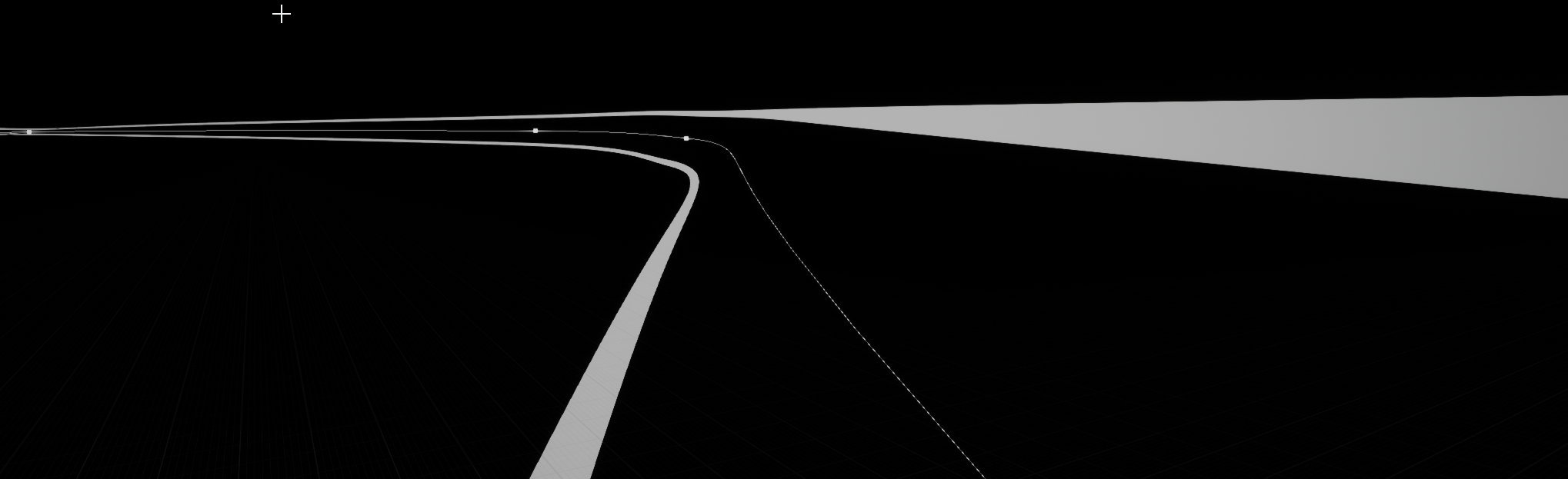
Also as a precaution: is this maybe a bad idea altogether?
calm goblet
@nimble parrot the error came back for me. Can you explain what your fix was? I'm getting the errors when building in visual studio EDIT: Fixed it by making my UE5 folder writable
nimble parrot
@calm goblet I do not build engine from source. But I have c++ project. This is how I rebuild sln file to build my project:
"[UE_PATH]\Engine\Binaries\DotNET\UnrealBuildTool\UnrealBuildTool.exe" -projectfiles -project="[PROJECT_PATH]\[PROJECT_NAME].uproject" -game -rocket -progress
how do I allow Vulkan 1.1 shader features (I think SM6) on engine shaders?
 vast canyon
Does someone here have experience with using address sanitizer together with unreal? I tried to enable it by adding "<bEnableAddressSanitizer>true</bEnableAddressSanitizer>" to the BuildConfiguration.xml file. When I try to start the editor, the console gets spamed with: @progress push 5% Creating makefile for UnrealHeaderTool (BuildConfiguration.xml is newer)
it hangs there forever
I tried this on Linux
 warm helm
With 4.26.2 from the launcher and the project having the line "AdditionalPluginDirectories": ["Mods"] in the .uproject file, the will fail to launch on an android device (Quest2 specifically) at https://github.com/EpicGames/UnrealEngine/blob/c3caf7b6bf12ae4c8e09b606f10a09776b4d1f38/Engine/Source/Runtime/Projects/Private/ProjectDescriptor.cpp#L337) with a failed assertion due to a relative path sneaking in. The culprit seems to be the code path at https://github.com/EpicGames/UnrealEngine/blob/c3caf7b6bf12ae4c8e09b606f10a09776b4d1f38/Engine/Source/Runtime/Projects/Private/ProjectDescriptor.cpp#L147 running due to AdditionalPluginDirectoriesValue having an entry which runs this code path. Does this look like a bug since I'm not sure if FPaths::ProjectDir() returns a relative path?
I'm just about to test a fix by replacing line 147 with FString RemappedDir = IFileManager::Get().ConvertToAbsolutePathForExternalAppForWrite(*(PathToProject / TEXT("../RemappedPlugins/"))); and see if it works
warm helm
Found that it was due to Android not converting absolute paths correctly. Replacing RemappedDir with RemappedDir = GFilePathBase + FString("/UE4Game/") + FApp::GetName() + "/" + "RemappedPlugins/"; lets the app launch on the Quest again
 onyx scarab
Hey guys. Am facing these two issues while building UE4:

Turns out I was trying to upgrade CEF myself, but I reverted all the work I've done and boom - that's what I got.
 pliant dew
Hi, do you guys know if I can change the target folder for building the engines source code? I have a rather small SSD and I want just the engine binaries on that while I have the source code on a hard drive. is this possible? I couldn't find much documentation on the setup/project file scripts (im building on linux)
calm mason
pliant dew
Hi, do you guys know if I can change the target folder for building the engines ...
I'd recommend using a symlink
 slate spade
Hello, I'm new to this server so sorry I'm asking this in the wrong channel.
I want to add the OpenNurbs SDK to my unreal project but some "Getting Started" steps are going wrong.
Is this the right channel to ask for help for this?
pliant dew
calm mason
I'd recommend using a symlink
Do you know which folders I should use? I was thinking about doing this but I remembered that binary placement is a bit messy. Will linking just the binaries folder be enough?
calm mason
Not an easy question to answer! Depends on how much memory you need to save. Best to keep source on SSD if you need to build it.
pliant dew
calm mason
Not an easy question to answer! Depends on how much memory you need to save. Bes...
yet I will probably not build often, I'm not sure yet, if it's only once in a while I don't see a reason why, I think I'll link the binaries, intermediate and build folder and see how that goes. I'm aware this might lengthen the build time but it might not be that critical for me atm
anyways thank you, I will try this soon and see if this works properly
Oh and I should probably do the shaders folder aswell lol
pliant dew
it seems to be compiling fine, I had to link both ways (link all the folders I left in the hdd to the ssd and the other way around) because the build script uses the path that its stored in (I moved the build dir to the SSD) and the makefile is on the hdd
A bit janky but it works
and it seems space is only going down in the SSD atm which is good, I used find to link everything quickly, in the engine folder:
find . -maxdepth 1 -type d -exec ln -s "/path/to/ssd/Engine/{}" "/path/to/hdd/Engine/{}" \;
funnily enough it depends on the folder above to be named Engine so you have to have an Engine folder in both drives
I might put the Build folder back seems it doesn't seem to increase in size though
pliant dew
it's alive! and tiny for some reason

ok the ui is acting weird but I'll see how it is inside the editor
 twin hazel
If I have a source build, do all my teammates needs to build from source too?
To open the project
Or somehow can I find a workaround?
I have some plugins really bloat my CPU and can not change them with project build -_-
 dire flame
>Building SurvivalProjectEditor and ShaderCompileWorker...
1>Using Visual Studio 2019 14.29.30037 toolchain (C:\Program Files (x86)\Microsoft Visual Studio\2019\Community\VC\Tools\MSVC\14.29.30037) and Windows 10.0.19041.0 SDK (C:\Program Files (x86)\Windows Kits\10).
1>Building 5 actions with 12 processes...
1>  [1/5] dte80a.tlh
1>C:\Program Files (x86)\Microsoft Visual Studio\2019\Community\MSBuild\Microsoft\VC\v160\Microsoft.MakeFile.Targets(45,5): error MSB3073: The command "F:\UnrealEngine\UnrealEngine\Engine\Build\BatchFiles\Build.bat -Target="SurvivalProjectEditor Win64 Development -Project=\"F:\GameWorkspace\SurvivalProject.uproject\"" -Target="ShaderCompileWorker Win64 Development -Quiet" -WaitMutex -FromMsBuild" exited with code 6.
1>Done building project "SurvivalProject.vcxproj" -- FAILED.
========== Build: 0 succeeded, 1 failed, 2 up-to-date, 0 skipped ==========
Can someone make sense of this build error?
this is during the last stages of engine compilation
something like 2400/2480
just going to thanks
I wasn't sure what to search
I found this in the same second
@stable hemlock yooo it bloody worked thanks
slate spade
How do PCH (precompiled headers) work in Unreal? I'm trying to add a SDK to my unreal project but when I go to the project properties there are no settings for it. (only the four: General, Test Runner, VC++ Directories, NMake)
 whole garnet
PCH are built per module, you set up the config for them in your module's build.cs file
https://docs.unrealengine.com/4.26/en-US/ProductionPipelines/BuildTools/UnrealBuildTool/IWYU/ has a bunch of good related info
A brief overview of the updated code base for UE4, now using an Include-What-You-Use (IWYU) dependency model.
slate spade
The (non-Unreal) tutorial I'm following wants me to add this to a PCH
#define OPENNURBS_PUBLIC_INSTALL_DIR "D:\Downloads\opennurbs-7.x\opennurbs-7.x"
// uncomment the next line if you want to use opennurbs as a DLL
//#define OPENNURBS_IMPORTS
#include "D:\Downloads\opennurbs-7.x\opennurbs-7.x\opennurbs_public.h"```

Should I add this to module's build.cs file?No wait, now that I have opened the build.cs file and reconigzed the file again: I think I can't simply copy. I guess I should start reading the article :))
whole garnet
if you just need to add defines you can use PrivateDefinitions.Add("YOUR_DEFINE_HERE") in the build.cs
or set up the PCH, either way works
slate spade
whole garnet
if you just need to add defines you can use `PrivateDefinitions.Add("YOUR_DEFINE...
You mean either one of these in the build.cs file?
Sorry that I'm so dumb. Never did this before 😔
 slate spade
whole garnet
or set up the PCH, either way works
slate spade
whole garnet
or set up the PCH, either way works
And how do I do this then? Some say just make a file that is exactly named stdafx.h and put stuff in there but idk if that is the right way to do it
whole garnet
slate spade
You mean either one of these in the build.cs file?
Sorry that I'm so dumb. Never...
neither, it would be like "DIR=C:/.../.../..."
if you need to look at an example of setting up a third party lib you can go to the plugin window, click new plugin, then scroll down to the third party library template
or browse some of the ones in the engine source
also probably not a great idea to hardcode the path in case you change machines, set up build server, someone else needs to work on it, etc :)
slate spade
Yeah, that also true. I might just put this whole SDK just in my project files. Somewhere in a third party folder or something 😉
https://github.com/mcneel/opennurbs
This is the SDK btw if you were curious

GitHub
OpenNURBS libraries allow anyone to read and write the 3DM file format without the need for Rhino. - mcneel/opennurbs
slate spade
Ofcourse when I placed the whole SDK in a folder in the project and then rebuild the SDK this happens.
I'm literally crying 😭 . I just want to do something so simple in my unreal project and this SDK shit is making it just so frustrating
 whole garnet
Oof, how much RAM are you rockin
slate spade
Nothing out of the ordinary right?
 whole garnet
16GB is tight, that's how much I'm using too :(. If you keep getting those errors you can try upping the size of your page file in windows which should give more overhead
slate spade
"upping the size of your page file in windows which should give more overhead"
How? Do you right the .sln file or something?
whole garnet
no it's a setting in windows on your machine https://mcci.com/support/guides/how-to-change-the-windows-pagefile-size/
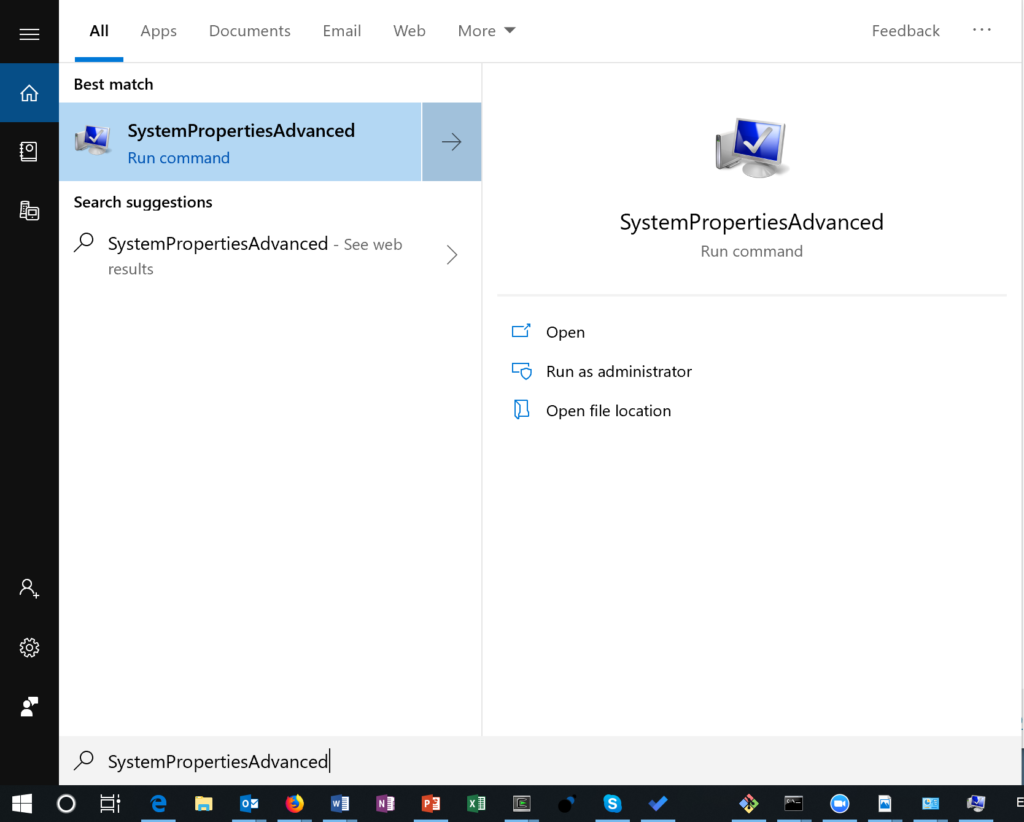
Home Support Guides How to Change the Windows Pagefile Size How to Change the Windows Pagefile Sizes The Windows Pagefile is used for virtual memory operations by the Windows kernel. Windows pagefi…
slate spade
Btw if I sound somewhere rude, excuses in advance.
I'm just so done that anytime I download something on git with "Getting Started" steps they sounds easy but then there are a thousand secret steps in between that they don't mention and cost me two work days :((. I have flashbacks of installing this programming language Lua. I needed so much help for that
I guess I'm still doing something wrong because I still get the same errors\
 whole garnet
yeahhhh 292GB seems a bit high. Maybe hitting some kind of infinite loop somewhere in MSVC? Did you change any solution settings when you were trying to get stuff working before?
slate spade
I don't think I did change any setting. But you know what, let's keep the SDK in that ugly downloads folder. I will solve that one other day.
I have now this line in the build.cs: PrivateDefinitions.Add("DIR=D:/Downloads/opennurbs-7.x/opennurbs-7.x");
And it Unreal compiles but how can I now use #include any file from OpenNurbs? Because when I try to type it in one of my classes it doesn't show up yet as an option
whole garnet
well first you weren't supposed to literally put DIR there, use the actual define there which looks like it would be OPENNURBS_PUBLIC_INSTALL_DIR
If you want to use the third party headers in different modules you have to add the directories to PublicIncludePaths
 whole garnet
replace DIR with the full define and it should be in privatedefinitions
slate spade
PrivateDefinitions.Add("OPENNURBS_PUBLIC_INSTALL_DIR = D:/Downloads/opennurbs-7.x/opennurbs-7.x");
whole garnet
yes
i'm not sure if having a space around the = matters, I generally see it without
slate spade
I removed it, just in case 🙂
whole garnet
I gotta get going, if you run into any more issues maybe go look around the engine modules that implement other third party stuff and see if you can glean anything from those.
slate spade
I will, and thank you so much for putting up with my shit.😭
hidden hedge
If a plugin is referencing absolute directories on your system, then that’s pretty bad
 rapid talon
Hello, working with modified Unreal Engine source for a job, having troubles packaging the game, getting this error right when I start the packaged build. I built the game solution and the game in DebugGame Editor mode, Debug is getting a recursion error when I try to run the editor. What should I do to get the debugging symbols in the editor that wasn't downloaded through the Launcher? Was trying to find any information regarding that online but couldn't. Thank you! (The game is packaged with DebugGame configuration btw)

 nova thicket
@rapid talon if you build with source, you can use vs to attach to unreal process, and vs would break on the error line.
rapid talon
Oh, so that's how you do it? Thanks, will take a look into that!
nova thicket
@rapid talon yes, attach to process before it crash.
rapid talon
Ye, well, the problem is that it crashes without even showing a starting screen, instantly
In editor game works
But I'll try to see what I can do, I guess. Thanks again!
nova thicket
@rapid talon if you crash without starting screen, it maybe crash on the FEngine::PreInit, you can set the break point on the begin of this function.
rapid talon
Thanks for the suggestion! Will do. Tomorrow 😂 It's 3.40am, imma sleep now
nova thicket
hh alright~
 errant shale
Guys, I want to PR a fix to UE4
But the master branch is broken
Should I PR from release->newBranch to master then? Or what ?
whole garnet
could just wait until master works again, its not like they're gonna merge it straight away
 spark fossil
Hello Guys! Has anyone of you noticed that when you compile the Engine from source with BuildGraph - InstalledEngineBuild configuration, that the PNG files inside the content folder of the various Platforms are not copied correctly inside the LocalBuilds folder? They are pngs related to the [Platform]\Content\Editor\Slate folder, it seems strange to me to have to copy them by hand from Engine to LocalBuilds.
Do any of you know why?
spark fossil
Seems related to that issue. To fix that error I need to manually copy that files from Engine\Platforms folder to LocalBuilds[OS_COMPILED_FOLDER]\Engine\Platforms
That user have same error too: https://forums.developer.nvidia.com/t/isaac-sight-server-cannot-display-actual-image-in-the-simulator/82800


NVIDIA Developer Forums
Following command nor with quotes nor carter or kaya does not show anything in Isaac Sight server hh@hh-desktop:~$ ./UnrealEngine-IsaacSim_1.2/Engine/Binaries/Linux/UE4Editor IsaacSimProject CarterWarehouse_P -vulkan -isaac_sim_config_json=/home/hh/isaac/apps/carter/carter_sim/bridge_config/carter_full.json carter images ...
 tired spade
Btw
Google play iap api is broken
The helper.Java file needs to be updated
They marked the interface as deprecated in 4.27
But simply didn’t update the method to use the new async call
spark fossil
tired spade
Google play iap api is broken
I think you missplaced channel 😆 by my fault
tired spade
Well kinda lol 😂
@spark fossil
It’s still an engine source plugin
Googleplayhelper.Java is a source file
In the online source folder
But yeah 😂
Sorry
I did fix that btw
spark fossil
no problem mate, if you know how to solve my issue I appreciate a lot ❤️
spark fossil
spark fossil
Hello Guys! Has anyone of you noticed that when you compile the Engine from sour...
I'm talking about that
spark fossil
Really? Can you link me the pr?
spark fossil
Ah... that's weird, i am in 4.26.2 and still here for every platform
spark fossil
PS4, PS5, XSX, Switch
spark fossil
On Windows, sorry
spark fossil
Try to use an InstalledEngineBuild with BuildGraph
tired spade
Release build
spark fossil
I think that miss a copy of pngs files
tired spade
Did you compile the debug editor using header tool?
spark fossil
actually Content shouldn't have pngs, they should be in resources. but they are the SDK integrations made by Unreal so 🤔
tired spade
I don’t get this warning 4.24 and up
Only 4.21 and 4.22 pre hotfix
Oh
Rocket build
spark fossil
Yes
tired spade
Yeah I just use header tool in visual studio
Debug editor
I haven’t rocket built in a very long time
Honestly forgot the process 😂
spark fossil
No problem mate 🙂
tired spade
I launch the uproject
Then package to platform
Cool by book with dev or shipping
Using the profile manager
But I don’t get those warning anymore
Where I did before
I can’t remember really but i think it was warning when loading the engine project
I don’t think it affected my package
@tired spade IIRC the default dependency-download for source builds doesn't download Mac files
@spark fossil
That was a dummy warning
If your platform rocket building you’ll likely need to get the other platform files
 void oar
hey I keep getting
"fatal: cannot pread pack file: Permission denied"
when I try to clone UE repo, but it's not a system drive or anything
any experience with this?
 inland kiln
Can I get the source files for "unreal remote2" somewhere?
 dense kettle
Hi, there is still no container on GH registry ? May I wait the release of 4.27 ?
 limber jacinth
@vapid grail did you run Setup.bat and Generate project files?
then open the UE4.sln with rider
 vapid grail
I noticed this line when I build the game: Using 'git status' to determine working set for adaptive non-unity build (E:\Unreal Engine\Projects\RL)
turbid sigil
has anyone tried compiling the engine with intel ICC
 neon bronze
has anyone have any issue with loaded in projects. I was on mine earlier to day and when I tried to load in again this is what I god was some kind of core error

From what I can see it looks like I'm getting files missing for some reason C:ExecuteUbergraph_UI_CoalGeneratorPanel:CallFunc_GetDataTableRowFromName_OutRow'. Unknown structure.
Structure related files. I don't get it.
low glacier
neon bronze
has anyone have any issue with loaded in projects. I was on mine earlier to day ...
To see the call stack you have to install Editor debug symbols.
 neon bronze
@low glacier Thank you, What do I have to do to see the results of what I need to fix
low glacier
neon bronze
<@!148762361413500928> Thank you, What do I have to do to see the results of wha...
You will need to install the Engine symbols like in that screenshot
neon bronze
Yes I did that all ready, what do I need to do to see the results.
low glacier
Just crash the project. Crash reporter will automatically pick up the Engine symbols.
 low glacier
@neon bronze Not sure but maybe one of your Blueprint might be corrupted
neon bronze
@low glacier Thanks, I did figure it out, what happen is that I had to make a lot of changes to the project. I didn't think to rebuild everything before I exited the engine. I had a backup copy and tested it. and that's what I learned. If you make a lot of changes in your project. do a build on it before your exit the engine.
spark fossil
Hello Guys! Has anyone of you noticed that when you compile the Engine from source with BuildGraph - InstalledEngineBuild configuration, that the PNG files inside the content folder of the various Platforms are not copied correctly inside the LocalBuilds folder? They are pngs related to the [Platform]\Content\Editor\Slate folder, it seems strange to me to have to copy them by hand from Engine to LocalBuilds.
Do any of you know why?
thick storm
Looking at code is used during cooking, and if platform supports MeshStreaming it is ignored anyway, but what it does exactly idk
 crystal glade
Anyone had any luck building SDL2 targetting Win64? Seems Epic only include the Linux built binaries in the Launcher version
Wanting to use it for the UEJoystickPlugin on Windows
I could use the one included in the UEJoystickPlugin repo but I want to use the one supported by the engine if possible
 vital hawk
I use UEJoystickPlugin and recently had it working on a quick UE5 test, let me check how
Yeah I used the one provided by the plugin, so that won't help, sorry 😦
crystal glade
@vital hawk did you get weird inputs using it in UE5? Mine seem to not be clamping properly and reporting weird numbers
vital hawk
crystal glade
<@!688049086112333839> did you get weird inputs using it in UE5? Mine seem to no...
I didn't check input just yet, for now I just made sure my existing project compiled and opened in UE5. But I might take a look at that, those issue would be problematic for us. I'll get back to you when tests are done, though I'm not sure when that'll be.
crystal glade
@vital hawk I've ended up just reverting back to using RawInput as the issues made the wheel unusable and I lack the understanding in SDL haha
 pliant sand
UE4.26.2, why compiling the engine uses vs2017, But the created c++ project used vs2019 ? is it OK?
 night sapphire
How many modules is average when building from source? I built 4.26.2 once and had ~3,000. Now I'm building a project (PowerIK) and it says 14,000
spiral mortar
could do it on a module basis
stable hemlock
will ue4 have adaptive trigger support?
or does it
kind storm
In MaterialShared.cpp, specifically in void FMaterialAttributeDefinitionMap::InitializeAttributeMap() what are those hex values are based on?

 rain lake
da fuk is your background lmao
they are GUIDs
they probably created a guid using a tool, and they put the values in there
low glacier
Unreal Binary Builder 3.1.2 is now available (supports Unreal Engine 5)
https://www.buymeacoffee.com/ryanjon2040/unreal-binary-builder-v3-1-2

Buy Me a Coffee
v3.1.2 of Unreal Binary Builder is now available. Below is the changelog.Download latest release from here: https://github.com/ryanjon2040/U...
 ruby imp
Hey there, i have questions regarding the engine code compilation:
Can the engine code have dependency to a module i create and not need compiling when i modify the module?
 stone coral
I'm wondering something. How would I go about changing the directory used for standalone games configs and saves from the LocalAppData directory to the user's saved games directory?
celest viper
What makes the engine think a module is Editor Only or Developer?
We have a custom Animation node from a while back that is now flagging a warning about "The Node <Our Node> is from an Editor Only module, but is placed in a runtime blueprint! K2 Nodes should only be defined in a Developer or UncookedOnly module"
 smoky goblet
celest viper
What makes the engine think a module is Editor Only or Developer?
smoky goblet
celest viper
What makes the engine think a module is Editor Only or Developer?
That should be part of the uproject or uplugin specification.
heady sparrow
getting a linker error trying to use enum EConvertQueryResult despite having PhysicsCore in my modules 
low glacier
v3.1.3 of Unreal Binary Builder now available: https://www.buymeacoffee.com/ryanjon2040/unreal-binary-builder-v3-1-3

Buy Me a Coffee
v3.1.3 of Unreal Binary Builder is now available. Below is the changelog.Download latest release from here: https://github.com/ryanjon2040/U...
 tawdry helm
Anyone know how to build a source engine on a new m1 mac?
getting an error complaining about unknown cpu when running setup.sh
 spring ivy
Is there a handy way to build the engine from source and then remove all source-related files afterward?
Producing a static instance, I would suppose is the term
I have a few different builds from source that I just needed to make one or two edits to source for, and would like to remove the source after compiling in order to save on SSD space
 lucid prawn
low glacier
v3.1.3 of Unreal Binary Builder now available: https://www.buymeacoffee.com/ryan...
lucid prawn
low glacier
v3.1.3 of Unreal Binary Builder now available: https://www.buymeacoffee.com/ryan...
I was very surprised when I saw an update for that. I had thought it was abandoned.
low glacier
lucid prawn
I was very surprised when I saw an update for that. I had thought it was abandon...
You thought binary builder was abandoned?
lucid prawn
Yeah. Last I looked at it was around the 4.25 release and it hadn't been updated for a bit. So I just poked through it to see the different options and made my own script to replicate it.
digging the new UI direction though
low glacier
No worries. I will constantly update it 🙂
Working on the project features so you can package projects as well
Just added support for GitHub and custom build engines as well
lucid prawn
noice
thought about adding support for Jenkins/Team City?
granted, we use an auto CI pipeline and have scheduled builds
low glacier
Never worked on them actually so not sure how it works. If you can add them feel free to send a PR. I'll be happy to integrate it 🙂
lucid prawn
honestly not sure of those API's
or if we can even access them like that
last I looked at Jenkins integration and auto builds via a bot, it was a bit of a nightmare
they usually require a version control system in place, so probably not a good idea lol
 quasi berry
Is MyClass.generated.cpp not being generated anymore by UHT as implementation of MyClass.generated.h? If so which file is the "new" MyClass.generated.cpp?
 tulip arch
Does anyone know how to insert a custom class into the inheritance chain? Eg: Pawn -> MyPawn -> Character -> MyCharacter
The only way I can think to do this is to make a new base character class based on MyPawn and copy all of the engine source character code into it, but I'd rather not do that as I'd lose whatever updates will be made to Epic's character
quasi berry
The question is not clear. What do you mean by insert?
tulip arch
Character inherits from Pawn, and I have a Character class that inherits from Character. I now need a custom Pawn class that inherits from Pawn, but I still want my Character base class to inherit from Character so that I get what is already in there. So I somehow need insert MyPawn (custom pawn class) into the inheritance chain between Pawn and Character, if that's the right term.
Basically I need my inheritance to look the order above.
 crystal linden
Is there a reason why you want to insert your class into the inheritance chain like that?
I'm assuming you want npc pawns that also inherit from MyPawn but not character?
tulip arch
I need to override FaceRotation in Pawn for some custom rotation stuff
crystal linden
But you can already override it in MyCharacter can you not?
tulip arch
PlayerController calls FaceRotation on Pawn in UpdateRotation so I'd have to change that too
crystal linden
Yeah but it's a virtual function
tulip arch
anyway these are specifics, I'm more curious to know if what I'm asking about is possible
crystal linden
It's possible
But you need to fork the engine
Because it would involve creating your custom Pawn class and then changing all native pawn inheriting classes to inherit your custom class
At this point though you could also just edit the pawn class itself and achieve the same result since MyPawn would effectively replace Pawn
tulip arch
yeah that's a good point
I may look into if what I want is achievable by overriding UpdateRotation in Controller and calling the character version of FaceRotation
crystal linden
Yeah
Remember since it's a virtual function
Even if it's called on the pawn
If the actual class it's being called on is MyCharacter it'll call the overriden version of the function
tulip arch
right, yeah that's definitely the better way to do it.
Thanks for the help
Actually yes I'm being silly, I don't need to override UpdateRotation at all
Had a brainfart moment there
tulip arch
for some reason my mind completely separated the FaceRotation function in Pawn and the FaceRotation function in Character
like character wasnt just overriding already lol
oh, another brainfart, character doesnt have that function yet, I need to make it. Okay I'm gonna take a break I'm not thinking straight anymore haha.
 inner plume
Hello. I hope this is the right place to ask but I'm having a hard time compiling UE from source. Setup.bat fails everytime stating 'Failed to download 'http://cdn.unrealengine.com/dependencies/2369826-2acd3c361c9d4a858bd63938a2ab980e/07bac5d4a23c9a7bc1695e030017c8694d72a735': Access to the path is denied. (UnauthorizedAccessException)' Googled and found posts stating that is read/write issue and I made the suggested changes but it didn't help. Not sure what to do... Thanks
inner plume
inner plume
Hello. I hope this is the right place to ask but I'm having a hard time compilin...
nevermind, 'downloaded a zip of the release branch instead of going through git and somehow the setup.bat worked fine this time. Thx anyway
 gleaming goblet
If i compile ue4 version 4.26.2 from src. Can i use chaos vehicles and physics or do i have to compile the chaos specific build?
 latent geyser
Anyone know what's up with EmptyRHI? I'm trying to add a new rendering backend to UE4 and this seems like a good place to start, but when I enable the module it's full of errors, such as no FEmptyVertexShader implementation.
Is there some documentation on how to add a new RHI anywhere or does anyone have experience with adding one?
(with engine 4.24 and 4.25 having the same issue)
stable hemlock
Hi, I need some help, I created a freelook option for the camera, and it works for a full 360 degree view, and snapping back forward, but upon attempting to put on a limit on how far I can look, It simply breaks. I am using "Shooter Gun System" as a base (will link page at bottom)
Basically, what my issue is, is I get it to work to a certain point, but I cant get it to use my range of 100 to -100 dynamically. What I mean is, If I am facing 12 oclock, My view is limited to 4 or 5 if I look right, and 7 or 8 if I look left. But If I'm looking at 3 oclock, my range is still limited to 4 or 5 if I look right, so it uses the correct range, but its only for the camera's base rotation; it doesn't adapt.
I also cannot get the view to reset, once I release alt, The camera goes back to its original, forward facing position, but I have those view constraints.
https://www.unrealengine.com/marketplace/en-US/product/6cd9db9b2faf486891bfa1081472f465

Unreal Engine
Character+Gun+Anim system with ADS auto-aligning, gun customization system, True 1P character, replication, and many other customizable features. FPS / TPS
Also, please redirect me to a proper channel if this isn't it, I just thought it may fit since I'm using functions from base engine
 grizzled breach
I'm trying to make sense of cursor delta and how it is limited by the desktop space vs raw mouse delta which I assume should always give a result even if the mouse hits the edge of a window. Been digging into source trying to make sense of things and there is a "MouseDeltaTracker" which seems to offer "GetRawDelta" I guess that is what I'm looking for? I'd imagine something like that would just be exposed? My mission is to have the engine pump out mouse delta or an axis float value for X and Y while the game is not focused and while the actual mouse cursor might be hitting the edge of the desktop space.
grizzled breach
Well it seems like inside WindowsApplication.cpp the ProcessMessage case "WM_INPUT" only happens when mouse is in viewport which might explain why mouse data isn't updating
Seems like I need to find out where Epic registers their raw input and give it the "RIDEV_INPUTSINK:" Flag
grizzled breach
I'd imagine somewhere in source they would have to do a RegisterRawInputDevices but I see that no where and I'm very confused by this.
grizzled breach
crystal glade
<@688049086112333839> I've ended up just reverting back to using RawInput as the...
Hey I'm doing research into RawInput and I see some registration calls for raw input inside SDL_windowmouse.cs in the ThirdParty SDL source is this what you were talking about?
grizzled breach
It would seem that in order to capture mouse movement/input your mouse needs to be over a slate/widget window to which I think viewport is essential as well. So you will not pick up mouse movements if no valid slate window is found under the cursor and won't get any mouse move events as a result.
crystal linden
So I've extended the editor to add new properties to the material graph. For this I basically follow how CustomData0 and CustomData1 were structured. I was mostly successful with one caveat. Those new properties can't receive inputs that have anything to do with the normal maps.
The HLSL code generated by the material (for the functions that grab my new properties' data) is missing all values that are a result of manipulating normal maps data.
I've already investigated a bit and I'm aware that normal data is generated and compiled before anything else. However the CustomData0 and 1 both can generate HLSL that grabs normal map data, in contrast to my new properties.
Does anyone have a clue as to why the new properties can't generate this tidbit of HLSL?
 dry ore
Hello!
I am using a .bat file that launches my project as standalone executable (by pointint to the unreal editor and the project path)
Does someone know of a way to write the .bat so that one click on it will open two instances of the application and puts them side by side?
 tall thunder
Anyone know where I can find the lighting channels? Looking to add more
 spark wave
Severity Code Description Project File Line Suppression State
Error MSB3073 The command "....\Build\BatchFiles\Build.bat -Target="UnrealEditor Win64 Development" -Target="ShaderCompileWorker Win64 Development -Quiet" -WaitMutex -FromMsBuild" exited with code 6. UE5 C:\Program Files (x86)\Microsoft Visual Studio\2019\Community\MSBuild\Microsoft\VC\v160\Microsoft.MakeFile.Targets 45
can same how to fix this
 feral smelt
Is there any particular reason Asset registry does not consider inheritance relationships between blueprint classes when doing a GetSubClasses() query?
it does for c++ inheritance relations, including blueprint classes that inherit from a c++ class, but not blueprint classes that inherit from other blueprint classes
 bronze jacinth
So it looks like Unreal will truncate WebSocket connection URIs which can break sending JWTs as part of a query string. Looks like it's time to figure out how to submit a pull request 😛
bronze jacinth
Untrue, actually
I can send it as a header, and personally I prefer it but since the browser implementations of Websocket connections don't have any way to set headers, the preferred method of sending JWTs as part of a Websocket auth exchange is as a query param
Unreal will let me pack it as a header and that works but I also wanted to figure out what was truncating my query params and it seems it's Unreal itself 🙂
bronze jacinth
Looks like this is fixed in 4.27 - https://github.com/EpicGames/UnrealEngine/commit/ea1c279f766a901fa7e5b7a03ec4558c12d4fa63
feral smelt
bronze jacinth
I can send it as a header, and personally I prefer it but since the browser impl...
that's fair if you want to ensure you'll be able to connect from browsers, especially if you are targeting html5 (in unreal) haha
feral smelt
^^ I ask because if no one knows of a reason it deliberately doesn't support this I might contribute it back, following getting more feedback outside this forum
the way I solved my problem is to make a "definition" primary data Asset in c++ that literally just has a class variable on it
but that's silly
it should just be fixed in engine
 abstract cove
Hey guys! I'm getting this error on building engine. Any ideas what may be wrong?
 feral smelt
Well, it means that your build command exited with code 6
Any other errors, warnings, etc that might be useful? I'm betting there is
abstract cove
only those two
feral smelt
Check the Build Output
abstract cove
I'm sorry, could you tell me where to check it?
feral smelt

thats the raw output from UnrealBuildTool
if its not on your layout, go here

here is me building unreal successfully

because thank god, i already built the whole thing
abstract cove
Ok, let me try
that's the output

"Failed to open BFF" seems to be the error
but I have no "UE4" folder in I directory
bronze jacinth
feral smelt
^^ I ask because if no one knows of a reason it deliberately doesn't support thi...
I looked into it but there's already a commit fixing the issue as linked above
Now I'm trying to figure out how to deal with caching incoming network messages while the engine loads/unloads levels
feral smelt
bronze jacinth
Now I'm trying to figure out how to deal with caching incoming network messages ...
oh no i mean the Blueprint subclass issue with Asset Registry that means that nested blueprint classes do not work with Asset Manager and Primary Assets
 pallid delta
hey guys what aes key type ue 4 using i need to convert it to hex
 red pecan
I begin developing with ue 4.24-source and VS 19. I'm trying build just a game solution, but the engine is recompiling too. How to avoid it?
 cloud pine
don't build the entire solution, just build the game project (make sure it is also set as the startup project to prevent accidental entire engine rebuilds)
i.e. right-click the game project in the solution explorer and click build there
 timber remnant
If I develop a plugin which relies on engine source functionality, compile the plugin and distribute the binaries to users who are using pre-compiled engine versions, I'm not mistaken in thinking they'll be able to load the plugin and run it without any issues?
spiral mortar
@timber remnant What do you mean by engine source functionality?
 lapis abyss
My editor is freezing at 75% with no crash or reported issue, anyone know how to debug this? Rebuilding from source does nothing.
feral smelt
lapis abyss
My editor is freezing at 75% with no crash or reported issue, anyone know how to...
is that 75% while loading the editor*
because yes, it is compiling shaders then
also, when you first load the editor and it shows the % progress bar before you get to the full UI, it is also loading your default map
important to remember that
its totally normal to sit forever on UE's editor loading screen at like 70-85% while it compiles shaders
you can also check the editor log file for that and you will see "Compiling Shaders"
however do not despair
once its done the editor will load much quicker next time
go have a coffee 🙂
oh, this is #engine-source so you just compiled your first engine from source code. Yes, the shaders are not shared between your other copy of the editor, even if its the exact same version
had to wait long enough for the damn thing to get built anyway
feral smelt
timber remnant
If I develop a plugin which relies on engine source functionality, compile the p...
if you build your plugin to take advantage of things you have changed on your source build, then no people wont be able to take advantage of that of course. But if your plugin works just fine for a launcher version of UE then yeah people will be able to use it just fine
also check out #plugin-dev if you havent been yet
timber remnant
@spiral mortar I'm trying to generate blueprint nodes while in the editor/during PIE, hoping to piggy back off the built in functions which allow you to do this manually, presumably in a 'blueprint editor' class somewhere.
@feral smelt alright, that sounds like what I'm trying to do might be achievable, I shouldn't need to change the editor source. Do you know if you can inherrit from compiled C++ classes?
feral smelt
timber remnant
<@!138013505545568256> alright, that sounds like what I'm trying to do might be ...
yeah totally
latent geyser
I'm working on a port of the HTML5 PE to 4.27; however I'm running into an issue where everything not-slate is flipped vertically in the viewport. I know I missed something small, anyone know how to debug this?
and the vertices are messed up as well, supposed to be four boxes on the corners of a plane with a cylinder, sphere and cone in the middle.
 latent geyser
It should look like this

 high epoch
I have a naive question about GitDependencies.exe. After running it the .git folder is getting and additional 9.5 GB. Are these files actually needed to build the engine or can they be cleaned up?
high epoch
I'm currently doing a sparse checkout, I'll have to see if I can filter blob with those.
night sapphire
So I built ue4 source on one PC then transferred the source to my other PC. Do I have to build it again to be able to run it? I clicked Start New Instance and it started building from scratch again
 unkempt forum
any luck with that?
 elder falcon
haven't tried it again
unkempt forum
kkk
stable hemlock
Excuse me, because my computer's cpu is intel, and UE5 main turns off the Hybird thread. The compilation speed drops rapidly. How to open Hybird thread compile
 spiral mortar
You don't have enough free memory
Get more ram 😄
Alternatively you can disable the memory limit in the build.cs
stable hemlock
Which build.cs file is it?
feral smelt
in the time it took for someone to respond you could have built it yourself
well, most of it probably
twin hazel
Can I compile UT source code with my pre-downloaded engine source? I guess its trying to download from scratch everytime
 final flame
where in the engine source can i find where normals are recomputed?
searching under skeletalmesh.cpp but i couldn't trace it
feral smelt
why cant you build the engine yourself?
feral smelt
alright fine, well im sure if someone's up to help they will 🙂 IT's got you down my friend 🙂
 hybrid sierra
Where can I change the compiler and optimization level?!
low glacier
I can help you build the Engine but am I allowed to share the binaries after that? Not sure if there is anything in the license that prevents sharing the binaries
feral smelt
i think this wouldnt qualify as a Public distribution (which would be done over the marketplace) so

this is Publishing EULA
so as long as your both licensees should be ok
also as a general note @low glacier yes, sharing the binaries publically is covered under the license and must be done on UE Marketplace
 limpid palm
sup guys. having a bit of a problem. using UE5 here. trying to generate project files but i'm getting this output.
Building UnrealBuildTool in C:/unreal/UnrealEngine...
Running: C:\Windows\Microsoft.NET\Framework\v4.0.30319\MSBuild.exe /nologo /verbosity:quiet "C:/unreal/UnrealEngine/Engine/Source/Programs/UnrealBuildTool/UnrealBuildTool.csproj" /property:Configuration=Development /property:Platform=AnyCPU
Missing C:/unreal/UnrealEngine/Engine/Binaries/DotNET/UnrealBuildTool.exe after build
I read online for a solution for unreal 4 was to just build the project that comes in the engine solution. however i didn't see such a project that would build a UnrealBuildTool for the UE5
nvm found it. still getting used to Rider. didn't see in the top right dropdown.
feral smelt
yeah but marketplace is only required for a public distribution, if you want to just send a built version to another licensee privately that is ok from my read of the publishing eula
low glacier
Yeah looks like its fine. So send me the GitHub link (or zip file) and I'll compile it. If the build is success how will I share it?
 low glacier
Its the binaries I want to share. I'm building it for him right now so once its done I only have to send the binaries
 small mauve
Heeeeeey, this is somewhat of a shader/engine question so I'll ask it here since it's mostly modifying the engine
I've added a new boolean to materials, and I'd like to have it be transmitted to shader code
I've added this third line in MaterialShared.cpp, which should set a define for shaders to use:
    OutEnvironment.SetDefine(TEXT("USE_DITHERED_LOD_TRANSITION_FROM_MATERIAL"), IsDitheredLODTransition());
    OutEnvironment.SetDefine(TEXT("MATERIAL_TWOSIDED"), IsTwoSided());
    OutEnvironment.SetDefine(TEXT("MATERIAL_IS_RETROREFLECTIVE"), IsRetroreflective()); // <--
I've also added it to Definitions.usf defaulting to 0

Now the issue is, it never changes from 0, at least the shader code always considers it false.
bool bIsRetroreflective = MATERIAL_IS_RETROREFLECTIVE;
I've also tried a more standard
#if MATERIAL_IS_RETROREFLECTIVE
  bool bIsRetroreflective = true;
#else
  bool bIsRetroreflective = false;
#endif
Which doesn't change anything
To be sure I did try forcing it to true to make sure the shader isn't faulty and that works, it's literally just not setting the correct value on the define and/or not handling it correctly
Has anyone messed with this before and got any idea at where I might be failing?
limpid palm
i'm having trouble tracking down how to solve these compiler errors. i'm trying to compile unreal engine 5
 limpid palm
nvm solved it thanks.
limpid palm
@stable hemlock ohh man didn't see it. thanks.
feral smelt
🧐 the editor? doesn't launch egs on start or exit for me...?
... at least I think, honestly might not have noticed
lapis abyss
Is it possible to select which areas of a navmesh are generated as an individual grid and which grids are connected based on parameters from before navmesh generation? I want to have random Box A and random Box B that may overlap at an angle but have individual navmeshes and disconnected grids.
feral smelt
huh.
i dunno i just tried to make it open EGS (either the app itself or the website) by starting the editor and making new projects and various things it doesnt do that for me /shrug
4.26.2
lapis abyss
Is there any good documentation on the navmesh generation process in UE4?
 onyx condor
Hi, I built Unreal 4.25.4 from source code, is it supposed to be this big?

 sharp spindle
Hello, i havent updated the engine for a long while, is now the only option available to update to ue5?
hidden hedge
no?
hidden hedge
I was more trying to find out where that perception came from since I'm sure you can get any version of UE4 all the way from 4.0
sharp spindle
Gotcha👍🏽
sharp spindle
hidden hedge
I was more trying to find out where that perception came from since I'm sure you...
I was confused, sorry
 spice ingot
Not sure if this is the correct place to ask, but has anyone successfully built unreal editor from source for Apple silicon?
 split yarrow
Hello. How can I change color of event in visual logger from cyan to some custom color. For example, now when there is error color is red, but I want to be able to pass colors from my logging function or something.
 spice ingot
Thanks
high epoch
I am trying to figure out what invalidates my build when I run UnrealBuildTool.exe. It there arguments that result in logging such information?
This is how I build currently:
C:\MyProject\Engine\Binaries\DotNET\UnrealBuildTool.exe Editor Win64 Development C:\MyProject\MyProject\MyProject.uproject -waitmutex -NoHotReload
 sterile summit
if i make changes to Engine/Source/ThirdParty/PhysX3/PhysX_3.4/Source/SimulationController/src/ScNPhaseCore.cpp
do i need to rebuild the whole engine to build the physx module again?
limber jacinth
it will only build what needs to be built.
night sapphire
Anybody know why sometimes when I open my C++ project, I get these ShaderCompileWorker errors?
 night sapphire
Thank you so much, that fixed it. ShaderCompileWorker-Core and ShaderCompileWorker-Projects were both giving me errors, both were 0 bytes
I'm fairly new to C++ :/
 shrewd thorn
The bad executables/dlls often happens if you cancel a build that's in progress, visual studio seems to hate that
 silk marsh
I've been building the engine and it's been going for quite a while now. Any ideas for a source build that's taking incredibly long to build everything?
silk marsh
Figured it out, ran into a module manifest error which was fixed by running setup/generate project files again
lapis abyss
Starting Debugging to open UE4 requires VS to be open, but prevents building source of projects with modified source code due to VS being open. Any workarounds for this?
feral smelt
lapis abyss
Starting Debugging to open UE4 requires VS to be open, but prevents building sou...
this doesn't sound like engine-source, it sounds like you are just trying to build your project. The workflows you should use to build your project are important, if you do things wrong you can cause corruption in the blueprints of your project. See the top pin in #cpp. To sum it up, enable Live Coding in the editor, always close the editor when compiling in your IDE, and as a shortcut, when making non-structural changes to your source, you can use Ctrl+alt+f11 to use live coding to patch your editor without restarting. Plenty more workflow tips available in #cpp if you are interested!
 upper shard
Anyone bychance know where unreal editor's 'chirp', "build is done" sound is located? Want to use it for msvc build succeeded too.
 slow goblet
upper shard
Anyone bychance know where unreal editor's 'chirp', "build is done" sound is loc...
slow goblet
upper shard
Anyone bychance know where unreal editor's 'chirp', "build is done" sound is loc...
/ Engine/EditorSounds/Notifications/ but make sure to enable Show Engine Content in the content browser View Options
 fluid stirrup
Hey All, I'm trying to define a custom Rich Text Decorator class and getting a compile error I can't seem to figure out. Here's my header file:


Does anyone know why the compiler can't find FRichTextDecorator? It's in one of my included files.
Is there something I should add to my Build.cs file to get this compiling?
hidden hedge
"UMG" probably
unless you're on an old engine version where that class wasn't exported for some reason
 bitter plume
What are the recommended specs to compile unreal engine source?
 shell portal
Hi folk!
Not sure this is the correct channel to ask this question, please guide me to the correct one if this is not where it should be.
I'm working on some code that creates sequences from C++. The idea is to create keyframes, in code and feed them to the sequencer. I found an old example (from UE 4.20) that demonstrates the changes done to Sequencer's code structures but those are outdated and I couldn't find anything up to date.
Have you guys found any tutorial, documentation, explanation that helps me go forward? Thanks!
 maiden cape
I'd recommend looking at the python sequencer access code, that contains the basics of what you need.
essentially you can do it all from python, so find out where the python code does it and see what is uses
small mauve
Hey! I built the engine from source to redistribute it on a NAS
However our project doesn't compile anymore when using said engine:
UnrealBuildTool : error : Couldn't find target rules file for target 'ShaderCompileWorker' in rules assembly 'UE4Rules, Version=0.0.0.0, Culture=neutral, PublicKeyToken=null'.
When running MSBuild to compile it
 novel anvil
Hi folks, I'd like to make my Developement Editor installable. What's the easiest way to do that?
 cinder jungle
Hi there, I am looking for detailed resources on graphics programming specific to Unreal's rendering code, anybody know of any good ones? Other than the source code itself ofc 😄
shrewd thorn
novel anvil
Hi folks, I'd like to make my Developement Editor installable. What's the easies...
The instructions on https://docs.unrealengine.com/4.26/en-US/ProductionPipelines/DeployingTheEngine/UsinganInstalledBuild/ are pretty good. It makes a pretty big installer but it's not that hard for artists/etc to use
This page describes the Installed Build process, including an overview of how to write Installed Build scripts.
UnrealGameSync is the more advanced option if you need to make a lot of engine code changes, but everyone needs visual studio or you need an automated build process to build binaries for you
 cobalt owl
Anyone else not able to see 4.27 preview as an option to install in Epic Launcher? Also the github source is now showing error 404. Can someone tell me what I'm missing?
novel anvil
shrewd thorn
The instructions on https://docs.unrealengine.com/4.26/en-US/ProductionPipelines...
lovely, thank you
I had no idea that a tool such as this one exists
 hoary breach
There is also this thing if it helps. https://github.com/ryanjon2040/Unreal-Binary-Builder @shrewd thorn @novel anvil
GitHub
An application designed to create installed Unreal Engine builds (aka Rocket builds) from Unreal Engine GitHub source. - GitHub - ryanjon2040/Unreal-Binary-Builder: An application designed to creat...
I've been looking for ways to make a deployable custom build but I couldn't find anything besides this.
hoary breach
shrewd thorn
The instructions on https://docs.unrealengine.com/4.26/en-US/ProductionPipelines...
I'll store the link you provided though. Thanks a lot. 
novel anvil
hoary breach
There is also this thing if it helps. https://github.com/ryanjon2040/Unreal-Bina...
interesting indeed, I'll try it out to see how reliable it is
novel anvil
so @hoary breach, it seems to me that this Unreal Binary Builder you mentioned earlier is simply a wrapper around the Automation Tool that is used in the link attached by @shrewd thorn
either way, a lot cosier to use when compared to command-line driven tools, thanks a lot
 random lily
I've been having a weird issue this last week where my project, regardless of the changes that I make or don't, wants to recompile thousands of modules in VS each time I run. It doesn't seem to have this issue when building from UGS. I've tried wiping out the binaries and intermediates folder in the project folder, but no dice. Anyone else hit this? It seems like a bug. No reason the editor should take an hour to recompile each time
hoary breach
novel anvil
so <@!204674769856102410>, it seems to me that this Unreal Binary Builder you me...
hoary breach
random lily
I've been having a weird issue this last week where my project, regardless of th...
I've compiled the entire thing to be deployable in 21 hours and 33 minutes
15,550 modules
or files
idk
random lily
I don't know if that really helps, though. It seems like a bug that the engine code wants to recompile when I make even a small change to just the project module code.
hoary breach
I wish I knew more to help you. Hope you find the solution to your problem. 
feral smelt
random lily
I don't know if that really helps, though. It seems like a bug that the engine c...
hmmm it sounds like UnrealBuildTool is seeing the timestamps change on your source files versus whats in the binaries. do you maybe store your engine source in a weird location--- for instance onedrive, dropbox, or some other cloud syncing apparatus?
random lily
Nope, it's on a drive specifically for projects, with this one projects subst'd as a drive letter
I do think that I did resolve it (for now) by wiping out all my binaries and intermediates, reverting those deletions on the engine binaries, and rebuilding the whole project
But it's the second time this has happened in about two weeks, and that resolution took the better part of a day, so hopefully it is avoidable...
 pearl seal
Does anyone know how to fix this?
I've tried "fix directories " and validate data and now I have more errors that before

 stiff arch
Hey guys! im running a default version of unreal engine 25.4, and im getting an error when trying to build my lighting that says "lighting build failed swarm failed to kick off. recompile lightmass". I've tried everything that people suggested to others who had similar issues (reinstalling the engine, recompiling my project files, etc. etc.) But nothing works. Does any of you know how to fix this?
 chilly gust
pearl seal
Does anyone know how to fix this?
I've tried "fix directories " and validate da...
chilly gust
pearl seal
Does anyone know how to fix this?
I've tried "fix directories " and validate da...
looks like bunch of missing assets to me. not sure about warnings on top
 bleak hawk
so i'm trying to compile ue4 but the system crashes cause ram fills up
even tho i meet the minimum requirement to build ue4
which is 8 gigs
is there a way i can fix it or should i create a swap file
latent geyser
Anyone know if there is an easy way to build the engine as monolithic but then force certain modules as modular?
steady flint
that's not really how that works
monolithic means everything in one
out of the box the engine isn't going to support that but you could certainly hack it up
latent geyser
So there is no standard way for having one binary for the engine and its modules, and a separate one for the game?
steady flint
you'd want to turn off monolitic builds
latent geyser
Yes but then I get a bunch of dlls and a more bloated build (as the compiler can't optimize as well across dlls), this is why I want to get the majority of the code as monolithic and have just the game code be modular, so that I can edit the game code at runtime.
 fast abyss
depency injection in unreal is a good idea?
feral smelt
fast abyss
depency injection in unreal is a good idea?
ive never heard of anyone doing DI in unreal
if you are trying to do it from scratch and theres not someone who's already mapped it all out, then no i dont think its a good idea
thick storm
I used them more for ECS style injecting functionality : D
or "globally" accessed objects
though the last one does not hold up if consider there is LocalPlayerSubsystem
I never heard of anybody doing DI in C++
 robust schooner
Hi,
I have just ported my project to 4.26 and have been testing out using cooked content in the editor. If I create a material cook it and then try read it I get this error. I'm guessing shadermap dependencies are somehow working differently in a standard shipping build but what exactly is changing to cause that error in the editor.
Does anyone know what would be the exact cause/or solution to this error?
Cooked materials all worked perfectly in the 4.23 build so something must of changed for 4.26

 round pond
how long should I expect to spend here (running setup.bat)

no progress bar or anything
robust schooner
round pond
how long should I expect to spend here (running setup.bat)
it normally takes a few minutes and then should show 'Updating dependencies'
and that second part can take a while depending on internet speed
heady sparrow
this is insane but I swear you have to click on the window
also run it as administrator?
round pond
ok it's working now but i'm noticing that i'm getting rid of ispc files for some reason?
 heady sparrow
you can just revert those changes if you didn't mean to do them
 heady sparrow
you have the engine installed in a folder too deep on the drive
round pond
apparently so but i wasn't expecting to bascially have to install it on the drive root
round pond
yeah just sadly i don't have root access on this machine
 half talon
This might be it! They have to accept this PR https://github.com/EpicGames/UnrealEngine/pull/8275
 spice vine
anyone know of good docs/tutorial for doing the simplest and lowest level possible rendering on unreal?
i've been going through some blog posts about writing your own custom mesh components, for example
it's all soooo convoluted
round pond
anyone know why it's yelling about nuget when i load it up
i ran all of the setup with no errors

but when i open in rider i can't actually load the projects
i'm using vs2019 because that's all we have at the office do i need 2017 to compile the source still?
hidden hedge
no, did you install the .NET stuff when you installed VS2019?
that file exists in my VS2019 install
 thick furnace
close error window and forget about it, look in build output for first error
round pond
hidden hedge
no, did you install the .NET stuff when you installed VS2019?
I'm not sure at all. I can work just fine in the launcher version but for whatever reason I can't load the source version. which packages sepecifically should i be looking for. I have the UE installer, and the nuget package manager which are the only two that are called for
hidden hedge
round pond
I'm not sure at all. I can work just fine in the launcher version but for whatev...
I'm talking about the VS installer
you need to have the correct components installed
round pond
you inside the vs installer I have the UEInstaller and Nuget Package Manager components installed which are the only ones explicitly called out
hidden hedge
you need at least C++ desktop/win32 and .NET framework desktop installed
round pond
let me pull up the list
hidden hedge
 round pond
I have MSVC v142, Win 10 SDK 10.0.19041.0, Win 10 SDK 10.0.18362.0
I have all of those
hidden hedge
is this UE4 or 5? might need .NET Core also for 5
hidden hedge
isn't the early access build .net core 3?
round pond
i dont' even see an instal option for .net core 3
oh wait nvm i have .net 3.1 installed
hidden hedge
.net framework != .net core
round pond
 hidden hedge
they only fixed the branding with .net 5
that's the runtime though, you can try installing the SDK separately
round pond
isn't that this?
 hidden hedge
but with my VS2019 I installed a couple of months ago, the Nuget.props file is in the location shown in your screenshot for me
round pond
could it be an access issue since i'm not an admin
hidden hedge
you don't have local admin on your machine?
round pond
nope the office admin refuses to give anyone local admin
hidden hedge
lol
hidden hedge
can you actually open it in a text editor without elevation?
round pond
well lets look and see
standby still waiting on vs to actually decide it wants to open
you know the feel
nope doesn't look like i can read it it's just all 00 in the vs hex editor
i can open it just i can't see the contents
hidden hedge
so your IT guy will need to fix the permissions it looks like. weird they don't allow developers local admin
round pond
ok so he and I just tried running RIDER as admin and the same issue exists
and ya but it is what it is on the local admin front
but even Microsoft.Common.props is exactly where it belongs so I know the files are both there
 dusky aspen
Is it possible to get all instances of a specific function node from the bp graph of a given asset through C++?
 oak narwhal
dusky aspen
Is it possible to get all instances of a specific function node from the bp grap...
oak narwhal
dusky aspen
Is it possible to get all instances of a specific function node from the bp grap...
@dusky aspen Are you just looking to track down all the instance where you are using a function Blueprint side?
dusky aspen
Yeah I want to show all instances through my own editor tool. So I don't want to right click->find references. I really want to find them through C++ and display it in in an editor utility window
I found out thus far that UBlueprint contains an array of UEdGraph's.
UEdGraph has a function GetNodesOfClass. So this might lead somewhere.
However I don't know yet how to find the UBlueprint's in a project.
Basically the function I want to look for has an integer as a signal ID input. I want to make a tool to easily manage which signal IDs are already used in the project.
I think this is the anwser? https://answers.unrealengine.com/questions/594420/trying-to-get-blueprint-asset-using-assetregistrym.html
oak narwhal
Gotcha yeah not sure if there's a good path there. Maybe it makes sense to hunt down the source that does the "Find References" functionality or hunt down the source for the "Find In Blueprints" editor window
dusky aspen
oak narwhal
Gotcha yeah not sure if there's a good path there. Maybe it makes sense to hunt...
Yeah good idea. Do you maybe know where to start looking for this?
oak narwhal
Looks like it's in Engine\Source\Editor\Kismet\Private\BlueprintEditor.cpp in the OnFindReferences() function
Or at least thats a place to start
dusky aspen
It maps to a GraphEditorAction
So I might have to look that that does
Thanks for the pointer!
oak narwhal
Yeah I mean that's the "Find References" right click context menu functionality. But that likely already has a BP context
dusky aspen
I might be able to find where that window gets constructed, as it also has a button to go to the engine wide search
SummonSearchUI
oak narwhal
Right yeah that might be better if you are trying to do a project wide search
dusky aspen
There is a FindInBlueprintManager that can query a Blueprint
oak narwhal
I have kind of annoying internationalization question. Currently I'm working on support for French internationalization. Part of the French internationalization is to replace commas in #'s with spaces (which is correct). So for example '1,000,000' becomes '1 000 000' but our current font makes those spaces quite large and it doesn't look great. I'm trying to look into how difficult it would be to tweak how large those spaces are and I've been source diving and looking around for a little while and haven't found anything because I don't want to impact how spacing works between words normally. I mostly just want to tweak how it looks when it's placing spaces in this number formatting context
oak narwhal
Huh looks like Unreal converts ',' into a NO-BREAK-SPACE (http://www.ltg.ed.ac.uk/~richard/utf-8.cgi?input=00A0&mode=hex) when swapping to the French locale which is being displayed as this larger space in our particular font....no solution yet but that's interesting.
 worldly umbra
Hi!
I recompile our UE4 project to UE5 and it looks good ... till i click play!

The log didn´t reveal any special ...
 stable hemlock
Hello, do you know how to deal with this error? It seems that the engine doesn't have access to this header. I've searched through the entire project and still no trace of this file.
 hidden hedge
stable hemlock
Hello, do you know how to deal with this error? It seems that the engine doesn't...
hidden hedge
stable hemlock
Hello, do you know how to deal with this error? It seems that the engine doesn't...
you don't have to build the entire engine, but MeshUtillitiesCommon.h should be in Engine/Source/Runtime/MeshUtilitiesCommon/Public
stable hemlock
I use the source becouse i use dedicated server for our project, i have a team member who also adds stuff to our project now and then, whats the most easy way to make his ue4 be able to use source aswell, does he need to do all i did or can he usr the compiled ue4 source folder i compiled to make the progress faster to get him to use source in his ue4?
stable hemlock
thank you
clear elk
WTF, the ue5 main branch received 1000 files in addition to compile now its 6000, normally there were always 5000
 hidden hedge
another reason not to build the entire thing I guess
round pond
any idea why I would have A bunch of identical blocks that look like this?

same chain of errors everyone on the ue5 main branch
 fleet kiln
All of a suddon my project started failing to build nothing has changed in the code since last successful build. i'm getting this error in VS but i'm not even useing anything to do with HoloLens =/ am i missing some library or runtime? i removed some old redists about a week ago.
Severity Code Description Project File Line Suppression State
Error CS0006 Metadata file 'C:\UnrealEngine-4.26.2-release\Engine\Binaries\DotNET\AutomationScripts\HoloLens\HoloLens.Automation.dll' could not be found AutomationTool C:\UnrealEngine-4.26.2-release\Engine\Source\Programs\AutomationTool\CSC 1 Active
calm mason
stable hemlock
I use the source becouse i use dedicated server for our project, i have a team m...
I create an "Installed Build" which I zip and distribute to my team. This is the same as the official Epic public distribution method, but you can add in Server support etc when you build it.
stable hemlock
@stable hemlock @calm mason thank you 🙂
fleet kiln
is there a simple way to clean all the compiled junk from the UE4 source tree and recomplie from scratch? i have a weird error about Hololense that just showed up out of nowhere.
 molten crag
(This is happening on 4.25)
Anyone run into the issue of editor utility widgets causing the active level to be marked as dirty?
All I have to do is open an editor utility widget and press compile and it marks the current level as dirty.
I'm assuming the level is acting as the outer for the level which is why it is picking it up as modifying the level.
This isn't a huge deal, but it is a bit annoying since it makes it more likely that I or someone using the utility widget will inadvertently save over their copy of the level.
Guess I prob just need to modify this to add a check if it's an EUW and skip making the outer package dirty if so
 heady sparrow
worth a pr?
 heady sparrow
what if I told you... those do the same thing
probably intended to be part of a bitflag in the future
at least thats what I assume when boolean style values are integers
 magic fjord
english pls 😻
im past that issue, im fine .. but am getting another
i have these cpp and h , they're in my (project)/source/(project) folder but they give me an error.
 magic fjord
nevermind that, that's just a tool to uncook shit.
how do i uncook things?
cant seem to open cooked materials or particle systems ( prob cant open other things, havent tried yet)

 low glacier
fleet kiln
is there a simple way to clean all the compiled junk from the UE4 source tree an...
low glacier
fleet kiln
is there a simple way to clean all the compiled junk from the UE4 source tree an...
Append -clean to the commandline
 runic comet
Hey guys, I am getting this GC error when trying to run a packaged game (development build). The project is Blueprints only so it seems weird. Any help would be much appreciated.
This seems to be a possible cause:[2021.08.09-16.02.40:954][948]LogGarbage: Warning: Object Dialogue /Game/Dialogs/FirstQuest.FirstQuest (0x00000273036a2540) from cluster BlueprintGeneratedClass /Game/Blueprints/MainGameInstance.MainGameInstance_C (0x000002738e95a600 / 0x000002737a3f55b0) is referencing 0x000002730e75b140 MainGameInstance_C /Engine/Transient.GameEngine_0:MainGameInstance_C_0 which is not part of root set or cluster. [2021.08.09-16.02.40:980][948]LogOutputDevice: Warning:
 pulsar kestrel
If I run Setup.bat and it stays stuck at Checking dependencies..., does that mean it has no dependencies to update?
When I left the computer it was still downloading the dependencies but when I came back Windows had decided to reboot for a critical update and I don't know if the setup was successful.
molten crag
molten crag
(This is happening on 4.25)
Anyone run into the issue of editor utility widgets ...
I finally found a way that seems to work for preventing Editor Utility Widgets from making the level dirty, but it's pretty hacky:
Basically intercepting UObjectBaseUtility::MarkPackageDirty and checking if the package contains a map and if so getting the class of the that the package is the outer to and checking if it is a child class of the editor utility widget static class.
Made a separate class that stores a UClass* and I set the value to the editor utility widget static class there. Probably a better approach to this, but hopefully this helps someone if they run into the same issue
calm mason
pulsar kestrel
If I run `Setup.bat` and it stays stuck at `Checking dependencies...`, does that...
It's safe to rerun setup.bat it should never freeze. Sounds like it's stuck bringing up the UAC admin access dialog...
stable hemlock
Do you know how to get rid of these warnings? I have a problem with chaos vehicle that previously worked but after adding a plugin and rebuilding a project it stopped working.
 pulsar kestrel
calm mason
It's safe to rerun setup.bat it should never freeze. Sounds like it's stuck brin...
pulsar kestrel
calm mason
It's safe to rerun setup.bat it should never freeze. Sounds like it's stuck brin...
Thanks. Strange as it didn't try to bring up the dialogue first time I ran it and last I saw it had downloaded 75% of the 11 gigs of dependencies. Once I'd run GenerateProjectFiles.bat I tried compiling but VS produces a bunch of library errors. I'm thinking maybe Windows force-rebooting as Setup.bat was running messed up the dependencies.
Guess I'll have to start over. Thanks, Microsoft ...
 lapis scroll
Trying to build latest UE 4.27 from source but getting this error:
VirtualProduction/RemoteControl/Source/RemoteControl/Private/RemoteControlPreset.cpp(1859): fatal error C1001: Internal Compile error.
Anybody had this before?
fleet kiln
Anybody here that understands Unreal Source and its dependencies? i'm having a compile out of nowhere, it was compiling fine and then the next time i went to compile i had this error about Hololens (which i'm not even using) I've been googling for 2 days and the one or two occurrences i found on UE4Answers have no response. I thought it was related to the W10 SDK but i reinstalled it and no change.
 narrow lance
Currently building from source, I ran setup.bat before but I believe it was cancelled before it finished. Now stuck on checking dependencies.
 heady sparrow
make sure you run it as administrator
 grizzled ingot
runic comet
Hey guys, I am getting this GC error when trying to run a packaged game (develop...
grizzled ingot
runic comet
Hey guys, I am getting this GC error when trying to run a packaged game (develop...
It's weird this is happening in a BP only project 🤔
This error means that the Class Default Object (CDO) of FirstQuest is referencing an instance of MainGameInstance. What's weirder though is that the FirstQuest object is even in the MainGameInstance CDO.
So yeah, somewhere it has gotten a reference to an instance of the MainGameInstance instead of the CDO of the MainGameInstance. Does that info help you narrow this down?
runic comet
grizzled ingot
It's weird this is happening in a BP only project 🤔
This error means that the...
Hi Ari, i thought the same and I think the issue lies in the Dialogue Plugin which is using some cpp. Thank you
 small surge
General question, if I compile dource version of unreal, can copy I use it on another device without recompiling?
hidden hedge
this is correct but if you have a project already created then I recommend not building the entire engine
building code is a very CPU and RAM intensive operation, usually if you get "compiler is out of heap space" then you can usually retry and picks up where it left off
 north oracle
I downloaded Rider for UE and I love using Jetbrains products, but sadly I cannot get the GenerateProjectFiles script to actually create my .sln file for the engine source solution. I am able to right click my various .uproject files and generate an .sln no problem when outside my UE source build folder, so I know the Epic Installer Binary version of UnrealBuildTool is able to generate the files without issue. I also tried manually running the build command using the UBT binary located in my Epic Launcher version of the engine (Binary version) but it keeps saying it cannot be used for builds that are not projects. So I guess I am forced to use the UBT that comes bundled with the engine source. Does anyone know why my UBT (run via GenerateProjectFiles) does not actually create the .sln files for me?
I have all the VS modules, I have run the setup script in the source folder as well.
Additionally I noticed there is some Rider code built into the UBT and it appears to treat things a little differently, but let's say I want to not use Rider and stick with VS for now, how can I make sure Rider is not interfering with the Engine Source UBT?
north oracle
Anyone searching for this in the future, I was able to get my .sln to generate finally after passing in the -2017 (I am still using vs 2017) option to the UBT manually. For some reason, when I tried running it through the GenerateProjectFiles.bat it just never worked.
 vast anchor
Hey, is there a reason why we have to copy the projects into the engine source root directory?
north oracle
I know but the engine source doesnt have a .uproject
vast anchor
Will there be any issues if i don't copy it? Any drawbacks etc?
north oracle
Thanks @stable hemlock yea I ultimately want my project to use a source build of the engine so I can have the option to build and package a dedicated server executable. I think that is a misunderstanding on my part. I need to have the engine source as part of my project directory.
vast anchor
@north oracle did you put the engine source inside your project or project inside source like this
ie.
Engine/
MyProject/
GenerateProjectFiles.bat
etc
north oracle
No but I think that is exactly what I need to do. I stupidly was building the engine all by itself in a folder without a project. I guess that would be ideal if I was contributing PR's to the engine 
 gritty hull
north oracle
Additionally I noticed there is some Rider code built into the UBT and it appear...
gritty hull
north oracle
Additionally I noticed there is some Rider code built into the UBT and it appear...
there's like 2 files with couple of hundreds of line of code that simply dump project description I to json files that can be read by Rider
if you are not passing "-ProjectFiles - Rider" there's nothing Rider related gets triggered
vast anchor
Do I need to setup my own repository? Since I just created a fork of ue, if someone has access to the EpicGames repo, will they have access to mine too?
north oracle
gritty hull
if you are not passing "-ProjectFiles - Rider" there's nothing Rider related get...
Gotcha, I think I got lost in the sauce a little bit and overcomplicated things for myself.
Is it possible to use Rider for a project AND also have the engine built from source? all within Rider? Or do I still need to compile the engine source using VS?
gritty hull
north oracle
Is it possible to use Rider for a project AND also have the engine built from so...
Rider can work with sln project model and uproject project model. Later one can't work with Engi e without project yet, we're working on it. You don't need VS per se for sln based model, you can download separate VS Build tools, but it's simply more convenient to install VS cause it comes bundled with everything necessary. What you can do:
*run setup.bat from Engine's root
*locate youg game project
*from the context menu of uproject file, select Switch UE version
*the will be an option to select your new Engine
north oracle
Thanks a ton for this info. Do you work on Rider? I use IDEA a ton at my day job and was thrilled to see there was a product for gamedev
gritty hull
north oracle
Thanks a ton for this info. Do you work on Rider? I use IDEA a ton at my day job...
Yep, I specifically joined JB to make Rider 4UE :)
north oracle
thats awesome. Well thanks again for the tips
vast anchor
hey, could someone tell me how to install plugins when I build from source?
I have ElectronicNodes plugin but it says Unable to find plugin 'ElectronicNodes' (referenced via ShooterGame.uproject). Install it and try again, or remove it from the required plugin list.
novel anvil
hey guys, I'm trying to understand where UE sets mipmap bias for rendering a texture, do you know by any chance where the engine does this exactly?
pearl seal
Does anyone know how to fix ES3.1 OpenGL ? When i want to change to preview ES3.1 OpenGL and reaches 100% and then tries to load,and then CRASH
Same with IOS preview... I don't know what to do. I've search on internet and... Nothing helped.

 harsh coral
So I'm looking to replace unreal's netcode with my own - looking at the source, I find I'm having a hard time finding where the networking code hooks into the audio, input, and physics system; and the rendering system. What are some of the important classes involved in these system interfaces? I see several that play a role, but none seem to have the things I'm looking for. Any and all help is appreciated
hidden hedge
why are you trying to replace the networking?
and why would networking be involved with most of those systems?
harsh coral
hidden hedge
and why would networking be involved with most of those systems?
Because the current system, as I understand it, transmits the whole game state which, somewhere, ties these systems together - hopefully in a abstract, easily extendable way. If my understanding there is wrong, please correct me.
Is my understanding wrong?
hidden hedge
harsh coral
Because the current system, as I understand it, transmits the whole game state w...
Well I’m not sure why you feel like you can rip out a mature networking system and then somehow think they have any relation to audio, input or rendering. It’s a pretty substantial task instead of just overriding IsNetRelevantFor or using dormancy
harsh coral
hidden hedge
Well I’m not sure why you feel like you can rip out a mature networking system a...
I'm sorry to waste your time. Thank you for your questions. They've given me things to think about.
small surge
hey new to using the source version of ue4 and I was wondering if the package time can be reduced for a project. Binary version took around 5 min for quest but source takes 20. Makes testing iterations much harder.
P.S not sure which channel to go to pardon me
grizzled ingot
vast anchor
Hey, is there a reason why we have to copy the projects into the engine source r...
You don't have to but it does have some advantages.
When a C++ game project is inside the UnrealEngine folder it's considered a Native (or Non-Foreign) project. When it's in a different folder then it's considered a Foreign project (a bit more about those here: https://docs.unrealengine.com/4.26/en-US/ProductionPipelines/DeployingTheEngine/UsinganInstalledBuild/#registeringaninstalledbuild)
Games can be shipped either as Foreign or Native projects, I've done both and there's not an easily noticeable difference between either.
I'm not sure if there's a definite list anywhere on the drawbacks of Foreign projects (I don't think anyone knows of the exact details) but I'v found that Foreign projects don't support iterative cooking (the paths system just screws it up). Other than that I don't really think there's a noticeable difference.
spiral mortar
Are internal epic projects all native ones?
fleet kiln
Okay, i kinda sorta know the answer to this question, however i also don't really accept it as a valid reason/solution.
I'm working on a project, and i need to use a source build, because i need dedicated server support, and i want to tinker with Chaos Destruction.
The problem I'm having is every time something even changes slightly, i have to recompile the entire engine, and that is taking upwards of 12 hours.
I've literally been compiling for more hours than I'm actually working on my project 3 of the last 4 days
My system is no slouch, 2700X - 16GB RAM GTX 1080 Ti the only bottleneck i can think of is the engine source is on a HDD simply because it's too damn big and fills up my SSD, i have to be very choosy about what i put on the SSD for this reason, and i have two HDDs and a 12TB NAS for mass storage.
I simply cannot afford to just go buy another SSD just for the source build. Nor do i really accept this as a valid cause for the problem, yes HDD is slower and i do expect it to be slower, but 2-3 hours, not 12-18 hours..
Any advice? it's a huge problem i'm only getting 5-12 hours actual work done for every 72 hours spent compiling.
spiral mortar
fleet kiln
Okay, i kinda sorta know the answer to this question, however i also don't rea...
You could just not pull from master often, or pick a stable head like the 5.0EA
A 2700X isn't that fast, but it should take around 1h on a speedy SSD
16GB of ram is on the low side, you might be swapping
Usually you want ~2GB per worker, so in your case 16 threads CPU = 32GB
In any cases, there's really no good reason to do a full source rebuild every few days
fleet kiln
@spiral mortar well yeah, but everytime i compile my project it recompiles the entire engine that has been running for 6 hours

Also pretty sure i'm not swapping 7GB free
 hidden hedge
Are you building solution rather than just project?
You have a lot of plugins enabled if you’re over 4K of things to build
hidden hedge
fleet kiln
<@!341027116151996417> well yeah, but everytime i compile my project it recomp...
^ since it was a few hours ago
If you are changing stuff that requires a unique build environment in your Target.cs and switching between project, the “UE4” target and solution, then you could constant recompiling
fleet kiln
hidden hedge
If you are changing stuff that requires a unique build environment in your Targe...
I was on Unique build environment, because it was recommended for Chaos (bUseChaos = true;) however i read a reddit post that said ignorew that and leave it Shared so i put it back
hidden hedge
fleet kiln
I was on Unique build environment, because it was recommended for Chaos (bUseCh...
If you use or disable chaos that will trigger a rebuild. You pretty much have to do source builds the epic way, including how you organise your project so that it’s side by side with the engine
fleet kiln
Chaos is a experiment for me, i would very much like to leverage destructible walls in my project however, Chaos is proving a pain to deal with in every aspect. I hear its suppose to be default in UE5 but i can't reasonably just wait/count on it being there or being able to migrate to it then
grizzled ingot
spiral mortar
Are internal epic projects all native ones?
All the bigger ones, yeah. And for other studios we recommend every bigger project do it that way also.
Of course for some smaller projects or BP-only ones like what us Evangelists often work with we often make them Foreign since we're running them on the binary editor from the launcher.
grizzled ingot
fleet kiln
<@!341027116151996417> well yeah, but everytime i compile my project it recomp...
It's definitely not supposed to be compiling the entire engine every time 🤔
Only modules for which you've changed files for should get recompiled. I've also got a Chaos engine source for experimentation and it doesn't do this.
What might trigger an entire engine recompilation could be, among others:
• Changing a *.Target.cs file.
• Changing a core engine header.
• Upgrading to a new visual studio or its build tools version.
• Running "Clean" command from UBT or visual studio.
If otherwise nothing is touching an engine file it should never recompile. If it keeps doing that then something is off in your build environment that keeps triggering the recompilation. This is not something I've seen people have an issue with before 🤷♂️
fleet kiln
grizzled ingot
It's definitely not supposed to be compiling the entire engine every time 🤔
O...
So, i think i figured out what the underlying problem was, its not generating the sln its generating a vs code .workspace but i dont use vs code for UE4 because the lack of build tools (one click) but now the issue is i don't know how to get it back to generating a VS .sln instead of a .workspace
 ocean wolf
is the engine specific branch updated with all patch versions? i.e if I clone origin/4.24 do I get launcher equivalent of 4.24.3?
 nova trench
Hello guys, I linked my Epic and Github accounts to be able to clone Unreal's repository but after doing so, even having joined the Epic's organization, I can't access the repository web page. Would you have any ideas? Or maybe a way to directly reach the support? Please
 feral notch
hey everyone, some doubts with engine source, i made some changes in the engine (like not launching the epic launcher), can I make just the diff of my changes public?
@ocean wolf think so, the branches are per release, so branch 4.24 is updated to 4.24.3
feral notch
@fleet kiln in case you're still stuck, change the source code editor to Visual Studio in Editor Setting > Source Code and generate the visual studio project
 opaque lotus
Anyone else seen internal compiler errors when building 4.27 from source? 1>S:\Development\Github\UnrealEngine\Engine\Source\Runtime\MovieScene\Public\Evaluation\MovieSceneTimeTransform.h(24): fatal error C1001: Internal compiler error. 1> (compiler file 'msc1.cpp', line 1603) 1> To work around this problem, try simplifying or changing the program near the locations listed above. 1> If possible please provide a repro here: https://developercommunity.visualstudio.com 1> Please choose the Technical Support command on the Visual C++ 1> Help menu, or open the Technical Support help file for more information 1> INTERNAL COMPILER ERROR in 'C:\Program Files (x86)\Microsoft Visual Studio\2019\BuildTools\VC\Tools\MSVC\14.29.30133\bin\HostX64\x64\cl.exe' 1> Please choose the Technical Support command on the Visual C++ 1> Help menu, or open the Technical Support help file for more information
 gloomy hamlet
@opaque lotus Haven't tried 4.27 but they've been relatively common for a while if you're using too recent a version of MSVC compiler toolchain.
feral notch
feral notch
hey everyone, some doubts with engine source, i made some changes in the engine ...
anyone?
ocean wolf
feral notch
anyone?
I think you can but with legally with a limit of 50 lines block or something if you are not posting on any unreal forum or answerhub. Dunno if the rules have changed since then
feral notch
ocean wolf
I think you can but with legally with a limit of 50 lines block or something if ...
thanks, there were mostly deletions, but i guess its better to keep it private
ocean wolf
feral notch
thanks, there were mostly deletions, but i guess its better to keep it private
 feral notch
ended up on same the FAQs, will keep it private, they were minor changes anyways
opaque lotus
Thanks @gloomy hamlet
Anyone happen to know what the latest known good visual studio is for UE4?
hidden hedge
feral notch
ended up on same the FAQs, will keep it private, they were minor changes anyways
this is in the scope of epic-written code, you can supply things like diff patches
or even file a PR. though they take forever to be reviewed, but you can always link the PR in a public post
opaque lotus
Anyone else had this building 4.27? C:\Program Files (x86)\Microsoft Visual Studio\2019\Community\MSBuild\Microsoft\VC\v160\Microsoft.MakeFile.Targets(46,5): error MSB3073: The command "..\..\Build\BatchFiles\Build.bat -Target="UE4Editor Win64 Development" -Target="ShaderCompileWorker Win64 Development -Quiet" -WaitMutex -FromMsBuild" exited with code 6.
 worn dragon
@opaque lotus I have it for 4.26-chaos source build attempt. Also I remember getting it every time I have ever attempted a source build ever, and every time I fucking forget how I solved it. Currently I tried deleting the UE4Editor folder in UnrealEngine-4.26-chaos\Engine\Intermediate\Build\Win64 as one post said worked. This did not work
I have an error before this one C1001 an Internal Compile Error for SharedPointerInternals.h googling is not finding much. Anyone have any ideas?

I went into SharedPointerInternals.h to look at line 469, I do not have the skills to figure out what the problem is with it...

/** Destructor. */ FORCEINLINE ~FSharedReferencer() { if( ReferenceController != nullptr ) { // Tell the reference counter object that we're no longer referencing the object with // this shared pointer TOps::ReleaseSharedReference(ReferenceController); } }
gloomy hamlet
@opaque lotus @worn dragon I know they had the current recommended toolchain version specified somewhere in their docs, but can't find it now. Locally I'm constraining it to 14.28.29337, pretty sure I've built 4.26 Chaos with that version. My BuildConfiguration.xml looks like this:
<Configuration xmlns="https://www.unrealengine.com/BuildConfiguration">
  <VCProjectFileGenerator>
    <Version>VisualStudio2019</Version>
  </VCProjectFileGenerator>
  <WindowsPlatform>
    <Compiler>VisualStudio2019</Compiler>
    <CompilerVersion>14.28.29337</CompilerVersion>
  </WindowsPlatform>
</Configuration>```But it will only work if you have the given toolchain still installed. VS Community tends to remove old ones when you update it...
Hmm having said that, I remember fixing some ICEs by hand, so you might have to go back even further to get a fully compatible one, not sure.
worn dragon
Oh, I haven't a clue how to do that. I will need a moment to see if I can figure out if I can find that to compare. I am currently reinstalling VS2019 completely atm and will need to wait for that to finish first. Thank you for this info though @gloomy hamlet
gloomy hamlet
If you reinstall and it's community edition, you're going to end up with only the very latest toolchain installed, which will most likely have these compilation issues.
worn dragon
damn, I am trying to google about 4.26.2 chaos and toolchain, I am not coming up with anything to figure out which one would be recommended.
If I request help from microsoft they will probably by default have me reinstall anyway I would assume. I will try this, then go to their support I guess.
gloomy hamlet
Looks like maybe community edition does now support multiple toolchains. If you open up Visual Studio Installer, Modify, then go to Individual Components. Enter C++ in the search box and you should get a bunch of MSVC v142 x64/x86 build tools entries.
You can probably go back quite a way to get something that will build UE4, v14.24 probably still works fine I'd guess.
worn dragon
@gloomy hamlet Ah, thank you I see them now. So do you think if I just keep going further and further back, and adding more of them, eventually it would help? To possibly rephrase: Would it hurt to download all of them or at least "most" of them?
Oof, they are a gig each. I think I will not be able to do that even if I wanted.
I think I will just go as far back as 14.28 like you said in the beginning
gloomy hamlet
I'd say somewhere between 14.24 and 14.28 would likely work. Just try one at a time, if no good then remove it again.
worn dragon
each time I make one of these compile attempts it takes ages, so I am eager to be a bit lazy with the hard drive space. I also see there are versions with same number, but say "Spectre-mitigated libs". I am assuming I can ignore those ones at least
@gloomy hamlet about 6 gigs to get the first 14.28 versions and up. I will download them and try all this again and will hopefully have good results in a few hours. Thank you for pointing me in the right direction
gloomy hamlet
Not at computer any more but just had one thought. If you text search *.cs files in Engine/Source/Programs/UnrealBuildTool, for something like "14.2", I reckon you'd probably find the hard coded version that it falls back to for builds by default.
If you can, that would be the best version to try.
worn dragon
thanks, I'll try that next if this next build doesn't work
 gritty hill
when I build using 2019 the build succeeds, but when I press F5 as indicated in the Github docs, it launches BenchmarkTool.exe and that crashes out. Is launching BenchmarkTool.exe via VS really what you are supposed to do? I see the actual UE4Editor.exe and it seems to be launching....
 tame prism
I'm trying to get a project going with my 2 friends and i am struggling and could use a hand in understanding what i'm doing wrong.
I have tried to use github for source control but i most be doing something wrong cause it just won't update the project whenever i made a different thing in the project.
 topaz fern
Can someone guide me where in code Unreal decides how & which data to keep on GPU for every frame, basically the idea of retained mode
gritty hill
preetk I dunno about that, but maybe it's something Intel Graphics Monitor can do
is there a way to get marketplace plugins into a source build of the engine, aside from installing a marketplace binary of the desired engine version?
it doesn't expose a current version of the plugins, as-is..
ocean wolf
What do i need to get 4.27 github version compile? It errors out on chaos and other very generic stuff like actor component
 severe sentinel
i have the same problem
 hidden hedge
you don't need either of these things for the engine to run
ocean wolf
why would they scream error though?
hidden hedge
because you don't usually build the entire solution anyway?
 acoustic folio
I just built ue4 4.27 from source and in the past I've had to run the compile for Editor Symbols for Debugging? I don't see it in the solutions explorer or class view, did I miss a step? (its been awhile)
gritty hill
I had to use VS2019 instead of 2017 to get a successful build, check your VS and .net updates
spice vine
how much work would it be to do my own geometry shader
hidden hedge
acoustic folio
I just built ue4 4.27 from source and in the past I've had to run the compile fo...
building your own engine generates the symbols, observable through the presence of PDB files
spice vine
i want to render cuboids from 2 points
acoustic folio
@hidden hedge Thanks, I get the occasional engine crash that gives a blank "fatal error", isnt the symbols for debuging supposed to provide more information?
spice vine
and generating that in shader would be faster than in gpu
hidden hedge
acoustic folio
<@!166299757151649793> Thanks, I get the occasional engine crash that gives a bl...
yes, but you should show what that looks like
the minidump should be in Saved/Crashes
acoustic folio
@hidden hedge Alrighty, I'll take a screenshot next time it happens
gritty hill
what's the 4.25-plus branch all about?
hidden hedge
compatibility with next-gen SDKs/TRCs mostly
gritty hill
hmm, interesting
hidden hedge
4.25 supported early versions of the SDKs for PS5/XSX when they were still codenamed, but 4.25-Plus supports more up-to-date versions
like versions you need for submissions
gritty hill
ah, good to know, thank you 🙂
spring ivy
Hello, are there steps I can take to remove the source code after I've compiled a specific version of the engine?
Binary-only distributions from the Epic launcher are half the size and I'd like to recover that drive space since I'm not actively modifying the source code past a few initial tweaks.
gritty hill
Failed to download 'http://cdn.unrealengine.com/dependencies/UnrealEngine-7441010-2fae5eda84844084ac602dd9bc66bcbe/33500fd8a597fff43ada9ca1859308b07a1917ca': The specified path, file name, or both are too long. The fully qualified file name must be less than 260 characters, and the directory name must be less than 248 characters. (PathTooLongException)
from 4.25-plus =\
it's happy in root =p
heady sparrow
spring ivy
Hello, are there steps I can take to remove the source code after I've compiled ...
GitHub
An application designed to create installed Unreal Engine builds (aka Rocket builds) from Unreal Engine GitHub source. - GitHub - ryanjon2040/Unreal-Binary-Builder: An application designed to creat...
spring ivy
heady sparrow
https://github.com/ryanjon2040/Unreal-Binary-Builder
Thank you! This looks like a treasure. Hopefully I can use my existing files rather than redownloading and recompiling the source all over again
It's just immediately failing, on all 3 engine versions I've tried (4.11.2, 4.15.1, 4.18)
heady sparrow
¯_(ツ)_/¯
severe sentinel
hidden hedge
you don't need either of these things for the engine to run
But i can't compile it anyway
hidden hedge
severe sentinel
But i can't compile it anyway
Then show errors actually relevant to the engine and not the other programs
severe sentinel
those are errors thrown by Rider and VS, and also the same people posted here https://answers.unrealengine.com/questions/1034296/building-ue-427-fails-due-to-missing-physx-headers.html after patlj09
stable hemlock
Do the CUDA cores and shader processors separate physically? Can I run DNN apps without hindering the graphics?
gritty hill
err, can you use marketplace plugins with a source engine build?
oh, move them in there and then build it?
hidden hedge
gritty hill
err, can you use marketplace plugins with a source engine build?
it's a waste of HDD space, but keep a launcher version of the engine around, then you can just copy it to your project's plugins directory and compile it
there's no way of downloading marketplace content on its own unfortunately
gritty hill
yeah that's a little wild
stable hemlock
gritty hill
Failed to download 'http://cdn.unrealengine.com/dependencies/UnrealEngine-744101...
you can activate long path name in windows. google it
lime cape
I built UE 4.26 from source and it went without errors. But when I try to create a C++ project, it fails to compile and gives me the following error: (UE4OCTest is the name of my project)
Creating makefile for UE4OCTestEditor (no existing makefile) ERROR: Could not find definition for module 'Launch', (referenced via UE4OCTestEditor.Target.cs)
Any ideas what could be causing that?
Blueprint project is working fine
 unkempt aspen
anyone knows where the code for asset migration is?
gritty hill
bah, wanted to rebuild my game's own module since it's a cpp project, now I think it's building the entire engine again
maybe that's normal? this stuff is making me want a threadripper
🙂
 modern hatch
hidden hedge
<#221796616653373441>
modern hatch
hidden hedge
<#221796616653373441>
do i write there?
modern hatch
oh yes thank you. sorry for that
vital hawk
I'm currently making an installed build (https://docs.unrealengine.com/4.26/en-US/ProductionPipelines/DeployingTheEngine/UsinganInstalledBuild/), and I'm wondering if there's an option to not include PDBs in the installed build. I've checked in InstalledEngineBuild.xml but didn't find anything related. Ideally, I'd like to generate an installed build with no PDBs, or at least the same amount of PDB included in the default launcher build.
vital hawk
Nevermind, I'm digging into BuildGraph and figuring this out by myself.
opaque lotus
Has anyone built the engine from source then build an android project? If I do that vs the binary version with even the Match3 project, it crashes instantly on launch with the source based one, no other changes than engine between them. Lost of incorrect symbols etc being linked in the source based one. Anyone else able to confirm whether this happens for them?
hidden hedge
not worked with android, but what are the linker errors?
 heavy sonnet
I want to compile 4.27 from source, anyone knows how to fix this error
stable hemlock
C:\UnrealEngine\EpicLauncher\UE_4.26\Engine\Source\Developer\Windows/LiveCodingServer/Private/External/LC_DiaVariant.h(6): Error C1083 : 'LC_Platform.h': No such file or directory
Hey, I've just gotten this random Error. Whay can It be?
 tender plume
Hey question - I want to understand and know more about how the engine makes a dedicated server. How does it make that package up? It's not like I see "client" and "server" folders anywhere, so its not clear to me how the server is made. Similarly, it would be nice to know when my server is "ready" but I am not sure what is available for me to be able to know that