#engine-source
1 messages · Page 43 of 1
 opaque lotus
@muted sierra You can register your own name for the engine association, which allows your uproject to use that and have it map across different systems.
 muted sierra
@opaque lotus I don't really follow what you're saying here...do you have an example I could review?
opaque lotus
@muted sierra Can't recall the exact process, it differs per platform. On Windows you edit the registry (which you'll see mentioned in the link you posted), but you change the registry entry to have a string of your choosing in place of the GUID (like "DePiglios-UE4"), then each workstation can do that, with the entry pointing to where ever they like. Then for the version in your uproject, you have "EngineAssociation": "DePiglios-UE4". While I have done that part, apparently there's also a way to set in your engine source what it uses for that (I saw in mentioned in one of the higher level engine videos in the new learning hub thing they have, but I've not looked into exactly how to do it yet). I've done the redirection using a custom build name on Mac and Windows, so can confirm it works across both of those.
 marble rune
Anyone get passed the HeadlesssChaos issues with compiling from 4.26 Source yet? HeadlessChaos was enabled in 4.25 and was fine.
 still saddle
When I build the engine from source and open my project, why does it have to recompile the entire engine again? ERROR: Building would modify the following engine files:
It seems I waste 45 minutes just to hit the convert in place button on my project and then have to rebuild from scratch
My game project Target.cs has only these, would this cause it to rebuild the engine from scratch?
        DefaultBuildSettings = BuildSettingsVersion.V2;
        bUseUnityBuild = false;
 half talon
@still saddle It just is like that from my experience. The solution is to use AutomationLauncherTool + BuildGraph to produce a local binary build.
This page describes the Installed Build process, including an overview of how to write Installed Build scripts.
opaque lotus
@muted sierra That link @half talon just shared also covers the registry key details and the Mac equivalent
muted sierra
Awesome, so the TLDR is we setup a shared registry key?
opaque lotus
@muted sierra yep 🙂
muted sierra
OK thats probably best, much appreciated!
 lusty spire
I admit this might be a bit petty, but 4.26 is a first version containing my contributions. In previous versions there was a shout out to contributors at the end of release notes, but I didn't see any such part for 4.26. Did epic stop giving shot outs?
It wasn't a massive contribution but I was still proud of it none the less
 formal flower
@marble rune
I'm encountering the same issue after merging my fork into 4.26.
opaque lotus
@formal flower yeah, it appears to be broken in the release branch. I just disabled it (though I think I only had issues with it being broken when I tried enabling Chaos, which I since turned off finding it was way off working for me)
@muted sierra @half talon @still saddle I happened to find this whitepaper going into much more detail on using installed builds https://wisengineering.com/downloads/ManagingUE4Projects.pdf
half talon
@opaque lotus Nice find!
opaque lotus
Yeah - nice to get lucky sometimes 🙂
formal flower
what's a safe way to get rid of the binaries generated on a failed build?
in my experience, deleting the Binaries folder is not the way to do it.
muted sierra
I saw this as well! its super helpful.
I'm still not 100% clear on when/what binaries/folders related to engine compilation can be checked into perforce but I know that I want some of them to be to prevent hours and hours of compilation time for my team.
 stable hemlock
engine builds for 3h for me. is this because of the hard drive? i got a new cpu recently, was 3 hours before, still 3 hours now
 spiral mortar
Never use a hard drive to build yeah
Also, make sure you have 1-2GB of ram per CPU thread
So if you have a 8 core CPU with hyperthreading, you should have 16 to 32GB of free ram to compile
stable hemlock
is 2 GB the worst case scenario?
I'm reading a guide that says threads consume 0.7 GB on average
but I ran into an issue of not having enough memory, so I'm limiting the number of threads in UBT settings
if it's 2 GB, I'll have to limit it much more than I'm doing now
spiral mortar
0.7GB sounds good too 😄
Memory needed = ram used by windows/VS/programs + ram used by file cache, to have fast file access + ram used by compilation
If you're running low on ram, files won't be cached, so more disk access will be made = slow
If you're running super low on ram, windows will start swapping, and that's game over
 quick stirrup
Compiling takes anywhere from 1 GB to 6 GB on my Ryzen 2700
formal flower
Any idea how I might go about fixing this issue on 4.26 (I merged in a custom fork)? Haven't touched garbage collection directly. Get this error after launching the engine (while it's loading the engine/compiling shaders) after a successful build w/ no fails:
Assertion failed: !ObjectItem->IsUnreachable() [File:B:/UnrealEngine/Engine/Source/Runtime/CoreUObject/Private/UObject/GarbageCollection.cpp] [Line: 1161] Function /Engine/Transient.None:None
Sorry, my bad. Launching it via .net shows the cause:
checkf(!bInitializedSerializationHistory, TEXT("Shader type was loaded after engine init, use ELoadingPhase::PostConfigInit on your module to cause it to load earlier."));
 calm mason
Does anyone know if there's an engine version stored in the git repo anywhere? Like version number or changelist etc?
Like a text file I can parse to check what is synced?
Or do I need to query git / tags or something?
 final wasp
versions are stored as branches. changelist can be viewed by looking at the commit history.
calm mason
I'm looking for something automatic/code driven for my CI solution
I know that if I sync Release branch now, that it is 4.26.0
but how does my CI system know what version is synced? 🙂
 vagrant hatch
Hello everyone. A silly question here. Since I have only 8gb of RAM and Ryzen 5 1600, it takes a considerable amount of time to build from source, especially since it prompts with some errors and needs troubleshooting. So the question is, is it possible if friend of mine builds it and then shares it? Or perhaps there are any download links for already built from source engines? Thanks in advance!
final wasp
@calm mason I haven't looked into how the version number is generated for for display in the UI, but that's what I'd chase down
calm mason
good tip, thanks
final wasp
@vagrant hatch I'm building on 8GB right now (had a set of simms to bad) - takes about as long as it used to, I think - I only do pulls/rebuilds for when I'm not on the computer - no errors. My swap is to SSD, so it's not too bad. There's nowhere to download precompiled engine source.
calm mason
@vagrant hatch you can build engine and share it no problem - I already do that for my team. Build engine using RunUAT command and then zip up and share the output folder: LocalBuilds\Engine\Windows
vagrant hatch
Thanks guys! Will check the RunUAT option 🙂
calm mason
fwiw this is my RunUAT cmd:
.\Engine\Build\BatchFiles\RunUAT.bat BuildGraph -target="Make Installed Build Win64" -script=Engine/Build/InstalledEngineBuild.xml -clean -set:WithDDC=false -set:WithFullDebugInfo=false -set:VS2019=true -set:WithServer=true -set:WithClient=false -set:WithLinux=true -set:WithLinuxAArch64=false -set:WithWin32=false -set:WithMac=false -set:WithAndroid=false -set:WithIOS=false -set:WithTVOS=false -set:WithLumin=false -set:WithLuminMac=false -set:WithHoloLens=false
but you need to customise for your own needs ofc
 gloomy hamlet
@calm mason Engine/Build/Build.version
calm mason
@gloomy hamlet thanks that's much better than what I'm currently trying to do which is parse Version.h !
 lime cape
When building engine from source, is it possible to remove things that won't be needed? e.g. Datasmith or everything related to magic leap etc. I am trying to reduce the size and build times by removing unnecessary things.
 jagged sinew
lime cape
When building engine from source, is it possible to remove things that won't be ...
jagged sinew
lime cape
When building engine from source, is it possible to remove things that won't be ...
There are flags, such as bUseChaos, that can be set in UE4Editor.Target.cs, UE4Game.Target.cs, and so on. I don't know where to find a list of them though.
 chilly gust
Can someone explain why this is not a memory leak?
If you have created user interface using Slate and declarative syntax you have probably written this + SHorizontalBox::Slot() [ ... ] or + SVerticalBox::Slot(). When I looked inside I saw the Slot function
{
    return *(new FSlot());
}```

oddly enough, there are no smart pointers involved here.  then if you look inside `SLATE_BEGIN_ARGS( SVerticalBox )`, there is this macro `SLATE_SUPPORTS_SLOT(SVerticalBox::FSlot)`. the macro gives you an array of slot pointers and a `+` operator (this is why you can write `+ SHorizontalBox::Slot()`)

```#define SLATE_SUPPORTS_SLOT( SlotType ) \
        TArray< SlotType* > Slots; \
        WidgetArgsType& operator + (SlotType& SlotToAdd) \
        { \
            Slots.Add( &SlotToAdd ); \
            return *this; \
        }```

and that's all I could find. I could not find where this Slot pointers are deleted. This doesn't seem right, because HorizontalBox and VerticalBox Slots are used pretty much every where and they never get deleted? 🤔I don't know the details myself, but if you want to dig deeper then have a look at FSlateControlledConstruction in /Engine/Source/Runtime/SlateCore/Public/Widgets/SWidget.h.
chilly gust
@jagged sinew Oh, That's very interesting, Thank you for pointing that out 👀
gloomy hamlet
I think that relates only to widgets, not slots.
chilly gust
@jagged sinew I don't understand it yet, but I will try to learn it
jagged sinew
gloomy hamlet
I think that relates only to widgets, not slots.
That is true.
gloomy hamlet
I suspect the pointer ownership is transferred to whatever holds the children at the end of the declarative syntax line. So for example, SBoxPanel::Children for SHorizontalBox.
And then it will get freed by that container.
chilly gust
@gloomy hamlet Ah I see, Yes! they are added to the Children array in the Construct function. silly me!
lime cape
jagged sinew
There are flags, such as `bUseChaos`, that can be set in `UE4Editor.Target.cs`, ...
Thanks, this gives me something to go on
quick stirrup
Another option is to open up the Configuration Manager in the Build tab and remove things you won't need
Including building for other platforms
 thick storm
thick storm
thick storm
how do I add new C# app to Programs and have it included in UE4 solution ?
 past bluff
when i try to run the GenerateProjectFiles.bat i get this error
 ionic blade
not sure exactly where to ask this, so here i am: whenever i try loading my project's main map, ue4 crashes and i get this
thoughts?
spiral mortar
@ionic blade Install the editor debug symbols
spiral mortar
in the launcher
ionic blade
hold on
downloading
okay, loaded
should i replicate the crash?
the message changed!
spiral mortar
@ionic blade Now check your log
ionic blade
where can i do that?
spiral mortar
Project/Saved/Logs
ionic blade
yeah, found the most recent one. how do you want me to share it, the first lines? the .txt file itself?
spiral mortar
.txt here 🙂
ionic blade
 quick stirrup
In cases like these, I use process monitor to see which asset it tried reading before dying
Though I'd run a disk defragmentation just in case
Usually it reads assets in order until it suddenly starts opening the crash log starting from D: (or whichever drive your project is in)
So it would open
D:/Project/Content/Asset1.uasset
D:/Project/Content/Asset2.uasset
Etc
But at one point during those reads it has a nice triangle formed of:
D:
D:/Project
D:/Project/Saved
D:/Project/Saved/Crashes
D:/Project/Saved/Crashed/<generated ID>
When you see that triangle, look at the asset immediately before that
Then try removing it temporarily (cut-paste in another folder) and see if the editor opens without a crash
ionic blade
understood, will see how to do that and come back
quick stirrup
It's a neat little tool that allows you to spy on how apps work
Though one thing I have to warn about
Turn it off when you're done or periodically press Ctrl-X in the Monitor
It starts guzzling RAM and page file really quickly since it records every event since the Monitor itself is started (or since last Ctrl-X)
That includes disk operations, registry operations, etc
 drifting igloo
Is anyone Else having issues after updating to 4.26? I can't seem to see any of the ocean shaders, it's all compiled but they're all invisible?
still saddle
Do source builds contain the derived data cache and all generated files within their install folder rather than AppData/Local/UnrealEngine like the binary versions?
 dusk saffron
Is there a way to build UWP for 4.26?
 hidden hedge
UWP is practically dead with project reunion, so unless there's a specific reason you're going for UWP then consider it dead
@still saddle my DDC goes there but you can control it through INI and environment variables
it's good to set it through env var if you have multiple streams of the same game
 empty mica
Does Anyone happen to have a GitHub / Unreal Source release Zip for the 4.22 version lying around ? I have tried to download the Source from GitHub but the 4.22 and 4.23 version seem to be unavailable and have no files/folders to Download. The Folder is basically empty. I'm signed up and signed in for Git and Epic and it seems those are the only 2 versions that can't be downloaded. Any help would be great. I'm trying to set up Dedicated server. Thanks.
spiral mortar
@empty mica Looks like they borked the last commit
That's 4.22 one commit before the last
looks fine
thick storm
finally
CANNNOT WAIT !!!!

Discover how to use GIS data to create high-quality geographic visualizations and interactive simulations in Unreal Engine.
You’ll learn how to:
- Import GIS data using a terrain modeling tool such as Trian3DBuilder
- Use Visual Dataprep recipes to optimize and import the data
- Embellish your project with 3D trees, a water shader, and more
...
still saddle
hidden hedge
<@!461630350095941633> my DDC goes there but you can control it through INI and ...
Goes there as in the AppData folder or the folder you build the engine source in?
ionic blade
update on my map crash problem: i fixed it! by removing the plugin i was using (i had unwittingly deleted parts of it trying to save myself a headache), i may have removed parts that caused a crash upon trying to load them
i'll add it again and not mess it up this time, at least not in the same way
thanks for the help!
 celest viper
Anybody have a quick guide on FMaterialRenderProxy? Ive got some debug drawing code thats doing a new FColoredMaterialRenderProxy() every frame but doesnt seem to be destroying it. Trying to decide if theres a clear Mem Leak or if that gets owned once it goes into the rendering pipeline and properly cleaned up there
spiral mortar
@celest viper do you have collector.registeroneframeproxy?
celest viper
I saw that in a few spots, but no we currently do not. Its a custom Editor Mode, so its all called from cpp virtual void Render(const FSceneView* View,FViewport* Viewport,FPrimitiveDrawInterface* PDI);
Is it expected to create Collectors then to handle all that?
spiral mortar
You're definitely not supposed to create collectors
RegisterOneFrameProxy will delete it at the end of the frame
celest viper
haha well that answers that, dangers of being a graphics side nephyte digging around in this code
That lines up with what I was reading, ok Ill dig around on where / how other EdModes use Collectors then
celest viper
well for anybody else that might want it, I came across a helper class in EditorModes.h that lets you write this kind of code: cpp auto * TranslucentMaterial = new FDynamicColoredMaterialRenderProxy(BaseMaterial->GetRenderProxy(), Color); PDI->RegisterDynamicResource(TranslucentMaterial); which seems a lot safer then what I had before at least
 west meadow
anyone know what this is and how to fix?
./UE4Editor
./UE4Editor: symbol lookup error: /home/<username>/Downloads/UnrealEngine-release/Engine/Binaries/Linux/libUE4Editor-UnrealEd.so: undefined symbol: _ZN11FDDCCleanup8RunnableE
having trouble running the editor after building in Fedora
 quartz pier
4.26 not being nice to me, anyone had this after building & packaging w/ source?
---------------------------
The Game has crashed and will close
---------------------------
Assertion failed: UniformExpressionCache.bUpToDate [File:4_26_0/Engine/Source/Runtime/Renderer/Private/ShaderBaseClasses.cpp] [Line: 350]
UniformExpressionCache should be up to date, RenderProxy=MaterialInstanceDynamic_2 Material=Volumetric_Clouds FeatureLevel=3
Niagara also seems to throw tons of errors & warnings:
Could not find outer ParticleModuleRequired_0 to create RequiredDistributionSpawnRate
Could not find outer ParticleModuleSizeMultiplyLife_0 to create DistributionVectorConstantCurve_0
Could not find outer ParticleModuleRequired_0 to create RequiredDistributionSpawnRate
Could not find outer ParticleModuleSizeMultiplyLife_0 to create DistributionVectorConstantCurve_0
Could not find outer ParticleModuleRequired_0 to create RequiredDistributionSpawnRate
Could not find outer ParticleModuleSizeMultiplyLife_0 to create DistributionVectorConstantCurve_0
Could not find outer ParticleModuleColorScaleOverLife_4 to create DistributionFloatConstantCurve_9
Could not find outer ParticleModuleColorScaleOverLife_4 to create DistributionVectorConstantCurve_4
Could not find outer ParticleModuleColorScaleOverLife_5 to create DistributionFloatConstantCurve_9
Could not find outer ParticleModuleColorScaleOverLife_5 to create DistributionVectorConstantCurve_4
[...etc...]
quartz pier
NiagaraSystem /Game/Niagara_FX/ParticleSystems/PSN_General2_Surface.PSN_General2_Surface IsReadyToRunInternal() failed due to missing SystemScript. Spawn[<none>] Update[<none>]
NiagaraSystem /Game/Drinking/PSN_Water_Drinking.PSN_Water_Drinking IsReadyToRunInternal() failed due to missing SystemScript. Spawn[<none>] Update[<none>]
NiagaraSystem /Game/Niagara_FX/ParticleSystems/PSN_WaterHeavy_Surface.PSN_WaterHeavy_Surface IsReadyToRunInternal() failed due to missing SystemScript. Spawn[<none>] Update[<none>]
NiagaraSystem /Game/Niagara_FX/ParticleSystems/PSN_SnowLight_Surface.PSN_SnowLight_Surface IsReadyToRunInternal() failed due to missing SystemScript. Spawn[<none>] Update[<none>]
NiagaraSystem /Game/Niagara_FX/ParticleSystems/PSN_Sand_Surface.PSN_Sand_Surface IsReadyToRunInternal() failed due to missing SystemScript. Spawn[<none>] Update[<none>]
[...etc...]
quartz pier
 limber jacinth
delete it all and burn it!
limber jacinth
delete it all and burn it!
If that was an option 😄 😄
limber jacinth
missing plugins?
quartz pier
Not really :\
quartz pier
I don't think, this all built fine in 4.25
limber jacinth
never seen those errors before
quartz pier
Lucky me 😆
The niagara issues I might be able to fix actually, seems like stuff got deprecated
quartz pier
quartz pier
4.26 not being nice to me, anyone had this after building & packaging w/ source?...
This one is way more puzzling though
 honest widget
What's the stable branch to get the source from for 4.26? Is it just 4.26?
Or should I pull from Master?
honest widget
or release ?
 errant vector
thick storm
errant vector
thick storm
Is there an existing way to get a bit more precision out of the current engine?
 hard prawn
Does anyone have experience with compiling UE4 for PlayStation? Epic seems to have no documentation on the subject.
 mortal cliff
Due to a bug in the latest launcher patch, I'm stuck with using a source build. Is there a site with any gotchas I need to know about?
spiral mortar
hard prawn
Does anyone have experience with compiling UE4 for PlayStation? Epic seems to ha...
NDA
 steel birch
mortal cliff
Due to a bug in the latest launcher patch, I'm stuck with using a source build. ...
steel birch
mortal cliff
Due to a bug in the latest launcher patch, I'm stuck with using a source build. ...
I think this is how a lot of people begin compiling the engine. The only gotcha is it may take a while if you have a slow PC.
honest widget
There's no real difference between the launcher UE and the Source build UE if it's on the latest release branch, right?
 normal saffron
what does this mean?
limber jacinth
tried to access item 117 when there is 117 items, the last index should be 116 (0 to 116 == 117)
vagrant hatch
Hello guys. Asking for your wisdom once again. While building engine from source everything is ok, except "Command line is too long to fit in debug record" error in VS. I found some articles on that saying I need to add the following line "bLegacyPublicIncludePaths = false;" to Build.cs But these articles and this Build.cs imo is referencing the cases, when the game project building faces this issue. Where should I add this parameter in case of engine from source building (4.25.4)? Thanks in advance!
 edgy hedge
spiral mortar
NDA
edgy hedge
spiral mortar
NDA
Really?
hidden hedge
uh yeah, the PS4/5 SDK is under strict NDA
you need to verify your partner status with epic to get access to build UE4 for those platforms. though it's easy once you have to the correct version of the SDK installed and using the source build
stable hemlock
did anyone noticed that downloading from github the engine version 4.24.3 the editor is the 4.26 latest version?
quick stirrup
vagrant hatch
Hello guys. Asking for your wisdom once again. While building engine from source...
Upgrading VS from 2017 to 2019 fixed that issue for me
edgy hedge
Do I need to build UnrealFrontend before I use it? I've been getting access violation crashes immediately when I try to open the Frontend Session via developer tools in the editor.
The interface opens up for 5 seconds and then it crashes. This is one of the first times I've ever used this tool.
Building currently... building it might be the solution. I tried to find UnrealFrontend in Engine\Binaries\Win64, couldn't find it.
Exception thrown at 0x00000000680C4361 (dbghelp.dll) in UE4Editor-Win64-DebugGame.exe: 0xC0000005: Access violation reading location 0x0000000000000000.
Update: Yes you have to build it... its in the documentation: "Please note that if you are using a source build of the engine, you will need to build UnrealFrontend from Visual Studio or XCode first."
hidden hedge
it would actually help to look at the stack trace
this could be specific to your project
though i use developmenteditor rather than debuggame
but that shouldn't affect much
edgy hedge
hidden hedge
it would actually help to look at the stack trace
I can't really make sense of the stack trace
hidden hedge
and what does the log say?
edgy hedge
UE4Editor-Win64-DebugGame.exe' (Win32): Loaded 'C:\UnrealEngine\Engine\Binaries\Win64\UE4Editor-ScreenShotComparisonTools.dll'. Symbols loaded.
[2020.12.12-22.34.32:908][859]LogNativeClassHierarchy: Verbose: Native class hierarchy updated for 'ScreenShotComparisonTools' in 0.0004 seconds. Added 1 classes and 2 folders.
'UE4Editor-Win64-DebugGame.exe' (Win32): Loaded 'C:\UnrealEngine\Engine\Binaries\Win64\UE4Editor-ScreenShotComparison.dll'. Symbols loaded.
[2020.12.12-22.34.32:930][859]LogDirectoryWatcher: Warning: Failed to begin reading directory changes for C:/Harb/Harb/Saved/Automation/Reports/. Error: The system cannot find the path specified. (0x00000003)
'UE4Editor-Win64-DebugGame.exe' (Win32): Loaded 'C:\UnrealEngine\Engine\Binaries\Win64\UE4Editor-Profiler.dll'. Symbols loaded.
[2020.12.12-22.34.33:435][859]LogProfilerClient: Subscribe Session: F748A00E4152A7D6A37A04A01DD003BD
[2020.12.12-22.34.33:441][859]LogProfilerService: Subscribe Session: F748A00E4152A7D6A37A04A01DD003BD, Instance: 58589CF8432EFFFDE2C2A7A2A43E1CA7
'UE4Editor-Win64-DebugGame.exe' (Win32): Loaded 'C:\Windows\System32\psapi.dll'.
Exception thrown at 0x00000000680C4361 (dbghelp.dll) in UE4Editor-Win64-DebugGame.exe: 0xC0000005: Access violation reading location 0x0000000000000000.
It really just complains about not finding a directory to store reports. And creating that folder removes the warning but doesn't fix the crash. Running Unreal Frontend standalone via the .sln works though, I just can't via the editor.
vagrant hatch
@quick stirrup thank you! will try that out
honest widget
newb q - cooking for Windows? What's that mean?
formal flower
I added 4 new shader models to 4.26. Compiled with no errors. Get this when launching the Engine:
UE4Editor-RenderCore.dll!FShaderType::FShaderType(FShaderType::EShaderTypeForDynamicCast InShaderTypeForDynamicCast, FTypeLayoutDesc & InTypeLayout, const wchar_t * InName, const wchar_t * InSourceFilename, const wchar_t * InFunctionName, unsigned int InFrequency, int InTotalPermutationCount, FShader ()() InConstructSerializedRef, FShader ()(const FShaderCompiledShaderInitializerType &) InConstructCompiledRef, void()(const FShaderPermutationParameters &, FShaderCompilerEnvironment &) InModifyCompilationEnvironmentRef, bool()(const FShaderPermutationParameters &) InShouldCompilePermutationRef, bool(*)(EShaderPlatform, const FShaderParameterMap &, TArray<FString,TSizedDefaultAllocator<32>> &) InValidateCompiledResultRef, unsigned int InTypeSize, const FShaderParametersMetadata * InRootParametersMetadata) Line 244 C++
hidden hedge
the assert message tells you what to do
formal flower
Thx. I'm sorry, but I've never had to add anything to "module"s ever since I started maintaining this fork (since 4.21). Not sure what "module" means in this context. The fork I'm maintaining is public, and I'm inexperienced with UE4 C++ (and C++ in general); just trying to help other people out. Could you give me some pointers at what to look at?
ModuleDescriptor.cpp doesn't seem to directly reference shader models.
hidden hedge
whatever module added the shader type
which looks like it's HoloLensVR
a variable width font for an IDE is a curious choice too
quick stirrup
That entire platform has been a pain in my ass for 2 versions
Having to disable it every time I make a new update otherwise I get stormed by 3000 errors
formal flower
Afaik, no one using this fork has a Hololens. I'll look into somehow disabling HololensVR from getting built. Really appreciate the help. Thank you!
formal flower
@quick stirrup Mind if I ask how you prefer to disable it? (granted it's easy enough to explain in a few sentences)
My googles got me nothing promising.
hidden hedge
disable the HololensAR plugin through the editor (if you can open it) or through your uproject file
formal flower
Hmm, I don't get that error opening a project, actually. I run into it after freshly compiling source and launching Binaries/Win64/UnrealEditor.exe
spiral mortar
@normal saffron Your GPU died
Or, you unplugged it, but that sounds kinda less likely
normal saffron
@spiral mortar i recently installed a fresh windows on a M.2 NVME with my UE in it
spiral mortar
Make sure your nvidia drivers are up to date
normal saffron
I have the latest ones
quick stirrup
formal flower
<@!166258390580985859> Mind if I ask how you prefer to disable it? (granted it's...
Configuration manager in VS, disabling the automation for it
formal flower
Think I can just build again after that? Or should I Clean first and rebuild it all over again?
Edit: Damnit, looks like I should wipe it clean and rebuild it. Thanks a lot for the info!
vagrant hatch
@normal saffron Hey. I had this issue before. It was due to that I had two GPUs in laptop, discrete and internal. And after some windows update the internal lost the support from Win drivers. I solved this, if i recall correct by launching the editor with the option to run with OpenGL or something like this.
So, before I used to launch the UE by "C:\Program Files\Epic Games\4.11\Engine\Binaries\Win64\UE4Editor.exe" -opengl4 There were some glitches but in general it was running smooth
Also, additional possible hotfix for that: in your Windows enable High Contrast Theme. It will make your Windows HUD looks like garbage, but it does the thing.
normal saffron
@vagrant hatch Im using one GPU, GTX 1050 ti 4gb Vram, I just recently installed windows in my M.2 NVME , its got windows and my UE 4.25.3 source. my project is in my normal 250 gb SSD
GPU drivers, motherboard drivers are all up to date
even windows
so do i need to add a command line somewhere?
I also have my older version of windows installed in my HDD ( the HDD is active )
vagrant hatch
@normal saffron in the shortcut of your UE Editor on the desktop, add -opengl4 to the reference to the exe.
normal saffron
ok so this wont make any difference with my graphics right
or any issues when packaging
will these settings still work if i directly launch my project ?
hidden hedge
also in 4.26, desktop opengl is deprecated
since your GPU is dying with D3D, this seems to me that your GPU is under spec, has bad thermals or there's some driver issue. maybe a combination of those
though with 4GB of VRAM, that's pretty low. you might want to consider an upgrade
ionic blade
having a bit of a problem. i altered the default text material to make it unlit, but now i notice that it's preventing me from fully saving my project
what do i do? i still want fullbright texts
spiral mortar
Don't edit anything under EngineMaterials/
ionic blade
noted for future meddling, thanks. managed to save somehow and was packaging, but then it announced failure due to an unknown cook error
so i followed official advice and deleted config, saved and intermediate, then restarted
things look... pretty untouched, but now my gamemode had to be reassigned and i can't possess my player character when the game starts
i'm just frozen in place
ideas?
the game does seem to be running, i just can't control the player character
spiral mortar
@ionic blade Verify your install in the epic launcher
ionic blade
verifying
ionic blade
okay, verified. the text seems to be back to its lit normal (fine with that), but my character is not being controlled
what now?
formal flower
Interesting, I disabled Hololense from the Configuration Manager But it's still trying to compile it>
hidden hedge
???
you wouldn't disable anything here
you would disable the plugin from your uproject file
formal flower
I'm launching the engine, not a project, through VS right after it compiles successfully (w/ no fails).
If I continue past that error, I can create a project. But loading that project will crash me out on this:
Assertion failed: !ObjectItem->IsUnreachable() [File:B:/UnrealEngine/Engine/Source/Runtime/CoreUObject/Private/UObject/GarbageCollection.cpp] [Line: 1161] AssetImportData /Engine/VREditor/TransformGizmo/SM_Sequencer_Node.SM_Sequencer_Node:None
Opening the uproject file thereafter, this is all that's in it (0 plugins):
    "FileVersion": 3,
    "EngineAssociation": "{3348292D-45FF-FDCF-8998-9082697EFA62}",
    "Category": "",
    "Description": ""
}```about my last thing: fixed! for anyone else: deleting some files to try fix something else also deleted my recorded inputs for controlling. that can happen, apparently!
 azure stratus
Does anyone know why unreal doesnt open a project correctly when using git as version control? If I clone my repo, most files dont show up inside the editor file explorer. The files are there but they just dont show up and nothing gets loaded when I open the editor.
Using git lfs as well but that shouldnt be the problem.
 quick mica
azure stratus
Does anyone know why unreal doesnt open a project correctly when using git as ve...
quick mica
azure stratus
Does anyone know why unreal doesnt open a project correctly when using git as ve...
I use git, with git lfs and lots of submodules without issues. What you should remember: If working with git fls, you need to run git lfs install at some point, and if it doesn't load the files, you will need to call git lfs fetch
azure stratus
@quick mica I will try lfs fetch
 marsh flint
Hey, I found that ever since I moved to a source build of the engine, whenever I try to rebuild only my game's project (which I naturally have to do when making big changes to c++ code), I am met with thousands of modules that need to be rebuilt - essentially halting my development session for the next hour and a half, which is terrible
It wasn't like this back when I used a launcher engine build.. how can I prevent these obviously unneeded gigantic builds?
This^ occured when I selected and right clicked my game project, navigated to 'Advanced Build Actions' and clicked on Rebuild Selected Projects
marsh flint
sometimes it seems like just regular building isn't enough
for example code that should work just doesn't unless I rebuild
marsh flint
marsh flint
for example code that should work just doesn't unless I rebuild
this has been consistent throughout my 7 month development period to the point where the second something that should work doesn't, the first thing I do is rebuild (sometimes even before debugging itself)
limber jacinth
i never have to rebuild
i just hit build and i never have issues
maybe you build Debug Editor and then load the Dev Editor (by opening the uproject)
but no matter if you do full rebuild or normal build, it will create the same binaries..
marsh flint
I am always on this configuration
If that's what you mean
So there shouldn't be a misalignment
I tried to cancel the 2600+ module rebuild so I can continue work but saw that my UE4Editor.exe was missing
So I was basically forced to rebuild the entire solution (unless there was a better way of resuming work?)
And the 2693 modules turned into this
I can't express how annoying this is, why is there seemingly no better way of updating code throughout a development session that is just, consistent and bug-less? It's just so off-putting and crushes any sort of creative spark I might have had
gloomy hamlet
@marsh flint Rebuild is basically just doing a clean first (hence the deleted exe) followed by a Build. Essentially a difference between the output of the two implies a bug in the build tool. So with most standard build tools, you're looking at almost never. With Unreal, yeah it happens, but it's still rare enough that you should always suspect user error first.
Anyway if you're not actively modifying engine code every day then I'd suggest looking into making an installed build, so you prebuild your own modified engine but then use it as if it were a binary installation, so you avoid accidental engine recompiles.
jagged sinew
I sometimes do a rebuild-light by deleting the Intermediate folder before building.
marsh flint
@gloomy hamlet thanks for this! How can I make it into an installed build?
marsh flint
jagged sinew
I sometimes do a rebuild-light by deleting the `Intermediate` folder before buil...
Gonna try this next time as well before resorting to rebuilding
jagged sinew
marsh flint
<@!223330973457186817> thanks for this! How can I make it into an installed buil...
There are some instructions here:
https://wisengineering.com/downloads/ManagingUE4Projects.pdf
With links to the official documentation.
marsh flint
jagged sinew
There are some instructions here:
https://wisengineering.com/downloads/ManagingU...
Thank you!
 visual marsh
Do you guys know if I can compile the latest Unreal engine editor build for Windows with Clang?
I found this: https://forums.unrealengine.com/development-discussion/engine-source-github/25515-using-clang-to-compile-on-windows/page3
But there doesnt seem to be any docs on this anywhere?
Unreal Engine Forums
Discuss GitHub, using source code to modify the engine, and the creation of engine plugins.
(Please ping on reply ❤️ )
 humble apex
Would anyone be avaible for hire? I am trying to adapt the collaberative template to work in Steam, so that can work virtually with a customer in Arc Vis project. Need some one to one help! Thanks!!!
PM me if
stable hemlock
hello. how can i fix this error?
i installed ue4.24.3 source
i have visual studio 2019 and 2017
 sonic gust
Hello, can I add another folder outside of the project folder structure as a source for .uassets?
This seems possible to me, and I'm aware that it can come with a lot of additional work. I'm not sure if that would require custom engine build or it can be done on the project level
 hardy palm
Made a new baby... (Sorted Categories in blueprint editor...) https://github.com/EpicGames/UnrealEngine/pull/7613
hardy palm
sonic gust
Hello, can I add another folder outside of the project folder structure as a sou...
Why do you want that? So you do not push them to source control? I do have my "assets" as a submodule, which I just do not push unless needed but you might as well add the structure to gitignore or similar....
jagged sinew
hardy palm
Why do you want that? So you do not push them to source control? I do have my "a...
One reason for why: We have been wanting multi-project Content folders for a while. We're mainly a tool company and most of the projects we have are mainly for demonstration purposes or made for a particular purpose for a particular customer. The assets themselves have very little to do with the actual product. We therefore want to share and reuse assets as much as possible between our projects. We have a single git repository with everything and an Assets folder, next to all the project folders, that we manually copy/import things from into the project folders as needed.
Maybe there is a better way to do it.
spiral mortar
@jagged sinew symlinks?
Otherwise FPackageName::RegisterMountPoint
eg, FPackageName::RegisterMountPoint("/MyPack", "C:\MyPack"); should work
jagged sinew
spiral mortar
<@!433323065393414144> symlinks?
Would a symlink survive a round-trip through git? Both to Windows and Linux. One could have a script for each project that creates them, as an alternative.
jagged sinew
spiral mortar
Otherwise `FPackageName::RegisterMountPoint`
RegisterMountPoint sounds like a winner.
spiral mortar
MyPack would then appear on the left in the content browser
like eg plugins contents
jagged sinew
I will do some experimentation. Thanks for the tip!
gloomy hamlet
@sonic gust @jagged sinew As of 4.26 you could look into UContentBrowserDataSource if you need full control. They refactored the content browser to be a much more generic and extensible system. Even the basic functionality is now implemented as plugins, eg. ContentBrowserAssetDataSource.
Though if @spiral mortar 's solution works for you then I'm sure that would be more straightforward. I believe symlinks do also work in git cross platform now, though not 100% certain.
visual marsh
Hi, how do I build the .o files for the engine?
(Please ping on reply ❤️ )
(Or where are the .o files stored if this happens with the default build config?)
 opal gorge
Why is the Core module so different? No classes use the reflection system for UBT/UHT...
Is it just legacy stuff from UE3 maybe?
opal gorge
Looks to be that way
gloomy hamlet
Because it's the core, it's used to build that infrastructure so it can't use it.
 rocky wyvern
I'm getting this error when i'm running the Unreal Engine, I built UE 4.26 from source just to turn on Chaos editor features.
Log suppression category LogMrMesh was somehow declared twice with the same data.```sorry wrong lines
now i'm getting this error
Shader type was loaded after engine init, use ELoadingPhase::PostConfigInit on your module to cause it to load earlier.``` ripe sleet
Hi. I try to use UGC with 4.26 and I manage to pack the project and a test mode, but unfortunately I can not open the project on executable because I receive an crash on start and I do not know how to handle it... Any one have any idea or manage to solve it? Thanks in advance.
 potent anvil
Anyone have experience with pch errors and how to fix them? Or more specifically these errors?
potent anvil
Nvm, rebuilding vs files did the trick
 stiff knot
Hey guys, is this a good channel for asking about PSO caching ?
quick stirrup
For that one I've had the same problem @ripe sleet
The way I "fixed" it was not packaging in a .pak so it generates a .uproject. and inside that uproject file, find a section near the bottom that had "Mods" and delete that entire section
It might be fixable if you add a Mods folder into the Content folder, but I personally haven't tested due to being in a hurry the last time I packaged
Try that first and see if it helps
I personally made my own mod loading and ditched UGC, I've only had troubles after I added it
ripe sleet
Thx @quick stirrup I just wake up and I will test it right now
ripe sleet
@quick stirrup partial is working, I can open it but now I have same problem with UGC, like the UGC will work just on Editor not on standalone... If I play standalone game from editor or I play executable (cooked one) is the same resoul, .uplugin file from mode is detected but the content not
quick stirrup
Again, I've completely removed UGC and made my own version, I just pointed to what fixed it for me in a hurry
ripe sleet
can I get that? 😁 😇
quick stirrup
Sadly no, it's too intertwined with my own project for it to be universal
I can mostly post screenshot that guide but that's about it, and also it's in BPs
ripe sleet
I do not really care if is BP or C++, I use 99% BP, all what I try to achieve with UGC was just to make a modular project, where I need to include ray tracing, DLSS, NDI etc. in a mod stile because I will not like to make a lot of projects separately, I will like to same projects but with different mods/DLC's...
maybe another idea to achieve that will be fine, I have time to test it...
quick stirrup
I understand that and I'm kinda doing the same, I made a powerful framework and have expanded its modability so that basically any game can be made with it
This is a legacy bit of my mod loading, I've recently reworked it to be a lot more based on functions and macros and that's a readable prototype I keep for reference
It's 2 screenshots stiched together, I recommend opening original and looking at it with that
Oof, the left one I am hovering overr a line
Updated screenshot
Do keep in mind however that this version doesn't mount user-made mods or mods made after the release of the game, so you'll have to make that one yourself
This is just a reference for how it happens in my case and you'll want to adapt it to your use case
ripe sleet
interesting, letting the user to make him self a mod was not in my to do list, the idea was just to make my job easier... I will dig on it thx
lusty spire
Any idea how to get name the "Play In Editor" box? I would like to add option there, but I can't figure out the name so I could use "ExtendMenu" function.
UToolMenu* Menu = UToolMenus::Get()->ExtendMenu("LevelEditor.LevelEditorToolBar.XXX");
For compile "options" box, it goes like this UToolMenu* Menu = UToolMenus::Get()->ExtendMenu("LevelEditor.LevelEditorToolBar.CompileComboButton");
 junior trail
is there a way to specify when a module should be shut down? like opposite to the "LoadingPhase": section in the .uproject (not sure if right channel)
 pure flax
Does adding a marketplace plugin to a source build (versions are compatible) require any setup other than copy-pasting files?
lusty spire
@pure flax If it contains valid Binaries, it should be good to go immediately. Maybe you need to activate in Edit->Plugins
 wary cosmos
Hi there,
I'm having issues with a version of the Unreal I compiled myself (4.26 release, on windows).
Basically, when I generate and open my project's .sln file, I got the following warning in VS :
"warning : Platform 'arm64' referenced in the project file '[REDACTED]' cannot be found." and my source files don't show up in the solution explorer.
I believe the warning is related to my problems so, does anyone know how to disable 'arm64' platform before compiling the engine from source? Thanks in advance.
hidden hedge
one of the many pitfalls of rushing to upgrade, though from the VS toolbar do you have win64 selected?
though that wouldn't really change what the solution explorer looks like
stable hemlock
I was trying to compile UE4 for the first time from source on my system, as I wanted to use it for a personal project, but it fails at
1>Module.AudioMixer.cpp.obj : fatal error LNK1143: invalid or corrupt file: no symbol for COMDAT section 0x3
1>Z:\software\vsCommunity\MSBuild\Microsoft\VC\v160\Microsoft.MakeFile.Targets(46,5): error MSB3073: The command "..\..\Build\BatchFiles\Build.bat -Target="UE4Editor Win64 Development" -Target="ShaderCompileWorker Win64 Development -Quiet" -WaitMutex -FromMsBuild" exited with code 6.
1>Done building project "UE4.vcxproj" -- FAILED.```

Any ideas why this happens?
I also tried compiling again and it still does not work out... fails at the same time.

I was planning to explore the source code if the compile went through. I was just trying to follow the steps they had in their READMEHi @hidden hedge , yes I compiled the engine for Win64 (and in Development Editor configuration). 'Win64' is also selected on my project visual studio solution (actually I'm testing the 4.26 for its new features like Chaos physics).
 cyan bluff
Hi, I'm trying to add a new class to an engine (not project) plugin I downloaded. How do I do that so that the the .generated.h file is created and my class is included correctly in the plugin?
chilly gust
@cyan bluff I think you can copy the plugin in your project's "Plugin" folder. then generate VS files for your project and modify the plugin from there.
Plugin folder in your project has higher priority than the engine's installed plugins
 plain lily
@stable hemlock Never seen that error before. Are you following all the steps in the right order? If you are interested I have a tutorial on how to compile the engine on my YouTube channel. It is specifically for compiling it with Chaos supported enabled but if you skip the step where I edit the Target.cs files it covers a generic compilation.

UPDATE 17 Dec 2020: As announced, Epic has just released a 4.26 Chaos version available directly from the Launcher, so it is no longer necessary to compile from source to enable Chaos.
This quick step-by-step tutorial shows how to download and compile Unreal Engine 4.26 from source to enable Chaos Physics in place of PhysX. This is required to ...
 calm lark
Can someone please help me with this? I've updated my game (a source build of 4.24) to a new source build of 2.25.4 and added Nintendo Switch development files. Everything was fine, but before uploading an update of my game to Steam I realized the game could no longer connect to Steam or give Steam achievements. I've tried and failed to get the Steamworks working again. What might have broken it?
 molten crag
Been trying to build a custom editor (binary build) using this, but running into an issue. It is trying to compile it for Android, but I only want the linux and windows platforms to be included. It doesnt seem to matter what I put under Platforms in options; it still tries to compile for Android. Curious if anyone has used a version of this application or has any tips on where I could look to get around this issue. If I build in visual studio, I don't seem to run into this issue
 tribal plaza
I have a question.
I need to add an SSL cert manually via AddCertificatesToSslContext() - I've got a custom blueprint-callable function built out that calls FSslModule::Get().GetCertificateManager().AddCertificatesToSslContext()
But the param for AddCertificatesToSslContext to specify the cert in question, I cannot determine. The param type is an SslContextPtr, as specified here in the docs: https://docs.unrealengine.com/en-US/API/Runtime/SSL/Interfaces/ISslCertificateManager/AddCertificatesToSslContext/index.html
The code for AddCertificatesToSslContext() in the engine source can be found here: ./Runtime/Online/SSL/Private/SslCertificateManager.cpp
The code is simple, it simply iterates through the current RootCertificateArray and attempts to call X509_STORE_add_cert() with the passed parameter - however, I cannot for the life of me determine what parameter to pass to AddCertificateToSslContext() to specify my cert file.
SSL_CTX is simply a typedef for ssl_ctx_st, which is straight from OpenSSL. The raw docs for ssl_ctx_st can be found here: https://docs.huihoo.com/doxygen/openssl/1.0.1c/structssl__ctx__st.html
What parameter would I pass to AddCertificatesToSslContext() to specify the cert I want to manually add?
Add trusted root certificates to the SSL context
jagged sinew
 green flax
https://github.com/EpicGames/UnrealEngine/commit/e8ad1938cc1c8e1e2dee4b32b092c16...
green flax
https://github.com/EpicGames/UnrealEngine/commit/e8ad1938cc1c8e1e2dee4b32b092c16...
A short teleport, like in dishonored.
https://www.youtube.com/watch?v=uThWfw4bHMI
 green flax
I seriously hope not 😄
I guess it doesn't really matter if it's a mock component of sorts
jagged sinew
It is together with jump, sprint, and dash, so it seems movement related.
green flax
I'd rather use the word teleport
since it's already used in the engine code to mean that
but it's a mock component so whatever 😄
 shadow thorn
quick stirrup
shadow thorn
quick stirrup
Blink was a word used for teleporting forward back in Paragon, their first game that used the Gameplay and Abilities System (GAS for short)
Questions relating to it would be better fitting #gameplay-ability-system however
 stoic crane
Q for anyone experienced both with the engine source, and networking.
Suppose I wished to add something to actor replication, for a dynamic actor, that needs to be set and available during the spawning phase, where would I go about doing that? Modifying engine is not a problem for this either.
I found, OnSerializeNewActor, that appears like I can add something in there, but I'm not sure where to read it on the "client" side
Essentially I have a dynamic replicated actor that i need to spawn from class on the server, and need something set; that is dynamic (and thus, cannot be in the CDO) but it needs to be available on the client side during component initiialiazation. (before PostInitializeComponents)
so it needs to come down with the bunch, and be available when UActorChannel::ProcessBunch calls SerializeNewActor to spawn it on client side
lusty spire
Probably dumb question, but how would one get source for 4.22?
 turbid sigil
I am getting errors when building the D3D12 Adapter headers. I haven't touched them at all but was getting errors about device7 so as per recommendation here I updated to the latest 19xxxxx version of the windows SDK and removed old versions.I no longer get errors about device7 but I now get 0>E:\crystallineengine\Engine\Source\Runtime\D3D12RHI\Private\../Public/D3D12Resources.h(1231,0): Error C4430: missing type specifier - int assumed. Note: C++ does not support default-int 0>E:\crystallineengine\Engine\Source\Runtime\D3D12RHI\Private\D3D12Texture.h(539,0): Error C2143: syntax error: missing ';' before '*' 0>E:\crystallineengine\Engine\Source\Runtime\D3D12RHI\Private\D3D12Texture.h(539,0): Error C2079: 'FD3D12BackBufferReferenceTexture2D::FRHITexture' uses undefined class 'D3D12RHI_API' 0>E:\crystallineengine\Engine\Source\Runtime\D3D12RHI\Private\D3D12Texture.h(539,0): Error C2238: unexpected token(s) preceding ';' 0>E:\crystallineengine\Engine\Source\Runtime\D3D12RHI\Private\D3D12Texture.h(560,0): Error C2039: 'GetBackBufferTexture': is not a member of 'FD3D12BackBufferReferenceTexture2D' 0>E:\crystallineengine\Engine\Source\Runtime\D3D12RHI\Private\D3D12DescriptorCache.h(603,0): Error C2628: 'D3D12RHI_API' followed by 'void' is illegal (did you forget a ';'?) 0>E:\crystallineengine\Engine\Source\Runtime\D3D12RHI\Private\D3D12Device.h(120,0): Error C2628: 'D3D12RHI_API' followed by 'void' is illegal (did you forget a ';'?) 0>E:\crystallineengine\Engine\Source\Runtime\D3D12RHI\Private\D3D12Device.h(121,0): Error C2628: 'D3D12RHI_API' followed by 'void' is illegal (did you forget a ';'?) and more when trying to build
all the errors seem to revolve around the D3D12RHI_API macro
hidden hedge
and did you do a rebuild?
turbid sigil
full rebuild
stable hemlock
I compiled the ue4.24.3 source, everything is fine but the packing takes too long. 3 or 4 hours.
hidden hedge
well when you package it'll compile the engine again
though that seems an exceptionally long time unless there's an obvious bottleneck on your machine (I/O, CPU or RAM)
stable hemlock
hidden hedge
well when you package it'll compile the engine again
my antivirus took the disk and packing time became 1 hour and 30 minutes. how Can reduce it more?
hidden hedge
put your everything on an SSD, upgrade your hardware
also disable any plugins in your project that you don't use
 outer heath
Does unreal engine use imgui for the GUI?
gloomy hamlet
Nope.
 dusty shoal
Hey iirc there was a way to register the UE source code builds in the windows registry to have for example the name of a custom source build in the Unreal Version Selector instead of the path, does anyone know how I can set this up?
dusty shoal
nvm found it
 fading gazelle
Can someone explain the utility of FCanvasTileRendererItem, and FCanvasTileItem? I'm using an FCanvasTileItem to hold a rendertarget2d, and drawing the corresponding canvas to a secnd window
does this approach make sense? Engine doesn't seem to have a nice way to have 2 different cameras/viewports render to 2 different monitors on a single client
 frail pine
@outer heath The engine uses its own toolkit called Slate, and on top of Slate there's UMG. Historically, all the editor UI was Slate, and game UI was either Slate or UMG, but I believe that in more recent releases they've started creating infrastructure for using UMG in the editor as well. (UMG is a bit higher level, has a visual editor, etc, whereas Slate is authored in C++ directly.)
 oblique narwhal
sometimes in builded project getting this crash, i dont even understand what this line is meaning, some one can help?
Assertion failed: BlockWidthInTiles > 0u [File:E:/Source/UE/UnrealEngine-4.25.3-release/Engine/Source/Runtime/Renderer/Private/VT/VirtualTextureSystem.cpp] [Line: 420]
 heavy meadow
hey just curious did 4.26 fix any bugs in regards to TMaps? or are they still just as iffy as ever, tq
 hybrid scaffold
After switching to a source build of UE4.22.3 I get this error: Ensure condition failed: !NeedsInitialization() [File:C:/Program Files/UnrealEngine/Engine/Source/Runtime/Engine/Private/Components/ActorComponent.cpp] [Line: 1741]
Any ideas on how to fix it?
 short badge
Hey all, I have a bit of a weird problem. I've just built the engine from source for the first time (Using branch 4.26), and when I tried to compile my c++ code using Ryder for Unreal, it took a lot longer than expected (it was building ShaderCompileWorker as well as my project), after it was towards the end of ShaderCompileWorker, it then threw multiple not found errors for the UE4Editor dlls (which I have verified are there), does anyone have any ideas?
Screenshot of the error: https://cdn.thurston.pw/media/n8mqt.png - There are a lot more than in the screenshot, it seems as if it's listing all of the DLLs.
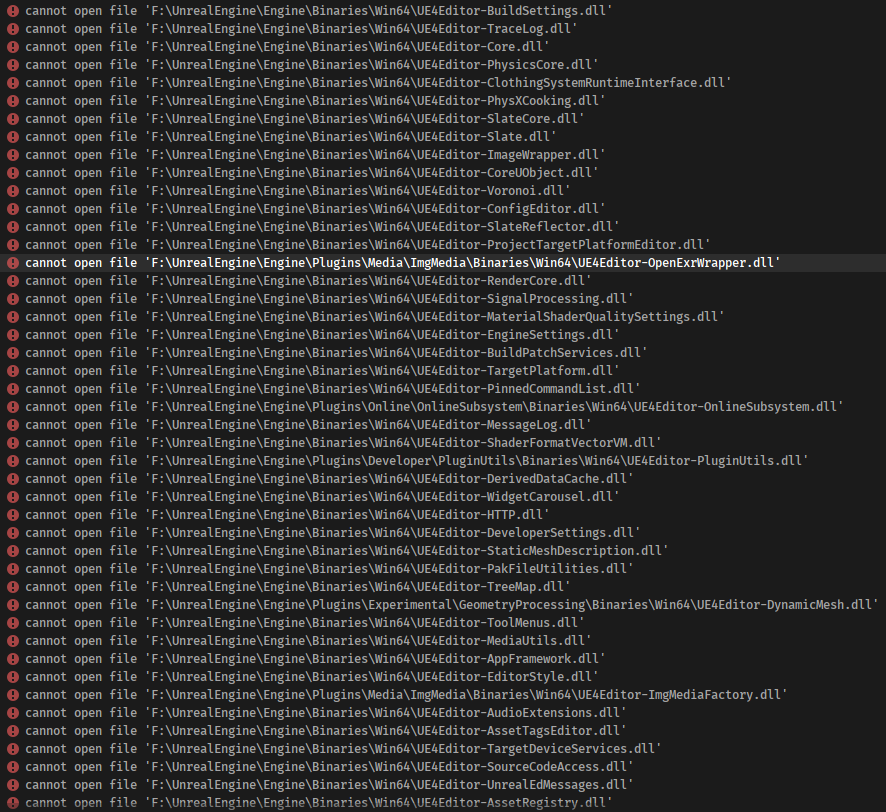
Does anyone have any ideas as to what could be causing this?
 silver hollow
short badge
Hey all, I have a bit of a weird problem. I've just built the engine from source...
silver hollow
short badge
Hey all, I have a bit of a weird problem. I've just built the engine from source...
it seems all your dll are marked as read-only
might happen if you pushed these files to P4 repo and didn't configure typemap for binaries properly - should be set to binary+w
or any other similar reason 😉
short badge
It turns out a restart of my computer fixed it (also kept the editor closed whilst compiling), but I do have another question, is there any reason as to why whenever I try to just compile my project, it re-builds ShaderCompileWorker every time too, this literally takes hours.
silver hollow
does anybody here got issue with engine recompiling every single time when trying to launch a project?
I guess, it started happening after switching to 4.26 branch?
short badge
Yeah, same with me, I would assume.
It rebuilds a bunch of things including my project.
silver hollow
I suspect some glitch in this branch....
short badge
It even does it even if I just try to just select the game project to build (right click -> build selected project)
Still re-builds the entire engine (or at least, CompileShaderEngine + other things for me)
silver hollow
yep 😦
at least it takes like 15-20 minutes on my machine, but still not funny if happens before every editor launch
short badge
For now, I've just swapped back to the launcher version of 4.26 until this bug is resolved.
It takes much longer for me, even though the source/engine is on an SSD, and my machine isn't bad by any means (9700k, 16gb DDR4 RAM)
silver hollow
yes, but only 8 threads for compiling engine isn't much 😉
short badge
I was thinking of just renting a server to deal with compiling the engine, what would you recommend to be the sweet spot for it?
silver hollow
actually, Ryzen CPU is the best performance/ratio in the long term
short badge
Hmm, ok - I shall take a look into it, thanks!
silver hollow
it will speed up shader compilation, cooking game and lot of other stuff
definitely worth of investment 🙂
short badge
I would assume that we would have to wait for this problem to be fixed on the branch before continuing with the source further?
 dense trench
Can anyone with experience with the source for Light Propagation Volumes give me a heads up if it would be worth trying to port 4.16's functional LPV's to 4.26?
I haven't taken a deep look to find out if some functionality was disabled/broken due to other changes or merely arbitrary deprecation.
 tranquil lava
Hello, got a question for UE. I've rebuilt from the sources, and I'm trying to patch a launcher version of the game with my build. However the build from sources does not generate the game libs in the '{Engine}/Engine/Binaries/Win64'. Any ideas on how to convince the UBT to generate those libs?
The exact lib that I need rebuilt from the sources is 'UE4-Renderer-Win64-Shipping.lib' in the mentioned path
tranquil lava
A simpler question, where can I find the file that configs how the engine is built?
gloomy hamlet
@tranquil lava Do a search in Engine/Intermediate, that's where static libs generally end up.
tranquil lava
I've searched there... hm...
There's a lot of libs there, but not the ones that I need.
There's a 'UE4Editor-Renderer.lib' that is 123kb but the 'UE4-Renderer-Win64-Shipping.lib' that is 40MB is missing.
I see that in the '{LauncherUnreal}/Engine/BinariesWin64' there's a file called 'UE4Game-Win64-Shipping.target'. It shows all the output that includes the aforementioned LIBS. If I build manually, that file is significantly smaller and it's missing the generated libs.
gloomy hamlet
Pretty sure the larger versions just have a bunch of duplicated symbols from other engine headers that get stripped out during linking anyway. But I have no idea how this patching you're trying to do works so can't give much more input.
Oh unless the lib you're looking at is just an import lib for the dll, in which case yeah it's definitely not what you want.
Sorry I misread, yeah the editor lib is obviously not what you need. Not sure why the shipping ones wouldn't be getting produced.
tranquil lava
@gloomy hamlet any idea on how to generate the shipping ones?
Maybe some compiler directive I've missed or that I could manually add?
gloomy hamlet
I mean, if you built Shipping configuration and it succeeded, then I would assume they are somewhere. Did you build the engine project itself, or connect a project to it and build the project?
tranquil lava
@gloomy hamlet The engine itself, I'm interested in building the engine.
I'm not sure they're somewhere, I think they get implicitly added to that executable called 'UE4Game-Win64-Shipping.exe'. But I don't need that executable (what it's purpose anyway?) I need the libs that generate it.
gloomy hamlet
I guess what you're after is a build of the form of the binary launcher build provided by Epic. In which case yeah you probably don't want to be building from a project context. Google for 'Installed Build', I think there is some configuration to produce that, but I don't know it as I've only ever built projects against source engines.
tranquil lava
@gloomy hamlet Good Lord, I think the installed build is what I need. I've oppened that page in the past but I thought that it was useless back then (4 hours ago)
gloomy hamlet
I don't even have the file you're looking for in my launcher install anyway. Though maybe you're on an older engine version and things were different?
tranquil lava
Yea, 4.18. Afraid to update it since it ruins the navigation.
And you know... one doesn't simply update tools during mid development.
But again, I'm not sure how the game package builds the project's executable. I've presumed it can't possibly link against that exe, but it's probably using those static libs packing them all in it. (the ones you can't find in your launcher)
gloomy hamlet
Yeah I think you're right. Suspect the UE4Game.exe is perhaps for blueprint-only projects.
Going back as far as 4.18 you'll probably find significant changes to UBT and installed build setup too, so the docs may be misleading.
 quick lichen
Hi, is there anyone that would be able to advise a noob on where to get started compiling an engine plugin?
The simple route seemed to be to duplicate the engine plugin into the project plugins folder and rename
what is appropriate. This would work great if in weren't for the fact that the plugin in question is dependent on another plugin which auto activates, and on doing so auto activates the old version of the plugin.
It would seem like the best bet is to modify the original plugin, but the Engine plugins look like they won't compile at runtime so I guess I'm left needing to compile my modified version plugin source manually in VS2019, but don't know how to get it in as a compilable project as this is all I have is a uplugin and some build files, no sln's or proj files.
C:\Program Files\Epic Games\UE_4.26\Engine\Plugins\Editor\GLTFImporter
Can anyone please point me in the right direction? Thanks
tranquil lava
Gota right click in that folder on the .uproject and click 'generate project files'. That will generate your SLN allowing to manually compile.
quick lichen
tranquil lava
Gota right click in that folder on the .uproject and click 'generate project fil...
Hi, unfortunately there is not uproject in there, just GLTFImporter.uplugin at the root folder and within source GLTFImporter.Build.cs.
quick lichen
tranquil lava
Gota right click in that folder on the .uproject and click 'generate project fil...
C:\Program Files\Epic Games\UE_4.26\Engine\Plugins\Editor\GLTFImporter\GLTFImporter.uplugin
C:\Program Files\Epic Games\UE_4.26\Engine\Plugins\Editor\GLTFImporter\Source\GLTFImporter\GLTFImporter.Build.cs
C:\Program Files\Epic Games\UE_4.26\Engine\Plugins\Editor\GLTFImporter\Source\GLTFCore\GLTFCore.Build.cs
tranquil lava
Ow... if that is the launcher version you're in trouble.
What I've done was to copy the plugin (i've used a newer version of RawInput) to my project and compile it there in-place
But if you need it modified in the launcher version I'm not sure that you can recompile it
quick lichen
Sounds like I've probably bitten off more than I can chew lol. The importer has the annoying feature of prompting for Import for every single glTF file you drag in, so bulk import would leave me spending hours clicking on 'Import'. I thought those hours might be better spent learning how to modify the code myself to bypass the prompt. It is the launcher version, yes. I get the impression from your comment that I'd probably need to compile the source version in order to do this, which is probably going to be a bit too advanced for me at my level at the moment.
tranquil lava
Well I've solved that by copying the plugin to my project folder and using that instead with the required modifications (just change the name).
Maybe that would work for you too, without having to recompile the whole of the engine. (did that when I needed RawInput for PS4 controller without having to update the whole project)
quick lichen
I tried that first, and it would have worked great if the plugin were standalone without being depending on the glTF Datasmith. I found that when I enabled my version of the glTF importer it automatically activated glTFDatasmith, which is fine, but when the glTF Datasmith got activated it automatically activated the original glTF importer as well. That was unfortunate.
I'm wondering if I should just say to hell with it and have a go at compiling the engine from source. If doing that would give me uproject files to work with for the plugins that would be great, or would it be a case of having to recompile the whole engine everytime I make a code change to the plugin?
tranquil lava
I had some issues with compiling from source and using the engine like that (packaging issues) but that was my experience. the glTF Datasmith is a plugin too?
Since you would add that to your project's plugins too
But for the whole 'compiling from sources' shabam I can't give you good advice, not having too much experience with it. I just recompiled the part I needed for some bugfixes and I've integrated them back to the launcher version, seemed a better approach for me. Didn't want to ruin something else during the process of the whole engine recompilation.
quick lichen
tranquil lava
Try adding them both to your project... wild guess 🙂
quick lichen
Thanks John, I think what I'll do is just put up with the prompts and probably just submit a feature request for now. I appreciate your input on this as it's saved me from going any deeper into this than I should at this point. 🙂
tranquil lava
@quick lichen wouldn't go into a feature request, it took them ~3 years to fix a bug in a core feature. Well you could make one, but don't expect it to get fixed anytime soon.
 leaden yoke
I just moved my source build to a new hard drive, now my project won't build. I get 'cannot open file' errors for hundreds of files
I tried regenerating the project files, no luck
The file paths exist for the files that can't be opened
Not sure what's going on
All because I moved my ue4 source build to a new drive 🤡
formal flower
Happy New Year!
Anyone able to build 4.26 w/ VS2017? (I had to use 2019 for 4.25 due to some toolchain issue.)
VS2019 constantly stutters w/ VAXs covered under my license (March 2019). VS2017 still works fine with my supported v. of VAX.
quick stirrup
I couldn't compile due to commandline being too long
Swapped to VS19, haven't had troubles since, though I'm most probably not using the VAX you mentioned
Make sure there wasn't a change in the Build.cs
formal flower
@leaden yoke
A while back I was running out of room on the drive the engine was built on/to. Tried just moving it to a different drive and got (I think) similar permission errors. In the end, I found out the best way to do it is to link it. That way it should keep all the permissions as they were when the engine was built.
This is a really old thread, so can't guarantee it'll fix your issue, but it worked when I tried back on 4.16-ish https://michaeljcole.github.io/wiki.unrealengine.com/Installing_UE4_To_A_Different_Hard_Drive/)
 short pike
When I generate Project files with my installed / binary 4.24 build I get this error: ERROR: Targets with a unique build environment cannot be built an installed engine.
What does that mean? I googled already, but I just didn't find a solution yet
 uneven aurora
Can anyone tell me how to setup fastbuild for distributing shader compilation on 4.26? I got it to work on 4.25 but not on the latest version.
 hot glade
Hello, we are having issues with cooking ,
this error:
LogOutputDevice: Error: Cannot create SoftObjectPath with short package name 'False'! You must pass in fully qualified package names```

i noticed there were few cases before here on this discord,  my partner checking up right now the UMG but i was wondering if there any other ideas how to solve it ?
full log:Please @ me if you have something
 uncut flax
Uhhhhhhhhhhhh
I downloaded the source like 4 times (4.26) by now from github
Ran setup.bat, generateprojectfiles.bat
Set to development editor, right click ue4 -> build solution
But somehow I keep getting those errors
I am using the latest VS version
And I haven't changed anything in source code
 rare shard
my project suddenly will no longer launch at all. Nothing appears when I click the project. However, in task manager, I see processes for it ("RevenBlade") keep appearing and disappearing
it's been repeating like that for about 20 hours so far
Any ideas would be appreciated
I'm on 4.25 running from source
gloomy hamlet
@rare shard I ran into something similar on a source build. Tracked it down to some horrific bit of code that respawned the executable in a new process and terminated the current one, if it thought there was some mismatch between the build config running and what was supposed to be running. Only if the detection was wrong, it would just repeatedly restart the process forever.
rare shard
interesting..
any more clarification on what you mean by what was supposed to be running?
gloomy hamlet
What caused it to have detected incorrectly though I can't recall. It was when I was messing with something on a non-released branch.
I don't really know, something to do with what filenames it expects for debug vs development vs shipping.
rare shard
filenames of your cpp files?
gloomy hamlet
No, the engine/editor executable.
It was incorrectly detecting a mismatch in there, but like I say, can't remember what triggered it
rare shard
weird ok.. I'll see if I have something similar
 vague jay
I want to switch over to a custom 4.24 binary version and when trying to right-click my .uproject and switch the engine to that binary version the error ERROR: Targets with a unique build environment cannot be built an installed engine. appears. I can load up the Project with the source build. I got a binary version working before with other projects.
What does that error mean?
rare shard
@vague jay check for "BuildEnvironment = TargetBuildEnvironment.Unique;" in your .target.cs files
hidden hedge
hot glade
Hello, we are having issues with cooking ,
this error:
```LogOutputDevice: Error...
one of your BPs has a soft path to something which is just "False"?
it's hard to tell what it is though, maybe start with player_char1.uasset (weird naming convention)
leaden yoke
I'm getting many LNK1104 cannot open file errors when compiling my editor for 4.26 source build. The files that are failing to open do exist, I have verified. Not sure why this is happening
The compile button also seems to be rebuilding the whole engine, as it takes a long time to complete. This is in spite of having built the engine already is VS
Makes testing fixes for this bug very inconvenient
formal flower
I enabled Chaos after running Setup.bat. Having added:
   bUseChaos = true;```
to UE4Editor.Target.cs

Re-running Setup.bat, it checks dependencies and completes w/o adding Chaos dependencies.@hidden hedge thank you it was solved. Ereased the other unused pawn classes.
vague jay
rare shard
<@!119917840114515971> check for "BuildEnvironment = TargetBuildEnvironment.Uniq...
It is set to: BuildEnvironment = TargetBuildEnvironment.Shared;
For every .target.cs (I have
- "ProjectName"Server.Target.cs
- "ProjectName"Editor.Target.cs
- "ProjectName".Target.cs; )
thick storm
vague jay
It is set to: `BuildEnvironment = TargetBuildEnvironment.Shared;`
For every .tar...
Edit engine targets
UE4Editor, UE4Game etc.
and use the same settings as you use for your project
I do not recommend using unique enviroment I had recompilation issues with it
not to mention disk usage is literally hitting sky
vague jay
@thick storm UE4Editor, UE4Game, UE4Client and UE4Server has BuildEnvironment = TargetBuildEnvironment.Shared;
set too :/
short pike
nvm, there was actually a BuildEnvironment = TargetBuildEnvironment.Shared; line in one of the targets inside an if statement. Thanks a lot @thick storm. You were a big help and you made my day 😄
Yeah, I have two accounts
calm mason
Does anyone know how the Setup.bat ends up pulling down UnrealEngine\Engine\Binaries\ThirdParty\DbgHelp\dbghelp.dll ?
I have a crash which I can fix by updating dbghelp.dll to a newer version but not sure where to put this new version so it updates for everyone.
calm mason
spiral mortar
lemme find the fix for you
Thanks! I was just making a nasty patching step in my CI system 🙂
calm mason
ah, does this tell Unreal to use whatever version is installed?
spiral mortar
ye
calm mason
I am still getting the crash when I open the Session Frontend window.
I added the line to XXXEditor.Target.cs
it still loads the dll from third party:
'UE4Editor.exe' (Win32): Loaded 'D:\p4\sb_dev\Engine\Binaries\ThirdParty\DbgHelp\dbghelp.dll'.
calm mason
Well I'm starting the Editor, yeah
calm mason
looks like bUseBundledDbgHelp is for CrashReporter?
spiral mortar
dunno, it was also used by a bunch of other targets in our engine
You could always kill it in FWindowsPlatformMisc::PlatformPreInit manually
The fix was for a windows 10 version from 2017
calm mason
I have 3 Target.cs files (XX, XXEditor and XXServer) and I added it to all but the editor still loaded the dll from ThirdParty
spiral mortar
yeah just comment out the code in that function
calm mason
ahhh yeah I see
uhhh it's a bit fiddly to modify source because I build Installed engine builds for my team, but I will consider it thanks
spiral mortar
What's the issue?
calm mason
just that I need to rebuild the engine again and get everyone to update
spiral mortar
ye it's a small rebuild though
should only affect a single dll
how are you syncing your builds?
calm mason
my CI system builds to a zip file and uploads to s3. I have a python script on users to download the latest version and install it. So not easy to patch just a single file.
calm mason
Well yeah I kinda wish I'd done that now... I might explore switching again
spiral mortar
It has its downsides too
calm mason
When I first tried that approach I was seeing 500mb changes for a simple code change - at the time one of the team members had very bad internet connection
spiral mortar
like having any kind of branch is a pain
ye we have a build machine that does nightly builds instead
and submits the binaries to p4
calm mason
so your content team only sync to the nightly builds?
spiral mortar
yup
the downside is that if we push a breaking change (that requires a new build to use content etc) art is stuck lol
calm mason
yeah... installed build is quite a good approach tbh, until we need to change the version 😂
then it's an 8gb sync
spiral mortar
hehe
 opaque aspen
Hello everyone,
I just upgraded a MP C++/BP project from 4.25 to 4.26 and if I try to open 2 instances in Offline (now Play In Standalone) I get a crash with the main stack:
Assertion failed: !GIsPlayInEditorWorld
Any ideas?
 dusky aspen
Is it possible to draw a custom slate in editor for a custom variable type (struct in this case).
I do not think it should be this?
https://docs.unrealengine.com/en-US/ProgrammingAndScripting/Slate/DetailsCustomization/index.html
As this is for an entire class.
And preferably keep this code in the project, not in the source code?
Guide to customizing the display of properties in the Details panels within Unreal Editor.
gloomy hamlet
If it's a USTRUCT that you're using as a property, then yeah that's what you want. Specifically using this: https://docs.unrealengine.com/en-US/API/Editor/PropertyEditor/IPropertyTypeCustomization/index.html
Base class for property type customizations
You need to implement it in an editor module, but project level is fine
dusky aspen
Thank you! I will look into that!
Ah and actually, I have an editor plugin that it should go into. So the editor module is taken care of 👍
 ember onyx
Hi
For performance;
Is there a difference to have a small object (a stone or a flower for example) cull away by setting the last LOD to be empty... versus setting up distance culling ?
Is there some hidden costs in that the GPU might need to know about the object even though there aren't any polygons?
leaden yoke
CompilerResultsLog: Error:   LINK : fatal error LNK1104: cannot open file 'E:\UnrealEngines\UE_4.26_Source\Engine\Binaries\Win64\UE4Editor-Persona.dll'
CompilerResultsLog:   [2/517] UE4Editor-Niagara.dll
CompilerResultsLog: Error:   LINK : fatal error LNK1104: cannot open file 'E:\UnrealEngines\UE_4.26_Source\Engine\Plugins\FX\Niagara\Binaries\Win64\UE4Editor-Niagara.dll'
CompilerResultsLog:   [3/517] UE4Editor-MovieSceneTools.dll
CompilerResultsLog: Error:   LINK : fatal error LNK1104: cannot open file 'E:\UnrealEngines\UE_4.26_Source\Engine\Binaries\Win64\UE4Editor-MovieSceneTools.dll'
...
I'm unable to build my project due to these LINK errors. There are 509 LINK errors, and the common lowest folder among them all is /engine/.
All of these problems began after installing a new engine source build on my secondary hard drive. Not sure if that has to do with the problem. I'm also using Rider as my default IDE.
Anyone have any tips? I've tried resolving this issue for forever at this point, no luck
 low glacier
Must watch video if you are interested in how the Engine works under the hood 👀
https://youtu.be/IaU2Hue-ApI
What happens when you start up your Unreal Engine game? This video is a guided tour of the Engine's initialization process: along the way, we'll glimpse the high-level structure of the Engine (modules, game instances, local players, and viewports) and we'll see how all the different parts of the Game Framework (game modes, game states, player co...
 lament cradle
@leaden yoke have you tried rebuilding your project? or you backup(!) and try deleting/cutting out your projects binaries, intermediate folders and regenerate your sln to your new engine than rebuild the sln
Is it possible to harvest the thumbnail from a uasset, i.e a skeletalmesh and use it at runtime for example in an ingame ui?
quick mica
Hey 🙂
I'd like to add some static utility functions to be used by my .Build.cs files. Does anyone know how I can do this? e.g. how to let the build tool know those files exists without adding them to the engine sources? Is it even possible?
 minor karma
hi guys,
how can i prevent cracking my game from those patches GameName-WindowsNoEditor_p.pak and GameName-WindowsNoEditor_p.sig placed in \Content\Paks folder
calm mason
I'm pulling my hair out! I am calling UE4Editor.exe on the command line, but it exits immediately while the editor runs in the background.
Is it possible to stop it exiting until the actual editor process finishes?
Or do I have to write something that checks for named processes have finished?! 😦
silver hollow
short badge
Hey all, I have a bit of a weird problem. I've just built the engine from source...
it seems that Epic fixed the issue just after Christmas break 🙂
https://github.com/EpicGames/UnrealEngine/commit/1f765999462e8810125bf048e9486b2f4abe9a48
just sync branch and you should be good to go
short badge
Perfect, thank you! @silver hollow
 lucid olive
Hi Unreal Slackers, is there any way to import 32b heightmaps? Would it be a big job to support heightmaps over 16 bits? (max elevation of 25.6m at 10cm vertical resolution means things look a bit jagged and most LiDAR DEM products are 32b etc)
lament cradle
Hi guys, I have an issue related to source control and engine versions, can you please take a look? #source-control message
 small cobalt
small cobalt
https://github.com/EpicGames/UnrealEngine
small cobalt
small cobalt
small cobalt
https://github.com/EpicGames/UnrealEngine
Create a GitHub account.
And then download the Engine Source from Epics GitHub page.
 sand hawk
Hey there, looking for someone who could guide me through the multi-user editing functionality of unreal engine 4 (mostly setting up a network structure) , however online and not local. Willing to pay.
 modest ingot
If I change something in a Component's header file do i need to rebuild the entire engine? and what's the easiest way to do that?
 regal summit
Hello, guys! I served some files on localhost. I tested my local html on chrome, it worked well and played video files and audio files as supposed. But when I tried it on web browser in ue. It failed. Need some help!!😅😅
 sturdy dock
im running popos 20.10 on a system76 laptop and I cloned the repo and can run ./Setup.sh and ./GenerateProjectFiles.sh with success but when i try to run the editor i get these errors https://pastebin.com/AvdBMVvB and I've tried using -opengl4 and it still wants to use vulkan. whats weird is the vkcube test works fine so I know vulkan is working just not sure why its crashing.
Pastebin
Pastebin.com is the number one paste tool since 2002. Pastebin is a website where you can store text online for a set period of time.
low glacier
3.0 of Unreal Binary Builder is now available. Try it out and lemme know 🙂
https://github.com/ryanjon2040/UE4-Binary-Builder
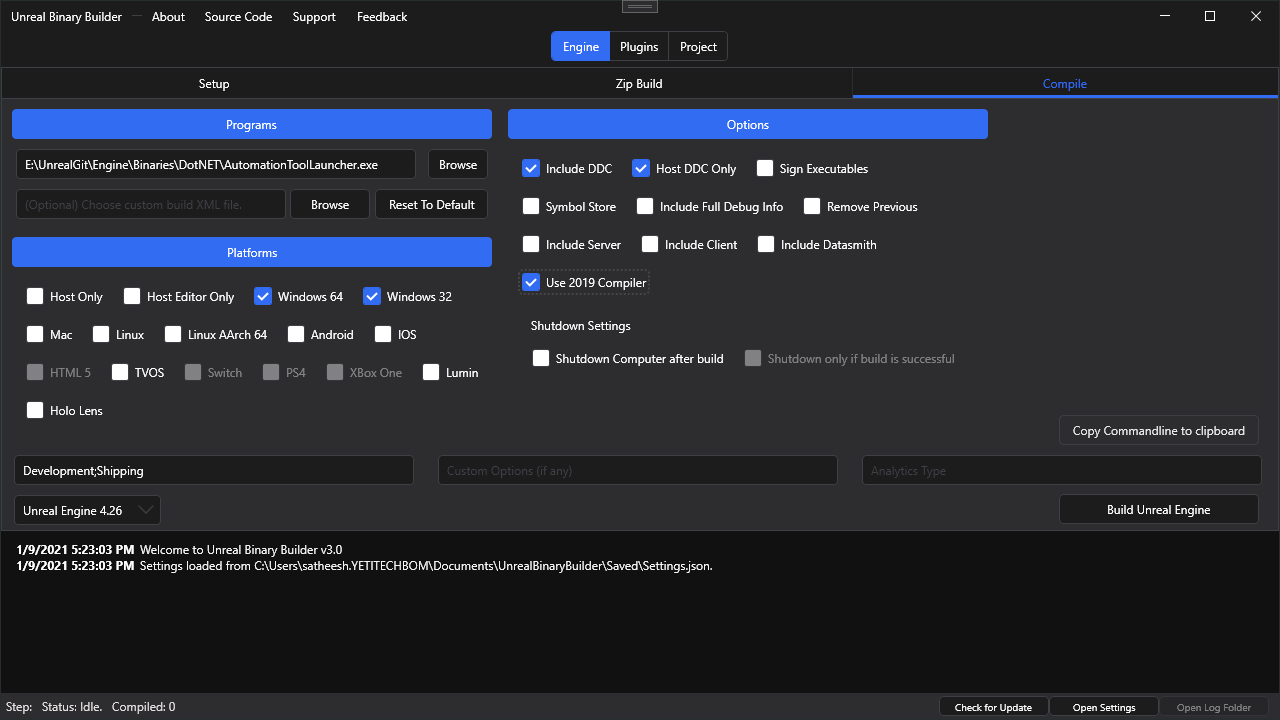
GitHub
An application designed to create installed Unreal Engine builds (aka Rocket builds) from Unreal Engine GitHub source. - ryanjon2040/UE4-Binary-Builder
 elder falcon
spiral mortar
We just put all the binaries on p4 lol
elder falcon
spiral mortar
We just put all the binaries on p4 lol
do you mean full editor binaries?
spiral mortar
elder falcon
do you mean full editor binaries?
Ye
elder falcon
interesting
where did you find an ignore file with rules for everything that's needed/not needed for full engine? or do they have a template
or painstakingly made it manually? 
spiral mortar
@elder falcon I think we just sync all the binaries
elder falcon
positively surprising if that actually Just Works
spiral mortar
It does I think lol
 cold venture
When I'm updating my source-compiled UE to a new release version (like going from 4.25.1 to 4.25.4), do I need to re-run "Setup.bat" ?
And do I also have to run "GenerateProjectFiles.bat" again?
I'm trying to avoid recompiling the entire engine again from scratch. I just want it to recompile whatever has changed since the previous release.
When I run Setup.bat I get
gloomy hamlet
@cold venture You can hit 'y', that's unrelated to the build. Likewise GenerateProjectFiles won't make your build any longer. But realistically it's always going to be a very heavy rebuild anyway, even hotfixes changes all sorts of stuff.
 twilit plaza
Does anyone know how/can i build Unreal engine using clang mingw64 on windows? Because i would like to use clang as compiler for my projects.
all forum threads were really old, so a lot have been changed since them.
And i mean clang with libc++, not clang-cl.
 novel perch
I got some third partcy IntelMetricsDiscovery and IntelTBB modules in my source build, and I dont know from where, as unstaged files.  anybody got a clue how they landed in my repo despite me not doing anything and them apparently not being commited before?
 final canyon
Does anyone know why the packaged project would keep saying that the ability system globals class is "breaking Disregard for GC assumption" and crashing? Or have any information on GC assumptions in general? I'm trying to reverse engineer why this is happening by reading the engine source, but I just don't get it.
gloomy hamlet
Where is the quoted text coming from? The logs?
final canyon
@gloomy hamlet There is the whole log (for context), but the relevant bit is only the last paragraph
This project uses a custom ability system globals to implement a custom gameplay effect struct, but not a custom cue manager. Neither are directly referenced at the cpp or bp level, which is why it seems to be something more to do with the engine than the project.
gloomy hamlet
So it looks like this is what triggers the eventual fatal error:
https://github.com/EpicGames/UnrealEngine/blob/2bf1a5b83a7076a0fd275887b373f8ec9e99d431/Engine/Source/Runtime/CoreUObject/Private/UObject/GarbageCollectionVerification.cpp#L85-L88
But I couldn't tell you what each of those 4 conditions mean
At a guess, it looks like the AS globals object has some flag set on it that gives it some kind of GC fast path or something, in exchange for stricter assumptions about what it's allowed to reference. And your custom one is not satisfying those restrictions by referencing some other objects, maybe indirectly.
final canyon
I still get the error with the custom one commented out and just using the basic UAbilitySystemGlobals class
gloomy hamlet
I've never used the AS so can't give much more input. Do you know for sure that providing a custom implementation is even supported?
The fact it does this in its constructor is weird and suggests it might not be set up in a way to allow simple overriding
https://github.com/EpicGames/UnrealEngine/blob/2bf1a5b83a7076a0fd275887b373f8ec9e99d431/Engine/Plugins/Runtime/GameplayAbilities/Source/GameplayAbilities/Private/AbilitySystemGlobals.cpp#L22
You'd at least want to make sure your own one was fixing up that path I guess.
final canyon
If I copy the ability system classes from this project to a nearly blank project I can package an run without the error.
gloomy hamlet
Are you running with a modified source engine?
final canyon
no
AbilitySystemGlobals class and CueManager class are set in the DefaultGame.ini like so
[/Script/GameplayAbilities.AbilitySystemGlobals]
AbilitySystemGlobalsClassName="/Script/GASShooter.GSAbilitySystemGlobals"
GlobalGameplayCueManagerClass="/Script/GASShooter.GSGameplayCueManager"
gloomy hamlet
Right, yeah was just looking at the code for that. So it obviously is meant to be overridden.
In that case no idea I'm afraid
final canyon
The error happens even if I use the base class, but I can't reproduce it in any other project
gloomy hamlet
What about if you don't override the cue manager?
final canyon
In a blank project I can do it without error though
I'm just trying to grasp at any setting that could somehow have an interaction here
gloomy hamlet
If I understand that first line I linked right, the error may go away if you called AddToRoot on the cue manager. But that wouldn't go anyway to explaining what's happening and might just hide the underlying issue...
Probably no good place to do that anyway if you're not on custom engine.
final canyon
At this point its jeopardizing the entire project, so it might be worth a try.
gloomy hamlet
I gotta call it a night, but just found this, second answer seems relevant:
https://answers.unrealengine.com/questions/879320/what-can-cause-objects-to-break-disregard-for-gc-a.html?sort=oldest
cold venture
gloomy hamlet
<@!217441989937987595> You can hit 'y', that's unrelated to the build. Likewise ...
I see, thanks
gloomy hamlet
And since loading order in UE4 is so borked and can change arbitrarily depending on what plugins you have enabled and what engine modules you're dynamically loading in your own module startup, it could explain why it's project dependent.
So worth experimenting with disabling plugins or changing module loading phases.
If you have a module set to load in early phase with a dependency on GAS module, that's almost certainly the cause.
final canyon
@gloomy hamlet Thanks, that just might be it
twilit plaza
Is there way to use clang as compiler now on Windows?
or is it coming? I mean like clang without clang-cl. It would make games perform better i think.
 quick crystal
Has anyone managed to build the engine source from VS 16.8.x?
I'm on 16.6.x and I was thinking of upgrading, but I am scared to do it
 ruby musk
twilit plaza
Is there way to use clang as compiler now on Windows?
ruby musk
twilit plaza
Is there way to use clang as compiler now on Windows?
afaik you can do that via WSL (https://docs.microsoft.com/en-us/windows/wsl/about)
novel perch
Is there a way to properly start a source project with attached debugger? Given that the source solution doesn't include the project it just starts the project picker, and debugging ends since a new process is started and I gotta reattach
novel perch
nvm guess just using the project solution instead also works
 robust summit
Does anybody know how to get access to unreal engine 4 fork ?
twilit plaza
@robust summit https://www.unrealengine.com/en-US/ue4-on-github

Unreal Engine
Unreal Engine is the world’s most open and advanced real-time 3D creation platform for photoreal visuals and immersive experiences.
Then go there: https://github.com/EpicGames/UnrealEngine and fork it
 quick grotto
So, as I get it, IncrediBuild is sort of necessity for building engine
Because the last time I tried to do so, it showed me that my license expired, and build stuck at dead end for about 9 hours straight
And it didn't resolve
Or maybe I'm doing something wrong Idk
quick stirrup
Incredibuild is solid but the licensing for it is way too expensive
1200$ a year or something like that
spiral mortar
16 cores (or more) CPU > IncrediBuild
quick stirrup
Hey, getting the compile time shaved from 2 hours to 1 hour 20 min is pretty good, I only have a Ryzen 2700 and a X5680 server, getting both to work at the same time speeds up stuff
I need to check how to enable Fastbuild instead of Incredibuild, Incredi has a good UI and decently easy to integrate and use, but goddamn is it expensive
spiral mortar
I mean - a 3950x compiles the engine in 10min and only costs $700
quick stirrup
Don't forget motherboard and other high-end related costs
No wait I'm a dingus
Tbh depends on some other factors too, I'll need to test furtherr
But for 2 hours of work I'm still ok with the speed
spiral mortar
oh yes for sure
just saying it's not a good long term solution IMO
best to spend the money on actual hardware
 hollow kernel
I added 5 new shader models to 4.26 in this public fork: https://github.com/kusogaki77/UnrealEngine/tree/4.26Toon
Compiles w/o error and engine launches fine. Fsr, none of the shader models are affected by light sources. The implementation is exactly as it was in 4.25. I'm in the process of reviewing every single changelist for 4.26, but I've yet to find any related changes. I've been maintaining this fork since 4.21, and this is the first time I've seen this "lights having no effect" issue.
So far only difference I've found is some newly generated shader FGUIDs, but afaik you're only to generate a new one if there's a merge stream conflict, not if you add new shading models (shading models don't have FGUIDs, their material parameters do).
Anyone familiar with light rendering know where I could look to see why all but the TOON_ANISO model are unaffected by lights of any type (point, spot, area, directional)? I've spent a good 15+ hours trying to find out why already.
 blissful bramble
I'm trying to build the latest release branch and I'm getting this error:
3>  [3480/4287] Module.Engine.47_of_48.cpp
3>C:\Program Files (x86)\Microsoft Visual Studio\2019\Community\MSBuild\Microsoft\VC\v160\Microsoft.MakeFile.Targets(46,5): error MSB3073: The command "..\..\Build\BatchFiles\Build.bat -Target="UE4Editor Win64 Development" -Target="ShaderCompileWorker Win64 Development -Quiet" -WaitMutex -FromMsBuild" exited with code 6.
3>Done building project "UE4.vcxproj" -- FAILED.
========== Build: 2 succeeded, 1 failed, 0 up-to-date, 0 skipped ==========```
Any ideas why?showing more the output would help
blissful bramble
This is what I found in the log file: ParallelExecutor.ExecuteActions: [3480/4287] Module.Engine.47_of_48.cpp UnrealBuildTool.Main: CompilationResultException: Error: OtherCompilationError UnrealBuildTool.Main: at UnrealBuildTool.ActionGraph.ExecuteActions(BuildConfiguration BuildConfiguration, List`1 ActionsToExecute) in D:\UE4\UnrealEngine\Engine\Source\Programs\UnrealBuildTool\System\ActionGraph.cs:line 230 UnrealBuildTool.Main: at UnrealBuildTool.BuildMode.Build(TargetMakefile[] Makefiles, List`1 TargetDescriptors, BuildConfiguration BuildConfiguration, ISourceFileWorkingSet WorkingSet, BuildOptions Options, FileReference WriteOutdatedActionsFile) in D:\UE4\UnrealEngine\Engine\Source\Programs\UnrealBuildTool\Modes\BuildMode.cs:line 483 UnrealBuildTool.Main: at UnrealBuildTool.BuildMode.Execute(CommandLineArguments Arguments) in D:\UE4\UnrealEngine\Engine\Source\Programs\UnrealBuildTool\Modes\BuildMode.cs:line 226 UnrealBuildTool.Main: at UnrealBuildTool.UnrealBuildTool.Main(String[] ArgumentsArray) in D:\UE4\UnrealEngine\Engine\Source\Programs\UnrealBuildTool\UnrealBuildTool.cs:line 550
hollow kernel
I ran into similar issue a while ago.
I have MSBuild installed in VS2019. Maybe try installing it and rebuild?
blissful bramble
I'll try
hollow kernel
Is it Vanilla source?
blissful bramble
yes its from a new fork I made
hollow kernel
New and unmodified, yeah?
blissful bramble
yes
Apparently I already have MSBuild installed
Did you change anything in VCToolChain.cs? I might need to do the same
 weary star
So after compiling the UE4 project, which projects in the Programs folder do I need? I apparently have to manually compile Lightmass, but Datasmith didn't require it?
Kinda confusing.
 tough river
Does anyone know why during my attack phase in my AI BHT it gets stuck on rotate to face enemy?
 onyx scarab
Hey guys, is there any way of adding the Unreal built from Source to the Epic Games Launcher?
quick stirrup
Sadly no
If you're looking to download marketplace plugins, you can download the most barebones engine, install it on a hard-drive and leave it at that
onyx scarab
Thanks!
quick crystal
sigh I had to reformat my machine
I had everything compiling and working great
now I can't build the base (not modified) UE4 4.26 source with the houdinitounrealengine-v2
and I also in my project am now getting an error when trying to update the csproj file. When I try that, I get errors:
Running C:/Source/GH_Repos/UE4/Engine/Binaries/DotNET/UnrealBuildTool.exe -projectfiles -project="E:/Repos/Raevin/Raevin.uproject" -game -engine -progress -log="E:\Repos\Raevin/Saved/Logs/UnrealVersionSelector-Win64-Shipping-2021.01.14-23.11.58.log"
Discovering modules, targets and source code for project...
While compiling E:\Repos\Raevin\Intermediate\Build\BuildRules\RaevinModuleRules.dll:
e:\Repos\Raevin\Source\RaevinEditor.Target.cs(11,9) : error CS0103: The name 'DefaultBuildSettings' does not exist in the current context
e:\Repos\Raevin\Source\RaevinEditor.Target.cs(11,32) : error CS0103: The name 'BuildSettingsVersion' does not exist in the current context
ERROR: Unable to compile source files.
Ah, nvm. I figured it out. It would help to re-merge in the upstream, which I never committed when UE 4.26 came out. Mystery solved!
blissful bramble
blissful bramble
I'm trying to build the latest release branch and I'm getting this error:
```3>...
For everyone who's experiencing this issue, I found the solution: The command that gets executed has an extra " so you'll need to run it by yourself. Go to <EngineFolder>/Engine/Build/BatchFiles, open cmd, and run this command:
Build.bat -Target="UE4Editor Win64 Development" -Target="ShaderCompileWorker Win64 Development -Quiet -WaitMutex -FromMsBuild
After it finishes building, you can go back to Visual Studio and build the rest of the code/run the engine.
calm mason
Sorry not sure where else to ask this!
Anyone know what cmd line I can use to spawn a AutomationWorker that sits there waiting to run tests?
 normal crag
Does anyone know how can i modify colors of UnrealEd? I already found "%Engine%/Content/Editor/Slate" folder, where i can change different slate textures and assets of editor. I already changed some bars and panels. But i still didn't find where can i change bars like toolbar or content browser. What can i do with this?
spiral mortar
https://www.unrealengine.com/marketplace/en-US/product/darker-nodes have you tried this?
 normal crag
spiral mortar
https://www.unrealengine.com/marketplace/en-US/product/darker-nodes have you tri...
normal crag
spiral mortar
https://www.unrealengine.com/marketplace/en-US/product/darker-nodes have you tri...
Oh, yes, this is great, thanks!
 dense kettle
Hi, I successfull built engine from source on Mac, Win10 et Linux.
When building my project (Game, editor and server target) I get Unable to parse delegate declaration. The issue is on a Engine cpp.
When using the Engine from Launcher, I can build successfully.
So I miss something, when building from source ?
 minor bay
Hello friends! Weird one, have built engine from source 4.23 and 4.24 with no issues, just built 4.26 uploaded to p4 for my artist friends, engine works fine but they cannot package, instantly fails with this error which i've never seen and looking at the automation tools c# code i'm struggling to understand what exactly is missing.
Log.WriteException: ==============================================================================
Log.WriteException: ERROR: Failed to find command BuildCookRun```Ran the AutomationTools with verbose, looks like it's not finding the binaries for any of the tools, no idea why, never seen this before.
hardy palm
Is it just me or is nobody going through the PRs since.. .July? ... no tags on PRs in github since then...
@minor bay did you move the build after you compiled? It sort of hardcodes some paths 🙂
minor bay
@hardy palm nope, built it, then set my p4ignore and reconcile offline and submit to p4, super strange, it refuses to find the programs
ScriptCompiler.FindAndCompileAllScripts: Found 1 project files in 0,174s
ScriptCompiler.FindAndCompileAllScripts:   F:\Unreal\Engine_4_26_0\Engine\Platforms\Switch\Source\Programs\AutomationTool\Switch.Automation.csproj
ScriptCompiler.FindAndCompileAllScripts: Parsed project files in 0,044s
ScriptCompiler.LoadAutomationAssemblies: Loading script DLL: F:\Unreal\Engine_4_26_0\Engine\Platforms\Switch\Binaries\DotNET\AutomationScripts\Switch.Automation.dll```only find 1 automation project, none of the others
must be a paths thing though the more i think about it, you're probably right
minor bay
yeah I might just rebuild the entire engine for editor, windows and switch, and see if anything new pops up
Thank for your help!
 violet remnant
Hello, Ive built the engine from source and every time I create a project or try and build my project or the engine, it rebuilds it. I have to sit and wait through 2000+ different processes before Im able to do anything. I also cannot hit compile in the editor and just have it compile any new lines of code. Does anyone have an idea of whats going on?
 hollow wadi
Anyone know if the world composition replacement system is in any of the public branches?
 stray leaf
UNREAL BEYOND #1 | How to Build Nvidia RTXGI Unreal Engine Source Branch https://youtu.be/Z8cBWvf-5qU

In this first Unreal Beyond video we take a look at how to build the Nvidia RTXGI branch source for Unreal Engine. The RTXGI branch adds global illumination to the engine, making raytraced light less reliant on the hardware and producing cleaner results compared to the official 4.26 raytracing implementation. It's a first look at what we could e...
low glacier
Unreal Binary Builder v3.1 is now available. Changelog and download link here:
https://www.buymeacoffee.com/ryanjon2040/unreal-binary-builder-v3-1

Buy Me a Coffee
v3.1 of Unreal Binary Builder is now available. Below is the changelog.Download 3.1 from here: https://github.com/ryanjon2040/UE4-Binary-Bui...
limber jacinth
@low glacier does it support command line parsing?
ie setup the params, build like a XML or something, that can be parsed in?
low glacier
@limber jacinth If you mean custom build xml file with custom parameters then yes. Here is a screenshot of the UI.
limber jacinth
o_0 nice, i didn't download it yet, was just asking curiously
but will it create one?
with changed params
for jenkins automation
i see it makes the command line, that will be good enough
low glacier
No it cannot create any xml files but as you said you can adjust the options here and use the copy command option.
I would also like to highlight that you can compile and package as many plugins as you want for as many engine versions with customizable options. Plus the app is free and open source too 🙂
calm mason
Oh it makes the CMD line for you? That's awesome!
leaden yoke
Speaking of Unreal Binary Builder, I used it today with Win64 on my 4.26 source build. The packaged build doesn't contain an exe to launch the editor. Is this a glitch or am I missing something?
leaden yoke
Also, the packaged ZIP is only 300MB. Seems smaller than it should be
The tool created two folders in LocalBuilds, Engine, which looks just the zip file; does not contain a UE4Editor.exe, and InstalledDDC which appears to contain everything
 half axle
Not sure what channel this would belong in:
I'm trying to calculate how much of the mesh that's rendered to the screen is visible in 2d space. Specifically the percent of possible pixels it has rendered vs how many rendered as if nothing was in front of it: (Unoccluded pixels / (Occluded + Unoccluded))
My approach at the moment uses two renders as solid colors and comparing pixels, but this is definitely not efficient at scale when trying to calculate for many objects
Does anyone have any thoughts on performance improvement on this? Or even an entirely different approach. Thanks in advance
calm mason
half axle
Not sure what channel this would belong in:
I'm trying to calculate how much of ...
At the low level you would usually use hardware occlusion queries on GPU for this but I don't think that is easily exposed via Unreal.
To answer your question it would help to know why you want to know this and how accurate it needs to be.
 limber fox
 cyan vessel
half axle
Not sure what channel this would belong in:
I'm trying to calculate how much of ...
cyan vessel
half axle
Not sure what channel this would belong in:
I'm trying to calculate how much of ...
render everything into a single texture with unique different colors like (1,0,0) (2,0,0) just use colors as index then use a shader that counts how much of every color there is but u would probably need a custom render pipeline to do this efficiently without having an extra render pass for every object u want to check
half axle
calm mason
At the low level you would usually use hardware occlusion queries on GPU for thi...
Ultimately I'm fine with decent estimates. It is just saving information about what's in the viewport to a file. In the past I've attempted vertex projection, but it's not reliable enough due to vertex densities not being consistent across various models
half axle
cyan vessel
render everything into a single texture with unique different colors like (1,0,0...
The material to count is where my mind was heading to as a next approach. Materials definitely are not my strength, but I'll give it a shot, thanks!
 late frigate
Im having some trouble trying to understand how the build works for multiple game projects. I've downloaded and built the source from the UE4.sln file. I retargeted a game project to use that source version, and when I built the game project it built some of the source again, and started taking up an alarming amount of space on my hard drive. Is there a way I can build the engine source once, then have multiple game projects reference those binaries instead of having to build again with each project? If not, I'm going to need a much bigger hard drive.
Or actually I might just switch back to the version downloaded from the launcher since Im not really planning on making source changes. Disregard the above question!
calm mason
half axle
Ultimately I'm fine with decent estimates. It is just saving information about w...
I don't know of anything built in, but thinking out loud, atomic increment in shader could work, but don't know if that's supported.
On CPU you'll might have to fallback to physics tests against Complex collision. Worst case you could raycast for every pixel within the bounding box!
Interesting problem you have!
lament cradle
hello everyone, how's it going?
just wondering if anyone heard anything about how easy it will be to upgrade to UE5. is it going to be any easier from 4.26, or should we keep using 4.25 until 5 is stable?
calm mason
Think of UE5 as being equivalent to 4.27. The more upto date you are the 'easier' to update, but weigh that against the effort to update to 4.26 (and upcoming minor versions).
lament cradle
thanks!
hidden hedge
there is actually going to be a 4.27 though
many things on the issues tracker are marked as fixed in 4.27
 cosmic river
I fucked up some engine code...how can I rebuild from source without deleting and redoing from sctratch
 weak phoenix
Hi I was told to post my question here because it's more specific
When I build my project only the build makes it so it builds over 2500 files
Instead of when I build from UE4 launcher engines where the build times are small, building from UE4 source makes it so it builds these 2500 files over and over
How can I stop this and just have it compile my few cpp files I edited?
quick mica
cosmic river
I fucked up some engine code...how can I rebuild from source without deleting an...
If you changed some engine code, I hope you still have the git repo so you can just stash / revert what you did and build again.
lament cradle
@cosmic river if you right click code or sln in your IDE you might be able to see the local history of that file. you can certainly do in Rider
lament cradle
I am keep getting crash with this error, after migrating stuff from 4.25.1 to 4.26 anyone run into this? Assertion failed: NewOperatorInputA [File:D:/Build/++UE4/Sync/Engine/Source/Editor/BlueprintGraph/Private/K2Node_CommutativeAssociativeBinaryOperator.cpp] [Line: 293]
quick mica
No idea, but I assume you are having the source code? I suggest debugging this and check, why the assertion failes
cosmic river
lament cradle
<@!725503585080705065> if you right click code or sln in your IDE you might be a...
Ok thank you good to know
lament cradle
I'd like to create an engine version for modders, basically just strip it down. Is it legit? I mean is anything in the EULA or any agreement that prohibits it?
calm mason
If I build the engine from source, do I need to enable WithFullDebugInfo in order to debug game and server configurations?
lament cradle
I am having issues with compiling 4.26 from source, do you mind taking a look?
#cpp message
calm mason
lament cradle
I am having issues with compiling 4.26 from source, do you mind taking a look?
...
Did you try compiling it before making any changes to the source?
It should build out of the box if you have the pre-requisites installed.
lament cradle
calm mason
Did you try compiling it before making any changes to the source?
It should buil...
yes, of course!
calm mason
and did it work?
lament cradle
nope, I tried things, after it failed from a clean install
not sure why it is compiling Chaos stuff, I set compileChaos and useChaos to false
calm mason
🤷
Have you sync'd the Release branch?
If you're on Master it could be in a broken state
lament cradle
trying to compile this one 4.26mod -> https://github.com/AlienRenders/UnrealEngine/tree/4.26-mod
hidden hedge
what does this branch even do
formal flower
@hidden hedge
Sorry. Looks like it just adds this:
Add TIFF import/export support for textures (Windows only).
Add Dual Quaternion Skinning
Add support for unlimited bone influences for Dual Quaternion skinning.
hidden hedge
?
formal flower
I assume the unlimited bone influence bit gave it its name.
 unborn depot
Hey has anyone ever had an issue where when trying to checkin files to source, your ending will crash with a "Out of GPU memory" error? Driving me crazy tonight.
 plain mulch
Hello,
Got a weird issue :
For some reason, everytime i start to build my installed build, the InstalledEngineBuild.xml cannot be open
path is correct.
Okay, got it.
need absolute patch.
 rocky bronze
So, there's this bug in the engine, the mouse gets offset in fullscreen if the taskbar is in a non default position with a multi monitor setup on every engine version i've tested.
Marked "cannot reproduce" in 2015: https://issues.unrealengine.com/issue/UE-19988
and again in 2016, and so on... answerhub threads of people losing hope. Anyone happen to have a fix in their back pocket? :p
half talon
Anyone know whether a crash that occurs when you duplicate an actor with ISM instances in the 4.25 editor is a confirmed bug?
 wheat geode
hey guys I have an issue. tl;dr is my project crashes and I cant open but I know why -- I need to change the preview mode to ShaderModel5 but I can't access it in engine (because crash) so I need to do this via the text files, does anyone know where I can find it within the project text files?
plain lily
@wheat geode there is a ini file you can edit to go back to the standard one, forgot which one. If you check in your config folder by date it should be one of the last updated ones.
wheat geode
I have been looking all through the files, checked many and cannot find it in there, do you have any idea which it might be?
modest ingot
Building from engine source, the github wiki says that my Build config should be set to "Development Editor". Is this always the case, even when i intend to build the game for shipping?
Also, should I be building using "UnrealBuildTool" selected? doesn't say anything about that on the wiki but i would assume so
 tight hedge
I am not sure if this is the right place to ask this question, but is it possible to modify the default frustum culling to include more objects in UE4?
plain lily
@wheat geode I cannot find anymore the original source with the indication of the file to change. What you can do is copy the whole Content folder over to a new project and in that way you should be able to open it. You may need to recreate the inputs though.
wheat geode
hey @plain lily thanks for the help! Yea that was my last resort, I realised last night I could remove the offending item and now I can access the project 😄
 cosmic rampart
Anybody else having problems with reflection captures not affecting anything anymore when hitting play or building the game? 4.26.0 no raytracing😕
 steep warren
I have issues generating project files
C:\Program Files (x86)\Microsoft Visual Studio\2017\Community\MSBuild\15.0\Bin\Microsoft.Common.CurrentVersion.targets(
4194,5): error MSB3021: Unable to copy file "obj\Development\DotNETUtilities.dll" to "..\..\..\..\Binaries\DotNET\DotNE
TUtilities.dll". Access to the path '..\..\..\..\Binaries\DotNET\DotNETUtilities.dll' is denied. [C:\UnrealEngine\Unrea
lEngine\Engine\Source\Programs\DotNETCommon\DotNETUtilities\DotNETUtilities.csproj]

GenerateProjectFiles ERROR: UnrealBuildTool failed to compile.```

It's driving me crazyi have already giving full permissions to all of these folders 😦 anyone know how to fix it?
 steel crystal
check if anything is keeping that file open? I use a program called lockhunter for this. or reboot to basically ensure that no program is keeping that file open
steep warren
i tried rebooting but no hope, i found that i needed to untick read-only but now i have other issues 😭 😂
steel crystal
Haha, feel free to share logs
steep warren
Well i got it a bit further but failed during build!
How big should a build and files for UE4 take up though? this took up 156gb on my hard drive!
steel crystal
my source build is also 150gb including the .git folder
final wasp
Does this look familiar to anyone - NvRTX Caustic branch - pull from github, setup, genprojfiles, build, launch (let all 6000 shaders build), open or create any new project.... it initializes to this point and:
I saw something similar, while searching google, that may have been a build.cs issue, or something like that, but I'm stumped and it takes hours to make any change and test it. Thanks in advance!
The main branch on this same project is a 4.26 build for DLSS - which builds and works fine... so I dunno.
 mild geyser
Hello!
I currently have the Epic games launcher version of 4.25.4, and i have a source build. I recently installed the source build, but when I compile the source build of 4.25.4 it completely shuts down my PC.
Specs:
Ryzen 3900X
64GB RAM
RTX 2080
hidden hedge
If it shuts down your PC I would check thermals and that your PSU isn’t maxed out by the power draw
It will use all those cores to the fullest extent
mild geyser
Okay, thanks.
stable hemlock
How do I create a new custom material blend mode?
I wish to modify the normal "opaque" blend mode to have "subtraction" as its last step instead of "normal blend" or "additive blend".
In order to create emissive darkness.
This is for scanline, I don't use raytracing in my project.
final wasp
stable hemlock
This is for scanline, I don't use raytracing in my project.
I've been trying figure something like this out myself... it's complicate.
For example, I'd like to loop through and run lighting evaluations at the hit point for every light, decouple transmission-filter from diffuse-color from specular-reflection-filter, etc. The base shading models in unreal don't allow that (for reasons) and there's no good, easy, or proper way to just add a new shading model. so you're kind of stuck. Epic has embraced a PBR model that was promoted by pixar years ago, which took us away from the older blinn, lambert, phong, etc. models.
stable hemlock
@final wasp Teach me.
final wasp
The original PBR model proposals intended to make things more natural for users, but it loses some flexibility and control
haha
stable hemlock
That sounds amazing.
visual marsh
Not super source related but, how do I add flags to my build tasks? (Please ping on reply ❤️ )
Wanting to use the mode=GenerateClangDatabse flag supposedly added in 4_24: https://docs.unrealengine.com/en-US/WhatsNew/Builds/ReleaseNotes/4_24/index.html
Cant quite figure out how to use it tho
Release notes for Unreal Engine 4.24
final wasp
my understanding (which is still evolving) is that this strict shading model has to do with how the shader is actually kind of a composite that's handled on the GUP, so one composite flow rules the entire scene, which ends up setting up some rules for how shaders work, what they can do, what they can't, etc. So, I think the question, of wanting to do a "subraction" instead of a normal or additive blend comes down to not being able to hijack or redefine a pretty crucial part of the rendering pipeline -- i.e. how the final image is assembled in the GPU
Raytracing in something like RTX (CUDA Optix) may provide and end-run around this limitation, but only on the hardware that supports it -- specifically RTX NVIDIA cards. Raytracing in DXR (Microsoft DX12) may get you closer to what you want to do, but it's got built in limitations, and probably some huge performance losses on many platforms. With Scanline/Raster rendering on GPU, for efficiency reasons (which epic is genius at), is going to try to unify the shading model. This is why, when you switch shading modes, you don't get a whole new type of "NewMaterial" - you get the same one with different features enabled and disabled (meaning, different pins enabled/disabled) for a basic level of optimization.
...so, long story short, ...and since you have the engine source, you can hack this by rewriting massive swaths of the shading pipeline, and thinking of it in terms of adding additional pins to that base material that represent a pipe into the shading pipeline that will comp the shader together the way you need. -- this is what epic has had to do over time to flesh out the base materials so they could support newer features.
another hack approach, which you'd only want to use as an offline renderer (near-real-time, to minutes per frame), may be to write a material node that effectively spins off a new renderer, crawls the scene data, does it's own full shading pass. This new node would wire directly into the emissive color slot on the base material. Something like this might be valuable in a vfx-post process pipeline, but not for real-time. Me and a friend did this years ago in the 3ds max scanline renderer.
Slackers Geniuses: If I have any of this wrong, which may well be the case, please chime in and let me know - I'd like to understand this stuff better. 🙂
stable hemlock
@final wasp Thank you very much for this information!
So basically, it is possible, but would be long and tedious work.
And probs low-performance in Unreal.
Which means if I want to create darkness, I should probably stick to particles and not emissive darkness.
 peak zinc
Hi, im trying to add a filter to disable all materials from the editor. I basically want all meshes to have the default worldgrid material. Anyone knows where i should look at?
final wasp
stable hemlock
Which means if I want to create darkness, I should probably stick to particles a...
Are you talking about what we used to refer to as "darkons?" In the studio, when we were using 3ds max, we had some success unclamping the intensity values of the lights so we could put in negative values and suck light out of the scene.
stable hemlock
@final wasp Yes, basically.
Imagine these orbs "sucking out" light.
That is basically what I want.
I am going to make a magic game where I need darkness VFX.
This is why.
final wasp
stable hemlock
Imagine these orbs "sucking out" light.
that might be something to investigate, then - you just unclamp the UI and then trace through and try to find anything that's going to re-clamp that value - hopefully the GPU wouldn't enforce something like that. One thing to watch out for would be if you're illuminating a spot on a surface that ends up with a fully negative color value.
stable hemlock
Oh, that would be ok.
final wasp
stable hemlock
Imagine these orbs "sucking out" light.
a dark volume shader... maybe?
final wasp
good luck with it - ping me if you get something figured out - i'd be curious what you came up with 🙂
I keep wanting to say, "post process volume," but you want somethign that works like that stays bounded within the plate and can move around the scene 🙂
stable hemlock
Yeah, I realize that stuff can get really complicated espeicially since I also would need to "unlight" the area with darkness.
Using subtractive lights.
final wasp
darkons!!
stable hemlock
Yes, exactly.
 eager fulcrum
What version of steamworks is latest for 4.26? I know once before ue4 needed to use an older steamworks
 dusky plover
Is there a list of new things to change in 4.26 to optimize a game. My FPS took a giant hit just by updating from 4.25.
 abstract horizon
is there a function that runs on shutdown for GameMode like GameInstance::Shutdown()?
 hasty summit
Endplay maybe
 wraith phoenix
How should i go about calling rebuild on a engines plugin?
 ancient widget
Modifiying rendering code in source code version
Why new function defined in ush files are not available in .usf files?
 runic nebula
Hi not really sure which section to put this under, but seeing as it seems to be relating to the base code i thought id try here... trying to build out my project and im getting these errors.... there are also a tonne of warnings about no LOD threshold for the animated character that i dont know how to fix either but these errors seem more important to understand first.... any help?
 slender cedar
Hi!
Anyone here that uses Unreal Insights Memory Insights?
While I get it working and I can see some memory stats, I want to add our own custom stats.
I looked into the source code for some of them showing up and (here's where I need help) I think this is all that is needed
1st declare your memory stat category and group
DECLARE_MEMORY_STAT_EXTERN(TEXT("Recast memory"), STAT_Navigation_RecastMemory, STATGROUP_Navigation, );
define it in the cpp to be used
DEFINE_STAT(STAT_Navigation_RecastMemory);
optional: create a function that returns the size of the object
uint32 FBehaviorTreeInstance::GetAllocatedSize() const
{
    return sizeof(*this) + ActiveAuxNodes.GetAllocatedSize() + ParallelTasks.GetAllocatedSize() + InstanceMemory.GetAllocatedSize();
}
Call the stat wherever it's needed
INC_MEMORY_STAT_BY(STAT_AI_BehaviorTree_InstanceMemory, GetAllocatedSize());
I did a silly example where I would register the memory print at the end of begin play in our enemies, but I can't see it in Insights.
My 2 questions are:
- Does anyone know if I'm missing anything?
- That syntax matches the "old" way to register stats, but Insights have (at least for cpu stats) new macros like
SCOPE_CYCLE_COUNTER. I can't find anything similar for memory. Does anyone know if such thing exists?
Thank you!
PD: Asking this here because I don't see a more fitting section
 mellow ridge
After Compiling 5 Hours huh ????????????????????
limber jacinth
5 hours? what you got a potato ? 😄
lime cape
Is it possible to omit some plugins (e.g. datasmith) while building the engine source? I am unable to find any tutorials/documentation regarding this
stable hemlock
disable plugins in your project, point to a source build and build your game project
that way disabled plug ins shouldn't compile
 proven mirage
Hi everyone! I'm working on a game that's allowing for third party packaged maps. We have an embedded object that stores metadata about the map in the map package but we don't want to have to load the entire package to see the metadata. Basically this question (https://answers.unrealengine.com/questions/378253/view.html), I was wondering if there was a way to load an object by name out of a package without loading the whole package itself? I've dug a bit into the LoadPackage and associated linker loader functions with no luck in getting my own loading routine that works properly.
quick stirrup
@proven mirage something like this? https://cdn.discordapp.com/attachments/375021179075035147/789565172011630612/unknown.png

Legacy bit of my mod loading
It allows objects/assets from various paks/mods/DLCs to be loaded at runtime
This specifically is the bit where I load metadata of mods to know what content to be added to the list
Though this is BPs, for C++ it should be similar
One thing to note, you have to mount paks you find
I made mine a ton more modular and less readable as a result, but this sufficed me for testing
 strong isle
this confuses me. I just rebuilt the engine in debug, then went to build my project.
my project: 2> [412/2495] Module.GeometryCollectionSimulationCore.cpp
why is it rebuilding the engine again?
proven mirage
quick stirrup
<@!183012816410640385> something like this? https://cdn.discordapp.com/attachmen...
I think the problem is that AsyncLoadAsset will load the entire package that the object is referenced in (correct me if I'm wrong?)
quick stirrup
I have my metadata as separate from everything else and it only holds soft references
Well, technically, they're paths
But a separate metadata asset allows for fast loading, like a data table
proven mirage
Currently we have a custom WorldSettings class that stores the metadata
Would that affect how it can be loaded in?
Given a pak / umap, we want to load just an instance of the WorldSettings object without loading in the rest of the map
quick stirrup
To load the world settings of a map I believe you have to load the entire asset anyway
strong isle
1>  WclBluetoothFramework.lib(wclBluetooth.obj) : error LNK2038: mismatch detected for 'RuntimeLibrary': value 'MTd_StaticDebug' doesn't match value 'MD_DynamicRelease' in SharedPCH.Engine.NonOptimized.ShadowErrors.h.obj```
same error. libraries are NOT built with release - they're using debug.
the other thing is it doesn't seem to matter what I set the /MD /MT flag to, that second error never changes.I'll try again real quick though
heh. changing the build config reverted the /MDd flag.
error LNK2038: mismatch detected for 'RuntimeLibrary': value 'MDd_DynamicDebug' doesn't match value 'MD_DynamicRelease' in SharedPCH.Engine.NonOptimized.ShadowErrors.h.obj
that one actually changed finally. not sure if /MD will let me debug it though.
why does the debug engine want MD_DynamicRelease?
and the other thing is, this one will not change
1> WclBluetoothFramework.lib(wclBluetooth.obj) : error LNK2038: mismatch detected for '_ITERATOR_DEBUG_LEVEL': value '2' doesn't match value '0' in SharedPCH.Engine.NonOptimized.ShadowErrors.h.obj
I wonder where that flag is actually set
maybe I can change it without changing the build type
strong isle
found something: https://forums.unrealengine.com/development-discussion/c-gameplay-programming/34307-building-engine-with-debug-runtime-library
Unreal Engine Forums
For gameplay programmers writing C++ code.
where can I set bDebugBuildsActuallyUseDebugCRT so that it affects the entire engine build?
oh, target. I put it in build.cs.
I guess the project rebuilding half of the engine is going to be useful after all
proven mirage
quick stirrup
To load the world settings of a map I believe you have to load the entire asset ...
Right, because the pak really just has one asset, being the Map. So I'm more so looking for a solution to load an object inside of a map, and not really an asset inside a pak
quick stirrup
To my knowledge this isn't possible yet
proven mirage
I tried to write my own functions to read the object table from the package and do all that but i'm sure there must be a series of internal engine functions that can accomplish it
The engine currently reads the object table and just iterates through, loading each object. I basically need that but only on one object 😦
Seem so simple on the surface
strong isle
40> WclBluetoothFramework.lib(wclBluetooth.obj) : error LNK2038: mismatch detected for '_ITERATOR_DEBUG_LEVEL': value '2' doesn't match value '0' in SharedPCH.Engine.NonOptimized.ShadowErrors.h.obj
same problem again. I should just quit.
be a bum
strong isle
40>  WclBluetoothFramework.lib(wclBluetooth.obj) : error LNK2038: mismatch detected for 'RuntimeLibrary': value 'MDd_DynamicDebug' doesn't match value 'MD_DynamicRelease' in SharedPCH.Engine.NonOptimized.ShadowErrors.h.obj```
this is literally the closest I can get in debug. maybe adding `bDebugBuildsActuallyUseDebugCRT` to my project target file and rebuilding the engine via the project wasn't enough.@stable hemlock I'm out of options. how do you debug a release library?
gloomy hamlet
@strong isle bDebugBuildsActuallyUseDebugCRT can be a pain, seems Epic never use it nor test the engine even builds with it on.
Iterator debug level comes from preprocessor definitions when building. Assuming you don't try to force the engine to full debug, then you need to build 3rd party lib with NDEBUG defined, and without _DEBUG.
And use /MD as you found.
strong isle
gloomy hamlet
Iterator debug level comes from preprocessor definitions when building. Assuming...
will I still be able to debug the external library?
maybe I just need to do good old code tracing
gloomy hamlet
All the above settings mostly relate to just the C++ runtime, it's unlikely they'd affect the library code other than maybe disabling asserts. So assuming you still build with debug info then yeah you can debug it. And if you have full control, disable optimizations too to make it easier.
Simplest is take the default Debug build config of the third party lib, if there is one, and just override the above 3 mentioned things.
mellow ridge
Goodday guys
Im building the source code Latest version its keeps give me errors for the modules when i build the solution
Its not building the modules keeps give me Missing modules
 unborn magnet
hello everyone, i have a problem with the SpringArm component:
i have this flying object that has physics applied to it.
if i enable camera lag it results in some weird stuttering when it's at slow speed, it's fine when it goes fast.
What could be the cause of it?
Thank you
strong isle
gloomy hamlet
Simplest is take the default Debug build config of the third party lib, if there...
not sure I follow. if I override the three things it's no longer a debug build. it's release.
gloomy hamlet
There's no real debug vs release build, they're just conveniences for a preset of a bunch of different options. Point is simply that you need those three settings to match what Unreal uses in order to link in your library.
There are a million other compiler settings, and if you leave them all on what they default to in a normal debug configuration, then it will make debugging easier.
strong isle
I see
I thought there was some value somewhere that would stop it from debugging or using debug libraries or something
so if I build the lib using the release config, what do I need to change in the config in order to get what I need to debug,, e.g. pdbs?
I've tried building the debug config in /MD like what UE wants but I'm still missing whatever sets _ITERATOR_DEBUG_LEVEL
@gloomy hamlet sorry forgot to tag you
strong isle
I think I found the flag
maybe I had it backwards. that's from the external lib's debug config
strong isle
seemed to build and run with /MD and "Use Debug Libraries" set to yes in the release config
how do I provide source code to the debugger to match against a PDB or whatever? not that it ever output a PDB for some reason, even in debug config.
 civic plover
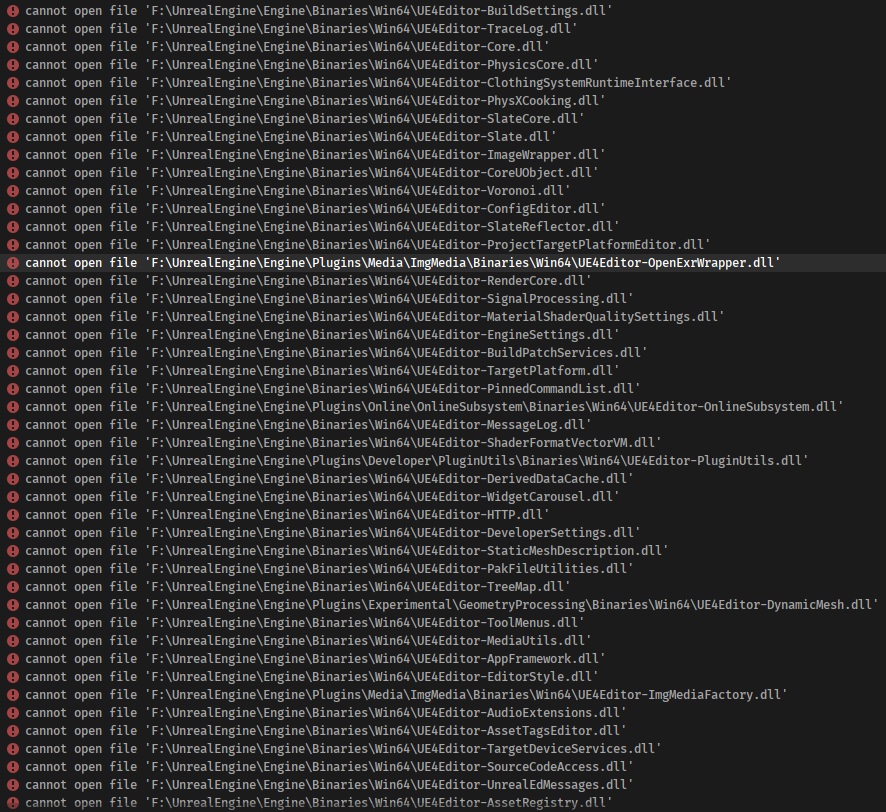
 calm mason
You probably need to build the solution
mellow ridge
Guys im trying to install EOS plugin to the Source Code
i've tried to install the latest release 4.27.0 the whole engine not working keep give me errors missing modules
and the 4.26.1 when i install the EOS this error
quick crystal
Gotta love that with each release, I reset my local repo to the upstream release branch, and the engine never compiles with chaos enabled. It's a joke. Everytime I forget to set the flag to false and everytime I am greeted with build errors related to chaos interfaces and implementations. I turn off the chaos flag and it compiles with no issue.
I guess I will never use the chaos system.
 blissful storm
Hi guys - hopefully this is the right section in this discord 😄
Just one simple question - is it possible to outsource the unreal engine viewport into other programs?
For example quixel is using Unity. Gaea ist using Unity. Is it theoretical possible to use also the unreal engine for this?
 foggy shore
I just created my own "Installed Build" using the BuildGraph command. What's the InstalledDDC inside the LocalBuilds when creating Installed Build. Is that safe to delete? The instructions only mentioned about the Engine folder. Thank you
 long wave
Subbed a PR for class-picker support in the DataTable Factory UI. Might be useful:
https://github.com/EpicGames/UnrealEngine/pull/7772
limber jacinth
nice
honest widget
How are hotfixes released? On the release branch?
oh, my bad. Didn't do a pull and my git creds have expired.
honest widget
Guess it doesn't allow HTTPS too. Weird./
 cold spear
Question Does anyone has ever got this issue when cooking a build?
Tools.DotNETCommon.Win32ExceptionWithCode (0x80004005): Unable to create process
 mellow sigil
Hi, I started integrating PSO cache into my oculus quest build, it wouldn't work until the changes from this thread https://forums.unrealengine.com/development-discussion/android-development/1707967-after-migration-ue4-22-4-24-pso-cache-loading-running-is-not-working. Right now it compiles the shaders when starting the game and the hitches are gone but some materials aren't shown at all and some are only shown after some time. I'm working on a oculust quest 4.25 engine. Has anyone encountered this problem before or maybe has any idea what could cause it or how to debug it?
Unreal Engine Forums
Hi guys!
We are having some difficulties with PSO caching in UE4.24.1.
We had everything fine about PSO caching with our game in UE 4.22 but after migration to 4.24 we can't manage why the PSO cache is not running in the build.
We have stablepc.csv file already generated and it is already succesfully packaged to the project
 junior parrot
how can i read UV 7 (i created for mesh) in LocalVertexFactory.ush? (sry for wrong section)
 warm helm
I'm trying to track down a bug happening when using any of the DrawDebug functions on an Oculus Quest. Any shapes drawn will show up in the correct location in the left eye, but are too far to the right in the right eye, this makes it quite awkward to use DrawDebugSphere or DrawDebugLine for development. I'm suspecting it has something to do with the mobile multi-view code or the DebugCanvas but I wanted to see if anyone already had some inkling about what is happening
This was recorded as a video from my Quest so its only monoscopic, but you can see the debug coordinates drawn too far to the right of the hand. In the left eye, the coordinates line up with the hand joints correctly
fading gazelle
Hi All. Could someone explain the utility of a custom UGameInstance
 worldly umbra
@fading gazelle you can add custom logic to your UYourGameInstance or even override functions from the UGameInstance to execute things differently!
fading gazelle
right I understand that, but in the scope of the game design patterns what is its utility? Is it there to instantiate gameplay modules and hold them?
The main utility I see is player managment, and being used as a handle to the UWorld
i guess im trying to understand what I should use as the "core" of my application
 random shoal
A UGameInstance exists for the lifetime of the game and is outside the influence and lifetime of something like UWorld. The ShooterGame makes some use of it for interactions with server discovery and starting a game. I beleive they also do the module swtiching - switching from a game module that is the MainMenu -> Loading Screen -> multiplayer game module. Some people use the UGameInstance to persist data across the entire game, no matter where a player is or what level is loaded. @fading gazelle
modest ingot
here it is
@wraith crystal @ocean inlet
henceforth i blame thee, glass
but i still ❤️ you
 ocean inlet
It's worth it 🙂
modest ingot
not feeling like it right now lmfao
 wraith crystal
what did you get that 5600x for if not this
what are ppl discussing on this channel btw?
isn't this one of the graveyards
modest ingot
to flex
ocean inlet
Working with source, workflows, editor tooling etc
wraith crystal
@ocean inlet what happens if I have editor extension-related questions, pose them here and not getting an answer?
modest ingot
arrggh gonna lose my mind
wraith crystal
curious how this works
modest ingot
Microsoft.MakeFile.targets(46, 5): [MSB3073] The command "..\..\Build\BatchFiles\Build.bat -Target="SphericalEditor Win64 Development" -Target="ShaderCompileWorker Win64 Development -Quiet" -WaitMutex -FromMsBuild" exited with code 6.
 radiant hazel
I have over 1 confirmed PR's in the engine source
wraith crystal
b/c normally I ask straight in #cpp
didn't even know this channel was for editor extension
ocean inlet
You can likely do it in both just might be easier to move here if CPP is busy (like right now)
wraith crystal
ok got it
modest ingot
Pastebin
Pastebin.com is the number one paste tool since 2002. Pastebin is a website where you can store text online for a set period of time.
ocean inlet
is this after the move?
modest ingot
yeah
ocean inlet
did you regenerate project files?
modest ingot
im gonna try VS next
yep
nope same bullshit in VS
im deleting everything and reclonign
modest ingot
buidl
build
i tried rebuild too
right after
always exit code 6
So, @ocean inlet since im doing this from scratch do you mind helping me figure out the best way to have it set up?
I'm gonna clone Unreal Engines Repo first
then clone my repo, and place it inside the UnrealEngine repo folder
then generate project files, and build from UE4.sln
id obviously like to avoid uploading any of Unreals source to my repo too
ocean inlet
How would you like your setup structured?
Project side by side with source?
or seperate?
modest ingot
I don't want any of the Unreal Engine source in my repo as of right now
im not going to be making any major changes to it that would need to be uploaded to my projects repo
ocean inlet
Cool so steps should be:
Make a fork of UE (this is important as it makes merging in updates later real easy)
clone that fork
Run setup.bat
Tell your project to use that source version (via the switch unreal engine version selection thing on your uproject, can also do it via commandline but it's easier this way)
Select generate project files on your uproject
Open the created sln
Hit rebuild on your project
modest ingot
dont you typically clone then fork?
oh
github desktop does that automatically when you clone
okay ill let you know how it goes
modest ingot
ocean inlet
Cool so steps should be:
Make a fork of UE (this is important as it makes mergin...
ah, does it still matter where my project folder is in relation to Engine folder?