#engine-source
1 messages · Page 35 of 1
 split kernel
split kernel
split kernel
thx mate
 dire crag
i mean yeah copy out binaries and stuff is like another thing but normally if you do not have special ambitions you mostly keep it all together
i still dont know how best tho ;)
split kernel
nah i'm also pretty new to it. Just wanna build it cause i want a dedicated server
or rather aim for something with a dedicated server
split kernel
i mean chaos is nice yeah but wont use it in my goal i think
dire crag
But try to explain that to a reasonable person: "Yeah for making a gameserver i have to compile the engine new"
split kernel
yeah i was also first pretty anoyed like why make something so often used imo so complicated
dire crag
yeah well it isn't so often used to be fair, if you see the amount of games, only a very small part of them need a gameserver
if you go by PLAYER, yeah, majority connects to a gameserver
but by GAMES..... not so much
split kernel
yeah.. i guess most use listen server for just a few people like coop games
dire crag
BATTLE ROYALE YO! ;)
split kernel
But still, if it would be simpler to make a dedicated i bet more would try to aim for that
dire crag
I think its a litmus test
it is like, that if you put it on the "easy access layer" then you have to deal with more people actually trying it and making questions about it. You might have to explain a lot to the people who actually dont need a server in the first place.
but thats just an idea, sure is, there must be some reason
split kernel
so when i compile the engine and want to update to a new update that came out, do i have to build it again and download everything?
dire crag
its a git
you just pull hte new version and build again
the new version then just downloads the changes
the dependencies get automatically updated
i btw just talked with some expert about that gameserver thing, and yeah there is a technical reason for this, just harder now for me to explain 8-D but there is a technical reason
 fair storm
@dire crag Hey. I got chaos build running but I cant get the demo project to open. It keeps saying I need to compile it from source. How do you compile a project file from source?
dire crag
wel you just need visual studio proper installed and then you can just build it when you open the editor he asks then for it and you say yes
alternative you go over the visual studio project file
but as said: i didnt tried the chaos demo yet
dire crag
There is a page in the unreal documentation (dont let me search it out now for you ;) ) which shows you exactly what flags you have to activate
split kernel
oh i see thx 🙂
dire crag
merry xmas ;)
split kernel
Seems any is fine, they also checked the newest
dire crag
\o/
split kernel
See you next year when compiling finished .-.
dire crag
oh you are so optimistic ;)
split kernel
at 200/3596 so yeah... xD
split kernel
What?
split kernel
._.
split kernel
i just followed the readme \o/
dire crag
yeah
ok ;) they probably didnt prepared for that haha
but you have some Build.bat commands with uproject, right?
dire crag
oh you then are literally building a UE4Editro for everybody ;)
it like will take double the time as if you would limit to windows
but you can of course follow the readme and not make it more complex ;)
i just say that with tuning of the uproject that is normally used for the build, you can limit the modules that are made
i am around 2000
split kernel
uff all that for a dedicated server omg...
dire crag
lol its way more than that longtime out
split kernel
What exactly more?
dire crag
its a vital process part that someone in every team should know ;)
but it is actually not hard, i mean the unreal documentation has a complete block of pages about this which explain the most relevant stuff
and for the standard stuff it is easy
relevant is just that you make your build fit to your uproject, so that you spare a lot of time for building
split kernel
So when unreal engine updates i also have to build it new?
dire crag
haha......
well in general you anyway dont wanna update at some point anymore
but yeah, while you do, you rebuild
You are building a serious thing there ;-)
split kernel
But like what does it have more then the normal launcher unreal engine?
🤔
I mean i'm only doing that for dedicated server rn xD
dire crag
yeah but long time out you might wanna make more, also if you are into the launcher topic for your game all that plays on that level. It is not bad to know this stuff
@split kernel just for the protocol: you can just go on without gameserver and just make the client the server for the working on it
so you can actually do that "whenever you want" while making the game
you dont need to go crazy on it in the first run
split kernel
yeah... guess like just build it when you wanna release it?
dire crag
well you will probaqbly still test around with the gameserver first before you release
but practical
yeah
you can do that last
you WILL for sure hit another topic that makes you motivated to compile the engine, there always will be haha ;)
 silver hollow
well, at least you'll get know more of entire process, working on multiplayer is... interesting 😎
you gonna be surprised how complicated is to work on simple things 😉
dire crag
i have no idea if you think of the same things than i do on that ;-)
but everybody has its own pain
silver hollow
I kinda like this "pain", it forces good engineering practices, multiplayer won't let use hacks and lazy solutions everywhere
and rewards time spent on designing systems and tools
which I like 😉
dire crag
i am still unsure ;)
silver hollow
but people who'd love make their crazy shooter quickly, will be surprised 😄
dire crag
INSIDE the editor, the multiplayer topic is ..... simple, ultra simple, i mean its one flag, the consequences are big, but something easy to think about
silver hollow
less simple if you want game working on listen server, dedicated server, solo play 😉
and explain a junior designer that has to think every time if he wants to play sound effect for everybody 😄
but yeah... if somebody give a good system or tool, you don't have to think all the time
dire crag
i am confused really what was your bad experience there ;)
silver hollow
oh, my experience is fine, not complaining 😄
dire crag
something must have been there, cause i dont know why the audio topic is now your primary, with the location based sound effeects, its a trivial topic no matter what type, or i miss something
silver hollow
just an example 😉
since nobody on team did multiplayer before, everything was surprising and... interesting for us 😄
nevermind 😛
dire crag
haha ok ;)
but its really most simple on unreal, its all kinda natural coming with the features all being "born" for it
the in game part is really genius
silver hollow
oh yeah, the another generation of engine built with multiplayer in mind, proven with previous engine generations
still improved, with gameplay abilities, replication graph and many smaller things
a bit different than Unity 😎
silver hollow
good news, Chaos does work, Target.cs needs this
bCompileChaos = true;
bUseChaos = true;
bUseChaos flag hasn't been required in 4.23 for compilation 😉
Unreal Engine Forums
4.24 now available to download
As you may have heard, with this release, we’re retiring Unreal Studio and folding all of its features into Unreal Engine—for free. Unreal Engine is now your one-stop solution, whether you’re working in game development, architecture, fi...
 stable hemlock
+// Copyright Epic Games, Inc. All Rights Reserved.```finally, we have the technology to claim copyright for all years instead of year by year
 lost linden
@silver hollow if I go try that now and it still doesn't work, I'm gonna cry so hard you will feel my tears in the humidity of the atmosphere for eternity.
silver hollow
I did try on copy of the engine, it worked 🙂
silver hollow
warning: most of demo content doesn't work, lot of ensures, content could required to be regenerated and they didn't update it...
 granite dust
Well I got 4.24 working, but if I try to switch levels it crashes in UGameInstance::CreateGameModeForURL
so not really working.. yet
Only in a packaged build 😦
granite dust
4.24 has caused me more pain than any previous upgrade, despite waiting until the first hotfix.
dire crag
i think they just wanna get over with the pain as early as possible
they decided to ditch the studio and now they have integrate all the shit at once
hopeful they make now a pause and fix 4.24 for half a year at least before going on the next step
For sure they don't need to fear the competitors in that time ;-)
granite dust
I bet they are going gung ho to have 4.25 ready before GDC
dire crag
you are probably right, even tho they should really go to the stabilize topic
they can still make a huge show, but they still will bump version
granite dust
I heard from someone I don't know on Twitter that Epic is planning to deprecate PhysX in 4.25 and use Chaos for everything
but the current state of Chaos makes that a very scary thought
dire crag
Lets hope they realize that ;)
the more scary part is really to imagine them making a crappy 4.25 and leaving us with an unfixed 4.24
granite dust
4.23 only got one hotfix! Leaving broken old versions around seems to be the way now
dire crag
well historical seen they have their phases
when i started to get into unreal i was at this 4.20 or so and then suddenly they made every 2 months a release
and then while i had no time, they didnt made any update for a long time
if i am not mistaken
 stark parcel
4.23 was actually pretty stable (hence why it only got one hot fix, and like 5 or 6 preview build)
granite dust
I was able to use 4.23 fine, yeah. But I recall there being a few fixes marked for 4.23.2 that they decided to push to 4.24
stark parcel
It was probably pushed to 4.24 instead.
Hot fixes are only needed when it’s necessary
If the bugs were too minor, then it’s not really logical to push a hot fix that doesn’t affect a large majority of users
granite dust
Yeah i have little insight into how that plays out within epic
silver hollow
And there crashes and ensures with Chaos on basic stuff (player collision capsule, sometimes traces)
Epic failure
granite dust
Ok I fixed my level transition issue
it turns out I've been leaking memory in packaged builds for a while, but in 4.24 that causes the persistent level to get nulled out
so this crash helped me fix a long-standing bug
That was the last issue in 4.24 for me, so I might upgrade for realz
 rain lake
i also heard that physx was on the deprecation path
but 4.25 seems optimistic
i did hear there were some big things in the pipe for networking by 4.25
as well as volumetric clouds
and large scale environment rendering
stuff like the kite demo on steroids
 brisk silo
yeah, look at all the terrain updates on 24
they are working hard on the open world features
also they have done chats about what they are cookin
one of the most important things is changes to how assets are stored in maps, in a less monolythic way
and being able to edit a "tiled" map in a way that it automatically places actors on its correct map tile
silver hollow
yep

Get a first look at the future of physics and destruction in Unreal Engine as Epic's Benn Gallagher and Jack Oakman walk through features that give content creators the tools they need to build highly interactive worlds that can be fractured, shattered, and demolished.
Learn...
 half talon
I was under the impression that Chaos was using PHYSX under the hood. So Chaos is its own physice engine? Why write your own if things like Bullet exist?
silver hollow
i.e. you'd have build high level stuff around external libraries and unable to change anything significantly because you want to merge future PhysX/Havok
and PhysX/Havok didn't made huge progress in physics in games for years
now Epic is able to integrate physics with anything in the engine (Niagara, Sequencer, etc) and design physics to work well with it
like destruction can be precached to form playable in Sequencer
custom Field System for managing physical behavior of actors in given area looks so awesome, allows designer/artist to have control over this chaos, art direct physics 🙂
also they finally could "fix" issues that vital to making game, but it were ignored by third party SDK
- setting a mass for simulated body in PhysX it was always a joke, mass calculated from object's size?
- tweaking a simple interaction of pushing or kicking object was always a nightmare
- now in Chaos geometry collection you can simply specify mass of mesh directly
and that just for starters (when Chaos replaces PhysX as default solution)
silver hollow
can't find it now, but it some presentation they said they solved performance issues on calculating collision of different shapes (convex or not, whatever)
later on they will able to properly support physics replication in multiplayer
and Tim Sweeney mentioned they want realtime physics of any kind: fluids, soft bodies
closer to offline simulations we could have only in cinema
isn't there bullet for 3D games? it's decent for 2D, right?
but never heard of using it for 3D - it was usually PhysX, Havok or in-house tech
silver hollow
oh, did I confuse it with Box2D? 😄
half talon
If Chaos can outperform a Physx, which is GPU accelerated that would be amazing. Though, I'm not sure if Physx even runs on the GPU under UE4.
brisk silo
box2d has stuff from bullet
so confused but not so much
nvm not really
box2d is its own thing
@half talon physx gpu acceleration is only for particles and fluids
not for game rigid bodies and raycasts and the like
silver hollow
yeah, I'd love to use RTX to spam world with traces, but how one would pass result back to CPU and sync it with game thread? 😦
half talon
Hopefully they implement a new Vehicle Movement system with Chaos, considering the current one is pretty much just a Physx wrapper for vehicles.
lost linden
@half talon I was wondering that too at the time they announced it. How will they integrate it into the current physx related stuff. I know it's modular but UE4 isn't as modular as it seems at times. Taking out those components would probably cause a meltdown :p
silver hollow
personally I'd throw away PhysX vehicles and create Chaos one from scratch ;)
especially they're working on Network Prediction plugin for character movement aiming to replace part of the current character movement, they could refactor vehicle movement too 🙂
lost linden
I'd take a whole refactor too, but I also respect PhysX for what it is. I would prefer to see Chaos take on the tasks that physx makes difficult and refactor them for purpose. But without taking away any potential advantages it has
half talon
I'm glad to report I've successfully fixed the "Network saturated" bug that happens with Steam Voice chat. I'm going to submitting my PR soon (https://github.com/MarkJGx). I've stumbled upon another issue with Voice Chat, though I don't think this one is Steam related. If you stop talking and immediately start talking, no voice chat happens, no errors, no nothing. You have to intentionally wait a little bit before using push to talk again. Anyone got any ideas?
dire crag
Is steam voice chat good (if it works haha)?
half talon
from my testing it's pretty decent, if I can fix the issue stated above there would be no point in using services like Vivox really.
stable hemlock
Hi, I am making a custom editor asset, but have been struggeling with some unsolvable 'unrecognized external symbol' errors when I use classes located inside a private directory.
I know that this happens if you don't include the necessary modules in your build.cs file.
All the errors are from classes located in this directory: 'Engine/Source/Editor/MaterialEditor/Private/...'.
The module required is "MaterialEditor", which I correctly included inside the build.cs file - and that's why everything from MaterialEditor/Public/... works.
But why does it refuse anything from the private directory? I can't find these classes from the private directory in the inheritance hierarchy online. (Take FMaterialEditor for example, which inherits from IMaterialEditor but is not visible online)
Does anyone know something to try?
If there is none, I am forced to write a duplicate of these engine classes, but this is exactly what I want to avoid doing, because it is already 'there'
 half mantle
Hi anyone know how and where I could find documentation for the config variables like in DefaultEngine.ini? I'm for example trying to lookup r.CustomDepth but cannot find it 😦
silver hollow
@stable hemlock that's entire point of Private folders, somebody didn't want you to use its content 😉
this could be nice PR, to move headers to Public
I encountered some private headers of tools, that I wanted to use
fortunately, I could just abandon my idea of using it
stable hemlock
@silver hollow Ouch, I feared that. Now I have to copy all the classes! I am not crying!
Thank you for helping, it is my first time working with these engine classes and stuff
silver hollow
just one last idea, did class/method you're using is exposed to external modules?
I could be wrong about private folders, although it sounds reasonable - so it's worth checking
you wouldn't be able to use class if it's not exposed by adding something like MATERIALEDITOR_API to the class definition, or blocked by MinimalAPI class specifier
single method can be exposed by adding MATERIALEDITOR_API to the method definition, even if class itself it's "hidden"
which class you're trying to access, btw?
stable hemlock
FMatExpressionPreview
It's inside MaterialEditor.h
It's only complaining about some methods in it.
ShouldCache, CompilePropertyAndSetMaterialProperty, NotifyCompilationFinished
And some more classes also located in a similar directory like FMaterialExpressionParameterDetails
inside
Engine\Source\Editor\MaterialEditor\Private\MaterialEditorDetailCustomization.h
It might be that the methods are somehow associated with modules I did not include.
silver hollow
yeah, this definitely looks like private things, this could change anytime without warning
but this could be actually not a bad thing if you'd duplicate a bit of code to your project, editor tools typically has a lot of similar code
however usually it's because overriding API methods, like from UEdGraph
I started entire tool by copy-pasting sound cue editor and modifying it with time 😉
stable hemlock
What's fascinating to see that it is perfectly re-creatable because the private classes that rely on inheritance, inherit from classes which are located/defined in public directory.
Very modular approach.
silver hollow
haha 😄
stable hemlock
I think they shield us from too much private branching. That's why it is not visible online
You're right
silver hollow
well, material editor is also one of the oldest one, when they didn't expect anybody to play with rendering tools without forking half of the engine 😉
stable hemlock
Haha I guess that's the case
 low dust
@half talon @brisk silo physx is only CPU accelerated on UE4 (and other game engines) by default. there IS GPU rigidbody acceleration mode but it's for nvidia gpu's only so that's only been used in handful of games so far
to enable that on UE4, you'd need to make engine source code change so it'll init the gpu solver on scene initialization
it would be more usable on physx 4 as there the gpu solver actually falls back to cpu version that had similar math in case you don't have nvidia gpu on system (no more big difference between cpu and gpu solvers like on physx 3.x) but ue4 only uses physx 3.4
dire crag
Conan tries to catch up with Ark with the Dev Kit
189 GB vs 197 GB, its a head to head race \o/
half talon
Steam Voice fix: https://github.com/EpicGames/UnrealEngine/pull/6487
stable hemlock
Anybody have any experience with setting up Xbox One to ue4?
granite dust
I assume it’s similar to other consoles. You need to prove to epic that you have developer access to the console, then they give you access to an ftp server that will provide you a bunch of platform specific files that you copy into your engine folder
Then you just run generate project files, and compile
Each platform has a different way of proving you are cleared for access to the ftp. I’m not familiar with xbox in particular
stable hemlock
@granite dust already dealt with all of the access stuff but it's not that simple with just compiling
granite dust
You also need to have the correct sdk installed
Lately if your sdk isn’t up to date it just refuses to package to the target platform and just pulls up a website
stable hemlock
yeah i get an error on packaging Unable to instantiate module 'zlib' @granite dust
granite dust
Maybe zlib doesn’t package to xbox. Gotta black list that module?
dire crag
would be weird ;)
 hollow wadi
hey does anyone know if you can use unreal game sync without perforce?
i just want a frontend to build binaries
hollow wadi
bugger
also does anyone know what this is all about
Z:\UnrealEngine\Engine\Source\ThirdParty\Eigen\Eigen\src/Core/util/Memory.h(73): error C4834: discarding return value of function with 'nodiscard' attribute
im still scrolling but it appears to only occur on server shipping builds
rain lake
gamesync is tightly coupled to perforce unfortunately
hollow wadi
scratch that, its all configs for both client and server
hollow wadi
damn
rain lake
without ripping out most of the source control stuff and replacing it
hollow wadi
i understand though, they made it for themselves where they use P4, theres no reason why they'd make it generic
rain lake
also, I see the nodiscard error sometimes
I'm not 100% why that happens
I think it has to do with a 3rd party lib using nodiscard when they really shouldn't
hollow wadi
it seems to be cpp17 related
 elder falcon
if you want to use c++17 globally then you gotta throw out some incompatible plugins
like the alembic and usd importers
hollow wadi
no i dont want to, which is why its odd the errors are showing up
it makes me suspect i've set a flag somewhere i wasnt meant to
hollow wadi
Anyone know if it's possible to manually specify a buildconfiguration.xml rather than relying on the default location, and secondly, can I provide compiler flags either in said xml or a buildgraph
I'm trying not to touch the source build at all, or as little as possible
 gloomy hamlet
@hollow wadi There are a bunch of places it looks for the xml file, they will override each other.
Configure how the engine is built.
As far as I know, it still doesn't expose arbitrary compiler flags though.
But Cpp standard version is exposed if that's what you're after
hollow wadi
nah i needed to disable a specific warning as error
i did it in WindowsCompiler.h or whatever though, but i'd rather do it externally
gloomy hamlet
@hollow wadi You could look at AdditionalCompilerArguments in your project's .target.cs file. That would avoid changing the engine. But I think it has implications for reusing a prebuilt engine across multiple projects
 harsh lotus
Hey. Do you know any ressources to get in depth technical knowledge about how UE4 works or anything I could read before getting into UE4 source code ?
lost linden
thats a tough one. Everyone here probably knows the pain of struggling to find scraps of information about engine source. But we all end up in the same place. The engine source.
lost linden
its a lot of code so a lot is undocumented really. Often you dont need the comments. However its all structured in a way you can always find what you want.
harsh lotus
looks ok then !
rain lake
on the flip side, some of it is incredibly well documented
NetSerialization.h is a good example of well documented code
lost linden
sounds interesting
rain lake
yeah, the readme explains it pretty well
rain lake
@spiral mortar have you messed around with the new ToolMenu refactor with node graphs in 4.24?
 spiral mortar
@rain lake yeah
spiral mortar
heh
rain lake
any gotchas that you've found porting the old system to the new one?
stable hemlock
Will any of this affect my compilation?
because it has taken like 3 hours to compile this engine
 remote badge
@stable hemlock if you dont intend to run with the datasmish plugin you are fine
stable hemlock
It probably took so long because I compiled the Programs folder too haha
I'm trying to use chaos and it gives me this :/
silver hollow
you have add bUseChaose - true to Target.cs so it would compile
still, Chaos in 4.24 is a mess, most of its content demo doesn't work, unstable in regular gameplay
you've been warned
stable hemlock
Yeah
4.24.1 has been really bad since I opened it
All the cubes on the default map fell through the level
I don't get it
Is it supposed to be this bad lol?
hollow wadi
Yes that's intentional
Btw the errors you're seeing there stink of old temporary files
Do a clean and rebuild
stable hemlock
Oh can I not have two engines on the same computer?
43>Done building project "DatasmithMax2020.vcxproj" -- FAILED. 44>'D:\Users\DQHM\Desktop\UnrealEngine' is not recognized as an internal or external command, it's trying to reference this path but it doesn't exist.
silver hollow
you can have, every folder is a separate installation
 quick bramble
Hello! I am new here and I am currently creating an ATC Simulator with Unreal Engine. I do have the basic concept down, as I'm basically recreating this into 3D. http://games144.com/game/35725n-airport-madness-3-game.php#play
Although I am having difficulties... I am starting with having planes spawn in to move into parking spaces, similar to how it works in this game, and I've attempted to visualize that using a flowchart, which is here.

Airport Madness 3, play free Flight games, related games and updates online.
Although with all of that being said, I am confused on how I can put all of that Into Unreal and such, and would like some help with what I have to do exactly. It doesn't have to be anything advanced and such. This is for a Special Project due bg January 29th.
 static spoke
For some reason, my copy of the source is not saving the cache to the the new specified directory in the BaseEngine file. Any tips as to how to fix this?
Nvm, fixed it!
 thorny oxide
guys, I need fast support on this 🙂 Does anybody know how to deselect certain 'plugins' or 'platforms', or other things I don't need in the engine , so the building time is shortened???
dire crag
he hope he isn't disappointed when he notices that under the line the pain of waiting is not so drastical reduced ;)
stable hemlock
Nice improvements coming to UHT!
Also, are they really going to deprecate physx in 4.25? Lots of chaos patches coming in but, can they really make it to the GDC?
rain lake
i wouldn't put money on it
they announced on UDN that matinee was going to be depricated in 4.24 (which it was) back in the 4.21/4.22 cycle
and nothing of the like has been done for physx
silver hollow
yeah, but matinee could live along sequencer for years
one day Chaos is will compiled by default, so this would a natural deprecation of PhysX 😉
stable hemlock
Most of the chaos commits I see seem to be focused on immediate mode physics. I guess they could deprecate physx clothing and immediate mode stuff and leave the rest for later?
It's not like the whole chaos is immediate mode physics, right?
wait, that can't be can it? 😮
silver hollow
I'm physics noob - what that would mean? 🙂
Chaos in 4.25 would be interesting, that would mean stable on every platform, wonder how much they stressed about switching everyone to the new physics engine 😉
silver hollow
Need some Jenkins/P4 help ;)
I configured compiling project, P4 workspace for Jenkins, even a separate workspace for submitting build, so P4 reconcile command would run only on narrowed list of folders (Binaries folders).
Still... post-build action "Perforce: Publish assets" seems to totally ignore .p4ignore.txt set for the workspace and reconcile keeps adding all local files to the changelists (Intermediate folders, .vs., etc.).
Reconcile works correctly on the same workspace if call command on workspace tree in P4V...
what I'm doing wrong? 😄
hollow wadi
@silver hollow try contacting this guy

YouTube
From playing games, to making them; watch my journey unfold before your eyes as I work towards becoming a level designer in the video game industry. If you a...
he's done a lot of UE4 with P4, Jira, Jenkins, etc (CI) recently
 minor karma
in version 4.23 i have following bug with point lights if world composition is enabled
how to fix it ? 😢
 quick crystal
All, I updated my VS2019 (I had something like 16.3.x and I upgraded to 16.4.x) and now I can't build my project anymore. I keep getting this error:
Severity Code Description Project File Line Suppression State
Error Visual Studio 2019 (14.22.27905) must be installed in order to build this target. MyGameProject E:\Source\MyGameProject\Intermediate\ProjectFiles\UnrealBuildTool 1
Does anyone know how to fix this?
VS 2019 isn't even 14.x, it's 16.x
 worldly escarp
Anyone know if theres a tutorial that will show me how to integrate the engine source into visual studio? I would like to be able to jump to a function definition in editor instead of manually looking for it.
 soft storm
Hey guys, please help! If i build engine from source is it normal that i have to build it every time i restart my pc? I thought I'd have to only build my engine once ?
 blazing relic
what do you mean "have to build it every time"? does it mean rebuilding engine code every time? If then, no you don't have to.
soft storm
Well after i built my engine and rebuilt my project in VS i restarted my PC and the engine version just disappeared from epic launcher (with ue4editor.exe) and i couldnt open my project. So i just built my engine from source again and now am worried that i have to build the engine every time i close UE4 and VS.
blazing relic
Never heard of that... don't have to build engine source until i change it
soft storm
Got it, thanks! Well this time i'm trying to use the select engine version.exe thingy and save everything in VS before exiting, so hopefully it helps
silver hollow
@soft storm
source builds doesn't appear in launcher, so it couldn't disappear - compiled build won't magically auto delete itself from hard drive, you ten of gigabytes added in folder where you downloaded source code, look for binaries there
if you had project using launcher version, you need switch project to using your engine from now on
@worldly escarp buy Visual Assist, it's basic extension for navigating and operating on huge C++ codebases
 celest pagoda
@quick crystal 16.4.x is the version of VS 2019. 14.22.X is the compiler.
quick crystal
Yeah it would not compile even though I had that installed. I even confirmed that I had that version under the visual studio tools folder. I had that one and three other versions
One thing I noticed was that in the includes, vs was pointing to vc 4.24. I just updated the unreal build tool to use that version and it stopped complaining
 elder hound
Did any one here accomplish disabling pixel snapping?
half talon
@worldly escarp use Resharper C++, it has that
elder hound
Help D:
That didn't happen before ?_? idk how to solve it, I rerun Setup.bat & GenerateProjectFiles.bat but that also didn't solve the problem
elder hound
Idk Windows restart solved the issue 😛
 red urchin
Hello Folks
I am facing Engine crash while working on a Physics simulation
Unreal Engine Forums
Hello,
I am working on Unreal Engine project, where I need to do Physics Simulation of Female character. I need to move Girl's hair with Body movement. But the engine crashes again and again while I am working.
Crash arises during simulation of character's physics asset an...
I have shared Log files in the forum post
Is there anyone, who can assist me to avoid this crash
I am loosing my work again and again
The file gets corrupted after the crash
 limber jacinth
trying to build the engine
but its failing compile cause it thinks its using the intel ispc
spiral mortar
lol
elder falcon
this happened to me once
the trick is to open the ispc files and resave them
then it magically works the second time
elder falcon
alt shift o "ispc" or "isph"
 storm cradle
@worldly escarp just press ctrl + t and start typing of what you are looking for, fuzzy find will find it then - i still prefer ReSharpers implementation of that feature tho
 quick grotto
Is that kinda fine that I'm compiling engine like over 6 hours (excluding all previous modules before this countdown). If so, what time it should take to compile
stable hemlock
I'm guessing you don't have an ssd and you are doing a full recompile
with an ssd and a project based compile it should take about 10-15 minutes depending on how many cores you have
if you have a recent cpu like ryzen you could get that down to 5-7 minutes easily
on my 5 year old PC with i5 4 core cpu and an average ssd, a full recompile of the engine takes about 1.2-1.5 hours
stable hemlock
thankfully I don't need majority of the plug ins included with the engine 😄
 grizzled ingot
Seems like it's compiling every cpp file individually, did you disable unity builds? The absolute longest time it should take to compile the engine should be around an hour. If it's taking drastically longer than that then something's wrong.
5-7 minutes clean engine build? On a single computer? Maybe just for your project module, but I doubt for the engine. Timings in our studio using Incredibuild using 150 cores of all our computers for a fresh engine:
~2 minutes compiling UHT. (small module, doesn't distribute well because of small amount of files due to unity builds)
~1 minute generating headers. (not distributed)
~5 minutes compiling the entire engine, plugins and game code (fully distributed).
stable hemlock
not compiling the entire engine, pretty much everything disabled, also not the latest version, some parts are modified and removed (mainly rendering side) but it shouldn't influence things much time
if you just pull the latest engine and do a naive compile there is no way it'll take any less than 15 minutes from my experience in a project only compile
besides distributed builds have their own issues at least from my experience, we had a few odd bugs that blew up the compile time
I'm not the build guy so I don't really know what the issue was
worldly escarp
@silver hollow @half talon @storm cradle It seems like it works automatically with intellisense I just had to install the source through the epic launcher. I'll take a look at ReSharper though. Thanks!
 plain mulch
@worldly escarp You can also look for Visual Assist, who is much better than resharper (even is resharper have some lovely features too)
spiral mortar
Let's start a war: visual assist is actually way inferior
lost linden
i'll get in on that. I don't use either. I take the full force of Intellisense crapness in the face like a tornado chaser.
stable hemlock
they disabled chaos in 12.00, I assume that's fortnite 12.00?
silver hollow
oh, that's what they meant with "12.00" 😄
 dusky ridge
getting compile error on 4.23
fatal error: 'Chaos/Vector.isph' file not found
1> #include "Chaos/Vector.isph"
dusky ridge
is anybody else have this error also? 🙂
dusky ridge
its fresh checkout from git 4.23 version. so im building only whats on git and it's failing on that module
limber jacinth
i had that before
i ended up deleting and checking out again
intel compiler crap
stable hemlock
something might've gone wrong with the gitdependencies
ispc/h files weren't in the git repository before 4.25 changes iirc
dusky ridge
yea that was it tnx 😄
 nocturne rampart
Hi Everyone! :)
I have a question about ALT (Asynchronous Loading Thread). Has anyone been able to enable it on PIE?
From what I inspected in the source ALT and PIE won't work together, it's something that seems to be hardcoded to work only on standalone builds. I've implemented my own asynchronous loader but it's not as robust as ALT. Anyone who has explored this area could maybe share their findings, please. Thanks!
celest pagoda
Sigh. WTF. I am working on my C++ project code. I build from source but I have not ever made engine changes. Been on 4.24.1 for a bit now and been building my project many, many....many times. While changing one of my header files, suddenly my compile is now compiling the engine. Fine. But now I get this "1> [1/34] Module.Chaos.cpp
1>E:/UE4Source/Engine/Source/Runtime/Experimental/Chaos/Private/Chaos/PBDCollisionConstraint.cpp(27): error C2146: syntax error: missing ')' before identifier 'int32'"
Wait...forgot I did a clean...going to go back and do dependencies and generate....
Ok. Nope. Why now? Seems to be an issue with this
elder falcon
open the file PBDCollisionConstraint.ispc and save it
celest pagoda
Will do after this next build. Frustrating.
 shrewd thorn
@nocturne rampart I know that code pretty well, the async load thread won't work in PIE because it depends on the Event Driven Loader which is only available in cooked builds. The fact that EDL only works in the cooked build is one reason the editor load times are bad, fixing it is very difficult and has been a low priority engine task for like 2 years now
But all that does is speed up the CPU part of loading, it shouldn't matter in the editor anyway because it'll only be like a 20% speedup. All of the async loading logic like StreamableManager and AssetManager work in PIE builds, except that the editor never UNLOADS things, so some of the logic is weird. To actually improve editor load times you're going to have to split up your data and use those async/on demand loading methods
nocturne rampart
@shrewd thorn I would be happy if async loading would just happen in another thread for PIE. The only async work I see during loading time is texture compression and some DDC work. What ALT is doing, on Editor build, is loading everything inside the game thread which produces terrible hitches when streaming in data, even with the time slicing using the async loading time limit you get terrible hitches or not so terrible hitches but with very long loading times.
Do you know if there is a plan for the future to move loading to another thread in PIE?
shrewd thorn
YEah, even with ALT on it still hitches
ALT just moves some of the low level serialization stuff and loading code to the other thread, most of it still happens in game thread and it's bound by I/O latency
Also a lot of the PIE hitches are things like Blueprint Compiling, which are editor only
nocturne rampart
I wish package loading was more decoupled from ALT code. While investigating this problem I went crazy on how much al of them depended on each other. Even loading sync packages would go through ALT code. I thought on implementing my own loader for PIE but I don't think it'll be worth the time, plus the lack of documentation is amazing.
 mint portal
Good evening.
I wanted to build engine source, to implement a joystick plugin, that has to be implemented that way to use it. It's a Flightstick i want to make accessible ...
Somehow i built for Chaos some time ago, and have had a good article on how to do that.
I know i had to install some additional SDK or sth. like this in my visual studio installer to make that work.
Lately i don't remember where i read about that, and running "GenerateProjectFiles" will lead me to an Error: Unable to find a valid installation of Visual Studio.
So .... What am i missing ??
This SDK, right ?
Please help ^^
and the MSBuild component is selected as part of your installation
that's what i am missing
let's see ....
worked !
but i want raw input, as i see ...
for now
lost linden
@mint portal technically you shouldn't need it as there is Raw Input in the engine now. Older joystick plugins required some kind of interface via SDL or another lib to get HOTAS and things to work. But now it should just be able to be mapped in engine. However, you will need visual studio if you want to load a plugin and build it.
mint portal
yes, stumbled about it lately
just don't really know, how to access my hotas in windows that way ^^
i am looking it up, it's not in the device manager 😉
lost linden
thats not an Unreal issue though. Thats a driver problem
mint portal
ah
maybe becaus i plugged it into the monitor
let's see ...
no
just a different way to access it ...
It's in Printers and Devices ! ^^
why is the 0x added ?
just to know, if i learn it now
 agile basin
I'm having some issues with the engine build process
using engine 4.23.0 Basically, I have made some changes to the engine. They compile. I can open the engine binary. All is well. But when I try opening a simple project that works with the vanilla engine, it tries to rebuild the project on opening
and fails
and when i open the vs studio project for the game project
it builds
but it has a different project file for the unreal engine (in its intermediate folder)
and even after I build it in vs, when I go to open it with the engine, it asks to build it again and fails again
I also cant seem to use the game project in vs to launch and debug either the engine or the game. it says debug settings are misconfigured.
If anyone has seen things like this please @ me
Otherwise I'm on the verge of doing a clean build or just trying a clean engine pull on a later version.
mint portal
this plugin needs a naming capability !
just a field, that's enough
i have 5 axis and 12 buttons ^^
can i just insert me one ?
fabulous plugin
 tight glade
is it possible to have fully destructible map in a mobile game
I have not found examples of Unreal chaos being used for mobile
silver hollow
@tight glade it's because Chaos doesn't work on mobile yet, it's on the roadmap
maybe it will supported in 4.25, maybe not 😉
 sand stream
I'm trying to learn some in and outs of the engine and so far I'm very confused about the ticking process.
Correct me if I'm wrong, but FTickableObjectBase, Actor and Component ticks seem to all be called from different places. It gets confusing way too quickly
I wanted to code a custom poller/update manager just for lulz that worked with interfaces. The manager cannot be an actor or a component because those are tied to the scenes, so it at least needs to be a UObject.
However, UObject by itself cannot receive ticks, so there's FTickableObjectBase for that, but I am completely lost on where it's called from and in what order.
So my strategy was to:
-Create a custom game mode which will create an instance of the update manager in the InitGame callback
-My interfaced classes subscribe to it
-The update manager distributes its tick to all the subscribed interfaces
I repeat, this is all just for lulz, a practice, a sanity check.
So, if anyone could briefly explain how the overall ticking loop is handled in UE4 I would be extremely grateful.
 summer patrol
@sand stream for your purpose i would use FTicker singleton instance, you can access it through FTicker::GetCoreTicker() and then use AddTicker(); function to call your delegate/lambdas whatever.
sand stream
Are all ticks executed via delegates?
elder falcon
ticks are executed in a variety of different ways
summer patrol
I would say mostly? it depends on various systems
Also try to search for FTickFunction and you will see how each of the classes uses that in different ways. i.e CharacterMovementComponent uses a FTickFunction for PostPhysicsTickUpdate group, ActorComponents also use such FTickFunction structure for their Tick
All of those FTickFunctions are handled in TickTaskManager.
sand stream
This is all exceptionally confusing. For one, it seems that there's no way to create new structs that inherit from FTickFunctions (dll linking errors happen). Do we really need to modify the source code for that?
sand stream
And even then, I don't think FTicker allows you to dig more into the loop system. You just bind a method to it and it ticks, but it's still unknown at which point it ticks: before the actor-component ticks, after them, after physics, after rendering, etc.
Please correct me if I'm wrong.
elder falcon
well of course not, those only exist within a specific world
sand stream
But there must be some kind of a way to do it. Like, just imagine a game instance subsystem for a bit: you'll need some kind of a method to execute a method after, say, physics tick in a world, and you need to do that for each of the active worlds. The subsystem's ticks must not be polled from actors or components.
FTicker is, if I understood it correctly, executes outside of the worlds. Implementing Ticking functions directly is not possible because they require Actor or Component and the base FTickFunction is abstract so you can't inherit from it (not to mention dll linking errors).
So, what in the world one is supposed to do in such a situation? If the answer is to just go and modify the engine then, I'm sorry if I sound like a complete douche, some very wrong decisions have been made down the line.
elder falcon
to achieve that exact thing you can add an FTickFunction to the game instance for every world of interest, set their tick group to post physics, and register them with the worlds
sand stream
Yes, that's exactly what I've been looking for it seems.
I'll come back in around 5 minutes once I get linking errors lol
Thanks
elder falcon
(why a game instance subsystem? if you want this per world then use world subsystem)
sand stream
Or that. I'm just speaking hypothetically.
elder falcon
it would simplify it quite a bit as you only got one tick function per instance then
sand stream
But wait, something's not right here
ExecuteTick is the abstract method that gets called during ticks.
I cannot override it and there don't seem to be any delegates to attach to.
How exactly are you supposed to get ticks from it?
elder falcon
what makes you think you can't override it
struct FMyTickFunction : public FTickFunction
{
    virtual void ExecuteTick(...) override;
};
Wait, you can? I say it because linking errors happen, I figured that it's deeply integrated into the engine
sand stream
Yeah, but that sits just neatly under the FTickFunction in the same header file
Alright, I'll try making a struct again
elder falcon
it's ENGINE_API so there will be no issue
 novel mantle
anyone familiar with the DDC or know which chat might have people who know a little about the DDC?
derived data cache
novel mantle
(i got it to work,not as compressed.ddp,but working non the less thanks)
 zealous minnow
In my current project I'm loading assets from user-supplied files on disk at runtime via 'proxy' assets. This is working quite well, especially for audio files, where I can derive from USoundWaveProcedural and simply read the data in on first request. USoundWaveProcedural is great for this because I can use it directly in-editor whereever I'd normally use a USoundWave, and everything's transparent, because my custom asset is a USoundwave.
Textures are another matter, though. Pretty sure the last time I tried to derive from Texture2D myself, the engine still insisted on trying to cook/save the texture data in the editor. What parts of Texture2D would I need to alter in a subclass, so I can implement what is essentially UTexture2DProcedural?
My current implementation is a class which has a transient Texture2D that's loaded with the data, but that means I can't use my asset directly in, say, a material or whatever, I still have to use a Texture Parameter and swap it in at runtime, which I don't want to do.
elder falcon
this whole "proxy asset" things seems like "doing it wrong" to me
that's not how you're meant to use assets
creating a transient texture 2d and swapping it in with a texture parameter is the way to go
it's not any less efficient to do that
stable hemlock
textures need mips and gpu readable compression format
unreal is allergic to procedurally generated textures, the support is very basic
you'll need to generate mips and compress them at runtime, afaik those parts of the importer is in the editor section of the code, so you can't just ship it
I'd imagine you'd have to write it from nearly scratch
if you compress and generate mips at every runtime, you are going to baloon up the load times. There is a reason why the editor itself takes a long time to import textures
if you delegate that to the user, ie let them handle the compression and the mips, you'll probably have a better time
elder falcon
that would mean requiring the user to use some kind of specialized tool for saving an image in that format
stable hemlock
yep
elder falcon
which is 
stable hemlock
well, the alternative is 5min+ load times 😄
elder falcon
depends on the use
stable hemlock
that is average by the way, even cooked games sometimes take 10 minutes to load with mods
elder falcon
not gonna take 5 min unless you have hundreds of textures
stable hemlock
if you are not going to load hundreds of textures there is no need to resort to this technique in the first place
plus, with things like normal maps, roughness maps etc it is easy to baloon up the texture count
 hardy palm
Ok so I will just vent a bit...
There was this change accepted in 4.24 that made the "Possess" node force the controller that is possessing the pawn become its owner, no matter if there already was an owner set.... this broke my code and there was no real notice of this change. Took me a bit to track down...
While it sort of makes sense that the controller should own the pawn at the same time if the owner is already valid it should not change the value of it and leave it up to the programmer to decide what is the owner.
End rant... 😄
#6067 on github for those interested
Edit: My proposed "fix" #6576
 shadow vector
Hi, I'm currently working in 4.23.1 and it seems like the HUD's DrawMaterial and DrawMaterialSimple functions are buggy in this version. I upgraded to 4.24.1 and everything worked as intended. Does anyone have a clue where the fix was, so I can maybe copy the fix into 4.23.1?
stable hemlock
iirc possess always changed the owner, even back in the unrealscript days
the behavior where it didn't change it might've been a regression from the beginning
to be fair I didn't really pay attention to in ue4, I always assumed the the owner would be the controller 🤔
silver hollow
Actually the owner of the spawned actor could be a spawner actor, I also rely on it systems.
We already have access to controller through proper methods, setting controller as owner always is a bad change.
hardy palm
I think that setting the possessing controller as owner is fine if there is no owner... that change is right and was added just 5 months ago... But at the same time Owner is exposed on spawn and that setting should be respected if it is set.
just imho
Obviously I reworked everything that relies on this .. so that my code is not broken but this change is confusing as it did not behave like this before 4.24 🙂
zealous minnow
To follow up on the earlier discussion, with a little work it ended up not being too tricky to inherit from UTexture2DDynamic to have it function as a proxy. Its already configured to not use compression or mip maps, and because they're only being used in UI that seems just fine - there'll be only up to about 10 or so on-screen at once, and the maximum size is about 512x512, so it doesn't seem terribly taxing at the moment to just copy my raw image data into the associated dynamic resource as necessary. Swapping the dynamic texture in for a parameter in materials would have worked just fine, Im sure, but I am loading some other asset types in using proxies already so wanted to do everything in a consistent (and transparent) fashion if I could.
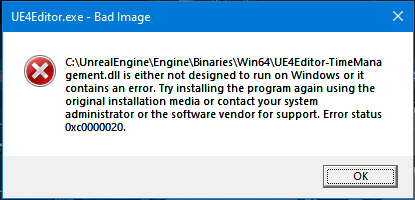
stable hemlock
I just compiled the engine for the first time, and it crashes on editor start-up.
Any ideas what to do other than recompile the whole engine again? https://i.imgur.com/0P1Feji.png
 hardy palm
What windows are you on?
stable hemlock
x64
and compiling x64 editor
I started rebuilding the editor, hopefully that will fix it
silver hollow
@stable hemlock probably would be enough to clear this Binaries folder or specified dll
sometimes if you'd interrupt compilation, binaries could be messed up
so you just need call compilation to re-deploy them
stable hemlock
yes it did get interrupted, I was missing MSBuild and didn't restart PC after installing it so it failed
so you just need call compilation to re-deploy them
@silver hollow so if I delete just one file, then press "Build", it will only rebuild that one file?
silver hollow
kinda 🙂
stable hemlock
can I cancel the Rebuild that I've already started?
Its gonna take like 2 hours 😄
silver hollow
sure
hardy palm
Just out of curiosity...is there a statistic somewhere about how many "Engine Contributors" there are?:) Not sure you can search by the badge on the forum.
stable hemlock
Just out of curiosity...is there a statistic somewhere about how many "Engine Contributors" there are?:) Not sure you can search by the badge on the forum.
@hardy palm is this helpful? https://github.com/EpicGames/UnrealEngine/graphs/contributors 507 contributors
hardy palm
is that "Accepted"?:D Because the way Epic does it makes it non transparent
stable hemlock
Those are people who have contributed code and it was accepted into the engine
hardy palm
curious that somebody is able to beat UnrealBot ... 😄
 tiny wigeon
Sup guys, i want to build shaders outside the editor(possibly at night :P) Is there a way i can use UBT to build only shaders that changed? Will Fill DDC work fine?
 halcyon root
@tiny wigeon If you setup DDC corectly, than yes. But remember that some child shaders must recompile due to changes in their parent.
Why in void UObject::CallFunction
GetFunctionCallspace is called only for net functions ? (in other cases it's always FunctionCallspace::Local)
Up to 4.22 it was always calling GetFunctionCallspace.
My custom class override it and it's never called.
Ofcourse I can skip that check and always GetFunctionCallspace, but I'm curious what was the reason to apply this change.
elder falcon
an attempt to make it less horribly slow
not doing much though
bp still 100x slower than c++
silver hollow
@elder falcon AFAIK BP is 100x slower in the editor, according to synthetic tests on running loop like 10k times - which maybe not the best test case.... (especially that ForEachLoop is a dump blueprint macro vs C++ for-loop)
according to similar tests, it's much better in packaged game, like 10x slower :D
and much better with nativization, more like 2-3x
but that's simple tests, I've never seen comparison a "game heavily using blueprints" and the exactly same logic in C++ version (as is probably nobody would care to perform such "test")
elder falcon
in the editor it's even worse than 100x
I don't have a full, proper bench suite of course - only made a really simple one for basic branching and arithmetic (not even considering function calls, which are a whole other nightmare in bp)
even that took 18ms in native and 1700ms in bp (ship build with clang)
silver hollow
pretty insane
tiny wigeon
@halcyon root Well, i'll try 😛
 lapis scroll
Hey, anyone familiar with chaos?
I managed to get it to run with 4.24.1 and I can fracture stuff etc, but my collection is automatically destroyed when I start the game. How can I change it so that it's only destroyed by collision?
 native haven
Hey Guys, I'm trying to colab with 2 programmers (I'm not a programmer myself, I'm an artist) I made some levels but after they have implemented the programming and shared it through Bitbucket I can't open it anymore. I get the following pop-up
I can press yes and a loading bar will appear going to 99.9 % waiting for a VERY long time. In the log it tells me:
License is invalid:
License information is invalid. Please try reloading your license file using the Coordinator Monitor application on the Coordinator machine, or reinstall IncrediBuild.
This build will run in standalone mode.
Not sure what Incredibuild is and/or if this is causing the problem but eventually it continues ( too quick to make a screenshot) before it comes up with the following message
In both cases the editor just closes. I have updated unreal eventhough we use 4.22.3 and this resulted in more errors. I don't know how to "manually rebuild" this or what it even means ( restart ???)
- I have re-installed virtual studio
- reinstalled unreal
- installed a newer version
- made sure I have the unreal package installed in V.S and any other remotely close plug-ins in V.S.
Can anyone please help me =/ ?
I've been stuck with this for a few days and it's becomming more and more difficult to work together as updating levels / assets has become a struggle now.
hardy palm
Keep the version the project is supposed to be on... and uninstall incredibuild from VS
You can uninstall it in Add Remove Programs or however that thing is called 🙂
@native haven
native haven
I'll give that a try. 1 moment
hardy palm
also probably wrong channel for this
native haven
oh, woops =X
hardy palm
but not sure where else this would go 🙂 just a visitor here 🙂
probably the general #ue4-general 🙂
native haven
Cheers, It's building now if it doesn't work I'll post it there
stable hemlock
so chaos won't be in 4.25 either 😄
they'll reenable it after they branched
probably 4.26? 🤔
elder falcon
what is this 
it wants a .timing.bin file 
to make that file you turn on WindowsPlatform.bCompilerTrace = true; in your Target.cs file and that causes the engine to rebuild
spiral mortar
lol
 cosmic stump
I am trying to package project into Dev build and getting this error: https://pastebin.com/MnV186SB

only happens when packaging with mobile Vulkan
has anyone encountered this issue?
 weary jetty
I'm having issues linking with a plugin. I can include most header files shown here -- IGenericGraphEditor.h, GenericGraph.h, etc. -- but as soon as I try to include a header from the highlighted folder (there are .h and .cpp in there) I get unresolved external errors for every function in that included class. Any ideas for what I'm missing? I've tried messing with my .build.cs, forward declarations, moving the headers to a Public folder, no luck.
spiral mortar
@weary jetty Most private files don't have their symbols exported
the SMTHG_API
No way around it
just can't use them
You're not supposed to include private files anyways
weary jetty
So what would I do if I want to make a variation of this plugin? Just make a copy of it and edit it rather than deriving from those?
I started working on that about an hour ago and it seems like it'll work fine, but it isn't as neat as I'd like. oh well
spiral mortar
Did you follow the tutorial?
What you can do is add the SMTHG_API to every class that doesn't have it
rain lake
regarding the physx deprecation talk from weeks ago
4.25 cycle is starting, so definitely not there
but fortnite is going all in on Chaos
starting next month
so i wouldn't be shocked to see a physx deprecation in 4.26 or 4.27
 thick storm
Chaos is fully useable in master right now
it is enaled by default
all scene queries/complex collisions are going trough chaos
silver hollow
and does the game is stable? that would be sweeeet 🙂
 rancid wave
@stable hemlock
https://github.com/git-lfs/git-lfs/wiki/File-Locking
File locking looks like the path?

GitHub
Git extension for versioning large files. Contribute to git-lfs/git-lfs development by creating an account on GitHub.
stable hemlock
Thanks Dan taking a look at it
 alpine sonnet
im not sure what is causing this error can anyone please help thank you
granite dust
Check your plugins for one called derived data cache and make sure it’s on.. maybe
alpine sonnet
@granite dust I don't but it's not a plugin
shadow vector
Does anyone know if 4.23.2 is still on schedule to be released?
elder falcon
you mean 24? yes
shadow vector
No, there was supposed to be an update for 4.23, which is currently at 4.23.1
https://issues.unrealengine.com/issue/UE-81742
I'm mostly concerned with this bug, which is targeted to be fixed with 4.23.2.
rain lake
the linked commit explains why it wont be in 4.23
Disable UseAllowTearing, as it crashes when alt-tabbing from fullscreen. A proper fix is added to 4.24 in cl 9749870. It changes public headers so it can not be submitted for 4.23
it would cause a version incompatibility, so they shipped the fix in 4.24
if you want it, you'd need to make the change yourself
shadow vector
Alright, thanks.
nocturne rampart
To test any type of build on consoles you need special hardware. Either a devkit or a testkit, that's not something you can avoid.
 thin acorn
@nocturne rampart that's completely fine with me, i just wish i could talk to someone with some experience in the matter
there just doesn't seem to be a whole lot out there other than for people publishing full games.
nocturne rampart
To test your demo you need to be an approved developer
thin acorn
right, but how do i do that when i'm not planning on publishing a full game?
one of the requirements is filling out a game information form which states what your plan is basically for publishing a full game
so i need that first to get my dev id?
nocturne rampart
That could be negotiable if you’re for example developing a tool. But if it’s just for testing it’ll be difficult to get access
thin acorn
that's sort of what i'm developing yeah
it's a proof of concept and it works fine on pc, but the ultimate goal is to display its use for console users.
nocturne rampart
Then you might be able to negotiate, but it’s not a process I am familiar with. I work with all consoles but only because the company I work is a partner with the vendors
thin acorn
i see. thank you for the information
nocturne rampart
You could start with one console vendor and see how it goes
low dust
@thin acorn you could go UWP route I suppose, it doesn't give all console resources for you tho
UWP on Xbox One supports developing both apps and games. You don't have to be part of a developer program to experiment, create, and test games or apps on Xbox. All you need is a developer account in Partner Center. When you are ready to publish and sell games on Xbox One or take advantage of Xbox Live on Windows 10, you need to join the Xbox Live Creators Program or be an ID@Xbox developer.
thin acorn
@low dust that sounds exactly like what i need. can i buy a dev kit then too?
low dust
you can use regular xbox one I think
for that purpose
don't quite on me that tho, but that's how MS initially planned this to work
I've never even owned any xbox 😄
for actual devkits, you'd need to be in the id@xbox program and then you'd probably get the first dev kits as freebies anyway
but you do need a proper project for that like you've already found out
I guess if you really have some spectacular tech to promote, you could still contact MS about it
 still ember
Good day everyone,
I am currently migrating my application from ue4.19 to ue4.24.
I'm fixing issues along the way and today I noticed that one of my UI animations look weird and the image doesn't scale properly.
Long story short there were changes made to the SRetainerWidget.cpp and there is a variable named Scale that is declared in the PaintRetainedContent but no longer used because the line where it was used is now commented out.
This basically results in the child widget of the retainer box to not properly scale
So this line is now commented out, but no comment why 🙂
So how can I reuse this Scale variable that is now unused?
 broken knot
Hey all, having an odd issue compiling my C++ project built in 4.24. It builds from source and runs from the engine just fine, however once I have shared this to any other machine, it fails the build and almost every line of code gets flagged for syntax errors. Seems like maybe the project is targeting a different windows SDK ? Although I'll be honest, i'm just guessing! If anyone could give some advice would be greatly appreciated
silver hollow
@broken knot generating project files would fail if you wouldn't have required Windows SDK, unless you didn't regenerate on the other machine (but I did successfully compiled engine moved from 4.23 to 4.24 although I forgot to regenerate project files)
difficult for me to say more without seeing errors
@still ember dunno, but #slate could be better for this
broken knot
@silver hollow Yeah I had definitely regenerated VS project files, deleted binaries, intermediate etc. Interestingly, when reopening the zip on my workstation and trying to compile there it also fails. Attached the build log from VS
I'm sure I've missed something super obvious and going to face palm afterwards, but i'm at a loss right now!
Edit: Solved the problem. In case anyone might like to know for future reference. It turns out when I was downloading from the git repo, the directory was getting renamed to the project branch's name, which had a number at the beginning...
Seems like the project directory having a number at the beginning of the name is a real illegal move when it comes to compiling headers 😅 Lesson learned
celest pagoda
Pulled down 4.24.2. Getting these Chaos.dll link errors. Anyone else experiencing it? I have not done anything to work with it and I compiled 4.24.1 without issue.
silver hollow
did you have bUseChaose = true in your Target.cs
although you probably have if you compiled it before...
seriously, did they make Chaos even more troublesome in the hotfix? ...
celest pagoda
I did not add it. Running through to see what has changed.
Other than a plugin I put in the engine, I haven't touch settings for the engine. I only build from source for the dedicated server.
silver hollow
ok, but you did enable Chaos at all? Or you don't care and Chaos errors just popped up?
non-Chaos build from weekend works fine for me, if that helps
although I didn't build dedicated server, mhm...
celest pagoda
I have not enabled it at all. I compiled 4.24.1 just fine. Did a pull into my repo. Compile and get that error.
I ran setup.bat and generatefiles for fun and am in process of recompiling
Pulled from Release ... 4.24.2 release.
celest pagoda
1>------ Build started: Project: UE4, Configuration: Development_Editor x64 ------
 heady sparrow
Still getting Datasmith errors in release. I swear I pulled new changes...
 weak harness
celest pagoda
weak harness
celest pagoda
Found my problem's source was the ispc files being removed when I pulled down 4.24.2.
 dense kettle
Hi, someone knows how to add target into UnrealBuildTool? I add public const global::UnrealBuildTool.TargetType mytarget = global::UnrealBuildTool.TargetType.mytarget; into TargetRules.cs with UE4mytarget.Target.cs but i get invalid target
 versed rapids
@celest pagoda how did you solve the issue?
 timber wraith
@versed rapids Not sure about how he did it, but I had a bunch of uncommited Changes that deleted a bunch of files, I just discarded those changes and was able to succesfully build to fix my GeometryCollection/Chaos errors.
 spark ferry
2nd for what Syx did. Did the same and the files reappeared.
celest pagoda
@versed rapids I use SourceTree for my GitHub client. For each file I did a "Reset to Commit" to get the files back. Like others, my source code control allowed me to get the files back.
versed rapids
I see
versed rapids
the thing I don't understand is why .ispc has a generated.h
versed rapids
like sometimes things are kinda infuriating... the generated.h files for ispc are in Engine\Intermediate\Build\Win64\UE4Editor\Development\GeometryCollectionEngine when everything else is in Inc instead of Development god damn it
elder falcon
it has a generated.h because ispc outputs a h and c file
you include the h one to call your function
since you can't include the actual ispc file
 mortal gust
hey guys dunno if anyone has tried to cook a dedicated server build with chaos enabled, im trying to get it to work atm but my build is very sad my geometry collections just wont break. it all works fine in the editor on dedicated server. anyone managed to do this yet? or is it even possible?
 gloomy gulch
Guys, can someone help me? I'm trying to build a project from UE4 sources, but when I run RunUAT.bat I'm getting this error
ERROR: Failed to build "c:/Unreal/UE4-Latest/Engine/Programs/AutomationTool/Saved\UATTempProj.proj":
C:\Program Files (x86)\Microsoft Visual Studio\2019\Community\MSBuild\Current\Bin\Microsoft.Common.CurrentVersion.targets(2106,5): warning MSB3245: Could not resolve this reference. Could not locate the assembly "System.Runtime.WindowsRuntime". Check to make sure the assembly exists on disk. If this reference is required by your code, you may get compilation errors. [C:\Unreal\UE4-Latest\Engine\Source\Programs\AutomationTool\HoloLens\HoloLens.Automation.csproj]
HoloLensPlatform.Automation.cs(945,133): error CS1061: 'IAsyncOperationWithProgress<DeploymentResult, DeploymentProgress>' does not contain a definition for 'AsTask' and no accessible extension method 'AsTask' accepting a first argument of type 'IAsyncOperationWithProgress<DeploymentResult, DeploymentProgress>' could be found (are you missing a using directive or an assembly reference?) [C:\Unreal\UE4-Latest\Engine\Source\Programs\AutomationTool\HoloLens\HoloLens.Automation.csproj]
This is what I have installed
 wise cave
Hi, I'm trying to build the engine from source bur I get the Visual Studio not found, is there a way to edit some file to point where VS is? since my installation is no on C:, even changing VS to the same Drive The generate files bat could not find, does it need some sort of ProgramFiles standard path?
 grizzled geyser
wise cave
grizzled geyser
wise cave
thanks @grizzled geyser innt better to change the GetMSBuildPath.bat line 12? I always feel bad to regedit things.... 🙂
´´´
'''
rem ## Try to get the MSBuild 15 path using vswhere (see https://github.com/Microsoft/vswhere). VS2019 preview puts the executable in a "Current" subfolder.
if not exist "%ProgramFiles(x86)%\Microsoft Visual Studio\Installer\vswhere.exe" goto no_vswhere
for /f "delims=" %%i in ('"%ProgramFiles(x86)%\Microsoft Visual Studio\Installer\vswhere" -prerelease -latest -products * -requires Microsoft.Component.MSBuild -property installationPath') do (
    if exist "%%i\MSBuild\Current\Bin\MSBuild.exe" (
        set MSBUILD_EXE="%%i\MSBuild\Current\Bin\MSBuild.exe"
        goto Succeeded
    )
    if exist "%%i\MSBuild\15.0\Bin\MSBuild.exe" (
        set MSBUILD_EXE="%%i\MSBuild\15.0\Bin\MSBuild.exe"
        goto Succeeded
    )
)
:no_vswhere```I think it's better to change the registry since that is where the actual wrong thing exist; that is, the reg edit value is incorrect while the code at line 12 is probably "correct", even if it can be better.
but if you prefer to change the .bat file and it works for you, go ahead.
wise cave
Thanks for the advive @grizzled geyser, not sure about that wrong registry specialy since MS is the maker of both, I'm no win registry or VS expert but all other stuff finds VS with no problem, the script above will always fail if VS is not in program files or UE source is not in the same drive as win sytem, since keeping uncommited changes in a source is no good too. I will try first install VS in a new Program files folder in my E: drive, then edit script and last resort go to regedit 🙃
grizzled geyser
it doesn't matter who made what; I'm the one that actually answered (and asked) the question I linked, and it's a bug that keep left over of a path.
wise cave
oh ok, thanks for both, intrested if the other options will succeed?
gloomy gulch
can anybody help to build from sources? ^^^^ what's up with that hololense dependencies?
wise cave
sorry @gloomy gulch not sure why u executed RunUAT.bat, did you installed all the VS correct dependencies listed on the readme?
gloomy gulch
yes, of cause. In fact, it was running just fine on other versions of UE4, but in 4.24 I have that problem with hololense dependency
gloomy gulch
solved
 lethal sonnet
Hi. Anyone has ever experienced issue, that my UE4 is not showing when I run it from source? So what happens is, I press F5. it starts debuging, in task manager I see it opened UE4Editor, but I never see actuall application where I could create new project
lethal sonnet
ok if I run a project everything is ok. Now problem is, idk how to transfer Varest plugins to source
Project say it cant find it
 summer spindle
has anybody tried single layer water rendering?
 bronze parrot
Does anyone know of a good way to get started with making your own Editor system for a system (similar to how BehaviorTreeEditor works)? The amount of code in there is... a lot.
silver hollow
what I can say, the best is to copy-paste it :D
most of editor code is actually overrides of Ed Graph API + some generic things like breakpoint debugger
I did copy-paste Sound Cue editor as base for the custom editors
you just throw away Sound Cue and Sound Cue Node internal stuff, you don't copy Sound Cue nodes (just make your own later) rename editor classes
even if you'd copy-paste entire editor, you'd a lot its stuff on your know, but it would take a time to figure it all out
when working on editors in Unreal I often steal some bits of code or helper classes from editors: Sound Cue, Material, Behavior Tree
and sometimes getting inspiration from Blueprint editor 😉
writing custom editor only seems to be frightening at the beginning, API is really clean and straightforward, you just need to write a lot of code if you'd would do it from the scratch
 scarlet geyser
My friend is unable to build the oculus fork of UE4.24.1 on his computer. It built once, but hasn't been able to build again since. Has anyone seen the following build error before? Suggestions?
Error MSB3075 The command ""B:\Big Code\UnrealEngine\Engine\Build\BatchFiles\Build.bat" DatasmithSketchUp2018 Win64 Development -WaitMutex -FromMsBuild" exited with code 5. Please verify that you have sufficient rights to run this command. DatasmithSketchUp2018 C:\Program Files (x86)\Microsoft Visual Studio\2017\Community\Common7\IDE\VC\VCTargets\Microsoft.MakeFile.Targets 44
 grim ermine
Hello. I am that friend.
My best hunch at this point is that I have UE and projects on a separate, larger B:\ drive
And all the windows SDKs and toolchains are in the C:\ drive
I've spent lots of time enabling every folder with the same FULL ACCESS permissions.
Oddly enough I can build the editor
But I cannot build my generated solution file for my project through VS
I am several days into this effort and out of ideas 🧠
stable hemlock
@grim ermine Just as a wild, leftfield comment, the A: and B: traditionally were assigned for floppy disks long long ago
can you confirm you have the exact same behavior if you change the drive to D:
granite dust
I got some sort of datasmith error at one point, too.. I can’t remember what fixed it
Make sure all those modules are disabled and then rebuild
grim ermine
How do I disable them?
Also I mapped to a new drive letter and started fresh so we can isolate everything
Still building tho ⌚
grim ermine
Bad news
I changed the drive to X:/ and cloned a whole new version of UE and rebuilt overnight. Getting those errors again.
Originally I could build the engine/editor. Now I can't
My best guess is "disabling module" = unloading project in VS. I'll try that for all DataSmiths and the Hololens.Automation
grim ermine
So if I unload those DataSmith modules, I get this for hololens.automation:
Error CS0234 The type or namespace name 'Management' does not exist in the namespace 'Windows' (are you missing an assembly reference?) HoloLens.Automation X:\Big Code\UnrealEngine\Engine\Source\Programs\AutomationTool\HoloLens\HoloLensPlatform.Automation.cs 934 Active
I tried unloading that module too but hololens seems to build a required DLL for UE4
@granite dust any ideas? You seem to be onto something 😄
 quick rock
I just linked my github account on unrealengine.com, but I still don't have access to the github. Does it take a while to grant permission?
spiral mortar
Should be instant
 stuck meadow
is 4.24 crashing for anyone else?
I have a weird use where the editor keeps resizing to fullscreen (like a small shake) and keeps crashing the whole time while 4.23 runs good for me
what could be the issue??
silver hollow
there can a hundred reasons for that, you need to provide some callstack 😉
or just save your editor layout, nuke Saved folder and try now, it sooometimes helps in "weird" situations like this
 celest viper
Quick question: When adding a custom shader model (ala http://blog.felixkate.net/2016/05/22/adding-a-custom-shading-model-1/) Is there any worry when updating the enum in EngineTypes.h? Do materials save out their shader model by the enum value directly? Mostly Im just worried about taking new engine updates from Unreal and now theyve added to the enum as well and any existing materials we have are now jacked
granite dust
There is a more recent series about adding a shader model here:
https://medium.com/@lordned/ue4-rendering-part-6-adding-a-new-shading-model-e2972b40d72d
 celest viper
hmmm ok Ill dig in thru that too, thanks!
 lilac peak
Not sure if this is the place to ask this...I know to link my project with a 3rd party DLL I need to include the dlls in the binaries folder, but I don't know exactly what to do in the Build.cs file as there are many different answers, old and new. Anyone know how to do this?
I am already including source and linking against libs just fine, it's just this one library also needs DLLs (I think) and that's giving me problems
 sturdy laurel
Hi, I'm investigating a crash I have 100% involving a Mesh with Custom Collision mesh that happen in the static mesh view : Assertion failed: IsPrimValid(InPrimData) [File:D:/Projects/UnrealEngine/Engine/Source/Editor/StaticMeshEditor/Private/StaticMeshEditor.cpp] [Line: 855]
I was wondering if there was already an issue for that, afaik I haven't found any linked issue on the issue website but I'm also novice with that website
sturdy laurel
Okay so I have a better understanding of the issue now
When a mesh doesn't have convex collision but just a ComplexCollision Mesh, the Click event think we hit a convex shape and assert later because we don't
When we do have a convex and a ComplexCollisionMesh when we click on the ComplexCollision mesh we don't crash because he think we click on the convex
Therefore I need a way to check if we click on the convex for real or that we just had clicked on the ComplexCollisionMesh which should result in nothing (I suppose) or at least not a crash and not a bad selection
limber jacinth
anyone experienced this
\Engine\Source\Runtime\Core\Public\Misc/MemStack.h(233): error C4018: '<=': signed/unsigned mismatch

the line in question
sturdy laurel
@limber jacinth Is this something you worked on ?
limber jacinth
no engine code
sturdy laurel
What version are you synched to ?
I think what is going here is that someone submit this and build on a difference compiler that the one you are using
and you compiler is more picky
Weird I don't see this code in the history
@limber jacinth Okay nevermind the thing you have have been introduce in the latest commit from Marc Audy 4 days ago
It's a merge it seems
limber jacinth
yeah
its crashing my visual studio
since i updated
aswell
only since i updated 2 days ago
sturdy laurel
Any particular reason you are sync on latest and not release ?
limber jacinth
testing features
sturdy laurel
In that case you could check a previous version on that file specifically
seems to be pretty self contain
limber jacinth
yeah i might roll back to 6 days ago
cause nothing interesting has happened
and that was stable
sturdy laurel
^^
sturdy laurel
Oh
limber jacinth
doesnt crash with 4.24 source engine
sturdy laurel
When you saying crashing you mean no compiling or actual crash ?
sturdy laurel
hu
sturdy laurel
Yeah
limber jacinth
thing is, i think the project is just too large
sturdy laurel
but with the code you show maybe there is some kind of memory leak idk
limber jacinth
yeah but why would code crash the editor?
sturdy laurel
Are you using any plugin ?
limber jacinth
no
sturdy laurel
We have the same problem where I work
sturdy laurel
If the application you run take too much ram VS get out of memory
And some of us have 128gb of ram
sturdy laurel
Oh that's weird
limber jacinth
but the vs project
sturdy laurel
mmh
limber jacinth
   at System.Collections.Generic.Dictionary`2.Resize(Int32 newSize,Boolean forceNewHashCodes)
   at System.Collections.Generic.Dictionary`2.Insert(TKey key,TValue value,Boolean add)
   at Newtonsoft.Json.Linq.JPropertyKeyedCollection.InsertItem(Int32 index,JToken item)
   at System.Collections.ObjectModel.Collection`1.Insert(Int32 index,T item)
   at Newtonsoft.Json.Linq.JContainer.InsertItem(Int32 index,JToken item,Boolean skipParentCheck)
   at Newtonsoft.Json.Linq.JObject.InsertItem(Int32 index,JToken item,Boolean skipParentCheck)
   at Newtonsoft.Json.Linq.JContainer.AddInternal(Int32 index,Object content,Boolean skipParentCheck)
   at Newtonsoft.Json.Linq.JContainer.AddAndSkipParentCheck(JToken token)
   at Newtonsoft.Json.Linq.JTokenWriter.AddParent(JContainer container)
   at Newtonsoft.Json.Linq.JTokenWriter.WritePropertyName(String name)
   at Newtonsoft.Json.JsonWriter.WritePropertyName(String name,Boolean escape)
   at Newtonsoft.Json.Serialization.JsonProperty.WritePropertyName(JsonWriter writer)
   at Newtonsoft.Json.Serialization.JsonSerializerInternalWriter.SerializeObject(JsonWriter writer,Object value,JsonObjectContract contract,JsonProperty member,JsonContainerContract collectionContract,JsonProperty containerProperty)
   at Newtonsoft.Json.Serialization.JsonSerializerInternalWriter.SerializeValue(JsonWriter writer,Object value,JsonContract valueContract,JsonProperty member,JsonContainerContract containerContract,JsonProperty containerProperty)
   at Newtonsoft.Json.Serialization.JsonSerializerInternalWriter.Serialize(JsonWriter jsonWriter,Object value,Type objectType)
   at Newtonsoft.Json.JsonSerializer.SerializeInternal(JsonWriter jsonWriter,Object value,Type objectType)
at Newtonsoft.Json.Linq.JToken.FromObjectInternal(Object o,JsonSerializer jsonSerializer)```is one exception i caught
sturdy laurel
What is your editor ?
limber jacinth
vs 2019
sturdy laurel
And you have this error just when opening the VS project ?
sturdy laurel
That is indeed weird
limber jacinth
let me rollback
sturdy laurel
I wonder if there is some kinf of macro in the project that create this
limber jacinth
see if it still happens
sturdy laurel
I mean that run something
limber jacinth
well something is definitely crashing it when its parsing something
tho i have intellisense and everything turned off
sturdy laurel
Do you have the Unreal Engine extension ?
limber jacinth
yes but its disabled
how do i roll back with GIT
im used to perforce
and svn lol
sturdy laurel
lol
you use checkout
git checkout {revision}
you can also checkout a branh
like git checkout release
if you want to clear your change (BE CAREFUL) use git reset --hard
limber jacinth
yeah im using tortoise git
sturdy laurel
it's suppose to be called checkout still (hopefully)
limber jacinth
just want to change my current files to a prev revision
i have no clue what im doing
lol
sturdy laurel
oh
right click on the file and checkout to your revision I think
with commandline it's:
git checkout <commit> path/to/file
sturdy laurel
switch works ?
 sturdy laurel
seems to be working
 sturdy laurel
I don't know tortoise very well
limber jacinth
😦
sturdy laurel
was that tortoise?
limber jacinth
vs2019
thing is, fresh windows install a week ago, fresh vs install
i did a memory test last night, no errors
my cpu is fine
limber jacinth
only two files


 sturdy laurel
you could try to csave the two files and make a big clean
if you want to do a big clean I suggest you that :
git checkout release
git reset --hard
git clean -fdx
./Setup.bat
./GenerateProject.bat
This will put it back in an original stat and clear everything
(that isn't part of the git)
limber jacinth
well i got the latest
run setup
generated, lets see what happens
and still crashing the editor
sturdy laurel
:S
limber jacinth
really would like to find out what is causing it
sturdy laurel
Is there a place to see the build status of master ?
elder falcon
yes, build it
 timber remnant
FString UEditorAssetLibrary::GetMetadataTag(UObject* Object, FName Tag)
{
    TGuardValue<bool> UnattendedScriptGuard(GIsRunningUnattendedScript, true);

    if (!EditorScriptingUtils::CheckIfInEditorAndPIE())
    {
        return FString();
    }

#if WITH_EDITORONLY_DATA
    if (Object)
    {
        return Object->GetOutermost()->GetMetaData()->GetValue(Object, Tag);
    }
}
is there any way to force unreal to try and read meta data at runtime? both this function and the UMetadata definition have very tightly protected checks to make sure it's not running play in editor
I presume metadata is stripped as the package is built?
spiral mortar
Yep
limber jacinth
hmm
so i loaded 4.24 engine source, no crash
4.25 engine source == crash of editor
visual studio*
spiral mortar
lol
sturdy laurel
I only have 5009 errors with the latest (clean build) ...
I haven't had time to look into it tho, it's probably something that make the whole poutine not compiling 🙂
limber jacinth
thng is
something somewhere in there commit
is causing vs to crash
when parsing


this is the managed memory
when loading 4.24
limber jacinth
so something in master is causing this


eventually hits a point where it just crashes vs with out of memory
sturdy laurel
Searching how ti disable plugin build, is there a good way to do it please ?
silver hollow
@sturdy laurel the same you enable them ;)
A) through Plugins menu in editor (which adds entry to .uproject file)
B) by manually adding entry to .uproject file (so you don't have open editor to enable/disable plugin)
C) changing EnabledByDefault flag in .uplugin file of plugin 😉
once disabled shouldn't be build anymore
 pale smelt
hi
i cant build from source, im trying to build the release branch from github
ive ran the setup.bat to fetch and install deps
but then i get this when running generateprojectfiles.bat
The reference assemblies for framework ".NETFramework,Version=v4.6.2" were not found. To resolve this, install the SDK or Targeting Pack for this framework version or retarget your application to a version of the framework for which you have the SDK or Targeting Pack installed. Note that assemblies will be resolved from the Global Assembly Cache (GAC) and will be used in place of reference assemblies. Therefore your assembly may not be correctly targeted for the framework you intend.
im building on vs2017, windows 10
it looks like this has come up before
im trying some of the previous solutions from the chat history, e.g. making sure the developer pack for 4.6.2 is actually installed
turns out that the .net developer pack isnt installed as a prerequisite by ue4, probably should be. i didnt have it.
i downloaded it manually
its all working now
sturdy laurel
@silver hollow Sorry I mean't while building the editor but actually one of the failing one is Niagara so there other plugins that require it
silver hollow
@sturdy laurel so you would have to disable all dependent plugins 😉
pale smelt
is it normal for the first run of the editor, built from source, to take ages to start?
i assume its compiling editor resources e.g. materials etc on first-use
sturdy laurel
@silver hollow So you are saying (sorry I missed that information the first time I read you) that just by changing the EnabledByDefault and maybe generateprojectfile again it will not compile anymore ? Thanks
elder falcon
it will be compiling global shaders and building the ddc for engine resources on first start
pale smelt
yeah its running a few instances of shadercompileworker.exe
elder falcon
when you get a launcher engine that stuff comes prebuilt
pale smelt
i assume when we download a prebuilt copy of ue4 theyve done part of that first-run before shipping it
elder falcon
you can manually fill the ddc if you want and leave that running for an hour while you afk
then it starts immediately after
pale smelt
well ive got a long drive home in half an hour, so it'll have plenty of time to boot up
silver hollow
@sturdy laurel yeah, although it's better practice to disable it through entry in the .uproject, so it's visible for everyone
AFAIK you don't need to run "regenerate project files", header tool reacts on changes made to .uproject (so you can just enable/disable plugin and run compilation)
and in case of Niagara - it's not enabled by default yet, so probably you'd be fine just by removing Niagara-related entries from .uproject that are enabling it 😉
sturdy laurel
@silver hollow I see thanks, the thing is I'm working on a fix in the StaticMesh view and while trying to compile the editor from source on master I got a bunch of error related to two plugins and I figure I should disable them so I could still run the editor without it
silver hollow
for what's worth, sometimes if I have "missing modules" while compiling engine (because I simply deleted item), compilation goes fine if I run build with game's project selected - not the engine project
in that case, if problematic dependent modules aren't used by the game module, it won't try to compile it 😉
sturdy laurel
@silver hollow But in my case I don't build a game at all, I'm simply trying to run the editor but I guess disabling it like you said should do the trick hopefully
sturdy laurel
@silver hollow Well I tried again and the plugin DatasmithCADImporter that currently doesn't compile isn't enabled by default and the system is still trying to compile it by default :/ There is other issue as well it seems...
thick storm
@limber jacinth have the same issue for like three weeks
I just gave up
and started using Rider
had invitation to some EAP version earlier
it really wouldn't be issue if VS was 64 bit
the shell is just shitting on itself and crashing
silver hollow
@sturdy laurel you can always simply remove entire Enterprise folder with the Datasmith source (if nothing else depends on it), get slightly UHT/UBT times as bonus 😉
 blazing crown
@thick storm Would you recommend using Rider right now or is it a pain to setup and all that?
 turbid sigil
Ok I've been trying to fix this issue but have had no luck
when ever I try to build a game(the editor loads fine) I get:
Assertion failed: CookedMesh != 0 [File:C:/Users/sgidi/CGWUnrealEngine4/Engine/Source/Runtime/Engine/Private/PhysicsEngine/PhysXSupport.cpp] [Line: 544]
then the build crashes
I am using the RTX 4.24 fork by nvidia
thick storm
@blazing crown no. I mean the released verions have no support for C++ or unreal. I have some private EAP. The first Rider with C++ and UE support should be ouit somwhere next month
pale smelt
wow.... a build of ue4 from source really is MASSIVE
i filled my SSD without realising that the UE4 source build had eaten 106gb
turbid sigil
i know where does it get 106gb from like 16gb of starting data
 stoic sedge
Is anyone here actually using CHAOS??
Please @ me I'd love to talk your brains out about it
just updated to a custom 4.24 engine so I'm considering enabling it
silver hollow
@stoic sedge forget Chaos in 4.24, it's not stable, most of the Chaos content demo doesn't even work
stable hemlock
chaos is getting a lot of love in 4.25, but even then it'll be disabled by default
fortnite is going all in though, but probably in the version 13
brisk silo
@stable hemlock its already in
fortnite now doesnt use physx
the live version
its incredible that they have managed to do the "switch" like that, and have it working as well as it has
there are some bugs on physics assets like cloths and random stuff on animations, but other than that its pretty solid
stable hemlock
really? didn't they miss the version 12? I thought they disabled it completely and were waiting for a new version
brisk silo
its already live
people have complained because they were expecting high end destruction physics XD
stable hemlock
oooh, they delayed it from the original date
well I guess they'll do chaos stuff with 12 ? 😄
brisk silo
i dont know

Epic Games' Fortnite
We just announced the new Fortnite Chapter 2 - Season 2 release date.
Beginning with the release of the 11.50 update in early February, Fortnite will be moving to Unreal Engine’s Chaos physics system. At launch, the goal is to ensure that Fortnite still feels like Fortnite. Along the way there will be some bumps, so we’re starting tests with a small group of players. We’ll also closely monitor feedback and make improvements over time.
thats the update that is live
and yes, its exactly as they have said
all the core stuff is unchanged, only some skins with stuff like cloth physics got kinda janky
stable hemlock
season 12 was supposed to be at feb 6 but delayed to feb 20, I also saw a few comments about explicitly disable some chaos stuff for that version
makes sense that they test it out first
I'm wondering what they'll do with the new season update, if they weren't going to do something with chaos/destruction, why rush it like this in the first place? 🤔