#engine-source
1 messages · Page 21 of 1
 hollow kernel
Thx DevilsD. Apologies for asking this question here.
 small cobalt
No worries
 high epoch
@ebon junglento I actually started by asking where to post suggestions on the general channel but did not get any answer. I guess I missed #server-feedback. Thanks for pointing it.
 warm kiln
Hi, I want to make some minor changes to the source using the 4.18 branch
But, I want those changes to be considered a "hotfix" for the 4.18 version
Is there any place I can specify that?
I don't want the project binaries to become incompatible if I were to use the engine built from source and vice versa
 elder falcon
has anyone managed to get include tool to do something?
 grizzled breach
Trying to make a pull request, it needs to be from the branch to Remote Master not from my branch merged to local master merged to remote master?
elder falcon
wat
ideally you would make a branch off your local master (which is currently identical remote master), make your change there, push it to your clone of the repo, then create a pull request for it
grizzled breach
ok made branch off the local master
Then Forked it to another branch
So like MyLocalFixBranch
Then I merged MyLocalFixBranch to the local master branch
and now? I'm I good to take that local master branch to remote or does it need to be MyLocalFixBranch to remote? @elder falcon
 gloomy hamlet
It doesn't matter what the branch is specifically, so long as it exists on your remote fork.
grizzled breach
hmm could not connect to 'origin' when I try PR
gloomy hamlet
How are you doing it, via Github website?
elder falcon
you should not be making a pull request for your master branch since that way you can only have a single pending pr
(adding more commits to the same branch you made a pr for extends the pr)
grizzled breach
Gitkraken
grizzled breach
Should I use gitbubs client?
gloomy hamlet
Git for Windows used to suck, no idea if it even supports PRs.
gloomy hamlet
But once you have your branch as you want it and have pushed updates, you can do the PR directly from your fork on Github website.
You can't PR from anything local.
PR is between a branch on your remote fork, and the upstream (original repo), in this case EpicGames/UnrealEngine.
grizzled breach
ok so that is why I'm having a hard time then
Git Kraken just won't let me push to my remote branch period
Yeah github client authentication fails as well
Going to just try again from scratch
 final quarry
When a player gets kicked from a session, Epic destroys their player controller to remove them and close the connection, but for me this causes a server crash pretty reliably every 1 out of 30 or so times
the crash is due to deleting/freeing the sendbunch, it fails the canary test and causes an assert sometimes, update: was due to using non thread-safe functions
 grim halo
i need to give a debug name to a render target
the engine usually does it with macro TEXT()
but, as I have an array of render targets, i want each one to have its index in the name
but I can't find a way to cram an integer in a TCHAR, which seems to be the type of string literals
I can get it into FText but that's not enough
elder falcon
*FString::Printf(TEXT("RenderTarget #%d"), Index)
 gray glade
@grim halo Yeah, don't use FText for that. FText is for potentially localizable strings.
Zeblote has the right of it. Use Printf. It's not as powerful, but it'll do.
elder falcon
I use it for the compile startup project button
no clue if it has other features lol
hollow kernel
@elder falcon Got it. Thanks! Couple years ago a senior Epic programmer said he uses it for hot reloading. Was just wondering if people still use it for that.
No matter the method used, hot reload times will be the same?
elder falcon
don't use hot reload ever
it will randomly either not work, crash, or corrupt your stuff
hollow kernel
Good thing I asked. Thanks. Ill stay away from it then...
Any way to tell exactly which engine version (including path of the engine) a project uses?
Dirty way, I guess, is to try to Switch the engine version and it'll default on its current.
gray glade
Also, UnrealVS has nothing to do with hot reload.
It can give you a friendlier batch building UI, it can regenerate project files, and it can let you select the startup project from a drop down + startup arguments.
hollow kernel
@gray glade
Got it. Sorry, I misinterpreted the info on one of plugin creation walkthrough vids.
I'll just consider using it for those 3 tasks then. Thanks!
grim halo
no i need a way to turn a string into a TCHAR
 obtuse axle
Yeah, I assumed
grim halo
btw, FString allocates some memory for a string but afaik when it goes out of scope it gets destroyed and the memory is freed
and since I gave that memory address to the render target pool, that's a recipe for undefined behaviour
so I also had to make the FString static
I think that solves it
final quarry
Does anyone know how we go about building an installed build of the unreal editor that supports a custom games code/module for distribution to modder's as an SDK? I'd imagine its a custom buildgraph script but I've been having trouble getting the engine to recognize external modules
 sleek sand
if I have a viewproj matrix from which side am I supposed to multiply a vector with it?
from right, right?
gray glade
Pretty sure there are methods on Matrix to transform a vector.
So you don't need to fumble with multiplication order.
Yeah, there is.
 merry herald
Hello! Is there any documentation on how to remove unnecesary modules from the engine?
gray glade
There shouldn't be any unnecessary modules in the engine - they're either depended upon or they're not.
merry herald
You are correct, sorry for my misswording. I can manage that through ProjectName.build.cs file right?
gray glade
Yes, you can cut out unnecessary dependencies of your own from there.
And out of the box, you should have a module with the same name as the project, yes.
merry herald
Awesome, thanks for the help
gray glade
NP
sleek sand
I try to do it in shader
no function there
I'll try to see how the c++ one does it tho
damn macro magic 😄
sleek sand
I think i have to transpose the matrix and then I can use dot products of the matrix rows with the position I wanna transform
 warm fox
Do you have to call out your plugins in the UAT build command?
hmmmm nvm, my error only seems to happen with advancedsessions plugin
hollow kernel
How do people usually check for syntax errors? I got VAX installed, and setup intellisense as specified in the UE4 docs.
Made changes to about 30 different files, and I'm getting this at the end of compile:
ERROR : UBT error : Failed to produce item: C:\Users\Hans\Downloads\UE4.4.18\UE4.418-Release\Engine\Intermediate\Build\Win64\UE4Editor\Development\UE4Editor-Engine.lib
small cobalt
@hollow kernel Check the Output Log you will have an bunch of errors throughout the log.
hollow kernel
@small cobalt
I actually searched the Output log for "error" and "fail" before posting, but fsr it was stopping only on logdatabase error" -Unattended -WarningsAsErrors .
Got it to find the actual errors by clicking on the output window, AFTER bringing up search via ctrl+f. Weird.
Thank you!
 stable hemlock
What program do you guys use if you merge branches?
Wanting to merge VRWorks into a branch with lots of other gameworks branches already included: https://github.com/windystrife/UnrealEngine
elder falcon
smartgit, conflict solver is very good
stable hemlock
Thanks. I'll try it out
stable hemlock
@elder falcon I've got both forks in smartgit. What do I click now?
elder falcon
if you want to merge 2 different forks you'd have to add both as a remote to the same repo, then just right click their branches and merge them
stable hemlock
Ok merging is way harder than I thought
elder falcon
you pretty much can't merge if you don't understand what the code in question is doing
since you have to find a sensible way to make both work for each conflict
stable hemlock
Yeah. I got almost everything together but vrworks. Way too many changes.
I'll just run vrworks by itself
stable hemlock
Trying to build my project. One plugin's DLLs are made with Win64-DebugGame attached to the name. What do I do in VS to just have it compile with its normal name
Also tried starting the editor from visual studio, and it says my project is out of date no matter what
Launching from visual studio also gives me this error
I have no idea what's wrong or what to do
stable hemlock
@devout epoch
void FShader::SetResource(FShaderResource* InResource)
{
    check(InResource && InResource->Target == Target);
    Resource = InResource;
}
 devout epoch
Are you able to reproduce the issue?
stable hemlock
Yes.
But I changed what I'm doing. Didn't have any real C++ in my project, so I made it back into a BP project.
Put the plugins into the engine, and then compiled the engine.
After compile I get Binaries for the 'IKinema' plugin are missing or incompatible with the current engine version no matter what.
I clicked no to disable.
It's stuck at the 45% shader compile part.
I'll see if it starts
devout epoch
Sounds like IKinema is not included in your project's Build.cs
That's the file that determines what modules are compiled with the main module
stable hemlock
All the binaries were created.
My project doesn't have a build.cs
All other plugins work.
I do get an error with this line in the IKinemaEditor.Build.cs
Could not find definition for module 'IKinema'
AddEngineThirdPartyPrivateStaticDependencies(Target, "IKinema");
I changed it to IKinemaCore. It now generates project files, but I'm not sure if that's also what's causing the error
devout epoch
Your project absolutely has a build.cs. It's impossible not to.
Sounds like it's unable to find the IKinema file.
Can you show a screenshot ofyour Source folder?
obtuse axle
If it's a BP project, they don't have a Build.cs.
stable hemlock
^
obtuse axle
It's definitely not impossible to not have one.
stable hemlock
No source folder either
Deleted binaries folder before building.
It looks like it made everything correctly.
Yet they're missing or incompatible
Even though they were built with the engine my project is running on
There seems to be a lot of source code in the folder, but I've heard that the plugin doesn't come with the source code.
Maybe that's were "Ikinema" is missing? I'm not sure
gloomy hamlet
Which configuration did you build the engine for?
stable hemlock
Development I think
Just found this on their website Note: RunTime Indie is not officially supported in source builds of Unreal Engine.
gloomy hamlet
Not officially supported doesn't mean it shouldn't work though.
What you've listed there is binaries for a bunch of different configs, which makes me wonder whether they're not old build products. Did you definitely delete the Binaries directory within Engine/Plugins/IKinema (or wherever it was) before you rebuilt?
gloomy hamlet
To get all those files, you'd have had to build the engine on all of Shipping, Development_Game, DebugGame_Game, and Development_Editor.
stable hemlock
Quote from Ikinema support
As per our FAQ we do not actually support source builds of unreal with RunTime Indie. Sometimes there are work arounds which we are ok with pointing at and suggesting to users such as yourself but it isn't something that should be assumed so be supported as we explicitly say on our FAQ page.
gloomy hamlet
What are the timestamps on the files, do they match up with when you rebuilt?
gloomy hamlet
Yeah generally they won't support source builds because people may have changed all sorts of stuff. But in most cases, it should work just the same.
Is that the modified date? It's 3 weeks ago 😉
gloomy hamlet
Right, but aren't these the files you said you deleted before rebuilding?
gloomy hamlet
Well, looks to me like you didn't. Unless you rebuilt 3 weeks ago 😉
stable hemlock
Time for build 12 of the day
I think the biggest issue is Could not find definition for module 'IKinema' (referenced via Target -> IKinemaEditor.Build.cs) when generating project files
devout epoch
Show me the contents of IKinemaCore
gloomy hamlet
Pretty sure you've done the right thing in changing IKinema to IKinemaCore, since the former isn't a module name.
But it's weird that that discrepancy was in the code to begin with.
stable hemlock
It's in the new 4.19 version too of the plugin
I've had nothing but problems with this company. This surely doesn't help. lmao
This is all after it took them a month to find out why my license key wasn't working 😂
gloomy hamlet
It almost seems like you've pulled a non-release version of the plugin source, that isn't in a buildable state.
stable hemlock
Ok. Changed to IKinemaCore and the project files compile.
I can try building now
That's weird. It's the only option on their download page
Ok deleted binaries folder. Building
When I build, it spends most of the time creating shader libraries. Wtf
Wait is it compiling the engine again?
Oh my god I'm going to die
The past 4 weeks for me has just been sitting and waiting for builds
gloomy hamlet
Welcome to UE4 source builds
devout epoch
Can you show me IKinemaCoreModule.h, the contents of it?
stable hemlock
Ok project built. Moment of truth
Brb necking myself
😑
How how how how how how. You're literally just built with the only engine version on my computer.
Wait
They're not there
It didn't make any binaries
ok wtf ue4
Now you're playin with me
Does it have to be in the engine/plugins folder?
devout epoch
@stable hemlock Now show my IKinemaCoreModule.cpp
That's where the actual name of the module is defined
stable hemlock
There is no IKinemaCoreModule.cpp
devout epoch
It should be in the Classes folder
I got a window like that recently, the missing decay modules.
devout epoch
Ah, so it's just the header files because they don't want to give you the source.
devout epoch
In my case, the missing modules was because my project's Target.cs file and Build.cs didn't include the module in question
so it wasn't being compiled along with the project.
stable hemlock
I'll add it
Without the source, can I even build it?
Am I forced to use the binary engine?
Ok. It should know what ikinema core is now. I just shoved it down its fucking throat
Couldn't open lib files. I'll put the packed lib files into the binaries folder and rename them to what they want (UE4Editor-IKinemaCore.lib)
devout epoch
Reasonable workaround
gloomy hamlet
Okay I didn't realize that. Yeah if you don't have the cpp files, you can't build the plugin.
So you have to use prebuilt binaries, which won't work with a source built engine.
stable hemlock
I'm shit out of luck?
Fuck
Can I trick it into thinking it's the binary engine?
I have no idea. Just desperate 😂
If worse comes to worse, I'll just not use Ikinema. Already got a refund
Yeah ok I give up
stable hemlock
Ok wtf. I've rebuilt it twice now (without ikinema) and no matter what it says "The following modules are missing or built with a different engine version:" for every single dll
Just deleted my visual studio project, made a new one. And it's all good
Probably on the wrong configuration before
hollow kernel
I added a ush file to Engine/UE4/Shaders/Private through Solution Explorer.
After having added it, VAX can't find it. Found out Its location, according to Properties, is Engine/Intermediate/ProjectFiles fsr. Any idea why?
hollow kernel
Ah nm. Seems the most convenient way isnt the right way, heh.
gray glade
@hollow kernel You got it. VS Solution Explorer isn't a great way to add files to UE4 projects.
Reason being that the VS Solution's hierarchy is a mirrored representation of what's in the file system, done when it was generated by Unreal Build Tool.
It is not a "live" mirroring of the actual file system.
Meaning there is no real connection/association between the "folder" (actually called a filter in VS) and the folder (as in, file system directory).
For whatever reason, this causes VS to try to create new files somewhere under "Engine/Intermediate", initially.
Hmmm... might be able to edit the UnrealVS plugin to add a menu command for that, that'll take the path to the clicked VS Solution Filter and map it to the actual folder.
hollow kernel
@gray glade Thanks a lot for the thorough explanation. It makes perfect sense now.
 thick storm
it would be nice to havek CMake project generator for Visual Studio
since VS support CMake projects
it would get rid of this awful XML based solution file
and represent actuall file system
gray glade
I don't know how that would change anything - it's still a Visual Studio project at the end of the day, using the Solution Explorer UI?
The VSProj files aren't even building directly through VS - they're calling to batch files distributed with UE4 that in turn run the build pipeline, including the VC++ toolset.
thick storm
you cloud add files directly from Visual Studio
using solution explorer
because it would represent just file system
idk for me it would be big workflow improvment
elder falcon
that could also be done without involving unnecessary cmake files
just remove this virtual folder nonsense that noone uses
gray glade
Hmmm. I think I'm just misunderstanding what you mean about changing to cmake.
elder falcon
why does vs need to make virtual folders in the solution anyways
gloomy hamlet
Yeah I don't follow what workflow? Are you just talking about the default location for files from the right click add item menu?
gray glade
Does Visual Studio support CMake "projects"? As in, it's a totally different kind of project from a "VC" project?
thick storm
yes it's different
default VS Solution is using virtual folder (Filters)
which have no mapping to actuall file system
elder falcon
it does, the solution explorer shows a directory tree then instead of virtual folders
which is way more useful
thick storm
I can't right click on Filter add file and expect it be in the same folder as filter
gray glade
Right, but the whole filters thing, isn't hat just VS Solutions in general, not specifically VC Projects? Hmmm
gloomy hamlet
Yeah, C# behaves differently.
gray glade
Ah. Been so long since I touched C# in VS, I didn't even remember that.
Yeah, lame.
Actually, wait.
I think part of it is to keep all the generated cruft out of the Solution Explorer too.
thick storm
it's legacy system because for lot of time VC++ build system cloud not handle files in seprate folders
gray glade
But still - there are surely improvements that can be made one way or another.
gloomy hamlet
I actually came across this when writing my VS extension. Under the hood VS has a distinct notion of the two types of folders in its solutions, virtual filter or file system.
gray glade
Huh
thick storm
still Unreal is better than what I have to deal at work with
when we use pure VS solution over perforce
so if you merge vcproj or solution file wrong
you lost all filters -;-
gloomy hamlet
Although in terms of workflow difference, I think you could get what you want via an extension without a need for a change in the project system.
thick storm
wasn't there option to show file system in VC++ solution explorer ?
gloomy hamlet
I had a feeling there was too for some reason. I think I looked at one point briefly and didn't come across it, but it may well be there somewhere.
I've used VC++ for 20 years, still don't know what most of the shortcut buttons are for ;)
gray glade
thick storm
doesn't work ;s
gloomy hamlet
Doesn't that one just flatten everything?
gloomy hamlet
Only know because I clicked it by accident recently!

At the moment, Visual Studio uses a strange filter-based project layout for C++ projects. Filters don't correspond to real folders in filesystem. In most cases, this leads to need to organize files twice - first, in filesystem, and second, as a s...
Seems sensible and very achievable. So no doubt it will never happen.
thick storm
pretty much
I've seen such requests at least since 2014
in VS 2017 there is folder view
which well
kind of works
but you need to keep you game project beside you engine folder
to have access to engine sources
gloomy hamlet
Um, yeah. That seems to do exactly what we were discussing actually 😉
What about that isn't what you're after @thick storm ?
Just the lack of engine source? Doesn't seem a big deal to me to just click to switch back if you need to find an engine file.
It even seems to be smart enough to not show intermediate and binary folders. Could be using my git repo for that, not sure.
thick storm
it actually works as intended
and keeping game source beside engine seems like one of the workflows anyway
but
you still need to switch to solution view to build project ;s
elder falcon
can use the build startup button from unrealvs or just hit f5
gloomy hamlet
Hmm, yeah F5 doesn't do anything for me when in folder view. That's a killer.
 coral flame
Hello guys, is this the right channel to ask about Draw Calls/Performance/Optimization??
I'm wondering if you could help me to understund how Unreal Engine works related to Draw Calls, why a simple Cube with a Default Material without shadows costs 2 Draw Calls instead of 1
elder falcon
got prepass enabled maybe?
coral flame
How to disable it? Not finding it 😛
coral flame
Case 1: 1 Mesh with 2 IDs for materials costs 3 Draw Calls. If I make it a blueprint it costs 4 draw calls.
Case 2: A merged actor forming a house with 10 IDs for materials, costs 14 draw calls. If i make it a blueprint nothing changes
Some explanation?
 open zodiac
stable hemlock
open zodiac
stable hemlock
@iniside#8930 "Just remove the plugin" lmao
 torn cloak
hahaha i totally missed this chat im dumb
hey guys does anyone know why ACharacter is getting destroyed when it's no longer netrelevant then recreated when it is?
i need to recreate that behavior for other actors and disable it for other characters because of optimization reasons
thick storm
@stable hemlock guys from IKinema are adamant about their plugin not working with source build
someone on older version got it working
but they were quick "fix" it in next release of plugin
my advice don't support bad practices and try different plugin.
 hidden hedge
if you're a middleware company i don't think you should put business secrets in your UE4 plugin for that reason
grim halo
anybody know what BasePassSelfShadowedTranslucencyDrawList ( and the other draw lists that can be obtained by FScene::GetBasePassDrawList ) do? 4 of these are declared but only the one for uniform lightmaps is ever used in the source as far as I can see
edit: it's possible for meshes to be added to this drawlist, but they never get accessed for rendering them ever again with the exception of BasePassUniformLightMapPolicyDrawList
 hybrid night
UBT is picking up 2017 preview now that I have it installed, rather than picking 'stable' 2017 .. anyone know if there's a way to fix that? Seems preview does not quite compile latest 4.19 yet
 sick basin
Greetings guys! Please save my life!
I made a small change to my c++ code, hit compile.
"Performing 36 actions" no problem.
And an error occured because I forgot to check out a certain binary file on source control.
Okay files check out, hit compile
Now it's compiling the entire engine. I didn't change anything at all.
This has happened a few times. (not only caused by not checked out from source control)
Anything remotely resembles an idea of what's going on will help me a lot!
Sorry for double posting from #c++
 slow ibex
Hi everyone, I hope someone can help me, it's days that I'm hitting a wall 😖
I'm trying to compile the Engine my client is using, v4.15, I've run the Setup.bat succesfuly, but when I start compiling the UnrealFrontend project start yelling at me for what it looks like "missing prerequisites" and from that point on other 10 projects failed, here's the screenshot of the error... I really don't know what to do...
I tried that too, nothing changed 😦
I also try to manually run the installers that Setup.bat calls... nothing 😢
Unfortunately I can't that's the client repository and they are using that particular one 😢
Is there a way to know exactly what is missing?
yes it is
I'm gonna try it now 😃
hollow kernel
I'm getting FAILEDs on "UnrealFileServer.vcxproj", "UnrealPak.vcxproj", "UnrealLightmass.vcxproj" on a custom engine which supposedly works.
Each claims Im denied access to XmlConfigCache.bin because it's already in use. What processes might access that bin?
Afaict, nothing related to this engine is running when Im getting these errors.
slow ibex
you can use Resource Monitor for that

Resource Monitor is used to see details of running processes, associated handles and modules. Investigate which process is currently using (locked) a file.
hollow kernel
Thanks! I'll give it a try. My mistake, it's the XmlConfigCache.bin that couldn't get accessed.
According to Resmon, nothing's using that bin...
slow ibex
@hollow kernel try to restart your machine and see
 lofty ore
Anyone familiar with levelstreaming and asyncloading stuff in UE4? I've got some questions about them. Thanks.
hollow kernel
@slow ibex OK, thanks!
slow ibex
@gusty laurel the vanilla version compile without problems...
slow ibex
@gusty laurel I know the line in the ExternalExecutin.cs file that print the error during compilation, how can I debug it?
 onyx scarab
Hey guys, I've built my dedicated from Source and when running it, this is my output:
It seems it doesn't load anything. Been struggling with this issue for a while and can't find a proper solution.
There are absolutely no errors--not even in the log file,--and I can't connect to my server through any IP.
Meanwhile, if I run the server using the editor, it works properly and I'm able to connect to it through local IP.
Does someone have an idea on what's going on?
 swift ivy
Is the Serialization submodule from Core used in network data compression/decompression? Or does UE4 networking just use simple packing and quantization?
 shrewd thorn
Network serialization is completely different from normal serialization
Sometimes they look at the same property flags, sometimes not
@onyx scarab by default it won't be listening for connections. If you look at your log after running in the editor it probably adds -listen to the command line. It's also possible that because you're in shipping it's expecting things to be more "locked down"
onyx scarab
hey @shrewd thorn thank you for your response
unfortunately, -listen didn't work.
also, i've built the DebugServer and faced the same problem
i see what you're saying about being more locked down
shrewd thorn
I forget the exact syntax for that, you may be better off in #multiplayer
onyx scarab
but i've investigated every bit of log and had absolutely 0 useful stuff
 rustic reef
make sure you are compiling your current project
and not the solution
@sick basin
there is a hotkey you can assign for this, or right-click your project in the solution explorer and choose build only this
sick basin
@rustic reef Yes I did make sure to press "Build only [..]"
sick basin
I installed a plugin (within epic launcher) for UE4.18 binary version. Then I copied UE4.18\Engine\Plugins\Marketplace\[PluginName] to my custom engine build \Plugins\Marketplace\ directory
Then I edited "BuidId" UE4Editor.modules file
shouldn't it just work? (It doesn't) My custom engine is only slightly changed (exposed a few functions etc)
I know I should rebuild the plugin from source. I'm just trying to understand why I can't do this.
Noob question. Thanks in advance 😃
gloomy hamlet
@sick basin Not 100% sure, but have a feeling the compiler writes version info into the Dll.
Probably not worth the effort.
Although since it's a source build, I guess you could just disable the check here: https://github.com/EpicGames/UnrealEngine/blob/8e4560b8c22b309e73ff0ce90377742c3dfe13cc/Engine/Source/Runtime/Core/Private/Modules/ModuleManager.cpp#L1152-L1173
sick basin
@gloomy hamlet Wow you killed it. Didn't expect such in depth answer! Thanks a lot.
gloomy hamlet
No worries. I looked into this code just recently so knew where to look 😉
 upper dragon
Do I started digging through the engine Source and saw a Third Party for Python. What uses python?
swift ivy
@upper dragon Pretty sure Python bindings exist for ease of writing editor extensions and scripts.
upper dragon
Oh interesting. I should look into where they implement it. I'd love to restart Rust Bindings for UE 4
grim halo
should I worry about compiling ( the whole engine ) to an SSD? does it write too much data?
elder falcon
nah, it's fine, modern ssds are rated for what would be thousands of compiles and usually last much longer than they're rated for
been using this one for almost a year now, and it's barely reached 1/20 of its supposed lifespan https://i.imgur.com/Bd3jlgQ.png
 grim halo
thanks for the tip
gray glade
@Zeblote#3420 How do you check that? Struggling to find it in Samsung Magician.
Derp. Nevermind
Wait, how?
I've had this for more than a year and I work on Fortnite. What are you doing in 1 year that's got more writes than something as big and rapidly changing as Fortnite? o_o
Easily hundreds of art and engineering changelists a day.
obtuse axle
Do you use yours as an OS drive?
gray glade
I have a separate one for the OS and applications.
This one is dedicated just to Fortnite. I figured we were comparing SSDs for a single project or UE4 projects in general. :X
obtuse axle
Well, I can't speak for them, I was just assuming based on the usage
Mine is at 22.8 as an OS drive over the past two years ¯_(ツ)_/¯
gray glade
21.7 TB on my OS drive since... not sure when.
Does Windows track volume creation date? Hmmm...
That definitely isn't right.
Oh, bet you it was the update. Those seem to be done almost like OS upgrades.
Yep. Windows.old from 12/31/2017.
Er, that's modified. Created on 12/19/2017, like I thought.
Ahah. A lot of folders in Program Files created in 2015. Sounds right. So about 2 - 3 years.
hollow kernel
Anyone know if there's already a skinned mesh vertex factory in the engine? There doesnt appear to be one in the Shaders folder.
gray glade
I don't know what that means, but I get a lot of hits for "skin vertex factory"
See if any of them are what you're looking for?
hollow kernel
Ah, sorry. There's LocalVertexFactoryCommon and LocalVertexFactory. I thought "skinnedvertexfactory" isnt common, and that it should have its own file.
should've checked the local files first. Sorry.
gray glade
I just do a VAX symbol search, not a file search.
Multiple things can exist in a file, so a file-name search isn't best.
hollow kernel
I just hadnt come across a "skin*"-related symbol to begin with...
Awesome, thanks, Sion. I'll remember those tips.
gray glade
NP
stable hemlock
anyone experienced this error before
[2018.04.23-14.23.44:036][464]LogD3D11RHI: Error: D:\Build\++UE4+Release-4.19+Compile\Sync\Engine\Source\Runtime\Windows\D3D11RHI\Private\D3D11Viewport.cpp:(217): BackBuffer->GetResource() has 3 refs, expected 1 [2018.04.23-14.23.44:040][464]LogD3D11RHI: Error: SwapChain->ResizeBuffers(1,SizeX,SizeY,RenderTargetFormat,DXGI_SWAP_CHAIN_FLAG_ALLOW_MODE_SWITCH) failed at D:\Build\++UE4+Release-4.19+Compile\Sync\Engine\Source\Runtime\Windows\D3D11RHI\Private\D3D11Viewport.cpp:234 with error DXGI_ERROR_INVALID_CALL, Size=1197x785 Format=DXGI_FORMAT_R8G8B8A8_UNORM(0x0000001C) [2018.04.23-14.23.44:040][464]LogWindows: Windows GetLastError: The operation completed successfully. (0)
coral flame
Excuse me guys, anybody knows how to get current selected folder on Content Browser?
I know SAssetViews.cpp has the method I need but i dont know how can i get a ptr to it as it is private in ContentBrowserModule
 distant ferry
Ive tried to compile nvidia flex 4.17 in visual studio and im getting multiple errors can someone please help me out
 grizzled smelt
I'm getting this kind of error from time to time in the editor, anyone got anything like this?
Fatal error: [File:D:\Build\++UE4+Release-4.19+Compile\Sync\Engine\Source\Runtime\Windows\D3D11RHI\Private\D3D11Util.cpp] [Line: 327] SwapChain->ResizeBuffers(1,SizeX,SizeY,RenderTargetFormat,DXGI_SWAP_CHAIN_FLAG_ALLOW_MODE_SWITCH) failed at D:\Build\++UE4+Release-4.19+Compile\Sync\Engine\Source\Runtime\Windows\D3D11RHI\Private\D3D11Viewport.cpp:234 with error DXGI_ERROR_INVALID_CALL, Size=512x285 Format=DXGI_FORMAT_R8G8B8A8_UNORM(0x0000001C)
@stable hemlock lol, it seems we have similar issue
stable hemlock
@grizzled smelt omg ❤ so its not my fault!!!!!
grizzled smelt
Well we might screw up the same thing 😄
stable hemlock
thats a rare chance lol
 pearl fulcrum
its a sign you guys, team up!
stable hemlock
lol
swift ivy
@stable hemlock @grizzled smelt StackOverflow suggests that this is caused by your machines not supporting a specific flag when setting up the swap chain. For example, the feature level might be too high for your hardware.
stable hemlock
@swift ivy mines only happening in 4.19.1 i have a team member who runs it in 4.19.0 and he hasnt had a crash in a long time
grizzled smelt
Yeah, I'm on 4.19.1 too
swift ivy
@stable hemlock @grizzled smelt Here's an interesting commit from the 4.19.1 branch. I think this might be the issue: https://github.com/EpicGames/UnrealEngine/commit/a779783c06e1ddec39bbc3c870e56ad5b1fdeff0
stable hemlock
@swift ivy i dont have the source installed mines the base engine cause of source control
swift ivy
Well until a patch comes out for this, you'd have to selectively revert that specific commit on a custom engine build to be able to use 4.19.1
stable hemlock
@swift ivy ahh true
swift ivy
Could one of you post this as a bug report so it gets fixed quickly?
grizzled smelt
@swift ivy can I link the engine source to the git repo if I downloaded the engine usually from the Launcher?
Yeah, will do
swift ivy
The engine downloaded from the launcher is pure binaries. You'd have to git clone the repo and work from that
grizzled smelt
Ah, right
swift ivy
Make sure to include the commit as the prime suspect please, otherwise the engineers will probably be clueless
Are both of you running binaries?
grizzled smelt
@swift ivy thanks for getting that commit
swift ivy
I'd like to see if bIsQuadBufferStereoEnabled is true
elder falcon
@gray glade it's my everything drive, so most of the usage is probably not unreal building but windows doing whatever
gray glade
Gotcha. Figures.
elder falcon
it#s starting to get dangerously full... but not having to worry about what goes on which drive is so nice :v
 celest plover
hi all.. pretty new to rebuilding engine from source.
so i added a plugin to the engine., is it supposed to be recompiling everything?
i assume it's like the project compilation where it only recompiles whatever module that is dirtied unless doing a fullr ebuild
elder falcon
it shouldn't be doing a full rebuild, no
coral flame
Sorry, is there a way to cast to UBlueprintGeneratedClass ? I'm trying to make a tool where I find myself trying to replace values on UPropertys on specific blueprints
I can get the asset as a UObject, cast it to UBlueprintCore and get its GeneratedClass which lets me use reflection over UProperties, but still no luck to get a proper value using ContainerPtrToValuePtr
I think that if i can get the UBlueprintGeneratedClass i can use that pointer and it will work, but dont know how to get it
elder falcon
https://github.com/EpicGames/UnrealEngine/commit/0c78b2e389e4fe73b19360c0494dd3df9bdebbdf could this be the fix for the strange stats freezes in 4.19?
 wispy shuttle
Can I delete the 'intermediate' folder? Will it be generated again?
swift ivy
@wispy shuttle Yes, intermediates are object files are other bits of compiled binaries, only used by the compiler. If you delete these and rebuild the engine, you will have to rebuild everything though
celest plover
@elder falcon it seems that when i click build it's rebuildling everything any idea what i'm doing wrong?
firstly it should even say no changes and not build .. like normal project file ys?
elder falcon
a build with no changes looks like this for me https://i.imgur.com/JQZqnRe.png
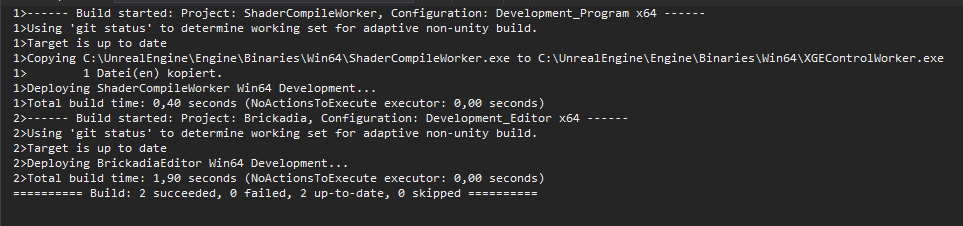 celest plover
right i would assume so. in a normal binray project that's what I got
now that I hook up my project to the sourc build... even project building is compiling entire engine
elder falcon
more than once? like it does that even if you click build again after it finishes?
celest plover
after hooking the project <-- haven't tried
when compioling engine yes...
i click right after it started doing it again
elder falcon
make sure your startup project is set to the game and not ue4, and you are in development editor config
then it "just works" for me :v
celest plover
all set
still compling now
we'll see
thanks @elder falcon
ahhh crap exact same thing happen. but i think not entire engine is rebuilding ... took much longer than usual but not nearl as long as full engine build
hollow kernel
Anyone having probs with the dependency server? Looks like I can't connect to it. Saying it can't access ".ue4dependencies.tmp" fsr ...😫
Running Setup.bat
Edit: Ugh, that's weird...had to run Setup.bat as admin - even though I've always run it w/o admin rights previously.
 mental tide
Hi everyone! Not sure if it's right place to ask but here we go.
Did anyone checked MayaLiveLinkPlugin from engine extra's? In my understanding, the cpp file have chunk of the code commented out (with "if 0") and that part is responsible for streaming Maya's subject attributes as animCurves via LiveLink.
In the mean time documentation is already updated and describes how to use this feature.
So the question is: Did I miss something and it's possible to stream custom attributes with current version of MayaLiveLinkPlugin, or is that feature not finished in current release?
here is the link to my forum post with more details, would appreciate if someone could take a look, and tell me if it's possible to achieve.
https://forums.unrealengine.com/development-discussion/animation/1452077-passing-parameters-via-mayalivelink
thank you!
Unreal Engine Forums
I'm basically mirroring my question from AnswerHub:
https://answers.unrealengine.com/que...-livelink.html (https://answers.unrealengine.com/questions/773350/getting
hollow kernel
@mental tide Does it still not work if you comment it in and rebuild the plugin?
Since it's a plugin anyway, maybe people in #plugin-dev would have more info?
 halcyon marlin
i cant access the source i followed the instructions (adding my github username on my epic Games profile) but the link to the repo is a 404
my github is https://github.com/nasso

but it doesn't work i have no idea why
does it take some time?
oh nvm
checked my mails
didn't know we received a mail
my bad
 somber goblet
hmm
 low dust
stupid question
but can you somehow force unitybuild to start with some specific class?
I'm trying to upgrade SMAA to 4.19 but this thing will take forever again since it always compiles like 500 cpp files before this one
I truly hate UE4 engine compilation :/
or wish I had that farm of high end computers doing the processing for me
low dust
so
I have this super weird issue
I'm suspecting it's unreals unitybuild messing things up again
I have this old set of profiler macros here from nvidias volumetric lighting (originally used in 4.17). I've upgraded this into 4.19 and had to disable the scoping calls to get it to build, so I need to redo these macros
but the issue is that these things are not used anywhere in the code anymore but if I remove them (not replace with anything) build fails like this:
and this builds just fine:
I feel the first one that doesn't build is actually throwing valid errors, like if I did nonunity-build, I would probably need to fix the errors
it still puzzles it works in that latter image when all that is different is that I have bunch of counters
those counters have cpp side counterpart which I have also removed on the top case, but it really shouldn't do anything like this
those removed things are not being used by the rest of the code atm at all
gloomy hamlet
@low dust I think you're right, it's related to unity builds and/or precompiled headers.
The header you showed doesn't have any includes, which should really be fixed. Without explicit includes, it's relying on stuff being included before it, which is unpredictable and with unity/adaptive PCHs, can change due to seemingly unrelated code adjustments.
I wrote an article on this stuff recently that might be of use: http://kantandev.com/articles/ue4-includes-precompiled-headers-and-iwyu-include-what-you-use
kantan
Ever had Unreal's build tool suddenly spring some incomprehensible error on you, pointing to a line of code that you didn't touch? If so, read on.
A couple of engine versions back, Epic introduced the 'Include What You Use' model to UE4 in an...
low dust
yeah, I have no other logical explanation for this
nvidia doesn't care for including anything extra, so they tend to include only what's needed to make unitybuilds work
there are few guys at Epic who occasionally fix unity builds from official repo
so that's why most of core UE4 code works in nonunity build
last time I tried nonunity only some new stuff in UE4 side broke
so, to properly fix this, I'd need to make nonunity build to really catch all issues
you probably explained this in the post too?
@gloomy hamlet
I'm pretty aware of the procedure, having upgraded bunch of UE4 branches into 4.15, and bunch into 4.18 and 4.19
a lot of things tend to require more attention
but
I really don't care enough to spend 2 days of properly fixing this with current ue4 compile times
gloomy hamlet
@low dust Yeah to fix it properly you would need to add includes so that it builds in non-unity, PCHs disabled.
But I agree it's a pain, and they should have done that themselves.
If it's not consistent, it's not actually guaranteed to build properly in unity either, because the composition and ordering of a unity build isn't strictly defined.
low dust
yeah, I can tell that now 😄
as simply removing bunch of idle macros makes it fail in all kinds of odd ways
gloomy hamlet
Yep. Unity builds and PCHs are kind of evil. Though you could instead say C++ is evil for needing to explicitly #include all dependencies.
low dust
@gloomy hamlet bit related to this, you have any clue how to do "EXTERN" for DECLARE_GPU_STAT?
I'm probably missing something obvious
they changed the GPU stat macros on 4.19 slightly
and the hack nvidia did for the same id SCOPED_GPU_STAT to work across multiple classes broke there
been trying to solve it but I can't see any example of having SCOPED_GPU_STAT with same name in engine code that would be split into multiple files
to be fair, even this thing could be unity build issue
altho I'm including the right files
UBT still spits out errors for not finding the stats
as a even more hacky workaround, I've just put separate macros for each file, but it's messy
usually in cases like these, I just seek how epic has solved the same thing elsewhere in the engine code but it's way harder now when there's no such example + pretty sure all these macros are undocumented
gloomy hamlet
@low dust Not sure, have barely used the stat macros. I would have thought you should just be able to put the DECLARE_ macro in a header, #include that header in multiple cpp files, then use the corresponding macros in those for the shared stat.
low dust
these are never done in headers elsewhere
and when I do, it throws undeclared identifier error for my macro ID string
which is literally the first place where you introduce the id 😄
if I place DECLARE_GPU_STAT or DECLARE_GPU_STAT_NAMED in cpp
it works just fine
things show up in stat gpu while playing
I'm pretty sure I did a project wide thing myself on my old ue4 project but it wasn't using these GPU stat macros
hmmm
I looked at my old profiling macro I used and I just declared it again each time for each class it appears
profiler was happy about it
it wasn't perfect setup but that way I could macro it on my main project header so that I could just throw profile macro in oneliner where ever I wanted around the project and could get profiler results for it
(instead of manually declaring the stat beforehand each time and then running the scope macro with all the bits it needs)
low dust
well, I just put the extra declarations inside functions now, it's ugly but it works
also, did give it another go to start adding missing parts but got stuck on some weird global object they have there
extern pointer and include was in the cpp but it still failed to include the thing
low dust
@gloomy hamlet fyi, I put a link to your article on my message here https://forums.unrealengine.com/community/general-discussion/24447-nvidia-gameworks-integration?p=1468783#post1468783
Unreal Engine Forums
General discussion about the game industry and the Unreal Engine community.
thick storm
re unity builds
you must consider that they can randomly break
if the files won't be merged the same way every time
gray glade
Internally, we have automated builds not use unity building so that we can detect errors arising from it.
Since, technically, concatenating source files together totally can change the semantics of some code.
low dust
yeah, I've heard that
but still some new feats miss those on some ue4 releases
so I'm guessing even Epic doesn't do those on each QA pass for new engine release
unless, that has changed on 4.19
pretty sure I had to fix something on 4.18 for non-unity
gray glade
Well, even without unity builds, there was the fact that the engine was not following IWYU policies.
While that's at least consistent/deterministic, it also made it such that some headers required other headers to be included first in non-obvious ways that would make working with them problematic.
elder falcon
low dust
well, if anything good comes out of this, the VXGI dev forwarded my request to other UE4 intergration guys about checking the IWYU
so maybe they'll pay more attention to that in the future
stable hemlock
anybody know whats going on here?
elder falcon
it failed to compile the default material
stable hemlock
@elder falcon on a scale of 1 - 10 how difficult is this normally to fix?
elder falcon
that depends on what you did to make it happen
hollow kernel
Sorry to interject>
Is Diffuse_Lambert the cheapest shading model?
Looking at the math of all the shader models in BRDF it appears so (just one line), but I was wondering if anyone knows of an even cheaper one not included in there.
 versed crescent
HI GUYS! SO MY Destructible mesh loses collision and physics after packaging
HERE IS THE BUG TICKET : https://issues.unrealengine.com/issue/UE-54133
help me plsss 😦
hollow kernel
@elder falcon Got it. Thank you!
 grand sand
guys is it possible to load 3d model in runtime ?
gray glade
If you mean import a model just like you would in the editor, not quite. That's almost certainly editor-only code.
And editor-only code can't be distributed, legally.
There are other options though, but I don't know much about them.
gloomy hamlet
You can use assimp, or look at this plugin: https://forums.unrealengine.com/development-discussion/engine-source-github/122169-plugin-runtime-mesh-loader
Unreal Engine Forums
Discuss GitHub, using source code to modify the engine, and the creation of engine plugins.
@grand sand But I think either way you'd have to use a procedural mesh for rendering. Suspect the methods for building static meshes from raw data are also editor only.
grand sand
@gloomy hamlet the methods for building static meshes are editor only means I can't use them in runtime ?
@gloomy hamlet mean I can't package my project with such functionality as it would be broken ?
gloomy hamlet
I think so, not certain. But that's specifically UE4's static mesh representation. You can render the data using procedural/runtime mesh components.
 sharp axle
anyone running into trouble after installing the windows 10 sdks (for DX12 development) compiling the engine? I got it to work on 4.19 before the hot fixes by removing old win 10 sdks from windows kit folders (and using the latest one) as well as updating bUseWindowsSDK10 to true in UEBuildWindows.cs. However, I'm getting some new errors after going to 4.19.2 with this approach.
final quarry
Are resource files no longer generated for projects? I see alot of older references to Source/ProjectName/Resources/Windows/ProjectName.rc but cannot get this file to generate, need it to fix an icon related issue with packaged builds
final quarry
@stable hemlock Close down any running instances of the engine/editor, and try again
final quarry
It sounds like possibly another process on your machine is locking up the files
low dust
I'd just delete the file manually
swift ivy
Windows won't let you delete a file if there's an open file handle on it
You need to restart
pearl fulcrum
actually there's a good chance its explorer itself
so yeah restart or kill explorer (gl doing that in vanilla win10 I've heard)
 umbral topaz
 civic hound
How hard would it be to implement HFTS into UE4?
gray glade
@umbral topaz Process Explorer, I believe.
Which does a lot, lot more than just let you release handles.
 topaz phoenix
So i've been thinking that telling new comments in the Material Editor to just use the default Blueprint properties couldn't be that difficult
Anyone looked into it?
 whole mulch
@topaz phoenix - could you be more specific?
topaz phoenix
Being able to set a default color for comments
 full sleet
@grand sand regarding mesh loading at run time, you'll have to setup a whole modding pipeline
so you'll cook the mesh as a dlc which you load dynamically
not as easy as it sounds, but is a workable approach
workable as in spend months on it facepalming
 sick pivot
Getting this error from download/compile of 4.19.2 from Epics gitbuh account.... anyone else experiencing this?
Assertion failed: RawMeshBulkData != NULL [File:D:\Unreal4SourceCode\UnrealEngine-4.19\Engine\Source\Runtime\Engine\Private\StaticMesh.cpp] [Line: 2123]
 stable hemlock
@sick pivot i built 4.19.2-release zip file from source using vs 2017 worked okay. those are the steps i used.
sick pivot
yes - this is standard procedure for building from source - i'm just saying .... i am getting staticmesh.cpp breakpoint - editor wont open
elder falcon
might have a corrupted mesh in your project for whatever reason?
stable hemlock
hmm, i build the src separately from my game project first, then always compile my game project afterwards (dev editor only) works on my end as of 4.19.2. So in my case I use two separate .sln solutions although they are both tied together in the solution explorer for the game project sln file.
hollow kernel
Anyone know what method video sequencer uses for playing animation sequences on skeletal meshes?
 maiden wave
Hi, anyone here encountered a problem with not being able to generate the .sln file from source after running GenerateProjectFiles.bat? There were no errors in the log even when running .bat file inside the command prompt, nor did any come up when I added "echo on" on every command I needed a log to. All my UE requirements in VS are installed (including Windows 8.1 SDK).
I even uninstalled and reinstalled VS2017 with the needed components. Anyone who has encountered this? Help would be appreciated, thanks. 😄
 sand flare
Hey guys I am getting Corrupt data found please verify your installation when launching unreal engine from source. Is there any fix?
elder falcon
anyone tested vs 15.7 yet?
hollow kernel
@maiden wave I've seen that before. I think I had to move the UE4 source folder I wanted to build for into the default (C:\Program Files\Epic Games) one to fix it. Not sure, though.
Also, just to be sure, rerun Setup and GenerateProjectFiles.bat as admin?
hollow kernel
Anyone know what's up with"EnumClassFlags.h"? It's playing musical includes - wasn't in 4.17, there in 4.18-staging, gone in 4.18 release and now back in 4.19.
I take it they're eventually going to keep it. Was just wondering if it's part of the enum overhaul they're doing (like what they did with VR devices id strings being changed to enums)...
elder falcon
? that's been around for the longest time
it's a bunch of operators so you can implement bitflags with strongly typed enums
coral flame
hello guys, is anybody able to give me direction about deserializing and serializing an uasset??
sharp axle
the way I had done it for a very quick effort was to implement the export asset function (to json). You can do this using a UFactory implementation and implementing the ExportBinary function among other ways. A huge amount of factories exist in EditorFactories.cpp for you to look at.
anyway, from there I take my asset (input UObject* to ExportBinary) and convert to json. You also usually need to mess with the format extensions and what not, again the EditorFactories.cpp can help a bit.
import you effectively do another (the same even?) factory that does import process. I've implemented UFactory::FactoryCreateBinary in my derived class to do this to bring that json back into the asset format
in my case I have my outer class being a UDataAsset (with internal UObject types)
bool UFakeItem::SerializeFromJson(const TArray<uint8>& InContents, bool bIsTransient)
{
    FMemoryReader Ar(InContents);
    TSharedRef< TJsonReader<>> Reader = TJsonReaderFactory<>::Create(&Ar);
    TSharedPtr<FJsonObject> JsonObject;

    if (FJsonSerializer::Deserialize(Reader, JsonObject))
    {
        const TArray< TSharedPtr<FJsonValue> >& Items = JsonObject->GetArrayField(TEXT("ArrayOfUObjectInternals"));
        auto WeakItems = UFakeItem::ConvertFromJsonArray(Items, (bIsTransient ? nullptr : this));
        for (auto Weak : WeakItems)
        {
            InternalUObjects.Emplace(Weak.Get());
        }
        return InternalUObjects.Num() > 0;
    }
    return false;
}
header:
UCLASS()
class UFakeItem : public UDataAsset
{
    GENERATED_BODY()
public:
    UPROPERTY(EditAnywhere, Instanced)
    TArray<UFakeItemInstances*> InternalUObjects;

    bool SerializeToJson(TArray<uint8>& InOutBlob, FArchive* InArchive = nullptr);
    bool SerializeFromJson(const TArray<uint8>& InContents, bool bIsTransient = true);
};
note the UFakeItem::ConvertFromJsonArray checks transient or not. Thats because on import if they're transient they'll not be saved out once you save this asset
finally, i've got that function here:
TArray<TWeakObjectPtr<UFakeItem>> UFakeItem::ConvertFromJsonArray(const TArray<TSharedPtr<FJsonValue>>& InArray, UObject* OuterOwner)
{
    TArray<TWeakObjectPtr<UFakeItem>> OutputArray;
    OutputArray.Reserve(InArray.Num());

    for (int32 i = 0; i < InArray.Num(); ++i)
    {

        UFakeItem* NewFakeItem = NewObject<UFakeItem>(OuterOwner ? OuterOwner : (UObject*)GetTransientPackage());
        OutputArray.Emplace(NewFakeItem);
        // build them up at once (maybe they get a bit more contiguous?)
    }
    bool bSuccess = true;
    for (int32 i = 0; i < InArray.Num(); ++i)
    {
        const TSharedPtr<FJsonValue>& Value = InArray[i];
        UFakeItem* Item = OutputArray[i].Get();
        bSuccess = bSuccess && FJsonObjectConverter::JsonObjectToUStruct(Value->AsObject().ToSharedRef(), UFakeItem::StaticClass(), (void*)Item, 0, 0);
    }
    return OutputArray;
}
great ill take a look at that @sharp axle thanks for the info, im trying to replace references on every UObject reference in a set of uassets in a folder
 atomic radish
Gents, anyone familiar how a case, when camera is inside deferred decal actor projection box, is handled in UE4? Would be grateful for a pointer to the code.
hollow kernel
@elder falcon My bad. I left out some important info. EnumClassFlags.h is now included in Engine/Source/Runtime/Rendercore/Public/RendererInterface.h for 4.19 release.
Edit:There are at least 10 other files affected with that change (each using its EShowMaterialDrawEventTypes class). Was hoping someone could tell me what commit this change got in on. Can't seem to find it.
elder falcon
why does it matter?
hollow kernel
@elder falcon Hey, thanks for the reply before. I'm trying to consolidate 2 custom shader models made on different engine versions (one based on 4.18_staging, the other based on 4.18). That new EShowMaterialDrawEventTypes class is one of the main differences between them.
 jaunty marsh
not sure if it's a right place to ask but how to force Visual Studio to build ALL engine components. I've built VXGI branch and decided to compare lightmass with it. But it wasn't available so I had to build it separately.
 lapis yacht
Oooh - there's an engine-source channel! So I'm having this issue where, even though using ./Setup.sh -exclude=Android -exclude=android (seems to be default too), it still tries to load android components, which ends up resulting in a crash. I can see the following in my logs, leading me to believe this is the case:
0x47c8151a UE4Editor-Android_ASTCTargetPlatform.dylib!IAndroidDeviceDetectionModule& FModuleManager::GetModuleChecked<IAndroidDeviceDetectionModule>(FName) [UnknownFile])
Are there any simple solution to just exclude this code (using a 4.18 branch), or should I try and include the android "parts" and hope that will eventually result in the stuff compiling/etc. and not causing any issues due to them not loading?
(As stated before, I'm using a GitHub version of Unreal Engine 4.18, latest on that branch, and I'm using MacOS El Capitan.....WHICH I KNOW IS NOT SUPPORTED, but I'm trying to add support back for as my Mac can't upgrade. Successfully implemented OpenGL support back in 4.16, and managed to get to the project open screen.....but then that exception occurs, which almost looks like it's unrelated....but I could be wrong)
 limber jacinth
i compiled the engine but when my editor crashes it doesn't show the crash report window
gray glade
It typically doesn't unless you're running... shipping? I think?
In any case, you should not expect all editor crashes to always show a crash report.
 rich imp
bjr
hollow kernel
I just finished building this https://github.com/EpicGames/UnrealEngine/tree/4.19 after implementing the changelist from this https://github.com/marynate/UnrealEngine/tree/4.19-release-toon fork in it.
Fsr, input is only updated once every second (be it in PIE, Project Browser or Project Launcher). Anyone know what might cause a fixed 1 second lag? Everything works fine other than this 1 second lag, but it's unusable because of it.
hollow kernel
Are there instructions somewhere on what the build naming conventions are for github? For example, what's the difference between 4.19 and Release right now?
 hollow kernel
Thanks Xenonic. I checked that out here too (https://docs.unrealengine.com/en-us/GettingStarted/DownloadingUnrealEngine), but it doesn't describe the difference between 4.19 and Release, or staging.
Long story short, where would the 4.19.2 changes be? I'd assume Release has it but 4.19 has more recent changes.
swift ivy
Release holds the most recent release, in this case 4.19.2
hollow kernel
Ah, cool. Thank you.
So I take it 4.19 holds the first 4.19 release minus any hotfixes, and then gets updated with all hotfixes once 4.20 release hits.
swift ivy
A new branch will hold 4.20 when it's pushed out
hollow kernel
Release would hold 4.20 too at the same time the new 4.20 branch is created, wouldn't it?
swift ivy
Yea, as epic approaches the releasing stage, they lockdown the master branch, finish up QA, then merge into Release. They then create a branch off Release to hold the latest release
hollow kernel
Got it. Thanks. Sorry for the barrage of questions.
hollow kernel
That 1-2 fps everywhere issue is happening with 4.19-release, too. Maybe it has something to do with that new Material Layering/Upsampling/Dynamic Resolution stuff they added?
Happens in the launcher even, though. UE4.log shows no errors/fails.
How might one debug an issue like this?
low dust
@hollow kernel 4.19 contains latest 4.19 branch
Like at the moment, it can be some commits ahead of 4.19.2
But if you want specific release, check releases section on github (not release branch)
Each release gets separate tag on git
Like 4.19.2-release
grizzled breach
Does it mean anything if you get your pull request merged into the source?
"Waiting to merge" Should mean it is going to get merged right?
elder falcon
it means it was accepted for some reason so you are very lucky
normally it just gets ignored
grizzled breach
@elder falcon lol ok
elder falcon
I wish it was a joke but there are actually hundreds of ignored pull requests
swift ivy
Yea, I have 6 active from months ago and only 1 merged 😛
gray glade
@elder falcon There are millions of licensees, but the number of people who have time to handle pull requests? Maaaybe that's a 2 digit number?
elder falcon
:(
gray glade
It's also my impression that a fair number of pull requests might be trying to add a solid new feature or fix a bug, but the code quality just isn't up to snuff.
elder falcon
in that case why not write that as a comment and reject it?
now there are 100s of pulls that noone knows if they work at all or what might be wrong with them
gray glade
I can't speak for anyone else.
But going through 100s of pull requests knowing that most of them will be frivolous or poorly done sounds like an experience.
A really, really unfun and unproductive and tedious and frustrating one.
And it's not like you can just assign some extra engineers to do this.
These are externally sourced changes to systems that have existing authors with responsibility over them.
elder falcon
maybe make a cut and just close all of them? then people who are sure theirs are still relevant can re-open it
gray glade
You make an AI change? The AI guy needs to review it. The AI guy has a full time job on his plate already. Stuff like that.
Perhaps, yeah. I don't know, that might be better than having lots of open pull requests. I won't disagree with that possibility.
If a JIRA hasn't been assigned a priority or department or anything like that for too long, it gets marked for deletion and a warning e-mail is sent out to anyone involved (IE the person who created it). I could imagine something similar.
low dust

Unreal Engine
Internal development branches are now being mirrored to GitHub! Find out how this benefits your projects.
grizzled breach
@elder falcon Yeah didn't think mine would get seen so quickly but my changes were very minor.
elder falcon
bunch of the branches are still missing
grizzled breach
I've just been noticing incorrect errors and descriptions and figured I'd take the time to submit fixes for them.
low dust
yeah, rendering and anim-phys are missing at least
but they said more will come in next weeks
hollow kernel
@low dust Thank you very much for the clarification. It's all crystal clear now.
I never noticed that releases tab...
 wraith crystal
I'd like to replicate divinity's camera culling / material fade out effect in ue4

and I'm guessing I could do it similarly to how precomputed visibility is calculated, only at run-time
but I don't really know where to start and any pointers would be helpful
I've found a tutorial that uses a per-object translucent material set up, but that's not really feasible given that I'd have to modify every single material used in the game
low dust
@wraith crystal that's why you use master materials with ue4
I mean, you should do that anyway
not for just this case
that way you can change the core material and have all material instances inherit the changes automatically
you'd just do it once
also, why this channel and not #graphics ?
wraith crystal
@low dust What I'm trying to avoid is to have to plug functionality into all of my materials, hence the question here. I'm looking for something that could work engine-wide, e.g. a flag that is set to true by default on pretty much any material. I've gotten some great advice on #graphics, but in my understanding that is also per-material. Here, the question is where to look in engine code if I wanted to develop such an effect.
low dust
well, that's exactly what master materials are for
 edgy hedge
Would I have to extend the engine in order to make a RTS game similar to Company of Heroes 2?
Destructible landscape, only about max ~50 player controlled characters on the map
5v5 multiplayer
elder falcon
anyone know if it's possible to create a Program like BlankProgram or UnrealHeaderTool in the project folder?
ubt is just completely messing up when I try this
placing it in Project/Source/Programs doesn't work - then it doesn't find the target.cs file
moving the target.cs file up to project/source/ lets me generate the project files, but fails to build because project/programname.uproject does not exist
it's all very strange
 obsidian quail
anyone have suggestions of where to run FEditorBuildUtils::RegisterCustomBuildType from?
I want to add an extra build step when I run the Build command in editor
just unsure where I should call this from
should I be going ahead and making a custom UGameEngine and UUnrealEdEngine?
swift ivy
Does UE4 use Windows RPC with MIDL generation? I opened up an unreal app with process hacker and noticed that it loads the module rpcrt4.dll, which is Windows RPC Runtime.
obsidian quail
The answer to my own question was yes, a custom unrealedengine worked
 terse lake
Heya, I've updated my source-built engine from 4.18 to 4.19. Now after compiling my project under the new source, it says that the game module can't be found. I've compiled both development editor and development client. What could I be missing? Did a bit of googling myself but none of the tips helped.
 spice shadow
Hey all, so I'm currently trying to build from Source the "Release Branch" of the Unreal Engine from Github for my team and I. But currently, I am having issues with the SwarmInterface.cpp file
Has anyone else had any issues when trying to build the UnrealLightmass?
stable hemlock
dont know where to put this but i think this is the closest channel to it,
does anyone know how to get rid of these errors i have a whole output log full of them
LogTexture: Error: Failed to build texture /Game/Assets/Textures/misc/signs_normal.signs_normal.
LogTexture: Warning: GetMipData failed for /Game/Assets/Textures/misc/signs_mask.signs_mask (DXT1)
google is 0 help
 hexed cipher
Is Source Code only usable in VA 2015 or can I keep using 2017?
elder falcon
you should be using the latest vs 2017
hexed cipher
Sweet, thanks.
This is my first time messing with any source code stuff, so I'm feeling a tad overwhelmed 😅
 glad knot
hey guys.. I have a strange problem which came out of the nowhere..
So I have an AI baseclass and some other Ai´s that are parented to this class..
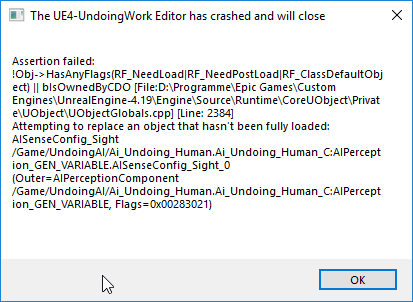
For any reason everytime the engine tries to get a reference of this class... so if I open this class or if I open a parented class or a map with the class on it ... i get following error:
https://i.imgur.com/RFZ9gn2.png
anyone got something like that before? or knows a fast fix for that?
Thanks in advance guys 🤘
 lost linden
its something else. That is just the culmination of the debugged error. This is a problem elsewhere that causes this. Something to do with the AIPerceptionComponent it looks like.
AISenseConfig_Sight is the asset not being fully loaded though so check that too
glad knot
yes you´re right with that.. everything works again if I take a backup file of the class (with different name) open it and remove the sight sense from the perception system and switch the version without the perception with the old version..
the problem is just that if I implement the sight system again it crashes again
but only after I restart the project.. after implementing and not restart everything works fine
very strange
 surreal latch
ya wanna know what's even worse, in this case the thing it's complaining about is actually harmless
i.e. it would actually load and work fine except for the fact that it's triggering the assertion
the fastest/easiest fix is to remove the component from the base class, and add it only to the child classes. Obviously that approach doesn't really scale to multiple levels of inheritance. And it's also not a viable option if you actually need component inheritance for this case
for most objects, it is perfectly safe to replace a non-fully loaded object
that assertion was originally meant for cases back in UE3 where additional tear down of the object was required, such as releasing GPU resources. AI doesn't really have that issue, so the assertion isn't really helpful in this case, but gets triggered anyway.
long story short: it's an engine bug. there's no way to fix it from your side. You just have to workaround it by not adding the component to the base class, I think
 proven grove
why are there still things in here that have been marked as deprecated since 4.3
why has no one removed them
i think it's been long enough to say its safe that no one is using them anymore
small cobalt
Maintaining an code base as large as UE4 is not an easy/simple task @proven grove
proven grove
i did manage to remove those deprecated things as well
small cobalt
Submit PRs with the deprecated functions removed, making sure that they arent still used.
small cobalt
That you know of.
glad knot
@surreal latch thanks for your post!! Yeah I figured out that I will need to do a workaround what is pretty terrible since the base class is already very complex and has a lot going on with the perception system since it´s a multiplayer game with a lot of AI´s and players... Thank you for your help!! I will try to find a workaround 😦
hexed cipher
Is the source code build of 19 supposed to be 40+ GB? 😧
 royal glacier
eyup
source will be pretty small, under 1gig
but once you build it, you're in for a wild storage ride
elder falcon
my unreal folder is currently 84GB
lost linden
how much of that is intermediate and saved files?
lost linden
i've been tempted to have a dedicated drive for those folders using symbolic links they get so large with a development and debug build
hexed cipher
So I'm buying a new 2TB just for my UE4 stuff.
limber jacinth
how comes it is quicker to compile using the launcher version of UE 4.19 but slower using my built engine?
low dust
@hexed cipher you actually get it to fit into 40 GB?
I thought it took like 50-60 at minimum
my UE4 folder is 80-90 GB
@limber jacinth only for first compiles per project
it needs to compile some stuff it hasn't done already when you package
if you mean that
it literally have to recompile the engine core again afaik if you package with shipping for example
limber jacinth
nope it does it every compile
just seems to take forever for recompiles i even tested it on just a blank c++ template
consecutive recompiles are slow
proven grove
https://docs.unrealengine.com/en-us/Programming/UnrealBuildSystem/IWYUReferenceGuide
it states near the end of the document that
If you want your game to opt-in to IWYU, there are a few tips to keep in mind:

Include CoreMinimal.h at the top of each header file.```
but isnt this a monolithic header file?
shouldnt you want to avoid inculding this if at all possible?no its Core Minimal. Unless you dont need anything UE4 related for your code
Engine.h is the monolithic one
proven grove
would it technically be better to directly import the files with macros in them instead of that tho
lost linden
Not sure. I just add what I need to reference since they went IWYU
proven grove
it has a ton of math and template includes in it, as well as the macro files
so i think it would technically be more efficient to just include the object and macro files instead of coreminimal
for that 1 second less compile time
lost linden
probably
proven grove
well, time to start working on a pull request
lost linden
but yeah its only compile time so if you are using something like Live++, its not even an issue unless you are rebuilding the engine anyway
proven grove
i have to rebuild the engine more than i want to admit
i break stuff in it pretty frequently
lost linden
heh. I've done a bit of that today
proven grove
it takes me about 3 hours to fully rebuild ue4
and about half an hour if i need to partially rebuild it
cries in dual core i3
gloomy hamlet
@proven grove It's not going to improve compile times in practice because CoreMinimal is already included in the precompiled header for the Core module, which all your modules will be using.
In theory yeah your code is slightly cleaner if you directly include only what you need, but with a codebase this big you have to draw the line somewhere.
proven grove
but what if i remove coreminimal entirely from the code base
i think i have a few years spare
gloomy hamlet
Haha. Well at the end of the day, if the files that CoreMinimal includes end up in the shared pch of the Core module, then it still wouldn't make any difference.
proven grove
it could still make the files a bit nicer to deal with for future users
theres no reason not to do it
gloomy hamlet
Well, if you end up needing to add the same 5-10 includes at the top of 90% of your headers, arguably that tradeoff isn't worth it.
proven grove
dont remove coreminimal, just limit it's usage in source files
so people can still include it in their actual games
but the actual engine doesnt rely on it
it may also reduce the size of the compiled engine
which would be great for everyone
i'm to inept to actually add anything to the source, so i might as well try and clean it up a bit
slow ibex
does anyone know where the bone weights are stored ? I need to extract animation data using c++, I've already extracted the bone position, from the animationsequence but I cannot find where the weights are 😥
stable hemlock
can somebody point out the github source build for niagara
proven grove
i just went looking through unreals source code for tarray
...
it just wraps std::vector
i was expecting something diffrent tbh
or im an idiot and theres 2 diffrent definitions of tarray
because of course there are
small cobalt
Most of the types in UE4 are wrappers for an std type
proven grove
why not just use the std type then?
small cobalt
I would imagine that part of the reason would be that they arent flexible enough?
elder falcon
TArray does absolutely not wrap std::vector
you don't use the std type because TArray is faster, and the api much nicer than std
none of this begin, end garbage
gray glade
Yeah, we don't use the STD stuff at all, AFAIK.
proven grove
there are two seprate definitions of tarray
one of them does just wrap std::vector
the other one does not
 regal yoke
Hello! So i'm very new to the engine source code, but i've been doing c++ for several years now. I want to change some of the behavior of the geometry mode. Specifically the widget functionality. Anyone know a thing or two about the widget functionality?
lost linden
yeah some. You looking to make an Editor Module then?
regal yoke
or edit the one that exists
obviously I might be over ambitious but I just want to learn about how the widget works but I don't know where it's functionality resides
elder falcon
@proven grove there is definitely no such thing
the only definition of TArray is in Array.h
 stiff geyser
hello, I had a project which made with 4.15.1 version
I tried it open with 4.18 it gives me error
and when I tried open it 4.15.3 I cant see any assets
D:/15.3/KayyenUE/Content/haritalar/Beklerken.umap is a UE4 map [File:v513], from an engine release newer than this [Cur:v510].```If you saved anything with 4.18 you won't be able to open it in an older version again
 astral sapphire
Greetings!
I have a nerd question. Is it possible to compile a windows ue4 version on *nix?
found this page https://wiki.unrealengine.com/Building_On_Linux but not sure if it's up to date
astral sapphire
@elder falcon so the wiki is outdated?
elder falcon
the wiki page you linked is about building a linux version on linux
astral sapphire
@elder falcon dang, i knew something was fishy about this guide
well, ok ;_;
ty for help anyway
atomic radish
I've been trying to find a cause for what appears to be a major memory leak and significant rendering performance regression in between 4.18.1 and 4.19.0, allegedly related to nvidia graphics driver. I failed to pin point the cause in the code so far. Perhaps someone is aware of the underlying cause ?
lost linden
All I know is that if I have geforce experience overlay enabled with unreal, my fps dies. I also had issues with the last drivers.
proven grove
my recommendation would be to go through the commit history and try commenting out parts of the code commited until the memory leak stops
elder falcon
you can't exactly do that when there are like half a million changes between 4.18.1 and 4.19
lost linden
Anyone know if the editor keeps any Unique references to objects placed within assets? I know there is UObject->GetUniqueID but that isn't static.
elder falcon
objects placed within assets?
lost linden
yeah lets say I open a Widget blueprint and place a Button. For the life of that asset, it keeps the UniqueID, but if you close the asset, it gets destroyed and the ID is refreshed next construct
I need something more permanent.
elder falcon
don't think there is anything like that?
you've got the package containing a widget blueprint and then it has "a" button but that's it
lost linden
my thinking was there may be some unique ID when its serialized with the asset but oh well.
elder falcon
why would you need this?
lost linden
I have an Object that keeps track of Detail Panel customisations for each widget. It can only work with a unique ID though
gray glade
Object names are unique ids
And they're serialized and persisted where relevant.
If it's renamed, obviously not, but there is not otherwise a generic GUID system for objects - their name is their GUID and is mutable.
lost linden
that makes life a bit tougher 😦
elder falcon
isn't the object name just going to be something like "Button_0"?
gray glade
The nomenclature (pun-intended) is a mess and I have my qualms with it
Object names also refer the fully qualified path.
Like /Transient/LoadedMapWorld.SomeActor.SomeComponent
lost linden
would there be a way to hook a listener onto the Widget renaming function?
gray glade
I am not familiar with any such delegate, but that doesn't mean there isn't one
lost linden
ill browse when my eyes are rested. cheers
gray glade
👍
gray glade
The whole object/package name/path thing is all hella confusing to me.
I expect name to be the things individual name, without path information.
I expect path to be the full path, with the name.
I've seen parts of the API do otherwise.
And I've seen parts of the API be inconsistent.
surreal latch
yeah, it used to be more consistent in UE3 days
really wish they'
d just created separate classes for object name vs object path
when they moved to UE4..
Not that that would have solved all the problems, of course
elder falcon
wtf, why does unreal not support ipv6 on platforms other than ios?
surreal latch
looks like it's supported on linux and mac as well
i think some of the console platforms support v6 by default as well
elder falcon
yet it's not supported on the most important platform... this makes no sense
surreal latch
you mean linux? 😛
elder falcon
windows, of course
surreal latch
yeah just messing with ya. you could always try enabling PLATFORM_HAS_BSD_IPV6_SOCKETS in WindowsPlatform.h, and see what happens
elder falcon
oof that sounds like a full rebuild :D
surreal latch
indeed
:\
the ipv6 code appears to be there. not sure why it's not enabled by default.. course my source is at 4.17, so maybe they've enabled it in newer versions?
elder falcon
that define only seems to enable the ipv6 socket subsystem, but it's not being used by any important platforms https://i.imgur.com/dyuUW3s.png
 surreal latch
don't think it would be too hard to get it working, but yeah, you'd need to switch to source building
elder falcon
UIpConnection expects to be able to pass the address around as int32
well this is annoying
elder falcon
made it work on windows like this https://github.com/EpicGames/UnrealEngine/commit/35e2d51b5ff8705dfdb9ec679b9e0c458ee76455
not sure about mac/linux yet
btw. why is my commit from my fork visible on the main repo ...?
surreal latch
sort of looks like you committed straight to the main repo
but my git-foo is still pretty weak
maybe I'm misreading that
nice work, btw
elder falcon
well I pushed the commit to a private fork
but somehow you can access it in the main one if you have the correct hash
let's see if I can find other more interesting forks :O
 steep bear
Has anyone created a swarm agent for mobile devices to help bake times?
i mean its not like they are gonna do a lot but i'm sitting 6 hours in with 2 pcs and looking at another 3 before its done, even a mobile app to tell me the bake % would be nice
 wicked hill
Hi ! Does someone know how to make a task (using taskgraph) that could be executed on high priority threads AND on gamethread ? If GetDesiredThread() is set to return ENamedThreads::AnyThread, calling FTaskGraphInterface::Get().ProcessThreadUntilIdle( ENamedThreads::GameThread ); make the gamethread wait and do nothing while the high priority threads are working.
sick pivot
I"m getting this error from a new project i'm teaming up with... i've had 4.19 on my machine for a while now and compiled fine with VS2015.... is there some custom setting in a .ini file that would make it so i need to have 2017 installed to compile an Engine Source?
UnrealBuildTool : error : Visual Studio 2017 must be installed in order to build this target.
elder falcon
is there any reason why you don't want to use the newer, better, faster version of vs?
sick pivot
@elder falcon - no i'm not against it.... i'm sure its time to change anyways. at first 2017 versions were chaos in forums/discord channels with UE4 builds.... i'm seeing tons of other people talking success these days with using it.
elder falcon
if you are going to build the engine, you also need c++ desktop dev and .net desktop dev
elder falcon
https://i.imgur.com/mhhfKQZ.png https://i.imgur.com/9kKHTN0.png why would anyone want this and what is it doing in the engine by default lol




 elder falcon
giant merge commits are one thing but giant merge commits with no description ?
this is a new low
this commit has changes for basically every part of the engine
hidden hedge
it's a merge, if you have perforce access that's your best bet to see them
 spiral mortar
@elder falcon Does it?
elder falcon
interesting
spiral mortar
Some license issues
atomic radish
Gents, why exactly CustomDepthTexture is empty in base pass shader, when custom depth pass is done before base pass ?
grim halo
I'm trying to add a new buffer visualization material
I tried to make one like any other post process material , but it doesn't work
after a few hours of debugging it seems the package metadata seems to have a different structure
anybody know how those uasset files are made?
 rain lake
@elder falcon that commit is the current work on 4.20
so, yeah, it's a huge commit
since it's a single merge
since they put the dev branches on github, you can probably find the commit that added that
it comes from the fortnite branch though
 fathom tusk
So when I try to cross compile Linux dedicated server from Windows I get spammed with -Wnonportable-include-path errors which breaks the build. I tried adding #pragma clang diagnostics ignored -Wnonportable-include-path to WindowsPlatformCompilerPreSetup.h but it seems to have no effect ... anyone?
(this is after updating to 4.19 and updating the clang toolchain)
lost linden
master is it not? Not that its advised to use that 😃
limber jacinth
just want to see what new stuff it has in for gameplay abilities
so was just going to dupe my project and load it in 😄
lost linden
last time I used anything other than release was the Promoted branch. At the time it was 4.20 so I figured it was a stable latest release
rain lake
the most up to date branch is master
dev branches are not "up to date"
certain areas have newer features (for example, dev-networking might have newer networking related features than master), but only for the area that the branch is for
master is where they collect everything together and that's the most bleeding edge version of the engine
it's buggy though
proven grove
turns out #include "CoreMinimal" is useless in most source files and can be removed
just managed to remove it entirely from inputdevice and inputcore
still compiled perfectly fine
lost linden
then it really is minimal 😄
small cobalt
@proven grove I would assume then in that case it is there for Unity builds.
small cobalt
UBT will combine .cpp files together in order to reduce compile times. This is called an Unity Build
However this can cause masking of include dependencies
proven grove
so why would having coreminimal in every file be needed?
small cobalt
In an non Unity build it is the opposite, UBT will not combine anything, it will compile everything separately and it will complain about every missing include that way.
So much higher up your dependency chain CoreMinimal might still be getting included, thus in Unity Build everything is fine.
elder falcon
the bigger question is why does it matter
include stuff the way epic recommends, problem solved!
proven grove
if you can remove extra lines of code without affecting stability, it cant be a bad thing
small cobalt
Using Unity build its fine.
proven grove
and it reduces compile times marginally for some modules as well
small cobalt
Just saying, Epic may have included it because of non Unity builds
elder falcon
it'd likely still work fine in a non-unity build due to some file you are including already including coreminimal
small cobalt
Probably
proven grove
it would only be a problem if you eliminated coreminimal completley, right?
so there is nothing refrencing it anywhere
small cobalt
Usually you would use Non Unity Builds to ensure that any subsystem your building is self contained
Yes
proven grove
for the time being, removing those includes has gone well, so i might as well continue
small cobalt
@gray bay Could probably give you an even better explanation of (Non)Unity Builds
small cobalt
You would hope so 😉
proven grove
ah right, unreal black magic
small cobalt
There is alot of magic happening in this Engine lol
elder falcon
@rain lake you seem to be involved with 4.20 stuff, do you have any clue if being unable to open .dmp files generated by shipping builds on windows 10 is getting a fix?
rain lake
im not involved at all, i just know how it works
elder falcon
oh rip
for some reason there is like ultimate secrecy around this issue
noone wants to talk about it
rain lake
i didnt even know it was a bug
elder falcon
it has been for a long time https://forums.unrealengine.com/development-discussion/c-gameplay-programming/1396585-the-win-10-fall-creators-update-broke-debugging-dmp-files-generated-by-ue4-workaround-here
Unreal Engine Forums
A few weeks ago I noticed that I suddenly could no longer open any of the generated .dmp files in Visual Studio that are generated when the packaged game
the "workaround" involves shipping the game with dll files uploaded by a user so is extremely sketchy
 wooden tusk
That is really sketchy
elder falcon
I've actually found a post on answerhub that has the files uploaded by a staff member so less sketchy https://answers.unrealengine.com/questions/744933/unable-to-debug-dmp-files-created-in-windows-10.html
interesting that the files uploaded by them do not match the ones uploaded by the user
different size even
proven grove
something tells me the first ones are probably malicious
 dense wharf
how often do I need to build my project in VS? Is it just the first time I create it and that's all?
small cobalt
If you add any new Code you need to recompile...
If you mean the Engine, you only have to build that once, unless you make changes to the Engine.
dense wharf
Not the engine, just my project. I converted it to a source project. But I haven't made any changes in actual c++ code, I'm still doing all my development in the regular engine
small cobalt
Yeah ok so you only have to Compile it once then.
dense wharf
okay cool thanks just wanted to be sure
proven grove
when compiling the engine it saysUsing 'git status' to determine working set for adaptive non-unity build. Performing full C++ include scan (no include cache file) =in the command propt, what does nthis actually mean?
i know its something to do with iwyu and pchs, but im not sure what
and it takes ages as well
elder falcon
first one uses git status to detect which cpp files have been modified and should be excluded from unity build for faster changes
second one parses includes in all headers and cpp files and lets ubt know which cpps need to be compiled when which headers change
once it has the include cache file, it can use this info to quickly build all affected cpps after you change a header
proven grove
it still has to perform over 800 actions even after changing just 3 files
but seeing how massive and noodly unreal is, thats probably normal
dense wharf
testing my ded server is giving me a few "unknown structure" errors. Any idea why? I'm getting no errors in the editor and the structs seem fine..