#engine-source
1 messages · Page 11 of 1
 thin crow
With 5.4 and multithreaded rendering is merging skeletal mesh still needed?
thin crow
Do anyone knows?


 light iron
Hello. Do you know if there a way to edit multiple object with "Details View" widget like the editor does ? the "Set Object" only takes 1 object, I'm wondering if there is an object I can create that would point to multiple object, array doesn't work.
 severe eagle
ok
 runic olive
hey guys
what feature new in 5.4 branch ?
thin crow
are Compressed Flags replicated to simulated proxies on unreal?
 vague peak
runic olive
hey guys
what feature new in 5.4 branch ?
vague peak
runic olive
hey guys
what feature new in 5.4 branch ?
https://trello.com/b/yeFHgUDF/ue-54 mothdocter maintains a pretty good list of new stuff
Organize anything, together. Trello is a collaboration tool that organizes your projects into boards. In one glance, know what's being worked on, who's working on what, and where something is in a process.
 tacit pecan
Hey guys! Hello!! I'm having a little issue and maybe someone can figure how to fix this..
My server is kicking every player and "hangs", running a profiler I see the hang occurs on ScriptCore.cpp, so I'm guessing the blueprint VM..
culprit is ProcessLocalScriptFunction, so Is there any way I detect what is generating the deadlock in there?
I guess building with DO_BLUEPRINT_GUARD, i can research on this, do you know where should I define it?
or if I add #define DO_BLUEPRINT_GUARD 1 in the game cpp is enought?
or should I define it on Target.cs?
nvm, adding the global definition to the target.cs works
tacit pecan
so, just for you know.. indeed this definition of DO_BLUEPRINT_GUARD helped! now it hang (which was a infinite loop), its fixed!
 median void
Has anyone worked with FCommonActions in ContentBrowserFileDataPayload.h by any chance? I'm trying to see how they delete assets in the content browser with the delegate FCanDelete but I can't find where they pass a callback function to the delegate in FCommonActions.
The delegate is executed in bool CanDeleteFileItem(const FContentBrowserFileItemDataPayload& InFilePayload, FText* OutErrorMsg) in ContentBrowserFileDataCore.cpp.
 quasi laurel
Hi there..
Small Question about Core Redirects..
I got a Widget BP which, since the last update, has Parent Class and native parent Class being "None"
I added these Lines to the DefaultEngine.ini:
[CoreRedirects]
+ClassRedirects=(OldName="None",NewName="/Script/BDC_ActivatableWidget",MatchSubstring=true)
But it's not doing anything.. so.. "None" seems not to be the correct Name..
Does one know how to redirect a NONE in both Parent Classes?
 quasi laurel
NVM...
Found a solution..
https://github.com/PipeRift/BlueprintRetarget
Just had to change
#include "AssetRegistryModule.h"
to
#include "AssetRegistry/AssetRegistryModule.h"
GitHub
An small tool that allows retargeting invalid blueprints when its parent class is missing on UE4 - GitHub - PipeRift/BlueprintRetarget: An small tool that allows retargeting invalid blueprints when...
 scarlet mason
Has anyone encountered the gpu-scene instance data overflowing, and have any idea how to solve it?
 still quarry
Anyone familiar with an issue with there being more than 3 "frames in flight" crash? I cannot seem to find relevant info on this anywhere
 runic hare
hi guys how do fix this? i deleted the most recent files i added but it still gives the error
 median void
When selecting multiple assets in the content browser for deletion that have references to each other, how does Unreal determine that they are referencing one another and can therefore all be deleted? FAssetDeleteModel seems like a logical place for it since that's where it checks for references and other things for individual assets but I couldn't find anything about circular references.
UContentBrowserDataSource has a method BulkDeleteItems but that just calls DeleteItem on each individual item.
median void
Isn't that channel just for blueprint and python?
 somber hedge
When using a source build of the engine, should my projects be located within the engine directory?
I've always kept them separate (especially because my projects rely on plugins that I can only get from the Marketplace) but it seems like every time I go to compile my project, the engine gets recompiled as well
 hidden hedge
somber hedge
When using a source build of the engine, should my projects be located within th...
hidden hedge
somber hedge
When using a source build of the engine, should my projects be located within th...
for a native build, yes, which should mean UE5.sln includes the project
always build your project only, set your project as the startup project
put marketplace plugins in your project's plugins directory
somber hedge
By native you mean building from source right?
hidden hedge
"native" builds are when the project is under the engine root
which is how epic typically works
somber hedge
So when it comes to version control, you'd update the ignore file for the engine so that the project could use a different engine version if nescessary?
hidden hedge
everywhere that uses a native engine build I've seen versions the engine too
and usually will have an automated process to deliver editor builds to non-coders
somber hedge
That's where things like UnrealGameSync come into play, right?
hidden hedge
yes, in fact UGS expects that setup
somber hedge
So just for the sake of clarity, I can update the Default.uprojectdirs file to add a listing of Engine/Games to keep my work seperate from the engine code, right?
hidden hedge
why would you put it in Engine/Games
the engine root refers to the directory that GenerateProjectFiles.bat/Default.uprojectdirs is in, not Engine/
Engine/ and YourProjectDir/ should be sibling directories
no messing with uprojectdirs required
somber hedge
To keep it seperate, cleaner imo
hidden hedge
fight it if you want, but that's how it usually is
 astral elm
Last year everything was fine using "Fork" git client, but touching it for the first time this year, I can no longer see our Organization's fork of UnrealEngine. Has something changed with permissions? Having a hard time figuring out what is wrong. ( I can see all other projects fine ).
EDIT tried logging out and requesting new OAuth permissions, done, no change
EDIT seems like all the forked projects are not showing up
somber hedge
hidden hedge
fight it if you want, but that's how it usually is
I was gonna use a test project first before I move my current projects over. Don't see why you can't do both.
 weak crow
Hey does anyone have any idea how I would be able to access the ue5s time related stuff? I am trying to see if I can get full control of time, more than than the engine will allow with blueprints at the moment.
or at least where to start would be helpful🙂
 steady flint
How do I fix this? I have built UE 5.3 from source and now I can't load my project. It says it needs to rebuild many plugins, possibly all of them, click yes, and then this thing pops up. What should I do?

 smoky lynx
Whats the difference between those 3 versions?

 shrewd warren
steady flint
How do I fix this? I have built UE 5.3 from source and now I can't load my proje...
shrewd warren
steady flint
How do I fix this? I have built UE 5.3 from source and now I can't load my proje...
if you cannot find sln file, generate by right clicking your uproject file
after generating sln file, build your project through visual studio
if it does not help, include your plugins that are built for current target engine version
hidden hedge
smoky lynx
Whats the difference between those 3 versions?
Plus is backported UE5 platform SDK upgrades to keep it current with the latest console and mobile SDK requirements
And Chaos is Chaos, instead of PhysX
smoky lynx
hidden hedge
Plus is backported UE5 platform SDK upgrades to keep it current with the latest ...
thanks
 somber horizon
Hey all, I have a bit of an issue. I need to upgrade my source engine from 5.2.1 to 5.3 for nanite displacement. I downloaded 5.2.1 from the .zip on their git list for different versions. If I have an existing project in the 5.2.1 with different animations, skeletons, models, etc. would it be safe for me to open the 5.2.1 project in 5.3 to keep all the existing changes?
hidden hedge
somber horizon
Hey all, I have a bit of an issue. I need to upgrade my source engine from 5.2.1...
I'm not sure what you're talking about with "different animations, skeletons, models, etc" since this should be in your project?
Also this is the sort of risk that source control is supposed to mitigate
somber horizon
hidden hedge
I'm not sure what you're talking about with "different animations, skeletons, mo...
Gotcha. Yea I was just curious if I can open a 5.2 project from 5.3, sorry for the confusing wording
somber horizon
hidden hedge
how do you think projects are upgraded?
what? this is my first time upgrading UE from source I don't really know
I was just asking
 fading dagger
Question, would anyone know why development editor constantly recompiles everytime I am running my GameModule in debug mode?
modifications are being done to SharedPCH.core.cpp20 it appears
I am using rider, I might see if compiling the engine source 5.3.2 from VS explicitly might fix this issue
 west dune
Has anyone here been able to successfully build a cooked editor? I've spent a few hours trying, and went to use RunUAT MakeCookedEditor, but apparently my client release doesn't generate the proper metadata information when being run through BuildCookRun
 carmine socket
When i start my game Unreal engine crashed, and this message show up. Can someone help me?

 vagrant wyvern
carmine socket
When i start my game Unreal engine crashed, and this message show up. Can someon...
vagrant wyvern
carmine socket
When i start my game Unreal engine crashed, and this message show up. Can someon...
I don't know where the error is coming from, but you should install the "editor symbols for debugging" to get the error details.
 carmine socket
ok. Thank you
carmine socket
Now i have this.

 merry hill
Are you actually using a source build? This channel is for building the engine from source and extending it
 merry robin
Have they fixed Substrate packaging/compiling in the 5.4 dev builds?
 lucid epoch
anyone have bad connection and issues using git to get the source code? i'm working around it by downloading zip and then git init and add remote, but this seems hacky. is there a better way?
 tiny cave
Hello people!
I will most likely be annoying when asking around in hopes of getting my problems fixed, so I want to apologize in advance!
I recently made the decision that it is about time to start looking into making custom shaders/custom shading models for Unreal Engine in order to train more on HLSL and to get something working in the NPR space.
I have a general understanding of C++ and HLSL, and after reading through and following this tutorial: https://dev.epicgames.com/community/learning/tutorials/2R5x/unreal-engine-new-shading-models-and-changing-the-gbuffer as well as Froyok's article https://www.froyok.fr/blog/2021-09-ue4-custom-lens-flare/ I wanted to get down and dirty. I like Froyok's approach in making a plugin in order to not having to mess with the engine's source code.
And luckily, Epic Games themselves have some bits of documentation that I wanted to follow as a starting point: https://docs.unrealengine.com/5.0/en-US/creating-a-new-global-shader-as-a-plugin-in-unreal-engine/
Unfortunately, it does not seem to work well with UE5.3 since the code of the plugin they advise you to copy is marked as deprecated.
However, this is not my main concern as I hope to manage to get some tests running by hacking some stuff together. Nonetheless, I tried to follow the UE documentation and by doing so I got to know this annoyance: It appears that all includes in shader files that reference a file in the Engine directory cannot be included by at least VS/intellisense which is super annoying because I have no knowledge about whether or not the things I am doing will work or not. I initially thought it was an issue with the newly created plugin that I made, but after some digging, it also appears to be Engine source shader files as well (in the example, I have a screenshot of a Niagara .ush).
It appears that VS has a problem with the virtual file path? Is there a way to circumvent this to connect the files properly for me to work with? I appreciate any pointers!


Epic Developer Community
Implementing a Celshading model directly into UE5.1 source. This celshading use a linear color curve atlas to drive all the values.
Learn how to set you...

This article shows how to modify the default Unreal Engine lens-flare post-process, from code to shaders. I always wanted to change the default Unreal Engine 4 lens-flares because it never felt good i...

Creating and setting up a new Global shader via a Plugin.
 wheat rain
I don't think intellisense can handle ue's hlsl. (at least I don't use intellisense to write custom hlsl for UE.)
tiny cave
May I ask what you use then?
wheat rain
I just use visual studio code to write UE's hlsl.
Adding a custom shading model is a little difficult if you are unfamiliar with UE's rendering pass. I would go adding a simple postprocesing pass for a start.
tiny cave
Okay, I will try out code then!
Yeah, I managed to get the cel shaded material going for starters, at least something
I have a general/macro question: when talking about global shaders they generally cannot be applied/referenced by a material and applied to any geometry, correct?
If so, is it even possible to make a custom shading model outside of the engine source and inject it in form of a plugin? I don't necessarily need the material editor if I can substitute the changing/linking of parameters and texture inputs via a data asset
wheat rain
I don't think you can add a custom shading model with plugin. You need to modify engine codes.
You need to modify several h, cpp, hlsl files to add custom shading models. The worst part is the headers you need to modify(scene.h or someting like that) are used by many engine modules, and build time for a simple modification is really loooong.
tiny cave
Yeah, I think it takes around 10 minutes for me 

But thank you already so much for helping me giving me some more insights! I will try get Studio set up and running tomorrow and fiddle around a bit. If I hit another roadblock, I will come back screaming 😄
 hot parrot
Hi, is it possible to build a specific module with BuildGraph ?
hot parrot
Ok thanks !
 waxen zephyr
tiny cave
Hello people!
I will most likely be annoying when asking around in hopes of gett...
waxen zephyr
tiny cave
Hello people!
I will most likely be annoying when asking around in hopes of gett...
Rider has section in settings for virtual directories. Settings -> Languages & Frameworks -> C++ -> Shaders. Maybe something similar exists in VS? 🤷♂️
Trying out custom global shader is still in my todo list so can't comment if it works better than VS or vscode for that purpose.
Oh my Rider Link may do something useful in there. Seems it can auto fill the mappings 🤯
tiny cave
waxen zephyr
Rider has section in settings for virtual directories. Settings -> Languages & F...
Thanks for the tip, I will do some more digging 🙏
 still dawn
I have a source version of the engine(compiled from github),how do i make the engine to have all my shipping build versions to have logging in shipping,i know i can add it per project with it being set to have unique build enviorment which i don't want cause it's hard to do multiple projects on it
i tried to add it in the xml for building but the logging in shipping doesn't seem to be in those configs anymore
tiny cave
waxen zephyr
Rider has section in settings for virtual directories. Settings -> Languages & F...
Yup, I looked for VS-related virtual directories, and this helped out! Thanks for the pointer 🙂 https://developercommunity.visualstudio.com/t/HLSL-Tools-will-crash-Visual-Studio-when/10318359?page=58&pageSize=15&sort=active&topics=visual+studio+2017+version+15.3

Developer Community
 fallen belfry
Hey, i'm getting these errors while trying to build 5.4 from source -
 hidden hedge
fallen belfry
Hey, i'm getting these errors while trying to build 5.4 from source -
hidden hedge
fallen belfry
Hey, i'm getting these errors while trying to build 5.4 from source -
never look at the error list, only output tab
fallen belfry
if this is more helpful?
 hidden hedge
well as text it would be, yes
though this is the usual pitfall with building the entire engine unnecessarily
the main and 5.4 branches should be considered unstable though
fallen belfry
Is there a solution?
hidden hedge
do not compile the entire engine (using a native build is usually the easiest), or fix the error manually, or wait until the branch is actually stable
https://github.com/EpicGames/UnrealEngine/blob/5.4/Engine/Plugins/Experimental/Avalanche/Source/AvalancheOutliner/Private/Icon/AvaOutlinerObjectIconCustomization.cpp though I don't know when you did your clone, but the implementations for that function do exist
fallen belfry
I do have that file, with all the code identical
hidden hedge
And I just noticed it's compiling with Clang for some reason?
 opal gorge
Module 'Engine' (Engine) should not reference module 'StructUtils' (Engine Plugins). Hierarchy is Engine Plugins -> Engine.
Sadness
 misty pulsar
anyone know why im also having a loading problem?
[Line: 309] Tried to get module interface for unloaded module: 'Niagara
all my other projects load fine
UnrealEditor_Niagara
UnrealEditor_Niagara
UnrealEditor_CoreUObject
UnrealEditor_CoreUObject
UnrealEditor_CoreUObject
UnrealEditor_CoreUObject
UnrealEditor_CoreUObject
UnrealEditor_CoreUObject
UnrealEditor_CoreUObject
UnrealEditor_CoreUObject
UnrealEditor_CoreUObject
UnrealEditor_GameplayTags
UnrealEditor_GameplayTags
UnrealEditor_GameplayAbilities
UnrealEditor_GameplayAbilities
UnrealEditor_CoreUObject
UnrealEditor_CoreUObject
UnrealEditor_CoreUObject
UnrealEditor_CoreUObject
UnrealEditor_CoreUObject
UnrealEditor_CoreUObject
UnrealEditor_CoreUObject
UnrealEditor_Core
UnrealEditor_Core
UnrealEditor_Projects
UnrealEditor_Projects
UnrealEditor_Projects
UnrealEditor
UnrealEditor
UnrealEditor
UnrealEditor
UnrealEditor
UnrealEditor
UnrealEditor
kernel32
ntdll
misty pulsar
im not using c++ so i dont have a source file
misty pulsar
i went ahead and deleted some gameplay tags cause i saw it mentioned above. it seems to have solved the problem. idk how its related to niagara but its working
merry hill
misty pulsar
im not using c++ so i dont have a source file
If you aren't using C++ how are you using a source build of the engine
This isn't a channel for random crashes
that would be #ue5-general
That crash also isn't useful, as there are no debug symbols
misty pulsar
I’m using blueprints not c++
 gritty zenith
I'd ask in the #blueprint channel then. This one is for modifying the engine source
 storm fjord
hello good morning
please i wanted to ask how does one install a market place plugin
when using the source version of unreal engine
storm fjord
thanks alot
storm fjord
i wen through this stuff
its kinda slow
anyway i just want to know
if i have a plugin i want to make accessible through my source version,am i meant to copy it into the Engine/plugin folder or what is the best practice for doing this
hidden hedge
just copy it to <project dir>/Plugins
you can also put it in a subdirectory if you want to keep it organised, like Plugins/<vendor or author name>/<plugin name>/
storm fjord
hidden hedge
you can also put it in a subdirectory if you want to keep it organised, like Plu...
then i rebuild engine righ6t
hidden hedge
why would you rebuild the engine for a plugin
storm fjord
hidden hedge
why would you rebuild the engine for a plugin
saw it in the unreal engine forum
after adding it the you launch generate.bat file and rebuild engine
hidden hedge
well I don't know what incorrect advice you're reading, but after installing it to a project, just build your project to also build the plugin
storm fjord

Epic Developer Community Forums
How can i install plugins into the Compiled Version of UE4?
storm fjord
hidden hedge
well I don't know what incorrect advice you're reading, but after installing it ...
never knew one could build a plugin
hidden hedge
what are you talking about?
storm fjord
i am using unreal source version
and i reckoned how plugins are installed on it are slighty diff
please give me a good guid
on how to go about it
hidden hedge
a guide to just copy some files and compile?
this is just some basic stuff, and you're using a source build?
 viscid orbit
Does anyone know of a good guide on precompiling the engine from source and distributing it to non-programmer team members to use? I want one programmer to build the engine and just send it to the team, but when they try to open the project it tries to generate project files or rebuild anyway. All the forum info I can find is 5+ years old
hidden hedge
viscid orbit
Does anyone know of a good guide on precompiling the engine from source and dist...
Well there are installed builds and with P4 you can always use UnrealGameSync (which is a native source build with a tool to distribute the build products), but each programmer will still independently build the engine, but with a native build that'll be only be components you actually use
viscid orbit
hidden hedge
Well there are installed builds and with P4 you can always use UnrealGameSync (w...
I'll have to check that out. Last time I tried using P4 it was INSANELY slow. Like 30s to save a file. Maybe I set it up wrong tho. I'll ask in the source-control channel
viscid orbit
Awesome, Thanks!
tiny cave
Hello, it is me again!
I am still on my journey to create custom (NPR) shading models inside the Unreal Engine.
So far, I have done a lot of research and code digging trying to understand how everything is connected and I am making good progress so far. I managed to get a simple test up and running, but while working on that, I saw something mildly concerning floating by, and maybe someone here has already dealt with the problem.
Currently, in its default state of code, the ShadingmodelID gets saved in the first 4 bits of the Alpha Channel of the GBufferB. With the restriction of 4 bits that would mean it can only hold 16 different IDs (as shown in the image). I would like to get more going just to prevent the case where I reach the limit.
If I understood the system correctly, I'd probably have to create a new GBuffer, pack the ShadingmodelID in there, and look for every instance where GBufferB.a (first 4 bits) is used and change that around to the new GBuffer data?
And a follow-up question would be: So far, I have seen a lot of rendering-related code/files. And I think I have an okay overview of the high level stuff that happens (the data transfer from CPU side via the RHI to get the data on the GPU to do the rendering). However, I have only seen PixelShader_MainPS() functions write into MRTs (basically GBuffer Textures), but I don't think I have found the place where, in the end, all the calculated data gets taken, and the final image that gets output to the screen is composed. Does that even exist in a clearly defined function somewhere, and if not, how does Unreal create the final image out of all the GBuffer data?
Again, thank you for every pointer!
 viscid orbit
So I managed to create an installed build successfully for sharing with team members, but the project won't build or package in the installed build since we use a unique build environment. We use the unique build environment in order to enable logging in shipping builds. The whole reason we started compiling from source was to enable logs in shipping builds, but we can't use an installed build from it. Is there no way to do both?
 normal saffron
Just a quick question what’s the source build size of UE 5.3.2 ?
astral elm
normal saffron
Just a quick question what’s the source build size of UE 5.3.2 ?
~300 Gb is par for the course
normal saffron
Im using for win 64 platform dev build, so I think 300 or 300+ it is
 reef palm
hello.
I am creating a custom DataTable that inherits from a DataTable.
In this custom DataTable, I can put a specific asset, and I want to change the default value set by this specific asset to the default value of a specific column in the DataTable.
When I change the default value of an asset set in this custom data table, I want the editor to make the Set Default Value button (spinning arrow button) in the data table follow the modified asset.
Is there any resource I can refer to?
astral elm
reef palm
hello.
I am creating a custom DataTable that inherits from a DataTable.
In this...
Not sure you actually want a custom DataTable ( at least for this feature set ), you perhaps just need an Editor Widget Blueprint to handle the grunt work.
If you really do need to extend the DataTable, you don't necessarily need engine-source to do this, but c++ skills #cpp or #editor-scripting
Also I would recommend making a mockup screenshot of exactly what you want to make it as clear to understand as possible
reef palm
astral elm
Not sure you actually want a custom DataTable ( at least for this feature set ),...
Oh, sorry... The engine-source tab says editor extensions, so I thought I could talk about it here. I'll go to the editor-scripting tab, thanks.
reef palm
astral elm
Also I would recommend making a mockup screenshot of exactly what you want to ma...
Okay, I'll add a screenshot.
somber hedge
HI everyone! I really need some help with my project. I went to open it this morning within Rider and I was met with MSBuild related errors saying that it couldn't load the project or find some other related files. I was able to recompile the engine just fine but my project isn't having the same success. I updated Visual Studio, reinstalled the build tools and I'm trying to load the solution through the uproject file instead of the sln file
Is there some bug or something with the sln file?
hidden hedge
somber hedge
Is there some bug or something with the sln file?
I don't know why you'd prefer to use SLN regardless, but what are the actual errors?
hidden hedge
Yeah please don't truncate or paraphrase errors, just copy the output of the build output
somber hedge
 hidden hedge
Use the output on the right
and it's better to paste text than take screenshots of it
still don't know why you'd need SLN with Rider though
somber hedge
[MSB4019] The imported project "C:\Program Files (x86)\Microsoft Visual Studio\2022\BuildTools\MSBuild\Microsoft\VC\v170\Microsoft.Cpp.Default.props" was not found. Confirm that the expression in the Import declaration "C:\Program Files (x86)\Microsoft Visual Studio\2022\BuildTools\MSBuild\Microsoft\VC\v170\Microsoft.Cpp.Default.props" is correct, and that the file exists on disk. C:\ISS_COS\ProjectLion\Intermediate\ProjectFiles\UECommon.props at (15:3)
[MSB4236] The SDK 'Microsoft.NET.SDK.WorkloadAutoImportPropsLocator' specified could not be found. C:\UE\5_3\Engine\Binaries\ThirdParty\DotNet\6.0.302\windows\sdk\6.0.302\Sdks\Microsoft.NET.Sdk\targets\Microsoft.NET.Sdk.ImportWorkloads.props at (14:38)
Make sure that all SDKs and components required for project 'ProjectLion' are installed. Missing import: C:\Program Files (x86)\Microsoft Visual Studio\2022\BuildTools\MSBuild\Microsoft\VC\v170\Microsoft.Cpp.Default.props
This error usually occurs because MSBuild version without C++ support was chosen. You can specify MSBuild version in settings or download the latest version of C++ Build Tools.
somber hedge
hidden hedge
still don't know why you'd need SLN with Rider though
I opened Rider through the uproject file and I didn't get these issues. I guess I'm just confused cause it worked before and now it doesn't.
hidden hedge
I would expect this maybe if the C++ workloads weren't installed
but yeah, I'd just opt for uproject anyway
somber hedge
I'll probably just switch to using the uproject, thanks for the help!
somber hedge
hidden hedge
I would expect this maybe if the C++ workloads weren't installed
Is that a separate thing? I would've thought that would be necessary or installed as part of the Game Development checkbox within the Visual Studio Installer?
hidden hedge
usually there are a few more checkboxes than that, but that should be documented somewhere
somber hedge
Got it, thanks
 silver quarry
Might be a stupid question, but how do you actually get the solution for UnrealGameSync? Is it additional arguments to one of the batch files? After setting up a source build, my UGS folder is empty.
hidden hedge
silver quarry
Might be a stupid question, but how do you actually get the solution for UnrealG...
It's just a standard .NET project with a sln and csproj file
silver quarry
Was looking in the wrong location, thanks.
 wintry coral
i build my engine with sucess but cant open my poroject

what can I do im using unreal source _ 4.27.2 I need to open this projec
astral elm
wintry coral
what can I do im using unreal source _ 4.27.2 I need to open this projec
try packaging an empty / template project to sanity check your build pipeline first
if that works, proceed to inspecting your packaging log for suspicious warnings
 gleaming zenith
Anyone know how to fix this error I couldnt find any solution for this. im trying to instal UE4 25.1 version and after it almost finished building I get this error
The output:
1>C:\Program Files (x86)\Windows Kits\10\include\10.0.22621.0\winrt\wrl/event.h(211): error C4668: '_NOEXCEPT_TYPES_SUPPORTED' is not defined as a preprocessor macro, replacing with '0' for '#if/#elif'
1>C:\Program Files (x86)\Windows Kits\10\include\10.0.22621.0\winrt\wrl/event.h(211): error C4668: '__cpp_noexcept_function_type' is not defined as a preprocessor macro, replacing with '0' for '#if/#elif'
1>C:\Program Files (x86)\Windows Kits\10\include\10.0.22621.0\winrt\wrl/event.h(371): error C4668: '_NOEXCEPT_TYPES_SUPPORTED' is not defined as a preprocessor macro, replacing with '0' for '#if/#elif'
1>C:\Program Files (x86)\Windows Kits\10\include\10.0.22621.0\winrt\wrl/event.h(371): error C4668: '__cpp_noexcept_function_type' is not defined as a preprocessor macro, replacing with '0' for '#if/#elif'
1>C:\Program Files\Microsoft Visual Studio\2022\Community\MSBuild\Microsoft\VC\v170\Microsoft.MakeFile.Targets(45,5): error MSB3073: The command "....\Build\BatchFiles\Build.bat -Target="UE4Editor Win64 Development" -Target="ShaderCompileWorker Win64 Development -Quiet" -WaitMutex -FromMsBuild" exited with code 6.
1>Done building project "UE4.vcxproj" -- FAILED.
========== Build: 0 succeeded, 1 failed, 2 up-to-date, 0 skipped ==========
gleaming zenith
after rebuilding it, it changed a little but it still has the same problem
3> [3920/3923] UE4Editor-UnrealEd.dll
3> Creating library C:\Users\dever\Documents\UnrealEngine\Engine\Intermediate\Build\Win64\UE4Editor\Development\UnrealEd\UE4Editor-UnrealEd.suppressed.lib and object C:\Users\dever\Documents\UnrealEngine\Engine\Intermediate\Build\Win64\UE4Editor\Development\UnrealEd\UE4Editor-UnrealEd.suppressed.exp
3>C:\Program Files\Microsoft Visual Studio\2022\Community\MSBuild\Microsoft\VC\v170\Microsoft.MakeFile.Targets(45,5): error MSB3073: The command "....\Build\BatchFiles\Build.bat -Target="UE4Editor Win64 Development" -Target="ShaderCompileWorker Win64 Development -Quiet" -WaitMutex -FromMsBuild" exited with code 6.
3>Done building project "UE4.vcxproj" -- FAILED.
========== Build: 2 succeeded, 1 failed, 0 up-to-date, 0 skipped ==========
hidden hedge
that's a suspiciously old engine
gleaming zenith
hidden hedge
that's a suspiciously old engine
Its what we use on our school computers, I want to have a head start at my home for our future game projects but the epic games launcher doesnt have that version thats why im trying to download it from github but its my first time doing something like this so im not really sure how to fix this problem
gleaming zenith
hidden hedge
that's a suspiciously old engine
Would there be any major differences if I just use the 4.25.4 version from the epic games launcher?
hidden hedge
probably not, but weird that your school uses an old and obsolete engine version
but I suppose no one has updated the curriculum in like 3 or 4 years
gleaming zenith
hidden hedge
probably not, but weird that your school uses an old and obsolete engine version
oh its because its just a highschool course its not anything grand like university or college thats why we dont have more advanced pcs and its for grade 11s and 12s
hidden hedge
gleaming zenith
oh its because its just a highschool course its not anything grand like universi...
even then, they could be on 4.27 or something
astral elm
"if it works, don't fix it" possible the thought behind it : )
 cobalt ravine
Hey guys, I'm currently trying to change where save data is stored. I want it in Documents\<Company Name\<Game Name> instead of %localappdata%\<Game Name>, I was able to change the source in a way that I get the data in Documents by modifying FWindowsPlatformProcess::UserSettingsDir. I just found FWindowsPlatformProcess::UserDir and now I'm wondering where the code section that defines the save directory for games is, so that I can change it to use FWindowsPlatformProcess::UserDir. I'm working with 5.3.2
hidden hedge
FPaths::ProjectSavedDir
cobalt ravine
Thanks, but looking at the function it looks more likeeI have to change FPaths::ProjectUserDir which is called in UE4Paths_Private::GameSavedDir
cobalt ravine
That worked, but I have another problem now. I tried getting the CompanyDistinguishedName from the Game.ini file but I always get the default "Epic Games, Inc", this is the line I after modifying it return FPaths::Combine(FPlatformProcess::UserDir(), GConfig->GetStringOrDefault(TEXT("/Script/EngineSettings.GeneralProjectSettings"), TEXT("CompanyDistinguishedName"), TEXT("Epic Games, Inc"), GGameIni), TEXT("/"), FApp::GetProjectName()) + TEXT("/");
storm fjord
hello guys
is there anyway to by pass the constant time lag of this source version?
i reckoned there is something called jet build
any one got information about it?
 iron dome
The what now?
normal saffron
So i was painting some layers on my landscape, and this occurs several times - first a big section of a landscape goes checkered while preparing shaders, then this crash

using 5.2.1 source
storm fjord
hey guys please is ther anything i can do about the build time for projects when using the source version
its getting annoying ...if i change a minor and just tweak stuff and try to rebuild project ists like starting all over again ill be see 24/2044 building etc and it keeps going like that for hours
storm fjord
like my engine start building anytime i want to build my project
storm fjord
please help i am frustrated
iron dome
Are you changing engine files? Or your own project files?
 severe depot
anyone got an idea why certain plugins aren't compiled?
i'm using ./Engine/Build/BatchFiles/Linux/Build.sh Linux DebugGame -Project="$PROJECTFILE" -TargetType=Editor to compile my project manually, but it ignores some engine plugins and never compiles them (even tho they are in the uproject file)
do i need a module dependency in my Build.cs to trigger that?
astral elm
severe depot
do i need a module dependency in my Build.cs to trigger that?
<yourgame>.uproject is the first authority, but there might be extra platform whitelist setups in the <plugin>.uplugin file?
severe depot
idk what happened, but trying to build the plugin screwed with my engine build (probably using another target) and after recompiling from uproject it works all
 blazing cloak
Hi - Question - I have deployed a Build of the 5.4 Branch - VS 2022 has a "warning" ie. it is asking for an install of Visual Studio Tools for Unreal Engine - Previously during the Build process I Ran the UnrealVS Installer from the 5.4 Package (in my case Path is E:_UE5_Branches\UnrealEngine-5.4\Engine\Extras\UnrealVS\VS2022) and it is showing up on the toolbar etc - So then,
Is it working or not?
Compatible / Qualified etc
Anyone have a similar warning?
storm fjord
iron dome
Are you changing engine files? Or your own project files?
dint change anything just when i try to build project the whole engine start building

 fiery grail
i didnt touch anything
its a fresh install of VS 2022
and a fresh pull from git
:\
 outer niche
hello, im trying to merge and integrate the dlss 3.5 plugin into ue, following the instructions of this quick start guide from Nvidia.
(https://d29g4g2dyqv443.cloudfront.net/sites/default/files/DLSS_Frame_Generation_Quick_Start_Guide.pdf).
however for versions below ue5.1, it requires to merge some custom code to the engine it self.
and i have honestly no idear how this works inside visual studio.
im trying to get it to work with the ue4.27_Caustics branch. but so far without any luck.
someone has any advice or could help me out on that??
 stable hemlock
I keep getting this error when I load Unreal 5.4 in a WP map, and try to load half of the map

Some weird culling error
any ideas?
I am baffled lol
 limber reef
Hey guys! 🙂
I am using a IStructureDetailsView to display my data in a detail view.
I noticed that the IStructureDetailsView takes a FDetailsViewArgs from where you can enable the search bar.
ViewArgs.bAllowSearch = true;
Now, I would like to programatically insert text into the search bar. Is this possible?
Or are there other way to programatically filter the data in the detail view? (I simply need to filter by property name)
 normal saffron
if i make a change in the cpp files of the source engine, do i need to rebuild ue5.sln to make those changes work?
 sage ivy
hello, I noticed in ue5-main branch that adding a Post Process Material (Blendable) to Scene Capture 2D Component it makes the SCC completely black. it was fine in 5.3.2. I would like to investigate this matter. anyone had a lead. Anyone else facing some issues with Post Process Material on Scene Captures as well, please let me know and maybe we can fix it over time.
sage ivy
normal saffron
if i make a change in the cpp files of the source engine, do i need to rebuild u...
usually I work on a game and rebuilding the game will rebuild only the needed changes (takes 45 minutes), whereas rebuilding all the .sln takes like 5 hours
if you change something in the engine core I mean
if you change something in your game it rebuilds much faster of course :p
sage ivy
sage ivy
hello, I noticed in ue5-main branch that adding a *Post Process Material* (Blend...
just to come back on my problem, I'll post the conclusion since it could help someone facing similar issues. I tried a few things and I managed to make the post process material work as intending on the scene capture component in ue-main (5.5), by changing their Blendable Location to Scene Color after DOF or Scene Color before Bloom, both work but Scene Color after Tonemapping gives a black render target. I assume this might already be a known fix but I'm just posting here. don't know if its intended that Scene Color after Tonemapping give a black RT. I feel like its not but who knows! im not a pro
 regal yoke
Has anyone had an issue with the UE git repowhere git thinks you've modified hundreds of engine source files?
regal yoke
Yeah but it was in my project, not any engine code
 halcyon shale
anyone else have poor experience with bug reports and pull requests?
trying to get anything fixed seems like a futile endeavor
halcyon shale
well my experience so far has been the following:
Last year I reported a bunch of bugs, all of which were immediately set to backlogged and stayed that way for 6 months. One of the bugs I provided them a PR for and even though they reviewed it in short order and said "it all looks good" it is still declined for claimed reasons of "unknown unknowns" and (paraphrasing) "can't risk merging in bug fixes because they might introduce new bugs". It was a fix for a feature that was added in like 4.26 or something, never worked as advertised and still doesn't work as advertised in 5.3. yet they refuse to fix it even when given the solution for free.
to be more specific, even though they decline to merge it, they say its not declined, but they never merge it, its just left there indefinitely.
it gave me the clear impression that they just do not accept pull requests, yet at the same time were telling me they were open to pull requests. it just seems to be a waste of time
Epic has like 7,000 employees, yet apparently nobody to handle PRs properly.
so it makes me just not bother reporting bugs or doing PRs, its just a waste of my time.
 deft hemlock
Hello, does anybody here have experience with creating Installed Builds on an offline computer?
The only way I can take software into the offline PCs that will be worked on is through DVDs, so making an installed build on my personal online computer and burning it on to 50 of them isn't really an option, so I've been trying to test if it is possible to create installed builds while offline after running Setup.bat and GenerateProjectFiles.bat.
I'm currently running into the following error when I try to run RunUAT.bat while the internet is disconnected:
\AutomationTool.csproj : error NU1301: Unable to get repository signature information for source https://api.nuget.org/v3-index/repository-signatures/5.0.0/index.json.
It seems to be trying to access the internet for something. Is there any way to bypass this?
deft hemlock
Thanks for the quick response! In case I don't manage to get this done in time, is it possible to just zip and move around an entire source build?
I mean the normal source build, as in what you get if you follow the instructions at https://docs.unrealengine.com/5.3/en-US/building-unreal-engine-from-source/ .
Would it be possible to just zip up the entire source code folder including the win64 binaries folder and use it like an installed build? I'm asking because just normally building from source seems to work fine offline.
astral elm
deft hemlock
I mean the normal source build, as in what you get if you follow the instruction...
I would
- Build it on machine A with
- move it to machine B with usb drive / external hard drive
deft hemlock
astral elm
I would
* Build it on machine A with
```D:\UnrealSourceFork\UnrealEngine\Engine\...
The problem I am having is that the command you listed seems to access the internet somewhere along the line, which causes it to fail
astral elm
deft hemlock
The problem I am having is that the command you listed seems to access the inter...
I thought you can build anywhere, and move it to offline machine B
astral elm
deft hemlock
The problem I am having is that the command you listed seems to access the inter...
But if you must, I imagine you could just copy the whole store/source engine ( compiled ) and move it over
deft hemlock
astral elm
I thought you can build anywhere, and move it to offline machine B
No, the problem with that is the actual build is too big to bring in (50 x 4gb DVDs)
So I have to bring in the source code + dependencies, then build on the offline computer
deft hemlock
astral elm
But if you must, I imagine you could just copy the whole store/source engine ( c...
Thanks!
astral elm
deft hemlock
No, the problem with that is the actual build is too big to bring in (50 x 4gb D...
Hmm? My installer build is under 20 Gb
Fits on a 64Gb usb drive easy
astral elm
That's the source fork in it's entirety. Compare to store engine, that is also around 20Gb if I recall correctly
astral elm
Zip size
 deft hemlock
So just running the RunUAT.bat with the mac/linux targets removed gets the installed build down that small?
astral elm
That's what I have, with Android. We use it to distribute a slightly modified source fork on some build machines, instead of compiling from source everywhere
Yeah that doesn't solve for Mac, that has to be built on Mac
deft hemlock
We will be working on windows and only targeting windows
By that do you mean just deleting all hte .pdb files?
What is DDC?
deft hemlock
I was also putting together a visual studio installer to bring in. I had packaged it together assuming I would be using for actually building the engine, but it should be fine for doing normal project builds with the installed build, right?
Microsoft.VisualStudio.Workload.ManagedDesktop
Microsoft.VisualStudio.Workload.ManagedGame
Microsoft.VisualStudio.Workload.NativeDesktop
Microsoft.VisualStudio.Workload.NativeGame
Microsoft.VisualStudio.Component.HLSL
Microsoft.VisualStudio.Workload.Universal
Component.Unreal.Ide
Microsoft.VisualStudio.Component.Intellicode
Microsoft.VisualStudio.Component.VC.ASAN
Microsoft.VisualStudio.Component.VC.DiagnosticTools
Microsoft.VisualStudio.Component.VC.Tools.x86.x64
Component.Unreal
Microsoft.VisualStudio.Component.Windows10SDK.18362
Microsoft.Net.Component.4.6.2.TargetingPack
Microsoft.NetCore.Component.Runtime.6.0
Microsoft.VisualStudio.Component.VC.Llvm.Clang
Microsoft.VisualStudio.Component.VC.Llvm.ClangToolset
Microsoft.VisualStudio.ComponentGroup.NativeDesktop.Llvm.Clang
Microsoft.VisualStudio.Component.NuGet.BuildTools
Microsoft.NetCore.Component.Runtime.3.1
west dune
Edit the uplugin to remove the version
 slender bluff
Hey, is it possible to manipulate the instance transforms of the InstancedStaticMesh on the GPU? I want to move the instances on a compute shader. How can I access this data?
deft hemlock
Is the final step listed in the documentation for separately building the ShaderCompilerWorker necessary? I am getting the following error when I try to do so :
Couldn't find target rules file for target 'ShaderCompilerWorker' in rules assembly 'UE5Rules, Version=0.0.0.0, Culture=neutral, PublicKeyToken=null'.
Location: F:\unrealsource\UnrealEngine\Engine\Intermediate\Build\BuildRules\UE5Rules.dll
Target rules found:
and there also seems to already be a ShaderCompilerWorker.exe file in the local build.
Also thanks for the vsconfig!
 green sluice
Did anyone try out "Dev Drives" with Unreal Engine source builds and projects?
They state it gives roughly 25% perf increase on disk bound operations:
https://devblogs.microsoft.com/visualstudio/devdrive/
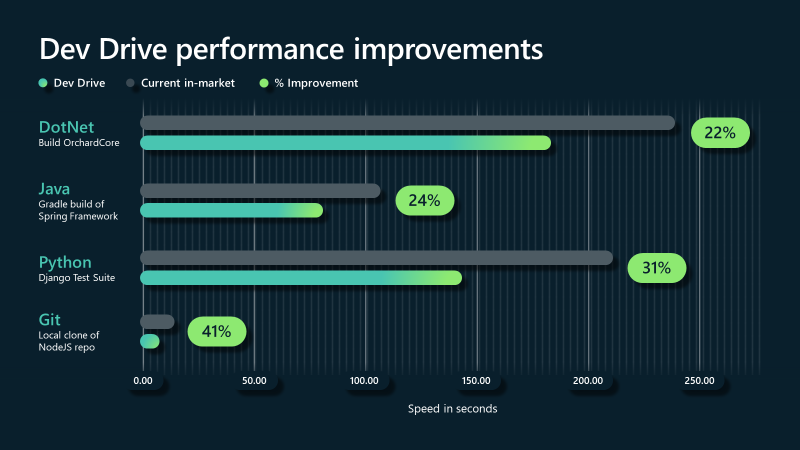
Use Dev Drive for perf improvements when developing in Visual Studio!
hidden hedge
People who use Windows 11 like me
But not tried it
Sounds interesting since it's a completely different disk format
hidden hedge
That's what I meant, brain fart. I heard ReFS a few times and I'm sure this is getting us all to beta test it
Ah and it requires an insider build of Win11 too, so that might be a while
If any of this information is still current 10 months later
hidden hedge
I imagine it's somewhat experimental
green sluice
I switched to a fresh install of Win11 Pro because of an ssd upgrade. Visual Studio told me about DevDrives. As I am I'm no preview or beta channels it appears to be no longer experimental 🤔
hidden hedge
The fact the feature is called dev drives seems to imply some kind of beta/experimental state. Otherwise, it'd just be ReFS
green sluice
I don't think so, they call it DevDrive because it enables "async" mode for Windows Defender on them. + ReFS which seems to be not available for Win11Pro, just Win11Pro Workstation.
sage ivy
so anyone played with Mover 2.0 (ue-main)? I tried to replace my Character Movement Component with it recently and I just couldn't get Mover 2.0 to stop on a dime like the old CMC, no matter how I configured the Settings and set them to exactly the ones of the CMC. Its almost like Mover 2.0 is producing extra movement ticks by itself no matter how much ground friction I put. with the CMC, you can stop on a single unit difference on your movement vector instantly with high friction... If someone can tell me if the way to move with Mover is really to just assign a CachedMoveInputIntent value like its displayed in MOVEREXAMPLES_API AMoverExamplesCharacter because for me, if I asked Mover to stop moving by setting CachedMoveInputIntent to 0, it will continue moving like 1 tick and mess up my system which needs you to stop moving right now. anyway, I revert back to the CMC for now since Mover appears to be flawed for my need.
 wanton elbow
Hi, I'm trying to install Unreal from the github source, but it's throwing up a lot of errors. I ran the Setup and GenerateProject batch files and tried to build it but it says its missing a lot of files. Could some maybe look at my error log files and maybe help me out? Thanks in advance:)
wanton elbow
wanton elbow
Hi, I'm trying to install Unreal from the github source, but it's throwing up a ...
If i build it in Rider it gives me this
 lucid minnow
Just to be sure, After building the engine from source is it safe to delete the binary build?
astral elm
lucid minnow
Just to be sure, After building the engine from source is it safe to delete the ...
errrm. At least for me the final .exe is in \UnrealEngine\Engine\Binaries\Win64\UnrealEditor.exe, so it wouldn't seem wise to delete that if I want to run it
lucid minnow
astral elm
errrm. At least for me the final .exe is in \UnrealEngine\Engine\Binaries\Win64\...
I don't think you understood my question. I have two different builds of the engine. I was using only the binary build before switching to a source build but that binary build takes up a decent amount of space so I was asking if itd be safe to remove it if I won't be using the binary build anymore. It seems that I can though.
astral elm
lucid minnow
I don't think you understood my question. I have two different builds of the eng...
ah you mean the one from the epic store. Yeah, one thing that is annoying is marketplace plugin access is based on installed store versions, but there's a workaround for that called "Legendary"
lucid minnow
astral elm
ah you mean the one from the epic store. Yeah, one thing that is annoying is mar...
I see. Interesting. I mean I don't really need anymore plugins right now anyway and any I do have I can copy and paste over I'm pretty sure.
 harsh hound
I
wanton elbow
Oh, I had done it on the UE5-main branch, maybe that's why it wasn't working
 untold kiln
Hi there. I am trying to change a function in engine source for AI. Specifically the brain component. How ever I cant seem to be able to break point the line I changed. I grabbed the engine from github and built in Development Editor and Debug Editor. Any ideas where I went wrong?
astral elm
untold kiln
Hi there. I am trying to change a function in engine source for AI. Specifically...
Sanity check : you are running from IDE in debug mode?
untold kiln
astral elm
Sanity check : you are running from IDE in debug mode?
Yes I am running from visual studio with Debug Editor. Is that the wrong configuration?
astral elm
untold kiln
Yes I am running from visual studio with Debug Editor. Is that the wrong configu...
Launching with "Press F5 (Debug > Start Debugging)" or the corresponding button in Visual Studio?
untold kiln
Yeah that or I'll right click the solution (Debug > Start new instance )
astral elm
Ok. next, can try chucking some breakpoints somewhere to make sure things are working like Kein suggested, GameInstance initialization area should be pretty sure-fire if I recall correctly
untold kiln
astral elm
Ok. next, can try chucking some breakpoints somewhere to make sure things are wo...
When I press F5 it opens the launcher to pick which project I want to use, and then it closes the debugger since the launcher is closed. Should I be switching to DebugGame Editor?
astral elm
untold kiln
When I press F5 it opens the launcher to pick which project I want to use, and t...
I usually run Development Editor to launch the editor. I forget the difference of running as DebugGame. I think that just runs the game, not the editor?
I don't think that will make a difference in terms of what breakpoints can be hit as far as the game goes
untold kiln
astral elm
I usually run Development Editor to launch the editor. I forget the difference o...
Using Debug Game Editor, I can break point GameInstance, and the AI Module. However I am trying to make a change in the braincomponent and it doesnt reflect my change when i use it.
 astral elm
untold kiln
Using Debug Game Editor, I can break point GameInstance, and the AI Module. Howe...
astral elm
untold kiln
Using Debug Game Editor, I can break point GameInstance, and the AI Module. Howe...
That sounds odd. You have made changes to source previously successfully or is this your first try at this?
untold kiln
This is my first time. I have made engine changes before in another engine but it was not for the brain component
astral elm
untold kiln
This is my first time. I have made engine changes before in another engine but i...
I would sprinkle some more lines of log around the general area of your interest to sanity check that something somewhere is actually changing and working
Once you are certain you can see log lines appearing on your changed areas, can try putting breakpoints in again
untold kiln
The constructor log is working. Maybe the restart logic function is overridden somewhere?
 astral elm
untold kiln
The constructor log is working. Maybe the restart logic function is overridden s...
astral elm
untold kiln
The constructor log is working. Maybe the restart logic function is overridden s...
at a quick peek, they are maybe overridden by StateTree/BehaviorTree?
untold kiln
Ahh I see behavior tree component overrides the function. I am hitting the breakpoint in there. Sorry for the confusion
astral elm
untold kiln
Ahh I see behavior tree component overrides the function. I am hitting the break...
no worries
 low heart
What casuses my source build to just break randomly without me touching it but messing with the projects
like I was working in my project then suddenly reopen it any of my projects and it says failed to load editor
now im rebuilding the editor
is that my only option?
am I doing something dumb
low heart
it can just randomly break like that though? or its me?
Severity Code Description File Project Line Suppression State Details
Error MSB3073 The command "X:\SourceBuildEngine\UnrealEngine-release\Engine\Build\BatchFiles\Build.bat -Target="GameliftProjectEditor Win64 Development -Project="G:\OneDayProjects\GameliftProject\GameliftProject.uproject"" -Target="ShaderCompileWorker Win64 Development -Quiet" -WaitMutex -FromMsBuild" exited with code 6. C:\Program Files\Microsoft Visual Studio\2022\Community\MSBuild\Microsoft\VC\v170\Microsoft.MakeFile.Targets GameliftProject 44
says this
This is me being dumb or ignorant?
says taht if I try and build any project
from source build
I only ask cause it happened earlier then suddenly all worked again so I figured I did something I couldnt tell I did
low heart
Now it keeps over heating my computer and blue screening me on engine build.. i9 13900k
 raven sonnet
Any good way to avoid this besides rebooting pc everytime? This happened while in UE5 and created a new c++ plugin. Or just something to live with and ignore?

And itll build properly next time I load editor
 olive lion
Hi everyone, dumb question here. Everytime I try adding new files to solution and then regenerate project file, my new added file automatically exclude from the project. Isn't regenerate solution means to update the project, is it?
wanton elbow
olive lion
Hi everyone, dumb question here. Everytime I try adding new files to solution an...
Not an expert, but I thought regenerate project files was related to refreshing Intermediate, .vs, etc files
olive lion
wanton elbow
Not an expert, but I thought regenerate project files was related to refreshing...
yeah, but that shouldn't touch anything like exclude file from project, doesn't it? I experienced this few days but not found a way to sovle this, I have tried rebuild the project but not worked.
low heart
How do I get Linux back as a server build option
it was there. I had changed my target platforms and it disappeared and now I cant get it back
 real salmon
Are there any good ways to speedup the ue5 source build time? Right now it takes 4 hours to build 4500+ modules (On latest ue5-main branch)
real salmon
Already got 8 core@4.5ghz. Also excluded source from windows defender
hidden hedge
real salmon
Are there any good ways to speedup the ue5 source build time? Right now it takes...
sounds like you're building all of the engine which for most projects is unnecessary
astral elm
raven sonnet
Any good way to avoid this besides rebooting pc everytime? This happened while ...
Seems like something has not shut down cleanly
low heart
olive lion
yeah, but that shouldn't touch anything like exclude file from project, doesn't ...
After you generate project files you have to open the SLN and build the project again. Shouldnt take long
Build the game not the engine
 olive lion
low heart
Build the game not the engine
olive lion
low heart
Build the game not the engine
Thanks, I'll try this later. I read somewhere on stackoverflow that generate project files will overdrive all the sln and I have to backup my vcxproj and vcxproj.filters.
astral elm
olive lion
Thanks, I'll try this later. I read somewhere on stackoverflow that generate pro...
There shouldn't really be anything important in the those files? We wipe Intermediate and regen solution every time cpp code changes significantly without bothering with any backups
olive lion
astral elm
There shouldn't really be anything important in the those files? We wipe Interme...
the problem is I'm experiencing that my new added files (header and source files) excluded from project every time I regen sln. Have first experience in engine source so it kinda frustrating me now.
astral elm
olive lion
the problem is I'm experiencing that my new added files (header and source files...
Ahh this is engine source, sorry I was thinking normal project cpp
Hmmm
So are your changes in the engine source or the project cpp?
astral elm
So you modify the engine and build it ok
That in itself should not make you have to regen game project solution
And regenerating game project solution shouldn't really be affecting engine stuff
 astral elm
olive lion
is this why things go wrong?
astral elm
olive lion
is this why things go wrong?
perhaps. Generating the engine solution should indeed be only done once, and in this case the vcxproj may be important to keep ( though I see no reason you should need to regen the solution )
olive lion
astral elm
perhaps. Generating the engine solution should indeed be only done once, and in ...
so whenever I need to add new source file I should do it in project solution?
astral elm
olive lion
so whenever I need to add new source file I should do it in project solution?
Engine is engine, Game is game. If you are doing Game specific stuff that can be kept in Game, better to do so. If you need to hack the engine, then a mans gotta do what a mans gotta do
Some things are probably better extended / implemented in Game rather than Engine, some stuff cannot be done anywhere except Engine
I tend to think better to touch the Engine as little as possible in our case
olive lion
Nice, thanks for the information. There's lots of new to me.
hidden hedge
Yeah it's always best to avoid modifying the engine because it makes upgrades a pain and it can just end up being technical debt, but sometimes you gotta do what you gotta do
But always make proprietary changes super visible and obvious with comments since they'll come in handy when you do merge an engine upgrade
The comment should always explain why the change was added and you should mark the end of the modification
 dark spoke
Writing manifest to /Users//Documents/GitHub/UnrealEngine/Untitled/Engine/Intermediate/Build/Manifest-1-UnrealPak-Mac-Development.xml
UATHelper: Packaging (VisionOS): Creating makefile for MyProject2 (no existing makefile)
UATHelper: Packaging (VisionOS): Total execution time: 5.02 seconds
UATHelper: Packaging (VisionOS): Couldn't find target rules file for target 'MyProject2' in rules assembly 'UE5Rules, Version=0.0.0.0, Culture=neutral, PublicKeyToken=null'
UATHelper: Packaging (VisionOS): Location: /Users//Documents/GitHub/UnrealEngine/Untitled/Engine/Intermediate/Build/BuildRules/UE5Rules.dll
UATHelper: Packaging (VisionOS): Took 5.13s to run dotnet, ExitCode=8
UATHelper: Packaging (VisionOS): UnrealBuildTool failed. See log for more details. (/Users//Library/Logs/Unreal Engine/LocalBuildLogs/UBA-UnrealPak-Mac-Development.txt)
UATHelper: Packaging (VisionOS): AutomationTool executed for 0h 0m 7s
UATHelper: Packaging (VisionOS): AutomationTool exiting with ExitCode=8 (8)
UATHelper: Packaging (VisionOS): RunUAT ERROR: AutomationTool was unable to run successfully. Exited with code: 8
PackagingResults: Error: AutomationTool was unable to run successfully. Exited with code: 8**
UATHelper: Packaging (VisionOS): Couldn't find target rules file for target 'MyProject2' in rules assembly 'UE5Rules, Version=0.0.0.0, Culture=neutral, PublicKeyToken=null'
why am I getting this error when packaging on mac, someone please help been dealing with this for weeks
limber reef
Hello guys!
If I close the engine when my custom tools are open I get the error below.
Exception occurred (0x00007FFFEE775FDC(ntdll.dll), UnrealEditor.exe): Access violation occurred while reading location 0xC0000005: 0x0000000000000000.
It happens on a engine class called FICUTextBiDi, which is used for internationalization.
I leave the CallStack below, even tho is not really informative.
I don't undestand if I implemented internationalization wrong, or if it's not related at all.
What do you guys think? 🙂


 spare lark
I am trying to build Unreal 5.4 from source
The build fails because of CmdLink.exe's build failed
How do I fix it ?
spare lark
The problem is from CmdLink but I dont know what id causing the error.
Any help would be highly appreciated
astral elm
spare lark
The problem is from CmdLink but I dont know what id causing the error.
Any help...
Have you followed closely the steps here?
https://dev.epicgames.com/documentation/en-us/unreal-engine/building-unreal-engine-from-source
spare lark
astral elm
Have you followed closely the steps here?
https://dev.epicgames.com/documentati...
Yeah
spare lark
hidden hedge
This was crossposted in <#221799439008923648>, and I don't think it's even a req...
I will try delete the CmdLink program and see if the build continues
 violet surge
I'm trying to compile 5.4 but I'm getting this error when starting. Any idea how to fix this?
\Engine\Source\Programs\UnrealBuildTool\UnrealBuildTool.csproj : error NU1100: Unable to resolve 'BitFaster.Caching (>= 2.4.1)' for 'net6.0'. PackageSourceMapping is enabled, the following source(s) were not considered: Microsoft Visual Studio Offline Packages, nuget.org.
Nevermind. Resolved it. Had to open ``C:\Users<YOUR_USERNAME_HERE>\AppData\Roaming\NuGet\NuGet.Configand add<package pattern="BitFaster.*" />under<packageSource key="nuget.org">`
spare lark
So update here.
I have built the engine and now it runs
But when I try to run my project from IDE. The project builds every time with 2456 somewhat tasks. Why is this happening everytime ?
Suppose I made some changes to my Character and then if I close the IDE and open again, it starts building the entire project again with 2400+ tasks which takes a hell lot of time
How do I fix this
Please help
hidden hedge
always make sure you're building the game target
spare lark
hidden hedge
always make sure you're building the game target
I did
But the issue still persists
hidden hedge
well I can't relate so I've always used a native project with a source build
spare lark
hidden hedge
well I can't relate so I've always used a native project with a source build
I have built both engine and my project in Development Editor configuration
I have another issue
hidden hedge
well you wouldn't do that with a native project
you'd just build the project always
spare lark
Once I build by project, I am only able to open Unreal Engine through that project solution. If I try opening UnrealEditor.exe it doesn't open, complains about DataSmith and Chaos plugin
spare lark
hidden hedge
you'd just build the project always
But I have to do the initial engine build
spare lark
Then I only build the project, but once I close the projects solution and try to run thr project -> boom -> IDE starts rebuilding the project
hidden hedge
you set the project as the startup project and always build and launch through the IDE
or if you really must, create a shortcut or batch file to UnrealEditor.exe supplying the uproject path as an argument
spare lark
hidden hedge
if it's a native project
I am hearing this term the first time. Would you mind defining "native project" in short
hidden hedge
Engine/
Project/
GenerateProjectFiles.bat
If successful, your UE5.sln contains the Project. also this shouldn't be new to you because I was talking to you about it last night
spare lark
Ohh yeah got it. I completely forgot about this.
So currently my project is Foreign project. Is this why the IDE rebuilds the project everytime.
spare lark
hidden hedge
Engine/
Project/
GenerateProjectFiles.bat
If successful, your UE5.sln contains ...
Btw, what are the benefits of Native Projects ?
hidden hedge
what I already told you. and if you ever use UGS down the line, it's what it expects
spare lark
Alright
 woven plover
Any good resources available for learning how to extend the editor in general? (aside from simply browsing the source code ofc)
violet surge
Tried to build 5.4 and when it tried to build LiveLinkHub it failed with this message Failed to find command StageLiveLinkHub. Below is the relevant info from log:
"D:\Engine\Binaries\DotNET\UnrealBuildTool\UnrealBuildTool.dll" LiveLinkHub Win64 Shipping -Manifest=D:\Engine\Intermediate\Build\Manifest.xml -Monolithic -EnableThirdPartyPlugins=true  -log="D:\Engine\Programs\AutomationTool\Saved\Logs\UBA-LiveLinkHub-Win64-Shipping.txt"
Log file: D:\Engine\Programs\AutomationTool\Saved\Logs\UBA-LiveLinkHub-Win64-Shipping.txt
Using 'git status' to determine working set for adaptive non-unity build (D:\).
Creating makefile for LiveLinkHub (no existing makefile)
Parsing headers for LiveLinkHub
  Running Internal UnrealHeaderTool LiveLinkHub D:\Engine\Intermediate\Build\Win64\LiveLinkHub\Shipping\LiveLinkHub.uhtmanifest -WarningsAsErrors
Total of 8915 written
Reflection code generated for LiveLinkHub in 3.1596882 seconds
Writing manifest to D:\Engine\Intermediate\Build\Manifest.xml
Building LiveLinkHub...
Using Visual Studio 2022 14.36.32545 toolchain (C:\Program Files\Microsoft Visual Studio\2022\Community\VC\Tools\MSVC\14.36.32532) and Windows 10.0.22621.0 SDK (C:\Program Files (x86)\Windows Kits\10).
Determining max actions to execute in parallel (24 physical cores, 32 logical cores)
  Executing up to 24 processes, one per physical core
Using Parallel executor to run 921 action(s)
------ Building 921 action(s) started ------
....
"D:\Engine\Binaries\DotNET\AutomationTool\AutomationTool.dll" -nop4 -NoCompile StageLiveLinkHub  -NoSign -Platform=Win64
Starting AutomationTool...
Parsing command line: -nop4 -NoCompile StageLiveLinkHub -NoSign -Platform=Win64
Initializing script modules...
AutomationTool is running as a child instance (uebp_UATChildInstance=1)
Failed to find command StageLiveLinkHub
AutomationTool exiting with ExitCode=1 (Error_Unknown)
BUILD FAILED
How to fix this?
astral elm
violet surge
How to fix this?
If you don't need that feature, you can consider leaving it out of the build
In any case missing AutomationTool issues can maybe be solved by rebuilding the .sln for that area
violet surge
astral elm
If you don't need that feature, you can consider leaving it out of the build
Yeah in the end I just removed it from InstalledEngineBuild.xml file. Then 2 more errors popped up related to some ViconStreamSDK and boost_vc141 or something like that
Removed that also
violet surge
Now this error popping up:
Source file 'D:\Engine\Binaries\Win64\ViconDataStreamSDK_CPP.dll' does not exist
while executing task <Copy Files="#Copy for Installed Win64" From="D:\" To="D:/LocalBuilds/Engine/Windows" Overwrite="True" Tag="#Installed Build Win64 Files" ErrorIfNotFound="False" />
at D:\Engine\Build\InstalledEngineBuild.xml(1138)
You do seem to be getting a fair bit more errors than expected. Are you certain you have gone through the source engine setup doc closely, step by step?
violet surge
Yup
1: Cloned from git
2: Ran Setup.bat like this:
Setup.bat -exclude=WinRT -exclude=Mac -exclude=MacOS -exclude=MacOSX -exclude=osx -exclude=osx64 -exclude=osx32 -exclude=Android -exclude=IOS -exclude=TVOS -exclude=HTML5 -exclude=PS4 -exclude=XboxOne -exclude=Switch -exclude=Dingo -exclude=GoogleVR -exclude=GoogleTest -exclude=LeapMotion -exclude=HoloLens
3: Ran GenerateProjectFiles.bat
4: Finally running installed build
violet surge
I don't think 5.4 branch will compile because of this change: https://github.com/EpicGames/UnrealEngine/commit/eebccaaa173d4d940d042ece5cfc6fa11252d40c
I did manage to compile though by downloading ViconDataStreamSDK_CPP.dll and boost_thread-vc141-mt-x64-1_75
 slow cipher
Hi everyone !
I would like to change a line in an engine plugin, then recompile the code to apply the change.
How can I do this ?
The file i want to edit is the following : "C:\Program Files\Epic Games\UE_5.2\Engine\Plugins\VirtualProduction\Takes\Source\TakeRecorderSources\Private\TakeRecorderActorSource.cpp"
Thank you for your help!
slow cipher
I tried to compile engine from source (to be able to edit code) and use it to open my project, but my media files doesn't appear anymore in the media player.


 sonic zenith
Cross posting here my issue, maybe people here are more familiar with engine versions mismatches with source builds:
#cpp message
Hi, I have a project that builds (and runs) fine on 5.3. I've changed the uproject engine association to a source build, then I open VS and build the Development Editor. It builds fine, but then when I try to start my project it tells me my 3 C++ modules are not build (or were built for a different engine version). It asks whether I want to rebuild, and it fails. The log contains very little info, it only says: "Incompatible or missing module" for each of my three C++ modules
 south vortex
delete you try deleting all the intermediate etc folders on your project?
so that you can 'start fresh' build against source for the project
spare lark
I couldn't find any solution other than keeping a launcher build of thr Editor for quickly opening and playing around with other projects
spare lark
violet surge
I don't think [5.4 branch](https://github.com/EpicGames/UnrealEngine/tree/5.4) w...
I spent an entire bay building 5.4 with everytime it failing to build
What's that rocket mode ?
astral elm
spare lark
What's that rocket mode ?
so for example we have made some mods to the source engine, but we do it very rarely.
but I like to be sure everything is working using that source engine, so I create an Installed Build like this
D:\UnrealSourceFork\UnrealEngine\Engine\Build\BatchFiles\RunUAT.bat BuildGraph -target="Make Installed Build Win64" -script="Engine/Build/InstalledEngineBuild.xml" -set:WithAndroid=true -set:WithMac=false -set:WithMacArm64=false -set:WithIOS=false -set:WithTVOS=false -set:WithLinux=false -set:WithLinuxArm64=false -set:WithDDC=false
This seems to be called a "rocket" for some reason. I am not really clear beyond the fact that we do make the Installed Builds so that people don't have to compile the engine themselves
real salmon
I'm trying to add a value to FDisplacementScaling. But when I open the material editor after build it crashes at line 1978 in NaniteShading.cpp
In suggestions what would cause it?
Is there a hardcoded value somewhere of the size of that struct?
I'm looking at all the places it's being used, but I can't find anything special.

 pliant spire
I keep getting a crash report:
"Assertion failed: ToSkeletalMeshAsset->Modify() ..... \Source\GeometryScriptingCore\Private\MeshAssetFunctions.cpp] [Line: 754]"
line 754 only has this text
"ToSkeletalMeshAsset->Modify()" where do I look to find more breadcrumbs or code to figure out whats going on?
USkeletalMesh* ToSkeletalMeshAsset, is at the top of the file. so im going to look into that file or code
ok i connected the dots TY
spare lark
astral elm
so for example we have made some mods to the source engine, but we do it very ra...
I will try learning more about this. Thanks
violet surge
String tables are completely borked in 5.4 branch on git.
south vortex
spare lark
Suppose I made some changes to my Character and then if I close the IDE and open...
Are you using Rider? If so, there is a bug that is fixed in ue5-main for 5.4
That is what is causing Rider to constantly want to recompile all source files all the time. Was driving me nuts...
spare lark
south vortex
That is what is causing Rider to constantly want to recompile all source files a...
It was happening to me in both Visual Studio and Rider
south vortex
If you were switching between them, then Rider would still be causing it, because of the Intermediate folder tricking UHT into thinking it needed a full rebuild.
At least that is my understanding reading the pages of text about it.
All I know is that PR seems to fix it (for me)
@kein - see above if you were also having this issue
south vortex
kk - obviously a seperate issue then
south vortex
can this be updated to NOT exclude "googleTest"? I just copied and pasted this (since it is pinned in this channel) - and it fails when trying to actually build the engine.
Searching these forums, apparently googleTest is a hard dependency (only epic knows why...)
So it needs to always be included. I'm building 5.3.2 fine now with it.
thanks
hidden hedge
and a lot of those exclusions are redundant
iron dome
What the hell is "Dingo"?!
hidden hedge
probably a prototype name for a console
I don't know if you would ever get console files from setup.bat
since you'd usually have licensee p4 access, but if you don't I remember it being some jank with FTP to get them
 full stag
Hello, I'm trying to use the source version instead of the launcher version. Everything works well except one thing :
During Packaging in shipping, the C++ compilation (I use full rebuild for safety reasons) with the source takes too much time (It was the first time, but it took more than one hour) whereas the launcher version takes only 4 minutes.
Is there a check somewhere to avoid this ?
Or I should use an Installed Build ?
 astral elm
full stag
Hello, I'm trying to use the source version instead of the launcher version. Eve...
astral elm
full stag
Hello, I'm trying to use the source version instead of the launcher version. Eve...
I think having "native" build configuration should help. Our builds off source which are not set up as native are on the slow side as well
Installed build would be faster, I believe yes
hidden hedge
native vs foreign isn't going to make a difference, a full rebuild is certainly a self-imposed handicap though
installed would just because you're precompiling the engine
slow cipher
slow cipher
I tried to compile engine from source (to be able to edit code) and use it to op...
Does anyone have any ideas to solve that problem?
limber reef
Hello guys,
is it possible to make a custom group stat, which i can do with the following:
DECLARE_STATS_GROUP(TEXT("Test"), STATGROUP_Test, STATCAT_Advanced);
And add to it existing stats which are already into other existing groups? I would like to make a new group in where i can see all the "most important" cpu/gpu/draw stats.
But when i try to run the following I get an error saying the the stat is already declared.
DECLARE_DWORD_COUNTER_STAT_EXTERN(TEXT("Skel Mesh Tris"), STAT_SkelMeshTriangles, STATGROUP_Test, );
Is there a way to achieve this?
wanton elbow
Hey everyone, what is a good rule of thumb for updating UE5 github source? Should I run the setup and GenerateProjectFiles batch files everytime I fetch from the origin? Or do I just fetch and then just go straight to building from the IDE?
median void
What is logical place to add code which adds an entry to a node's right-click menu? I tried adding it to my module's StartupModule but GEditor, which I use to get my editor subsystem, is still null at this point.
 south vortex
Is there an equivalent of the setup.bat --exclude=... example script - but for plugins? i.e. a list of plugins that can/should be turned off on a new source build for most apps? For example - even though I do --exclude=IOS - the engine still has some IOS plugins enabled out of the box.
I can go through the list myself - but just wondering if someone has a good list already? I actually vaguely remember reading/seeing one once, but I cant find it on google/discord searches - but I'll keep looking
real salmon
ue5-main won't build because of a commit. https://github.com/EpicGames/UnrealEngine/commit/87fe9c10c47f274fecb6fe7bd433bcb8196834b4
Anything to do about it other than wait?
hidden hedge
real salmon
ue5-main won't build because of a commit. https://github.com/EpicGames/UnrealEng...
pretty much the dangers of using the main branch
it won't always build
nor is there any level of guarantee that it will build
real salmon
Hard to have a working PR when I need changes after that commit 😅
hidden hedge
it's not like Epic is ever in a hurry to review PRs unless you've got an open dialogue with someone at Epic who will review it
real salmon
Yeah, but I can't test it out locally either
south vortex
real salmon
Yeah, but I can't test it out locally either
pick an earlier commit that was compiling on ue-main a few days ago. Branch from there, test your PR against that
south vortex
kk - found it: https://gist.github.com/MilkyEngineer/a1e953f87509877adc4587cf8776c8a2
This is maintained from MilkyEngineer who used to be an Evangelist at Epic Games.
In the gist he mentions you can do "DisableEnginePluginsByDefault": true, in your Uproject so that all plugins are off, and then just enable the list he listed for the "minimum" to work.
Gist
Minimal project descriptor that "Disables Engine Plugins by Default" for Unreal Engine - Minimal-5.2.uproject
 eager flame
Anybody knows where is the code that draws the translation gizmo?
I tried all the places I could think of
 last swallow
sorry to ask, but what is the name of the tool that allows you to distribute a custom build of unreal via perforce?
 smoky goblet
last swallow
sorry to ask, but what is the name of the tool that allows you to distribute a c...
smoky goblet
last swallow
sorry to ask, but what is the name of the tool that allows you to distribute a c...
UnrealGameSync? (UGS)
opal gorge
How exactly does the editor know what CL of perforce you are using?
astral elm
opal gorge
How exactly does the editor know what CL of perforce you are using?
perhaps related : we realized our source engine was not giving changed files correct metadata on engine version : we updated Engine/Build.version file manually with the matching "Changelist" value and set "BranchName" to "Unknown" - not sure if this is best practice but now files touched by the source engine seem to be ok
    "MajorVersion": 5,
    "MinorVersion": 2,
    "PatchVersion": 1,
    "Changelist": 26001984,  <<< this was 0
    "CompatibleChangelist": 25360045,
    "IsLicenseeVersion": 0,
    "IsPromotedBuild": 0,
    "BranchName": "Unknown"  <<< this was "UE5"
}```Just use a UAT/BuildGraph step to set it
violet surge
If any one planning to use 5.4 branch from git and you heavily use String Tables in your project, please don't. String Tables are borked in 5.4 as of now.
 hidden hedge
Uasset, CSV, or are both affected?
violet surge
Never tried CSV but UAsset is affected.
hidden hedge
that's the one I'd expect them not to break over CSV
violet surge
What's worse is it's affected both editor and packaged
astral elm
I hope this has been reported to Epic
eager flame
Hey guys
I am trying to find that part in the source where the engine changes its rendering when selecting different buffer visualizations
And also, how and where it creates these small viewports to which it renders the each buffer
Is it all part of the main render function, or is there some other place where these visualizations are rendered?
I've been running in circles for 2 days already, lol
 torpid field
Hey guys, brand new to source coding. I got UE5.3.2, did all the steps on the GitHub (opened the 2 bat files and right click in VS to build UE5), but immediately after when i play it in VS it has 1 error. Building project "AutoRTFMTests.vcxproj" failed.
I also after changed Startup Project dropdown menu and forgot what the original was.
south vortex
torpid field
Hey guys, brand new to source coding. I got UE5.3.2, did all the steps on the Gi...
Change the dropdown to UE5 to build the engine source.
violet surge
astral elm
I hope this has been reported to Epic
I'm keeping an eye on the 5.4 branch. I never expected such a breaking change.
 torpid field
south vortex
Change the dropdown to UE5 to build the engine source.
torpid field
south vortex
Change the dropdown to UE5 to build the engine source.
There is no "build engine source" are you talking about UnrealBuildTool?
south vortex
torpid field
There is no "build engine source" are you talking about UnrealBuildTool?
No.
I use rider - but I was talking about the solution configuration. A new UE source install will default to automation tool. Make sure you've got it selected to UE5. VS will have a similar option somewhere
 torpid field
south vortex
No.
I use rider - but I was talking about the solution configuration. A new UE ...
torpid field
south vortex
No.
I use rider - but I was talking about the solution configuration. A new UE ...
Ah i had to right click the UE5 file in VS and Set As Startup File. Currently opening. Fingers crossed!
violet surge
violet surge
If any one planning to use 5.4 branch from git and you heavily use [String Table...
I'm guessing this is the culprit: https://github.com/EpicGames/UnrealEngine/commit/4701ba824a65f46387bbf98ecc92be77b39a3842
Ha, guess it's already fixed: https://github.com/EpicGames/UnrealEngine/commit/a51ed8442674fe9ef21fbe4934961d59118ad084
median void
I have been trying to find a way to get the selected nodes in the blueprint editor graph, but I’m stuck at getting the current active graph. I have looked in various classes like FBlueprintEditor, SGraphEditor, etc. and followed function calls but I didn’t get very far. Any tips on how I can achieve this?
 calm goblet
Actors have BeginPlay(), EndPlay(), but I specifically want an OnActorLoaded/OnActorUnloaded event I can hook up to the world parititon system in order to save the state of actors that are loaded and unloaded by world partition. Does anyone know of a delegate I can use for this? So far i've found UWorld.OnActorSpawned/Destroyed but I need a specific one for world parition. Any answers would be appreciated
torpid field
Hey, i know this is a challenging task. But if i wanted to make the engine more deterministic, where is the best place to start?
astral elm
torpid field
Hey, i know this is a challenging task. But if i wanted to make the engine more ...
One presumes you are talking about the physics engine ( Havok ) - perfectly deterministic physics are a very challenging field. I would look for other solutions to your problem, whatever the problem is
calm goblet
Thank you for this piece of info, yeah apologies for the wrong channel. Very helpful I will give that a try
calm goblet
calm goblet
Actors have BeginPlay(), EndPlay(), but I specifically want an OnActorLoaded/OnA...
If anyone needs this info in future, FWorldDelegates::PreLevelRemovedFromWorld, and FWorldDelegates::LevelAddedToWorld are what you want. These delegates fire when actors are streamed/unstreamed by world partition, you can iterate the level for its actors. @stable hemlock appreciate the help
 burnt sonnet
Hi all. Looking for some advice.
I have a TArray of FStrings, for ImGUI/ImPLOT I need to be able to convert that into a c-array of const char*
What's the best way to do this safely? I need copies of the FString, so I can't just use the result of TCHAR_TO_UTF8, I then need to copy the string using a calloc and subsequent free function, but I'm really trying to avoid doing anything in raw memory within UE.
burnt sonnet
Thanks Kein, I tried there unfortuantely. Seems like there isn't a nice way around this
torpid field
astral elm
One presumes you are talking about the physics engine ( Havok ) - perfectly dete...
Outside of physics though, isnt the way the engine itself does time non-determinsitic?
astral elm
torpid field
Outside of physics though, isnt the way the engine itself does time non-determin...
I believe engines are also wary of promising deterministic behaviour as the underlying platform architectures may cause various timing issues and such.
Basically if you want to create a deterministic crossplatform game, I believe it is up to you to implement the deterministic logic
 thorn birch
Is there a way to derive my own FComponentVisualizer from FZoneShapeComponentVisualizer (ZoneGraphEditor) ?
Details:
I have a component derived from UZoneShapeComponent with additional properties for each shape point (a 2nd array which is kept in sync). I copied the FZoneShapeComponentVisualizer source into my own visualizer class, changed the name and access to the component and registered it in my editor module. It works.
Now the FShapePointDetails is picking up my visualizer and casts it to the zone visualizer - which somehow works because it is nearly identical except. And I have a bad feeling about this.
 coral comet
Quick question, should I be using 4.27-plus branch or 4.27.2-release tag?
I clone the branch and it doesn't compile for me
astral elm
coral comet
Quick question, should I be using 4.27-plus branch or 4.27.2-release tag?
I clon...
Depends on what you want. 4.27+ is a sort of LTS ( Long Term Support ) branch which has some critical fixes, afaik mostly of interest to mobile developers
coral comet
astral elm
Depends on what you want. 4.27+ is a sort of LTS ( Long Term Support ) branch wh...
I have a project that is on 4.27 launcher version that I have to port to github version
thank you kind man
coral comet
Hi! Sorry for bringing this from more than a year ago, but removing this just fixed my problem, so it would be very helpful for me to know how did you know that this particular folder was causing this problem?
astral elm
coral comet
Hi! Sorry for bringing this from more than a year ago, but removing this just fi...
It is general knowledge that deleting Intermediate / Binaries / DDC can solve odd situations quite often - though the original poster perhaps knew this with even more precision
 heady sparrow
coral comet
Hi! Sorry for bringing this from more than a year ago, but removing this just fi...
heady sparrow
coral comet
Hi! Sorry for bringing this from more than a year ago, but removing this just fi...
I googled it... I do not know the true way the visual studio dte folder works
The error message at least had a couple forum posts about that
 half matrix
Moved post to #source-control
 leaden sequoia
How can I install marketplace plugins to the path of UE source version from Launcher.
Not by copying binary version to project Plugins folder. Not this answer please
Somewhat helpful rather than wasting huge space. Thank you
astral elm
Aye Legendary rules
south vortex
 ionic raptor
Does anyone know what you do to get support for Xbox and PlayStation in the editor? I'm part of the ID@Xbox program and a PlayStation partner, but I don't really know where to go from here.
hidden hedge
ionic raptor
Does anyone know what you do to get support for Xbox and PlayStation in the edit...
You need to verify your access with Epic, after that you can get access to the engine sources for those platforms. And yes, it requires a source build of the engine
 uncut sky
deft hemlock
So I have to bring in the source code + dependencies, then build on the offline ...
uncut sky
deft hemlock
So I have to bring in the source code + dependencies, then build on the offline ...
I have no Internet access to my device can i download the Dependencies and install it manually?
Does anyone knows a way to build unreal engine with offline machine
uncut sky
I download the source code how i can download the Dependencies to copy it
pliant spire
is there a way to find out what exactly happens when i press a specific button in the UI?

the python api does not match the perceived function and i need to dive deep to learn what UE is executing
astral elm
pliant spire
is there a way to find out what exactly happens when i press a specific button i...
yes, you just have to patiently search through the source for it ( note you don't even need a 'real' source version, just IDE like Visual Studio to search with makes life easier. )
uncut sky
My machine is offline
astral elm
uncut sky
My machine is offline
This is what setup.bat does.
.\Engine\Binaries\DotNET\GitDependencies\win-x64\GitDependencies.exe %PROMPT_ARGUMENT% %*
if %ERRORLEVEL% NEQ 0 goto error

rem Setup the git hooks...
if not exist .git\hooks goto no_git_hooks_directory
echo Registering git hooks...
echo #!/bin/sh >.git\hooks\post-checkout
echo Engine/Binaries/DotNET/GitDependencies/win-x64/GitDependencies.exe %* >>.git\hooks\post-checkout
echo #!/bin/sh >.git\hooks\post-merge
echo Engine/Binaries/DotNET/GitDependencies/win-x64/GitDependencies.exe %* >>.git\hooks\post-merge
:no_git_hooks_directory

rem Install prerequisites...
echo Installing prerequisites...
start /wait Engine\Extras\Redist\en-us\UEPrereqSetup_x64.exe /quiet /norestart

rem Register the engine installation...
if not exist .\Engine\Binaries\Win64\UnrealVersionSelector-Win64-Shipping.exe goto :no_unreal_version_selector
.\Engine\Binaries\Win64\UnrealVersionSelector-Win64-Shipping.exe /register
:no_unreal_version_selector```

If you really can in no way circumvent the offline requirement even temporarily, I guess you must look closely at what these things do and duplicate on the offline machine.Thr problem is that gitDependencies.exe i have no idea what that do and if it needs Internet connection or not
astral elm
uncut sky
Thr problem is that gitDependencies.exe i have no idea what that do and if it ne...
It fetches stuff from internet if I recall correctly. Run it on an online machine to see.
If you catch the log, you can theoretically collect all the stuff it fetched. Likely most of that just goes into the engine folders anyway, so that should be easy. Prereqs is probably the tough bit, similarly just catch the logs
uncut sky
I will try to do it manually but just in case if it didn't work can someone tell me how much is the size of the Dependencies
astral elm
uncut sky
I will try to do it manually but just in case if it didn't work can someone tell...
In total, you need about 300Gb of space for a full source installation after it has finished compiling. I doubt if anybody remembers just the deps size off the bat.
uncut sky
astral elm
In total, you need about 300Gb of space for a full source installation after it ...
I don't have disk space problem my pc have Internet problem
astral elm
uncut sky
I don't have disk space problem my pc have Internet problem
Have you considered just using a different, more lightweight engine like Godot or something
uncut sky
I already have the engine and projects but the launcher version doesn't support server build that why i am building source
south vortex
could you also do that thing where you build the source code on desktop A, and do the thing to distrubute your source built version as the compliled version to Desktop B.
There's a term for it, someone here smarter than me will tell us what it is again.
But larger studios do it to have the best of both worlds (source build, but versioned as a built editor)
hidden hedge
south vortex
could you also do that thing where you build the source code on desktop A, and d...
big studios will probably use UGS rather than installed builds, and precompiled binaries will be distributed among non-programmers
iron dome
Close the error list. Open the output tab. Read the errors.
 lapis scroll
south vortex
lapis scroll
south vortex
 jagged surge
Does the main branch (currently 5.5) receive daily commits from 5.4 ?
hidden hedge
they use a tool called robomerge internally which will automerge most //UE5/Release-5.4 changes to //UE5/main
though I dunno why you'd use main as a release just came out
jagged surge
just for testing purposes..for instance, 5.4 doesn't have nanite skeletal meshes
after making a pull , do I have to run ./setup.bat and ./generateProjectFiles.bat or just the latter ?
 limber reef
I came across an odd bug in 5.3.2. Can you tell me if you can reproduce?
- Open any level with some animated characters in it
- Run the level in PIE mode
- Select any character from the outline
- Go in the transform details
In the rotation property, if you drag the X or Y values around everything is fine. But if you drag the Z value every animation in the level stops.
As soon as you stop dragging they resume.
Why is that?
 rugged geyser
I'm getting a pesky build fail on this one module which I pulled from Unreals source via 5.2 - any ideas?
..\Plugins\Bridge\Binaries\Win64\UnrealEditor-MegascansPlugin.dll : fatal error LNK1120: 14 unresolved externals
astral elm
rugged geyser
I'm getting a pesky build fail on this one module which I pulled from Unreals so...
I seem to recall I disabled a couple of unneeded modules/plugins when building 5.2 from source due to similar issues
rugged geyser
Thanks. I gave up, wiped the folder and repulled all..it compiled straight away. Ghost issue
astral elm
Are you sure you have done all the setup steps first as shown in docs? ( run setup.bat, somethingdependencies.bat? )
Well, before we ponder that issue, you should probably reach the stage where you actually get a successful build and run
Or you mean it has been successful 4 times before, but now it broke?
Sorry, don't have time to go that deep right now
The log having all that "Excluding module" seems to indicate something has gone wrong in your setup for sure... I would consider checking your local changes, perhaps rolling back to your last working state
"Not under compatible directories" seems very sus
I would presume to think something you have done between the last working build and now has gotten things confused
You should have an absolute minimum of 300 Gb free space, preferably more
I guess if you have that, I would try clearing Binaries + Intermediate and trying again
I'm afraid I don't know what is wrong, I have never seen this issue. I would recommend sanity checking that you have 100% certainly followed the setup steps for your engine version
https://dev.epicgames.com/documentation/en-us/unreal-engine/building-unreal-engine-from-source?application_version=5.3
hidden hedge
At least show the output from the output tab
 ember sundial
How it is possible that the bug which make the engine rebuild each time you build your project is still here, since 2014... I can't find any solution, forums, discord, all checked...
astral elm
ember sundial
How it is possible that the bug which make the engine rebuild each time you buil...
a) installer build
b) native project
That said, I don't recall having this problem even having 'foreign' project and source fork
hidden hedge
though Rider did have a bug regarding this if you use it
so you should upgrade in that case
ember sundial
astral elm
a) installer build
b) native project
What do you mean ?
ember sundial
hidden hedge
though Rider did have a bug regarding this if you use it
I use VS
hidden hedge
ember sundial
What do you mean ?
native build is how epic organises their project. the project is a subdirectory of the engine root
ember sundial
I found forum post about this bug since 2014 and no one found a real solution. Some people just have it and can't do nothing.
hidden hedge
saves time compiling at least
ember sundial
hidden hedge
native build is how epic organises their project. the project is a subdirectory ...
This is not the problem. When I build my project with any launcher version, only my project (and only the changes) are compiled (normal). But when I use any source version, it rebuild all the engine, each time.
hidden hedge
?
ember sundial
https://forums.unrealengine.com/t/project-causes-ue-source-to-rebuild/1249579/2
https://forums.unrealengine.com/t/rebuild-source-code-every-time/279858
https://forums.unrealengine.com/t/rebuild-all-engine-each-time-i-build-any-project-very-long-times-to-make-any-minor-change/145358
https://forums.unrealengine.com/t/why-rebuild-the-entire-ue4-when-i-build-my-project/10010
All of them are about this bug.
hidden hedge
and are you going to describe what you've actually tried and how your engine and project are laid out relative to each other?
ember sundial
What do you mean ? It's ANY project, whatever how you create it, whatever it's perfectly compiling on launcher version. Even if it's a purely empty project. It doesn't matter.
The engine from source is the release 5.3.2 (but it will do the bug with any version)
astral elm
ember sundial
The engine from source is the release 5.3.2 (but it will do the bug with any ver...
Sanity check:
- You have Engine in Folder A, it has been compiled and can run the editor.
- You have Game in Folder B, it has been set to use the engine in Folder A.
- You open the Game .sln, and Run
ember sundial
astral elm
Sanity check:
1) You have Engine in Folder A, it has been compiled and can run t...
Yep.
The project doesn't matter, the engine version neither. I'm pretty sure it's something else. An environment variable or whatever.
astral elm
Well, I haven't had this problem, but I would try putting Game in Engine Folder A root, then it becomes a 'native' project.
ember sundial
astral elm
Well, I haven't had this problem, but I would try putting Game in Engine Folder ...
I know, people who don't have this bug never met it. But people who had it once have it forever...
astral elm
I suspect there is some confusion with how to set things up ( Run configurations ), or something. Perhaps you should show your IDE run configuration ( for Game, not for Engine like I have here )
 hidden hedge
the startup project has classically been the main killer
astral elm
Which is definitely mentioned in the Fine Manual
https://dev.epicgames.com/documentation/en-us/unreal-engine/building-unreal-engine-from-source?application_version=5.3
ember sundial
astral elm
I suspect there is some confusion with how to set things up ( Run configurations...
It's not this.

I know how to build my project, and it builds perfectly when I use any launcher version.
So no, it's not a miss-config or anything like this. It's just a shitty bug that Epic don't care about.
astral elm
ember sundial
So no, it's not a miss-config or anything like this. It's just a shitty bug that...
Have you tried native or installer...
hidden hedge
the launcher version doesn't because it's essentially an official installed build
native will mostly work since that's what Epic actually uses
ember sundial
I think I fixed it. Right click on UE5 project and launch the code analyse (not sure it's written this way in english). It seems to have fixed the problem somehow and it seems to last even if I close/reopen.
Maybe the files tracking the modification were not sure for some reason and this recreated it.
I don't know.
astral elm
So, could you explain what the case is, so we know for future generations to come?
Given user experiencing Problem A ( as given above: source rebuilding on any game-scope change ( I think? ) ), what is the cause and the solution?
Not at all, I simply thought it was 'not a bug' but user error
Follow up question : does using Native style project solve it?
I see I see
ember sundial
ember sundial
I think I fixed it. Right click on UE5 project and launch the code analyse (not ...
Nvm, I added a plugin to the project and the bug is back...
Or maybe it's because I generated project file again...
opal gorge

Uhhhh
28,000??
Is that right...?
For 5.4
I've never had more than a few thousand
iron dome
opal gorge
28,000??
This is what you get when you completely disable unity and build the engine.
I'm surprised it's still that low.
Foreverrrrrrr
opal gorge
Hmm
thought I had unity builds on
Never remeber a new version of the engine having that much to build. Full recompiles in 5.3 were only like 7000 or so
iron dome
You'd specifically have to force disable it manually for that to happen. And not just for your module. We're talking like a build configuration. Xml change.
opal gorge
Hmm I get weird errors when trying to build 5.4
Specifically things about MaterialX
What even is MaterialX?
opal gorge
MaterialXOpenPBRSurfaceShader.cpp(11): Error : 'FMaterialXOpenPBRSurfaceShader::FMaterialXOpenPBRSurfaceShader(UInterchangeBaseNodeContainer &)': symbol cannot be defined within namespace 'MaterialX'
So odd
Wonder if it's an issue with my build chain being too new
 worldly wadi
I adjusted the build configuration to use all cores and my CPU is usually at around 90+% during the build process but it still takes 5+ hours to build the engine.
Is there anyway to make the source build smaller, e.g. not include all features/modules, in order to speed up build times?
worldly wadi
Ah thanks!
astral elm
When I get a clean version of engine source, it doesn't have a Changelist number in Engine/Build/Build.version - this seems odd to me? I recall I added that manually for our source fork because we were getting warnings like this:
Asset has been saved with empty engine version. The asset will be loaded but may be incompatible
    "MajorVersion": 5,
    "MinorVersion": 3,
    "PatchVersion": 2,
    "Changelist": 0,
    "CompatibleChangelist": 27405482,
    "IsLicenseeVersion": 0,
    "IsPromotedBuild": 0,
    "BranchName": "UE5"
}```ZeroEngineVersionWarning to false in DefaultEngine.ini
I guess is the magic
 fringe phoenix
I have an extended version of the engine, and now when I build a project that's mostly just the 3rd person starter content I get this error:
CreateProcess() returned 570.
Has anyone seen this before? I can repro pretty reliably - I suspect it's my version of Visual Studio - I just use the 17.9.6 build tools at this point
Definitely getting Internal Compiler Errors, for whatever reason, but those seem to go away on 2nd/3rd compiles? Very odd
fringe phoenix
I did, nothing that seemed to fit which is why I came here
yep, tried that. I'm thinking maybe 17.9.6 isn't packaging correctly? Right now I'm just trying older versions of the build tools
 small tree
I recently set up a unreal project with engine source code to use UGS so that the artists on my team would just need to sync on perforce the project and source code then have UGS to sync the precompiled binaries. Standard stuff. However, when testing this with one of the artists, they were able to sync the precompiled binaries through UGS just fine, no errors, but when trying to open the editor, nothing would open. Task manager showed UE Editor but with no movement of doing any activity.
Has anyone here seen this behavior before in their experience setting this up?
Edit: I fixed this. Turns out you need to have your non building team members run setup.bat then can sync and open the editor properly
 cobalt fox
Is there a proper guide besides the GitHub page of how to build from source, a video and what some errors do mean? I successfully compiled and built it once but had to reinstall my computer now it won’t build and gives me some same error each time it’s almost complete..🤣 going insane soon and all help appreciated🙏❤️
cobalt fox
At work atm but can send you the output log 😅
cobalt fox
From what I could understand yesterday was some makefile not being able to be created or something but let me double check once I get home
cobalt fox
Apparently it works😂 I let my computer build the source code; “rebuild” rather than build after I downloaded it and had it setup with the bat files and when I got home it succeeded
Think I tried to build it around 5 times with “Build” without any success but rebuild worked it seems
And nowhere have I read that rebuild is an option 😅
 dense wraith
hey guys, so I've been plagued for months by my audio being broken in 5.3 and i'm trying to get to the bottom of it. Attached is a screen shot of the warnings in the editor which are:
[2024.05.02-15.25.03:668][ 0]LogAudio: Warning: FAudioDevice::Init Failed!
[2024.05.02-15.25.03:668][ 0]LogAudioMixer: Warning: Audio Platform Device: XAudio2 was not initialized. (File D:\build++UE5\Sync\Engine\Source\Runtime\Windows\AudioMixerXAudio2\Private\AudioMixerPlatformXAudio2.cpp, Line 1504)
[2024.05.02-15.25.03:668][ 0]LogAudioMixer: Warning: Audio Platform Device: XAudio2 was already tore down. (File D:\build++UE5\Sync\Engine\Source\Runtime\Windows\AudioMixerXAudio2\Private\AudioMixerPlatformXAudio2.cpp, Line 698)
The issue persists across all projects in 5.3.2 (blueprint and cpp), but not in any projects in other versions of engine (5.2, 5.4). So i think it's a problem with my engine install. I've tried reinstalling 5.3.2 from the Epic Games Launcher, but the problem persists.. I've compiled 5.3.2 from the github source, and it has no problems.
If i create a brand new cpp project, open the solution and navigate to the listed source file (AudioMixerPlatformXAudio2.cpp) and open it up, intellisense gives the errors seen in the seconds screenshot
I'm not super well versed in VS so i'm wondering if anyone could offer any guidance?
Also weirdly I don't have a D:\ drive on this machine (I used to?) so i'm not sure why it's referencing that.


Also - if I can't fix the audio in Epic Games version of UE5.3.2, is it safe for me to use my own engine (unedited) compiled from source with others (via perforce) using the regular build? Or is it a bad idea?
hidden hedge
dense wraith
hey guys, so I've been plagued for months by my audio being broken in 5.3 and i'...
since you haven't built the engine yourself, any paths in warnings/checks/crashes are going to refer to the source path on the build server, not your local machine
vanilla VS is going to give random intellisense errors. ignore them, buy resharper, or buy rider
and it seems that there is information in this log, but since it's a screenshot, it seems like the useful information is out of view
dense wraith
hidden hedge
since you haven't built the engine yourself, any paths in warnings/checks/crashe...
ok thanks, that makes sense
dense wraith
hidden hedge
and it seems that there is information in this log, but since it's a screenshot,...
sorry bout that. here's the log
hidden hedge
All you can really take from that is bool FMixerPlatformXAudio2::InitializeHardware() is returning false
which should be printing a warning
but providing you downloaded symbols I suppose you can just step through the function
and it looks like it'll only fail if it can't load the DLL for XAudio or XAudio2Create() fails
the DLL it loads is located in Engine/Binaries/ThirdParty/Windows/XAudio2_9/x64/xaudio2_9redist.dll
dense wraith
hidden hedge
the DLL it loads is located in Engine/Binaries/ThirdParty/Windows/XAudio2_9/x64/...
I did find this, I tried copying the .dll from the working source engine binaries to the epic games version binaries, still not working
dense wraith
hidden hedge
but providing you downloaded symbols I suppose you can just step through the fun...
i will try to do this.. i'm not usually a cpp person and haven't really used VS much so figuring it all out still
dense wraith
ok an update... Weirdly, when I run the editor from DebugGame Editor configuration the audio issue is fixed. Does this mean it's something wrong with my Development Editor configuration? Would that persist even across fresh installations of the engine??
Attached are the two logs on start up - notice FAudioDevice fails on the Development editor but not in DebugGame editor
I don't know much about running the editor from VS so would be interested to hear anyone's thoughts about why this could be happening. Thanks in advance!
@hidden hedge i appreciate you pointing me in the right direction 🙂
hidden hedge
well that's odd because Development and DebugGame runs on the same binaries, it's only different for your project-level modules
dense wraith
yeah super weird, makes no sense..
might try reinstalling VS
although i think it's not really a VS thing. If I launch a completely clean blueprint project with UnrealEditor-Win64-DebugGame.exe it works
 cedar shard
Compiling a fresh 5.4 from source, this seems very VERY off... are there things I can disable (projects to unload) if I'm looking to develop specifically for win64 and not mobile or mac?

All of my other engines when compiled amounted to just less than 150gb.
I will probably start over and run the setup.bat with the parameters listed by developer100 to avoid all of this extra space being consumed.
https://forums.unrealengine.com/t/ue4-built-from-source-takes-170gb-disk-space/158081/2
Epic Developer Community Forums
I also have 500GB SSD, and tried to reduce the size as much as possible. Mine is 90GB for UE 4.25. I run setup.bat with this command line in order to exclude anything different then Win64 target setup.bat --exclude=Mac --exclude=osx64 --exclude=osx32 --exclude=iOS --exclude=IOS --exclude=ios --exclude=Linux --exclude=linux --exclude=Linux32 --...
Ah, I think I made the mistake of building the solution and NOT the UE5 project.

Another user did this as well
 maiden harness
Was routed to this channel instead because it's the right place for this question:
I'm getting an error when trying to run a .exe server build.
"Serialization Error: Action Needed, Corrupt data found, please verify your installation."
Created this project on C++ launcher installed version, then swapped to source compiled version.
I'm figuring out if there's an issue with the source compiling or if it's an issue with the project itself.
Q1: You can swap from a C++ launcher installed project to targeting a full source compiled engine installation?
Q2: The Setup.bat process finds missing dependencies and installs them, so if it is closed/fails partway through, it'll start up where it left off previously?
Q3: I know you can Verify a launcher installed version of the engine, can you Verify a source compiled one at all?
 hallow yacht
cedar shard
hallow yacht
cedar shard
I did a build solution with unrealbuildtool after win64. After like 14 hours I got like 11 successful and 2 failed. Is that bad and not how it's supposed to be done?
cedar shard
hallow yacht
I did a build solution with unrealbuildtool after win64. After like 14 hours I g...
I couldn't tell you at this time. What I do know is that after compiling just the UE5 target (not the solution) I got 0 failures. I believe there were 11 successes.
I did add all of those parameters for Linux, osx, and mobile to the setup.bat cmd line
hallow yacht
Idk some say do build solution some say just build ue5
Tho when I built solution i got 2 failed
cedar shard
If you build the solution, you will end up rebuilding all of the projects attached to the engine.
I did that my first go-round and my engine folder bloated up to 550GB
It wasn't sustainable on my machine (I deleted so much stuff trying to make room for the compile)
The intermediate folder went to 160gb
I was able to successfully build the engine and make a new project by just compiling the UE5 target (not the solution)
I did run into some errors when trying to F5 (debug) the UE5 project though, so I have to open the engine through the Engine/Binaries/Win64 folder.
Despite your failures, you might check to see if those binaries were created
Trying to run the engine through VS2022 debug mode has yielded these errors: https://gyazo.com/b61df462e70f20b41799e14b56ad860f

After building my personal test project, I'm able to open the engine by debugging MY project though -- so that's all I personally need... and now I wash my hands of this mess.
@maiden harness I am very interested to see what others have to say about your issue, as I've run into this in the past and I never got an answer, so I spent a few days copy+pasting all of my code.
Sounds like there was a compatibility issue between the 2 different versions you were using. I haven't heard of a way to verify the installation of a source-built engine.
 short pike
Grabed Unreal Engine 5.4.1 from Github, ran Setup.bat, ran GenerateProjectFiles.bat and got a bunch of errors that EpicGames.Horde failed to compile.
Here are some errors
: error CS0101: The namespace 'EpicGames.Horde.Compute' already contains a definition for 'XorRequestMessage' [...\Engine\Source\Programs\Shared\EpicGames.Horde\EpicGames.Horde.csproj]
...\Engine\Source\Programs\Shared\EpicGames.Horde\Storage\ILegacyStorageClient.cs(140,3
): error CS0246: The type or namespace name 'BucketId' could not be found (are you missing a using directive or an asse
mbly reference?) [...\Engine\Source\Programs\Shared\EpicGames.Horde\EpicGames.Horde.csp
roj]
Is just me that encountered this? I didn't use Horde yet.
I wanted to try horde yes, but regardless, I would like to know how to fix that.
short pike
short pike
Grabed Unreal Engine 5.4.1 from Github, ran Setup.bat, ran GenerateProjectFiles....
I actually grabed Unreal Engine 5.4.1 from Github and pushed to my Perforce repository. If only I have that problem, it could be that my .p4ignore file ignored necessary files.
short pike
It's an issue on how I handle Perforce. ILegacyStorageClient.cs has been deleted since 5.3 and I merged my 5.2 Engine with 5.4, but Perforce didn't marked ILegacyStorageClient.cs as being removed. Need to double check my workflow.
maiden harness
So that sounds like a 'make in one engine then move to a source install' binary issue is at play hmm.
maiden harness
cedar shard
<@726921082396999800> I am very interested to see what others have to say about ...
Ya, I'll be fully diving back into this on the work week
Delete intermediate/saved of the project, or of the engine?
 icy notch
has anyone had success using the address sanitizer in MSVC? I enabled bEnableAddressSanitizer for the VC toolchain, which built successfuly, but launching the engine in debug I immediately get a memory exception in the MovieScene module at FPreAnimatedStateExtension::RegisterStorageInternal(), which has nothing to do with my code
astral elm
icy notch
has anyone had success using the address sanitizer in MSVC? I enabled `bEnableA...
Maybe post the whole stacktrace

 maiden harness
cedar shard
<@726921082396999800> I am very interested to see what others have to say about ...
maiden harness
cedar shard
<@726921082396999800> I am very interested to see what others have to say about ...
You rebuilt an entire project to get around the issue?
I don't love the sound of that but good to know
maiden harness
Deleted Saved & Intermediate folders
Rebuilt everything, tried .exes
Still hitting the data corrupted errors.
I'm betting this is a mismatching serialization between versions, which is sort of nuts because the project was made with 5.2.1, and I deliberately installed that version of the source editor, but I don't know enough about how lower level compiling/serialization works to know for sure.
maiden harness
cedar shard
<@726921082396999800> I am very interested to see what others have to say about ...
When you resolved this in the past, did you copy the code over and reimport any uassets you had to the new project?
Deciding if its worth the time cost of rebuilding a new project.
I might continue to do some empty-sample project testing to get the server/client builds working before I allocate that time cost
And thanks for the help/answers both, definitely helped point the way to ways to diagnose/improve the problems I'm hitting
cedar shard
That's what I did, essentially. 90% of my project was CPP and I generated new uassets by reimporting all of my textures and models.
It was a real time suck, but was the only thing I could come up with. I couldn't imagine doing that on a bigger project with hundreds or thousands of files.
maiden harness
When I run it through VS with the debugger I'm hitting issues in Async Loading:8441
checkf(CurrentPos + Count <= TotalSizeOrMaxInt64IfNotReady(), TEXT("Seeked past end of file %s (%lld / %lld)"), *PackagePath.GetDebugName(), CurrentPos + Count, TotalSize());
It's got a tall call stack, no relevant locals that provide context where it is.
Some of the callstack includes:
ConstructorHelpersInternal::FindOrLoadObject<UTexture2D>(FString & PathName, unsigned int LoadFlags) Line 39
ConstructorHelpers::FObjectFinder<UTexture2D>::FObjectFinder<UTexture2D>(const wchar_t * ObjectToFind, unsigned int InLoadFlags) Line 90
...
PluginDevServer.exe!UClass::CreateDefaultObject() Line 4155 C++
...
PluginDevServer.exe!FEngineLoop::PreInitPostStartupScreen(const wchar_t * CmdLine) Line 3746
I think while it's setting up the server, it fails to deal with some default objects and texture2d, which doesnt really narrow it down enough for me to try and fix an individual problem.
I'm also questioning if that would be the only problem, and if I did manage to fix that I wouldn't immediately hit another problem.
hidden hedge
maiden harness
When I run it through VS with the debugger I'm hitting issues in Async Loading:8...
generally don't use FObjectFinder
in addition to not loading visual-only things on the server as previously stated
maiden harness
I don't believe any of that are things that I changed/customized.
Like I started from a FirstPerson sample and made some blueprints/code additions, but no customization to launch behaviors
Looks like it's failing in UObjectBase when it iterates through all the NewClassesInEngine
It's failing on Class->GetDefaultObject()
I'm wondering if there is something messed up with my Unreal install based on it failing on Engine section of code.
I scrolled through the NewClassesInEngine list and didn't see any of mine (there's 1196 classes, so I could've missed them)


Took me a while of stepping through the classes
So it's about 100 items into that NewClassesInEngine list, is there any way to specifically break when a certain value is met?
Otherwise I have to manually click till I get there
CDO standing for CreateDefaultObject?
maiden harness
I think it's an issue with the engine I have, a separate project (Lyra sample that came with the engine setup) doesn't compile and run out of the box.
Hits the same corrupt data issue.
astral elm
maiden harness
So it's about 100 items into that NewClassesInEngine list, is there any way to s...
You should be able to set Conditions on breakpoints
sage ivy
Can gameplay code I write cause "LogD3D12RHI GPU timeout"
I'm being screwed by this in an little experimental project I had going on main
started happening recently, so I was wondering, is it my code or Ue-main experimental code that might be culprit
I'll stop looking if it can be ue-main
sage ivy
i figured it out with Unreal Insights, its some of my code. go figure :p
runs on a State Tree hence I guess why the crash on the GPU?
I think I solved it, damn... the power of Insight. took 2 mins once the issue was narrowed down.
 bright olive
Did you ever figure this out? I'm seeing this every time I launch from visual studio, the next build, or sometimes two builds, will take 20s even though nothing changed, and they will have those "UnrealBuildTool assembly is newer" messages
if I build three times after launching, the third will just take 2s to confirm nothing changed and have none of that, and the launch itself won't build extra stuff either, but after any launch it sees to get that UBT assembly is newer thing
 calm mason
bright olive
Did you ever figure this out? I'm seeing this every time I launch from visual st...
calm mason
bright olive
Did you ever figure this out? I'm seeing this every time I launch from visual st...
I can't remember to be honest! It's fine now so I guess it started working at some point...
bright olive
ah np, I'll try complete clean build and see if it keeps happening
 distant venture
anyone done anything with the PluginManager parts of the code?

I am trying to work out why the PlatformFileManager used to find plugins has a toplevel as an instance of FSandboxPlatformFile which is breaking the plugin loading
 quick mica
I was tracking down a bug with WorldPartition and the LogicOperator And in editor worlds (which basically ignored it) I found a fix that works for me: https://github.com/EpicGames/UnrealEngine/pull/11860 but am slightly unsure if there isn't a cleaner way to get the currently used Operator. If someone has some more insight one the whole WP stuff, I'd be happy for feedback^^
 high epoch
When I try to open a symbol in Blueprint (class or function) that runs off my custom built editor, it complains that there is no solution (which there is, UE5.sln at the engine root level) and tries to create MyGame.sln in the same folder as the MyGame.uproject. Does someone knows why and how I can fix it?
 raw glacier
Why do all of my fresh, new, empty projects have build failures? On UE 5.3.2 and VS 17.9.6. I've tried reinstalling both and I've tried verifying the engine install.
 south vortex
Are you doing the full setup.bat, or are you excluding anything?
raw glacier
south vortex
Are you doing the full setup.bat, or are you excluding anything?
How do I check?
south vortex
raw glacier
How do I check?
Are you just running setup.bat or setup.bat -exclude=xxxx?
hidden hedge
raw glacier
Why do all of my fresh, new, empty projects have build failures? On UE 5.3.2 and...
There's a pin in #cpp about this. A .NET SDK upgrade promoted these to errors and it's a pretty trivial fix (the errors point out Epic's bad C# code)
 haughty warren
Is there a way to avoid the need for a source build if all I want to modify is a single hard-coded value inside a shader?

I'm guessing it's impossible, but if there's some hacky way to do it I'd love to try it
 drifting dragon
can't you just duplicate the specific shader and use your duplicate? it depends on whether you're trying to change something for the entire engine or just use existing engine code with slight alterations in your own module.
For instance, I wrote a module that needed to use the web socket engine module, but some of the hard coded values didn't work for me, so I just duplicated the entire module, renamed it, made the changes and made sure my module included the modified one, the engine is thus unmodified
haughty warren
Thank you guys! Gonna try these options 😄
 junior skiff
I'm trying to do installed build but I'm getting
(manifest 'F:\UnrealEngines\UE_5.4.1_SC\Engine\Intermediate\Build\Manifest-1-UnrealEditor-Win64-DebugGame.xml' not found)

and

Could not find definition for module 'DerivedDataCache', (referenced via Target -> Launch.Build.cs -> SessionServices.Build.cs -> Core.Build.cs)
I use a bat file to build it
cd Engine\Binaries\DotNET\AutomationTool
AutomationTool.exe BuildGraph -target="Make Installed Build Win64" -script=Engine/Build/InstalledEngineBuild.xml -set:WithServer=true -set:WithClient=true -set:WithWin64=true -set:WithMac=false -set:WithAndroid=false -set:WithIOS=false -set:WithLinux=false -set:WithHoloLens=false -set:WithLinuxArm64=false -set:WithTVOS=false -set:WithFullDebugInfo=true -set:WithDDC=true -set:BuiltDirectory="F:\UnrealEngines\UE_5.4.1_SC_InstalledBuild"
pause
Copying DerivedDataCache module from the engine I installed from the launcher into the source engine made the error go away
 paper kernel
thanks and sorry for the late reply, I've just gotten done with a majority of the process and now on building UE5 itself, shouldn't take more than an hour longer now
iron dome
paper kernel
thanks and sorry for the late reply, I've just gotten done with a majority of th...
Neat. Let's hope you don't get a build error at zero-hour 😂
paper kernel
hopefully not. It's all working now and I brought back in my pink UE5 theme
I only replaced the three icons that I actually wanted to replace this time, rather than all the ones i replaced
iron dome
Neat.
If you took the pink hue out of the grey background colours, you wouldn't have a terrible theme.
Only mostly terrible! 🙂
paper kernel
it doesn't really feel like a bad theme all things considered... definitely not like the high contrast stuff you could pull in Win95/98/XP/Vista/7
iron dome
paper kernel
it doesn't really feel like a bad theme all things considered... definitely not ...
Oh god. Those were truly awful.
One of my colleagues had his IDE come up with a crash report when UE crashed while on a video conference the other day and it was totally some high contrast theme.
I just died.
 floral summit
i have been trying to extend sequncer but im stuck on including private header(getting nonsense linker errors). Any one know way around that?
 rich bridge
Hello, i'm having some problem with a source build of 5.4.1.
Basically i cannot build my game, it gets to the cook phase and then stops either at this
or at this. any help on this matter?
i was wondering if there's a way to debug the shader compiler to see where it's hanging and why
iron dome
floral summit
i have been trying to extend sequncer but im stuck on including private header(g...
How about you tell us the linker errors.
Also if it's not exported, you probably can't use or extend it. Sequencer is a very private module.
You'll need to edit the source to export the things you want to use.
floral summit
iron dome
How about you tell us the linker errors.
i got the usual bs
error LNK2019: unresolved external symbol "public: class TRange<struct FFrameNumber> __cdecl FSequencer::GetPlaybackRange(void)const " (?GetPlaybackRange@FSequencer@@QEBA?AV?$TRange@UFFrameNumber@@@@XZ) referenced in function "public: void __cdecl ActorNameDropdown::Construct(struct ActorNameDropdown::FArguments const &)" (?Construct@ActorNameDropdown@@QEAAXAEBUFArguments@1@@Z)
on something like this(makes no sense i know, but compiles ok)
FSequencer* tt(nullptr);
auto c0 = tt->GetPlaybackRange();
iron dome
iron dome
Also if it's not exported, you probably can't use or extend it. Sequencer is a v...
⬆️
You're meant to use ISequencer.
Is that method not available on the interface?
floral summit
So basically what you are talling, my only hope is to compile from source and write directly into the engine class?
nah, ISequencer doest have what i need
also, i didnt come up with the code, im trying to add custom dropdown so i copied the SSequencerPlayRateCombo.h class and hoping to change that for my needs
iron dome
floral summit
So basically what you are talling, my only hope is to compile from source and wr...
Correct
You may have to dig around and find some other way to access the data you want.
If that's even possible.
That or edit the engine source, yes.
floral summit
i was trying to avoid that, but seems im out of luck. Anyway, thanks for tip
iron dome
Np
maiden harness
Say I had a native custom data type USTRUCT.
I have decided I want to move it to a different module.
Is there anything I can do so that way existing blueprints/data assets recognize the location of that data type changed, so I don't get lots of blueprint errors that I need to manually correct?
I'm module-izing various behaviors and figuring out the time cost of it.
 unique oracle
So I'm struggling. I broke my source engine recently somehow but instead of fixing it I just decided to clone a new copy onto a new SSD drive I just installed. But I keep running into errors that... seem... odd. Like I think there's a typo in the Setup.bat file? Fixing it seems to resolve the issue (but now I have issues with generating project files), but like... am I really the first person to find that? It's not in my old Setup file.
Changing the .bat file resolves this issue, but I just keep running into more.
I should mention that this is UE4.26 because my old project is locked into that engine version, unfortunately.
 timber sluice
Hey, can we set a engine association for all users with a local build? because on a local build, each user have a custom one. How can I fix that?
maiden harness
iron dome
It's called core redirects.
This was very helpful.
Thanks!
timber sluice
for everyone? it will take ages damn
iron dome
maiden harness
This was very helpful.
Thanks!
Np!
 molten seal
timber sluice
Hey, can we set a engine association for all users with a local build? because o...
molten seal
timber sluice
Hey, can we set a engine association for all users with a local build? because o...
If you are distributing you should also have an IT solution as well. Speak to your IT department who may be able get their AD admins to push a Group Policy update to all users at once
timber sluice
molten seal
If you are distributing you should also have an IT solution as well. Speak to yo...
yes, good one thanks
 glacial hedge
I am getting the following when I attempt to cook:
This error also seems to be crashing the engine alot when I open a larger map. Anybody else having a similar issue?
halcyon shale
turn up the material and shader log verbosity so that you can get a hint to which assets are the cause
and run it through the debugger with breakpoints to see if you can catch it and get a better picture
glacial hedge
halcyon shale
turn up the material and shader log verbosity so that you can get a hint to whic...
nvermind, I got it
astral elm
glacial hedge
nvermind, I got it
It is good form to report the cause of the issue for future seekers of knowledge
glacial hedge
astral elm
It is good form to report the cause of the issue for future seekers of knowledge
Got it, meaning adding verbosity to the log 🙂
I have not resolved the problem yet. Once I see what the logs are I will go from there and update, certain!
glacial hedge
halcyon shale
turn up the material and shader log verbosity so that you can get a hint to whic...
So, I set the log to use "LogActor=VeryVerbose"
and I got the same error log 😦
astral elm
glacial hedge
and I got the same error log 😦
- Do you have version control
- Have you packaged successfully before
glacial hedge
- yes
- yes
astral elm
glacial hedge
1) yes
2) yes
So, I would consider going back versions to locate the breaking point
glacial hedge
This error does not stop a shipping build compile on our external system

the breaking point was 5.4.1
astral elm
glacial hedge
the breaking point was 5.4.1
ahhh
glacial hedge
I can compile a shipping build with jenkins, and the game is fine
In editor though, when I play the map, it crashes on play. Same if I run the game with Launch option
I was trying to use the cook option (on my machine) to avoid it. But doesnt seem I can cook locally
glacial hedge
astral elm
So, I would consider going back versions to locate the breaking point
I have thought to go back to 5.3... but... I would like to avoid having to do so. As an artist, I very much enjoy the 5.4 enhancements. All good
astral elm
glacial hedge
I was trying to use the cook option (on my machine) to avoid it. But doesnt seem...
Can you run in debug mode from IDE? Maybe catch a situation where you can look through stacktrace for clues as to where things are going wrong...
glacial hedge
I thought the editor was debug, I could be wrong about that for sure. I will see what I can do to test it. I have a hunch it might be the map
I only get the crash on that map (openworld)
I dont have this issue on our smaller maps (test levels). It only ever happens on the larger map. I thought maybe it was the page file so I gave 100gb to every drive and page file LMAO, despite having a 4090, and 64 ddr5 😦 . Thanks for the suggestions
halcyon shale
glacial hedge
So, I set the log to use "LogActor=VeryVerbose"
logactor is for actors...
this is what you need:
in DefaultEngine.ini
add this:
[Core.Log] LogMaterial=all Log LogShaders=all Warning LogShaderCompilers=all Warning
just change if you want it more verbose then change Log or Warning suffix to Verbose
halcyon shale
so then when you go to repro it, the log printout before the crash should indicate what it was trying to compile
glacial hedge
" Display: Missing cached shadermap for mat_eye_base in PCD3D_SM5, Default, SM5, Game (DDC key hash: 0b75facb56603dff24c7f5345bf17a029a0f36c5), compiling."
halcyon shale
yah thats a normal log just letting you know it needed to compile that
glacial hedge
I dont even see the red stuff anymore 😛
UATHelper: Cooking (Windows): Lo
UATHelper: Cooking (Windows): Took 21.16s to run UnrealEditor-Cmd.exe, ExitCode=3
UATHelper: Cooking (Windows): Cook failed.
UATHelper: Cooking (Windows): (see C:\Users\daren\AppData\Roaming\Unreal Engine\AutomationTool\Logs\F+Program+Files+Epic+Games+UE_5.4\Log.txt for full exception trace)
UATHelper: Cooking (Windows): AutomationTool executed for 0h 0m 22s
UATHelper: Cooking (Windows): AutomationTool exiting with ExitCode=25 (Error_UnknownCookFailure)
UATHelper: Cooking (Windows): BUILD FAILED
And this is what the actual crash is (not cooking) but playing in editor:
That is why I am confused, it doesnt really lead me to anything 😦
halcyon shale
well its not good that your getting a different error
that looks like out of memory issue or just a bug in the code
glacial hedge
yeah, well that is the part I dont understand. I am less than 50% of my memory ussage and the CPU is not even tagged
glacial hedge
hm.. interesting
I will check my HD space, It should run from the same place as the engine is installed?
cause if its C drive that might be a problem lol
halcyon shale
but problems like that have to be caught in the debugger
glacial hedge
 halcyon shale
so that you can see where in the code the bug is
glacial hedge
Everything should be good, for the most part
glacial hedge
halcyon shale
can you not debug it from there?
that was from the Cooker
glacial hedge
well, I am saying that error was generated from the cooking process
when I play the game, and it crashes, that is the error I get from the crash
glacial hedge
halcyon shale
do a local cook through the debugger
k
halcyon shale
so just to be clear, the uncooked game is also crashing?
glacial hedge
yes, in editor, non cooked crashes
halcyon shale
oh well shit, then debug that first
glacial hedge
When it is built, from my remote server, (shipping Build) no problem
I get 0 crashes from a shipping build
but that is engine built, not editor cooked
and by engine built, I mean on another machine with the UE5 engine only
via the gethub repo
halcyon shale
engine/editor cook should be the same thing
like they might have small differences in their wrapper but it should be calling the same code path
glacial hedge
okay, I will attempt a package without the pre-cook process
"PackagingResults: Error: Unknown Cook Failure"
lol....
super helpful
halcyon shale
glacial hedge
okay, I will attempt a package without the pre-cook process
I'm not sure what that means
glacial hedge

Cook Content = the error in editor (not from play in editor, but from the cooking)
halcyon shale
if your debugging you want debug config
or I guess that menu is just picking what bin type is built for the cooked game
so doesn't matter for debugging the cooker
you just have to run the the cook with debug bin while debugging
and it should catch the unhandled exception you showed earlier
glacial hedge
okay, I will try that
Cook failed.
(see C:\Users\daren\AppData\Roaming\Unreal Engine\AutomationTool\Logs\F+Program+Files+Epic+Games+UE_5.4\Log.txt for full exception trace)
I am in this file, and this is all it says before it closes with failed lol
trying another cook with the debug bin
"UATHelper: Cooking (Windows): LogShaderCompilers: Error: ShaderCompileWorker terminated unexpectedly! Falling back to directly compiling which will be very slow. Thread 8.
UATHelper: Cooking (Windows): LogShaderCompilers: Error: SCW 1 Queued Jobs, Unknown number of processed jobs!
PackagingResults: Error: ShaderCompileWorker terminated unexpectedly! Falling back to directly compiling which will be very slow. Thread 8.
PackagingResults: Error: SCW 1 Queued Jobs, Unknown number of processed jobs!"
halcyon shale
yah.. again its a bad sign that your getting different errors
and that is a weird one
check your processes to see if you have hanging processes
glacial hedge

doesnt seem like it, although 0 CPU for the editor, while cooking, doesnt make a ton of sense
halcyon shale
a hanging process is when the process stays running despite that you closed it
so if you close the editor
glacial hedge
yeah, I dont have any of that
the editor is still going and finished the cook with an error
halcyon shale
wait a few seconds and there shouldn't be any processes lingering
glacial hedge
PackagingResults: Error: Job 0 [Single] Failed: M_DynamicMeshComponentVtxColor_614ff54651f63d3c/Default/FLocalVertexFactory/TBasePassPSFCachedVolumeIndirectLightingPolicy/0:/Engine/Private/BasePassPixelShader.usf|MainPS VF 'FLocalVertexFactory' Type 'TBasePassPSFCachedVolumeIndirectLightingPolicy' '/Engine/Private/BasePassPixelShader.usf' Entry 'MainPS' Permutation 0
UATHelper: Cooking (Windows): LogWindows: Error: appError called: Fatal error: [File:D:\build++UE5\Sync\Engine\Source\Runtime\Engine\Private\ShaderCompiler\ShaderCompiler.cpp] [Line: 2055]
"UATHelper: Cooking (Windows): Corrupted ShaderCompileWorker output file"
halcyon shale
finally a good error lol
glacial hedge
"PackagingResults: Error: appError called: Fatal error: [File:D:\build++UE5\Sync\Engine\Source\Runtime\Engine\Private\ShaderCompiler\ShaderCompiler.cpp] [Line: 2055]
UATHelper: Cooking (Windows): LogThreadingWindows: Error: Runnable thread ShaderCompilingThread crashed."
halcyon shale
so what is the stack in the debugger of that?
halcyon shale
oh have you not done debugging in vis studio before?
glacial hedge
lmao, nope! I am learning as I go
normally, I put the issues to the coder, but he is sleeping! ❤️
so, I am trying to be productive... and because its really hampering my ability to balance the boss fight.
I could run a build to the remote server, but then I would have to wait 30 min for every tweak 😦
halcyon shale
an artist who balances a boss fight and tries to debug crashes
doesn't sound like art lol
it is worth while to learn how to debug though if you have an interest in programming
glacial hedge


 halcyon shale
but if you don't might be better to just wait for your programmer to wake up
glacial hedge
halcyon shale
but if you don't might be better to just wait for your programmer to wake up
I dont mind getting my hands dirty
I am an IT by trade for my normal day job. This is just a hobby I hope to turn into a lifestyle LMAO
So, yeah, I fiddle with things I shouldnt be touching
glacial hedge
lol.. Well I made those screenshots
I think I will eventually go into Tech Artist, so learning a bit of this stuff is good. I think
glacial hedge
okay, well I will keep pushing through and see if I can fumble my way to success
Thanks again for all the help and suggestions
if I have to, I will wait for him
halcyon shale
do you have a build from src setup?
glacial hedge
yeah, that is my jenkins build
that has no issues
I could swtich it to debug/editor build
instead of shipping and see if I get the same issue
halcyon shale
well thats what you you need to debug the cooker, a local build from src setup
glacial hedge
ew..lol
halcyon shale
then you build the engine and project in debug editor or debuggame config
glacial hedge
I have to setup the engine on this machine? Okay
halcyon shale
and launch it from VS with the cook params
and by launch I mean the start debugging button
halcyon shale
glacial hedge
I have to setup the engine on this machine? Okay
I mean you can do it remote through remote desktop setup but if you can avoid having to do that it is better
glacial hedge
yeah, it is a good point the more "serious" this project has become
halcyon shale
cause debugging is slow, debug binary config has most optimizations disabled
that way the symbols match the code more accurately
oh you can also set this to true in DefaultEngine.ini
r.ShaderDevelopmentMode
it might have some extra logging related to the problem
halcyon shale
what engine version are you using?
glacial hedge
5.4.1
halcyon shale
k
glacial hedge
this only showed up with 5.4.1, in 5.3 no issues like this at all
 latent pumice
hello, i am trying to build Unreal source 5.3 with VS 2022 and having Windows 11. But for some reason, as soon as the build starts , maybe after 11 to 15 / 6000 , sudden bsod happens.
2. i tried to install older versions of nvidia driver, updated the latest updates from windows update, updated the VS too but still same result.
3. I tried seeing the logs in event viewer but i could find only repeated ones which i am not sure if its related to my crash with building UE source.
Any ideas on how to solve this ? thanks for answers
 south vortex
Run a memory check from boot using the usb memory check thing. Last time I had that sort of issue, turns out I had a faulty memory stick.
glacial hedge
halcyon shale
what engine version are you using?
Looks like the issue is related to my machine only and nothing to do with the code. It cooks file on my laptop
Our coder had a similar issue a few months back. BIOS update solved the problem but he had to make another change as well in the BIOS... cant seem to remember what that change was.
So, onto updating the bios and testing different settings, lol will report if that solves the issue on my PC
Well, after that change now its a new error lol... less fun
glacial hedge
"UATHelper: Cooking (Windows): LogWindows: Error: appError called: Fatal error: [File:D:\build++UE5\Sync\Engine\Source\Runtime\Engine\Private\ShaderCompiler\ShaderCompiler.cpp] [Line: 2055]
UATHelper: Cooking (Windows): Corrupted ShaderCompileWorker output file
UATHelper: Cooking (Windows): File path: "C:/Users/daren/AppData/Local/Temp/UnrealShaderWorkingDir/938A3E104E6F489FE6766FB9BB1E8303/0/WorkerOutputOnly.out"
UATHelper: Cooking (Windows): Expecting 5 single jobs, got 8 instead!
UATHelper: Cooking (Windows): Forgot to build ShaderCompileWorker or delete invalidated DerivedDataCache?"
yeah, seems the shadercompiler is the messed up part
halcyon shale
glacial hedge
"UATHelper: Cooking (Windows): LogWindows: Error: appError called: Fatal error: ...
well there are two hints in that log, make sure the worker is built and clear your DDC, and the other thing to break on is where it says there is a mismatch of job count
glacial hedge
I did the DCC, and I have never had to build the shader before... so that seems odd. I also deleted the temp folder for the build
im doing a full re-install of 5.4.1 and then going to check it from there
halcyon shale
just fyi when you delete your DDC it will make the next editor/game load take a long while
glacial hedge
halcyon shale
just fyi when you delete your DDC it will make the next editor/game load take a ...
lol yeah
halcyon shale
glacial hedge
I did the DCC, and I have never had to build the shader before... so that seems ...
build the shadercompilerworker, its a seperate exe from the game exe
in VS you look for it in the solution browser and can r-click and build it
glacial hedge
I understand that, but I have never had to build it before.
halcyon shale
or just make sure its checked in the config of things to build
well yah but if your doing a build from src for debugging you would have had to build it
if not it fell back to what was there
glacial hedge
 halcyon shale
from your initial 'install'
glacial hedge
where, in here, would I do that?
I dont have UE5 source on this machine yet. After it was working on my laptop... I stopped trying the remote build
halcyon shale
the solution explorer is the window on the right
see that search box in it
search for it in that
 halcyon shale
you don't? but see where it says engine -> UE5
when you expand that isn't it the UE5 src?
glacial hedge
halcyon shale
you don't? but see where it says engine -> UE5
I didnt download UE5 source, this just gets added when I generated visual project files from the uproject
I did not install Git, and pull from the repo (like I do on the build machine)
and this is what I get when I put:
