#engine-source
1 messages · Page 6 of 1
 thick storm
 knotty garden
I would love to see it meld well and be a nice replacement for blueprints 👍 only time will tell I guess
 quiet knot
We don't know how verse will work yet, the presentation from SPJ seems to be focused on a low level "core" Verse, while we'll be mostly using the "full" Verse.
knotty garden
One thing I hope is that it isn't strapped on top of blueprints, because without "nativization" that would mean a scripting language calling into another which could be a big performance pitfall
Integration with blueprints: sure, just not bolted on top, so to speak
 nova sleet
watch BPs stay on the same old prehistoric VM 
quiet knot
Yep, and they seem to be building a new visual scripting editor that will go along with verse. Nothing certain tho.
thick storm
that's pure speculaion, but.. blueprints are not going anywhere, they also do not seem to get much development nowdays
more like gameplay systems are moving into their discreet more purpose build editors
quiet knot
Yeah if they're really making a new visual scripting editor, most likely there will be a seamless migration.
As far as I'm aware, UEFN won't integrate Blueprints so probably Verse is not designed to work along with BP, thus that may be the reason why we aren't getting verse yet...
thick storm
im pretty sure
for UEFN
it is to hide implementation of blueprints
rather than lack of interoperatibility
knotty garden
UEFN?
nova sleet
UE fortnite editor
quiet knot
Unreal Engine For Newbies, it's the editor for making games in Fornite.
knotty garden
Oh lol didn't know that existed
 idle vine
Current release date is GDC most likely. Tim just said end of March last I heard.
It'll be the first time we are able to play with Verse in practice.
knotty garden
So no verse in standard UE editor? ,':^)
idle vine
Nope.
It's supposed to eventually come, but no one knows when. I'm guessing sometime next year.
 iron dome
nova sleet
*watch BPs stay on the same old prehistoric VM* <:pain:980974403078717450>
iron dome
nova sleet
*watch BPs stay on the same old prehistoric VM* <:pain:980974403078717450>
They can't change the VM now, Eren has almost finished his thing! 🙂
knotty garden
Is this just to make "games" inside fortnite, or is this going to include export features?
thick storm
Roblox on steroids is the current assumption
 heady sparrow
thick storm
Roblox on steroids is the current assumption
heady sparrow
thick storm
Roblox on steroids is the current assumption
People really underestimate how much tech is behind roblox these days, it would take a LOT to get the same feature set
despite how it looks lol
(which is changing for the better of time as well)
 scarlet mason
I downloaded the source and edited this function to test and the answer is yes, changing the wind in that function will override the legacy wind system and allow me to integrate any method for calculating wind that I wish
knotty garden
heady sparrow
despite how it looks lol

Could this Roblox mod be a sign of the future for virtual reality gaming?
Support us on Patreon: https://patreon.com/akshonesports
Subscribe to our channel! https://goo.gl/OvCljl
Join our Discord community: https://discord.gg/ZHeCNJQUpY
Become a Member to support us: https://www.youtube.com/channel/UC6dI8msF1_I9HuDSvMtk_nQ/join
Follow us to ...
 brave wraith
Hey, Im kinda new to messing about with ue source, is it possible to build multiple versions of the engine without having to clone the git repository again? (I've just cloned the repository and run the setup.bat and genrateproject files but realised I did this on the wrong version, will using git checkout and rerunning these files cause any errors?)
 pure flax
Regarding that new targeting system, does anyone know how it interacts with multiplayer? Especially that GAS AbilityTask
pure flax
Got it. Makes sense
scarlet mason
Hey, so I also was messing around with the source and was finding engine start up was quite alot slower than non source versions. My current process is hitting play in visual studio, is there are different way I should be doing it to increase startup speed
scarlet mason
seems to have just resolved itself so nevermind
if you have advice I'm still happy to hear it though
 lost loom
Hello! Does anyone know how to expose a native c++ function in the engine to blueprint? I tried adding UFUNCTION(BlueprintCallable) above the function listed in the header file, but it still doesn't show up when I search for it in the actor's blueprint graph.
Specifically, I'm trying to expose BuildTreeIfOutdated in HierarchicalInstancedStaticMesh.h
thick storm
is there delegate called when world partition cell is loaded/unloaded ?
OnIsStreamingSourceProviderFiltered()
found only this
thick storm
hm even is it was i guess they removed it
in anycase I guess I will be better of writing my own spatial grid for what I need ;
 lone scaffold
nanite powered tessellation progress https://github.com/EpicGames/UnrealEngine/commit/2bbba3a8e3dbac1fd9063080662c5c4cb836db62
 thick storm
though I still wish I will see commits about Nanite skeletal meshes
and..
Learned Motion Matching
those guys hired from ubisoft la forge, must be onto something :d
 wintry pilot
Hello! I have a really silly issue which apparently yields no resultso n google so it must be something very obvious that I'm missing  I'm attempting to compile the source code for the first time, and I get the error
Error: No build action files or version files specified on the command line.
Before it exits compilation. Did I do something tremendously silly, or have I accidentally downloaded the wrong version? If anyone's able ot hlep, please let mek now, thank you!
 queen ridge
wintry pilot
Hello! I have a really silly issue which apparently yields no resultso n google ...
queen ridge
wintry pilot
Hello! I have a really silly issue which apparently yields no resultso n google ...
Did you run GenerateProjectFiles.bat and Setup.bat?
 turbid sigil
Has anyone gotten recent Unreal Engine Versions to build with intel ICX?
knotty garden
turbid sigil
Has anyone gotten recent Unreal Engine Versions to build with intel ICX?
What's the reason you would want to do this?
turbid sigil
knotty garden
What's the reason you would want to do this?
for me primarily it's the ability to use intel svml with clang error messages and llvm performance which is almost always better than msvc
wintry pilot
queen ridge
Did you run GenerateProjectFiles.bat and Setup.bat?
I did! But no worries, thank you, running it once more after a reboot seemed to do the trick.
In case anyone else is having this error of "accountid is required" by the way, I resolved it eventually by connecting my account using my phone instead. It failed like five times, but after enough reattempts it suddenly worked. stupid, silly system.
 vast jacinth
Do we know what are the patchnote headlines for it yet ?
 tacit prism
Hi there! Trying to install Unreal Engine but it keeps on giving me 0xc000007b error. I installed all DirectX and everything but nothing to do. I tried most tutorials but with no luck.
I run a Win10. Can you help me please?
 stable hemlock
tacit prism
Hi there! Trying to install Unreal Engine but it keeps on giving me 0xc000007b e...
stable hemlock
tacit prism
Hi there! Trying to install Unreal Engine but it keeps on giving me 0xc000007b e...
The error code 0xc000007b usually indicates a problem with one or more of the system components required to run the application. Here are some troubleshooting steps you can try to fix this error:
Install the latest version of Microsoft Visual C++ Redistributable: The Unreal Engine requires specific versions of the Microsoft Visual C++ Redistributable to run. Go to the Microsoft website and download and install the latest version of the Visual C++ Redistributable.
Install the latest version of DirectX: Make sure you have the latest version of DirectX installed on your computer. You can download the latest version from the Microsoft website.
Run Unreal Engine as administrator: Right-click on the Unreal Engine executable file and select "Run as administrator". This can help resolve any permission issues that may be causing the error.
Update your graphics card driver: Make sure you have the latest graphics card driver installed on your computer. You can download the latest driver from the manufacturer's website.
Reinstall Unreal Engine: If none of the above steps work, try reinstalling Unreal Engine. Make sure you completely uninstall the previous version before installing the new one.
Check for system file errors: Use the System File Checker tool to check for any system file errors that may be causing the issue. Open Command Prompt as administrator and type "sfc /scannow" and hit enter.
Hopefully, one of these steps will resolve the 0xc000007b error you are experiencing when trying to install Unreal Engine on your Windows 10 computer.
tacit prism
stable hemlock
The error code 0xc000007b usually indicates a problem with one or more of the sy...
thanks for the prompt response, I already tried these steps but I missed a few ones of your list. I'd like to add that the launcher install itself always in the wrong directory, meaning in program files (x86) instead of the 64bit folder of program files, even when I change path during the installation.
stable hemlock
tacit prism
thanks for the prompt response, I already tried these steps but I missed a few o...
If the Unreal Engine launcher is installing to the wrong directory despite selecting a different path during installation, there may be an issue with the Windows registry or user permissions. Here are some additional steps you can try to resolve this issue:
Manually uninstall the Unreal Engine Launcher: Before reinstalling the launcher, make sure to completely uninstall it and delete any leftover files or folders. This can help ensure a clean installation.
Run the installer as administrator: Right-click on the Unreal Engine Launcher installer and select "Run as administrator". This can help resolve any permission issues that may be causing the installation to fail.
Check Windows registry settings: Open the Windows registry editor (regedit.exe) and navigate to HKEY_LOCAL_MACHINE\SOFTWARE\Wow6432Node\Epic Games. Check the "INSTALLDIR" key and ensure that it is pointing to the correct installation directory.
Check user permissions: Make sure that your user account has permission to install software and write to the installation directory. You may need to check your user account settings or contact your system administrator for assistance.
Use the Epic Games Launcher instead: If you are still having issues with the Unreal Engine Launcher, you can try using the Epic Games Launcher instead. The Epic Games Launcher includes the Unreal Engine as well as other games and applications, and may be more stable on your system.
Hopefully, one of these steps will help resolve the issue with the Unreal Engine Launcher installing to the wrong directory on your Windows 10 computer.
tacit prism
nice! I will try all of this, by the way if I right click on EpicInstaller-14.6.2-unrealEngine.msi the "run as admin" is grayed out and can't be selected
tacit prism
so I checked on the registry and under Epic Games and under the subkey AppDataPath it reads C:\ProgramData\Epic\EpicGamesLauncher\Data\
which strangely enough is not the folder where the software got installed
Both the underlined folder do not exist upon checking

 ornate rose
Does paranomic rendering work in 5.2 on github? If it does, how much shared vram memory does it go up to before it starts rendering? 5.1.1 requires 20-23gb.
 full jewel
vast jacinth
Do we know what are the patchnote headlines for it yet ?
full jewel
vast jacinth
Do we know what are the patchnote headlines for it yet ?
until they post in the forum or the blog, you only have commits to read
 hidden hedge
I'm not sure if it's a bot exactly, but I'm sure it's someone copying and pasting chatgpt answers
I did try it the other day with an issue, and "confidently incorrect" seems to be the theme with it
it started inventing API functions that didn't exist for a specific library
heady sparrow
No more api feedback, just ask chatgpt and it will make up your nonexistent features
 short pike
I pulled latest Engine Source from the 5.1 Branch to get the Source only Lyra Project. I generated the solution files but the .sln file in the Lyra Project didn't got created, instead the UE5.sln file in the UnrealEngine folder gets created.
I still want to have a seperate Project .sln file to be generated. How can I do that for Native Unreal Engine Projects?
 midnight charm
ScriptGenerator
tacit prism
so basically you can still install UE5 from legendary?
 nova sleet
thick storm
nova sleet
thick storm
Interesting, tho the way they are doing it looking at that commit looks iffy, mainly the way they send "physics actions" and multicast it, that part looks pointless if clients are simulating locally
thick storm
there also part about AsyncInputComponent
what is really interesting it works only with fixed tick physics
nova sleet
yeah variable physics step is a pain to sync
plus it wouldn't be deterministic which just complicates it
short pike
How do Developers use UnrealGameSync to get started usually?
I assume that most people don't push everything from the UnrealEngine repo + Setup.bat generated files into a Perforce Depot.
So my guess is that each new Developer needs to do these steps:
- Grab UnrealEngine repo from Github
- Run Setup.bat
- Start UGS, setup Workspace and pull latest changes.
- Agree that existing UnrealEngine files will be overwritten.
Is that normal? Is there something I'm missing? I want the steps to be as simple as possible.
thick storm
short pike
How do Developers use **UnrealGameSync** to get started usually?
I assume that...
that's how repos are usually set
tha being set
I told everyone to use setup.bat if engine doesn't start after ugs
lone scaffold
thick storm
oh wow, nice catch. Will be quite useful.
I am really glad for the recent focus on vehicles. The modular vehicle setup, fixes for Opal and now this. I guess some internal project / FN stuff is definitely vehicle based 😅
The changelist of that vehicle physics change is huge, looks like it is not for vehicles only as it is going down to actor component and pawn.
thick storm
I'd say it's step into getting replicated physics working out of box
or at least making it fairly easy to implement where you need it
I made some experiments last year just using fixed tick, without any fancy commands/input sync
and it worked so much better already than before
nova sleet
it helps a lot that Chaos is fully deterministic, I tried it long ago with PhysX and while it looked good it only looked good because there was a ton of smoothing to cover up the errors
Chaos helps a lot here
 calm mason
short pike
How do Developers use **UnrealGameSync** to get started usually?
I assume that...
calm mason
short pike
How do Developers use **UnrealGameSync** to get started usually?
I assume that...
The usual method IS to push entire engine source (and dependencies i.e. after running setup.bat) to perforce along with project files.
Shouldn't need to run setup.bat for each dev.
 tough scroll
if i were to collaborate with others, would they also have to build the engine from source?
heady sparrow
Unless you give them the binaries, yes
short pike
thanks iniside and noggs for the input 🙏
 graceful ginkgo
So the shadow pass switch doesn’t work with Nanite meshes. So I started digging through the source code to see why. And I think… that it is because Nanite renders on a separate render pass then the traditional render passes. The shadow pass switch is just something that calls this function:
GetShadowReplaceState
And that function just checks if SHADOW_DEPTH_SHADER is defined in the current pass. Then just outputs true or false if it is defined. I was able to find the areas this happens, but it seems Nanite doesn’t pass through these? So any ideas where Nanite does it’s rendering and passes with the shadow depth pass? I’m thinking of recreating that function in hlsl by just checking if some other definition is defined in the proper render pass for Nanite shadows.
lone scaffold
btw. afaik it is not common for preview builds to have own branch, is it? I wonder if they are stabilizing 5.2-preview-1 separately for GDC
thick storm
never seen that
on p4
it's first time
so you might be right
I think they might have created virtual streams, but never full stream
thick storm
remember replicated physics ?
I think that commit got bigger after two backouts (;
lone scaffold
I'm frightened when I see this https://github.com/EpicGames/UnrealEngine/commit/7a94e3cc6ffe5b2b1ab18f1a7d77fe7757680447 compared to the old net serialize function 😅
thick storm
heh it looks scary, but it's fairly easy to implement
thick storm
if someone is interested
the MVVM for UMG in main is now pretty useable
it still sometimes stop working for no apparent reason when editing widget, but it is within acceptable amount of time
 stark tiger
Hi All, I am researching 3D Engines and it seems that "most" use things like a BSP, Octree (variants), KD-Tree, etc. for their scene tree to quickly locate, operate on, and analyze objects/assets with the worlds created by users. Can you please tell me more about what Unreal Engine does in this regard? Thanks in advance and have a good day.
short pike
I don't know what to do anymore 😫
UnrealGameSync fails to sync the project. This error comes up when syncing:
EpicGames.Perforce.PerforceException: Expected record of type 'SyncRecord', got info: //UnrealEngine/CustomEngine/UnrealEngine/Engine/Build/Build.version#2 - deleted as G:\Pilot\UnrealEngine\Engine\Build\Build.version
...
Failed to update /Engine/Build/Build.version.
Build.version is pushed and is on latest revision. Filetype is text+w and the file is writeable.
When I sync, the UGS process just deletes the Build.version file and produces the error.
Solution: There is no solution ^^ It's seems normal that UGS grabs the build.version file at revision #0 and overwrites it. Just make sure the file has been submitted once and afterwards to get no errors, don't let your workspace sync to the latest revision for the build.version file.
lone scaffold
thick storm
the MVVM for UMG in main is now pretty useable
MVVM itself or also the MVVM editor? I saw they disabled the editor again for 5.2, so I thought it needs more work.
 pallid path
stark tiger
Hi All, I am researching 3D Engines and it seems that "most" use things like a...
pallid path
stark tiger
Hi All, I am researching 3D Engines and it seems that "most" use things like a...
Nice question. Not easy to answer in great detail, but UE does not use the concept of Graphs to store and access actors using Trees
For accessing actors from Tick, TActorIterator is the defacto way, and that is basically just an iterator over the actors in the current level[s] adding filters to narrow searching against a good old fashioned TArray
For knowing what needs to be rendered each frame this becomes infinitely more complex there are quite a few books on this, but basically as far as I understand the code, UE uses a series of Proxy type objects, we are talking about 20 or 30 of them, that are responsible for reporting what needs to get rendered each tick, components themselves as part of their core tick code register/add themselves to these proxy's, so things like Static , Skeletal, Lights , anything that needs to go through the pipeline has a proxy by it's category, and it is up to the proxy to decide if this needs to be gathered in the GetDynamicMeshElements and each proxy will do different things to decide if this is the case
These will then also depend on the lighting path chosen ( this drives the rendering path ) ( Dynamic, FullyStatic and Static ) but basically it ends up being a series of lists that the renderer passes over each frame, in a super high level simplified overview
Some reference and places to go dig in code yourself:
https://docs.unrealengine.com/5.1/en-US/mesh-drawing-pipeline-in-unreal-engine/
https://docs.unrealengine.com/4.26/en-US/RenderingAndGraphics/Overview/
pallid path
stark tiger
Hi All, I am researching 3D Engines and it seems that "most" use things like a...
Forgot to mention the culling for visibility, those will also need to traverse and iterate to determine what needs to get culled, I have not read through them all but you can do that, there is Precomputed Visibility ( this generates 'cells' at compile time for checking distance based to camera at runtime), Dynamic Occlusion and Hardware Occlusion queries that run on the GPU, I have not delved deeper into those, but feel free to investigate further.
 midnight valley
Yeah, I'm pretty sure I've found a critical issue within FMallocBinned2 ... looks like a race condition.
short pike
UGS Precompiled Binaries -> Basic Perforce Setup Doc
https://docs.unrealengine.com/5.1/en-US/using-precompiled-binaries-in-unreal-game-sync-for-unreal-engine/
Copying one of Epic's Perforce streams is still the recommended path, and a copy of the .p4ignore.txt file from a stream is required
I don't have access to Epic's Perforce streams and the Github Repository doesn't contain the .p4ignore file.
Can somebody share a .p4ignore file for pushing the Engine Source to work with Unreal Game Sync?
Also besides this Tutorial series https://youtu.be/xuEXqZ0nE70 and the doc. Are there more resources regarding Unreal Game Sync?

Taking a look at Unreal Game Sync ( UGS ) and how to set it up from scratch.
In this part, we setup our Perforce workspace using P4Admin and P4V.
UGS Documentation: https://docs.unrealengine.com/4.27/en-US/ProductionPipelines/DeployingTheEngine/UnrealGameSync/
Michael Allar's Blog: https://allarsblog.com/tag/tutorials/
Workspace settings: http...
wintry pilot
Hello! Sorry, silly question, not sure this belongs here but or plugins, but is it possible to install a plugin you get from the marketplace onto a source compiled build of the engine? If so, would anyone be able to tell me the steps, please? Thanks!
 vague peak
wintry pilot
Hello! Sorry, silly question, not sure this belongs here but or plugins, but is ...
vague peak
wintry pilot
Hello! Sorry, silly question, not sure this belongs here but or plugins, but is ...
You have to have a binary install downloaded for the version of the plugin you want and add it to that. Then you just move the plugin from the Marketplace folder in the binary install to the Marketplace folder of your source build.
wintry pilot
vague peak
You have to have a binary install downloaded for the version of the plugin you w...
Ah, thanks! I did some more googling and stumbled upon that solution. I can just try it, and will do so now, can I stick it into the plugins folder directly, or should I be creating a Marketplace folder to place into, since it doesn't have one?
vague peak
wintry pilot
Ah, thanks! I did some more googling and stumbled upon that solution. I can just...
It probably doesn't matter. I would just for organization but I don't think it'd make any difference
It's not like it can tell
wintry pilot
vague peak
It *probably* doesn't matter. I would just for organization but I don't think it...
Hm, oh dear, since adding it to my engine, my visual studio solution for the project now hangs as Not Responding permanently whenever I try to open it. Were there any other steps involved, sorry?
Hmm, at least deleting the plugin from the engine has fixed it
stark tiger
pallid path
Forgot to mention the culling for visibility, those will also need to traverse a...
@pallid path Thanks for your wonderful reply on this question and it will be of great use in trying to determine the next steps forward with my project. 🙂
short pike
wintry pilot
Hm, oh dear, since adding it to my engine, my visual studio solution for the pro...
Did you run GenerateProjectFiles after adding your Plugins? That might help
wintry pilot
Ah yep, actually I'm literally in the process of doing that now, as I'd gotten to the point where VS was no longer crashing, and then when trying to add the plugin to the project it did warn me it was missing. So I'm currently running the .bat. Thank you!
Here's hoping it fixes things. Edit: it did indeed fix things once I'd also, you know. Remembered to add it to my build target too thank you!
 vale spade
Anyone handy with extending asset editors? I have a small modification I'd like to make to the montage editor but I'm having a hard time finding where to make it.
lone scaffold
Anybody has a screenshot of what Chooser plugin does? https://github.com/EpicGames/UnrealEngine/tree/ue5-main/Engine/Plugins/Experimental/Chooser
 coarse canyon
lone scaffold
Anybody has a screenshot of what Chooser plugin does? https://github.com/EpicGa...
coarse canyon
lone scaffold
Anybody has a screenshot of what Chooser plugin does? https://github.com/EpicGa...
"an experimental plugin based on Data Interfaces system" is all I could find
its something animation related
thick storm
I think it's more generic than animation, though it originated from animtion to do something
I tried to use it and I have no idea what it really does. It looks like table where you set conditions to choose something
something like condensed if/switch statment into table looking editor
 rocky summit
I want to do a pull request (for bug fix and extra feature). Some updates require changing an asset (blueprint graph). But it's not tracked by git. Anyone know how to have this file updated? And how to add files? The files are listed in .uedependencies, but I don't know how that works. Any help?
midnight valley
midnight valley
Yeah, I'm pretty sure I've found a critical issue within FMallocBinned2 ... look...
this is false alert. was my mistake. sorry.
thick storm
anddd
unreal got skeletal mesh editor with skinning
now please, ML assisted skinning
ornate rose
Anything on skeletal mesh and nanite in ue5 main?
heady sparrow
ornate rose
Anything on skeletal mesh and nanite in ue5 main?
you ask this question once a week man, just bookmark the skeletal mesh folders and check their commits every once in a while
if it happens we will definitely be hollering in here though 😛
lone scaffold
ornate rose
Anything on skeletal mesh and nanite in ue5 main?
the focus is now on tessellation powered by nanite
nova sleet
I feel like nanite for skeletal meshes is guaranteed to happen, the question is just when

 nocturne horizon
unfortunately no
idle vine
nova sleet
I feel like nanite for skeletal meshes is guaranteed to happen, the question is ...
I wonder if they think this is a better solution than instanced skeletal meshes honestly.
heady sparrow
thick storm
New functional style animation node thing
Because we need at least one new node editor a month
thick storm
idle vine
I wonder if they think this is a better solution than instanced skeletal meshes ...
It's honestly more about not creating lods, than making it possible to have 128379 skeletal meshes at once
idle vine
Unacceptable
ornate rose
lone scaffold
the focus is now on tessellation powered by nanite
Thats good news. Thanks for the info. Will definitely speed things up workflow wise.
ornate rose
nova sleet
I feel like nanite for skeletal meshes is guaranteed to happen, the question is ...
True. It will definitely be a huge game changer especially for graphics. I think ue5 might be a huge contender for films and vfx when that happens.
ornate rose
thick storm
Very Interesting. Thanks for posting. 👍
 blazing tulip
I got the latest Unreal 4.27 plus branch from the Epic Github and I tried building the engine with VS 2019 but I'm getting these errors. Anyone know how to resolve them?

I made sure to install all of the necessary VS 2019 components
 heady sparrow
blazing tulip
I got the latest Unreal 4.27 plus branch from the Epic Github and I tried buildi...
heady sparrow
blazing tulip
I got the latest Unreal 4.27 plus branch from the Epic Github and I tried buildi...
run a project, don't build the entire solution
also could be pointing at the wrong toolchain? why can't it see your vs sdk?
blazing tulip
Hmm I actually just need to build a dedicated server for my game
So i don't need to build ALL of the projects?
In the solution
iron dome
Never do that.
If you already have a game project, point it at your source build and then just compile your game
heady sparrow
Nice new folder feature in the outliner I noticed on main
Unless this is old news in which case ignore me
 fierce bear
Hello All ! I'm trying to use appendbuffer in unreal and I found how to setup a uav for a buffer so it gets it's little counter but I don't know how I can reset the counter/ pass it as an argument to an indirect drawing call (there's no documentation that I found about it and I don't find any infos in the sources)
If anyone has infos , @ me
I'm starting to feel there's no RHI for appenbuffer and I might have to just use normal buffer + an atomic counter that I deal with myself ?
fierce bear
AH for anyone coming here I spelunked in the sources and I found
RHICmdList.SetUAVParameter();
That take a last argument being the counter initial value
Only problem is that it's not used in the default helper functions for setting shader bindings. oh well
fierce bear
Ah now I'm trying to get the shader parameter binding for my UAV I've seen people using
LAYOUT_FIELD(FShaderResourceParameter, param)
In their computeshader.h but I'm using "BEGIN_SHADER_PARAMETER_STRUCT(FParameters, )", which I think is a more recent way to declare shader parames ?
fierce bear
Appreciated !
 supple kelp
I have a local multiplayer question but there is no channel so I will ask here 😅
What's the flow when a new gamepad is connected? Where can I find it to try to follow the stack?
Context: I need to know what gamepad connected/disconnected, see if it already belonged to a player (gamepad disconnected and reconnected) or if it's a new controller entirely in which case I need to check if a new player should be created.
(the more plataform agnostic the better but at this point I take whatever I can find 😅 )
fierce bear
I think i found a way by putting my UAV in the pass parameters but not in the shader parameters, and have a FShaderresourceparameters inside my shader that I bind/set myself. I think I have both RDG tracking of the asset but I can reset the counter
fierce bear
ah shit it crash when recompiling shaders
ah i think when you unset the uav you need to also put the counter to 0 or it crashes
fierce bear
you know what i'm just going to use my own atomic counter :p
 foggy kiln
Is it possible to remove the block on recursive structs in a source build?
pallid path
supple kelp
I have a local multiplayer question but there is no channel so I will ask here �...
idle vine
supple kelp
I have a local multiplayer question but there is no channel so I will ask here �...
Also #multiplayer exists.
 rapid silo
Hi, anybdy knows how to access an array used in a shader uniform ?
I add to PathTracing.usf the follow input array:
float4 a[32];
I define it in the file PathTracing.cpp as follow:
SHADER_PARAMETER_ARRAY(FVector4, a, [32])
But accessing it within the shader is strange and causes compiling errors.
It doesn't allow to access it as elements of float4, but it only allows to access 4 elements of float.
float c = a[0].y; \ Error: vector swizzle 'y' is out of bounds
float c = a[0]; \ returns the value I would expect to have from a[0].x
float c = a[3] \ returns the value I would expect to have from a[0].z
float c = a[5] \ Error: vector element index '5' is out of bounds
vague peak
foggy kiln
Is it possible to remove the block on recursive structs in a source build?
No, because its not just a block for a random reason, its because it would litterally cause infinite memory allocation, as every the struct would infinitely recurse.
HOWEVER, with FInstancedStruct, you can now make recursive structs without changing source at all, like so:
USTRUCT()
struct FStructToNest
{
GENERATED_BODY()
UPROPERTY(EditAnywhere)
FString RandomProperty;
UPROPERTY(EditAnywhere, meta = (BaseStruct = "/Script/{Module}.StructToNext"))
TArray<FInstancedStruct> RecursiveArray;
};``` steel lava
Have what's likely an easy question to answer as I must be overlooking something 🙂 ... In my game mode if I change the Gamestate to anything other than "GameStateBase" cant move my characters etc (Even using the built in GameState class). Any ideas? (using version 5.1)
foggy kiln
vague peak
No, because its not just a block for a random reason, its because it would litte...
Would it still do infinite memory allocation if the recursive struct contains an array that defaults to 0 though?
I'll have to check that out for sure.
 mental mulch
 last swallow
mental mulch
Me, me! ✋ https://udn.unrealengine.com/s/question/0D54z00008r1L1lCAE/sequencer-r...
last swallow
mental mulch
Me, me! ✋ https://udn.unrealengine.com/s/question/0D54z00008r1L1lCAE/sequencer-r...
i just installed the latest drivers and my issues have gone
 normal vortex
anyone else getting culling crashes with recent builds?
Assertion failed: [File:C:\Users\Ben\Desktop\UnrealEngine-ue5-main\Engine\Source\Runtime\RenderCore\Private\RenderingThread.cpp] [Line: 956]
Rendering thread exception:
Assertion failed: !TaskContext.InstanceCullingContext.HasCullingCommands() || OutInstanceCullingDrawParams.DrawIndirectArgsBuffer && OutInstanceCullingDrawParams.InstanceIdOffsetBuffer [File:C:\Users\Ben\Desktop\UnrealEngine-ue5-main\Engine\Source\Runtime\Renderer\Private\MeshDrawCommands.cpp] [Line: 1443]
 idle vine
I don't need to browse the commits with @thick storm around 😅
 coral moss
Hi everyone, did anyone try to build engine from source by Rider. I tried but got this error and I dont know how to solve it. It look like it cant load the project properly: [MSB4236] The SDK 'Microsoft.NET.SDK.WorkloadAutoImportPropsLocator' specified could not be found.

I try to replace dotnet with newer version but no avail
fierce bear
Hallo ! I was wondering, in Unreal, what is excatly a Graphbuilder "pass". I was under the impression you could just run one drawcall in each pass but apparently it's not true and I'm not quite sure what they are ? Is it just semantic or is there a technical background to them ?
mental mulch
last swallow
i just installed the latest drivers and my issues have gone
Can you tell me the version of the drivers that you have installed? I have tried this with Studio and Game Ready drivers and didn't help. We use Nvidia RTX 3080
last swallow
mental mulch
Can you tell me the version of the drivers that you have installed? I have tried...
i think you will find i was complaining about AMD
last swallow
mental mulch
Can you tell me the version of the drivers that you have installed? I have tried...
i did find that upgrading to win 11 was a huge mistake, i did a fresh install of 11 and then upgraded to win 10 😄 both installations fixed my issues with stability, then amd fixed their driver and i was able to use dx12 again
 golden hamlet
If someone got some spare time, i'd love trying to solve my build issue with the source,

Here's my installed packages etc

and whole .vsconfig
Can't think of anything that could be missing but neither can i manage to solve the damn issue so i can start using the source 😂
idle vine
How does Epic get the launcher version of UE so small? My installed build is like 83GB
iron dome
Takes out the pdb files? And probably a load of intermediate stuff.
golden hamlet
Still, whats ubt even?
golden hamlet
iron dome
Takes out the pdb files? And probably a load of intermediate stuff.
What?
Doubt i build for all platforms tho,
It's within the source or can i download it from somewhere specificly or even within the epic launchers version of unreal?
Like, can i download the Epic Version (Fuck is there even a correct term for it?)
And run the build tool from in there and get a source or how does it work?
idle vine
iron dome
Takes out the pdb files? And probably a load of intermediate stuff.
Doesn't the installed build script do that already though?
It very specifically requires a tool to be installed to do that.
golden hamlet
Don't even got one, atleast not in the epic version
Just asking if there's a possability to build it from another version cause then there's really no need to have 2 😂
iron dome
idle vine
Doesn't the installed build script do that already though?
You could compare the size of each folder and see where the difference lies.
idle vine
Yeah, I know. But I was hoping someone would've known like off hand 😅
 sick pebble
I am getting this error, spammed. The editor keeps stalling. I am on a Mac M1 with 16GB Ram, running OS 12.6. I am only posting this here because I've tried a few other places with no success of a solution. Any help is much appreciated and my apologies in advanced as I do not know a whole lot about these types of things. LogConfig: Warning: GConfig::Find attempting to access config with non-normalized path /Applications/UE_5.1/Engine/Config/Layouts/DefaultLayout.ini. Please use FConfigCacheIni::NormalizeConfigIniPath before accessing INI files through ConfigCache.
Here's a screenshot of the errors.
 golden hamlet
@stable hemlock Can't manage to find a dotnetcommon tho
golden hamlet
Ubt was no issues
or wait got this

I guess?

don't even know what im supposed to find mate.
ehm?

And same error / null thingy as befor.
And still unsure what im supposed to find with a search
To get my project online thru epics launcher
 errant galleon
I have a completely idiotic question. Need someone to confirm.
Let's say I create a UObject class with a texture inside. Whether the texture will be loaded if there are no direct pointers to this class, except for the CDO object?
 quick mica
errant galleon
I have a completely idiotic question. Need someone to confirm.
Let's say I crea...
quick mica
errant galleon
I have a completely idiotic question. Need someone to confirm.
Let's say I crea...
If an instance of your object is created, also for the CDO, it will load the texture, if it's not a soft ptr.
errant galleon
quick mica
If an instance of your object is created, also for the CDO, it will load the tex...
Thank you. Pazle end.
errant galleon
quick mica
If an instance of your object is created, also for the CDO, it will load the tex...
And one more question. It turns out soft pointers to classes are useless? They have CDO object and all his material loaded, i right understand?
quick mica
errant galleon
And one more question. It turns out soft pointers to classes are useless? They h...
SoftPtrs are not useless, as they won't trigger a load, only if you request it load, it will load the resource.
errant galleon
quick mica
SoftPtrs are not useless, as they won't trigger a load, only if you request it l...
Then there is a contradiction. Although it's entirely possible, I just don't understand memory very well. For example, I am loading a CLASS via Soft References. Since this class is in the CDO with your words, all of its resources must be preloaded
quick mica
errant galleon
Then there is a contradiction. Although it's entirely possible, I just don't und...
this is not what I said
the UClass describes the reflection of a class, the CDO for this class describes the default values.
errant galleon
So, now I'm completely confused:)
quick mica
An UObject is described by an UClass.
The UClass tells you things like the classes name, the UPROPERYs that exists, the UFUNCTIONs etc.
The CDO is the Default Instance, loaded from the asset, or from the the Cpp definition with its default values.
the UClass it self has no data values.
errant galleon
I don't understand the end anyway. Sorry.
Let's go first.
We have an object. The object has a hard ref texture.
At project startup time, for all CDO objects, the object. When the object is created, it loads the texture.
Next, we want to load the soft reference to our object's class. The engine will load the class, load the reference to the object, and since the CDO object itself is loaded and the texture is also loaded, that is, nothing is entered. Where did I go wrong.
Maybe i need to load something else besides the texture?
errant galleon
quick mica
An UObject is described by an UClass.
The UClass tells you things like the class...
Perhaps you mean that I also need to load UFUNCTION and UPROPERTY object?
quick mica
no, not what I'm saying. Let's ignore the uclass.
If you have a UPROPERTY() for a UTexture*, it will load the texture if the object is instantiated, be it the CDO or another instance.
If it is a TSoftObjectPtr<UTexture> the texture will not be loaded, only if you request it. How ever, if smth else refernces the texture it may already be loaded.
errant galleon
quick mica
no, not what I'm saying. Let's ignore the uclass.
If you have a UPROPERTY() for ...
Yes. This is clear to me.
But soft references to classes are still a mystery...
Okay, I'll come home, run a couple of tests. Thank you.
 waxen shell
I was trying to build unreal engine 4.27 from source but after generating project files it built to ue5 not ue4

 grave merlin
Hey, I am relatively new to Unreal C++ and looking at the CharacterMovementComponent.h/.cpp trying to understand it to may write my own movement component. I do not understand the purpose of FRootMotionSourceGroup or what it is/does in general. It is used multiple times in the source file of CMC but I do not really understand why it's used or what it is used for.
The image shows and example of where it is being used. May someone explain it to me please?
 errant galleon
grave merlin
Hey, I am relatively new to Unreal C++ and looking at the CharacterMovementCompo...
errant galleon
grave merlin
Hey, I am relatively new to Unreal C++ and looking at the CharacterMovementCompo...
It use for this.
https://youtu.be/rSMqX7LLIuM

How to add root motion to an animation? How to make a charge attack? How to use root motion for a dash?
Welcome to How to... a snack-size video for a snack-size question in Unreal Engine 4.
SUPPORT ME
Patreon I https://www.patreon.com/ryanlaley
Buy Me a Coffee I buymeacoffee.com/RyanLaley
Donations I paypal.me/ryanlaley
PRIVATE 1-2-1 SESSIONS...
grave merlin
errant galleon
It use for this.
https://youtu.be/rSMqX7LLIuM
Hm ok but this is entirely inside the editor. Why is it used in the movement component CMC C++ Code?
waxen shell
How I can do that?
 thick storm
only one week till we see it
unless it's going to break again
I don't even think I care about editor, I just want to see how they managed to make functional languague work so it is accessible and good for gameplay
nova sleet
I honestly don't have my hopes high, if it's anything like we've seen in those slides I think it's not gonna do well
idle vine
Operating on data that wasn't targeted at you 😅
That's my stance.
I don't think Tim is so much as a fool to think that kind of syntax would be acceptable to the wider audience of programming.
When it is being used, in context (instead of being targeted towards Haskell users), it'll probably be decent enough.
nova sleet
I mean considering some decisions that made it into the engine nothing would surprise me
Imo I still think making a brand new language was a mistake even more so making it inspired by Haskell
Everyone thinks they can make something new and better than what's already available, that's how we ended up with a whole bunch of programming languages in the first place
idle vine
Well considering this is a brand new language that is solving problems that other languages don't....it might be warranted? (According to Tim, the problems that is)
It's not a fake new language - IE, a language that just wraps up old concepts in a slightly different flavor. It is a new language.
thick storm
According to the little info we can find over internet Verse is supposed to solve the issue of collaborative creation of systems within single place.
Which honestly doesn't say shit. they way I understand it, you are supposed to write code, dump it into global service and it should work without conflicting with other code
but looking at it from that perspective
it's less about languague
and more about frameworks around it
they cloud just as well take C# and make custom tooling around it
why invent custom syntax which looks like some mutated cross over of haskell and python is beyond me -;-
idle vine
Let me correct myself, seeing how some people can't reason about it themselves, all the languages that actually matter
Some random language that might exist in someone's repo that no one is using - is hardly a useful language.
And also, missed the crucial piece: "(According to Tim, the problems that is)"
coarse canyon
According to few tidbits we've heard, they say that Verse solves the issue of having to worry about what runs on client vs server and is one of the key factors in their Metaverse strategy.
As someone who's worked with designers who don't want to worry about multiplayer/networking issues, I'm very curious to see what they've got.
thick storm
I think I've heard that story with Unreal Script
(so there is hoping about lessons learned)
so trolling aside
I would think it is something solved at tooling/framework level, rather than philosophical (syntax, functional etc)
I know that functional languagues can be mathematically proven correct, but somehow I doubt average user cares : D
coarse canyon
yeah agreed, and I know Tim & co did consider alternatives, including C#. If I remember correctly Tim even tweeted about Unity's usage of "High Perf C#", which is a language I really enjoyed personally. Its like an allocation free version of C# on top of an LLVM
Whatever their reasons, I'm sure we will hear about them next week 🙂
idle vine
Completely missing the point, but w/e. Not really interested in continuing this discussion
coarse canyon
There was no GC in this version of C#, it all got compiled into native and SIMD code. Really lovely stuff honestly. Look up "Burst compiler" if you are interested.
Lots of restrictions in place sure, but you quickly adapted to them.
 vague breach
I guess you just want everything C++
 brisk silo
il2cpp is necesary
consoles do not let you write compilers
they support cpp only and disallow anything else. so your language must compile into C. this is why unity has il2cpp for decent perf C# in consoles
the burst compiler is something fairly similar to ISPC. when you constrain the language so much, you can give the optimizer a bunch of hints that improve performance quite significantly
and lua runs in a VM
which means super ultra slow
consoles let you do a vm, what you cant do is compile code into native executable
this is why i wonder what they gonna do with verse
will they have a mode where it compiles into cpp? for consoles
or VM only
like normal blueprints vs blueprint nativization
angelscript can nativize to cpp
In addition to this, the plugin is able to generate a directory of C++ code files that function the same as the angelscript bytecode for your scripts. Recompiling the game binary with these C++ files included in it will then hook into angelscript's JIT compilation system to replace virtual machine bytecode execution with native C++. This significantly improves runtime execution speed of script code.
consoles dont allow JIT (runtime code gen) AND ahead of time compilers
they only allow outputting cpp and compiling that with the official SDK
iphones also dont allow JIT
you can use luajit with the jit part disabled, and works fine. its just slow
thick storm

Epic Games Store
Unreal Editor For Fortnite is coming soon to the Epic Games Store. Please check for availability and add to your Wishlist
so there is a chance it won't be delayed 😄
thick storm
I'm not sure
they wanted to make platform for creating games in fortnite
limiting it
would just defeat purpose
pallid path
When I press CTL+ALT+F11 ( using a UE5.1.1 Source build ) my live coding says it compiled, no errors in the logs, but the changes did not take effect ( cpp file changes only ) Is this normal or am I being dumb?
iron dome
Live coding isn't 100% effective.
If it's not working, close your editor/game, compile and then open it again.
hidden hedge
https://cdn1.epicgames.com/offer/fn/EN_EpicGames_UEFN_G4_2560x1440-0b7b65314f48678f4aedcd243edf5664
that doesn't look too terrible

and it doesn't mention BP at all?
Epic has been trying to play catchup with Roblox for a while, and this seems to be the result of that effort
nova sleet
hidden hedge
https://cdn1.epicgames.com/offer/fn/EN_EpicGames_UEFN_G4_2560x1440-0b7b65314f486...
Python style indentations make me die inside a little bit
hidden hedge
the if: and then:s are a bit wild
heady sparrow
is then:... else?
heady sparrow
nova sleet
Python style indentations make me die inside a little bit
seems pointless to complain about when your IDE already enforces nice tab indentation
I am all for never press {} every two seconds
now we just need Verse integration in Rider so we can go back to arguing about what really matters: the IDE we use
thick storm
I guess Rider will better Verse support, than official plugin for VS Code from Epic in like a month
coarse canyon
heady sparrow
is then:... else?
Missed opportunity, should have used "or else" to make the language sound more badass
iron dome
Agent
iron dome
heady sparrow
seems pointless to complain about when your IDE already enforces nice tab indent...
The issue with indentation to create code blocks if when you share code and somebody is using different indent method than you and suddenly you can't work on the same code any more.
Granted, these days that isn't likely, but it is an issue.
quiet knot
I hope this doesn't mean the syntax is flexible and we can choose whether we use "if:" or "if():". Or whether we can use indentations or braces and stuff like that. I prefer braces for example but i'd rather be forced to use indentations for the sake of having a convention we all adhere to.
iron dome
Pretty sure the if(): format doesn't actually include a conditional
(in that part of the code)
thick storm
I'm honestly more cocnered that Type seems to be in left side in place and on right side in other
it' should be consistent to make parsing easier
 thick storm
wtf
iron dome
All the types are lower case snake case.
thick storm
wtf 2
iron dome
fort_character is the type, for instance
thick storm
now tell me about being confused
iron dome
Lots of languages do it tbh
thick storm
oh I know placing on right is better,
iron dome
And it makes sense with functions doing it too (:void)
thick storm
im confused by naming
like I would instantly assume that:
- Type is starting from capital letter:
- It is colored
hopefull rider will support it sooner than later 😄
idle vine
iron dome
Granted, these days that isn't likely, but it is an issue.
I need it to be an issue so I can complain about it being an issue dang it!
 languid kayak
the type being like that is warping my mind lol
brisk silo
there is something i see on verse @thick storm
the whole if() seems to be to initialize variables
and the stuff before the then seems to be that whole "no bools" thingy

i think it might not be case sensitive? because its Agent vs agent
oh nvm like commented above its reverse
?agent seems to be a nullable/maybe type, so then it unpacks it with the Agent := MaybeAgent?, and if that succeeds then it can use the agent variable on the inner of the if
kinda pattern matching-y
if this is enforced its pretty good. guarantees no nullptr fuckery. because if you want to call a function on it you gotta unpack it like in rust with Option<>
vast jacinth
Well if that's the price to be able to replace blueprints with something that can get integrated nicely in a VCS, I'll take it
heady sparrow
Yeah, I'm thinking the syntax highlights make it look weirder than it is
nova sleet
brisk silo
My god I absolutely hate that syntax
quiet knot
nova sleet
My god I absolutely hate that syntax
It makes my brain hurt.
I'm hoping that
DoStuff(MaybeAgent:?agent):void=
  //do stuff
is sugar syntax for
void DoStuff(agent MaybeAgent)
{
  if (!ensure(MaybeAgent)) return;
  //do stuff
}
Or something similar. I don't know about the "if" part tho.
nova sleet
quiet knot
It makes my brain hurt.
I'm hoping that
```cpp
DoStuff(MaybeAgent:?agent):voi...
Yeah I think ? Part might be "nullable", so closest thing is like agent*
It feels so backwards
nova sleet
Is this my_first_device a class inheriting from creative_device
It's so backwards
Looks easy to make a parser for but it's so ugly to look at
quiet knot
Yeah it looks like it.
nova sleet
C++ suddenly look like mister universe compared to this
quiet knot
idk it doesn't look too bad to me, except for the "if" part so far
nova sleet
I think I would hate it a lot less if scopes were defined with curly brackets
quiet knot
Someone with access to UEFN said that brackets are still supported, but I think it was just a confusion with the using {} part.
I hope, at least. While i prefer brackets. I'd rather be forced to use indents if that guarantees that we all adhere to a convention.
I would prefer that everyone is forced to use brackets tho 😂
But then we have one of the creators of verse responding to it

"There are so many variations"
I HOPE NOT.
nova sleet
quiet knot
I would prefer that everyone is forced to use brackets tho 😂
Yeah 😅
quiet knot
Sorry. I had to delete all I posted as it seems Epic is not liking people leaking uefn stuff.
 twin hazel
brisk silo
will they have a mode where it compiles into cpp? for consoles
twin hazel
brisk silo
will they have a mode where it compiles into cpp? for consoles
is it actually possible to nativize that transactional memory thing along with other parts of verse?
oh shit sorry for necro message I was trying to find something from your message history xD
 viscid moss
I have a basic beginner question. If I want to modify the source code of the plugins that I have installed, I have heard I need to build the engine from source. But will this engine be visible in the epic games launcher, or else how do I access the plugin marketplace when I have a custom-built engine?
twin hazel
If I want to modify the source code of the plugins that I have installed
If they are third party plugins, you dont need to do that
viscid moss
(In my case it is worldscape.)
twin hazel
Find folder where marketplace plugins located and copy them to your project, then edit
you just need to build your own project
viscid moss
I see, so I would store the plugins inside my project and build them with VS2022 and then restart the UE process in order for the changes to take effect?
twin hazel
yeah, create a new empty plugin folder if you dont have and paste there
then open VS, compile when editor is closed
viscid moss
I think that makes sense. Thanks!
nova sleet
quiet knot
Sorry. I had to delete all I posted as it seems Epic is not liking people leakin...
Ah didn't realize those were actual leaks
thick storm
I think they are overreacting by striking even screenshots from epic store with uefn
 untold marlin
Hey guys, im getting this error with Setup.bat, any idea why and how i can fix it?

 opal gorge
How do I fix file associations with a source build?
iron dome
You just need to run the unreal version switcher in the binaries folder.
If you don't have one there, you can copy it over from a launcher build and run it.
That might be what you mean!
opal gorge
I’m using perforce so there’s no “setup.bat” file
opal gorge
I built it and still no setup file. But your trick about the switcher exe worked. Thank you
quiet knot
Unreal Engine for Newbies
untold marlin
download it from the link in the error manually? it's a .gz file
iron dome
It needs to be put in a specific directory, though
like something/2/8/
(the first 2 characters of the long part of the file name)
untold marlin
well i did find a post in here by Snaps on how to download the file manually and place it in the .git folder, but i actually downloaded the engine as a zip from github and did not clone it.
Is there an alternative solution to how i can manually place that file from a non git solution?
iron dome
Why not just make a .git folder and place the file there anyway?
Making the folder doesn't force you to use git.
idle vine
It will be coming to the general editor, just not initially. Tim has always said that it'll go to Creative first, then go to the general editor and that he wants to open-source the language. There isn't much mystery in this regard.
untold marlin
iron dome
Why not just make a .git folder and place the file there anyway?
i did try that, but it didn't work. that's why i was wondering if it was trying to read it from somewhere else
iron dome
Are you compiling the entire solution?
Save yourself an hour or 5 and only compile the ue5 project.
Alternatively, if you already have a project, link it to the source build and then just build your project to knock off even more time.
 patent frost
I need server stuff, i must compile complete engine
and problem, i am using shadow.tech
my own pc is broken, so my 2012 laptop has not the power and this results in the cloud computing
iron dome
You never need to compile the complete engine. Ever.
iron dome
And a dedicated server build will only be at most 2000 actions.
patent frost
sure but lanucher version of unreal engine have it not
iron dome
And?
patent frost
and i need it and this is why compile source
iron dome
You need a source build to use dedicated servers, yes, but you don't need to compile the entire solution, ever ever ever ever ever
patent frost
proof in video with lyra example?
you wont be able to compile without entire solution
iron dome
I'm not saying that you should delete parts of the solution.
But the dedicated server build only requires a very small portion of the entire engine.
If you want to waste your time that's not my problem.
patent frost
sure but what it needs
iron dome
It's automatic. It will decide for you.
If you have a c++ project already, just switch the engine version to your source build, open your game solution, set it to shipping server or whatever and hit compile.
Boom, 4500 actions you don't need to do.
iron dome
No you don't
If you just want to build a dedicated server, you don't need to compile the entire editor.
iron dome
If you want to compile the editor as well, you should still use your game project and not the entire engine solution
patent frost
Whatever you say i wont stop it you also can make a POC
patent frost
helpful but it makes no sense what you talking
HOW you will use another Engine that is not compiled?
how you will make server stuff whitout code nor compiled version?
iron dome
The UE5 solution has more than just the editor.
 iron dome
I haven't used the launcher version in like 2 years, I know about source builds.
patent frost
NO Server Build Ability
iron dome
How many source builds have you done?
patent frost
bro
1.ST -> https://docs.unrealengine.com/5.0/en-US/setting-up-dedicated-servers-in-unreal-engine/
2.ND ->

But someone know any better yayaya
iron dome
What
Just for kicks, I set up the dedi server target for my game.
Building it now, 781 actions.
GG

But you do you. You obviously know better.
full jewel
correct me if i'm wrong because this comes up so often with little granularity in the use-cases. won't these compile time benefits fall apart if you use multiple projects?
iron dome
Which compile time benefits?
thick storm
only if your target enviroment is set to unique
then you have to compile engine for each project in solution
iron dome
If it's a program
Programs are things like the version selector, not your game projects.
Though I'm not sure what "IsEngineInstalled" meant to mean.
thick storm
default is non unique
full jewel
iron dome
Which compile time benefits?
that's the point of not building the engine itself isn't it, to be faster compile time wise? i wasn't sure how multiple projects existed in that environment
if they still used the same build data or squirreled it away into their own subfolders
iron dome
Nobody builds in monolithic, so it will never get past that if and will always return shared for non-programs.
iron dome
full jewel
that's the point of not building the engine itself isn't it, to be faster compil...
The only point to building the engine for yourself is to get features the launcher build doesn't offer or to make changes to the engine.
It's got nothing to do with compile times.
 light verge
Anyone know why I may be getting this (incompatable) message next to my UE5 source in VS? I have all pre-requisites and built from source following the steps, I've done this before but not sure why this is happening now
Edit: Going to try with VS 2022, currently using 2019. Think that's how I got it to work in the past but any advice would be appreciated!
 light verge
yep that did it in VS 2022, for some reason that prompt in 2017/2019 didn't help.
patent frost
Okay, after try myself, figured out how build a server works. And grml ... Daekesh has little bit right
- Download Windows .NET Core 3.1
- Download Engine Source
- Use Development Server | Win64 | UnrealBuildTools / Compile that from Source
- Go inside Editor of the Game you make, and be sure nothing is running (Other Compiler Instance) and click (See Image) Force Device Update to lets use the .NetCore 3.1 SDK to Compile Server
- Successfully
He was right not to compile the whole Engine the Server is okay... So thanks for some hints

I use the VS2022, make sure to set the Compiler in Project Settings to VS2022 to not have any issues. To me it works now fine.
light verge
that's good advice, I'll be trying to make a server also when I get the engine to build correctly, I have to retry because something went wrong and I have 70 errors when building the source
 clear berry
hi everyone! could anyone using Rider be so kind and help point me to a few directions for C++ projects? I must be doing something wrong, because everytime I make code changes and recompile the editor, it takes me about 10 min to run it again.
patent frost
 hidden hedge
clear berry
hi everyone! could anyone using Rider be so kind and help point me to a few dire...
hidden hedge
clear berry
hi everyone! could anyone using Rider be so kind and help point me to a few dire...
the IDE is going to make very little difference, it's all the MSVC compiler. also what is the 10 minutes referring to? compile time? loading the editor?
also some important things to consider are also with hardware. CPU/RAM/storage type?
I recommend at least 2GB of RAM per physical core your machine has
light verge
time to restart the 10 hour process of building UE from source, this time I'll have more space and my IDE is prepared 
clear berry
hidden hedge
the IDE is going to make very little difference, it's all the MSVC compiler. als...
thanks for the reply sswires. The 10min is referring to the time it takes for editor to boot back up after I recompile the project from rider. Is that even the correct way? Everytime I add a class for example, I close the editor and compile it again.
I have 16GB ram, gtx 2080ti and an old i7 4790k cpu
I read up some discussions on here and people were adamant never to compile the whole solution. It got me thinking I may be doing some nuanced error and unnecessarily compiling things that dont need to be compiled all the time. Do I have to select just my project in the solution window? Actually, is there a difference in what compile does between the attached pics?

 coarse canyon
clear berry
I read up some discussions on here and people were adamant never to compile the ...
coarse canyon
clear berry
I read up some discussions on here and people were adamant never to compile the ...
as long as you build the solution with your project or you build your project then you are fine. The problem is opening only the engine or building the Engine directly.
Just right click on your Roguelike project and build and you are set.
clear berry
thanks!
 last swallow
hello i am wondering, is it possible that that i haven't compiled the gameplay debugger?
Cmd: EnableGDT
LogConsoleResponse: Error: GameplayDebugger not available
i keep getting this error when trying to activate it
thick storm
lone scaffold
a lot of stuff was removed from gameplay interaction
Probabaly for the better. Setting up and using that plugin was not that different from meta programming -;-
patent frost

Someone have an idea? not modified something just compiled on my server and getting this
Severity Code Description Project File Line Suppression State
Error C4458 Declaration of "Solver" hides class member ChaosUserDataPTTests F:\UnrealEngine\Plugins\Experimental\ChaosUserDataPT\Source\ChaosUserDataPT\Public\ChaosUserDataPT.h 105
Ah, Fix found : this->GetSolver() != nullptr
 gritty zenith
Hey guys I am planning to use the source for 4.27 in git. Is there anyone here that has done this before? What should be my .gitignore file?
stable hemlock
Can someone tell me if the actual release(5.1.1) branch is the same as the 5.1 one ?
I just compiled the 5.1 branch (my project is on 5.1.1) but i don't remember if this specific branch benefited the 5.1.1 hotfix
stable hemlock
Hello! I have a question regarding distributing binary files for my team.
I am currently looking into creating a binary build of our custom engine fork. If I compile our project with a source build engine and try to open the project with the binary build of that engine, I always get a warning that the project was compiled with another engine version.
Is there a way for a team to use both a source build and a binary build engine without having to compile the project against both engines?
I thought that by creating a binary build of my engine would fix this problem, because they are the same version?
coarse canyon
btw 5.2 preview 1 is in the launcher 🙂
 lyric tiger

 cyan flare
Has anyone here modified their AES encryption key generation before? Bit lost on how to go about doing that and where the files that handle it are located
 minor latch
I've removed some plugins from my engine that I didn't need through my project's editor. But now I can't start the engine itself (to get the new template prompt) because it can't find those plugins. How do I stop it from looking for the plugins?
 granite quail
Hey! Does anyone know what affects build time if we compare ue 5.1.1 source build to the 5.1.1 release build from the launcher?
In our case build time is twice different
granite quail
I just read about rocket builds, so it's my next thing to try 🙂
As for my build scripts, that's how e.g. IOS build looks:
${ue4Directory}/Engine/Build/BatchFiles/RunUAT.sh" \ -ScriptsForProject=${path.resolve(path.join('..', 'MobileArcade.uproject'))} \ BuildCookRun -nocompile -nocompileeditor -installed -nop4 \ -project=${path.resolve(path.join('..', 'MobileArcade.uproject'))} \ -cook -stage -archive \ -archivedirectory=${path.resolve(path.join('..', 'artifacts'))} \ -package -clientconfig=${env === 'prod' ? 'Shipping' : 'Development'} \ -compressed -SkipCookingEditorContent -pak -prereqs -distribution -targetplatform=IOS -build -CrashReporter -utf8output
thank you! Will experiment with it 🙂
yep, that's what I wanted to do when I wrote about rocket builds, my bad 🙂 Teamwork is not a problem in this case as we're using source build with minor tweaks only on a build machine
minor latch
Removed by unchecking in the plugin manager. Neither, project editor. Unless that shouldn't be reflected in the engine? In which case I don't know why it happens, but I still need to set the engine to not look for them. 😛
minor latch
I don't have a .uproject file, I'm trying to start the engine binary, not the project 😬
My project launches fine
I want to start the engine itself, to get the new project template prompt, add project etc. Not the project.
Or is that only a thing through the epic games launcher?
Yes
And then I just connected and ran my project directly, and never touched the engine on it's own since.
 patent frost
They changed something in UE% with Source Includes?
//#include "OnlineSubsystemUtils.h"
//#include "OnlineSubsystem.h"
//#include "Interfaces/OnlineIdentityInterface.h"
These 3 are not findable
as you can see i try but it gives error
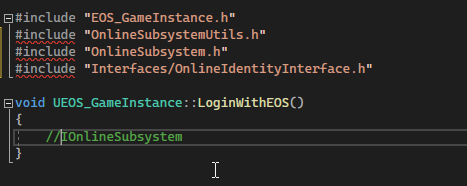
there is nothing there
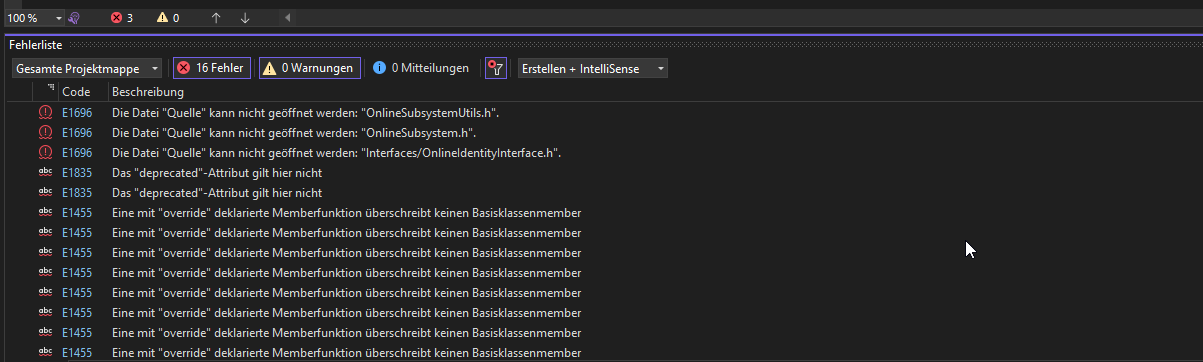
as you can see, it is wrong
so, what did they changed?
nvm, i did not downloaded source files in engine i disabled them so will adding them ...
minor latch
LogPackageName: Display: FPackageName: Mount point added: '../../Plugins/Editor/ObjectMixer/ObjectMixer/Content/' mounted to '/ObjectMixer/'
LogPackageName: Display: FPackageName: Mount point added: '../../Plugins/Editor/ObjectMixer/LightMixer/Content/' mounted to '/LightMixer/'
SourceControl: Source control is disabled
SourceControl: Source control is disabled
Message dialog closed, result: Ok, title: Message, text: Plugin 'WmfMedia' failed to load because module 'WmfMedia' could not be found.  Please ensure the plugin is properly installed, otherwise consider disabling the plugin for this project.
LogCore: Engine exit requested (reason: EngineExit() was called)
LogExit: Preparing to exit.
LogVirtualization: UE::Virtualization was shutdown
LogModuleManager: Shutting down and abandoning module ExrReaderGpu (68)
LogModuleManager: Shutting down and abandoning module GLTFExporter (66)
LogModuleManager: Shutting down and abandoning module DatasmithContent (64)
LogModuleManager: Shutting down and abandoning module NiagaraVertexFactories (62)```Looks like the error message is completely unrelated to the issue, it mounts the plugin earlier in the log.
There's not really much revealing there is there? 😛
To be fair, I always launch through VS, I'll see if it launches through the binary
Uhm, how do I do that exactly? 😅
Yeah, just did that in a terminal now, launches perfectly fine
The exact same unrealeditor binary
 minor latch
You can see the folder relation in the screenshot above
I haven't accidentally mixed the files or anything like that. 😛
Incidentally wmf media player is one of the plugins i've disabled in my project.
Where do I find this?
Ah, I was looking in the ini files
Disabling it by default did indeed fix it!
Weird that it claims it doesn't find it considering it's in the file to check that setting
I haven't setup a uprojectdirs though as I just run it directly, but I'm trying to run the engine entirely standalone from the project so it's weird that it should grab something based on the project, especially if I haven't even made it aware that the project exists in the first place. But it's a useful feature to setup anyway, so I'll do that.
Ah
Yeah, it's a project I've continuously ported, so it could be the case.
Could it be that my project is relying on the engine plugins and their setup, rather than having it's own settings for them?
And thus changing them in the project directly references and changes it for the engine.
Disabling it in project, appends it to the .uproject and it stays disabled.
But then the unreal editor binary also complains about that plugin.
But as long as I know how to work around it, it'll do. 😛
I'm going to assume it's a legacy thing.
opal gorge
Cannot open \Plugins\VirtualProduction\CameraCalibrationCore\Intermediate\Build\Win64\UnrealEditor\Development\CameraCalibrationCoreMovieScene\UnrealEditor-CameraCalibrationCoreMovieScene.suppressed.exp
This file does not exist in my build
Should it?
opal gorge
 minor latch
Have you compiled the engine?
I've also had cases were a couple of specific parts stopped working and I had to rebuild the entire thing. 🥲
stable hemlock
Hi, can someone confirm that this is the only options i need to make an installed build for Win64 (which is my host platform) that can compile Client and Dedicated Server stuff ? (UE 5.1)
Engine\Build\BatchFiles\RunUAT.bat BuildGraph -target="Make Installed Build Win64" -script=Engine/Build/InstalledEngineBuild.xml -set:WithClient=true -set:WithServer=true -set:WithDDC=false -set:HostPlatformOnly=true -clean -log="D:\Project_Zirconium\UnrealEngine\Build_Log.txt"
 still quarry
I'm getting a crash due to
ensureMsgf(MeshDrawCommand.VertexStreams.GetAllocatedSize()==0, TEXT("Cached Mesh Draw command overflows VertexStreams. VertexStream inline size should be tweaked."));
in MeshPassProcessor.cpp line 2002 for UE5. Does anyone have any insight on this?
 echo tinsel
I'll ask here as well:
Hey everyone, I have a bit of an issue. When setting bUseAVX = true; inside my project's Build.cs folder, nothing happens, the compiler doesn't get the /arch:AVX flag and neither do the UE defines for the intrinsics are also not set. Do I need to set useavx somewhere else?
 humble spoke
Good day, Im trying to launch UE5 from source using Visual Studio and this errors appears. I followed official documentation. Any suggestions?


 heady sparrow
humble spoke
Good day, Im trying to launch UE5 from source using Visual Studio and this error...
heady sparrow
humble spoke
Good day, Im trying to launch UE5 from source using Visual Studio and this error...
I would delete the binaries so they re link
Might also be that weird vs folder thing
coarse canyon
humble spoke
Good day, Im trying to launch UE5 from source using Visual Studio and this error...
You have long paths that often cause issues with the engine. Move it to a folder closer to root, like c:\UE5_whatever\
humble spoke
heady sparrow
I would delete the binaries so they re link
Thanks.
humble spoke
coarse canyon
You have long paths that often cause issues with the engine. Move it to a folder...
Thank you. Will try.
heady sparrow
coarse canyon
You have long paths that often cause issues with the engine. Move it to a folder...
nice catch, I should have noticed the massive file url... 😮
stable hemlock
I'm trying to make an "installed build" from 5.1 and i get weird behaviours actually, when i'm compiling the engine, my build go directly through "Engine/Binaries/Win64" instead of "LocalBuild", here's my .bat
Engine\Build\BatchFiles\RunUAT.bat BuildGraph -target="Make Installed Build Win64" -script=Engine/Build/InstalledEngineBuild.xml -set:WithClient=true -set:WithServer=true -set:WithDDC=false -set:HostPlatformOnly=true -set:WithFullDebugInfo=true -clean
yeah i just saw that my build failed

with a beautiful "error_unknown"
is there even a log file ?
I did not found anything
got nothing then

and those folders does not contain any logs

🤷♂️
I get exactly the same folder as in Saved
only 2 BuildConfig files
Ok i have some logs but nothing engine related
i got only logs related to my project compilation
:/
heady sparrow
yeah, but intermediate build steps get larger and larger
it's dumb but unless something changed having the engine source further up elps
iron dome
Probably help to turn on the extended filename support that allows 1k+ characters.
normal vortex
is nanite tool removed or moved to somewhere else in ue5-main?
 narrow swan
Hi all, I've done quite abit of googling and looking through this discord but I need some help.
Long story short, there was a bug with 5.1.1 so we have gone back to 5.1.0 as it was removed from the UE launcher. I had to recompile the build from GitHub and then build the installer for 5.1.0. I've done this and distrubuted it to the team however it looks like building the project is now broken. The windows build button and SDK is greyed out and I get a turn key error.
I've tried running the RunUAT.bat and looking for Computer\HKEY_CURRENT_USER\Software\Microsoft\Command Processor\Autorun registry entry and delete it but I cannot find it in my registry at that address. Any ideas?
narrow swan
Looks like I need to alter the HoloLens.Automation.json to remove it looking for hololens. Will give that a go
opal gorge
Getting the same error on a completely different machine now...
opal gorge
Sorry, I did indeed do what you suggested
Wasn't really anything in the log other than warnings about file path lengths
opal gorge
Yeah so unfortunately I can't shorten the path anymore than it is. I do have long paths enabled at the OS level and I am on Windows 11
But they are just warnings so not sure if that is the issue. But I agree I do want to address them
This is the path it errors out on: C:\Users\Blake\Perforce-VarientEngineWorkspace-Incubator\Engine\Plugins\Animation\AnimationLocomotionLibrary\Intermediate\Build\Win64\UnrealEditor\Development\AnimationLocomotionLibraryRuntime\Module.AnimationLocomotionLibraryRuntime.cpp.obj.response
250 characters
I can't change the workspace name
And I have to have the workspace under the user
HKEY_LOCAL_MACHINE\SYSTEM\CurrentControlSet\Control\FileSystem
    LongPathsEnabled    REG_DWORD    0x1
Right
So having long paths on doesn't work then?
Hmm
Odd that UBT would support it but still get warnings
Warnings must be coming from lower level
But yeah it is sus that I get errors on files that seem really close to the max path length
I'm not get "file not found" errors though I'm getting "cannot open file" errors
I guess they are similar enough
I wonder how I can check if I'm using the "official LLVM 15 package"?
Hmm
I mean
Theoretically, couldn't I copy the engine folder to the root C:/ and build, then move the files back?
Not sure if that's allowed (here at the place I work) but technically it should shorten the paths
So odd that CL doesn't support long paths in 2023
Surely there has to be more people with this issue
 crimson stag
I have 64GB of RAM installed in my computer but UE5 only uses 8-10GB. Any advice how I can allocate more to Unreal?
 distant venture
I am wanting to use 5.2, what's the branch I should be using, the 5.2 or 5.2-preview1 branch?
I see the preview branch is 3 weeks old?
opal gorge
Moved things to root and now I don't hit the 260 max limit
But now apparently I'm missing PDBCOPY.EXE
But I have the Windows SDK installed...?
fierce bear
Hello ! Anyone know if there is a way to register a texture resource on the RDG ? Ie : getting a FRDGTexture from a FTextureResource
found it ! it's RegisterExternalTexture from Rendergrpahutils.h
narrow swan
narrow swan
Hi all, I've done quite abit of googling and looking through this discord but I ...
For anyone having this issue with 5.1.0 I editied HoloLens.Automation.json from this commit and then recompiled https://github.com/EpicGames/UnrealEngine/commit/ae9de79b7012fc33df355c8dbfe5096b94545e3c
Can now build to win64
stable hemlock
hi guys i have one question like why do we need unreal source version? when we can download from epic launcher..!!
can any one help me with this what all the uses of source code and all?
opal gorge
Engine\Source\Runtime\Renderer\Private\Lumen\LumenReflections.h(56): fatal error C1001: Internal compiler error.
Lovely
opal gorge
Oh, ok, will try again
opal gorge
Nope, same issue
\Engine\Source\Runtime\Renderer\Private\Lumen\LumenReflections.h(56): fatal error C1001: Internal compiler error.
(compiler file 'D:\a\_work\1\s\src\vctools\Compiler\CxxFE\sl\p1\c\trees.c', line 11371)
 To work around this problem, try simplifying or changing the program near the locations listed above.
If possible please provide a repro here: https://developercommunity.visualstudio.com
:/
opal gorge
Does anyone else get this error compiling 5.1.1?
RDG_BUFFER_ACCESS(RayTraceDispatchIndirectArgs, ERHIAccess::IndirectArgs | ERHIAccess::SRVCompute)
This is the line it doesn't like
 edgy hedge
Any resources for a deeper dive into engine architecture than what is offered in the minimal official documentation?
I look through the pinned messages in this channel and unfortunately I haven't found any. At the moment, the only resource I have is breakpoint through the engine code. I'm look for:
- How is the Low-Level Renderer for UE architected? Materials and shaders?
- Online matchmaking components
- 3rd party sdk integration (Vulkan, OpenGL, DirectX)
- Platform independence layer such as the threading library and networking
Ubergraphs and EdGraphs in general are interesting, I went through some of the code the other day, but hoping there are some deeper-dive resources that will speed up my understanding.
Thank you!
NorthWeapon
 round axle
Quick question - I've download UE5.2 from Desktop GitHub, but it appears it doesn't come with the Debug files. So I can't step through my project. Where can I get the debug files if using GitHub source files?
iron dome
edgy hedge
Any resources for a deeper dive into engine architecture than what is offered in...
There really isn't all that much information like that out there. Epic sure as hell don't document it.
iron dome
round axle
Quick question - I've download UE5.2 from Desktop GitHub, but it appears it does...
You compile the engine and it creates them.
If you're having problems debugging, make sure you're in a debug (not debug game or development) configuration.
round axle
iron dome
You compile the engine and it creates them.
Thanks for reaching back. I did compile. I ran my game in debug mode. Paused the game with Visual Studios, and pressed the "Step" button. This was the message I received...
 edgy hedge
Well in that case, I will have to rely on the source code, this book, and other books on game engines, graphics, and rendering.

Do you think the private UDN has secret stashes of engine specific walkthroughs @iron dome not sure what's going on for paid AAA / AA customers
stable hemlock
Ok
Is there any way to split up the source engine and work because it's 300gd and everyone from my team can't be able to keep the full source engine right..
 normal saffron
can anyone tell me whats the size of UE 5.1.1 source in GBs ?
is it 250+ ? or less?
iron dome
round axle
Thanks for reaching back. I did compile. I ran my game in debug mode. Paused ...
How are you running it?
round axle
iron dome
How are you running it?
I've gone ahead and switched to JetBrains Rider for my IDE. No more problems.
iron dome
Shrug
 onyx meadow
Anybody have resources on how to add a new item to the main menu bar?
iron dome
You don't need a source build for that.
I would advise you use tools -> widget reflector to find the details of a button and go backwards from that. 🙂
iron dome
Sounds like you were building the entire solution!

 summer pelican
There's more info on what the plugin is here if you're curious: https://dev.epicgames.com/community/learning/tutorials/8OWY/unreal-engine-learning-agents-introduction

Epic Developer Community
A brief announcement of Learning Agents: a machine learning plugin for AI bots. Learning Agents allows you to train your NPCs via reinforcement & im...
 small isle
That's gonna be interesting!
heady sparrow
I like how it's more about making interesting character AI and not about some weird midjourney integration
cool

@jmgomez @flassari So training runs in PyTorch, which can use CPU/GPU, and then inference inside UE is done on a handwritten Intel ISPC NN. So CPU only, and I believe that can eval anywhere ISPC works. Models are currently limited to fully-connected feed forward networks. https://t.co/hhclyUd6uQ
 Twitter
·
Twitter
·
interesting
 past olive
Hey I am getting this error when trying to to run the source code, and was wondering if anyone could give me a clue as to what I did wrong/how to fix it.
Exception thrown at 0x00007FFA270DCD29 in UnrealEditor.exe: Microsoft C++ exception: xSharedMemoryException at memory location 0x000000C28297DC20.
nova sleet
heady sparrow
https://twitter.com/RobotBrendan/status/1641897641754742788
Don't understand why not use something like OpenNN which works great
normal vortex
any idea what its doing? trying to make installed build.

i think it ran ue5editor-cmd itself but idk

i think it already built ddc
source build takes like 18min to build
ddc is not really storage friendly either
im seeing 80gb for ddc folder
should i call it off
i think it built source too before ddc
heady sparrow
humble spoke
Good day, Im trying to launch UE5 from source using Visual Studio and this error...
Just had this happen locally. I fixed it by cleaning the solution from my IDE and then building again.
heady sparrow
more of a Rider question but I'll be evil and ask here:

Is there some way to filter out the billion C# projects in find in files?
 shut juniper
UE5 source was building fine for me and then I did some changes to my project and now when I try to run my project, UE5 fails to compile with a lot of errors like this:
0>/Users/siretu/work/UnrealEngine5/Engine/Source/ThirdParty/mimalloc/src/os.c(813,38): Error  : macro 'ATOMIC_VAR_INIT' has been marked as deprecated [-Werror,-Wdeprecated-pragma]
0>  static _Atomic(uintptr_t) advice = ATOMIC_VAR_INIT(KK_MADV_FREE_INITIAL);
0>                                     ^
0>/Applications/Xcode.app/Contents/Developer/Toolchains/XcodeDefault.xctoolchain/usr/lib/clang/14.0.3/include/stdatomic.h(51,41): Reference  : macro marked 'deprecated' here
0>#pragma clang deprecated(ATOMIC_VAR_INIT)
0>                                        ^
Any idea what's causing this? It compiled fine earlier and I haven't touched the UE source, or upgraded my OS or done anything that would've suddenly made these things be deprecated
I'm not 100% sure. I've just been using rider. Not sure what it uses behind the scenes
Yeah, on Mac
iron dome
Are you building the entire solution (or whatever xcode's equivalent is) or just your project?
The build system is smart enough to just ignore the parts it doesn't need. If you've somehow gone from just your project to the entire solution, it may be trying to compile extra bits it doesn't have to and generating errors.
shut juniper
Generally my experience has been that it builds the whole thing (my project + Unreal engine) once, and then after that it only builds my project until I either modify the unreal engine source, pull new changes for the UE source, or I clean the solution.
I've had some strange cases where it seems to blow away the cache or whatever and attempts to rebuild the whole thing, including the engine, and I guess that's what's happening here. Still not sure how to fix these errors though and I don't think I've changed anything around my build system to cause these errors to occur since last time I built the whole engine source.
Aha. My Xcode updated today... I think that explains what caused this
iron dome
shut juniper
Aha. My Xcode updated today... I think that explains what caused this
Probably!
shut juniper
Thanks! I'll see if I can get that figured out
shut juniper
Re-downloading Xcode 14.2 and running xcode-select -s /path/to/old/xcode seems to resolve the issue.
heady sparrow
shut juniper
Re-downloading Xcode 14.2 and running `xcode-select -s /path/to/old/xcode` seems...
in rider: File | Settings | Build, Execution, Deployment | Toolset and Build

these two might be off for you
if you are still getting issues
assuming these actually do get used by UBT and i'm not going nuts
 wheat oriole
Is there a way to have VS only rebuild one plugin if I'm only working on one plugin? If I just do a regular rebuild it's like 3k files. 😅
full jewel
probably nuking intermediate folder, plugins have their own
rebuild mostly feels like a time wasting trap in unreal
 empty charm
/job freelance
coarse canyon
thick storm
https://github.com/EpicGames/UnrealEngine/pull/10281
I would really love this 🙂 but there was a discussion here not long ago and it sounded like that feature was added by design for some users. Perhaps make it an editor toggle?
thick storm
well I still waiting to get some interest from epic, ;d
aside from that it's really hard to belive:
- 4.26/27 it shoed everything.
- 5.0 it showed only selection for time
- suddenly it started showing everything again.
I tried to go over code changes and see what changed in that code.. and nothing which would break it
that must be some deep hidden functionality honestly
coarse canyon
yeah I cant remember when this started, but I do remember it annoying me (and others on my team). Basically its unusable now and we need to rely on searchable terms and categories for our own class settings
 vital hawk
thick storm
so we can end the details of doom, where everything is showing
vital hawk
thick storm
so we can end the details of doom, where everything is showing
Isn't that the point of the ExposeFunctionCategories specifier though?
If I tagged some property with it, the current behavior is what I expect to happen. Your change... not so much.
thick storm
well you except to have in details all 40 components properties showing ?
that meta specifier
is completly irrelevelant there
Just looked trough code it is barerly used
vital hawk
In your examples (SkeletalMeshActor), that's why the categories are visible
    UPROPERTY(Category = SkeletalMeshActor, VisibleAnywhere, BlueprintReadOnly, meta = (ExposeFunctionCategories = "Mesh,Components|SkeletalMesh,Animation,Physics", AllowPrivateAccess = "true"))
    TObjectPtr<class USkeletalMeshComponent> SkeletalMeshComponent;
I mean, it's always been used to display components properties on the main actor. At least that's the only reason I use it, and I'd be surprise if that behavior was "unintended".
Beginner are going to be pretty upset if they can't set the Skeletal Mesh on their SkeletalMeshActor without browsing through components... they probably don't even know what a component is at this point. Those are forwarded for a reason.
On the idea, I'm with you, and I'd prefer to have it clean and separated. Actor properties on actor, component properties on components. But I'm fairly confident the current behavior is very intended by Epic, and I don't think they would accept such PR (not without dealing with the ExposeFunctionCategories behavior at least).
coarse canyon
thick storm
not properties

Doing a search on this meta specifier gives quite a lot of confusing information
thick storm
only reference to that meta are inside BlueprintActionMenuUtils and they seem to be used to just inject function calls directly into context menu
edgy hedge
I have a question. Where is the source code for all the Third Party SDKs that are in the Engine? The 3rd party sdk will have a Build.cs and a bunch of .tps files, but no .dll
So how do these plugins actually get built in? Is there a .dll somewhere that I am not seeing? Does it get downloaded over HTTP when you enable the plugin or something?
Edit/Update: Problem solved! The source code is actually there, it just doesn't show up on a solution explorer. Each Third Party sdk has pre-built library files .lib in addition to the source code. For example /ThirdParty/WebRTC/Includes and ../Lib
Follow up:
How do you add Source/ThirdParty/* source files into your solution explorer so that you can Go to declaration?
edgy hedge
Thanks @stable hemlock that works
 west dune
Is there a setting to BuildGraph for an installed build with a Shipping config rather than Development? Like the editor would be shipping, not game configurations
hidden hedge
why would there ever be a need for a shipping configuration editor?
west dune
hidden hedge
why would there ever be a need for a shipping configuration editor?
I mean, UEFN is a Shipping configuration Editor lol
 hidden hedge
yeah but UEFN is heavily customised. A game I worked on shipped their modding editor as development
west dune
It's not stripped, just artificially hidden with an Editor plugin
The reason I'm looking to make a Shipping editor is to compare what is changed between them
iron dome
Editor modules shouldn't use it all, really, as none of them go into shipping anyway.
 pallid osprey
Hey all, I'm wondering if you guys see the same thing as I do. When I switch my project from Launcher version of the editor to source build, packaging takes much longer to compile with about 7x source files, including engine source. It also forces me to recompile more frequently. How can I avoid these problems?
for example, when I package my game with laucher editor, I would see something like Building 27 actions with 8 processes, but with the source build, it balloons to something like Building 709 actions with 8 processes
calm mason
pallid osprey
for example, when I package my game with laucher editor, I would see something l...
It has to build engine files for that target too, e.g. Development Server. Once you've done it once it should be quick the next time.
heady sparrow
Check pins
 fleet dock
what is this error? building from source, I can provide the full log if wanted.
 iron dome
Copy and paste text. Use the raw output log, not errors list.
fleet dock
iron dome
Copy and paste text. Use the raw output log, not errors list.
sorry about that, first time doing this:
Severity Code Description Project File Line Suppression State Error MSB3073 The command "..\..\Build\BatchFiles\Build.bat -Target="UnrealEditor Win64 Development" -Target="ShaderCompileWorker Win64 Development -Quiet" -WaitMutex -FromMsBuild" exited with code 6. UE5 C:\Program Files\Microsoft Visual Studio\2022\Community\MSBuild\Microsoft\VC\v170\Microsoft.MakeFile.Targets 44
is that enough?
iron dome
That's still not the raw output.
If it comes with nicely formatted tabbed columns, it's not correct.
Mostly because that summary strips away 90% of the output.
If you're using rider there is a button on the left to see tbr raw output. In vs it's a separate window called output log.
fleet dock
iron dome
If you're using rider there is a button on the left to see tbr raw output. In vs...
C:\Program Files\Microsoft Visual Studio\2022\Community\MSBuild\Microsoft\VC\v170\Microsoft.MakeFile.Targets(44,5): error MSB3073: The command "..\..\Build\BatchFiles\Build.bat -Target="UnrealEditor Win64 Development" -Target="ShaderCompileWorker Win64 Development -Quiet" -WaitMutex -FromMsBuild" exited with code 6.
sorry if I'm being annoying, this is my first time in VS so I have not much idea on what I'm doing.
I have used UE before but that was using the epic games launcher.
iron dome
No, it's cool. That's not the entire output, though. There should be something before that.
fleet dock
iron dome
No, it's cool. That's not the entire output, though. There should be something b...
i dont know if this will spam chat
ok it wont
cool
also before you say anything, dwigh isn't my real name so dont get worried
iron dome
👍
I would suggest not using folders with spaces in the name as well.
Just move the entire thing to like c:\mygame
Anyway. Fix that and you should be okay.
5am. Night!
fleet dock
iron dome
5am. Night!
gn
 storm osprey
After submitting a ticket to https://unrealbugsubmissions.epicgames.com/ and receiving the email saying it was successful with a #number, is there a way to track the issue ? I mean an url where I can see its status.
I dont see it on https://issues.unrealengine.com/

Unreal Engine
Welcome to the Unreal Engine Issue and Bug Tracker. You can check the status of an issue and search for existing bugs. See latest bug fixes too.
heady sparrow
storm osprey
After submitting a ticket to https://unrealbugsubmissions.epicgames.com/ and rec...
I've seen tickets mentioned that never show up on there before. My assumption is it's on their internal tracker?
storm osprey
😮
fleet dock
Building from source, what's the maximum amount of time it can take?
 mild valley
5900x -> about 30-50 mintes, 8700k - 5.2ghz -> about 2 hours
fleet dock
mild valley
5900x -> about 30-50 mintes, 8700k - 5.2ghz -> about 2 hours
Ah ok
Thanks
storm osprey
fleet dock
Building from source, what's the maximum amount of time it can take?
disable windows realtime virus detection, it may help
iron dome
It can take half a day with certain potatoes.
fleet dock
iron dome
It can take half a day with certain potatoes.
Yeah doing what you told me to seems to have worked
No long path name erors
iron dome
Great. 🙂
fleet dock
iron dome
Great. 🙂
still going no errors btw
iron dome
Fantastic.
fleet dock
iron dome
Fantastic.
im gonna be here all day
 iron dome
Are you compiling the entire solution or just your project?
If you don't have a project, jsut compile the ue5 project.
For me that saved 50%/25% compile time.
fleet dock
iron dome
Are you compiling the entire solution or just your project?
I'm compiling this
 iron dome
Sad times.
Can probably cut that down by actually having a project. It'll skip things it doesn't need.
fleet dock
iron dome
Can probably cut that down by actually having a project. It'll skip things it do...
How woukd I create a project?
iron dome
Use a launcher version to create a project and then retarget it at your source build
But it's too late for that really.
 edgy seal
Hi Guys,
I'm compiling the whole Engine for the first time from Source in VS community 2022.
It's been taking 5-6 hours and isn't even at 25%. I have an ok CPU with 8 threads and 24GB of RAM and a SSD.
I feel like i'm missing sth major. It can't possibly take this long.
iron dome
define "ok CPU"
Also check the first 20 or so lines of the output log. It will tell you how many processes it's using.
hidden hedge
also compiling the entire engine is a bit of a waste of time. if your project pre-exists you can just compile your project and it'll figure out what it needs
at least the amount of RAM is right (aim for 2.5GB per physical core). I'd be curious for the actual CPU model too, as well as the storage medium in use
edgy seal
hidden hedge
also compiling the entire engine is a bit of a waste of time. if your project pr...
Interesting, thanks.
Project uses 5.11. I am recompiling 5.11 with a cherry picked fix from ue5-main that I need.
There is a way to only partially compile the engine and then replace DLLs?
hidden hedge
5.11? are you from the future?
hidden hedge
if you have a project, if it's a subdirectory of the engine, then it'll appear in UE5.sln, just compile your game project under that, and it'll only compile modules your project actually uses
edgy seal
https://ark.intel.com/content/www/us/en/ark/products/87716/intel-core-i75700hq-processor-6m-cache-up-to-3-50-ghz.html
That's the CPU. From 2015 with 8 threads.
SSD is a regular SATA one.
and 24 GB RAM
I guess the main problem is that the CPU is too slow.
It's still odd to me because it says on the Unreal docs taht depending on the CPU it will compile in 10-40 minutes.
So i didnt expect it to take 24 hours

Intel® Core™ i7-5700HQ Processor (6M Cache, up to 3.50 GHz) quick reference guide including specifications, features, pricing, compatibility, design documentation, ordering codes, spec codes and more.
That's good info, thanks
So it's expected behaviour. It ended up taking 8.5 hours
========== Build: 33 succeeded, 6 failed, 0 up-to-date, 31 skipped ==========
I got this message at the end.
Where would I find more info on why it failed those 6 "things"?
"Determining max actions to execute in parallel (4 physical cores, 8 logical cores)
2> Executing up to 4 processes, one per physical core"
and it is indeed only using 4 processes
altho i have 8 threads
fleet dock
hidden hedge
if you have a project, if it's a subdirectory of the engine, then it'll appear i...
would I build the .sln of the project?
 hidden hedge
how I've always done a source build is it's a subdir of the engine, the project appears in UE5.sln, there is no need for a project sln
fleet dock
hidden hedge
how I've always done a source build is it's a subdir of the engine, the project ...
would I put it in the engine folder? sorry if I'm being annoying
 hidden hedge
the dir for the project is on the same "level" as GenerateProjectFiles.bat
fleet dock
hidden hedge
the dir for the project is on the same "level" as GenerateProjectFiles.bat
so here?
 fleet dock
iron dome
Use a launcher version to create a project and then retarget it at your source b...
fleet dock
iron dome
Use a launcher version to create a project and then retarget it at your source b...
how do i retarget it?
iron dome
Right click the uproject file -> change unreal engine version
fleet dock
would i build this?
 fleet dock
iron dome
Open that and then build your game project.
fleet dock
iron dome
Open that and then build your game project.
this?
 hidden hedge
fleet dock
this?
hidden hedge
fleet dock
this?
Run GenerateProjectFiles.bat
Open UE5.sln
Your game will be there
fleet dock
hidden hedge
Your game will be there
where?
 hidden hedge
Did you run GenerateProjectFiles.bat?
Does the uproject file exist in the ProjectConflict directory?
fleet dock
hidden hedge
Did you run GenerateProjectFiles.bat?
ran that alongside the uproject being there
hidden hedge
Show the contents of the immediate ProjectConflict directory
And are you absolutely sure you reran the batch file?
If you did it with VS open it'll likely have prompted to reload the solution


 hidden hedge
This is correct even though it's kinda gross to have file extensions disabled
fleet dock
hidden hedge
If you did it with VS open it'll likely have prompted to reload the solution
strange
i reran the .bat but that didn't happen
hidden hedge
And did it complete without errors? Did you make changes to Default.uprojectdirs?
I would make sure VS is completely closed, run GenerateProjectFiles and then open UE5.sln directly
fleet dock
hidden hedge
I would make sure VS is completely closed, run GenerateProjectFiles and then ope...
still nothing, idk what Default.uprojectdirs is
im assuming i'd do that in the cmd?
it built, but there's still nothing

gonna try restarting my pc
this?

do i build this?

Is it the solution>
 hidden hedge
Games is missing in the project solution? are you missing Build.cs?
I saw you had a source directory
edgy seal
I compiled UE Source with Development-Editor Config.
But now when i try to start UnrealEditor.exe, it says a lot of dlls missing.
That's odd, I compiled all of UE5, there shouldnt be anything missing
unrealeditor-engine.dll
unrealeditor-unrealed.dll
and a bunch of others 😄
super weird
D:\Dev\UnrealProjects\UnrealEngine\Engine\Binaries\Win64
iron dome
Does anybody besides you actually use the buildgraph directly? 😛
(I know they do, this guy probalby doesn't)
hidden hedge
I've used buildgraph because my previous studio (and the one before that) used UGS
I'm interested in Horde a little bit
edgy seal
Just 4 Missing pdb files.

you are correct, it wasn't built.
can't find it
i compiled the 5.1.1 branch
But cherrypicked one single commit from ue5-main
fleet dock
 edgy seal

trying to build UE5-Main
Is the process correct to go like this:
- Clone from Github.
- Switch branch to ue5-main
- Click Setup.bat
- GenerateProjectFiles.bat
- Run UnrealBuildTool\UnrealBuildTool.exe UnrealEditor Win64 Development
oh that is good to know
edgy seal
edgy seal
Is the process correct to go like this:
1) Clone from Github.
2) Switch branch ...
Step 4) can actually be skipped.
edgy seal
edgy seal
Is the process correct to go like this:
1) Clone from Github.
2) Switch branch ...
Setup.bat just downloads a bunch of binaries (ie the build tool), which is necessary to even compile UE
edgy seal
edgy seal
Is the process correct to go like this:
1) Clone from Github.
2) Switch branch ...
Nevermind, i stand corrected
iron dome
"much better"?
VS just shows you the output from the compiler. Surely they should be the same?
Unless you're using the errors list... which you should never do.
edgy seal
I get no useful info from VS 😦
then i compiled from CMD, like Kein told me.
And suddenly it would tell me there, why it didn't compile.
iron dome
edgy seal
I get no useful info from VS 😦
Dieter's Dumping Grounds
As you might know if you got to this page, I am quite an active member on the Unreal Slackers discord. Over time I noticed a lot of the same issues kept popping up, so I decided to write something down to save myself some typing time (hopefully). Table of...
iron dome
I'd love to see examples of where the output differs!
edgy seal
"[79/93] Compile Module.StaticMeshDescription.cpp
D:\Dev\UnrealProjects\UnrealEngine\Engine\Source\Runtime\StaticMeshDescription\Private\StaticMeshOperations.cpp(256): error C2039: 'NeedsCompact': is not a member of 'FMeshDescription'"
This was crucial info
for me to understand why the compilation failed
iron dome
Yes? And you get that in the Output window...
edgy seal
I did not 😦
iron dome
Did you have the dropdown at the top set to "build" ?
It has several different outputs.
edgy seal
I will pay extra attention next time I build from VS. Appreciate you making me aware of it.
I assume the reason ue5-main doesn't compile for me is a user error.
I highly doubt it is because it's a "less stable branch"
is that reasonable to assume?
iron dome
Main is not guaranteed to compile.
It frequently doesn't.
Just check out a day before or whatever. Or find a release tag.
edgy seal
oh that's good advice, thank you very very much 😄
Meaning the further back i go in ue5-main, the higher the likelihood it compiles
so i ran the Setup.bat and it downloaded a bunch and finished
but it did not get the UnrealbuildTool
how can that be?
iron dome
edgy seal
Meaning the further back i go in ue5-main, the higher the likelihood it compiles
No, it's teh same likelihood that each commit doesn't compile. It's just pot luck.
You go back in time until you find one that does.
edgy seal
Ah thank you that's really good advice
iron dome
edgy seal
but it did not get the UnrealbuildTool
I think that's built when you generate your project files. I may be mistaken. Something is when you do that.
edgy seal
iron dome
I think that's built when you generate your project files. I may be mistaken. _S...
Thank you, that is entirely it.
iron dome
edgy seal
Nevermind, i stand corrected
So this is actually impossible because step 4 is required for step 5. 😛
edgy seal
iron dome
So this is actually impossible because step 4 is required for step 5. 😛
Indeed 😂 I'll correct myself
anytime one were to pull, have to re-generate the build files
The Setup.bat i don't think has to be re-run, because it is just some binaries
iron dome
Yeah.
The build files don't have to be regenerated if you've done it once.
As long as the build tool is there, you don't need to update anything. It's just nice for the sln file to be accurate 😛
opal gorge
Can't imagine many people use the HoloLens with UE
Not sure why it's forcing me to build for it
edgy seal
iron dome
As long as the build tool is there, you don't need to update anything. It's just...
Interestingly enough, it will re-compile the build tool, each time you sync. Along with creating the solution.
edgy seal
iron dome
The build files don't have to be regenerated if you've done it once.
Those files seem to be just binary things, like PNG etc for the samples
iron dome
edgy seal
Interestingly enough, it will re-compile the build tool, each time you sync. Alo...
Yeah. I'm sure there's a reason. Probably because it's small and just easier than adding a way to rebuild it some other way.
edgy seal
that makes sense, yes
opal gorge
error MSB3644: The reference assemblies for .NETFramework,Version=v4.5 were not found.
Do you need .Net 4.5 to compile UE5?
I don't remember needing it for UE4
heady sparrow
opal gorge
`error MSB3644: The reference assemblies for .NETFramework,Version=v4.5 were not...
the version moved up in 5.1 I think
edgy seal
Was able to build successfully, but it for some reason did not built ShaderCompileWorker.
However it built without errors . Wtf O_o

In the build log, the "ShaderCompileWorker" isn't even mentioned
iron dome
Did you build ue5 project or the entire solution?
edgy seal
I cloned ue5-main
Downloaded the binaries
Generated project files
Then built Development-Editor
How do i build it so that it builds everything?
iron dome
But what did you build ?
edgy seal
'D:\Dev\UnrealProjects\UnrealEngine\Engine\Binaries\DotNET\UnrealBuildTool\UnrealBuildTool.exe UnrealEditor Win64 Development'
iron dome
Why are you using that directly 😦
edgy seal
I went for this command, i'm admittedly not entirely sure what that would build exactly 🙈

i'm now building like this
that would be the correct way?
and the entire solution
I think
iron dome
You shouldn't need to do that. Just build the ue5 project in the engine folder.
Maybe a little batch file you could drop in the root folder?
Builds the required things.
Well for some reason he's dead set on using UBT directly.
Shrug
 distant anvil
are pull requests considered for the 4.27 plus branch?
 clear elk
I have a External Windows build server with a Gitlab CI/CD runner on it, i finally managed it to begin the cook process, but i have the problem that i'm on UE 5.3 (ue5-main branch (i know that was a bad idea)), i now have the problem that in line 1291 the LiveCodingModule.cpp crashes, on my pc the cook command works, but thats probably because the Windows server has no dedicated graphics card and the integrated graphics unit only supports DX 9.
My question: Is there anyonne that has experience with the FScopeLock class, because i don't have experience in this one.
Here also a screenshot of the excpetion trace:

i have parsed the UnrealEditor-Cmd.exe path to the RunUAT.bat file, should i directly call the exe?
i've done that, i've already set bWithLiveCoding in my target file
but it's still loading LiveCoding
clear elk
clear elk
i have parsed the UnrealEditor-Cmd.exe path to the RunUAT.bat file, should i dir...
o, wait i just found out that i've not parsed the command
only on compiling
just to be sure, the command for parsing the unreal cli to the uat is: -unrealexe right?
yeah i package as well