#cinematics
1 messages · Page 26 of 1
 severe python
Unless you’re trying to do an In-Game Cutscene, I think the common way to do this is with blueprints and not with the sequencer. Especially if you’re designing a game
For game developing, I believe the only reason why you would use a sequencer is for In-Game Cutscenes, like in this tutorial: https://youtu.be/VjjETpqZj0c

Unreal Engine 4 (UE4) tutorial showing you how to create a mid level triggered cinematic cutscene from scratch using level sequencer & blueprints.
Follow me on other platforms:
Website: http://www.abdulkaderelrawas.com
Instagram: https://www.instagram.com/abdulkader_elrawas/
Twitter: https://twitter.com/AbdulkaderElRaw
Linked in: https://www...
 steep copper
Probably i miss something but couldnt find a way to calculate the lenght of cutsene. I created a function library . Created a function to send message to game mode that the sequence is completed. I just add an event to sequence.
My problem is bot triggered cutscenes, I need to implement a feature automatically works end of the all cutscenes.
 minor zodiac
severe python
I very often get different results in my render than in my viewport when doing p...
minor zodiac
severe python
I very often get different results in my render than in my viewport when doing p...
apparently it has to do with framerate, and what really does it is he multi frame temporal as or something, thrning it off fixes it
severe python
minor zodiac
apparently it has to do with framerate, and what really does it is he multi fram...
Is it the multi-frame temporal thing in the console variables that you’re talking about?
minor zodiac
severe python
Is it the multi-frame temporal thing in the console variables that you’re talkin...
the default anti aliasing setting
you gotta overwrite it with the overwrite checkbox and select a different aa or no aa in the drop down or
severe python
minor zodiac
you gotta overwrite it with the overwrite checkbox and select a different aa or ...
Oh yeah I always have it overwritten, and set to ‘none’ for the method
severe python
minor zodiac
you gotta overwrite it with the overwrite checkbox and select a different aa or ...
But now that you mention it, I’ll try different methods as well
minor zodiac
also limit your project framerate in project settings and set your render framerate to be the same @severe python
severe python
minor zodiac
also limit your project framerate in project settings and set your render framer...
Cool i’ll try that thanks!
 abstract hazel
I'm only moving the camera in sequencer, the mannequin is there mostly for reference. I've done this many times before and everything worked fine but somehow this one time it's not working... I tried with another camera angle and that worked so idk what's the problem here..
 native thorn
anyone have a thought on how to add a keyframe to sequencer via blueprint? I've gotten this far, but the Set section to Key doesn't do anything

 chrome quiver
if you have the "editor scripting utilities" plugin enabled, I believe you can find the "add key" node for this
 tight stone
Because you don't have a shot track. You don't need one for a single camera cut like that. Make sure you don't have gameplay code that's also trying to control the player camera.
Try using Movie Render Queue (it's a plugin) instead of the legacy renderer
 trim solar
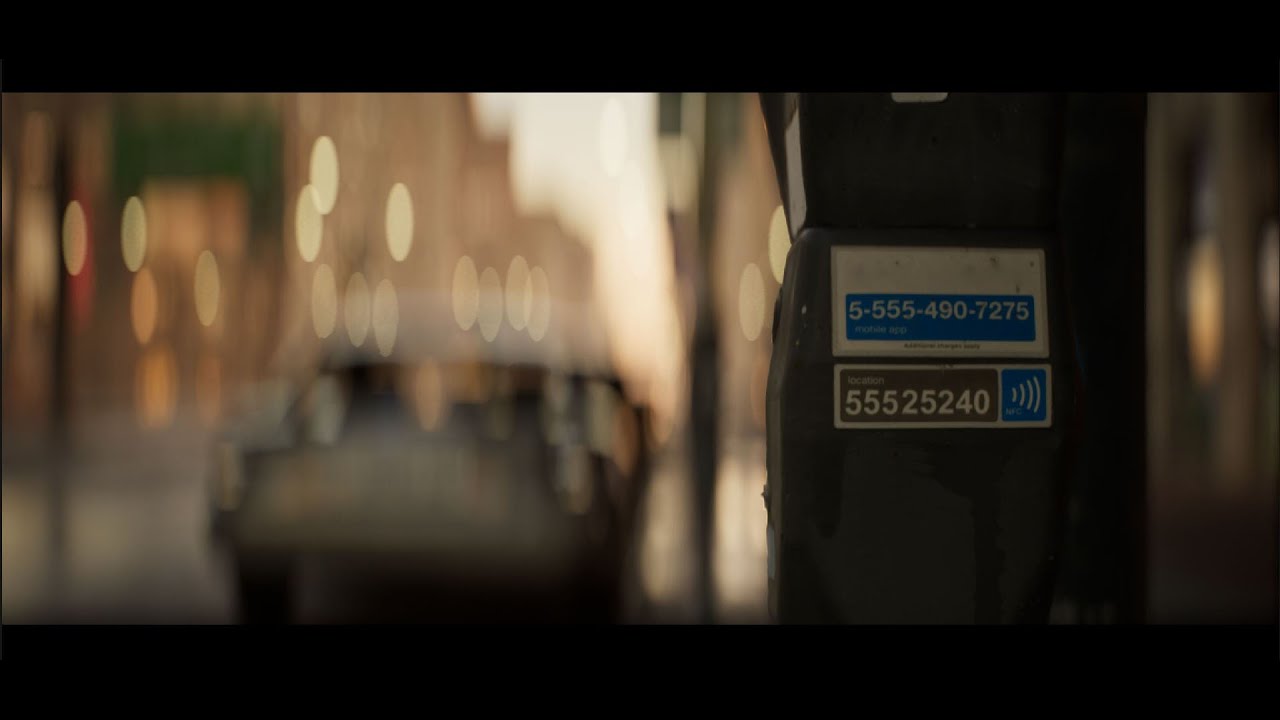
Can anyone point in the right direction to make an anamorphic lens? Something like this...

 quick portal
trim solar
Can anyone point in the right direction to make an anamorphic lens? Something li...
quick portal
trim solar
Can anyone point in the right direction to make an anamorphic lens? Something li...
Okay, this is interesting, I'll look for how to do this.
trim solar
Thank you! I have some stuff for developing the bokeh, but adding the distortion is where my brain gets thrown around.
quick portal
trim solar
Can anyone point in the right direction to make an anamorphic lens? Something li...
Where do you get this screenshot from?
trim solar
another still

From a FX artist by the name of Pete Polyakov.
He was doing some interesting work in this subject, but then didn't continue. He stated he was making a plugin... but I couldn't find anything.
quick portal

ArtStation
Work in progress. Two in one plugin for Unreal Engine. Anamorphic lenses 2.0x and ARRI Alexa UE4
v0.43.2
abstract hazel
tight stone
Try using Movie Render Queue (it's a plugin) instead of the legacy renderer
hi i got this to work. turn out the mannequin i set up was a TPB and was hovering above ground. once i moved them to the ground it was ok
 grave crescent
Is there a way to render with just a default shader to speed up viewport performance when just working in the editor, similar to other 3D apps?
Setting rendering to unlit speeds things up, but then I can barely see what's going on in my scene.
 errant jackal
Anyone use the cinematic camera as their regular game camera?
quick portal
errant jackal
Anyone use the cinematic camera as their regular game camera?
No
Cine camera is much more static and more difficult to control params by code, unlike regular camera component.
Also cine camera aspect ratio is fixed, can't accomodate for 4:3 or ultra wide monitors without letter/pillarboxing.
Unless you want to do the same thing as The Order 1886, then by all means.
errant jackal
Thanks! I can try alternative methods to achieve what I want
I did enjoy The order 1886 tbh
I'd love an updated version of it
quick portal
Such a good game, shame it got dumped by critics looking at leaked speedruns
trim solar
quick portal
This?
https://www.artstation.com/artwork/oA0EG4
Yeah! Is this the plugin?
quick portal
trim solar
Yeah! Is this the plugin?
Probably? I didn't found any documentation nor clue on how it's achieved, something that I could start my implementation. I might look into the engine source code on the vanilla cine DOF if I had the time.
trim solar
I am doing a deep dive today. Maybe we can combine some efforts. I'll post what I find.
trim solar


 supple dune
quick question: I'm working with a motion-captured character that's a blueprint with two cameras on it - one for a first person view, another for a third person locked to their face. But when bringing the blueprint onto the sequencer to add the cameras to the camera cuts track, I'm only able to reference one camera - whichever one is active in the bp
any ideas on how to be able to switch between cameras on a blueprint in the sequencer?
 lethal coral
My first tryout Project in UE5: https://streamable.com/vnoeq7

It's a Graveyard Background for a Virtual Production thingy and I made some shots from it.
The movement is just thrown at it.. but it was fun.
quick portal
trim solar
https://www.artstation.com/blogs/alectucker/9odQ/cinematic-post-processing-tips-...
Yup, it eventually links to William Faucher's video
Though I didn't know about this one, I might try this in my anime machinima project just to see the results
https://youtu.be/sCIYFOBGu0Q

Hey everyone,
Péter Csikász at Loacher Films (link below) had the kindness to reach out to me and propose a solution that makes the Anamorphic Depth of Field accessible to those of you who don't have the option to scale/desqueeze the renders in Post, as shown in Part 1 of this series.
This means that you can get Anamorphic DoF in your game cu...
I'm interested more on getting it completely in engine without editing in post
trim solar
@quick portal I created a project and a AnamorphicDOF Blueprint Camera based on this guys stuff... And it's working in sequencer with no issues yet.

Available Here: https://ko-fi.com/s/aa19c2cad6
Simple Anamorphic Depth of Field is a material based post-process material for emulating the Depth of Field of an Anamorphic Lens.
This is a non-physically based setup, allowing for customisation of near and far focus areas using the parameters in a Material Parameter Collection, making for eas...
My Anamorphic Depth of Field for Unreal Engine 4.27 & 5.0 has been updated with a large overhaul!
You can purchase it over at: https://ko-fi.com/s/aa19c2cad6
Results are coming together:
 quick portal
trim solar
<@325627930484932608> I created a project and a AnamorphicDOF Blueprint Camera b...
quick portal
trim solar
<@325627930484932608> I created a project and a AnamorphicDOF Blueprint Camera b...
Yeah, WF's 2nd tut still need a paid plugin, and the one you linked here still priced at $10.
Which is a no go for me, because I have to make sure my project is not tied to any paid stuff and I have to be able to share any of the bits for absolutely free.
Silly stringent requirement on my side, I know, but I had to enforce it.
I want to make sure solutions that I use or even create is free for everyone, no paid stuff tied in.
So I'll do my own thing for Anamorphic DOF when I had the time.
 gusty heath
Guys have you ever encountered the issue of rendering out an UE animation with 60 FPS and then importing the footage in AE and get only half the animation speed? What's that all about? Now I have to speed up the footage in AE (which is no problem since I have all the frames that I need) but it seems kind of weird. Everything is set to 60fps, but playback in AE is half speed of what the Unreal editor shows me. What's going on?
quick portal
gusty heath
Guys have you ever encountered the issue of rendering out an UE animation with 6...
Are you exporting as image sequence?
gusty heath
quick portal
Are you exporting as image sequence?
yes, as .jpg, I'm using the movie render queue
quick portal
Then After Effect would have no idea the real framerate just by the files alone.
You'd have to specify the framerate in AE (again).
gusty heath
quick portal
Then After Effect would have no idea the real framerate just by the files alone....
I did do that, every single shot has its own composition, they're all set to 60fps. it's so weird.
quick portal
gusty heath
I did do that, every single shot has its own composition, they're all set to 60f...
I think compositions can have their own framerates
gusty heath
quick portal
I think compositions can have their own framerates
I think somehow AE is playing the 60fps in 30fps which makes it go slow motion. I can't wrap my head around it. But this seems like an AE problem, so maybe this channel is the wrong place. I'll keep looking. Thanks anyways!
gusty heath
quick portal
Then After Effect would have no idea the real framerate just by the files alone....
I think I have found the solution. There is an option in AE to "interpret footage". It's not enough to just create a 60fps composition and throw your image sequence in it, you have to tell AE specifically what fps your footage should have. Right click on the image sequence -> "interpret". I never had to do that before - but then again I never made a 60fps animation before.


 violet dove
how do i disable the preview screen when my shots are rendering in movie render queue? i remember having done this before but i have forgot =\
minor zodiac
violet dove
how do i disable the preview screen when my shots are rendering in movie render ...
the 3 lines at the top left of viewport
then click on the thing that says 'realtime'
if its greyed out, under it it says 'disable realtime override'
click that first instead
gusty heath
grave crescent
Is there a way to render with just a default shader to speed up viewport perform...
You can try using the screen percentage, that's what i use when it gets a bit laggy.
 gusty heath
Hey everyone, we're running into an issue with a project, and have some googling it seems like a lot of people are having the same issue, with no solve, so perhaps someone in here knows how to fix it.
When we are using strand grooms and DOF, there's quite a distinct halo around the strands, and also the strands seem to be in the incorrect focus plane.
An example would be - the neckline of the character is in focus, but the hairline is out of focus, even though they occupy basically the same space.
Has anyone ran into this?
grave crescent
gusty heath
You can try using the screen percentage, that's what i use when it gets a bit la...
I’ll try that, thanks!
violet dove
I purchased an animation pack from the market place hoping to use it with another purchased character, but when I drop my character into sequencer, only its animations are showing. None of my animation pack animations are there.


How do I use my animation pack with another character?
gusty heath
violet dove
How do I use my animation pack with another character?
I think you will find some awnsers if you search for Retargeting Animations on YouTube or Google
violet dove
gusty heath
I think you will find some awnsers if you search for `Retargeting Animations` on...
No answers, it's due to a bug that animations aren't showing up. I can drag them from the content browser onto the animation tracks on sequencer.
It's a BUG.
gusty heath
violet dove
No answers, it's due to a bug that animations aren't showing up. I can drag the...
Oh that's too bad 😦
 fossil tiger
Hey I'm trying to render my animation (it looks correct in the preview with arms lowered) but when I render it the metahuman's arms go back to the default stance
Not sure why the metahuman's pose is getting reset in rendertime
First time posting here so lmk if this is the wrong channel for help or something


Could it be something with the keyframes not being placed properly?
 gusty heath
fossil tiger
Could it be something with the keyframes not being placed properly?
gusty heath
fossil tiger
Could it be something with the keyframes not being placed properly?
When you render it out, is it the whole shot, or just a few frames?
fossil tiger
gusty heath
When you render it out, is it the whole shot, or just a few frames?
I've rendered a couple frames not the whole shot
fossil tiger
gusty heath
When you render it out, is it the whole shot, or just a few frames?
Not even the first frame is posed which I think atleast that should be based on my key frames
gusty heath
fossil tiger
Not even the first frame is posed which I think atleast that should be based on ...
yeah not sure but from your screenshot i can see you have a little space from where you put the start marker
i sometimes have extra keyframes that kinda dissapear when you zoom out
here i show you, maybe you have this as well

looks like this
but when you zoom

got me a few times 😄
 urban mica
anyone else getting this pink when they render over 100 screenpercentage? its annoying lol
 fossil tiger
gusty heath
fossil tiger
gusty heath
thanks I'll check if that was the issue
quick portal
urban mica
anyone else getting this pink when they render over 100 screenpercentage? its an...
Subsurface artifact from the stretched viewport maybe 🤔
 novel anchor
Anyone have a useful tutorial on adding a physics sim to the sequencer. I thought I was doing it right but I can't seem to get it to work.
 next ember
I'm trying to make a first-person backroom-esc animation, is there a way to pilot a blueprint actor in a way i could actually move around a scene with gravity and collision?
I wanna be able to just move around the scene as if i'm playing a game, then being able to turn all of that into keyframes
I'm also wondering, is there a way to make photorealistic camera shake?
that looks as if someone is holding a camera
 rocky escarp
urban mica
anyone else getting this pink when they render over 100 screenpercentage? its an...
rocky escarp
urban mica
anyone else getting this pink when they render over 100 screenpercentage? its an...
Does it disappear when you disable the PP in the anamorphic cam? I’ve seen some weird hdr sparkling values with custom materials occasionally.
rocky escarp
next ember
I wanna be able to just move around the scene as if i'm playing a game, then bei...
Drag a pawn in to take recorder. It can create the keyframes.
To your second point, feel free to check out my marketplace tool (Cinemotion) for handheld camera motion capture assets if you are looking for realistic stuff. You can also use procedural camera noise (create camera shake base bp).
 unique condor
any idea why movie render gives me lower than 60 fps image sequencer even i select 60 fps? when i render them the video is like 2x acceralated
rocky escarp
unique condor
any idea why movie render gives me lower than 60 fps image sequencer even i sele...
Do you possibly have the 'output frame step' above 1 in the MRQ settings?
 floral oasis
my movie renders are ignoring my cameras in my master sequence and just rendering this angle under my map for the length of my clip. anyone got any advice?
 next ember
rocky escarp
Drag a pawn in to take recorder. It can create the keyframes.
To your second po...
next ember
rocky escarp
Drag a pawn in to take recorder. It can create the keyframes.
To your second po...
Drag a pawn in to take recorder. It can create the keyframes.
I have no idea how to do that-
To your second point, feel free to check out my marketplace tool (Cinemotion) for handheld camera motion capture assets if you are looking for realistic stuff. You can also use procedural camera noise (create camera shake base bp).
ye i might, tho I'm looking to be able to record as a FirstPersonCharacter blueprint, having collisions and stuff
so that way my main character doesn't sometimes grow taller and shrink shorter and clip trough walls accidentally lmao
 desert wing
 urban mica
rocky escarp
Does it disappear when you disable the PP in the anamorphic cam? I’ve seen some ...
urban mica
rocky escarp
Does it disappear when you disable the PP in the anamorphic cam? I’ve seen some ...
yea does it even with regular camera its annoying. only happens when i render more than 100 screen percentage
 barren lagoon
anyone know of some anamorphic DoF plugins that would work with either 4.23 or .25?
 fossil ingot
Is there a way to remove paint from a landscape to thin out or remove the material? I know you can paint a different material over that section, but what if I want the previous material gone and to paint just a little of another material on it?
fossil ingot
urban mica
anyone else getting this pink when they render over 100 screenpercentage? its an...
@urban mica Is it possible that it's white highlights (pure white) triggering some sort of lens flare or lens effect?
urban mica
i have no clue man i tried it on dark render too hahahah oh well
steep copper
Hello , I have question and need your advices. I have a hero and there is a trigger actor that spawns a boss in the level. I mean at the begining there is no boss in the level. after boss is spawned , i need to play a cinematics when its health goes under %40. and in this cut scene i need to add some animations to it. I need to make the boss possesable but how can i make it if the boss is not existing in the level?
 rose salmon
steep copper
Hello , I have question and need your advices. I have a hero and there is a trig...
rose salmon
steep copper
Hello , I have question and need your advices. I have a hero and there is a trig...
So before spawning it? Cuz if you spawned it you can just search the level and find it but if it's not spawned I don't know
steep copper
it is similar to make it for player character. I start the level with playerstart. but i need to posses the character in some sequencer but there is no way to make it i think.
quick portal
steep copper
Hello , I have question and need your advices. I have a hero and there is a trig...
Why not play montage and just use the sequencer for camera work?
steep copper
Let me explain it better; the scene is something like this. Player starts is A, B is the sequencer and C is the boss spawning point. When i walk a trigger box, it spawns the boss at C. and after a fight i want to trigger the cinematics. Whole logic is working but i can not add the boss actor from here. because it can not be reachable because it is not spawned yet.


 earnest crow
steep copper
Let me explain it better; the scene is something like this. Player starts is A...
earnest crow
steep copper
Let me explain it better; the scene is something like this. Player starts is A...
One way is to just use a different mesh of the boss character that is hidden away somewhere in the level (like beneath the ground). Use it in the sequence instead of trying to get the actual in-game character. That's a common approach, I think
At least that's how it's done in the sequencer tutorial in the unreal learning website
steep copper
earnest crow
One way is to just use a different mesh of the boss character that is hidden awa...
thank you , i think i will have to stick on this
 dusk stream
Can you add attenuation settings on audio in a sequence?
 honest moon
I wonder if Unreal allows multiple camera movement sequences to be triggered one after another in a live situation
At any point in time
Also the ability to manually switch between cameras
rocky escarp
honest moon
I wonder if Unreal allows multiple camera movement sequences to be triggered one...
Of course. You can spawn, play + seek level sequences at runtime.
rocky escarp
steep copper
Let me explain it better; the scene is something like this. Player starts is A...
Why don’t you have your gameplay or character logic manage the sequence rather than have it in the level. You can have the actor dynamically bind itself to the sequence when you need it.
steep copper
Ohh , i think the problem is ı cant set the posses , animations or transform because in the sequencer tab there is no such an actor because it is not spawned in the level . But if i miss something would you tell me , thank you
honest moon
rocky escarp
Of course. You can spawn, play + seek level sequences at runtime.
Great, thanks!
rocky escarp
steep copper
Ohh , i think the problem is ı cant set the posses , animations or transform bec...
You can temporarily drag your pawn, or whatever you need out in to the world to work on the animation sequence. Then remove it, and rebind/resolve bindings at game time in code.
steep copper
rocky escarp
You can temporarily drag your pawn, or whatever you need out in to the world to ...
thank you i will try
 lone gorge
UE5 - Having a HARD time making a sequence from an imported ANIMATED CAMERA and outputing it to anything than blank black frame. Somebody a hand please!

I keeping getting blank output
my master sequence

double click the shot, and I can see the keyframes of my cam. Playing the sequence I can see the animation, but it exports black


 steep copper
here is a dummy question ; how can i spawn and keep it after the sequencer is over? I tried to convert the mesh to spawnable and select "keep state" but nope after level sequencer is over, it dissapears.
 strong echo
Anyone know how I can get rid of this fuzz without lowering post process blend weight from 1 to zero in cine camera settings? I thought it was something I did to the material, but the fuzz is still there with a fresh cube.


 strong echo
Just joking ya'll. The material blend mode is the culprit.
strong echo
lone gorge
double click the shot, and I can see the keyframes of my cam. Playing the sequen...
is DroneCam bound to Camera Cuts? If not, click the plus btn in Camera Cuts and select "DroneCam" from the popup menu. You should see the sequence populate in CameraCuts' thumbnails area
tight stone
unique condor
any idea why movie render gives me lower than 60 fps image sequencer even i sele...
Are you talking about how fast it shows up on screen? It's going to render as fast as possible. If you're talking about playing it back in another app, it's hard for most software to play large images at 60fps.
tight stone
floral oasis
my movie renders are ignoring my cameras in my master sequence and just renderi...
You need a Camera Cut Track in Sequencer pointed to the right camera so it knows which one to look through.
lone gorge
strong echo
is DroneCam bound to Camera Cuts? If not, click the plus btn in Camera Cuts and ...
Its bound. To double check, I redid the bound, but the thumbnail still doesnt show up. And now it doesnt play the animation anymore either
tight stone
steep copper
Hello , I have question and need your advices. I have a hero and there is a trig...
Make a spawnable version of the boss in the sequencer, then tag it, and use the runtime tag rebinding stuff to make it apply to the actual instance spawned in the world, so it applies the data from the sequencer to that instance instead.
tight stone
lone gorge
double click the shot, and I can see the keyframes of my cam. Playing the sequen...
not sure your camera cut track is pointed to a camera...? Right click on the grey bar on the camera cut track area and assign it to DroneCam
tight stone
steep copper
here is a dummy question ; how can i spawn and keep it after the sequencer is ov...
Change the owner of the spawnable, it's in the context menu on the spawnable object binding on the left side of the tree.
lone gorge
tight stone
not sure your camera cut track is pointed to a camera...? Right click on the gre...
Its for sure parented. Just not working
Whats the SIMPLEST way of doing it. Can I simply create a new level sequence, then drag my cam into it from the outliner?
tight stone
Right click in the grey area... select the camera
I'd make a picture but my Unreal is tied up processing stuff.
lone gorge
tight stone
Right click in the grey area... select the camera
the grey area, after making a level sequence?
or the grey area on the camera cuts?
tight stone
on the camera cuts
https://docs.unrealengine.com/4.27/en-US/AnimatingObjects/Sequencer/Overview/Tracks/TracksCameraCut/ reading the documentation might give you an idea too
Though they go about it in a little bit different direction
lone gorge
Ive gone through it 50 times, and watched 3 different YT vids, it works fine for everybody, with the exception they dont have an imported animated cam, they manually animate the cam
tight stone
If you click on the camera icon on the Camera Cuts track, does the editor viewport change to your camera
 lone gorge
yes it shows my cam in viewport, but for some reason the animation doesnt play anymore
tight stone
can you right click in this area and take a picture
 lone gorge
I cant get to that exact same area anymore. In that screenshot you can clearly see my cam keyframes. But I've deleted sequences so many times and re-importedmy cam so many times, now I'm failing to recreate that screenshot even

I see that, but no animation when played
tight stone
I don't see any keyframes on your transform track? Or are they just cropped out of the screen
lone gorge
I dont see them either. Like I said, I dont know how to recreate it like I had it before. Not sure whewre the keyframes went. I re-imported my datasmith animated cam, but cant seem to see the keyframes anymore
that worked fine before

if I go to mastyer track, I dont see any thumbnails, however if I double click the shot0010_01 to go into it, I see my drone cam and thumbnail as well as viewport, but no keyframes
 tight stone
I need to go to bed as it's late, but here's what I would check from the top down:
- Get the camera with the transform track imported into Sequencer. You should be able to scrub back and forth on the timeline and see the camera actor moving in the 3d viewport.
- Create a Camera Cut Track, and then add a new Section and assign it to the camera in the Sequence. Now if you go to the top level Sequence and click on the camera icon (on the Shot track on the left side of the area) you should see your viewport jump into the camera and scrub it.
- Click the button to send it to MRQ
- Open the settings and ensure it's writing to jpeg
- Render and look at the files on disk (to see if it's just an issue with the preview window or if it's an issue with the actual render)
Sorry, I don't actually know anything about datasmith
lone gorge
tight stone
I need to go to bed as it's late, but here's what I would check from the top dow...
Thanks I will give it one last try.....
The actual frames were blaqck before, I did check (just for info)
tight stone
were you rendering to png or jpeg at that time
tight stone
I do know there's a bug with png where post process materials can end up making things transparent (so your png files end up empty, not black) but it doesn't affect jpeg so it's not that I guess
lone gorge
nope
 viscid basin
I have a simple FBX hierarchy imported as a blueprint, a simple light with a base.
I would like to control rotation of some of the static meshes inside this BP (they are set movable) through sequencer.
How can I expose transform controls for two of the subobjects so that they can be keyed in Sequencer? Sorry for noob question
lone gorge
I give up. Cant get it to work with an imported animated cam
lone gorge
Ive now tried starting in a new BLANK propject, impoireted my cam
deleted the single cam that comes with the blank project
now when I record, instead of recording my cam, which is the only cam in scene, it records a kind of player start thing.
I get the same "view" when instead of recording the sequencer, I press the green play button on top in the editor
does that give any clues as to what the BEEP may be going on here?
I've now also deleted "playerstart", but makes no difference!
I've now also deleted "playerstart", but makes no difference!

Im now in editor play mode and it created the defaultpawn and camera actor. When I record my sequencer, THIS is the junk its recording, instead of my cam
Any clues anybody?!?
lone gorge
the blackness seems to have something to do with post processing or something
but so far not sure what!
 cold basalt
Working on my youtube video, with a final cinematic render , any suggestions regarding post process?

 nova mantle
has anyone here had an unreal take recorder crash on them when trying to record run time gameplay? This is engine crashing
cold basalt
cold basalt
Working on my youtube video, with a final cinematic render , any suggestions reg...
or is it good as it is?
cold basalt
nova mantle
has anyone here had an unreal take recorder crash on them when trying to record ...
nop
nova mantle
It's producing an error on AniamtionRecorder.cpp which is related to engine I think
nova mantle
It's cpp
 desert wigeon
Hey there, I'm trying to render out a scene, with emissive material lighting on scene but i'm having some weird flickers around blurred objects


everything is completely static except for the camera but still I'm having a disaster level flicker on those areas, so wanted to ask if it happened to someone else as well
UE5 btw
quick portal
cold basalt
Working on my youtube video, with a final cinematic render , any suggestions reg...
If performance isn't a huge concern, add some convolution bloom
 mossy matrix
honest moon
mossy matrix
honest moon
Can we output multiple camera signals to a place?
 wooden grail
Is there a way to add widgets to the viewport that will show when it’s rendered?
 tight stone
Huh. @copper palm Try running UnrealVersionSelector in the Engine/Binaries/Win64 directory to register the install directory, and then try seeing if you can open the uproject just by double clicking on it in windows explorer
 copper palm
Think I figured it out. Accidentally was pathed to the ue4 local cache version of a file (we copy projects to rendernodes local before rendering to save on network transfer speed) dumb mistake. Thanks for the help
tight stone
Are you using Deadline with MRQ or is it the old renderer plugin deadline provides @copper palm
copper palm
wrote my own standalone one in python
well no, im using the template that it provides
tight stone
👍
nova mantle
Hello, I'm running into a weird problem. I'm recording gameplay through take recorder in 4.2.7. I've added my characters from run-time into Take-Recorder. When I start recording the game, the game completely pauses with take recorder. Has anyone had this issue ?
 noble kraken
how can I make the final and first frames of a sequencer run without stopping ? I hope you know what I mean
In the end of the sequence the actor slows down, then just resets and speeds up again
I wanna have constant speed
nova mantle
noble kraken
how can I make the final and first frames of a sequencer run without stopping ? ...
Have you looked at working with the graph editor ?
 umbral harness
noble kraken
In the end of the sequence the actor slows down, then just resets and speeds up ...
umbral harness
noble kraken
In the end of the sequence the actor slows down, then just resets and speeds up ...
change your keyframes to linear 🙂

 fringe hedge
How to get a exact 1920x1080 high resolution screenshot? I full-screen the whole viewport but I only got 1919x817...
noble kraken
umbral harness
change your keyframes to linear 🙂
thanks
umbral harness
fringe hedge
How to get a exact 1920x1080 high resolution screenshot? I full-screen the whole...
render a couple frames with movie render queue ... it's the only way afaik
I've asked this question on UE5 general the other day, but maybe here is the correct place to ask (don't kill me Luos 😅 ) ... have you guys tried to use the UE4 mannequin control rig in UE5? It seems it almost works, but the legs and feet get all messed up when baking an animation to it... anyone has experienced this, and/or knows a solution? thank you 🙂
 fringe hedge
umbral harness
render a couple frames with movie render queue ... it's the only way afaik
fringe hedge
umbral harness
render a couple frames with movie render queue ... it's the only way afaik
Sorry, but what does afaik mean? A plugin or a screen shot tools?
umbral harness
fringe hedge
Sorry, but what does afaik mean? A plugin or a screen shot tools?
oh no, sorry 😬 it means "as far as I know"
fringe hedge
umbral harness
oh no, sorry 😬 it means "as far as I know"
Oh, thank you. I'm a dumbass 😂
umbral harness
fringe hedge
Oh, thank you. I'm a dumbass 😂
no more than we all are, from time to time :d but to the point, what I meant with my answer was, to get the correct resolution, create a sequence, add your camera into it, savee, and then openn up media render queue , and render a couple of frames of that sequence
fringe hedge
But I saw a video says lumen works better in real-time. Wouldn't that effect my result?
Nvm, I will just test it out myself.
Thanks!
umbral harness
yep, better way is to test, and it's a simple test
render enough frames so the temporal accumulation has enough frames to get all looking correct
fringe hedge
umbral harness
render enough frames so the temporal accumulation has enough frames to get all l...
Yeah no problem, that video also mentions this as well.
Oh and, Do these settings matter? Can I get a 1920*1080 from this?

Sensor Height 15.32 mm doesn't look that right, or I'm wrong?
umbral harness
can't check all that, but I think so ... you just need to set the output to 1920x1080 on media render queue
just do it, you'll quickly see if it fails, how it fails, and then correct 😄
tight stone
fringe hedge
How to get a exact 1920x1080 high resolution screenshot? I full-screen the whole...

Also you'll get a 1080 screenshot from MRQ regardless of camera settings, but if the camera has Constrain Aspect Ratio enabled, you'll get letterboxing to match the sensor size
wrt MRQ; change these two settings for Lumen to work better, that way it can render a bunch of times before taking the screenshot and Lumen can warm up

 edgy lion
Does anyone know how to render out a single frame at unusually high resolutions other than the high res tile tool? I am trying to render an 8k still image with the path tracer but I only have 8GB of VRAM and I am assuming that is why i keep getting the D3D device removed error. I am assuming the path tracer cant be used with the high resolution tile?
tight stone
You can use the path tracer with the high resolution tile actually! @edgy lion
But you can try increasing the windows TDR first, it might be that the 8k image just takes too long to render and Windows thinks the GPU crashed
You can get an idea if your GPU is running out of memory by seeing how full the Dedicated GPU memory is. If you are going close to the limit during rendering, then yeah it's probably an OOM and you'll have to use tiles
 edgy lion
yeah the dedicated usage hits about 7.7 gb but the odd thing is when doing renders at 5k, the dedicated usage is about the same but it then starts to use the shared memory. so technically it should have enough shared memory for 8k so ill look at the TDR setting
tight stone
fwiw Shared GPU memory is probably very very slow (and whether or not it even gets used seems to be some arcane combination of windows + gpu drivers)
honest moon
How to output videos from individual cameras?
tight stone
Put the cameras in a camera cut track one after the other as different sections. You can't render multiple cameras simultaneously.
 edgy latch
Hi guys. I'm creating an "AmongUs" style game and I need top-down camera that will, at any height from the level, show only strictly top view, without perspective. Something like when you draw a house plan. Like old 2D games where you can't see the sides of the things, only the tops.
How would I go about doing that?
honest moon
tight stone
Put the cameras in a camera cut track one after the other as different sections....
No, live
tight stone
edgy latch
Hi guys. I'm creating an "AmongUs" style game and I need top-down camera that wi...
Technicaly an orthographic camera, but some rendering features don't work in ortho, you could also consider a perspective camera with a long FoV which will compress the effects of perspective
edgy latch
tight stone
Technicaly an orthographic camera, but some rendering features don't work in ort...
Tried the ortho, yes, thanks. How could I push the camera further away? If I change the spring arm distance it doesn't really have an effect.
tight stone
Change the ortho size property on the camera
edgy latch
Ahh, gotcha! 🙂 Thanks Matt.
I have a bug, though...
 quick portal
Use perspective but FOV set to 5°, the narrowest you can get
Otherwise you have to have the game environment as 2D plate if you don't want any hint of 3D perspective to be evident (but you can still have 3D collisions)
tight stone
maybe autoexposure doesn't work, set it to manual and then increase the exposure compensation offset @edgy latch
edgy latch
Ahh interesting. Perspective camera at low FOV has pretty much similar effect as ortho, without the issues with rendering. Just far away and at 90 degree angle. Hmm...
edgy latch
quick portal
Otherwise you have to have the game environment as 2D plate if you don't want an...
I loose 3D collisions in ortho? Or you mean just the feeling of those? (cam shouldn't deal with collisions afaik)
What if I want to take a screenshot, but of the whole level, not only what's currently within camera? I have an idea of "battlefield snapshots" feature where you'd "send email" from "reconnaissance airplanes".
 split tulip
I will keep asking this dumb question again and again... how can I create a correct 180-degree fisheye camera (not UV distortion or other hacks) in Unreal... Don't people ever use fisheye camera in Unreal?
quick portal
edgy latch
I loose 3D collisions in ortho? Or you mean just the feeling of those? (cam shou...
No. Collisions should stay intact
Also why is this on #cinematics ?
edgy latch
Probably missed the ch, thought it's about cameras.
tight stone
split tulip
I will keep asking this dumb question again and again... how can I create a corr...
You can't, linear perspective used in most deferred renderers isnt' built for this.
quick portal
There is panini projection, but the fish eye effect for the post process can't make up the missing pixels
tight stone
Panini is a post processing distortion
split tulip
quick portal
There is panini projection, but the fish eye effect for the post process can't m...
right it only fakes spherical distortion, that's why I'm looking for a more "correct" way of doing it which is something like capture 180 degree and then project onto the view
split tulip
tight stone
You can't, linear perspective used in most deferred renderers isnt' built for th...
thanks, that's good to know
tight stone
I don't know if you can even do it with triangle rasterization or not, or if it's exclusively limited to path tracers/real raytracers (unreal's is a hybrid that uses triangle rasterization for most stuff)
quick portal
I'd argue it's not even possible with Unreal's renderer.
At least if the fish eye lens is zooming out as to not ruin the graphics
Zooming in fisheye is possible, at the expense of having the image ruined.
tight stone
quick portal
I'd argue it's not even possible with Unreal's renderer.
Yes it's based on triangle rasterization for the most part 🙂
Maybe post process fisheye combined with r.screenpercentage to render the world at a higher resolution first before distortion?
fringe hedge
tight stone
Also you'll get a 1080 screenshot from MRQ regardless of camera settings, but if...
Thank you very much.
fringe hedge
Does this mean my render failed?

 icy junco
Hi all, anyone successfully rendered niagara particle fx via the sequencer to movie render queue in UE5[.0.1]? struggling to get particles sim shown in viewport visible to/rendered out of either the Moview Render Queue or legacy sequencer movie capture. New to niagara and can find nothing on specific settings required to actually render the particles..any help/insights or sources of learning would be much appreciated!
 unreal pagoda
Hello, I have a weird issue where my character keeps "stuttering" during one of my sequences, but only one of them. It only happens during gameplay, and plays nicely in the sequencer editor.
Any idea on what could be causing it?
tight stone
fringe hedge
Does this mean my render failed?
No it just starts there. The UI is one frame behind so it's probably doing the NumRenderWarmupFrames renders which don't run tick the UI so it'll appear to lock up if you have too many
 bitter dagger
guys, sorry, has another question. I have a snow particles but they not show up in movie sequence. Any suggestions how make it visible?
noble kraken
When I try to render, unreal engine 5 crashes
and it doesn't say rendering
it says uninitialised
anyone can help ?
 gusty heath
noble kraken
anyone can help ?
gusty heath
noble kraken
anyone can help ?
works on my machine
 mighty arch
anyone got ideas on how i can group up all these so i can have one track for it all?
 tight stone
mighty arch
tight stone
mighty arch
It's called multi-binding. I don't see documentation for it, but if they're all possessables, I think you can right click on one and in the assign actors menu you can have it add the picekd actor instead of replacing
So one object binding in Sequencer animates multiple actors. You can't use transform tracks at that point though (since all your lights will get animated onto the same spot)
edit: I'm blind it's right on the docs page lol https://docs.unrealengine.com/4.27/en-US/AnimatingObjects/Sequencer/Overview/Tracks/ActorTrack/ "Multi binding"

The Object Binding Track is a track that binds Actors and Objects to Sequencer and provides controls to manipulate their specialized properties or components.
 trim beacon
I upgraded the project from UE4 to UE5. in UE4 it was fine. but in UE5 scene gets too bright after baking.
please help me if you know the solution. and also let me know if it's a bug. I need to submit this project to a client on time

 grand turret
Hey all, in need of help again as soon as possible. I recorded a cinematic walk through of my house in game and for some reason it won’t just record and export it. And now for some reason it looks like this

I think my key frame are in there and it’s all squished up and I can’t fix it
Anyone know how to fix this?
tight stone
Ctrl + Scroll to zoom in.
grand turret
Well now I can see the sequence correctly but now it just cuts to a different camera angle interrupting the video
Nvm I got it
 echo nexus
trim beacon
I upgraded the project from UE4 to UE5. in UE4 it was fine. but in UE5 scene get...
echo nexus
trim beacon
I upgraded the project from UE4 to UE5. in UE4 it was fine. but in UE5 scene get...
Looks like something is really bright in your scene and you're also getting a lens flare which makes it harder to see. Try making a PostProcessVolume with Infinite Extent and disable any lens flares or camera effects to see whats going on. You can adjust your exposure there too
gusty heath
Hi, I have a new shot and have cine camera actor move along a scene. but when I try to render the scene in .avi , the clip is rendered without the camera's perspective
could some one tell me what to do
quick portal
gusty heath
Hi, I have a new shot and have cine camera actor move along a scene. but when I ...
- Don't use .avi. Export as Image Sequence instead.
- Make sure your Camera Cut track assigned to the correct cameras
gusty heath
quick portal
1) Don't use .avi. Export as Image Sequence instead.
2) Make sure your Camera Cu...
alright. will try those out
gusty heath
quick portal
1) Don't use .avi. Export as Image Sequence instead.
2) Make sure your Camera Cu...
I had no clue about camera cut, just added one, added to the cine camera actor, and it works. Thank you for the help CR
 quaint wraith
Does somebody has a good workflow for creating level sequences that animates the camera of the Player character?
I want to have elements in the level sequence that only plays in the sequence editor, like a preview mesh that plays an animation, but when it's actually played, it just uses the camera track.
tight stone
Sounds like you need runtime actor rebinding
 neat veldt
Hello! I have a problem with a render that only plays the animation of one media texture (the character on the right screen) and I'm not sure why. When I play the sequencer timeline it plays both animations most of the time. The media texture that doesn't work is the one below, that gets projected onto the wall (in the left screen) as a shadow (maybe that causes it to not work, I don't know) would appreciate some input 🙂 I'm very new to unreal
 tight stone
Are they image sequences or video files @neat veldt
neat veldt
both are greenscreened image sequences /pngsequences
tight stone
Hmmn. You definitely need image sequences for them to seek correctly during rendering
I would definitely simplify the rendering setup to see if it's an issue with the media not playing as opposed to the media is playing but it's a rendering problem
neat veldt
I rendered pngsequences out of after effects and put them into Unreal as Image Sequences if you mean that
tight stone
Yes
trim beacon
@echo nexusnothing worked. but that how it looks when i set the bloom intensity to 0.

@echo nexuslight are also with the low intensity so nothing is bright in this scene.
and these black dots are not part of the scene there also cause by this weird problem.
 violet spire
hey guys! I'm using sequencer to create a cutscene, and I wanna change the param of a material during the cutscene. To achieve that, I have a custom event in my level blueprint that changes the material. However, I could not figure out how to access this event from sequence director. Does anyone know how to achieve this?
quaint wraith
About using a Time Dilation and a audio track together. When I use a Audio Cue instead of Sound wave for the Audio track, the Time Dilation track (slomo) will cause the Audio Cue to loop, even though the I set the properties to not looped.
 hot vine
violet spire
hey guys! I'm using sequencer to create a cutscene, and I wanna change the param...
hot vine
violet spire
hey guys! I'm using sequencer to create a cutscene, and I wanna change the param...
You may be able to make an "Event track" and then create a key on that track and assign the key (under Properties) by creating a custom event to trigger your event in the Sequencer. This should work if it is a discrete, one and done, event. If it's a continuous event, you may want to expand upon that further.
[QUESTION] Is is possible to retreive the curve from a track in Sequencer? It's not necessary since I can create events I want but will help with managing that manual process if I could simply read the keys of a curve (specifically an event track) to figure out which events are fired and their parameters... without having to play the sequence. I'm hoping to retreive a list I can build/search without knowing at what point I want to go to on the timeline.
gusty heath
tight stone
It's called multi-binding. I don't see documentation for it, but if they're all ...
Damn I thought it just didn't exsist, nice one!
tight stone
violet spire
hey guys! I'm using sequencer to create a cutscene, and I wanna change the param...
Even Tracks, but also sequencer can just directly animate parameters on material instances
tight stone
quaint wraith
About using a Time Dilation and a audio track together. When I use a Audio Cue i...
Audio + Slowmo is a inherently difficult because the audio engine doesn't respect slowmo
tight stone
hot vine
[QUESTION] Is is possible to retreive the _curve_ from a track in Sequencer? It'...
Event Tracks in particular are difficult and probably C++ access only due to the dynamic payload system
 gusty heath
Maybe it has switched to a different camera, check you `Camera Track`
gusty heath
gusty heath
Maybe it has switched to a different camera, check you `Camera Track`
only 1 camera in outliner
hot vine
tight stone
Event Tracks in particular are difficult and probably C++ access only due to the...
That'd make sense and where things felt they were headed. Thank you. It is helpful to have a response from a secondary opinion.
tight stone
hot vine
That'd make sense and where things felt they were headed. Thank you. It is helpf...
ULevelSequence::GetMovieScene() / FindMasterTrack <event track> or iterate through object bindings to find the object binding you want and get the even track from it, then get the sections from the track, and then keys are in the section
Or it might be sections contain channels and channels contain keys, that's how it is for transform tracks. Not sure on event tracks
gusty heath
gusty heath
Maybe it has switched to a different camera, check you `Camera Track`
found issue lol.
gusty heath
gusty heath
found issue lol.
Oh great! What was it?
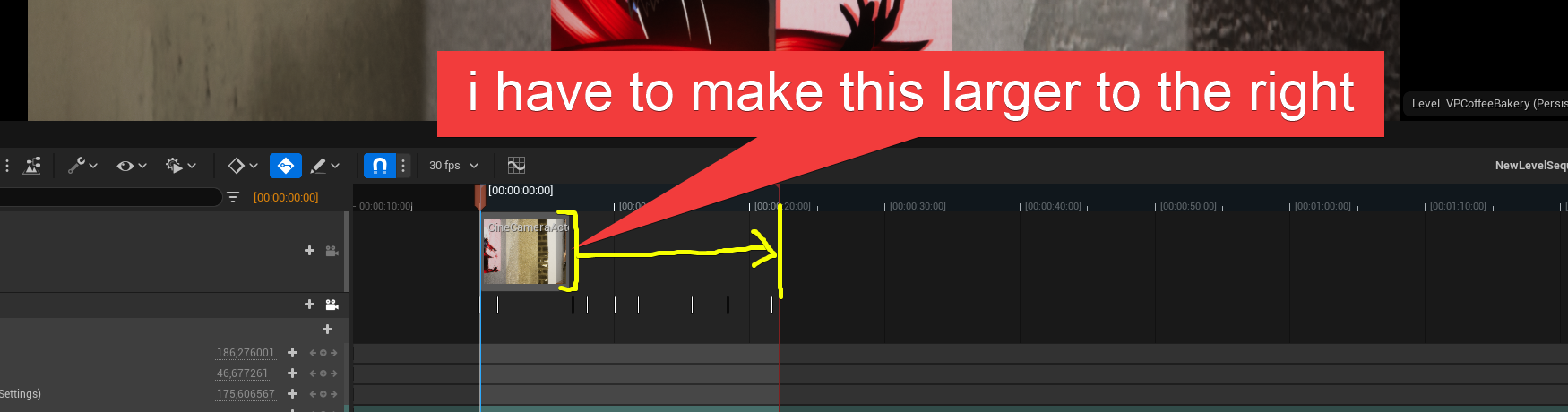
 graceful jackal
Hey yall. I'm trying to make a cinematic sequence. For some reason, the sequence does not play for the entire duration I want. How do I fix this?
Never mind I figured it out.
 dense snow
 minor tundra
hi. is there a bp node that will play an mp4 without having to make a plane to make it show full screen? I have some cut scene videos and trying to understand how all this works. Specifically using a hud widget
 wheat karma
In Sequencer is there any way to get the color picker here instead of having to manually type in color values?

 gentle remnant
Hi All, Is it posible to render a single frame with the path trace engine without using the Movie Render Queue?
There is an option for high resolution screenshot in the view port but that does not work with the path tracer
cold basalt
Anyone know how i can make this look more sharp and that the shadowing on the grass doesnt look weard? And to make it more realistic/natural?

just experimenting with cinematics here 🙂
 spiral gust
Hello! Currently creating a photo realistic animation, is it possible to isolate objects in groups and render them separately? In my case I want to render out the smoke in a separate pass. Thx!

 trim horizon
Ue5 here, have sequence that plays , which has 'rope' in name, and on play, another sequence is playing,namedly very differently, but with also 'rope' in name in different spot,,is that normal, do I need to change name and avoid similar letters in sequences ????
@spiral gust no clue, I've yet to do such things but I'm going to soon, but its very nice, looks so eral
real
o_0
spiral gust
trim horizon
<@555189043306954776> no clue, I've yet to do such things but I'm going to soon,...
Glad you liked it! 🙂
trim horizon
is this for game you're paid to make or for yourself and thus maybe a personal joy topic wize ;)))
I'm doing something similar ish so was curious ( not this at all, but on topic of kinda of etheral things so to speak)
If you made that model , pretty stellar
either way
spiral gust
trim horizon
I'm doing something similar ish so was curious ( not this at all, but on topic ...
It's just a test, my first render in UE5 using raytracing! I'm freelancing with my company and need a faster realtime render for animation. And ue seems like a no brainer! I have a lot of personal projects I wanna create in ue5 🤟🤩
trim horizon
nice 😉
spiral gust
I can post the final video here in chat, I'll also start creating UE5 content on my channel soon :) https://youtube.com/c/MikaelMontén
 trim horizon
heh, sometimes, maybe not but hey, I think machines could do a better job loil
something like ;0-0, data 😉
cold basalt
cold basalt
Anyone know how i can make this look more sharp and that the shadowing on the gr...
Anyone?
trim horizon
one sxec
sec
@cold basalt I see no issues with grass, maybe its just me dunno,,,the character has a plastic look to me. No offense, if that is what you're asking, that would be why, it looks out of place
I mean its very well done
but the skin looks very plastic
By sharp also, I think you can adjust the blur effect, as in distancve, maybe its set too high ?
speaking of help, anyone know why two sequences would fire at same time, given the letters 'rope' are in both of them, tho clearly not at all 'the same' names ? I've never seen anything like this before, maybe its a bug in UE5 or I have some weird setting in bp's , or elsewhere dunno ;0-0
trim horizon
so, no idea why one sequence is also firing one other in scene, with only four letters, rope, the same in them ?
tight stone
spiral gust
Hello! Currently creating a photo realistic animation, is it possible to isolate...
Not really. You can use stencil layers but it only works on opaque objects, and foreground objects will 'cut out' the background.
tight stone
gentle remnant
Hi All, Is it posible to render a single frame with the path trace engine withou...
Why do you want to avoid MRQ out of curiosity :?
Neighbor do you have Level Sequence Actors in the world set to Auto Play maybe?
quaint wraith
Anyway of deactivating Level Sequence tracks for the play session automatically? I want to use certain tracks only to preview things while I'm editing the Level Sequence.
gentle remnant
tight stone
Why do you want to avoid MRQ out of curiosity :?
Well i did a test earlier this week with the high resolution option in the MRQ and in the resulting image the tiling was visible.
I take it that the MRQ is the way to go to generate high resolution high quality path tracing images? If so i should dive back into the MRQ and see what i could produce.
gusty heath
spiral gust
Hello! Currently creating a photo realistic animation, is it possible to isolate...
How you get such a high quality gif? I always fail and get a gigantic filesize
spiral gust
gusty heath
How you get such a high quality gif? I always fail and get a gigantic filesize
I'm using EZ gif! https://ezgif.com/

Easy to use online animated GIF maker and image editor. Upload and edit GIF images for free. Create, crop, resize, reverse, optimize and split animated GIFs, cut and resize videos, WebP and APNG animations.
spiral gust
gusty heath
How you get such a high quality gif? I always fail and get a gigantic filesize
I'm also reducing quality in Da Vinchi Resolve to be able to have higher framerate (25 fps) and also keeping the GIF file size manageable.
gusty heath
Very nice thanks a bunch, and great work it looks very good
gusty heath
spiral gust
I'm also reducing quality in Da Vinchi Resolve to be able to have higher framera...
Also you can maybe check out CryptoMAttes, im a noob so i dont know if they capture smoke, but i used that to do seperate passes for masks
quick portal
lmao at that Doom font
spiral gust
gusty heath
Also you can maybe check out CryptoMAttes, im a noob so i dont know if they capt...
I've been thinking of using crypto mattes! I'll defiantly look into that 🙂
 crisp horizon
Question about movie render queue :
I have a scene I need to render in around 40 layers, with different objects hidden and blueprint settings changed.
Rendering each one separately is super time consuming, so I was wondering if you could add any of these settings via console variables and just create a loooong render queue?
Or is there maybe a plug in to help with that?
Please ping me when replying.... :)
crisp horizon
It would be so neat if unreal would simply *snapshot" a map everytime you added its level sequence to the movie render queue...
tight stone
gentle remnant
Well i did a test earlier this week with the high resolution option in the MRQ ...
Did you set an overlap percentage to blend between each tile?
tight stone
crisp horizon
Question about movie render queue :
I have a scene I need to render in around 40...
Python scripting is going to be your friend here
tight stone
gentle remnant
I take it that the MRQ is the way to go to generate high resolution high quality...
Also if you can afford the memory then it's more likely to be a device TDR and you could just forego the high res tiling anyways
steep copper
hello, I create a "add binding" event via level blueprint with level sequencer. but i need to unbind it at the end of the sequencer , how can i make it? option 1: I can unbind via level blueprint at the end but I dont know how to define the end of the sequencer. option 2 i can create trigger event in level sequencer but i can not define the sequencer in sequencer director blueprint. please help me thank you
gentle remnant
tight stone
Did you set an overlap percentage to blend between each tile?
no i did not, will try this
tight stone
gentle remnant
no i did not, will try this
Start with 0.1 (10%) that's usually enough to cover it, though if you have extremely out of focus FG elements you might need more
gentle remnant
cool thx!
tight stone
gentle remnant
cool thx!
Also with the path tracer (in 5.0), you'll want to use lots of Spatial Samples to get the traces you need, but not a lot of temporal samples. The denoiser is run after each temporal sample, so you can end up with an overly denoised image if you use lots of temporal samples. Since it sounds like you're only taking still images, I suppose it probably doesn't make a difference to you
gentle remnant
For now some stills, later probably also video. so your tips are more then welcome 🙂
tight stone
You can either turn the denoiser off if using lots of temporal samples (for nice smooth motion blur) and denoise it once in post using some other software, or in 5.1 I think there's an option being added called "reference motion blur" or something to the PT render pass that skips denoising until the last temporal sample
 last cipher
hey all, how do i reduce this kind of noise in my exports?

I'm using the ultra dynamic sky plugin
steep copper
hello, in sequencer editor the character can move with its animation but when i test it in real time pawn can not use the animation stays in A pose. anybody has an idea?
split tulip
How do I create this effect when you swipe down you see the fish-eye view of the sky and when you swipe up you see the spherical landscape in Unreal? https://stellarium-web.org/
Stellarium Web is a planetarium running in your web browser. It shows a realistic star map, just like what you see with the naked eye, binoculars or a telescope.
 fading barn
last cipher
hey all, how do i reduce this kind of noise in my exports?
fading barn
last cipher
hey all, how do i reduce this kind of noise in my exports?
Try changing your cloud rendering in the details panel from performance to quality.
 distant mauve
Is Enable Camera Lag only a feature of the camera boom component? Not finding how I could do a smooth camera lag effect in sequencer FOR LOCATION, I can use a lookat actor to have smooth camera lag for lookat rotation but not for actually moving the camera. It's really difficult to move the camera smoothly around a corner like a curve, doing both keyframes, and trying a rig rail I just can't hit corners smoothly

I just can't tame the curves, the curve editor is really difficult to get clean movements. the green is similar to what keeps happening to me, but I'm sure that I'm missing something
 mint bison
Man.. took me many many hours going back and forth b/w blender, photoshop and UE to get the model texture to look right on UE X(
I want to work on getting the skins look more realistic. If anyone has any tips on skin shading, let me know!!!
 quick portal
mint bison
Man.. took me many many hours going back and forth b/w blender, photoshop and UE...
quick portal
mint bison
Man.. took me many many hours going back and forth b/w blender, photoshop and UE...
#work-in-progress
gusty heath
@mint bisoninstead of a channel redirect, here is some examples of my work and feel free to dm questions
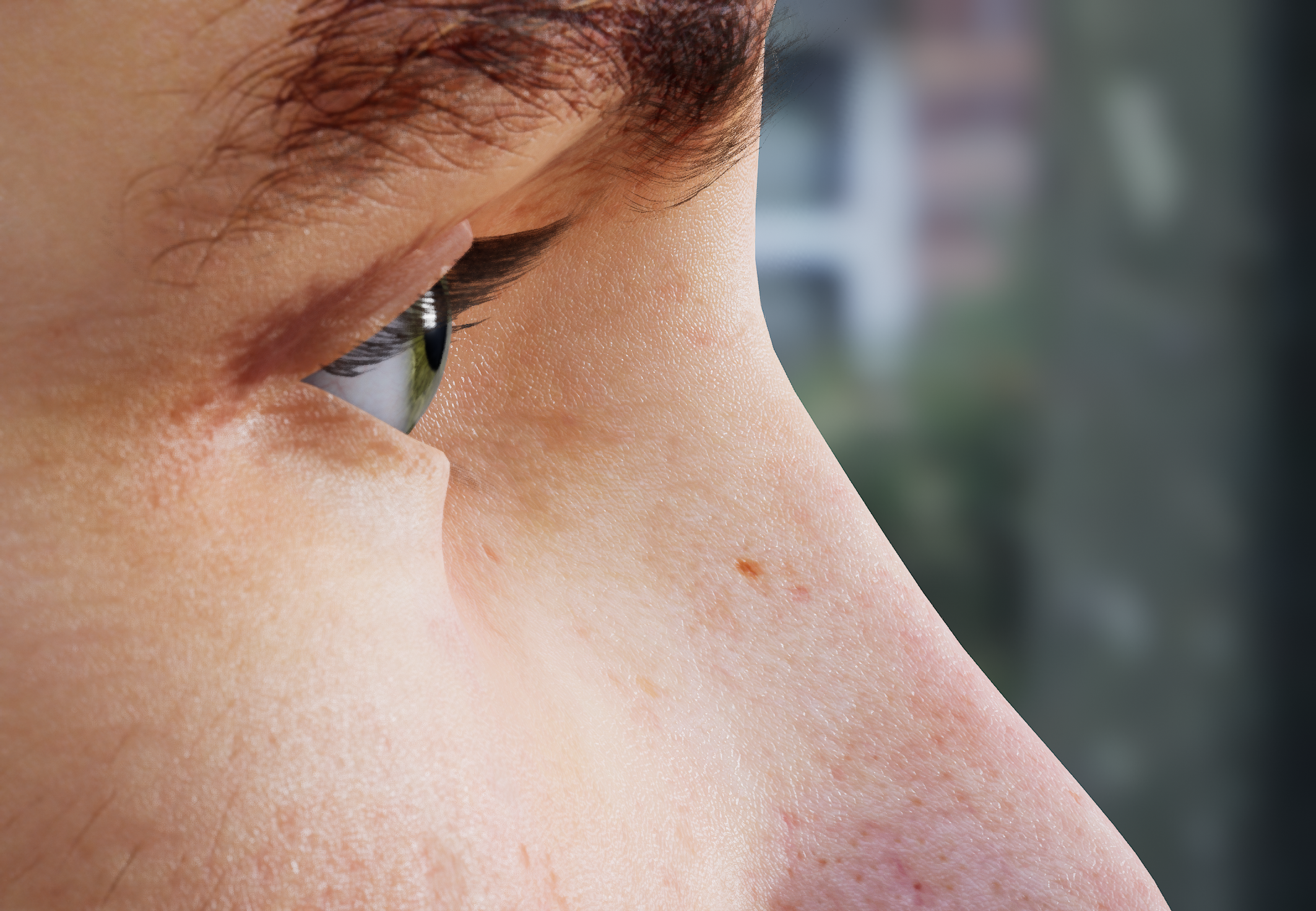
I copied the metahuman materials quite a bit for my cinematics
it uses mostly the same shader graph with some procedural materials mixed in with masks to spice it up
 fading belfry
hey noob question, after a render of an image sequence, what program do you use to make a video from those images?
spiral gust
fading belfry
hey noob question, after a render of an image sequence, what program do you use ...
Hi @fading belfry I use Da Vinchi Resolve, a free software that is great (and industry standard) for color grading! Resolve creates an image sequence atomaticly when you drag in your images. Good luck!
fading belfry
oh nice, well i used blender and its working good too
btw what do you think?
the statue is blurred for one second and then it changes, idk if its a good idea or not
spiral gust
fading belfry
oh nice, well i used blender and its working good too
Wow really nice, love the atmosphere! A tip is to switch the camera keyframes from Bezier to linear (this removes the ease in/ease out movement). You could also ad some subtle camera shake to add realism! 🙂
spiral gust
fading belfry
oh nice, well i used blender and its working good too
Blender Is great but da Vinci is MUCH better when you're working with multiple clips, want to color grade, do vfx in fusion tabs etc 🙂
damn that's really nice, especially the caustics reflections on the walls 🙂
fading belfry
yeah i should try the caustics too
fading belfry
done

 acoustic wolf
Hello! i have a question not directly about unreal but about color spaces. i have a scene lit by red light and in rgb space (directly rendered out of unreal) the colors are correct but if some tool compresses this video reds become more pink. just like if i would convert it into rec.709 color space. the question is how properly to handle this color space conversion? i use adobe after effects. i want it to be close as possible to the original rgb.
tight stone
You should probably render with tonecurve disabled into exr and that will give you linear sRGB @acoustic wolf and then beyond that, shrug, depends on your post processing app I guess
acoustic wolf
hmmm, thank you! i will keep this in mind next time
 crystal acorn
https://www.youtube.com/watch?v=2paNFnw1wRs this cinematic is unbelievably impressive coming from one person. I just can't get over how good it is lmao... I hope to make something like this one day

My latest environment, freely based on a real-life train station in Toyama, Japan.
The environment is running in Unreal Engine 5, lit with Lumen. I didn't use Nanite.
I worked on all modeling, texturing, lighting and animation for this video.
The only exception is foliage, which is from Quixel Megascans.
More on Artstation: https://www.artstatio...
distant mauve
I have a main sequence with multiple shots. I've decided I want to raise the contrast to a specific value for every shot, how can I do that without doing it 1 by 1?
Oh no I should have used post process volumes instead of per camera settings huh
tight stone
Yea
You can still do that though @distant mauve
Add a post processing volume and set it to unbounded, and then edit the exposure there. As long as the individual cameras don't override the exposure too they'll get blended together. And then you can animate that from the master sequence if you want to change it over time
crisp horizon
I have a dumb question....
I still can´t wrap my head around sampling, even though I´ve been dealing with it for 10 years now in other DCCs...
SO.
If I render using movie render queue with 1 spatial sample and 8 temporal sample, disabling TemporalAA...
But I´m also disabling MotionBlur in camera...
Does that mean that all samples go into the spatial sampling and I get better antialiasing overall?
 desert hedge
Is there a way to exclude an object from camera DOF effect?
F.e. I have a background that I need to have a strong blur, and next to camera a transparent mesh object with techy grid material.
This techy grid material-object would need to be checked out from camera DOF effect.
quick portal
desert hedge
Is there a way to exclude an object from camera DOF effect?
F.e. I have a back...
You have to enable Separate Translucency in Project Settings, and enable Render after DOF in your translucent material.
That way translucent objects won't be equated into the DOF
desert hedge
Does this work with a masked material?
desert hedge
quick portal
You have to enable Separate Translucency in Project Settings, and enable Render ...
I forgot to hit "reply" to previous.
Anyways, thanks for noting!
Does this work with a masked material? As this transparent material has same masked effect also applied to it.
quick portal
desert hedge
I forgot to hit "reply" to previous.
Anyways, thanks for noting!
Does this wo...
No, masked is opaque with binary visibility (the alpha value on given texel is either 0 or 1)
fading belfry
crystal acorn
https://www.youtube.com/watch?v=2paNFnw1wRs this cinematic is unbelievably impre...
wtfffffff
fading belfry
im writing console variables in the movie render queue, following the official documentation, but its written for raytracing, and im on ue5, should i write them anyway? will it work?

im following this tutorial too
 fading belfry
so i made this render with movie render queue, 30 minutes of render for a 6 second video, i dont understand, the video seems to be laggy at the beginning and my leaves particle system start late and ends in the middle wtf
tight stone
crisp horizon
I have a dumb question....
I still can´t wrap my head around sampling, even thou...
The final result is (NumSpatial * NumTemporal) samples. If you want to have motion blur in the final image you should put your sample counts into NumTemporal (and leave MotionBlur Amount at some non-0 value, ie the default 0.5). If you want no motion blur at all, then set MotionBlur Amount to 0, and put your samples into Spatial Samples instead.
tight stone
fading belfry
im writing console variables in the movie render queue, following the official d...
If you're not using raytracing then the cvars probably aren't going to do anything so there's not really any point in putting them in
fading belfry
oh yeah why?
tight stone
fading belfry
oh yeah why?
because... it won't do anything?
fading belfry
i dont know how this works
tight stone
I mean there's no harm in putting them in, but also it doesn't do anything so why spend the time/waste complexity
fading belfry
any cvar is useless with lumen?
tight stone
That depends entirely on what the cvar is doing... open the console in the main editor (hit the ` key), and type the cvar name with a question mark after it and look at the output log and it will give you a description of what it's diong
And you can just edit it in the viewport to see what effect it has in real time
fading belfry
oh yeah good idea but can you explain why they are uselss ? i followed a tutorial that is on ue5 with lumen
so the tutorial is bad?
tight stone
Add some Engine Warmup Frames, and check "Render Warmup Frames" in the Anti-Aliasing setting... Set it to like 256 engine warmup frames. That should give time for the leaves to fall... not sure why it's stopping early though, you'll have to play with your particle settings to figure out why it doesn't keep playing/emitting, not sure what's going on there
tight stone
fading belfry
oh yeah good idea but can you explain why they are uselss ? i followed a tutoria...
It depends on if you're using that raytracing feature. ie: I think r.Raytracing.GlobalIllumination.Denoiser wouldn't have any effect if you're using Lumen for Global Illumination. But try them and see if you see a visual difference. Or just put them all in.
fading belfry
Well my pc crashed... But when i did render remoteo it took 30 minutes and didnt crash
fading belfry
tight stone
If you're not using raytracing then the cvars probably aren't going to do anythi...
im sorry i used them on my previous video, so they are useful right?

but what takes so long in the rendering? the anti aliasing takes some time
i think screen percentage too
tight stone
This depends entirely on your content and you should test them and decide if they are appropriate for your content.
fading belfry
and i used this
 tight stone
Uncheck "Use Camera Cut For Warm Up" and switch to "Engine Warm Up Count" imo, unless you've manually extended the camera cut section to before the Playback Bounds start within the section
fading belfry
ok
tight stone
And yes, screen percentage and sub-sampling counts are going to be big impacts on rendering performance. 64 temporal samples means that for every output frame you're rendering 64 times, and 150% screen-res means for each render you're asking for 50% more pixels than a normal one, so your final frame is like... 96 times as long as a standard one
fading belfry
oh yeah i see
i have a camera that is 64mm x 27mm, aspect ratio of 2.37, so my output resolution shouldnt be 1920x1080 but less right?
i think its 1920x817
tight stone
The output resolution will be whatever you ask it to be.
If you have bConstrainAspectRatio enabled on the camera, then it will letterbox to match the sensor size.
distant mauve
tight stone
Add a post processing volume and set it to unbounded, and then edit the exposure...
Cheers for that, didn't realize you could blend that way
crisp horizon
tight stone
The final result is `(NumSpatial * NumTemporal)` samples. If you want to have mo...
So, no MoBlur, I would just use 8 spatial samples and 1 temporal sample.
Fun.
I thought I remembered I had tried that and gotten an error messages, but looks like I remembered wrong...
I also read something in the manual about how unused temporal samples would just go to spatial samples...?
tight stone
Not automatically
But yes you will get an error if you specify temporal samples and no motion blur amount, because it doesn't know how to distribute 0 time passing into n time slices 🙂
crisp horizon
tight stone
But yes you will get an error if you specify temporal samples and no motion blur...
Oh, damn, thats the error I keep getting, lol...:)
tight stone
just set temporal sample count to 1 and spatial sample count to n instead.
crisp horizon
I early on had to disable motion blur, because it didn´t work with the waterline plugin I think.
And then i decided that it was a good idea anyways, since I had to render a lot of layers and do a lot of post on them.
tight stone
You can also technically run showflag.motionblur 0 which will turn off the post processing motion blur and then still use temporal samples - these will be real renders spread out over MotionBlur Amount time (ie: half a frame), so it'll look like stamped copies of the image unless the TS count is high enough, usually 2d motion blur is used to cover the gaps between temporal samples
If you're going to do post then yeah, I'm not sure there's a great answer. You should render with the Tone Curve disabled and render out Motion Vectors/Depth passes, but it doesn't really support temporal sub-sampling because the math just doesn't really work out in post production tools
crisp horizon
Well, for most shots so far I really didn´t need motion blur and then for some just the after effects pixel motion blur worked just fine.
I just didn´t have more time to do R&D and now we´re in the middle of it, so I´m just sticking with it...
But yeah, thanks for clearing that up!
By the way...you don´t know of any movie render queue plugin that lets me save map states with each render queue item?
Like, I need to render the same sequence a dozen times or more, just with different blueprint options enabled or objects hidden etc.
tight stone
Not really. You could try using Sequencer auto-keying to capture the changes into the active sequence while you're editing the map. Otherwise you can get fancy and write your own setting class (in C++), or try to do write something in Python
Where you edit the map using Python scripting between each job and then render the job.
crisp horizon
Yeah, not gonna do that...:)
Hope Epic adds something like that, as Unreal is being used for linear content more and more.
And probably down the line I´ll get better at materials and just get rid of the need to render a dozens of layers...:)
tight stone
I'm not sure what a UX would look like for configuring that amount of data
crisp horizon
I don´t think of it as UI.
If I would be able to create it, I would add an option whenever you add a sequence to the renderqueue, to "snapshot" the according level in the current state.
So, you would set it up as needed, add the sequence, everything gets snapshoted.
Then you´d change a bunch of settings, add the same sequence again and it would snapshot the level with all the different settings.
And once you filled the render queue, it would then just load the snapshoted level instead of the current version and you could render all layers in sequence one after the other...
There is probably a bunch of issues with this approach I´m not seeing, but yeah, thats how I would do it.
I could probably also just set that up manually...
Add the sequence to the render queue,, then clone the level, change the settings, duplicate the sequence, change the output and pick the cloned level. Rinse and repeat for all layers.
If you´d change anything major in the level, you´d need to clone and change the settings from scratch of course, but if you would just change stuff in the sequence, you could simply reuse all the previously cloned levels and even save the whole renderqueue...
Hm.
I might have something here...:)
tight stone
You could try sub-levels... put stuff that changes in separate sub-levels, put stuff that doesn't change in a "master" level, then each top-level level (heh...) can just have the non-changing stuff in a sublevel so that those changes propagate to all of them.
And if you use Spawnables in the Sequencer (instead of Possessables) then it's not actually linked to the level, so you could re-use the same sequence in multiple potentially
I agree that it's a bit clunky.
fading belfry
tight stone
If you have bConstrainAspectRatio enabled on the camera, then it will letterbox ...
what is it?
tight stone
a property on the camera called constrain aspect ratio
 void flower

Epic Developer Community
Learn how to use Unreal Engine for virtual production and post-production, bringing together all the pieces of your workflow into a unified environment ...
@crisp horizon I think this can do what you're describing and @tight stone is mentioning
 still prism
void flower
https://dev.epicgames.com/community/learning/courses/J61/independent-filmmaking-...
still prism
void flower
https://dev.epicgames.com/community/learning/courses/J61/independent-filmmaking-...
yo thank you. i am not new to sequencer but i always love content i have not seen before
void flower
yea.. I think that video would be better listed as "How to edit levels on the timeline"
crisp horizon
tight stone
You could try sub-levels... put stuff that changes in separate sub-levels, put s...
Ah, yeah, I gotta look into spawnables. So far I only dealt with those accidentally...
But that would possibly get rid of the issue of missing references, when I clone a level, I forgot about that...
If I had proper planning ahead, I would definitely consider sublevels, but so far its a lot of "on the fly decisions" I have to make, hard to plan whats gonna change and whats not, lol.
crisp horizon
tight stone
You could try sub-levels... put stuff that changes in separate sub-levels, put s...
Actually, for this particular project, sublevels really don´t get rid of my issue. 90% of the changes I have to make to render out the separate layers, are on and off switches on a particular blueprint.
And then I have copies of the same blueprint with the same switches, but only one of the copies is active for each renderlayer.
Just to add perspektive to that convoluted pipeline:
I´m rendering out an earth asset from marketplace, but I have to animate all the continents, so I created mask materials for each continent, so I can animate the rotation of each continent separately and then put them back together in post...
The textures also need to be super high detail, so we´re using 16k texture tiles, which means just animating the whole continents textures with media textures were´nt really an alternative.
crisp horizon
still prism
yo thank you. i am not new to sequencer but i always love content i have not see...
Thanks for posting, gotta watch that in detail, maybe it won´t help for this particular issue, but it still looks interesting!
tight stone
@crisp horizon If you clone both the level + a level sequence, you can use the "Fix Actor References" in the little wrench menu in Sequencer and it'll try to look up the actors again by name I think
(usually the name is the 'long' name that captures the map path + actor name inside the map, and I think the fixup tries to find them without the map path in the current level)
crisp horizon
tight stone
<@597712651384127488> If you clone both the level + a level sequence, you can us...
Yeah, but I don´t wanna clone the sequence.
tight stone
Also could you make 1 master sequence that is say 6x as long, and then animate the bools on and off and have your camera motion loop?
So from frame 0-30 is the first animation/render states, then 31-60 is the same animation, but with the different bools toggled
crisp horizon
Well, its not only the camera thats animated...
In some instances I have 10 or more additional objects animated and since I have, in the worst case, 40(!) layers, I´d have to clone everything 40 times...
Or could I just add the sequence to a master sequence, clone it a bunch of times and then just have an extra layer with the bool switches for each cloned sequence? Or would I need to have separate sequences for that?
Are you doing a lot of cinematics yourself by the way?
tight stone
Yeah I was thinking sub-sequence
So you can just put down the same sub-sequence n number of times - editing one instance will edit all of the instances
and then you can animate the bools at the master level
This might cause issues with temporal sub-samples, but either add an extra frame to the start of the animation you delete in POST, but I think we already ruled out using temporal sub-samples?
crisp horizon
Yeah, those actually messed a lot with my renders, since I had some shots with several cameras and the camera cuts messed up the renders badly, thanks again for clearing that up.
That approach sounds almost like what I want, gotta figure out how to do that, to see if it works.
I´d still need to clone the render item a bunch of times in the movie render queue, add different timeranges and change the ouptout location and name.
But I´d only need to set that up once and then I could just save the whole render queue, right?
tight stone
Yes, you can just save the queue, no need to save a config preset for each job in the queue
The other thing you could consider is building jobs with Python scripting, or even building sequences with Python scripting, ie: you have one "master" sequence and then you programmatically build a new sequence that duplicates that and makes whatever edits and then sticks that new sequence into MRQ
rocky escarp
Another nice, but slightly obscured feature is using template animation with properties. You can expose variables in the template, then modify them in the master using property multipliers which can be kind of cool. Gives you editable instances at the master level. Though tbh something of that scale would benefit from a scripting pipeline.
tight stone
I can't really say which is better/faster as I don't understand the big picture of what you're working on.
crisp horizon
tight stone
I can't really say which is better/faster as I don't understand the big picture ...
Working on a TV documentary.
Thing is, most shots are just around 5 layers, so taking the time to learn python isn´t really appropriate.
And that particular shot came in way too late and I kept needing more and more layers...
tight stone
Ahh the classic "it'll only take me 5 minutes and I'll only have to do it once, no need to automate it" turning into "it takes me 4 hours every time and they keep saying one more revision" :p
crisp horizon
But that approach with master sequence and animated booleans per instanced sequence sounds as good as it gets, for my skill level.
crisp horizon
tight stone
Ahh the classic "it'll only take me 5 minutes and I'll only have to do it once, ...
haha, yeah, I´ve been struggling with that for ages...:)
Thanks a bunch man, this has given me a lot of great ideas to try.
Waiting for renders is the perfect time to test out stuff like that..:)
quick portal
Moral of the story: Don't underestimate reward of automation and templates
tight stone
Also a pro-Sequencer tip: You can make variables, and then have Sequencer call a function when it evaluates
crisp horizon
3 minutes rendering, half a minute setup, all times 40.... a lot of very little time to do anything useful, but very good for research...:)
tight stone
Which can help propagate those changes to other things, ie:
if you make a float MyFloatValue as a member variable and expose it to Cinematics, you can animate it in Sequencer.
crisp horizon
quick portal
Moral of the story: Don't underestimate reward of automation and templates
Yeah, I never did. But...ADHD is not your friend when it comes to planning for long term reward...
tight stone
But if you make a Blueprint Function called SetMyFloatValue which takes a float argument, it'll call that instead of updating MyFloatValue, but you can run other code if you need (like pushing a change to a material instance)
So you could do something like
void SetMyFloatValue(float InValue)
{ MyFloatValue = InValue;
... // Some other code that changes object state or something }``` (pretend that's BP psuedocode, it works in BP)I also come from an artist background, so I never really had a ton of need to get into coding and its still a bit scary to me.
tight stone
And if you check the 'Run in Editor' setting on the function you make, then it gets called when you scrub the timeline in Sequencer 🙂
crisp horizon
Yeah, for now I´ll stick to the "hacks"...:)
tight stone
👍 Push that shot over the finish line, I on the other hand, am going to go set the fade settings on my eyeballs to zero.
crisp horizon
haha, do that, thanks again!
rocky escarp
@tight stone i used to use that method but I thought that was replaced by repeater events now?
Not urgent, get some sleep
tight stone
@rocky escarp Either way works. Repeaters can be a 'better' solution if you have a lot of variables you're animating (so you can have one function you call and then it plugs in all the variables at once, instead of writing a Set<...> function for each one)
quick portal
crisp horizon
Yeah, I never did. But...ADHD is not your friend when it comes to planning for l...
Well, I moderately had it too. But still, making automations and templates will make work easier in the long term
tight stone
I think the Set<...> magic function names might pre-date modern event tracks that take nice payloads and bind to functions in the Director Blueprint
crisp horizon
quick portal
Well, I moderately had it too. But still, making automations and templates will ...
Yeah, I´m working on it too, Unreal is actually great for that, because it forces you to do a lot of things smarter and more structured than some other DCCs.
 tiny swallow
Hey, could someone help me out with the sequencer. I want to talk with AI character and that starts an sequence. Sequence always just plays the talking animation on a character who is talking and CineCamera is showing it like 1 meter away. I CAN create all that but is there way to automate it somehow? It really takes time to always make a new sequence where i do all the same things but in a new place.
rocky escarp
tiny swallow
Hey, could someone help me out with the sequencer. I want to talk with AI charac...
Sure, many ways to manage location rather than absolute world position. Really depends on your programming. You can have the camera spawned via the event logic to manage it’s position or attachment. If it’s static that’s fine, or if you need sequencer animation you can rebind it after spawning. Or you can just use an attach track in sequencer. You can set any transform track to additive +100cm (rather than absolute). This will add 1 meter from the next hierarchical location (either existing transform track, or if there isn’t one, it’s neutral world location)
crisp horizon
tight stone
Yeah I was thinking sub-sequence
Not trying to wake you, but just a quick update: Master sequence with instanced subsequence and then adding the bools etc in the master sequence really seems like the way to go.
The setup will still be rather tedious, but only once, and then I can just rerender the same master sequence with the saved frame ranges and output-paths from the saved movie render queue over and over and any changes in the level or the instanced sequence will be taken into account.
Even if I create a new version of the instanced sequence, I can simply replace all the instances with that new version, same goes for changes in the level...
Again, having that automated would be nice, but I can definitely work with that!
Had my first successful test, still need to work out some kinks (Have to expose a bunch of blueprint settings to the sequencer etc.), but thanks for the input!
fading belfry
tight stone
a property on the camera called constrain aspect ratio
oh ok, well my method is working for now, i just put the camera in 1920x810 and at the end i dont even have the black bars so its good, but i found another method where you keep the basic 16/9 camera (1920x1080) and use the letterbox mask , then you crop at the end of the rendering
what is the difference? the lens of the 2 cameras will be different? or it doesnt matter really?
steep copper
hey sorry for interruption; i use time dilation for slow motion for an actor in sequencer but i need to have only this actor should affected by slow motion. is it possible to assign to a single actor ? I want the walk collapse slowly but may actor's aniamtion doesnt affect by the slow motion .
quick portal
steep copper
hey sorry for interruption; i use time dilation for slow motion for an actor in ...
Is faking the slow motion not an option?
steep copper
how can i make it?
tiny swallow
rocky escarp
Sure, many ways to manage location rather than absolute world position. Really d...
Thanks for your answear. I'm not sure how to accomplish that yet but little googling might do the thing 🙂
steep copper
quick portal
Is faking the slow motion not an option?
thank you i found to fake it
tight stone
fading belfry
oh ok, well my method is working for now, i just put the camera in 1920x810 and ...
Choosing the correct output resolution reduces the number of pixels that need to get rendered.
tight stone
rocky escarp
Sure, many ways to manage location rather than absolute world position. Really d...
@tiny swallow https://docs.unrealengine.com/5.0/en-US/creating-level-sequences-with-dynamic-transforms-in-unreal-engine/

Describes how to create Level Sequences with Actors that have dynamic world transforms that can be changed at run time.
tight stone
steep copper
hey sorry for interruption; i use time dilation for slow motion for an actor in ...
Time Dilation is global, so no. You could change the play rate on an animation track, or export it at a different framerate from your original authoring package.
steep copper
tight stone
Time Dilation is global, so no. You could change the play rate on an animation t...
thank you
 bold patrol
How I just come to know of this? https://www.youtube.com/watch?v=utKqt1iHLyY Soooo good....... #Overprime #Paragon

Overprime is a MOBA game where you can enjoy spectacular dynamic attack skills of the heroes in a 3D TPS view. It is a game where two opposing teams of heroes destroy each other's bases. Choose one of the unique heroes and join the battlefield on one of our sci-fi inspired maps.
오버프라임은 영웅들의 화려한 스킬을 3D TPS 뷰로 즐길수 있는 MOBA 장르의 게임입니다. 두 팀의 영웅들이 서로의...
Needs more views...
 outer bluff
Does anyone know a Console Variable that I can use to FIX actor reference in Movie render Que?
tight stone
Can you elaborate more on what your actual problem is
barren lagoon
hey @tight stone, just wanted to say it’s super cool to see you active in here again. once i inevitably run into more issues that make me bang my head against the wall you’re the first person i’ll go to 😁
 mossy crow
I can't get reference to cine camera actor to my level.I think it must be because of disabling a plugin.Which plugin should I enable ?!
tight stone
Cine Cameras are in the core engine I think, what are you trying to do?
violet dove
I'm using take recorder to record some physics simulations in UE5, everything works well but when playing back the result, the very first frame of the recorded take snaps away from its original position, and then carries on the animation. How do I fix this snap on the initial frame?

replicated the issue using a simple cube
 crisp horizon
Hey @tight stone , been doing some more experimenting on that mastersequence-render-setup-idea.
So, I exposed a bunch of the blueprint variables I need to turn on and off layers, added my sequence in the master sequence as a shot and duplicated it a bunch.
Then I added the blueprint below it to teh master sequence, added tracks for the variables/parameters and turned them on/off.
Unfortunately they don´t seem to be working at all.
I can animated the Visibility from shot to shot, but thats about it.
Any idea where the problem might be?
Is it a workflow problem or is the problem within the blueprint?
Wait, never mind. Seems a bit weird, but after I unchecked/checked the variables on the blueprint directly, with "animate on key change" on, instead of just setting keys in the master sequence, it now seems to be working.
Nope, still not working
 full vine
Hi, I'm trying to do the following Media Framework Quick Start tutorial for UE 4.27 but I'm encountering some trouble.
https://docs.unrealengine.com/4.27/en-US/WorkingWithMedia/IntegratingMedia/MediaFramework/QuickStart/
In Step 2 of section 1 - Project and Material Setup, it seems to show that four assets should appear after importing the provided Sample Content, but I'm only seeing the File Media Source asset. The Sample Content folder only includes an .mp4 file.
Does anyone have an idea what I may be doing wrong, or how to proceed without the other assets?
A guide on how to quickly add and play videos inside your game levels with the Media Framework tools.
crisp horizon
Wohoo, figured it out!
"In the blueprint’s “Class Settings” you need to tick “Run construction script in Sequencer”
That fixed it!
One more quick question...
I couldn´t find a shortcut for "go to next shot" in the Master sequencer, isn´t there one?
tight stone
crisp horizon
"In the blueprint’s “Class Settings” you need to tick “Run construction script i...
This won't work at runtime btw, you need to wire a function in Tick() that reads the bools and updates whatever it needs, or you need to do the Set<varname> thing I was talking about
 dry hollow
Hi there, i was wondering what i need to plug into the 'play level sequence' target, if anyone could help. Its in a static mesh blueprint that moves upwards when the play enters a box collision. In the level blueprint you can just click the object in the content browser, but i wanted to know which target to plug in if its not in the level BP.
 barren lagoon
when i’m blending animations in sequencer, is there a way to manipulate the weight on a per-bone basis?
i’d like to blend the lower body of an animation with the upper body of another
tight stone
dry hollow
Hi there, i was wondering what i need to plug into the 'play level sequence' tar...
Put an ALevelSEquenceActor in your level assigned to the sequence that moves the cube, then in the blueprint get the level sequence actor, call GetSequencePlayer() and then call Play()
crisp horizon
tight stone
This won't work at runtime btw, you need to wire a function in Tick() that reads...
Hm, ok, stupid question...But whats runtime mean when it comes to rendering with Movie render queue?
Is that considered runtime?
Because right now, my setup works perfectly right up to the moment I hit render on the movie render queue...
- Added subsequence instances to master sequence.
- Added blueprint variables and animeted them per sequence.
- Added master sequence to movie render queue, made as many duplicates as I needed and defined render ranges and outputs for each layer.
If I play the master sequence in editor, all bools turn on and off as expected, same if I hit play in the editor in "simulate" mode.
That "Tick()" wiring you mentioned is a bit above my understanding...
Could I just add a game mode override? And if so which one would be the equivalent of "simulation mode", because in that mode it seemingly works in editor?
crisp horizon
sigh, so close but yet so far.
If only I had time to do a crash course on blueprints, I´m so close to making it work, but apparently I can´d do it without knowing more about how blueprints work.
Received some more tips about just copying the bools from the construction script to the event graph, but that didn´t work either.
quick portal
crisp horizon
Hm, ok, stupid question...But whats runtime mean when it comes to rendering with...
Basically compiling existing sequence without the editor, just compiling the game.
It might be useful for pseudo distributed rendering
crisp horizon
quick portal
Basically compiling existing sequence without the editor, just compiling the gam...
Hm. Ok. But is there a way to render with movie render queue as if i would just run it in editor? Because the boolean switching on the blue print works there...
Hm, wait a second...
Just tried it on a different machine and now it seems to work...
gotta do some more tests...
dry hollow
tight stone
Put an ALevelSEquenceActor in your level assigned to the sequence that moves the...
thank you
crisp horizon
Hm. no. Still not working properly.
crisp horizon
Ok, I think I pinned down the issue.
I´m able to animate actor hidden and material switches onsome extra assets I placed inside the blueprint, but I can´t animate the booleans, that change the dynamic materials set in the blueprint.
I also can´t switch the materials outside the blueprint, because they rely on some stuff in the construction script afaik.
I don´t think I´m able to solve this on my own....:(
tight stone
crisp horizon
Hm, ok, stupid question...But whats runtime mean when it comes to rendering with...
There's different meanings of "runtime". In this case I mean during PIE. And no a Game Mode can't control Simulate.
What do you do in your construction script, post a picture.
 peak current
so i dont have an actual desktop PC so i use my laptop (surface laptop 4 basic specs) and it can not do raytracing in any shape or form. Is it possible for me to make a cut-scene or cinematic so that it does have ray tracing in the video? render time is no concern
quick portal
peak current
so i dont have an actual desktop PC so i use my laptop (surface laptop 4 basic s...
No.
If that's the case you might want to consider Blender Cycles instead, or make the scene look good even in full raster (which is possible)
Also UE's path tracing require hardware accelerated ray-tracing anyway, there's no CPU path tracers (except for building static lighting)
peak current
quick portal
No.
If that's the case you might want to consider Blender Cycles instead, or ma...
how do i do full raster? also what is that?
does it still give good results?
quick portal
peak current
how do i do full raster? also what is that?
Basically what games are doing for the last 30 years or so.
quick portal
peak current
does it still give good results?
If you know the art of the lighting and whatnot, then yeah, it can give good results.
peak current
quick portal
If you know the art of the lighting and whatnot, then yeah, it can give good res...
is full raster just some settings i need to set in movie pipline editor?
quick portal
peak current
is full raster just some settings i need to set in movie pipline editor?
No.
peak current
quick portal
No.
how do i do it then?
quick portal
Just don't bother with adding ray tracing settings.
peak current
oh ok
mint bison
gusty heath
<@383512386746712081>instead of a channel redirect, here is some examples of my ...
I somehow missed this reply, but I appreciate the offer. I've made some updates since then, but could still use more details!
mint bison
gusty heath
<@383512386746712081>instead of a channel redirect, here is some examples of my ...
https://twitter.com/hanascastle/status/1524829098450702336
Character update I made + motion caption for my cinematics


. 🕯 🕯
🖥️ 🖥️
#Vtubers
🕯 who appreciates tech 🕯
❤️
🖥️ 🖥️
🕯 🕯
GUAYSS LOOK HOW GOOD THIS MOTION TRACKING LOOKSSS
 Twitter
·
quick portal
Twitter
·
quick portal
That stray finger weight tho
mint bison
quick portal
That stray finger weight tho
yeah haha I need to fix that
Looks like I missed a vertex to paint in Blender. I needs more work on the skin shader as well. It still looks a bit like a plastic doll in certain shots & lighting. I will try to reference meta human skin texture and shaders like @gusty heath suggested
 wind cloak
Hi! Does anyone have any suggestions on decreasing how long it takes to render high quality scenes via MRQ?
rendering a 20 second scene, 607 frames, taking like 40 minutes, even with a 3090 😅
gusty heath
@wind cloak why not do it in raytracing without pathtracing
even if you get like 5fps thats still faster to render than with path tracing and from nvidias own docs the difference is very little visually
mint bison
Has anyone ever experienced the audio track in the sequencer always starting from the beginning regardless of the where in timeline you start playing?
 heavy plinth
Hello is it normal that i don't see all my props in my rendering, but in my cineactor camera everything is here ? is it due to World partition ?
 thin magnet
Hi. Anyone else facing issue that audio track starts from beginning again with every camera shot if you render it through movie render pipeline?
in ue5
quick portal
thin magnet
Hi. Anyone else facing issue that audio track starts from beginning again with e...
Why not forgo the audio and then add it in post?
quick portal
See #instructions on how to post to #hire-a-freelancer 🙂
mint bison
thin magnet
Hi. Anyone else facing issue that audio track starts from beginning again with e...
lol I just asked the same question right above!
Is this a UE5 thing?
mint bison
quick portal
Why not forgo the audio and then add it in post?
Because I need to sync the audio with character movement 🥲
quick portal
mint bison
Because I need to sync the audio with character movement 🥲
I wasn't replying to you, and it's not the exact same question.
But I never had that happen in UE4, that is the issue where audio track starts from beginning when played back from the middle in editor.
mint bison
Ahh my bad I had just woken up and did not read Epic's question correctly 🥴
quick portal
Though granted I have yet to do anything remotely productive with UE5
mint bison
Yeah I didn't have this issue with UE5 in my previous project either :/ Not sure what's causing it
crisp horizon
tight stone
There's different meanings of "runtime". In this case I mean during PIE. And no ...
It's not my blueprint, it's an asset from the marketplace, so I'm not sure it's OK to post.
AFAIK the construction script mainly creates the dynamic material instance and is used to calculate the lighting,so in the end I get an unlit material.
tight stone
crisp horizon
It's not my blueprint, it's an asset from the marketplace, so I'm not sure it's ...
You need to call the same updates to the dynamic material instance in your Update function. Not the bits that create new material instances, but the bits that push values into them based on properties in the blueprints.
crisp horizon
Hey man, I'm away from the computer right now and I still don't get most of the concepts in blueprint. Would it be to dm you with some screenshots of the blueprint Monday? Sure it's OK to share it privately.
I also tried copying everything from the construction script into the event graph and connect it to the event tick, but couldn't make it work this way either.
tight stone
You might try reaching out to the author who created the blueprint (since it sounds like you paid for it?) and see if they can provide support
crisp horizon
Yeah, I already did, couldn't figure it out yet.
But yeah, at this point I'm fully aware that my lack of knowledge with blueprints is the issue, as I've been give a lot of tips already and just have trouble translating what I hear... :)
I'll see if I can squeeze in some more time next week to figure this out.
Can you recommend a learning ressource for blueprints, possibly focussing on dynamic materials?
Is there something on the official learning path?
mint bison
dof seems really weird in the sequencer. Could this be due to material settings?
 tight stone
translucent materials don't write to the depth buffer by default, so it's blurring them at the depth of the objects behind them, so you might be getting unexpected depth differences
mint bison
tight stone
translucent materials don't write to the depth buffer by default, so it's blurri...
ohh I will take a look at the glass materials! Thank you ❤️
Yep! That fixed it 😄 Thank you!!!
 sturdy nymph
I'm trying to familiarize myself with some of the cinematic c++ classes. There are a lot of modules and classes things named like "UMovieScene". Just conceptually can someone explain what a "Movie Scene" is, and how would it differ from Level Sequences (or is it part of that?)
tight stone
ULevelSequences (and UUMGSequences?) contain UMovieScenes. UMovieScenes contain most of the raw data of the actual sequence. There's a IMovieScenePlayer interface (FSequencer is one, which is the UI) as well as the ULevelSequencePlayer(?) which is the system for playback of the level sequence.
UMovieScenes contain Master Tracks (which are the top-level tracks), or Object Bindings (which are bound objects) which can contain tracks. Spawnables contain the data for actually spawning a spawnable (such as the class) while possessables possess things. Components on a spawnable have a possessable, only the root of the spawnable is a spawnable.
UMovieSceneTracks contain UMovieSceneSections, sections can contain Channels, ie: a transform section contains 9 float (well, double now I guess) channels, the channels store actual key/value pairs for data.
sturdy nymph
tight stone
UMovieSceneTracks contain UMovieSceneSections, sections can contain Channels, ie...
Amazing answer Matt! Thanks! Is there any documentation (other than just the source code) that might help as I dig into these concepts? (basically just trying to get an understanding of the inner structure of Sequences and their tracks/keyframes in C++). Like I would like to start with understanding a simple Fade track (which looks like it's a UMovieSceneFadeTrack) but not seeing yet where it's keyframes would be stored and how it would be rendered at playback.
(Oh I just now see that it derives from UMovieSceneFloatTrack and there are others for each data type, UMovieSceneTransformTrack, UMovieSceneBoolTrack ...)
tight stone
@sturdy nymph /Engine/Plugins/MovieScene/SequencerSCripting/Content/Python shows you how to do some different things in Python, which might teach you about how to go through the data structure, though if you're in C++ you'll not want to use all the proxy wrappers needed fro Python
UMovieSceneFadeTrack probably has a UMovieSceneFadeSection, which probably has a FMovieSceneFloatChannel or something, and that channel has the actual key/value data. Evaluation is scattered between old and new system, not sure the best way to find it tbh
 shadow pendant
Hi all! Is there a way to control the speed of a camera moving along the rail rig? Let’s say I have a 10 sec sequence, and I need the first 6secs to be slow then speed up for the rest of it?
 sly thunder
Hi everybody,
This is my first post in this channel.
We are trying to run UnrealEngine4 on our farm machines under Linux. We compiled UnrealEngine4 everything went well. We have written our custom MoviePipelinePythonHostExecutor and we are able to submit renders to OpenCue.
The problem is that, when we run UnrealEngine4 on the farm we got a lot of permission errors.
And, we just don't want to give all the write permissions to the farm user that is runnnig the UE4Editor-Cmd process.
Is that normal? Is there an environment variable for example that will let us specify that we want to use the /tmp folder for these kinds of things?
Here are some of the permission errors:
2022.05.16 10:04:12 |  err: chmod: changing permissions of 'bin/mcs': Operation not permitted
2022.05.16 10:04:12 |  err: chmod: changing permissions of 'bin/xbuild': Operation not permitted
2022.05.16 10:04:17 |  out: [2022.05.16-09.04.16:580][  0]LogUnixPlatformFile: Warning: create dir('/opt/UnrealEngine/Engine/DerivedDataCache/TestData/0/TestData_4kb.dat') failed: errno=13 (Permission denied)
2022.05.16 10:04:17 |  out: [2022.05.16-09.04.16:580][  0]LogUnixPlatformFile: Warning: create dir('/opt/UnrealEngine/Engine/DerivedDataCache/TestData/0/TestData_4kb.dat') failed: errno=13 (Permission denied)
2022.05.16 10:04:51 |  out: [2022.05.16-09.04.49:535][  0]LogUnixPlatformFile: Warning: create dir('/opt/UnrealEngine/Engine/DerivedDataCache/VT/89E9ABB72D814C61BF0EAFFF1E0E85AB.tmp') failed: errno=13 (Permission denied)
2022.05.16 10:04:51 |  out: [2022.05.16-09.04.49:535][  0]LogUnixPlatformFile: Warning: create dir('/opt/UnrealEngine/Engine/DerivedDataCache/VT/89E9ABB72D814C61BF0EAFFF1E0E85AB.tmp') failed: errno=13 (Permission denied)
2022.05.16 10:06:25 |  out: [2022.05.16-09.06.25:393][  0]LogUnixPlatformFile: Warning: open('/opt/UnrealEngine/Engine/Content/WritePermissions.2A41599A572B4AB981F5C78E7C00E285.temp', Flags=0x00080041) failed: errno=13 (Permission denied)
2022.05.16 10:06:25 |  out: [2022.05.16-09.06.25:393][  0]LogUnixPlatformFile: Warning: open('/opt/UnrealEngine/Engine/Content/WritePermissions.2A41599A572B4AB981F5C78E7C00E285.temp', Flags=0x00080041) failed: errno=13 (Permission denied)
And the list goes on
quick portal
sly thunder
Hi everybody,
This is my first post in this channel.
We are trying to run Unre...
sly thunder
quick portal
<#375022233875382274>
Yeah just saw it 🙂 thank you
 runic robin
Having an issue trying to control the media player with a blueprint. It selects the right Asset on Open Source, but wont let me trigger Play, even if the condition is met. If i click play in the Player, it works fine as it should. Any ideas? Edit: Im triggering via DMX

 muted moon
in 4.27 does anyone know how to resolve audio stutter?
It isn't super bad but its there.
I tried some attempts at fixing it like enabling streaming and making it seekable.
Only happens to audio tracks placed in the sequencer.
tight stone
are you using slowmo/time dilation
muted moon
I am not @tight stone
tight stone
muted moon
I am not <@105221627020591104>
Hmmn. You could try playing with the Sequencer.Audio.* cvars. Or if you really need audio sync to be 100% you can change the clock source of the sequencer to be the audio engine, now if audio hardware hitches then the sequence hitches too
muted moon
tight stone
Hmmn. You could try playing with the `Sequencer.Audio.*` cvars. Or if you really...
Where does one change the clock source?
tight stone
muted moon
Where does one change the clock source?
Under the "30fps" dropdown in the sequence toolbar iirc
 eager wren
Damned. I need help.
I'm doing cinematic with sequencer.
I've done something wrong.
Now when i'm trying to render my shot, the wrong camera is selected (a spawned CameraActor)
I unable to force my right camera (the Cine Camera Actor) to be selected...
Any idea?
tight stone
A camera cut track controls what camera the sequence uses.
eager wren
It is the case, when i'm scrubbing into the timeline, but when i render the shot, it's a auto generated camera that is selected (named CameraActor)
eager wren
this camera is 0,0,0... i don't understand why it is selected when i have a Cine Camera Actor in my shot.
tight stone
show a picture of your sequence @eager wren
eager wren
thank you. it's a bit a mess now. So i'm trying to fix a bit.
Just discover that, i'm my camera cuts > Edit Section > Camera Binding ID is 'Unresolved'
That's maybe my problem no?
That was it. I losed cameras bindind ID...
rocky escarp
The camera cuts response should be pinned as it comes up almost every day
It’s such a common problem it feels like the MRQ should always fallback to possess any bound camera found in the sequence, rather than the gm default pawn jumping to 0,0,0 and confusing people. It’s better to get it right, but might be a more elegant fail.
tight stone
rocky escarp
It’s such a common problem it feels like the MRQ should always fallback to posse...
Soon; "Why does MRQ pick the wrong camera in my sequence instead of the other one like I expected it to"
rocky escarp
tight stone
Soon; "Why does MRQ pick the wrong camera in my sequence instead of the other on...
Right yeah. Haha I was only suggesting the lesser of two evils. I’m still advocating for people to read the docs.
But you’re right, it’s always a can of worms
tight stone
Also your sequence won't work in a game, so I'm not sure 'encouraging people to do things wrong' is a great idea
rocky escarp
Yeah fair
 lusty pewter
Is it possible to export video files with "Movie Render Queue"? Or only images
muted moon
Yeah nothing I've done so far fixes the audio stutter. I might be forced to make them one shot events that fire play instead of using the squencer track
tight stone
lusty pewter
Is it possible to export video files with "Movie Render Queue"? Or only images
AvidDNxHD (/HR), Apple ProRes, both plugins
Or use the command line encoder and ffmpeg to produce whatever you want that ffmpeg can produce
lusty pewter
tight stone
Or use the command line encoder and ffmpeg to produce whatever you want that ffm...
Thanks dude! 🙂 I was thinking about both these options
quaint wraith
Anyway of using Root Motion in Level Sequencer? So the Characters capsule component goes with the Root Motion?
lusty pewter
Is it possible to use the Variant Manager in combination with Movie Render Queue?
tight stone
Not that I know of, unless you can key which variant is active in a Sequencer track. You could probably cobble something together with Python scripting tho
lusty pewter
tight stone
Not that I know of, unless you can key which variant is active in a Sequencer tr...
I'm not able to code / script at all :/
So basically it's always going to export the default variant in the movie clip?
tight stone
lusty pewter
I'm not able to code / script at all :/
The best way to learn is to have a project you're passionate about to do! 😸
lusty pewter
tight stone
The best way to learn is to have a project you're passionate about to do! 😸
It's work 😄
so yeah.....
tight stone
Oh even better, getting paid to learn!
 whole tree
Hey there! Has anyone experienced this issue with depth of field in foliage using UE5? I've already set the r.TemporalAA.Upsampling to 0
 lusty pewter
tight stone
Oh even better, getting paid to learn!
lusty pewter
tight stone
Oh even better, getting paid to learn!
Haha yeah, one could see it like that
But this means it's going to default to variant 1 every time I render right?
violet dove

What does this symbol mean? The White stripes in sequencer, it's in front of an animation track
tight stone
violet dove
Pre-roll. Not entirely sure it's actually doing anything in that scenario
tight stone
lusty pewter
But this means it's going to default to variant 1 every time I render right?
Yes it's only going to show one variant unless you write some code that actually triggers the changes. I've never really worked with the variant manager other than knowing it exists
@violet dove right click the animation section, properties, and then expand out the advanced section and it'll say something like pre roll frame count
violet dove
Excellent, thanks Matt @languid tinsel Ned Hoof Man!
tight stone
violet dove
Excellent, thanks Matt <@770342584282906684> Ned Hoof Man!
Be warned though if that's a sub-sequence you're looking at then the section at the master sequence also needs to have pre-roll set. And not all tracks actually do anything with pre-roll
violet dove
tight stone
Be warned though if that's a sub-sequence you're looking at then the section at ...
good info, thank you sir.
i'm going to send you a friend request becuase u seem to know a lot of stuff that i can steal for free
tight stone
Sorry, I don't do friend requests or DMs, because A) I poke in here when I have a chance, which isn't very consistently and B) when you work on problems in DMs then no one else reading gets a chance to contribute, or to learn the outcome too.
heavy plinth
Hello anyone have already experienced issues with sequencer and World partition where half of the level is not appearing ?
 modest lichen
Everytime I create a master sequence in UE5 it crashes
tight stone
modest lichen
Everytime I create a master sequence in UE5 it crashes
Put the callstack on something like pastebin.com and put the link here
modest lichen
I tried it 3 times and on the third try (just now) it worked
tight stone
heavy plinth
Hello anyone have already experienced issues with sequencer and World partition ...
iirc data layers that are visible in the editor don't propagate to the game unless you have some other method of making sure they're loaded
heavy plinth
I have loaded all of my map before rendering it, i can see everything good in my viewport
 tight stone
Yes but those loaded states don't transfer over to PIE I don't think
heavy plinth
How could i transfer them over PIE and rendering ?
tight stone
I'm confusing World Partition and Data Layers in my head. Data Layers you can set to always loaded I think in their context menu. World Partition only loads cells in around your player, and beyond that it uses hlods, so if hlods aren't built then nothing shows up.
I think the only way to make that work (without HLODs) is to increase the range of loaded cells with wp.Runtime.OverrideRuntimeSpatialHashLoadingRange -grid=0 -range=X but this can take a lot of VRAM/RAM. Not sure what the default range is either.
heavy plinth
I'm trying to build HLOD
edgy lion
despite using engine warm up frames, my particles only begin spawning when the movie capture has started. why could this be?
still prism
edgy lion
despite using engine warm up frames, my particles only begin spawning when the m...
sorry i am not in a timespace to read prior message thread if you have had a discussion already,
ive dealt with similar before, but can you please describe which movie capture?
like a scene movie capture camera?
still prism
whole tree
Hey there! Has anyone experienced this issue with depth of field in foliage usin...
use this console command?
r.DepthOfFieldQuality set to 4\
still prism
edgy lion
cine camera in the sequencer
purely cinecam?
how are you using the movie capture?
nvm i realize it is just wording
edgy lion
yeah just a cinecam, using transform to move it in the world
still prism
fairly simple.
is your niagara set to trigger?
or is niagara not showing up in the render at all?
still prism
whole tree
Hey there! Has anyone experienced this issue with depth of field in foliage usin...
try these as well
r.TemporalAACurrentFrameWeight set to 0.5
r.MotionBlurSeparable set to 1.0
edgy lion
i dont think these particles are niagra, they show up but they only begin spawning after the warmup frames have lapsed
still prism
edgy lion
i dont think these particles are niagra, they show up but they only begin spawni...
let me think. one sec
ok try dragging your camera cut track's start somewhere before your first frame like this
and then also have your initializing particle keyframe around the same frame
then instead of using warmup values in antialiasing, try using the camera cut as warmup
hope that works

 edgy lion
thanks i iwll look in to this
eager wren
hmm any body know why it is rendered like that when it must be like this?


the colored version is my viewport when the black version is rendered by MRQ
still prism
eager wren
hmm any body know why it is rendered like that when it must be like this?
make sure you look into the exposure settings inside the camera component.
lots of settings inside the camera's post process that can crush an image like this
eager wren
hmm nothing enabled
tight stone
options:
A) You're using something like high-res tiling that disables auto-exposure b/c it's not supported (you'd get a post-render warning if this was true)
B) You're not actually looking through the camera you think you are in editor
C) Maybe you need manual exposure instead of auto-exposure anyways does the darkness ever lighten up over time?
tight stone
Perhaps there is some game code somewhere fighting it by spawning in a new post processing volume at runtime?
tight stone
hit simulate and then look through the World Outliner for "post" and "cam" and inspect each one, if they're yellow they were spawned at runtime (iirc)
eager wren
i do not have done a lot of cinematic. I think i miss something basic.
 tight stone
what does your sequencer look like (specifically the camera cut track) @eager wren
eager wren
thank you

at first it look darker than the viewport but that seems to be because of Posteffect
tight stone
Can you select the CineCameraActor actor and set the exposure to "Manual", and then set the Exposure Compensation to like +9 until the scene is reasonably exposed and try rendering again
 tight stone
So it still gets really dark?
 tight stone
If you click the camera icon in Sequencer (to the right of 'Camera Cuts') to look through the camera, does it appear dark there?
eager wren
hmm, just a bit. But nothing like the weird render
tight stone
Not sure what to suggest at this point (other than start deleting things from your scene until you find the offender), sorry 😦
eager wren
Ok thank you dor your time.
can't understand. Maybe because i merged 2 levels
at first everything was cloned... postprocess, heighfog, etc...
it seems that the "landscape" and "light" are removed when Simulating
tight stone
are they on a sub-level that isn't set to Always Loaded
eager wren
not understantd... (a bit overskilled for me)
ah, at first, i use LEVEL to import a level into this one.
maybe it's there where i do something wrong?
Definitely something to do with Levels

if i hide the level into persistent level. I got the same weird viewport where light and landscape are disabled
■ I was just looking to merge a level into another one, but it seems that it wasn't the way to do. Any idea to fix that?
or maybe a link to Sublevel explaination?
 buoyant trench
A question about Level Sequence / Talking / Animation
My goal is to have a character in an IDLE animation and when I talk to him he starts talking and moves his arms.
What would be the best way to approach this.
What I have currently done is this:
I made a level sequence with the character playing an IDLE animation at the start of the game.
If I now run to him and press for example "E", should I stop the sequence and start a 2nd level sequence with the mouth movements and the hand movements?
Or can I have all the animations in the 1st sequence but only loop the first 20 frames and when I talk to the person play frame 21-40 and at the end switch back to frame 1-20 so it goes back to idling?
I have watched several videos on Youtube unfortunately many only show 1 level sequence and how to start it but never how to change something without it "jittering" like IDLE => Winking/Talking => IDLE.
My goal is mainly to have no hickups between the 2 animations/sequences so that they blend into each other.
PS: I use Morphs for Lip Movements etc. But i learned that i can't use Morphs in a Normal Animation and need to activate it manual via Level Sequence.
eager wren
tight stone
are they on a sub-level that isn't set to Always Loaded
That fix it! Thanks for your time.
 cedar salmon
Hello all, I was working on an archviz project, making the cinematics I was trying to get the best and try with the render queue without a satisfying result, when I go back to sequencer I tried pathtracing the scene, but I don´t have the time to let my computer render for a week, hehehe. Then I tried to render as an .avi like I was doing with 3 successfully rendered clips, and now the cameras keep stacionary and don´t move, if I posses the camera and hit play the sequence in the viewport seems to be ok, but if I try to render nothing happens, copied all the project into a new one with no success.
Along with the none movement from camera I can see my foliage and birds flying around and only the files .bat .edl .rv and the .xml are created, no .avi file there, no warm up failure because I let it be for like 10 minutes.
eager wren
i wasn't aware about Sublevel. Powerful. but this Always Loaded need to be known
tight stone
@eager wren Doesn't it pop up a window after each render with a warning
cedar salmon
Nothing
tight stone
@buoyant trench You'll probably need to build a system ontop of sequencer that registers for the end of sequence callback and waits until then to trigger the next one
@cedar salmon You should try the newer Movie Render Queue (it's a plugin), though it doesn't make .avi files (but you can use the Command Line Encoder option with ffmpeg to produce files)
But also make sure you have a camera cut track that's actually pointed to the right camera.
whole tree
still prism
try these as well
r.TemporalAACurrentFrameWeight set to 0.5
r.MotionBlurSeparabl...
Thank you, i've tried but didn't worked. I fixed it by increasing the screen percentage to 400% a bit overkill but worked hahaha
still prism
whole tree
Thank you, i've tried but didn't worked. I fixed it by increasing the screen per...
wtf? not on you but like. why would 400% work (asking the unreal gods)
tight stone
what was the original issue?
still prism
his DOF was looking low quality
tight stone
Oh. I noticed DoF produces different results if you have anti-aliasing set to None. But a bunch of the DoF stuff is done at half-res for performance reasons I think, so maybe it was an artifact from that
cedar salmon
tight stone
<@690998154170204192> You should try the newer Movie Render Queue (it's a plugin...
I can render with the Movie Render Queue, but I can't make it look as nice as it was in the sequencer.
whole tree
tight stone
Oh. I noticed DoF produces different results if you have anti-aliasing set to No...
This makes a lot of sense
still prism
ahh
tight stone
Try adding the Anti Aliasing setting to MRQ and set the Spatial Samples to 128 and render a few frames with the Path Tracer. If you're using the normal deferred rendering you can set Temporal Sub Sample count to 8 (and try it with anti aliasing overwritten or not) and you should get nice results. You may need to increase the warmup frame count though depending on your scene.
cedar salmon
I get this error with MRQ:
Blueprint Runtime Error: "Accessed None trying to read property As Char". Blueprint: SequenceDirector Function: Execute Ubergraph Sequence Director Graph: Sequencer Events Node: Mostrar Info
I have BP where I am casting to my Player Character.
 tight stone
MRQ overrides the gamemode by default. Add the "Game Overrides" setting and change the GameMode Override to None
But then it's on you to make your game mode not conflict with MRQ/Sequencer wanting to control the camera 🙂
buoyant trench
tight stone
<@243051198813306892> You'll probably need to build a system ontop of sequencer ...
Thanks a lot for the message so you would recommend doing it like this?
There is small hick up in between but i think that's ok i swapped from Idle to Walking as a Test Animation and it worked pretty well.
So i can just activate Animation "J" when talking to them and go back to "K" since both of them are in "infinite loop" they work.
 tight stone
buoyant trench
Thanks a lot for the message so you would recommend doing it like this?
There i...
tight stone
buoyant trench
Thanks a lot for the message so you would recommend doing it like this?
There i...
You probably want to register to the OnPlayback<something> delegates on the sequence player
That'll tell you when it naturally ended it's loop, then you could try calling Play on the other one
buoyant trench
tight stone
You probably want to register to the OnPlayback<something> delegates on the sequ...
The error i currently have is that both "level sequences" are on loop indifinitefly, BUT when i switch to the 2nd animation it only plays it ONCE and dosent loop it but the first one LOOPS. Not really sure why.
 tight stone
I wonder if calling Play resets that or doesn't respect that setting
buoyant trench
That one would work as a loop not sure if that's good way to do it but it works.

I am just not a 100% sure how to use that knowledge on a map with multiple Sequences if i should Hide the Character / Level Sequence and make them manual visible and start playing it only when i need it.
Since for example if i have table where People Dance and you want to change the model to other model then you would need to hide the first one and unhide the 2nd model.
For example if its 2 different dance animations that would make Animation 1 for model 1 and animation 2 for model 2.
I am just not sure about the performance when you hide "models" if they eat performance at all or only when they are visible.
cedar salmon
tight stone
MRQ overrides the gamemode by default. Add the "Game Overrides" setting and chan...
Thanks a lot Mattt, I was getting back home, I will try this tomorrow thank you again!!
lusty pewter
@tight stone So my solution I am using now is: I am just moving the variants I want in the clip to the first positions in VariantManager 😄 just to let you now
Thanks for the help man
lusty pewter
What is a good value for both sample counts for TemporalAA in Movie Render Queue?
3 and 5 seems to be a bit overkill
quick portal
lusty pewter
What is a good value for both sample counts for TemporalAA in Movie Render Queue...
You shouldn't use TAA for MRQ rendering, consider supersampling from >= 125% screen percentage
lusty pewter
quick portal
You shouldn't use TAA for MRQ rendering, consider supersampling from >= 125% scr...
But I am using it not for still, but video clips. Still no TAA, but SS?
quick portal
lusty pewter
But I am using it not for still, but video clips. Still no TAA, but SS?
Yes.
TAA's good for in-game rendering, but not for pre-rendering sequences.
lusty pewter
quick portal
TAA's good for in-game rendering, but not for pre-rendering sequences.
Thanks! So if I wanna have a 1440p, I just put a higher resolution in output than that? Or is there a specific SS option somewhere
quick portal
lusty pewter
Thanks! So if I wanna have a 1440p, I just put a higher resolution in output tha...
Either put higher resolution in output and downscale in post, or setting the screen percentage (I can't recall the setting in MRQ)
The idea is it's high res enough that you have subpixel information once you downscale it, even without anti aliasing present
sly thunder
Hi everybody,
I have a question about Movie Render Pipeline,
I have downloaded the Subway Sequencer project,
and I'm trying to render it with the Movie Render Pipeline,
but I cannot render the shots correctly,
The problem is that, except the first shot, in every other shot the camera animation is wrong.
It is acting like, as if, it is repeating the same camera motion (position/animation) for the first shot in the rest of the shots.
When I scrub through the Sequencer the camera animation plays correctly (when I select lock camera) for every shot.
but not with Movie Render Pipeline stuff.
I've tried both under Linux and Windows,
I'm using UE4.27
both OSes shows the same exact erroneous frames,
is there any special way to specify which camera to use in Movie Render Pipeline that I'm missing?
rocky escarp
sly thunder
When I scrub through the Sequencer the camera animation plays correctly (when I ...
@sly thunder From the way you phrased this line, i'd ask if you could share a picture of your camera cuts track?
 timid hazel
kind of a newbie question, i'm not sure on terminology.. i have a level and a camera attached to a character.. how do I "play" the level and view or render from that camera?
rocky escarp
timid hazel
kind of a newbie question, i'm not sure on terminology.. i have a level and a ca...
Hey @timid hazel Have a look at take recorder if you want to record things from play mode.
timid hazel
thank you thank you
tight stone
sly thunder
Hi everybody,
I have a question about **Movie Render Pipeline**,
I have downloa...
Do other sample projects (like the Meerkat or Archviz) work?
 hidden skiff
I was wondering if someone could help please?
I recently decided to learn Unreal engine after seeing some animated fight scenes on instagram. I started doing the course on the unreal website "Your first hour in unreal engine 5" and then progressed onto "independent film making with unreal engine" and that's where it lost me.
It seemed to just skip over a lot of things and I felt like it was too advanced. Im mainly looking to do animation / cinematic projects in unreal using pre built assets, and was wondering if someone could help point me in the right direction please?
I have found most courses / tutorials are centred around creating games, and of the few I have found I'm unsure if they are what I'm really looking for.
Many Thanks
lusty pewter
quick portal
Either put higher resolution in output and downscale in post, or setting the scr...
Alright, I'll try that - thanks again!
sly thunder
rocky escarp
<@773480950733471754> From the way you phrased this line, i'd ask if you could s...
okay, I found the problem, I was adding the individual shots/LevelSequences (still trying to adjust for the vocabulary) to the Movie Render Queue where as I should have added the Master Sequencer
cedar salmon
Hello guys, I need help, yestarday my camera wasn't moving at all, closed the project and re opened today and the camera is falling. Is this a sequencer bug? I can't render in MRQ because all my blueprints are up and running from Sequencer, but suddenly it stop working.
Hi @tight stone , I tried to do the override game mode you suggested yesterday, but that fixed just some events in the MRQ.
tight stone
Yes and now you probably have gameplay code that is fighting MRQ. You'll have to pick a solution
A) fix the sequencer events to not need your gamemode/pawn/whatever
B) fix your gameplay code to not fight sequencer for control of the camera
cedar salmon
😩
 mild sierra
 cedar salmon
mild sierra
https://streamable.com/qpvusp
cedar salmon
mild sierra
https://streamable.com/qpvusp
Nice, better start your smoke simulation when the door opens!!
mild sierra
🙂
mild sierra
cedar salmon
Nice, better start your smoke simulation when the door opens!!
There is smoke. You have to look carefully.
thank you
 south granite
Why is my render pink?
It is written: "your scene contains a skydome mesh with a sky material but it does not cover this part of the screen".
Here are the captures:
Please help 😂
Thanks so much


 timid cliff
How can i make transition between sequence and player camera (first person)
For example. Start cinematic from player camera
cedar salmon
I'm just trying to open the door in the middle through blueprints in the MRQ, I'd opened the other doors so you can see whats happening, somehow the actors are duplicated and I can't see inside the building, do you know what is causing this?

 vernal flume
timid cliff
For example. Start cinematic from player camera
vernal flume
timid cliff
For example. Start cinematic from player camera
I never did that, but I think you can try just match the camera settings to be the same, position, rotation and so on
timid cliff
vernal flume
I never did that, but I think you can try just match the camera settings to be t...
i guess so
 hybrid ferry
Hello there 👋
Sequencer spawnable workflow question.
Is it possible to have the first shot Shot_0010 spawn an actor with Spawned Object Owner set to Master Sequence and then reuse this actor in the next shot Shot_0020?
Instead of having it spawnable in both which would cost you destroying and recreating the same actor for every shot
The actor still exists since the owner is the master sequence. So I can add it as possessable to Shot_0020 it seems. But it seems the references break when I reopen my master sequence =/
tight stone
hybrid ferry
Hello there 👋
Sequencer spawnable workflow question.
Is it possible to have t...
I don't think so right now, I don't think you can create a possessable of a spawnable in another shot to control it. You could just put the object on a Sub Level/Data Layer as a possessable though and bring that in with level visibility/data layer tracks and then use regular posseables
muted moon
Any tricks with Sequencer to shift keys around or is the best way to drag and highlight everything and drag them around? It would be neat if you could select an area and say insert x frames or x amount of time and it would push everything out down the middle left or right, maybe like an insert offset? Not sure if it can do that already or if there is another trick?
tight stone
Ctrl + M
@muted moon
It's not quite like ripple edit from Premiere, but it lets you move sections/keys by fixed amounts or to rescale them by percentage times
dusk stream
How do I activate an event when the sequence is done playing? I've tried on stop and on finish but I think it's not working
tight stone
Those work, you're either not letting it stop or you're not listening to the callback correctly
muted moon
tight stone
Ctrl + M
Nice, anyway to select all keys?
tight stone
muted moon
Nice, anyway to select all keys?
Either drag select, or set a working range with the i / o keys, and then use the wrench icon in the toolbar to do "Select Keys in Selection Range"
muted moon
ahh neat
muted moon
Another thing. When playing at runtime, is there a way to see what position in the sequencer is currently playing?
tight stone
muted moon
Another thing. When playing at runtime, is there a way to see what position in t...
The sequencer UI, or ALevelSequenceActor playing a sequence
muted moon
Ok so the sequencer is doing something very odd with my audio file now where it is repeating the last 4 seconds, then 2 then 1 then silence? I had a stutter issue which I fixed already by making sure the play rate is at 1.0x but now this audio file does it. If I move it earlier in the timeline it doesn't do that, if I move it 40 seconds in, it does it. Very confused. Loopinig is disabled but it isn't even looping just repeating the end in shorter and shorter intervals till it stops
So far every other drag and drop of audio has not done this.
tight stone
is it an audio cue with a random node in it
muted moon
no just the wav file
It almost seems as if its that layer or adding the 5th audio layer causes any audio in that track to glitch like that? Is there a limit?
or maybe it is that file? not sure yet...
it is a .wav Signed 16bit PCM
muted moon
tight stone
The sequencer UI, or ALevelSequenceActor playing a sequence
BTW sequencer UI does not indicate this, it doesn't seem to update in real time or at all when playing.
tight stone
You didn't answer the question of which thing you wanted the time from
Also depends on if "Auto Bind to PIE" is enabled in the little world icon in the top left of Sequencer :~
muted moon
Ah didn't realize it was a question
The sequencer UI then.
And looks like both are bound
Should they not be bound to track?
@tight stone Example https://gyazo.com/6bb18ea5a66ce3ea6c08772e7c9805d6
 tight stone
If you have the auto-bind thing enabled, when you go into PIE or Simulate, you can scrub the Sequencer UI and it will evaluate the sequence, but it will do so on the objects in the PIE/Simulate world. Which can either be desirable or not desirable, but it can be confusing and create duplicates of stuff in the world if you have something else in the world spawning a separate instance of the sequence, etc.
To get the playback time of the Sequencer UI, you can use functions in ULevelSequenceEditorBlueprintLibrary, though I'm not sure if that's actually what you want
muted moon
Well I'm not looking for scrubbing to effect the real time situation. I'm looking for the real time playback to tell me what time stamp in the sequencer I'm in, maybe by having some sort of indicator to tell me what frame/second in the sequence I'm in?
tight stone
Ok. Then uncheck Auto-bind-to SIE/PIE and now scrubbing the Sequencer UI will no longer affect the game/simulate world. And then to get the play time you go ALevelSeqenceActor->GetSequencePlayer-> uhh let me get the editor running. It's like "GetTimeSeconds" or something
muted moon
Oh so there is no native way to show it in sequence, I can fetch programmatically and print it, that's fine
I may end up doing that if its the only way
no need to open up your editor, thanks
I was hoping it would help me debug my audio recursive loop issue.
tight stone
You can try playing with the Burn In features on the ALevelSequenceActor it'll add a widget to the screen
muted moon
For context in that gif, that top audio track when it finishes, it loops like the last 8 seconds then 4, then 2, then 1 then 0.5 then silence
I mean that isn't any standard loop features in Unreal or sequencer right?
tight stone
Well, the ALevelSequenceActor has a loop feature. And if an audio section is longer than the underlying audio clip, it will end up playing it again (right click, edit, autosize?). And some audio codecs may struggle with seeking/streaming
 muted moon
This is what mine looks like

Ok this is confusing. So the track is 40 seconds long but I enabled burn in and the track ends 26 in, and the odd looping is like filler till it hits the 40 second mark
tight stone
how long is your actual audio asset
muted moon
Like the audio track is stretched or playback has changed
42 seconds sorry not 40
for the actual asset
Yeah so I played it side by side one in Audacity and one in sequencer. Audacity says timestamp 42 seconds when the track end. Sequencer say its 26 seconds in
Sequencer is slowing down? Did I accidently key in some playback changes in sequencer? Didn't even know that could be done if so
I did the Ctrl +M offset trick for existing keys and audio tracks and particle life times
But aside from that I might have accidently done something else to effect playback which I'll check out
That might explain why for some reason my animations around that point seem slower
@tight stone Yeah something is up look at this gif https://gyazo.com/5ad57ebfaf688d90fb081ac7ec558ff0

Look at how slow it is counting the seconds lol
I just don't know what I did it to cause that
tight stone
Sounds like you have time dilation (slomo) either in gameplay code or in a Sequencer track @muted moon
tight stone
That wouldn't make the sequence play back slower
muted moon
Ok, lets see. I need to show that that the points you described are normal/untouched for sanity reasons lol
Time dilation can be printed to console yes?
tight stone
unfortunately not entirely, i just checked
You can print the global time dilation, but there's GetEffectiveTimeDilation() which doesn't seem to be exposed to blueprints? TimeDilation can come from the world, MatineeTimeDilation (from Sequencer Slomo track), and DemoPlayTimeDilation from demo recordings, though I think that's irrelevent here.
muted moon
well wait
if I have no sequencer track for slomo or play rate
that omits that possibility yes?
And I have written no code to adjust Time Dilation, there is literally zero reason for that in this project

Slow down seems to start 13 seconds in, checked with my phone stop watch
Restarted editor just to be sure it wasn't something super silly
ok so switching the clock source to audio seems to have resolved the slow down but I was getting some audio stutter when more than one audio track was playing at the same time. I'm not sure what this means
I suppose if it were a Time Dilation issue switching the clock source to audio would circumvent that?

Slowly running out of ideas
tight stone
Time Dilation is only respected by the 'Tick' clock source
If you switch the clock source to 'Audio' it will stay in sync with your audio hardware
muted moon
I've even reverted my files to before I noticed the issue and it's still doing it now that I know how to track time in sequencer in viewport
I don't think its always been doing it because the animation were smooth but now even after I revert they are still slow and the clock still slows down. Very perplexing atm
tight stone
You're probably not looking through the camera that is actually being rendered and the settings on the camera are causing it to render with different exposure
muted moon
@tight stone Think its a performance issues despite my frames saying they are at 30FPS if I look away and get 72FPS locked time resumes as normal. Going to try and optimize and see if that handles things. Also despite it working before just fine on this commit...
tight stone
Do you have the "Lock to Display Rate at Runtime" or whatever checked in the FPS dropdown in Sequencer?
muted moon
@tight stone It is unchecked
tight stone
Don't know then, sorry
 zealous forge
Every render i start has this fade into color, any way to prevent that?
tight stone
is it auto-exposure on the camera
zealous forge
ill check
anything like that is not on

would i have to activate everything for it to stop doing it?
little new to ue5 for this part
tight stone
It is on by default
Check metering mode and set to manual, then use exposure compensation until it looks about right, and try a render to see if it fixes the issue

 still prism
Does Niagara and Pathtracing finally work?? If so, how?!?!
somehow this guy's tutorial states he is using pathtracing for his niagara smoke and fire
or is it specific to the actionvfx assetpack?
https://youtu.be/GNO2dvl5YVE?t=343
how is actionvfx doing this in niagara?!?!?
it has to be a thing that can be replicated


Link to ActionVFX fire pack assets: https://www.unrealengine.com/marketplace/en-US/product/ultimate-fire-pack-vol-1-by-actionvfx-and-undertone-fx-inc
Don’t forget to like and subscribe, it really helps me grow my channel and make even better content for you guys!
In this video, I break down the scene construction for one of my favorite shots f...
full vine
Any tips for playing a sequence while the game is paused? I tried calling SetTickableWhenPaused on the ALevelSequenceActor, and the sequence does appear to play, but nothing within the sequence functions properly (e.g., the camera doesn't switch over to the sequence camera).
full vine
full vine
Any tips for playing a sequence while the game is paused? I tried calling SetTic...
I'm using UE 4.27, by the way.
tight stone
Change the clock source to something that isn't affected by world delta time perhaps
full vine
tight stone
Change the clock source to something that isn't affected by world delta time per...
I'll try that, thanks!
hybrid ferry
tight stone
I don't think so right now, I don't think you can create a possessable of a spaw...
Sorry bit late but thank you for the answer :D Was looking to avoid extra sublevels if possible for organisation's sake but seems it might be necessary.
still prism
https://docs.unrealengine.com/5.0/en-US/path-tracer-in-unreal-engine/
what am i doing wrong?
why wont my niagara work in pathtracer for Movie Render Queue

An overview of the features of the Path Tracer rendering mode.
as per documentation it should be displaying in MRQ
 grave sand
Hi, Guys!
Is anybody knowы why custom Frame Range of Movie Render Queue doesn't work in packaged game?
I'm trying to render level sequence in packaged game using MRQ, and in Editor Frame Range works perfectly, but when I packaged the game, MRQ set Frame Range as length of Level Sequence instead of my custom Frame Range.
still prism
grave sand
Hi, Guys!
Is anybody knowы why custom Frame Range of Movie Render Queue doesn't ...
is it blueprint based sequencer? may be controlled that way
still prism
still prism
https://docs.unrealengine.com/5.0/en-US/path-tracer-in-unreal-engine/
what am i...
the supposed defaults are not enabled by default. they were all disabled!!! ugh well mistery solved
grave sand
still prism
is it blueprint based sequencer? may be controlled that way
I control it from pawn controller
 grave sand
Hi, Guys!
Is anybody knowы why custom Frame Range of Movie Render Queue doesn't ...
grave sand
grave sand
Hi, Guys!
Is anybody knowы why custom Frame Range of Movie Render Queue doesn't ...
Frame range also doesn't work via MRQ preset. I set custom frame range inside preset, but in packaged game it doesn't work and set frame range equal level sequence frame range which I rendered
 still prism
grave sand
Frame range also doesn't work via MRQ preset. I set custom frame range inside pr...
still prism
grave sand
Frame range also doesn't work via MRQ preset. I set custom frame range inside pr...
is your pipeline in the bottom left node the corrent MRQ pipeline?
muted moon
@tight stone Looks like if I have a certain blueprint open on my third monitor while running it, my FPS drops slightly and the timer in sequencer slows down dramatically. If I make sure that BP isn't open time is fine.
grave sand
still prism
is your pipeline in the bottom left node the corrent MRQ pipeline?
Yeap, Render runs perfectly in Editor and also works in packaged game, but without correct frame range
Hm, I found new way - I will try a Control commands - -"MovieStartFrame=###" , may be it helps to avoid errors inside blueprint function
 vagrant flare
Hey everyone! I've a problem with UE5 RMQ rendering a sequence. I made a widget that pops up with damage number. It's screen mode and works perfectly fine in editor, but when i render it the widgets are not there. Any idea why this might be happening?
it's a very simple widget
 grave sand
Hm, I found new way - I will try a Control commands - -"**MovieStartFrame=###**"...
grave sand
grave sand
Hm, I found new way - I will try a Control commands - -"**MovieStartFrame=###**"...
I guess there is no way to use control commands 🙂
 haughty forge
Does anyone know how to do a command line render that enables Path Tracing?
Or perhaps render out a movie render queue with command line?
 rain jungle
vagrant flare
Hey everyone! I've a problem with UE5 RMQ rendering a sequence. I made a widget ...
rain jungle
vagrant flare
Hey everyone! I've a problem with UE5 RMQ rendering a sequence. I made a widget ...
In your Movie Render Queue settings you'll want to add the UI Renderer setting
vagrant flare
rain jungle
In your Movie Render Queue settings you'll want to add the UI Renderer setting
it didnt help
gusty heath

is there no way to turn the pivot of the camera straight

trying to make it point the gate
every time I rotate the pivot is not straight
tight stone
vagrant flare
Are you ever actually adding it to the viewport
gusty heath
i dont understand why the pivot is not changing
 scarlet bronze
Hi there, any UE big brain geniuses know of a work around for playing more than 1 image sequence in a cinematic please? For some reason UE doesn't like more than 1 image sequence at a time. Not sure if it's a bug or not? Any help would be really appreciated. Thank you!
vagrant flare
tight stone
Are you ever actually adding it to the viewport
no it's a component
if i add it to viewport it will be in screen center, i need it to float above actors that are hit
this is correct, as it works just fine in runtime

but if i try to renter it with MRQ, widgets are ignored for some reason
tight stone
Like a 3d widget component?
vagrant flare
 vagrant flare
ok i found a temporary fix for this, it will render normally if i set widget to world space. But i've to rotate it to face camera now.
outer bluff
tight stone
Can you elaborate more on what your actual problem is
I am rendering multiple shots using different levels using one sequence, in some cases I need to fix actor references from one shot to the next. I need to render these over night so I can't sit and hit render and then load the next level and fix actor reference then render, I would like to plug in a console variable or script that runs the "fix actor reference" before the shot is rendered per item in the que
 hollow tiger
Hey yall quick question for ue5 render queue mines is set at 120 frames how do I change it to longer?
vagrant flare
drag border
tight stone
outer bluff
I am rendering multiple shots using different levels using one sequence, in some...
You're doing something wrong if you need to constantly fix actor references up
 rich bough
Hi all, I'm trying to render out a cinematic with Movie Render Queue in Unreal Engine 5, but I keep encountering a strange issue. The shot I'm trying to render is a flyover of a landscape. Instead of this, only a static camera stuck under the landscape is being rendered. Does anyone know why this is happening? Thank you for your time.
tight stone
Do you have a camera cut track...?


 tight stone
That just means you're not inside a shot track, that's fine.
hollow tiger
vagrant flare
drag border
?
tight stone
Are you using sub-levels? Are they all set to always loaded? Does the level sequence work if you put it in the level (with an ALevelSequenceActor set to AutoPlay) and hit Play