#source-control
1 messages · Page 67 of 1
 storm sleet
In our case we have the game project a level deeper in the hierarchy, our uproject file is in /Project/Project.uproject, for example
And, we have a few plugins as xlinked repos
Btw are you a paying plastic user? They offer great support via video calls
 cosmic knot
How do i correctly setup file locking as its seeming to be the biggest issue
currently not paying, trying to setup first
to get it to work for what i want
storm sleet
Just remind them of the proper timezone if you're in EU. They tend to use US timezones
cosmic knot
ive used perforce and managed to get it working but the cost is huge so I stayed away
storm sleet
Plastic also has good docs about all their topics. And a great book about source control management in general, workflows and stuff like that
Really worth reading
cosmic knot
danke, ive read a few but not all of em yet
Though the file locking bit, where do i actually set that up correctly as you mentioned
storm sleet
Iirc in the cloud backend
Their web frontend
You can set it per repo or for all repos
Gerngeschehen, btw 😉
cosmic knot
@storm sleet May sound a little stupid but how do you use plastic well, whats a good work flow.
The way im set up is the following
- There is 2 of us
- we're both at diffrent locations
- we use the cloud free version
- we're using UE5
we want to be able to work together correctly and not overwrite each others shit ect. i just can't seem to get the workflow down, which i believe is the thing messing me up as there is barley any youtube stuff or a lot of documentation this is unreal based as its mostly held for unity.
Any help would be great as im new to this and can't get my head around it properly haha
Even a discord call ect just to go through a work flow as it might be easier to talk through 🙂
storm sleet
Here are a few notes:
- use the plastic plugin, ideally the github version since that's more up to date (the creator SRombauts is here btw)
- manage assets on one branch only. Use branches for code only (and theoretically config, ... basically everything text-based)
- use file locking (see plastic admin guide)
- don't use decentralized workflow for assets, use the centralozed workflow and checkin to share your work (and have it safer than on your machine)
The plastic docs are very in-depth and helpful, only in a few cases it's not deep enough. Source control is a task somehow, it's about managing version and establishing a workflow for your team. The plastic book helps you learn that task, I really recommend reading it. It's plastic-specific, but most things apply to many other systems too.
I hope to get time from the company I work for to write a little blog about our workflows, that would be official for us. Otherwise I'd need the time to write about a few more general concepts. If you're lucky I can find the time and fun to write it up.
cosmic knot
Thank you for the advice 🙂 ill get onto some of that now
 hybrid dock
Hi all, I'm running the latest version of UE5 Plastic SCM plugin (1.5.0) and getting a lot of crashes. Is it stable enough for normal use, or still in beta?
I crash when running Sync/Update workspace and Submit Content - after a crash, UE tells me that I'm disconnected from source control and have to reconnect

Are you supposed to do the first checkin through UE or through plastic itself?

 hushed sinew
Hey all, I've been pulling out my hair trying to get perforce installed and configured on an ubuntu 20.04 machine. I'm able to install the package, but the configuration script they provide always fails. I've tried doing it with a variety of users and access levels (i.e. root directly just to see) and it always fails:

Any ideas on what might be going on? I havent found anything that points me in any direction, other than the issue is possibly access related.
storm sleet
hybrid dock
Are you supposed to do the first checkin through UE or through plastic itself?
I recommend doing the first checkin using the GUI or command line. Plastic Plugin sometimes slows down until it crashes when a huge amount of actions are being done, like checking in (or updating) hundreds of assets. checking them in in smaller batches would work, but I guess it's not worth the extra work. just use the GUI for stuff like that
 reef oriole
hybrid dock
I crash when running Sync/Update workspace and Submit Content - after a crash, U...
reef oriole
hybrid dock
I crash when running Sync/Update workspace and Submit Content - after a crash, U...
Sync/Update Workspace & Revert All now crash in Unreal 5 even on small templates from Epic Games, while it was mostly fine with UE4 (only crashing on some assets)
so my take on it right now is that there has been a regression in Unreal 5
I should actually remove them from the menu
I'll try to track it deeper after all the more important stuff like Changelist support and top users requests
This ignore.conf file is the default one I created for the plugin, so it is excellent and perfect, right 😉 ? I am using it as-is with others without problem to share the workspace
Please send updates if missing some common ignore (eg for other IDEs like .idea for Ridder that I know I should add)
Ignoring patterns like
Binaries
are ignoring on all subdirectories already, including the Plugins/XXX/Binaries
storm sleet
tbh I didn't invest too much time learning the exact syntax for ignore.conf. I like that you can have a cloaked.conf in your workspace which is respected, and it's the only way to get some kinda partial workspace with standard plastic GUI (not gluon). In case you use it for this kinda workflow, you can add the cloaked.conf to your ignore.conf 🙂
btw it would be interesting to have some kinda tool (maybe an online tool) where you can just paste your ignore.conf and paste some sample directory listing and highlight what matches. Wouldn't that be a great idea?
would at least be easier than constructing a fake folder hierarchy and use the plastic gui to see what matches
(maybe the tool could even auto-generate a hierarchy based on the ignore.conf input)
reef oriole
Can you share an extract of your cloaked.conf?
I think that I would need to provide some examples in the documentation
The only example I would think of is to ignore Binaries, right?
I am asking, because not sure if it's helpful to cloak assets (like Developers of Collection
in which case I could also add explicit support inside the Editor
perhaps a right click "add ignore/cloack pattern" from the content browser ?
storm sleet
I don't think I have a cloaded.conf right now. I see many more use cases, for example: Programmers often don't need all textures of all characters. It's just fine if they are missing, and it doesn't hurt as long as the programmer doesn't save referencing assets. This way, the programmer can code and test the characters without having to download all textures
reef oriole
Ok, so my example would be more on ignoring dll for programmers so they don't need to download those build by the build system, and just keep their own
storm sleet
that's why I ignore all DebugGame binaries. programmers usually make debuggame binaries
 devout walrus
Curious I got a bunch of these files after generating world partition, they are required to push for source control I figure correct? https://i.imgur.com/UhpGYvD.png

 vale basin
That's the one file per actor system I think, so yes. Each actor in your scene becomes a file like that
Expect many more
 teal bone
reef oriole
Ignoring patterns like
> Binaries
are ignoring on all subdirectories already, in...
teal bone
reef oriole
Ignoring patterns like
> Binaries
are ignoring on all subdirectories already, in...
Awesome
cosmic knot
@reef oriole @storm sleet Thank you for the help guys, managed to gain some more knowledge reading over some docs, still a little confused on some workflows from mine and my partners side as some things don't seem to push and pull as smoothly as i would like, If you or anyone else in this chat knows Plastic in use with unreal and would be willing to dedicate some time in a discord call to answer some questions/help with some setup that i may have missed and some best practices that would be great 🙂 (We can schedule this later tonight/tomorrow if anyone is able to :))
reef oriole
cosmic knot
<@216123696765468673> <@397786809700188162> Thank you for the help guys, managed...
There isn't a single good workflow;
Perhaps the most used in the game industry coming from Perforce, is to use mostly one mainline stream for everyone and to enable exclusive checkout (locks) for the whole Content/ subdirectory in order to prevent anyone to risk a merge conflict on a uasset or a umap
The workflow would be; you sync/get latest, you start the Unreal Editor, you do your things, by checking out assets, and then submitting them. When needed, you would close the Editor and sync/get latest again (so the Editor doesn't lock the assets, preventing the update)
reef oriole
cosmic knot
<@216123696765468673> <@397786809700188162> Thank you for the help guys, managed...
With Plastic SCM you can follow the same, but you have also the freedom to use branches that easy and cheap to create and merge; I would use them only for code, and use the built-in code review on these branches (but I know some studios also use them for all assets)
To use branches right now you would need to also close the Editor before switching from a branch to another, and before merging a branch into another.
The plugin also leverage some merge conflicts resolution from the Editor but this is a pain and isn't working as expected in my experience (I will need to test it again in Perforce to check how it behaves there!)
cosmic knot
Im just at work so ill have a read through this and get back to you with any further# questions then once i have a look at home 😛 Thank you 🙂
 hushed cliff
hi all, ive been struggling with building the engine (5.0.1) from source while on perforce. I've found like 300 different p4 typemap files and ignore files and i cant seem to find one that works with no issues. Is anyone using a 5.0.1 build on perforce that they have those files configured? My steps have been making the stream, making the workspace, adding the source to the workspace, building the engine, setting up the typemap and ignores, then pushing. But then when i go to generate vs files, i get all sorts of errors related to permissions
 woven sluice
Setting up type map and ignores is supposed to be the very first thing you do... They don't do anything to files after you already added them
hushed cliff
Sorry if my terminology was unclear, i do it before i do the "mark for add" command
I guess when i said add to workspace, i just meant putting them in that folder
the ignores and the typemap do seem to be taking effect, i just always get these weird things about UnrealBuildTool, or some random json file or config file somewhere that has access denied
like for instance ive seen epics own page say "text //....config" in the typemap, and then some random git repo has "text+w //....config" because "otherwise the engine would not be able to package since it needs to write to config files" 😦
reef oriole
cosmic knot
Im just at work so ill have a read through this and get back to you with any fur...
I spent the last hour writing down the details of the most common workflow with source control in Unreal (and also some screenshots on the visual diff in case of a merge conflict)
https://github.com/PlasticSCM/UE4PlasticPlugin#workflows
Sorry, but I won't have the time and energy to guide you through these typical workflow personally today, for my own sanity 😉
vale basin
Plastic definitely get their money's worth. You're all over it!
cosmic knot
reef oriole
I spent the last hour writing down the details of the most common workflow with ...
Thank you so much for your time 🙂 ill be taking a read over once im home, honestly thank you! life saver
 earnest abyss
Time for a stupid newbie question
I've installed SVN, created a repository
but when I try to connect my current unreal project to version control it says "not a working copy"
earnest abyss
I've also downloaded tortoise, and done checkout to a local folder where .svn showed up
but trying to connect to either the SVN server, or my local repo folder, just says "not a working copy"
earnest abyss

A quick note and demo, how to setup a SVN Server for Unreal Engine 4.25.
#UnrealEngine #UE4 #SVN
for anyone who ends up having this problem and finding it via discord search: this tutorial shows how to properly setup for SVN/tortoise
 frail anchor
any other files I should exclude from source control besides intermediate and saved?
I'm excited I get to make my initial commit
hybrid dock
Hi, I'm testing out Plastic and for some reason I am able to checkout files on two different computers at the same time
They're both running the same "user" account, though - should I create a new one for testing?
I haven't intro'd Plastic to my team yet but I want to verify that it does everything correctly, so it's just me right now
vale basin
The point of checking out is to lock and stop a file being modified in 2 places at once. That's expected and desired behaviour
 frozen escarp
Any advice for creating Plastic's ignore.conf for UE source repo? Couldn't find much by googling.
 cyan jay
Can I please get some git assistance?
I have a fork of Unreal in github, merged a couple of months ago from release
I want to merge a specific change from ue5-main into my fork, how do I do it?
Ideally in a way that won't cause conflicts when I merge the next release in.
It's a one line change, I could probably make it locally and submit it, but that doesn't seem right.
I come from a perforce background where I'd integrate a specific CL and I think that's what I want to do here.
 regal grotto
cyan jay
It's a one line change, I could probably make it locally and submit it, but that...
regal grotto
cyan jay
It's a one line change, I could probably make it locally and submit it, but that...
git cherry-pick <commit>
cyan jay
regal grotto
git cherry-pick <commit>
is that issued from my own fork/branch? will it follow the fork up?
one other thing, if my fork is upto date with the 5.0.1 code in the Epic release branch, is there a way I can pull the changes from the 5.0.2 tag, given that the release branch has not yet been updated..?
storm sleet
frozen escarp
Any advice for creating Plastic's `ignore.conf` for UE source repo? Couldn't fi...
Afaik SRombauts has a sample ignore.conf in the plugin repo. Also we discussed it in this channel like yesterday
storm sleet
hybrid dock
Hi, I'm testing out Plastic and for some reason I am able to checkout files on t...
That shouldn't be possible if you're using centralized workflow using the same lock server. It is btw possible to lock yourself out. I'm still not sure when exactly it occurs, but I had to cm unlock a few locks sometimes
frozen escarp
storm sleet
Afaik SRombauts has a sample ignore.conf in the plugin repo. Also we discussed i...
Thank you. I'll take a look.
hybrid dock
storm sleet
That shouldn't be possible if you're using centralized workflow using the same l...
does it matter that both computers were using the same Plastic acct and workspace?
I haven't gotten around to trying it with a separate acct
in Plastic Cloud Dashboard I have the lock.conf set to just /Content, nothing else, like per instructions
frozen escarp
storm sleet
Afaik SRombauts has a sample ignore.conf in the plugin repo. Also we discussed i...
No luck finding an ignore.conf in the repo. I know the plug-in can add an ignore.conf to a project, so I assume that's what you're referring to. This is not my use case. I have imported Unreal Engine source into a Plastic repo from GitHub (only took Plastic 4 days to do the initial sync and convert 😣 ) and I want to set up an ignore.conf for that, to ignore all the downloaded/generated/compiled content.
storm sleet
If the plugin can add the ignore.conf, the code for it is in the repo
frozen escarp
storm sleet
If the plugin can add the ignore.conf, the code for it is in the repo
Yea. Found it, actually. Like I assumed, it's meant for projects, not the engine source.
https://github.com/SRombauts/UE4PlasticPlugin/blob/ea33de77c4da3dbffc8913c3b1003ec702c195ee/Source/PlasticSourceControl/Private/SPlasticSourceControlSettings.cpp#L742
GitHub
Official Plastic SCM Plugin for Unreal Engine. Contribute to SRombauts/UE4PlasticPlugin development by creating an account on GitHub.
I assumed the text block would be formatted differently and GitHub's search is... not great.
storm sleet
Yeah, it is for projects
For source I guess you'll have a fine time.... The .gitignore is horrible, it's like a .gitignore that ignores everything, but with exceptions and exceptions for exceptions
frozen escarp
Yea. It's gonna be a... bit of a challenge.
I'm going to try ignoring everything that's not in the GitHub repo and go from there.
No point in trying to translate the horrid .gitignore.
storm sleet
If you can write a gitignore parser that outputs a valid ignore.conf...
frozen escarp
Yea, I'm not going there.
storm sleet
Understandable
cyan jay
I have my git fork of Epic, I have upstream setup.
I am able to update my release branch by running git merge upstream/release;git push
This gets me to 5.0.1, but how to update to 5.0.2?
There is a tag 5.0.2-release but I have no idea how to use this to update my local release branch.
Or do I have it wrong? Do I need to switch to ue5-main and use the tag from there?
 ebon hound
Hey people. I'm trying to push a file that exceeds 100mb to my repository in Azure Devops. But it starts over again when it exceeds 100mb. I'm using GitLFS. What can I do to push this particular file?

 quaint obsidian
cyan jay
I have my git fork of Epic, I have `upstream` setup.
I am able to update my rele...
quaint obsidian
cyan jay
I have my git fork of Epic, I have `upstream` setup.
I am able to update my rele...
tag points to commit, just like a branch. git merge 5.0.2-release. or wait for it to be pushed to the release branch.
cyan jay
quaint obsidian
tag points to commit, just like a branch. git merge 5.0.2-release. or wait for i...
so would I run git merge upstream/5.0.2-release ?
cyan jay
ok thanks, let me try it
cool that seems to have worked, thanks!
in the future, once 5.0.2 is merged into release, if I run git merge upstream/release is it smart enough to resolve what I have done without conflicts?
cosmic knot
Im currently having issues with file locking on Plastic, i cant seem to get it working, ive used the cloud lock file for a spefic repo but when i open a file another user can still open that file, does the Lock file need to be in the project directory aswell
storm sleet
cosmic knot
Im currently having issues with file locking on Plastic, i cant seem to get it w...
It's all in chapter 7 of the administrator guide: https://www.plasticscm.com/documentation/administration/plastic-scm-version-control-administrator-guide
This document shows how to configure and administrate Plastic SCM version control
lock.conf file is in the server config, not in a project repo, afaik. And you can also use the cloud web configuration system or the administrator panel in an installed server
Also locking only works if you use the centralized workflow (no push/pull, only checkin/checkout)
cosmic knot
i currently am using the admin panel, but setting on there doesnt seem to be doing anything for files once checked out the other person can still seem to use it. or do i need to have the lock file edited on the admin panel and in the server config locally on both machines
 deep sentinel
hey all! would anyone be willing to help me hook up perforce with my project? ive never done any sort of repository work so im very novice at it, and things dont seem to be working correctly with what im doing. not sure what to search for terminology wise to get the proper solutions for my problems. DM if you'd be willing to help! Id greatly appreciate it.
Goals:
Hook up Perforce to 2 local machines.
 pulsar parcel
so what did you try
quaint obsidian
cyan jay
cool that seems to have worked, thanks!
in the future, once 5.0.2 is merged into...
yes should be. epic is a bit better about how they transfer commits over between different branches now (main vs dev vs release)
storm sleet
cosmic knot
i currently am using the admin panel, but setting on there doesnt seem to be doi...
That's what I tried to tell you earlier: you both have to use the exact same server if you want file locking (or at least the same lock server). We work with plastic cloud, and since all are using the cloud, locking works as expected.
If you set it up on your local server, then the other dev must also use your local server
cosmic knot
storm sleet
That's what I tried to tell you earlier: you both have to use the exact same ser...
We’re using plastic cloud (sorry if I made it seem we weren’t haha) but yeah I’ve edited the admin panel on the cloud to effect all my repositories with no luck
Been following some things SRombauts said with work flows which are working nicely just locking left
 dusky niche
pulsar parcel
so what did you try
dusky niche
pulsar parcel
so what did you try
@deep sentinel and I have tried setting up a local server. Following a few tutorial videos and documentations where we could find them. A lot are around new projects while we are trying to upload our existing projects and getting errors.
Here’s a quick page of the resources we’ve been using if you have any input.
@deep sentinel can also assist with any technical questions or processes along the way.
Kyle Baldinger's Workspace on Notion
Perforce is already on Unreal and comes free to 5 users, which we can’t currently fill. This seems ideal, I’ll keep reading and see what makes it the number 1 choice for game studios of all sizes.
 narrow depot
yooo
so ive setup unreal with ue5
but everytime i open ue, it says source control not connected,
is that a fault on my end?
or is it np?
vale basin
which version control are you using? I find that unreal isn't connected with perforce if i haven't opened P4V and logged in for the day yet
 vale carbon
I've been curious for a while as to what source control people use so I made a poll on twitter. https://twitter.com/trdwll/status/1530005976396464147 If you have a minute to spare could you vote on what your primary source control is? Thanks. 🙂

What source control do you use for game dev and why? #gamedev #gamedevelopment #indiedev
 Twitter
·
hybrid dock
Twitter
·
hybrid dock
Hi everyone, I'm setting up Plastic Cloud for a team who is using both Unity and Unreal. I want to put a global lock.conf rule /Content to cover all Unreal assets, but will this cause any issues with Unity projects stored under the same org?
narrow depot
vale basin
which version control are you using? I find that unreal isn't connected with per...
i use github desktop for now
frozen escarp
narrow depot
i use github desktop for now
Have you configured source control for your project in the editor?
 narrow depot
i believe so
frozen escarp
narrow depot
i believe so
Show us.
narrow depot
yeah one moment
woven sluice
Not helping your actual problem but some advice based on popular opinion: don't use github desktop, use a proper git client GUI (smartgit, gitkraken, sourcetree, etc)
frozen escarp
Or Fork. Fork is great.
narrow depot
woven sluice
Not helping your actual problem but some advice based on popular opinion: don't ...
i might use sourcetree for my next project
i just have to make sure its completely free
 frozen escarp
Ok. Looks like it's configured.
Are you seeing log message like this at project startup,
Log SourceControl Source control is disabled?
Or where does it say that source control is not connected?
storm sleet
vale carbon
I've been curious for a while as to what source control people use so I made a p...
Voted. For the reasons you can just search this channel for my messages 😉
storm sleet
hybrid dock
Hi everyone, I'm setting up Plastic Cloud for a team who is using both Unity and...
You can also lock *.uasset and *.umap, or make lock rules repo specific
vale carbon
storm sleet
Voted. For the reasons you can just search this channel for my messages 😉
ty
 worthy junco
Hi, anyone know how to fix this? (plastic)
 frozen escarp
What were you going when you got this error?
frozen escarp
worthy junco
Hi, anyone know how to fix this? (plastic)
If you have local repositories, check that Plastic Change Tracker and Plastic Server services are running in Task Manager, Services tab.
worthy junco
frozen escarp
What were you going when you got this error?
I'm trying to upload my project to the cloud first time
worthy junco
frozen escarp
If you have local repositories, check that *Plastic Change Tracker* and *Plastic...
Services are running
frozen escarp
worthy junco
I'm trying to upload my project to the cloud first time
Check the cloud server settings? It should be <your-org>@cloud or something.
worthy junco
frozen escarp
Check the cloud server settings? It should be <your-org>@cloud or something.
I have a connection to the cloud (i can see existing project files) but i can't upload a new files
 frozen escarp
worthy junco
I have a connection to the cloud (i can see existing project files) but i can't ...
frozen escarp
worthy junco
I have a connection to the cloud (i can see existing project files) but i can't ...
Weird. I've only had this issue when I renamed a repo or org.
worthy junco
frozen escarp
Weird. I've only had this issue when I renamed a repo or org.
We renamed it too (recently). How Did you resolve it?
nvm. Thank you for your time
frozen escarp
worthy junco
We renamed it too (recently). How Did you resolve it?
I think what I did is "create" a new workspace for the new repo on top of the workspace for the old one. I could be misremembering.
pulsar parcel
I suppose they didn't change the plasticscm client much since 2016 since that screenshot is giving me flashbacks
hushed cliff
i get this error using gamesync and perforce, I know its because the hierarchy of my structure is a little off... my project folder is one level higher than my engine folder... but does anyone know if there is anywhere to fix this anywhere?

hoping not to have to move all these folders around in perforce
hushed cliff

I was following this guide https://vilbeyli.github.io/How-to-Setup-a-Perforce-Workflow-Automate-Distribute-UE4-Builds/#references
If I really am locked to that file structure, (I probably tried to bite off more than I could chew here, lol). Would the process in perforce be to... Copy the project to the UE5 folder, Mark it for Add, submit to perforce, Mark the old _BirdsEyeView for delete, submit the delete?
pulsar parcel
hushed cliff
If I really am locked to that file structure, (I probably tried to bite off more...
they have to follow that structure for UGS
and it's preferred for a source build anyway
it really should be
Engine/
_BirdsEyeView/
GenerateProjectFiles.bat
all the other root dir stuff
hushed cliff
yea understood. Does my little step by step above seem like it would work? I just dont want to break anything
pulsar parcel
I also setup a separate depot for the clean vanilla engine to live in too, makes upgrading the engine easier when you've made custom edits
since you just perform a p4 merge for that
well you'll have to move it if you already added it to source control the scuffed way
hushed cliff
yea, im pretty basic with perforce just wondering how i go about moving the folder safely
assuming i cant just cut and paste it in explorer and expect it all to work going forward?
Actually I see a Rename/Move command in perforce, assuming that might be the best option
woven sluice
just move it
assuming you don't have any unsubmitted work in progress just move your files, run reconcile offline work, submit the change
cosmic knot
Stupid question, i had some compile errors with visual studio that fingers crossed ive fixed, in the mists of fixing it, ive noticed that the small ticks and ignored symbols have disappeared from my file dir any reason as to why?
 naive shadow
Hey, so I've been trying to upload my project repository to GitHub but I keep getting this error and nothing gets uploaded. I looked online and it said something about the buffersize so I inputted the recommended and used the command git config http.postBuffer 524288000 but no luck. Here is the error message ```Enumerating objects: 6129, done.
Counting objects: 100% (6129/6129), done.
Delta compression using up to 12 threads
Compressing objects: 100% (5994/5994), done.
error: RPC failed; curl 92 HTTP/2 stream 0 was not closed cleanly: CANCEL (err 8)
send-pack: unexpected disconnect while reading sideband packet
Writing objects: 100% (6129/6129), 5.62 GiB | 7.60 MiB/s, done.
Total 6129 (delta 3133), reused 0 (delta 0), pack-reused 0
fatal: the remote end hung up unexpectedly
Everything up-to-date
 opal grove
Just to clarify, if I want to backup my project to my harddrive in case my computer screws up, I can do this just by copying the project file and pasting it to the harddrive, right? And it'll all work good?
(Tag me to let me know please. :) )
teal bone
The project file? The 2kb file that describes your project? No.
opal grove
teal bone
The project file? The 2kb file that describes your project? No.
oooh, how do i backup a project so i don't lose it? :O
teal bone
Copy the entire project folder (except intermediate and binaries)
opal grove
teal bone
Copy the _entire_ project folder (except intermediate and binaries)

So like all this?
(well, the folder that all this is in.)
teal bone
YOu can skip the cache and saved folders too, probably
Config, Content, Script, Project file
opal grove
teal bone
Config, Content, Script, Project file
Ah thank you, and that'll be my entire project completely backed up just in case? :)
teal bone
Yes
opal grove
Nice thanks! :D
woven sluice
opal grove
Just to clarify, if I want to backup my project to my harddrive in case my compu...
plz use version control system / source control  (and back up your source control server instead)
opal grove
woven sluice
*plz use version control system / source control* <:sadcat:659224015583313943> (...
is that something in the settings of ue4?
 rotund bobcat
no
vcs is things like Git, Plastic or Perforce
where you can keep the history of changes that you make to a project
and also preferably store them somewhere not on your pc
opal grove
ohh i see, i'll look into it, thank you. :)
teal bone
Also confusing called cvs
 jaunty hornet
I wanna double check what happens in p4:
Level is at revision #2/3
Adjustments are made to level and saved
The latest revision of level is pulled and is now at #3/3
What happens to the adjustments? Is it correct that these are kept and the file is then simply checked out? Because that's what happened to me
teal bone
It should say it can't clobber a writable file and ask you to overwrite it.
I don't believe p4 can natively merge ue maps...
jaunty hornet
No I though they were binaries but that's what happened
I didn't lose my adjustments despite pulling... Ahh I realise now that I actually did not make changes to that level per se, but to sublevels
Nevermnd yeah I did lose my changes lol
 rapid crow
Does anyone know the Perforce command that sets a workspace to a specific changelist number?
rapid crow
I am asking about setting a workspace to a CL, not viewing a given CL.
We have a ~300 gig project, it would take days (7.8 based on the DL speed) for our new member to pull it. But we can zip it and share it through Google Drive in ~1 hour.
The problem is that if we do it through Drive, his workspace will still be set to CL #0, and if he does a Get Latest it will try to pull the whole project again. I want to set his p4 workspace to the same CL as the zipped version. This way, his Get Latest will begin at CL #200713 instead of #0.
There is a command for this, I've used it before, but I don't remember it.
woven sluice
7.8 days? why so slow
rapid crow
Our server has not so great speeds
woven sluice
what is that, 500 KB/sec? 4 Mbit upload? is the server being hosted in someone's home?
(not asking to poke fun or something, just making sure what you're saying is accurate)
rapid crow
Nah, I get it. Our server is in our office in a big city. Normally it would be faster, but there are a couple of issues:
- The office suffered from a week long blackout (tbh, not sure if this is related to our internet or not)
- Building is undergoing some renos (I know this has had an impact, the internet has gone to shit since they started)
- New guy is apparently based on the other side of the planet, somewhere in Australia
We did a couple of tests on Drive, and found the DL speeds went from ~0.5 megs a second to ~90 megs a second.
woven sluice
does your server have parallel sync activated?
rapid crow
I don't know, and tbh I don't know how to check.
I'm a dev normally, but we're a small team so I have to be our source control admin as well.
woven sluice
when you pull does it give you a file count with a meaningful progress count, or does it just give you a dumb animated progress bar?
rapid crow
It shows a file count
woven sluice
ok, that's sending one file at a time. turn on parallel sync and play with it, your speeds should go up to whatever else limits it - disk IO or your office's network bandwidth.
the downside of parallel sync is, no more progress bar, you just have to trust it
i also found Jenkins does not like parallel sync, in case you're using it make sure you go and force any parallel sync settings to off or max 1 process in Jenkins (ignore if not using Jenkins)
you can play with the server settings and then just create a new workspace locally and pull, watch your Network usage in Task Manager to see how fast it's drawing. do this once before you change any settings so you have something to compare to
you could also try and do some external benchmarks before this I guess, to make sure that perforce single-transfer is the bottleneck and not actually your office bandwidth, since you still seem to suspect that
though I don't know how to suggest doing that... you'd need to send something direct from inside your office to outside
or maybe just try speedtest.net from inside your office I guess lol, I am still waking up 
rapid crow
Is it just the one setting? net.parallel.max?
For benchmarking, I will probably just use one of the 1 gig art folders on our server. Do a force get on it, time it, change the setting, do it again.
woven sluice
i found a lot of settings made no effective difference #source-control message
rapid crow
Ah, no, NPM is for submits, I want net.parallel.threads
 obtuse yoke
I ran the Ubuntu update and it tried to update some Perforce stuff but failed because it is not standard installation (probably because Ubuntu is running on the QNAP's Ubuntu Station) but after this failed update I can't use the server anymore. If I try to run anything like p4 info or p4 admin restart, I just keep getting "SSL connect to ssl:1666 failed (connection rest by peer Remove SSL protocol prefix from P4PORT or fix the TLS settings."
If I change the P4PORT=1666 without SSL now I can see the info, or run commands, but it doesn't seem to be the same server anymore. As in if I use the admin tool the depot is not visible
I thought I should perhaps redo the whole config command where you enter the servicename, port, user etc. But I can't remember what I put to the actual servicename originally, and I can't find any command to check that
I've been trying to go through Perforce documentation to fix this for an hour but can't find anything that works
 woeful quest
rapid crow
Does anyone know the Perforce command that sets a workspace to a specific change...
woeful quest
rapid crow
Does anyone know the Perforce command that sets a workspace to a specific change...
Are you using streams? Does "stream at change" give you what you are looking for? https://www.perforce.com/manuals/p4v/Content/P4V/using.workspaces.html?Highlight="stream at change"
rapid crow
woeful quest
Are you using streams? Does "stream at change" give you what you are looking fo...
No to streams. I think the command I was looking for is cstat.
woeful quest
rapid crow
Ah, no, NPM is for submits, I want `net.parallel.threads`
Also might want to check out net.parallel.sync.svrthreads.
narrow depot
is source tree good for blueprints and c++ in ue5?
and are there any other totally free options like source tree to try out?
woven sluice
Source tree is just a gui to run git commands for you. I think it works. Gitkraken is great but payware for some use. SmartGit is very good. There are others. Just try one for a while
woven sluice
github desktop as a GUI client usually has a reputation of being a sack of crap
i should have spelled that out but just didn't think of it
 spare oriole
hi for a cpp unreal project what all should i checkin...config,content,plugins,source,sln file and uproject right?
storm sleet
Not the .sln file, that's generated from the uproject
Also inside plugins you have a similar hierarchy with Intermediate, Binaries, Content... You want to ignore a few of those
Depending on your situation (whether your team can compile binaries or not) you also want to ignore the Binaries
Sometimes you also need a Shaders directory, especially if you write your own shaders (usf/ush). You then also need to checkin the Shaders dir
ebon hound
Anyone using Azure Devops, how much space is your project take? 10GB was not enough for me on Gitlab so I wasn't updating art assets but I heard there is no limit in Azure Devops.
That sounds great, I will go with Azure then! I was using Github LFS and I was running out of this as soon as my teammates pull the project. They have bandwith limits I guess
Thanks!
reef oriole
It's the best social network for programmers, awesome for code/text, but not a great host for data
cyan jay
Anyone who has installed Perforce to linux VM via packages... do you know how the regular journal checkpointing is setup? I want to add a dependent task to actually backup the files to a different location.
Something is calling helix-p4d-maintenance.sh every night but I don't know how!
oh it's just via cron
reef oriole
Hey there, good news from Epic Games: they have merged the latest version of our Plastic SCM plugin v1.5.1 on ue5-main for the upcoming Unreal Engine 5.1 🎉
https://github.com/PlasticSCM/UE4PlasticPlugin/releases/tag/1.5.1 It was only a bugfix release on top of already merged 1.5.1, including support for some recent breaking code changes (AppStyle instead of old EditorStyle)
I have now checkout the latest commit , rebuilt the editor, and run our validation steps in order to be on the safe side 🙂

GitHub
1.5.1 release for UE 4.27 and UE 5.0, with support for upcoming UE5.1
This version has been accepted upstream for integration into upcoming Unreal Engine 5.1 release!
What's Changed
Rename bac...


 ashen lintel
is there an actual way to diff uassets other than blueprints before commiting them? I know in Unity they used to tell people to "force text serialization" and then you end up with YAML in your diffs for most assets which while hard to understand can usually help you ensure you only commit the changes you really want (and is certainly better than two opaque binary blobs). I'm wondering if there is something similar I can set up in UE4? I've set up the builtin git VCS plugin, but diffing a map file against depot seems to do nothing
 limpid obsidian
uassets are binary and can't be merged/diff, which is why you should lock them on checkout
although there is some minimal diff tool support in the editor, i never use it: https://www.unrealengine.com/en-US/blog/diffing-unreal-assets
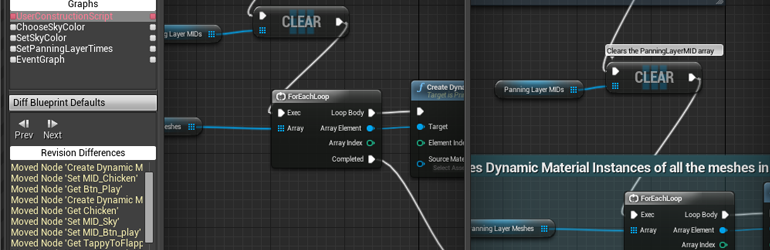
Unreal Engine
So, source control is awesome, and you should be using it! One of the benefits of source control is being able to look at previous versions of files and compare or ‘diff’ them to see how things have changed. However, regular diff tools don’t work very well on binary files like Unreal .uasset packages. We’ve got you covered with support for expor...
 clever vale
clever vale
clever vale
anyone?
ashen lintel
RE: Diffing UAssets, I'm not actually as concerned about other people as simply being able to sanely review my changes at the end and decide if I want to keep all of them
storm sleet
It should be possible to write a diff tool for the properties of the uassets. In the end, they're uobjects with UPROPERTIES. With some effort it should even be possible to open a separate window with the full asset. Not the best experience probably, but possible
 hexed hatch
Anyone know how to avoid corruption with git merges? When working with a team its really frustrating having to go back and find and download all of the corrupted assets.
woven sluice
how does git merge cause corruption?
are you asking about conflict resolution because two people edited the same blueprint?
cyan jay
When setting up source for distributing Engine via UGS + Perforce.
I have downloaded the 5.0.2 source which I am unpacking to the root.
Do I run Setup.bat to download dependencies etc before checking it in? Or is this handled on each client?
I looked on UDN and it says GitDependencies should be run before uploading
hexed hatch
woven sluice
how does git merge cause corruption?
I really have no clue. Its pretty random but always triggered by a merge.
woven sluice
somehow I would have to say you're wrong, you're seeing something else happen and mis-interpreting it
unless you have binary UASSET files being controlled as text and are actually merging the text somehow, or something else really weird
rotund bobcat
the only thing I can think of is merge conflicts that you just commit as "solved" while they're not
cyan jay
Having a nightmare trying to upload Unreal engine code to p4. The submit keeps stalling, anywhere between 10 and 30 minutes after starting. Diskspace/network/cpu usage all 0... process just sat there not doing anything. I have to kill it from task manager in the end.
Tried with p4v, now I am using p4 command line but the same thing is happening.
I opened a support request, but in the meantime just wondering if anyone has encountered/solved this? Both server and client are latest (2022.1/2285021).
Server logs not showing any errors, not sure if p4 client creates any logs, if so I can't find them.
cyan jay
230k files 😛
I don't want to submit in smaller batches tho
I mean... it would probably get it checked in after I keep splitting it and retrying but I'd like to get to the root cause of this as I anticipate doing it on a regular basis
seems like either a bug in p4 or a misconfiguration on our server
teal bone
Checking in 230k files regularly?
cyan jay
Each engine upgrade, perhaps
it's generally getting further each time as it skips uploading the same files each time
teal bone
I've found with p4v that it does things extremely slowly.
p4 is a lot faster.
The same operation done via the command line for me was 5-6x faster.
Probably some sort of parallel operation limit thing going on with p4v.
 viscid tinsel
Anyone experienced with perforce and Linux?
teal bone
Nope.
rotund bobcat
probably the people in #linux
just a wild guess
@burnt carbon is resident linux man, idk if he uses perforce
viscid tinsel
A friend has setup a server for me with perforce. I’ve been using it as repo for 2 years or more with another person who are developing the game with me
Suddenly few days ago we can’t login
rotund bobcat
ask the friend?
cyan jay
server on a cloud vm somewhere running Linux?
viscid tinsel
We dunno what’s going on and the problem I have is that the friend who set it all up disappeared and I lost contact with him
And I don’t know how to use Linux or setup or configure perforce server
Yeah I rent server from Kimsufi
cyan jay
If you can't login, can you SSH into the actual instance?
it might have run out of diskspace I guess
viscid tinsel
I managed to login to server via puTTy
viscid tinsel
But then I have error with P4SSLDIR apparently not being setup or something
It used to be P4PORT error
cyan jay
oh.. strange how it just stopped working tho... maybe the certificate expired
yeah it can be a bit tricky because you need to setup the SSL certificate as the perforce user (assuming your original dev followed the package installation of p4d)
cyan jay
I don't have any notes from how I originally set mine up sorry
viscid tinsel
I have access to perforce superuser account too for the server but I don’t know how to login into that using putty
cyan jay
but basically, the p4d service runs as the perforce user (not root or whatever you log in as).
so you need to make sure the ssl certs you generate are accessible by perforce user
AND that the environment specifying the location is also set on the perforce user
different accounts
the default p4d package install creates a system user called perforce
viscid tinsel
How do I switch between accounts when logged into the server
Ohhh you mean the directory
cyan jay
my ssl folder is here: /opt/perforce/servers/master/root/ssl
it contains certificate.txt and privatekey.txt
viscid tinsel
Is there a way to find out how it looks on my server?
Or do I need to know the directory to do anything
Because I don’t know where it is and where my friend set it up
cyan jay
check the /opt/perforce/servers folder first
viscid tinsel
How would i do that though through Linux
Because my windows pc isn’t the server the server is somewhere in France so I can connect remotely but it’s a Linux server
cyan jay
cd /opt/perf then press TAB to autocomplete
each time you can press TAB twice to see a list of sub folders
viscid tinsel
Oh that’s helpful gonna give this a go
cyan jay
ok, gl, I need to go to bed 😴
viscid tinsel
Thanks
limpid obsidian
with the new OFPA, are we supposed to be adding these encoded filenames to p4? they look like generated files and I don't see them in the Content Browser

the docs suggest that when using OFPA, submission should now be done via the Editor to resolve references
 merry verge
They should be submitted, yes. Each one is for a different actor in an OFPA level.
Submitting through the editor will just show what actor each one is.
ebon hound
Hey people. If I move my let’s say 8GB content to different folder, are they getting duplicated? These files are held in LFS.
 burnt carbon
has anyone experience with git and perforce? I used git for a while, but it got incredible slow, does perforce work better/faster with UE?
pulsar parcel
I would say it works better, yes
merry verge
Yes*
- provided you have some sysadmin experience and don't mind troubleshooting things yourself. There is no cheap way to host perforce without DIYing it.
storm sleet
merry verge
Submitting through the editor will just show what actor each one is.
Iirc you can open the uasset binary in a notepad and also see that. It's not the preferred workflow, but sometimes possible to resolve issues with that
merry verge
You can because the actor name is serialized as part of the file, my comment was more about why they suggest using the editor - it's not necessary, it's just because that tells you what actors you're submitting.
 brittle magnet
After 6 months of constant learning and building I just went with perforce today and a pure project for my game mechanics after loosing a days work last night. When I want to test the code in another project with levels and assets can I just drag the directories over in file explorer or should I migrate? I’m planning to just copy over as I’m sure I’ll be continuing to refine in the pure project and then move updates into the game level projects
cyan jay
cyan jay
Having a nightmare trying to upload Unreal engine code to p4. The submit keeps s...
SOLVED!
Perforce support mentioned that sometimes this happens with Windows client -> Linux server submits.
They have suggested p4 configure set net.autotune=0 and restarting the server.
This seems to have done the trick and the submit is proceeding as expected.
woven sluice
brittle magnet
After 6 months of constant learning and building I just went with perforce today...
I don't understand, you want to repeatedly copy your game's content over into another project and test it over in this other project? For what purpose? Or is it a plugin you're developing?
 north canyon
How do I set perforce settings to connect to Source Control Automatically, ive looked over the internet a few times, but I cant seem to find anything that makes too much sense, mostly just more p4v adds. I looked at the plugin settings across UE, tried opening the project from p4v and some other things, hopefully im overlooking something very easy but I know there is a way to have it automatically connect as a project I was part of did it in the past, not sure how to set it up myself tho
oh wait, searched this server, think i saw it from here
brittle magnet
woven sluice
I don't understand, you want to repeatedly copy your game's content over into an...
It is core gameplay mechanics at the moment, including AI for characters, animations, characters, etc. I'd like to be able to keep the core project separarte from the levels and such basically. I have come to understand the best route is make it a plugin
reef oriole
clever vale
getting this error when using Plastic
Can you share your logs from <UnrealProject>/Save/Logs/ please?
What is your Plastic SCM setup; Cloud Edition?
Have you registered, and used Plastic SCM (or Gluon) GUI to connect and save your credentials for the "cm" command line tool to be able to work? (I assume yes, but have a read at the readme in case you missed something https://github.com/PlasticSCM/UE4PlasticPlugin#project-setup)
reef oriole
clever vale
One reason I can think of for a failure to create a workspace would be if you already have another SummerCampGame workspace created somewhere else on your computer. Obviously, Unreal logs would tell us the real reason, but that would be one explanation.
Another possibility is if the Repository creation failed, because you don't have the right (your are not an Admin of the Cloud Organization, or of your Plastic SCM server)
woven sluice
@brittle magnet that doesn't make any sense at all and I'm not sure what benefit you're hoping to achieve, but if that's what you want to do, I would set up two streams depots. One for your plugin you're developing and one for your other content. You can then import the plugin's subfolder from project A into project B's plugins subfolder
This workflow does make a lot of sense for a shared item like a plugin... Not much sense for core gameplay mechanics at least as I see them
reef oriole
woven sluice
<@434536219343454208> that doesn't make any sense at all and I'm not sure what b...
HoJo — Today at 2:53 PM
Not much sense for core gameplay mechanics
https://www.unrealengine.com/en-US/blog/modular-game-features-in-ue5-plug-n-play-the-unreal-way
edit: looks like Epics Games is seeing some value for doing that (for dynamically switching game modes from my early understanding)
woven sluice
Well that's entirely different from what I understood booray is doing but yeah admittedly I haven't gotten into that either
 tough swan
Hey all
What's the right approach to manage changed engine files, like shaders (stuff that doesn't require rebuilding the engine)? Is there a good way to do it with a binary build? Should we just switch to a source build and commit the changes to our fork of the engine? Or is there a way to somehow override this stuff inside a project?
reef oriole
tough swan
Hey all
What's the right approach to manage changed engine files, like shaders (...
Good question, I think that you should ask it in #engine-source where you might get more attention (it's not really about source control, but build from source, even though yes it includes a fork 😉 )
tough swan
reef oriole
Good question, I think that you should ask it in <#375021179075035147> where you...
Well the question is specifically about source control for engine files that do not require building the engine, so I thought this place was more appropriate. I'm a bit hesitant about switching to a source build and was wondering if there is a convenient way to do it with a binary build.
I'll try to ask in other places too, thanks
woven sluice
i would recommend that if you're going to modify the engine, you should try to do it in a manner that is completely and entirely reliable for your team... a launcher engine might be shared amongst multiple projects, and changes will be undone if anyone repairs the install. if you've got to use a customized engine, go all in and use a custom engine
 runic summit
I loaded up P4V like normal and somehow it is pointing to a different workspace root folder?
pulsar parcel
it won't magically do that on its own
runic summit
I thought it was something like a filter placed on it
pulsar parcel
some context would be nice
 runic summit
 pulsar parcel
and I'm not sure how this is context to your original question
runic summit
context - I'm solo but I work on different machines due to reasons
pulsar parcel
yes, which means you'd create a new workspace on each machine
not a different user
runic summit
yes, I've done it for awhile
but when I originally did that, I wasn't able to keep track of changes made on which machine
this way I can tell when and where I was when I made a change
the system has worked fine
pulsar parcel
yes you can because you can view the CL which tells you which workspace it was submitted in
lol
runic summit
but in that screen shot, the LS Local Build is the normal workspace directory
pulsar parcel
yes but your screenshot above "sorry took awhile" shows pretty much nothing
runic summit
somehow it made "LiveSimProject" today and I have no idea
so the workspace folder SHOULD be Local Build
but perforce somehow is not wanting to look there
pulsar parcel
what?
runic summit
the correct workspace on that machine
 pulsar parcel
the only way a workspace changes to something else is if you edit the workspace to point to a different root
this is showing nothing relevant
 pulsar parcel
this means you edited the workspace and changed the root
it did not do this on its own
runic summit
okay, how do I do that?
pulsar parcel
connection > edit current workspace
runic summit
so, I've broken perforce accidently before, and I have no reason to lie to you, but I know for a fact I didn't touch this
but in any case - looks like it should now - but if I hit copy will it actually copy or will it detect that those files in these folders are in the same as the stream map?

 north canyon
Unreal 5 isnt connecting to P4 automatically, i keep having to type in my server and username, is there a way to set it to auto connect?
I keep having to reset it every time i close and open a project.
runic summit
try opening up your project using the project file link inside the p4v list
north canyon
unfortunately that doesnt fix it, I will say it seems to autofill an old server that no longer exists
runic summit
i know sometimes in ue4 we had to go to source control itself sometimes to make it update, then it would work
north canyon
right, that seemed to be the case for me as well, ive been part of a few projects using P4 and they did all auto fill, even one with UE Preview versions
runic summit
this place?
 north canyon
but im using a personal project with P4 atm
nono, the actual engine itself
bottom right connect to source control stuff
i have no trouble getting into p4v and launching things, thats all fine, its just once the engine is loaded that it needs to be connected, which i find to be strange
runic summit
maybe make a BS perforce repo and connect to it in UE and then change it back
runic summit
not sure why you would, but I have in the past, make sure you are the right user it can screw up the engine connection too
north canyon
yea i should be, there are only two and along the top bar of p4v its showing the right stats
right ip port user and pc
seems that doesnt persist when launching the engine :/
oh wait
it might be my environment settings in p4v
 north canyon

its strange tho, because when use current is ticked, it was correct, but unticked its my old settings
that seems to fix it, it still doesnt auto connect but now at least i dont have to type in everything, now I can just change it from none to P4
thankyou!!
runic summit
see what happens if you install perforce to another machine and try it then
north canyon
i can prob remote to my other machine and see if it autofills
prob would need to adjust its p4v settings as well
 sacred grail
Hello guys, I want to ask do you guys know how to revert back the unreal engine files after the unreal engine crashed from the github
 cosmic nest
Not sure I get the question, but it sounds like you cloned your repository from github, and when you started doing stuff with the project something got messed up and now the editor is crashing. If you want to get rid of your changes you could open up a terminal in the root of your project repository and run these commands... git checkout . and git clean -f.
I don't really understand your scenario though so this may not be what you want.
@sacred grail
sacred grail
cosmic nest
Not sure I get the question, but it sounds like you cloned your repository from ...
Ok thank you
 short delta
Anyone knows how I can see file status in History with Perforce?
I want to see what files were added and what edited in a specific commit.
I cant seem to find that. I got it under Submitted tab, but not in History.
reef oriole
short delta
Anyone knows how I can see file status in History with Perforce?
I want to see w...
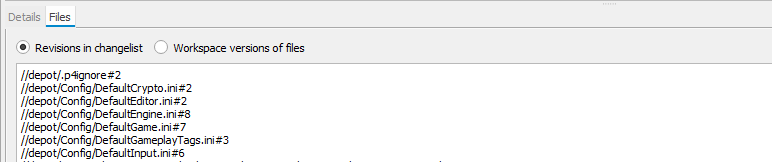
Yes, there is a "Files" section next to the "Details", at the bottom of the "History" tab.
 short delta
reef oriole
Yes, there is a "Files" section next to the "Details", at the bottom of the "His...
short delta
reef oriole
Yes, there is a "Files" section next to the "Details", at the bottom of the "His...
https://i.imgur.com/T0v8yjP.png
This is how mine looks. Am I missing something?
 reef oriole
short delta
https://i.imgur.com/T0v8yjP.png
This is how mine looks. Am I missing something?
reef oriole
short delta
https://i.imgur.com/T0v8yjP.png
This is how mine looks. Am I missing something?
mm, I don't know, other than the version of P4V perhaps?
short delta
Oh, wait, it does show me on all other than latest pulls:
https://i.imgur.com/x5H9edP.png
Oo
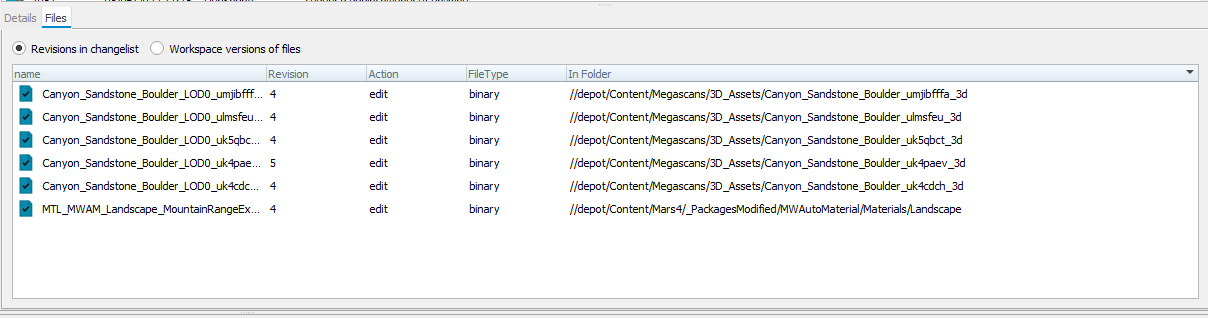
Yeah, but not sure why it doesnt show on the latest. Gonna do some digging.
But thanks for the reply @reef oriole . I appreciate it.
vale basin
short delta
https://i.imgur.com/T0v8yjP.png
This is how mine looks. Am I missing something?
Mine only shows like that when there's hundreds of files in a changelist
short delta
vale basin
Mine only shows like that when there's hundreds of files in a changelist
Ah, could be it. Thanks. Someone checked out and in whole project :D.
Any way to use the regular view with lots of files?
vale basin
I don't think so. I think it's to stop the program exploding. You can just navigate to an individual file and see it's whole history. Or might need some command line trickery for more
reef oriole
short delta
Ah, could be it. Thanks. Someone checked out and in whole project :D.
Any way to...
Hey, isn't there an option in the preferences of P4V to configure this limit of how many files the GUI can try to display? well, you could try to set it to 10k (or 100k) and try
reef oriole
reef oriole
Hey, isn't there an option in the preferences of P4V to configure this limit of ...
"Maximum number of files displayed per changelist*: 1000"
"* After limit is reached, dialogs that display files will show a plain-text list of files."
 vale basin
Good find
 hollow pike
Hey Source Control channel, I'm about to upgrade to UE5, is there any way to do that WITHOUT going scorched earth on my source control repo and starting from scratch? PlasticSCM if that matters.
rotund bobcat
you can just open your project in ue5 and update your code so that it compiles
should be source control unrelated
hollow pike
Guides recommend opening it as a copy, do I just not do that then?
rotund bobcat
you can open without copy if you use version control afaik, you can always revert your changes
of course you could first open a copy to see what happens and if you're sure you want to upgrade do it again with the original project
cyan jay
If you use source control you essentially always work on a copy of the project.
 dusky jackal
We are expierincing a weird behaviour with our branches in git!
When changing and hopping branches, without any open VS or Unreal, it occurs to have some binary changes in some blueprints
don't know what is going on there
pulsar parcel
short delta
https://i.imgur.com/T0v8yjP.png
This is how mine looks. Am I missing something?
I would not call your depot "depot", and I would put the project in its own subdirectory in case you switch to a source build later
 warm wasp
Hi! I have been trying to access the Unreal Engine Perforce repo, and everywhere I've been it says to get some username and password from developer-access@unrealengine.com, but they do not respond for some time now, am I doing something wrong? Like maybe I have to get these credentials from somewhere else, or maybe buy a license??
warm wasp
I have been reading this article: https://medium.com/@joe.j.graf/a-preview-of-persistent-and-shared-ar-experiences-in-ue4-4-21-c47b3331a4b1
at the end it says "If you have Perforce access, you can get the code from //UE4/Dev-VR"
Medium
ARKit 2.0 added support for persistent and shared AR experiences. In the persistent case, you scan an area of the world that will be saved…
I really need that sample
rotund bobcat
that's a branch on the github as well
check this on how to access the github code https://www.unrealengine.com/en-US/ue-on-github
warm wasp
I have github access laready, and I did not find the sample there,. more than that, in the comments the author said that he did not put the code on GitHub, let me find it again just to make sure
yeah, "We don’t currently release projects on GitHub. We only release them from the UE4 launcher or via Perforce access."
 warm wasp
Yes, but in the comments the author says different thing
rotund bobcat
but never see unreal source code access through perforce though, so can't help you on that one
warm wasp
idk...
ok, thanks, I will search some more
Oh, I forgot, there is in fact a page that describes the process of downloading UE with Perforce: https://docs.unrealengine.com/4.26/en-US/ProgrammingAndScripting/UsingPerforce/Basics/
Instructions for downloading Unreal Engine source code with Perforce.
warm wasp
but nothing at all on how to get access to said repo
rotund bobcat
vague

ah you need custom license agreement
Guide for using Perforce source control with Unreal Engine.

 umbral bobcat
any of you are using git lfs from borealis?
https://github.com/ProjectBorealis/UEGitPlugin
always having trouble with lock files not handled properly...
and need to clean up the locks manually all the time... it even locks out itself from files some times
reef oriole
umbral bobcat
any of you are using git lfs from borealis?
https://github.com/ProjectBorealis/U...
I don't (though I should try it, I was the original author of UE4GitPlugin) but its author "mcoms" is over there helping sometimes 🙂
 unborn relic
umbral bobcat
any of you are using git lfs from borealis?
https://github.com/ProjectBorealis/U...
unborn relic
umbral bobcat
any of you are using git lfs from borealis?
https://github.com/ProjectBorealis/U...
is it good if you don't use locks?
reef oriole
unborn relic
is it good if you don't use locks?
Sorry, what is the question exactly?
Are you asking if the fork is good without locks? I don't know, but I think it is meant to be primarily used with locks
unborn relic
reef oriole
Sorry, what is the question exactly?
Are you asking if the fork is good without ...
yeah, wanted to know if the plugin is good to work with git. the one they forked from was very slow and always was going through the engine content as well, which was totally not wanted.
reef oriole
unborn relic
yeah, wanted to know if the plugin is good to work with git. the one they forked...
the one they forked is mine 😉
actually, it's the Unreal Editor going through the Engine Content and Plugins Content folder (same with all the source control providers) but yes it's often bad so I worked recently to skip this part with Plastics SCM... though ultimately it should probably be a setting! (it depends if you have one repo for the game only, a repo for both, or two separate repos)
unborn relic
reef oriole
the one they forked is mine 😉
actually, it's the Unreal Editor going through ...
haha^^'
Yeah, I tried to adapt it, but it didn't work out, so we sticked to just using git outside of the engine. We just have one repo for the editor (code&data) well and the engine is a separate one
reef oriole
I you don't work with locks at all (meaning not working with other people, or not too many) I think that you could use the git plugin in the Editor, the one saying "beta"
If this one doesn't suit your needs, I would love to know what is missing so I can get it improved over time
ProjectBorealis is much faster with locks for sure (like they have a process running to keep the connection opened)
unborn relic
I tried to use locks with git, but that wasn't a good exp, so I removed them again. Also our team is very small, so it's fine to not lock the files, as we usually don't touch other ppls files
pulsar parcel
warm wasp
Hi! I have been trying to access the Unreal Engine Perforce repo, and everywhere...
You need to be a custom licensee to gain access to Epic's Perforce server.
And it's read only access as you can imagine
 rotund bobcat
well, we got there in the end
pulsar parcel
But licensing the engine is worth it for anything bigger than a solo shop
UDN being the main reason, but P4 does make grabbing console support files easier
umbral bobcat
pulsar parcel
But licensing the engine is worth it for anything bigger than a solo shop
i imagine licensing the engine is expensive as hell or is it just kind of the same now + additional NDAs? i rly would like the UDN Resources
teal bone
UDN cost you $1500/yr per person.
umbral bobcat
teal bone
UDN cost you $1500/yr per person.
for non-games prorfessionals...
but does this also apply for custom license in general?
teal bone
Shrug
umbral bobcat
reef oriole
I don't (though I should try it, I was the original author of UE4GitPlugin) but ...
ty for your answer. thanks for laying the foundation about git support by the way :-).
yeah maybe have to ask questions over there on his git repo....
umbral bobcat
unborn relic
is it good if you don't use locks?
if you do teamwork locks make sense in general i think... especially with all that binary stuff... so no one overrides the work of the other one... surely. if you have different timezones or are sitting in the same room and always push and pull changes again i think it is not as problematic not to use locks
pulsar parcel
umbral bobcat
i imagine licensing the engine is expensive as hell or is it just kind of the sa...
It's negotiable and depends on your studio
There isn't a fixed fee for licensing
You can even negotiate it down later, well usually
unborn relic
umbral bobcat
if you do teamwork locks make sense in general i think... especially with all th...
No worries^^ I somewhat know what I do. We are a hobby team which makes it manageable who works on what. In my job we use perforce, but well I won't pay that just for a side project 😛
umbral bobcat
btw... now much does cost perforce over 5 users if self hosted... does someone know that?
 outer flicker
Hello, me and a friend are using multi user in Unreal 5. Works like a charm until either of us do a project settings change like input or adding a channel etc. it'll crash the session and we'll have to reset essentially every time an edit is done to the project settings since it doesn't update the session files I guess. Anyone have a fix for this?
 deft merlin
hi. it is safe to delete intermediate in engine folder?

 main pine
Anyone know how to change the Fetch Upstream button on GitHub on a forked repo?
I have a custom branch but the upstream is to release, can't find a way in GitHub to change that particular button

Like would love for the Upstream there to be the 5.0 branch
Made 5.0 default of the fork but no change in case
quaint obsidian
umbral bobcat
and need to clean up the locks manually all the time... it even locks out itself...
what do you mean exactly by this? i want to learn more about the issue
hexed hatch
is there a good way to git ignore hlods? Having 20k changed files everytime you build them isnt ideal. I guess I could ignore the folder they are stored in but that doesnt seem like a good solution.
 muted gulch
Git + SourceTree peoples. I want to update a PR on Github, ideally just byupdatng the original commit. How do you force push through ST?
rotund bobcat
you have to enable it first somewhere in the settings if I recall correctly
been a while since I used it
Tools > Options > Git > Enable force push
at least in my slightly older version of source tree
and then if you do push, in the popup window there's a checkbox "Force Push"
rotund bobcat
well if you wanted to make it 1 commit you could squash them locally and then force push again afaik
never done it myself though
we just always squash on merge of PR
 rough coral
muted gulch
Still registered as 2 commits on GIT.. ah well
rough coral
muted gulch
Still registered as 2 commits on GIT.. ah well
rebase before pushing, instead of getting a 2nd commit because of a merge
I can't help with ST though, I'm a console user 😄
 clever otter
Is it possible to view changes inchangesets via Githhub when working in Blueprints? aka see the changes made in BPs / Settings etc? Or perhaps there is a plugin which supports this somebody knows of? Cheers!
 jolly fog
Having a problem where I made a .gitignore to ignore Unreal files that should not be included such as Binaries/ , but it is still saying they are too big to push.
When git should not be pushing them.
I have the .gitignore in the folder just above my Unreal project directory in the file system.
files such as Browse.VC.db which is in .vs, but .vs/ is in .gitignore.
remote: error: File MOLD/.vs/MOLD/v17/Browse.VC.db is 714.44 MB; this exceeds GitHub's file size limit of 100.00 MB
merry verge
if you already committed the files then .gitignore does nothing
you need to remove them from history
Ignore the fact that this article is about "sensitive data" because the same basic thing applies: https://docs.github.com/en/authentication/keeping-your-account-and-data-secure/removing-sensitive-data-from-a-repository
Just be absolutely sure you're deleting the correct files (or make a backup just in case) because this will remove them from the repository entirely.
Alternatively, if you haven't pushed yet, you can roll back your branch to the state of the remote and start over (make a backup before doing this too since this affects more than just a few files) - https://stackoverflow.com/questions/5097456/throw-away-local-commits-in-git
jolly fog
Yeah I tried to revert what is committed with git rm -r --cached MOLD/ MOLD is the Unreal project folder
but it still registers some old history it seems, ignoring the git ignore.
Maybe rolling back the branch will help
jolly fog
I rolled it back and it still insists on adding files from places specified not to add from in .gitignore.
Does .gitignore have to be in the actual project folder for Unreal? I'm doing git add on the entire project folder and the .gitignore is just outside of the project folder.
merry verge
it has to be at the root of the git repo (or a subdirectory but that's rare for this sort of thing)
it also won't affect files already staged for commit, you need to unstage them
 gaunt yarrow
is source control any different in ue5 compared to ue4
so i can watch all the tutorials for ue4 and do them all just fine and have everything running properly with just ue4 info?
on ue5
 quiet canopy
What's ofpa?
jolly fog
Having some issues. I'm using a git ignore file which has this: Intermediate/\ and a * at the end of that
discord wouldn't let me show the last \
Is this outdated syntax for git ignore? Because it isn't ignoring the directories
limpid obsidian
@jolly fog if the ignore file is located in the same dir as *.uproject then Intermediate\ should work just fine
storm sleet
Is your .uproject in a subdirectory? What's the root of the repo?
The .gitignore must be in the root directory of the repo, and paths relative to that
 ornate willow
.gitattributes: tracking a new filetype for LFS - instead of tracking *.png, adding it as *.[pP][nN][gG], to catch .png .PnG ect. Is this necessary? Surely at this point GUIs like Sourcetree would add it like that by default if it was a problem right?
vale basin
create a dummy file with a simple filter, and see if it shows up
good point though, never thought about it as windows is case insensitive so most programs do case insensitive checks. Gits origins in linux though might be different
ornate willow
okay I tried it, adding *.dumb will catch .DuMb and .DUMB, so the above is not necessary. (on windows)
Thanks for playing! See you next time on: IS, IT, NECESSARY!!
although I am using source tree, didn't test with CLI. So it's either a windows being case insensitive like you said, or it's sourcetree. I'm inclined to believe the former
merry verge
You tried it on what platform though
On windows that might work fine, the issue is linux. If you're never going to use linux it's probably a non-issue but it doesn't mean the advice is unnecessary.
Or just... don't use capitalization in file extensions 😛
ornate willow
Windows with sourcetree, and yes this is definitely true 😛 When will files ever get saved in anything except lower case? Probably never. Would be nice to know though, what if it is an OS thing and just coincidence that everyone running p4 or git sever from home has just never had any program save a file thats not all lower case, what if it's actually p4/git or the p4v/gitGUI that is actually doing it
 wheat mica
Hello guys, perforce question, is it possible for designers not to have to compile with visual studio?
rotund bobcat
If you add your binaries to source control or something similar yes
reef oriole
wheat mica
Hello guys, perforce question, is it possible for designers not to have to compi...
I assume that your are speaking about compiling the code of the game you are working on?
Meaning it contains Source code module(s)?
If yes, you can have a programmer to either compile & submit the resulting Binaries/Win64/xxx
reef oriole
or have a build machine do that automatically every time some source code is submitted
I have done that myself 🙂
rotund bobcat
yeah we did that, every time we commit to main it would build and push binaries to a specific folder
than with a git merge hook it put it in the correct folder on artist machines
reef oriole
With Perforce, there is even a metadata to let the server keep only a short number of revisions for such dll & pdb big binary artifacts
https://www.perforce.com/manuals/p4guide/Content/P4Guide/filetypes.modifiers.html
+Sn
Only the most recent n revisions are stored, where n is a number from 1 to 10, or 16, 32, 64, 128, 256, or 512.
Older revisions are purged from the depot upon submission of more than n new revisions, or if you change an existing +Sn file’s n to a number less than its current value. For details, see the Helix Core Command-Line (P4) Reference.
Using an +Sn file modifier results in special behavior when you delete and re-add a file: no file revisions are deleted that were submitted before the add or delete. For example, if a file of type +S2 is marked as deleted in revision 5, and then re-added with the same file type and modifier, revisions 3 and 4 are not purged.
rotund bobcat
that's nice
wheat mica
reef oriole
or have a build machine do that automatically every time some source code is sub...
ok so that means designers have to pull the binaries folder, I will have a look on this UGS, tks guys
 dusk flume
Has anyone had issues with opening the sln file in visual studio code 2017? I’m having an issue where the project does not show up in the server explorer after I open it.
quaint obsidian
i think 2017 support was dropped in ue5
or maybe that was 2015
Anyways, probably should ask this in #cpp
reef oriole
quaint obsidian
i think 2017 support was dropped in ue5
https://docs.unrealengine.com/5.0/en-US/unreal-engine-5-0-release-notes/
Removed support for Visual Studio 2017.
Set minimum Visual Studio version to 2019 v16.11.5, toolchain 14.29.31033 Set minimum Windows Clang version to 10.0.0

Overview of new and updated features in Unreal Engine 5.0
 crisp widget
Hey I'm getting this weird issue in a multiuser session where I can't persist the changes. There is an error coming up "Error: failed to copy file (filepath) when persisting sandbox state. The asset is checked out through perforce, but I can't persist the changes
 waxen hare
Can you push to private repositories on github and if so, is it the same process?
waxen hare
I keep getting the error "remote: Repository not found."
rotund bobcat
are you using the correct remote url
waxen hare
Do I have to use SSH instead of HTTPS?
rotund bobcat
both should work
waxen hare
rotund bobcat
are you using the correct remote url
Yes, copy and pasted from github.com
pulsar parcel
probably not authed
reef oriole
pulsar parcel
probably not authed
yes, I myself use different github account, so I have to be explicit with https URLs else it uses the default account:
https:// SRombauts@github.com/SRombauts/UE4PlasticPlugin
edited so you can see the added User@
waxen hare
Still the same error, I'll start again from scratch and see
I can't even clone it.. It says the same thing "remote: Repository not found."
Maybe I'm missing something fundamental?
pulsar parcel
yeah, authenticating
reef oriole
Can you try using Github Desktop GUI?
should be a lot easier to handle authenticating with it
Then you can always switch to other tools
waxen hare
True
 gritty nacelle
Question for you all...Let's say you were using version control software while working with a team that had an activity feed where you could see all kinds of updates from teammates. What kind of updates would you want to see on that feed? What would be useful? What wouldn't?
pulsar parcel
we just have a slack channel that perforce commits get dumped to
rotund bobcat
result of automated build is always interesting if you have that set up
especially when it fails
possibly when something is merged to main
merry verge
I'd say the only thing I care about from my team's "activity" comes through from seeing their code reviews go up.
gritty nacelle
pulsar parcel
we just have a slack channel that perforce commits get dumped to
We have that as well. Do you find it useful?
rotund bobcat
tbh I think it would depend
if you have a team of 100 developers, that shit would annoy the fuck out of me
but if we would be like 5 people, maybe
gritty nacelle
Yea theres no good way to sort then. I find it kind of chaotic
gritty nacelle
merry verge
I'd say the only thing I care about from my team's "activity" comes through from...
What is your role on your team?
merry verge
Software engineer, as is everyone else on my team.
My team owns a very specific subset of code and anything touching that gets a code review -> I can see what everyone is doing based on them putting up code reviews. Any sort of activity feed beyond that would be incredibly overwhelming due to working in a studio with hundreds of people submitting things all the time. Even filtering that down just to stuff I care about, code review notifications have to happen regardless to make sure people look at them so anything more would just be extra noise.
On a small team that doesn't really gate checkins something like that might be fine, but I fail to see the value otherwise. I guess artist/designers don't really have code reviews for every change so it might be valuable there.
rotund bobcat
don't you guys get mails or something if you're added as reviewer
or you guys work with a "whoever reviews first" kinda system
merry verge
we get emails, and that's sort of my point
I'm going to see all the activity relevant to me just through that so anything more would just be either ignored altogether or add to the noise.
So I don't think it's something I'd personally use - if I really want to see everything happening outside of those emails I'd just look at the history for a folder or w/e. But I can see something like that maybe being useful for artists as I said.
gritty nacelle
merry verge
On a small team that doesn't really gate checkins something like that might be f...
Yea maybe some more visual updates...
Maybe for project managers or producers as well
Now I'm thinking about the art stuff. Would you want to see that as an engineer?
rotund bobcat
nothing probably
gritty nacelle
yeaa
 mighty light
so i followed this article (https://aricodes.net/posts/perforce-server-with-docker/) and im getting this in docker logs p4dctl warning: Service 'master' does not exist in config file. Ignored. No services configured. anyone know how to fix it? in my config folder (/etc/perforce/p4dctl.conf.d) i have master.conf but its empty
jolly fog
Someone tried to pull my project down from a repo and got this : A fatal error occurred. The required library hostfxr.dll could not be found.
mighty light
mighty light
so i followed this article (https://aricodes.net/posts/perforce-server-with-dock...
so in case anyone else in the future encounters this error, its my fault. the reason is that i skipped the part where you are supposed to comment out the config volume in the docker-compose file, run the command to populate it, then uncomment it. i just skipped to having it uncommented, so the population didnt work at all. following the instructions properly fixed all of my problems
umbral bobcat
quaint obsidian
what do you mean exactly by this? i want to learn more about the issue
atm I am not working on my stuff... but I will put together more details and send it to you next time I am having troubles... if you still want to know about my troubles with it until then 🙂
devout walrus
jolly fog
Someone tried to pull my project down from a repo and got this : A fatal error o...

Stack Overflow
When I run my WPF application on other computers it throws me this error:
Description: A .NET Core application failed.
Application: program.exe
Path: C:\fakepath\program.exe
Message: A fatal error
 kind yarrow
Hi, as an Artist, I'm really out of my element here. But does anyone have experience with Nvidia's NvRTX Custom branch? Don't know why but, I can't make it work properly. The engine starts up fine, but the Caustics don't seem to work, and the custom engine weighs around 120GB, don't know if that's normal.
mighty light
with perforce, my main depot should not contain built binaries right? like my game and pluging dlls and intermediate folders. but for team members who cant/dont need to build them, how can i supply them while keeping the files up to date? do i make a new depot with just the binaries in it?
pulsar parcel
mighty light
with perforce, my main depot should not contain built binaries right? like my ga...
Deploy UGS (UnrealGameSync)
You don't need the metadata server but adds a few features
mighty light
ah ok thanks. since im using a source build of unreal, do i need to commit the entire engine source to the steam including my project? i have my project as a folder inside the engine source
pulsar parcel
mighty light
ah ok thanks. since im using a source build of unreal, do i need to commit the e...
Yes but UnrealGameSync does have sync filters you can expand
mighty light
oh excellent
pulsar parcel
One of the build graph examples has the typical workflow for uploading binaries to p4 for use with UGS
mighty light
oh ive read through the build graph docs and it never mentioned UGS
pulsar parcel
mighty light
oh ive read through the build graph docs and it never mentioned UGS
I'm talking about the example script that comes with the engine
It handles building, zipping binaries up, and submitting it
mighty light
pulsar parcel
It handles building, zipping binaries up, and submitting it
amazing. ill have to find where its located and read through how to setup build graph
mighty light
so with perforce, ive seen that if i want to use an ignore file or set the typemap, i have to set P4PORT/P4USER/P4CLIENT/P4IGNORE, and thats fine. but if i then log in to a different server, do i really have to do all that again? does it get saved? like if i log in to server A and set the ignore, log in to server B and set the ignore, if i log back in to server A do i have to set the ignore again (same question for the typemap too)? why doesnt perforce auto-detect an ignore file like git does
woven sluice
no, don't do any of that first stuff at all
set P4CONFIG instead
and then put a config file in each project's root folder containing the P4PORT/P4USER/P4CLIENT/P4IGNORE for that project
mighty light
woven sluice
set P4CONFIG instead
oh thanks. do i need to tell perforce about this file or will it be used automatically?
aslso my ignore file is set to ignore p4config files, will this affect anything?
woven sluice

P4 will read and use any environment variables you set for their respective purpose
in this case if you set P4CONFIG it will look for a config file by that name
 mighty light
hmm ok so i have a p4config per-project, does that mean if i switch projects i need to re-set the environment variable to point to the new project p4config?
woven sluice
no it means -you- make your own p4configs as you need them
you decide what file you want, you make it. if your team uses a shared ignore, you could ask them to add it to the ignore, it very likely won't affect anyone else
otherwise you shove the file into its own changelist and never submit it 🙃
or oh, "with p4 2015.1 and later clients, P4CONFIG files are ignored by default" not an issue then, TIL
mighty light
woven sluice
you decide what file you want, you make it. if your team uses a shared ignore, y...
right but you said i have to set the P4CONFIG env-var to the file location. if the config contains P4CLIENT or P4PORT, wouldnt that break other projects hosted on different servers?
woven sluice
no i didn't, i said the file name, as in my screenshot there
mighty light
ohhhhhhhhhhhh
woven sluice
kek i blurred out all my KWilcox names everywhere and left it on the very top 
mighty light
idk what that means but thanks for pointing out my misreading
so perforce will automagically just use the p4config thing whenever i switch workspaces right?
woven sluice
it will look for the file you specify by the name you specify. if it finds it, it will look for config settings inside of it and use any that it finds for all commands
mighty light
woven sluice
it will look for the file you specify by the name you specify. if it finds it, i...
Thanks heaps, I appreciate your help
How does the type map command work? Is it a server thing or per-user?
When I try to run it on my remote server from my pc, it says I don't have permission
woven sluice
typemap is purely server side and is used by the server to set the file type on all newly added files, you must need an admit account i guess?
mighty light
Ah fair enough. I can temporarily make myself a super user to run it
mighty light
UGS seems very complicated to setup. I'm guessing I'm supposed to build it myself then distribute the installer to the team
cyan jay
It is a bit fiddly, I did it last week and it wasn't too bad in the end.
cyan jay
mighty light
UGS seems very complicated to setup. I'm guessing I'm supposed to build it mysel...
- Put engine source into perforce
- Build UGS + Installer
- Submit UGS to Perforce (to the stream you specified in the installer)
- Run the BuildEditorAndTools.xml job locally to submit game/editor binaries to perforce
- Check UGS syncs it correctly
- Distribute the UGS installer msi to the team
... - Add a build machine task to run BuildEditorAndTools.xml job after code changes are submitted
 somber kraken
Hey guys what would you recommend to host a perforce server at home / intel NUC ?
mighty light
somber kraken
Hey guys what would you recommend to host a perforce server at home / intel NUC ...
are you saying you have an intel NUC and are asking if you can host a perforce server on it?
somber kraken
I want to host my own perforce and not on my PC I want to buy something instead of paying Amazon every month …
mighty light
do you have a raspberry pi or old pc tower/laptop laying around?
somber kraken
I have serveral PIs but I think that if we are 10 working … it won’t be really a good solution
mighty light
why not?
you really dont need super enterprise hardware to host a server
the biggest bottleneck would be your network
imo you are better off starting with one of your pis or other hardware you currently have and if it proves to be too slow your migration would be easy af
vale basin
A nuc will be perfect. Even a Nas can be a good option. Storage in a pi is a bit annoying and hacky with pcie, and I'd personally avoid using USB hard drives for p4.
vale basin
Yeah. Backup is still key
You won't need the craziest nuc, just load it up with storage
somber kraken
I’m looking for arm alternatives
somber kraken
Yep I think so
vale basin
Just looked, seems x86 and x64 only
somber kraken
Download the latest ARM Build for Perforce (P4D) Version Control System to run on your Rasperberry Pi and similar devices | LINUX26ARMHF
vale basin
Perforce themselves no longer support the ARM platform and the downloads are simply provided as a convenience. I am not liable for damages or any loss of data nor is there any warranty provided expressed or otherwise.
From that article
If you are at a stage where you can justify spending money, dont cut corners imo
mighty light
ah fair
might be worth buying something like a microserver but those are pretty expensive. one of those would set you up for years as a small team though
vale basin
Look at a series from serve the home on YouTube called tinyminimicro, he looks into getting new and second hand small form factor desktops for usage as a server
I won't say server gear is pointless, far from it, but on the low end, may as well just get desktop gear in a good form factor for yourself
somber kraken
I just need to check for nuc consumption
somber kraken
https://www.intel.com/content/www/us/en/products/sku/214624/intel-nuc-kit-nuc7cjyhn/specifications.html maybe this would be a good base

Intel
Intel® NUC Kit NUC7CJYHN quick reference with specifications, features, and technologies.
vale basin
Theres heaps around. Checkout the minisforum ones as well. Alternatively, If you want something cheap and lower power there's various rebranded ones, QOTOM is one such brand of it, that are commonly used as poweful routers with pfsense
mighty light
so the UGS stuff is still pretty confusing and im wondering if i really need it. at the moment its just me and one other person. im using a source build of ue so i can build my own editor and the project itself. my friend however can not, so i need to provide them with the engine and project binaries. the ue docs on perforce say i can just submit the binaries folder of the project to allow this (and by extension im guessing i can do Engine/Binaries?). since im not modifying the engine source, the binaries wont change, but the project binaries would change every time the code changes. so do i really need UGS? it would i be better off just submitting the Binaries folders
vale basin
If you are changing the engine regularly, I'd look at ugs. Previously I had a custom branch of the engine that had a few modifications, but didn't see heavy changes, so I made an installed build of the engine and gave that to the rest of the team. Then just sync game binaries via perforce as normal.
Look into a CI setup though like teamcity or Jenkins to automate builds
mighty light
vale basin
If you are changing the engine regularly, I'd look at ugs. Previously I had a cu...
im not changing the source at all, its just for dedicated servers
wheat mica
Hey, have some trobles with perforce. I install it again, and during the configure-helix-p4d script, in the end, I have a p4dctl error:
Configuring p4d service 'UnrealProjects' with the information you specified...

SSL certificates found in ssl
Server switched to Unicode mode.
p4dctl error:
        'UnrealProjects' p4d: '/opt/perforce/sbin/p4d' exited with status 255.
Started 0 services.
p4dctl error:
        Not all services started successfully.
 iron bronze
wheat mica
Hey, have some trobles with perforce. I install it again, and during the config...
iron bronze
wheat mica
Hey, have some trobles with perforce. I install it again, and during the config...
Yeah to get the error message you'll have to either check the logfile or run p4d in the command line directly
wheat mica
where is this log file ?
iron bronze
mighty light
so the UGS stuff is still pretty confusing and im wondering if i *really* need i...
Easiest thing would be for your friend to build the editor himself using visual studio, it'll be way way faster and convenient that way
mighty light
iron bronze
Easiest thing would be for your friend to build the editor himself using visual ...
that is not a possibility at this time
iron bronze
wheat mica
where is this log file ?
The path should be set in your p4dctl configuration file
wheat mica
this file /etc/perforce/p4dctl.conf?
iron bronze
Under that directory yes
 iron bronze
mighty light
that is not a possibility at this time
iron bronze
mighty light
that is not a possibility at this time
Could you elaborate as of why?
iron bronze
wheat mica
default files here
Your config file is UnrealProjects.conf
mighty light
iron bronze
Could you elaborate as of why?
because they arent a programmer and are not setup to build engine or project source
iron bronze
mighty light
because they arent a programmer and are not setup to build engine or project sou...
You don't have to be a programmer to automatically build the editor
As long as you have the right sdks installed, double clicking on the .uproject will automatically build the editor in the background without any hassle
wheat mica
iron bronze
Your config file is UnrealProjects.conf
Do I have to add a specific setting here?
iron bronze
wheat mica
Do I have to add a specific setting here?
Look for P4LOG entry
wheat mica
ok I set it becuase there is no P4LOG
btw I tried to run p4d command and I got this:
➜  ~ p4d
Perforce Server starting...
Perforce server warning:
        Pid 2243500
        Operation: topologyRegistration
        No entries made in db.topology for server address: '1666', dest address: '' and serverID: ''.
        ServerID for the server should be set.
thank you but this is not the solution i am looking for
iron bronze
mighty light
thank you but this is not the solution i am looking for
Then you don't have much options remaining besides setting up UGS
iron bronze
wheat mica
ok I set it becuase there is no P4LOG
If there's no p4log entry, then the log should be located inside the P4ROOT directory
Also dont run p4d without any commandline argument, unless you already have a bunch of p4 env vars properly set
mighty light
iron bronze
Then you don't have much options remaining besides setting up UGS
ok thanks. im not against it, its just a bit confusing for me to understand how it all works and is a bit of an undertaking and i only just got perforce set up and was wondering if i really needed UGS vs submitting the engine and project (precompiled) binaries to the perforce stream
wheat mica
iron bronze
If there's no p4log entry, then the log should be located inside the P4ROOT dire...
inside the logs folder, I have a lot of things
 woven sluice
mighty light
ok thanks. im not against it, its just a bit confusing for me to understand how ...
woven sluice
mighty light
ok thanks. im not against it, its just a bit confusing for me to understand how ...
I didn't want to push you away from it all earlier, but no, you don't "need" it. Is there any chance you have a CI build server? I would put that at a higher priority. Without one you will find it a pain to remember to manually commit binaries and you will not really be able to ever have a second coder on the team.
No matter what you might want to set up file types and typemap so that you don't store every old revision of big dll and pdb files and you either want to set binaries files as always writable (if you intend to commit them manually) or ignored by your stream mapping (if you have CI to build and commit them for you)
My team has been doing alpha/beta dev very happily without UGS for a couple years now. CI server takes care of immediately updating Dlls when any coder commits code file changes, and everyone gets notified via a discord bot when the build starts and if it succeeds or fails. Artists just don't update while it shows build in progress or red light. Took me a good few days to set up though. Fantastic workflow for very small and slower moving teams. More error prone for larger teams and would use UGS there.
iron bronze
wheat mica
inside the logs folder, I have a lot of things
$>tail log
wheat mica
oh
Database is at old upgrade level 44. Use 'p4d -r /home/ac/UnrealProjects/root -xu' to upgrade to level 47.
ok so I have to do that and restart
mighty light
woven sluice
I didn't want to push you away from it all earlier, but no, you don't "need" it....
I don't have a CI set up. I sort of understand what you are saying but don't know how to do any of it. As I said before I've only just set up perforce and am having slight difficulty with the admin side of it. I'm coming from git/hg and none of my (non game dev) experience has dealt with binary files. Images and stuff were just committed to the repo and never touched since they were placeholder
woven sluice
Yeah, that's all pretty normal. Only thing I might say is abnormal is subjecting yourself to a full engine source build at your level of experience... Challenges on top of challenges
mighty light
woven sluice
Yeah, that's all pretty normal. Only thing I might say is abnormal is subjecting...
Ye I'd agree with that. It's literally just for dedicated servers since I want support for that now so I don't have to make another network pass later on although I guess it doesn't matter that much
I just want to get my project to the point where adding new people is trivial and I don't have to do some weird gymnastics stuff to get them going. Right now I guess am installed build would be a good idea since it's me plus a designer
vale basin
If all you want is dedicated servers you can probably just use the launcher build for you and your team and just do builds from the engine source
Save yourself some heart ache
For dev just use listen servers
 uneven oyster
What's the best way to do a full sync with Perforce? Do I just close Unreal and 'Get Latest' in P4V, or is there a good way to do this in Unreal? I tried to Sync my Content folder, and that was a mistake. 😄
 pulsar parcel
mighty light
so the UGS stuff is still pretty confusing and im wondering if i *really* need i...
pulsar parcel
mighty light
so the UGS stuff is still pretty confusing and im wondering if i *really* need i...
UGS has a single configuration file and the zip uploaded to source control is just all the exe/dlls/stripped PDBs
without the metadata server, it's a simple deployment
 pale portal
hi, where can I ask for help about github
teal bone
If it's unreal related... here?
pale portal
teal bone
If it's unreal related... here?
unity
rotund bobcat
well, this is for ue
teal bone
Go ask in a unity help server then?
pale portal
it's about github
pale portal
rotund bobcat
don't ask to ask
just for the mods
to avoid warn and these stuff , anyway the problem with upload +50mb with github
rotund bobcat
if you just ask generic git question, how would the mods ever know if it's unity or unreal 😄
pale portal
rotund bobcat
if you just ask generic git question, how would the mods ever know if it's unity...
yeah , my bad
remote: error: File Library/il2cpp_android_arm64-v8a/il2cpp_cache/linkresult_BC1A83F088923D5184A2C64809C34E43/libil2cpp.dbg.so

 is 240.48 MB; this exceeds GitHub's file size limit of 100.00 MB
yeah that's a github limit
pale portal
I have 2 types of files, the first thing is the files with more than 100mb
rotund bobcat
you want to use git lfs probably
pale portal
rotund bobcat
you want to use git lfs probably
I'm trying
rotund bobcat
idk if that's free on github
pale portal
I add these files but still
pale portal
rotund bobcat
idk if that's free on github
I can pay
rotund bobcat
and if this file was added to sourcecontrol alreayd it's fucked
lfs only picks up new files added to source control
so if you want to move it to lfs you'd have to rewrite the history
or save it as a different file maybe? idk
pale portal
rotund bobcat
and if this file was added to sourcecontrol alreayd it's fucked
huh , I actually add it
bruh
I don't have any problem
to delete the whole history
also I have a file called .git
it has sourcetreeconfig
pale portal
rotund bobcat
or save it as a different file maybe? idk
I will try to make new respitory then, maybe it will work?
pale portal
rotund bobcat
don't forget to init your lfs first before adding the big files
again?
rotund bobcat
well if you're making a new repo ???
pale portal
init for each new resp?
pale portal
rotund bobcat
well if you're making a new repo ???
ok I see
thx bro
I'll see if this thing will work
mighty light
pulsar parcel
UGS has a single configuration file and the zip uploaded to source control is ju...
Ah OK. I'll try get it set up. Might go without the Metadata server because I don't have a windows server and cbf setting up a vm for it at the moment.
mighty light
I've read that ugs should go in its own local depot, so do I end up with 3 depots/streams? Like my project would be a stream, I have a local depot for UGS and then do my precompiled binaries go in their own stream? Or do they get merged with my project mainline?
mighty light
pulsar parcel
and I updated that to .NET 6
Oh this is great. Is it part of 5.0?
pulsar parcel
no it's a third party fork
you can just make a stream for the binaries
not sure where you got 3 from
mighty light
pulsar parcel
not sure where you got 3 from
Local depot for UGS would be one, stream for my project would be two and stream for the binaries would be 3?
pulsar parcel
you don't need a workspace for the UGS build
mighty light
OK I've been lied to then. There's a bunch of YouTube videos of was watching on how to set this up and they said to do this :( also an article I was reading said to do this, I'll try and find the link
mighty light
mighty light
OK I've been lied to then. There's a bunch of YouTube videos of was watching on ...
pulsar parcel
you have a workspace to upload the UGS build, other team members do not need to do this and would typically run the installer generated by the UGS project (UnrealGameSync.msi)
mighty light
so is the UGS depot just for updating UGS itself? it doesnt contain any binaries right?
pulsar parcel
the UGS depot is for UGS binaries but does not need a workspace for it to work
mighty light
i got it :D. for future reference: if anyone gets Could not find engine in Perforce relative to project path, make sure you have Engine/Build/Build.version. if you are using P4IGNORE and its set to ignore Engine/Build, you can allow this specific file by adding !Engine/Build/Build.version to your P4IGNORE file

 whole perch
Heyo, so my friend and I set up source control with visualSVN/Tortoise, and whenever he tries to sync using the in game source control option, he experiences a memory leak and an eventual crash. Any ideas?
pulsar parcel
whole perch
Heyo, so my friend and I set up source control with visualSVN/Tortoise, and when...
SVN is a bit meh but they should be doing the initial checkout outside the engine
mighty light
is the UGS metadata server CI itself? or does it just monitor CI like jenkins
pulsar parcel
mighty light
is the UGS metadata server CI itself? or does it just monitor CI like jenkins
neither
it shows you who's on what build, allows you to add comments, mark builds as good/bad
Horde being worked on is more an all-in-one with a custom CI that also provides an implementation of the UGS metadata API
mighty light
i think i might leave CI for now. ive only been able to find like 2 "write ups" about how to integrate it into perforce and stuff and it seems like a pretty big task. im the main programmer so its not a big deal for me to manually upload the binaries
mighty light
Any successfully compiled binaries should be stored in the intermediate or binaries folders either in the engine, project, or plugin
 digital flint
does anyone experience crash due to lacks of memory during saving map's actors using subversion?
mighty light
does anyone know of a good ignore file i can use for perforce for a source build? each one i look at seems to vary wildly
limpid obsidian
mighty light
does anyone know of a good ignore file i can use for perforce for a source build...
how about the ignore file that comes with the unreal source?
mighty light
limpid obsidian
how about the ignore file that comes with the unreal source?
do you mean the .gitignore file?
limpid obsidian
mighty light
do you mean the `.gitignore` file?
yepper. same syntax for p4 ignore files
short delta
Hi all,
Anyone knows if its possible to print changelog list range to a text?
Lets say, I want a list of all changes from start date to end date.
 urban crystal
short delta
Hi all,
Anyone knows if its possible to print changelog list range to a text?
L...
urban crystal
short delta
Hi all,
Anyone knows if its possible to print changelog list range to a text?
L...
you can do this using the command line
(assuming you're using perforce ofc)
 reef latch
Hi, I have a git repository set up on my mac. When I clone the repository using ssh onto a windows pc, the source folder is not present in the cloned repository. How do I get the source folder as well?
Should I just manually transfer the source folder?
merry verge
sounds like you didn't commit anything in the source folder
reef latch
merry verge
sounds like you didn't commit anything in the source folder
I just used ‘submit to source control’ from the editor
merry verge
which likely only dealt with content files
reef latch
merry verge
which likely only dealt with content files
So what should I do now?
merry verge
commit the source files
reef latch
merry verge
commit the source files
From Xcode?
woven sluice
you maybe probably want to spend a few hours on git tutorials
merry verge
I suggest downloading a git ui such as sourcetree (or something else? I don't know what the latest and greatest is right now) and learning how to use it. Or go whole-hog and do ^
reef latch
merry verge
I suggest downloading a git ui such as sourcetree (or something else? I don't kn...
I got GitHub desktop
merry verge
Github desktop isn't great but you can use that too
reef latch
So how do I commit to source files?
woven sluice
now you definitely probably want to spend a few hours on git tutorials
merry verge
woven sluice
(not necessarily command line git just general "what is it and how to work with it" tutorials)
reef latch
Thanks for the suggestion
mighty light
is it normal to have like 236k (236 thousand) files being added to a perforce depot for the first changelist? its a fresh github clone and all ive done is run Engine/Binaries/DotNet/win-64/GitDependencies.exe. i have not built the engine or my project. im using a p4ignore file (https://github.com/mattmarcin/ue4-perforce/blob/master/.p4ignore)
rotund bobcat
what are you doing?
did you download the whole source and uploading it to your own repo?
mighty light
rotund bobcat
did you download the whole source and uploading it to your own repo?
ye i think so? isnt that what im supposed to do? im using a source build of ue5
rotund bobcat
the first question would be, do you need a source build?
mighty light
ye for dedicated servers
rotund bobcat
if so, in perforce flow idk. But in git, you would just create a fork of the engine repository to your own repo
then it only tracks changes from then on afaik
mighty light
right
cyan jay
mighty light
is it normal to have like 236k (236 *thousand*) files being added to a perforce ...
Yes, perfectly normal 😁
 glad stag
mighty light
is it normal to have like 236k (236 *thousand*) files being added to a perforce ...
glad stag
mighty light
is it normal to have like 236k (236 *thousand*) files being added to a perforce ...
And around 30GB 😉
pulsar parcel
mighty light
ye for dedicated servers
this is normal, if you end up deploying UGS, use the sync filters
mighty light
pulsar parcel
this is normal, if you end up deploying UGS, use the sync filters
Is the p4ignore supposed to mostly be for the initial change list (ie fresh clone + git dependencies + project)? Because once I build my project and "mark for add" my entire engine + project folders, it adds all the engine programs like all the automation tool which is included with the PCBs in unreal game sync. So it seems like the solution is "just don't add the engine folders"
pulsar parcel
mighty light
Is the p4ignore supposed to mostly be for the initial change list (ie fresh clon...
well I setup a p4 workflow for the engine
I have a depot which is just the clean engine, no modifications and not built. that is reconciled
then upgrading the engine is just a merge/integrate which helps when you've made engine changes
mighty light
pulsar parcel
I have a depot which is just the clean engine, no modifications and not built. t...
Sorry I'm still learning p4 terminology. What is reconciled? Also I thought you were "supposed" to have your project in the engine source root (or one of the defaultdirs or whatever it's called)
mighty light
😵💫
I feel like there's something I'm not understanding about how this is supposed to work
Do you submit the entire engine source with your project? So your project mainline would be //main/myProject and would also have //main/Engine/... ?
pulsar parcel
yes
and I said depot
//engine-unreal/...
//myproject/...
//engine-unreal contains the vanilla engine, added (or reconciled when it's an upgrade) from a clean checkout of the github after Setup.bat is run
//myproject/branch/... has //engine-unreal/... merged into it to integrate the source engine and to perform engine upgrades
this doesn't interfere with the project since that's in its own subdirectory that doesn't exist in the engine checkout
mighty light
i am confusion. maybe i can pay someone to set it up for me or something
 woeful turtle


 jolly fog
Hi everyone, I am using azure devops but when I try to pull the project it says "..... lts file not found". So, it downloads 500kb project. I can see the elements of project on the repository but I think it is just about names not the project files itself. Like test.ueasset = 1kb. Is there anyone that use the git with devops for unreal?
storm sleet
That sounds like git lfs is missing something, maybe some storage setting or whatever. Sorry I can't help more, I'm not a git lfs user
jolly fog
storm sleet
That sounds like git lfs is missing something, maybe some storage setting or wha...
what do you use as source control for ue? I am not forcing myself to use devops actually, I can switch it
storm sleet
I'm using Plastic SCM, it's great
 noble cedar
Hey, bit of a "general" question about using Perforce with UE4: What's the best practice if you want to do a bunch of experimental work which may potentially touch a lot of different Blueprint files and it likely to break stuff? On my last project, we used Git, so having a ton of branches, making frequent commits and rolling back if necessary was all pretty trivial. I'm less familiar with P4, but it seems like this kind of workflow isn't as well supported? As in, I can only have one "shelf" which just seems to represent the most recent local version of the files it contains? While I've seen reference to "branches" in the P4 docs, the team I've joined doesn't seem to use them so I'm a little unsure how much additional complexity it would create to start using them as well...
vale basin
Branching binary files is not like branching code. You can't merge binaries. Branching in perforce typically involves more structure than branching in git, with the understanding that merges will clobber changes in some form. The obvious thing is release branches. The less clear and path is branches for teams, and defining what folders or files will be prioritized for each time. Syncing branches often can alleviate some of these issues, but doesn't solve them.
As a result, branching isn't leveraged as much, some teams don't really branch at all
Some teams split code into git and binaries into p4, but the complication there is blueprints. Where does code end, and where do assets begin?
Tldr, branching is complicated with binary files
You can do task streams in which you do your work and then merge it back in. The trick there is though the rest of the team is prepared for the files being worked on will be clobbered when the branch merges in.
That way sweeping changes and refactors don't break the project for people, but noone will lose work by working on a file they know will be overriden
noble cedar
Aha, task streams sound like something that I should familiarise myself with, thanks!
Agree with everything re: branching & BPs, you do need to be super careful not to waste other team members' time by clobbering each other's changes (would be lovely if BPs were more merge-able though!)
noble cedar
vale basin
You can do task streams in which you do your work and then merge it back in. The...
Not sure I understand quite what you're saying here. Can others make changes to a file that's checked out in a task stream?
vale basin
I'm just highlighting there needs to be some communication and understanding that both changes can't survive. You and others won't be blocked from checking out a file in either stream
And yes, a file can be checked out in both streams at once I'm pretty sure
 boreal tide
Hey guys. I have a question about GIT LFS and Locking with UE4GIT. Sometimes when merging a branch I get an error saying that I can't push because a file is locked, although the file was never modified in my branch. Do you have any idea on why that happens?
 polar wraith
I want to base a project on or use assets from the City Sample. For GIT, how can I set the project up in a smart way that I don't need to upload the asset files to a remote repo, and rather give "instructions" on downloading the assets?
I tried to google this, but my google-fu must be lacking.
rotund bobcat
you can ignore the assets in the .gitignore
good luck with people following instructions though 😄
 bitter sun
quick dumb question: are stashes act like local history of files in P4?
i need to backup a file but shouldnt submit, are stashes useful in this case?
rotund bobcat
not really the intention of stashes
stashing is like storing your work temporarily, so you can work on something else, and then apply your stash again to get your changes back
I guess technically you could do what you want with it though
quaint obsidian
boreal tide
Hey guys. I have a question about GIT LFS and Locking with UE4GIT. Sometimes whe...
some git providers like gitlab check lfs files in merge commits. the workaround is to rebase instead of merging
woven sluice
noble cedar
Agree with everything re: branching & BPs, you do need to be super careful not t...
FWIW, UE does contain a feature that is supposed to let you see the status of a blueprint across other streams... but you have to hard-code the stream name into the system with some C++... I haven't actually used it, but it should in theory help automate some of that nuisance, although it would be a pain to keep modifying it for personal tasks it's nice to know in case your team ever wants to work as a group on something on the side. the keyword to search engine source for is "RegisterStateBranches"
vale basin
TIL, great tip
 umbral arch
Some one ever has this problem on mac ?
When I run p4v, it shows this windows and if I click reconnect, it just reappears the same and if I click work disconnected, it disappear but I don't have the tabs to open new connections
 mighty light
p4v seems to be stuck submitting a giant big ass changelist. any ideas how i can get it unstuck? the main client progress bar is still going and i can still interact with it (but its slow). last time i left it like this overnight and it made no progress. the server is a different machine on the same network (wired), its still operational although i have not checked the logs on it

 fickle plank
I followed multiple tutorials, reinstalled perforce multiple times and made so many workspaces, but Unreal doesn't want to show any of the workspaces that I locally made no matter what I do. When I click on the dropdown it never shows anything. I setup the server on localhost:1666 but when I add localhost: before the port number it doesn't change anything
 mighty light
fickle plank
I followed multiple tutorials, reinstalled perforce multiple times and made so m...
mighty light
fickle plank
I followed multiple tutorials, reinstalled perforce multiple times and made so m...
Server should be the ipaddress and port
fickle plank
I'm using UE4.27.2
mighty light
eg localhost:1666 if your server is local
fickle plank
mighty light
`Server` should be the ipaddress and port
I did exactly that and it still doesn't show up
fickle plank
People in all of the tutorials I watched had the same issue, but fixed it by submitting to the server, however when I did that it still didn't change anything
fickle plank
mighty light
what happens when you click `Accept Settings`?
An error
mighty light
what error
fickle plank
 mighty light
show the whole message
fickle plank
It's complaining that the workspace space is empty

When I input the name of my workspace it doesn't recognize it
 fickle plank
I'm very new to source control and I don't really know anything. I just want to get my teammate to work on the same project as I am
mighty light
that is basically the extent of my diagnostic help with perforce. i dont even know where the logs are stored. if you find out id suggest reading those, it might help you out.. maybe
is unreal editor allowed to access your network?
it probably doesnt matter if your server is running on the same pc but i thought id ask anyway
fickle plank
It should be. How do I check it in windows?
mighty light
check windows firewall settings
fickle plank
Unreal is allowed in firewall
mighty light
ye sorry im out of ideas then. might have to wait for some of the more experienced people to come on
fickle plank
https://youtu.be/ix4iaGr3kPI I followed this tutorial on my latest workspace setup

How to add/delete projects from perforce depot, add/delete workspace, connect a new project unreal project to UE4, submit changes, revert changes, diff blueprint changes,get a revision.
Link to my .p4ignore file
https://drive.google.com/file/d/1MItU4cEFEf6j816JbIbJO4L2kXQdTG2J/view?usp=sharing
***...
Maybe the problem is that I installed the server on a different drive, since my C: drive doesn't have any space for large projects like mine
Alright I saw that I need some Unreal Game sync? I'll read the documentation about it
mighty light
fickle plank
Alright I saw that I need some Unreal Game sync? I'll read the documentation abo...
you dont need it to get this to work and having it wont magically fix whatever is going on
fickle plank
Sad
woven sluice
mighty light
p4v seems to be stuck submitting a giant big ass changelist. any ideas how i can...
Try reading messages from noggs on this channel about two-three weeks ago
You might also consider turning on parallel sync... You'll lose the visual progress bar but it will go ten times faster
mighty light
woven sluice
Try reading messages from noggs on this channel about two-three weeks ago
ah thanks. ill give it a go. what would i do without you? (and noggs)
woven sluice
Waste as much time as I did figuring this out probably? 

woven sluice
fickle plank
https://youtu.be/ix4iaGr3kPI I followed this tutorial on my latest workspace set...
Don't have time to watch but how did you install perforce, is it a regular server installation or did you install the low-fat "personal" server?
fickle plank
woven sluice
Don't have time to watch but how did you install perforce, is it a regular serve...
regular. Tried to keep everything closest to default while installing the actual server files in a specific folder I created beforehand
Then when I set up perforce server I wrote localhost:1666
woven sluice
 and obviously the server is running because you're using it with p4v the same way...
Don't expect this to work but have you tried entering actual local ip numbers, i.e. 127.0.0.1:1666 or 192.168.0.xxx:1666 LAN ip?
fickle plank
woven sluice
Don't expect this to work but have you tried entering actual local ip numbers, i...
Nope
cyan jay
mighty light
ah thanks. ill give it a go. what would i do without you? (and noggs)
Yeah, if you have a Linux server you could try this. I had the same problem.
p4 configure set net.autotune=0
jolly fog
I'm trying to push the stuff outlined in the pic.
Its disk size is 9.6 GB (5.1 GB Git LFS + 4.5 GB files).
However when I run the push command, I am stuck with this:
PS D:\dev\EdTechAI> git push -u origin main --progress
warning: redirecting to https://gitlab.com/Vivraan/EdTechAI.git/
Locking support detected on remote "origin". Consider enabling it with:
  $ git config lfs.https://gitlab.com/Vivraan/EdTechAI.git/info/lfs.locksverify true
Uploading LFS objects:  80% (4/5), 28 GB | 3.5 MB/s
What should I do?
 rotund bobcat
stuck as in it stays on that?
probably just pushing a really large file?
if stuck forever just try cancelling and pushing again I guess
jolly fog
rotund bobcat
probably just pushing a really large file?
It gives up after 31 GB
rotund bobcat
I guess just keep trying?
jolly fog
rotund bobcat
probably just pushing a really large file?
No it isn't
jaunty hornet
In P4, what's the best way to wholesale merge to a branch and forget previous commits? Like you're making a new branch, but just merging
jolly fog
jolly fog
I'm trying to push the stuff outlined in the pic.
Its disk size is 9.6 GB (5.1 ...
I tried solving this by zipping the data directory to roughly 10% of its size and tracking that instead.
rotund bobcat
sounds like a bad idea
jolly fog
it isn't worse than committing a 3 GB Excel spreadsheet on LFS
jolly fog
jaunty hornet
In P4, what's the best way to wholesale merge to a branch and forget previous co...
search for "squash" or similar
rotund bobcat
consolidating 31gb of data into one file to source control does seem worse to me than a single 3gb excel file tbh
you're just losing history on anything that is inside that zip
jaunty hornet
jolly fog
search for "squash" or similar
Thanks, though in hindsight I kinda did still need to reference some stuff in the old version oops
jolly fog
rotund bobcat
consolidating 31gb of data into one file to source control does seem worse to me...
I don't think you got my question. There was never 31 GB of data.
jolly fog
rotund bobcat
you're just losing history on anything that is inside that zip
I'm pushing an initial commit/
now it's doing the same thing with the 433 MB zip file:
PS D:\dev\EdTechAI> git push -u origin main --progress
warning: redirecting to https://gitlab.com/Vivraan/EdTechAI.git/
Locking support detected on remote "origin". Consider enabling it with:
  $ git config lfs.https://gitlab.com/Vivraan/EdTechAI.git/info/lfs.locksverify true
Uploading LFS objects:   0% (0/1), 1.4 GB | 2.9 MB/s
Just what exactly needs the LFS object to be uploaded in triplicate?
woven sluice
I'm not a git expert but did you commit the files locally three times before now trying to push to remote maybe?
teal bone
Yeah, it may be uploading 3 versions of the file
jolly fog
woven sluice
I'm not a git expert but did you commit the files locally three times before now...
no
jolly fog
teal bone
Yeah, it may be uploading 3 versions of the file
nope
I solved it by turning my computer off and on again.
cyan jay
btw, just in case anyone else comes up against this, I had a problem with my build machine failing to sync /Engine/Content/Localization/EditorTutorials/zh-Hans/EditorTutorials.archive , stating a problem with unexpected character sequence, after I added it to the perforce depot. It worked fine to sync via p4v.
Working with p4 support we eventually tracked it down to an issue with the latest p4 command line.
The workaround is to use the version of p4 cmd that comes with the Helix Core Apps which is slightly older 🤷♂️
jolly fog
Hey guys, we're trying to setup P4V for our UE 5 project but I keep getting this error when I'm trying to connect to the server, my user is already added as an admin too, any solutions?

We're setup with AWS
 sullen token
Hey guys, we are having an issue using git with unreal. We can not pull when unreal editor is open. It keeps giving this error "Unlink of file "File Name" failed. Should I try again? (y/n)". we must close to be able to pull. Does any body knows any workarounds for this issue?
cyan jay
jolly fog
Hey guys, we're trying to setup P4V for our UE 5 project but I keep getting this...
Basically means it could not connect to the server. Check the ip address, the port, whether you need ssl: in front, and that the AWS instance has the port exposed via the firewall.
jolly fog
cyan jay
Basically means it could not connect to the server. Check the ip address, the po...
it's already prefixed with ssl: , I'm not entirely sure what you mean exposing the AWS instance port via firewall, it's my first time setting up P4, i'll look more into that, thanks a bunch!
rotund bobcat
sullen token
Hey guys, we are having an issue using git with unreal. We can not pull when unr...
that's expected behaviour
you have to close editor when pulling
at least with external git tools
I think the git plugin has some weird workaround for it
pulsar parcel
jolly fog
Hey guys, we're trying to setup P4V for our UE 5 project but I keep getting this...
you likely did not add the port to your EC2 instance's security group
jolly fog
pulsar parcel
you likely did not add the port to your EC2 instance's security group
Do you mean here?
 pulsar parcel
yes but I don't know why it's there twice
it would either be that, wrong connection details, or the server just isn't running
jolly fog
pulsar parcel
yes but I don't know why it's there twice
Aren't those 2 different things?
jolly fog
pulsar parcel
it would either be that, wrong connection details, or the server just isn't runn...
It defo says the server is up and running
pulsar parcel
they're both port 1666 TCP to any IP
jolly fog
and the guy who created the server can access it, it's just the rest 2 of us who cannot
pulsar parcel
so in the connection details, did you miss ssl:?
jolly fog
Nope, we're putting the server ip as "ssl:<ip here>:1666"
pulsar parcel
there's probably a trivial mistake somewhere, or you're being lied to by who created the server