#source-control
1 messages · Page 63 of 1
 jolly fog
omgggg found the solution
i just found all the workspaces
then i edited the workspace that i had before format
and changed hostname
and then booooom fixed
 sour vine
Any way to use p4v to block clients from getting revisions from a file without deleting it from the depot?
trying to do this for DefaultInput.ini
we have a keybind system and if I set my preferences, everyone who gets latest, gets my keybinds which are stored in DefaultInput.ini
 woven sluice
I don't know exactly what to suggest other than this sounds bad. default ini's are for storing project defaults, not your personal stuff. your personal stuff somehow should end up in Saved\Config folder files but I don't know what the official process should be
 silver token
sour vine
Any way to use p4v to block clients from getting revisions from a file without d...
silver token
sour vine
Any way to use p4v to block clients from getting revisions from a file without d...
The issue here sounds like settings in the wrong place.
Your bindings shouldn't be in DefaultInput.ini. That's for the global defaults.
Your personal settings should be in the generated ini (/Saved/Config) which shouldn't be checked into source control.
Or designed into your UserSettings (which would also be saved in a generated ini when they get saved)
 pine cove
Does anyone know of this button in UE5? From reading the docs it says it would check all files you have touched/added and batch submit them.
 silver token
pine cove
Does anyone know of this button in UE5? From reading the docs it says it would c...
silver token
pine cove
Does anyone know of this button in UE5? From reading the docs it says it would c...
I'm not sure what else needs to be added. Your reading of the doc seems to say it all. What exactly are you still confused on?
 silver token
Oh, I understand your question now.
That's weird and I don't know where it went, I can't find it in my UE5 either. There is the Source Control option from the right-click menu on an asset, but you'd have to find all the assets yourself.
Personally, I generally don't bother doing checkins from the Editor. I always shift to my source control app and do the checkins from there. But that tends to be because I'm also doing C++ and there's no way to include source control in checkins from the Editor.
pine cove
Yah its no big deal, im just usually working 6am after a full day and know il forget something for the next person..
 merry verge
It's been moved to the changelist window.
Source control button at the bottom right > view changelists
 storm vortex
Do people usually use AWS or Azure to host the perforce server?
I'm in the middle of setting up perforce and I want to use the most commonly used platform
 cyan jay
You can really use any cloud provider.
storm vortex
alright cool I'll go with azure and see how it goes
 merry oracle
Hi. So I haven't been able to figure out how to rename an asset without losing its entire perforce history. It's driving us crazy.
To clarify, the history is preserved if we do the rename from within P4V (rather than from within the Unreal Editor), but then a redirector isn't created and everything loses references to the asset we've renamed!
merry verge
So you're misunderstanding a bit about what unreal is doing and how history gets preserved
Unreal does a branch operation (which is basically a copy that preserves history) since it can't rename due to leaving a redirector in its place
perforce does retain history, but you have to know how to view it
Annoyingly, p4v's history view doesn't do this. But if you right-click the file in p4v and hit "Revision graph" it does.
This is what that looks like - the file was moved twice, and you'll notice that each "old" name actually has an additional revision after the file was renamed (this is the redirector that was left behind and submitted).

Clicking on any revision number here will show more details.
It's not the most intuitive thing... but it's because you're not actually moving files when you use unreal to move something. But history is preserved.
merry oracle
hmmm let me try that. Thanks. I don't suppose there's a way to view that expanded version history within Unreal itself, is there? Without that, we can't go back and do diffs on things like blueprints.
merry verge
Don't think so unfortunately. You can still diff blueprints, you just need to know how to set that up 🙂
Lemme find the config for that...
merry oracle
Hmmm so there's no way to mimick the functionality of renaming an asset from within P4V? When we rename via P4V, we can see the asset's entire history, from before the rename, both within Unreal and within the standard P4V "History" window.
merry verge
There isn't.
For diffing blueprints from P4V (which will let you diff across a branched file's revisions): In p4v, in preferences, go to "diff" and add a new diff tool for uasset files pointing at UE4Editor.exe (wherever you have it installed). Arguments should be C:\Path\To\Your\Project.uproject -diff %1 %2
If you want to try the merge tool (which is questionable...) you can also set that up in merge settings the same way but with the arguments as C:\Path\To\Your\Project.uproject -diff %1 %2 %b %r
merry oracle
oh that's pretty awesome
yea we're mainly C++, so I don't reckon we'll be trying to merge too many blueprints, god willing
merry verge
blueprints lend themselves more to locking... but just in case 😛
Oh, huh. UE5 seems to have at least preliminary support for showing branched revisions. It doesn't seem to entirely work as it's not showing any revisions from the original files... but it's a start.
 merry oracle
yea I see that little + sign in UE4 too...but that's it

No way of seeing the history from before the rename
merry oracle
yea...I guess it's something. But if Epic is gonna insist on this dumb redirector system (instead of .meta files like Unity), they could at least finish coding their Perforce History viewer. That's my $0.02
merry verge
It's a bit of an odd oversight for sure... Epic uses perforce internally.
They might live more in P4V than the editor though.
merry oracle
I know. They've used it for decades. How does it not bother them that there's such a high cost to organizing files?
merry verge
As I said, probably because they just do everything aside from add/delete/rename in P4V. Don't need to care about history not being complete in the editor if they only ever look at it in P4V.
merry oracle
Yea but if you do that, there's no redirector
merry verge
That's what I mean - all file operations in unreal but view history in p4v. Which is pretty much what you're forced to do.
merry oracle
yea makes sense
So when you use your Unreal Engine as a diff tool, you have to open your entire project (again) every time you diff a uasset?
merry verge
The command I gave earlier does indeed launch a new instance of the editor every time which is... slow. It doesn't fire up the whole editor (just the diff tool stuff) but it does need to load like usual...
merry oracle
yea. Any way to make it quicker?
merry verge
Not as far as I know.
merry oracle
i guess there's no way to make it use the unreal editor that's already open
 quaint obsidian
well, there is a reason
it's hard to deterministically order data in a BP
thats the big hurdle with the text uasset system theyve been working on
and also historically, the serialization process hasn't been designed for text, theres lots of binary data
merry oracle
If they want to keep their dumb redirector system, fine, but at least show earlier branches in the uasset's History view. Is that so much to ask?
storm vortex
Does anybody use perforce streams to manage development? Like dev branches that refer copied up to main after a feature is complete?
I am considering adopting the dev branch workflow but I’m not 100p sure it would be useful considering conflicts are almost impossible to resolve in uassets
merry verge
You wouldn't use that kind of workflow for assets, only code (or new assets, since those wouldn't be affected). Artists/designers/etc should really only work out of main (or feature branches, if those features are entirely self-contained) which avoids the issue.
Code involving assets should be written with backwards compatibility in mind anyway so it shouldn't be a problem.
tldr: Code? Use branches. New or entirely self-contained content? Can use branches. Any other content being actively iterated on? Use main.
cyan jay
Yeah, IMO feature branches in perforce are not really worth the hassle, and unmergable uassets make them impossible to use in Unreal projects.
storm vortex
Right
 mellow scaffold
Hello folks !
One of our new team mate has an issue with GIT: check that you have proper access to the repository lfs
he can pull and push
but he can't see locks nor activate the source control in the UE editor
anyone has an idea ?
He installed GIT, and he linked his Epic account with his GIT account
that's kinda troublesome
 rotund bobcat
does he like get an error when connecting source control?
mellow scaffold
Yeah
rotund bobcat
what error
 spark lava
Hi all, noob question for setting up a unreal project in git. How do you best handle different computers sharing the same git repo and changing their .uproject file (since they associate different engines in different locations)?
I don't want to ignore the .uproject file, since I want new devs to get a copy when they clone the repo.
I don't want to continually have changed .uproject files part of every push, becuase that unexpectedly messes with other people's projects.
What's the best way to set that up?
rotund bobcat
you can set a registry key to "link" to an unreal version on your pc, and then you set the key as your engine directory and everyone sets up that registry thing on their pc
woven sluice
To elaborate just a bit, you normally share a built version of the engine somehow... E.g. If you're using launcher versions of the engine, this isn't a problem. If you're using a custom source build, you're responsible to replace what the epic launcher does - share a copy of the same engine build. And create registry keys to represent it.
spark lava
Ah, that is the "key" (see what I did there?) I AM using the source build of the engine because that seems to be the only way to build dedicated server! Thank you!
 strange stag
hey,I'm setting up UGS to handle distributing precompiled engine binaries for a project and I'm having some issues with how the example commands submit things:
I'm using the BuildGraph commands from 'Generating and Uploading Precompiled Binaries' here and it does put the binaries in where I'd expect,but it gives a changelist like
'[CL 303] Updated binaries'
That won't get found by UGS, but I tried manually submitting with '[CL 00000303] Updated binaries' since the documentation said it expects an 8 digit changelist and that works
is there an easy option I'm missing to force the BuildGraph 'Submit To Perforce For UGS' target to pad out the CL number to be 8 digits,or do I need to make some changes to that script?
 brittle shard
Hey guys, asking again because I never found an answer. Is there a way to make the Editor Merge tool work from command line? I can get it to launch, but none of the merge functions do anything (accept source/target, finish merge)
 agile locust
I am sure this question gets asked a ton, but is Perforce the way to go over git?
cyan jay
sure, if you are happy to pay or have less than 5 devs
 glad stag
agile locust
I am sure this question gets asked a ton, but is Perforce the way to go over git...
glad stag
agile locust
I am sure this question gets asked a ton, but is Perforce the way to go over git...
Short term git is fine, but you'll run into git lfs issues when you have a lot of data
storm vortex
agile locust
I am sure this question gets asked a ton, but is Perforce the way to go over git...
I just switched from git to perforce. Perforce is a lot better if you have more than one person committing to the repo since the git lfs locking workflow is really shitty and you always end up with conflicts whereas the perforce check in/out is really well integrated with the ue editor and works a lot better
 bold perch
In a scenario where binaries are in source control, when should one upload an updated UE4Editor-[GameName]Editor.dll?
My assumption has been that it only needs to be updated when code wrapped in the WITH_EDITOR or WITH_EDITORONLY_DATA macros has changed but I'm not clear on that DLL and how it works.
 inner linden
Hey sorry for bothering, I recently reorganized a UE4 project and I was wondering if anyone could give me some advice regarding Git/Github.
https://i.imgur.com/dX4K2hm.png
I have the current structure and a .gitignore with the defaults provided by github's gitignore repository. For some reason when I did the git commit it still pushed all the changes in the Saved, Intermediate, etc. folders that should be ignored. I was wondering why that would be, and I was also wondering how I would go about removing all those files from the repository permanently and any history so that they don't take up storage space.
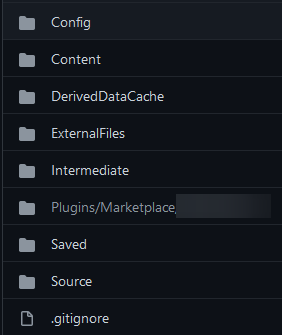
 mighty light
pretty sure if you staged them manually they ill still be committed
inner linden
Perhaps they were staged before I added the ignore
I'll delete them, rebuild, and check again tomorrow. Thanks, probably some kind of sequencing thing on my part.
woven sluice
bold perch
In a scenario where binaries are in source control, when should one upload an up...
well... the most easily obtained answer would simply be, any time they're updated
bold perch
woven sluice
well... the most easily obtained answer would simply be, any time they're update...
😛 Thing is, it can get updated because eg of a full rebuild in some circumstances, in which case it being modified isn't indicative of a code update. But in normal circumstances, I was wondering if my hunch about what triggered an update was correct.
cyan jay
It's almost impossible to reason about this (what if a struct changes, etc).
Basically, as soon as anything changes in the Source folder, or the Plugins folder (if you also submit those binaries) then you need to build new Editor dlls for the non programmers.
 fluid kestrel

does anyone know wth is Rider trying to say here?
P4CONFIG is set (as seen on the top of the file) but also not set?
woven sluice
bold perch
😛 Thing is, it can get updated because eg of a full rebuild in some circumstanc...
I haven't done a full rebuild for the artists in 16 months
bold perch
woven sluice
I haven't done a full rebuild for the artists in 16 months
It's been more recent and frequent here because we're on a launcher build but on my PC I switch back and forth between that and a source build for experimentation, and I've been messing about with build configurations and whatnot as I've been learning about those or trying to solve problems.
woven sluice
We're on a launcher build too :] if you're submitting the binaries manually (by yourself, a human) then yeah you're going to end up with a lot of oddness... Unless you painstakingly revert your binaries and build normally before submitting, every time
bold perch
woven sluice
We're on a launcher build too :] if you're submitting the binaries manually (by ...
Yeah ... A project lead is going to provide an unused laptop of his for us to use as a build machine — could we use UGS with a launcher build so I don't have to upload the binaries anymore? I think I've only ever heard about it used with reference to source builds.
woven sluice
Not sure, think you'd have to modify ugs. We don't use it yet either
bold perch
Ah, what do you use?
woven sluice
Just perforce with Jenkins, with virtual stream for coders that hide binaries and virtual stream for Jenkins that hides everything except binaries and source folders pretty much
Team city might be nicer, and it also lets you (if you want to bother) set up a system where artists can download dlls from it as build artifacts. I just put them in perforce since its practically zero maintenance though
bold perch
Thank you, that advice might come in handy as we look to set up a pipeline.
woven sluice
Having a proper type map setup for your dlls is obviously important to avoid storing years of pointless dlls unless you find something with more or less unlimited storage
fluid kestrel
fluid kestrel
I still didn't figure out how to resolve this, if anyone has an idea it'd be most welcome :')
jolly fog
hi
i deleted my unreal engine and epic so i can do github ue4 source code
i think i did done 3 mistakes doing that
i dont know what to do now, can i get a littttle bit help ? a youtube video made me do it
is this right ?
 storm vortex
fluid kestrel
storm vortex
fluid kestrel
It doesn't know what workspace you are using
p4 set P4CLIENT=[workspace name]
merry verge
or set that in the p4config file you seem to be using
fluid kestrel
@merry verge it's already set but it didn't have the P4CLIENT on it
merry verge
...yes, that's what i said
fluid kestrel
ah nvm sorry
I misread your message
why tf is it complaining about not finding P4CONFIG when it wanted a P4CLIENT tho
sdflqskhfqsldfk
woven sluice
set p4config
it's better than setting p4client p4 port and all that junk
create an environment variable P4CONFIG=MyBestConfigFileNameEver.txt
create that file in the root of your workspace
fill that file up with settings
@fluid kestrel
(also: make sure the config file is listed in your p4ignore file, so you don't upload your settings to share with everyone else)
 fluid kestrel
woven sluice
(also: make sure the config file is listed in your p4ignore file, so you don't u...
fluid kestrel
woven sluice
(also: make sure the config file is listed in your p4ignore file, so you don't u...
it's added by default
and I guess I should fill it more
I only have P4IGNORE and P4CLIENT on it atm
P4PORT and P4USER are often required outside and everywhere so I already had p4set them
woven sluice
oh, well did i ever misread. so the error is saying P4CLIENT is undefined. it isn't saying it didn't find P4CONFIG
or
ok fuck i don't know 
do you have the environment variable defined though?
the only environment variable i have defined is P4CONFIG, i explitictly do not set any other ones through P4 so that i don't run into ass pains if i have to connect to multiple servers
merry verge
pretty sure it's complaining that it can't find P4CLIENT in the config, and it couldn't find a further config because the P4CONFIG env variable wasn't set
ie rider found the p4config.txt, it tried to use it, but it didn't have enough info so it fell back to the env variable... which wasn't set.
Did setting P4CLIENT in the config not solve it?
woven sluice
i hate those errors because they're always hard to interpret, but ... that's for a Saved file, why is anything trying to commit those, is your ignore stuff not working right? does it throw that for any valid/normal files too?
merry verge
Check Rider's p4ignore setting - Settings > Version Control > Perforce > Ignore Settings
in settings
woven sluice
 merry verge
^
woven sluice
(don't use my settings as gospel for what yours must look like, there are multiple "good" ways for this dialog to look depending on your personal prefs)
what does yours look like?
merry verge
Might need to map the project directory to perforce? Check the directory mappings page.
woven sluice
where is rider's "per project" settings for perforce, doesn't it have another options page somewhere. maybe that's controlling it.
yeah
merry verge
 woven sluice
fwiw i leave that pane blank though for my launcher-engine projects
merry verge
should be fine...
woven sluice
does the perforce plugin have a version... really grabbing at straws here now but
 merry verge
Could also try adding the directory manually to the mappings page. It should be associated with the project but it's worth a try...
woven sluice
alternatively just choose "Use P4CONFIG" option like i do and create a nice healthy p4config file that contains everything rider needs in your project folder like me does 🙃
that's marketplace tab
eh what am i talking about doesn't matter
merry verge
lol the marketplace has an out of date version anyway
woven sluice
your version is old though
merry verge
oh that's the installed one nvm
Is Rider itself up to date? Latest is R4UE 2021.3
you should update 😛
though I never had these issues with p4 on that version either
woven sluice
yeah. also no time to update too many landscapes to update on tick in cpp
merry verge
I'd add the directory manually and remove the <project> thing from directory mappings if that's the case
 brave mica
Does anyone know how to setup Git LFS with UE4 through source control? I've installed it to my C drive, but it just brings up a command prompt when opened, and the option to include a .gitattributes file for it in UE4 is greyed out/unavailable, I'm unsure how to proceed
 runic summit
I'm pretty sure I didn't add uasset to my p4ignore file - so why this error?

maybe this is the problem (in my p4ignore) #Fbx exports
Import/*
merry verge
Yep, that'd be why
can't remember if having a / at the start will force it to start at the workspace root or not, worth trying.
yeah, I think it will
runic summit
merry verge
Yep, that'd be why
How do I set a limit on the number of revisions maintained in my depot? I only care about the most recent HLOD builds (or one directly before that)
merry verge
You can set it per-file in p4v by right clickingthem and hitting "change filetype". It should be clear from the dialog what to set.

if these are files that will always be in a specific directory (and they'll be the only files in that directory) or if they are the only files with a specific file extension then you can set it in the typemap as well to apply to any future files.
 merry verge
I think HLODs are stored as uassets, but if they all have the _HLOD suffix this might work in the typemap:
binary+lS //YourDepot/Content/..._HLOD.uasset
Unfortunately you'll have to set the filetype manually on any existing files as the typemap only applies to new ones.
binary+lS meaning they're binary, lockable, and stores a single revision at most. If you wanted to store more you'd do S2 or higher, though i think there are some limits on what numbers you can use.
runic summit
merry verge
I think HLODs are stored as uassets, but if they all have the _HLOD suffix this ...
where do I edit the typemap on windows?
merry verge
p4 typemap
runic summit
how do I get a console to type in, I'm checking at the bottom
runic summit
nvalid file type modifier on 'binary+2S'; see 'p4 help filetypes'.
+S<n> server stores <n> number of revisions, where <n>
is a number 1-10 or 16,32,64,128,256,512.
ah got it, thank you
runic summit
merry verge
any normal command prompt
well crap

i pushed the HLODs from one machine and downloaded them on the other
well crap...now what do I do?
ah I think I know, I need to resend hte maps from the source machine
runic summit
That didn't work - @merry verge any idea how I could fix these load errors? I downloaded the HLOD's and then downloaded the maps from the machine they were from - i thought the HLOD's contained the static mesh actors
runic summit
Can anyone advise how you sync up HLOD's across different machines?
quaint obsidian
brave mica
Does anyone know how to setup Git LFS with UE4 through source control? I've inst...
try running git-lfs install
merry verge
runic summit
Can anyone advise how you sync up HLOD's across different machines?
I don't know what the workflows are supposed to be with HLODs specifically. You may want to test copying a few files between machines manually (without perforce) just to rule out some sort of corruption in transit.
This doesn't really sound like an issue with perforce though - something else sounds like its going wrong with the asset files.
runic summit
merry verge
I don't know what the workflows are supposed to be with HLODs specifically. You ...
I'll try rebuilding them in one of the levels and pushing that
 hasty grove
Hi! I am setting up Perforce and am trying to decide which cloud hosting option to go for. I see there is a pinned message about this, but it is from 2017, is it still valid or anyone got any updated recommendations?
runic summit
digital ocean is popular - I use contabo because they are pretty cheap but have a good reputation, so far I've had no issues
hasty grove
runic summit
digital ocean is popular - I use contabo because they are pretty cheap but have ...
All right, thanks!
 bleak sinew
hi y'all, couple of questions:
- where can I find a reliable p4ignore example for my project?
- do you know any guide on how to use pre-commit hooks from perforce?
bold perch
bleak sinew
hi y'all, couple of questions:
* where can I find a reliable p4ignore example fo...
A couple of people have uploaded their p4ignore files to Github:
https://raw.githubusercontent.com/mattmarcin/ue4-perforce/master/.p4ignore
https://gist.githubusercontent.com/vilbeyli/c992fd484b04c2236a7f51a3fb0f7878/raw/900348f390bcee93ad33bb615a321846d6be7c6a/ue4-p4ignore.txt
merry verge
Doesn't it ask you to check them out the first time you edit them? That's the point of things being read only in perforce, and rider if set up correctly will prompt you to put it in a changelist.
merry verge
One of the options in that dialog is just to remove the read-only flag (which, if perforce isn't enabled, is probably the only option) which won't add it to a changelist. I suggest testing that when you have a chance.
bleak sinew
bold perch
A couple of people have uploaded their p4ignore files to Github:
https://raw.git...
thank you man!
 short delta
Hey everyone!
What are some of the things that Perforce is better for than Git?
I have been working with Git with years, and tried Perforce only once.
I would like to hear more about the difference between two from the people who have solid experience with both!
glad stag
Depends? How big (mb/gb/tb) is your project?
storm vortex
Perforce has much better integration with the UE editor and the locking workflow is much better supported and since a locking workflow is so important for avoiding conflicts in binary uasset files I find perforce to be a lot better overall than git for unreal
I just switched to perforce after using git for the last year. I tried to use the git lfs locking workflow but it was a real mess compared to perforce
short delta
glad stag
Depends? How big (mb/gb/tb) is your project?
Why does that matter? Curious. Lets say one is 10 gb, and other is 80 gb.
short delta
storm vortex
I just switched to perforce after using git for the last year. I tried to use th...
Nice, thanks.
I'm curious about locking. How is that different?
I did not like locking in git, yeah.
I heard with perforce is instant? Live update.
And with git is not?
storm vortex
Yeah maybe your experience with locking in git was better than mine but basically the editor integration was really bad for me, i.e. not reliably reporting the state of locked assets so I had to use the command line to look at the locked assets i.e. git lfs locks
Whereas in perforce the editor integration works perfectly
always reliably reports the state of all of the assets
short delta
If I start editing file, and lock it. Will everyone else see that lock instantly with perforce? I am very curious about that one.
storm vortex
I was using this plugin instead of the default git integration: https://github.com/SRombauts/UE4GitPlugin the default git integration doesn't even support locking
GitHub
Unreal Engine 4 Git LFS 2 Source Control Plugin (beta) - GitHub - SRombauts/UE4GitPlugin: Unreal Engine 4 Git LFS 2 Source Control Plugin (beta)
storm vortex
short delta
If I start editing file, and lock it. Will everyone else see that lock instantly...
Well not instantly but the moment they try to check it out they will know right away that somebody has already checked it out
short delta
Hm... somewhat similar with git.
I'll have to test it out.
They do have to check it out if they want to work on it tho, right?
storm vortex
Yeah they do
short delta
OK cool. Thanks!
I will do some more research, but sounds like its a bit better, especially coz its integrated with Unreal much better.
storm vortex
The moment you try to make any change to any asset the engine will ask you to check it out before saving your changes
short delta
Pricing on their site is a bit confusing tho.
storm vortex
It is free under 5 users
short delta
storm vortex
The moment you try to make any change to any asset the engine will ask you to ch...
Yeah, you can get same thing with git and that plugin, and there is one other plugin as well.
short delta
storm vortex
It is free under 5 users
What about above? And what if you start with less, but go above? No issues?
storm vortex
it sometimes worked
 quartz coral
Hello all I need help setting up perforce, is anyone avaliable?
storm vortex
If you go above you have to pay
short delta
storm vortex
Did it work well for you?
It worked before, a year or some ago.
I tried recently and this plugin you linked didnt work that well, but I didnt test it enough.
There is one plugin on marketplace for 100 bucks. I assume that one works better.
quaint obsidian

GitHub
Unreal Engine Git Source Control Plugin. Contribute to ProjectBorealis/UEGitPlugin development by creating an account on GitHub.
storm vortex
I bet this one is way better, says it is a strict improvement over the one I was using
maybe I'll give this new plugin a shot at some point, compare it to perforce. Although epic uses perforce internally so I would expect perforce to always have the best/tightest integration with unreal
short delta
quaint obsidian
https://github.com/ProjectBorealis/UEGitPlugin
Thanks for the link. I did not see this one. I'll give it a shot as well.
short delta
storm vortex
maybe I'll give this new plugin a shot at some point, compare it to perforce. Al...
Yeah, probably.
quaint obsidian
Yeah, I almost completely rewrote the plugin to fix lots of performance issues and state problems. Let me know if you run into anything, I'm happy to improve the plugin!
storm vortex
Nice! Have you used perforce before? How does this git integration compare to the native perforce integration?
quaint obsidian
I haven't used Perforce, but I did look at the source code of the Perforce plugin for some help in fixing bugs with the plugin
Most of it was irrelevant to git, as it was working around various Perforce bugs, but it did have some stuff. Mostly the robustness of the plugin comes from real usage of it from our team testing
woven sluice
short delta
What about above? And what if you start with less, but go above? No issues?
you have to contact perforce for a quote and it could be different for everybody but historical word on the street usually runs something like: once you get 6 users you have to pay them somewhere in the neighborhood of $40/user/month
hasty grove
Hi! Anyone know if I should set unicode-mode on or off when setting up the Perforce server?
quaint obsidian
git submodules are usually used for that and yeah you would commit Plugins
 craggy gulch
Hoping someone can help me with this one. I'm a git user for many years through work and hobby projects (not game related) and recently am getting into UE4 with a friend to learn and make small games.
The git workflow seems over complicated for a non-programmer and considering it's a second class citizen in the engine I figured I'd bite the bullet and learn Perforce.
I am so confused. The pricing on the website says that this Helix Core is free for up to five users - but there appears to be no way to set this up without paying? I want to be able to host the repository someplace other than my local machine since if my PC dies, I don't want our project(s) to die as well.
Am I missing something? Looking at this the wrong way? Is it free? Is it not free? I'm so lost.
woven sluice
you should be able to just download it and install it (p4d)
and yes it will let you create up to 5 user logins (and then it will barf on you and tell you to bend over and give them all your money)
I think it's safe to say that most hobbyists rent a linux VPS and install/run it from that but you have options. learning P4 admin is a steep slope, beware
craggy gulch
woven sluice
you should be able to just download it and install it (p4d)
and yes it will let...
I'm watching one of the Epic webinars now, is digital ocean a VPS?
Because that route seems very straight forward.
woven sluice
think so yeah
actually think there is one provider that offers ready set-up perforce instances too, i think... ahhh who was it, it's fairly recent, i didn't look into it
Assembla has for a long time but they're $$
craggy gulch
Their website wanted me to pick azure or AWS to host helix core on but my god they were expensive
craggy gulch
woven sluice
Assembla has for a long time but they're $$
Assembla was one that has the pre setup ones?
woven sluice
I guess it is digital ocean who offered this new service too #source-control message
craggy gulch
woven sluice
I guess it is digital ocean who offered this new service too https://discord.com...
Oh wonderful, that sounds great I will follow that lead then. Thanks so much for your help!
woven sluice
hope it works out for you
craggy gulch
Me too! Lol thanks again for your help, it's much appreciated
 naive vault
Heyo, I am looking at source control solutions for my project
I landed on either perforce or plastic, because they have better support for art assets etc.
I am leaning towards plastic, it has a much more modern interface, but afaik Epic uses p4, and all their tools seem to work around p4 mostly.
Would using plastic get my way?
What would you guys recommend?
naive vault
Biggest negative I found is that seemingly can't handle large repos, but plastic and friends says they can? Thoughts on this?
rotund bobcat
haven't used either of them, but I would suspect perforce would be the easier choice, since it's what epic uses internally, is integrated with the engine and has wider user base in general. Of course I don't know the price difference.
also, Unity bought Plastic, nothing changed for now, but who knows what the future brings
short delta
I have one question about using Perforce on personal server.
So you rent a server, set it up there, and if you go above 5,10,15 users, does it stay free/the same as with 2 users) or is there some additional charge?
Information I am getting from others is a bit unclear on this.
rotund bobcat
above 5 users you have to pay, even if you host it yourself
naive vault
rotund bobcat
haven't used either of them, but I would suspect perforce would be the easier ch...
Thanks for the feedback, I have similar thoughts
short delta
rotund bobcat
above 5 users you have to pay, even if you host it yourself
Thank you. Good to know.
 outer kiln
Just wondering for some minor guidance, recommendation(s) for preferred source control , so many options I thought I'd start here- and its way overdue 😉
ty anyone
outer kiln
can url be on a different drive than where project is ?
 lilac raptor
outer kiln
Just wondering for some minor guidance, recommendation(s) for preferred source c...
lilac raptor
outer kiln
Just wondering for some minor guidance, recommendation(s) for preferred source c...
perforce is solid
outer kiln
wondering as I'm getting error on checkout : Checkout from file:///G:/Tortoise_SVN, revision HEAD, Fully recursive, Externals included
Unable to connect to a repository at URL 'file:///G:/Tortoise_SVN'
Unable to open repository 'file:///G:/Tortoise_SVN'
I used to use tortoise ages ago, but even then I had some trouble with it, seems its haunting me still 😉
I was hoping to stay OSS but I'm wondering if I just need to go with perforce to avoid this headache IF I can figure out perforce which last time I used it, was also a giant headache to get going with LOL
I think I'll just go with perforce and see what happens
outer kiln
HM ,, well I hate things not working, b4 I give up on tortoise, does it have to be instsalled ( program) on same dir where files I want to import from, are ?
 regal grotto
If you can't even read Unable to open repository 'file:///G:/Tortoise_SVN', I doubt Perforce will help you in any way.
Because on Perforce you'll just get
Perforce client error:
Connect to server failed; check $P4PORT.
TCP connect to perforce:1666 failed.
perforce: host unknown.
instead
 umbral forum
since yesterday i have issues with p4 and Hlods in 4.23
even in a blanc project
anyone else ?
 shut prism
hello!
what source control can you recommend using with blueprints?
in a small team
git gives us a lot of headacke due to blueprints defined as binaries and always issues to merge commits
rotund bobcat
perforce, it's free up to 5 users
then you would just lock your blueprint when you check them out so no one can touch them
 wise sorrel
Hi people right now we are we are a team developing a game and with it set up perforce with P4 type map and also p4 ignore but a member of the team was going to submit a file from unreal that he modified but when he click on the root folder and the click add, on pendings to upload he did get a lot of .ini files and config files that are not suppose to be submitted cause we have the .p4ignore and type maps set up
Some one to help
 cyan jay
Did he set the P4IGNORE system variable?
wise sorrel
I did setup the p4ignore, but Every single person should setup the variable?
woven sluice
The ignore system is local per machine. Everyone makes their own ignore setups. You can only share the file to save them writing their own ignore file
 foggy niche
Just in case this enlightens somebody:
The titans from Project Borealis have a fork of the git 2 plugin that works better than the original 👀
https://github.com/ProjectBorealis/UEGitPlugin

GitHub
Unreal Engine Git Source Control Plugin. Contribute to ProjectBorealis/UEGitPlugin development by creating an account on GitHub.
 finite axle
Anyone get this error before after running the /opt/perforce/sbin/configure-helix-p4d.sh for helix core?
syntax error on line 5 of configuration file /etc/perforce/p4dctl.conf.d/p4d.conf
I only changed the instance name and super user name/password. I left everything else as default so P4PORT, etc. is all default
quaint obsidian
foggy niche
Just in case this enlightens somebody:
The titans from Project Borealis have a f...
thanks for the shout out!
wise sorrel
woven sluice
The ignore system is local per machine. Everyone makes their own ignore setups. ...
Ok perfect and just a question does P4 support parallel syncing?
Perforce*
merry verge
What do you mean by parallel syncing? Perforce has a specific feature called that, but based on your question I'm not sure it's what you're asking about.
woven sluice
^ @wise sorrel
 viscid moth
Why am I getting this error?
 wise sorrel
I mean if in p4 you can use threads for faster syncing. There are some servers that can bloc it, so in that case I think we are only use only single thread and it's quite slow, this should be setup on P4 or the server
viscid moth
I deleted a map and a material and Im getting this error
wise sorrel
wise sorrel
I mean if in p4 you can use threads for faster syncing. There are some servers t...
@merry verge @woven sluice
merry verge
the answer is both - you need to enable it on the server and tune it for that server's hardware, and then also enable it on the client (I think it's enabled in p4v by default but can't remember)
wise sorrel
Ok perfect ty
woven sluice
yeah. here's an example (what mine is currently set to ... lmao, 100 threads. I think I found no difference between like 8 and 100 after testing and I just left it)

i get 100 Mbps transfers with this when moving lots of binary files with a tiny single core linux vps. i've never figured out if my vps is bandwidth or cpu or disk limited.
viscid moth
viscid moth
Why am I getting this error?
?
woven sluice
conflicts i'm guessing. revert your changes to that map and then pull instead?
you deleted or edited a map and the remote wants to give you changes to that map
and it's saying "hey buddy you edited it what am I supposed to do now"
wise sorrel
woven sluice
yeah. here's an example (what mine is currently set to ... lmao, 100 threads. I ...
ok lol we have a server with a 4 core amd cpu but we dont get more than 50 mbs so maybe im going to touch it
tune it
woven sluice
two random gotchas: 1) yes once you enable parallel sync, you no longer get a progress indicator in P4V - you just have to have faith that it's running faster than it would have been at least. 2) the perforce plugin for Jenkins sucks and doesn't work with parallel sync - in case you ever use Jenkins, make sure to set it manually to use a single thread/no parallel sync. My Jenkins builder managed to corrupt my P4 depot a few weeks after I turned on parallel sync. Hoping one day I'll switch to Teamcity and it will work properly.
wise sorrel
Ok
woven sluice
@wise sorrel fyi p4 will only show set non-default variables, i've manually set all of those already and that's why they show
wise sorrel
Oh ok i though that it shows all the variables no matter if default
I did set them but no configure variables to show @woven sluice
 woven sluice
ah, you used p4 set ... that's not the same as p4 configure set
IIRC
you probably just added a weird environment variable to your OS
woven sluice
it might be in there, yeah, if you can access that dialog
at least worth checking/removing if it is, don't worry about it otherwise i guess
wise sorrel
nothing to show on enviroment variables
so i think that it doesnt did anything
Now showing correctly thanks to all
woven sluice
yeah don't worry about it, even if it set something it probably will never affect anything until the machine gets a reformat 😄
 flat current
Any perforce users around that could answer some questions on voice?
 bitter sun
There isn't any way to migrate the Git history to Perforce, right?
 uneven coral
flat current
Any perforce users around that could answer some questions on voice?
uneven coral
flat current
Any perforce users around that could answer some questions on voice?
Did u still need help?
flat current
uneven coral
Did u still need help?
Now some rad guy named @uneven coral got Mr all sorted!
No*
 lament ember
why the ... P4 integration is so slow on ue4?
 queen viper
Anyone able to help me out? I'm trying to add typemaps for editing with perforce but im getting these errors
Can anyone tell me how to solve them?

 woven sluice
binary+1 instead of binary+l ?
don't know why it's throwing up on binary+w though...
(sidenote: you might also want a S# on your build results, unless you really want to spend space saving every single DLL forever too)
queen viper
Am I putting it in right at all?
 woven sluice
lament ember
why the ... P4 integration is so slow on ue4?
woven sluice
lament ember
why the ... P4 integration is so slow on ue4?
like when you rename a dozen files how it does each one individually? yeah, it sucks 
again, +1 instead of +l
lament ember
@woven sluice i;m moving a folder, and it takes few minutes even before a popup happens
queen viper
woven sluice
again, `+1` instead of `+l`
Im using vscode but copying your 1 instead of the original isnt working
didnt even know there was a lowercase 1 xD
lament ember
L is not 1
woven sluice
it's an l. L
woven sluice
lament ember
<@!101844332046221312> i;m moving a folder, and it takes few minutes even before...
that's not normal :\
queen viper
Okay its all good, thanks for the help. What a brainfart I had haha
 lament ember
woven sluice
that's not normal :\
lament ember
woven sluice
that's not normal :\
well, there is no log for P4 plugin
woven sluice
in case it's relevant, be advised typemap settings are only applied to new files. if you have existing DLLs for instance you'll have to set manually in P4V
lament ember
at least for this hang
queen viper
woven sluice
(sidenote: you might also want a S# on your build results, unless you really wan...
What does this mean? I'm quite new to perforce, im learning it because I could potentially have an entry level job lined up for me so knowing the more the better
woven sluice
right click on any file in P4V, click "Change Filetype", study the dialog
queen viper
Like this?
 woven sluice
those files don't appear to be submitted yet so the option may not exist (there may be some hidden options to set the filetype when you commit it)
queen viper
Ah okay, il come back to it when I submit it to the server. Im just integrating helix core with ue4 first. Once again, thanks for the help
 queen viper
I have a question about streams depot
What should be shown under streams depot because I currently have one of my project folders and im not sure it should be there
 lament ember
@queen viper streams do no change the visibility of the repo tree, only the local workspace
visibility is managed separately from the streams
queen viper
I understand that, I guess I should reword it to what is streams depot exactly?
queen viper
Anyone able to help me with this? I don't know why it's happening
 craggy gulch
Does anyone here use Rider for Unreal and Perforce? I'm having some issues and I've been scouring the documentation and can't get this resolved. I enter my information into the settings in Rider and it keeps saying it can't connect because the client is unknown


Then I check p4 info and notice
 flat current

Any idea why I am unable to delete this empty blueprint actor?
I have it checked out
craggy gulch
craggy gulch
Does anyone here use Rider for Unreal and Perforce? I'm having some issues and ...
Disclaimer: I'm usually someone who uses git, and switching to Perforce specifically for UE4 working on a small game with some friends. I am able to connect to it in the Unreal Editor and everything actually works fine, it just won't seem to want to integrate into Jetbrains Rider.
merry verge
"Client" is the name of your local perforce workspace.
Perforce-Server is a bit of an odd name for a workspace, is that the same thing you have in P4V and/or Unreal itself?
You want whatever is in this field if you're using p4v
 craggy gulch
Yeah I just figured that out.. How odd
I noticed because I, on a fluke, accidentally added a new workspace by entering a client name and saw this in my P4V client
So after typing in the workspace name, it seems to connect.
craggy gulch
merry verge
"Client" is the name of your local perforce workspace.
Thank you for confirming as well, it's much appreciated
And to answer your question - no the workspace is not "perforce-server", it's different. I assumed for "client" it meant the perforce client, not my workspace. That naming could use some updating for sure
merry verge
"Client" == "Workspace" in perforce terminology... I think the term "client" is a bit outdated (it's not a great term for things) but unfortunately still gets used quite a bit.
craggy gulch
p4 info still shows unknown through Putty but I'm not sure if that matters? I'm really not a server admin, let alone a linux server or p4 admin by any stretch
I've been slamming my head against the desk figuring this out the last few days, so it's still a learning process for sure
merry verge
the p4 command line pulls information on what server/workspace/etc it uses from a number of places, none of which rider/p4v/unreal set themselves.
You'd have to have set the options for commandline manually or setup a p4config file for it to show you anything useful.
Unlike git, p4 doesn't store any information about the workspace in the workspace itself - there's no .p4 folder like a .git folder. So you have to tell p4 what workspace/server/etc it is using either via environment variables, a config file, or p4 set
craggy gulch
Yeah, I used p4 set but it apparently still shows the client as unknown - and I didn't want to do too much in the command line and permanently screw something up since I'm not really savvy in that realm. Never really used Linux nor have I ever had to manage a server, I'm just a guy who likes to write code and now I'm sort of in over my head with this stuff lol
Thanks so much for the tips though - it's great to see the community here is so knowledgeable and quick to lend assistance. I've been able to work with the project through the P4V client but I figured I'd want to be able to do things in the IDE as well so I very much appreciate the info
 paper dagger
Do I understand it correctly that in order to have P4IGNORE working, every client has to set the env variable locally? I'd like to set it up for the whole stream/ue project so others don't need to deal with it
cyan jay
paper dagger
Do I understand it correctly that in order to have P4IGNORE working, every clien...
That always used to be the case, but I just setup a new machine and somehow it is already set to .p4ignore
I don't know if this is what happens with the latest P4V or 🤷♀️
paper dagger
interesting, thanks for clarifying.
queen viper
I just want to create a quick test to see if it sees the change in p4v but I am met with this error at the bottom, Should I click the overwrite button?
 woven sluice
all this indicates is that there's no perforce functionality operating
also, use an IDE
not this
 queen viper
Oh I see, I have VS but its set to vs code by default
Is the reason it came up with that because I need to link perforce and VScode/VS like I did with UE4?
woven sluice
perforce works by making files on your disk read-only... P4V, or p4.exe, will make the files writeable when you check out the files from the perforce server. plugins for UE or VS (or VSC) talk to your perforce server and check out the files for you
if there's no plugin running or configured connected up to a P4 server, your editor is just blindly saying "hey this file is read only on disk for some reason should I change that?"
queen viper
That is very understandable, thanks for the help
 broken patio
Any Perforce Helix Core guru around? I have a server and I want to know the best way to back it up, I am struggling to understand the manual.
merry verge
https://www.perforce.com/manuals/p4sag/Content/P4SAG/backup-procedure.html
The important parts are creating a checkpoint (step 1-2) and which files to backup (step 4). The one confusing thing is probably it mentioning "the versioned files" - it means the depot files stored in your server directory. If perforce is installed to /opt/perforce (on a linux system) it'd generally be /opt/perforce/servers/<server name>/<depot name>
Those files + the checkpoint and journal file(s) constitute a backup.
Speaking of which you just reminded me to check my own backups... which had been failing for a while. Yaaaaaay.
broken patio
@merry verge thanks, I think I should have said I have it installed on a Windows machine. So once I have done those journal and checkpoint commands. Do i just copy the databases and depot?
ha im glad i reminded you haha
merry verge
You'd want the checkpoint/journal files. Per that page, the db files don't actually matter but you can back them up anyway if you want. The db files should be alongside folders named after your depots - you want everything in those folders (it's more than just the files in your depot - it's some metadata about them and every change in the file's history).
queen viper
I'm trying to submit my changes to p4v but this error is stopping me from submitting all my changes, what can I do to solve this?
 merry verge
If you want info on what exactly you're backing up, see this page: https://community.perforce.com/s/article/2408
TLDR: checkpoints and journals are part of the database but don't store the versioned files themselves. Files are stored in the folder named after the depot in a format depending on the file type. A full backup would be the latest checkpoint + journal file, plus the depot directory.
broken patio
Okay thanks i'll read up and see what i can do. I want to create a backup and then restore it on another server just to make sure i am doing it correct
Where do you backup your server too?
merry verge
I backup to backblaze b2.
broken patio
Ah okay so you have a large chunk of storage there? The server I manage has 500GB already used .
merry verge
It's cloud storage - you pay for what you use. Same as Amazon S3 or other similar services. It has an S3-compatible API and the backup software I use (duply/duplicity) supports that. I have a task setup that runs every couple of days to take incremental backups and upload it to B2.
queen viper
Okay I need an expert for this one, UE4 is crashing when I try to submit changes to P4V. Is this an issue that happens alot?
Like I can't even do basic stuff anymore like checkin assets

I can't checkin my map because its suddenly read only somehow? Please someone help
 merry verge
Did you connect the editor to perforce?
 merry verge
Are you able to checkout the assets manually? Either via right clicking on them and going to the source control menu, or doing it manually in P4V.
queen viper
Apparently there are a bunch of assets already checked out
I get this error when I try to checkin the already checked out assets
 merry verge
Do they show as checked out in P4V? If so, check if they're marked read-only or not in windows explorer.
If they're checked out they shouldn't be read-only.
queen viper
They are checked as read only, is this an issue or is it a simple fix of just making it not read only?
It seems the issue is to just uncheck them, it seems these files came to be readonly because they are megascans assets
Just as I make everything not read only, UE4 crashes immediately when I try to submit changes
and then they turn into readonly again. This is so frustrating
merry verge
Files that are checked out should not be read only. I'm not sure what would be setting them back to read-only, it's not something perforce would do if it's already checked out.
queen viper
Yep I realized that I had submitted submitted changes earlier on and they were just hanging around in perforce. I forgot to submit the changes from perforce. Thanks for the help!
 somber dew

Help, i have large files to push
But it doesn't let me, even after the lfs bullshit saying that it's successfully initialised
Can anyone help urgently?
merry verge
Just installing LFS isn't enough. You need to tell it you want to track certain types of files and migrate any existing files of that type to LFS.
 somber dew
hol up
tracking didn't seem to work
it couldn't find the specified type i was searching for
but i've put .uasset
merry verge
git lfs track "*.uasset" doesn't work?
somber dew
no, it doesn't
merry verge
not just .uasset, *.uasset
merry verge
what's the .gitattributes file look like
somber dew
Uhh, where do I look for 'em?
merry verge
root of the repository, same folder .git, .gitignore, etc is in
somber dew
I'm so confused, i don't know what i'm searching for, i need like a small hint
folder>folder>folder
something like that
 merry verge
When you run git lfs track it should be creating a .gitattributes file in that root folder. Not on github, in your local filesystem.
 merry verge
Ok, so it worked. Now try committing to the repository.

 merry verge
I don't know what that second screenshot is. But the first one indicates more filetypes you might want to track.
I would note that this may not fix your problem if you're on a free tier at github - they only provide so much LFS storage before you have to pay.
merry verge
I believe LFS is a separate cost from the usual subscriptions. I don't know how student plans affect it.
somber dew
Ok, next question then
Because i'm in deep shit
So
Actually
How do I get out of this situation? I have all the assets (big bulk of 'em like 200 gigs or so)
and
My team wants to dev with me
How do I make it easier for them? They don't want to join to my unreal server
Because security flaws
So, i'm like literally stuck alone, and i'm separated
I guess i'll have to dev the game on my own from now on?
merry verge
That much data is definitely over the default limit for github - the base limit is 1GB with $5 for each additional 50GB.
You can look at alternative hosting services - Azure DevOps, for example, has unlimited storage on the free plan (they limit by # of users - I think it's 5 users on the free plan).
You'd still want LFS in that case, you just don't have to worry about the size.
somber dew
Basically, from what I understand, github is really bad for devving games with a team, that doesn't want to join to server
It's just for some bogus code n stuff
merry verge
I don't know what you're referring to in terms of a "server". Do you mean multi-user editing? That is not a solution to version control.
somber dew
merry verge
I don't know what you're referring to in terms of a "server". Do you mean multi-...
Yeah, multi-user!
merry verge
Github is fine, but assets need to be tracked via LFS ideally with locking turned on so that only one person can modify each asset at a time. Github charges for storage, however, but they aren't the only git hosting service.
You also need a git plugin for unreal that actually supports locking - the one that comes with the engine is out of date, this is the one generally recommended: https://github.com/ProjectBorealis/UEGitPlugin
Multi-user editing is not really a good solution to collaboration. At best it lets multiple people work within the same level at the same time, but it doesn't share the entire project with a team and requiring everyone to always be connected to a session is a horrible way to work.
No serious team uses it as their method of collaboration.
somber dew
But theoretically, I got myself into some deep stuff, and i'm separated, leaving me, the only person to develop, because I can't afford such storage services
merry verge
I can't help you with that. I've already suggested some services, it's on you to research. As I said, Azure DevOps provides unlimited storage for git for free, with a limitation of up to 5 users. Gitlab is another alternative that I don't know the pricing for.
somber dew
merry verge
I can't help you with that. I've already suggested some services, it's on you to...
Well, thank you!
I appreciate the honest help:)
I just wish, that some people will be smarter than me to you, in the future 😄
Have a good time!
 hollow knoll
 patent dagger
Is there someone that can help me with Perforce? Im constantly getting ''not in client view'' error. I've been over most ,i think, that is checking the mappings and i've recreated the depot and workspace over and over. it's jsut not letting me push anything. I have another depot that is working fine, so im at a loss.
 outer cipher
anyone knows of a good tutorial to set up a computer for a local perforce server? using online services is way too expensive and im already reaching the limit of hosting 🙂
queen viper
outer cipher
anyone knows of a good tutorial to set up a computer for a local perforce server...
This is literally the perfect video
https://www.perforce.com/blog/vcs/how-use-unreal-engine-4-perforce

Perforce Software
The Unreal Editor in UE4 integrates with Helix Core. See how it works and learn how to get started.
I think
merry oracle
Hi. We're putting together a 2 year budget for a publisher. Anyone have a ballpark guess as to how much Perforce will charge, per license, for a team of 30 people?
queen viper
You have to contact them I think
To purchase a product from the Perforce portfolio of development solutions, simply request a quote or contact a Perforce account representative directly. You can choose from flexible licensing and deployment options - and if you have a small team, it's FREE!
outer cipher
queen viper
This is literally the perfect video
https://www.perforce.com/blog/vcs/how-use-u...
thank you so much I will take a look at it tomorrow when i finish work!
 mighty tusk
Hi guys, somebody using Plastic SCM here? if so what ignore.conf you use and if there any specific rules i need to define in scm for some folders?
jolly fog
i want to hear some educated opinions. does this repo seem suspect?
https://github.com/newren/git-filter-repo
ive used it before and it nuked my entire repo. i dont know bash scripting to a great extent so its difficult to put together what exactly its doing. but i read some of the code and it seems quite malicious (even if its only destroying your entire repo). I suggest that if you try running this repo project that you DONT USE IT on anything you care about. im trying to build a case for github support to justify having this repo taken down.

GitHub
Quickly rewrite git repository history (filter-branch replacement) - GitHub - newren/git-filter-repo: Quickly rewrite git repository history (filter-branch replacement)
storm vortex
So my azure VMs for perforce are costing a lot, like almost 400CAD a month
How much are other people spending per month on cloud perforce hosting solutions?
 long hull
jolly fog
i want to hear some educated opinions. does this repo seem suspect?
https://git...
long hull
jolly fog
i want to hear some educated opinions. does this repo seem suspect?
https://git...
It's not suspect at all, it's even mentioned as the reference for some use case by the official Git documentation (https://git-scm.com/docs/git-filter-branch) to replace git filter-branch. I've used it in the past and it did the job quite well. But as Dieter mentioned, you better know what you're doing when using it, because things can get ugly pretty quickly otherwise.
woven sluice
How many servers, how many TB storage, for how big of a company though? @storm vortex
storm vortex
This is for just two VMs
one VM for the helix server and one for swarm server
I think 1TB storage but I would have to check
90% of my month cost is the VMs
woven sluice
Serving how many people roughly?
storm vortex
3 devs 2 artists
I guess the far cheaper solution would be to call my ISP, get a static IP and setup the server myself
but idk how much my isp would charge for that
woven sluice
I spend about $20-50 per month for a single server with about 50-500 GB of storage serving 5-10 people
jolly fog
long hull
It's not suspect at all, it's even mentioned as the reference for some use case ...
Ok good to know. I was just a little concerned because. .. when I had my project getting nuked by the thing. I put in an issue on the repo and the owner responded like a month later with some BS answer which I don't understand how they could have arrived upon. They then proceeded to do nothing about it.
storm vortex
woven sluice
I spend about $20-50 per month for a single server with about 50-500 GB of stora...
EC2?
How many virtual cores and ram?
Maybe azure is just crazy expensive
woven sluice
I use gandi.net but there are tons of similar options out there.
Two cores and 512 ram
storm vortex
Do you use perforce swarm?
Do you have that running on the same server as well?
I'm using 2cores 8GB ram which is probably way overkill, I'll check to see if azure has cheaper options with less ram
woven sluice
We don't use swarm, no. I've been trying to Google typical server requirements for it but there's nothing out there
My server even is overkill for just p4d
storm vortex
Hmmm maybe I should try with the azure free Vm
I think it is 1core though
not sure if that would cut it, but then my costs would be nearly zero
woven sluice
Did you actually experience slowdowns? Does Azure not just let you increase your specs whenever you want?
storm vortex
I haven't experienced any sort of performance issues but I haven't tried any lower speced VMs
and I am actually not sure, this is my first time using azure, I'll see if I can change the specs on the fly
woven sluice
Sometimes they let you upgrade but not downgrade
storm vortex
ah right
ugh yeah it seems like they only allow resizing to larger sizes
I'll try to spin up a free 1core vm and see how it goes
if that works it will be a good solution for my team
broken patio
merry verge
If you want info on what exactly you're backing up, see this page: https://commu...
Tried following the instructions but i cannot see a checkpoint or journal created in my server... I typed in p4d -j
 pure oak
Hello all. I am trying to upload a packed game to git and im trying to get git lfs to assist because it says files are to large use git lfs. Could anyone help me out?
rotund bobcat
uploading packaged game to git doesn't seem like a good idea either way
 simple remnant
pure oak
Hello all. I am trying to upload a packed game to git and im trying to get git l...
simple remnant
pure oak
Hello all. I am trying to upload a packed game to git and im trying to get git l...
Late reply, but you can consider using releases to upload your packaged game.
At least with GitHub you can go up to 1 GB (if not 2 GB) per individual file, and you can have 7-Zip make parted archive every 1024MB to alleviate it.
 hard spindle
Using Perforce in UE4 I accidentally clicked "make writable" instead of the usual checkout button, how do I revert the blueprint I did that on back to normal?
merry verge
Checkout the file in perforce (you should be able to do it by right clicking the asset in the content browser and going to source control, if that doesn't give you an option you can do so in p4v). Then just revert it.
hard spindle
merry verge
Checkout the file in perforce (you should be able to do it by right clicking the...
So I checked it out in UE4 and then I reverted but I'm still getting the cannot save file error instead of the usual check out box, not sure what I did wrong
You mean right click in the content browser -> check out then right click again -> revert right?
merry verge
Yes. Unreal can be bad at reloading assets after a revert though, you probably want to restart your editor.
silver token
You can also 'Get Revision' on the file and click the "Force Get" option (in p4v).
Especially if you modified an exclusive checkout file that you can't checkout & revert because someone else is actually working on it.
merry verge
as with everything perforce, there's about 20 different ways to fix it
silver token
truth
pure oak
@simple remnant how would that work
pure oak
@simple remnant because im trying to upload a packaged project to github
i did the git lfs track crap
added and init a directory
the basic stuff

but to no avail
merry verge
The point is that you shouldn't even be trying to put a packaged game in git... that's not the purpose of git.
pure oak
rlly
merry verge
The intent of source control is primarily to store the source code and assets, not the completed product.
pure oak
Ok
merry verge
If you have access to the source then you don't need a packaged game - you can just build it yourself.
pure oak
How can I share it to others though?
merry verge
Upload it literally anywhere you want.
Google drive, dropbox, github "releases" page like was already suggested, your own website...
pure oak
hmm
@merry verge I appreciate the help
My first time getting into all of this
you work for a AAA company?
merry verge
Yes.
pure oak
Could you give any advise to a younger person who is trying to get their foot in the door?
merry verge
General advice? Not really beyond "make games", which is what pretty much everyone giving advice will say. This is more of a #career-chat thing though.
pure oak
Ok. I Appreciate you helping me out. Could I send you a dm to keep in touch
woven sluice
spend the hundred bux and get a steam page and distro your beta/release builds through steam... or doesn't itch.io offer something too?
woven sluice
nobody else was too sure how to do it either, until they googled the hell out of it and figured it out 😄 pick a path and try it
pure oak
oof
bitter sun
Dumb question: is it possible to host a P4 server with Azure?
 muted gulch
totally, used to do it eons ago
Azure I found generally is damn expensive though relative to other providers
bitter sun
Yeah we changed our minds back to P4 immediately 😄
We were using GitHub before and only syncing Source folder. Is it possible to keep using GitHub and add P4 to same folder?
cyan jay
Possible but strongly not recommended. So easy for them to get out of sync
bitter sun
I assume there isnt a way to move Git change history to P4 either
Is there any recommended workflow when moving to another VCS?
cyan jay
I don't think it's possible to migrate history
bitter sun
Alright, thanks
 rich steppe
Oh god Plastic is looking so good, what's the catch?
Messing around with it and I'm loving it compared to Perforce honestly
merry verge
The one reason I haven't tried it is a lack of flexibility in workspace setups. Plastic's default UI can't handle partial workspaces (ie a workspace that doesn't have the entire depot mapped to the local drive) and gluon is too dumbed down.
rich steppe
I've been doing a repo per project folder and it seems like it'll work
I love the speed, I actually thought it wasn't working
merry verge
Per folder inside the project? or per separate project?
rich steppe
but then i got my laptop, and installed Plastic and synced up with cloud in under a minute
per seperate project, I have like 6
merry verge
I'm not talking about separate projects
rich steppe
Why would you ever not want the whole thing?
merry verge
I'm talking about within a single project, if I don't want to download or work with a folder at all I can't do that in plastic without gluon.
merry verge
Because maybe I'm an artist that doesn't want code. Or maybe I'm an engineer who doesn't want art source files.
rich steppe
Could put source files in a seperate repo from the game project folder
merry verge
Or because I distribute editor binaries via VCS and need to combine multiple depots into one place, but only for artists.
There's just a general lack of flexibility with it and that puts me off (and tbf git has at least some of the same issues here... though it's getting better). Not sure about anything else (good or bad) with plastic aside from it being owned by unity which seems meh.
 copper temple
How do I setup Git LFS after installation to C: drive? Upon opening it just says it's a cmd tool and I can't figure out the commands for installing it
 valid mantle
Hi, UnrealGameSync cant find my Compiled Binaries, How can I fix it ? I have main stream that contains source and release stream that contains compiled .zip and I added that zips path to Build/UnrealGameSync.ini. UGS lets me press Sync precomplied binaries but changelog is all greyed out and changelog of binaries doesnt showsup there
copper temple
'git' is not recognized as an internal or external command,
operable program or batch file.
I have it, but it is on an external drive different than my C:. Do they both need to be migrated to C:?
Currently I'm just using Github Desktop. I'll try what you've outlined so far. I've went through this before but don't recall it being so complicated. I'm curious if I just checked something incorrectly or maybe a fresh install of everything would help so I'll start with that, thank you!
Any recommendations? I get the appeal of git but find it a nightmare personally, several reasons of which are the fault of Github Desktop but I'm pretty new to the whole thing and it was recommended to me by an associate.
Okay so, the first time I did this, I'm pretty sure I just git lfs track ".uproject" and it was fine. Why won't it now?
It's greyed out currently in the project, even after installing LFS
Ahh one sec
I'm migrating an old project (that was already set up with LFS and source control) to a new machine, and started having these issues.
Forgot it already has a .gitattributes
So, I have a backup of the project on github. Shouldn't I now be able to just clone it directly from the website to UE4 via Desktop?
ugh. .gitattributes still greyed out
 hollow prism
hey me an a friend are trying to use Git to make a game but we try to get each others things and pull them. but some how stuff gets deleted and it sucks. PLEASE HELP
so here is what is happening
I try to pull the stuff he did and then It says that I have stuff to publish, but Its just the same things he did because it thinks that the stuff I just downloaded are my changes. so I publish those things and I go back to the engine and stuff is deleted.
the next choice I have is to use unity, and well I do not want to do that
git hub
I use the git desktop
woven sluice
Github: offers one of the most revolutionary services ever
Also github: offers github desktop 
hollow prism
unity has a built in collaborate, that works so much better than what I have been doing at least.
ok
so should I use git bash
can you pull in UE editor??
that is where I all goes down hill
 left leaf
Wild ask but:
Anyone here using the P4 Webhook with the p4 triggers setup? I got some questions...
https://github.com/saadbruno/perforce-discord-webhook

GitHub
Posts a message to Discord every time a new changelist is submitted from the Perforce version control system - GitHub - saadbruno/perforce-discord-webhook: Posts a message to Discord every time a n...
 burnt perch
hey
can anyone help me out?
i am trying to unstash something and i am getting this error here

 stone lake
I have a question about how perforce p4ignore works.
I would like to use Perforce for source control and share the engine with project members.
In that case, you will find that you need to limit it with p4ignore.
Is there a site where I can find a list of files that require this setting in Engine?
I'm not good at English, so I'm sorry if there are any strange words.
merry verge
stone lake
I have a question about how perforce p4ignore works.
I would like to use Perforc...
p4ignore largely works the same as gitignore with some minor differences. You can take one of those, or modify a gitignore, or just write it manually.
bitter sun
hi, I was assuming that was a Rider question rather than P4 question though
Yep, want to connect to our server for P4
:Yay:
Did nothing so far, I was checking plugins category on settings. Let me take a look to there
oof, why it's not easy as GitHub's plugin 😅
Rider was detected .git folder and set up everything for me
merry verge
because perforce doesn't store any metadata about your workspace inside the workspace itself
unlike git
rider doesn't have to setup anything with git since git natively operates on the directory itself without any additional info. Perforce on the other hand needs to know how to connect to the server and what workspace to use since you can do dumb stuff like having workspaces inside workspaces (never tried this, but it probably works) and mapping multiple depot paths to a single workspace.
bitter sun
Thanks for explaining
Is using P4CONFIG more recommended than typing custom parameters?
merry verge
Doesn't really matter
Making a .p4config file isn't a bad idea though - some tools will pickup config options from there so you don't have to set them up yourself every time. Don't commit the file though.
bitter sun
Alright, another dumb question, where can I find the p4config file?
bitter sun
Gotcha, thanks
I guess it is done

So where do you guys interact with Perforce in Rider? I couldn't find a toolbar or an action?
 merry verge
bottom toolbar

You may want to setup a manual directory mapping for perforce in settings as well - I've had problems with rider associating perforce with the project itself, though I actually can't remember exactly what the problem was. If you run into weird issues you can set it up in Settings > Version Control > Directory Mappings, remove the <Project> item and add the exact directory your project is in manually.
bitter sun
Alright, thanks silliex and Tank
burnt perch
hey, sorry for the late reply.
and i am new to using github, where can I find that command-line at?
stone lake
merry verge
https://discord.com/channels/187217643009212416/375019235853729805/9301843428844...
Thank you!😄
storm vortex
Is there a way to get the unreal editor to submit cpp/h files as well as uassets? It is annoying that the editor integration ignores all of the code changes
hasty grove
Hi! I have started using Perforce (cloud hosted) and am getting the notification "Shared Data Cache not in use, performance is impacted." As far as I've understood that will primarily have an impact on people working in teams with a LAN connection between them. My current setup is only my PC at work and my PC at home. Have I understood it correctly that Shared DDC would not be of any use for me?
storm vortex
Yes if you only have one PC you don't need a shared DDC
but if you have a laptop, or multiple computers you work with, it could be helpful
the DDC isn't related to source control though
hasty grove
I see! Never saw the message before I activated source control so I assumed they were related. So what do the DDC store, as in if I use multiple computers at the same location, what aspects can I expect a performance boost for?
storm vortex
You can avoid compiling thesame shader twice if you use a shared ddc
shader compiling can take a really long time especially if you only have 4-6 cores
so it is helpful for that
hasty grove
All right, thanks for the help!
silver token
storm vortex
Is there a way to get the unreal editor to submit cpp/h files as well as uassets...
Not that I've ever been able to find. I always return to P4v to do all my checkins.
 frail garnet
hi so me and my friend are new to ue5 and want to use github to collaborate with each other and with the code, however, when we try do this using the plugin for it and stuff, it doesnt work
frail garnet
Can anyone help? ^^^
simple remnant
frail garnet
hi so me and my friend are new to ue5 and want to use github to collaborate with...
How exactly does it not working?
 bronze shoal
not sure if this is the right channel for this, but does a free github repo have enough storage to store a decently sized unreal engine project? or can i just use git lfs?
rotund bobcat
just raw git is definitely going over their soft limit fast, should always use git lfs
I'm not sure if github offers free git lfs, but I think azure does
bronze shoal
i’ve seen people use git lfs with github desktop and it works, but it confused me because why wouldn’t everyone use git lfs to shrink their large file sizes?
rotund bobcat
if your project is pure code it doesn't matter really
but if you have binary files such as is the case with unreal
definitely everyone should use lfs
bronze shoal
ah ok
rotund bobcat
and if someone doesn't I'd question them severely
I'm just not sure lfs storage is free on github
bronze shoal
“Every user and organization on GitHub.com with Git LFS enabled will begin with 1 GB of free file storage and a monthly bandwidth quota of 1 GB. If your workflow requires higher quotas, you can easily purchase more storage and bandwidth for your account. “
doesn’t look like it’s free
rotund bobcat
yeah that's why I think azure might be cheaper
not sure though
been a while since I used lfs for a non-work project
bronze shoal
so my unreal engine project can only be like 1gb with github free? just learned about the gitignore for unreal engine
frail garnet
simple remnant
How exactly does it not working?
Like is there a tutorial for it?
simple remnant
frail garnet
Like is there a tutorial for it?
How exactly does it not working?
Just saying "it doesn't work" without specifying the issue in question isn't going to cut it.
Which part are you guys stuck in? What have you guys done until the issue appears?
 white shadow
Can anybody reccommend a Lower cost alternative to Github for small teams (5-10 people) ?
 tiny coral
white shadow
Can anybody reccommend a Lower cost alternative to Github for small teams (5-10 ...
tiny coral
white shadow
Can anybody reccommend a Lower cost alternative to Github for small teams (5-10 ...
Run your own gitlab open source service piggy backed on an existing webserver on a non-standard port - that's what I do !
white shadow
Hmmm i see~
storm vortex
Run your own perforce server! would be free for 5 people
 dusk heron
Hello, anyone familiar with Perforce P4 collaboration software. I had to do a rebuild and I seem to have forgotten some foundational stuff when it comes to permissions
how I had it before was no one had access to anything unless I gave them access. Now its wide open and I need to lock it down for each individual.
merry verge
Fire up P4Admin, head to the permissions tab.
It's a pretty simple ACL system.
Just don't accidentally lock yourself out - make sure to set permissions for your user directly.
dusk heron
I recall a heiracy when it comes to placement for petmissions
I just cant recall if its top down or the bottom up
And its a major pain setting permissions for every user on every folder
merry verge
dusk heron
And its a major pain setting permissions for every user on every folder
You don't have to set permissions on every folder. Paths work the same way they do everywhere else in perforce - //depot/folder/... will apply the permissions to everything under depot/folder.
If you want to apply something to the entire server, you do //.... If you want to apply to an entire depot, you do //depot/...
dusk heron
merry verge
You don't have to set permissions on every folder. Paths work the same way they ...
Thanks. Perhaps what I'm seeing isn't typical. I'll have to dig deeper.
merry verge
Note that there is an ordering to permissions - I believe that "lower" permissions in the ACL have priority.
dusk heron
that does ring a bell...It been too long since I had to mess with this that its like I'm learning again. Thank you
 slow sluice
has anyone ran into this issue with gitkraken? I dont think im changing any files that are particularly incorrect
 rotund bobcat
what does it say if you press view log?
 sharp quail
Hey guys, should I check the stuff downloaded by GitDepedencies.exe into the private Perforce depot where we plan to keep our source-compiled engine + projects? Or run GitDependencies.exe every time locally? UnrealGameSync tool at least tries to run GenerateProjectFiles.bat directly after sync, which fails
cyan jay
How are you planning to deploy the engine?
sharp quail
For coders the full repo. For content creators UGS .zipped from perforce. Trying to follow Epic UGS monolithic approach with filters and such. Still figuring it out
quaint obsidian
Git dependencies is only a workaround to avoid the GitHub file size limit
if you are using your own repo, it should distribute everything directly
 thorn grail
can you revert to the last push?
are you running the game from source code?
if you have all the files you need and everything is in the games VS solution I would try a rebuild
idk ya
I don't really know how anything works
If anyone knows how to deploy the UGS metadata server hmu! 😄
simple remnant
Tried git reset --hard origin?
simple remnant
Try getting rid of the corrupt files, wipe Intermediate, Saved, and any generated build files, and try resetting to origin again
Also try doing CHKDSK on your partition where the project belong, who knows if there are any bad sectors affecting the project
quaint obsidian
what is not working about it
simple remnant
What's the crash callstack?
 somber lily
Hey guys im having some dramas with the perforce VCS, How exactly do i need to have it set up? i have watched video after video but they are not solving my issues that im having. Wondering if someone might have a few to explain the process to me. i have a hamachi net work of computers that i need to connect and those clients are going to be editing live in the UE editor. But the VCS server is hosted on my server machine. How do i 1 Map it to my project, and 2 get the clients to connect to it so they can save and reconnect the next day and retrieve the changes?
Im using Perforce btw.
any help would be greatly appreciated! ive spent hours trying to get the default "dept" to delete so i can make a new one, and start fresh but no avail.
bitter sun
Is it normal Perforce aggressively makes everything read-only then fails to check out files because of this?
somber lily
i have had that issue as well, not sure why it does it, im having all sorts of trouble with it.
cyan jay
It's normal that files not checked out are read-only, but it's not normal that that casues it to fail to check out.
I suspect it's a different reason it's failing (not connected probably, or someone else has it checked out).
bitter sun
Do I have to be connected to P4V on client?
I think UE connects itself in the editor
But this usually (not always) happens when I'm not connected to server via P4V client
cyan jay
UE should connect but perhaps it is silently disconnecting in the background.
I tend to always have P4V open as well, and I use that for getting latest and submitting the changelists - I never use Unreal directly for these tasks.
bitter sun
Gotcha, thanks
cyan jay
default setup of Perforce server is that the login token expires after 12 hours. At that point you will need to login again.
slow sluice
Does anyone know how to solve this error im getting when trying to commit/push on git? I'm not sure what i did to cause this issue, I didnt do anything out of the ordinary in my unreal project or in the c++ code. The commit im trying to push contains 4-5 hours of work in it so I'd rather not have to re-clone the repo or anything crazy like that. Any help/input would be hugely appreciated


Note: the pre-push section is also resulting in the same

I tried pushing through the command line to see if it would give any kind of different error and this is the output I got. Havent hit the internet looking yet, dropping here first incase its info someone would need to know to know the problem

I was able to find the solution from what the command line game me!
Nevermind
inner linden
Hello, I was wondering how come this is still included in the commit? https://i.imgur.com/iKVYsZA.png

Plugins/*/*/Intermediate/ is in the gitignore
woven sluice
?
inner linden
@woven sluice I have literally no clue how you would like me to clarify that any further.
merry verge
inner linden
<@!101844332046221312> I have literally no clue how you would like me to clarify...
Read the path of the dll, and read the line from the gitignore you posted.
inner linden
Sorry, it's also the same with Binaries so I just took a photo of that as well.

Plugins/*/*/Binaries/ is the same
merry verge
Ok, so there is something supposedly ignoring it.
Were these files previously committed to the repository before you added a gitignore?
inner linden
Yes, they were.
merry verge
That's why
gitignore only ignores new files. You need to delete them from the repo before they'll be ignored.
inner linden
Okay, thanks. And is there a way to do that easily?
merry verge
Just move the files somewhere else (outside the repo), commit their deletion, move them back.
inner linden
Alright, thanks. And do you mind if I ask the difference between Plugins/*/*/Binaries/ and Plugins/*/*/Binaries/*
merry verge
The first should be the only thing necessary - it'll ignore anything inside the Binaries directory. The second will mostly do the same thing, but it won't ignore any subfolders inside BInaries.
inner linden
ah I see.
Thanks.
Excellent, I wasn't aware you could remove files from the repo by committing them being deleted.
I don't know why that hadn't occurred to me before now.
I was just deleting them manually from the github page.

looks a lot cleaner now thank you so much 🙂
@merry verge what would be the best way to handle collaboration with github so that two developers don't modify the same file? I'm aware that merging uassets is more than likely not very feasible down the road.
merry verge
look into LFS and lfs locks
locking is pretty much the only solution - can't have merge conflicts if you can't edit the files at the same time.
inner linden
Okay, I will. I appreciate you.
I tried enabling LFS for this project but I somehow managed to mess it up and had to revert lol
lfs is just stored in a gitattributes at the root of the project like the gitignore is right?
or at least the settings for lfs
If the project is using the source version of the editor to compile binaries for multiplayer (apparently you need source to compile the server stuff) should the artists also be using the source version of the engine or can they just use the readily available ones?
merry verge
Ideally everyone should be using the same version of the engine (for artists you'd usually give them a binary build of the engine, you wouldn't have them compile it themselves). But if you aren't reliant on engine modifications and are using the same source version as launcher version you can theoretically get away with it.
And yes, LFS settings are stored in .gitattributes. That's basically just the list of file types for LFS to track (incl. which ones are lockable).
inner linden
Does the editor provide a way to lock the files or is that done through some kind of external software?
I know perforce lets you check assets out
and check them back in when you're done
(I've used and ran a perforce server in the past but I'm a scrub with git)
merry verge
I believe the built-in git plugin doesn't have locking support, but this one does - https://github.com/ProjectBorealis/UEGitPlugin
inner linden
Ah, excellent. Thanks a ton.
 autumn chasm
Probably a dumb question, but can I generate visual studio files and work on my project while my first perforce commit is uploading?
inner linden
Sorry for the additional bother, I opened up gitbash in the UE4 project directory and did a git lfs install as well as I added the .gitattributes at the root of the project folder to indicate which files to mark for LFS
I was not sure if I should commit that to the repo before I run git lfs migrate import --everything --include="*.uasset,*.umap"
After doing git lfs install + the attributes it added all the uassets to a commit with them being identified as "modified"
inner linden
Thank you, I appreciate it.

yeah it loooked something like this so i wasnt sure haha
so I figured I'd ask first before committing to either or.
@merry verge It looks like it auto committed, is that normal?
It's asking me to pull the origin and says soemthing about unrelated histories. Tried using git pull origin master --allow-unrelated-histories but it wants me to resolve the conflicts myself.
Is there a way for me to override this and push these changes?
merry verge
LFS migrate rewrites history to remove LFS-tracked files from git and puts them into LFS's own storage. As such, the history in your local repo now differs from the remote.
Validate that everything seems to work, and then force-push (git push --force) to overwrite what's in the remote.
inner linden
Alright, will do, thanks.
my only concern is that I have yet to commit any changes since enabling LFS and I'm not exactly sure what I'll be pushing
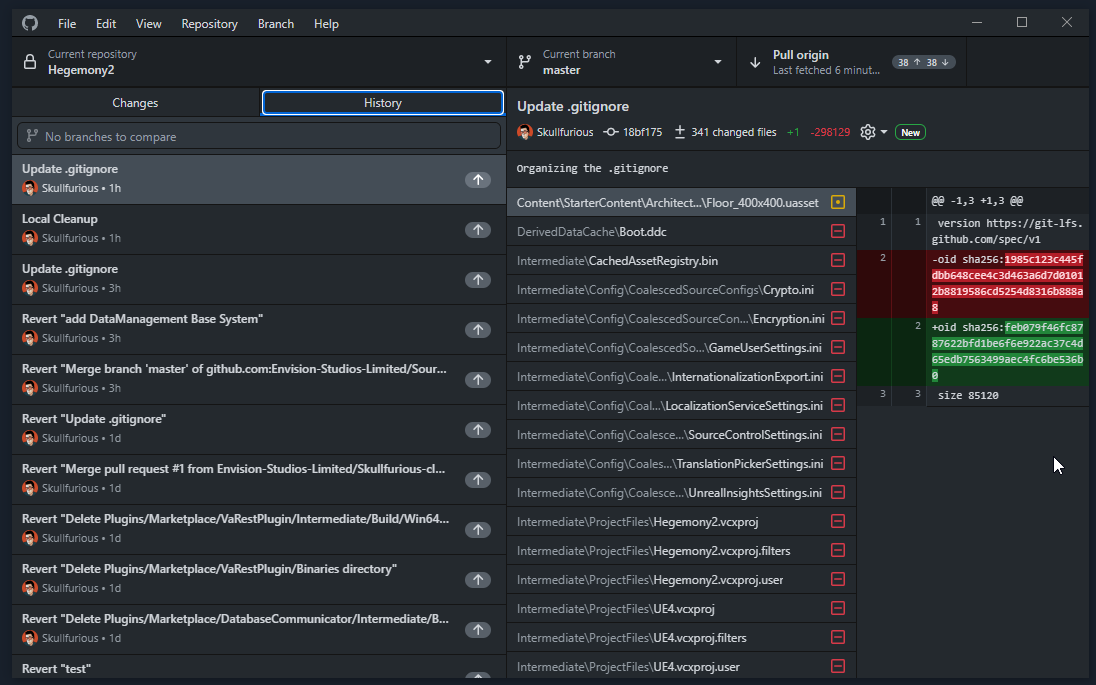
Should I just push anyways even if there's no commit?
merry verge
Commit first (if there's anything to commit)
merry verge
Does your gitattributes exist?
inner linden

it should yeah.
I'm not sure why because I did not push it to the remote repo and it's not in the gitignore
I'll redownload the repo right quick and backup the attributes and ignore I haven ow.
then try to enable LFS again without pulling
it might be because I pressed pull I am not sure.
So after git lfs install and updating the .gitattributes file I should run that git migrate command for the uassets and umaps then I should have a new commit waiting for me to submit right?
merry verge
You can commit the gitattributes and such first.
Migrating itself shouldn't create a commit - it just rewrites history to move the storage of the relevant files into LFS.
inner linden
So after migrating I should immediately do git force push right?
without pulling etc.
merry verge
Force push will only be necessary after migrating
you don't need to push at all until you're done with this.
inner linden
Right, I have not pushed anything yet. I'm currently migrating.
I will force the push in one moment and hopefully that will resolve the conflicts I was having earlier.
@merry verge thanks again, and apologies for the trouble. I hope you have a great weekend.
inner linden
Any ideas on why all my assets went missing from the project? They're still in the directories but I cannot get them to show up in engine.
This was after implementing git lfs in the previous messages
I guess I shouldn't be surprised setting up github and LFS on this thing has been an absolute headache.
It appears to just be everything in the Content Folder.
They are all the same file size (130 bytes) oh god what did I do...
@merry verge you wouldn't happen to be around today would you?
(luckily I have several off-server backups of the repo so it's not too big of a deal, I just feel like I'm annoying the other people on the project trying to set this up properly)
autumn chasm
Does anyone know if there is a way to check all assets that were checked out back in to perforce while in the unreal engine (i.e., I'm wondering if I have to right click and select check-in every time I finish with an asset or if I'm able to work on five assets in sequence and then just submit everything at once)?
 neat grotto
inner linden
Any ideas on why all my assets went missing from the project? They're still in t...
neat grotto
inner linden
Any ideas on why all my assets went missing from the project? They're still in t...
What was the last thing you did before everything stopped showing up in the content browser?
inner linden
git push --force
(yikes) lol
before that though I did git --migrate uasset and umap
Also glad to see you're still around pfist I used to roam around these parts a few years ago.
Okay, so I just pulled the repo fresh again and its all showing up now.
I'm going to have a stroke man I swear
neat grotto
Ah. You did a fresh clone and all is well?
inner linden
I just fresh cloned it
it is working when i fresh clone
but my other backup is all 130kb files
idk what happened
very weird so it pushed right but corrupted or something after?
I have no idea how that even happened.
neat grotto
OK. Something might've gone wrong in the migration process.
neat grotto
inner linden
before that though I did git --migrate uasset and umap
Do you mean git lfs migrate?
inner linden
Yes
neat grotto
OK good.
inner linden
Literally everything locally seems to be working but what was concerning was the other guy pulled the repo and said the same thing nothing was showing up
but NOW it;'s showing up I have no idea why
I think everyone needs to purge their local copy and just clone
neat grotto
Perhaps so. I'm guessing your teammate did a pull while you were still figuring things out.
Might've pulled things down in whatever bad state caused your empty content browser.
What you described — empty content browser, all files are small and around the same size — sounds like Unreal thinks you moved everything to a different folder so it replaced them with redirectors.
neat grotto
autumn chasm
Does anyone know if there is a way to check all assets that were checked out bac...
Do you want to reach a state where you have no files checked out?
autumn chasm
I believe so yes.
But I'm super new to source control (i.e., never used it before).
So try not to smash my smooth brain too hard.
neat grotto
Oh my apologies, I re-read the rest of your question. If you're working on multiple files and want to check them all in with one commit, choose this option in the toolbar.
 autumn chasm
Oh awesome that's exactly what I was looking for, thank you!
I had one other question if possible (sorry), do I need to do anything extra when setting up source control to have it work with my CPP code? For instance, should I be adding my source control to Visual Studio as well as to UE4?
Or just commit using P4V?
neat grotto
I don't work with C++ so I'm out of the loop here. I think there's a Visual Studio plugin, yes, but you can also check those files in from P4V if need be.
Just make sure the Source folder is in your workspace mapping, otherwise Perforce won't see it.
autumn chasm
Alright, thanks for the input, I really appreciate it!!
neat grotto
No problem! Believe me, I know how much trouble source control can be when you're new.
Source control is amazing to have, but don't let anyone tell you it's easy. 😂
autumn chasm
Yeah it's been a learning process, I downloaded perforce a couple months ago, got overwhelmed, and then didn't get it set up until yesterday lol.
bold perch
autumn chasm
I had one other question if possible (sorry), do I need to do anything extra whe...
Helix Plugin for Visual Studio (P4VS) seamlessly brings developers the enterprise-class version control features they need without ever having to leave the Visual Studio IDE. Download the plugin below to get started.
sharp quail
quaint obsidian
Git dependencies is only a workaround to avoid the GitHub file size limit
Interesting! Thank you, I'll add the git deps to perforce
broken patio
Can you use Git with UE4? Getting annoyed with Perforce
quaint obsidian
broken patio
Can you use Git with UE4? Getting annoyed with Perforce

GitHub
Unreal Engine Git Source Control Plugin (refactored) - GitHub - ProjectBorealis/UEGitPlugin: Unreal Engine Git Source Control Plugin (refactored)
glad stag
That's mirrored (updated nightly(?)) from Epic's internal Perforce instance
broken patio
I see the 404
quaint obsidian
The built in one has not been updated in years. And does not support any must have features like status branches added in 4.20. It also doesn't support Git LFS locking...
I don't know the purpose of your reply, then
I'm not sure if I would call the experience on UE4 by default usable
maybe for a single person
but, fair point about not mentioning there is native support
Yeah, though the editor integration does give some helpful utilities, you're right that you also need an external solution for any source control
broken patio
Tbh I am trying to cut down spending. I need 7 users and its a shame we have the free ones and then just pay for addons... I have a GitLab server anyway so thought there would be a way to intergrade a similar form of Perforce....
The documentation in my own opinion that Perforce provides is awful.
broken patio
Ifs?
Thanks, will have a look into it... Im guessing its a lot to set up?
Ah okay, thanks for that.
@jolly fog are you a Perforce Helix user or mostly Git?
Thats the issue I have 😆 Perforce was introduced by a freelancer and they left and no one is managing it so its now my duty to try and run it but with limit budget theres no point having Perforce and GitLab. Can't even backup Perforce. Goes into errors
Yeah I guess. So I guess Perforce is best for artists?
quaint obsidian
I think Git does have a bigger tech support cost for artists (in terms of off the cuff tickets). But it's not usually something blocking, where you need constant manual intervention like it was maybe 8 years ago.
I would imagine tooling requirements for both to be equivalent, in terms of maintaining server and possible client side pipelines.
A thing about GitLab, you can either have object store or local store for LFS. If you use object store (like through GCS), it's a good idea to turn off the parameter that directs all LFS traffic through the GitLab server. This will take off some load. But, if you have your LFS object store on GCS in the same region as a compute, then it's a better idea to have traffic go through the GitLab server. Then you don't pay as much for bandwidth and it's not as slow as it would usually be.
That's a bit much to take in though 😆 hopefully it's understandable
neat grotto
The "best solution" is going to vary from team to team.
In the end, the best source control solution for you is the one that works and suits your budget.
 peak flax
Anyone have any experience with Azure DevOps for UE projects?
Looks like their is a free tier w/ LFS, which is a pretty attractive option for a small team.
 pulsar parcel
broken patio
Yeah I guess. So I guess Perforce is best for artists?
pulsar parcel
broken patio
Yeah I guess. So I guess Perforce is best for artists?
I would say Perforce is just the best for game dev in general
the only reason you wouldn't use it is if you're on a shoestring budget and can't afford the licensing costs once you're past the free tier
but is it made easier by the tooling that's provided with UE4 (robomerge, ugs)
broken patio
pulsar parcel
I would say Perforce is just the best for game dev in general
Yeah, Their packages are a bit overpriced for a small business even with setup support.
Has anyone used Plastic SCM?
 lapis basin
Anyone good with perforce ? I made a pretty big mistake...
I had my depot setup to an address within a mounted drive on Ubuntu.
Depot storage location: "data/MyProject/..."
Drive mounted to "p4d/archives/data"
The drive with perforce was about 12Go and the drive with my depot 125Go and seemed to work fine and my depot was about 34Go
The problem is that some time ago I had to restart my server and I forgot to mount the drive and now my submit are being save inside my 12Go drive into the data folder that was suppose to be my mounted drive...
So I have pieces of my depot in 2 drives, I'm not sure if it's fixable or what to do to put everything back into the 125Go drive...
 split lintel
Hi all,
If I've got my binaries setup as Binary+w on Perforce, is there a way for me to have P4 automatically add the binaries to default changelist upon editing (aka building code) in Visual Studio?
rotund bobcat
you could check out unreal game sync?
cyan jay
lapis basin
Anyone good with perforce ? I made a pretty big mistake...
I had my depot setup...
I'm not quite sure what you've done, but should be ok to:
Stop the service
Move the depot files to a temp location
Mount your drive
Move the files from the temp location back
Would be worth running p4 verify to make sure everything is ok afterwards
bitter sun
I there any way to list changed/modified files and submit them on P4V
Sometimes Rider (even UE editor) fails to check them out automatically
Probably something went wrong with my file system
cyan jay
bitter sun
I there any way to list changed/modified files and submit them on P4V
yeah, right click a folder and choose Reconcile Offline Work
jolly fog
Is anyone familiar with plastic scm for unreal engine I have a few question
 boreal pilot
Anyone else ever have trouble doing large Perforce submits (30k+ files)? I have Perforce servers that choke and then hang at around the 30k-ish file mark -- usually if one of my colleagues is initializing, batch updating an UE depot, which is almost 190k files.
I've also had swarm.enforce triggers start failing around this threshold with the following error:
Submit validation failed -- fix problems then use 'p4 submit -c #####'.
'swarm.enforce' validation failed: Submit trigger unable to communicate with Swarm server [http://swarm/api/v9/changes/27282/check?type=enforced&user=redacted], unable to commit ().
Anyone know anything about this/these?
Usual workaround is break into smaller CLs. But I'm wondering if there is actually anything that can be done about this
pulsar parcel
broken patio
Has anyone used Plastic SCM?
yeah and it's the most buggy server software I've ever experienced
 queen rock
hi u
from cpp:
What's a typical setup to use within P4, Do people usually just put the Engine and the Project in a single depot?
ya so
and then engine also gets a depo and a stream?
in our case yes, we want to set them up on UGS
merry verge
The engine's code doesn't have to be in perforce
queen rock
so like atm we have the proper barebones depot setup like so
 merry verge
the only thing UGS cares about is the prebuilt binaries for the engine being in perforce.
queen rock
oh ok
merry verge
You can put the engine in perforce, if that's how you want to track any changes to the engine that you make.
rich steppe
WTF is UGS?
queen rock
rich steppe
WTF is UGS?
game sync
merry verge
Personally I just have a mirror on github with my own branch to easily pull in updates from Epic's branches. Project and engine binaries live in perforce, engine source lives in git to make it easy to update.
merry verge
rich steppe
WTF is UGS?
queen rock
merry verge
Personally I just have a mirror on github with my own branch to easily pull in u...
ah interesting you do it that way around? I thought most people patch their own changes ontop of Epic's
merry verge
I mean, I do
queen rock
oh right ok
merry verge
I branched from 5.0, added some minor changes (mostly scripts to make it easier for me to create builds, + the occasional cherry-picked fix) and I occasionally merge 5.0 into my branch to pick up new stuff.
queen rock
ah ok interesting
rich steppe
We moved to Plastic from Perforce and I love it TBH
queen rock
rich steppe
We moved to Plastic from Perforce and I love it TBH
fuckin lol we just went the other way
bye felicia
rich steppe
But no custom engine
queen rock
allz i'm sayin
merry verge
On the other hand if you're a licensee with epic perforce access this all goes out the window since you probably wouldn't be working with the unreal git repo.
rich steppe
What problems did you have?
queen rock
It breaks alllll the fucking time
it used to be great but past 3 months litterally every 50 check ins there's a major issue
rich steppe
I'd prolly stick with perforce if it wasn't expensive for >5 seats. Just a small group of friends tho. Not a big operation.
queen rock
and the best you get is "oh yeah please contact plastic support"
rich steppe
queen rock
it used to be great but past 3 months litterally every 50 check ins there's a ma...
What issue?
queen rock
most problems are due to a large amount of binaries being moved
you have to slowly check them in, in a weird order
or sometimes you just get this

very fun

also this one is fun
It's fine ig if you're working in a smaller team and it's nbd if the server is broken every now and then but atleast in the studio I work at now it can't afford to be down at any time
It's annoying because I do rly like plastic but since unity acquired it, it seems to have gone downhill
rich steppe
Ah ye I can see that not being a great fit for a bigger operation. I just got sick of explaining perforce to nubs and the pricing jump. I'm financing the whole operation for a bunch of half assed hobby projects so not worth the trouble for me.
queen rock
yeah pricing is expensive asf on P4
honestly for hobby projects plastic is great imho
just not serious ones
rich steppe
I got a couple serious projects but no more than 3 people on them. And I'm the only programmer.
Did you guys figure out any way to not have 90% of your changed items list being folders? Why tf is a folder even an item.
queen rock
merry verge
On the other hand if you're a licensee with epic perforce access this all goes o...
w8 u can get epic perforce access if u haz custom licence wut?
merry verge
yes
queen rock
pog we have custom licence I wonder if we have access to that
queen rock
rich steppe
Did you guys figure out any way to not have 90% of your changed items list being...
lol no, welcome to plastic


 queen rock
yessir!