
#source-control
1 messages · Page 18 of 1
 dense fulcrum
Is it possible that it has anything to do with the fact that we have our engine in a depot named //UE5 and our project is in another depot named after the project itself?
 pulsar parcel
dense fulcrum
Trying to get our project to work with UGS and hitting this issue when trying to...
pulsar parcel
dense fulcrum
Trying to get our project to work with UGS and hitting this issue when trying to...
UGS only works with native projects
typically the engine is at the root of the repo and the project is a subdirectory of that root
dense fulcrum
pulsar parcel
typically the engine is at the root of the repo and the project is a subdirector...
So, if I understand correctly, this should be our project hierarchy?
[Project]/```Or does it only need to be at the same level as the UE5.sln?
pulsar parcel
Engine/
Project/
GenerateProjectFiles.bat
dense fulcrum
Let me try that
pulsar parcel
UE5.sln should contain your game after running GenerateProjectFiles.bat
if it does, congrats, you are now a native project
and that'll work with UGS
and now, you only need to build your project and UBT will figure out which parts of the engine you actually use, saving a ton of compilation time
dense fulcrum
Good thing I moved my engine to the same drive last night, doing that now would have been much longer than it will be
dense fulcrum
pulsar parcel
Engine/
Project/
GenerateProjectFiles.bat
Is this only required in the file hierarchy or in Perforce?
pulsar parcel
the difference being?
dense fulcrum
I have that setup done in my file browser, and the UE5.sln sees my project. But I'm still getting the same issue
But perforce is still in two depots
pulsar parcel
yes, it needs to be the same depot
it's useful having an engine depot for the "clean" engine since it makes merging in an engine upgrade easy
dense fulcrum
Ah damn. I'll have to move things around in our repo then. Thanks!
pulsar parcel
dense fulcrum
Ah damn. I'll have to move things around in our repo then. Thanks!
well if it's clean, you can p4 copy it, then merge from it in the future
it really was the easiest way to maintain engine upgrades
 stuck stone
what is this error

 wind gazelle
onedrive folder is cursed, of frequently locks files and folders blocking other programs
 near elk
Hey guys, how do i upload files upto 20gb in github ,i tried many YT videos but nothing happens
 wide raven
near elk
Hey guys, how do i upload files upto 20gb in github ,i tried many YT videos but ...
wide raven
near elk
Hey guys, how do i upload files upto 20gb in github ,i tried many YT videos but ...
Anything over 100MB, pay for LFS I think. Those are some pretty mad filesizes though...
pulsar parcel
or use ADO so you don't have to pay for LFS data packs
 jolly fog
Anyone have experience with jetbrains space as source control in here?
 ancient echo
having an issue where I tried to revert a commit from the repo, had a merge conflict that I "resolved" and now one of my uassets was corrupted, so UE is failing to add it to the project at start. I've tried reverting an even earlier commit and it's still broken. Not sure where to go from here
git pull says already up to date
ancient echo
had to manually download the old file from the repo and overwrite the one in the folder. Still having some issues but at least now UE can load it
 cyan viper
so I know that we can't use a password to pull via https from github anymore and we need to use a PAT. However, I can't figure out how to create a PAT for repos I don't own that I am a collaborator of. Does this mean that I need to either fork or pull via ssh or am I missing a button somewhere?
 nocturne plaza
jolly fog
Anyone have experience with jetbrains space as source control in here?
nocturne plaza
jolly fog
Anyone have experience with jetbrains space as source control in here?
no, but sounds interesting, always ❤️ jetbrains stuff
looks like its Git under the hood? (just doing a quick search)
also says supports binaries, wonder if thats a frontend for LFS as well... just thinking out loud, i'll look into it more.
 meager goblet
Hey everyone, trying to wrap my head around Engine Association and kinda scratching my head here. I am using perforce and currently have a depot setup for my project. I am thinking I need to include the source built ue5 in this depot alongside the project, mainly trying to be forward thinking if anyone else works on the project with me.
Now im aware that what a lot do is place the project folder next to the engine folder and the project becomes part of the same sln as the engine. Is this the only way?
Is it possible to have a structure like this? Potentially allowing newer/older version as I upgrade and avoiding inplace upgrading?
WorkspaceFolder
EngineSource5.4/ue5.sln
EngineSource5.3/ue5.sln
MyProjectFolder/project.uproject
Thank you in advance!
pulsar parcel
meager goblet
Hey everyone, trying to wrap my head around Engine Association and kinda scratch...
If you're using P4 and plan to use a source built engine, I would advise not fighting against a native project
since you can deploy UGS later
meager goblet
pulsar parcel
If you're using P4 and plan to use a source built engine, I would advise not fig...
Sorry not sure I understand, I am using a C++ project with source built engine. What is UGS?
pulsar parcel
meager goblet
Sorry not sure I understand, I am using a C++ project with source built engine....
UnrealGameSync
a native project is the side-by-side configuration
and from experience, it makes sense to have a separate clean engine depot that you merge from for performing engine upgrades
meager goblet
I see ok, are you suggesting that right now I place my project file next to engine folder for right now, and for engine upgrades I would have a seperate depot that im essentially merging to upgrade the engine.
Or, since its just me right now, not bothering in favor of gaining more knowledge around UGS and going that route if I get more team members than me?
pulsar parcel
meager goblet
I see ok, are you suggesting that right now I place my project file next to engi...
It'll be more for any team members that you wouldn't expect to be in code, ie. a non-programmer
since it's an app to make redistributing engine binaries a little easier
meager goblet
Maybe I am asking the wrong thing here, or could be im not understanding. I am trying to avoid the issue where if I download my project on another computer, or a team member downloads the project on their computer they would have to use the version selector to select what engine they are using, hence "changing" the .uproject file.....only for it to get changed again when someone else works on it
Basically im trying to wrap my head around a solution where anyone that downloads the project uses the same engine, and can open it, without changing the engine association value in the uproject file
Would that sill be a "Research what UGS is"?
pulsar parcel
meager goblet
Maybe I am asking the wrong thing here, or could be im not understanding. I am t...
well UGS avoids the version selector issue since everyone just launches from UGS itself, but this was never really a real issue in any of my time using a source build
before UGS we had a batch file to open the editor
meager goblet
Got it ok. Thank you!
wide raven
meager goblet
Basically im trying to wrap my head around a solution where anyone that download...
Our source engine changes only really affect mobile builds, so our solution is this
: most devs just use the engine from epic store ( aka launcher version? )
: build machines use the source engine ( by having .uproject checked out and different engine selected )
meager goblet
wide raven
Our source engine changes only really affect mobile builds, so our solution is t...
Thanks for sharing might just need to play around with it more and understand this better. Probably a loaded question but should I be bothering with a source build? I know something like dedicated servers need a source build but is there any other reasons I’d consider using one or the other? Thanks for the response!
Launcher version, from what I understand, gets around this problem entirely since it just stores the version the engine was opened in
wide raven
meager goblet
Thanks for sharing might just need to play around with it more and understand th...
You should not want to go with a source engine unless you really really need it for something
meager goblet
Oh gotcha 🤔 so really should be using launcher and only open it in a source build when I need it for a specific task such as dedicated servers. Thanks for the insight! Clearly have more reading to do 😂
pulsar parcel
meager goblet
Thanks for sharing might just need to play around with it more and understand th...
Not sure I really agree, for smaller projects yes but larger projects will definitely run into a situation where they need to use engine source
this could be because they're fixing an engine bug, cherry-picking changes from a future engine version, or adding/modifying a feature or plugin in the engine to suit their project
you mentioned dedicated, which does need a source build, but another situation you need is when dealing with NDA platforms
meager goblet
That’s kinda why I was thinking of making that my starting point, as dedicated servers are something ill be exploring though admittedly that’s really the only use case I can think of right now
pulsar parcel
meager goblet
That’s kinda why I was thinking of making that my starting point, as dedicated s...
you might be able to get away with an installed build for now (which could be just for your CI server), but I would layout your p4 depot so you can convert it to a source build later
meager goblet
Sounds good I’ll do some more research on that 🤔
 analog lodge
I need some help...
SO, we´re doing linear content and we have set up a master template project in our depot, that we reference in all our projects using "import" and "import+".
Works great, but the caveat is that with our growing library, the amount of files we need to sync for just the template stuff is growing more and more...
Syncing just that takes some users over an hour with slow internet lines.
So I was thinking we could maybe circumvent this and have the user create one local workspace for the master template and then instead of referencing the template folders from the depot, have them reference a local copy from their local master template workspace.
We all use dropbox on top of that and map the dropbox as "P:" for all users and the master template folder gets synced this way automatically in "P:Global/UNREAL/MasterTemplate", so they wouldn´t even have to sync the master template workspace first.
I´ve created a new stream and a new workspace with the workspace root set at
"P:\Global\UNREAL\SyncTest".
I´ve tried using the remapping, so an example in the paths field of the streams client view would look like this:
import Content/000_GLOBAL/FINAL/... //Templates/MasterTemplate/Content/000_GLOBAL/FINAL/...
Then I would add a line in the "remapped" window that looks like this:
Templates/MasterTemplate/... P:/GLOBAL/UNREAL/MasterTemplate/...
But that gives me an error, as perforce doesn´t allow absolute paths.
Then I tried:
Templates/MasterTemplate/... GLOBAL/UNREAL/MasterTemplate/...
That didn´t give me an error, but when i then try to "Get all" in the new workspace, I get an error:
1 warning reported
p:\GLOBAL\UNREAL\SyncTest\...#head - no such file(s).
Is it even possible what I want to do?
pulsar parcel
meager goblet
Sounds good I’ll do some more research on that 🤔
the problem with installed builds is they take hours to compile, which is one of the advantages of a native project source build in that you only compile what you use
jolly fog
nocturne plaza
also says supports binaries, wonder if thats a frontend for LFS as well... just ...
Thank you it is very much git under the hood but the reason I ask is because I'm looking for help getting it's automation working for the builds and no one is responding in thier discord
 hollow geode
Hi Guys, I really need some help...
I'm working with my friends on a multi user editing session. It's fine until I tried to run Persist Session changes in Revision Control Tab. The Ue5 file ran a bit and crashed. But when I checked on my github desktop, just half of the changelist worked. I though that is a Github size ploblem. I read the Crash report but the noticed .uasset file is just 6kB.


 wind gazelle
hollow geode
Hi Guys, I really need some help...
I'm working with my friends on a multi user ...
wind gazelle
hollow geode
Hi Guys, I really need some help...
I'm working with my friends on a multi user ...
i wouldn't recommend trying to use default git integration in unreal.
get some proper git frontend like sourcetree/tortoisegit or something else
looks like lfs files not fetched so you have a text reference file instead of real file
most likely you need to simply run git lfs init (if you didn't setup lfs) and git lfs fetch or checkout locally
 vale yarrow
my git folder is like 9 gb, is there a way to really reduce that to like 1gb or is it just based on the size of the project?
 indigo cloud
git reflog expire --expire-unreachable=now --all
git gc / git gc --aggressive --prune=now
 restive niche
pulsar parcel
it's useful having an engine depot for the "clean" engine since it makes merging...
restive niche
pulsar parcel
it's useful having an engine depot for the "clean" engine since it makes merging...
that sounds useful - what's the basic workflow in perforce to do the merge in?
pulsar parcel
separate clean engine depot, initially copy to project depot, merge thereafter
the merge conflicts will just be your project edits
restive niche
smart - that's a good workflow
 fluid fern
If anyone here has used UEGitPlugin from ProjectBorealis, please advise.
I've set up a repo, added a project, configured LFS, added Source Control into the Editor. I can checkout files when changing them, but another person can't see it. We work in the same GIT branch. What can be the problem?
 cursive yoke
Does anyone know why this happens to me? I have a lot of bandwith space in LFS to do the push, the credentials are fine and the lfs is installed correctly

 quaint obsidian
fluid fern
If anyone here has used UEGitPlugin from ProjectBorealis, please advise.
I've s...
quaint obsidian
fluid fern
If anyone here has used UEGitPlugin from ProjectBorealis, please advise.
I've s...
what's your git repo host, and what are your git attributes? how do you authenticate with git?
 west goblet
I followed the Perforce guide and managed to get the server running and connected to Unreal Engine 5.3.2. I'm able to check out files via Unreal Engine but the checked out files don't lock which can be a major issue if someone else is also working on the same project.
I did setup a typemap file and an p4ignore file. I'm not able to figure out what I did wrong in the process which is leading to this. Any help or tips would be appreciated.
I'm completely new to this and Unreal in general and would really appreciate any help with this!

 fluid fern
quaint obsidian
what's your git repo host, and what are your git attributes? how do you authenti...
fluid fern
quaint obsidian
what's your git repo host, and what are your git attributes? how do you authenti...
My host is GitHub. Attributes was set for LFS(screenshot attached). Auth was via GitHub pop-up window.
 quaint obsidian
Doesn't seem like you have locking enabled for assets
need to add lockable to the end
GitHub
Project Borealis starter files for public use/reference - ProjectBorealis/PBCore
or use this gitattributes
 woven sluice
west goblet
I followed the Perforce guide and managed to get the server running and connecte...
woven sluice
west goblet
I followed the Perforce guide and managed to get the server running and connecte...
Do you actually have someone else working with you, telling you the files aren't locked on their end? Or you checked them out yourself within two different work spaces? What are you actually seeing
pulsar parcel
it does tell you in p4v
 hard sable
Anyone know where the Version control settings are kept in project files? I had a hard crash and had to get a new version of a project I was collaborating with someone and now my version control settings (Perforce) always default to theirs even after I change it. When pulling additional data from Perforce, I am only pulling from the content folder so my config folders are not being replaced so I am puzzled as to what is retaining this setting after I change it.
woven sluice
hard sable
Anyone know where the Version control settings are kept in project files? I had...
Sounds like you guys didn't ignore the Saved folder and they've committed that to the repo
 jaunty hornet
Does Perforce or Unreal have something that prevents idiots users from starting to work on a binary file if it's not updated to the latest revision?
west goblet
woven sluice
Do you actually have someone else working with you, telling you the files aren't...
I'm figuring out things myself with two different machines.
It is locking new files when I checkout but it isn't locking the files that were imported when I created a workspace in perforce. Everything else is working well till now.
wide raven
jaunty hornet
Does Perforce or Unreal have something that prevents ~~idiots~~ users from start...
Sadly I believe the warning comes when user tries to Save the file. I recommend teaching users to always sync at start of day, and Checkout files as they start work on them
 tacit elm
Does anyone know a cheap full VCS solution for unreal projects up to 100 GB of size (or anything close)? Assembla has a plan for 21 usd per user but its at least 5 user bundle which makes it over 100 usd in the end. GIT solutions are generally not aimed toward repositories bigger than 10 GB so it seems that this is a dead end if i do not want to maintain my own server.
jaunty hornet
tacit elm
Does anyone know a cheap full VCS solution for unreal projects up to 100 GB of s...
Is self-hosting an option?
pulsar parcel
or even ADO
which keeps getting recommended for good reason. you only pay for the 6th user and beyond
jaunty hornet
wide raven
Sadly I believe the warning comes when user tries to Save the file. I recommend ...
That's what I figured, welp time to drill my team
pulsar parcel
and tell them to enable the source control provider
since it'll be obvious in the CB too
and it'll say if it's checked out by someone else or it's behind
tacit elm
jaunty hornet
Is self-hosting an option?
i am looking for a full solution, i would only consider self hosting if there is no full solution for acceptable price. For self hosting the pricing is not bad so i could definitly find something on my own
tacit elm
pulsar parcel
or even ADO
what is ADO?
pulsar parcel
oh if you want P4 then the only viable option is to self-host
ADO is Azure Devops, but it's Git. it does provide LFS
tacit elm
i can work with anything - git/svn/p4
svn i like the most and p4 i never used and i have heard its expensive so would prefer that one the least
pulsar parcel
well it's expensive beyond 5 users/20 workspaces
tacit elm
pulsar parcel
ADO is Azure Devops, but it's Git. it does provide LFS
i will look into that
i need it for max two people working on two different machines
pulsar parcel
but it's the industry standard so
 dusk escarp
If I marked an entire depot for delete in Perforce, is there a command line to revert the pending changelist WITHOUT resyncing the whole depot locally until later (to free up other people who can't check out exclusive files like uassets)?
EDIT: p4 revert -k //depot/... seemed to do the trick, in case anyone else makes a mistake. 😅
 golden dagger
Hello, I'm new to use version control. I'm trying to use git on local, seems i cannot choose a different file path for repository other than the project folder. Does it have to be in the same folder as the project files?
wind gazelle
golden dagger
Hello, I'm new to use version control. I'm trying to use git on local, seems i c...
local repository will be always in .git folder of project root
golden dagger
wind gazelle
local repository will be always in .git folder of project root
hi 🙂 i see, thank you again! that's not quite convenient, since my project file is already 40 gb
wind gazelle
why?
woven sluice
guessing there must be 39 GB of space
wind gazelle
well, i don't think there is a way to escape local copy unless using some centralized vcs
also some things like binaries, saved/ etc would get excluded.
golden dagger
there're a lot of animation file and megascan assets in the project file, which i don't need them to be commited. but seems the initial commit always record all the files in project folder.
i'm now trying only putting the repository in the subfolder including all my BPs, and still copy the whole project file into another disk space to backup 😆
golden dagger
ah, should i do this separate after the first time repo creation? or before
i do want to put the whole big .git file to another drive partition
thank you! i found the documentation : * --separate-git-dir=<git-dir>
Instead of initializing the repository as a directory to either $GIT_DIR or ./.git/, create a text file there containing the path to the actual repository. This file acts as a filesystem-agnostic Git symbolic link to the repository.
If this is a reinitialization, the repository will be moved to the specified path. * so i could do either before or after the initial commit right?
wide raven
So, one of my builders ( a PC laptop ) is giving me grief by spamming
Unicode server permits only unicode enabled clients.
error messages whenever I try to do things in P4V, despite being set up identically to my work PC.
What could be going wrong? Included screenshot of the P4V environment view
 pulsar parcel
wide raven
So, one of my builders ( a PC laptop ) is giving me grief by spamming
```Unicod...
pulsar parcel
wide raven
So, one of my builders ( a PC laptop ) is giving me grief by spamming
```Unicod...
and what is the output of p4 set? did you restart p4v since changing?
wide raven
pulsar parcel
and what is the output of `p4 set`? did you restart p4v since changing?
I haven't made any changes for a while, just pondering the issue. The problem has persisted for quite a while, over many reboots and relaunches
P4CHARSET=utf8 (config 'C:\perforce\autobuilder-legion\p4config.txt')
There is something a bit weird in p4 set though..
P4CONFIG=C:\perforce\autobuilder-legion\p4config.txt (config 'C:\perforce\autobuilder-legion\p4config.txt', 'C:\perforce\autobuilder-legion\p4config.txt', 'C:\perforce\autobuilder-legion\p4config.txt' )
otherwise it all looks as expected
pulsar parcel
so what does the p4config file have in it
wide raven
I leave out our ports and hosts from this copypaste, just showing the rest:
P4PORT=<redacted>
P4HOST=<redacted>
P4USER=autobuilderhelsinki
P4CHARSET=utf8
P4CLIENT=autobuilder-legion``` wanton sentinel
I need help figuring out how to upgrade from 5.2 to 5.3 with Github Desktop if possible.
I have a fork of Unreal Engine.
When I got to upstream 5.3 I just have this and I'm not quite sure what to do next:


 wide raven
wanton sentinel
wide raven
wanton sentinel
There's docs for this, but I have seen some people here recommend slightly different methods I believe. I would search this specific channel for posts by sswires on the subject
https://dev.epicgames.com/documentation/en-us/unreal-engine/updating-to-the-latest-changes-from-epic-in-unreal-engine

Epic Developer Community
Describes how to update your fork of the Unreal Engine source code to get the latest fixes and newest features.
wanton sentinel
wide raven
There's docs for this, but I have seen some people here recommend slightly diffe...
I'm already aware of this I just want to figure out how to do it in Github Desktop
I kind of think I understand what to do.
But I'd rather be confident before I mess up my current build.
I think I figured it out
 wanton sentinel
Just ended up with 131 conflicts, yikes.
wanton sentinel
Well the documentation is saying otherwise.

Says to use the upstream remote/branch
wanton sentinel
Epic Developer Community
Describes how to update your fork of the Unreal Engine source code to get the latest fixes and newest features.
@late thicket The tags just lead to downloadable builds it seems.
Which isn't what I'm looking for.
I just want the branch.
Im trying to update my Release with their Release
Figured it out, I just Sync fork from the website.
 kindred spruce
How is perforce free if you need to pay a digital ocean server to use it? Page says free lol
kindred spruce
About that, is azure devops free?
pulsar parcel
Until you need to give access to your 6th team member, yes
And you don't have to use P4 on Digital Ocean, you could run it in your old PC you left in the broom closet for all they care, but that's 5 users, 20 workspaces
jaunty hornet
don't call us out like that
 supple abyss
Hey, a dev accidentally pushed a ton of massive files to our Perforce server, now we have 4.9GB of space and perforce is locked and won't let me delete files.
Any advice on how to force commands when Perforce returns "The filesystem 'P4ROOT' has only 4.9G free, but the server configuration requires at least 5G available."
I tried deleting the file, but it won't run and returns the same error.
Tried lowering the min required space, same thing.
Is there some sort of admin command or a config I can manually update (i.e., not through the cmd line which continues to show the same error)?
This is a short term project on a temp server with more than enough space for the project. I just want to remove the directory. Any help is appreciated, thank you!
wide raven
supple abyss
Hey, a dev accidentally pushed a ton of massive files to our Perforce server, no...
supple abyss
Yeah, that command also returns the same space error
wide raven
yarr
supple abyss
I tried to edit the values through the GUI and through the command line with the admin/root user, but all commands get the same error.
wide raven
I think there was somebody from Perforce here, but what was his name again, hmm
Ryan something maybe
@stable tendon here we go. Help needed!
 orchid solstice
guys does anyone know how my friend can now pull what i have pushed on github desktop?
wide raven
orchid solstice
guys does anyone know how my friend can now pull what i have pushed on github de...
- He has hooked up to the repo and has the project working and connected
- Fetch
- Pull
orchid solstice
wide raven
1) He has hooked up to the repo and has the project working and connected
2) Fet...
this is all he has

he dosent have pull
wide raven
Hmm
supple abyss
Do the cmd line commands work? i.e., cd /[project_dir]
git fetch, git pull?
orchid solstice
oh yeah i forgot about that part, thanks!
wide raven
still, things should work through the client. It's been a while since I used github desktop... maybe remote is not set correctly or something
pulsar parcel
the only good thing you can do with GH desktop is uninstall it and install something like fork or sourcetree instead
supple abyss
Jetbrains Rider is also a great option.
orchid solstice
supple abyss
Do the cmd line commands work? i.e., cd /[project_dir]
git fetch, git pull?
he has set it up now and still after fetch it dosent say pull
supple abyss
wide raven
maybe something like this : https://stackoverflow.com/questions/73504291/the-fil...
You were right! I was using a similar command through p4, but using p4d the -cset command worked. Thank you.
wide raven
supple abyss
You were right! I was using a similar command through p4, but using p4d the -cse...
nice
supple abyss
orchid solstice
he has set it up now and still after fetch it dosent say pull
Ah, so running git pull doesn't actually pull the files?
If thats the case, it sound like a config issue of some sort.
orchid solstice
supple abyss
Ah, so running `git pull` doesn't actually pull the files?
If thats the case, it...
okay i fixed the first issue but i just have one question, i have set the project direction but when u open my project nothing has changed but when i open repository in explorer and then open it there its working, is that normal or?
pulsar parcel
supple abyss
You were right! I was using a similar command through p4, but using p4d the -cse...
p4 obliterate time now?
supple abyss
pulsar parcel
p4 obliterate time now?
Yep, obliterated the dir, now we can work again.
supple abyss
orchid solstice
okay i fixed the first issue but i just have one question, i have set the projec...
Sorry, I'm not following. When you modify a file, does it show up as changed, so you can stage, commit, and push?
orchid solstice
supple abyss
Sorry, I'm not following. When you modify a file, does it show up as changed, so...
so it does push and i can open pushed file but it dosent replace my unreal project (old file)
in short words i can only open it trought GitHub > "my project name" in files not unreal projects > "my project name"
supple abyss
orchid solstice
in short words i can only open it trought GitHub > "my project name" in files no...
Ohh, are you sure the github project is the same folder location? i.e., do you have a local copy of the project and a cloned one in a different dir?
 winged basin
guys what is source control
wide raven
winged basin
guys what is source control
In software engineering, version control (also known as revision control, source control, or source code management) is a class of systems responsible for managing changes to computer programs, documents, large web sites, or other collections of information. Version control is a component of software configuration management.Changes are usually ...
winged basin
do i have to read 😭
 ocean anvil
yup 😄
wide raven
winged basin
do i have to read 😭
You might be in the wrong industry if you dislike reading, learning and other such challenging activities
winged basin
wide raven
You might be in the wrong industry if you dislike reading, learning and other su...
im a visual learner
wide raven
As long as you are willing and able to search for information yourself online, you are not going to be able to dodge having to read stuff. Always asking others for help is not going to fly far
winged basin
wide raven
As long as you are willing and able to search for information yourself online, y...
yea ik 😔
but isn’t searching for info basically asking for help
because someone else wrote thoes articles
wide raven
winged basin
because someone else wrote thoes articles
I'm not going to spend time quibbling. You have to do your own effort, spend time finding answers, only ask others once you have seriously tried and failed and have some groundwork to step on
winged basin
womp womp
orchid solstice
guys i need some help
so i have pushed everyting and my firend didnt recieve anyithing
 wide raven
orchid solstice
so i have pushed everyting and my firend didnt recieve anyithing
wide raven
orchid solstice
so i have pushed everyting and my firend didnt recieve anyithing
I would suggest you make a new blank test repo and practice adding and modifying one single .txt file back and forth to get the setup right and the hang of how things work
wide raven
 teal pelican
any idea how long this is meant to take?
teal pelican
any idea how long this is meant to take?
Directly relative to the size of your commit and the speed the repo server and your internet allows. I hope you have your ignore file setup correctly and are not pushing Intermediate, Binaries etc
orchid solstice
wide raven
I would suggest you make a new blank test repo and practice adding and modifying...
Why dosent just moving and deleting some object in the scene do the same job?
wide raven
orchid solstice
Why dosent just moving and deleting some object in the scene do the same job?
If you Checkout, change something in a scene, save it, and commit+push it, the change should be in repo.
orchid solstice
Yes and they are, even on github i can see what file has been changed but then i have a problem where my friends dont get a commit and then after half an hour just reapears from nowhere and when they pull it nothing changes
wide raven
orchid solstice
Yes and they are, even on github i can see what file has been changed but then i...
Repeat : practice 1st with just a single .txt file.
If everything works like that, come back to the main project.
I think you guys are maybe not 'getting' something. If everything works on test repo, but you still have problems on real repo, perhaps something is broken in your setup.
orchid solstice
Btw if i have an immage or fbx model in unreal thas that count as and .uasset?
wide raven
orchid solstice
Btw if i have an immage or fbx model in unreal thas that count as and .uasset?
In file explorer, click on "View" and choose "Show" from the dropdown and then click on "File Name Extensions".
teal pelican
I decided version control is too much hastle, I just deleted the git folder from my project, and unlinked lfs or something like that, is that enough?
It was stuck on checking files into revision control so I just terminated the process from task manager
wind gazelle
teal pelican
do not use builtin editor git integration, it is bad. get any git frontend (sourcetree, tortoisegit, smartgit etc)
teal pelican
wind gazelle
do not use builtin editor git integration, it is bad. get any git frontend (sou...
Well that's useful, I might try again at a later date but for now I removed it (i think?)
 teal bone
wide raven
```In file explorer, click on "View" and choose "Show" from the dropdown and the...
teal bone
wide raven
```In file explorer, click on "View" and choose "Show" from the dropdown and the...
First thing I always do when I reinstall windows.
pulsar parcel
the first thing everyone should do
wind gazelle
or just get total commander on a non-wiping drive or usb stick
pulsar parcel
installing Everything is also on a new install checklist
teal bone
Oh yes. Fantastic app!
pulsar parcel
I've never felt the need for a file explorer replacement like Total Commander though
wind gazelle
over the years i've built my own TC build with source control, archiver and other extensions, sftp/ssh for work, custom menus and commands.
so just carry it over by copying with zero need to do install
 lucid fox
Hi, is there a way to merge blueprints at the moment?
wind gazelle
lucid fox
Hi, is there a way to merge blueprints at the moment?
there used to be a simple blueprint merge tool with default version control integration but it is buggy for anything other than small blueprints
blueprints are binary assets and not mergeable in general
wide raven
lucid fox
Hi, is there a way to merge blueprints at the moment?
There's a diff tool in the editor which at least is able to copy chunks of code out, but that's about it. My advice is to avoid the situation where you need it like the plague : )
teal bone
Surely that editor tool is "copy and paste" ?
wide raven
teal bone
Surely that editor tool is "copy and paste" ?
yes
lucid fox
Okay thanks both 🙂 shame there isn't anything more sophisticated!
woven sluice
teal pelican
I decided version control is too much hastle, I just deleted the git folder from...
I don't have time to go into it but it's worth at least being said: This is really not a smart move... Turn it back on and actually work through your issues. Ask for help for solutions/better solutions to your problems with it
 haughty wedge
can you have as many depots as wanted on perforce free license?
orchid solstice
could somebodey guide me step by step what me and my friend has to do to be able to send and receive unreal project trough git hub. We both have installed git, github deskotp, loged into github, installed git lfs and did all needed commands trough git bash such as: cd "unreal project location" git lfs install, git track file uasset and umap, please somebody help me because i have been strugling with it for a week now and just to let you know what didnt work or I had problem with is sometimes when i pushed my friends didnt get it on github desktop for half an hour and when they pulled it nothing changed to their project. Hoping somebody helps me :)
if its too complicated to help me trought all of it i can also join the help wanted if its easier.
 reef oriole
It's awesome to see Unreal Engine 5.4 🎉
It's coming with a much newer version of the "Plastic SCM" revision control provider, just sayin' https://forums.unrealengine.com/t/plastic-scm-plugin-1-9-0-released-with-a-view-branches-window-merged-in-unreal-engine-5-4/1780464

Epic Developer Community Forums
2023/12/21: I have released a new important version 1.9.0 of the Plastic SCM (Unity Version Control) plugin with a new View Branches window supporting creating, switching to, and merging from branches within the Unreal Editor, reloading assets and the current level when needed! You can always update to the most recent version of the plugin u...
I am trying my best to balance giving some updates and signaling I am available for questions/feedback versus not annoying the vast majority of you not using Plastic SCM / Unity Version Control 😅
wide raven
orchid solstice
could somebodey guide me step by step what me and my friend has to do to be able...
I once more request you guys do a proper Sanity Check. Can you two successfully run a test repo and pass changes to a .txt file back and forth?
Sanity checking is a tried and true method to make sure the basics of a setup are working as expected, before trying to dig deeper into a problem space.
orchid solstice
wide raven
I once more request you guys do a proper Sanity Check. Can you two successfully ...
i have done something but now my main problem is that when i push it dosent show up on my friend in github desktop
wide raven
orchid solstice
i have done something but now my main problem is that when i push it dosent show...
Perhaps somebody else may attempt to help with the info you have, but I request a Sanity Check.
orchid solstice
wide raven
Perhaps somebody else may attempt to help with the info you have, but I request ...
well the sanity check DIDNT work because my friend didnt get the commit
look

 wide raven
orchid solstice
well the sanity check DIDNT work because my friend didnt get the commit
wide raven
orchid solstice
well the sanity check DIDNT work because my friend didnt get the commit
ok, that seems to indicate you guys have not got your basic repo setup right. I would suggest going through a basic setup tutorial carefully again until you can get a sanity check like this working.
orchid solstice
thats what i mean
orchid solstice
wide raven
ok, that seems to indicate you guys have not got your basic repo setup right. I ...
the problem is sometimes it appears sometimes dosent
sometimes it appears in 5 sometimes 15 and sometimes in 1 hour
wide raven
orchid solstice
sometimes it appears in 5 sometimes 15 and sometimes in 1 hour
I would consult the docs/troubleshooting guide for your vcs provider in that case
woven sluice
is the commit showing up on github's actual website after you push it
there's no way ™️ the repo server is just delaying it's own state by an hour
woven sluice
i don't think anybody uses epic's git plugin, do they?
isn't everyone using project borealis' plugin
(speaking as a p4 user so IDK)
reef oriole
It's because Epic Games never really supported Git in the first place: I was the one developing the original Git plugin in Unreal
I then implemented in a v2 a crude and not performant version of the git LFS file locking on my Github repo, but never contributted that upstream for Epic Games;
Project Borealis went on to refactor it all into a v3 that they maintain and use
the original Git plugin in Unreal is still useful for prototyping locally, for game jams and all the case where you don't want to rely on a third party cloud server, or you don't even have stable/performant internet, but you want some way to quickly undo or stash away changes etc
 quartz flax
does git desktop handle blueprints?
I looked up online and saw topics from a few years ago that it does not handle binary files too well
but idk if the git devs have made an update for it
pulsar parcel
If by Git Desktop you mean GitHub Desktop, then GitHub nor the client is the same as Git. These days there's LFS and blobless clones
Though GitHub Desktop is a terrible client
quartz flax
then... should I use perforce instead?
cause I need the project files to be pushed and pulled without issues if the code is either in blueprint or c++
also heard that perforce has changed a bit too
pulsar parcel
Huh?
quartz flax
the web page
pulsar parcel
Just everything you just said really
You're going to be dealing with binary conflicts regardless of SCM
But Perforce is a fine choice, especially if you want to do more trunk based development
quartz flax
looks like I'll be spending some time setting everything up then...
woven sluice
you usually choose git or perforce based on which software you hate less, otherwise they both allow project files to be pushed and pulled 😄
orchid solstice
anyone knows how to fix this error when trying to publish repositoritiy
Uploading LFS objects: 0% (0/100), 0 B | 0 B/s, done. batch response: This repository is over its data quota. Account responsible for LFS bandwidth should purchase more data packs to restore access. batch response: This repository is over its data quota. Account responsible for LFS bandwidth should purchase more data packs to restore access. batch response: This repository is over its data quota. Account responsible for LFS bandwidth should purchase more data packs to restore access. batch response: This repository is over its data quota. Account responsible for LFS bandwidth should purchase more data packs to restore access. error: failed to push some refs to 'https://github.com/ThunderGamer09/MyProject.git
orchid solstice
pulsar parcel
The wonders of LFS data packs on GitHub
yeah but why does it happend now and not before
its fresh new project
pulsar parcel
LFS data packs are on the account level though
I think
But just use ADO and never worry about it
orchid solstice
is it maby because i was creating and deleting many projects?
pulsar parcel
No
orchid solstice
well i have absolutely nothing except 1 project that is 1.5 gb
so what is casing that?

 bitter island
orchid solstice
well i have absolutely nothing except 1 project that is 1.5 gb
bitter island
orchid solstice
well i have absolutely nothing except 1 project that is 1.5 gb
Plan smarter, collaborate better, and ship faster with Azure DevOps Services, formerly known as Visual Studio Team Services. Get agile tools, CI/CD, and more.
quartz flax
since when did the perforce company decided to change the way to get helix core.....
I inserted the info in each box, clicked Get Free Helix Core and then no download button....
just an email on how to set things up
quartz flax
turns out I was trying to download from the wrong web page...
now I find out that I need helix core p4d to set up a server and this option is also here
which one should I use?
 quartz flax
ok good, got it figured out
orchid solstice
bitter island
https://azure.microsoft.com/en-us/products/devops
I tried searching it on youtube and didnt find any good video about it how to set it up so if you could guide what i have to do to set it up?
bitter island
orchid solstice
I tried searching it on youtube and didnt find any good video about it how to s...
we literally set it up in call
orchid solstice
bitter island
we literally set it up in call
nope it wasnt seted up with unreal
only with github desktop and azure
im confused alot about it so could yopu try to guide me please?
pulsar parcel
What's the confusing part?
You make a repo and that's your new remote for your project
also use something competent like Fork or SourceTree
 muted gulch
Does anyone use the Fork github Client?
For some reason it's unable to access EpicGames organisation and it looks like that's why it's failing to see my UE repo, anybody know the special sauce?
wide raven
muted gulch
For some reason it's unable to access EpicGames organisation and it looks like t...
It shouldn't need to access Epic, only your fork. I recently was struggling a bit with it, and remaking the ssh key solved it
muted gulch
Hmm.. yeah for whatever reason it's complaining when I try to push about not being able to find the repository
wide raven
muted gulch
Hmm.. yeah for whatever reason it's complaining when I try to push about not bei...
I was not able to Fetch, push nor pull
Also I was able to see all my normal repos, but not forked ones
 open lynx
Is it normal for UE5 to recompile every new project I start?
For example I have a project with many plugins disabled - 2000+ actions
Then I try to compile the engine itself - 5k actions
Then the project again - 2k+ actions
Then other project - 5k+ actions again.
How do I make the engine to remember compiled modules? I do not really want to recompile the engine every new project.
woven sluice
i am not a great person to answer this question but i think usually to avoid things like this you would either A) have one source engine per project, or B) compile your source engine into a rocket build and use it similar as a EGL installed engine
hopefully someone else with more experience will chime in
wide raven
open lynx
Is it normal for UE5 to recompile every new project I start?
For example I hav...
Setting up as 'native project' is the solution, I believe.
folder structure:
- UnrealEngine
-- MyGame
I've complained about the c++ / source docs not putting this first and foremost but afaik it hasn't improved
 unreal citrus
Has anyone tried hosting a local gitLab server with lfs? I plan to setup a local server with GitLab and since I'm totally new to these kind of stuff I wonder if it makes sense. I'd also appreciate any hints or alternatives.
 cold sandal
hiii
Im totally new to Source control. I want to use it becouse my projects sometimes crash and after some parts get broken i never find out what.
Can someone show me the first steps by using it?
 quasi robin
Anyone have any ideas why I'm getting this error while trying to set up Perforce initially and add engine code?
Revision chars (@, #) not allowed in '//UE5/5.4/Engine/Extras/VirtualProduction/LiveLinkVCAM/vcam/Assets.xcassets/AppIcon.appiconset/Icon-App-20x20@1x.png'.```
When initially adding these files with wildcards, P4V did complain about them but allowed me to continue, forcing the files to be added anyway. However, when I attempt to actually submit the changelist, I get this error instead. I know I've done this without issue in the past, and I'm not exactly sure what I'm doing differently this time around. neon grotto
For a project consisting of just two persons, is azure dev ops I good enough option compared to something I've heard is a bit more complicated, being Perforce?
ocean anvil
neon grotto
For a project consisting of just two persons, is azure dev ops I good enough opt...
for 2 people both will handle that fine.
neon grotto
ocean anvil
for 2 people both will handle that fine.
Ah thanks, is it able to handle art assets well?
ocean anvil
neon grotto
Ah thanks, is it able to handle art assets well?
perforce generally has an easier time dealing with non-code assets. but with git and gitLFS both will be able to do it
git can provide you with a more user friendly interface and less command based instructions if you use a custom GUI
pulsar parcel
The complicated part with P4 is maintaining the server more than using it
And with Git, that problem can be the other way round
neon grotto
ocean anvil
perforce generally has an easier time dealing with non-code assets. but with git...
I see, noted and thanks. Also what's the whole thing about the "locking binaries" and is it a problem that Azure DevOps doesn't do this (or so I've heard)
 fiery pelican
I have a question regarding updating projects. I'm updating to 5.4, and it recommends making a copy which makes sense. However, after it's updated, how do I get it linked back to source control? Do I just relink it to make the repo point at the new location? Or do I remove files from the original folder and place the new project in there?
fiery pelican
Nevermind, got it worked out. Just went into p4v and change the root. Everything looks like it's working correctly now.
ocean anvil
fiery pelican
Nevermind, got it worked out. Just went into p4v and change the root. Everything...
you should never have to change the root of p4v unless reinstalling. only the root of the server if you are relocating files server side. or the root of your workspace(in which case you probably want to make a new workspace anyways depending on ur set up). if you are updating to a new engine version you should be fine just updating your project and reconciling changed files into your depot.
do keep in mind that you should not roll files back to their 5.3 version while using 5.4 as that could cause issues.
Personally what i do is i update my 5.3 project to 5.4 then put the 5.4 files in a new depot. using the 5.3 depot only as an archive if i ever need to pull an older version of a file etc. i can just pull that depot to my local machine and run it on the 5.3 engine and then migrate the file.
while in the new depot you can't accidentally roll back files too far for instance. I'm not sure its the most optimal way of doing things, it does occupy more space on the server doing it this way but for me the pro's outweigh the cons.
it should be noted that it might be advisable to create a replica(copy) of your 5.3 project locally and updating the copy only so you can easily switch between either and have some additional redundancy.
in which case you should make a new workspace for the new version. tied to its new location. this workspace can either point to the same depot or a new depot. if you do use the same depot make sure to never push files from your 5.3 engine version into your (now) 5.4 depot.
fiery pelican
Ah well, I already switched the root of my current workspace and it's working fine but it does sound like a good idea in the future to just setup a new workspace. Thanks for the advice!
ocean anvil
fiery pelican
Ah well, I already switched the root of my current workspace and it's working fi...
make sure to reconcile all file changes to the depot.
 fiery pelican
ocean anvil
make sure to reconcile all file changes to the depot.
fiery pelican
ocean anvil
make sure to reconcile all file changes to the depot.
Huh well... good call on this. When I went back and checked in UE I noticed there's an uncontrolled changelist that seems to contain changes from the engine update as well as a few changes I've made since the update. If I right click, the only 2 options I have is reconcile assets or revert. Reconcile seems to not work. I couldn't find an option for reconciling in p4v. Any ideas on what to do about this?
 white bone
Hey, I have been searching for this for the last week, and I have no idea how to do this supposedly simple thing...
I have an AWS EC2 server, I can connect to it via Perforce.
However, I can't connect to it via UE5 Source Control.
This is the error message that appears to me, and that's how I tried to login.
PS: I also tried to use the server's Public IP Address, and it still doesn't work.
PLEASE @white bone ping me if you know the answer....
 ocean anvil
white bone
Hey, I have been searching for this for the last week, and I have no idea how to...
ocean anvil
white bone
Hey, I have been searching for this for the last week, and I have no idea how to...
do you have p4v running locally while trying to connect?
ocean anvil
fiery pelican
Huh well... good call on this. When I went back and checked in UE I noticed ther...
 white bone
ocean anvil
do you have p4v running locally while trying to connect?
white bone
ocean anvil
do you have p4v running locally while trying to connect?
Yes, but I'll stop you there.
I tried to connect using an older version of UE5, and SOMEHOW THAT WORKED.
I was using 5.3.2 --- and switched to 5.2 and it connected!
I don't even understand how or why... so if you do know, that'd be great.
Meanwhile, I can connect to another ssl: server without any problems. (With 5.3.2)
Turns out, the reason nobody is helping me, is because almost nobody had the same problem as me....
So... I'm currently downloading UE5.4 and I'll try to connect using it, and see if it still works. (After all, this would be a fresh install)
ocean anvil
white bone
Turns out, the reason nobody is helping me, is because almost nobody had the sam...
hmm well if the p4v client from the same system connects to your remote server with no issues then the engine should be able to do so as well. they originate from and target the same IP/port.
hence why your issue seems a bit rare.
white bone
EXACTYL!!!
That's what's been driving me insane!!
fiery pelican
ocean anvil
Thanks I'll check this.
ocean anvil
fiery pelican
Thanks I'll check this.
you really should have done so before working on it. as not reconciling your work after an engine update might cause some issues with files being locked/unlocked while theyre not supposed to be. if you are working on a project by yourself that generally isn't too big of a problem as you can just force it to be writable though.
fiery pelican
ocean anvil
you really should have done so before working on it. as not reconciling your wor...
Alright. Luckily I am working on it by myself, but regardless I definitely want to make sure I'm learning correctly processes so I appreciate you explaining!
ocean anvil
white bone
Yes, but I'll stop you there.
I tried to connect using an older version of UE5, ...
is there anything specific in your output log when this happens?
white bone
ocean anvil
is there anything specific in your output log when this happens?
CommandMessage Command: Connect, Error: TCP receive failed. read: socket: WSAECONNRESET, An existing connection was forcibly closed by the remote host.
This is in the connection window
ocean anvil
yeah but the output log of the engine might have more details about the engine side of things. the connection window will simply display the perforce error verbatim
white bone
ooh i see.
well, gimme a moment as I get the message
white bone
ocean anvil
yeah but the output log of the engine might have more details about the engine s...
 ocean anvil
something you could try, is to (VERY temporarily!) turn the firewall entirely off. as well as any antivirus you are running and see if it then gets through. if you've set very specific firewall rules somewhere it might not allow the connection through. or your AV might block the connection reaching UE specifically.
make sure to turn them back on right after your test.
white bone
So, I have BitDefender, and I did turn it off a couple of times as I was testing, and I still got the same error 😦
ocean anvil
did you turn off firewall though?
white bone
Yeah that too
ocean anvil
both at the same time?
white bone
Yup
ocean anvil
hmmmm
white bone
🥲
ocean anvil
if you remote into your server does your server side log anything unusual when the error occurs?
white bone
mmmm, "Remote" into my server?
what does that mean?
I can connect via P4V alright.
ocean anvil
you had to install p4 on aws. i'm assuming you have to do that through a remote client, or some sort of admin/control panel with cmd/shell access?
white bone
Yeah, I followed a tutorial video, and I was able to install and launch p4 on it.
also yes, I can access the server directly.
ocean anvil
i don't use aws so idk how you access their servers exactly 😅
white bone
Though idk how to get the log.
ocean anvil
do you have access to a gui when you access the server?
white bone
Kinda yes.
 ocean anvil
that is the opposite of a gui 😛
white bone
Oh 😅
Well, that's what is provided I believe.
white bone
Okay, I'm not really sure what to do with this info.
I mean I see a few commands, but I don't know how to use them.
like... do I just plop this down in the server?
p4 configure
ocean anvil
navigate to the default log file location and access/download it
white bone
Ok, looks like I'm lost.
But! I want to thank you for trying!
I actually have to go now, so 
ocean anvil
oof, well just as an FYI if you don't know how to navigate a terminal to locate/access a log file. you probably shouldn't be using a server running a headless linux distro.
fiery pelican
Just had a thought, does anyone know if there are any changes needed for a p4ignore when upgrading to 5.4 from 5.3? I've never had to update for UE so not sure if that happens sometimes and if so if they would have anything in the update notes to let people know or anything like that.
ocean anvil
fiery pelican
Just had a thought, does anyone know if there are any changes needed for a p4ign...
p4ignore should have remained the same between versions.
if you have it set up correctly that is 😄
fiery pelican
I think I do! lol. I'm cloning into a new repo right now just to test if my source control is all working correctly. I've never actually tested it. Figured I should now before I get much further along. lol
 hushed nebula
Is there a way to always override p4 environment config (windows) with currently connected server? (I can use multiple servers depending on the day) I often find UE forgets my settings (on crashes afaik) and it seems easier to just check that box that says use p4 env 😄
 lucid laurel
People who uses UnrealGameSync
Do you have separate stream depots for Unreal Engine and Unreal Project and have the Unreal Project import in the Unreal Engine stream?
If yes, do you adopt the Development -> Mainline -> Release Hierarchy for the Unreal Project Stream?
If yes, how do you handle the sitatution of modifiyng the Unreal Engine Stream within your Unreal Project Dev Stream? Since both the //UnrealProject/Main and //UnrealProject/Dev01 Streams have the same UnrealEngine stream mapped.
You would indirectly change //UnrealProject/Main from //UnrealProject/Dev01 when modifying the engine, without copying / merging the Dev with the Mainline stream.
pulsar parcel
I think in the early days at my old studio we used import+ on an engine stream but later it was a p4 merge from a clean stream
Much easier to manage your engine modifications that way too
 sullen prairie
What is the best and cheapest server for perforce to setup for a project of unreal engine?
The project will not go upto 15 GB
lucid laurel
pulsar parcel
I think in the early days at my old studio we used import+ on an engine stream b...
That sounds like a solution. Thanks sswires 😃
But I think I will just have one depot for both the Engine and the Project. Epic Games does have that too with Fortnite.
fiery pelican
sullen prairie
What is the best and cheapest server for perforce to setup for a project of unre...
Find yourself an old pc. Most people are willing to give them away cause otherwise they have to pay to get rid of them. You really don't need much for a perforce server if that's all it's going to be used for. Look up minimum required specs for it.
pulsar parcel
lucid laurel
That sounds like a solution. Thanks sswires 😃
But I think I will just have one...
no they don't? they have a unique copy of the engine that is merged into their project depot
it's not import+
Epic has talked at length about their workflows too
and UGS only supports native projects afterall
fiery pelican
Could someone with more experience than me review my p4ignore and let me know if it looks correct. I've been using perforce for awhile now (as just a lone dev) but recently when I updated to UE5.4, I ran into some issues and while fixing them it prompted me to create a new workspace to pull the project into and just test that its all working correctly. When I open in UE it seems fine, but I'm having issues getting to my c++ stuff in Rider. Wondering if I've got something missing or something ignored that shouldn't be.
I was eventually able to get it working by 1. deleting the Intermediate folder, 2. deleting the sln and then regenerating the Rider project from UE, then opening the project in Rider through the .uproject and then doing a clean, build and then running. This seems like maybe stuff is getting put in the depot that shouldn't be. I'm not sure why the Intermediate folder is even in there as it looks like it should be ignored from the p4ignore.... I don't see the sln in the depot so i'm guessing that got generated before I noticed.
Also should note that while it looks like everything is working, I do get warnings and errors for trying to delete the EditorPerProjectUserSettings.ini when I run from Rider.
woven sluice
fiery pelican
I was eventually able to get it working by 1. deleting the Intermediate folder, ...
Ignore systems are only applied while attempting to add new files to your depot, they don't remove existing tracked files. If your intermediate folder got submitted before you probably should obliterate it from the depot using p4 Admin
fiery pelican
woven sluice
Ignore systems are only applied while attempting to add new files to your depot,...
Right, I'm just not sure how it got in there to begin with because before I ever put any project files in to the depot, I put the p4ignore there first, which I believe is the correct process right? I'm more familiar with git, and that's how we do it there.
lucid laurel
pulsar parcel
no they don't? they have a unique copy of the engine that is merged into their p...
I have my info from Ari https://fxtwitter.com/flassari/status/1785249196578050537
Where did you heard that they don't?
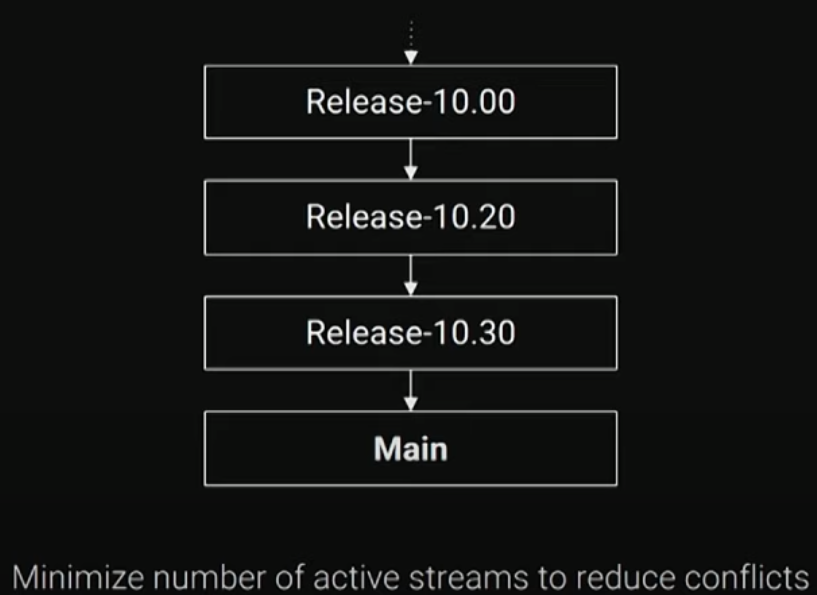
@SodrekR We have both Fortnite and UE in the same stream.
We do release streams but almost no feature streams for our games to reduce conflicts, mostly commit to //Main.
Check Ben Marsh' presentation on our branching strategies: @benmarsh https://youtu.be/d6lyAI4Ftkw?si=_t-la2_LVw-VN-Ln&t=184
pulsar parcel
Well then it's a monorepo these days then, UT (which licensees still have access to) was a separate depot
also the source is the youtube video, this isn't import+
lucid laurel
Okay, so they don't used import+ and if seperate depots, then they merged cross depots? Good to know
pulsar parcel
That's how I've historically done it, and having the clean depot has the advantage of making engine upgrades easier
At a previous studio we also used the same release branching method
RoboMerge is a great tool
lucid laurel
Thanks for the Insight sswires. I already have a separate UnrealEngine depot, so I'm gonna keep it separated, but instead of import+ I will merge the engine into the UnrealProject Stream.
fiery pelican
Can anyone tell me if this is a good p4ignore? I've been going through mine and found quite a few things wrong I think and I believe this should be good, but would love it if someone with more experience could take a look and let me know what they think.
pulsar parcel
fiery pelican
Can anyone tell me if this is a good p4ignore? I've been going through mine and ...
nice that this one doesn't contain the usual Build folder meme, but this is a little curious:
Config/DefaultEditorPerProjectUserSettings.ini
Config/DefaultEditorKeyBinding.ini
these aren't user specific, they would be in Saved
and *.ini?
why would you ignore usf/ush if you had project specific shaders?
and why would you ignore p4ignore itself?
fiery pelican
Honestly I'm not sure on a lot of the stuff in here. Mostly I've been googling for examples and if it's something I didn't know I'd ask ChatGPT for explanations as well as google more about that file type and try to determine one way or another. Those are all on the list of "well I saw them somewhere else and idk one way or the other about them." lol.
In p4v, if I select the top level of my workspace, right click and select Get Revision, and then put in the changelist number for the revision I want, then unselect "Only get revisions for files listed in the changelist", will this revert my entire project back to this revision (which is what I want)?
pulsar parcel
I'd ask ChatGPT for explanations
oh dear
fiery pelican
pulsar parcel
> I'd ask ChatGPT for explanations
oh dear
😂 everybody's got an opinion. Obviously I take everything it tells me with a grain of salt. It's no different than sifting through information on the internet.
wide raven
fiery pelican
In p4v, if I select the top level of my workspace, right click and select Get Re...
Yes
Can also just rightclick a CL in history
fiery pelican
wide raven
Yes
awesome thank you!
fiery pelican
Ok so I reverted back to where I wanted to be, loaded up the project and everything looks good. I have 2 questions though. First, when I go back to p4v, I see these files with warnings on them telling me I'm not on the latest revision. I understand why it's saying that, but I don't want to ever go back to the latest revision. Is there something I need to do to make this the new head (or whatever it might be called in perforce?) My second question is I think I have stuff in my Depot that shouldn't be in there and I want to clean that up. I've got an updated p4ignore. Do I submit that new p4ignore, then go into the depot and obliterate the files I don't want in there, and then it should be good to go after that I'd think?
wide raven
fiery pelican
Ok so I reverted back to where I wanted to be, loaded up the project and everyth...
First off, please consider splitting up your issues into separate posts for clarity.
Issue 1 : You don't want to go back to latest.
If you only had to go back say 1 or two changes, I would recommend doing an "Undo" and submitting those to back out the unwanted changes cleanly.
Then there's "rollback" but I haven't actually ever done this
https://www.perforce.com/video-tutorials/vcs/rolling-back-and-backing-out-changes
Perforce Helix Visual Client (P4V) enables you to rollback a file or folder to a previous revision. Watch this video to learn how to revert files in P4V.
fiery pelican
Ah ok cool. Thank you.
wide raven
Regarding updating ignore:
I would simply Delete ( in p4v ) the unwanted stuff first, then update the ignore file.
Obliterate is cool too I guess if you want to save space
fiery pelican
Awesome! Thanks!
fiery pelican
Now that I've fixed all my issues from my previous engine update attempt, I'm about to try it again, but would like to have better luck this time. Doing some googling I came across this post. It's a fairly old post and doesn't have an overwhelming amount of people upvoting the solution so I'm curious if it's actually a good way to handle it? https://www.reddit.com/r/unrealengine/comments/6vt40d/best_way_to_update_to_a_new_engine_version_in/
Reddit
Explore this post and more from the unrealengine community
pulsar parcel
fiery pelican
Now that I've fixed all my issues from my previous engine update attempt, I'm ab...
I was mentioning this to someone literally yesterday: clean engine depot, merge to project depot, your uproject doesn't need to have an EngineAssociation in it
fiery pelican
pulsar parcel
I was mentioning this to someone literally yesterday: clean engine depot, merge ...
I was reading along with some of those messages yesterday. It sounds in that case there are 2 depots? An engine depot and a project depot? I only have one depot, for my project. Is this something I need to change moving forward?
pulsar parcel
you can create depots whenever, and you can copy/merge cross-depot
no one else on the team needs to be concerned with the clean engine depot unless they're performing the engine upgrade
whenever you perform an engine upgrade, you perform a merge from the clean depot (which you've updated with the latest files) to your project's engine upgrade stream, any merge conflicts are your project-specific engine edits
make sure to still clearly mark your engine edits and explain why they're there since you might want to remove some when you upgrade
fiery pelican
I'm sorry i'm having a really hard time following this. I'm not sure we're on the same page. What is the clean engine depot for? What am I supposed to be putting in there? I only have the project depot. To upgrade it previously, I just ran it from the Epic Launcher as 5.4 and it created a copy in a different location. This caused issues so I'm trying to make sure I do it correctly this time. The reddit link I posted with my question said I can upgrade it in place through the file explorer by update the engine version on the uproject asset. If I need to have an engine depot, that's fine, I just don't understand why or what I'm supposed to be putting in there?
pulsar parcel
oh I thought you were talking about source builds?
when upgrading with the binary engine from the Epic launcher, just do an in-place upgrade
fiery pelican
honestly I don't even know what source builds are. lol. I assume thats for if you've made changes to the engine for custom tooling?
pulsar parcel
it's pretty much an inevitability that a serious project will end up on a source build (dedicated server, console support, editing engine source code for one reason or another)
with the Epic launcher engine, the "upgrade" is just bumping the EngineAssociation in uproject
and then rebuilding code if it has code
fiery pelican
pulsar parcel
it's pretty much an inevitability that a serious project will end up on a source...
Is this something that will be more difficult to do if I wait until I need it? Like would it be better for me to just do it now? or can I put it off until it's something I need without increasing the work required to switch over to using a source build?
pulsar parcel
well you can start out on the binary version, but I'd recommend that you layout your depot so it's easy to copy the engine over it later
so instead of //myproject/main/MyProject.uproject it's in //myproject/main/MyProject/MyProject.uproject
moves/renames are more painful later
fiery pelican
Alright cool. Thanks for the explanations!
 feral lodge
My p4v has seemingly (without my knowledge) altered the directory of my project, what was previously gamedev(depot)/project is now gamedev(depot)/gamedev(folder)/project - any ideas? If so, how can i revert back to gamedev/project?
woven sluice
are you using a classic depot? the interface & workspace mapping for classic depots is stupid and does this. they "fixed" it for streams depots. you have to go edit the mapping's text format to remove the extra subfolder somehow. i haven't done this in 5-10 years though (since i switched to only using streams depots)
feral lodge
I probably am yeah, I set this up a little while ago and it's worked without issue but thanks for pointing me in the right direction
I'll see what I can do
woven sluice
in the workspace settings there are two little buttons to switch between a UI view or a text view of the workspace mapping
on hte bottom half
i would expect you could edit the workspace mapping and then move the files in windows, and everything would just be in place after that
feral lodge
So workspace mapping seems fine, it's specifically in the depot, I'm not sure why it moved in the first place (but you can see yark_survivors) in the root where it is supposed to be:
 woven sluice
show the workspace mapping
 woven sluice
the second line is an exclusion, so probably not that. trying to remember
confused because i thought the left hand side was the server's depot path and the right hand side is your local path after the workspace root but that doesn't match what you're getting 
feral lodge
Yeah I'm not certain, as I said it's been fine up till now, today I load on and it's all out of whack, could have happened during a submit but not really sure
woven sluice
this wouldn't have just changed overnight either tbh, but no matter
feral lodge
Agreed, something must have triggered it, but not sure what, just need to try and fix it now 😛
woven sluice
idk, i feel like i changed my workspace mappings to just be something like //... on the right hand side, but again it's been several years since i did this. would probably just recommend switching to streams depots whenever you can
and that doesn't line up with your local folders, i don't want to mess you up even more by giving bad advice 😄
feral lodge
haha, yeah no problem, thanks for trying anyway
 jagged skiff
I'm getting asset malformed tag error even though I git reset to latest stable commit :(((( why is that ?
fiery pelican
So I updated my project to UE5.4, but when I got to submit the changelist, two things happened. 1. I get several errors for files that can't be found but it claims are still being referenced. These are for things that have been deleted from the project (some time ago I might add) and are definitely not referenced anywhere. I'm assuming something has cached a reference to them perhaps? Not sure how best to figure that out thought. At the same time that that popped up I also suddenly have 6000+ files in a "Default Uncontrolled Changelist". Not sure if these two things are related or not, or what to do about either of them.
pulsar parcel
Gonna need some specifics there
The only things you really should have in a binary upgrade CL is the uproject and any source changes for compatibility
And ideally not with any other pending changes
fiery pelican
pulsar parcel
Gonna need some specifics there
It's failing these on validation. None of these files exist anymore and are not used anywhere in my project.
 pulsar parcel
Why are you submitting that in the editor
fiery pelican
I opened the editor before submitting anything to make sure everything was working correctly. I've never had issues with submitting via the editor previously. Is there situations when you should not?
pulsar parcel
Did you actually make any changes other than the uproject?
fiery pelican
No. I had the project closed, right clicked the uproject and changed the version. when that was done I right clicked it again and generated project files. Then opened it in rider and then opened the editor from there. Once I verified everything looked correct in the editor, I connected revision control and found a bunch of changes. I just assumed these were changes due to the update.
fiery pelican
Well I reverted the changes, did all again but this time did a clean and then a build in rider before opening UE and it worked fine. No idea what the heck the issue was but it's all good now.
 peak tusk
Anyone seen issues where SVN works fine with 5.3, but 5.4 says Failed to Connect when trying to setup? The settings are exactly the same and working with the former.
 lucid laurel
How do you devs backup your Perforce root? I did by just copying the folders that holds the revision of each file in each depot and copy the journal checkpoint files, but I recognize that this takes a long time to backup online on the cloud because of all the little revision binary files. I would imagine zip everything up and upload the zipped file is better? Also saves up space.
ocean anvil
lucid laurel
How do you devs backup your Perforce root? I did by just copying the folders tha...
Use command prompt to shut down the server.
Make a copy of the root folder into a back up folder.
Restart the server.
Compress your back up.
Name your back up appropriately and encrypt if necessary.
Move it to you varying back up locations.(you should have at least 2! 1 local and 1 off-site.)
pulsar parcel
also test your backups
ocean anvil
If you are working with a large team you might want to create checkpoints and rotate your journals. if you are solo or with a very small group you generally wont have to unless you are working on the same server for years.
fiery pelican
I'm so confused. Why in the hell did all these changes suddenly show up in my uncontrolled changelist? I updated to ue5.4 yesterday, submitted the changes afterwards, reopened the project and checked this, everything looked good, no changes in any of the lists. Then now, I just imported some textures and when I went to submit the changelist with them, I see this now. I looked online and found someone else had a similar issue. I did what they did and closed the project, reconciled the files, had just a few that had changes, and then a long list of files that it said to leave checked if I wanted them added to the depot. All of those files are things that are not supposed to be in the depot, so I unselected them. Let it finish reconciling, submitted my changelist with the textures, no problem, but when I opened this back up here are all these uncontrolled changes still.
 pulsar parcel
uncontrolled changelists aren't real
they're not the same as the default or any other pending changelist
fiery pelican
Do I need to be concerned about it? Do I revert, reconcile, or just leave them alone?
pulsar parcel
they're just a kind of workaround for exclusive checkout where it'll mark files as write only without actually checking them out
no, because again, they're not really real
and you can disable uncontrolled changelists
and are they all engine assets?
fiery pelican
Yes, I was just about to write that when you replied. They are all engine related, nothing I've made any actual direct changes to.
pulsar parcel
it's probably something like the engine assuming you're on a source build or something
since you're using the binary engine, the engine assets are outside the workspace anyway
fiery pelican
Alright cool. Love to panic over nothing. lol. Thanks for the help!
 thorn halo
Hello! Anyone know why every time i restart the Unreal Editor my Revision Control setting is reset to have nothing? I am using GIT, so the simple answer can just be "It is in Beta and unstable", but figured I'd ask since I just want to confirm ti is not something I am doing wrong with the setu[p
 long mural
anyone have an automated way to pull the latest UE and merge into a stream
 rich tendon
Is anyone able to help me figure out how to correct this? I submitted something bigger than I expected into Perforce and now I'm getting an error that there isn't enough space to be able to remove files. Specifically:
The filesystem '------' has only 5G free, but the server configuration requires at least 5G avail
I'm not clear on how to adjust this limit so I can delete the files and then change it back. I'm using a digital ocean droplet.
woven sluice
rich tendon
Is anyone able to help me figure out how to correct this? I submitted something ...
Everyone does it once... Go see if there's anything at all you can clean out. System log files, anything. Failing that, enlarge your disk a tiny bit
(Or) You can try the limited funcs of p4d described at the bottom here https://stackoverflow.com/questions/73504291/the-filesystem-p4root-has-only-1-9g-free-but-the-server-configuration-require

Stack Overflow
I'm working on a Perforce server hosted on Digital Ocean, Linux Ubuntu 18.04.3.
I've run out of file space on the server (according to the perforce configuration)
The trick is that I can't change the
rich tendon
woven sluice
Everyone does it once... Go see if there's anything at all you can clean out. Sy...
I have things I can remove, it just won't let me 😂
I can't figure out how to get it to let me delete stuff.
woven sluice
Well... That's how
rich tendon
I guess I'm just not clear on what exactly I need to put in place of:
'-cset [server#]variable=value'
is it just the serverIP?
So '-cset [111.111.111.111]filesys.P4ROOT.min=4G'
🤔
woven sluice
Sadly I don't know
rich tendon
ah ha, got it 😄
p4d -r $P4ROOT "-cset filesys.P4JOURNAL.min=4G"
solved it 🙂 Now I can delete stuff and set it back 😂
 graceful swallow
i'm looking through the docs for UnrealGameSync, and they mention the best way to set up Perforce streams for checking in engine code is to copy from their Perforce server. afaik, that isn't publically accessible. does anyone know if there's a public facing example of how they set up their streams?
teal bone
There's nothing particularly special about it. They effectively just have "branches" for releases.
 frigid ginkgo
peak tusk
Anyone seen issues where SVN works fine with 5.3, but 5.4 says Failed to Connect...
frigid ginkgo
peak tusk
Anyone seen issues where SVN works fine with 5.3, but 5.4 says Failed to Connect...
Started having this issue myself. Don't suppose you've found a fix eh?
ocean anvil
frigid ginkgo
Started having this issue myself. Don't suppose you've found a fix eh?
there is a patch needed from UE's side to fix it. which might come in the next patch if svn users are lucky.

Epic Developer Community Forums
The Moment UE 5.4 came out of preview I upgraded my Project from 5.3.2 to 5.4 but during startup of the project my revision control got into a loop pumping out error massages: “Could not check for deleted file. No connection to revision control available!”, until it eventually starts. In editor it says on the bottom right of the screen with the...
long mural
anyone here used p4transfer?
pulsar parcel
Which one is that? And from what to what
Perforce's support team gave us this at my old studio: https://github.com/rcowham/gitp4transfer python version, customised slightly

GitHub
Transfer of git history to Perforce Helix Core - experimental - rcowham/gitp4transfer
 neat grotto
long mural
anyone here used p4transfer?
neat grotto
long mural
anyone here used p4transfer?
I have.
I used it to migrate a client's 20+ GB project from GitHub to Perforce.
If you are referring to the one linked above by sswires, that is.
long mural
No the p4 to p4 one
neat grotto
Ah, my apologies. I misunderstood.
 royal cradle
Hello. I uploaded a new marketplace asset in the wrong way so that all the texture references were lost. I'd like to remove the history from perforce (to save the 2GB of storage) without doing a rollback. Is Obliterate appropriate in this case?
woven sluice
royal cradle
Hello. I uploaded a new marketplace asset in the wrong way so that all the text...
Yes
royal cradle
Thanks
Speaking of which, any way I can reduce the memory footprint of these big asset packs on the depot?
woven sluice
Not really... There's server side compression but that might not do much, might already be on. And maybe making sure you don't keep multiple revisions via type map/file type settings
peak tusk
frigid ginkgo
Started having this issue myself. Don't suppose you've found a fix eh?
I haven't, we actually downgraded back to 5.3. But not before saving a few BPs in 5.4 which we can no longer edit in 5.3 It's a bit of a mess & hassel for us.
 teal zinc
teal zinc
https://training.perforce.com/
teal zinc
teal zinc
teal zinc
https://training.perforce.com/
 hearty rover
I'm trying to set up a .p4ignore file, and I'm having trouble understanding the difference between something like */Intermediate/* and */Intermediate/
Also, is it safe to assume I should precede most lines with */ if I am not entirely sure how my team will structure our Perforce server depot, or is that redundant if I just don't include a / at the beginning of the line?
woven sluice
i am not sure if a p4ignore entry of */Intermediate/ would ignore a folder Intermediate/, i doubt it would
i am quite certain a p4ignore entry of Intermediate/* will not ignore a folder of Project/Intermediate/
you could just use the standard ignore syntax (assuming .uproject is in the same folder beside the p4ignore file) and put your p4ignore file there. you can put your p4ignore file as many places as you want, IIRC perforce will use the last one it finds as it goes into subfolders
@hearty rover
hearty rover
I did some testing around and it seems that */Intermediate/ and Intermediate/ behave pretty much the same. Having / at the beginning will signify to start at the root folder where the .p4ignore is saved, so /Intermediate/* would not ignore Project/Intermediate. Will have to do a some testing to see if there is a difference ending a line with just / compared to /*
 distant thicket
We're using Git. I successfully browbeat my artists into an environment where they have Visual Studio installed, and should be compiling binaries locally. However getting them to run the project through Visual Studio is another battle, so we're occasionally getting blueprint corruptions caused by their binaries being outdated when launching directly via the uproject (and inevitably before doing a clean rebuild they'll save something, resulting in lost data).
Is the only option to try and convince them to run through Visual Studio? I'm not familiar with git hooks but could I maybe use those to delete their Binaries if a C++ change is pulled?
woven sluice
distant thicket
We're using Git. I successfully browbeat my artists into an environment where th...
Go read the top pinned message on cpp channel, it has two links. Look for a setting you can use to build binaries automatically when opening uproject file. Laura's blog link should have it somewhere
distant thicket
woven sluice
Go read the top pinned message on cpp channel, it has two links. Look for a sett...
Champion, thanks.
distant thicket
distant thicket
Champion, thanks.
For anyone in the future finding this:
https://landelare.github.io/2022/09/27/tips-and-tricks.html#automatically-update-c-binaries
[/Script/UnrealEd.EditorLoadingSavingSettings]
bForceCompilationAtStartup=True
 grizzled yew
Hello, my team is experiencing a small annoying problem with this asset from StarterContent: Content\StarterContent\Architecture\Floor_400x400.uasset , we've added it to .gitignore, but Git always notices that it gets changed when we open up the project. We have not put much time into troubleshooting yet, but I was hoping maybe someone here would know a solution for it. We have tried deleting the whole Architecture folder, but it gets automatically added back into the project. Removing the whole StarterContent folder is not desirable because we are using a good amount of stuff from it in our project.
wide raven
grizzled yew
Hello, my team is experiencing a small annoying problem with this asset from Sta...
You delete the content folder in Unreal, then submit the changes, and it still comes back? That seems unusual. You could go into P4V depot view and Mark For Delete there I guess to sanity check
ocean anvil
distant thicket
We're using Git. I successfully browbeat my artists into an environment where th...
As far as i know the wildcard * after intermediate/ allows you to specify specific files anywhere within that folder without removing the folder itself if desired. for instance intermediate/*.exe will ignore any .exe file in intermediate, without ignoring intermediate itself and without ignoring .exe's from other folders. whereas intermediate/ would simply ignore the entire folder and all content within it.
ocean anvil
grizzled yew
Hello, my team is experiencing a small annoying problem with this asset from Sta...
you should make a copy of the assets from startercontent you use and include them in your own folders. using files directly within startercontent can lead to issues in some cases. as a good example for instance, if you upgrade your project from earlier versions of ue5 to 5.4 the engine will re-install startercontent on every start up of the project and this will potentially remove work your team has done within these folders (whether this is a bug has not been confirmed yet, and it can be fixed by changing engine variables) generally its best practice for anything you use within your project to be within your own folder structure.
ocean anvil
grizzled yew
Hello, my team is experiencing a small annoying problem with this asset from Sta...
that being said... it still should not include the asset into your repo if it is included in your .gitignore correctly ofcourse.
are you certain the architecture folder is included correctly?
peak tusk
grizzled yew
Hello, my team is experiencing a small annoying problem with this asset from Sta...
5.4? We had the same problem and the only resolution was to remove the starter content from the project. We had to edit DefaultGame.ini too
[StartupActions]
bAddPacks=False
Wow! Thx for the answers yall!
grizzled yew
peak tusk
5.4? We had the same problem and the only resolution was to remove the starter c...
This was the easiest solution 😁👍, thx
 limpid valley
From what I've gathered from the previous conversations the best practice is when using git with unreal
is to .gitignore everything then .git add like the Source Folder
Is there anything that I might lose by doing this? Such as maybe like the key axis bindings I have to move and jump? or can i rebuild using that source and everything will be flawless?
I want it to be obvious all the changes I've made and, if i go onto a brand new computer and install Unreal and VS and setup the defaults. I want to be able to download my game off git and continue where I left off.
ocean anvil
limpid valley
From what I've gathered from the previous conversations the best practice is whe...
you don't want to ignore everything you want to ignore anything that you don't want versioned into the repo. things such as binaries/intermediate/saved can all be generated from the project itself and don't have to be saved or versioned.
most commonly you don't add anything from your project root folder other then the following to a UE repo:
Build
Config
Content
Plugins (if you use plugins)
Source (if C++ files are present)
*.UPROJECT file```any UE project can be rebuilt from just those files. the rest are for instance logs, compiled shaders, temporary files etc. so they can be safely ignored.
limpid valley
when using git's default .gitignore file for Unreal, seems most if not all of these are covered
it doesn't include build though
pulsar parcel
yeah but for maybe a couple of files, Build should be included, in a more advanced project you will have a lot of versioned project config and automation stuff there
.vs/
.idea/
_ReSharper.Caches/
*.sln

# Build artifacts, local files
Binaries/
Intermediate/
DerivedDataCache/
Saved/
 hard pelican
Hey, anyone here experienced with Perforce/Helix Core set up?
Been using PlasticSCM/Unity DevOps for way too long and think it's time to step up to the industry standard and looking for someone experienced that could guide me through the process.
If you have the ability invoice, can pay a few bucks as a thank you for your time.
pulsar parcel
hard pelican
Hey, anyone here experienced with Perforce/Helix Core set up?
Been using Plasti...
Do you have any specific questions?
 runic trail
Does each workspace need its own .p4ignore?
ocean anvil
runic trail
Does each workspace need its own .p4ignore?
yes.
runic trail
ocean anvil
yes.
do i have to set the p4 set P4IGNORE=.p4ignore in each workspace as well?
ocean anvil
no, that just tells it what type/name of file to look for and is for the entire client.
ocean anvil
make sure to also set up your typemap correctly on the server for all your depots.
runic trail
ocean anvil
make sure to also set up your typemap correctly on the server for all your depot...
I setup the one on the UE page
So I assume it's correct?
I can't figure out why my .p4ignore isn't working. I have my .p4ignore file in my workspace, I set it correctly in p4, but it won't ignore anything from the file


 copper hatch
I am trying to use UGS but whenever I try to sync
I get following
I can sync in p4v properly
Any idea how to solve this?
Using code CL 10
Hang detected (Perforce connection (5)): sync //depot/main/Engine/Build/Build.version#0 (60s)```- You shouldn't have to set explicitly p4ignore file if it uses the default naming convention ( that's just a side note )
- Show the contents of the ignore file
wide raven
copper hatch
I am trying to use UGS but whenever I try to sync
I get following
I can sync in ...
Sounds like it's either got a connection problem or has spawned a login prompt that goes unanswered
runic trail
wide raven
1) You shouldn't have to set explicitly p4ignore file if it uses the default nam...
OH that's cool I didn't know that. So I'm trying to use the default UE5 file here. I put it in a text file so it's easier to attach, but it's the right file time on my machine.
runic trail
wide raven
1) You shouldn't have to set explicitly p4ignore file if it uses the default nam...
What's weird, is if i do just * /Saved/ * it kind of works. It doesn't let me mark for add, but it doesn't give me the warning they are ignored, even though I have that setting checked. But if i add anything else to the file it stops working. It's like it will only read 1 line. Any more and it breaks
wide raven
runic trail
What's weird, is if i do just * /Saved/ * it kind of works. It doesn't let me ma...
Hmm. Being able to parse one line seems like maybe the filetype is weird, like utf-9 LF/CRLF problem or something? Are you on Mac?
I certainly haven't stumbled on such an issue...
I guess I would sanity check by checking a slightly larger sample, maybe something like this and seeing how it behaves. ( Note p4ignore is local so you don't have to submit changes to test things out )
Saved/
Binaries/
Intermediate/
DerivedDataCache/
Developer/
Build/```perpetuating the Build folder meme
ocean anvil
@runic trail UE default ones from the UE page? what page exactly, as far as i know UE has never handed out anything official, and your ignore file seems... odd, at best.
ocean anvil
pulsar parcel
perpetuating the Build folder meme
what meme?
pulsar parcel
you don't ignore the Build folder
that typically is where per-platform configuration goes, and an automation project if you have one
runic trail
ocean anvil
<@135786775628087296> UE default ones from the UE page? what page exactly, as fa...
They have one in their official documentation here https://dev.epicgames.com/documentation/en-us/unreal-engine/using-perforce-as-source-control-for-unreal-engine

Epic Developer Community
How to setup Perforce so that you can share assets with other on your team.
runic trail
wide raven
Hmm. Being able to parse one line seems like maybe the filetype is weird, like u...
I’m on PC. I tried your sample and it had the same problem. It works with just one line and no comment line. But if I add more it tries to read them as one line. It’s reading the entire file as one line I think. How would I fix that?
ocean anvil
binaries is optional, but build should be ignored 😛 lel
ignoring files specifically for hololens?
files specific to rider?
not ignoring the DDC even though just a little bit after they tell you that the DDC should not be added?
i wonder what this was based on. theres a bunch of stuff in there most people would never need, and then stuff not in there that most people use.
runic trail
ocean anvil
binaries is optional, but build should be ignored 😛 lel
ignoring files specific...
If you have one you prefer, I'd be happy to use that instead. This is my first time using source control really
runic trail
wide raven
Hmm. Being able to parse one line seems like maybe the filetype is weird, like u...
This was the problem: maybe the filetype is weird, like utf-9 LF/CRLF problem or something
i deleted my p4ignore and went to cmd and did code .p4ignore
it created a new one and it seems to be working
SO it's successfully ignoring things now, but p4v is still not giving me the warning showing which files are being ignored. Even checked the behavior settings. But, the ignore IS working now
pulsar parcel
damn I missed the sequel to UTF-8
ocean anvil
the problem with ignore files is that it isn;t a very "1 size fits all" type of thing, it depends on how much you want to store in your depot whether you use C++, which IDE you use, if you work with other people do those people all work on windows, heck do you work on windows? depending on that you might need to ignore some mac or linux specific files.
in essence what you "need" is:
Build
Config
Content
Plugins (if you use plugins)
Source (if C++ files are present)
*.UPROJECT file```
anything outside of these, you can ignore from your projects root folder.for most people's p4ignore that would look like: Saved/ Binaries/ Intermediate/ DerivedDataCache/
runic trail
ocean anvil
in essence what you "need" is:
```
Build
Config
Content
Plugins (if you use pl...
why do you ignore the uproject? i havent seen that and how do you regenerate it?
ocean anvil
you did not read what i said very well.
runic trail
ocean anvil
you did not read what i said very well.
ah you're right lol
sorry, i got it now
Yeah that makes sense
Thanks for the help! Appreciate it
copper hatch
wide raven
Sounds like it's either got a connection problem or has spawned a login prompt t...
Connection is good, also I have signed in
I don't see any more login option
wide raven
copper hatch
Connection is good, also I have signed in
I don't see any more login option
what about... could the file be in use, thus inaccessible?
runic trail
If P4IGNORE is set to .p4ignore on the server, then each computer connecting should get that info right? I don't need to do the p4 set for each person, right?
runic trail
ocean anvil
for most people's p4ignore that would look like: ```
Saved/
Binaries/
Intermedia...
Should you ignore the intermediate and binaries folders of plugins as well?
ocean anvil
runic trail
If P4IGNORE is set to .p4ignore on the server, then each computer connecting sho...
if you use .p4ignore or p4ignore.txt it should recognize both by default. setting that setting on the server won't replicate to clients, but you shouldn't have to. you can always see what files are recognized as ignore files by using p4 set P4IGNORE
ocean anvil
runic trail
Should you ignore the intermediate and binaries folders of plugins as well?
i'm not sure if you can, i don't touch them. doing so might be fine but i personally don't.
woven sluice
runic trail
Should you ignore the intermediate and binaries folders of plugins as well?
you absolutely must ignore all intermediate folders
binaries are all build products. in short, plugins are no different than the root game project folder
so do the same thing with them all
runic trail
Why is this only ignoring intermediates in my project folder but not plugin folders?
# Ignore all Intermediate and Saved directories */Intermediate/*
woven sluice
wrap in ` (for posting on discord)
runic trail
is it because my project folder is not the root of my workspace?
woven sluice
we ran into this with someone else, maybe yeah, i mean that looks like it should hit it but it's annoying there's no nice way to preview it easily
i use
Intermediate/*
Plugins/*/Intermediate/*```try putting your ignore in the project folder, not the workspace root
you can have multiple, even different i believe, ignore files in perforce workspaces
(my ignore above is in my project folder beside my .uproject)
runic trail
Ok ill give that a shot
woven sluice
as a sidenote i'm becoming a fan of just not using a clientside ignore file at all for this... in streams depots you set up the ignore in the stream definition itself. removes some user error chance, "power" users then only need to use their local ignore for additional local stuff they want
but the stream ignore system isn't quite as powerful as the raw ignore file, like it can't do wildcards in the middle or start of a path i think
so it's a little bit risky 😄
ocean anvil
the streams ignore system is still WIP and not entirely ready for production last i heard.
runic trail
I actually saw that when my p4ignore wasn't working and thought about it
woven sluice
basically if you ignore Intermediate/... in the stream spec then it would match Content/MyWorkIntermediate/... so I'm taking a small nuisance risk if anyone tries to make folders in our actual project matching a couple of odd names like that
so yeah, that's probably where you heard someone say it's not entirely "ready" since it doesn't support embedded wildcards like
/Plugins/.../Intermediate/...
(actually you can specify /Intermediate/... and then at least that won't match Content/MyWorkIntermediate/... but it would still match Content/MyWork/Intermediate/... )
woven sluice
damn, how long have new perforce server versions had a progress bar display while parallel sync is on? how many years have i been living without this 🤣
 merry verge
I think that was added relatively recently
I remember reading it somewhere, though I don't remember when
woven sluice
ah well, just happy i'm not stuck on a non-upgradeable 2016 server anymore 
golden dagger
Hi, does revision control affect blueprint interface? My implemented BPI Event call always change to Custom event after restart project.
woven sluice
"no" as in, when it is working correctly no it wouldn't do something like that. that sounds like blueprint corruption but it could be something else. try the same thing with another blueprint first.
@golden dagger
golden dagger
woven sluice
"no" as in, when it is working correctly no it wouldn't do something like that. ...
Thank you, I tried in a new test blueprint, it is fine. But the problem in the previous blueprints keep on, when i restart the engine, the said blueprint's BPI event call changed to custom event. And there's a warning down in the compiler result : " 'Toggle Interact UI Func' was removed from its interface - it has been replaced by a custom event, which won't trigger unless you call it manually. "
this 'Toggle Interact UI Func' is the BPI function i created
wide raven
golden dagger
Thank you, I tried in a new test blueprint, it is fine. But the problem in the ...
I would try deleting the breaking ones and recreating them, saving, closing editor, opening editor, checking
golden dagger
wide raven
I would try deleting the breaking ones and recreating them, saving, closing edit...
thanks , i found a workaround, or maybe the actual problem. I don't think my bp is corrupted and it's important. I added a return node in the BPI function, and now it's fine. And the test BP's event became custom event. I think maybe it's the modification of the bpi function need to be refresh in some way inside the calling bp. Or maybe just the return node.
wide raven
golden dagger
thanks , i found a workaround, or maybe the actual problem. I don't think my b...
Ah yes, if you modify the interface function, will likely need a right click and "Refresh Node"
golden dagger
wide raven
Ah yes, if you modify the interface function, will likely need a right click and...
not this kind of refresh i think, i did that before. i think maybe the node need to be deleted and recreate before shut down the engine, or maybe i crashed before right after modify the BPI, seems it keeps a certain memory of that state everytime start the project after that.
 dawn kettle
how do i install source control?
wide raven
dawn kettle
how do i install source control?
A common solution is Azure DevOps + Git
SVN is an option. Perforce is the best but also a bit trickier since you either need your own server or a paid system like Assembla
dawn kettle
but like, how? when i try and understand this stuff, i just blank and get brain fog
wind gazelle
dawn kettle
how do i install source control?
there are two types of vcs: centralized control systems (svn, perforce) that require a hosted server. and decentralized (git) that does not require a server and can have just a local repository.
if you need to share your project with people or have a server backup - you would need a server to host repository for remote access.
if you do not need to share or have a server backup - local git repository is a way to go (get a git-for-windows, optionally some git gui tool, run git init to make a repo).
usually git is preferred as you can run it in local mode and optionally add a remote server. check second pined post 📌 in channel about GIT or check git web book
ocean anvil
wide raven
SVN is an option. Perforce is the best but also a bit trickier since you either ...
SVN is broken in 5.4
 outer kiln
@wind gazelle GIit seems broken to me or havve files hanging around causing confusion, but still it IS beta right ? 🙂
ive tried countles s tuts, few cover local repo, but making one isnt' hard.
no matter, whjat I try in ue git it can't find my repo ONLY remote githjub
github
so zombo isn't far off
was trying last night for hours, so I disabledi it, but UE thinks its still there as I see 40 unsaved onproject, I save buit on restart they are still there,as now, 40 unsaved, its like a bad song :)lol
on hover over revison control, it thinks im using remote but iver never told it gthat, plus its wanting to use my home project folder which is not a good thing, but Ive told it in git no, its at THIS location, in .../repo
and I did git init ,no use it stil wants it in home dir,so ya no, this doesnt'workwell, at all
vut as noted, right, git IS beta ;)()
ANYWAY so how is svn broken in 5.4 ?
anyway to the point, ue is telling me , always, current project is not contained in a git repository?
ocean anvil
outer kiln
ANYWAY so how is svn broken in 5.4 ?
it does not work, you can't connect to it, something in the update from 5.3 to 5.4 broke it on UE's side and they have not bothered to fix it yet. they acknowledged it like a month or so ago, but its also not tracked in their bugtracker yet.
outer kiln
HM ok staying away with svn then fore now 🙂
git is being impossible but hey its beta, so Im going for perforce for now I guess
sc is really a mess in ue, its like if yuo aren't rich, dont bother!@!!
perforce msi download , refuses to OPEN unless I use msiexec, so right click>windows installer isn't enough ?
really ???
rolls eyes ;))
outer kiln
trying perforce, all instalaled, I get this with defaut p4v settings: Connect to server failed; check $P4PORT.
TCP connect to perforce:1666 failed.
No such host is known.
seems nothing works with sc ;))
I went with defaut pre installed value of server: perforce:1666
ocean anvil
did you set up a server?
outer kiln
NOW get this, ineresting enough downloading svn.msi, click on download link inedge, opens rightr away no warnings like perforce msi
hmm
it didn't askme gto
field was auto setup in p4v: server:1666
ocean anvil
what you downloaded is the client, which connects to a server.
ocean anvil
you can't connect to a server that does not exist.
outer kiln
welll in the past usingh perorce, this ihas all gone much eaier
but as noted, I fdollowed directions to the letter in email
wait, does UE have to be runningfor this to work right, p4v I mean
loading
ocean anvil
only if someone else set up the server in advance, then you could just download the client and connect to the pre-existing server. if you do not have one you will have to download the server installer (preferably on a second machine) and set up a server first.
ocean anvil
outer kiln
wait, does UE have to be runningfor this to work right, p4v I mean
no, perforce does not require UE.
outer kiln
don't have a second machine
ok
I don;t know, the directions in email were very eashy, click to install p4d, thenclick to install p4v
then start p4v
ocean anvil
there are some pinned messages in this channel that talk about how to set up perforce.
ocean anvil
i like perforce, i've never tried to do any real work with git.
outer kiln
ok
ty wtf pins need updating, first one in list for perf, is eight years old 😉
going to try ouit https://www.youtube.com/watch?v=QD7mZx_1P_o
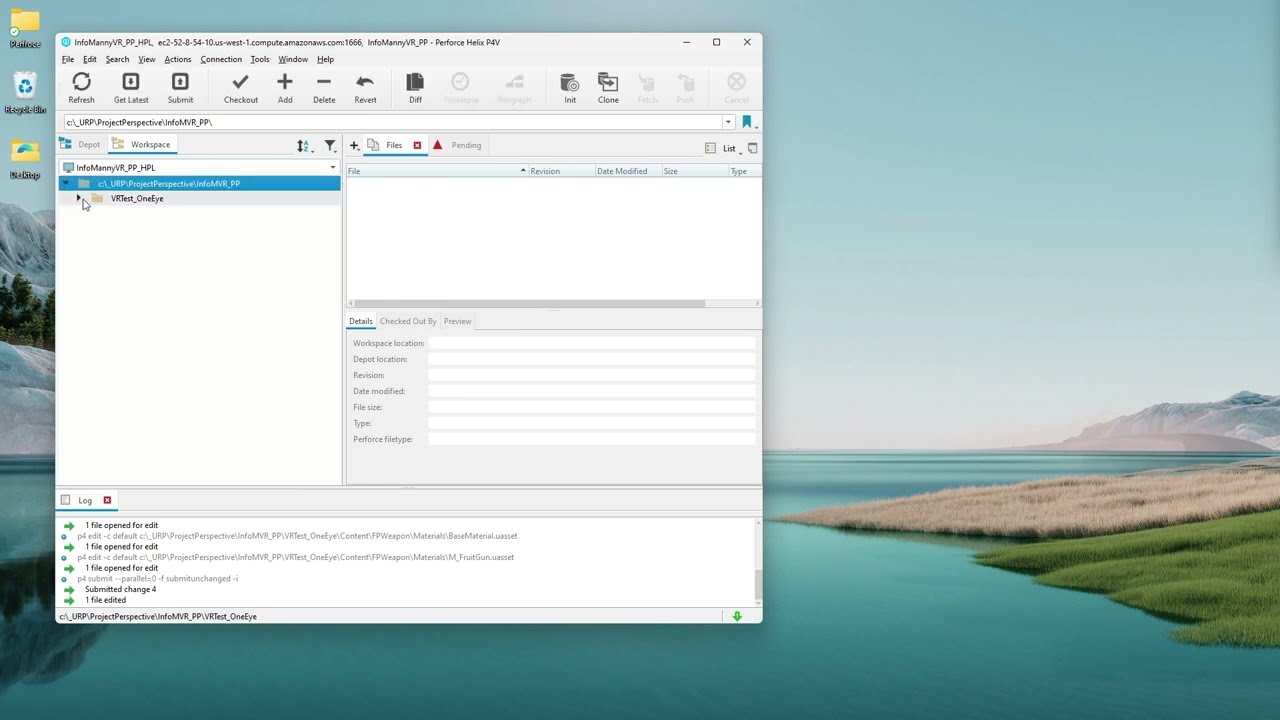
Setting up P4V, the Perforce client app, and Unreal Engine 5 to connect to an existing Perforce server.
Download the P4V installer:
https://www.perforce.com/downloads/helix-visual-client-p4v
3 min 50 sec :
After entering "p4 ignores" command, if you get the error
'p4' is not recognized as an internal or external command, operable program o...
ill update success ;0-0
ocean anvil
outer kiln
ty wtf pins need updating, first one in list for perf, is eight years old 😉
old does not necessarily mean outdated^
outer kiln
maybe,but ill take my chances on newER;))
if that doesn'twork, ill revert to eight years old LOL
👍
outer kiln
im getting somewhere, 1666derverdid not work, using port i got via netstat inwindows 11, getting me much futher
ya my own port ,NOT 1666 made all the difference!!
ocean anvil
another important part of setting up perforce for UE5 is setting your typemap and p4ignore correctly. in case the video does not accurately provide the information on those you can also scroll up a bit, there was a conversation on setting up both of those just a few days back
outer kiln
ok good, thx ;))))
outer kiln
sigh, so with perforfce I need a server of some kindesetup on local machine ?
if so git is all I can use then
ive tried svn, its 'ok', but its its not being fixed in 5.4, not going there
p4 typemap isn't working, get can't find connection, tho p4v has one open just fine,no errors
sooo CLOSE w/perf
ue says enabled, perforce yes, connected NO
i mean : enabled YES
ok I finally got p4 typemap to workbut it has no entries HMMMMM
feel like yoyo, got connection to source controll successful BUT ue says connection: NO
o_0
fixingh
outer kiln
working ;0-0
pulsar parcel
Almost having trouble parsing most of this
dawn kettle
wind gazelle
there are two types of vcs: centralized control systems (svn, perforce) that req...
thank you! if i still dont understand would i be able to get help setting it up?
outer kiln
latre git is very straight fwd , former no idea never used remote storage
limpid valley
Do any of you guys know to workaround the git network error?
I've done the git lfs track ".uasset" and ".umap"
Issue is if i commit and pushorigin something more than like 200mb I think, github desktop will tweak out and give me a network error.
 teal bone
You can't push that much data to github.
Even if you use LFS it's still going to github, unless you've set up a separate LFS server.
...and configured it correctly to actually use that outside server.
meager goblet
limpid valley
Do any of you guys know to workaround the git network error?
I've done the git l...
Have you tried a reboot of your client? I’ve definitely stored larger projects than 200mb in GitHub. With that being said perforce is much nicer for this
teal bone
meager goblet
Have you tried a reboot of your client? I’ve definitely stored larger projects t...
With the free tier?
meager goblet
teal bone
With the free tier?
Nah LFS and a data pack
GitHub doesn’t like files over 50mb
And GitHub will charge you if you go over 1gb I Believe
But data packs are pretty cheap
50gb for 5$
limpid valley
meager goblet
Nah LFS and a data pack
bro i literally bought a data pack
and its giving me this issue
meager goblet
That’s good def will need one
limpid valley
what am i missing??
bcuz it still no letting me push origin my files cuz of network error
 limpid valley
meager goblet
Have you tried a reboot of your client? I’ve definitely stored larger projects t...
limpid valley
meager goblet
Have you tried a reboot of your client? I’ve definitely stored larger projects t...
yeah
limpid valley
@meager goblet thanks for your help, I decided to learn git cmd line and this was literally the quickest push to github I've ever done
github desktop took like 5 mins to process all my stuff, git cmd line did it in less than 10 seconds
meager goblet
Sorry not responding earlier. Good to hear! Yeah the desktop client can bog down with larger stuff I’ve noticed
Probably shoulda mentioned that lol
limpid valley
probably 💀
meager goblet
After your initial push it works well enough
meager goblet
Oh really? Still not working after that
limpid valley
it A: Limited how much I could push at a time and B: was slow af
meager goblet
Welp
limpid valley
using git cmd line i just pushed like a gb all at once
and no issues
and no slow load times
meager goblet
Yikes GitHub should probably address that lol
limpid valley
yeah im officially a github desktop hater now
meager goblet
I don’t blame you XD
limpid valley
time to vent on reddit 🙂
kindred spruce
should i use git gc in an unreal project?
wind gazelle
kindred spruce
should i use `git gc` in an unreal project?
it is used automatically, but if you killed a lot of branches running it would be beneficial
outer kiln
morn!!
ok sooooooo,,,I started back with SC, good, and svn is working fine atm , more or less, easiestg setjup ever!!@!
but,,, :))
never seen this before=-- ue thinks, only when I got fresh into landscape mode first time onload of project, that thjere are 40 assets chanmged to save, lower bottom right sc UI. Whjy ?
How do I fix that, 🙂 I get work around, but it should be fixed to avoid poss isues going fwd
thx
 finite rampart
thorn halo
Hello! Anyone know why every time i restart the Unreal Editor my Revision Contro...
finite rampart
thorn halo
Hello! Anyone know why every time i restart the Unreal Editor my Revision Contro...
All of our editor preference settings including revision control get reset when we restart the editor in 5.4.1 😮💨
ocean anvil
outer kiln
never seen this before=-- ue thinks, only when I got fresh into landscape mode f...
5.4?
outer kiln
oh sorry, 5.3
ocean anvil
finite rampart
All of our editor preference settings including revision control get reset when ...
yup same, its been a fun bug 😦
finite rampart
ocean anvil
yup same, its been a fun bug 😦
How is this not fixed yet? I am blown away. This is major..
outer kiln
ok well glad to know its not something idiotic I did 🙂

happy 'days' ;)lol
I mean workaround is fine, but,,ya..
ocean anvil
outer kiln
oh sorry, 5.3
Theres a bug in 5.4 that causes startercontent to get reinstalled into a project on startup every time the project is opened.
you can try the fix below in defaultgame.ini it might not work for 5.3 though.
change
bAddPacks=True to false
and remove:
InsertPack=(PackSource="StarterContent.upack",PackName="StarterContent")
pulsar parcel
that is actually by design believe it or not, I remember that change for a 5.1 project I was on
ocean anvil
pulsar parcel
that is actually by design believe it or not, I remember that change for a 5.1 p...
it never happened to me in 5.3, and then suddenly wiped everything i had in the startercontent folder when updating to 5.4 easy fix and there wasn't much in there, but never happened before then for me.
outer kiln
sorry that makes no sense , by design to make our lives miserable ? ya I believe ;0-0
now Im wondering if we're talking about the same thing
ocean anvil
me and sswires are talking about the same thing, we don't know if that is actually the cause of what you are experiencing though.
outer kiln
my terrainyup
yup
my terrain isn't disaPpearing nor am I loading on startup the project
but ,everytime I go into land mode, it thinks 40 assets are unsaved as per sc uii on bottom right of editor
but ..I think I see issue now this am,,on saving, all those externalblah terrains, show as NOT in working dir
doing some more reading
https://dev.epicgames.com/documentation/en-us/unreal-engine/using-svn-as-source-control-for-unreal-engine?application_version=5.4, using that Ill create working dir, maybe that will solve my erroer

Epic Developer Community
How to setup SVN so that you can share assets with other on your team.
finite rampart
ocean anvil
yup same, its been a fun bug 😦
Hi, try deleting DerivedDataCache, intermediate, saved folders. it seems to fix it
ocean anvil
finite rampart
Hi, try deleting DerivedDataCache, intermediate, saved folders. it seems to fix ...
tried that, then i get this when starting the engine xD
 outer kiln
ouch
ayone know what might cause this just trying to create working dir for proj3ect, : Error: Unable to connect to a repository at URL 'file:///G:/Repositories'
via tortoiseSVN
had to use that, as doc page on ue says can't use ue atm to do it, and they suggested not uising 'svn' for it to keep it easy 🙂
outer kiln
HM I see, so the svn plugin in ue5.x , is bugged then?
ill just delete and use svn from download see if that is better
used tortoise svn and made workign dir, but ue through svn plugin is not seeing the directory, so goinggto remove plugin
 hallow monolith
I have an issue connecting to my p4v server through revision control, the nomenclature and ip are correct and I haven’t had issues before but now I can’t connect
Help lol
hallow monolith
outer kiln
p4 typemap isn't working, get can't find connection, tho p4v has one open just f...
What was your issue?
outer kiln
sorry wasd outside
reading
im working on it ;))
it waS just typemap , dunno what I fixed it with, but once I get this perforce going again, ill let yhou know
going through perforce setup routine adding files to repo/working dir
wont take much longer, it goes pretty fast and project isn't tiny
hallow monolith
outer kiln
wont take much longer, it goes pretty fast and project isn't tiny
My issue is just recourse control in engine, idk if that’s the same thing, it won’t connect to the client server
But I’m connected in client
outer kiln
got me there, Ive never used nor heard of recourse control
\sounds more complex than what im doing, ie: localhost sorry:((
what error are you getting again >?
also yes, p4 typemap, opens windowq, in there would go following as seen in tut on perf. page: https://www.perforce.com/video-tutorials/vcs/start-collaborating-unreal-engine-and-helix-core
Learn about Unreal source control with Helix Core, the most popular version control system for game development. It's easy to use, handles large files, is fast, and has features that enhance productivity and collaboration. Use the Unreal Editor built-in integration to Helix Core to build the next AAA-game hit.
not sure that helps
at around 7:15

Epic Developer Community
How to setup Perforce so that you can share assets with other on your team.
as per that, ie: p4 set P4USER=your.username
p4 set P4PORT=localhost:1666
just an EX only as on page
then you run typemap command
ie: P4 Typemap
Before you start adding files to your depot, you should set up your P4 Typemap so Perforce knows how to treat Unreal file types. Setting the typemap will affect how files get set to read only or writable inside of Perforce. However to do this, you will need to open a new command prompt and set up some p4 environment variables.
that page a bit down, shows values you paste into p4 typemap from cmd or whatever bash you're using
only issue im having atm is C:\Windows\System32>p4 typemap
Error in typemap specification.
Error detected at line 13.
Syntax error in 'binary+w'.
Hit return to continue...
fixed
https://help.perforce.com/helix-core/quickstart-unreal/Content/quickstart/game-configure-typemap-settings.html#Default <<ignore ue doc page on this issue, its wrong.
hallow monolith
outer kiln
got me there, Ive never used nor heard of recourse control
I’m dumb* revision control
hallow monolith
Deleted ini file and then restarted and boom worked, fucking magic
jolly fog
how to put my entire project (excluding the engine stuff) on github?
ping me if you find the answer to my advanced question!
outer kiln
np :))) there is a lot to all of it 😉
@cat you can do that in github easy
its meant for that
meager goblet
jolly fog
how to put my entire project (excluding the engine stuff) on github?
There is plenty of YouTube videos on that however you will need LFS and a data pack more than likely
GitHub does not allow files over 50mb unless it is checked into LFS
Data packs will run you about 5$ per 50gb
 sour sun
I had my P4 workspace mapped to K:/ partition. That drive failed.
Can I somehow remap the workspace to another partition (I cannot select Edit Current Workspace, since I cannot switch to that workspace)?
ocean anvil
sour sun
I had my P4 workspace mapped to `K:/` partition. That drive failed.
Can I someho...
where are you trying to edit the workspace? you should be able to.
 runic viper
Any idea on how to fix this with git?
There's no revert option...
 ocean anvil
sour sun
I had my P4 workspace mapped to `K:/` partition. That drive failed.
Can I someho...
ocean anvil
sour sun
I had my P4 workspace mapped to `K:/` partition. That drive failed.
Can I someho...
 pulsar parcel
And if it's not listed, untick "Show only workspaces available for use in this computer" and make sure the filters are also appropriate
wind gazelle
runic viper
Any idea on how to fix this with git?
There's no revert option...
use a separate git gui instead of editor integration
file may not be tracked in VCS to be reverted
runic viper
So is the editor part broken?
I remember successfully using this in the past - I just noticed it's no longer available somehow...
also diff tool isn't working anymore 😐
it shows me history, but can't do anything with those entries
 wind gazelle
try using git plugin from ProjectBorealis instead of default one
runic viper
wind gazelle
try using git plugin from ProjectBorealis instead of default one
oke, i'll try...
thanks!
sour sun
ocean anvil
Thank you, haven't noticed that tab...
Was trying through Connection->Edit Current Workspace
runic viper
wind gazelle
try using git plugin from ProjectBorealis instead of default one
Ok, this experiment was a mess - it wants me to recompile the engine from code and stuff, I can't afford that rn. Thanks for the help anyway 🙂
On the other hand, I saw some weird setup of helix core+git. Then I could maybe use perforce as integration (because I know for a fact it works like a charm); and see how I could hook it up to my git account/repos.
wind gazelle
runic viper
Ok, this experiment was a mess - it wants me to recompile the engine from code a...
? you just throw it into Project/Plugins and enable within project
runic viper
wind gazelle
? you just throw it into Project/Plugins and enable within project
🤷♂️ maybe I misinterpreted something from their instructions then 🤔
fml - i'll check again
wind gazelle
if you want it be part of engine - you would have to build it with engine
otherwise it is just a regular plugin that provides editor extension
runic viper
ehh - that's what I mean... This project doesn't contain code, so if I don't put it into the engine itself, I need to go to all my current projects that have no code and add the plugin, push etc.
so I wanted to have it in the engine - but then, yea... It requires engine recompilation
most projects I work on have no code and are blueprint-only
ArchVis with interactions, minigames etc...
runic viper
wind gazelle
if you want it be part of engine - you would have to build it with engine
otherw...
🥳 on one of the projects it built w/o adding code, so i'll try it out now 😄
wind gazelle
then simply use standalone git gui, like tortoisegit or sourcetree or whatever (unless you need asset diffs)
jolly fog
meager goblet
There is plenty of YouTube videos on that however you will need LFS and a data p...
thx, I've made it work!
50mb is pretty small tho
runic viper
wind gazelle
then simply use standalone git gui, like tortoisegit or sourcetree or whatever (...
it works like a charm! Thanks for this, amazing! 😄 I can even diff & it's working 👏
meager goblet
jolly fog
50mb is pretty small tho
well yeah its designed to keep track of code not your 4k maps and textures lol
if you dont like that limit try perforce. You can push whatever you want
jolly fog
okk
 jagged marsh
Hey, I'm new to unreal and I set up a perforce server for managing a two user project. It worked fine at first, but now whenever either of us tries to get the latest changes in P4V it hangs, and it won't complete the sync until unreal is closed. It seems like when unreal is open it is locking up all the project files, even if I don't manually open their blueprints. This also includes asset files that aren't actually in use in the project. I tested this in a new project and it seems like that only happens if I have the specific file open that is attempting to be synced.
I am just trying to get a feel for what we might be doing wrong, but I can't find any clear info on an Unreal/Perforce workflow. Is it expected to have to close unreal editor to get changes? Should we be trying to get the changes through unreal source control instead of P4V? Any help or guidance would be appreciated
This is the error we both are now getting when hitting get latest revision in P4v while unreal editor is open:
failed to rename C:WorkspacePath\projectname\Test1.uasset after 10 attempts: Cannot create a file when that file already exists.
As soon as you close unreal editor it instantly syncs. And I used process explorer to confirm no other process was using the files
 silver token
jagged marsh
Hey, I'm new to unreal and I set up a perforce server for managing a two user pr...
silver token
jagged marsh
Hey, I'm new to unreal and I set up a perforce server for managing a two user pr...
Yes, that error means the Editor probably has the file open for one reason or another.
The best practice would be closing the editor before syncing to any changes (especially if there are potential code changes that you'll need to recompile)
jagged marsh
I see, I just assumed that people working on large projects had a smoother workflow where they aren't closing the editor and reloading to sync other peoples changes, but i may have been wrong. Also I am wondering if the reason we didn't have this problem at first is because we didn't have many references and that is what is causing files to be in use as soon as i open the editor
silver token
When working on large projects it tends not to be an interruption in workflow because you don't stop and sync every time someone else makes a change.
A lot of people will only sync one in the morning or sync if someone has made a change that is specifically unblocking them or is important in some way.
So it tends not to be a problem.
Unless you leave the editor up overnight and it stops your automated sync from happening and now you're wasting time syncing after getting to the office. Which I've done 😄 but it's not really that common.
jagged marsh
Thank you, that information is really helpful
outer kiln
limits dont apply , in essence, if you just use a local workspace/working dir as I am in svn
dont have to worry abouty going OVER limits :)))
or ofc, if your project is OSS , no charge there either.
as in github
outer kiln
having troubling , seeing no tortoiseSVN>add option to checkouit to repo, but I foundthis,seeking a VERIFY from someone pls:
You need to connect that folder with the repository before it can be added to subversion. I believe you will need to start by using the "export" option to connect the folder with a particular repository.
so ya, there IS a tortooiseSVN> export option.
so ya this, Adding files to Subversion
To add the files to your repository, select the items in Windows Explorer and then Right-click to add and select the TortoiseSVN->Add option. , ia wrong
have to export first to get IN to repo
outer kiln
actually lol, there was a correction, TO the correction, gotta love the internet ;0-0 : export? are you sure? 😉 checkout is the thing you wanted to say 😉 –
zerkms
Apr 28, 2010 at 2:01< ffrom stackoverflow
so ya
which works fine, there Is that option in tortoisesvn 😉
 runic vault
outer kiln
You need to connect that folder with the repository before it can be added to su...
runic vault
outer kiln
You need to connect that folder with the repository before it can be added to su...
that is nonsense, an svn export is a copy unto an unversioned output
so not sure what your trying to do
outer kiln
actually lol, there was a correction, TO the correction, gotta love the internet ;0-0 : export? are you sure? 😉 checkout is the thing you wanted to say 😉 –
which is right
anyway nione of this is working anyway, I trhink these docs are outdated on epic websigte
I got as far as , Then enter the URL of your repository and where it should be checked out (make sure this is not creating a subdirectory you do not want).
that worked fine
nothing else is
thisisn' working : To add the files to your repository, select the items in Windows Explorer and then Right-click to add and select the TortoiseSVN->Add option.
no add option anywhere in tortoisesvn
yet anyway
outer kiln
trying to use svn in 5.3
runic vault
just a local setup?
runic vault
whats the link
runic vault
I mean whats the link to the documentation your following
outer kiln
Epic Developer Community
How to setup SVN so that you can share assets with other on your team.
i tried perforce, got nowhere
same with git
io just kept getting errors in sc in5.3 using eigther
either
To create your working copy, you should Check Out the (assumed empty) root of your repository. To do this, Right-click on your project's folder in Windows Explorer and select SVN Checkout.
works fine
runic vault
so you should have two folders, the repo and then the checkout (working copy)
runic vault
then when you want to add files to the svn, you copy them into the working copy folder
once the files are in there, then you can do the svn-add operation
and it will list them
then you can commit them
add is contextual, it might not show if there is no files to add
runic vault
well the doc saying you need visualsvn to create the repo is wrong
you can do it with tortoise svn just as easily
runic vault
well your whole project should be in the working copy
outer kiln
I did notice that yup!!!
maybe that is why stuiff is off
illl reove and remake repo in tortoise
then copy stuff in and add lagter
thx ;)))))))))))
runic vault
you can create multiple as well, like have a folder like this
E:\SVNs\Local_Repos
and create svn repos in it
outer kiln
good idea to keep it tidy
runic vault
then checkout to working copy folders like: E:\SVNs\MyProject
outer kiln
good
runic vault
but yah the repo should always start empty, just adding default folders if you want
then you add/commit to it only through the working copy
runic vault
I have used tortoise svn since like 2005
runic vault
I have yet to work at a company that used git or perforce
outer kiln
ohhh
runic vault
tortoise svn is much better than it use to be back in the day
but its been good for a long while now
outer kiln
I worked on oss terrain engine , they were using tortoisesvn also
I like it,and its oss
many eyes on it
runic vault
I have tried tortoise git and it seems alright
just havent needed to use it for long though
outer kiln
well if I were to use git it would not be ue version
runic vault
UE version?
runic vault
you mean the editor integration?
outer kiln
yes
outer kiln
no luck with itg
runic vault
its too slow for me
runic vault
anything that slows down the editor gets disabled haha
outer kiln
hehe its bad enough!!!
well part of thatg is me,,system shouod be upgraded later
ram is weak link at 16 gb
runic vault
another thing worth disabling is the data validation plugin
I remember that use to be enabled by default in ue4
outer kiln
hn ill check
runic vault
and discovered it was slowing editor loads down by a lot
I made sure it was disabled ever since
runic vault
it seemed to be a nonsense plugin as it was for something unrelated to game dev as far as I could tell
runic vault
only time I used a mac was when I was a kid at school
outer kiln
wow ...not as fast as this ryzen
runic vault
and never again
outer kiln
ditto major
runic vault
yes I got a ryzen threadripper and those m.2 drives
outer kiln
I loved it in a way, but it was slow go in project
runic vault
it blasts through lightmass and shader compiles
outer kiln
one thing faster onmac,going into landscape mode was instangt!!
instant
not here in ryzen land,,but ill check data trhing see if that helps
BUT mac had average 29 fpsl here,90
granted i lower things to get that,,its a large terrain lots of objects and auito mat atm,heacvy heavy sculpting everywhere
so ya
ok data validation off
runic vault
default UE5 config is like "we assume you have a 4090 mmmk"
runic vault
and whats hilarious is default config is still not highest quality it can do
runic vault
I mean if your making games you have to learn the config
outer kiln
i mean to add gthings like nanite blah yes
runic vault
so that you can turn it down to something that works for the average player
cause the high-end stuff is ridiculous
cutting edge is too sharp, you get cut
outer kiln
I have lowered the ingame engine scalabiity , yes, a lot
runic vault
yah but changing scalability alone isn't enough
outer kiln
i noticed P(
runic vault
like if you want it to be closer to UE4 levels of performance and compatability, have to turn off lumen and related