#source-control
1 messages · Page 7 of 1
 analog lodge
Our perforce space isn't unlimited, so after while we'll need to start obliterating older projects, but we still might need them later, so we need backups somewhere. History is nothing we worry about then though.
Having a "free" backup system by just saving in the cloud folder/drive would be a bonus, not the reason to to it this way.
 woven sluice
you can make files RW... why do you want to do this though? there are a few good use cases and a whole ton of bad
woven sluice
IMHO your general thought process and organization feels flawed. Local workspaces are throwaway objects, and they are tied to a machine, they are truly local. If you're using a single shared network drive that multiple people/PC's do all their work on, that's really messed up. I don't know if this is what you actually described though. What are the two separate folders you keep talking about ("unreal project" and "the other with everything else")?
"If the perforce depot goes down, we just need to be able to open the unreal file from a different location" - I'm really curious of the purpose of this too... In what real-world scenario will you have a down P4 server and be "saved" by the fact that you can access a copy of someone's workspace instead?
 analog lodge
woven sluice
IMHO your general thought process and organization feels flawed. Local workspace...
analog lodge
woven sluice
IMHO your general thought process and organization feels flawed. Local workspace...
Yeah, its tough to explain without giving a half hour ted talk...
Anyways, here is another try:
- We are a small company, producing dozens to hundreds of small animation projects per year. We mostly worked with 3ds max and rendered in Vray so far.
- We had a central QNAP NAS mounted as a network drive "P:\Projects".
- All our projects live in subfolders named "P:\Projects\Project_001" etc. They contain 3ds max files, AE files, renders, textures, client files etc.
- We had a small render farm with access to that nas, so they could all render the same stuff into the same paths etc.
- We´re now slowly transitioning to Unreal engine.
- Every project is going to be a separate Unreal Project.
- We´re also transitioning to 100% home office and are thus moving away from the central NAS to local storage, synced to a company box cloud drive.
- The box drive is locally mounted as "P:\Project" for each remote office workstation.
All files are in the same folder structure, so we remain backwards compatible with our old projects, assets libraries etc.
But now they are also synced with the box drive and everyone CAN participate in the same projects.
80% of the time its ONE artist per project though. - Before that we had set up a perforce server on a VPS, where we created our depots and we decided to just keep that for now, instead of moving to a locally hosted depot.
- Thus, if we save our Unreal projects in the subfolders with all other assets, they ARE going to get synced automatically, as all files and subfolders are getting synced automatically. If we don´t want that, we need to either move our Unreal Projects to a different location, that is NOt on the box drive mapped as P:, OR we need to manually unsync the Unreal folder inside for each project.
- There is no conflict from a perforce point of view, because we still use it to check files in and out, lock them etc, IF we work on a project together.
- But the main point is, we don´t sit in an office together with a network mapped drive, we all have out own local network mapped drive, just with the same drive letter and name, so we can easily share assets/projects via Box, that are NOT source controlled via perforce.
- If the VPS server breaks for some reason, each artist still has their local workspace copy on their local P: drive, and we can still recover all projects.
Unless we deleted them to save storage space locally, in which case it would be nice to still have another backup in the cloud on our box drive, where we have unlimited storage.
Again, all the fun perforce stuff like version history etc is nothing we´ll need 99% of the time, because we all work independently.
So, yeah, if that parallel sync via Perforce, while files are also getting synced into the cloud (whenever a file is saved/changed, box sync scans the synced folder constantly), just keeping everything as is would be fine.
But if perforce would mess up, or the box sync would mess up, because both are trying to do something with a file, well, than it would make more sense to just save all unreal projects away from the box sync drive and maybe schedule a daily backup, instead of having to manually unsync the Unreal folder for each project.
I could probably just have explained that we don´t all use the same network mapped drive, but I hope its clear now.
woven sluice
analog lodge
Yeah, its tough to explain without giving a half hour ted talk...
Anyways, here ...
It sounds like you're saying that you have things set up so multiple people can work in one workspace... Is that true?
analog lodge
woven sluice
It sounds like you're saying that you have things set up so multiple people can ...
No.
Multiple location, multiple workspaces, most projects only have one workspace and one artist.
But they all have the same drive Letters and path locally and they all sync that to the Company Account.
Multiple people in one workspace isn't a good idea...:)
 vague whale
woven sluice
you can make files RW... why do you want to do this though? there are a few good...
vague whale
woven sluice
you can make files RW... why do you want to do this though? there are a few good...
I think I figured out a way to manage things,
woven sluice
analog lodge
No.
Multiple location, multiple workspaces, most projects only have one workspac...
80% of the time its ONE artist per project though.```
to me this still sounds like it contradicts your "No." ... it sounds like you're saying that you're going to rely on Box.com's syncing to permit multiple people to collaborate on the same project, instead of using perforce to properly set up a workspace for user A on project A and a workspace for user B on project A... but IDK 😄 I guess my personal opinion would simply be that using a workspace set onto a cloud folder is not a good idea, and using a workspace set onto a cloud folder shared by multiple people is a terrible idea.
beyond that:  let us know if you learn anything fun lolbonus thought: forcing everyone to specifically use "P:\Projects" sounds like another mistake was made, somehow
 mighty light
 odd phoenix
Sounds like someone committed files they shouldn't have and your vcs is warning you about clobbering if you pull changes. The fix is to remove and ignore files that shouldn't be there
 warm abyss
Am I stupid or github can't keep up with our UE project?
User A pushes a commit about a few files and user B pulls that commit.
All of sudden user B sees all the files from other persons commit as user B made a change on them but they didn't
Any idea why this is happening?
note: user A activated git LFS at the last commit (which I don't know why not enabled from beginning)
Can it be something about same files are on both LFS and normal github storage?
 runic summit
I am getting this error message trying to login to my repo - I got a new machine and renamed my current one to DEMORIG from the previous windows assigned one - the question is, how do I fix it?

So it's the SAME machine and the SAME workspace, but P4 doesn't think so because the machine name is changed
and it's easier to keep track of my different machines with proper names and not LQdf7398
runic summit
...
I'm trying to make a new workspace and now it is wanting to download everything even though all the files are THERE
 woven sluice
you just edit the workspace to fix the host desktop name
i can't remember what the method is to sync the server to an existing workspace... uhh maybe p4 sync -k
runic summit
yeah that's what I need to figure out
every year this happens
I can't search discord for the last time I asked this and you told me it
woven sluice
fyi... you're not using parallelsync 

runic summit
I can't search using in:#source-control, my name doesn't come up
woven sluice
good old discord
runic summit
all because I change the fucking name on the windows machine
woven sluice
honestly maybe it's too late now, but it isn't hard to just edit the workspace properties to change the PC name iirc...
 runic summit
woven sluice
honestly maybe it's too late now, but it isn't hard to just edit the workspace p...
runic summit
woven sluice
honestly maybe it's too late now, but it isn't hard to just edit the workspace p...
where is this file found?
woven sluice
file? workspaces are set up in p4v?
runic summit

I don't see where it can change computer name (not on advanced either)
Like, I couldn't LOGIN to the workspace to change in the name in p4v
woven sluice
it's in advanced...
 woven sluice
oh that might be a thing, is your p4 account an admin account or do you have a separate admin account?
woven sluice
p4v
p4v
but IDK if you can edit other peoples' workspaces if you're logged in as a non-admin user in p4v
if you're logged in as an admin, should be no problem, IIRC
woven sluice
oooh i know what you were trying to hurdle over. bad UX design lol

 woven sluice
did you edit the workspace properties?
runic summit
I can't login to the workspace to change it's properties
runic summit

I logged in p4v as the main rig which is an admin account (though they are ALL admin/super user accounts I believe)
but I can't login to that WORKSPACE
I'm about to just rename the PC back
woven sluice
press ctrl+5
 runic summit
FINALLY
jesus Hojo, thank god you are here today, please never leave #source-control you are an angel
woven sluice

runic summit
can't remember if this is right or not,
they are all there already, so I'm not sure

like this is WRONG wrong root
 woven sluice
hmm, is it a classic depot or stream, i recall they are slighhtly diff in a dumb way
 woven sluice
does it have wavies
runic summit
nope
woven sluice
stram
 runic summit
nope
woven sluice
ugh typing while feeding a babby is fun
runic summit
take your time good sir
this is all right but none of them have the green synced checkmarks despite them beiing synced
 woven sluice
with streams depots they fixed the dumb UX, and the workspace's "Root" folder should match the actual windows folder exactly... i can't remember if the same is true of classic depots, but I recall it having a weird one-folder-off thing that always seemed like a bug, might have been in the text definition of the workspace though
in any case you can edit the root folder too, might as well try to make it match
runic summit
so I have to keep making workspaces until it syncs them?
what do you mean try to make it match
woven sluice
local root folder for the workspace, is a workspace property
if you moved the workspace from C:\A to C:\B then you'd have to update it too
runic summit
It hasn't been moved though
I'm experimenting with changing the workspace root
but what do I do for this?
 woven sluice
it was always at c:\LS Local Build\ActiveShooterProject ? the workspace properties say C:\ActiveShooterProject ?
(sidenote: now i know who finally dev'd that controversial game that got banned from steam, it was obviously you)
well that's a loaded gun if your whole goal is to avoid running a full sync
runic summit
lol nope that wasn't mean
woven sluice
but i would probably hit do NOT copy and try to sort things out manually, being me
runic summit
woven sluice
it was always at `c:\LS Local Build\ActiveShooterProject` ? the workspace proper...
not me 🙂
 runic summit
woven sluice
but i would probably hit do NOT copy and try to sort things out manually, being ...
runic summit
woven sluice
but i would probably hit do NOT copy and try to sort things out manually, being ...
lol
that other workspace got accidentally created when I was trying to have someone sync me it
maybe if I open the editor up and connect p4 there?
runic summit
about 250 gb
actually let me sizemap it
239, yep
it cooks to about 40 gb, I have a lot of assets in the project
woven sluice
if so.. then yeah i sympathize with wanting to avoid a full sync 😄 ours is only 25 GB, so with parallel sync on our server sends at 100 mbit so i can just do a full sync in 15 mins but for you the same would be 2.5 hr
runic summit
yeah and my connection is not that good and I need to get to work NOW not in a few days
woven sluice
i would try this
"do NOT copy" when that dialog pops up
try running a reconcile command on a subfolder and see if it pops up with everything needs to be fixed, or if everything is all good, just cancel the command
runic summit
am I doing this right?
 woven sluice
you might try to use p4 sync -k to force-tell the server "yep I have everything" and then use reconcile commands to try and figure out if your local workspace is working (matched to the server)
yeah that should be a good thing
but still no green icons in p4v?
woven sluice
so p4 sync -k
I guess
i'm not an expert at this sort of thing but this is what i think i'd try
thinking more though i feel like it shouldn't be necessary for an existing workspace that was previously intact
p4 sync -k should be for if you make a new workspace and manually copy the files into it yourself from another source instead of relying on the server to give them to you
 woven sluice
focus on p4v first, looking to get it to show the green dots on files
runic summit
how do I run the sync from p4v
woven sluice
simply based on what i have seen several minutes ago i would still suspect the error is because your root folder setting mismatch
runic summit
I tried a few of the roots /subfolders
didn't seem to make a difference, and in one case the sync made a new depot folder inside it so I knew I was too deep
How did that run that P4 command? Do I have to navigate to the directory in command prompt?
runic summit
woven sluice
simply based on what i have seen several minutes ago i would still suspect the e...
any ideas?
woven sluice
here's another weird possible option:
- make a brand new workspace however the heck you want it to actually be
- press no when it asks if you want to sync files after creating it
- manually copy files into the workspace
- use p4 sync -k on this new workspace to tell the server to mark this workspace as sync'd
- cross fingers that everything is magically good, run a reconcile offline work to see if it comes clean, check for green dots, etc
also you can right click on a folder in p4v's left pane and hit "open cmd window here", tiny shortcut
i only use p4 commandline when i have to so i am not good at giving guidance on it, i figure it out on a purely need-to-know basis
runic summit
woven sluice
i only use p4 commandline when i have to so i am not good at giving guidance on ...
That's better than me, thank you again for trying to help - doubly good for doing it while being responsible for small kids
my kids are 11 and 9 and I can still remember them as babies and I wondered how the hell had society managed
a bunch of this came up but no checkmarks - /depot/Content/VRExpMigrateExpForController/BlakeFromBlender/Thalamus.uasset#1 - added as C:\LS Local Build\LiveSimProject\depot\Content\VRExpMigrateExpForController\BlakeFromBlender\Thalamus.uasset
uh oh

reconcile offline worked shows like every file missing
what's weird is now it's not trying to get the entire thing when i hit get latest
woven sluice
depot\
that's the stupid thing classic depots do i think
show your text workspace definition
runic summit
uhh, the mappings look weird for sure

here is the depot itself (don't mind the two depots, it is one I think)
 woven sluice
i THINK going from 5 year old memory i used to remove the last folder on hte right side
erasing depot/ or activeshooter/
(you should consider switchign to streams workspaces, they're a bit nicer 🤖 )
runic summit
so wait, delete which thing?
runic summit
woven sluice
i THINK going from 5 year old memory i used to remove the last folder on hte rig...
Okay I just remoted into my main rig and looked at it's folder view
 woven sluice
oh, lol, alright if depot is in there then it's in there
i mean they'll match then and i don't know why reconcile would be wrong
runic summit
I don't have a "depot' folder on this computer - it says LS Project
so I am renaming that folder once I make it writable
woven sluice
oh, great.
runic summit
i don't know how it worked before
woven sluice
well that's what classic depots do, it's a UX failure
runic summit
i figure if it says depot then it should match fine
woven sluice
classic depots would insert an extra subfolder at the start
didn't make any sense
i used to move everything up a folder like you unknowingly(?) tried to do and then i would remap it by removing that extra subfolder on the end of the text mapping
runic summit
fuck you windows

what could be open?
I closed perforce and nothing is in the task manager details for processes
woven sluice
just reboot 
runic summit
rebooted, changed name, tried to add and it's not green check marks
thank god, the sync -k command seemed to wowkr this time
lol what fucking programmer uses "clobber" Can't clobber writable file C:\LS Local Build\depot\Config\DefaultCrypto.ini Can't clobber writable file C:\LS Local Build\depot\Config\DefaultEditor.ini
runic summit
woven sluice
just reboot <:shrug:453344905985654786>
It's nearly there, I've got green checkmarks, but why does get latest revision have no files updated when I pushed a CL this morning before I came to work ?
I even remoted into my mainrig to doublecheck I had pushed the revision - and just checked this computer's folders for the new files, they aren't there
I could grab it manually but I'm confused as to why
woven sluice
not sure but if the server thinks you're up to date, it won't try to find out. reconcile offline work to actually force p4v to compare your local workspace to the server and find any discrepancies. sometiimes you might run reconcile offline work, put it into a changelist, and then revert the changelist. this will "undo" anything locally
runic summit
Should I do that on my mainrig, the machine that is actually up to date?
woven sluice
no, on the one that you think is not up to date but won't pull down latest changes
runic summit
woven sluice
no, on the one that you think is not up to date but won't pull down latest chang...
thanks for your help today, again, I finally figured it out - the silver lining is that I found that apparently I had left out a lot of files, which may have bit me in the ass in the future, so I'm glad I figured it out now at least.
 woven sluice
runic summit
thanks for your help today, again, I finally figured it out - the silver lining ...
woven sluice
runic summit
thanks for your help today, again, I finally figured it out - the silver lining ...
Humble FYI once again that you're not using parallel sync which could be slowing down your transfers by 5-20x
(When parallel is on, you don't get a progress bar)
runic summit
How hard is that to setup? I invite you to scroll up about 10 pages worth lol
woven sluice
Have to set five or ten server vars
runic summit
and it only aids transfer speed?
analog lodge
woven sluice
```But now they are also synced with the box drive and everyone CAN participate ...
sigh, no thats not at all what I was trying to explain, but apparently its harder to get my point across than I thought.
Nevermind then, if nobody has experience with my kind of setup, I´ll just have to figure it out as we go.
Our perforce depot in the cloud should not be affected by this in any way.
All that could happen as far as I can see would be file locking issues resulting in errors in either box sync OR perforce. In which case we´ll know that its not a good idea to create a workspace in a cloud synced folder/drive. So, given this worst case scenario , we´d simply need to point our local workspace roots to a different location than everything else. Inconvenient, but not impossible.
Thanks anyways.
runic summit
Will perforce give you some error that the Server you are trying to write to is full? It's not completing a revision and is just sitting at 100% on the submitting - it is still responding according to task manager
runic summit
I'm getting this error trying to upgrade it on my VPS ```Mar 06 13:47:42 vmi744135.contaboserver.net systemd[1]: Starting LSB: Starts all Perforce services...
Mar 06 13:47:42 vmi744135.contaboserver.net systemd[1]: helix-p4dctl.service: Control process exited, code=exited, status=1/FAILURE
Mar 06 13:47:42 vmi744135.contaboserver.net systemd[1]: helix-p4dctl.service: Failed with result 'exit-code'.
Mar 06 13:47:42 vmi744135.contaboserver.net systemd[1]: Failed to start LSB: Starts all Perforce services.
dpkg: error processing package helix-p4dctl (--configure):
installed helix-p4dctl package post-installation script subprocess returned error exit status 1
dpkg: dependency problems prevent configuration of helix-p4d:
helix-p4d depends on helix-p4dctl (>> 2018.2-1672238~); however:
Package helix-p4dctl is not configured yet.
dpkg: error processing package helix-p4d (--configure):
dependency problems - leaving unconfigured
No apport report written because the error message indicates its a followup error from a previous failure.
Errors were encountered while processing:
helix-p4dctl```
If you continue, an additional ssh daemon will be started at port
'1022'.
God this is going to be so hurtful to try to upgrade this server's storage -
woven sluice
nothing there is saying it's out of disk space, but disk space isn't hard, you can just check it... is it full?
runic summit
I can't even login to my VNC because of this shit (EE) AddScreen/ScreenInit failed for driver 0
I can ssh fine and perforce is running but when I try to use 'startx' to start up the GUI, it gives me that and does nothing
I don't know how to check disk I'm not sure if this is accurate
udev            4.2G     0  4.2G   0% /dev
tmpfs           835M  1.1M  834M   1% /run
/dev/sda3       209G  193G  4.9G  98% /
tmpfs           4.2G     0  4.2G   0% /dev/shm
tmpfs           5.3M     0  5.3M   0% /run/lock
tmpfs           4.2G     0  4.2G   0% /sys/fs/cgroup
/dev/sda2       2.1G  224M  1.8G  12% /boot
tmpfs 835M 0 835M 0% /run/user/0```from the command line
woven sluice
might be worth starting to build some skills in running linux without a gui tbh. it's really not fun but it'll never break
yeah sda3 looks like your drive... nearly full but not full
runic summit
I just upgraded /extended the ssd on my provider by another 200 GB
they said it was done but the space was not availible
 merry verge
fyi the most common reason for p4d to fail updating is that it needs to do a database upgrade. They did a bad job of setting up packages so it doesn't actually prompt you to do this and instead just fails updates 🙃
oh and it gives no indication for this unless you manually start p4d
runic summit
I tried and it gave me some nondescript error
merry verge
what did
runic summit
 installed helix-p4dctl package post-installation script subprocess returned error exit status 1
dpkg: dependency problems prevent configuration of helix-p4d:
 helix-p4d depends on helix-p4dctl (>> 2018.2-1672238~); however:
  Package helix-p4dctl is not configured yet.
that's what I mean
runic summit
I'm scared shitless of running the wrong command and killing the whole database
merry verge
so make a backup
runic summit
don't have the space yet
woven sluice
linux won't touch the file system until you tell it to. the disk will be bigger, but you'll need to resize the partition.
does your provider give you a website to manage your server with? look for any options about "snapshot"
runic summit
I don't see it there as unallocated like i would in windows - but yes, I want it to be all on the same partition so perforce doesn't run out of space
runic summit
woven sluice
does your provider give you a website to manage your server with? look for any o...
yes
but one wasn't created 😦
woven sluice
? i mean make a snapshot... a backup...
runic summit
does it backup all 200 gb?
merry verge
whenever you figure out your backup situation, this is all you generally need to do (and then run the normal apt upgrade process again to let dpkg cleanup whatever it failed on).
 runic summit
god the GUI in perforce is so bad, how the hell will I manage the CLI part
woven sluice
i guess i should officially say "i don't know" but i always thought a VPS snapshot will make an image of the whole server. i've never had to do a full backup in this way yet knock on wood
merry verge
A snapshot generally does just copy the entire disk image
runic summit
oh it's like a server, they store the snapshot on their end ?
merry verge
yes
runic summit
okay I'm messing with command line after doing the snapshot Perforce server error: Database is at old upgrade level 44. Use 'p4d -r /root -xu' to upgrade to level 49.
I do that, then I can upgrade like the previous error I showed you?
merry verge
you run that command and then (assuming it completes successfully) just run apt upgrade or whatever you were using before
the screenshot I posted is the same thing, just run through p4dctl. It doesn't really matter as long as you upgrade the server as the right user.
runic summit
merry verge
the screenshot I posted is the same thing, just run through p4dctl. It doesn't r...
Upgrades will be applied at server startup. do I start the server or try the apt upgrade thing
merry verge
run the upgrade first, worst that happens is it fails in the same way again
I don't think you need to manually start p4d at this point though
been a bit since I've done an upgrade
runic summit
I have basically this indiana jones grail diary in Notion of all the shit I've cobbled together through perforce setup
woven sluice
sounds about right (re. indiana jones)
runic summit
well this looks better

originally this was brought on because my latest update wouldn't push (it was small but not tiny, like 500 mb) - just stopped at 100% and wouldn't finish after 30 minutes, 3 different tries and a shut down
and I realized I couldn't login to my VNC to use the GUI to see how much space
I had setup the server with 200 gb but realized I needed to upgrade it
incidentally, how do I ensure the perforce database magically extends to that extra 200 gb?
merry verge
The perforce upgrade process, at least on debian-based systems, is just dumb honestly. You can't upgrade the database until you've installed the latest p4d, but then the system will try to restart p4d which will fail because the database now needs upgrading. What perforce could do is add in an upgrade script that asks if you want it to upgrade the database for you but nope - they're going to do the bare minimum and leave you with a scary failure message that isn't actually hard to fix.
runic summit
btw both you and Hojo are angels
merry verge
runic summit
incidentally, how do I ensure the perforce database magically extends to that ex...
you don't need to do anything
assuming the disk partition takes up that much space
perforce just uses whatever filesystem its on
if you added more space you may need to extend the partition though
woven sluice
you might need to research resize2fs or equivalent for your OS... i've only done it a couple times and i stumble through it each time because i'm an idiot
merry verge
I basically refer to this page every time I have to do it - https://www.linode.com/docs/products/storage/block-storage/guides/resize-volume/
obviously there's some linode specific stuff there but step 8 is generic for extending a disk.
You'll want to stop p4d and anything else using that disk before trying to unmount.
woven sluice
you have that snapshot (hopefully) so, being short of having any solid info, just do some reading on proper ways to do it with your provider or OS and take notes as you go in case you need to reset and restart
runic summit
oh god
woven sluice
(not to scare you - the couple times i've done it was very painless)
you'll see lots of big scary warnings about it on the internet probably though, for obvious reasons
runic summit

this is some generic linux/ubuntu app message right? I can just hit yes and move on?
 runic summit
okay here is the error code
Setting up helix-p4dctl (2022.2-2407422~jammy) ...
Job for helix-p4dctl.service failed because the control process exited with error code.
See "systemctl status helix-p4dctl.service" and "journalctl -xeu helix-p4dctl.service" for details.
invoke-rc.d: initscript helix-p4dctl, action "restart" failed.
× helix-p4dctl.service - LSB: Starts all Perforce services
     Loaded: loaded (/etc/init.d/helix-p4dctl; generated)
     Active: failed (Result: exit-code) since Mon 2023-03-06 14:59:18 EST; 11ms ago
       Docs: man:systemd-sysv-generator(8)
    Process: 111511 ExecStart=/etc/init.d/helix-p4dctl start (code=exited, status=1/FAILURE)

Mar 06 14:59:18 vmi744135.contaboserver.net systemd[1]: Starting LSB: Starts all Perforce services...
Mar 06 14:59:18 vmi744135.contaboserver.net p4dctl[111516]: error:         Configuration for 'LiveSimService' p4d is missing required parameter P4PORT.
Mar 06 14:59:18 vmi744135.contaboserver.net p4dctl[111516]: Started 0 services.
Mar 06 14:59:18 vmi744135.contaboserver.net systemd[1]: helix-p4dctl.service: Control process exited, code=exited, status=1/FAILURE
Mar 06 14:59:18 vmi744135.contaboserver.net p4dctl[111516]: error:         Not all services started successfully.
Mar 06 14:59:18 vmi744135.contaboserver.net systemd[1]: helix-p4dctl.service: Failed with result 'exit-code'.
Mar 06 14:59:18 vmi744135.contaboserver.net systemd[1]: Failed to start LSB: Starts all Perforce services.
dpkg: error processing package helix-p4dctl (--configure):
 installed helix-p4dctl package post-installation script subprocess returned error exit status 1
dpkg: dependency problems prevent configuration of helix-p4d:
 helix-p4d depends on helix-p4dctl (>> 2018.2-1672238~); however:
  Package helix-p4dctl is not configured yet.

dpkg: error processing package helix-p4d (--configure):
 dependency problems - leaving unconfigured
No apport report written because the error message indicates its a followup error from a previous failure.
                                                                                                          Errors were encountered while processing:
 helix-p4dctl
 helix-p4d
E: Sub-process /usr/bin/dpkg returned an error code (1)```Ok, this isn't a database upgrade issue anymore
Configuration for 'LiveSimService' p4d is missing required parameter P4PORT.
check the configuration files for p4dctl
runic summit
i know the port
how do I check them?
i see helix p4dctl not confiugred yet
```these?no
you need to look at the config files for p4dctl
I don't remember exactly where they are located, probably something like /etc/perforce
 merry verge
whatever config file is for your perforce server
/etc/perforce/p4dctl.conf.d/name of the service.conf
runic summit
trying to navigate, says there's no /etc
runic summit
syntax, needed a slash
merry verge
anyway, in the Environment section there should be a P4PORT = ...
merry verge
So there's a P4PORT? Hm. Try starting the service manually - p4dctl start <service name>
if it works, run the upgrade again
runic summit
what's the server name?
merry verge
whatever the name of the config file is
merry verge
no
why are you looking in p4dctl.conf
/etc/perforce/p4dctl.conf.d/name of the service.conf
runic summit
Started 0 services.
p4dctl error:
        Not all services started successfully.
root@vmi744135:/etc/perforce# p4dctl start LiveSimService 1666
p4dctl error:

Usage: p4dctl start [-t <type>] [-o <options>] <service name>
       p4dctl start [-t <type>] [-o <options>] -a

Without the -a flag, starts a specific service; with the -a flag, starts
all configured services that the running user has permission to start.

If the -t flag is specified, then only services of the specified type
will be started.```weird, I can see the port listed in the conf file I thought
shit that's a sample file
I can't find the file for it!
god I hate linux
okay there's no port on the config file ?
runic summit
merry verge
why are you looking in p4dctl.conf
Why would my .conf file not have a port in it?
merry verge
I don't know, I wasn't the one who made it
runic summit
but it was working for for a year Is what i mean
woven sluice
Maybe you just started it with a manual port flag before
Probably because I told you to a year ago
runic summit
woven sluice
Probably because I told you to a year ago <:HaroldHaha:781378981853265921>
this is the correct answer
do I just add port to it like this?
 runic summit
p4dctl error:
        Service 'LiveSimService' p4d: Directory '/opt/perforce/servers/LiveSimService/root' does not appear to be writable.
Started 0 services.
p4dctl error:``` goddamniti tried p4d, which is what i normally use to start the server and it did this - ```root@vmi744135:/etc/perforce/p4dctl.conf.d# p4d
Perforce db files in '.' will be created if missing...
Perforce server error:
Listen 1666 failed.
TCP listen on 1666 failed.
bind: 0.0.0.0:1666: Address already in use
root@vmi744135:/etc/perforce/p4dctl.conf.d#
wtf apparntely the server is running I just tried it on a whim
Okay so p4 info gives me everything
so why can't i finish this stupid upgrade
goddamnit how do I use startx
[ 6567.251] (EE) AddScreen/ScreenInit failed for driver 0 wtf do I do about this? linux is obscure AF, that's why I could never learn it
runic summit
does anyone have a UE slackers version for linux? I don't know why this virtual machine did this - net.ifnames=0 biosdevname=0 nomodeset [ 0.383753] You have booted with nomodeset. This means your GPU drivers are DISABLED [ 0.383754] Any video related functionality will be severely degraded, and you may not even be able to suspend the system properly [ 0.383755] Unless you actually understand what nomodeset does, you should reboot without enabling it
I don't even know if that's the problem
runic summit
Anyone want to help me so I continue to remain sane?
or point me in the right direction for a Linux guru, everything I'm googling has to do with fixing display output on linux machines, but it's talking about people installing new GPU's and having problems, this is a VPS so I don't know wtf is going on
woven sluice

 runic summit
it doesnt' have display stuff
woven sluice
shouldn't be too hard to find a discord community for linux or a linux distro though...
meh, i haven't had a GUI for my server in nearly 10 years lol
runic summit
I'm not sure about expanding this hard drive won't break the perforce db, especially in CLI
 haughty wedge
runic summit
or point me in the right direction for a Linux guru, everything I'm googling has...
haughty wedge
runic summit
or point me in the right direction for a Linux guru, everything I'm googling has...
oh dude yeah I can help you
runic summit
haughty wedge
oh dude yeah I can help you
thank god
haughty wedge
basically most windows servers or GUI won't display anything if no monitor is connected. So you have to force linux to assume a monitor is connected to some connector
This is done differently depending on if you have AMD or Nvidia gpu
runic summit
so somehow that was being done forever but eitehr my provider did something - but it's a VPS so I'm not sure
haughty wedge
riiight hmm
runic summit
like, the thing is in another state
but if you tell me what to check in the CLI I will
haughty wedge
maybe they actually had a monitor connected at some point, or a dummy monitor dongle that got dislodged
well this might be tricky you probably will not have access to the /etc folder
do you?
what distro is it?
runic summit
yes i do have full control over the software, root access and all that
haughty wedge
ohh ok
runic summit
unbuntu
runic summit
X Protocol Version 11, Revision 0
Current Operating System: Linux vmi744135.contaboserver.net 5.4.0-144-generic #161-Ubuntu SMP Fri Feb 3 14:49:04 UTC 2023 x86_64
Kernel command line: BOOT_IMAGE=/vmlinuz-5.4.0-144-generic root=UUID=96a7ec19-b07a-47ce-b4f1-241afa869bed ro net.ifnames=0 biosdevname=0 nomodeset
xorg-server 2:21.1.3-2ubuntu2.7 (For technical support please see http://www.ubuntu.com/support)
Current version of pixman: 0.40.0
        Before reporting problems, check http://wiki.x.org
        to make sure that you have the latest version.
Markers: (--) probed, (**) from config file, (==) default setting,
        (++) from command line, (!!) notice, (II) informational,
        (WW) warning, (EE) error, (NI) not implemented, (??) unknown.
(==) Log file: "/var/log/Xorg.0.log", Time: Mon Mar  6 16:21:16 2023
(==) Using system config directory "/usr/share/X11/xorg.conf.d"
vesa: Refusing to run on UEFI
(EE)
Fatal server error:
(EE) AddScreen/ScreenInit failed for driver 0
(EE)
(EE)
Please consult the The X.Org Foundation support```or intel even
haughty wedge
let me go check how I did it on my amd box
runic summit
can't remember which one it is
haughty wedge
I think it was super easy with amd
runic summit
I'm sure it's a single command line thing
haughty wedge
well what worked for me wasn't really on the command line, it was just a modification to a .conf file
or the creation of one
runic summit
haughty wedge
well what worked for me wasn't really on the command line, it was just a modific...
did you find it?
haughty wedge
still looking. I ended up plugging a monitor into my amd box so the patch is no longer applied I need to do the research again
haughty wedge
runic summit
did you find it?
ok I got it
runic summit
haughty wedge
ok I got it
REALLY?
haughty wedge
go to a console and send the command xrandr -q
this will tell you what available monitor connectors u have
 haughty wedge
interesting
yeah it might be because this is a virtual machine or whatever
did you contact the service provider?
runic summit
yeah but i don't want to wait for however long it takes
runic summit
there was some listing in some conf thing about display 0 or 1 or monitor 0 or 1 but it might have just been defaults
haughty wedge
where was that
in xorg.conf.d?
what I was gonna tell you to do was make a new xorg.conf file in the etc/x11 directory
and make it have this in it
Section "Device"
    Identifier     "AMDGPU"
    Driver "amdgpu"
    Option "ConnectedMonitor" "HDMI-1-1"
EndSection
I mean we can edit it or whatever

look here -

default display manager
the fuck is /usr/sbin/gdm3
 haughty wedge
just make an xorg.conf file in /etc/x11
and put that thing I told yo9u
oh wait lmao
"HDMI-1-1" is probably wrong
but something like "DVI-0" is more likely
unless ur server has hdmi
or DP
runic summit
wait am I guessing here?
runic summit
I can't fuck this thing up
haughty wedge
and since xrandr doesn't work this will probably not work
you can just delete the file if it doesn't solve ur display issue
u will still have whatever terminal access u have now
runic summit
am I going to the xorg.conf.d subfolder in /etc/X11 ?
haughty wedge
ok so did you put that section in it
ok did you use hdmi-1-1 or what?
because that will have to match the name of a real connector on the machine
runic summit
nope, whatever you pasted in chat lol
haughty wedge
(there may be none)
ok well try hdmi 1-1
maybe there is an hdmi port you never know
runic summit
hdmi 1 is what it says
haughty wedge
well wait
runic summit
so what do I do to "try it"
haughty wedge
can u reboot the server?
haughty wedge
ok so yeah if you reboot the server, the xorg.conf should be applied and then maybe your display will show up
reboot is fine
as long as you know you can safely reboot the server without ppl getting mad?
runic summit
it's not that it doesn't show up, I get the error message when I use startx and it just stops
it's just me
haughty wedge
yeah what was the error message?
runic summit
vesa: Refusing to run on UEFI
(EE)
Fatal server error:
(EE) AddScreen/ScreenInit failed for driver 0
(EE)
(EE)```ok sorry i just see your xorg.conf.d directory has a 10-amdgpu.conf
show me whats in there
and delete the file you created before
show me quirks and radeon too
and maybe the xorg.conf file we made wasn't being used.... usr/share/X11 seems like wat is being used
haughty wedge
so yeah that quirks.conf file is highly sus
and amdgpu and radeon are two different amd drivers
so those three are the prime targets
runic summit
# Accelerometer device, posts data through ABS_X/ABS_Y, making X unusable
# http://bugs.freedesktop.org/show_bug.cgi?id=22442
Section "InputClass"
        Identifier "ThinkPad HDAPS accelerometer blacklist"
        MatchProduct "ThinkPad HDAPS accelerometer data"
        Option "Ignore" "on"
EndSection

# https://bugzilla.redhat.com/show_bug.cgi?id=523914
# Mouse does not move in PV Xen guest
# Explicitly tell evdev to not ignore the absolute axes.
Section "InputClass"
        Identifier "Xen Virtual Pointer axis blacklist"
        MatchProduct "Xen Virtual Pointer"
        Option "IgnoreAbsoluteAxes" "off"
        Option "IgnoreRelativeAxes" "off"
EndSection

# https://bugs.freedesktop.org/show_bug.cgi?id=55867
# Bug 55867 - Doesn't know how to tag XI_TRACKBALL
Section "InputClass"
        Identifier "Tag trackballs as XI_TRACKBALL"
        MatchProduct "trackball"
        MatchDriver "evdev"
        Option "TypeName" "TRACKBALL"
EndSection

# https://bugs.freedesktop.org/show_bug.cgi?id=62831
# Bug 62831 - Mionix Naos 5000 mouse detected incorrectly
Section "InputClass"
        Identifier "Tag Mionix Naos 5000 mouse XI_MOUSE"
        MatchProduct "La-VIEW Technology Naos 5000 Mouse"
        MatchDriver "evdev"
        Option "TypeName" "MOUSE"
EndSection


``` quirks10-amdgpu.conf ``` GNU nano 6.2 10-amdgpu.conf Section "OutputClass"
Identifier "AMDgpu"
MatchDriver "amdgpu"
Driver "amdgpu"
EndSection
10-radeon.conf ``` GNU nano 6.2 10-radeon.conf Section "OutputClass"
Identifier "Radeon"
MatchDriver "radeon"
Driver "radeon"
EndSection
hmm interesting
runic summit
fuck this
can you help me just expand the storage partition then?
I can do command line stuff with help and I can access a web panel


is this right? ```Now the cloud-utils are installed, we need to know the name of the existing partition. use the following command to search for a partition mounted to “/”:
mount | grep ' / '
Example output:
/dev/sda1 on / type ext4 (rw,relatime,discard,errors=remount-ro)
Remember the first part (“/dev/sda1” in the example above). To expand the partition, use the following commands:
sudo growpart /dev/sda 1
sudo resize2fs /dev/sda1
And that’s all it takes to expand your existing partition on Debian and Ubunt```
Am I reading this right?
 haughty wedge
shit I have never done that kinda stuff on the command line sorry
runic summit
it was actually easier than I thought
haughty wedge
was the purpose of getting the display working so that you could expand the storage
runic summit
yes I feel dumb
haughty wedge
runic summit
it was actually easier than I thought
nice did you just have to expand the partition
haughty wedge
ok good
lol
at least your pressing issue is solved and you can wait for the response from the provider about the GUI
their setup seems very specific and I have no clue so I can't advise lol
runic summit
yeah now I just need help getting perforce to behave lol
haughty wedge
ok whats the matter with p4
 runic summit
my depot is still there, but my normal p4d start didn't seem to work
today like a few hours ago
haughty wedge
is the error about workspace does not exist in p4v?
runic summit
yes
haughty wedge
well first just to be safe
runic summit
it's gone and even though I can see the basic depot it's not expanded like it normally is \

I was about to celebrate too, god fucking damnit
haughty wedge
run this in the linux console p4 verify -q //...
that should verify all the database against the files and make sure your depot is intact
runic summit
wtf
 haughty wedge
uhh wat
oh um
thats weird wtf
do not enable unicode
on the server
you can not go back and u don't want that
runic summit
i never did
runic summit
@woven sluice please save me
haughty wedge
I don't know why it's saying anything about unicode clients in response to p4 verify...
like... do you have an environment variable set for P4CHARSET or whatever??
woven sluice
Idk my first guess is you ran a different server instance. P4d is just an executable, the actual server is data on the disk
haughty wedge
For Perforce services operating in the default (non-Unicode mode), P4CHARSET must be left unset (or set to none) on user workstations. If P4CHARSET is set, but the service is not operating in internationalized mode, the service returns the following error message:
Unicode clients require a unicode enabled server.
runic summit
I expanded the hard drive, seemingly without issue
woven sluice
You can launch p4d multiple times to run different servers
runic summit
yeah I'm reading through that now
I need to unset it to from unicode, I have no idea why it got set
haughty wedge
is p4s on linux a thing?
woven sluice
That's not what I'm suggesting is possible
I'm suggesting that you didn't launch your server
haughty wedge
Yeah you did say p4d earlier
is p4s the way ur supposed to launch it on linux too?
runic summit
p4 info says it's running
haughty wedge
try closing p4v and makign a new connection
woven sluice
It says it's running. But what's the server name. And what is your server name.
runic summit
I connect on P4v but the unicode thing is still set somehow
Unicode clients require a unicode enabled server.
You can go into... Uhhh. Opt/perforce/???/servers to see what servers are there (I think it's in opt)
runic summit
woven sluice
You can go into... Uhhh. Opt/perforce/???/servers to see what servers are there ...
I am there, I see the following
archives journals logs root```Alright. Now you might as well confirm if you're launching that server... I was hoping there would be two, like that plus a default one.
Does p4 info display server name?
runic summit
yes
woven sluice
Live sim service?
runic summit
User name: Blake
Client name: vmi744135
Client host: vmi744135.contaboserver.net
Client unknown.
Current directory: /opt/perforce/servers/LiveSimService
Peer address: correctaddress
Client address: correctaddress
Server address: vmi744135.contaboserver.net:1666
Server root: .
Server date: 2023/03/06 19:52:06 -0500 EST
Server uptime: 00:16:25
Server version: P4D/LINUX26X86_64/2022.2/2407422 (2023/02/14)
Server license: none
Case Handling: sensitive
root@vmi744135:/opt/perforce/servers/LiveSimService#```current directory is just wher eyou sent the command
are you familiar with the process of starting the p4 server? maybe you have to specific the root?
it talks about specifying the root, log, and error. Your server directory is split up like that. You might have to specifiy when u launche but confirm first
runic summit
that shouldn't matter i 've never had to do that
haughty wedge
ok
did the p4 server normally boot up itself when the ubuntu server was booted?
maybe a script was handling it?
Server root: .
you got that in your p4 info
that's the problem
your root is not LiveSimService
It's `LiveSimService/root
runic summit
woven sluice
You can go into... Uhhh. Opt/perforce/???/servers to see what servers are there ...
I think he's right about what p4info is telling me
the server IS running but not at the right root?
woven sluice
All I can do is say the same thing again for your understanding: p4d is JUST an executable. It's just code. You can run multiple servers by running it multiple times. You can run any server with it.
woven sluice
Shut it down normally
runic summit
I never did before
never had to
Unicode clients require a unicode enabled server.```my god wat is happening
runic summit
I don't know, this makes me understand how people could jump off a bridge
haughty wedge
just reboot the whole ubuntu server lmfao
runic summit
i've done that before
haughty wedge
and then when you get back
boot it via a command that specifies the directories
I'll show you
runic summit
but why can't i stop it
the unicode thing'
I don't want to start it up with unicode shitiness still plauging me
haughty wedge
p4d -r /opt/perforce/servers/LiveSimService/root -J /opt/perforce/servers/LiveSimService/journals -L /opt/perforce/servers/LiveSimService/logs
haughty wedge
runic summit
I don't want to start it up with unicode shitiness still plauging me
yeah hopefully that will go away lmao
runic summit
haughty wedge
`p4d -r /opt/perforce/servers/LiveSimService/root -J /opt/perforce/servers/LiveS...
is this all one command or 3?
runic summit
Perforce server error:
        open for write: /opt/perforce/servers/LiveSimService/logs: Is a directory
Perforce server error:
        open for write: /opt/perforce/servers/LiveSimService/logs: Is a directory
Perforce server error:
        open for write: /opt/perforce/servers/LiveSimService/logs: Is a directory
Perforce server error:
        open for write: /opt/perforce/servers/LiveSimService/logs: Is a directory
Perforce server error:
        open for write: /opt/perforce/servers/LiveSimService/journals: Is a directory
root@vmi744135:~#```when did this all go wrong? I see ur ubuntu was upgraded
runic summit
after that
haughty wedge
yeah
runic summit
like since I expanded it
haughty wedge
well
runic summit
I'm barely holding it together
haughty wedge
when was the last time u did a checkpoint?
well, do you at least have the entire journal history if no checkpoint?
runic summit
it appers to be tehre
I just need to know how to start the server correctly
I do not know why it stopped
I didn't do anything wrong
haughty wedge
well it for sure stopped when I told you to reboot linux lmao
sooo sorry about that
runic summit
I think I had installed it or started it as a service
okay it's actually off now, I just checked you were right
haughty wedge
what is off?
runic summit
the server
haughty wedge
ok so it was still running before?
runic summit
yes
haughty wedge
ok now try that command with the three directories
runic summit
that's why I could connect but the workspace was all wacky
runic summit
same thing that stupid write thing
woven sluice
You might just not specify log journal folders
runic summit
I can't remember - I believe my thinking was I wanted the perfroce server to automaticallyu start in case my server itself rebooted, the actual host machine
haughty wedge
ok so right now you can confirm that the server is NOT running?
runic summit
haughty wedge
ok so right now you can confirm that the server is NOT running?
yes
but I can't do anything to it because of that stupid write crap
it's like every conceicable thing is going wrong with this machine today
woven sluice
May have started it before with default log journal locations and you might be binging it up by spec different ones now..
haughty wedge
maybe the file system is still doing something with that operation you performed to expand it?
 runic summit
woven sluice
May have started it before with default log journal locations and you might be b...
runic summit
woven sluice
May have started it before with default log journal locations and you might be b...
what do I type to determine this?
woven sluice
Idk... You could dig into your server folder manually and try to find the actual actual log files. Then read p4d docs to see what those startup args actually do and how they relate to the actual log/journal file
runic summit
but I'm still learning so many other things right now
woven sluice
Yeah sysadmin is a bitch nothing unusual here
runic summit
This isn't a skill I need to learn, I juts need it up and running and it will be good for another year
there is literally one command I type in and this all is fixed
haughty wedge
yeah actually I think I told you the wrong way to specifiy the log and journal
those should point to the exact files not the directory
but the root one should go to root afaik
oh yeah
so like you could find the actual filenames themselves and put them in
or just omit them and see if the root sorts it all out lmao but likely it won't and ur log and journal will be misplaced
runic summit
archives journals logs root ```Please help me find out what to type herego into journals
and ls
wat is there
then do the same thing for logs
then we can make the command specify the actual filename like it should have
runic summit
journal```ok now look in log and tell me that
runic summit
auth.csv commands.csv errors.csv events.csv integrity.csv log```depot protect.p4s,d server typemap.p4s,d user```Ok so add the files to the argument
runic summit
all of them?
what if i just specify the root like p4d -r /opt/perforce/servers/LiveSimService Perforce db files in '/opt/perforce/servers/LiveSimService' will be created if missing...
Empty identifier not allowed.
I did the root thing but not the other ones - root@vmi744135:~# p4 info User name: Blake Client name: vmi744135 Client host: vmi744135.contaboserver.net Client unknown. Current directory: /root Peer address: 154.53.34.229:46260 Client address: 154.53.34.229 Server address: vmi744135.contaboserver.net:1666 Server root: /opt/perforce/servers/LiveSimService Server date: 2023/03/06 20:40:03 -0500 EST Server uptime: 00:01:33 Server version: P4D/LINUX26X86_64/2022.2/2407422 (2023/02/14) Server license: none Case Handling: sensitive root@vmi744135:~#
I bet you Perforce has gotten someone killed before
I tried the 3
I'm gettin this error message on P4V ```Invalid user (P4USER) or client (P4CLIENT) name.
Empty identifier not allowed.
jesus fucking christ root@vmi744135:~# p4 depots Unicode clients require a unicode enabled server.
Whatever I'm doing, it's wrong
and it wasn't my fault it broke
WHAT DID I DO WRONG????????root@vmi744135:~# p4 info User name: Blake Client name: vmi744135 Client host: vmi744135.contaboserver.net Client unknown. Current directory: /root Peer address: 154.53.34.229:33388 Client address: 154.53.34.229 Server address: vmi744135.contaboserver.net:1666 Server root: /opt/perforce/servers/LiveSimService/root Server date: 2023/03/06 20:44:54 -0500 EST Server uptime: 00:00:42 Server version: P4D/LINUX26X86_64/2022.2/2407422 (2023/02/14) Server license: none Case Handling: sensitive root@vmi744135:~#
haughty wedge
u gotta setup ur p4v again
runic summit
I should be able to browse it
haughty wedge
did you accomplish the thing with the correct log and journal too
runic summit
god help me I better not have to merge/reconcile workspaces again that took 5 hours of my life away
I used the command you gave me - the 1st time the server was already running
haughty wedge
ok so the correct command would be:
p4d -r /opt/perforce/servers/LiveSimService/root -J /opt/perforce/servers/LiveSimService/journals/journal -L /opt/perforce/servers/LiveSimService/logs/log
is that what you did?
haughty wedge
yeah so lol stop perforce
runic summit
because there was just a journal file in there, not a subfolder that sid journal
it's already rebooting
haughty wedge
yeah the journal FILE is in the journals directory
the log file is in the logs directory
but I think ur p4v settings or environment variables on ubuntu got messed up
probably when ubuntu was upgraded
that's one thing I don't have knowledge or experience with, especially with linux. how to ensure the configuration cleanly carries over after upgrades
runic summit
I would literally cut of my own hand to not have to be the developer of this project
haughty wedge
that is considered harmful
runic summit
so does this look right? p4d -r /opt/perforce/servers/LiveSimService/root -J /opt/perforce/servers/LiveSimService/journals/journal -L /opt/perforce/servers/LiveSimService/logs/log
haughty wedge
yeah
runic summit
when I startup P4V
 haughty wedge
yeah you have to setup p4v again I dunno why
runic summit
@woven sluice can you confirm this please?
haughty wedge
just go to connection -> environment settings in p4v
runic summit
I don't want to have to repeat the crap the other day with reconciling the workspaces
I can't get in there yet
haughty wedge
can you not open it without a connection?
when you open p4v is there no connection window?
runic summit
there is but it wants me to make a new name
runic summit
 runic summit
tried to browse as user
 haughty wedge
yeah I dunno ur server is not starting right
wait put this vmi744135.contaboserver.net:1666 instead of the ip
runic summit
 haughty wedge
try to connect without workspace with the vmi744135.contaboserver.net:1666 instead of the IP
runic summit
i'm getting nowhere
 runic summit
it's running, I'm connecting
haughty wedge
lets look inside that /root directory and see if there is some other subdirectory
runic summit
but it's setup wrong and I pissed off the other guy who knows this better than I do
haughty wedge
Bahahaha
don't tell him my name
shhhh
it was definitely the ubuntu upgrade that was the issue IMO
nothing u did
 runic summit
so if i can find where those are that are actually the normal ones
haughty wedge
thasts from when we started the server with the wrong root
everytime it starts it will make those if they are not in the root
leave them for now
but once you figure out the real root, and the real journals directories
then you should be fine
ah
bro
yeah you should be using the perforce user
or tbh I dunno
wat is in etc/perforce/p4dctl.conf.d/LiveSimService.conf
 haughty wedge
so shouldn't that be starting up the server automatically?
try just doing p4d LiveSimService if you determine the server does not run automatically on startup
i have no clue if that should work or not
u know what
nvm
let that other guy fix it
lmao
runic summit
I've used up his available time, he think's his making me worse by handing me the answers
woven sluice
Not even double digits yet. Amateur numbers
runic summit
I don't know what to do man.
the files are there on the server
is this the right root actually?
 woven sluice
i think you already know this, but i suspect you started up p4d specifying the wrong server root at least once before so far and when you do that p4d is making a new server instance there, making all these files
runic summit
Ibut I found in my notes the original root
and set it to that
I've rebooted that machine like 20 times trying to get this to work
now I'll try running stat command on the files to find the oldest ones
woven sluice
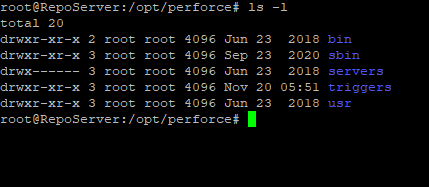
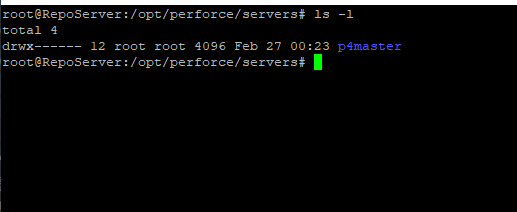
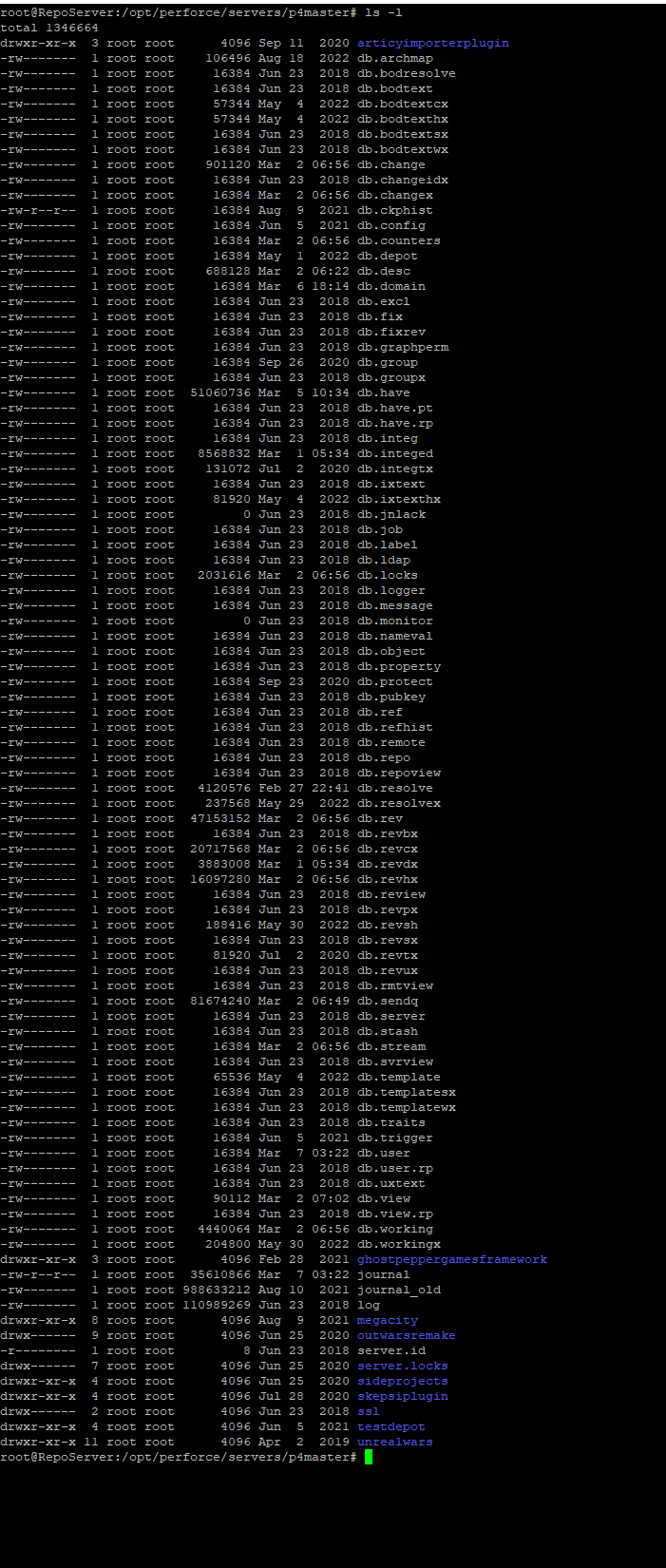
for some comparison, here's how I start my server
./p4d -d -In p4master -p 1234 -r /opt/perforce/servers/p4master
and here's the contents of my /opt/perforce, /opt/perforce/servers, and /opt/perforce/servers/p4master directories
https://i.gyazo.com/c838b67b65517ba40842d9c619703cd3.png https://i.gyazo.com/2fe2335c20bfc6862398f7735de6b2aa.png https://i.gyazo.com/77dfd200b971ce9006c060f2a35f83fa.png
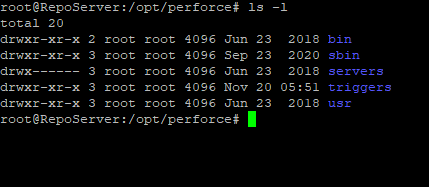
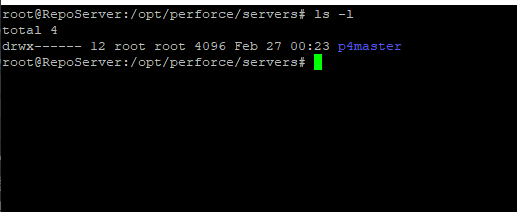
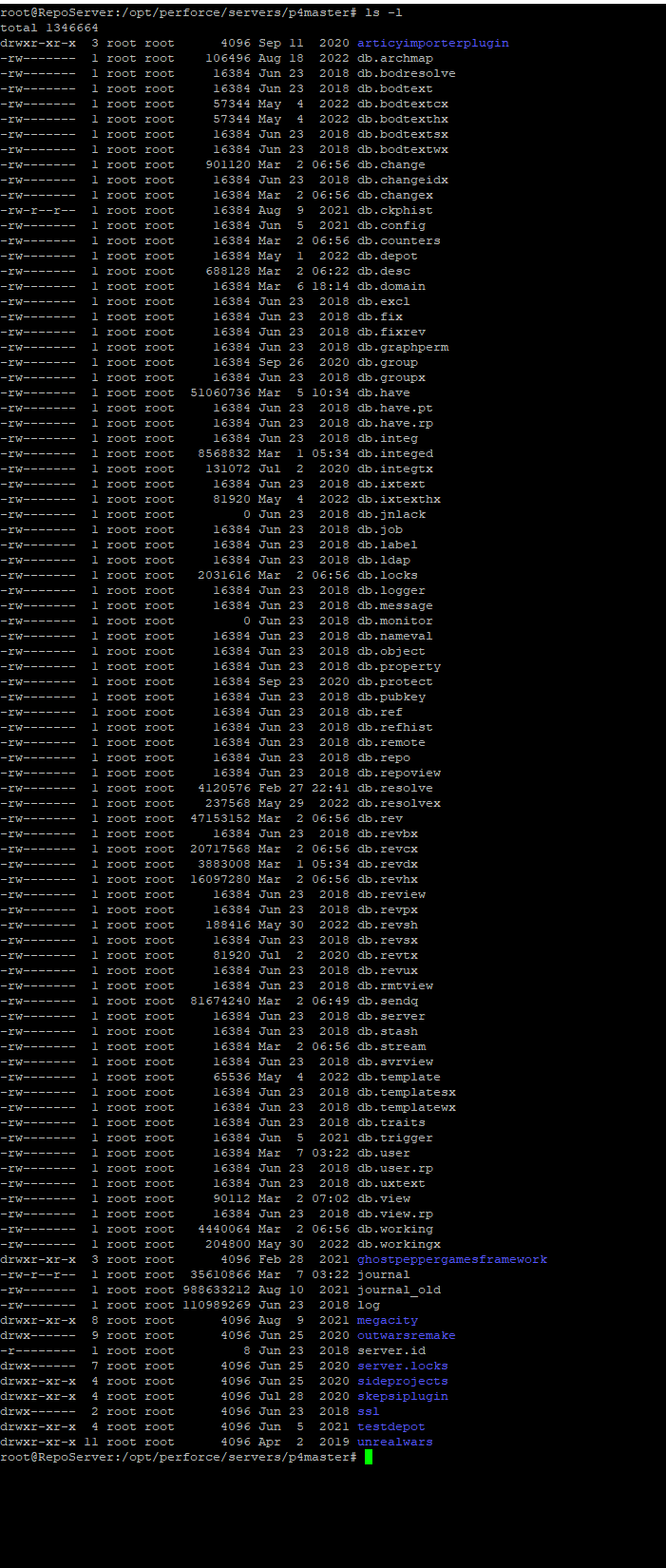 runic summit
this would be so much easier to naaaaaaaavigate in a GUI
woven sluice
in hte last image, the blue folders are actually depots (well, most of them)
runic summit
root@vmi744135:/opt/perforce/servers/LiveSimService/root# these db files have all been made today
woven sluice
the one you posted above, "is this the right root actually?" apppears to have a folder "actiuveshooter" and "plugins", are those your depots?
runic summit
  File: journal
  Size: 30401           Blocks: 64         IO Block: 4096   regular file
Device: 803h/2051d      Inode: 9046006     Links: 1
Access: (0600/-rw-------)  Uid: (  110/perforce)   Gid: (  116/perforce)
Access: 2021-12-09 22:41:11.670674731 -0500
Modify: 2023-03-06 21:23:11.003129683 -0500
Change: 2023-03-06 21:23:11.003129683 -0500
Birth: 2021-12-09 22:41:11.670674731 -0500``` this is rightbut it still doesn't behave like it's running correctly, it's like the depot is messed up even though it's not
but in p4v it looks messed up
woven sluice
so i'm guessing the answer to your question was yes... that was probably your actual root you needed. userroot home directory\depot ?
runic summit
I'm confused though
woven sluice
all's im sayin is the server folder that has your depots, is pretty likely to be your server... dunno what to say about your notes. did you look in that subfolder livesimservice/root ?
runic summit
yeah the journal file was made in 2021
woven sluice
and does it have your depots also?
runic summit
list
weird
the depot one's serverlocks has entries
guess I'll try that one then
runic summit
woven sluice
and does it have your depots also?
so I found two journal files dated 2021
Okay, so I found a journal file that is the right date, but it is not in the /opt/perforce/servers/LiveSimService/root, it's in the LiveSimService/journals folder
runic summit
woven sluice
and does it have your depots also?
there has to be a way!
@woven sluice what are the server.locks folders for?
please.
haughty wedge
yo take a step back for a bit from it. If your versioned files are there, and the journal is there, and the .db files are there, just leave it and slowly figure out what to do
runic summit
ty for everything today
haughty wedge
no problem at all
you will get it working and it will only be a small downtime
just try and relax even though it can be hard you need a clear head to stumble upon the answer lmao. we have all been there
runic summit
Server switched to Unicode mode.
root@vmi744135:~# sudo p4 depots
Unicode clients require a unicode enabled server.```What does it say if you type
printenv P4CHARSET ?
runic summit
i switched the server to unicode, but i think what made a difference was logging in on p4
haughty wedge
because you can't go back
and you do not want it on unicode
ok just hold on
because which server did you switch to unicode?
you might be fine


 haughty wedge
gotcha
runic summit
like, I don't feel happy or good that I figured this out, I just feel like it was a waste of a day
I've had to brute force so much to learn this
haughty wedge
a day is nothing
runic summit
and none of it makes me happy
haughty wedge
I waste months on perforce
runic summit
and I still don't even know what went wrong
haughty wedge
ubuntu upgrade probably cleared some configuration
runic summit
if I thought I could migrate seemlessly to another service provider I would, I'm firing this company
because if I hadn't had to go down the startx rabbit hole, I wouldn't have had to update ubuntu
haughty wedge
what was the startx rabbit hole?
haughty wedge
I've never managed a remote linux server I dunno
I just have local computers with ubuntu
runic summit
still, the day wasn't a total waste - thank you very much for helping a stranger on the internet
 haughty wedge
no worries I hope everything is smooth sailing
 reef oriole
The Plastic SCM Source Control Provider plugin v1.8.0 has been merged upstream into the branch 5.2 for the upcoming release of Unreal Engine 🎉
This will help reach more people directly without updating from Github
Also, for your information:
Plastic SCM was acquired by Unity in 2020 and is now a part of Unity DevOps.
Plastic SCM is now rebranded as Unity Version Control.
From the perspective of the plugin for Unreal Engine, it will be a gradual process, with some changes to display text and logo, but nothing too disturbing.
 teal bone
I mean we already have unity build, why not unity vcs as well? 😄
 ripe heath
Not sure if right place to ask, but can someone help me understand where the content folder assets are in relation to git? I want to do a pull request, but I have no idea how to add assets as they don't seem to be included in git.
teal bone
Where is the .git folder?
 kind nacelle
Can .ini and .log files be added to the .gitignore safely?
I notice they frequently give me an overwrite error
 woven sluice
ideally you should have googled and used some sample .gitignore for UE4 before you started committing anything... but basically you should have never committed the Saved folder, maybe others as well. go find a .gitignore to use, and figure out how to delete stuff that shouldn't be in your repository
kind nacelle
woven sluice
ideally you should have googled and used some sample .gitignore for UE4 before y...
Except I did
I'm using the template from github directly
My my .git files should be here right?
 teal bone
Looks right.
teal bone
The whole Saved folder should probably be ignored.
kind nacelle
idk how or why
 solid patio
My Unreal Engine files in my content Browser have all dissapeared but I can tell it’s still apart of the file.
We have some source control issues that we believe are stopping us. Any advice on how to get files in content browser to reappear ?
kind nacelle
Okay now what's the difference between these two

I've googled it before but I couldn't make sense of it
I'm guessing, do not include means don't use my changes and use modified files is use the version that's currently on github?
 delicate field
whats the workflow for collaborating on a map?
as i know it, only one person can edit a map at a time so is there a way for multiple people to work on a map?
for example, using data layers, world partition or streaming levels?
thanks
 long hull
delicate field
whats the workflow for collaborating on a map?
as i know it, only one person can...
delicate field
long hull
https://docs.unrealengine.com/5.0/en-US/one-file-per-actor-in-unreal-engine/
long hull
delicate field
whats the workflow for collaborating on a map?
as i know it, only one person can...
delicate field
long hull
https://docs.unrealengine.com/5.0/en-US/one-file-per-actor-in-unreal-engine/
nice, i forgot about this.
so previously would you just make a small map and have different disciplines go in and do their stuff?
like level design, level art, lighting, then gameplay stuff ?
 fading trench
Is anyone here interested in some paid work? My studio is looking to pay someone to set up a Perforce based CI pipeline for an Unreal project. Please DM me if interested.
 vale basin
fading trench
Is anyone here interested in some paid work? My studio is looking to pay someone...
vale basin
fading trench
Is anyone here interested in some paid work? My studio is looking to pay someone...
First, don't cross post, second, this is better for the job board, posting info can be found in #instructions
fading trench
Np, thanks
 drifting mason
Will adding plugins cause any issues with source control, if I'm working on the same project with someone else? I don't see a file for plugins so I see no reason for source control to keep track. Will everyone have to have the same plugins installed to their computer? Also will paid vs free make a difference?
 covert glade
hey guys how i can delete only remote branch without deletion of local one in GIT ?
vale basin
drifting mason
Will adding plugins cause any issues with source control, if I'm working on the ...
Depends on the plugin. Enabling plugins modifies the uproject file with it.
Something like BlueprintAssist where it doesn't change any classes or add any dependencies for the project, it's almost a cosmetic change, These can be marked as "optional" by modifying the uproject file yourself, and therefore team members without it won't be impacted.
If the plugin adds important functionality, then every team member will need it installed.
Optionally, as long as you abide by the marketplace license, where plugins are licensed per-user, you can move the plugin from the engine into the ProjectDir/Plugins directory. This can be useful to keep the version sync'd too.
drifting mason
Hmm alright. Thanks!
 worldly girder
Hey guys, I'm trying to store my files on a network drive/NAS, but whenever I open a project (ue5.1), I get the error "Failed to open descriptor file". If I copy the project to my local drive, it works fine, but I was really hoping to store this outside of my local PC.
Any suggestions?
vale basin
worldly girder
Hey guys, I'm trying to store my files on a network drive/NAS, but whenever I op...
Have you mapped the network share as a local drive letter? or are you using the network path, like \\MyNas\MyShare\?
worldly girder
vale basin
Have you mapped the network share as a local drive letter? or are you using the ...
I'm using a network path
vale basin
I'd try mapping as a drive letter. Should have a button like this in "This PC" or "My Computer", whatever it's called these days. Where you see your other drives. It'll ask for the network path, and then which drive letter you'd like to assign
 worldly girder
vale basin
I'd try mapping as a drive letter. Should have a button like this in "This PC" o...
worldly girder
vale basin
I'd try mapping as a drive letter. Should have a button like this in "This PC" o...
Thanks heaps, it's a new setup, so stumbling my way through, I'll try and report back
worldly girder
vale basin
I'd try mapping as a drive letter. Should have a button like this in "This PC" o...
Omg, you're a legend, that fixed it, thanks!
vale basin
awesome!
worldly girder
Been googling this for like an hour 😄 still less painful than the GIT-LFS setup on the NAS
vale basin
Yeah, can take some time to iron it all out eh?
 signal lynx
so im thinking of getting a small pc to use as a perforce server. specifically something like this
Think it would work? Toss in a 1tb ssd and install perforce server to it. Add the pointers and be done with it?

Specification: Operating System: Windows 10 Pro(64-bit) CPU: Intel Celeron Apollo Lake J3455 (up to 2.3 GHz) RAM: 8 GB DDR3L Storage: 128 GB mSATA SSD *SATA: Support 1 x 2.5 inch SATA HDD or SDD Processor Graphics: Intel UHD Graphics 500 Graphics Base Frequency: 250 MHz Graphics Burst Frequency:...
woven sluice
i'd bet performance would be alright, couple things worth considering:
- no RAID 1 protection, if the disk goes kaput, all you can do is throw it in the garbage and try to restore whatever you've got from backups or start anew
- depending on your internet service it might be slower for remote team members (if any) than other common solutions like renting a VPS
 runic parcel
OI OI
I am using latest P4V
Is there a way to do something generic like this in ignore file ?
Plugins/AnyFolder/Intermediate
Plugins/Anyfolder/Binaries
Or I have to write separate lines to ignore intermediate and binaries for every plugin?
vale basin
Any folder = ** I think
**/Plugins/**/Binaries/*
**/Plugins/**/Intermediate/*
That's mine, i have the ** at the beginning as my project folder exists in the repo, not the project directly
runic parcel
Let me try
 fair monolith
vale basin
Any folder = ** I think
fair monolith
vale basin
Any folder = ** I think
Note that ** does NOT match "no folder". So **/Plugins does not match /Plugins. If you explicitly want both the root /Plugins and /Foo/Plugins then you need to specify both /Plugins and **/Plugins. It's unfortunate.
 versed sparrow
Hello all, I'm having the most difficult time getting an InstalledBuild to actually build. Watched all the setup videos and read the UE5 documentation. I'm following each step exactly but the build 'errors/quits' when it looks for the NDK location. Keeps looking in the wrong place, for the wrong version, and I can't figure out where its configured to do so.
Android studio 4. UE5.0.3
"Note: Android toolchain NDK r21b recommended
ERROR: No NDK platforms found in C:/NVPACK/android-ndk-r15c/meta/platforms.json"
 crimson lynx
Does anyone know of Git aliases can be used to override and wrap actual Git commands?
haughty wedge
fair monolith
Note that `**` does **NOT** match "no folder". So `**/Plugins` does not match `...
I just tested this because you scared me for a second. this does not seem to be the case. **/Plugins/ will ignore any Plugins directory anywhere including the root.
Oops. I thought you were talking about Git.
Sorry I messed up lol. You mean in like p4 stream ignore fields? As well as p4ignore?
haughty wedge
Oh yeah so on the .p4ignore, wouldn't it be possible to do
Plugins/**/Binaries/
as that would hit every Plugins directory in root and anywhere
fair monolith
haughty wedge
~~I just tested this because you scared me for a second. this does not seem to b...
In P4 the ** does not match an empty string.
It's annoying.
haughty wedge
fair monolith
In P4 the `**` does not match an empty string.
Yeah I see what you mean. Why couldn't they just mimic the gitignore behaviour 100%? I assume the answer is because of their decades of history and having to support some grumpy paying customer who wants it to work the old way.
But I discovered that simply putting no leading slash allows the pattern to match in any subdirectory.
 smoky trench
GitHub
Microsoft Virtual File System for Perforce. Contribute to microsoft/p4vfs development by creating an account on GitHub.
Interesting stuff, more and more studios are looking into this sort of thing
Be interested to see how well it works out of the box for UE
vale basin
that's awesome! Like dropbox online only sync but for p4! It only sync's down right, it doesn't commit? That'd quickly mess up your commit history if it did
smoky trench
vale basin
that's awesome! Like dropbox online only sync but for p4! It only sync's down ri...
yeah only sync down, just deferring the cost of the sync and having the ability to sync only what you need
More useful for game content then say the engine but likely still useful in that regard to some extent
vale basin
Yeah absolutely. That's cool
merry verge
smoky trench
Interesting stuff, more and more studios are looking into this sort of thing
Be ...
It is entirely transparent to unreal, should work fine.
Biggest problem is it'll freeze things for a bit if you access large files from a slow server since the driver needs to hydrate files when first requested.
Biggest problem is that you need to use p4vfs to sync (if you want stubs instead of full files; normal p4 syncs still work to grab things normally), so it'll require some minor updates to tools like UGS.
mighty light
merry verge
It is entirely transparent to unreal, should work fine.
Biggest problem is it'll...
What does hydrate mean?
smoky trench
merry verge
It is entirely transparent to unreal, should work fine.
Biggest problem is it'll...
yeah was more thinking how would it handle uassets when the asset system does indexing
Also during cook/build and the latency impact at those points, an up to date DDC should help in that regard but still curious what the cost/win is here
For source assets would be very useful of course, no need for separate raw folders/modified client views
smoky trench
mighty light
What does hydrate mean?
Means to fully sync the file, prior to that the file is in a placeholder state
 placid blaze
Is there any free Source Control that .. well.. makes more sense than Github? Git just never clicked with me
vale basin
as in, free hosted service, or as in, free program?
 wide bear
placid blaze
Is there any free Source Control that .. well.. makes more sense than Github? Gi...
wide bear
placid blaze
Is there any free Source Control that .. well.. makes more sense than Github? Gi...
Have you tried Mercurial?
placid blaze
wide bear
Have you tried Mercurial?
Howdy! I have not. I will look in to it, thank you
placid blaze
vale basin
as in, free hosted service, or as in, free program?
a bit of both. I just kind of got local git configured, but it already bit me twice. I think my fault though
wide bear
It's prefectly fine to use it that way too
My partner won't take the time to really understand how to use git beyond basic commits, so we just share the same repo and back it up regularly
placid blaze
Not the worst plan 🙂
 ancient sun
What would be the best option for source control that'll allow programmers to work on a project from their own pc and submit their work to the project? I am struggling to choose something convenient.
mighty light
ancient sun
What would be the best option for source control that'll allow programmers to wo...
Any vcs? Unless by "work on a project from their own pc and submit their work to the project" you mean something other than how literally all vcs works. Perforce is the industry standard but git, plastic and svn all have good support in unreal
ancient sun
mighty light
Any vcs? Unless by "work on a project from their own pc and submit their work to...
Ive been considering git but am unsure of how exactly to get that working nicely and seems pricey as im working with a nearly 100gb project here.
mighty light
You will need lfs. You can self host with something like git lab (or rent a vps with git lab in docker or something), or pay for dedicated hosting. Same goes for all vcs. Only real exception is git where github gives you like 2gb of lfs or something but afaik there's bandwidth limits which you can increase with money
ancient sun
mighty light
You will need lfs. You can self host with something like git lab (or rent a vps ...
I see...Damn this sounds more complicated than I expected lol
I suppose there isnt really a simple approach to this.
mighty light
Sounds like you are looking for a perfect solution. The reality is that you only need to find a solution that works for you. If git is working for you right now then stick with it. If you are using github, look into lfs
 thorny sigil
hey i am new to unreal engine can any1 share a doc and instruction to setup source control for UE5 within the engine itself
delicate field
should you delete a branch right after merging or keep it for a while and delete it in case u need it?
vale basin
That's one of those "it depends" questions. Depends on your workflow, what kind of work was done in that branch, why it existed and why it was merged
 severe rock
fair monolith
Note that `**` does **NOT** match "no folder". So `**/Plugins` does not match `...
severe rock
fair monolith
Note that `**` does **NOT** match "no folder". So `**/Plugins` does not match `...
For me Binaries/* works both for Binaries and Plugin/xxx/Binaries
fair monolith
Right, it matches every folder named Binaries anywhere in the depot.
versed sparrow
I'm having the worst time getting perforce working with an existing project. Can do it with a new project, but for some reason it doesn't want to work with an existing one.
 onyx crow
I was thinking of putting source art under a different P4 depot, so that it can be stored on a separate drive on the server. A virtual stream workspace can map and sync two depots into a single folder/workspace but the problem is that you can submit only into the one of them (parent stream). Did anybody do something like this before?
The inspiration comes from this https://youtu.be/YKMDdtX-8gM

In this session, we’ll discuss how to implement and leverage the various Source Control applications for use in UE5. We will focus more specifically on leveraging source control for remote teams and best practices for ensuring compliance and security.
We’re excited to bring you sessions from Unreal Fest 2022, available to watch on demand: https...

Where they are streaming in a different stream into the Main one
But now I am confised and unsure how useful it actually is. If they map engine into the project stream, does not it mean they can not modify the engine unless they switch the workspace?
fair monolith
onyx crow
But now I am confised and unsure how useful it actually is. If they map engine i...
I think that perforce will send the files upstream correctly. I haven't tried it (I don't have a use case) but I skimmed a lot of P4 docs talking about doing things like this.
onyx crow
It does so only for the parent stream files. Modified files from an unrelated mapped stream will give error. This seems to be the same issue. https://perforce-user.perforce.narkive.com/86zJ2FNW/p4-multi-stream-workspaces
I will need to investigate this import+ mapping mentioned there. Sounds promising.
onyx crow
Ok, import+ did the trick
 lucid laurel
My perforce backups seems to be not valid:
When I use p4d -jv to verify my journal file this comes up: header and trailer are missing.
The journal files that are created with p4d -jc are also 1 KB big. Tried removing the Journal and Log file and tried again with the same result.
The command line also says Rotating p4checkpoints to journal.3... but why does it increment the journal file if there was no journal file to begin with?
Can I do a clean journal file from the beginning? Help 🥹
My journal configs: (based from this guide https://github.com/n8bot/Echelons/wiki/Commission-New-Lyra-Starter-Game-Project#prepare-server-for-google-drive-real-time-backup)
p4 set -s P4JOURNAL=p4checkpoints
p4 set -S Perforce P4LOG=p4checkpoints/log
p4 set -S Perforce P4JOURNAL=p4checkpoints/journal``` timid trellis
Can someone recommend the most simple easy to use Source Control? Having too much hassle with Perforce and whilst I understand its the Industry standard etc, just not wanting to wrestle with it anymore. I basically just need the ability to revert to certain submissions and that is it. I don't need or want to learn anything else. Does such a solution exist?
 elfin mural
For those of you using Perforce, can you install the server on the same machine you use UE on? Or does it have to be a separate server?
vale basin
elfin mural
For those of you using Perforce, can you install the server on the same machine ...
You can definitely install locally. Nothing wrong with that. Only might impact availability for team members of you shutdown or reboot your workstation. But if it's just you, yeah go for it
vale basin
timid trellis
Can someone recommend the most simple easy to use Source Control? Having too muc...
Imo the simplest is svn to run locally, but it's been years since I used it, so no idea what the integration is like in ue4/5. Git+lfs has its own headaches and gotchas, but like p4, once it's setup and you are familiar it's not too bad. I hear plastic is pretty good, but I have no direct experience with it
elfin mural
vale basin
You can definitely install locally. Nothing wrong with that. Only might impact a...
Thank you!
timid trellis
vale basin
Imo the simplest is svn to run locally, but it's been years since I used it, so ...
I will look into SVN then, thanks!
 queen viper
Is there anyone who can help me get this back to normal? I am unable to simply commit and push through the desktop and I must go into git to do all the work instead
 haughty wedge
just run git add -A
then git commit describe your changes, save the text editor, close the window then run git push
queen viper
I know how to push but I want it so I can just do everything from gitrhub again instead of through git
queen viper
haughty wedge
just run `git add -A`
@haughty wedge
haughty wedge
I'm not sure what you mean or what the issue is
queen viper
haughty wedge
I'm not sure what you mean or what the issue is
I commit changes through github because this issue comes up so I have to do it through git command line
haughty wedge
do you want to keep those files in the error screen or do you want to get rid of the changes?
queen viper
I want to keep those changes, theyre all staged and creating a commit creates that error window
 warm abyss
void SomeFunc() {*}
In visual studio if you write something like this and your cursor at the * position (without * being written), and if you press enter VS does this:
void SomeFunc() {

}
Is there any way to make it do this one instead?
void SomeFunc()
{

}
I do not use github desktop, I do not know what the issue is. Did you fetch the upstream first?
teal bone
warm abyss
```cpp
void SomeFunc() {*}
```
In visual studio if you write something like thi...
Change the formatting settings. It's in the options under code layout or style I think.
warm abyss
teal bone
Change the formatting settings. It's in the options under code layout or style I...
Thanks, I found it
If anyone else wonders:
 teal bone
🙂
queen viper
haughty wedge
I do not use github desktop, I do not know what the issue is. Did you fetch the ...
I did fetch first
haughty wedge
ok so maybe there is some conflict?
queen viper
I'm not completely familiar with source control so I don't know to reset it
warm abyss
Is there any vanilla cpp library (can be std) that contains usual structs like 2d int struct, 3d float struct etc or do I have to create them myself?
teal bone
Why not use the UE ones?
merry verge
and what does this have to do with source control
 wind topaz
HELP- hello, i would like to know if there is anyway to use my website as the server for Perforce?
merry verge
as in a VPS running a web server? Yes. As in managed hosting for PHP or something? No.
 north sedge
Anybody knows what does this mean? I package build and try to play it from Perforce and it show this?

 winged tiger
UGS dark theme when? 🕶️
 wise grove
Do I have to do something special with the source to compile for android x86_64? The option is greyed out and says to get the source.
fair monolith
So I've found that when importing assets, say in the 100s+ of assets per import, Perforce is extremely painful to deal with as I reorganize files into where I actually want them to go.
My workaround is to disable Perforce in the Editor whenever I want to do something like that, and then just reconcile the changes later.
This saves me literal minutes of time that I'd ordinarily have to stare at the editor Perforce progress bar.
Is this a common experience during content import?
 cyan jay
fair monolith
Is this a common experience during content import?
cyan jay
fair monolith
Is this a common experience during content import?
Perforce should not be a bottleneck at this point.
woven sluice
i would say yes, it is a huge pain in the ass. i've always had a remote perforce server and i'm not sure if the "issue" gets fixed by having a local one or something but it is absolutely a huge pain in the ass
and i'm kind of surprised they didn't figure out some way to async it
teal bone
Reconcile is god tier
 teal sail
do you guys have any recommendations/tuts for designing a home VCS + backup (hardware, systems, etc)? Power efficiency and being able to just set-and-forget are important to me. Could I potentially run it off a RPi 😅?
How mature is git for Unreal? I can use perforce but I do massively prefer gits UX
cyan jay
teal sail
do you guys have any recommendations/tuts for designing a home VCS + backup (har...
You can't run perforce on rpi, x86 only. Most self hosted git I hear about use gitlab, but I have no experience of that myself.
teal sail
I did see that, what a pain. Do you think an RPi would (in theory) be capable of handling the IO? i'd basically be doing daily check-ins/check-outs and a monthly backup. Would SVN be worth looking into for better handling of binary assets?
cyan jay
teal sail
I did see that, what a pain. Do you think an RPi would (in theory) be capable of...
Svn probably the least supported. Personally, I'd get a cheap linux cloud VM and run perforce on it!
I don't know git that well, but for binaries you gotta use LFS
teal sail
yeah I have looked at it, everything seems like it would run me like 60$ a month though for the storage I need
cyan jay
Wow really? I'm paying £15 a month for 1TB with Contabo. Running a team of 5.
teal sail
that's very good. Australian prices I guess 🫠
I was looking at basically the cheapest VMs Azure, AWS and DigitalOcean had with 1TB of storage. I don't think I would use the system enough to justify that - I only get the opportunity to work on personal stuff 6 months out of the year or so
vale basin
teal sail
I was looking at basically the cheapest VMs Azure, AWS and DigitalOcean had with...
If it's just a side project, just go on ebay and pickup a 4-5 year old dell or Lenovo small form factor PC. Can get them damn cheap, full x86, 1-2tb hdd, 8gb ram. Can upgrade them if you want.
Will last you years
With rpi prices these days, probably similar price in aus. We have insane rpi prices
teal sail
I have a server box and a bunch of pis hanging around
I'd rather use the pi as it's less electricity
again, because I wouldn't use it enough :P
vale basin
Well checkout gitea. Might run on a pi, supports gitlfs. In terms of io performance, you can probably get away with it for 1-2 users especially if it's a side project. Initial or large check in might suck
A usb3 hdd might improve perf instead of the SD card
teal sail
looks promising, thanks. Gitlfs does seem like a bit of a pain though.
vale basin
Yeah it always feels a bit jank to me, but the gitlfs for ue plugin on GitHub is better apparently.
 mellow fossil
Hey everyone, would someone be willing to help me with removing some files from a certain commit? I basically submitted files within unreal instead of git desktop / command line and it added files over 100 mb to it, now i cannot push my changes anymore :/
 silver laurel
Hello, what cloud service should I use to setup a Perforce server on? Is there anything free?
wind topaz
can anyone help me or point me in the right direction on using Digital Ocean & perforce?
 serene light
is there a good cloud hosted option for perforce on a 2 person team? we are used to git but lfs is being dumb and perforce seems like the industry standard for this style of work
fair monolith
PSA: My P4 performance was really bad in both Rider and VS. I had previously installed it to a non-default directory. Given the 2023 March 16 P4 update, I decided to completely remove the old P4 and install a new fresh default one. I removed all settings as well.
After performing a fresh install of P4 to default install locations, I am pleased to report that performance has improved and it is now fairly reasonable to use in both Rider and VS.
So... If you think your P4 is slow, maybe try the same. You may get lucky. 🙂 😎
 bronze wigeon
Hello, I have installed Perforce on a server and copy a project to a new workspace. Since them Unreal freeze for 20 seconds when I start the simulation, and again when i stop it. During these times unreal doesnt respond at all.
mighty light
serene light
is there a good cloud hosted option for perforce on a 2 person team? we are used...
If you can pay for it, literally anything. We used ec2 for a bit but it got expensive fast especially since we had no income from our game and as your project grows so does your need for storage. With a vps, you can also run your own CI and all that other devops stuff for your project/s
If you cant pay for it you might have luck looking into getting your and your team onto a vpn like tailscale and having 1 member set up a p4 server which everyone connects to
 ancient oxide
Heyo, using Perforce, I'm getting a bunch of Error: Failed to rename export file: errors in my project plugins /Intermediate folder which I don't want to be tracking in Perforce. It's preventing me from opening my project unless i have the plugin checked out. I tried adding Plugins/*/Intermediate/* to my .p4ignore to no avail. Any advice? Thanks.
vale basin
ancient oxide
Heyo, using Perforce, I'm getting a bunch of `Error: Failed to rename export fil...
if you already have your intermediate directory or files in p4 the p4ignore won't work, make sure to delete any existing intermediate files from p4
ancient oxide
vale basin
if you already have your intermediate directory or files in p4 the p4ignore won'...
that did it. thanks!
 worn iris
It seems my source control isn't uploading the changes I make to my directional light? I deleted then revisioned it from my Perforce, and the ligfhting hasnt changed but the rest of the project has saved correctly afaik
worn iris
Since using the source control, unity freezes alot more now, but it doesnt do it when I turn off read only on all the files through file explorer?
Edit::Just realsied I said Unity I meant Unreal
woven sluice
worn iris
Since using the source control, unity freezes alot more now, but it doesnt do it...
having perforce enabled tends to cause annoying dialogs to pop up every time you move/rename something... is that what you're experiencing, or something else?
worn iris
woven sluice
having perforce enabled tends to cause annoying dialogs to pop up every time you...
I don’t think so. If I undo or click play the engine will freeze for a good 10-20 seconds before responding
woven sluice
worn iris
I don’t think so. If I undo or click play the engine will freeze for a good 10-2...
Are you sure there's nothing in the log window?
That's not normal
worn iris
woven sluice
Are you sure there's nothing in the log window?
it stops when i turn off read only on the project folder. When it happens again I'll take an SS of the console
woven sluice
worn iris
it stops when i turn off read only on the project folder. When it happens again ...
i remember now. my guess is that the log will tell you it can't write to some log files on disk. if so, it's probably because you didn't set up a correct ignore file and you committed temporary folders (Intermediate and Saved maybe) into source control
this kind of freezeup will happen once per editor run because it's an ensure().
worn iris
woven sluice
i remember now. my guess is that the log will tell you it can't write to some lo...
Ah yes youre right i did. Would marking the intermediate and saved folders for delete fix the issue?
woven sluice
yep, erase them out of source control that way, and then make sure you have an ignore setup and working
analog lodge
Hi there, I´m just now starting to work with other users in our perforce setup and it occurred the first time, that another user reported he could not save any recently changed files because they had been "locked".
Upon further investigation, it seemed to have been caused by a failed submit.
I figured out how to unlock the files using p4 unlock -f //depotpath/...
My first question:
What makes a submit fail? I never had that issue before when submitting.
Second question:
Can I just disable file locking using p4 -u superuser configure set submit.unlocklocked=1
I read that this might lead to problems, when multiple people work on the same file, so what would be the best way to deal with this?
I´m only doing admin tasks, because someone has to, but I really don´t have time to do this kind of admin stuff...
vale basin
Don't disable locking. The few times you have issues from a failed submit or someone locking a file and going on holiday are easily resolved at the time in comparison to the massive ongoing headaches of coordinating work to avoid losing work
analog lodge
Hm.
vale basin
But I've never seen a failed commit either
analog lodge
It seemed like only one file was actually locked when checking the depot, but in the changelist ALL changed files were locked.
I just unlocked everything in the path, but is it possible for the user to do anything about this himself, without having to get me involved?
Because I might be going on holiday too...
It might have been an issue because the user tried to submit several large alembic caches?
vale basin
Well a failed commit I would presume would leave the changelist as pending for the user, so the user could revert the files and it would unlock, or commit again and it would unlock. A file will lock on checkout
analog lodge
Yeah, but he would have lost a full days work if he simply reverted everything...
vale basin
analog lodge
It might have been an issue because the user tried to submit several large alemb...
That's possible. I advise people to commit smallest possible amounts. Logically broken up by task, and if large files, break it up
vale basin
analog lodge
Yeah, but he would have lost a full days work if he simply reverted everything.....
Yes, but if it wasn't committed then he just submits again. Unlocking it at the repo level doesn't solve that
Or are you saying this user had the lock AND was the one unable to submit?
analog lodge
He wasn´t able to submit the changelist due to the locked items in it, AFTER the failed submit.
I also think I´m mixing up two things here.
Reverting the files in the changelist wouldn´t delete them locally and he could just resubmit
He just mentioned something about not being able to SAVE them from within Unreal.
In which case he´d loose the work if he closed it.
But that might have been occurred after the failed submit and after they were already locked.
I´ll have to check that again.
analog lodge
vale basin
That's possible. I advise people to commit smallest possible amounts. Logically ...
Yeah, I actually said its ok to just submit everything at the end of a day, so its not a constant workflow disruption...
I never had an issue doing it like that.
vale basin
Reverting would delete the new work. Being unable to save from unreal is a different problem though. It may be unable to save due to a p4 lock, at which point you can say mark as writable on filesystem and ignore p4. Or it's an issue with unreal, like 2 editors being open
I recommend multiple commits per day personally
Any time a logical chunk of work is complete
analog lodge
Ok, so the solution would be in Unreal to mark as writeable and then what...?
They get overwritten locally, so shelve the changes in the changelist and try submitting again?
Or is there no way around unlocking at that point?
I mean, hopefully this doesn´t happen every day, but it literally happend on the second day...
vale basin
That's what I'd do. I don't know about there being no other work around. I haven't had that issue. But yes, I'd backup the work as the user, revert the changelist or otherwise fix the failed submit, and then copy that work back and reconcile
vale basin
analog lodge
I mean, hopefully this doesn´t happen every day, but it literally happend on the...
Honestly, it's either crazy bad luck, you missed something on the client PC and could have just resubmitted or something, or your server may have an issue. That's not a common occurrence. The only time I have to mess with unlocking is when someone checks out a file and then is on sick leave or holiday
It should not happen every second day
analog lodge
I see.
Alright then.
vale basin
Try again tomorrow and fingers crossed
analog lodge
I´ll just have to note down the instructions for unlocking on my personal wiki...
Was a bit of a hassle because I hadn´t set up a super user.
Figured its enough to just set my user up with super rights.
But apparently perforce still needs a user named "super".
vale basin
If it's the second day, it's likely that you or the person you are helping missed something, it does take a little to get familiar with the workflow
analog lodge
OR....its just the amount/size of alembics...