#ue4-general
1 messages · Page 1154 of 1
 drowsy snow
bruh 🤣
 red condor
😁 lol
 raw falcon
haha, and it can not be stop that developer folder automatically created as a window use name.
so simple solution is change the Window user name
drowsy snow
raw falcon
so simple solution is change the Window user name
Yes, but actually not that simple
 calm widget
Wondering if there's a fix for this sun glare? Had this issue for a long time, it looks really low res and flickers
All through many different engine versions and projects. Even in ue5
drowsy snow
calm widget
Wondering if there's a fix for this sun glare? Had this issue for a long time, i...
In the Directional Light, reduce the Brightness for Light Shaft Bloom
It defaults to 100 which is way too much of a value for it.
calm widget
It doesn't really do it. Lightshaft bloom is really low. The effect only goes away when i turn bloom of completely
drowsy snow
Then disable the light shaft bloom.
calm widget
Yeah i guess. But it's a nice effect
drowsy snow
(not to be confused with the actual post process bloom)
calm widget
Yeah. Thanks though i just figured maybe i could increase resolution or something else
drowsy snow
If you use a custom UE4/UE5 built from source, this could be a reference to make a nicer bloom
https://www.froyok.fr/blog/2021-12-ue4-custom-bloom/

I wanted to see if I could modify the unreal engine bloom effect following my article on making custom lens-flare. This is because...
calm widget
Oh, that's way above me hah. But it looks cool
red condor
Is it possible to group objects in the map editor? So I can quickly select a group of static meshes for example?
calm widget
Ctrl+g should group i think. This way you can also export multiple actors as a single mesh, in case you ever need to do that.
red condor
Ah, nice! Thank you, Google was failing me 👍
 rare steppe
hey this is kind of a weird question and i dont know if this is the right chat for it, but ive seen people make things like a voxel plugin that adds a whole new object into the engine for voxels, i want to do something similar but for box brushes to make a better version then whats allready in engine that can be used for final geometry, i have no clue where to start making something like this so if someone could point me towards where to start i would be very thankful
 exotic thicket
Look at how the box brushes are implemented
Then create your own version of it and go from there
rare steppe
yeah but how
exotic thicket
Open the code file for it?
rare steppe
ok
exotic thicket
fwiw this is not going to be a very simple thing :) you're gonna have to dig into the engine code to figure out how it works most likely, as there isn't a whole lot of info out there on how these parts work
rare steppe
i knew it was gonna be like this going in but i think a community box brush will be a greatly positive thing, people who use engines like scource will be able to use ue better if it goes well
 true quartz
For the life of me I can not get rid of the texture tiling, my scene is a bit large and I have tried most of the tutorials on youtube to no reasonable effect
rare steppe
if youve tried the scale up texturing thing try it but with rotated images
i can also give a few pics of my shaders if it helps
true quartz
Yes please
 surreal latch
could someone helpme with a small problem i am having
rare steppe
ill get it in a sec
surreal latch
i am making a top down movement system with sprites. I am trying to get the flipbook animation to change with the direction that the player is moving. The first set of blueprints to the left changes the players animation based off of the x axis and the second is changing in on the y. How would i combine the two so that if the player moves in the x the first blueprint plays, and if the player moves in the x the second one plays?

i know
i disconected it to figure out the problem

here is more of the blueprint
rare steppe
true quartz
Yes please
here your gonna need some black and white maps with it but any will do
 surreal latch
so would i make a get velocity that checks for the x axis and then if the player is not moving that direction it checks for the y.
red condor
You know how in some games (Quake for example) there's a log in game that tells you when you pick up an item, the line of text shows for a few seconds, and the lines stack if there's more than one - is there a name for that game feature which might help me find a tutorial to create it in ue4 blueprint?
 rain ingot
right now there are materials for each object, how can I change it so that there is one material for all 3 objects
 red condor
Looks like a great starting point, thank you!
red condor
rain ingot
right now there are materials for each object, how can I change it so that there...
looks like you have unneeded material slots, you'd fix that in the 3d software
rain ingot
red condor
looks like you have unneeded material slots, you'd fix that in the 3d software
oof is there no way to fix it in unreal?
I just want to apply one texture on the full object
red condor
rain ingot
oof is there no way to fix it in unreal?
Not sure but I doubt it, since you'd need to reassign which faces material(s) apply to. Easy to do in blender but I don't believe UE has the capability.
in blender you'd go to materials, delete the two you don't need, enter edit mode, select all faces, click 'assign' in materials to assign them all to the remaining slot. Then send it back to unreal.
 junior kettle
rain ingot
I just want to apply one texture on the full object
junior kettle
rain ingot
I just want to apply one texture on the full object
You need to bring it back into blender, delete 2 of the assigned material slots and reassign all of the mesh to the remaining material. Its really simple
rain ingot
man these are free models 😭 the only thing I've ever used blender for was animations
junior kettle
Thats fine you can still import them into blender.
red condor
junior kettle
You need to bring it back into blender, delete 2 of the assigned material slots ...
I just detailed the process above 😄
junior kettle
red condor
I just detailed the process above 😄
I didn't even see that
 icy bolt
How to set up a simple vr door?
 rugged oxide
do you guys know if its possible to make a first person view models cast shadows but only on itself and not the floor below you
or at the very least, have it affected by shadows but not casting them
red condor
rain ingot
man these are free models 😭 the only thing I've ever used blender for was anima...
once you know how to do it this is a one minute job, tops. Much easier than animation! :)
red condor
rugged oxide
or at the very least, have it affected by shadows but not casting them
for the second, uncheck 'cast shadows' in the mesh settings 👍
disabling receiving shadows is trickier, see here: https://forums.unrealengine.com/t/how-to-disable-receiving-shadows-on-a-particular-mesh/325456/7

Unreal Engine Forums
Change your texture to unlit and set you base color to go to the emissive(so its not totally black). You should stop receiving shadows now. I know this is an old question but I was also looking to do this and this and I thought I should post it here for anyone else looking to do this
rugged oxide
red condor
for the second, uncheck 'cast shadows' in the mesh settings 👍
i think you misunderstood
when cast shadows is turned off, shadows dont hit the meshes
so if you walk in a room it stays lit up
this was just with the default ue4 fps template
 patent eagle
hey all, am trying to get CoreRedirects to work to redirect a BP enum to a C++ version, the CoreRedirects is not considered at all, even when I insert wrong paths, etc
any help folks?
true quartz
It is giving me the sploches but the tiling is still there

As it shows in the video

I am using Megascan Grass assets
Also the MS assets come with a displacement texture but i dont know where to put it, I tried WorldDisplacement node but everything went black
Nope, unplugging them still gices the same result
 glacial needle
Hey does anyone know where I can either buy a FPS map similar to overwatch or any videos on how to make it with that stylized look?
 plush yew
Is it true that i can make a unreal engine game with no coding experience?
try what?
idk haha
plush yew
true quartz
As it shows in the video
but how can i learn this
that all is just confusing
nope lol
imma try that
yes it is for me
how long does it usually take to learn blueprint?
yeah
i also have a problem installing the unreal engine
yesterday i tried installing it but it said i have no space. now today i tried again and its saying "Not Installed Unreal Engine (version)"
shii nvm
i had to go to library tab
rain ingot
what could be causing this?

not sure how to fix it tho
theres just random pieces of light everywhere

I think I figured it out
 solid quest
Hey I am trying to switch to one of Unreal's older project but it gives me an error when I am doing it with .uproject file
Discovering modules, targets and source code for project...
While compiling F:\Projects\aissgnment51Farm\Intermediate\Build\BuildRules\aissgnment51FarmModuleRules.dll:
f:\Projects\aissgnment51Farm\Source\aissgnment51Farm.Target.cs(11,3) : error CS0103: The name 'DefaultBuildSettings' does not exist in the current context
f:\Projects\aissgnment51Farm\Source\aissgnment51Farm.Target.cs(11,26) : error CS0103: The name 'BuildSettingsVersion' does not exist in the current context
f:\Projects\aissgnment51Farm\Source\aissgnment51FarmEditor.Target.cs(11,3) : error CS0103: The name 'DefaultBuildSettings' does not exist in the current context
f:\Projects\aissgnment51Farm\Source\aissgnment51FarmEditor.Target.cs(11,26) : error CS0103: The name 'BuildSettingsVersion' does not exist in the current context
f:\Projects\aissgnment51Farm\Source\aissgnment51FarmServer.Target.cs(12,9) : error CS0103: The name 'DefaultBuildSettings' does not exist in the current context
f:\Projects\aissgnment51Farm\Source\aissgnment51FarmServer.Target.cs(12,32) : error CS0103: The name 'BuildSettingsVersion' does not exist in the current context
ERROR: Unable to compile source files.``` slate thicket
would anyone happen to know why my two meshes have identical normals, tangents, and binormals, yet left one is inside out

both have the same material and tbh im lost
plush yew
Also do you need a very good pc to make games? my pc isnt the best
 rain ingot
could my glass be causing the light on the wall?

cant figure out what is causing that light
rain ingot
plush yew
shit
Ram is the cheapest and easiest to put in out of all of them tho'
so thats a +
so confused on whats causing this light
 plush yew
there are no compatible ram sticks for my laptop in here where i live
so i gotta live with 8gb
rain ingot
oof
slate thicket
that was it! the file format im importing must have changed it's face indicies for whatever reason, thanks!
 idle stump
Let's say I had a bunch of checkpoint actors throughout a level and I want to add some debug functionality to list the checkpoint names and allow you to select one and teleport to it - How would I render that list? Does Unreal already provide some mechanism to do such a thing? Like an IMGUI type of in-game interface for debug.
rain ingot
rain ingot
so confused on whats causing this light
I figured it out, it was my light

well
what could be the cause of this?

that texture is the same as others
but its brighter

 prime willow
so when i move my character the camera mvoes alongside the character
whilst still keeping the ratio distance to the camera
it will however make the game move alongside the character during axis inputs
is there a particular setting that navigates or controls the cameras ability to inherit axis movements as well as move when movement axis's are applied
idle stump
Is there a hotkey to just drop into the level where editor camera currently is? Like 'right click > play from here' but as a hotkey?
red condor
idle stump
Is there a hotkey to just drop into the level where editor camera currently is? ...
not sure about a hotkey, but you can select it from the little dropdown menu next to 'Play' and it will stay active until you change it back
idle stump
Ah, yes I found that just after asking 😅 That should suffice
 red condor
prime willow
is there a particular setting that navigates or controls the cameras ability to ...
red condor
prime willow
is there a particular setting that navigates or controls the cameras ability to ...
It would help if you describe what you are trying to achieve, personally I can't figure it out from what you wrote :)
prime willow
its okai
im very very stupid
my camera was rotated wrong
so it ept messing up no matter what i did
im so sorry
red condor
ha no problem! I'm pretty stupid too xD glad you figured it out 🥳
 raw beacon
Does anyone know how to access animBP from sequencer, using a recorded character BP?
 lucid trout
 grim violet
Quick question, what does this mean?
grim violet
Quick question, what does this mean?
Just means you have too many stationary/movable lights IIRC
grim violet
Ye
I found out all about it, thanks
Had no idea overlapping was bad loool
noob stage is fun
red condor
(turned out this did everything I needed btw, thanks again 😁)
Is it possible to have my post process affect the UI (hud) as well as the game itself?
 gusty hatch

Here I did what you said and skipped the add static mesh component
and added them to the root directly and set collision to block all
I add a cube into the world and set its collision to block all
I move the ship through the wall = no collision detected lol
here is the same problem from 7 years ago
now let me remove all my meshes and replace it with the default cube and set to block all

same issue
now let me drag the default cube onto the scene root

problem solved ... except back to my original complaint - how can I have multiple meshes in the default scene root with collision ?
 remote badge
physics asset
gusty hatch
remote badge
physics asset
I was excited since this was an answer I have not tried yet but ..

 blissful trail
so i'm having this issue where sometimes ue4/ue5 just uses more and more of my system resources until my pc crashes or sometimes bluescreened it mainly used all of my gpu (this happens on 4.27 and 5.0 but not 4.26)
 neat vessel
Im a beginner who hates to believe that unity should be for me
Im tryna make a small 2.5d pixel game
This is so random lol
prime willow
red condor
ha no problem! I'm pretty stupid too xD glad you figured it out 🥳
im so sorry i am stupid beyond comprehension
I didnt fix anything lmao
i thought i did tho!
ill make clip hopefully someone knows the asnwer
 errant bloom
Hey everyone
 winter marsh
Hey, if anyone is new to Unreal and would like to learn the engine, please feel free to DM me and i will do my best to teach you. Also if anyone has any issues with anything, also feel free to DM at anytime
 autumn flame
 stoic sentinel
how come my model is see through?
 autumn flame
Have a GitHub account?
drowsy snow
Unlink then relink it again
 last dune
someone knows how to solution this ?

 verbal moon
@plush yew apply it in blender and fix the uvs so it fits correctly than reimport your mesh and apply the texture / material there.
plush yew
A lot of the things the unreal devs do dont make sense but this one takes the cake
when you enable their built in hdri backdrop
all the hdris are 4k
yet unreal engine can only display a max of 2k hdris
what was their goal with this
is there some big brain way to enable 4k
or did they just say yeah these look good who cares about wasted space
plush yew
yeah splitting up cube maps as a workaround isnt great
lol
i know this is what most ue mods suggest for the time being
anyway just found that funny they would put in maps that could not be displayed
rain ingot
😔 I don't even have any games downloaded
 plush yew
i talked to a mod and while they didnt explain why they were in 4k he did confirm the max displayed size for any cubemap in unreal is 2k
lol
sure
cool but even if you use a 16k image max in game will not rise above 2k
where can i find this node?

the grass size node
when i search it in the nodes, i cant find it
ok
ur not telling me anything we didnt agree on
lol
if you can answer this with a yes or no without arguing for the sake of arguing ill be impressed
can unreal engine display a 16k cubemap in game
yes
no
pretend its a valentines day card
if you are not sure that is fine, nobody needs to have an answer for anything at any given time this aint reddit lol thats why i was saying arguing it is silly
while im not sure if it is possible myself thats why i want to discuss it humanly as it could lead to a solution
i know it is a lot of resolution just isnt high enough for the project im using it for
i may have a workaround however discussed on the ue forum someone suggested splitting them up
remote badge

 knotty fern
Hi, I'm beginner but i love unreal-engine so much. I have a small question, Can i make web browser game with using unreal-engine? And how?
grim violet
Hey anyone know how to help? https://gyazo.com/b193c40f741d78b25c11d3fadc919e83

Every time I zoom in my camera, even in viewport not as camera, my metahuman disappears. But its shadow still shows. Really odd glitch happening after importing mocap data
It only happens when I am close enough to it
 silver obsidian
I am at my wits end about launch to Quest 2 from Unreal Engine. My problem has to do with 360 video playing in a game that will play on a Quest 2. Everything is working fine in preview from the headset, but as soon as I launch it to the Quest 2 and watch it from the headset, the aliasing is noticeable and lack of definition as well. Not sure where to check..anyone else have that issue? I have tweaked the setting for what is needed on the Quest 2 but still this problem.
 real heath
plush yew
when i search it in the nodes, i cant find it
real heath
plush yew
when i search it in the nodes, i cant find it
It's just a scalar parameter node, the name of the parameter has been called "GrassSize"
 lost niche
I'm getting a log message as Failed to load "MyStruct" referenced from "MyBlueprint upon starting the editor. I tried solutions post online (Running fix redirectories for Content folder, removing Intermediate and Saved folder) but it doesn't seem to be resolved. Can someone help me any further on this?
drowsy snow
lost niche
I'm getting a log message as `Failed to load "MyStruct" referenced from "MyBluep...
Look for bespoke offending reference in "MyBlueprint"
lost niche
drowsy snow
Look for bespoke offending reference in "MyBlueprint"
Look for what exactly?
It has a reference to the struct yes, it's in use. It removes the log when I remove the struct reference as well. But comes back when I get and break it again. Blueprint refresh doesn't work either
Everything is in place and in use
plush yew
Hey guys, I'm extremely new to Unreal
Does anyone know how do I package a game on low scalability?
 fierce tulip
plush yew
the grass size node
fierce tulip
plush yew
the grass size node
its just a scalar. Hold down s > left mouse click > rename to whatever you want. also, look how material instances work.
 hazy eagle
I have a problem like this can anyone help?

 marsh forge
hi guys
i copy the content of my UE project to another pc
and my map lost all the mesh reference
how do it fix it ?
the mesh loses material reference as well
 knotty summit
I'm tired of waiting Unreal Engine to shut itself when the game crashes. Takes too much time.
 quiet island
I just got a set of meshes, etc but some meshes are always like this on the opposite side. So im really wondering if anyone has a suggestion how to work with that or if there is a way to just mould it on both ends

 woven marlin
Why does this occur? UAT always fails

Tried with windows and others its always fail
 oak patio
quiet island
I just got a set of meshes, etc but some meshes are always like this on the oppo...
oak patio
quiet island
I just got a set of meshes, etc but some meshes are always like this on the oppo...
You need to recalculate your normals, manually flip the affected face normals if you want the long route
When you have some parts of a mesh invisible its always a normals problem
quiet island
oak patio
You need to recalculate your normals, manually flip the affected face normals if...
I just bought this on the unreal engine marketplace
which looked absolutely amazing there
but lots of them are partially broken ( yes it supports the version im using )
red condor
Hey Jaimy, is that a single mesh from the asset you bought in your screenshot? Or are there two there?
quiet island
3 out of the 5 seems to be fine to
 quiet island
I just got a set of meshes, etc but some meshes are always like this on the oppo...
quiet island
quiet island
I just got a set of meshes, etc but some meshes are always like this on the oppo...
ehh this might be 2 haha I think I was trying to rotate it to see if that did the trick but it didnt
red condor
ah yeah it does definitely look like the normals are flipped in the second screen. I wasn't sure if maybe there was a 'one sided asset' in your first screenshot (like a cliff that's only designed to be seen from one side for example). Strange issue for a marketplace asset to have... It is easy to fix yourself but definitely worth messaging the vendor
if you wanted to do it manually: import to blender > edit mode > select all faces > recalculate normals outside > export to ue4
oak patio
Yeah no one should be shipping an asset with screwed normals smh
quiet island
its from this set
 red condor
can you post the link for the set?
quiet island

Unreal Engine
Hunt for treasure in this Poly-Style Ancient Fantasy Cave!
wasnt sure if that was allowed but yes haha
red condor
hm, with this being an interior set I would expect some of the assets to be intentionally one-sided
oak patio
Didnt somone advertise that in here last week?
red condor
the ground/ceiling/wall meshes specifically, these would look weird from the wrong angle
(since they are designed to be viewed from within, to model the other side would be creating unnecessary geometry if that makes sense?)
quiet island
I actually thought there wheere going to be huge cave meshes, etc
But I might just not know yet how to work with a set like this which could explain it haha
red condor
It may be that you are using meshes that aren't designed to be viewed from that angle of rotation, and the normals are in fact correct
Its just that the geometry you expect to see doesn't exist
 red condor
I think it must be, yep. You see the 'back side' of geometry is invisible in UE4 - so going back to your first screenshot, the higher mesh is facing away from us. If you were using it in an interior wall, it could never be viewed from this angle and therefore would look correct in game. So those ceiling/wall meshes are designed specifically for interior use and have no 'back side', making them optimal in terms of poly count but harder to repurpose. Does that make sense?
@quiet island It's one of those things you wouldn't necessarily think about unless you've designed 3d assets yourself :)
 crimson comet
Hey guys! I’ve been exporting cinematics and I keep setting and locking the FPS to 24 but when I upload my png sequence in premiere it turns it into 30 fps. Any idea why?
 worn copper
How to Destruct Cube on Begin Overlap?
red condor
worn copper
How to Destruct Cube on Begin Overlap?
DestroyActor (to destroy the whole blueprint) or DestroyComponent
red condor
crimson comet
Hey guys! I’ve been exporting cinematics and I keep setting and locking the FPS ...
Could be premiere import settings?
worn copper
How to Destruct Cube on Begin Overlap?
red condor
ahh ok
you need to apply an impulse to the cube
depending on the exact effect you're looking to achieve
but essentially when the player hits the cube that's what's happening, so you'd do it yourself in the blueprint instead 👍
worn copper
red condor
you need to apply an impulse to the cube
I tried this before but not working
 red condor
you are applying an impulse without direction or magnitude - find a tutorial on physics impulses, learn how they work
worn copper
okk thankd
 crude tulip
One message removed from a suspended account.
drowsy snow
crude tulip
One message removed from a suspended account.
Yes. If you manually put the priority for ShaderCompileWorker to High in Task Manager, it'll compile faster, at the expense of your computer's usability. It's fine if you're going to go somewhere while it's compiling.
crude tulip
drowsy snow
Yes. If you manually put the priority for ShaderCompileWorker to High in Task Ma...
One message removed from a suspended account.
 ancient wadi
Hi everyone, we would like to develop a game for the web but HTML 5 support has ended.
We have version 4.27, but we don't know how to go on, does anyone know what is currently used to develop a game on the web?
 jolly anvil
Hey there. Anyone have experience in VR with map transitions? Only a couple of tutorials out there but don’t work on my build. UE4.27 MacOS
 keen charm
is it okay to transfer large UE projects between disks. Like lets say I was actively working on a project and I put it from my 2nd HDD to my 2nd SSD to work on it better, is this a good idea? and then when done put it on 2nd HDD back again
true quartz
I have a landscape with 7 textures, is there a way where I can automatically randomly have the textures mixed in there or do I have to paint them one by one
 hard crater
Hey, I was wondering what the most straight forward way to export a texture2d as a png file at runtime is?
 neon bough
 knotty heron
Is there a way to detect if the player is shaking the mouse?
neon bough
yes, math
 fallow relic
The UV's that are generated by the plane tool will have the same proportions as width and depth you are setting. There are two options to adjust this, you could use the new UV Editor in preview 1 or you could set your width and depth to 1. Then scale the plane to your desired proportion and if you want use the bakeRS tool to freeze the scale to 1.
The UV editor is a new plugin you can turn on. Then select you mesh and under Actor->Asset Tools-> UV editor. You can select the island and scale it how you want.

 maiden sundial
I never really worked with world building, but now i'm slowly starting with it.
Now i'm facing a rather weird default behavior when it comes to LOD's.
Like e.g. i'm placing an tree and once i'm around 5 meters away from it it will go to LOD 1 which results in a pretty weird look.
Now i wonder if there's a general setting for LOD's where i can e.g. say "If you are within 25 meters use always LOD 0" or if i really need to do such an setting for each object individually
calm widget
Getting this error trying to cast to my player character to get mouse axis value:

However everything works fine. Only shows up after PIE
plush yew
I have a 2x6 lobby. Is it normal to use 7 spotlights so that every corner is lit-up?
Properly?
 remote jasper
can someone show me a good tutorial so i can make a master material that works?
I made a landscape with World Machine and i saved the dirt/grass/rock/snow layers but when i create the master material with all 4 of those textures in it (as material functions) the textures don't apply to their layers. Please help!
true quartz
remote jasper
can someone show me a good tutorial so i can make a master material that works?
...
As far as i know you have to use the paint tool in the landscape menu to paint each layer
remote jasper
the thing is it should be doing it automatically since the landscape already have the layers set it and then you have the master material with the different textures in
i set each texture to their layer and then nothing happens
so my guess is i have done something wrong in the blueprints or something
but i have followed the instructions of a tutorial exactly and it doesnt happen
in the video the person just applies the material and everything falls in place, he doesnt even mention it to be honest
but when i do it nothing happens, the whole map is just covered with the with texture....
red condor
remote jasper
but when i do it nothing happens, the whole map is just covered with the with te...
is this guide still relevant? https://nerivec.github.io/old-ue4-wiki/pages/world-machine-to-unreal-engine-4-in-depth-guide.html
it talks about how to make sure the material layer blend is set up correctly, maybe that's the issue?
remote jasper
red condor
is this guide still relevant? https://nerivec.github.io/old-ue4-wiki/pages/world...
WOW! looks like it could be it, im gonna start reading
thanks!!!
red condor
no problem, I hope it helps! 👍
 dense knoll
What file handles the FILE_PACKAGE_TAG and how would one set a custom asset tag?
red condor
plush yew
I have a 2x6 lobby. Is it normal to use 7 spotlights so that every corner is lit...
hey, looks like another method you could try is a directional light with cast shadows turned off: https://forums.unrealengine.com/t/fill-complete-indoor-level-with-light/342731/9
Unreal Engine Forums
Ok, so you are looking for a more constant flood of light that eliminates the areas of harsh influence by the point lights. There are a couple of ways that come to mind. One is to use only a directional light and turn off cast shadows. What you will be doing is influencing the entire scene. Turning shadows off with eliminate the shadow cast when...
 molten wasp
Hello was wondering if anyone can point me in the right direction as I have two mechanics I want to work on but not sure how to do them. The first is a sanity system that will cause the player to start seeing and hearing things depending on the level of sanity. The next will be how I can have multiple versions of a level that can be switched between but keep location same as I want to make one version of the normal map and the other a kind of alternate dimension
remote jasper
red condor
no problem, I hope it helps! 👍
welp...it did nothing...this is how is supposed to look and this is how it ends ups showing....
There is a sentence in there that says
"You've imported your landscape, but you may notice you can't see your Cliffs or Dirt slopes! Fear not!
The reason for this is the material's layer blend. Whichever layer is last will always be on top. So, essentially, your grass is covering both your Cliff and Dirt layers. Reordering them fixes this issue. I thought it was important to highlight this. Please note however, that the order doesn't affect hand painting layers."
But i do that and i still have the same problem...

 plush yew
red condor
hey, looks like another method you could try is a directional light with cast sh...
plush yew
red condor
hey, looks like another method you could try is a directional light with cast sh...
Thank you so much!
plush yew
red condor
hey, looks like another method you could try is a directional light with cast sh...
Hmm, I still want to cast shadows
red condor
remote jasper
welp...it did nothing...this is how is supposed to look and this is how it ends ...
sorry to hear that, hopefully someone more experienced with World Machine and landscape layers can help
red condor
plush yew
Hmm, I still want to cast shadows
maybe you could add a light (or more if needed) to the room that does cast shadows in addition to that method?
plush yew
red condor
maybe you could add a light (or more if needed) to the room that does cast shado...
That would become performance heavy
red condor
plush yew
That would become performance heavy
Are you using dynamic lighting?
red condor
Static lighting has no overhead in a running game
The number you can use is virtually unlimited 👍
plush yew
red condor
The number you can use is virtually unlimited 👍
Ooh then I will just go all out
red condor
After checking the website, watching a couple of videos and reading several forum threads I'm completely confused as to whether I can use Houdini in Unreal Engine to scatter/scale my own custom meshes without buying a license. Does anyone know?
 fading tartan
is there a way to convert ue5 project to ue4.27 and to keep all the levels
 dark depot
no
dark depot
or use future ue5 builds
dense knoll
wat
 plush yew
red condor
After checking the website, watching a couple of videos and reading several foru...
plush yew
red condor
After checking the website, watching a couple of videos and reading several foru...
I got no clue.
plush yew
dense knoll
wat
Use your best friend "Google"
quiet island
red condor
I think it must be, yep. You see the 'back side' of geometry is invisible in UE4...
Yes it makes perfect sense, thanks alot ^^
red condor
quiet island
Yes it makes perfect sense, thanks alot ^^
Good, I'm glad I wasn't rambling haha :)
plush yew
https://cdn.discordapp.com/attachments/926732569167401000/949755044071350302/Desktop_Screenshot_2022.03.05_-_11.28.57.61.png
https://cdn.discordapp.com/attachments/926732569167401000/949754932385443860/unknown.png
after a lot of investigation I discovered blender has been doing something weird to my textures besides the whole srgb filmic thing and not using aces


basically to correct them I i translate color textures with a powerx2 squared node
so same as setting the texture to power of 2
i dont understand colorspace much, is there a reason blender lightens textures like this
quiet island
red condor
Good, I'm glad I wasn't rambling haha :)
Was just playing around but I forgot we made a pretty wide camera movement option with zoom out and rotate so the user can still kind of move the camera and then view through this wall, I guess those meshes didnt think about that then haha
 hard crater
neon bough
<https://docs.unrealengine.com/4.27/en-US/BlueprintAPI/Texture/ExporttoDisk/> <@...
hard crater
neon bough
<https://docs.unrealengine.com/4.27/en-US/BlueprintAPI/Texture/ExporttoDisk/> <@...
thanks!
 crimson hornet
Hello, I am a 3D Environment Artist for video games and I usually make my textures for my models in Substance Painter and then bring them into Unreal Engine where I edit them the way I want. I was recently told that I can actually make textures in Unreal Engine and just skip the Substance Painter process. Is this correct? If it is correct what are some good tutorials to learn this? Right now I am making a concrete building and I was told recently to use Unreal Engine shaders to texture it but I don't know how to get started.
 glossy mica
crimson hornet
Hello, I am a 3D Environment Artist for video games and I usually make my textur...
glossy mica
crimson hornet
Hello, I am a 3D Environment Artist for video games and I usually make my textur...
Are you using PBR materials?
I have no experience with substance painter but can't you export, normal, albedo and heightmaps from it
crimson hornet
glossy mica
Are you using PBR materials?
Yeah so Substance Painter can export all of that and I was planning on importing a PBR material into Unreal Engine and edit it but whenever people tell me to create a texture in Unreal Engine it sounds like they want me to make it from scratch. Do they really mean to just import a PBR texture and edit it in Unreal Engine?
 covert creek
Hello guys, any friendly soul that helps me figure out an issue with a static mesh colliding even tho collider is uncheck? 😄
 kindred depot
voxel plugin
glossy mica
crimson hornet
Yeah so Substance Painter can export all of that and I was planning on importing...
It is possible to make materials in unreal but it doesn't have the potential that substance painter and other programs have, Unreal is great with shaders but it's eh in the material section. I would reccomend PBR
crimson hornet
glossy mica
It is possible to make materials in unreal but it doesn't have the potential tha...
Ah ok, that makes sense thanks for the help!
 marble otter
How do I save a map so when I load in next time, the objects are still there? I'm new to Unreal, and I keep having to recreate a playground.

 haughty hound
Hello, not sure if this is the right channel to ask this, what is what u guys use to record gameplay? Thanks
I even tried to buy FRAPS but cant, some issue with paypal
Thanks @plush yew
red condor
Is there an easy way to avoid stacking inputs? I.e. if I have a input axis for movement with controller and keyboard set up, pressing left on both at the same time doubles the acceleration, making it far easier to avoid obstacles in my game.
marble otter
Didn't work last time sadly
Hopefully doing a few more saves works this time around
red condor
marble otter
Hopefully doing a few more saves works this time around
You definitely only need to do one save. Test by just adding a cube, saving, reloading so you don't lose work. Is there any chance you're loading up in a different level than the one you've been working on? Check file>recent levels.
marble otter
I’ll try it rn


its gone
lmfao
I did allllll the saves too
I reloaded the map and got it though

Weird that I have to reload it
molten wasp
I would like to be able to change the area from a normal world to a more run down and dark, and also to be able to have spirits and creatures that are round depending on a player sanity level can anyone help at all
red condor
molten wasp
I would like to be able to change the area from a normal world to a more run dow...
These questions are very open-ended, there are many ways to approach both ideas. For the first it could be a case of changing the lighting and switching out some meshes in your level. For the second you could have a float variable called 'Sanity' in the player, reduce it when xxx happens, then check how low it is to see if xxx should happen.
molten wasp
I am struggling with the float variable part as I have the varied levels. But with the things spawning I again don’t know how to trigger it
red condor
You can use Spawn Actor From Class if you want to spawn something. How specifically are you struggling with the float variable part?
By the way if you're just getting started and want to learn some basic concepts, I highly recommend this tutorial series for chill, helpful and well-explained Unreal instruction: https://www.youtube.com/watch?v=iTwxuahe5B4&t=3s

In this episode, we'll cover how to make and open a new project, how to move around in 3D space (it's really fundamental to everything you'll learn later!) and how to navigate UE4's editor to find what you need.
Get Unreal Engine 4 here!
https://www.unrealengine.com/en-US/get-now
Music:
L e a v e s by Sachko - https://soundcloud.com/sachkobe...
molten wasp
If I am new to the code part of game dev as I usually do the assets but wanted to make my own thing
 surreal eagle
can i run both chaos and physX at the same time
red condor
@molten wasp Nice! I started for just the same reason. It takes a little getting used to but after following a few tutorials of your choosing you'll have some good ideas for how to tackle your questions above 👍
drowsy snow
surreal eagle
can i run both chaos and physX at the same time
No.
plush yew
So I cant find this on documentation or anything, but it seems like it should exist. Is there a node like select but it takes one execute pin in and has the Enumeration out?

It's like select, but backwards and has execution in/out
Wait nevermind sorry that's called a switch I forgot 
drowsy snow
plush yew
So I cant find this on documentation or anything, but it seems like it should ex...
Select is just Switch but "pure"
molten wasp
red condor
<@!415811185318035456> Nice! I started for just the same reason. It takes a litt...
Thanks I hope so as I really have an epic game planned
plush yew
For some reason switch didn't come up in any of my search results 😆
drowsy snow
Saves you lots of convoluted switch nodes
plush yew
Well, for this the switch would be used to activate completely different execution parts
red condor
How can I check the physics velocity in the forward direction of my physics actor?
(I think I'm wording this badly, google is failing me)
I'm using a force to move my actor along its forward vector, but first I want to use a branch to check its not already going at top speed in that direction
If I knew it was going straight forward in world space, I'd use 'Get Physics Linear Velocity' and just check the X component. But the pawn can rotate, so... something to do with a dot product? I suck at math :)
 distant acorn
Anyone got any tutorial on how to make a stylized waterfall
red condor
distant acorn
Anyone got any tutorial on how to make a stylized waterfall
there's a niagara one on the first page. If you're looking to make a 3d model you wouldn't do that in Unreal, but there are lots of Blender tutorials for example
woven marlin
woven marlin
Why does this occur? UAT always fails
Anyone knows how to fix this?
surreal eagle
drowsy snow
No.
ok
 muted iron
I am trying to export pano images from a scene using the panoramic export tool. The resulting image is has totally wrong lighting. Anyone else have this issue?
 wide wadi
Using GPU Lightmass and I'm getting what looks like a light leak at the top of the wall. There is a ceiling that it intersects with so I'm not sure why this is happening. I've increased the light map resolution on the wall and I still have that fading glow

after build is complete its still there

 split jasper
Is there a way I can make a mesh only show up to cast shadows? (EG the "body" of a first-person character)
 boreal kindle
@split jasper In the rendering tab, if you uncheck 'Render in Main Pass' it won't be visible but will still cast shadows etc.
 split jasper
boreal kindle
<@!187795234615328768> In the rendering tab, if you uncheck 'Render in Main Pass...
split jasper
boreal kindle
<@!187795234615328768> In the rendering tab, if you uncheck 'Render in Main Pass...
Nice! I just realized I also need the opposite, something that shows up on camera but DOESNT cast shadows, for the character's "arms"?
boreal kindle
split jasper
Nice! I just realized I also need the opposite, something that shows up on camer...
Like this?
 split jasper
THERE we go, the phrasing of it confused me. Thanks twice!
 dull hazel
sorry if this isn't the place to ask, but how good is UE when it comes to 2D games? Been wanting to learn UE, but I don't think I wanna do 3D games, but I've seen quite a few comments saying UE isn't the greatest/easiest for 2D is this true? 
surreal eagle
dull hazel
sorry if this isn't the place to ask, but how good is UE when it comes to 2D gam...
i think so,unity is better for that i think
ue4 is more for 3d (this includes top down/side scroller)
it's overkill for 2d
idle stump
Unity, Godot and GameMaker are popular options for 2d. Another good option is doing it yourself with libraries like SDL, Monogame or Raylib, depending on your needs and skills. With UE4 it's totally possible - you'll just find yourself fighting the engine along the way.
oak patio
I found amking a 2D game quite fun with SFML, but I wouldn't reccomend it for any major project
maybe some small games but nothing more
also really helped me learn OOP and c++
remote badge
unity has better documentation and bigger community anyways
 winter stream
is it possible to delete the preview text on the shadow

 sick tangle
winter stream
is it possible to delete the preview text on the shadow
sick tangle
winter stream
is it possible to delete the preview text on the shadow
I think you have to build th lighting
 opaque seal
winter stream
is it possible to delete the preview text on the shadow
opaque seal
winter stream
is it possible to delete the preview text on the shadow
go to build section and change the lighting quality and build
 tropic wren
red condor
By the way if you're just getting started and want to learn some basic concepts,...
tropic wren
red condor
By the way if you're just getting started and want to learn some basic concepts,...
what ever happen to ue4 waifu we was gonna marry
fellas, is it a good idea/bad idea to replace DefaultSceneRoot in a new Blueprint with something else
I hate the white ball
 wise trail
Yes its fine
 timid spade
idk how
tropic wren
ok pretend im two vectors
timid spade
im trying to make modular ads
tropic wren
ask me if im aligned
timid spade
idk how to check if one is in front of the other
facing same direction
they dont have to be same position
just same x and y position relative to character
 prime obsidian
timid spade
facing same direction
prime obsidian
timid spade
facing same direction
Their cross product is a zero vector.
timid spade
prime obsidian
Their cross product is a zero vector.
yeah i know but
thinking of it slightly differently
they need to be aligned
not just facing same direction
although that is part of equation
something to do with forward vectors no?
prime obsidian
What do you mean by aligned?
timid spade
im making modular ads
prime obsidian
Aligned how?
timid spade
second
basically, i want the 2 vectors to be in same z and y position relative to each other
x position is kept
so like
the sights on the gun
are aligned with the camera center
but if i do it my original way
i make the ironsight socket positions the same as camera socket
and that causes some issues with recoil animations and etc
i just want the 2 to be aligned in the forward direction
but their x position is kept the same
if you need visual format i can try making one
might be hard to understand my explanations suck
prime obsidian
timid spade
if you need visual format i can try making one
Yes if you can.
timid spade

this is horrible
but
lemme open up unreal again
i want the sight to be centered like this, however i dont want the forward and backward position of the arms to be altered in any way

just the side to side
so like
i need
the forward vectors of both
if you dont understand still give me 5 mins and ill try my best to explain
prime obsidian
I get it, you basically want the camera look through the sight from exactly the center right?
timid spade
yes
the way i originally did it
is found the difference between arms origin and ironsight socket, and then found the difference between that and the camera socket
and my function would then interpolate the arms until the ironsight socket was the same exact position as the camera socket
however, when recoil animations played, the function would try to compensate for the backwards movement of the arms due to the animation
and it would look very odd
im trying to do the same thing except remove the issue with the function accounting for forwards and backwards movement
basically aligining the 2 vectors in a forward direction, but not them being directly on top of each other
in a forwards and backwards sense
prime obsidian
Your normal ads pose is not aligned with the default camera. So you want to move the gun to the a correct location right?
timid spade
yes
using math because i dont want to make a bunch of anims for each individual gun and sight
and i dont want the math to compensate for the recoil animations. just needs to be aligned with the center
theres something on marketplace that does the exact thing i want but its like 40$ for jsut some simple math
prime obsidian
You have hand ik setup or you have just directly attached the gun to a socket?
timid spade
no, i just move the entire arms mesh
gun is attached to hand
its not a component of the character
prime obsidian
Ohh so you want to move the entire arms mesh to fix this?
timid spade
thats what im doing right now
hold up
lemme show u the original math

lots of changes but ironsight arrow is just a component
it has the same position as the ironsight socket on the gun
fpmesh arrow is just the parent for my arms mesh
i tried doing a workaround for the recoil but it didnt work
same location as the root of my arms mesh
i dont like this setup because its worldposition and is very finnicky
prime obsidian
timid spade
however, when recoil animations played, the function would try to compensate for...
You just move the whole arms mesh to align with the camera position right? How did that effect the recoil?
timid spade
yes
prime obsidian
prime obsidian
You just move the whole arms mesh to align with the camera position right? How d...
It shouldn't effect the animation.
prime obsidian
Yes
timid spade
oh oops
this is ads that affects recoil animation
if you look at the dust cover button on the back of the ak
this is the one that doesnt
holy crap
the quality is bad
second
this is so annoying
ok basically
it pushes the gun forward during the animation
looks kinda off and gives the impression the gun is going forward during recoil
the second video is a different way of doing ads but not optimal because im using a timeline which causes position issues if you spam ads button
the gun does not move forwards during recoil
you can see here the top of the dust cover is just barley visible to the camera

this is how it should be
that is middle of the animation
this is mid animation

and the dust cover is in the same position it would be as if there was no animation playing
because the ads function is moving the arms forward
because the socket position is moving backwards, so its not in the same exact position as the camera
that is why im trying to only make them aligned, not same exact position
prime obsidian
timid spade
So basically this interping effects it when you play the recoil animation right?
timid spade
yes
prime obsidian
I get it
timid spade
its pushing the arms forward mid animation
ok cool
alright man
really appreciate the help
just for context
ive tried to check if the animation is playing, then to stop the interp (if it is playing) but if youre shooting while not ads and go to ads, the arms wont move at all
prime obsidian
timid spade
alright man
Move the arms up by Camera.Z - Arms.Z and then then ArmsLocation += ArmsForwardVector.GetRightVector() * -1 * GetPointDistanceToLine(Point will be Arms location and Line origin/direction of camera)
remote badge
anyone ever had a bug where an event triggered twice?
timid spade
prime obsidian
Move the arms up by Camera.Z - Arms.Z and then then ArmsLocation += ArmsForwardV...
the camera.z-arms.z i plug that into the z for the getpointdistance to line right
remote badge
remote badge
anyone ever had a bug where an event triggered twice?
I'm using debug mode and as soon as the event finishes it calls itself somehow
timid spade
and take the x and y from arms location
prime obsidian
timid spade
the camera.z-arms.z i plug that into the z for the getpointdistance to line righ...
What I have given is the final position it should be. First move the vector up/down based on Z and then use its right vector and apply what it told. Don't do that in one step.
timid spade
ah isee
prime obsidian
remote badge
anyone ever had a bug where an event triggered twice?
Which event?
remote badge
prime obsidian
Which event?
it's a custom event
prime obsidian
timid spade
thank you again. gonna do this tmr
Sure. Feel free to ping me if still any issue.
remote badge
prime obsidian
I guess you messed something up.
I didn't.
prime obsidian
remote badge
I didn't.
You need to recheck how you are calling it and what you doing in there.
remote badge
prime obsidian
You need to recheck how you are calling it and what you doing in there.
I just said I already debugged it.
prime obsidian
remote badge
Can you show what you doing before calling AI fire?
remote badge
It doesn't matter, AI fire gets called once then it calls itself somehow
prime obsidian
remote badge
It doesn't matter, AI fire gets called once then it calls itself somehow
Why are two pins connected to the AI fire target?
That's why it's called twice.
remote badge
No it's not. That's a separate branch of code.
If you look at the video, the debug node path clearly shows AI_Fire being called
prime obsidian
remote badge
No it's not. That's a separate branch of code.
That doesn't matter if it is a separate branch.
remote badge
Then it proceeds to loop inside of itself a single time for an unknown reason
prime obsidian
Have a separate fire node for the other branch.
remote badge
prime obsidian
That doesn't matter if it is a separate branch.
False
And I can delete it and I'll still have the same problem.
That branch is not even in use
It's a burst event for when the AI is using automatic fire instead of single
I am testing in single fire.
prime obsidian
remote badge
And I can delete it and I'll still have the same problem.
Did you check it?
remote badge
prime obsidian
Did you check it?
Like I said, I already debugged this.
prime obsidian
You have plugged two pins into a target. It will execute on both.
prime obsidian
remote badge
You still have 2 pins plugged
I am pretty sure that's what causing the issue.
remote badge
Interesting bug
I combined the bp_gun pins in a previous reference I called
Works now
Pretty sure this is a bug and not an intended feature
It's the exact same object, I just called get() on it twice
prime obsidian
Its basics that you shouldn't do that.
remote badge
It's bad design if this is an intended feature
If I wanted to execute the event twice I would call it twice
Otherwise there should be a compiler warning
prime obsidian
Man stop blaming the engine. Just because you don't know why is it like that then it doesn't mean it shouldn't be.
remote badge
This is terrible design, just admit it
prime obsidian
Plugging two pins into a same target is terrible programming I would say.
remote badge
It's a common mistake
prime obsidian
remote badge
It's a common mistake
Then try to have a learning attitude when I was telling you instead of assuming that you will always be right.
 prime obsidian
Plugging a pin from another branch into the target makes 0 sense
remote badge
It's a common mistake, like I said. Blueprints don't have clearly defined procedural programming, so you can declare variables anywhere on the blueprint and connect them anywhere down the execution chain. Because of this, accidentally connecting two variables to an event call, leads to the event call being called TWICE. This behavior is completely foreign to established programming practices. Even python dictates that you need to handle calls involving different variable types, such as an integer vs a tensor of integers.
 vagrant hornet
No light source, blank level but terrain is lit up?

 raven tendon
Why is the engine crashing randomly with this error

There's nothing in the crash logs to indicate any cause
 cloud bay
Hello. Is it still a thing that Unreal license can't be terminated by Epic as stated here?
https://twitter.com/timsweeneyepic/status/1431717803447529479
Or is this outdated?
cloud bay
I did, and I haven't found/comprehended anything in regards to termination.
Yeah, and it's in a rather specific context.
Could termination count as an amendment? 🤔
 modest trench
!8ball Could termination count as an amendment?
 buoyant graniteBOT
@modest trench, :8ball: My sources say no.
modest trench
thanks manny, I'll send you the bill by fax
cloud bay
It realistically won't be the court, but a DMCA appeal on whatever platform, if Epic decides to terminate the engine license
Or even more realistically, a cease and desist letter, since who'd have money to take a court battle against Epic
drowsy snow
cloud bay
It realistically won't be the court, but a DMCA appeal on whatever platform, if ...
cough Silicon Knights v. Epic Games
modest trench
we are incapable of providing any real information on how this stuff works
need a dedicated IANAL emote
 tropic plaza
It seems mobile preview is not available when RayTracing is enabled. I want to use GPU Lightmass, but disabling/enabling raytracing causes recompiling of all shaders. Any workarounds?
cloud bay
You represent and warrant that you do not appear on any United States list of prohibited or restricted parties (including the Specially Designated Nationals List).
Welp, it seems like using Unreal is not quite safe after all.
neon bough
well, silicon knights called for it (from what i know by reading the wiki entry)
 rain badger
I'm working on an app game that involves players playing in an 'event' at the same time, but they aren't all playing on the same level per-se. I mean there is really only the one level in the game, but the players aren't interacting at all with one another.
What I am sort of looking to do is have the server start the game, and then periodically send out one piece of data every few seconds or so to all of the players. The players do their thing, but not sending any information back to the server until they meet a certain condition and then send a piece of data back to the server.
So I'm working through a server tutorial right now that is like a standard ue4 tutorial about a shooter game using replication to determine whether things are shown between players. But is there a better way to go about what I described? Or is basically having it send all that data with every player at the same spot but nothing being replicated to the server, the only way to do this?
I can clarify some stuff if needed
plush yew
Hi, I'm struggling with not common issue. I've changed my CPU from AMD 53600 to AMD Ryzen9 5900X for better performance. Nonetheless now when I hit compile in Rider for Unreal Engine it is consuming all my 16GB RAM and freeze. After a while it hasnt been doing any of 21 actions. Moreover It cant be problem with my project code because I've also tested It on Intel I5 CPU and it works.
 radiant river
How hard is it to make a simple minimap that shows where you are in a set square area (ie. a maze)?
plush yew
thank you very much sir. For now a moment porting my project to UE5 would be a difficult but I'll try to limit memory for cores.
radiant river
Yup, me
I made a maze project where you need to escape by hitting switches to open doors for my school project, but one suggestion I got from my playtests was it was too easy to get lost and having a small map in the corner would be good
Though it's not high priority I guess. More important things to do like make my win trigger's overlap event work 🙃
 livid pecan
Hi all,
i'm stuck on a seemingly simple problem. I need to override AActor::PostEditMove (and other similar virtual functions) on multiple classes (Actors, Pawns, etc.). Since multiple inheritance is out of question i'm trying Actor Components, but i can't seem to find a way to "attach" the component to the PostEditMove event. Can you guys give me a lead to follow?
Thank you
drowsy snow
livid pecan
Hi all,
i'm stuck on a seemingly simple problem. I need to override AActor::Post...
red condor
I want to create a large world by scattering geometry procedurally and am considering various options beyond/alongside the standard foliage and dynamic foliage tools. Blender geometry nodes are pretty decent and I found an addon that lets me move things to ue4 while preserving instancing, its my current best option but can't do everything I want, like respecting mesh size when scattering. Houdini covers my needs and does far, far more, but I'd rather not pay that much if there's a cheaper/more limited tool that still suits my needs. Are there any other options it might be worth looking into?
tropic plaza
rain badger
I'm working on an app game that involves players playing in an 'event' at the sa...
If you start with a blank level, nothing will be replicated until you tell it too.
 pulsar arrow
Hello! I am very interested in learning Unreal engine, for animation/cinematic etc (not to make a game). I am experienced in Blender but I would like to add UE to the workflow. There are alot of guides/tutorials out there, is there anyone specific that you guys and girls would recommend? Paid/non-paid doesnt matter.
hey thx, I missed that
 grave fjord
Whenever I create a blueprint I get the views split like this. Any way to get it back to the default?
Last time I used unreal I played a bit with the tabs.....
 grave fjord
Whenever I create a blueprint I get the views split like this. Any way to get it...
grave fjord
grave fjord
Whenever I create a blueprint I get the views split like this. Any way to get it...
of course, I can rearrange things manually, but it becomes repetitive for all blueprints.
 naive dune
<@&608320500170620938> The link for the student to studio webinar doesn't seem to be working for me. Can someone from Epic check it out pls? 🙂
Is it working for everyone else?
 atomic nebula
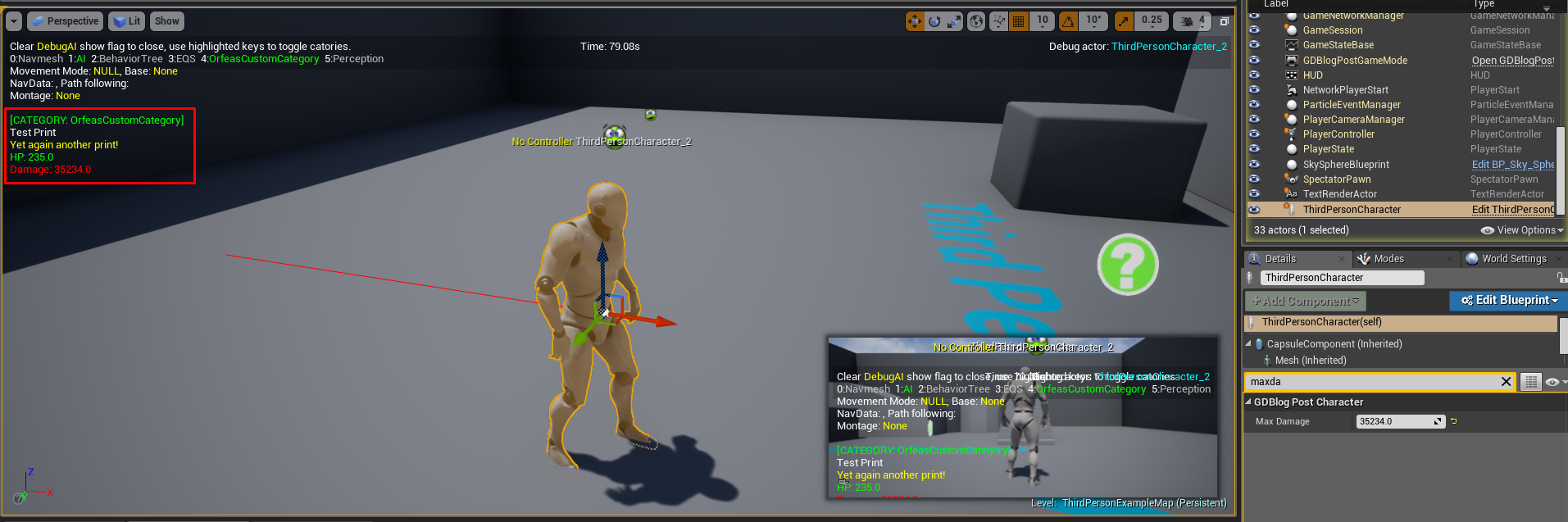
Hey guys, I'm trying to extend the Gameplay Debugger in order to create a custom category for it, and I'm not successful at the moment.
Although tutorial is for 4.15 I'm using 4.27 version (had to fix some minor issues).
It is compiling and launching the editor as usual but module seems to not start and my custom category does not show up.
If anyone knows how to make it work in 4.27 I'd really appreciate any help.
I'm following this tutorial by the way:
https://www.orfeasel.com/creating-custom-gameplay-debugger-categories/
In this post we’re going to see how to create a custom gameplay debugger category. By the time of this writing the official documentation page is outdated. This post was written in 4.15 version of the engine. Depending on the…
naive dune
naive dune
<@&608320500170620938> The link for the student to studio webinar doesn't seem t...
Is @gleaming narwhal here? 🙂
 late trench
Hey, does anyone know of patch notes for the UE5 Preview 2?
drowsy snow
naive dune
Is <@!531923466799284244> here? 🙂
I'm not sure if attempting to spam them going to do you any favour. Best way would be to contact through official support channels (which this server is not).
 elfin abyss
naive dune
<@&608320500170620938> The link for the student to studio webinar doesn't seem t...
elfin abyss
naive dune
<@&608320500170620938> The link for the student to studio webinar doesn't seem t...
Same, and I didn't get a meeting link
drowsy snow
Also I think webinar VODs come out pretty quick
icy bolt
How to make a simple vr door?
naive dune
Should've used the roles tag 😂
naive dune
drowsy snow
I'm not sure if attempting to spam them going to do you any favour. Best way wou...
Different people last time 🙂
red condor
When using world composition, is there a quick way to assign all selected actors to the levels they are nearest in the editor? Here's an simple example, I'm bringing in a ton of instances at once from blender, and they all get dumped into whichever level is currently active, in this case the persistent level. Now I need a quick way to assign them to the levels they are "in" visually. (you can see three levels in this screen). Any ideas?

 gloomy fiber
drowsy snow
naive dune
Different people last time 🙂
gloomy fiber
drowsy snow
naive dune
Different people last time 🙂
I'll time if you're looking to speedrun getting banned for pinging Epic employees.
naive dune
drowsy snow
I'll time if you're looking to speedrun getting banned for pinging Epic employee...
Which is worse, spam ping or posting memes in general? 😛
drowsy snow
naive dune
Which is worse, spam ping or posting memes in general? 😛
Posting memes in #lounge is alright
We sometimes post memes in response to something while also staying on topic.
 pallid talon
Is it possible to disable an mesh from being painted on with foliage?
quiet island
how can I fix collission height issues on a mesh?
 red condor
quiet island
how can I fix collission height issues on a mesh?
red condor
quiet island
how can I fix collission height issues on a mesh?
Hey Jaimy, I suspect that you need to enable 'complex collision' for the mesh 👍
When troubleshooting collision, always try visualising collision first - if you see any basic collision shapes that don't fit to your meshes, these are the ones with simple collision enabled.

 uncut crow
drowsy snow
It sometimes do be stuck like that.
uncut crow
drowsy snow
It sometimes do be stuck like that.
it didnt change anything ?
should i try closing it after saving ?
drowsy snow
Just try move around a tab again to different position (without releasing the mouse button) until it registers as snapping to different section, and bring it back
uncut crow
okay
oak patio
Are you currently playing the level, I get that orange border when I am
uncut crow
drowsy snow
Just try move around a tab again to different position (without releasing the mo...
it actually worked
tnxx
drowsy snow
oak patio
Are you currently playing the level, I get that orange border when I am
It's just the snap tab sometimes stuck
oak patio
Ah makes sense
uncut crow
drowsy snow
It's just the snap tab sometimes stuck
kool
red condor
Is there a way to set up a selection region/volume in the editor somehow? So I can quickly select all actors that are in that region whenever I need to?
drowsy snow
red condor
Is there a way to set up a selection region/volume in the editor somehow? So I c...
2D region, I think it's Alt + drag (if not Ctrl)
I forgot the key combination
 languid berry
Ue4 web browser, natively blocks pop ups does anybody know how to fix
red condor
drowsy snow
2D region, I think it's Alt + drag (if not Ctrl)
Ah, I don't mean click and drag box select (ctrl+alt+drag), I want to define multiple precise 'selection areas' that match up with landscapes in world comp and then be able to reselect in those areas later as needed (it'll be needed a lot as I work on my world design and add object data from blender, so I can quickly select them and then assign them to the correct level). Hope this makes sense.
red condor
red condor
When using world composition, is there a quick way to assign all selected actors...
It relates to the question I'm replying to now, I thought this could be a possible solution.
red condor
Oh, maybe this is what I need? https://blueprintue.com/blueprint/uy62bc2t/

No description provided
I've never used a blutility, but I think they are for editor use unless I'm mistaken? It's from 2018, hopefully it'll work in 4.27
 magic fiber
Does this mean that starting from UE5 Preview 2, VR plugins will be disabled by default?

Or is it saying that VR plugins being disabled by default was a bug and they fixed it?
 cedar wave
Pretty much the most important change to be honest. (They'll be disabled by default)
magic fiber
Oh thank the lord
 sly snow
you are welcome
I think I joined Epic primary to make that checkin! I hope it can stay. It had some fallout that got fixed. So its more complicated than it might look first.
 dense vortex
Guys how can I hire web3 developers here
 fiery flax
My folders in my project are empty, I can't see anything, but they contain uassets if i check in the file explorer. Why cant I see them inside unreal engine?
Help!
In the content browser
 serene birch
yeah about time \o/ opt in VR plugins!
wide wadi
does anyone know why I am seeing my directional light through the ceiling inside?
 grim ore
@fiery flaxwhere did the uasset files come from?
 lime musk

if i add the delay, the code doesnt fire off
but if i dont add the delay, the code fires off
i need the delay
how would i over come this issue
 plush plinth
#work-in-progress
 fickle prawn
I changed a material on an actor but its not updating all the actors in the scene, is there something I'm doing wrong or is this a bug?
oak patio
did you do it in the blueprint editor or in the individual actor in the viewport
@fickle prawn
 royal yacht
Is anyone using a mac for this application? I'm trying to work with xcode but the health bar and indead bar are not showing up on my base character in the game I'm making.
plush yew
looking quiet good imo, what do you guys think bout this animation
fierce tulip
#work-in-progress
 dapper orchid
is anyone aware of what might cause this kind if issue? note me and a friend have gone over it to some extent.. 1. light maps are fine 2. this exact same mesh is placed in another area of the scene and bakes fine with the lighting. anyone want to give me some thoughts on why this is happening?

 fluid dagger
dapper orchid
is anyone aware of what might cause this kind if issue? note me and a friend hav...
fluid dagger
dapper orchid
is anyone aware of what might cause this kind if issue? note me and a friend hav...
how biggest is the level? I would try to change the size of the lightmap first for look if had a change of the map when baking again
 latent sonnet
HELP PLEASE! This character disappeared from the content browser and broke the project


 fickle plank
Do you think unreal engine will be good on Mac Studio?
grim ore
yes
but there is more than one mac studio, and that question is like "will unreal engine be good on my computer"
latent sonnet
Does anyone know why uassets won't show up in the content browser?
grim ore
they are not compatible, or broken. check the output log
 fading sand
Does anyone know why UE crashes when I'm using a simple Movie Pipeline Queue Engine Subsystem script but works fine in the Car Configurator sample project? I keep getting this crash "Assertion failed: ExternalPooledTexture.IsValid() [File:D:\build++UE5\Sync\Engine\Source\Runtime\RenderCore\Private\RenderGraphBuilder.cpp] [Line: 653] Attempted to register NULL external texture."
hard crater
neon bough
<https://docs.unrealengine.com/4.27/en-US/BlueprintAPI/Texture/ExporttoDisk/> <@...
Hey, I’m having an issue with this. I’m calling the function but there’s no file being output. Is there a specific CompressionType I need to set it to or anything specific I should do? I have it set to VectorDisplacement
If it worked for you, what things did you have set up for it?
If you don’t mind sharing
royal yacht
Does anyone use a Mac for Unreal engine? I'm trying to work with xcode.
languid berry
trying to go into the ugc plugin on github but not letting me even though i gave access to my github someone help
prime obsidian
royal yacht
Is anyone using a mac for this application? I'm trying to work with xcode but th...
I don't think that has anything to do specifically with mac
wise trail
Random question any news of unreal being used for steam deck? I havnt looked into it much myself but havnt seen anything either.
royal yacht
prime obsidian
I don't think that has anything to do specifically with mac
Have you worked with Xcode before?
prime obsidian
royal yacht
Have you worked with Xcode before?
Yep I have
royal yacht
prime obsidian
Yep I have
With unreal engine?
prime obsidian
royal yacht
With unreal engine?
Yes, I have used with the latest M1 max chip.
royal yacht
prime obsidian
Yes, I have used with the latest M1 max chip.
Is it alright if I dm you screen shots of the project I am working on I’m kinda struggling with it
prime obsidian
royal yacht
Is it alright if I dm you screen shots of the project I am working on I’m kinda ...
Sure
 opaque sleet
Hello guys, I would like to ask you for tips how to do player pawn attachment to another actor, for example helicopter, server/client. Helicopter is owned and moved by server. I have an issue that when the helicopter moves and the player is in as passenger he is doing some "shaky" movement. I guess it is because of player doing some reconciliation? Also the player is attached using AttachToActor function, and he can only look around movement is disabled. Thanks.
 dark rune
How do I get advertisements to show in my unreal engine Android app/game?
What services should I use? How do I implement them in unreal engine? What should I look out for? etc
Can someone send some resources I can look at?

 fierce forge
hello, do somebody know why I see these lines when i'm moving the camera? The terrain is a procedural mesh
prime obsidian
opaque sleet
Hello guys, I would like to ask you for tips how to do player pawn attachment to...
You need to deactivate character movement component when attaching to a vehicle.
prime obsidian
dark rune
How do I get advertisements to show in my unreal engine Android app/game?
What s...
https://docs.unrealengine.com/4.27/en-US/Resources/SampleGames/UnrealMatch3/ You can also download this project from epic games launcher in the learn tab

Sample game that shows best practices for mobile game development including Paper2D, UMG, leaderboards, achievements, in-app purchases, ads, and more.
dark rune
prime obsidian
https://docs.unrealengine.com/4.27/en-US/Resources/SampleGames/UnrealMatch3/ You...
Thanks
opaque sleet
prime obsidian
You need to deactivate character movement component when attaching to a vehicle.
I tried already, but it did not help. Also the issue is not noticable when running server client locally. But on separate machines it is.
 rocky hound
Hey all,
I was following a course that dealt with grabbing objects using the physics handle. I noticed that the physics handle returns the grabbed component which is a pointer to a UPrimitiveComponent (Subclass of actor components).
According to the docs:
PrimitiveComponents are SceneComponents that contain or generate some sort of geometry, generally to be rendered or used as collision data.
But I thought that Pawn was the class that is related to the mesh stuff.
I've always thought that Components were just Behavior stuff for the pawns.
I'm a bit confused about this Actor->Pawn->UPrimitiveComponents relationship and why are we grabbing Components rather than the Actor/Pawn itself. I just can't imagine a scenario when I would want to grab part of a composite object. (unless I'm misunderstanding something)
 runic arrow
anyone knows is there a website to download an open-source, sample game files for unreal engine? thanks!
 tame marsh
runic arrow
anyone knows is there a website to download an open-source, sample game files fo...
tame marsh
runic arrow
anyone knows is there a website to download an open-source, sample game files fo...
Anythign you're looking in particular? 3D assets, textures, C++ code, Blueprints?
runic arrow
yes, particularly c++ code
tame marsh
Well the community wiki was a nice repository....
tame marsh
Sorry, it was kinda in jest. There was a community wiki but Epic took it offline
runic arrow
thanks
drowsy snow
runic arrow
anyone knows is there a website to download an open-source, sample game files fo...
The Learn tab of the launcher has some sample projects.
runic arrow
tame marsh
Sorry, it was kinda in jest. There was a community wiki but Epic took it offline
wait wut, took it offline?
runic arrow
drowsy snow
The Learn tab of the launcher has some sample projects.
thanks, i'll check it out
tame marsh
There's a new version of the community wiki at https://unrealcommunity.wiki/ but it seems lots of the older resources have been lost. Granted, lots of it was rather outdated
Welcome to the Unreal Engine Community Wiki; a community-driven resource for educational content pertaining to the Unreal game engine.
runic arrow
ooh that's the website im currently looking at
i tot this is the original community website
tame marsh
Unreal Engine Forums
After over a year in maintenance mode, the official Unreal Engine Wiki is now permanently offline. These resources now live on a new community-run Unreal Engine Community Wiki — ue4community.wiki! You will be able to find content from the official Unreal Engine Wiki at ue4community.wiki/legacy, where we’re working closely with the curators to e...
 dark rune
right
thanks ill go there now
tame marsh
runic arrow
over a year of maintenance mode
The Community Wiki aside, Epic has released a considerable amount of articles and tutorials. Github probably has a good amount of code if you're willing to trawl through it
red condor
World composition is dependent on landscapes, right? In my case many of the landscapes will be flat, so in theory they could just be planes.
I don't think ue5 has anything I need for this game tbh, planning on sticking with 4
is it that much better? Haven't looked into partition at all, but I assumed they would be conceptually similar
you're tempting me to check out ue5 xD
I have seen some rumbling about problems with world comp, but not many specifics on what they are. My tests so far are limited, but it -seems- to be working well - so far anyway..
 night oar
Hi everyone hope every one is good. Well I have a question I have a multiplayer Hud which displays the health of both players. But I cannot find a way to display real time health of both the player. I would appreciate any help.
drowsy snow
The new animation features in UE5 are the only brownie points from me, but then loses them on lowend feasibility (LPV's gone, PhysX 3's gone)
Can only hope Lumen and Chaos become fast somehow in 5.0
At the very least Lumen's capability to use lowest non-nanite mesh LOD.
GTA V has been doing that in PS3 no less.
Otherwise LPV is kind of my saving grace in UE4
 unique kraken
hey guys i need a take on something. i have a face that face has roughly 300 bones. (specific reasons)
and im worrying about performence.
most of the bones only have a few vertecies assigned.
as far as i know you can delete bones from lods, meaning i could have some specific lods 0-10 or something, removeing more and more bones.
though im still worried about performence when i literally use 300 bones on the face
anyone can voice there oppinions?
drowsy snow
unique kraken
hey guys i need a take on something. i have a face that face has roughly 300 bon...
You can always profile the frame time, but I'd say 300 bones isn't going to cause huge dent on PC/consoles.
unique kraken
hm
well for one char maybe but this is supposed to be like for all my faces
lets say, i have 10 of those faces + other stuff in the scene. i just wonder if this would just kill performence
drowsy snow
Gears 5 cutscene models probably has close numbers. Maybe MetaHumans as well
unique kraken
hm, probably. but what im doing feels a litle extensive 😛

maybe ur right and i worry to much, LOD it properly and it might work i guess
red condor
Apologies if my previous comment came across as dismissive. I know world comp is a cheap trick, but I think/hope that's all I need for this particular game 😄 Regarding caveats, I'm aware of a few - no landmass, blueprint communication is trickier, AI can have problems navigating. I think I can design around these. Are there any others I should be aware of?
Ah yeah, no multiplayer for this game thankfully. I am going to check out ue5 definitely. My process at the moment is reliant on a few tools that work with ue4 but aren't updated yet for ue5 - but I expect they will be eventually.
One thing I am hoping to do is 'fake' world comp for parts of the game, so I can load the same landscape over and over again (my player is forced to travel in a single direction - essentially an endless runner kind of deal). As I understand it, world comp is really just an easy way to tell unreal when to shift the origin and load another landscape, and which to load. So I'm hoping it shouldn't be too hard to do this manually.
red condor
Most of my game will be non-infinite, designed routes across a larger (imagined) world. World comp for these will just be a bunch of levels going in a single direction. But I was thinking for boss fights an endless effect would be cool - just so it doesn't matter how long the fight takes. (However I could maybe fake the player (spaceship) and boss forward movement for those if needed). I'll try the 'fake world comp' method today to see if it could be viable.
Ah, I'd never heard of the circle trick, that's clever...
Yeah nice! A simple 'straight line' idea just occurred to me. I could just have the level loaded twice, one in front of the other (or two identical levels if necessary for world comp). When the boss reaches a certain point along the world x, I move the player, boss and any bullets back the distance of one landscape to give a visually seamless transition. I wonder if that would mess with world comp tho, will have to test.
 faint bone
I need help.
failing to understand how list works in ue.
i want to create a player selection index, his name and his character choice saved like a list but my mind is not coming up with any solution.
i want to add multiple entries on runtime and get those choices later in gamemod.
fiery flax
Does anyone know why I can't see my hands in vr? Like it doesn't detect my controllers at all for some reason, but the headset works fine
 pine siren
I have a huge procedural planet with a DirectionalLight, a SkyAtmosphere and a SkyLight. Everything works pretty well, except for the SkyLight. Everything not directly lit by the directional light is pitch black.
I tried to move the SkyLight next to the player, and it started working. Do I have to teleport it around following the player, or are there any settings I can use to keep it at the center of the planet along with the atmosphere and light actors?

 pine coral
does anyone know why the screen gets so light whenever i start the game? its the first project i started in unreal. i tried messing around with exposure and stuff but nothing seems to work
https://drive.google.com/file/d/1kf7swR0JwsWonqJBQVSOEC0-bFASvtuB/view?usp=sharing
Google Docs
red condor
My fake 'infinite area' is working! I'm achieving this with two identical landscapes, and jumping the player (spaceship) back the distance of one landscape when they have travelled far enough. The only problem is the spring arm, which has lag enabled, resulting in the camera gradually moving back to the new location (when testing with lag disabled the transition is seamless). Is there some way I can trick the spring arm into not compensating for the updated player location? My first idea was to disable lag for a split second, but the transition is still very noticeable.
 regal oxide
Hello, I have a question. I've had to add some geometry to some of my walls to make them a little more complex. Is there a way I can see what kind of performance hit I take by doing this?
 rare frost
does anyone have any recommended video tutorials on how collision profiles/channels work? i thought i had a good understanding but a recent bug has proved me wrong!
non-video tutorials are welcome as well
cedar wave
rare frost
does anyone have any recommended video tutorials on how collision profiles/chann...
Unreal Engine
Choosing what collides is obviously very important, but it can be tricky, and it’s a problem that we have spent quite a while discussing while developing UE4. The system we have can seem a little complex at first, but it is very powerful and consistent, so I wanted to give a little background on how we arrived at it. We’ll talk about the differe...
 calm crow
Hello, do you know how to link a custom proxy or hlod (i built myself) to a group of mesh ?
 shell surge
Hey guys, anyone here using ultrawide monitor for unreal ? Like 49 inch ? What do you think, is it worth it
 dusk hemlock
Don't know what is causing these issues while rendering on IoS devices
It's not Z-fighting (It mostly faced on the sky sphere or Landscape)
maiden sundial
Huh, is there really no #chaos channel ?
grim ore
maiden sundial
Kinda felt like Chaos is too specific for that, but i that case 👍
drowsy snow
maiden sundial
Kinda felt like Chaos is too specific for that, but i that case 👍
UE5 specific merit still goes to #ue5-general
maiden sundial
drowsy snow
UE5 specific merit still goes to <#846520322642411570>
Ye, i'm just surprised that Chaos didn't got its own channel as it was also a thing pre UE5
grim ore
yeah but Physx didnt... and you know... it was the physics system in UE4
drowsy snow
maiden sundial
Ye, i'm just surprised that Chaos didn't got its own channel as it was also a th...
Except barely anyone use it in UE4
Heck, back then building from source is a must, before Epic provide separate listings in the launcher
 quick shadow
I have had this issue across multiple versions, going back at least a year (probably closer to 2). The "Find in Blueprints" functionality will kind of .. hang. It might find some results before it hangs or it might find nothing. But it never finishes properly. I need to restart the editor then I might get 1 or 2 "clean" searches before this hang starts happening again

 proven mauve
This is big brain. I'm loving it.
calm crow
calm crow
Hello, do you know how to link a custom proxy or hlod (i built myself) to a grou...
anyone know if it's possible or not custom proxy / hlod ?
red condor
calm crow
anyone know if it's possible or not custom proxy / hlod ?
yes, it's all detailed here: https://docs.unrealengine.com/4.26/en-US/WorkingWithContent/Types/StaticMeshes/HowTo/LODs/

How To Create and Use LODs.
calm crow
red condor
yes, it's all detailed here: https://docs.unrealengine.com/4.26/en-US/WorkingWit...
No it's not LOD i want
i want to have 4 mesh that transform into 1 mesh when distant
you havn't read my message
red condor
ohh
calm crow
(to precise, i don't want it to be generated with unreal, i want to import mine)
red condor
sorry about that, I saw hLOD and read LOD 😅
calm crow
np
drowsy snow
calm crow
i want to have 4 mesh that transform into 1 mesh when distant
You can, though I forgot how to do it
Hand tailored LOD definitely possible tho
remote jasper
remote jasper
welp...it did nothing...this is how is supposed to look and this is how it ends ...
Just an update on this in case someone has the same problem as me....You have to manually go to each layer and select import from file and assign a weightmap for each layer....for some reason none of the videos had this anywhere cause apparently it happens automatically but for me it didn't! I just watched some random video about world machine that showed it as he was applying textures....
Thanks everyone for their help anyway!


 calm crow
drowsy snow
Hand tailored LOD definitely possible tho
calm crow
drowsy snow
Hand tailored LOD definitely possible tho
if you have a link, would be helpfull (hlod btw, not single object)
red condor
remote jasper
Just an update on this in case someone has the same problem as me....You have to...
Nice! Glad you got it sorted, looking great 👍
remote jasper
red condor
Nice! Glad you got it sorted, looking great 👍
Thanks, looks like 💩 though, i'm using very low quality textures cause my pc is ancient and cant handle anything decent. Anyway, at least for practice its fine. I learned something! 🙂
red condor
remote jasper
Thanks, looks like 💩 though, i'm using very low quality textures cause my pc is...
nah, throw some trees and exponential height fog in there and it'll look dope 😁
fading tartan
whenever I export my blender model I get a lot of fucked up textures in unreal


export preset
 grim ore
your textures wont come over as materials into UE4, you have to set them up still
red condor
Is there an easy way to avoid stacking inputs? I.e. if I have WASD and cursor keys set up for an axis, pressing left on both at the same time doubles the input, making it far easier to avoid obstacles in my game.
grim ore
does it double the input (as in the axis is now for some reason 2/-2), or is the event for input firing twice, one for each key?
red condor
grim ore
does it double the input (as in the axis is now for some reason 2/-2), or is the...
It does double the input to 2, confirmed with a print string. Surprised me.
grim ore
yep then clamping it might be the smart idea
red condor
investigating these options now, thanks. For the second, this also applies if a controller is set up as well as keyboard in the input controls - but maybe there's a way to have peripherals take over from each other when one is used?
Yep, clamping works perfectly - not sure why I didn't think it would :) Thanks!
 cedar hare
I would love some advice for company based livelink support. I want all livelink connections to be isolated to just their computers only.
It’s mainly because unreal live links plug-in updates all feeds every second which makes it impossible to pick your local feed.
I suspect I need to narrow the unicast end point on Mayas side in order to make it more isolated. From testing I believe unreals listener is pulling everything.
If I could narrow the listener to just their computer would also be a solution.
I just need clarification on unicast end points and tunnels. As resources tell me how it works, but not this type of application.
Thanks In advance
dapper orchid
fluid dagger
how biggest is the level? I would try to change the size of the lightmap first ...
the light map has been adjusted, it bakes fine in other places in the scene, it is baking badly in one particular spot
cedar wave
<@&213101288538374145> 👆 Cross-poster
buoyant graniteBOT
:triangular_flag_on_post: Tristian#1881 received strike 1. As a result, they were muted for 10 minutes.
 night cloud
So im running into the issue of my editor getting stuck at 90% when i try and open it for one of my projects. This is the log when it gets stuck. I didnt change anything drastic and have even already went through and removed the small amount of code I did change to see if it would have any effect. Has anyone else had this kind of issue or know of any ways to get to the bottom of this issue

 wraith wasp
hi ! i am new at unreal engine , anyone can explain me - when i am trying my project - PLAY - VR preview - it got mutch better graphics, when i am Launch - game . how to earn the same graphics?
 neon schooner
Hi all! I'm having a UE issue I was hoping to get some help with as well. I'm animating a character in Maya with motion capture but hand keying facial blendshapes to export an FBX into UE. The facial blendshapes don't work however once the mocap is applied. Any ideas??
rain ingot
does anyone know how to fix the glitch where you click on something likes files or anything that is clickable and unreal engine glitches it out
https://gyazo.com/accfbb0c1547b207cc9a3f42abc55789

My MFAA is off
didn't fix it though
rain ingot
rain ingot
does anyone know how to fix the glitch where you click on something likes files ...
The video doesn't show the glitching happening for some reason, but it happens in unreal
minimzing my screen fixes it, but I want to know the root of the cause if anyone has experienced it before
drowsy snow
neon schooner
Hi all! I'm having a UE issue I was hoping to get some help with as well. I'm an...
Try isolating just the facial bones with slots
neon schooner
drowsy snow
Try isolating just the facial bones with slots
The problem originates in Maya, is there a way to do that there?
 cyan cargo
I want to use Billboards in VR but the billboards are rolling with the VR headset. Is there any way to prevent this?
 vital whale
Hey team, could use your help! I used an Example map given to start a project. I leveled the entire map, stripping it down to literally the floor, and then built up a sizeable map on top of that, over the course of a couple months. Ive been saving it, creating back-ups, and loading it up every week, with no problems. Today I load it up to get to work, and its the original example map. Not only that, all of my back-ups, become the original example map. Has anyone here had that problem before? I'm open to any and all ideas lol
it was after some update, I think it mightve been an epic games update of some sort. When I try and open up the .umap files, they also won't open, or will open with the original example map as well. No worries if you can't help, i'll just... be here 🥲
grim violet
How do I change the reference pose of a skeletal mesh inside of UE4?
I try using the Modify Pose in the retarget manager but it doesn't update the reference pose
 dusk nebula
I recently learned what the "Expose on Spawn" tick box does for a variable and it's kinda great
plush yew
vital whale
Hey team, could use your help! I used an Example map given to start a project. I...
Do you mean like the FirstPersonTemplateMap?
The one that loads when you open a new project for the first time?
Does not need to be first person tho, just that default map
Is that what you are talking about when you say example map?
 raw stone
Hi, have anyone implemented the Asset Manager for loading PAK files for mobile? I'm in need of some resources to get started with it
vital whale
@plush yew In my case, it was the free Rural Australia Template
 small pewter
Hey, I have a general question. I wanted to know what's the name of the job at Epic where I could create Fortnite Creative Devices for players to use. Like I want to focus on creating only that through blueprint (as I have only some bases on C++ but not that much) so do you think it's possible and also what's the name of this job please so I can look it on the Epic Job List Website / Linkedin offered Jobs by Epic 🙂 ?
Please ping me if any answer
plush yew
Im not sure the technical reasons, but it is definitly best to aviod using any of those preloaded example levels
They always have problems
Seems like you just ran into another reason why not to use those.
 tribal trail
I'm working on a joint project. When I double click the project, it opens just fine. When I try to open via the browser, it asks me to convert it. Any clue what's going on? (my version: 5.0.0-16682836+++UE5+Release-5.0-EarlyAccess)
 woeful wadi
hey I've got a question, I always see that multiplayer fps games have the local player's model as only having hands, but on the server it's a full character model. Are there any tutorials which explain this that someone could recommend?


 exotic root
The top right corner?
 peak cedar
hello
i am trying to spawn a particle emitter in the direction my pawn is facing but it is spawning always in one direction. does anyone know what is the proper way to fix that
 noble bridge
exotic root
The top right corner?
noble bridge
exotic root
The top right corner?
and the plus icon on the left too
drowsy snow
neon schooner
The problem originates in Maya, is there a way to do that there?
I only use Blender.
 tulip halo
@small pewter Hi, I think that there probably isn't a specific job for creating items in Fortnite. Rather, I think you'd be hired as a game designer/programmer to work on various games at Epic, most likely including Fortnite. So probably game designer or programmer is your best bet. Sorry!
small pewter
tulip halo
<@!112981085423452160> Hi, I think that there probably isn't a specific job for ...
But like they're asking about being good at C++ which is not my case, I do understand blueprint tho and I think creating devices could be done through Blueprint only, so that's why I'm asking that 😦
Also do you know if those 2 jobs you suggested above could be done in remote (as I don't live in USA) ?
exotic root
Studios tend to have specific creative processes, so they prefer people who can follow their format, so that if you got hit by a bus, someone else could pick up your work
tulip halo
Learning a programming language is also definetely good in general for being a game designer/programmer
small pewter
tulip halo
Learning a programming language is also definetely good in general for being a g...
I have c++ basics as I learned it at school last year but I saw what unreal c++ looked like and doesn't look even close what I learned at school, and I'm not confortable with it even more (as I still struggle with references and pointers)
tulip halo
Yeah, I'm just starting to learn C++ too coming from little to no programming experience. It's definetely challenging.
I have a pretty good grip on blueprints but C++ is definetely the deep end of the pool.
small pewter
Like I have some programming knowledge as I code everyday in lua, I did some java, javascript, C and C++ so I'm not a beginner at programming at all, but the C and C++ pointers and references is my biggest weakness because of the way people explained it to me
Also do you know if those 2 jobs you suggested above could be done in remote (as I don't live in USA) ?
tulip halo
I think that depends on each company's policy about working remotely. I'd check Epic's website or job application page to see if there's anything about it.
 vapid plaza
small pewter
Also do you know if those 2 jobs you suggested above could be done in remote (as...
vapid plaza
small pewter
Also do you know if those 2 jobs you suggested above could be done in remote (as...
Most likely in person, especially if you aren't some rock star dev with a million titles to their name.
small pewter
tulip halo
I think that depends on each company's policy about working remotely. I'd check ...
The thing is I checked multiple jobs at Epic and it's not mentionned either if it's in person or remote or both anywhere
vapid plaza
then I would assume it is in person
small pewter
argh 😦
tulip halo

Epic Games
Visit Epic Games Careers to see the latest jobs and employment opportunities. Join an exciting team pushing the limits in gaming and interactive entertainment.
This is a list of the avialable positions. There's a check box to show if it's remote compatible or not
exotic root
I would recommend just trying to get any job in the position you want. Your dream job will come when you have the credentials to be asked to work there, as opposed to applying
vapid plaza
jobs at epic are hard to get
small pewter
tulip halo
This is a list of the avialable positions. There's a check box to show if it's r...
The problem is the Remote checkbox show countries being remote to USA and my country isn't in any of those countries so I don't know if by "Remote" they mean you can't work from any country from home, or by remote they mean a remote country so either you have to be in person in one of their studio in one of those countries or you can work on remote but you have to be in that country anyway
tulip halo
Hm, yeah I think they mean that there are positions available in studios outside the US? Not 100% sure
exotic root
again, I wouldn't latch onto Epic. Find any job (in the field you want to be in that is) and you'll have greater success
small pewter
Also I'm seeing there's no Junior jobs, so anyone starting his carrer can't apply ?
exotic root
Make Epic the long term goal
tulip halo
I agree, I think starting out at Epic is pretty unrealistic, unfortunately. If you build up some experience working for smaller indie companies and whatnot, then you'll have a better shot.
small pewter
The thing is I really love Epic's philosophie with Fortnite and I really like this game (I don't like the BR but the creative part of it) and I would really like to work on it too to help improve it by creating awesome creative devices to help people
tulip halo
That's great! I think there are tons of game studios out there with similar passions and ideas that would be a better start. They're also easier to get jobs at, and will probably let you work remotely
small pewter
I hope so, the thing I'm really scared about is starting in the job world (as I'm still a student, almost finished) so I'm kinda scared to not be effecient enough like the way studios are waiting for someone to be
tulip halo
That's another great thing about starting small, there's less pressure to be perfect. Indie studios can be a lot more laidback than big triple-A companies like Epic, even if Epic is great
small pewter
also the problem I'm having with Epic is it's in the USA and the USA is the last country I would like to live in (because how insecure I would feel there)
tulip halo
Remember, you don't have to work at Epic. But if it's your goal, that's great. You can cross those bridges when you come to it. Small studios are the way to go. You can see how you feel about it in a few years or so, once you have the experience.
vapid plaza
also, epic is freaking hard to get jobs at
small pewter
vapid plaza
also, epic is freaking hard to get jobs at
why ?
vapid plaza
they are a prestigious studio who works on huge projects.
more people want to work there so there is more competition
basically, there are millions of people who want to be a fortnite dev like you
and you have to be better or more connected than all of them to get the job
tulip halo
Yeah, it's definetely tricky. But having a lot of experience will definetely help.
plush yew
I have a concept, curious where I'll get with it
Currently I'm thinking... how nice can you get a game with the same sort of style as the older doom-clones and daggerfall to look, by this i mean the 2d enemies and props in a lower-poly 3d world
I imagine with a combination of shaders you can get something really impressive looking
modest trench
there are like a dozen of those now
plush yew
I wonder if you can apply specular and normal maps to a billboarded asset. Like if the light would work
drowsy snow
plush yew
I wonder if you can apply specular and normal maps to a billboarded asset. Like ...
Yes. See Amid Evil
plush yew
Was that on unreal? learn something every day i suppose
drowsy snow
Yes, it's a UE4 game.
plush yew
doesnt look like amid evil uses billboarding, those look like 3d assets
drowsy snow
The weapons are billboards.
plush yew
I was referring to the enemies mostly but i dont even know if the weapons are billboarded, watching some gameplay
shell surge
is it possible to play media on a cylinder without getting stretching?
plush yew
either way a pretty game tho
oh no, i found an interview on it with unreal : O very impressive movement in that case
 young zealot
Does anybody know how i can fix a bug where my main UI pops up on every level? It pops up on my menu level and i only want it to pop up when i load the actual gameplay level. I think it might be something to do with some default UI or something (The UI only appears on the main menu once the project is already packaged)
buoyant graniteBOT
:triangular_flag_on_post: Fluffy...#5981 received strike 1. As a result, they were muted for 10 minutes.
 short hinge
Hello guys, can someone suggest me how to make cloud like this?
 fierce tulip
many ways, depends on what you need to do with it, see em from far away, get up close, etc.
short hinge
i want to make it for game environment.
fierce tulip
that still doesnt answer what you are going to do with it.
short hinge
Oh sorry .I want to them see from far away
fierce tulip
in that case just mesh planes with cloud textures/materials on them should suffice.

ArtStation
Tutorials - Simple Cloud Card set up for UE4 !, USD $10.00. A video showing how to build a variety of cloud cards off a single texture.When building skybox assets you need to be really efficient and CHEAP! This is the...
oh, that one is paid, because of course it is
short hinge
What if I want to make them to see both near and far?
short hinge
fierce tulip
in that case just mesh planes with cloud textures/materials on them should suffi...
I think I know this technique. It made with dithering AA and alpha textures right? I have tried it before.
fierce tulip
then you might want to look into volumetric clouds, should be quite some tutorials you can find for them.
modest trench
they are actually built in funnily enough
you can even place them individually too
short hinge
modest trench
you can even place them individually too
Do you mean volumetric cloud?
modest trench
yep
short hinge
Thanks for suggestions. I will try it.
kindred depot
Does anyone know why; When I export my model out of unreal engine as fbx, it turns into a lower quality version of the model?
oak patio
Rip lol
kindred depot
xD

still looks weird
idk

this is what happens on export
it ruins the mesh tangents and normals
short hinge
kindred depot
Does anyone know why; When I export my model out of unreal engine as fbx, it tur...
I'm not sure but It seems like lower quality because of mesh's vertex normals. It actually didn't reduced quality I think.
kindred depot
Where would the export settings be to fix something like this?
short hinge
I haven't tried it . I export in normal way and fix vertex normal in 3d software like Maya.
kindred depot
Yeah, that just sucks that this is processed like this.
well thanks, ill try a different workflow
short hinge
ok
kindred depot
It was the smooth feature in UE5 that messed it up in the modeling section.
 shut flax
Where do I even start game development hmm
exotic root
Are you looking to be a generalist? Or learn something specific?
shut flax
I mean What does a generalist do in game development?
I've been thinking of making a fps game for a while
but never understood game development
exotic root
Hard to get a job as a generalist unless you're indie, where you gotta do everything yourself. If you wanna work somewhere, then you need to be more tuned to a certain field.
If you're interested in the art side of things, find a blender tutorial on how to make something super simple, like a table, then texture it.
More interested in animation? There's a lot of basic models you can download to play with
Maybe you'd rather get into gameplay design? There's some fantastic books on the matter, but learn how to make a gameplay/interaction loop, then you can script it in blueprints
shut flax
I’m not really interested working for any company I want it to be like a hobby yk
exotic root
So yea, you'd be looking to be a generalist. Are you stronger with art or engineering?
autumn flame
Make little fun projects, get used to the Engine workflow
exotic root
All of them and none of them.
autumn flame
Pinned comments
exotic root
specifically the pinned comments
but don't be scared to go off course. There's little that can't be fixed with a hard uninstall and reinstall XD
 mortal canopy
hey all o/ building a vtubing app for myself in unreal 4 and could use a community
exotic root
joking aside, seriously, don't be scared to play. Too often I see people in servers asking these questions fail because they adhere to the tutorials and don't feel like they can do anything other than what the tutorial says
mortal canopy
dum artist trying to make an app: the movie
shut flax
exotic root
joking aside, seriously, don't be scared to play. Too often I see people in serv...
Yeah
mortal canopy
honestly i only got as far as i have due to aggressively poking around in the blueprint editor LOL
exotic root
^
mortal canopy
learned a lot that way
shut flax
Hopefully my pc can run UE5
mortal canopy
currently studying IK bones so i can get the arms like.. moving with my hands since i'm using a leap motion
autumn flame
Not sure how stable the current UE5 build is so be wary
mortal canopy
yeah i went for ue4 for that reason
exotic root
Be prepared for the computer to sound like a jet engine
mortal canopy
dang that bad? LOL
shut flax
lmao
autumn flame
110% CPU usage
exotic root
235% Memory usage
autumn flame
Out of video memory
exotic root
Unreal had to stop because it ran out of memory
shut flax
when ever I run ue5 my cpu usage stays at 10 to 20%
autumn flame
Unreal editor has crashed
exotic root
