#ue4-general
1 messages · Page 1149 of 1
 silk sandal
 shadow estuary
i made a spectator pawn i want to be the main pawn i attach too, it has a camera and i changed the game mode default pawn to that pawn
but instead it randomly attaches me to a character on my scene that doesnt have a camera
but somehow it has a camera
any tips
 tall crypt
is there a folder in the epic structure where I can dump assets that UE will see for projects? or do I have to use the import for everything?
 restive yarrow
Im having a similar issue
tall crypt
I imported an fbx model into UE, it consisted of a tripod set of legs and 4 telescoping sections. I imported each of the pieces into the scene and placed them within one another to make the final assembly... how can I save that "assembly" so I don't have to re-do all the pieces each time I place those components?

 dull dew
whenever I am trying to package the game, this link is popping up: https://docs.unrealengine.com/4.27/en-US/SharingAndReleasing/

Information on developing for platforms other than PC.
 rich stream
hey, I have a question. I got some unexpected behaviour on some light renderers. I have a scene with some large assets in it, and I'm rendering lightmaps to all the assets in the scene. However, it seems to render the lightmaps in 8k even though max resolution for lightmaps is set to 4k. Is there something that overrides this value?
dull dew
dull dew
whenever I am trying to package the game, this link is popping up: https://docs....
plz help
 modest trench
tall crypt
I imported an fbx model into UE, it consisted of a tripod set of legs and 4 tele...
modest trench
tall crypt
I imported an fbx model into UE, it consisted of a tripod set of legs and 4 tele...
a blueprint could do this with child static mesh components
 oak patio
You can also merge static meshes
 trail cargo
Hello! I'm currently on the final step to finish my 1st 3D game project using UE4, I'm getting this error while building lighting, it happens when the progression is on 100%, I've already searched in google for this error and didn't find any fix yet. Any help will be appreciated !
 modern sinew
How do I fix this? I'm trying to move one of my old projects to the new version and something broke
 trail cargo
modern sinew
How do I fix this? I'm trying to move one of my old projects to the new version ...
trail cargo
modern sinew
How do I fix this? I'm trying to move one of my old projects to the new version ...
Delete the Intermediate, Binaries, and the .sln files. Then right click on the .uproject file and click on generate Visual Studio project files. Open the new added .sln file and rebuild the solution. Then try and open the editor
modern sinew
Alright, thanks
modern sinew
trail cargo
Delete the Intermediate, Binaries, and the .sln files. Then right click on the ....
I see Intermediate, but no Binaries or .sln
dull dew
dull dew
whenever I am trying to package the game, this link is popping up: https://docs....
Can someone please help me?
I cant build my game
at all
trail cargo
modern sinew
I see Intermediate, but no Binaries or .sln
Ok try to delete the Intermediate file and then right-click on .uproject file and generate VS project files and then just rebuild the solution in the vs editor.
modern sinew
trail cargo
Ok try to delete the Intermediate file and then right-click on .uproject file an...
Also should this be on the new one (4.27) or old (4.21)?
trail cargo
You're moving your project to a new version right ?
I saw that's the case, do it in the new project (UE4 v4.27)
modern sinew
yea
I followed the multiplayer tutorial a while ago and if I could get that working in 4.27 rather than redoing the whole tutorial, that would be nice
trail cargo
modern sinew
I followed the multiplayer tutorial a while ago and if I could get that working ...
Good luck!
modern sinew
trail cargo
Ok try to delete the Intermediate file and then right-click on .uproject file an...
 trail cargo
modern sinew
trail cargo
modern sinew
This problem happened to me before but I can't remember what I did back then to fix it, give me a moment.
modern sinew
ok
trail cargo
modern sinew
ok
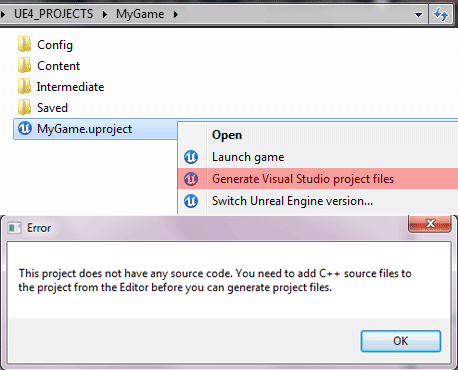
Introduction You have started a project using Blueprint support, but you now you are in the need of adding c++ support, this tutorial will help try to guide you. We assume that you already have ins…
 sullen cloud
Does i tmatter if for example blueprints who contains only furniture with no interaction have tick enabled? For Performance
modern sinew
trail cargo
https://puppet-master.net/blog/docs/unreal-engine-4/programming/how-to-add-c-sup...
I'll check it out, thanks
trail cargo
I'm not sure if that would help, I can't help you any further, good luck again.
dull dew
@trail cargo how do I export my game?
oak patio
You package the project
dull dew
dull dew
whenever I am trying to package the game, this link is popping up: https://docs....
It is giving me this link @oak patio
modern sinew
trail cargo
https://puppet-master.net/blog/docs/unreal-engine-4/programming/how-to-add-c-sup...
That told me to open it, but it won't open because of the previous error ^^"
modest trench
dull dew
I cant
googled it and it appears you are missing a requirement for building the shipping build (visual studio)
dull dew
modest trench
googled it and it appears you are missing a requirement for building the shippin...
Do I need visual studio?
I have vsc
Vs is quite large and bulky
modest trench
you need visual studio to compile unreal C++ code
use the visual studio installer and choose the game development with C++ option
and yeah it's huge but so is unreal
dull dew
modest trench
and yeah it's huge but so is unreal
No, not about the space. It gives really big performance issues
but nvm
I will do it
modest trench
I assume the docs link used to explain that years ago but is now just for other platforms
dull dew
Oh! Well thats a relief to hear cause the last time I downloaded and tried to use it, I had major crashes and my laptop would slow down using it
 dim merlin
Hi, anyone knows how to enable this setting in my decal material? :

 wheat orbit
dim merlin
Hi, anyone knows how to enable this setting in my decal material? :
wheat orbit
dim merlin
Hi, anyone knows how to enable this setting in my decal material? :
i think you need to slap in a post process volume
dim merlin
hhhm.. how would the material editor know its there, and i do have a pp volume
 urban flower
does anyone know how i can fix this error? it keeps popping up when i start

 plush yew
Is there any way to reopen unreal engine without opening epic games every time it crashes or restarting it due to visual bugs??
oak patio
You can just open a uproject
You should also have unreal engine in your start menu
The only time you really have to use the launcher is to update, or access the vault
 hybrid sky
how can i check whether two pawns are colliding ?
 robust tree
 worn cape
can i somehow convert a static mesh to geometry ?
 real heath
A static mesh is geometry? What are you trying to do?
worn cape
i do load ifc models, and have flickering issues with the meshes.
there are overlapping faces and that looks bad, so i try to erase some of them to get rid of that issue.
real heath
You can try the modelling tools plugin included in newer versions of the engine. But usually it's a bit easier to do it in an external program

This episode of Unreal Tips & Tricks is all about editing 3D models in Unreal Engine. We’ll take a deep dive into the tools at your disposal for creating and manipulating geometry in the engine, then look at the workflows for basic modeling, texturing, and optimizing meshes. Let’s get started!
For more details, please see the release notes: ht...
worn cape
The thing is, i get these models from architects without Knowledge of the Engine.
I cannot ensure their work, neither Even contact them
I will take a look in your link
those things are not modeled with blender or sth. like that. it's cad data
real heath
You can export static meshes as fbx, regardless of how it was imported
Right click it, export
But sure, I get your point, you can only work with what you are given
worn cape
yeah, i know. but i am a programmer, and do not have artist, and those objects can have a lot of a lot of objects ^^
it's real life project data for bim modelling
real heath
I used to work on a car configurator for a big car company, I know the pain of cad imports
worn cape
^^
big projects can have hundreds of thousands of objects, we already try to merge somehow for presentation, to get up the performance a bit
i know, i can do fancy stuff with geometry, so that was part of my idea in first place
This is just a simple example i do meet more often
Theres a street and someone placed a tree an i do have two faces overlapping
but i meet it about everywhere in any project, on walls or other things
 red condor
Am I doing something wrong here? I'm having an issue where after respawning my character their camera sometimes starts jerking around. It happens consistently, on the third respawn and then every 4th respawn after that. I'm destroying the last character before possessing the new one. Any ideas what could be causing this?

I don't have anything going on with the camera in blueprint, its just on a spring arm with collision disabled.
 jolly plank
anyone know how to make epic skeleton animations in blender, then import back to ue4?
 coral folio
Does anyone have here substance modeller beta install ?
 drowsy snow
jolly plank
anyone know how to make epic skeleton animations in blender, then import back to...
drowsy snow
jolly plank
anyone know how to make epic skeleton animations in blender, then import back to...
Pay hundreds of dollars for Maya and make the skeleton there.
 young stream
jolly plank
anyone know how to make epic skeleton animations in blender, then import back to...
young stream
jolly plank
anyone know how to make epic skeleton animations in blender, then import back to...
Free: Rigify + Uefy script
Paid: Autorig Pro
jolly plank
i have maya student edition
drowsy snow
young stream
Free: Rigify + Uefy script
Paid: Autorig Pro
Free at the cost of convenience.
Rigify is buggy as hell, and difficult to work with
young stream
drowsy snow
Free at the cost of convenience.
Rigify is buggy as hell, and difficult to work ...
yeah autorig is better RE the bug stuff. But actually Houdini Kinefx is KING for this kind of thing. It's such a breeze to modify animations. It treats bones as lines and joints as points, you can do anything to them.
 fossil nexus
I set up my Character Rotation rate to be 20. So it turns very smoothly.
However now i have a problem. When i use set actor rotation, it turns very abruptly.
How do i make the character turn into a direction the same way or at the same rate as it rotates with the Character Rotation 20 ?
jolly plank
ok
 austere nova
Hi! How does the Anim Starter Pack make the character follow the direction of the camera? I'm trying to set it up in my own build but I just can't work it out! :)
 sharp crest
fossil nexus
I set up my Character Rotation rate to be 20. So it turns very smoothly.
However...
sharp crest
fossil nexus
I set up my Character Rotation rate to be 20. So it turns very smoothly.
However...
you need to either interp set actor rotation on tick
or add movement input on tick
sharp crest
austere nova
Hi! How does the Anim Starter Pack make the character follow the direction of th...
check the components in the character blueprint
jolly plank
oak patio
Are you planning on releasing the project
yes i want to make game public
sharp crest
jolly plank
yes i want to make game public
put it on steam and rich overnight yes?
jolly plank
i dont think people get rich like that
sharp crest
damn, dreams shattered
austere nova
sharp crest
check the components in the character blueprint
As far as I can tell, the ASP and my version have the same items and settings. It's driving me nuts.
oak patio
jolly plank
yes i want to make game public
You canmot release projects containing assets made with autodesk educational editions
It is for learning only
 drowsy snow
dull dew
Please please help
drowsy snow
dull dew
Please please help
Are you building the engine from source code?
dull dew
Engine
how so?
I am using blueprints mostly
What? I just took the shooter game template and tried to fiddle around with settings
 shadow ravine
Anyone know how I can get a reference to a camera in the level for the location and use it in my actor BP? At the moment I'm setting the XYZ variable on tick in the level BP then trying to access the variables from my actor BP, but I can't work out how I can cast to the level BP to get those variables. Can anyone shed some light on what I might be missing?
dull dew
I have VS
oak patio
No need for level bp there
oak patio
dull dew
I have VS
So do the thing they said
dull dew
oak patio
So do the thing they said
Most of it went over my head, but I will try to follow along
 true spindle
anybody have any clue why the media player in UE5 isnt working. no matter the format of the video it comes into unreal as a black video
i can hear the audio. also weird is that the timeline scrubber isnt scrubbing along with the footage like its glitched
 vagrant atlas
If I have an array (but if there is a better way to store a lot of numbers, please tell me) of numbers (a lot of them), and I have a number input, how can I find which number in the array is closest to the input number?
fossil nexus
Im rotating my character with a timeline. It works ok. But i have a problem.
Sometimes i need to rotate it to specific directions. And i cant change the numbers inside my keys in the timeline. So how do i tell my character to turn to a specific direction if i cant really set the timeline numbers? Shouldnt that Rotation Z float output be somehow customizable?
 oak patio
You could use a normal lerp, and use the timeline for it's alpha. That way you can use two variabkes fir what you want to interpolate to
That would likely be better
Lerp from starting rotation to desired rotation, and use a timeline from 0 - 1 to control the alpha
shadow ravine
oak patio
No need for level bp there
Okay so basically I'm trying to make my characters eyes follow the camera in the level, am I not doing this the correct way as I was thinking if I can get the location of the camera I can transform the eyes rotation to look at the camera
oak patio
You still dont need the level bp for a ref to the camera
You just make an actor reference in the bp, click the eye icon, and then in the viewport you can set the reference you need
shadow ravine
oak patio
You just make an actor reference in the bp, click the eye icon, and then in the ...
So I thought I could just drag and drop the camera from the World Outliner to the Actor BP and that'd give me a ref but I didn't work
fossil nexus
oak patio
You could use a normal lerp, and use the timeline for it's alpha. That way you c...
I tried the lerp technique and it works but it gives different speed the longer the rotation is. So if i want to rotate to 40º its very slow. but if i go to 90 degrees it goes faster. What am i doing wrong? I set the Rotation Z in the timeline to be 10 of length and 0 - 1 value.
 oak patio
shadow ravine
So I thought I could just drag and drop the camera from the World Outliner to th...
oak patio
shadow ravine
So I thought I could just drag and drop the camera from the World Outliner to th...
Just do what i said and it will
 wary sail
oak patio
wary sail
oak patio
Wait hangon, why are you using a timeline for z rotation with the rinterp
Go back to that, but just have the two variables
No timeline on the rinterp
fossil nexus
oak patio
Wait hangon, why are you using a timeline for z rotation with the rinterp
i dont understand. it shouldnt be in the z?
shadow ravine
oak patio
Just do what i said and it will
Can you run me through it again, as I know I'm close but getting lost
fossil nexus
oak patio
Go back to that, but just have the two variables
go back where? im confused. sorry
oak patio
fossil nexus
go back where? im confused. sorry
rinterp translates between 2 values in a specified amount of time
So you dont need the timeline on z rotation
You can just have the final value
fossil nexus
so i should use the event tick?
oak patio
shadow ravine
Can you run me through it again, as I know I'm close but getting lost
Read my message again, make an actor object ref variable. Click the eye icon, in the viewport set it to the camera
oak patio
fossil nexus
so i should use the event tick?
Why
fossil nexus
oak patio
Why
because if i dont, it will just go straight to the target value.
oak patio
Yes
 oak patio
You need the tick time to plug into delta time
fossil nexus
so i need a timeline?
shadow ravine
oak patio
Read my message again, make an actor object ref variable. Click the eye icon, in...
I've go the variable set up I'm just struggling to get the camera to be the default reference
oak patio
You dint want it as the default reference
You want it as the reference for that instance
fossil nexus
tick time? how do i get a tick time?
shadow ravine
oak patio
You want it as the reference for that instance
How can I do that?
oak patio
Get world delta seconds iirc, if im understanding rinterp
oak patio
shadow ravine
How can I do that?
In the viewport, set the variable to the camera ref
fossil nexus
it doesnt work. i think it needs a timeline or a event tick 😦
 shadow ravine
oak patio
In the viewport, set the variable to the camera ref
shadow ravine
oak patio
In the viewport, set the variable to the camera ref
Okay are you talking the level viewport or the actor viewport, as the camera is outside of the actor
fossil nexus
i dont like event ticks
oak patio
Event ticks are fine, but look at the vid ponkkis posted
oak patio
shadow ravine
Okay are you talking the level viewport or the actor viewport, as the camera is ...
The level viewport
fossil nexus
i watched it several times before. he is using a event tick
oak patio
Then use an event tick
fossil nexus
thats i use a timeline
fossil nexus
ok i will try thank you
shadow ravine
oak patio
The level viewport
Ohhh okay awesome thank you that's helped
oak patio
No problemo
drowsy snow
fossil nexus
i dont like event ticks
It's fine to use event ticks.
Just don't abuse it.
 severe hound
how do you guys fix navigation generating on stairs? my stairs always seem to have certain spots that dont fill
drowsy snow
fossil nexus
i dont like event ticks
Also if in doubt, always, always use stat commands and the profiler.
 pastel nacelle
hi i am pretty new here
how can i configure my android sdk anyone please help me in ther
that
i am trying package my project but i cant do taht
 remote badge
dumb blender question: how do I prevent the plain axis from being part of the skeleton when I export to UE
 drowsy snow
remote badge
dumb blender question: how do I prevent the plain axis from being part of the sk...
drowsy snow
remote badge
dumb blender question: how do I prevent the plain axis from being part of the sk...
You mean the empty?
remote badge
Yea I managed to ignore it by selecting only Armature and Mesh in the export
So just to be clear I'm supposed to select "Unwrap"?

The textures don't apply properly in UE if I do that
 drowsy snow
remote badge
So just to be clear I'm supposed to select "Unwrap"?
drowsy snow
remote badge
So just to be clear I'm supposed to select "Unwrap"?
Does the model already have its own UV map prior to this?
remote badge
Yea but I'm trying to use a second channel
Also I just realized I posted in the wrong discord lol
drowsy snow
remote badge
Yea but I'm trying to use a second channel
If you're intent to make it as lightmap UV, it's pointless because skelmeshes can never be static and receive baked lighting (without influence from volumetric lightmaps)
remote badge
drowsy snow
If you're intent to make it as lightmap UV, it's pointless because skelmeshes ca...
nah I'm trying to select the second UV in the unreal material editor so that the character doesn't have an shared UVs, that way I can render target paint on the mesh
true spindle
when import a .WAV file and throw it into sequencer no matter where the play head is in reference to the song it always plays from the beginning
 worn copper
Once we merged static meshes.
Can we DeMerge it?
oak patio
You should still have the originals
worn copper
oak patio
You should still have the originals
Yes I have originals in assets
oak patio
I dont know of a way to so you might have to remake it
worn copper
oak patio
I dont know of a way to so you might have to remake it
Ohh that I know but there are 100's of meshes
oak patio
I hope for your sake there is a way
 scenic moon
Have everything on external harddrive (UE, project), Yay or Nay?
considering im gonna build and compile shaders, etc etc
 minor grove
Has anyone here set up plastic on ec2/gcloud? I’m having difficulty
 fading hull
For some reason I can't add a content pack from my vault to a project, even at the right version, it quickly shows a downloading bar, then it stops.
 light thunder
fading hull
For some reason I can't add a content pack from my vault to a project, even at t...
light thunder
fading hull
For some reason I can't add a content pack from my vault to a project, even at t...
check your space on the folder the engine is installed - sometimes the cache of your vault can get REALLY, REALLY big
fading hull
light thunder
check your space on the folder the engine is installed - sometimes the cache of ...
It's only like 8gb and I have 160 gb left
 tardy hedge
you have 10 points to so spend on economy or army, how do you balance thise decision. Besides putting 10 points into army and attacking
 timid meteor

 deep herald
hi
oak patio
scenic moon
Have everything on external harddrive (UE, project), Yay or Nay?
Nay that will take forever to open
scenic moon
that's what i thought, on my workplace are offering me to give me an external disk
because they can't install a new disk
oak patio
I mean its possible it will just take cobsiderably longer
 loud pike
Can anyone help me with the camera, is moving with the ball
 icy bolt
is intel core i5 7th gen 3.40 Ghz processor good for unreal engine 5?
 grim ore
could be, could be a U cpu then it's less good. could be a K and its more good. Could be a 730 GTX video card and its less good, could be a 3080 and its more good. so... maybe?
loud pike
@grim ore You have the best Youtube Vids for unreal ty buddy for giving us your knowledge !
plush yew
Is there any way to get ue4 manny's skeletal mesh without ripping it off an example project?
grim ore
you could grab it from this project but.. thats just getting it from another project lol. it used to be in the wiki as the source fbx https://www.unrealengine.com/marketplace/en-US/product/control-rig-mannequin
plush yew
yeah I'm just ripping it off example projects 
light thunder
what is causing this annoying AF error, when I try to click on the blueprint popup menu, you know, to do BASICALLY ANYTHING, it immediately disappears and i have to shut down the editor

 limber ridge
scenic moon
Have everything on external harddrive (UE, project), Yay or Nay?
limber ridge
scenic moon
Have everything on external harddrive (UE, project), Yay or Nay?
if it’s a ssd, then yes, but if it is a hd, then no.
 glossy sage
Quick question: why does UE have a copy of downloaded content in the Vault Cache as well as in the Content folder of the project? Why can't projects just access the vault?
limber ridge
i believe it’s just to cache it just in case it needs to be added to another project
otherwise it would have to download it again
and for large assets that can take a long time
grim ore
or, lets say you access it from the vault and then you change something because your crazy like that and now.... its permanently changed and all other projects have to use your change, or you delete something from it and now... no other projects have access to it
glossy sage
limber ridge
i believe it’s just to cache it just in case it needs to be added to another pro...
Yeah, but why cannot all projects just use the one in the cache?
glossy sage
grim ore
or, lets say you access it from the vault and then you change something because ...
Why not just save altered version individually? Like, I downloaded a 3Gb collection and maybe use/change 1 item in it. Why not just create a copy of that and link the rest to the vault?
grim ore
its not set up that way is why, it could lead to issues. you could do that manually if you wanted using symlinks
glossy sage
grim ore
its not set up that way is why, it could lead to issues. you could do that manu...
I am just a baby when it comes to UE, so virtually no knowledge of it, but I have hard time comprehending why wouldn't they set it up like that. I don't think that it would be technically that hard.
grim ore
the biggest thing being projects are self contained, if you wanted to give this project to someone else you would have to give them the project, then find anything outside of the project that it uses and give that to them as well
glossy sage
But then again, maybe they just did not have me in mind when designing it and people actually working with it prefer it this way
glossy sage
grim ore
the biggest thing being projects are self contained, if you wanted to give this ...
Yeah, kinda my point. I guess I don't know enough yet to know why it makes sense 😄
 radiant river
Hi, I'm wondering how I can use my "current speed" float to try and change the speed of my 'car' I'm moving, which uses the forward vector and current location to then change the actor's location.
I've tried a direct vector+float to the get location, to the get forward vector and to the final + statement but no luck.
Any suggestions?
Attached is the blueprint & how it currently moves which ignores speed.

 autumn flame
Forward Vector multiplied by a Float?
Would return a higher value for the + aka moves further
radiant river
So, get forward vector, vector*float, then actor location+the multiplied vector?
autumn flame
Yea
radiant river
Alright, seems to be working right. May have a reason to mess with my max speed and up it from 5 now haha. Thanks
Awesome
Another question - for my backwards movement, I do the same but take the forward vector and * by -1.0
Should I be using another way, like some kind of get backward vector, or can I somehow factor my speed code into backwards movement too?
 fierce tulip
 untold yacht
https://gyazo.com/98408ad8a7bc86356ef05905161efae7
untold yacht
https://gyazo.com/98408ad8a7bc86356ef05905161efae7
dont use RGBA output.
 misty laurel
wonder if theres a way to force UE4 games into no hmd mode ....besides the -nohmd command ...which dont work on all games since most exes have hmd checks in place aka steamvr
idea is to have native display aka flat display output
which is alot more crisper and clearer and not stretched and of course wont cost 2x rendering unlike driver4vr
and then simply vr controller support
i tried it out on ....Air Car...works there
but only cause it dont have no force hmd check
that defeats -nohmd command
grim ore
@radiant rivernope, forward and negative forward. up and negative up. right and negative right. thats about the idea of it
radiant river
grim ore
<@!296044953576931328>nope, forward and negative forward. up and negative up. ...
So, I can't apply speed to the backward vector?
grim ore
your code above is just setting the location, so if you basically add a negative it will go backwards yes
radiant river
Well, I already do that for going backward, but I want to apply my speed variable to it just like with the forward movement

 grim ore
negative your result from your forward * speed
forward * speed is how far forward, multiply by -1.0 and its now how far backwards
radiant river
Ahh, that makes sense, I'll try that
Only being using UE4 for a week or so, our school started an external course that's teaching it. Absolutely loving it so far
One thing I'd like to work out is disabling the pan around camera movement that attaches to WASD and the arrow keys, then attach a camera that's fixed to the car but will let you rotate around it with the mouse. That'd make actually driving the car a lot easier, though a lot of content online looks pretty complex for camera movement so not sure. I also used the empty template, also, so it may have some changed content.
grim ore
check out how the third person template handles the camera
radiant river
Alright, I'll take a look at that in a bit
untold yacht
@fierce tulipaye got it 🙂 found the issue and solution

hm... what could this be ??
its like something invisible there but its nothing there :/
 fierce tulip
7/10 lego car.
radiant river
If I turn physics on it doesn't move because of the wheels lol
It's all just one big cube, technically

I call it a programmer's car, because I couldn't actually care how it looks while making it work
plush yew
Are we allowed to show off games that feature bikinis here
like not sexualized content
you know swimming related, in context of someone would actually be wearing a bikini
https://i.ytimg.com/vi/Pf1nqJBJ5YU/maxresdefault.jpg like is this too much lol

im making an hd version of this game for my portfolio and im about to finish the peach model
shell be wearing the same swimsuit
red condor
mario... has... nipples :O
 modern sinew
Can someone help me get my 4.21 project working in 4.27?
tall crypt
where would I go to get started about mapping a texture image to this surface? it's a projector screen
 drowsy snow
plush yew
im making an hd version of this game for my portfolio and im about to finish the...
drowsy snow
plush yew
im making an hd version of this game for my portfolio and im about to finish the...
Good luck not getting busted by Nintendo ninjas.
plush yew
right
lmao
im not releasing it
so theyve got nothing
ill just be doing it to copy mechanics from the olympic games to learn
red condor
you can def post non-sexualised bikini pics btw 👍 the rules only forbid nsfw
plush yew
i decided to make her a tracksuit so the one from the official game doesnt trigger anyone lmao
 red condor
XDDD
fierce tulip
this is getting into #work-in-progress territory though.
red condor
I'm having an issue where my character's camera jerks when I turn after respawning. One jerk when I start turning, one when I stop. It's not on every respawn either - but it does happen consistently. Any guesses what might be causing it?

That's the respawn code
drowsy snow
red condor
I'm having an issue where my character's camera jerks when I turn after respawni...
How exactly does it jerk?
red condor
It looks like it's rotation jumps slightly left or right suddenly

that's my character turning logic
 tribal leaf
tall crypt
where would I go to get started about mapping a texture image to this surface? i...
tribal leaf
tall crypt
where would I go to get started about mapping a texture image to this surface? i...
You can drag an image file on there. It will automatically create a material for you if you do that.
red condor
Yeah, it looks like it's jumping by a few degrees in the direction of input.
drowsy snow
red condor
I don't think this is how you set up the camera motion...
red condor
no sorry, that's the character motion
the camera itself is just on a spring arm
with no collision
 red condor
My character has tank movement - is my blueprint above the correct way to implement that? They use a character component, but it doesn't seem to allow for tank-style rotation out of the box
It works perfectly until the third respawn, then again until every fourth respawn after that
excuse the low quality gif xD

jerky spawn
normal spawn (completely smooth in game)
 tall crypt
I am having an issue live linking my camera to the UE Project. I have activated the 3 plugins, restarted, matched IP's, set the render to 8bit added a virtual camera2 actor downloaded the "Unreal Remote 2" app... but I can not get the app to connect?
 rotund scroll
plush yew
i decided to make her a tracksuit so the one from the official game doesnt trigg...
rotund scroll
plush yew
i decided to make her a tracksuit so the one from the official game doesnt trigg...
this looks like appropriate swimwear
 copper portal
Anyone know why the skeleton isnt showing?

 sick patio
How would i make a NPC do this: https://www.youtube.com/watch?v=LeqolMWP-wk
Hey guys, in today's video, I'm going to be showing you how to kick open a door with animations. After opening, we can then open and close it again like normal, or keep it so it stays open.
#Ue4 #UnrealEngine4 #Ue4Tutorial
00:00 - Intro
00:20 - Overview
00:54 - Tutorial...
kick open the door
or do i go somewhere else adn ask
drowsy snow
sick patio
or do i go somewhere else adn ask
Basically you have your AI do interaction events on their own.
sick patio
drowsy snow
Basically you have your AI do interaction events on their own.
oh thanks
found a tut based on taht keyword
red condor
drowsy snow
How exactly does it jerk?
I posted a gif above, does it help at all?
sick patio
omg that's makoto... you changed your avatar
drowsy snow
sick patio
omg that's makoto... you changed your avatar
Yes
And rendered with Unreal Engine™ 4
red condor
amazing!
copper portal
But like why isntg the full manneqiuen showing
copper portal
grim ore
those are just arms is why
so when I simulate the game the whole menquin will show?
grim ore
no.. that mesh is just arms, you are using the first person template
copper portal
grim ore
no.. that mesh is just arms, you are using the first person template
oh ok
Im tryna mess around rn and find how evrything works, does unreal engine allow me to create a unique charcter animtion like doing a dance or something like that?
 civic hound
Did someone experienced issues to just start the engine? It seems to load but suddenly gets closed. Tried already the following:
- Start with admin rights
- Check firewall permissions
- Verify installation in launcher
- Uninstall/restart/reinstall
Nothing works. Any idea will be we very welcome. Thanks!
grim ore
yes, but most of the time you do that in an external program like blender or maya
copper portal
grim ore
yes, but most of the time you do that in an external program like blender or may...
So then unreal engine is really just were you put all of your external scripts and programs into one place?
drowsy snow
copper portal
So then unreal engine is really just were you put all of your external scripts a...
Unreal Engine is a game engine.
You put assets in there, add gameplay code, make levels, and ship it
copper portal
drowsy snow
Unreal Engine is a game engine.
You put assets in there, add gameplay code, make...
ok,
tall crypt
the little camera view that comes up when you click on a camera actor... is there a way to detach that and get it larger on a second or third monitor?
 shrewd barn
Where can I check the size of my map?
grim ore
@tall cryptno
tall crypt
that stinks... 😦
grim ore
I have a feeling there is a way around it, but its not easy
drowsy snow
tall crypt
the little camera view that comes up when you click on a camera actor... is ther...
Alternatively you can summon another Viewport window, pilot the camera, and put that into your secondary monitors
radiant river
I've tried to look through the 3rd person template to try copy it's camera system however I can't really work it out
 viscid jetty
Is there a channel or place I can ask Math related question. It's for UE4 but the issue is trying to solve an math problem.
I receive a value that can be 1-9, how can I turn that into 1,2,3,4,5,4,3,2,1 respectively for each number.
grim ore
you would use a collision event more than likely
set up collision of some sort, one of them or both can check for an overlap or hit on that collision item, an then you do whatever
 jolly rampart
i have an enemy and it currently shoots directly forward but i want the bullets to go to the player when it first spawns in, any thoughts?

(i know im a great artist, you dont have to tell me)
heres a video
tall crypt
question, when I place a camera and set it's sensor to Super 35 with a 16X9 aspect ration and then look thru it, why is it at 4X3?
Also, is there a way in Unreal to place, move, scale, etc according to "real world feet and inches"?
light thunder
tall crypt
Also, is there a way in Unreal to place, move, scale, etc according to "real wor...
check editor or project settings - an unreal "unit" is a centimeter, so if you have to you can just convert it
 covert ivy
Can we reproduce the shader of this character with UE ? https://www.artstation.com/artwork/5XW3zJ

ArtStation
Concept by qingshan CHEN
https://chenqingshan.artstation.com/
I made this model only for practice.
2020/07/06
The model is made with Maya and Substance Painter, from what I read
grim ore
probably? DBZ Fighters was in UE4 and it's nothing like the default shaders
covert ivy
DB Fighter Z is 3D imitating 2D but this one looks more 3D but with handpainted textures (isn't it ? 🤔) which makes something a bit 2D. It's different from DBFZ. But if you mean that UE can do things as original than DBFZ, can have shaders very specifics, so yeah, it's really cool ! 😄
( sorry for my weird english ^^' )
grim ore
yes that is what I mean, the shaders are very customizable
tall crypt
@light thunder thanks, so when I add a basic "cube" what size is that cube? in other words, how many cm's is it?
grim ore
what size does it say it is? double click on it to open it up. If its in the world click on it, in the details panel find the static mesh, and double click on that
you can also mouse over the mesh in the browser and it will tell you the size
covert ivy
@grim ore Yay ! 😃 And you can confirm that it's handpainted textures and that just to find some generic tuts on handpainted textures would be a good start to approach this style ?
tall crypt
@grim ore I only see where it says scale, rotation and location, I don't see anything that says what size it is...? but I'm new to this program
grim ore
yeah it just looks like a simple hand painted texture on the model.
@tall cryptscroll down in that details panel till you find the static mesh, double click on the mesh to open it's editor
in the editor when you open it, it says the size is 100x100x100
 tall crypt
@grim ore okay I found this... but how can I see this "number(s) in the regular project world outliner panel instead of having to open every part?
 grim ore
you dont, you can find the item in the browser and it will show it as well

when it is in the world you can see it's scale, the items size is not in the properties for the item when it's in the world
generally you use items you know the size of and go from there
tall crypt
I guess UE doesn't assume users want that data at a glance... it is a standard thing in modeling programs
grim ore
yep because you are not modeling in UE
you would level design, or dress a set. If you did model then it would show it, if you used the modeling tools for example
covert ivy
Actually, now I'm just thinking... The big part to reproduce this shader will be the painting of the texture (in blender, Maya or Substance Painter, for example). Right ? If I manage to reproduce this exact same style in my modeling app, so theorically, I can just bake the texture and it will be ok in UE. Right ? Or should I tweek some nodes shaders in UE too ?
grim ore
the first part would be yes, painting. the 2nd would be matching the environment to your program, like substance. substance does have exports for UE4 so it would make it easier
things like lighting, shadows, etc would make it look different in the viewport in UE compared to say substance
tall crypt
I was just in a live meeting where we were doing that exact thing and they kept asking me to move things around and raise and lower them by exact dimensions... but of course that was very difficult, so I had to scale things by a 6ft metahuman
grim ore
well moving, rotating, and such is in world units (1cm per unit) so that would be fine. If you needed to raise something 6cm you add 6 to its Z
if you want to make something modular easily then doing it in increments of 10 or 100 would let you know how much to scale it to get a relative result
tall crypt
I suppose I can just do the math for each movement on the locations x,y,z... but that just seems silly when I should be able to click "w" and as I move an object it tells me how far its going? on the tool
grim ore
100 scales times 2 is 200
you can see how far its going when its selected
just watch the details panel
covert ivy
lightning is different in UE so yeah, that's totally make sense... I see... I will start with the handpainting. Thanks for the clarification sir ! @grim ore
tall crypt
so everything is in cm... I changed my project settings to ft /in... but it still doesn't move by ft and inches... it just looks siilly to have to convert every little thing, when every other program just does what you tell it
 bronze saddle
 grim ore
shrug there has to be one set of units for physics and such, CM is just what was chosen as its a more universal standard of measurement
@bronze saddlewhat are the values in that enumeration?
tall crypt
okay, next question, when I buy assets from the marketplace, and download them, where does UE put the model files... I have to modify a few of them
grim ore
it doesnt?
well it doesnt have to, they dont have to include the source assets. each asset should say that and where if it has it
there are ways of getting assets out of the engine, such as in jpg or fbx, but there is no guarantee it would do what you want or could get it back in
tall crypt
@grim ore okay, I see now where and what you are talking about... thanks for the help, I just have to get use to this program
when I hold down "Alt" and the scroll wheel to pan... the movement are backwards from what I'm use to... is there a way to flip that in UE?
grim ore
none for the scroll wheel I can find, just for the alt-right mouse dolly. All of those settings are in the editor preferences, in the viewport section or you can search for invert
 hollow girder
I am a noob when it comes to this but I have two related questions. I was watching a video and following along but his timeline bars are only the length of the FX and mine go on forever. Also one of my effects only goes off at 0 and 5 seconds and I can't figure out why.
 grim ore
the green and red lines define the length
 chilly geyser
Would it be possible to spawn an bp actor along a spline and make it follow spline like a road?? A bp actor not just a mesh
hollow girder
grim ore
the green and red lines define the length
That wasn't quite what I meant but I suppose it does fix my problem. Thanks
grim ore
you can resize the green bars if that is what you want as well
 stuck night
I have a question about lighting, can anyone help me?
Basically Im trying to build my lighting right now but as soon as it's done, it's like the skylight just disables and it gets really dark (I am doing an interior)
 turbid osprey
Hello, I have a quick question, so I’m building a game that has some dragon boss battles, I would like to know how people go about making a boss. My dragon needs the basic stuff such as laying down animation. Walking, flying and transitions. But I also would like some attack animations as well. I have all the animations but I’m unsure the best and most efficient way to put it all together. If anyone has any links/ideas for me that would be greatly appreciated!
light thunder
turbid osprey
Hello, I have a quick question, so I’m building a game that has some dragon boss...
If you go to the character blueprint that has the animation blueprint of the dragon on it, you can make events on it and those events use "get animation instance" - from there you can call events on the animation blueprint itself, like changing into a different state, like attacking)
but I'd really search youtube for this one
animation blueprints can be tricky, like, uh, everything else in unreal
 dapper oak
does anyone here have experience with creating and setting values on a physics constraint in c++? I'm having issues setting the constraint components and can't find any examples online

 hoary seal
Is there a node for "play animation forward if select return value is true, else play in reverse"?
I can't seem to find a link from my Select output to Play Animation Forward
 dusk nebula
The held weapons/items are part of the meshes in the Paragon assets, right? What's it take to get the meshes without those items?
real heath
 karmic ermine
can i delete this folder?
karmic ermine
can i delete this folder?
Yes but it will be very slow to load next time, and it will recreate again
tall crypt
when you are using UE, what are the temps on your graphics cards? before opening UE my GTX Titan X cards are at 35ºC, as soon as my project opens within 5 seconds it's up to 72ºC
 plush yew
is there a way to have morph targets displayed in the viewport without a timeline or playing with my blueprint?
like I just wanna be able to tick on and off some morph targets with my skeletal mesh in the editor window is that possible
dusk nebula
hoary seal
is it because there's no parameter typed in the text boxes? Also, what's that selector supposed to accomplish when you can plug the bool straight in or use a NOT node
dusk nebula
dusk nebula
is it because there's no parameter typed in the text boxes? Also, what's that se...
my bad, those might be tickers next to the true/false selections. Both would output false because neither is ticked
hoary seal
dusk nebula
is it because there's no parameter typed in the text boxes? Also, what's that se...
I got it working but since my check for "is in range" was in the UI's tick, it just kept looping.
so now im trying to move it to the event for moving into/out of range and having issues referencing my widget
dusk nebula
hoary seal
I got it working but since my check for "is in range" was in the UI's tick, it j...
not sure if you know this already, but yours would need to look like what I have here, despite it being redundant
 hoary seal
I basically need to get a player's instance of a widget..without having a direct ref to the widget..?
yeah I ended up doing that.
but
now I gotta get the widget inside of my blueprint event graph
dusk nebula
at what point do you create the widget?
because all you do is you promote the return value of your "Create Widget" node and then you can call that promoted variable later


 dark depot
you have a reference right there then
dusk nebula
yeah, just call the variable that you promoted and that's your object reference
dark depot
you can send any data you want on contruct if you expose it as well or get owner
hoary seal
so I need to get the player object, then get that player's variable?
dusk nebula
yes
if you have to, get a reference to the player as an actor, and then cast that to the player
dark depot
i mean if you have a reference there isnt a need to cast
dusk nebula
the logic he needs is in his character, though, and most of the time you just get actor references
dark depot
if your going to cast you might as well get the reference it is anyway
hoary seal
Which node do I want for this..?
dusk nebula
hoary seal
Which node do I want for this..?
depends on how it interacts with the character
 dusk nebula
you need to message your UI or something to update?
hoary seal
Play a fade in/out animation
depending on distance from interactable
Basically just stuck at "get this players widget of this type"
dusk nebula
so you can use the return value from the cast to get that promoted widget reference from before
hoary seal
Cast To FirstPersonCharacter?
dark depot
really waht is it your trying to do you can bind events in your widget to fire in your character if you need something in the character then the widget has no hard ref to the player at all and would be cleaner if you need a ref to the player in your widget make a whatever your character is a variable and then expose on spawn and set it. based on what your saying though you dont really need that just pull from the widget variable to whatever distance variable in the widget and set it
dusk nebula
hoary seal
Cast To FirstPersonCharacter?
if that's the blueprint where the variable is stored, yes
hoary seal
Yes but what im trying to get at is.. getting said variable from the first person character object.
tall crypt
does UE4.27 allow me to scale an object and then zero out its scale to "1" with the previous scale change?
dusk nebula
hoary seal
Yes but what im trying to get at is.. getting said variable from the first perso...
ignore the class and variable names being different from yours, but this is what you do
 dusk nebula
ignore the class and variable names being different from yours, but this is what...
dusk nebula
dusk nebula
ignore the class and variable names being different from yours, but this is what...
cast to the class of the BP that contains that variable and you simply drag off the return value and the variable is available
dark depot
tall crypt
does UE4.27 allow me to scale an object and then zero out its scale to "1" with ...
if you enable the editor modeling tools plugin you can set scale/transform and it will do that for you
hoary seal
its showing my available options now
dusk nebula
if you have the "context sensitive" ticker on, you can only call variables that are available to your given class
 hoary seal
I had it off and it still wasn't showing because my Interact UI variable on the player didnt have the eye thing
 uneven charm
Anyway to have a constant dpi ?
dusk nebula
hoary seal
I had it off and it still wasn't showing because my Interact UI variable on the ...
that does expose it but it's not really what you're meant to do
if you click and drag the "as FirstPersonCharacter" pin from your cast node, you'll be able to find that variable anyway
so I'll bet that when you call that variable from a blueprint that it wasn't created in, it needs a reference to an object of the BP's type
 tall crypt
@dark depot thanks, installed and watching a tutorial now..!
 dusk nebula
yeah, that's what you want to do, pretty much
hoary seal
With the new preview version it shows this EVERY time I click play its super annoying
 dusk nebula
hoary seal
dusk nebula
hoary seal
it gets easier to conceptualize once you have a solid understanding of how object references and inheritance work, tbh
dusk nebula
hoary seal
https://i.gyazo.com/3ed1a05e78131eb58b79d149326af878.mp4
any more questions? I'm bored lol
dusk nebula
what's the goal here?
hoary seal
Wilderness survival horror game
dusk nebula
I mean what concept are you trying to implement lol
hoary seal
Oh 
that parts good for now
making gif 1s.
gotta make the system work for things other than just windows though like doors, rocks, logs etc
I'd like the UI text to change based on what you're interacting with.
which..I think I can do cause I made the text a variable as well as the image
dusk nebula
like, it would say the name of the thing, or it would be "open" for a door, and "turn over" for a rock?
hoary seal
right
dusk nebula
do you know how parent and child BPs work?
hoary seal
I can only assume at this point tbh
like..1s

For this instance I'd assume something like this, set the text before showing it
dusk nebula
you could
there's kind of an easier way
just to show you, I made an actor to use as sort of the "base" for all enemies, specifically. It does everything an enemy character would need to do, like run a behavior tree and carry some variables that all of its children will use. It's just a normal character, basically, but I'm using what will be the shared properties of all future children to save some work

 unreal folio
hey does anyone know of some good blueprinting classes i could take or watch?
dusk nebula
dusk nebula
just to show you, I made an actor to use as sort of the "base" for all enemies, ...
and then I create a child of that blueprint, and it has all of the properties of the parent, plus whatever else I put into that specific character's BP
 hoary seal
unreal folio
hey does anyone know of some good blueprinting classes i could take or watch?
hoary seal
unreal folio
hey does anyone know of some good blueprinting classes i could take or watch?
learn.unrealengine.com has a blueprint thing
dusk nebula
dusk nebula
and then I create a child of that blueprint, and it has all of the properties of...
basically my point is that you should use that to create sort of a parent for all interactible objects, and you'll mostly just need to change their meshes and some variables afterwards
hoary seal
Hmmmmm
that's interesting.
only issue I really see is like
I already have a BP for my windows and doors which have trigger events and such
dusk nebula
you can reparent something relatively easily
class settings -> parent class
and you just change the dropdown
you probably want to make sure you've set up the parent class beforehand, though
hoary seal
How "fleshed out" do parent classes need to be?
dusk nebula
and you can basically just cut and paste some of what you've done already
dusk nebula
hoary seal
How "fleshed out" do parent classes need to be?
not sure what you mean, but you can do as much as you want in the parent
hoary seal
Like
dusk nebula
so if the parent has a mesh component, the child will also have a mesh component, but you can change what mesh it actually uses
hoary seal
How much stuff should be defined in the parent vs the child?
I guess redundant stuff in the parent
dusk nebula
that's kind of up to you
dusk nebula
so you should put a string variable called something like "hover text"
and then you can assign that manually in each child
rather than creating and then assigning that variable for every object that should have it
hoary seal
If I made it in the parent it makes it in the children too?
dusk nebula
yes
dusk nebula
no, just a component
one moment
so, don't make it a character because it's not a biped that moves, but it would look something like this as an actor
 hoary seal
oooh..
dusk nebula
this is what you change in the child blueprint
 hoary seal
I made an "Interactable" BP
dusk nebula
yeah, so just put any property that you would want all children to share in there
like, each child should have a mesh, and some of the functionality and variables we talked about, even if the values will be slightly different
and then something to put in the child when the time comes would be what it actually does when interacted with, like a door opening or a rock flipping over
hoary seal
So far I have a mesh, prompt text and prompt text color..
dusk nebula
not a bad start
dusk nebula
the cool thing is that you can change the parent afterwards and it will update the children as well
hoary seal
sweet
dusk nebula
but yeah make sure there's a mesh component so that each child will use that
dusk nebula
no, just open the viewport so you can see them
bad handwriting and graphic, but this is the basic idea
 hoary seal
nah its good and helpful ty
I might just be dumb but when I click Class Settings in my BP..nothing happens
dusk nebula
it opens a different tab on the right, by default
toggle between class settings and class defaults and you'll notice it
 dusk nebula
click your view tab on the top to find it maybe
I use UE4 still so idk if it's there by default or if you closed it at some point
 hoary seal
Hmmmmm...
dusk nebula
sorry, it's the window tab
 dusk nebula
so yeah you usually create children from that BP but in this case you could also just change the parent of the ones you have currently
hoary seal
I changed the parent class to my interactable one and it didn't add the variables
 hoary seal
thereeee it is
dusk nebula
you'll notice that it shows a bunch of different stuff, like the whole Pawn tab. that's because the Character is actually a subclass of Pawn
if you don't know, casting is sort of the process used to attempt to refine a reference to a parent object to one of its children
 dusk nebula
I say don't use a node
just make the variable and then in each child you can edit the default value differently
then you just "Get" it
hoary seal
Yeah but where would I even plug the "get"
I'm just toggling an animation on the widget in here
dusk nebula
in your widget that shows the text
you can make the text box in that widget into a local variable and place a custom event in your widget's event graph
 dusk nebula
yeah so you would remove that text variable getter and probably use an event for when the player hovers over something
so similar to what you're doing, but instead of being called once when the widget is created, it would be called after the player collides with the object that should have the text
if that makes sense
so just make a custom event there with a text parameter and we can go from there
slightly different application, but this is what's called inside that widget whenever the player's health changes and the UI should display it
 hoary seal
Well the widget is created on the player
 dusk nebula
that's fine
you're already casting to the player when they overlap with the object, so you would use that reference to call your widget reference variable
 primal tendon
So I asked this in ue5 general and didn't get any answer yet...
when adding asset from library should I import it as Version 4.27 or 5.0 EA into UE5 Preview?
hoary seal
I should just need to change this "Int Text" right?
 dusk nebula
not only that, no
that red event node that it's plugged into will only fire once
you need it to fire each time the player collides with something that should display the text
so you make a custom event
dusk nebula
I'm saying that you should use a CE so that you can call it whenever you want
 dusk nebula
nope
hoary seal
ok....created that..
dusk nebula
so when that event is called, you're gonna need to know what the text should be set to
click on the event and there's a tab called "inputs"
just create one of a type matching your variable you're inputting
again, different application but same concept
 dusk nebula
yes
the event should be in your widget
type your custom event name in any Blueprint and it will give you the option to create a blue node for it

fyi here's another trick to create an input or output on a custom event
 hoary seal
got that part
dusk nebula
so now you need a reference to a widget object in the "Target" input
because if you have multiple of something, it wouldn't know which one to trigger this for
the highlighted text kind of gives you a hint by telling you what type of reference the target pin needs to receive

 dusk nebula
way to go
hoary seal
hmmm
dusk nebula
did you put the event call before the widget becomes visible?
hoary seal
Gonna be an issue though of when the text changes, it's no longer positioned correctly
 dusk nebula
hoary seal
Gonna be an issue though of when the text changes, it's no longer positioned cor...
dusk nebula
hoary seal
Gonna be an issue though of when the text changes, it's no longer positioned cor...
that's something you can settle in your widget editor
 dusk nebula
you can justify the text in different ways, just like in a word processor
hoary seal
but once the text is changed it goes all weird
dusk nebula
if I were to guess, I'd say that you should make sure it's left justified and then set your text box to "size to content" in the slot dropdown (top of the details panel)
I'm weak on UI formatting but I think that may work
another option, actually, is to wrap both the button tooltip and the text with a horizontal box, so they won't overlap each other


 dusk nebula
hoary seal
gotta fix the stretch still somehow
dusk nebula
hoary seal
gotta fix the stretch still somehow
 tall crypt
I installed the model editor plugin and I set my system units to inches /ft... but the systems is till set to cm when creating assets with the model editor? do I need to shut down UE after changing the units to get it to take/stick?
hoary seal
yeah, got that
Just gotta make the horizontal box smaller now somehow
Also looks like the box is only around the image not the text?
 dusk nebula
I think it shouldn't be set to size to the content
hoary seal
didnt change anything
tall crypt
example, I need to create a box that is 4ft X 8 ft X 4ft, when I create that box using the cm conversion and then measure the box it's longer, wider and taller...?
dusk nebula
hoary seal
didnt change anything
is the box smaller than what's inside it?
hoary seal
Somehow the scale box is larger than its parent.
Scale box is the large one, horizontal box is the smaller one
 dusk nebula
I'm not 100% on some of this UI stuff, so I'd have to look into how to scale it
dusk nebula
hoary seal
Scale box is the large one, horizontal box is the smaller one
if you can get it to kinda work for now, I'd say do it. somebody in #umg can surely help with the ui problems
in all honesty, weird ui scaling isn't super critical compared to making things function in general
tall crypt
it is incredibly stupid that UE won't let you type a unit identifier after a number.... you know, like every other program does, lol I mean I understand its default is cm, but why on earth would they not let you simply type in "48in" and let the software preform the conversion?
hoary seal
Well its my bedtime now @dusk nebula I appreciate the help a lot in making my stuff work more efficiently, I learned a lot ❤️
dusk nebula
hoary seal
Well its my bedtime now <@!306937398200369153> I appreciate the help a lot in ma...
yeah np
tall crypt
okay, I conducted an experiment, I created a box with UE units (cm) to be 48" cubed... that's 121.92cm³... I created the asset, then edited the asset to see the size and UE shows it as 121cm³... it doesn't seem like a lot, but it's 3/8" difference and UE rounded "down" from 0.92 instead of up...???? 3/8" offset over 40 ft for our design is a difference of 3.75" that's a lot!
dusk nebula
tall crypt
okay, I conducted an experiment, I created a box with UE units (cm) to be 48" cu...
are you sure it's not truncating or something? that would make it seem like it always rounds down
tall crypt
try it on your end and see if you get the same result... it shouldn't "round" at all... if I want something that is 121.92 cm it should be able to give that to me?
dusk nebula
I'm honestly not even sure what you're doing with this, I was just thinking that it may be losing the fractional digits through some type of conversion, like float to int would do through truncation
tall crypt
well we are using UE to layout stage and get angles for lights and cameras... but a lot of this has to be moved at specific distances and heights and we are struggling to get UE to do simple stiff that modeling programs and or scene layout programs can do with no problem... which is move things at specific distances in whatever units of measurement you desire. it's pretty frustrating
dusk nebula
I've done nothing using real-world modeling, i.e. just using arbitrary values in the default unit, but it seems like you would want to figure out if the problem is on the output side or the input side, meaning your modeling software may be rounding the value rather than UE doing it. It's probably best to determine which it is before continuing
tall crypt
I created the test "cube" in UE, using the model editor, using cm's... and UE sized it down, everything was done in UE? it's not very hard to multiple 48*2.54=121.92
dusk nebula
oh, well there may be a setting for it somewhere
I haven't really done much with this but it sounds like the engine is changing it to what is probably meant to be a rounded value
seems like what you're using is new and also exclusive to UE5, so I'd expect a base level of jank just from that
why use UE over another program to create models?
tall crypt
I'm on UE4.27
plush yew
does unreal engine compress normal maps by default or do something weird to them

they look wayy different in game
lighting is different but its not just that the normals have seams they are also lower res
i set the max res to 4k
and turned off mipmaps
no idea what else could cause this
 amber shuttle
shape keys
tall crypt
Unreal doesn't seem, although I could be wrong, to have a way of dealing with precision dimensions or units outside of whole number metric units https://www.youtube.com/watch?v=Z3TiGh9YDJ8

Unreal engine does not seem to have a precision way of moving or sizing objects to anything outside of centimeters and fractional values of numbers seem to be rounded down?
 spice ruin
Unreal can definitely do sub-unit values
drowsy snow
tall crypt
Unreal doesn't seem, although I could be wrong, to have a way of dealing with pr...
What is this supposed to explain? You're not showing the issue in Unreal Editor
spice ruin
It is true that Unreal's property boxes are rather lacking in features, though.
shadow estuary
begin play in my game mode isnt firing, i have it set as default game mode
any tips
drowsy snow
tall crypt
Unreal doesn't seem, although I could be wrong, to have a way of dealing with pr...
However, floating point imprecision is a thing, and the more you go away from the center, the less precise it become.
shadow estuary
game state sorry
kk ill check
its set in both

weird
NONE
of my begin plays
are running
on any of my pawns or controllers or anything
its all BP
i was thinking the same thing tho
do i need to call super in BP?
I added the parent call with no dice
hmm
drowsy snow
shadow estuary
begin play in my game mode isnt firing, i have it set as default game mode
I don't think Game Mode executes begin play
But then I never do any scripting in Game Mode
shadow estuary
weird because none of my begin plays are runnin
lol
i got it, i had to inherit from game mode base and game state base
not just game mode or game state
drowsy snow
That explains.
shadow estuary
im making a turn based rts multiplayer
are arrays in BP dynamic, or do i need to set size before i add?
i see
im also trying to run the game as multiplayer, so i loop through player array
but player array is always size 1
 valid kelp
tall crypt
Unreal doesn't seem, although I could be wrong, to have a way of dealing with pr...
valid kelp
tall crypt
Unreal doesn't seem, although I could be wrong, to have a way of dealing with pr...
to increment a value by a specific amount you have to add a "+" or "-" between the current value and the number you want to increment by, to disable grid snapping there is an icon on the upper right side of the viewport you can click, if you want to create a cube or any other shape with specific dimensions you can do it in modeling mode

 tall crypt
it did not create the size i typed in: https://www.youtube.com/watch?v=-on4-hqRLeg

I created a cube at one size, but UE made it at a different size?
sick patio
what this mean? how i fix?
 tall crypt
So i guess im the only one who uses Unreal Engine who finds it weird that you cant trust the dimensions? I mean if I create a cylinder in MODO or Blender that is 36.5625” in length, and then bring that into my CAD software, my CAD software dimensions it at 36.5625”… i understand what your saying, but being 3/8” off on a dimension of 48” is not “getting close”… its just wrong. A dimension saying 48.00134 is “close”
spice ruin
It's possible that the model editor just truncates the number instead of rounding it and it is actually 121.92
shadow estuary
is there a reason why when i start the game as a listen server with 4 clients, playerArray is only 1
thanks
spice ruin
I mean, you could also work in cm and just pretend they're inches.
radiant river
Anybody willing to try shoot me the general concept of attaching a camera to a BP but only allowing panning around? And disabling the template's built in movement?
spice ruin
(this isn't ideal, I know)
tall crypt
@spice ruin you could be right, but obviously there is no way to know that... my CAD software allows me to use whatever units I want to use, I just type the indicator after the number... there's nothing weird about an inch, an inch is the same for cm, meters and mm... it's just a length, how it's divided is different, but it's still broken up in even divisions, just like cm and mm. The part that confuses me is why UE rounded down to the whole number instead of up to the whole number? generally if it's 0-.49 it rounds down and .50 and up rounds up.... the little dimension drag showed the 122cm? (watch the above video)
spice ruin
Yeah, I watched it. The first half at least.
radiant river
Err, where do I find that code for the template? And do I just copy that to my BP then?
tall crypt
@spice ruin I don't mind the cm... actually I don't care if UE would let me type "in" after the dimension... but it's forcing me to stop, and either use google or create a spreadsheet like I did to convert units... (kind of low rent)
spice ruin
Yeah. I'm working with some people who'd love that too, but sadly, it's just not a thing in UE.
tall crypt
you can divide an inch by "2" and then that number can divided by "2" and so can that number...
radiant river
I kind of want to position the camera around the car so you can properly pan around it, like a chase cam (think it's the proper term)
Think GTA camera for cars
 spice ruin
Use a spring arm, @radiant river ?
tall crypt
if you watched the above video, you'll see that I did enter cm's and it gave me the wrong number, lol
 rugged oxide
spice ruin
rugged oxide
spice ruin
@plush yew his complaint is that the number he had was different to the one in the model editor (121.92 vs 121)
The model editor display the top left said 121x121x121
I suggested it's just displaying the truncated value
radiant river
spice ruin
Use a spring arm, <@!296044953576931328> ?
...whats that?
spice ruin
I don't think he really cares about that part, lorash 🙂
valid kelp
tall crypt
it did not create the size i typed in: https://www.youtube.com/watch?v=-on4-hqRL...
the cube you created is still your desired size, the static mesh viewport is just flooring it to a whole number, if u wanted to you could export the cube to another program and measure it to make sure. When moving an object you have to put + or - then the number u want, i put an example pic
 radiant river
I tried to look into the 3rd person example and kind of got confused about it
tall crypt
can I export geo created in UE?
valid kelp
yeah, right click the mesh in the content browser -> asset actions -> export
tall crypt
alright, I'll check it
can anyone answer if UE5 allows for alternative dimensions so i don't have to convert every number each time I want to make or move something?
drowsy snow
radiant river
I kind of want to position the camera around the car so you can properly pan aro...
Spring arm + camera compartment
sick patio
what does this mean?
 radiant river
Yeah I just have no idea what either of those are
Components I add to the viewport?
radiant river
I prefer text tutorials over videos. And worst case I'm doing a UE course at school so I'll just ask my instructor on Monday
Anyway, they go into the blueprint's viewport?
drowsy snow
sick patio
what does this mean?
You don't have the input axis with that name in your settings
drowsy snow
radiant river
Anyway, they go into the blueprint's viewport?
Yes
Or rather BP's component list really
radiant river
Yep, added them
So now I need to get rid of the scene's camera I guess? So it'll use the blueprint's one
sick patio
can i just use W for acceleration and S for handbrake? I don't know how a truck works. I literally haven't driven a car in 20 years.
drowsy snow
sick patio
can i just use W for acceleration and S for handbrake? I don't know how a truck ...
You can, at the expense of user input mapping and gamepad support
sick patio
expense?
plush yew
so, honest opinion, subsurface vs subsurface profile, which is better and why?
drowsy snow
plush yew
so, honest opinion, subsurface vs subsurface profile, which is better and why?
Depends on what you want to use it for.
Subsurface profile is best for skins.
plush yew
wouldnt it be opposite for skins?
radiant river
Camera is at the back and set the spring arm in the middle of the car

 drowsy snow
plush yew
so, honest opinion, subsurface vs subsurface profile, which is better and why?
drowsy snow
plush yew
so, honest opinion, subsurface vs subsurface profile, which is better and why?
Regular Subsurface could be useful for stuff like clothes, or any partially transparent materials
plush yew
i dont see how subsurface profile has any advantage tbh
drowsy snow
plush yew
wouldnt it be opposite for skins?
For human skins, SSP is the better one.
plush yew
im sure it does you seem to know more about it, could you tell me a reason subsurface profile is better
drowsy snow
plush yew
im sure it does you seem to know more about it, could you tell me a reason subsu...
Consider that bare human skin always have red fleshy tone within the shadows, even if it's from a black / dark skinned person. Subsurface profile is good on achieving that.
plush yew
im sure it is but why
like what can it not do subsurface within the shader model can lol
drowsy snow
Just set the colour and you're done.
drowsy snow
Never used the former so dunno
 plush yew
is this a bug or did i do an oopsie
morph target is set to 1 in the skeletal mesh, but in the viewport (not the skeletal mesh viewer but the level viewer) it doesnt show it
is there a box or something i gotta tick to have morph targets stay on?
tall crypt
@plush yew thanks for the confirmation 😦
sick patio
instead of a trigger box, I can make an input action, for the player to talk to ... say... a cashier?
so if the player walks by, a cutscene doesn't automatically start playing
plush yew
It's been 5 years and Epic still has not fixed this bug, its causing me a lot of fuss, anyway to fix it currently?

Unreal Engine
Welcome to the Unreal Engine Issue and Bug Tracker. You can check the status of an issue and search for existing bugs. See latest bug fixes too.
basically when I reimport a mesh after removing material slots the old material slots are still there even tho they dont do anything
can i manually remove a material slot from within the unreal engine editor somehow?
drowsy snow
sick patio
instead of a trigger box, I can make an input action, for the player to talk to ...
Yes, bind/unbind event dispatchers on overlap
radiant river
I'm totally lost on what I'm supposed to do with this camera now i've added it. Can I use some script to set it as default?
drowsy snow
radiant river
I'm totally lost on what I'm supposed to do with this camera now i've added it. ...
Is your car BP a Pawn?
drowsy snow
radiant river
I'm totally lost on what I'm supposed to do with this camera now i've added it. ...
Also I just remember that you can set view target with blend
radiant river
drowsy snow
Is your car BP a Pawn?
No, it's just a standard class BP I believe
It's an actor*
drowsy snow
radiant river
No, it's just a standard class BP I believe
You should reparent it to Pawn so that you can possess it
radiant river
I don't really feel like recoding all of my work just to change it to a pawn 🙃
Can't I just delete the scene's camera and make it use a camera on the car?
drowsy snow
radiant river
I don't really feel like recoding all of my work just to change it to a pawn 🙃
Reparenting from Actor to Pawn takes no effort at all. Even me as a certified lazy mf-er is able to do it in seconds.
With the BP open:
File -> Reparent Blueprint -> find for Pawn
Compile and save.
radiant river
Oh, ok
Done
Rip, that broke all of my controls
I'm going to assume input actions don't work on pawns?
drowsy snow
radiant river
I'm going to assume input actions don't work on pawns?
If you possess it, the inputs should be go directly to it
radiant river
So, I need to try make some code to possess it?
I've had my key binds for the controls as my numpad keys as WASD have been controlling the scene camera, which wasn't what I wanted
drowsy snow
radiant river
I've had my key binds for the controls as my numpad keys as WASD have been contr...
I'm unable to make sense of your setup based on your descriptions. The pawn actors themselves should be the one having the input action/axis events.
radiant river
Well before I converted it to a pawn, my key inputs worked, now they don't?
So actions like these don't work

Ah, nevermind, I found out how to possess it
My camera is weirdly to the side but it works lol

Okay, only issue now is that the camera on my car is fixed, and I'd like to allow you to move around the car outside with the mouse and zoom in/out. Any suggestions?
drowsy snow
radiant river
Okay, only issue now is that the camera on my car is fixed, and I'd like to allo...
You can enable control rotation in the spring arm, and copy the camera logic from the third person BP.
red condor
radiant river
Rotation def. funky
if you want the camera to rotate with the car enable 'inherit yaw' in the spring arm settings
i don't think you need to check pawn control rotation, but i haven't read everything above
radiant river
I'll give that a go
 mortal cedar
Is there a way to fix the bug where drop downs and context menus instantly close?
I'm on the latest UE4 and it happens almost constantly
I get about a minute before I have to restart the editor
I remember they fixed it in an update but it seems like its back. Maybe its an nvidia or windows driver issue though
 jagged cave
guys, did you ever have a problem, when you're importing an asset, .fbx mesh or animation for example, and immediately deleting it in editor, it shows "memory reference", and completely freezes the editor with all of RAM increasingly consumed?
plush yew
What do you guys use for unreal engine as version control? git & github? for blueprint and c++ projects
 clear estuary
i know that some that use Plastic as version control
ah, whoops, skim read that XD
primal tendon
I'm trying to get cast to Ultra Dynamic Sky working in GameMode, any idea what to pass to Object?
plush yew
as I know they are paid ones. Git is free and with large files, we can handle the unreal I think. but github's storage is too small for unreal. We need cloud storage because of team work. So, I think there are not much options for unreal @plush yew
 wild aspen
Are there public APIs (c++ or blueprint, or possibly/even better from outside unreal, without launching the engine) to do in code some of the engine's UI work, in particular stuff like "i have a path to an fbx, i want to crete a mesh asset importing that fbx"?
 native tulip
where can i share my games on this server (its free for feedback/critique)?
primal tendon
primal tendon
I'm trying to get cast to Ultra Dynamic Sky working in GameMode, any idea what t...
Anyone know about this?
plush yew
As I heard, there is limitation for storage but you can create unlimited repositories. Does it has unlimited storage ? @cedar wave
wild aspen
primal tendon
Anyone know about this?
Try to ask in blueprint or c++, depending on which you are using
wild aspen
If you do it each frame yeah, if you do it once at start who cares
 errant bloom
What’s the max size of a level in UE5
primal tendon
ok
 cedar wave
plush yew
As I heard, there is limitation for storage but you can create unlimited reposit...
cedar wave
plush yew
As I heard, there is limitation for storage but you can create unlimited reposit...
Unlimited Git LFS. I have 40 GB in it right now.
Unlimited means what it says.
primal tendon
oh man it's been some time so I forgot, I'm doing Get Actors from Layer category and it's asking for Actor Layer, what to give for that?
plush yew
@cedar wave Thanks I will try it
how do i update UE5 early access to UE5 preview?
or are they just the same
wait nvm should've asked in #ue5-general
 pearl marten
hoiiii,
how would you track camera movements and import that reported file to engine camera 
red condor
to anyone who's seen me blathering on about my jerky camera issues the last few days - I fixed it 🥳
primal tendon
Can I do anything with Cast to --- Class?
red condor
primal tendon
Can I do anything with Cast to --- Class?
You would still need a reference to plugin to it, I think that's why Get All Actors Of Class was suggested
iirc you can then use cast to class, using that array as the object input
since it'll just return the only applicable object
 red condor
nice sky!!
 low geyser

 valid depot
pearl marten
how would you track camera movements and import that reported file to engine cam...
valid depot
pearl marten
how would you track camera movements and import that reported file to engine cam...
I had just watched this tutorial a few days ago, haven't tried it myself but might be what you're looking for https://www.youtube.com/watch?v=Ta0am2wC-SI

Camera Tracking From Blender To Unreal Engine
Intro 00:00
Strat Tracking In Blender 01:12
Cleaning the Tracking 09:01
Solving The Camera 10:51
Send Tracking To Unreal 15:31
Scaling The Camera 19:26
Aligning the Footage 22:40
Bringing Scenes To Life 25:19
Casting Shadows 26:30
Side By Side 28:48
Blender For Unreal: https://github.com/xavier150/...
pearl marten
tyyyyyyyyy
 versed lion
hey guys, so I have a laser beam effect I made which is being spawned in a gun's barrel into a hit point by line trace. Although the result is quite fine, if i am moving the laser seems to be left behind, don't know how to explain it so much so there's a video, is it a problem with the effect or bp?
light thunder
Open a blueprint (this one is a editor utility) and I see this - so apparently the spawn actor from class node was change? What the shit.
 grim ore
@versed lionthat looks exactly like it should work, you fire a beam from A - > B, the beam goes from A -> B over time. Unless you want A to be stuck to the barrel while its firing? if so you need to adjust the start of that beam effect every frame.
chances are you just need to make it faster and not worry about it, its light it should be faster
versed lion
@grim ore thanks for the reply, I know its working fine. but it seemed scuffed a bit you know
I will try stick it to the barrel to see if it looks better
worn copper
Have this Strange Issue after Light Building. Why Above Railing is illumination that white shade... It was Perfect before Building Light
Same material and Texture used for both but looking different.
Above is Spline Actor That's the only difference. But was Perfect before building light
 light thunder
worn copper
Have this Strange Issue after Light Building. Why Above Railing is illumination ...
light thunder
worn copper
Have this Strange Issue after Light Building. Why Above Railing is illumination ...
Check the actual static mesh on the object - specifically the UV map index
if it gets changed, (don't ask me how) it can fuck things up
check in #graphics if you don't figure it out here - they take longer to respond but should recognize the issue when they finally see it
 prime willow
is there a way to add unreal water
to my systems
without having it reform and destory my won landscape
worn copper
light thunder
Check the actual static mesh on the object - specifically the UV map index
Okk I also tried Removing and Adding Mesh again. but looks Same
worn copper
light thunder
Check the actual static mesh on the object - specifically the UV map index
How to check UV map Index?
grim ore
doube click the mesh, check the lighting section
worn copper
grim ore
doube click the mesh, check the lighting section
okk
prime willow
wait
tall crypt
when you go to Unrealengine's webpage and you see the "blue" download button in the top right... which version of UE is that downloading? I'm trying to get the UE5 preview, but the page takes me to to launcher which in turn takes me to a page that talks about the preview and takes you back tot he launcher and the whole thing repeats?
prime willow
did i type my question about water?
worn copper
grim ore
doube click the mesh, check the lighting section
What Should i Tweak?
 grim ore
perhaps tell it to generate, and set its index to 1
spice ruin
@tall crypt you can add/remove different engine versions via the laumcher
low geyser

prime willow
um i was wndering sorry if i am double posting i cant find it above but
is it possible to use water plugin ocean body or such without it completely deleting my landscape and its changes, id rather not remake my entire map again to add water to it ;-;
light thunder
remember you will have to build lights again for changes to take effect - might want to duplicate the level and then turn it to dynamic lighting and see what happens
worn copper
grim ore
perhaps tell it to generate, and set its index to 1
Okk I will try generate and set default value to 4. I just want to learn how to fix this.
If it won't Work I will try reimporting again Thanks!
tall crypt
@spice ruin so my "+" is greyed out and the only ones I see are 4.23.1 4.26.2 4.27.2
 low geyser
oh no ue5
prime willow
light thunder
remember you will have to build lights again for changes to take effect - might ...
wait is that the solution to my issue?
versed lion
@grim ore I was stressing a bit cuz is looked scuffed finding out every game possible that has that pew pew effect, looks just like that as well. For example the gta v laser minigun. didn't see that lol. thanks for the reply tho
spice ruin
@tall crypt you have an uninstalled engine, so change the version of that to 5 and hit install
grim ore
you shouldnt need to set anything but
 tall crypt
got it, thanks
spice ruin
Kinda silly that it works that way, but yeah.
sick patio
um did i do this right and where do i put this ORM?
 tall crypt
with the Model editor installed can UE do something like this: https://youtu.be/QLAq3kZcMok?t=68

trying to figure out how to do this same thing in MODO
light thunder
Why is this returning none?


answer - because actor hadn't completed spawning (collision issue)
grim ore
@tall cryptyes if you use the new procedural mesh system and have experience with blueprints
sick patio
what's the game where the npc follows you and if you crouch it crouches too? and how would i do that?
tall crypt
@grim ore I'd like to look up videos about this, and when I search "blueprint in UE" a lot comes up... is there a specific term I should be searching for?
grim ore
for this specific idea? you wont find anything as that is a new feature in 5.0
in general it sounds like you need to read and watch the official learning materials to get the basics of UE
spice ruin
You can generate meshes like that without being in 5.0
tall crypt
I'm wondering if trying to use UE for presentations is the right tool? Perhaps it is and will just require a learning curve...?
prime willow
;-;
tall crypt
@spice ruin I was able to create the mesh yesterday with model editor, but I couldn't find anything that made scene about how to set it up to change it on the fly or to make the grid array of "decks" like my CAD video shows
spice ruin
That's not easy, but it's possible. It's well beyond explaining it over discord 😦
tall crypt
understood
spice ruin
I'm doing parametric geometry for my job rn, it's quite fun when you get used to it, playing around with settings in the details panel!
 dense bobcat
Hey fam having an urgent issue and totally stuck!! When I render a prores sequence in render queue, all fx, procedural texure anims, and particles GO FAST like playing in FASTFORWARD MOTION in the final video. Fps is an regular sequencer animations are right just fx and procedurals. Any help is highly appreciated 🙏🙏🙏
tall crypt
@spice ruin tutorials please! LOL even mundane stuff would be helpful... I order and deliver the pizza!
spice ruin
Look up how to use procedural mesh components or dynamic mesh components
(the latter is the newer one)
It's not available in BPs, though
tall crypt
@grim ore thanks, I just commented on his video
 worldly spear
anyone know how to make particles die on collision and then emit other particles when they die?
dusk nebula
sick patio
what's the game where the npc follows you and if you crouch it crouches too? and...
skyrim does this and in your character BP when you crouch you just call an event in your other character's BP that makes them crouch
@sick patio

plus an alternative way to set it up that's easier if you have a good handle on flow control

not sure how close what you're doing is to a scrolls game, but you'd do almost the exact same thing to control if the npc should have their weapon out @sick patio
sick patio
the scene is a grocery store at closing, and the monster is coming in through the back. and the workers are looking to the player for leadership and guidance
i write too much
dey follow player
there, that's better
prime willow
Guys
where or what do i even look for to find out how to add water to my landscape without it converting and formatting my landscape to basic form
it convets my landscape to a basic flat plane reformng everything if i just add ocean

 sick patio
covet?
 opaque seal
i cant see 32 bit windows to package my game
someone can help me?
dusk nebula
yeah I don't think anything really runs 32 bit anymore
that and you get some weird limitations like a 2.something gb ram limit iirc
remote badge
boys why can't I enable depth of field in my post processing volume
shrewd barn
can I use Stream Level Bound Volume without any problems and always have maps set to Always Loaded? I'm creating a multiplayer game and I heard that using Stream Level can be problematic, so I decided to only set the visibility of the Maps, they will be loaded all the time but not visible, are there any contraindications?
 tropic wren
When I bake lighting, is that CPU or GPU? What do I upgrade if I desperately want things to go at least a bit faster?
shrewd barn
remote badge
boys why can't I enable depth of field in my post processing volume
Enable it in Third or First person camera
in character
remote badge
shrewd barn
Enable it in Third or First person camera
What if I just want it in the viewport for a screenshot?
worn copper
grim ore
<https://twitter.com/rms80/status/1496513891249102863>
I tried reimporting asset But result is same It seems like it's not the issue of Mesh It happend after building light. @grim ore

 rough finch
Hello, my playtesters are reporting that my game is for some reason auto-launching their steam VR. How can I fix this?
Through googling I can only find stuff about the UE4 itself launching VR when the project is opened which isn't what I'm looking for I don't think especially since the things they tell me to uncheck are already unchecked. Thank you in advance for the help!
 thick herald
disable all VR related plugins, repackage 🙂
rough finch
Oh cool, I wasn't finding any initially but I guess I needed to look under built-in plugins, not installed ones. I hope that fixes it. Thank you!
red condor
tropic wren
When I bake lighting, is that CPU or GPU? What do I upgrade if I desperately wa...
I'm pretty sure CPU, but wait for someone to confirm. In the meantime have you turned down the quality settings? Until you need to do a production build you could get away with crappy lighting for a faster build. Personally I have my light set to dynamic while testing so I don't have to bake at all - but that's fiddly if you have lots of lights.
 warped osprey
I still have the same issue that no one know how to fix. I need to contact someone that's part of the UE4 development team. I think it's the only way. The other choice I have is to quit.
spice ruin
What's the issue?
warped osprey
Passing variables in the On Drag Detected.
spice ruin
That's simple enough... what are you doing right now?
Have you defined your own dragdrop operation struct?
Or class, whichever it is.
warped osprey
Right now nothing. The issue is when I drag from the players inventory to say like a drop box. (Just drops it to the ground). The item info doesn't get passed. Like (ItemName - Name) and no 1 can furgure out why
Yes. I did
spice ruin
BP or c++?
warped osprey
BP
spice ruin
Then I can't help!
warped osprey
np. Just wait until someone can. That's why I need to chat with a dev from UE4
spice ruin
Chances are if you want to do that, you'll need to be employed by Epic, an Epic subcontractor or just pay for it (like UDN back in the day; I've no idea how that works these days.)
dusk nebula
can I save a data table row as a variable to access at runtime? I see there's a data table variable, but that gets the whole table
warped osprey
@plush yew Thanks. I never done payload before. So I won't even try.
let me ask this, in order to use Drag and Drop. Does the inventories have to be slot based
spice ruin
There are no prerequisites for using drag and drop.
There's only your implementation.
warped osprey
ok, cool, that's not the issue then. It has to be in the way the on drag detected sets variables
dusk nebula
is this the only way to use a data table row handle variable?
